#mac-os🍎
1 messages · Page 1 of 1 (latest)
 valid heath
How many reports or inquiries did you make on Apple forums/Support about Vulkan support that they are part of ? You need 2 realise to rewriting game engine or adding support for new graphic API especially we we are talking about putting any effort at all for 1% of 1%.
 proud igloo
The renderers of D3 and PoE differ fairly fundamentally in the approach they take to things like materials.
D3's is (was as of 2012?) fairly old-school, going for an uber-shader approach with variants on a common big shader, resulting in fairly few shader changes across many different objects; allowing quite a bit of batching by material. Their lighting is also quite different, going for a forward approach with a handful of lights per object. This limits visual design to whatever the common shaders can perform, most notably not even having normal mapping for detailed surface lighting.
Most of the D3 info is via https://sudonull.com/post/135307-Render-Diablo3-How-it-works.
PoE is quite on the other side of the spectrum with extremely customizable materials where artists may visually design and stack extra effect graphs on top of base functionality, resulting in individual shaders for each material. As such there's more shader and state changes between objects in a scene which raises the number of draw calls as fewer things can be rendered together.
Some of the effects achievable are things like subsurface scattering, all sorts of parametric change to object shape and shading, lighting overrides, even per-pixel raymarching and shader querying of things like relative player position. This enables impactful visual pieces like the Delirium mirror which expands and orients towards the player as well as things like good-looking cloth and hair.
PoE's lighting is a neat mix of up to four dynamic lights per object, screen-space global illumination, environment lighting and a large number of tiled point lights, taking inspiration from deferred lighting pipelines while remaining a forward pipeline. All this expressivity and fidelity has some runtime cost.
I've been noodling at implementing something resembling the PoE renderer from scratch for a project of mine based on the actual material data file and effect nodes of PoE and it's superbly clever in parts. I'm not sure there's too many places one could improve it while retaining said expressivity and velocity.
One very notable difference between essentially stable games like D3 and ongoing ones like PoE is that PoE must deliver content on a per-league basis, pretty much all innovation is incremental and staff must be able to keep on creating and keep old assets working, either as-is or remixed into new content.
PoE also has a massively different scale on the top end when it comes to skill and screen density.
It also ties into some of the stuff that Jon said in interviews where they said something like "PoE couldn't be made in another engine" and I quite agree with that.
valid heath
Not to mention that GGG adds new stuff to the engine as needed so Artist and not bound to Engine limitation, Jonathan had amazing talk about it and engine on GDG? I think.

In this talk, Jonathan Rogers from Grinding Gear Games takes us to a brief look into the Path of Exile game engine; What challenges were faced, and how you can make one yourself (possibly ;P)
🎮 Who is the Game Developer Guild? 🎮
The Game Developer Guild is Auckland University’s club dedicated to physical and digital game development. The G...
proud igloo
Yeah, the GDG presentation is a nice tour of the capabilities.
 lilac trail
If you can provide links to particular forums I’d be happy to make comments in there.
However I, and others have already raised tickets on GGG’s official forum and I followed up with a direct message to support. I got nowhere so I hold little hope of any GGG person noticing anything that’s raised. They are active on this discord to a degree and still nothing.
If I play POE within a Windows VM I can get fps way above 100fps. The Mac POE client clearly has issues with how it works with the MacOS. That’s on GGG not Apple. Plenty of other games run at high fps just fine.
My issue, apart from the artificial cap, is the radio silence from GGG. If it takes them a while that’s fine but not even acknowledging is extremely disappointing.
Yes there is a trade off with putting effort in for a small user base but they already put in effort to cater for 1% or less of players. End game content is something the vast majority never get to. It caters to the 1% and streamers. Fishing items are another example. Probably other examples as well.
Then there are the graphics issue. Never had any glitches till 3.17. Get them all the time now.
I guess, at the end of the day it’s just a game. It’s up to GGG to decide what’s worth working on and in what priority, just as it’s a player’s call to buy stuff from them or not.
 exotic swallow
So, for someone who is new to Mac computers, but wanted one because everything else in the house is Apple, what VM do you use that’s trust worthy? Never dipped into this part of computers, but always planned to eventually since Steam can be awkward with choices for Mac.
lilac trail
You need to provide a few more details. Is your new Mac an Apple Silicon (M1 or M2) or an older Intel based Mac.
Is your VM going to run Windows or Linux ? If Windows what version ? There are a number of VM products out there, some free, some you have to pay for.
 mild barn
I can't imagine using a Linux VM to play PoE on a Mac...you'd have to go through Proton and that's a lot of indirection.
lilac trail
mild barn
I can't imagine using a Linux VM to play PoE on a Mac...you'd have to go through...
That would be odd but stranger things have happened.
 devout harbor
is it even worth experimenting with the mac client or should I just stick to windows because it will be frustrating?
lilac trail
The Mac client works but you’ll be limited to 60fps maximum because of some driver issue GGG doesn’t seem to be fixing anytime soon. If you want to run the game at higher fps then the Windows client is your only option (you can run in on a windows vm on a Mac with a slight performance hit if you want to keep everything on a Mac instead of separate hardware and software).
 edgy jacinth
mac works fine on my m1 mac mini; just glitches every now and again once there are over 100+ mobs on screen
devout harbor
I used to have an issue with Civ V where the fan would be blasting like a helicopter the entire time I played so mostly wondering about it super taxing the system
 atomic herald
in my opinion 60fps is nice, my earlier macmini didnt do close to that xD
been som graphic bugs but that was a bit fun, i dont take it that serious (the game)
devout harbor
i've never gotten to end bossing, just regular Elder and Shaper
and 60fps is plenty I just don't want my Macbook smouldering
lilac trail
Anything more than a few years old will run hot but the new M1 won’t run any hotter than a MacBook normally does.
devout harbor
I wonder if it would be better or worse with geforce now than mac native
mine is a 2020 M1 model
is there any benefit to downloading through steam vs standalone
edgy jacinth
if you have 2020 m1, I would just download mac client through steam and play for 30 minutes and see what you think
it's free
devout harbor
experimenting with it now, had to deal with old characters needing renaming and a ton of remove only stash tabs
devout harbor
performs well enough but it feels sluggish
lilac trail
Hit F1 and see what the stats are.
edgy jacinth
does your m1 have 8 or 16gb ram?
devout harbor
16
F1 has way more info than I am used to
FRAME, 70MS, 15FPS, CPU is bouncing up and down
googling now, apparently not an unknown issue
lilac trail
Disk and latency are the two main ones to look at. CPU and FPS will always bounce around
devout harbor
latency around 33ms
seems from this thread it might not be something I can tweak with settings https://www.pathofexile.com/forum/view-thread/3280645
I can just use my windows machine I guess, was worth a try
proud igloo
If you're running lockstep your latency may be a bit rounded with your framerate and server ticks.
 lavish geode
PoB on 3.19 include on macOS?
proud igloo
lavish geode
PoB on 3.19 include on macOS?
The PoB team only make and release the Windows version.
All other platforms are prepared by other people. The only recent thing that is hard to port is the Timeless Jewel finder that was added recently, 3.19 changes should probably work without too much work.
lavish geode
proud igloo
The PoB team only make and release the Windows version.
All other platforms are ...
Ty
edgy jacinth
You can install PoB community on your mac using crossover, works perfectly
proud igloo
Sounds like a challenge to break it ;)
atomic herald
I joined poe to sort my stash a bit before it resets, and i had some rly bad ping spikes. Maybe it is a coincidence or the weather, or poe doing something with the servers or - anyone else has this today on mac?
First time since i bought my mac studio it didnt show good performance. I guess it was something out of my reach then.
haha, i rebooted and it seem solved, i guess it was something on my side anyway - sry for spam
edgy jacinth
when that happens i try just logging out, quitting everything, and going back into it.. usually fixes it all
devout harbor
I figured out the main fps issue I was having - it drops precipitously on an external monitor
looks likely to be an hdmi issue
edgy jacinth
oh interesting, I have problems there sometime too. I've thought about switching to displayport
devout harbor
confirmed though not 100% sure it's hdmi. external monitor was getting about 20fps, moved game to my laptop screen, jumped right up to 50
proud igloo
devout harbor
confirmed though not 100% sure it's hdmi. external monitor was getting about 20f...
It's suggested that you may be able to see what your display refresh rate is in the display settings, or in System Report: https://apple.stackexchange.com/a/347258 https://apple.stackexchange.com/a/328340
In general for displays, HDMI may be a bit behind contemporary DisplayPort when it comes to resolutions and refresh rates.
It may of course also be due to different resolutions on your builtin panel vs. an external one.
mild barn
not to mention whatever converter you're using since Macs tend to have Thunderbolt/Displayport
edgy jacinth
he mentioned he's on a 2020 mac m1 mini like me, it has HDMI and tbolt
proud igloo
As the preload torrent for Kalandra is up, remember as always that it's not for macOS Standalone nor for Steam.
It only works on PC Standalone out of the box.
 chilly anvil
edgy jacinth
he mentioned he's on a 2020 mac m1 mini like me, it has HDMI and tbolt
chilly anvil
edgy jacinth
he mentioned he's on a 2020 mac m1 mini like me, it has HDMI and tbolt
hdmi is still behind a converter actually, it's just built into the computer 🙂 https://www.kinet-ic.com/mcdp2900/ specifically
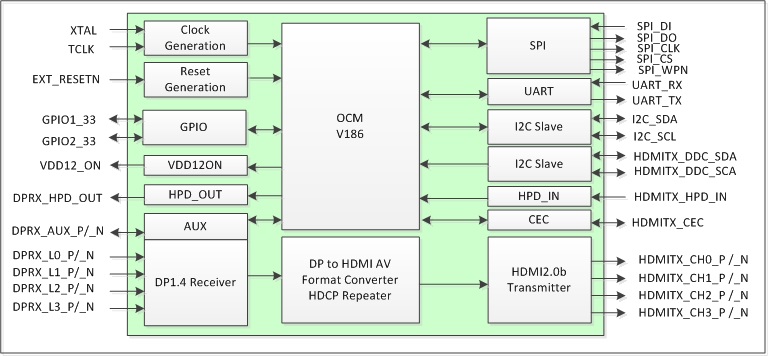
The MCDP2900 is an advanced DisplayPort1.4-to-HDMI2.0 protocol converter targeted for TVs, Game consoles and other consumer equipment.
edgy jacinth
Well I learned something today!
 final halo
will I be able to play on Mac as soon as the league starts? I saw that if I install it from steam it has a Mac client. I normally play on windows but for rn I only have a Mac
proud igloo
final halo
will I be able to play on Mac as soon as the league starts? I saw that if I inst...
Yes, mac and PC patch and launch at the same time.
final halo
awesome ty
and is there anything special I need to do for filters if I upload it to my account from filter blade?
(I never used a Mac before and just spent 5min trying to figure out how to open steam)
proud igloo
I'm fairly sure that it's supposed to work, haven't tried myself.
Only thing that has been weird around filters on macOS is that custom sounds didn't play a while ago as it looked in the wrong directory for the files - I don't know if that's been fixed yet.
final halo
I wasn't going to worry about custom sounds even tho I normally use them since I'm borrowing the laptop and don't want to install more than I have to even if it's small
 light herald
Otherwise, there're some graphic issues since 3.17.4 which lower the FPS and make the machine stuck. The experience wouldn't be very good, especially in later stage farming.
lilac trail
proud igloo
I'm fairly sure that it's supposed to work, haven't tried myself.
Custom sounds will play but you have to have them in the top level directory where the POE executable is. It's a very odd structure as the filter file itself (standalone file) is in a completely different location, as are hideout files.
If ever there was proof needed that Windows clients get bumped in front of MacOS clients here it is.
I updated the MacOS client first, then the Windows one, so my MacOS should have had a lower number in the queue but somehow it is behind, by several thousand !


I wonder if Steam client gets even better priority 🤔
atomic herald
one graphic bug in my hideout - just to show how it can look like, and the wp i just entered was unplayable due to this bug all over xD
i will relog and see if it disappears :)
 lilac trail
Had the same thing happen in a map last night. Started happening in 3.17. Log a ticket with support and raise issue on forum as well.
Saw someone raise the capped fps again there last night.
atomic herald
lilac trail
Had the same thing happen in a map last night. Started happening in 3.17. Log a ...
I think GGG knows about it, i just wanted to show ppl how it can look, new mac users i mean.
 ashen vault
I frequently see that graphical bug wherever water fx seems to be
edgy jacinth
Yeah that graphic happens a lot to me
Very annoying
I just take it that mac players play a slightly more difficult version of the game, cause we're tougher 🙂
 ornate sluice
So the graphic glitches persist? Too bad this game doesn’t support Mac anymore even thou steam requirements say the contrary.
light herald
Yes, it's still there.
 high horizon
i was having the stretched grass graphic issue last night, switched to 2x filtering and reloaded and it didn't reappear. i dunno if it was just the reconnect that fixed it or not but its worth a shot
(i first tried dropping texture quality to medium but uh....that just hangs the client every time)
atomic herald
it gets fixed by relogging, i know no other fix
 tacit cargo
someone else having a lot of crashes after the patch? Last league was great but now I get so many crashes..
on M1
lilac trail
No crashes but constant graphics issues in maps 😡
ornate sluice
^^
tacit cargo
after the patch when I hit "h" on the keyboard it writes /hideout. So far so good but if I am writing and press h it also presses enter and tries to write hideout. Very annoying. Someone knows how to change that
proud igloo
Are you running any third party tooling around PoE or is it just Steam/Standalone?
lilac trail
Hitting H should bring up the achievements, unless you bound H to something else manually. Look at the input configuration under options
edgy jacinth
proud igloo
Are you running any third party tooling around PoE or is it just Steam/Standalon...
I'm running Path of Building using CrossOver
Works like a charm
I wish there was a way for other tools to work, like chaos recipe helper
proud igloo
edgy jacinth
I'm running Path of Building using CrossOver
I meant to direct that to Utoko, but that's nice. 😄
high horizon
tacit cargo
after the patch when I hit "h" on the keyboard it writes /hideout. So far so goo...
yeah that sounds like an autohotkey script or something similar. i would see if it persists after a reboot or logout/back into osx (which in theory whatever app is causing this interaction wouldn't auto-restart after your computer reboots/relogs)
lilac trail
edgy jacinth
I'm running Path of Building using CrossOver
Why - there’s a port for MacOS. No need for crossover at all
high horizon
oh wow thats awesome, i had no idea and had been running it in crossover too. just googled it and yeah....i'm dumb heh
lilac trail
Yeah it’s not too well known. The latest update has the timeless jewels in it as well. It does have a few minor hiccups. Some keys seem reversed, at least on my M1 (up and down) and have to hold shift for uppercase. Other than that, it works exactly like the windows one.
Same guy also made a port for Awakened POE as well
high horizon
whats awakened poe? or should i just look it up
lilac trail
high horizon
whats awakened poe? or should i just look it up
It’s a pricing tool - handy if you buy/sell items (unless you’re SSF of course)
high horizon
lilac trail
It’s a pricing tool - handy if you buy/sell items (unless you’re SSF of course)
yeah i play pseudo-ssf -- i always say to myself i'm gonna try out trading this time but i don't think i've ever done a trade (maybe once?) in an arpg heh
lilac trail
It’s not as bad as people think. I suck at crafting so it’s a good option
You don’t really need it. You can get a good idea of prices from the trade site anyone but it’s handy if you want to check prices while in game.
high horizon
i did get deep into crafting and selling in ffxiv but the marketboard in that game makes it braindead simple. make thing, click list, set price to something around whatever its currently listed at, bam.
edgy jacinth
Is the PoB port a port of the community edition? I can't tell
proud igloo
edgy jacinth
Is the PoB port a port of the community edition? I can't tell
macOS and Linux PoB are provided by third parties combining the pobfrontend host with proper PoB script files.
edgy jacinth
ah
The Awakened PoE mac port doesn't work - macos won't launch with a "Awakened PoE Trade.app” can’t be opened because Apple cannot check it for malicious software."
Anyone know a workaround?
proud igloo
The actual PoB community team doesn't have any macOS builds as porting our runtime there and actually supporting it is a big undertaking that we don't really have the long-term manpower for.
edgy jacinth
got it
proud igloo
I've made some proof-of-concept one but that's janky and hasn't solved things like "updating".
And of course, it doesn't even DPI scale properly on Windows, let alone on macOS where "retina" is popular.
On APT, maybe you've got to Shift-open it in Finder first time or something?
edgy jacinth
Hm doesn't work
I'll look into it
that would be so helpful to have
to avoid having to command tab over to official trade site each time
ashen vault
edgy jacinth
The Awakened PoE mac port doesn't work - macos won't launch with a "Awakened PoE...
you have to right click on the application in the folder and click open the first time, but I couldn't get it to work properly once it was open on my M1 machine
 atomic lantern
Could anyone be so kind and let me know if there is a pob for Mac for 3.19?
proud igloo
atomic lantern
Could anyone be so kind and let me know if there is a pob for Mac for 3.19?
There's some ways you could try to run PoB on macOS.
There's running the Windows version directly with Wine, possibly as outlined here: https://www.reddit.com/r/pathofexile/comments/j83gl4/howto_using_path_of_building_1417014_on_mac_os/
There's running the Windows version in a Windows virtual machine.
There's pobfrontend which is a Linux/macOS reimplementation of the PoB frontend, using the same script files. There's no good distribution of that so getting it to run is quite fiddly with compiling stuff.
I have no idea how well pobfrontend runs these days as there's many forks of it and no real entity providing packaged builds and instructions for it.
The proper PoB Community Fork has no software or support for macOS or Linux, while there's some experiments to run on those platforms it's nothing production-ready and nothing we're super keen on supporting given our resources and interest.
(read: I ported SimpleGraphic to those OSes to see if I could but getting it actually usable is a big task)
There's these instructions for pobfrontend, claims to be "3.19 ready": https://www.pathofexile.com/forum/view-thread/3009944

Path of Exile
Path of Exile is a free online-only action RPG under development by Grinding Gear Games in New Zealand.
atomic lantern
Thank you good sir
high horizon
for future reference, this would be the page that has the latest packaged releases: https://github.com/hsource/pobfrontend/releases/

GitHub
Cross-platform Path of Building driver. Contribute to hsource/pobfrontend development by creating an account on GitHub.
(download PathOfBuilding.zip, not the others)
proud igloo
Gonna be fun to hunt down all those pobfrontend forks with patches if we start pushing more things into SimpleGraphic like the new mesh support for tree rendering.
high horizon
eh, hopefully that one stays the defacto frontend for mac users -- yes, it has 3 forks of its own, but at this point none of them have any commits not in hsource
proud igloo
I've only paid attention to the one that Arch Linux uses which isn't even on GitHub: https://gitlab.com/bcareil/pobfrontend#branch=luajit
I'm going to have to add something like this once the API is locked in: https://gitlab.com/zao/pobfrontend/-/commit/db02470da9f7548041033614530edd509c9ef698
lilac trail
proud igloo
There's these instructions for `pobfrontend`, claims to be "3.19 ready": https:/...
This works perfectly on an M1 for 3.19. I’m currently using it. It includes the new timeless jewel updates too.
 jaunty pasture
i downloaded the mac client tho
tacit cargo
Is there something like Exilence Next for macos? Something to quickly get a value of a tab.
 alpine bloom
tacit cargo
Is there something like Exilence Next for macos? Something to quickly get a valu...
alpine bloom
tacit cargo
Is there something like Exilence Next for macos? Something to quickly get a valu...
as I know exilence works on .Net sdk which allows to open it on any platform but I dont see any release packages for mac/linux
May be in future releases it will be included for unix systems
You may try https://bulk.tftrove.com/ with all currency types on selected tab to price check.
Web site created using create-react-app
valid heath

Microsoft
Free downloads for building and running .NET apps on Linux, macOS, and Windows. Runtimes, SDKs, and developer packs for .NET Framework, .NET, and ASP.NET.
 river drum
For the people here running on M1/M2 : how does it do in high juice content?
atomic herald
m1 max seem to have no problems, only that graphic glitches sometimes
high horizon
usually those graphic glitches (the ones with the infinite “walls”) are stuff you can work around but man, i had it happen in delve and that shit is scary. especially when you don’t know which direction the cart is gonna go
atomic herald
Now i get the idea that maybe it is due to my browser, i use to be on firefox and on poe-site to look on my friends builds, and i got some lag and closed the browser and that seemed to repair it. Maybe it was a coincidense or it has some connection.
I also use that page to see my old builds, that i may copy a bit from standard, but from now on i will close the browser inbetween.
atomic herald
i wonder, would it help if we could turn shadow off? i have all shadow stuff on lowest, and still get that graphic bugs (i know it's a mac syndrome) but is it in the shadow effects maybe?
proud igloo
It's hard to tell with such glitches but if it's material-related, graphical settings like shadows may affect material use and how materials are compiled, even if shadows/lighting are largely separate from geometry processing.
If it's a glitch in how geometry is loaded from disk into memory it won't have any effect as the underlying graphical data would be broken regardless.
proud igloo
 unborn glacier
FPS locked at 60?
unborn glacier
FPS locked at 60?
There's been reports of that presentation rates may be a bit off and while there's some indication that it might be an issue with the graphics API translation library used for PoE, there's been no word from GGG on the bug reports.
lilac trail
unborn glacier
FPS locked at 60?
Yrs it’s locked if you use the MacOS client. As Zao mentions, it’s been reported to GGG. They haven’t even bothered to reply. Since the game runs it’s not on their must do list.
If you want to get above 60fps you have to use a Windows client within a VM or run it on a windows box unfortunately.
 heady sandal
Could someone running the game on Mac OS please help me? I'm investigating which fonts are used for the stash tabs names, and it seems partially OS dependent.
Can someone make a screenshot of a tab with this string as a name?
§ 1-20۞☫♆ੴ۩*⁂*☷♠
This is what mine looks like on windows
 proud igloo
@heady sandal

This on macOS 12.4.
10 FPS with resolution scaling and multi-minute load screens, time to burn this computer.
heady sandal
proud igloo
<@186029907334135808>
thanks, ok lol, I guess there is a big difference :)
it seems that most of those symbols were provided by the Microsoft font MS UI Gothic
lilac trail
Anyone know of a tool that can look at hardware on a Macbook Pro M1. I’m ok paying for something but it would have to be unbelievably good for that.
Trying to determine cause of shocking graphics glitches before I go raise a case with GGG. Multiple maps were affected all day today 😡 . Want to see if it’s a temperature thing or memory or cpu or disk or whatever. It doesn’t usually happen straight away (though I’ve had that too).
edgy jacinth
lilac trail
Anyone know of a tool that can look at hardware on a Macbook Pro M1. I’m ok payi...
If you mean like this it's a known problem that everyone on macOS faces
 lilac trail
This is one of them yes. I have one that looks like a laser show and other interesting effects. It used to be occasional. Happens every day now. It's been this way since 3.17 - 9 months with no word, not even in the known issues section of the forum. Stuff like this makes it hard to justify supporting by purchasing stuff. Maybe we'll get lucky in release 3.20 but I won't be holding my breath for that miracle.
ornate sluice
lilac trail
This is one of them yes. I have one that looks like a laser show and other inter...
Last season I bought stuff for new season specially for dd build… logging in and I couldn’t play the game at all! Those graphic glitches were everywhere! I wrote about the graphic glitches here, forums, everywhere and not a single word from them. I feel extremely frustrated. It’s such a disrespect! If They don’t supp Macs anymore they should remove Mac requirements on steam etc then.
lilac trail
The MacOS client is actually provided by Tencent I've been told (and there are entries in the Client.txt referencing Tencent) so perhaps GGG do not have the in-house skills to address the issues and they have to pass it along to Tencent. On average (yes I'm parroting GGG own words back to them if they are reading this) support is good and responsive but they do seem lost when a MacOS issue is raised.
The Mac "known" issues hasn't been updated since 2020. Wonder why they ever bothered to create it if they aren't going to maintain it. I emailed support yesterday asking what I could do to help them and all they did was refer me to the links for PC troubleshooting 🤔 . They then went on to mention that they'd be happy to help with any account, payment or microtransaction issues, so you know where their priorities are at. That's ok - it helps me with my priorities too, which is not to spend any more money to support them beyond what I have till there is some fix for this crap.
proud igloo
I've never heard anything about that it'd be Tencent sourced or specific in any way. I'd be quite surprised if source ever left the office considering how the Chinese client and assets are developed.
The radio silence on the client is quite strange indeed, my guess would be a lack of engineering resources and the rather hefty surprise roadbump of Apple Silicon, turning it from a nice little side effort to requiring some solid engineering.
Of course, I don't have any more insight than anyone else, all I can do is poke at it.
lilac trail
I don't remember the source where someone said the MacOS client was Tencent sourced - maybe Reddit - so I should know better than trust that as a reference 😀 .
Still there are entries in the Client.txt that have a Tencent reference. I don't know what they could possible be referring to but afaik these line entries weren't in earlier Client.txt files (neither were seed numbers so maybe it's nothing. There is a lot of junk in the Client.txt that doesn't appear to be for anything)
2022/09/27 09:49:10 2134206499 a5e2316f [INFO Client 99021] [STARTUP] Tencent Start
2022/09/27 09:49:10 2134206499 a5e23148 [INFO Client 99021] [STARTUP] Tencent in 9e-06 seconds
We know they are resource stretched and I get the MacOS player base is incredibly small but then they shouldn't be catering for it if they can't support it properly IMHO. It smacks of a cash grab, even though they protest a lot that they aren't like the "big" game shops ....
proud igloo
There's the shader upload log notes in the shipping PC client too, lots of fun subsystems in there.
Haven't looked lately, they might've gone away by now, but still.
My feeling is that it was with good intent, especially as they had momentum on PoE Mobile around the same time. There's job openings for iOS peeps on the careers website so they might be a bit short.
Scratch that, was mostly Android/UI focused.
lilac trail
I’m 99% sure the glitches don’t occur on Windows based systems, or at least not to the same extent. I’ll have to try it via my VM. Performance is much slower on the VM but it will be a good benchmark comparison.
proud igloo
I get the impression from screenshots that it's all on terrain tiles, right?
Hrm, no. People also had half a fullscreen quad and things anchored to the player or skill effects.
I guess the ultimate way to find out is to mount a Heist during Exilecon to unveil the truth ^_^
lilac trail
Here's an example or two. I'm standing next to the strongbox but who would know. Took a bit to figure out where it was to click it. The second one feels like I'm in a Heist encounter, or testing security around the Mona Lisa at the Louvre 😀

 atomic herald
I wonder if it is the rosetta that makes it, in the mac itself, cause PoE was ported to intel-macs, and rosetta transfer it over to new macOS and new M1 chip.
Or old intel-macs have these glitches as well?
Hmm, yea, they have i think, meh, then i am wrong.
lilac trail
I think I might start a thread on the GGG Official forum and post my graphics issues daily. I've had some awesome one's today and still going. In both maps and hideout today. I don't think it's the underlying architecture. The M1 has been around since 2020 I think. This only started happening a a quasi regular basis for me at least since 3.17.4.
This is also the time there were a large number of complaints from the Windows base players too - DX12 was introduced then. That doesn't impact MacOS users but there may have been issues introduced in Vulkan or the underlying Mac graphics drivers. I realise these things are nasty and take to diagnose and correct but to have no response from GGG that it's even on their radar is disheartening to say the least. Yes it's a free game, but that no longer applies when you've invested money in mtx's and stash tabs and other gimmicks GGG are hocking to us. We become customers paying for services we are clearly not getting at this point.
Here's some of today's issues. Can you see the monster in the first one. There's one there. Thank goodness it wasn't a boss and I didn't die. Why should anyone be penalised XP when this bs occurs.


Rant over - for now 😀
valid heath
Send that to Apple support as well.
lilac trail
There isn't anything to send to Apple for the graphics issues - this doesn't generate any logs at OS level that I'm aware of so they'll have nothing to go on.
I've had random game crashes where the client completely closes. I could send that to Apple when it happens.
 reef rock
poking my head in here - how does Path of Exile run on mac? are the above glitches representative of regular experience/is PoE playable on mac?
lilac trail
You can run it native on the Mac - either Intel or Silicon using the standalone client. The issues above are what I'm encountering on my M1. Others may not have issues or have less/more severe ones then I'm experiencing. I'd be surprised if they did also occur on an Intel based mac as well but maybe not. You may be able to run it via GeForce or Steam as well but I can't say whether that route will be any better/worse or the same.
Performance is ok, at least on my setup using the standalone client, but the graphics issues are driving me crazy. Case has been submitted to GGG but I doubt we'll see any action acknowledgement. They seem totally snowed at the moment with support, though they will happily make th etime if you're buying something.
reef rock
thanks for the info! I'm thinking about replacing my PC with a mac and if PoE is playable i'm really interested - the thing that's stopped me from switching for a few years is games like path of exile not working. I sure hope they pick up on your case
lilac trail
Bottom line is it works on a Mac and should be easily playable on a Mac that has come out in the last 2-3 years. You do need an SSD, a decent CPU and I'd recommend at least 32MB RAM (system and video if you can afford). The windows version of POE has its own set of graphics and performance issues so the Mac isn't alone.
I also have it running on my iMAC (Intel) with the MacOS client and have set it up in a VM on the iMAC to run the windows based version on occasion. It runs a little slower in the VM bit not horribly so. The one thing in favour of using the VM is that the FPS is not capped - it can run at over 100 FPS. The MacOS client is hard capped at 60 FPS. Again not that big of a deal but you should be aware of that limitation if you usually run games and high FPS. This only happens in POE - for which zao raised a ticket for a while ago too.
reef rock
 ooh sick good to know its actually playable. i imagine, yeah, i can run in vm as a backup

 delicate agate
for information, it may be not issu from driver video, only download texture map are not finish..
valid heath
lilac trail
There isn't anything to send to Apple for the graphics issues - this doesn't gen...
There is, demand them to bring back Vulkan support its simple
proud igloo
What's the Vulkan story on macOS anyway? Eternal fiddling with external wrapper runtimes, as I gather there's nothing out of the box?
valid heath
the story is Apple
as far as I remember Vulkan as supported on macOS but then they decided to block it
valid heath
its funny as they are "Promoter Member" https://www.khronos.org/members/list

The Khronos Group
Deploying and developing royalty-free open standards for 3D graphics, Virtual and Augmented Reality, Parallel Computing, Neural Networks, and Vision Processing
proud igloo
Apple is like Oracle or a lawnmower - be happy if they don't take off a hand in their indifference.
valid heath
I mean if you expect any real game dev on Apple that would be 1st step to make it appealing for game Devs
Now you have to port your game to M1/2 Arm then Metal and god know what else
while 99% of games are made with x86-64 DX12/Vulkan in mind
proud igloo
I don't think they care about gaming or developer ergonomics, it's quite a small market.
At least there's a modern API on the platform now rather than the GL3.1-ish you got in the past.
Pay the Apple tax in blood and tears, or limp along with MoltenVK and the rough edges that provides.
valid heath
gaming market small ?
proud igloo
Comparatively vs. their other business areas like productivity, non-games entertainment and mobile.
valid heath
I guess you are right as they would never stood a chance with how overpriced their machines are ( for gaming )
proud igloo
The Apple PC gaming market is pretty much "people who have a mac for other reasons and would like to play some games on it".
Historically you were also quite likely to have iGPUs and whatever Apple-twisted discrete GPU you could get that worked in the machine, something that has changed somewhat with Apple Silicon.
I do wonder if there's any decent external graphics debuggers for Metal or if the defunct RenderDoc builds for macOS are good enough to capture the misrendering.
It's a completely foreign ecosystem to me, despite having done some porting work to the platform over the years.
valid heath
Well then mby if the revers engineered Linux project gets GPU working that might be a way to do it
lilac trail
I like the lawn mower analogy 🤣 TBF I use a Mac for more reasons other than gaming. Gaming is just an added bonus. Having said that though, the limitations discussed here are extremely annoying. Apple has always been a somewhat closed ecosystem (remember the old proprietary MacOS on Apple II and the original MacIntosh). It allows for a more stable platform than windows, but with a trade off of course.
GGG may or may not be limited by that to some degree but I believe they are not using the latest MoltenVK, so before we go running to Apple, GGG need to update their client so we can see if things are resolved. I updated my Mac to 12.6 yesterday before I submitted a case to GGG (again) and the problems are still there. It's heart stopping when you're at level 97 and the graphics bugs completely blind you. Game is hard enough without that BS. Just for giggles here is the case, feel free to add to it with your own issues. Maybe volume of complaints will help. They at least know it exists as they moved it from bug report, which I believe it is, to technical support -https://www.pathofexile.com/forum/view-thread/3315496
It would be curious to know what the MacOS market is in Asia - this is by far the largest market for POE (ok I don't really know but I think it probably is) but is probably almost all windows based.
Path of Exile
Path of Exile is a free online-only action RPG under development by Grinding Gear Games in New Zealand.
valid heath
They best you can find is this: https://store.steampowered.com/hwsurvey/Steam-Hardware-Software-Survey-Welcome-to-Steam
lilac trail
Here's an interesting snapshot of my system before I launch POE today. We all know POE challenges even modern rigs, but I expect the temperatures to go up by 30 degrees (celsius) once I get going. Yes it's a laptop but that's just silly, and given the only thing running will be POE, it speaks to some of the inefficiencies in it (also known).


 valid heath
PoE is very demanding game, especially when you start juicing
and its uses CPU and GPU at the same time unlike other workloads
lilac trail
Yes it is, but I'm not juicing much at all. I basically alch and go with maybe 2-3 rusted scarabs at best, since I have no currency to go higher. I'm sure there are games out there that are just as, if not more, demanding, but since I don't play anything else I don't have anything to compare it with, but I find it hard to believe POE is very well optimised at all.
proud igloo
@lilac trail I have to admit I lifted the bit about the lawnmower from one of the good old talks by Bryan Cantrill about Oracle, it's a fun watch if you haven't experienced him before: https://www.youtube.com/watch?v=-zRN7XLCRhc

Fork Yeah! The Rise and Development of illumos
Bryan M. Cantrill, Joyent
In August 2010, illumos, a new OpenSolaris derivative, was born. While not at the time intended to be a fork, Oracle sealed the fate of illumos when it elected to close OpenSolaris: by choosing to cease its contributions, Oracle promoted illumos from a downstream reposit...
Still applies quite a bit to Apple ^_^
valid heath
lilac trail
Yes it is, but I'm not juicing much at all. I basically alch and go with maybe 2...
The thing with PoE is thats its prty much open sandbox with very high upper limits of what you can do
And its Very well optimised for what it is
The shier amount of stuff it has to process, calculate and display is kinda insane if you think about it, most games especially console games just put hard limits on everything
proud igloo

lilac trail
proud igloo
<@656493154953855006> I have to admit I lifted the bit about the lawnmower from ...
OMG - I've just started watching the video and I'm having flashbacks already. I lived through the SunOS and Solaris switch over (yes I'm that old). I can only imagine what other gems are in this video. Thanks for sharing 👍
proud igloo
You may also enjoy On The Metal, a one-season podcast with Bryan and his new Oxide Computer company where he chats with all sorts of industry legends.
His rant talks are epic ^_^
lilac trail
I'll have to check it out. His speaking style is good. Very passionate and easy to follow.
Here's a snapshot of the system now. I rebooted my machine, so it's all clean, then started POE. I'm ONLY standing in my hideout. The temperatures are another 30 celsius 🤔 🤨 Seriously, why - what the heck is it doing. I'm just standing there. Mapping and juicing aren't even in the picture at this stage.
 lilac trail
Does anyone know of a port for poe lab compass software, or a similar tool that will work on the MacOS ? It's painful trying to navigate labs with just the poelab map and the performance on POE on my VM makes it a non-starter. Performance makes it unplayable via VM now (it used to work fine). The source for the program is available but I'm no where clever enough to be able to port it.
edgy jacinth
Has anyone tried using Crossover to play the Windows version of POE on a mac? Wonder if that'll help with graphics issues...
 pure iron
edgy jacinth
Has anyone tried using Crossover to play the Windows version of POE on a mac? Wo...
pure iron
edgy jacinth
Has anyone tried using Crossover to play the Windows version of POE on a mac? Wo...
Poe work fine with Steam version
proud igloo
Finally freed up my 5700XT by buying a new GPU for my main machine, so now I can actually test PoE on macOS 
Looking forward to seeing if the visual glitches manifest on cool legacy CPU and GPUs or if it's something more specific to Apple Silicon.
proud igloo
Took a while to sort out the boot flags. On the G-Sync monitor I had handy (so no working VRR) at 144Hz I'm getting a juicy 48 FPS on the login screen.
(solid 60 in-game at 60Hz)
proud igloo
 proud igloo
Can't seem to make it budge. Would be interesting to build some samples that actually use the timing extension but I'm not super keen on porting something like Granite to macOS.
lilac trail
Did you get any glitchy graphics in-game ? Someone left a comment in the case I opened that they get the same glitches on an Intel system but I don't know if he was referring to a MacOS based Intel system or a pure Windows OS problem.
I did test on my Intel based iMac with a windows based VM, but I was looking at DPS on it. Can't recall if there were graphics issues on it or not, though given the nature of them you'd expect I would have noticed them. I'll give it another try and post here.
proud igloo
Only stood around in Lioneye's Watch in Standard on my second account, would have to roll an alt in league to look at any fancier content.
Amusingly enough, I tried to provoke a similar problem with Granite on MoltenVK but it keeps working on older runtimes.
Evidence points toward that the timing extension is probably not the whole story for PoE by the way.
pure iron
lilac trail
Did you get any glitchy graphics in-game ? Someone left a comment in the case I ...
M1 pro, not glitches, but artifacts, like strange lines and blocks of ground without graphics (transparent blocks of ground)
lilac trail
Here's the latest show from Mesa T16 Alch and Go. About the third map of the day. Video is better at capturing the issue than a static snapshot would.
https://i.imgur.com/pO8nPRb.mp4
 proud igloo
Nice cactus rave. 
lilac trail
😀 Those 1% should try this if they think POE is too easy. It's an undocumented "feature" I'm sure. It happens even in the first map of the day (this is the 3rd one). I need to go test the Intel based Mac to see if the same stuff happens there too or it's just a POE-Apple Silicon thing. I can't get it to happen. It just does. I'd post it on reddit but those mods are nuts. They'd probably ban me for being negative about POE.
lilac trail
Oh I think I know what this is - it's the new hard mode they've been working on 🤣
lilac trail
The attached disco and block party are from 2 alch and go T16 Strand using the MacOS client from GGG on an INTEL based 27" 2016 iMAC. Issues started to occur about 3 maps in. I might do some more testing tomorrow but these two are definitive enough I think to demonstrate that the graphics issues are definitively not limited to Apple Silicon based systems.
https://i.imgur.com/FYoIm9t.mp4
https://i.imgur.com/jEUskQD.mp4

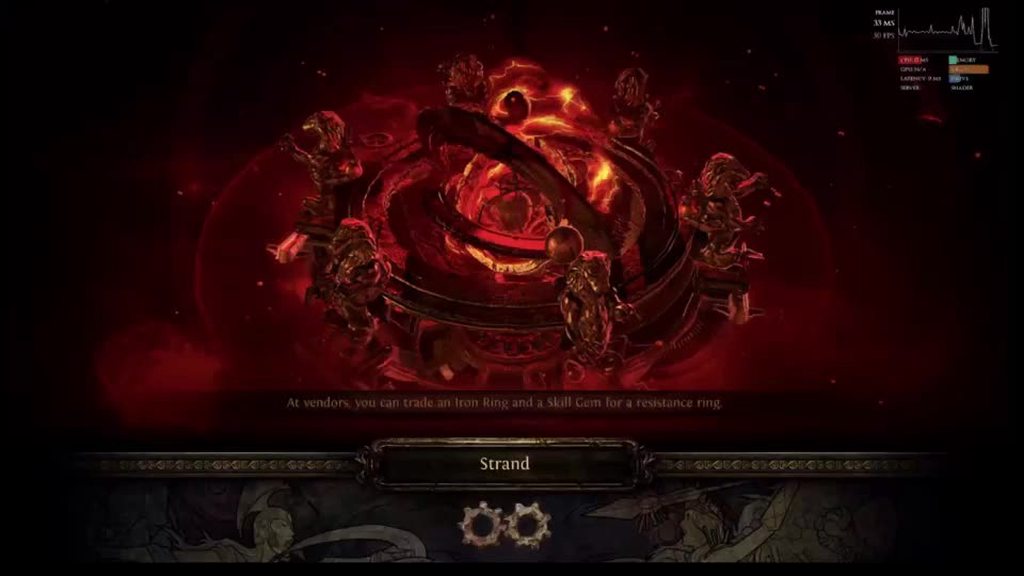 lilac trail
Bad day at the office 🤣 On a more serious note - graphics issues were in fine form today. The second pic is one of the tamer ones. They seemed to get worse with poor frame rate and ms from server (over 100ms and FPS less than 10). Am I the only one getting these ? I don't see anyone posting on reddit, twitter (if GGG are even there) or the official forum. Has everyone given up playing the game via MacOS ?


 proud igloo
Unfortunately not, but you're a member of an exclusive club with several people from this channel 😉
It might help if you contribute to the forum threads by Bob here, noting that it happens for more people.
lilac trail
 sand ginkgo
Anyoen know how to fix rednering issues?
sand ginkgo
Anyoen know how to fix rednering issues?
Feel free to add to the thread on the forum - https://www.pathofexile.com/forum/view-thread/3315496/page/1#p24790310. Even windows based players are adding to that thread so I expect graphics issue are across the board. Is this a Apple Silicon or Intel based system above ?
The issues I experience can happen in maps, story zones or hideouts. It can be the first map of the day or later. There's no rhyme or reason to it. It can't be a local issue - I get it on both Apple Silicon AND Intel based Macs, so it must be server side related.
I fired up an old, vey old, Windows 10 system the other day. It only has 8GB of RAM on it, is non-SSD and yet it performs far more smoothly. I have not tested it extensively but I've had no graphics issue so far.
I don't envy GGG troubleshooting this one at all. It won't be easy (otherwise it'd be solved by now 😛 ) but it would be nice if GGG at least said they were looking in to it. not enough people on reddit screaming about it (or they've been banned. POE mods on Reddit seem very touchy about criticisms)
Path of Exile
Path of Exile is a free online-only action RPG under development by Grinding Gear Games in New Zealand.
lilac trail
Should we hope the new OS release will give us some relief from the awful state of graphics in POE or is it going to break even further because GGG aren't keeping up
"macOS Ventura includes Metal 3, which will improve gaming quality on Apple silicon Macs. It includes MetalFX Upscaling for accelerated performance that offers gamers a more responsive feel and improved graphics. There's also a Fast Resource Loading API that gives games easier access to the high-quality textures and geometry for an immersive gameplay experience."
proud igloo
🎲
I hope it doesn't break my Intel-based Hackintosh, now that I've got a proper AMD GPU in it and all.
For PoE play you want macOS Ventrua 😉
lilac trail
It will come as no surprise but graphics issues exist in delve too. Not as bad but still quite the laser show. No time to record it, I was busy trying not to die 🤣
atomic herald
I posted now in the poe forum thread as well.
proud igloo
So busy lately, haven't even managed to boot macOS on the Hackintosh let alone play PoE on it.
lilac trail
atomic herald
I posted now in the poe forum thread as well.
Good. I’m thinking of posting there daily. It might turn into a blog 🤣
atomic herald
;D
proud igloo
Looking forward to either a forum mute or "if we fix this problem do you promise to be quiet for a while?" 
edgy jacinth
my delve issues are even worse, i often get booted from the game with a weird error about the game not being able to sync with the server when I delve. And it's almost always at the most interesting nodes! Cities, etc
lilac trail
edgy jacinth
my delve issues are even worse, i often get booted from the game with a weird er...
Ah - I got that continually is a zone yesterday too. Very annoying but don't think it's restricted to the Mac based platform. I didn't bother searching the forum but it's probably be reported before. You could probably try /oos (I didn't) and see if that fixes the issue
I noticed this the other day and raised it with GGG support. Most people probably never notice it since it usually goes past so fast but it was slow doing a patch update before the login screen the other day so I noticed it and screen captured it. It doesn't affect the game but seriously - how much effort does it take to keep the screenshot up to date - Scourge league is now three leagues back now. My Intel based Mac client splash screen is even older - it says "Siege of the Atlas". An intern could do the updates, it's not that technical ....I'd be interested to see what the splash screen says for others ...
 proud igloo
Mine goes Expedition, kind of an artifact of how there's multiple instances of the launcher in different locations.
It's not updated because it doesn't get updates through itself, I believe it patches only the second stage.
Not super polished, but It Works 😉
When doing my proof-of-concept port of Path of Building to macOS, I explicitly decided to not ever touch the self-update part as it's universally horrible.
lilac trail
Wise move. It is horrible. I get that the splash screen isn't anything to yell about but it speaks to a lack of pride in the product, or the fact that the product has grown beyond the ability to manage all the moving parts.
I took some screen shots this afternoon of my system at idle, at POE login screen and when standing in my HO (which to be fair is pretty busy). I'm at a loss to explain why my laptop runs so hot once POE starts.
Even just at the login screen POE causes the system to go up by almost 20c (celsius for those still use the other temperature scale) "hotter" than when it idles. The login screen is doing nothing - why does the CPU and GPU temperatures increase so much ?
And once logged in the temperatures go up another 20-30c. My system is less than a year old. It has 64GB RAM and 10 cores. Is the Macbook Pro so bad at temperature management or is it POE or a bit of both ? I can't see how users can run the game well on older rigs if my experience is indicative of the client, bit the MacOS and Windows 🤔


 proud igloo
The login screen is still a full game scene in the background with a fairly detailed cathedral hall, a lot of object instances in all the templars and birds, I think they're skinned too but it's been a while since I looked at that room's data.
In general if you're doing active render/som work on the CPU and GPU it's going to have a noticeable effect considering how much power saving you normally have in effect.
Thermals are always a challenge on portable systems and if you're not throttling it's kind of good enough.
proud igloo
Haven't counted how much geometry there is but probably well over half a million triangles and it's doing all the lighting and other passes.
I'm having around 2ms CPU and 8ms GPU frametime on that scene in 4k on Windows, so not a negligible load.
lilac trail
No-one can complain that POE is ever idle 😀 I haven't looked lately but my cpu times are probably slightly higher than what you are getting. so performance is ok (except for the capped frame rate of course). My system runs ok even at the temperatures shown but it's noisy since the fans are going continually.
 wraith frigate
If your framerate is uncapped the login screen for PoE will easily max out any GPU as it blasts as many frames as possible rendering that background scene IIRC. Most desktop configurations don't have an issue with this, as they have solid thermal regulation and can deal with sustained 99%+ utilization reasonably well. Laptops can handle that kind of utilization in short bursts, but tend to handle sustained maximum load.. poorly, effectively turning into a hotplate.
Personally I'd hesitate letting PoE run at anything higher than 30 FPS if I played on a laptop.
lilac trail
wraith frigate
If your framerate is uncapped the login screen for PoE will easily max out any G...
You're in luck - the frame rate is capped on a Mac - you cannot go above 60fps. Maybe some day they will allow us to join the people at the big table and get above 60fps. Until then you'll have to go to the dark side and play on a windows system to get anything above that ( you can exceed it running in a VM but the performance is not worth the effort - been there done that ! )
wraith frigate
Sounds like Apple is just relying on wishful thinking to keep thermals under control, then.
lilac trail
Anyone know how to get the Ctrl key mapped under the UI options. I need to temporarily change it so I can get a snapshot of skill set bar and of course Apple uses ctrl+shift+3,4 or 5. That triggers changing to the alt skill set, which I don't want.
Either I remap POE or MacOS. I'd prefer not to fool around with the MacOS setting. I'd just remap and then swap back in POE but POE does not seem to recognise the control key on a Mac keyboard so I couldn't get back to using Ctrl if I remapped. Maybe there is a trick to getting it done in POE. Happy to be enlightened 🙂
proud igloo
Make a copy of your PoE ini file, maybe?
You could also possibly bind an OS shortcut (if that's a thing) to run the screencapture -x tool.
lilac trail
There's a POE ini on the Mac ? Know where it is by chance - there's like 4 places POE is scattered over 👀
Do you mean the production.ini file ? I know where that is so I can take a look in there
Anyone have an educated guess the numbers correspond to - decimal representation of the key stroke ? I think the control key is the last one (toggle)
pen_options=79
open_inventory_panel=73
open_social_panel=83
open_events_panel=66
open_world_panel=85
generic_league_key=86
open_character_panel=67
use_temporary_skill1=54
open_guidebook_panel=186
performance_overlay=112
skip_encounter_delay=0
toggle_skill_bar=17
And if I change something is it dynamic or do I need to quit the game before I make a change and restart it
Looks like the number is the decimal mapping of the ascii key. B appears to be 66 if I've looked it up correctly, but 17 corresponds to ctrl+q not just ctrl, which seems to be 0 so not sure I've got it completely right.
proud igloo
Not sure what the actual mapping is, but that's the config alright.
Last looked into it when APT got the ability to auto-detect the highlight key.
It may be scancodes or something similarly platform or app dependent.
lilac trail
Actually there's an easier solution - I mapped the screenshot key to F12. That worked. I can crop out what I don't need. Was interesting to look at the ini file. Never been in there. Some interesting stuff for another time
lilac trail
Ventura has been released !
atomic herald
so my game crashed, it closed down on a second, on a boss, i still had the map portals open and 3 times in a row poe closed, and 4th time i got him xD
In a tier 6 map on Tanes bossfight.
And i wonder, anyone has xp of Ventura and poe yet?
proud igloo
atomic herald
so my game crashed, it closed down on a second, on a boss, i still had the map p...
"Hard Mode" 😉
atomic herald
lilac trail
Anyone know how to get the Ctrl key mapped under the UI options. I need to tempo...
you want to make a screenshot? I use poe in windowed, almost full screen window, and i can reach the dock where i have the app to make screenshots (i have the name in swedish, not sure english version) and i use that one a lot, cause i can make exactly designed size of the picture and i can make it 5 second delay if i want to reach some special spot.
lilac trail
Screenshot was what I was after. I made a work around and bound F8 to the UI screenshot option. I then crop what I need. Not be most elegant but get's the job done.
I might update my Intel based iMAC to Ventura later today. I usually wait for 6 months while Apple sort out the bugs that come with every release but I'm genuinely interested to see if Ventura helps with anything. My gut reaction is it won't since the GGG code hasn't be updated since ... well never ... so it will continue to use the same outdated Vulcan drivers but I guess we'll see.
proud igloo
Can't wait for the big Exilecon'23 announcement - macOS PoE 😉
atomic herald
lilac trail
Screenshot was what I was after. I made a work around and bound F8 to the UI scr...
I use the screenshot app from the dock, activate it there with mouse pointer, and not by keys, for me that is simple.
And about Ventura - i just want to know if others test it first xD
proud igloo
Ventura is a weekend-type project for me as it means upgrading OpenCore and making a full backup.
atomic herald
proud igloo
Ventura is a weekend-type project for me as it means upgrading OpenCore and maki...
I have figured that u have a lot else to do as well, maybe some other mac-user is ready to test it. :)
lilac trail
Upgraded to Ventura on my laptop (my iMAC is too old). Upgrade went fine. Sadly, but as expected, it did nothing to solve the graphics issues within POE on the MacOS stand alone client. The 60 fps cap is also still there.
I might try the portingkit for POE (https://www.portingkit.com/). I run windows games with it and they work well. Yes it's redundant given there is a MacOS client but it might circumvent the graphics issues since it'll be using the Windows based version. It'd be great if I could run some of the windows based utilities for POE within it as well since there is no Mac equivalent. Looking at you AHK ...well technically AppleScript might be an equivalent but I've never learned to use it.
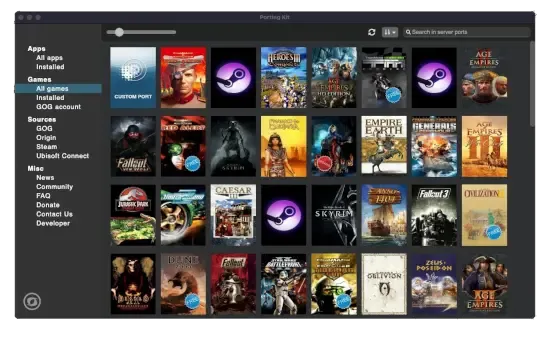
Porting Kit
With Porting Kit, you can install Windows games and apps on macOS easily using Wineskin technology!
edgy jacinth
lilac trail
Upgraded to Ventura on my laptop (my iMAC is too old). Upgrade went fine. Sadly,...
Yeah I've thought about trying to use Crossover to run Windows PoE for similar reasons
haven't tried yet
atomic herald
lilac trail
Upgraded to Ventura on my laptop (my iMAC is too old). Upgrade went fine. Sadly,...
thanks for info about the ventura!
no other problems with it? like other applications?
lilac trail
None so far as I can see. I haven't tested printing yet but other things like Parallels work as they did before and of course discord is working 🙂
proud igloo

Hello everyone! Stream starts in 20 minutes!!!✨✨
I've been sneakily looking at the buffers I discovered last stream and I found out something interesting!!
The M1 Ultra does not have 2 GPUs. It has... 8! 🤯
Likes
115

 Twitter
·
Twitter
·
Quite unrelated to PoE but the thread talks about how Apple Silicon can scale up nicely across multiple GPUs, on a deep technical level.
proud igloo
Heh, I finally decide to boot macOS and run some maps. My boot USB stick has eaten the configuration file and can't boot ^_^
proud igloo
Took an hour to unscrew that, finally running PoE.
Ran two maps, no graphical glitches - clearly perfect OS.
(also what's up with the keybinds, I can't bind things to Alt, Ins or Del)
lilac trail
The graphics glitches can happen anytime. Sometimes I get them first map, sometimes several before one occurs. Sometimes I only get them in one map and not others. Then there's the HO glitch, no maps at all. I haven't tried story zones. I'll do that if I'm going fishing rod hunting, otherwise there's no use for a character o be in story zones.
Some keybinds seem to work but others don't as I found out earlier this week. Can you bind CTRL or is that just my issue 🤔
proud igloo
Couldn't bind Ctrl+X for weaponswap at least.
proud igloo
lilac trail
The graphics glitches can happen anytime. Sometimes I get them first map, someti...
On fishing rods, I have found two Angling nodes this league, compared to the three Ethereal Mists.
Ended up going back to the PC after two maps as nothing about the setup is ergonomic 😄
Have you tested with various builds and MTXes by the way, in case they influence things?
I guess it has happened enough over the leagues now that you've run a lot of builds.
lilac trail
I do have various builds and MTX's on each. It doesn't seem to matter. They all have had graphics glitches. About the only place I don't recall seeing graphics issues so far is in Labs. Possibly because there's not as much on screen action in there, though the final Izaro fight can be busy.
I don't do Expedition, Heist, Incursions or Betrayal so I can't say whether the glitches occur in those either. I suspect they do for Expedition and Betrayal since they spawn in maps.
lilac trail
proud igloo
Couldn't bind Ctrl+X for weaponswap at least.
The keybinds are weird, at least on a Mac. I can't use ALT or CTRL. They just aren't recognise. Functions keys are ok. I have screen shot bound to F8, which makes no sense since POE doesn't recognise the CTRL key, yet it'll recognise a function key when you have to press CTRL+F key. Maybe to map the CTRL key you have to press it twice 🤷♂️
lilac trail
I'm about to try running POE via the porting kit app. It isn't native (it runs as an Intel app) which may mean performance will be impacted but I'm curious to see if the glitches still happen. It's not definitive if it does since Windows sometimes has glitches too, but not as frequently as the MacOS version seems to.
 ocean herald
hello somebody have awakened poe trade on 3.19 (mac os)? im trying to build it, with electrong but have a bugs
lilac trail
Bee naway for a week so haven't even touched the laptop, let alone the game. This morning I get this witchery. anyone else encounter the issue ? No idea how to fix it ...
 lilac trail
Ended up reinstalling. Maybe now the graphics glitches will autoamtically resolve themselves too 🤨
 south flame
I ran into the same problem also
lilac trail
south flame
I ran into the same problem also
Was it after updating to Ventura ? I updated and it ran fine for multiple updates. Then the weird ass crap above occurred. I'm glad to hear it wasn't just me. I did log a ticket with support. I don't know why I bothered. They just spew out generic crap about being unable to provide techincal support and referring me to generic Windows based troubleshooting tips 🤨
I guess it isn't too widespread an issue, thoug heven if it were it would be hard to tell since the Mac community is so small and I don't post on reditt these days.
south flame
lilac trail
Was it after updating to Ventura ? I updated and it ran fine for multiple update...
I updated to Ventura early on when the betas came out and this issue started only recently.
atomic herald
i havent updated to ventura yet, and i havent got that issue
proud igloo
I assume this is with the Standalone patcher? What were you doing as it happened?
proud igloo
Slightly related from a friend, Ventura seems to have some changes in how it deals with unsigned software: https://bugzilla.mozilla.org/show_bug.cgi?id=1799332
NEW (nobody) in Toolkit - Application Update. Last updated 2022-11-08.
lilac trail
proud igloo
I assume this is with the Standalone patcher? What were you doing as it happened...
It was the standalone. I clicked on Path of Exile in the task bar. It started to update then threw up the error message. It was the first thing I did after getting back from vacation. No other updates whatsoever
And I ran previous updates of POE without an issue before I went on vacation. Something changed somewhere. Since it wasn't a MacOS update it points to the POE Client, but that's a stretch unless it's being reported by others in another Mac channel elsewhere
edgy jacinth
Have you tried going through Steam?
lilac trail
edgy jacinth
Have you tried going through Steam?
No. I'm not a fan of steam. Some people have played via GeForce. I know there is a free and paid tier but I already use enough 3rd party tools for POE as it is. It shouldn't be that hard for GGG to make a reliable MacOS standalone client. They aren't dumb but they need to focus 😐
On a related note I played via a Windows VM (using Parallels) yesterday. The performance was about what I've come to expect but at least I didn't have any of the crazy graphics glitches. It uses the Parallels display adapter and DX11. I don't know enough about how the Parallels graphics engine works. If it never references the underlying MacOS graphics that would tend to indicate to me that the graphics issues in the stand alone client must be related, at least in part to Apple drivers, though if GGG are using outdated Vulkan drivers (which I believe their MoltenVK drivers are) it certainly would provide for a stable interaction between the two. I just wish GGG would get it together and issue a statement that they are either working on the issue or it isn't a GGG problem. Hanging your customers out tio dry in limbo is never a good business call, regardless of how smal the base that may be impacted by it.
proud igloo
As far as I can gather online, the Parallels WDDM driver translates from the guest's Direct3D DDI to Metal on the host.
lilac trail
So it uses the same drivers at an OS level that the GGG MacOS client would then ?
proud igloo
macOS itself only exposes the GPU via Metal or possibly still OpenGL to userspace. Anything running on the OS has to use either of those.
Parallels PoE runs D3D on the Parallels driver which translates internal DirectX to host Metal.
macOS PoE runs Vulkan on MoltenVK which translates Vulkan to host Metal.
Metal is as "direct" GPU access that you get on macOS without extreme hacking, if at all.
lilac trail
If I follow what you said, that would be a "yes" to my question then 😀 and therefore the graphics glitches are a GGG thing, not an OS issue.
I've run about half a dozen maps on the MacOS this morning without any issues. I'll see how the rest of the day goes before I make further comments. Here's hoping though 🤞
lilac trail
Spoke too soon. Changed maps and boom - graphics glitches still there 🙄
proud igloo
This is on the vanilla macOS Standalone client, right?
lilac trail
Yes
valid heath
lilac trail
If I follow what you said, that would be a "yes" to my question then 😀 and the...
We assume that the problem is old MoltenVK version which GGG implementation could update and hope it fixes that without braking anything else.
https://github.com/KhronosGroup/MoltenVK
So yeah that's something that GGG could attempt to do.
The thing is if Apple would just stop acting like spoiled child and just support Vulkan like everybody else the problem probably wouldn't exist in the first place.

GitHub
MoltenVK is a Vulkan Portability implementation. It layers a subset of the high-performance, industry-standard Vulkan graphics and compute API over Apple's Metal graphics framework, enablin...
proud igloo
Heh, tried playing PoE on the "mac" and made it through one map before bailing out. Between the weird mouse movement, the inability to bind my common shortcuts, the lack of audio on my machine and the not-awesome performance, I find it hard to push through.
(most of those are local problems)
lilac trail
Just thinking out aloud here ...GGG support Vulkan drivers on both the Windows and MacOS version. Are the Vulkan drivers MoltenVK on both the Windows and MacOS versions or just MacOS ?
proud igloo
Windows Vulkan is straight-up Vulkan.
MoltenVK translates Vulkan to Metal, something that is nonsensical on Windows.
MoltenVK acts as a Vulkan ICD on macOS, either statically linked into your executable (like PoE) or as a shared library loaded in via a Vulkan loader.
valid heath
PoE on Mac runs using proprietary Apple Metal API
And like zao mentioned MoltenVK is a translator of instructions from Vulkan into Metal
lilac trail
While Apple may be eventually get their act together I see this as primarily a GGG issue to resolve. I used to play with the MacOS stand alone client with no issues till 3.17.4. Something changed then and the graphics went to hell in a hand basket. It wasn't an apple change that caused it. I recall there were some graphics issues on Windows in that change too ... so I'm still looking at GGG to "bang the rocks together ..."
It happens on both Intel and Silicon based systems too
valid heath
I play every league and don't recall having graphical issues like you guys on Mac even when Vulkan was in beta
Any post from reddit i remember about similar stuff were resolved by simple driver update ( pure Windows platform)
lilac trail
valid heath
I play every league and don't recall having graphical issues like you guys on Ma...
You've never experienced any graphics glitches using the MacOS stand alone client ?
lilac trail
I never had issues when I played on a Windows based system either, but I don't have a Windows system now so I use the Mac client. As I mentioned it ran fine until 3.17.4. If this issue was happening on the Windows platform reditt would be aflame
It's funny - GGG are fine to build a game around the 1% top end players but they aren't willing to put the effort in to fix a game bug that affects far more users
Imagine if those streamers used Macs instead of Windows ...
valid heath
lilac trail
It's funny - GGG are fine to build a game around the 1% top end players but they...
Did you know that 90% of statistics are made up?
Not to mention that bugs like that on windows would affect so many users it would be mission critical to fix it..
valid heath
lilac trail
Imagine if those streamers used Macs instead of Windows ...
Why would they? Why would you chose inferior platform for your work?
lilac trail
Stats are only useful if they support an argument from you POV 🙂 GGG ignore them all the time, until they are useful of course. It's mission critical to me and the other MacOS users ....
valid heath
I assume you bought Mac cuz it's better for your usage scenario ( Adobe stuff ) but for everything else i don't see the value in it
GGG might not be ignoring you or Mac problems we can only speculate what's the real issue is
Mby from their pov the work required is just not worth the effort
Or they have upcoming feature in the distance like going native Metal that makes even less sense to work on this
Like i said before Apple is huge underdog in gaming space and forcing your own BS on game developers doesn't help that at all
If only they would just NOT block Vulkan 🤔
proud igloo
What I really should do is see if RenderDoc builds and works.
@lilac trail I forget if we've discussed this before, do the glitches correlate with any resource pressure like VRAM or system memory?
Would be neat if it could be provoked by external consumption.
lilac trail
valid heath
I assume you bought Mac cuz it's better for your usage scenario ( Adobe stuff ) ...
I bought the Mac for a few reasons. I knew it had limitations if I wanted to play games on it. Everything was good until that patch hit though. GGG definitely make a call based on criticality to the player base. I'm ok with that. I'm not ok with them not responding to tickets raised. You know what happens when you raise a case with support for a mac issue ? They give you a generic response that they can't provide technical support. Then they provide troubleshooting links to Windows based systems. That's after I specifically mention to them it's a Mac based issue. They clearly don't know how to support it. It's puzzling why they have a Mac based client at all given their inability to support it properly .
valid heath
lilac trail
I bought the Mac for a few reasons. I knew it had limitations if I wanted to pla...
Well support ppl are usually not very technical in nature as they are more centered about Game support and purchases in it
lilac trail
valid heath
Well support ppl are usually not very technical in nature as they are more cente...
Sure but if I then raise a ticket in the forum as requested I'd expect a response of some sort. Not once has a suport person responded in a ticket for a Mac issue.
valid heath
But yeah I agree if they committed on supporting Mac they at least should acknowledge the issues
lilac trail
Yet you see it all the time for windows based issues, even tiny ones
proud igloo
I'd love to know if it's something like the main people that did the port are slammed with other core work on PoE2 or other platforms.
valid heath
I would love to chat with some of GGG engine devs or with Jonathan him self ❤️
lilac trail
I will say this though - I had an issue with an MTX I purchased and the support team were very good in assisting to fix it
proud igloo
There's roles advertised for console and mobile programmers, but not mac - unless you consider that part of mobile.
valid heath
lilac trail
I will say this though - I had an issue with an MTX I purchased and the support ...
Yeah GGG support is really nice with that
lilac trail
valid heath
I would love to chat with some of GGG engine devs or with Jonathan him self ❤️
That would be cool. Could you imagine if they did that though - it's be a full time job in itself. They'd never get to do any work 🤣
proud igloo
 valid heath
Well i hope that new league will have some Mac specific fixes
So you can enjoy the game as well
( hopium loot is fixed )
lilac trail
I always read the patch notes in hope. It's not that I don't enojy the game, even as it is. I can play it on my Mac systems, just not to the same degree as Windows based ones. The fps cap at 60fps is another brain fart I wish they fix on Macs. I'll keep reading those patch notes with a large dose of hopium to see the following
"Mac client users can now run the game at more than 60fps" and
"Fixed graphics bugs reported by users of MacOS standalone client"
Updating the Mac known issues would be good too. The last update they have for those was pre-COVID
 burnt nacelle
Does the game run decently on an m1 chip? I'm stuck with that all of december for work, but never tried to use it for games before.
lilac trail
The chip alone won’t be enough. You need a decent amount of ram (say 16GB to be safe) an ssd and a solid internet connection. If you have all that then you’ll be good to go.
burnt nacelle
Yea the other specs should be ok, was just wondering if the m1 architecture would even work to an acceptable degree :) Thanks for the reply! Fingers crossed I don't have to go all of december without poe :D
atomic herald
as i understand it, poe uses rosetta on newer macOS, works ok for me. If i understand it correctly rosetta translates from old intelmac-language to newer system cause poe is made once over to mac and never upgraded, or something like that. (sry i am newb on this stuff)(rosetta is included on big sur and later versions)
 summer zephyr
sorry the game doesnt run on an m1 to a degree where its fun to play
i have an 2021 MacBook pro m1 max with 32gjgs of ram and its unplayable at least for me
a shame that there is no way of reducing/turning off certain effects.
lilac trail
What do you mean unplayable ? I’m running a 2021 M1 Max with 64GB of RAM. It runs fine for me except for the graphics glitches. I’m running the standalone client. If you’re running in a VM via Parallels then yes it is almost unplayable but that’s a function of the double translations it has to do in a VM.
atomic herald
i think there is maybe a huge difference between m1 max (i also use) and plain M1
 dry frost
i think it runs fine in M1, i have a M1 2020 air 8gb, but too hot to play for a long time, so i decide to play using gfn
 prisma garnet
would M1 pro with 16 gb do ok? idk how it will do in juiced endgame
lilac trail
Should work just fine.
edgy jacinth
I have a mac mini m1 16gb and it runs absolutely great except for the random graphic glitches everyone was talking about that happen maybe 5% of the time. otherwise butter smooth
edgy jacinth
summer zephyr
i have an 2021 MacBook pro m1 max with 32gjgs of ram and its unplayable at leas...
what do you mean unplayable? Do you want help tuning settings?
summer zephyr
unplayable as in framerate drops to 15. haven’t tried since archnemesis though. as soon as my seismic trappers traps went of, everything went to 15fps. i was trying it in the internal screen and also on an external monitor set to 1080p. i reduced texture size and lowered all settings. it kept happening. maybe you can play the acts, but juiced maps were impossible (or using seismic traps anywhere)
it’s an 2021 m1 pro, and i also have a 2021 m1 max with 32gig from work that had the exact same issue.
not sure it was exactly 15, but < 20 for sure
i should really try the standalone client, was using steam 😬
south flame
I can't find the macOS PoE installer, is Steam the only way to go now?
 minor marlin
south flame
I can't find the macOS PoE installer, is Steam the only way to go now?
minor marlin
south flame
I can't find the macOS PoE installer, is Steam the only way to go now?
Yep steam for macOS
south flame
ok thanks
lilac trail
south flame
ok thanks
There is a MacOS stand alone client. Steam is NOT the only option. I’ll dig up a link and post it Saturday
lilac trail
Yeah. If I can’t find the link I think I still have the installer somewhere
lilac trail
south flame
thanks
Here's the download link for the MacOS Client. You have to login to your POE account to access it but it still works
Path of Exile
Path of Exile is a free online-only action RPG under development by Grinding Gear Games in New Zealand.
I don't know how but whoever maintains this forum could you please remove the old MacOS client link and post the new one listed above, plus the info that you need to login to your POE account to acces it (this link also works for the Windoze client too)
south flame
oh I still get the (null): “Path of Exile” couldn’t be copied to “Path of Exile” because an item with the same name already exists. error, I hoped re-downloading would fix that
south flame
I deleted ~/Library/Application\ Support/Path\ of\ Exile and then the launcher re-downloaded the entire game
lilac trail
I ran in to the same issue and had to do a complete reinstall. What MacOS are you running ?
south flame
13.1 Beta (22C5050e)
I tried to do the reinstall and it wasn't enough, had to delete that app support directory too
lilac trail
So Ventura release same as me (13.0.1). Something has changed in the MacOS then. Will need to see if it happens again on the next update. Than it'll be anoher useless ticket that GGG will do squat to resolve. I'd put money on it.
lilac trail
It happened again to me while trying to update to latest patch level. Deleting the install folder and reinstalling 25gb+ every time is not even a band aid solution. I've a raised a ticket in the POE forum. If anyone else is having the same issue please add to this case - https://www.pathofexile.com/forum/view-thread/3324146
Path of Exile
Path of Exile is a free online-only action RPG under development by Grinding Gear Games in New Zealand.
 elfin marsh
Hi all, can you guys tell me what i do wrong with resolution settings? When i edit production_Config.ini file to desirable resolution 1440x900 after running game it keeps changing to 3360x1994 which makes the game unplayable on M1. Is there another way to change it?
proud igloo
On macOS the game UI and window runs natively at whatever size the window has, or at what it's maximized at.
There's two ways of making it render at a lower resolution. You can change your display resolution ahead of time in your Displays control panel to make everything a lower resolution, or you can use Dynamic Resolution setting (or whatever it's called) in PoE to make the 3D scene render internally at a lower resolution and scale up to the window size, keeping the UI crisp.
elfin marsh
proud igloo
On macOS the game UI and window runs natively at whatever size the window has, o...
"You can change your display resolution ahead of time in your Displays control panel to make everything a lower resolution"
I have set my basic scaled resolution to 1680x1050 and when i force game to run at it well it runs in a small window, and above are fps comparisons.
Well i will try to tweak some more, but thx for replaying

 proud igloo
elfin marsh
"You can change your display resolution ahead of time in your Displays control p...
proud igloo
elfin marsh
"You can change your display resolution ahead of time in your Displays control p...
The "Resolution Factor" in your first screenshot is the slider you can use to scale the 3D resolution.
elfin marsh
found the way, downloaded app EasyRes and forced resolution on mac to not be scaled. Fixed all problems

 earnest salmon
is there a version of PoB that runs on mac without using wine?
lilac trail
Path of Building
For those who don't want to go through the process of trying to install Mac based POB (it did not work for me, even after compiling from source) you can use portingkit (free) or Crossover (a small fee) to install the Windows version of POB. It works in either.
https://pathofbuilding.community/
Awakened POE Trade
APT will run in Crossover but none of the keys work (for me anyway). The Mac version runs.
Mac version
https://github.com/SnosMe/awakened-poe-trade/releases
Note: You may need to do some key remapping to make APT work correctly on the Mac. Follow this guide to make the registry entries - https://support.codeweavers.com/en_US/Remap the Option key to be the Alt key
Path of Building Community
A powerful build planner for Path of Exile
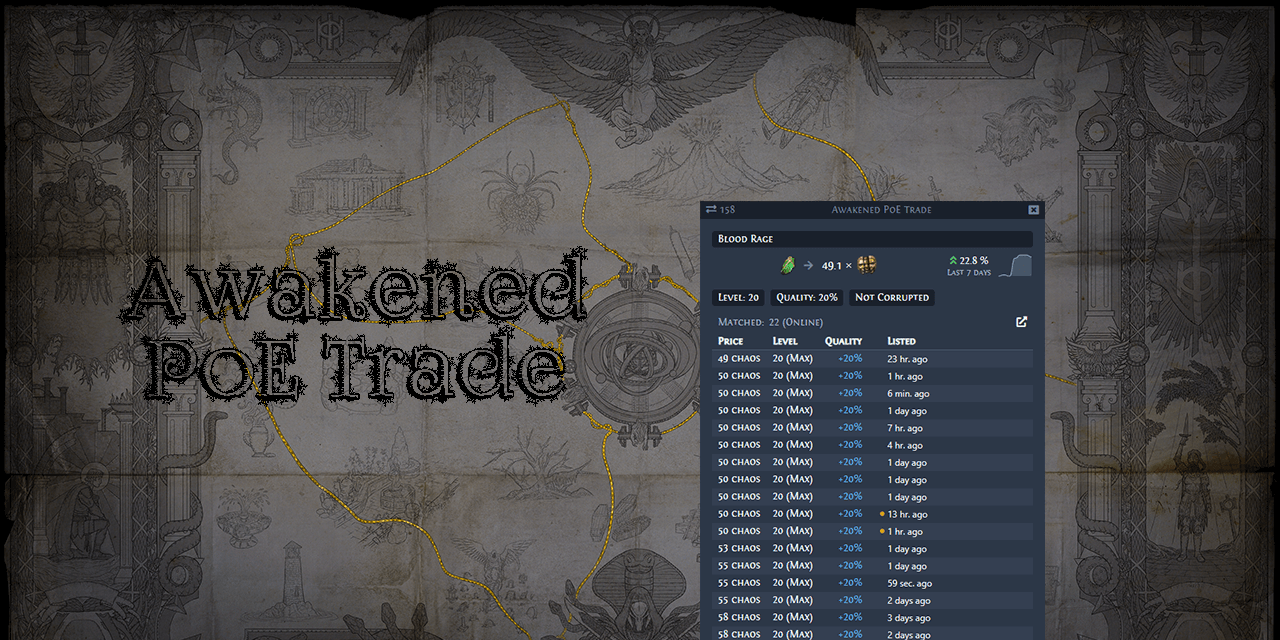
GitHub
:heavy_dollar_sign: :hammer: Path of Exile trading app for price checking - SnosMe/awakened-poe-trade
CodeWeavers
In CrossOver Mac the Command key is automatically mapped to act as the Windows Alt key. If you'd rather have the macOS Option key act as the Windows Alt ke
lilac trail
For those of you that are encountering the message "(null): “Path of Exile” couldn’t be copied to “Path of Exile” because an item with the same name already exists." There is a workaround that does NOT involve deleting the entire folder and reinstalling the whole game. This is for the standalone version. NOT the Steam version. The TLDR is to do the following
Delete this file "/Users/username/Library/Application Support/Path of Exile/Path of Exile.app"
Delete this file "/Users/username/Library/Application Support/Path of Exile/Path of Exile.app!.app"
Then click on the POE app icon in your system tray. The app will now update incrementley and you don't have to reinstall and download the entire 25+GB. I wouldn't hold my breath on GGG coming up with a fix so you'll have to do this every time a patch comes out
Note: In Finder the Library folder is hidden (it is not hidden if you open a terminal window). To unhide it hold the command+shift+. key. This will show hidden directories. You can then navigate to the folder and perform the actions described. To avoid doing this every time you can also add it to your favourites links on the LHS of finder.
lilac trail
Is there some way to measure the true latency between server and client ? I don’t trust the F1 metrics. They don’t seem accurate. There have been many occasions where I’ve watched my character die from monster attacks when the screen shows the grace period still active. Latency shows less than 10ms, which clearly can’t be the case when this happens.
And is there a way to log the latency period.
proud igloo
You can see the IP address of your instance server in the logs and check what a regular boring ping gets you network-wise. It's not 1:1 as the game uses TCP and there's some buffering/processing on both ends, and there's still some amount of prediction even in lockstep.
I've got it in my mind that I should get a cheap M1 Mini to do some dev on.
Turns out that they're still very expensive for a 2020 machine and I have no actual purpose for one otherwise.
It'd be fun to toy with, but not 770 USD fun.
lilac trail
I could use ping but that only get’s me to the gateway, or more likely a load balancer. I might do that for giggles anyway and see if I can get a rough approximation between when I die the response time when that happens. A lag of over a minutes is pretty bad. That’s infinite in terms of computer time. You can tell I’m bored when this is more my focus than the actual game 🤣
A Mac mini would be a good little test unit but yeah they aren’t cheap enough to justify. Maybe someone has one on eBay or a refurb. Sometimes Apple have used for a reasonable price. Good hunting 👍
proud igloo
Instance servers should be the actual nodes, I'm not talking about the regional gateway.
Lines like this:
2022/12/05 06:42:40 299029375 ca3a6737 [INFO Client 27452] Connecting to instance server at 23.109.162.116:6112
Oh … I’ve always assumed that was a gateway address, not the actual server your session is assigned to.
lilac trail
Hmmm the IP isn’t always the same so a simple ping won’t work. There might be other info in the client file I can use to see if there’s a lag spike when I die in a supposed grace period
proud igloo
Each instance you join is likely to be on a different instance server. You could probably rig up something to tail -F and grep the log file for the current IP.
That's also why different instances can feel different, as you occasionally end up on nodes that may be bogged down by other players doing heavy stuff in their own instances.
This was rather noticeable in Blight league with the aura+minion slowdowns and whenever Inpulsa pops were popular.
edgy jacinth
has anyone gotten the awakened poe trade running on a mac?
I can't get it to work - the hotkeys don't seem to do anything in game even though it installs ok
 proper echo
edgy jacinth
has anyone gotten the awakened poe trade running on a mac?
proper echo
edgy jacinth
has anyone gotten the awakened poe trade running on a mac?
did you install the mac specific version?
I followed https://www.pathofexile.com/forum/view-thread/3129523 (specifically the updating instructions near the bottom of the post) because I wanted an updated version with M1 native compiled electron
edgy jacinth
yeah I installed the mac specific version, and tried the troubleshooting tips on the thread
gave it the system privacy rights it needed or whatever, unchecked/rechecked
doesn't seem to work on my mini m1. oh well
proud igloo
A friendly reminder to anyone who may have forgotten, the torrent preload doesn't apply for macOS.
edgy jacinth
does that mean we have to wait until launch time to start downloading the update? or can you start pre-launch?
proud igloo
You can start patching at the same time as PC people normally patch, around 3h before launch.
The game goes down at that time and the patch appears shortly after. Queues open at some point after that, typically 2h30m before launch or whenever their preparation completes.
 odd surge
I'm trying to launch poe for patching however im getting this error where it says "Path of Exile has encounted an unknown problem. Please try reinstalling the application.: failed to launch game
I've tried reinstalling but it just doesnt seem to work
lilac trail
Maybe I'm just lucky but I find the MacOS stand alone client to be faster than the Windows PC update. I've run them simultaneously and the Mac one always finishes first, by a significant margin 🤷♂️
lilac trail
odd surge
I'm trying to launch poe for patching however im getting this error where it say...
Probably because the patch update isn't available yet. Try it again in about 30 minutes. As @proud igloo mentioned the update isn't available instantaneously
odd surge
lilac trail
Probably because the patch update isn't available yet. Try it again in about 30 ...
yeah no i keep getting this issue. I'm pretty sure it might have to do something with an update fucking up the application. just going to wait until post launch
valid heath
lilac trail
Maybe I'm just lucky but I find the MacOS stand alone client to be faster than t...
You mean downloading ? Seams fine on Steam for me
 lilac trail
odd surge
yeah no i keep getting this issue. I'm pretty sure it might have to do something...
lilac trail
odd surge
yeah no i keep getting this issue. I'm pretty sure it might have to do something...
Try it now. I'm downloading the stand alone update and it seems to be going fine
odd surge
still not working. just going to wait a day and see
better for me anyways cause i have review for a final
proper echo
my steam is updating now as well
edgy jacinth
i've got it downloaded
ornate sluice
steam v still has those graphics bugs?
 wet nymph
is anyone else seeing "path of exile can't be copied to path of exile because an item with the same name already exists"?
proud igloo
There's been some mentions over the last few weeks, IIRC.
wet nymph
nuking its app support folder and reinstalling works... maybe can get by with nuking less next time
lilac trail
wet nymph
nuking its app support folder and reinstalling works... maybe can get by with nu...
I posted a solution to this a few days ago in this forum. Scroll up a bit and you’ll find it. You only need to remove 2 files.
This is a Ventura thing, not a GGG issue. It doesn’t happen on earlier versions of the MacOS
wet nymph
thanks!
 silent violet
hello there, first off, im stucked at an infinite loop of turning gears after char select, after 2 days of forum reading uninstalling and not knowing what im doing found out there is a discord, so here i am asking the sages for help.
(using steam version, cuz i couldnt find the standalone mac)
silent violet
lilac trail
https://www.pathofexile.com/download
thank you
edgy jacinth
silent violet
hello there, first off, im stucked at an infinite loop of turning gears after ch...
what mac hardware/software are you running?
silent violet
21,5 late 2012 imac with mojave, i could upgrade to catalina but i dont want to lose compat with 32 bit steam games / apps (also it has old photos and work of my father whos in hospital so i dont wanna do heavy os stuff like bootcamp or similar)
I dont get any errors just the loop.
proud igloo
When it's been infinite on PC it has typically been losing connectivity with servers, but on macOS I only ever ran into it when playing on an integrated Intel GPU that didn't have enough resources to really run the game, performance or VRAM.
One theory is that it's trying its best to preload all the resources needed for the area but can't fit them in.
silent violet
It has a nvidia gt 640m, not. Powerful but best than a integrated.
I mean its best than nothing xD
proud igloo
There's been reports of people with similar issues on such older dedicated GPUs, not sure if there was any about yours in particular.
Heh, didn't notice that there's a macOS specific minspec on Steam.
Not helpful tho, as it just says "Radeon Pro 450".
silent violet
When i first played back in 2013 in a wine, in a older mac, it worked fine.
Very headache to make it run
Like i dont know even how that worked
Only played until level 5 tho
proud igloo
Back then we had the D3D9 renderer and a way lighter game, but still quite a feat 😄
silent violet
Back then i was a genius, now im too old for this
Had to play on macs since i was 5 years old
Managed to make games work when steam wasnt even a thing for mac users xD i still have a tomb raider gold original cdrom
Welp, do you know anyfix on this?
proud igloo
Not past trying to dial down settings or possibly doing something like some of the people here who run via VMs or other ways to run the Windows version.
Never got around digging for more of a root cause.
silent violet
Isnt there any parameter to preload those resources?
I remeber reading something about it in the forums
chilly anvil
tbh, it's fairly unlikely that the game will run on your computer
chilly anvil
you've got a ten year old mid-range mobile GPU with 512 MB of video memory, it wasn't exactly a gaming powerhouse even when it was new
silent violet
True, but still ol betsy runs lol at 156 fps
Not that i like that game but one of the few i can run smooothly
I think this badboy could run even csgo if i tweaked config files enough
Cuz my brothers imac from 2010 run it with an intel grpahics until 2020
Still i dk what black magic he used apart from 12 ram
2 sticks of 2gb
But probably i should dessist for now
Thank you all for you time and support❤️🙏
Hope i can get back at this great game and comunity soon
atomic herald
what i understand, poe cant run on an older system than catalina, i upped my intel imac 2014 model to catalina - to run poe, but i had to put everything on lowest graphics and had rly lousy fps, like 17 or so
so i bought a Studio M1 max... this summer.
and poe works fine on Monterey :)
 steep adder
proud igloo
steep adder
proud igloo
You people might know, are there any credible sources on when a "M2 Mini" might be coming out, if ever?
Would suck to buy a scuffed M1 one to dev on for almost full price if there's a new one around the corner.
chilly anvil
I haven't heard anything, only hardware rumors I've heard have been about M2 Pro laptops
lilac trail
Nothing official about Apple updating the Mac mini line. If there will be an update the announcement isn’t likely till sometime in March 2023
 tame void
Getting constant 'disk error' failures in steam - anybody have any ideas? it was working ok earlier today. Is this the same error as the standalone client that can't update itself?
 snow mesa
is this a known issue? : so I switch POE to external monitor, and the mouse position is off, as in clicking etc very weird
If I leave it at the laptop's screen it is fine
Like an offset
tame void
I get that problem on windows sometimes if I resize the window.
snow mesa
it's the same for me wether it is on windowed of fullscreen :/
this is frustrating, idk what to do
what did you do that fixed it?
tame void
on windows, it's a restart that fixes it
I don't use my mac w/ an external monitor so haven't seen it here
snow mesa
I will try it
thanks
Wanted to play 1h before going to bed and I’m stuck with this problem 🤦♂️
didnt work bah. What a pain
where do I change the resolution? I on on the options but there is nothing there 🤔
lilac trail
You can't change resolution within the game. It feeds off the native resolution on the mac. Change it there and it should be the same in POE
 violet cedar
hi, i just tried downloaded the new patch but there is a disk write error with it
i can't finish download the new update
please help
atomic herald
violet cedar
hi, i just tried downloaded the new patch but there is a disk write error with i...
u make it via steam?
the separate dl i think only work on pc (the one premade the leaguestart was anyway)
aaah u mean the recent patch, i try it now
atomic herald
i started it from steam and it works fine for me
violet cedar
atomic herald
i started it from steam and it works fine for me
i simply re-installed my poe and its good again
atomic herald
oh, what OS u use? Monterey works fine - did u update to Ventura?
violet cedar
atomic herald
oh, what OS u use? Monterey works fine - did u update to Ventura?
yessir
atomic herald
violet cedar
yessir
i see, i have seen earlier in this topic that ventura makes that problem
atomic herald
no idea how to solve it :/
lilac trail
violet cedar
no no its solved
I posted a solution to this issue in this forum. Scroll up and you’ll find it. There is no need for a full reinstall of POE. Just remove 2 files in the POE directory and patches will work properly. It’s a Ventura issue.
lilac trail
violet cedar
no my game just finish reinstalling
No problem. When they do another patch you’ll hit the same issue. You don’t want to be reinstalling the whole game every time on your Mac 😁
There are some other tips in the threads as well such as where to put sound files so your filter sounds actually work on a Mac if you haven’t already figured that one out.
 unique wyvern
Hey, I have a macbook pro m1, wanted to give poe a try (via steam) is there anything i need to know about setup? I couldnt see any current pins(they all seem quite old). cheers!
atomic herald
lilac trail
For those of you that are encountering the message "(null): “Path of Exile” coul...
here is the solve - i wish that one pinned, is that possible?
atomic herald
unique wyvern
Hey, I have a macbook pro m1, wanted to give poe a try (via steam) is there anyt...
there are some funny graphic bugs that show up inbetween on mac poe, or else i hope u dont have ventura yet, that one need a workaround when poe updates, Monterey works fine
unique wyvern
im on ventura, its been running ok but i have noticed a bit of artifacting / input lag?
atomic herald
u mean the kind of lag u can see on F1 ? or u mean graphics
proud igloo
I may have made a mistake... I ordered a Mac 😄
M1 Mini, 16G/256G, open box discount.
Still criminally expensive ^_^
atomic herald
ooops, yea they are expensive
and u might regret it in May or so when there is a M2 one...
i have one elementalist lvl 75 on ruthless ssf now xD
u have any time to play poe? Zao?
proud igloo
If there's a new one next year, well meh, I'll survive.
Primary goal here is test machine and remote dev box for Mac specific things, not a dedicated desktop.
If it's enough for toying around with data mining and PoB crimes it's good enough.
Went for the larger memory rather than larger disk as I figure I can connect an external USB-C SSD to it, but one can't upgrade RAM.
Been playing some since the league start, at around level 88 in regular temp league or something.
This weekend I intend to do more wiki work for 3.20 as that has been slow during the week, we did our major push there last weekend.
@atomic herald found an open box Mac for a good discount on inet for 9900kr, saved something like 7-800kr on it.
It'll be fun to see how the OS works on genuine hardware once again, my last genuine Mac was the 2011 MBP.
atomic herald
oh u are swedish as well xD
atomic herald
proud igloo
Been playing some since the league start, at around level 88 in regular temp lea...
ok :)
atomic herald
proud igloo
Went for the larger memory rather than larger disk as I figure I can connect an ...
i do understand the RAM yea, i think the same, but i had some saved up (cause due covid years i just stayed at home) so i used it for mac studio M1 max 32G ram 1 terra ssd, and i dont use many programs, just to be able to play poe xD
my earlier mac mini from 2014 model... didnt rly manage
lilac trail
atomic herald
here is the solve - i wish that one pinned, is that possible?
I asked if it could be pinned. The pinned messages are woefully out of date but I don't know who exactly is moderating this discord channel. Any idea who to send the request to ? As well as the solution for this where to download the MacOS Client should also be pinned
atomic herald
lilac trail
I asked if it could be pinned. The pinned messages are woefully out of date but ...
maybe @proud igloo knows?
unique wyvern
from the info channel, <@&174997701513969665> - Manage text chat. can help with pins maybe?
 unborn loom
You guys can just shoot a msg to @wild crow
unique wyvern
atomic herald
u mean the kind of lag u can see on F1 ? or u mean graphics
nah, i think its this crappy old usb/bluetooth keyboard/mouse combo im using. FPS seems ok, usually around 45, drops to 30 when things get a bit crazy. I wasnt really expecting much more
 copper rose
lilac trail
For those of you that are encountering the message "(null): “Path of Exile” coul...
copper rose
unique wyvern
from the info channel, <@&174997701513969665> - Manage text chat. can help with...
copper rose
lilac trail
For those of you that are encountering the message "(null): “Path of Exile” coul...
copper rose
unique wyvern
from the info channel, <@&174997701513969665> - Manage text chat. can help with...
pinned it, ty for suggesting it
lilac trail
copper rose
pinned it, ty for suggesting it
Thank you. There is another one for the link to download the MacOs stand alone installer. The current pinned one is out of date. I’ll post the thread here again so you can pin it and remove the old one
@copper rose - Can you please pin this as the link to client download - #mac-os🍎 message
and remove the old link. Thanks !
copper rose
lilac trail
Here's the download link for the MacOS Client. You have to login to your POE acc...
lilac trail
@copper rose - need to repin the post about patch updating. It seems to have gone missing. The pin from fasdasgbidden can be removed to accommodate this as that post is no longer applicable
copper rose
Sure can you link the patch updating one?
lilac trail
copper rose
Sure can you link the patch updating one?
This should be it - #mac-os🍎 message
copper rose
It seems to be pinned to me
 lilac trail
Oh how weird. I don’t see it 🤔
atomic herald
lilac trail
https://www.pathofexile.com/download
this is the link?
lilac trail
Yes
When I look at pinned messages I see it but I don’t see the one about patching. Do you see both ?
atomic herald
i see the pinned msg Multiplicity give a screen of - but that one dont have a link, cause the link is in the next msg. Well, if one follow the pinned one the link comes after it, i guess thats no problem then. xD
oh yea - the first one is poofed
atomic herald
copper rose
It seems to be pinned to me
now the first one u pinned is poofed - the important fix for Ventura:
#mac-os🍎 message
atomic herald
spam? the yt vid from miass
copper rose
lilac trail
https://www.pathofexile.com/download
copper rose
lilac trail
For those of you that are encountering the message "(null): “Path of Exile” coul...
Ah okay, I got it this time @atomic herald @lilac trail, looks good now?
lilac trail
copper rose
Ah okay, I got it this time <@268723671290478593> <@656493154953855006>, looks g...
Yes. I see both now. There is duplication of the downloads post. Remove the one that says Message could not be loaded - keep the one above it and we'll be all good.
@copper rose - how many pins can you have ? There's one more item related to POB and Awakened POE for Mac that would be nice to pin but not if it means one of the existing pins needs to be sacrificed
copper rose
I can pin up to 50!
copper rose
lilac trail
Yes. I see both now. There is duplication of the downloads post. Remove the one ...
None of them say can't be loaded for me
I see this
 lilac trail
Weird. This is what I see

@copper rose - please pin this post when you get the chance - #mac-os🍎 message
copper rose
lilac trail
Path of Building
For those who don't want to go through the process of trying t...
Done and done
I'll be playing PoE on a Mac all next week so I'm glad to see these pins updated 😄
Thanks for the suggestions!
lilac trail
Thank you so much for updating these 👍
Now if GGG would fix the graphics issues we keep reporting AND remove the fps cap playing on a Mac would be almost complete.
lilac trail
@copper rose - one more pin if I could please. It's related to where sound files have to be located in order for your filter custom sounds to work. This is @proud igloo 's post - #mac-os🍎 message
He also mentions you can leave the sounds in the /Users/Username/Library/Application Support/Path of Exile/ if you dont want to edit the filter file itself.
Can you add this line to the pinned post as well.
lilac trail
copper rose
Done!
Thanks. SeeinG "Message could not be loaded" for the new post  It loads just fine though
copper rose
You probably have to jump to the message and view it so that the app caches it in your client
lilac trail
That did the trick 👍
 agile skiff
Hey! Is it possible to play dualshock 5 on mac? WHo knows?
lavish geode
Anyone knows how to completely uninstall Path of Exile from macbook?
proud igloo
lavish geode
Anyone knows how to completely uninstall Path of Exile from macbook?
See the discussion here: #mac-os🍎 message
unique wyvern
anyone getting issues with update? mine is downloaded 100% but when it tries to install fails and just says resume on download again
unique wyvern
welp ended up having to delete application folder and uninstall/reinstall game 😦
Path of Exile
Path of Exile is a free online-only action RPG under development by Grinding Gear Games in New Zealand.
proud igloo
unique wyvern
anyone getting issues with update? mine is downloaded 100% but when it tries to ...
There's a pinned message here from Bob with a workaround that saves you from doing full redownloads.
proud igloo
@lilac trail Got my M1 Mini and tried running PoE on a 4k144Hz monitor with freesync. Got to resize it to a stamp size to get it to hit a hidden cap of 60 FPS on the menu, but interestingly enough I don't see the framerate clamp to a whole fraction of vsync.
Desktop is deliciously smooth ^_^
violet cedar
lilac trail
No problem. When they do another patch you’ll hit the same issue. You don’t want...
hey @lilac trail , on your fourm it says to run a terminal before downloading the file
i have no idea how to do that
im in the terminal app rn please help as soon as you can
thank you
lilac trail
violet cedar
i have no idea how to do that
You don’t have to run a terminal session. You can open up finder. Navigate to the folder mentioned in finder and remove the two files. You should be good to go after that with patching by clicking on the POE icon in the dock on the desktop 👍
lilac trail
proud igloo
<@656493154953855006> Got my M1 Mini and tried running PoE on a 4k144Hz monitor ...
Nice Xmas present. Good to know the Mac mini runs POE smoothly. Are you hitting any of the graphics issues I and others have reported yet ? Sometimes they take a while to manifest, sometimes they happen straight away.
My xmas and new years wishes are that GGG remove the fps cap and they solve the graphics issues 🤞🙏
proud igloo
The game itself doesn't really run that playable, might be better if I had a 1080 or 720 screen.
I wouldn't trust my XP to it 😉
Gaming isn't the purpose of the purchase tho, it's for building tools.
lilac trail
The XP penalty drives me nuts. It's a stupid idea for an online only game. Why should players be punished for a crappy or unstable server connection ? The D3 method of gear degradation is far more appropriate IMHO
violet cedar
lilac trail
You don’t have to run a terminal session. You can open up finder. Navigate to th...
k thank you
lilac trail
violet cedar
k thank you
The library folder POE is in is a hidden one. You’ll need to unhide it in the finder to see it and then navigate to it properly.
 junior anchor
Started playing Path of Exiles with MacBook Air M1 16gb ram on Steam. I feel like the performance is very lacking, sometimes bordering on unplayable. What are the prevailing views here regarding best way to play on M1? Should I abandon Steam in favor of native? Cloud? Thanks.
proud igloo
Steam and Standalone should be largely the same in terms of the executable and data files, they're both x64 under Rosetta2 emulation.
Some try to play the Windows version via various systems like crossover or even in VMs, not sure if it's better or worse.
GFN is also an alternative, but has its own drawbacks.
atomic herald
i still dont have high on settings on graphics, almost all set on low, and for me works fine this way - but i have M1 max... and 32 gb ram
and i run from steam yea (via rosetta and os monterey)
 empty forge
Guys I'm traveling ad installed PoE on my Macbook PRO 15" 2016, i7 2.6GHz, 16G of RAM, Radeo PRO 450 2GB (macOS Monterey)
I'm trying to play and its unplayable, i was trying to change some configs and only gets worst, even reducing quality. I when on battery and remove the dual config for video card, is there anything else i should consider doig i order to make it playable?
PS: Usinng Steam version.
proud igloo
That's probably going to be rough as it's pretty much the minimum spec. There's not much one can do there but pull all settings to the lowest but it's still going to be bad.
lilac trail
proud igloo
Steam and Standalone should be largely the same in terms of the executable and d...
I'd give playing in a VM a miss. It used to be playable but since Apple switched to he M1, you have to run the arm based version of windows, which results in emulation upon emulation. You can play it on a beefed up system (mine is 64GB memory and M1 Max cpu) but don't unless you don't care about losing XP all the time. You are guaranteed to die due to lag a lot.
As @atomic herald suggested, set everything to as low a settign as possible on a rig with less cpu then they or I have, via steam or stand alone (stand alone updater has an issue if you are running Ventura) and you might be able to run it.
I don't believe performance issues are related to specifically to the Mac. Windoze users with low system specs also have problems runing the game.
lilac trail
empty forge
Guys I'm traveling ad installed PoE on my Macbook PRO 15" 2016, i7 2.6GHz, 16G ...
Set everything to lowest possible settings. The other thing that might be causing issues is your internet conection. If it's spotty you're going to take a hit. What does F1 graphs show you ?
empty forge
 lilac trail
Are all the UI and Game settings at the lowest values possible ? Your CPU is the bottleneck at this point. If that runs at anything above 30ms on the lowest settings then the game performance will suffer. 270ms is a bandwidth issue, unless that's normal in your part of the world. Try a different gateway to see if both the cpu and response times come down (latency is ok though ideally you'd want that to be around 10ms or less. That's a GGG item though, not much you can do about that).
empty forge
@lilac trail I dot understand why CPU is bottlenecking . I have game/discord open, nothing else. Plus I just formatted.
Whats the difference in this case between bandwidth and latency? Regarding latency 31ms for Brazil is ok, until 70-80ish is ok (used to play MMO's with 120-140ish back i early 2000's). But I have no knowledge would be bandwidth , maybe because WIFI?
Also it seems VRAM going critical.
lilac trail
VRAM is ok. It will fill up. It's supposed to do that to help the game run more smoothly. Your CPU is what is hurting - along with the 4 FPS. Since you're travelling I'm guessing your connection isn't as good as it would be at home so yeah your wifi connection is probably an issue. What are ayour settings in the UI menu at ?
lilac trail
Under networking - try Lockstep or Predictive. Not set to auto
Disable or lower all sounds
Under UI - Visual Sensitivity - Disable Incursion and Screen Shake effects
Under Graphics tab set the following to
Mode - Windowed
Vsync - enabled
Anti-aliasing - Off
Lighting - Shadows
Shadow Quality - Low
Sun Shadow - Low
No. of Lights - Low
Bloom - 25%
Depth of Field - disabled
Water detail - low
Texture quality - low
Texture filtering - 2x or Trilinear
Dynamic Culling - disabled
Dynamic Resolution - Enabled
Resolution factor - On. Slider all the way to the right
Engine multithreading - On
If none of that helps bring the cpu down and the fps up then you might want to think of another game to pass the time while travelling. A mindless but fun one is Vampire Survivors via Steam. Good luck !
empty forge

" Resolution factor - On. Slider all the wat to the right" - should be left? because at righgt it increase frame
and yes...it improve a lot.
it goes from 25-40ms on frames....it seems it can work ow.
lilac trail
I have it on the right hand side but play with what is best for your system - it might be in the midle or to the left.
lilac trail
Other settings to change might be map settings under UI. I'd move Landscape and Map zoom to the left and Map transparency to the middle, or whatever makes sense on your system. Don't need to be fancy.
Glad to hear it's playable at least. It might not be pretty but at least you get your fix of POE like the rest of us 🙂
 native cedar
does the game work on m1 mac?
lilac trail
Depends on the specs but it might. You might have to tweak the settings and make them all low. Check my posting from yesterday for the configs to tweak
edgy jacinth
native cedar
does the game work on m1 mac?
yes
lilac trail
Got me a Apple Studio monitor for xmas 😀 POE works well on it but sadly the FPS is still capped at 60fps. I guess that'll be GGG new's year gift ...
proud igloo
Any decade now.
edgy jacinth
i just want the graphics glitches fixed so i can see the screen when I play
south flame
as I understand, the Apple Studio Display maxes out at 60Hz refresh rate, so no point in running the game at a fps higher than that
I'm currently traveling with a M2 MacBook Air, 8GB RAM, and PoE runs on it
I quit all the other applications to make sure as much RAM as possible is available to PoE 🙂
and I'm using a very tanky build so performance issues won't kill my character
atomic herald
south flame
I'm currently traveling with a M2 MacBook Air, 8GB RAM, and PoE runs on it
ooh the M2 processor, nice, u have 60Hz there as well right?
atomic herald
i think that is cause poe was ported to the mac intel processor with 32bit system (ok, i am a noob on tec, but i think maybe i got this right) and now it works via the rosetta background program that translates it over to new OS.
oh i had to google -Apple Studio Display- and i see it is the apple screen. Many uses higher resolution screens, i use normal PC-stuff for my M1 max, just i have an old screen 60hz that i love. The only apple product more than the Mac studio i use is the IMIC, a separate soundcard with sound and mic sockets.
atomic herald
south flame
Yes
But maybe u are right there, that apple standard is 60hz ... ehm.
proud igloo
I wonder if we ever will get a post-mortem on what happened with the macOS port, both from a communication and development perspective.
south flame
maybe they wanted to see how much effort it'd take to do a port and how much interest the player base would have before making it one of the top priorities
I feel like there's an issue with mouse input. Feels like mouse clicks come in with a lag whereas mouse pointer position is more immediate. I mentioned this to a friend and he said it was a known problem in SDL on the mac, but I don't even know PoE uses SDL or not.
proud igloo
PC build has a bit of that kind of input latency as well, kind of inherent in many setups where you have a hardware cursor on top of a program that presents through a graphics API.
Quite possible that the macOS one has additional latency there.
south flame
I have fast PC and a fast mac and a slow mac, and both macs have a lot more latency than the PC
I tried using the PC's "gaming" keyboard and mouse with the mac, didn't help
my mouse clicks felt more precise on the pc than on the mac
though of course it's possible that a more finely attuned person would be able to notice lag there on the pc side as well
proud igloo
It's going to be fun to see how well PoB runs once I get around to it again.
south flame
I'm surprised PoB even runs on the mac, is there a price checker tool also?
proud igloo
Last time I made the proof-of-concept port I only had onboard Intel graphics in the machine, can't tell any perf from that 😄
lilac trail
south flame
I'm surprised PoB even runs on the mac, is there a price checker tool also?
Yes. See the pinned messages. There is both a POB and a price check tool port to Mac
lilac trail
proud igloo
I wonder if we ever will get a post-mortem on what happened with the macOS port,...
Yes. Sometime in the next decade, after they fix the graphics bugs, introduce new ones and remove the fps cap 😏
lilac trail
proud igloo
It's going to be fun to see how well PoB runs once I get around to it again.
I last used it during 3.19. The interface is truncated on the LHS and some of the keys work in unexpected ways (you have to hold down the shift key for some keys to appear/work properly for example). It was ok for a while but became annoying. I think the source code may be available so you could try to fix those things if it's still the case. I just found it easier to use the Windows version within a VM for now.
proud igloo
The current Linux and macOS third party versions of PoB uses a fork of pobfrontend, while I'm working with the actual PoB SimpleGraphic codebase.
I just need to find time among all the other projects to actually poke at it again.
lilac trail
proud igloo
The current Linux and macOS third party versions of PoB uses a fork of `pobfront...
The link for the Mac port of POB is busted atm. Hopefully it's a temporary thing, though it seems a few folk that have developed tools for POE have gone under the radar lately (tbf most of those are TOS violation tools but still ...)
lilac trail
Today's graphics enhancement - a sewage pond in my HO
 proud igloo
Next-level hideout design tech.
lilac trail
Path of Buiding for Mac link is working again. There is a mention to install 3 font files with the latest version but I don't know where I would install them. I asked in the forum but it's quiet over there and I'd like to see if it fixes the font and word truncation I see when I fire the app up. Anyone know where I should stick these files ?
"If anyone else has an issue where the font seems way too big and things aren't fitting nicely, you need to install these three fonts from the Github repo and then relaunch the program:
https://github.com/hsource/pobfrontend/blob/master/fonts/LiberationSans-Bold.ttf
https://github.com/hsource/pobfrontend/blob/master/fonts/LiberationSans-Regular.ttf
https://github.com/hsource/pobfrontend/blob/master/fonts/VeraMono.ttf"

GitHub
Cross-platform Path of Building driver. Contribute to hsource/pobfrontend development by creating an account on GitHub.
GitHub
Cross-platform Path of Building driver. Contribute to hsource/pobfrontend development by creating an account on GitHub.
proud igloo
Maybe in the OS itself? Sounds odd that they can't bundle them locally.
lilac trail
Yeah I was thinking in the OS. I need to go find the exact location for those. I would have thought they were already there but 🤷♂️ Time to polish up my search skills in terminal
edgy jacinth
Apple Support
Your Mac comes with many built-in fonts, and you can download and install more from Apple and other sources.
That is the way to go
lilac trail
edgy jacinth
https://support.apple.com/en-us/HT201749
Thanks. I did that yesterday but it didn't fix the issue I have with the Mac version of POB. I'll post in the forum channel. I don't know if it's just me but this is what I get when I use POB Mac version. Things are truncated. Also you have to hold the shift key down to get uppercase letters ...


 edgy jacinth
Weird. I just stick with using Crossover + windows version and it works fine for me
which i know isn't what you want
atomic herald
if u have it in a window, make the window bigger
lilac trail
If only it were that easy. It doesn’t matter how big it is. It seems to be a quirk of the port. No-one has replied on the forum either. Not sure if that means I’m the only one with the issue or not. It’s a minor annoyance but if I don’t do anything except an import or export it’s fine as it is.
proud igloo
Yeah, this doesn't look super great.

Doesn't do well even at 100% display scaling either.
lilac trail
Thanks for sanity checking me. At least I'm noy the only one experiencing it. I think the source is available but I wouldn't have the faintest idea where to start in trying to fix it. Maybe the author will notice it and give it a shot but I think they only really fix things that are super buggy, not the little aesthetic stuff.
atomic herald
i think the mac version has always been like that on some spots, the text dont fit, i had to make the window bigger to be able to read anything at all
and yea, to manage to import was a challenge i remember already on mac version a year ago (i havent tested pob the last months)
lilac trail
Import is ok. It's been updated for 3.20 as well
proud igloo
pobfrontend (which it uses) and other alternative runtimes become a bit weird in that font rendering and UI design in PoB is very tuned to the dimensions and quirks of the original SimpleGraphic runtime.
In particular, people pack textual information very densely based on the measurement of text with the sprite fonts originally generated by Openarl, replacing the text rendering with something from the OS or even a bespoke renderer like stb_truetype results in very different measurements and shifts.

When I last touched text rendering, I was fairly close: https://i.imgur.com/jxmjIMZ.png

I would reckon that in order to revamp the PoB frontend there's quite a bit of fundamental work that needs to be done like getting text rendering looking the way you want, dig into how to approach display scaling as just 100% DPI is extremely legacy and the nearest/bilinear filtering of the OSes just feels meh.
Realistically a proper solution there would involve both updating the renderer and realigning the UI code in Lua so that things fit the new world.
And for macOS in particular, there's all the joy of figuring out how to do things like open URLs in a browser, interact with the clipboard, competently process input, where the correct directories are to store builds and cache files, and of course how to package the whole thing into a .app and how to do updates.
Lots of work. Technically doable but requires a lot of buy-in and effort from the team.
atomic herald
so its ok how it is then, just it works
lilac trail
Yes. Thanks for the detailed explanation zao. It'll probably happen before GGG fix the graphics bugs. Speaking of which here are two new one's from yesterday. They moved the entrance to the Sarn encampment underground apparently and see if you can find the waypoint in Oriath (it's the Ossuary), and yes monsters were in there as well. Who in their right mind would attempt HC in this game ...


 surreal crow
What do you think would offer better performance? An 2020 mac air or 2017 pro?
lilac trail
Depends on a number of factors. For the game to run respectably on either you need decet cpu, memory and an SSD. You should have at least 16gb of ram. Not sure what cpu is in the two models mentioned. Whichever one gives you the best performance. On top of this you will likely need to set the game parameters all to lowest settings as per this - #mac-os🍎 message
In that thread the user had these specs - #mac-os🍎 message and as @proud igloo mentioned those are base minimum. After making the adjustments recommended, the user reported the game was "ugly, but playable".
 wild pivot
Is capped 60 fps is ok for mac POE version? I'm new POE on mac, feels like I'm missing smthg in setting etc.
proud igloo
The experience in this channel is that the game is artificially capped at 60 FPS rendering even if you have a monitor with higher refresh rate.
Depending on vsync and if the monitor has variable refresh rates, you could end up at a fraction of your refresh rate below 60 too.
wild pivot
Plus is there any solution for awakened poe trade besides this - https://www.pathofexile.com/forum/view-thread/3333212/page/1
wild pivot
proud igloo
Depending on vsync and if the monitor has variable refresh rates, you could end ...
Well, It doesn't crash at least 🙂
lilac trail
wild pivot
Plus is there any solution for awakened poe trade besides this - https://www.pat...
That's it for Mac. It worked ok laast time I used it. You have to be careful mapping hotkeys so they don't clast with in-game keys or some AHK programs, but that isn't any different to most utilities.
wild pivot
RN it doesn't recognize mods on items and have installation issues, It may be fixed soon but only one guy supports mac build...
lilac trail
Yes I raised the issue of mods on the forum thread but I doubt it will be addressed. You basically have to check the trade site for those types of item.
 elder warren
Hello, maybe this was discussed already, but I was unable to find a solution myself. I'm on M1 Pro, Ventura 13.1 and game (steam version) is not launching at all. Steam just says "starting", shows a grey window and without any errors it closes without launching the game. Could anyone suppose what I could try to fix this?
lilac trail
There should be a logfile somewhere that will give you an idea what is happening. Do you run via Steam for a reason ? If not try the stand alone MacOS client instead.
wild pivot
Guys, I just patched game, can't launch it now. Have "you dont have permission to save the file POE.app in the folder POE". It have to be done something with application support folder, but I have no clue... Plz, help!
P.S. Ventura 13.1
proud igloo
wild pivot
Guys, I just patched game, can't launch it now. Have "you dont have permission t...
See the pinned messages here, there's a workaround.
wild pivot
proud igloo
See the pinned messages here, there's a workaround.
Thx a lot!
elder warren
lilac trail
There should be a logfile somewhere that will give you an idea what is happening...
thank you, standalone client works like a charm
lilac trail
elder warren
thank you, standalone client works like a charm
Just an FYI but there is an issue with Ventura where updates will fail. This is an Apple, not a GGG issue. There is a work around you will need to do each time an update occurs. The solution is pinned in this thread.
There is pinned messages on how to get filter sounds working and two apps - POB and Awakened POE for MacOS if you need those tools.
proud igloo
I look forward to patching my game when I get home, see if I can trigger it 😄
lilac trail
If you are running Ventura it’s a certainty. You shouldn’t miss out on the experience 🤣
proud igloo

zao@Larss-Mac-mini ~ % sw_vers
ProductName:            macOS
ProductVersion:         13.1
BuildVersion:           22C65
Same as mine
 valid dune
Hi everyone, new here. Can you use a PS5 controller on PoE mac?
proud igloo
https://www.cnbc.com/2023/01/17/apple-announces-new-mac-mini-macbook-pro-with-m2-pro-and-m2-max.html

CNBC
Apple announced an updated Mac Mini and refreshed MacBook Pros with its latest M2 chips.
Didn't expect the M2 Mini to launch cheaper, heh.
Or this early, didn't the rumors say like March/Easter?
lilac trail
Yeap. Slowly but surely all the Intel based Macs are being phased out. I think there's only one system left still on an Intel chip.
Did you experience the joys of having to delete the two files in the POE directory before you could update POE ?
proud igloo
Haven't touched the machine interactively since, been busy.
atomic herald
proud igloo
Didn't expect the M2 Mini to launch cheaper, heh.
ooops
cant be that big step from M1 then, and M2 Pro is a big jump up.
proud igloo
Turns out that with VAT and added artificial EU costs the prices seem to be in the same ballpark but there's fewer model variations so for things like more RAM you have to step up quite a bit.
lilac trail
Still no fix for the graphics issues encountered on a MacOS. the thread on the forum is alive and well though. People are still posting to it, which is good to know. Some have decided to try GeForce. That's not a good alternative. Yes there's a free tier but why should anyone have to use a 3rd party tool to play the game. Using GeForce just means GGG don't have to fix it. I'm somewhat shocked that they actually replied in the thread ... May 2022. Nothing since. And now of course there's the issue with applying patches. I know it's not strictly a GGG issue but would it kill 'em to provide an updated client that avoids the issue. It's one thing after another 🙄
 boreal needle
lilac trail
boreal needle
lilac trail
You put it in the following directory
/Users/<username>/Library/Application Support/Path of Exile/Preferences/ItemFilters
To get to the library folder you'll need to open finder press shift+command key+. to unhide the Library folder
You will need to create the ItemFilters folder (I don't believe it exists)
Then download the filter you've created from the Filterblade site and put it in the ItemFilters (or whatever you want to call it) directory. The MacOS standalone client should then see the filter.
To get custom filter sounds working place them in
/Users/<username>/Library/Apllication Support/Path of Exile/
This is the easiest method, otherwise you have to change the sound path in the filter (see the pinned message if you want to go that route).
proud igloo
There's a button in your Options in-game to open the folder in Finder.
proud igloo
@lilac trail Had a different kind of fun the last few days, sorted out some render API changes with the M1 GPU compared to what I had on the Hackintosh: https://cdn.discordapp.com/attachments/922873518956363796/1065668247187378256/Screenshot_2023-01-19_at_17.21.40.png

I've got no idea if it runs at full refresh rate or if it's like PoE 😉
lilac trail
Do my eyes deceive me or is this the Mac based version of POB rendered correctly 🤔
proud igloo
"Correctly" is on a spectrum, I don't think it has proper retina rendering but runs upscaled.
It's my own port of the real PoB runtime tho, none of that pobfrontend stuff.
Did some experiments on Windows with lying to the Lua side about sizes and scaling distances up behind its back, kind of almost worked.
I don't have any plans on actually releasing anything, but it's neat to play with and find out just how weird it is to build things for macs.
If I ever manage to make anything runnable, I'll make sure to throw it at you folks to break 😄
lilac trail
It's still cool to see it in action 👍
 fossil dock
Hi all, how to fix "The terrain generator for the client is out of sync with the server. Please create a new instance and try again" it's always happens to me in some location in Delve
atomic herald
i dont know, maybe join another server location?
proud igloo
It would probably not hurt to file bugs for the areas where it happens. Not sure if you need a /bug number or if you could do with the seed and area from the client log file.
fossil dock
proud igloo
It would probably not hurt to file bugs for the areas where it happens. Not sure...
I found seed but what to do with that information?
proud igloo
Report on bug report forum, https://www.pathofexile.com/forum/view-forum/bug-reports
There's a long thread of similar problems under Mac Client: https://www.pathofexile.com/forum/view-thread/3173232
As for fixing, there's nothing you can do apart from getting GGG to find and fix whatever bug there is. If it's specific to the macOS client, it's going to be a Long Time.
fossil dock
proud igloo
Report on bug report forum, <https://www.pathofexile.com/forum/view-forum/bug-re...
Thank you, but looks like that thread have no response at all
proud igloo
Issues are somewhat prioritized by the perceived impact it has on players, they seem quite under the water for many things.
fossil dock
proud igloo
Issues are somewhat prioritized by the perceived impact it has on players, they ...
I understand, but for me actually two times it happens in delve on the way to boss... boss can contain some profit....
lilac trail
Unfortunately this is a known issue. Been around a long long time. It happens on both Mac and Windows platforms. There is no work around. If you hit this issue you have to move on. Even starting a new instance will not fix it, it’s specific to the location. I have areas in Delve where I can cause the issue every time. That’s good for troubleshooting but sadly it’s unlikely GGG will ever address it. They don’t seem to be in any hurray to revamp a cycle of pumping out unfinished product, patching it and then repeating the cycle. That plus all the resources except the intern are focused on the mythical POE 2, which is of course the panacea to all that plagues POE classic (as it will become known once POE 2 is released). Despite it’s issues POE is still, by a long way, the best in it’s class, and still free to play 👍
fossil dock
lilac trail
Unfortunately this is a known issue. Been around a long long time. It happens on...
totally agree, best game in class, but that sort of small bugs very annoying
lilac trail
The graphics bugs are, to me, the most glaring failure they need to fix. The lack of response is perhaps even more vexing. They really need to do much better. I haven’t purchased anything in the store for quite so time now because tbh I can’t support them if doing the bare minimum is their idea of good customer service (their CS staff are responsive but that doesn’t help if they can’t fix the issues)
lilac trail
New game mod - you lose 10% xp due to graphic bugs ... again. Reported in the official forum but I might as well bash my head against a brick wall for all the use that will be.

As the twins say ..... https://tenor.com/view/matrix-reloaded-matrix-reloaded-twins-aggravated-gif-12671917
 proud igloo
Good thing you've got a conveniently placed wall there in-game then.
 deft ginkgo
ohhh bruhhh this thing happens to yall too. all this time i though my macbook was dying
 jolly yacht
Some maps seem to do it more often for me so I have to skip them
atomic herald
deft ginkgo
ohhh bruhhh this thing happens to yall too. all this time i though my macbook wa...
it happens all mac-users
i mean i have M1 max processor and 32 gb ram, should be enough to run poe, and happens me anyway
deft ginkgo
atomic herald
it happens all mac-users
damm sucks
deft ginkgo
atomic herald
i mean i have M1 max processor and 32 gb ram, should be enough to run poe, and h...
oh yea, just a m1 macbook pro should be sufficient to play thi game
lilac trail
I have the M1 Max 64GB RAM. The performance is fine for the most part. It's the graphics issues that bug me (if you can't tell 😉 )
deft ginkgo
lilac trail
I have the M1 Max 64GB RAM. The performance is fine for the most part. It's the ...
jeez thats alot of RAMMMMM
earnest salmon
in general graphics are the throttle for me doing anything with my MBP (intel 2019)
16 gb ram but a toaster of a graphics card all things considered, wish that they shipped with better ones tbh
fossil dock
lilac trail
New game mod - you lose 10% xp due to graphic bugs ... again. Reported in the of...
For windows client GGG have utility to check game-data file, repair and compact it. For mac user no such utility, and you need full re-download game to fix that type of issue. Overall I found two "solutions" that fix glitches for standalone (non-steam) game version:
- full clean-up game cache, by default it stores in Library user folder, you can use this terminal command:
cd ~/Library/Caches/com.GGG.PathOfExileand then remove everything inside folder - remove game-data file and download it from scratch, also terminal command:
rm '~/Library/Application Support/Path of Exile/Content.ggpk'after remove just start poe and wait
I recommend start from first approach, it help for some time
atomic herald
fossil dock
For windows client GGG have utility to check game-data file, repair and compact ...
I play via the steam-client, and i wonder, does these cashes empty with reboot of the computer?
fossil dock
atomic herald
I play via the steam-client, and i wonder, does these cashes empty with reboot o...
I think - NO
proud igloo
For mac user no such utility
I think I wrote a script for that and for converting torrent GGPKs a while ago, probably didn't save/ship that.
atomic herald
proud igloo
> For mac user no such utility
I think I wrote a script for that and for convert...
maybe a newb question, dont cashes reset at reboot normally?
proud igloo
Entirely up to the kind of cache it is as it's a rather overloaded word.
The file cache that the OS has in RAM to accelerate programs, that's temporary.
Per-program cache directories or files that programs make and maintain, that's up to the program to decide what to keep and what to remove as it may be obsolete or too big.
For Path of Exile, it's primarily a cache of compiled material files for shaders saved out to disk for reuse when it detects that it already has it generated.
That's the primary point of a cache, betting disk space on that it can avoid repeated work in the future.
atomic herald
ok
proud igloo
Normally there shouldn't be any changes in behaviour whether you use a cache or not, as long as the thing can be regenerated from scratch and as long as the cache contains correct data.
Sometimes you have to purge a cache because the data in it is corrupted or wrong and the program can't tell it.
Sometimes you've got to purge a cache because it's too big and the program doesn't do it well enough.
PoE used to let users control the cache location and when to clear it out, but moved to scheduling a purge once a league as that's the timeframe on which enough change has happened to materials for them to be largely obsolete anyway.
atomic herald
oh, once a league 👀
proud igloo
For example 3.19.2c: https://www.pathofexile.com/forum/view-thread/3324628
atomic herald
i see "local cached assets will be cleaned up upon launching the client"
proud igloo
So for glitches like these, poking at your cache may have several effects that could influence the problem depending on what's actually causing it.
If the problem is in broken cached data, purging it removes it and the program can (hopefully) generate a correct one.
If the problem is one of timing and happenstance, the presence or lack of cached content can affect the performance and load behaviour of the client so that it may mask or amplify such race conditions.
atomic herald
my wild guess is that i should have loads of more visual glitshes by now if my league cashe was filled wtih them
but atm i have them rather seldom
proud igloo
My best bet for these geometric glitches is that there's something off in either how PoE loads geometry from files or in how it packs and uploads it to the GPU, or possibly in that something is wrong in the constant data used to feed the shaders.
To my knowledge, PoE only caches shaders and 2D store art, no actual assets.
atomic herald
another wild guess i have is that maybe full server (like when the league is starting) can make it happen (thats my xp)
and when my computer is warm, been hard working for quite some hours, and the mac slow something down to cool
proud igloo
I ran into someone in Act 11 the other day actually on PC DX12 where their character model or held items were glitching out.
atomic herald
i see
proud igloo
It feels like the kind of problem like the krangled text bug in the past, something that's sensitive to how you play, how VRAM or memory becomes fragmented after a while, and timings change.
Some corner case somewhere in the PoE code, possibly amplified by how the graphics API behaves on macOS compared to PC.
atomic herald
ok, u dont have to explain deeper than this dear, i take your time <3
proud igloo
It'd be fun to dig into how PoE actually renders things some day, I've only really looked at the passive skill tree there and accidentally saw some of Act1 town.
atomic herald
:D
proud igloo
It's kind of interesting that terrain tiles and fixed meshes of all things tend to manifest these problems as they're one of the simpler things to draw.
atomic herald
ok
proud igloo
But on the other hand, they're more often streamed in and out on the fly.
In summary - wild speculation and it'll be fun to hear if/when they ever sort it out.
It's way too often chalked up to resource exhaustion or broken machines.
Kind of funny, I know of at least two games in the past that have had sanity checks on startup. Both did some trivial background math on startup to solve some problem with a known outcome. If that ended up wrong, it exited and told the user that they were probably overclocking too hard or had a broken system.
atomic herald
btw, quite often when i start poe from steam, when i click the character to login on server the game crash and i get that crash-log window.
second time uses to work, no problems
proud igloo
I've had a similar crash where if I'm too fast to skip the intro video and get to the first menu, it exits out.
atomic herald
could be taht yea
lilac trail
proud igloo
It feels like the kind of problem like the krangled text bug in the past, someth...
Might be able to rule out VRAM in the equation. I say that because in a VM the VRAM stat is empty. Either it isn’t used or the F1 button isn’t showing it.
I had a thought that maybe it was introduced with DX12. That could still be the case but it must impact all DX versions because it happens in Parallels and it can only use DX11 atm (in both ARM and Intel chips).
I don’t think computer heat is a factor. I’ve had it happen in the very first map of the day.
I can’t be 100% certain but I ran 3 new characters through the campaign last week and I never saw the issue in story zones. I wasn’t paying too much attention since the campaign is painful enough 😛 I guess I could spin up another new character, in the name of science of course …
proud igloo
PoE only has VRAM stats for it's own allocations in Vulkan or 12, D3D11 doesn't expose the information needed.
lilac trail
Ah. Thanks for explaining that mystery ! One more thing - the graphics glitches impact Windows based systems as well. It happens in my VM’s as well as Mac. Kinda odd Windows users aren’t screaming the house down about it 🤔🤷🏼♂️
 spring herald
well, i have the issue but its seldom enough that its not exactly bricking my gameplay
on windows
lilac trail
True but it’s like death by a thousand cuts
proud igloo
It could also be two different problems that manifest in similar ways.
lilac trail
I’d troubleshoot it for free if they give me read-only access to the code (I promise I won’t even look for fishing secrets while I’m in there) 🤣
lilac trail
Is anyone else having an issue with keyboard commands for inventory management and crafting ? More often than not if I open the inventory panel it freezes on me and I can't do anything - can't click on anything, highlight it or interact in any way. I have to close inventory and re-open. Then it works. Sometimes I have to hit the esc key multiple times before the screen "wakes" up.
I also have an issue with ctrl+click. If I have inventory and stash open. Instead of following the affinity when selecting an item, it will go to the stash tab open, or back to inventory. It won't go in the tab the affinity is set to. To fix it I have to ....open and close the tabs or do the esc key thing.
Same with crafting. It won't go into the crafting bench from inventory ....
proud igloo
Ctrl-Shift clicking ignores affinity. You may have some stuck key state there?
lilac trail
I don't ctrl+shift, do the usual ctrl+mb . Probably a stuck key but I'm on Mac not Windoze 🤣
lilac trail
This has been happening all day. I've unchecked the save login details, entered credentials and resaved and it's still doing it. Anyone know if there is a file I can safely delete or a casche folder to remove. very freakin' annoying.
 atomic herald
your computer has changed date? (not sure that is possible anylonger)
 sonic shoal
Hey
Any performance tests with new m2 macbook pros especially m2 max? It would be perfect to know about freezes and average fps on juiced maps
atomic herald
fps are capped to 60 as far as i know
sonic shoal
oh okay
I saw this video before https://www.youtube.com/watch?v=Kl5Q13k6l9Q
Looks pretty smooth for 10c CPU m1, 16c GPU, 16Gb
Thinking is it worth to overpay for m2 max with 38 GPU cores 32GB RAM or 19/30 GPU cores with m2 pro and 32GB RAM would be enough for comfort play with ~ 60 stable fps on juiced maps
lilac trail
atomic herald
your computer has changed date? (not sure that is possible anylonger)
No. It started because I logged into one of my alt accounts. Then I switched back but it still keep alt account details 🙄 I’ll look in to it tomorrow. I think I cleared it before but don’t remember how of course 😜
proud igloo
lilac trail
This has been happening all day. I've unchecked the save login details, entered ...
IIRC it's production_login.credentials in your filter/config directory
lilac trail
proud igloo
IIRC it's `production_login.credentials` in your filter/config directory
Thanks. I thought it might be this one. I’ll trash it when I get home. I’m pretty sure it gets recreated at start up time. It’s curious it doesn’t seem to store the latest credentials used on a consistent basis. That doesn’t strike me as that difficult to do 🤷🏼♂️
lilac trail
OK. So ...you would think login credentials would be in production_login.credentials but they don't appear to be, or they are also stored somewhere else. I deleted the credentials file and yet when I started the game up it still presented the old login credentials 🤨
It gets better. The production_config file DOES have the correct id (but no password of course) AND the production_login.credentials file is NOT recreated, either at game start, or after you have logged in. So the million dollar question - where are the credentials really being stashed 🤔 It has to be in the same folder as the executable and other bits and pieces.
BTW - this is on my VM, not the Mac. the file names are the same but on Windoze those files are stored in Documents\My Games\Path of Exile. I probably should post this elsewhere, but ultimately the files are on the Mac and I could run in to the same issue there so here I'll stay 😀
The file isn't recreated, even after a system reboot and game restart.
atomic herald
play the alt on the VM and the nr 1 on the mac?
lilac trail
Yeah that’s what I usually do but the behaviour is not what I expected. If it’s not used why is the the credentials file there in the first place and how is it generated. Enquiring minds want to know and I don’t like unexplained files from a third party sitting on my system.
proud igloo
If you're sharing login details between several "machines" i believe it's to be expected that they're considered out of date on the one you didn't last play on. I get that between my 8700K and real desktop.
Not sure what hardware ID or other aspects it uses to determine that.
lilac trail
If both my machines were windows that would make sense but 1 is a Mac and the other is Windows. They don’t share as far as POE is concerned. On the Windows machine the login it was reverting to was not the last account logged in so it should never have shown up, if it were using the client side credentials file. It mustn’t be since I now have no login credentials file on the Windows machine. The game should puke if this file were necessary but it runs just fine without it. This leads me to think that the login details used are stored server side only and the file there sometimes does not get overwritten properly. Possibly because it’s out of sync with something there. The file on the client side is a legacy item that GGG are too lazy to remove.
proud igloo
I mean "sharing" as in using the same account.
I expect that whatever data you have on the client side is similar to a session cookie which can be rejected whenever the server feels it's out of date. As for storing the username in the login box, that's handled by the INI file.
lilac trail
The usual username is in the ini file but the program doesn't seem to use it consistently, otherwise it would always default to it. It should be a fairly straight forward process but it doesn't seem to work exactly as you would expect all the time.
lilac trail
Anyone know how I can open 2 instances of the Mac based POB ? I can do this on Windows. I assume I can run multiple copies at the same time on the Mac. Just clicking on the icon doesn't do it.
fossil dock
lilac trail
Anyone know how I can open 2 instances of the Mac based POB ? I can do this on W...
Just found solution - double click on PoB while holding CMD button
lilac trail
fossil dock
Just found solution - double click on PoB while holding CMD button
Awesome. I’ll give it a try later 👍
lilac trail
fossil dock
Just found solution - double click on PoB while holding CMD button
This didn't work for me. If I double click PoB while holding down the command key it just goes to the already open app or the app icon in the folder it is installed in. I don't get a second PoB instance 🤷♂️
lilac trail
There seems to be a discrepancy in some calculations for the exact same builds between the MacOS port (the first pic) of PoB and the community version of Windows PoB (the second pic). The MacOS has some larger base values, which doesn't make sense given it reads from the same place the Windows one does. I'm guessing most people use the Windows one so it won't be a big deal but for anyone using the MacOS version (as I have been) you might need to be wary of some values (most of them are actually the same in both) that may impact DPS calculations.

 proud igloo
Two possible reasons come to mind. It could be straight up a different version of PoB, or it could be something more fun and subtle like different Lua implementations.
Do you have a build code for this?
lilac trail
I don't. I can see if it's available on Github. The MacOS one is 3.20 I believe. I'd have to go read the forum to double check. It's only the dps numbers that are out of whack though so I lean more towards a bug maybe .....
lilac trail
This is the link to the source code on github - https://github.com/hsource/pobfrontend/releases
v2.25.0 is the latest I believe
GitHub
Cross-platform Path of Building driver. Contribute to hsource/pobfrontend development by creating an account on GitHub.
proud igloo
lilac trail
I don't. I can see if it's available on Github. The MacOS one is 3.20 I believe....
Sorry, I mean an export of the PoE character build these numbers are for, we tend to need them to look into why things behave the way they do.
Even when there's a description of what skills and nodes are used, the barrier to investigate is so much lower when it can be exactly reproduced.
lilac trail
Oh sorry about the misunderstanding. I can provide the complete PoB for both. I know where the discrepancy is but not why there is one. I’ll send them along. Personally I like the MacOS port - my build looks stronger there 🤣
lilac trail
Huh, well what do you know ... this morning i refreshed the MacOS PoB snapshot. It now lines up perfectly with the Windows based PoB. Must have been a misconfiguration on the Mac one for some reason. All back to normal now 👍 It would have been a nice mystery to play with.
lilac trail
Well now I'm back to confused. Imported another build to MacOS PoB and it's giving me different numbers to the Windows PoB. I even deleted the old MacOS PoB and reimported from scratch so they should be the same. Here are the PoB's
MacOS - https://pastebin.com/JfFbSAyw
WindowsOS - https://pastebin.com/CaZu8Mtt
Pastebin
Pastebin.com is the number one paste tool since 2002. Pastebin is a website where you can store text online for a set period of time.
Pastebin
Pastebin.com is the number one paste tool since 2002. Pastebin is a website where you can store text online for a set period of time.
lilac trail
An article on the M series Macs plus a mention about gaming (not a lot) -
https://techcrunch.com/2023/02/06/apple-execs-on-m2-chips-winning-gamers-and-when-to-buy-a-mac/
Maybe some improvements in Metal that will help us out sooner rather than later 🤞

Apple’s M series chips were incredibly well telegraphed when they arrived in late 2020. Apple had been designing its own silicon since the A4 appeared in the iPhone 4 just over a decade earlier. The appearance of Apple’s in-house efforts in the Mac was really just a question of when, not if. When the M1 […]
 wet grail
Hey, question:
I start playing the game and it goes smoothly, but after maybe 10-15 minutes it starts to get laggy, no internet issues, no huge monsters around, did anyone experience this problem? I am playing on Macbook Pro with 16gb of ram
lilac trail
Sometimes that happens. All other things being equal it's most likely a gateway issue. Sometimes changing the gateway you use, or just spawning a new instance will fix it, or just ride it out. It will eventually correct itself
lilac trail
Quirky effect in quad stash tabs with a Apple Studio monitor. If I place a pair of boots at the right hand side of ANY quad stash tab the main stats vibrate from side to side. If I move them another 3 columns then the implicit stats (Str, Dex and Int) do the same thing but the main stats don't.
This doesn't happen if I use the Windows client via Parallels on the same external monitor, so I'm assuming it isn't a cable issue. It also doesn't happen if I use the laptop monitor. It must be a quirk in the driver used between the laptop and the Apple studio monitor.
 chilly anvil
lilac trail
Quirky effect in quad stash tabs with a Apple Studio monitor. If I place a pair ...
chilly anvil
lilac trail
Quirky effect in quad stash tabs with a Apple Studio monitor. If I place a pair ...
similar behavior has been reported occasionally on the windows client -- https://www.pathofexile.com/forum/view-thread/3325797 for example
Path of Exile
Path of Exile is a free online-only action RPG under development by Grinding Gear Games in New Zealand.
it's probably related to the precise size of the window
lilac trail
Ah interesting. At least us poor Mac users aren't the only ones impacted for a change
proud igloo
Yeah, I've got the occasional UI wiggle on my 4K PC setup from time to time.
lilac trail
I didn't think Vulkan was supported so what's it doing in a MacOS client ?
2023/02/24 13:51:21 2227435994 702136d5 [DEBUG Client 796] [VULKAN] ResizeBuffers
2023/02/24 13:51:21 2227435998 702136d5 [DEBUG Client 796] [VULKAN] ResizeBuffers
Interesting entries in the Client.txt. Seem to be triggered when you logout. Some sort of cleanups happen (maybe)
2023/02/24 13:51:21 2227436195 c544c39a [DEBUG Client 796] [RENDER] StopDevice
2023/02/24 13:51:21 2227436313 fb78070b [DEBUG Client 796] [WINDOW] TrigggerDeviceLost
2023/02/24 13:51:21 2227436320 fb780729 [DEBUG Client 796] [WINDOW] TrigggerDeviceDestroyed
2023/02/24 13:51:22 2227437459 55127810 [INFO Client 796] [ENGINE] Clear
2023/02/24 13:51:22 2227437461 43682a3 [INFO Client 796] [BUNDLE2] Deinit
2023/02/24 13:51:22 2227437473 55127870 [INFO Client 796] [JOB] Clear
2023/02/24 13:51:22 2227437473 551278de [INFO Client 796] [ANIMATION] Clear
2023/02/24 13:51:22 2227437473 551278df [INFO Client 796] [PHYSICS] Clear
2023/02/24 13:51:22 2227437473 551278dc [INFO Client 796] [SHADER] Clear
2023/02/24 13:51:22 2227437473 551278dd [INFO Client 796] [ENTITY] Clear
2023/02/24 13:51:22 2227437474 551278da [INFO Client 796] [SOUND] Clear
2023/02/24 13:51:23 2227437613 551278db [INFO Client 796] [VIDEO] Clear
2023/02/24 13:51:23 2227437613 551278d8 [INFO Client 796] [SCENE] Clear
2023/02/24 13:51:23 2227437613 551278d9 [INFO Client 796] [GRAPH] Clear
2023/02/24 13:51:23 2227437625 551278d6 [INFO Client 796] [TELEMETRY] Clear
2023/02/24 13:51:23 2227437625 551278d7 [INFO Client 796] [RESOURCE] GarbageCollect
2023/02/24 13:51:23 2227437666 5512793f [INFO Client 796] [RESOURCE] Clear
2023/02/24 13:51:23 2227437683 5512793a [INFO Client 796] [RENDER] Clear
2023/02/24 13:51:23 2227437683 55127939 [INFO Client 796] [ENGINE] Done
proud igloo
lilac trail
I didn't think Vulkan was supported so what's it doing in a MacOS client ?
2023/...
The macOS client thinks is using straight-up Vulkan as the render API, all the Metal translation is transparently happening inside a MoltenVK static-linked into the program.
The "same" Vulkan render-path as on all other OSes.
lilac trail
I follow but I don't follow. So this is a manifestation of the MoltenVK driver set being used for the client ?
proud igloo
The log entries are from various PoE subsystems, the tag in brackets is like a logging category.
PoE has like three render backends, D3D11, D3D12 and Vulkan.
On macOS all it knows and uses is the render backend that speaks the Vulkan API.
MoltenVK slips in to capture and translate program's Vulkan API calls. The program thinks it's speaking to a proper Vulkan implementation and driver, while in fact there's no real Vulkan driver on the system, just the Metal API that the OS understands.
In the log entries there, someone in PoE's Vulkan render backend felt the need to log that it's in a ResizeBuffers handler, which essentially boils down to "window size changed, we need to change the dimensions of the render targets and everything else that depends on the view dimensions".
lilac trail
So it isn't a completely useless item cluttering up the log then 👍
proud igloo
In general, stuff tends to be logged at times when there's notable things happening so when it all explodes there's some droppings you can use to tell what was happening after the fact.
PoE had some rather fun logs with gameplay implications at several points in time, where you could infer things about the map you were entering as it was generated.
lilac trail
That's why I was poking around in there. Even when what you want isn't strictly there you can pull things together from he various bits and pieces. Whether they really intended that or not is debatable but it's fun to take a look and try to figure out what is happening. I'm trying to see if there is a way you can tell when you've killed a map boss. Many times the boss doesn't drop anything and my filter is very strict so I don't have anything on the ground to tell me. A boss disappearing isn't enough in POE. Those things can come back to bite you. Sadly I don't see anything that would help me there.
proud igloo
Say hi to the Ashen Woods boss from me.
lilac trail
That one is a PITA. I run a poison concoction build atm. The explosions from those plus the rain of fire from the boss and them jumping around are a case in point. The only way I can tell they're dead is the fire rain stops.
chilly anvil
I'm trying to see if there is a way you can tell when you've killed a map boss.
Unlikely.
lilac trail
Yeah - haven’t found anything. Can’t use Eater or Exarch counters since those can be updates without tackling the boss. Can’t use /kills. Can’t use xp since there are usually minions in the room. Still thinking on it …
tame void
State-of-mac question - is there any controller support yet? Or any way to trick it?
proud igloo
tame void
State-of-mac question - is there any controller support yet? Or any way to trick...
Settings menus doesn't seem to have it, at least not in the same place as the PC version does.
tame void
Thanks. I keep hoping... It'd be so nice to kick back and play a few maps between work things. 🙂
snow mesa
does anyone here uses awakened?


 atomic herald
I think that sometimes discord lag my PoE, i get some bad ping just for a minute, like if some program is taking the bandwidth and only other program i have on is discord, so i close it, and it feels like that solves it, or i am not sure... maybe it was steam or poe itself?
lilac trail
It’s more likely to be the connection between the game server and your system not another program, especially given the short period of time. I get that on occasion as well with nothing except the game running.
atomic herald
Yea it is only 1 minute and happen seldom, like some hours between
lilac trail
I get the same thing when playing D3 on occasion. Be one hell of a job load balancing the traffic to and from servers.
 pale sierra
Hello, does anybody know if PoE2 will be available for Mac OS aswell?
proud igloo
I don't think there has been any statements around it in any direction.
 hallow laurel
anyone on m1?
lilac trail
hallow laurel
anyone on m1?
A few of us are running on m1's
hallow laurel
do u run on ggg client/steam/gfn?
lilac trail
I run the GGG Macos standalone.
Other's run via Steam. Not aware of anyone running via GFN but there might be someone out there
hallow laurel
how s the standalone?
like...does the mac burns in hells flames
and starts to fly
or its okish doesnt get hot
lilac trail
It's warm. I don't have any performance issues but I wouldn't play POE with the mac sitting on my lap. TBF Mac's run hot regardless of what you're running. You can use a utility like TG Pro (they have a free version too I think) to see what temperature you're running at.
hallow laurel
lilac trail
It's warm. I don't have any performance issues but I wouldn't play POE with the...
im more interested in not frying my battery and now im running on GFN cuz of that
lilac trail
I'm actually running both the MacOS version of POE and another instance of POE in a Windows VM, so I'm pushing things hard. I'm running via an ethernet link to internet. Haven't had to plug my system in to recharge it in weeks. The battery temperature never goes above 34c which isn't that hot at all. If I run on wireless I have to recharge the batteries in a few hours but the battery temperature is still not above 34c (93f).
My CPU is a Max Pro and I have 64GB ram. Systems with lower specs might run a little hotter. I can't speak for those. I know @atomic herald has a similar system with 32GB. They might be able to provide comment on how their battery temperature holds up. Others run POE on a Macbook air, which has far lower specs. Have not heard anyone mention heat issues with those (just slower performance).
atomic herald
i run via steam
not sure what gives me some ping-lags inbetween, maybe that is steam
atomic herald
hallow laurel
im more interested in not frying my battery and now im running on GFN cuz of tha...
i have a mac-studio m1max, not a macbook (i suppose you use a macbook when u talk about battery), and it seem to cool ok, but it gets a litle warm, but not hot, this one is totally quiet so i dont even hear if the cooling fan starts or not...
Earlier i used a intelmac-mini, and that one got rly slow, i had to use all graphics on lowest down to totally pixelated picture.
hallow laurel
yee im on macbook m1
and so i dont burn the battery too much im using gfn because it doesnt consume as much as running the game on ur pc due to the fact of being a cloud gaming platform +ethernet cable does the trick
proud igloo
As long as you can tolerate the latency and lack of client-side tools like easy access to Awakened PoE Trade, GFN is "fine".
lilac trail
You can always install the standalone version and run https://www.tunabellysoftware.com/tgpro/
to see how your system performs temperature wise, then make a call on whether it's worth continuing to run via GFN. What level of GFN are you using - free version or paid ? My understanding with GFN is your game time is limited unless you're paying for one of the paid versions so there is an advantage of not paying and playing for as long as you like if you can run the standalone or steam versions of POE
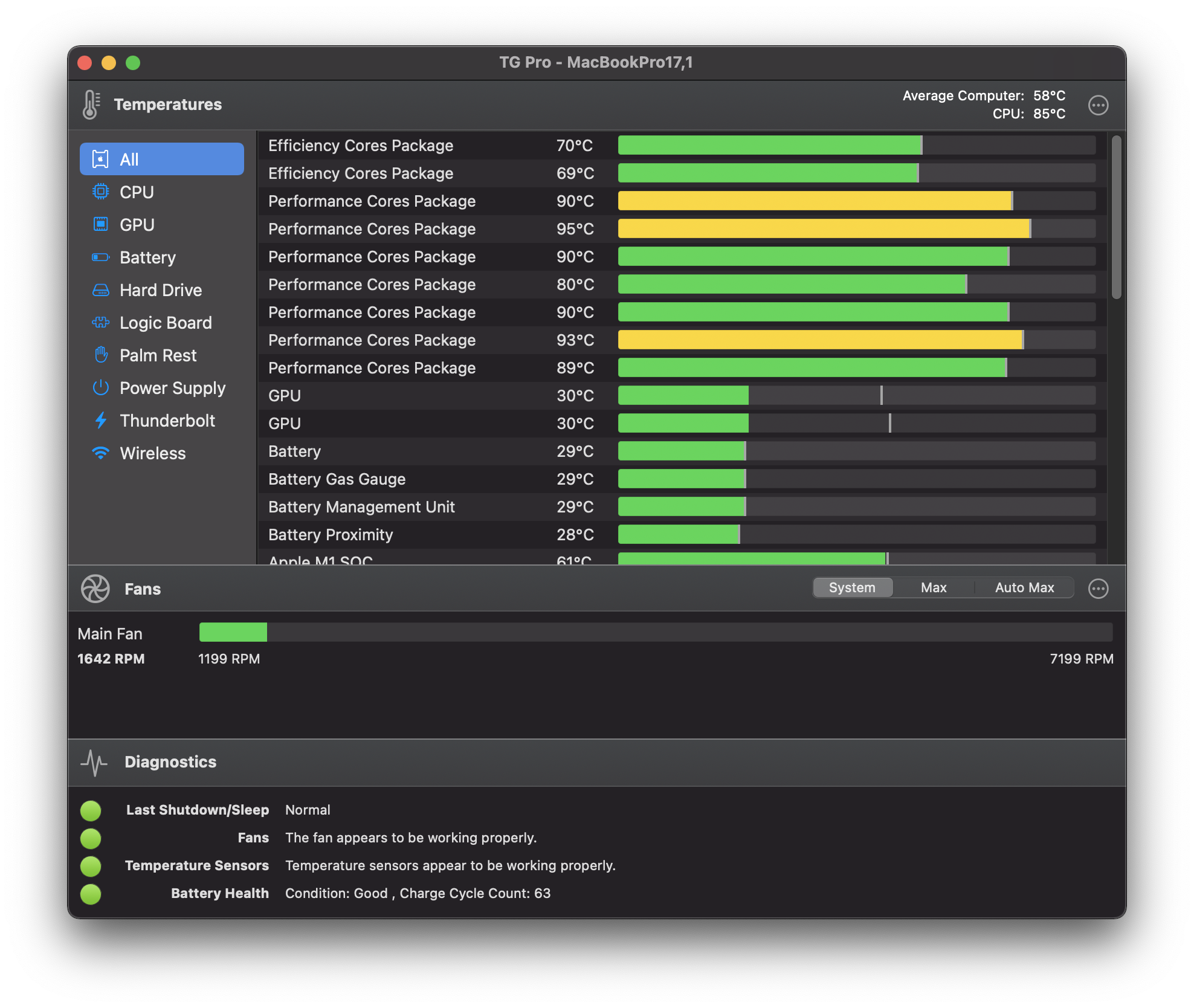 hallow laurel
proud igloo
As long as you can tolerate the latency and lack of client-side tools like easy ...
hallow laurel
proud igloo
As long as you can tolerate the latency and lack of client-side tools like easy ...
tbh i dont have any latency, and im playing last epoch and lost ark too, but thats i was asking about standalone, cuz was interested in awakened trade
hallow laurel
lilac trail
You can always install the standalone version and run https://www.tunabellysoftw...
i have paid version which is 6h(continously so basicly u get kicked then log againn and has gtx 3060 which i dont think matters for poe )
proud igloo
I didn't have a pleasurable experience on my M1 Mini, but I run in 4k so it's a bit doomed.
hallow laurel
i can bet that the 4k doesnt help:))
proud igloo
144 Hz too, but that doesn't matter much for PoE due to the timing caps 😄
hallow laurel
tho being at start i dont think awakened impacts my gameplay as much now
and pobb only is a separat client, doesnt have integration ( i love that someone made it work on macos too)
lilac trail
Awakened POE for Mac is hit and miss for me. I couldn't get the latest one to work, even after compiling it based on the github instructions. No big deal though. The trade site is all I really need for that. POB for MacOS is a bit glitchy but it works pretty.
An enforced cut off after 6 hours is probably a good thing. I'm on waaayyy too much 🤣
hallow laurel
basicly awakened trade just brings the site in game ? i saw that basicly u can search the weapon on market in game
lilac trail
Correct. It just means you don't have to alt-tab out. The latest version apparently has the capabilities to include mods on jewels, which it didn't do before. It'd be nice but I can live with it. Ca't get by without POB though
proud igloo
hallow laurel
basicly awakened trade just brings the site in game ? i saw that basicly u can s...
The core idea is that you price check an item and get to tune the rolls and check/uncheck mods that it uses to look for similar items.
Based on that you can judge the value of what you have.
hallow laurel
aah
lilac trail
Yeap. I just wished I could get it running. It compiles fine but it crashes when trying to run it. The log file is all latin to me so I'll just keep using the trade site for now.
hallow laurel
lilac trail
Yeap. I just wished I could get it running. It compiles fine but it crashes when...
no fix from the forum works?
lilac trail
No. I could post the log but the forum doesn't get a lot of responses
hallow laurel
Also, idk how lootfilters work, any problem with adding lootfilters?
lilac trail
are you asking in relation to the standalone client ? You can add loot filters with no issue.
hallow laurel
lilac trail
are you asking in relation to the standalone client ? You can add loot filters w...
yeye
but
idk the process of adding
because for example in last epoch i can add lootfilter in game by copy-pasting the rules into the settings and GFN wont have a problem with that
but if lootfilters work like awakened trade then i wont be able to add them while playing on gfn
like...do i need to add lootfilters in the folder of poe ...?
spring herald
yeah normally, but you can subscribe to loot filters on the site so they should show up in game without all that
Path of Exile
Path of Exile is a free online-only action RPG under development by Grinding Gear Games in New Zealand.
hallow laurel
a ok
lilac trail
You can also create your own browser based filters on the filterblade website if you don't see one in that list that suits exactly what you want to do. The only catch to all of this is if you have custom sounds. These need to go in to a specific location on your disk drive. You can't store them as part of the filter. If you don't use custom sounds then that won't be an issue.
hallow laurel
i installed poe annnnd almost got 2 eggs to fry on the macbook
:)))
also had lag
lilac trail
The CPU will always run hot. Mac based systems are notorious for that. Mine runs at 80c or so with POE running. Your battery temperature however shouldn't go above 35c.
hallow laurel
any fixed for item filter not getting auto selected when i log into the game? need to manually set it
lilac trail
It should be set in the game options menu. What does it look like in the menu option setting ?
hallow laurel
lilac trail
It should be set in the game options menu. What does it look like in the menu op...
i mean i set it to the item filter then when i loged again it reseted, this been doing for 5-6 times ,now i see it s ok kekw
proud igloo
I'm quite short on space on my M1 Mini as I'm about to put Asahi on it as well. Has anyone tried putting PoE on an exFAT external SSD, or is that doomed to fail?
lilac trail
No experience with the setup you are thinking of attempting. Seem a whole lot of empty on trying this on the web too. That doesn't mean it's a bad thing to try, just not documented ... yet. I've read of people using a RAM disk setup for parts (the shader cache) or all of POE. That's different to what you are thinking off, but if people can set up a RAM disk for POE with acceptable performance (they didn't day it didn't work well) than can't see why what you want to do would be an issue, except maybe for the CPU or the connection speed between the Mac mini and the SSD. Assume you're going to use USB 3 or Thunderbolt ?
Are you thinking of setting up windows on the external drive as well ? That might be a performance beats, depending on what type of SSD you're going to use. I'd be interested in hearing the results either way. I might consider it as well for my M1 Max Macbook Pro, though I doubt it will decrease my CPU temperatures when I run POE.
An old link for RAMDISK but maybe useful - https://www.reddit.com/r/pathofexile/comments/789lf6/tutorial_howto_run_poe_on_ramdisk_with_zero_lag/

reddit
61 votes and 92 comments so far on Reddit
proud igloo
There we go, I'm back.
The core concerns I've got about using the external SSD is that the filesystem on it can assumedly not do permissions and other unix:y things well, which may greatly surprise or break the patcher and client.
It's on USB-C and it can push a healthy bandwidth at least.
On Windows, unless MS sorts their story out and actually pushes ARM64 Windows, I don't really have any use for it on that machine outside of something like UVM. Definitely not gonna pay for Parallels.
proud igloo
That was way more painless than expected to install...
zao@m1:~ -$ uname -a
Linux m1 6.1.0-rc6-asahi-4-1-ARCH #1 SMP PREEMPT_DYNAMIC Tue, 22 Nov 2022 06:06:17 +0000 aarch64 GNU/Linux
Painless is always good 😀 The native MacOS patcher is already busted, so I doubt you'd make it any worse. TBF it's not GGG's fault. Apple changed things in the last OS update but GGG aren't going to provide a fix for it so we're stuck with the work around.
Isn't there a free version of Parallels ? You're limited to in the no. of cpu and RAM you can use unless you go the pro version, but if might be ok if there's a free version (just keep putting the date back on the eval copy works I think). I haven't checked virtualbox for a while, Windows ARM might work on it now (it didn't). I'm running Windows ARM in Parallel but I don't like it. Windows behaves weirdly (though that could be the mac keyboard interaction) so I'd like to try windows natively on an external drive and cancel Parallels altogether.
What external SSD are you using with the Mac mini ?
proud igloo
The Samsung T7 Shield. Not sure what throughput it has under macOS, it was decent under Windows and Linux.
lilac trail
Ah cool. I t was just reading up on that and others. It's supposed to have just over 1GB write and 900MB read throughput. Might be time to go shopping on Amazon ...the 1TB unit will probably be more than enough
proud igloo
6-800 MiB/s dd throughput under Linux. Had horrible numbers with /dev/diskN under macOS but I guess I should've used /dev/rdiskN
(horrible being 80 MiB/s)
lilac trail
That is horrible 😐
proud igloo
I haven't had any trouble interactively against it, I keep ~300 GiB of PoE data files on it for my decompression tool testing.
lilac trail
There are 2 others that seem potentially reasonable to consider based on reviews as well.
Adata SE800 1TB
WD Black P50 Game drive 1TB (this has a theoretical 2GB throughput with the right interface)
proud igloo
@lilac trail As I suspected, throughput with rdisk was faster, ~545 MiB/s read through this Dell USB hub I connected to get the keyboard working during Asahi's U-boot and grub phases.
Followed way too much bad advice online on which key to hold to get to the startup manager on Apple Silicon, lost for hours 😄
lilac trail
isn't it option+r to bring up the boot manager ?
oh sorry - that's the Intel based option. Holding the power button down till you see the start screen is the apple silicon method. Why on earth did they need to change it 🙄 They do that with other things too. It took me ages to find out they stuffed things in finder that used to have a menu of it's own. The monkey's must be in charge of coding there 🤣
 ivory zenith
any m2 max players?
 tawdry meteor
hi im on a very crappy pc (mac) and idk which settings to turn off if i want it to run without fan in superbeast mode, any suggestions?