#🌈│wootabase_profiles
1 messages · Page 10 of 1

 white pond
ye i saw thast
 opaque saddle

dont use cpu sets or gpu priority
and never set a game to high or realtime priority or else it messes with keyboard and mouse inputs
 opaque saddle
wut da heck
you downloaded a super outdated version of this
where did you download this from xd

Process Lasso is free to use indefinitely, but some advanced features may disable over time and a nag may be shown. See Pro versus Free for more information. Download Process Lasso Latest Release:P…
this is the official website

I recommend the Beta
uninstall whatever you installed
opaque saddle
The non beta shouldnt look like that
I think you downloaded from some weird mirror website thats outdated
white pond
opaque saddle
I think you downloaded from some weird mirror website thats outdated

Real-Time CPU Optimization and Automation. Keep your PC responsive during high CPU loads and automate process settings with rules. Apps run YOUR WAY!
is where i got it
found link on reddit
white pond
opaque saddle
well that is the right place
i'll download the beta
It looks the same bru
so what am i doing exactly lol
 opaque saddle
white pond
It looks the same bru
opaque saddle
white pond
It looks the same bru
oh dude lol
you arent right clicking on any applications you silly goose
you use processlasso to mess with you thunk it
processes
you gotta find the applications you want prioritized and mess with those manually
i.e. apex in this case
and maybe de-prioritize something like Discord
white pond
you got me so confused gang
opaque saddle
lol dont worry too much about it
in the end, I think its just because your superglide timings are either too far or too close
 white pond
under always?
opaque saddle
yeah
or else youd have to change it everytime
this is probably the biggest change you can do with processlasso
white pond
opaque saddle
this is probably the biggest change you can do with processlasso
alr my stack got off i can figure this shit out now

alright so that looks right
opaque saddle
now set cpu priority to above normal, I/O priority to high, GPU preference to high, memory priority to normal, efficiency mode off, boost off, induce performance mode on, and exclude from probalance
you can generally do this for every videogame with the cpu affinity tweaks and expect like a +30% gain in FPS
and a reduction in input latency and better frame pacing
this is like the only useful optimization program ive ever used
remember, do not set gpu priority to high lol
opaque saddle
opaque saddle
remember, do *not* set gpu priority to high lol
@white pond
white pond
 white pond
i got to gpu pref and it said that
opaque saddle
everything else is adjustable though
white pond
ah gotcha
opaque saddle
oh alright
that one I also ran into an issue for
just skip it
I just gave you the general good settings for every game
white pond
 opaque saddle
if a game doesnt let you do it, just skip it
opaque saddle
white pond
yes
that is extremely good for Intel
games generally should not run on Intels Ecores
they are quite alot slower and lead to scheduling inconsistencies which can lead to frame pacing problems and general stutters
white pond
opaque saddle
now set cpu priority to above normal, I/O priority to high, GPU preference to hi...
ok bett i just set thosse
opaque saddle
if you REAAAAALLY want to min/max, you can set programs like Discord/Spotify/other background apps to run on E-Cores only using CPU affinity
and set every game to run on P-cores only by disabling efficiency mode, and disable core 0 and 1
white pond
i mean i run games fairly good already still on 1080p
white pond
opaque saddle
if you REAAAAALLY want to min/max, you can set programs like Discord/Spotify/oth...
how would i do that with discord
opaque saddle
frame pacing consistency and input latency consistency is the main things you are improving right now
white pond
that one is prob worth it
opaque saddle
white pond
how would i do that with discord
just right click on it
white pond
yesssir
 opaque saddle
it changes all of them
white pond
o
opaque saddle
if you use Always
never seen DiscordSystemHelper before
you using modded?
dont answer that
bannable
white pond
no just normal disc
opaque saddle
weird
high priority too?
yuck
oh you know what
thats discord overlay isnt it
white pond
oh yeah 100%
opaque saddle
doesnt give your game the highest mouse & keyboard input priority in borderless
its still up there but its just not the highest it couild be
not that big of a deal on good computers though
white pond
ok what was i setting for discord?
white pond
opaque saddle
you using modded?
also what tf is even that
who needs to mod discord
like what
opaque saddle
theres alot of mods that are useful but since its bannable to talk about in servers I wont
white pond
im just disabling everything but e cores?

 opaque saddle
seems good yeah
white pond
just cpu?
opaque saddle
yeah cpu priority
white pond
kk
opaque saddle
I set everything a little below the maximum for discord
opaque saddle
so I/o priority normal, memory priority below normal, etc
white pond
i was coming from a laptop so i've been pretty happy with anything
white pond
opaque saddle
is your main game apex?
pretty much only apex, overwatch and r6
opaque saddle
oh wait did discord do that by default?
white pond
default
opaque saddle
that is abysmal
set it to high
oh wait it might have to be realtime actually
to stay overlaying over the game at the right framerate
opaque saddle
white pond
pretty much only apex, overwatch and r6
same games as me then
basically
white pond
w
opaque saddle
overwatch you can do these same things on
the high everything except gpu priority and whatnot
disabling core 0 and core 1 for the game, disabling e-cores
these things do change how superglides feel by the way
a pretty moderate amount
since they are so tediously tied to framerate
white pond
opaque saddle
since they are so tediously tied to framerate
ye
do you want to vc here?
white pond
opaque saddle
since they are so tediously tied to framerate
yo btw the fps looks alot more stable
opaque saddle
white pond
yo btw the fps looks alot more stable
well let me know how it goes
+fps_max 267 +lobby_max_fps 267 -fullscreen -novid -forcenovsync -no_render_on_input_thread +mat_letterbox_aspect_goal 0 +mat_letterbox_aspect_threshold 0 +building_cubemaps "1"
heres my launch options too
I recommend not using Rivatuner and just using game frame caps
they usually do it better and they are certainly less latent
the less external things you use when it comes to game limiting, the better, usually
white pond
opaque saddle
+fps_max 267 +lobby_max_fps 267 -fullscreen -novid -forcenovsync -no_render_on_i...
why 267
just change to 240?
also did those options for overwatch aswell
white pond
opaque saddle
the less external things you use when it comes to game limiting, the better, usu...
i see
i'll stop using it then, you def know what ur talking about lol
opaque saddle
white pond
why 267
240fps has a bhop bug
white pond
fr?
white pond
i went to 267 ill trust
opaque saddle
it can go above/below depending on a few factors, and these ranges are still kinda being studied
optimally, use 255
white pond
whats the bug
opaque saddle
when you slide and bhop sometimes you just wont get any vertical height
white pond
i don't think i've ever seen that
opaque saddle
its been a bug since forever and I dont know why
but the most optimal fps is 255 for apex
I just use 267 because I have a 280hz monitor
whats your refreshrate
white pond
i got a 240hz
opaque saddle
make sure its actually set to that lol
white pond
it is
opaque saddle
ive seen alot of people make the mistake of not setting it
opaque saddle
yeah
white pond
alright ima launch witht hat
and try the dks again
my Mm values is prob fucked do u know the correct stuff?
white pond
opaque saddle
just flip your spacebar
that's what i been doing
white pond
i got the wooting 60he v2
opaque saddle
well that should give you solid results. if you want consistency, do 1mm on space and 1.5mm on C
white pond
opaque saddle
set space to 0.7mm and C to 1.1mm
ill try that
what i ha ve been doing is

i've been testing around
opaque saddle
opaque saddle
well that should give you solid results. if you want consistency, do 1mm on spac...
this basically garuntees youll hit C after space, and that your finger will already be moving downwards
white pond
but this is what i've went to
opaque saddle
I wouldnt use SOCD for apex
if you are mid-air and you press D immediately after letting go of A(and vice versa), you will completely lose all speed
white pond
i c
opaque saddle
having the keys overlap into null input is actually generally better for keeping speed if you do mess up movement
 opaque saddle
also no rapid trigger?>
opaque saddle
lol that was fast
white pond
it was
opaque saddle
white pond
u don't like rapid trigger on wasd?
oh no I meant you arent using rapid trigger
opaque saddle
make sure continuous rapid trigger is on
white pond
also those actuation points are NOT working for me gang
opaque saddle
I do personally but to each their own here
opaque saddle
white pond
also those actuation points are NOT working for me gang
just to verify, you are for sure doing superglides and not mantle boosts, right?
white pond
opaque saddle
just to verify, you are for sure doing superglides and not mantle boosts, right?
yes bro
opaque saddle
so you disabled mantle boosting then I figure
white pond
i have matles on a movmentkey
cuz they send u slightly futher
and higher
so i use them when rotating
white pond
opaque saddle
so you disabled mantle boosting then I figure
im hitting superglides but im at like 40% consistency
idk its different for everyone, thumb size, placement alot of shit goes into it.
also side question can u do like a launcher option to uncap fps in menus for overwatch
opaque saddle
white pond
also side question can u do like a launcher option to uncap fps in menus for ove...
overwatch is hard capped to 600fps
max
white pond
no my issue is in menus it's capped to 60
and i have NOT found a way to undo that i assume its also hard coded from what i've seen on reddit
bro i hate this frame perfect
bullshit
white pond
opaque saddle
just to verify, you are for sure doing superglides and not mantle boosts, right?
trying this idk
 white pond
opaque saddle
well that should give you solid results. if you want consistency, do 1mm on spac...
white pond
opaque saddle
well that should give you solid results. if you want consistency, do 1mm on spac...
The only thing I've been close to semi consistent with is 2.6 c 2.0 space, Maybe I'm just ass idk man.
 south sun
someone has good rgb profile for the 80he?
 clear pewter
white pond
also those actuation points are NOT working for me gang
clear pewter
white pond
also those actuation points are NOT working for me gang
c3e5b32c68f97e90b52bce507cf986169752 try mine


it should work from 180 to 240

240
 opal adder
clear pewter
opal adder
clear pewter
unironically
i cannot do that
i can superglide decently consistently in game, but on that website its impossible
clear pewter
opal adder
i can superglide decently consistently in game, but on that website its impossib...
mine work both in game and on the site
basically 90% for most attempt in game
 olive river
Hi 👋
I was wondering... Is there any way to remap this accent: ^?
Thanks
 white pond
clear pewter
basically 90% for most attempt in game
white pond
clear pewter
basically 90% for most attempt in game
I'll try it later today, most of my tests with others I could get it to 92% on website but in game was like 30%
olive river
olive river
Hi 👋
I was wondering... Is there any way to remap this accent: ^?
Thanks
@sullen stirrup ?
Sorry for pinging.
 sullen stirrup
Only the keys that you have on keyboard 
I don't really see ^/? on ISO-FR one 
white pond
clear pewter
c3e5b32c68f97e90b52bce507cf986169752 try mine
this works in game for you..?
its like a 20% chance bro
like vro

that code you sent must have been the wrong one or old
yeah idk i've done trying dks its just not worth it
 jaunty belfry
white pond
yeah idk i've done trying dks its just not worth it
jaunty belfry
white pond
yeah idk i've done trying dks its just not worth it
do you get a consistent 240 fps
because that matters on the timing of pressing crouch and space and will change your timing for the inputs
white pond
jaunty belfry
do you get a consistent 240 fps
yes
it doesn't even move capped at 240 sometimes it will dip to 239
clear pewter
white pond
this works in game for you..?
Yes
Hmm thats weird
My friend also use this and get the same result as you 
Idk why it works on mine
olive river
sullen stirrup
Only the keys that you have on keyboard <:mukiConfusion:977555854528221224>
I d...
My keyboard is ISO, I type in QWERTY (I find it better), but I speak French. To get the circumflex accent, I have to press Shift + 6 ^. But I managed to put it on another key by doing it like this:

 frosty cipher
test
 lyric moss
olive river
My keyboard is ISO, I type in QWERTY (I find it better), but I speak French. To ...
lyric moss
olive river
My keyboard is ISO, I type in QWERTY (I find it better), but I speak French. To ...
moi aussi jsuis français et je suis en qwerty jcroyais que j'était le seul a faire ça mais moi je change juste mon layout en francais pour faire des accents
 upper sun
lyric moss
moi aussi jsuis français et je suis en qwerty jcroyais que j'était le seul a fai...
upper sun
lyric moss
moi aussi jsuis français et je suis en qwerty jcroyais que j'était le seul a fai...
this server is english only
lyric moss
upper sun
this server is english only<:smile:1257692580515155978>
sorry
olive river
lyric moss
moi aussi jsuis français et je suis en qwerty jcroyais que j'était le seul a fai...
Did you put it in the United States international? You have the accents on that one.

I'm speaking in English then x)
olive river
lyric moss
moi aussi jsuis français et je suis en qwerty jcroyais que j'était le seul a fai...
You're not the only one in the community who uses this keyboard.
 cold moss

 elder siren
WARNING FRENCH: DO NOT LOOK UP THERE IS FRENCH THERE
 gray blade
white pond
also those actuation points are NOT working for me gang
gray blade
white pond
also those actuation points are NOT working for me gang
you realize that someone elses actuation points are not the same as yours cause you may press the key faster or slower than them.
white pond
white pond
idk its different for everyone, thumb size, placement alot of shit goes into it.
yeah no shit..
gray blade
white pond
yeah no shit..
is this just in the trainer or are you having the .5 frame input issue in game as well? if in game then enlarge the distance between the triggers by the smallest amount you can.
gray blade
white pond
yeah no shit..
have you made sure its not you? as in your hand? as in your not CONSISTENT in your key presses...
white pond
gray blade
is this just in the trainer or are you having the .5 frame input issue in game a...
i've tested around alot im just chasing perfection
gray blade
you certainly are. :)
cause i dont know if i could hit a .5 frame change
white pond
im at around 70% ish in game and 90% in the trainer
gray blade
at 240fps
gray blade
so 240fps is 4.16 milliseconds
thats a tiny gap to shoot for
it could even be the length of your usb cable
or the bus being used by other prog
white pond
gray blade
have you made sure its not you? as in your hand? as in your not CONSISTENT in yo...
i've tested alot of different hand positions and thumb positions i just don't feel like i have a good way of testing which is actually more consistent
theres always going to be slight variations i just need to be happy with it
gray blade
is there no tool to test how consistantly you press the key?
with the mag switches youd need a special trainer not just how fast you press but how fast you accelerate
cause you need accel to be linear for the timing between two physical key press points to always be the same
gray blade
white pond
theres always going to be slight variations i just need to be happy with it
if you are slow at the start and fast at bottom out you will have an issue unless you can math out your accel curve and always hit that same curve
gray blade
gray blade
if you are slow at the start and fast at bottom out you will have an issue unles...
love the problem though. awesome issue and i wish you the best in your efforts.
white pond
gray blade
if you are slow at the start and fast at bottom out you will have an issue unles...
yeah this is my problem
i've tried to smack harder but that worse
gray blade
we need someone to make a consistency trainer
white pond
yeah fr
white pond
fr
 clever idol
Is there a good hub with highly recommended keyboard profiles?
Just got a 60 he v2 and hoping to find something good for FPS games, specifically CS2 and valorant
upper sun
Check pins
clever idol
I do enjoy the occasional RPG so probably would be good to have a secondary profile as a backup for those games as well
Can 80 he profiles be used for 60 he still?
upper sun
clever idol
Can 80 he profiles be used for 60 he still?
Yes, just keep in mind some keys might be missing
Like if someone binds something to frow 
clever idol
Got it - thank ya
lyric moss
olive river
Did you put it in the United States international? You have the accents on that ...
oh i didnt knew that thanks im gonna use it i got the uk one
olive river
lyric moss
oh i didnt knew that thanks im gonna use it i got the uk one
You're welcome. I think the British version works too, but it's not the recommended one, I believe.
lyric moss
olive river
You're welcome. I think the British version works too, but it's not the recommen...
ok ok thanks for the informations
 lament parcel
clear pewter
lament parcel
clear pewter
how this work.. wtf is that ahaha 0% on mine superglide trainer with this profile why
but then it's a really uncomfortable place... if you have your finger on that dks button you are unable to chain tap strafe after or in any case very uncomfortable
u have 6 finger i thinkj ahah
idk how u can have this % on the site with the same profile.. lol
 lament parcel
I redid some tests and the most consistent at 240 fps remains my profile and also by far even if the site tells me that I have 0% success, but in game with 240 fps capped I hit them now at 80% with dks on spacebar
0ff2cac37c8af8d14799091a5880c3b5e538
clear pewter
lament parcel
I redid some tests and the most consistent at 240 fps remains my profile and als...
Ig its better to make our own profile lol
lament parcel
clear pewter
Ig its better to make our own profile lol
Yes, I think every keyboard is somewhat different. I don't know why your profile works perfectly for you, while it shows me really low percentages on the site and in-game I managed to get some, but at 240fps I found mine much more consistent. I can't find a reason for it.
clear pewter
lament parcel
Yes, I think every keyboard is somewhat different. I don't know why your profile...
it works perfectly on mine even with slide fatigue
lament parcel
clear pewter
it works perfectly on mine even with slide fatigue
great!! idk how is possible bro
i literally used ur profile and able to hit maybe 2 3 of 10
maybe I'm not used to that timing
 static oxide
Gta rp profile for wooting 60he + pls ?
white pond
lament parcel
Yes, I think every keyboard is somewhat different. I don't know why your profile...
This is what I was saying
Makes no sense, do you have a 60he v2 aswell? Maybe it's cuz he's on a v1
Idk
lament parcel
white pond
Makes no sense, do you have a 60he v2 aswell? Maybe it's cuz he's on a v1
I have the 60h and the first one, so probably even if we put the same heights of the magnetic switches they somehow lead to different results
 split schooner
I need this anyone know make it exactly same pls ?
 split schooner
Pls?
 brave kettle
is there anyone afiliated with wootabase profiles website here? i've been trying to make an account 😭
 chilly wagon
guys whats the best profile for overwatch im on the tenz wooting
 leaden plinth
whos got a good config for comp fn |?
 modern mulch
hey, can someone explain what dks is and how i can utilise it in apex legends pls (new to all this lmao)
upper sun
modern mulch
hey, can someone explain what dks is and how i can utilise it in apex legends pl...

Dynamic Keystroke is a powerful feature where you can assign 4 different actions to a single key. So based on how far you press it down, it will register different actions and combinations.
✨ Follow our socials! ✨
Discord https://discord.gg/wooting
Twitter https://www.twitter.com/wootingkb
Instagram https://www.instagram.com/wootingkb
TikTo...
modern mulch
upper sun
https://youtu.be/pznh-2px6gE <:smile:1257692580515155978>
goat
 jovial wedge
Hi, wootility settings for cs2 please
 rustic glade
jovial wedge
Hi, wootility settings for cs2 please
rustic glade
jovial wedge
Hi, wootility settings for cs2 please
Lmk if you get one
jovial wedge
There are 4 profiles on the wootings website, I used one and customised it
But it would have been good if there were more
 hexed mural
anyone got a profil code for valorant? i have 80he
upper sun

 stone pollen
looking for onw for Valorant, but for the Wooting 60HE+ as all iv seen is for the wooting 2 please and thank you
upper sun
stone pollen
looking for onw for Valorant, but for the Wooting 60HE+ as all iv seen is for th...
You can import profiles regardless of keyboard, of course it would only import three keys if you import a UwU profile and you will have to update the other keys
stone pollen
upper sun
You can import profiles regardless of keyboard, of course it would only import t...
Mine keeps saying something about AVR I think that's Wat it is
upper sun
stone pollen
Mine keeps saying something about AVR I think that's Wat it is
and you are sure you have the 60HE+?
only older batches of the OG 60HE used AVR
stone pollen
Yes I'm sure
 stone pollen
upper sun
and you are sure you have the 60HE+?
stone pollen
upper sun
and you are sure you have the 60HE+?
 upper sun
stone pollen
upper sun
stone pollen
Could you click on the device and fold it down?
 upper sun
It's not recommended to share S/N
 sand cliff
Don't share serial numbers please
stone pollen
Sorry my mistake
upper sun
stone pollen
Sorry my mistake
No worries. What profile are you trying to import?
stone pollen
 upper sun
Could it be that you try importing a wooting 2 profile? If so my apologies I thought you were talking about the 60HEV2 because that's how some people write it
Oh you were talking about the 2HE.. older models of them were AVR, you still can import that profile tho?
stone pollen
I was trying to import one for the keyboard I have and ok so it will still work if I import it?
upper sun
stone pollen
I was trying to import one for the keyboard I have and ok so it will still work ...
yes, it's just the warning I talked about earlier
it tells you that the keycount of the layout is different
like if something on the two HE is mapped to F1 it wont import the settings for F1
stone pollen
Ahhh ok I appreciate it thank you
I'm new to the keyboard and stuff so I just got it yesterday
upper sun
stone pollen
I'm new to the keyboard and stuff so I just got it yesterday
Ahh, enjoy it! And check pins for some other profiles if you are looking for them
Tenz one is pinned as an example
 still gull
does anyone know a good gd profile for the wooting uwu? currently i am using this

 brave pivot
whats the difference from the 60he and he 60he+
upper sun
brave pivot
whats the difference from the 60he and he 60he+
The + supports screw in stabs and older batches of the og 60 are AVR instead of ARM
 gleaming stream
any cs2 presets
 primal spindle
gleaming stream
any cs2 presets
primal spindle
gleaming stream
any cs2 presets
pins
gleaming stream
primal spindle
pins
Tysm
rustic glade
primal spindle
pins
W
 forest trout
Should I turn on continuous rapid trigger for fps games?
 quick notch
does anyone have a gd preset for 60 he v2?
olive river
How do you make macros? Without necessarily using HE technology. I'd like to make a œ
upper sun
olive river
How do you make macros? Without necessarily using HE technology. I'd like to mak...
wooting only offers dks. if you want different macros get something like AHK
olive river
upper sun
wooting only offers dks. if you want different macros get something like AHK
Are the two programs compatible? I mean, can I continue to use Wootility's features while also using Ahk software?
upper sun
olive river
Are the two programs compatible? I mean, can I continue to use Wootility's featu...
yes, AHK is just a macro software
olive river
Oh okay, I'll try that, thanks.
upper sun
it's a third party macro, so if you need help with it you should ask on their server
olive river
upper sun
it's a third party macro, so if you need help with it you should ask on their se...
Your thing is complicated
 hallow forge
Hi guys do you have profil code for fortnite ???
 novel nebula
To anyone who plays geometry dash, how long did it take to get used to your wooting?
 tight shale
novel nebula
To anyone who plays geometry dash, how long did it take to get used to your woot...
tight shale
novel nebula
To anyone who plays geometry dash, how long did it take to get used to your woot...
like 2 days, now i can't play much without it lol
novel nebula
settings?
tight shale
just .4 activation and .4 rapid trigger for activate/deactivate, nothing special
tachyon mode on
novel nebula
are you supposed to turn of contiuous rapid trigger?
tight shale
i have it off, not sure though. Haven't tried it
novel nebula
ok thankss
upper sun
<@&1098943457654997093> 
olive river
With the keyboard set to 60%, I don't have this character: ~
It's also not listed in the Wootility remapping section. How can I fix this? I find it's really difficult to remap existing characters.
 trim wharf
olive river
trim wharf
olive river
~
oooh thanks
I'm going to try setting up a dks to access it directly with Fn + Esc. I've assigned the backslash character (`) elsewhere on my keyboard, so I don't need it on Esc.
However, I find that quite a few characters are missing from the remap tab. It would be simpler.
 limber talon
Code !
 brittle cypress
here\
brittle cypress
limber talon
Code !
🙂
 warped sonnet
I just got a 60 HE v2 anyone have a good profile for valorant?
 hollow wyvern
 frail flare
Wooting 60he V2 profiles for apex?
That don’t utilize DKS…
white pond
opaque saddle
max
did u do this or do i have to decline every time?

i clicked no not ask again like 5 times now 
opaque saddle
white pond
did u do this or do i have to decline every time?
just click continue. when you read it they tell you its their nag to get you to give them money but they dont wanna enforce subscriptions. so they do that instead
white pond
opaque saddle
just click continue. when you read it they tell you its their nag to get you to ...
ah like a unskippable ad
 subtle veldt
Does anyone have good settings for the Wooting 80HE for CS2? Maybe someone could help me configure the keyboard; I'm completely clueless.

 subtle veldt
sry
hollow wyvern

 sturdy trail
 static hare
hollow wyvern
<a:checkThePins:900127047605714954>
static hare
hollow wyvern
<a:checkThePins:900127047605714954>
Always the same hahahaha 
 ionic ice
val
 river harness
l
 steep harness
DOES ANYONE HAVE A GOOD PROFILE FOR FORTNITE?
 craggy veldt
 ripe oracle
steep harness
DOES ANYONE HAVE A GOOD PROFILE FOR FORTNITE?
ripe oracle
steep harness
DOES ANYONE HAVE A GOOD PROFILE FOR FORTNITE?
literally just 0.1mm actuation 0.1mm continues rapid trigger
if spacebar is too sensitive raise it among whatever else
its literally all preference if theres a personal or skill issue
 blazing salmon
Is there any profiles for cs2? Or no since they ban rappy tappy
 hardy badger
Can anyone create a profile for me. Its for mc and i need just RGB, i have actuation for me already, its a Wooting 80HE. dc10d3675e3576fd7a94c2223158aa6b19a4
 hardy badger
6cc615ecb5c259e7dd19f78452c92fc2ffdb
 grizzled harness
.///??>?>t
 quick laurel
blazing salmon
Is there any profiles for cs2? Or no since they ban rappy tappy
quick laurel
blazing salmon
Is there any profiles for cs2? Or no since they ban rappy tappy
i use d3cdb66f2f3ca3bb4fa5bc718f7b5258b6cf
blazing salmon
thank you
 hearty bobcat
Can anyone share their typing profile with me? I just can't seem to find the right settings and trigger point...It feels always weird... I tried so much..
Then i think i have it and after some hours its weird again.. I dont know why.. I need something smooth haha
 open merlin
2574c78b1844f0f7a29209e809fa2bfd67af <- CS2 (snaptapoff)
**Switches: **Jade Pro
 hearty dust
anyone have a 80he cs2 profile?
 gaunt swallow
scroll up a few messages
 inland sluice
ayo mini question: can I add these held rgb color changes to other keys (the other fn key)
so the same behaviour that the caps lock and fn in the middle have

 silk dust
hearty bobcat
Can anyone share their typing profile with me? I just can't seem to find the rig...
silk dust
hearty bobcat
Can anyone share their typing profile with me? I just can't seem to find the rig...
7cb6447a6a1ce6e88df16d935d4b2dbd85bc this is the one i've been using and it works pretty good for me.
hearty bobcat
silk dust
7cb6447a6a1ce6e88df16d935d4b2dbd85bc this is the one i've been using and it work...
Thank youu retrac.. 
I will try it!!
 oblique charm
I play FiveM, what settings do I need to adjust to be able to strafe?
 pine steeple
oblique charm
I play FiveM, what settings do I need to adjust to be able to strafe?
pine steeple
oblique charm
I play FiveM, what settings do I need to adjust to be able to strafe?
82ec1b7f7aa23f622556513cbe6c640ef6ba
My personal wooting profile if anyone needs one 
 tame cedar
who got some good RBG layers and color settings
 brisk sail
 fading pier
is Wootabase working properly at the moment? I can't seem to login or even reset my password
 flat prawn
fading pier
is Wootabase working properly at the moment? I can't seem to login or even reset...
flat prawn
fading pier
is Wootabase working properly at the moment? I can't seem to login or even reset...
There is no accounts for the public
 proud condor
does anyone have a good geo dash profile for the wooting uwu?
 maiden finch
64fa4464c36940d29f65f2ce1321a12122c3 best 2xko profile out rn
 pallid mural
Hello guys, is it possible to put a double action on the space bar ? like macro in razer. I want to do X+ left clic
upper sun
pallid mural
Hello guys, is it possible to put a double action on the space bar ? like macro ...
you could use DKS
allows up to 4 actions on one keypress
pallid mural
Oh thanks, i will watch the tuto on youtube 🙂
 upbeat jacinth
anyone perchance have an apex profile I could get?
 young sparrow
Anyone possibly have a good EFT Profile?
 sage token
white pond
opaque saddle
just click continue. when you read it they tell you its their nag to get you to ...
sage token
white pond
opaque saddle
just click continue. when you read it they tell you its their nag to get you to ...
im fairly sure process lasso has to be giving me poor fps something we did
or maybe that's just Olympus  but ive gotten dropps to 90fps
opaque saddle
white pond
or maybe that's just Olympus <:dogekek:1134256020156317706> but ive gotten drop...
works just fine for me! I couldnt answer that
just turn it off and test run
 vocal lotus
Pls give me good setting wooting 60he v2 cs2 I’m lvl 10 faceit
 shut yoke
hearty bobcat
Can anyone share their typing profile with me? I just can't seem to find the rig...
shut yoke
hearty bobcat
Can anyone share their typing profile with me? I just can't seem to find the rig...
recommendation for any profile: set keys like caps lock, windows, escape to the deepest actuation so you dont accidentally hit them
shut yoke
young sparrow
Anyone possibly have a good EFT Profile?
socd/rt on a & d, and q & e
 clever cairn
any nice league profiles for the 60he v2 ive been playing around with the f1 key issue and kinda got a workaround. jsut wanna see how other have it set up
 upbeat ferry
any didy profiles for geometry dash optimized for wave
 void vapor
789b67589b8ca4792374d6b0890f9f14820a CS2 profile
void vapor
void vapor
789b67589b8ca4792374d6b0890f9f14820a CS2 profile
It has Snappy Tappy on, ONLY USE IT ON FACEIT
 fresh lichen
enyone have a valorant profile y tried so much configure my wooting but y dont find a swet spot
hollow wyvern
fresh lichen
enyone have a valorant profile y tried so much configure my wooting but y dont f...
white pond
opaque saddle
works just fine for me! I couldnt answer that
turns out apex just has a really bad fps problem with intel cards rn
had me worried for a sec
 harsh rover
anyone have a good fighting game profile ?
 sly snow
void vapor
It has Snappy Tappy on, ONLY USE IT ON FACEIT
sly snow
void vapor
It has Snappy Tappy on, ONLY USE IT ON FACEIT
is the snappy tappy bannable on competitive cs2?
 sinful flume
i think it just kicks you from games
I think - someone correct me if im wrong - that rappy snappy does too
but no banning
 civic star
Anyone playing Rematch that has a good profile for the 80HE?
 grand merlin
I am looking for comp apex 60 he v2 profile codes thanks
 outer copper
hello guys any racing profiles for forza 6 ?
 fickle rose
the normal racing profile. not that i personally would ever use a keyboard for racing games
 whole osprey
tenz
 stoic lance
outer copper
hello guys any racing profiles for forza 6 ?
stoic lance
outer copper
hello guys any racing profiles for forza 6 ?
0eb95ea2-1004-40c3-85cd-5275d7802db7
 mortal plume
Do you guys recommend analog on fortnite?
 tame flicker
does anybody have zoinks profile for gd? or any other good gd profiles
upbeat ferry
any geometrical dashinator profiles
 quasi kelp
hey, does anybody that is good in brawlhalla have a good profile for high elo players? if so, dm me pls...
 eager dome
Anyone have an apex movement profile?
upper sun
 night crane
can i get best settings
night crane
can i get best settings
there are no best settings, best would be just trying around and maybe checking pins if you are clueless
night crane
ok
 sand terrace
does anyone have a good profile for geometry dash?
 fair knoll
sand terrace
does anyone have a good profile for geometry dash?
fair knoll
sand terrace
does anyone have a good profile for geometry dash?
I have an 80HE profile for GD, imo 0.35 should be good enough
dfffd35dc9c4223862649f2d549c334a9331
still gull
sand terrace
does anyone have a good profile for geometry dash?
only have one for the uwu 5cd09c18c59b24dbae15427a01d82d3a9c8c
 visual rock
Anyone have a good profile for r6?? Would really appreciate it
 smoky sinew
visual rock
Anyone have a good profile for r6?? Would really appreciate it
smoky sinew
visual rock
Anyone have a good profile for r6?? Would really appreciate it
ec9146332c273ae2159c1acb0fe93517708f
i use this
 high geyser
visual rock
Anyone have a good profile for r6?? Would really appreciate it
high geyser
visual rock
Anyone have a good profile for r6?? Would really appreciate it
spoits 922d334ede6145e9950c0189079fa581351f
 oak garden
any good wooting 60 he profile for valorant ?
hollow wyvern
oak garden
any good wooting 60 he profile for valorant ?
oak garden
hollow wyvern
https://tenor.com/view/sgh-gif-26294888
wheres the pins
hollow wyvern

 quartz sundial
Anyone got a Profil for Rocket Leauge??? For 80he
 candid snow
DBD Wooting setting? Looking for movement settings
 mortal inlet
Any LoL Wooting Settings
eager dome
no apex movement settings?
 vivid tinsel
 tough olive
Some cool codes:
Dirt 4
76882a32-150a-025a-8641-723e7f2e560f
Binding of isaac: rebirth
57c78c2b-826e-f9b1-c408-cdcf86a538ae
 gentle kestrel
Battle for colorblindness
e04967ea-671f-6558-f4bc-19792281e905
 fathom mist
anyone have a code for gta5 so I can test the woot right away? 😄
 wide pond
Let me just throw this in here as well
If you want to contribute to the game compatibility list, we more than welcome you! You can also add you profile code to the game (!!)
You can fill in the following form: https://goo.gl/forms/nsLtcIDoxORK3fNo1
To review the total compatibility list: https://goo.gl/FXo9bQ

Google Docs
Form Responses 1
Timestamp, Username, Game Title, Xbox Controller( Xinput), Joystick( Direct input), Controller+ Keyboard& Mouse, Aim assist interference, Analog Rating, Notes, Share your profile code, Does it work in combination with other devices plugged?, Do other devices interfere the game ...

Google Docs
This is a form to record the Wooting one compatibility for different games. Whenever you've tested a game, you can add it to the list through this form.
To see the total list see: https://goo.gl/FXo9bQ
Save this form somewhere: https://goo.gl/forms/nsLtcIDoxORK3fNo1
If you made a mistake, please fill in the form again and add it in the comment. We will organize double entries and mistakes time by time from the total list.
TBD = To be determined
N/A = Not Applicable (In some situation you don't need it)
gentle kestrel
Warframe 712a8cf9-b3e1-96f9-b4f1-642abb540138
 subtle folio
League of Legends (digital profile) 17e3f13c-5e7f-6687-d542-ee44a1466ca6
oh, seems that doesn't really work (beside the colours); the DKS settings aren't stored within the ex- and imported profiles
tough olive
True, we disabled DKS sharing for now.
In the next major version we will add the sharing of DKS with some much needed improvements for DKS
 indigo saddle
Made Squad work yesterday, default left analog stick under WASD. Here is how to fix it: https://pastebin.com/HKCiX7LD

 karmic yarrow
Because there are instructions in the pastebin, pretty awesome imo
 cosmic plover
Not sure who is maintaining the Compatability list google sheet, but can you add coloring for the analog rating witrh conditional formatting?
gentle kestrel
I think @wide pond is
wide pond
@cosmic plover good idea
will do
@indigo saddle added it to the list, in the notes?
^^
cosmic plover
nice
 tropic tendon
who has a profile for overwatch?
gentle kestrel
Me
tropic tendon
is it good :p
gentle kestrel
1a81f81a-b70b-4b1a-85a3-794b65acdec0
subtle folio
your layout is getting screwed because loaded ansi proflie instead of your keyboards iso layout?
tropic tendon
yeah
subtle folio
i've ansi, I'm fine 😄
tropic tendon
i mean, the typing is still azerty
but in the wootility i cannot change the LEDs (they go off) for the iso specific stuff 😄
probably because i didn't save to keyboard
wide pond
You can select to only load the analog settings and no LEDs
Will check about loading ISO on ANSI, I thought it wasn't an issue
tough olive
@gentle kestrel When did you make that Overwatch profile?
gentle kestrel
@tough olive after he asked
flat prawn
Added this also to the google doc: Forza Horizon 3 profile: dbdae1c2-caab-6238-37e8-f97df9ce011f (in-game controller settings info found on google doc in notes ❤ )
tough olive
@flat prawn Should we increase the amount of characters you can type in the profile description? it's now limited to 140
flat prawn
It would be useful but less needed than a counter, most boxes are 250 and also a counter would also be nice due to hitting the limit without warning made it abit annoying
tough olive
Noted.
 cobalt summit
+1 on adding a counter
 steel light
+1 indeed
flat prawn
Also reading up in the comments, there should be a warning when importing a different layout to the one you have (because screw you pleasant ❤ )
tough olive
The issue with gamepad profiles not compatible between ISO and ANSI will be fixed soon
 obsidian briar
I tried for Dishonored 2 : eb71d847-2525-7bcc-94e5-57931f9a107e
I played a few minutes it seemed to work
subtle folio
thanks for sharing that profile, was planning to pickup Dishonered this week
obsidian briar
Wolfenstein the old blood : c2a7c6fd-26ac-9b3d-ff4a-3159f8ccb8a1
But be careful, when it says press E, you have to press R
In the gamepad settings, it's X to both activate and reload. It's binded to R, so it's R to activate
Otherwise the analog works great
rustic glade
Anyone have a csgo profile code?
 wintry gazelle
Formula Fusion profile : 3435d608-1556-69d1-708e-202eaab4a0ca
tough olive
Want a cool fire like gradient, look no further. 3e012306-d3a3-9e15-faad-28ef5b1c5fe9
 oak hinge
@tough olive Could you make a picture of what it looks like?
 patent light
does anybody have a profile setup for league of legends yet?
 upbeat pine
@tough olive This would look rad animated!
tough olive
For sure
wide pond
@patent light You'll need to use DKS, still experimental, so it's not in the Profile sharing yet. Easiest is to make Q, W, E and R DKS cards. E.g. Q on first act. point, shift+Q on last actuation point
upbeat pine
anyone have a good profile for overwatch? the analog range seems so narrow on it, but I don't know if that's just cause I don't have good settings for it
flat prawn
Any rocket league profiles out there?
upbeat pine
here's you go! 3a69d116-2721-69fb-852d-1f32f6a78105 nothing special really, just also has accelerate and reverse bound to W and S respectively. Analog works fantastic in it, just make sure to set controller deadzone in the game options to 0
flat prawn
awesome, thanks
 lofty bear
does anyone have a code for csgo?
 faint hare
@tough olive @oak hinge see attached for fire gradient profile
upbeat pine
whoa! the underglow looks amazing in your photo!
faint hare
This was at 100% brightness on the led's. That might've helped. I usually like 75% or so
upbeat pine
but even on 100% it doens't quite look like that IRL 😮
the exposure or something combined with your room lighting is just perfect for the photo haha
faint hare
Lol, @tough olive did say in dark room. It's sundown on the east coast of the US so I guess that' helped
wide pond
@lofty bear Have to play with the curve and only need WASD analog stick. There's a little bit of fiddling acticating the gampead in the game menu settings
tough olive
Great picture @faint hare
 slate veldt
Man Im trying to get a GTA V profile together, but there's just too many overlapping buttons
maybe I'll try make one for 'on foot' and one for 'in vehicle'
 restive wagon
On foot doesnt matter cause you cant make your mouse act as joystick
It pretty much acts the same on foot as with controller, the input is pretty much similar on foot. Only difference is aim assist mode
 rigid nexus
@gentle kestrel 407ec62c-a928-eba2-4e75-6d78ea1a6b0c
The pic isn't a faithful representation of the scheme
 glad swift
Honestly this easy profile sharing is actually a huge advantage over other keyboards. Didn't expect it to be that easy to share profiles with people.
wide pond
@slate veldt I.e. On foot has no analog input controls in the game, might as well use your standard digital mode
rustic glade
What’s up everyone. I’ve been noticing a lot of asking around about game specific profile codes. I’m currently thinking about creating a simple website to make it easier to post and search for profiles for specific games. Is that a good idea? Would any of you be interested in using something like that?
karmic yarrow
Feel free to do so 😃
We also have a reddit page up. With the whole voting system it might me more suitable than discord
wide pond
@rustic glade more than free to do so. You have our support if you do. Just give us a PM whenever you need some help or advice
Example how to setup analog gaming profile: https://wooting.helpscoutdocs.com/article/17-how-to-setup-a-gaming-profile
rustic glade
👍
Let me see if I can get something quick and dirty up and running sometime next week.
If i do I’ll post it here.
 wise bolt
d4efb4f9-3eb5-ffab-cdcf-0b00c7be1a4e
here is a xbox-layout i use for Star Citizen.
My plan is to use the mouse for yaw and pitch and use the analog keys for roll (right,left), strafe (up, down, right , left) and acceleration (ahead and back)then the xbox controll pattern gives me 2 modifiers + 7 buttons
1 button is the menu button, i will not use, i bound to ESC
thats how i set it so far
of course you need to change the settings in SC to your needs
if any questions on SC or this profile, just contact me.
upbeat pine
nice colors 😃 👍
gentle kestrel
Black Desert Ranger
Cos why not? action and combo keys mapped out...
5824ab4b-a1a0-6f39-6aa0-656853036d93
V = Red because of excape
, = Red cos of the cancer black spirit, check out dem teeth
White = Function (Such as F and R)
Blue/Purple = Attack keys (Shot gun and evasive shot)
1 = Buff
2 = HP Pot
3= Mana Pot
PS Im colorblind Q-Q
lofty bear
has anyone put a code together for titanfall 2?
 winter wraith
Just put together a rough binding for Heroes of the Storm. You have to set your quick casts for Shift + Ability key ingame for it to work though. When you do a light press, it shows ability targeting, and when you do a deep press, it casts. Also relevant keys are lit up white. fa092d98-51d7-bdf9-4c7f-2c727766cd9b
I might tweak it a bit more after I test in in some games
subtle folio
I did something similar with LoL, but it did give some issues with some champions/abilities who doesn't have a preview mode or when the spell is just a toggle (without cooldowns)
Don't think that moba's are a good candidate for analogue/DKS due to the variety of champions/abilities
Which reminds me, if you did use DKS. Please mind they're not (yet) included within the (shared) profiles 😉
winter wraith
Huh, well I guess that cod is basically useless, because I did use DKS
I haven't tested it for a hero with a toggle ability
I'll have to see how HotS likes it
 austere ermine
Here is my rocket league profile code. I don't think any of you will like it though cause it took me months to get used to on regular kb. My in-game controls are also different but there's no easy way to share all of them
87ca6bdc-e00d-f69c-56fa-065671841422
 sharp sequoia
Redout profile: 3c147618-b46e-3b0c-6b4e-a4cefc86a9dc
Works just like the regular keyboard config in a race, but for menu navigation it's at least for me easier just to switch to regular keyboard mode (and since you can't unbind keys in the game there's no way to combine the two modes right now)
 ocean lily
Anyone have a profile code for Trackmania? (Turbo specifically) Seem to be experiencing issues
wide pond
Best profile for PUBG is using DKS for now/w
I have / + W binded on end press, moved sprint button shift to /
now have a key free, shift, for something else
Since PUBG still doesn't properly support controllers (i.e. buggy shit), I like the 2 states better. Most of the time you're sprinting and otherwise you don't have a good reason to really be extremely sneakly
 lapis nebula
any gta 5 profiles?
obsidian briar
Tacoma analog support is amazing! This games shows the exact reason i've bought this keyboard, in this game you spend 80% of your time following IA and the wooting one makes it really easier. It makes all sense and now i pity peasant people with regular keyboards 8)
Anyway, here is the code for those who'd like to try : be009d7c-5c4d-e176-54cb-f80f89709a7d
karmic yarrow
Do you mind filling out our compatibility form for this game? You can find it here: https://docs.google.com/forms/d/e/1FAIpQLScrqvn7FjU4LyfJ6vqJj9OKerFPRGGRpTvSDQow91gAb9P7MA/viewform?c=0&w=1.
Thanks!
Google Docs
This is a form to record the Wooting one compatibility for different games. Whenever you've tested a game, you can add it to the list through this form.
To see the total list see: https://goo.gl/FXo9bQ
Save this form somewhere: https://goo.gl/forms/nsLtcIDoxORK3fNo1
If you made a mistake, please fill in the form again and add it in the comment. We will organize double entries and mistakes time by time from the total list.
TBD = To be determined
N/A = Not Applicable (In some situation you don't need it)
rustic glade
Using the overwatch code someone posted earlier and dont get it to work. thought where can I find the "force keyboard interface"
wide pond
@rustic glade go to control options, then there's a tab called advanced options or look
rustic glade
xD Ive always been IG practice range looking for that, but apperently you can only change that setting in main menu 😃 tx
indigo saddle
Think I've fixed PUBG, probably best to backup your config before trying: https://pastebin.com/jxQuNwm1
currently testing for problems with it
gentle kestrel
I already said what needs to be done
You need to remove wireless adapter completely, boot the game up and bam, re install the adapter and all good.
PUBG is useless with the wooting
indigo saddle
why? my analog movement is working flawlessly, that bit of ui flicker isnt that annoying
indigo saddle
So after some testing PUBG works perfect with analog, both on foot and vehicles. Only thing that is super annoying is that the map zooming doesnt work. So if someone finds a way to rebind it please tell me.
karmic yarrow
That's awesome @indigo saddle, thanks for sharing
obsidian briar
@lofty bear Titanfall 2 : 3621b3b6-7fc8-befd-e0e6-1714d26bd7e7
austere ermine
Anyone have anything for drifting lands? I can't seem to get it to work at all
 humble burrow
youtu.be/Trt9w0l1nwI Analog Keyboard - WOOTING ONE - Setup and Config Star Citizen - #nobullshit @WootingKB @BoredGamerUK @wtfosaurus
wide pond
CS:GO, 4f030c7f-7c8c-8e77-da90-4b5add8d8eeb
enable controller in settings, open console and type in: joystick 1
 wanton bison
Anyone can send me a proper functional GameUserSettings.ini from PUBG?
I think I fucked up mine and now anything is working
gentle kestrel
yes
[/Script/Engine.InputSettings]
AxisMappings=(AxisName="LookUp",Key=MouseY,Scale=-1.000000)
AxisMappings=(AxisName="LookUpRate",Key=Gamepad_RightY,Scale=1.000000)
AxisMappings=(AxisName="MoveForward",Key=Gamepad_LeftY,Scale=1.000000)
AxisMappings=(AxisName="MoveForward",Key=NumPadOne,Scale=-1.000000)
AxisMappings=(AxisName="MoveForward",Key=NumPadOne,Scale=1.000000)
AxisMappings=(AxisName="MoveRight",Key=Gamepad_LeftX,Scale=1.000000)
AxisMappings=(AxisName="MoveRight",Key=NumPadOne,Scale=-1.000000)
AxisMappings=(AxisName="MoveRight",Key=NumPadOne,Scale=1.000000)
AxisMappings=(AxisName="Turn",Key=MouseX,Scale=1.000000)
AxisMappings=(AxisName="TurnRate",Key=Gamepad_RightX,Scale=1.000000)
change these in GameUserSettings.ini:
(AxisName="MoveForward",Scale=1.000000,Keys=((Key=Gamepad_LeftY))),
(AxisName="MoveForward",Scale=-1.000000,Keys=(())),
(AxisName="MoveRight",Scale=1.000000,Keys=((Key=Gamepad_LeftX))),
(AxisName="MoveRight",Scale=-1.000000,Keys=(())),
(AxisName="VehicleMoveForward",Scale=1.000000,Keys=((),(Key=Gamepad_LeftY))),
(AxisName="VehicleMoveForward",Scale=-1.000000,Keys=(()),
(AxisName="VehicleMoveRight",Scale=1.000000,Keys=((),(Key=Gamepad_LeftX))),
(AxisName="VehicleMoveRight",Scale=-1.000000,Keys=(())
input.ini
wanton bison
You dont have the file itself?
rustic glade
Hey all, I made a small webapp where everyone can post their codes!
A place to share and find profile codes for your Wooting One.
gentle kestrel
saw it coming
rustic glade
It's still super alpha and basic right now but I plan on improving it and implementing more features
lofty bear
would the HotS profile work with similar games like Dota or LoL? or would they need a whole new setup?
 slow parrot
Can anyone share a good GTA V profile
restive wagon
Okay, going to try something here with Google Drive for profiles.
Ill update on more profiles;
https://docs.google.com/spreadsheets/d/1qB3DQ78e3KKXH03wsiEUZb1EBVA9fM2566sbixRp_l0/edit?usp=sharing

Google Docs
Template
GAME
LB, RB
LT, RT
⇧, Select, Start, Y
⇦,↺,⇨, X, B
⇩, A
↑,⇧
←,→,⇦,↻,⇨
↓,⇩
Shadow of Mordor
SHADOW OF MORDOR
LT| Inter,| LCTR, RB| STE*| B
LB| WW|, RT
⇧| W, Select, Start, Y| Counter*| LALT
⇦| A,↺= Camera,⇨| D, X= Attack, B= Drop= E
⇩| S, A= Run*= LShift
↑| A. Brand| I,⇧
←,→,⇦,↻...
Woops
gentle kestrel
wanton bison
okey
gentle kestrel
e97c2524-c7d3-c3c1-0148-8df1735dee09 Proper Overwatch profile.
 bright swan
Sweet, I cant get PUBG to work, been edikting the ini like peeps say but isnt working
bright swan
haha, ogh i see you pasted working files above, thanks mate
gentle kestrel
what file
bright swan
the windowsnoeditor
.rar
i have 7zip but its having an error opening it
but dw, i got your two ini files above anyway
gentle kestrel
good
bright swan
thanks so much
gentle kestrel
kk
bright swan
ok so for some reason left and right (a and d) arent being picked up as analogue, w and s are, and something whack is happening with like crouch (set to toggle, still rem,ains as hold and hard hold to prone) you encountered them?
bright swan
oh sorry
gentle kestrel
No haha, just don't wanna clutter here up is all.
wide pond
@gentle kestrel if you could write a small guide or just explain to me in simple words how your PUBG profile works and you recommend, I can add it to the Howto
lapis nebula
anyone got a a battlefield 1 profile?
lapis nebula
i made a battlefield 1 profile (6541991c-b623-e3f1-9313-ee4076e8b06e)
indigo saddle
default pubg profile with analog fixed
drop the files in here: C:\Users"yourname"\AppData\Local\TslGame\Saved\Config\WindowsNoEditor
minimap zooming still doesnt work though and i cant find a solution
gentle kestrel
anyone got codes for Dirt 3 and The Crew
 stark karma
anyone got a pubg code?
gentle kestrel
Soon
bright swan
Where do we actually enter the codes, perhaps I'm blind
bright swan
Chur, can we have more than 3 profiles or is that something that's happening in future/not possible?
gentle kestrel
@bright swan ~Future plan
wide pond
@bright swan always 4 active profiles on keyboard, other profiles for quick access/change active ones will come in the Wootility.
bright swan
Oh ok cool
 nimble granite
Rock of Ages 1 + 2 (Lefty): b4272080-bfd1-26de-5207-38c31caeff1d
 winged wyvern
Any chance in implementing the profile codes whilch are good into wootopia ?
into the google list*
karmic yarrow
You mean from the wootingprofiles.com into the google list? @winged wyvern
winged wyvern
yeah
karmic yarrow
Yeah good one, main obstacle now is how we're going to figure out what profiles are 'good' in the first
Since there is no voting (on purpose) on the website
rustic glade
Yeah, it's kind of tricky
I'd like to implement some kind of voting system
But it's kind of impossible to do without making people log in
Which is something I'd llike to avoid if possible
obsidian briar
Steam has a great way to share their profiles with the steam controller. But you need an account of course....
The steam controller is the exact opposite of the wooting one, it's a controller which acts like a keyboard 😂
gentle kestrel
@lapis nebula a lot of issues with the bf1 code
wide pond
@rustic glade Perhaps in the long-term it's unavoidable to have some type-of-account login. Then I would recommend using third-party account login with Twitter or Discord. Though the last one probably doesn't exist.
Voting without account, hmm. Otherwise, make a bot for Discord. You enter the profile code or some ID in one of the channels then it will detect it and add a vote.
Then the spam filter will be discord itself. You can limit the amount of counts per usename.
Would then also be cool to have quick access to Discord on the website itself, so you can easily jump in the chat with an in-frame browser frame of something. No idea if something like that exists.
lapis nebula
@gentle kestrel sorry stil new xD
rustic glade
@wide pond Social logins would be the most viable solutions I think. It would create less friction than the discord solution imo
Have not looked into it but I don't think there is such a think as logging in to third party app with a discord account
I've never seen it at least
I think, facebook, google and twitter are a good starting point
They're already implemented as weel (but disabled) since I have to do some serious debugging first
But I'll probably leave it disabled until I've had the chance to implement a voting system.
slow parrot
can anyone share gta and pubg codes?
 winter pelican
does a profile for Path of exile exist?
 solar chasm
PoE for PC doesn't support controller input does it?
winter pelican
I don't know, just wanted to know, did not think about that.
 pure brook
simple, just make a profile that turns the Wooting into a Controller then use a program to map the controler to the keyboard
solar chasm
don't think you get analog that way so I dont think it serves a purpose
pure brook
of course it doesn't serve a purpose. 😛
winter pelican
does a profile for the crew exist?
patent light
@here anybody got a profile for just cause 3?
also, is that one guy still working on making a website to share codes?
patent light
rip
 steep ingot
seems overkill to have a website for that? might aswell just have a discord bot?
WootBot?
gentle kestrel
@cursive crater
 cursive crater
Wat
gentle kestrel
Make a bot
cursive crater
Would if had time
Bota are fun
Only got off work 10 mins ago, almost 4 hours past when I'm supposed to get off
 merry stag
Working on a profile for the crew. The configs allow you to delete certain keyboard bindings. Very good setup
merry stag
Done! Ubisoft's The Crew: https://gist.github.com/bloodsplatter/01a94e7fceeedd0742384aca6ac11dc4 /cc @winter pelican @gentle kestrel (because you guys asked for it before)
 gentle kestrel
Why github lol
steep ingot
What, if thats the content of a profile, then that makes it easier to just have a bot that does it
since you can attach files on discord
and bots can download it.
merry stag
github because change management 😃 this way people can suggest changes to the xml for the bindings
and you have one link that's always up to date, unlike sharing the files directly here
pure brook
Until you get bored of maintaining it and then pull requests are ignored
steep ingot
^
cosmic plover
The profile data is xml?
Jeroen better have secured that stuff. Xml can be very unsafe apparently
Or erik
Probably erik
Pragmatists
I assume that everyone in their professional career has heard about XML. To be honest, it’s so widely used that it’s hard to miss. Simple…
karmic yarrow
Please keep this channel clean guys (we use json as a format btw)
gentle kestrel
^
 hardy jetty
@cosmic plover being oblivious to features of markup langauge that you use is unsafe regardless of language choice (imo) ))
indigo saddle
Autohotkey script that converts directinput to wasd spamming. Basically the more you press the key the faster it spams. Could work in games that don't support Direct or XInput. Use this Profile 2e946a55-ab3c-d324-ae05-3cd4dbed94d5
wide pond
There's currently a bug in the latest Wootility 1.0.6. that doesn't load the colors in the profile@manager.
Hotfix is coming
rigid nexus
Did anyone have a working analog PUBG profile/files? I fucked up my settings, and now it's just like digital keys :C Or should the files from the wiki work properly?
karmic yarrow
There is one on wooting.nl/howto 😁
@indigo saddle is our pubg hacking expert, maybe he can share some of his magic
 torn siren
Hey/hey, anyone have a Conan Exiles profile?
rigid nexus
Okay, I'll try it, thanks
rigid nexus
It's still not working :/ The files only trigger digital keys
wide pond
@rigid nexus did you replace the files in game config?
rigid nexus
Yeah I did
indigo saddle
for everyone whose analog pubg config broke (parachute and vehicle controls not working), add this this to the input.ini: AxisMappings=(AxisName="VehicleMoveForward",Key=Gamepad_LeftY,Scale=1.000000)
AxisMappings=(AxisName="VehicleMoveRight",Key=Gamepad_LeftX,Scale=1.000000)
 earnest hornet
Coincidentally, I'm about to set up pubg on my wooting just now. Thanks Vapor et al. for the advice!
rigid nexus
Okay, a short troubleshoot tip: If the PUBG analog stuff isn't working, try if it works after un- and replugging in your keyboard while in a PUBG lobby (starter island for example)
 queen ravine
Can someone explay why PUBG common commands - moving right and left is set to [num 1] in config files?
Also swimming up/down is unbined in control settings, after changing PUBG config files.
wide pond
@queen ravine because you don't need the keyboard bindings anymore, but PUBG forces you to bind something
so it's on numpad keys you don't have anyway
the analog stick takes over all the movement from that point on.
queen ravine
I still have not managed to make it work for me (setting up PUBG config).
I imported and loaded PUBG profile via Wootility and set it to analog profile 1, changed the config files in TSLGame (PUBG) directory and in Input.ini file made requested changes written by Vapor.
What happens in game is - I can't move to right and left using A and D keys, also does not work in vehicles, but parachuting works perfectly fine. (Yes, I can move forward and backward)
Any suggestions or other things that I need to setup?
indigo saddle
try downloading the config again and delete the engine.ini before starting the game
@wide pond I think you need to delete the input settings stuff in the engine.ini of the default profile you uploaded
or just use this one, i think binding everything to NumpadOne had issues with the newest patch
queen ravine
Will try it out in evening and let you know.
Thank you, @indigo saddle ! ❤
wide pond
@indigo saddle top notch, I will adjust the file. Thanks.
torn siren
hey hey, just wondering, has anyone just come up with a comfy genaric xbox 1 controller profile?
wide pond
Most often binding left joy stick to WASD, keep digital keys on and actuation on 1.5mm will work. You can remove the WASD keybinding in the game.
Alternative version is all to 3.6mm actuation and not needing to remove the WASD binding in the game
Analog curve, first slider start at 0.5 then steps of 2/3 up on next slider
Will skip most of the in-game deadzones, if game itself can remove deadzone in advanced options. Just make the line linear
^ the key to success
torn siren
Thank you
 crimson mountain
rustic glade
crimson mountain
rustic glade
Anyone got the forza horizon 3 profile to work? checked both IG keybindings & wooting bindings and they are correct. Using the analog keyboard from the moment I turn on xbox live -> open game so It should register as a xbox controller
solar chasm
somebody did. I think you gotta unbind forza's in-game stuff or change their deadzone or something
rustic glade
changed the deadzone like it said in the description
solar chasm
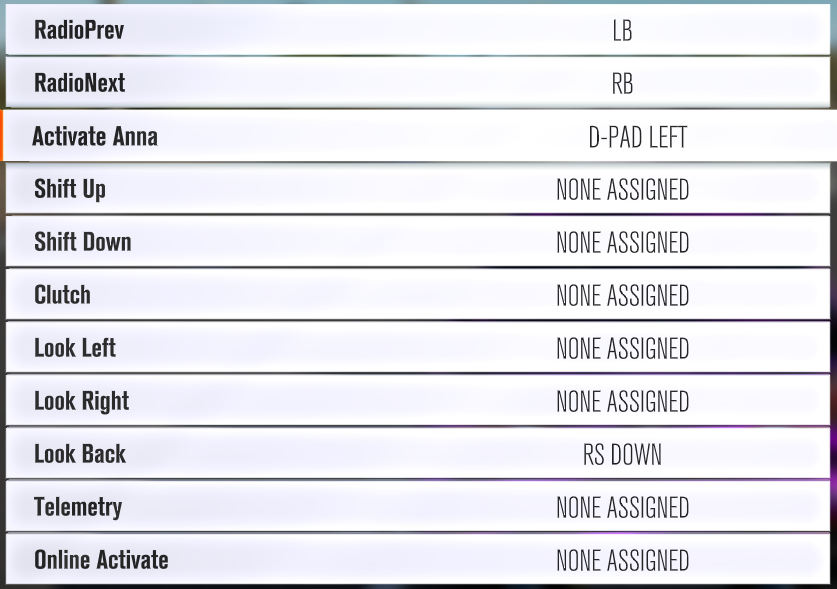
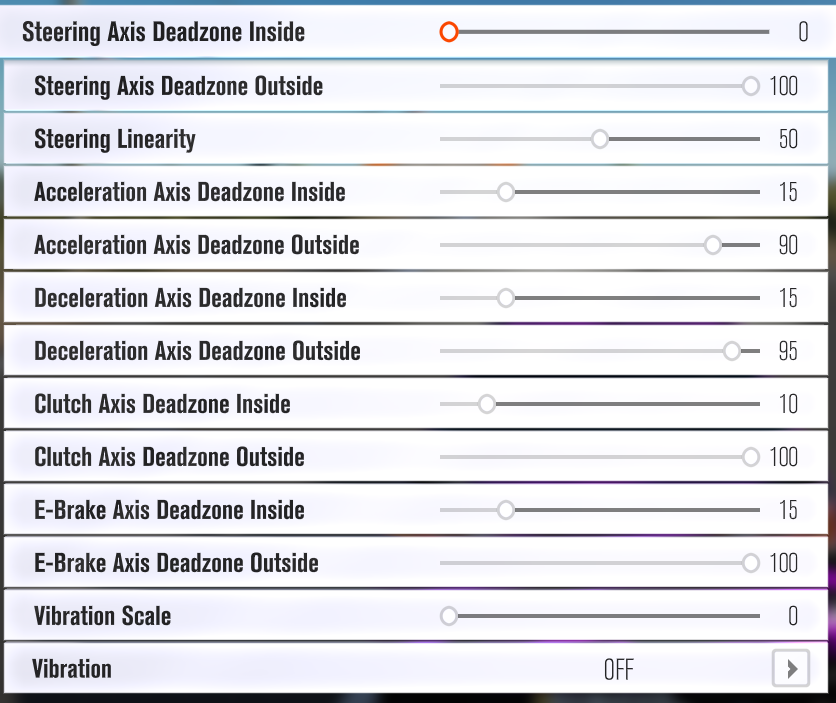
@rustic glade This works for me granted controls are probably odd for some, but that's what I use atm.
12ed3027-6c45-3ba5-f53c-232948b21adc
https://i.imgur.com/zblR77H.png
 gentle kestrel
Did anyone fix PUBG map zoom?
 dense shuttle
Anyone have an Arma 3 profile that gets lean on analog?
dense shuttle
How does track ir do it then..
gentle kestrel
wut
dense shuttle
You can lean partially with it
dense shuttle
Introductory video for the TrackIR5 from NaturalPoint, shown in conjunction with ArmA2 by Bohemia Interactive. http://dslyecxi.com/trackir5/ Definitely watch...
gentle kestrel
like a gyrocope
dense shuttle
So I guess it's not yet possible to translate the commands like that?
gentle kestrel
What do you mean
dense shuttle
Like.. yaw on a helicopter? Since it's mapped to triggers on a 360?
 warm igloo


 wide pond
@dense shuttle try using direct input for more analog axis
dense shuttle
I'll see if that works. I tried mapping some thins and it was really confusing.
I could only get wasd to analog properly so maybe it's that
dense shuttle
Oh you actually can get the lean to go analog if you use direct input
wide pond
@dense shuttle yea that’s what I thought.
 tidal dew
@cosmic plover Both XML and JSON are just like storage boxes, they are ment to be used along side some sort of encription or security system. For example HTTPS by default encrypts your traffic. 🙂
Wooting.nl uses HTTPS and has its certs up to date ^_^
cosmic plover
Wow that subject was ancient
tidal dew
😉
cosmic plover
I do not agree, because with profile sharing there is input from an unreliable source, the creator of the profile
tidal dew
As long as the data gets sanatized it wouldn't make a difference, we use JSON and XML at work.
It could be CSV and cause issues if it is not sanatized 😉
 elder ice
8ecac47d-c426-f0d4-c154-834eb185def3
what bug?
ohh
it seems like only a few keys are changing colors
like fn key
and a couple others
to my eye in this scheme only fn key pops up most when colors fade
so it's not so bad )
will be waiting for the fix 🤞
I just realized you have the same gradient on your avatar @warped tundra 😃
well, not the same but close
we still got a lot of green leaves here
hence more green
Finland, right?
soon you'll have to design white gradient 😃
 topaz socket
anyone playing gta analog?
gentle kestrel
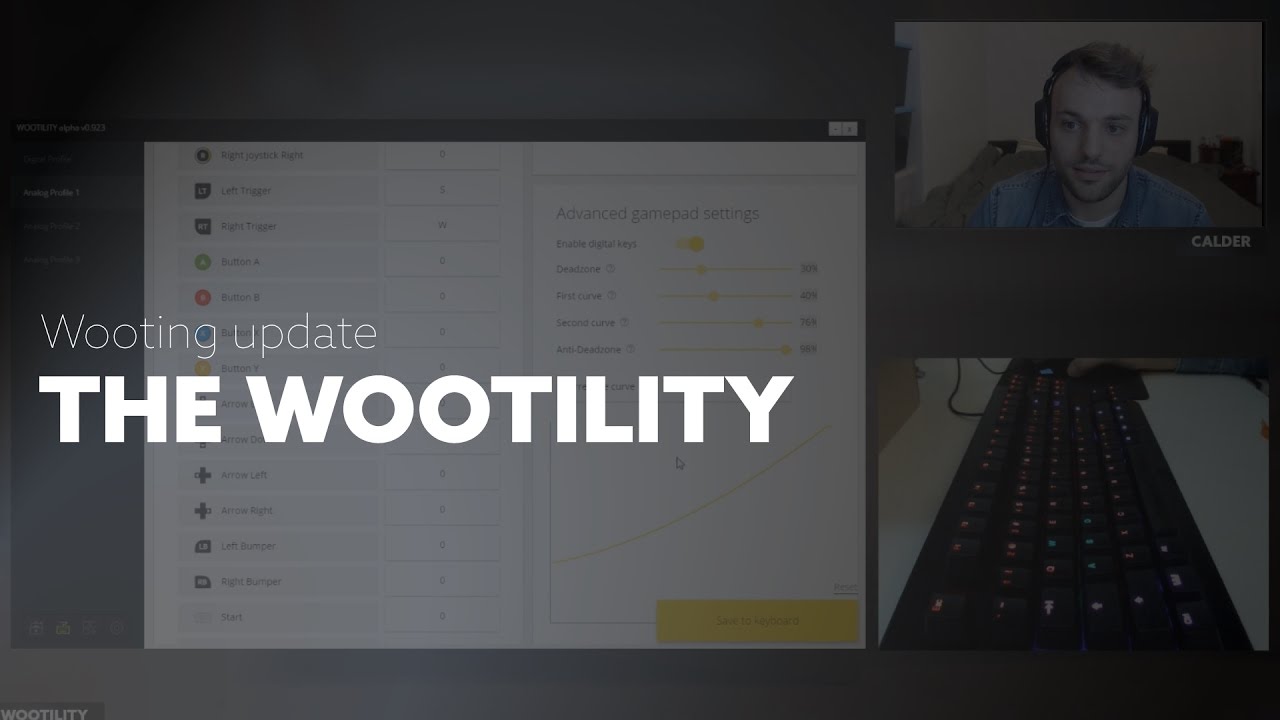
An early look into the Wootility for the Wooting one.
gentle kestrel
Any siege codes?
queen ravine
@gentle kestrel you are playing rainbow six siege?
gentle kestrel
aye
queen ravine
You are new to the game?
gentle kestrel
aye
 kindred veldt
Hey im trying to get GTA5 working but having trouble. I made walking & flying analogue profiles like in @wide pond 's vid, but then I can only swap between one and my digital profile, not between analogue profiles?
kindred veldt
ahhh amazing thanks!
any profile codes for the profiles? or maybe i just didnt change setttings in GTA itself. car didnt feel like it was driving analogue 😦
wide pond
@kindred veldt increase the initial anti-deadzone slider should help.
Our improved version of the analog curve will allow more precise customization.
kindred veldt
So raise the start point for the curve further right? I've got it at around 0.5 now will give that a shot.
Couldn't find any in game controls that I needed to change am I right there? Sorry pretty new to this!
dense shuttle
Anyone manage to setup a DKS for jump in Destiny 2? I'd like to have it so a half-press of space is jump and a full is the thruster/blink but it doesn't seem to take.
karmic yarrow
How did you set it right now? Can you send a screenshot? @dense shuttle
karmic yarrow
Double spacebar won’t be a double tap, it will just be a single spacebar
dense shuttle
So it’s simply not possible?
karmic yarrow
No, the only way I can think of is bind a different key and then use some macro manager to launch a double press untill we have our own macro stuff
wide pond
Wouldn't you still double jump when you press spacebar? It activates once in act. 1, then again in act.2 (and again in act 1(?))
 molten garnet
@dense shuttledks didn't work for jump for me, just Sprint
Also protip: move wsad over to esdf to get extra keys. I set Sprint to = and a dks to e (e, e+=) so I can use Sprint pinky for melee.
Also using esdf you get the little home row nub on f to find your place
Ok so the dks spacebar can work, it'd just be one space for the second action, but there has to be a delay between the two presses or the double jump won't activate. Even with just normal space bar, sometimes I double press it too fast and the jump doesn't register. So you'd have to press it REALLY slowly or you'd jump off every edge to your death like me.
tropic tendon
You can do that
kindred veldt
anyway to play GTA5 with only a single profile? Or need to have walking/driving/flying?
solar chasm
walking doesn't support analog so you need at least 1 analog and then the digital but beyond that I personally don't know
 fickle hill
so i adjusted the standard rainbow profile for the digital profile as set-up when new... however i wanna change it back to that 😄 anybody have a code to share for that? Thanks in advance 👍
fickle hill
why didnt i think of trying that 😄 Thanks! worked perfect 👍
rustic glade
anyone using analog controllers for destiny 2 :? Heard that with a controller you get a aimassit, and worndering if that would work in analog mode 😮
gentle kestrel
@rustic glade Aye, it allows your mouse to have aim assist, it happens in games like cod to so be careful.
In cod there is a HUGE issue, in zombies at least it looks like an aimbot sometimes.
So be carful
rustic glade
In that case, anyone who already got a Destiny 2 profile and want to share? (tried for myself but doesnt seem like it wants to play together, movement is fine but the moment I try to use my mouse I end up stoping the movement, like its switching back and forward analoge/digital)
 ivory portal
@fickle hill i cant even get analog mode to work in d2 😃
 severe totem
Anyone have anything profiles for star citizen? Was thinking of trying that out today.
gentle kestrel
He does
He's everything Wooting when it comes to star citizen
Great guy
Scam citizen sorry
severe totem
Awesome thanks @warped tundra . And @gentle kestrel no matter as long as the game is done right I can wait. If it never launchers. I didn't lose much. Ive definitely lost more on legitimate things.
cosmic plover
There are better examples of scam kickstarters... Like some of the double fine games..
Star citizen is at least still if full on development.
 arctic pier
Is there a profile that makes the wooting backlight go in a wavy manner? 😬
like from left to right and back or from the key that you just pressed?
that would be sick!
😍
arctic pier
Cool! 😃
 proud phoenix
@gentle kestrel You get all my hatred for calling it scam citizen 
 lunar osprey
Does anyone have a good destiny 2 profile
pure brook
Doesn't look like anyones shared one yet, why don't you make one and share yours?
gentle kestrel
@lunar osprey doesn't work with destiny 2
lunar osprey
@gentle kestrel aa realy thats so pitty
they are working for a fix to let more games workl with the wooting right ?
solar chasm
(which means no)
gentle kestrel
As Flem said, sadly its to do with the devs of the game.
lunar osprey
yeh its realy pitty some of my favorite games dont work with the wooting 😦
gentle kestrel
Does anyone know how to disable Xbox controls in pubg yet?
pure brook
He could help others with wooting, but not himself. https://i.imgflip.com/1ppi4p.jpg
 wide pond
@gentle kestrel how come ?
gentle kestrel
Because its annoying that i cant zoom in and i hate xbox buttons showing up
Yanno, cos bluehole are buttholeds
rigid nexus
Can't you turn off x-input or disable the drivers for the xbox part?
patent light
It's been a while since i looked in this discord group, has that one guy ever made the site to share and organize profilles yet?
gentle kestrel
He stopped working on it.
patent light
rip
cosmic plover
Ah that's too bad
rustic glade
I was busy graduating the past couple of weeks. Gonna get back on that in the coming days though!
The profile sharing site that is ^^
tropic tendon
WUUT, graduating? that's for fools! @rustic glade anyways, good luck with doing all that stuff and hopefully it'll be done soon 😃
 tall orbit
GTA Online driving bindings - cfce51d5-2db4-02cd-3434-7eb71b341935
I demand a refund 
gentle kestrel
Lol
rustic glade
@tall orbit Thanks, fixed it!
tall orbit
:3
gentle kestrel
@tall orbit Just to be clear tho that site is not part of Wooting, its a 3rd party project.
gentle kestrel
Aye, sorry.
tall orbit
Nah, it's fine
tall orbit
A place to share and find profile codes for your Wooting One.