#tech-talk
1 messages · Page 16 of 1
 flat orbit
 deft fern
Hi everyone, i just bought doom eternal on steam and tried to launch it but the game wouldn't start up and it gave an error message saying that it couldn't connect to the server. It tried to bring me to the codefusion support site (whatever that is) but the site was down. After searching around a bit i found a bethesda support article wich of course didn't work. Could anyone please help me?
 candid cape
i just did a clean install on windows 11 to fix some problems i had with windows 10 and i just got terraria back and i looked through my steam cloud, my player data was there but idk how to move it
 nimble kettle
guys is an AMD Radeon Vega 10 (IGPU) ok for running Doom 3?
 rain wren
has anyone had issues with Doom Eternal constantly crashing? it’s the only game i have on steam that does it, but it takes like 10 launches for me to get through the start up, but runs perfectly fine on high graphics settings while i’m playing
 elder fern
Anyone had Eternal crash on them?
 north bone
elder fern
Anyone had Eternal crash on them?
north bone
elder fern
Anyone had Eternal crash on them?
Yes
elder fern
Dont worry found a solution thanks anyway
 inner sequoia
Stuck on the last level, nightmare, and can't finish it because it keeps crashing! Xbox series X. Anyone know a solution or is ID aware of this?
 lament vale
Hi
candid cape
dude doom eternal has been unplayable for me since update 6.66, it keeps crashing on loadup or when i select a level, anyone else having this solution? my drivers are up to date and everything
elder fern
Anyone know good specs for case fans?
 sturdy yew
Gotta have RGB
 sharp haven
candid cape
dude doom eternal has been unplayable for me since update 6.66, it keeps crashin...
sharp haven
candid cape
dude doom eternal has been unplayable for me since update 6.66, it keeps crashin...
If you're Nvidia roll back to 472. 12
candid cape
mk
sharp haven
On that topic, recently for me the game has had some serious framerate issues. My Temps are good, and my specs (1060 6gb, i7,+ 8750h 16gb ram) use to run the game with no issue. I'm not sure if it's my computer or the game deteriorating
sharp haven
It used to run much better but particularly in TAG and horde it's gotten worse
 verbal depot
Hey folks, does anyone else with nVidia + Ryzen combo have constant crashes(even after rollback to 472)? It would crush seemingly at random, no matter the map or mode
candid cape
@verbal depot I'm on hold on
the version I'm on is 496.49 and I get all the time no physical device found anyone know how to help me with fixing that
 brisk turret
elder fern
Anyone know good specs for case fans?
brisk turret
elder fern
Anyone know good specs for case fans?
Arctic or Noctua
elder fern
Got it
elder fern
Also water cooler or fan cooler? Which is better?
elder fern
Ok
candid cape
I seem to be having this same issue with this game hmmmmm
elder fern
Any noctua cooler tho?
candid cape
Idk
 fossil lava
Anybody else having framerate drops on DE? I start with 230 fps aand drop to 50-80 frames.
candid cape
I believe I figured out what was going on with my game it isn't doom eternal at its the IdLauncher. Can anyone help with this without suggesting me turning off my Cpu graphics
Hello?
 sacred oar
i just cant open the game
i get the warning about graphics cards higher than driver 472.12
Ive rolled my card back and ive downloaded different ones but whenever I launch it and hit play the entire application just closes
this is for doom eternal
 fiery flame
Hello everyone! Can someone show me a guide on how to run the bethesda version of Doom Eternal on linux?
fiery flame
please help
 fierce zephyr
I need help friends, im trying to do a doom playthrough with a ps5 controller, but the trackpad and controller are acting like a mouse and its messing up my aim, anybody know how to fix this?
fiery flame
fiery flame
Hello everyone! Can someone show me a guide on how to run the bethesda version o...
What is the difference between the steam and bethesda version of the game?
Why can't I play the bethesda version of the game with wine or proton?
 reef ruin
Hey guys, has anyone experienced crashes on Doom Eternal while streaming?
elder fern
anyone know good RGB light strips?
 nova raven
if you mean for your pc, phanteks has really great ones (phanteks neon) but if you mean for your room or like desk/monitor backlighting any cheap ones from amazon are pretty good
elder fern
PC
nova raven
Then phanteks neon
nova raven
I have corsair QLs, you can also get LLs for slightly cheaper but less lights per fan, phanteks doesn’t really have good rgb (just imo) but pretty good value for price and good cooling
nova raven
hmm for cpu cooler my ryzen just came with one so idk much about that
elder fern
well for that is noctua
imo but for the normal fans to filter air I wanna know if a phantek fan with the CFM of 84 is good
nova raven
Are you talking about rgb still or just parts? I’m guessing you’re just talking about parts now and if so, don’t worry too much about cooling unless you wanna run like really heavy programs/games or multiple things at once, 84 is a bit above average so if you’re not doing any of the previously mentioned things that’s fine
and are you getting 120mm fans just making sure
elder fern
just games and such and yes
nova raven
Then yeah 84 is probably more than plenty but it’s always good to play it safe lol
 errant patrol
Hello, a couple of days ago I had to format my computer, and now that i logged back on DOOM i found that all my saves and my levels got erased, thankfully the skins and all of the customizables are still there, is this normal?
 nova nova
 supple ember
Here's my install link for Raid: Shadow Legends. Get it through this link and both of us will get some free stuff to boost us along!

 fleet marlin
I've gotten a new PC and I would appreciate it if anyone could tell me how well my game should run from my specs. I have an AMD Ryzen 7 5700G with Radeon Graphics 3.80 GHz and 16GB of RAM.
 fleet cloud
When I installed Gee Force on my laptop It said Eternal had no physical devices so I had to delete that
not the game gee force
fiery flame
Can someone be kind please enough to take a screenshot of the vanilla steam version game's folder and send it to me?
candid cape
Hey guys i just switched to pc from my PS4. What hot keys are ideal for each weapons?
fiery flame
candid cape
Hey guys i just switched to pc from my PS4. What hot keys are ideal for each wea...
It really only depends on your play style. The more you use a weapon the more comfortable and easy to reach hotkey you should choose for it. I recommend choosing keys near the WASD buttons or on your mouse.
 broken flume
fleet marlin
I've gotten a new PC and I would appreciate it if anyone could tell me how well ...
broken flume
fleet marlin
I've gotten a new PC and I would appreciate it if anyone could tell me how well ...
u will probably be able to run most modern titles althought at low settings and low fps
try to go for a budget gpu if u cant afforda good gpu now
like 1050ti or 1650
fleet marlin
Thanks, I’m planning to wait for one
 tulip vigil
Processor Intel(R) Core(TM) i7-8565U CPU @ 1.80GHz 1.99 GHz
Installed RAM 8.00 GB (7.85 GB usable)
Graphics Nvidea GeForce MX150 2GB
System type 64-bit operating system, x64-based processor
Pen and touch No pen or touch input is available for this display
pls dont make fun of me.......this is my pc specs
and i want to play DOOM 2016.....will it run in my pc anyone pls tell...
 river night
I dont think. Your GPU is too low.
 rose turret
fleet marlin
I've gotten a new PC and I would appreciate it if anyone could tell me how well ...
rose turret
fleet marlin
I've gotten a new PC and I would appreciate it if anyone could tell me how well ...
graphics card ?
broken flume
rose turret
graphics card ?
he has igpu
broken flume
tulip vigil
Processor Intel(R) Core(TM) i7-8565U CPU @ 1.80GHz 1.99 GHz
Installed RAM ...
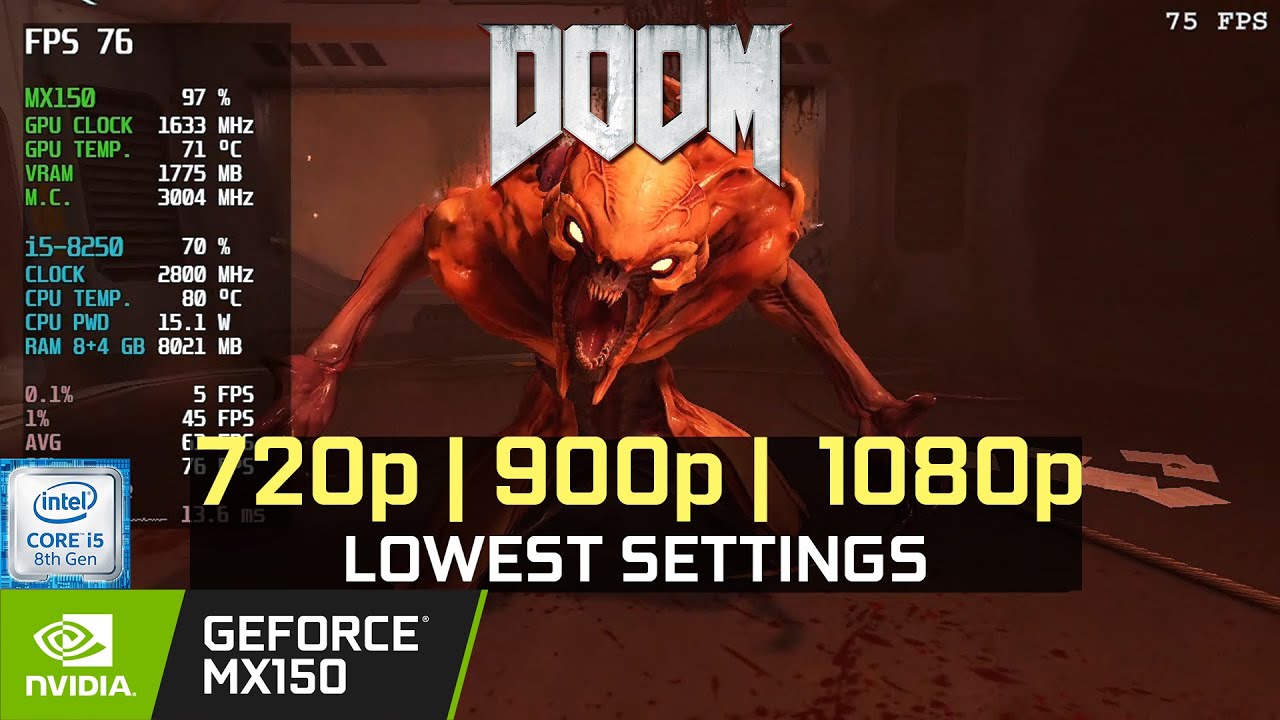
Game: Doom Eternal
Resolution: 1080p 900p 720p
Quality: Lowest
#MX150 #i5-8250U
Game Description:
Doom (2016 video game) Doom is a first-person shooter video game developed by id Software and published by Bethesda Softworks. ... The gameplay returns to a faster pace with more open-ended levels, closer to the first two games than the slowe...
yesu can, ur cpu is better than this
you can just search in youtube to see gameplay in ur specs
rose turret
broken flume
he has igpu
yes vega 8 can still run doom eternal at 30 ish fps

AMD Ryzen 7 5700G - Doom Eternal - Without Graphics Card 1080p Medium Benchmarks
► Amazon Affiliate Link [USA]
AMD RYZEN 7 5700G https://amzn.to/3x4Oloh
► MY PC Specs
AMD CPU : https://amzn.to/3dzDpGs
NVIDIA GPU : https://amzn.to/3wnklUm
G.SKILL RAM : https://amzn.to/2PyaqL5
NVME SSD : https://amzn.to/3sPKN6W
LIQUID COOLER : https://amzn.to/3r...
what the hell
144 fps

 rose turret
@fleet marlin congrats ig u can indeed run doom eternal and doom on ur gaming rig
fleet marlin
Thanks everyone, I’m enjoying the game and it runs at mostly 60fps for me on low settings
rose turret
 small mica
<:kekw:754808686605762590> <:kekw:754808686605762590> <:kekw:754808686605762590>...
small mica
<:kekw:754808686605762590> <:kekw:754808686605762590> <:kekw:754808686605762590>...
still 69420 times better than intel uhd :(
fleet marlin
Once the graphics card shortage is lessened, I’ll get one and my PC should be able to do high settings consistent 60fps
rose turret
just get a gtx 1650 / 1650 super
tulip vigil
broken flume
https://youtu.be/2gr6YYD4bmU
thnx ok
candid cape
anyone else having issues with doom eternal?
reinstalled after few months and i'm having 10 fps on ultra with raytracing on when before they weren't dropping from 165
 radiant stump
I have a NVIDIA drivers error, does someone is having it too?
candid cape
rose turret
uh which graphics card do u have ?
rtx 3070
rose turret
update your graphics driver that's all I can say lol
download the latest ones from nvidia's website
radiant stump
rose turret
update your graphics driver that's all I can say lol
I've done it like 3-4 Times
rose turret
radiant stump
I have a NVIDIA drivers error, does someone is having it too?
what is your graphics card now ?
radiant stump
Gtx 1050 Ti
rose turret
and can you say what exact error u get lol
radiant stump
It's in polish (cause thats my language) but i'll Try to translate it
rose turret
ok
radiant stump
Warning: NVIDIA graphics drivers can cause problems with performance when launching the game. If they happen it's nessacery to restart the game. NVIDIA company is working On fixing this.
Something like this
radiant stump
Yeah but, one of my friends has the same graphics Card and CPU and he don't get this error
When launching doom eternal as well
I tried to download older drivers but it didn't work
rose turret
ur friend has the same gpu ?
radiant stump
Yes
rose turret
so do u get performance issues after launching the game tho
radiant stump
No, if i launch the game then it only shows a message that the game is launched
Game Screen isn't loading up
No matter how long i wait
I tried to search up something on steam discussion and other medias, but they don't have anything
sacred oar
im having the exact same problem
my graphics card is 2080 SUPER
i launch the game and the warning pops up but after I click play the system completely closes
 paper pecan
Hello all
This is kinda my last ditch since playstation/bethesda haven't been helpful. Last night my PS4 power chord came loose causing the console to turn off in the middle of an UN run. Turn my console back on and its stuck in a safe mode loop. No big deal I've run into this before and had to reinitialize the console losing some progress in games but what ever. Inserted my Doom Eternal disc last night so 6.66 could re download to my console. Signed back into my bethesda account and everything is gone still?! Every single cosmetic and achievement is nowhere to be seen?! Even my rank was dropped all the way back to 1...Has anyone on the playstation had this issue?
 solar ginkgo
If any one could help I’m having a problem linking my ps4 to the slayers club and it won’t let me
 viral pollen
Does anyone know if doom snapmap has been permanently shut down on Xbox one? Snapmap servers are still online for PlayStation and PC but servers for Xbox have been down for 2 weeks.
 viscid socket
You guys with the game not showing. If you have multiple monitors it might be trapped in a black hole. Disable or unplug down to one and try to open the game again.
 hallow hound
I’ve seen so many videos of people playing doom 64 on a calculator and just wanted to know how to do it
 jolly ridge
So i am trying to launch doom eternal through Bethseda and it is not working. The solution to this in previous days was to open through the files and now this isnt working any idea of how to fix.
It also tries downloading dependancies and says it encounters and uknown error while seting up
 nimble violet
game keeps crashing (battle mode) since new update. playing on ps4
 sullen vine
nimble violet
game keeps crashing (battle mode) since new update. playing on ps4
sullen vine
nimble violet
game keeps crashing (battle mode) since new update. playing on ps4
try uninstalling
or check for update
nimble violet
@sullen vine just installed the new update (V-1.23), game keeps crashing after every match in battle mode. will try again with reinstalling the game. thanks
nimble violet
the game keeps crashing in battle mode, only when i check for the milestone for example. it happens after every match when i check for stats , since the latest update version 1.23 dropped. other then that i can play for hours. i´m playing on a ps4pro, the region is europa/germany and yes i have reinstalled the game, even bought the digital version...the issue still exist.
candid cape
Guys when wipes doom on ps4?
 rapid anvil
Now
 quiet fable
How to stream doom to discord with sound?
 vague apex
Nvidia people: did they fix the issue of Doom Eternal repeatedly closing or minimizing mid-game? Been happening to me lately and I can't even get through one level
 tidal heart
vague apex
Nvidia people: did they fix the issue of Doom Eternal repeatedly closing or mini...
tidal heart
vague apex
Nvidia people: did they fix the issue of Doom Eternal repeatedly closing or mini...
i don't have a problem like that. it probably has something to do with the new invidia update
candid cape
I have problem launching doom eternal on Xbox gamepass pc.
It says crash encountered during vulkan initialization validation
 gleaming ether
can someone help ouy
doom et is using more cpu than gpu?
i dont have fps drop but cpu is always at 90c
even on mediam settin
gs
sullen vine
My PC exploded
 oak quest
does anyone know how to fix this
nevermind no pics so ill explain in the bethesda account info it says no username specifed please complete account verification but my username is there, it's been like this for ages and it's just bothering me
nimble violet
the game keeps crashing in battle mode,every time i check for the milestone for example. it happens after every match when i do this. i´m playing on a ps4pro, the region is europa/germany
 warm arch
Anyone having a continuation glitch at World Spear master level on the PS5? Everytime I reach the escalation encounter area for the first time, the battle encounter does not trigger and then I proceed to get stuck at the spectre pinky area and nothing happens after that. I restart the checkpoint and it just happens again, I kill the revenants and chaingun soldiers and then nothing, I have a video showing this but idk who to send it to, it happened to me twice already.
 low shadow
I just bought Doom today and can't even get it to start right on Windows 11 with 472.12 drivers. I haven't been able to find a recent solution. The game launches on the wrong screen and just causes it to go black and flicker. I can hear the game starting up though. I'm running with a 3080ti and 11700k
small mica
low shadow
I just bought Doom today and can't even get it to start right on Windows 11 with...
Please check #announcements
 celest prawn
hey i have a problem with my runs on ultra nightmare on arc complex. The map seems to be buggy as hell and it kills me and my run. I keep phasing out of the boundaries and i can't get back up. For example the elevator that comes up and the room has fodder, electricity and a cacodemon. The elevator closed after less than two seconds and then i pressed the button only to phase out of the entire map with no way back. another problem was the lift that took me to the second turret right after that. i was a bit off center due to some mid air collision with the stair. when i was at the top i phased through it and fell onto some of the leveled surfaces that are passed when going up/down. i got to where i got on only to have no button and no way back up. i died from the very bottom where it took me to 5 health and next time killed me. i hope arc complex can be fixed. it kills my UN runs
 real gust
My doom eternal won’t run at all, it crashes. I’m a low spec gamer and cannot run the game, like it opens for 3 seconds, freezes and open a pop up message saying “failed to allocate memory”
 digital rivet
Hi, I just bought the Ancient Gods Expansion Pass in Nintendo eShop. But the game won't let me play it and they haven't sent me a receipt for the games purchase. Can someone help me?
 trim garden
you may need to email nintendo about it for Some help, Usually that will sometimes happen with non nintendo games bought on the Eshop
 sand minnow
why the game warns me since the last patch to use nvidia patch 471.22 (or 471.21?) is id software unable to fix driver problems instead of giving a warning to use old drivers for best performance???
i use ryzen 5600x, rtx 3060 ti, 32 gb ram @3200mhz and windows 11
and i uise newest drivers and bios
 wind hazel
Lets see if this fixes crashes, I have not tried yet since 471 works:
GeForce Hotfix Driver Version 496.98
[Red Dead Redemption 2/Doom Eternal]: The game crashes with TDR or the system crashes while running the game. [200766423]
 warped needle
real gust
My doom eternal won’t run at all, it crashes. I’m a low spec gamer and cannot ru...
warped needle
real gust
My doom eternal won’t run at all, it crashes. I’m a low spec gamer and cannot ru...
are you playing on integrated graphics?
candid cape
You what's a good 240hz monitor
candid cape
Does anyone know how to fix the world spear bug where u get extra health and armor from dying in the master level ? I'm playing on ps4 and am trying to do classic mode
 earnest thunder
sullen vine
My PC exploded
earnest thunder
sullen vine
My PC exploded


sullen vine
earnest thunder
<:megalel:591257047572545567> <:doomcry:668559689205940249>
power bank go pop
sand minnow
why the game warns me since the last patch to use nvidia patch 471.22 (or 471.21?) is id software unable to fix driver problems instead of giving a warning to use old drivers for best performance??? i have the newest drivers, newest bios etc...i have ryzen 5600x, rtx 3060 ti, 32gb ram @3200mhz and using windows 11...i dont understand why doom eternal warns me about the graphics driver when i use the newest ones...
 finite prairie
i have newest as well and it shows i think its best to wait until a newer one comes out maybe it will be fixed
 spring gorge
sand minnow
why the game warns me since the last patch to use nvidia patch 471.22 (or 471.21...
spring gorge
sand minnow
why the game warns me since the last patch to use nvidia patch 471.22 (or 471.21...
theres some compatibility issues with the new patch and the way doom eternal runs hence the warn
 vale plover
Has anyone got a problem with IDTechLauncher? When I start Doom Eternal, game doesn't run. In task manager all I see is only IDTechLauncher.exe. Can anybody help me?
 shut trellis
Does anybody know how to fix the issue I have where every time I attempt to launch DOOM Eternal, it just gives me a GPU Driver Error. I’m using the steam game, and i’m a low spec gamer, any ideas?
 shrewd fossil
sand minnow
why the game warns me since the last patch to use nvidia patch 471.22 (or 471.21...
shrewd fossil
sand minnow
why the game warns me since the last patch to use nvidia patch 471.22 (or 471.21...
Just hit play Bruh
 slate drift
is this still a problem? I planned on downloading it thursday and I want it to work
 hollow goblet
gleaming ether
i dont have fps drop but cpu is always at 90c
hollow goblet
gleaming ether
i dont have fps drop but cpu is always at 90c
Is that a custom built pc or company built pc?
gleaming ether
sullen vine
My PC exploded

 balmy lava
there's a weird diagonal grid effect on everything ingame, is there a way to turn it off? everything in the settings is either low or turned off
i use the steam version, windows 10 64-bit, amd ryzen 5 3400g processor with it's integrated graphics
https://cdn.discordapp.com/attachments/710190611701039136/915613220855750706/unknown.png
https://cdn.discordapp.com/attachments/710190611701039136/915609856826822747/unknown.png
https://cdn.discordapp.com/attachments/710190611701039136/915941944188866580/unknown.png


 sullen vine
gleaming ether
https://tenor.com/view/dani-milkman-karlson-danimilkman-explosion-gif-21180214
sullen vine
gleaming ether
https://tenor.com/view/dani-milkman-karlson-danimilkman-explosion-gif-21180214
Yup
gleaming ether
hollow goblet
Is that a custom built pc or company built pc?
It is a laptop and i figured out the problwm
hollow goblet
gleaming ether
It is a laptop and i figured out the problwm
Was it because of turbo frequency?
gleaming ether
Aaa i have gigabyte laptop
 onyx birch
are their any CPUs with really high performance and good integrated graphics that pretty much makes it to where i dont need a graphics card for awhile?
rose turret
Amd Ryzen 7 5700 G I guess
onyx birch
ty
balmy lava
balmy lava
there's a weird diagonal grid effect on everything ingame, is there a way to tur...
one of my friends somehow also has the same problem
balmy lava
and another one, wtf...
 dusk summit
motherboard
 hot surge
shut trellis
Does anybody know how to fix the issue I have where every time I attempt to laun...
hot surge
shut trellis
Does anybody know how to fix the issue I have where every time I attempt to laun...
update your drivers
fiery flame
Hello everyone! I am trying to run doom eternal on linux but I get the failed to allocate video memory error. I am using a gtx 1050 2gb card and with the latest drivers for it. It ran perfectly on windows before. Can someone recommend what to do to fox this problem?
warped needle
fiery flame
Hello everyone! I am trying to run doom eternal on linux but I get the failed to...
Linux is not officially supported
candid cape
Unlucky
fiery flame
warped needle
Linux is not officially supported
fair enough
 potent blade
 Hey @warped needle ! Nice to see you again! I'm very happy
 simple garden
Everyone here has peyronies!
 swift helm
anyone know how to find demon animations in the game's files (doom eternal)
candid cape
Anyone having a problem of crashing when they open video settings
Or when starting a mission
broken flume
candid cape
Anyone having a problem of crashing when they open video settings
i remember having this problem before but after i disabled msi afterburner it got fixed
 indigo pilot
Have they released a patch for the graphics driver update bug thing
Where it said you needed to update it then when you did it said it was too updated
candid cape
indigo pilot
Have they released a patch for the graphics driver update bug thing
nvidia created a hotfix driver that someone on here was telling people to try (#announcements message), but nvidia also put out new game ready drivers recently.
The new driver worked for me. just finished installing it on my 1080 and I finally don't get a black screen on launch.
Though, the game hasn't been updated to stop showing that warning with newer drivers, so problems might still exist. love bethesda. great company.
https://imgur.com/a/j979mHk
Discord
Discord is the easiest way to communicate over voice, video, and text. Chat, hang out, and stay close with your friends and communities.

 slender gull
Um, could anybody help me with this problem I have with Doom Eternal?
I recently got Doom Eternal but the problem I have is that it refuses to launch. Whenever I try to launch the game, it shows me a message which says "No Physical Device." What could be the problem here and how can I fix it?
I'd really appreciate if anyone could help me with this.
 outer falcon
oh wait okay here is the right channel
Can I have some help running doom 2016?
The game loads in but immediately crashes after the second loading screen and I have no idea how to fix it besides fiddling with the graphics settings
 burnt quartz
Anime is temporary but doom is eternal
onyx birch
yes
 Streamlabs won't detect doom eternal
 no global nitro emoticons :TriSad:
warped needle
no global nitro emoticons :TriSad:
warped needle
 tranquil tangle
<a:aaaaaaaa:588084001869398046> no global nitro emoticons :TriSad:
tranquil tangle
<a:aaaaaaaa:588084001869398046> no global nitro emoticons :TriSad:
Server Boosters can :)

 ebon plaza
Good evening Slayer colleagues
I have reinstalled my Windows and now I am wondering where to put the savegames so that I have the two savegames from Eternal:
1 played through normally
2 with max 10 extra lives played through
3 ancient of gods 1
4 ancient of gods 2
where is the folder for it ?
I thank you with a big BOOOM
 jaunty robin
Anyone capable of helping me with web-programming? at some point today? DM me please
 vale vine
@ebon plaza On steam I think it is C:\Program Files (x86)\Steam\userdata*\number\number associated with Doom Eternal App ID*\remote
I just went through the headache of trying to import my saves. I had to create 'dummy' campaigns in order for my older save games to properly overwrite. I think it's because there are other files related to your save files that are not the actual save files.
ebon plaza
vale vine
<@!478926204758523924> On steam I think it is C:\Program Files (x86)\Steam\userd...
Thx for answer but i didnt usw steam i have a bethesda account
Default folder doesnt work
oak quest
wtf i updated drivers like the game told me now it cant launch
 stone patrol
every time i try to start eternal
it gets through the bethesda and id loading screens, then crahses and this pops up
hold up one sec
Error
Failed to allocate video memory
Total allocated: 3726.983 MiB
Tried to allocate: 536870912 B (512.000 MiB)
OK
it says that
for some reason i cant upload the image
broken flume
how much vram does ur gpu have
i think u need 3 gb vram to run de
if u have that idk
balmy lava
stone patrol
for some reason i cant upload the image
link it
 lament imp
i have 64 vram
 broken forum
ebon plaza
Thx for answer but i didnt usw steam i have a bethesda account
broken forum
ebon plaza
Thx for answer but i didnt usw steam i have a bethesda account
Users, saved games, id software, something like that
candid cape
broken flume
i think u need 3 gb vram to run de
3.3 gigahertz not vram
 wintry mesa
slender gull
I'd really appreciate if anyone could help me with this.
wintry mesa
slender gull
I'd really appreciate if anyone could help me with this.
Consider me few days late, but I know a command which can force Doom Eternal to use a specific GPU, allowing it to launch!
If you're on Steam, add "+r_PhysicalDeviceIndex 1" no quotes to the launch options. Then just launch Eternal.
If it asks you to download new drivers for some reason, you can just skip it, just click Play.
 weary edge
Hey yall
Any idea why does 2016 starts lagging heavily when I tab out and then back in the game?
When I launch it it runs completely smooth and normal, but when I tab out and in it literally goes into like constant 10fps
 gloomy ridge
does it go away when you tab back in?
weary edge
no that's what I'm saying
when I launch the game = smooth
When I tab out of the game and then back in = lagfest
weary edge
so noone?
 tidal basin
so i was trying to do the new BATS tech and i found a wired glitch

with the Ballista i am switching to the rocketlauncher while hitting the mod swap key, anyone know why this happens?
Oh sorry this is the wrong tech channel 💀
 fathom otter
I need help everytime i try to play doom it crashes right when its finished loading into the campaign
 hidden jackal
Okay uh this isn’t really too doom related but serious question, I never had my own PC before and I’m looking forward to buying a laptop sometime, any tips on what I should get? Like HP, Dell, etc?
I’m watching out for prices so no high price stuff
balmy lava
what does error 403 mean and why am i getting it
 hearty berry
Is this the right place for a feature request? I'd like the mouse code to have an option for Quake-style mouse acceleration (as in Quake 3, Quake Live, Quake Champions). It looks like the rest of the m_pitch, etc console commands are the same, this extra command is just missing :/
 fathom sluice
balmy lava
what does error 403 mean and why am i getting it
fathom sluice
balmy lava
what does error 403 mean and why am i getting it
Error 403 means that the server understood the request but it won't fulfill it.
This means that you are not allowed to access something.
 wicked yacht
You sure your GPU is prioritised to run it? Seen cases where you have an internal GPU installed as well as proprietary and it defaults to the internal. Would check to make sure its defaulting to the correct GPU for games. Can check if you have intrnal one installed by going to device manager -> display adaptors
 sand cloak
I need help . So i normally have like 200fps in doom eternal but today when i enter game fps go to like 15-30 and after few second game crash . Do anyone know what should i do
 tawdry hollow
Maybe a year ago i bought Doom Eternal because it was on sale, but it wouldnt open. I found a way to fix the issue afterwars but it ran at about 2fps, and since Doom Eternal is on sale right now, im thinking of checking if i could make it work since ive heard so much good about the game.
Also, my laptop was able to run Doom 2016 pretty well.
Im playing on an Asus FX505D, here are my specs:
Processor AMD Ryzen 5 3550H with Radeon Vega Mobile Gfx 2.10 GHz
Installed RAM 16.0 GB (15.8 GB usable)
System type 64-bit operating system, x64-based processor
(its a laptop so it doesn't have much info, sorry. also im not an expert on pc stuff so if you start mentioning GPU and Graphics Cards and all that i might have problems understanding)
tawdry hollow
screw it ill just buy dark souls remastered
fathom sluice
What
fathom sluice
Probably wrong config
 fathom portal
Is This the place I get help for doom eternal?
Because Im using a Xbox series S and I can't turn on raytracing
And I think a Xbox series S can raytrace
 solid cedar
Okay i fr need help with this
I got a new pc with a 2060 rtx graphics cards and for some reason when I make it to the main menu it just randomly crashes making the game unplayable
 frozen radish
hey, I have doom eternal on xbox one(disc) and recently got a new pc, can I use my pc to play doom eternal on the xbox?
I have doom eternal on the xbox one gamepass which I got for free)on the app on pc), and I want to play Tag 1 and 2(which I also have purchased on my xbox one) but I dont wanna pay for it again just to play it on pc.
Please help.
also I dont wanna purrchase doom eternal again after the gamepass runs out on the xbox pc app.
 rapid wadi
what modloader is best for doom 2016
 tropic pilot
I was trying to download doom eternal and it had me download the campaign and the battlemode but it says that only the battlemode was downloaded and campaign wasn’t so I just went into battlemode but that didn’t work either, what should I do?
balmy lava
is there a way to fix this
https://cdn.discordapp.com/attachments/714576824876793906/924801450398318653/unknown.png
 candid cape
so i got the year one pass for doom eternal and when i try to play the campaign it just tells me to buy the full game
 distant turtle
 severe orchid
balmy lava
is there a way to fix this
https://cdn.discordapp.com/attachments/71457682487679...
severe orchid
balmy lava
is there a way to fix this
https://cdn.discordapp.com/attachments/71457682487679...
hit the tilde, the button next to escape or (fn)/(shift) + escape if you have a compact keyboard. It happens on at least the Ultimate Doom, 2016, and Eternal and also on other games like Subnautica
balmy lava
no not the console lol
i mean the error 403
severe orchid
oh, then I have no fucking idea
severe orchid
#videos message any solutions to this problem?
 raw crystal
bruh i cant play the campaign it just closes doom without an error message (on doom eternal)
i tried windowed borderless, i tried verifying the games cache and i tried setting everything to high (im using an rtx card on 8gb ram)
i dont want to turn off ray tracing or make the game windowed
balmy lava
master levels just wont unlock for me
 unborn widget
i need help, doom 3 doesnt want to load for some reason
 olive cairn
can mechanic research considered as tech?
balmy lava
wdym
olive cairn
mechanic of the game
candid cape
fuck
olive cairn
makelove?
 autumn jungle
Wondering if anyone can help.. I've clearly beat completed this battle but not getting the GREEN MAP and WEAPON point for it. I tried to portal back but doesn't seem to be helping .. I can't attach the pictures but the battle is the final one in Mars campaign before going portalling. I don't wanna finish the level.and have to replay the entire level
This issue is on doom eternal MARS CORE the final battle before teleporting
 worldly basalt
Hey guys, hope somebody can help me. I'm running Eternal on 1080p with a Rtx 2080 and only getting average 100 fps on ultranightmare.
Vsync is off
HDR is off
Could somebody please tell me what I'm doing wrong ? Benchmark youtube videos show I should be able to run it at way more FPS.
 cobalt crater
does anyone know why if i lets say tap a movement key or chainsaw it just keeps doing the action
 viral elk
Hit PC with hammer 👍
cobalt crater
i literally press one directional key and i just keep walking and cant do anything else til i stop moving
 late socket
ok so i dont know if this is the right channel but when i run doometernal it lowers my resolution and crashes my pc
 undone sedge
late socket
ok so i dont know if this is the right channel but when i run doometernal it low...
undone sedge
late socket
ok so i dont know if this is the right channel but when i run doometernal it low...
right one
 tiny lily
late socket
ok so i dont know if this is the right channel but when i run doometernal it low...
tiny lily
late socket
ok so i dont know if this is the right channel but when i run doometernal it low...
right one
balmy lava
late socket
ok so i dont know if this is the right channel but when i run doometernal it low...
right one
balmy lava
https://cdn.discordapp.com/attachments/714576824876793906/926883786669564036/unknown.png
https://cdn.discordapp.com/attachments/714576824876793906/926884169169141790/unknown.png
https://cdn.discordapp.com/attachments/714576824876793906/926883926251831316/unknown.png


why
candid cape
hello, have an issue with support rune not showing up in Ancient Gods part 1 DLC
finished first slayer gate, and instead of the rune there's a glowing ball in the middle of the room
candid cape
hey, I need some help, I checked my account details on doom eternal and it says it's logged into my SCHOOL account
I don't have anything for my school account on bethesda.net
what do I do?
scratch everything I said, sorry
 zenith spoke
got the PC version right now but i need help.
no audio at all after the intro. the intro with ID and Bethesda has audio.
and on top of that, all mty other programs, modzilla, discord, ETC, is muted completelt until doom eternal turns off.
im using skull candy headphones and the audio software installed for these is realtek, hesh anc, voicemod for background noise-less audio, and my laptop's speakers
ive done the whole "go to device settings and choose the right output and input"- nothing
disabling microphone- nothing
nothing works when doom eternal is on, at least when it comes to audio
so what do i do
even turning on spatial sounds dont work
... i had to literally disable microphone through a setting i didnt even know was there on windows 10
god this game is stupid with audio settings
zenith spoke
k audios fixed but now i got crackling sounds going on
 fathom jacinth
i need help
i got eternal on pc and i used to play on xbox
but all my progress was wipped including my levels, collectibles, save files
all my dlc is gone as well
 covert gate
The PC version of Doom Eternal is not synced with the Xbox version of Eternal
So you cannot get the saves and DLCs you got on your Xbox onto the PC port of the game
If you want you can refund the game If you got it from steam
fathom jacinth
i got it through the xbox app
i have xbox ultimate so i got it for free on there
awhile ago it also whipped my 153 levels
covert gate
on the PC version or Xbox?
fathom jacinth
xbox app for pc
covert gate
Wait I am confused
so you had the level when you first launched the game on your pc?
fathom jacinth
so it says im logged in on my account but all my stuff is gone
covert gate
That's because Doom Eternal doesn't sync the progress of a player between devices
So you can't get you data back nor the dlcs
they stay on your Xbox
covert gate
You're welcome!
Always happy to help <3
 normal gulch
I licked a wire
 delicate aurora
Howdy. Having a issue with doom eternal as of a few weeks ago, i started getting a corrputed file error each time i would quit of the game then after uninstalling & re-installing it seemed to fix the problem, however now the game seems to delete all new saves i make. Anyone else run into the same issue?
 sly drift
I was told to bring it here, didnt notice this chat but here it is. I am having issues with frame pacing in Eternal. I used to never have this problem but I came back to the game to play the DLC but in the first mission when there is nothing going on my framerate tanks to 40fps and my CPU gets extremely high framepacing. I looked for fixes but all the fixes just says to disable overlays and v-sync but none of them worked for me. I would send a picture of my problems but I do not have permissions to do so. my specs are a R7 3700x, RX 6800XT, 32GB 3600mhz CL16. If anyone knows anything else I can do please let me know. I have already tried reinstalling the game, verifying files, deleting video settings, updating/redownloading drivers, making sure my CPU is not power limited or thermal throttling but nothing.
 cobalt prawn
I have a question, how much GB need ancient god part 1 for switch
 sonic otter
Hi. i have problem with milestone and achivement "treasure hunter". I did everything and even got the reward("inspect shotgun emote") but the achivement didn't unlock.
 severe echo
sly drift
I was told to bring it here, didnt notice this chat but here it is. I am having ...
severe echo
sly drift
I was told to bring it here, didnt notice this chat but here it is. I am having ...
Hi, you may inadvertently have raytracing enabled. Because you have a card that supports Raytracing I believe the game automatically enables this feature, you should find it in graphics/video settings in game, if it is enabled, then disable it and you should find the performance improve dramatically.
sly drift
severe echo
Hi, you may inadvertently have raytracing enabled. Because you have a card that...
I always keep raytracing off, but my problem is CPU related, not GPU related sadly :/
broken flume
severe echo
Hi, you may inadvertently have raytracing enabled. Because you have a card that...
speaking of ray tracing for some reason i can turn it on on my gtx 1660 super
candid cape
Hi,I have a problem with the milestone "bullet points"I mastered both weapon mods but the milestone is still not completed for some reason
On xbox
earnest thunder
candid cape
Hi,I have a problem with the milestone "bullet points"I mastered both weapon mod...
I’m guessing u have tried restarting Xbox?
candid cape
earnest thunder
I’m guessing u have tried restarting Xbox?
I tried but didn't work
 steady oriole
I just reinstalled Doom 2016 for the first time in over a year, and I'm locked at 32 FPS. I had no issues prior to this, and the only change I made to my rig is upgrading my GPU to a GTX 1080 to an RTX 3070. I tried messing with v sync and triple buffering in the Nvidia control panel and updating my drivers, none of it worked. Does anyone know a reliable solution?
 dense briar
is the new 3050 worth trying to get from retail on release
(upgrading from 3gb 1060)
its like 450 in aus where i am
i mainly only want it to play games like doom eternal
my current gpu works but at times it can tank a bit
dense briar
Ok thank you, will try to get one
 icy locust
Same
 north patio
hello gamers, how do i clean the case of my cyberpower pc?
ive noticed that games such as minecraft are really laggy, and dust is building up in my pc
broken flume
did u ever take off your case before
 fallen tapir
Hey guys! Does anyone here know where i can find the best version of GZDOOM for Linux?
Im having to use version 3.3.2 from the archives, but i need atleast 4.5 i think
its for raspberry pi specifically
dense briar
What do you guys think the chances for doom eternal getting AMD fsr support in the future are?
 pale heron
How do I download games with/into a storage usb drive?
I’ve run out of space on my laptop, it’s literally the lowest storage limit i’ve ever seen, so i’ve gotten these instead
icy locust
dense briar
What do you guys think the chances for doom eternal getting AMD fsr support in t...
no bethesda game has fsr support
so
chances are minimal
 coral cedar
Hey all, anyone know how long I should expect to wait until I hear back from Bethesda support? I need my Nintendo account unlinked so I can re link it on my switch for Doom Eternal
pale heron
pale heron
How do I download games with/into a storage usb drive?
Seriously. Everything I’ve found doesn’t help, and whenever I try to download something, it doesn’t give the option to put it onto the usb.
dense briar
icy locust
no bethesda game has fsr support
u are technically correct but if you go on the AMD FSR website it has a list of developers who are "Supporting AMD FidelityFX Super Resolution" and bethesda is on that list among alot of other devs
icy locust
dense briar
u are technically correct but if you go on the AMD FSR website it has a list of ...
yes but older bethesda games may not get an update
dense briar
icy locust
yes but older bethesda games may not get an update
yeah but eternal not even that old
brisk turret
Amd are adding fsr through the driver so it will work on every game including eternal
pale heron
pale heron
How do I download games with/into a storage usb drive?
Still trying to figure it out
tiny lily
pale heron
How do I download games with/into a storage usb drive?
you mean with steam?
steam doesn't let you do that
you'll have to download the game onto your laptop, find the game's files, and paste them into your flash drive
pale heron
I don’t have the storage to do that
I don’t have enough space to download those games in the first place, which is why I got the drives
 cold pike
if y'all wanna play a fun little doom wannabe join the vc?
pale heron
I don’t do battlemode, and this is the wrong channel
cold pike
it is not battlemode my friend
pale heron
tiny lily
you mean with steam?
It’s also for the xbox app
cold pike
it's more like unreal championship but with b rated actors
pale heron
Read your message wrong
cold pike
ah anyway sorry
tiny lily
pale heron
I don’t have the storage to do that
then you can't do anything
pale heron
I’ll try to delete some storage I guess
somehow my laptop has less than my phone, and my switch
tiny lily
pale heron
somehow my laptop has less than my phone, and my switch
how many gigabytes
pale heron
57 on laptop 
tiny lily
pale heron
57 on laptop <:Archie:702970710510927972>
57 ain't too bad
pale heron
It doesn’t have enough space to even download doom
And 24 gigs are already taken up by things that are vital to make the thing work
tiny lily
pale heron
And 24 gigs are already taken up by things that are vital to make the thing work
it should only be like 4 gigs
pale heron
And another 27 for other basic stuff
tiny lily
tiny lily
it should only be like 4 gigs
how is it 24
pale heron
I’ll look at it again
It’s an HP laptop, if that makes any difference
says on the front “AMD 3020e Dual-Core processor” No idea if that’s good or not
tiny lily
pale heron
It’s an HP laptop, if that makes any difference
says on the front “AMD 3020e Dua...
not good
no offense but dual-core processors are laughable (i know because i have one)
pale heron
bro what the fuck
Updated to windows 11 and my storage went down by 0.1 gigabytes
my maximum storage is low enough
 pearl atlas
Something I meant to ask before, but aren’t you supposed to be able to transfer save files and shit with the PS5 upgrade?
 tacit karma
anyone know of a 3060 ti for purchase at roughly msrp
 vast wave
 main tulip
Buddy, if you want a 3060 good luck. With their shortage and quality theres not a chance in hell your getting one thats not around 700$
 sand hazel
Today I found out that if you change Bethesda password, you lose connection to Bethesda in DE and you can't login again in the game because there is no option do it
*I'm on Steam
sand hazel
oh nvm reinstalling the game fixed the problem fortunatelly but it was a weird bug 
unborn widget
everytime i try to run doom 3 bfg edition it just comes up with this error message
it says it cant execute autoexec.cfg
candid cape
reinstall
 violet sequoia
Ik this is probably for doom, but my family is kinda still paying weekly for my laptop since money don't grow on trees, but forget my life story, my laptops screen is zoomed in, like, idk how to explain it other than it's been completely zoomed in and idk how to make it go back to normal, any help?
violet sequoia
Nvm, had to double tap the screen anywhere to, so if someone updates their laptop and the homescreen is zoomed in for some reason, double tap with 2 fingers anywhere to zoom out
...or not, zoomed out once somehow, all this does is change it instead, like scrolling but you just do what I said earlier, well crap
 ebon dove
Lol, I stardet doom 2 on my laptop, he plays on the usb stick
candid cape
hey uh theres something wrong the challenges that i want to fix
like for example it sais kill 3 frozen whiplashes i killed 1 but it didnt go up
pale heron
i don’t know
 feral palm
pale heron
i don’t know
feral palm
pale heron
i don’t know
oh sorry didn't mean to ping you
 oak void
any reason why VK3Dvision won't work despite following every single step and launching in multiple apps
 coral nymph
White day: 1.67 miles
Red day : 1.56 miles
candid cape
hellow I am having some problems whit the game
When I open the game via steam it loads in for a couple of seconds like the intro and then it just makes a black screen where i cant do anything and I need to restart my PC, I tried drivers, forcing the game to use my main graphic card skip the intro virtual memory etc nothing works (doom eternal)
river night
candid cape
hellow I am having some problems whit the game
When I open the game via steam it...
Do the game crash at the blabla multi language warning screen?
 eternal frigate
hi
candid cape
river night
Do the game crash at the blabla multi language warning screen?
No
A bit later or a bit after ussually
 fleet grotto
Does the Xbox Series S version run at Ultra?
 blazing viper
So I just uninstalled a mod injector that injected a view model mod, but it disabled battle mode. So I uninstalled it, and now apparently it has a 3 hour long update or reinstallation. Is it normal ? If not what am I supposed to do about it ?
 halcyon stratus
i have an issue related to multiple games
on many occasions audio in a game i'm playing just cuts off,and it either makes the game dead-silent until i restart it,or it will just cut off for a short while (also i've noticed that when the second thing happens,my mic stops working on discord until i re-join a vc)
i have the latest drivers according to windows + reinstalling the audio driver didn't work
help
 visual spoke
 quasi galleon
I don’t play on ps4 sorry
halcyon stratus
halcyon stratus
i have an issue related to multiple games
on many occasions audio in a game i'm...
update
fixed the issue by plugging in my headphones via the input on the back
 blissful shore
so i bought ancient gods part 2 and battlemode on steam without main campaign
any way of buying the campaign without battlemode included?
feral palm
Anybody know why my VHD keeps detaching itself whenever I try to install something on it?
 cold gyro
Hey can anyone give me suggestions for a good pre-built gaming PC that can run Doom 2016 and Doom Eternal at high settings, 1920x1080, and at least 120 fps? Also that can record gameplay at 1080p60.
I'm not clueless about PC components, but I also don't know much about how it works and what the different numbers and names mean
Like Radeon RX 5600 XT or whatever... idk what that stuff means lol
 grave mauve
Mouse cursor keeps appearing in the middle of the screen for no reason
And it's annoying as hell
I tried turning Chrome running in the background and the discord overlay, but it still pops up
 toxic needle
cold gyro
Hey can anyone give me suggestions for a good pre-built gaming PC that can run D...
toxic needle
cold gyro
Hey can anyone give me suggestions for a good pre-built gaming PC that can run D...
look for "hp-pavilion-tg01-2360-gaming-pc" on microcenter. that should be more than enough at 1080p for a while
cold gyro
Thanks for the input!
 runic prawn
hey
could anyone help me i downloaded the game today played it for an hour with friends with 60 fps on low settings then my pc closed my power cable has connection issues
and now i cant run the game over 10 fps
toxic needle
Sounds like you're on a laptop and it triggered power saving measures. You should make sure your laptop is plugged in and charged/charging
runic prawn
toxic needle
Sounds like you're on a laptop and it triggered power saving measures. You shoul...
i fixed it but no i wasn't on laptop
 errant falcon
hey peeps i have a problem with DE that never happened before where the contriller UI never goes away and keyboard inputs arent recognized by the game in menus and i dont have a controller plugged in and keyboard inputs never take over or control menu plz help
 jaunty linden
Is 1650ti GPU with 4gb vram enough for medium settings on doom?
tiny lily
it should be
 soft rock
jaunty linden
Is 1650ti GPU with 4gb vram enough for medium settings on doom?
soft rock
jaunty linden
Is 1650ti GPU with 4gb vram enough for medium settings on doom?
yes, i have the same, and i played on low, because what is the point in this game, where everything is so fast, still look fine on low, on UN settings, this gpu is struggling to keep 60 fps all the time, in super gore nest it will drop to 40
jaunty linden
I don't really care about fps as long as it runs smoothly at least around 30
soft rock
jaunty linden
I don't really care about fps as long as it runs smoothly at least around 30
30? really man, 30 for first person shooter, it is a waste, and it will drop if you will play on settings higher
jaunty linden
I live in India and play most fps multiplayer games with around 30-40 fps so i don't really mind
soft rock
jaunty linden
I live in India and play most fps multiplayer games with around 30-40 fps so i d...
but you have good card now, and after you got it and played at 60fps it will be hard to play on 30 especially shooters from first person
tiny lily
soft rock
30? really man, 30 for first person shooter, it is a waste, and it will drop if ...
30 is iffy on other games for me but in fps games it's manageable
 terse steppe
Does 100 fps matter for eternal?
Do i have to bump it up to 180 or no
tiny lily
terse steppe
Does 100 fps matter for eternal?
Do i have to bump it up to 180 or no
you can be good at the game on 30 fps
 spark tendon
Hey guys I have an issue. Whenever I try to launch the game, I get an ID software message saying, "GPU Driver Error No physical devices." Does anyone know what that means and how I can fix it?
 honest creek
i don't like making uneducated guesses but my guess would be that yout graphics card is not being detected.
 tidal echo
any idea how to fix a black screen when the game is fullscreen?
cold gyro
Does anyone have any suggestions for me on how to start learning about PC components, as well as how PCs work? I know Linus Tech Tips has a ton of videos, but I'm looking for something that is beginner level right now.
honest creek
PC building simulator is a game which will get you accustomed to the parts,
and then you can do "how to build a pc" tutorials on youtube which are very beginner friendly
make sure to google every single thing that you don't understand,
over time you'll get a good grip on things.
cold gyro
honest creek
PC building simulator is a game which will get you accustomed to the parts,
and...
Thank you so much for the tips! I forgot about PC building sim, and had not thought to look for PC build tutorials as a way to learn.
cold gyro
tidal echo
any idea how to fix a black screen when the game is fullscreen?
I don't mean to talk over cupid's question... I'm not sure what the answer is but... may someone else has some advice for them?
cold gyro
For Doom 2016 and Doom Eternal, what is the lowest framerate that is comfortable to play at and visually pleasing (even with fast-paced gameplay)?
(Note: I've heard that you can be good at DE at 30 fps, but I think that for me, playing at 30 fps would not be very fun... probably even nauseating.)
tiny lily
cold gyro
For Doom 2016 and Doom Eternal, what is the lowest framerate that is comfortable...
imo 30 fps is perfectly fine for most games
sure, 60 is better, but 30's good enough
however, 30's only good if it's a stable 30+ and never drops below 30
brisk turret
It's preference based and what you're used to- I would say 60 is the bare minimum but that's only because I've been playing at high refresh rates for years. Doom and anything with high motion like shooters really benefits from high refresh
brisk turret
cold gyro
Does anyone have any suggestions for me on how to start learning about PC compon...
LTT is beginner tbh, they're primarily an entertainment channel- Hardware Unboxed and Gamers Nexus are better for learning about PC components
Actually hard-core overclocking would be the next tier up, I sort of learnt from those review channels and then others like Kitguru and PC monitors.info
Then Google everything that's new- TBH I don't recommend PC building SIM- it's pretty out of date and simplified
cold gyro
brisk turret
It's preference based and what you're used to- I would say 60 is the bare minimu...
Yeah, for me, a high framerate is really important when I'm moving around my aim a lot. I remember a long time ago I would play Fortnite on a Mac ☠️ and the refresh rate was maybe 30ish, and so I when I needed to aim quickly and precisely, I kept having to wait for the next frame in order to know how to move my mouse. Might sound like a small thing, but for PvP it was a big deal. Fortunately Doom (campaign) isn't PvP, but my play-style still does involve fast aiming.
Thanks for the tips by the way!
brisk turret
Yeah if you're playstle is aiming then yes high refresh is good lol :p I play Doom at 168 Hz (capped below the freesync range using RTSS) :p
Blurbusters is another excellent site
They have lots of good information on variable refresh, high framerates and motion clarity
cold gyro
I think even 120Hz would be doable for me. The main thing is, I just don't want the lowness of the refresh rate to get in the way of having a fun experience
brisk turret
Yeah exactly- for shooters I'd say 120 would be my personal minimum- after that you're at the point of diminishing returns tbh
cold gyro
And, all this is because I'm trying to figure out what monitor specs I want to look for
I'm hoping to get a gaming setup within the next few months
brisk turret
But this is all very subjective- ideally you want to try different framerates on a friend's setup or something to see what things look like with your eyes
cold gyro
Yeah
brisk turret
For monitors I recommend:
PC monitors.info
Tim from Hardware Unboxed
Blurbusters
There's a whole load of info from those 3 sources to figure out a purchase :p
cold gyro
Alright cool
Thank you so much for the tips, it means a LOT
I'm kind of tight on money, so I really want to make sure I get the right stuff, and I trust other people's experiences over lists of specs haha
brisk turret
Spec lists for monitors are notoriously bullshit tbh
Like everything has 1ms response on the box
cold gyro
I'm trying to get a setup specifically for Doom 2016 and Doom Eternal. Like, I don't care if all other games run like crap on it haha, as long as those two run well
brisk turret
But that's only when the pixel overdrive is set to maximum and even then only on some pixel transitions- then you get a whole bunch of overshoot artefacts so it's pretty useless and only so they can slap 1ms on the box
cold gyro
Oof
brisk turret
cold gyro
I'm trying to get a setup *specifically for Doom 2016 and Doom Eternal*. Like, I...
Lol- luckily doom is optimised incredibly well so you should be good :)
brisk turret
No modern game runs as well as Eternal given how detailed it is imo
The ID-tech 7 engine is really really good
cold gyro
Does DE use that?
cold gyro
That's awesome
So glad to hear that
I'm also wondering if it would be worth it to try to get a setup that can do 1440p
I've pretty much only gamed at 1080 or lower
brisk turret
Difficult question to answer tbh- depends how tight money is
Cos not only are the monitors more expensive but you need better hardware to drive the high framerates
cold gyro
Yeah
brisk turret
Do some research but 1440p is much cheaper than it was a few years ago
I upgraded to 1440p last year
cold gyro
I'm expecting the PC to cost about $1500... my plan is to get a pre-built one. And then hopefully the rest of the requirements won't push it too close to $2K
brisk turret
On msrp you could get a good 1440p rig for that but the current GPU market is still pretty fucked
brisk turret
I would watch out for prebuilts tbh- gamers nexus has a good series of the dangers of prebuilts. You could look into services that build a custom PC for you if you don't want to build your own- I know overclockers UK will custom build something for you which is technically a prebuilt but not a "prebuilt" if you know what I mean
cold gyro
Alright. Yeah for me, the only reason for getting a pre-built is just so I don't have to pay a fortune
If there are better or equal alternatives for a good price, sign me up haha
brisk turret
Eh I'm not sure on price, but I'm not sure you save that much on a prebuilt- the GPU is still factored in so if GPU prices are higher that will likely push up the prebuilt pricess as well (or they'll cut corners/cheap out on other components)
cold gyro
Hmm, alright. A friend of mine was saying that pre-builts are cheaper because the manufacturers got the card at a lower price. (I don't remember his exact words)
brisk turret
Yeah maybe, depends on your local market and prices, do the research and you should be good :)
Let me know if you have any questions as I've basically been following the consumer Desktop PC market as a hobby since 2015 when a built my first PC :)
(For Doom 2016 lol)
cold gyro
Haha sick!
How much have graphics card prices increased? 50%? 100%? 300%? I wasn't really aware of what the prices were before the chip shortage?
Like, how much did a good card for Doom cost before vs. during the shortage?
(And, unless otherwise specified, when I say "Doom" when talking about tech specs, I mean Doom 2016 and Doom Eternal)
brisk turret
My first card was an RX 480 8GB- I bought it at launch for £240- I upgraded to an RX 5700XT for £440 in 2019.
Last year I sold my 5700xt for over £700 to essentially upgrade to a 6700xt at £680 for "free". (The 6700xt is faster for gaming but slower for mining meaning its street price works out similar to the 5700xt)
Prices are generally in the 1.5x to 2x price range of their MSRP right now but obviously vary.

Support us on Patreon: https://www.patreon.com/hardwareunboxed
Join us on Floatplane: https://www.floatplane.com/channel/HardwareUnboxed
Buy relevant products from Amazon, Newegg and others below:
Radeon RX 6600 XT - https://geni.us/aPMwG
Radeon RX 6700 XT - https://geni.us/3b7PJub
Radeon RX 6800 - https://geni.us/Ps1fpex
Radeon RX 6800 XT - ht...
cold gyro
How good was the RX 480 for Doom 2016?
Also, could you explain what "Vulkan" is, in the context of Doom? I don't know much about it except that I've seen it in the graphics settings for D16 and apparently it's really really good for Doom
cold gyro
Do I need to get hardware that supports Vulkan? Or does Vulkan not require any specific hardware?
tiny lily
iirc you just need to download it
 quartz prawn
Pls help
I can't attach an image of what I'm struggling with I think it's a driver error but I have no idea how to fix it
I just spent $40 on Doom Eternal and I've been spending like 3 hours just trying to play the damn game and it's giving me a real headache
 small marsh
quartz prawn
I can't attach an image of what I'm struggling with I think it's a driver error ...
small marsh
quartz prawn
I can't attach an image of what I'm struggling with I think it's a driver error ...
elaborate more please?
quartz prawn
small marsh
elaborate more please?
I sent a screenshot in screenshots I really don't know how to elaborate more, the error message I'm getting is so vague
small marsh
quartz prawn
I sent a screenshot in screenshots I really don't know how to elaborate more, th...
have you tried rolling back drivers?
small marsh
quartz prawn
I sent a screenshot in screenshots I really don't know how to elaborate more, th...
try reinstalling drivers. Then if that doesn't work try rolling them back a bit
quartz prawn
Which drivers?
tiny lily
usually graphics
quartz prawn
None of the drivers say they are for graphics... let me post another screenshot
I'm getting some help in dms I'll ping you guys later if I need some more
small marsh
quartz prawn
None of the drivers say they are for graphics... let me post another screenshot
what? usually AMD or Nvidia have dedicated graphic softwares
just go to device manager > display adapters and delete whatever graphics there are other than your discrete GPU
quartz prawn
hold on let me post a screenshot again
small marsh
quartz prawn
hold on let me post a screenshot again
that just means you have to update your drivers
quartz prawn
aaaaaaaaaaaaa
small marsh
quartz prawn
aaaaaaaaaaaaa
you can't update your drivers?
quartz prawn
I'm dumb, but I'm getting some help dw
cold gyro
@quartz prawn Any update? Were you able to get it working?
quartz prawn
Still trying
quartz prawn
Still not playing doom yet btw
brisk turret
cold gyro
Do I need to get hardware that supports Vulkan? Or does Vulkan not require any s...
Vulkan is a graphics API (application programing interface). It's essentially the software that talks to your hardware to tell it what calculations to do to run an application e.g. Doom. Other examples of APIs include Open GL and DirectX.
Doom 2016 was one of the first AAA games to have the option to use Vulkan (or choose a different API) in the settings- Doom Eternal uses exclusively Vulkan.
Because Vulkan was built off AMD's Mantle API, Vulkan support was initially better on AMD cards. Pretty much any AMD hardware from the last 10 years has vulkan support and it was all included in the drivers.
I think initially support was a bit worse on Nvidia cards (which might be why PsionicFlash said you needed to download it). But all modern Nvidia GPUs support it and its also included in their drivers.
Vulkan is a low level api which basically means it's really good at getting the most out of your hardware- especially on AMD cards framerates would be much higher in 2016 when using Vulkan (the performance increase wasn't as big for Nvidia cards but it was still a performance increase).
TLDR, Vulkan allows higher framerates, its optional in 2016 but mandatory in Eternal. Pretty much all hardware from the last 10 years will support vulkan and its included in the AMD or Nvidia drivers.
brisk turret
cold gyro
How good was the RX 480 for Doom 2016?
480 was fine for Doom 2016- I initially had a 1080p 60 monitor and it ran at 60 maxed out no problem- I then upgraded to 1080p 144HZ and the 480 could pump out framerates around 100 if I remember correctly.
I never used it for Eternal but my 5700xt maxed out my 1080p 144hz monitor, never dropping below 144 FPS. At 1440p, the 5700xt was around the 120 FPS ballpark in Eternal. My 6700xt now maxes out my 1440p 170Hz monitor.
cold gyro
@brisk turret Cool, thank you for the detailed explanations!
cold gyro
quartz prawn
Still not playing doom yet btw
Wish I knew how to help. I hope you can get it working.
quartz prawn
Oh boy, Ill post a screenshot in screenshots
Actually, can I just DM you? Slowmode is making this difficult
quartz prawn
I got the game running but it uses too much memory and disk to stay running, I know my PC specs are minimal for Doom Eternal but it should still be able to run, shouldn't it? I think the issue is with my Window's not updating, it's stuck at 20% and it just won't update. Any solutions for getting it to update?
First, let me try reducing how much memory and disk my computer is using with a couple of online solutions, open to recommendations if you have them
cold gyro
What is your PC's RAM capacity?
quartz prawn
I'm pretty sure I have all the hardware requirements albeit minimally, had a friend check it all for me. The update I'm needing is update KB5009543, it's apparently one people are really struggling with, the error code I'm getting is error 0x8007010b and I've been told it's a driver file issue. I'm finishing a system reset right now, and if that doesn't work I'm going to just pay $30 for a program to update the 10 drivers that apparently need it.
Like hell am I manually installing 10 drivers, waste of my time
Oh boy windows 10 reset takes longer than I thought, I hope it's not stuck now at 55%. How much time should I give it before I stop it?
quartz prawn
cold gyro
What is your PC's RAM capacity?
8GB of ram
cold gyro
quartz prawn
I'm pretty sure I have all the hardware requirements albeit minimally, had a fri...
Well, if it's not a hardware issue, that's really good, especially with the way the market is right now
cold gyro
quartz prawn
Oh boy windows 10 reset takes longer than I thought, I hope it's not stuck now a...
I am not very Windows-savvy, but how long has it been going?
quartz prawn
Idk, I cancelled the reset to update my drivers
Decided that would be better to do first than what would take an undeterminable amount of time
Is Driver Easy a reliable program?
That's the one I used but I'm not sure if it accomplished anything tbh
Gonna try launching again and see what happens
Oh my god
I think it works now. I might have fixed it. Just maybe. Let's see
cold gyro
@quartz prawn how is it going?
quartz prawn
I am completely desensitized from exhaustion
I have nothing to say. I don't know what I'm even doing anymore
As if I did to begin with
quartz prawn
Day 3 of trying to get Doom Eternal to run on my PC when it should absolutely be able to
I attempted a hard reset of my PC, completely reinstalling Windows so that it's basically back to factory condition. It's the last resort I had.
"Unable to reset your PC. No changes were made"
Dear fucking god. No, God doesn't exist.
I have only one salvation, a friend of a friend who may be willing to visit and take a look at my PC. I only hope they can do something about it without having to take the entire fucking thing apart...
oak void
I'm having issues as well, my performance is pretty low compared to when I bought the game - running a 3080 and core i9, I'm expecting about 100-110 fps and instead I'm only getting 70-80 - it's fine, but when I start recording it dips below 60fps which isn't great for videos. I even set the task priority to highest in task manager, with no effect
quartz prawn
I'm not even able to get the game running, 3 DAYS GONE. You and I are different. 💀
oak void
You have uninstalled and reinstalled the game, rebooted your system, and even reinstalling windows it seems - other things I can think of would be graphics drivers, I know an old nvidia version made doom crash and sometimes not even run
I heard a lot of people talk about how well optimized it is, but I've had quite a few performance issues and you've had nothing but trouble. I'm not really sure what's going on
quartz prawn
This is not even running. I have an AMD driver that I've fully updated, I've updated all of my drivers. I am not able to update Windows for some reason though, and now it's not even letting me reset it. I've looked at every solution I could find online, nothing has worked. It's frozen now countless times restarting over and over again, appearing to have finished updates but then reverting them completely for no apparent reason. I'm not getting error codes even. Just vague messages of "That doesn't work now".
I've checked all of my hardware and it seems to be fine, I've ran my anti-malware and my computer seems to be clean, I've updated what I could and nothing works...
oak void
I know how it feels to have something refuse to work and nobody can help, but I really have no idea what to do - I've never even encountered that problem before. Sorry
quartz prawn
It's so frustrating, literally everything else works fine but the game crashes my entire computer when I launch it to the point I have to do a hard shutdown
It's alright. I think I'll be getting help from someone in person soon, as I said a friend of a friend (that was in this server right-), so maybe it'll sort itself out but I'm seriously falling to despair here and even considering just refunding the game and giving up...
oak void
IT sounds like whatever is going on is a really deep rooted issue - You could buy a new computer and see if that works but honestly that's kindof a bad solution. out of options though but I'd understand a refund if it comes to that
brisk turret
quartz prawn
It's alright. I think I'll be getting help from someone in person soon, as I sai...
Fresh windows install is what I'd recommend
 lunar void
@quartz prawn any updates?
quartz prawn
brisk turret
Fresh windows install is what I'd recommend
I literally couldn't lol, it wouldn't let me reset it
brisk turret
It sounds like a bad windows install to me but I'm not an expert. You can do a clean wipe of the storage and install windows from a USB. If its completely fucked then a new ssd I guess lol
Like not a factory reset but a complete wipe and fresh install of Windows would be your best bet
 lunar ember
anybody know why my doom eternal looks like complete poop even though it's on ultra nightmare settings?
i literally started playing the game like a month ago, had it on max settings with ray tracing and everything. i then dropped the game for a bit, now coming back to it, and it looks like complete dog
brisk turret
Do you have dynamic resolution scaling on?
lunar ember
let me check
lunar ember
yeah i had it on
okay so i tried static
i tried off, and the game still looks dog. plus my fps is just capped at 40 or something
oh wait i think it's fixed
quartz prawn
Ok so let me explain the issue a bit more clearly, when I launch the game, it appears to load fine until around the seizure warning. That's when it freezes on a black screen, which I have to end up forcibly closing. Anyone know the solution to this issue? I'm going to try reinstalling but if that doesn't work I don't know what else to do
cold gyro
@candid cape (from #doom-eternal ) What are your sound settings in-game?
cold gyro
quartz prawn
Ok so let me explain the issue a bit more clearly, when I launch the game, it ap...
I sure wish I knew what to do to help. If you aren't able to wipe your PC, I don't know what to do at this point besides getting a new storage module
Speaking of storage... is your storage full? That could cause an issue.
quartz prawn
No, it's a hardware issue actually, pretty sure. But I might have a workaround. Rip.
candid cape
cold gyro
<@456226577798135808> (from <#671685531561754634> ) What are your sound settings...
I have everything at 100, I didn’t go in for a couple of months, there were updates, now I checked the sound if the game is not closed, I closed the game and YouTube and everything else works and there is sound
cold gyro
candid cape
I have everything at 100, I didn’t go in for a couple of months, there were upda...
So your sound is working correctly now?
candid cape
It's somehow connected with the game or updates, it's just not interesting to play without sound, headphones are wireless bluetooth channel
cold gyro
@quartz prawn (from #screenshots ) It's hard for me to say, because I am not familiar with all the different hardware names and terminology. Are you running Windows 10 64-bit?
quartz prawn
Yes
candid cape
cold gyro
So your sound is working correctly now?
There is still no sound, I opened the game, the screensaver went on, the sound is there, then I chose to continue, the main menu comes out and there is no sound, something somewhere is not right in the add-ons ....
quartz prawn
But so is my other computer and it's unable to run the game
cold gyro
candid cape
There is still no sound, I opened the game, the screensaver went on, the sound i...
You could try loading into a level, and see if the sound works then.
candid cape
cold gyro
You could try loading into a level, and see if the sound works then.
So I now passed the level without sound, everything else works, if you pause and minimize the game and exit to the desktop, then other applications are also without sound, if you close the game, the sound appears everywhere ... ????
cold gyro
@quartz prawn I may have spotted your problem... in the Doom Eternal system requirements (which I sent a screenshot of the other day), it says that the minimum processor is "Intel Core i5 @ 3.3GHz or better". Yours is 2.30GHz.
quartz prawn
I realized that but it's not just that. It's the processor and the graphics card. My friend showed me the difference between my card and the required one, it's staggering.
Oh Jesus christ I think it cooked my computer cause now Dead by Daylight isn't even running lol
cold gyro
Oh no
cold gyro
candid cape
So I now passed the level without sound, everything else works, if you pause and...
Hmm, I'm not sure what is causing your problem. 🤔 Does anyone else have any ideas?
 bright saffron
for some reason I can not get a stable frame rate on laptop no matter how low I put the setting for the game even with my ryzen 9 5900HX 64gb of ram DDR-4 3200-ram, and RTX 3080 but every time i disable the integrated graphics on the cpu my Display Freaks outs and then that is the only what i can load the game in 1080p but sub 10fps any recommendations
brisk turret
Are you using an external monitor?
 silver garnet
bright saffron
for some reason I can not get a stable frame rate on laptop no matter how low I ...
silver garnet
bright saffron
for some reason I can not get a stable frame rate on laptop no matter how low I ...
Are you directly disabling the integrated graphics from the cpu? I think that’s necessary for the laptop display if you don’t have g-sync. Also, I’d like to see your nvidia control panel settings, maybe it’s something there.
silver garnet
Who are you asking? Is it a general question?
brisk turret
Asking chef as its related to his problem but feel free to answer if you know? Is it a laptop thing? I've only ever dealt with desktops
silver garnet
I wouldn’t disable them myself, I think he’s just trying to only use his nvidia gpu, which I don’t think works.
Edit: Verified it because I was uncertain. You cannot disable integrated graphics on the laptop because it’s considered the primary and nvidia is secondary.
bright saffron
brisk turret
Why would you disable the integrated graphics?
Because when I tried launching the game with it on it goes to a super low aspect ratio and doesn’t see my 3080 or it refuses to launch the game
silver garnet
Can you open up your nvidia control panel and look at it a bit
There might be some settings you need to mess with there
bright saffron
Okay see what I can find
silver garnet
I’m mostly concerned about what graphics processor is selected in 3D settings -> global settings
There’s also the PhysX configuration to think about in nvidia control panel. If it’s not either of those, then you can see if your drivers are old or not compatible with your laptop, it’s not enabled in bios, or windows graphics settings aren’t using it properly.
bright saffron
I had to go into my my nvidia control settings and hard set the 3080 to be the main GPU then doom stopped having problem lunching
Thanks for the help
silver garnet
Np, enjoy the game!
cold gyro
@bright saffron Did you get it working?
bright saffron
cold gyro
<@!312283791920201728> Did you get it working?
Yes after changing some settings in the nvidia controller
cold gyro
Sweet!
cold gyro
Hey everyone, I am hoping to build a PC within the coming months. I could really use y'all's collective experience and knowledge. Right now I am trying to figure out what the most suitable video card would be, for my purposes. Here is an explanation of what I'm trying to achieve. (Note: I might sound blunt or redundant, but I'm just trying to explain it clearly. 🙂)
The only games I care about performing well on this setup are these:
- the Doom 2016 campaign
- the Doom Eternal campaign (including The Ancient Gods)
I want to be able to play these games, with the graphics settings set to maximum, at 2560x1440 @ 240Hz, while recording the gameplay at 1920x1080 @ 60Hz.
I don't care if all other games run at 20 frames per second, as long as those games run at those specifications. I'm trying to build a PC for the express purpose of running and recording those specific games at those specs. Anything else is secondary priority.
So, what is the minimum video card that can satisfy those requirements with a bit of headroom?
(Note: I know the video card prices are really inflated right now, but I don't want that to bias y'all's answers. So just answer as if the prices are normal.)
(Also, I'm all ears on any advice y'all have about any part of the component selection and building processes.)
silver garnet
240hz at 1440p? Lmao that might take a bit of power
I feel like at least a 3070 would run that but not quite sure
 little belfry
I just updated Doom Eternal and performance is totally trashed. Specs Ryzen 5 3600, GTX 1660S, 1080x1920 @144Hz. Previously I haven't had any issues to hit that 144FPS but now it's staying under 20FPS. None of graphics settings were touched between updates.
I don't have any idea what is going on. In-game performance metrics suggests that it's CPU issue, because frame times won't get below 50ms while GPU stays way below 10ms. But external monitoring software shows that CPU utilisation per core is 10-30%. The same software shows also that GPU core utilisation is minimal, around 20% and clock speed around 1300MHz (for comparison stock clock speed is 1530HMz and in other games it boosts up to 2100MHz). Temperature issue it can't be, CPU sitting around 40C and GPU 30C.
So my best guess it's a bug, which came with most recent update. Do any of you have similar issues?
brisk turret
cold gyro
Hey everyone, I am hoping to build a PC within the coming months. I could really...
1440p at 240Hz will take a fair bit of horsepower- are you sure you need 240Hz? Imo when you pass 144Hz you start getting into the point of diminishing returns and you could get 144hz significantly cheaper.
As Doom Eternal supports DLSS, I guess I would recommend an nvidia card (at 1440p you'll want to stick to DLSS quality imo as otherwise the render res gets too low and image quality suffers imo) .
I know you said you don't want price to bias answers but like it or not, availability and pricing is a big part of the equation if you want to build in the next few months. The prices for nvidia cards are a lot more inflated than amd cards (at least in the UK)
But yeah you're looking at 3070 with DLSS or Rx 6800 levels to drive those framerates
cold gyro
After thinking about it, I think I'd be fine to settle for 1080p @ 240Hz
brisk turret
You really need to test some monitors in person either at a friend's or on a shop floor- imo 1440p 144Hz (or 160/170Hz which is where a lot of them are now) is a better experience than 1080p 240Hz
cold gyro
Hmm, alright
brisk turret
Honestly the jump past 150FPS to 240 FPS is no where near as big as the jump in resolution from 1080p to 1440p
cold gyro
Does a given framerate feel lower a larger display?
brisk turret
Also framerate isn't everything, check out blur busters, you can get some insane motion clarity say on a 120Hz OLED that can look clearer than a poor quality 240Hz display
cold gyro
I've noticed that 60Hz looks smooth as silk on my iPad, but it looks pretty rough on a 25" monitor
brisk turret
cold gyro
I've noticed that 60Hz looks smooth as silk on my iPad, but it looks pretty roug...
Could be a while host of reasons for that, probably not the size
cold gyro
brisk turret
Also framerate isn't everything, check out blur busters, you can get some insane...
Yeah, I think with good motion blur, framerate becomes less of an issue
brisk turret
Size is important for resolution as it determines pixel density but doesn't really impact framerates
cold gyro
brisk turret
Could be a while host of reasons for that, probably not the size
Okay, interesting. The monitor I used is a gaming monitor, and it was running at 240Hz. The video I used as a reference point on both my iPad and the monitor was recorded at 60Hz.
brisk turret
cold gyro
Yeah, I think with good motion blur, framerate becomes less of an issue
Well motion handling- poxel transition speed and all that- motion blur is a graphics setting (that many motion purists turn off!)
cold gyro
Apparently our eyes/brains only process like 30 images per second. Idk if that is true. But I think the reason things in real life look smooth is because of motion blur.
brisk turret
cold gyro
Okay, interesting. The monitor I used is a gaming monitor, and it was running at...
Well the ipad refresh rate matches the video perfectly- unless the monitor has variable refresh down to 60 then it will have to show each frame 4 times perfectly to fit into its refresh cycle- if it gets that wrong then there's a good chance it would look rough
cold gyro
Interesting. I sure hope size is not the cause of the difference
That would be nice haha
brisk turret
cold gyro
Apparently our eyes/brains only process like 30 images per second. Idk if that i...
Read burbusters :p Our eyes can definitely see more than 30 images per second otherwise there would be no benefit to high refresh gaming. But yes motion blur was developed for games at lower refresh rates to improve their perceived motion- in my opinion it's not needed at high refresh rates
But it's a personal preference thing
Anyway got to head to work- DM me if you have any questions about the build :)
cold gyro
brisk turret
Anyway got to head to work- DM me if you have any questions about the build :)
Thank you!
cold gyro
little belfry
I just updated Doom Eternal and performance is totally trashed. Specs Ryzen 5 36...
Also, I don't mean for Angel_of_deths's question to be forgotten
 modest tapir

 river hemlock
Anyone know how to fix stick drift on Xbox 1
 serene sable

 buoyant harbor
guys i need help i have xbox game pass and i can revice rewards from it to doom but i dont know where i can put the code can some one help me?
 quartz bronze
Doom (2016) running at 15-70 fps with massive stuttering, both visually and audibly. Have updated drivers, verified files in steam, disabled razer chroma, tried both vulkan and open gl at various settings. Even the menu is lagging a ton. I am trying to run the game at 1440p but it does this no matter the video settings. I have a r5 3600 and rx 5700 xt and doom eternal ran like a dream. as does like every other game. im at a bit of a loss
 tame turret
doom eternal is best ran with specs like those i'd imagine, its built for the modern stuff. its some older games, even not by much, that dont like cooperating with them
 coarse crest
hello i have high cpu frametime in doom eternal doom2016 and wolfenstein 2 (even if i run them at low settings) and it makes fps go around 140 to 50 specs are i5 11400h rtx 3050 mobile (60watt +15watt) 16gb ram ,i also played other games like ff7 remake apex and some other games and there wasnt any problem with them , anybody can help me?
 tribal parcel
https://media.discordapp.net/attachments/620963969427046410/943955749304942643/20220217203905_1.jpg?width=1618&height=910
can someone help me? i always have problems with doom eternal, low fps, 100% gpu and cpu usage and things dont load (i lost my ultra nightmare run because i didnt have weapons)
my pc:
rtx3070
ryzen 9 3900xt 3.8ghz
32gb ram 3500mhz
also low or high video settings dont solve the problem
(i have this problem just with doom eternal)
 candid cape
tribal parcel
https://media.discordapp.net/attachments/620963969427046410/943955749304942643/2...
candid cape
tribal parcel
https://media.discordapp.net/attachments/620963969427046410/943955749304942643/2...
because you might have your fps capped somehow to low amount
tribal parcel
candid cape
because you might have your fps capped somehow to low amount
no, because sometimes i get my 180fps but after like 10 seconds it returns like this
and what about 100% gpu and cpu usage
 copper drum
hey all, just started doom 3. im seeing screen tearing even with vsync enabled and fps pretty stable @ 60. does anyone know what the problem could be?
EDIT: nvm it seems to be good now. set monitor to fixed refresh and capped fps in nvidia control panel.
candid cape
tribal parcel
and what about 100% gpu and cpu usage
Nothing is bad about 100% GPU usage. Also the RYzen 9 3900Xt should be fine for Doom Eternal, I have worst and I still run it fine.
The reason could be because of your storage, RAM or something in Doom Eternal settings. I'd look throughly at the Doom Eternal settings, make sure you dont have anything bad.
And for the low FPS, that is very odd. Most likely something to do with RAM. You never said, is your RAM DDR5, DDR4 or DDR3?
If you can find out what storage/RAM you have, please tell me. After throughly checking the settings, you can reinstall Doom Eternal, your progress will save (I'm pretty sure, I reinstalled the game and I still had my progress, would research a little more to make sure im not wrong.)
I'm not that qualified to speak on computers however.
tribal parcel
candid cape
If you can find out what storage/RAM you have, please tell me. After throughly c...
ram ddr4
samsung external ssd 2tb
i will try to install the game in the internal ssd
little belfry
tribal parcel
https://media.discordapp.net/attachments/620963969427046410/943955749304942643/2...
I had similar issue recently. Abysmal FPS, but GPU usage was low.
little belfry
little belfry
I just updated Doom Eternal and performance is totally trashed. Specs Ryzen 5 36...
@tribal parcel
I tried just tried to check does the issue still exist but the game won't even launch, crashes immediately during the intro logos.
 fast oyster
I have a problem with PrBoom+
I have the resolution set to 2560x1440165hz, because it's the monitor resolution, but it renders off screen for some reason
 heady cargo
what is the name of the old really thick curved and whining TVs and monitors
heady cargo
for some reason, i dont find the options batch file in my steam doom directory. dosbox is the but the options batch insnt.
 rough axle
I have a problem on urdak 1st but I’m like in the floor and got no weapons and can’t fight
 wanton hornet
Hmm
cold gyro
rough axle
I have a problem on urdak 1st but I’m like in the floor and got no weapons and c...
You could try these things in this order:
- Reload the level
- Exit out of the game and reopen it, then load the level
- Restart your computer, then reopen the game, and load the level
candid cape
I just upgraded my wifi went from like 10 down to 200 down 💀
And only paying 15 dollars extra
rough axle
cold gyro
You could try these things in this order:
1. Reload the level
2. Exit out of the...
Thing is I’m on Xbox and I’ve done everything I can do
 gentle nacelle
candid cape
I just upgraded my wifi went from like 10 down to 200 down 💀
gentle nacelle
candid cape
I just upgraded my wifi went from like 10 down to 200 down 💀
I've done something similar it changed my life
Game downloads no longer take entire days
 plain moon
 remote quail
doom eternal is locked at 30fps for me idk why
remote quail
doom eternal is locked at 30fps for me idk why
Vsync on?
heady cargo
hey i cant seem to find the dosbox win 64 download on the website. only 32
 solar axle
I did an "I'm too young to die" run a while ago (about a year or so) and had barely any lag. I more recently started an ultra-violence run, but every "fight" (when there are lots of demons in a singular area that must be killed to progress) now has lag spikes every few seconds. I have my graphics settings on low and I did some settings changes after looking up what to do, but it still happens anyway.
What should I do
candid cape
Я НЕГР
 proud bison
candid cape
Я НЕГР
proud bison
candid cape
Я НЕГР

candid cape
solar axle
I did an "I'm too young to die" run a while ago (about a year or so) and had bar...
what are your specs
no one can really help you if we know nothing about your computer
solar axle
candid cape
what are your specs
I’m not sure the exact specs but it’s a laptop, Lenovo Legion Y545 with a GeForce GTX 1660ti processor (Intel core i7). I’ll get the actual specs later when I’m home
candid cape
Anyone use ZDL? im trying to find a solution to an issue that the lead has started to go cold on over at doomworld...
im trying to run "-turbo 255" as a launch command through the extra command line arguments box which apparently everyone else has no problems getting to work, however i cant seem to get it to function properly.
candid cape
solar axle
I’m not sure the exact specs but it’s a laptop, Lenovo Legion Y545 with a GeForc...
Well considering 1660ti is a fairly new GPU you must have a capable enough i7 to run the game smoothly I'd recommend opening your task manager in background while playing and monitoring your system's stats a known culprit could be high cpu usage which migh cause stutters and lag spikes
And if you can see which process is exactly causing your cpu to max out you can then work around trying to close that app or process that might be making your computer struggle
 rich cradle
Is the newest nividia geforce driver safe with doom eternal again?
I know I had to do a massive rollback in the past.
 nimble cypress
My game runs horrible i sadly had to uninstall it for space and before i lost my steam account it ran perfect even on the high settings but now on low and not full screened i cant run it anymore.
 haughty kettle
Try choosing a smaller… it’s either called a “Pool” or “page” size. Maybe texture page size?
heady cargo
i know its not doom but, figured this was a good place to ask. Are there anyone willing to help me relating Half Life 2? I don't know how to get the source engine. please dm me.
candid cape
nimble cypress
My game runs horrible i sadly had to uninstall it for space and before i lost m...
Pls try to mention the specs of your system whenever you ask a tech query because of the vast variety of hardware it's really difficult to pinpoint the cause of reduced performance in a specific case
nimble cypress
Intel core i7-9075H CPU @ 2.60 Hz 2.59 Ghz
Ram: 16GB installed 15.8 usable
And a 2060 GPU
nimble cypress
candid cape
Pls try to mention the specs of your system whenever you ask a tech query becaus...
Is that bad my specs
 ember sail
i used to run doom eternal on an rx780 until recently cuz i couldnt even load the game without hard crashing. now i have 3060
ur ram is fine, 16GB can run anything. i only hope its not a DDR3
candid cape
nimble cypress
Intel core i7-9075H CPU @ 2.60 Hz 2.59 Ghz
Ram: 16GB installed 15.8 usable
And a...
Hmm what resolution are you playing on
candid cape
nimble cypress
Is that bad my specs
No they are more than enought to play at Ultra Nightmare graphics at 1080p
nimble cypress
candid cape
No they are more than enought to play at Ultra Nightmare graphics at 1080p
I can't even play at low graphics I'm play on 1980x1000 I think all I know is the highest it was because before when I put the resolution at the highest I had ultra nightmare graphics on and then after something I don't know everything changed and I can't even play it anymore
ember sail
did u update ur drivers?
ember sail
u have vsync on?
nimble cypress
Is that in the game or outside?
ember sail
game
nimble cypress
Yea I think so
ember sail
it caps framerate so it wont be as choppy
nimble cypress
Mm that's actually making sense I'll re download it and try it thank you :)
ember sail
ye
ember sail
@nimble cypress fixed?
nimble cypress
Yup thank you so much
ember sail
np
 whole yew
bro i hate on how doom eternal looks blurry on 1080p
nimble cypress
does it? Not to me lol
whole yew
whats the difference between regular v-sync and triple buffering?
ember sail
whole yew
whats the difference between regular v-sync and triple buffering?
idk, vsync only caps frame rate. just try out different vsync settings and see if it helps
triple buffering, an additional back buffer is created that allows the GPU to continue drawing frames while it waits for the monitor to perform a refresh.
 signal island
when I stream doom eternal on discord, my game starts to lag and gets around 20 fps
It could be that my vram is maxed out, but could be for other reasons
I have a 3060 12GB card
5600x
16gb ram
does anyone know how to stop the frame drops when I stream
asides from that, I usually get 300 fps alone
proud bison
guys, will 5800x give me stable fps compared to 3700 pro?
 red abyss
yep
 vivid smelt
does anybody know why my doom 2016 worked half a year ago and know when i run it its like 5 fps ive tried everythhing
fixed it fullscreen makes it lag for some reason
haughty kettle
Video settings ingame
 peak violet
fuck dude I got ants inside my keyboard
tiny lily
peak violet
fuck dude I got ants inside my keyboard
skill issue
 median palm
ayo guys, having some issues with the game failing to allocate vram on linux, cant easily revert nvidia drivers without breaking the updater for the os if thats the solution
I have a GeForce GTX 1650 SUPER
 vale moat
hello, i have a problem with my game, i have a rtx 3070 and i want to play in 1440p but i don't exceed 30 fps. I have a Ryzen 7 3700X and 16 go ram
and my game is installed on a hard drive
i play on graphic mode nightmare and with the ray tracing
 median sundial
30 refresh rate gives me ebola
 sharp cape
Hey um what graphics card for medium-low graphics setting and like maybe a 30 ot
*30 or more fps
copper drum
@sharp cape i was playing 60FPS on max settings at 1440p on a GTX 1070. so like almost any graphics card should work for what you want..
 warm spade
Hello, Do you know if there are plans to add FSR to eternal in some update?
sharp cape
copper drum
<@!752542170069598328> i was playing 60FPS on max settings at 1440p on a GTX 107...
damn ok ill try running it again thsnks
 vagrant tangle
i was playing ultra nightmare 1080p capped at 90 fps on a RX 580
with a older gen i7 and 16gb ram
gotta say the gtx 1650 is a terrible card for the price, found a 3060 for a decent price. this game is just butter on that
 crystal crystal
What 
vagrant tangle
i know. now i can horde mode in peace
 scarlet star
I used to play on a GTX 1050TI 4GB and was at a constant 120-130 at 1080p although was getting a few drops here and there but never under 60 fps.
 wind pendant
Anyone here got trouble with the snapmaps?
 final quail
I know that a lot of people are having issues with frame drops recently. Does anyone know if id will fix the issues soon?
because I can't play the game anymore
wind pendant
I still cant play snapmap
final quail
He did ask first
 noble oriole
When I go full-screen it automatically goes to 60hz instead of 144 for some reason. Any way to fix it?
 scarlet glacier
noble oriole
When I go full-screen it automatically goes to 60hz instead of 144 for some reas...
scarlet glacier
noble oriole
When I go full-screen it automatically goes to 60hz instead of 144 for some reas...
turn vsync off lol
 jaunty egret
The new rx 6500 xt is listed at the same price as the old gtx 1650 where I live💀
 crystal sierra
Bro, I rebooted my Doom Eternal like normally, but all of a sudden... save file's gone (GAME-AUTOSAVE0)
now I lost all of my arsenal/progress
 coarse mantle
jaunty egret
The new rx 6500 xt is listed at the same price as the old gtx 1650 where I live�...
coarse mantle
jaunty egret
The new rx 6500 xt is listed at the same price as the old gtx 1650 where I live�...
for me The Rtx 2080 Is 200$
so guess who got a rtx 2080
jaunty egret
Danm that’s nice
 noble oriole
scarlet glacier
turn vsync off lol
noble oriole
scarlet glacier
turn vsync off lol
fixed the issue, thanks brother
scarlet glacier
noble oriole
fixed the issue, thanks brother
as always, np
wind pendant
candid cape
Should i save up to get it
Do it
 dawn trench
@wind pendant yes, snap maps don't load, I can only use certain templates and I can't finish one level in advanced training, all because of a connecting to online error
wind pendant
dawn trench
<@724342687871926333> yes, snap maps don't load, I can only use certain template...
But is it temporary?
dawn trench
wind pendant
But is it temporary?
Wdym? I tried yesterday and it didn't work, still doesn't work today
 granite imp
Rip and tear
proud bison
troll and lol
dawn trench
Snapmaps don't load, I can only use certain templates and I can't finish one level in advanced training all because of a connecting to online error when everything else works, anyone know how to help?
tiny lily
i think snapmap's gone
wind pendant
dawn trench
Snapmaps don't load, I can only use certain templates and I can't finish one lev...
Since when do they not load?
dawn trench
wind pendant
Since when do they not load?
Since a few days ago when I tried it for the first time
 gloomy hound
so are we making it official that snap maps just aren't working or is this a localized error?
 polar tundra
snapmaps wasnt working for me last time i played 2016
candid cape
kinda off topic but were making a document about a elevator. Can anyone go into depth with me about the subject? i cant think about anything
tiny lily
candid cape
kinda off topic but were making a document about a elevator. Can anyone go into ...
the elevator goes up when you press a button
sometimes it plays music
it goes down when you press the other buttons
or you can type in the number of the floor you want to go to
warped needle

 lunar estuary
i installed the game and wanted to run it but first the game told me that there is no hardware, after solving this via a reddit post i disabled the AMD card (didn't even know i had one, cause i have a gtx 1650 ti) then i updated the driver as the game asked me to. the game started and i thought everything is fine, but it started to lag heavily immediately and i don't know why - my desktop resolution suffered from disableing AMD so i enabled it again. i am SO confused cause i NEVER had such problems with other games lmao
brisk turret
So you integrated radeon graphics on your CPU right? What CPU? Is this laptop or desktop?
 remote zodiac
coarse mantle
for me The Rtx 2080 Is 200$
remote zodiac
coarse mantle
for me The Rtx 2080 Is 200$
WHAT
For me a 3060 is 800$ 
And a 2080 is 1,500$ USED
sand minnow
anyone got problems with resizeable bar? my game freezes randomly when its on.....i have amd ryzen 5 560x with rtx 3060 TI and 32gb ram
*5600x
i dont know why the game freezes when Rbar is activated, has the gpu with 8 gb vram too less of it for working constantly correct?
brisk turret
Rebar works fine on DE for me, but I have a 3600 and 6700xt. I've heard rebar is generally less well implemented on Nvidia GPUs and DE doesn't benefit from it anyway
 modern falcon
Hi. This is my computer:
Intel core i3 8100
ASUS GeForce GTX Q060 3GB
Kingston HyperX 16 GB RAM DDR4 (2x 8GB DDR4)
I have some FPS Drops. I play the game with all in the minimum, windows in maximum performance mode and tweak some parameters in the Nvidia control panel in the programs list
warped needle
modern falcon
Hi. This is my computer:
Intel core i3 8100
ASUS GeForce GTX Q060 3GB
Kingsto...
Only 4 cores at 4 threads at 3,60GHz is your problem
I have an old CPU here with 4 cores and 8 threads, and even i get framedrops, theres nothing you can do other than upgrade your CPU
modern falcon
Sadge
 devout prairie
Anyone plays fighting game here? Im looking for a stick fight arcade controller (wish it cames from amazon canada preferably) and like mb under $200
modern falcon
warped needle
I have an old CPU here with 4 cores and 8 threads, and even i get framedrops, th...
Sorry for ping, but I forgot say that I use some console commands for drop the graphics, and I still have some FPS Drops. But I see than my PC it's compatible in the minimum hardware requirements
warped needle
modern falcon
Sorry for ping, but I forgot say that I use some console commands for drop the g...
The thing is, it was perfectly fine when they released it. For whatever reasons the game got more demanding with updates later down the line
A friend for example got locked 60 FPS with his PC back then, and later he got drops to 35-40FPS
modern falcon
Odd
warped needle
i mean, if you really want to, you could "downpatch" the game
But you loose all the good stuff that comes with it, like DLC's, profile level, etc etc
So a downpatched version is only good for like speedrunners or people that really only care for the main campaign
modern falcon
So the requirements are different now?
warped needle
modern falcon
So the requirements are different now?
Kinda yeah, but "unofficially higher"
Its weird
warped needle
oh yeah, thats a rare thing. Also when they change the minimum requirements later down the line, that could/would bring some legal trouble with it i guess?
So people could refund the game because the specs changed? idk
modern falcon
Why legal trouble?
If the game needs more hardware, you need change it
Black Mesa 2015 need a different hardware than when release on 2020
warped needle
Lets say you bought the game because you have exactly the minimum system specs for it.
And later they change it to like idk something crazy, and you cant play the game anymore.
Logic would say you would be eligible for a refund eh?
Its just a very wild guess here from me*
modern falcon
Well, I bought black Mesa and I need upgrade my pc due the minimum requirements
2015 was different than now


 modern falcon
Well black Mesa 1.0 add a lots of light changes, so they needed upgrade the requirements. Specially on Xen
warped needle
But Black Mesa was in early access, so its expected to have changes in the system requirements
proud bison
@modern falcon try old free black mesa
modern falcon
It's very outdated, but the Steam I can play in high graphics, not in max
modern falcon
@warped needle Sorry for ping you again, but I think Bethesda update the graphics of Eternal when they make compatible with RTX cards
 sacred salmon
hello
 echo kettle
Hey my DE has like died, I get like 10-30 fps, audio is glitchy cuts in and out and overlaps, and i see almost no gpu/cpu usage while playing. 2 weeks ago I got 90fps+ on UN settings and RT, and audio was functioning decently. Anyone got any way to fix this?
I genuinly don't know whats happened, i tried uninstall/reinstall to no avail
I have a 2060S, I5 7th.
The only things that have changed are I upgraded to 21h2, and a wireless card, and a second monitor
 hidden crest
can someone help me with the amazon prime gaming?
 crimson cloud
So I'm having issues with my Xbox and I dont know if it is the fuse box/power brick or if it is my Xbox in general. I'm thinking of replacing the power brick
If it comes to replacing the console, should I go for the latest Xbox or stick with an Xbox one
My Xbox right now won't turn on or respond, yet the fuse box has an orange light glowing
 proud delta
Hi! I've been playing Doom Eternal through Xbox Gamepass for PC and its been working perfectly until today. I cannot hear any music when playing, but can hear all other sounds like the menu sounds and demons. Before my issues, I was playing on my laptop screen with my headphones plugged in
and now im playing on my monitor with headphones
Ive tried every fix online and nothing has worked. Even if i try to switch back to play just on my laptop screen the issue persists.
Does anyone know a fix? It feels so awkward to play without the music and im so close to the end of the campaign :(
 balmy ocean
You could try to troubleshoot audio issues on your laptop, if you right click the sound icon on your taskbar, the troubleshoot icon should be there. Seeing as you were originally playing on laptop, I'm gonna assume you have a dedicated graphics unit in it, if this is the case, did you get the error stating "no physical devices" when you attempted to launch the game. If so, how did you fix it? (I know you can turn your integrated graphics off in your control panel but every time I do that, my frames drop dramatically for some reason and the screen, while maintaining the same resolution dims it's brightness and won't get lighter until integrated graphics is turned back on)
proud delta
No sorry I dont get that error :( ive never had that happen to me sorry
And yeah troubleshooting doesn't help either
Idk if you were talking about this, but I know if you go to graphics settings in windows settings you can select an application and select high performance. I had problems playing D2 that sounds simliar to what you are saying and it fixed it for me
serene sable
pp
 sick field
You don’t have enough vram
There’s no fix
You might be able to try some stuff maybe it’s just an error
What gpu do you have?
sick field
@limber falcon bro
You trying to run doom eternal on a Wii and you’re too scared to tell me
candid cape
Guys
I need help
I cant start Doom Eternal It says : oh no! Doom Eternalencountered an unknown error completing the setup
@silver mural
 silver mural
Please don’t ping me for that
candid cape
I just downloaded doom eternal and it crashes after i start a new campaign
my gpu is RTX 3050-Ti laptop
my cpu is Ryzen 5 5600h
warped needle
@candid cape @candid cape
https://help.bethesda.net/
The discord server team here can't help you with game related problems.
candid cape
warped needle
The discord server team here can't help you with game related problems.
oh sorry for disturbing then
candid cape
warped needle
<@456226577798135808> <@456226577798135808>
https://help.bethesda.net/
Thank you : )
serene sable
op
 wooden cloud
Does anyone know how I can check the FPS on my Nintendo Switch?
Halfway through Hell On Earth on Nightmare (first time trying Nightmare, though I kept my arsenal from before) the game crashed for the first time. If Nightmare is choking my Switch I just won’t play it, but I’d like to check.
 formal galleon
im pretty sure you cant check fps on switch
brisk turret
Not without mods no
Game shouldn't be heavier on nightmare though, it's the same render load (same level, same number of enemies etc)
 covert palm
Uhh
Is anyone good with paint programs or whatever? I can't figure this shit out, idk how to do layers
I'm trying to use Krita, it's the only paint program I like
tiny lily
covert palm
Uhh
Is anyone good with paint programs or whatever? I can't figure this shit out...
learn how to use layers then
tons of yt tutorials
layers are pretty simple
my problem with krita is that i accidentally make parts of the menu disappear and don't know how to bring them back
covert palm
@tiny lily very helpful 😒
tiny lily
covert palm
<@!757905016815353876> very helpful 😒
you're welcome
what are you struggling with when using the layers anyway
they're rather simple
covert palm
@tiny lily they're not
tiny lily
covert palm
<@!757905016815353876> they're not
they're pretty much just images stacked on each other that you can edit individually
did you bother checking out any documentation or tutorials on krita
covert palm
@tiny lily I did, but I keep forgetting since I barely use photoedit programs
tiny lily
covert palm
<@!757905016815353876> I did, but I keep forgetting since I barely use photoedit...
read them again then
tiny lily
anyway
do you all know any affordable mice that have good sensors and have extra buttons
the extra buttons are the main thing i'm looking for
tiny lily
tiny lily
do you all know any affordable mice that have good sensors and have extra button...
by affordable i mean 40 dollars or under
 turbid wave
i hv a mouse thats like 15 pounds ill try and see what its called later, its pretty good and has extra buttins which is useful for quick switching
turbid wave
yeah?
tiny lily
SIX KILOGRAMS?
sick field
@limber falcon DID YOU DIE
main tulip
Is it bad to have more exhaust fans than intake fans? My case can only have 2 fans in the front, which is going to be the duo pair liquid cpu cooler radiator, and 3 spare ones used for exhaust.
 odd oasis
Intake should have more unless it’s an even number
main tulip
Thank you
candid cape
@brisk surge Your current quality settings are probably utilizing too much video memory. Source: Wife has a 3050, lowering quality made the raytracing options available..
 brisk surge
Hmm interesting
candid cape
Is it a 6GB card or an 8 ?
brisk surge
I have a laptop so its 4GB
candid cape
Okay, she's on a laptop with 6GB, but same thing
I have never tried using RTX on a 4 GB card. It would be interesting to know what your outcome is
brisk surge
Ive tried it in games like minecraft and control and it plays very very well
Plus DLSS helps a lot in games
brisk surge
I kind of do as well
candid cape
yea its a matter of priorities to me lol. performance first. if youve got the horsepower then send it right?
brisk surge
DLSS in doom eternal on performance is amazing
Majority of my doom eternal settings are on ultra nightmare and i have DLSS on performance and my fps have never dropped and are always smooth over 100
And ofcourse doom eternal is a very well optimized game
candid cape
@brisk surge totally agreed. I keep mine on Quality for the eye candy though. Running everything on Ultra Nightmare and it stays over 100 most times.
100 meaning fps, not my GPU temp lmao
brisk surge
Lmaoo
I come from playing doom eternal on consoles so the ultra nightmare graphics experience at over 100fps with DLSS on is something else
I also just got this laptop like yesterday brand new
It was on sale for 899 from a thousand
candid cape
noice, what PC did you get?
brisk surge
Its a lenovo ideapad 3 laptop with an RTX 3050,Ryzen 5 5600H,16GBs of RAM
candid cape
yea thats not bad for under a grand
brisk surge
And 512GB SSD
candid cape
the memory and SSD can be upgraded later, so it's a pretty good deal imho.
brisk surge
I think over 16gbs of ram is overkill personally but thats just me
candid cape
i'm on 16 gb myself, never use more than 10 so i happen to agree with you.
tiny lily
i think some servers need 32 gigs
candid cape
@tiny lily lmao the servers at my work have 1.5 TB memory. my workstation has 64 GB.
brisk surge
So how many chrome tabs is that @candid cape
brisk surge
I see
candid cape
most people call it the cloud, i call it "someone else's computers" haha
tiny lily
candid cape
<@!757905016815353876> lmao the servers at my work have 1.5 TB memory. my workst...
damn
brisk surge
i played all of doom 2016 on a cloud gaming service...how fun that was huh
my first playthrough
candid cape
@brisk surge ew. I've tried a few, and each one has either horrendous input latency or bad video quality. Never seen one that quite hits the mark.
brisk surge
i used geforce now in 2019 cuz my laptop had an intel hd integrated and intel celeron cpu
and now i FINALLY have a proper gaming rig that runs anything i want
candid cape
yea, with those specs I think you're set for a while dude.
i did play both doom 2016 and eternal on an xbox, and while i'm terrible on a console, i have to say they did a really good job of making doom fun/accessible on a controller
brisk surge
yeah plus i also have a ps4 pro,a nintendo switch and an xbox series s so i think with my laptop as well ill be good for a long while
candid cape
sounds like we've got similar gear. i have a switch, xbox series s and a few computers.
 uneven kite
Hey guys
I have Doom Eternal for ps4 and I kinda suck at the game is it worth to buy the dualshock back bottons to improve?
 weary cloak
uneven kite
Hey guys
I have Doom Eternal for ps4 and I kinda suck at the game is it worth to...
weary cloak
uneven kite
Hey guys
I have Doom Eternal for ps4 and I kinda suck at the game is it worth to...
no i think its just the controller its not made for doom , the xbox one is
so buy a thrid party thats like xbox idk
uneven kite
weary cloak
no i think its just the controller its not made for doom , the xbox one is
Is there any diference besides the position of the analogs
weary cloak
you mean r2 and Rl or the shoulder buttons right