#〉bugs-reports
2 messages · Page 93 of 1
 lone oriole
lone oriole
lone oriole
I'm on mobile
 quaint agate
same thing
lone oriole
...
 dire yarrowBOT
 𝒜𝒽𝓂𝑒𝒹, that command is disabled in this channel.
 reef goblet
Reporting in ... I've been having trouble with MEE6 Music being laggy. I was using 24/7 MEE6 and switched to "normal" MEE6. I have not had lag problems since. I don't know if that helps you guys or not.
 limber knoll
@reef goblet server id?
dire yarrowBOT
 cash money#3398 has been warned
Reason: Posted an invite
reef goblet
thank you so much!
 obsidian hornet
se desconecta el bot y no lo puedo activar
limber knoll
¿nombre del servidor?

Manage your Discord server with leveling, moderation, Twitch, Youtube and Reddit notifications.
 woeful laurel
Hi, i have no gapeless playback when Iam useing the music plugin. It is laggy, drops the volume for a second and has artefacts. Is there something I can do on my End.
limber knoll
artefacts?
sometimes for the lag changing server region to one that's less loaded at certain times can help
woeful laurel
Hi Lockey, artefacts means wierd noises within the playback. I will try your solution, thanx
 wooden mountain
@woeful laurel can you send me a link of a recording with such artifacts in?
and a timestamp of them
woeful laurel
@wooden mountain Switching servers fixed it for now, but I will send you a recording when it occurs again
thanx
 heady idol
if you attempt to purchase mee6 premium, press proceed to checkout and close the window you can't scroll anymore without refreshing the tab
wooden mountain
in discord => server settings => roles => make role pingable by everyone => refresh website => set up announcement message => save => in discord, disable the "pingable by everyone again"
 versed crater
it works, thx
 ivory blaze
should be working fine
 willow idol
Checked it now, but still responses in ~5-10 sec
ivory blaze
give it some time
willow idol
👌
 small finch
Hi! Need help. Discord Nitro did not boost my server
quaint agate
this is mee6 support
willow idol
Issue on the server I mentioned above still exists
quaint agate
sorry didnt mean to tell you to put that in here
 fossil ore
There's a spelling mistake present within the portuguese version of the bot. "Muito bem @fossil ore, acabas-te de avançar para o nivel 39 !" should, in fact, be "Muito bem @fossil ore, acabaste de avançar para o nivel 39 !" (wherein "acabas-te" is incorrect, as opposed to "acabaste").
Not that big a deal, but was told to insert it here.
 patent stone
Hey, I just noticed that when MEEBOT is leaving a voice channel, the dashboard shows he is still streaming music. Even if I re-invite it to the channel and tell it to !stop, the dashboard still shows it playing. If this is true he might be wasting your bandwidth even when not being used. Should he not stop streaming altogether when kicked from a voice channel?
 tired meteor
try refreshing the website
 spark bone
There's a spelling mistake present within the portuguese version of the bot. "Muito bem @fossil ore, acabas-te de avançar para o nivel 39 !" should, in fact, be "Muito bem @fossil ore, acabaste de avançar para o nivel 39 !" (wherein "acabas-te" is incorrect, as opposed to "acabaste").
Not that big a deal, but was told to insert it here.
@fossil ore will be fixed as soon as possible, thanks for the report :)
 storm summit
the music part cuts off, slows down, and sometimes flat out doesn't work
 bitter zenith
These are your current test results
 couple members that are not actively streaming that still have the role
 fair axle
The music feature needs some improvement it slows down a lot and bugs a lot.
limber knoll
@fair axle changed server region?
fair axle
how do i do that?
limber knoll
server settings > overview
change the server, this will change the voice server region you connect to
eu would be awake, and usa starting to sleep
 sharp lodge
can anyone help me with the role reaction I did everything but its not working
 sick jolt
did you add the roles?
sharp lodge
yes
sick jolt
and MEE6 has the manage role perms?
sharp lodge
yes
sick jolt
is his role above the role he's giving out?
dire yarrowBOT
Role hierarchy is important for me to give out roles. Oh and also Manage Roles perm:
https://cdn.mee6.xyz/s/fix_hierarchy.gif
 sharp lodge
yup
sick jolt
try refreshing your browser
sharp lodge
ok
 uncut robin
I want to ask that how to set automated action in MEE6 that can increase time mute member for having the next infraction?
dire yarrowBOT
Automated Actions
• Insert the punishment you want to be performed first at the top and the rest will be from lesser to harsher respectively, refer to pic to use as a guide.
• Do not forget that MEE6 need the following permissions:
- BAN
- Kick
- Manage Roles
 sharp lodge
@sick jolt yeah it still didn't work
limber knoll
note: the image needs to be reversed
limber knoll
@uncut robin reverse it
the 6 infractions one at the top and the 1 infraction at the bottom
uncut robin
Thank you very much.
limber knoll
otherwise mee6 will always do the 1st action (top action)
limber knoll
np
 opaque scroll
MEE6 works for the most part, but seems to occasionally hiccup and not auto assign roles to new users?
I have MEE6 higher than the role I'm trying to assign on the role hierarchy list and it has the "Manage Roles" permission.
 buoyant moon
Mee6 is delayed rn
 pure obsidian
MEE6 slow/irresponsive
Developers are currently working on getting this issue resolved, chats will remain locked until everything is back to normal.
Please do not direct message staff
and offline in some servers while we increase server capacity
wooden mountain
some slowness now
this to upgrade a part of our system and remove slowness in the future
buoyant moon
Is it just me or r ppl having problems with MEE6 levels
I have gained only 107XP in a month on a server I’m very active on
 marble quest
it's possible that there are a lot of no-xp channels or that there is a slower xp rate
 red gazelle
Tried searching for related issues with "Soundcloud" and I dont think this is reported. The Mee6 has a hard time parsing through using !play [playlist from SoundCloud]. I was thinking maybe its just a syntax or website error, but a different bot was able to load it fine. Wondering if theres an issue with Mee6 reading a soundcloud Playlist?
red gazelle
yup, sorry, in my mind Set are essentially Playlists. Is that something we can request in the future?
wooden mountain
will forward it
 stark dove
So do playlists automatically loop when you set it to loop with only one playlist in the queue?
 elfin grove
Hourly timers are really broken
It sends it at completely different times
sometimes skipping 4 hours
 wide crow
 quaint agate
safari browser
sick jolt
refer here
#〉volunteer-support message
buoyant moon
I went into checkout to buy MEE6 premium lifetime plan, i filled in the information and wanted to continiue. When I payed for it there was some kind of an error that blocked it. It still paid 78$ but it didn't give me the subscription. Please give me this manually because it does it every time 
 hearty igloo
<@&193123929701875712> 
buoyant moon
marble quest
@buoyant moon I’m not staff, but I might be able to help you a bit more. what type of error did you get?
 knotty token
I have mee6 in my server, It all worked nice till we noticed some warns are not getting "saved", users that have warns get them removed without anyone clearing them... <@&193123929701875712>
marble quest
@knotty token by any chance, or you using !clear-all-infractions AT ALL?
knotty token
Wdym? The command can only by used by me so there's no chance that's the problem... (If that's what you meant) @marble quest
marble quest
Okay, just making sure as even if you mention a user in that command, it clears infractions for the entire server
knotty token
really?
marble quest
Yes
dire yarrowBOT
 🄶🄰🅃🄾#0001 has been warned
Reason: Bad word usage
marble quest
Was that the case?
 marble quest
The description in the dashboard says exactly what it does
dire yarrowBOT
🄶🄰🅃🄾#0001 has been warned
Reason: Bad word usage
 scarlet urchin
Hello. I want to report a bug that MEE6 is not warning neither deleting swear words.
 odd crater
scarlet urchin
odd crater
scarlet urchin
I did it.
sick jolt
who's testing it @scarlet urchin ?
scarlet urchin
I don't know. Someone was just swearing.
sick jolt
and that user has any Moderating abilities?
scarlet urchin
No.
dire yarrowBOT
Hey  ! MEE6 won't sanction the following people:
• The Owner of the server;
• People with Administrator permission;
• People with Bot Master permission;
• And the role(s) you set as moderator on the dashboard.
Note: MEE6 think moderators are responsible people, like the police  . So he doesn't want to blame your police
scarlet urchin
The person is a normal member.
dire yarrowBOT
Bad Words Problems
- Make sure Bad Words have been added.
- Regular users, who are not allowed to swear, must not have an Allowed Role.
- Channels that people shouldn't be able to swear in must not be in the Ignored Channel section
* MEE6 does not warn Owner, Admins, Bot Masters or users with a Moderator Role.
How to add Bad Words:
https://cdn.mee6.xyz/s/bad_words.gif

 hazy compass
 stuck hazel
im having issues with commands for music as well
 faint dome
probably related to the current discord issue
buoyant moon
How i use settings in MEE6?
dire yarrowBOT
New to MEE6?
• Please follow the directions in #┊👋・getting-started for our setup and configuration guide.
• The dashboard is at https://mee6.xyz/dashboard
 tame nova
Welcome messages aren't sending in my server
sick jolt
did you select the channel
tame nova
Yeah, the welcome messages were working for a while until around this morning
buoyant moon
.
 queen elbow
i have issues with the mee6 dashboard it dosent have plugins for me
marble quest
i have issues with the mee6 dashboard it dosent have plugins for me
answered
@tame nova is it still not wokring?
tame nova
@marble quest It's working now. Maybe there was a bot outage earlier
marble quest
possibly
 minor stream
What is the meaning of :SLEEP6: Something went wrong in MEE6 land! Contact our support team for instructions if this keeps happening.
code: ed23dbcd15e74da8b207be8c56998af0 ?
Others command are still working but this command couldn’t work ...
marble quest
what command
 obsidian zinc
i have a issue with the auto role assigner, i put mee6's role at the very top and it says i dont have the perms and i gave him every single perm
marble quest
@obsidian zinc refresh the page
obsidian zinc
ight
marble quest
is that all the command does @minor stream ?
marble quest
@minor stream in that first ss, does mee6 have read messages and send message perms in the channel you selected
 slender basin
smt wrong here sir
sick jolt
what's wrong?
slender basin

sick jolt
give MEE6 external emoji perm
slender basin
Oh right, thanks
 past dome
mee6 is gg
pure obsidian
 MEE6 irresponsive/Commands not working
We are aware of the issues and looking into it. you are not muted, chats are locked until the said issues are resolved, and please do not direct message staff.
dire yarrowBOT
 SayayinPRO#1157 has been warned
Reason: Capital letters
 low igloo
mee6 muting not working ?
dire yarrowBOT
Having problems muting someone/they aren't muted? Check the following
Prerequisites:
- Moderator plugin is enabled
!mutecommand isn't disabled- Bot has role with Manage Roles and Manage Channels permissions
- Muted role is under MEE6 role
- You're trying to mute someone using
!mute @mention reason, otherwise it will not work
If user got Muted role but still can talk means there's issue with your channel permissions
Go to Channel Settings -> Permissions
- If that's public channel that can be accessed by anyone:
- Set

Send Messagesfor all roles except Muted - Set

Send Messagesfor Muted role
- If that's secret channel that requires *special* role to access it:
- Set
Send Messages
Read Messagesfor special role - Set
Send Messages Read Messagesfor Muted role - Set
Send Messages Read Messagesfor@everyonerole
low igloo
still having problems with muted role
 neat spruce
Hello, i'm having a problem with mee6
The bot has admin perms and is the highest on the role list.
This user that I am trying to mute/kick/ban from automod doesn't respond. The user also doesn't have admin perms or have the bot master role.
Ping me if you have a solution
sick jolt
@neat spruce what does MEE6 respond with?
neat spruce
Nothing like if someone spam the bot just ignore
But if i use the mute command or ban or something else it works
sick jolt
did you enable the automod feature?
dire yarrowBOT
Information about our automod feature (located in the moderator plugin) condensed in a pic for you
(PLEASE READ ALL THE BLUE TEXT IN THE IMAGE)
https://cdn.discordapp.com/attachments/302245580673908740/508472135153483796/unknown.png
 neat spruce
I used a secondary account with the lowest role in the server and i spammed just one letter by message really fast
I already kicked the bot and re added him but still not working :/
sick jolt
MEE6 automod-spam detection doesn't work like that.
dire yarrowBOT
Repeated/Duplicated Text
• You can't be owner/bot master/admin to test it
• You must ask normal users to test this feature
• Repeated text is different than spam (same text in a lot of messages)
This is a repeated text:
text text text text text text text text text text text text text text text text text text text text text text text text text text text text text text text text text text text text text text text text text text
The spammed text must be on the same message
neat spruce
So duplicated text and spamming is equal?
sick jolt
it's been suggested.
neat spruce
It's very usefull if mee6 have it
sick jolt
we're looking forward to it
 bright breach
Puto
neat spruce
we're looking forward to it
@sick jolt nice
Just one last question
If someone spam like random words mee6 will detect it right?
sick jolt
if it's on the same message and repeated yes
neat spruce
But mee6 don't trigger to that
Exactly mee6 just not trigger at all
Not to spam, emoji spam, image spam
It seems like if i have automod turned off
But it is turned on
sick jolt
you're testing it yourself?
sick jolt
does it have any Moderating abilities?
neat spruce
Nop
The account is in the lowest role possible
And bot have admin permission
Above all the bots
sick jolt
hmm interesting
neat spruce
Just below me
sick jolt
lol
neat spruce
I already try everything
But thanks anyway
If someone have a solution please ping or DM me
sick jolt
send a ss pls
queen elbow
i have a bug when i go to the dashboard i go to the welcoming and saved it but when i leave it keeps putting the welcome message and goodbye message off
sick jolt
save it using incognito mode on chrome
queen elbow
i am using chrome
sick jolt
ok then save using incognito
queen elbow
still cant :((
sick jolt
try a different browser
dire yarrowBOT
Internet Explorer? Edge? Safari? Ew... :nauseated_face: It's time to use REAL BROWSER!!!
• Firefox: https://www.mozilla.org/firefox
• Chrome: https://www.google.com/chrome/
• Opera: https://www.opera.com/
Note: If you use Windows XP or Vista, consider upgrading your system to a decent version because these stopped getting updates. Chrome on these are unsupported too so the MEE6 website will not work on it. As an alternative you can try to use Firefox.
 limber schooner
 frail dragon
The bug is make mee6 level up free no premium for level up
@limber schooner ?
willow idol
Change 10 boosts to 15 boosts
(I found this in #〉commands and don't know what command)
I guess !banner command
buoyant moon
im not able to mute people as mee6 moderator plugin is onn
hearty igloo
Helped
buoyant moon
Hi I have been charged for premium 3 times this month when I cancelled it approximately 6 weeks ago plus only had it on 1 server
hearty igloo
<@&193123929701875712>
wooden mountain
Will check in a hour or 2
 fleet marten
I think I found a Bug. If i try to !clear 10 or !clear 10000 it just delete the messages of today nothing more. or just 1x message. My ! clear message.
sick jolt
how old are the rest of the messages?
wooden mountain
@buoyant moon you had premium while not paying for it. those are the old invoices being processed.
buoyant moon
Ahh ok thanks
wooden mountain
and i checked, the invoices where for periods where you still had the bot and premium was active
 wet obsidian
It's "Moneda" not "noneda" (Website Spanish translation) https://mee6.xyz/premium
Manage your Discord server with leveling, moderation, Twitch, Youtube and Reddit notifications.
 compact plover
Getting these when using !clear x commands : Something went wrong in MEE6 land! Contact our support team for instructions if this keeps happening. code: 63bc9d8989d14284b5dd86fd01050448
sick jolt
does MEE6 have the manage messages perms?
compact plover
that's my bad, thanks!
 formal timber
is there any admins here
dire yarrowBOT
 Fischer_boiz#6864 has been warned
Reason: Posted an invite
Fischer_boiz#6864 has been warned
Reason: Posted an invite
Fischer_boiz#6864 has been warned
Reason: Duplicated text
Fischer_boiz#6864 has been banned
Reason: Too many infractions
marble quest
<@&732153669344165989> invite bypass above taken care of
marble quest
found a bug i think. with the custom bot, if you use !help music (the one with the reactions to go to another page), it just doesn't edit the message
it doesn't even remove the reaction for ➡️
but if you react with ⬅️, it does remove the reaction
 stiff field
That’s what I have the same problem..
And no, it still doesn’t show the next music page when I try to click ➡️
buoyant moon
dire yarrowBOT
 Garfield is High#9422 has been warned
Reason: Duplicated text
Garfield is High#9422 has been warned
Reason: Duplicated text
Garfield is High#9422 has been warned
Reason: Duplicated text
Garfield is High#9422 has been banned
Reason: Too many infractions
 coral palm
Custom bot: if you use !help, it will show MEE6 Plugins Commands instead of your own bot name
can that be changed to the bot's name?
 deft fjord
Normal bot: If you set it to say something every 4 hours, it will say it once at the 4 hour mark and then it will say it again if someone says something in that chat.
wooden mountain
@coral palm where exactly?
 celest python
Custom bot: I been verified to the like custom banner things on mee6 and it still says I’m not connected to the server and I click it twice
marble quest
@deft fjord that’s because the channel needs to be active (at least one human message in between each interval) for timers to send
deft fjord
Ok thx
marble quest
@celest python can you send a screenshot of that please
marble quest
@celest python are you an admin in any servers?
marble quest
Then you won’t be able to see any servers there
dire yarrowBOT
Lets spice this up a bit! https://discord.gg/mee6
If you want to invite the bot instead... https://mee6.xyz/dashboard
New to MEE6?
• Please follow the directions in #┊👋・getting-started for our setup and configuration guide.
• The dashboard is at https://mee6.xyz/dashboard
coral palm
i can't find the correct command
marble quest
which one are you looking for
dire yarrowBOT
Dashboard Access
You need Administrator permission or Bot master role to access the Mee6 dashboard.
How to add Bot master role can be found below:
https://cdn.mee6.xyz/s/bot_master.png
Premium required

 fast niche
Hi 2 all, not sure if it s a bug but your team told me to post here...
Hi 2 support team, when sending "!help music" command, I am not able to see page 2, is there anyone or Is it a bug ?
I react bit nothing happened, tried to resend the command... Reinvite bot, no change... This happens with a personalized bot, just in case it s important
marble quest
i can confirm that this happens on my custom bot too ^^
bitter zenith
reaction messages will need purged and re-created from what I understand
marble quest
that is !help
bitter zenith
so it is
 plain cave
same bug there was with YouTube pinging is now with twitch
buoyant moon
MEE6 is not auto banning someone. MEE6 has the ban and kick permission.
marble quest
@plain cave what bug with it?
@buoyant moon is mee6’s highest role higher than that of the user he is banning
 grave cape
 buoyant moon
@buoyant moon is mee6’s highest role higher than that of the user he is banning
@marble quest Mhm.
marble quest
Someone else will have to help, I’m not available currently
buoyant moon
Okay.
faint dome
what do you mean by "not auto banning"? any error message?
 zenith orchid
Hello I want to report a problem with @dire yarrow its doesn't give roles and also its doesn't work correctly
 little current
hello , @dire yarrow i cant give roles to new members ... pls help me with this problems
 vernal storm
The bot isnt responding to commands
 viscid zodiac
My mee6 dashboard can’t work
quaint agate
<@&732153669344165989> image with bypass
 brave heron
Hello @dire yarrow I tried the commands in my server but its not working and when i go to MEE6.xyz website and i choose my server when i click it the loading taking so long i cant open it plz help me MEE6
faint dome
should be fixed
 worthy badge
Same problem with logging in and not being able to use commands. Cant load my server dashboard either.
worthy badge
I am looking - Sorry - new to all of this. Server name is Whirl, but I am sure you are looking for something else which I am trying to find.
worthy badge
Works. Thanks! Really appreciate the quick help.
faint dome

 crisp kraken
Hi all! Sorry, i have the same problem as jessevanhalen, server id: 716355195302314084 (sorry im new too discord servers too, hope thats the good number). Thanks for the help in advance.
pure obsidian
@crisp kraken should be ok now
 worthy badge
Are you able to manually apply xp. A couple users were chatting it up expecting to receive more Xp but I guess the issues kept it from happening.
dire yarrowBOT
you can NOT give XP to a user.
Reasons?
- We want to avoid bias in our system.
- It's easily abused by admins.
- Not worth the time to add.
- Because we don't want that being a feature.
dire yarrowBOT
Information about our automod feature (located in the moderator plugin) condensed in a pic for you
(PLEASE READ ALL THE BLUE TEXT IN THE IMAGE)
https://cdn.discordapp.com/attachments/302245580673908740/508472135153483796/unknown.png
dire yarrowBOT
Automated Actions
• Insert the punishment you want to be performed first at the top and the rest will be from lesser to harsher respectively, refer to pic to use as a guide.
• Do not forget that MEE6 need the following permissions:
- BAN
- Kick
- Manage Roles
 wraith hinge
Thank youu
sick jolt
np
dire yarrowBOT
 serdena777#1739 has been warned
Reason: Bad word usage
plain cave
@plain cave what bug with it?
@marble quest mee6 wont ping on the auto annocments
of the twitch streams
it had the same problem with youtube.
they fixed it before
now i also need them to fix the twitch
marble quest
@plain cave Did you Add the role Id in between <@& and > ?
If you did, try doing that again. See below on how to get the role id
dire yarrowBOT
Using ID
To use channel tags, emojis, role tags and user mentions in custom commands, level up messages and the welcome plugin use the following formats:
https://cdn.mee6.xyz/s/id.png
https://media.discordapp.net/attachments/494825635924148224/754751915216338964/Finding_RoleID.gif


 spare sequoia
so the emojis dont work with the custom bot, it just displays the code
bitter zenith
yeah because your bot would have to share the source server
you can add it to servers that you own or manage and share those emojis
but it won't have the official MEE6 brand ones
or any of those that MEE6 shares
spare sequoia
gotcha, thanks
bitter zenith
sure thing
coral palm
how to let it use mee6 's emoji
download all and upload to my server?
i would rather use the mee6 instead of those from discord
bitter zenith
I mean you could just use your own
or ones from other mutual servers
but yeah your bot wouldn't be on the MEE6 emoji servers, and there isn't going to be a way to add it there
coral palm
how to change them?
such as the emojis in the music plugin
i can only change those in custom commands
bitter zenith
those are done for you
all of the pre-programmed MEE6 responses (I think all of them, I haven't finished going through yet) have replaced the MEE6 emojis with generic ones
but if they include this suggestion
then your bot would be able to say your things
small finch
Hello @dire yarrow I tried the commands in my server but its not working and when i go to MEE6.xyz website and i choose my server when i click it the loading taking so long i cant open it plz help me MEE6
@brave heron I have the same issue
wooden mountain
MEE6 dashboard link?
small finch
yes
 dusky relic
MEE6 is lagging when I listen to music..
wooden mountain
investigating
marble quest
With the custom bot, tempmutes (command and supposedly automated actions) are still being unmuted by the original bot. this would mean that if a user kicked the original mee6, tempmutes won't unmute anymore
 jaunty socket
qeu
 vast aspen
Hay un bug lo que pasa es que el bot se volvió puto, eso es NORMAL?!!
jaunty socket
WTF
dire yarrowBOT
 •Mistily ❄•#3505 has been warned
Reason: Capital letters
 vast aspen

 pure tendon
SLEEP6 Something went wrong in MEE6 land! Contact our support team for instructions if this keeps happening.
code: 5a920799486e48779a963850bcc41ffa
Why I can't delete messages
sick jolt
does MEE6 have manage messages perms?
 spark gorge
so the customized bot isn't working properly its not displaying the reactions roles correctly
ivory blaze
check channel perms pls
spark gorge
its has all the required perms
ivory blaze
does it have admin perms?
spark gorge
ivory blaze
and the everyone role?
ivory blaze
what's the perm for everyone in that channel?
ivory blaze
I could take a look
spark gorge
sure
ivory blaze
but I'd require admin perms
spark gorge
ok np
ivory blaze
dm invite pls
spark gorge
thanks so much @ivory blaze all sorted now
ivory blaze
you're welcome! :)
 mortal fossil
I try to buy premium but it does not work
ivory blaze
via safari and mobile?
 jolly peak

 merry crystal
unbanning does not work. user still cant join even if he is unbanned
sick jolt
ban and unban again and ask them to reset thier discord client
merry crystal
ban and unban again and ask them to reset thier discord client
@sick jolt so reset the bot?
will they lose any settings then?
sick jolt
doesn't relate to that. just ban and unban the member again. if that doesn't work, ask them to restart thier discord client. most of the time, that's the problem
sick jolt
does MEE6 say user is unbanned?
merry crystal
yes
sick jolt
confirm via audit log
merry crystal
jup
the thing is noone banned that user. the bot just kicked that account off and dont let it join. when trying to join via link there is the error "banned from guild" even if its not
sick jolt
ok first MEE6 doesn't work without commands. someone actually banned the acc.
second, create a temporary new invite link. ask them to try joining from that. see if that works
merry crystal
doesnt work
idk, its weird. we assume it was an ip ban but other accounts from same location work too
frail dragon
Youre using mee6 unban right
merry crystal
jup
frail dragon
Tbh to make it easier , Just unban with the server settings
Ill tell a staff about it
merry crystal
the serverowner told me that unban doesnt work even from server settings
merry crystal
the discord support doesnt look like to help me so i thought maybe its a problem with the bot and someone here can fix it
frail dragon
Mee6 cant unban a person who cant even get unbanned from server settings
merry crystal
yea, understand
 cunning kettle
<@&193123929701875712> "Error. You were not charged. Please contact our support to get help at https://discord.gg/mee6" when trying to purchase rank card background

Discord
Discord is the easiest way to talk over voice, video, and text. Talk, chat, hang out, and stay close with your friends and communities.
im using chrome and already tried using a different browser and payment method
i also tried disabling all my extensions
and doesnt work on my phone either
plain cave
@plain cave Did you Add the role Id in between <@& and > ?
If you did, try doing that again. See below on how to get the role id
@marble quest i did
im telling u they had this bug before on the youtube streaming
marble quest
I’m not aware of any bug like that, send a screenshot of the message it sends and explain why it isn’t working right
 jolly kettle
So is anyone else having problems with the mee6 not setting a role
marble quest
what do you mean by that?
jolly kettle
I invite a member to the server and it use to auto role them now it doesnt. Ever since the update
Its a clan server
marble quest
what update? the one with the custom bot?
jolly kettle
marble quest
can you send a screenshot of the welcome plugin, and of the role list in your server please
jolly kettle
Oh okay seems I need to have mee6 above the roles I want set right?
marble quest
yes you do
dire yarrowBOT
You can access my dashboard at https://mee6.xyz/dashboard, and login with your Discord Account.
or you can use !dashboard in your server for a direct link
 lean lark
You can ban yourself in a server you moderate and idk how
cunning kettle
<@&193123929701875712> <@&732153669344165989> "Error. You were not charged. Please contact our support to get help at https://discord.gg/mee6" when trying to purchase rank card background
im using chrome and already tried using a different browser and payment method
and doesnt work on my phone either
Discord
Discord is the easiest way to talk over voice, video, and text. Talk, chat, hang out, and stay close with your friends and communities.
 twilit pier
The save button is not available..
buoyant moon
@twilit pier try a different browser
marble quest
It’s looks like you typed the account name but didn’t actually select it in the drop down
 zealous oar
I'm able to change the name of MEE6 without premium. Not sure if it is a bug, but I'm reporting it anyway as it might be.
zealous oar
oh
 odd nest
My mee6 does not appear in my server. Does not appear offline as well
 gilded yacht
Then it's not in your server? @odd nest
pure tendon
SLEEP6 Something went wrong in MEE6 land! Contact our support team for instructions if this keeps happening.
code: 1b052f1e47cc486ea890cfea53d688a1
Why I can't clear message
bitter zenith
can MEE6 read message history?
and are the messages older than 2 weeks?
and also, can MEE6 manage messages?
bitter zenith
you can't delete messages older than 2 weeks tho
pure tendon
Thankyou some permission are not there I changed it
bitter zenith
sure no problem
 supple jasper
hi
tired meteor
got any bugs to report?
 neat hemlock

 frail dragon
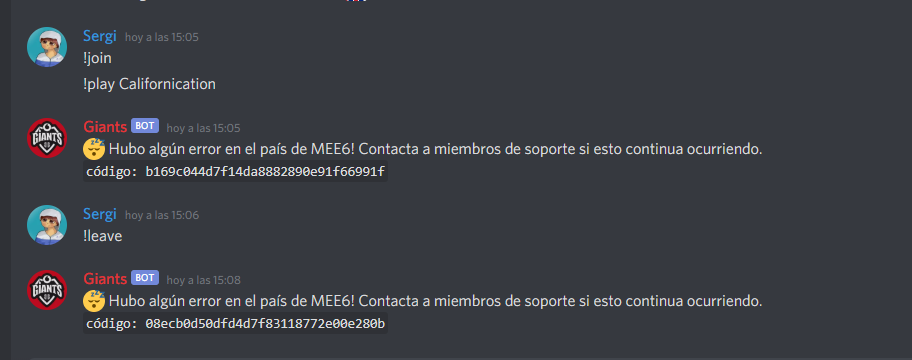
Try !leave and join again after 5 minutes
marble quest
<@&732153669344165989> ad above
 heady sphinx
marble quest
heady sphinx
marble quest
<@&193123929701875712> Music quiz still uses the original MEE6 when the custom bot is enabled
coral palm
does it happen if you kick the original mee6?
marble quest
based on other people, yes
coral palm
umm
fleet marten
Hey. I think i have a Bug.
Something went wrong in MEE6 land! Contact our support team for instructions if this keeps happening.
code: d2e63134c15643ef838985394d98b8df
😴 Something went wrong in MEE6 land! Contact our support team for instructions if this keeps happening.
code: 0a407c6747d5452ab6d4b40df9a98899
marble quest
what command?
fleet marten
!server-info
fleet marten
Ups sry
marble quest
does mee6 have permission to embed links @fleet marten
fleet marten
Yes
After asking 100x times now it works
does mee6 have permission to embed links @fleet marten
@marble quest But still thank you
wooden mountain
lol, that error code.... discord being weird
marble quest
Sil, can you look at some refund and upgrades
wooden mountain
also.... that is a error code for tempmute
not server ifno
@marble quest yes, just got home, there are quite a lot in the queue already
if you have more let me know
wooden mountain
message links
marble quest
and i don't know if someone else already queued these but another refund: https://discordapp.com/channels/159962941502783488/176559797888352256/757416903169015900
and upgrade from year to lifetime: https://discordapp.com/channels/159962941502783488/176559797888352256/757407424616464474
plus the music quiz bug on custom bots i sent higher up
marble quest
thanks
@wooden mountain one more about getting refunded after they cancelled the refund https://discordapp.com/channels/159962941502783488/463809001273032715/757637227433033800
 sturdy crown
Why I can't open mee6 dashboard
marble quest
what exactly do you see?
pure obsidian
Dashboard is loading indefinitely
We are aware of this issue, it will be resolved shortly.
buoyant moon
Come faccio a riportare a qualcuno que mi ha cancellato il mio discord di mi server?
 wintry kindle
Okay so I have manage server on one of my servers but the dashboard on MEE6 for that server doesn't show up...
marble quest
you need admin to see a server there
wintry kindle
Wait that doesn't make sense. Other bots require "manage server" and adding a bot requires "manage server".
marble quest
That's what mee6 decided to do, so you need admin for it to show up on the dashboard
wintry kindle
Fine.
marble quest
Sto usando Google Translate quindi potrei non capirti completamente. Se vuoi segnalare un utente, puoi segnalarlo su https://dis.gd/report @buoyant moon
buoyant moon
Grazie mille
quaint agate
mee6 dosent have send perms in the cahnnel
make sure he does
@buoyant moon
check
if he does try to do it in incognito mode
ok then try incognito mode
Np
 uncut valley
Hmm.. i wanna see who is this, but is this bug?
uncut valley
ah got it
 glass glade
Hello gents, we are using MEE6 as custom bot and it seems the Moderator plugin isn't working. Can you please help?
 dry sable
In my friend's server music-quiz plug-in doesn't work 2 out of 3 times
 pulsar eagle
We cannot make the Reaction Role plugin work. Just getting a blank page in the browser
 drifting island
Hey people! MEE6 unfortunately keeps reporting error codes when trying to use the play command. He joins a voice channel but doesn't play anything and says something went wrong.
Heres the error code: 0ccc715f668a46348b7c170644d20ef7
(or the last of many error codes haha)
faint dome
Tried to use !leave ?
marble quest
Zrunner, do you have time to look at some refunds upgrades and one other request?
faint dome
Yeah probably, I’m waiting my teacher to come lol
 wind stirrup
Can’t get any YouTube playlists to work
fdeed1abe1524e2e8a7459cb9bffead1 is my code
stiff field
Replied in #〉volunteer-support
 vocal pilot
Trying to add a playlist, I keep getting this message.
ivory blaze
we're aware
buoyant moon
The Music Module is Faulty
 royal folio
:SLEEP6: Something went wrong in MEE6 land! Contact our support team for instructions if this keeps happening.
code: 4e757ddf7c1a4c40858e2c66cf6ac12f
marble quest
what command were you using
royal folio
!add
marble quest
did you use a search term or a song link?
royal folio
a link
marble quest
can you send the link here please
marble quest
make sure mee6 has permission to manage messages and read message history
 gentle patio
oh i'll fix that thanks sir!
marble quest
also for that emoji to show, give it the use external emojis too
 tranquil berry
Something went wrong in MEE6 land! Contact our support team for instructions if this keeps happening.
code: a2459b56f95a49be8379e9e44b4c5da0
This is a code error when I try to use the command "!play" which im trying to play a playlist from youtube
I've also tried to use the "!add" command too
buoyant moon
Use !addplaylist, also read #〉bugs-reports message
tranquil berry
oh yikes okay thank you so much @buoyant moon
 sinful star
sometimes in music mode when a longer playlist is looping the bot stops playing music and does not react to commands
 rotund tangle
<@&193123929701875712> Unable to change playlist page. Only first page is displaying
quaint agate
That custom mee6
rotund tangle
yes that is custom mee6
rotund tangle
do the same but same problem
quaint agate
ah ok
 eager sorrel
ivory blaze
eager sorrel
ivory blaze
Make sure the bot has read history and manage messages perm
Also messages older than 14d won’t be deleted
 stone gale
🤔
stone gale
and..? They repair this or no? ._.
marble quest
I’ve noticed that temp bans aren’t unbanning after the end of the time. Happens with both a custom bot and the regular mee6
ivory blaze
been reported already - we are aware
marble quest
ah didn't know
ivory blaze
but thanks
marble quest
so when it's fixed, is it going to unban the members that should have unbanned?
or do i just have to do that manually
 halcyon crown
:SLEEP6: Something went wrong in MEE6 land! Contact our support team for instructions if this keeps happening.
code: 94071a54cb2342cbbbf2375386d39e0a
dire yarrowBOT
 Rayzur#0001 has been warned
Reason: Capital letters
ivory blaze
stop channel hopping
 leaden dove
Hey, guys! Just purchased premium and music quiz is not working
ivory blaze
you're helped in #〉volunteer-support
halcyon crown
this channel is for bug reports
ivory blaze
@leaden dove does it start the countdown?
leaden dove
Bot is appearing in voice channel, starting countdown (really lagging during counting down) and nothing is happening after. Yesterday everything worked fine with 3 free music quiz, after premium purchase it is not working
ivory blaze
Hmm
leaden dove
I've tried to reconnect it for several times, but it died on 7th track and after another reconnection refused to work again
ivory blaze
@leaden dove should be ok now
leaden dove
@ivory blaze it keep lagging awfully even if I am keeping my server at US central
ivory blaze
US central Discord VCs are probably packed
leaden dove
@ivory blaze well yesterday everything worked fantastic at EU
 tight hare
Trying to input my token code so I can change my mee6 icon/name for first time. So it's not letting me proceed next after waiting for hours
ivory blaze
refresh dashboard and try again pls
tight hare
Does it take long to proceed re-inputting the code again after refreshing?
wooden mountain
no
tight hare
It's been loading for a moment
wooden mountain
can you DM me your dashboard link and the token
 old zinc
sil how u have so much xp what a mad lad
wooden mountain
step 1, be active
step 2, don't brag
i usualy fail at step 2
@ivory blaze it's pop-up blcokers
ivory blaze
interesting
wooden mountain
when entering a bot token, it asks you to invite the bot to the server, this "asking" is in the form of a pop-up window that was being blocked
possible workarounds:
- disable pop-up blocking
- invite bot first, then enter token (it will detect the bot being there and not ask to invite it)
tight hare
I had to turn it off to vouch for Sil
 rich latch
step 2, don't brag
i usualy fail at step 2
this mad my day
buoyant moon
Can't change transparency on server rank card (Locked in place) and customized bot doesn't give youtube notifcations.
marble quest
@buoyant moon so make sure that the custom bot actually has permission to send messages in that channel. a quick test is to use !help and see if you get a reply
buoyant moon
when i try to play music nothing plays and its just silent
bitter zenith
not sure if this has been reported yet or not as a bug but just got this request today
 tough tusk
I think music has been broken for a bit
" Loading information for a YouTube track failed."
 pliant laurel
Glad I'm not the only one it's happening to lol
tough tusk
It has been like this for amost an hour
It may have longer then an hour
I think it's fixed, temporally.
tired meteor
so looks like mee6 does not send out the normal automod warning in chat sometimes, this guy got 3 warning but only 1 warning showed up
 mellow jacinth
!rank
dire yarrowBOT
CSIggi_boyYT, that command is disabled in this channel.
 jovial frost
pepe
dire yarrowBOT
I would like to help you, but if you don't tell us what your problem is then I can't really help. Please tell us what your problem is and not that you have one.
buoyant moon
With the MODERATOR system
tired meteor
what with the moderator system do you need help with?
buoyant moon
when a bad word pops up it doesn't block it or give the person a warning.
tired meteor
did you add that word in in the bad words list?
buoyant moon
and i set some bad word that they maybe would say and that didn't do anything
tired meteor
did you try out the bad words or a normal user?
buoyant moon
yes i tried the bad words
dire yarrowBOT
Hey ! MEE6 won't sanction the following people:
• The Owner of the server;
• People with Administrator permission;
• People with Bot Master permission;
• And the role(s) you set as moderator on the dashboard.
Note: MEE6 think moderators are responsible people, like the police . So he doesn't want to blame your police
tired meteor
this is why mee6 did nothing
buoyant moon
so what should i do
tired meteor
you can create a alt account and test it with it or invite a friend and ask him to test it out
tired meteor
does your friend have permissions? like is he a administrator or a moderator?
buoyant moon
only one of them but the others no and i tried it on the one that didn't have pers
tired meteor
ok, also make sure that your other friend does not have a allowed role to say it or says in in a ignored channel
buoyant moon
ok let me do that right now
and i'll get back to you
wait a minute
i don't see that
tired meteor
press on settings+
buoyant moon
look
tired meteor
strange
bitter zenith
first thing
does MEE6 have permission to send messages in your server?
and second, does it have permission to manage them?
bitter zenith
have you refreshed the dashboard and saved since making those changes?
buoyant moon
yea
bitter zenith
are you premium?
buoyant moon
no
buoyant moon
no
bitter zenith
do that real quick for me please
dire yarrowBOT
You can access my dashboard at https://mee6.xyz/dashboard, and login with your Discord Account.
or you can use !dashboard in your server for a direct link
buoyant moon
ok hes back in
bitter zenith
alright and would you check that those settings are still set up for your bad words (they should be), and that he has the correct permissions, and try that again?
with the account that doesn't have perms
bitter zenith
alright would you ping the Support role with your server name or ID and see if they can investigate further?
I won't be able to continue assisting
buoyant moon
Xcellent 758682788471504907
hearty igloo
<@&193123929701875712>
 formal lichen
<@&193123929701875712> Unable to change playlist page. Only first page is displaying
@rotund tangle I'm having this exact problem as well with my custom bot
 brave bone
!add-playlist don't work
tranquil berry
Yeah I'm having the same issues as 😴 Something went wrong in MEE6 land! Contact our support team for instructions if this keeps happening.
code: 62cf70aaf612430387a323d7ff932035
hearty igloo
<@&193123929701875712>
sick jolt
@formal lichen @brave bone @tranquil berry sorry for the inconveniences but the !add-playlist command is currently having issues. we've got multiple reports concerning it. Devs have been informed i believe. No ETAs for the fix tho. Again really sorry.
plain cave
When someone gets warning first time he gets 1 minute sec time gets 1 minute 3 time gets 1 m
Now.. i set it to 1 minute and 5 minutes
And it should grow.. and the time rate is 2 days..
Is theres a none problem about it?
sick jolt
pls send a screenshot of your action setup.
wooden mountain
@sick jolt not everyone understands "ss" pls use "can you give a screenshot of "
sick jolt
ok sorry
wooden mountain
(Wich also sounds nicer)
formal lichen
@sick jolt I actually reported a differenr issue, the page turning problem
 unique carbon
How old are the devs here
bitter zenith
old enough to be on Discord for 4 - 5 years
dire yarrowBOT
 daddy 74𝒃𝒙𝒒𝒕𝒔#6845 has been warned
Reason: Bad word usage
 candid vortex
74bxqts
 rose oyster
dire yarrowBOT
rose oyster
dire yarrowBOT
 singtothehippos#4186 has been warned
Reason: Capital letters
faint dome
Thx, I’ll report
 hot patrol
Ok
marble quest
not so much of a bug, but just a visual thing. on the dashboard using a 4:3 ratio (1280 x 1024) the save bar kind of gets cut out on the settings tab when changing the language, nothing too much, just thought i'd share
hearty igloo
@heady kraken
Can I help you
 heady kraken
Yes please I’m new
hearty igloo
With what can I help
heady kraken
Ok
mellow jacinth
hi
dire yarrowBOT
 CSIggi_boyYT#1037 has been warned
Reason: Capital letters
mellow jacinth
sorry
faint dome
Because people love to spam with them
But you’re not forced to activate them on your server 
hearty igloo
Hell lot of problems coming in with the music commands
 scenic mantle
why do we get warned for CAPITAL LETTER USEAGE
buoyant moon
l
bitter zenith
specifically this is on mobile devices
wooden mountain
cannot repro
bitter zenith
that bad hm?
 distant prairie
would it help if I could on the same type of device?
 mortal dust
Roles are showing twice on dashboard on the moderation plugin when adding moderation roles
bitter zenith
refresh the page
if you made changes to your Discord while the dash was open, sometimes this will occur. needs a refresh to sync back up properly
mortal dust
ah ok thx that works 😊, have a nice day Majick 🙂
bitter zenith
likewise 
formal lichen
<@&193123929701875712> is there any update on the page turning issue?
 brazen zenith
Please help me, what this problem?
 agile crystal
They keep declining my card but I don't know why
quaint agate
Please help me, what this problem?
@brazen zenith thats not a mee6 problem probably wont find an answer here
 limber knoll
@brazen zenith which voice region is that server?
brazen zenith
@limber knoll Indonesia, the youtube anime channel server
limber knoll
can you change that servers region?
if so does it let you join if it's in another region?
mellow jacinth
sup
 dim epoch
Me and my friend were playing songs and it stopped working until we told it to play a different song, then it started playing all the songs on the queue
wooden mountain
sorry, working on fixing it
plain cave
@sick jolt sorry was busy.. i cant take a shoot from my phone cos i can access it only from incognito web.
So i will later from my pc.
But it says
Temp mute 1 minute for 1 infrection in 2 days
Temp mute 2 minute for 2 infrection in 2 days
Temp mute 5 minute for 3 infrection in 2 days
And keeps going..
 subtle elbow
The reaction roles plugin isn't saving
marble quest
@subtle elbow are the roles just not staying after you press save, or something else?
marble quest
First try refreshing the page and try it again
buoyant moon
Not showing Twitter updates to the channel
wooden mountain
tweets, retweets or others?
buoyant moon

 covert saddle
hello good evening I have a problem with mee6 I authorize the site https://tenor.com/ it is to for authorize the GIFs of Discord but unfortunately mee6 always removes the link of the GIFs and puts the links of the GIFs one by one on the site of Mee6 no thank you
Tenor
Say more with Tenor. Find the perfect Animated GIFs and videos to convey exactly what you mean in every conversation.
marble quest
@covert saddle remove the / at the end of that, twitch.tv and discord.com
covert saddle
@marble quest why delete the /
marble quest
tenor.com/ is a page, tenor.com is a site
it's just how you have to do it to work
 lucid remnant
I can't add a bot @dire yarrow to my server because every time I want to invite a bot mee6, the screen on my website will automatically turn ash
gilded yacht
What browser are you using @lucid remnant
lucid remnant
Browser The usual
gilded yacht
Which browser is the usual
lucid remnant
Chrome
gilded yacht
Ok can you try adding the bot in incognito mode
lucid remnant
Actually I tried
gilded yacht
And that didn't work?
gilded yacht
Cool 
plain cave
SLEEP6 Something went wrong in MEE6 land! Contact our support team for instructions if this keeps happening.
code: cbfd6247458d4d68b7a5c48ec651af35
marble quest
what command are you using?
plain cave
.!clear
marble quest
does mee6 have permission to manage messages and read message history
marble quest
can you try the command again
plain cave
Did 3 times
marble quest
do other commands still work?
and does the command still delete the messages, or no?
plain cave
Yes
No
Its not delete
SLEEP6 Something went wrong in MEE6 land! Contact our support team for instructions if this keeps happening.
code: 7afebfbe9cb140c3a942b273f4b6162c
SLEEP6 Something went wrong in MEE6 land! Contact our support team for instructions if this keeps happening.
code: 11e271c1c507406ea120b2fa27193b40
SLEEP6 Something went wrong in MEE6 land! Contact our support team for instructions if this keeps happening.
code: cbfd6247458d4d68b7a5c48ec651af35
SLEEP6 Something went wrong in MEE6 land! Contact our support team for instructions if this keeps happening.
code: f1a2d088f8df4aa6ab23abe7ca63966f
marble quest
okay, you don't need to send them all
can you use !user-info @dire yarrow and send a screenshot of the response
wooden mountain
hi @plain cave pls wait a couple minutes and try again
plain cave
Kk thx
 acoustic onyx
Give Roles when Joined hasn’t been working for any of my servers.
 vocal flax
Can you check dashboards? Look at welcome plugin @acoustic onyx
And make sure the bot have perms Manage roles and do as below
dire yarrowBOT
Role hierarchy is important for me to give out roles. Oh and also Manage Roles perm:
https://cdn.mee6.xyz/s/fix_hierarchy.gif
 uneven summit
It isn't a bot's bug but it still being a bug. In this part of the picture: "(...) No es obligatorio usar MEE6, (...)" should say "No es obligatorio para usar MEE6". That's grammar's correctly. And, after that part, the word "el" of: "pero le permite desbloquear funciones exclusivas..." shouldn't be.
Thanks for read!
 storm ledge
Error Code code: 55c349fa135241128b610b1c4c20e3cb
Command used: !add-playlist https://www.youtube.com/playlist?list=PL7Fji4K0WMgi-JHLpf4IgYN0O77khvkPl&feature=share
Server ID: 738003653969051748

YouTube
 burnt igloo
Same Here
Error Code code: dc4d61c387da4ffc8680f093aee8e32d
Command used: !add-playlist https://www.youtube.com/watch?v=QW28YKqdxe0&list=PL4fGSI1pDJn5FhDrWnRp2NLzJCoPliNgT
Server ID: 679540019676971044
marble quest
yeah, playlist issues are being investigated
 frank oar
You can't do emoji bug reports, only bug reports for MEE6, @inland sonnet.
marble quest
I've noticed that timers seem to be duplicating after a few minutes. I've seen this with the one hour timers in #〉volunteer-support and also with my 10 minute timers in a test server
wooden mountain
Sounds good
 obtuse parcel
When I try to do the dashboard. I get stuck like that.
sick jolt
what browser?
obtuse parcel
Samsung.
sick jolt
use chrome
 glad elm
Samsung.
@obtuse parcel how is that Samsung? I literally see the chrome logo at the bottom
 shy jetty
Hello, there is an error here: customBot.updateImage appears
plain cave
SLEEP6 Something went wrong in MEE6 land! Contact our support team for instructions if this keeps happening.
code: cd794cd3b11c4348b5cf160ffe719da1
Its still has its problem
 limber tusk
I payed for the bot (6 month plan) and it says I don't have premium
How do i refund my stuff
limber tusk
Yes i was trying to get it in among us group
It payed for and everything but i dont have it
I can send you a ss
of the payment
dire yarrowBOT
to transfer your premium to another server, use https://mee6.xyz/premium-transfer.
ivory blaze
you can transfer it via the above link
limber tusk
..no I need a refund or if you could put the 6month plan on among us group
ivory blaze
you can do it yourself via that link
limber tusk
are you saying it put the 6month plan on uwu time??
ivory blaze
no worries :)
 ebon dew
Automod log posts show as posted by MEE6 with the default avatar, even when using a custom avatar and name.
 last sleet
 placid scaffold
@last sleet Do you have admin perms in the server?
ebon dew
@ivory blaze Thank you, meanwhile @bitter zenith and I found another doozy of a bug.
They said they'll file the report btw
bitter zenith
I can't pin it down yet. there are too many inconsistencies
 scenic bramble
i cant give mod to people
marble quest
@scenic bramble what exactly do you mean by that
scenic bramble
i try to make it so mods can use commands but it wont work
marble quest
you need to add allowed roles per command
 glass coral
KK
tranquil berry
<@&193123929701875712> is the !add-playlist still not working?
coral palm
i think yes
 slender needle
!record command is duplicated on https://mee6.xyz/music.
 verbal cairn
Hi! The "Send a message when a user joins the server" option turns off all the time, and i don't know why... so sad
faint dome
Usually because MEE6 cannot send messages in the channel you selected
gilded yacht
No
 sullen sonnet
@buoyant moon follow https://support.discord.com/hc/en-us/articles/360000291932-How-to-Properly-Report-Issues-to-Trust-Safety to report this user.
dont invite it as it may cause damage to the server as it would have administrative privilege. I can tell this as the permissions integer of the bot is 8.
 timber needle
In my server Mee6 keeps saying ‘ something went wrong in mee6 land! Contact our customer support’ can someone please tell me why this keeps happening there’s only 3people in my server including mee6
dire yarrowBOT
 Something went wrong in MEE6 land!
If this happens when using:
Custom commands:
‣ Bot tries to give a role higher than his own. To fix that, move the bot's role above the role he tries to give.
‣ Missing Manage roles permission. Go to Server Settings -> Roles -> Bot role -> Manage Roles permission.
‣ the bot is trying to send a message in a channel it can't send messages in, make sure MEE6 can send messages in channels selected in the command.
Moderator commands:
‣ Muted role is above Mee6's role. Bot can't give roles that higher than his own. Move it down.
‣ Missing Manage roles permission. Go to Server Settings -> Roles -> Bot role -> Manage Roles permission
‣ Missing Kick or Ban Members permissions. Go to Server Settings -> Roles -> Bot role -> Kick Members and Ban Members permissions
‣ For ban or kick, MEE6 role needs to be higher than the role of the user. Move it up.
‣ For !clear, MEE6 needs to have the "Read message history" permission
‣ If you added a logging channel, make sure that you didn't delete MEE6 webhook (channel settings -> webhooks)
faint dome
screenshot please?
timber needle
As soon as I pressed screenshot this appeared
faint dome
lol, windows
gilded yacht
oof
timber needle
Is it bad that there are only 2 drivers in my laptop actually connected Rn
 polar rivet
Guyz the automatic role is not working properly
versed crater
Which automatic role? Level reward, stream or any other? @polar rivet
 leaden timber
I have enabled logging but is not logging. Please help!


 sick jolt
see if it has the permission to send messages in that channel. refresh browser and try again
leaden timber
I'm on iOS so
 uneven sleet
mee6 dashboard wont load does anyone know how to fix that?
 main goblet
how do i fix this
gilded yacht
@uneven sleet @RყZҽ ❥#6796 go to the tab in incognito mode
@lone oriole what's the problem
I don't see something wrong
lone oriole
...
I set perfect comand and I testt to my alt I broke the rules and I got muted it's take me like 5 hours
lone oriole
Where
lone oriole
I set all is delete messenge and warn
polar rivet
The automatic role is not working properly.any help
The role which mee6 bot gives to the new person is not working in all servers any issues??
polar rivet
Gaming Drive YT
Indian Knights
F.R.I.E.N.D.S
M416 Killer YT
@wooden mountain this r the servers
Plz check it out
wooden mountain
in all of thsoe?