#〉bugs-reports
2 messages · Page 45 of 1
 buoyant moon
 coral jungle
it works !!! thank you so much
 boreal trout
Hey, I'm in a server, and 2 of the users for what I know, had their levels reset randomly, without on of the staff doing anything, there is a whole staff team in the server, so someone might be hiding something, but I doubt it, can someone tell me what's going on?
 dusty apex
(not bug)
 cedar crown
can mee6 even play music?
cedar crown
what's the command?
 dire yarrowBOT
 Music Plugin
• Enter a Voice Channel and then type:
!join -> This brings MEE6 to the voice channel you are connected to.
!add <Name of the Song or URL> -> This adds the song of the playlist.
!play -> This starts the added song.
!next -> This skips the current song.
!stop -> This stops MEE6 from playing the current song.
!playlist -> This shows songs added to the playlist.
Note: Searching by "Name of the Song" is from YouTube only !!
cedar crown
ok thanks
 strong path
yw
 mint flax
@dire yarrow is deleting my invites
strong path
Oh good, then it is working correctly
mint flax
No it is a bug
strong path
Does it remove them here you mean?
mint flax
No at offtopic place
strong path
That is intended
mint flax
Watch
dire yarrowBOT
Alright, @mint flax has been warned because 'Posted an invite'.
strong path
 rugged scaffold
Plugin YouTube not always work. Rather, for the month of use, it worked only 1 time.
 limber knoll
@rugged scaffold try removing and re adding the channel, i cant promise it will work though as its dependant on youtubes end
 crimson moon
I cant do the command !tempban HELPPPPPPPP! I need to ban a person but I cant do it on my serever
dire yarrowBOT
Durations for time based commands.
50s50 seconds.50m50 minutes.50h50 hours.50d50 days.
 graceful stirrup
My rank card doesn't save the colours that I have set it to
dire yarrowBOT
go to https://mee6.xyz/#rank-card
click on visibility
wait for it to load
select what servers you want this rank card in
crimson moon
tkz @wooden mountain
 wooden mountain

wooden mountain
State your problem pls
 faint swallow
How do I create a custom command that when mentioning the member next to the command Mee6 marks the member?
Exemple {user} mark the member that used the command and not the person you marked next to the command
faint swallow
Thanks for help-me!
 hearty sapphire
Anybody here to help me?
hearty sapphire
I can't access the dashboard on the server I'm on.
 livid mulch
I actually need help too. So if you could help me when you're done with him, that'd be amazing.
hearty sapphire
The role I have has been added to the moderator plugin, but it isn't showing up on my dashboard.
limber knoll
try !dashboard on the server your in?
hearty sapphire
livid mulch
Are you the server owner?
hearty sapphire
No, but the owner never changed it. I could access before, and he's tried re-adding the role. Nothing's working.
livid mulch
I think only the server owner can access the dashboard?
hearty sapphire
I could access before
livid mulch
I think
hearty sapphire
but like there was no purpose to you saying that because I could access before
limber knoll
only admins and owners can access the dashboard
hearty sapphire
Yes, I'm an admin.
livid mulch
and bingo bongo i was right
limber knoll
it was changed recently here
livid mulch
@limber knoll Can you explain the full use of the tempmute command?
Does it mute text chat for the user?
As well as voice chat mute them?
limber knoll
it's !tempmute @livid mulch 45m reason
dire yarrowBOT
Durations for time based commands.
50s50 seconds.50m50 minutes.50h50 hours.50d50 days.
limber knoll
45m is 45 minutes
livid mulch
And does it apply to voice, chat, or both?
limber knoll
can apply to both
hearty sapphire
Doesn't it just give them the "muted" role, and you get to customise what that lets them do?
limber knoll
in the voice channel settings have x to speak
@hearty sapphire the channel over rides used to be automatic but aren't at the moment
livid mulch
When you say it "can" apply to both. Does that mean I have to add in a parameter to enable it?
limber knoll
@hearty sapphire np
@livid mulch means you have to go to the voice channel settings, add muted role to it with x on speak permissions
limber knoll
to a degree
coz you'd have to redo all the muted roles again
easier process is give them the same perms
and over rides
dire yarrowBOT
vladicoste, this command is disabled in this channel. 
vladicoste, this command is disabled in this channel.
buoyant moon
hmm
dire yarrowBOT
vladicoste, this command is disabled in this channel.
crimson moon
!skill
dire yarrowBOT
Alright, @crimson moon has been warned because 'Final warning before getting muted for performing commands outside the correct place | Again, only USE commands in ---> #〉commands <---'.
 vale kelp
!rank
dire yarrowBOT
🎃ファンキーガイ🎃, this command is disabled in this channel.
vale kelp
!rank
dire yarrowBOT
🎃ファンキーガイ🎃, this command is disabled in this channel.
vale kelp
Oops
 buoyant moon
help me pls
 bitter owl
As I can see, first go to dashboard -> Bot masters -> Remove all roles
dire yarrowBOT
You can access my dashboard at https://mee6.xyz/dashboard, and login with your Discord Account.
bitter owl
Then go to Server Settings -> Roles -> Disable Administrator from all moderators/users roles
@buoyant moon MEE6 Is not even in your server
 hard lotus
Hey! Im trying to test command but this happears! What is happening?
<@&193123929701875712>
dire yarrowBOT
Role hierarchy is important for me to give out roles. Oh and also Manage Roles perm:
https://cdn.discordapp.com/attachments/302245580673908740/479426065668898826/81d15f9a.gif

 pure obsidian
@hard lotus ☝🏽
hard lotus
oh ok tnx!
bitter owl
We're not very mobile friendly
Try incognito mode or desktop mode please
Sorry about that
Or use a computer
buoyant moon
What
bitter owl
Click on 3 dots of your phone browser -> Incognito mode
buoyant moon
Ya Ukraine
bitter owl
If it does not work try 3 dots of your phone browser -> Desktop mode
buoyant moon
Ya no English
buoyant moon
@bitter owl
РУССКИЙ
АНГЛИЙСКИЙ
УКРАИНСКИЙ
u menya netu knopki sokhranit' dannyye pochemu chto za bag
Показан перевод для запроса у меня нету кнопки сохранить данные почему что за баг
Искать вместо этого перевод для у миня нету кнопки сохронить данные почему что за баг
I do not have a button to save data why what a bug
История
Сохранено
Сообщества
Для поиска не нужно нажимать кнопки
Скажите "Перевести «люблю тебя» на французский" в приложении Google.
НЕТУСТАНОВИТЬ ПРИЛОЖЕНИЕ
Мгновенно переводите вывески и другие надписи.
НЕТУСТАНОВИТЬ ПРИЛОЖЕНИЕ
bitter owl

buoyant moon
@bitter owl ты руский
bitter owl
Нет, я не
Используйте режим рабочего стола или режим инкогнито в своем мобильном браузере, пожалуйста @plush forge
 floral gate
added a command on the dashboard and when i use it it says: Oops, something went wrong in MEE6 land! :SAD6: This error has been reported to our Team. We'll work hard to fix it. any idea? want to use this command
dire yarrowBOT
Oops, something went wrong in MEE6 land!  This error has been reported to our Team. We'll work hard to fix it.
If this happens when using:
Custom commands:
‣ Bot tries to give the role that higher than his own. To fix that, move the bot's role above the role he tries to give.
‣ Missing Manage roles permission. Go to Server Settings -> Roles -> Bot role ->  Manage Roles permission
Moderator commands:
‣ Muted role is above Mee6's role. Bot can't give roles that higher than his own. Move it down.
‣ Missing Manage roles permission. Go to Server Settings -> Roles -> Bot role -> Manage Roles permission
‣ User don't have all roles bot tries to remove, that's known bug.
remove this line from command, this bug is being fixed.
 lime scroll
!rank
dire yarrowBOT
_Victheboss, this command is disabled in this channel.
buoyant moon
the leader board for this server does not seem to load is that because of the size of the server?
my rank card looks like the default one in a server im in
its gay
dire yarrowBOT
go to https://mee6.xyz/#rank-card
click on visibility
wait for it to load
select what servers you want this rank card in
bitter owl
☝
 junior thistle
When I enter the page mee6.xyz, only the black and gray background is displayed. I do not know what to do about it and I can not write commands ... I am asking for help !!!
bitter owl
What's your browser please?
wooden mountain
i see a adblocker, pls disable that adblocker and try again @junior thistle
 mortal oxide
@junior thistle try to clear the cache and restart broswer
junior thistle
Is it about browsing history?
mortal oxide
Nope
junior thistle
?
mortal oxide
Let me find the keyboard shortcut for it
junior thistle
okay
mortal oxide
Try that: ctrl+shift+i
wooden mountain
@junior thistle what OS are you using and chrome version?
junior thistle
this?
wooden mountain
click console
junior thistle
I am using a computer (windows 8.1) and the version of google chrome has been recently updated (newest)
wolfing. yes... next?
*sil
wooden mountain
click on console and show us a printscreen
junior thistle
how to show the print screen
junior thistle
this?
wooden mountain
yes
junior thistle
okay
wooden mountain
from the error i see, i know that you are either using a extension that blocks something or you are using a outdated browser
you can try in incognito mode ctrl + shift + N or update your browser
junior thistle
dire yarrowBOT
You can access my dashboard at https://mee6.xyz/dashboard, and login with your Discord Account.
junior thistle
wtf
wooden mountain
is it still not loading?
junior thistle
._.
junior thistle
okay wiatt
wait*
To update Google Chrome:
Open Chrome on your computer.
At the top right, click More.
Click Update Google Chrome. If you do not see this button, you have the latest version.
Click Run restart
wooden mountain
yes, do that
wooden mountain
strange, can you try a dirrent browser pls
junior thistle
i dont have "edge"
wooden mountain
firefox?
junior thistle
i dont have firefox...
I have Explorer and chroome ...
:<
explorer is no conecting bzzz
*error
Explorer does not work for me for a long time, etc ...
wooden mountain
doesn't surprise me as explorer is not supprted anymore
it should work with chrome
 hoary plaza
There is a problem in your timer : I set 24 hours !
wooden mountain
that second one should not be there
24 hours timers should be at 00 to 03 minutes (it takes a while to send them all)
but 38 minutes after the hour is not correct
sure that is a timer and not a custom command
and it is a 24 one
junior thistle
"i just find your session in our system
all it tells me is unsupported browser" @wooden mountain
okay
I managed on the phone. thank you in advance
wooden mountain
np 👌
junior thistle
😉
buoyant moon
k
 tall robin
Hello. When i go to the website to configure mee6 for my server the site does not load. Yet the connection is fine, I am an administrator ( I create th server) yet it does not work. What to do ? thank you. (I use a translator so my English is bad)
tall robin
@ripe rivet THANK YOUUUUUUUUUUUU
tall robin
Mais tu n'es pas français ?
buoyant moon
seems bot - youtube does not work anymore...
bitter owl
@buoyant moon We are aware of this. Please remove and add the streamer again (don’t forget to copy the content).
It need to be renewed each fortnight but devs are working to make it automatic. Thanks for understanding
 polar fiber
Does anyone know why the !warn doesn't work?
dire yarrowBOT
Oops, something went wrong in MEE6 land! This error has been reported to our Team. We'll work hard to fix it.
If this happens when using:
Custom commands:
‣ Bot tries to give the role that higher than his own. To fix that, move the bot's role above the role he tries to give.
‣ Missing Manage roles permission. Go to Server Settings -> Roles -> Bot role -> Manage Roles permission
Moderator commands:
‣ Muted role is above Mee6's role. Bot can't give roles that higher than his own. Move it down.
‣ Missing Manage roles permission. Go to Server Settings -> Roles -> Bot role -> Manage Roles permission
‣ User don't have all roles bot tries to remove, that's known bug.
remove this line from command, this bug is being fixed.
polar fiber
Awe thanks
 gloomy palm
i cant hear any music in the music voice chat and i have my volume all the way up
buoyant moon
а можно менят дизайн показа ранга без доната
 cold bear
без доната можно поменять только цвет текста и прозрачность прямоугольника @buoyant moon
через премиум подписку можно поменять задний фон для всех пользователей на одном сервере и будет отображен только на нем
cold bear
@buoyant moon 3 dots or just grey screen?
can you check if data saver mode is disabled?
click 3 dots menu, if there shows something like "data saved: x MB" means it enabled
this one
buoyant moon
Hello,when i try to save the Welcome message for my server,the Save button doesn't appear,only half of the Discard button appears
Please fix this
Note:im on mobile
wooden mountain
👀 that is the second one today, we didn't had this before and we didn't update anything 🤔 strange
buoyant moon
i have
dire yarrowBOT
It appears that you may be on the wrong account, or something went wrong since the time you logged into my website.
-Please navigate to https://discordapp.com/login and select the gear :gear: in the bottom left, then press Logout.
-After that, please navigate to https://mee6.xyz/dashboard to disconnect from my website. Click on your profile picture and press Logout
-Once finished, select "Add to Discord" again, and follow the instructions to access my dashboard again.
https://imgur.com/RSkEAE6
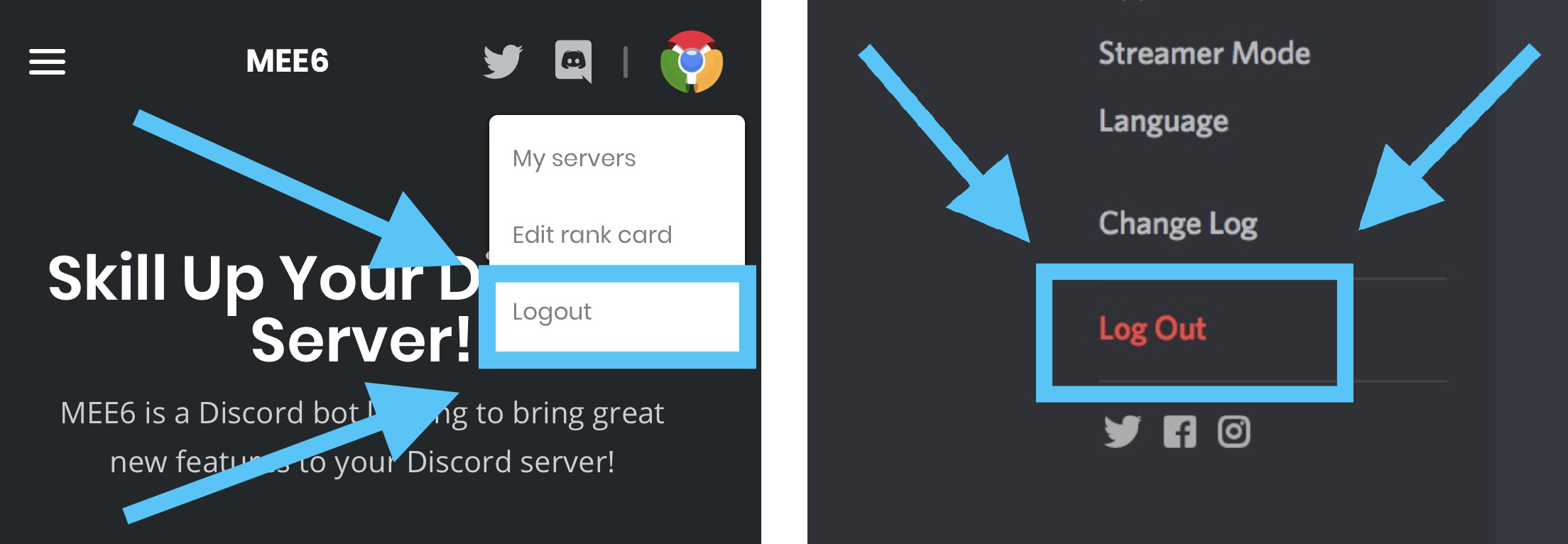 wooden mountain
pls try that
buoyant moon
ok
buoyant moon
<@&193123929701875712> I need you fast. I have 3 infractions (below). And I tried warning someone more than 4 times, and mee6 didn’t kick them, I warned them a few more times, it didn’t ban them. (I was testing the infractions)
wooden mountain
we are aware of a bug where it only does the top one
i'm currently investigating this bug
buoyant moon
Okay
 flat thicket
can you help me
again bot not working bot have rank MEE6 and not workd
work*
Oops, something went wrong in MEE6 land! :SAD6: This error has been reported to our Team. We'll work hard to fix it.
dire yarrowBOT
Oops, something went wrong in MEE6 land! This error has been reported to our Team. We'll work hard to fix it.
If this happens when using:
Custom commands:
‣ Bot tries to give the role that higher than his own. To fix that, move the bot's role above the role he tries to give.
‣ Missing Manage roles permission. Go to Server Settings -> Roles -> Bot role -> Manage Roles permission
Moderator commands:
‣ Muted role is above Mee6's role. Bot can't give roles that higher than his own. Move it down.
‣ Missing Manage roles permission. Go to Server Settings -> Roles -> Bot role -> Manage Roles permission
pure obsidian
Being assisted in #〉volunteer-support FYI
 pure whale
!levels wont work bug
dire yarrowBOT
Ballora Auditore, this command is disabled in this channel.
wooden mountain
@pure whale seems to be working fine in your screenshot, just scroll down
wooden mountain

pure whale
Yea my reaction exactly
wooden mountain
do you know how to enable desktop mode?
wooden mountain
The 3 dots top right => desktop site
 hidden sedge
my mee6 dashboard isnt working
pure whale
Oh okay thank you lol just wish that it was the way it was before for phone
wooden mountain
@hidden sedge do !dashboard in your server and click that link
hidden sedge
ok
buoyant moon
@wooden mountain Will you please DM me when the bug I mentioned earlier is fixed?
wooden mountain
@buoyant moon i just fixed it, so now:
- the owner of Mee6 needs to approve it
- our team needs to test it
- we need to deploy it
this can take a week or so in total and i will completly forget to tag you then
buoyant moon
Okay
 mint sand
Hey guys, when will the issue with the youtube monitor be fixed? It's been like 2months, if you could personally fix mine, it would be really appreciated! The bug: when a monitored channel is banned, the monitor stops to work.
 valid socket
uhh the snails are either disoriented or very unique but they move backwards
with snail race
dusty apex
ask the snail bot support 😃
 wooden mountain
it's a feature
if you do races with snails irl, the snails sometimes also go back
 dense fox
It varies
 dense fox
Sometimes its on the rigth, sometimes on the left
 hoary stream
Along with, that isn’t our bot. Also different emotes depending on the device
hoary stream
iOS mobile @valid socket
valid socket
why snail so heterosexualn't
 faint dome
<@&193123929701875712> I think your timer is bugged lol (not my own server btw)
I will ask the owner to delete and recreate the timer, but you should maybe look at this issue
faint dome
?
wooden mountain
all those messages are send in less then a minute
faint dome
right
wooden mountain
Mee6 doesn't even send 1 a minute
faint dome
but it seems to be a me6 webhook... no?
wooden mountain
our ratelimit doesn't allow that for timers
faint dome
oh
wooden mountain
yes, a admin could just go in channel settings => webhooks
if you search in #talk you sometimes see the bot talk through a webhook.... same thing
faint dome
right. thanks for these explanations
 quiet pike
Hi I have a problem : I am on my tablet and I will use the MEE6 bot to my Discord server but i was in your website and I can’t save : the button « save » isn’t in my screen!
wooden mountain
yep, we know about this problem
wooden mountain
try pc
buoyant moon
!white
MEE6BOThoy a las 17:46
Oops, something went wrong in MEE6 land! :SAD6: This error has been reported to our Team. We'll work hard to fix it.
????
dire yarrowBOT
Oops, something went wrong in MEE6 land! This error has been reported to our Team. We'll work hard to fix it.
If this happens when using:
Custom commands:
‣ Bot tries to give the role that higher than his own. To fix that, move the bot's role above the role he tries to give.
‣ Missing Manage roles permission. Go to Server Settings -> Roles -> Bot role -> Manage Roles permission
Moderator commands:
‣ Muted role is above Mee6's role. Bot can't give roles that higher than his own. Move it down.
‣ Missing Manage roles permission. Go to Server Settings -> Roles -> Bot role -> Manage Roles permission
buoyant moon
Ok thanks!
quiet pike
I have an other problem
And yes I am French
Je suis aller sur l’app Google et après je suis aller sur votre site puis je me suis co a discord et après ça m’a fait ça
Ok
Nn
G pas
Nn
Mais safari
Je l’ai
J’peux pas j’ai pas le code de l’app store c mon père qui l’a 😥
Si mais moi j’habite en France p’tre que toi au Canada ou pas mais en tout cas ici il est 23:12
Alors voilà c’est un peu tard
Oki
Mrc
Ça marche edge?
Ok au cas où je teste et je te le dis 😉
Rhaaaah
buoyant moon
 jade jay
!despacito Doesn't work
dire yarrowBOT
Alright, @south light has been warned because 'Posted an invite'.
 south light
jade jay
south light
jade jay
Please don't post invite links
limber knoll
@south light chrome https://mee6.xyz/dashboard

Skill up and manage your Discord server with automations, commands and awesome plugins!
If that fails try incognito mode same link
limber knoll
Np
 kind trellis
 rose steppe
#〉chat <------ say hi here. Not in #〉bugs-reports
 old minnow
<@&193123929701875712> somebody deletes my cmds
strong path
What do you mean?
old minnow
when i try to do !help in #〉commands it gets deleted
strong path
Yeah? It's intended. Is there a problem with that?
You're getting DMed the commands, right?
old minnow
No
strong path
check that your DMs are enabled here
 keen bay
 prisma radish
Our mee6 PMs people on our server that they've leveled up, and also to try and use !rank commands
but we've disabled everything I can find relating to that
pure obsidian
Talking about this message?
prisma radish
Nope
Just got this from a member
it's been disabled forever, but we've started seeing an increasing amount of people getting PM'd by the bot
(but not everyone)
pure obsidian
@prisma radish Apparently you can't disable it, user will only receive that message when they reach level 3 and not anymore.
prisma radish
but... why 
pure obsidian
It's a one time message, so no worries.
faint dome
Wait, do you speak about the 1st or the2nd message ?
faint dome
That’s not an automated message. Maybe a bug, if you disabled the levelup msg
Does this message appear when you levelup or when you type a command ?
faint dome
Actually it seems that Alizera was right. My bad. I never heard about this message before, but we don’t stop learning lol
I though the only one automated message was the first ¯_(ツ)_/¯
 prisma radish
The first isn't unavoidable - that must be from some other server. We've disabled the welcoming message ourselves
but alright
guess we're taking mee6 to the chopping block then 😦
 rain lantern
!invites
limber knoll
@hushed marsh why the commands here?
 hushed marsh
what is putros
limber knoll
The user above your emoji response
hushed marsh
ohhh
i saw someone use commands so i thought this channel was command friendly
and i said bug cos it deleted the message
limber knoll
Not unless used to help someone
limber knoll
#〉commands is used to test commands but the commands must be used to help others if in the other channels
hushed marsh
k
limber knoll
As some staff warn and ban for that
Brush up on the #〉rules and it will help you
We try to inform as much as possible in there
buoyant moon
как поменять тексты для всех пользователей сервак в личку пишите если знаете
buoyant moon
how can I change the text for all users on a server in a personal email if you know
wooden mountain
not possible
buoyant moon
!rank card
wooden mountain
no space
 boreal grove
Mee6 not playing the music queue unless manually type the !next or !play
is this a known issue?
its almost 4days since this issue exist
wooden mountain
yes
buoyant moon
how can I put a photoshop bot
quiet pike
Hello I am French and this morning in France 7:00 (in NYC 01:00) I can save the changes about MEE6 in the website (I am in my tablet) and now I can’t save :the save button isn’t in the screen ( yes , I know yesterday I have the same question) but why this morning I can and now I can’t
 burnt hazel
@quiet pike Sorry about that, are you able to request desktop mode on your tablet browser or try changing the orientation of the device?
Désolé, êtes-vous capable de demander le mode bureau sur votre tablette de navigation ou d'essayer de changer l'orientation de l'appareil ?
quiet pike
Are you French
dire yarrowBOT
Alright, @buoyant moon has been warned because 'Bad word usage'.
buoyant moon
orrrospu ccukları
burnt hazel
No, if doing the above doesnt work, we are aware that people are having this issue not being able to see the save bar. sorry about that.
buoyant moon
how can I put a photoshop bot
burnt hazel
Have you tried desktop mode for google chrome browser? @quiet pike
quiet pike
Yes
buoyant moon
@burnt hazel
burnt hazel
MEE6 doesnt have photoshop features, you will have to search Discord bots website for this as im not aware of any sorry @buoyant moon
buoyant moon
I manage no more at mee6 if anyone joint as he then automatically a rank?
burnt hazel
Sorry i dont quite understand @buoyant moon
What is your main language?
 next pebble
@burnt hazel the website is not loading at all
buoyant moon
@burnt hazel , dutch.
next pebble
For mobile
burnt hazel
@next pebble Can you use !dashboard in your server then send me the link pls
buoyant moon
as to the server to put notsobot photoshop bot
burnt hazel
Kunt u uw probleem in het Nederlands uitleggen @buoyant moon
buoyant moon
Ja, dat kan ik zeker.
next pebble
It just loads long, then shows a gray backround
burnt hazel
Yes, can you send me the link from your !dashboard command in your server @next pebble
buoyant moon
Ik heb dus een aantal weken geleden, voor dat mee6 werd ge-updatet nog iets toegevoegd.
Dat als iemand joint automatisch een rank krijgt.
 obtuse vault
if you want me to I can translate it ito english
burnt hazel
En krijgen ze geen rang meer wanneer ze zich bij de server aansluiten? @buoyant moon
obtuse vault
if needed I can be a tolk
buoyant moon
Ik heb net weer een nieuwe discord.
next pebble
@burnt hazel"Here you go! https://mee6.xyz/dashboard/285740329431334912 MEE6"
Skill up and manage your Discord server with automations, commands and awesome plugins!
burnt hazel
Thanks 
buoyant moon
En daar lukt het me niet op om dat weer te krijgen.
 ionic meteor
@burnt hazel Wait...you speak dutch?
obtuse vault
I think a translator
next pebble
@burnt hazel well...
obtuse vault
as his dutch isnt the same as most people talk here
ionic meteor
@buoyant moon Ik neem het even over aangezien ik nederlands ben 😉 Zullen we naar #463809001273032715 moven om niet dit kanaal te flooden? 😃
obtuse vault
can I also get a anwser on my question there then 😂
burnt hazel
@next pebble Can you make sure you do not have any VPN or Adblockers enabled and can you try clearing your cache please 
@obtuse vault Where is your question sorry
next pebble
@burnt hazel k
burnt hazel
Ahh ok nvm #463809001273032715
 fleet iris
im pita
fleet iris
kuhrac
dire yarrowBOT
Alright, @lavish wind has been warned because 'Posted an invite'.
quiet pike
@ripe rivet J’en ai marre ce matin le site marchait car j’ai installé Google chrome sur ma tablette : j’ai réussi à sauvegarder 🙀🙀 mai maintenant ça marche plus 😿😿
Oui
Comme avant je vois pas tout
La case save est manquante
mortal oxide
@quiet pike utilises-tu la fonction « voir versions ordinateur » ou as-tu essayé de mettre ta tablette en mode paysage ?
quiet pike
Oui
mortal oxide
Je ne peux rien faire pour toi alors.
dire yarrowBOT
Alright, @buoyant moon has been warned because 'Duplicated text'.
Alright, @buoyant moon has been warned because 'Duplicated text'.
Alright, @buoyant moon has been warned because 'Duplicated text'.
quiet pike
@ripe rivet ou @mortal oxide Est ce que vous savez si cela marche sur Firefox sur tablette
mortal oxide
@quiet pike aucune idée.
quiet pike
@mortal oxide D’accord 😌 tant pis
buoyant moon
wooden mountain
use !dashbaord in your server and click that link
buoyant moon
my mee6 doesn´t work with youtube
wooden mountain
and activate windows
 vestal falcon
My timer works only if someone writes in this channel
wooden mountain
that is intended behavior
wooden mountain
it is a anti spam so your server doesn't get spammed when your members are sleeping
@buoyant moon or not
wooden mountain
and that is banworty?
wooden mountain
😐
buoyant moon
yes
wooden mountain
here is a tip for you: do not mini mod
buoyant moon
???
wooden mountain
just tell us there is spam, do not tell us to ban
buoyant moon
is requesting an intro on a server that is used for problems or suggestions for a bot
 sharp portal
On some websites your not able to pick channels for timers and things
wooden mountain
#BlameDiscord
sharp portal
Ok
 hollow python
So...just posting this with the timestamps... I ran some tests
dire yarrowBOT
Alright, @hollow python has been warned because 'Duplicated text'.
hollow python
hang on...I'll image it
hollow python
Sorry this is messy, but I couldn't figure out how to export from Discord or copy/snip it easily.

For the 1 minute timer, I didn't put the initialization time
Something seems off with the timer when you have multiple timers. but I can't tell what's going on
I didn't stop any timers once they were started
buoyant moon
@halcyon thistle is a real big bug on this server
 inland sentinel
The Mee6 bot just randomly left my server and didnt notice it until I tried to use a command now I have the bot back I just thought that was a little weird
strong path
Someone could've kicked it from your server
 edgy urchin
Not open desbord. mee6 not working wy
strong path
try !dashboard in your server and click the link it posts
strong path
ok
edgy urchin
🤔
strong path
Give me the link please
edgy urchin
Ok
Skill up and manage your Discord server with automations, commands and awesome plugins!
strong path
What browser you're using?
edgy urchin
Chrome
strong path
Can you try an incognito window?
strong path

edgy urchin
Talk me
strong path
I'm thinking why it isn't working for you
edgy urchin
Command not working . Yes bot working
strong path
Do you have any VPNs(if you don't know what's that, ignore that)? Are you using any adblocker? (Hi Sil, lol)
wooden mountain
Can you paste the link that you are currently trying to go too here pls
strong path
Isn't it this? https://mee6.xyz/dashboard/499877497245007882
Skill up and manage your Discord server with automations, commands and awesome plugins!
wooden mountain
Are there errors show in the dev console?
wooden mountain
Can you send a printscreen of the errors
edgy urchin
wooden mountain
Ook, mobile
wooden mountain
The logged in user in your printscreen is not the same account as the one you are using here
Does that other account have administrator permission in that server
edgy urchin
Ok
wooden mountain
maybe log out and back in to go to this account
dire yarrowBOT
It appears that you may be on the wrong account, or something went wrong since the time you logged into my website.
-Please navigate to https://discordapp.com/login and select the gear :gear: in the bottom left, then press Logout.
-After that, please navigate to https://mee6.xyz/dashboard to disconnect from my website. Click on your profile picture and press Logout
-Once finished, select "Add to Discord" again, and follow the instructions to access my dashboard again.
https://imgur.com/RSkEAE6
edgy urchin
Okk bro ty
 craggy gazelle
I've experienced that MEE6 Doesn't post the YouTuber's vids i added in there. Pls help.
bitter owl
@craggy gazelle you might have to delete the current channel and add again
We will fix this so you won’t have to re-add it each 2 weeks
Or if your channel is new, give a time to youtube make it creator content channel and mee6 be able to notify new videos
Also, only ask in one single channel please
 jolly path
Hey, I cant add mee6 to my discord channel for some reason. When I go to my profile on mee6 i click my channel and try to add but then cant select the server afterwards?
dire yarrowBOT
wooden mountain
@jolly path use that link pls
jolly path
can still not select my server
wooden mountain
on what page are you now? can you show a printscreen
jolly path
and when I click chose server nothing comes up
dire yarrowBOT
It appears that you may be on the wrong account, or something went wrong since the time you logged into my website.
-Please navigate to https://discordapp.com/login and select the gear :gear: in the bottom left, then press Logout.
-After that, please navigate to https://mee6.xyz/dashboard to disconnect from my website. Click on your profile picture and press Logout
-Once finished, select "Add to Discord" again, and follow the instructions to access my dashboard again.
https://imgur.com/RSkEAE6
wooden mountain
pls do that
jolly path
now it works thanks
 cloud burrow
I can't select my server (to manage the bot) when I click my servers it it's endlessly loading
wooden mountain
do !dashboard in your server and click taht link
dire yarrowBOT
You can access my dashboard at https://mee6.xyz/dashboard, and login with your Discord Account.
burnt hazel
@tired sundial Is the dashboard loading forever or does the server not appear?
burnt hazel
If you press on "Plugins" you should be able to make changes to them yes?
 tired sundial
i can make change of them
burnt hazel
So you do have access to the dashboard, otherwise you wouldnt be able to change them settings.
tired sundial
i can't still change noone of them on settings
burnt hazel
Do you mean change these?
burnt hazel
These are roles with Administrator enabled, you cant remove those unless you disable admin on them roles.
wooden mountain
if you zqnt to add a role then add it in the list under it
tired sundial
i have added under admin roles
@wooden mountain can you so help me about these things on my server?
wooden mountain
you can't change these, this is the roles that have admin perms in your server and can access the dashboard because of there admin perms
https://cdn.discordapp.com/attachments/159963812189962240/501755572132118548/unknown.png

if you want to add more then add them in the box under it
tired sundial
so that says i need to add all of them to i can get acres to them?
wooden mountain
let's start again from the beginning, what is it that you are trying to do?
tired sundial
to get acres to that https://cdn.discordapp.com/attachments/159963812189962240/501755572132118548/unknown.png
but i can't for some reasons
wooden mountain
you can't change that
that is just us listing something
that is not a setting that can be changed
tired sundial
why?
wooden mountain
those are all the roles that have the "administrator" permission in your server, roles with this permission can allways access the dashbaord
tired sundial
oh but what it means with this so about money and bot master 
wooden mountain
bot masters => people who can addess your dashbaord settings
tired sundial
oh
wooden mountain
this also includes the payment info if you have bought premium
tired sundial
so that say i don't need to do anything about https://cdn.discordapp.com/attachments/159963812189962240/501755572132118548/unknown.png when i can't do anything
i understand now
wooden mountain
no, you don't need to touch that
we are just informing you what roles already can access it because of there permissions inside discord
tired sundial
oka
 kindred pelican
Auto mod ignoring bots toggle still broken.....
It's been 5 months....
Might as well just remove the toggle :/
kindred pelican
Honestly, i've given up all hope that it will be
I'd have better luck trying to code the thing myself
wooden mountain
it recently got moved from "will be done eventually" to
"can wait a while"
aka from prio 3 to prio 2
 wraith mantle
two videos that published this weekend didn't get a notification 😛 here's my settings for youtube plugin. let me grab the server id, cuz you probably want that
372417201191387146 is the server id
another video is gonna go up in a little bit, so when that doesn't work, it'll be 3 videos
someone suggested in #〉chat so im going to try re-adding it and see what happens
bitter owl
@wraith mantle Please remove and add the streamer again (don’t forget to copy the content). It need to be renewed each fortnight but devs are working to make it automatic. Thanks for understanding
wraith mantle
wait re fill it out every 2 weeks? that's kinda super annoying
bitter owl
Yes it is and we are looking into ways to go around this. It’s not our fault, but it’s our duty to find solution for your best experience
wraith mantle
lol so formal language
bitter owl
That’s my normal language. We’re as must close to professionals possible here ;)
wooden mountain
@bitter owl pls don't tell them to add there steamers in again
You can now tell them that it is fixed
dire yarrowBOT
Alright, @buoyant moon has been warned because 'Posted an invite'.
 summer mantle
ok
buoyant moon
ET BHA NAN @dire yarrow
buoyant moon
I don't know if it's a Bug , but , here's what happened:
I had Mee in a Server , today I decided to Kick him out of the server , and , about 30-50 Minutes later , Mee was sending messages in the server , even that he wasn't a Member of the server
wooden mountain
was it MEE6#0000
or MEE6#4876
the 0000 one is webhooks, used for timers, reddit, etc....
it can take a while for the bot to stop those
or you can delete his webhooks in channel settings => webhooks
buoyant moon
MEE6#0000
wooden mountain
then it was probably a timer or a reddit post
you can go in the channel settings of that channel and remove his webhooks
buoyant moon
Ok
 wide moth
For whatever reason, I tried to invite mee6 to one of my servers, but when I did, this happened:
 dire yarrowBOT
It appears that you may be on the wrong account, or something went wrong since the time you logged into my website.
-Please navigate to https://discordapp.com/login and select the gear :gear: in the bottom left, then press Logout.
-After that, please navigate to https://mee6.xyz/dashboard to disconnect from my website. Click on your profile picture and press Logout
-Once finished, select "Add to Discord" again, and follow the instructions to access my dashboard again.
https://imgur.com/RSkEAE6
wooden mountain
try those steps pls
 high sigil
i haz a problem, when i go on dasboard it wont load for me
burnt hazel
@high sigil Can you use the !dashboard command in your server and see if that link works MEE6 gives you please
high sigil
O, thank you sir/maam
burnt hazel
No worries 
 runic sable
I tried to personalize messages for Mee6, using the weblink. But it keeps saying I don't have any servers? But I do...
It's never done that before.
Oh, never mind
I tried the above steps but it's still not working.
strong path
@runic sable You're the owner? Or an admin?
dire yarrowBOT
Dashboard Access
You need Administrator permission or Bot master role to access the Mee6 dashboard.
How to add Bot master role can be found below:
https://cdn.discordapp.com/attachments/302245580673908740/499600763203485706/unknown.png
 runic sable
Okay, I'm confused. I'm an admin and I've seen those options before. But now I can't even see the settings button.
Is this a new thing that you have to have bot master role AND admin role?
runic sable
Okay, so the owner would need to add that role to us? Because I still can't...
Sorry, hopefully I don't sound dumb.
strong path
Yeah
runic sable
Okay, thank you
strong path
You're welcome
dire yarrowBOT
Alright, @vital prairie has been warned because 'Posted an invite'.
strong path
@buoyant moon Why?
dire yarrowBOT
Alright, @coarse solstice has been warned because 'Posted an invite'.
 mellow rain
good afternoon I found a moderator bug where is automated actions what is and put bananas offer 3 if it puts bad letter and is out if I put it offer 40 can say bad letter 30 see is wrong if it is offered 40 is 40
dire yarrowBOT
Alright, @buoyant moon has been warned because 'Posted an invite'.
wooden mountain
@wooden shell can you hold this hammer pls 
dire yarrowBOT
@wooden shell did 'spam' and got the ban hammer! 
hidden sedge
the new mee6 dashboard doesn't work for my server
helloooooo
the new mee6 dashboard doesn't work for my server
wooden mountain
use !dashboard in your server
hidden sedge
i used that and that it still didn't work
dire yarrowBOT
go to https://mee6.xyz/#rank-card
click on visibility
wait for it to load
select what servers you want this rank card in
wooden mountain
@raw hare ^^ edit your visibility settings (just turn it on for servers where you want your own card)
 raw hare
Thank you very much
 waxen badger
Oh yeah, there's a glitch where I can still see the message !clear 10 after I use it but it actually isn't there anymore and it's gone after I reload Discord, will that be eventually fixed?
dusty apex
np
 stiff pike
leaderboard -> rank card editor -> transparency slider is reversed
you drag it one way and it goes the other
ignore if already reported ^
wooden mountain
Eyes again? We fixed that 4 times already
strong path
Pleaes don't post random messages here. This channel is only for reporting bugs @cerulean hill
buoyant moon
i met a bug at 7.32am in my lawn. it was 2 inches long and had six legs.
hoary stream
@buoyant moon Please only message in this channel if you have any bug reports with MEE6
buoyant moon
okay
cold bear
not supported, use firefox or upgrade your system to 7 or higher
 compact trail
idk, It's I'm can't know, It's hard on me
cold bear
🤔
strong path
Have a bug to report?
hoary plaza
The timer plugin have trouble with 24h... he sends the message 2 times in one day ... :/
wooden mountain
delete and recreate set timer
 mossy crown
Hum
I wanted to manage the bot but when I click on the server I want to manage the bot it loaded indefinitely
I tried on Opera / Chrome / Edge
ionic meteor
heyo! We're working on a fix! 😃 In the meanwhile you can access your dashboard using the !dashboard command in your server 😃
mossy crown
Skill up and manage your Discord server with automations, commands and awesome plugins!
it does the same for every of my server
ionic meteor
works fine for me, shall we move to #〉volunteer-support ? 😃
mossy crown
okay
 compact lily
Hi
dire yarrowBOT
Jeffrey, this command is disabled in this channel.
 low willow
dire yarrowBOT
low willow
dire yarrowBOT
Alright, @proper dove has been warned because 'Posted an invite'.
 pine hazel
So I guess this has been a common issue, but a server I set up Mee6 on to manage the roles given to people isn't letting me access the dashboard anymore? The owner hasn't changed any permissions for our moderator role, so nothing should have changed in terms of accessibility to the dashboard as far as I know? If anyone responds please ping me, really hoping to get this fixed whether it be on my server's end or bot's or whatever
dire yarrowBOT
Dashboard Access
You need Administrator permission or Bot master role to access the Mee6 dashboard.
How to add Bot master role can be found below:
https://cdn.discordapp.com/attachments/302245580673908740/499600763203485706/unknown.png
strong path
New thing
pine hazel
Hmm?
pine hazel
Hmm, I'll have to get the owner to look into that
strong path
Yeah
pine hazel
Thanks for your help!
strong path
yw
 timid sparrow
I can’t save my settings because the save button is not on the screen. This is an iPad running iOS 11.
strong path
Yeah they are looking into it, sorry for the inconvenience
burnt hazel
@timid sparrow Not sure if you have the split screen feature but someone used this to see the save button earlier for Ipad?
^just for now until it is fixed shortly
timid sparrow
After looking through searches it seems this has been a bug since at least August. Yikes.
burnt hazel
@timid sparrow No, this is a recent bug with our new dashboard change.
It was fixed back in August, then the new Dashboard design made this happen again. A fix is coming shortly.
timid sparrow
Ok, thanks! GLHF
 sour glen
it is a bug?
 pearl aspen
No , he only has won xp
sour glen
yeah, my bad, sory 😅
pearl aspen
No problem
dire yarrowBOT
Alright, @ornate helm has been warned because 'Posted an invite'.
 unique fulcrum
help!
dire yarrowBOT
Role hierarchy is important for me to give out roles. Oh and also Manage Roles perm:
https://cdn.discordapp.com/attachments/302245580673908740/479426065668898826/81d15f9a.gif
dusty apex
@unique fulcrum ^
unique fulcrum
thaks
strong path
I assume you're on an Apple device, can you try the split screen thing I think?
If that didn't work then sorry. Devs are working on fixing it though
 stark raven
Same song, 3 songs apart music quiz plugin:
dire yarrowBOT
Having problems muting someone/they aren't muted? Check the following
Prerequisites:
- Moderator plugin is enabled
!mutecommand isn't disabled- Bot has role with Manage Roles and Manage Channels permissions
- Muted role is under MEE6 role
- You're trying to mute someone using
!mute @mention reason, otherwise it will not work
If user got Muted role but still can talk means there's issue with your channel permissions
Go to Channel Settings -> Permissions
- If that's public channel that can be accessed by anyone:
- Set

Send Messagesfor all roles except Muted - Set

Send Messagesfor Muted role
- If that's secret channel that requires *special* role to access it:
- Set
Send Messages Read Messagesfor special role - Set
Send Messages Read Messagesfor Muted role - Set
Send Messages Read Messagesfor@everyonerole
Oops, something went wrong in MEE6 land! This error has been reported to our Team. We'll work hard to fix it.
If this happens when using:
Custom commands:
‣ Bot tries to give the role that higher than his own. To fix that, move the bot's role above the role he tries to give.
‣ Missing Manage roles permission. Go to Server Settings -> Roles -> Bot role -> Manage Roles permission
Moderator commands:
‣ Muted role is above Mee6's role. Bot can't give roles that higher than his own. Move it down.
‣ Missing Manage roles permission. Go to Server Settings -> Roles -> Bot role -> Manage Roles permission
 tiny shard
Hi so my mee6 went offline?
burnt hazel
@tiny shard Is MEE6 still offline?
tiny shard
i had to give him OP to make him online idk why
but if he is OP then he can talk in all the chats wich is something i dont want
burnt hazel
Does MEE6 have permission to read messages and send messages  in the channels when he doesnt have the OP role?
tiny shard
No he doesnt
burnt hazel
Can you make sure MEE6 has read messages and send messages and read message history for the channels you want him to access otherwise he wont be able to read and write in them.
then you can try removing the OP role. @tiny shard
 tired ravine
My net is fine and I have changed to many diff wifis but when I go to mee6 website it just shows three dots all day and dont let me log in to server settings?
tired ravine
Ty
burnt hazel
@buoyant moon What exactly isnt working? 😄
wooden mountain
it ignores admins and moderators
dense fox
Are you on IOS?
burnt hazel
@solar nymph Can you try using the !dashboard command in your server and use the link MEE6 gives you and see if that works.
wooden mountain
that should work on ios
 solar nymph
Tried that
wooden mountain
disable adblock and other browser extensions
wooden mountain
then there is a firewall blocking a file that we need to get the dashboard working
solar nymph
No clue what that means but ok
wooden mountain
something something, you don't have control over the thing stopping you from doing what you want to do
wooden mountain
when you do !dashboard in your server, what is the link that the bot gives?
(i'm trying to find the error in our system)
solar nymph
Skill up and manage your Discord server with automations, commands and awesome plugins!
Omg it works
Thanks it works now
solar nymph
Thanks!
 shrewd jungle
wooden mountain
shrewd jungle
wooden mountain
do !dashboard in your server and click that link
wooden mountain
😄
burnt hazel
You are able to change your colour on the MEE6 dashboard to whichever you like.
Go to: hytps://mee6.xyz and click your profile in the top right, then select "edit rank card" to change your rank card
burnt hazel
Click visibility then select the servers you dont want a server rank card for.
 upper ferry
Thanks !
dire yarrowBOT
Narancska, this command is disabled in this channel.
burnt hazel
@buoyant moon Commands in #〉commands pls
buoyant moon
I am sory
 sage meadow
I have a small problem with the website, i can't tap the Save buttons, can you fix it?
Or the website is bulited for Pc users. Im using a android device.
pearl aspen
Try to get your cell phone up and use the desktop mode
 versed bison
So I have a problem, mee6 won't delete messages but I gave it all permissions... what do i do?
dire yarrowBOT
!clear [@name] [messages to remove]
!clear xto clear the last x messages (!clear 10)!clear @nameto clear all the messages of@name(!clear @MEE6)!clear @name xto clear the last x messages of@name(!clear @MEE6 10)
- I need Manage Messages and View Message History permissions
- Moderator plugin and !clear command should to be enabled
- Only users with Allowed roles can use the command, don't forget to add their roles in command's settings!
pearl aspen
@versed bison ^
 limber void
I have a problem. In an ipad mini, I can’t scroll over to the save button because it doesn’t fit on the screen. Tried rotating the screen, tried scrolling sideways and pinching it down to where I could see it, but the save button wont fit on the screen. Could someone maybe make a version that will adapt to the iPad screen?
dusty apex
its being fixed since the website atm is not mobile friendly
limber void
...or just tell me how to get to the save button because I may just be stupid
Probably am stupid...
Ok. Got it
 peak torrent
i have an issue with Mee6 and i cant find a fix, so i added it on my friends server on which im an admin etc, but now when i go on MEE6 website, that servers is not on my list anymore and i cant do anything with it
dire yarrowBOT
Dashboard Access
You need Administrator permission or Bot master role to access the Mee6 dashboard.
How to add Bot master role can be found below:
https://cdn.discordapp.com/attachments/302245580673908740/499600763203485706/unknown.png
peak torrent
does anyone how to fix that issue?
strong path
Mee6 explains above
The owner or someone with the admin perm will have to give you a bot master role
peak torrent
but did mee6 understands the fact, that server is gone from that list as before i could do it and now its gone?
strong path
New thing
peak torrent
my own server is still on the list but taht other one is gone
strong path
Because you do not have this perm in it https://i.imgur.com/9Ge26Bi.png or you do not have a bot master role
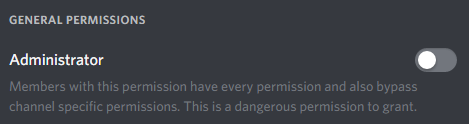 peak torrent
i just said above im an admin as also i said, i could do it all before now i can even though im an admin
cant*
strong path
Are you sure you have the perm in that image above?
peak torrent
im not gonna repeat myself, but well YES i do
i cant even add the server back
literally it doesnt let me
strong path
Can you try !dashboard in that server you are admin in and give me the link that it posts?
Assuming the bot is in there I mean
peak torrent
nevermind i fixed it ;p
strong path
Alright
peak torrent
thank you for your time though
buoyant moon
How did mee6 explain the answer?
peak torrent
@buoyant moon you are little late with that one ;p
dire yarrowBOT
Alright, @steel spade has been warned because 'Bad word usage'.
Alright, @steel spade has been warned because 'Bad word usage'.
 analog parrot
MEE6 was saying stuff like "lolololololololololololio" and"hahaha hacked" Please explain why
burnt hazel
@analog parrot Looks like someone has set up a timer or custom command.
Please go to the MEE6 dashboard and enter the Timers  plugin and remove the timer.
Make sure to check your custom commands also
analog parrot
Thank you, Appreciate it!
burnt hazel
Anytime
 lavish girder
the rank colours r not working.
lavish girder
!rank?
burnt hazel
@lavish girder Can you go to the rank card on the MEE6 dashboard and click Visibility tab, from here you can select which servers you want your rank card to show in and which you would like a server rank card for
lavish girder
oHHH
burnt hazel
@buoyant moon Try changing your image then change it back
lavish girder
thank u fam
buoyant moon
we did good fairy roll out
lavish girder

burnt hazel
Anytime
 final otter
I cant save on my ipad
burnt hazel
@final otter Are you able to try split screen mode for now if available, a fix is coming for this shortly
 faint dome
@buoyant moon cette erreur arrive quand tu as déjà 10 webhooks (la limite) sur ce salon ^^
buoyant moon
O usuario começa a se bugar
O mee6 troca os comandos
**Isso é irritante arrumem essa merda! **
@faint dome
Maybe you'll get more and better support using English.
Staff portuguese? please..
Thanks @buoyant moon
faint dome
please use only one channel 
faint dome
so why ask on #〉volunteer-support then ?
buoyant moon
Because it's a mee6 bug.
faint dome
...
and if you want me to help, can you describe your problem in English pls ? I speak only English and French (and a bit German lol)
buoyant moon
Why would not I put it here?
one second
The mee6 is in 1 place of the roles in my server, but as it has several commands in mee6 it starts to bugar and changing the commands this is very annoying.
Do you know what I need to do?4
@faint dome
@devout chasm
buoyant moon
@faint dome ah ok merci
buoyant moon
@buoyant moon 😘
buoyant moon
Gui is glitched.
Won‘t let me press save button
@faint dome Ich bräuchte dafür Hilfe.
wooden mountain
@buoyant moon will be fixed soon
buoyant moon
Okey
 craggy pendant
The YouTube plugin is slow
buoyant moon
i can't acces mee6 page
buoyant moon
In my server I had setup a welcome message, the bot is "online" but the message did not display, any help plz?
pure obsidian
make sure he can send messages on the welcome channel
buoyant moon
Yes it was set to that
pure obsidian
check channel settings -> permissions and make sure he doesn't have a role denying send messages perm (including @everyone)
denying a.k.a send messages perm set to
Channel Permissions → (+) → scroll down to Members and select MEE6 and set his send messages perm to
buoyant moon
Everything is in check, the bot has worked several time before but today it did not want to work
pure obsidian
🤔 mind sending me a screenshot inside welcome plugin over dashboard?
pure obsidian
good news
dire yarrowBOT
You can now give members a role on join through the welcome plugin https://i.imgur.com/mhT5oVF.png


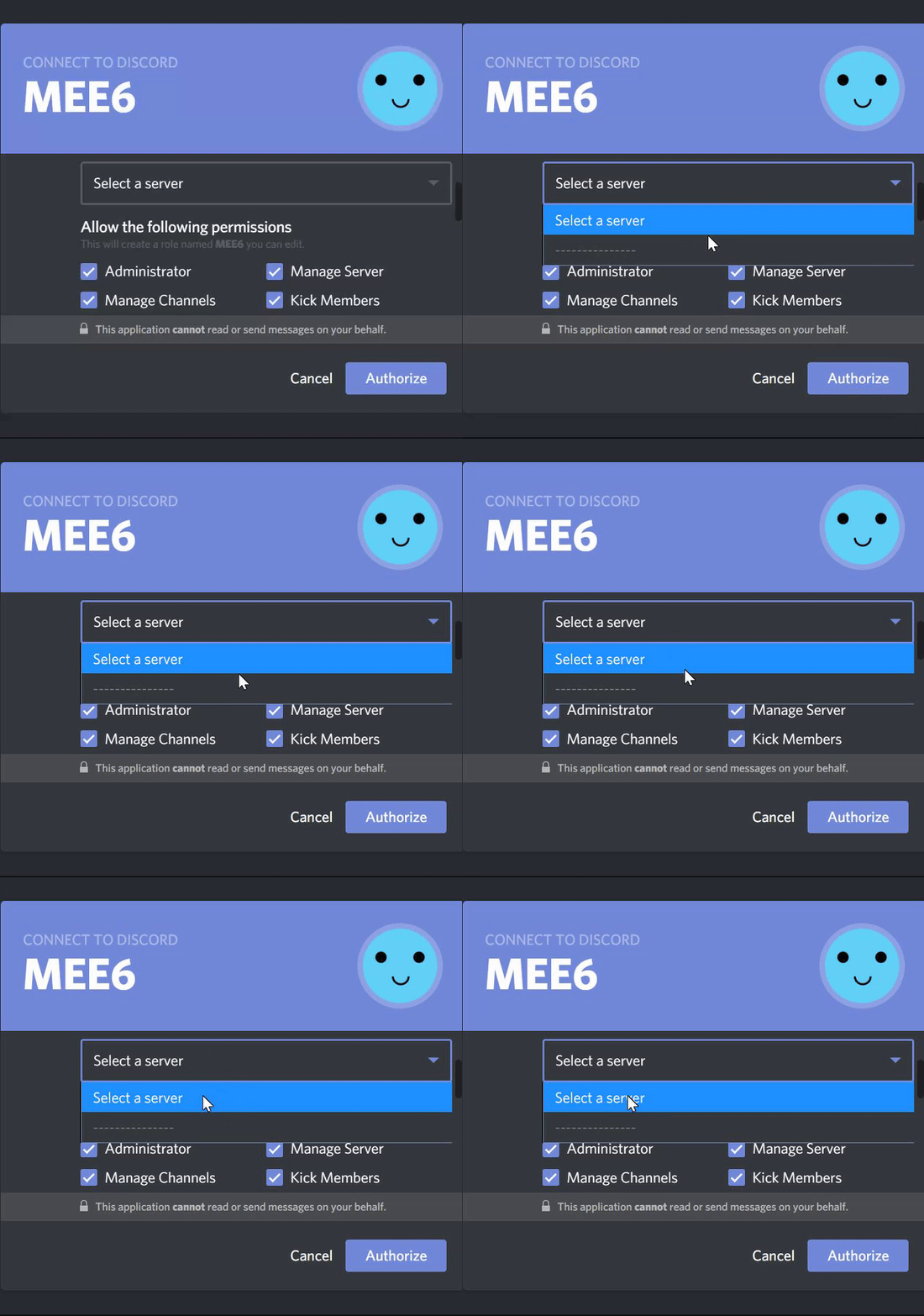


 pearl aspen
Here  @Kubaskin2™®#8575
@buoyant moon
You want to give a role , when one people reache in one LV ? Right ?
Click in "Add Actions "
But you can not use this command to give people another role, but this is planned
Give roles
But this planned
 paper patrol

 broken shuttle
How fix this problem
faint dome
@broken shuttle that's literally on the yellow message ("please fix that by...")
dire yarrowBOT
Role hierarchy is important for me to give out roles. Oh and also Manage Roles perm:
https://cdn.discordapp.com/attachments/302245580673908740/479426065668898826/81d15f9a.gif
broken shuttle
I cant do this because leader fn is highest
broken shuttle
Okay thx i fixed my problem bye