#〉bugs-reports
2 messages · Page 44 of 1
 warm peak
sorry
 wooden mountain
i know that my english is bad, don't worry
warm peak
lol
wooden mountain
any more?
 dire yarrowBOT
Alright, @warm peak has been warned because 'Capital letters'.
 buoyant moon
Ragardez
buoyant moon
Oki
 slim drift
rank cards always show in default color
wooden mountain
!rankcardgone
dire yarrowBOT
go to https://mee6.xyz/#rank-card
click on visibility
wait for it to load
select what servers you want this rank card in
slim drift
i see noone anymore with coloured rank cards
also its still green there if i click on the link
okay seems weird somehow all servers suddenly have been deactivated
wooden mountain
now read his WHOLE message
slim drift
yea its working no again i just wondered because everyone got this problem
 twin lark
please remove the . when doing !levels or else level page won't load
 pure obsidian
That dot is not attached to the link
twin lark
it is
pure obsidian
dire yarrowBOT
You can access my dashboard at https://mee6.xyz/dashboard, and login with your Discord Account.
wooden mountain
go directly to that page
wooden mountain
@lean sphinx @strong scroll can you help imatspawn with accesssing the dashboard?
 lean sphinx
doing that
@twin lark hi
lemme check on our end if I can find what's going wrong. Getting back to you in 5-10mn.
twin lark
ok
dire yarrowBOT
Alright, @misty tapir has been warned because 'Posted an invite'.
lean sphinx
@twin lark which browser are you using please?
 obtuse ferry
It's chrome
twin lark
@lean sphinx chrome android
 ocean loom
<@&193123929701875712> why doesn't my color change when i change my color on the website
wooden mountain
!rankcardgone
dire yarrowBOT
go to https://mee6.xyz/#rank-card
click on visibility
wait for it to load
select what servers you want this rank card in
buoyant moon
mee6 twitch anoucements are really delayed
 faint dome
@honest mauve je peux aider ?
 honest mauve
oui quand j'essaie d'aller sur la page pour programmé mee6 sur mon serv privée , sa m'affiche un écran gris
faint dome
une fois que tu as cliqué sur le serveur, ou sur la page des serveurs ?
honest mauve
une fois que j'ai cliqué sur le type de program genre les msg si j'écris !bsr par exemple
faint dome
dans un plugin donc ?
honest mauve
ouais c'est ça
faint dome
tu as essayé de recharger la page ?
honest mauve
yep
faint dome
et mee6 est-il marqué en ligne sur ton serveur ?
honest mauve
oui
faint dome
tu es sur quel navigateur ?
honest mauve
faint dome
ça c'est pas un navigateur, c'est un moteur de recherche ^^
honest mauve
chrome?
faint dome
ok. PC ou téléphone ?
wooden mountain
@faint dome whenever someone says that they use Google as a browser, they always mean chrome.
wooden mountain
Should work on chrome pc, except yt plugin if one of the channels got deleted
faint dome

honest mauve
ça commence à chargé comme d'hab' avec la barre ou il y a marqué mee6 avec 3-4 truc à côté puis sa disparaît, remplacé par un écran gris
lean sphinx
@honest mauve on go DM
 burnt pond
The youtube alert page on the website is bugging... if i click on them me screen on the website will only show the black background..
 ionic meteor
Fixed ^
 bitter owl
Thanks to him ^
 flat quartz
wait do the youtube alerts work now??
bc it just did for me, thank you guys so much, i really needed a bot that could post my youtube videos automatically
 errant raven
Will timers ever be fixed? They haven't been working properly in ages
 strong path
Try deleting the old timer then making a new one in its place
errant raven
I had 2 timers, one set for once a minute, one for 12 hours, it never ever posted the 12 hour one, but it posted the 1 minute one every 12 hours
Made a new timer for once a minute, for testing. It posted it once, then never again
^ Also i deleted the old ones
strong path
A user need to send a message between timer posts
errant raven
so when i have a 12 hour timer and it posts then the 12 hours will only start counting after the next user post ?
errant raven
Thank you for the help
strong path
You're welcome
 odd sequoia
dire yarrowBOT
odd sequoia
dire yarrowBOT
Rayhan, this command is disabled in this channel. 
 crude mantle
You mean a custom rank card or level up? Also, put this in #〉volunteer-support or #463809001273032715. @odd sequoia
 limber knoll
@crude mantle easier to just help them
 covert chasm
 white notch
no need to repeat something you posted in #〉suggestions, especially when it isn't a bug
 main coyote
how come mee6 won't warn anybody when they break the rules?
pure obsidian
Break what kind of rules?
pure obsidian
MEE6 does not sanction the following:
- Server Owner;
- Users with Administrator OR Manage Server permissions;
- And the role(s) you defined as Moderator role on the dashboard →  Moderator Plugin;
main coyote
ok
 quartz folio
⍣ -- this character still shows up as an empty box on the rank card.
 torn sonnet
why mee6 give me a warn when i say "ThE dAb Is NoT dEaD"?
pure obsidian
Did you include @everyone or @here by any chance?
torn sonnet
i include "<@&255513346428764161>"
pure obsidian
everyone and here mentions are disabled but rules state don't try pinging them
they are mentionable dummy roles added as bad words, mee6 will strike you for attempting to mention them
torn sonnet
ok thanks
pure obsidian
and you pinged staff
torn sonnet
ok thanks
 kindred pelican
Issue with mee6 auto-mod ignoring bots, has been broken for 4 months now... Still no progress on it at all?
dire yarrowBOT
You can access my dashboard at https://mee6.xyz/dashboard, and login with your Discord Account.
bitter owl
Then once it refuses to load, press f12 and select console
Then screenshot please
Ok
 dark umbra
i want the mee6 to go to a different account (the one im using now) but it keeps going to one of mine with a different email. that accounts has nothing on it. how do i change it so the bots go to this account?
dire yarrowBOT
It appears that you may be on the wrong account, or something went wrong since the last time you logged into the website.
- Please navigate to https://mee6.xyz/dashboard to logout from our website. Click on your profile picture and press Logout https://rebrand.ly/LogoutMEE6.
- Then navigate to https://discordapp.com/channels/@me and select the gear in the bottom left, then press Logout.
- Log into the account you want to use on the Discord website
- Once done, select "Add to Discord" again, and select the server dashboard you want to access
 stark raven
A user of mine just messaged me saying that mee6 warned them for using three emojis, but i check and the threshold says 4, I'm not sure how that's possible
 oak nymph
The rank card color appear to be not customizable
dire yarrowBOT
go to https://mee6.xyz/#rank-card
click on visibility
wait for it to load
select what servers you want this rank card in
 burnt hazel
@oak nymph 
Can you make sure that your rank card is visible on the servers you want to use it in, as servers also now have a default rank card.
oak nymph
oh thx
 copper bronze
This is not a bug of the bot, but, with the website, when I want to choose a server, it'll load, but then the servers won't appear.
dire yarrowBOT
It appears that you may be on the wrong account, or something went wrong since the last time you logged into the website.
- Please navigate to https://mee6.xyz/dashboard to logout from our website. Click on your profile picture and press Logout https://rebrand.ly/LogoutMEE6.
- Then navigate to https://discordapp.com/channels/@me and select the gear in the bottom left, then press Logout.
- Log into the account you want to use on the Discord website
- Once done, select "Add to Discord" again, and select the server dashboard you want to access
wooden mountain
pls do that, even if you are already on the correct account
copper bronze
Also, when I open the Profile Setting in Mee6's website, the Profile Settings tab won't fully open.
wooden mountain
that is because the page under it is overlapping it
wooden mountain
so what page is not working? mee6.xyz/dashboard ? or something else?
copper bronze
mee6.xyz/dashboard isn't working
wooden mountain
can you open your console (F12 then click on console) and give me a screenshot pls
wooden mountain
there should be a button on your keyboard called "prt sc" or something like that
usually the top row, above the backspace or nummers key
after pressing that just Ctrl + V in here
buoyant moon
press a Prtscr on the keyboard that it is on the right up corner
or press Fn+alt+home
and then ctrl+v on the chat
wooden mountain
fn alt home is only on some devices
copper bronze
oof I don't see the prt sc button
wooden mountain
then search in the start menu for "snipping tool"
use that tool to select a part of your screen and the paste that in here
copper bronze
No Items Match Your Search.
wooden mountain
@buoyant moon STOP REPEATING ME
wooden mountain
copper bronze
I use Windows 7 ;-;
wooden mountain
10, teh update that they had to remove because it deleted files in your onedrive
wooden mountain
@copper bronze windows key + R, then SnippingTool.exe and hit enter
copper bronze
Seems like I don't have it.
wooden mountain
@buoyant moon pls stop trying to help when a staff member is helping
buoyant moon
😦
wooden mountain
you are only confusing people
copper bronze
oof, is there a way I can download Snipping Tool?
copper bronze
It just loads @wooden mountain
copper bronze
Browser is Google and Windows 7
wooden mountain
@buoyant moon read the damn rules, and no friend request
buoyant moon
i didnt friend request
bitter owl
@copper bronze Check if it's update and use Ctrl + Shift + J please
copper bronze
Ok
bitter owl
And send the screenshot of the console xD
copper bronze
I used Ctrl + Shift + J, nothing happened :p
copper bronze
It didn't work too
white notch
then you're doing it wrong, as it works fine on Windows 7
copper bronze
 hm
hm
white notch
or just right click in browser=>inspect
copper bronze
k, then?
white notch
copper bronze
I know how
white notch
from there select the console tab located next to elements
well I guess we'll stop giving you examples then
copper bronze
I said I know how to open the Inspector xD
white notch
please don't use bold italics at staff members
copper bronze
k sorry
white notch
now from the inspector, open console and screenshot us what appears there
copper bronze
This
white notch
that seems to be from Discord not Mee6 
wooden mountain
and now ON THE MEE6 website
copper bronze
Dashboard or features (or the main page) ?
white notch
dashboard page
copper bronze
k
wooden mountain
where you have the problems
wooden mountain
thanks, we will investigate it
copper bronze
np, good luck!
 timber trellis
f
 woven prawn
xD
 vague fulcrum
The muted role doesnt work...
bitter owl
@vague fulcrum Make sure it's enabled in moderator plugin
dire yarrowBOT
You can access my dashboard at https://mee6.xyz/dashboard, and login with your Discord Account.
 vague fulcrum
That’s exactly what it does
it happens on my discord and the asphalt 9 discord
kind of seems weird
dire yarrowBOT
Having problems muting someone/they aren't muted? Check the following
Prerequisites:
- Moderator plugin is enabled
!mutecommand isn't disabled- Bot has role with Manage Roles and Manage Channels permissions
- Muted role is under MEE6 role
- You're trying to mute someone using
!mute @mention reason, otherwise it will not work
If user got Muted role but still can talk means there's issue with your channel permissions
Go to Channel Settings -> Permissions
- If that's public channel that can be accessed by anyone:
- Set

Send Messagesfor all roles except Muted - Set

Send Messagesfor Muted role
- If that's secret channel that requires *special* role to access it:
- Set
Send Messages
Read Messagesfor special role - Set
Send Messages Read Messagesfor Muted role - Set
Send Messages Read Messagesfor@everyonerole
bitter owl
☝ Your discord need to be configured to work with muted roles
vague fulcrum
Setting for every channel takes forever though, why didnt the bot do that initially?
bitter owl
@vague fulcrum no, the muted role is already in 
Just need to make sure no roles are for sending message
It included everyone tab of category (changing there will apply to all text channels in this category)
Send messages need to be  or
or
Just in case muted role bugged for you then you may select send message to in category’s permissions
To save some time
 valid wedge
Thanks
strong path
It appears on the offline list?
On the sidebar I mean?
Try kicking then re-inviting the bot
ok
Give me your server ID please
Can I have an invite please?
In DMs
You're welcome
cool thing
 ebon vine
#〉bugs-reports On IOS the bad word option, the keyboard won’t show up.
 bleak stump
:capetinhasuco:
 cedar hatch
web bug
burnt hazel
We are aware, the devs are looking into the issue now
 amber hare
When you access the site, the loading screen is in an infinite spin, my internet is fine, so I do not think it's from my internet.
 torn moat
look at the message above yours
dark umbra
why isnt the website loading? i want to change some mee6 settings
torn moat
The issue is known the devs are working on it
buoyant moon
Scroll up
 deep pebble
Mee6 is undergoing issues, the devs are working to fix it as soon as possible  .
.
 brave sail
is it possible to make a failsafe html page to fix our settings? is this run on html5 or flash?
burnt hazel
No sorry, the devs are working on fixing the dashboard now
 digital mural
The mee6 response time has been a bit slow today
burnt hazel
we are aware, apologies, the devs are looking into the issue
digital mural
Ok
 red orchid
I changing the color but it's not updating the color on my card
dire yarrowBOT
go to https://mee6.xyz/#rank-card
click on visibility
wait for it to load
select what servers you want this rank card in
burnt hazel
@red orchid
buoyant moon
hey is web saving forever a recently known bug? trying to save welcome page and saving indicator keeps spinning
 dusty apex
It's being fixed atm
buoyant moon
thank you
 stable turtle
Mee6 heeft een bug!
Denk ik..
Wanneer ik een timer verwijder, wordt de webhook niet verwijderd 
strong path
That is a fake mee6
MEE6#4876 is the real mee6
Not MEE6#4945
Also that guy doesn't seem to have a pfp 😐
 agile heron
ok, ty
buoyant moon
Ummm my friend used command !rank and this showed up:
Was there any break? Or reset of mee6?
Hello moderator pls answer bcs mee6 is still not working
dire yarrowBOT
Role hierarchy is important for me to give out roles. Oh and also Manage Roles perm:
https://cdn.discordapp.com/attachments/302245580673908740/479426065668898826/81d15f9a.gif

 hoary stream
Follow the image instructions ^ @bitter willow
 bitter willow
Thank you.
 shrewd falcon
thank god i didnt start complaining until i scrolled up and read past complains
warm peak
!pass does not say anything when used in a channel other than the music quiz channel. Should say something if disabled or must be used in music quiz channel
burnt hazel
!pass is exclusive to the music quiz and is not a 'official' command itself, as its not listed on the dashboard. @warm peak
warm peak
@burnt hazel should still say something, Spooktea
burnt hazel
#〉suggestions would be the best place for this as !pass not saying anything isnt technically a bug.
limber knoll
Tbh !pass is what it is if you go to a quizz its either an answer or a pass
Pass = i dont know the answer
 lavish vessel
tempmute doesnt work?
 blazing thorn
It does @lavish vessel
lavish vessel
hmm
blazing thorn
did you miss an argument?
lavish vessel
Oops, something went wrong in MEE6 land! :SAD6: This error has been reported to our Team. We'll work hard to fix it.
this send it back
dire yarrowBOT
Role hierarchy is important for me to give out roles. Oh and also Manage Roles perm:
https://cdn.discordapp.com/attachments/302245580673908740/479426065668898826/81d15f9a.gif
blazing thorn
First way that it doesn't work
- The arguments are
!tempmute [user_id] [duration] {reason}
blazing thorn
it works perfectly for me
lavish vessel
he have the mee6 role whit all checked he have a bot role (made by me)whit al checks they both standig above all the roles
i do !tempmute @???? 1d violate the rules
???? is the name of him
lavish vessel
not for me
but dyno has the same and dyno works
???#??? (???) is muted for 1 day because of 'violate the rules', boss.
blazing thorn
oh
lavish vessel
it works now
 velvet jungle
Found a bug.
So I tried to use the zalgo automoderation detectors.
But it seems as if the message didn't come out correctly.
dire yarrowBOT
Alright, @velvet jungle has been warned because 'Capital letters'.
wooden mountain
me not understeand
velvet jungle
It should have said something telling me I shouldn't use zalgo, but it just said "MODERATOR_ZALGO_CHECK" instead.
wooden mountain
LOL, then i will fix that
velvet jungle
Yes, you should.
 wicked oxide
The color on my rank card isnt right. I had mine set as purple, but its just basic blue now. One of my friends got weirdly ticked off about this. Anyone know why?
velvet jungle
Disabling Server Rank Cards
You may do this by:
A: 1: Go to https://mee6.xyz/#rank-card.
2: Go under the VISIBILITY tab.
3: Wait for it to load, then select the servers you want a custom rank card in.
B: 1: Go to the server's leaderboard at https://mee6.xyz/leaderboard/{server-id}.
2: Set the Use server rank card option to how you would like it.
dire yarrowBOT
go to https://mee6.xyz/#rank-card
click on visibility
wait for it to load
select what servers you want this rank card in
 mortal walrus
Mee6 not cleared in my server
strong path
You're talking about !clear?
strong path
Have you enabled the moderator plugin?
mortal walrus
Im not visible moderator plugin
dire yarrowBOT
You can access my dashboard at https://mee6.xyz/dashboard, and login with your Discord Account.
mortal walrus
strong path
Doesn't seem enabled to me, go to https://mee6.xyz/dashboard
strong path
Good job ;)
mortal walrus
)
 restive forge
mortal walrus
restive forge
mortal walrus
Что
 pulsar geyser
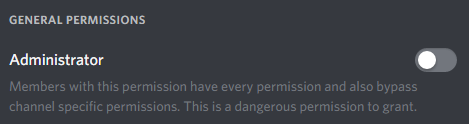
hey , i'm missing access to a Discord server , what permission does it require to access it?
I had access before but when the name and icon were changed me and some other people with same role lost access to it
 pulsar geyser
why?
strong path
New change
strong path
yw
strong path
Explain please?
 vocal glen
bot doesn't play music
Oops, something went wrong in MEE6 land! :SAD6: This error has been reported to our Team. We'll work hard to fix it.
it was working yesterday
wooden mountain
is it on the join command or on play or next command?
wooden mountain
using search term or using link?
vocal glen
link
wooden mountain
if it is yt then it is a video that yt does not allow to be played outside there own website
if it is a other service then it is a mediafile that is either not supported or where you need a account for
wooden mountain
can i have the link
vocal glen
sure

This is the playlist of my most favourite epic music tracks from Two Steps From Hell. Hope you enjoy it! Please subscribe for more epic music. Genre: Trailer...
😄
for adrenaline purposes 😄
wooden mountain
i tried it in a other service that uses the same system in the background
so i guess that someone made a copyright claim on a song in that video and yt changed it to a protected video
wich we are not allowed to play... 
you will have to find something else
 viral canopy

 fair sleet
Hello !, a few days ago, in the server of a friend of mine, the bot is having this problem that does not respond to commands (I do not say that it is offline) because eventually when one enters the server from the welcome message, I create a new server I invite the bot and the bot respond to the commands. I went to the bot dashboard to see if there was something wrong and the settings were fine: the point is that the bot does not want to respond to commands. What can I do?
dire yarrowBOT
Bot doesn't react on commands!!!
That usually happens because:
- Plugin is disabled -> Go to https://mee6.xyz/dashboard and enable the plugin with needed command!
- Command is disabled -> Go to https://mee6.xyz/dashboard, open plugin settings and enable the command!
- Do not reply to command option is enabled -> Go to https://mee6.xyz/dashboard, open plugin settings, click [Edit] button, scroll down and disable the option!-
You're using command in wrong way! -> Moderator commands like !mute !kick !ban etc. need the user to be mentioned. Example: !kick @user annoying
fair sleet
OK thanks
 last rivet
 grand violet
limber knoll
grand violet
limber knoll
@fair sleet issue?
@grand violet type !dashboard in your server
You need to be admin or owner
fair sleet
@limber knoll The bot does not want to respond to commands and I have plugins activated
limber knoll
@fair sleet dm invite please
fair sleet
quiet can translate you
limber knoll
Ok
 opaque stump
Why he can’t use rank command?
dire yarrowBOT
If I appear to be denying your hard earned experience, or !rank and !levels aren't working properly...
- Make sure Levels is Enabled.
- Check that you do not have a banned role in the levels configuration, and that you aren't in a banned channel either.
- Make sure that I can see the channel you are talking in with "Read Messages" and send messages with "Send Messages".
 dense fox
^^^
dense fox
No problem
viral canopy
hi
 dusty vortex
I made a custom command that you get a rank. But instead of that you receive the rank, a error pops up.
dire yarrowBOT
Role hierarchy is important for me to give out roles. Oh and also Manage Roles perm:
https://cdn.discordapp.com/attachments/302245580673908740/479426065668898826/81d15f9a.gif
dense fox
^^^
buoyant moon
Lol
dense fox
@buoyant moon Reporting a bug?
buoyant moon
Why?
dense fox
Because this is the channels name maybe?
buoyant moon
Good answer
strong path
@cyan bane Don't talk in the support channels unless you need help
 cyan bane
 flint scarab
why doesn't the muted role mute people when the command is used
dire yarrowBOT
Having problems muting someone/they aren't muted? Check the following
Prerequisites:
- Moderator plugin is enabled
!mutecommand isn't disabled- Bot has role with Manage Roles and Manage Channels permissions
- Muted role is under MEE6 role
- You're trying to mute someone using
!mute @mention reason, otherwise it will not work
If user got Muted role but still can talk means there's issue with your channel permissions
Go to Channel Settings -> Permissions
- If that's public channel that can be accessed by anyone:
- Set
Send Messagesfor all roles except Muted - Set
Send Messagesfor Muted role
- If that's secret channel that requires *special* role to access it:
- Set
Send Messages Read Messagesfor special role - Set
Send Messages Read Messagesfor Muted role - Set
Send Messages Read Messagesfor@everyonerole
buoyant moon
In the Levels tab on the website, you can use a slider to adjust the color of your rank card. This slider is highly sensitive, and is inverted.
buoyant moon
How do I have the bot assign ranks?
dusty apex
rank rewards or give roles?
buoyant moon
Give roles, my bad.
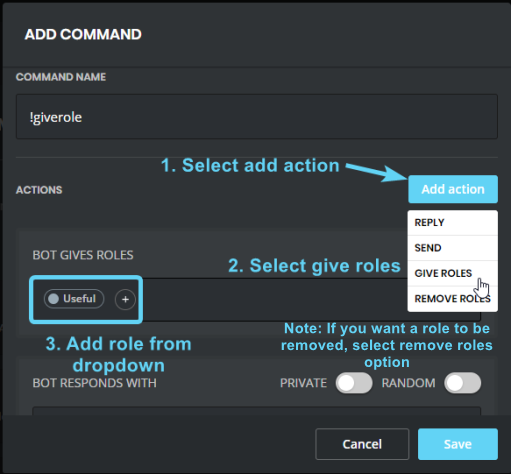
dire yarrowBOT
https://i.imgur.com/acBvAv5.png
- I must have a role higher than the role you are trying to give in your Discord Server Settings.
 buoyant moon
In meinem Server wird angezeigt das 10Bots drinnen sind.
Obwohl es nur 4 sind.
Es sind 19User & nicht 11
<@&193123929701875712>
limber knoll
Hang on give me time to translate
buoyant moon

limber knoll
@buoyant moon server-info is taken from discord
Including members
However it isn't always accurate weather a member is a bot or human
buoyant moon
:/
 dense field
I want to report a bug that is active since today
and he is
I can not log out on the website of Mee6
strong path
Known, thank you x)
dense field
thx
strong path
Can you try clearing your browser cookies?
strong path
You're welcome
 torn rover
Hi, I have the bot on my discord but I'm the only one who can't pex, how do I fix that ?
 cold bear
pex what?
torn rover
like that
cold bear
what's wrong?
 wide yacht

torn rover
😦
 rain ember
What's Wrong With The Mee6 Website It Still Loading Progress And I Think It Frozed
torn rover
help me T.T
limber knoll
@rain ember use chrome and refresh please
@torn rover dm invite please to your server
rain ember
That's Chrome
limber knoll
Just making sure
wooden mountain
you can use the !dashboard command in your server to get a working link to access your servers dashboard
dire yarrowBOT
Alright, @buoyant moon has been warned because 'Capital letters'.
buoyant moon
oh woops
wooden mountain
@buoyant moon using the !dashboard command in your server should give a working link
buoyant moon
it works now sorry 
 worn wren
 wooden mountain
what exactly is the issue?
are you just getting a infinite load or do you see some kind of error
lavish vessel
tempmute/unmute/mute doesnt work? i set the roles and setting exact as i need to
tempmute/unmute/mute doesnt work? i set the roles and setting exact as i need to
dire yarrowBOT
!mute @CoolGuysNameHere You have been too cool.
!tempmute @SecondLameGuyHere 3h Too lame.
- I must have "Manage Channels", and "Manage Roles" for my permissions.
- I must have a role above the "Muted" role I create.
If there are problems, please check that the Muted Role does not have send messages globally or per channel.
Durations for tempmute command.
50s50 seconds.50m50 minutes.50h50 hours.50d50 days.
lavish vessel
yep thats all i did
dire yarrowBOT
Having problems muting someone/they aren't muted? Check the following
Prerequisites:
- Moderator plugin is enabled
!mutecommand isn't disabled- Bot has role with Manage Roles and Manage Channels permissions
- Muted role is under MEE6 role
- You're trying to mute someone using
!mute @mention reason, otherwise it will not work
If user got Muted role but still can talk means there's issue with your channel permissions
Go to Channel Settings -> Permissions
- If that's public channel that can be accessed by anyone:
- Set
Send Messagesfor all roles except Muted - Set
Send Messagesfor Muted role
- If that's secret channel that requires *special* role to access it:
- Set
Send Messages Read Messagesfor special role - Set
Send Messages Read Messagesfor Muted role - Set
Send Messages Read Messagesfor@everyonerole
 modern cove
Hi
 raw nymph
Dashboard Issue.
Logout does not work on the site.
strong path
Trying clearing your browser cookies
raw nymph
kk
 floral dragon
having the same issue as peace, cannot logout on the site
dire yarrowBOT
It appears that you may be on the wrong account, or something went wrong since the last time you logged into the website.
- Please navigate to https://mee6.xyz/dashboard to logout from our website. Click on your profile picture and press Logout https://rebrand.ly/LogoutMEE6.
- Then navigate to https://discordapp.com/channels/@me and select the gear in the bottom left, then press Logout.
- Log into the account you want to use on the Discord website
- Once done, select "Add to Discord" again, and select the server dashboard you want to access
strong path
Does clearing the browser cookies work?
 grave sorrel
I am currently unable to logout on the site.
I'm trying to setup a server on my alt
velvet jungle
Are you not able to log out at all, or can log out but not switch accounts, @grave sorrel?
grave sorrel
Not able to log out at all.
Clicking the log out button completely crashes the dashboard.
velvet jungle
Oh, okay. I'll let someone else handle this, then.
hoary stream
@grave sorrel It's currently a known bug. If you wish to sign into your alt I recommend using a different browser or going on Incognito mode.
burnt hazel
@grave sorrel We are aware of the log out issue, apologies.
you can try clearing your cookies and other site date and see if this logs you out of the site.
omg it didnt scroll down 🤦
grave sorrel
Incognito works.
 errant basalt
Hi
 smoky flame
Hi, i use mee6 in multiple servers and recently one of the servers icons disappeared from my mee6 dahsboard on the mee6 website. I dont think this is a matter of the server owner taking away some of my permissions, but mee6 just wont let me edit the plugins for that specific server. Has this problem happened to anyone else? I was trying to edit the server's live on twitch plugin but the server icon wasnt even appearing on the ' my servers ' page. Thanks!
white notch
you need to be the owner or have administrator perms
smoky flame
Did this recently change because a few days ago, i still didnt have admin permissions and i could freely edit that server's plugins?
white notch
it changed 5 days ago
smoky flame
Ohhhh, thanks alot!
I guess i'll have to ask owner for perm.s! Btw, this really helped! Is there a reaon it chnged though?
white notch
a reason I don't know why
smoky flame
Ok, thanks @white notch u were great at helping me!
white notch
smoky flame
 lament jacinth
mee6 keeps spamming me with roles
 molten sorrel
I get "Oops, something went wrong in MEE6 land! :SAD6: This error has been reported to our Team. We'll work hard to fix it." Every time one of my users try to use the custom command to give themself a role. Why?
velvet jungle
Please check #〉volunteer-support and don't channel hop, @molten sorrel.
buoyant moon
HI
wooden mountain
Mee6 does not even look at the "user joined" or "user leaves" events
 pearl aspen
but my connection is in the green according to the discord
And when a person enters or leaves, usually when he enters, the music stops for about 17 seconds
And then she comes back from exactly where she left off.
pearl aspen
It was right here
if you "lag" the server's location, the song would not return at the same point
Understand me ?
wooden mountain
try it
pearl aspen
 meager hamlet
Mee6's automod had a false positive in my server and warned someone for duplicated text someone when they shouldn't have been warned
strong path
You can not clear warns currently, no
meager hamlet
I just want to report it as a bug, that's why I moved here
meager hamlet
Should I paste what he said here?
strong path
You may get warned, DM me it
meager hamlet
Sent
 long plinth
Whenever I press add MEE6 to a server it says you must manage the server to add it. So when It says pick one, instead of the servers I own it says "Pick a Server" and under that "----------"
dusty apex
you need manage server perm /admine perm / owner to add bot
 tribal stump
You might have the wrong account logged in on your browser @long plinth.
dusty apex
you need admin perm / owner to use the dashboard
@tribal stump thanks for your help but im on it 😃
tribal stump
I know but that's also a possibility.
long plinth
I clicked all the things and it says Im logged on my account
tribal stump
Don't forget that.
Did you check if you're logged in on https://discordapp.com?
Discord
Step up your game with a modern voice & text chat app. Crystal clear voice, multiple server and channel support, mobile apps, and more.
dusty apex
@long plinth are you the owner of the sever?
tribal stump
^
long plinth
Yes
dusty apex
@long plinth what browser you using?
dusty apex
and on it it says you are logged into the right account and you are owner of the server
long plinth
Yes
dusty apex
you on computer? or phone?
long plinth
Computer
dusty apex
do you know how to get your server id?
long plinth
You mean invite?
dusty apex
no
 compact light
Am I the only one that the MEE6 bot over customization thing isn't working for?
long plinth
oh
dusty apex
@long plinth you need the id of your server
like for this server is 159962941502783488
@compact light you mean rank cards?
long plinth
So I just say !getid?
dusty apex
@long plinth no
compact light
No
long plinth
Then what
compact light
MEE6 Frontend
tribal stump
When you right click your server you can find the server id in server settings I believe.
long plinth
oh
dusty apex
@long plinth discord setting -> appearance -> enable dev mode -> right click server icon
long plinth
Thanks
compact light
compact light
I've been trying for days, this will not load for me
dusty apex
@long plinth post it in here
long plinth
What does it do though
dusty apex
@compact light what browser
compact light
dusty apex
@long plinth its how discord identifies your server ( every server has its own id)
long plinth
ok
dusty apex
@compact light pls try incognito mode
dusty apex
no
long plinth
ok
burnt hazel
Google or Google chrome?
dusty apex
@long plinth https://mee6.xyz/dashboard/499721131482415135 go there

Skill up and manage your Discord server with automations, commands and awesome plugins!
compact light
GC I think, I'm not sure.
dire yarrowBOT
Open Server Settings in your Discord Server. Select Widget and press Copy ID next to Server ID.
You can also use Developer Mode as an alternative method.
compact light
It hasn't loaded for days
burnt hazel
Can i have both your server ID's please
dusty apex
*i did for lcey
burnt hazel
thx
compact light
How do I get the id?
dire yarrowBOT
Developer Mode
1. Go to User Settings by clicking on the :gear:
2. Click on Appearance and enable Developer Mode
3. Right click on channels/usernames/roles/conversations/etc and click on Copy ID
Using Android
- Go to User Settings (Close to your name in the left menu).
- Click on Behavior and enable Developer Mode.
- Long pressing (If necessary scroll down) and Copy ID
Note: You cannot use iOS devices to complete those task yet
burnt hazel
@compact light
compact light
Thanks
long plinth
Wait, what if someone takes the id and then pastes it to MEE6 dash board, can't they mess with the bot?
dusty apex
nope
compact light
I still don't see how to get the id
long plinth
and its still loading
compact light
I enabled developer mode.
dusty apex
@compact light tap and hold the server icon
burnt hazel
thanks
long plinth
My server dashboard is taking a long time to load, but my wifi is perfect
burnt hazel
@long plinth Are you using PC or mobile?
@compact light Do you have access to a PC/Laptop?
long plinth
Im using a laptop
burnt hazel
Can you press ctrl+shift+I and screenshot the errors in the console part @dire yarrow
compact light
If that helps.
burnt hazel
Can you press ctrl+shift+I and screenshot the errors in the console part @long plinth
long plinth
ok
burnt hazel
@compact light I dont think you can for mobile, dont worry We'll still look into the problem
burnt hazel
Can you move it to the left a bit so i can see the full message
burnt hazel
thanks
long plinth
yw
burnt hazel
this is when you click on a server yes?
long plinth
yes
burnt hazel
are you the Owner / Admin of this server?
or have a bot commander role?
long plinth
I own it
buoyant moon
I accidently made a diffrent discord account and i my new account is synced with safari and firefox and i cant get it to work on my real account it just wont let me use my real account
dire yarrowBOT
It appears that you may be on the wrong account, or something went wrong since the last time you logged into the website.
- Please navigate to https://mee6.xyz/dashboard to logout from our website. Click on your profile picture and press Logout https://rebrand.ly/LogoutMEE6.
- Then navigate to https://discordapp.com/channels/@me and select the gear in the bottom left, then press Logout.
- Log into the account you want to use on the Discord website
- Once done, select "Add to Discord" again, and select the server dashboard you want to access
buoyant moon
-_-
burnt hazel
@compact light Can you try clearing your cache and disabling any VPN please, i can access your dashboard ok
buoyant moon
Its literally synced in i tryed that
burnt hazel
Go to the 3 dots in the top right @compact light
Then select history > Clear browsing data > Clear data
tribal stump
It depends on the browser.
buoyant moon
Umm Im using a Mac
compact light
Okay
buoyant moon
a apple computer
burnt hazel
⌘ + Shift + N
buoyant moon
ok
burnt hazel
@long plinth Can you try kicking MEE6 then re-invite MEE6 to the server please
buoyant moon
Wait
compact light
It's working now, thanks for the help!
burnt hazel
No worries 
long plinth
when i press the pick a server it just says -------
buoyant moon
As soon as i click login it just logs to my fake account
dire yarrowBOT
It appears that you may be on the wrong account, or something went wrong since the last time you logged into the website.
- Please navigate to https://mee6.xyz/dashboard to logout from our website. Click on your profile picture and press Logout https://rebrand.ly/LogoutMEE6.
- Then navigate to https://discordapp.com/channels/@me and select the gear in the bottom left, then press Logout.
- Log into the account you want to use on the Discord website
- Once done, select "Add to Discord" again, and select the server dashboard you want to access
burnt hazel
Both of you need to follow this
buoyant moon
-_-
burnt hazel
and log out from the Discord WEBSITE not application, then sign into the correct account
burnt hazel
go to user settings then log out from there?
buoyant moon
np dont work
burnt hazel
so you cant log out from the discord website on chrome/safari?
also safari isnt a supported browser for the MEE6 site so it might not work fully for the dashboard.
long plinth
OOF
burnt hazel
from Discord or MEE6 site it wont sign out?
long plinth
What if I use the discord app
burnt hazel
Can you try google chrome?
buoyant moon
uhhh
long plinth
k I logged out then logged in
dire yarrowBOT
Internet Explorer? Edge? Safari? Ew... :nauseated_face: It's time to use REAL BROWSER!!!
Firefox: https://www.mozilla.org/firefox
Chrome: https://www.google.com/chrome/browser/desktop/index.html
Opera: https://www.opera.com/
burnt hazel
Are you able to download it from here
then you can sign into the correct accounts and dont have the difficulty of trying to sign out from firefox Discord
burnt hazel
@long plinth Were you able to add MEE6 yet?
burnt hazel
yes, that is where MEE6 gets your profile from, you have to be logged into the correct account on Google
buoyant moon
Hey thx man im working on it right now
burnt hazel
 So your issue is resolved?
burnt hazel
@long plinth Is this on the browser yes? does it still say this message
long plinth
yes and it still says Connection Problems
burnt hazel
Can you try clearing your cache and try again
burnt hazel
> Click on the 3 dots in the top right of your browser.
> Click on History, then choose the "History" option from the popout box.
> Check the following: Empty the cache. Delete cookies and other site data. Select the beginning of time in the drop down box and click on the Clear browsing data button.
long plinth
Still says connection problems
tribal stump
Try reconnecting to your WiFi?
dire yarrowBOT
Alright, @long plinth has been warned because 'Capital letters'.
dire yarrowBOT
Alright, @long plinth has been warned because 'Capital letters'.
 random dome
excuse me but mee6 said something went wrong while i used a custom command
dire yarrowBOT
Role hierarchy is important for me to give out roles. Oh and also Manage Roles perm:
https://cdn.discordapp.com/attachments/302245580673908740/479426065668898826/81d15f9a.gif
strong path
Please read mee6's message above @random dome
random dome
i see, thanks!
tribal stump
Levelled is spelt with 2 l's (In the racing levelling it just has 1 l.)
strong path
Hmm? Where?
random dome
how do you make it so that when a command is used, mee6 gives a role to everyone?
strong path
Not possible, sorry
random dome
darn
 rich timber
why cant MEE6 program himself huh?!
strong path
Please, leave the support channels for help with the bot only
rich timber
Only if you work at Discord then I'll obey.
 stray granite
can't figure it would fall under #〉suggestions or in here but
!dashboard gives you infite loop of loading dots.
I have lost access to my dashboard since the last patch - Currently awaiting for the owner to add me into bot master role
strong path
Yeah, he'll need to do that
 south shuttle
burnt hazel
south shuttle
burnt hazel
Please dont channel hop and ask in multiple channels, being helped in #〉volunteer-support
dire yarrowBOT
Alright, @round garnet has been warned because 'Capital letters'.
 round garnet
 digital wedge
If i go to my Mee6 dashboard it just keeps loading, i can't access it
 summer gale
Now wait for <@&193123929701875712> to open @digital wedge
 onyx widget
Did you try clearing your browser cookies?
 stone copper
@dire yarrow cant change my profile picture
burnt hazel
That is correct. 
You have to do this yourself by going into your user settings, and clicking edit on your account tab, then select your profile picture image.
@digital wedge
Can you press ctrl+shift+i on the dashboard and send any screenshots of errors in the console part please
buoyant moon
Timers are bugged it's sending same thing after every message and sometimes every timer at once
burnt hazel
This is known, you can try removing yhe timer and adding it back and see if this works, otherwise you will need to wait for a fix. @buoyant moon
digital wedge
@burnt hazel do you mean with the dashboard the https://mee6.xyz/dashboard website?
Skill up and manage your Discord server with automations, commands and awesome plugins!
burnt hazel
yes @digital wedge on the screen that is loading
burnt hazel
yes but on the MEE6 website itself where it is loading and you cant access it
burnt hazel
Can you disable adblocker and VPN if you have them enabled
burnt hazel
Can you try clearing your cache and cookies also, then ctrl+R on the page and try again
digital wedge
how do you clear your cache cause i don't really know how to do it well?
(and coockies)
nvm ik
i'll try
sec
@burnt hazel still doesn't work
burnt hazel
@digital wedge Can you use this link and use ctrl+shift+i on the page that loads please, we'll move away from the google search.
digital wedge
than it is this
cold bear
wait till it fail with error
burnt hazel
Can you try disconnecting and re-connecting to the internet, and make sure you have a good-strong connection @digital wedge
ionic meteor
do you use any VPN's or something similair that might block mee6.xyz
digital wedge
i did and it wouldn't want to load either
ionic meteor
that is weird
and could you try a total different network?
like on your mobile with your data
digital wedge
On my mobile it works with my data
ionic meteor
what chrome extensions do you have?
digital wedge
i can't access the wifi where i am on with my mobile cause they disabled it
ionic meteor
btw, you're dutch, aren't you?
digital wedge
i have a media downloader, an extension for messenger, adblock and an password extension
ionic meteor
seems fine, really weird, like your network and mee6 servers can't reach each other
hold up please
digital wedge
k
ionic meteor
@digital wedge I have reported it to the dev's, think they're looking into it
digital wedge
k thnx
buoyant moon
hi
ionic meteor
@digital wedge heyo! Apparently it’s not on our side. So it’s probably something on your side. Did this problem start recently?
ionic meteor
Did anything change in your dns or something?
digital wedge
normaly not
ionic meteor
And it’s only mee6 website?
digital wedge
i also can't site like fortnite.com or netflix.com but those 2site doensn't work now but sometimes the do work
ionic meteor
Then I think something is wrong with your internet provider or with your network settings
 digital wedge
thnx
buoyant moon
Loading servers is not working for me on chrome
 nimble flame
Same here
burnt hazel
Can you try clearing the cache and disabling any adblockers and VPN please
buoyant moon
I'm having the same problem
burnt hazel
The devs are now aware and are looking into the problem, hang tight. 
 true folio
something is wrong i can’t level up it stays in 68 everytime i check my rank
burnt hazel
does MEE6 respond to commands in your server @true folio
Also do you have a no-xp role and are you talking in no-xp channels?
nimble flame
the xp and leveling up works fine for me
true folio
i dont have a no-xp role or no-xp chamnels
nimble flame
bot is also not saving any changes on the settings I'm making
buoyant moon
why doesn't my ''search anything'' plugin work?
burnt hazel
Are you typing in a search query after the command? @buoyant moon
!imgur [search here]
!manga [search manga here]
burnt hazel
@true folio Does MEE6 respond to commands?
buoyant moon
yeah, i didn't write the name
burnt hazel
@nimble flame @buoyant moon Can you check your dashboards again and see if the issue is fixed
@buoyant moon Can you do the same also please
nimble flame
sure thing, one moment
burnt hazel
Thanks 😄
buoyant moon
It works now, thx!
nimble flame
Fixed, you guys are amazing. Thanks a lot!!!!
buoyant moon
All working fine again
burnt hazel
Thanks guys, have a good day.
buoyant moon
Thank you!
true folio
yes
digital wedge
@burnt hazel @ionic meteor @cold bear Thank you for your help, it is just a problem with that Wi-Fi, but when i am home, it works
ionic meteor
great to hear!
cold bear
👍
 spare anchor
Hey, I am new to this and am trying to load my dashboard for the first time. It is doing the three dot loading sign still. It has been doing this for around thirty minutes. Please halp me. 😥
burnt hazel
@spare anchor So sorry about that 
MEE6 seems to be having a small downtime, but just incase that isnt the issue can you try clearing the cache, disabling any adblockers+VPN and reload the site please
burnt hazel
@buoyant moon Can you remove some timers from your channel settings.
you are limited to 10 per channel.
Channel settings ⚙ > Webhooks > remove the ones you dont need
spare anchor
I tried doing what you said @burnt hazel but is still not loading...
burnt hazel
Then please wait until the issues have resided this shouldnt take long 
spare anchor
Thanks @burnt hazel !
 real ermine
its harsh. people wont read that your working on stuff and complain and you have to repeat yourself. I run a large dev team and its hard managing the happiness during any downtime
buoyant moon
@burnt hazel I have no webhook on the channel
burnt hazel
one moment
buoyant moon
Its good !
 bitter glacier
Hmm my dashboard is not loading still
burnt hazel
We are aware, sorry.
the devs are looking at the issue
bitter glacier
Ok
buoyant moon
dashboard server loading screen
pure obsidian
It's not on your end, developers are looking into the issue, no worries.
 dry void
the bug is fixed
buoyant moon
it ain't
It's not on your end, developers are looking into the issue, no worries.
Look above
dense fox
Website is under maintenance.
buoyant moon
Ok
 novel thorn
I can't save anything
 onyx adder
i dont know if this is a bug report, but as owner of my server i cant change the bot masters
does anyboy know anything?
 fervent rain
I’m new here
onyx adder
hi
fervent rain
Hi
 hushed jay
 lost bane
Same @hushed jay
novel thorn
PLEASE MAKE A STATIC (Not a dynamic popping up thingy) SAVE BUTTON FOR MOBILE USERS
 undone fjord
cold bear
buoyant moon
undone fjord
cold bear
buoyant moon
its not working for me either
 dim carbon
My Mee6 Isnt deleting messages that i have set to be deleted
cold bear
by automod?
 pearl jetty
When viewing the mee6.xyz/leaderboard/123456789etc the levels only display down to 44. It seems like it needs to be a lot longer as, as far as I'm aware, you have the option to add 150 levels. @limber knoll
dire yarrowBOT
Text, this command is disabled in this channel.
 whole onyx
Hiya, it appears when the server owner uses ?delmod on themself it deletes a seemingly random mod instead
 winged coral
<@&193123929701875712> i'm not perm on my server discord
pure obsidian
@winged coral What do you mean?
winged coral
I'm not permision moderator in my server discord
 tall robin
Aaaa je n'arrive plus à aller sur le site pour gérer les commandes et configurer mee6 sur internet ! Comment je fais ?
faint dome
@tall robin tu possède la permission "Administrateur" ?
buoyant moon
Hello. The timers for auto-messages are not working properly....i did set for 24h and its sending 5 in 5h or so
bitter owl
@buoyant moon Please, delete old timer and add new one with new interval
Changing interval in timers is broken
 mighty glade


 tall robin
@faint dome oui
 sage trout
I use Mee6 Bot ,Upload watcher option but it sometimes stop send in msg
Pls tag me when ur answering
wooden mountain
@sage trout pls be more specific, i don't understand what you are saying
sage trout
Ok
I'm using mee6 bot for my server
I se the option that makes the mee6 bot send a msg when the youtuber that i choosed before upload a new video
this option is not working sometimes
and idk y?
wooden mountain
yt announcements don't always work and we are investigating and searching for a solution
 half pollen
can you help me wath is the problem ?
Oops, something went wrong in MEE6 land! :SAD6: This error has been reported to our Team. We'll work hard to fix it.
wooden mountain
!oops
dire yarrowBOT
Oops, something went wrong in MEE6 land! This error has been reported to our Team. We'll work hard to fix it.
If this happens when using:
Custom commands:
‣ Bot tries to give the role that higher than his own. To fix that, move the bot's role above the role he tries to give.
‣ Missing Manage roles permission. Go to Server Settings -> Roles -> Bot role -> Manage Roles permission
Moderator commands:
‣ Muted role is above Mee6's role. Bot can't give roles that higher than his own. Move it down.
‣ Missing Manage roles permission. Go to Server Settings -> Roles -> Bot role -> Manage Roles permission
half pollen
thk
sage trout
So no reason or suggestion? @wooden mountain
wooden mountain
the problem is on our side, it will work once we fixed it
half pollen
it does not work I've yet checked everything
wooden mountain
can i have a invite pls
buoyant moon
@half pollen il faut parler anglais 😉
buoyant moon
? @half pollen
half pollen
I am currently doing English lessons
buoyant moon
ouai et ?
 sonic scroll
Hey all
dense fox
Here to report a bug?
sonic scroll
Oh wrong chat sorry
wooden mountain
where is a 🐛 ? i need to throw it in the compost bin
yes
😢 why do they always revert the fixes i implement
thanks for reporting
dry void
@wooden mountain @devout chasm the AUTOMATED ACTIONS bug is set or not (auto ban or auto mute)
wooden mountain
what bug?
dry void
the for the AUTOMATED ACTIONS
when someone has more than
3 infractions
the last
30
minutes
@wooden mountain
@wooden mountain bug for Automated actions let you add automation to the Auto-Moderator.
wooden mountain
you mean that if you have something like this, that only the first one works and not the others?
dry void
there is only 1 that is acctive and not the other why
@wooden mountain there is only 1 that is acctive and not the other why
wooden mountain
a bug on our side
dry void
yes
wooden mountain
wait till we fixed it
dry void
okay
buoyant moon
i finded a bug on mee6
dire yarrowBOT
Alright, @buoyant moon has been warned because 'Bad word usage'.
pearl aspen
@green lynx The Mee6 is slow now, but no worries
 green lynx
ok
buoyant moon
Bonjour
buoyant moon
one time i set it to so a certain server had my custom Rank card, it saved, and was normal for a few days, then i realized one day it was back to normal, and every other server but the one i selected had the custom rank card, so it basically made the unselected -> selected and selected -> unselected
dire yarrowBOT
go to https://mee6.xyz/#rank-card
click on visibility
wait for it to load
select what servers you want this rank card in
buoyant moon
i know
if u read it ud understand
i did that, and it worked, then undid itself after 5 days, i didnt touch it
ok
 coral jungle
the bot don't add the role when I try a !role, or !removerole, and it's the same on all my servs. And I'm sure that I param them goodly.
buoyant moon
is the prefix correct?
dire yarrowBOT
Role hierarchy is important for me to give out roles. Oh and also Manage Roles perm:
https://cdn.discordapp.com/attachments/302245580673908740/479426065668898826/81d15f9a.gif
buoyant moon
@coral jungle ^^
coral jungle
yes, I'm pretty sure of that. The bot is telling me (and everyone who tries) : "Oops, something went wrong in MEE6 land! :SAD6: This error has been reported to our Team. We'll work hard to fix it."
buoyant moon
what perms does mee6 have on your server, maybe another rank is overriding the perms
or that
coral jungle
ok thank you