#〉bugs-reports
2 messages · Page 39 of 1
 austere ember
 azure patio
hey uhm, theres this problem because I tried adding mee6 to a server I clicked verify it wouldn't work there was nuthing to click or anything
 limber knoll
@last gyro your the tester right?
limber knoll
@last gyro tester as in one who was testing the bad words or did you have someone else test them?
 last gyro
@limber knoll I testing the bad words but not works!
limber knoll
Ok the bad words will ignore you, you would need another member with no mod roles to test them @last gyro
 dire yarrowBOT
So... @last gyro, I've decided you should be level 2.
Don't get too excited, mmk.
last gyro
......
limber knoll
@last gyro invite me to your server please in send message
dire yarrowBOT
Alright, @last gyro has been warned because 'Posted an invite'.
limber knoll
I got it
 buoyant moon
is the timers fixed yet?
 strong path
No
 quick stump
!rank
dire yarrowBOT
C200MILADOSANQ, this command is disabled in this channel. 
strong path
go to #〉commands for commands please
 frozen prawn
!rank
dire yarrowBOT
Mary, this command is disabled in this channel.
strong path
go to #〉commands for commands please
 arctic spire
Timer is not working properly
 fallow silo
Is anything fixed with notification plugins
strong path
No
 quasi sky
Hey, if I add a Custom Command to my server who gives a Role and I write the command in a channel the bot awnser:
 dry glen
Is mee6 above the roles it’s trying to give and have manger roles perm
quasi sky
Thank you very much, it works now :D
dry glen
Np
 dim valve
austere ember
dim valve
austere ember
hi do you need help @dim valve
 dull spruce
bot was hacked or something http://prntscr.com/kkhw8p
 strong path
check you custom commands plugin @dull spruce
strong path
You should still be able to access the dashboard
dire yarrowBOT
You can access my dashboard at https://mee6.xyz/dashboard, and login with your Discord Account.
dull spruce
http://prntscr.com/kkikd9 no commands
 strong path
level up message?
dull spruce
wouldnt it say that it was?
dry glen
Is it even enable the command
strong path
Please don't channel hop...
fallow silo
Ughhhh I'm waiting for the channel announcements to work again or be fixed
austere ember
? U mean twitch?
fallow silo
Twitch and YouTube
 misty wolf
i need to report a bug
im not seeking help, i already am getting it. just want to report it
Some reason only i cant use the !levels in my chat, everyone else can. and im the owner which makes it even weirder. a mee6 helper is helping me and he has every role i do and it works for him.
strong path
He logged out then logged in then boom, done
quasi sky
Hey, why does the tempmute command doesn't remove the mute after the time? Is this a bug?
strong path
correct
quasi sky
There is no way for me to fix this, right?
strong path
No
quasi sky
Ok :(
dire yarrowBOT
So... @quasi sky, I've decided you should be level 1.
Don't get too excited, mmk.
quasi sky
What xD
dire yarrowBOT
Alright, @vocal sand has been warned because 'Bad word usage'.
 vocal sand
sfğkspmfs
strong path
Need help?
dire yarrowBOT
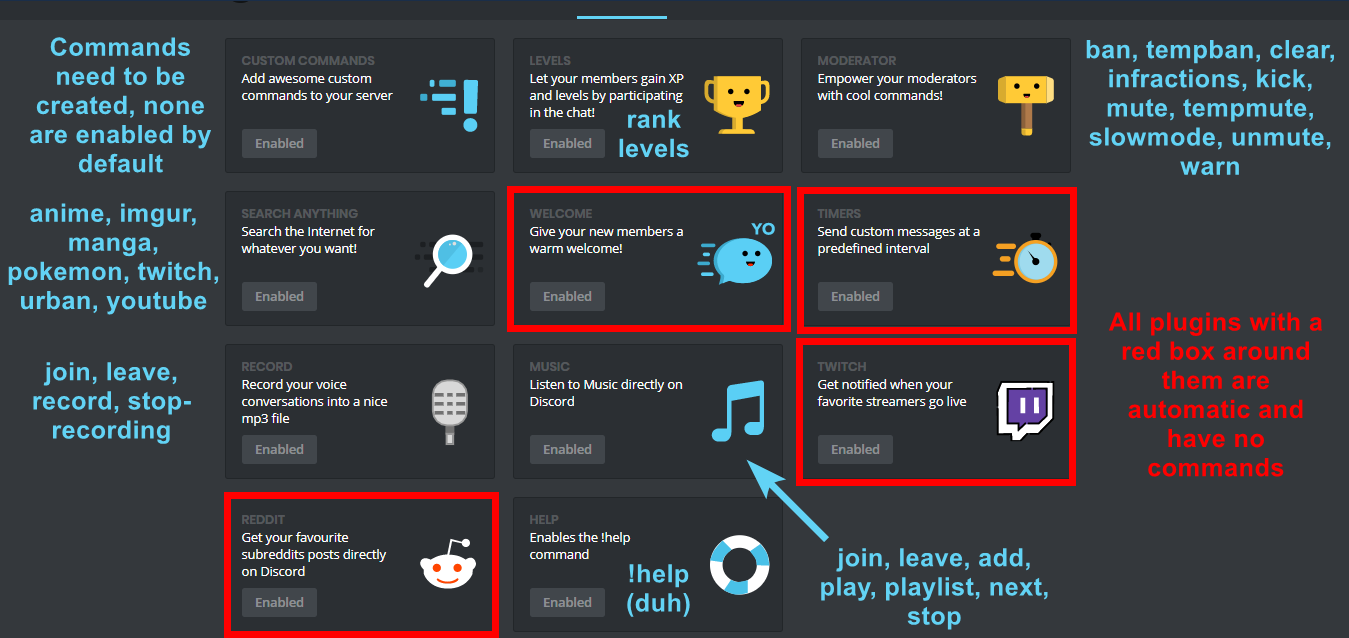
I am currently a modular bot. Nothing will be enabled by default and must be enabled in each plugin manually.
https://i.imgur.com/V93V8Dg.png
 austere ember
hi @feral wraith do you need help?
strong path
Yes?
strong path
Please...
I thought I went through this with you in DMs
Oh look, DjGoogle is online, DM him 
 feral wraith
he is hate me
strong path
oh...
feral wraith
i am just report player but he is say
DjGoogledün 16:14
Please, go away from staff DM
strong path
Oh yeah, that rule
feral wraith
ok
 signal light
hi, i'm new with Mee6 but since saturday my twitch notification is not working, i've tried everything a now but still not working. Any help?
dire yarrowBOT
Our team of developers is aware of the situation with the Twitch plugin that is not working properly, but are unable to give an ETA on the fix.
Technical stuff/explanation:
This is down to us trying to avoid ratelimits on Twitch's old API, which is taking a long time and causes delayed/no announcements. We can't move to their new API until they raise ratelimits for us
signal light
Ok thanks bot 😃
buoyant moon
sometimes when mee6 is playing music i cant hear it
strong path
leave and rejoin?
buoyant moon
still i think i tried that i happened twice
like it just happened there when angry cat couldnt hear the song i was playing but i could
strong path
tell her to leave and rejoin
buoyant moon
Timers is bugg
strong path
known
 solemn pollen
MEE6 cant give bot roles
strong path
!hierarchy
dire yarrowBOT
Role hierarchy is important for me to give out roles. Oh and also Manage Roles perm:
https://cdn.discordapp.com/attachments/302245580673908740/479426065668898826/81d15f9a.gif
 strong path
Please read mee6's message above @solemn pollen
Also please change your pfp and username
buoyant moon
 swift sapphire
Timer messages still weird
strong path
bugged
 plush zephyr
bug again
strong path
delay, yes
 brittle tusk
buoyant moon
brittle tusk
buoyant moon
Still bugged youtube plugin?
strong path
correct
 warm peak
In a server specific command there is a typo where it says "dashoard" rather than "dashboard". The command is !index
 calm valve
Mee6 has a delay
 obtuse ferry
strong path
obtuse ferry
strong path
It's known yall, dev is working hard on it 🙏
 inner creek
@strong path Thanks for information. We are waiting for it.
dire yarrowBOT
So... @buoyant moon, I've decided you should be level 1.
Don't get too excited, mmk.
buoyant moon
<@&193123929701875712> mee6 don't send the notifications about YouTube in my server
 burnt hazel
YouTube plugin is currently buggy so may or may not work for some servers @buoyant moon
no ETA on a fix yet.
buoyant moon
?
 serene fossil
mee6 gives no response whatsoever to "!infractions"
 pure obsidian
@serene fossil
- is the Moderator plugin enabled? if not do so at http://mee6.xyz/dashboard
- How are you using the command? correct usage is !infractions <@&453610540686639115>
pure obsidian
Lists all the logged warnings you issued to a user with !warn @user <reason>
basically an another term for "warnings"
serene fossil
oh, orale, thankies ^^
 finite coyote
YouTube and twitch still haven't been fixed?
burnt hazel
No sorry @finite coyote
finite coyote
I'ma wait until smash bros ultimate comes out and I at least hope to see it fixed or have an eta by then
 pure turtle
Hi music bot doesnt work?
burnt hazel
Known bug, sorry. The devs are aware of this issue and are looking into this.
pure turtle
Only based on youtube or in overall not working?
dire yarrowBOT
So... @pure turtle, I've decided you should be level 1.
Don't get too excited, mmk.
 dusty apex
@pure turtle the plugin itself is not work 😦
dire yarrowBOT
Role hierarchy is important for me to give out roles. Oh and also Manage Roles perm:
https://cdn.discordapp.com/attachments/302245580673908740/479426065668898826/81d15f9a.gif
buoyant moon
Tank @dire yarrow
 gaunt drum
unsure if im posting in the correct section or not. let me know if its wrong. i set up the TWITCH plugin on the dashboard however the bot only posts in the channel when i have the dashboard open... is this correct or have i done something wrong?
dire yarrowBOT
Our team of developers is aware of the situation with the Twitch plugin that is not working properly, but are unable to give an ETA on the fix.
Technical stuff/explanation:
This is down to us trying to avoid ratelimits on Twitch's old API, which is taking a long time and causes delayed/no announcements. We can't move to their new API until they raise ratelimits for us
gaunt drum
ah thanks @ionic meteor and @dire yarrow
dusty apex
mee6 is just being slow
 slim drift
nvm didnt read the announce
buoyant moon
Mee6 is too slow to respond, what is the problem?
austere ember
its a backend thing
we arent sure what it is
sorry for the inconvenience
 tame cove
Guys, when i try to add a soundcloud link to the music player, it says "Oops, something went wrong in MEE6 land! :SAD6: This error has been reported to our Team. We'll work hard to fix it."
for example: !add https://soundcloud.com/jerem-as-irigoytia/purple-disco-machine-live-from-boardmasters-festival

Listen to Purple Disco Machine Live From Boardmasters Festival by Jeremías Irigoytia #np on #SoundCloud
doesn't work
dire yarrowBOT
Alright, @buoyant moon has been warned because 'Bad word usage'.
Alright, @buoyant moon has been warned because 'Bad word usage'.
Alright, @buoyant moon has been warned because 'Bad word usage'.
Alright, @buoyant moon has been warned because 'Bad word usage'.
Alright, @buoyant moon has been warned because 'Bad word usage'.
buoyant moon
Smh
buoyant moon
!rank
dire yarrowBOT
Jars, this command is disabled in this channel.
austere ember
#〉commands please @buoyant moon
 shell crow
It’s probably a known issue so I apologize if it is but Mee6 has been really laggy. 😦
Nvm I just read #〉announcements
 naive ether
503 service temporarily unavailable.
buoyant moon
Hello, I would like to run some command on my server, but @dire yarrow says to me: "Oops, something went wrong in MEE6 land! :SAD6: This error has been reported to our Team. We'll work hard to fix it." can you explain to me why please
 cold bear
!oops
dire yarrowBOT
Oops, something went wrong in MEE6 land!  This error has been reported to our Team. We'll work hard to fix it.
If this happens when using:
Custom commands:
‣ Bot tries to give the role that higher than his own. To fix that, move the bot's role above the role he tries to give.
‣ User don't have all roles bot tries to remove, that's known bug.
‣ Missing Manage roles permission. Go to Server Settings -> Roles -> Bot role ->  Manage Roles permission
Moderator commands:
‣ Muted role is above Mee6's role. Bot can't give roles that higher than his own. Move it down.
‣ Missing Manage roles permission. Go to Server Settings -> Roles -> Bot role -> Manage Roles permission
cold bear
^
 calm gulch
I got mee6 timers set to every 12 hours how ever he seems to remember the "every 30 mins" it was set to in the beginning. Any way to force update the timer?
 young vapor
I'm not sure if this also has to do with the aforementioned twitch API issue but I get notifications for only two of the three streamers I have set for auto notifications and resetting or deleting the notification and recreating it hasn't solved the issue.
strong path
Yeah, some streamers have problems
strong path
np
buoyant moon
The bot of kevinfromfinance are defect
strong path
Well, if you're having problems with @shrewd needle , go to their support server please. Do !s help in #〉commands to get DMed a link to it
 steel finch
I did !help and @dire yarrow didnt respond
dire yarrowBOT
I am currently a modular bot. Nothing will be enabled by default and must be enabled in each plugin manually.
https://i.imgur.com/V93V8Dg.png
strong path
Please read mee6's message above @steel finch
strong path
And it still doesn't show em in !help? @steel finch
strong path
Well, check your perms first
dire yarrowBOT
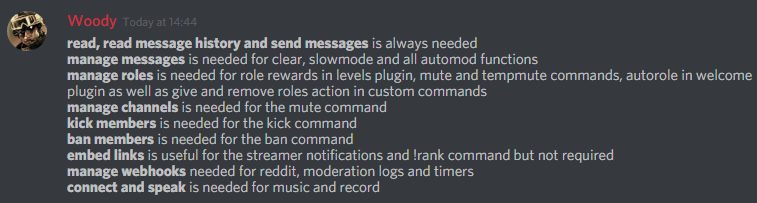
Full List of my Permissions that I use...
https://i.imgur.com/3Wd5wKZ.png
 keen brook
the timer doesnt work
strong path
^ Yeah, he's been reporting delays from it
Have you tried deleting then creating a new one btw? @keen brook
keen brook
i made like 10 timers
and now none of them are working
i set them all to 1 or 5 minutes
its been 40 min nothing
@strong path
strong path
 lemme test them myself too
 mental anchor
I set a Timer on 12h
limber knoll
Timers still funny
mental anchor
It sends every 15m
mental anchor
:(
keen brook
Now it completely stopped
dire yarrowBOT
So... @keen brook, I've decided you should be level 2.
Don't get too excited, mmk.
strong path
Yeah ignore it
dire yarrowBOT
You can access my dashboard at https://mee6.xyz/dashboard, and login with your Discord Account.
strong path
use that instead
 burnt owl
ok thanks
 mossy breach
Hello everyone, is youtube plugin still bugged?
dry glen
Yes
mossy breach
It doesn't have an estimated fix time right?
mossy breach
No need to, thank you for the quick answers!
dry glen
Np
buoyant moon
Tempmute doesn't work. Mutes the person but doesn't unmuteb on time
austere ember
Known
 pallid anvil
umm the entire timers thing doesnt seem to work
 gentle hamlet
Someone help me
I have tried for weeks to try and fix it
Also bad words doesnt work
 sage citrus
@gentle hamlet it doesnt have perms to give that role
dire yarrowBOT
Role hierarchy is important for me to give out roles. Oh and also Manage Roles perm:
https://cdn.discordapp.com/attachments/302245580673908740/479426065668898826/81d15f9a.gif
sage citrus
make sure it has the Manage Roles permission and the mee6 role is above the role it should give
sage citrus
when you add it, if there are permissions selected, Discord makes a role for it
sage citrus
yw
sage citrus
you're still getting the error?
gentle hamlet
Yup
gentle hamlet
Does it have to be above the role that is using the cmd
dire yarrowBOT
So... @gentle hamlet, I've decided you should be level 1.
Don't get too excited, mmk.
sage citrus
do you have the roles its supposed to remove?
gentle hamlet
Yeess
I need to ask big niba to move it up above the locked roles
Cuz i cant move it up no more
Ill try edit it
And see if it works
I made it so it doesnt remove the
locked roles
But still makes the error
Lol
Now the cmds are not responsive at all
strong path
What's the problem again?
sage citrus

 lucid oriole
i set 3 groups as Moderators Group but they cant use the !clear command
ok now it works thx, will this be possible to setup this via the MODERATOR ROLES Section?
dire yarrowBOT
So... @lucid oriole, I've decided you should be level 1.
Don't get too excited, mmk.
buoyant moon
He will not let me go to your official website. Why?
strong path
Explain a bit more please
buoyant moon
Look, when I go to the official Mee6 bot page, it just seems like this:
and there he stays
dire yarrowBOT
You can access my dashboard at https://mee6.xyz/dashboard, and login with your Discord Account.
strong path
you're using that link by the way?
Can you tell me what is your prefered language by the way?
buoyant moon
Spanish
strong path

buoyant moon
Will you help me?
Please, I have a server ... and I need something from the bot Mee6
 ionic meteor
Heyo! Do you have JavaScript enabled in your browser? 😃
buoyant moon
Yes
dire yarrowBOT
So... @buoyant moon, I've decided you should be level 1.
Don't get too excited, mmk.
 ionic tulip
HELLO????
ionic meteor
Let’s move to #463809001273032715 in order not to flood this channel, okay? 😃 @buoyant moon
buoyant moon
If you came to the bug reports channel looking to ask why the dashboard is having issues, please have a look at #〉announcements. As stated, there is no ETA to a fix so please be patient. 
buoyant moon
Hey I have an issue with your website
strong path
buoyant moon
Oh ok thanks
 tardy ridge
Should just pin it and do full caps
 narrow escarp
Не могу зайти в настройки
 bronze socket
@buoyant moon #〉volunteer-support
narrow escarp
Бот зашел на сервер, а панель с настройками не выходит
 bright smelt
Он сломался, когда будет работать никто не знает
buoyant moon
Whenever I try to go to dashboard it says select a server and when I do it take me back to the same thing pls help <@&193123929701875712>
limber knoll
see #〉announcements and follow https://twitter.com/mee6bot for announcements

A great bot for everything Discord. Join the server for support http://discord.gg/mee6!
Tweets
3415
Followers
7527
 Twitter
@buoyant moon 👆
limber knoll
@buoyant moon it explains your dashboard issue
Please read #〉announcements for Dashboard issues and follow https://twitter.com/mee6bot for announcements
A great bot for everything Discord. Join the server for support http://discord.gg/mee6!
Tweets
3415
Followers
7527
Twitter
 remote needle
 white notch
@remote needle read #〉announcements please
buoyant moon
oh
 violet lion
buoyant moon
violet lion
buoyant moon
i have the same problem go read the announcements
limber knoll
@buoyant moon also in pins
you can follow us on twitter for announcements there too
 warm sentinel
no server is selected
limber knoll
@warm sentinel read Pins please
warm sentinel
but where is it?
limber knoll
pinned messages?
warm sentinel
yes
limber knoll
device your using?
warm sentinel
windows 10
limber knoll
top right of screen
white notch
limber knoll
ty Delta lol
warm sentinel
I do not understand what needs to be done
limber knoll
basically just sit and wait with the rest of us while we try sort out the issue
 halcyon light
my website control panel dont load
limber knoll
@halcyon light see pinned messages please
warm sentinel
ok I will wait
halcyon light
ill wait too
limber knoll
@buoyant moon please read the pinned messages
 zinc widget
Hello, I am trying to change a few of my settings in my server, I am using your guys site, it tells me to click on a server, I click on mine and nothing is happening, please help.
limber knoll
@zinc widget please read pinned messages
limber knoll
@remote needle follow us on https://twitter.com/mee6bot as you read in #〉announcements dashboard is not currently working
A great bot for everything Discord. Join the server for support http://discord.gg/mee6!
Tweets
3415
Followers
7528
Twitter
pure obsidian
Read #〉announcements
 long harness
thx
 chrome oracle
you're right @white notch . I removed it
 bleak lake
i cant go to my server dashboard
strong path
Please read #〉announcements
 shrewd ridge
I can’t go to my server dashboard cuz when I click my server it just has the same thing
And then i click
shrewd ridge
K
 pure wyvern
почему у меня mee6 подключился на сервер и не переходит в панель управления, тоесть он на сервере есть а настроить я его не могу
buoyant moon
Mee6 so ....
dire yarrowBOT
So... @buoyant moon, I've decided you should be level 2.
Don't get too excited, mmk.
cold bear
@pure wyvern #〉announcements мы знает об етой проблеме и работаем на ее решением
 dapper remnant
When I want to configure MEE6 on your website https://mee6.xyz/dashboard, your website will automatically log out
 river flare
I am unable to reach the dashboard, it just keeps sending me back to select a server
 halcyon hinge
just read the annoucements
dire yarrowBOT
KubixNew, this command is disabled in this channel.
 red cipher
What to do when I select my server, it redirects me to this web page https://mee6.xyz/dashboard
 calm verge
😦
 flat sphinx
Until they fix it, of course!
red cipher
Yes .. But how to be?
flat sphinx
Pardon?
dire yarrowBOT
So... @red cipher, I've decided you should be level 1.
Don't get too excited, mmk.
cold bear
жди на фикс
red cipher

buoyant moon
Bot is so slow right now
 bitter zenith
known issue
buoyant moon
👌
bitter zenith
see #〉volunteer-support and #〉announcements
buoyant moon
no more apples to go to google settings at mee6
strong path
Please read #〉announcements @buoyant moon
limber knoll
#〉announcements @timber nimbus
 timber nimbus
Thank you
limber knoll
np
 simple girder
I need help
limber knoll
#〉announcements @simple girder
buoyant moon
I Cant See my dashboard on my server fix that thanx
limber knoll
read above your question
buoyant moon
I Cant See my dashboard on my server fix that thanks
 sick pond
Hi, us mee6 bot is very slow with sending messages. Is this solver or not?
white notch
white notch
status says it is not solved
sick pond
Oh, sorry. Cannot good english.
 leaden halo
on google wen I look mee6 I click it I login I click a server and it loads... and then it ask me again for a server. Please help me
strong path
Please read #〉announcements @leaden halo
white notch
white notch
we don't know
leaden halo
oh ok
 serene fractal

 finite marten
When I go to the site and I click on the server to be changed, do I not open the settings?
white notch
@finite marten please do repeat the question in every channel
just read #〉announcements
 heady mural
I can't enter settings please help
white notch
serene fractal
😂
dire yarrowBOT
Alright, @static rivet has been warned because 'Bad word usage'.
 static rivet
?
white notch
just don't
static rivet
I didn't say anything bad though
white notch
you pinged the everyone role
white notch
should be clear you literally cannot do it
static rivet
is a bad word?
white notch
yes
static rivet
my bad
white notch
if we wanted to ping everyone we would have done it
static rivet
suwoop
dire yarrowBOT
Alright, @vapid idol has been warned because 'Posted an invite'.
 fathom pumice
I have created a command that when you use it, it's supposed to give you a role but mee6 says "Error in mee6 land"
strong path
!hierarchy
dire yarrowBOT
Role hierarchy is important for me to give out roles. Oh and also Manage Roles perm:
https://cdn.discordapp.com/attachments/302245580673908740/479426065668898826/81d15f9a.gif
strong path
Please read mee6's message above @fathom pumice
fathom pumice
Still didn't work
strong path
Please invite me in DMs and give me the manage roles perm at least
fathom pumice
Oh right got it I missed of his privileges
dire yarrowBOT
So... @fathom pumice, I've decided you should be level 4.
Don't get too excited, mmk.
strong path
Alright, glad it worked out, you're welcome
pure obsidian
That is an invalid URL, use http://mee6.xyz/#rank-card
dire yarrowBOT
Alright, @buoyant moon has been warned because 'insult in Turkish | bad word usage'.
buoyant moon
why u ping me @strong path
dire yarrowBOT
So... @buoyant moon, I've decided you should be level 2.
Don't get too excited, mmk.
 frank lintel
The bot doesn't unmute automatically
strong path
known
strong path
What isn't working exactly though?
strong path
Automod ignores the owner, those with the administrator permission, those with the manage server permission, or those with a moderator role.
 burnt pond
oh so he ignore me?
strong path
Correct
burnt pond
ok thnx for u help ;p
strong path
yw
 young dock
The bot dosn't post the new video Youtube of my channel... I'm alone in this case ? >.>
strong path
YouTube plugin is bugged.
young dock
Aw ok..
dire yarrowBOT
You can access my dashboard at https://mee6.xyz/dashboard, and login with your Discord Account.
strong path
try that one @native geode
young dock
Me ?
strong path
And you used this link, right?
https://mee6.xyz/dashboard
 native geode
yep
how to this?
i`m have a get customize card
but i`m have error 503
hey
why you dont give me answer?
strong path
I'm thinking this could be a problem on our end, but I'm not sure. So I'm double checking.
native geode
okay
buoyant moon
how do you customize the rank cards?
dire yarrowBOT
You can access my dashboard at https://mee6.xyz/dashboard, and login with your Discord Account.
buoyant moon
oh ok ty
bitter zenith
sure np
 ocean raven
Hello and good evening
the bot still can not show youtube the new video discord chanel when registering the channel
 faint dome
YouTube still bugged atm @ocean raven
 half loom
Reporting minor bug..
With levels plug-in on but level up Notifications off some users still get a pm with a level up pm.
 signal crag
On the website I can’t add bad words. It don’t work If I’m on mobile, but on computer it work :/
Don’t know if this is an old bug report but ugh
dusty apex
@signal crag it is known that on ios is not possible to add bad words
signal crag
Rip to me oof
dusty apex
computer and android should work
signal crag
Kk
buoyant moon
when add a bad word to the bad word list and when i save it and swear in my server it dosent delete it. help
burnt hazel
Hey ! MEE6 doesn't sanction the following people:
• The Owner of the server;
• People with Administrator permission;
• People with Manage Server permission;
• And the role(s) you set as Moderator on the website (aka dashboard).
He thinks Moderators are responsibles, like the police  . So he doesn't want to blame your police
  .
.
@buoyant moon
buoyant moon
Ok thx
dire yarrowBOT
Alright, @buoyant moon has been warned because 'Bad word usage'.
 bitter owl
 strong path
bugged
white notch
sort of
dire yarrowBOT
So... @white notch, I've decided you should be level 71.
Don't get too excited, mmk.
white notch
timers are meant to work, but there will be delays with them being posted
white notch
I'm aware, but they are now posting though with some delays
 buoyant moon
umm...
dire yarrowBOT
So... @buoyant moon, I've decided you should be level 1.
Don't get too excited, mmk.
buoyant moon
Is the timer only delayed on our server?
ionic meteor
😛
buoyant moon
When will it be fixed?
ionic meteor
We don't know
buoyant moon
oket thx
dire yarrowBOT
The clear command allows you to clear the last xx amount of message or to clear one user without clearing anyone else.
Use !clear 1-1000 to clear the last xx messages (example !clear 10)
or !clear @name to clear all the message of @name in the last 2 weeks
+ I need manage messages permission
+ I need view message history permission (otherwise I will respond with -1 messages cleared)
+ you need to enable the plugin on the website
+ you need to check the checkmark next to clear on the plugin page.
+ you need to set your role as moderator (located at the top of the plugin page in the moderator tab)```Please read mee6's message above @buoyant moon
 obtuse sparrow
k so here is my bug that i found, a guy on my server was banned for 1 min on my server for emoji spam, at around 6:30pm mst, the issue is that he was unbanned at midnight 6 hours later
 dry zinc
i report dyno is better
strong path
Only serious mee6 bug reports here please @dry zinc
 brazen sail
Kick not working
 dim rivet
Oops, something went wrong in MEE6 land! :SAD6: This error has been reported to our Team. We'll work hard to fix it.
dire yarrowBOT
Oops, something went wrong in MEE6 land! This error has been reported to our Team. We'll work hard to fix it.
If this happens when using:
Custom commands:
‣ Bot tries to give the role that higher than his own. To fix that, move the bot's role above the role he tries to give.
‣ User don't have all roles bot tries to remove, that's known bug.
‣ Missing Manage roles permission. Go to Server Settings -> Roles -> Bot role -> Manage Roles permission
Moderator commands:
‣ Muted role is above Mee6's role. Bot can't give roles that higher than his own. Move it down.
‣ Missing Manage roles permission. Go to Server Settings -> Roles -> Bot role -> Manage Roles permission
dim rivet
thank you
 dense fox
No problem.
buoyant moon
dire yarrowBOT
So... @buoyant moon, I've decided you should be level 1.
Don't get too excited, mmk.
dire yarrowBOT
You can access my dashboard at https://mee6.xyz/dashboard, and login with your Discord Account.
buoyant moon
Help
buoyant moon
@strong path https://mee6.xyz/dashboard This link ?
strong path
Yeah
buoyant moon
Ok thanks
strong path
You're welcome 
 neon horizon
the reddit plugin isnt working on my server, any suggestions?
strong path
delayed a lot
neon horizon
no its been on for a day and hasnt posted anything
strong path
Yeah, it's like, really, really delayed, sorry
 dapper gyro
I stopped leveling. Whole alliance is still working... not mine
dire yarrowBOT
If I appear to be denying your hard earned experience, or !rank and !levels aren't working properly...
- Make sure Levels is Enabled.
- Check that you do not have a banned role in the levels configuration, and that you aren't in a banned channel either.
- Make sure that I can see the channel you are talking in with "Read Messages" and send messages with "Send Messages".
dusty apex
if user have 0 xp the card will appear as follow
 compact ravine

 random prawn
dire yarrowBOT
Domthemann17 (OFFLINE), this command is disabled in this channel.
buoyant moon
Bug to @dire yarrow
Commands dont work for !levels when I turn on server cooldown and turn on "do not reply to command"
It will usual reply to the command unless the cooldown is still counting down..
But now it never replies..
limber knoll
@buoyant moon do not reply to command is the equivalent of disabling the command
limber knoll
If you turn off do not reply to command it will respond again
buoyant moon
Ok.. thanks!
limber knoll
You can have it dm them instead
 spice tulip
the mutated and the tempban and also the kick does not work so that I activate them thank you to do the necessary
limber knoll
being answered
buoyant moon
Everytime I make a custom command, it doesn’t work, it says (you cannot do this right now the team are working on it)
burnt hazel
Answered in #463809001273032715 
 low glade
Everytime i go to plugins to let's say levels it doesn't load even when i try with others or even when i edit my rank card
strong path
What browser you're using?
low glade
strong path
Try Chrome or Firefox
low glade
Ok thanks
 haughty nebula
Mute isn't working for me. Says theres an error in Mee6 land or something?
strong path
!hierarchy
dire yarrowBOT
Role hierarchy is important for me to give out roles. Oh and also Manage Roles perm:
https://cdn.discordapp.com/attachments/302245580673908740/479426065668898826/81d15f9a.gif
strong path
Please read mee6's message above @haughty nebula
haughty nebula
The role works fine
Its just Mee6 isn't adding it
I did it myself and it worked. Just when I did !mute it didn't work
Just thought I'd say
dire yarrowBOT
So... @haughty nebula, I've decided you should be level 1.
Don't get too excited, mmk.
strong path
Means it may not be above the muted role
dense fox
Yes?
 wise bridge
the bot is made!
wise bridge
different one
bitter owl
What’s wrong about it?
 young plume
Guys, whenever I try to mute someone, they don’t get muted. I tried to move the Muted role above my given role, but it still won’t work.
dire yarrowBOT
Having problems muting someone/they aren't muted? Check the following
Prerequisites:
- Moderator plugin is enabled
!mutecommand isn't disabled- Bot has role with Manage Roles and Manage Channels permissions
- Muted role is under MEE6 role
- You're trying to mute someone using
!mute @mention reason, otherwise it will not work
If user got Muted role but still can talk means there's issue with your channel permissions
Go to Channel Settings -> Permissions
- If that's public channel that can be accessed by anyone:
- Set

Send Messagesfor all roles except Muted - Set

Send Messagesfor Muted role
- If that's secret channel that requires *special* role to access it:
- Set
Send Messages Read Messagesfor special role - Set
Send Messages Read Messagesfor Muted role - Set
Send Messages Read Messagesfor@everyonerole
bitter owl
@young plume ☝ read and compare it to your server
young plume
Alright
buoyant moon
@bitter owl dont want any unnecessary infractions 😂
bitter owl
Hm nah it’s ok
In case you want to share a link but not make it embed you can put < before the url and > after url
You can test it in #〉commands
 marsh lava
The YouTube upload messages and automatic timed message don't work in my server 😦
bitter owl
They are both unstable and being fixed @marsh lava
marsh lava
Alright thanks ^^
 void fog
i have a report
buoyant moon
State it please :)
 rare ferry
yeah, my mee6 became self aware, called everyone in the server stupid, and made all the bots leave with him.
i dunno what to do
sage citrus
@rare ferry some admin on your server must have done it
can you screenshot the message from mee6?
sage citrus
do your mods have the Manage Server permissions?
limber knoll
@rare ferry dm invite when your able please
rare ferry
the bots allready left the server
limber knoll
Would have been a user masquerading as mee6 with ban and kick perms
rare ferry
nah, there was a  symbol next to it
limber knoll
Or they used a custom message to mention it then kicked the bots
Basically it would have been either owner or user with admin or manage server perms
rare ferry
can't only the owner do things like that?
im the only admin in my server
Note how i say MY server, im also the owner of the server
limber knoll
Then that would leave you the other 2 options
I gave you all 3 so you could narrow it down
rare ferry
no one else has permison to manage the server
limber knoll
Not even admin perms?
rare ferry
nope.avi
limber knoll
Those were the only ways to make the bot do that
rare ferry
odd
 tranquil bluff
hello i want to report a bug, I deleted a command from the first ones that I did in the bot, and the new ones were changed one after another assigning commands that do not correspond. example i just deleted the comand 1 with the comand 2 and 3 below, now the command 3 is triggered by the command of 2 and etc
dire yarrowBOT
So... @tranquil bluff, I've decided you should be level 3.
Don't get too excited, mmk.
sage citrus
@tranquil bluff reloading should fix it
tranquil bluff
@sage citrus how i can reload the bot?
tranquil bluff
but in the server still bug the bot
sage citrus
oh weird
tranquil bluff
idk just still bug, and the levels are stuck now wtf
 limber umbra
Tempban dosn't work
sage citrus
known as we said in #〉volunteer-support
buoyant moon
Just putting it here for refrence, timers completely do not work, also mee6 banned itself once
dire yarrowBOT
So... @buoyant moon, I've decided you should be level 2.
Don't get too excited, mmk.
strong path
for your first thing: Known
for your second thing: huh? can you show us the audit log showing that mee6 banned mee6?
buoyant moon
Was a long time ago, i think i just had too many commands running and it banned itself from one of the custom reply things, idk, just a random thing i remembered
I had went in the server and mee6 was missing and i had seen it banned itself xD then dyno autopurged the logs cause its set to do that every week
 patent isle
Timers on mee6 dont work I can't enabled it
strong path
It's known that they are bugged
 mortal narwhal
The yt announcement system doesnt work :c
strong path
known
buoyant moon
dire yarrowBOT
Oops, something went wrong in MEE6 land! This error has been reported to our Team. We'll work hard to fix it.
If this happens when using:
Custom commands:
‣ Bot tries to give the role that higher than his own. To fix that, move the bot's role above the role he tries to give.
‣ User don't have all roles bot tries to remove, that's known bug.
‣ Missing Manage roles permission. Go to Server Settings -> Roles -> Bot role -> Manage Roles permission
Moderator commands:
‣ Muted role is above Mee6's role. Bot can't give roles that higher than his own. Move it down.
‣ Missing Manage roles permission. Go to Server Settings -> Roles -> Bot role -> Manage Roles permission
buoyant moon
@ripe rivet que dois je faire pour que le bot remarche
@ripe rivet ok merci beaucoup
buoyant moon
C'est vraiment nul comme applications ?
Ce qu'en pense les gens ?
Et vous ! Vous en pensez quoi ?
buoyant moon
T'arrive pas à lire ?
Ben si !!! c'est une question t'en pense quoi de cette application ?
Ben je sais pas je demande juste point vu développement etc t'en pense quoi ?
bisoir
savez pk on ne reçoit plus de notification discord quand quelqu'un lance un stream ?
apperemment c un bug connu en attente de résolution !
ça fait quand même une pige la maintenant 🤔
 keen snow
Seems to be a bug where twitch stream alerts show in notifications but the post doesn’t show up in the actual channel
keen snow
Never mind. Turns out one of my mods was deleting them
 weak viper
Bonjour et bonsoir les gens !!!
faint dome
@weak viper question simple : sais-tu lire les noms des salons ?
faint dome
donc pour t'expliquer : ici c'est pour les reports de bugs. #〉volunteer-support et #463809001273032715 servent quand on a des problèmes avec mee6, et #〉suggestions si on a une suggestion intéressante à faire. Pour discuter c'est #〉chat ou #〉commands
weak viper
...
 vague crag
The tempmute command on my Server doesnt unmute
bitter owl
answered in #〉volunteer-support
 wooden shell
The Youtube notifier plugin is only posted videos from 1 channel
bitter owl
Our Youtube plugin is broken and being repaired. Thanks for you patience
wooden shell
thank you! I thought it was something I did wrong
do you have a time frame on when it will be up and running again?
bitter owl
Unfortunately we don't give Estimated Time of Arrival for our fixes, hopefully not too long :)
wooden shell
ok thank you
 rapid furnace

 sturdy ore
the command! mute does not work how to do
buoyant moon
@s @faint dome urgent
dire yarrowBOT
!mute @CoolGuysNameHere You have been too cool.
!tempmute @SecondLameGuyHere 3h Too lame.
- I must have "Manage Channels", and "Manage Roles" for my permissions.
- I must have a role above the "Muted" role I create.
If there are problems, please check that the Muted Role does not have send messages globally or per channel.
faint dome
@sturdy ore ☝
sturdy ore
that's enough @faint dome ?
faint dome
Ça m’en a l’air. Qu’est ce qui ne fonctionne pas ?
sturdy ore
Tu parles français ?
faint dome
D’où mon drapeau dans mon pseudo ^^
sturdy ore
Ok
Je fait la commende !mute ou !tempmute le message apparaît mais la personne ne se fait pas ban
faint dome
Mais le mute c’est pas pour ban ! 
sturdy ore
Pas ban mais mute je me suis trompé
faint dome
Ok. Ça veut dire que les permissions des autres rôles bypass le rôle muted. Une solution est de configurer les permissions pour chaque salons avec le rôle muted uniquement. Sinon je crois que tu peux aussi mettre le role juste en-dessous de mee6, pour qu’il soit plus haut hiérarchiquement que les autres
sturdy ore
Ah ok je vais essayer
dire yarrowBOT
So... @sturdy ore, I've decided you should be level 2.
Don't get too excited, mmk.
faint dome
Tu as testé sur quel rôle ?
sturdy ore
De quoi ?
faint dome
La personne sur qui a testé avait quel rôle le plus haut ?
sturdy ore
Non elle avait rien
faint dome
Aucun rôle du tout ?
sturdy ore
Non
faint dome
Et dans les permissions de salons, il y a quoi ?
sturdy ore
J’ai rien touché pour elle
Mais c’est comme ça pour tout les personnes de mon serveur
Et j’ai même créé un nouveau serveur en remettant le bot et ça marche pas non plus
faint dome
🤔
faint dome
Je peux venir dans ton serveur pour voir ?
sturdy ore
Ok
faint dome
Envoie par mp
sturdy ore
Ok
 toxic yarrow
buoyant moon
toxic yarrow
buoyant moon
Toutes ses fonctionnalité sont KO, que ce soit le faite de l'ajouter sur un discord, ou n'importe quel de ses commandes
Il est juste présent c'est tout
rank command is not working
 dapper night
limber knoll
dapper night
limber knoll
thanks for reporting we're currently looking into it
buoyant moon
!rank
dire yarrowBOT
Demona, this command is disabled in this channel.
buoyant moon
What's happening with the bot? It's not working correctly
pure obsidian
buoyant moon
Thx
 violet ether
 onyx widget
@violet ether check #〉announcements
onyx widget
check #〉announcements if you haven't already
 slender idol
Cheers
violet ether
why my name is ProTube?
white notch
hoisted username
violet ether
this is my YouTube channel name
white notch
don't care
violet ether
my name is İrem
 sharp breach
Ok
pure obsidian
Please read #〉announcements
 deft tartan
Ol
 tender frigate
mee6 dont work
 grand igloo
The Site of the BOT isn't working...
pure obsidian
Please read #〉announcements
grand igloo
Okay. Tks
 thin matrix
@sturdy ore pour ton problème
Il faut que sur chaque canal texte et/ou vocal tu fasse une permission pour le rôle "muted"
faint dome
Ça a été réglé en mp
sturdy ore
Je sais @thin matrix
 spring bay
pourquoi le panneau de configuration deMEE6 ne marche plus ?
faint dome
 quiet wagon
Something is wrong here 😦
quiet wagon
Ok thank you
 inner lintel
although i think this doesn't help, i am gonna leave this here
tender frigate
so you live in hamburg
white notch
we know of this
white notch
and it's Cloudflare that's based in Hamburg, not them
inner lintel
no cloudflare in hamburg is working as you can see
tender frigate
everything is working exept the host for mee6
Take your time to fix it
Cuz its gonna be fixed
 unkempt pasture
I can't check rank
white notch
 wraith shuttle
@unkempt pasture check #〉announcements
unkempt pasture
oh k
 little pond
white notch
little pond
white notch
 obtuse canopy
white notch
buoyant moon
obtuse canopy
white notch
buoyant moon
Lmao 😂
 uneven wagon
i cant use the !ban !kick !warn
white notch
uneven wagon
ok
 tulip wraith
The YouTube plugin isn't working on my server :/
white notch
known bug
 stark raven
Uhh when a user has 0 xp out of x on the rank card it displays as “ /x” rather then “0/x”
 civic vigil
Oops, something went wrong in MEE6 land! SAD6 This error has been reported to our Team. We'll work hard to fix it.
strong path
!hierarchy
dire yarrowBOT
Role hierarchy is important for me to give out roles. Oh and also Manage Roles perm:
https://cdn.discordapp.com/attachments/302245580673908740/479426065668898826/81d15f9a.gif
strong path
Please read mee6's message above @civic vigil
 proud shard
the timer command is working again
strong path
Is it not delayed?
proud shard
not with me
proud shard
is the youtube plugin fixed?
dense fox
Nope.
 tacit briar
"the timer command is working again" it'isnt working on my server
buoyant moon
Timers are bugged.
tacit briar
john f kennedy said it worked again
dense fox
It kinda works but yet again, it doesnt work.
tacit briar
ow okay thx@Steve Rogers
dense fox
No problem.
dapper night
<@&193123929701875712> Error for "!invite"
dire yarrowBOT
Oops, something went wrong in MEE6 land! This error has been reported to our Team. We'll work hard to fix it.
If this happens when using:
Custom commands:
‣ Bot tries to give the role that higher than his own. To fix that, move the bot's role above the role he tries to give.
‣ User don't have all roles bot tries to remove, that's known bug.
‣ Missing Manage roles permission. Go to Server Settings -> Roles -> Bot role -> Manage Roles permission
Moderator commands:
‣ Muted role is above Mee6's role. Bot can't give roles that higher than his own. Move it down.
‣ Missing Manage roles permission. Go to Server Settings -> Roles -> Bot role -> Manage Roles permission
bitter owl
@dapper night ☝
dapper night
thanks 😄
 barren sequoia
I want to report
The "timer" function does not work
dire yarrowBOT
So... @barren sequoia, I've decided you should be level 2.
Don't get too excited, mmk.
strong path
known
dire yarrowBOT
You can access my dashboard at https://mee6.xyz/dashboard, and login with your Discord Account.
strong path
try that link
strong path
What browser you're using?
strong path
Yes
dire yarrowBOT
Sailuz, this command is disabled in this channel.
limber knoll
@upper oasis yes
 upper oasis
Ohkay when i reach home imma do some cool stuff on ma card
dire yarrowBOT
Alright, @upper oasis has been warned because 'Bad word usage'.
dire yarrowBOT
Alright, @upper oasis has been warned because 'Bad word usage'.
 hoary stream
Correct
barren sequoia
I want to report
The "timer" function does not work :((
pure obsidian
known
barren sequoia
This error has not been corrected correctly ?
onyx widget
they are working on it please be patient
barren sequoia
okey, tks u ^^
onyx widget
np
buoyant moon
I want to report mod can ban a admin with mee6 if its on admin role
sage citrus
@buoyant moon not if you add the admin role to Moderator Roles in the mee6 dashboard
buoyant moon
Ye Ik
sage citrus
So it's not a bug...
buoyant moon
1⃣ The mute command does not work anymore .
2⃣ the levels reset themselves alone .
3⃣ Other bug are noticed . finally ... several ...
yea that happens to me my mute wont work
burnt hazel
@buoyant moon
-
Can you check your channel overrides to see if the mute command is set up correctly
-
Levels do not reset themselves alone, Anybody with
AdministratororManage serverpermissions can reset the levels.
 keen linden
buoyant moon
keen linden
buoyant moon
Everything is well configured but the ranks I'm the only one who can access them
burnt hazel
@buoyant moon Can you make sure no other roles have Administrator or Manage server permissions, this includes the Everyone role.
buoyant moon
yes I'm the only one, it happens on another server or the founder and the only one to access the setting
🤔 it's weird
example
burnt hazel
!oops
dire yarrowBOT
Oops, something went wrong in MEE6 land! This error has been reported to our Team. We'll work hard to fix it.
If this happens when using:
Custom commands:
‣ Bot tries to give the role that higher than his own. To fix that, move the bot's role above the role he tries to give.
‣ User don't have all roles bot tries to remove, that's known bug.
‣ Missing Manage roles permission. Go to Server Settings -> Roles -> Bot role -> Manage Roles permission
Moderator commands:
‣ Muted role is above Mee6's role. Bot can't give roles that higher than his own. Move it down.
‣ Missing Manage roles permission. Go to Server Settings -> Roles -> Bot role -> Manage Roles permission
burnt hazel
For the warn 
I'm not sure about that one, I will leave this for the staff to look at because they might have a better understanding of the issue.
@elder mauve The only auto-assign role feature can be found inside the Welcome plugin, there is no command on MEE6 for this.
(Unless you mean give roles and are having problems with this command?)
dire yarrowBOT
Alright, @charred rose has been warned because 'Posted an invite'.
buoyant moon
@burnt hazel no
frozen prawn

 idle furnace
Cc
dire yarrowBOT
Alright, @tawdry marten has been warned because 'Posted an invite'.
 short gorge
buoyant moon
short gorge
buoyant moon
it's very boring ...
 neat bobcat
When going to the MEE6 website, Its Just Black, So I cant Change MEE6 Commands and see leaderboards.
strong path
What browser you're using?
strong path
Firefox?
neat bobcat
Idk, I dont Really Use Firefox that much, Even on a computer that has lots of space.
But I may get firefox.
It may be that my Edge is not that fast
Also not updated
dire yarrowBOT
Braixen97#6374 (310164586533879809) is now muted for '** Spam**', alright? 
strong path
do that again and you're banned @gleaming bloom
dire yarrowBOT
Braixen97#6374 (310164586533879809) is now unmuted!
 gleaming bloom
u@strong path it wasn't me !!!!
 spark viper
<@&193123929701875712> mee6 took ownership of my server (or a fake) and demoted me to no roll in my serverhttps://photos.app.goo.gl/3Qt4RaUz7ZpLsJ3o6

Google Photos
<@&193123929701875712> plz help
If u can
 fallow tulip
Xd
 inner bison
@spark viper It's not mee6 😂😂
fallow tulip
Wrong pfp and wrong name
limber knoll
He's been answered
inner bison
Okey
finite coyote
Are YouTube plugins finally fixed?
spark viper
@inner bison k thx I'ma go try and get my server back
strong path
No @finite coyote
finite coyote
☹
dire yarrowBOT
Alright, @inner bison has been warned because 'Bad word usage'.
 rancid citrus
I like how this server is run completely by a bot XD
rancid citrus
Oh whoops, didn't notice this was #〉bugs-reports!
 rich stratus
I tried to un mute three ppl and it says error
burnt hazel
@rich stratus Can you make sure MEE6 has the manage roles permission in his role in your server settings.


 burnt hazel
No problem. 
 harsh vigil
I need help with a bug
dusty apex
state it 😃
harsh vigil
oaky
so i put in a youtube link on the website and the yt was deleted a month later
when i go and try to add a new youtube channel or to disable the plugin it will black out the screen
dusty apex
what browser?
 viscid radish
Okay?
harsh vigil
chrome
dusty apex
@harsh vigil can you show me what the black screen is
dusty apex
@harsh vigil pls try incognito mode