#〉bugs-reports
2 messages · Page 38 of 1
 shadow briar
Ok
 strong path
!!tag pedtesttag
 wind windBOT
Make sure you set up your channel permissions correctly, this gif could help
https://mee6.such-a-me.me/EdNoxqeuO.gif

 zealous kettle
thanks
 viral gorge
Wait what there is another bot in a bot support chat
strong path
backup bot
viral gorge
Wonder if MEE6 is in the Sigma support
 buoyant moon
Why MEE6 in my server don't warn my friend?
strong path
What does it say?
buoyant moon
Nothing.
strong path
have you enabled the moderator plugin?
buoyant moon
yes.
strong path
Also, are you using it like !warn @user reason here?
buoyant moon
No.
strong path
Do so
buoyant moon
what?
strong path
You use the warn command like !warn @user reason here, you need to mention the user
strong path
np
 silk bone
mee6 timers, understood to be still bugged, but it is currently posting at an incorrect frequency, like every 2 mins. When it was set to 1 hour.
 crimson grove
i have a problem i tried using the bad word thing but .... it dint work on the modarators thing on the website
 sage prairie
silk bone
sage prairie
silk bone
I had to turn it off, mee6 was pushing that timer every 2 mins
 dusty apex
@silk bone did you delete the webhook?
silk bone
yes
 mortal oxide
@silk bone Timers are bugged at this moment.
 tough latch
!play deez nutz 10 hours
 dire yarrowBOT
Deez Nutz, this command is disabled in this channel. 
 steel delta
the bot doesnt ban automacily
dire yarrowBOT
So... @steel delta, I've decided you should be level 1.
Don't get too excited, mmk.
steel delta
ok
 deep pebble
y'all already know, so i'm just adding more context to my last report
buoyant moon
is someone gonna take my bug report seriously>
strong path
Can you not be more specific?
buoyant moon
?
strong path
What is the bug?
buoyant moon
facepalm
the bot doesnt work
at my server
I mean
a server that im the owner in
im not the creator
strong path
pls be more specific than "doesn't work"
buoyant moon
like
whenever I do !help, it doesnt DM me back
and some mod stuff such as anti-bad words also dont work
strong path
Well for !help, does it not respond at all?
buoyant moon
it does not
strong path
Well, first, make sure to check the bot's perms
dire yarrowBOT
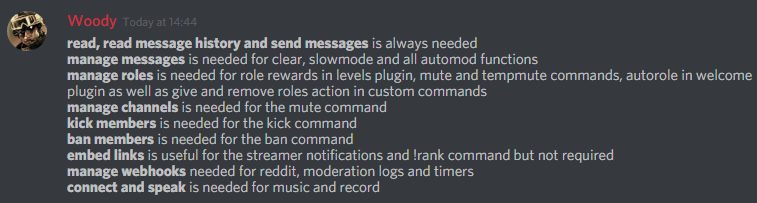
Full List of my Permissions that I use...
https://i.imgur.com/3Wd5wKZ.png
 strong path
If it didn't respond, then it may not have the read messages or send messages perm
check your channel perms
buoyant moon
wdym
strong path
Do you know about server settings > roles?
buoyant moon
no
strong path
click your server name > server settings > roles
 eager geyser
Help! I'm Trying To Log in My Other Acc In Mee6 And I Can't Even Chose Wich Can I Log In When I Press Log in It Always Chose My Other Acc And I'm Trying To Login This Acc How?
dire yarrowBOT
It appears that you may be on the wrong account, or something went wrong since the last time you logged into the website.
- Please navigate to https://mee6.xyz/dashboard to logout from our website. Click on your profile picture and press Logout https://rebrand.ly/LogoutMEE6.
- Then navigate to https://discordapp.com/channels/@me and select the gear in the bottom left, then press Logout.
- Log into the account you want to use on the Discord website
- Once done, select "Add to Discord" again, and select the server dashboard you want to access
eager geyser
Ah! Yes! Thank You It Fix Now!
 kindred halo
hey i have a problem in my server
strong path
What's the problem?
 misty vessel
!tempmute and !tempban commands when a timer is set fail to stop after the time. This has been the case for a long time! It would be very useful to have these working again!
 quaint wind
The MEE6 website doesn't work.
dusty apex
@quaint wind dev is on it 😃
quaint wind
Ok thanx.
 turbid oar
Same issue
buoyant moon
I was wondering why
turbid oar
Stuck on the "select server" page
buoyant moon
Same
dusty apex
Currently the bot is experiencing some latency
Dev is already on so pls hang tight and it should be fixed soon
turbid oar
❤
 latent mesa
Yeah, the words get out of the box in the Mee6 server select.
Windows 10 Insider Preview, version 1803, build 17713.1002.
Microsoft Edge 43.17713.1000.0.
Microsoft EdgeHTML 18.17713.
strong path
Edge? Tried it on Chrome or Firefox to see if it does the same thing?
strong path
Alright
latent mesa
Might want to look into it though, as Edge is a major browser...
strong path
Edge isn't supported. That's why I wanted to check if it's the same on those other 2 browsers.
latent mesa
Why not though?
In some cases, its the only option, lol.
I'll try if I can RDP to my home server and open the server select up there.
Yeah, it works properly on Firefox, @strong path. Please consider supporting Edge though...
 idle mural
my help command isnt working send help
strong path
What does it respond with if anything?
idle mural
Oops, it looks like you have no command to show. :XMARK6:
To enable or add commands, head to your dashboard and enable the plugins of your choice ->
that
dire yarrowBOT
I am currently a modular bot. Nothing will be enabled by default and must be enabled in each plugin manually.
https://i.imgur.com/V93V8Dg.png
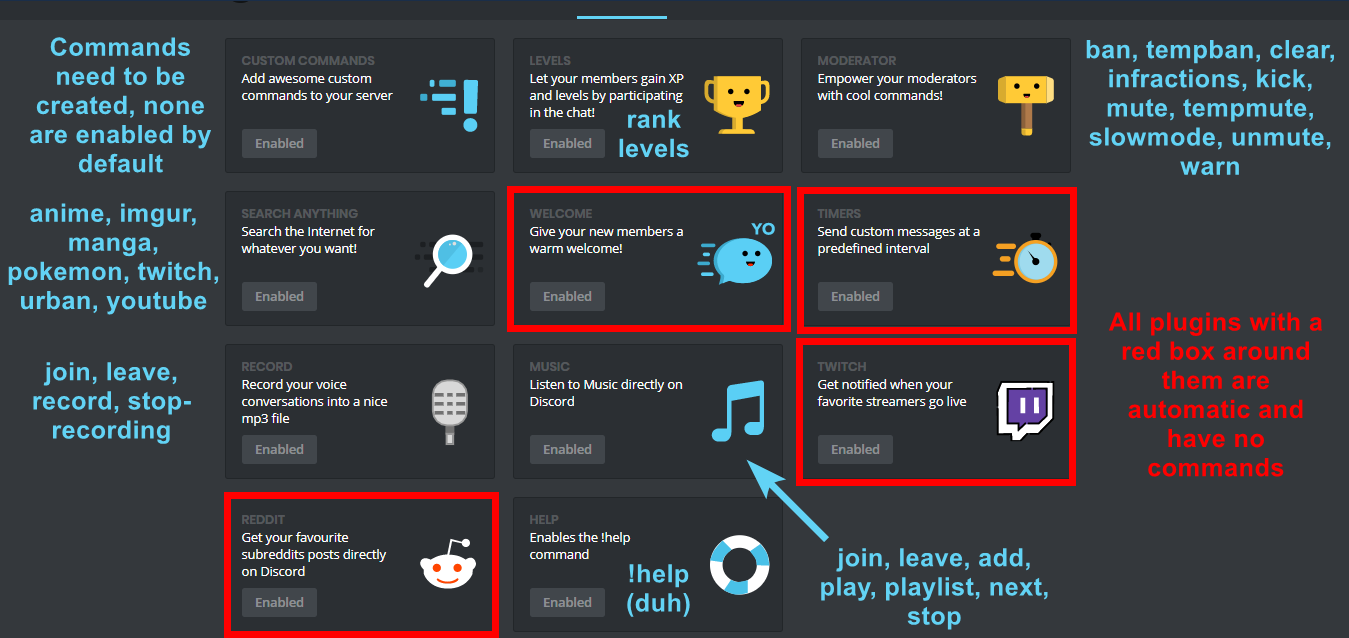
You can access my dashboard at https://mee6.xyz/dashboard, and login with your Discord Account.
strong path
read those messages by mee6 pls
idle mural
it says enabled is my problem
strong path
enable other stuff
like the levels plugin or the moderator plugin
then it'll show you commands like !rank or !mute
idle mural
i'll try that
dire yarrowBOT
So... @idle mural, I've decided you should be level 1.
Don't get too excited, mmk.
idle mural
@strong path it worked, thanks
strong path
np 💙
 wooden mountain
@latent mesa edge is a glorified rendering engine, when they made edge it wasn't meant to become a browser. Edge has a lot of stuff that does not follow the JS or CSS rules
Once they implement it correct, the site will work as intended
 arctic fox
Problemes with Send custom messages at a predefined interval, cant update time period... first i set for 5 min and now i want for 2h, but bot still send after 5 min
silk bone
Is it ok to turn on timers again or are they still in an unstable state?
strong path
they seem to be still bugged
buoyant moon
Is it normal that mee6 doesn't check for bad words in the logging channel?
buoyant moon
No
Mee6 doesn't do anything when saying bad words in the logging channel
Doesn't warn or anything
strong path
It could've been added as an ignored channel
buoyant moon
I checked, it wasnt
This dude had a problem and I couldn't figure it out until making a new channel
Then mee6 started warning me
strong path
He may not have the necessary perms in that logging channel, like manage messages and send messages
strong path
could be channel perms
buoyant moon
Nothing is setup
 limber solstice
Hey !
Mee6 is deleting messages when people send a gay emoji couple, is that normal ? I've never touch this kind of parameter.
strong path
check your bad words list in the moderator plugin
dire yarrowBOT
You can access my dashboard at https://mee6.xyz/dashboard, and login with your Discord Account.
strong path
Can I have an invite? @buoyant moon
limber solstice
This option is disabled
buoyant moon
Sure and ping 
strong path
check your mass-emoji automod then?
limber solstice
yeah, but it also deletes when only one emiji is sent (threeshold is set to 3)
strong path
You checked that it's disabled?
limber solstice
I tried to see a screenshot of my dashboard but it is "explicit" according to discord .-.
can I send it to you in private ?
ah, je veux bien aussi mdr
le "bad words" est désactivé sur mon server
oué
dire yarrowBOT
So... @limber solstice, I've decided you should be level 1.
Don't get too excited, mmk.
dire yarrowBOT
So... @normal maple, I've decided you should be level 1.
Don't get too excited, mmk.
strong path
no
strong path
don't channel hop
strong path
Wait, what got deleted?
 white notch
@buoyant moon the channels are still there, they are not getting remade. Please stick to one channel with any question you have
dire yarrowBOT
Alright, @steel wedge has been warned because 'Bad word usage'.
 mossy breach
Hello, how are you? is the yt plugin still bugged?
 austere ember
Hi
Yes the yt plugin is still bugged
Sorry for the inconvenience
 kindred pelican
How goes fixing the automod ignoring bot toggle bug?
 hoary hamlet
Hi sil, I know this channel isn't meant for talking but dj Google told me that you gave me a role a while ago called "special role for special people", I was just wondering why I got that role? (Not that I mind having it, just curious)
 undone elbow
can i be rank 3?
wooden mountain
@hoary hamlet i forgot why i did that
kindred pelican
I'm allowed to ask, no need to get upset :/
 jaunty olive
@dire yarrow <@&193123929701875712> Hi I would need some help with adding MEE6 to my discord server
buoyant moon
Hello! Are you new around here? I knew it!
This is our “how to do the things” intro. We know it’s hard to get used to a new site, new bot (or even an old bot with a new update).
I’m guessing you want to add the bot?
To add the bot, swing by https://mee6.xyz/login and login then pick a server you want to add the bot to!

@Bass Wrecker#5698
 limber knoll
@buoyant moon no need to copy the channel
buoyant moon
Owh
limber knoll
Use #
buoyant moon
Okay
buoyant moon
👍
limber knoll
It gives #430479271803224077 as a link
 gloomy stratus
Twitch stream announcements is a built-in function, right?
limber knoll
it's a module that needs to be enabled @gloomy stratus
gloomy stratus
Just making sure that it isn't some functionality that admins of a server I'm in added.
limber knoll
np
gloomy stratus
There's a bug, Twitch usernames that have an underscore in them result in italicized text, and the twitch link doesn't work
here's an example
limber knoll
known
gloomy stratus
fix when? :kappa:
limber knoll
A lot of textarea fields in the frontend do not have proper mentioning
devs are looking into it but no eta on fix
gloomy stratus
Well as long as it's known it's ok. I was just popping in to report this in case it hasn't been yet (for whatever reason).
limber knoll
np
 broken sleet
Is the problem with the tempmute command set?
strong path
You mean the unmuting?
broken sleet
Yes
strong path
Seems not. Sometimes it's ok then gets back to being borked again
strong path
I guess not too
If someone got automod tempmuted, he may take longer than it should to unmute
strong path
np
broken sleet
How to make the youtube notification command work?
strong path
YouTube plugin is bugged.
dire yarrowBOT
So... @broken sleet, I've decided you should be level 2.
Don't get too excited, mmk.
strong path
(mobile lag btw?) no
 onyx dock
When I try to do the leveling for roles thing it says I must put mee6 bot above other roles. What does that mean
strong path
!hierarchy
dire yarrowBOT
Role hierarchy is important for me to give out roles. Oh and also Manage Roles perm:
https://mee6-is.such-a-me.me/sohrrlvHC.gif

 obtuse ferry
I think i found way to send invite & bypass mee6
strong path
editing your message?
obtuse ferry
Well really no
 eternal kayak
obtuse ferry
strong path
eternal kayak
obtuse ferry
strong path
It's ok for them to ask for help anywhere, dw
strong path
It ignores failed invites and invites of the server it is in
 drifting vapor
So when I log back into the console online, I am sent to a buddies console rather than my own... mine isn't even an option. I am fairly certain he didnt give me access to this console either.
dire yarrowBOT
It appears that you may be on the wrong account, or something went wrong since the last time you logged into the website.
- Please navigate to https://mee6.xyz/dashboard to logout from our website. Click on your profile picture and press Logout https://rebrand.ly/LogoutMEE6.
- Then navigate to https://discordapp.com/channels/@me and select the gear in the bottom left, then press Logout.
- Log into the account you want to use on the Discord website
- Once done, select "Add to Discord" again, and select the server dashboard you want to access
strong path
You sure you logged out of the browser version of discord?
drifting vapor
I hadnt logged into the browser version, but I went and double checked... you are correct!
WOrks now. Thanks... though I am weirded out even more now 😛
 deep sequoia
!warn is working for me
 vital hill
limber knoll
vital hill
limber knoll
@vital hillknown thanks
 onyx hearth
ive been trying to set up rank roles but everything ive done doesnt work. ive put mee6 over all other ranks, kicked and added back, disabled and enabled the plugin, etc. but nothings working
limber knoll
@onyx hearth given mee6 manage roles?
onyx hearth
yes mee6 has all permissions
limber knoll
Dm invite @onyx hearth
 abstract eagle
dire yarrowBOT
abstract eagle
dire yarrowBOT
I would like to help you, but if you don't tell us what your problem is then I can't really help. Please tell us what your problem is and not that you have one.
 candid fossil
Фак кто Русский
 daring grove
Mee6 isnt posting Youtuber videos when he releases them, how come?
 bitter owl
It’s broken, sorry mate @daring grove
buoyant moon
No ETA
buoyant moon
When your scrolling thru the time for minutes in the auto moderation section, the minutes go from 29 to 31 and skip 30 completely
wooden mountain
Lol, I will check that
buoyant moon
the yoube thing
dusty apex
@buoyant moon yes its known 😃
 warm moon
Is mee6 lagging?
buoyant moon
soooooooo
dusty apex
@buoyant moon from what i know it is due to rate limits so we cant fix it until youtube (google) allow us to have a higher rate limit
buoyant moon
ok
dusty apex
@warm moon yes mee6 does this now and then
strong path
Automod ignores the owner, those with the administrator permission, those with the manage server permission, or those with a moderator role.
buoyant moon
oh ok
strong path
YouTube plugin is bugged.
 dire igloo
Still? when do we know it will be fixed?
 tacit zodiac
Hi, MEE6 isn't working in a server...SERVER ID: 417305161069756416 | BUT,... then why it's working in other servers ??? IDK... why
 tight reef
Has there been any headway on the Timer module? Hasn't been working correctly for a little while now. Timers are all mixed up. I also noticed that if I delete a timer from the Mee6 Control page, the originally created webhook remains in the discord server. I am not certain if this is how it is supposed to function, or not. Thanks.
limber knoll
@tight reef currently api only creats the timers in the wehook not removes it when removed from api, as for headway no eta
 cyan spear
Not quite sure if this is a bug or not but i have set up 2 custom commands that is supposed to reply with a message and give a role while taking away another role like the following :
!command1
replies with “good choice picking this role!” and gives role2 while taking away role1 and role3
!command2
replies with almost the same message and gives role3 while taking away role1 and role2
The bot does reply but it doesn’t give or take any roles
dire yarrowBOT
Role hierarchy is important for me to give out roles. Oh and also Manage Roles perm:
https://mee6-is.such-a-me.me/sohrrlvHC.gif
strong path
check that
cyan spear
Ok I’ll try that
cyan spear
Sorry for the late reply but it worked perfectly, thanks! 😃
strong path
np
 wise bridge
timer
strong path
Are you saying that there's a cooldown for the rank command?
dire yarrowBOT
Nutella_ChanneL, this command is disabled in this channel.
wise bridge
like that But timer Like 1 year's
strong path
go to the rank commnand, click the edit, then scroll down and select no cooldown
dire yarrowBOT
You can access my dashboard at https://mee6.xyz/dashboard, and login with your Discord Account.
dire yarrowBOT
So... @wise bridge, I've decided you should be level 2.
Don't get too excited, mmk.
strong path
show me a screenshot of your cooldown for the rank command
strong path
nvm
You can invite me to your server in DMs
Need to accept that temporary friend request though
warm moon
Ok fix the mee6 bot
strong path
What's the problem?
warm moon
It keeps on lagging
warm moon
No haven’t started yet
strong path
Is it not in your server?
warm moon
My server haven’t started yet
strong path
Wait, are you talking about the music plugin?
ok it seems to be lagging in some things indeed
 uneven sinew
how to have leader board with mee6 please
strong path
!levels
 forest geyser
 rotund geyser
When I tempmute someone the rol keeps being there after the selected amount of time passes
So they keep being muted until someone unmutes manually the person
 dense fox
Its bugged.
rotund geyser
And is it going to be fixed soon?
Because there're around 600 people in the server and it's a mess to control everybody's timing
dense fox
No ETA
rotund geyser
Ok thanks
 terse escarp
So I started a stream on twitch and I made it so that when I stream Mee6 @ everyone but idk why he isn't @ing
Is the bot broken or...
terse escarp
Dw it just pinged
 wooden magnet
per me ayudas
 hearty geyser
my servers mute doesnt work :c
buoyant moon
Works
hearty geyser
hmhmmm ill try and seee
 native locust
It seems that there is an issue atm with automatic moderation. The duration of the mute etc... Doesn't get auto removed unless the person is tagged on the chat.
dusty apex
@native locust that's only related to he temp mute / ban system and its known 😃
 leaden kestrel
@native locust those are ridiculous auto moderating configs.
dire yarrowBOT
Ramen Noodles, this command is disabled in this channel.
 clever idol
Is there a bug with the Bad Word Filter
I have it on and it doesn’t work, and also when I try to access the ban words it doesn’t type
dusty apex
@clever idol what browser?
clever idol
safari
dusty apex
sorry thats not supported pls try chrome, firefox or opera
clever idol
oh
dusty apex
and mobile might not work too
dusty apex
you on mobile?
clever idol
yes, my iPad
clever idol
oh wow..
dire yarrowBOT
So... @clever idol, I've decided you should be level 1.
Don't get too excited, mmk.
leaden kestrel
Please integrate auto commands to be directible!!!
dusty apex
@clever idol sorry ios is impossible to add bad words
leaden kestrel
oops
I mean please integrate custom commands to be @'able
That would literally make this bot so much better
dusty apex
@leaden kestrel can you explain more? (and this is #〉bugs-reports not #〉suggestions)
leaden kestrel
you're right my apologies
leaden kestrel
I want custom commands to be @'able
dusty apex
@leaden kestrel from what i know its planned 😃
leaden kestrel
thank god my server needs it otherwise i cant mute anyone
i can but its more complicated then
I have to remove roles.. then give them back after i see fit.. same with my admins and mods. Making a mee6 command for them is just easier for them, and for me.
I like the feature of the giving and removing roles but it's only applicable to the user
Make's it almost useless to be able to give and remove roles then
clever idol
@dusty apex thanks for the information btw, otherwise I would be wasting my time.. xD
leaden kestrel
mute
but i have roles with permissions required to text in my channels, thus my issue..
dusty apex
you mean private channels?
leaden kestrel
no all my channels
dusty apex
wait
leaden kestrel
you must accept a set of rules to gain access to my server
dire yarrowBOT
Having problems muting someone/they aren't muted? Check the following
Prerequisites:
- Moderator plugin is enabled
!mutecommand isn't disabled- Bot has role with Manage Roles and Manage Channels permissions
- Muted role is under MEE6 role
- You're trying to mute someone using
!mute @mention reason, otherwise it will not work
If user got Muted role but still can talk means there's issue with your channel permissions
Go to Channel Settings -> Permissions
- If that's public channel that can be accessed by anyone:
- Set

Send Messagesfor all roles except Muted - Set

Send Messagesfor Muted role
- If that's secret channel that requires *special* role to access it:
- Set
Send Messages
Read Messagesfor special role - Set
Send Messages Read Messagesfor Muted role - Set
Send Messages Read Messagesfor@everyonerole
leaden kestrel
yeah i understand that
dusty apex
ok
 unkempt mortar
@TKメKing#5469 is right
 sage citrus
smh the king guy left
btw @unkempt mortar you can have that system and still have muting work
if muting doesnt work that means your permissions are messed up
 ruby narwhal
mee6 aint working
 leaden osprey
discord api issue https://status.discordapp.com/
Welcome to Discord's home for real-time and historical data on system performance.
strong path
Seems fine now
 eager sparrow
Hi
strong path
Need help?
eager sparrow
With wah
 dry void
I have an automated action problem when the bot only takes into account the first and not the others
strong path
Known
dry void
@strong path you can fix the problem or not
dry void
okay thank you
strong path
np
 fossil topaz
@strong path this isn’t really a bug but more of a question
So I made a custom command that gives roles and it’s not working
Any idea on how to fix it or what I’m doing wrong? I’m putting the username first and then the role
 native anvil
@fossil topaz you cannot give someone else a role using mee6 commands unfortunately
native anvil
The person can use the command on themselves to get the role they like
fossil topaz
Oh
dire yarrowBOT
Sergio Dolores, this command is disabled in this channel.
dire yarrowBOT
Alright, @buoyant moon has been warned because 'do not use commands outside #〉commands it’s the first time neither second attempt... Behave a bit better to avoid worse sanctions'.
 glacial spruce
Sa
buoyant moon
My chat level don’t up help me please and I am French so sorry for my orthographe
strong path
Have you enabled the levels plugin?
buoyant moon
I don’t no please help me
 inner bison
@buoyant moon Viens DM
strong path
Don't randomly mention users please
strong path
And are you telling him to DM you? For what?
dire yarrowBOT
So... @inner bison, I've decided you should be level 1.
Don't get too excited, mmk.
 cursive mesa
я бот
dire yarrowBOT
So... @cursive mesa, I've decided you should be level 1.
Don't get too excited, mmk.
inner bison
@strong path Sorry I was fixing my connection
I said that I want to go in DM cause I would like to speak french with him
strong path
If you're trying to help him with mee6, please do it here and not in DMs
 quaint zephyr
Oops, something went wrong in MEE6 land! :SAD6: This error has been reported to our Team. We'll work hard to fix it.
dense fox
!oops
dire yarrowBOT
Oops, something went wrong in MEE6 land!  This error has been reported to our Team. We'll work hard to fix it.
If this happens when using:
Custom commands:
‣ Bot tries to give the role that higher than his own. To fix that, move the bot's role above the role he tries to give.
‣ User don't have all roles bot tries to remove, that's known bug.
‣ Missing Manage roles permission. Go to Server Settings -> Roles -> Bot role -> Manage Roles permission
Moderator commands:
‣ Muted role is above Mee6's role. Bot can't give roles that higher than his own. Move it down.
‣ Missing Manage roles permission. Go to Server Settings -> Roles -> Bot role -> Manage Roles permission
buoyant moon
Hey, !level isn't workingmin my server at all...
dire yarrowBOT
If I appear to be denying your hard earned experience, or !rank and !levels aren't working properly...
- Make sure Levels is Enabled.
- Check that you do not have a banned role in the levels configuration, and that you aren't in a banned channel either.
- Make sure that I can see the channel you are talking in with "Read Messages" and send messages with "Send Messages".
buoyant moon
Well you can so....
limber knoll
@buoyant moon still need help?
buoyant moon
Eh, I' ll just deal with it
limber knoll
Here let me
dire yarrowBOT
You can access my dashboard at https://mee6.xyz/dashboard, and login with your Discord Account.
limber knoll
Go there and chrck 
Is that enabled?
@buoyant moon or do you want me to dm invite me?
limber knoll
Its working now?
 rapid dune
actually the xp is locked in my server even if i disable and then enable again ... its confusing x)
rapid dune
there are xp roles
not xp channels
but it worked before
and get stuck 😦
just to know if you noticed the same prob with other users
limber knoll
I think your no xp channels could be the issue
rapid dune
yeah ill that thx 😉
Xd the error was from me , i didn't understand why , but i locked role for xp x) thx i solved the prob 😉

rapid dune
whenever a member gained those role for having level 1 they were stuck ahah
dire yarrowBOT
So... @rapid dune, I've decided you should be level 1.
Don't get too excited, mmk.
rapid dune

 west moss
can somebody help me ?
limber knoll
@rapid dune that would do it
rapid dune
its fine now thx
west moss
i want to do something like , when somebody get 25 lvl he will get rank etc, but how i can do this ?
dire yarrowBOT
You can access my dashboard at https://mee6.xyz/dashboard, and login with your Discord Account.
limber knoll
Go there in
rapid dune
dashboard
limber knoll
You can add rank rewards, make sure you have created a role reward and have mee6's role above it
Then give mee6 manage roles perm
west moss
"Whoops, it looks like I can't give one of the roles listed here. Please fix that by putting my role above all the roles listed here."
dire yarrowBOT
Role hierarchy is important for me to give out roles. Oh and also Manage Roles perm:
https://mee6-is.such-a-me.me/sohrrlvHC.gif
limber knoll
Np
 gloomy viper
French?
limber knoll
No sorry help with?
dire yarrowBOT
Role hierarchy is important for me to give out roles. Oh and also Manage Roles perm:
https://mee6-is.such-a-me.me/sohrrlvHC.gif
limber knoll
Right pic
west moss
ah again
what i need to do ? MEE6 saying somethingabove the screen with a rank, what i need to do to remove it ?
west moss
yea
limber knoll
Remove it lol
limber knoll
That's what gave your error
limber knoll
Np
west moss
I can do something like giving xp ?
dire yarrowBOT
So... @west moss, I've decided you should be level 1.
Don't get too excited, mmk.
limber knoll
@west moss no but you gain xp by typing
dire yarrowBOT
 limber knoll
@west moss👆
west moss
ty
limber knoll
Np
 iron summit
It keeps sending server invites even though I am in the server
dire yarrowBOT
Alright, @buoyant moon has been warned because 'Posted an invite'.
 lyric veldt
dire yarrowBOT
lyric veldt
dire yarrowBOT
XpertCringe, this command is disabled in this channel.
Alright, @buoyant moon has been warned because 'Bad word usage'.
 ionic loom
buoyant moon
ionic loom
buoyant moon
Bugged
 vale shell
Bug
buoyant moon
<@&193123929701875712> YouTube feature doesn't work for me.
dense fox
Bugged.
buoyant moon
OKEY
 random prawn
bot not delete bad words help pls?
dire yarrowBOT
 random prawn
i already did it
dire yarrowBOT
Full List of my Permissions that I use...
https://i.imgur.com/3Wd5wKZ.png
 compact ravine
!invite
dire yarrowBOT
Lets spice this up a bit! https://discord.gg/mee6
If you want to invite the bot instead... https://mee6.xyz/dashboard
dense fox
dire yarrowBOT
Alright, @frosty locust has been warned because 'Posted an invite'.
 frosty locust
lol
dense fox
No.
 rich cipher
XD
 void cargo
<@&193123929701875712> !invite doesn’t work but in this server it sends an invite even though i joined but don’t worry! I added a custom command in my server where it works but it’s !server
dusty apex
@void cargo the invite command is a custom command for this server
dusty apex
Just copy discord.gg/mee6
void cargo
Ik
dusty apex
Then it will be the invite to this server
void cargo
I already did xD
Like 20 minutes ago
I felt like i had to cuz i thought it was a bug but thx! 😃
buoyant moon
<@&193123929701875712> I am having a problem where I gain xp only in one of my channels. I checked everything and there aren't any banned channels.
limber knoll
Are they using ! In the start of the sentence? @buoyant moon
limber knoll
I meant were they @buoyant moon
If they did mee6 sees them as commands in a way and so does not give xp
buoyant moon
Well I tried the ! And MEE6 didn't saw it as normal. (I'm the only one online now)
dire yarrowBOT
So... @buoyant moon, I've decided you should be level 1.
Don't get too excited, mmk.
limber knoll
Also you need to make sure mee6 can read the channel
 sullen venture
dire yarrowBOT
sullen venture
dire yarrowBOT
Alright, @mint sun has been warned because 'Posted an invite'.
dire yarrowBOT
You can access my dashboard at https://mee6.xyz/dashboard, and login with your Discord Account.
 brazen gull
I noticed bug, member can level and exp, but rank is not increased at 2 day
limber knoll
@brazen gull rank depends on other users
brazen gull
It stops automatic adding roles after member level up. @limber knoll
limber knoll
Check your no xp roles
 tepid ginkgo
There’s a bug when I use !clear.
It clears the messages above, but doesn’t remove the command itself
Whoops sent it two times sorru
buoyant moon
Prob a visual bug
 covert badger
I can’t add custom commands
 stray minnow
The twitch plugin that tells you when streamers go live is not working anymore for me.
dire yarrowBOT
Our team of developers is aware of the situation with the Twitch plugin that is not working properly, but are unable to give an ETA on the fix.
Technical stuff/explanation:
This is down to us trying to avoid ratelimits on Twitch's old API, which is taking a long time and causes delayed/no announcements. We can't move to their new API until they raise ratelimits for us
austere ember
@stray minnow read that please ^^
stray minnow
ok 👍
 cosmic wasp
the notifications aint workin
dire yarrowBOT
Our team of developers is aware of the situation with the Twitch plugin that is not working properly, but are unable to give an ETA on the fix.
Technical stuff/explanation:
This is down to us trying to avoid ratelimits on Twitch's old API, which is taking a long time and causes delayed/no announcements. We can't move to their new API until they raise ratelimits for us
 primal topaz
We are aware of Mee6 being offline, you can view more information and talk to us via #〉announcements on Twitter.
 inland mica
so no lockdown??
 stark raven
Not rn
buoyant moon
i can't save changes on MEE6 dashboard
 zenith pagoda
!rank
dire yarrowBOT
SinanRGTurk, this command is disabled in this channel.
dense fox
buoyant moon
Temp mute doesn’t remove muted role after choose time.
dense fox
Its bugged atm.
 fringe basin
My friend can't check his rank
 flint plaza
Is it offline?
dense fox
Yep
buoyant moon
OOF
flint plaza
ok
fringe basin
He didn't get massage in private of check rank
dense fox
If I appear to be denying your hard earned experience, or !rank and !levels aren't working properly...
- Make sure Levels is Enabled.
- Check that you do not have a banned role in the levels configuration, and that you aren't in a banned channel either.
- Make sure that I can see the channel you are talking in with "Read Messages" and send messages with "Send Messages".
xd
Copy and paste
 raw scroll
It stays on the load
fringe basin
All think is write I checked twice
flint plaza
Yeah
dense fox
Mee6 is offline.
 tiny kelp
Bot off
raw scroll
rip
limber knoll
Please wait while we restart the bot
 ionic meteor
Mee6 Outage
Heyo! Mee6 is currently having some issues, we're working on it and Mee6 will be back to you soon!
Please DO NOT DM staff!
Keep an eye on #〉announcements or on our twitter to stay up to date.
Thank you for your patience 😃
ionic meteor
MEE6 Back Up
Thank you for your patience 😃
 digital valley
ionic meteor
digital valley
ionic meteor
Please hold on, mee6 is having some issues
 vernal plank
Mee6 work in one of my server but not in other
dense fox
Mee6 is down in some servers. Developers are fully aware. Please be patient.
vernal plank
Okey thanks
dense fox
Np
buoyant moon
@👾 ᐯ丨乂ㄚ 🎆#0270 me too, my mee6 doesn´t work
dense fox
Mee6 is down in some servers. Developers are fully aware. Please be patient.
dense fox
Np
 tawdry owl
Patient is good xD
 olive shale
testerderubikia got kicked for Unspecified.! :CHECK6:
Oops, something went wrong in MEE6 land! :SAD6: This error has been reported to our Team. We'll work hard to fix it.
 cold bear
means you tried to kick someone with role higher than mee6 one
cold bear
👍
 warm seal
why is mee6 online for some servers but not smaller ones?
cold bear
server size doesn't matter, some shards are down so mee6 can appear down on them as well
 pine folio
I have this problem that the bot won't post about the people i added going live or that they just uploaded a video to youtube. Is this because the servers a kind of overloaded? 😃
buoyant moon
it's currently bugged @pine folio
it's been bugged for a fat minute
no clue when it's going to be fixed
#〉chat @solar loom
buoyant moon
I have a problem. I go in my servers channel on "#commands" and I type "!rank" but it doesn't show up
@dire yarrow
dire yarrowBOT
If I appear to be denying your hard earned experience, or !rank and !levels aren't working properly...
- Make sure Levels is Enabled.
- Check that you do not have a banned role in the levels configuration, and that you aren't in a banned channel either.
- Make sure that I can see the channel you are talking in with "Read Messages" and send messages with "Send Messages".
buoyant moon
how do I enable levels? @dire yarrow
dire yarrowBOT
You can access my dashboard at https://mee6.xyz/dashboard, and login with your Discord Account.
I am currently a modular bot. Nothing will be enabled by default and must be enabled in each plugin manually.
https://i.imgur.com/V93V8Dg.png
dense fox
Levels plugin
stark raven
oml they thought it was replying to them
buoyant moon
the youtube doesn´t work with my channel
dense fox
Yt is bugged atm.
 unborn moat
@buoyant moon same here
 warm peak
I think i just noticed why so many people have issues with mee6 not having manage roles.....
austere ember
Are you owner of any of them or have admin perk or have manage server?
@buoyant moon
buoyant moon
Euh Google translate 😂
austere ember
?
dense fox
Whats your first language @buoyant moon?
buoyant moon
French
dense fox
Êtes-vous le propriétaire du serveur?
buoyant moon
Whut
dense fox
Are you the owner of the server?

 chilly meadow
 bitter zenith
whoops
 bitter zenith
took seconds to clean
buoyant moon
Nice.
Waste of some precious seconds. What a mistake.
Save every moment ya got here.
 wheat bay
I have disabled ranking messages but some users (not all) still get dms like this
Not sure if its a bug or intentional
leaden osprey
@wheat bay intentional, it only happens once tho
 oak rock
https://gyazo.com/880047b8f345d4c1eda55b6a7f939af7 when i try to use any custom commands this happenes

thanks
https://gyazo.com/f7846cfc92c94c2371c8e97b172c9f71 i'm sorry but it still doesn't work

when u type the command u get a random message out of 10
dire yarrowBOT
Oops, something went wrong in MEE6 land! This error has been reported to our Team. We'll work hard to fix it.
If this happens when using:
Custom commands:
‣ Bot tries to give the role that higher than his own. To fix that, move the bot's role above the role he tries to give.
‣ User don't have all roles bot tries to remove, that's known bug.
‣ Missing Manage roles permission. Go to Server Settings -> Roles -> Bot role -> Manage Roles permission
Moderator commands:
‣ Muted role is above Mee6's role. Bot can't give roles that higher than his own. Move it down.
‣ Missing Manage roles permission. Go to Server Settings -> Roles -> Bot role -> Manage Roles permission
wooden mountain
Kek, I Know
buoyant moon
nice to know ;c
buoyant moon
Okay ❤
mossy breach
Youtube isn't working yet right?
dense fox
Yes its still bugged.
 cinder rune
Hi
dense fox
Need to report a bug?
 sudden mortar
When publishing a video and waiting an hour or 2 Mee will not post a message to say it was published. This goes the same with Twitch
dire yarrowBOT
Our team of developers is aware of the situation with the Twitch plugin that is not working properly, but are unable to give an ETA on the fix.
Technical stuff/explanation:
This is down to us trying to avoid ratelimits on Twitch's old API, which is taking a long time and causes delayed/no announcements. We can't move to their new API until they raise ratelimits for us
sudden mortar
!youtube
austere ember
Yt is bugged rn sorry
sudden mortar
So have to manually post?
austere ember
Yep
Sorry
sudden mortar
What seems to be causing it?
austere ember
The yt is api related
Last i heard was that it was unknown which side, yt or mee6, it was bugged on
For twitch, mee6 explained it up there
sudden mortar
So for Twitch its Mee's issue and for YouTube its api related?
austere ember
Twitch needs to raise rate limits for mee6
To my knowledge yt is api related
sudden mortar
okay ty
 midnight crypt
what is a command to clear chat ?
dire yarrowBOT
The clear command allows you to clear the last xx amount of message or to clear one user without clearing anyone else.
Use !clear 1-1000 to clear the last xx messages (example !clear 10)
or !clear @name to clear all the message of @name in the last 2 weeks
+ I need manage messages permission
+ I need view message history permission (otherwise I will respond with -1 messages cleared)
+ you need to enable the plugin on the website
+ you need to check the checkmark next to clear on the plugin page.
+ you need to set your role as moderator (located at the top of the plugin page in the moderator tab)```BRo how many time to put the timers?
dire yarrowBOT
Durations for time based commands.
50s50 seconds.50m50 minutes.50h50 hours.50d50 days.
Durations for time based commands.
50s50 seconds.50m50 minutes.50h50 hours.50d50 days.
midnight crypt
when i clear heput me a message not work
buoyant moon
I cant put the timer
midnight crypt
when i clear a chat they put me a mesage. doesnt work
dusty apex
@buoyant moon timer is currently bugged and its known
@midnight crypt does mee6 have the right perms ?
dusty apex
...
buoyant moon
how many time?
dusty apex
but WHAT?
buoyant moon
i need to put timers
dusty apex
wdym?
dire yarrowBOT
Alright, @midnight crypt has been warned because 'Bad word usage'.
warm peak
<@&403768316105064458> a {noeveryone} feature which disables mee6 from mentioning everyone or here in the response from a custom command
 keen linden
this isn't suggestions channel.

 drifting wren
hu
dire yarrowBOT
Alright, @drifting wren has been warned because 'Mass emoji'.
 tawdry axle
buoyant moon
tawdry axle
buoyant moon
huh?
 feral wraith
hi
 worthy helm
?
 spark jolt
The automatic role giver rewards on like get co-owner role for level 50 it doesn't work I need help if it works! For you.
The automatic role giver rewards on like get co-owner role for level 50 it doesn't work I need help if it works! For you.
dusty apex
dont spam
spark jolt
the automatic rank role isnt working still
dusty apex
@spark jolt did they level up after you did changes to the role reward?
dusty apex
yes
spark jolt
oh
dusty apex
if you made changes when they are at level 50
they have to be level 51 to get the role
spark jolt
ooh
i thought when u got that role u get that lvls
is there any way you can give people levels?
dire yarrowBOT
You cannot, and will never, be able to modify the levels plugin or XP at any time.
Reasons?
- We want to avoid bias in our system.
- It's easily abused by admins.
- Not worth the time to add.
- Because we don't want that being a feature.
 raw nymph

almost put it in the wrong server. Desc of issue.
Can't click off day to hour or minute, can't click 0 mins after clicking something else, such as 30 mins, 25 mins, or so on.
Also i use google chrome. If it's just a google chrome issue, plz tell me so i can use something else if possible.
cold bear
you can't put 0 minutes, that's intentional. if you want lower cooldown set next field to non zero
dire yarrowBOT
Role hierarchy is important for me to give out roles. Oh and also Manage Roles perm:
https://cdn.discordapp.com/attachments/302245580673908740/479426065668898826/81d15f9a.gif
 strong path
If you're asking if you can move the has been warned for messages to another channel, then no, you can't
dire yarrowBOT
So... @buoyant moon, I've decided you should be level 1.
Don't get too excited, mmk.
kindred pelican
How are the Devs getting along?
strong path
the automod on bots thing?
kindred pelican
Hmm, all of the above
strong path
Not yet fixed.
 dry glen
Not Being able to reset levels even having manger server and admin perms
 shell tree
tempmute doesn't work properly
 livid portal
no offence but ever since the restart the bot became quite slow reacting. once i waited 10 seconds until it responded. (i think it was faster then)
dire yarrowBOT
Alright, @spark jolt has been warned because 'Capital letters'.
So... @spark jolt, I've decided you should be level 1.
Don't get too excited, mmk.
strong path
Does it give them the muted role? @spark jolt
spark jolt
no
 plucky solstice
commands don't seem to be working 🤔
 zealous quest
"!clear" don't work right.
dire yarrowBOT
The clear command allows you to clear the last xx amount of message or to clear one user without clearing anyone else.
Use !clear 1-1000 to clear the last xx messages (example !clear 10)
or !clear @name to clear all the message of @name in the last 2 weeks
+ I need manage messages permission
+ I need view message history permission (otherwise I will respond with -1 messages cleared)
+ you need to enable the plugin on the website
+ you need to check the checkmark next to clear on the plugin page.
+ you need to set your role as moderator (located at the top of the plugin page in the moderator tab)```read mee6's message above @zealous quest
zealous quest
Yeah it's really weird, pretty sure I have all that stuff enabled. It seems to only work if I clear 1 message. But it's really delayed.
strong path
ok well, just tested it myself, seems to be indeed borked <.<
zealous quest
So it's not me then. Lul.
warm peak
@Awesomest_Donut#2988 @strong path #〉announcements
hoary hamlet
I know this isn't a bug report but I felt like this was the best place to say this, on the dashboard it still says at the top community, which this server is now mee6 support not community
wooden mountain
Intended
 cursive oracle
Timers not working
strong path
known
 warm spindle
My mee6 bot not working
strong path
What's the problem?
warm spindle
It's saying ''Oops, something went wrong in MEE6 land! SAD6 This error has been reported to our Team. We'll work hard to fix it.''
Over and over
strong path
give role command?
strong path
!hierarchy
dire yarrowBOT
Role hierarchy is important for me to give out roles. Oh and also Manage Roles perm:
https://cdn.discordapp.com/attachments/302245580673908740/479426065668898826/81d15f9a.gif
strong path
read above
buoyant moon
I can't get into my dashboard
strong path
Using Safari?
buoyant moon
no im using opera on my desktop. I click add to discord, and select my server, but it doesnt do anything
My autosay thing webhook is not working
limber knoll
@buoyant moon 10 or more webhooks on a channel , btw timers are bugged
Max is supposed to be 10 per channel
 upper maple
I was muted for longer than an hour
dire yarrowBOT
So... @upper maple, I've decided you should be level 1.
Don't get too excited, mmk.
wooden mountain
Tempmute can have a bit of a delay but it should always unmute after a while
 dense peak
The bot does not see a custom command and produces this message. Oops, something went wrong in MEE6 land! SAD6 This error has been reported to our Team. We'll work hard to fix it.
bitter zenith
@dense peak is it a command that you're trying to use to assign a role with?
dense peak
Yes
dire yarrowBOT
Role hierarchy is important for me to give out roles. Oh and also Manage Roles perm:
https://cdn.discordapp.com/attachments/302245580673908740/479426065668898826/81d15f9a.gif
bitter zenith
check this out real quick ................... 👆
dense peak
Thx
 narrow shell
Ok
strong path
thank you 
buoyant moon
!rank
dire yarrowBOT
A_Fluffy_K1tt3n, this command is disabled in this channel.
buoyant moon
But why tho
hoary hamlet
 gritty berry
!rank
dire yarrowBOT
CrazyDBZ, this command is disabled in this channel.
buoyant moon
But why
strong path
Why what?
strong path
What's the problem?
dire yarrowBOT
Alright, @modest arch has been warned because 'Posted an invite'.
 modest arch
Lol
strong path
Have you enabled some plugins?
 tough stream
Hi , the bot dont write underscore on a twitch channel notification http://prntscr.com/kk4dn3

So when we click on the url it does not redirect to the good url
strong path
try putting it like **{link}**
tough stream
Thanks we trying that !
 hollow flint
Youtube plugin
strong path
Already answered
 plucky granite
user-id not work...
strong path
You mean it doesn't ban people not in the server?
strong path
mee6 can't do something like this if that's what you're asking
dire yarrowBOT
So... @plucky granite, I've decided you should be level 2.
Don't get too excited, mmk.
dense fox
!hierarchy
dire yarrowBOT
Role hierarchy is important for me to give out roles. Oh and also Manage Roles perm:
https://cdn.discordapp.com/attachments/302245580673908740/479426065668898826/81d15f9a.gif
 mint mural
thx
dense fox
No problem.
 void sorrel
why when I write a team! tempmute 1h "@nickname" bot removes mute after 10 hours?
dense fox
Its bugged. Temp mod commands are buged.
 finite osprey
Timers are to bugyy
dense fox
Yep they are.
 limpid drift
@dire yarrow
I do not have the option to link to youtube
finite osprey
Can you send ss?
limpid drift
Of course, but what exactly? @finite osprey
finite osprey
limpid drift
finite osprey
Ahh
limpid drift
this? xD
finite osprey
Does it not work for you?
limpid drift
yes, I'm sorry but I'm not familiar
finite osprey
ok, I also did not test this xD, I'm waiting for my friend to throw something in and I will find out
limpid drift
will you tell me how to tell you something?
 prime magnet
so is the timer bugged atm?
buoyant moon
Timers ...
 grizzled tundra
The youtube reminder on discord isn’t working
strong path
known
 upper ferry
How I can remove a warn ?
strong path
Clearing infractions is currently not a feature, it's planned though
 winged juniper
The youtube plugin does not work.
dire yarrowBOT
So... @winged juniper, I've decided you should be level 1.
Don't get too excited, mmk.
strong path
known
winged juniper
Can I DM you, Ped?
winged juniper
The youtube thing.
strong path
Yes, the youtube plugin is bugged
strong path
lemme check
 glacial roost
strong path
glacial roost
strong path
bugged
 fallow silo
is the youtube or twitch announcement fixed yet?
dry glen
No
strong path
for twitch:
dire yarrowBOT
Our team of developers is aware of the situation with the Twitch plugin that is not working properly, but are unable to give an ETA on the fix.
Technical stuff/explanation:
This is down to us trying to avoid ratelimits on Twitch's old API, which is taking a long time and causes delayed/no announcements. We can't move to their new API until they raise ratelimits for us
buoyant moon
When I do !rank the bar doesn't fill up, its just blank.
Can u send a ss?
???
???
strong path
screenshot he means
buoyant moon
go into bots and offtopic, I did !rank there
buoyant moon
is timer function still bugged? <@&193123929701875712>
sage citrus
yes
buoyant moon
when might it be back online?
sage citrus
no eta
buoyant moon
YouTube is still broken
strong path
Indeed
fallow silo
Is twitch notification working yet? (Plugin)
austere ember
nope sorry
fallow silo
Ok
 last gyro




 austere ember
#〉volunteer-support elytra
limber knoll
@last gyrodid you get helped?