#〉bugs-reports
2 messages · Page 36 of 1
 worn wren
 mental totem
the custom commands that im creating arent working for me
 limber knoll
@worn wren we have limited rate limits until it gets raised
@mental totem what's the custom command?
mental totem
i got it sorted not sure what i did but its working now\
 dire yarrowBOT
So... @mental totem, I've decided you should be level 1.
Don't get too excited, mmk.
limber knoll
@mental totem np
 kindred pelican
issue with auto modding still not fixed.
FYI, i will keep coming here and bringing it up, until i have any information that indicates it is even being looked into
limber knoll
Np
kindred pelican
Have the devs said anything?
limber knoll
No not since it went on the list
 earnest plinth
I would think it would be simple to fix
limber knoll
Not when your coding multiple things
kindred pelican
It's hard to know if the devs dont even look at it :/
limber knoll
And not all devs are available all the time
earnest plinth
Well I also need the bot fixed to filter my chat so I find it very irritating
limber knoll
Tbh the staff are doing this in their free time
Sure your filter is set correctly?
Normal chat is fine
kindred pelican
probably the same as mine
limber knoll
Its not going to filter your mc server
kindred pelican
it's a common things these days
no i think he means a bot is relaying fromt he server like mine
earnest plinth
Missatessa is right
limber knoll
Then why not have the mc server doing the filtering?
kindred pelican
well in mine, there is a filter on the mc server but the bot that is transferring gets the data before it is filtered
earnest plinth
Same on my end
limber knoll
So cant delay the transfer?
kindred pelican
no
earnest plinth
No
kindred pelican
it's the way most discord/server bots work
and i cant just change what plugin we use
earnest plinth
I can't get another plugin that is compatible with my server
kindred pelican
if i could fix it any other way, i would have by now, it's been 2 months
limber knoll
Its out if my hands sorry
kindred pelican
many things have broken and been fixed in that time with the mee6 bot
limber knoll
This is why we don't have etas
earnest plinth
This is getting beyond a joke now
dire yarrowBOT
So... @earnest plinth, I've decided you should be level 3.
Don't get too excited, mmk.
limber knoll
Sil has already replied to you about that
kindred pelican
I dont want an eta, i want someone to at least acknowledge the problem, and say that they are even working on it
limber knoll
@earnest plinth your welcome to leave if you think it's a joke
dire yarrowBOT
Scotboy99#7005 (319926271385796619) is muted for 2 hours because of 'don't smart mouth staff go cool your heels', boss.
limber knoll
Not in the mood for jokes, as i have said i have done what i can
kindred pelican
samuel even joined my server, but then just left :/
kindred pelican
:/
 buoyant moon
We has a Turkish ?
 prime stump
dire yarrowBOT
prime stump
dire yarrowBOT
DIMON, this command is disabled in this channel. 
 bleak fossil
MEE6 isn't posting when I go live. Tried refreshing it and nothing works.
 strong path
Twitch seems to be having problems, lots of people are reporting it.
buoyant moon
Will we have to retype our YouTube accounts in the dashboard again? :/
Once it's patched up.
strong path
Probably, could be not
buoyant moon
Augh...
 craggy dirge
!rank
dire yarrowBOT
Berke/16/Eiron, this command is disabled in this channel.
strong path
go to #〉commands for commands
 sterile basin
When you're picking roles for the role rewards the list is messed up, It's not in order on how i placed the roles, and also even i already placed the role on the role rewards it still available to be placed there again... ( Unless it's really something we can do and isn't a bug...)
(I only created 1)
limber knoll
@sterile basin when you do the role rewards it does oldest to the recent rewards put in, however the dropdown next to your levels also needs to be configured by clicking and putting it at the level you wish to reward at
@kindred pelican have spoken to the devs and the issue isnt a quick fix as its a trust relation issue, and yes they are working on it
buoyant moon
Apparently sometimes it doesnt delete the mssg automatically.. the Auto-delete command invocation message is enabled.. and I cant delete it.
limber knoll
On phone?
buoyant moon
Yes
limber knoll
Refresh the app
buoyant moon
👍
dire yarrowBOT
Alright, @stoic owl has been warned because 'Capital letters'.
limber knoll
No
dire yarrowBOT
Jose got kicked for no trolling! 
 stoic owl

I have a real bug glitch in mee6 report
When I mute someone it says you can't mute a moderator
dire yarrowBOT
KieranTurner got kicked for in future dont dm for help next time its a ban!
kindred pelican
@limber knoll Thats all i wanted
stoic owl
But how do you mutual a moderator
limber knoll
You cannot mute a moderator unless you remove their moderator role
stoic owl
How
On settings?
I want to mute someone
How do you remove a moderator role @limber knoll
limber knoll
How long you've been on discord?
stoic owl
Idk
dire yarrowBOT
So... @stoic owl, I've decided you should be level 5.
Don't get too excited, mmk.
buoyant moon
Oof
stoic owl
Check my profile
limber knoll
!user-info @stoic owl
dire yarrowBOT
Userinfo Command for Jose#9037
UserID | 409504733363961856
Server Permissions
Read Messages, Send Messages, Embed Links, Attach Files, Read Message History, Use External Emojis, Connect, Speak, Use Vad
User Status
None
Server Infractions
6 total
Joined Server at
Sat, Jul 21, 2018 07:27 PM
Joined Discord at
Sun, Feb 04, 2018 12:25 AM

Requested by lockey#7479 | 194348985371197440
limber knoll
And you've not played server settings?
limber knoll
Moderators are moderator roles in dashboard and admin, server owner and manage server perms
limber knoll
Moderator roles are dashboard everything else is server settings


 limber knoll
Yes
limber knoll
Via browser discord site, server settings then emoji
Ensure the emojis are on the device you want to upload from
kindred pelican
@stoic owl These are not issues with the mee6 bot, you're probably better off googling what you need and looking at discord support. tbh
stoic owl
What's tbh
kindred pelican
To be honest
kindred pelican
this channel is for bug reports concerning the mee6 bot, not to give minor help that you could easily find online
stoic owl
Ok
 native marsh
is the now streaming plugin still having issues?
It was working for a couple days and it has not updated in like 2 days
limber knoll
Twitch plugin rate limit
native marsh
?
 heady current
Boisoir I have a little problem with the bot discord how can I do to ask for help from the bot manager ??
limber knoll
@heady current issue being?
heady current
with the YouTube plugins and twitch
limber knoll
Yt is bugged currently
And twitch is hitting a rate limit so it might or might not post
heady current
to OK thank you
limber knoll
Manual insert links if you really need them
heady current
okay there is no problem
dire yarrowBOT
So... @heady current, I've decided you should be level 1.
Don't get too excited, mmk.
limber knoll
!!tag mutehelp
 wind windBOT
Prerequisites:
- Moderator plugin is enabled
!mutecommand isn't disabled- Bot has role with Manage Roles and Manage Channels permissions
- Muted role is under MEE6 role
- You're trying to mute someone using
!mute @mention reason, otherwise it will not work
If user got Muted role but still can talk means there's issue with your channel permissions
Go to Channel Settings -> Permissions
- If that's public channel that can be accessed by anyone:
- Set

Send Messagesfor all roles except Muted - Set

Send Messagesfor Muted role
- If that's secret channel that requires *special* role to access it:
- Set
Send Messages
Read Messagesfor special role - Set
Send Messages Read Messagesfor Muted role - Set
Send Messages Read Messagesfor@everyonerole
limber knoll
Follow that
dire yarrowBOT
So... @tired grail, I've decided you should be level 1.
Don't get too excited, mmk.
 tired grail
.!mute or .!tempmute
limber knoll
In you channel settings perms everyone and other roles should have a / to send messages
And muted to have the x in send messages
tired grail
yes that have i do
limber knoll
Ok and in your server settings roles mee6 must be above the other roles and muted just below mee6
tired grail
it have all the commands
limber knoll
Screenshot of your roles please
tired grail
BTW it a danish server https://prnt.sc/k9comr
 limber knoll
Ok mee6 role needs to go up
tired grail
yes
dire yarrowBOT
Role hierarchy is important for me to give out roles. Oh and also Manage Roles perm:
https://birb.is-a-me.me/81d15f9a.gif
 limber knoll
Right pic
tired grail
kk
limber knoll
It should work now
tired grail
it steel not working
limber knoll
What is the response?
tired grail
flabet = provo
limber knoll
Dm invite please
tired grail
serer invite?
limber knoll
Yes
 stark pawn
when i say fxck it wont work
dire yarrowBOT
Alright, @stark pawn has been warned because 'Bad word usage'.
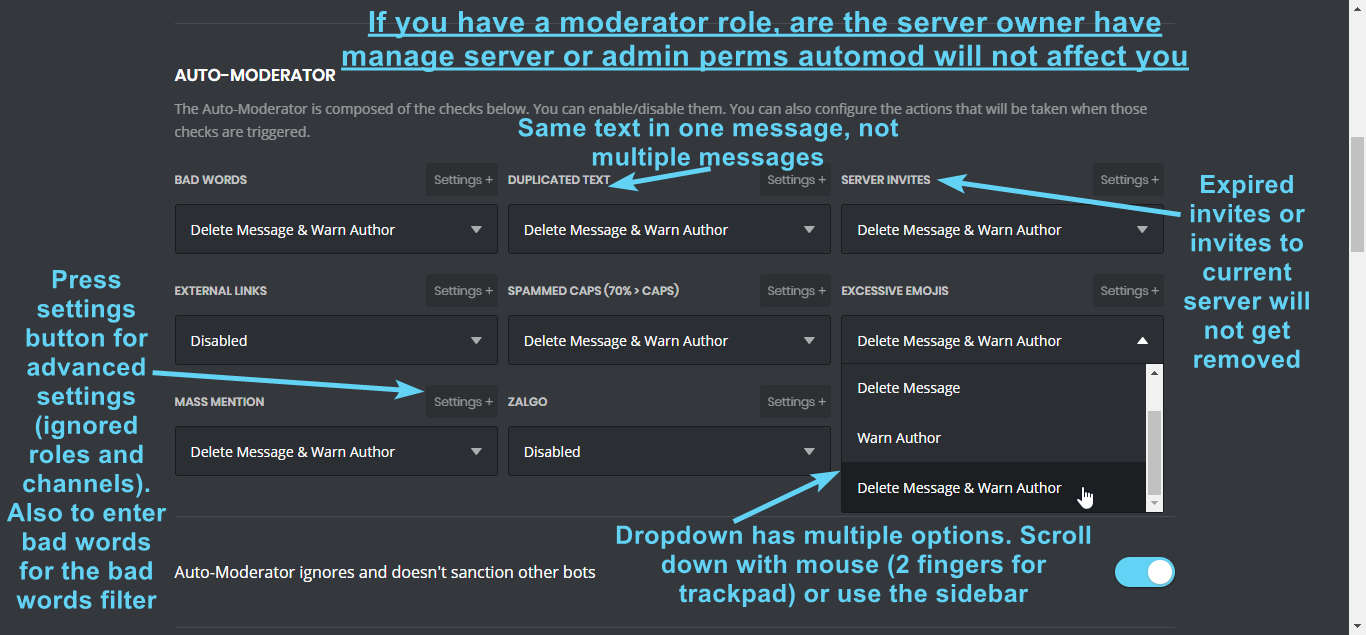
Information about our automod feature (located in the moderator plugin) condensed in a pic for you 
https://i.imgur.com/JVJ9JwL.png
 strong path
top text
 lofty orbit
Hello I don't speak English very well but I have un problem with the bot
Is very very IMPOSSIBEULE de speak anglais
 knotty rose
Je peux parler français. :)
knotty rose
Quel est ta problème ?
lofty orbit
Defois Le bot mee6 ne repond plus du tout il est marqué pas connecté
Et sa Le fait beaucoup de fois dans la journée
Je voulais s'avoir si ct normal ?
lofty orbit
Vous avez fait quelque chose ? Il est revenu
dire yarrowBOT
So... @lofty orbit, I've decided you should be level 1.
Don't get too excited, mmk.
knotty rose
Non. Je ne l'ai pas fait.
dire yarrowBOT
Alright, @buoyant moon has been warned because 'Posted an invite'.
dire yarrowBOT
Alright, @buoyant moon has been warned because 'Posted an invite'.
limber knoll
@strong path he is pretty close to it though
Only thing though was the core parts were rebuilt and some areas weren't though some the minor updates may have changed that
dire yarrowBOT
Alright, @twin bear has been warned because 'Bad word usage'.
 twin bear
oh okay
 narrow sleet
mee6 wont mute people it will say that he is muted but people can still talk
dire yarrowBOT
@static oracle did 'advertising on all channels' and got the ban hammer!
 wispy lodge
Kick me
 sturdy zephyr
@wispy lodge what is your problem?
wispy lodge
My problem is a problem
sturdy zephyr
Just leave
buoyant moon
xd
buoyant moon
LMAO
 livid dove
hi I have a problem the bot I do not want to join my server, he says he can read or send messages in my name
 pure obsidian
@livid dove can you explain more?
 ionic meteor
let's move to #463809001273032715 😃 @livid dove
buoyant moon
I try to click on the mee6 dashboard link but it always says “404 error, you’re in the wrong planet!”
 hollow fern
Hi guys! I have MEE6 running a timer message every 12 hours, but it's spamming that message every 3 hours instead. It's happening on 2 different servers.
dire yarrowBOT
So... @hollow fern, I've decided you should be level 1.
Don't get too excited, mmk.
hollow fern
Tyvm
 midnight wagon
The channel notifications I have selected in the site do not work please help
midnight wagon
So there's no way to get notifications from the bot?
strong path
Other than waiting for a fix, no
midnight wagon
When will this bug be repaired?
strong path
No ETA
midnight wagon
what mean ETA i am bad in english D:
limber knoll
Estimated time of arrival
midnight wagon
ah ok 😄
dire yarrowBOT
So... @midnight wagon, I've decided you should be level 1.
Don't get too excited, mmk.
midnight wagon
can i ask u if u know other bots names for link's spam at the new video upload?
limber knoll
Try googling discord bots
 left cloud
I tired to add mee6 to my new server and when I try to select the server it doesnt come up.
strong path
!!tag logout
wind windBOT
MEE6 says I have no servers, but that's not true...
Well, that can be caused by:
‣ You don't own any servers
‣ You don't have Manage Server or Administrator permissions on any server you're on
‣ You're logged on with a wrong account (the most common problem)
Third one can be fixed by following these steps:
1. Logout from Discord in your browser (not installed client or mobile app)
1.1 Open https://discordapp.com/app in your browser
1.2 Click on \⚙ icon (User Settings)
1.3 Scroll down, click Log Out and confirm action
2. Logout from MEE6 website
2.1 Open https://mee6.xyz in the same browser
2.2 Click on avatar icon in upper right corner
2.3 Click Logout
3. Login using correct account
3.1 Open https://mee6.xyz and click Login button in upper right corner
3.2 In new window login to Discord. After that you will be redirected back to MEE6 website
3.3 That's all! Now you're using correct account and MEE6 website lists servers where you can modify his settings
P.S. If you're on mobile and some elements are not visible, enable Desktop site mode or switch screen to Landscape (vertical) mode.
 surreal drum
Is there an issue with the Going live posts? Have logged out/logged in/reauthorised but mee6 won't post as before when I go live. Has been happening for the past 2 weeks.
 mossy flare
@surreal drum Known problem
surreal drum
@mossy flare any current fix?
mossy flare
Not atm
limber knoll
@surreal drum only temporary fix would be to post your streaming link manually with a @ here mention
Or @rolename
pure obsidian
Do not reply to command option doesn't work anymore when enabled, it was used to.
strong path
Yeah some people already reported that too
pure obsidian
Alright, good to know it's known. 
 slow robin
buoyant moon
slow robin
buoyant moon
?help
strong path
go to #〉commands for commands
buoyant moon
?Help
dire yarrowBOT
So... @buoyant moon, I've decided you should be level 1.
Don't get too excited, mmk.
dire yarrowBOT
Alright, @buoyant moon has been warned because 'Posted an invite'.
buoyant moon
!kick @dire yarrow
strong path
OOPS
mossy flare
Heh
strong path
"You can stop now" - squishy
strong path
go to #〉commands for commands
buoyant moon
Ok
 forest needle
there is more bug in mee6
strong path
state it?
 dusky rampart
@Ped how mute an user ?
strong path
I pinged you in #〉volunteer-support with the answer
buoyant moon
!clear50
strong path
need help?
buoyant moon
no
dire yarrowBOT
Alright, @torn violet has been warned because 'Bad word usage'.
Alright, @torn violet has been warned because 'Bad word usage'.
Alright, @torn violet has been warned because 'Bad word usage'.
 grim void

 shy iris
dire yarrowBOT
shy iris
dire yarrowBOT
Love Dragon, this command is disabled in this channel.
Love Dragon, this command is disabled in this channel.
 tribal bison
Rank Code Not Worked
 edgy furnace
It isn't a bug report but I would like to ask if is possible to edit the warn/ban system.
 sage citrus
helped in #〉volunteer-support
 distant pivot
Just giving a kinda update with my problem with the youtube plugin on my sever 464908077464813590 . It stopped even doing notifcations at all. I try logging in to another computer but still same probelm with the server not loading the youtube dashboard
dire yarrowBOT
So... @hexed moon, I've decided you should be level 2.
Don't get too excited, mmk.
strong path
try this
 hexed moon
okey i try thanks ped 😃
dire yarrowBOT
Alright, @buoyant moon has been warned because 'stop meming in the support channels'.
buoyant moon
plz
dire yarrowBOT
Alright, @old sonnet has been warned because 'Capital letters'.
 old sonnet
sorry
 wary zenith
When my mee6 posts going live updates, it does not include an underscore at the end of the URL which is part of the username.
so the update links the wrong channel.
strong path
 wary zenith
I have used the direct link but I haven't tried the . I will try it and report back, thank you!
 graceful pulsar
の
sterile basin
On mobile, The Mee6 Dashboard "Save changes" button doesn't shows up even you typed something already ( On the custom commands )
strong path
Is this IOS?
sterile basin
Android
strong path
Alright
sterile basin
I can't save the changes right now, I don't want to lost the changes i made T_T
Oh @strong path I can save changes right now ( sorry for the ping )
dire yarrowBOT
Alright, @candid ether has been warned because 'Posted an invite'.
buoyant moon
French?
 chrome cairn
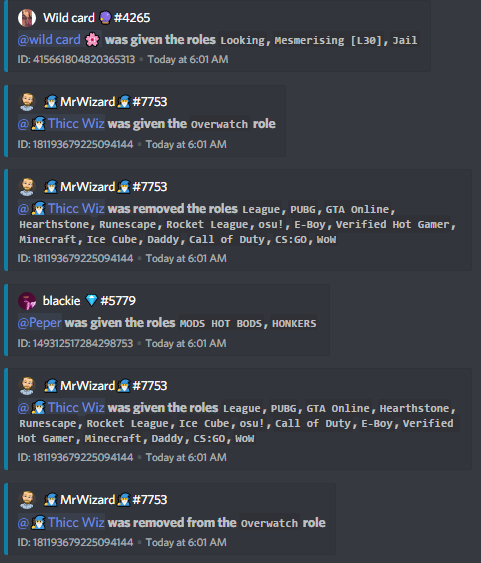
Almost every time I change settings in the dashboard, mee6 will add or remove roles to random people then remove or add those roles https://i.imgur.com/QayAt7n.png
 strong path
Are those roles added as role rewards?
strong path
Why you keep calling me Red? x) What's the problem?
 muted prism
I have not poluchaetsya team slowmode can help
strong path
enabled the moderator plugin?
dire yarrowBOT
You can access my dashboard at https://mee6.xyz/dashboard, and login with your Discord Account.
muted prism
Yes
strong path
Does mee6 respond?
muted prism
Help
strong path
When you do !slowmode 2, does it respond?
muted prism
Yes
strong path
What does it say?
strong path
Can you give me an invite to your server and give me admin perm please?
strong path
In DM
muted prism
Invite friends
dire yarrowBOT
So... @muted prism, I've decided you should be level 2.
Don't get too excited, mmk.
buoyant moon
uuh, support? the binary code is normal?
strong path
Can you check your custom commands?
buoyant moon
I'm just a member in this guild, but I think the owner don't set custom commands bcz he have their own bot
I will ask this
Oh yes, there are custom commands
Sorry
So yeah, but I think the staff is not idiot and don't set a stupid command like that
There are bugs with Mee6 when we execute a custom command?
old sonnet
@ped how do i fix my mee6 role level plugin he wont give roles he says it looks like I can't give one of the roles listed here. Please fix that by putting my role above all the roles listed here.
strong path
!hierarchy
dire yarrowBOT
Role hierarchy is important for me to give out roles. Oh and also Manage Roles perm:
https://birb.is-a-me.me/81d15f9a.gif
old sonnet
Thank you!
buoyant moon
Thanks for the help. 😄
old sonnet
My !ban command stop working yesterday, what should i do to fix it? or is it just my server?
strong path
does it respond with something?
buoyant moon
!hierarchy
 dusty apex
@buoyant moon pls do that in #〉commands
old sonnet
no it just does nothing.
dire yarrowBOT
So... @old sonnet, I've decided you should be level 1.
Don't get too excited, mmk.
dusty apex
(sorry Ped im testing if its the same thing)
@old sonnet can you try disabling and re-enabling the command?
on the dashboard?
dusty apex
😃
old sonnet
hello im still having problems, with the mee6 timer i apoligize for wasting your time.
dire yarrowBOT
So... @old sonnet, I've decided you should be level 2.
Don't get too excited, mmk.
strong path
tried deleting the old one then creating a new one?
 neon linden
Are u sure that Mee6 works? On my server, I am pretty sure some players are not recieving XP at all, cause they chated enough to level up and get role I set?
Btw that option is enebled
 dense fox
Server invite in DM plz?
dense fox
Or him ^
neon linden
?
strong path
You can check your levels plugin for no-xp roles
dire yarrowBOT
You can access my dashboard at https://mee6.xyz/dashboard, and login with your Discord Account.
neon linden
Pretty sure thats not the problem
strong path
no-xp channel?
neon linden
Nope, I have none no-xp channel on server
strong path
Are they starting some of their messages with !?
neon linden
No, just regular text, no bold letters and stuff like that
strong path
Can you invite me?
neon linden
It constantly says that he is not ranked yet
I reseted levels, I will see is it better now
 quaint scroll
!rank
dire yarrowBOT
OGGYGAMING, this command is disabled in this channel.
 lime yacht
I've been having problems with the youtube plugin. Of the 30 or so videos it shouldve posted to a channel by now its only posted 2 (over the last two days). I heard that it may have to do with youtube search quota limits but that sounded like it was just for searching for a channel, not doing the posting of the video. I checked and the bot has any permission it may need, although it has worked twice so I doubt its that anyways.
I have disabled and enabled the plugin, haven't taken any other steps apart from that and no success
 stark raven
Its a bit buggy rn being worked on 🤷
strong path
^
lime yacht
alright cool, glad to hear
 barren depot
Why custom commands do not work
Oops, something went wrong in the land of MEE6! SAD6 This error has been reported to our team. We will work hard to fix it.
limber knoll
!hierarchy
dire yarrowBOT
Role hierarchy is important for me to give out roles. Oh and also Manage Roles perm:
https://birb.is-a-me.me/81d15f9a.gif
limber knoll
@barren depot right pic, make sure mee6 is moved like the picture
barren depot
Its still not working
chrome cairn
@strong path They are not role rewards, from my report earlier
strong path
@chrome cairn Can you give me your server ID?
dire yarrowBOT
Alright, @forest musk has been warned because 'Posted an invite'.
So... @forest musk, I've decided you should be level 1.
Don't get too excited, mmk.
left cloud
When I try to edit my rank card it takes me to a gray screen.
dire yarrowBOT
So... @left cloud, I've decided you should be level 1.
Don't get too excited, mmk.
left cloud
I try to refresh and it doesn't work.
 bitter owl
@left cloud did you solve your problem?
dire yarrowBOT
You can access my dashboard at https://mee6.xyz/dashboard, and login with your Discord Account.
left cloud
Thanks.
dire yarrowBOT
It appears that you may be on the wrong account, or something went wrong since the time you logged into my website.
Please navigate to https://discordapp.com/channels/@me and select the gear in the bottom left, then press Logout.
After that, please navigate to https://mee6.xyz/logout to disconnect from our website.
Once finished, select "Add to Discord" again, and follow the instructions to access my dashboard again.
bitter owl
Please logout from discord web and mee6
left cloud
Okay
bitter owl
And you are using chrome, right?
left cloud
yes
bitter owl
Ok. Logout from everything. Did you do it?
left cloud
not yet
bitter owl
Ok, when finish logging out from both websites it’s time to login again and try: https://mee6.xyz/dashboard
left cloud
okay
my alt pops up
I don't have a choice to pick this account.
I loged in reactly
bitter owl
Hm need clear your browser cache, somehow because I’m not a android user. Really sorry.
bitter owl
Because cleaning the cache will make your alt be logged out from discord website
Well pc is just 350% times better :)))
And thanks for supporting mee6 
left cloud
And thank you for helping!
dire yarrowBOT
So... @left cloud, I've decided you should be level 2.
Don't get too excited, mmk.
bitter owl
At anytime
buoyant moon
help me
this bot says :XMARK6: Uhhhhh, you can't ban a moderator.
even i ban a user have role ( Members only )
 normal maple
is the youtube vid bug still an issue?
dusty apex
@normal maple yes sorry its not working still
normal maple
thanks for the information
dusty apex
np
buoyant moon
@normal maple are u on about posting videos to a server
normal maple
NOOOOO... Just had it setup. No rush about it getting fixed. Take your time
buoyant moon
I was wondering as they don’t post when someone uploads I have the Same issue I think
dusty apex
@buoyant moon YouTube is buggy so in most servers they don't work
buoyant moon
@dusty apex oh ok is it because of YouTube or something else
dusty apex
@buoyant moon from what ik (not confirmed) its YouTube limiting the amount of time each api can request for the info of the video
buoyant moon
Oh ok
buoyant moon
what about the yt plugins
strong path
bugged
buoyant moon
When I!tempmute someone it will mute then and say the tempmute message, but it doesn't unmute.
strong path
Well you could kick then re-invite mee6
strong path
thx
buoyant moon
Did you do anything yet? @strong path
dire yarrowBOT
So... @buoyant moon, I've decided you should be level 2.
Don't get too excited, mmk.
strong path
I gave them your ID so they may check things, this bug has been here before
buoyant moon
MEE6 Giving out all the roles to every member who joins
strong path
check your welcome plugin @buoyant moon
dire yarrowBOT
You can access my dashboard at https://mee6.xyz/dashboard, and login with your Discord Account.
buoyant moon
sorry, and thx
 quiet anchor
dire yarrowBOT
quiet anchor
dire yarrowBOT
❤ Ṫǚï Ťëñ Ȏ ❤, this command is disabled in this channel.
strong path
go to #〉commands for commands
 dapper whale
ki
limber knoll
@dapper whale?
 supple summit
I can't use the !role-info command and the !kick command...
supple summit
yeah
strong path
Invite me
strong path
ight
supple summit
do I need a reason, if I want kick somebody with !kick
strong path
No
supple summit
🤔
dire yarrowBOT
So... @supple summit, I've decided you should be level 3.
Don't get too excited, mmk.
sage citrus
No eta
buoyant moon
K
 mossy breach
<@&193123929701875712> we have mee6 in our school server. We configured so he tells us when youtube channels of game development post stuff. So far, Unity posted videos yesterday on youtube but mee6 didn't post them
 burnt hazel
@mossy breach The YouTube plugin I believe is currently buggy, you can try removing and adding the channel back to the plugin to see if this fixes the issue.
Otherwise the only thing to do is wait for a fix if this doesnt work 
mossy breach
@burnt hazel oh ok, thanks a lot for the quick answer!
burnt hazel
np
 sudden hound
!rank
dire yarrowBOT
Diser, this command is disabled in this channel.
 fresh iron
!rank
dire yarrowBOT
MR | BuğraReyiz, this command is disabled in this channel.
burnt hazel
Commands in #〉commands
buoyant moon

 cinder anvil
Hello, I am getting an error, that if a streamer has an "_ " as part of their username, the bot posts a link without the "_ " causing an error
It appears to be because Discord uses an (underscore) as an italics
thus, the link comes up ital but incorrect.
I have screenshots
dense fox
Twitch is bugged atm
cinder anvil
well yes, but not in this case. Everyone else is showing up correctly, this is an error with how an (underscore) is interpreted by the bot
it happens in certain discord rooms and not others as well
as can be seen when I tried to write the message above^
dense fox
Yes, probably bugged issue
cinder anvil
right, hence I am reporting here
dire yarrowBOT
So... @cinder anvil, I've decided you should be level 1.
Don't get too excited, mmk.
buoyant moon
!levels
dire yarrowBOT
Muta, this command is disabled in this channel.
Alright, @pine pecan has been warned because 'Bad word usage'.
 pine pecan
dense fox
pine pecan
dense fox
Hes gone sil
 wooden mountain
ok
 tiny sequoia
your bug site I can not configure welcome messages <@&193123929701875712> @dire yarrow
dense fox
Dont jump channels.
limber knoll
Helping in chat lol
tiny sequoia
^^
dire yarrowBOT
So... @tiny sequoia, I've decided you should be level 1.
Don't get too excited, mmk.
buoyant moon
 split lynx
 lavish schooner
 buoyant moon
dire yarrowBOT
buoyant moon
dire yarrowBOT
Alright, @buoyant moon has been warned because 'Bad word usage'.
dire yarrowBOT
Alright, @buoyant moon has been warned because 'Bad word usage'.
strong path
tagging everyone is a bad way to get help
buoyant moon
Well I'm the only one in every server I'm in and out of everyone I know that's having this problem
strong path
So uh, can you describe your problem there? !rank not working?
strong path
Can you invite me and give me manage server perm so I can check it out?
buoyant moon
I cant do that. I'm not the owner and there is multiple other people that own it
buoyant moon
No @strong path
dire yarrowBOT
So... @buoyant moon, I've decided you should be level 1.
Don't get too excited, mmk.
buoyant moon
I can see if they can let you in but you'll probably have to leave after the problem is fixed
strong path
No worries, I would've did it still x)
buoyant moon
Depends on the owners. Everyone can stay but not manage
 sleek siren
I am having an issue with youtube portion of mee6. It seems to have a mind of it's own for what video it wants to post and when. I saw the twitter post from over a month ago and looks liek it said it was fix, but i am running to the issue. Am i doing somethign wrong?
buoyant moon
is the youtube plugin thing fixed yet?
 rose frost
sadly no, hopefully soon
buoyant moon
ok
 reef badger
The bot didn’t pick up my YouTube channel due to the fact it was a new channel
reef badger
Oh ok ok sorry
burnt hazel
looks like it has a problem doing spaces and prefers a dash instead
reef badger
Ah no worries man sorry for bothering you
burnt hazel
No problem, i didn't know it needed a dash if theres a space for the channel name
reef badger
Yeah it makes sense in coding terms and all that tbh with all bots kinda need dash
dire yarrowBOT
So... @reef badger, I've decided you should be level 1.
Don't get too excited, mmk.
buoyant moon
I think I narrowed it down. I sent Mee6 a message to hold it's place at the top of my messages. I typed hi so it would stay. Then it started doing this. Anyway to fix?
I have found no other reports or incidents with the same thing happening at all
strong path
Still can't do much without contacting someone that can access mee6's dashboard
ok well
You can try kicking then re-inviting the bot, all dashboard settings are saved
buoyant moon
I cant add you as friend so I can't invite
buoyant moon
I will watch
 rose compass
Staff I am having an issue where some custom commands are posting or switching their message with another custom command the most extreme case is a full list of random commands posted from !loot_2 to !loot_3 . What is your take on the situation?
dire yarrowBOT
So... @rose compass, I've decided you should be level 1.
Don't get too excited, mmk.
pure obsidian
@rose compass they know, known bug
rose compass
understood any known eta to fix or workaround?
pure obsidian
No ETA for pretty much any bug fixes & planned features.
In the mean while, make sure to refresh the page when deleting each custom command to avoid this.
or after creating/making any changes in general
In my knowledge it only occurs when deleting custom commands
buoyant moon
burnt hazel
@bitter owl spam
wind windBOT
 DavidGhiga#5777 was banned
bitter owl
@burnt hazel <3
 golden summit
 modest valley
why has the music part of mee6 been so messed up lately? it's not playing music properly at all
 rugged panther
Time messages are bugged. please fix @devout chasm
 sonic crystal
Well.. I Can't Find Any Bugs... Maybe It's Acting Slow, But It May Be Just Me...
bitter owl
@golden summit blame discord not our feature. No bots punish people through edited messages (would eat just the double of our processing)
@modest valley Our servers was a little bit slow could you check now?
@rugged panther You need to be active and type in the text channel to make timers work
 old parrot
lol
 outer vault
 tawdry slate
hmm that's great!
dire yarrowBOT
So... @tawdry slate, I've decided you should be level 2.
Don't get too excited, mmk.
tawdry slate
oh yes... thanks MEE6
 velvet jungle
<@&193123929701875712> When I used !tempmute @rain willow 5m, it muted that user for 4 hours.
strong path
Yes, tempmute/tempban seems bugged
dire yarrowBOT
@vast elk did 'advertising' and got the ban hammer!
 flint hemlock
<@&193123929701875712> so I found a bug.. I went to clear messages from a user that I could tag, but was banned from our discord... but it deleted ALL messages up to 'count'
so I just wiped out 15 days worth of messages..
i typed: !clear @fresh horizon 9999
and it wiped all messages
flint hemlock
how so? the username wasn't on teh server.. that should be an error
if I did "!clear 9999" that's one thing
but I intended to use it on a user who was no longer available
limber knoll
So actually pinged a @username that wasnt on the server?
flint hemlock
yes
his messages were still there, but was temp-banned
so I was trying to clear his messages
just gave it a high number
and it wiped everyone's message in that channel
you can tag anyone that's not on your server @mallory
or, sorry, was a member
but logged off potentially
limber knoll
Removed other user messages?
flint hemlock
yes
limber knoll
Server id please
limber knoll
Will do
 strange basin
fix the mee6 that if u send message 1 time before 1 message post and this happened
?? #general is in slowmode. You will be able to post there again in 1.1 seconds, alright?
 jolly wigeon
That’s just slow mode
strong path
stop
 undone sleet
My server was hacked well not hacked my freind knows my discord password and gave himself ownership on my server and gave me member how do i get it back 😭
buoyant moon
2fa is ur friend
dire yarrowBOT
So... @buoyant moon, I've decided you should be level 3.
Don't get too excited, mmk.
 rose pumice
Algun español necesitó ayuda
 runic eagle
I have a bug with the YouTube plugin when I click on it puts me a dark gray screen
burnt hazel
@runic eagle What browser are you using?
runic eagle
chrome
burnt hazel
Can you try clearing the cache, and if you have any ad-blockers or VPN can you disable them please.
runic eagle
it's still not working and I try it on my phone and it's done the same
 slender lantern
hi my timers message don't work
bitter owl
@slender lantern Need activity in the timer's channel
Our bot has an anti-spam system that prevents from spaming
buoyant moon
My name jeff
bitter owl
@buoyant moon Welcome, jeff, in what can we help you with today?
buoyant moon
Nothing yet
bitter owl
Great, so please keep conversation in #〉chat or #〉commands Ok? Thanks
 stoic tendon
ya
runic eagle
@bitter owl and me I still have the bug
 feral wraith
hi guys
bitter owl
@runic eagle Please press F12 and then Console please
dire yarrowBOT
So... @bitter owl, I've decided you should be level 51.
Don't get too excited, mmk.
dire yarrowBOT
Alright, @runic eagle has been warned because 'Duplicated text'.
dire yarrowBOT
Alright, @feral wraith has been warned because 'Capital letters'.
feral wraith
i neeed help
bitter owl
With what, my friend?
feral wraith
oh
bitter owl
State please
buoyant moon
I sorta need help with something
dire yarrowBOT
Alright, @feral wraith has been warned because 'Capital letters'.
bitter owl
We don't do that
feral wraith
: (
feral wraith
oh
Mee6 is saying me always message
send me
always message
Hey @feral wraith! YOU ARE SENDING too many CAPS in YOUR MESSAGES! :ANGRY6:
Hey @feral wraith! YOU ARE SENDING too many CAPS in YOUR MESSAGES!
runic eagle
dire yarrowBOT
So... @runic eagle, I've decided you should be level 1.
Don't get too excited, mmk.
bitter owl
Hey
Well stop using capital letters
Search in google what this means please
@runic eagle Have you tried logging out from your account and then assigning again?
dire yarrowBOT
It appears that you may be on the wrong account, or something went wrong since the time you logged into my website.
Please navigate to https://discordapp.com/channels/@me and select the gear in the bottom left, then press Logout.
After that, please navigate to https://mee6.xyz/logout to disconnect from our website.
Once finished, select "Add to Discord" again, and follow the instructions to access my dashboard again.
runic eagle
always the same
runic eagle
bitter owl
Thank you
 distant briar
bitter owl
distant briar
bitter owl
@distant briar Пойдите в #〉chat / #〉commands и не спам, пожалуйста, напишите все в одной фразе
 red zodiac
Fix it uploading please
Yt
I've uploaded atleast five videos and none of them have appeared
I've got it set up
And twitch only shows streaming aftwr I stop streaming
limber knoll
@red zodiac yt is bugged at the moment no eta on fix
red zodiac
And twitch?
limber knoll
Rate limits would be the issue
red zodiac
What's rate limit?
limber knoll
Think of it like water in a tube, water being the bot traffic that shows your streaming
red zodiac
Oh
limber knoll
Squeeze the tube and its limited
limber knoll
Not your end sorry we're waiting for limits to be increased
dire yarrowBOT
So... @red zodiac, I've decided you should be level 4.
Don't get too excited, mmk.
limber knoll
Np
dire yarrowBOT
Alright, @buoyant moon has been warned because 'Duplicated text'.
red zodiac
Doesn't give roles, replies and also gives error
limber knoll
!hierarchy
dire yarrowBOT
Role hierarchy is important for me to give out roles. Oh and also Manage Roles perm:
https://birb.is-a-me.me/81d15f9a.gif
knotty rose
Fixed ^
 thick ginkgo
sa
buoyant moon
@thick ginkgo as
buoyant moon
He is from my country dude
dusty apex
well this is #〉bugs-reports not for chatting 😃 so pls move to #〉chat
buoyant moon
İ know this guy
 gilded hawk
- Mute ain't working
- YouTube plugin ain't working
gilded hawk
But I am reporting a bug
buoyant moon
i mentioned Siempre
buoyant moon
~~#〉volunteer-support / #463809001273032715 ~~ waiting
wind windBOT
Prerequisites:
- Moderator plugin is enabled
!mutecommand isn't disabled- Bot has role with Manage Roles and Manage Channels permissions
- Muted role is under MEE6 role
- You're trying to mute someone using
!mute @mention reason, otherwise it will not work
If user got Muted role but still can talk means there's issue with your channel permissions
Go to Channel Settings -> Permissions
- If that's public channel that can be accessed by anyone:
- Set
Send Messagesfor all roles except Muted - Set
Send Messagesfor Muted role
- If that's secret channel that requires *special* role to access it:
- Set
Send Messages Read Messagesfor special role - Set
Send Messages Read Messagesfor Muted role - Set
Send Messages Read Messagesfor@everyonerole
gilded hawk
@strong path thx
 verbal drum
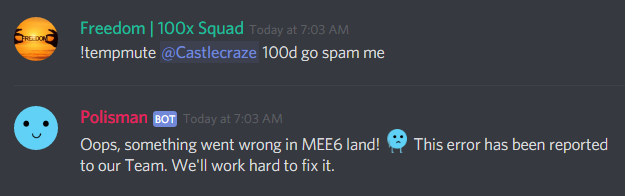
https://i.imgur.com/0u4XvxK.png
tempmute has been broken for over a week now
server id = 339694740201275392
 knotty rose
If I recall, tempmute has 🐝n bugged for a moment.
 flint needle
I'm having problems, my Mee6 does not expel any members "everyone", it shows that they are moderators and it can not do that, what do I do?
buoyant moon
sorry that i keep asking the same question but when will the youtube plugin work?
knotty rose
No ETA, sorry. @buoyant moon
knotty rose
ETA = Estimated Time of Arrival
buoyant moon
ok thanks
dire yarrowBOT
So... @crisp current, I've decided you should be level 1.
Don't get too excited, mmk.
 fresh canyon
MEE6 Stopped working for a Server I’m in.
strong path
What stopped working?
fresh canyon
Well, It isn’t responding to the commands.
strong path
For example?
fresh canyon
In my server, it is.
dire yarrowBOT
Hey! My prefix is currently ! and cannot be changed, but don't sweat. It will be in the future sometime!
strong path
I don't believe so <.<
fresh canyon
Nvm, I’m just stupid.
strong path
np
 glad rampart
!rank
dire yarrowBOT
HappyCat, this command is disabled in this channel.
dusty apex
@glad rampart go to #〉commands
 turbid crystal
The new rank thing is great, but whilst it works right on the "Edit Rank Card" screen, the !rank command doesn't display kanji and emoji (and probably other special characters) right
https://media.discordapp.net/attachments/207114727430684672/473389145218088960/card.png

Here's what it's supposed to look like
I'm guessing it's because the two places use a different font
sage citrus
known
dire yarrowBOT
tu princesa❤❤, this command is disabled in this channel.
 cobalt brook
<@&193123929701875712> hi, i have enabled the youtube notifications on my chanel, but it hasn't been working the past 2 weeks. any idea why?
 waxen sundial
the personnals command not
 golden sandal
buoyant moon
golden sandal
buoyant moon
chat room
 lime meadow
Ummmm.....what the heck is happening in the chat room?? LOL
 keen wadi
 gaunt sparrow
bug report: help
buoyant moon
What the hell is going on?
 sinful kayak
I have no clue
gaunt sparrow
^^^
buoyant moon
Is the bot tagging every single person in this server?
 bleak talon
ban it
buoyant moon
I think it's tagging every member
gaunt sparrow
it's multiple bots tho
 daring rain
<@&193123929701875712> Hey, cunt. !slowmode
 hallow meadow
Is it done?
 latent rose
save us!
dire yarrowBOT
Alright, @daring rain has been warned because 'Bad word usage'.
gaunt sparrow
@devout chasm please do something your server's literally turning into the fall of rome
dire yarrowBOT
So... @gaunt sparrow, I've decided you should be level 1.
Don't get too excited, mmk.
buoyant moon
rip
 coarse verge
I set a Mee6 timer to 12 hours. The timer posts every 5 hours, wtf?
bitter owl
@coarse verge Delete it and again
coarse verge
Thanks
 willow crown
ı'm server's the timers are not working.
bitter owl
@willow crown Need active channel
Mee6 has anti-spam system
No activity no timer
Otherwise, delete timer and create new one pls
willow crown
@bitter owl I erased the timer but it did not work and I was prevented from spamming an active channel every 10 minutes by the timers
dire yarrowBOT
So... @willow crown, I've decided you should be level 2.
Don't get too excited, mmk.
willow crown
This issue has already been solved by someone from the help team. But he made a mistake again.
<@&193123929701875712> I'm server's the timers are not working. I erased the timer but it did not work and I was prevented from spamming an active channel every 10 minutes by the timers.This issue has already been solved by someone from the help team. But he made a mistake again.
gilded hawk
Timed messages ain't working
bitter owl
@gilded hawk requested for a restart, be patient
bitter owl
Everything
gilded hawk
?
buoyant moon
buggy XD
gilded hawk
So when will it be fixed?
bitter owl
Super soon
buoyant moon
i can not choose a server
dusty apex
@buoyant moon what browser?
buoyant moon
google chrome
 cold bear
gray screen or it says you have no server?
buoyant moon
@cold bear because it says that i have no server
cold bear
!!tag logout
wind windBOT
MEE6 says I have no servers, but that's not true...
Well, that can be caused by:
‣ You don't own any servers
‣ You don't have Manage Server or Administrator permissions on any server you're on
‣ You're logged on with a wrong account (the most common problem)
Third one can be fixed by following these steps:
1. Logout from Discord in your browser (not installed client or mobile app)
1.1 Open https://discordapp.com/app in your browser
1.2 Click on \⚙ icon (User Settings)
1.3 Scroll down, click Log Out and confirm action
2. Logout from MEE6 website
2.1 Open https://mee6.xyz in the same browser
2.2 Click on avatar icon in upper right corner
2.3 Click Logout
3. Login using correct account
3.1 Open https://mee6.xyz and click Login button in upper right corner
3.2 In new window login to Discord. After that you will be redirected back to MEE6 website
3.3 That's all! Now you're using correct account and MEE6 website lists servers where you can modify his settings
P.S. If you're on mobile and some elements are not visible, enable Desktop site mode or switch screen to Landscape (vertical) mode.
cold bear
^ do steps above
 true jackal
having an issue where audio recordings have broken timing, so voices are all jumbled together. in real life, on the call, people waited their turn and spoke one at a time. on the recording, it sounds like they're speaking on top of each other at the same time.
 radiant blade
Hi, I have a problem with Mee6, when i try to add a youtube channel on the website to make the bot shares videos, I have this
anyone may help me ?
 orchid sparrow
strong path
orchid sparrow
strong path
What's the problem?
dire yarrowBOT
So... @orchid sparrow, I've decided you should be level 2.
Don't get too excited, mmk.
radiant blade
when i try to add a youtube channel i have this
strong path
Only youtube?
strong path
Well like I said, YouTube is bugged so don't bother <.<
radiant blade
oh ok, i'm admin of a community of young youtubers, and I use this fonction a lot :/ how many channel may I put on ?
strong path
rip, idk
radiant blade
How can disable it with that problem ? I don't want to have some which haver videos share, and some not :/
dire yarrowBOT
So... @radiant blade, I've decided you should be level 1.
Don't get too excited, mmk.
dusty apex
@fallow sand dont spam
 fallow sand
Uq
 smoky token
amk
smoky token
boş yapma
 bold edge
Welcome Message Bug: When a user joins my server the welcome message likes to disable Thats if you have it enabled
 dreamy gate
Automated actions isnot working
bitter owl
@dreamy gate Elaborate it. Which one, what yo expected to work and how did you test it?
buoyant moon
Temporary mutes do not function correctly
dire yarrowBOT
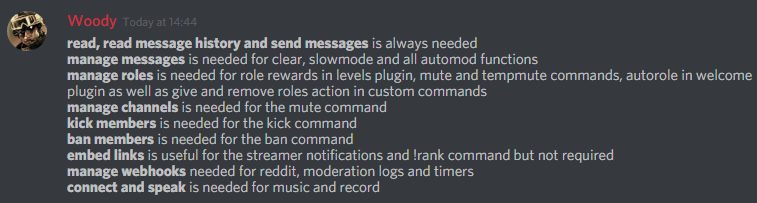
Full List of my Permissions that I use...
https://i.imgur.com/3Wd5wKZ.png
 buoyant moon
Let me check, but yeah it doesn't unmute
ffs the people who setup this server are dumb asf, probably doesn't have all of the needed perms 😂
Actually @bitter owl it has all of that
🤔
bitter owl
@buoyant moon Now put mee6's role above all over the others
dire yarrowBOT
Role hierarchy is important for me to give out roles. Oh and also Manage Roles perm:
https://birb.is-a-me.me/81d15f9a.gif
dusty apex
gif broken @bitter owl
bitter owl
Just click on it lol
bitter owl
yes it is
 stiff wigeon
When announcing that someone is live on twitch, if the streamers name ends with a underscore, it links to the wrong channel
bitter owl
@stiff wigeon Need to put *{streamer}* around the {streamer} ingredient
bitter owl
@fading lynx Sem copypasta aqui maninho
strong path
It won't reply to you in DMs?
I mean that's what send response privately does(or should've at least)
 pseudo thistle
Wait
strong path
Do you have DMs disabled?
dire yarrowBOT
So... @pseudo thistle, I've decided you should be level 1.
Don't get too excited, mmk.
pseudo thistle
Ok i got it now
strong path
alright
pseudo thistle
But this I did not get notice on my discord server even though i released the video and my youtube feature was activated and my channel had been added to the youtube feature
strong path
YouTube is bugged.
 crisp flicker
I am currently experiencing issues with MEE6. MEE6 won't respond to any commands, I tried kicking, but that didn't work. I can't even change it's roles!!
strong path
🤔 Are you the owner?
 vapid shoal
<@&193123929701875712> Yesterday I experienced MEE6 doing one of those messages on a timer and I disabled it ages ago. Is this going to carry on or was It just a on-off
limber knoll
Check your webhooks @vapid shoal
Possible its still in there
Go to server settings> webhook
bold edge
Mee6 is counting twice the bots on !server-info command
dire yarrowBOT
So... @bold edge, I've decided you should be level 5.
Don't get too excited, mmk.
strong path
Known
 green wraith
Dont work
 frigid cove
Mute and tempmute do not work!
strong path
oh sorry, I forgot about you <.<
Are you saying that it isn't muting? @frigid cove
strong path
!!tag mutehelp
wind windBOT
Prerequisites:
- Moderator plugin is enabled
!mutecommand isn't disabled- Bot has role with Manage Roles and Manage Channels permissions
- Muted role is under MEE6 role
- You're trying to mute someone using
!mute @mention reason, otherwise it will not work
If user got Muted role but still can talk means there's issue with your channel permissions
Go to Channel Settings -> Permissions
- If that's public channel that can be accessed by anyone:
- Set
Send Messagesfor all roles except Muted - Set
Send Messagesfor Muted role
- If that's secret channel that requires *special* role to access it:
- Set
Send Messages Read Messagesfor special role - Set
Send Messages Read Messagesfor Muted role - Set
Send Messages Read Messagesfor@everyonerole
strong path
read above
strong path
strong path
Make sure that in server settings > roles, mee6 is above the muted role
strong path
It still gives the error? 🤔
frigid cove
dire yarrowBOT
So... @frigid cove, I've decided you should be level 2.
Don't get too excited, mmk.
strong path
check the channel perms for the other roles, they may be a role with a for send messages
strong path
Yes, for every role
frigid cove
ok
strong path
And the muted role should have a for send messages
dire yarrowBOT
Alright, @feral pumice has been warned because 'Posted an invite'.
 quaint falcon
I can't add it to my server i did everything good
 noble topaz
I’m loosing my levels in servers.
buoyant moon
!rank
dire yarrowBOT
3Q6, this command is disabled in this channel.
limber knoll
@noble topaz your levels can only be reset by server owners, and people with admin or manage server perms
dire yarrowBOT
So... @noble topaz, I've decided you should be level 1.
Don't get too excited, mmk.
strong path
!reset
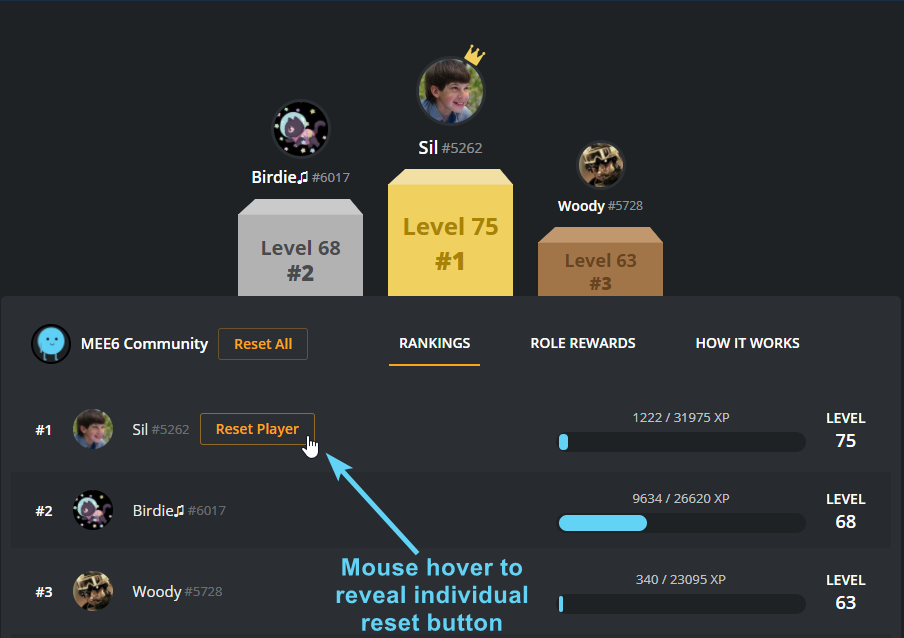
dire yarrowBOT
To reset levels, you need to have the manage server perm (which grants you the ability to access the servers dashboard). The leaderboard can be found by doing !levels or https://mee6.xyz/leaderboard/SERVERID where SERVERID is the servers ID
https://i.imgur.com/q36HjaC.png
 fathom pumice


 native anvil
@fathom pumice make sure you're using it properly
dire yarrowBOT
The clear command allows you to clear the last xx amount of message or to clear one user without clearing anyone else.
Use !clear 1-1000 to clear the last xx messages (example !clear 10)
or !clear @name to clear all the message of @name in the last 2 weeks
+ I need manage messages permission
+ I need view message history permission (otherwise I will respond with -1 messages cleared)
+ you need to enable the plugin on the website
+ you need to check the checkmark next to clear on the plugin page.
+ you need to set your role as moderator (located at the top of the plugin page in the moderator tab)```