#〉bugs-reports
2 messages · Page 32 of 1
 dusty apex
 buoyant moon
It worked for me the past few days
dusty apex
...
 strong path
Don't say things you're not sure of
 warm wolf
I'm trying to edit the mee6 commands on the mee6 site but it's stuck on the select server screen? I'd select a server and it'd just load for a few seconds and I have to reselect server...
dusty apex
what browser?
buoyant moon
Mon bot musique est déconnecté est ce normal ?


Oui
Combien de temp

?
Stp
 dire yarrowBOT
So... @buoyant moon, I've decided you should be level 1.
Don't get too excited, mmk.
 faint dome
T'es incompétent @ripe rivet, et useless 😏
 stiff depot
!rank
dire yarrowBOT
👑👑KEHMET👑👑, this command is disabled in this channel. 
 dry glen
stiff depot
dry glen
stiff depot
ok
 half sable
May you guys ping me when the YouTube plugin is fixed?
dire yarrowBOT
So... @half sable, I've decided you should be level 1.
Don't get too excited, mmk.
buoyant moon
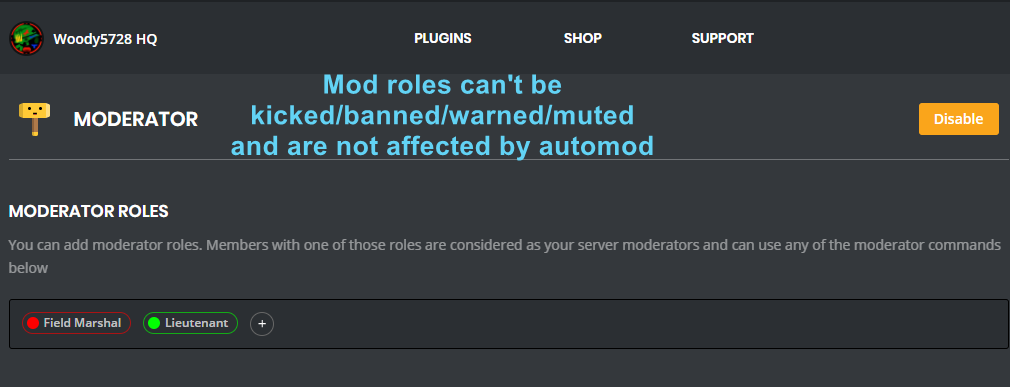
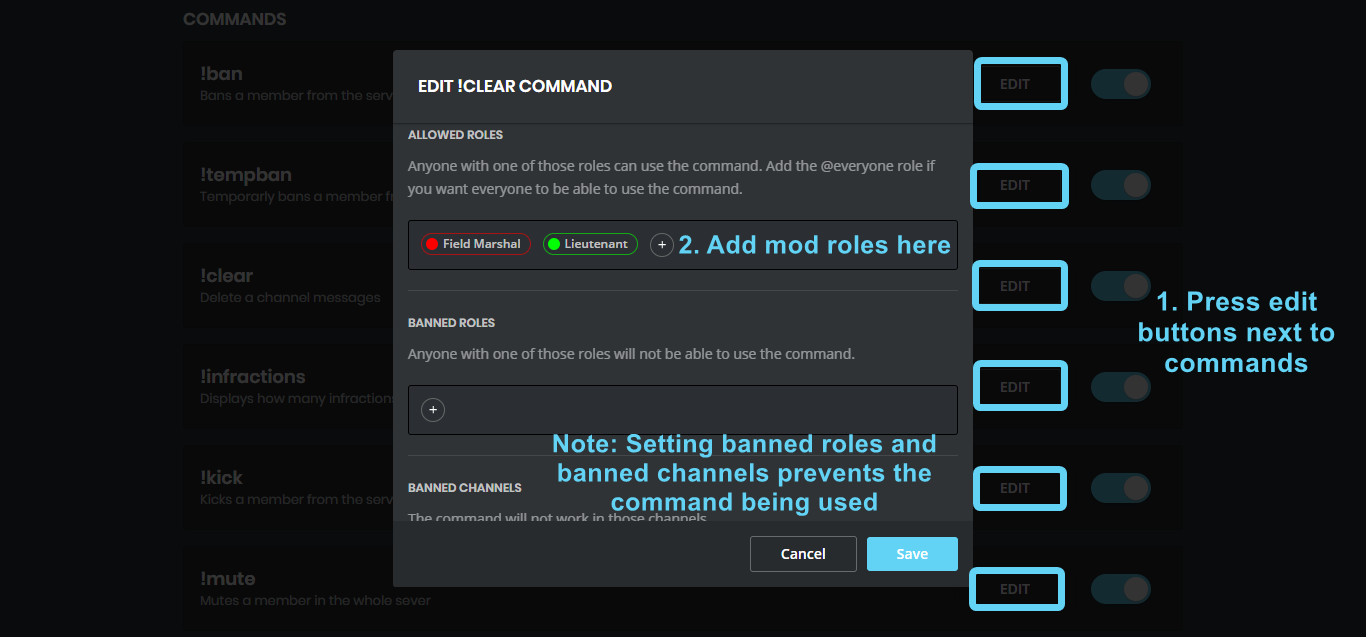
When using "Moderator" Plugin, when i add roles to "Moderators Roles" They wont seem to work unless I give them Administrator on their role in discord server settings, Well atleast for the !warn command, i haven't tested any others
dire yarrowBOT
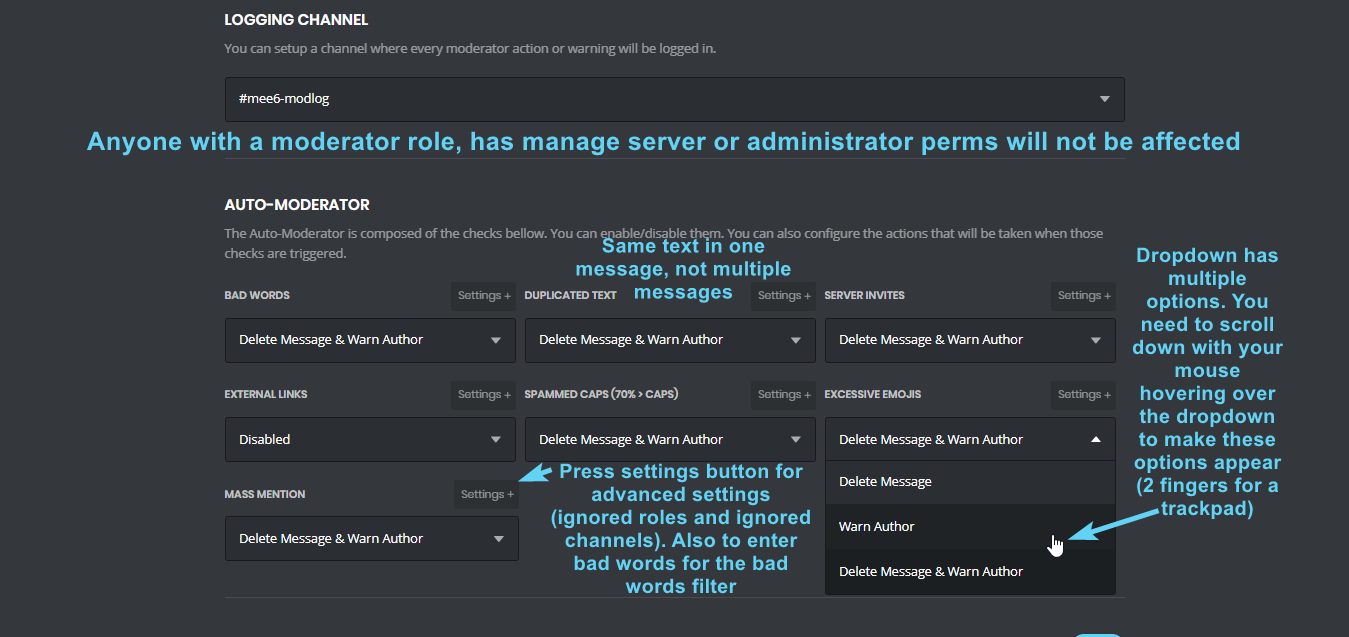
You can use the images below to help you configure my Moderator Plugin.
https://i.imgur.com/ZL24div.png https://i.imgur.com/675FdYd.png
 buoyant moon
The role is allowed under !warn they cant use it still...
Well i understand now atleast Moderator roles now thanks
strong path
did you add @everyone as a banned role?
buoyant moon
Yes
strong path
remove it
buoyant moon
Ok
I see what you're trying to do ima remove notification gang role from the banned roles
dire yarrowBOT
Alright, @buoyant moon has been warned because 'Bad word usage'.
buoyant moon
But the same thing happen with @every1 removed
Ok it worked, when i removed my other role from banned roles
dire yarrowBOT
So... @buoyant moon, I've decided you should be level 1.
Don't get too excited, mmk.
buoyant moon
🤓 thanks Ped, I got a question about banned roles tho now...
strong path
ask
buoyant moon
If a role isnt under banned roles for a command, are they allowed to use the command* fk
im trying my best to word it right 😩
strong path
Alright, I'm 99% sure that no one other than those with manage server or admin perm will be able to use it if there are no allowed roles. Putting @everyone as an allowed role will make that command usable by everyone. That's my theory. You can test it with your alt right there.
buoyant moon
Alright thanks for everything! 🌟
 sterile elbow
@limber knoll Hey, so I deleted all the timer and set it to 12 hours. I had 7 of them (each for a day) and one of them turned out to be 1 minute or more and completely spammed the server. I had to turn off all of them just so this doesn't happen. But I thought I would report this bug because I've done it multiple times and it still seem to have a possibility that not following the set timer
 limber knoll
Its still dependant on user activity in the channel, if it was the bot that last posted it dont post again
 harsh smelt
@ripe rivet ?
For the bug (i have found big bug !!!)
I can post image here ?
Ok
I go translate ...
No always
buoyant moon
If I want to authorize the bot, I'm told that I'm supposed to have no discord server. Maybe I'm connected to the wrong account. So I log out, but I can't log in... As soon as I go to the webside of you on login, I authorize the bot again...
dire yarrowBOT
It appears that you may be on the wrong account, or something went wrong since the time you logged into my website.
Please navigate to https://discordapp.com/channels/@me and select the gear in the bottom left, then press Logout.
After that, please navigate to https://mee6.xyz/logout to disconnect from our website.
Once finished, select "Add to Discord" again, and follow the instructions to access my dashboard again.
harsh smelt
Reset mee6 for my serveur ?
dire yarrowBOT
So... @harsh smelt, I've decided you should be level 3.
Don't get too excited, mmk.
harsh smelt
Ok
buoyant moon
Where can I now verify my email address from my account, which was generated randomly? This is now the 3 discord account... I don't want it and still have it... I don't even know his email...
18000 people online, and no one can help me... wonderful :/
dry glen
It’s in your email
buoyant moon
I dont get one
dry glen
Then your not login the right one
buoyant moon
i dont think that you understand me... I can not change my account..
dry glen
Change the email in settings
buoyant moon
Jedes mal wenn ich mich einlogge, Möchte Der Bot sich sofort Autorisieren
This account was generated Randomly... this isnt my account... i never created it..
dire yarrowBOT
So... @buoyant moon, I've decided you should be level 1.
Don't get too excited, mmk.
dry glen
Then why you have
And what Email are you even log in to
You really don’t have to tell me
buoyant moon
there is no email :/
I still have two Emails , and i already have two accounts
this is not mine..
dry glen
Then how did you get that account
buoyant moon
i went on there Webside, and a second later i get this account
dry glen
Mhm
buoyant moon
thats my problem...
dry glen
That’s weird
half sable
When is the YouTube plug-in going to be fixed?
 faint bison
no eta
dry glen

half sable
Like how many years, months, weeks, days, hours, minutes, and seconds?
dry glen
Eta
buoyant moon
@buoyant moon Hi, Du hast bereits nen Verifizierten Discord account? Wenn ja klick im Browser unten auf das Zahnrad dann ganz unten auf "ausloggen" dann kannst du deinen account wechseln
 hollow goblet
jienuo'rç
dire yarrowBOT
It appears that you may be on the wrong account, or something went wrong since the time you logged into my website.
Please navigate to https://discordapp.com/channels/@me and select the gear in the bottom left, then press Logout.
After that, please navigate to https://mee6.xyz/logout to disconnect from our website.
Once finished, select "Add to Discord" again, and follow the instructions to access my dashboard again.
 brisk lion
One of my timers is set for 2 hours and goes off after almost every message
100% sure it's saved at 2 hours and it's the only timer
dry glen
Timer plugin is bugged
 bitter owl
@dry glen only editing timers is bugged, not sending
@brisk lion does the channel you setup the timer, is currently active?
dry glen
Ahh well I didn’t know
bitter owl
If a channel is not active, mee6’s anti-spam make the bot stop sending messages
Yeah, if you edit the timer, it won’t change, the only way is deleting the old one and creating again
But sending messages is ok. Just need to have an active channel to make mee6 perform the plugin :)
 lost patio
!rank
dire yarrowBOT
Matvey YouTube, this command is disabled in this channel.
 cloud maple
#〉commands @lost patio
 limber knoll
@cloud maple no
buoyant moon
Why won't mee6 warn for bad words
limber knoll
Screenshot if your bad words page
buoyant moon
Ok
dry glen
Oh god
limber knoll
Ok
limber knoll
I see the example your testing them
buoyant moon
Oh I just forgot I set it up where only I can't say them, whoops
I will delete that
buoyant moon
I forgot lol
dire yarrowBOT
Alright, @buoyant moon has been warned because 'Bad word usage'.
 pearl dock
I want to report
I told a mee6 support member to add bad words filter and it proves out while im asleep the server was in a war with words
Mee6 didn't delete it
strong path
Have you made sure it had the correct perms?
dire yarrowBOT
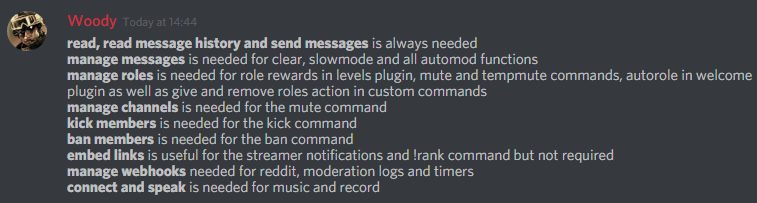
Full List of my Permissions that I use...
https://i.imgur.com/3Wd5wKZ.png
 limber knoll
@pearl dock 👆
pearl dock
Yep
dire yarrowBOT
strong path
did you take note of the top text?
strong path
Does it not respond at all? Not even to !rank?
pearl dock
It does respond but i think the support guy didn't help me
I led a support guy from ur server he told he did that
 strong path
And you did add some badwords, right?
strong path
He added them for you?
pearl dock
I told him so to add much as possible, also a list too
strong path
Can you check your list? See if they got actually added?
pearl dock
Okies will check when i get back home. I gtg will talk later
strong path
Alright, no worries
 untold haven
i have set a timer
for a message
i waited 1hour.. as i did set it
and the bot didn`t send the message
 magic eagle
i don't know if it's a bug or not
but a member i mute just continue to change his name
and somehow mee6 give him the role which enable him to speak again and pass the mute
<@&193123929701875712>
 hoary hamlet
not really a bug report but there is a guy named !ScottishFuckCunt!, can someone please take care of that
buoyant moon
timer dont work i set some our but every 5 minut the bot send the message
harsh smelt
when the Youtube plugin is fix ?
strong path
editing timers is bugged, need to create a new one @buoyant moon
@harsh smelt No ETA
harsh smelt
😢
buoyant moon
oh ok i understand thanks 😃
{"message":"The server encountered an internal error and was unable to complete your request. Either the server is overloaded or there is an error in the application.","status_code":500}
strong path
!!tag timers
 wind windBOT
You're limited to 10 timers per guild, with the message interval being in minutes. If nobody posts a message after the timer has been sent, the channel is considered "non active" and so the next timer will not be sent. The bot needs the MANAGE_WEBHOOKS perm otherwise it'll auto disable if the channel isn't found or it can't create webhook
strong path
"guild" means server
strong path
error
 leaden osprey
ah ok
strong path
that means that you got too many webhooks, delete some @buoyant moon
 jade wraith

 pearl sluice
is the youtube plugin still out?
strong path
yes
jade wraith
NÑ
dire yarrowBOT
So... @jade wraith, I've decided you should be level 1.
Don't get too excited, mmk.
half sable
Is the YouTube plugin WIP?
dry glen
No
half sable
Then why won't it let me enable the YouTube plugin?
strong path
bugged
 round garnet
No habré página web!
buoyant moon
You cannot put two roles for 1 level in the leveling system.
 crystal tree
leaden osprey
crystal tree
leaden osprey
@crystal tree try putting mee6’s role above the role it’s trying to give
crystal tree
Yasss ty @leaden osprey
 vivid elbow
i have bot in my discord and Mee6 stop send notification from new vides in YouTube
leaden osprey
YouTube plugin is bugged, we know
vivid elbow
hum ty
 shadow widget
<@&193123929701875712> , when I use !clear, the message that says "!clear" no longer disappears. Is it supposed to be this way?
Hello?
strong path
But it does clear the other messages?
 cold bear
reload client and check if message still there, sometimes if message gets deleted right after it sent it can stay in channel, reloading client usually fixes that
sterile elbow
@limber knoll I can see what you mean and there were multiple user posting on the channel. but the timer was set to 12 hours. It doesn't make sense that whenever someone posted something it will starts to follow up within a minute though
limber knoll
@sterile elbow dm me invite and admin please
sterile elbow
@limber knoll I've actually deleted all the timer and this was on a Wednesday. so i'm not sure if this would be any help
 sweet hemlock
Change the colour on the !rank card and now pfp won’t show up at all on it
buoyant moon
Hello, for some reason the !mute command doesn’t work in my server i have tried muting people it says they have been muted however they are still able to type.
dusty apex
@buoyant moon did they get the Muted role tho?
buoyant moon
I tried muting them by putting the !mute command and it said they have been muted idk what you mean by muted role
dire yarrowBOT
So... @buoyant moon, I've decided you should be level 1.
Don't get too excited, mmk.
buoyant moon
Yea it says muted
dusty apex
@buoyant moon then how many other roles do they have?
buoyant moon
2 including the muted role
dusty apex
@buoyant moon does the other role have a channel perm that will allow then to chat?
buoyant moon
Yes
dusty apex
@buoyant moon then that perm has to be taken away other wise the mute wont work
buoyant moon
But it does work in my other server tho
Even when they have other roles with the permission where they are eligible to type
dusty apex
@buoyant moon is the muted role above the role that the person have?
buoyant moon
Oh i get it now ty for ur time
dusty apex
np
buoyant moon
Sorry to bother you again but we actually did have it above every other roles except for admins
dusty apex
is the channel perm for Muted ❌
@buoyant moon
and for the other role that the person have as /
buoyant moon
Yes the channel has permission for !mute command
 hoary stream
@buoyant moon He means, does the channel deny Send Messages for the Muted role, like this:
And that the @everyone role is just neutral
dusty apex
@buoyant moon ^
buoyant moon
Ok i just turned it off i guess that was the issue thank you once again
hoary stream
👌
buoyant moon
MEE6BOT - Today at 9:18 PM
@r23tfrdxgwesdz did 'Hacking' and got the ban hammer for 66666666666666666666666666 days! :CHECK6:
Oops, something went wrong in MEE6 land! :SAD6: This error has been reported to our Team. We'll work hard to fix it.
dire yarrowBOT
So... @buoyant moon, I've decided you should be level 1.
Don't get too excited, mmk.
dusty apex
@buoyant moon did you use !tempban
buoyant moon
yes
buoyant moon
something went wroong
<@&193123929701875712> MEE6BOT - Today at 9:18 PM
@r23tfrdxgwesdz did 'Hacking' and got the ban hammer for 66666666666666666666666666 days! :CHECK6:
Oops, something went wrong in MEE6 land! :SAD6: This error has been reported to our Team. We'll work hard to fix it.
dire yarrowBOT
Full List of my Permissions that I use...
https://i.imgur.com/3Wd5wKZ.png
limber knoll
@buoyant moon👆
buoyant moon
it has all of em
limber knoll
But is he above the roles being managed?
Otherwise pull him out of the bots role you have if hes high
 haughty grotto
Why not working notification of live streaming in twitch
limber knoll
@haughty grottoserver id please
 slate briar
@limber knoll hi
sorry for tagging you
can i ask a question?
why i'm set the badwords
but mee6 won't deleted it
i've been set Mee6 manage messages, sent messages and anything
but still
limber knoll
Dashboard
Moderator plugin make sure on automod bad words set to warn and delete
This will not affect anyone allowed roles or admin/manage server perms
Or owner
slate briar
wait the second
dire yarrowBOT
So... @slate briar, I've decided you should be level 1.
Don't get too excited, mmk.
Full List of my Permissions that I use...
https://i.imgur.com/3Wd5wKZ.png
limber knoll
It wont moderate roles that are allowed
slate briar
hmm... so what if staff test it, staff will be kinda "why isnt working?"
hoary stream
Mee6 will ignore mods, admins, and the owner because those members are suppose to know how to do the right thing in the server already, so it won't warn them or delete their message @slate briar
limber knoll
Np
dire yarrowBOT
Alright, @buoyant moon has been warned because 'Bad word usage'.
 inner stream
!rank @limber knoll
dire yarrowBOT
NedosFort, this command is disabled in this channel.
dire yarrowBOT
Alright, @gilded cosmos has been warned because 'Posted an invite'.
 gilded cosmos
soryy
 hollow river
None of the live announcements are posting...
 mint yew
Im having the same Issue (still)
buoyant moon
Twitch or YouTube?
hollow river
Twitch
buoyant moon
Remove and Readd the Twitch Streamer
It works fine for me.
Make sure mee6 has the neccessary permissions too
hollow river
The last one that posted was over 12 hours ago
dire yarrowBOT
Full List of my Permissions that I use...
https://i.imgur.com/3Wd5wKZ.png
hollow river
In any server I'm in
buoyant moon
It will only Post when the streamer is online
hollow river
No kidding
 waxen night
They aren't working for me and someone else is having trouble too.
for Twitch @hollow river
dire yarrowBOT
Alright, @neon sun has been warned because 'Bad word usage'.
buoyant moon
Yep that's why i told you Remove and Add the Twitch Streamer
hollow river
Yeah, I have over 70 people in my server who are NOT happy
waxen night
I already did, that doesn't work
 ocean cobalt
<@&193123929701875712> a server i am on uses your bot for many things including ranking and at some point my rank was reset back to 0 from lvl 10 any reason? no i did not leave the server or something
buoyant moon
Then Make sure Mee6 has the permissions in the Channel to write
@ocean cobalt Admin reset you
waxen night
It did, it was working yesterday just fine.
buoyant moon
When I click on an option it goes to the black screen and it does not enter
 neon sun
Sorry, I from Russia
buoyant moon
Which Browser Yury?
ocean cobalt
also the music bot is laggy af
neon sun
Ok, I joke)
hollow river
This is what makes it a bug
buoyant moon
Yes, It works fine for me so i dont see any problem, which is why im trying to give you ways to fix it.
waxen night
The suggestions you are telling us we've tried, thank you for trying, but I've already talked to Lockey yesterday about it.
hollow river
There is nothing I can fix. It is doing it on several servers, many of which have hundreds of members
waxen night
There are several people who are having issues, it has nothing to do with permissions, or readding the streamer.
Thanks anyways 😃
hollow river
^
buoyant moon
Might be Twitch API sided then (Outside of Mee6' / The Developers Reach) Since it posted fine for me 3 Hours ago
waxen night
Weird, yeah since yesterday morning it hasn't posted anything. Like I said, nothing was changed in the discord channel or anything, it just up and stopped. I was hoping it would fix itself eventually
dire yarrowBOT
So... @waxen night, I've decided you should be level 1.
Don't get too excited, mmk.
hollow river
The last one I saw posted was 15 hours ago
dire yarrowBOT
So... @hollow river, I've decided you should be level 1.
Don't get too excited, mmk.
hollow river
Either way, it's something that MEE6 support should know about, so they can address the issue
buoyant moon

buoyant moon
Why Mee6 not announcing YouTube new videos ?
strong path
bugged
 junior raptor
mee6 is not announcing for us at all since 7am yesterday
harsh smelt
Add !clearwarn @tall oceanmber "number"
strong path
Planned
 plucky nest
ываорвал
 sour anchor
hello I am admin on several discord and I noticed a bug on mee6 several people dishonest uses to inflict on the discord and write insults that threatens several people. they use the bot not only to write but also to take the roles of administrator to banish moderators thank you to locate this flaws and patch it as soon as possible because it causes a lot of problems and insecure all the discords that have mee6
dire yarrowBOT
So... @sour anchor, I've decided you should be level 1.
Don't get too excited, mmk.
half sable
I have a problem with @dire yarrow.
strong path
state it
half sable
Whenever I try to enable the YouTube plug-in, all it shows is a blank gray screen.
strong path
youtube is bugged
half sable
So is it in progress?
limber knoll
Try logging out and back in
buoyant moon
Hi ?
dire yarrowBOT
leko simpati4en beibi otli4en#8482 (318301139009536002) is muted for 45 minutes because of 'Spam', boss.
buoyant moon
<@&193123929701875712>
hello sir. so your bots mute is not working
it is saying that we sent this report to our dev's
what i should do?
<@&193123929701875712> ?
 karmic mica
Hi
limber knoll
!!tag muteinfo
wind windBOT
!mute @user - gives mentioned user the muted role
Requirements:
+ Manage Roles perm
+ Manage Channels perm
+ I must have a role above the muted role
+ User being muted must not have a role that has a green tick next to the send message perm in channel settings->permissions as this will override the muted role. They must also not have a user perm override on that channel
P.S. You can't mute people who have the permission to mute others, this includes: owner, other moderator or members with Administrator or Manage Server permissions!!!```
https://cdn.discordapp.com/attachments/302245580673908740/433026975670730771/2018-04-10_01-13-56.gif limber knoll
@buoyant moontry that
limber knoll
@buoyant moon Check bottom image
limber knoll
Chanel perms override roles
If all roles set to / except muted send messages it should work
buoyant moon
it worked! thanks!
What is the command to delete a number of messages <@&193123929701875712>
strong path
!!tag clearinfo
wind windBOT
The clear command allows you to clear the last xx amount of message or to clear one user without clearing anyone else.
Use !clear 1-1000 to clear the last xx messages (example !clear 10)
or !clear @name to clear all the message of @name in the last 100 messages
+ I need manage messages permission
+ I need view message history permission (otherwise I will respond with -1 messages cleared)
+ you need to check the checkmark next to clear on the plugin page.
+ you need to set your role as moderator (located at the top of the plugin page in the moderator tab)```ok then
buoyant moon
Umm you cant assign 2 roles for 1 level
dire yarrowBOT
So... @buoyant moon, I've decided you should be level 1.
Don't get too excited, mmk.
buoyant moon
<@&193123929701875712>
limber knoll
Yes
buoyant moon
Umm you cant assign 2 roles for 1 level
buoyant moon
umm can you show me a screenshot?
dire yarrowBOT
Alright, @buoyant moon has been warned because 'Bad word usage'.
buoyant moon
what the hell
limber knoll
dire yarrowBOT
carcube🐤#5103 (452918254839791636) is now muted for 'Unspecified.', alright? 
limber knoll
No
buoyant moon
Ok i'll test it.
buoyant moon
Mee6 is not sending mesages if someone uploads a video
Yes the channel is putted on the web yes i put in the channel yes i granted mee6 and bot role to send mesages but mee6 wont? Can somone help me?
strong path
YouTube is bugged for now, sorry
 steel surge
We've had some issues in the past with announcements not working for twitch channels going live, is this a common problem? I haven't found a way to fix it
<@&193123929701875712>
dire yarrowBOT
So... @steel surge, I've decided you should be level 1.
Don't get too excited, mmk.
steel surge
They just don't announce at all
limber knoll
Only thing i can suggestvis manually posting the link
steel surge
Is it being worked on at all?
steel surge
Okay thank you
limber knoll
Hope it's fixed for you sometime
dire yarrowBOT
Alright, @hollow atlas has been warned because 'stop spamming read #〉rules'.
pinareses#6035 (419906473120890911) is muted for 5 minutes because of 'read #〉rules', boss.
limber knoll
Last warning
 gray vale
Hi slt
 plucky cargo
Hi there. I have it set to not send any message at all for leveling up but it is sending dms
bitter owl
@plucky cargo Well you need to go to your dashboard -> levels  -> LEVEL UP ANNOUNCEMENT -> select Disable
dire yarrowBOT
You can access my dashboard at https://mee6.xyz/dashboard, and login with your Discord Account.
plucky cargo
Yes I have done that and it sent messages anyway
bitter owl
@plucky cargo so please kick the bot and add again to get rid of any errors
buoyant moon
Is the youtube bug in mee6 fixed?
buoyant moon
No
 lyric grotto
I cant add mee6
i click on my server
but the servers on a new tab arent showing up, when you need to authorize it
 sullen hearth
You have administrator perms?
lyric grotto
Its my own server yeah
sullen hearth
weird
strong path
Are you on mobile btw?
lyric grotto
on pc
dire yarrowBOT
It appears that you may be on the wrong account, or something went wrong since the time you logged into my website.
Please navigate to https://discordapp.com/channels/@me and select the gear in the bottom left, then press Logout.
After that, please navigate to https://mee6.xyz/logout to disconnect from our website.
Once finished, select "Add to Discord" again, and follow the instructions to access my dashboard again.
sullen hearth
Great
 rustic pollen
@strong path my friend HypixelTryharder#9807 want to ban appeal
rustic pollen
(bug report)
 torn bison
@rustic pollen this is not a block game discord
rustic pollen
k
sullen hearth
@strong path why MEE6 at MEE6, we have the moosics is not sounding :P?
strong path
There's no sound?
sullen hearth
no
strong path
Maybe you muted mee6?
 calm herald
buoyant moon
Mee6 not auto notifying about YouTube
 ionic meteor
@buoyant moon It's still kinda buggy
buoyant moon
@ionic meteor ok
 peak harbor
i've got some problems with the moderator system of mee6
i'm gonna tell you the problem
the commands like !ban or !tempban etc. don't work
hoary stream
@peak harbor Make sure Mee6 has Ban perms and that the ban and tempban commands are enabled in the moderator plugin
peak harbor
they're enabled
a
i think i found
thanks men
nope
not working
i put him administrador put don't working
like i can do commands like slowmode or clear but all of the commands to sanction are not working
even the mute is not working
cloud maple
Make sure the role you're trying to mute isn't above Mee6's role.
 sour tusk
I've been having the same problem, and the Mee6 role is definitely above the other roles.
leaden osprey
does it give the muted role @sour tusk?
sour tusk
yes
well, the muted role exists in the role list. let me check to see if it actually gives it lol
actually, i just realized it doesnt actaully give people the role
leaden osprey
ok, is MEE6’s role above the Muted role and does MEE6 have manage roles/manage channels permission?
sour tusk
yup
leaden osprey
does MEE6 even send anything when you try the command? @sour tusk
sour tusk
nope
sour tusk
im just typing !mute (the person)
dire yarrowBOT
So... @sour tusk, I've decided you should be level 1.
Don't get too excited, mmk.
leaden osprey
yes that’s what I was about to say xd
sour tusk
lol thanks for helping\
sour tusk
ok so i just realized, @ing people was part of the problem but not all of it. So banning works, but when I mute people they aren't muted, even though they have the 'muted' role.
strong path
!!tag mutehelp
wind windBOT
Prerequisites:
- Moderator plugin is enabled
!mutecommand isn't disabled- Bot has role with Manage Roles and Manage Channels permissions
- Muted role is under MEE6 role
- You're trying to mute someone using
!mute @mention reason, otherwise it will not work
If user got Muted role but still can talk means there's issue with your channel permissions
Go to Channel Settings -> Permissions
- If that's public channel that can be accessed by anyone:
- Set

Send Messagesfor all roles except Muted - Set

Send Messagesfor Muted role
- If that's secret channel that requires *special* role to access it:
- Set
Send Messages
Read Messagesfor special role - Set
Send Messages Read Messagesfor Muted role - Set
Send Messages Read Messagesfor@everyonerole
strong path
https://cdn.discordapp.com/attachments/302245580673908740/433026975670730771/2018-04-10_01-13-56.gif
sour tusk
omg thank you i finally got it thanks so much lol
buoyant moon
<@&193123929701875712> why is mee6 not posting a msg when i upload a vid it is assigned on the website amd why dose it work in my freinds server and not in mine? I cam invite one of you to take a look but please I need help with this
Kind Regarts
Johan
strong path
YouTube is bugged, sorry
buoyant moon
Mee6 is posting in my freinds server why not in mine?
strong path
Yeah, YouTube doesn't quite work exactly right now
buoyant moon
Is there a posable way to fix it cuz i am realeasing the server tommorow..
strong path
Dev is working on it
 tough storm
the dashboard is running the development version of react


that's from the React Dev Tools from Chrome
 sage citrus
That's not really a problem
tough storm
it is
dire yarrowBOT
So... @tough storm, I've decided you should be level 1.
Don't get too excited, mmk.
 tough storm
@sage citrus one does not use the development version of react in production on porpose
faint bison
does it matter
the website functions fine
dev or not dev it works and that should be what matters
tough storm
yea
but the site could be faster
just because something works dosent mean it cant be improved

A JavaScript library for building user interfaces
 hexed moon
"Auto-delete command invocation message" from the clear command does not delete the invocation message it deletes mee6 message how many messages he deleted
faint bison
@tough storm this is still a bug reports channel and this is not a bug
sage citrus
@hexed moon mee6 always deletes the message about how many messages it deleted
hexed moon
@sage citrus ahh omg i fcked up with the permissions...sry and thanks
 midnight shoal
!rank
dusty apex
@midnight shoal #〉commands
 fair karma
Bot down/offline?
bitter owl
@fair karma it’s normal, what’s is going on?
fair karma
Nevermnind. It went offline on all the servers I was on
But then went back on after like 30 sec - 1 min
 kindred pelican
How goes fixing the automod ignoring bots toggle?
dire yarrowBOT
So... @kindred pelican, I've decided you should be level 5.
Don't get too excited, mmk.
 weak lava
!rank
dire yarrowBOT
RANGER VAENY, this command is disabled in this channel.
sage citrus
@weak lava #〉commands smh
limber knoll
Smh?
 olive rover
shake my head
dire yarrowBOT
Alright, @weak lava has been warned because 'I suggest you read #〉rules very carefully since you have been spamming multiple channels with my commands.'.
kindred pelican
Think support is just ignoring me now :/
kindred pelican
I've asked the same question three times over the course of a month
limber knoll
About yt?
kindred pelican
"How goes fixing the automod ignoring bots toggle?"
limber knoll
Tbh the devs have been quiet on it
kindred pelican
Every time I ask people get confused what I'm talking about and I never get a response
limber knoll
Ok well since your still waiting I'll try a dev again
kindred pelican
Since I seem to be the only person out of millions who needs this fixed, I doubt it ever will
limber knoll
Maybe i wouldn't know
Can i get your server id?
Maybe it might provide them a direction
kindred pelican
How do I acquire server id?
limber knoll
Its also probable that it's only your server affected thus
limber knoll
I had thought someone got back and solved it...
kindred pelican
I know that it's not a problem with ranks/permissions on my server at least
And last time it worked was 22nd of May
limber knoll
Ok reported it hope they see it
kindred pelican
Ty
limber knoll
Sorry for the inconvenience
kindred pelican
@ me if they say anything about it, if it's not too much trouble
wind windBOT
 하케이#9934 was banned
strong path
!helpme
dire yarrowBOT
I would like to help you, but if you don't tell us what your problem is then I can't really help. Please tell us what your problem is and not that you have one.
weak lava
!helpme
dire yarrowBOT
RANGER VAENY, it doesn't look like you can use that.
 feral rampart
got a bot clear problem, too. mee6 deletes all messages, but the last stays there and is manually undeletable.
command: "!clear 1000"
buoyant moon
we cant chat here i can tell
 last flint
Mee6 warn peoples in my server for Mass Emoji, but they're not sending emojis.
 tired goblet
Just posting this here incase it helps a dev
 bright hatch
For some reason, on my server, every message somebody sends is considered "mass emoji"
bright hatch
My only solution was to disable the emoji thing alltogether
but i don't want to have to do that...
tired goblet
Same here ^
Ive got dyno to cover, but just to update, only the mass emoji is broken
cold bear
just re-enable it after fix being released
 primal topaz
@tough orbit @bright hatch @last flint we are working on that issue asap!
bright hatch
@primal topaz Thanks!
last flint
@primal topaz Thanks!
dire yarrowBOT
So... @last flint, I've decided you should be level 1.
Don't get too excited, mmk.
last flint
😉
primal topaz
gg 😛
primal topaz
@bright hatch @last flint hey! in about 5 mins (mention me before you do so I can confirm) could you try re-enabling it and let me know if it causes problems for you again?
our dev is rolling out a patch as we speak
 sacred otter
@dire yarrow is bad
sage citrus
no u
last flint
@primal topaz sorry for the time, yes I enable in few minutes!
The bug of the tool is missing, in case he comes back, I will report.
buoyant moon
Its kinda wierd... Mee6 bot will not add roles to people even after they have gotton a cirtain rank...
dire yarrowBOT
Role Rewards are available via my Leveling Plugin. You gain XP and Levels as you are active and can be used to give active members special perks in your servers.
- I must have "Manage Roles" and a role that is higher in the Discord Settings list then the role you are trying to add with me -> https://its.mee6.xyz/i300v5r1zx.png
- I do not add roles instantly, I only check when changes are made or someone levels up.
 buoyant moon
Yes
 strong path
np
 ocean yarrow
There is a problem. When my user name contains CJK unified ideograms (such as Chinese) or emoji, using !rank to get the picture will appear as a square character.
 stray coral
Hello, the timer doesn't work in some channels of my server. This message is displayed :
 ionic meteor
You probably have reached the max of 10 webhooks in that channel
stray coral
I have only one
ionic meteor
sure your looking in the correct channel?
stray coral
Yes I have only 2 webhooks in all of my server
dire yarrowBOT
Alright, @dusk hamlet has been warned because 'Bad word usage'.
Alright, @dusk hamlet has been warned because 'Bad word usage'.
Alright, @dusk hamlet has been warned because 'Bad word usage'.
 native anvil
Thanks for testing the auto mod, no bug to report here
sage citrus
@ocean yarrow they know
 drowsy sinew
@stray coral How do you get there?
 scenic dagger
On my server, Nation of Gamers, a command didn’t work
It’s supposed to give a role
faint dome
@scenic dagger check if mee6 has "manage role" permission and if its role is above this role
scenic dagger
I will check that
 ancient vigil
Ok Jai ete reset au niveau des rank
ancient vigil
Rah
scenic dagger
C’est bon maintenant merci beaucoup @faint dome
stray coral
@drowsy sinew ?
dire yarrowBOT
So... @stray coral, I've decided you should be level 1.
Don't get too excited, mmk.
 lucid violet
Hmm. The emoji doesn't seem to appear.
 civic lake
!help
limber knoll
Embedded turned off
 tacit narwhal
-This is your last warning
-THIS IS YOUR DOOM
 cosmic pine
!help
dire yarrowBOT
ME!!!!!#1370 (445356973865697294) is muted for 1 hour because of 'posting random messages in #〉bugs-reports', boss.
 carmine holly
hoping for it ^
 coral raft
on the website everytime i select my server it redirects to the same page
 ripe ruin
Me too
carmine holly
try incognito mode
ripe ruin
doesnt work
 lost lintel
i think its bugged
coral raft
also it started auto-redirecting during when i was configuring mee6
dire yarrowBOT
Alright, @mighty pumice has been warned because 'Capital letters'.
 mighty pumice
coral raft
mighty pumice
coral raft
what is it
carmine holly
don't flood this channel go to #〉chat or #〉volunteer-support
 grave obsidian
It's back guys
coral raft
👏
 keen skiff
can anyone help me? whenever i go to https://mee6.xyz/dashboard and select a server it goes back to https://mee6.xyz/dashboard ...
coral raft
it just now got fixed
coral raft
😑
carmine holly
Dashboard bugged
keen skiff

carmine holly
wait until it is fixed
 carmine holly
hmm fine
 burnt hazel
@carmine holly Dashboard isn't bugged, some users just have issues with the browser they're using, and their connection to the site.
 hollow gorge
.-.
carmine holly
Many users at a time including me had a problem in dashboard(I called it a bug) XD
hollow gorge
ok
carmine holly
What does it mean
bitter owl
It’s welcome in his language
carmine holly
oh..
strong path
What is that?
harsh smelt
sorry
 latent cloak
Is it possible there is a bug that resets someone’s levels
Someone was using a bot to farm xp from Mee6 and then when they logged back in, their level reset
strong path
No, an admin reseted his level
 primal goblet
THE MUSIC BOT IS BROKEN 
 vapid horizon
wait I can hear it
primal goblet

vapid horizon
the load is real
 barren oyster
Youtube Plugin got somes worries ?
french ?
cool, pour faire simple, j'ai une chaîne que j'ai mise dans le plugin de youtube qui ne réagit pas (pas d'annonces quand une vidéo est en ligne)
as tu une petite idée du temps que cela peut prendre ?
zut
dans tout les cas, bon courage pour trouver et réparer 😃
buoyant moon
Bot boi is mee6's rank i just renamed it ._ .
dusty apex
@buoyant moon you cant remane mee6's role
@buoyant moon and to fix the message
you need to move mee6's above all the role you are trying to give
buoyant moon
What
I do not get it
EESW
Re9e
Ik
Can someone just make a lil video for me
.
Goodbye
carmine holly
Mee6 Sending Random Rank Card Messages
dire yarrowBOT
So... @ripe rivet, I've decided you should be level 34.
Don't get too excited, mmk.
limber knoll
Its a once off if user hits level 3
carmine holly
I'm lvl 11 btw
limber knoll
!rank's Rank Card DM
We now send a DM when someone does !rank for the first time (and if his lvl is >= 3). This DM, just make them know that they can edit their rank card and provide a link to do that. It's a link to the server leaderboard that opens the rank card modal automatically.
Example in this server: https://mee6.xyz/leaderboard/159962941502783488#rank-card
If the person isn't logged in, then it redirects her to a Welcome page that let them log in with their Discord account. You can try that by logging out and clicking on the link above point_up .
carmine holly
Mmk
buoyant moon
I can't mute someone
 hoary epoch
!playlist
dire yarrowBOT
OofyPoofyDaMafia, this command is disabled in this channel.
 lean bronze
Mee6 pls fix moderation
buoyant moon
@lean bronze What's wrong with it exactly?
Should provide a bit more details on what needs to be fixed/improved on the  channel.
 humble crescent
Lag
 vocal hatch
so why is it that when i had mee6 bot up and running it decided to ban my friend for "bad word usage", say things in chat that i never listed it to say nor any of my admins listed it to say either?
thing is i never even allowed mee6 to moderate on my server either
sage citrus
can you screenshot the settings for the bad words filter
vocal hatch
well its too late for that seeing as how we kicked him and banned him, which leaves another question, how was he still able to send a message after being banned and kicked?
sage citrus
who
buoyant moon
Rank card cannot display Chinese name
primal topaz
link?
primal topaz
owo
rip
we'll pass that on, not much you can do at the moment. Due to how the browser handles text vs it being displayed into discord
buoyant moon
Thank
 cyan fox
my plugin mee6 (timer) in my server, not fuction now...
what y need??
sorry for my leanguage. y an Brasilian.
thx, the top Bot
cyan fox
esta função ja funcionou. De 2 (dois) messes pracà que oh mesmo parou.
@limber knoll
esta ativo sim...
limber knoll
você editou o tempo nos temporizadores? se assim for você precisará refazê-los
cyan fox
@limber knoll
por sua "culpa" foi resolvido!
OBRIGADO! até mesmo na atençao de me ajudar, ate mesmo falando em pt-br
s2🆗 🇧🇷
dire yarrowBOT
So... @cyan fox, I've decided you should be level 1.
Don't get too excited, mmk.
 slender river
Is there currently a problem with the bot? There are a few members on my server who didn’t get given a role, which the bot is supposed to do upon arrival
burnt hazel
@slender river Hey, can you please check if MEE6 is above the role you want to give as welcome role in your server settings under the roles tab please.
Also make sure MEE6 has the Manage Roles permission.
slender river
The manage roles permission was removed. Thank you. I need to look into this and see who did that
burnt hazel

limber knoll
@slender river audit logs... Nvm
 hasty cradle
Do the youtube announcements work for mee6?
dire yarrowBOT
So... @hasty cradle, I've decided you should be level 2.
Don't get too excited, mmk.
hasty cradle
okay thanks 😃
dire yarrowBOT
Alright, @spiral oriole has been warned because 'Posted an invite'.
 ivory crypt
Oops, something went wrong in MEE6 land! SAD6 This error has been reported to our Team. We'll work hard to fix it.
what does it mean ?
I try to add plugin to my discord's serveur
(I am french)
bah j'ai mis des plugins mais quand j'essaie de taper les commandes sur le serv ça me met ce message :(
je peux envoyer des screens ?
je ne suis pas admin sur ce serveur aufaite
ok
donc faut que je fasse quoi ?
parce que sur un autre serv ça marche :(
dire yarrowBOT
So... @ivory crypt, I've decided you should be level 1.
Don't get too excited, mmk.
ivory crypt
ok
sur l autre serv je suis admin
c'est pour ça ?
ok
quels perms il doit avoir ?
car j'ai rien touché
ah ok
le probleme c'est que je en suis pas admin donc je demande à l'admin et je te redis merci pour ton aide
 frank lintel
<@&193123929701875712> when you're going to edit a command it always changes with another one
 kindred stump
Question, is the background upload function on your card bugged? doesnt seem to want to upload for me
<@&193123929701875712>
cold bear
try upload smaller picture
cold bear
what's about sizes
lean bronze
!rank
dire yarrowBOT
xxtentacion, this command is disabled in this channel.
carmine holly
When this xxtentaciou will RIP
 pastel drift
sorry for correction but Temporarily is spelled wrong. :/
bitter owl
Thanks will request a admin to edit it
 rare ermine
<@&193123929701875712> Hi there! Recently I've been having a problem with warning commands. In the Moderation section of the dashboard I have made it so people with a certain role on my server have access to the moderation commands. I have disabled/re-enabled the moderation plugin, kicked the bot, removed and re-added the roles, and yet it still doesn't work. Could you help me out?
 tiny spoke
In my own server, the role commands aren't working. Is there something wrong with mee6?
dire yarrowBOT
Role Rewards are available via my Leveling Plugin. You gain XP and Levels as you are active and can be used to give active members special perks in your servers.
- I must have "Manage Roles" and a role that is higher in the Discord Settings list then the role you are trying to add with me -> https://its.mee6.xyz/i300v5r1zx.png
- I do not add roles instantly, I only check when changes are made or someone levels up.
bitter owl
☝ @tiny spoke ☝
tiny spoke
Ahh Thanks! 😄
bitter owl
No worries, enjoy it :)
dire yarrowBOT
So... @bitter owl, I've decided you should be level 48.
Don't get too excited, mmk.
humble crescent
Can I get
bitter owl
Get what?
humble crescent
What he got?
bitter owl
He is trying to use a custom command to give a role
tiny spoke
it's not working, unfortunately. It used to before
dusty apex
@tiny spoke do you have a action in the custom command?
tiny spoke
I do, to remove the current role, and give the new one
but yeah, not sure what's up though. Unless Mee6 changed some stuff around without my awareness.
dire yarrowBOT
Alright, @tawdry tartan has been warned because 'Posted an invite'.
buoyant moon
@dire yarrow YouTube auto showing bug fixed ?
 winged sapphire
Why YouTube alerts do not work
dire yarrowBOT
So... @winged sapphire, I've decided you should be level 1.
Don't get too excited, mmk.
strong path
It's bugged
dire yarrowBOT
Alright, @winged sapphire has been warned because 'Bad word usage'.
winged sapphire
Ha ^^
When will this be repaired ? (Sorry for bad english i use translation)
Ha mais on peut parler français XD
sterile elbow
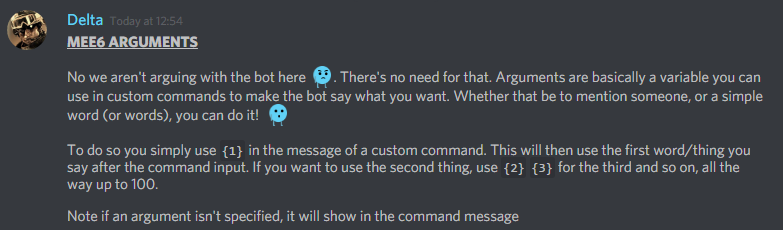
hey, the {player} tag doesn't seem to work on the custom comand!?
dire yarrowBOT
So... @sterile elbow, I've decided you should be level 3.
Don't get too excited, mmk.
strong path
Use {user}
sterile elbow
although that would be my own name? I wanted to be able to @ someone so that it's his/her name that gets displayed
 sterile elbow
aha! amazing
thanks guys! @dire yarrow @strong path . My first language isn't English so I wasn't sure what that meant. Many thanks
dire yarrowBOT
Alright, @buoyant moon has been warned because 'Posted an invite'.
stray coral
I still have the same problem: this message appears when I try to add timers in some channels: {"message":"The server encountered an internal error and was unable to complete your request. Either the server is overloaded or there is an error in the application.","status_code":500}
(I only have one timer on my whole server)
buoyant moon
same ^ ^ ^
Sometimes when you use !clear, It stays for a while and You cant delete it. When might that be fixed or worked on?
ivory crypt
@ripe rivet it's good thx :)
humble crescent
My rank doesent wrk
leaden osprey
@humble crescent be more specific please
limber knoll
@stray coral clear and make the timer from scratch do not add a 1m timer then edit the time on it it will break
@humble crescentuse !rank in #〉commands
Otherwise mee6 does not gave embeds in his perm
buoyant moon
for some reason when i try to work with mee6's options for my friend's server it doesn't work. when i click on the server icon it just brings me back to the homepage.
limber knoll
browser?
buoyant moon
yea
limber knoll
@buoyant moon sory I meant what browser
buoyant moon
oh, chrome
buoyant moon
alright lol
dire yarrowBOT
Alright, @buoyant moon has been warned because 'Bad word usage'.
towo got kicked for for breaking the rules clearly on purpose! 
barren oyster
Any news about the YouTube plugin ?
bitter owl
@barren oyster still down, sorry
dire yarrowBOT
XxJosh187xX#2833 (392959737727025153) is now muted for 'spam', alright?
Alright, @broken whale has been warned because 'read #〉rules before you spam, especially in support channels'.
 lyric prairie
My avatar is rendered incorrectly on the image rank card
limber knoll
@lyric prairie which browser did you use to upload?
lyric prairie
it's my profile picture, I have no image in the background
the shirt is rendered blue ish and the red at the top is orange
lyric prairie
mee6 is the only bot that does that with the colours afaik
limber knoll
you mean like currently in #〉commands
lyric prairie
yup
limber knoll
if you want the other scenes you pay to unlock them
lyric prairie
that's not what I'm talking about
dire yarrowBOT
So... @lyric prairie, I've decided you should be level 1.
Don't get too excited, mmk.
limber knoll
can you explain what you mean by no background then?
carmine holly
his shirt colour has changed
lyric prairie

limber knoll
ah ok
lyric prairie
it looks fine on the website
lyric prairie
I need to re-upload my profile picture to discord using chrome or firefox?
limber knoll
other browsers glitch on the upload sometimes
limber knoll
takes time to update
maybe try editing the picture
some colours might not come out right
lyric prairie
it probably has something to do with my profile picture being a gif
limber knoll
that too
lyric prairie
it's still weird that i've only seen the issue on mee6
limber knoll
could be that mee6 supports just simple pics and not gifs
carmine holly
but it supports others gif like as of google
carmine holly
duncte123's t-shirt colour changed in the rank card
 haughty aurora
Vous partler englais
faint dome
bien vu
 true pilot
les annonce vidéo son bug non ?
 tacit plinth
oui
 modest sapphire
I'm also experiencing issues with uploading a background image. I've tried jpg and png formats, but not gif yet. It loads into the crop fine, but in firefox and chrome, it gets stuck when i confirm the crop, the button stating "Uploading"
When I have the JS console open in inspect element, there is an error thrown
a smaller pic? You'd think a 512x512 pixel png at 358kb would be small enough, but sure
but given there's a js error being thrown the instant i hit the crop button...
dire yarrowBOT
So... @modest sapphire, I've decided you should be level 1.
Don't get too excited, mmk.
modest sapphire
256x256 pixel png @ 9.60kb also fails
i've also tried larger images in case it's too small
1920x1080pixel png @ 7.9MB
all images immediately throw that error in the JS console
I've also disabled my adblocker in case it was blocking a script
yep, just supplying as much info as what i've done as i can, to help narrow down the issue 😃
wind windBOT
To use some stuff in custom command or any other text from Mee6 you need to use the ID:
First get the ID of that object by typing it in your server with a\ in front:
Emoji: ➡ <230340006219087873>
Mention: <@&435889630408081408> ➡ @dire yarrow
Channel: #〉announcements ➡ [#〉announcements](/guild/159962941502783488/channel/159962941502783488/)
Then copy that ID(with the < > and everything in between),
Now paste that in your custom command, welcome message, stream announcement, etc...
https://cdn.discordapp.com/attachments/235378515866812417/269195258640728075/2017-01-12_22-05-03.gif
 modest sapphire
ooh that's a neat feature.
cold bear
@modest sapphire can you upload image here?
buoyant moon
Someone was using a command and got this:
Oops, something went wrong in MEE6 land! :SAD6: This error has been reported to our Team. We'll work hard to fix it.
strong path
give role command?
buoyant moon
mhmm
strong path
!!tag giveroles
wind windBOT
Make sure that MEE6's role is above the role it's trying to give and that it has the manage roles perm
https://birb.is-a-me.me/81d15f9a.gif
 buoyant moon
It is.
strong path
manage roles perm?
buoyant moon
Yup.
strong path
Is it also supposed to remove a role?
strong path
How did you fix it?
buoyant moon
thanks for trying to help tho
 bright patrol
!record doesnt work
dire yarrowBOT
It5meSam, this command is disabled in this channel.
strong path
It's bugged for now
 soft vine
strong path
soft vine
strong path
!!tag giveroles
wind windBOT
Make sure that MEE6's role is above the role it's trying to give and that it has the manage roles perm
https://birb.is-a-me.me/81d15f9a.gif
 queen bloom
so, I'm not going to lie this bug is a huge bummer. I have notification set to off. I have since the moment I set up the bot a week or so ago. And when a new user hits level 1 Mee6 DMs them with this.
strong path
The rank card thing, right?
queen bloom

I have at least 3 different users reporting that they received a DM. But only when they rank up to 1.
dire yarrowBOT
So... @queen bloom, I've decided you should be level 1.
Don't get too excited, mmk.
strong path
Editing their card before that should prevent it from sending it
queen bloom
This seriously sucks and should not happen.
If I don't want a bot in my server to DM a user it shouldn't
These are users that don't know what the bot is...
<@&193123929701875712>
buoyant moon
The Mass Mention auto mod doesn't work for some reason <@&193123929701875712>
 visual night
il y a un bug sur les notif ? il sera corriger quand?
sage citrus
@buoyant moon it detects if there are many user mentions within one mentions
buoyant moon
hmm is there anyway that it could be made to delete the @every-one role
delete the mention*
native anvil
you can set @ everyone as a bad word, and set it to delete the message when detected... But I'm not sure if that will stop the ping to the users 🤔
leaden osprey
it will still ping if the user has permission, since you can’t delete a message before it gets sent
native anvil
if you have other roles in your server then you could make it so that those specific roles cannot call the everyone ping... that would fix your problem I think. It's in the role settings in discord
 inland sparrow
ok
so I have the youtube bot thing enabled for multiple channels
and it only gives notifications for 1 channel for some reason
inland sparrow
anyone?
strong path
It's bugged at the moment
strong path
Yeah
 sly ginkgo
Hi so for plugins in my server ( TIMERS ) --- I set a timer one for certain days say a message for monday, tuesday, wednesday, etc yet even though i put it on these days it ignores it, monday's and sunday's message popped up today
Do you know how to fix this, i did exactly what was given
 knotty rose


 sly ginkgo
so even if i put a timer on monday and it appears on thursday its normal ?