#〉bugs-reports
2 messages · Page 30 of 1
 green rune
after
<@&424994160387293184> status on above issue? just want to make sure it's tracked
 bitter owl
Everything that are still on #〉bugs-reports is not fixed. And as the topic says: We unfortunately don’t give ETA (Estimated Time Of Arrival)
@green rune
green rune
understandable, thank you for your response
 hidden ice
@strong path
 strong path
❔
 chilly canopy
!play Лайки крутятся
 dire yarrowBOT
Тёмный Страж, this command is disabled in this channel. 
 dreamy sundial
Hi! The add role command is not working for me.
if you need more info, let me know
 cold bear
move mee6 role above role he tries to give
cold bear

dreamy sundial
fastest support ever xD
 cerulean lodge
Just wanted to inform that MEE6 didn't announce at all yesterday that a member was streaming. The bot has all the needed permissions, it worked beautifully the day before, it was online and responding normally to commands, but the announcement just never came through.
dire yarrowBOT
Marky56, this command is disabled in this channel.
strong path
Are you channel hopping btw? 🤔
 buoyant moon
no
dire yarrowBOT
So... @buoyant moon, I've decided you should be level 1.
Don't get too excited, mmk.
buoyant moon
k
dire yarrowBOT
I would like to help you but if you don't tell us what your problem is then I can't help, pls tell us what your problem is and not that you have one.
 buoyant moon
?
strong path
screw this I'm done
buoyant moon
i don't get what u mean.. sry
@buoyant moon First: What is your Main Language?
Second: Please tell us what you need help with
ok
my language its english and my problem is, on my server mee6 posts my videos over 20 times when i want it to post it once
Since i dont use Youtube Plugin i cant really be a help with that, It may have added your channel 20 Times check that on the Youtube Plugin
ok
 raw scroll
@buoyant moon whats your language?
buoyant moon
english
raw scroll
@buoyant moon whats your language?
strong path
How old are you btw? @buoyant moon
buoyant moon
19
strong path
Alright
buoyant moon
?
dire yarrowBOT
So... @buoyant moon, I've decided you should be level 2.
Don't get too excited, mmk.
 leaden osprey
lmao
buoyant moon
plz help
 wooden mountain
pls state your problem
buoyant moon
well, on my server i have mee6 post my videos but it does it over 20 times when i want it to post it once
wooden mountain
ARE YOU KIDDING ME 😡
buoyant moon
?
 summer salmon
Ahahahaha
buoyant moon
well, could i get rid of all but one?
summer salmon
Yes. That would help.
buoyant moon
how?
wooden mountain
there are 21 of them
summer salmon
How would it help or how would I delete it?
wooden mountain
hover hover them and then there should come a red cross in the top right
 limber glade
Hello
buoyant moon
hi
buoyant moon
Je parle français
wooden mountain
@ripe rivet
buoyant moon
Bah sur le serveur Animal server il y a quelqu'un qui n'a pas le même nom dans le serveur et dans le classement
ok pardon pour le dérangement
 fleet bay
On the bot site I do not want to load the plugin page about the latest YouTube videos
strong path
 weak lark

 bitter owl
As this is a serious support server. I advise you to read again the #〉rules where it’s written: Do not Prank Staff!
You are just slowing down our service. Be polite, please!
@weak lark
 pure obsidian
@buoyant moon Have you enabled the said command inside the plugin anyway? nothing is enabled by default;
http://mee6.xyz/dashboard --> Select Server -->  Moderator --> scroll down to commands and enable !clear
dire yarrowBOT
The clear command allows you to clear the last xx amount of message or to clear one user without clearing anyone else.
Use !clear 1-1000 to clear the last xx messages (example !clear 10)
or !clear @name to clear all the message of @name in the last 100 messages
+ I need manage messages permission
+ I need view message history permission (otherwise I will respond with -1 messages cleared)
+ you need to check the checkmark next to clear on the plugin page.
+ you need to set your role as moderator (located at the top of the plugin page in the moderator tab)
 gusty olive
!rank
dire yarrowBOT
SavageJay, this command is disabled in this channel.
 calm canopy
Hello my !clear command is getting a response of this "MEE6BOT - Today at 4:47 PM
Oops, something went wrong in MEE6 land! :SAD6: This error has been reported to our Team. We'll work hard to fix it."
anybody know why this is?
calm canopy
I just did and did try a couple times before that was the 4th time i just keep getting that message
checked settings my role is there the channel is open
wooden mountain
and Mee6 has the permissions required
calm canopy
believe it has moderator
wooden mountain
read message history + manage messages
calm canopy
yeah i mean it worked 2 weeks ago i mean as i normally clear every 2 weeks due to that limitation
but it did just work now
not sure what changed haha
5th time the charm ig
wooden mountain
discor removed the 2 weeks limit
buoyant moon
my yt plugins worked good, but now, not a single yt video gets posted 😑
wooden mountain
i see 11 yt channels in your server settinsg, wich of those recently posted?
wooden mountain
🤔 i will investigate
buoyant moon
tnx
buoyant moon
So !add is still not working on my server. 
buoyant moon
🤔
 arctic plover
The timer don t work
 chrome oracle
@wooden mountain i have the same issue as Preetje_R. all worked fine until last tuesday. now it just won't post any vids anymore. I thought that was a known bug 🤔
wooden mountain
we are aware of this
chrome oracle
so it is known. i'm happy then 😇
 verbal iron
 hello
hello
buoyant moon
Is the youtube feature broken or is it just me
verbal iron
salut
 torn bison
The level leaderboard api isn't working (Error 500)
buoyant moon
got back new vids posted from yt-plugin
dire yarrowBOT
So... @buoyant moon, I've decided you should be level 2.
Don't get too excited, mmk.
 sage citrus
@buoyant moon #425409486820474881
 covert willow
Hi! I have discovered a bug or should be like that, but I'm not sure. If automod is enabled, if someone sends a message with a cap, the bot will delete and give a warn. If someone writes an ordinary message and then edits it with a cap, then the bot will not give a warn. Please, fix it.
I apologize for the translation but lacked the time I used google translate. <@&193123929701875712>
 mortal oxide
@covert willow bots don't "read" edited messages, not a bug.
strong path
You mean just mee6, right? I know a bot that does read edited messages( 😉 ) @mortal oxide
 ornate flame
Seems like the api is dead :?
Not sure if this is true, but just based on a few things i saw on bots that used the api of mee6
mortal oxide
@ornate flame our API works correctly.
 primal topaz
ornate flame
primal topaz
ornate flame
Yea i figured that out later  it was just my b, thanks
 spice prawn
YouTube announcement has been set up but doesn’t sent When someone uploads...
 limber knoll
@spice prawn are you using PC or app?
spice prawn
Pc
limber knoll
Can you please screenshot the console message, @spice prawn and sorry for the delayed reply
Just ping me when you send it
spice prawn
http://prntscr.com/jt771h
@limber knoll
 round compass
Not sure if this has been addressed. Having issues about people getting stuck at a specific XP for the levels system. Tried resetting their levels and the problem just keeps them off the list.
bitter owl
!noxp
dire yarrowBOT
If Mee6 isn't giving you xp, or either !rank or !levels is not working it is one of the following:
Reason 1: The levels plugins isn't enabled on the dashboard
Reason 2: You have a banned role on you (in which case you should remove it)
Reason 3: Bot can't read messages in that channel (for not gaining xp) or can't send (for !rank and !levels)
Reason 4: Command cooldown if you have a cooldown set super high, set it lower so that both !rank and !levels will work
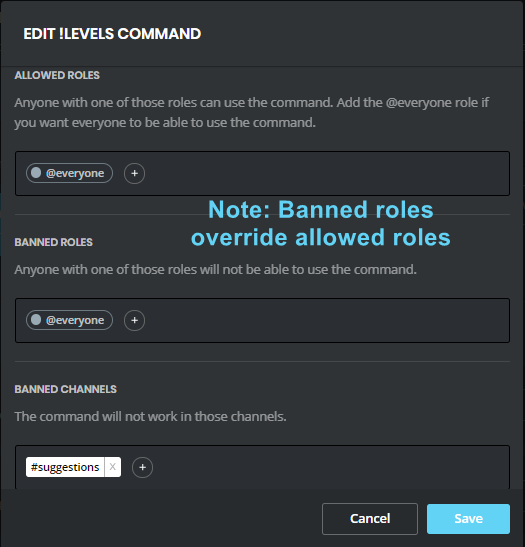
Reason 5: Banned roles and channels. Check that you haven't set a banned role or are using a command in a banned channel: https://i.imgur.com/20QEyzL.png
In case you don't know about banned roles, this pic shows->https://i.imgur.com/dwyc1gt.png
 bitter owl
☝
round compass
Thank you ❤
round compass
Yeah that completely worked thank you thank you ❤
 near cedar
The Inability to scroll when on this webpage, on mobile:
Yes, I'm using Chrome, yet it still doesn't work
buoyant moon
If you are making a custom command with a role, it don't work and say something went wrong in Mee6 Lans
*d
strong path
What is your command supposed to do?
buoyant moon
A Germand command name what when you are entering it, it will give a role
strong path
!giveroles
dire yarrowBOT
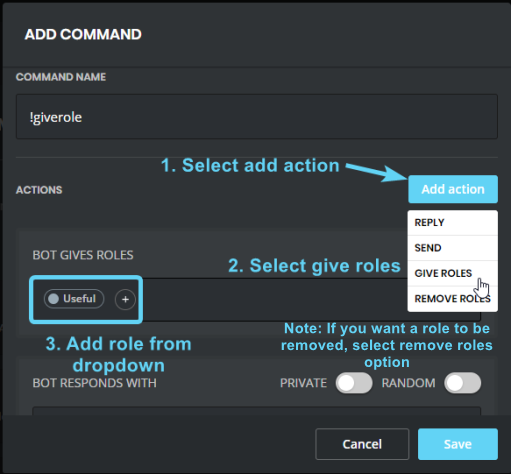
Make sure that MEE6's role is above the role it's trying to give and that it has the manage roles perm
https://birb.is-a-me.me/81d15f9a.gif
https://i.imgur.com/acBvAv5.png
 buoyant moon
Thanks for help
strong path
np
 manic oak
when i edit anything like commands or the bar,i get a fully gray screen,nothing except of it
manic oak
wait
i just get this
for example i press enable on the welcome pluggin
and i get the gray screen shown above
 kindred pelican
Try disabling any extensions you might have
 ionic meteor
can you stay on the plugins page for a few minutes, and then go to the plugin? Fixes it sometimes
 faint bison
what browser are you using
manic oak
chrome
faint bison
try doing ctrl+shift+r
manic oak
i tried chrome
faint bison
on chrome do ctrl+shift+r
manic oak
nothing
faint bison
aight click on a plugin where the screen goes black
then do ctrl+shift+i
then click on console
and screenshot all the text in red
and upload all the screenshots here
manic oak
the f12 console?
faint bison
yea
faint bison
why
manic oak
k
 arctic lance
I can't seem to do a command on my server?
strong path
!modular
dire yarrowBOT
 strong path
Enable stuff first
dire yarrowBOT
https://mee6.xyz/dashboard press add to Discord, then select your server
strong path
there
buoyant moon
Does the youtube plugin work? It hasn't been giving me notifications in the channel I specified or at all for that matter, and i'm wondering if it's down or if I just didn't do something right
faint bison
 civic pine
But its Not in the #425409486820474881 list
bitter owl
It was fixed
@buoyant moon did you add the channel correctly in https://mee6.xyz/dashboard right?
faint bison
didnt even see that
buoyant moon
yes I believe so
bitter owl
Could you check?
buoyant moon
Yeah
bitter owl
Then make sure mee6 can read  and write in the text channel you chose to be announced your YouTube video
Also, streaming is not working. Need to be a normal video
As far as it was told to me
buoyant moon
https://gfycat.com/HelpfulFrenchGodwit that's correct right? and yeah i made sure the bot has perms

 buoyant moon
Alright. Thanks in advance
 buoyant gale
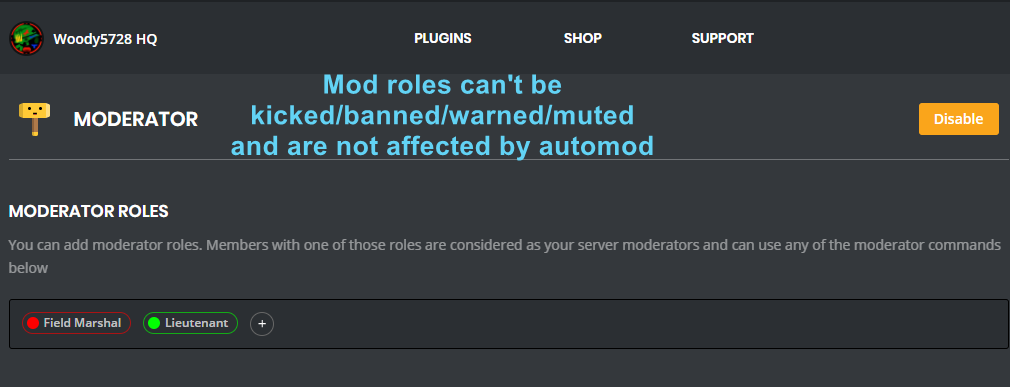
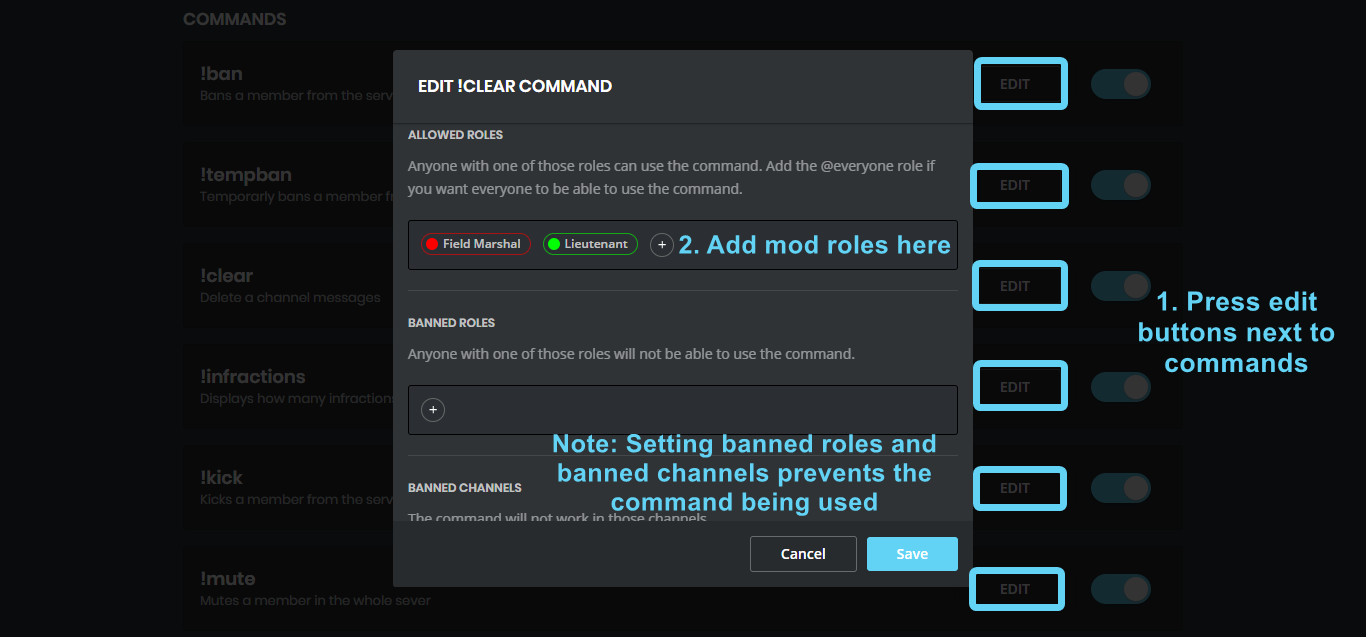
My admins cant use the moderator commands.
dire yarrowBOT
 dire yarrowBOT
So... @buoyant gale, I've decided you should be level 1.
Don't get too excited, mmk.
buoyant gale
oh yeah*
 tough storm
hey, there is a problem with the website
faint bison
which is?

 empty kernel
yeah
faint bison
eh no idea
faint bison
ill see if i can get devs to take a look
empty kernel
Seems like you aren't ranked yet. how
strong path
You need to get xp at least once
empty kernel
Seems like you aren't ranked yet. :HEHE6:
dire yarrowBOT
So... @empty kernel, I've decided you should be level 1.
Don't get too excited, mmk.
empty kernel
@strong path me server you help levels rank ?
 native anvil
@empty kernel try typing something in your server that isn't a command and then check if you got xp. You should get a rank then
empty kernel
@native anvil yes get rank ?
native anvil
Yes, after a normal message
empty kernel
normal o
 brave heron
Just to add to John Redkorn's report, three youtube videos have been released that MEE6 should have announced in the server but none have appeared. Earliest I could tell this started happening was yesterday. Was working fine before and no settings/permissions have been changed
empty kernel
lol sorry
buoyant moon
When I writing a moderator command bot writes that an error accured in Mee6land !!!
buoyant moon
When I add a custom command, the following message comes up: "Oops, something went wrong in MEE6 land! :SAD6: This error has been reported to our Team. We'll work hard to fix it."
Please edit :c
strong path
What is it that the command supposed to do?
ionic meteor
did mee6 give a role? @buoyant moon
muted role
the user can't have any other roles with send messages on  , they must be on
  instead
 gritty depot
BRUH
ionic meteor
in channel settings
ionic meteor
@gritty depot screenshot please?
ionic meteor
@buoyant moon In channel settings, the user can't have any other roles with send messages on
ionic meteor
I dont see what's wrong?
gritty depot
mee6 edited message
dire yarrowBOT
Alright, @gritty depot has been warned because 'Capital letters'.
ionic meteor
@buoyant moon yes, and @everyone can't have Send Messages on
@gritty depot Mee6 doesnt edit it's messages
 sour spruce
wut
ionic meteor
mee6 doesnt take away XP either
gritty depot
says 200xp on mobile and 390 on pc
dire yarrowBOT
So... @gritty depot, I've decided you should be level 1.
Don't get too excited, mmk.
gritty depot
mee6 has confused me
ionic meteor
maybe you gained 190 xp in the meanwhile?
gritty depot
ye i think so
sour spruce
Hi why does MEE6 seem to make peeps LVL 1
Is that them being downgraded for some silly reason or is it them levelling up from LVL 0
dire yarrowBOT
So... @sour spruce, I've decided you should be level 1.
Don't get too excited, mmk.
buoyant moon
@strong path The command should assign an automatic role to the executing player.
That means:
-! pc - and should inflict its command to the player.
buoyant moon
!giveroles
dire yarrowBOT
Make sure that MEE6's role is above the role it's trying to give and that it has the manage roles perm
https://birb.is-a-me.me/81d15f9a.gif
https://i.imgur.com/acBvAv5.png
buoyant moon
The message is still ... No change, MEE6 has all the permissions you can forgive ... It does not work.
sage citrus
@buoyant moon you need to make sure in the list, mee6 is higher than the role it should give
as it shows in the gif mee6 posted
 solid osprey
Quand un modérateur essaye de mute quelqu'un sa marche pas alors qu'il à les perms
empty kernel
Level Up Announcement Message? how rank ?
 faint dome
@solid osprey on peut aller dans #175714280648343552?
faint dome
empty kernel
@sage citrus explain ?
sage citrus
@empty kernel could you explain what the problem is
empty kernel
@sage citrus problem yeah rank
dire yarrowBOT
So... @empty kernel, I've decided you should be level 2.
Don't get too excited, mmk.
buoyant moon
@empty kernel What is your first language?
empty kernel
@sage citrus yeah
Let your users gain XP and levels by participating in the chat! help me
buoyant moon
What do you need help with
sage citrus
@empty kernel what is your language?
empty kernel
yes
GG {player}, {level}! ? how
language
GG {player}, you just advanced to level {level}! how pls help ?
cold bear
enable levels plugin
sage citrus
looks like he already did
cold bear
when any user get enough xp for levelup that message will appear.
we don't quite understand you and what actually confused you, please tell us what's is your native language
empty kernel
okay
 shadow widget
um <@&424994160387293184> , Yesterday a youtuber posted a video, but it didn't show up on my server for the youtube thing.
I just checked and The youtuber that posted was already added.
Is this a known bug?
dire yarrowBOT
So... @shadow widget, I've decided you should be level 3.
Don't get too excited, mmk.
buoyant moon
@shadow widget Check if it has Send message Permission in the Announcement channel
 exotic merlin
Hola no me aparece mi server en el que soy jefe sera algo de pocos miembros
dire yarrowBOT
oops, it looks like you are on the wrong account, you need an account with 'manage server' permissions.
You have to log out from discordapp.com in that browser and then log back in again.
- log out of discordapp site https://discordapp.com/channels/@me and follow the steps in the gif below
- go to http://mee6.xyz/logout and click the 'add to discord' button
https://i.imgur.com/7829TNS.gifv
 bitter owl
Cerrar el sesion @exotic merlin
dire yarrowBOT
So... @exotic merlin, I've decided you should be level 1.
Don't get too excited, mmk.
exotic merlin
Oks pero mi server en el que soy jefe solo tiene 6 members es algo de eso o no tiene nada que ver
bitter owl
Membros no hay nada há ver
1 membro ó 40k
Tu necessitas ter Admin ó Gerenciador Del Servidor para acesar tu server
exotic merlin
Soy creador y admin
exotic merlin
Listo gracias voy ah probar
Y soy admin mira
Pero tebgo que salirme de mi xuenta y volver ah entrar con la misma
bitter owl
@exotic merlin tu estás logado con otra persona
Necesitas usar la misma cuenta vaya a la configuración del usuario -> revise su correo electrónico -> úsela para iniciar sesión
 lunar stone
the youtube plugin isnt working!
buoyant moon
 burnt hazel
@buoyant moon YouTube plugin isnt listed in #425409486820474881 
buoyant moon

bitter owl
@lunar stone Define not working please
You can't find your channel or it's not announcing your videos?
buoyant moon
Why can’t I no longer see the total xp
 young cosmos
we had a muted role mee6 made and edited all channels to work on that muted role, but when we muted someone today it made a new role muted and ignored old one
dire yarrowBOT
The clear command allows you to clear the last xx amount of message or to clear one user without clearing anyone else.
Use !clear 1-1000 to clear the last xx messages (example !clear 10)
or !clear @name to clear all the message of @name in the last 100 messages
+ I need manage messages permission
+ I need view message history permission (otherwise I will respond with -1 messages cleared)
+ you need to check the checkmark next to clear on the plugin page.
+ you need to set your role as moderator (located at the top of the plugin page in the moderator tab)
i dont get it, my mee6 has admin
dire yarrowBOT
So... @buoyant moon, I've decided you should be level 2.
Don't get too excited, mmk.
!mute @user - gives mentioned user the muted role
Requirements:
+ Manage Roles perm
+ Manage Channels perm
+ I must have a role above the muted role
+ User being muted must not have a role that has a green tick next to the send message perm in channel settings->permissions as this will override the muted role. They must also not have a user perm override on that channel
P.S. You can't mute people who have the permission to mute others, this includes: owner, other moderator or members with Administrator or Manage Server permissions!!!
https://cdn.discordapp.com/attachments/302245580673908740/433026975670730771/2018-04-10_01-13-56.gif
 young cosmos
i know how to set up muted but it made a new role
dire yarrowBOT
Alright, @buoyant moon has been warned because 'Bad word usage'.
buoyant moon
KMGGGG
@bitter owl when I do !rank it gives me some random stuff and when I do !levels it only gives rank
bitter owl
I was reading
Hm do you have custom command named !rank and !levels?
And could you provide us with screenshot?
@young cosmos I am not talking about setup
I’m asking to you to read
That if you have another role allowing people to talk, it will override muted role
@buoyant moon need to enable in https://mee6.xyz/dashboard
Then give powers to to moderators
!moderator
dire yarrowBOT
bitter owl
Alright, does mee6 has admin?
No
I am asking if your mee6 role has admin (Server Settings -> Roles -> Mee6)
No you are not
Just answer me, then I can give you right steps
Good
Now give him give mee6:
!perms
dire yarrowBOT
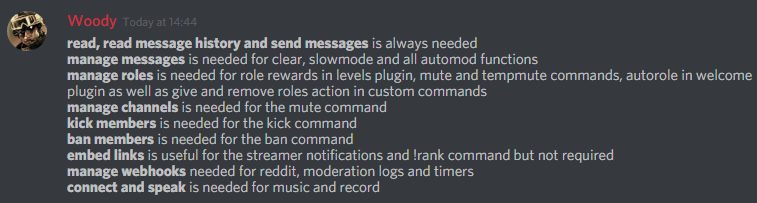 bitter owl
☝
You don't need. And I do not recommend since you won't be able to ban mee6 from specific channels in the future
@buoyant moon Can mee6 read the channel?
Is he online in side bar?
@buoyant moon Invite me to your server already pls
I will put this to work for you, will save my time and yours (in DM)
bitter owl
Press enter before pressing ok
dire yarrowBOT
Alright, @little marsh has been warned because 'Posted an invite'.
bitter owl
That’s corret
bitter owl
That’s how dev developed it
 west crag
Help command doesn't work for me although I have turn it on.
 verbal nacelle
I can't invite the bot to my server
strong path
@west crag Have you enabled some plugins first?
@verbal nacelle Are you the owner?
verbal nacelle
Yes
strong path
!logout
dire yarrowBOT
oops, it looks like you are on the wrong account, you need an account with 'manage server' permissions.
You have to log out from discordapp.com in that browser and then log back in again.
- log out of discordapp site https://discordapp.com/channels/@me and follow the steps in the gif below
- go to http://mee6.xyz/logout and click the 'add to discord' button
https://i.imgur.com/7829TNS.gifv
strong path
read that, tunas
strong path
!commands
dire yarrowBOT
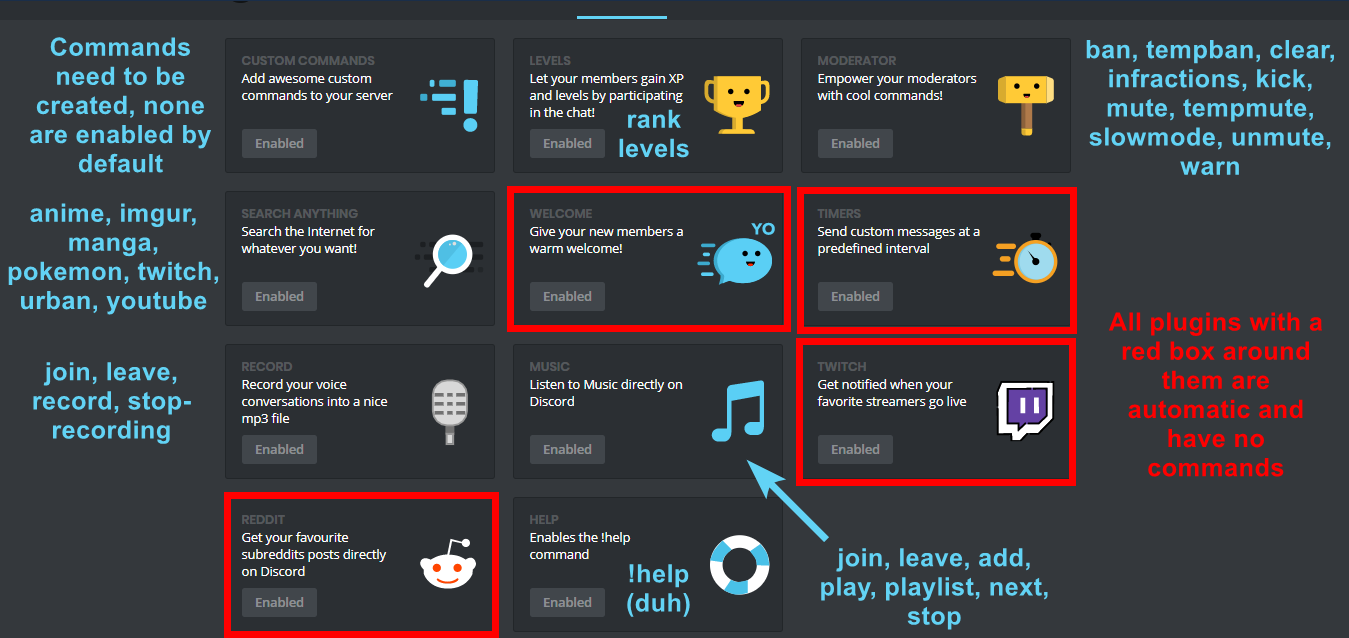 strong path
take note of the red text
west crag
no, I meant the help command
strong path
So the other commands work except the help command?
west crag
yes
dire yarrowBOT
So... @west crag, I've decided you should be level 1.
Don't get too excited, mmk.
strong path
Does it not even respond?
west crag
yes
 strong path
Is it supposed to respond in a DM or in the channel?
strong path
Go to the help plugin > edit > check if there are any banned channels there
west crag
yes, I have just managed it
verbal nacelle
Thanks
west crag
the channel which is supposed to be used is not in the list
and help command didn't work
strong path
is this option turned on for you?
strong path
Do you have any banned roles in there?
strong path
Yeah that was about to be my next suggestion
west crag
but why there is that switch ?
dire yarrowBOT
So... @west crag, I've decided you should be level 2.
Don't get too excited, mmk.
west crag
Do not reply to command so what do we turn on the command for?
strong path
Well... I can't get a reason off the top of my head now, but more options are nice I guess
strong path
What browser are you using?
strong path
Alright, noted.
sage citrus
do not reply to command is actually useless
it was supposed to be dont send error messages or something
sage citrus
but it somehow got changed to do not reply
strong path
Sil told me that so that's why I was confused why did it do that for him
... Hopefully that sentence made sense 😅
buoyant moon
Yt plugins again not working... worked fine yesterday
 keen linden
@wet schooner don't do that :D
 wet schooner
ok
lunar stone
is there a way to turn off the restriction mode thing with the youtube plugin!
<@&193123929701875712>
<@&424994160387293184>
ionic meteor
what do you mean?
dire yarrowBOT
So... @lunar stone, I've decided you should be level 2.
Don't get too excited, mmk.
faint bison
!giveroles
dire yarrowBOT
Make sure that MEE6's role is above the role it's trying to give and that it has the manage roles perm
https://birb.is-a-me.me/81d15f9a.gif
https://i.imgur.com/acBvAv5.png
 fleet widget
@faint bison thanks😃
 foggy ingot
<@&424994160387293184> The! Rank command does not work on my server what's this?
strong path
Does it respond? @foggy ingot
foggy ingot
no
strong path
Have you enabled the levels plugin?
foggy ingot
can you send image showing pluguin?
strong path
!commands
dire yarrowBOT
strong path
!modular
dire yarrowBOT
strong path
the one with the 
foggy ingot
yes I did
strong path
And the command is also enabled?
foggy ingot
yes
dire yarrowBOT
foggy ingot
What permissions?
strong path
read mee6's message above you
foggy ingot
I do everything and only this message appears: Seems like you are not ranked yet.
dire yarrowBOT
So... @foggy ingot, I've decided you should be level 1.
Don't get too excited, mmk.
strong path
Alright, now just get xp at least once
mee6 commands or any messages that start with ! don't give xp
foggy ingot
as?
 past zenith
@strong path Is there a plan on adding a thing for songs currently playing for the Bot?
strong path
@foggy ingot Like how you just did, just send a normal message
dire yarrowBOT
 past zenith
@strong path https://gyazo.com/84296600861864ccbbad5053efc48ebc

 past ridge
Hello, I will setting my Moderator but i can´t do !mute or it´s not doing????
I can´t english good sry
past zenith
That's not the song playing
foggy ingot
like hi?
strong path
oh I see what you mean
past ridge
can you help me please
foggy ingot
Thx Ped
past ridge
@foggy ingot can you help me now?
strong path
What's your first language?
past ridge
german
foggy ingot
Ped im from Brazil Thank you for helping a foreigner.
past ridge
Ped can you help me please
foggy ingot
Does the bot only work when I'm online?
strong path
No? It'll be there doing it's job while you're offline
foggy ingot
Thanks again, I really enjoyed your work.
 indigo depot
<@&424994160387293184> Hola, Nececito Ayuda
 boreal grove
why am i getting a 404 error when i visit the mee6 playlist link
boreal grove
Thanks!
strong path
np
boreal grove
@strong path also, mee6 is playing reverse
i mean it plays the playlist from bottom to top..
wooden mountain
Also known, fix in development system but not yet in Mee6
 deep junco
strong path
deep junco
strong path
!giveroles
dire yarrowBOT
Make sure that MEE6's role is above the role it's trying to give and that it has the manage roles perm
https://birb.is-a-me.me/81d15f9a.gif
https://i.imgur.com/acBvAv5.png
 somber forge
Every time I open up my discord APP to check if something is correct when I'm changing some settings with mee6, the custom command and the dashboard itself just closes out and goes to the change server page on the mee6 website
And when I'm doing something, I actually have to save it every time.
mortal oxide
Open a new tab, disable VPN. If doesn't try with Chrome or Firefox.
Save is normal.
somber forge
I don't use VPNs
I use chrome
Who knows it's probably because my anti-pop-up blocker.
It pretty much removes overlays to pop-up ads.
mortal oxide
^
mortal oxide
Try Firefox.
somber forge
It happened on firefox to lol.
dire yarrowBOT
So... @somber forge, I've decided you should be level 3.
Don't get too excited, mmk.
somber forge
It's probably just a bug with my browsers
Yah it was just a bug with my browsers
I just needed to clear cookies
mortal oxide
XD.
 potent hare
bot not playing music, anyone else having this problem today?
wooden mountain
works fine here, can you hear the music in Mee6 music box @potent hare
 full stag
I don't know if this has already been found out but I can't put the words in for the Anti Swearing bit on the moderator??? I dont know if Ive done something wrong or anything? if so can you help me???
faint bison
what browser @full stag
full stag
safari as it always sends me on it 😛
never mind ive logged on chrome and its worked now 😃 Thanks anyway
dire yarrowBOT
Internet Explorer? Edge? Safari? Ew... :nauseated_face: It's time to use REAL BROWSER!!!
Firefox: https://www.mozilla.org/firefox
Chrome: https://www.google.com/chrome/browser/desktop/index.html
Opera: https://www.opera.com/
buoyant moon
187 ist cool
Won't let me put Auto-Role. (When someone joins and automatically gets a role.)
dire yarrowBOT
You can now give members a role on join through the welcome plugin https://i.imgur.com/mhT5oVF.png

 bold edge
When you have timed mutes it doesnt show how much it is http://prntscr.com/jtsvds
leaden osprey
@bold edge did you use !tempmute?
bold edge
Yes.
leaden osprey
you formatted it like !tempmute @user 2h example with the 2h being the time @bold edge
leaden osprey
!duration
dire yarrowBOT
For the tempmute and tempban commands, use the following formats for muting/banning users for a certain time period:
s for seconds
m for minutes
h for hours
d for days
Examples:
!tempmute @user 10m timeout
!tempban @user 3d annoying
leaden osprey
@bold edge you can^
bold edge
Okay, Also at the end is it suppose to say boss?
leaden osprey
yea
bold edge
Oh okay cause i thought it was suppose to show like the Mee6 Thumbs up
dire yarrowBOT
So... @bold edge, I've decided you should be level 3.
Don't get too excited, mmk.
leaden osprey

leaden osprey
ok
bold edge
Anyways thanks for the help
leaden osprey
you’re welcome
buoyant moon
its a bug this isn't the server icon and isn't mee6's pfp
leaden osprey
don’t troll...
buoyant moon
the bot doesn't give xp for people being active
I'm the owner of the server but it's only giving people xp for others and not me
native anvil
@buoyant moon do you have any banned roles in the levels plugin?
buoyant moon
I don't think so
native anvil
Check, that is usually the case
buoyant moon
I set the highest ranking role to not receive any more xp, yet I set all the roles for myself XD
native anvil
Yeah probably why you're not getting xp lol
Remove all roles from banned roles, because a banned role overrides allowed roles @buoyant moon and you shouldn't have the problem again
buoyant moon
alright thanks
dire yarrowBOT
So... @buoyant moon, I've decided you should be level 1.
Don't get too excited, mmk.
 sonic mulch
 idle bronze
@rain fjord
strong path
Because the server you're talking about has added them to the words filter
 zinc phoenix
ah ok makes sense xD
 gray lava
!rank
dire yarrowBOT
Alright, @sonic mulch has been warned because 'Ads his YouTube channel.'.
 blissful mantle
sa
 old spindle
!rank
limber knoll
#〉commands @old spindle please
 fervent shell
Modifying a timer interval does not work (look at #〉volunteer-support )
dire yarrowBOT
!mute @user - gives mentioned user the muted role
Requirements:
+ Manage Roles perm
+ Manage Channels perm
+ I must have a role above the muted role
+ User being muted must not have a role that has a green tick next to the send message perm in channel settings->permissions as this will override the muted role. They must also not have a user perm override on that channel
P.S. You can't mute people who have the permission to mute others, this includes: owner, other moderator or members with Administrator or Manage Server permissions!!!
https://cdn.discordapp.com/attachments/302245580673908740/433026975670730771/2018-04-10_01-13-56.gif
cold bear
@fleet widget ^ read this please, that's because your channel permissions
foggy ingot
@strong path The bot works perfectly like you said it would work
 formal mortar
When a member leaves and rejoins, and another bot gives an auto-role, the role gets removed by mee6
(fyi access perms is the autorole galacticbot gives, and active is the rank given to users above level 5)
 sullen venture
<@&193123929701875712> spam
 ornate flicker
Cleared
strong path
FREAKING LEARN ENGLISH THEN
bitter owl
Let’s keep calm? :)))
ornate flicker
Uh I side with Ped.
faint bison

 thin anvil
your speak arib
ornate flicker
Had to delete 14 time the same arabic message
thin anvil
If you enter the contest, drag on ps4 and xbox
 muted wraith
Hallo zusammen,
ich habe einen Fehler gefunden.
Zum Anfang hat der Bot ca. 2 Tage lang meine neuen YouTube Videos in die jeweiligen Channel gepostet. Jetzt macht er das nicht mehr. Ich habe es schon mehrere male neu eingestellt.
Hello,
I think I have found a BUG.
For a start, the bot posted my new YouTube videos in their respective channels for about 2 days. Now he does not do that anymore. I have already readjusted it several times.
 gaunt fox
CUSTOM COMMANDS doesn't work properly
 misty hedge
Peut t'on mettre pour les messages automatiques un délai de temps d'une fois par jour ?
dire yarrowBOT
Alright, @misty hedge has been warned because 'Bad word usage'.
strong path
Explain more @gaunt fox
gaunt fox
I have an about 11 custom commands all sorted by cs:go ranks, basically each command just remove other roles and give that particular role they chosen
and that work at the begining, but couple days later they all getting mix together and giving a wrong role or just remove the role without giving it at all
misty hedge
@ripe rivet mais PK pas mettre + ?
gaunt fox
I did a few times, it still doesn't solve a problem
so I just need to remove all of them and set it again wothout touching it afterwards
dire yarrowBOT
So... @gaunt fox, I've decided you should be level 1.
Don't get too excited, mmk.
 timid talon
@ripe rivet t francais?
faint dome
oui
gaunt fox
alright I'll try it, thanks
old spindle
!play
dire yarrowBOT
3lou_krolik, this command is disabled in this channel.
old spindle
!help
dire yarrowBOT
3lou_krolik, this command is disabled in this channel.
strong path
@old spindle #〉commands @old spindle
kindred pelican
Any update on resolving the problem where MEE6 ignores other bots (regardless of toggling the option)
faint bison
it isnt technically a problem
kindred pelican
It is because MEE6 isn't functioning as it should and has been
faint bison
it was designed to do that because otherwise it could cause a lot of spam if two bots constantly execute each others custom commands
strong path
james
faint bison
its how 99.9% of bots behave
kindred pelican
Jesus, how many times do i have to explain this
kindred pelican
Yes, except the toggle isnt working
faint bison
yea i get that now lol
kindred pelican
I just wanna know if they've made any progress on sorting it out or not 😛
faint bison
man i feel like an idiot
buoyant moon
why is this? my bot is ON lol
kindred pelican
I'm not gonna type an explanation again, just search for stuff i've said, i dont talk about anything else so it shouldnt be that far back.
faint bison
there isnt any eta ever either way
kindred pelican
just curious if they're working on fixing it/know why it's happening etc
as there are no other bots out there that do what mee6 does AND dont ignore other bots
muted wraith
YouTube Plugin doesn't work 😦
 twilit laurel
I can't see #baguette... And I'm French. Is it normal ?
Ah merde... Pk ?
Ping ? 😂
Kezako ?
 fringe marsh
J'arrive plus à me connecter au site qui permet de configurer Mee6. Sa charge a l'infini.
Je suis sur téléphone
Nope
Juste le chargement.
A l'infini.
J'ai mis la page sur l'écran d'accueille
dire yarrowBOT
I would like to help you but if you don't tell us what your problem is then I can't help, pls tell us what your problem is and not that you have one.
 inland pecan
Translate?
fringe marsh
J'ai mis le site sur l'écran d'accueille.
Quand tu va sur un site, en haut à gauche, il y a plusieurs options et celle si figure dedans @ripe rivet
dire yarrowBOT
So... @fringe marsh, I've decided you should be level 1.
Don't get too excited, mmk.
strong path
do it
one sec
Make sure that MEE6's role is above the role it's trying to give and that it has the manage roles perm
https://birb.is-a-me.me/81d15f9a.gif
 strong path
Is it supposed to remove a role also?
buoyant moon
Yes
strong path
The user need to also have that role for it to remove it and give the other role
buoyant moon
Oh, now I see
dire yarrowBOT
So... @buoyant moon, I've decided you should be level 2.
Don't get too excited, mmk.
buoyant moon
Thanks
strong path
np
buoyant moon
I can't authorize mee6 on phone
 knotty rose
It seems to work fine for me. What browser are you using?
buoyant moon
I using Mi browser
knotty rose
Try Chrome.
buoyant moon
Then it loads me another account
 cinder kiln
Hi, sometimes i dont get xp when i type in my discord channel, first time this happened i just left the server end joined agian, and it worked! But now in in lv 11 and i dont want to restart all over agian. So is it a way to fix this?
buoyant moon
Where can I click to change my account?
strong path
Don't channel hop please <.<
dire yarrowBOT
So... @buoyant moon, I've decided you should be level 1.
Don't get too excited, mmk.
buoyant moon
But in chrome I'm logged in to the email where I have a discord
knotty rose
Do you have an other account? Or only one?
knotty rose
Try logging in with the same email that you are using right now for Chrome.
knotty rose
Use it for Chrome so you can add the bot to your server.
knotty rose
Sign out for Chrome > Sign in as the same email on that account you are using > Add Mee6 to your server.
buoyant moon
Verify it phantom
I forgot to mention that the old account is blocked
I do not want to verify this by phone number
Okay, could you go here (history) and press "clear browserdata
That should log you out on the website
It does not work, I'd rather fix my computer and add it from my computer
dire yarrowBOT
So... @buoyant moon, I've decided you should be level 2.
Don't get too excited, mmk.
dire yarrowBOT
Alright, @echo quest has been warned because 'Bad word usage'.
 echo quest
oh
Sorry, lemme rephrase it
When using {server.joined_at} there's a space missing between the date and time, resulting in it being a mess
wooden mountain
That is how it should be, separated by a T
Universal accepteer notation for datetime objects
echo quest
Oh, really?
It makes it look messy af haha
well feck, I'll just write it out on my own then 😂
wooden mountain
By doing it like that, all confusion about order of day and month is gone, because it is a standard format
echo quest
Naaaah, not really. It confuses the heck outta me with the date, if it wasn't for the fact that "27" is too much to be any of the months I'd have no idea haha. Then again, us Swedes use a different way than the murican or w/e
dire yarrowBOT
So... @echo quest, I've decided you should be level 2.
Don't get too excited, mmk.
echo quest
Or maybe I'm just dumb, that could be it too
😂
I mainly meant the way it makes it look clustered when there's no space between time and date
wooden mountain
Swedish use year month dat, just like it 8s there
 mild bison
When I use !mute or !warn , !ban , !kick , command description (or help) is not apearing...what to do?
echo quest
Nah? We write day, month, year
but sometimes ppl switch place on month and day in other countries
limber knoll
@mild bison invite again please
echo quest
so u never know which one's which
mild bison
Right
wooden mountain
Not in scientific papers @echo quest there you use ymd
ornate flicker
@wooden mountain So uh, the "Universal accepteer notation for datetime objects" is pretty nice but can we format it?
Like, it defaults to YYYY-MM-DDTHH:mm:ssZ but can we input it a valid format from the Moment.js (http://momentjs.com/docs/#/displaying/format/) documentation?
Eg: {server.joined_at.MM YYYY}
wooden mountain
Can you port moment.js to python?
faint dome
you can use datetime lib in python
dire yarrowBOT
So... @faint dome, I've decided you should be level 29.
Don't get too excited, mmk.
faint dome
if the date is a "datetime" object, you can use "datetime.day", "datetime.hour" etc.
https://docs.python.org/3/library/datetime.html#datetime-objects
ornate flicker
https://github.com/zachwill/moment is a pretty solid alternative according to my friends
 ornate flicker
 wooden mountain
Sucessss
dire yarrowBOT
Cake Guy, this command is disabled in this channel.
ornate flicker
@night harbor Hi! That's not a bug report, but I'll be glad to help you in #〉volunteer-support
 sinful trout
Timer are 1 hour off
 junior saddle
!help
native anvil
@junior saddle #〉commands
 celest loom
won’t let my friends and i add bad words to our server list. like it wont let us click it
leaden osprey
what browser @celest loom?
celest loom
google chrome
leaden osprey
hm then i don’t know
 vagrant ember
I just tried to clear my channel, and the clear message is left. I cannot delete it manually
dire yarrowBOT
So... @vagrant ember, I've decided you should be level 1.
Don't get too excited, mmk.
vagrant ember
Kthxbye
 sleek fiber
hi
dire yarrowBOT
So... @sleek fiber, I've decided you should be level 1.
Don't get too excited, mmk.
Alright, @buoyant moon has been warned because 'Bad word usage'.
 steel viper
cold bear
steel viper
cold bear
i hope you didn't make custom join command
somber forge
The bot not letting me ban people by user ID
somber forge
Oh
Well um
it worked 1 time to ban people by ID / not in server
but tis not working now.
wooden mountain
ban by id never worked with Mee6
 west herald
When i go to edit my rank card it just shows a gray screen
wooden mountain
Ctrl + F5
strong path
@west herald
 fathom brook
Why isnt it loading?
strong path
Try Chrome or Firefox
fathom brook
Okay
buoyant moon
Can someone explain me why my yt plugins aren't working anymore?
sage citrus
@buoyant moon the youtube plugin just doesn't work
buoyant moon
Um
It worked
But it stopped working
And then it worked again
For one day
And then it failed to work
strong path
 hybrid rivet
I cant seem to change my server on the dash board
burnt hazel
@hybrid rivet Look on the top right of the dashboard where profile is, are you logged into the correct account?
hybrid rivet
Yes I am
when I click on the server it tries to load for 2secs then goes back to the list of servers
burnt hazel
Which browser are you using?
hybrid rivet
chrome
burnt hazel
Do you have any adblockers enabled?
Try clearing the cache.
If these dont work try accessing the dashboard in an incognito tab by using Ctrl+Shift+N
burnt hazel
Is it just for this 1 server?
 bright geyser
<@&193123929701875712>
timers are broken again, i guess cuz it dosen't work again 😅
limber knoll
Remove them and readd them its known
bright geyser
?
bright geyser
ok
limber knoll
If it still fails send your server id with the issue do we can fault find it
 dry glen
it happens
bright geyser
why it does it
dry glen
it will go back up
dry glen
and i think i don’t remember i think it’s because they shut down the site
 wind windBOT
You're limited to 5 timers per guild, with the message interval being in minutes. If nobody posts a message after the timer has been sent, the channel is considered "non active" and so the next timer will not be sent. The bot needs the MANAGE_WEBHOOKS perm otherwise it'll auto disable if the channel isn't found or it can't create webhook
strong path
also that
dry glen
asking is the youtube thing still broke like it’s not announcing videos when i have the channel on and everything right
bright geyser
@limber knoll how to get it
limber knoll
Ok as ped asked how many timers do you have?
bright geyser
not much just 3
 inland helm
bright geyser
inland helm
bright geyser
?
dire yarrowBOT
Alright, @buoyant moon has been warned because 'Bad word usage'.
dire yarrowBOT
Alright, @inland helm has been warned because 'use #〉chat or #〉commands if you don't need help'.
bright geyser
@limber knoll 425718355186417664
 rugged sapphire
the website is grey for me... (already changed browsers...) does somebody has a solution for this?
buoyant moon
What OS are you using? (and also I recommend you move to #〉volunteer-support)
rugged sapphire
windows.
knotty rose
People can ask anywhere, by the way.
buoyant moon
Really?
knotty rose
Yes. :)
buoyant moon
あそうですか。
 real void
Hey, the new mee6 youtube postt thingy dont work well. I'll try to search for a youtuber but I it wont show up!
strong path
You mean the youtube plugin?
 strong path
Yeah, they're working on it
real void
Okey. 
 ocean pewter
the command !role-info don't work
strong path
How are you using it?
Have you added @everyone as a banned role in the command?
Have you enabled the moderator plugin?
 fresh path
 prisma ice
the timer was break
dire yarrowBOT
You can currently only use 5 timers, and there must be a message from another person in the channel for a timer to post again.
- I require "Manage Webhook" permissions.
faint bison
^ take note of this with timers
strong path
How are you using it?
 ivory osprey
!role-info
dire yarrowBOT
GalaxyDino, it doesn't look like you can use that.
dire yarrowBOT
Role Name
Farmer
RoleID
186443728737533952
Users in Role
115
Mentionable
No
Hoisted
No
Color
#73aaec
Server Name: MEE6 Support | ServerID: 159962941502783488
bitter owl
Not tag but spells
ivory osprey
ooooooooooh
bitter owl

ivory osprey
so u need to write out the full name?
bitter owl
Yup
ivory osprey
okay thanks so much 😄
bitter owl
You can copy and paste without the @ in front of it
To prevent cold ping in entire members
ivory osprey
thanks!
prisma ice
the timer break
dire yarrowBOT
You can currently only use 5 timers, and there must be a message from another person in the channel for a timer to post again.
- I require "Manage Webhook" permissions.
prisma ice
i do this
 solid bluff
does not work as moderator
solid bluff
I need to block bad words but I can not

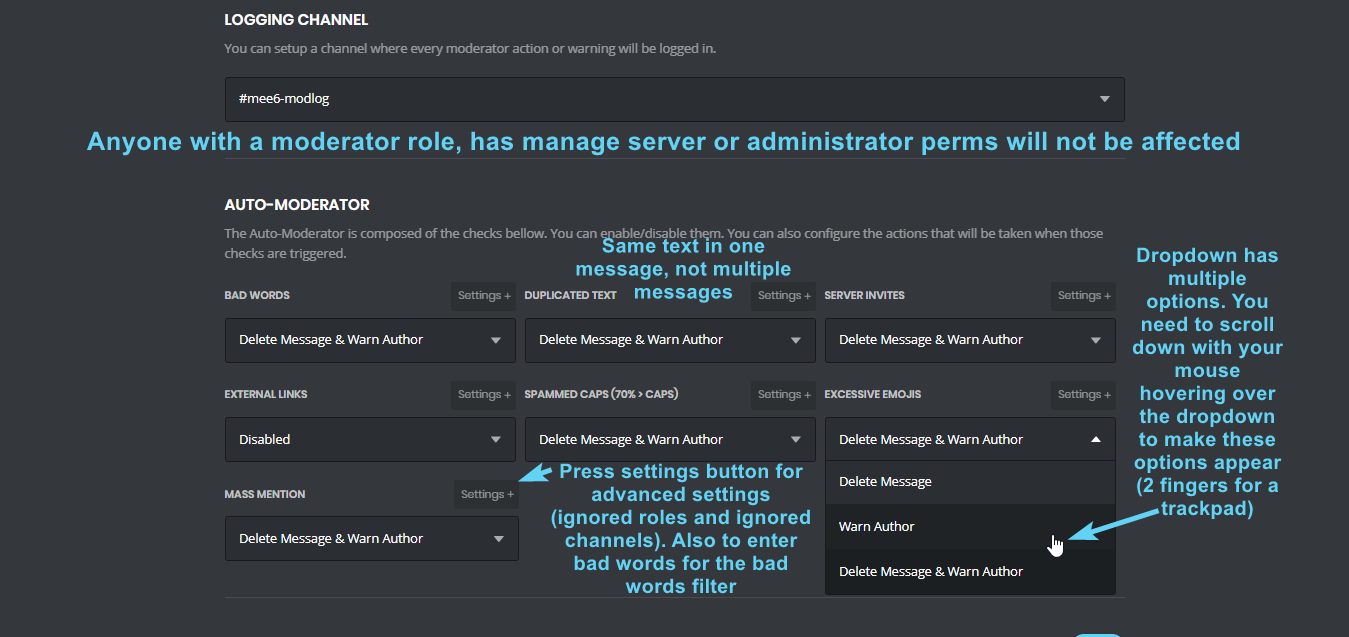


 dire yarrowBOT
Full List of my Permissions that I use...
https://i.imgur.com/3Wd5wKZ.png
buoyant moon
Does muting work at the moment?
strong path
!!tag muteinfo
wind windBOT
!mute @user - gives mentioned user the muted role
Requirements:
+ Manage Roles perm
+ Manage Channels perm
+ I must have a role above the muted role
+ User being muted must not have a role that has a green tick next to the send message perm in channel settings->permissions as this will override the muted role. They must also not have a user perm override on that channel
P.S. You can't mute people who have the permission to mute others, this includes: owner, other moderator or members with Administrator or Manage Server permissions!!!```
https://cdn.discordapp.com/attachments/302245580673908740/433026975670730771/2018-04-10_01-13-56.gif dapper pebble
Seems to be that Mee6 is not removing the auto-role when another role is granted through a level up, even though it removes the roles after that.
bitter owl
@dapper pebble need to go to levels and select Remove option instead of Stack opt
dire yarrowBOT
You can access my dashboard at https://mee6.xyz/dashboard, and login with your Discord Account.
dapper pebble
I've had it selected, is the thing. I only just noticed it with a few new members as I was pruning this morning. They have the level 10 role, but not the level 5, while maintaining the auto role.
dire yarrowBOT
So... @dapper pebble, I've decided you should be level 1.
Don't get too excited, mmk.
bitter owl
Nuts, seems it’s working.
Stack: will keep level 10 and level 5
Remove: will delete level 5 and keep level 10
You are saying it’s removing so the option you selected is doing the job
dapper pebble
But it isn't removing all of the roles, is the problem.
I understand that its doing it at some point as it should, but it isn't consistent anymore.
bitter owl
@dapper pebble it will remove only rewardable roles
If you expect mee6 to remove outside roles it won’t happen
If it’s on the rewardable list. It can be removed. Otherwise, no. Sorry
dapper pebble
Okay so
Auto role is rewarded through Mee6 on joining
They talk, they level up, they get the next role, the auto role remains.
I don't see what the disconnect is here because I'm explaining it as best I can.
It was doing the thing its supposed to do for three months, now it isn't.
bitter owl
@dapper pebble auto-role is not level reward
So mee6 will not remove that role
Again; mee6 only removes roles that are listed on Level Plugin
If another role is selected in custom command or welcome - auto role, mee6 won’t see it as removable role
dapper pebble
So, you're telling me that it did it a week ago, but no longer will. At least it isn't a bug.
 earnest lake
!levels
dire yarrowBOT
Kubalo, this command is disabled in this channel.
faint bison
<@&193123929701875712> spam
dire yarrowBOT
oli#6267 (389355218787368961) is muted for 1 hour because of 'spam', boss.
windows, this command is disabled in this channel.
buoyant moon
!!tag muteinfo