#〉bugs-reports
2 messages · Page 24 of 1
 modern bramble
 buoyant moon
I cant save or cancel
 ionic juniper
!mobile
 dire yarrowBOT
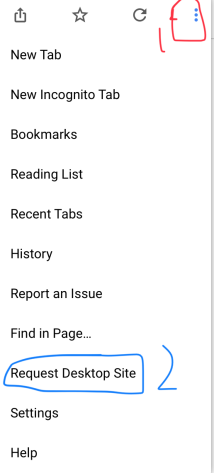
Due to the recent update, the website does not work properly on mobile. You can either use the Google Chrome app and request desktop version (for Android users) or use a PC (for iOS users) https://i.imgur.com/kyt5Akd.png
 buoyant moon
Thank you !
 pseudo token
MEE6 factory was online?
 gentle crater
 orchid verge
The bot is displaying as online but commands are not working.
 faint bison
buoyant moon
faint bison
buoyant moon
is it working now??
faint bison
should be
 storm solstice
any reason as to why my reddit pluggin doesnt work?
ive searched online and theres no conclusive answer
 wooden mountain
yes, reddit is disabled because of multiple problems, pls wait while we completly remake the plugin
storm solstice
sure
 calm kite
um, this happen
idk if it is just an nickname or username
but they are abusing this
a lot
if im needed more, please, ping me
 strong sandal
@calm kite mee6 cant change your username but it can change ur nick
 cold bear
@strong sandal stop. this is real issue cuz bot uses nickname in you can't use this message.
@calm kite thanks for letting us know
strong sandal
what do i stop?
cold bear
👌
calm kite
👌🏿
strong sandal
👌
buoyant moon
<@&193123929701875712> I’m on iOS and there’s no update button for the mee6 site
It won’t appear
 white notch
@buoyant moon known bug. iOS isn't website supported
dire yarrowBOT
So... @buoyant moon, I've decided you should be level 1.
Don't get too excited, mmk
Alright, @buoyant moon has been warned because 'posted a """meme""" in #〉bugs-reports'.
 solar swift
.V
 wet abyss
does not work
 modern berry
Even though i talk, i dont recieve any XP
 sage citrus
@modern berry make sure you don't have a banned role
modern berry
why? in the server the only role that does that effect is Nadeko-Mute (we have that bot there), does moderator, admin and server owner like roles are banned roles?
 keen linden
no.
modern berry
me and a friend of mine we have the same role that make us moderators of that server and we can't recieve any XP :/
 uncut moss
Hi
modern berry
so... what migth be happening?
dire yarrowBOT
So... @modern berry, I've decided you should be level 1.
Don't get too excited, mmk
 hoary stream
Check that little box inside the Levels plugin. You might have a role that is banned and you can't gain XP from a banned role.
@modern berry
modern berry
how i see that? i don't know most of the commands
dire yarrowBOT
https://mee6.xyz/dashboard press add to Discord, then select your server
hoary stream
Go to the dashboard and click on your server. then levels. then scroll tilll you see No-Xp Roles
modern berry
thanks
 halcyon owl
 tired loom
Mee6 sometime the !rank command doesn’t work
 mortal oxide
@tired loom you may be set a cooldown
 twilit flame
when setting a custom command, " @+everyone " turns into " @ everyone "
and i setted it this way :
how come there is a space now ? 😮
between @ and everyone
wooden mountain
protecting against @ everyone mentions
twilit flame
has it been changed ? It was working before .. like yesterday
dire yarrowBOT
So... @twilit flame, I've decided you should be level 1.
Don't get too excited, mmk
wooden mountain
yes
 split python
İs ban words module working or have a bug ? I couldnt set
buoyant moon
I cant fix the stream i started streaming but it does not come any notification
cold bear
delay is up to 15 minutes
buoyant moon
it said five to me...
cold bear
5 is min
 plain widget
hello on your website its changing things automaticly
like making new custom commands
 lusty kestrel
i cant reset all lvl for my server is normal ?
wooden mountain
temperary disabled because bug
lusty kestrel
you speak for me @wooden mountain ?
wooden mountain
yes
lusty kestrel
oh ok ty
 oak ferry
When can we be able to @ everyone with custom commands?
wooden mountain
no idea
 minor mason
Mee6 is not picking up be sending messages
 spring vessel
Why custom command's @here dont work? it says @ here
 craggy pine
Mee6 ignores now also bots for automoderation? is this bug known? The option to disabled it isn't activated
 cyan fern
I can’t save the changes that I changed
cold bear
!mobile
dire yarrowBOT
Due to the recent update, the website does not work properly on mobile. You can either use the Google Chrome app and request desktop version (for Android users) or use a PC (for iOS users) https://i.imgur.com/kyt5Akd.png
 crisp flicker
yEeT
dire yarrowBOT
So... @crisp flicker, I've decided you should be level 1.
Don't get too excited, mmk
crisp flicker
ok
 clear gulch
need to bring back the function for @ everyone for custom commands - please
mortal oxide
Planned.
 glacial sand
the auto moderator isnt detecting duplicate text
wooden mountain
isn't it? isn't it? isn't it? isn't it? isn't it? isn't it? isn't it? isn't it? isn't it? isn't it? isn't it? isn't it? isn't it? isn't it? isn't it?
if i was not a moderator then that message would get deleted
so would this one -----------------------------
it ignores moderators
mortal oxide
Note: it should be in the same message
wooden mountain
^^
dire yarrowBOT
Alright, @bitter owl has been warned because 'Duplicated text'.
 bitter owl

wooden mountain
don't do that to much Google, i wouldn't want Mee6 to ban you
buoyant moon
bitter owl
Yup
bitter owl
This channel is designed for reporting errors
buoyant moon
im speking french

 half grail
Mee6 doesn't count my xp
bitter owl
!noxp
dire yarrowBOT
If Mee6 isn't giving you xp, or either !rank or !levels is not working it is one of the following:
Reason 1: The levels plugins isn't enabled on the dashboard
Reason 2: You have a banned role on you (in which case you should remove it)
Reason 3: Bot can't read messages in that channel (for not gaining xp) or can't send (for !rank and !levels)
Reason 4: Command cooldown if you have a cooldown set super high, set it lower so that both !rank and !evels will work
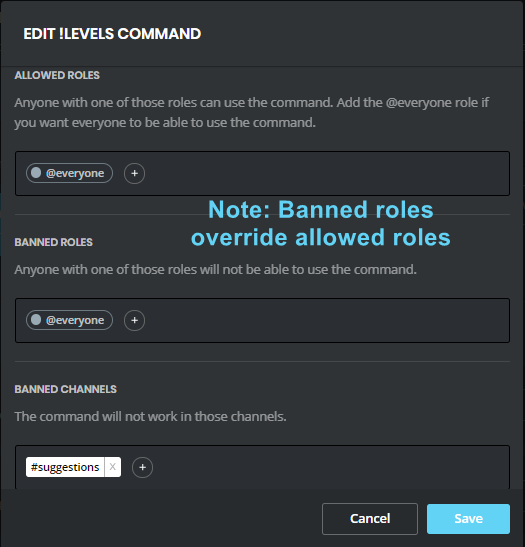
Reason 5: Banned roles and channels. Check that you haven't set a banned role or are using a command in a banned channel: https://i.imgur.com/20QEyzL.png
In case you don't know about banned roles, this pic shows->https://i.imgur.com/dwyc1gt.png

 median hare
Bonjour !
bitter owl
Bonsoir
 daring lynx
strong sandal
daring lynx
strong sandal
you're in a roblox server....
 reef hull
not rly
 twin sorrel
@wooden mountain Seems there's two non-working variables (I did type them manually. ;P) Might want to look into them
dire yarrowBOT
So... @twin sorrel, I've decided you should be level 1.
Don't get too excited, mmk
twin sorrel
wooden mountain
¯_(ツ)_/¯
strong sandal
¯_(ツ)_/¯
 ionic meteor
discriminator is misspelled
twin sorrel
{user.discriminator}
{channel.mention}
ah reep
user error, mention one is broke tho
reef hull
@wooden mountain, explain this
twin sorrel
Why you gotta tag him more than once tho? you just tagged all helpers a sec ago.
wooden mountain
#blameDiscord
twin sorrel

strong sandal
that confused me so much
reef hull
because they said that they carnt help...
ionic meteor
@twin sorrel Hmm yea it's broken. Sil, should I put it on the todo list? 😛
reef hull
but you a dev
strong sandal
 discord
twin sorrel
😄
reef hull
that means i can lvl up 5 times?
twin sorrel
no
ionic meteor
Sil, should I put {channel.mention} on the todo? 😃
twin sorrel
just the message 5 times
twin sorrel
yeah out of it all that's the only thing I found not working, I'll include it in the documentation update with that noted
afaik {channel} and {channel.mention} are the same no?
ionic meteor
I guess
wooden mountain
yes
twin sorrel
why not just remove the broken command if there's already a replacement?
i mean.. less work..
 solar acorn
hm, I'm finding a lot more not working...
twin sorrel
Like what?
solar acorn
hold on let me figure out the whole deal..
twin sorrel
If you’re resign from the current documentation it’s outdated
Reading*
I am working on that
solar acorn
!variables
dire yarrowBOT
you can use variables in your custom commands, here is a list:
https://mee6.github.io/Mee6-documentation/Variables/
or you can use these commands in this server:
!userinfo, !serverinfo, !channelinfo
(pls use #〉commands for bot commands)
Because the link has outdated variables, use the following list for V2 variables:
SERVER VARIABLES
Server: {server}
Server name: {server.name}
Server ID: {server.id}
Server icon: {server.icon}
Server icon link : {server.icon_url}
Server Owner ID: {server.owner_id}
Server Owner: {server.owner}
Server Region: {server.region}
Server verification level: {server.verification_level}
Server creation date: {server.joined_at}
Server member count: {server.member_count}
```__**USER VARIABLES**__
User mention: {user}
User ID: {user.id}
User name: {user.name}
User discrim: {user.discriminator}
User ID: {user.idname}
User mention: {user.mention}
User avatar: {user.avatar}
User avatar link: {user.avatar_url}
User bot (yes/no): {user.bot}
Channel name: {channel}
Channel name: {channel.name}
Channel ID: {channel.id}
Channel type: {channel.type}
Channel mention: {channel.mention}
directly from that...
solar acorn
well a lot of those aren't even auto-completed
twin sorrel
Yeah well, every one of them work aside from channel mention at the bottom
solar acorn
hm...
dire yarrowBOT
So... @solar acorn, I've decided you should be level 1.
Don't get too excited, mmk
solar acorn
kinda hard to force it to go with something I want...
twin sorrel
I tested it all like 15m ago 😄
 slate lynx
The bot is down atm
 gray niche
slate lynx
gray niche
slate lynx
thanks 😉
buoyant moon
my reddit post plugin is not working after working for a month or so, is there something the subreddit does to block the webhook?
sage citrus
@buoyant moon The reddit plugin is disabled, please read #425409486820474881 before reporting bugs
buoyant moon
thanks, sorry. Wish it would have said that on the website.
 hybrid briar
hello, I want to report that in my server does not work the pluying that grants roles
dire yarrowBOT
So... @crisp pecan, I've decided you should be level 1.
Don't get too excited, mmk
Alright, @crisp pecan has been warned because 'Bad word usage'.
 molten oasis
Okay, so I've noticed that there's an issue where my mee6 still calls two links from the older versions of the api so it double posts sometimes.
Most often with twitch
twin sorrel
Steps to reproduce?
 gloomy furnace
The bot isn't accurately linking my stream for an announcement
it should be imagineplays_ but it just does imagineplays no _
😦
mortal oxide
@gloomy furnace I guess you have a _ in your channel name, right?
gloomy furnace
yeah
just noticed it did some formatting in discord lmao
my bad
channel is imagineplays_
the bot links to imagineplays
and goes to the twitch page for imagineplays, but the preview for the link is my channel
shits fucky
mortal oxide
@gloomy furnace put this `{streamer}` instead of {streamer}
Your name will appear like that {streamer}
But no problem with mardown anymore
gloomy furnace
alright I'll try that out, ty
mortal oxide
Np 👌🏻
 tribal lion
Hi guys
dire yarrowBOT
So... @tribal lion, I've decided you should be level 3.
Don't get too excited, mmk
tribal lion
I have a question for you guys with the command mute
It didnt work though I`ve checked the system
Its alr pluged in but it didnt work
Can you guys help with this problem?
bitter owl
@tribal lion
1- Can't mute a people with access to dashboard (admin/manage server/moderators)
2- Can't mute someone that has role expressly allowing them to write in text channel
buoyant moon
I can't get a music bot on my server
bitter owl
@buoyant moon It's a premium feature, that is unlocked once you donate :)
 distant egret
<@&193123929701875712> the custom command is not working. Every time I use it I get an error message
cold bear
if your command should give role make sure that role is under mee6 role
and mee6 has manage roles permission
 rough bone
Bug: Messages edited to inappropriate words are not acted upon by the MEE6 auto-mod. I'm fairly sure that submitting this as a bug is correct, as @cold bear stated that these messages should be moderated.
Example: This message was originally clean, but has been edited to have the word fuck . Please delete this when you see it.
 turbid vigil
<@&193123929701875712> I just kicked the bot and had it rejoin because it wasn't working. It is now asking me to buy the music plug-in again.
 spring skiff
use support next time
bitter owl
@turbid vigil Could you send me the paypal receipt in DM, pls?
@spring skiff No!!! Do not backseat moderate saying people need to change of channel, they can ask anything anywhere, it's a entire support server! 
Thank you :p
turbid vigil
@bitter owl oh i dunno i've had the bot for a long long time but ill do my best to find it
bitter owl
Just dm and I guide you to solve this problem alright?
turbid vigil
sure
spring skiff
im inoccent ffs
bitter owl
Read the rules and won't be inoccent anymore :)
 warped nova
dude, what
bitter owl
Sure 
spring skiff
i follow the rules of life also
warped nova
thoroughly confused
 livid thicket
Hey, I run an eSports server and I would like to report a bug. The bot doesn't seem to delete profanity that I listed on the site. Would I am not sure if I am not using the bot properly. If it is bugged can you please fix it as fast as properly as I would like no one to use any really bad profanity on the server.
 calm river
The description for !tempmute should read "Temporarily mutes a member in the whole server"
(right now 'Temporarily' reads 'Temporarly')
bitter owl
@calm river Thank you very much Sir
@buoyant moon <3
And @hollow hill lol
You and Bam take care of this, right?
calm river
Same for !tempban :)

 lucid depot
Why do they show up as "never"
cold bear
could be old username
lucid depot
not a old username
lucid depot
oh, i think i see what happened 🤔
Doesnt explain why the profile pic and such doesnt show though
Cuz theres a few people on here with no pics
wooden mountain
this is weird as f, his name is "lin 💌" and he has a picture, but the leaderboard does not want to recongnize it
lucid depot
There are a few others with the right names
but no profile pictures
#25 and #34 respectively
wooden mountain
number #34 seems correct
wooden mountain
wut? that is strange
ok, for both those people, if they just gain a little bit of xp (1 message in a channel Mee6 can read that does not start with a !) then it will update on the leaderboard
leaderboard only updates when the user gains xp
lucid depot
34 at least is relevetively active, the bot should have it
wooden mountain
so it can store old names for quite a while
lucid depot
There were talking today in channels that the bot give xp for
Does it hasto be from now on?
wooden mountain
so... discord says that https://cdn.discordapp.com/avatars/404821775122300930/4ce7e9039cd1d5e7569e63c08e5fb6e4.jpg is his his avatar

😐
lucid depot
Which looks right
wooden mountain
in my browser that link doesn't work
wooden mountain
yep, works here but no in my browser
wooden mountain
wooden mountain
@lean sphinx link to avatar works here but in the browser it gives a 404, any idea?
i have a feeling that most of these will work in discord
lucid depot
weird....
 faint dome
I have an other error on this link. Maybe this can help you
It's not a 404 error, but a problem on the picture
lucid depot
how does it have a error on the picture but it still displays fine when we link it here
wooden mountain
what we link here is from the discord cache, that is not from the link directly

that is what he shows when we link it here
he doesn't show the link directly
(discord can be weird sometimes)
lucid depot
oh
lucid depot
I always thought it was our local cache that it pulls from
wooden mountain
nah, discord server cache
lucid depot
So the link being invalid, is that on discord ends then?
wooden mountain
probably
lucid depot
Well, you learn something new every day. Thnx for clearing it up sil.
 drowsy trail
I cant use !help command and Im mee6 modeartor, but i cant use !warn command
mortal oxide
@drowsy trail Certainly because someone put the moderator role in banned role or just removed the everyone role from allowed roles.
drowsy trail
okay thankyou
 languid crane
For some reason when I go to edit / add it to a server I can't click athourize or cancel on the first step there's nothing I can do
bitter owl
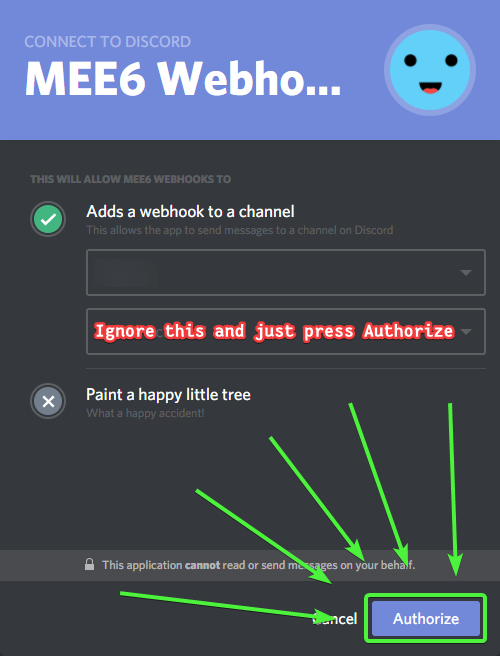
!ignore
dire yarrowBOT
 bitter owl
If not working neither, kick mee6 and reinvite
languid crane
The thing is I can't invite him to begin with when I press that nothing happens
languid crane
It finally worked after a while everything was correct I did it yesterday I don't know what was wrong
cold bear
describe it
 peak sorrel
nothing happens
cold bear
did you test it on yourself?
peak sorrel
yes, i do
dire yarrowBOT
So... @peak sorrel, I've decided you should be level 1.
Don't get too excited, mmk
cold bear
bot ignores admins and mods
peak sorrel
ok thank you😉
 spare iris
variables not working for me http://mee6.github.io/Mee6-documentation/Variables/
I use Nickname : {user.nickname}
Joined date : {user.joined_at}
Created date : {user.created_at}
Status : {user.status}
Picture : {user.picture}
sage citrus
!variables
dire yarrowBOT
you can use variables in your custom commands, here is a list:
https://mee6.github.io/Mee6-documentation/Variables/
or you can use these commands in this server:
!userinfo, !serverinfo, !channelinfo
(pls use #〉commands for bot commands)
Because the link has outdated variables, use the following list for V2 variables:
SERVER VARIABLES
Server: {server}
Server name: {server.name}
Server ID: {server.id}
Server icon: {server.icon}
Server icon link : {server.icon_url}
Server Owner ID: {server.owner_id}
Server Owner: {server.owner}
Server Region: {server.region}
Server verification level: {server.verification_level}
Server creation date: {server.joined_at}
Server member count: {server.member_count}
```__**USER VARIABLES**__
User mention: {user}
User ID: {user.id}
User name: {user.name}
User discrim: {user.discriminator}
User ID: {user.idname}
User mention: {user.mention}
User avatar: {user.avatar}
User avatar link: {user.avatar_url}
User bot (yes/no): {user.bot}
Channel name: {channel}
Channel name: {channel.name}
Channel ID: {channel.id}
Channel type: {channel.type}
Channel mention: {channel.mention}
name: @Goku#4895
mention: @spare iris
ID: 347722830864973825
is bot? False
picture url: https://cdn.discordapp.com/avatars/347722830864973825/7070e46505c6b65c10df59651a5fcbde.webp?size=1024

 sharp fossil
I'm unable to add MEE6 to my discord server..
languid crane
Same thing happened to me earlier keep trying and wait every now and then eventually it will work
cold bear
@sharp fossil does it say you have no servers?
cold bear
good
 storm flame
alguien habla español?
bitter owl
@storm flame si que se passa amigo?
bitter owl
Si
storm flame
dale hablame por privado
quisiera saber
como hago para poner distintos mensajes cuando alguien suba de rol?
asi automatico ps
bitter owl
Elige un chat para hablar, no hables el problema en todos los canales, por favor
 quick lynx
Did my issue ever get reported to the devs?
 exotic silo
the mee6 website is too confusing. when choosing roles to grant at certain levels, only 3 roles show up and i have way more than that on my server. also when i choose the level the role is granted at, it only shows level 1-3.
buoyant moon
The Welcome Plug In Won’t work For Mobile
wooden mountain
@exotic silo that is a scroll box, you need to scroll in it
exotic silo
dw i got it to work now
sage citrus
yeah they posted in #〉volunteer-support too @wooden mountain
quick lynx
The issue I've been having for several weeks is that MEE6's automatic moderation actions don't seem to work. It only ever uses the first one and all my other ones are obsolete. Even if I rearrange the order, whichever one is at the top is the only one that works.
wooden mountain
Know issue, is being worked on
quick lynx
Well it was never listed in known bugs so I didn't know if it was known or not
wooden mountain
Really?
quick lynx
Yep
white notch
I also told you I told the dev 🙄
 wise aspen
!levels
dire yarrowBOT
Profil, this command is disabled in this channel. 
 umbral wave
mortal oxide
umbral wave
mortal oxide
@storm mango who tried to use bad words? Because MEE6 ignore moderator, Manage Server permission, Admin and the Owner.
 storm mango
Oh, so it will work with normal members?
mortal oxide
@storm mango yep
storm mango
We just did a test and it worked very well, thanks a lot!
 junior goblet
some of the v2 variable commands don't show / function. can we expect any of the old variables back like join.date ?
 plucky brook
Hello there. I am not sure if this is a problem I have created or not, but none of my server members xp are increasing. Their xp and levels have been stagnant for a while now, I have checked mee6 rank settings but I am unable to figure out what's wrong. Is there a fix or does anyone know anything about this? I have tried googling it but to no avail. Please help and thank you!
bitter owl
@plucky brook Look at #〉volunteer-support your answer
 nova river
Hi there, I'm attempting to use the 'clear' command from the moderator plugin but I keep getting an error message stating something along the lines of: 'oops, something went wrong in mee land'
bitter owl
!clearinfo @nova river
dire yarrowBOT
The clear command allows you to clear the last xx amount of message.
or to clear that annoying spammer without clearing anyone else
just use !clear 1-1000 to clear the last xx messages (example !clear 10),
or use !clear @name to clear all the message of @name in the last 100 messages
+ I need manage messages permission
+ I need view message history permission (otherwise I will respond with -1 messages cleared)
+ you need to check the checkmark next to clear on the plugin page.
+ you need to set your role as moderator (located at the top of the plugin page in the moderator tab)
 quiet canopy
!play song
dire yarrowBOT
kerempasa120, this command is disabled in this channel.
 dapper hullBOT
kerempasa120, it doesn't look like you can use that.
quiet canopy
türk varmı
 spring crag
hello. I have a bug to report. When my stream gets linked in not only my discord but others as well the mee6 bot doesnt display underscores from twitch links.
cold bear
add ** ** around {streamer}
cold bear
if user still streaming remove him from list, save settings and add again
sage citrus
The person probably triggered the automod, or someone used the !warn command
 ruby salmon
smfh
 sour prawn
Mee6 stop working in my server
dire yarrowBOT
So... @sour prawn, I've decided you should be level 1.
Don't get too excited, mmk
sage citrus
guys
 proper scroll
"!clear 100" then some bug message pops up
sage citrus
the bot is restarting
halcyon owl
bot work answer on my server anymore
sage citrus
 the bot is restarting, please wait
halcyon owl
oh ok
 slender obsidian
Oh did it lag because of that?
 pale hearth
It will work when the update is done iam not sure how long it will take, only advaith knows
dire yarrowBOT
So... @pale hearth, I've decided you should be level 1.
Don't get too excited, mmk
pale hearth
😛
sage citrus
no i dont know lol
dire yarrowBOT
Alright, @buoyant moon has been warned because 'Bad word usage'.
buoyant moon
The music bot is not working he dosent join the channel when I tell him to he says connecting and then dosent connect
 lethal estuary
 amber idol
I was just about to report the bug that BALOONY said
 frosty arch
Duplicated text is not working
sage citrus
@frosty arch it only detects duplicated text in one message
 reef wing
I have a problem with mee6 in my server
If I use a command, the bot gives 2 same replies
Like for ex : !rank = Gives my rank 2 times(Double result)
How can I fix this?
reef wing
Mention me if you guys find a solution for this
 vernal lark
same problem here @buoyant moon
vernal lark
i hope the fix is in
 brave prairie
get tf out of here
bvvvbvbgffffffffffffffffffffgv\
fbv
fg
f
g
fg
gfgf
fg
fg
fg
fg
fgd
fg
fgf
fgg
gf
 old isle
why
ionic juniper
Checking in for a potential status update on an issue I asked about in #〉volunteer-support last week March 30th ((my memory is poor apparently)) - as I didn't get an answer there and it seemed to be a bug I am asking in here now.
If you put a role mention inside an inline code block in a custom command, it breaks and instead throws back @<[NUMBERS]> inside the code block. I've done testing with this in another server and it doesn't break down when done normally (e.g. @Support - this both shouldn't ping and should appear normally), but does when Mee gives it back as a custom command.
Edit for clarity: the "role mention" is not supposed to ping, hence putting it inside the inline code block. The bug is that the role mention doesn't appear properly, instead showing up as <@&[NUMBERS]> rather than the actual role mention would be. Note that [NUMBERS] is literally a string of numbers (I believe this is the role ID?)
dire yarrowBOT
So... @ionic juniper, I've decided you should be level 4.
Don't get too excited, mmk
buoyant moon
Nothing is working on mee6
 uneven coral
mee6 won't join voice for music. Just says "connecting to channel..." but then nothing. Does it take a while to join? The bot has access to the channel and everything. And it's permissions have it set to where it has connect set to yes.
So I'm not sure what I'm doing wrong unless it's not working right now
nevermind, I just saw it posted in #425409486820474881
dire yarrowBOT
So... @uneven coral, I've decided you should be level 1.
Don't get too excited, mmk
white notch
@sour chasm 👉 #〉announcements 👈
 sour chasm
ou thanks 😃
 dusk vortex
mee6 went down on my discord
wooden mountain
@ionic juniper add a zero witdh space after the @ of the mention
 cold bear
global ones?
 keen dust
yeah
cold bear
ionic juniper
Thank you, Sil.
 brazen zodiac
.
dire yarrowBOT
So... @brazen zodiac, I've decided you should be level 2.
Don't get too excited, mmk
 edgy chasm
The Bot has been randomly repeating itself, Someone joined my server, and it made two messages five minutes after he joined, after that, it made two Twitch Adverts in my friend's server, but not in mine which it has been doing repeatedly for a few months
 spring elbow
The music is laggy....
dire yarrowBOT
There are 2 kinds of lag that can occur on the music plugin:
- slow down and speed  up of music
! this is lag on Discord's servers, NOT Mee6
+ try changing server region to fix this, sometimes it even helps to use an overseas server (some Discord servers are really bad)
- pause and resume of the music
! this is caused by using lower quality music or video files
+ you can try to use another file(using links) to fix it, if this doesn't help then pls tell helpers or support
@spring elbow
spring elbow
?
 lethal pollen
Is mee6 controlled by a person on this server?
spring elbow
Don’t think so....
dire yarrowBOT
So... @spring elbow, I've decided you should be level 1.
Don't get too excited, mmk
spring elbow
xD
buoyant moon
Is #425409486820474881 up to date if yes then why are bugs taking so long to fix
hoary stream
@buoyant moon There was a lot more
buoyant moon
Mhm?
dire yarrowBOT
Alright, @rain sand has been warned because 'Mass emoji'.
 kindred hound
Hey
dire yarrowBOT
Alright, @kindred hound has been warned because 'Mass emoji'.
 vestal nimbus
Custom command banned roles dont work. The selected roles can still use the command.
dire yarrowBOT
So... @vestal nimbus, I've decided you should be level 2.
Don't get too excited, mmk
sage citrus
@vestal nimbus Does the user have either the Administrator or Manage Server permissions?
vestal nimbus
no
otherwise everyone on my server would
heh, caught an error in my recent permission changes thanks to that screenshot. Muted is below Newbie. Derp.
halcyon owl
ugh it is
sage citrus
?
mortal oxide
We are ware MEE6 having issue and it is not responding. It's due to a Discord outage!
More informations there https://status.discordapp.com
 woven needle
Is it though?
old isle
omnes gaudent
woven needle
I don't speak french
 orchid cliff
k
old isle
it's latin you non scholar
dire yarrowBOT
Alright, @woven needle has been warned because 'Capital letters'.
woven needle
Peri.
old isle
Uhhh i cant believe i am even in the presence of people who dont know the classics
 plucky fiber
I can't get on to my server in mee6.
old isle
check #〉announcements
plucky fiber
yeah but only one server won't load.
old isle
then that one server is oofed
plucky fiber
ffff
 next wren
Mee6 shows it’s online but custom commands are not working
old isle
to pay respects
hoary stream
@next wren It's normal to see the bot online because it is working fine in some guilds and down on some others. Don't worry the whole bot is restarting
plucky fiber
good I can accesses two out of three servers. and the one I need to accesses is down
 vagrant locust
I just created a new role in a channel but when I try to set the bot to assign it atomatically to new members (Welcome plugin) it doesnt show this new Role as an option. Any ideas?
 cyan chasm
Help! I'm trying to get the bot on a new discord server, and no matter what I do I keep being sent to my original server - I no longer intend to use the bot on that server, but instead on the new one. I keep also getting bounced back to the "choose server" screen, unless I pick the original server. Any help would be appreciated.
 eager cave
Me too
cyan chasm
FIXED just now. Bot may have been down or something?
 solid harness
Hello, I have people joining my server, but no joining message comes up, and no roles are given, as I set up
Is the bot broken for now?
 late valve
old isle
late valve
old isle
ok
solid harness
Anyone here to actually help?
 lofty shuttle
The custom commands aren't working on my server
sage citrus
The bot is having issues due to a discord outage today
thats why #〉volunteer-support is locked
lofty shuttle
Ok thanks my guy
spring skiff
support doesnt work
bitter owl
@spring skiff if u need help because bot is still not working properly in your server: #〉announcements
spring skiff
im good dude
 jaunty wadi
I can not find the list for the bot
 native anvil
go to #〉volunteer-support and ping @/helpers with your question @jaunty wadi
jaunty wadi
OK I did
 naive willow
Bug? 😦
bitter owl
!ignore @naive willow
dire yarrowBOT
bitter owl
You should select the channel and pass thru authentication before that step
If mee6 is not leading you to authentication window (check if you didn't block pop up windows)
I recommend you to logout and try adding a timer again
!logout
dire yarrowBOT
oops, it looks like you are on the wrong account, you need an account with 'manage server' permissions.
You have to log out from discordapp.com in that browser and then log back in again.
- log out of discordapp site https://discordapp.com/channels/@me and follow the steps in the gif below
- go to http://mee6.xyz/logout and click the 'add to discord' button
https://i.imgur.com/7829TNS.gifv
 bitter owl
Great
junior goblet
mee6 has been non functional since last night. anyone else?
buoyant moon
Euh bonjour ? Il y aurais ici des français pour m'aider ?
Je ne parle pas du tout anglais
On the mobile version of discord, you can give members a role, but you can't save the edit you did.
junior goblet
bad words are able to be used, new users arent given rank. commands are offline. any eta?
bitter owl

buoyant moon
NEVER? lol


 buoyant moon

junior goblet


bitter owl
buoyant moon

 weak vine
Is the dashboard down? it will not load my servers to allow me to pick which one I'd like to access.
 errant prairie
It's because MEE6 is offline
 next gale
When you click 'add to discord' it just loads forever, probably due to the outage
 ember grove
same thing happen
errant prairie
@bitter owl, I already tried this, and the dashboard didn't work
 kindred dove
yeah forever
bitter owl
Mine was working
bitter owl
So just wait dev restart everything then pls
errant prairie
Me too
kindred dove
me too
weak vine
will do, thx @bitter owl let us know when to rety plz
ember grove
🙂 👍
 signal gulch
TY¨
weak vine
buoyant moon

bitter owl
@dire yarrow
IS DOWN. THERE IS NO TIME FOR COMING BACK (No ETA)!
ESTÁ FUERA DE LÍNEA. NO HAY TIEMPO PARA VOLVER (¡sin ETA)!
sour prawn
bot shut down ?
bitter owl
Read above message
buoyant moon
Bot is down on my server
Is there any prediction to return?
bitter owl
No ETA
weak vine
Coño pero todavia no hay tiempo para volver @bitter owl 
I'm sure the dev guys are working on it...please be patient people
cold bear
because you're on mobile
 crystal bluff
Oh, well can you delete this? I don't want to look like an idiot 😂😂
bitter owl
@crystal bluff In computer
crystal bluff
Ahh 😂 My bad :-p
weak vine
ok seems to be working again now...many thanks to the <@&193123929701875712> & <@&424994160387293184> teams
bitter owl
Ok
weak vine
spoke too soon...it shows servers but tries to reuthorize again...go through it but doesn't load the servers dashboard
ionic meteor
can take a while before its 100% functional @weak vine
ionic meteor
😃
 exotic canyon
Help, I can not go into the setup, I constantly ask for authorization. I'm authorized and the same. What's wrong?
ionic meteor
bot is restarting, the website needs the bot @exotic canyon
 left turtle
 iron delta
rip
ionic meteor
bot is restarting, the website needs the bot
exotic canyon
I talked about discord. That it shows from the application one, but from the browser is different.
 silver idol
 sage plank
MEE6 is offline?
 elder burrow
yes @sage plank #〉announcements
weak vine
must have just gone down again in the last few minutes
buoyant moon
the mee6 is off on my discord server, you can help me, the commands are not working
ionic meteor
read messages in #〉volunteer-support 😉
buoyant moon
yes
Thanks, he's online now.
@lean sphinx The MEE6 in my server isnt responding to commands, and it is online.
faint dome
plz wait
buoyant moon
@buoyant moon +
ionic meteor
it can take some time before its 100% functional
 wide crow
is not working...
 stark hare
is not working, it say is in my server but is not in member list, sorry for my english XD
 static mulch
mee6 rip...
 dusk night
it's not working. commands are not working, and a website too, i cant edit setings on the webiste
ionic meteor
@stark hare Mee6 might still be offline in some servers. It’s restarting
@dusk night Bot is restarting
stark hare
@ionic meteor ok thanks
 hoary saddle
<@&193123929701875712> I'm an admin of a server that just gets stuck in the invite phase when getting the bot. the bot shows up but the website continues to give the authorization prompt and never gets into the settings.
hoary saddle
ah awesome good to know 👍
 fiery turret
is there a possible e.t.a on when it might set in? (just curious)
 frail kraken
<@&193123929701875712> Heyo, I somehow cannot access Mee6's settings on one of my servers.
I used to being able, I still can for other servers, and am still an admin on that one server.
ionic meteor
Mee6 is having issues atm
frail kraken
The website asks me Authorize the bot again, it then loads just to come back to the server selection screen
oh is it?
 fringe compass
that happened to me too
 tough latch
Excuse me but MEE6 bot is offline in my server
buoyant moon
Bot is restarting
 copper rivet
nope
buoyant moon
nope
 kind dew
copper rivet
kind dew
copper rivet
they said before that it had to restart in 5 mins
 reef tendon
same, it just tries to add it to my server
copper rivet
still offline
buoyant moon
Well considering how many servers are using this bot
copper rivet
because it's off the whole service
tough latch
😭I want to play with every bot in my serveur
buoyant moon
I think its acceptable to have a long restart time
tough latch
We have no idea when is operational
copper rivet
no
tough latch
Tomorrow or the next week
copper rivet
sorry, you're right @next gale
 smoky iris
Howdy. I have the bot in my server set to delete all caps messages, however it isn't deleting them anymore
next gale
@smoky iris The bot is currently having issues, the devs are working hard on getting it back up and going.
smoky iris
Okay, thank you!
 rustic kelp
@next gale It´s normal for the website not work in some servers?
next gale
!browser
dire yarrowBOT
Internet Explorer? Edge? Safari? Ew... :nauseated_face: It's time to use REAL BROWSER!!!
Firefox: https://www.mozilla.org/firefox
Chrome: https://www.google.com/chrome/browser/desktop/index.html
Opera: https://www.opera.com/
buoyant moon
Its restarting now we don't know about some servers will come before others
The bots was unavaible here until 5 mins ago
 vestal loom
Not on mine yet. The bot is online but no response
 pastel birch
I have a problem, on one of the servers I speak for 3h but I have not received a single xp is this normal?
@hoary stream
 sage flame
Bot is down
pastel birch
ok 😦
 dense jolt
I have problem mee6 is still offline
sage flame
Having issues
buoyant moon
@dense jolt just wait
dense jolt
@buoyant moon how much i wait a two hours
buoyant moon
I don't know
buoyant moon
@pastel birch that was from an hour ago
pastel birch
yes
buoyant moon
And it says 30 mins so we don't know the exact time
pastel birch
we have to restart the bot?
dusk night
we must wait
buoyant moon
You can't restart the bot
dusk night
they're restarting the bot
 proven herald
the website is down
pastel birch
yes
 median cargo
proven herald
median cargo
proven herald
same
wooden mountain
Woops, something went wrong
Mee6 is currently down in all servers, pls wait while we fix this issue and start the bot up again
🔏 you won't be able to talk here untill the bot is back online
keep a 👀 on #〉announcements for more updates
 limpid hemlock
https://tt2468.net/i/2018_04_17_13_34_54_MEE6_the_Discord_bot.png mee6 is being mean
 faint dome
litterally read any other channel : #〉volunteer-support, #〉announcements ...
and message of Sil above your
 faint maple
When you open the navigation spoiler on the mobile site, and then you click your account tab, it gets hidden under the navbox
Maybe make it so you can click your account when ur in nav, or float account above the navbox
cold bear
site isn't mobile compatible yet. use desktop mode
faint maple
It works but that's just a quick issue I found
 lost cloud
So if I understood correctly, with your mobile phone you can't acces mee6? And I need to do it on a laptop or pc?
cold bear
hmm.. looks like mobile compatible design released. try now
cold bear
try use not safari
lost cloud
I'll try that l, thnx
cold bear
👍
cold bear
what's about chrome?
lost cloud
Same result
dire yarrowBOT
So... @lost cloud, I've decided you should be level 2.
Don't get too excited, mmk
cold bear
🤔
ionic meteor
And if you just go to the homepage?
lost cloud
Do you have the direct URL? Because if I type the home page it redirects me to here
ionic meteor
 outer ore
I try going to to the Dashboard but it stays on loading it doesn’t work I literally waited for 2 hours
I like the level idea which is good but it doesn’t work anymore and people are leaving my server because of it
dire yarrowBOT
Alright, @outer ore has been warned because 'Capital letters'.
outer ore
I just tried to say don’t worry it’s fixed
lost cloud
I tried several browsers on my mobile, but it doesn't work
 twin whale
It doesn't work on my server.
I get a window telling me to keep making choices on the mee 6 site.
white notch
buoyant moon
HELLO
 random ridge
the bot in my server is not functioning properly like it will not say when someone joins and it keeps on going offline
next gale
@random ridge #〉announcements
buoyant moon
When we scroll down on the website during the loading, it does that 
Android firefox • Huawei P8Lite 2016, Emui v3.1.1 • Android 5.1

 solar cargo
Mee6 is down
 rapid jetty
mortal oxide
@solar cargo #〉announcements
buoyant moon
still doesnt work for me:/
mortal oxide
@buoyant moon #〉announcements
buoyant moon
thanks b
 nimble magnet
not workingg
 daring spoke
Same here
 silk lance
about 10 minutes ago it suddenly online, but a while it died again
 next vault
Help my bot mee6 turns out to be disconnected in my discord!!
errant prairie
ionic juniper
I'd like to report a bug: namely, that this channel is open despite known bot issues causing you fine support people to constantly have to direct people to #〉announcements to remind people that yes, the bot is still having issues? ((and btw, best of luck with fixing the issues))
 final sphinx
Fuck of mee6
errant prairie
Calm down °-°
 tidal loom
no chill
 north schooner
bot just when ham again
tidal loom
so the bot just posted a streamer going live 4 times in a row 😦
north schooner
^
 hot vale
All of a sudden mee6 is unable to post a @ everyone post. Is this a new restriction?
hot vale
I'm pretty sure it worked yesterday.
hot vale
Can i show you a scrrenshot here?
wooden mountain
sure
hot vale
Well, this is from our # announcement page ...TODAY:
5:57 PM it worked, then stops at 6:18 and all of the later posts
ionic meteor
I think Cookie did that for now, because he was testing it and it might have spammed or something?
I THINK so
cause I got someone else with the same problem
ionic meteor

wooden mountain
no
 subtle merlin
i dont know what but when the bot went down
so did our invite links
and now they still arent working
as soon as we make a new link perm or not
its instantly expired
our ban lists are clean
so im not sure what happened
hoary stream
@subtle merlin That isn’t the bot’s fault
subtle merlin
@hoary stream do you knwo what could? or where i can try to find an answer? ive been researching for posts about this issue and i cant seem to find anything
thank you though
hoary stream
I do not, that is a Discord issue that I don’t have any knowledge about. @subtle merlin
subtle merlin
thanks
white notch
MEE6 is offline because of a discord outage, channels have been locked
buoyant moon
Bug report!!!!!
bitter owl
Please do not post same thing in every channel @buoyant moon
Mee6 is restarting so it will not be working good
buoyant moon
mee6 is not on my server, but for some reason i cant add him, yet his commands are still running on my server
white notch
bot is still restarting, it will not be fully working
 tiny spoke
Are you sure he's not offline?
buoyant moon
ok, what happened in the first place?
bitter owl
Not weird, it's called shards and if it's working for you means there's enough shards to make mee6 works on your server ;)
dire yarrowBOT
Alright, @livid iron has been warned because 'Mass emoji'.
 celest sierra
 wicked nest
<@&193123929701875712> <@&424994160387293184> Hi, i've a bug with the mee6 bot on my discord server. Frequently, the bot go offline, does not respond to commands and stop count the levels. i don't know why.
If you're a soluce send me a private message please.
PS: sorry for my english, i'm french
bitter owl
@wicked nest #〉announcements
Due discord problem it affected mee6 (a lot) and we are working hard to make everything good for you guys
 shell igloo
System over
dire yarrowBOT
So... @shell igloo, I've decided you should be level 2.
Don't get too excited, mmk
 elder rock
Hi, some times the bot do not remove the command
elder rock
Ho OK ! Merci
mortal oxide
Np 👌🏻
elder rock

 broken parrot
[at]everyone is not working with Twitch messages. Something puts a space in it even though there is no space in the original message.
wooden mountain
@broken parrot should work on twitch announcements again pretty soon
 limpid narwhal
When I try to amend our welcome message, I select save changes and then it just refreshes the save changes box and doesn’t save the changes. If I press cancel, it closes the box down so it won’t let me save changes. Accessing the dashboard through discord app on my iPhone.
wooden mountain
try a real browser
broken parrot
kk thank you
spring skiff
thats too bad
 wanton dune
Idk if I'm being dumb, but when I try to make MEE6 give a role to people who join, it doesn't give the roll.
Any ideas
Idk if this is even a bug
It might be
Or I'm just stupid
bitter owl
@wanton dune Mee6 need to have manage role and be high enough in roles arrangement
!autorole
dire yarrowBOT
You can now give members a role on join through the welcome plugin https://i.imgur.com/mhT5oVF.png

 dusty pewter
Can't seem to get the stream notification to kick off correctly. Is this a known issue?
white notch
did the person stream for at least 30 minutes?
dusty pewter
No, is that the trigger? I was just testing it to see if it worked for when I actually stream.
white notch
30 minutes is the max time for a guaranteed announcement
dusty pewter
Okay, thank you, will test tomorrow and come back if the issue persists!
 toxic heron
Shop is broken right?
 sterile veldt
We are using the mee6 timers to make an announcement once a minute, but it stops working after five minutes. Is this intentional?
white notch
!timers
dire yarrowBOT
You're limited to 5 timers per guild, with the message interval being in minutes. If nobody posts a message after the timer has been sent, the channel is considered "non active" and so the next timer will not be sent. The bot needs the MANAGE_WEBHOOKS perm otherwise it'll auto disable if the channel isn't found or it can't create webhook
white notch
@sterile veldt ☝
 high rivet
so what happens if you clash with another bot?
cold bear
🤔
if 2 bots have same prefixes and commands with same commands names both commands will be triggered
high rivet
oh ok then thank you
buoyant moon
user member mderator in the bot
buoyant moon
<@&193123929701875712> <@&424994160387293184> must help now!
ionic meteor
we dont know what your issue is when you only say user member mderator in the bot 😛
ionic meteor
let's move to #〉volunteer-support 😉 Ill help you there
 clear goblet
[MEE6]: "You're limited to 5 timers per guild, with the message interval being in minutes. If nobody posts a message after the timer has been sent, the channel is considered "non active" and so the next timer will not be sent. " Hmmm. That explains why it stopped sending. Is there anyway to override this? I need MEE6 to post a message at least once a day, on an ongoing basis - to a read-only channel i have, that doesn't necessarily field other updates from others users.
would creating a 2nd timer with alternate time delay work? i.e. having the bot speak in the channel act as someone else having spoken sans the other timed message
wooden mountain
@clear goblet can you dm me about this in 90 minutes to 2 hours from now? I will change it for your server but I need my PC for that
Waiting for the train, so can't do it now
clear goblet
oh cool. ye sure. i'll dm you sometime much later this evening, im about to leave work then going for drinks etc... but theres no rush at all
dire yarrowBOT
So... @clear goblet, I've decided you should be level 1.
Don't get too excited, mmk
buoyant moon
All MEE's custom commands on my server messed up, text from one command is on another (I hope you understand me)
bitter owl
@buoyant moon Try refresh
We are aware when you delete one, text get messed. But when you refresh it gets to normal. Will be fixed soon
buoyant moon
Yes, that's problem. I'll try, thanks!
ionic juniper
@bitter owl Any chance that since that's a known issue that can get added to #425409486820474881 ?
bitter owl
Which is?
ionic juniper
deleting commands messing others up until you refres
((what boujee was talking about))
ionic juniper
ty
ionic juniper
yw 😃
 errant umbra
Mee6 doesnt add to the bad words list.
This is after adding some words and pressing OK
wooden mountain
add word => enter => add next word => enter => etc.... => press ok
errant umbra
Kk will try 1 sec
Tried with one word. Didnt add that. What do I do now? (Mobile site too so no enter button)
errant umbra
Oh ok
errant umbra
Works !!
Next : What does duplicated text mean?
Same message over and over again?
errant umbra
One sentence got it. 👍
 tropic crow
Hey, i'm having problems with the bot
the users from my channel arent getting any xp
from the bot
its completely stuck
 leaden osprey
!noxp
dire yarrowBOT
If Mee6 isn't giving you xp, or either !rank or !levels is not working it is one of the following:
Reason 1: The levels plugins isn't enabled on the dashboard
Reason 2: You have a banned role on you (in which case you should remove it)
Reason 3: Bot can't read messages in that channel (for not gaining xp) or can't send (for !rank and !levels)
Reason 4: Command cooldown if you have a cooldown set super high, set it lower so that both !rank and !levels will work
Reason 5: Banned roles and channels. Check that you haven't set a banned role or are using a command in a banned channel: https://i.imgur.com/20QEyzL.png
In case you don't know about banned roles, this pic shows->https://i.imgur.com/dwyc1gt.png
leaden osprey
@tropic crow try this^
tropic crow
oh i think i know now what happen
the other mod put the level roles on the banned roles facepalm
ty @leaden osprey !
leaden osprey
np
buoyant moon
The Mee6 Music Box is not working???
wooden mountain
!music
dire yarrowBOT
So basically how it works:
You join a voice channel then type !join
Then you add a music like !add name_of_the_music, example : !add nyan cat
Then you do !play
Other commands: !next, !playlist, !stop.
Enjoy your Music 😉
Keep in mind it's still beta beta. So some bugs. 😄
wooden mountain
should work, if you just add some songs to play
buoyant moon
Hello, I configured the bot on my server for external link on Delete message & Warn Author and some other Auto-Moderator and I said to a friend to try it by sending an External Link (Youtube for example or another discord) but it didn't work ( I configured an automated actions -> tempmute for 1 infractions ) and same for Bad Words, Spammed Caps, nothing work for me, can someone help me ?
old isle
thats the viewers
old isle
oof
 leaden ore
nvm me 😄 😄
dire yarrowBOT
Restricted®, this command is disabled in this channel.
 versed creek
My moderators cannot use commands such as !infractions etc.
 jagged frigate
I can't see the playlist of music when I click the link provided
wooden mountain
And what do you see then?
sage citrus
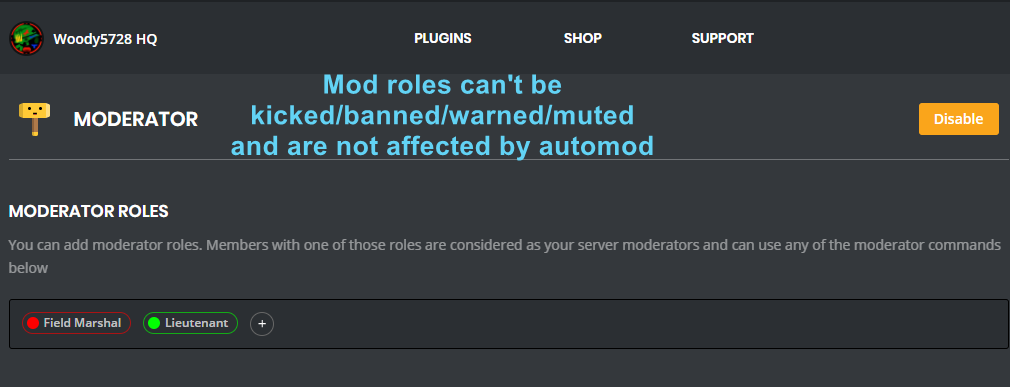
!moderator
dire yarrowBOT
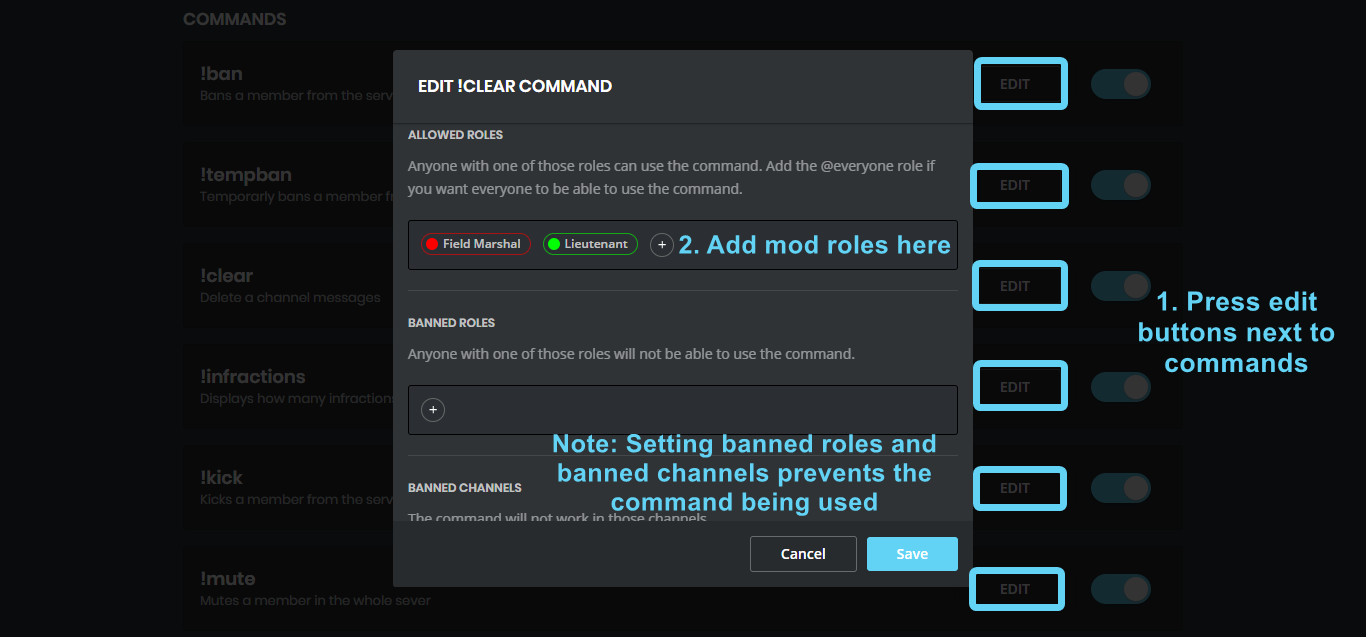


 sage citrus
@versed creek ^ bottom image
versed creek
Oh ok, thank you. Sorry I didn't read it >_<
bitter owl
@jagged frigate Try to mark sil again because it's beeing several hours since last conversation between you two
buoyant moon
(~˘▾˘) (˘▾˘~)
dire yarrowBOT
So... @buoyant moon, I've decided you should be level 1.
Don't get too excited, mmk
jagged frigate
@wooden mountain
buoyant moon
!rank
dire yarrowBOT
Rudinho, this command is disabled in this channel.
buoyant moon
Someone can help me with my problem or no?
buoyant moon
Hello, I configured the bot on my server for external link on Delete message & Warn Author and some other Auto-Moderator and I said to a friend to try it by sending an External Link (Youtube for example or another discord) but it didn't work ( I configured an automated actions -> tempmute for 1 infractions ) and same for Bad Words, Spammed Caps, nothing work for me, can someone help me ?
It was already write, just a little higher
wooden mountain
are you sure that person is not set as a moderator?
and that Mee6 actualy has the requried permissions
jagged frigate
I can't see the playlist of music when I click the link provided @wooden mountain
There's a screenshot
jagged frigate
No
I just assumed nothing was changed
I can test real quick
Does Mee6 need every permission?
dire yarrowBOT
So... @jagged frigate, I've decided you should be level 2.
Don't get too excited, mmk