#〉bugs-reports
2 messages · Page 18 of 1
 white notch
 tight turtle
i understand part of that that says ‘commands are not working’
 smoky drum
mee6 is offline
white notch
We know
 buoyant moon
Ok merci
 slow quartz
its down rn correct?
white notch
yes
slow quartz
ive been having problems with mee6 all day even when it was up
white notch
slow quartz
lol
white notch
it's been this way for almost 32 hours now
white notch
no eta
slow quartz
rip
 gleaming sinew
it's telling me "internal server error" when i try to enable the levels plugin
white notch
 late totem
Hi um the bot has stopped working and won't accept any commands
white notch
any commands specifically, or all in general?
late totem
!rank
 dire yarrowBOT
 ClawSlix
Rank
19380/35607
Lvl.
0
Exp.
41/100 (tot. 41)
white notch
it's been having issues
late totem
Ahh
 clever arrow
!rank
buoyant moon
I have this problem when i want add a command or other with mee6 https://youtu.be/8Hvk1vT8A5Y

@buoyant moon Mee6 is down you need to wait untill it gets fixed
 warped cliff
It doesn't let me add lvls and it says "Internal Server Errors". I can't add anything. My Member's levels went down because it automatically disabled.
white notch
We know
warped cliff
wdym
white notch
@buoyant moon that's a weird issue that could be related to the bot having problems recently. Please wait until it's fixed
warped cliff
this is happening to everyone ?
white notch
yes
white notch
dunno
warped cliff
mk
white notch
secind last message in #238889207827922944 Okay so the bot seems to be online, or at least partially online. HOWEVER Levels plugin is still not working and will throw up a internal server error, so um yeah. Bare with the dev while he sorts this out on almost minimal sleep
white notch

warped cliff
it's not just levels plugins
buoyant moon
The high will be a day or 2 days
But still
it will be fixed
Cookie there is working >.>
 faint dome
ik
warped cliff
bmo, How do you know everything ?
buoyant moon
Read #238889207827922944
warped cliff
I'm just going to go on my server...
buoyant moon
k
 wooden mountain
@buoyant moon the bot is not in that server anymore, he got kicked out of it
can you confirm that the bot is actualy still in that server
buoyant moon
osht
 leaden rain
I can't change something for the plugin "search anything" and " levels". When i click on, a message apparear "Internal Server Error" .... Why ? can i change this or what happen ?
faint dome
plugin broken - #〉announcements and #238889207827922944 😉
leaden rain
Oh okey sry don't see this... thx
 junior breach
guys i cant turn on the levels section if i turn it on it says iternal server eror admins what happend
 bright wigeon
Read #238889207827922944
dire yarrowBOT
GG @bright wigeon, you just advanced to level 1 !!
 stable lava
I'm getting an internal server error when trying to view my servers mee6 leaderboard. Any help?
buoyant moon
my mee6 isnt giving roles?
 plucky coral
 solar zodiac
he bot has had failures with the levels does not tell me to put that plugin and disconnects itself and I have to install it again please beglenlo
 placid iris
when I open any module it gives me: Internal Server Error
 sullen venture
just wait for restart
faint dome
waiting can be funny. Sometimes.
junior breach
Announcements my guy
 cinder sonnet
Website is down
wooden mountain
i am aware
buoyant moon
Fix. The freaking bot please.
wooden mountain
working on it
buoyant moon
When will it be done?
 light robin
When I clicked on "!commands" it lags.
wooden mountain
everything lags
buoyant moon
When will the bot be fixed?
light robin
I need it desperately.
wooden mountain
don't we all i don't need it
light robin
..
 pearl bane
I can not add the bot to my server
wooden mountain
working on fixing it
 bronze ravine
you can not go to the level section
bronze ravine
I can not handle it I need level feature
bronze ravine
no
wooden mountain
Mee6 not working
pls wait, we are fixing it
 ionic panther
Ok
 storm pilot
Thanks
 mossy flare
Before you ask why Mee6 is offline/not working, please read #〉announcements and #238889207827922944
buoyant moon
Mee6 is not working.
white notch
we know
buoyant moon
The level system is not working too..
white notch
WE KNOW
buoyant moon
Just letting you know.
white notch
We have known for 2 days and a half already
 grand spoke
points to the pinned post
white notch
@buoyant moon
 vague pollen
mee6 nao estar pegando opçao de level mais pq?
mee6 is not taking the level option more because?
vague pollen
Thank you. I'm new to the group.
wooden mountain
 glacial narwhal
The rank command is not working on my server
 fleet crystal

[LEVELS MAINTENANCE] We're testing live our patched code. Some servers (~50%) have access to levels. We're rolling it out slowly to everyone while monitoring it.
 Twitter
 valid bobcat
.!rank not working
 cold bear
above you ^
 delicate musk
What’s going on with the ranking system
mossy flare
Look 3 messages above you
delicate musk
K thanks!
 steel field
!rank not working..
 ornate flicker
Known
 potent cloud
Thanks for letting us know! I was wondering where the awesome level system went on my server, lol
💗
buoyant moon
GEEEEEEEZZZZZ! When will it go back on?
 tender badger
ornate flicker
tender badger
ornate flicker
Just hold on. No ETA.
 alpine stag
My levels aren't working when i enable it it takes me and says Internal Server Error
and so as Search Anything
plz help
faint dome
 bold ember
Hey I have a bug i'm from germany and I can't activate my Musik plugin
 gilded flax
Is the recording plugin not supposed to be working? When I try to access recorded voice chat via recordings.mee6.xyz, it gives me error 502: Bad Gateway.
buoyant moon
I would like to let you now that timers are not working 100% good they don't follow the time you put them most of the time
 muted spindle
are your channels remaining active?
 versed thistle
Hi, on the web site I can't Enable the " Levels ", it told me " Internal Server Error " can I have some help please ? ^^
muted spindle
Read #〉announcements and #238889207827922944
versed thistle
Oh thanks
 abstract owl
Please, fix level plugin.
muted spindle
Please read #〉announcements & #238889207827922944.
abstract owl
Already did.
 hoary stream
There is only one dev, please wait @abstract owl
abstract owl
Please dont please me
abstract owl
‘Cookie’?
muted spindle
The developer of Mee6
abstract owl
Ah ok
Take you’re time, Cookie. I will wait calmly for the plugin to get updated, good luck fixing the bugs. 👍💛
 mystic bobcat
muted spindle
mystic bobcat
muted spindle
Please read #〉announcements & #238889207827922944.
mossy flare
If you have a problem with Mee6 not working, please read #〉announcements and #238889207827922944 first
buoyant moon
Did the admins say it was recovering?
Because it was working for a bit on my friends server but then it randomly stopped working again.
muted spindle
They are working on it, so it might flash to life now and then.
buoyant moon
Kk
Because on the tweet where it said it was ~50% done.
My friends server was included on that
But then it randomly stopped working
mossy flare
Yeah people have reported
buoyant moon
K
 ripe galleon
i don't know if tihis is right place put this, but why i can't find my frend discord server from my list
muted spindle
is that a problem related to the mee6 bot?
mossy flare
Do you have the Manage Server permission?
ripe galleon
@mossy flare yes
buoyant moon
@wooden mountain you could do something like this. :p
wooden mountain
i did that for a day
then levels worked again in this server
it was to anoying while testing
removed it again
buoyant moon
Maybe that's what it takes for Cookie to fix it. :p
mossy flare
If you have a problem with Mee6 not working, please read #〉announcements and #238889207827922944 first
grand spoke
Thanks for fixing Ranks!!!
 leaden yew
uh... hello!
We have a problem on our server!
We have a bot named "mee6 webhook"
and he talks from a user!
wooden mountain
in channel settings -> webhook -> remove the webhook with that name
Mee6 will make a new one for himself
but someone must have copyed it (anyone with the manage webhooks permission can do that)
wooden mountain
if it is send by Mee6 the name and avatar will be like this
always the default (white if you don't mess up your client) color will be used, no roles
wooden mountain
is the name the same?
Mee6#0000
it can be that one of your admins/moderators is messing with the timers plugin to troll you
leaden yew
Well the name is Mee6 chathook
wooden mountain
of course it is, without the needed permissions you can't get that link (or some staff member posted it in chat)
 prisma sluice

 vernal oriole
auto roles are still broken?
wooden mountain
working on it
vernal oriole
Ah! Thank you in advance (for the hard work)
wooden mountain
there is none
wooden mountain
not
 verbal cloud
Heyy!! 1. Thank you very much for all the hard work. Love the bot.
- I saw the announcement/error-reporting that the website isn't working, but XP is being earned. Does the website affect the bot's response time? Before the update I would do
!rankand get a reply within a second usually. Today I tried it (and others at other times) and it was taking the bot about 5 minutes to reply with the rank. Some users never got a reply
wooden mountain
the levels and rank command also not working
the bot is receiving your messages, he tryes to responds but the responds somehow doesn't arrive
verbal cloud
Hmmmm that's odd. I've gotten a few responses, but not all. Well, glad you guys are aware of it! 😄
 civic cape
Hey! 1. This bot is awesome and so useful. 2. Im trying to access my server from the network but everytime i try to access it appears like im adding the bot. Is there a solution?
Or then the dashboard
 tribal raptor
I get this message, when I'm accessing my dashboard. Whats wrong ?
civic cape
same
tribal raptor
Done, thanks.
 hazy beacon
I'm having some kind of wierd thing I'm only able to invie Mee6 on 2 servers that I own but the 3rd server is not showing
wooden mountain
did you just made that 3th server?
if yes it can take up to 10-ish minutes for that server to show up
hazy beacon
no no the server was made like 5 weeks ago
so I'm only able to see these two https://gyazo.com/150e9a6de87999f35b7ea9baeade4884

all permission are set for the 3 server but no luck https://gyazo.com/364152f66330fdc5ff961c18da325940
 hoary stream
@hazy beacon You may be signed into the wrong account on the dashboard
wooden mountain
cqn you check if it is your name and avatar in the top right
dire yarrowBOT
GG @hazy beacon, you just advanced to level 1 !!

 oak wyvern
When I try to get to my server's dashboard, it says "Internal Server Error" please help! (Its mee6)
dire yarrowBOT
GG @oak wyvern, you just advanced to level 1 !!
 hexed cradle
yeah
oak wyvern
you too?
hexed cradle
yeah
faint dome
 silk sapphire
Why does this happen, when i'm trying to change plugins? https://gyazo.com/889d0e3bb937051995ebbd6ad5158b88
 wooden mountain
i already answered you....
some plugins are currently broken, when you click on those you will get a error
try again later (tomorow)
grand spoke
the bot seemed to have been struggling to be on one of my servers earlier but all is good now... at least it seems to be.
 barren socket
the bot not working for me
 low vapor
 idle crypt
One of the members of my server is not able to see the response to !rank. We can all see it, but he can't. Anyone have an idea what would cause that?
Let me know if you guys need pictures.
white notch
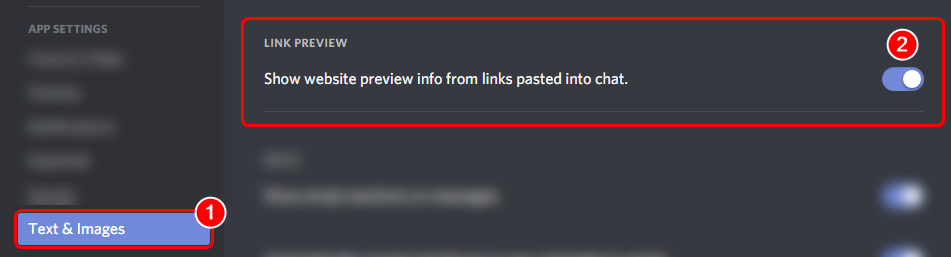
!!tag rank
 wind windBOT
 wooden mountain
@idle crypt
idle crypt
@wooden mountain @white notch thank you guys, I told him what to do.
No go, still not working for him...
wooden mountain
did you do a new rank command or restart the client
idle crypt
No, it's working for everyone but him.
grand spoke
actually, I just saw it not work for someone on my server...
logged in and boom, its dsabled again and getting internal server error again
 dense oxide
@grand spoke same i am getting nternal server error again
grand spoke
@white notch only reason Im saying it is because it WAS working and now its not. I mean in the last 12 hours.
white notch
and I've been here for the past 4 days literally repeating myself
go figure
we know
last post in #〉announcements explains it
 abstract falcon
recording
recording command is down ? im just wait on offical word so ill keep asking
 rain kayak
the Find Your Way by Daruak chat Mee6 server is still down. The leaderboard comes up as an Internal Server Error. Any idea when the servers are getting fixed?
 royal scroll
I'm sorry, there isn't an ETA for when this is being fixed. Cookie's trying his best though.
 lime moon
 abstract linden
@royal scroll thank you keeping us up to date
white notch
or you could read #〉announcements
buoyant moon
Any update on when it is going to be fixed?
white notch
no
 hexed summit
hey why does the bot work in my friends server flawlessly and not in mine?
white notch
read #〉announcements
white notch
role rewards aren't working atm
dire yarrowBOT
GG @fallen gyro, you just advanced to level 1 !!
white notch
it's fine
 fallen gyro
i know its boring to repeat :c
white notch
lots of people are confused, I'm putting something out that's better worded tbh
and easier to understand a bit
fallen gyro
yeah and this bot is awesome so, have lot off people to help x')
im french, and my english is not perfect but u help me well ;)
ok i will continue to keep an eye here
cya
white notch

white notch
18*
fallen gyro
x'DDD
white notch
sleep well
 silk bone
Twitch posting is trimming unscores out of twitch names, for example when mee6 posts https://www.twitch.tv/nightseeker, it is suppose to be https://www.twitch.tv/nightseeker_

 silk bone
understood tyvm
 cyan shale
before i click in Enable ( Level EXP )
grand spoke
cool, its finally working on the server it wasnt for me.
 strange minnowBOT
levels and search are broken
interal server error
pls wait, we are working on a fix
wooden mountain
👀 that timer doesn't exist?
strange minnowBOT
levels and search are broken
interal server error
pls wait, we are working on a fix
read #〉announcements for more info
 jade dagger
i am error in mee6bot
strange minnowBOT
levels and search are broken
internal server error
pls wait, we are working on a fix
read #〉announcements for more info
buoyant moon
i got a problem with my disable and enable leveling
on one of my servers
but i can , change my other serers
 pure maple
yes they know
buoyant moon
what should i do?
pure maple
they are fixing it. read #〉announcements
strange minnowBOT
levels and search are broken
internal server error
pls wait, we are working on a fix
read #〉announcements for more info
 rustic pond
Even before the levels got shut down, I couldn’t ever get the bot to reward roles. We tried for hours until we gave up
strange minnowBOT
levels and search are broken
internal server error
pls wait, we are working on a fix
read #〉announcements for more info
wooden mountain
@rustic pond #〉announcements last line
rustic pond
My bad, I feel dumb lol
strange minnowBOT
levels and search are broken
internal server error
pls wait, we are working on a fix
read #〉announcements for more info
rustic pond
Okay this is weird. In my group people’s messages that are !commands disappear. Is that the group, or the bot?
Please @ me because I need to brb
strange minnowBOT
levels and search are broken
internal server error
pls wait, we are working on a fix
read #〉announcements for more info
grand spoke
Imma gonna say this as a simple report, as I know they are working on the bot to fix it. I know that SOME servers are fixed and others are not. This is simply to let them know that on one of my servers, it randomly activates and deactivates. (almost like they are still fixing it and breaking it alternatively) and its currently 'broken' on at least two of my servers. (It's happened no less than 3-5 times today alone)
 hollow forum
@grand spoke It is a lot harder to actually fix coding and all that fun stuff... just be patient with them! I am waiting myself... on a company server but hey.. these Devs have it rough. cut them some slack
grand spoke
oh I am, Im simply reporting it without being pissd, I've played in C code and PHP so I have an idea of how something breaks it can be a pain in the F'n ass to hunt down the issues
and Im just a layment who messes with existing code..
hollow forum
Fair. Im just saying 😃 These poor guys.
grand spoke
yup
hollow forum
getting spamed like crazy
grand spoke
dont wanna be them, tho I wish I was them, programming could be a dream... when everything 'works'
hollow forum
LOL they can have it.. I dont wish that on anyone
GLHF <@&193123929701875712>
and admins
strange minnowBOT
levels and search are broken
internal server error
pls wait, we are working on a fix
read #〉announcements for more info
hollow forum
❤
grand spoke
oops
 lean sphinx
Thanks 😄
grand spoke
one word deleted a whole paragraph...
hollow forum
yep
grand spoke
I'd love to have the ability to program that stuff, but having worked customer service, I don't want that pressure of being the one having to fix it...
it was bad enough listening to people who assumed it was 'smile and its fixed'
hollow forum
I agree with that
grand spoke
in my head I know they are working on it, I also know that my report might be just something they are already aware of but I will never know they do or don' tknow.... and well... its not just 'it aint working why?' from me.
enjoy christmas everyone!!
strange minnowBOT
levels and search are broken
internal server error
pls wait, we are working on a fix
read #〉announcements for more info
rustic pond
Guys, when I cleared 1,000 in a chat, it only had like 300 messages to delete
But now whenever someone (besides admins) text in it, it instantly vanishes before you can even read it
The text does, that is^^
strange minnowBOT
levels and search are broken
internal server error
pls wait, we are working on a fix
read #〉announcements for more info
rustic pond
Don’t mind the earlier messages.. lol
mossy flare
@rustic pond Is slowmode on
rustic pond
I don’t think so. Not even sure what it does
strange minnowBOT
levels and search are broken
internal server error
pls wait, we are working on a fix
read #〉announcements for more info
mossy flare
Try doing the command !slowoff
rustic pond
Thanks! It fixed the issue
strange minnowBOT
levels and search are broken
internal server error
pls wait, we are working on a fix
read #〉announcements for more info
 silent drift
Help fix the bug It was clicking Levels and got Internal Server Error
strange minnowBOT
levels and search are broken
internal server error
pls wait, we are working on a fix
read #〉announcements for more info
silent drift
Thanks Mee6 I knew that
strange minnowBOT
levels and search are broken
internal server error
pls wait, we are working on a fix
read #〉announcements for more info
white notch
@silent drift it’s being worked on
strange minnowBOT
levels and search are broken
internal server error
pls wait, we are working on a fix
read #〉announcements for more info
silent drift
okay
strange minnowBOT
levels and search are broken
internal server error
pls wait, we are working on a fix
read #〉announcements for more info
 humble forge
.
strange minnowBOT
levels and search are broken
internal server error
pls wait, we are working on a fix
read #〉announcements for more info
buoyant moon
Site is down
strange minnowBOT
levels and search are broken
internal server error
pls wait, we are working on a fix
read #〉announcements for more info
strange minnowBOT
levels and search are broken
internal server error
pls wait, we are working on a fix
read #〉announcements for more info
grand spoke
It'd be nice if we could mute a channel with a timed repeater... just sayin ;). This was almost half of my notifications it seems...
 mortal oxide
@grand spoke wrong channel, please use #159963953764499456
grand spoke
Oh right... lol
dire yarrowBOT
GG @junior breach, you just advanced to level 1 !!
 hybrid rivet
 little oracle
the reddit posting plugin isn't working. I gave it admin permissions and the webhook isn't created and it hasn't posted anything. Has anyone else reported this?
little oracle
i see that on the website it is by default disabled. I assume its down for maintenance and is not announced yet?
dire yarrowBOT
the reddit plugin will post all new posts from your favorite subreddits.
+ Mee6 needs MANAGE WEBHOOK permission, either on the channel you choose or server wide
- you can not nickname the reddit posting webhook, changing the webhook does not effect anything
- the reddit plugin will automaticly disable itself over time if Mee6 does not have the manage webhook permission
 stoic wedge
!rank command cooldown not worked
 acoustic hull
!clear is not working .
dire yarrowBOT
the clear command allows you to clear the last xx amount of message.
or to clear that anoying spammer without clearing anyone else
just use !clear 1-1000 to clear the last xx messages(example !clear 10),
or use !clear @ name to clear all the message of @name in the last 100 messages
+ i need manage messages permission
+ i need view message history permission (otherwise i will respond with -1 messages cleared)
+ you need to check the checkmark next to clear on the plugin page.
+ you need to set your role as moderator (located at the bottom of the plugin page in the moderator tab)
@acoustic hull.
acoustic hull
I did to that and it didnt clear at all .
mortal oxide
@acoustic hull can you invite and give me admin rights
acoustic hull
it works now , it could have been a bit laggy . Sorry to bother you .
 untold widget
what help?
 restive flint
it doesnt remove the banned words from specific channels even tho bot has the permission to do all of the things
wooden mountain
can you clear mesages in that channel?
 pale basalt
little oracle
pale basalt
little oracle
the bot won't create its webhook even though it has webhook permissions enabled, as well as admin
dire yarrowBOT
GG @little oracle, you just advanced to level 2 !!
cold bear
!!tag roles
wind windBOT
To make role rewards work for Mee6, do the following (note all config is saved so nothing gets lost)
- Kick the bot
- Reinvite it
- There wil be an authorization screen that lets you set perms for the bot
- Uncheck all boxes so that no perms are selected
- Do Captcha
- Create a role/use an existing one for the bot with the correct perms and on the hierarchy
- Give the bot the role
- ???
- Profit 😛
cold bear
@little oracle ^^ do that
 glass pebble
I haven't ever messaged mee6 over dm, but it just messaged me "GG @glass pebble , you just advanced to level 1 on {server}!" out of the blue.
The last time it sent me a dm was 2 months ago
white notch
that's called the level up message being sent to you via dm
there's an option for it
buoyant moon
Has anyone noticed a bug with role rewards? I am an "administrator" of a server, but it keeps wanting to give me (and many other members) a role that's rewarded at level 3. I remove the role, and it comes right back. (Dyno alerts me of this). People who have a role higher than the role in question are still given that role.
This hasn't happened within the hour, and I've kicked the bot and invited it back (which should hopefully fix it), but idk. Thought I'd let someone know.
So... Bug: If someone is rewarded a role, and it's revoked, they receive that role again and again. It doesn't stay removed.
If that's even a bug or if it's meant to be this way, I don't know..?
 indigo quarry
I have the Reddit plugin enabled, with the desired subreddit. Mee6 has the "manage webhooks" permission, yet it still won't show the new post in said subreddit in the channel I selected. I checked with a command and Mee6 does have permission to speak in the channel. Anyone have a clue?
buoyant moon
Oh alright. So is it something they'll change?
 restive flint
@wooden mountain yes I can
dire yarrowBOT
GG @restive flint, you just advanced to level 1 !!
restive flint
sorry for the late response
wooden mountain
😕 ❓
untold widget
i can't mute anyone in my channel any help? all other mod command's works fine
dire yarrowBOT
GG @untold widget, you just advanced to level 1 !!
cold bear
do you have !mute enabled?
untold widget
yes enabled
dire yarrowBOT
!mute @mention - mutes mentioned user in current channel
Requirements:
- Manage Channels
P.S. You can't mute people who have the permission to mute others, this include: owner, other moderator or members with Administrator or Manage Server permissions!!!
yes gave that permission to bot and removed from users. it was working yesterday with same settings but not today
 arctic dove
https://gyazo.com/b8cefc677100c29a41255d3f49799822
but all this players/users are still on discord server
 dire yarrowBOT
GG @arctic dove, you just advanced to level 1 !!
arctic dove
it was spam
arctic dove
k
untold widget
any help regarding my query? if anyone free
 umbral adder
!help
dire yarrowBOT
Hey, I DM'ed you the list of commands for this server.
If you want me to work in your server then read #255286916872667147 to see how to let me do stuff in other servers. 😉
sullen venture
@umbral adder #〉commands
buoyant moon
Something Wrong With Mee6 Is That Instead Of @Mee6#4876 It's Replaced With @Mee6#0000 It's Annoying Please Fix That
 gloomy grove
dire yarrowBOT
gloomy grove
dire yarrowBOT
Hey, I DM'ed you the list of commands for this server.
If you want me to work in your server then read #255286916872667147 to see how to let me do stuff in other servers. 😉
 twilit spade
Something is probably with my Timers. Every time i set one, eventualy, it won't set at all. 😐
wooden mountain
bots are limited to a certain amount of messages per minute, for that reason we had to send timers using a webhook and that is the Mee6#0000 with no role in your server @twilit spade
twilit spade
I set up 1 timer for interval 5 minutes. When i switch to setting another plugin like Levels, the Timers suddenly turn themself off.
wooden mountain
make sure Mee6 has the manage webhooks permission
twilit spade
Oh, that was the problem 😅 , Thanks a lot!
white notch
@buoyant moon Mee6#0000 is a webhook for both the timers and reddit plugins
webhooks don't have roles or discrims
sullen venture
@white notch Webhooks does not have ID's when right-clicking it
white notch
- You're late., why bother mentioning that 12 hours later after I mentioned it?
- I never mentioned ID's
- You're half wrong
if you look at a webhook it goes https://discordapp.com/api/webhooks/ID/Token (the link that is)
glacial narwhal
Is the rank command not working on anyone else’s phone
dire yarrowBOT
 J-Fee King Jeffy
Rank
21505/36260
Lvl.
0
Exp.
38/100 (tot. 38)
rustic pond
It works for me
dire yarrowBOT
GG @rustic pond, you just advanced to level 5 !!
glacial narwhal
Hmm
 tall tundra
Uh I’m trying to change the account I use.. does anyone know how?
cold bear
!logout
dire yarrowBOT
oops, it looks like you are on the wrong account, you need an account with 'manage server' permissions.
You have to log out from discordapp.com in that browser and then log back in again.
- log out of discordapp site https://discordapp.com/login and follow the steps in the gif below
- go to http://mee6.xyz/logout and click the 'add to discord' button
https://i.imgur.com/7829TNS.gifv
 cold bear
^
tall tundra
Thanks
 fallow musk
When a set a message to appear every hour... It automatically disables the plugin! I don't know why this happens!
wooden mountain
give the bot "manage webhooks" permissions and re-enable it
 cinder salmon
Fix stats command. I don't think wanna is spelled like wanan.
buoyant moon
I'm trying to buy points, but whenever i do, it says i have 0 points
wooden mountain
did you pay? sometimes paypal transactions don't work and then you don't receive points
check your paypal or credit card to see if you got charged
 slow bone
wooden mountain
slow bone
wooden mountain
Mee6 is restarting
pls wait
buoyant moon
hello! I seem to have a bug with the Mee6 bot. The cause of it was me accidently banning my Mee6. the effect was the fact that I cannot change any settings in the level up section.
is there a way to fix it?
wooden mountain
levles plugin is restarting, pls wait for half a hour and try again
buoyant moon
I can't set Moderator Roles in Moderator so that they can use the commands.
There is only one option [at]everyone
 buoyant moon
Thank you @white notch for the help 😃
 glossy swallow
I can't change mye !rank command cooldown 😦
white notch
I believe that’s broken atm
glossy swallow
Oh well, ty, i'll check later 😄
 eager tide
My mee6 gives levels but not the roles and it already has administrator role
rustic pond
Make sure his role is higher than the roles he needs to reward
It’s a hierarchy and he can’t reward roles that are above his
buoyant moon

 sturdy pendant
<@&193123929701875712> Something strange this morning. Mee6 changed the channel that it was posting our streamer announcements. We have a dedicated channel for it, and it switched itself to our main text channel out of nowhere.
sturdy pendant
I promise, I have revoked all ability for them to do this.. I am the ONLY one that can from what I have been told by support. They need the "Manage Server" permission correct?
dire yarrowBOT
GG @sturdy pendant, you just advanced to level 2 !!
wooden mountain
manage server or admin perms
sturdy pendant
Then you may be right. Cant wait for audit logs! lol
 bitter zenith
@sturdy pendant you do realize that Admin perms are a total permission grant and ignore channel overrides
The only things they can't do are edit the owner, or their highest role and those above, or members of a role higher than them
And delete the server
sturdy pendant
Sorry, I didn’t realize that until this very second. I am still learning a lot about this stuff. I’m not trying to come in here and sound completely dumb. Just looking for help. I can’t tell who is doing it because there is no record of it. I legit thought it was a bug, posted here, and @wooden mountain cleared up that issue with me.
Didn’t mean to bug you guys.
bitter zenith
I realize lol
sturdy pendant
Just looking for help.
bitter zenith
I was merely informing you
I'm like a discord guru. So if you have more questions try #〉chat
sturdy pendant
I know you were, and I appreciate that.
Thanks. I’m going to just refrain from asking
bitter zenith
Well alright
 unkempt oar
Umm... i made a custom command but the command isnt working now
white notch
unkempt oar
Oh ok thx
 misty spindle
i cant activate the levels
white notch
It’s restarting
white notch
10 minutes maybe
misty spindle
wilco
 coral sable
Español??
misty spindle
who?
unkempt oar
Hi its been like an hour, why cant i enable levels?
 mellow forge
Noice
buoyant moon
@white notch how do I delete a webhook
wooden mountain
click on the ⚙ next to the channel name => webhooks => trashcan next to the webhook
cold bear
!music-lag
dire yarrowBOT
there are 2 kinds of lagg that can occour on the music plugin:
- slow down and speed  up of music
! this is lagg on discord there servers, NOT Mee6
+ try changing server region to fix this, sometimes it even helps to use a oversea server(some discord server are really bad)
- pause and resume of the music
! this is caused by useing lower quality music or videofiles
+ you can try to use another file(using links) to fix it, if this don't help then pls tell helpers or support
try this ^ @mint nebula
 mint nebula
Ok
 agile needle
Mee6 does not censor words like this: f u c k (With the spaces in between them - even if I specifically spelled it like that exactly in the censored word list)
white notch
!!tag noxp
wind windBOT
If Mee6 isn't giving you xp, or either !rank or !levels is not working it is one of the following:
Reason 1: The levels plugins isn't enabled on the dashboard
Reason 2: You have a banned role on you (in which case you should remove it. Having a banned role also prevents !rank or !levels from working)
Reason 3: Bot can't read messages in that channel (for not gaining xp) or can't send (for !rank and !levels)
Reason 4: Rank cooldown. This used to be bugged, but in a recent update it got fixed. So if you have the rank cooldown set super high, set it lower so that the !rank command work
In case you don't know about banned roles, this pic shows-> http://bit.ly/2ynUQGk
 white notch
or Reason 5: levels stuff is bugged (unlikely)
wooden mountain
reason 2 is not valid anymore
white notch
 tame geode
When creating a timer message
one timer message shows but if i have more than one
it still only shows one of the timer messages
wooden mountain
don't make them the same time in the same channel
wooden mountain
is there activity in that channel?
wooden mountain
how long ago did you make that timer
tame geode
the one that would not show was 60
wooden mountain
how long ago did you maket hat timer
 round skiff
Hey. There seems to be an issue with the levels things, or at least a timeout that we are unaware of.
https://mee6.xyz/levels/130716876937494528 On this list, there was a guy named "Sebastian" and "Mintaka", both somewhere around the levels of 7 and 10. They are completely missing from the list.
white notch
I won't be able to see that link, but if you pass their ID's I can check if their xp was reset or not
(sorry I can see the link 😄)
round skiff
109293725754101760
The other I can't figure out, discord doesn't let you search messages for people who already left the server 😦
white notch
hmm, most recent xp thing I can see https://i.imgur.com/vrlEJg6.png
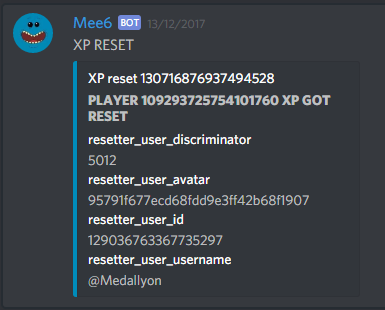
 round skiff
It's recent enough, guy left the server a year ago. 😄
white notch
round skiff
The whole discussion about levels came up just now, haven't been checking this up for months.
white notch
yeah the xp would have been reset
 sterile crow
my link to my dashboard is not working
sullen venture
which server id?
Server settings => Widget => "Copy" in Server ID section
or use Developer mode
sterile crow
378635244066177034
white notch
VITAL
THAT
WILL
NOT
WORK
FOR
YOU
@sterile crow define not working for me
sterile crow
😦
wooden mountain
are you sure you are on the correct account?
seems like someone has tryed to access that dashboard without the right perms
are you sure you are on the correct account?
 sullen jolt
For some reason when I try to enable the music and record plugin it'll load like it being enabled but it'll just disable 2 other plugins
 cobalt python
I got 2 accounts and I want to use old one I try log in to add mee6 and it auto logs the newer account
mossy flare
!logout
dire yarrowBOT
oops, it looks like you are on the wrong account, you need an account with 'manage server' permissions.
You have to log out from discordapp.com in that browser and then log back in again.
- log out of discordapp site https://discordapp.com/login and follow the steps in the gif below
- go to http://mee6.xyz/logout and click the 'add to discord' button
https://i.imgur.com/7829TNS.gifv
mossy flare
@cobalt python 
cobalt python
Yeh
 exotic plinth
Mee6 listens to other bots, and one of our bots has a say function so people can use admin commands if they want to, please fix this
wooden mountain
don't give that other bot the permission to use moderator commands (manage server/admin or a moderator role)
 verbal jay
EW
 sand elbow
i dont think the moderation for the bot is working on my server
 civic raven
what do u mean
 vocal yew
Hello im trying to set a cooldown of 3600secs for !Rank then i do update and it goes back to 0...
vocal yew
Ah rip someone spam it atm lol kinda annoyin
If u can pm me plz when it work i would be thankfull i must quit that server it make my phone lag a lot
 junior nova
Dude the music channel with mee 6 doesn’t work even if I turn on push to talk
There is a bug under my desk but I will KILL IT WITH FIRE!!!!
wooden mountain
better?
junior nova
The music is sooooo laggy in the music channel
Wait
Uhhh
Not really now I hear nothing
Can I use it with push to talk?
Works
dire yarrowBOT
GG @junior nova, you just advanced to level 1 !!
junior nova
Yay
 winged gorge
Looks like the Bot doesn't like Twitch channels where the user name ends with an underscore. Well, it kinda likes it, kinda not. When announcing it does pull the correct channel data for the embed, but the URL (supplied by {link} ) provided doesn't contain the underscore at the end of the name, so the URL points to the wrong channel. Again, the embed is correct, but the URL is incorrect.
white notch
That’s the Discord markdown system
Not us
Surround both {streamer} and {link} with `
`{streamer}` `{link}`
winged gorge
Hmm, why would markdown hit on the bot post, but not a manual post?
winged gorge
Additionally, is the embed data seperate from the URL that's posted with {link}? if so would a <> wrap solve as well?
dire yarrowBOT
GG @winged gorge, you just advanced to level 1 !!
white notch
Would have to check
winged gorge
I'll test it out on my end
Also, any way to remove the italics from the bot text post? I don't see an option in the control panel, honestly if that was removabe client side then it wouldn't cause a problem either.
white notch
Italics where?
winged gorge
is now live! Check it out here - is in italics in the bot posts
white notch
That’s cause by having any text surrounded by * or _
because you get this all the time
*because you get this* _all the time_
winged gorge
yes, but it its not wrapped, there is a trailing _ but no starting _
lol
training underscore, but no starting underscore
if I do this_
no issue
white notch
Then it would be the underscore at the end of the link, caused by the streamer name, which has a workaround
winged gorge
Ah, i see what's happenign.
yeah
Off to smack my streamer for having an underscore at the end of his name, lol.
THanks for the clarification and workthrough.
white notch
I would blame them, blame the markdown person for Discord
For coming up with that idea of italics
winged gorge
that too
also, like 1/3 markdown
Oh and a <> doesn't change it
makes the line itallic and leaved the <>
leaves*
white notch
Would be because it has that around it already, in the code (I think)
winged gorge
well i did it as just a text post - StreamerName_ https://www.fakeurl/streamername_
does that
white notch
Even streamers with normal names don’t embed
winged gorge
yeah
white notch
winged gorge
the above was this StreamerName_ <https://www.fakeurl/streamername_>
I'm just gonna wrap {streamer} and leave the rest then, easy.
awesome
thanks again!
white notch
winged gorge

buoyant moon
Bug report:
Roles are mentioned with their IDs when they are quoted (they should be written as name) when using the custom message command.
dire yarrowBOT
GG @buoyant moon, you just advanced to level 1 !!
white notch
provide example please
white notch
because you're using a codeblock and that always happens 
 hard kiln
i said !verify to mee6 i didnt get the other parts
buoyant moon
I think they should not be replaced when using CodeBlock
white notch
dunno why you would codeblocks, but whatever
white notch
@lean sphinx ☝
buoyant moon
np thx to devs 😉
lean sphinx
np 😛
wooden mountain
@lean sphinx
buoyant moon
Moi
 thin breach
Okay so
My browser
has my 2nd discord
and I have my main discord im talking with rn
can I somehow inv mee6 without linking up my account?
white notch
your account needs to be linked
thin breach
but to get to the mee6 website
I have to use my browser
and it auto assumes I'm using my 2nd account
Which isn't in the server I want to inv it to
white notch
you need to be logged in on the browser version of Discord to invite any bot to your server
 edgy birch
thin breach
edgy birch
thin breach
Welp
tried it out and it kinda sucked in my opinion, nvm sorry for the trouble and the time wasted
buoyant moon
The timers keep disabling automatically
cold bear
make sure bot has manage webhook permission
buoyant moon
oh I didnt know it needed that. does it only need it in that channel? bc i dont give bots admin, and i have webhooks turned off for everything but dyno because i only ever heard that that bot needing it. should i turn it on in the role settings just to be safe? and will it affect it if the permission is turned off in the other channels?
cold bear
😋
 pulsar geyser
Where is Level 33😅
white notch
Somewhere. Roles are sorted by ID order, not role hierarchy order
So it’s rarely (if never) gonna be lined up
white notch
Roles on the levels plugin go in ID order
Hmm
Sure you have the role created on your server?
pulsar geyser
jup
white notch
Update your config to save it then refresh the page
pulsar geyser
It worked thanks 😄
white notch
 woven zephyr
white notch
woven zephyr
white notch
!mute
dire yarrowBOT
!mute @mention - mutes mentioned user in current channel
Requirements:
- Manage Channels
P.S. You can't mute people who have the permission to mute others, this include: owner, other moderator or members with Administrator or Manage Server permissions!!!
yes in moderator plugin
buoyant moon
Found out that if you spam !rank often enough the bot will freeze and show the same xp
wooden mountain
commands do not give xp
so if the only message you send is !rank then you are not getting xp for those messages
@buoyant moon
buoyant moon
I mean if you enter stuff between the comands
wooden mountain
tahkns, got it
buoyant moon
I found a bug, If you use timers plugin and If you are renamed meeseeks it still sends the message as Mee6
white notch
@buoyant moon that’s because there is code that overrides the settings
Happens with all webhook stuff
Whatever you set as the avatar and username in code overrides the settings for the webhook
 bright quest
no it makes a new one just delte all the webhooks and it will create new ones itself
wooden mountain
first read what the problem is
bright quest
?
dire yarrowBOT
GG @bright quest, you just advanced to level 2 !!
wooden mountain
your message did not answer on any recently asked question
 torn venture
Why can't it? @CJ#0130
 prisma wharf
Is this bug already listed: roles are not given to players after they rank up (and the limit of the 10/min does not apply here)
wooden mountain
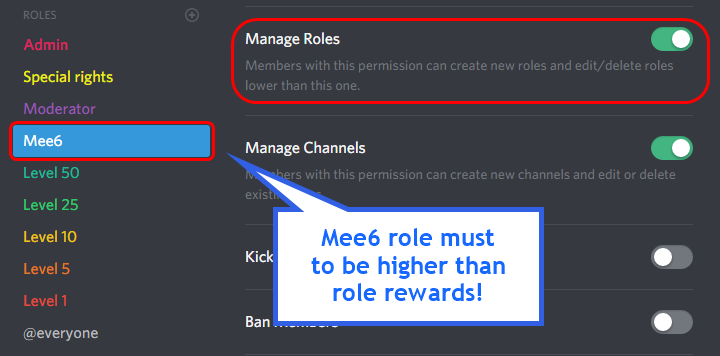
!role-rewards
dire yarrowBOT
role rewards will give a role as reward for active users in chat.
you gain xp by talking in chat. when you gain enough ex you get a level.
in order to let me give role rewards i need :
+ manage roles permission
- at least one of my roles needs to be ABOVE the reward roles(bots can't give roles that are higher than their own role)
! I will only check for role rewards to be updated when someone levels up... so if you added role rewards a bit late then wait till someone levels again before complaining that I am not doing my job.
DISCLAIMER: roles will stack up, if you remove a low level role from someone then that person will just get it back over time.
http://i.imgur.com/aPubLMp.png
 wooden mountain
@prisma wharf probably permission issue, can you check pls
prisma wharf
well it was lower with the role it was trying to give me, but other members of my group get really delayed roles given to them even if mee6 is higher
thanks anyway
wooden mountain
when Mee6 is busy, he delays the role check a bit to a moment when he is less busy with stuff
prisma wharf
alright, thanks for the help man
wooden mountain
np 👌
wooden mountain

buoyant moon
How are you
wooden mountain
good,
this is the bug report channel, if you don't have a bug to report, can you then pls go to #〉chat or #〉commands
 echo sand
So if your putting the help command in it isnt reacting to it or sending anything to me to show me the commands or anything. Is there a way to fix this...?
wooden mountain
can Mee6 read and send messages in the channel
if you set it to DM, do you allow Mee6 to DM you
echo sand
yes it should beable to. i can reset it so i can see if i have it all messed up?
wooden mountain
language?
echo sand
english
wooden mountain
can i have a invite to your server pls, so i can check it
echo sand
i got it all fixed up!
wooden mountain
😄
 humble sequoia
i cannot use any commands and mee6 doesnt respond to commands.
wooden mountain
did you enable commands in the dashboard?
humble sequoia
ya
wooden mountain
some plugins require you to toggle a additional switch or check a checkmark
also, what you did there is against ToS, unsolicided invites
humble sequoia
well i cant do !clear, !help results into : There's no command to show 😢
wooden mountain
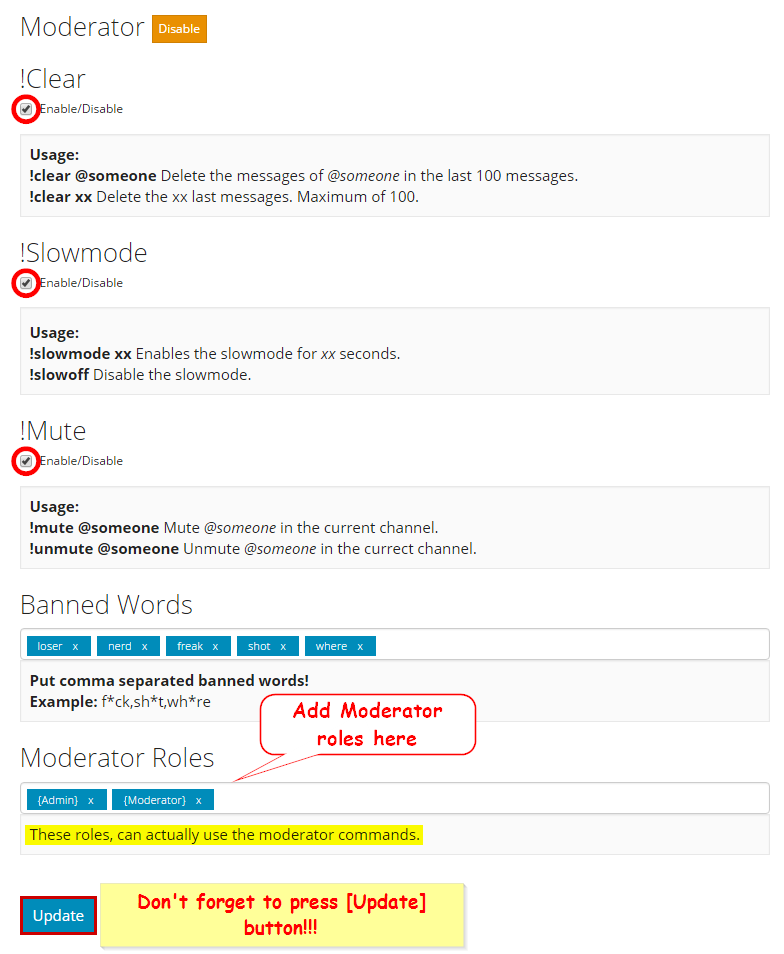
in the moderator plugin, did you check the checkmarks?
humble sequoia
Yes
wooden mountain
!!tag moderator
wind windBOT
 humble sequoia
i did
wooden mountain
and press update?
wooden mountain
also try !clear 1 as !clear won't give a responds
humble sequoia
doesnt work again
wooden mountain
did you press update?
humble sequoia
yes
wooden mountain
so what is not working?
wooden mountain
😐 what command?
wooden mountain
try !clear 1 you need to tell it how many messages it needs to clear
humble sequoia
done
dire yarrowBOT
GG @humble sequoia, you just advanced to level 1 !!
wooden mountain
can you give me a invite pls
wooden mountain
👌
buoyant moon
I try to use slowmode but it wont say if its enabled or disabled
wooden mountain
!slowmode 1
dire yarrowBOT
#〉bugs-reports is now in 🐌 mode. (1 seconds)
wooden mountain
that means that it is enabled
white notch
that would be a custom command
which is per server
which is something we can't necessarily fix
which=invalid bug report
wooden mountain
!userinfo
buoyant moon
How did u do that
wooden mountain
!clearinfo
dire yarrowBOT
the clear command allows you to clear the last xx amount of message.
or to clear that anoying spammer without clearing anyone else
just use !clear 1-1000 to clear the last xx messages(example !clear 10),
or use !clear @ name to clear all the message of @name in the last 100 messages
+ i need manage messages permission
+ i need view message history permission (otherwise i will respond with -1 messages cleared)
+ you need to check the checkmark next to clear on the plugin page.
+ you need to set your role as moderator (located at the bottom of the plugin page in the moderator tab)
using that
dire yarrowBOT
the clear command allows you to clear the last xx amount of message.
or to clear that anoying spammer without clearing anyone else
just use !clear 1-1000 to clear the last xx messages(example !clear 10),
or use !clear @ name to clear all the message of @name in the last 100 messages
+ i need manage messages permission
+ i need view message history permission (otherwise i will respond with -1 messages cleared)
+ you need to check the checkmark next to clear on the plugin page.
+ you need to set your role as moderator (located at the bottom of the plugin page in the moderator tab)
only moderators can use clear
buoyant moon
Oh
 unkempt pasture
Mee6 keeps stopping to record voice channels. You start recording, and it just stops. Either immediately, or after a few minutes. Just happened to me about 5 times in row.
white notch
@lean sphinx ☝️
lean sphinx
@unkempt pasture could you tell me right away if it happens again please? 😄
I'm monitoring it right now
unkempt pasture
Our conference call is over and the next one is scheduled for Saturday, 8 am PST. If you guys are around at that time I will ping you when we get started so you can monitor it. Thanks!
 hushed cipher
!hi
dire yarrowBOT
Hi, I'm Mr. Mee6, look at me!
I am a :robot: that will make your Discord server a better place! :space_invader:
buoyant moon
mee is not granting roles, what am I doing wrong? he has special permission on the server, he has administrator role and role changer but still he gives lvls but it should give rank up on lvl 3 and it doesnt
 ionic meteor
the role of mee6 needs to be above the rol you want to assign @buoyant moon
!role-rewards
dire yarrowBOT
role rewards will give a role as reward for active users in chat.
you gain xp by talking in chat. when you gain enough ex you get a level.
in order to let me give role rewards i need :
+ manage roles permission
- at least one of my roles needs to be ABOVE the reward roles(bots can't give roles that are higher than their own role)
! I will only check for role rewards to be updated when someone levels up... so if you added role rewards a bit late then wait till someone levels again before complaining that I am not doing my job.
DISCLAIMER: roles will stack up, if you remove a low level role from someone then that person will just get it back over time.
http://i.imgur.com/aPubLMp.png
ionic meteor
np 😃
 ancient rune
I don't know why, but mee6 never shows rank of one of the members of my server, and only this member. She's ranked and everything is normal so is there a bug or I missed something in the config?
white notch
!!tag rank
wind windBOT
ancient rune
it works with everytime with every other member
white notch
Hmm, lemme check something
bitter zenith
I've seen this before
white notch
bitter zenith
Still weird
ancient rune
i disabled the message filter and it works now thanks !
 abstract valley
Hi! I'm trying to add seconds to the rank command but upon saving and the site refreshing it reverts back to zero?
wooden mountain
broken atm
abstract valley
okay thanks 😃 just making it sure it wasn't me
 brazen stone
Hi <@&193123929701875712> ! I've got an issue with Mee6, the twitch plugin get disable everyday automaticly and I don't know why...
wooden mountain
@brazen stone make sure that Mee6 can send messages in that channel (try other commands in there)
then (when you fixed his permissions) re-enable the plugin
 gloomy rivet
Minor bug report
After purchasing lifetime, points are still at 2500 according to the profile dropdown
 keen linden
Login and logout, clear your cache, refresh page. Opposite order.
gloomy rivet
oh no it fixed itself
keen linden

 main geyser
Getting this error whenever I try to use the !rank command in any server:
Now !rank and !levels doesn't give a response
buoyant moon
it is working now
buoyant moon
it is working on my server
 neat ruin
https://gyazo.com/b16d4baac638dc5776dbf8b6851a7c00
Should be "They will lose their level"


 stark tapir
My xp stuck
stark tapir
wooden mountain
!!tag noxp
wind windBOT
If Mee6 isn't giving you xp, or either !rank or !levels is not working it is one of the following:
Reason 1: The levels plugins isn't enabled on the dashboard
Reason 2: You have a banned role on you (in which case you should remove it. Having a banned role also prevents !rank or !levels from working)
Reason 3: Bot can't read messages in that channel (for not gaining xp) or can't send (for !rank and !levels)
Reason 4: Rank cooldown. This used to be bugged, but in a recent update it got fixed. So if you have the rank cooldown set super high, set it lower so that the !rank command work
In case you don't know about banned roles, this pic shows->http://bit.ly/2F9Wflq
 stark tapir
@wooden mountain thank you
wooden mountain
🤣 
stark tapir
It's ok now @wooden mountain 
wooden mountain
😄
buoyant moon
my mee6 bot isn't responding in my server
keen linden
What's the issue? @buoyant moon
buoyant moon
If I do any commands, it doesn't do anything
like, say I do !rank
It does absolutely nothing
No response or anything
Yet, I haven't used it in a while
@keen linden
help me #〉volunteer-support please !!
@royal scroll
royal scroll
So, it's this way with all of the commands, not just !rank?
buoyant moon
Yes.
royal scroll
Does Mee6 have permission to read messages in the channel you're using?
buoyant moon
I think...
Let me check
dire yarrowBOT
GG @buoyant moon, you just advanced to level 1 !!
buoyant moon
Yeah
It does
Is I possible that its because I hadn't used a command in an extensive period of time
@royal scroll
buoyant moon
Ok
bright quest
the !rank cooldown timer doesn't work
cold bear
known
bright quest
fixing?
cold bear

unkempt pasture
Hi. I reported this a few days ago already but here it goes again: Mee6 does not properly record voice channels in some instances. When you listen to the recording of a Q&A session, you hear the speaker and someone asking a question at the same time, as if two different audio tracks were layerd on top of each other, kind of like cross-talk. This definitely didn't happen live and is only in the recording. This is now the third or fourth time we had this happen. Please listen to this recording, start at around 20 seconds in, you'll hear what I mean:
Google Docs
keen linden
Yes, this is known; we're working on it with the rewrite! @unkempt pasture