#nms-modding
1 messages · Page 230 of 1
 steel crypt
 night adder
Orange
night adder
Orange
And the "trim" is always either silver or gold right? 2 choices?
night adder
Yep
steel crypt
Okay, I have the answer....
one sec.
They are not textures that are being proc colored using a palette. The ship is built using proc choices for pre-colored textures.
This file is where they are called from. If you wanted there to be more/different colors, you would have to make more textures and add them as choices to this file or you could make one of the choices or make only one choice that proc colors a texture from a palette. @night adder @vale iron
 vale iron
I was meaning to decompile that mod that changes up the exotic colors. What's interesting is that mod supposedly affects the MTs as well, which would be odd
steel crypt
Notice this in the file:
<Property name="Palette" value="Rock" /> <Property name="ColourAlt" value="None" />
That is a palette that is used for proc coloring, but the "None" in ColourAlt indicates it will not use a color from that palette for proc coloring. If "Alternative1" was used (or some other choices) it would then use that palette color to color the texture.
My guess is that it uses the same textures.
vale iron
Ohhhh that answers so much
There are so many places I saw colouralt none
But if it doesn't use it, why is it there at all? Or is that one of those HG mysteries?
steel crypt
Now you can make it use color palette and recolor it. The above "rock" and "none" is the default values before altered. Basically ....not in use.
It's just there is a struct for proc textures and it can be used for calling a palette or not. It can also be used in this case to pick from different textures.
vale iron
This weekend I really may have to look into proc coloring for my freighters. Imagine a red harrower
steel crypt
It's not hard to do once you know how. It's easier than you think. The only real issue is knowing some things like how the texture you are using will affect the saturation of the palette color. Past that pretty easy.
Can prob show you all you need to know in like 5-10 mins.
night adder
I'd love that - honestly, 1 example is all I care about, silver trim w/ red.
steel crypt
What are you saying? You want there to be one choice of color and that is red with silver trim?
Or you're wanting to save edit a color for your ship?
night adder
Modding is completely outside my wheelhouse, as is most coding. So the json entry to force red + silver on 1 ship slot is all I'd really use.
steel crypt
I don't know if you can do that considering it is a texture choice not a palette color choice. I don't think you can pick textures in a save?
But I don't know save editing so....
night adder
But I'll be passing that exml and the explanation youve given over to Mjstral who can hopefully use it to get the brute force bot to show royal coliur properly
vale iron
Yeah since it's not a palette, I don't know if you can use an override like that
night adder
Ye, there's a texture field in customization slots
steel crypt
Probably easiest by editing the seed to be the one you want?
night adder
Copy/paste the red + silver exml entry?
steel crypt
Oh, okay, then look at the file above. Is it listed like those names for the textures?
night adder
Silver trim caps at 431 maneuvering, I wanna be able to use a higher gold trim seed and force silver
steel crypt
Show me how it looks in the save
If it's possible to save edit it then you won't have issues of recoloring other ships or multitools.
steel crypt
All good I'll look for it. I just don't have a save editor or know where the hell to look for it. Never done that stuff really except one minor easy thing for a test I was doing.
night adder
Iirc all the fields had same format
steel crypt
Oh, like it's currently blank?
steel crypt
hmmm interesting
night adder
It forces override of natural procgen for ship associated with slot
This is what forced colour on normal ships looks like
 steel crypt
right that makes sense to me. there is a similar section with textures I assume then.
night adder
Yes, right below colors
steel crypt
Okay when you could get to it, I would like to see the Royal ship color section and the texture section. From a vanilla unaltered Royal ship.
night adder
Unobtainable on ps4 save
steel crypt
?
night adder
This section of json is linked to all player colour customization, so vehicle, outfit, and freighter custom data as well, it doesnt display anything natural
And all sections of json labelled ship only cover the data for class, slots, layout, inventory, stat rolls - the seed is the only thing it shows that relates to colur
steel crypt
I'm confused. So that color list (in one list) shows all colors for player collectibles? So how do you know where to put something for a ship vs a outfit etc. Like what order?
night adder
Trial and error, custom slots 3-8 are linked to ship slots 0-5 in sequence
night adder
Nope, all fields in all slots are blank until you either edit rhem manually, or use Appearance Modifier, Exocraft Customizer, or Freighter Paint in-gam3
steel crypt
Is there a structure there and it has no values in it, or is there literally a blank screen like no text at all?
steel crypt
F.... okay how do we know what to put for a structure lol?
vale iron
I think we don't :( one of the fancy people might be able to figure out the correct formatting by looking at the exe or something
steel crypt
I just don't do the save editing, so I think I'm missing some context that would answer this stuff.
Okay ouch yeah.
 steel crypt
ahh ha okay
vale iron
Those look like options for a particular texture, not textures themselves
vale iron
Back on my phone, can't see that :(
steel crypt
I think maybe the above textureoptiongroupname would be in this case the group name of the proc choice in the texture file.
<Data template="TkProceduralTextureList"> <Property name="Layers"> <Property value="TkProceduralTextureLayer.xml"> <Property name="Name" value="OVERLAYMETAL" />
so overlaymetal would be the group name
vale iron
Makes sense
steel crypt
this:
<Property name="Textures"> <Property value="TkProceduralTexture.xml"> <Property name="Name" value="SILVER" />
and this:
<Property value="TkProceduralTexture.xml"> <Property name="Name" value="GOLD" />
are sections of choices under "overlaymetal"
vale iron
Layer is the first entry and texture name is the second, maybe?
steel crypt
I think that might be "textureoptionname" in the save?
vale iron
Looks like a really good guess
night adder
I'll try it out and report back
vale iron
Please do. I was going to have to try in the morning if you didn't :)
steel crypt
because in the above example you can see a choice being named "1" and that is a common name to add to textures...like hat.1.dds hat.2.dds etc.
vale iron
That's too much typing for 'it works' ;)
night adder
Makes sense to me, because the opinion of a guy who's clueless about the subject matter carries so much weight - am makin coffee, then itll take a few minutes to pull a save from ps4, edit, and replace lol
vale iron
Oh haha, makes sense
steel crypt
wait i'm wrong
vale iron
Damnit Jason! You're fired!
steel crypt
lol look at this:
<Property value="TkProceduralTextureLayer.xml"> <Property name="Name" value="MARKINGS" /> <Property name="Probability" value="1" /> <Property name="Group" value="BACKPACK" /> <Property name="SelectToMatchBase" value="False" /> <Property name="Textures"> <Property value="TkProceduralTexture.xml"> <Property name="Name" value="BACKPACK_2" /> <Property name="Palette" value="TkPaletteTexture.xml"> <Property name="Palette" value="Custom_Backpack" /> <Property name="ColourAlt" value="Alternative1" /> </Property>
this is in a backpack texture mbin
see how the group name is the groupname in the save
vale iron
So group is the first entry, procedural texture is the second?
steel crypt
the "name" of the option in the group "backpack_2" is the "textureoptionname" in the save
I can't see the (it's cut off) top of that json in the backpack pic.
vale iron
Hold on, I'll go get it
steel crypt
But according to the texture mbin ROYALSCLASS_TRIM.TEXTURE, the group is"" (nothing)
<Property name="Layers"> <Property value="TkProceduralTextureLayer.xml"> <Property name="Name" value="OVERLAYMETAL" /> <Property name="Probability" value="1" /> <Property name="Group" value="" /> <Property name="SelectToMatchBase" value="False" /> <Property name="Textures">
<Property value="TkProceduralTexture.xml"> <Property name="Name" value="SILVER" /> <Property name="Palette" value="TkPaletteTexture.xml"> <Property name="Palette" value="Rock" /> <Property name="ColourAlt" value="None" /> </Property>
vale iron
A slightly different one from farther in the save, same format though

The armor entry might give more insight, but I can't look into it tonight
steel crypt
so in this case, textureoptiongroupname in the save would be ""/blank, the textureoptionname in the save would be "Silver".
That's for having Silver trim and then there are the main colors below that in the texture mbin:
<Property value="TkProceduralTextureLayer.xml"> <Property name="Name" value="OVERLAY" /> <Property name="Probability" value="1" /> <Property name="Group" value="" /> <Property name="SelectToMatchBase" value="False" /> <Property name="Textures"> <Property value="TkProceduralTexture.xml"> <Property name="Name" value="YELLOW" /> <Property name="Palette" value="TkPaletteTexture.xml"> <Property name="Palette" value="Rock" /> <Property name="ColourAlt" value="None" /> </Property>
with the same thing, no group name
vale iron
But that would also have an entry of "", so how would it differentiate?
steel crypt
it doesn't. it basically skips choosing a group
Group is just a sub class of the layer name
I understand what you're saying.
But group is just a further division.
I don't understand why there isn't a layer name in the save. that's why I wanted to see above. To see if it used the layer name. In this case "OVERLAY" or "OVERLAYMETAL"
vale iron
Maybe it just goes in order and you need to have all the entries?
steel crypt
I think so.
 hearty wasp
vale iron
hearty wasp
vale iron
that's an ID from CHARACTERCUSTOMISATIONTEXTUREOPTIONDATA
at least that's what I think lmao
steel crypt
<Property value="TkProceduralTextureLayer.xml"> <Property name="Name" value="MARKINGS" /> <Property name="Probability" value="1" /> <Property name="Group" value="BACKPACK" /> <Property name="SelectToMatchBase" value="False" /> <Property name="Textures"> <Property value="TkProceduralTexture.xml"> <Property name="Name" value="BACKPACK_2" /> <Property name="Palette" value="TkPaletteTexture.xml"> <Property name="Palette" value="Custom_Backpack" /> <Property name="ColourAlt" value="Alternative1" /> </Property>
It's also an option in the texture mbin
hearty wasp
ah, interesting

maybe the data table serves as a bridge between texture mbins and the UX
and the "tips"
steel crypt
Looks like it to me.
I think it would...when you say use the color customizer it would write a value to the save. Those that you posted would be the choices in the customizer right?
And those choices are names in the texture mbin. There must be a default. When the ships colors are chosen, it uses the seed to make a choice from the mbin. When you color your outfit, it uses the above customizer stuff to write in the save and then uses save data to choose the texture from the mbin with the same name.
night adder
Okay, both ways forced silver trim, group name overlaymetal and blank, but both models came in yellow paint, so am guessing thats default when colour choice is missing
I think I need to use OVERLAY as group name and declare red
steel crypt
group name is blank in the mbin, so having a group name in the save probably doesn't mean anything....it doesn't use it. You need 2 texture choices.
one for the trim above one for the normal paint
or I'm not understanding what you're saying.
night adder
Yes but if both lack group names the game isnt able to differentiate
steel crypt
is it possible to share a pic of the save data?
I think order is the thing, not needing a group name. just my guess.
night adder
I had metal 1st, colour 2nd, didnt work
steel crypt
the sections in the mbin are ...1st section: trim, second: main color
oh like 2 texture choices right?
night adder
Yep
night adder
I'm gonna laugh so hard if I got it right
steel crypt
might try OVERLAYMETAL then OVERLAY to see what happens
night adder
Already loading with those inserted ;)
steel crypt
If it can't use those and needs a group name then mbin altering and some other stuff might need to be changed.
night adder
Damn, no dice
steel crypt
I can think of several things that might be happening.
Is it possible to post a pic of that json section you just tried?
I don't think it has to be in the customizer data cuz living ships are in the save.
You did force the trim, so....hmmm
night adder
Living Ships can be force coliyred via palettes, I've got the 5 major ones figured out
steel crypt
yellow is the first overlay/main color choice
this should have all the choice names for LS
steel crypt
I'm looking at some stuff
If you look at how the LS colors are done, they don't have a group name. Each one of those colors is in a proc color/texture section like the royal texture mbin.
Both the LS mbin and the Royal mbin use the same structure where in a section you can choose a texture and if it is proc colored. Both have no group name. The LS colors in the save must simply follow the order in the mbin.
Simply following the order with blank group name like your first option chose the first in list (silver trim) but not the red main color....that's where I get lost.
It might have to have a group name to use it, but then why does it set the first (trim) option? All mbins I see so far that do this with textures use group names. But understand that there are multiple mbins with the same group name used which is a good reason to use a group name.
night adder
So something I noticed, Silver + Yellow seem to both be defaults, Gold and the other colours have a property the defaults dont, Mask
night adder
Yes
 vital phoenix
Right, so...anyone mind helping me with getting Quicksilver without connecting to the internet?
steel crypt
I don't understand what you mean by the others have mask
night adder
Do you have save edit capability? If not you may be stuck Stellar Ice fishing @vital phoenix
vital phoenix
night adder
Do you have save edit capability? If not you may be stuck Stellar Ice fishing <@...
The former, nope.
night adder
@steel crypt
<Property name="Diffuse" value="TEXTURES/COMMON/SPACECRAFT/S-CLASS/ROYALSCLASS_TRIM.OVERLAYMETAL.SILVER.DDS" />
<Property name="Normal" value="" />
<Property name="Mask" value="" />
</Property>
This is the end of Silver and beginning of gold, it immediately lists Mask
Same with Yellow to Blue and every colour aftet
steel crypt
Every texture choice only has a diffuse texture. They all use the same mask and base listed at the bottom. So, I don't really understand what you're saying.
<Property value="TkProceduralTexture.xml"> <Property name="Name" value="SILVER" /> <Property name="Palette" value="TkPaletteTexture.xml"> <Property name="Palette" value="Rock" /> <Property name="ColourAlt" value="None" /> </Property> <Property name="Probability" value="1" /> <Property name="TextureGameplayUse" value="IgnoreName" /> <Property name="OverrideAverageColour" value="False" /> <Property name="AverageColour" value="Colour.xml"> <Property name="R" value="0" /> <Property name="G" value="0" /> <Property name="B" value="0" /> <Property name="A" value="0" /> </Property> <Property name="Diffuse" value="TEXTURES/COMMON/SPACECRAFT/S-CLASS/ROYALSCLASS_TRIM.OVERLAYMETAL.SILVER.DDS" /> <Property name="Normal" value="" /> <Property name="Mask" value="" /> </Property>
that above is the silver section
this is the gold section:
<Property value="TkProceduralTexture.xml"> <Property name="Name" value="GOLD" /> <Property name="Palette" value="TkPaletteTexture.xml"> <Property name="Palette" value="Rock" /> <Property name="ColourAlt" value="None" /> </Property> <Property name="Probability" value="1" /> <Property name="TextureGameplayUse" value="IgnoreName" /> <Property name="OverrideAverageColour" value="False" /> <Property name="AverageColour" value="Colour.xml"> <Property name="R" value="0" /> <Property name="G" value="0" /> <Property name="B" value="0" /> <Property name="A" value="0" /> </Property> <Property name="Diffuse" value="TEXTURES/COMMON/SPACECRAFT/S-CLASS/ROYALSCLASS_TRIM.OVERLAYMETAL.GOLD.DDS" /> <Property name="Normal" value="" /> <Property name="Mask" value="" /> </Property>
night adder
Yeah I totally misread it on my phone sry
night adder
Descriptors for fauna, every backpack group name, every backpack texture name
I assumed thisd require the same formatting as everything else
steel crypt
what happens if you make it like this:
{ "SelectedPreset":"^", "CustomData":{ "DescriptorGroups":[], "Colours":[], "TextureOptions":[ { "TextureOptionGroupName":"", "TextureOptionName":"^SILVER" }, { "TextureOptionGroupName":"", "TextureOptionName":"^RED" } ], "BoneScales":[], "Scale":1.0 } },
Assuming "SelectedPreset":"^", is proper syntax, I don't think it will work, but I just don't know what ^ is used for.
or maybe switch silver for gold for better test
night adder
That was in the first pair of options i tried
steel crypt
the one you posted above?
in this example I removed the ^ from the lines: "TextureOptionGroupName":"^",
night adder
Ahh, will try
steel crypt
Just a shot in the dark cuz past that, everything I see it would seem that you might have to mod a bunch of stuff if you have to have a group name.
 terse raven
hello i am new and just want the expedition rewards without having to do the expedition itself because I don't have enough time to play on both normal save and expedition
so where do I start with the save edit thing
hearty wasp
use consumerism

Nexus Mods :: No Man's Sky
Unlocks Expedition, Twitch, and Community Rewards for purchase in the Quicksilver shop
terse raven
ohhh no need for save edit?
hearty wasp
then you can just use a mod
terse raven
awesome
also
if I use that and buy the things with quicksilver yeah
and then for some reason my pc gets formatted and i lose the files
hearty wasp
it's not account wide
terse raven
will i still have the rewards on the save
hearty wasp
you'll have to rebuy
terse raven
ah man
hearty wasp
if you don't like that you can use seasonal reward unlocker
I don't have the link handy but you can just search that on Nexus
terse raven
ye i want to permanently unlock them without having to do all the phases
hearty wasp
nothing's as permanent as editing your save
but just keeping the mod installed is easier
hearty wasp
hearty wasp
if you don't like that you can use seasonal reward unlocker
there's still this
terse raven
how do I install it
steel crypt
a mod?
terse raven
figured it out
steel crypt
- Add the .pak file to:
C:/(NMS installation folder)/No Man's Sky/GAMEDATA/PCBANKS/MODS folder - Rename or delete C:/(NMS installation folder)/No Man's Sky/GAMEDATA/PCBANKS/DISABLEMODS.txt
Okay beat me to it 🙂
terse raven
😄
aight thx guys
i'll prob come back when i want to learn how to edit my freighter colors
terse raven
so my friend installed a planet generation mod
and he removed it from the folder afterwards
and now it gives him an error
hearty wasp
check file integrity
 still sandal
not sure if this is the right place but here it goes: is there a mapping mod for the game? something to track and book mark locations etc
hearty wasp
 tidal portal
could there be, an actual pickaxe melee weapon?
tidal portal
could there be, an actual pickaxe melee weapon?
best we can do is shooting a pickaxe out of our gun
hearty wasp
still sandal
not sure if this is the right place but here it goes: is there a mapping mod for...
no
can't if you mean a integrated GUI thing
still sandal
doesn't have to be integrated
i just hae a hard time wrapping my head around the in game mapping system
tidal portal
hearty wasp
best we can do is shooting a pickaxe out of our gun
sadge
hearty wasp
still sandal
i just hae a hard time wrapping my head around the in game mapping system
if you just put down bases I bet you can use NMSC to switch in/out bases to teleport to
otherwise fuckall
 little pasture
terse raven
will i get banned
little pasture
terse raven
will i get banned
you cant get banned. well you can but i imagine it would be difficuilt or you'd have to try get a pirated copy of nms and distribute it or something
tidal portal
@merry wasp your mod to buy derelict stuff, doesnt allow you to buy Frigate Upgrades, or Tainted Metal
I do realize your other mod to make upgrades but comon
 twilit smelt
little pasture
you cant get banned. well you can but i imagine it would be difficuilt or you'd ...
twilit smelt
little pasture
you cant get banned. well you can but i imagine it would be difficuilt or you'd ...
the only known case of someone getting banned was some complete jerk using an early exploit to delete other people's bases. it's not even clear how he was banned.
worth noting is that if it comes to light you're running a pirated copy of the game, you'll be banned from this discord server. you can play NMS legitimately for $1 for the first month by signing up for an Xbox Game Pass for PC trial account, or for under $15 USD for a Steam-based license from cdkeys.com.
just plugging that here so people support HG, who are still actively developing the game after five years. 
little pasture
twilit smelt
the only known case of someone getting banned was some complete jerk using an ea...
no but wouldnt there be more consequences if you started actively distributing a pirated version of NMS
twilit smelt
little pasture
no but wouldnt there be more consequences if you started actively distributing a...
yes - the Atlas would delete your iteration.
little pasture
twilit smelt
yes - the Atlas would delete your iteration.
iteration?
twilit smelt
little pasture
iteration?
if you're not sure about that term, just keep playing the storyline quests. 🙂
little pasture
twilit smelt
if you're not sure about that term, just keep playing the storyline quests. 🙂
...
hmph.
twilit smelt
@bleak thunder regarding build mods - depends what you want to accomplish. I'm currently using several build-related mods.
- gBase by gumsk - I modified it a bit to no longer allow base parts to be built outside of base limits, which it does by default. it can help a bit, but it can also bite you.
- expanded resizing - made this one to greatly increase the limits you can expand or shrink objects.
- Tesseraction by TheLich - allows snapping walls/floors at different angles. the downside is it makes a lot of new snapping points to the point that it can be hard to find the right one. I modified it to only add 45° and 90° snaps to floors - no walls - which lets me leave it enabled most of the time, and do the vast majority of wacky stuff i want to do.
vale iron
Yeah I'm pretty shocked by that too. Would have just assumed it broke with all the building changes
 merry wasp
tidal portal
<@!165103765098070016> your mod to buy derelict stuff, doesnt allow you to buy ...
merry wasp
tidal portal
<@!165103765098070016> your mod to buy derelict stuff, doesnt allow you to buy ...
Mod does what it should do, as stated in the description
steel crypt
This is not my software, but I had to let you know about it! Literally. (Due to a handshake contract the creator never thought I would take seriously and regrets making at this point.)
It's a mod creating tool with all the bells and whistles for groovy mod creators like yourself.

Available here:
https://github.com/cmkushnir/NMSModBuilder/releases/tag/v.3.82.1
GitHub
fix: Pfim.Dds extensions
3.82.0 created new Bgra32 data for certain Pfim formats, but wasn't using
the new data when generating the BitmapSource - doh!.
tidal portal
merry wasp
Mod does what it should do, as stated in the description
yes but it doesn’t allow to buy the actual useful things like tainted metal or frigate upgrade mods
merry wasp
tidal portal
yes but it doesn’t allow to buy the actual useful things like tainted metal or f...
if you could buy tainted metal that be like buying nanites
also frigate upgrade mods are a pain to deal with
tidal portal
ah ok, so you just made that mod for more building ok
merry wasp
tidal portal
ah ok, so you just made that mod for more building ok
yes, basically the % you could draw those blueprints was like 2% or lower
so yeah
little pasture
anyone know how to add custom multitools?
vale iron
little pasture
anyone know how to add custom multitools?
Nope, hasn't been done AFAIK
hearty wasp
vale iron
Nope, hasn't been done AFAIK
what about Sean
little pasture
you did you change any models?
hearty wasp
I posted the screenie like a week back
little pasture
yeah ik i saw it
cuz i want a mod for the E-11 from star wars but couldnt find a mod for it
hearty wasp
I mean
 tidal portal
little pasture
cuz i want a mod for the E-11 from star wars but couldnt find a mod for it
tidal portal
little pasture
cuz i want a mod for the E-11 from star wars but couldnt find a mod for it
si far only mod for SW Ships atm
little pasture
yeah ik
tidal portal
hearty wasp
I mean
is it a mod or just a private save editied thing
save editied being code edited
 viral badger

 vale iron
 bleak thunder
and more like this?
bleak thunder
and more like this?
Black space without nebulae probably
And some sort of asteroids mod
bleak thunder
ehh asteroids just happened to be in the shot, but mainly the brightness. lol. its jarring how bright some of these systems are
vale iron
The only downside I find is that some things are too dark. I think it needs a bump to ambient light to go with it maybe
bleak thunder
yeah eh, it seems that mod would just be all pure black all the time
bleak thunder
my second screenshot used one of Exosolar's mods, but i forget which.
vale iron
Expanse?
bleak thunder
hmm maybe
and im seeing its updated haha, damn i didnt think his stuff would still be workin.
vale iron
Babscoole maintains it now
Awesome modders like Exo hand their stuff off to others when they retire
hearty wasp
vale iron
Awesome modders like Exo hand their stuff off to others when they retire
I sense an undertone

vale iron
hearty wasp
I sense an undertone
I actually can't think of anyone that retired and left their stuff that I used, so no hidden intent 🙂
 vale iron
You maintain your stuff!
 vale iron
What will people do without their Seans?!
You better not ever retire, people need your stuff
You're allowed to retire when the last update drops and you've updated all your mods 😛
hearty wasp
Someday I'll just fuck off for another 2 years and then come back afterwards
merry wasp
vale iron
But I suppose we all have to go at some point
Nevah
hearty wasp
merry wasp
Nevah
40 years in the future
Somehow... GameMaster returned
merry wasp
hearty wasp
*40 years in the future*
Somehow... GameMaster returned
Who says i haven't returned already 
hearty wasp
Hello there, I'm the inventor of SACS. I love SACS, I've been making SACS for the last week. You may even say I have SACS everyday.
SACS is an AMUMSS script that adds a bunch of new colour palettes to the base building system, making your base more colourful. It also allows every single palette to be used on every single base object.
If you are interested, you should definitely have SACS today.
https://www.nexusmods.com/nomanssky/mods/2215/

Nexus Mods :: No Man's Sky
Combines all vanilla basebuilding colour palette groups into one, and adds all new extra colour palettes. Part of BuildFrame
 waxen cedar
hearty wasp
Hello there, I'm the inventor of SACS. I love SACS, I've been making SACS for th...
waxen cedar
hearty wasp
Hello there, I'm the inventor of SACS. I love SACS, I've been making SACS for th...
So all of them are vanilla palettes that can be seen by non-mod users too then?
hearty wasp
the "legacy" group will, but the others only if you don't add any new palettes
which the script doesn't provide on its own and you'd have to delete all the contents of NEW_COLOURS_HEX to achieve that
although I dunno why you'd want people to see the vanilla shit browns
little pasture
twilit smelt
yes - the Atlas would delete your iteration.
wait iteration is just your character/save right?
cuz if so i think i didnt know what it is because i dont pay attention to dialog
steel crypt
DUD'S SKY - TERRA FIRMA updated v3.84.2
Added new mod. NaturalSpawn!
Changes spawn area size of 2 large plant and rock spawn groups that are used on all planets.
Makes forests and larger groups of rocks, plants, and trees have larger groups with larger barren areas between.
Makes more "forest and plains" areas than the evenly distributed smaller forests in vanilla NMS.

Nexus Mods :: No Man's Sky
Terrain (voxelgen) overhaul mod. Compatible with NMS v3.53-3.84Now with NaturalSpawn!
vale iron
gShip Custom Ships updated to 3.84b
Added X70-B Phantom, Y-Wing BTL-B, Firespray UA, Halo Phantom, Halo Pelican, Blade Starship. Replaced BSG Viper II with new model.

Nexus Mods :: No Man's Sky
Adds 53 new ships. Does not replace any ships and won't crash multiplayer.384b: Added X70-B Phantom, Y-Wing BTL-B, Firespray UA, Halo Phantom, Halo Pelican, Blade Starship. Replaced BSG Vi
 round sinew
@merry wasp AddNewFoods.lua, line 309, "IngedientID" , in case you hadn't noticed
didn't consider the possibility that it wasn't supposed to be IngredientID tbh 😅
merry wasp
Yeah its changed
Haven't had the time to edit it yet @round sinew

Fyi
@round sinew this mod also changes recipes https://github.com/MetaIdea/nms-amumss-lua-mod-script-collection/blob/main/Jackty89/FuelEconomy.lua

GitHub
A collection of public amumss lua mod scripts for nms. - nms-amumss-lua-mod-script-collection/FuelEconomy.lua at main · MetaIdea/nms-amumss-lua-mod-script-collection
Also one of mine, its not food but same table and id's anyway
@round sinew if you look at the grefinerrecipe struct you should see the difference
round sinew
haven't looked at it yet, sorry; i'll look into it after lunch 😄
thank you, this is helpful
 lime mesa
vale iron
gShip Custom Ships updated to 3.84b
Added X70-B Phantom, Y-Wing BTL-B, Firespra...
lime mesa
vale iron
gShip Custom Ships updated to 3.84b
Added X70-B Phantom, Y-Wing BTL-B, Firespra...
Does the serenity ( firefly ) model have the rotating engines working?
steel crypt
Gumsk knows better and I can easily be wrong, but I think animations are practically impossible to do.
vale iron
lime mesa
Does the serenity ( firefly ) model have the rotating engines working?
No, the engines are not animated
lime mesa
Aww drat.
merry wasp
@round sinew im updating the food lua, pretty sure ill have the new version online on my git
steel crypt
DUD'S SKY updated v3.84.2
BIG update! 🙂
Updated FrozenColors mod.
Added 4 new mods:
GraphicFX_v3842
PlanetFilters_v3842
StormFilters_v3842
TerraColors_v3842
https://www.nexusmods.com/nomanssky/mods/968

Nexus Mods :: No Man's Sky
Grass, plant, sand, water, snow, & more... color mod. Compatible with NMS v3.84
I'm proud of the results of these. This is personal preference, but the GraphicFX mod really changed the feel of NMS in a semi-subtle way that I never knew could make that much difference in how NMS feels.
hearty wasp
hey guys Imma start adding shit into Eucli-ea again
what kinda non-Nexus objects do y'all want to see added for base building
also I forgot to post this

@magic lava thanks for the idea again
love you
 magic lava
Lol
hearty wasp
hope you saw the blob one too
magic lava
I did, very nice lmao
 slow lintel
Just started using No Man's Connect and it's not saving my progress. Do I load it before or after loading NMS?
merry wasp
@round sinew code should be fixed now
 steep epoch
hearty wasp
I mean
steep epoch
hearty wasp
I mean
Shoulder plate and kneepads to to be him tooo lol
steel crypt
DUD'S SKY updated v3.84.2
Added new mod: PetRider_v3842
-Increases pet riding speed.
-Improved speed transitions from walk to trot to run etc.
https://www.nexusmods.com/nomanssky/mods/507

Nexus Mods :: No Man's Sky
Several independent mods that can be used together. Compatible with NMS v3.84
Ahhh that feels good. Every WIP mod I had for a while got finished and is posted 🙂
 sturdy bridge
just a question if i get mods am i able to play multilayer with someone from playstation?
vale iron
sturdy bridge
just a question if i get mods am i able to play multilayer with someone from pla...
sturdy bridge
vale iron
https://discord.com/channels/146101654981312513/377229206351773696/8660295988050...
ok, thanks alot👍
merry wasp
vale iron
https://discord.com/channels/146101654981312513/377229206351773696/8660295988050...
i think we need to ask the admins have a mandatory FAQ read through for the modding channel
magic lava
merry wasp
i think we need to ask the admins have a mandatory FAQ read through for the modd...
Yeah, no problem - I'll pin it so everyone is sure to see it

 hearty wasp
hmm, are there shit in settlements that are not buildable yet
 cloud basin
might finally cave in, is there some mod that explicitly makes frigate modules easier to obtain?

 slow lintel
hearty wasp
https://gfycat.com/readycoordinatedfruitbat
slow lintel
hearty wasp
https://gfycat.com/readycoordinatedfruitbat
So cursed, keep going
hearty wasp
that's literally just an unused vanilla thing
other than the lime colour, that's from SACS
slow lintel
I mean the Sean Murray scanner head
lime mesa
Has anyone made a mod that lets you teleport to your freighter? I hate having a warp point there and not being able to, you know, warp to it.
merry wasp
@round sinew supports multiple recipes for newfood, haven't written out the comments yet. Also works with a custom language file, should help with conflict and compile times
custom language file (faster compile)
lime mesa
God I love NMS fantasy
 glass fulcrum
modding tutorial pls?
bleak thunder
I don't suppose anyone's ever figured out how to customize ships to get exactly the ship you want, be it through mods, or editing save files or something?
steel crypt
there is no such beast.
A ship (collection of parts) is determined by a seed. You have to use a seed for a ship that you like.
bleak thunder
one could dream. i was hoping maybe somehow the seeds were able to be decoded somehow over the years.
steel crypt
Well they have been sorta.
that sharing discord used deep learning to brute force them.
https://discord.gg/Y3BvPNd3
steel crypt
If you find a seed you like in there, you can save edit to change a ship you have. (in appearance only....I believe)
 neat thorn
Where do I get mods from? Nexus?
hearty wasp
ye
steel crypt
Dude, what gives?
You seem to get all the easy AF questions and mine take like 2 hours. Share your power with me.
night adder
@steel crypt It's not appearance only, the base maneuverability will change to that of the new seed.
@bleak thunder I've been helping Mjstral figure things out so he can improve and add new features to his bot for over half a year, if you have questions, feel free to ask. :)
lime mesa
night adder
<@140270266356989952> I've been helping Mjstral figure things out so he can impr...
I couldn't figure out how that works. I want a ship built like this. Color isn't particularly important.

Found that on the wiki but no link to get it.
night adder
@lime mesa I can give you a seed for one, or spawn and deliver it if you use mods but not save editing
lime mesa
I'd take a seed for one. Long as it's that basic shape and parts and such I'm not picky about coloring
If I got to choose colors I'd like something grey blue black or red in that order.
night adder
@lime mesa 0x5EEDC0DE8F343E28 - Mjstral set up the brute forcer for custom ships so the seeds it spits out can be identified and prevent dishonest folks from trying to claim they're natural discoveries.
lime mesa
That's pretty neat
I'll check this later and report back
Thank you for finding it. Or making it. Or...whatever. I don't really understand it
lime mesa
Not sure what there is to gain by claiming a ship is found rather than edited but I think it's pretty cool you've got a way to bust said claims.
night adder
YW! Mjstral figured out how to analyze seeds to display the ships they'll produce, the bot is linked to a homemade supercomputer, you search ship type, parts, and colours, and the bot checks millions of seeds per second looking for a match, that's what is meant by brute force. :)
lime mesa
I understand that bit. More the rest of it. And why someone would try to pretend a ship that was edited was a natural find.
Anyone happens to ask me where I got that one (when I've got it) I'll tell em I got it from Mjstrals custom seed bot 😁
night adder
Exploration is the core of NMS gameplay, many civs set up events and activities centered around it. One of the reasons I chose to help Mjstral is because he respects that enough to take measures to ensure his work doesn't disrupt/damage the things other communities have established.
lime mesa
I like it. I do a lot of modding and save editing. I play multiplayer off and usually in creative mode so I don't have an unfair advantage over others
Some are less concerned about such things.
night adder
Custom ships were just where he started, nowadays the bot is capable of taking any Portal address, and figuring out the entire region - every star, the ships that spawn, the planets with in detail down to the colour palettes for grass, plants, water, and air, and every creature that spawns on them, lol.
lime mesa
Damn. That's some good work.
waxen cedar
night adder
Custom ships were just where he started, nowadays the bot is capable of taking a...
is the bot yet available to backward engineer the system/planet glyphs from only its natural name tho? That would be groundbreaking
have some fancy planets that I remember the name of but never got around saving the glyphs
night adder
Procgen naming isn't specific enough for that to be possible, repeat names occur - for example, I have found 4 different ships named The Prophecy of Madness. Planets/stars use a more complex naming system, but there are still only a fraction of possibilities that there are seeds.
waxen cedar
Well if it gave back a dozen or so outputs those would be feasible to manually go through by a human
night adder
He's taken a look at this because so many players have expressed interest, it's thousands
Even when you divide the number of galaxies, there are still hundreds of repeats
waxen cedar
Well I'd imagine it would be easier to narrow down if system and planet names within it could be taken in account somehow. I'd imagine that kind of combination of duplicates would be even less common
or the planets individual properties
lime mesa
night adder
<@456226577798135808> 0x5EEDC0DE8F343E28 - Mjstral set up the brute forcer for c...
It could not be more perfect. Thank you.
 night adder
YW!
@waxen cedar I'll be sure mention that idea to him, I don't know how deeply he looked into the problem, but you're right, it should be possible to filter results by system seed to narrow things down - however, if the goal was to find a planet from before Origins, it could throw a wrench in the works for biome types that were subject to conversion.
waxen cedar

I was mostly thinking of giving it parameters like system name, planet name and planet properties like resources, sentinel activity and climate
and based on that information it could narrow down the duplicate names
I doubt that there are that many "Dodulverl" systems with exactly two planets that have those exact names
But yes. Those names do exist in hundreds or thousands that I'm sure. Just not in this exact configuration
night adder
There are a number of ways to approach the problem, ultimately it comes down to whether the amount of work involved in applying a solution is worth the result in Mjstral's eyes - after all, this is a passion project for him, not his dayjob, lol.
waxen cedar
Of course. I personally think it's not worth the effort since there can't be that many people requesting such thing
glass fulcrum
is it against game rules to use infinite warp in multiplayer survival?
steel crypt
You make your own rules, so you decide.
hearty wasp
new things incoming 👀

 wise tusk
I'm no modder, so obviously I don't know what I'm talking about, but why are there so few texture mods (on Nexus, at least)? Is it so hard to edit the game's textures?
hearty wasp
yes
wise tusk
☹️
hearty wasp


3.3.4 "da po po be fast on yo ass"
Added 23 new objects
"Souma-boulung" small drone projector under Eucli-ea Decoration > Tabletop objects
"San-Unogun" multitool display case under Eucli-ea Decoration > Furnishings, requires purchase from Quicksilver Shop
3 sittable scrapheap under Eucli-ea Decoration > Debris and Trash
5 lunar artefact under Eucli-ea Decoration > Additional Decorations
"Deidai-Soeng" big crate under Eucli-ea Decoration > Additional Decorations, requires purchase from Quicksilver Shop
4 drop pods under Eucli-ea Structures > Other Structures
3 drone models, "Gaauteon" sentinel shield, "Zaagu" model sentinel mech, 3 sentinel hive structures and decorations under Eucli-ea Outdoor / Lights / Technology > Sentinels
Fixed some invisible base object icons and possible crashes from that
Fixed parts of the fake multitool inside "Unogun" Multitool display case decoration
Fixed "Daaitau-Geihai" walker head decoration being invisible
Fixed Korvax outpost wall attachment structural pieces missing some mesh
Spend less, furnish more.
https://www.nexusmods.com/nomanssky/mods/367


Nexus Mods :: No Man's Sky
A mod that adds over 1000 new base objects, including decorations, new outpost and basic structures, flags and decals.
vale iron
wise tusk
I'm no modder, so obviously I don't know what I'm talking about, but why are the...
What do you want textures for?
 quiet yacht
@bleak thunder
https://www.nexusmods.com/nomanssky/mods/1261?tab=files

Nexus Mods :: No Man's Sky
Turn ON and OFF your backpack visibility with a new button in the quick action gesture menu.
bleak thunder
@bright cedar if ur on pc
lime mesa
Is there a mod to get quicksilver fast?
I found one that gives me 500000 whenever I chart something but it crashes whenever i go to the anomaly
Save editor can give you however many you think you need.
But since it's a save editor it's pretty easy to mess up your game too heh
Ah ok
Lol
Does the Anomaly just not work with mods?
It keeps crashing when I go into it
Depends on the mods. I've got several plus save editor shenanigans. Works fine for me.
Huh
Ok lemme just double check
Maybe it’s the one making expedition rewards purchasable?
Might be. Can't say. I don't have that.
Hm
Oh yep it is
For some reason it doesn’t work on creative
Wack
Playing on creative and using save editor makes quite a few mods and trainers etc unnecessary
Coolio
Yeah for some reason creative doesn’t give you infinite quicksilver
wise tusk
vale iron
What do you want textures for?
I miss the old ones for the ships
vale iron
wise tusk
I miss the old ones for the ships
There are two extensive ship reskins, Ships of Moar and gShip Custom Ships
hearty wasp
lime mesa
For some reason it doesn’t work on creative
that's weird since it just fuck with the quicksilver shop list
hearty wasp
lemme try out myself
hmm, not replicatable on my end
could be a mix of different mods modifying the same file?
lime mesa
Possibly
hearty wasp
well, as long as it's not mine crashing it 
lime mesa
Lol
steel crypt
Clear skies? Like never have storms or remove all clouds or ?
steel crypt
neat thorn
whats the best mod to make the game more beautiful
Nexus Mods :: No Man's Sky
Grass, plant, sand, water, snow, & more... color mod. Compatible with NMS v3.84
This is a visual only mod that contains many mods that you can use together or independently.
It contains a mod that removes upper stratos clouds
This will remove the 3D cumulous clouds:
neat thorn
steel crypt
https://www.nexusmods.com/nomanssky/mods/968
what file do i put it in
just mods?
or is there another path
nvm
lime mesa
There's a tutorial around here somewhere.
lime mesa
Yes. Don't forget to delete or rename the disablemods.txt file.
neat thorn
lime mesa
Yes. Don't forget to delete or rename the disablemods.txt file.
not finding it
ahhh
its in my base files not a downloaded file
ty
 magic lava
Yeah
vale iron
ok, I'll look
magic lava
Ton of fun, just a dog fighter game with a story
lime mesa
Can save editor pull a seed from a ship you don't own? Like say one at the space station
night adder
@lime mesa No
lime mesa
Drat. That plan won't work then. Bah.
 marsh eagle
lime mesa
Can save editor pull a seed from a ship you don't own? Like say one at the space...
marsh eagle
lime mesa
Can save editor pull a seed from a ship you don't own? Like say one at the space...
Whats your plan ? Maybe I can help you
lime mesa
Oh, just snagging seeds of ships I like without having to buy them and save and then edit and blah.
Figured it might knock a few steps off the process of swapping ships out
Quick seed swap. What I ended up doing is making a manual save before buying, get the ship, hop out and autosave - edit that, grab the seed, then edit the manual save and plug the seed in over the ship I want to trade. This preserves the ship tech and inventory and blah saves a lot of hassle.
night adder
@lime mesa Export your ship. Exchange ships, copy seed, delete and import your tech, paste seed, done.
hearty wasp
Update to the AMUMSS script, added safeguards and debug messages for any typos so that one typo does stop the script from working
https://www.nexusmods.com/nomanssky/mods/1064

Nexus Mods :: No Man's Sky
A spiritual remake of Kremit's MoarShips.Same idea, different execution, lower effort. Replaces the Shuttles spaceship type with over 60 different custom ships.Some Sci-fi, some hist
magic lava
Nice
hearty wasp
I've some more tweaks down the line but I think I can wait half a week for it
hopefully shrinks the file size down a bit
magic lava
Oh nice
 wet sequoia
Is there a mod that skips npc dialogs automatically?
wet sequoia
Aww man
Okay then. Thx
hearty wasp
 night adder
Before they updated the Explorer looks, I always kept an eye out for a purple Ajairu model because I swore the only one of the type I'd ever fly would be one that looked enough like this:
 bleak thunder
any mods that can change graphics settings on entering photo mode?
hearty wasp
graphics settings, I don't believe so
especially when some settings requires a restart
hearty wasp
these 6 look p cool

I like the bat wing
just gotta wait till NMSDK is stable to put em into SoM
vale iron
I see you're also a lightwarrior fan. I was looking at the v and e wings as well. Wasn't sure about another x-wing. They released a nice looking t-70 today, if you don't have that already
hearty wasp
tbh I just browse sketchfeb and pick the ones I like
I have no idea where half of em come from
tbh I prefer it since I wanna be diverse about it
not get myself bored from one aesthetic and such
vale iron
I do that too, just ended up with a bunch from lightwarrior by doing so. They put out a lot of stuff, though most of it is SW
I keep wondering if it's a team because the models vary in technique and quality
hearty wasp
they look preem as shit, that's the important thing
yo cloud car

I loved this thing back when I played Star Wars Battlefront (2003)
that was 19 years ago
I am aging before my very eyes
slow lintel
Is there a mod that lists data about systems in a certain region from game files?
hearty wasp
no
quiet yacht
Is it possible to "re-create" a character with a save editor? Like if I copy pasted the weapon and ship seeds over?
lime mesa
I've moved a freighter and ships
I don't see why it wouldn't be possible to move other stuff.
quiet yacht
Ok cool. Wanted to see if it was possible before I put alot of time into it. Gonna recreate my character into survival (just ship, multi tool, tech knowledge)
marsh eagle
slow lintel
Is there a mod that lists data about systems in a certain region from game files...
I do info exports for entire regions for people. Example: https://metaidea.github.io/nms-system-info-export/
 signal patio
i assume a lot of you in this are in the other modding discord, but could i bother someone to have a gander and tell me why my UBB items arent spawning? first is the lua files taht were used to combine the mods, second is my nms mod folder


 vale iron
GEpic Max has base building stuff in it and is conflicting with UBB. Make UBB load after gEpic.
@signal patio
signal patio
would it not already? i thought they were just alphabetical when loading. should i just slap some ~~ in front of it? @vale iron
of course, we see where my thinking is getting me so far
k ill give it a go. thank you xx
and i got crash
night adder
@quiet yacht NomNom has a feature specifically for "transferring" characters between platforms - including bases built, and it will even transfer pending discoveries as long as you've not yet tried to upload them. :)
vale iron
signal patio
k ill give it a go. thank you xx
I would recommend loading UBB by itself then adding one at a time until you find where the problem is.
quiet yacht
Thanks. But I'm just doing it with a save editor. I'm about done for what I wanted to do
vale iron
signal patio
would it not already? i thought they were just alphabetical when loading. sho...
But you're right, they should have been loading in the proper order already. I was just looking at the order on the screen, not thinking alphabetically
signal patio
vale iron
But you're right, they should have been loading in the proper order already. I w...
would having added underscores to the front of them have any effect other than bumping them down? ill try individually. i tried gertting rid of vortex, and adding the underscores, then i loaded the game and now there are zero items in the build menu.
vale iron
Adding underscores just changes the load order, wouldn't cause it to not load or to crash UNLESS there is a partial conflict where one mod is overwriting parts that another mod needs. And with all those building mods in there, that's a distinct possibility.
signal patio
hmm.
vale iron
You have Ultra Base Building, Unlimited Base Building, gEpic, Kibbles
signal patio
correct. i did download ultra and unlimited separately in case i didnt need unlimited. gepic seems to have some of those features. ill bump thru them one by one and try and find the problem child i reckon
signal patio
Ah. I see verifying integrity brought the ol disablemods back. That explains the why everything went bye-bye. I am learning things today.
vale iron
Oh yeah, I remember learning that, too
signal patio
Lol after going back and refreshing myself on everything in gepic, I now realize unlimited was completely unnecessary

 hearty wasp
I think I had that issue once as well
when the compiler crashed when AMUMSS ran
that was p funny
signal patio
vale iron
Nice, glad you got it all working
will do!
hearty wasp
why ain't these buildable in vanilla

I'm also still looking for more unbuildable settlement things
maybe I'll add the "construction" sound effect in like a speaker or whatever
lime mesa
Right so inputting the seed of a white freighter doesn't enable me to paint my glitched black one. It shows up as black
I'm digging through the save editor to see if I can figure out why
Any ideas?
 rapid sandal
lime mesa
Any ideas?
rapid sandal
lime mesa
Any ideas?
Don't they have multiple seeds, like a ship seed and system seed ... altough I'd expect system seed to control crew and ship seed to control ship ...
lime mesa
Yes
I just lost my vykeen crew in testing that
But I've got my seeds backed up
There's something more to it apparently.
And I think it has to do with which model it's saying it should use
i think

the answer is here
i need to figure out what other models exist...and change this to a different one
rapid sandal
lime mesa
And I think it has to do with which model it's saying it should use
Probably better off asking in No Man's Sky - Creative & Sharing Hub server, they've done a lot of reverse engineering of the seeds and could likely tell you what you need to do.
They also have a seed generator where you specify parts and colors and they give you a seed
rapid sandal
lime mesa
in a roundabout way a solution was had
most of one anyway..stuck with a gek crew now but at least I can repaint my ship
rapid sandal
lime mesa
most of one anyway..stuck with a gek crew now but at least I can repaint my ship
he mentioned that he might get the bot updated to create freighter seeds next month or so.
lime mesa
Neat
waxen cedar
lime mesa
i need to figure out what other models exist...and change this to a different on...
it's pretty fun. You can change it to literally any model of the space encounters, starships etc
or even the normandy
but those can't be boarded on
lime mesa
I've got a Normandy. I tried landing on it. Fail
I land on all the others regularly they give me stuff or salute me etc
vale iron
lime mesa
i need to figure out what other models exist...and change this to a different on...
Or if one of them works for you, you could use gShip Custom Freighters
lime mesa
I like the regular ones. I like the star wars custom ones as well but since it's online and nobody else would see it I'll stick with game models
 pastel tendon
is there a way to combine 2 mods that affect the same file?
pastel tendon
AH thanks I was trying so hard to remember the name :P
slow lintel
Is No Man's Connect supposed to refresh automatically with the game running simultaneously or do I have to manually restart whenever I upload new discoveries?
hearty wasp
this looks ok

 iron niche
Any mods for VR improvement?
 thick quartz
hearty wasp
this looks ok
thick quartz
hearty wasp
this looks ok
honestly thats sick
just needs supports on the overhanging structures
 somber hemlock
vale iron
somber hemlock
vale iron
I use no exosuit voice. It makes the game feel so much more immersive
 fresh rivet
Is there an preferable save editor? Like, which one will be the least hassle for a noob.
fresh rivet
I can change the time and date of my save with NomNom?
fresh rivet
I'd like to get started on the questline but the expedition doesn't end for 10 more days
can I change the date with NomNom?
hearty wasp
p sure that's not how expedition works
it's server based
why would the date be saved in the save anyway
every other game just uses system time
fresh rivet
Forget it, I'll just wait the ten days...
waxen cedar
Doesn't fiddling with system time mess up the timers anyway? Like suddenly settlement is in -4bil debth, fleet won't be coming back in two years and plants get infinite grow time
hearty wasp
waxen cedar
Doesn't fiddling with system time mess up the timers anyway? Like suddenly settl...
ngl 2 years sounds like a more realistic fleet mission time
magic lava
hearty wasp
ngl 2 years sounds like a more realistic fleet mission time
I want this mod
waxen cedar
Time to make a "Realistic Fleet Timers" mod
magic lava

hearty wasp
I hope you're ready to grow old with your settlement
magic lava
Lol
hearty wasp
magic lava
What else does it do lol
I made settlement construction times in real-time too
magic lava
Hahaha
hearty wasp
3 months to 2 years
magic lava
Still brutal, thanks
hearty wasp
I still don't understand why a water tower takes 1.5 years to build
magic lava
Usually everything but the actual construction is where the delay comes in
hearty wasp
fair
waxen cedar
hearty wasp
3 months to 2 years
@supple wadi You should try that mod
hearty wasp
https://www.nexusmods.com/nomanssky/mods/2197
Small UI expansion in the parts menu
Moved all sub groups in the Legacy top group into Large Structures top group

Nexus Mods :: No Man's Sky
Recategorises and condense vanilla basebuilding menu groups to make room for modded objects. The backbone of BuildFrame.
lime mesa
fresh rivet
I'd like to get started on the questline but the expedition doesn't end for 10 m...
Will the game not allow you to start a game in other than expedition mode? That seems weird if so.
fresh rivet
Dunno, not sure how to do that.
 gritty radish
is it possible to change item names using a save editor?
lime mesa
Probably depends on the item. My computer is currently down so I can't test whatever it is you're wanting to do sorry
gritty radish
mk
gritty radish
oof
hearty wasp
anything you can rename you can rename in game
gritty radish
I wanted to rename pugneum to lean-
gritty radish
cool
 sour cedar
If anyone here has a Normandy frigate as an item, please let me know I have an offer.
 hearty wasp
sour cedar
If anyone here has a Normandy frigate as an item, please let me know I have an o...
hearty wasp
sour cedar
If anyone here has a Normandy frigate as an item, please let me know I have an o...
go to quicksilver shop and buy yourself an unlimited amount of it
sour cedar
hearty wasp
go to quicksilver shop and buy yourself an unlimited amount of it
Sadly, I’m on Xbox.
I had the item a bit ago but deleted it whilst duping. 🤦🏻♂️
hearty wasp
then you can still save edit it
its ID is EXPD_SPEC02
add that specifically as a product in your inventory
sour cedar
On Xbox…? I’d like to know how to save edit on Xbox.
hearty wasp

Nexus Mods :: No Man's Sky
NomNom is a savegame editor but also shows you additional information around the data you're about to change. You can also easily look up each item individually to examine its attributes, independentl
read the description
sour cedar
Bet thanks
hearty wasp
modding is a pathway to many abilities some consider to be... unnatural
sour cedar
I had no clue you could edit saves on Xbox, is there anything you can tell me about it or do you have no idea when it comes to Xbox?
lime mesa
sour cedar
I had no clue you could edit saves on Xbox, is there anything you can tell me ab...
I don't even know if it's possible
sour cedar
It is, but not from the Xbox. Gotta install no mans sky on my laptop, it syncs the saves and I can edit it that way.
Hopefully I can open the menu at least 💀
sour cedar
Cant be too hard, I’ve done things like this before in the days of 360. Back before all of Microsoft’s suped up encryptions.
lime mesa
I modded some on SoD2 but nms is not my expertise
sour cedar
I just hope someone remembers Horizon 🤣 if anyone here used to mod on 360.
Haven’t done any modding of any kind on No Mans Sky, I play on Xbox. But here I am.
quiet yacht
Any mods yet to repaint the minotaur "sentinel" parts?
vale iron
quiet yacht
Any mods yet to repaint the minotaur "sentinel" parts?

Nexus Mods :: No Man's Sky
This mod provides 30 new skins for the hardframe exomech pieces (the new parts with the Sentinel update that can't normally be changed from blue) and 9 new chest light colors.
quiet yacht
vale iron
https://www.nexusmods.com/nomanssky/mods/2180
Thank you so much
sour cedar
I now know how to save edit. thank you for this information it will be very useful.
vale iron
@dark plinth
https://www.nexusmods.com/nomanssky/mods/1891

Nexus Mods :: No Man's Sky
Adds 53 new ships. Does not replace any ships and won't crash multiplayer.384b: Added X70-B Phantom, Y-Wing BTL-B, Firespray UA, Halo Phantom, Halo Pelican, Blade Starship. Replaced BSG Vi
 dark plinth
 vale iron
Oh, there's actually a recent model for that. I just didn't like how it looked. If it would be popular though, I can do it
 nimble saddle
To what extend is NMS moddable?
vale iron
nimble saddle
To what extend is NMS moddable?
That's a hard question to answer. "somewhat" would be my answer, but that doesn't say much. There's a decent amount we can do, but also a decent amount that is either locked up in the EXE or single player only
nimble saddle
vale iron
That's a hard question to answer. "somewhat" would be my answer, but that doesn'...
Oh, so no ground breaking stuff.
vale iron
Just like my "somewhat", "ground breaking" doesn't have a firm definition, so I can't really answer that. If you can say what you are wanting specifically, I can probably say if it's possible.
hearty wasp
switch out "ground breaking" to "game breaking" and you got yourself a deal
laughs in drills
magic lava
Hehehe
nimble saddle
vale iron
Just like my "somewhat", "ground breaking" doesn't have a firm definition, so I ...
Well, disabling contextual building for parts
Guess it depends where it is implemented
And how
hearty wasp
that requires tweaking literally every single part that has that feature
if you're ok with doing it we can teach you
just don't expect anyone would have the ass to do it if you think it is overwhelming work
vale iron
So, possible, but unlikely to be done
hearty wasp
I'm sure with enough ass someone can do a lua for it
I've an idea or 2 on how it can be done
but I'm not assed
steel crypt
So we need a ghetto booty modder
vale iron
Stay back! I'll super-size your booty!
hearty wasp
or a donkey
nimble saddle
hearty wasp
that requires tweaking literally every single part that has that feature
Oh fuck
I'd much rather have HG add a "disable_contextual" attribute to parts
hearty wasp
they cannot
the system is integral to base object placement
have fun seeing literally none of your base objects if that's the case
so either join us in the dark side or keep yourself in agony
 undone otter
Can I play in Multiplayer with Mods?
Like... doesn't the Mod conflict with something?


 lime mesa
Any of y'all figure out how to get a working portal gate inside a freighter base yet? 😁
hearty wasp
lime mesa
Any of y'all figure out how to get a working portal gate inside a freighter base...
can't
not how the teleporter works
lime mesa
I don't really care about warping to it. But warping from it...that's hot 😁
hearty wasp
you can just build a teleporter on your base
a lotta mods including eucliea has that built in
lime mesa
Yep. I've got a portal tagged with a base computer. Can jump to it and go. But it'd be nice to have my own portal gate in my ship even if it was only one way like the teleporter
hearty wasp
Eucli-ea has a mini-portal
waxen cedar
have you yet changed skybox suns into Sean in the Sean mod?
as well as star systems in galaxy map
hearty wasp
3.3.5 "Building Respects"
Added Monolith sub group under Eucli-ea Structures
**Non-Buildframe RecTUM users will see Monolith sub group under Eucli-ea Structures 2
Added 25 new decorations and structures
Monolith foundation, 3 monolith stairs, 15 monolith plaques under Eucli-ea Structures > Monolith
2 standing monitors under Eucli-ea Decorations > Displays
3 settlement monuments under Eucli-ea Outdoor / Lights / Technology > Outdoor Decoration
Settlement stone tower under Eucliea Structures > Other Structures
Added vanilla variants of settlement monuments and stone tower under Furnishings > Decorative Technology; these can be unstable and can softlock your game if the save doesn't have a settlement
Condensed 3 Special Road sub groups into one "ROADS - SPECIAL" sub group
Spend less, furnish more.
https://www.nexusmods.com/nomanssky/mods/367


Nexus Mods :: No Man's Sky
A mod that adds over 1000 new base objects, including decorations, new outpost and basic structures, flags and decals.
hearty wasp
waxen cedar
have you yet changed skybox suns into Sean in the Sean mod?
those are shader based, not texture based
lime mesa
In clicking around I found the everything is Sean mod. As well as the discussion that happened on Twitter. That is comedy gold.
merry wasp
hearty wasp
> 3.3.5 "Building Respects"
> Added Monolith sub group under Eucli-ea Structure...
Lol
Buildin respects
Every fcking time you make le laugh
hearty wasp
that's what the names are here for


 quasi fossil
Very nice
waxen cedar
hmm
an odd thing
somehow I've turned all firework types free
it wouldn't really be that big of a deal but apparently such change applied across every old and new save

Would anyone mind helping out and telling where the cross-save reward unlocker stuff is? I'd really like to reset these into the paid ones for the sake of "sense of progress"
 rare escarp
Is there a mod that allows you to play with photo mode filters turned on?
I really like the Vapour filter
vale iron
rare escarp
Is there a mod that allows you to play with photo mode filters turned on?
I real...
Not that I know of.
hearty wasp
waxen cedar
Would anyone mind helping out and telling where the cross-save reward unlocker s...
they should have the base value of 50 right
at least that's what I'm seeing in the product table
vale iron
 teal lance
Hey gumsk thanks for the hardframe reskin mod
teal lance
Hey gumsk thanks for the hardframe reskin mod
Glad you're enjoying it. What color(s) did you use?
lime mesa
any mods for better performance?
lime mesa
not really, but there's definitely optimal settings to be found for your hardware.
hearty wasp
just use FSR
lime mesa
any of you clever modders figured out a fix for the busted textures? workaround seems to be either raising or lowering texture quality...but eventually that breaks, so you gotta change it again.
hearty wasp
no
just report vanilla issues to HG's ZenDesk
if I'm to guess tho they may've did it to increase performance
and/or accommodate for the switch
lime mesa
!hg
 hardy auroraBOT
You can submit bug reports, suggestions or feedback to Hello Games here: https://hellogames.zendesk.com/hc/en-us/requests
hearty wasp


 livid mica
If I get the game for PC will I be able to increase the base parts upload limit in the root files?
lime mesa
yes, but bases over a certain number aren't visible in multiplayer.
lime mesa
rapid sandal
https://discord.gg/T4Eav6Z6
@chilly oxide check this
 chilly oxide
Thanks.
teal lance
hearty wasp
Dont remember this type of x wing from sw
teal lance
Also why is gumsks exomech hardframe colour mod not working with enjoyable quicksilver?
The game wont launch with them both
vale iron
There's no reason they should have any kind of conflict. Nothing else out there should edit the same file as hardframe reskin
steel crypt
@lime mesa This is a personal mod of mine for grass. It does some LOD stuff and lil size variation and thinning. I get some FPS from it.
 pine saffron
hello, is there a mod that makes animals invincible? i really hate running them over with exocraft
 hasty stag
i don´t know one sry, but what´s your favourite mod for NMS guys?
teal lance
vale iron
There's no reason they should have any kind of conflict. Nothing else out there ...
So... it should launch, theres no reason why not, butit still doesnt...
merry wasp
hasty stag
i don´t know one sry, but what´s your favourite mod for NMS guys?
Most of the ones i made myself
If i have to choose unique exocrafts and instant actions/scan are my must haves
And inventory rebalance
hasty stag
Hmmmm, interesting, actually i think i like the Fantasy Reborn 2.0 mod the most
hearty wasp
teal lance
So... it should launch, theres no reason why not, butit still doesnt...
the quicksilver mod may just be fucking up the game alone
use the lua if it has one
hearty wasp

 teal lance
Ok thanks
lime mesa
steel crypt
<@456226577798135808> This is a personal mod of mine for grass. It does some LOD...
Thanks man
hearty wasp
Ships of Moar 2.2:
Added 9 new ships:
Star Wars Cloud Car
Star Wars E Wing
Star Wars XJ5
Star Wars Delta-7
1989 Batwing
Star Citizen Ageis Nemesis
Custom "RX4500"
Custom "C1280"
Custom "Predator Nighthawk"
AMUMSS script - Added "GShip" collection to include all GShip custom ships in the generation pool. Requires GShip Custom Ships to be installed separately

Nexus Mods :: No Man's Sky
A spiritual remake of Kremit's MoarShips.Same idea, different execution, lower effort. Replaces the Shuttles spaceship type with over 60 different custom ships.Some Sci-fi, some hist
Check out the new gallery to easily find your ship to include in your custom collection: https://imgur.com/a/lzMDHuA
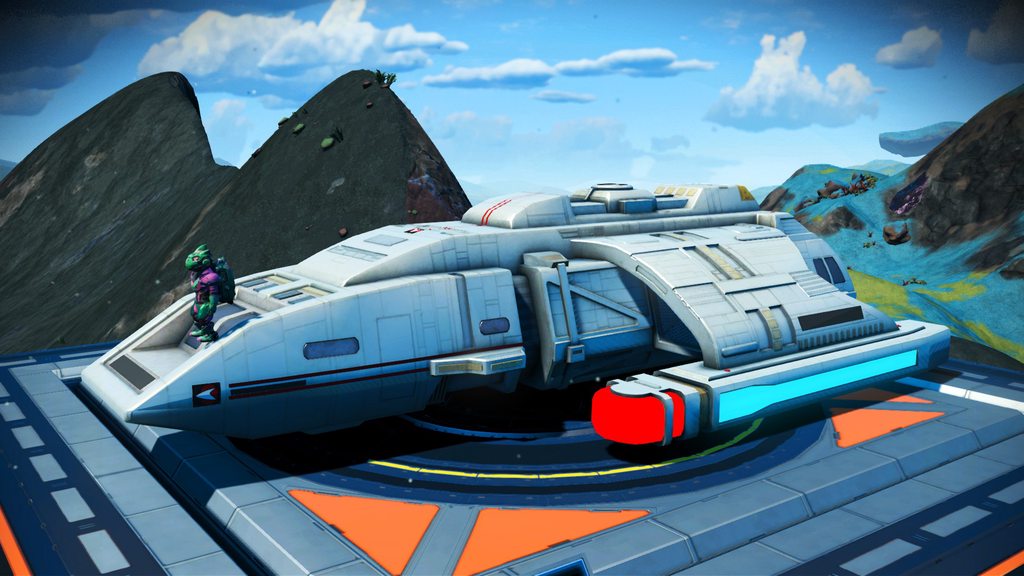
^ also new "Give Me Shuttles or Give Me Death" pak and lua - makes the game only spawn Shuttles (which this mod replaces) (Exotics still has a small chance to spawn)
steel crypt
hearty wasp
^ also new "Give Me Shuttles or Give Me Death" pak and lua - makes the game only...
"Give Me Shuttles or Give Me Death"
I approve your name. 😂
hearty wasp
I can finally watch more Mandalorian tonight

tbh that's what got me wanting to put more ships in
if Obi Wan is good maybe there'll be more coming
hearty wasp
Yeet if you guys think it's self-advertising but I wrote something on developing the BuildFrame mods
https://ko-fi.com/post/Making-a-Framework-for-a-Better-Base--BuildFrame-F1F6BUGGJ?justpublished=true&alias=Making-a-Framework-for-a-Better-Base--BuildFrame-F1F6BUGGJ

 granite flint
 lime mesa
rapid sandal
https://discord.gg/T4Eav6Z6
lime mesa
rapid sandal
https://discord.gg/T4Eav6Z6
This is the discord link
magic lava
lime mesa
This is the discord link
!creativehublink
hardy auroraBOT
magic lava
!moddinglink
hardy auroraBOT
lime mesa
bleak thunder
and more like this?
just go to a different system
lime mesa
sweet now I can be the evil traveler I always wanted to be https://www.nexusmods.com/nomanssky/mods/2211
lime mesa
someone should make a mod to make wiring loom cheaper or craftable if thats even possible
 late mirage
Anyone know where freighter base layout is in the save json?
Trying to fix this: #nms-questions message
I have a room which is clipping outside of the buildable grid, and I can't seem to remove it normally
eh, nvm - PersistentPlayerBases
 devout osprey
I don't currently run any mods on my PC NMS. Back when I did, the only mod I ran was the one which increased the speed of the refiners. I'm thinking of re-enabling that and was also wondering if there is the same thing for the Nutrient Processor speed. Is there?
If so anyone have links to the current best version of those one or two mods?
rapid sandal
devout osprey
I don't currently run any mods on my PC NMS. Back when I did, the only mod I ra...
The speed is based on the TimeToMake field for each recipe (refiner or cooking, both are defined in METADATA/REALITY/TABLES/NMS_REALITY_GCRECIPETABLE.MBIN).
NMSMB has a trivial script (Recipe_Fast) to set all recipes TimeToMake = 1.
https://github.com/cmkushnir/NMSModBuilder
You could also goto No Man's Sky - Creative & Sharing Hub discord server and use their bot to gen a mod pak that makes this change.

GitHub
No Man's Sky Mod Builder. Contribute to cmkushnir/NMSModBuilder development by creating an account on GitHub.
devout osprey
rapid sandal
The speed is based on the TimeToMake field for each recipe (refiner or cooking, ...
Thx. This is cool. I could probably do several small mods in one with this. I'll try it.
cloud basin
@lunar dew what is your mod list?
 lunar dew
Nexus Mods :: No Man's Sky
Grass, plant, sand, water, snow, & more... color mod. Compatible with NMS v3.84
Nexus Mods :: No Man's Sky
Terrain (voxelgen) overhaul mod. Compatible with NMS v3.53-3.84. Now with NaturalSpawn!

Nexus Mods :: No Man's Sky
1,000 ocean colors! Forget about the measly 4 possibilities offered by vanilla NMS! Find the sea of your dreams! [Last Verified: 3.53]

Nexus Mods :: No Man's Sky
This mod edits the Flora colors. Currently, this means Grass, Tree leaves, and Shrubs of the Lush planet type.


Nexus Mods :: No Man's Sky
«No Man’s Sky: Fantasy Reborn» is a full game overhaul changingevery aspects of the base game.
lunar dew
cloud basin
<@!300861204627193856> what is your mod list?
those are all the visual mods i use
cloud basin
sick, thanks!
lunar dew
np
lime mesa
cloud basin
sick, thanks!
Btw fantasy reborn is a complete overhaul
magic lava
it's modular, if you want to customize
lime mesa
Wdym by modular?
magic lava
Take out whatever you don't want changed or if you don't like how it changes things
lime mesa
Oh ok I see
 fringe crest
 hushed bronze
There is no escape, fellas
 gritty radish
is it possible to change a companion's type (for example: turning a strider into a diplo) using a save editor?
vale iron
Yes, but you have to change all the descriptors too
gritty radish
mk
gritty radish
does it work with untamable creatures? (turning a rodent thing into a drill)
hearty wasp
it has to be a creature
and has pet related data in it
else it can break mp connection or cause instabilities
waxen cedar
hearty wasp
else it can break mp connection or cause instabilities
HG with the sentinel quad reward be like
hearty wasp
They still haven't fixed that shit?
vale iron
I thought they would have with the quad egg fix they did, but apparently not
steel crypt
This will show you what filters are available in photo mode, but not with the in-game name.
<Property name="SelectableInPhotoMode" value="True" /> - is what you're looking for. To link it to an in-game name, you would have to look through the language file and match them.
steel crypt
@vale iron The photo/in-game vignette? It's a LUT?
vale iron
steel crypt
<@!630209160860008468> The photo/in-game vignette? It's a LUT?
From what I could tell, the photo vignette on the top half of the screen is a LUT
lime mesa
The fantasy reborn mod will affect my builds?
steel crypt
DUD'S SKY - COLORS updated v3.84.3
Mods updated + 2 new mods 🙂
MOD_DUD_AtmosphereBurnFX_v3843
Replaces (first person) atmosphere entry effect with custom effect.
MOD_DUD_Heatwave_v3843
Replaces smoke/dust effect on some "Scorched" weather planets (Lava and Scorched) with custom heatwave effect.
*See mod page for more details.
https://www.nexusmods.com/nomanssky/mods/968
Nexus Mods :: No Man's Sky
Grass, plant, sand, water, snow, & more... color mod. Compatible with NMS v3.84
steel crypt
vale iron
From what I could tell, the photo vignette on the top half of the screen is a LU...
I see you've been looking into that vignette thing for a while. If you tell me what you're trying to do and any clues you might have found, I can look into it 🙂
 viral crystal
Hi i need some help, im having one conflict as what AMUMSS said and i though it gonna sort all the conflicts automaticaly when i build one script from 5 scripts i was using
so how to sort that one confilict i had with building a mod from scripts ?
...or i will send mods that i need merging so somebody can merge them and return to me, its just 5 mods
viral crystal
hmm there was no merged mod in folder
hearty wasp
upload the report.txt
viral crystal
i see just report.lua no txt ?
hardy auroraBOT
hearty wasp
yeah but you can't upload shit in this server
because you haven't earned the role yet
viral crystal
lol
its not like i run for presidency xD
i swear this discord almost starting to have more rules than constitution of a country xD
vale iron
steel crypt
I see you've been looking into that vignette thing for a while. If you tell me w...
Yeah, it's bothered me for a long time. It's been so long, though, I don't really remember much, other than I got stuck at needing to edit a LUT. Couldn't find a freeware editor and also didn't really want to get that far into it. I might be willing to now, since I don't have any other projects
vale iron
The most important thing I want to do is mirror the vignette effect from the top half of the screen to the bottom half of the screen. I'd also like to set the default vignette value to 0. I've made the latter work before, but you have to hit a key to activate it when you go into photo mode, which is odd.
lime mesa
I hate having to set it back to zero each time
vale iron
I'm working on a 'Lonely' modpack and could use advice. So far it has increased system size; fewer freighters, pirates, random pulse encounters, freighter battles, and NPC ships; asteroid ribbons by Exosolar; no random NPC flyovers; more Dead and Weird biomes; ; no exosuit voice; many more uncharted and abandoned systems; and skip tutorial missions. Anyone have suggestions for other changes that would make the universe seem more empty and lonely? Should I decrease creature density? I feel like that's not really the same as lonely.
lime mesa
I don't know. Sorry
hushed bronze
@vale ironMaybe a great reduction in frequency of NPC landings at stations and outposts?
vale iron
hushed bronze
<@!630209160860008468>Maybe a great reduction in frequency of NPC landings at st...
Thanks, I'll check if my current changes do that and try to put it in if not.
steel crypt
vale iron
Thanks, I'll check if my current changes do that and try to put it in if not.
Along with Exo's idea, those flyovers and ships landing to trade in the wild could be reduced.
vale iron
steel crypt
Along with Exo's idea, those flyovers and ships landing to trade in the wild cou...
Yeah, I killed all random ship flyovers completely. Eliminates black market traders from landing, but I think it's worth it for the atmosphere
viral crystal
Hi again, one question is there a mod that will 'space out' planets more
i was waiting for developers to make them more distant from each other because they are too close to each other its completely unrealistic, and its bothering me from the start 🙂
steel crypt
@vale iron
Here are some values in AISPACESHIPGLOBAL you might want to look at?
<Property name="TradingPostTraderRequestTime" value="60" />
<Property name="SpaceStationTraderRequestTime" value="30" />
This one is the spawn distance from the outpost:
<Property name="TradingPostTraderRange" value="1500" />
In this section, you will find 4? colors. They are the trade lines in space. You can alpha 0 all 4 for removing the lines.
<Property name="TradeRouteColours">
<Property name="A" value="0" />
This is how long a trader stays at a pad:
<Property name="DockWaitMinTime" value="60" />
<Property name="DockWaitMaxTime" value="120" />
tidal portal
mods
hearty wasp
yes
viral crystal
so no such mod ?
hearty wasp
not at the moment I think
you're welcome to find an outdated mod and revive it with the knowledge it may diverge
viral crystal
hmm i doubt it exist, because somebody would use it already, and also its not that simple just to change values as with other simpler mods
maybe star systems are in 'contained space' so if planets are too far appart thet may go out of bounds
viral crystal
hmm i will look at, but i doubt there is this what i need, i listed about 10 15 pages of mods yesterday but there were none like this
i mean, they should be visualy distant (if you catch my meaning) not just in 'travel time'
hearty wasp
you were not searching hard enough
try searching for words like "planet"
or the categories on Nexus
viral crystal
alright, still i doubt i will knew how to edit and update that mod(s) 😄
viral crystal
haha yeah, if only i have that much will to bother with it xD
devout osprey
I've downloaded the NMSModBuilder and it's very impressive, but after reading the readme.md I still don't know the workflow of using it. Is there a tutorial which goes past the readme.md? BTW, I am a developer, so I'm not asking this because I'm in over my head and need to be told that I need programming classes before using it.
hearty wasp
You can wait till cmkushnir shows up
Or you can join the modding discord and wait for cmkushnir to show up but you'll be less buried by other messages
!moddinglink
hardy auroraBOT
devout osprey
Cool. Thx
 brave oriole
Do mods mess up my game if i choose to disable them in the future
like i see better reward mods for example and i wonder if they are considered cheating of any sort
or if they are allowed
hearty wasp
no and no
rapid sandal
brave oriole
Do mods mess up my game if i choose to disable them in the future
It's rare but possible. Two cases I can think of:
- Mod adds something new that gets saved in save file, e.g. new product, substance, technology. Believe game will just ignore on load when mod removed, but haven't fully tested.
- Missions. It's possible for a mod to mess w/ existing missions e.g. skip mission mod, such that when you remove the mod those missions get reset.
- ... three things ... it the mod alters the way seed calc's are done such that w/ the mod you don't get the same gen things as vanilla e.g. w/ mod you find your perfect ship, remove mod and ship may change if mod altered how ship seeds used, or alters where locations are placed on a planet, or its terrain such that your perfect base is no longer perfect.
hearty wasp
they can
but the game almost always resolves it on its own
it's as likely as the vanilla game corrupting your save because the mechanics of the data being saved is exactly the same
so if you fear the game would corrupt your save, you would just want to back them up in general
different how, in terms of saves
hearty wasp
ok, how unstable had modded NMS saves reported to be, or in hypothesis can be, compared to vanilla saves
rapid sandal
I haven't had stability or corruption issues removing mods, but I have had it, as the op asked, "mess up my game".
 stiff stirrup
I have not gotten too crazy into the mod scene, but I have always expected stuff to go wrong, and make backups of saves before screwing around in the save editor.
vale iron
Never hurts to make a backup, for sure. I've never had a mod corrupt a save, though I have had it happen with save editing.
vale iron
For testing: gLonely - creates lonely galaxies. Features: Increased system size, increased planet visibility distance, far fewer random freighters and pilots, slightly modified Asteroid Ribbons by Exosolar, systems are mostly abandoned or uncharted, far fewer NPC ship spawns, no random NPC flybys on planet, more dead and weird planets, fewer pulse encounters, fewer freighter battles, no trade route lines, no suit AI (except one hazardous flora warning message), skip tutorial missions (gaining appropriate recipes)
Recommended for new games. If you are adding to/removing from an existing game, save in the Nexus Anomaly to be safe.
 blazing crescent
https://www.nexusmods.com/nomanssky/mods/2217 idk if this has been posted yet but this actually works

Nexus Mods :: No Man's Sky
Remove the lag / freeze when leaving planet atmosphere.
vale iron
Yeah, we've talked about it on the modding discord and other than it not really being a mod, it's interesting. Someone narrowed it down to something in the NEXUS folder specifically, but not any further.
Probably one or many GEOMETRY files
blazing crescent
interesting
lime mesa
I've heard from people it's been causing more issue
 primal violet
Here a mod for recoloring the minotaur hardframe if you have Xbox PC https://www.nexusmods.com/nomanssky/mods/2180 @lime mesa
waxen cedar
Do you know what kind of plants snap into the decorative pot? @vale iron
the one which is unlocking in a bit
vale iron
Not a clue. I don't know much of anything about snap points. I'll take a look, but don't think I'll be able to tell much. Winder would be the one to ask probably
waxen cedar
Alrighty
vale iron
waxen cedar
Do you know what kind of plants snap into the decorative pot? <@6302091608600084...
I don't see a snapping file to go along with it (it's PLANTPOT_4 in decorations), so that makes me think it doesn't snap with anything?
Do the previous plant pots, 1-3, have any snapping?
vale iron
Ah, I didn't know that. Strange then that it doesn't have snapping, yeah
Unless I'm looking at it wrong, which is definitely possible
hearty wasp
They may just
Have no plant at all
Or
Work like space station back room hydro shelves
Uses the planet object table's objects
Check stray locators
Also
Snappoints are all in placement files now
Could just be in ere
 wise tusk
blazing crescent
https://www.nexusmods.com/nomanssky/mods/2217 idk if this has been posted yet bu...
wise tusk
blazing crescent
https://www.nexusmods.com/nomanssky/mods/2217 idk if this has been posted yet bu...
this mod has literally made the game playable for me
🤣 🤣 🤣 🤣 🤣 🤣 🤣
hearty wasp
Someone in the modding discord said it'd be funny if someone actually just installed that mod like a pak
And then found the game better to play
wise tusk
Well, he just updated it with a .pak version
and yeah, the game has improved
which is nice, since it was something that many players have reported b4
hearty wasp
wise tusk
and yeah, the game has improved
oh that's good
makes the joke obsolete tho
wise tusk
I mean, I know that the "mod" it's just a repack from an unpacked file, but for some reason that works
hearty wasp
the new one is uncompressed is why
less processing needed to extract and load
and geometries are big and compressible because they are models
blazing crescent
wise tusk
this mod has literally made the game playable for me
Same
 neat hedge
I already asked for it in discussions on the official mods discord but i'll ask here too, current version of save editor?
Problem solved
Thanks gumsk
waxen cedar
@vale iron would it be possible to attach starship trail emitters into freighter models? Swap the freighter thrusters out with them