#nms-modding
1 messages · Page 214 of 1
 waxen cedar
what are the values I should give the actual egg btw? Or did you get them via the mod?
 regal plume
ive got it listed in the link i sent earlier, but i have a quad egg i edited it in without the mod ^
waxen cedar
Ah, could we do it tomorrow? I could tag you later or something. It's pretty late and I was thinking about going to sleep now
regal plume
waxen cedar
Ah, could we do it tomorrow? I could tag you later or something. It's pretty lat...
yeah fair enough just let me know when you want to do it and i'll get back to you when i can
was gonna give out a load at the nexus anyway lol
 grand schooner
it would probably be possible. I have seen normal sentinels as pets
idk how you would go about it but it may be able to be done
 hearty wasp

 lime mesa
 round canopy
man that'd be cool as hell
round canopy
man that'd be cool as hell
Its very easily possible. You just need a save editor, then you change your pet id to "walker" "quad" or "drone" and it will set your pet to that type. Although you want to make sure its a normal animal "cow" "Triceratops" as having the pet be something like "drill" or "plough" before hand can have issues. You can't bring pet sentinels to multiplayer as it forces you into a solo lobby when using one. Although if someone pvp greifs you, you can use that to your advantage.
round canopy
huh..neat as a novelty but not something to really put thought into then. alright thank you!
 leaden laurel
Hmmm I better get all my mines up and running before the update disables my mods. 😛
waxen cedar
regal plume
yeah fair enough just let me know when you want to do it and i'll get back to yo...
do you have time now?
regal plume
waxen cedar
do you have time now?
No I'm drunk rn trying to be normal jn front of old people I'll be back in like an hour or 2 I guess
waxen cedar
regal plume
No I'm drunk rn trying to be normal jn front of old people I'll be back in like ...
Alrighty. I shall also enjoy some alcohol now in preparation for the live
 merry wasp
@ember shuttle https://www.nexusmods.com/nomanssky/mods/1939

Nexus Mods :: No Man's Sky
A mod that makes every exocraft stand out more to one other.
 ember shuttle
Thank you @merry wasp
merry wasp
@slate veldt This let's you modify any description flavour for any product. Will make an updated lua version for adding new foods (now that i've figured out loops more or less)
lime mesa
Is there a mod that allows for spawning of animals and ships etc during play?
merry wasp
lime mesa
Is there a mod that allows for spawning of animals and ships etc during play?
wdym? like in gta mod menue where you can spawn a car out of thin air?
lime mesa
Yeah something like that
merry wasp
lime mesa
Do you have a link for that mod?
 lime mesa
Thx
merry wasp
most mods if not all mods we mention are found there
 full niche
Not everyone likes save editors but I want to share the latest release of mine here as well as it now includes a platform save transfer feature! This allows you to properly copy a save between different platforms (or accounts on the same) and might be interesting even for those not interested in save editing.
https://www.nexusmods.com/nomanssky/mods/1566
hearty wasp
may as well put it here too

I have decided that, starting from today, I will put Sean's head on one additional object for every day the update is not released
 odd crater
Make a giant Sean head as a space encounter and we'll talk.
hearty wasp
we'll talk in a few days.
regal plume
anyone have a mod for trading quicksilver, i've got an abundance stored up and thought it'd be funny to send some out, i know you can add it in save editor as an item but that auto adds to account value, is there a way to do it so i can send it to players if no one knows of a pre built mod for it?
hearty wasp
not really
vanilla qs substance is only for reward
you may try adding that reward substance with save editing and then send that to another person in-game as a test to see if it'll be translated into the currency automatically on reciving
try searching up the id here if it's not already selectable in the save editor https://docs.google.com/spreadsheets/d/1J8WdrubKgo8A9hPY-hbQLq4eVrb3n3lZAgiI2J7ncAU/edit#gid=66931870

Google Docs
Cover
No Man's Sky Tables
NMS version : 3.52
Steam ID : 6833594
These tables can be found in METADATA\REALITY\TABLES
For now, it includes :
NMS_REALITY_GCSUBSTANCETABLE
NMS_REALITY_GCPRODUCTTABLE
I hope to keep these up to date as much as possible
enjoy
Lo2k
lime mesa
waxen cedar
Alrighty. I shall also enjoy some alcohol now in preparation for the live
Hay just edited in a sentinel pet if you still want one.
regal plume
hearty wasp
you may try adding that reward substance with save editing and then send that to...
yeah we've tried that before it auto adds the substance to your account, cheers for the table though
@waxen cedar it's mine, dont listen to this witch buy them (for free) directly from me
i have like 25
 spring vessel
hearty wasp
may as well put it here too
spring vessel
hearty wasp
may as well put it here too
Do fauna next 😄
I want to see one of the gophers with a sean head
 waxen cedar
or every freighter
spring vessel
Oh No
 regal plume
thats so unbelievably cursed
spring vessel
Honestly it's the worst thing I've done today, including turning three people into hats
hearty wasp
waxen cedar
could you possibly change the player freighter model into a roamer?
player freighters are just freighters
you know what that means

 twilit smelt
that freighter base is gonna be cramped
hearty wasp
I feel like in a week every single npc will be sean
if I do everything the reddit replies demanded
also we'd be entering Sean's mouth into the space station
round canopy
go from No Man's Sky to Sean Man's Sky
 finite stirrup
is it possible to mod at xbox?
lime mesa
finite stirrup
is it possible to mod at xbox?
If you found a way you'd be banned. If you released the way of doing it you'd be issued a cease and desist.
 left sentinel
yeah since NMS doesn't support official modding you can't do it on xbox
finite stirrup
ahhh okay. ill start modding in awhile, is this a good starting list?
True Water, HD Clouds, Big Things, Dud's Sky, Better Planet Generation
for PC
left sentinel
pretty good
finite stirrup
Thanks, I could use some suggestions tho for varied creature generations. Do you have anyy?
merry wasp
@slate veldt @magic lava give it a spin when you have time
these are the textures i used for now
 viral badger
Lua sucks but that's some nice, clean coding 
merry wasp
viral badger
Lua sucks but that's some nice, clean coding <:liketu:666351560623783989>
well i Try my best, code has to be readable in my opinion
takes a bit more time but in the end it is worth it
round canopy
lime mesa
If you found a way you'd be banned. If you released the way of doing it you'd be...
a cease and desist from HG or from Microsoft?
lime mesa
round canopy
a cease and desist from HG or from Microsoft?
Micro
 vale iron
HG doesn't care about modding.
round canopy
ahh
lime mesa
If anything HG endorses it.
round canopy
okay. just wanted to make sure since Sohail said "since NMS doesn't support official modding" I thought...wait no i thought they said "since HG doesn't support official modding"...huh okay so i'm just bad at reading, never mind XD
lime mesa
Nah pc is fine with modding no bans etc. Xbox and PlayStation have a thing against you decrypting their files.
merry wasp
@dawn haven https://www.nexusmods.com/nomanssky/mods/957

Nexus Mods :: No Man's Sky
Revolutionary No Man's Sky AMUMSS (auto modbuilder/updater with MOD script definition system)Fully automatic mod builder that automates every step of nms modding and provides an easy to use lua
"install" this
And read the how to use 🙂
 dawn haven
ok. gonna try that after works 🙂
merry wasp
i can give you pak tho but that just the one i used for testing @dawn haven
hearty wasp
ok so someone wants this
Sean's face on the personal refiner part of the original exosuit backpack so that when you refine things his face goes round and round.
I have no idea what they're referring to
does anyone have a screenie of said spinny thing?
 merry wasp
np
hearty wasp
also my reddit post got deleted again
hearty wasp
no I mean my post on reddit
merry wasp
not on the nexus?
think it would probably a banger 😄
would be great to make a group pictur on the Anomaly with it
😄
hearty wasp
nexus doesn't get a lotta exposure with pictures
anyway I was just complaining since most my modded posts got removed by the same person
vale iron
Amen, I don't even bother posting modded stuff anymore
merry wasp
never posted on reddit
only nexus
or here
but that more or less a personal request project 😄
loops and functions are really handy for language files tbh 😄
 amber zealot
hearty wasp
anyway I was just complaining since most my modded posts got removed by the same...
amber zealot
hearty wasp
anyway I was just complaining since most my modded posts got removed by the same...
it's not just your modded posts by the looks of it, saw this Sean face meme picture was also taken down by the same person. Guess no fun is allowed over there: https://www.reddit.com/r/NoMansSkyTheGame/comments/pbpqt4/i_think_somebody_requested_something_like_this/

reddit
93 votes and 7 comments so far on Reddit
merry wasp
weird
hearty wasp
merry wasp
loops and functions are really handy for language files tbh 😄
I've a much more spaghetti version of language file generation in Eucli-ea's lua, it's loops and functions all the way down
merry wasp
rules say nothing
merry wasp
hearty wasp
I've a much more spaghetti version of language file generation in Eucli-ea's lua...
took me a while to figure it out but got it working
hearty wasp
merry wasp
rules say nothing
Sean's head is prolly ad nuaseum at this point 
just, y'know, not his real face
merry wasp
i know
still kinda ... like i don't like this so, ill "ban this" kinda move
still due to my language files i end up with kinda big nested arrays

 merry wasp
😄 had to do some test flavour work and was in no mood to TL that thing
hearty wasp
I haven't started doing product names yet so I've just been directly naming IDs
 merry wasp
oh god
hearty wasp
also inserting a new language table via debug table
 hearty wasp
I just do the loop with LANGUAGE_TYPE so had to put every single language in there
also easier to add more later I guess
actually
I made it so if the text field's empty
it automatically uses English
merry wasp
hmm not a bad fallback
hearty wasp
so it at least gets filled
yeah cos when I tested the Chinese ones
if the field's non-existent it just shows the language ID
as plaintext
 hearty wasp
lel wish I can code that cleanly
hearty wasp
here's mine
 merry wasp
hearty wasp
lel wish I can code that cleanly
merry wasp
hearty wasp
lel wish I can code that cleanly
well i do use visual code And i hate stray comma's and such
hearty wasp
oh no I just mean I don't know how locals work
and I just use functions as text inserts
merry wasp
hearty wasp
here's mine
local is just "local to the loop/function
means yo cant use it outside the function
(i think)
hearty wasp
saves memory on execution or something like that right
merry wasp
i mean i've only worked with loops and functions for what 3 days now
yeah it should
also
Lua - if...else statement, An if statement can be followed by an optional else statement, which executes when the Boolean expression is false.
this has helped me a lot
😄
but you're more experienced with lua, Euclid Ea is insane by the looks of it
hearty wasp
btw not equal operator in lua is ~=
hearty wasp
ikr lol
merry wasp
lol
hearty wasp
always used either != or <>
merry wasp
yes
so i kept not
heck -= would be really confusing
especially with numbers
still -=, thats a new one for me tbh
hearty wasp
it's a tilde
hearty wasp
yeah I have no idea why it's like that
merry wasp
holy shit ~ like are they fo real
jezus would've never thought of that one
so i'll stick to not() makes more sense that way
hearty wasp
the former
merry wasp
can't tell when you're tired
hearty wasp
the squiggly one
merry wasp
if you can still see the squiggle
hearty wasp
at least it's more visible in NP++
merry wasp
 yeah looks fine
hearty wasp

 hearty wasp
ye
merry wasp
dark mode theme ftw tho
hearty wasp
yeah I had to do a custom colour palette for mine cos dark mode in NP++ ain't really a thing for lotta languages
like it'd make the background black or dark blue but everything stays the same colour as light mode
merry wasp
why not switch to VS code or something along those lines?
hearty wasp
I'm not really a coder by trade
I just use whatever I have lying around if they work well enough
merry wasp
gotcha
hearty wasp
I do compares often too so I can just switch tabs instead of switching programs
merry wasp
still darkmode should be standard feature
hearty wasp
ikr
 hoary tusk
is there any crazy but somehow sound conspiracy theories out there for why sean retweeted his own 4 posts twice?
like, why he do da?
merry wasp
hoary tusk
is there any crazy but somehow sound conspiracy theories out there for why sean ...
viral badger
Dunno, but this isn't the channel - try #874277230895824926.
hoary tusk
ok ta
lol i meant to put this on nms the future, sorry. but hype is much better place so thank you still
hearty wasp
np
mmm, gotta see how many portal textures are actually in use
and how cursed it would look if they are Sean's face
merry wasp
hearty wasp
mmm, gotta see how many portal textures are actually in use
gonna make a sean portal?
lol
called it
hearty wasp
yeah some texture work ought to be easy and fun
merry wasp
can't answer that i'm shit with texture works
hearty wasp
it's just that if it's all shader coloured and rendered I can't replace it
waxen cedar
Sean sun
hearty wasp
Just remembered some texture replacements can get bugged out due to premade cache
May need to just
Change the mats too
waxen cedar
oki
waxen cedar
regal plume
im on rn if you want that egg
what's your friend code
regal plume
@waxen cedar
PGGT-DPXM-N4VVE
merry wasp
@waxen cedar @regal plume pls use #nms-lfg-or-trades for that next time 🙂
regal plume
👀 oop sorry lol
waxen cedar
this was about modded stuff
regal plume
chuck me your friend code in dms or something ^ gotta hand out pet colouring stuff a sec and then i'll jump into your session
nvm lol
merry wasp
@slate veldt @magic lava @dawn haven Finallized both of my mods and put them in a zip, all issues should be resolved. But test if and see if it works. If you have questions or issues feel free to ping me
dawn haven
👍
merry wasp
@hearty wasp btw seeing that chinese in your code, you got any good translator for that?
merry wasp
oh
not sure if your brain can possibly translate this? **A crafted freighter upgrade. Can be re-deployed into your own capital ship to improve its <TECHNOLOGY>Technology<>. **
hearty wasp
可合成的貨船升級。 可以被移除及重新安裝於星際貨船上,以提升<TECHNOLOGY>科技元件<>效能。
merry wasp
hearty wasp
可合成的貨船升級。

可以被移除及重新安裝於星際貨船上,以提升<TECHNOLOGY>科技元件<>效能。
thx a ton
hearty wasp
 waxen cedar
hearty wasp
waxen cedar
hearty wasp
Seanporter
merry wasp
hearty wasp
very nice
 hearty wasp
does this look okay enough
 merry wasp
in what sense?
merry wasp
can't really see him , might ask in #no-mans-sky maybe they have better eys then me?
left sentinel
I can just see the skin colours at best
 hushed bronze
hearty wasp
does this look okay enough
hushed bronze
hearty wasp
does this look okay enough
Are you trying to put Sean's face in the warp scene?
left sentinel
hearty wasp
This one is better
hearty wasp
hushed bronze
Are you trying to put Sean's face in the warp scene?
I already have
hushed bronze
I mean like perceptibly
hearty wasp
preferrably
but I don't wanna put too much effort into it
putting in hours everyday for a meme seems excessive
hushed bronze
Maybe if you counter the stretch like so, and turn it this way so you have more pixels to lose from the height of a head?
 hearty wasp
nonono it's the colouration
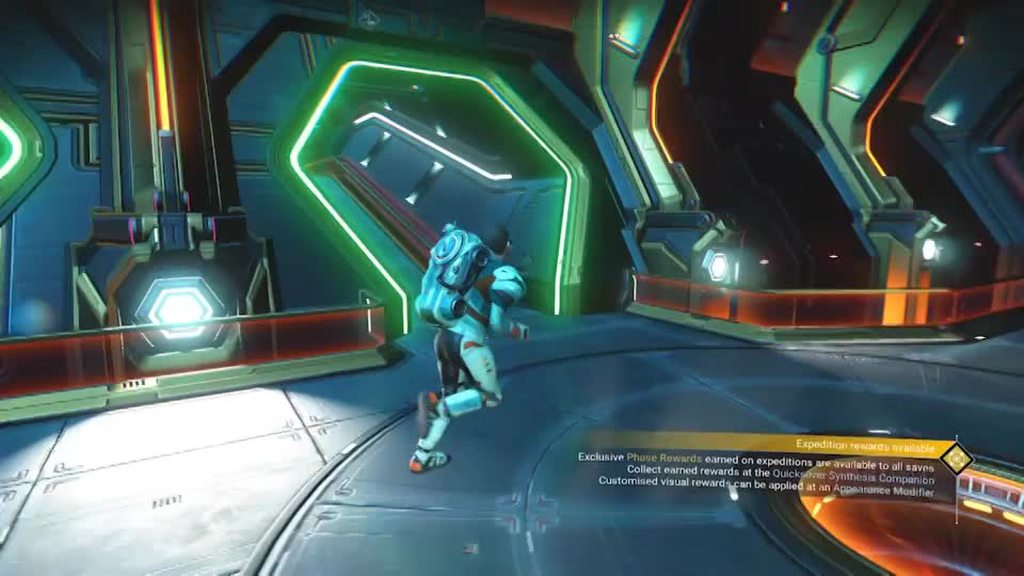
like it's green for some reason right
all the green shit
are Sean
hushed bronze
hmm
maybe the channels are swapped around? HG loves switching around color channels for no reason
waxen cedar
where can I find the model for space anomaly?
hearty wasp
waxen cedar
where can I find the model for space anomaly?
like which part
hushed bronze
waxen cedar
where can I find the model for space anomaly?
Use the quick menu to spawn it, then fly in 😄
waxen cedar
the exterior shell
hushed bronze
lol im just playing, IDR but it was a hot topic in the modding devoted discord so they probably all know in an instant
waxen cedar
seeing lots of separate materials there
hushed bronze
....if its not where QP just said
waxen cedar
I wonder if it's the ANOMALY.ENTITY.MBIN
hearty wasp
should be a scene right in that folder
waxen cedar
ah
hearty wasp
rover's truck
waxen cedar
ah
 sly moss
hearty wasp
nonono it's the colouration
sly moss
hearty wasp
nonono it's the colouration
this is a thing of pure beauty 
 slate veldt
@hearty wasp what about replacing a space station with his head and you fly into the mouth?
merry wasp
lol
viral badger
Oh dear God, what you have you done.
merry wasp
he was already thinking of a Sean Sun
hearty wasp
slate veldt
<@150431651262889984> what about replacing a space station with his head and you...
yeah I mentioned that yesterday too
great minds think alike
slate veldt
Epic! Cant wait to see that monstrosity lol
merry wasp
slate veldt
Epic! Cant wait to see that monstrosity lol
btw the luas are done (unless you guys find some bugs ofc)
slate veldt
Yup, saw those. Ill have to check this weekend, irl work is going crazy lately so i havent had much playtime lately
odd crater
hearty wasp
https://i.imgur.com/ZSaYk6l.mp4
What have you done?
hearty wasp
odd crater
What have you done?
things
odd crater
You're the mad scientist of NMS modding.
 waxen cedar
Sean heads
 halcyon dock
a good mod would be to allow bubbles to be popped. same with the floaty pink things on anomalous planets that have no hitbox
 manic lake
Favorite reshade mods?
hearty wasp
halcyon dock
a good mod would be to allow bubbles to be popped. same with the floaty pink thi...
bubbles are actually in clusters so you can't pop individual ones
they prolly made it unpopable just so it doesn't look out of place when a whole group of it disappears
halcyon dock
damn
yeah, i've suspected as much. would be worth a rework imo though, as it would make on-foot exploration more entertaining
 vernal fiber
replace the bubble with the gib emote and watch them slowly rise out of the ground
 placid cedar
what are some recccomended mods for a new player?
im a vr only boio
and i really just want utility
 covert trail
Any horror mods?
merry wasp
waxen cedar
are the current QS items actually buildable in the game yet?
might be possible
or you mean for Euclid-Ea?
waxen cedar
merry wasp
or you mean for Euclid-Ea?
the ones currently in progress
just wondering because if they weren't we would need to have an update when tier 1 gets completed
 white glen
covert trail
Any horror mods?
white glen
covert trail
Any horror mods?
there will be soon
left sentinel
when did you record me in the restroom
hearty wasp
waxen cedar
the ones currently in progress
try Consumerism over at the modding discord
makes everything in QS shop instantly purchaseable
 waxen cedar
hearty wasp
makes everything in QS shop instantly purchaseable
waxen cedar
hearty wasp
makes everything in QS shop instantly purchaseable
also made the latest items disappear
merry wasp
ffs trying to make custom freighter mods with function and loops is annoying
all those damned vars
hearty wasp
waxen cedar
also made the latest items disappear
use the lua
waxen cedar
oki
hearty wasp
eck, think NMSSE's coordinates viewer translation got messed up again
doesn't accurately translate portal codes to coords anymore
 fallow meadow
hearty wasp
doesn't accurately translate portal codes to coords anymore
fallow meadow
hearty wasp
doesn't accurately translate portal codes to coords anymore
What are the glyphs?
hearty wasp
I just built a portal to go there it all k
fallow meadow
Understand, just curious about the issue
merry wasp
just noticed a "bug" in freighter upgrades

NumStatMax = 2 but it only has 1 stat XD
seems they forgot the HyperDriveFuel

 tepid jetty
Have a quick question, I am playing No Mans Sky through Microsoft Gamepass for PC, am I still able to install mods this way since it's not in steam?
 unborn shale
tepid jetty
Have a quick question, I am playing No Mans Sky through Microsoft Gamepass for P...
unborn shale
unborn shale
tepid jetty
Have a quick question, I am playing No Mans Sky through Microsoft Gamepass for P...
@tepid jetty Yeah totally. Find your install folder
Then GAMEDATA/PCBANKS
In PCBANKS look for or make a folder called mods
And in the PCBANKS folder rename or delete the .txt called DISABLEMODS
tepid jetty
My man! Thanks, every video I saw mentioned the Steam version so wasn't sure if it was possible or not. So just install them right into the folder? There's no like Nexus Mod Manager for this game?
unborn shale
I like to rename it to ABLEMODS.txt so I can rename it if I want to deactive all mods (incase something is just crashing)
hushed bronze
hearty wasp
does this count as <#875307174497226752>
If you continue to be this entertaining, Sean will never launch the update
He will just wake up excitedly like "Whoo! Lets go see what that crackpot put my face on today! XD"
hearty wasp
hushed bronze
If you continue to be this entertaining, Sean will never launch the update
seeing the rate that Sean is tweeting, one may say he fears
but we'll see 
unborn shale
@hushed bronze (continuing here) I know, before Origins I was like spreading the word of your extra biomes cuz of how they added back planets that had like desolate asset placement. (Big fan of your work) It reminded me a lot of pre-NEXT.
hushed bronze
Ty friend 🙂 Sadly that one hasn't seen an update in ages. But both HG themselves and another modder or two have since done a few similar things
unborn shale
Yeah tbh none of the biomes mods out now are any decent, they take away from the game more than they add imo. Ignacio's mod also has a bug where it can change the type of biome a planet has, which can reset the planet's discovery state, which can mean people can delete the "Discovery history" of a planet with out even realizing it if they have the mod active, and have not tested the changes on a lot of planets they already know well. (That's how I found out)
hushed bronze
Sadly that effect is true of vanilla too. If HG's update screws with the biome enough to change anything meaningfully, all but the topmost layer of discovery credit goes out the window
You still have credit for finding the planet but all the cretures and region finds are history
unborn shale
Atm I am modding the Redmas Fantasy overhaul's GridLayer Edits into DUD's Sky - Terrafirma so I can get the amazing old skool resource pillars from Redmas into the PreNEXT style NoiseLayers of DUD's sky
hushed bronze
(My biome mods did that too if it changed the world type)
unborn shale
Yeah I didnt use the more lush worlds one. Um, but the changing planet type is harsher than HG update changes
HG updates generally reset plants/rocks/animals
but a biome change resets planet name (the first thing you see)
hushed bronze
Try to watch carefully what edits you are making - you may find it a bit easier to understand than you may have expected
with the terrain stuff I mean
Y'know I don't think the discovery loss effect is noted on my type changers mod. I should go do that
unborn shale
Oh yeah its fine, I am going through each subtype one by one, closing everything other than teh min setting, then copying "gridlayers" from min to the grid layers from min into the DUD's Sky (which has more edits than E3style Resources pak in the latest fantasy overhaul split version) and then doing the same for teh "max values" again, only copy pasting the GridLayers sections.
hushed bronze
You know, odds are you can just add an underscore in front of jason's terra mod and use it over Fantasy outright. Why the careful conversion process?
unborn shale
Cuz when I did that, both ways by renaming the mods to test which load order was better, I found that I had one version or the other.
Urgh wont let me share a screen shot
I am half way through anyway :3
white glen
left sentinel
when did you record me in the restroom
its actually edited from the sound my sister made when she stepped on a lego + someone saying "f--- you" + a tiger's roar
unborn shale
Damn, so i turned it back into MBIN and repacked it into a .pak but the "merged" version only seems to have the effects off DUD's Sky Terrafirma. I guess I will have to do more research into both the mods and look at each value change vs the unmodded values.
Well at least I can explore 3 diff versions of the same planet xD
 sacred gulch
So I tried to use this guide to transfer my Xbox Game Pass PC saves to Steam version of the game
https://www.reddit.com/r/NoMansSkyTheGame/comments/lk6yk6/how_to_move_a_gamepass_save_to_steam/
However it doesn't work and NMS just starts a new game after loading the modified save, what's the issue? I made a new save by using autosave, or do I have to wait till I research the save beacon to make a manual save?
fallow meadow
Either save will do for creating an initial dummy
 magic spire
did you do this?
• Open the Steam version of No Man's Sky.
• Build any item, such as a save beacon or refiner.
• Save and close the game.
sacred gulch
magic spire
did you do this?
• Open the Steam version of No Man's Sky.
• Build any item, su...
That's what I did, i built a refiner, and options told me there's already an autosave I can overwrite, so I did exactly that, the Save Editor normally found it and I edited the JSON
I also replaced the words fully, as in MissionId -> MissionID instead of just Id - ID
magic spire
I would go through all the steps again and make sure you didn't miss anything out or make a mistake, and double check you got all the UID and USN values right as in from Microsoft to Steam
sacred gulch
magic spire
I would go through all the steps again and make sure you didn't miss anything ou...
I only noticed that the 000000001 thingy is one number shorter than the UID/USN of the Steam ver, but dunno if it is anything to worry about
magic spire
well the best person to ask would be @vale iron
sacred gulch
First thing I did was DMing him but he's not online :P
manic lake
First time building a base in NMS, downloaded the beyond building mod and made an interesting all in 1 "ATM"
Can't post pics so here's link (:
https://imgur.com/a/Z2EMZVu
fallow meadow
sacred gulch
I only noticed that the 000000001 thingy is one number shorter than the UID/USN ...
The issue is more likely with a formatting issue or variable being wrong. There are tools online to parse JSON and see if it comes out correctly. However, if not parsing correctly, finding the issue can still be a pain. One wrong comma, or parenthesis, or bracket, can mess up the save
magic spire
which is probably what's happening if the game is just starting a new game the save is not right some how
fallow meadow
exactly
fallow meadow
So what did you do to make it work?
sacred gulch
There's an optional step to replace all "XB" with "ST" and I decided not to do that when trying again
Seems to be the solution somehow
fallow meadow
That is the variable used for platform (platform token (PTK), I think). Which in combination with the UID/LID is quite important, considering you swapped platform
sacred gulch
Won't it cause my player icon to display incorrectly?
Afaik playing on Steam (or Epic/GOG?) gives you the PC player icon, but Microsoft Store version always shows you as the xbox player
fallow meadow
Yes, the platform you play on decides on the icon. Not quite sure the save data is actually involved with that
sacred gulch
Lol, imagine if the game didn't break the save due to that
Playing on a PC but everyone thinks you're using playstation
Anyway, now it's solved, so thanks
fallow meadow
Have fun
 mossy perch
ive updated an outdated mod via AMUMSS, now in which of CreatedModPAKs and Build folder do the updated mod located?
I mean, in between those two folders, which one should I copy the .pak files to the nms mod directory?
hushed bronze
Quick note, a new friend (Babscoole) has been helping to lua-fy and update a bunch of my mods, so if you're interested in updated copies of my mods, check the nexus, and you might find what you wanted 🙂
mossy perch
will do, thanks.
 hearty wasp
Kek
 lime mesa
I'm thinking of making a mod that allows you to stack modules as the other stack mods don't allow for that. What do you all think?
hearty wasp
Not sure if you can stack tech at all
merry wasp
upgrade mods no
lime mesa
Installable upgrades you can but from the station.
lime mesa
Yikes. Maybe not then
merry wasp
i tried it for my Craftable Upgrade Mods mod
i'd love to crafted stack of 100 mods in 1 go XD
lime mesa
Itd be awfully convenient if it was possible xD
hearty wasp

 round sinew
hahah grav balls
 smoky wing
Lol, yeah noticed that got snuck in there. Almost like burying the lede.
hearty wasp
I particularly like how when I pause I can see Sean in the static
but yeah the I figured the glowing head would look better if it's only some selected parts
hushed bronze
merry wasp
idk if i should report this as a bug :/
Well, its a bug, so probably
twilit smelt
initially asking in #nms-questions , but it seems better suited to here:
i thought i was going to have to work with this, but then changed approach and didn't have to - but i'm still curious about how this would work, and i'd rather not experiment with it if it's already well known.
save editors allow you to move the base computer in your base by swapping it with one of several types of other portable devices. when you do this, i'm assuming your base is re-centered in terms of boundary expansion.
so, let's say you have a developed EM hotspot 950u from base center due north, and a developed mineral hotspot 950u due south. now, let's say you swap the base computer with a save beacon at the EM hotspot. the mineral hotspot is now almost twice the maximum buildable distance from your base computer.
now, i understand that these limits are kind of spongy in the first place, given that you can be 1000u from your base computer and then still build out farther via build camera. still... does this actually break anything? if not, is this a viable path to making bases far larger than would otherwise be possible?
hearty wasp
base computer is literally just an object
unless I'm proven wrong the computer itself has always been an object in the base and not the literal base origin itself
since you can see in json that those 2 are entirely separate
twilit smelt
hearty wasp
since you can see in json that those 2 are entirely separate
devilin pixy pointed out the ability to make planet-spanning SRT loops in blender - so the question is really more about "does re-positioning the base computer re-center the base", and it sounds like you're saying "nah"
fallow meadow
Base Computer is actually always the 0,0,0 origin, with all other base parts being relative to it. The base computer itself has a position within the star system
If I were to move the Base Computer in a save editor, all the other base parts move along with it
twilit smelt
fallow meadow
If I were to move the Base Computer in a save editor, all the other base parts m...
well, that's the thing - moving the base comp via portable object swap doesn't shift the other parts. that makes me think one of two things is going on: 1) translating locations for all other objects, or 2) just shifting the base comp object and leaving center where it is.
fallow meadow
When you 'swap' position for the base computer with another object, the new location is 'known' to then recalculate the other base parts (vector math matrix multiplication_
hearty wasp
just checked the base I had the computer moved and it looks like it just moved the "At" values for the object
 twilit smelt
hearty wasp
just checked the base I had the computer moved and it looks like it just moved t...
twilit smelt
hearty wasp
just checked the base I had the computer moved and it looks like it just moved t...
if that's the case, i didn't rediscover a megabase cheat. 😆
hearty wasp
tbh it'd prolly be useful to ask @sacred frigate about how the blender plugin handles it as well
I'd suggest asking goatfungus too but NMSSE ain't open source last I remember lol
twilit smelt
nor is nomnom - cengelha said it will when it goes from alpha to beta
fallow meadow
Each base part is made up of 3 vectors (position, up, and at). this is relative position to the base computer and orientation in the 3D world
hearty wasp
at least zencq is on this server and you can tag em if you wanna ask lol
btw we can also circumvent all this by using the blender plugin
or even just manually moving the object in json lmao
fallow meadow
I have worked with it long enough to know how it works, used to do all of this manually before tools like the Blender plugin came along.
twilit smelt
hearty wasp
or even just manually moving the object in json lmao
well, if we move the object, it sounds like we don't re-calc center, so boundaries don't shift; and if we shift center, all the other parts go with it, negating the megabase-target thing. hm.
fallow meadow
hearty wasp
or even just manually moving the object in json lmao
Well, sure you can move any object relatively easy, but for moving the base computer manually with all other parts staying where they are is easiest by using some vector math
If you want a mega base, just do it in blender
hearty wasp
twilit smelt
well, if we move the object, it sounds like we don't re-calc center, so boundari...
the boundary's for building, not loading in the objects
fallow meadow
The boundary is just an in-game limitation
twilit smelt
hearty wasp
the boundary's for building, not loading in the objects
right - assuming i was building in-game, the boundaries are important
fallow meadow
Yes, when building in-game it will be an issue
But, you can merge multiple bases into one ;-)
I have done this before as well on my home planet
twilit smelt
fallow meadow
But, you can merge multiple bases into one ;-)
in blender you mean? that's a nice trick.
fallow meadow
It requires some logic work, but doable
twilit smelt
i tell you what i really want: more than 16k parts. 😠
fallow meadow
You need to calculate the difference between 2 base computers and apply that to one of the bases
hearty wasp
yeah I've been wanting to do that for my planetary objects as well
fallow meadow
twilit smelt
i tell you what i really want: more than 16k parts. 😠
Yeah, that's a bummer, but possible as well
twilit smelt
fallow meadow
You need to calculate the difference between 2 base computers and apply that to ...
assuming not far enough where curvature is a problem
hearty wasp
it's fucked when you accidentally build outside the boundaries
fallow meadow
twilit smelt
assuming not far enough where curvature is a problem
You apply 3D vectors, it's not a 2D move
twilit smelt
fallow meadow
You apply 3D vectors, it's not a 2D move
just re-associating a bunch of parts 90 degrees away on a planet to a new base comp doesn't adjust part rotation itself, right? separate operation?
or same operation, different calculation?
full disclosure: no intention of getting into blender, just curious.
fallow meadow
Different vector to calculate with, where an actual 90 degree rotation is relatively easy
In blender it is all a lot easier, because you do not usually have to do all the math yourself
merry wasp
fuck
 fallow meadow
There are also tricks you can use @twilit smelt
merry wasp
Think is solved my 172 warnings
now thats left is the error
if i get this to work i refactored 8484 lines down to 1204 lines
hearty wasp
wow big flex
 hoary sun
Hi, does anyone know if its possible to get reshade mods working with nms in VR? It cant find much information about it, and changing it's settings only seems to effect the screen view of it
 fallow meadow
hoary sun
Hi, does anyone know if its possible to get reshade mods working with nms in VR?...
fallow meadow
hoary sun
Hi, does anyone know if its possible to get reshade mods working with nms in VR?...
I could be wrong as I am not all that familiar with VR, but I believe there is no VR support just yet for Reshade, other than the OpenVR support (currently D3D11 only)
hoary sun
ah ok, its a shame though because reshade would look great in virtual reality
hoary sun
A simple image sharpening shader for skyrim VR makes a huge difference. Hope it becomes compatible for nms at some point
 undone falcon
any way to increase your inventory above 48?
undone falcon
no i meant single tab, meh.
What about simplify craft? If you need products for craft, and you have resources, can you use a mod to auto craft them?
hearty wasp
prolly not
undone falcon
Damn. This game still very little QoL aspects after so many years. Thank you for answers @hearty wasp
 rustic knot
Above 48 no, but having 99,999 of most stuff in a single stack yes. If you need more than that when all is said and done dont think its possible. There are workarounds though like installing the freighter with friends mod so you can always have your freighter storage. Hope that helps!
 clear tree
Is there a mod for allowing you to change your ship on freighters and stations at all?
vale iron
clear tree
Is there a mod for allowing you to change your ship on freighters and stations a...
No
clear tree
Dang it
clear tree
lol Put on 2 mods. Game won't run.
vale iron
What mods?
clear tree
Well first I was having a hell of a time finding one that reduced scan time. They all kept crashing the game. Now I'm hoping for one that kills the ship RNG. This one is less needed though.
I did find the scanning one I was looking for though.
vale iron
What are you wanting, a specific ship model or for them to always be S class?
clear tree
I've been trying S class max stats and inventory mods.
vale iron
This should be up to date:
https://www.nexusmods.com/nomanssky/mods/605
clear tree
I think this is one of the ones I tried already.
hearty wasp

 delicate hamlet
Where can I get mods?
hearty wasp
Nexus
 hoary drum
hearty wasp
https://fxtwitter.com/WSLTP/status/1431985273244504065
hoary drum
hearty wasp
https://fxtwitter.com/WSLTP/status/1431985273244504065
Once the update finally comes out will you be compiling everything you gave a Sean head into a mod?
hearty wasp
hoary drum
Once the update finally comes out will you be compiling everything you gave a Se...
after I update every other one of my mods, yeah
hopefully scenes don't get another changeup
else I may not
due to mental breakdown
hoary drum

We shall see then
What if on the next day you gave the giant space jellyfish the Sean head
hoary drum
Interesting...
halcyon dock
hearty wasp
I may do something more cursed
what if you replaced the bubbles on bubble planets with transparent sean heads?
merry wasp
halcyon dock
what if you replaced the bubbles on bubble planets with transparent sean heads?
i think that is one of his ideas
halcyon dock
ohhh I see
hushed bronze
When is it just gonna replace the sun
hushed bronze
Updated (by Babscoole) !
https://www.nexusmods.com/nomanssky/mods/1275

Nexus Mods :: No Man's Sky
Makes Sentinels much more capable of making you dead.
Babscoole has updated about ten of my mods in the last two days
odd crater
@hearty wasp #874277230895824926 message
hearty wasp
odd crater
<@!150431651262889984> https://discord.com/channels/146101654981312513/874277230...
kek
odd crater
You've done it again.
 magic lava
😄
merry wasp
hushed bronze
Updated (by Babscoole) !
https://www.nexusmods.com/nomanssky/mods/1275
nice
can some one make reture of this but make the red-> blue and also yellow (might make a find sunken ships one too :D)?

like dis
vale iron
Hopefully they're the right DDS format
merry wasp
hope so too XD
but if it works another tiny mod release

hehe
@vale iron thx a ton again
 vale iron
Glad it worked
merry wasp
mod works like a charm too 10 maps activated 10times differnt ship
if only i could filter on class XD
hearty wasp
my hand is so tired
 steel crypt
use foot 🦵 . No surrender.
hearty wasp
I need a method to disable proc gen colours
can I just do some mask texture magic for that
or do I have to go into the mats
huh, don't see anything in the mat that indicates proc gen colours
steel crypt
Maybe then to "unproc coloring" of a texture you would have to go to the model and point it to new unique texture names that don't have texture mbins associated with them?
hearty wasp
I'm going bit too lazy to explore that rn tbh
hearty wasp
 viral badger
Dear God
left sentinel
and it's still not the end
hearty wasp
textures being 2D really doesn't make anything pop
hearty wasp
computer generation doesn't really do good jobs on something as organic as a face
also if I'm putting on a model I already have Sean's head
but I feel that intrusive

 cinder valley
our nightmare is the update itself
merry wasp

Nexus Mods :: No Man's Sky
Mod that enables you to upgrade any class of freighter to it's max inventory/tech size of 48/21
 frail yew
damn
merry wasp
^^
merry wasp
frail yew
damn
fun thing it's not cheaty
you still have to upgrade the slots yourself
merry wasp
no the upgrade process is the same but instead of C be capped at fe 28 /7
the cap is moved to 48/21
merry wasp
it is 😄 and i love it XD
been looking into upgrading the freighter class but thats far off
frail yew
merry wasp
been looking into upgrading the freighter class but thats far off
O_o
keep me posted lol i'd love to hear how that goes
merry wasp
frail yew
keep me posted lol i'd love to hear how that goes
me too XD
spring vessel
hearty wasp
https://fxtwitter.com/WSLTP/status/1432379714623008772
this might just be the worst best one yet
hearty wasp
yeah this is definitely the most intricate
thing with 3d models is that you can't warp em
but at least 3d models are 3d
spring vessel
I definitely appreciate the effort being put into this
spring vessel
a shocking number of people are completely oblivious to satire
hearty wasp
ikr
also

pcgamer
A new item is being replaced by Murray's head every single day until the Frontiers update arrives.
 pastel socket
covert trail
pastel socket
covert trail
@hearty wasp congarts on getting on the news are there other ones besides us tho?
 wraith osprey
reddit
39 votes and 21 comments so far on Reddit
just putting this here till i come home so i dont forget lol
left sentinel
be careful with this as it can cause your game to crash at unexpected times
wraith osprey
i mod this game a lot, crashes are nothing new to me xD
 dire oak
@magic lava i am barely at the first step and i have no idea what to do
fallow meadow
dire oak
<@!457165322957619201> i am barely at the first step and i have no idea what to ...
What exactly are you having issues with? Save file transfer from GamePass to Steam?
dire oak
yeah i tried but the tutorial is just straight out bad
it tells me to do shit without telling me how to do it
he tells me to link my gamepass save folder and stuff
fallow meadow
dire oak
it tells me to do shit without telling me how to do it
How to do what?
fallow meadow
I'm not seeing where it tells you to link your save folder
You need to open you GamePass save in NomNom first to be able to save it as JSON. Then you need to have a dummy Steam save which you open in NMSSE for editing
It is quite a lot of work to transfer and mistakes are easily made, so make sure to pretty much follow the guide by the letter. Any specific questions, feel free to ask of course, as I am very familiar with the guide as well as the editor(s)
dire oak
fallow meadow
You need to open you GamePass save in NomNom first to be able to save it as JSON...
literally went in all of the steam folders and didn't found a save file
maybe it's in the documents folder
idk i'll try again later
fallow meadow
Check below for locations of save files per platform:
 hardy auroraBOT
Save File Locations
GoG: %appdata%\HelloGames\NMS\DefaultUser\...
Steam: %appdata%\HelloGames\NMS\st_<Steam64ID>\...
Game Pass: %LocalAppData%\Packages\HelloGames.NoMansSky_bs190hzg1sesy\SystemAppData\wgs\...
Note: When sharing saves in a report to Hello Games, it is best to create a package/archive of the full folder shown for your platform above (.zip/.rar).
Shared by: @fallow meadow
dire oak
huh
well i was going to play call of duty but then i realized this will be worth my time more
i'll try again
vale iron
NomNom has a transfer feature now, though I don't know how it works
fallow meadow
vale iron
NomNom has a transfer feature now, though I don't know how it works
Included in the latest update?
vale iron
Yeah
fallow meadow
That's cool, was not aware
dire oak
k i'll check if it works if i can figure it out
fallow meadow
Ah yes:
Saves can be transferred to another platform (between any supported) or to a different account within the same platform.
vale iron
The only problem is uploaded bases, as we've discussed before
dire oak
well on my steam account i don't have any bases
k i filled out everything but i have no idea wtf to do now
maybe it already did it
let's check
magic lava
vale iron
The only problem is uploaded bases, as we've discussed before
I have all my bases
vale iron
magic lava
I have all my bases
The problem is if you upload a base in MS, then transfer the save to Steam, you end up with duplicated bases
fallow meadow
vale iron
The only problem is uploaded bases, as we've discussed before
Yeah, I am aware, and saw the discussion you had with Zencq. No idea either how to properly solve without actually going in-game.
dire oak
https://prnt.sc/1qvjw50
what do i do after i filled that out?
fallow meadow
@magic lava The issue is that an uploaded base on one platform, is copied to a new platform and therefor ends up existing on both platforms, unless you go back into the old platform to remove those bases after the transfer.
dire oak
it doesn't give me anything other to press so yeah no idea how do i do the save file transfer
magic lava
What effect does that have on the game though? I'm not following the problem
fallow meadow
dire oak
it doesn't give me anything other to press so yeah no idea how do i do the save ...
Did you choose a destination?
dire oak
yes
fallow meadow
Hmmm, I just got the updated version. Will have a look, if possible, as I do not have another platform to transfer from myself
dire oak
basically i filled that out and i don't know how to "apply" the transfer
fallow meadow
I do indeed not see any button or otherwise to continue from that window
dire oak
yeah this stuff confusing as heck
idk what to press and it didn't apply on my steam save
oh hold up
i think i did something
it worked!
like magic
fallow meadow
What did you do? I am just as confused about the UI
dire oak
crappy UI
should have made the button actually look like a button
omg it saved everything
fallow meadow
You are saying that 'Destination' itself is a button?
fallow meadow
The icon of overlapping folders?
dire oak
yes
fallow meadow
Ah ok!
dire oak
i am surprised on how simple and smooth that thing worked
fallow meadow
I would suggest to leave some feedback on the Github by creating an issue:
https://github.com/cengelha/NomNom/issues
fallow meadow
dire oak
i am surprised on how simple and smooth that thing worked
I can't really check that myself, as I have no other platform to test with. So for me it doesn't even become a button, as I do not have a proper destination. I trust you when you say it works flawless otherwise, as they did a mighty fine job creating this editor. Still a work in progress though, for which feedback is precious!
dire oak
i haven't checked the bases
fallow meadow
If you still have access to the previous platform, confirming the transfer worked without issue, you can always go back into GamePass in-game to delete the bases there through the Base Computer, to then go into Steam and upload them in-game.
That would then properly fix any possible duplication of bases on both platforms
dire oak
i'll check out the space anomaly and check if all of my bases are fine
i didn't build anything serious but i just wanna see if it worked actually flawlessly
they all there
god that worked much better than i expected
fallow meadow
@dire oak Have fun and I am sure the creator appreciates the feedback you left on Github
tepid jetty
Can anyone explain how mods will be affected in the new update? I don’t use LUA scripts but if I use that, will I be able to use mods after the update or am I at the mercy of waiting for mods to be updated. First time playing during a major update.
fallow meadow
tepid jetty
Can anyone explain how mods will be affected in the new update? I don’t use LUA ...
Any major update to the game will likely break mods, which will then have to be disabled until MBINCompiler has updated to fix them. Having the Lua scripts will 'then' allow you to attempt updating them through AMUMSS. Alternatively you can wait for mods to update.
tepid jetty
Thanks @fallow meadow, so the only difference between putting mods in mod folder and using AMUMSS is the auto update?
fallow meadow
AMUMSS is just a different way to create mods, which includes some handy tools to attempt update or merge. It still relies on MBINC to update with major updates in case of mods breaking
All mods rely on MBINC for that matter, but the 'classic' way of creating mods, results in just the .pak(s), which will then have to be updated to work again.
The Lua script for AMUMSS is able to attempt recreating an updated .pak (mod)
fallow meadow
tepid jetty
Thanks <@212373250334785538>, so the only difference between putting mods in mod...
The actual result you use is the same, a .pak file, the creation process and tools that come with it are different.
 verbal crest
Any must try mods?
fallow meadow
verbal crest
Any must try mods?
Totally depends on your own personal preference. I would suggest to check NexusMods and sort by 'last updated' to see if anything stands out to you
waxen cedar
@hearty wasp what is today's Sean
hearty wasp
I have to be partner to upload more than 140 sec
waxen cedar
but is it Sean Stations?
hearty wasp
 vernal fiber
soon, everything will be sean-right
 heavy oar
Everything should
 sleek dune
no man's sean the game
left sentinel
All Sean's Face
smoky wing
The Seaniverse
hushed bronze
wraith osprey
i mod this game a lot, crashes are nothing new to me xD
What kinda horrible mods are you running that cause you frequent crashes lol
 modest mulch
Can I turn aliens words into an English while living game's language Russian? Maybe there's a file of localised alien words I can replace by an English one?
hushed bronze
Are you trying to use English as the game language or just the alien parts?
modest mulch
I want to set English only for alien words (because translation of alien words technically done very, very bad – even if you're "learned" all alien words you barely can understand what they say)
hearty wasp
I think it'd just involve editing the related language entries
modest mulch
How? I'm just never into modding NMS
hearty wasp
from my understanding, the alien sentences are all translated from English to alien, and then alien to native
if you've never modded the game read this https://stepmodifications.org/wiki/NoMansSky:1.0.0

Step Mods | Change The Game
modest mulch
not sentences, words seperately
 limpid flame
is it difficult to mod no mans sky since it's multiplayer?
ive never modded anything but i hear with vortex you just download the mod and go
modest mulch
hearty wasp
if you've never modded the game read this https://stepmodifications.org/wiki/NoM...
I think there's somewhere should be a files with "alien word = human word" vocabulary and so, i think it would be very easy to replace those files for other language with English ones... easy for who have experience with NMS modding. I see that large amount of text in the link you gave me (and this text contains another links with large amount of text) and think it will be very hard to understand how the NMS modding works. So, I would like a modder to make such a mod. For now, I will try to find a video tutorial on how to make a mod for NMS (всё-таки, seeing toutorial in action in English is not as tedious as reading a mountain of English text 😄), but if it would not be difficult for you to make such a mod for me (and for other people who play in a non-English language), I would be very grateful
limpid flame
hearty wasp
not at all
I will check them out -- I was shocked to see a modding channel for this game -- you'd think they'd have like anti-cheat or something lol
hearty wasp
modest mulch
I think there's somewhere should be a files with "alien word = human word" vocab...
yes, and that file is the English language files, hence why I said translated from English to alien
all alien sentences are written in English, then when it's displayed is translated into its "alien" text, and when if the word is known, then translated into the game's current set language
but for your case's purpose, you should only need to edit your set language, which is Russian's, language files
modest mulch
hearty wasp
all alien sentences are written in English, then when it's displayed is translat...
Yeah, i know, and becauseof it's translating each word seperately, in languages that far from English, it looks very akward
hearty wasp
yeah ik
imagine how it'd look in Japanese lmao
I'm not sure where you would go about rectifying the grammar for your language, but it's either in the English or current set language files
wraith osprey
hushed bronze
What kinda horrible mods are you running that cause you frequent crashes lol
outdated ones xD
modest mulch
hearty wasp
I'm not sure where you would go about rectifying the grammar for your language, ...
Hello, I have read the link you provided, installed Mod Organizer and PSArcTool, but can't see how to make an mod... wait, is it was a tutorial for installing mods? I doing it by Vortex and by "I'm just never into modding NMS" I meant I never modify the game. Oh, I through "to mod" = "to modify" (= to edit game's files = to make a mod), oh my English
hearty wasp
you should also get the latest mbincompiler and maybe modding station as well
GitHub
A tool for decompiling No Man's Sky .MBIN files to XML format - GitHub - monkeyman192/MBINCompiler: A tool for decompiling No Man's Sky .MBIN files to XML format

Nexus Mods :: No Man's Sky
A little helper for creating mods for No Man's Sky. This tool was created to ease up the process of putting a mod together. It's primary aim is to cut down on some of the steps that are currently bein
modest mulch
So, can you do this mod for me? Because I don't know what PCBanks should I edit... and what should I edit
 hearty wasp
modest mulch
So, can you do this mod for me? Because I don't know what PCBanks should I edit....
hearty wasp
modest mulch
So, can you do this mod for me? Because I don't know what PCBanks should I edit....
I'm too lazy
modest mulch
I'm too 😭. But thanks for the link, I'm try to get into it
But how can I understand what the .pak I need? Should I to unpack all of them?
hearty wasp
the initial set up can be daunting
yeah just unpack them all
modding station should have a button to automatically unpack
but using the AMUMSS explorer should give you a more complete extraction
modest mulch
So, the AMUMSS is the better version of MBINCompiler?
hearty wasp
nope, just utilities that lets you traverse and edit the files easier
amumss you can prolly just google
modest mulch
What is I should put in EXML Editor Path in NMS Mod Station?
hearty wasp
do you have a text editor
modest mulch
Ok
hearty wasp
that you use to edit text files with
modest mulch
Does it xml-structured?
hearty wasp
yeah they're all in markup language
modest mulch
Now I should click Unpack Game Files, right?
In the folder I set in Unpacked Game Files Path?
I have only models and textures folders, is it ok?
modest mulch
O, it wasn't unpacked yet. It was showing "Ready" for a few minutes, and now back to "Unpacking Game Files"
modest mulch
Is it ok that after NMS_LOC1 there's NMS_LOC4?
merry wasp
there are multiple different language files if that's what you're asking
Loc1 Update3, loc4, loc5, loc6
modest mulch
Hm, I haven't LOC2
merry wasp
sorry kinda auto pilot typing
modest mulch
ok
modest mulch
I probably found what I searched for. Can I delete the Properties I left untoched?
Wait, I'll edit .exml, convert it back to mbin and that file will be a completely finished mod?
hearty wasp
first we need to confirm a few things
does your modified file resides under the same folder structure as the vanilla file
modest mulch
ow, I need to also convert it to .pak saving folder structure
I need to put it in folder (as original file was) and that folder move to MBINCompiler, right?
hearty wasp
just dragging the exml will do but the folder'll be ok too
just don't make dragging the folder a habit
modest mulch
hearty wasp
just dragging the exml will do but the folder'll be ok too
So I can drag exml to MBINC and that will be enough to create a mod?
hearty wasp
no
that'll make your exml into an mbin
you then pack the entire folder structure into a pak
are you still using modding station btw
modest mulch
yes
hearty wasp
ok so
you can right click a vanilla file on the "Unpacked Game Files" side

"Copy to project path" will have the selected file copied into "Your Project" side with the entire folder structure
and then you can click pack mod to pack the mod
 modest mulch
Ok. And I can rename the .mbin files, right?
hearty wasp
why would you want to
modest mulch
I wanna create 1 file for all langs instead many files for each lang as orig
hearty wasp
you can't
modest mulch
because the exml of each file have all langs trees but only one of it is filled
hearty wasp
you can only replace vanilla files with your current implementation
hearty wasp
modest mulch
because the exml of each file have all langs trees but only one of it is filled
because language files work that way
one suffix for one language
so just edit all the languages if you want
modest mulch
Why? Each file have all languages properties, just the values (exept one lang) is empty. I can just fill this values, isn't it would work?
hearty wasp
no
because the game isn't set up that way
think of it as an arbitrary rule
because that's exactly what it is
so just replace vanilla files
modest mulch
Can I convert several files at once into exml using NMS MS?
What to use to edit exml? My notepad++ dies if I try to open it, and WebStorm doesn't allow me to edit it
hearty wasp
np++ should handle it fine
odd crater
Sean's spirit is almost broken.
 lusty nymph
he knows how to fix it.
frail yew
is there a mod that lets you use your multitool in space stations?
i need jetpack lunge
vale iron
No
frail yew
damn
is there any other trick that allows for faster movement in space stations
i've seen people running around the anomaly a lot faster than normal, is that just exosuit movement upgrades?
vale iron
Or a mod that increases your speed
waxen cedar
frail yew
is there any other trick that allows for faster movement in space stations
just use rocket boots module. Allows you to get almost the same speed as melee boost
 main granite
waxen cedar
just use rocket boots module. Allows you to get almost the same speed as melee b...
main granite
waxen cedar
just use rocket boots module. Allows you to get almost the same speed as melee b...
How do you use the rocket boots?
spring vessel
main granite
How do you use the rocket boots?
double tap and hold jump
once you're up in the air you can let go and just boost yourself every so often to keep altitude
tepid jetty
A question about mods that change planet generation (lush, adds more items, etc..) does this also affect people in your group? As in will people also see the things generated if I “discover” it first
modest mulch
I think they will only if have that mod installed too
tepid jetty
So two players on the same planet see two different planets?
steel crypt
If they are on the "same" planet. A mod can also change if a planet exists and where and what type.
read the pins 🙂
tepid jetty
Pins?
steel crypt
There is an icon on the top bar "pinned messages" @tepid jetty
tepid jetty
Got it! Thanks! Only showed me the “threads” option
 cerulean hearth
Mod please
vale iron
It's a number value, the PlanetBaseLimit, RegionLimit, PlanetLimit, and FreighterBaseLimit
cerulean hearth
Where to access this
vale iron
METADATA\REALITY\TABLES\BASEBUILDINGTABLE.MBIN
hearty wasp
Mod machine broke, most mods (minus most texture mods) are broke. Game go kaboom with broken mods. No modding for days 
^pin if readable enough
odd crater

spring vessel
hearty wasp
Mod machine broke, most mods (minus most texture mods) are broke. Game go kaboom...
works for me 😄
round canopy
hearty wasp
Mod machine broke, most mods (minus most texture mods) are broke. Game go kaboom...
probably a dumb question but did you make sure to delete the "DISABLEMODS" text file again?
hearty wasp
No it's just a norm that big updates break most mods
We'll know more when we get a report from monkeyman / wberto
spring vessel
Given the amount of content added it's pretty much a dead cert that MBINCompiler will need the usual love
 cobalt condor
I'm really interested in seeing the patch notes and report on the files
 hardy auroraBOT
spring vessel
hardy auroraBOT
spring vessel
Looks like they touched nearly everything then
cobalt condor
main feature of the update is certainly complex, but I don't see much that would entail most files to change 🤔
hearty wasp
"90000 modified files" I think lo2k said
vale iron
Yeah, I'm scared to look at that report
steel crypt
What's the over-under for patches? I'm going with 5 patches before settling.
hearty wasp
vale iron
Yeah, I'm scared to look at that report
I gotta check and fix my ~1200 scenes again
F U N
 obsidian tree
GitHub
New structs: GcAtlasRecvSettlementList 0x725C0E8959E80B63 3 GcAtlasSendRequestSettlements 0x29EC722C4FB275B9 2 GcAtlasSendSubmitSettlement 0xF47C73F2AD3D3BB5 4 GcBaseBuildingEntryGroup 0x9E330B2FB6...
Report on how fucked we are by this update 🙃
unborn shale
@hushed bronze It's a long shot but I hope they implemented your base building "accessibility" features into the update. The fact that you don't need the mod to see the stuff it can do is criminal. Makes me wonder how many people come across other bases that have Rusted/Stone/Wooden basic metal re textures and hope they will find out how to "unlock it" some day.
odd crater
They changed biomes and environment related structs again.
For strictly nothing.
viral badger
||There's a fair amount of visual updating - noticed some grass gen changes and improved textures.||
odd crater
They don't need to rebuild the spawning structure to tweak grass.
Also it appears that they reverted their quality related placement settings to pre Prisms.
unborn shale
I am so happy that my favorite terrain pak that edits just GridLayers still works
hearty wasp
they do do this sorta back and forth from time to time
odd crater
Yeah but all biome mods are incompatible now.
And need to be rebuilt like they were pre Prisms.
unborn shale
Well for some reason a planet that didnt have salvaged scrap
odd crater
I don't get it. Really.
unborn shale
now does have salvaged scrap
Maybe they wanted to change the rarity of stuff like that
Doesn't it just take one change to the Vanilla MBIN to break a mod?
spring vessel
From the notes:
||A new save streaming system has been implemented, making more efficient use of memory. Very large saves are now supported, allowing for thousands of hours of play.||
So the save editor is probably dead
unborn shale
Well tbh if they want to make discoveries stable they ought to find a way to either ignore discoveries that from a save that changes that planet's biome from vanilla. Or alas make it so you cannot change what type of biome a planet is. Right now though I personally see the discovery reset issue related to planet names when a mod changes its base biome as a problem. Generally things that erase galactic history is a bit of an issue for me xD
hearty wasp
spring vessel
From the notes:
> ||A new save streaming system has been implemented, making mor...
nah it prolly just means the game is streaming data from the disc to memory
not like, from the cloud
it's like the 2077 way and the NOT 2077 way
spring vessel
hearty wasp
nah it prolly just means the game is streaming data from the disc to memory
My reading is, that they've likely changed the save file so it's "chunked".- i.e. they can read parts of the save file, without reading the whole thing. Which would fix terrain regen. But, it would be impossible without substantially changing the save file format.
hearty wasp
we'll see what zencq has to say once they got to it lol
may just need a major overhaul lel
unborn shale
I think the save system is a bit screwy though, I dunno what or how this occured, but after a long time of exploring a lot. Some of the systems I discover do not appear in the normal systems menus, and appear as "removed systems". And I wonder if I fill up the removed systems tab also, what will happen to the systems I discover after that one is full?
odd crater
Wouhou!
Objects tables are unchanged!
Biomes files are toast, though.
Also they seem to have messed with placement tiles.
Wonder why.
 honest herald
Biomes files are toast? What does that mean? Haha shit.
spring vessel
spring vessel
My reading is, that they've likely changed the save file so it's "chunked".- i.e...
Something else to consider, if they wanted to have multiple universes in parallel, they'd need something like this too...
odd crater
It means I don't have to rebuild the 100k + parts for my mod.
But I can't modify base biome files to actually update it.
honest herald
You mean you do have to rebuild? Or you don't because you can't? (Confused by but)
odd crater
I only need to rebuild the easier part.
Once MBINCompiler is updated it will take me like 20 minutes tops.
 hollow oar
Is there any kind of list of time-limited items that can be added to GCUSERSETTINGSDATA.MXML to unlock them? I think I have most of them but just want to check before getting into the new update
 frozen spoke
 cunning robin
Are there any mods that give more opportunities to play as a criminal/space pirate? As far as I know all that can be done at the moment is blowing up cargo from freighters to get their stuff.
hearty wasp
cunning robin
Are there any mods that give more opportunities to play as a criminal/space pira...
also don't think so even if not broken
cunning robin
Alright, sorry.
unborn shale
@hushed bronze Damn I hope you can back mod back in the recolour features cuz I miss them already xD
hearty wasp
don't need to be sorry, just need you to have the right expectations lel
grand schooner
ik the update hasn't been out for long but is there a mod to reduce building time for settlements?
hearty wasp
grand schooner
ik the update hasn't been out for long but is there a mod to reduce building tim...
hearty wasp
oh I should post this here as well https://fxtwitter.com/WSLTP/status/1433070525799010310


 jolly creek
yo
 rare roost
this is sick
left sentinel
 sleek dune
@hearty wasp can you make a mod that adds back the original build sets of wood concrete and metal?
hearty wasp
prolly?
left sentinel
shouldn't be hard I think, they're all in the game as legacy parts
once save editor updates you can edit your save to learn all those parts
hearty wasp
yeah still have to see if they're in legacy basebuilding table or the proper one
sleek dune
like i know they made better ones but there's no reason to remove the old ones
hearty wasp
the game don't remove existing ones, yes?
sleek dune
having both would just increase the variety of bases even more
left sentinel
they didnt want to retexture the old ones into the new as it would make old bases look incredibly weird
hearty wasp
also they're different sizes... again
left sentinel
lmao
hearty wasp
from what I've heard, at least
sleek dune
still in the game cuz old players still have them
 hearty wasp
we've had, what, 2 sizing standards yote into legacy now?
first the infrastructure ones, now the basic ones
I respect HG and like the game, but this is so unnecessary
sleek dune
also does anyone know what was removed with this?
 hearty wasp
anyway if they're "disabled" like the infrastructure ones I should be able to re-enable em with Eucli-ea
sleek dune
o nice
left sentinel
sleek dune
also does anyone know what was removed with this?
the "large power door" that would show up sometimes
and some parts that got repeated
sleek dune
but what about the normal power door
left sentinel
still exists
left sentinel
once you'd buy a normal power door sometimes a "large power door" would appear below it
sleek dune
oh
left sentinel
it was not buildable
sleek dune
lol
left sentinel
sleek dune
but with the new building sets too?
yep they exist
hearty wasp
left sentinel
the "large power door" that would show up sometimes
that's the basic parts garage door right