Okay, so you didn't delete anything in the pcbanks folder except the mods in the MODS folder. That's the way to remove mods. I'm not sure what's happening. Maybe post a list of your mods and someone more experienced with those mods might know something. Unless it is a weird mod you were using that IMO is doing something it might not should be doing, there shouldn't be any issues. The only thing I can personally think of is maybe some mod that added building pieces that you used for a base?
#nms-modding
1 messages · Page 212 of 1
 dull cedar
Hmmmmm. The mods I was using was AtmosphereHover, PurchaseableExpeditionRewards, and PetUnlocker.
None of them really changed any graphics
 steel crypt
Just for a test, can you start a new game save and see if it does the same thing?
dull cedar
Sure, but I should mention that the graphical glitches occur in the main menu, not in a loaded save file.
steel crypt
I don’t have steam. I think there is a way to “verify” the game files. You might want to try that to see if something accidentally got deleted or corrupted. I’ve never heard of this issue. Stupid question but have you tried a pc reboot?
dull cedar
Nah that's a fair question, I actually did try verifying the integrity of the game files and restarted my PC. Right after, I tried attempting to load the game and seeing if the issues persisted, and now I'm here.
Also, the new save file lagged as well.
steel crypt
I'm not 100% positive, but this really doesn't seem like an issue related to modding or a crazy messed up mod or anything. I'm kinda at a loss at this point like you. I would try in #nms-questions , there are dudes in there more experienced with this area.
dull cedar
Gotcha, thanks for trying though.
 rugged hinge
ugh well I'm about done trying to get NomNom working on Wine Crossover. I got far enough that I see the startup image and then it crashes
 fallow meadow
@urban silo To run mods on Game Pass, you can use this:
https://www.nexusmods.com/nomanssky/mods/1751
Otherwise the process of creating mods is the same.
fallow meadow
rugged hinge
ugh well I'm about done trying to get NomNom working on Wine Crossover. I got fa...
If there is anything I can possibly do for you, let me know.
rugged hinge
fallow meadow
If there is anything I can possibly do for you, let me know.
I appreciate it, not sure what can be done. Nomnom requires .NET 4.8 which I installed, so there could be something there. The crash log says it's a System.Runtime.InteropServices.COMException and this is part of the stack trace at System.Windows.Media.Composition.DUCE.Channel.SyncFlush() at System.Windows.Interop.HwndTarget.UpdateWindowSettings(Boolean enableRenderTarget, Nullable`1 channelSet) at System.Windows.Interop.HwndTarget.UpdateWindowPos(IntPtr lParam)
I know very little about Windows debugging so I'm at a loss as to what's going on
fallow meadow
rugged hinge
I appreciate it, not sure what can be done. Nomnom requires .NET 4.8 which I ins...
I can't really help with that, although you could possibly report it to NomNom. Maybe 'zencq' can help you with that.
I was more thinking along the lines of helping from a Windows PC with NomNom installed, considering you are unable to get it to run on Mac
 hearty wasp
can always use vm
 lime mesa
hi i heard that i can modify game files to get expedition items
can any one could help me with this?
fallow meadow
lime mesa
hi i heard that i can modify game files to get expedition items
You can by editing the GCUSERSETTINGSDATA.MXML. Do make sure to create a backup of this file when editing, because it will revert to default if done wrong. I have recently helped someone else do this, which you can check here:
<#nms-modding message>
See if you can sort of follow along to do this yourself. Any questions, just ask.
lime mesa
fallow meadow
You can by editing the GCUSERSETTINGSDATA.MXML. Do make sure to create a backup ...
okay i have a first problem
i mean its not a problem i just want to be sure
the file i am suposed to edit
is GCOUSERSETTINGSDATA?
 hardy auroraBOT
Settings Locations
GoG: <Game Install Location>\No Man's Sky\Binaries\SETTINGS\...
Steam: <Steam Library Location>\steamapps\common\No Man's Sky\Binaries\SETTINGS\...
Game Pass: %LocalAppData%\Packages\HelloGames.NoMansSky_bd190hzg1sesy\LocalCache\Local\Microsoft\WritablePackageRoot\Binaries\SETTINGS\...
Shared by: @fallow meadow
fallow meadow
Do make a backup first though, really can't stretch this enough
lime mesa
i did
how can i ulock these twitch rewards too?
and what are dose
those*
okay i pasted this <Property name="UnlockedSeasonRewards">
<Property name="UnlockedSeasonRewards" value="EXPD_FIREPACK01" />
<Property name="UnlockedSeasonRewards" value="BLD_EXPD_BASE01" />
<Property name="UnlockedSeasonRewards" value="EXPD_TITLE02B" />
<Property name="UnlockedSeasonRewards" value="EXPD_HELMET01" />
<Property name="UnlockedSeasonRewards" value="EXPD_DECAL01" />
<Property name="UnlockedSeasonRewards" value="EXPD_DECAL02" />
<Property name="UnlockedSeasonRewards" value="EXPD_BACKPACK01" />
<Property name="UnlockedSeasonRewards" value="EXPD_TITLE01" />
<Property name="UnlockedSeasonRewards" value="EXPD_SHIP01" />
<Property name="UnlockedSeasonRewards" value="EXPD_BANNER01" />
<Property name="UnlockedSeasonRewards" value="EXPD_BANNER02" />
<Property name="UnlockedSeasonRewards" value="EXPD_TITLE02A" />
<Property name="UnlockedSeasonRewards" value="MYSTERY_TRACKER" />
<Property name="UnlockedSeasonRewards" value="EXPD_SPEC02" />
</Property>
<Property name="UnlockedTwitchRewards" />
now i just have to launch a game or some more steps
fallow meadow
lime mesa
how can i ulock these twitch rewards too?
Twitch rewards can be unlocked in a similar way, but requires going offline during the process, as there is a server side check for them
fallow meadow
You did put the full block in place of the already existing line or block?
lime mesa
in existing line
fallow meadow
If so, you should be good to give it a try. Any save, go to Anomaly and see if you can now claim the Expedition rewards.
lime mesa
are those twitch rewards are just the quicksilver rewards?
fallow meadow
See here: https://twitch.nomanssky.com scroll down a bit and click 'View Previous Drops'
So basically QS rewards that already exist and several ships and multitools, which you should be able to hunt for yourself as well
lime mesa
okay i already have most of them so i dont need these
expedition rewards worked so realy thank you for help
fallow meadow
You're welcome, have fun
 lusty nymph
@fallow meadow you have a list of all the UnlockedTwitchRewards I can copy paste 😄
fallow meadow
lusty nymph
<@!212373250334785538> you have a list of all the UnlockedTwitchRewards I can co...
You can find a full guide for Twitch rewards here:
https://steamcommunity.com/sharedfiles/filedetails/?id=2464261588
 hushed tree
Is there a way for console user to benefit from mods or gear? ,like Borderlands 3
rugged hinge
@full niche Have you ever heard of someone running Nomnom under WINE or Crossover? I installed .NET 4.8 and got as far as the welcome panel to appear, but it then crashes
hardy auroraBOT
@crisp sky Message auto-deleted
rugged hinge
fallow meadow
If there is anything I can possibly do for you, let me know.
hi, I tried to send you a DM with a link to my save game, if that offer is still open
fallow meadow
Yes, sure. I just have my privacy settings quite high. I will send you a friend request.
 forest cypress
If anyone wants any ships, mods, money etc and wants invite to my discord let me know
forest cypress
hushed tree
Is there a way for console user to benefit from mods or gear? ,like Borderlands ...
Yeah there's a few people on my discord that could help bro, hmu
hushed tree
@forest cypress okay,il check it out,thanks for the info👍
 full niche
rugged hinge
<@260340279976919041> Have you ever heard of someone running Nomnom under WINE o...
full niche
rugged hinge
<@260340279976919041> Have you ever heard of someone running Nomnom under WINE o...
Someone created an issue on GitHub about that a while ago. He didn't get it working as well and I don't think it will ever work with .NET Framework (but I'm no expert about that). I want to upgrade to .NET 5 soon and maybe that will help
fallow meadow
@rugged hinge @full niche I am not a Linux expert, but installing winetricks prior to installing the various .NET requirements to get 4.8 (rated 'garbage') to work, appears to have the best results. Likely still will not get every application to work though.
Check HowTo/Notes here:
https://appdb.winehq.org/objectManager.php?sClass=version&iId=38203
Winetricks:
https://wiki.winehq.org/Winetricks
As for .NET5 and Mono, it should improve things a lot:
.NET Core and .NET 5.0 are different from .NET Framework 4.x and earlier. They are no longer implemented as an OS component, and as such they can work just fine alongside Wine Mono, or alongside earlier .NET Framework versions. Applications relying on .NET 5 will usually include the runtime, meaning that it won't be necessary for users to install it, but the installers should also work fine.
https://wiki.winehq.org/Mono
forest cypress
Anyone want free stuff?
fallow meadow
forest cypress
Anyone want free stuff?
You'd better give #nms-lfg-or-trades a try (looking for group/goods/trade/team)
 twilit smelt
hey, all. i just picked up the game after a good six months or so away, and i found that some of the mods i was using no longer work. now, the sorry state of affairs is that i made at least one of them myself; i just have zero recollection of how to make, modify, or update mods for new versions of the game (which i did have to do before) after getting wrapped up in the modding systems for a couple other games. can someone link me to a doc/wiki/etc on "derp, how to make mods"?
fallow meadow
twilit smelt
hey, all. i just picked up the game after a good six months or so away, and i f...
Check the below wiki and see if that gets you back on track:
https://stepmodifications.org/wiki/NoMansSky:Wiki
rugged hinge
full niche
Someone created an issue on GitHub about that a while ago. He didn't get it work...
Cool, appreciate the response. Unfortunately I realized that because my save file is PS4, I'm still SOL unless I can figure out how to use the ps4debug tool to decrypt it
full niche
rugged hinge
Cool, appreciate the response. Unfortunately I realized that because my save fil...
Can't help you with that unfortunately as I don't have a PS4. I just got the files from SaveWizard/Save Mounter from others and implemented it accordingly. Even if it's not from one of the tools it should still work if there are meta data for all saves at the beginning of the file and the real save data after that (compressed or not).
But I guess you're talking about the PS4 encryption itself
rugged hinge
full niche
Can't help you with that unfortunately as I don't have a PS4. I just got the fil...
yeah all the PS4 gives when saving a backup to a memory card is the sce_sdmemory file, which I suspect is encrypted, and that's why ps4debug has to connect directly to the PS4 to access the decryption routine
 smoky wing
So, I finally released my baby, and am just hoping Hello Games doesn't immediately update and make it obsolete!
https://www.nexusmods.com/nomanssky/mods/2036
 smoky wing
ty
 round sinew
thank you (very nice, <#nms-photomode-gallery message>)
smoky wing
Neat, you playing around with choppiness or some other globals settings? I currently have a few of those hard-coded, but I'll likely switch those back out to an mbin tweak
round sinew
nope, but i'm reshading the game
sorry, i do have other mods running
i can get a list, but it's mostly due to dud's sky colors
i think some of them touch globals
yeah, _MOD_DUD_Skies_v3534, and _MOD_DUD_WaterEffects_v3532
smoky wing
Ahh, probably, the waves in the screenshot are cool but look much higher-frequency than default. That's partly why I currently hard-coded a few things - was hoping to avoid conflicts with mods that were trying to make the vanilla water better.
round sinew
i do appreciate that
i did check for conflicts, but literally i just had to move your mod pak in
also, it fixes this

(when we're swimming and then walk out the water)
❤️
much much appreciated 😄
smoky wing
Yeah, unlikely to have file conflicts (no one else is modding shaders), but some variables in waterglobals might.
You mean how the waterline rises & falls weird in vanilla? I still don't know what HG were trying to do with the line that caused that issue. :}
It's also a texture issue, hence the included custom dds
round sinew
how the waterline rises & falls weird in vanilla?
yeah, that
to confirm, yeah, having a great time with the mod. oh, didn't take any screenshots, i forgot, but underwater also looks great, much better when looking up
(in a short gaming session)
i'll grab some underwater screenshots later, just searched for a water planet to see the effects real quick, but am going to take my time with it later 🙂
if vanilla water looked as good as this, console users could enjoy it too
I still don't know what HG were trying to do with the line that caused that issue. :}
not sure why they haven't fixed it yet either
smoky wing
Well I figure with my luck, HG will have finally redone their water in the soon-to-be-released anniversary update, making my mod pointless 😉
smoky wing
Thanks much!
 hushed bronze
@smoky winghow did you get that working past 1.78?
steel crypt
Willpower
 magic lava
Ingenuity
hushed bronze
smoky wing
Well I figure with my luck, HG will have finally redone their water in the soon-...
Yeah thats how my ground fix went down lol
Fixed beaches and fixed the screwy slope blending, and then they not only changed the actual shaders underlying that but they initially did it really badly too. lol
smoky wing
Long story short... Was able to get the new global Uniforms structures and syntax changes from the decompiled Vulkan shaders (the only stuff that isn't obfuscated). I converted the original 1.77 GLSL shaders to use the new required structures/syntax. Also did my best to compare the decompiled code to the old to include any new necessary changes (found a couple VR-eye-offset additions). Then added in my original changes (and continued to develop from there).
hushed bronze
idk if you want it, but feel free to include my water mod's color table
smoky wing
The sunlight shader edits were trickier (that's where the high altitude depth effect is done)... had to directly mod the decompiled sources for those. Fortunately I eventually managed to track down the right things to change there too.
hushed bronze
I saw that in your sample pics, beautiful
smoky wing
Thanks, though color mods should be perfectly compatible already so I'd certainly encourage using both
hushed bronze
Mine includes changes to waterglobals and skyglobals for what I did with effects
it would have to be cracked open and the globals pulled out
smoky wing
I didn't touch the globals, not yet at least. Figured that'd help keep it compatible with yours and others' mods. I did have to hard-code some value overrides though, like waterheight and fresnel settings.
hushed bronze
I guess someone would just have to run both and see what happens then
Argh's Water Shaders
https://www.nexusmods.com/nomanssky/mods/2036
rugged hinge
smoky wing
So, I finally released my baby, and am just hoping Hello Games doesn't immediate...
i don't have a PC, but the screenshots look great
does HG apply chromatic aberration to the water shader specifically? there's always something kind of weird about the coloration of their water since NEXT and it might be that
steel crypt
@smoky wing Nice job on the water! Been looking at all the details. Overall, it seems like a high quality mod. Appreciate you sharing it. Thanks.
P.S. you better keep this shite updated cuz it looks like it will easily be a "must have" mod for me.
rugged hinge
i wish HG would just make mods "official" and support them on consoles
 tawdry veldt
Hey y’all, I might have asked this before but has anyone discovered every MXML code for titles? I’ve never actually found any info on this anywhere and after giving out my title codes I realized I was missing Iteration 1 (obviously) and like Titan and stuff
Interested in completing the list
 vale iron
tawdry veldt
Hey y’all, I might have asked this before but has anyone discovered every MXML c...
vale iron
tawdry veldt
Hey y’all, I might have asked this before but has anyone discovered every MXML c...
They're all in METADATA\GAMESTATE\PLAYERDATA\PLAYERTITLEDATA.MBIN. You have to do some guesswork on some, but I can tell you Iteration 1 is T_OLD
smoky wing
@rugged hinge Thanks! There's no chromatic aberration, but some other aspects might give a similar effect. I've noticed it a bit myself, and think I even ended up enhancing it with some of my changes, heh.
@steel crypt Thanks very much! I'll do my best to keep it updated. Kinda like your color mods, if no data structures are changed by updates, it should keep working (though minus new features).
hearty wasp
rugged hinge
i wish HG would just make mods "official" and support them on consoles
you can keep wishing cos they most likely won't

hearty wasp
tawdry veldt
Hey y’all, I might have asked this before but has anyone discovered every MXML c...
seasonal unlocker
search it up on Nexus
or purchaseable expedition rewards
think that's 2
fallow meadow
tawdry veldt
Hey y’all, I might have asked this before but has anyone discovered every MXML c...
To add to what was said, you can add a full list of titles, but that doesn't give them all. Some are tied to achievements and accomplishments in-game for them to show/unlock
forest cypress
fallow meadow
You'd better give <#725186274109030421> a try (looking for group/goods/trade/tea...
Thanks man
 amber fjord
I tried Eucli-ea, and it was nice until things started breaking.
Are there any mods that allow you to add NPCs to your base and do nothing else?
Also I hated that half the NPCs generated by eucli were sitting.
 left sentinel
haha it works on my pc too but too ugly
 hushed bronze
left sentinel
haha it works on my pc too but too ugly
hushed bronze
left sentinel
haha it works on my pc too but too ugly
Get more GPu muscle 🙂
vale iron
@crude cave This will mute the processing sound on the portable refiner
 crude cave
vale iron
<@!637928323346989056> This will mute the processing sound on the portable refin...
crude cave
vale iron
<@!637928323346989056> This will mute the processing sound on the portable refin...
https://i.imgur.com/8SnZCrp.png
do i just put it in this folder?

 uncut vault
Hey, I’m not really sure if I am right in this channel but I wanted to know if it’s possible to buy/rent an own NMS server, that could be whitelisted.
vale iron
Make a MODS folder inside PCBANKS and put it in MODS
magic lava
uncut vault
Hey, I’m not really sure if I am right in this channel but I wanted to know if i...
No
vale iron
Then make sure you delete or rename DISABLEMODS.TXT in the PCBANKS folder
crude cave
got it, thx
uncut vault
magic lava
No
Ok :( Maybe That will be available sometimes :)
magic lava
never know!
crude cave
will having mods disable achievements?
vale iron
No, everything else will work normally
Oops, that should be named GSound_Portable_Refiner not Personal. No big deal
crude cave
my fault for saying personal refiner in the first place lol
wait it is called the personal refiner
vale iron
The one in your backpack or the one you can pick up?
crude cave
backpack
vale iron
Ahh, yeah, that's personal. Sorry. I'll have to find that one
vale iron
@crude cave This one works for the Personal/Backpack refiner. Sorry for the confusion. Delete the other one and put this one in PCBANKS\MODS
hearty wasp
amber fjord
I tried Eucli-ea, and it was nice until things started breaking.
Are there any m...
no
enjoy eucli-ea
crude cave
vale iron
<@!637928323346989056> This one works for the Personal/Backpack refiner. Sorry f...
thx
hushed bronze
vale iron
Then make sure you delete or rename DISABLEMODS.TXT in the PCBANKS folder
This why I always just keep a desktop shortcut link to the official mod instructions 😄
Just drag n drop

For a while I was even careful to include that link inside the mods I uploaded too
 midnight roost
I didn't even know modding was a thing in NMS. Does it get you in trouble for using in online play? And what are the main sorts of things people mod?
vale iron
Check the first pin in this channel for information on using mods
To see what people use, you can sort NexusMods different ways. If you are looking at things like trending or most popular, be sure to limit to the last 30 days or so, otherwise you'll be looking at a lot of old and broken mods
hushed bronze
For some reason, a few extremely outdated and invalid mods continue to get upvotes and remain popular lol
round sinew
i usually sort by "last updated"
vale iron
Last Updated has been kind of weird lately, with some things not showing up. I couldn't see ArghWater yesterday
round sinew
oh, weird, yeah
maybe because it hasn't been updated once yet (i think, haven't checked, but makes sense to me)
 ionic plinth
Are there any save editors that I can use without having to close down my game?
vale iron
Both GoatFungus and NomNom work without closing the game. You just have to save the changes and then reload the save. If you mean live changes, you want CheatEngine
ionic plinth
Alright, how do I get cheatengine?
vale iron
Can't help much there, unfortunately. I've barely used it
ionic plinth
vale iron
Both GoatFungus and NomNom work without closing the game. You just have to save ...
This doesn't seem to be working
Nevermind, disregard that 😄
 crisp rapids
Can quicksilver be added in inventory as a tradable item with save editor?
 heavy merlin
I think no... IIRC the tradable version doesn't work, and can't be converted to actual quicksilver.
crisp rapids
heavy merlin
I think no... IIRC the tradable version doesn't work, and can't be converted to ...
Thanks
hushed bronze
ionic plinth
Alright, how do I get cheatengine?
Cheatengine is pretty widely known and is not specific to NMS, so your Google Fu should be sufficient to get it up and running 🙂
 fiery owl
Hm. Where can I find info on arghWater?
fiery owl
okay I am confused. I am gonna install this ArghWater mod thing and its my first mod that I am installing
do I need the Mod manager download?
 glossy patrol
fiery owl
do I need the Mod manager download?
glossy patrol
fiery owl
do I need the Mod manager download?
Manual download is easier tbh
Vortex Mod manager is garbage
fiery owl
Heh. Noted! And thank you!
glossy patrol
No problem. I miss Nexus Mod Manager. Was simple to use and was no where near as buggy as vortex.
Was useful modding fallout 4 when dealing with almost 600GB of data
God I hated when Todd Howard would micro update F4 one mod would go sour and take the other 250 with it 🙃🤣🙃
 sharp musk
anyone know if there's a mod to allow for scanning of buried tech/caches while in the mech suit. It's nicew i can dig them up with the mech suit, but a bit annoying that I have to hop out every time I want to scan around for the next buried site.
vale iron
Unfortunately, I don't think it's currently possible
 rapid sandal
sharp musk
anyone know if there's a mod to allow for scanning of buried tech/caches while i...
rapid sandal
sharp musk
anyone know if there's a mod to allow for scanning of buried tech/caches while i...
You should be able to auto-mark, like https://www.nexusmods.com/nomanssky/mods/1825. I do this for the crashed ships and portals (C# scripts in NMS Mod Builder), should be easy to do for buried tech as well. But it's an auto-scan|mark, meaning the markers auto-appear when you get within ~1200u.
crude cave
why doesn't NMS use the steam workshop for mods?
heavy merlin
There is no official modding support... I think if they had the choice, HG would prefer no mods at all.
vale iron
They have been adding things to the code that indicate future official mod support, so I doubt they are against mods
heavy merlin
Yeah, they may have changed their minds.
steel crypt
While devs usually don’t like dealing with the issues that come from people using mods, they also understand it helps sales.
hushed bronze
I thought HG openly supported the prospect of mods since way before launch
I think its just hard to maintain clean mod support alongside development and sometimes it gets neglected
hearty wasp
if "not wanting parallel universes" is supporting, then yes
you can prolly count how many times HG has publicly acknowledged the modding community's existence with your fingers
steel crypt
On any given mod page on Nexus you have people telling other people not to download because “it broke my PC” or some such shit. Now imagine HG constantly getting reports from these types which probably go something like “yo dawg fix your fucking game, it crashes. No reason it should since I play GTA on the same pc” when they have a list of 120 conflicting mods, half of which are from 2016. So that bug report goes in the trash. Now you have 2 popular mods that conflict and it causes an actual issue. You could easily have a thousand people reporting the same issue which seems like it might be a legit issue. Just a headache.
On the other side, it definitely promotes sales and longevity. Also they can farm ideas of what is a popular change they could make from popular mods because some modders do some good work.
I think it’s like a necessary evil.
And they do pay attention to the mods and the mod discord. We have seen evidence of this many times.
rugged hinge
when a starting planet is determined for a new game, how is the planet chosen? does it generally stay in the middle of the galaxy vertically, or can it be anywhere top to bottom?
vale iron
Good question, not sure if anyone has ever looked into that
steel crypt
There is some variance. It's not just one plane. You can do your best (flying in space) to align the planets in a ring, and they pretty much do most of the time, but there will be some offset. I guess this is what you mean because I don't know what vertical is in that situation.
rugged hinge
steel crypt
There is some variance. It's not just one plane. You can do your best (flying in...
I mean in terms of the starting placement in the galaxy, not within a system itself. sorry for the lack of clarity
steel crypt
Well if I could comprehend what you typed, I would have understood it's "galaxy" not "system". LOL
It seems like to me (no real proof) that it is at/near the middle. Any time I've started it's been that way and I also see a lot more already/player discovered systems in the middle that far out and not much above or below. So...???
hushed bronze
@hearty waspWell, they repost modded photos all the time, and many of them are very obviously modded. You would figure that Sean and HG know what their own game looks like so I feel doubtful that they just don't notice which shots are modded
hearty wasp
you'd be surprised how many players don't
hushed bronze
Im not surprised when players can't tell the pix apart, they often cant tell apart pre-launch images either (somehow) But I was talking about HG's own twitter feed sharing distinctly modded photos, which I assum is managed by members of HG, and not random players
twilit smelt
hey, folks. figured I'd ask here, since some of you will be pretty familiar with save file guts.
When i started playing NMS, i was using XBGP. I had a few problems with occasional save corruption and crashes, and combined with XBGP modding being a pain, I bought the game from Steam and never looked back.
I still have the old save files from XBGP, which the NomNom editor can open and export raw JSON from. I'd like to be able to visit that first planet from that first save. However, the galactic address for the base on that starter planet isn't a typical-format galactic address like 0x0123456789ABCD - it's just a 16-char decimal number, no 0x. All of the other bases are the typical galactic address format.
I saw a reddit post that mentioned this is probably a galactic/regional seed as opposed to a true address. I tried copypasta'ing an entry into my teleport destinations section, but it isn't usable.
Does anyone know of a way to translate a base entry with this format address into something usable? Portaling, teleporting... heck, i'd also settle for warp jumping. don't care.
vale iron
You can just use a decimal to hexadecimal converter on the decimal format that is stored in the file. Then convert that hexadecimal to a portal address or use something like NMS Coordinates to teleport yourself there.
twilit smelt
vale iron
You can just use a decimal to hexadecimal converter on the decimal format that i...
that doesn't appear to take me to the right place. mind if i dm you?
vale iron
That's fine
crude cave
is there a mod which lets me cycle multitool functions with the scroll wheel?
hearty wasp
tried remapping it in game?
hearty wasp
only thing I can think of is prolly either autohotkey or your mouse brand's config software, if it has em
crude cave
the most important thing i need here is the ability to cycle backwards
so i don't accidentally press g and have to cycle through everything to get back to what i need
twilit smelt
@vale iron ok, so that dec to hex conversion i did yesterday was correct, it would seem - it's just that between 3 things, i had no way to know it was the right place:
- the planet has apparently since been re-discovered and renamed by someone else, so it doesn't show as discovered by my XBGP account, even though it was my starter planet
- my Steam account couldn't see the existing XBGP base, despite it being uploaded
- the planet appearance is totally different, likely thanks to Origins' biome updates
I signed up for XBGP again ($1 for the first month, worth it), and once i joined that session with my Steam account, I saw the old base as well as the portal indicator from yesterday's travels. So, you were absolutely correct on the dec-to-hex translation being all that was needed to get to the right place, though it didn't show me the base.
 left bison
How exactly does terrain manipulation work? Does it just create/delete terrain vectors around/in the projected shape?
fallow meadow
left bison
How exactly does terrain manipulation work? Does it just create/delete terrain v...
Pretty much yes. It uses preset shapes to substract from or add to the terrain. These shapes also come in sizes and when adding material it also defines a material. Each possibility uses it's own data value and amount of data to be included in the save data for terrain edits
fiery owl
hi guys! question. a Player showed me the frigate summoning mod so that you can have more than one in the same system.. but when I tried to install it the game wouldn't start up. From what I saw there's multiple versions? Do I have to download and install ALL of them?
vale iron
fiery owl
hi guys! question. a Player showed me the frigate summoning mod so that you can ...
Is your version up up date? If not it won't load. Gdebug is up to date, you would just get the multiple freighters version if that's all you wanted.
twilit smelt
fiery owl
hi guys! question. a Player showed me the frigate summoning mod so that you can ...
a word of caution with that mod - i used it previously, and occasionally your freighter's appearance will get swapped with a pre-existing freighter's appearance. It went away after leaving the system and saving/reloading. ...Usually. At one point my freighter's appearance was swapped with the other freighter's, and didn't come back. I tried a lot of save file hacking to get it back, but ended up just getting a new freighter.
I maintain regular save file backups now so I think I'd have a much easier time with restoring the original freighter now, but still. careful.
fiery owl
vale iron
Is your version up up date? If not it won't load. Gdebug is up to date, you woul...
ah I might have downloaded the wrong version. there is a 3.5 but there is also a LUA file and I am not sure where that is suppose to go
fiery owl
twilit smelt
a word of caution with that mod - i used it previously, and occasionally your fr...
thank you for telling me about THAT. After all I don't want to go messing with the outer appearance just get it in system so that I can build when on teams. hmm. Did it change your inner set up too?
fiery owl
vale iron
Is your version up up date? If not it won't load. Gdebug is up to date, you woul...
do you have any clue as to where that might have to go sir? I will try and install it again when I am availbale.
twilit smelt
fiery owl
thank you for telling me about THAT. After all I don't want to go messing with t...
Nope - same internal base stuff, same stats, different appearance. Short stubby system freighter instead of a capital monster.
fiery owl
twilit smelt
Nope - same internal base stuff, same stats, different appearance. Short stubby...
eek oh my. and you couldn't get the look back for the exterior?
twilit smelt
Not even sure how that's possible. If it happened now, I'd be comparing save file Json from before and after.
fiery owl
hmm. Well what was confusing me the most was that after downloading there wasn't just a .pak file but a .lua file and I wasn't sure WHERE the .lua goes
that might be why my game didn't start up because I didn't put the .lua wherever it is suppose to be
fallow meadow
fiery owl
hmm. Well what was confusing me the most was that after downloading there wasn't...
The lua is not used/needed to mod the game, but merely useful to update or to get the source of how it was created within AMUMSS
twilit smelt
You need to convert the lua to a pak, for instance using amumss
fiery owl
twilit smelt
You need to convert the lua to a pak, for instance using amumss
uh. what? heh
fallow meadow
As for the Freighter change, most important for looks is the actual seed, not as much the home seed (NPC crew)
twilit smelt
But you probably just need to get the mod in pak form from somewhere else
fallow meadow
On NexusMods, the lua is just extra for those who know how it works. The .pak is the actual mod
Both are often provided though
fiery owl
so then is .. let me get the link

Nexus Mods :: No Man's Sky
This mod disables the restriction to warp a freighter into a system with another player freighter already present.
I take it that 3.5 is the latest and I should try just installing THAT instead and not worry about the .lua file?
twilit smelt
fiery owl
I take it that 3.5 is the latest and I should try just installing THAT instead a...
correct
fiery owl
twilit smelt
correct
alright when I finish this paper up for school I will give it a try. Thank you both @fallow meadow and @twilit smelt for your feedback! hopefully it works!
fallow meadow
fiery owl
I take it that 3.5 is the latest and I should try just installing THAT instead a...
Exactly and June 5th should be new enough to work without issue
fiery owl
fallow meadow
Exactly and June 5th should be new enough to work without issue
fingers crossed
fallow meadow
The thing messing up Freighter looks is mostly caused by Multiplayer, which is part reason you likely want this mod to begin with. It sometimes tends to mess up what belongs to who ... can't really blame the mod for that though
twilit smelt
fallow meadow
The thing messing up Freighter looks is mostly caused by Multiplayer, which is p...
exactly. the only thing the mod is doing is changing the MultiplePlayerFreightersInASystem value to True; it's false by default. I hypothesized it was disabled for a reason and the original intent was to just let players have their freighters wherever... but it broke, and the typical dev thing to do (since i work with devs) is to just turn the capability off and pretend that was your intention all along. 😏
fallow meadow
You'd enable things that have been fully implemented. There may be more to it than just the MP thing, like making sure you can't spawn them inside others and whatever else involved. It somewhat works, but indeed, there are some issues as well. Who knows what the future brings ...
rugged hinge
fallow meadow
You'd enable things that have been fully implemented. There may be more to it th...
oh btw Pixy, I made it to my system (without the coordinates from the save file!), but wanted to thank you for your assistance with everything!
fallow meadow
rugged hinge
oh btw Pixy, I made it to my system (without the coordinates from the save file!...
Oh wow, that is awesome and quite an accomplishment knowing how hard it must have been
Was it still named the same?
rugged hinge
fallow meadow
Oh wow, that is awesome and quite an accomplishment knowing how hard it must hav...
Haha yeah it was hours and hours of warping. I basically just went south 2500 ly at a time without a path, being very sure to stay at the same Core distance and matching the vertical minimap position to the old screenshot. Eventually the waypoint flipped direction suddenly so I followed it and there it was. I did a longer writeup if you care to read but that's the jist of it https://www.reddit.com/r/NoMansSkyTheGame/comments/p194ke/i_returned_to_my_launch_day_system_again/

reddit
16 votes and 3 comments so far on Reddit
rugged hinge
fallow meadow
Was it still named the same?
At first no, it had its procedural name, but suddenly the old name came back. I'm not sure if the online database was delayed, or if renaming local planets fixed it, or what..
fallow meadow
rugged hinge
Haha yeah it was hours and hours of warping. I basically just went south 2500 ly...
So the minimap still matches to what it used to be? Actually, let me just read that writeup
fallow meadow
rugged hinge
At first no, it had its procedural name, but suddenly the old name came back. I'...
If close enough, you will see the procedural name I noticed, regardless of being renamed
In Galaxy Map that is
rugged hinge
yeah it was still the procedural name for an hour or two while exploring the system before I noticed it had changed to my old custom name. was so happy when it did
rugged hinge
fallow meadow
So the minimap still matches to what it used to be? Actually, let me just read t...
Yeah as far as I could tell it does. I was certainly worried that I would miss it because the vertical movement of the minimap isn't exactly precise, but I guess I was close enough
fallow meadow
rugged hinge
Yeah as far as I could tell it does. I was certainly worried that I would miss i...
Yeah, must have been, because height is really hard to judge. Even getting the visual on the minimap close enough to sort of match still leaves you with loads of regions
At least you had the waypoint though, which has probably been your saviour
rugged hinge
Absolutely. The system ended up being a few hundred light years above where I was traveling so I probably would have missed it, considering it was very hard to tell between the old minimap and the new one if I had gone too far south or not
fallow meadow
Any idea what could have possibly flipped direction of the path? Was it crossing an axis of some sort?
hushed bronze
rugged hinge
At first no, it had its procedural name, but suddenly the old name came back. I'...
Yes online database updates very slowly. I see that effect nonstop in the star region I where named many things
rugged hinge
I think it's because I just literally blew past it. The weirdest part was the system where there was no path at all. I thought maybe NMS was glitching so I restarted. But no path existed. Come to find out I was below the system and I guess the pathing mechanism couldn't figure out how to get there. So I went one warp further south and the path was back and flipped like a magnet
fallow meadow
Interesting and pretty cool story. Repaeting myself with what I posted on Reddit, but happy 5th and grats on making it all the way back
rugged hinge
Thanks, and again thanks for the help. This really felt like a community effort to get me there
And it was also great to get it done in time for the anniversary
hushed bronze
I wouldn't even know how to figure out what my starting system was
fallow meadow
rugged hinge
And it was also great to get it done in time for the anniversary
I can imagine how that made it extra special. Who knows it may have been just in time
hushed bronze
I had no emotional attachment whatsoever to it so I wouldn't have been able to find it even a few hours after first bootup lol
The only thing THat was like a hallmark for me was that first creature I found
fallow meadow
hushed bronze
I wouldn't even know how to figure out what my starting system was
screenshots and hardly enough for that matter
rugged hinge
I definitely had some feels when I saw all those icons show up on the galaxy map. It took me a minute to process that I was looking at my home system
hushed bronze
rugged hinge
after warping hundreds of times, through thousands of stars lol
fallow meadow
rugged hinge
I definitely had some feels when I saw all those icons show up on the galaxy map...
You're lucky it even started to show icons, as it appears to be limited in a similar way as Space Stations show on your Teleporter menu
hushed bronze
Ah, so when you get close certain icons start to appear then?
hushed bronze
rugged hinge
after warping hundreds of times, through thousands of stars lol
Hey when was your first day?
rugged hinge
hushed bronze
Ah, so when you get close certain icons start to appear then?
yeah, this is what I saw https://i.imgur.com/Sl7v15k.png
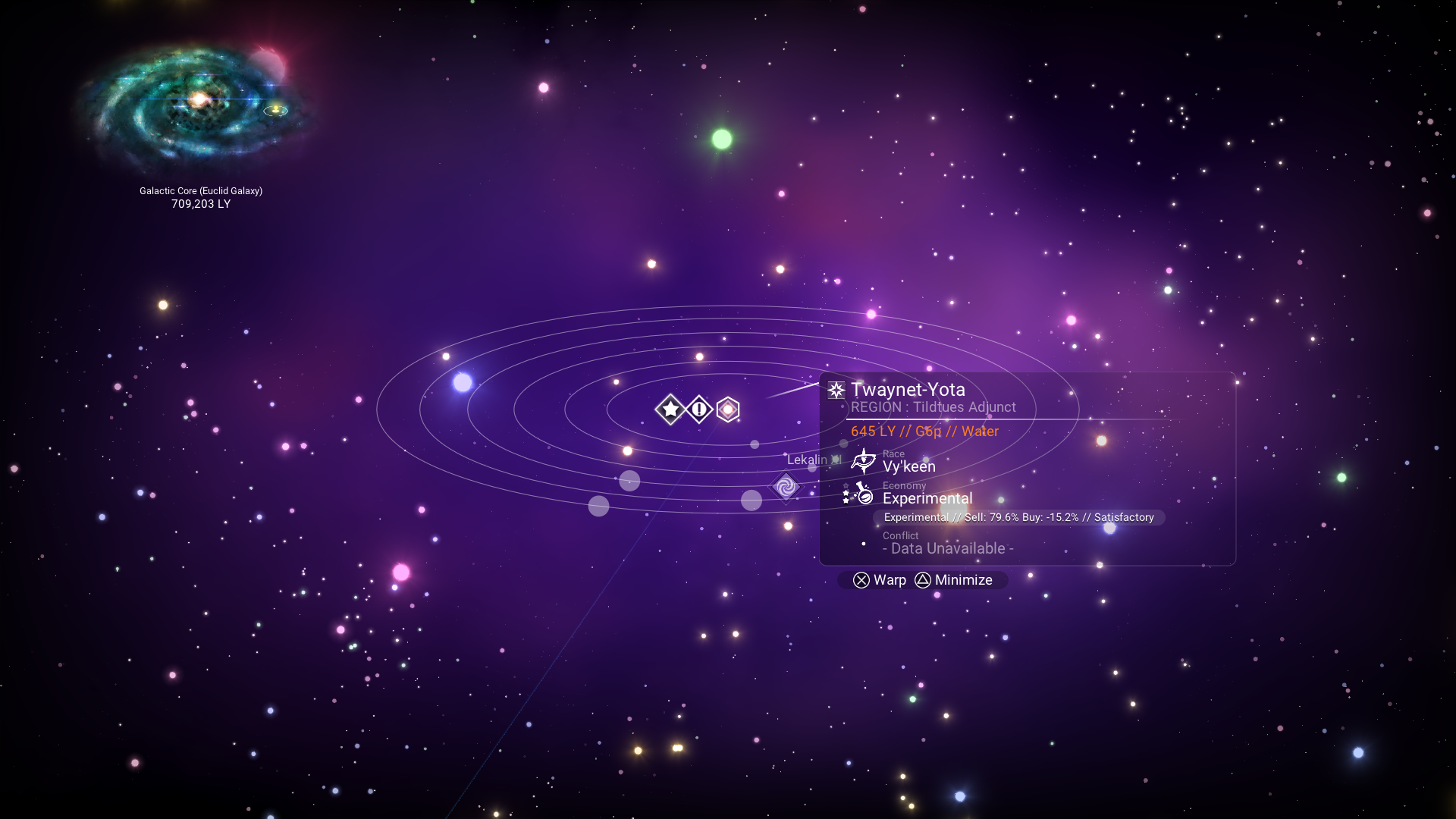
I don't even know what the exclamation point marker means
fallow meadow
Ah, those icons. Starter System and ... hmmm, what was that again ?
rugged hinge
hushed bronze
Hey when was your first day?
well, launch day, I had preordered the PS4 version
hushed bronze
there's an ICON for starter system?
fallow meadow
Discovered systems (the circles) likely no longer show, unless refreshed and re-visited
fallow meadow
hushed bronze
there's an ICON for starter system?
yes
hushed bronze
Is that new?
fallow meadow
No idea, but I remember having looked for this not too long ago
Textures > UI > FrontEnd or something alike
rugged hinge
fallow meadow
Discovered systems (the circles) likely no longer show, unless refreshed and re-...
I've had fairly good luck seeing the circles (visited), I saw a few other systems on that save from the other side of the galaxy
hushed bronze
That star region I was naming out had sooo many circles lol
fallow meadow
rugged hinge
I've had fairly good luck seeing the circles (visited), I saw a few other system...
I am currently doing some region research and have like 200 or so systems visited in a single region and they stop showing
hushed bronze
yes theres a rollover eventually
rugged hinge
ahh...perhaps there is some limit
hushed bronze
Still though, because I was naming everything in a dense cluster, it was gettin crazy
Does NMS still have an issue with people being able to overwite older discovery data ?
fallow meadow
@hushed bronze See here: <#nms-questions message>
rugged hinge
I wonder if the exclamation point icon means it was merged with other platform data?
hushed bronze
Is that for the file or is it like a true first-ever steam account visit
rugged hinge
hushed bronze
Is that for the file or is it like a true first-ever steam account visit
should be for that file
fallow meadow
hushed bronze
Is that for the file or is it like a true first-ever steam account visit
It would be for that save, not your account
I am trying to find that exclamation mark icon
@rugged hinge Found the icon, which is named CUSTOMMARKER.DDS

The other icon is by the way the same as for a Beacon.
rugged hinge
oh nice!
is that the custom waypoint marker then? I guess I've never used one to the end before
fallow meadow
Ah yes, that's it, why did I not think of that.
I know why, it's late here, I should be fast asleep
rugged hinge
lol, I've been there many a time. a few nights caused by this journey in fact
fallow meadow
Well, with that, I am going to call it a night. Thanks for getting back at me with the great news.
rugged hinge
Goodnight and happy 5th!
 hollow mist
What key and value do I need to edit in my save file to turn the galaxy map's display of black holes back on?
hushed bronze
@smoky wing Our two water mods coexist quite nicely 🙂

 merry wasp
@vale iron i assume it has somethign to do with this
 vale iron
Yeah, that's it
vale iron
merry wasp
<@!630209160860008468> i assume it has somethign to do with this
I did that for the mining laser as well
merry wasp
yeah you got a mod of it already?
cause otherwise i'd make it to one if i got the time/
vale iron
I just have it as part of GTech
vale iron
    ["SPECIAL_KEY_WORDS"] = {"ID", "SHIPGUN1"},
        ["VALUE_CHANGE_TABLE"] = {
            {"Core", "False"}}},
    { --Multitool Mining Laser Deletable
    ["SPECIAL_KEY_WORDS"] = {"ID", "LASER"},
        ["VALUE_CHANGE_TABLE"] = {
{"Core", "False"}}},```yeah kinda want it stand-alone as that seems more "usefull" for peopel who just want QOL change
vale iron
People would probably appreciate a standalone
merry wasp
^^
vale iron
I tend to include too many things in one mod 🙂
merry wasp
same
but this has bothered me for so long now
so i was like before new update
gotta add
or you can do the honours
as you already have the code
vale iron
No, please go ahead, I don't need something else to keep track of 😛
vale iron
I'm venturing into modpacks lately and that is a nightmare for updating, but can't think of what else to work on
merry wasp
well fully customizable upgrade mods
if i could figure out how templates works
i think that would be possible
i always wanted a few rocket launcher upgrades
XD
vale iron
I don't think we have any access to edit or make templates, which really limits things. I changed templates on a couple of proc tech items, but it's less than ideal
 fallen plover
i would really like to get shaders running in game, but im unsure whether to do that via modding or programs such as ReShade, what would people recommend?
my hardware isnt incredible so i would prefer something with decent optimisiations, but it can nonetheless run about everything pretty well
hearty wasp
there's like, one shader mod for NMS itself
and reshade is just postprocessing so you can use it with whateverthefuck you want anyway
fallen plover
so should i go for the mod?
if so do i need a modinjector or do i just download and paste it in a folder somewhere
smoky wing
@hushed bronze excellent, beautiful!
fallow meadow
hollow mist
What key and value do I need to edit in my save file to turn the galaxy map's di...
Not quite sure why you say "back on"? You had black holes unlocked after Atlas Path but it somehow got disabled again?
There is the following for it in the save file Raw JSON:
PlayerStateData > RevealBlackHoles with boolean value true or false, which in your case should be set to 'true'.
hollow mist
it had turned off at some point after I had removed the star seed and remembrance, but it didn't turn back on after that.
hollow mist
I can't even find that key in the file
fallow meadow
hollow mist
I can't even find that key in the file
When you open PlayerStateData, it should be about halfway
 hollow mist
I don't have the savegame editor - I'm looking in the save file
fallow meadow
hollow mist
I don't have the savegame editor - I'm looking in the save file
Which PC platform are you on?
And are you planning to hex edit?
I am somewhat confused, as using an editor is the way to go
fallow meadow
The plain save file is compressed and minimised, making it really hard to edit directly and correctly. Not to mention the metadata file that comes with it, which would normally be re-generated after changes are made.
I would honestly recommend using a save editor, whether you go with NomNom or NMSSE
I am not saying it would be impossible to edit directly, but why complicate things if there are tools created to make life simple
Let me see if I can figure out what the obfuscated field name would be and what a boolean would look like in a plain save file
@hollow mist Ok, the obfuscated/simplified name for RevealBlackHoles would be tSD So you would be looking for a part in the save as follows:
"tSD":false, which needs to be changed to "tSD":true,
fallow meadow
hollow mist
says it is already
Hmmm, maybe there is more involved? The mission that unlocks the ability, the item being installed?
hollow mist
I reinstalled both items
fallow meadow
I did check real quick for what I believed to be the mission, but shows as default for me, which is often the case after completion. Not quite sure what else to look for ...
Let me know if the issue persists.
hollow mist
well it has been already over several restarts of the game
even went and talked to the atlas again and put in a new heart of sun
that still didn't even fix it
fallow meadow
Yeah, you can endlessly birth new stars
Looks like filter or destination settings in the Galaxy Map have no influence either, black holes always show once revealed
I don't even think the item requires to be installed.
@hollow mist Do you have any mods installed?
hollow mist
no
fallow meadow
You are not seeing that blueish/purple icon with the white swirl in it anywhere around in the Galaxy Map?
hollow mist
not at all, no
fallow meadow
Are you in MP?
hollow mist
when I ask Polo for coordinates it highlights it with the line, but no symbols
multi's off
fallow meadow
Let's double check the mission progress in your save
When you open the Raw JSON editor, with the top field selected (savex), hit <ctrl> + <F> and search for the following:
"Mission":"^AP_BLACKHOLE",
Can you tell me what shows directly below for 'Progress'?
hollow mist
fallow meadow
Did not need the full data for that field, but ok, it shows Progress as -1, which I have as well, and is the default after completion as it should then have set the boolean for the other value we discussed earlier
hollow mist
which was set
fallow meadow
If it says 'true', it should reveal black holes, yes
hollow mist
it is - they're not being displayed still
fallow meadow
I am trying to figure this out, but for now have no clue ... Must be bugged somehow. Going to do some searching. You are not by any chance already in a BH system?
In the save data you can see this at the top part, which shows location with Universe Address and more, amongst which it will have SolarSystemIndex, which If I recall correctly would be either 121 or 122
hollow mist
no it's been happening constantly, regardless of what type of system it is
fallow meadow
I was just thinking out loud, that maybe the game stops showing them for some reason if you are in a BH system
hollow mist
it had been showing them in that case before, though
fallow meadow
For now, I would say you got hit with a bug. I will see what I can find or can come up with and get back at you
hollow mist
none of the stuff I found on searches told me anything useful, was pretty much all old info, or just "do this quest" ... which is so damn annoying
fallow meadow
hollow mist
none of the stuff I found on searches told me anything useful, was pretty much a...
Finding more or less the same sadly enough.
Best to just report this issue to Hello Games, describe the issue, let them know what you have tried thus far, and include your save files
One last thing. Are there many icons shown on the GM for you? Like discovered systems and other waypoints or alike?
hollow mist
not any more than usual, no
fallow meadow
Have you done any core jumps prior to the issue?
hollow mist
over a hundred
fallow meadow
Maybe somehow there is a damage value preventing BHs to show?
Event though I don;t think the item is even required, you could maybe check?
hollow mist
I had uninstalled the star seed and remembrance to make some room, soon after that they all stopped displaying
I later reinstalled them, but still haven't reappeared
fallow meadow
Let me try reproduce that, by uninstalling mine. So you say you uninstalled both Starseed and Remembrance?
hollow mist
yes
fallow meadow
Ok, let's see what happens
hollow mist
there was a bunch of game restarts between that
fallow meadow
between uninstall and re-install?
hollow mist
yes
fallow meadow
Ok, I am in my ship, in space, and just checked GM, all looks good, seeing BHs. Then dismantled Starseed, checked GM again, still seeing all BHs. Then dismantled Remembrance, still seeing all BHs.
I will now exit ship and do some restarts to see if that makes a change, as nothing has yet been saved of course
Got out of ship to create save in Freighter.
Getting back in to double-check GM still shows BHs, so closing the game for a full restart
First restart, still seeing BHs.
Created manual save and restarted. Auto-save elsewhere and restarted. So far no luck on reproducing and it appears as expected, that neither Starseed nor Remembrance are actually required to see BHs
Even using the freighter bridge terminal to check GM shows BHs.
Just found a post very similar to your issue, about 6 months old:
https://www.reddit.com/r/NoMansSkyTheGame/comments/lbzlfa/no_longer_able_to_see_black_holes_on_the_galactic/
Makes me believe that core jumping to other galaxies might be involved with the issue at hand
hollow mist
trying to verify game files and deleted the graphics setting file, idk if that's going to do anything
rugged hinge
So I made a base on my launch day starting planet last night, and after I went to orbit the name and ownership changed to an Xbox player. This is obviously against what I've been told, that the database merging would choose the oldest ownership record. But now I'm fearful to do anything on other planets. It seems like the database system somehow keeps multiple record states for the same values instead of a single truth?
hollow mist
nope, verified game files - still didn't show, deleted the settings file - same result (or lack of) - even tried reinstalling completely, no luck
fallow meadow
hollow mist
nope, verified game files - still didn't show, deleted the settings file - same ...
I am all out of ideas and done the searching even though I was not expecting anything new. I honestly think it may have to do with core jumping and I am pretty much convinced that it is not required to have any item installed to see BHs. Hopefully HG will be able to figure it out and fix it with a future update. Meanwhile we can only try replicate and keep an eye on other reports in an attempt to figure this one out
fallow meadow
rugged hinge
So I made a base on my launch day starting planet last night, and after I went t...
I thought the same, oldest entry would be used for discoveries. Not quite sure how you came to the conclusion of multiple record states? Do you have any examples?
 elder jacinth
So dumb request, any chance the sentinel army could be modded back into the game? Like this one https://steamuserimages-a.akamaihd.net/ugc/969849147235980068/D5A90D9EF6F5B65C3EB8C24F42EEE921596FD31D/?imw=5000&imh=5000&ima=fit&impolicy=Letterbox&imcolor=%23000000&letterbox=false
rugged hinge
fallow meadow
I thought the same, oldest entry would be used for discoveries. Not quite sure h...
I'm just positing that, from the fact that this other record still exists. History of that planet's registrations:
- launch day 5 years ago, I claimed it. it was actually my starting planet
- Atlas Rises, my reg had disappeared so I claimed it again
- At some point after some other person on Xbox or PC claimed it
- I reclaimed it for the third time yesterday
- After triggering some records fetch, the Xbox record somehow took precedence
fallow meadow
Ok, very clear to me now ;-)
rugged hinge
Hah sorry. I'm a little more salty because this was my starting planet of all things. I guess I'll just have to file a ticket and see if HG can do anything
fallow meadow
Understandable. Should clearly be yours and annoying you have to continuously reclaim it, to still see it prefer a new set of data. A report would be in pace imo
rugged hinge
I would love to know more about their database system though, because...why would it keep around multiple versions of who "owns" a planet
fallow meadow
There is likely more to the data than just that. Worth keeping from HG's point of view.
And maybe the data was not literally merged, but a system put in place to make it appear that way to the player
rugged hinge
Yeah I'm sure there's some system that allows for rolling back changes, but their discovery system has always felt nebulous. "Is this really mine? Does someone else see something different? Will it lose this in a year?" I would love to know from a technical POV what is causing these conflicts and data losses to occur
And yes you're right, all that might exist in their database is a series of timestamped events
fallow meadow
Still flying around in the Space Station?
 white glen
yep
fallow meadow
Did you download/install the save editor already?
white glen
ive used the editor before on creative games
in order to access all blueprits immediately
thats the extent that i know about it
fallow meadow
Assuming NMSSE (goatfungus)? See if you have the latest version
fallow meadow
1.7.7, all good!
Do you prefer to make your own backups or are you fine with the editor doing this?
white glen
im fine w/the editor
white glen
done
fallow meadow
Once loaded, I think it would be enough to just use the Coordinate Viewer in the Edit tab
It should show your current location
I believe that if you hit 'Save/Warp', it will put you out in space inside ship, away from Space Station. So click it, then save once more ot actually have changes saved to file
fallow meadow
I don't think you had to make a change, but I assume you changed SSI in doing so?
fallow meadow
Either way, after saving to file, loading up your game, you should be good again
white glen
thank you!
fallow meadow
Alright, have fun!
lime mesa
Not sure if modding question, maybe more like data-mining or something but anyways
Anyone knows the name of the file for the music effects from derelicts
The ones that play when you pick up Crew Manifest or Captains Log?
The ones that start with low humming and gradually build up?
hearty wasp
can prolly check the related mission table / alien puzzle table / interaction entity etc
if it's not hardcoded
shouldn't be tho
 shell ice
mods load alphabetically, so mods at the bottom of the list overwrite those at the top or other way around?
shell ice
thank you
 heavy ruin
are there any good optimization mods you'd recommend. I have the game set to recommended settings for my VRAM but it still runs pretty meh.
twilit smelt
Devilin suggested posting here -
i made a script to take a backup of your save files (it will determine if you're using steam or xbox game pass), and if on Steam, will also grab your settings files (thanks for the idea, FitzFrobozz) and stick them in a date/time-named ZIP file in a subfolder of Documents. I've tried it on a couple systems so far. i'd like to get a couple more folks to try it before offering it to the masses.
It's just a couple files, which includes s shortcut for your desktop so all you have to do is click an icon. please DM if interested in trying it out.
fallow meadow
@twilit smelt Have you considered including GOG as well? Save/Settings locations are pretty similar to Steam
 calm compass
Im a little curious how terrain gen mods work online. Does it apply universally if the person with the mod is host, or does it apply whenever the person with the mod generates a planet first?
fallow meadow
calm compass
Im a little curious how terrain gen mods work online. Does it apply universally ...
The mod works client side, so the terrain will be different for players without the mod
calm compass
Ahh, okay.
fallow meadow
There is an extensive pin that goes into all the details about using mods.
calm compass
I see
twilit smelt
fallow meadow
<@!371322693766742016> Have you considered including GOG as well? Save/Settings ...
no; wasn't even aware it was available through them, as i'd never seen anyone talking about it. nothing against them, though, i've definitely bought from them before.
fallow meadow
@twilit smelt Here are the relevant locations for the platforms, GOG as well
hardy auroraBOT
Save File Locations
GoG: %appdata%\HelloGames\NMS\DefaultUser\...
Steam: %appdata%\HelloGames\NMS\st_<Steam64ID>\...
Game Pass: %LocalAppData%\Packages\HelloGames.NoMansSky_bs190hzg1sesy\SystemAppData\wgs\...
Note: When sharing saves in a report to Hello Games, it is best to create a package/archive of the full folder shown for your platform above (.zip/.rar).
Shared by: @fallow meadow
Settings Locations
GoG: <Game Install Location>\No Man's Sky\Binaries\SETTINGS\...
Steam: <Steam Library Location>\steamapps\common\No Man's Sky\Binaries\SETTINGS\...
Game Pass: %LocalAppData%\Packages\HelloGames.NoMansSky_bd190hzg1sesy\LocalCache\Local\Microsoft\WritablePackageRoot\Binaries\SETTINGS\...
Shared by: @fallow meadow
twilit smelt
fallow meadow
<@!371322693766742016> Here are the relevant locations for the platforms, GOG as...
cool
lime mesa
Where is the screen resolution stored? I want to manually change it to lower resolutions like 480p, 360p, etc. I'm trying to upscale the image to 1080p using Amd's FSR and changing the resolution scaling doesn't have the same effect as just setting a lower resolution in windowed mode
fallow meadow
lime mesa
Where is the screen resolution stored? I want to manually change it to lower res...
TKGRAPHICSSETTINGS.MXMLwhich can be edited with any text editor. The file is located in the Settings Locations listed above for the platform you are using.
In case things do not work out, you can always delete the file to have it regenerate upon starting the game
lime mesa
which directory is that under?
fallow meadow
depends on your platform
lime mesa
Windows 10, steam
fallow meadow
<Steam Library Location>\steamapps\common\No Man's Sky\Binaries\SETTINGS\...
lime mesa
ok, thanks
ah yes, just what I was looking for, thank you very much!
and it's working!
fallow meadow
lime mesa
and it's working!
Cool
lime mesa
After testing, the unfortunate news is that, oddly, gpu usage goes up as the resolution goes down below 720p 🤔
So not only is there farrr better image quality with 720p, but also better performance, meaning my experiment is a failure lol
fallow meadow
lime mesa
After testing, the unfortunate news is that, oddly, gpu usage goes up as the res...
That is indeed kind of odd, as you'd expect the less there is to render, the better it will perform
Could be there is a minimal resolution set, which appears to be 720p then?
So making the window smaller, still renders 720p but downscaled to fit the window?
lime mesa
Hm... in the settings it was listed as 1080p but I figured that was just it being confused about it being below minimum resolution.... your theory does make sense, that it was 1080p scaled down
Wow I'm dumb, I was using the wrong upscaling mode XD
It works as expected now that I'm actually using FSR
 grand schooner
So I wanted to give myself the expedition rewards cuz I missed them and when I went to open the xml file I could't use notepad ++ to open it. any suggestions?
nvm got it
is there a way to get the gek mask from expeditions through the save editor or changing files?
fiery owl
And moved to modding 🙂
fallow meadow
Exosolar's - Beyond Base Building
https://www.nexusmods.com/nomanssky/mods/1096
Gumsk's - GBase
https://www.nexusmods.com/nomanssky/mods/1369
Ultra Base Building
https://www.nexusmods.com/nomanssky/mods/1214
fiery owl
I thnk the first one is a good fit. It says MOST parts are immunized against the invalid position and thats what was stopping me
fallow meadow
But as I tried to explain, not that many mods that actually provide more functionality with existing building parts, other than allowing placement everywhere, placement itself can often still be iffy
fiery owl
Thats all that I wanted. So I didn;t have to try and snap to. I could rotate and play with it and stuff just fine. But snapping was an issue
fallow meadow
Invalid placement does help a lot, like being able to place underwater parts above water as well and alike.
fiery owl
fallow meadow
Invalid placement does help a lot, like being able to place underwater parts abo...
Oh I didn’t think of that at all. But that now does give me some ideas too!
fallow meadow
Give them a try, see what you like, but I do believe those are the most common and up-to-date building mods
And yes, not just water, but goes for Freighter as well of course ;-)
Can lead to interesting new possibilities
fiery owl
Oh. Oh my. Freighter changes, heh oh man
I will just be happy at this point if I can get the trade computer ON a wall. Heh but then the rest.. will unfold
hearty wasp
grand schooner
is there a way to get the gek mask from expeditions through the save editor or c...
seasonal unlocker
search on nexus
fiery owl
I have a question if anyone here has used EUCLI-EA mod for base building? The photos of the stuff they added in show almost buildings like we find on planets? wouldn't that then not render for people without the mod when visitng your base?
hearty wasp
none of the custom shit does
fiery owl
hearty wasp
none of the custom shit does
Alrighty then not gonna add them in if it wouldn’t even show for people heh
hearty wasp
k
magic lava
Does converting a gamepass save to steam still work @vale iron ?
vale iron
magic lava
Does converting a gamepass save to steam still work <@630209160860008468> ?
The last I heard it is still working, as long as the Gamepass version was recently saved.
vale iron
Think that's it
magic lava
Nice, was wondering about the expedition rewards
vale iron
Oh, hmm, yeah that would be a problem since that's a separate file
magic lava
But I could just add those back in
vale iron
Yeah that can be replaced
fallow meadow
@magic lava NomNom has been fully updated, so there should be no loss of anything at all anymore. It will also update correctly with future updates, just like NMSSE does, so no worry about losing future additions to the save either. As for expedition rewards, they could just copy their GCUSERSETTINGS file to not lose anything.
magic lava
fallow meadow
<@!457165322957619201> NomNom has been fully updated, so there should be no loss...
Nice thanks
fallow meadow
All that will be lost is Twitch Rewards, if they have any
There is somewhat of a workaround for those though
hearty wasp
Consumerism has been doing twitch rewards since they're a thing
magic lava
Same as the expedition rewards?
fallow meadow
Well no, Twitch rewards are actually checked with the server, so it requires turning off internet, then have them in the file, redeem them, then back to online play again, which will remove the rewards from the file again
Expedition rewards do not have a check at all, so no requirement of messing with internet connection and they will stick in the file too
magic lava
Ok, that is easy enough
hearty wasp
nah you can still buy the products straight
only difference is in vanilla the server sends out the data for the shit to be redeemed in the redeem section
magic lava
Pretty sure they redeemed already anyways
grand schooner
hearty wasp
seasonal unlocker
tysm!
shell ice
is there a list somewhere of in-game materials (ie gold, copper) and their names
LUA names that is
fallow meadow
shell ice
is there a list somewhere of in-game materials (ie gold, copper) and their names
Lo2k extracted the Substance and Product tables with various internal references, including IDs. These are from 3.52:
https://docs.google.com/spreadsheets/d/1J8WdrubKgo8A9hPY-hbQLq4eVrb3n3lZAgiI2J7ncAU/edit#gid=0
shell ice
thank you
rapid sandal
shell ice
is there a list somewhere of in-game materials (ie gold, copper) and their names
They are also displayed in NMS Mod Builder - https://www.nexusmods.com/nomanssky/mods/2032
shell ice
ty
 honest herald
Hey guys, anyone familiar with NMS Mod Builder from Nexus?
Need a second pair of eyes. 😢
(And another brain. (Mostly this. (Blind programmers welcome.)))
hearty wasp
I'm sure @rapid sandal is familiar
honest herald
Thanks. I actually worked it out. I think I typoed a boundary or copied old code with a bad boundary. My setup seems to be workin now. Was trying to merge all S ships max stats with freighters on every hyperjump mods.
grand schooner
if you get a mod that increases fauna size, do the fauna always stay large? even if I remove the mod?
 waxen cedar
so what ade the modifiers for an egg to make it a sandworm?
fallow meadow
grand schooner
if you get a mod that increases fauna size, do the fauna always stay large? even...
I guess it would depend on how the mod does this. If it is adjusting some sort of size modifier, removing the mod will reset the modifier, likely resetting the size to what it should have been. If the mod forces a size change in save data, it will likely hold after removal of the mod.
grand schooner
interesting ok ty
fallow meadow
grand schooner
interesting ok ty
Prolly not that hard to test ;-)
grand schooner
yeah i may just try it out and see what happens
honest herald
grand schooner
interesting ok ty
Is the mod installed via .pak file in MODS?
honest herald
grand schooner
interesting ok ty
Is the mod installed via .pak file in MODS?
If so, those mods are temporary to my knowledge, and disabled when the file is gone.
But if they affect variables of generation of longterm items, such as ship stat values, the items retain those initially set values.
But if they affect variables of generation of longterm items, such as ship stat values, the items retain those initially set values.
steel crypt
It really depends on how exactly the particular mod is made. It is possible to make a mod that is stored in a oak file change info stored in a save file.
 fathom rampart
Do starsystem mods brake online discovery upload?
fathom rampart
Interesting, and what if i add planets? Do they just also get uploaded and you can only see them when also having such a mod?
hearty wasp
well people wouldn't be able to see em without mods because they wouldn't get generated would they
fathom rampart
Also a quick question as a beginner, is there an easy way to find out which pak file holds what i want to change?
hearty wasp
ye
fathom rampart
Tried it shortly but i sounded to me like it was for exploring after i unpacked all of it
hearty wasp
it's not
fathom rampart
oh the pak-ist tab i guess?
hearty wasp
ye
fathom rampart
Thanks ^^
hearty wasp
and you search for the file
fathom rampart
oh nice tool
smoky wing
@hushed bronze I have it substituting the average of the space colors in place of skyupper. It’s linked to the sky’s alpha, so the more transparent the more the space color shows. I also made it try to match the brightness of the normal night skyupper color. That should make it work well with your existing mods, including the semi-transparent skies. Or other mods like the darker values of Lo2k’s natural nights.
hushed bronze
Oh BTW @smoky wing , there's one other very related shader oversight that may be relatable/similar enough to your night color fix to be done "relatively easily"
Filter bugs ignored, the ambient colors of the planetary system while flying around in the starship in space seems to be locked to white, and not linked to suncolour or any other space color
Averaging which space colors? there are 11 of those iirc and they could be an issue just taking all of them
smoky wing
The ones used in the current star system
hushed bronze
I didnt mean 11 palettes, I meant each palette has 11 color factors
smoky wing
In the shader there are 3 for the current system. Maybe those are procedurally selected
hushed bronze
Its been a while so i dont remember the exact name but there are three specific to which colors are visible from the ground at night, thats probably the logical selection
smoky wing
Ahh, I get what you’re saying. Yes, those three are just referred to as something like SpaceSkyColour1-3, the others are things like SpaceFog… etc
hushed bronze
I think they get named top-bottom-mid, but yes,
Anyway what of the full space ambient?
I did a test a long time ago where I zeroed out all of the space sky colors. Everything except the background starfield and the powerful white ambient light disappeared, even the sun
So there's no sun, no "space colors" at all, not even nebulae, and theres still a solid white color stuck in the mix somehow, I tred to find a traditionally-accessible source for that light, but never succeeded, I assume its in the shaders somewhere
smoky wing
Well I can try to look around for it in the older source, but it’s not currently a priority. It’s likely in a different shader
hushed bronze
What are your current targets?
smoky wing
Light_frag_sunlight ones, which I also had to mod for part of the water mod effects so I’ll have to figure out what to do about that
fathom rampart
Can i mod the nanites gained per upload?
fallow meadow
fathom rampart
Can i mod the nanites gained per upload?
I would expect it to be a value somewhere, but maybe someone on here knows for sure
steel crypt
I suspect it's in the reward table. I see lots of things that give nanites. Just skimming through it, I didn't notice any reward name that I knew was for uploading. Maybe it's easy to identify....some names in there, I don't know what a lot are for. @fathom rampart
fathom rampart
Ill have a look tomorrow, thx 
midnight roost
Is there any downside to using mods? Like achievements being locked or stuffing up co-op etc?
I play casually with my gf and would like a few graphics mods and the companion unlocker one but don't want to change the experience if she doesn't get them
hushed bronze
midnight roost
Is there any downside to using mods? Like achievements being locked or stuffing ...
A bit long but it tells you basically everything you could want to know
midnight roost
hushed bronze
A bit long but it tells you basically everything you could want to know
Thank you! So if I only want to get the mod to allow me to ride on birds or moles, it won't affect us I think
 random badger
Is there an updated version of: https://www.nexusmods.com/nomanssky/mods/1734
It puts ship outfitters in freighters and it'd save a bunch of time for me.
 gilded iris
I saw a mod for a uni wheel exocraft on YouTube. Which mod is that?
honest herald
grand schooner
any mods that make exotics easier to find?
Yeah. I can send you one that makes all ships in your system exotic if you want.
I can control which kinds of ships spawn in a system
Practically it would make exotic easier to find
It doesn't actually spawn ships faster
grand schooner
I don’t want them all to be exotics but I was just looking for the percent to be like 10% instead of the normal one
honest herald
Unfortunately I cannot figure that out yet
grand schooner
Also I want it to keep the same ships in each system and not add another exotic to the pool
honest herald
I can probably do that. Will take a few because I have to figure out what the normal rates even are
My current script is just something I throw in temporarily when trying to find a specific kind of ship
Wipes out the others
I'll look into the nat spawn rates
grand schooner
yeah sure take you time. I don’t need it right now since I’m more focused on fauna and fighters atm
vale iron
You can't do that unfortunately. If you change the ship ratios, it changes the seeds in the system and you get different models
I have one that increases the traffic, which effectively increases your chances of seeing one, but it's still low odds compared to what you want @grand schooner
vale iron

Nexus Mods :: No Man's Sky
Increases the number of traders that stop at stations and trade outposts. Good for ship hunting.
honest herald
vale iron
You can't do that unfortunately. If you change the ship ratios, it changes the s...
Interesting, did not know affecting the spawn distribution changes seeds of ships that spawn.
vale iron
I didn't either until someone reported it on one of my mods 😦
honest herald
What other data factors into ship seeds? I know I got away with maxing inventory and class and stats. Surprised I can't change ship distributions.
vale iron
I only know of that in SOLARGENERATION that does, I guess along with the model cache variable
honest herald
I mean I just did change ship distributions for @grand schooner (was returning to drop off that file), but I didn't know it changed seeds or that Mac was looking for a ship in a specific system.
vale iron
I think when I changed the spawn frequency that was ok, but that affects all ships
honest herald
Wait by spawn frequency do you mean the distribution of different ships that spawn or the rate at which they spawn?
vale iron
You were changing this section, right? <Property value="GcAISpaceshipWeightingData.xml"> <Property name="CivilianClassWeightings"> <Property name="Freighter" value="0" /> <Property name="Dropship" value="100" /> <Property name="Fighter" value="50" /> <Property name="Scientific" value="50" /> <Property name="Shuttle" value="100" /> <Property name="PlayerFreighter" value="0" /> <Property name="Royal" value="1" /> <Property name="Alien" value="0" /> </Property> </Property>
honest herald
That must be LUA. Mine is doing this in C#:
        protected void MoreExotics(mbin_gl.GcSolarGenerationGlobals mbin)
        {
            foreach(var spaceship in mbin.SpaceshipWeightings) {

                var oddsWeight = spaceship.CivilianClassWeightings;
                oddsWeight[(int)ShipClassEnum.Royal] = 50;

            }
        }
Same idea
Pretty sure it';s the same target
vale iron
Ahh yeah, I haven't gotten into the C# stuff yet
hearty wasp
That's not lua, but exml
honest herald
So if I change those values in your EXML, that changes ship seeds or not?
vale iron
The safe part, I think, is right before that <Property name="SpaceshipSpawnFreqMultipliers"> <Property value="0.5" /> <Property value="2" /> <Property value="5" /> </Property>
Changing what you change now will change the seeds, I believe
honest herald
I see, cool. Thanks for the protip. What do the 3 properties of SpaceshipSpawnFreqMultipliers reference?
vale iron
Those are for economy tiers
vale iron
I don't think it's a linear change, but I was definitely able to get results by changing between .01 and 10, for example
honest herald
And that increases how fast ships cycle in stations?
Or just how quickly they show up?
vale iron
Hold on, let me get you my frequency mod
honest herald
I had not yet noticed that variable
Now that I know its name, I see it in my library
So many variables lol
vale iron
It's LUA, but you can extrapolate for C#, I'm sure
honest herald
Righto, thanks. I'll check it out. So does it make ships leave faster, too, or just arrive more often?
vale iron
Both
honest herald
Sick
That can help my friends on console
I was so sad when I discovered they couldn't see my beautiful 48 20s with max everything everywhere
vale iron
Yeah, I hope for a console modding world one day
honest herald
Lol I was so excited when they were able to join my modded game and the letdown was devastating
But it is still cool we can freely play cross mods
vale iron
Yeah, would severely limit mod usage otherwise
honest herald
Definitely.
Hey maybe you know the answer to another question I have
I wrote one mod that sets all spawned ships to 48 : 21 by default (legit ingame upgraded max), but when I do this, it automatically generates a 4th row of available tech slots that shouldn't exist
I'm currently working around the issue by spawning them 48:20 (I can live through one upgrade), but I'm wondering if you know of another workaround, like a "preventOpenSlotsOnSpawn" flag.
vale iron
That's weird. I don't know of anything for that, but I'll keep my eyes open. I would think the section that sets max slots would cover that
honest herald
It's mbin.GenerationData.GenerationDataPerSizeType[SizeTypeEnum.FgtSmall] and such; but it only contains MinSlots MaxSlots MinExtraTech MaxExtraTech afaik.
Yeah it's nbd but I was curious.
honest herald
So confused... So I have this:
EBIN:3.53.0.2
METADATA/REALITY/TABLES/INVENTORYTABLE.MBIN
GcInventoryTable
    Table List<GcInventoryTableEntry>[33]
        [0] GcInventoryTableEntry
            Id = "ALIEN_SMALL"
            MinSize = 7
            MaxSize = 12
            LayoutSizeType GcInventoryLayoutSizeType
                SizeType = SizeTypeEnum:AlienSmall
.......
called by this:
var mbin = Mbin<mbin_gc.GcInventoryTable>(
                "METADATA/REALITY/TABLES/INVENTORYTABLE.MBIN"
            );
mbin.Table
..........................
And mbin.Table is perfectly fine. (Upcoming but).
But I have this:
EBIN:3.53.0.2
METADATA/SIMULATION/SCENE/EXPERIENCESPAWNTABLE.MBIN
GcExperienceSpawnTable
    FlybySpawns List<GcAIShipSpawnData>[1]
        [0] GcAIShipSpawnData
            Message = ""
            OSDMessage = ""
            Shortcut TkInputEnum
                InputButton = InputButtonEnum:None
            WarpIn = False
            Role GcAISpaceshipRoles
                AIShipRole = AIShipRoleEnum:Standard
            MinRange = 200
            Scale = [1, 1]
            Reward = ""
            RewardMessage = ""
            AttackFreighter = False
            Spread = [20, 30]
            Count = [1, 3]
            StartTime = [0, 0]
            SpawnShape = SpawnShapeEnum:Sphere
            Performances GcShipAIPerformanceArray
                Array List<NMSTemplate>[1]
                    [0] GcDoShipFlybyOverhead
                        Length = 2000
                        Offset = 200
            ChildSpawns List<GcAIShipSpawnData>[0]
........
attempting to be called by this:
var mbin = Mbin<mbin_gl.GcDebugOptions>(
        "METADATA/SIMULATION/SCENE/EXPERIENCESPAWNTABLE.MBIN"
);

mbin.FlybySpawns
And mbin in the second case has no access to FlybySpawns.
(Different functions in entirely different classes, nonglobal.)
Data structure looks identical (to me) but accessing them identically is not workin 😭
vale iron
I don't know the c# way of doing things yet, but these don't seem to match up GcDebugOptions>( "METADATA/SIMULATION/SCENE/EXPERIENCESPAWNTABLE.MBIN"
honest herald
Oops wait
Yeah I think you're right
Literally just noticing that
Needs to be this Mbin<mbin_gl.GcAISpaceshipGlobals>
derp
Hey hey hey
We have liftoff
We're golden
Alrighty, testing, crossin' fingers.
vale iron
The change is most noticeable in stations, fyi. You should get up to about 50 ships every 10 minutes with the mod.
honest herald
Oh this is friggin beautiful
C# for NMS Mod Builder of your code @vale iron:
using System;
using System.Collections;
using System.Collections.Generic;
using System.IO;
using System.Text;

using nms     = libMBIN.NMS;
using mbin_gl = libMBIN.NMS.Globals;
using mbin_gc = libMBIN.NMS.GameComponents;
using mbin_tk = libMBIN.NMS.Toolkit;

namespace cmk.NMS.Scripts.Mod
{
    public class MoreShips : cmk.NMS.ModScript
    {
        protected override void Execute()
        {
            ModifyExperienceSpawnTable();
            ModifySpaceshipGlobals();
        }

        //...........................................................

        protected void ModifyExperienceSpawnTable()
        {
            var mbin = Mbin<mbin_gc.GcExperienceSpawnTable>(
                "METADATA/SIMULATION/SCENE/EXPERIENCESPAWNTABLE.MBIN"
            );

            mbin.OutpostSpawns[0].Count.x = 3;
            mbin.OutpostSpawns[0].Count.y = 3;
            mbin.TraderSpawns[0].Count.x = 2;
            mbin.TraderSpawns[0].Count.y = 2;

        }

        //...........................................................

        protected void ModifySpaceshipGlobals()
        {
            var mbin = Mbin<mbin_gl.GcAISpaceshipGlobals>(
                "GCAISPACESHIPGLOBALS.GLOBAL.MBIN"
            );

            mbin.FillUpOutposts = true;
            mbin.MaxNumActiveTraders = 30;
            mbin.SpaceStationTraderRequestTime = 1;
            mbin.TraderArriveSpeed = 1000;
            mbin.TraderArriveTime = 1;
            mbin.ShipSpawnStationRadius = 1000;
            mbin.DockWaitMinTime = 20;
            mbin.DockWaitMaxTime = 20;

        }
    }
}
Thanks for sharing. Doesn't look too different. I'm sure I could adapt to that if needed.
honest herald
I changed DockWait to 20s flat
It's so fast.
❤️ Gumsk thanks.
My friends will benefit tremendously
vale iron
No problem 🙂
honest herald
Grind is so brutal in so many games 😭
It's like they want us to feel like we're still in real life.
There is no way to spawn specific classes for other (unmodded) players is there?
I'm guessing no, but I gotta ask.
vale iron
Not that I know of. I'm still surprised that spawning frequency is effective for other players
honest herald
For sure. Other generators like wildlife obviously don't work.
Next goals: Can I maximize freighter spawning stats, and can I force the upgrades to have max stats?
Gonna start with goal A because I feel A has to be near my max ship stats in mem
upgrades are a mystery
But they are annoying
lol
No more 202 LY Hyperdrive upgrades for me, please...
vale iron
You can force the upgrades to max, yeah. I think the AMUMSS sample library has a script that does that, which you could adapt to C#
vale iron
I think the process is open procedural technology table, scan for each upgrade, grab the max value, set the min value equal to that
vale iron
How are you doing it now? Do you look at the EXML?
honest herald
Mod Builder has a built-in library of game data
Searchable
I just search words I imagine to be relevant if I don't have a template to go from
vale iron
Ahh, I need to download that and get comfortable enough to help people with it
There must be a way to view the decompiled EXML in modbuilder
honest herald
Searching for stuff relevant to procedural tech yields this:
libMBIN.NMS.GameComponents.GcProceduralTechnologyTable
Guessing I'm gonna need to start there.
Oh I see
I think I have extra tabs I didn't notice
vale iron
Yeah, see if you can get the EXML for that table. Your life will become infinitely easier
honest herald
I gotcha
I think I found that data
Thanks
Previously was debugging everything xD
"Okay, now what the heck does this object have?"
"Name of another Object, great."
"Ooo, a list, we can work with that!"
"Numbers! Recognizable! Yay!"
Also didn't realize before but the references are hyperlinks
They take me straight to the extracted pak info.
On double-click
(No visual indicator they are links)
vale iron
That would probably be good feedback
honest herald
Yeah, once I don't feel like it's mostly user error, I'll probably mention a couple things for the creator
Overall, though, with no experience with AMUMSS to compare, I will say it's pretty effective as a tool
Very helpful layout, intuitive
vale iron
It sounds like it
honest herald
Had no clue what I was doing and just made stuff work from general C# awareness and the examples, so it's well-made for sure
vale iron
Right now I'm still using a combination of modding station to browse the file structure, pc banks explorer to search for things, and AMUMSS to make the mod
Oh, and windows grep
honest herald
Word, I do everything in Mod Builder
Seems like a one stop shop
No need for any terminal commands yet
As I said, built-in search has been super helpful for figuring out how data elements connect to each other
honest herald
(Feel free to ignore questions if you're busy, no offense taken, but if you're bored enough...) Any idea if _3rdPersonUpOffsetRollChangeSpeed is the variable for increasing roll speed? I really wanna roll faster haha.
vale iron
No clue, but it sounds a little off. I'll look at the global to see if anything stands out
honest herald
Oh man that was so hard to find... So, anyway, I looked at AMUMSS for the template to max upgrades but could not find it (least not in latest release). Didn't want to admit it (haha), so I kept chugging, skimming through what I think we're calling the EXML (which is awesome), wondering why I couldn't make sense of how to access METADATA/REALITY/TABLES/PROCEDURALTECHNOLOGYTABLE.MBIN. Discovered another Object with actual accessible data called, METADATA/REALITY/TABLES/NMS_REALITY_GCPROCEDURALTECHNOLOGYTABLE.MBIN. Both of these are GcProceduralTechnologyTable objects, but only one seems useful. Ugh.
UP_LASER1
    Weapon_Laser_Mining_Speed
        0.9
        0.95
    Weapon_Laser_HeatTime
        1.05
        1.15
....
Oh, yes, we are in business.
Wait. Hmm.
Okay, incorrect. Haha.
        protected override void Execute()
        {
            DestroyBadStats();
        }

        //...........................................................

        protected void DestroyBadStats()
        {
            var mbin = Mbin<mbin_gc.GcProceduralTechnologyTable>(
                "METADATA/REALITY/TABLES/NMS_REALITY_GCPROCEDURALTECHNOLOGYTABLE.MBIN"
            );

            foreach(var upgrade in mbin.Table) {

                foreach(var statLevel in upgrade.StatLevels) {

                    statLevel.ValueMin = statLevel.ValueMax;

                }

            }

        }
Useful, but not what I meant to do.
This works as a temporary patch to all existing equipment, making all gear maxed while patch is active.
Need to get into the generation data differently...
Any ideas on where to find upgrade gen data?
vale iron
honest herald
Any ideas on where to find upgrade gen data?
That's the only place I know of to look. I think you're doing it right
honest herald
Yeah that's just not generative like METADATA/REALITY/TABLES/INVENTORYTABLE.MBIN
My ships purchased while editing METADATA/REALITY/TABLES/INVENTORYTABLE.MBIN retain maxes after mod is gone, but upgrades purchased after modding METADATA/REALITY/TABLES/NMS_REALITY_GCPROCEDURALTECHNOLOGYTABLE.MBIN (both in REALITY) will revert to some hidden "real" value of that upgrade.
So strange
I mean I don't mind always running the mod but it would be nice to get at the generation factors
steel crypt
@vale iron Hey, since you're the official NMS info sage......
I haven't studied this much, but do you know what controls the walking/running speed of pets? Is it just the creature's inherent speed before becoming a pet? Are there seperate controls for pet vs creature speeds?
I'm wondering because I would like to maybe increase the pet's speed when the player is riding and only then. Not when it's a creature (not pet)
honest herald
Alrighty, giving up on finding Upgrade generation data. Couldn't find yours, either, Jason, only broad movement speed for creatures. However, if that data is used for generation, you could enable the mod, get a fast pet, and disable the mod. I do not know if it works that way. Never tried playing with those factors. They're in METADATA/SIMULATION/ECOSYSTEM/CREATUREDATATABLE.MBIN
Can't hurt to try it. @steel crypt
vale iron
honest herald
I mean I don't mind always running the mod but it would be nice to get at the ge...
Ahh I misunderstood what you meant. I understand now. I am guessing that's something we don't have access to change, probably a formula that determines the % value of an upgrade based on its seed, then that gets compared to the proc table.
grand schooner
Hey guys sorry for not talking through figuring out how the ship generation mods work. I just woke up but @vale iron that mod is what I really wanted, just didn’t know it existed.
Tysm
vale iron
steel crypt
<@!630209160860008468> Hey, since you're the official NMS info sage......
I have...
I'll have to look into that tomorrow. I thought I saw something about pretty speed somewhere, but I could be misremembering
No problem, glad it helps
grand schooner
Is there a good tutorial on how to create mods for nms?
or maybe for another game that I could translate to nms?
vale iron
grand schooner
Is there a good tutorial on how to create mods for nms?
Here's the modding wiki, which has some tutorials and plenty of other information:
https://stepmodifications.org/wiki/NoMansSky:Landing_Page
grand schooner
Oh sweet ty
honest herald
vale iron
Ahh I misunderstood what you meant. I understand now. I am guessing that's somet...
🥲
I tried
Buahahahahaha
I failed at Upgrades, but I found roll speed. It's one of these things I'm doing:
    mbin.ControlLight.PlanetEngine.RollAmount *= 10;
    mbin.ControlLight.PlanetEngine.RollForce *= 10;
    mbin.ControlLight.PlanetEngine.RollAutoTime /= 10;

    mbin.ControlLight.SpaceEngine.RollAmount *= 10;
    mbin.ControlLight.SpaceEngine.RollForce *= 10;
    mbin.ControlLight.SpaceEngine.RollAutoTime /= 10;

    mbin.ControlLight.MaxTorque = 10000000;
lmao those adjustments are extremely excessive. I wanted to be sure it worked. Now I'm nauseous.
Maybe * 3. Haha.
vale iron
You'll want to change the values for control and controlheavy as well, to get all ship types. Controllight is just for fighters and exotics, I believe
vale iron
And that c# version looks a lot cleaner than how I had to get at it in LUA!
honest herald
Yeah I like the C# better than what I've seen from LUA
Personally
Obviously subjective but meh
probably just more nostalgic for me
I could clean this up further and just say var lightEngine = mbin.ControlLight.SpaceEngine
Probably will
Mmm 3 feels nice. Much better than vanilla.
Kinda wanna see if I can get it to accelerate slower but to a higher max
Gotta work out these value meanings
honest herald
Okay, as far as I can tell, RollForce and RollAutoTime do virtually nothing for my roll speed. It's all RollAmount and MaxTorque. Reducing MaxTorque by a factor of 100 made me unable to rotate at all. Increasing it seems to increase upper bounds on how fast I can get nonlinearly. RollAmount definitely accelerates roll speed. I went with this:
using System;
using System.Collections;
using System.Collections.Generic;
using System.IO;
using System.Text;

using nms     = libMBIN.NMS;
using mbin_gl = libMBIN.NMS.Globals;
using mbin_gc = libMBIN.NMS.GameComponents;
using mbin_tk = libMBIN.NMS.Toolkit;

namespace cmk.NMS.Scripts.Mod
{
    public class Rolling : cmk.NMS.ModScript
    {
        protected override void Execute()
        {

            var speed = 4;

            RollFaster(speed);

        }

        //...........................................................

        protected void RollFaster(int adjustment)
        {
            var mbin = Mbin<mbin_gl.GcSpaceshipGlobals>(
                "GCSPACESHIPGLOBALS.GLOBAL.MBIN"
            );

            // engine
            var light = mbin.ControlLight;
            var medium = mbin.Control;
            var heavy = mbin.ControlHeavy;

            // engineContext
            var lightPlanet = mbin.ControlLight.PlanetEngine;
            var lightSpace = mbin.ControlLight.SpaceEngine;
            var mediumPlanet = mbin.Control.PlanetEngine;
            var mediumSpace = mbin.Control.SpaceEngine;
            var heavyPlanet = mbin.ControlHeavy.PlanetEngine;
            var heavySpace = mbin.ControlHeavy.SpaceEngine;

            // MaxTorque
            light.MaxTorque *= adjustment * 300;
            medium.MaxTorque *= adjustment * 300;
            heavy.MaxTorque *= adjustment * 300;

            // RollAmount
            lightPlanet.RollAmount *= adjustment;
            lightSpace.RollAmount *= adjustment;
            mediumPlanet.RollAmount *= adjustment;
            mediumSpace.RollAmount *= adjustment;
            heavyPlanet.RollAmount *= adjustment;
            heavySpace.RollAmount *= adjustment;

        }
    }
}
anyone have any recommendations for shaders that work with prisms, trying to make it as cinematic as possible
 leaden laurel
honest herald
Oh man that was so hard to find... So, anyway, I looked at AMUMSS for the templa...
leaden laurel
honest herald
Oh man that was so hard to find... So, anyway, I looked at AMUMSS for the templa...
GitHub
A collection of public amumss lua mod scripts for nms. - nms-amumss-lua-mod-script-collection/other-authors at main · MetaIdea/nms-amumss-lua-mod-script-collection
honest herald
leaden laurel
https://github.com/MetaIdea/nms-amumss-lua-mod-script-collection/tree/main/other...
Thanks for the link. Just to be sure, permanently maxed upgrades are not in that collection, right?
Could not find it.... May have overlooked.
grand schooner
alright well using the companion mod I can't seem to interact with birds atm. idk if im not getting close enough but I haven't been able to do anything with them
but I am able to interact with ground animals like the mole
leaden laurel
honest herald
Thanks for the link. Just to be sure, permanently maxed upgrades are not in that...
Sorry, I thought you were talking about freighter upgrades. Do you by chance have a link to the mod you are talking about?
leaden laurel
grand schooner
alright well using the companion mod I can't seem to interact with birds atm. id...
Same my side, I also figured I did not get close enough to the birds.
grand schooner
yeah kinda sucks especially because they said it was part of the mod :/
leaden laurel
Looking at the lua, I was hoping there's something to do with distance. But this lua is way above my level lol.
grand schooner
I’m not sure. I’ve gotten right next to them and still nothing
I think it may be broken atm
Idk how to code either
leaden laurel
It does have birds in there, maybe not all of them are in there?
grand schooner
idk every bird I have encountered hasn’t been tameable
I posted a comment on the mod asking the author of something is up with it. I’ll see if they respond at some point
grand schooner
Also tried underwater animals and it didn’t work. There must be something up with the mod
honest herald
leaden laurel
Sorry, I thought you were talking about freighter upgrades. Do you by chance ha...
Trying to write one haha, I don't know that the mod I was talking about exists
I wrote a mod that makes upgrades have max stats but it doesn't make maxed items, it makes normal items and then maxes them only in RAM
I want the upgrades to be persistently maxed post mod instead
But couldn't figure it out
honest herald
honest herald
```
protected override void Execute()
{
DestroyBadSt...
This is the version I wrote
rapid sandal
honest herald
Okay, as far as I can tell, RollForce and RollAutoTime do virtually nothing for ...
If you have some C# scripts you think would be useful to others I can add them to the built-ins that I package w/ NMS Mod Builder. Just send via DM.
honest herald
@rapid sandal Oh, are you the guy who makes that?
Sure enough, uploaded by cmkushnir, I see it. What an awesome tool, really appreciate your hard work, for real.
merry wasp
haven't tried the new mod builder
seems really great tbh
not sure if i'll step down from using luas tho atm , still seems great for a quick test mod 😄
honest herald
All about comfort with command syntax tbh. But Mod Builder has been very intuitive for me.
There is a built-in section for simply testing the mod code, which is super handy.
 alpine kayak
Hi folks. Is there a launcher or similar tool to run vanilla and modded side by side so you can choose which one at startup? And possibly have profiles for different modded versions?
Also curious about the “must haves” for new modders
heavy merlin
Mods usually just go in the mods folder, so you can rename the folder(s) to switch between sets.
alpine kayak
Right. Do these get created as sub folders? Or do you mean renaming the MODS folder itself? Was also hoping for an easy UI
Also, what happens to save files in this scenario?
Should I use Vortex? Or another mod manager?
fallow meadow
Be wary of the imposter MODS folder, you need to create/use the one within PCBANKS.
fallow meadow
alpine kayak
Should I use Vortex? Or another mod manager?
Most will not use any manager, as all you need to do is add .pak files to the MODS folder and no manager is going to solve any conflicts or do much different for that matter.
merry wasp
meh
i use vortex tbh
notifies me when mod updates
even though i can recompile them myself these days
XD
alpine kayak
merry wasp
i use vortex tbh
Cool. Want sure if that was reliable. I like the idea of profiles.
grand schooner
do you use the MBINCompiler and the NMS modding station?
alpine kayak
Do I need both? Not looking to create mods yet. Just wanting to explore
merry wasp
once you get the la part down it's easy to update your mod
grand schooner
so should I use ASMUSS?
merry wasp
try whatever suits you best
fallow meadow
Modding Station is likely easier to just start out with and explore a bit. Once you get into creating mods, AMUMSS might be a welcome change if you prefer LUA and it's tools.
grand schooner
alright ill try the station first ty
fallow meadow
Modding Station comes with PSARC built in, so all you need to include is MBINC and your good to go. Unpack all the files, explore, decompile MBINs, check the resulting EXMLs
Modding Station has been on 1.3.0 for as long as I recall. I have older versions only from somewhere in 2018
grand schooner
do I download all 5 of these?
 fallow meadow
just the exe
grand schooner
ok
merry wasp
oh i meant NMS mod builder
hardy auroraBOT
grand schooner
merry wasp
oh i meant NMS mod builder
yeah I think I have to download this before I download the station
fallow meadow
NMS Mod Builder is another tool, not required for Modding Station at all, but feel free to try it
merry wasp
mod builder is an "alternate" version for the mod station if i read it right
can't say for sure tbh haven't really tried it
grand schooner
so it's not asking for directory to my MBINCompiler. I have them in the same folder. would that be why?
merry wasp
might be
again haven't used mod builder yet only station
for NMS modding station at least you set most stuff up via
 grand schooner
yeah I think im unpacking them atm but it seems to be stuck at 20%
grand schooner
nvm it's at 40 now
grand schooner
im sorry I will probably ask a lot of questions. I'm not great with computers
but I want to try this and see what I can do
and I'll try there too
merry wasp
do that as i might not be the best as i'm not the "most" experienced and also most of those tool creators are on there too
grand schooner
oh cool
grand schooner
good to know ty
grand schooner
so I have notepad ++ but the EXML files don't open with it. they open with normal notepad
is there a way for me to change that?
merry wasp
grand schooner
so I have notepad ++ but the EXML files don't open with it. they open with norma...
you have to change that
grand schooner
do I do that within the mod station or do I have to tell notepad to open them elsewhere?
merry wasp
via windows

right click on a file with exml file type
click properties
and click the change button seen here
and locate notepad++
grand schooner
so like this?

weird so I changed what opens it but through the mods station it still opens with normal notepad
but if I just go to the folder where it is it opens with notepad ++


 grand schooner
the exml editor?
merry wasp
ye
grand schooner
merry wasp
that worked tysm!
grand schooner
alright see you later. thank you again!
grand schooner
leaden laurel
It does have birds in there, maybe not all of them are in there?
hey so I created a mod to upgrade interaction distance with creatures and I can now tame birds. you must need to be very close with vanilla values
well actually the part where you interact with the animal is sometimes not where the actual animal is
for the flying worms it was way beneath
grand schooner
can anyone tell me what this line does in GCCREATUREGLOBALS.EXML: <Property name="PetEggModificationTime" value="5" /> ?
vale iron
That's how long the sequencer takes to apply modifications, I think. But I could easily be wrong on that one
 honest prism
do i extract the zip files for the mods or nah
vale iron
Yes, you need to put the PAK file from the ZIP in the PCBANKS\MODS folder
honest prism
ah alr
leaden laurel
Is air the new cool? 😛
merry wasp
@ionic plinth https://www.nexusmods.com/nomanssky/mods/1938

Nexus Mods :: No Man's Sky
This mods allows you to scan for things like crashed space ships, manufacturing facilities... with the exocraft and the ship scanner also has additional range.
honest herald
leaden laurel
Is air the new cool? 😛
That was A L R, abbreviation of alright
leaden laurel
honest herald
That was A L R, abbreviation of alright
Ahhh, a sign that I am already over the hill. 😄
honest herald
Has anyone here ever gone back to vanilla after getting into modding in this game?
I was thinking about writing a helper exe for enabling and disabling mods, but why?
vale iron
I often play a vanilla save, like when expeditions came out
honest herald
Really?
leaden laurel
Yeah, on every update, tbh since the last two updates, I don't really feel the need for any biome mods, still don't use them anymore.
honest herald
I mean there are mods I would disable, but I could never imagine playing without flight improved, e.g.
Flight improvements are just so addicting
vale iron
Yeah, but I don't know that I would use a helper app; I just move everything to a Backup folder
leaden laurel
Lod mods are what I'm after, and Rayrods make muddy terrain not muddy one 😄
honest herald
I would not use a helper because I virtually never disable or enable all mods simultaneously now
leaden laurel
honest herald
But yeah I could see disabling the ones that aren't immediately patched
Yeah in some games I might go back and forth regularly but in this I just can't imagine ever wanting to do that. Was curious about others' feels
vale iron
I think the people that know enough and have a desire to enable/disable would probably prefer to do it manually themselves
honest herald
Totally fair
vale iron
But sometimes it's worth it just to make something. I don't think hardly anyone wants this lonely galaxy modpack I'm working on, but I'm making it anyway
honest herald
Hahaha fair enough
I mean I saw that one new guy ask about apps to choose whether to load the mods, and I was thinking I could easily rework an old program to serve that purpose, but I can't imagine anyone who has more than a few days experience with NMS mods would ever want to run modless by choice. Maybe on Patch day, but by choice? As a regular thing? Does anyone do that? Why play vanilla when you can roll 4x faster and not grind your life away so much? Haha
I just don't see the appeal or incentive for routine disabling
Game is just better now
Afaic
leaden laurel
vale iron
But sometimes it's worth it just to make something. I don't think hardly anyone ...
What's this about?
vale iron
leaden laurel
What's this about?
What, lonely galaxy? It's no exosuit voice, almost every system is uncharted or abandoned, fewer NPC pilots, bigger systems, fewer asteroids, maybe a couple of other things
fathom rampart
Are there mods that makes searching for multitools easier? (I found some ways of making ships easier but not this)
Smthing like teleporting or preview of the planet's multitool model
vale iron
fathom rampart
Are there mods that makes searching for multitools easier? (I found some ways of...
I can't think of anything that exists or would be possible
fathom rampart
Build a portable Buystation or smthing?
leaden laurel
Nice Gumsk, I would try that mod for sure.
fathom rampart
Idk at what point i have to look into trainers and not mods anymore ^^
vale iron
It sounds like you might be at the point where the save editor is better for you
honest herald
fathom rampart
Idk at what point i have to look into trainers and not mods anymore ^^
I could try to make all multitools S-class max stats
leaden laurel
I also feel that there are probably to many stations and alien life, it's rare to find a system that is uncharted. I hope the update allows us to build a space station in uncharted space, would be cool.
honest herald
I might be able to figure it out if you want it