#nms-modding
1 messages · Page 44 of 1
 steel crypt
steel crypt
steel crypt
DUD'S SKY updated v472-A
https://www.nexusmods.com/nomanssky/mods/507
DUD'S SKY - COLORS updated v472-A
(Now double the amount of custom space colors!)
https://www.nexusmods.com/nomanssky/mods/968

Nexus Mods :: No Man's Sky
Modular collection of gameplay enhancing-quality of life mods that can be used together. Compatible with NMS v4.72

Nexus Mods :: No Man's Sky
Extensive modular collection of color and visual effects mods that can be used together. Compatible with NMS v4.72
@round sinew
 molten karma
Hi does anyone know if the latest version of FineLOD v4.65 works on the latest NMS version ? Thanks
 vale iron
4.65 probably doesn't work
molten karma
vale iron
4.65 probably doesn't work
Ok thanks 👍
 round sinew
steel crypt
<@421420826873561088>
round sinew
steel crypt
<@421420826873561088>
wooot woot jason tysm :))
@rapid sandal i'm not a modder, but i'm not a complete illiterate either; even if i don't explore nmsmb to its full extent, i use it a lot, and find it very useful. i don't think i have ever thanked you for making it, so here it is, long overdue.
 knotty locust
Pc gets all the mods while over here on console we gotta play it the normal way
 rapid sandal
round sinew
<@792434327685824543> i'm not a modder, but i'm not a complete illiterate either...
rapid sandal
round sinew
<@792434327685824543> i'm not a modder, but i'm not a complete illiterate either...
thanks, appreciate it ... guess my previous post must of sounded a bit whiny 😅. was just looking back at what i had wanted to achieve with it and ruminating.
round sinew
i didn't interpret it like that, was just voicing out some support i guess 🙂
 solid hawk
molten karma
Hi does anyone know if the latest version of FineLOD v4.65 works on the latest N...
solid hawk
molten karma
Hi does anyone know if the latest version of FineLOD v4.65 works on the latest N...
Use the Lua script (link in POSTS on the mod page) and AMUMSS to generate an updated .pak.
molten karma
solid hawk
Use the Lua script (link in POSTS on the mod page) and AMUMSS to generate an upd...
Oh will it work if I use the latest lua for v4.65 ? Ok I'll try this thanks
solid hawk
Yep, should work fine
 tawdry stirrup
is there a mod that removes diminishing returns?
 viral oak
you mean the DR on extractors? nope
however, a workaround is to just...never have them touch any base objects and keep them on separate networks. also, keep them sufficiently spaced from each other
and make sure they're not too far from the base, either -.-
@tawdry stirrupmew
tawdry stirrup
viral oak
you mean the DR on extractors? nope
dang :/
viral oak
yeah, it's pretty nasty, but it's basically engineside I believe...nothing we can touch
instead, there are mods that multiply the output 10x
or, not using such mods, you can do what I did...basically, stop adding to a given group once you hit ~1k output
tawdry stirrup
:C
 velvet cloud
Is there any mod that adds more cloud types?
And, does using mods impact multiplayer?
viral oak
velvet cloud
And, does using mods impact multiplayer?
generally not in any negative way...unless you're insane enough to try pvp, in which case good luck not dying. 🐱
velvet cloud
okk xD
viral oak
most things are just the user...what few things have any potential to go further are either cosmetics that just wont show up or items that wont transfer if they're modded and the target doesnt have 'em
thankfully it's not the dark souls series where people can drop a stack of modded items on you to get you banned 🐱 with you having zero recourse
velvet cloud
viral oak
thankfully it's not the dark souls series where people can drop a stack of modde...
hhahahhahah
okk ty for the info
What i should place in the mods folder, the zip archive, or the file with the .pak archives?
 marsh eagle
The pak file
 void current
I have a question: Prior to running the Adrift expedition I had 3 decent s class neutron cannon modules that gave me 130k potential damage. It was my first time doing an expedition and I didn't realize I had to move those modules back into the anomoly expedition slots in order to get them back onto my main character. Now after buying around 60 to 70 s class modules, I just can't recreate what I had (max damage I'm getting is <120k.) I learned about seed numbers and the save editor since then and am willing to resort to using this to try to get back to the 130k damage but where do I get those module seed numbers?
vale iron
void current
I have a question: Prior to running the Adrift expedition I had 3 decent s class...

GitHub
Collection of CSV files with values of every procedural item in No Man's Sky. - zencq/Pi
void current
vale iron
https://github.com/zencq/Pi
thank you. I had looked at that .csv file and was having a hard time understanding the values in it. The Weapon Projectile Damage only shows 10 on every seed but I'm pretty sure the max value is 14 for an s class and projectile_charge time (charging speed?) s/b -50 but those max values are 19.999
vale iron
I'd have to look, but on phone. I know the numerical values have changed sometimes, but the perfection percentages are still good. So just pick what bonus types you want and look for a high perfection version of that
void current
so if I sort the sheet on the perfection column, that should get me a decent seed?
vale iron
Yeah, just check to make sure it has the bonus types you want


 half arch
That's pretty decent.
I wish they had a less uniform texture across the whole ship though. maybe some more spaced patches and more alpha channel to show off a bit of the paint
maybe the normal map only on the paint would give a nice effect 🤔
Any idea when this was first noticed in the files?
perhaps it's something to will one day be implemented?
vale iron
Pretty sure it came with 4.7
 fresh arch
Yup the files were added with 4.70
I just had to tweak them a bit and add them as option to the starship fabricator
fresh arch
half arch
maybe the normal map only on the paint would give a nice effect 🤔
Yeah that's doable, I can apply the different "depth map" to clean paint job textures
fresh arch
half arch
That's pretty decent.
I wish they had a less uniform texture across the whole sh...
The problem is that HG applies paints to ships using tileable textures
It's not some kind of "origami" shape that would account all shapes of cockpits, wings, engines, etc
It's just a square tile that gets repeated
vale iron
If we increase the texture image size it just becomes higher rez, not cover more area, right?
half arch
hmmm. yea i can see that not looking super smooth
fresh arch
There are tiles that are 2048x2048, still get squased to a smaller square
vale iron
Yeah, that's what I thought
Hmm, would need NMSDK working to be able to try any changes
half arch
vale iron
Pretty sure it came with 4.7
this gives me hope they may be cooking something though. would be interesting.
And with the addition of the stealth paint, something is in the works it seems
fresh arch


Now go build yourself a ship with stealth texture and you'll see how small the pattern really is
Im doing the same, just pushing in new tileable textures that I could find in game files
At one point I tried to push for a "hardened flesh" option by applying a texture found on living frigates


It still got squashed
You can see that different parts use different scalling, as in pattern in more dense on cockpit nad engine compared to middle section plating
vale iron
Yeah, it's either based on the face size or the part size. I'd have to import to Blender and experiment to figure out which
fresh arch
I don't, I just slap stuff on it and see if it works out somehow
 hearty wasp
vale iron
If we increase the texture image size it just becomes higher rez, not cover more...
hearty wasp
vale iron
If we increase the texture image size it just becomes higher rez, not cover more...
You can manually tile them in the texture to make it tile more
But that's about it
 fallow meadow
UV mapped to the texture, so proportional. You'd have to actually adjust the UV mapping for different results.
steel crypt
There is no code for a finished mod. It is serialized data in a binary file.
steel crypt
That depends on if you use some tool to make it and what tool it is.
If using the mbin compiler, it makes exml files with the data
steel crypt
If using AMUMSS, it makes LUA files that you use to make exml files that you use to make serialized binaries (pak files)
If using NMSMB you make scripts in C that alter data in memory at runtime.
velvet cloud
Nice
void current
vale iron
Yeah, just check to make sure it has the bonus types you want
thank you for the help!
vale iron
@velvet cloud Here's a very simple Lua example script for AMUMSS and the EXML version of the vanilla MBIN. AMUMSS takes the MBIN, decompiles to EXML, processes the commands from the Lua script, then repackages back to MBIN, then into a PAK.
I don't use NMSMB and C#, but it's the same process, roughly
It's a very good tool, just not what I use
velvet cloud
thanks
fresh arch
Though I think it's worth mentioning this
Bottom line is that no coding knowledge is needed to start making mods
Because it all boils down to editing text-based EXML files
velvet cloud
fresh arch
Bottom line is that no coding knowledge is needed to start making mods
really?
fresh arch
The tools and scripts mentioned are used to automate the process
if you make a mod by changing some value in some file
And you have it do redo it for update 4.0, 4.1, 4.2,...
You can see this is a task that could use some automation
velvet cloud
it makes sense
fresh arch
But you can do just fine without these tools, just with tools to unpack game files and your preferred text editor to make actual changes

Step Mods | Change The Game
Here's a tutorial for NMS Modding Station, a basic program to work with game files
fresh arch
PAK files are the actual mods
If you navigate the game installation directory, you will see game stores its assets in PAK archives
So that's the same format we use for mods
LUA scripts are files that can be used to generate actual PAK files in a process Gumsk hinted at before
They are used with a programm called AMUMSS: https://www.nexusmods.com/nomanssky/mods/957

Nexus Mods :: No Man's Sky
Revolutionary No Man's Sky AMUMSS (auto modbuilder/updater with MOD script definition system)Fully automatic mod builder that automates every step of nms modding and provides an easy to use lua
It takes a game file in MBIN format, decompiles it into readable EXML format, applies changes as specified in LUA script, then recompiles it back into MBIN and packs into a PAK archive
velvet cloud
fresh arch
PAK files are the actual mods
ok, thanks for answering all my questions :>
velvet cloud
fresh arch
It takes a game file in MBIN format, decompiles it into readable EXML format, ap...
got it
 somber kestrel
Anyone know a mod which increases tech stacking?
fresh arch
Instead of using mods to increase the amount of tech modules before overloading
Consider using save editor to supercharge additional slots
When the next update hits, you will need to update the mod, and again, and again and so on
Where as SC slots should stay in your save data for good
vale iron
somber kestrel
Anyone know a mod which increases tech stacking?
If you do want a mod, gTech and gEpic both have that.
somber kestrel
But dont those come with other mods?
viral oak
other features ,yes, I have a simple mod for increasing the 'tech stacking' (you mean tech overload?)
look for "remove tech overload" on the nexus if you really wanna deal with the rebuilding, lol, I use that (but I replaced the 9999 with 12)
viral oak
"it doesn't work" more often than not comes from people who don't use amumss to build. they just download the PAK and drop it in mods
if you use amumss (or cmk's mod builder)...you don't need to worry about that particular problem, just have to wait for updates to mbincompiler
 junior hatch
my amumss doesnt seem to create a single pak?
i figure ive missed something simple but cant see what
junior hatch
ah it did it this time - dont use paks and luas apparently (been a while since i last tried this and it didnt work then either)
junior hatch
AHHH - now i see, any errored paks in the merge will prevent the merged/combined pak from being created - well, no more better building scans
junior hatch
any reason gmultitool pulse splitter colour swap mod crashes the game on launch despite which colour i choose?
there must be either something wrong with the mod (doubtful) or (more likely) a mod conflict - but which mod could it be (i dont have that many)
oohh - ill remove them all except for it and double check
fresh arch
Crashing on launch would indicate you're trying to use a mod from before 4.65 version
junior hatch
i downloaded it all fresh
and not necessarily
i was running pre mods without a crash
*technically i dont think they were loaded though for some reason
then i got locked out of a expedition mission and deleted them all then updated everything
fresh arch
The mod could be outdated
Because it modifies SCENE files, which were reworked in 4.70 update
junior hatch
yeah i am checking either way
fresh arch
HG does the weird thing of refactoring production code 8 years into the game's lifespan
With release of 4.65, 99% of mods became outdated due to MBIN header changes
With release of 4.70, many mods became outdated to due changes in SCENE files
junior hatch
the actual mod files are out of date for an updated reupload i think
oooh its the zip is 465
but the mod files in that zip are 408
fresh arch
Numeration of individual files does not matter
junior hatch
ah - last updated 02 may
fresh arch
I have mods that weren't updated since 4.50 and they work
And people can use the same scripts to generate updated versions of the same mods, yet old version number slips in
junior hatch
yeah, its the mod - no others installed and still crashes the game
ill report it on nexus
any recommended mods? i just found an atlas staff recolour mod so now i can go back to blue/green from black/red for all my equipment and vehicles
fresh arch
Mods are highly subjective but you will get common recommendations of ArghWater, Duds Sky Colours, Beyond Base Building, etc
Browse through Nexus Mods, pick the mods that were recently updated or new releases from last days
!faq-modding
 hardy auroraBOT
 to view info below, enable embeds
<:NmsAtlas:972222451801010207> Helpful links and tips for Modding
• [How to enable and install mods:](#nms-modding message) #nms-modding message
• Learn how to use AMUMSS to compile mods
• [Mods do work in Multiplayer:](#nms-modding message) #nms-modding message
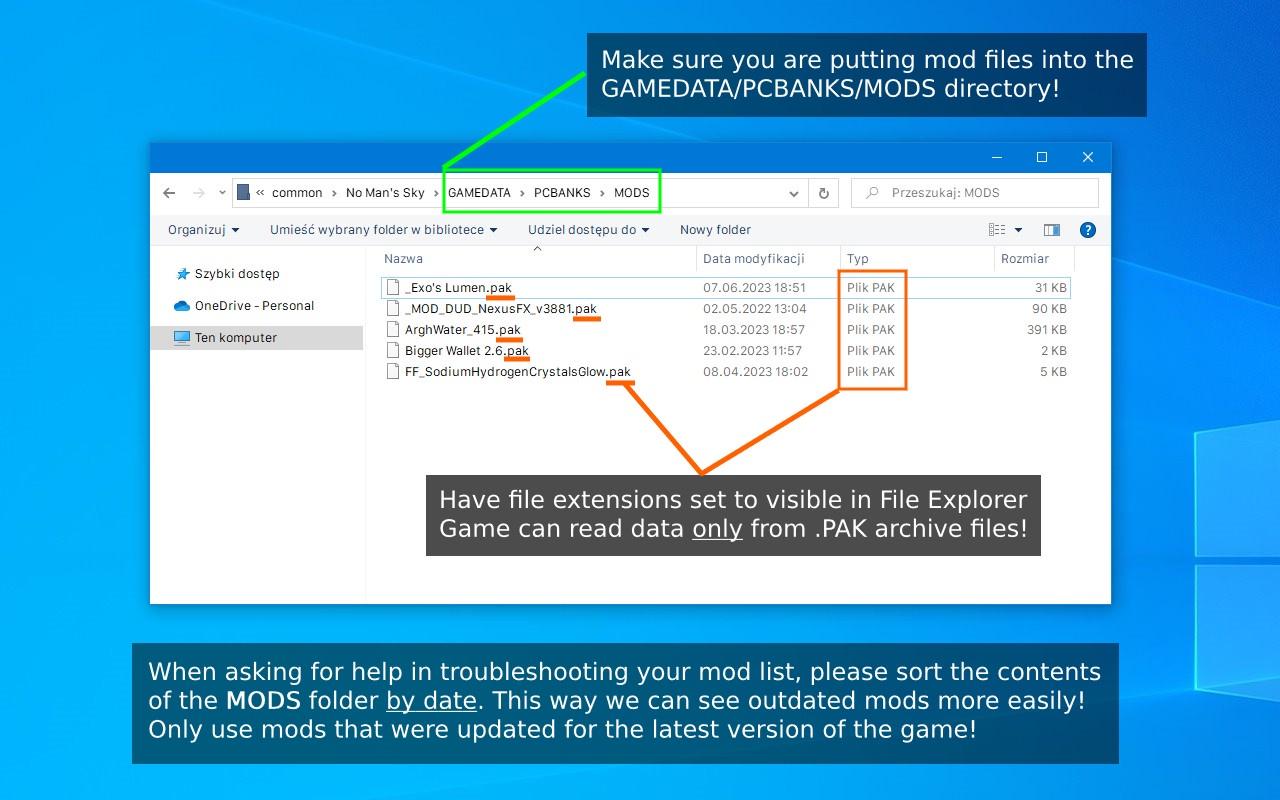
 Always check the correct path and contents of the MODS folder! Example Image »
• Game updates can break mods - check if your mods have been updated: https://www.nexusmods.com/nomanssky?tab=updated
 If you experience any glitches or bugs, please remove or disable all mods and try again before reporting to HG or asking in #nms-questions.
Contributors: friendlyfirepl, .sohail, Atlas Emissaries
vale iron
junior hatch
yeah, its the mod - no others installed and still crashes the game
Yes, mod needs to be updated, with a few other texture mods I have. I'll get to it in a couple of days
junior hatch
cool, no rush - i was more concerned about wrong files being uploaded
glad its not an issue
junior hatch
fresh arch
Browse through Nexus Mods, pick the mods that were recently updated or new relea...
been doing this, just wondered about other's opinions
fresh arch
My recommendations: Lo2k got a lot of small QoL improvement mods
Lenni and lMonk for various fixes to ships and general gameplay
DSC for a fresh coat of paint
junior hatch
ill look into them - thank you
im already using a handful of lo2k's qol's
added a few more (assuming they work with whats in there already)
liked some of the lenni mods, grabbed a few
cant find dsc but i did find better ship colours (last update 2022)
junior hatch
ah... i saw new coat of paint and figured it was ship paint
fresh arch
If you want ship paints, there's this mod: https://www.nexusmods.com/nomanssky/mods/3068

Totally not biased recommendation
 ornate gale
Anyone able to download/send the high res versions/original files of the in-game posters?
vale iron
The in-game posters are only 320k quality, at most. There's just nothing good, sadly
fresh arch

Just so you have an idea of how the textures are actually stored
Like I said in general chat earlier this morning, don't expect high rez stuff
hearty wasp
just run it thru AI
vale iron
Yeah, you'll need to AI upscale it then clean it up manually
For printing, which is what I think you said you wanted it for
ornate gale
yeah
 kindred jay
Is there a mod that changes just the stack size of refinery outputs??
 main trout
Would there be any chance that a modder makes a mod that allows you to feed pies and cookies to your living ships?
fresh arch
You mean feeding them like you feed living frigates?
Can't do, mods can't add new functionality / logic like that
Best we could do is add selected food stuffs as resources to recharge their tech
ornate gale
I have been digging, found all the posters, and upscaled them to 4x their quality
These 2 were tests

 vale iron
How large of a print are you looking for? Might need to go bigger
ornate gale
this was attempt 2 at full res
 vale iron
look good so far
ornate gale
How would one go about upscaling them further?
the most ones that i see that are free go up to 4x
vale iron
Do it twice 🙂
Given the style, should work well
Just opened up the big version. Might want to sharpen the edges some and despeckle
 sharp gazelle
Is there a mod that enables further zoom out on cockpit camera?
half arch
sharp gazelle
Is there a mod that enables further zoom out on cockpit camera?
this would kinda be tied to FOV which you can increase in settings.
Mayhaps there is a mod that places the camera further back though, not sure
sharp gazelle
I placed 100% in settings and its still kinda zoomed... thats why i thought there may be a mod that helps with that
half arch
If you increase FOV further you will be able to see a lot more of the dashboard
 spice hinge
sharp gazelle
Is there a mod that enables further zoom out on cockpit camera?
spice hinge
sharp gazelle
Is there a mod that enables further zoom out on cockpit camera?
go to your game's install folder
No Man's Sky>Binaries>SETTINGS>TKGRAPHICSSETTINGS
find
<Property name="FoVOnFoot" value="90.000000" />
<Property name="FoVInShip" value="90.000000" />
change the value to whatever you like
sharp gazelle
spice hinge
go to your game's install folder
No Man's Sky>Binaries>SETTINGS>TKGRAPHICSSETTIN...
Thanks
steel crypt
ornate gale
this was attempt 2 at full res
Suggestion:
If using to make posters or being scaled for different things, consider using a vector graphics type file. That way scaling them doesn't reduce quality...... until you get so extremely big (like the size of a parking lot) that it's ridiculous.
 little valley
Yo guys
Is there a way to get the original sentinel ships by save editing?
spice hinge
little valley
Yo guys
Is there a way to get the original sentinel ships by save editing?

I don't think so as it is a unique model
probably not doable with save editor
ornate gale
vale iron
Just opened up the big version. Might want to sharpen the edges some and despeck...
i have no idea how to do that.
ornate gale
steel crypt
Suggestion:
If using to make posters or being scaled for different things, consi...
right now i'm going for quick and dirty really, as a proof of concept, but maybe for a few versions
has it got a learning curve/do i need like 4 different new programs on my pc for that?
marsh eagle
spice hinge
what
this?
https://static.wikia.nocookie.net/nomanssky_gamepedia/images/7/7f/Sen...

Nexus Mods :: No Man's Sky
This mod allows you to use the sentinel police ship as regular player ship.
 livid owl
are there any settings/mods i can use to help with things being really slow to render?
little valley
spice hinge
what
this?
https://static.wikia.nocookie.net/nomanssky_gamepedia/images/7/7f/Sen...
Yea this
livid owl
stuff only renders when it's right in front of me
little valley
marsh eagle
https://www.nexusmods.com/nomanssky/mods/1305
This works too, thanks
vale iron
sharp gazelle
Is there a mod that enables further zoom out on cockpit camera?
I'll look later. I should be able to make something
solid hawk
livid owl
are there any settings/mods i can use to help with things being really slow to r...
Maybe you've the quality settings too high for your hardware.
livid owl
they're the lowest they can go
 marble canyon
livid owl
they're the lowest they can go
marble canyon
livid owl
they're the lowest they can go
do you experence lag?
livid owl
when leaving planets and some occasional fps dips
marble canyon
livid owl
when leaving planets and some occasional fps dips
ok, do you have a fps limeter
i dont rember if nms has one
marble canyon
k
livid owl
maybe in like half hour
marble canyon
trun it to medum
if you still have good fps, high, after that ultra
if you have it on the lowest setings, then there is the lowest amount of things being renderd
so if you use a higher rendering mode you can render things of a greater distance
make sence?
lower only means more fps
higher means better pic, but lower fps
unless you have a beffy pc, i run everything on ultra and becas i only have a 60 fps moneter i dont see a diffrence in frames from low
any more questons
livid owl
Tried lowering everything and none of the settings really did anything for me except ultra, but that kinda kills my fps
hearty wasp
get a threadripper CPU
NMS's heavier on the CPU than other games since it does a lotta proc gen
 lime hatch
can someone help me with mods?
when i launch the game it gives me errors
also my save file got deleted
when i launched the game with mods
could someone help please?
solid hawk
100% change you are using mods that are too old. Mods are made\updated for the version of NMS they will work with, give or take a few minor version increments. Use this page: https://www.nexusmods.com/nomanssky/mods/newrecently?page=1 . You can go back to around May 30th 2024 and should be good with current version of NMS, 4.72. Some from prior to May 30th back to May 1st 2024 might still work. Any last updated\uploaded before 1 May 2024 will not work, unless it is DDS file TEXTURE ONLY *not too many of these, so basically 99.9% of mods from before 1 May 2024 are unuseable).
As far as a save spontaneously disappearing, due to mods or otherwise, never seen it happen. Click and hold on the scroll wheel will delete saves though.
That's just not a thing
Your saves would be in c:\Users\your user name\AppData\Roaming\HelloGames\
lime hatch
solid hawk
Your saves would be in c:\Users\your user name\AppData\Roaming\HelloGames\
yeah for that i didnt realise it was too late, i did change my pc user earlier thats why it deleted haha
lime hatch
solid hawk
100% change you are using mods that are too old. Mods are made\updated for the ...
the mods arent outdated, the game just crashed
i did move the game to my SSD and it worked normally
solid hawk
Outdated mods will cause a crash. Usually with a message about mod incompatibilities
lime hatch
just dont wanna damage my SSD keeping no games on it 😭
fresh arch
Post a screenshot of the MODS folder, files sorted by date, extensions visible
solid hawk
But, if they are all last updated in the past few weeks, probably wouldn't be it
 lime hatch
solid hawk
But, if they are all last updated in the past few weeks, probably wouldn't be i...
lime hatch
solid hawk
But, if they are all last updated in the past few weeks, probably wouldn't be i...
I did actually move my game to the SSD and it worked with the same mods
 lime hatch
fresh arch
Yeet that out
lime hatch
fresh arch
Yeet that out
it does nothing
like a mod its nothing special
just increases ships in space
like pirates and etc
fresh arch
 lime hatch
ah
okay
i have a question
how do i download and use a save editor xD
also is there an expidition unlocker?
fresh arch
2 main save editors right now, Goatfungus and NomNom, hosted on github
You can find links to them in pinned messages in this channel
lime hatch
fresh arch
You already have a mod for expedition rewards unlocking
lime hatch
fresh arch
You already have a mod for expedition rewards unlocking
it doesnt work
for some reason
fresh arch
What do you mean by it doesn't work?
lime hatch
its supposed to be in the gestures thing and there arent
any things
sry im kinda new to this
fresh arch
Try running the mod alone to make sure there aren't any conflict scenarios
Then check in game
lime hatch
okay
fresh arch
Quick Menu - Gestures - there should be new sub-menus added for each expedition
lime hatch
ill check im trying a new mod
lime hatch
fresh arch
Quick Menu - Gestures - there should be new sub-menus added for each expedition
wait
does it need to be a normal save? or expedition save
fresh arch
does not matter
lime hatch
fresh arch
does not matter
btw i have a warp texture change mod thats 2016
should i keep?
fresh arch
Do I need to point to the same message as before?
fresh arch
Keyword being "pure texture mods"
lime hatch
oh okay
fresh arch
As in modifying / replacing texture DDS files
lime hatch
yeah it messed up my textures
fresh arch
Just because something looks on the surface to be a "just texture replacer"
lime hatch
thanks lol
fresh arch
Does not mean it really is
fresh arch
Safer to assume all mods before May 1st 2024 are not compatible with current game version
lime hatch
i have a question
like does it unlock the rewards
or the achievements in the expeditions tab>
lime hatch
i just dont have time haha
lime hatch
why are my textures all flat out all of a sudden?
 hearty wasp
that's just in game fog
steel crypt
lime hatch
btw i have a warp texture change mod thats 2016
DUD'S SKY - COLORS has a warp mod that works currently.
lime hatch
steel crypt
DUD'S SKY - COLORS has a warp mod that works currently.
okay thanks
vale iron
Could you elaborate on what you are wanting?
 open wave
Yeah. Diverse environment mods; Like Ray Rod's multiverse. Where I can land on a planet... And get a variety of different flora on a planet; Flora that isn't even native to said-planet.
Anything like that... or nay...?
Are you familiar with Ray Rod's work...?
@vale iron
Planet generation is pretty boring in retail... you hardly ever get anything really different, but just a bunch of copy/ paste planets, but with diverse environment mods... you're sure to get something different for every planet you land on.
vale iron
Ray's stuff is extremely experimental and not available to the public
open wave
And that also depends on the mod too; Just how much diversity it adds to each planet.
vale iron
A lot of what he is doing is not available to normal modding
I hope his stuff comes out at some point, but for now, it's just kind of like a tech demo
open wave
vale iron
Ray's stuff is extremely experimental and not available to the public
There's been several diverse environment mods that been out for each update. Except the problem is, for each update... what ever mod you have downloaded no longer works.
So, you always have to wait around until someone updates their mods.
vale iron
Do yo uhave other examples I can reference?
vale iron
coolio
open wave
Give me a sec...
vale iron
no problem
open wave
Internet isn't always fast. <.>

Nexus Mods :: No Man's Sky
A huge planet generation overhaul that aims at making your hundreds of hours of exploration in the magnificent, infinite universe of No Man's Sky less repetitive and hopefully even more memorable.
open wave
Better Planet Generator is one such mod I'm talking about.
open wave
vale iron
In the US? If so, they really need to update their infrastructure
Yeah, I am in the US...
vale iron
If you know how to use AMUMSS or want to learn how to, here are Luas he made:
https://github.com/MetaIdea/nms-amumss-lua-mod-script-collection/tree/main/Babscoole/WoodyMontana MODs

GitHub
A collection of public amumss lua mod scripts for nms. - MetaIdea/nms-amumss-lua-mod-script-collection
open wave
AMUMSS... I know I heard of that before, but I can't say I know how to use it...?
Is it easy...? lol
vale iron
Hold on, I'll get you link and How To
AMUMSS: https://www.nexusmods.com/nomanssky/mods/957
AMUMSS Git: https://github.com/HolterPhylo/AMUMSS
AMUMSS How To: https://www.nexusmods.com/nomanssky/mods/2626
open wave
Ty. Checking them out now...
vale iron
If you want to do any serious modding, you really need to learn how to use AMUMSS
open wave
No... lol. I'm not computer savvy like that.
I have no idea how to create mods.
I'm sure it takes a lot of work though. 🙂
At least for someone who doesn't really know anything about computers...
Like myself. LOL!
Even looking at this Amumss updater is making my head spin.
So, I'm assuming... I can use the Amummss program to update Better Planet Generator, so it works for Adrift...?
And if so... how easy is that process...? I'm reading through the "how to" guide and it seems pretty complicated...
fresh arch
Installing AMUMSS is the most difficult part
open wave
If it is easy... can anyone do it for me...? And I'll tip them via PayPal or something. lol
fresh arch
Once you got that done, in theory it's just a matter of: copy files - run script - answer couple questions - wait for process to finish
open wave
If not, no biggie. I'll just wait around until someone puts out a BPG of some sort.
fresh arch
No, nobody will click on your PC
Learning how to use AMUMSS is a huge opportunity
Because you will not be forced to wait for mod authors to update their mods
open wave
fresh arch
No, nobody will click on your PC
Maybe there's a "How to guide" on Youtube I can find...? Someone that can walk me through the process...?
hardy auroraBOT
to view info below, enable embeds
<:NmsAtlas:972222451801010207> Helpful links and tips for Modding
• [How to enable and install mods:](#nms-modding message) #nms-modding message
• Learn how to use AMUMSS to compile mods
• [Mods do work in Multiplayer:](#nms-modding message) #nms-modding message
Always check the correct path and contents of the MODS folder! Example Image »
• Game updates can break mods - check if your mods have been updated: https://www.nexusmods.com/nomanssky?tab=updated
If you experience any glitches or bugs, please remove or disable all mods and try again before reporting to HG or asking in #nms-questions.
Contributors: friendlyfirepl, .sohail, Atlas Emissaries
fresh arch
PDF guide in 2nd link
junior hatch
some of my mods dont seem to do anything
i managed to use the luas to make a combined pak - one included doesnt work there
some of these mods did work pre adrift, but post adirft ive added some extra ones
as for the others, they are individuals added to the mods folder (albeit ones that their luas didnt result in a combined pak)
how to?
a. ideally make all desired mods work together
b. how to figure out which ones i simply cant use due to being incompatible and will never work (in which case i will hav to figure out a list of desired mods in order of preference to filter out what to remove)
can provide a list of what i want to use
while i am fairly computer savvy, i fried my brain some years ago due to a breakdown, and am having trouble coming back to modding this game (also amumss didnt work for me the first time around)
vale iron
Understandable. Unfortunately, if you want something like BPG, you need to use AMUMSS or wait a LONG time
If you want help, we can provide it, but you have to start down the path yourself
vale iron
Good luck!
junior hatch
started reading that pdf - is a one drive folder ok? does that matter?
steel crypt
Not okay. Needs to be local.
vale iron
It does matter
Permissions get screwed up with OneDrive
Best to use a root directory not connected to anything and with an antivirus exclusion
junior hatch
this is probably half my issues then - it does work, but repeatedly doesnt create a combined pak
junior hatch
yeah it doesnt explain things that i can find - but does say if a lua failed
there were several that failed and required one lua to be removed at a time before a combined pak worked
the whole steam mods folder is always on local device - still no go?
steel crypt
I don’t use amumss so I can’t help much.
Is AMUMSS on a local drive or onedrive?
It needs to be local. You might be using outdated LUAs? You should post the report.lua so people can help.
vale iron
Please share the report or log.lug so we can see what the problems were
junior hatch
its in my onedrive so all pcs can access them
but using onedrive, i have set them to be locally stored
also, seems ive already added ...onedrive/programs/steam mods/ and all subfolders to be excluded
vale iron
I use Onedrive for my stuff. It's not a definitely never thing; it just introduces possible problems
junior hatch
id like to set it up in my (custom) programs library at least, is that also an issue - or do i really have to take things out of the box? like D:/Steam Mods/...
like documents, pictures, videoes, programs
vale iron
It's a combination of special characters, string length, and permissions. If you keep the path short enough and make sure the permissions are good, it works
junior hatch
sounds too complicated - D:/Steam Mods/No Mans Sky/Amumss it is
my cdo hates your help, but i can understand its necessary
vale iron
Yeah, I do d:\modding\AMUMSS
junior hatch
seeing how much things matter - can i set the parent folder to exclusion, or the amumss folder itself?
vale iron
Just make sure it hits the AMUMSS folder and subfolders
junior hatch
right
open wave
So, I'm still trying to figure out how to do all this with Amumss...
So, far... I'm getting no where.
Been watching this video here:

In this video, I will be giving a step by step guide on customizing and updating No Man's Sky Mods. Throughout the video I use the tool AMUMSS and Visual Studio Code.
If you are interested in No Man's Sky content, check out our Rough Start discord where we discuss mods, share screenshots and chat. Invite Link: https://discord.gg/YHMKyqyKPP
Mu...
^This guy is using the same program...
Was following him step by step... Until I got to the...
5:27 mark
I would type in the command, "MBINCompiler.exe decompiled"
But I got a wayyyy different error message for mine... than what was shown in the video.
Not to mention; When I decompiled the "BPG.pak" I ended up getting mutilple folders inside the decompiled folder.
And I'm not sure if I should keep them all...? Or throw certain ones out...?
Should I be taking screen shots here...? Show ya guys...?
steel crypt
There is no relevant video that I know of. Only valid instructions are in the pdf
open wave
I read that... And I have no idea how to really follow any of that either. Seems a bit overwhelming for me.
I'm no expert in computers... how to work them. Only thing I really know how to do is download games. That's it. LOL!
steel crypt
Why are you decompiling BPG?
BPG will have many folders as it should.
open wave
I have no idea why I am decompiling. Rofl.
As I said... I don't even know what "decompiling" means.
steel crypt
Okay, what is your goal?
open wave
I'm just going with what ever flow is being presented to me ((and hoping I get taken down the right current)).
To update the BPG.pak
So, I can play it on NMS Adrift.
"Better Planet Generator" mod... by Woody...?
steel crypt
I know the mod.
FYI don’t use it with expedition. It will cause issues.
I don’t know enough to help you with AMUMSS.
Gimme one sec.
open wave
Ok.
And yes, I am aware of the problems it can give ya for expeditions... been there. Done that.
lol
junior hatch
well i never did some of this - this pdf is a great info source
install test is a go
open wave
Oh, sweet...

Nexus Mods :: No Man's Sky
Overhauls biome variation, foliage density and scale, custom models, LOD + draw distance, creature size, colors, terrain, jetpack and more. PLUMGEN is a biome generation tool.
^They updated their mod for Adrift.
I wonder why this wasn't shown on No Man's Sky "recently updated" tab...?
 wicked flame
I wonder is regular nms is gonna get biomes-
vale iron
Regular NMS has biomes. One per planet. Just depends if they expand it in the future
I doubt it, as the LNF engine is not per planet based, but I coudl be way off on that
open wave
vale iron
Need to look at the Last Updated tab usually
I did... didn't even show, but yeah... apparently they are unreliable in that regard.
No doubt.
junior hatch
oh my god, they finally simplified the would you like to not copy some or all paks question! it makes so much more sense now (but i was still using the same version in onedrive)
correction, it has - i just added more than one mod and it went back to the previous version, so stupid
vale iron
Need more data. Mods are pretty predictable and only overwrite existing vanilla files
junior hatch
so i just added everything in just to see what happens with a correct installation
no paks created - this time the error specified undamagedinterceptor as the issue
technically speaking several mods like the gcolours for multitool weapons and ships shouldnt™️ need to be included in the amumss build i believe, but the gmultitool pulsesplitter always seems to need it
so i guess the next question would be:
if this mod errored out the combined pak, does it mean i cant use it with this mod list at all?
(i expect another to show up in the next build)
(it only shows one each pass until it works)
hearty wasp
AMUMSS will still pack in all the other mbins and worked fine so your generated pak is mostly functional
the one with the error is a scene and could just be manual error during scripting but it doesn't have an impact on stability of your game
that's from relight btw
junior hatch
interesting - there is no pak/s in created paks folder though, is it somewhere else? or do i just use the text file instead?
hearty wasp
it should have the pak there but if it isn't then check the BuildHistory folder within and see if the latest files are there
or you can just not include relight in ModScript
junior hatch
relight - can you see whats wrong with it - im going over the report, and cant see what it is
hearty wasp
I haven't read the report fully and I dunno what's causing the error so I'll let Gumsk/lo2k sort that out
it's just a snippet injection thing for a scene gone wrong and should be easily fixable tho
junior hatch
and theres no pak in any of the subfolders, just the text file
hearty wasp
yeah try just yeeting relight for now
junior hatch
will do and see which one kicks up next (at least thats what im expecting)
solid hawk
Your problems are due to putting the .paks in ModScript
solid hawk
Detected 19 user PAKs in ModScript...
junior hatch
no, many did not have luas
adding the paks without merging caused issues last time
*combining
and also, removing relight returned no errors but still no combined pak
hearty wasp
junior hatch
and also, removing relight returned no errors but still no combined pak
discounting all the other stuff that could just be a permission issue
if you have an antivirus you should try to temporarily disable it or add an exception to the whole AMUMSS install folder
junior hatch
already done - we discussed that earlier
hearty wasp
then you may need to reinstall AMUMSS while AV is disabled
junior hatch
*well me and someone else did in any case
aready did that
normally i dont get a combined pak - going back to when i first started using amumss
only recently did i get one by removing the errored paks/luas, but theres none this time so i have no idea
hearty wasp
oh ok if it did work in the past it shouldn't be an AV issue
hearty wasp
was the AMUMSS install in its current director when it did make paks?
just wanna make sure it's not an issue with file path having punctuation
junior hatch
if paks dont go in the modscript folder (like they did when it worked for a combined pak that one time) where do they go?
(answer: no the time it worked was while it was in my onedrive folder x programs library)
so it was in a folder that was both
hearty wasp
I'm surprised it worked in an OneDrive folder tbh lol
junior hatch
yeah, just found out about that
which is why i set up a new D:/ folder just for this
hearty wasp
try to have just the luas in ModScript and see if a pak is generated
junior hatch
alright
hearty wasp
just to make sure it can make a pak in its current directory
or even just have one single lua
makes it run faster yknow
junior hatch
^ i did a single lua to test that the first run - it did
hearty wasp
it could just be too many paks tbh lol
I'd suggest you run the whole collection again w/o relight but this time let AMUMSS check for conflicts
also I'm p sure Better NMS has Relight included
junior hatch
i did check™️ for existing mods when adding it (it is one of the new mods i added after adrift)
if it makes paks, ill add them to the MODS folder and check
hearty wasp
I just want it done so we can see if we can separate some paks/luas out into a second run
junior hatch
ohhh,, the lua only run make 1 x combined pak
report:
question:
by second run - does that mean i can make a second combined pak and then:
a. use both in MODS
or
b. combine both
?
junior hatch
ah - do the paks to be combined go into the same scripts folder without the luas?
junior hatch
i believe better no mans sky also had not another trade mod (EEIS.lua) which is probably that one constantly errored out before - this is starting to make a little more sense
just adding the paks created the luas for each of the mods (and each mod in better no mans sky as well)
didnt know amumss did that
holy crap - i added all the working luas that combined from the previous run with the newly created luas from the paks without/that didnt need luas, and it combined!!!
report included
i will have to make notes and add it to my discord (i have self written walkthroughs in my own words so i can understand and remember what to do for all sorts of stuff like minecraft commandline modpack creation/updating - came in really handy now im not as clicked on when starting a new program these days)
time to test
hearty wasp
junior hatch
i believe better no mans sky also had not another trade mod (EEIS.lua) which is ...
Better NMS is a compilation of existing mods so you may wanna check if it already has the mods you are putting luas in for too
junior hatch
that was easy™️ copying the luas in 2 batches detected existing files - theres over 120 in the modscript folder now
could have missed something, so im already going over the combinedmods.txt just in case
hearty wasp
but yeah next time if you let AMUMSS check conflicts for you it should tell you 1. which paks conflict with each other and 2. which luas conflict with the paks so that those particular files in the paks will be overridden
the main possible issue is the conflict between your luas and your installed paks making something in your installed paks ineffective
so if any issue appear in the future that may likely be the cause
junior hatch
interesting
solid hawk
junior hatch
i believe better no mans sky also had not another trade mod (EEIS.lua) which is ...
It didn't. AMUMSS cannot create Lua scripts, but it can extract existing ones out of .paks, where they are stored when a .pak is generated from AMUMSS with an lua script.
Unless there is an overt reason to put .paks into ModScript, like extracting the contents only or making a patch .pak, keep them out of ModScript.
- Cannot make a working patch .pak if any particular game file exists in more than one of the .apks being used
junior hatch
yeah what i meant is that the better no mas sky split itself into like 100 luas and one of them i was also adding separately when trying to comine before
solid hawk
- The .paks will NOT be updated to current
- The .Luas will use the game files from the .paks as source for their changes, if applicable, so may not be updated to current and may cause issues if making removes from or adds to the game file(s).
Example of #3 would be having the relight .pak and Lua in ModScript together. The .lua is going to use the game files in the relight.pak to make it's changes to, but those changes have already been made in those files. So won't be able to find some parts that are already removed and will add the same thing multiple times. Upshot will be corrupted game files, so error on compile.
Something like 90%+ of mods from the part few years have Lua scripts. Might be offered in the mod download, as a separate download, "hidden" in the mod .pak, or linked from POSTS on the mod .page.
Just have to do a bit of digging. 🙂
junior hatch
yeah i found a few scripts that werent included in the main download
also, my first mistake that i figured out before contacting here was not needing both paks and luas at the same time - i didnt understand their purposes at the time
launched game and it didnt crash so looking good so far
game froze trying to quit to desktop
also the exocraft scanner mod (unlocking all options) and the i cant remember what its called, you use it to scan for other locations fireware update mod didnt work
the exocraft scanner mod nothing unlocked, its all vanilla ui
and the placeable scanner thingy works with the new ui, but using the new ui (albeit on expedition to find the boundary failure) doesnt do anything after activating the scan
thats as far as i got with testing
solid hawk
If you are currently playing the expedition, recommended NOT to use any scanning mods. Several expedition milestones require the use of expedition scan overrides, which mods may screw up. Best to hold off on scan mods until after you complete the expedition.
junior hatch
ahhh - ill fix things and start again
thank you
that would include the buildable ui firmware update mod too wouldnt it...
solid hawk
Firmware Update for the Signal Booster? Yes.
Can use it again after you've finished the expedition.
junior hatch
figured as much - and yes the signal booster (couldnt remember its name
fresh arch
 wintry saddle
is there some sort of program somewhere that can recalculate the characteristics of a planet, a system or other from its seed?
id like to make a program that allows to browse discoveries made in a save file outside of the game
vale iron
I think Mjstral has looked into this and can do some of that. I know he can get you a list of planets and properties by region, I think for patrons?
!creativehublink
hardy auroraBOT
wintry saddle
vale iron
I think Mjstral has looked into this and can do some of that. I know he can get ...
i'll ask him
wintry saddle
vale iron
I think Mjstral has looked into this and can do some of that. I know he can get ...
wait no it's bruteforce it won't work in my case
fresh arch
wintry saddle
is there some sort of program somewhere that can recalculate the characteristics...
You're basically asking if someone has reverse engineered the procedural generation system used by the game
Mjstral's work is the closest we've got
wintry saddle
fresh arch
Mjstral's work is the closest we've got
oh ok
his tools are not free (which is understandable when we see the time he spent on it), so i'm gonna pass
fresh arch
That is correct, but you can join their server, upload your own findings (ships / pets / whatever) to become a contributor
Higher ranks get access to these tools (I think)
vale iron
Yeah, if you contribute, I think he gives access
 summer dew
Is there a mod that like doubles pet slots
Darn
Srsly I thought that would
Have been made
fresh arch
If you have an idea for a mod X but you don't see it already, it's one of 2 cases
- it's straight up not doable within the limitations of modding - ex. save data is composed of lists / arrays of fixed lenght and we can't modify that structure, cause game will not load it or at best case ignore extra stuff
- it's doable but it's such a hassle whoever tried to do it gave up
Modding NMS is dictated not by what you want to do with the game, but by what you are allowed to change within game files so that the mod can be still compiled
summer dew
Yeah I assume
It would
Be difficult to code even if it's a simple concept
fresh arch
It's not about coding
It's about the fixed structure of the game files
We can change values on existing properties / variables
We can't add new ones, we can't go beyond enum data types
We can't add new logic / functionality / gameplay mechanics
 graceful mauve
Do you need to turn off steam cloud sync to use save editor?
hearty wasp
graceful mauve
Do you need to turn off steam cloud sync to use save editor?
Need is a strong word, but it would help in making sure your edited save don't immediately get overwritten
graceful mauve
hearty wasp
Need is a strong word, but it would help in making sure your edited save don't i...
👌
marsh eagle
wintry saddle
wait no it's bruteforce it won't work in my case
There is no other way than brute forcing. Mathematically impossible to translate a given ship part list into a seed.
But having pre brute forced billions of seeds and ordered in a fast access database, it won't make any difference for the end user when customizing proc stuff
hearty wasp
you mean you can't just hack into the HG servers????
 odd sundial
Any mods that help with finding deep level mineral deposits?
viral oak
deep...level?
viral oak
odd sundial
Any mods that help with finding deep level mineral deposits?
honestly, only thing I can think of, and it's a big if, is increasing multitool scan range by one means or another. the if being 'if it increases range on resource scanner'
other than that it's just 'use resource scanner and your ears'
solid hawk
I think he's referencing size. Since that is just a procgen thing, there's no differentiating factor to scan based on size.
Game sees a big deposit the same as a small one.
odd sundial
im referring to the mineral / power / gas deposits that you need the addition to the analysis visor to find. these are the ones that you use the big resource harvesters on. currently i have to scan, drive get out and scan again. i was just wondering if anyone has heard of a mod for finding these because i wasnt able to when i searched
viral oak
the fact nobody (to my knowledge) has implies nobody can
don't know if we have access to that kind of thing
odd sundial
thats what i was wondering
vale iron
The best you can do is increase scanner range
 remote thorn
Modding is probably not the right place for this but I'm going to ask it here anyway. Can pre-Omega expeditions be started from the Anomaly terminal using the ReLive method? Or does HG have to actually make the expeditions compatible with the Anomaly start?
fresh arch
The latter
The custom JSON files are just a method of tricking the game into thinking that previous expedition window is active
And they provide the "setup" for expedition scenario: you spawn here and there, your starting equipment is this and that, here's a list of stuff to do
Neither conventional mods nor loose files like that can not add new functionality to the game
remote thorn
I see, guess we wait for the redux then.
junior hatch
oh god, what does "incompatible save" mean?
i deleted my mods, switched to experimental to see if the update released fixed my expedition lockout bug, then switched back to normal download and reinstalled my working mods and now i got the above message just on my main save
what have i done and can it be fixed
*i exited the game straight away without changing anything
fresh arch
Experimental branch changed the save file structure
junior hatch
oh no
fresh arch
Now you are trying to load that new structure into older build of the game
So yeah it might not work
junior hatch
...until game is updated right
fresh arch
Most probably
junior hatch
so lockout of an expedition mission has now caused me to lock myself out of the game - lol
i supposed i can resetup my mods for experiemental to get things working again?
fresh arch
Imma sound like a d!CK but experimental is opt in for a reason
vale iron
Just switch back to Experimental
fresh arch
And there were no bug fixes to prompt someone to jump over there with their expedition save
vale iron
Almost all mods should work
junior hatch
& i had issues finding said patchnotes
fresh arch
!experimental
hardy auroraBOT
to view info below, enable embeds
 See new patch notes »
Updated <t:1718289871:R> ( 124256 )
Branch: 14706980
🗂️ Notes History »
Run !NmsVersions in our #bot-spam channel for more info.
junior hatch
yeah but in everyother game i check in with the patchnotes they call it patchnotes - got rickrolled
vale iron
It's not patch notes until it's available to everyone
Experimental is only on Steam and only opt-in, so adding that stuff to patch notes would confuse 99% of players
junior hatch
right - airmech had patchnotes for normal and canary
separately written and labeled
vale iron
Yeah, woudl be nice if we could see the experimental changes in client
junior hatch
so thats why i had issues finding something
vale iron
We also can't see what the version number is on PC. We have to wait for an announcement or a console download
junior hatch
and yeah i did look at that expereiemental steam thingy but still couldnt find what i was looking for
vale iron
we can get the build number, but 4.72 or whatever is nowhere in the files
Sometimes they don't even update that when experimental updates. It's not reliable
Most reliable thing is probably just watch the modding discord
junior hatch
so how to fix this, wont swicthing to experimental cause issues when swicthing back (my headache wont let me finish this sentence properly)
damn preserative headaches, painkillers just dont kick them to the side
vale iron
Yes, that's the one thing you often don't want to do, don't try to go experimental -> public
junior hatch
right
solid hawk
junior hatch
so how to fix this, wont swicthing to experimental cause issues when swicthing b...
Switch back to Experimental for now. When next Public is released (what is currently Experimental), you can switch back.
junior hatch
assuming i get it straight away and dont miss another experiemental afterwards before i do
but... im a catastrophiser so i will do as you say and go against my nature and hope for the best
also, never again - lesson learnt
weird that no one mentioned this while i was updating it in expedition (i was posting while doing the download), guess no one saw it in time, shame
solid hawk
Click on the save slot you want to edit, click on the save you want to edit for that slot, click the Edit button under Save on the left. Click through the various tabs, changing what you wish. When done making changes, File>Save.
lime hatch
solid hawk
Click on the save slot you want to edit, click on the save you want to edit for ...
its blank
solid hawk
What's blank?
lime hatch
oh never mind i think it worked?
solid hawk
ok
lime hatch
solid hawk
ok
btw you make the unlock mods right?
solid hawk
I have two mods with the word unlock in the title, but there are others by different people who also use that word
lime hatch
solid hawk
I have two mods with the word unlock in the title, but there are others by diffe...
the season expedition unlocker
solid hawk
Yep
lime hatch
yeah so like
if I use it
and unlock like the seasons
it works like as if i finished the expedition?
solid hawk
It adds buttons to the emote menu, one for each expedition. Click on a button and get the rewards for that expedition\season
lime hatch
yeah
i know
i tried it
but i mean
when i use it
it unlocks it on my account
like i can claim the stuff from nexus on other saves?
or not
solid hawk
Yes, that's how expedition rewards work with NMS. Mods can't change that. Expedition rewards are per account.
solid hawk
If you just want the bigger\unique rewards to claim in the QuickSilver shop, there's also Consumerism
lime hatch
solid hawk
If you just want the bigger\unique rewards to claim in the QuickSilver shop, the...
im using that, its actually pretty fun
solid hawk
I do need to update Season Reward, but been a bit sick lately, so behind on NMS stuff.
Not like feeling icky sick, like lots of doctors appointments sick.
Hopefully I'll be in a position to loop back on Season Reward Unlocker soon. 🙂
fresh arch
👀

 icy oasis
Can some please recommend a mod for scaling base parts? Like Exosolar's Beyond Base Building, is it safe to use? Will my base be uploaded correctly? I saw some amazing community-made bases with a lot of scaled parts and they look amazing. They look too complex to be build with just glitches...
lime hatch
icy oasis
Can some please recommend a mod for scaling base parts? Like Exosolar's Beyond B...
Better NMS
it has a mix of some mods
i use it
icy oasis
thank you
lime hatch
yw
kindred jay
Is there a mod that can change the stack size for refineries only?
lime hatch
kindred jay
Is there a mod that can change the stack size for refineries only?
dont think so
solid hawk
icy oasis
Can some please recommend a mod for scaling base parts? Like Exosolar's Beyond B...
The one used in Better NMS is Beyond Base Building. 🙂
Safe to use, with one caveat. Scaling breaks snapping. This is due to snapping design for the game. Cannot be changed or fixed by other than Hello Games.
So, if wanting to scale a lot of things, free placement becomes your friend, very quickly.
 deep warren
Anyone have some cool pistol or rifle multi tool seeds?
deep warren
Anyone know how to duplicate a save then make it into expedition/ survival
solid hawk
NomNom save editor can change the mode, such as survival

In order to change to\from expedition, go to the expedition station in the Nexus
 ashen brook
May I ask for some direction or suggestions on resolving a little camera quirk I'm having? I'm looking for a mod that, literally all it does is remove the camera changing/zooming when I fire my mining gun or switch tools.
It's very disorienting when the camera changes FOV on the fly like that.
vale iron
take the gcam lua and look through that. It probably has what you want and you can jsut get rid of everything else
ashen brook
vale iron
take the gcam lua and look through that. It probably has what you want and you c...
ty
viral oak
there are plenty of nice mods, but mods are fairly limited in what they can do
pretty much comes down to "we can edit what is already there and not much else"
vale iron
 wary acorn
i've never seen anything on it
wary acorn
i've never seen anything on it
Go to Nexus mods and sort by new or last updated. You can sort by popular, but anything not updated since May is probably broken
deep warren
solid hawk
NomNom save editor can change the mode, such as survival
Thanks. Will look into it
 fickle frost
Okay so I accidentally upgrade the wrong multitool for expedition milestone 2.3. I was thinking I could like... tweak it so it hadn't been collected yet and "re-collect" the milestone, so I went and tracked down this part in the save editor. I assume each milestone has a numerical value so it would need to be my current one minus the "correct" numerical value, but I have no idea what it is, so I just bumped it down to zero thinking that would reset all of the milestone collection and I could just re-edit it back to what it was before, but that... did not work. Any thoughts?

or if anyone has an easier idea for how to upgrade it but I'm stumped since there's nothing in this expedition, rip
fickle frost
nope :'D
fallow meadow
@fickle frost The RewardCollected value is the result of a binary representation of the 'completed milestones per phase including the phase reward collected', so lets say phase 1 has 8 milestones, it would use 9 bits, in your case 111111111 = 511 (dec) where the phase is completed and the phase reward has been collected.
Not all phases have the same amount of bits used, but this value works the same for each phase.
However, these values do not change the actual Milestones. Those are tracked in the data in a different location (SeasonState > MilestoneValues). If you still need help, let me know and we can look into fixing it.
Either way, always make sure to have a backup, especially when you are unsure about any edits/changes you make. Both NMSSE and NomNom should make backups whenever you save edits made. I recommend you check the location of the application used, for a backup folder.
fickle frost
fallow meadow
<@232957094075039745> The RewardCollected value is the result of a binary repres...
Oh, well, I have backups of the json before I started editing, haha, I thought they meant if I had backups before I collected the milestone. I exported the json before I tweaked and then restored it after all of my editing didn't work. But do you know then how I would go about setting a milestone as completed but not yet collected? Editing the RewardCollected value didn't change anything, was the issue.
fallow meadow
Ok, so in your case that would be phase 2, milestone 3?
fickle frost
Yep!
fallow meadow
Ok, let's see ... so above I see the value is currently 63, which does represent phase 2
So if this is indeed just about 'collecting' the reward, we should be able to alter that value, but then done correctly. I just wonder why though? What was wrong with collecting it before?
fickle frost
I did it with the wrong multitool
so now I'm stuck with one upgrade per multitool
And since there are no upgrades anywhere else in this expedition.... 😭
fallow meadow
Would it not be a lot easier to just edit the multi-tool directly? I mean, I don't mind trying this, but you should be able to accomplish the same easily through the main UI for the intended MT
fickle frost
Upgrading the class of the multitool in the save editor doesn't actually change anything, does it?
Whenever I've done it the stats have changed the same. Unless I'm completely misunderstanding how it works, haha.
fallow meadow
fickle frost
Upgrading the class of the multitool in the save editor doesn't actually change ...
Well, it does just that, changes class. You are correct about the other stats remaining unchanged. Sorry, I forgot the milestone reward is about a class upgrade.
fickle frost
Truly tragic 😔
fallow meadow
Ok, let's instead change value then, to have it done properly through the game. Might be more work or not yet possible to give yourself the needed things to upgrade at a Station terminal
fickle frost
Not possible, is the thing. There are no station terminals in the expedition
steel crypt
There are terminals in the back room.
fickle frost
WAIT for real??
Altho
I just checked the rewardcollected for stage 3 after I collected a reward there and it didn't change. Strange.
fallow meadow
Ok, so phase 2 has value 63 and it would 7 milestones, making it 8 bits used total. So that would be 00111111 Where we now need to undo the 3rd milestone. So it becomes 00111011 = 59
fickle frost
aight let's give that a shot
fresh arch
May I ask
fickle frost
fallow meadow
Ok, so phase 2 has value 63 and it would 7 milestones, making it 8 bits used tot...
well it's 255 now, so it would become 251, right?
fresh arch
Wouldn't it be easier to just use a mod that rigs the reward to some action in game?
And then do that action with MT in question active to have the reward apply to it?
fallow meadow
fickle frost
well it's 255 now, so it would become 251, right?
255 means you have already completed the full stage
fickle frost
If you have one in mind, by all means!
 fallow meadow
Well yes, but it likely reset a few more
 fallow meadow
It also reset the milestone 7 and phase completion reward (for 59, not 251)
fickle frost
Now that I get how they're encoded it makes total sense haha
Nope, phase 2 still showing as complete!
you always come through hahaha thank you
fallow meadow
I guess it updated again, because of other data elsewhere
Oh well, I guess we should call it a success 🥳
Enjoy the rest of the ride
steel crypt
DUD'S SKY updated v472-B
- Updated _MOD_DUD_DynamicStanding_v472-A to _MOD_DUD_DynamicStanding_v472-B
(Small balancing adjustments to standing rewards.) - Updated _MOD_DUD_SpaceshipFlight_v472-A to _MOD_DUD_SpaceshipFlight_v472-B
(Bug fix for Iron Vulture flight controls.)
(Minor balancing adjustments for all ship types flight controls.)
https://www.nexusmods.com/nomanssky/mods/507
Nexus Mods :: No Man's Sky
Modular collection of gameplay enhancing-quality of life mods that can be used together. Compatible with NMS v4.72
fallow meadow
You'd have to be able to access the save data to be able to know the seed value
 weak zephyr
hi do I put mods in MODS or PCBANKS
round sinew
weak zephyr
hi do I put mods in MODS or PCBANKS
in GAMEDATA\PCBANKS\MODS
weak zephyr
round sinew
in GAMEDATA\PCBANKS\MODS
 round sinew
weak zephyr
round sinew
weak zephyr
no, MODS goes inside PCBANKS
weak zephyr
ok il put them there
 fresh arch
See this post: #nms-modding message
solid hawk
round sinew
i mean the MODS folder
You run Windows using NMS font? lol
Now, that's dedication!
round sinew
solid hawk
You run Windows using NMS font? lol
i run my OS using NMS font, yeah, i love it 😄
vale iron
I hope not
summer dew
Does anyone have the updated version of resmas dark space colors
solid hawk
summer dew
Does anyone have the updated version of resmas dark space colors
Nope, but there's https://www.nexusmods.com/nomanssky/mods/1200 , Black Edition
or https://www.nexusmods.com/nomanssky/mods/2602

Nexus Mods :: No Man's Sky
Large overhaul to Diversity of Space Colors. Never see the same solar system twice!

Nexus Mods :: No Man's Sky
Makes Space Much Darker and Nebulae more subtle visually. Useful when photographing ships in Space.
This one has a darker space .pak as wellhttps://www.nexusmods.com/nomanssky/mods/1722?tab=files

Nexus Mods :: No Man's Sky
★ Updated for NMS Orbital 4.71 to 4.72 and LUA scripted ★ Multiple PAK files to remove trade routes, metrics lines, space dust, plasma, reduce or remove speed lines, revamp asteroid fields, make s
Last, but not least https://www.nexusmods.com/nomanssky/mods/1471
 summer dew
Thank you
solid hawk
No problem. Sorry it took awhile to get the full list, had to hunt for some. 🙂
summer dew
solid hawk
No problem. Sorry it took awhile to get the full list, had to hunt for some. �...
Will exosolars work with cso
The color palettes with no dust or plasma
solid hawk
Nope. They all change the same settings in the same files, so it's a pick one kind of thing, space color mods can't be combined
steel crypt
summer dew
Will exosolars work with cso
You can use with Lo2k's no duse or plasma mods for same effect.
 stray venture
Does NMS have any sort of logging to help with diagnosing a crash? I had one just now while alt-tabbed at the Anomaly and I'm using mods
 ruby torrent
round sinew
ruby torrent
round sinew
I notice you are using Linux nice.
half arch
stray venture
Does NMS have any sort of logging to help with diagnosing a crash? I had one jus...
crash dumps in
%localappdata%\Temp
vale iron
They don't really help anything, though
best help is to post a screenshot of your mods folder sorted by date
 untold bay
You can get the module through no man's sky save editor
 zealous basin
oh nooooooo I actually am shook there are mods
untold bay
yup
I'm pretty vanilla tho. I just use the save editor to give myself a few things. Although I highly recommend doing everything you can without modding
and then mode it once you've beat everything
that's what I did. I found it way more enjoyable. Modding before doing the main story and quests, it kinda makes things less fun
zealous basin
hang on ill post legit catalogue rn
untold bay
Now all I have left to do is to find the ships I want (color wise) so I mod to make things faster
zealous basin
The only thing I intend to use save editing for is for impossible to obtain things like expedition rewards
untold bay
that can help too, if you want something you missed out
zealous basin
I've done almost everything without google
untold bay
I do recommend making a backup of your vanilla save before starting to mod
that's what I did
zealous basin
untold bay
I do recommend making a backup of your vanilla save before starting to mod
I probably won't. I have enough on my hands with the "DLC" I'm making for skyrim in between procrastination and Real Life stuff
Just want to get my singularity engine done and thats about as much save editing as I'll ever need until I finish catalogue page
I dont even need it. I JUST WANT IT.
 zealous basin
can you screenshot it in SE?
untold bay
SE?
zealous basin
Save Editor

 untold bay
^^ glad I could help
zealous basin
untold bay
^^ glad I could help
Also, this is my progress so far.
I'm just about doen with the factions too. The only ones that still need work are || Atlas || and || Autophage ||
 untold bay
zealous basin
Also, this is my progress so far.
I'm just about doen with the factions too. T...
untold bay
zealous basin
Also, this is my progress so far.
I'm just about doen with the factions too. T...
nice
zealous basin
untold bay
nice
SO as you can tell, I'm willing to forgive myself a little for save editing in the Singularity Engine.
I've also hit this "milestone":
https://www.youtube.com/watch?v=FurKLVb534A
Thanks for the help interloper!~ ^^

In this video, we take a look at every known glitch building technique in No Man's Sky. This guide is for the 2023 update and will show you how to build using any and every glitch possible!
00:00 Intro
00:48 Blending without Glitching
02:17 Tether Glitch
03:21 Definition + Glitchbuilding Categories
04:30 The Adjacency Glitch
07:00 The Scale Gli...
stray venture
untold bay
that's what I did. I found it way more enjoyable. Modding before doing the main ...
though that does depend on the nature of your mods. I'm using some to make the game harder
I think the crash was likely from a recent change to my list so I'll just repak with that cut out, should be fine, but was curious for future troubleshooting
 brisk lintel
gzys, anyone got a mod for this? --> #nms-questions message
vale iron
It would probably be possible, but none exists and I can't think of a quick fix I could do to make you something quickly
round sinew
 tender quiver
how do you save edit
tender quiver
how do you save edit
https://github.com/zencq/NomNom nomnom is the only one up to date atm afaik
tender quiver
safe to use?
hearty wasp
it's as safe as your ability and enthusiasm to edit
round sinew
i'll grab nomnom to at least have some idea of what's going on
tender quiver
is it difficult to use
hearty wasp
I'd say it's easier to gauge that when you have the program open in front of you
tender quiver
Honestly
i think ill just restard
t
just save myself the trouble and give myself to do
round sinew
tender quiver
is it difficult to use
File, Open, navigate to save folder path; !faq-savefiles in #bot-spam can show you paths

i just copied my st_xxx folder (the steam save file folder) onto a vm and ran nomnom there
then you go Edit, Save transfer

here i only have 1 save folder, so it asks me if i want to transfer to steam account again
which ofc wouldn't be what you'd do
you'd have your main save on gamepass, and have started a new save on steam; loaded the steam save, click on browse on that window in the last screenshot, and find the gamepass path
tender quiver
so it would be the same save from gamepass?
round sinew
it would try to copy everything over, like it says, it also gives some warnings
round sinew
round sinew
you'd have your main save on gamepass, and have started a new save on steam; loa...
ah wait no, it seems it recognizes how many save slots i could still have, and lets me create a new one right off the bat i think

a little confusing to me as i've never used this but i think i understood the most of it
there's going to be people in !creativehublink or the !moddinglink servers definitely more experienced than me to help out with this
 prisma nexus
so can modding for this game actually do anything yet or is it still just messing with assets? (and frankly I'd argue save editing isn't even modding.)
fresh arch
prisma nexus
so can modding for this game actually do anything yet or is it still just messin...
Modding is still very limited
No script extenders, no runtime plugins (at least not for current game build)
vale iron
prisma nexus
so can modding for this game actually do anything yet or is it still just messin...
Most NMS people that actually are involved in modding don't consider save editing to be modding. Not because save editing isn't as good or something, but because they are distinctly different types of things with different terminology.
fresh arch
Just tweaking and some shuffling around of existing property values
vale iron
Reddit users that probably don't even use save editing or modding though will argue with you until they are blue in the face that 'save editing modifies so ThEY'Re TeH SAME!!!1'
prisma nexus
vale iron
Most NMS people that actually are involved in modding don't consider save editin...
and as someone who has been involved with modding other games, I agree, it's not modding :)
but okay, sad to see that there's still no real modding capabilities after all this time
solid hawk
prisma nexus
but okay, sad to see that there's still no real modding capabilities after all t...
Depends on your definition. Lots of things can be changed\modified. Just can't add new or new logic. Those abilities will probably not happen. Looks as though HGs next game LNF, uses the same underpinnings as NMS, so it will remain in their best interest to continue to protect the IP and NOT release an API or official modding tools.
prisma nexus
solid hawk
Depends on your definition. Lots of things can be changed\modified. Just can't...
frankly, i never understood this idea of how releasing a modding api damages IP or anything in any way whatsoever. and i say this as a programmer who has interest in making games at some point. or how this is in anyone's best interest. the only valid argument against having a modding api is that it takes a lot of work to create and maintain. and from my experience, it's pretty much always a net gain when one exists.
anyway as a programmer, changing values and assets or whatever doesn't really feel like counts as "real modding capabilities", since someone like me can't actually do anything.
replacing assets is great, but you can do that on pretty much anything, and it's not really doing much. changing code is when it becomes actually modding imho
solid hawk
We know they have an API and modding tools, for internal use only though. It's the direction their Board of Directors decided to take with the game. Good or bad, way it is.
prisma nexus
perhaps someday someone will delve into reverse engineering some of that stuff. its a shame that everyone has to wait for that to happen :(
solid hawk
Those of us who make mods ("real" or not) for the game, make due with what we're given to work with.
prisma nexus
sorry, maybe i should have clarified...i'm not trying to gatekeep saying that they aren't real mods, or the people that make them aren't doing a good job. im just saying as far as modding capabilities go, i don't consider nothing but asset modification to be "modding capable"
fresh arch
I mean it's not that bad
Even with the limits we have now, we still can make some new-ish stuff
solid hawk
There have been several attempts at creating a third party API. Those have fallen by the wayside. One of the huge factors in doing so is NMS updates break everything. Would take a rare person willing to put in dozens of hours to fix breakages, knowing full well it'll be broken again shortly, for YEARS
fresh arch
(totally not injecting self-promo here)
Like enabling new ship types at starship fabricators
Or having some custom quests for players to follow
Technically it's just a rehash of what the vanilla game offers but it still is something that was not offered by HG
 vivid apex
if you know, you know
nah i gotta wait a week to get the starborn runner from the service bot 😭


 ebon bridge
Are there any mods that let you build npcs in your bases without also adding hundreds of other build items?
solid hawk
ebon bridge
Are there any mods that let you build npcs in your bases *without* also adding h...
Nope
If you just want more NPCs, without needing in the build menu or manually placing, use https://www.nexusmods.com/nomanssky/mods/2488

Nexus Mods :: No Man's Sky
Mod to make frieghter bases just a little more lively
The downloaded .paks WILL crash the game, too out of date. You will need to rebuild the mod using the .Lua scripts and AMUMSS.
steel crypt
vivid apex
Why does your timeline say "tomorrow"?
I'm on to you future man. 🤔
vivid apex
my fault i live in the 4th dimension
pretty hard to unlock i reccomend watching a yt tutorial
 near quarry
Not sure if this is the best channel to ask, but I used goatfungus’s save editor to get past expedition rewards (checked boxes for everything) . I can see them available to claim but when I go to claim them nothing happens
kindred jay
Is there a mod that toggles starship boost instead of holding down?
steel crypt
near quarry
Not sure if this is the best channel to ask, but I used goatfungus’s save editor...
I just used it and had no issues. You are “checking” them in the “account” tab in the editor and then saving the file before exiting editor?
steel crypt
kindred jay
Is there a mod that toggles starship boost instead of holding down?
I don’t think so and don’t think is possible…..currently.
Might be able to bind to special key and use win based program to toggle when that key is used?
I’m also assuming you’re talking about boost like shift key like not normal speed but fast…but not really fast.
Because for normal thrust, DUD’S SKY has a flight mod that contains a “cruise control” for regular thrust.
near quarry
steel crypt
I just used it and had no issues. You are “checking” them in the “account” tab i...
Yea I’m pretty sure I did, I’ll have to check when I get home I suppose. I was also trying to do it with a backup that the editor makes to no avail. If it still doesn’t work the only thing I haven’t tried was unchecking everything and checking everything again but not sure
 errant ice
is there any mods that allows you to customize the inside of the ship? or is that already a default feature in the game?
solid hawk
errant ice
is there any mods that allows you to customize the inside of the ship? or is tha...

Nexus Mods :: No Man's Sky
Those who like to fly ships in first person and have a Sentinel ship, this mod removes the red glowing circuitry from the canopy, which can severely block the view.

Nexus Mods :: No Man's Sky
Removes an assortment of wires and cables littering the sentinel ships' cockpit, for those who dislike the visual clutter. Two options of 'tidyness' included.
That's about all there is really and both Sentinel ship specific.
fresh arch
I think there was a mod that changed the colours of panels in the cockpit

Nexus Mods :: No Man's Sky
Restores procedural colors for the cockpit interior plastic parts; The mod affects all types except the living ship.
And my mod Project Apollo adds a bunch of bobbleheads (and does couple of other things): https://www.nexusmods.com/nomanssky/mods/2864

Nexus Mods :: No Man's Sky
People assume that time is a strict progression of cause to effect, but actually from a non-linear, non-subjective viewpoint - it's more like a big ball of wibbly wobbly... time-y whimey... stuff.
 sinful dagger
even tho its genuinely stupid af to do
how do i edit the json to throw in a infraknife on my multitool (dont say why, dont say it doesnt work, i dont care)
(u cant do it regulary through the save editor)
steel crypt
You infraknife understand.
(See how shoving infraknife in the middle of random crap DOESN’T WORK?)
hearty wasp
Just rename your submachine gun to infraknife
errant ice
fresh arch
And my mod Project Apollo adds a bunch of bobbleheads (and does couple of other ...
bobbleheads is actually a cool ass mod to add i cant lie
i wanna start modding in nms and make customizable cockpits, i just don't know if only exclusive too sentinel ships
fresh arch
Mods can't add new functionality
You could maybe just move the screens, panels and other bibs and bobs around
But nothing that would allow the player to modify the cockpit structure in actual game
viral oak
sinful dagger
how do i edit the json to throw in a infraknife on my multitool (dont say why, d...
🐱 if the behavior of when I uninstall the mod that allows minotaur elemental hazard protection on other exocraft is any indication, "it can't work" is the way it is. (it removes the modules from the exocraft on loading the save)
but if you're desperate maybe you can edit the restriction list in whatever the mbin that held the module's data was.
fresh arch
This was explained in the main chat where the topic was started: #no-mans-sky message
sinful dagger
viral oak
🐱 if the behavior of when I uninstall the mod that allows minotaur elemental ha...
i realized
cause i figured out how
(i figured out the json)
it'll remove no matter what
and idk how to edit the restriction list unfortunately
how to?
sinful dagger
steel crypt
You infraknife understand.
(See how shoving infraknife in the middle of random...
this makes surprisingly a lot of sense as a sentence I'm sorry
vale iron
The restriction is on the MBINs. You can look at gTech Lua to see how I enable installs on different ships.
Have to keep the mod installed though
fresh arch
The issue in question is to have Infra Knife available on a multitool
Changing tech category in GC Technology Table MBIN is one thing
Dunno if game will allow to spawn IK projectiles from the multitool
So some additional tinkering may be required in Projectile Table MBIN
vale iron
No, would have to build a whole new weapon type or replace the effects of a weapon type
I'd suggest reskin the the boltcaster would be the closest effect
kindred jay
Does anyone use a stack changer mod??
Might need a bit of assistance on configuring values??
 sturdy rivet
If I want to delete a specific interaction with a crashed ship, how would I do that?
I've never interacted with anything else in that system
vale iron
kindred jay
Might need a bit of assistance on configuring values??
gStack has multiple versions; just pick the one you want and no changes needed.
vale iron
sturdy rivet
If I want to delete a specific interaction with a crashed ship, how would I do t...
Deleting interactions is not a per item thing. You need to modify all possible interactions for all crashed ships. Whether you've interacted with anything wouldn't matter. I don't recall what MBIN that would be in, but would definitely need a mod.
kindred jay
vale iron
gStack has multiple versions; just pick the one you want and no changes needed.
I'm actually trying to use theirs just no idea how to configure that only the products on all refiners etc. would have their stacks changed
sturdy rivet
vale iron
Deleting interactions is not a per item thing. You need to modify all possible i...
I took a couple of looks on the json file and noped the hell out
vale iron
sturdy rivet
I took a couple of looks on the json file and noped the hell out
Yeah JSON can't affect interaction choices
kindred jay
vale iron
They use the same as other inventory types
Ohhhh. So I should only change the inventories under "Other inventories" on GSTack?
vale iron
I don't recall which inventory types they fall under, but you can't target only refiners
fresh arch
Refiners were maintenance if memory serves right
vale iron
Sounds right. I'm not at a computer to look
kindred jay
Thanks! @vale iron @fresh arch
 sacred apex
any way you can mod in the autophage npc heads into the apperance modifier?
fresh arch
You mean unlock them early on in the game?
If yes then try this mod: https://www.nexusmods.com/nomanssky/mods/3065

Nexus Mods :: No Man's Sky
Enter: the most cheaty mod yet! (also seriously, noone has done this before?)
If not - more info required
sacred apex
fresh arch
If not - more info required
the heads of the autophage NPCs you see walking around
like the sentinel looking head
im talking about those
fresh arch
Yeah all those heads are available to the player
@round sinew you have the poster with all autophage unlocks?

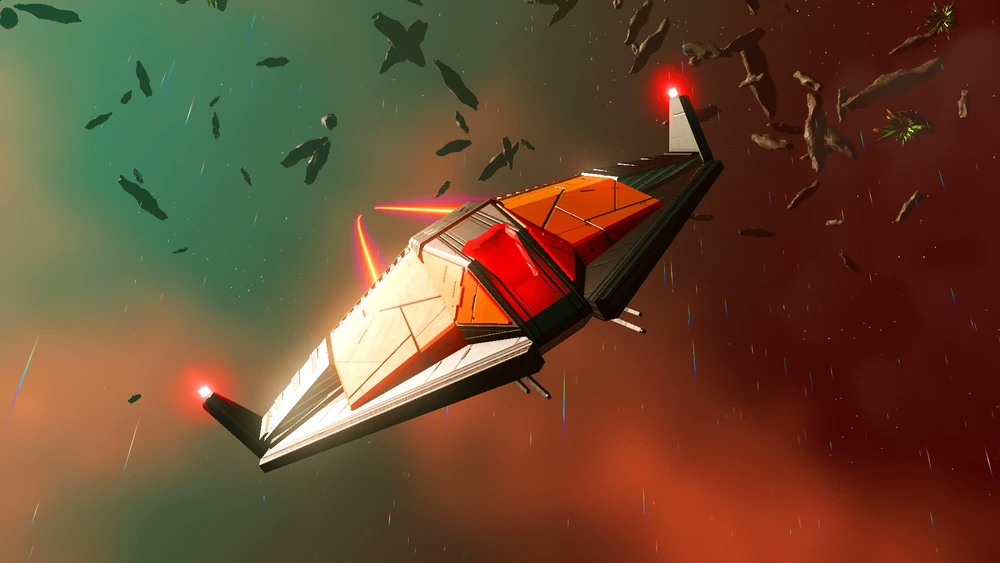
 fresh arch
gracias
sacred apex
 fresh arch
Hmmm then no, I don't think this is available to players
And I dont recall any mod adding it
fresh arch
Step Mods | Change The Game
Here's how to get started
But going after player customisation as your first project, I wouldn't recommend that
sacred apex
oh ok
fresh arch
Not sure who asked since it was some time ago
But I think it's better to put it here instead of main channel
Custom Nexus missions roll as QS missions and count towards the limit


@timid burrow I think it was you and someone else who talked about this
If not, apologies for the ping
~~or not  ~~
~~
 timid burrow
It was I
half arch
fresh arch
<@307367785246228480> I think it was you and someone else who talked about this
the other day i had asked if they count towards the limit with regular quests, or if you'd be allowed to do both that day.
ie. if when your custom one slots in at the bottom like you had shown, still counts towards the daily limit, or if it rewards QS without interfering and allows both for that day
 dapper aurora
is there a mod i can use to get rid of the sentinels
 serene ember
dapper aurora
is there a mod i can use to get rid of the sentinels
serene ember
dapper aurora
is there a mod i can use to get rid of the sentinels
Creative mode
sacred apex
serene ember
Creative mode
frfr ong
fresh arch

Nexus Mods :: No Man's Sky
This tool creates an uncompressed mod for the NEXUS geometry (PC) files to help mitigate a lag issue when leaving planets.
dapper aurora
serene ember
Creative mode
Creative mode does nothing to remove them from the game
serene ember
dapper aurora
Creative mode does nothing to remove them from the game
Stops em from attacking
tender quiver
fresh arch
https://www.nexusmods.com/nomanssky/mods/2812
this mod is up to date and functioning right
yeah he sent that for me earlier
tender quiver
i just wanted to know if it was gonna transfer the performance deficit somewhere else
round sinew
This tool creates an uncompressed mod for the MODELS\SPACE\NEXUS\PARTS\ geometry (PC) files, which have been identified as the cause for the lag/stutter that occurs when leaving a planet's atmosphere and should mitigate that issue.
round sinew
tender quiver
i just wanted to know if it was gonna transfer the performance deficit somewhere...
no, it eliminates the issue
well, actually, mb - page says "should mitigate that issue"
tender quiver
i mean even if it cuts the stutter in half i’ll be happy
steel crypt
Just depends on how fast/threaded your CPU is vs your storage. Will make it worse for some, better for others.
round sinew
ok, good to know a little more 🙂
round sinew
tender quiver
im not sure im following these instructions
what method did you go with?
tender quiver
round sinew
what method did you go with?
the first one
round sinew
the exe, or the powershell script
tender quiver
the exe
round sinew
Once complete it will inform you that the mod generation was successful and where it has been installed.
round sinew
where was it installed?
round sinew
post full path
tender quiver
i removed hold on