#helpdesk-selive
1 messages · Page 193 of 1
 violet dock
I'll try to find out how to do it (:
I'll be back if I run into problems lol... Thanks!!
Aiiiii, I'm running into this problem now 😩
 ocean rivet
violet dock
I'll try to find out how to do it (:
ocean rivet
violet dock
I'll try to find out how to do it (:
you have to be logged in on your obs client first
violet dock
ocean rivet
you have to be logged in on your obs client first
I think I am... Everything else related to SE, is connected... Activity feed/chat
ocean rivet
violet dock
I think I am... Everything else related to SE, is connected... Activity feed/cha...
try with this link: https://www.twitch.tv/popout/sk1ll/reward-queue (replace sk1ll with your own channel name)
violet dock
yep, that's what I did... same issue
ocean rivet
is it your own channel?
violet dock
yep haha
 signal glade
my active feed is frozen it doesn't show any of my new subs and donations
ocean rivet
violet dock
yep haha
weird, try relogging
 full thunderBOT
@signal glade Please provide your account ID found at the top of this page: https://streamelements.com/dashboard/account/channels This ID is public info and safe to share here.
signal glade
60117f9de6daa8cbfd8a83a9
violet dock
ocean rivet
weird, try relogging
damn.. same problem.. Access Denied... I've found a workaround - using Twitch Activity Feed, and filtering to only see the Reward Requests
ocean rivet
violet dock
damn.. same problem.. Access Denied... I've found a workaround - using Twitch Ac...
thats weird, I tried and it works on my end but glad that you found a workaround!
violet dock
ocean rivet
thats weird, I tried and it works on my end but glad that you found a workaround...
ohhh you were right... I was logged in on SE side, but on OBS side I wasn't logged in to twitch... I just added a dock of twitch, logged in, and it solved the problem 🙂 THANKS
 mortal compass
I am appalled. As a gamer and a computer scientist. Mostly computer scientist. Gamers are hysterical these days...
😄
 white lagoon
heyy so i have no clue of how to use the obslive app, i can't get anything i add to show and it's too confusing, the only thing that got added was my kappamon lol
mortal compass
white lagoon
heyy so i have no clue of how to use the obslive app, i can't get anything i add...
#YoutubeIsYourFriend
full thunderBOT
@white lagoon To add your overlays to OBS, add a new browser source in your scene. Paste your overlay URL in the browser source properties, set the dimensions to 1920x1080 (unless you changed them on the website) and check Shutdown source when not visible. https://youtu.be/KDvLynUqXI4
mortal compass
but your question is ambiguous, I would love to help, but it seems like you skipped the introductory tutorials...
maybe someone else has a better answer for you 😉
 tender python
white lagoon
... so google it
tender python
white lagoon
... so google it
You'd be surprised how many people come in here
"how do I use OBS"
while not that exact question
There's 90% very basic functionality that gets asked, over and over
and that bot response, tells you how to add the overlay to OBS
and OBS.live, is nothing but OBS Studio - but with SE integration. It doesnt alter OBS in it's core functionality - the way that SLOBS for example, is just a fully forked sideways project as of this time.
 ebon crest
I'm having a heck of a hard time getting the overlay to show up. I followed the youtube video instructions; and it is never showing up. Thoughts?
full thunderBOT
@ebon crest Please provide a proper screenshot with the issue visible. If not sure how to take a screenshot, you can check here: https://www.take-a-screenshot.org
ebon crest
full thunder
<@!120666895669133312> Please provide a proper screenshot with the issue visible...
screenshot with OBS showing.
That is with one of the stock overlay super themes; but I also tried with several other types of stock overlay themes
 keen musk
No worry if you couldn’t figure it out. I’ll live!
tender python
Try this
full thunderBOT
@ebon crest OBS > Settings > Advanced > Scroll down > Enable or disable Browser Source Hardware Acceleration, depending on its current state > Restart OBS
https://i.imgur.com/ggMe9ZE.png

 rugged quail
any ideas how to fix this?
the OBS chat widget works, just not the streamelemtns one
 cyan reef
try reconnecting your acocunt
rugged quail
first thing i tried, i will give it a round 2
cyan reef
okey
rugged quail
oooo
cyan reef
it work?
rugged quail
there's two places for account link
cyan reef
lmao
cyan reef
yea
now can someone tell my why i have a low bit rate i have the power in my pc its just low
and when i turn up my bit rate the stream gets chopper
full thunderBOT
@cyan reef Use the Twitch Bandwidth Test to find the best Twitch server to stream to. Set Duration to Medium. You can uncheck any regions you're not near.
After the test completes, click the Share Result button to upload a screenshot, which can then be copied and pasted here.
Get Twitch Test from https://r1ch.net/projects/twitchtest.
rugged quail
get to da choppah
cyan reef
lmao
cyan reef
yea
rugged quail
and you see low bitrate in OBS?
cyan reef
and i got 2 rtx2080 supers
rugged quail
sound like a network issue
rugged quail
maybe issue on other end
cyan reef
im gonna turn it up to 300 download and 30 upload soon
rugged quail
what about youtube stream
cyan reef
gross
rugged quail
worth a test lol
cyan reef
u right thos
full thunderBOT
@rugged quail StreamElements menu, on top of OBS > Logout > Login
 wise silo
If the above doesnt work, please re-state your issue for me real quick
rugged quail
ty @full thunder it's working now
cyan reef
me or boggers
wise silo
Both of you 
full thunderBOT
@cyan reef Please provide a log from your last stream. To do this, in OBS go to Help > Log Files > Upload Last Log File and paste the link to the log file here.
wise silo
cyan reef
merry chrismas lmao
https://obsproject.com/tools/analyzer?log_url=https%3A%2F%2Fobsproject.com%2Flogs%2FkH_e6fMS9iTjAC_2
OBS (Open Broadcaster Software) is free and open source software for video recording and live streaming. Stream to Twitch, YouTube and many other providers or record your own videos with high quality H264 / AAC encoding.
Youve got a number of issues that could be causes.. well issues.
Id suggest fixing everything on that list and checking back with us again if it continues.
cyan reef
well a few i watch on task manager and on my over clock settings and im no where near maxing my pc
wise silo
Thats not what I said.
wise silo
You have a number of issues regarding your setup that are listed on the link I sent that need fixed
ebon crest
full thunder
<@!120666895669133312> OBS > **Settings** > **Advanced** > Scroll down > Enable ...
Gave that a shot... no diference in behavior; still just a black box
full thunderBOT
@ebon crest Please provide a log from your last stream. To do this, in OBS go to Help > Log Files > Upload Last Log File and paste the link to the log file here.
cyan reef
@wise silo okey i compleated the following do another test?
ebon crest
full thunder
<@!120666895669133312> Please provide a log from your last stream. To do this, i...
cyan reef
wise silo
You have a number of issues regarding your setup that are listed on the link I s...
https://obsproject.com/tools/analyzer?log_url=https%3A%2F%2Fobsproject.com%2Flogs%2FbDnHLoDP0KjNbtb0
OBS (Open Broadcaster Software) is free and open source software for video recording and live streaming. Stream to Twitch, YouTube and many other providers or record your own videos with high quality H264 / AAC encoding.
wise silo
?
cyan reef
i re did some stuff the thing is a interfearance and the reason the game capture is there if for when i use my face cam which is inferead
but its usually hidden
wise silo
Youve still got 3 issues on there that need fixed.
Killer NIC, Not Admin, and your x264 preset.
cyan reef
i dont recorde dose h264 still effect it
i cant spell:(
so the x264 i out it lower because i use softwear to encode and it said lower = better
when i was streaming it used 10% of my cpu
and games use 40 or so
https://obsproject.com/logs/PrXkBz1cuVXZ4w9b @wise silo
i dont touch my drivers or pc will do bad things
last time i did a graphics driver it broke my pc and i had to get a new 2080 super put in
but im still getting 2600 kbs
and i got it set at 3500
 wet cradle
so how can i get the little obs live media request box to work again? lol
seems to be a big problemoi with ppls
ocean rivet
wet cradle
seems to be a big problemoi with ppls
is it giving you an error or something?
 mint badge
Hello so I've been using OBSlive Streamelements for a while and I use Twitch. A month ago I wanted to test out streaming on youtube and I set up my settings to do so and it worked. Now when I try to stream on twitch with OBSlive this window to stream on youtube pops up and I don't know why. If I hit start streaming on this window it will stream on twitch, though now my activity feed window doesn't work or show the amount of viewers I have.
I have some screenshots as well:
Any help would be appreciated on why this is
ocean rivet
mint badge
Hello so I've been using OBSlive Streamelements for a while and I use Twitch. A...
You will need to create a new scene collection with your Twitch overlays and such
wet cradle
ocean rivet
is it giving you an error or something?
no it just pops up as a dark purple box with nothinhg in it, except the minimize, exit, and reload circle
mint badge
ocean rivet
You will need to create a new scene collection with your Twitch overlays and suc...
I tried making a new scene but it still has this youtube window pop up when I click start streaming
full thunderBOT
@mint badge Please logout of StreamElements at https://streamelements.com/logout and then login again to your account (Twitch/YouTube/Facebook).
mint badge
full thunder
<@!295402158118010880> Please logout of StreamElements at <https://streamelement...
It still has the youtube window pop up
ocean rivet
mint badge
It still has the youtube window pop up
are you sure you have twitch connected on your obs settings?
mint badge
ocean rivet
are you sure you have twitch connected on your obs settings?
Yes I linked my account and tried inputting my stream key
For Twitch
ebon crest
full thunder
<@!120666895669133312> Please provide a log from your last stream. To do this, i...
posted the log a bit ago, any thoughts?
 elder yarrow
how do i log into Facebook on StreamElements ?
ocean rivet
mint badge
Yes I linked my account and tried inputting my stream key
logged in on twitch from obs settings AND streamelements menu? sorry for insisting but it doesn't make sense that you keep getting that popup if you're not connected to youtube
full thunderBOT
@elder yarrow Please logout of StreamElements at https://streamelements.com/logout and then login again to your account (Twitch/YouTube/Facebook).
mint badge
Yes honestly at this point I'm just going to uninstall everything and try a clean install
ocean rivet
@elder yarrow StreamElements menu on OBS
ocean rivet
mint badge
Yes honestly at this point I'm just going to uninstall everything and try a clea...
yeah, that should definitely work
elder yarrow
OMG thank you.
I cannot see chat or anything on StreamElements like i used to and the only option is Twitch but i dont stream to twitch
Is any of you trust worthy enough to use my team viwer ?
Viewer ?
I need Help
ocean rivet
don't do that, try to learn from youtube guides instead
ocean rivet
elder yarrow
I cannot see chat or anything on StreamElements like i used to and the only opti...
did you log into your OBS.Live with your facebook account?
elder yarrow
Yes it asked me as my personal account i said yes then as my stream facebook creator page i clicked on the main one i use because i have 2 but im like right now just cannot see my chat bad timing but usually when i go live it doesnt matter my chat shows up.
It shows me my followers and activity log on the website just not the actual downloaded software
I downloaded it again we will see how this goes, if anything i cant find help or anything ill just find another software to use for facebook gaming.
Luckily i scared all my viewers away trying to figure this shit out.
ocean rivet
elder yarrow
Luckily i scared all my viewers away trying to figure this shit out.
I see that your session expired on OBS, try to dock out the activity feed and expand it to log in with facebook again
elder yarrow
I tried bro, thats exactly what i thought about but it wont scroll down farther than what its at.
i had that activity log covering both screens to see more options.
ocean rivet
and can you relog via the StreamElements menu?
elder yarrow
THANK YOU SO MUCH BRO I GOT IT!!!! YOU GOT IT!!!
 hybrid pilot
hi i've been stream for close to 7 months a never had this issue till about a weekago. Now its contently saying encoder overloaded and i drop FPS none stop and my stream is freezing and lagging and i'm panicing.
mint badge
Ok another question where do I find the Stream Information window? I want that so I can easily update my stream info
 karmic grotto
hybrid pilot
hi i've been stream for close to 7 months a never had this issue till about a we...
karmic grotto
hybrid pilot
hi i've been stream for close to 7 months a never had this issue till about a we...
any settings or hardware changes before the issue started?
karmic grotto
mint badge
Ok another question where do I find the Stream Information window? I want that ...
View > Docks (in obs)
hybrid pilot
@karmic grotto none
karmic grotto
its get encoder overloaded even with nothing opened just in time stream started? @hybrid pilot
hybrid pilot
@karmic grotto sometimes..the overloaded message comes and goes but its never gone for long and i have lowered all my settings trying to fix it
karmic grotto
what settings did u tried lowering?
 echo latch
Trying to help a friend get OBS.Live installed on a Mac and the download page only downloads the Windows EXE file. The announcement page said it would detect the OS, but it's not working for me, tried it on multiple Macs. How can I get the Mac version downloaded?
hybrid pilot
my bit rate, my frame rate, i'm down to 780 istead of 1080, even tried faster encoding
karmic grotto
what encoder did u use?
hybrid pilot
my amd and i tried software as well on fastest
full thunderBOT
@hybrid pilot Please provide a log from your last stream. To do this, in OBS go to Help > Log Files > Upload Last Log File and paste the link to the log file here.
mint badge
karmic grotto
View > Docks (in obs)
The option does not show up
 tulip hamlet
mint badge
The option does not show up
tulip hamlet
mint badge
The option does not show up
You must be logged in in Settings>Stream for it to appear.
hybrid pilot
the link would just be to me testing things a billion times
wet cradle
ocean rivet
is it giving you an error or something?
no it just pops up as a dark purple box with nothinhg in it, except the minimize, exit, and reload circle
full thunderBOT
@hybrid pilot 1) Restart OBS
2) Start your stream/recording for about 30 seconds. Make sure you replicate any issues as best you can, which means having any games/apps open and captured, etc.
3) Stop your stream/recording.
4) Select Help > Log Files > Upload Current Log File. Copy the URL and paste the link here.
Note: If you do not see an obsproject.com URL, you will need to update OBS Studio to version 22+.
hybrid pilot
okay
echo latch
echo latch
Trying to help a friend get OBS.Live installed on a Mac and the download page on...
https://streamelements.helprace.com/i997-obs-live-support-for-mac/4 Last post on this page says the page will detect the OS, but it's not. Is there a link I can use to download manually?
hybrid pilot
tulip hamlet
hybrid pilot
https://obsproject.com/logs/fXWskDaLklhzI0uT
https://obsproject.com/tools/analyzer?log_url=https%3A%2F%2Fobsproject.com%2Flogs%2FfXWskDaLklhzI0uT
Your log shows a very significant GPU overload. Please see the "GPU Overload Issues" link in the analysis for various steps you can take to work with this.
OBS (Open Broadcaster Software) is free and open source software for video recording and live streaming. Stream to Twitch, YouTube and many other providers or record your own videos with high quality H264 / AAC encoding.
 lethal tapir
I have put in custom gifs and sounds for some of the alerts, however they still use the default animation and sound that SE start you with. the subscriber and cheer alerts do this to be specific
tulip hamlet
lethal tapir
I have put in custom gifs and sounds for some of the alerts, however they still ...
Edit the variations, not just the main alerts.
lethal tapir
ooohh, i have smooth brain, ty
tulip hamlet
echo latch
https://streamelements.helprace.com/i997-obs-live-support-for-mac/4 Last post o...
lethal tapir
ive edited the variations, the cheer now works but the subscriber one still doesnt
 stoic oracle
Hey guys quick question - I’ve imported all my scenes from SLOBS, is it possible to convert them to a browser source, or do I need to rebuild completely on the overlay editor? Thanks!!
 shy mountain
If you've used the OBS.Live importer, the SLOBS scenes should already be overlays in "My Overlays"
and then you just add the overlays to OBS
stoic oracle
shy mountain
If you've used the OBS.Live importer, the SLOBS scenes should already be overlay...
Unfortunately the import tool kept freezing after multiple tries, so I just did the obs manual import and they are just physical scenes so they aren’t on the my overlays...still using a lot less CPU than slobs, but I’d like to go the full distance with browser sources instead!
shy mountain
Its most likely freezing due to:
- local file that you have is above 30mb
- copyrighted assets to SL
stoic oracle
shy mountain
Its most likely freezing due to:
- local file that you have is above 30mb
- copy...
Hmm interesting that would make sense I do have some big video files on those scenes, but no SL assets! Appreciate the insight very much!!
 tardy fog
Hi, which is better x264 or nvenc?
full thunderBOT
@tardy fog There are no "best settings".
Please understand that every setup will be very different.
Any guides or videos that claim otherwise are misinforming. Your best option is to start with a base and adjust as necessary.
You can run the OBS auto-configuration tool. To use the auto-config, click on the Tools menu in OBS, select Auto-Configuration Wizard, and then just follow the on-screen directions.
You can use this tool to get baseline settings for your hardware and adjust as necessary from there.
Test, test, and test again. We are happy to offer suggestions for any issues you may be having afterward, but not a list of settings.
Thank you
tardy fog
when i stream and use x264 my game is so blurry and low fps. But when i use nvenc my game is working good but my stream not
thats my problem
full thunderBOT
@tardy fog Obs.live is a plugin for OBS Studio for the best OBS support, please join their Official Discord @ discord.gg/obsproject
tender python
tardy fog
when i stream and use x264 my game is so blurry and low fps. But when i use nven...
my guess poopoo x264 setup vs Nvenc.
Tl-dr: Nvenc has less overhead, X264 needs more raw power 🤷
x264 is still superior over NVenc, but ⬆️
signal glade
my active feed is frozen it doesn't show any of my new subs and donations
full thunderBOT
@signal glade StreamElements menu, on top of OBS > Logout > Login
signal glade
that didn't work
shy mountain
Are you on Youtube?
signal glade
yes
shy mountain
Due to changes by Youtube there can be a delay up to 4 hours with subscriber notifications. This is the new intended way for receiving events from Youtube by their design.
signal glade
ok
shy mountain
You are also using SL's tipping link, so we won't be showing tips from that link
different company
 lapis sinew
I've just imported my alert box from streamlabs to streamelements however when testing the alert box it appears scuffed and in the top right corner despite being put to 1920x1080 on both obs and streamelements editor
any advice? please and thank you
shy mountain
You still need to someone adjust the overlay, as it seems to have its setting set to 1920x1080, but its actually 800x700 or something similar
3 dots -> properties
adjust size, edit into the overlay and adjust the widget position as well
lapis sinew
@shy mountain ugh bless your soul thanks!
 scarlet brook
Does anyone know where the qr code is on 26.1.1?
 toxic fern
@scarlet brook We don't have a qr code for our stuff 0.o
scarlet brook
Im trying to connect to streamlab deck on my phone but it wont let me connect manually
lethal tapir
so the audio on the subscriber alert now works but the image still doesnt. anyone have a solution for this?
 waxen fern
Hey, broadcast chat is unavailable in obs, how to reapir? "Error loading data.."
rugged quail
i cant change my streamingplatform form youtube to twitch
full thunderBOT
@rugged quail StreamElements menu, on top of OBS > Logout > Login
rugged quail
thanks
waxen fern
waxen fern
Hey, broadcast chat is unavailable in obs, how to reapir? "Error loading data.."
relogin fix it
 prime vector
hello! quick thing to ask! how do I copy an overlay from a channel to another one
found it nvm lol
 mint furnace
hey, i got some problems setting up my overlays, can someone help me ?
full thunderBOT
@mint furnace To add your overlays to OBS, add a new browser source in your scene. Paste your overlay URL in the browser source properties, set the dimensions to 1920x1080 (unless you changed them on the website) and check Shutdown source when not visible. https://youtu.be/KDvLynUqXI4
 slow valve
hey guys is there vertical alignment for text in streamelements?
if so how do i do it
prime vector
I have been working for the past 4 hours I restarted my pc and all the overlays are gone
ughhh
tender python
if you saved them in the dashboard overlay on the website
they';re there.
Just obs done goofed.
 gaunt flax
Hey all, can someone explain me how I can make the bttv emotes shown on my chat from elements? there only is the name of the emotes as text
 cinder echo
hi guys, i just installed obs live and started to use streamlabs. while getting everything set up i noticed that the output chat is shown black instead of white now.... i want to change it back but i dont know how. can some one please help me with this? 😦
 misty trench
I am getting a sound delay of 2 to 3 seconds only on Display Capture. Started yesterday, any way to fix?
 cloud comet
hi guys, maybe one of you can help me out. When i'm triggeirng my custommade alerts, it seems they freeze after 1 second and 'unfreeze' 1 second prior the end of the animation. In the overlays section fo streamelements it all looks fine, but when the overlay is in OBS.live, it has the freezing issue 😥
cloud comet
misty trench
I am getting a sound delay of 2 to 3 seconds only on Display Capture. Started ye...
checked your soundcard settings? perhaps use ASIO if you aren't yet.
misty trench
cloud comet
checked your soundcard settings? perhaps use ASIO if you aren't yet.
how do I get to that, and it worked fine until 2 days ago. This hasn't been reported much so I guess only an issue on my end?
cloud comet
check your soundcard configurations just to be sure
misty trench
The thing is the Game Capture works fine, only Display Capture has a 2-3 second delay
cloud comet
hm
 ionic peak
Is this all i should do? am i ready to stream?
misty trench
so it must be an OBS issue? I am not running post processing on either
ionic peak
i still did not use obs to stream so it will be my first time
cloud comet
ionic peak
Is this all i should do? am i ready to stream?
insert your streamkey and hit start streaming
cloud comet
misty trench
so it must be an OBS issue? I am not running post processing on either
doesn't need to, could you your system, that's why i propose to check your soundcard configurations
ionic peak
stream key?
cloud comet
otherwise you can always (off)sync your audio
ionic peak
u mean sign in?
cloud comet
in the advanced audio settings of OBS
misty trench
cloud comet
doesn't need to, could you your system, that's why i propose to check your sound...
where do I find this setting since I'm not good with this stuff
cloud comet
ionic peak
u mean sign in?
check preferences > stream
cloud comet
misty trench
where do I find this setting since I'm not good with this stuff
in the configurations of windows/ac
mac*
ionic peak
cloud comet
in the advanced audio settings of OBS
how to enter there or find it?
i am in window
cloud comet

▶ https://mrc.fm/slobs ◀ 🔈 Download Streamlabs OBS and start live streaming!
▶ https://mrc.fm/presets ◀ 🎙 Adobe Audition Presets! 🎧 The audio presets I use.
▶ https://mrc.fm/learn ◀ 🎚 Learn how to master audio production. 🎤
this may help
cloud comet

Windows Central
In this guide, we show you the steps to customize input and output settings on Windows 10 with the new Sound page in the Settings app included with the April 2018 Update.
ionic peak
what i will i learn in here
ionic peak
cloud comet
https://www.windowscentral.com/how-manage-sound-settings-windows-10-april-2018-u...
for me?
ionic peak
cloud comet
https://www.youtube.com/watch?v=KTrS5l0zKQg
this for me right?
cloud comet
no starbeastGG
ionic peak
So nothing for me 😦
 misty trench
cloud comet
https://www.windowscentral.com/how-manage-sound-settings-windows-10-april-2018-u...
misty trench
cloud comet
https://www.windowscentral.com/how-manage-sound-settings-windows-10-april-2018-u...
thank you
 pallid sapphire
Hey there. Configuring the Widget “Social Media Rotator” I tried to change the upload icon for one of the socials using the icon website provided. I uploaded the new icon and saved it but it does not change on the actual widget in OBS. It’s changed and saved on streamelements though
Nvm I figured it out .... I got problems haha all fixed ty anyway
cloud comet
Here's my issue in terms of the alert freeze. Works fine in streamelements overlay, but in OBS.live it freezes after a second and unfreezes a second prior the end of the animation. Animation's are 'normal quality'. 500kb-1mb max. This happens on other devices, so I guess it's a thing between streamelements and OBS(.live).
cinder echo
@ionic peak you dont need a stream key, thats old school stuff. nowadays u will simply link ur YT, Twitch or what ever acc with OBS and you are good to go
ionic peak
Oh k
cinder echo
could u do it?
misty trench
cloud comet
checked your soundcard settings? perhaps use ASIO if you aren't yet.
can u show me a image or something where to find this "ASIO"
rugged quail
Hey guys. I cant login to SE in Obs live. I enter my login and it shows that I must login again. Nothing works rn. The chat is also not working.
is it just me?
full thunderBOT
@rugged quail StreamElements menu, on top of OBS > Logout > Login
cinder echo
no im having problems with the chat as well. the color of the output text is super dark out of a sudden
 spark root
Hello, may I ask here for support about the ndi/dual stream setup?
full thunderBOT
@spark root Obs.live is a plugin for OBS Studio for the best OBS support, please join their Official Discord @ discord.gg/obsproject
 distant otter
Hi, Im having issues with OBS picking up a game when i have it set to capture specific windows, any reason why?
full thunderBOT
@distant otter Obs.live is a plugin for OBS Studio for the best OBS support, please join their Official Discord @ discord.gg/obsproject
 harsh timber
where do i find the overlay option cuz i made one and dont know how to use it
full thunderBOT
@harsh timber To add your overlays to OBS, add a new browser source in your scene. Paste your overlay URL in the browser source properties, set the dimensions to 1920x1080 (unless you changed them on the website) and check Shutdown source when not visible. https://youtu.be/KDvLynUqXI4
harsh timber
im sorry but that just didnt help
 glass nimbus
harsh timber
im sorry but that just didnt help
glass nimbus
harsh timber
im sorry but that just didnt help
go to the "source" box near the bottom left. click the plus, and select "browser". Pick a name so you can identify it later, and then paste the link for the overlay in the provided area.
 lament ibex
Hey everyone! For the past 5ish days, i've been having an issue with obs. live. My bitrate randomly goes to 0 and then to start the stream back up I have to exit out of obs to hit go live again. This happened 3 times in the span of one hour for me today. Anyone know what is up or have any solutions?
wise silo
Please send a log of a stream that contained this issue
full thunderBOT
@lament ibex Please provide a log from your last stream. To do this, in OBS go to Help > Log Files > Upload Last Log File and paste the link to the log file here.
lament ibex
wise silo
That is not a log of a stream.
lament ibex
Really? This was when I streamed.
wise silo
lament ibex
Really? This was when I streamed.
https://obsproject.com/wiki/Dropped-Frames-and-General-Connection-Issues heres a pretty general guide that might help. Without a log that the issue has happened on not much more I can do to help.
This guide contains every piece of dropped frames / disconnect / network related advice we can give. If you really truly honestly super duper actually 100% tried everything in…
lament ibex
I appreciate that.
 coral sierra
Hi hi! I'm having trouble with alerts not coming through from Tiltify. I have it integrated, the overlay is live, but there are no on screen alerts. I don't suppose anyone knows where I can find troubleshooting information or how to troubleshoot this. (I moved this from the Twitch help desk because I figured I had it in the wrong spot.)
full thunderBOT
@coral sierra Please ask your question in one helpdesk channel only. A support volunteer or StreamElements staff member will assist you as soon as they are available. Asking in multiple places will only result in confusion, not faster answers. Thank you for your patience.
coral sierra
I'm sorry. I did delete it in the other channel when I realized that I made a mistake.
tulip hamlet
It wasn't a mistake.
 quick atlas
ionic peak
Guys need help
when i streamed
game audio was not there
quick atlas
ionic peak
Guys need help
when i streamed
game audio was not there
I'd check your OBS sources and make sure the audio is coming through properly. There should be some audio source that the game is playing through
coral sierra
tulip hamlet
It wasn't a mistake.
Oh. I'm really sorry for the confusion. It sounds like the bot will be unhappy if I move it again.
ionic peak
quick atlas
I'd check your OBS sources and make sure the audio is coming through properly. T...
finally, ok thx
 orchid onyx
my bot is tstill not working
lament ibex
Anyone know if I should use the H264/AVC Encoder (AMD Advanced Media Framework) or the x264 Encoder?
These are my specs:
CPU : AMD Ryzen 5 3600 6 core 12 thread; GPU: MSI Gaming Radeon Rx 5700 Boost Clock: 1750 MHz 256-bit 8GB (RX 5700 Evoke OC)
ocean rivet
lament ibex
Anyone know if I should use the H264/AVC Encoder (AMD Advanced Media Framework) ...
x264 will provide much better quality, AMD encoders are still far behind NVENC
you can do some local recordings with both encoders and compare them though
 jovial edge
how do i stream to youtube? facebook keeps popping up and i dont see a youtube/youtube game selection
i have a youtube RTMP and RTMPS
full thunderBOT
@jovial edge StreamElements menu, on top of OBS > Logout > Login
jovial edge
sweet. thank you!
orchid onyx
can someone help with my bot its not working again
quick atlas
orchid onyx
can someone help with my bot its not working again
Something specific not working?
full thunderBOT
@orchid onyx If your commands recently stopped working and you're using OBS.Live and a custom bot name do the following:
- In OBS.Live, click on the hamburger menu (three stripes) at the top left of your activity feed
- Click on Stream Settings > Custom bot name
- In the Custom bot name field select Set custom bot name, not your already existing username (with capital letters). Note: If you already connected an account that way, the third entry will show as the account name (see image https://i.imgur.com/sO7fWOX.png).
- Scroll a bit down and click on the purple Connect Custom Bot Account button
- Log in as usual and Authorize the custom bot name
- Back in the Activity feed, click on the Send Test Message button and check if your custom bot name starts working again

 stiff hearth
Are you able to get all chats like from YouTube Facebook and twitch all in the chat box when you go live or is it only one at the time
tulip hamlet
stiff hearth
Are you able to get all chats like from YouTube Facebook and twitch all in the c...
One at a time. StreamElements does not have multistreaming support.
stiff hearth
Got it thanks
 cinder flower
can someone help me debug my bot? my custom bot isn't working. i've tried connecting it and it won't change the custom bot connection after signing the bot in through twitch. It also won't allow me to send a test message because it won't connect after the last step.
full thunderBOT
@cinder flower "1) Right click on your OBS desktop shortcut and open the Properties
2) In the Target field, add the following to the very end: --remote-debugging-port=40404 (don't forget to add a space before the current path)
3) Open OBS (or restart if it was open)
4) Open your web browser and type in: localhost:40404
5) Click on StreamElements - Activity feed
6) Navigate to the Console tab
7) Type the following into the console and hit enter: store.customBot.removeCustomBotIntegration()
8) Try setting the custom bot name
9) Remove the additional flag in step 2 from your shortcut properties."
 fallow surge
Am i able to use obs to make me louder in discord? Because my mic is kinda quiet and i want people to be able to hear me
 elfin oasis
I need some help with my OBS please. Tonight while streaming, I got the notice "Welcome to Chat" in my panel. I had been streaming for a few hours already and then my custom bot disconnected. I went into Stream Elements and "parted" the bot and reconnected and it didn't reconnect the custom bot. I had to revert back to Stream Elements bot. I don't want to stop my stream to restart the program. Any ideas what I can do to keep this from happening?
 cunning jolt
@slow valve if you open the text properties and scroll down you can check the vertical alignment of your text
ive been having issues on uploading sounds via streamelements overlay editor for my alertbox. all audio files were under 100kb and tried using both mp3 and wav. i can upload sounds on the website tho
quick atlas
cunning jolt
ive been having issues on uploading sounds via streamelements overlay editor for...
are you getting any errors when you try?
cunning jolt
yeah, it just starts the upload but immediately fails
no specific error message
ran obs as admin as well and still same error
quick atlas
cunning jolt
no specific error message
Are you using chrome? Also, you mentioned you can upload sounds on the website, but not the editor. The editor is part of the website, so i'm not sure what you mean there
cunning jolt
my workaround was using the streamelements store and uploading sounds that way, editor as in opening the overlay editor from inside of OBS
quick atlas
cunning jolt
my workaround was using the streamelements store and uploading sounds that way, ...
I'd suggest you do the overlay editing in a web browser (chrome) for the best results. The editor is know to not be functional in other browser forms.
 hexed canopy
Today all of my overlays and sound alerts were completely functioning, but they are not playing anymore. I can physically see the sound bars in the mixer light up, but I don't hear anything (using audio monitoring) or even in the desktop audio. My audience also didn't hear any sound alerts or overlay sounds during the stream (they did hear the game and music though)
 honest echo
@hexed canopy check your audio devices on OBS (settigns > Audio)
hexed canopy
honest echo
<@!688565623814750243> check your audio devices on OBS (settigns > Audio)
I did. The Desktop Audio is default, and the Monitoring device is my headset.
See here:
 cunning sable
Hi there! Could i get some help from someone about obslive?
full thunderBOT
@cunning sable Welcome to the helpdesk! Please let us know how we can assist you today and a support volunteer or staff member will assist you as soon as they are available. Thank you for your patience.
cunning sable
When i first launched stream elements obs live it let me see all this fancy stuff like the chat
when i boot it up now i only see what looks like normal obs
and id like to be able to see the chat and stuff
honest echo
hexed canopy
I did. The Desktop Audio is default, and the Monitoring device is my headset.
you are able to hear the alert or any sound on the overlay when you open it on your browser?
tulip hamlet
cunning sable
and id like to be able to see the chat and stuff
StreamElements menu at top of OBS.
hexed canopy
honest echo
you are able to hear the alert or any sound on the overlay when you open it on y...
When I use my browser, I can hear the alerts normally. I can also see the Overlay in the OBS Audio Mixer move.
tulip hamlet
hexed canopy
When I use my browser, I can hear the alerts normally. I can also see the Overla...
That means your overlays are playing through a different device than you're listening through. Check your OBS audio settings, and whether or not you've checked "control audio via OBS" in the browser source properties.
hexed canopy
tulip hamlet
That means your overlays are playing through a different device than you're list...
They are all checked.
cunning sable
tulip hamlet
StreamElements menu at top of OBS.
where do i click after hitting stream elements menu at top?
hexed canopy
I re-installed stream elements obs, and it appears to have fixed itself.
cunning sable
i tried re-installing it and it didnt fix it
also when i hit bots and tipping set up it gets stuck
full thunderBOT
@cunning sable StreamElements menu, on top of OBS > Logout > Login
cunning sable
thank you!
 small glade
can anyone tell me why it shows these random users in my chat in obs live but they aren't actually in my twitch chat on twitch.tv? are they fake? what's going on - been happening quit ea bit lately - thanks
shy mountain
What random users?
small glade
i'm not sure they just show up in my chat every night it seems but if i go to the actual twitch page they are not in the chat
like they show in obs live in obs studio in the users section of the chat
but when i go to my actual twitch link via browser shows only 1 maybe 2 viewers
yet there's like 12 people in my chat on obs live
none of them ever say a thing
shy mountain
Probably seeing the harmless chat bots
 haughty beacon
Hi I enter your software on the right I have the chat and it is written to me that I am trying to connect Your browser or application may not be secure.
Can you help me with that?
Thanks
full thunderBOT
@haughty beacon StreamElements menu, on top of OBS > Logout > Login
haughty beacon
Hi
It still tells me it's not secure
small glade
Chat bots? @shy mountain they weren't there before
haughty beacon
no
small glade
How do I get rid of them?
shy mountain
You can't really. They are harmless to begin with, but always present
small glade
They are just a false sense of people being there when they aren't I don't like that
They were never there until couple nights ago though that's what I'm saying
shy mountain
the viewer list has never been a good way to see how many viewers someone has
especially for affiliates
its riddled with chat bots that just don't do anything to benefit anyone
small glade
So how is the best way to tell
shy mountain
there was a site that listed those chat bots, but i can't remember which one it was
 shadow bison
hi, i am running windows 10 on MAC through bootcamp . OBS isn't picking up any of the audio (spotify) through my headset
shy mountain
but electricalskateboard or something like that is one of them
full thunderBOT
@shadow bison Obs.live is a plugin for OBS Studio for the best OBS support, please join their Official Discord @ discord.gg/obsproject
shy mountain
@haughty beacon what OBS.Live version are you on? (bottom right of OBS)
haughty beacon
26.0.2
shy mountain
thats OBS Studio and thats located in the top left
haughty beacon
yes 26.0.2
haughty beacon
20.12.23.684
shy mountain
I would recommend to update your OBS Studio version
OBS (Open Broadcaster Software) is free and open source software for video recording and live streaming. Stream to Twitch, YouTube and many other providers or record your own videos with high quality H264 / AAC encoding.
and then install OBS.Live
haughty beacon
ok
full thunderBOT
@hoary glacier If your commands recently stopped working and you're using OBS.Live and a custom bot name do the following:
- In OBS.Live, click on the hamburger menu (three stripes) at the top left of your activity feed
- Click on Stream Settings > Custom bot name
- In the Custom bot name field select Set custom bot name, not your already existing username (with capital letters). Note: If you already connected an account that way, the third entry will show as the account name (see image https://i.imgur.com/sO7fWOX.png).
- Scroll a bit down and click on the purple Connect Custom Bot Account button
- Log in as usual and Authorize the custom bot name
- Back in the Activity feed, click on the Send Test Message button and check if your custom bot name starts working again
 hoary glacier
i have some special commands ie instagram
you guys thank you so much thats fixed my problem ❤️
 pastel sundial
Adding Twitch quick action to obs live. It was working before. and now is showing up blank/black
 full thunderBOT
@pastel sundial If you are not seeing the OBS Twitch integrations and have OBS.Live installed, please follow these steps:
- Make sure you are on the latest and greatest version of OBS.Live
- Exit OBS (make sure OBS is not running)
- Delete
%appdata%\obs-studio\plugin_config\obs-browser\obs_profile_cookies - Start OBS.Live
- Settings > Stream > Disconnect > Connect
pastel sundial
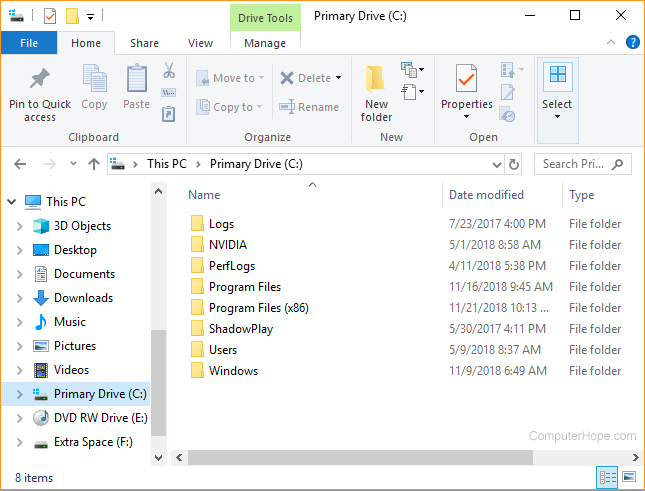
where do i put step 3 in?
toxic fern
Windows explorer.
shy mountain
file explorer
pastel sundial
uhh... where is that
toxic fern
 shy mountain
 upbeat sable
Hello! I've been using StreamelementsOBS for more than a year now and recently been having issues with OBS not responding (super slow) after copy pasting the URL from overlays and adding it to the scenes. Even if I had 1 overlay with lets say rotating events once I start up the stream frames drop immensely. But if i delete the single overlay everything is back to 60fps and running fine. Any idea what I can do?
This is my specs:
CPU: Intel® Core™ i9-10900k Processor
GPU: ASUS ROG Strix GeForce® GTX 1080
Motherboard: ASUS TUF GAMING Z490-PLUS (WI-FI)
Ram: Trident Z RGB - G.SKILL 16gb 3800MHz
full thunderBOT
@upbeat sable OBS > Settings > Advanced > Scroll down > Enable or disable Browser Source Hardware Acceleration, depending on its current state > Restart OBS
https://i.imgur.com/ggMe9ZE.png
upbeat sable
Ok I will try this and test stream thanks!
 obtuse edge
Hi! I am making a widget to have a sub bar, when i make this for some reason in tthe bar it shows I have 44 subscribers when the actual number is 16. How do I fix this? Thank you!
full thunderBOT
@obtuse edge To reset goals:
- from the Overlay Editor > Session data on top right (monitor symbol) > Goals tab > reset progress of desired goal
- from the Dashboard > Activity feed on the left > Widget data on the right > Goals tab -> reset progress of desired goal
Note: Goal widgets (progress) only counts up and doesn't go down automatically, if you lose followers/subs.
obtuse edge
Thank you.
obtuse edge
I have a source for all my alerts and goals, when i try to copy and paste (I only get paste as reference option) it into another scene, nothing shows. Any advice?
obtuse edge
Yeah, nothing is showing up when I do so.
shy mountain
Run an alert
obtuse edge
I did
shy mountain
@obtuse edge sorry, was AFK due to lunch break.
Do you see the alert on the original souce?
obtuse edge
no problem, i completely understand! Yeah I do
shy mountain
Try and delete the source entirely and re-add it
obtuse edge
the original or the pasted one?
shy mountain
and then right click it and copy -> right click into the other scene's source window paste as reference
all of them
obtuse edge
okay will try
 rapid umbra
Anyone know of a small program I can set to always run when windows starts that will play the sounds of my Streamelements alerts?
Worried if I just use a browser window I'll forget to run it and miss alerts or something
toxic fern
Assuming you've got audio monitoring set properly it'll output to both stream and your headset so you shouldn't miss it.
rapid umbra
I use two PCs, I was using an AUX cable to carry my alert audio from my stream PC to my gaming PC but I'd rather not do that if possible
I'd just like something that doesn't use too many system resources and will load up whenever I turn the gaming PC on
toxic fern
In that case you'd need to have an overlay with the alertbox open in browser. Because it'd get caught along with whatever is capturing the game sound you'd have to use some 3rd party program to reroute to your headphones only. That's something you could ask in the OBS server.
Specifically Tech-Talk.
 junior badge
Hello sorry if this is in the wrong place, my connections insist on disconnecting anytime I open obs studio, WiFi is fine, ethernet just disconnects all the time as soon as I open it
tender python
rapid umbra
I use two PCs, I was using an AUX cable to carry my alert audio from my stream P...
aux cable is the least amount of resources because that's just i/o. no program. nothing special. just a signal.
but you could always run something to start as a service.
🤷
shy mountain
Sorry about sounding blunt, but Google
issue doesn't seem related to our tools and/or obs.live
 lament crag
Google just gave me the “can I run two different hz monitors” and this channel doesn’t have a “general question” or “tech” channel and you are all way smarter than me haha so I figured I’d shoot my shot
shy mountain
#general-chat can be used for general tech questions
 acoustic delta
hey, been looking into starting to stream on Twitch.. been all over the board with the different stream applications, starting with OBS, then Streamlabs and now Streamelements/OBS, since I already made my entire overlay with a couple scenes in Streamlabs, how would I go about importing my already finished scenes in Streamelements/OBS?
tender python
lament crag
Google just gave me the “can I run two different hz monitors” and this channel d...
but your answer is yes
you can.
 nova scaffold
acoustic delta
hey, been looking into starting to stream on Twitch.. been all over the board wi...
nova scaffold
acoustic delta
hey, been looking into starting to stream on Twitch.. been all over the board wi...
Our OBS.Live has the import function in the top menu - Streamelements
Try that, this will allow you to import most of the settings and overlays.
acoustic delta
right.. the reason I'm asking is because it looks like the file format for importing scenes are different than what Streamlabs spits out
nova scaffold
acoustic delta
right.. the reason I'm asking is because it looks like the file format for impor...
The import tool will import most of the things
Just big files are an issue, over 30MB
acoustic delta
nova scaffold
The import tool will import most of the things
well, I understand what you're getting at, but as said, it looks like Streamlabs exports .overlay files, while OBS.Live only imports .json, .bpres, .xml and .xconfig files.. so there's no way for me to import the scenes I already created and I'd have to start over remaking those scenes?
toxic fern
OBS.Live doesn't export anything.
OBS on the other hand does.
Go to scene collections in the menu and select one then do export. You wanna do thatfor all of them.
acoustic delta
toxic fern
OBS.Live doesn't export anything.
I meant OBS, and I'm talking about importing 🙂
toxic fern
Same thing.
nova scaffold
acoustic delta
well, I understand what you're getting at, but as said, it looks like Streamlabs...
OBS.Live will grab the existing scenes from Streamlabs OBS and from Streamlabs service itself.
So you do not need to remake it, you just import the existing ones.
For the normal OBS Studio - exports there are compatible with OBS.Live.
acoustic delta
nova scaffold
So you do not need to remake it, you just import the existing ones.
i'm currently looking at the scene collection importer, but nothing is able to be added, as Streamlabs only exports a file format that OBS can't read, so I'm pretty screwed then?
toxic fern
Slightly incorrect.
Partly distracted fixing some dark o'clock chili so might be a couple minutes before explaining.
acoustic delta
toxic fern
Partly distracted fixing some dark o'clock chili so might be a couple minutes be...
tyt
toxic fern
The importer from OBS in scene collections is to do it for ones OBS personally exported. To grab stuff from SLOBS there's an option in OBS settings that can grab all of that and add it Rk OBS. OBS.Live does the same thing as well basically but is more geared towards the alertbox itself than it is scenes and sources.
acoustic delta
toxic fern
The importer from OBS in scene collections is to do it for ones OBS personally e...
Alright, where would I find this specific setting?
nova scaffold
acoustic delta
Alright, where would I find this specific setting?
OBS.Live - top menu, StreamElements > Import from other Services
 raw harbor
does the streamelements overlays work with stream labs obs?
nova scaffold
raw harbor
does the streamelements overlays work with stream labs obs?
It can, but we do not provide support for Streamlabs anything, so not guaranteed.
raw harbor
because i cant get it to work it works fine on stream elements when testing the notifications but streaming streamlabs obs doesnt work
so i have to redo all of it in streamlabs then?
full thunderBOT
We're not able to troubleshoot issues with using our overlays in StreamLabs OBS (SLOBS) as we don't have the tools to support their software. We recommend using OBS Studio or OBS Studio with our plugin OBS.Live.
raw harbor
ok is there a way to import the scenes ive made into obslive?
toxic fern
@acoustic delta Here then use the import option from Scene Collections option https://streamlabs-is-a.totallysuspicious.website/8T7MFaC.jpg
 acoustic delta
toxic fern
<@!148199436852527104> Here then use the import option from Scene Collections op...
acoustic delta
toxic fern
<@!148199436852527104> Here then use the import option from Scene Collections op...
Well, I got that far using the import from other services, but the imported scenes are all broken in both placement and graphics.. Lemme screencap for you
toxic fern
It's not a 100% guarunteed to work proper but it does safe part of the hassle.
 steady sable
unable to connect twitch account on OBSLIVE
acoustic delta
toxic fern
It's not a 100% guarunteed to work proper but it does safe part of the hassle.
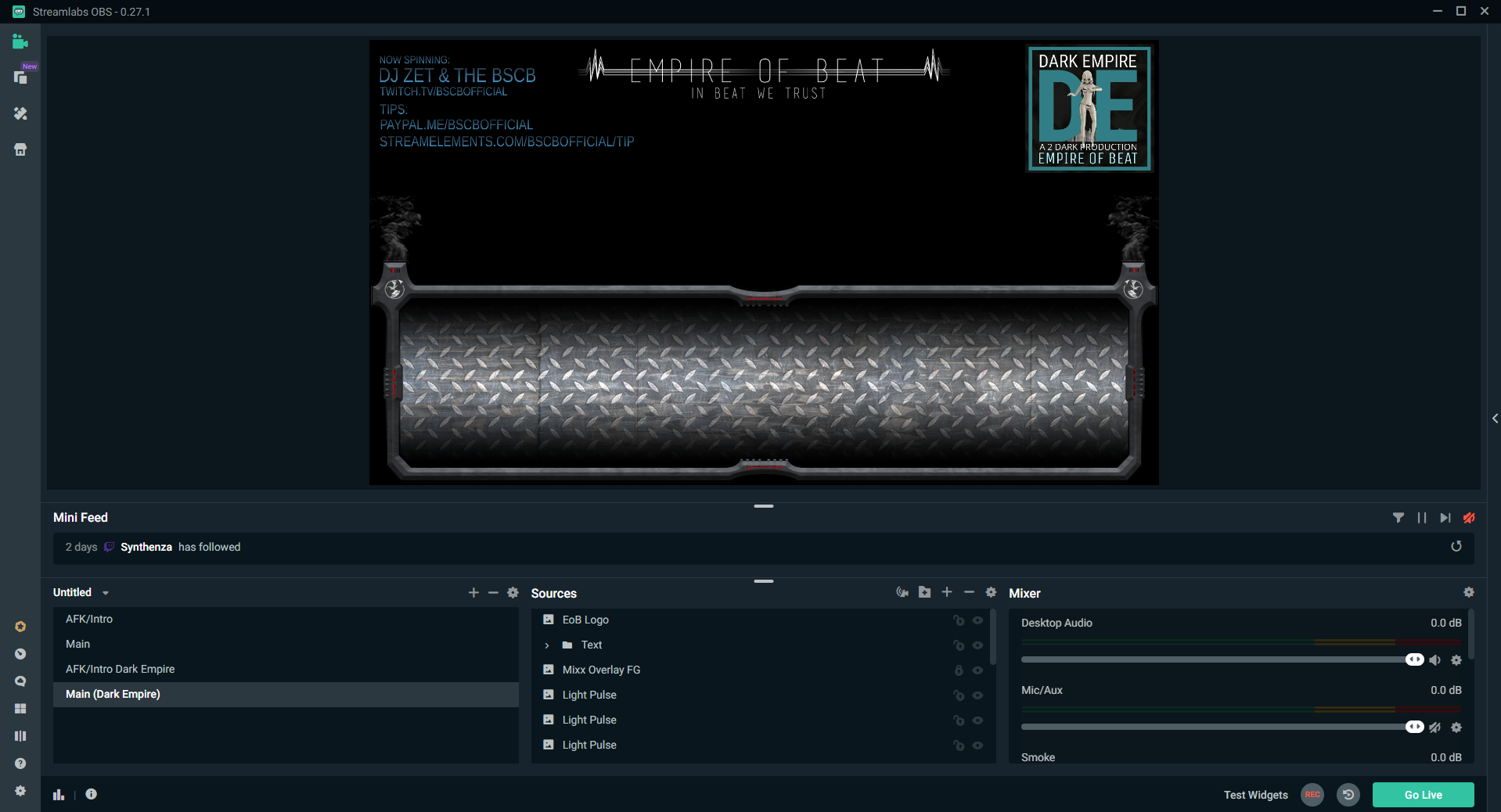
It looks like I might've done it improperly? This is the original scenes from SLOBS:
https://i.gyazo.com/426c2759b45f5e8224069fccc30eecd0.png
https://i.gyazo.com/b32675f6fb02ec664a7b2b5b2a3d47db.png
This is how it looks on OBS:
https://gyazo.com/a2ccbd6b1d2a484253ad0c7732aaadb2
https://gyazo.com/1f3bd620cbd2b1c3e57cf9f3f7df3ff2


 toxic fern
Do Ctrl+F with the browser source selected.
acoustic delta
toxic fern
Do Ctrl+F with the browser source selected.
I'm still missing over half my sources.. I might be able to fix it using the overlay editor
acoustic delta
toxic fern
Do Ctrl+F with the browser source selected.
Regardless.. Everything is so broken I have to start over remaking the scenes. A shame but I'll live 🙂 Thanks for trying!
cinder echo
@rugged quail hello there, i had similar problems.
- delet OBS-live
- delete the scene package
- download the scene again
- DON'T download OBS.live
tell me if it worked
 wide bane
i have a thing about the Streamelements bot thing in OBS.live, when i use it on my own name it doesn't work and when i close it it's back to streamelements and not my name, what can i do with that?
full thunderBOT
@wide bane If your commands recently stopped working and you're using OBS.Live and a custom bot name do the following:
- In OBS.Live, click on the hamburger menu (three stripes) at the top left of your activity feed
- Click on Stream Settings > Custom bot name
- In the Custom bot name field select Set custom bot name, not your already existing username (with capital letters). Note: If you already connected an account that way, the third entry will show as the account name (see image https://i.imgur.com/sO7fWOX.png).
- Scroll a bit down and click on the purple Connect Custom Bot Account button
- Log in as usual and Authorize the custom bot name
- Back in the Activity feed, click on the Send Test Message button and check if your custom bot name starts working again
wide bane
that doesn't work for me, i tried it but worked for a second and then it goes back to streamelements instead of the custom bot name, that's the problem
nova scaffold
wide bane
i have a thing about the Streamelements bot thing in OBS.live, when i use it on ...
Let's try that:
- Right click on your OBS desktop shortcut and open the Properties
- In the Target field, add the following to the very end: --remote-debugging-port=40404 (don't forget to add a space before the current path)
- Open OBS (or restart if it was open)
- Open your web browser and type in: localhost:40404
- Click on StreamElements - Activity feed
- Navigate to the Console tab
- Type the following into the console and hit enter: store.customBot.removeCustomBotIntegration()
- Try setting the custom bot name
- Remove the additional flag in step 2 from your shortcut properties.
This is a more advaned, "hard reset" type of fix
wide bane
ooh ok, but does it work as well with "Change to YoshidaMares" as bot name instead of the custom one? or is that not fixed properly? @nova scaffold
nova scaffold
wide bane
ooh ok, but does it work as well with "Change to YoshidaMares" as bot name inste...
Try the fix
toxic fern
Did you try the 3rd option from the first bit?
nova scaffold
it is supposed to fix both custom settings, your channel and 2nd channel
toxic fern
Otherwise that should've fixed it entirely.
wide bane
it didn't worked somehow after the fix
elfin oasis
elfin oasis
I need some help with my OBS please. Tonight while streaming, I got the notice ...
bump.
nova scaffold
wide bane
it didn't worked somehow after the fix
One more idea - go to the Twitch integrations and remove StreamElements from all channels that use the custom bot name
And then reconnect OBS.Live (relog) and set up custom bot name again
this will 100% fix it.
wide bane
now i see that my name is talking in chat, but last time when i clicked save it was gone, so scared to click it
 light berry
How I Change The Stream Name On Obs Studio?
 sick spruce
How do I fix this?
 worldly dune
my desktop audio isnt picking up ? ive tried reinstalling and reopening the program but nothing has worked
full thunderBOT
Obs.live is a plugin for OBS Studio for the best OBS support, please join their Official Discord @ discord.gg/obsproject
toxic fern
@sick spruce @worldly dune For both of you.
rugged quail
cinder echo
<@456226577798135808> hello there, i had similar problems.
- delet OBS-live
I got a fix for this without deleting obs since I have too much plugins and scenes.. When you open obs (always as admin) Just open it again! It shows that obs is already running, klick still open OBS! So you got two obs open now. Now close the first obs and the 2th obs will show everything like nothing happened. I tried to find out why this happens but no idea. Just found out how to fix it.
if you guys have any questions @ me :)
 strong raptor
yo i'm on my laptop switching to desk top
worldly dune
@rugged quail that didnt work , i tried multiple times
worldly dune
for some reason obs live is so glitchy for me since ive made the switch. i used to use it all the time untill i started having these problems.
rugged quail
 empty sentinel
Hey there! I'm just about to do a charity stream and was wondering how i could either remove or customize my !donate command for the stream
 steel mural
Here: https://streamelements.com/dashboard/bot-commands/default-commands
Donate is an alias for !tip
empty sentinel
Thanks!
steel mural
Also, that's not a question for this helpdesk as it's not related to OBS.Live 😄
empty sentinel
my bad haha
 dusk basin
with mech alert do i put the command in a browser source ?
ocean rivet
dusk basin
with mech alert do i put the command in a browser source ?
if you're talking about the overlay then yes, you add it as a browser source
dusk basin
ocean rivet
if you're talking about the overlay then yes, you add it as a browser source
ye this
ocean rivet
dusk basin
ye this
yup, just copy the URL and add it as a new browser source 🙂
dusk basin
ocean rivet
yup, just copy the URL and add it as a new browser source 🙂
ok thank you 🙂
 long plank
Thank you for this resource. I have a question about a sound file that I have locally for background sound while I talk. I use streamelements overlays and sound alerts for events [followers/bits/etc] and when those occur, I hear the sound. this SE overlay is Monitor Off. I like the fact that I can hear this. I figured out I can make my BG noise mp3 hearable by me if I use it as a browser source [pointing to the local mp3 file]. I knew that it was playing as a media source either way on recordings and stream but I couldn't hear it myself. However, I can ONLY hear this new "browser source" if "control audio via OBS" is OFF, and it's too loud. How can I work around this, to make it quieter?
my monitor output is configured to broadcast to zoom [virtual audio cables] and I'd have to switch several settings on/off to monitor the sounds I want to twitch, which is too much hassle in order to hear one sound.
ocean rivet
long plank
Thank you for this resource. I have a question about a sound file that I have lo...
I suggest you check virtual audio guides for obs, there are some great youtube videos about this that will help you solve this
 fresh sage
how do i add face cam to my livestream
 wary dew
by adding your webcam as a video source to your OBS
fresh sage
how do i add a vid source
wary dew
click on the + icon underneath the sources box
rugged quail
hello
does someone knows if i can upload something to an overlay in streamelements?? so i dont have to install it locally??
wary dew
of course you can, if it's within the MB size limit
you can use image or video widget to upload assets
fresh sage
wary dew
click on the + icon underneath the sources box
thanks <3
 north flame
hello i need help with the url overlay.
when I add the overlay to the browser on Obs.live, the base site appears instead of the overlay. I leave the image below
ocean rivet
north flame
hello i need help with the url overlay.
when I add the overlay to the browser on...
are you using the full overlay url?
north flame
yes
ocean rivet
north flame
yes
mind sharing your account id? you can find it here: https://streamelements.com/dashboard/account/channels
 woven tartan
Hi there! My friend is hosting their first donation stream and for some reason when she types !donate in here chat, stream elements pops up twice
she has her own custom donate command but can't find a default donate command and isn't sure where to turn the auto response off since she already has her own custom message
ocean rivet
woven tartan
she has her own custom donate command but can't find a default donate command an...
tell her to edit the !tip command, it has donate as command alias
woven tartan
okay thank you!
ocean rivet
in on her default commands
 bright jungle
hey, i'm trying to add some overlays to my twitch stream in OBS but i can't figure out how.
could someone assist?
rugged quail
im in the same boat
ocean rivet
bright jungle
hey, i'm trying to add some overlays to my twitch stream in OBS but i can't figu...
you can create overlays in the StreamElements website (https://streamelements.com/dashboard/overlays) and then add them to your OBS as a browser source
bright jungle
browser source? ok then...
rugged quail
ive installed my elgato today and now trying to turn on some overlays on my twitch channel but i cnat get it to work
the browser source inside the frame is larger then the frame
i cant resize it
wary dew
ctrl + f
bright jungle
just copy the URL and paste it in the popup?
full thunderBOT
@bright jungle To add your overlays to OBS, add a new browser source in your scene. Paste your overlay URL in the browser source properties, set the dimensions to 1920x1080 (unless you changed them on the website) and check Shutdown source when not visible. https://youtu.be/KDvLynUqXI4
 sacred cargo
hello im having trouble with my chat overlay i created. It workd fine on the website however when i use the browser source on stream it doesnt work.. Can someone help
bright jungle
now just to figure out how to get the chat thing to show up...
sacred cargo
yep... I've been struggling for 2 days... all my other overlays work, alerts and such
ocean rivet
sacred cargo
hello im having trouble with my chat overlay i created. It workd fine on the web...
whats wrong with it? it doesn't show up?
sacred cargo
ocean rivet
whats wrong with it? it doesn't show up?
Correct. While im streming if someone types in chat it will not show on screen but the browser source works if you are looking at the website
rugged quail
now how do i get them to show on twitch tho?
wary dew
if it's in OBS on top of the gameplay layer it should show
bright jungle
chat feed, that's what it's called, just need to... actually... no i don't...
bright jungle
yes
wary dew
ocean rivet
sacred cargo
Correct. While im streming if someone types in chat it will not show on screen b...
give it 100% opacity so you can make sure you see it in OBS
wary dew
quick tutorial on how to get it on stream
sacred cargo
ocean rivet
give it 100% opacity so you can make sure you see it in OBS
its at 100% on the website. Idk if you need to do that in the obs.live software as well or how to do that
ocean rivet
sacred cargo
its at 100% on the website. Idk if you need to do that in the obs.live software ...
nah, just on the website
and your source for the chat overlay is on top of everything?
bright jungle
is voice and game audio automatically applied or do you have to set that in sources aswell?
 blazing oriole
How do i get alerts on my stream
full thunderBOT
@blazing oriole To add your overlays to OBS, add a new browser source in your scene. Paste your overlay URL in the browser source properties, set the dimensions to 1920x1080 (unless you changed them on the website) and check Shutdown source when not visible. https://youtu.be/KDvLynUqXI4
rugged quail
i saw someone have a shout out custom bot command that flashed on the screen with a sound alert. does anyone know how to do that?
ocean rivet
bright jungle
is voice and game audio automatically applied or do you have to set that in sour...
you choose your desktop audio and microphone devices in obs audio settings
bright jungle
ah. so you don't need to add anything to the scene for that, good.
ocean rivet
yup, those are global settings
 opaque skiff
How do I get the virtual camera option in controls?
ocean rivet
opaque skiff
How do I get the virtual camera option in controls?
make sure your OBS is up to date
opaque skiff
20.12.17.65
obtuse edge
Pasting as a reference is still nott working today. I completely delete a source and then remake it (both live chat and alerts)... they work on one Scene but when I paste as reference into another scene nothing is there at all when testing the alerts.
opaque skiff
@ocean rivet 20.12.17.65 mac version
ocean rivet
opaque skiff
<@!131420870244564992> 20.12.17.65 mac version
thats OBS.Live version, regular OBS version is in the name of the window
or help > about
opaque skiff
ocean rivet
thats OBS.Live version, regular OBS version is in the name of the window
I am humbled... Thank you!
 warped mica
i have an elgato cam link and gopro hero4 and my camera is live for a few seconds then stops displaying, or would say usb connected files available etc etc i need help having my camera stay on
full thunderBOT
@warped mica Obs.live is a plugin for OBS Studio for the best OBS support, please join their Official Discord @ discord.gg/obsproject
slow valve
cunning jolt
<@!183940153272827904> if you open the text properties and scroll down you can c...
where?
 quick jolt
Hi! I'm trying to make the switch from SLOBS to OBS.Live, and saw there's an overlay import. I've tried to do this a few times but its currently getting stuck on "Uploading media files (11 of 28)" and it hasn't budged. Do I just need to wait even longer or is this an issue that can be fixed?
quick jolt
Ah nevermind, I had to access it in the dropdown on the application as opposed to the import in the setup wizard. wish I knew that an hour ago. thanks.
ocean rivet
quick jolt
Ah nevermind, I had to access it in the dropdown on the application as opposed t...
feel free to reach out if you need any further assistance with the switch 😄
cunning jolt
slow valve
where?
inside OBS on your text element
quick atlas
 wind wedge
i have some problems
wind wedge
i have some problems
is this regarding csgo mentioned in the other channel?
obtuse edge
Is there a way to have special soundds and images pop up when a donation is a specific amount witth tthe alert box?
ocean rivet
obtuse edge
Is there a way to have special soundds and images pop up when a donation is a sp...
yeah, you can add variations to your alert by clicking variation settings
ocean rivet
obtuse edge
Is there a way to have special soundds and images pop up when a donation is a sp...
obtuse edge
thank yyou
 mighty beacon
How do you pin the media request dock so it doesn't pop out ever time it's activated
 dreamy cave
Hello, I'm trying to set up a follower goal in my layout, and I want it to be "total followers" out of 500, which would be 224/500, but it's saying 28. I can't find where to edit, or even where it's getting 28 from. Any advice? Thanks!
(currently using the layout editor on Stream Elements)
mighty beacon
Do you use the website to edit overlays?
dreamy cave
yes
mighty beacon
top right there will be a question mark, a monitor with cogs and a chain link button see them?
in the overlay you want to edit, (you must click edit on the overlay youre using it on)
@dreamy cave
mighty beacon
click the monitor and cog wheel
mighty beacon
then goals, then change it to 244 or whatever
dreamy cave
awesome, thank you so much!
mighty beacon
no problem 😄
 high kernel
Hey all, i dont know if this is the right place to ask, but want to ask how can i create a clip in streamelementslive program while streaming or where can i make a clip while streaming?
shy mountain
You make a clip directly from your channel?
There isn't a way via OBS to make a clip, unless with a bot command or something similar.

or something like this
shy mountain
The clipping? With the above setup you can do it during streaming
or users can also do it
high kernel
ok thanks so much
 hallow gulch
Hello! Is there any way to use StreamElements Plug-in to original latest version OBS? I've been using 26.1.1 OBS but after installing OBS.Live the duplicate 26.0.2 OBS is also installed. I'm bit confused.
shy mountain
If OBS.Live installed with a fresh copy of OBS Studio, then it didn't manage to find your initial installation, meaning it was installed in a non-standard location
Example, if you've installed OBS Studio in your E drive instead of C, then the installer might not find it
hallow gulch
Oh yes I changed the default directory. In that case, how can I solve the problem?
shy mountain
You can specify the installation location of OBS>Live as well
hallow gulch
So should I uninstall OBS 26.0.2 and try to install OBS.Live again?
toxic fern
@hallow gulch Is this on Mac out of curiosity?
hallow gulch
toxic fern
<@435506846795694081> Is this on Mac out of curiosity?
On Windows PC
hallow gulch
shy mountain
make sure to uninstall obs.live first and then obs 26.0.2
I'm going to try! Thank you.
Edit: Thank you! OBS.Live has been successfully installed to the latest version OBS.
 spare sigil
hello, my bot dont react to my commands, but he is connected. Any solution? i reinstalled obs.live too
full thunderBOT
@spare sigil If your commands recently stopped working and you're using OBS.Live and a custom bot name do the following:
- In OBS.Live, click on the hamburger menu (three stripes) at the top left of your activity feed
- Click on Stream Settings > Custom bot name
- In the Custom bot name field select Set custom bot name, not your already existing username (with capital letters). Note: If you already connected an account that way, the third entry will show as the account name (see image https://i.imgur.com/sO7fWOX.png).
- Scroll a bit down and click on the purple Connect Custom Bot Account button
- Log in as usual and Authorize the custom bot name
- Back in the Activity feed, click on the Send Test Message button and check if your custom bot name starts working again
@spare sigil Go to the Dashboard > Right side > Part channel > Join channel(https://streamelements.com/dashboard)
 spare sigil
it worked, thanks ^^
 static dagger
Hey so, at random times the obs.live gets REALLY laggy and eventually causes my entire computer to slow down until i restart obs. I know for a fact it's OBS because my games go from 20 fps to 144+ after reopening it. This seems to happen randomly. Is this a known issue?
My specs are;
3800x, RTX 3080, 32GB DDR4
Could it be because I have obs.live on a HDD?
shy mountain
As a personal recommendation, any software(program) that you use on a daily basis, should always be installed on an SSD if you have an SSD.
HDDs should only be used for storage at this point.
static dagger
Alright, is there a way to save my scenes and stuff so that when I reinstall it comes back as-is? Also, in case that ISN'T the issue, if there are any other recommendations that would be cool. I use OBS for zoom calls too using the virtual camera, and it does the same thing, regardless of if i'm streaming/recording or not.
shy mountain
Im not even sure if its HDD/SSD related, but i do whole heartedly recommend switching it out.
That being said, for scenes -> scene collection on top -> export
just in case
same for profile -> export
static dagger
Yeah, I have like 8tb of total capacity, i just put my programs on a HDD and i definitely have noticed a difference when i switched out my coding software to an SSD. Load times went from minutes to seconds
Oh boy it's doing it again
The thing is, it never crashes, it just seizes and my GPU usage sky rockets
shy mountain
that sounds like you have something loaded/added into OBS that is hogging all the resources to a point its not usable anymore
which makes your PC not usable
static dagger
It only does it randomly though...
Like... I have a scene collection that is JUST my webcam for zoom. And sometimes it does it, sometimes it doesn't
shy mountain
sounds like a memory leak tbh, but doesn't explain the PC hogging
static dagger
We'll see... reinstalling now. It's not a HUGE issue when using zoom because i can just restart it, but yeah when streaming it's a bit annoying
 ashen vine
i have an issue where media request dosent show when i open obs live it just shows a black screen instead of the player do i just wait?
full thunderBOT
@ashen vine StreamElements menu, on top of OBS > Logout > Login
ashen vine
thanks it fixed it
 south stone
I'm not getting alerts, but I was last week. Right now my test alerts work (OBS), but when streaming real events don't trigger the alerts. Help?
 wanton oxide
Hello, none of my alerts are showing when i am live. They work fine when testing alerts in se. Am i doing something wrong?
full thunderBOT
@wanton oxide Please provide your account ID found at the top of this page: https://streamelements.com/dashboard/account/channels This ID is public info and safe to share here.
wanton oxide
5fc8d4831f8faa1f952351cc
shy mountain
I've added your account to a list of accounts the developers need to look into and fix.
For now some events won't show up, like followers.
wanton oxide
Ok thankyou
 shadow root
Good Morning, im new here and abit lost... i ahve obs, and i ahve signed up to stream elements.. how do i pull the overlay from elements onto obs? :S lil lost
full thunderBOT
@shadow root To add your overlays to OBS, add a new browser source in your scene. Paste your overlay URL in the browser source properties, set the dimensions to 1920x1080 (unless you changed them on the website) and check Shutdown source when not visible. https://youtu.be/KDvLynUqXI4
 random tiger
Hi! My bot stopped working and whenever I want to check my bot settings, it simply doesn't open up. Is there a solution?
 exotic wraith
Hello. I need help in my obslive. before I can connect activity feed to facebook but now only twitch or connect with twitch is showing.
 wind vortex
im lost with setting up obslive i need some help please
shadow root
When i update the layers on streamelements (i try to change the name) and it doesnt appear to update... am i missing something?
 elder tree
I keep getting this error message regardless of which service I try to connect to (ie. Twitch, Restream or Facebook etc). My computer definitely doesn't have any connection issues, please advise what to do to fix this. Thanks.
full thunderBOT
@elder tree Obs.live is a plugin for OBS Studio for the best OBS support, please join their Official Discord @ discord.gg/obsproject
 shut owl
hello I'm having problems connecting into streamelements website (it wont load) and it seems to be affecting my OBS studio application as well (each scenes show the window captcha), I've tried deleting my website cookies and all but it still isn't working 😦
nova scaffold
This is weird, as OBS.Live is using Chromium and has a separate browser.
Can you show me the issues in the console - networking tab in Chrome if you have it?
nova scaffold
👀
Do you have any adblock/script blocker plugins active?
but wait, OBS has the issues too
Let me check that with colleagues
nova scaffold
shut owl
thank you I appreciate it!
If you have a VPN or something else like a proxy - we can try that.
This looks like a connection issue with your provider, not sure what happened, so if we can bypass that - might be helpful
Also refreshing your DNS in the router/modem might be helpful
shut owl
alright I will try restarting my router first and see if that makes any difference
 sterile mulch
guys, i'm messing with chat bot maybe, my commands don't seems to works, not only the custom ones but all of them, is there something I'm missing?
full thunderBOT
@sterile mulch If your commands recently stopped working and you're using OBS.Live and a custom bot name do the following:
- In OBS.Live, click on the hamburger menu (three stripes) at the top left of your activity feed
- Click on Stream Settings > Custom bot name
- In the Custom bot name field select Set custom bot name, not your already existing username (with capital letters). Note: If you already connected an account that way, the third entry will show as the account name (see image https://i.imgur.com/sO7fWOX.png).
- Scroll a bit down and click on the purple Connect Custom Bot Account button
- Log in as usual and Authorize the custom bot name
- Back in the Activity feed, click on the Send Test Message button and check if your custom bot name starts working again
 solid moth
What was the key combnation to maximize you scene to output window again?
wary dew
ctrl + f
solid moth
got it, thanks. Do you have any idea why my game capture is no longer showing my games?
full thunderBOT
@solid moth Obs.live is a plugin for OBS Studio for the best OBS support, please join their Official Discord @ discord.gg/obsproject
gaunt flax
Is there a way that we can change the chat box somehow, that the text comes from above? and not from the bottom?
rugged quail
how do i impot my overlay into obs
full thunderBOT
@rugged quail To add your overlays to OBS, add a new browser source in your scene. Paste your overlay URL in the browser source properties, set the dimensions to 1920x1080 (unless you changed them on the website) and check Shutdown source when not visible. https://youtu.be/KDvLynUqXI4
rugged quail
whta
full thunderBOT
@rugged quail New to StreamElements?
Check out our YouTube channel https://www.youtube.com/c/streamelements/videos
with tutorial videos from setting up the basics, to in-depth details on how to use our product.
New to OBS? Here is a 4 step quick start guide
https://obsproject.com/wiki/OBS-Studio-Quickstart
Want to learn even more? Here is an in-depth overview
https://obsproject.com/wiki/OBS-Studio-Overview
rugged quail
how do i put my chat in a box
 past matrix
#helpdesk-selive Hello, I'm a designer. I would like to export my overlays in an easy way for a quick installation of my clients. but the "Launch" button is no longer available in Stream Elements Overlay Manager, is there another way for me to export the overlay from the StreamElements website?
past matrix
this is the button I'm talking about
wary dew
that has been replaced by the link icon in the top right corner
but to really export your overlays to someones account they would need to invite you as an editor to their account and then you can copy everything over to their account.
full thunderBOT
"Follow these steps to grant managers/moderators access to your dashboard:
- Click on your channel name at the top of the dashboard
- Create a new invite at one of three access levels (Bot Supervisor, Editor, Full Control)
- Send this invite to a mod/manager to give them access to your dashboard. The link is one-time-use and expires after 72 hours if not accepted
Video tutorial: https://youtu.be/zl_h-ttZDF0"
wary dew
like that ^^
past matrix
thanks @wary dew
 crisp oar
Need some help here, please!!
full thunderBOT
@crisp oar Obs.live is a plugin for OBS Studio for the best OBS support, please join their Official Discord @ discord.gg/obsproject
 hushed aspen
hi, somebody can help me?
full thunderBOT
@hushed aspen Welcome to the helpdesk! Please let us know how we can assist you today and a support volunteer or staff member will assist you as soon as they are available. Thank you for your patience.
wary dew
@hushed aspen If you don't post your problem we can't help you
hushed aspen
well
hushed aspen
i was going to config my microfone audio
but then
i see that the Desktop audio was not working
and i dont now how to fiz
fix*
can you help me?
wary dew
Is it set as default audio in the audio settings?
hushed aspen
oh, thanks but i just came back to work, thanks
gaunt flax
is there a way I can change the streamlelements chat to change that the text comes from above and not bottom?
 old haven
My twitch chat will randomly not be able to hear the desktop audio even though my obs shows that they should . I've been fixing by disabling desktop audio 1 and enabling desktop audio 2 and then vise versa when it cuts out again. Looking for permanent fix 🙂 thanks
 covert turret
Hey guys so i was sent here from the OBS discord...
I Obs dropped the link with facebook for somereason.... it was working previously but now its not and when i try to go live it says "Oops something went wrong we can not creat a live video on the page
 dusk lava
Not sure if this is the place to post it or not but it would be great if obslive had a "push to show" button so i dont have to double tap
wise silo
gaunt flax
is there a way I can change the streamlelements chat to change that the text com...
Enable BTTV in your OBs.Live settings, then go into the BTTV settings
full thunderBOT
@old haven Please provide a log from your last stream. To do this, in OBS go to Help > Log Files > Upload Last Log File and paste the link to the log file here.
wise silo
covert turret
Hey guys so i was sent here from the OBS discord...
I Obs dropped the link with...
Best place to ask this would probably be #helpdesk-facebook
Only thing I know for you to try would be to
full thunderBOT
@covert turret StreamElements menu, on top of OBS > Logout > Login
@dusk lava Check out the StreamElements ideas board: https://strms.net/ideas. You'll be able to add ideas, upvote ideas you agree with and track their progress with email notifications. Adding and upvoting ideas also helps the staff know which ideas should be prioritized so please take some time to upvote.
 merry edge
Hey, currently having issues with Activity feed in OBS LIVE MAC. I get an error and nothing shows. Help?
Timeout waiting for command: menu-service-background-worker:events:report:loaded
full thunderBOT
@merry edge StreamElements menu, on top of OBS > Logout > Login
merry edge
@full thunder Hey just did that, everytime i try to log into OBS.Live, Twitch successfully logs in but then i see a circle and then brings me back to the main page. over and over tried 3 times.
quick atlas
merry edge
<@!155149108183695360> Hey just did that, everytime i try to log into OBS.Live, ...
try logging out of obs live, then out of the dashboard online then log back into both.
merry edge
@quick atlas Hey, just did that and doesnt work. Log out of Safari + Chrome and Logged out of OBS.Live and still doesnt work
quick atlas
merry edge
<@!801850149260886118> Hey, just did that and doesnt work. Log out of Safari + C...
can you share a screenshot of what obs does when you try to login?
gaunt flax
wise silo
Enable BTTV in your OBs.Live settings, then go into the BTTV settings
what you mean? 
merry edge
quick atlas
can you share a screenshot of what obs does when you try to login?
It logs in to twitch, shows a loading circle and brings me back to the log in screen for OBS live.
I dont have an issues logging into the websites and getting access
gaunt flax
I already got the Addons enabled for both
quick atlas
merry edge
It logs in to twitch, shows a loading circle and brings me back to the log in sc...
was it working previously? it's possible that might be obs acting up, which i would recommend asking about in their official discord
merry edge
quick atlas
was it working previously? it's possible that might be obs acting up, which i wo...
Yup working perfectly the other day. Just randomly started not working especially since your bot recommended to log out and log in.
merry edge
quick atlas
was it working previously? it's possible that might be obs acting up, which i wo...
It seems like a SE issue not an OBS since its the overlay.
quick atlas
merry edge
Yup working perfectly the other day. Just randomly started not working especiall...
Have you tried uninstalling and re-installing obs live?
merry edge
yes sir! I am currently running OBS.LIVE 26.0.2 (mac)
quick atlas
merry edge
yes sir! I am currently running OBS.LIVE 26.0.2 (mac)
Can you record a short clip of the issue? We can talk with our devs and see if they can look into this
 tidal crest
quick atlas
Can you record a short clip of the issue? We can talk with our devs and see if t...
tidal crest
quick atlas
Can you record a short clip of the issue? We can talk with our devs and see if t...
Respond to @merry edge , this is what we see while logging in. Its my computer having the issue.
tidal crest
quick atlas
Can you record a short clip of the issue? We can talk with our devs and see if t...
Then brings us back here
We tried Youtube Twitch, etc and nothing worked @quick atlas
quick atlas
merry edge
Timeout waiting for command: menu-service-background-worker:events:report:loaded
Can we get a screen of this error as well?
tidal crest
@quick atlas It was in the activity feed, but since i logged out i dont see the acitivity feed anymore or twitch chat.
@quick atlas DJDK was answering originally since i was having issues logging into discord but i am good now.
quick atlas
tidal crest
<@!801850149260886118> It was in the activity feed, but since i logged out i don...
Do you know if there is a possible firewall/system update issue? This issue seems a bit unusual so we're just trying to gather what we can. Also, have you tried a complete uninstall of OBS itself?
merry edge
@quick atlas Sorry for the back and forth, he is updating the next MacOS update. Might fix it. Nothing was changed since then and now.
quick atlas
merry edge
<@!801850149260886118> Sorry for the back and forth, he is updating the next Mac...
No problem. And let's see what the update does, we might have to let the devs know
 icy mesa
hey I'm having issues with the youtube media that is provided by stream elements on obs live mac. Whenever I play a video the audio comes out of my speakers and then it is picked up by my mic which is then heard by the stream. Is there a way to have the music play directly to the stream without having it being picked up by my mic?
full thunderBOT
@icy mesa How to separate Media Request (MR) audio in OBS:
(Please follow one of the steps for your set up)
MUTE MR FOR YOURSELF, STREAM CAN HEAR
- Make a new overlay in the editor, ONLY add the Media Request widget.
- Add a new browser source in OBS, add the URL and set the dimensions correctly.
- Tick the box for Control audio via OBS https://cdn.discordapp.com/attachments/712428275049431120/716618713998033047/unknown.png
- Go to Edit > Advanced Audio, set your MR overlay to Monitor Off. Note: This will play through the Desktop Audio, if you mute your desktop audio, it will mute the MR.
CONTROL AUDIO SEPARATELY FROM YOU AND STREAM
- For this you will need a VAC (use command
!vac). - Run your MR either in Chrome or in Ground Control (use command
!gc). Note: Do NOT click on SHOW ON STREAM. - Set Chrome or GC in the VAC as an audio input and output.
- Add the audio output from VAC as an audio input in OBS. Note: This will not be able to show the video in OBS.
It is currently not possible to separate audio for yourself and stream if you ALSO want to show the video in OBS.
The only way to do this would be to follow the last set of instructions above and then use Window Capture on GC or Chrome.
Thank you :SEheart:
icy mesa
Awesome thank you
 unborn tangle
where is OBS can I change stream delay...about 10sec from OBS to TTV Currently
quick atlas
unborn tangle
where is OBS can I change stream delay...about 10sec from OBS to TTV Currently
Try looking at this page: https://help.twitch.tv/s/article/low-latency-video?language=en_US
unborn tangle
got it!!! thx
 hollow frost
hey guys i recently updated windows and it whipped my settings on streamelements. How do i get the tab that was above the "Activity Feed" back? It allowed me to change my stream name, and the game title
wise silo
hollow frost
hey guys i recently updated windows and it whipped my settings on streamelements...
Click "Stream Elements" at the top then click Acitivity Feed
hollow frost
no i have the activity feed :c
it was the tab above it
it sat right above it and let me change my stream name and game title idk what it was called and i can't get it back
wise silo
hollow frost
it sat right above it and let me change my stream name and game title idk what i...
Oh, stream information.
Click "View" --> "Docks" --> "Stream Information"
toxic fern
Disconnect and reconnect account in OBS Settings > Stream.
 spark garden
how do i add my overlay themes to my obs think i click on activate and it brings me ot the website but when i click on a theme it doesnt give me an option to activate
full thunderBOT
@spark garden New to StreamElements?
Check out our YouTube channel https://www.youtube.com/c/streamelements/videos
with tutorial videos from setting up the basics, to in-depth details on how to use our product.
New to OBS? Here is a 4 step quick start guide
https://obsproject.com/wiki/OBS-Studio-Quickstart
Want to learn even more? Here is an in-depth overview
https://obsproject.com/wiki/OBS-Studio-Overview
 quartz tangle
i know the basics of obs do you know of a video that helps you add a gif I've done it once but can't remember how to do it again
helps teach you i meant
quartz tangle
i did it last time by adding a browser source somehow and can't remember how i got the sound and gif to work when someone follows etc.
full thunderBOT
@quartz tangle To add your overlays to OBS, add a new browser source in your scene. Paste your overlay URL in the browser source properties, set the dimensions to 1920x1080 (unless you changed them on the website) and check Shutdown source when not visible. https://youtu.be/KDvLynUqXI4
quartz tangle
i'm so sorry to keep bugging you but i'm trying to add a sound alert and a gif to my stream using obs live without adding a media source or image source just a browser source had it all set before and got my affiliate today and wanted to add a new sound a gif and somehow lost all the ones i h
did have
shy mountain
Are you referring to the alert widget in general?
quartz tangle
yeah but theres a way to do it without having to add the alert widget itself by just using adding a browser source to add a gif and a custom sound
shy mountain
Not really
mighty beacon
is there a way to make the media request not pop out when turning it on?
shy mountain
Can you elaborate?
mighty beacon
when i launch obslive, my media request is docked. theres a "take a tour" button and a "launch media request" button, i click either of those and it pops out into a seperate window
like it undocks
and i have to put it back
shy mountain
Have you completed the tour?
mighty beacon
yea, its set up, ive been using it for a while ,its just annoying that it pops out
 long eagle
I have a slightly reprogrammed some of Harris Heller's Alpha Rotating feed and am using it with an animation I made. The timing of the animation and rotating feed line up perfectly in the online editor and in the preview, but on the OBS Live app they are out of sync and I am not sure why. Could anyone suggest a reason/a way to fix it?
long eagle
Ah okay sorry
mighty beacon
ive asked before and they told me to pin it but idk how
shy mountain
@mighty beacon
2) Open OBS(or restart if it was open)
3) Create new dock | obs>view>docks>custom browser docks | name: MR; url: https://obs.streamelements.com/mediarequest
3) Open your browser and type in "localhost:40404"
4) Click StreamElements - Media request link
5) Point the (in browser) URL to https://streamelements.com
6) Have the streamer login with twitch
7) Restart OBS
8) Close Stream Elements Media Request default window
9) Remove --remote-debugging-port=40404 from shortcut```try these steps
shy mountain
shy mountain
the top of the browser, where you type in website addresses
mighty beacon
i did all that
shy mountain
place the page here where i've marked, not where the localhost link
and did you login?
mighty beacon
already was
shy mountain
So it didn't show the main page, as seen from the screenshot?
mighty beacon
mighty beacon
OOOOOH ok hold on
ok that worked, but how do i get it into the dock where you can place it
shy mountain
Restart OBS now
mighty beacon
i did
mighty beacon
the blue is the one that pops out, and it turns into a window like the red one
like that
shy mountain
Would you like to do a team viewer session so that I can take a look at this?
mighty beacon
sure
shy mountain
Because apparently the tour button didn't get fixed
Just DM me the ID and PW when ready
 atomic viper
Hey there
I had some code in HTML and CSS given to me, but the coding was made for StreamLabs. When I tried to copy/paste the code into Stream Elements, it almost works, except the video that it should play does not appear at all. I can't figure out what's causing this to happen.
mighty beacon
dm'ed you
atomic viper
I talked to the person about this, but he says he's only familiar with Stream Labs, and just kinda stopped messaging me after that, so now I'm left with a half-working Subscription alert.
Am.. I in the right spot for something like this?
shy mountain
The code that is for SL is not compatible for us.
And the best place to ask is in #dev-chat for custom code
 cyan tusk
can someone plz help my activity feed does not update in realtime and when i restart obs live then its updates
full thunderBOT
@cyan tusk StreamElements menu, on top of OBS > Logout > Login
 fervent kettle
Hi, I wanted to ask if you can help me when I want to stream GTA 5. The stream is jerky, but the game isn't
full thunderBOT
@fervent kettle Please provide a log from your last stream. To do this, in OBS go to Help > Log Files > Upload Last Log File and paste the link to the log file here.
fervent kettle
shy mountain
https://obsproject.com/tools/analyzer?log_url=https%3A%2F%2Fobsproject.com%2Flogs%2FdjYxiPuZnCrTN-1m
OBS (Open Broadcaster Software) is free and open source software for video recording and live streaming. Stream to Twitch, YouTube and many other providers or record your own videos with high quality H264 / AAC encoding.
fervent kettle
ok thanks
 chrome nova
hi im having some kind of echo on my stream ive been trying to figure it but i cant seem to get it started 2 days ago.
It started 2 days ago.
full thunderBOT
@chrome nova Make sure to ballot_box_with_check: “Shutdown source when not visible” for all browser sources (all OBS scenes). If using studio mode, uncheck “Swap Preview/Output Scenes After Transitioning.” Also, keep in mind that sound can play from any overlay loaded in the browser (editor or launched). https://i.imgur.com/6bWXxjR.png https://i.imgur.com/yY0wcFl.png

 shadow root
Is there anyway to incorporate sounds into sub notifications on Streamelements? Can't seem to find a link for it :(
full thunderBOT
@shadow root New to StreamElements?
Check out our YouTube channel https://www.youtube.com/c/streamelements/videos
with tutorial videos from setting up the basics, to in-depth details on how to use our product.
New to OBS? Here is a 4 step quick start guide
https://obsproject.com/wiki/OBS-Studio-Quickstart
Want to learn even more? Here is an in-depth overview
https://obsproject.com/wiki/OBS-Studio-Overview
 marsh ether
Hello guy's i have little problem with overlays,trying to get some simple overlay for the stream but my main problem they don't fit my screen,even if i transform them they are bigger then my actual size screen,can someone help how i can edit that?
full thunderBOT
@marsh ether The default resolution for StreamElements overlays (theme and custom) is 1920x1080. Please add them in OBS at their full resolution and use CTRL+F to fit to screen if necessary. You can then downscale your stream in OBS settings > Video if you'd like https://i.imgur.com/6bWXxjR.png
marsh ether
Thank you very much.really helpful
gaunt flax
Anyone got a good font for the chatwidget to be seebale? in any game? without a background?
 hearty folio
Hello all o7
I hope I'm in the right channel for this but I'm having trouble getting the Roll Credits widget to work properly on SLOBS.
To be more specific, testing the widget works just fine. But when I try to 'roll credits live' it just displays the first header and then nothing else.
It won't show my followers, subscribers or anything else. Please @ me with a reply as I might not be looking at this channel. Thank you in advance.
full thunderBOT
@hearty folio We're not able to troubleshoot issues with using our overlays in StreamLabs OBS (SLOBS) as we don't have the tools to support their software. We recommend using OBS Studio or OBS Studio with our plugin OBS.Live.
 raven yew
Sorry if this is the wrong area for this question. Once again I need help with SEPay. I have now enter my information for the second time and it gets stuck on being verified and does not change even after a month. Can someone please help with this I would l to continue to use the option @full thunder
full thunderBOT
@raven yew Please contact us via email for support with SE.Pay. You can use our contact form here: https://streamelements.com/contact Thank you.
raven yew
Thanks!
 burnt sail
Is there a way I can transfer a layer from one overlay to another on StreamElements?
wary dew
burnt sail
I was meaning from two canvases or whatever they are called, but I figured out a way (StreamElements Dashboard - Overlays - Click on the 3 dots on the "canvas" I want to copy from, then duplicate and remove the overlays I don't want on each)
wary dew
euhm... the way I showed is doing the exact same thing, but then only for the thing you want 😛
burnt sail
I didn't even realise, sorry I was figuring it out while I waited 😅
wary dew
no problem 😄
 zinc wedge
Hey, so i'm having a weird issue. I'm trying to stream to my Twitch, which i'm set up for in my settings, but when i hit Start Streaming it keeps bring up a window about starting a stream to YouTube, but the window is just blank, and i can't get around this to start my stream
full thunderBOT
@zinc wedge StreamElements menu, on top of OBS > Logout > Login
zinc wedge
Umm, i'm not really sure what that means. Is the bot talking about from the StreamElements website?
wary dew
no, the StreamElements tab in OBS, in the top bar
zinc wedge
Ooohhh ok i didn't see the Logout button at first, my bad
Ok dope that fixed it, thank you~~~
 crude radish
how do i set up an overlay
full thunderBOT
@crude radish To add your overlays to OBS, add a new browser source in your scene. Paste your overlay URL in the browser source properties, set the dimensions to 1920x1080 (unless you changed them on the website) and check Shutdown source when not visible. https://youtu.be/KDvLynUqXI4
crude radish
thanks
 cloud linden
Hello, I am hoping for some help.
I opened my StreamElements account with my YouTube account, but then when trying to add my Facebook, I accidentally signed in, and so they are now 2 separate accounts. Is there a way to just have one?
full thunderBOT
@cloud linden Account Merging - Please note:
- Merging accounts only allows faster ways to switch between accounts
- Merging accounts does not allow data sharing between accounts - different streaming platforms, different type of events
- Merging accounts allows duplicating/sharing overlays between the accounts
If you understand the limitations of merging and want to proceed, please find the JWT tokens (!jwt) from both accounts you want to merge and you will be directed to DM them to a staff member
@cloud linden You can find your JWT token on your account channels page (Show Secrets to reveal the token): https://streamelements.com/dashboard/account/channels
READ ME: This is a private security token. Do NOT share this token here or other public places, only with a StreamElements staff member in private.
wary dew
when you have both tokens, DM them to @nova scaffold
cloud linden
OK, done that. thank you
OK, so idiot question
I just downloaded the OBS live software, before I was just using OBS standalone
at the moment I stream concurrently to YouTube and Facebook, is that still doable with this?
toxic fern
No.
nova scaffold
It is doable, but the system supports only 1 platform at a time
so you will end up with OBS.Live and the website for the 2nd channel information etc.
So all the benefits from OBS.Live will be useless for the 2nd platform.
cloud linden
Ah I see
Hm, clearly doing something wrong here
so without obs live, the overlay is pretty much useless?
cloud linden
I mean the stuff like recent subscribers etc
 timid oracle
Hello everyone, I need help with the TTS setting for subs, if I test it on streamelements overlay page the tts works fine (on SE and OBS) but when I get a sub (any tier or prime) with text in it, the TTS doesn't work, even if I replay the alert and even with the webpage of the overlay with the alertbox open.
PS: TTS fro cheers and tips works perfectly fine
I don't know where the problem is so let me know if I'm asking in the wrong place.
 violet loom
Hi! i'm hoping to get some help with an issue i have been having. My bitrate when i am not streaming games is at a solid 4171 kb/s (Which is what my bitrate in obs is set to) and my total data output when stream is 360 MB, however when i open up anygame to start streaming my Bitrate falls to between 226 kb/s -389 kb/s.
Is there a way to fix this issue that i'm having?
cloud linden
Can you not chat back to people from obslive?
toxic fern
If you've got the chat dock open yes.
toxic fern
Did you install OBS to a custom location?
toxic fern
If you click file then open settings folder from the menu where does it open?
cloud linden
username\appdata\roaming\obs-studio
toxic fern
What version does it have for OBS and what does it say in the bottom right corner for OBS.Live?
cloud linden
OBS 26.1.1, live 20.12.23.684
toxic fern
Try this
full thunderBOT
StreamElements menu, on top of OBS > Logout > Login
rugged quail
Hey, not sure if anyone can help me out here. But just yesterday I started using OBS Live Stream Elements and I’ve noticed how I’ve been dropping a lot of frames. Is there any way to improve that?
 sharp hedge
How I was wondering if I could get some help with my stream settings
rugged quail
i have a problem with obs. the stream don't start
 severe harness
Ah perfect! Thank you
 sharp turret

 exotic briar
rugged quail
Hey, not sure if anyone can help me out here. But just yesterday I started using...
exotic briar
rugged quail
Hey, not sure if anyone can help me out here. But just yesterday I started using...
What did you use prior to OBS.Live? Are your encode, output and bitrate settings the same?
tender python
rugged quail
Hey, not sure if anyone can help me out here. But just yesterday I started using...
Dropping Frames is client side.
 leaden coral
All of a sudden my !kappagen doesn't work. My viewers type in !kappagen <EMOTE><NUMBER> and only one Emote comes up. Any clues fam? Doesnt matter what number or how many emotes they add. Only one emote will come up on stream. Browser URL is the same.
 solar atlas
trying to use the cloud backup, it gets to about 50% and gives network error. desktop is hard wired.
 tawdry hare
The audio from my switch doesnt come through to my speakers when using the elgato capture card. I have tried the audio monitoring and it still wont come through.
solar atlas
- is there anything between the switch and elgato?
tawdry hare
No it is directly plugged into the switch
solar atlas
ive had issues with elgato capturing 5.1 surround before, try switch set to stereo. possibly try a different hdmi cable.
tawdry hare
have tried both of those things. Tried restarting obs as well.
solar atlas
maybe right click elgato in sources, properties, scroll down, check use custom audio device, and pick it in there? i have my avermedia set up that way.
tawdry hare
That still didnt work
full thunderBOT
@tawdry hare If you are having issues with Elgato hardware or software, we recommend reaching out to their support here: https://e.lga.to/help
solar atlas
sad to say, I had months of elgato issues, reaching out by chat, and phone calls. they all said it was my setup. nothing changed how it was set up, only crapped out after updates. so, changed to avermedia.
tidal crest
Hey, currently having issues with Activity feed in OBS LIVE MAC. I get an error and nothing shows. Help?
Timeout waiting for command: "menu-service-background-worker:events:report:loaded" Logged out and tried to log back in. Now it won't work. It logs into twitch, shows a loading circle and brings me back to the log in screen for OBS live
 wet cloak
i just factory reset my pc this morning and im trying to set everything back up currently. Before my reset I had my streamlabs recent events as a custom dock on my obslive UI but now i cant figure out how to put that back in? does anyone know what im doing wrong cause i cant seem to figure out how i made it a custom dock beforehand?
quick atlas
wet cloak
i just factory reset my pc this morning and im trying to set everything back up ...
You can go to view > docks > custom docks, but i'm not sure how that dock you had would be setup. May have to look into streamlabs support for that
unborn tangle
when I launch OBS 26.1.1 I get this error --- Authentication Failure - Failed to authenticate with twitch - status error: invalid refresh token (HTTP 400)
full thunderBOT
@unborn tangle StreamElements menu, on top of OBS > Logout > Login
sharp turret
And also in OBS settings->stream disconnect account and connect
unborn tangle
sharp turret
And also in OBS settings->stream disconnect account and connect
this seemed tro work
sharp turret
Nice, you're welcome
 wraith inlet
StreamElements bot is ignoring all commands and messages from one specific account in my stream. It was previously linked as the bot account, although I removed it as it wasn't properly working while another service was also linked to the account. I've explored all the options I could find, but no matter what I try, SE bot will simply not respond to the account in question.
full thunderBOT
@wraith inlet If your commands recently stopped working and you're using OBS.Live and a custom bot name do the following:
- In OBS.Live, click on the hamburger menu (three stripes) at the top left of your activity feed
- Click on Stream Settings > Custom bot name
- In the Custom bot name field select Set custom bot name, not your already existing username (with capital letters). Note: If you already connected an account that way, the third entry will show as the account name (see image https://i.imgur.com/sO7fWOX.png).
- Scroll a bit down and click on the purple Connect Custom Bot Account button
- Log in as usual and Authorize the custom bot name
- Back in the Activity feed, click on the Send Test Message button and check if your custom bot name starts working again
wraith inlet
Unfortunately that doesn't solve my issue. I'm fine with leaving the bot as StreamElements, but it's not reading the messages of the name it used to be attached to. I also noticed that in the User Management area, it hasn't detected that the account has been active since February 4th, although it's consistently posting messages everyday.
gaunt flax
Is anyone here using the Streamelements chat widget? And can tell me a good font or stroke to use? so the chat is readable above any game? without some black or grey background?
sharp turret
gaunt flax
**Is anyone here using the Streamelements chat widget? And can tell me a good fo...
Use theme custom and set font color to white or whatever
gaunt flax
That doesn't answer my question I already use the custom theme, with a white font color, but Im looking for a good thicc font, which is able to see and is fitting a 0.5 stroke aswell
wary dew
stop asking in multiple channels please @gaunt flax
full thunderBOT
@ebon quail StreamElements menu, on top of OBS > Logout > Login
wary dew
it's unable to connect to YT, not much we can do about it other than trying that relog option

 hardy kiln
When i want to import a overlay with one click setup nothing happens
quick atlas
hardy kiln
When i want to import a overlay with one click setup nothing happens
What are you importing from?
 shrewd yoke
I am having trouble loging into chat on the obs-live, it states that its not a secure browser
quick atlas
shrewd yoke
I am having trouble loging into chat on the obs-live, it states that its not a s...
If this is through YouTube chat, Google currently does not allow logins to chat
shrewd yoke
okay, thank you
 grizzled sierra
Hey everyone, I changed my bot to my streamer name so I can use my commands with my emotes. When I do this, the bot stops working. I have disabled the bot and re-enabled it again, but the bot won't work. If I change it back to the streamelements bot, it works but my custom emotes don't show up. Can anybody help me with this?
full thunderBOT
@grizzled sierra If your commands recently stopped working and you're using OBS.Live and a custom bot name do the following:
- In OBS.Live, click on the hamburger menu (three stripes) at the top left of your activity feed
- Click on Stream Settings > Custom bot name
- In the Custom bot name field select Set custom bot name, not your already existing username (with capital letters). Note: If you already connected an account that way, the third entry will show as the account name (see image https://i.imgur.com/sO7fWOX.png).
- Scroll a bit down and click on the purple Connect Custom Bot Account button
- Log in as usual and Authorize the custom bot name
- Back in the Activity feed, click on the Send Test Message button and check if your custom bot name starts working again
grizzled sierra
By custom bot name, I meant that I am using my own name, as in my own account as the bot. This happens quite often where the bot stops working and my commands cannot be used. I have restarted OBS.live and restarted the bot several times. Only the streamelements version is working
 past apex





 full thunderBOT
@past apex StreamElements menu, on top of OBS > Logout > Login
grizzled sierra
@full thunder Can anybody help me with my streamelements bot not working when I use my own account for the bot, not a custom bot?
quick atlas
grizzled sierra
<@!155149108183695360> Can anybody help me with my streamelements bot not workin...
Let me try and look into this for you
 hot kelp
Good evening. I've been trying to figure out why nothing I do on SE works on OBS. I can set up a whole overlay and I hear the sounds but nothing shows on the screen. When streaming, viewers experience the sound but only what I've set up on my own shows. Any idea on how to fix this? I'm really new to all this.
quick atlas
hot kelp
Good evening. I've been trying to figure out why nothing I do on SE works on OB...
In OBS, do you have the overlays at the top of the sources? You might have them hidden behind the capture