#helpdesk-selive
1 messages · Page 156 of 1
 kind roost
 surreal gate
Hello all, my latest tip information is not showing up in my overlay.
 steel bladeBOT
@fleet wigeon Please provide a log from your last stream. To do this, in OBS go to Help > Log Files > Upload Last Log File and paste the link to the log file here.
 fleet wigeon
 steel mural
Okay. Try to capture the game, then go to Log Files > Upload Current Log File and send the link again
fleet wigeon
steel mural
Okay first of all disable this:
fleet wigeon
Just disabled the setting
steel mural
Then, change the "mode" to the same I have in the screenshot
fleet wigeon
Just changed the mode, is there a default hotkey?
steel mural
No you have to set one manually in Settings -> Hotkeys
steel mural
Looks good. Now go in game, wait a sec, then press that hotkey
If that still doesn't work, send me another current log again please
steel mural
Ohh I see where the problem is. You plugged both of your monitors into the iGPU. That's a bad thing https://imgur.com/loc0TVo
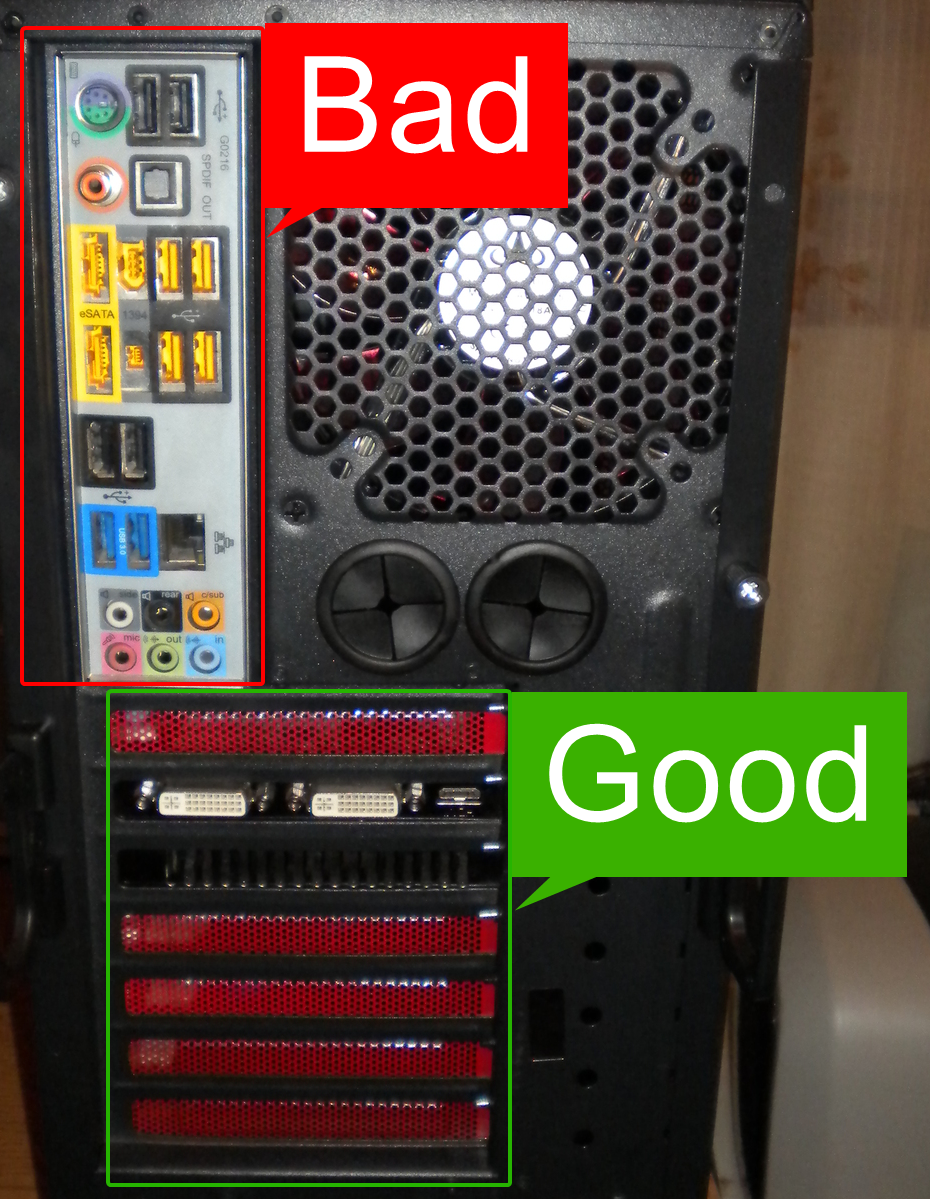
You'll have way better frames in games too, once they're connected the right way
fleet wigeon
Uh, my two monitors are actually both plugged into my graphics card.
steel mural
Well...
15:42:38.279:     Adapter 0: Intel(R) HD Graphics 4600
15:42:38.279:       Dedicated VRAM: 117964800
15:42:38.279:       Shared VRAM:    2147483648
15:42:38.279:       PCI ID:         8086:412
15:42:38.279:       Driver Version: 20.19.15.4531
15:42:38.280:       output 0: pos={0, 0}, size={2560, 1440}, attached=true, refresh=144, name=VG27A
15:42:38.280:       output 1: pos={2560, 0}, size={1920, 1080}, attached=true, refresh=60, name=BenQ GL2460
15:42:38.280:     Adapter 1: NVIDIA GeForce RTX 2070
15:42:38.280:       Dedicated VRAM: 4126146560
15:42:38.280:       Shared VRAM:    4232636416
15:42:38.280:       PCI ID:         10de:1f02
15:42:38.280:       Driver Version: 27.21.14.5167
15:42:38.282: Loading up D3D11 on adapter Intel(R) HD Graphics 4600 (0)```Wth
steel mural
output 0 and output 1 show your intel GPU
 latent flax
then it could be a driver issue
steel mural
And the last line confirms that OBS is also running on the intel one
fleet wigeon
That's really weird, how is that even possible? Can my graphics card redirect output from my iGPU?
 iron mica
I think it's actually a feature in windows, that you can redirect the graphics to another card. Yes.
fleet wigeon
How do I fix that then?
steel mural
But you'd have to enable manually. That can't happen by accident or anything
Also, it'd still show up as your Nvidia card.
Try to reinstall your Nvidia drivers by following this guide: http://obsproject.com/forum/resources/65/
latent flax

fleet wigeon
I'll go give it a trty
steel mural
@turbid root Please don't ask in multiple channels and be patient when waiting for help
 turbid root
 slim dock
hello, can anyone teach me how to make my sub alerts so that when someone gifts subs the community gift alert pops up as well as each individual subscription?
 gleaming wyvern
hi, it may be stupid question, but how to make chat higher? like in this picture?
fleet wigeon
Just came back from reinstalling my nvidia display drivers, but sadly it has not fixed the issue.
 peak dock
heya! My OBS crashed mid-stream and i wanted to ask if anybody can do something with the crashlog? ^^
 lone glade
Which OBS?
peak dock
OBS.live
lone glade
I used streamlabs and it kept crashing, i use Live now and haven't had a problem
What were you doing when it crashed?
peak dock
streaming xD
steel bladeBOT
@peak dock A crash log is required to investigate the cause of your issue. Please upload the last crash log.
- In OBS, click the Help menu
- Select Crash Reports, and then Upload Last Crash Report
- Copy the URL, and paste it to the chat here.
--
If you are not able to follow the above steps, open your file explorer and go here:%appdata%\obs-studio\crashesand provide the last listed file.
lone glade
i mean...what were you streaming?
peak dock
Cam, Elgato Capture Card and overlay
while i enabled a source it crashed
where do i upload the crashlog?
 tulip hamlet
Right here.
tulip hamlet
Well that's new.
gleaming wyvern
hi, it may be stupid question, but how to make chat higher? like in this picture?
peak dock
hi, it may be stupid question, but how to make chat higher? like in this picture?
@gleaming wyvern unfortunately thats not possible
gleaming wyvern

tulip hamlet
@gleaming wyvern You mean putting chat above the start streaming thing? Just click and drag.
gleaming wyvern
^^^
tulip hamlet
Oh, yeah, not possible as far as I know. Unless you completely remove the lower row of docks, OBS will always want something down there.
lone glade
Move it by the border,like stretching
but it will make everything else bigger as well
you have to toy around with it
peak dock
@tulip hamlet is my crashlog more advanced or is there a specific thing i have to change to make OBS more stable?
tulip hamlet
@peak dock Your crash log is emptier than my personal life.
lone glade
might have to move the dock
peak dock
LMAO
peak dock
roasted bro
tulip hamlet
The only thing I can find about what's in there is an old error from OBS 23 that should've been fixed in OBS 24.
You'll need to ask OBS Project for help.
steel bladeBOT
@peak dock For the best OBS support, please join their Official Discord @ discord.gg/obsproject
tulip hamlet
Who's "they?"
tulip hamlet
Can you be specific? There's a troll or two there that will purposefully try to blame everything on us.
peak dock
phew
uhm i dont know the name anymore
i asked a few hours ago
DreadWingKnight
He told me
peak dock
troll?
tulip hamlet
He'll tell anyone to uninstall OBS.Live over anything.
tulip hamlet
Specifically, ask about this line:
Failed to recreate D3D11: Failed to create buffer (80070057)
@peak dock I got some word from one of their volunteer support team. It's a GPU issue. Try reinstalling your GPU driver using DDU.
If that doesn't work, you may need to open up your case and reseat your GPU.
 azure pine
Hey I was streaming on youtube but I want to switch to twitch. I switched my stream to be twitch in the settings but when I click Start Streaming it keeps bringing up the youtube stream menu. Anybody know how to fix this?
steel bladeBOT
@azure pine Streamelements on top of OBS -> Logout -> login
azure pine
Thanks!
 hallow jasper
does anyone know how to export a custom made overlay?
made one for a friend, do i just give them the URL code?
 neat linden
Can you give your bot a custom name in youtube? Or just twitch?
tulip hamlet
@hallow jasper There is no way to "share" an overlay. Overlays can only be duplicated between accounts you have manager access to.
@neat linden Twitch only.
hallow jasper
@tulip hamlet tyvm
neat linden
ty @tulip hamlet
 hardy gull
is there anyway to get the store redemption to last longer than 20 seconds?
in short the store item is a 30 second video and i need to to stay for the whole thing
tulip hamlet
Did you set the duration in the store redemption widget?
hardy gull
it maxes out at 20
neat linden
Can you multistream with StreamElements?
 wary dew
No
neat linden
damn...have to figure out how to move my audience to twitch since there are so many more features there
hardy gull
@neat linden restream
neat linden
@hardy gull second OBS instance on same machine or somewhere else?
lone glade
When doing bets, do you need a overlay for it? or is there one even?
 dry sphinx
Bets for loyalty points right?
 unkempt tide
Hi does anyone know if i get can support for the obs live plugin for stream deck here
steel bladeBOT
@unkempt tide Welcome to the helpdesk! Please let us know how we can assist you today and a support volunteer or staff member will assist you as soon as they are available. Thank you for your patience.
 muted scroll
I am unable to load the stream elements dashboard. All that shows up is the help button at the bottom. I have restarted my computered, tried different browsers, and allowed cookies.
Message #helpdesk-twitch
unkempt tide
trying to use kappagen shortcut in streamdeck doesnt seem to do anything i have to manually type the command
steel bladeBOT
@muted scroll Our Dashboard and Overlay editor are Chromium Optimized. We strongly recommend using Chrome. Opera GX and the new Microsoft Edge Chromium might work closest to Chrome as its also Chromium built. FireFox also works, but some things might look a bit different or not work. We do not recommend using Internet Explorer with our Dashboard as it does not support functions.
If the website doesn’t work on chrome, be sure none of your plugins are blocking our website or clear your cookies. You can try if the website works in a incognito tab.
@unkempt tide - Open %appdata%\Elgato\StreamDeck\Plugins
- Delete the
com.streamelements.obslive.sdplugin folder
unkempt tide
ok reinstalled the plugin still doesnt seem to do anything
 rugged quail
Yo
I need help with getting the !watchtime
It doesn’t show my loyalty settings
I’m on phone
steel bladeBOT
@rugged quail Please provide a proper screenshot with the issue visible. If not sure how to take a screenshot, you can check here: https://www.take-a-screenshot.org/
rugged quail
tulip hamlet
Close the menu and take another screenshot.
tulip hamlet
Loyalty is not available for YouTube.
rugged quail
😯
I did everything and the most important thing I wanted not available 😂
Well thanks have a great day
slim dock
hello, can anyone teach me how to make my sub alerts so that when someone gifts subs the community gift alert pops up as well as each individual subscription?
tulip hamlet
Not possible. It's one or the other. Either the individual alerts will appear, or the community gift alert will appear.
slim dock
hm okay thanks. is that a streamlabs only feature ? i've seen people have the "so and so has gifted x subs" and then they tick off individually
 grim pasture
My OBS live is at 1350kbps bitrate (x264) on resolution 960x540 at both base and output and set to 60 fps.
When I start recording the FPS in OBS drops significantly, whereas in-game it's completely fine. CPU usage is at 10% usually.
I had fixed this somehow before, but after installing streamelements and messing around a bit, the problem came back.
Can anyone help me? This seems to be a frequent issue, but no resolution has helped me so far.
Same thing when streaming, and it does not drop frames. Connection is great.
 half wyvern
I get doubled sound when I click "SHOW ON STREAM" at Media Request
steel bladeBOT
@half wyvern Make sure to ☑️ “Shutdown source when not visible” for all browser sources (all OBS scenes). If using studio mode, uncheck “Swap Preview/Output scenes After Transitioning.” Also keep in mind that sound can play from any overlay loaded in the browser (editor or launched). https://i.imgur.com/6bWXxjR.png https://i.imgur.com/yY0wcFl.png

 half wyvern
I dont even have a source for Media Request
tulip hamlet
It's not its own source. It's regarding the media request widget in an overlay. Using "show on stream" makes the audio play through the overlay.
If you have the overlay open in multiple places, or multiple overlays with the media request widget, that could cause the problem.
tulip hamlet
Follow the bot instructions to prevent it from playing multiple times.
half wyvern
I didnt work, however, I reloaded my saved scene collection and it fixed it
grim pasture
Can anyone resolve my issue above pls?
steel bladeBOT
@grim pasture Please provide a log from your last stream. To do this, in OBS go to Help > Log Files > Upload Last Log File and paste the link to the log file here.
grim pasture
Well OBS could record and stream just fine at full FPS
Now it just completely DROPS to 18fps, game is okay, CPU is okay
Everything is fine
tulip hamlet
tulip hamlet
The fact it's using your iGPU looks pretty related to me.
steel bladeBOT
@grim pasture For the best OBS support, please join their Official Discord @ discord.gg/obsproject
grim pasture
Well anyways, I'm doing a clean install right now
and yeah I have gone there
Why though?
tulip hamlet
You need to uninstall OBS.Live before uninstalling OBS Studio. It's highly dependent.
Reinstall OBS Studio first, then try uninstalling again.
 icy raven
Is there a trick to getting a good kb/s connection thing going? WIth Auto it is consistently terrible.
Im not sure what to really do to fix it. It was fine, and now its not.
 unkempt copper
Hello! I'm trying to become a streamer on twitch and its my third day of streaming. I haven't had any issues with streaming any games so far but today I tried to stream Warzone for the first time. I've tried several different solutions from online such as turning all my warzone graphic settings completely down, disabling the discord overlay, upgrading the OBS settings. However, the frames on my stream for Warzone are still extremely laggy and make it unviewable for the viewer and cause my game to crash. How can I fix this?
steel bladeBOT
@unkempt copper For the best OBS support, please join their Official Discord @ discord.gg/obsproject
grim pasture
I have fixed my issue. Latest OBS Studio update has problems. I'm on 25.0.4 with my problems now fixed and good performance.
 torpid vale
Hello, i cant catch Valorant with obs help me pls
 idle geyser
how can i stream my gameplay off xbox and manage it with streamlabs
steel bladeBOT
@torpid vale For the best OBS support, please join their Official Discord @ discord.gg/obsproject
 shy mountain
@idle geyser If you are having issues with Streamlabs software, its best to contact their support
idle geyser
@shy mountain can you send me a link
shy mountain
torpid vale
I cant delete streamelements obs from my computer help me
shy mountain
Do you have OBS Studio installed?
torpid vale
no
obs was installed but i deleted it after downloading streamelements
now i cant install obs or delete streamelements
shy mountain
You need to have OBS Studio installed in order for the OBS.Live uninstaller to restore some things in OBS Studio
WIthout OBS Studio installed the uninstaller cannot do its thing.
You can install OBS Studio - grab the installer from here: https://obsproject.com/
torpid vale
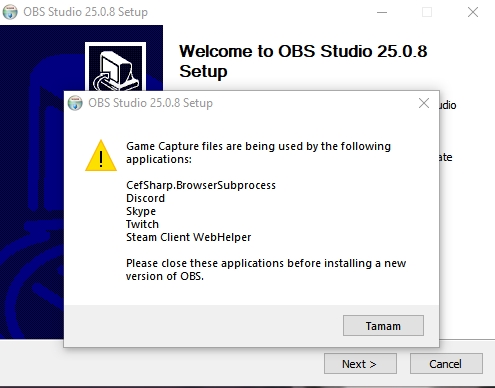 shy mountain
restart your PC and then try the installer
unkempt tide
anyone know how to get the kappagen shortcut working in the streamdeck software
steel bladeBOT
@unkempt tide - Open %appdata%\Elgato\StreamDeck\Plugins
- Delete the
com.streamelements.obslive.sdplugin folder
torpid vale
https://prnt.sc/twxfgl there is a new error
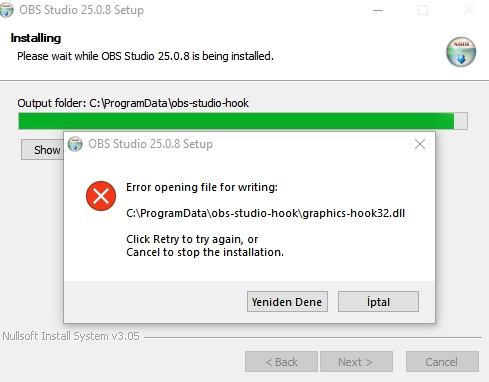
 fair roost
does anyone know how to fix obs not recording csgo's audio
torpid vale
how can u record csgo btw
fair roost
-allow_third_party_software in launch options
fair roost
i dont really play valorant
shy mountain
@fair roost Do you have the widget in an overlay and active in obs?
shy mountain
In order for Kappagen to fully work
you need to have the kappagen widget added to an overlay
and have that overlay loaded in OBS or browser
for obs -> via browser source
@torpid vale Did you restart your PC?
torpid vale
yes
shy mountain
So did you manage to install OBS or no?
unkempt tide
yeah my kappagen overlay works as i can use the !kappagen command manually in my chat
torpid vale
https://prnt.sc/twxfgl i got this error but i can open obs now
its somehow installed
unkempt tide
but the streamdeck shortcut doesnt do anything
torpid vale
but i cant capture games now
fair roost
@shy mountain whats a kappagen
 fair roost
wait so what do i do
steel bladeBOT
@fair roost For the best OBS support, please join their Official Discord @ discord.gg/obsproject
shy mountain
Its best to ask in the OBS discord
fair roost
ok thx
shy mountain
@torpid vale Same for you - visit their discord
@unkempt tide reinstall OBS.Live only and see if that helps
unkempt tide
wont i lose my profile and scenes
unkempt tide
can you resintall the plugin only
unkempt tide
ok trying it
yeah still doesnt do anything
mmm interestingly enough i tried to click the kappagen overlay "open in stream elements overlay editor " and i get invalid authorization token
steel bladeBOT
@unkempt tide Streamelements on top of OBS -> Logout -> login
unkempt tide
ok now the shortcut is actually posting !kappagen in the chat but no emotes appear
shy mountain

unkempt tide
works if you manually put an emote after it but not with just the !kappagen
problem in the widget settings?
shy mountain
Give me like 10-15 minutes and I'll take a further look
@unkempt tide Is the kappagen widget in its own overlay?
unkempt tide
yes
shy mountain
I know what the issue is
By default if you only use !kappagen its set to trigger subscriber emotes only
since you are not an affiliate, there is no emotes to trigger
unkempt tide
ahhh lemme check the widget
shy mountain
What widget? Thats how it is in the system. You can't change that.
unkempt tide
ah you cant custom choose emotes for it?
i got it working
for the emotesplosion part
shy mountain
ah right
unkempt tide
thanks for your help 🙂
unkempt tide
does anyone know how to have different filters on the same source for different scenes
 jaunty coral
Hi guys. I just upgraded my mesh wifi to Google Nest. Now I'm getting a "failed to connect" error when trying to stream. I tried going into Advanced settings to unbind it but it's greyed out. Any ideas?
steel bladeBOT
@jaunty coral For the best OBS support, please join their Official Discord @ discord.gg/obsproject
 timid zealot
does anyone know how i could leave the full chat screen on the left without it getting weird?
shy mountain
2 ways:
- Remove the default docks from OBS and place them on the far right
- undock the chat and just expand it
no other way
timid zealot
like this?
 wanton copper
ok so i just started using stream elements and when ever i go to create a widget its does this
one sec
shy mountain
yes @timid zealot
steel bladeBOT
@wanton copper The default resolution for StreamElements overlays (theme and custom) is 1920x1080. Please add them in OBS at their full resolution and use CTRL+F to fit to screen if necessary. You can then downscale your stream in OBS settings > Video if you'd like https://i.imgur.com/6bWXxjR.png
 snow bronze
Hi all, can someone (or the ai bot 🙂 ) remind me how to use customs fonts within the streamelements overlay editor?
steel bladeBOT
@snow bronze Google Fonts
More than 900 google fonts are supported at this time. You can preview them here: https://fonts.google.com/
Custom Fonts
Steps:
- Install the font on the streaming PC or choose a pre-installed windows font.
- In the overlay widget settings, select Text Settings
- Enable Custom Font
- Type the name of the font as it appears in the windows font directory (This is usually
C:\Windows\Fonts)
Note: After installing fonts, the browser and OBS must be restarted for the font to appear.
 pulsar swift
Hi. I have been using obs.live for a while with the custom chat bot feature switched to my twitch username. About a week or so ago the bot became unresponsive and will only work when I set the chat bot back to 'streamelements' username. Any fixes?
steel bladeBOT
@pulsar swift If your commands recently stopped working and you're using OBS.Live and a custom bot name do the following:
1.) In OBS.Live, click on the hamburger menu (three stripes) at the top left of your activity feed
2.) Click on Stream Settings -> Custom bot name
3.) In the "Custom bot name" field select "Set custom bot name", not your already existing username (with capital letters)
Note: If you already connected an account that way, the third entry will show as the account name (see image https://i.imgur.com/sO7fWOX.png)
4.) Scroll a bit down and click on the purple "CONNECT CUSTOM BOT ACCOUNT" button
5.) Log in as usual and "Authorize" the custom bot name
6.) Back in the Activity feed, click on the "SEND TEST MESSAGE" button and check if your custom bot name starts working again
 rugged quail
so im just wondering to how install the overlays once im done with them?
steel bladeBOT
@rugged quail To add your overlays to OBS, add a new browser source in your scene. Paste your overlay URL in the browser source properties, set the dimensions to 1920x1080 (unless you changed them on the website), and ☑ “Shutdown source when not visible” https://youtu.be/KDvLynUqXI4
rugged quail
thanks
 mighty pulsar
Hi there, I've lost the facebook live chat in OBS live. I accidentally removed it and cannot figure out how to get it back
I've tried re-installing the OBS Live plugin but still no luck
and I've also tried streaming to facebook to see if that will re-add it but that hasn't worked either
 hazy heart
hi, for some reason, the game capture option is simply giving me a black screen, even though I've done all of the basic fixes. Anyone know anything else I can do?
 mint kite
hazy heart
mint kite
hazy heart
that doesnt work either
 sharp turret
@hazy heart What game are you trying?
hazy heart
cs
sharp turret
Valve has implemented a Trusted mode which does not allow OBS to hook CS:GO using Game Capture. Read more in their announcement post here https://blog.counter-strike.net/index.php/2020/07/30736/
Additionally, they have no plans on allowing OBS in Trusted mode
https://support.steampowered.com/kb_article.php?ref=8835-KLXV-0292#whitelist
You will need to run the game in either windowed or borderless fullscreen and use Window Capture instead.
Alternately, you can launch the game with -allow_third_party_software @hazy heart
sharp turret
If you launch the game with -allow_third_party_software and try game capture?
 tender python
Don't cheat 😏
I.m.o don't bother using game capture but use window/desktop
it is what it is, at this time
hazy heart
mhm
also trust factor also has to do with abandoning and toxicity :p
also anyone know how to fix display capture?
tender python
What's the issue with it?
 keen fulcrum
The chat bot is no longer working. worked until this morning. commands not working and test message doesn't work either
sharp turret
@keen fulcrum Are you using custom bot name?
keen fulcrum
no. worked when i first started stream and now just stopped
sharp turret
@keen fulcrum Go to the dashboard -> right side -> part channel -> join channel (https://streamelements.com/dashboard)

StreamElements
The Ultimate All in One Platform for Streamers
 keen fulcrum
didn't work
sharp turret
Make sure you have added as moderator.
 tidal river
I want to capture valorant with 60 fps, but while i have the window opened my game,which i play at 150fps also has 60 fps like my recording. How do i fix that?
keen fulcrum
@sharp turret it's a mod....always has been
sharp turret
@keen fulcrum Ok, then go again to the dashboard -> right side -> part channel then log out, login back and join channel.
tidal river
I want to capture valorant with 60 fps, but while i have the window opened my game,which i play at 150fps also has 60 fps like my recording. How do i fix that?
wanton copper
is there a way i can have my stream labs page linked with a overlay i have with the obs live i just can't figure it out
so like i want the energy flow overlay for alerts but i want it linked with my stream labs page instead of the stream elements
tidal river
I want to capture valorant with 60 fps, but while i have the window of OBS opened. My game,which i play at 150fps also has 60 fps like my recording. How do i fix that?
 olive granite
i cant stream cause it says something with my connection url wont connect how do i fix that?
wary dew
is there a way i can have my stream labs page linked with a overlay i have with the obs live i just can't figure it out
@wanton copper not possible
steel bladeBOT
@olive granite Streamelements on top of OBS -> Logout -> login
@tidal river For the best OBS support, please join their Official Discord @ discord.gg/obsproject
 odd kraken
Set your media request to FREE in the media request settings.
wanton copper
thank you
tidal river
I want to capture valorant with 60 fps, but while i have the window opened my game,which i play at 150fps also has 60 fps like my recording. How do i fix that?
steel bladeBOT
@tidal river For the best OBS support, please join their Official Discord @ discord.gg/obsproject
tidal river
I want to capture valorant with 60 fps, but while i have the window of StreamElements opened my game,which i play at 150fps also has 60 fps like my recording. How do i fix that?
steel bladeBOT
@tidal river For the best OBS support, please join their Official Discord @ discord.gg/obsproject
 rugged lake
my camera won't work on the obslive
steel bladeBOT
@rugged lake For the best OBS support, please join their Official Discord @ discord.gg/obsproject
 fiery torrent
On normal OBS there is a dock for Stream Information. I can no longer access it with OBS Live. I know Stream Elements allows me to change my game/ title, but it's not very responsive. So either OBS Live needs to keep the stream information dock or fix their game/title updater
 plain sonnet
view > docks > stream info
if you cant see it then settings > stream
disconnect then reconnect
fiery torrent
Thanks! I didn't realize I wasn't logged into Twitch via OBS, that was my issue
 magic saffron
anybody know how to link your streamelements tipping page to OBS.live alerts so when someone donates on that page the alert pops up on OBS.live
steel bladeBOT
@magic saffron New to Stream Elements?
Check out our YouTube channel https://www.youtube.com/c/streamelements/videos
with tutorial videos from setting up the basics, to in depth details on how to use our product.
New to OBS? Here is a 4 step quickstart guide
https://obsproject.com/wiki/OBS-Studio-Quickstart
Want to learn even more? Here is an in-depth overview
https://obsproject.com/wiki/OBS-Studio-Overview
rugged quail
hi, i am new here, i need help with obs live. When i want change scene, i can only change from "talk" to "stream is ending" etc, but when i want to change from these scenes to game scene (game capture) my game crashed, any suggestion/help ?
 coral cosmos
hi i am new to obs live i am trying to figure out how to get the Activity feed to come up other people in videos had it as soon as the installed it but i only have update stream info and my chat
icy raven
Heyo, didnt see an answer to my question last night so reasking since its lost in the shuffle. Is there some trick to getting a good connection rate with OBSlive? The server's set to auto and it crawls unless I go pick a different one.
Is that something I can get help with here or does that fall under regular OBS? I feel like since im a freebie twitch user or w/e, I just get shit connections/priority. They limit my audio bitrate too.
also, I can't seem to get the Stream Elements stuff to change what game implaying. It always just says NOTHING with things that print out {game}. What am I missing? I changed the Twitch category.
Thanks!
coral cosmos
so instead on a scene theres just a flashing circle i have no idea whats going on
this is what i mean
rugged quail
I need help with my OBSLive
So I Downloaded it a couple hours ago and i had a music thing on it
Top Left
And i could play music for the stream
I closed it and i dont know how to get it back please help
sharp turret
StreamElements top of OBS -> Media request.
wary dew
sharp turret
sharp turret

 elder rapids
Chat just says "connecting to chat". Any ways to fix this?
sharp turret
@elder rapids Try refresh the chat if not working try relog. Streamelements on top of OBS -> Logout -> login
elder rapids
Got it thanks
sharp turret
rugged quail
How do I make stream element say what u want it to say
steel bladeBOT
@rugged quail New to Stream Elements?
Check out our YouTube channel https://www.youtube.com/c/streamelements/videos
with tutorial videos from setting up the basics, to in depth details on how to use our product.
New to OBS? Here is a 4 step quickstart guide
https://obsproject.com/wiki/OBS-Studio-Quickstart
Want to learn even more? Here is an in-depth overview
https://obsproject.com/wiki/OBS-Studio-Overview
unkempt copper
can someone refer me to the obs discord
steel bladeBOT
@unkempt copper For the best OBS support, please join their Official Discord @ discord.gg/obsproject
 dapper bolt
Hey everyone, my overlay just changed from a custom font i had (which was working fine), to this, and now I can't get it to change back. OBS is running in admin mode, and I also have restarted multiple times.
 livid delta
Hi, how do I remove Media Request from my LiveOBS and account, keeping the rest of streamelements
wary dew
just click the X in the media request box in OBS.Live
and disable the thing in the tipping settings so people can't request it for money
 chrome scroll
Hi! I have OBS.live on my obs studios. I had a custom bot name for my bot, but on my last stream OBS.live wasn't keeping the bot name (it defaulted to Streamelements). I tried logging in with my bot account and everything seemed to be find (logged in, authorized and everything). But even after I logged in, the bot name didn't change. I checked to make sure I have custom bot name selected. I have also uninstalled and reinstalled OBS.live but still no change. Can someone help me figure out what is wrong?
steel bladeBOT
@chrome scroll If your commands recently stopped working and you're using OBS.Live and a custom bot name do the following:
1.) In OBS.Live, click on the hamburger menu (three stripes) at the top left of your activity feed
2.) Click on Stream Settings -> Custom bot name
3.) In the "Custom bot name" field select "Set custom bot name", not your already existing username (with capital letters)
Note: If you already connected an account that way, the third entry will show as the account name (see image https://i.imgur.com/sO7fWOX.png)
4.) Scroll a bit down and click on the purple "CONNECT CUSTOM BOT ACCOUNT" button
5.) Log in as usual and "Authorize" the custom bot name
6.) Back in the Activity feed, click on the "SEND TEST MESSAGE" button and check if your custom bot name starts working again
chrome scroll
I've done of of that but the set custom bot name selection doesn't change to have my new bot name as the images above show. Also the send test message stays grayed out.
 empty sentinel
Hey! very urgent! doing a 24 hour stream and my overlays are busted live chat and alerts arent showing how can i fix quickly on stream?
steel bladeBOT
@empty sentinel Please provide a proper screenshot with the issue visible. If not sure how to take a screenshot, you can check here: https://www.take-a-screenshot.org/
steel bladeBOT
@empty sentinel Right click on the BrowserSource > Properties > Scroll down a bit > Refresh Cache of current page
empty sentinel
that is not working
 bleak galleon
Hello! my obs.live doesn't seem to be able to be able to reach the streamelemnts servers - I keep getting "timeout of 15000ms exceeded"
steel mural
We know about the issue with our services and are working on fixing it.
bleak galleon
TY
rugged quail
So...nothing is working on OBS.Live. Media Request, Activity Feed, all down.
 runic tusk
^
 hidden pumice
Hello, you need help please, I want to enter my account and I get this ...
 restive marlin
steel mural
restive marlin
steel mural
We know about the issue with our services and are working on fixing it.
hidden pumice
upstream connect error or disconnect/reset before headers. reset reason: connection termination
steel mural
We know about the issue with our services and are working on fixing it.
restive marlin
ok
steel mural
But this won't give you an activity feed
At least not the one that shows channel redemptions and donations.
restive marlin
or any of our overlays
 coarse cave
You jinxed it just now Fabi 
 modern trench
rip
 worthy sky
I have the same problem. Just got on here to try and find a solution. There's nothing I can do on my end, correct?
steel mural
Nope
worthy sky
Cool; thanks for responding!
steel mural
modern trench
we are all sheep to wolf till its fixed in all reality lol jk
i was having issues with the overlays before this happened
amen
oof lol
im sorry @steel mural this is amusing to me lol
 stray pewter
i cant log in with twitch
modern trench
we all cant login
steel mural
We know about the issue with our services and are working on fixing it.
stray pewter
if we gonna suppress that please ban me
modern trench
just be patient and it will be resolved
and dont jinx it like someone here no names no names
 rugged escarp
so from what I'm reading the activity feed isn't working rn?
steel mural
SE is down
modern trench
all of the streamelements is down atm
modern trench
you cant login to the site or gain access to any overlays atm it will be resolved soon hopefully
 jagged mason
I'm glad I'm not the only one with the issue. Glad they're looking into it.
rugged escarp
I'm sure they will fix it 🙂
modern trench
just be patient and no one jinx it
jagged mason
Was just about to stream and was like "wtf where mah overlays" lmao
rugged escarp
i have all my overlays and stuff just activity feed wasn't working. would alerts still work?
modern trench
probably not
rugged escarp
ooof
jagged mason
Yeah I'm not getting anything from alerts on my end
modern trench
apparently its a link cut between the servers that relay the information back and forth that gives you the overlays thats cut off atm
cant even login to the site
and no one quote me btw lol
 tacit onyx
I want to connect my twitch to obs.live
modern trench
wont let you
tacit onyx
yes
modern trench
yea it wont
steel mural
We know about the issue with our services (OBS.Live, overlays, activity feed, website, media request) and are working on fixing it.
worthy sky
Stupid question: I somehow deleted the StreamElements login little page from my OBSLive that used to show up on the left. How do I get that back?
 livid cedar
its back
steel mural
Usually at the "StreamElements" menu at the top -> activity feed @worthy sky
modern trench
so we back fabi?
worthy sky
@steel mural Thanks again!
modern trench
is this true?
livid cedar
Mine got fixed
steel mural
Just because it works for one person doesn't mean it works for everyone but devs are actively looking into it atm
livid cedar
waaait no nvm
steel mural
see
steel mural
Happened too often already 
livid cedar
how long has it been like that?
 agile coyote
My media request is not showing anything
agile coyote
This happens occasionally and I usually can just close and reopen it but this time it still is just stuck on a blue screen
oh ok
steel mural
We know about the issue with our services (overlays, activity feed, website, media request) and are working on fixing it.
agile coyote
any idea how long?
modern trench
devs are working on it theres no eta atm
agile coyote
ok thanks
coarse cave
I think we need a fabi bot that says the same thing over and over every 5 seconds lul
modern trench
yea it would overwhelm the server lol
agile coyote
my bot and overlay works fine
coarse cave
Its kind of intermittent at the moment :\
Depending on the person, but overall...down
modern trench
its down for the majoirty of people
coarse cave
looks like they might be restoring service
modern trench
i tried a fews times with facebook still no dice no bigge
just be patient
im the joker bot lol
steel mural
You install it like every other plugin, because OBS.Live itself is a plugin
 strange snow
terrible timing for it to go down i was in the middle of changing some account settings and i thought i broke my account XD
 unkempt panther
Ok, how do I install a plugin?
steel bladeBOT
@unkempt panther For the best OBS support, please join their Official Discord @ discord.gg/obsproject
steel mural
It seems like everything is back up now. Thank you for your patience!
If you cannot login, reload the page or clear your cookies of your browser
modern trench
website is up too
@steel mural you saved yourself from pitchforks and fires for their overlays lol jk
unkempt panther
Oh wow... I followed the directions and it actually worked this time.
When I did it with RPAN studio, no dice.
When I tried to do it with SLOBS... they made it overly complicated.
Why have I made myself suffer for so long... I should have ported over to OBS.Live sooner.
modern trench
would it possbily for some one to help me with the valorant overlay
i add it to my browser in obslive and it will not play nicely
modern trench
huh
steel mural
!accel
steel bladeBOT
OBS -> settings -> advanced -> scroll down -> enable/disable hardware accel. (This does not apply for OBS on Mac)
https://i.imgur.com/ggMe9ZE.png
 steel mural
yeet
steel mural
"On" is the default. Sometimes it has to be disabled
steel mural
ouu wait
modern trench
just the red border
steel bladeBOT
To add your overlays to OBS, add a new browser source in your scene. Paste your overlay URL in the browser source properties, set the dimensions to 1920x1080 (unless you changed them on the website), and ☑ “Shutdown source when not visible” https://youtu.be/KDvLynUqXI4
steel mural
Yeah.. For our overlays you always have to enter 1920x1080 
strange snow
lol i will eventually finish tweaking my profile XD
modern trench
i was almost done with my overlay lol
rugged escarp
I was just about to hit start streaming then boom. lol
modern trench
dont look at me i aint do it lol
rugged escarp
lol
 woeful breach
I created an animated overlay for my stream, but when i paste the url link into OBS it's static. How can I fix this?
modern trench
we'll get to that as soon as streamelements is back up again lol
 wanton flint
is streamelements down?
modern trench
yep
modern trench
ik i got fires and pitchforks for whoever wants one
 junior thorn
yeah and i was setting up stream awww
wanton flint
is there an eta?
modern trench
im not sure this was spontaneous
 heady iris
def down widespread too
 kindred pollen
is the website down
rugged escarp
there working to fix it
 real otter
ok, i thought it was my computer buggin lol
kindred pollen
thought so
real otter
thats a relief
kindred pollen
same @real otter
modern trench
im scared to mess with the obs live it might log me out
it was forcing me out so yea
on the site
modern trench
sorry man
kindred pollen
im trying to sort my merch
rugged quail
my obs.live aint signing into my twitch
rugged quail
everytime it says it is it always goes back to "Connect with 'platform'*
modern trench
i have pitch forks and fires for whoever wants one
kindred pollen
@rugged quail the app and site are down
modern trench
yep heres a pitch fork we going after the admins lol jk
for whoever is asking stream elements is down again just be patient
oh wait min
 prisma harness
ah ok so it is down and I'm not bugging lol
 late forge
hey so when i log in to obs live when i click twitch, it pops up a new thing showing me to enter my twitch username and password and then it loads for a long time and after like a minute or two it shows this, it's been doing this for the past hour. i even get a email saying i logged into my twitch so i know i logged in but it just shows this :// any help?
modern trench
again
 chilly pelican
I logged too
real otter
sites back up
modern trench
@rugged escarp try now
real otter
just logged in
 weary sorrel
its fixed
modern trench
ok wee can put away the pitchforks
real otter
lol ya
modern trench
put out ther fires
modern trench
its chugging but its working now
 past copper
obslive still down for me
modern trench
refresh the page
real otter
its gonna crash again
modern trench
its being laggy
real otter
its very laggy
chilly pelican
Yep again
real otter
and im kicked out smh
prisma harness
ya my commands are not even popping off
modern trench
ok bring out the pitchforks again
past copper
not talking about the website im talking about the overlays for OBS
real otter
but theyre connected to the website
modern trench
yes theyre link to each other sir
real otter
no website + no overlays
modern trench
amen
past copper
oh okay sorry me big dumb LMAO
prisma harness
oooof
real otter
no website=no overlay
prisma harness
this hurts
real otter
yeah
 sour compass
i cant hear my discord and game sound when i stream just my voice
modern trench
ok ok their was a lack of knowledge no big deal lol
kindred pollen
crashed again
modern trench
yep we knocking down the admins doors whos with me
modern trench
hell yea
 broken crow
When i log into the site nothing happens
modern trench
stream elements is down
 north sparrow
yes
modern trench
it crashed again
 plain mason
StreamElements is experiencing unstable services. We are working to fix it.
Thanks for the patience
prisma harness
now if that is down, i won't be able to go live right?
modern trench
you can just with no overlays
prisma harness
ah ok, thanks
prisma harness
ya im just gonna give it time lol
modern trench
its on and off lol
ima leave these pitchforks and torches here for anyone that wants one
prisma harness
hahaha
modern trench
got to save my overlay i think we are clear for now
past copper
its working for me now
prisma harness
it's a bit slow but it seems to be working
modern trench
its a start
woeful breach
I created an animated overlay for my stream, but when i paste the url link into OBS it's static. How can I fix this?
broken crow
Is it still down?
wanton flint
I still can't log in on obs.live so I assume so
prisma harness
i can't see any of my chat commands, did i lost them all?
prisma harness
ya it seems like it
real otter
still down
 jagged urchin
and it's up again
prisma harness
We need to reach out to the stream elements Gods lol
jagged urchin
I'd maybe give up for today lmao
modern trench
its monday so it makes sense
prisma harness
alerts won't work either right?
modern trench
even stream elements hates mondays
prisma harness
welp, im gonna go cry in my corner now
modern trench
just grab your torch itll help you feel better @prisma harness
 potent sequoia
oh I thought am the only one who have problem connecting
prisma harness
i'm just gonna cuddle with my Hound and call it a night instead haha
modern trench
hahaha
jagged urchin
And i just started using SE today 
prisma harness
welcome lmao
modern trench
welcome to the madhouse pull up a straight jacket
prisma harness
nah c'mon for the most part is not bad
this is the 1st time i've had this issue tho
modern trench
you wanted to go cry in the corner
prisma harness
but again is Monday
jagged urchin
btw I like it a looot, but how can I be so unlucky lmao
modern trench
my point proven lmao jk
 trail zinc
I need help
 full thunderBOT
Hi @trail zinc, Please ask your question(s) or describe the problem you're looking to solve so staff or a support volunteer can assist you as soon as they are available.
 thorny inlet
So i keep getting BSOD when launching program
jagged urchin
If you check the #welcome channel there's a huge amount of people that joined the server just now, I hope this get fixed soon
trail zinc
My activity feed isn't showing up
jagged urchin
@trail zinc StreamElements seems to be down
prisma harness
I just saw it
trail zinc
shit
 jagged urchin
I mean, it's been buggy for an hour or so, sometimes it works but the next minute it doesn't
modern trench
annnnnnnnnddddd its back '
trail zinc
?
thorny inlet
anyone know why I would be getting a BSOD when launching the program?
modern trench
app and website is buggy and unstable atm
steel mural
OBS runs in user space so it's impossible that it causes the BSOD. More likely that it's a driver of some sort that gets triggered by the launch of OBS
real otter
its back up
 obtuse vector
Hey can anyone help my obs live has black screened when i dont have my 2nd monitor connected cannot fix
 bright carbon
I downloaded a stream design from own3d, but I can't figure out how to put it into streamlabs. I need help!\
streamelements*
 chilly basalt
whats up guys, i just updated obs live and my panel where i control the title and category is missing! help!
 forest sequoia
I have two accounts one with my Twitch and the second with my Facebook account. The one with Facebook is linked with the wrong page.
I want to unlink that account/page and instead have it either on my other account or closed so I can reopen it with the right page.
Could I get help? The close account thing on the site doesn't seem to work.
bright carbon
@chilly basalt view>docks>stream info
 thin glen
Hi. The chat box in obs.live is only showing badges when someone or myself types a message. it doesnt display any text. just which ever badges they have and the emotes used. sometimes this happens on my web browser and deleted the cache works. it hasnt for this. any advise please?
chilly basalt
@bright carbon nvm i got it
forest sequoia
Anyone?
 warm perch
for some reason whenever i open OBS i can no longer hear the game nor my friends anymore but the viewers can hear it in the stream
i need help
full thunderBOT
Hi @warm perch, Please ask your question(s) or describe the problem you're looking to solve so staff or a support volunteer can assist you as soon as they are available.
 tough terrace
Hello StreamElements team. I have a problem with OBS Live and alert notifications.
For some reason,the prebuilt notifications in the black gold overlay, do not work on the stream starting soon. I cannot get them to display or alert. (will queue as needed)
 shell lichen
hey just downloaded obs live and it keeps asking me to log into twitch over and over again without connecting any ideas?
steel bladeBOT
@shell lichen Streamelements on top of OBS -> Logout -> login
shell lichen
just keeps bringing me back to the login screen after I type in my verification code
 rocky path
my obslive crashes whenever i try to open up the settings
 prime arch
I suddenly couldn't do game capture. It gives black screen for all games. Same thing happens with another streaming app. I believe it should be something due to system settings or nvidia driver, but I couldn't figure out the exact reason/fix
 waxen sleet
I have problem with my stream deck (elgato) with stream elements OBS
chilly basalt
hey guys,for some reason one specific overlay isnt loading in via browser source. yes ive tried re adding it.
 tranquil jasper
need some help can't go live with elements
keep getting "Hostname found, but no data of the requested type. This can occur if you have bound to an IPv6 address and you streaming service only has IPv4 address (see Settings Advanced)."
form same computer I can go live with labs or on different I can with both
shy mountain
Check in Settings -> advanced -> bind to ip if its turned off -> if it isn't turn it off @tranquil jasper
steel bladeBOT
@chilly basalt OBS -> Settings -> Advanced -> Scroll down -> enable or disable Hardware Acceleration, depending on its current state. (This does not apply for OBS on Mac)
https://i.imgur.com/ggMe9ZE.png
chilly basalt
That didn’t work
 prisma wraith
hey there how do i reset my sub goal because its showing up with 57 and i definitely have not had 57 subs lmao
steel bladeBOT
@prisma wraith To reset goals:
- from the overlay editor -> session data on top right (monitor symbol) -> goals tab -> reset progress of desired goal
- from the dashboard -> activity feed on the left -> widget data on the right -> goals tab -> reset progress of desired goal
Note: Goal widgets(progress) only counts up and doesn't go down automatically, if you loose followers/subs
 ruby wind
G'day all. Quick question - I have all content set up on a laptop, but want to import this to a standalone PC, what is the easiest way to do this please?
ruby wind
Thats what I thought - so how do I import my scenes?
steel bladeBOT
@ruby wind To add your overlays to OBS, add a new browser source in your scene. Paste your overlay URL in the browser source properties, set the dimensions to 1920x1080 (unless you changed them on the website), and ☑ “Shutdown source when not visible” https://youtu.be/KDvLynUqXI4
ruby wind
Thanks for the support
 mystic spire
So I'm not really sure what's going on but I've been trying to use my custom bot name and it doesn't actually use the bot name when I try changing it through the "Activity Feed" section of OBS Live and hit "Connect Custom Bot Account".
I have everything connected through the "Bot and Tipping Setup" and have gone through my Two-Authentication factor multiple times but it doesn't show the bot under the listing of names I can use.
steel bladeBOT
@mystic spire 1) Right click on your OBS desktop shortcut and open the Properties 2) In the "Target" field, add the following to the very end: --remote-debugging-port=40404 3) Open OBS (or restart if it was open) 4) Open your web browser and type in: localhost:40404 5) Click on "StreamElements - Activity feed" 6) Navigate to the Console tab 7) Type the following into the console and hit enter: store.customBot.removeCustomBotIntegration() 8) Try setting the custom bot name 9) Remove the additional flag in step 2 from your shortcut properties.
 covert ferry
can you use the media request thing on trovo using obs.live or not?
 toxic fern
@covert ferry only via donations.
covert ferry
ok
 cyan latch
Hey, so ive made an overlay on streamelements but its not importing to my stream or OBS, how do i do this?
steel bladeBOT
@cyan latch To add your overlays to OBS, add a new browser source in your scene. Paste your overlay URL in the browser source properties, set the dimensions to 1920x1080 (unless you changed them on the website), and ☑ “Shutdown source when not visible” https://youtu.be/KDvLynUqXI4
thin glen
Hi. The chat box in obs.live is only showing badges when someone or myself types a message. it doesnt display any text. just which ever badges they have and the emotes used. sometimes this happens on my web browser and deleted the cache works. it hasnt for this. any advise please?
steel bladeBOT
@thin glen Streamelements on top of OBS -> Logout -> login
thin glen
didn't work
shy mountain
Can you show the issue actually?
thin glen
@shy mountain as you can see, it only sohws badges, no text. not even user name. it happens on chrome sometimes and clearing the cache fixes it but i cant work out how to fix this
 pallid parrot
You can clear OBS browser cache here: %appdata%\obs-studio\plugin_config\obs-browser\cache
 pallid parrot
Hmmm. This is absolutely odd. Maybe some of browsersource plugins in OBS are broken. I would recommend clean install probably
thin glen
I'll try that and let you know
@pallid parrot will i loose all my scene collections if i do that?
toxic fern
No. Only if you choose the option uninstalling.
pallid parrot
You can select to preserve user settings
thin glen
@pallid parrot can you help me. i dont know how to do any of that. sorry
pallid parrot
When you go through OBS uninstall it should let you pick if you want to remove user settings too or not. It is important to not remove that
But for the additional backup you can copy %appdata%\obs-studio\ directory too
thin glen
i just opened the obs live uninstaller and it gave me no option to keep preferences. u had to cancel the uninstall
toxic fern
That's obs.live. not OBS.
pallid parrot
OBS Live uninstaller uninstalls just the plugin
And keeps plain OBS with your current settings
obtuse vector
Can someone help me my Obs live black screened
thin glen
@pallid parrot i uninstalled both osb and osb.live and re installed and still have the problem
@shy mountain any ideas?
shy mountain
check the chat window settings
also go to settings -> stream -> connect twitch account
then on View on top -> docks -> Chat
and see if that chat dock is doing teh same effect
thin glen
@shy mountain yes, its doing the same on the docks one
pallid parrot
And you wrote that same applies to web browser, right?
shy mountain
as both obs.live and the OBS studio integration load a popout version of the twitch chat
thin glen
@pallid parrot sometimes it happens actually on twitch to me too, BUT, clearing th cache on google chromes sorts it.
i really need to get this sorted please 🙂
 steady sable
alerts not showing up 😦
 long bobcat
Seems pretty alive 
Timeout means internet stuff usually. Everything else works properly? If so I'd try log out and back into OBS nad SE.
wanton copper
so the media request audio is load on its lowest volume setting is there anyway i can turn it down more?
loud**
peak dock
I struggle with it too
 chilly tangle
I need help regarding streamelements overlay link, when am adding overlay link into obs its just showing black screen. what to do please help
steel bladeBOT
@chilly tangle To add your overlays to OBS, add a new browser source in your scene. Paste your overlay URL in the browser source properties, set the dimensions to 1920x1080 (unless you changed them on the website), and ☑ “Shutdown source when not visible” https://youtu.be/KDvLynUqXI4
@chilly tangle OBS -> Settings -> Advanced -> Scroll down -> enable or disable Hardware Acceleration, depending on its current state. (This does not apply for OBS on Mac)
https://i.imgur.com/ggMe9ZE.png
plain sonnet
@chilly tangle do not tag random people again, wait until someone is free to help
plain sonnet
restart obs, make sure you unlock the source so you can see the red outline and take a screenshot and post it here
 woven linden
how do I add a chat bot thing for like intermission screens? on OBS live
woven linden
how do I add a chat bot thing for like intermission screens? on OBS live
plain sonnet
@woven linden find a chat bot you like then follow their instructions to add it to your account
plain sonnet
@chilly tangle help > log files > upload current
paste the url here
plain sonnet
right click on the browser source > properties
take a screenshot of your settings
steel bladeBOT
@chilly tangle Please provide a proper screenshot with the issue visible. If not sure how to take a screenshot, you can check here: https://www.take-a-screenshot.org/
plain sonnet
there is currently an issue loading overlays, please be patient while this issues is resolved
woven linden
@plain sonnet do u have any link of any videos for OBS Live that can help
the ones im finding are Streamlabs
not OBS Live
 dense pelican
my streaming is not showing on my streamelements account. followers and shares are not also showed on dashboard
 hybrid jackal
Hi All, I hope this is the right place to ask this question, OBS live stats showed 0 (dropped) 0 (render) 0 (skipped), but the twitch stream said the broadcast has ended after about 20 minutes of streaming. so I am stumped. Can anyone explain how this would be possible? I also have the Log, just not sure if I am allowed to post the URL here for the log
rugged quail
i cant see overlays in my stream
chilly tangle
@plain sonnet any idea till when this issue would be resolved??
pallid parrot
@woven linden Try to switch OBS off then clear this directory: %appdata%\obs-studio\plugin_config\obs-browser\cache
woven linden
how do I do that
rugged quail
Send halp
can someone please help me set up overlays and alerts on obs live
How do I able the stream on xbox to obs live
steel bladeBOT
@rugged quail New to Stream Elements?
Check out our YouTube channel https://www.youtube.com/c/streamelements/videos
with tutorial videos from setting up the basics, to in depth details on how to use our product.
New to OBS? Here is a 4 step quickstart guide
https://obsproject.com/wiki/OBS-Studio-Quickstart
Want to learn even more? Here is an in-depth overview
https://obsproject.com/wiki/OBS-Studio-Overview
@rugged quail Consoles do not have native support for overlays. You would need a capture card, PS4 remote play or Xbox companion app and a PC with OBS in order to have Overlays over your console gameplay.
We have an blog post about how to setup console streaming with our essential tools: https://blog.streamelements.com/how-to-stream-on-console-7b620b1c46c3
 rugged quail
Ok
 spice cedar
i need quick help with my streamelement
i have a followers count but it not showing the right amount of followers
any possible fixes?
sharp turret
@spice cedar You can set here -> https://streamelements.com/dashboard/session under goals "Follower goal progress"
StreamElements
The Ultimate All in One Platform for Streamers
chilly tangle
still unable to add browser source link from streamelements. please help
its showing black screen after adding browser link
 shrewd grail
Lately, whenever I click "update information" in the stream informatoin tab in obs when changing my title and game, the game always requires me to change it twice. Is there a known fix to this problem or no?
chilly tangle
CAN ANYONE HELP PLEASE
steel bladeBOT
@shrewd grail There is a bug with setting the stream title in OBS and the Dev team is investigating.
In the meantime you can set the title using the !settitle command in chat (if enabled in your bot command settings)
Or with the Twitch dashboard: https://dashboard.twitch.tv/stream-manager
chilly tangle
@steel blade Can you help regarding my issue?\
steel bladeBOT
@chilly tangle The default resolution for StreamElements overlays (theme and custom) is 1920x1080. Please add them in OBS at their full resolution and use CTRL+F to fit to screen if necessary. You can then downscale your stream in OBS settings > Video if you'd like https://i.imgur.com/6bWXxjR.png
chilly tangle
@steel blade my problem is i am getting black screen after adding browser source.
unable to see overlay
plain mason
@chilly tangle are you using OBS.live or OBS Studio?
plain mason
@chilly tangle did you try this procedure below?
go to StreamElements menu, on the top, click on Logout and Log into your account.
chilly tangle
@plain mason just log out and log in again?
plain mason
yes
chilly tangle
@plain mason tried, still same
steel bladeBOT
@chilly tangle OBS -> Settings -> Advanced -> Scroll down -> enable or disable Hardware Acceleration, depending on its current state. (This does not apply for OBS on Mac)
https://i.imgur.com/ggMe9ZE.png
plain mason
If it is enabled, then disable it...
If is is disabled, then enable it...
chilly tangle
@plain mason tried both ways, no results
even disables hardware acceleration in my google chrome @plain mason still same
black screen with red outline
plain mason
@chilly tangle right, copy your overlay URL and paste in my DM please
spice cedar
@sharp turret yes i know but it not showing the actual follower i have
i have about 61 it shows i got 70
sharp turret
@spice cedar So you have 70?
plain mason
@spice cedar please, do this procedure:
- Logout using - https://streamelements.com/logout
- Log in your account - https://streamelements.com/
- Part bot from your stream chat
- Join bot in your stream chat
- And wait 20~30 minutes
rugged quail
Umm? any idea why i cant uninstall
woven linden
@woven linden Try to switch OBS off then clear this directory:
%appdata%\obs-studio\plugin_config\obs-browser\cache
@pallid parrot done that. its not working still
plain mason
@rugged quail did you uninstall the OBS Studio first then OBS.live?
 vagrant obsidian
is anyone else having problems with their overlays not loading?
rugged quail
I thought obs live was like version of slobs live so i can change bitrate while not quiting stream.. but at the end i noticed its not slobs its obs regular
So when i decided to uninstall it gives me that
plain mason
@vagrant obsidian what is your streaming platform (Youtube, Twitch, Facebook)?
@rugged quail OBS.live is a plugin for OBS Studio.
vagrant obsidian
@plain mason it is OBS Live => Twitch
rugged quail
I tried ccleaner and everything
vagrant obsidian
it started last night. the SE plugin in OBS kept losing connection and forcing a re-login repeatedly and now the overlays wont load at all.
plain mason
@vagrant obsidian copy your overlay URL and paste in my DM please
vagrant obsidian
alright and thanks for the assist!
oh hey!
@plain mason they're loading now
in an instant...no waiting either
did you still want me to send them?
plain mason
no 🙂 @vagrant obsidian
vagrant obsidian
cool thank you tho!
spice cedar
@sharp turret no i dont have 70 but it says i got currently 70 followers
@plain mason can u explain quickly how to remove the bot and add it please
steel bladeBOT
@spice cedar Go to the dashboard -> right side -> part channel -> join channel (https://streamelements.com/dashboard)
spice cedar
done
woven linden
why is my chat not loading when someone types in it? on Live OBS.
its a green screen and wont load like no chat will be seen
spice cedar
also i another problem with clip that option when i clip something and try to either save or it see it says the video or clip no longer available
rugged quail
Okay so basically im unable to uninstall SEOBS LIVE
👍
time to reinstall windows
ty
plain mason
@rugged quail try to reinstall OBS Studio
rugged quail
i dont have it
plain mason
then, try to uninstall OBS.live and later OBS Studio.
plain mason
__reinstall __
plain mason
you had OBS Studio to OBS.live works the plugin needs the OBS Studio 🙂
 proven onyx
how do i add add them to streamerlabs OBS?
 vivid wharf
Hello, I have been having issues where my stream just stops around 1 hour in and I have no idea why. How can I get help for this?
 wheat atlas
Hey can anyone help me with the scroll filter on OBS?
 grizzled marsh
Streamlabs OBS is a fork of OBS.Studio while OBS.Live is a plugin to OBS Studio. They do not work together.
wheat atlas
Well yeah I mean OBS.Studio when I say obs
grizzled marsh
One compliments OBS studio (OBS.Live) while the other (SLOBs) tries to take it in another direction entirely.
wheat atlas
sorry
grizzled marsh
Sorry, was answering those above you! 
wheat atlas
I am trying to figure out how to get sources not to be cropped when using the scroll function.
Ahh
grizzled marsh
Yes unfortunately for your particular issues, I'm not too familiar with the scroll filter but I'll see if anybody is available that might be.
grizzled marsh
There is an undo feature on the overlay editor but not on OBS Studio / OBS. Live
chilly basalt
alright guys, for some reason, my overlay isnt importing into obs live. Every other overlay works except this one. I've tried re adding the browser source. I need help!
chilly basalt
also, i just recorded a video, my mic almost sounds like, glitchy?
rugged quail
does the things like lastest followers stuff on the overlays update reguarly or is manual?
woven linden
how do I change the chat to light mode?
 modern imp
hey so my obs live keeps having issues with media request everytime i try to put in the link for my youtube playlist in to it keeps giving me an internal server error occurred message
 wind oxide
Hey guys real quick, so've set up my obs.live and as i tried to "set custom bot" i was assuming im going to be able to change the name of the bot. So i clicked, logged again into my twitch. Just to find out, ive just named the custom bot, exactly how my twitc his called.
Is there any possbility to disconnect this bot ?
I already learned that i have to connect a new twitch acc, I just cant find the option to log the bot out so i can log in with the new bot acc
every google and youtube search attempt is futile
 pseudo shard
my overlays have stopped working and i've tried to reload and everything but nothing is working
steel bladeBOT
@pseudo shard Right click on the BrowserSource > Properties > Scroll down a bit > Refresh Cache of current page
 near mortar
#helpdesk-selive I’m trying to edit a overlay for Facebook and I can’t get any texts to save
 stuck grotto
I am trying to get my overlay from browser to obs. When I put the url into the source and it loads on to my preview screen the overlay is oversized and only half of it shows up. I made an animated overlay from streamelements.com Plz help me fix this!
 proper mountain
Hello can some1 help me? im trying to create an alerts with a specific font but cant find it when i try to use it.. can some1 tell me how can i add it to the list ?
 grand viper
how do you get the activity box back
steel bladeBOT
@grand viper Streamelements on top of OBS -> Logout -> login
grand viper
thx
obtuse vector
@steel blade i need help my obs has black screened
i need help my obs has black screened
 echo latch
@steel blade Twitch username is Ncturnal
@echo latch Did this ever get setup to use as a Custom Bot Name in GroundControl?
grizzled marsh
Hey guys real quick, so've set up my obs.live and as i tried to "set custom bot" i was assuming im going to be able to change the name of the bot. So i clicked, logged again into my twitch. Just to find out, ive just named the custom bot, exactly how my twitc his called.
Is there any possbility to disconnect this bot ?
I already learned that i have to connect a new twitch acc, I just cant find the option to log the bot out so i can log in with the new bot acc
@wind oxide
Right below the drop down list is a disconnect button.
 gritty willow
Viewer list in chat doesn't update on who is in chat. How can I fix this? I've tried uninstalling and installing obs
steel bladeBOT
@gritty willow Streamelements on top of OBS -> Logout -> login
jagged urchin
Hey guys, is it possible to have the twitch chat tab stay on dark mode? everytime I close and reopen OBS.live it goes back to white
 honest echo
@jagged urchin check pinned messages
jagged urchin
Thanks!
 silent acorn
Quick Question to anyone that might be able to help. Once I import my alerts into OBS and test them they do not appear. Anyone know why that might be?
chilly basalt
alright guys, for some reason, my overlay isnt importing into obs live. Every other overlay works except this one. I've tried re adding the browser source. I need help!
also, i just recorded a video, my mic almost sounds like, glitchy?
steel bladeBOT
@silent acorn You can test Alerts via the Emulate bell on the lower left side of the Overlay Editor. Simply go to your Dashboard -> My Overlays -> Pencil/edit button on the overlay. Make sure the "Preview LIVE on stream" option is on to see the alert in OBS/Xsplit https://streamable.com/vtulg9


 honest echo
@chilly basalt DM me your overlay link
silent acorn
when I emulate the alerts they just don't show up on OBS
steel bladeBOT
@silent acorn To add your overlays to OBS, add a new browser source in your scene. Paste your overlay URL in the browser source properties, set the dimensions to 1920x1080 (unless you changed them on the website), and ☑ “Shutdown source when not visible” https://youtu.be/KDvLynUqXI4
@silent acorn OBS -> Settings -> Advanced -> Scroll down -> enable or disable Hardware Acceleration, depending on its current state. (This does not apply for OBS on Mac)
https://i.imgur.com/ggMe9ZE.png
silent acorn
Got it, Thank you
 signal oar
any idea as to why my chat bot would suddenly stop working?
steel bladeBOT
@signal oar If your commands recently stopped working and you're using OBS.Live and a custom bot name do the following:
1.) In OBS.Live, click on the hamburger menu (three stripes) at the top left of your activity feed
2.) Click on Stream Settings -> Custom bot name
3.) In the "Custom bot name" field select "Set custom bot name", not your already existing username (with capital letters)
Note: If you already connected an account that way, the third entry will show as the account name (see image https://i.imgur.com/sO7fWOX.png)
4.) Scroll a bit down and click on the purple "CONNECT CUSTOM BOT ACCOUNT" button
5.) Log in as usual and "Authorize" the custom bot name
6.) Back in the Activity feed, click on the "SEND TEST MESSAGE" button and check if your custom bot name starts working again
 slender badge
I am having issues with connecting a mic to OBS
steel bladeBOT
@slender badge For the best OBS support, please join their Official Discord @ discord.gg/obsproject
hardy gull
Why is the media request volume fading in and out every* second
 ripe venture
Host alerts won't show in my stream for some reason, does anyone know why?
steel bladeBOT
@ripe venture Due to changes to Twitch API, we have filtered out hosts and will only show these ones on your activity feed:
- All hosts coming from an online channel with at least 1+ viewer
- Auto host events with at least 1 viewer - only from a channel that just went offline
Note: If you see "X channel has hosted you" with no viewers on the back, that is considered an offline host or a host with 0 viewers, we do not show these.
 wet robin
i'am having echo issues usign Media Request.
steel bladeBOT
@wet robin Make sure to ☑️ “Shutdown source when not visible” for all browser sources (all OBS scenes). If using studio mode, uncheck “Swap Preview/Output scenes After Transitioning.” Also keep in mind that sound can play from any overlay loaded in the browser (editor or launched). https://i.imgur.com/6bWXxjR.png https://i.imgur.com/yY0wcFl.png
hardy gull
figured out the audio issue(noise gate on the input) why cant i duplicate an entire input?
wet robin
Ive done wwhat you said. I still have echo in sound, made no diffrence for me.
 mint linden
hey so im new to streaming and i cant figure out how to activate my stream overlays? can someone help?
steel bladeBOT
@mint linden To add your overlays to OBS, add a new browser source in your scene. Paste your overlay URL in the browser source properties, set the dimensions to 1920x1080 (unless you changed them on the website), and ☑ “Shutdown source when not visible” https://youtu.be/KDvLynUqXI4
wet robin
I fix my issue.
 dawn kite
So i've been searching for like 2 hours. I downloaded obs live on top of my obs studio. I saved all my images from streamlabs over and made all my layouts without using the overlay editor (just dragging and dropping on obs). is there any way to add recent followers, donations ect?
toxic fern
@dawn kite that requires adding the particular "labels" in the overlay editor.
And then adding said overlay to obs.
dawn kite
So if i download a theme, can i delete everything from the theme and replacing it with my backgrounds & images? Could i add the labels to that edited overlay and use it?
toxic fern
Yes. However you down download anything but simply manage it all in the editor and add the browser source link.
chilly tangle
Still unable to add browser source link into obs live, getting black screen with red outline please someone help