#helpdesk-selive
1 messages · Page 149 of 1
 still tangle
 karmic grove
ah so we in the same boat lol
still tangle
yeah
karmic grove
we gonna need a lot of coffee then lol
 obtuse delta
Hello all. New streamer trying to setup overlays. I added Alerts but they are not showing up live. I also added Recent Followers and Chat and they are both working, just not Alerts. What could be the issues?
 plain mason
@grim cedar when you indicate that the "Chat lines" will have 5 lines, then you will need to receive 5 messages in the chat before the timer (online or offline) send the timer message... did your chat receive these 5 messages?
@obtuse delta did you add the overlay on the OBS and indicate the resolution (size) of the screen on the Properties?
karmic grove
i been trying this for weeks. on different platforms.
still tangle
yeah i was kinda confused too, but you just have to choose 1 software and now you can import overlays and widgets from all the others
i dont like the new streamlabs UI so I went to Streamelements
obtuse delta
@grim cedar I created the overlay at the website and then added a source in OBS for the overlay URL.
 grim cedar
@grim cedar when you indicate that the "Chat lines" will have 5 lines, then you will need to receive 5 messages in the chat before the timer (online or offline) send the timer message... did your chat receive these 5 messages?
@plain mason no it didnt lol
karmic grove
i got the overlays i want and edited them as i want them its more of a test phase as i want it all to be working before i put in some hours tailoring them
grim cedar
@grim cedar I created the overlay at the website and then added a source in OBS for the overlay URL.
@obtuse delta okay will check this out thanks
obtuse delta
@grim cedar The resolution should be fine. The alerts are visible when testing in OBS.
karmic grove
yeah streaelements looks more user friendly but i just keep getting different issues.
Did you find a video anywhere that shows you baby step by step guides lol
still tangle
I dont get why your resolution looks like that even though you set it to full hd
nah I just learned it by myself
 steel bladeBOT
@obtuse delta OBS -> settings -> advanced -> scroll down -> enable/disable hardware accel. (This does not apply for OBS on Mac)
https://i.imgur.com/ggMe9ZE.png
 plain mason
please, try this one ⤴️
karmic grove
i might have another setting incorrect, unsure to be honest
plain mason
@grim cedar set the Chat Lines 0 (zero) of one timer.
karmic grove
the game stream is perfect and fits the box and easy to adjust, its the overlays that i have the issues with
obtuse delta
@grim cedar so I need to enable the setting? Thanks
karmic grove
@still tangle any other suggestions
still tangle
hmm you could try another overlay maybe if you havent done that already
karmic grove
ok will try and see what happens, the funny thing is these overlays are directly from stream elements
still tangle
yeah im using the Trigon thing from there and it looks like it should
karmic grove
how are you adding them. are you putting it down as a webpage or an image with the link. it said somewhere i can use the url as a web add for the source and it will show. the next one i tried is the exact same problem
the ones i am using are animated
still tangle
I add a Browser Source, then I paste the URL you from the Overlay there and choose the right resolution
hmm mine isnt animated
let me try with an anminated one
karmic grove
ok kl ty
still tangle
works fine lol
karmic grove
what res are u using also when you add it. it defaults at 800 by 600 i think it said
still tangle
yea i change that to 1920x1080
if your monitor is 1920x1080 it should fit perfectly
karmic grove
yeah i did the same but now its not there at all lol
still tangle
oof
karmic grove
yeah its 100% 1920-1080 lol
still tangle
i mean my "canvas" is 1440p so I have to adjust it a bit but for you it should be fine
karmic grove
i am just bamboozled, dont have a clue why it aint working.
anyone else had this issues with the fitment?
still tangle
I mean you could reinstall OBS idk
because I installed it like 2 hours ago and didnt change a single setting yet
exept the overlays
karmic grove
i used the auto config for the settings as my rig is pretty fast and i have a 300 mbps connection so it pretty much maxed the settings. the thing is i can import my own test subject overlays and they work perfectly, it seems the browser ones dont wanna play ball.
still tangle
yeah I used that auto config thingy aswell
karmic grove
i might just call it a night, been messing with this al day. do you stream games?
still tangle
I think I streamed like 3 times in my life lol, but I wanna start
karmic grove
nice, well i wish you the best of luck and you can add me if you want and i will add you too or follow you too. I dont have a clue when this will be fixed or if it can be fixed but more than welcome to follow,
also ty for trying to help. much appreciated.
imma go grab a beer ow as i think i need it lol
still tangle
I followed you if you have the same name on twitch
karmic grove
yeah thats the one, whats yours
karmic grove
you got a car on the pic
still tangle
yup
karmic grove
thats alright.
kl, gottacha. thanks again buddy. good luck with the streaming and i am sure i will come say hi at one point in your stream help wth your numbers 😄
still tangle
kk :D good luck to you aswell ^^
karmic grove
cheers buddy 😄
steel bladeBOT
@robust ermine To add your overlays to OBS, add a new browser source in your scene. Paste your overlay URL in the browser source properties, set the dimensions to 1920x1080 (unless you changed them on the website), and ☑ “Shutdown source when not visible” https://youtu.be/KDvLynUqXI4
 robust ermine
ty
 keen viper
Hi, I am having a lot of trouble with OBS live, current issue is that my sound keeps cutting out after 10 secs and I have to reset the application to bring the sound back.
My other issue is that my video sources keep freezing and I need to restart the application bring them back too.
steel bladeBOT
@keen viper For the best OBS support, please join their Official Discord @ discord.gg/obsproject
keen viper
I’m using the stream elements version
 tulip hamlet
OBS.Live is a plugin for OBS Studio and doesn't affect audio settings or video sources.
keen viper
Okay thanks
 remote bronze
how do i add widgets obs stream elements
steel bladeBOT
@remote bronze New to Stream Elements?
Check out our YouTube channel https://www.youtube.com/c/streamelements/videos
with tutorial videos from setting up the basics, to in depth details on how to use our product.
New to OBS? Here is a 4 step quickstart guide
https://obsproject.com/wiki/OBS-Studio-Quickstart
Want to learn even more? Here is an in-depth overview
https://obsproject.com/wiki/OBS-Studio-Overview
 acoustic yacht
hey can anyone help me with the overlay part
steel bladeBOT
@acoustic yacht To add your overlays to OBS, add a new browser source in your scene. Paste your overlay URL in the browser source properties, set the dimensions to 1920x1080 (unless you changed them on the website), and ☑ “Shutdown source when not visible” https://youtu.be/KDvLynUqXI4
 ashen copper
do your alerts work work with trovo
tulip hamlet
We do not have an integration with Trovo.
 grave granite
Hello ! My Information Stream panel have disapeared out of nowhere... and i can't find it anywhere in the menu > Docks
It straight up DISAPEARED.
How can i bring it back ?
I was used to use that panel/dock to change my stream title/game name
steel bladeBOT
@grave granite Streamelements on top of OBS -> Logout -> login
grave granite
Nope..
Just tried..
Still no Information panel
Even in the View > Docks
Its not in the options anymore
steel bladeBOT
@grave granite If you are not seeing the OBS Twitch integrations and have OBS.Live installed, please follow these steps:
- Make sure you are on the latest and greatest version of OBS.Live
- exit OBS (make sure OBS is not running)
- delete %appdata%\obs-studio\plugin_config\obs-browser\obs_profile_cookies
- start OBS.Live
- Settings -> Stream -> disconnect -> connect
grave granite
On it.
Loading process...
Can't open OBS Anymore...
Even after a reboot.
wtf
Ok, i've done what you just told me, step by step...
I even have reinstalled OBS Studio with Obs.LIVE
And still no information panels
Nevermind, fixed
Thank youuu
ashen copper
any plans to integrate with trovo soon?
tulip hamlet
We don't comment about our roadmap.
 kindred fox
They said that about Mixer....and then Mixer shut down
 worldly dune
for some reason its not letting me remane my stream title in obslive , and its not letting me change the genre of game
kindred fox
Known issue. You can use the twitch dashboard, chat commands, or SE dashboard.
worldly dune
gtocha thanks
 shrewd eagle
my overlay is only showing my new followers
 hoary holly
How can I login on stream elements inside obslive
plain mason
@hoary holly menu StreamElements (on top) and Login
@shrewd eagle please show us a screenshot of the overlay
hoary holly
Hello guys does anyone know here how to log in inside streamelements OBS LIVE. Here is the screenshot
 shy mountain
Well click the login button
shy mountain
Click the menu and the click on "bot and tipping setup"
hoary holly
@shy mountain that too, it only blinks after i clicked. I already unistalled and reinstalled my stream elements obs live.
steel bladeBOT
If you are not seeing the OBS Twitch integrations and have OBS.Live installed, please follow these steps:
- Make sure you are on the latest and greatest version of OBS.Live
- exit OBS (make sure OBS is not running)
- delete %appdata%\obs-studio\plugin_config\obs-browser\obs_profile_cookies
- start OBS.Live
- Settings -> Stream -> disconnect -> connect
hoary holly
@shy mountain I think somethins blocking my ob.live, I can login in stream elements - ground control. but in Obs.live cant log in.
I already tried the support AI but i cant find the number 3 instructions. No search Results.
shy mountain
you do this
hoary holly
@shy mountain Done but the windows still, cant find, Im using windws multiple server 2012.
shy mountain
Wrong person to tag
I would suggest to not try and tag me, cuz there is another person you might tag by mistake 🙂
UNLESS there are 5 other people asking questions here 😉
as for the issue at hand - then most likely something is blocking obs.live
firewall, anti cheat
but this "windows server 2012" is a concern now 
hoary holly
Ohh I see. btw thanks man!
shy mountain
I assume windows server 2012 is around the time WIndows 8.1 was a thing, right?
hoary holly
yes man,
shy mountain
There is a widget "now playing" that can show the title from
media request
sorry, the widget is for the overlay
 river zephyr
yeah i got that its on there but its not displaying the name from media request the only thing that shows it is the media share widget
shy mountain
river zephyr
Thank you @shy mountain that help me soo much
i was useing the wrong brackets
okay one last thing how do i fix the stuff not sitting right
so in the editer it looks fine but on stream it i just off centered from the conrner
 solemn solstice
I'm sure this is a fairly common error, but all the fixes on youtube and what not have not fixed my problem, currently with my overlay and what not, Game Capture does not work, it appears similar to the Display Capture 0,0 bug, which I recently fixed
steel bladeBOT
@solemn solstice For the best OBS support, please join their Official Discord @ discord.gg/obsproject
river zephyr
i mean its not a huge issue but i thought it was werid i set the broswer res to 1920x1080
which was the overlay is set to on streamelementss
 restive berry
Hello I'm having some problems with my alerts using obs.live, alerts are repeating every 1 hour.
@restive berry Can someone help me with this one
shy mountain
What do you mean repeating every 1 hour?
@river zephyr Show a screenshot of the browser source properties.
river zephyr
shy mountain
and how does it look in the obs preview?
river zephyr
shy mountain
Ok, so it looks normal
river zephyr
on the thing it sits snug in the conner but on obs its not
like i said not a huge issue just thought that was weird
restive berry
This one @shy mountain
shy mountain
Go to our dashboard -> go to tipping settings -> tip moderation -> enable -> add their name to the custom profanity filter - this will prevent them from showing up as an alert agian
@river zephyr im honestly lost at the issue - the only thing i see is that you need to shrink the docks on the side a bit and the preview will fit nicely.
river zephyr
on streamelements edit it looks fine right like i want it in the coner of my stream but on obs its not in the full conner
restive berry
This one?
restive berry
I just need to enable it? And problem solved?
shy mountain
yes
restive berry
Okay got it. Thanks man!
So Shares and Likes and everything else will not show the alerts twice?
shy mountain
from this person it will never show up again
if his spamming the like button so much
restive berry
Problem is they're not spamming, it just shows every hour
shy mountain
They are literally unliking and liking the stream again
restive berry
Ahh no they're not. Even the shares keeps repeating every hour even though they're not re-sharing the stream
Every alert keeps on repeating ever hour except for the star senders
river zephyr
from my understanding the alert shows up once saying that they followed you but then it plays again later
shy mountain
I'm 99.99% sure they are unliking and liking the stream again
which will cause the alert to trigger again
restive berry
from my understanding the alert shows up once saying that they followed you but then it plays again later
@river zephyr Yeah like for example they shared the stream at 8:00pm and a alert will show up and after an hour the alert will show up again with the same person saying that the stream was shared.
river zephyr
have you checked the streamelements alerts bc i assume if ur in this channel ur using a streamelement overlay with alerts added to the overlay?
restive berry
This one @shy mountain
@restive berry As you can see here as well that the shares repeated as same with the likes
have you checked the streamelements alerts bc i assume if ur in this channel ur using a streamelement overlay with alerts added to the overlay?
@river zephyr So I have two alerts in the overlay, one from the overlay itself and one that I created. But the alerts from the overlay itself, I already hid it.
Or is it better to just delete the alert from the overlay I'm using?
river zephyr
yeah bc i started using streamelements so im kinda new but the one overlay that i picked has Alerts bulit in and i was gonna suggest trying the reload overlay button
or click the read all button
restive berry
Here's the one that's from the overlay itself
Uhm maybe I should've just edited the alert from the overlay?
river zephyr
i some how cant find ur problem on the internet
restive berry
Same, I was surfing for it for like 2 hours 😢
river zephyr
that is dummy tho that ur alerts play the intial and then play it again later
restive berry
Maybe I'll just create a new overlay. On your stream, did you just create yours?
river zephyr
no i used the streamelement shop bc imports weren't excatly showing propely
and i havent tried to stream yet
restive berry
Uhm okay. I'll try to check for it more, thanks man!
river zephyr
not a problem
 rugged quail
Is it possible to have the same camera but different filters on it for different scenes?
shy mountain
OBS Forums
NOTE: The horizontal flip option is bugged and will likely cause crashes. Please do not use it. If you need to flip your video, either flip the sources in OBS itself, or flip on the receiving end (i.e. in Zoom, Skype, etc.)
This plugin provides...
 last ember
Hey is it possible add gopro to phone stream elements?
 pallid parrot
@last ember Mobile app works only with main/secondary camera in your Android device. If you want to use gopro I strongly recommend using minilaptop like GDP2 and phone in companion mode.
last ember
@pallid parrot i can do with twich own stream.. thing is i cant mute anything.. 😋
 split rivet
Hello, about a week ago i accidently closed the preset activity feed window in obs.live. I cant get it back, ive tried uninstalling amd re-installing everything and still no luck.
 odd kraken
Streamelements at top in OBS.Live > Activity feed.
split rivet
Okay, can you explain that a little better please? I have no kdea3what youre trying to say
 sharp turret
@split rivet https://prnt.sc/titx54
 split rivet
Amazing, thank you so much
Okay so i have my activity feed and chat box back, thank you for that help. But it seems theyre set for twitch even though i have my facebook account linked as my stream in the settings
steel bladeBOT
@split rivet Streamelements on top of OBS -> Logout -> login
split rivet
Thank you 👍
rugged quail
hi i'm new on obs. i need help, someone can help me pls? thx
steel bladeBOT
@rugged quail New to Stream Elements?
Check out our YouTube channel https://www.youtube.com/c/streamelements/videos
with tutorial videos from setting up the basics, to in depth details on how to use our product.
New to OBS? Here is a 4 step quickstart guide
https://obsproject.com/wiki/OBS-Studio-Quickstart
Want to learn even more? Here is an in-depth overview
https://obsproject.com/wiki/OBS-Studio-Overview
shy mountain
Check pinned messages
 stoic wolf
x264 or graphic card on Streaming?
 wispy jetty
Hey, I have a youtube playlist and I cannot add the link for some reason
"COULD NOT ADD MEDIA"
pallid parrot
@wispy jetty The only place when you can add playlist URL is: Backup Playlist here: https://streamelements.com/dashboard/mediarequest/settings
wispy jetty
Do I just remove the songs in the Media Request and the backup will play?
pallid parrot
Yes. When there queue is empty the backup playlist will automatically play
wispy jetty
Awesome, Thanks
 peak dragon
Hey when I set up SEPay I have to enter my full name, house address and bank details. When people donate to me will they have access to any of these details?
 drowsy patrol
Hi guys my alerts are messed up in obs, its only showing the whole right side is cut off
sharp turret
@peak dragon It not show your full name
peak dragon
@sharp turret Will it show them my address or bank details or will it just show them my twitch name?
pallid parrot
@peak dragon They will have no details revealed.
sharp turret
@peak dragon The viewers who tip you don’t receive any of your information besides the channel name. The charge appears on their credit/debit card bill as “STREAMELEMENTS*<Your Channel Name>-tip”'
peak dragon
Okay thank you!
drowsy patrol
@sharp turret Could you help me please?
sharp turret
@drowsy patrol you need set up the browser source to 1920x1080
drowsy patrol
Oh, thank you!
sharp turret
The default resolution for StreamElements overlays (theme and custom) is 1920x1080. Please add them in OBS at their full resolution and use CTRL+F to fit to screen if necessary. You can then downscale your stream in OBS settings > Video if you'd like https://i.imgur.com/6bWXxjR.png @drowsy patrol
 wispy jetty
That just sold my problem too @sharp turret Thanks ❤️
Is there a way I can add an audio mixer for wow?
Like this
But for World of warcraft for example instead of using my Desktop Audio or Headset
Like I can for Alerts for example
 glad fiber
hello guys, i found fix fps drops, lags, g-sync with 2 monitor or non and etc... if you lose fps drops when you hit alt+tab you can try this. Game Capture specific ALWAYS WINDOWED GAME CAPTURE. Ok? find the game name and hit it. Boom!! 

sharp turret
@wispy jetty I think, you can use voicemeeter banana https://www.vb-audio.com/Voicemeeter/banana.htm
wispy jetty
Thanks, I'll check it out
sharp turret
You can also mute discord if in the stream you don't want to hear,music, also game.
steel bladeBOT
@glad fiber For the best OBS support, please join their Official Discord @ discord.gg/obsproject
glad fiber
i already in
sharp turret
For that fps drop ask there.
 rapid umbra
Hi I just upgraded my PC and stupidly formatted the drive with OBS on and lost all my settings. Now when I record I get really bizarre judder in the recordings and I'm not sure what's causing it
steel bladeBOT
@rapid umbra For the best OBS support, please join their Official Discord @ discord.gg/obsproject
rapid umbra
They are... less than helpful
 brisk fern
is there a way to import a scene i have already made custom on OBS before i got streamelements?
meaning import it to the stream elements website under my overlays?
pallid parrot
@rapid umbra The best way to check that is to paste your recording/stream log URL here: https://obsproject.com/tools/analyzer It will give you a lot of information what could go wrong
rapid umbra
Yeah I've taken a look a few times but I can't see what's going wrong, it's like my PC isn't maxed out playing/recording Warzone, and gameplay looks fine, but the frame pacing of the recording is awful

 leaden hawk
Hi, is there any way I could get a screen overlay that only I can see that monitors my chat?
 dawn burrow
hello my stream is lagging while streaming gaming with dual pc using ndi - any help
if i am streaming from one pc only everything is ok in the stream
 raw pendant
im having some problems with OBS activivity feed stream title editing
when i type in the box nothing happens if i try to edit a part of whats already their it pushing the typing to the end and nothing is changed
steel bladeBOT
@raw pendant There is a bug with setting the stream title in OBS and the Dev team is investigating.
In the meantime you can set the title using the !settitle command in chat (if enabled in your bot command settings)
Or with the Twitch dashboard: https://dashboard.twitch.tv/stream-manager
raw pendant
thanks you thats all i needed to know, im sorry i tried to google if this is known or anyone else having the issue and i could not find anything but from like year or longer ago
 whole mirage
im trying to run streamelements with my obs and stream with restream. i keep getting an error.
steel bladeBOT
@whole mirage For the best OBS support, please join their Official Discord @ discord.gg/obsproject
whole mirage
i cant get streamelements to work with restream
sharp turret
@whole mirage If you try another server in restream?
drowsy patrol
Hi im here once again, i cant seem to get "latest follower" "recent folowers" and "latest donator" to work, any tips? It just doesnt display anything
plain mason
@drowsy patrol are you using OBS.live?
drowsy patrol
yes
steel bladeBOT
@drowsy patrol Streamelements on top of OBS -> Logout -> login
sharp turret
@whole mirage Would change from auto.
plain mason
@drowsy patrol
whole mirage
@drowsy patrol thank you so much
drowsy patrol
?
 plain sonnet
have you added alert overlay from your facebook account into obs?
whole mirage
no just on the dashboard on streamelements
 rich spear
So I am having a bit of issues with the media request label. What happens is that I would have something from my backup playlist playing and I would have the label set up like the screenshot below. My result however, it showing Now Play: by instead of Now Playing: {song} by {user}
A visual for the results that I'm getting (there's music playing as we speak)
plain mason
@rich spear check the item {title} ... it was typed incorrectly.
rich spear
thank you 😅
i did double check username, but still no dice there
Hm, ima try a couple of things first just because it was like this before the overlay revamp a while back
 sacred sand
Hia, trying to make my first overlay - why is it that when I move my cup, both the cup and chat box automatically shift around? I have snapping off and this wasn't happening until right now
rich spear
wonder why it does this 🤔
sacred sand
Originally they were properly positioned, but I clicked the cup, dragged it like, 0.000001 inches, and then boom everything shifted around
rapid umbra
I solved my juddering issue capturing Warzone just in case anyone else has the same problem. I switched to display capture instead of game capture and now it's as smooth as it looks while I'm playing
steel bladeBOT
@rapid umbra For the best OBS support, please join their Official Discord @ discord.gg/obsproject
 waxen ingot
Hi, for some reason in the Activity Feed, I can no longer update my stream title via OBS live
 balmy crypt
I am having issues with my subscriber alerts. I attached an image to the alerts and it appears when I emulate a sub, but when I emulate a gifted sub, the image no longer appears. I have tried changing the size of the image but to no prevail. Do I need to make the image smaller or is there another solution?
sharp turret
@waxen ingot There is a bug with setting the stream title in OBS and the Dev team is investigating.
In the meantime you can set the title using the !settitle command in chat (if enabled in your bot command settings)
Or with the Twitch dashboard: https://dashboard.twitch.tv/stream-manager
 waxen ingot
Cool, thanks
 past hamlet
Good morning. I am having a situation where I am not able to change my Title for my streams. I try to delete the old title but nothing changes and it goes straight to the end of the text. Any idea what could be going on? Thank you
steel bladeBOT
@past hamlet There is a bug with setting the stream title in OBS and the Dev team is investigating.
In the meantime you can set the title using the !settitle command in chat (if enabled in your bot command settings)
Or with the Twitch dashboard: https://dashboard.twitch.tv/stream-manager
past hamlet
Oh Perfect thank you!
 muted sequoia
sooo i installed stream elements then my obs did this, any clue?
steel bladeBOT
@muted sequoia Streamelements on top of OBS -> Logout -> login
muted sequoia
doesnt want to work 
 tight wing
whats the fastest way to fix the initial prompt OBS gives me when I open it? screenshot attached, I wont be using mixer anymore for obvious reasons, looking at moving to twitch. I cant find the setting to change the prompt from mixer to twitch
 modest sparrow
@tight wing Streamelements on top of OBS -> Logout -> login
tight wing
thanks!
modest sparrow
No problem
tight wing
oh man I have been searching for that for ages, exactly what I needed
whole mirage
i can not get obs to start streamign with restream after i downloaded streamelements
 verbal river
Hi, i have a question; i want to activate the automatic media request, but i have to activate it every time, someone has the answer?
whole mirage
cross- platform facebook and twitch
modest sparrow
@verbal river What you mean ?
verbal river
Every time someone tip i have to go in the site and click on show in the trasmission only on phone
modest sparrow
@whole mirage For the best OBS support, please join their Official Discord @ discord.gg/obsproject
#helpdesk-mobile @verbal river
 red agate
For some reason OBS isnt picking up my mic despite troubleshooting everything
modest sparrow
@red agate For the best OBS support, please join their Official Discord @ discord.gg/obsproject
 gusty solar
any way i can get these showing in my obs app? i cant find a way to apply these to my stream
modest sparrow
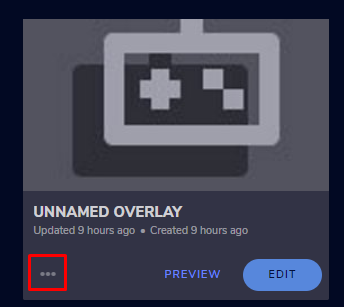
3 dots -> copy url
sharp turret
@gusty solar If you click the 3 point there -> https://prnt.sc/tj54vn copy url

@gusty solar The default resolution for StreamElements overlays (theme and custom) is 1920x1080. Please add them in OBS at their full resolution and use CTRL+F to fit to screen if necessary. You can then downscale your stream in OBS settings > Video if you'd like https://i.imgur.com/6bWXxjR.png
gusty solar
am i getting to that screen through sources or scenes? @sharp turret
sharp turret
@gusty solar Browser source you need add
 steel quest
@modest sparrow im here
rugged quail
my stream quality is stuck on red. my wifi is working fine and it was working good yesterday too
steel bladeBOT
@rugged quail For the best OBS support, please join their Official Discord @ discord.gg/obsproject
 rotund meteor
Hey i have one question. I recently started streaming(2 proper streams ATM) and i wanted to ask you whether there's an option to change chat preview to darkmode in streamelements Obs.live(option selected from top bar in StreamElements category)
modest sparrow
@steel quest Sorry, I thought you were talking about obs fonts. So I redirected you to here.
You will get better help about overlays in #helpdesk-twitch
again. Sorry
sharp turret
@rotund meteor For twitch?
rotund meteor
@sharp turret Exactly
sharp turret
@rotund meteor Check out pinned messages
rotund meteor
should have checked that first @sharp turret sorry for bothering and thanks for guidance
sharp turret
No problem. 😄 Welcome!
 turbid gulch
Hi, I was wondering if I could get some help with an issue I'm having with streamelements obs 😦
steel bladeBOT
@turbid gulch Welcome to the helpdesk! Please let us know how we can assist you today and a support volunteer or staff member will assist you as soon as they are available. Thank you for your patience.
turbid gulch
I'm unable to update my stream title through the streamelements window in obs, but able to do it in browser or on twitch. I simply can't change the title, any idea why?
sharp turret
@turbid gulch There is a bug with setting the stream title in OBS and the Dev team is investigating.
In the meantime you can set the title using the !settitle command in chat (if enabled in your bot command settings)
Or with the Twitch dashboard: https://dashboard.twitch.tv/stream-manager
turbid gulch
Gotcha, thank you!
sacred sand
How do I make the text white? I'm probably being blind but I can't seem to find an option
odd kraken
Change the text color in the text settings.
sacred sand
Ty lol
 young hearth
my obs live keeps crashing and dont know what to do i might just try to restart
 honest echo
@young hearth HOW TO: OBS.Live crashes at startup
- Uninstall OBS.Live and OBS Studio completely, but leave this UNchecked https://i.imgur.com/LBaHgM1.png
- Download and install OBS Studio from https://obsproject.com/
- If it doesn't crash, install OBS.Live too.
-
It's fixed? Nice!
-
It crashes again?
- Repeat steps 1 and 2
- Duplicate the current "Scene Collection" at the very top of OBS, call it something like "Backup" and remove all browser sources in that backup
- Install OBS.Live and see if it still crashes
- If yes, repeat steps 1 and 2, leave OBS.Live uninstalled, tell us that it didn't work and use your old default scene collection again.
 wild monolith
my !commands arent working. they just randomly stopped. any ideas? 🙂
sharp turret
Can you disable the bot then log out wait a minute and login back and enable.
wild monolith
oops its working but it just says it isnt subbed any more... the name got changed back
so my emotes arent showing. i just have to change the bots name
idk why my bots name changed back :/
steel bladeBOT
@wild monolith If your commands recently stopped working and you're using OBS.Live and a custom bot name do the following:
1.) In OBS.Live, click on the hamburger menu (three stripes) at the top left of your activity feed
2.) Click on Stream Settings -> Custom bot name
3.) In the "Custom bot name" field select "Set custom bot name", not your already existing username (with capital letters)
Note: If you already connected an account that way, the third entry will show as the account name (see image https://i.imgur.com/sO7fWOX.png)
4.) Scroll a bit down and click on the purple "CONNECT CUSTOM BOT ACCOUNT" button
5.) Log in as usual and "Authorize" the custom bot name
6.) Back in the Activity feed, click on the "SEND TEST MESSAGE" button and check if your custom bot name starts working again
 wild monolith
thank u!
sharp turret
Ahh faster, just i copyed from message 😀 for that i not finded the command
But there you have.
 wary dew
I thought you went to bed? 😛
young hearth
@honest echo none of it worked
 violet linden
for giveaways do i have to pay for the item
wary dew
if you are the one hosting the giveaway, of course. if you are just a viewer, i assume the streamer is paying for it.
honest echo
@young hearth if you can't open OBS Studio without obs.live maybe something else is broken on your end
steel bladeBOT
@young hearth For the best OBS support, please join their Official Discord @ discord.gg/obsproject
young hearth
@honest echo in the crash folder it says this \stream elements\obs-plugins\64bit\libcef.dll)
steel bladeBOT
@young hearth A crash log is required to investigate the cause of your issue. Please upload the last crash log.
- In OBS, click the Help menu
- Select Crash Reports, and then Upload Last Crash Report
- Copy the URL, and paste it to the chat here.
--
If you are not able to follow the above steps, open your file explorer and go here:%appdata%\obs-studio\crashesand provide the last listed file.
 cunning trout
Hi! I am really looking for some help with your site and I want to share an overlay I have with one of my friends and the link I am sharing isn't working.
Is there a way I can share an overlay so it can directly go into my friend's overlays?
 worthy jacinth
how do i uninistall obs.live i still use streamelements but i want to use normal OBS
cunning trout
Can anyone in the @grand harness.staff help me with this? ^^
wary dew
please don't try to ping the whole staff role
there will be someone here when available
worthy jacinth
ok i uninstalled it sorry for asking didnt lose any data
 dense relic
Hi. First time posting, so apologies if I get anything wrong! I'm trying to import my Streamlabs scenes into OBSLive, but I'm running into a "Failed importing scene collection" error that doesn't provide additional details. Is this something I'm possibly doing wrong?
 silver whale
Hello SE.Staff i have an issue trying to change the stream title and game that I will be streaming. When I go to change the game or title and began to type the cursor jumps all the way to the right and will not take any key stroke input. any advice to help fix this issue would be wonderful.........Thanks for taking the time to read this hope to hear back from someone.
steel bladeBOT
@silver whale There is a bug with setting the stream title in OBS and the Dev team is investigating.
In the meantime you can set the title using the !settitle command in chat (if enabled in your bot command settings)
Or with the Twitch dashboard: https://dashboard.twitch.tv/stream-manager
 pine brook
not sure if this is the right place, but streaming onto twitch I can hear my teammates voices just fine, but on the stream you cant no hear anything. It just sounds like im talking to myself. You can hear game sounds though. Any idea?
im using obs live to do the stream, which makes me think the problem is obs related
steel bladeBOT
@next gull There is a bug with setting the stream title in OBS and the Dev team is investigating.
In the meantime you can set the title using the !settitle command in chat (if enabled in your bot command settings)
Or with the Twitch dashboard: https://dashboard.twitch.tv/stream-manager
kindred fox
@pine brook it would mean that you haven’t added discord or whatever voice chat you’re using to your scene
pine brook
@kindred fox im just using normal game chat?
kindred fox
On a console?
 turbid bluff
so im currently trying to stream dragon ball fighterz through obs but when i do, my frames drop and its not just on dbfz also on league. is there a way to fix it?
 cosmic adder
i need help with my overlay, it was fine before but now its zoomed in and cant resize it
honest echo
@cosmic adder check the dimension on the browser source
cosmic adder
where at
i open up the streamElements overlay editor and it looks fine
but when i copy and paste the link its zoomed in
honest echo

 urban venture
How to activate chat and loyalty menu in the dashboard
Mine has no chat and loyalty
 near glen
I am having trouble with my dashboard. I recently decided to try streamelements vs. streamlabs, and my dashboard says I only have 13 followers, which is not correct. How do I fix that?
steel bladeBOT
@near glen Please logout of StreamElements at https://streamelements.com/logout and then login again to your account (Twitch/Youtube/Facebook/Mixer)
near glen
That didn't fix my problem....
 keen beacon
Hey when I start streaming, it opens a window trying to start a stream to youtube even though I have my streaming service in obs.live as twitch and I even entered a stream key from my twitch. I also went to my streamelements dashboard on chrome and pressed the top left and switched to a twitch account but nothing works. Can anyone help me?
steel bladeBOT
@keen beacon Please ask your question in one helpdesk channel only. A support volunteer or StreamElements staff member will assist you as soon as they are available. Asking in multiple places will only result in confusion, not faster answers. Thank you for your patience.
 cursive stag
Can someone manually send me the plugin for Obs.live on the streamdeck?
 zenith coyote
anyone know wwhy my overlays isnt updating recent subs/followers ect
 cold wave
does anyone know how to fix the error loading data when checking chat or activity feed almost as if my twitch isnt connected although it is it lets me stream just cant see anything twitch related
 obtuse flax
So I deleted my original browser source on my obs (the one that was my streamelements overlay), and when I tried to make a new one, using the link from my custom overlay, it stopped working. Now my video capture only shows up every other time I open up my OBS, and the webcam will only show up on one scene upon opening obs. Anyone know how to fix any of these issues?
plain mason
@cold wave show us a screenshot with the error please.
cold wave
@plain mason
 kindred trellis
Hey guys. Ive been having this problem with OBS.live. My streamelements activity page wont let me change my stream title. it wont even let me backspace to get rid of my previous title. please help
cold wave
@plain mason it wont show wehn others type in chat then guves me that when i access chat settings from obs the activity feed also doesnt show any new activity
ive already unistalled logged out and logged in multiple times nothing helps
steel bladeBOT
@cold wave Streamelements on top of OBS -> Logout -> login
@kindred trellis There is a bug with setting the stream title in OBS and the Dev team is investigating.
In the meantime you can set the title using the !settitle command in chat (if enabled in your bot command settings)
Or with the Twitch dashboard: https://dashboard.twitch.tv/stream-manager
kindred trellis
Thank you
cold wave
thank you
 sly tangle
Hi guys
steel bladeBOT
Welcome to the helpdesk! Please let us know how we can assist you today and a support volunteer or staff member will assist you as soon as they are available. Thank you for your patience.
 sharp turret

 hallow turtle
having an issue with my alertbox, on the site it seems fine but actual alerts in the alertbox are like wayyyy off to the right
sharp turret
@hallow turtle The default resolution for StreamElements overlays (theme and custom) is 1920x1080. Please add them in OBS at their full resolution and use CTRL+F to fit to screen if necessary.
You can then downscale your stream in OBS settings > Video if you'd like https://i.imgur.com/6bWXxjR.png
hallow turtle
thankyou, now im having an issue of i pressed transform something and now everything is ginormous and out of proportion woops
 hallow turtle
i buggered it lmao, gonna just reset it all
and seems its done it to my original too da hell
ive somehow set my canvas to 400x300
shy mountain
Settings -> video -> canvas size
hallow turtle
thankyou
alert box just isnt working i have it linked as a browser source with the url, but its not even popping up in my Obs now nore does it have an audio mixer line or any reaction when emulating follows or subs ect
steel bladeBOT
@hallow turtle OBS -> settings -> advanced -> scroll down -> enable/disable hardware accel. (This does not apply for OBS on Mac)
https://i.imgur.com/ggMe9ZE.png
hallow turtle
figured it out, the issue is im dumb and didnt press the save when testing it all
hallow turtle
the theme setting and such is so extremely confusing to me to make work, if i make the overlay bigger on the website it becomes to big and the entire item on screen is like zoomed into one area now matter what i do
as you can see ive made it larger on the left, and if i resize it on stream or not it doesnt seem to refit the other
sharp turret
Have you added in obs as 1920x1080?
hallow turtle
apologise for my ugly mug btw i just dont understand how the system works
It should be yes but i feel like im doing that incorrectly
hallow turtle
thats in the open properties on the sources in obslive yes?
i think i see where i was going wrong yeah
sorry bout that
hallow turtle
next is how can i give access to my media share to my mods? so they can scan and approve/disaprove
sharp turret
The moderator also can do via commands also can skip the song !skip
steel bladeBOT
@hallow turtle Follow these steps to grant managers/moderators access to your dashboard:
- Click on your Channel Name at the top of the dashboard and select Settings
- Create a new invite at one of three access levels (Bot Supervisor, Editor, Full Control)
- Send this invite to a mod/manager to give them access to your dashboard. The link is one-time-use and expires after 72 hours if not accepted
Video tutorial: https://youtu.be/zl_h-ttZDF0
hallow turtle
all good thankyou
 haughty haven
Good morning everyone! For some reason I seem to be the only one who can add a quote, even though quote access is set to everyone. Is that just how it is, or is there a way to change it?
shy mountain
Only broadcaster and moderators can add quotes
haughty haven
Oh wow, that sucks. :(
At least I know now. Thank you KeiZar!
muted sequoia
So i tried to ask this yesterday but didn't get a response, i keep getting this white screen after i installed stream elements then i was told to click login and this is what happens
sharp turret
Don't know but might be reinstall OBS.Live
muted sequoia
i'll try
 random finch
Thanks @shy mountain I fixed the dark mode ^_^ But the other problem with my activity feed! Please help 😦
it isnt showing ALL of my subs and gifted subs... its really weird... i got a lot of subs and its only showing 2?? can you please help. Ive relogged in OBS to see if that fixes it, and it doesnt fix it. I want to be able to go back and thank everyone that subbed however theres no history showing in the activity feed? Please help. Thanks
I reloaded the activity feed widget and it still wont show them all
shy mountain
Can you show a screenshot from your twitch activity feed and our activity feed?
random finch
Sure one second
shy mountain
@random finch i resubbed your webhooks. If the issue persist on the next resub/sub/gift let us know
random finch
Thank you. Are they all meant to be showing up in my activity feed in OBS now? I just refreshed it and its still only showing the 2 subs
shy mountain
Any missed events won't show up
but for future events just make sure you check and see if anything is missing or not
 cursive jay
My mediaplayer isn't loading. How can i fix this?
sharp turret
Please log out and login back in OBS.
cursive jay
👍
sharp turret
Streamelements on top of OBS -> Logout -> login
cursive jay
It worked! Thanks!
 crisp marten
Is there any way to get a giveaway wheel? So like a spin the wheel chance.
shy mountain
There is a few spin wheels in #widget-share you can check out
But I don't believe any of them are connected to the giveaway system
crisp marten
Yeah, it kinda works, just doesn't allow for custom words to be added.
 stark turtle
I'm trying to update OBS live and it stops right here:
Can't write: D:\Program Files\obs-studio\bin\64bit\BugSplat64.dll
pallid parrot
Try to run OBS with administration privileges
stark turtle
that didnt work 😐
 elfin apex
HI
 brazen pewter
guys i accidentally pressed x on my twitch chat dock and now i dont know how to get it back
can anyone help? please
 fathom cobalt
view > docks > chat
sharp turret
StreamElements -> Chat
brazen pewter
oh alright found it thanks
 wraith wharf
i cant seem to enable replay buffer
it wont even let me select the boxes
and i think the problem is that my quality is set to same as stream but i cannot change that either
steel bladeBOT
@wraith wharf For the best OBS support, please join their Official Discord @ discord.gg/obsproject
 night bramble
hi
I can't change the stream title in obslive
and it doesn't show the viewers
D:
steel bladeBOT
@night bramble There is a bug with setting the stream title in OBS and the Dev team is investigating.
In the meantime you can set the title using the !settitle command in chat (if enabled in your bot command settings)
Or with the Twitch dashboard: https://dashboard.twitch.tv/stream-manager
 ebon zealot
Why is there a 10 second delay on my obs? ive checked the settings and the delay is not enabled. i restarted obs and restarted the pc but still a 10 second delay. how can i fix?
steel bladeBOT
@ebon zealot For the best OBS support, please join their Official Discord @ discord.gg/obsproject
ebon zealot
im on streamelements
sharp turret
But are use obs studio
plain mason
@ebon zealot are you using Twitch for streaming?
ebon zealot
yes
plain mason
check the Latency Mode if the "Low Latency" is selected ... https://dashboard.twitch.tv/settings/channel
ebon zealot
it is
plain mason
then you need OBS support - https://discordapp.com/channels/141203863863558144/494513233416421386/733709557854896148
ebon zealot
i dont understand am i not using streamelements?
plain mason
@ebon zealot live is a StreamElements plugin... it is OBS Studio with a plugin.
 midnight mountain
Is it possible to get the SteamElements plugins to work on linux?
plain mason
@ebon zealot the plugin is to bring some SE facilities to OBS and assist the live streamer. But it doesn't interfere in the operation of OBS, so when the problem isn't related to the plugin (OBS.live) then we indicate the support of OBS that will help you better.
 void lynx
Hello everyone. I had a question regarding Kappagen. The regular chat-emote function has an effect called "blur" that makes emotes fade in and out. For emotesplosions that option doesn't seem available. Is there any way I could add that effect as an option? The fading in and out would be perfect for what I needed. Thanks
 sharp panther
Hey! I switched over to StreamElements today from Streamlabs, and the only problem I've run into is the Media request not showing up on stream/not finding a media share widget in the overlays.
sharp turret
You need add in editor media request
Create blank overlay click + and search media request
Then add in OBS as browser source.
sharp panther
This is the problem I run into here, no result for Media Request.
sharp panther
sharp turret
Oh, me is showing
sharp panther
Yeah it's odd
 timid drum
Hey, I was looking at the SE Pay page and it says it is not available due to either region constraint (it's available for me) or channel size. I have 1000 subscribers and I'm wondering if there are any more requirements or anything?
steel bladeBOT
@timid drum SE.PAY is available for streamers who are atleast 18 years old, with bank account under their name in one of the following countries and have at least 101 Follower (Twitch) / 101 Subscribers (Youtube):
Austria, Belgium, Czech Republic, Denmark, Finland, France, Germany, Ireland , Italy, Netherlands, Poland, Portugal, Slovakia, Spain, Sweden, Switzerland, United Kingdom, United States.
If you meet these criteria and don’t see SE.Pay, let us know.
For information on SE.Pay payment methods, their fees, and settlement times see https://streamelements.com/dashboard/tipping/fees.
timid drum
I do meet them.
steel bladeBOT
@timid drum Please provide your account ID found at the top of this page: https://streamelements.com/dashboard/account/channels This ID is public info and safe to share here.
timid drum
👍
odd kraken
@sharp panther Are you logged in with your youtube account?
timid drum
5e5a54962c171a7e7652fa2a
sharp panther
I have my youtube linked to my StreamElements if that's what you mean
Oh my god I figured it out
I was accidentally using my youtube overlays instead of my twitch
🤦🏻♂️
void lynx
Anyone know the kappagen related question? If not is there a more appropriate area to post this or is this the correct place forgive the ignorance.
odd kraken
@timid drum What country are you from?
timid drum
Ireland
odd kraken
Asking internally to activate SE.Pay for you.
timid drum
Alright.
odd kraken
@void lynx There are only different effects on both sides, as there is a difference if one emote, or something like an explosion with multiple emotes happens.
void lynx
@odd kraken There's no way to edit in the effect though? To add it for personal use on the explosion side?
odd kraken
No.
void lynx
Okay.
odd kraken
@timid drum Your SE.Pay should be available now.
timid drum
Works now. Thanks
 fallow slate
for gamecapture, it doesn't work, its just all black. pls help thx
steel bladeBOT
@fallow slate For the best OBS support, please join their Official Discord @ discord.gg/obsproject
 brave wave
Hey everyone I'm still having an issue where game capture isn't working ive run obs.live as admin but it is still happening
steel bladeBOT
@brave wave For the best OBS support, please join their Official Discord @ discord.gg/obsproject
 quartz lichen
Hello 🙂 I'm trying to set up a KappaGen alert but it wont show up on my Stream Elements preview?
 vagrant trench
is there a hotkey to use streamelements contests ? i'm trying to figure out how to launch a contest from my streamdeck vs having to keep the streamelements page open
odd kraken
@vagrant trench Please keep questions in one helpdesk channel only. Thank you.
vagrant trench
@odd kraken nobody answered in the other channel, which is why i came here, i thought maybe i had the wrong channel
@odd kraken so no answer for the question then?
odd kraken
@quartz lichen Have you added the kappagen widget to your overlay, added this overlay to OBS Studio or OBS Studio with our plugin OBS.Live with the correct dimensions (by default: 1920x1080)?
 strong ermine
Hello guys, one question, how can I add to my overlay the "last sub/last tip/etc" without the animation that comes in the widgets from stream elements? is it possible?
quartz lichen
@odd kraken I couldn't figure it out so I'm using slobs emote wall instead thanks though haha 🙂
kindred fox
@strong ermine if you’re just looking for the static text, it can be added in the overlay editor by adding the widget
strong ermine
@kindred fox I added the widget "events rotation" but the animation its kind of weird because it shows "last sub" 2 times and it messes up with my overlay, how can I add the widget for static text?
kindred fox
I believe it’s under labels? I’m not on a computer so I can’t check.
Static text maybe
strong ermine
oh, ok! let me search! thanks!
kindred fox
👍
odd kraken
strong ermine
@odd kraken thanks, im searching that haha
 true dew
why do my overlays disappear when i resize them?
odd kraken
Can you elaborate on that please? Where exactly are you changing the size?
odd kraken
Do you have a screenshot of that behaviour please.
true dew
i can record a video on my phone. A screen shot wouldn't be able to capture it as it only disappears while it's being moved. It still shows up in the sources dock though
strong ermine
@odd kraken thanks a lot! I got it right this time! 😄
odd kraken
What exactly are you resizing? What buttons are you pressing? @true dew
 proper fjord
My OBS Keeps reconnecting Idk Why.
true dew
just clicking and dragging to be smaller
rugged quail
Hi I am having problem my csgo
true dew
it's a .webm overlay
steel bladeBOT
@proper fjord Streamelements on top of OBS -> Logout -> login
@rugged quail Valve has implemented a Trusted Mode which does not allow OBS to hook CS:GO using Game Capture. See: https://blog.counter-strike.net/index.php/2020/07/30736/
You will need to run the game in either windowed or borderless windowed and use Window Capture instead. Alternately, you can launch the game with -untrusted but this will lower your trust score with VAC and may affect the quality of your matches.
odd kraken
@true dew Is that video added via an overlay to your OBS Studio?
true dew
i mean. I add my webcam as a source, and then i add a .webm overlay to make a border for it, and as i'm resizing the border overlay it just disappears. I hope i'm using the right terminology, sorry I'm new.
resizing = clicking and dragging
odd kraken
Could you do a video with your phone please. I cannot follow you, I am sorry.
proper fjord
It did not work
 carmine rover
Hi. Can someone help me? I'm using OBS.Live (windows 10) and I always change the stream title in Activity Feed menu>Settings.
Suddenly, I can't change the title or game anymore... The text cursor is flashing, but I can't type or delete anything. Does anyone know why?
true dew
@odd kraken
sharp turret
@carmine rover There is a bug with setting the stream title in OBS and the Dev team is investigating.
In the meantime you can set the title using the !settitle command in chat (if enabled in your bot command settings)
Or with the Twitch dashboard: https://dashboard.twitch.tv/stream-manager
steel bladeBOT
@true dew For the best OBS support, please join their Official Discord @ discord.gg/obsproject
carmine rover
@sharp turret Thank you!! I was really struggling with it.
 trim sleet
Hello! I just installed streamelements on my OBS and i wanted to add an overlay for alerts. I did so, I added the web source and everything in OBS, but when i test it nothing shows up.
Can someone please give me a tip?
sharp turret
@trim sleet The default resolution for StreamElements overlays (theme and custom) is 1920x1080. Please add them in OBS at their full resolution and use CTRL+F to fit to screen if necessary.
You can then downscale your stream in OBS settings > Video if you'd like https://i.imgur.com/6bWXxjR.png
proper fjord
I have a problem when i try to stream It will Reconnect and then connect it wont stop
steel bladeBOT
@proper fjord For the best OBS support, please join their Official Discord @ discord.gg/obsproject
true dew
@odd kraken did you see the video?
odd kraken
yes.
trim sleet
@sharp turret ok thanks it worked. it shows up now!
sharp turret

odd kraken
Contact the OBS support please, as this is not an overlay you are using.
steel bladeBOT
@true dew For the best OBS support, please join their Official Discord @ discord.gg/obsproject
strong ermine
@odd kraken another question, if I have a font I wanna use on the text do I just use "enable custom font" and then type the name of the font?
steel bladeBOT
@strong ermine Google Fonts
More than 900 google fonts are supported at this time. You can preview them here: https://fonts.google.com/
Custom Fonts
Steps:
- Install the font on the streaming PC or choose a pre-installed windows font.
- In the overlay widget settings, select Text Settings
- Enable Custom Font
- Type the name of the font as it appears in the windows font directory (This is usually
C:\Windows\Fonts)
Note: After installing fonts, the browser and OBS must be restarted for the font to appear.
strong ermine
thanks!
 rain cloak
I have created Overlay in my StreamElements dashboard but how to import those to the application? I can't see how to import to the application
sharp turret
Click 3 dots and copy url
steel bladeBOT
@rain cloak To add your overlays to OBS, add a new browser source in your scene. Paste your overlay URL in the browser source properties, set the dimensions to 1920x1080 (unless you changed them on the website), and ☑ “Shutdown source when not visible” https://youtu.be/KDvLynUqXI4
sharp turret
 thick token
Can anyone help? When testing out the chatbox on a test broadcast on facebook live, it's duplicating it. Like when I tested out typing Hello. It showed up 3 times.
 errant marsh
Trying change stream title - nothing happens ( i can put any single letter there), changing game is fine. Can anyone help?
sharp turret
@errant marsh There is a bug with setting the stream title in OBS and the Dev team is investigating.
In the meantime you can set the title using the !settitle command in chat (if enabled in your bot command settings)
Or with the Twitch dashboard: https://dashboard.twitch.tv/stream-manager
errant marsh
@sharp turret thanks
 queen rivet
steel bladeBOT
queen rivet
steel bladeBOT
@queen rivet Welcome to the helpdesk! The regular helpdesk channels are in English but we do provide multi-language support in the following channels: #🇩🇪︱deutsch | #🇫🇷︱français | #🇪🇸︱español | #🇵🇹︱português | #🇳🇱︱nederlands | #🇮🇹︱italiano | #🇵🇱︱polski | #🇨🇳︱中文語言服務區-chinese | #🇯🇵︱日本語-japanese | #🇭🇺︱magyar | #🇰🇷︱한국어-korean | #🇹🇭︱ไทย-thai | #🇷🇺︱русский | #🇺🇦︱українська | #🇨🇿︱czech
plain mason
@queen rivet > #🇵🇹︱português
 opal cliff
hello started to get Authentication Failure , failed to Authenticate with Restream , Failed to get token from Remote . any pointers on where to start troubleshooting ,thanks
kindred fox
@opal cliff make sure you signed into restream or pasted your stream key correctly in your OBS settings
 next copper
why everyone deleting me messages
wary dew
your question is in #helpdesk-youtube please keep it there
it will only get confusing if you post it in multiple channels
someone will help you when they have time for it
next copper
no one is helping me tho :(
opal cliff
@kindred fox will check thanks
wary dew
no one is helping me tho :(
@next copper
rugged quail
on my media request most popular songs are coming up as "VIDEO NOT AVAILABLE IN YOUR COUNTRY" and I don't know why as the media player was perfectly fine yesterday but today it's all messed up. can anyone help?
honest echo
@rugged quail Try this
1) Right click on your OBS desktop shortcut -> properties - in the "Target" field add this -> --remote-debugging-port=40404
2) Open OBS(or restart if it was open)
3) Open your browser and type in "localhost:40404"
4) Click StreamElements - Media request link
5) Point the (in browser) URL to https://youtube.com
6) Use the OBS dock to search for a song and play it after ads
7) Restart OBS and preform media request via chat
8) Remove --remote-debugging-port=40404 from shortcut
 coral sedge
activity feed and stream elements bot are not up to date and i cant modify my stream title and the game im playing
sharp turret
There is a bug with setting the stream title in OBS and the Dev team is investigating.
In the meantime you can set the title using the !settitle command in chat (if enabled in your bot command settings)
Or with the Twitch dashboard: https://dashboard.twitch.tv/stream-manager @coral sedge
 safe radish
hello, i need some help
rugged quail
@honest echo I'm getting this error when i try do step 1
 unreal adder
Can anyone help me with separating star amount alerts? I have 2 right now for a minimum of 10 and a minimum of 1000. When i test the 1000 it still plays the 10 along with it.
honest echo
@rugged quail you miss 1 space after the "
safe radish
my current and only issue is i cant minimize stream elements, i fast clicked full screen instead of minimize and now i cant get out of full screen
rugged quail
@honest echo yeah thanks, sorry i'm now confused on step 5 could you go into more detail ? 🙂
honest echo
replace the URL with youtube.com
rugged quail
hey renz can you look at twitch help prob should of put it here but its still kinda twitch
safe radish
i finally figured it out, peace!
rugged quail
@honest echo I'm on step 7 and it's still coming up with this. You have any ideas why?
@rugged quail hey do your alerts work?
yes @rugged quail
do you think you could help me with mine?
what's the problem
i dont think its wotrkiong
working*
could we get into a call
when i press emulate it dosent come up in obs and the option for it is checked
steel bladeBOT
@rugged quail OBS -> settings -> advanced -> scroll down -> enable/disable hardware accel. (This does not apply for OBS on Mac)
https://i.imgur.com/ggMe9ZE.png
wary dew
disable that
rugged quail
try making an overlay via StreamElements.com adding the alerts by pressing the big blue cross.. save the overlay and copy the overlay link from the top right add a browser source in obs in the "sources" section and pasting the link there. they should work after you do all that @rugged quail
thats what i did do
@rugged quail
wary dew
did you also do what i / the bot suggested?
rugged quail
ya
steel bladeBOT
@rugged quail Right click on the BrowserSource > Properties > Scroll down a bit > Refresh Cache of current page
rugged quail
did that a few times ill try again doe
wary dew
is the resolution set to 1920x1080 in the browser source properties?
steel bladeBOT
@rugged quail To add your overlays to OBS, add a new browser source in your scene. Paste your overlay URL in the browser source properties, set the dimensions to 1920x1080 (unless you changed them on the website), and ☑ “Shutdown source when not visible” https://youtu.be/KDvLynUqXI4
wary dew
it should be done like that ^^
that is the default size of all the StreamElements overlays
so if you change it, part of it will not show up
 ripe gust
rugged quail
ripe gust
rugged quail
@wary dew thank you
wary dew
How can i put lower the live lattency
@ripe gust try a different twitch server or get better internet
 modest girder
hello there, can I edit/disable the default Streamelements bot reply when someone redeems a Sound Effect? Those replies are rather useless and I can't find a way to disable them
wary dew
no that is not possible
modest girder
Oh, well, thanks for the reply 🙂
 molten nebula
anyone have trouble changing streaming title through there? it wont let me type anything.
wary dew

molten nebula
it was working fine couple days ago
plain sonnet
bot still sleeping
wary dew
There is a bug with setting the stream title in OBS and the Dev team is investigating.
In the meantime you can set the title using the !settitle command in chat (if enabled in your bot command settings)
Or with the Twitch dashboard: https://dashboard.twitch.tv/stream-manager
unreal adder
@wary dew
wary dew
?
unreal adder
Can anyone help me with separating star amount alerts? I have 2 right now for a minimum of 10 and a minimum of 1000. When i test the 1000 it still plays the 10 along with it.
Trying to figure out overlay setting
wary dew
in the alertbox is the amount of 1000 set to 'AT LEAST' 1000? or something else?
unreal adder
Yes one is set to minimum 10 and other is 1000. I dont see like a maximum to separate the two
 outer minnow
I cant seen to install any plugins. Has anyone had a major issue trying to get the move transistion
 weary dragon
whats the height and width to add a theme to ur twitch?
rugged quail
anyone here able to help setting up some overlays
 molten crow
Can someone show me how to move all of my scenes from SLOBS to obs.live :)
as well as the alerts
 rare vessel
wont let me change stream title wont even let me delete the previous title
kindred fox
@rare vessel There is a bug with setting the stream title in OBS and the Dev team is investigating.
In the meantime you can set the title using the !settitle command in chat (if enabled in your bot command settings)
Or with the Twitch dashboard: https://dashboard.twitch.tv/stream-manager
@weary dragon 1920 x 1080
@rugged quail New to Stream Elements?
Check out our YouTube channel https://www.youtube.com/c/streamelements/videos
with tutorial videos from setting up the basics, to in depth details on how to use our product.
New to OBS? Here is a 4 step quickstart guide
https://obsproject.com/wiki/OBS-Studio-Quickstart
Want to learn even more? Here is an in-depth overview
https://obsproject.com/wiki/OBS-Studio-Overview
@molten crow I believe that you can open your SE dashboard in a chrome tab, open your SL dashboard in another, and then click the import thing at the top of your StreamElements dashboard and select SL as your import source
 grim moth
i need help i cannot change my stream title or game playing i uninstalled and reinstalled and still same problem
kindred fox
@grim moth There is a bug with setting the stream title in OBS and the Dev team is investigating.
In the meantime you can set the title using the !settitle command in chat (if enabled in your bot command settings)
Or with the Twitch dashboard: https://dashboard.twitch.tv/stream-manager
grim moth
thank you
 novel zealot
hi, i bought the rodan package from own3d, and for some reaon the animated twitter dont work properly in OBS, they do in the "preview" in streamelements site, but not OBS, anything i might be doing wrong here?...please help
honest echo
@novel zealot i would suggest to reach out own3d 🙂
novel zealot
thanks @honest echo do you happen to knwo if the files ".webm" are supported in OBS?
honest echo
ofc, SE overlay editor also support *.webm
rugged quail
guys, need some help
just installed the OBS.LIVE and got everything set up
there are white pixels that slowly cover the screen
and it makes it very hard to read/ see what im trying to do
any fixes?
kindred fox
Do the white pixels happen any other time?
Because I have honestly never heard of this before
 unkempt pilot
i cant find the pop up that tells you how many viewers, clips, subs, and total veiws you have on twitch. anyone know wheres that at?
rugged quail
this problem is super annoying
@kindred fox im not sure, ive seen some reddit posts abt it
no answers doe
kindred fox
@unkempt pilot The pop up?
molten crow
@kindred fox I'll try that thanks!
kindred fox
@rugged quail are you on a laptop or desktop?
And the screen gradually just fades to white?
Entire screen or just obs?
kindred fox
So just the corners of the preview?
rugged quail
just the preview text
kindred fox
This is gonna need a picture
rugged quail
it would be easier to explain in a call if i can do that
or screen share
@kindred fox
unkempt pilot
i think it was a pop up @kindred fox
kindred fox
I don’t do screen shares
rugged quail
so just a screen shot
kindred fox
Yep
@unkempt pilot was it a dock perhaps?
The viewers should be at the bottom of the activity feed panel — StreamElements Menu > Activity Feed
unkempt pilot
yea i found it, it was called twitch stats. i just had to connect with twitch by logging in rather than using the key @kindred fox
thanks
kindred fox
no no no, you only get one 😛
kindred fox
what's up?
rugged quail
when put in my overlay link into the browser source, its just a very small portion of the overlay, and it cant be stretched into the screen covering original
do i have to change its properties when i import?
@kindred fox
kindred fox
when you add the overlay to OBS, make sure that you set the resolution to 1920 (width) x 1080 (height)
rugged quail
worked!!
and the latest follwer subscriber and stuff is automatic right?
kindred fox
yep yep
molten crow
Alright thanks :)
kindred fox
I reported it to the support peoples. They will be in touch when they can
rugged quail
sorry for the many questions
im used to recording and posting
thought GTAV RP could use some more live streamers
kindred fox
nah don't sweat it
if you look up StreamElements on YouTube, there are also some guides there for other features in addition to the overlays 😄
rugged quail
cause like
if im trying to add my social media handels
there is no text box
sorry
im challenged
just saw the huge + sign in the corner
@kindred fox , does the latest follower alert work automatically?
plain mason
@rugged quail you will select the item (layer) on the Editing Area of your Overlay Editor... or selecting the layer on the left panel, then clicking on the menu Settings and you will be able to edit the text of this item (layer).
rugged quail
@plain mason would i have to do this manually?
or would it be done each time someone followed
plain mason
@rugged quail this procedure above is to edit a text item, like your social media...
rugged quail
my socail media handels are done
plain mason
do you want to add a widget to show Latest Follower on your overlay?
but if you want to see the followers alerts...
 polar rock
Anyone online rn that can help me out for a min?
 dense anvil
Can anyone help me in recording the last 30 minutes of my gameplay in OBS.Live?
honest echo
wdym?
 manic anvil
I haven't been able to update my stream title for weeks, in obslive. I click on it and it does nothing. Any suggestions?
actually, if I click on any part of the title, it will move the cursor to the end of the title. if I highlight it, it moves to the end
honest echo
@manic anvil There is a bug with setting the stream title in OBS and the Dev team is investigating.
In the meantime you can set the title using the !settitle command in chat (if enabled in your bot command settings)
Or with the Twitch dashboard: https://dashboard.twitch.tv/stream-manager
manic anvil
yeah I have been using the dashboard but hate having to do it
thanks for the settitle command
is the same for game? !setgame?
honest echo
yes
 sterile ember
Hi all! I recently made the change from streamlabsobs to obslive and have been loving it! One problem, recently I changed my name on twitch and since then I haven't been able to access my stream chat, alerts or activity feed in obslive. I've tried logging out/in again but it didn't fix anything. I feel like there's a simple step that I've missed but I can't for the life of me find it. Does anyone have a solution for me? Thanks in advance!
shy mountain
Logout from OBS.Live (Streamelements on top -> logout), then go to our dashboard -> logout and login again -> afterwards login in OBS.Live
sterile ember
THAT was it! Knew it was somewhere, just couldn't work it! Thanks a bunch @shy mountain!
 barren olive
i think i might be completely missing something but i cant even figure out how to get overlays working on my OBS live I've watched videos and read 1 min setup guides but for some reason i cannot find any of the buttons to click like overlay manager or launch overlay , or even where to post the URL in OBS itself , I've just made the switch to PC from PS streaming and its crazy can someone please help me !
sharp turret
Click to 3 dots and copy url https://prnt.sc/tk0x3y

@barren olive The default resolution for StreamElements overlays (theme and custom) is 1920x1080. Please add them in OBS at their full resolution and use CTRL+F to fit to screen if necessary.
You can then downscale your stream in OBS settings > Video if you'd like https://i.imgur.com/6bWXxjR.png
barren olive
yeah that i understand , but where do i click in OBS to get that URL insert up ?? i cannot for the life of me find it lol
barren olive
okay done
@sharp turret your a legend cheers !
i was trying to find that up top like in the file edit directory
 lean crystal
Hi everyone, I've searched for ages and I can't find a solution to my problem. Here's some info: I have two 1440p Monitors. I was streaming in 1440p but there was some artefacts so I tried to scale down to 900p. I don't know what's happened but now my Game/Display capture will not work for my stream. I can't do window capture becuase the quality is so bad. It's just black screen. I've tried all of the top threads. I have an AMD CPU so the "integrated graphics" fix won't work for me. My stream was fine two nights ago 😦 Is it the way I have my displays set up? I'm all out of answers..
steel bladeBOT
@lean crystal For the best OBS support, please join their Official Discord @ discord.gg/obsproject
 ionic yarrow
so the activity tab wont let me change the streams title. i can click and highlight text but cant delete or add to it. anyone know why??
steel bladeBOT
@ionic yarrow There is a bug with setting the stream title in OBS and the Dev team is investigating.
In the meantime you can set the title using the !settitle command in chat (if enabled in your bot command settings)
Or with the Twitch dashboard: https://dashboard.twitch.tv/stream-manager
ionic yarrow
nice there's a auto bot for my question. thats how you know the problem is bad lol. info understood tho
shy mountain
I triggered the bot to respond. We use the bot to help answer commonly asked questions

 naive acorn
why is my obs display capture black?
 left elbow
hello streamobs live
i wanna ask if there is copyright in using youtube links to play with media source?
shy mountain
@naive acorn run OBS as admin
@left elbow Moderation of Media Request is entirely up to you, if you want to show copyrighted stuff or not.
left elbow
oh well how do i know if there is no copyrights in vids? i wanna use some vids on my media source in my facebook live
 golden oak
Since I've installed OBS.live my game capture is just black. Help pls....
shy mountain
Run OBS as admin
golden oak
Run OBS as admin
@shy mountain Still black...
left elbow
@shy mountain sir how do i know if there is copyright on vids
steel bladeBOT
@golden oak For the best OBS support, please join their Official Discord @ discord.gg/obsproject
golden oak
Yea... The question is that I went there...
shy mountain
@left elbow I can't say how because I don't know how. Like mentioned, its up to you to moderate the incoming song requests.
golden oak
But the problem is with obs.live not obs, I didn't had any problem before...
shy mountain
!obslive
steel bladeBOT
OBS.Live is a Plugin for OBS created by StreamElements. You can download OBS.Live here: https://streamelements.com/obslive
Please make sure you have the latest version of OBS installed, Current Version: 25.0.4. You can install OBS here: https://obsproject.com/
golden oak
yep... Really helpful. Thank you tho.
shy mountain
Ok so let me reiterate - OBS.Live is a plugin for OBS Studio. Meaning we do not touch the game capture part of OBS Studio.
shy mountain
yes
golden oak
Ok I got it. But kinda strange since it just happened after. But now I understood...
left elbow
@shy mountain thank you again
rugged quail
my streamelements OBS Live is not working
acts like it downloads fine but wont come up on screen
just gives me an obs 25.0.8 window that stays at bottom pin area but is black when i put curser over it
steel bladeBOT
@naive acorn For the best OBS support, please join their Official Discord @ discord.gg/obsproject
rugged quail
blank*
shy mountain
@rugged quail can you show a screnshot or a video?
shy mountain
Did you try and reinstall it?
shy mountain
So is that with or without OBS.Live?
shy mountain
ok so uninstall obs.live
then uninstall obs studio
restart PC
and only install OBS Studio
from here:
rugged quail
tried that too and it wont
shy mountain
OBS (Open Broadcaster Software) is free and open source software for video recording and live streaming. Stream to Twitch, YouTube and many other providers or record your own videos with high quality H264 / AAC encoding.
so even pure OBS Studio and its still doing that?
shy mountain
I'm not sure then. If OBS Studio is doing that without our plugin installed then its best to ask in their discord here: https://discord.gg/obsproject
rugged quail
ok, thx
 solid ember
can someone help me out here, whenever i do game capture on csgo its just a black screen
it's on untrusted mode already.
rugged quail
omg, they told me to come back hee
and ignored me when i told them you sent me there
is there a way to completely remove all stream elements/obs components from my computer and start fresh
solid ember
yeah uninstall it then look for obs stuff in %appdata% or something and delete those as well
shy mountain
!csgo
steel bladeBOT
Valve has implemented a Trusted Mode which does not allow OBS to hook CS:GO using Game Capture. See: https://blog.counter-strike.net/index.php/2020/07/30736/
You will need to run the game in either windowed or borderless windowed and use Window Capture instead. Alternately, you can launch the game with -untrusted but this will lower your trust score with VAC and may affect the quality of your matches.
shy mountain
@solid ember ⤴️
solid ember
@solid ember ⤴️
@shy mountain yeah, i tried it out as well. worked last night, now it doesn't even in untrusted mode
shy mountain
Then OBS guys
OBS.Live is a plugin for OBS studio and we do not touch the game capture mechanic of OBS Studio in any way, shape or form!
solid ember
aight thanks
shy mountain
@rugged quail For the love of all that is sane here. You provided me with this screenshot https://cdn.discordapp.com/attachments/494513233416421386/733966769424957460/2020-07-18.png

and we went back and forth establishing that PURE OBS STUDIO is giving you this issue
@toxic fern is a champion and only a nitro booster in the OBS Discord
I just saw what you said "obslive is not working" without providing the same details you provided me
rugged quail
im stuck between a rock and a hard place
you say its them, they say its yall
and im stuck with this on my computer and doesnt work
rugged quail
cant even erase it
shy mountain
you are not providing the same details you provided to me
If you've uninstalled OBS Studio BEFORE OBS.Live, then you need to install OBS Studio again
in order to remove obs.live
shy mountain
tehbasshunter is trying to help as much as he can
rugged quail
ill reinstall and try
shy mountain
Since you didn't provide the same details you provided to me
then he will send you back here
Im not blaming the person here, I'm blaming the lack of details being provided
simply saying "obslive is not working" in the OBS discord will have everyone there send you back here
rugged quail
i said its not working... they said go back here
shy mountain
Because you didn't provide the details that OBS is a white box
rugged quail
they were talking to someone else and made it seem like they just shoed me
imma try again
rugged quail
have no choice but to keep trying
thanks for your time, i do appreciate it
you are officially my favorite person. went back and tried a few of the things you told me to try and for some reason this time it worked!!!
You are AWESOME!
Some one give KeiZar a raise!
and no offense to guys in other room, maybe it was me, at this point I dont know, I was just so darn frustrated. when they said come back here, I kind of was at my witts end. much luv to you all. and thanks again.
 open bear
Hey guys wondering if anyone change help out, I'm having a problem where I cant change my stream title in the OBS Live Activity Feed > Stream Settings. I can change the game no issues, but Stream Title I cant change at all. I can change the stream title directly on the twitch stream manager no issues, I've tried to reinstall OBS Live a few times and done a full reinstall of OBS as well, no luck with either. Any help would be appreciated 🙂
steel bladeBOT
@open bear There is a bug with setting the stream title in OBS and the Dev team is investigating.
In the meantime you can set the title using the !settitle command in chat (if enabled in your bot command settings)
Or with the Twitch dashboard: https://dashboard.twitch.tv/stream-manager
 strong nebula
Hello I need help. Whenever I want to stream with OBSLive Live it doesn't work. The stream breaks off again. What could that be?
sharp turret
The stream just stopping or you get dropped frames?
strong nebula
The stream stops
steel bladeBOT
@strong nebula For the best OBS support, please join their Official Discord @ discord.gg/obsproject
 eager flicker
hey how can i add other plugins like the obswebsocket plugin
odd kraken
Like you would normally add them to your OBS Studio.
 bright birch
Hey, so i have a weird issue, I changed my chat bot's password because I forgot it, and then the usual thing happens where the custom bot name in obs.live reverts back to "Streamelements" as the name for my bot. Only this time, when I went to log back into the bot account through the obs.live settings to give my bot name back to obs.live... it won't take.. after going through the setup for it again and getting to the confirmation of link screen, the window closes and it doesn't populate my custom bot name in the list. I have tried uninstalling obs.live and reinstalling it, as well as unlinking manually through twitch's connections settings but my attempts at fixing it on my own have rendered no results.. any insight would be greatly appreciated..
sharp turret
If your commands recently stopped working and you're using OBS.Live and a custom bot name do the following:
1.) In OBS.Live, click on the hamburger menu (three stripes) at the top left of your activity feed
2.) Click on Stream Settings -> Custom bot name
3.) In the "Custom bot name" field select "Set custom bot name", not your already existing username (with capital letters)
Note: If you already connected an account that way, the third entry will show as the account name (see image https://i.imgur.com/sO7fWOX.png)
4.) Scroll a bit down and click on the purple "CONNECT CUSTOM BOT ACCOUNT" button
5.) Log in as usual and "Authorize" the custom bot name
6.) Back in the Activity feed, click on the "SEND TEST MESSAGE" button and check if your custom bot name starts working again
bright birch
Did you even read my message? after step 5 the window closes and then the name doesn't populate and the send test button is grayed out because it didn't take to the name.
sharp turret
Oh sorry 😄
bright birch
it's cool I'm a 5 head that makes 3 head moves all the time ;)
bright birch
of the bot account or obs?
sharp turret
Streamelements on top of OBS -> Logout -> login
bright birch
trying now
k so I disconnected obs.live from my bot account again through twitch's connections tab, then logged out of obs live with my streaming account, then logged back in to streaming account on obs, tried to activate my bot account, but still same issue, I log in, submit my security code, click authorize, the wondow closes with no bot name and grayed out test mssg bar. I'm going to pull my hair out lol
steel bladeBOT
@bright birch 1) Right click on your OBS desktop shortcut and open the Properties 2) In the "Target" field, add the following to the very end: --remote-debugging-port=40404 3) Open OBS (or restart if it was open) 4) Open your web browser and type in: localhost:40404 5) Click on "StreamElements - Activity feed" 6) Navigate to the Console tab 7) Type the following into the console and hit enter: store.customBot.removeCustomBotIntegration() 8) Try setting the custom bot name 9) Remove the additional flag in step 2 from your shortcut properties.
sharp turret
I just now finded that fix 😄
bright birch
I will try and let you know, thank you
sharp turret
Okay, just not i sended that 😄


 sharp turret

bright birch
Thank you kindly for your time
 polar brook
my stream a hugee echo pls help
odd kraken
@polar brook What exactly is echoing?
polar brook
the sound whenever someone joins they complain that it is echoing
odd kraken
an alert sound?
polar brook
no like me talking
steel bladeBOT
@polar brook For the best OBS support, please join their Official Discord @ discord.gg/obsproject
polar brook
idk what to do
 shadow maple
do you have the streamelements thing up in the background?
polar brook
no
 fervent sigil
Hello, does anyone know if there is a plug-in to see viewer count on Streamelements when streaming off of facebook? Thanks.
odd kraken
Afaik that is not available in OBS.Live for facebook
 jagged nacelle
Have any one had the problem with media request that i keeps on saying "an internal server error occurred"?
When copying in a playlist
steel bladeBOT
@jagged nacelle On the page that gives an error, press F12 to open Developer Tools. Navigate to “Network” at the top and then Select “XHR” in the filter section. Try the action again that gave the error and note in the network tab any red text. Please copy and paste the error information that is given when clicking on this red text.
 radiant pulsar
anyone know why the kappagen and charged kappagen buttons for the obs.live streamdeck plug in don't work?
typing !kappagen in chat works fine, and other obs.live streamdeck plugin buttons work perfectly. Kappagen and charged kappagen are the only ones that don't work
 grand dust
Hi, I have an issue with Activity Feed > Stream Settings > Stream Title
Can't edit the title anymore, can't even change a single character there, its like glue. Changing the game does work though and streaming itself is ok too, any ideas whats going on here?
steel bladeBOT
@grand dust There is a bug with setting the stream title in OBS and the Dev team is investigating.
In the meantime you can set the title using the !settitle command in chat (if enabled in your bot command settings)
Or with the Twitch dashboard: https://dashboard.twitch.tv/stream-manager
 lyric lion
Hi guys I'm currently trying to stream with obslive to facebook but my chat and notifications are not working but everyone can see the stream. Any solution?
 opal vapor
Could someone help me, my alert box is not right
 digital raptor
i need to change the language in Stream informations from other language to English
hi i need to change the language in Stream informations from other language to English does @everyone can help me plz?
odd kraken
Why do you ping everyone please?
 sand mortar
I'm trying to switch over from StreamLabs to Elements, and every time I go to import my "Scene Collection" from SLOBS to elements, it says "Failed Importing scene collection"
steel bladeBOT
@opal vapor To add your overlays to OBS, add a new browser source in your scene. Paste your overlay URL in the browser source properties, set the dimensions to 1920x1080 (unless you changed them on the website), and ☑ “Shutdown source when not visible” https://youtu.be/KDvLynUqXI4
digital raptor
sorry i dint know i dont have to im new
steel bladeBOT
@digital raptor New to Stream Elements?
Check out our YouTube channel https://www.youtube.com/c/streamelements/videos
with tutorial videos from setting up the basics, to in depth details on how to use our product.
New to OBS? Here is a 4 step quickstart guide
https://obsproject.com/wiki/OBS-Studio-Quickstart
Want to learn even more? Here is an in-depth overview
https://obsproject.com/wiki/OBS-Studio-Overview
odd kraken
@sand mortar import can fail when:
- there are copyrighted assets from Streamlabs in the scenes
- unsupported media files
- media files being bigger then 100MB
steel bladeBOT
@lyric lion Streamelements on top of OBS -> Logout -> login
lyric lion
Facebook is still saying my stream is not live but obs is going live. My activity feed is there now at least.
odd kraken
@jagged nacelle Do you have a screenshot of the error please.
odd kraken
@jagged nacelle Can you DM me the playlist you are trying to enter in the media request backup playlist?
The palaylist is saving as backup playlist just fine for me.
What browser are you using? Do you have any anti virus tool blocking connections, or add ons in your browser?
jagged nacelle
Chrome and no i have none of that on that browser
steel bladeBOT
@jagged nacelle Follow these steps to grant managers/moderators access to your dashboard:
- Click on your Channel Name at the top of the dashboard and select Settings
- Create a new invite at one of three access levels (Bot Supervisor, Editor, Full Control)
- Send this invite to a mod/manager to give them access to your dashboard. The link is one-time-use and expires after 72 hours if not accepted
Video tutorial: https://youtu.be/zl_h-ttZDF0
odd kraken
can you DM me an editor access link to your account please.
@jagged nacelle
The playlist is entered on your account.
jagged nacelle
Yeah but i have had it chanced when it came with that error came with another playlist to try and see if that would do anything, but the error still came so i chanced it back
odd kraken
So you would like to enter another playlist and this one is giving you the error then, and does not change to the playlist?
Can you DM me the link of that playlist, too please.
jagged nacelle
Both of the playlist gives me the error but sure
odd kraken
Can you try to change it to the playlist you just send me please.
jagged nacelle
Done
Huh
@odd kraken the solution fixed itself but restarting my pc
But thanks for the help anyway 🙂
 steel patrol
im having an issue with media request when i hit the show on stream button nothing pops up
i 100% have the wiget on the overlay as well 😄
 wind spruce
is there a way to add chat to your stream with stream elements
sharp turret
@wind spruce Chatbox?