#helpdesk-selive
1 messages · Page 35 of 1
 lament ivy
 tulip hamlet
They are enabled. Delete the custom !songrequest command you created, it's getting in the way.
Also this.
tulip hamlet
If you're trying to restrict it to subs and higher only, then set it to subs.
lament ivy
GOTCHA
tulip hamlet
This setting meanwhile is letting everyone ignore everything. Cost, limits, etc.
lament ivy
giz a second gonna get every to try it out!
OH
YOU SEXY LADS
THANK YOU
!!!!
❤ ❤
 violet axle
hey, whenever I get a follow (dunno if it happens w/ other alerts) the sound plays twice, the second time sometime randomly after the first
 deep birchBOT
@violet axle Make sure to ☑ “Shutdown source when not visible” for all browser sources (all OBS scenes). If using studio mode, uncheck “Swap Preview/Output scenes After Transitioning.” Also keep in mind that sound can play from any overlay loaded in the browser (editor or launched). https://i.imgur.com/FegZJQS.png https://i.imgur.com/yY0wcFl.png


 ashen geyser
anytips for a 1050ti GPU with 16gig ram and 8core amd 4.2 ghz processor to get it where lag is down and i can game? with out encoding error or bad lag
deep birchBOT
@ashen geyser For the best OBS support, please join their Official Discord @ discord.gg/obsproject
 glossy topaz
So, ever since the most recent update, I cannot stream for more than 5 minutes? That doesn't seem right...
 rancid flame
I have a question about my streamelements Overlays.... When I click on a scene, it always takes a second or two to load up the overlay? It doesnt look great, but it works. I guess Im not sure if this is something that can be improved with some settings changes in OBS or if this is just the way it is using browser based overlays?
tulip hamlet
You're basically loading a webpage every time you open a scene, so long as "shutdown source when not visible" is enabled. Which is enabled to prevent multiple sounds. The easy "workaround" is using Studio Mode.
deep birchBOT
@rancid flame Check out this tutorial for OBS’ studio mode which allows you to preload scenes before transitioning. https://www.youtube.com/watch?v=W8iWsD2Lq3U
rancid flame
Thanks for the info @tulip hamlet !
studio mode should work great for me. I prob should have been using it from the get go
 daring shoal
Not sure if this is the place to ask, but I just had a group of sources in one of my scenes go missing. It is still listed in the sources, but I cannot locate them in the preview. It seems like they have been moved off of the preview somehow, but I'm not sure how to fix it. I have tried using transform > center to screen on each and then the border for them appears around the edge of the preview, but they are invisible. As long as I have been using OBS, I have never seen this happen. Any help?
 shy mountain
I can only guess but actually click on the group not individual sources and then do the transform center
If that doesnt help best is to ask in the obs discord
!obshelp
deep birchBOT
For the best OBS support, please join their Official Discord @ discord.gg/obsproject
daring shoal
thanks @shy mountain for the quick response. That was my first guess before doing it to individual sources. I'll reach out over there
 ebon flower
Anyone experiencing high CPu usage with OBS.LIVE installed? OBS usually idles around 5% (iin obs) and reads 9% in system. with obslive installed it jumps to 15% and 30%
shy mountain
15 to 30% in idle?
shy mountain
When you open task manager do you see something like this?
Here is how mine is with a heavy browser source open
shy mountain
yep seems like a browser source is a heavy one
do you use an animted themed overlay from us?
ebon flower
hmm, I do not. Mine are all custom ones.
only things on it is webcam frame + alert box + kappageddon
 ebon flower
does kappa destroy CPU?
shy mountain
if overused with lots of doomsday emotes
i mean.. if you do !kappagen Kappa 10000000 in chat
you might lag your PC 
ebon flower
haha but idle though when it's not being used?
shy mountain
but while its idle it shouldn';t take much CPU
ebon flower
hmhmhm
ebon flower
I'll test that now.
so it's more likely the browser source than specificially OBS.LIVE causing the cpu usage then?
shy mountain
yes
ebon flower
actually yeah it definitely is, just went to a webcam source without an overlays
shy mountain
If you have any hidden widgets in the overlays - they still load up
so its best to keep the overlay clean if any unneeded things
One way to mitigate this, is to have some stuff on its own overlays
Example being: Kappagen and/or Alert widget.
You then just add it as 1 brower source and copy + paste as reference to other scenes where you want to use them.
Keeps them constantly pre-loaded so when you switch scenes while an emote explosion is playing or an alert - you don't interupt it
ebon flower
okay
I removed kappa and a botcounter widget (that was hidden)
so just alertbox and webcam frame, now it's WAY down
interesting.
okay it's literally just kappa
activating it was like 15% usage
even idle
well that's an easy fix.
shy mountain
Kappagen just has all the emotes on it preloaded
and its more or less constantly reading chat to ensure it shows an emote when used
ebon flower
I see, fair enough. I may look into it again one day on it's own but for now ima just turn it off.
thanks very much for you help on the matter 
shy mountain
👍
@ebon flower Yes - we have an integration with streamdeck
If you are speaking about seamless loading - the above method that I described helps with streamdeck scene switching
i miss understood what exactly you asked.
Have your alert box in its own overlay, plus any other overlay item you want to have preloaded
and you will be fine.
ebon flower
now I've confused myself
shy mountain
Here is one example:
ebon flower
ah yep, I'm familiar with having them on separate overlays and manually copying them into each scene on OBS instead of having them as a widget in streamelemnts overlays.
what I'm wanting to achieve in seamless scene switching with 1 button via the streamdeck.
is*
shy mountain
So use the above method and then have the scene switch button
ebon flower
alright, I'll watch that first video again and see if I can get it setup on the stream deck.
ebon flower
okay and there wouldn't be a way to macro a swap to studio mode in via the stream deck?
Guessing I'd have to permanently leave OBS in studio mode for this to work
shy mountain
Its like we are going in a loop here 
What ever you need to be preloaded, have it copy+pasted as reference to other scenes
then setup your streamdeck scene buttons
and everything will load seamlessly
when you switch scenes
to avoid multisound/echo from alert widget - have it on its own overlay and copy+paste as reference in all your scenes
To copy the alert widget from w/e overlay its at to its own - make a new blank overlay -> enter the overlay editor where the alert is -> click -> lower left corner click on the 2 white papers with 1 red dot to copy
ebon flower
yep got it. I think we were confusing each other, my apologies!
ebon flower
I figured out what I was trying to achieve and couldn't word properly because ima spud
shy mountain
Well, you can also use this method 
ebon flower
oh my... i think i just realized the point of what you were explaining 
so if I don't have alerts / sounds / animations on any of the normal overlays I don't need to hide them when not visible?
but only hide alerts etc when not visible
shy mountain
Well...yes

 weak dawn
in the target field am i adding --remote-debugging-port=40404 at the end of "C:\Program Files (x86)\obs-studio\bin\64bit\obs64.exe
shy mountain
weak dawn
weak dawn
shy mountain
can you please hit CTRL + R while on the console
it should refresh the console
and list all error
 steep rose
doesent work (--remote-debugging-port=40404
)
shy mountain
If it doesn't work, why did it work for the other guy?
steep rose
i dont know
shy mountain
Thats retorical
steep rose
maybe i missed something
shy mountain
most likely yes
after you add the remote debugging port, open a browser tab and open localhost:40404
weak dawn
same errors i think ?
shy mountain
Right.
@steep rose I would really like for you to get to this point as well, so that I can have 100% confirmation
weak dawn
@shy mountain im happy to wait i got alot of spare time 😄
shy mountain
@weak dawn Can you try now -> streamelements on top -> bot & tipping
@steep rose You actually do the same
@high obsidian please try this ⤴
shy mountain
nevermind about that now - try the above instructions
steep rose
ok
weak dawn
 shy mountain
just complete the steps
steep rose
KeiZarvandaag om 12:44
@weak dawn Can you try now -> streamelements on top -> bot & tipping
@steep rose You actually do the same
@high obsidian please try this ⤴
weak dawn
thanks heaps 😄
steep rose
that?
shy mountain
its fixed , no more whitescreen
steep rose
how?😅
steep rose
im new to this
shy mountain
and then you are done with that.
shy mountain

❗UPDATED 2018 GUIDE: https://youtu.be/Zt_HVScA3Js The Ultimate Guide teaching you how to setup your Twitch Stream using OBS Studio. We will walk-through each...
steep rose
ok
 light anchor
Hello 😃 Is this the place where I can also get assistance with Ground Control or does GC have its own Discord?
shy mountain
Depending how you use GC. WIth your twitch or Youtube?
Pick one #helpdesk-twitch or #helpdesk-youtube
 proper horizon
Hey, ive just recently been getting white screen issues with obs.live, have tried restarting pc, clearing cache and cookies folders and now just done a complete fresh install of obs and obslive any ideas as to what else i could try
shy mountain
If you restart OBS as admin do you still get the whitescreen?
proper horizon
yep
shy mountain
what if you do "Streamelements" on top -> logout and log back in?
proper horizon
Yeah just tried still having the same issue
shy mountain
Ok, so lets do this:
- close OBS
- right click your OBS shortcut -> Properties
- In the "Target" field at the end after the path and quotes add this:
--remote-debugging-port=40404 - Start OBS
- Open browser and a new tab and type this:
localhost:40404
Provide a screenshot of what you see
proper horizon
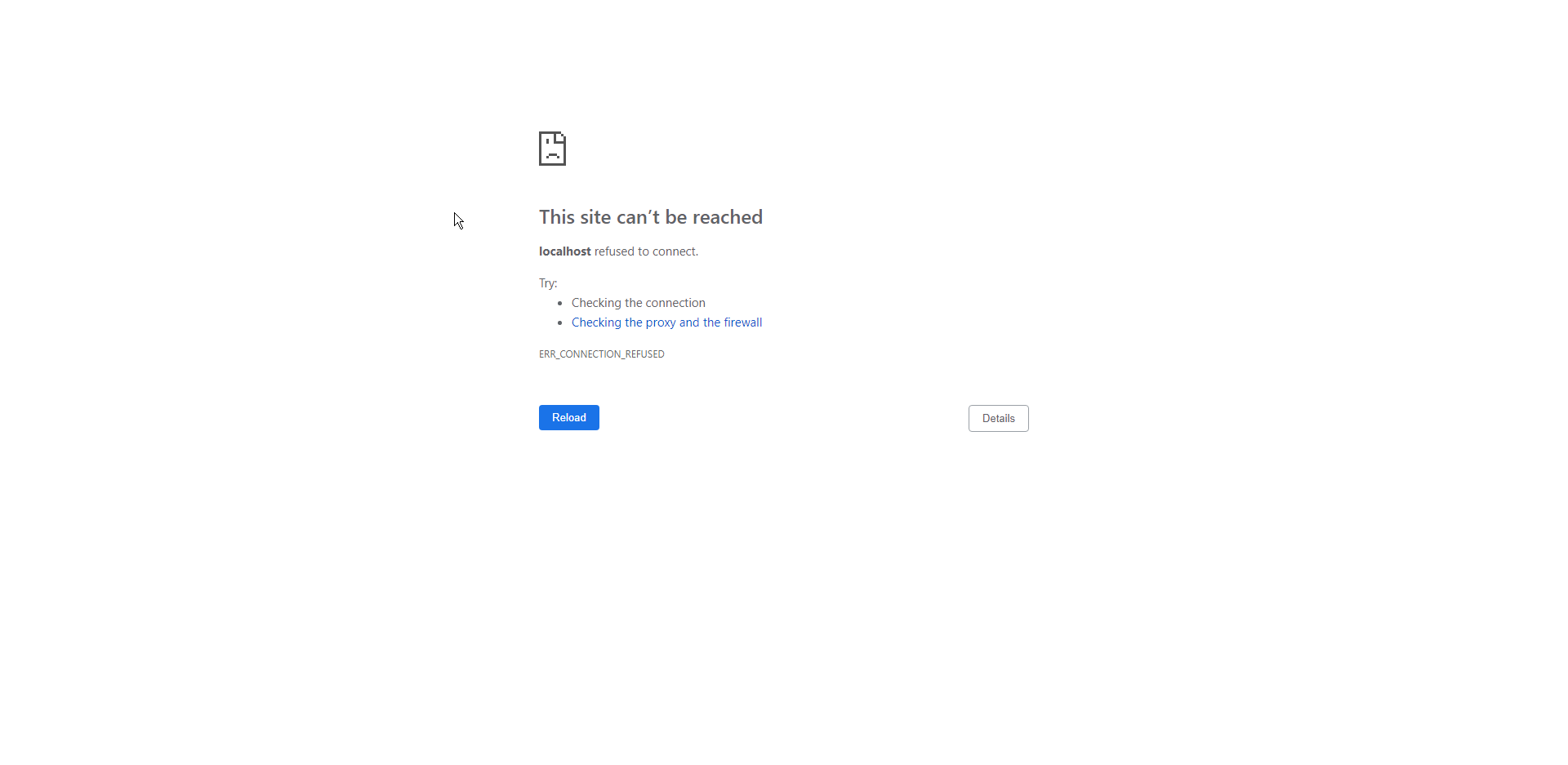 shy mountain
did you start OBS?
 shy mountain

proper horizon
 shy mountain
Click on the one that says just "Streamelemenets"
and then click on "Console" tab
you actually  2 times now
nice screenshots
 proper horizon
lmao
shy mountain
@unreal sigil ⤴
can you go on OBS and try this: Streamelements on top -> bots and tipping
proper horizon
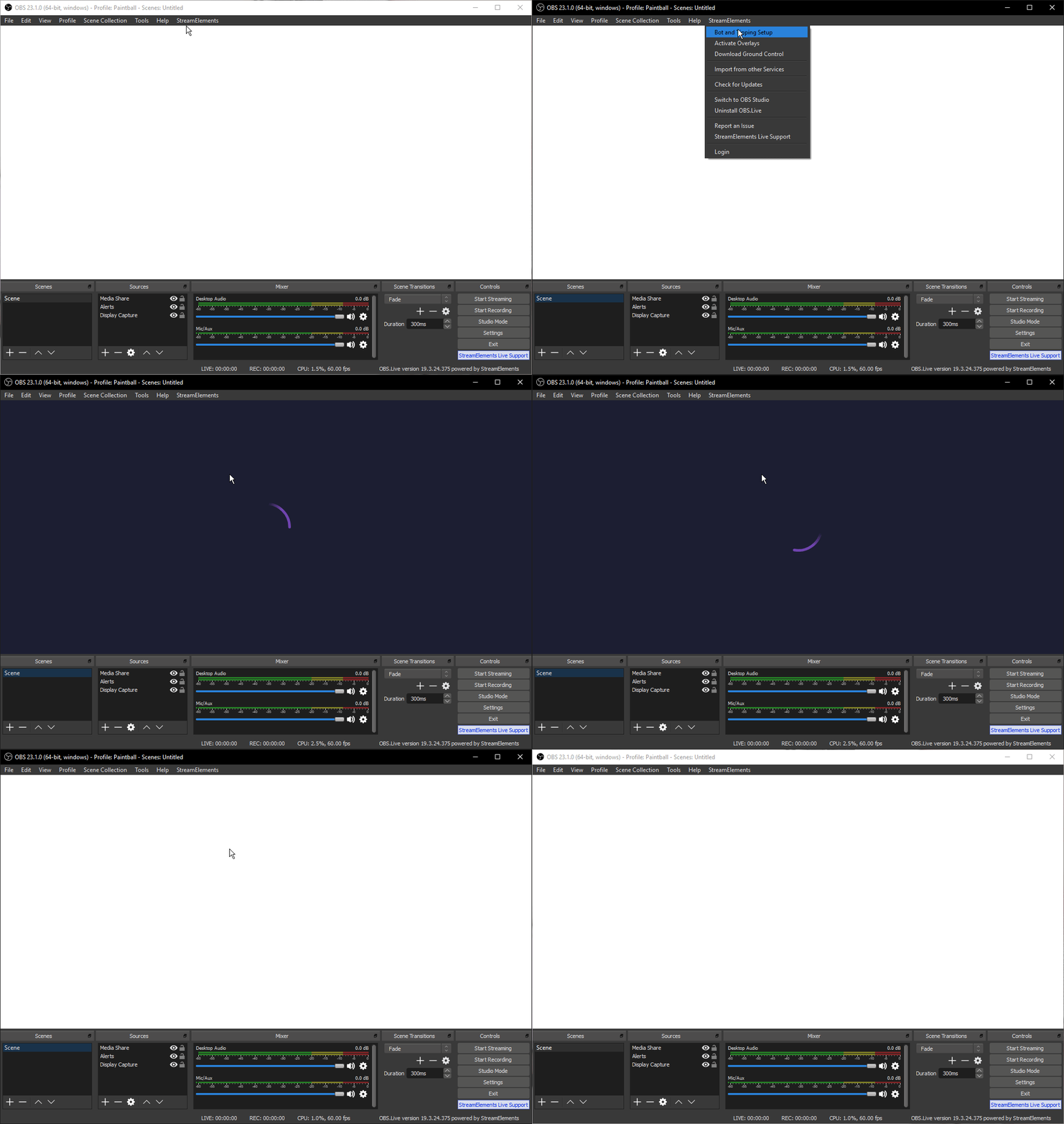 shy mountain
whats your username?
proper horizon
Slippies
shy mountain
update your discord profile, while dev is looking into it
proper horizon
👍
 vocal radish
Hi, my record and start stream on stream deck doesnt work with obslive
 ocean vortex
last version of OBS STUDIO? i'm running the 21.1
 odd kraken
Latest version is 23.1.0
Version 21.1 has a broken auto updater. Please download the latest verion of OBS Studio here: https://obsproject.com/download
odd kraken
@vocal radish You can try to repair/reinstall the StreamDeck software.
 loud ivy
just added alerts to my obs.live and now whenever i stream i just get a green screen being sent out
odd kraken
What version of OBS Studio (top left) and what version of OBS.Live (bottom right) are you using?
 candid bronze
Why i cant open Mixer audio settings, scenes etc?
odd kraken
Have you deactivated these docks?
When you select view > docks > mixer, does the mixer then come back up?
candid bronze
Oh yes, it worket
Worked*
But why i cant select by right clicking and select Mixer?
odd kraken
When you colsed the dock, you have to bring it back the way provided.
loud ivy
23.1 obs and 19.2.24.375 for obs live
deep birchBOT
@loud ivy For the best OBS support, please join their Official Discord @ discord.gg/obsproject
 warped lake
not sure why but when i stream using obslive, it starts to stream but kicks me off and says on twitch im offline but obslive says im still streaming can someone help me. @deep birch
 remote trail
hiya, ttying to get my scenes from my dashboard onto the OBS live app and I'm not sure how
deep birchBOT
@remote trail To add your overlays to OBS, add a new browser source in your scene. Paste your overlay URL in the browser source properties, set the dimensions to 1920x1080 (unless you changed them on the website), and ☑ “Shutdown source when not visible” https://youtu.be/KDvLynUqXI4
 stone breach
hello so now my mic wont work att all inn my obs live.
tulip hamlet
Take a screenshot of the mixer.
stone breach
tulip hamlet
Check your audio settings.
stone breach
i have. so i did just stream and my stream went down and now it cant take my mic
deep birchBOT
@stone breach For the best OBS support, please join their Official Discord @ discord.gg/obsproject
remote trail
how do we add chatbox to overlay guys ??
tulip hamlet
"Your Twitch channel's chat" widget.
 tall rampart
Okay, so OBS.Live does disable hardware acceleration for the browser source
@plain sonnet ^
shy mountain
Yes, I can confirm that.
tall rampart
That's a huge problem.
shy mountain
If you use plain OBS Studio, we recommend to sometimes turn off hardware accel in OBS, when overlays don't load.
tall rampart
Well, without hardware acceleration OBS uses 35% CPU
Making streaming CSGO impossible
And overlays load just fine with hwaccel on 😉
shy mountain
Don't encode with your CPU 
tall rampart
I encode with NVENC
Encoding isn't the problem, the problem is that the Browser Source is literally pulling 35% CPU
Making it impossible to use StreamElements overlays
shy mountain
Everything is possible.
If you use kappagen - don't
if you use scrolling text widgets - don't
if you use hypecup - maybe don't as that also takes CPU
if OBS is taking 35% of your CPU while streaming, then maybe remove some widgets.
tall rampart
Or, y'know, make sure you don't disable Hardware Acceleration in Browser Sources unless this checkbox isn't ticked?
Telling me to not use functions you provide because of something you enforce with one of your other products isn't a feasible solution.
shy mountain
I can also tell you to maybe buy a better CPU, but i'm not right? There is a reason hardware acceleration is not working when you have OBS.Live installed. I don't know the exact reason, but I can only assume that when its on, the additional windows we add to OBS.Live don't work properly.
tall rampart
7700K @ 5GHz....
shy mountain
so I'm telling you the easier ways around lowering the CPU usage.
tall rampart
It's not like I'm using a weak CPU
shy mountain
I'm not here to argue or measure CPU sizes - I'm here to tell you what can help you lower your CPU usage.
tall rampart
Then I'm afraid I'll have to look elsewhere for my overlays and other functionality.
tall rampart
I mean, you can't be serious about having to remove functionality to use a product you created?
How's this even a solution, you're basically telling me to fuck off and find something else, dude.
shy mountain
I'm not saying that. I'm just listing things that might use more CPU.
tall rampart
That's no solution though.
shy mountain
Want more suggestions? Play CS:Go on lowest graphical settings. Don't use animated themed overlays.
If you want to play CS:Go on max settings, its your choice, but these are suggestions that others actually follow.
I feel a slight dejavu from yesterday, when I told 1 person to remove kappagen and his OBS in idle state started to use less CPU.
tall rampart
I've got a 1080Ti, lowering graphical settings does nothing for my FPS
I'm using the yellow particle overlay
KappaGen is a function you provide, it should be compatible with all your products
shy mountain
It is, but its also CPU heavy.
Combined with a scrolling text in the overlay - CPU usage will be high
even when not used.
tall rampart
Unless hardware acceleration is enabled in the browser source, then it's just 1% CPU usage 🤷
tall rampart
I use OBS.Live's Stream Deck functionality heavily.
shy mountain
OBS Studio has twitch integration, so you can still have your Chat inside it.
tall rampart
Seriously, make enabling hardware acceleration for browser sources a choice
Instead of telling me not to use certain parts of your products.
shy mountain
tall rampart
yeah, that doesn't say anything about which CEF version you're building against 😃
shy mountain
Ok, let see if I can get the dev to tell me that.
tall rampart
It should be 3.3440.1805.0
shy mountain
It should, but its not. Reason behind this is:
OBS.Live is meant to work with OBS Studio 21.1.0(dare to say 21.0.0), where Hardware Acceleration actually crashes OBS from our study, so to have OBS.Live(yes, the plugin) work with older versions(but not 18.0.0 as recently discovered), we have opted out into using an older CEF.
Does that answer your questions as to why OBS.Live is using more CPU with Kappagen?
tall rampart
@shy mountain ah man, can you provide an alternative build with the right CEF?
shy mountain
What do you mean alternative build?
We don't have an alternative build with w/e CEF you want at the moment,.
shy mountain
I'll just say that I had this talk with the devs.
Some 3-4 months ago.
And even recently when we found out that OBS.Live doesn't work with OBS Studio v18.0.0
It ain't that easy
tall rampart
Why support older versions?
Just tell people to use the latest OBS, less headaches for you dudes as well.
shy mountain
Because people still use OBS Studio 21.0.0, apparently.
Its not something we can enforce.
tall rampart
Well, just don't provide plugins that support older versions and tell people to upgrade when the installer detects a version mismatch 🤷
Also, people use 21 because the OBS auto-updater is broken and won't tell them about newer versions
So they have to manually upgrade.
shy mountain
We know the auto-updater is broken on the 21 version
but people don't know that
but we don't want to force people
because majority of people still are on 21.1.0
tall rampart
Because they don't know 23 is out
So, why not add an notice in the installer letting people know about the broken auto-updater instead?
It's a service to the OBS community, really
And it'd improve the performance of OBS for many people that use StreamElements since v23 brings a lot of performance improvements
After that you'd never have to target older versions again either.
 plain sonnet
streamlabs?
tall rampart
I keep swapping those two for no apparent reason
It's very annoying
Either way, help people by making them upgrade and indirectly help me by providing hardware acceleration for v23
@shy mountain a minority uses v21 by the way.
the majority uses v23 now
plain sonnet
we do tell people to update, if youre going to rant in obs and then come back here and echo what they said, please fact check what happens here first.
all this selfish ranting is doing nothing but annoying people. im not admin, dev, or anything to do with SE apart from helping in my time, and even im getting annoyed at this.
youve been told obs.live doesnt have hardware accel yet you keep going on.
you had your say, if you want a different approach to the devs, make a post on the ideas board and get it upvoted.
please, for everyones sake that sees this helpdesk, and for keizar's mentality, leave it alone now.
deep birchBOT
@tall rampart Check out the new ideas board https://strms.net/ideas. You'll be able to add your ideas, upvote others that you like, and track their progress with email notifications. Adding and upvoting ideas also helps the staff know which ideas should be prioritized so please take some time to upvote the features that you’d like. The #💭︱feedback-and-ideas channel is best used for discussing ideas already on the board.
tall rampart
Talk about toxic 😐 man you're way out of line here.
plain sonnet
i know right, its what we have to deal with
tall rampart
You have to deal with? I'm just discussing a bug and sourcing info from wherever I can to get to the actual issue instead of the symptoms
I had to figure out by going back and forth and some debugging of my own that OBS.Live is using an outdated CEF version which in turn causes me to not have a hardware accelerated browser source in v23 where there are no reported problems.
And other v23 users for that matter
I was told to not use StreamElements functionality if I wanted to use SE.
How is me trying to get things to work annoying
shy mountain
Ok, lets end this after I say this line:
You are expecting us to enable all the things above
in a snap of a finger.
That is not how it works.
We will, but everything is known and is being worked on
but it takes time
End of discussion please.
tall rampart
No worries, I'm building OBS.Live myself with the proper CEF version, assuming the git repo is up to date.
shy mountain
Do not assume we are not aware of how to track what people use when installing our plugin - we can notify them, but other things took priority then having them being forced to update to v23.1.0.
Hardware Accel is planned for OBS.Live, but there is no ETA. Thats the end of it.
 distant gazelle
hello
i've been using obs.live for some time now
but recently (about a week).. i've been having these encoding overload issue.. which i've never had before..
this is my log file
tall rampart
@distant gazelle can you make a screenshot of task manager while OBS is open, like this.
Sort by CPU usage, and unfold the OBS Studio entry
distant gazelle
right now i'm not streaming
tall rampart
Do you have the scene selected you generally use while in-game?
distant gazelle
no, i didn't
tall rampart
Set that Scene to active and take another screenshot
distant gazelle
okay, do i need to launch the game as well?
tall rampart
Nah, If I'm right it's your CPU usage coming from a browser source
Probably an overlay you use that has either scrolling text, or KappaGen
distant gazelle
it's not tho.. i have 3 brower page in total, with less than 1% each
tall rampart
then it's not what I think it is 😛
distant gazelle
to clarify, i usually use the new nvenc encoder.. and now it's around 20% gpu usage while obs is idle
tall rampart
I can see that, quite a bit of GPU and CPU overload
plain sonnet
@distant gazelle here is your report with some links for overloading
https://h4ndy.eu/obslog?url=https%3A%2F%2Fobsproject.com%2Flogs%2FS9492-6Av5ts3-Wz
distant gazelle
thanks
 dusky brook
if i have ground control how do i sign out of it so i could login in another streamelements account?
odd kraken
Remove the JWT-Token in the settings.
dusky brook
ok thank you
 frigid geyser
Hey guys. Just got started streaming live coding sessions and I am using StreamElements and OBS.Live. I was wondering if there is a way to get an audio alert when someone types something into chat. I don't have a lot of people drop in right now and sometimes I get focused on coding and don't realize that someone is trying to interract with me.
 formal vine
Im having trouble keeping a widget active
 warped prism
I was trying to install obs live and it asks for an update then the update triggers an infected file warning for NSISconfig.dll any info on this?
 humble blaze
Anyone here to help?
I need to set up an !hours command so show how many hours a viewer has been watching the stream
odd kraken
@humble blaze There is a default !watchtime command which is available when the loyalty system is enabled.
humble blaze
ok i have another question
why doesnt is show the users display name when i use variable ${user}
im using youtube by the way
odd kraken
best to ask in #helpdesk-youtube then.
 sinful flint
You aren't meant to ask your question in every helpdesk
 mossy fulcrum
Hello, I'm switching from SLOBS to using OBS.live The first time it opened, it was great and I had chat, recent activity, and everything up on the OBS screen. Now when I open OBS.live its missing all of the other stuff and looks just like OBS Studio. If I click "Switch to OBS Studio" it says I'm already in OBS Studio mode. How do I get out of OBS Studio mode back to I guess Stream Elements mode? Sorry if this is an obvious answer.
odd kraken
Close OBS Studio and start OBS Studio again. The plugin sould start with it.
mossy fulcrum
I tried that. I tried opening it with the OBS.live shortcut and with OBS Studio itself. It shows the OBS.live version at the bottom and has the StreamElements tab at the top. Just none of the windows are showing up.
odd kraken
Select StreamElements on top. Do you see the option to enable the docks again?
mossy fulcrum
Nah thats all I see. Activate Overlays just takes me to the Overlay part of SE.
odd kraken
Please select log out and log back in.
mossy fulcrum
Ahhh ok. Thanks! Is that something I need to do everytime? Or did it just glitch?
odd kraken
I hope it just glitched. If you are experiencing this issue again, please come back here and we'll have a closer look.
mossy fulcrum
Ok great, thank you so much for your help! Really appreciate it!
 scarlet harness
Hey guys, I am new to streaming I was trying to put media request to my stream but is it possible that only my viewers can listen to the music? because it gets too distracting for me
Thanks for the help!!
I posted on helpdesk-twitch too just so you know
plain sonnet
@scarlet harness not really, as the sound from the overlay would come through obs (unless someone knows differently).
the only way would be to have a virtualmixer set up but then they wont have the video, it would be purely audio for mr
scarlet harness
yes I only care about the audio
is there a way you could help me set up the virtual mixer?
plain sonnet
if i knew i would, i need help myself 😂
you can maybe wait for someone here that knows or find a yt vid or forum that could help
mossy fulcrum
Voicemeeter is one and there are Youtube videos out there for setting it up.
plain sonnet
👆
scarlet harness
HHAHAH thanks both of you for the help!! I will check out voicemeter
after my stream
 bold mica
Hello, I got recently the Twitch Affiliate Status. Someone subscribed me but I didn't get notified on OBS.Live, plus I don't see it in the Activity feed. In addition I can not filter for only Subscribers for example. Should I reinstall OBS.Live, maybe it's bugging because I am a new in the Affiliate Program ?
odd kraken
Try to log out of the dashboard on the website please and log out of OBS.Live and OBS Studio. Then log back in to the dasboard and OBS.Live.
bold mica
Thanks I will try it
Thanks it worked ! Can I somehow get the person in to the activity feed who just recently subscribed me ? I can't see him.
odd kraken
I am afraid not, as twtich just sends us the data one time. If we don't get it, it can't be added.
You can edit the widget data here, when you know the name of the person: https://streamelements.com/dashboard/session
The dataand statistics will populate as you got the connection between twtich and StreamElements now.
 dusky mountain
anyone else having problems using media controls/scene selection controls on the stream deck?
 finite wedge
Hi guys, i'm having some trouble with integration between the streamelements overlay and OBS live. In the streamelements web overlay i'm selecting custom font 'bebas' and it shows up on the web preview as the correct font but in OBS it shows up as a default font. Any ideas what is going on here? Thanks in advance 🍹
 river wolf
question, do any of you guys know how to do a current sub count command?
shy mountain
@river wolf go to chat commands then custom tab then new command, name the command, and in the response make sure you have ${channel.subs}
 swift nymph
Morning team.
Could I get some quick help.
Every time I boot up OBS Live, I'm getting asked to log into twitch If I want to type something in my stream chat.
deep birchBOT
@swift nymph If you have issues with OBS logging you out of the integration all the time or not showing the Twitch integrations, follow these steps:
- Make sure you are on the latest and greatest version of OBS.Live ( 19.3.24.375)
- exit OBS (make sure OBS is not running)
- delete %appdata%\obs-studio\plugin_config\obs-browser\obs_profile_cookies
- start OBS.Live
- Settings -> Stream -> disconnect -> connect
swift nymph
Am I missing an option somewhere to prevent that?
for no. 3, is that in the program file folder?
 tame hornet
in your profile folder
swift nymph
like C:/user/win....etc
tame hornet
you need active "show system folders" in view options of the folder
swift nymph
Yeah, that's what I wanted to make sure.
OK cool. Easy enough. Thanks!!
shy mountain
swift nymph
Coolness. Thank you again
 leaden crescent
I'm having trouble trying to locate the place to add custom scene transitions, can someone help me or are they disabled in obs now a day?
odd kraken
View > Docks > Scene Transitions
odd kraken
Select the plus > Stinger
leaden crescent
that indeed lets me add a lot of different versions but i mean more like a way where i use the video file i made
got it nvm
im dumb
thanks tho @odd kraken
tall rampart
@dusky mountain manually update to v23
 rustic rain
hello there!
im new to streaming and decided to use OBS.Live. thanks to the guides provided, it has proven easy to quickly set my first stream up, but now i've got an issue, none of the guides would help me solve:
starting a stream prompts the StreamElements-bot tot state the following in the chat: "StreamElements: darthbohdo is now live! Streaming <no game>: Ein bisschen WoW gefällig?"
my question is, shouldnt it be saying: "..... darthbohdo is now live! Streaming <World of Warcraft>: Ein bisschen WoW gefällig?"
is there a way to let it announce wich game exactly i have started to stream?
shy mountain
That bot response is controlled from here: https://streamelements.com/dashboard/bot/modules
scroll to the bottom
Live announcement
rustic rain
i found it, the settings state "${channel.display_name} is now live! Streaming {game}: {title}", so why does it effectively display "<no game>"?
rustic rain
thanks, i did :)
but now the bot doesnt react at all xD
shy mountain
Well that message is gonna pop up ones you start streaming
rustic rain
got it working 😃 had to restart obs
soooo if i am to play another game, i'd have to specify its name on my dashboard for the bot to recognize?
shy mountain
yes - before you go live.
rustic rain
i see, that helped me a lot
thank you very much for your time and have a nice day 😃
 wind prawn
G'day guys and girls. I've recently switched over to StreamElements and am really enjoying the experience so far. My only issue is that my twitch host notifications don't show. I Have set them up and tested them from the overlay editor and they work fine. They don't show in the event list in OBS.Live, but a sound plays and they come up in the chat. Is this a known issue? Any areas for me to check? Thanks in advance.
wind prawn
I'll check back in tomorrow morning. Thanks.
 lament dragon
How do I add an overlay
deep birchBOT
@lament dragon To add your overlays to OBS, add a new browser source in your scene. Paste your overlay URL in the browser source properties, set the dimensions to 1920x1080 (unless you changed them on the website), and ☑ “Shutdown source when not visible” https://youtu.be/KDvLynUqXI4
 frosty lake
there is a green screen when i try to stream whats up with that
plain sonnet
@frosty lake
to set the colour format in OBS to i420. in OBS: Settings > Advanced > In Video > Colour format = i420.
 soft venture
Not sure if this is the correct channel but I am having an issue where my channel bot is double posting everything in the chat.
dusky mountain
thanks @tall rampart
tall rampart
@dusky mountain np 😃
 fierce moss
So I need some help with my obslive. I added the media request widget to my overlays. I see it in my stream just fine. It can't be heard through the stream though. I looked at the tutorial on SE website, and it said that when I click show on stream a source would pop up for media request. That is not happening and I can't seem to find a work around. Help?
Anyone? :/
odd kraken
So you added the widget to the scene, the scene is active in OBS and when you select show on stream it doesn't show on stream? Is there any error message? Where do you hit show on stream? On the website or in OBS.Live?
fierce moss
No, the widget still shows. But there is no sound coming out of it.
I can hear it in obs.
And in my browser. But when looking at my twitch stream, it isn't heard at all. It just looks like a muted video box. It still moves and you can see the progress. Just 0 sound in stream.
odd kraken
are the sound equalizer bars moving in OBS Studio in the rythm of the video?
fierce moss
odd kraken
especially the desktop sound bar?
fierce moss
it isnt
I realize i have it muted in the screen shot. That's so my buddy doesn't hear my troubleshooting.
odd kraken
do you have another widget open? Like in the overlay editor in browser? Is your desktop sound coming through?
Please try to open a youtube video in chrome and tell me if the sound is on your stream.
fierce moss
I do not have any other widgets open. :/ youtube isnt going through on my desktop equalizers either
odd kraken
Is any desktop sound going through?
fierce moss
No. I have a gaming headset on though.
Will that effect it at all?
currently the only thing i have muted is my mic.
still nothing
odd kraken
When you don't hear any sound from your desktop on your stream your audio routing seems to be wrong. Best to ask on the OBS discord for support.
fierce moss
Would you happen to know what that is?
odd kraken
I am not that familiar with audio routing in OBS Sudio. Best to ask the OBS Support.
deep birchBOT
For the best OBS support, please join their Official Discord @ discord.gg/obsproject
fierce moss
Thank you!
 graceful rock
Hi there I could use some help I have almost 4000 dropped frames and all my setting are the same as yesterday, and yesterdays stream was perfect. any suggestions?
deep birchBOT
@graceful rock Please provide a log from your last stream. To do this, in OBS go to Help > Log Files > Upload Last Log File and paste the link to the log file here.
 broken lava
is it possible to see alerts for both youtube and twitch in the same stream? I use restream.
graceful rock
plain sonnet
@broken lava yes, however you will need to make alerts on both your YT and twitch accounts then add them to obs. the overlays cant be combined
@graceful rock here is your report https://h4ndy.eu/obslog?url=https%3A%2F%2Fobsproject.com%2Flogs%2FUNWvK0XkkbxOm3a4
graceful rock
thank you tadpole that helps a lot!
plain sonnet
np 👍
broken lava
ok so does that mean i would have 2 alert boxes? one for twitch alerts and one for youtube?
plain sonnet
yes, it means you will have either 2 overlay sources or 2 browser sources just for alerts
broken lava
perfect. is it possible to put my restream chat into a streamelemnts or do i have to do that in obs?
plain sonnet
that would be in obs. if you sign in with your restream details in obs you can have the chat there
broken lava
sounds good. is there any way to download the template images. i want to download a starting soon background so that i can place it behind the chat but put the chat frame on top of restream chat,
nvm i figured it out.
 terse finch
Any idea why my camera settings reset everytime I open OBS? Specifically the settings where I go Webcam > Properties > Configure Video. The Camera Control tab such as focus, exposure and backlight comp always reset upon open
deep birchBOT
@terse finch For the best OBS support, please join their Official Discord @ discord.gg/obsproject
dusky mountain
Anyone know why my OBS capture is dropping FPS while streaming I've been having this problem with OBS.live and SLOBS
like not dropping frames but the FPS counter drops
deep birchBOT
@dusky mountain Please provide a log from your last stream. To do this, in OBS go to Help > Log Files > Upload Last Log File and paste the link to the log file here.
dusky mountain
plain sonnet
there is no output data in here https://h4ndy.eu/obslog?url=https%3A%2F%2Fobsproject.com%2Flogs%2Fv-i8Wq7pOQzYE6Cw
 zinc harbor
So I've been playing conan and using obslive. They can pick up my mic when I speak through obs, but the stream isn't picking up my game viop when I speak in game. I posted wrong thread earlier.
dusky mountain
the thing is i was playing Titanfall 2 on high just running in circles and it was dropping FPS but then i ran STEEP and ran the benchmark and it was solid 60 on all ultra settings
both games i have the FPS cap on 60
plain sonnet
@zinc harbor as far as im aware it wont pick up your mic when speaking in game because it there is no loop back from the game.
(when you speak in game you dont hear yourself back)
as long as obs is capturing your mic its fine
zinc harbor
I see ok thanks
plain sonnet
@dusky mountain we go by what the log says.
you have errors from GPU lag and bandwidth lag
zinc harbor
I usually use push to talk for obs so If I want I can just keep it open. I dn't want to trash my stream with background noise though.
plain sonnet
thats understandable, you can always add a noise gate to your microphone filters so your mic will be "active" when you speak. the higher the gate level the louder you will need to speak to activate the mic in obs
dusky mountain
so i read the article about GPU overloading and disabled the browser sourc (my alerts and stuff) and now im getting solid 60 in OBS without touching my games graphic settings
is this caused by the browser source scene itself or perhaps by the thing i have in the browser source (kappagen, alerts, follow goal, media request)?
plain sonnet
kappagen and mr is very resource heavy when in use. it also has to load even when not in use. the best thing for those is to have them on their own overlay and browser source in obs then show/hide when needed
dusky mountain
ok thanks for all the help
 compact pendant
how do i stop the twitter spam that comes on my chat, i'm not a big streamer but i miss messages because i can't see it through the spam
odd kraken
Edit or disable the twitter module. https://streamelements.com/dashboard/bot/modules
compact pendant
@odd kraken thx verty much
 thick bronze
Hi guys, i dont have hope anymore. My c920 webcam is still flickering i did so much and i dont find the problem anywhere. Would be so nice if someone can PN me, who knows some things about that. pls help me
shy mountain
Flickering as in?
thick bronze
Hundreds of small pixels moving around.
thick bronze
both i did already.
shy mountain
I don't see flickering in the video you DMed me 
thick bronze
you would say the quality is good? o.O
shy mountain
No flicker what so ever
thick bronze
you dont see those pixels moving around?
shy mountain
i do wear glasses, but I didn't see any flickering
quality looks low though
here is my settings for my c920 cam
thick bronze
yeah i got the same
shy mountain
here is my quality
(dmed you)
To be honest I only notice that your recording is like a bit low quality then 720p
thick bronze
yes thats because of those moving pixels how u cant see them'? 😄
shy mountain
busted camera?
thick bronze
no i have another one and its the same :S
shy mountain
so maybe something in OBS?
shy mountain
I can't really say
I can only send you to the OBS guys as a last resort if you've done the usual support 101 questions
thick bronze
and its not on obs because without obs same issue
shy mountain
well
i'm not sure then - if you are getting the same thing on different cameras, regardless if on OBS or not
then windows? 
thick bronze
yeah i also reinstalled windows completly ... same problem ... im so lost
shy mountain
this is beyond us really - unless someone else who might know the answer to this. Let me see.
thick bronze
yeah nothing to do with you for sure!!! but this is the section where people could know 😃
shy mountain
This is the section where we provide help with OBS.Live and maybe OBS Studio if we know the solution
This is more a technical issue that maybe someone might know in #general-chat or Google perhaps at this point
in the back pages around number 2-3 - god be on your side if you go on page 2, 3 and beyond 
thick bronze
haha already went there my friend 😄 thank you for your help so far. I keep working -.-
 deep phoenix
someone can send me an obs settings for stream Fortnite with GTX960 + I5 4460S please ?
plain sonnet
You would need to look up some YouTube videos as there are no "best" settings, especially if you are running a low end i5
zinc harbor
So I have been trying to implement the use of custom commands for my streamelements to be used on stream. When I create them and test them to see if they are working. They are not working. What am I doing wrong?
plain sonnet
what are the commands?
 green python
help, my stream keeps loosing quality when i do high speed pvps in fortnite or something like that
deep birchBOT
@green python Please provide a log from your last stream. To do this, in OBS go to Help > Log Files > Upload Last Log File and paste the link to the log file here.
plain sonnet
you can set different bit rates for recording and streaming, best to up your recording bitrate to around 7000 (if your gpu can handle it)
green python
i have it on 6000, but lemme try it
 lean olive
Sry if this question has been asked before. I am playing a game in 1440p (2560x1440) and I want to use an overlay which is 1080p. If I try to scale it down directly to 1080p I just get a blackscreen as input. It only works for the given downscale resolution 1536x864.
deep birchBOT
@lean olive For the best OBS support, please join their Official Discord @ discord.gg/obsproject
zinc harbor
@plain sonnet I had just deleted the commands so I don't have them any longer. I am just wondering in general if I am missing something.
 trim flax
How to upload overlays from my files to streamlabs overlay editor
plain sonnet
@zinc harbor i see the bot in your channel so from first impression it would be what the variables are
zinc harbor
Hmm ok I'll take a look
plain sonnet
@trim flax this is streamelements, you will need to ask SL
zinc harbor
@plain sonnet I created it again the command is !nemrp
It works this time...
so weird
plain sonnet
hmmm strange, if it happens again try the same steps and let us know
green python
is there anyway for settin a bot/command for a win counter?
plain sonnet
in the widget section of the overlay editor
green python
hey is there any other streaming software where streameleements works?
deep phoenix
bon bha adieu à l'idée de stream (Bye tkink to stream)
 vast spindle
can some1 help me with the setup and the overlay?
plain sonnet
what do you need help with?
vast spindle
i wanna use the overlay templates but i dont know how to set it up with the game
plain sonnet
find the template you want, click create then adjust each overlay to how you want it
deep birchBOT
@vast spindle To add your overlays to OBS, add a new browser source in your scene. Paste your overlay URL in the browser source properties, set the dimensions to 1920x1080 (unless you changed them on the website), and ☑ “Shutdown source when not visible” https://youtu.be/KDvLynUqXI4
plain sonnet
some will have a layer for the face cam, others wont as they are built in to the overlay, you can check they layers tab in the editor
vast spindle
on the video is says use browser source is that the same as browser?
warped lake
is anyone else having problems streaming with obslive keeps kicking me off and showing on twitch that im offline
deep birchBOT
@vast spindle To add your overlays to OBS, add a new browser source in your scene. Paste your overlay URL in the browser source properties, set the dimensions to 1920x1080 (unless you changed them on the website), and ☑ “Shutdown source when not visible” https://youtu.be/KDvLynUqXI4
vast spindle
how do u change dimensions
plain sonnet
vast spindle
what source do i use to show a game capture or window
plain sonnet
game capture or window capture
vast spindle
on the stream elements obs i lost the song request and the other tabs how do i get it back
plain sonnet
stream elements menu at the top
vast spindle
with the media request do the viewers just do !sr
vast spindle
k
deep phoenix
if only I doesn't had an awfull pc like this 😔
My PC doesn't exist anymore
because its a piece of Sh*t of performance
 regal oasis
after the new update on OBS live my stream started to lag i have 28% frame drop by doing nothing
deep birchBOT
@regal oasis Please provide a log from your last stream. To do this, in OBS go to Help > Log Files > Upload Last Log File and paste the link to the log file here.
deep birchBOT
@gloomy needle To add your overlays to OBS, add a new browser source in your scene. Paste your overlay URL in the browser source properties, set the dimensions to 1920x1080 (unless you changed them on the website), and ☑ “Shutdown source when not visible” https://youtu.be/KDvLynUqXI4
plain sonnet
@regal oasis please can you upload the log as in the instructions
regal oasis
sorry @plain sonnet what do u mean ? ^^
deep birchBOT
@regal oasis Please provide a log from your last stream. To do this, in OBS go to Help > Log Files > Upload Last Log File and paste the link to the log file here.
regal oasis
regal oasis
thanks @plain sonnet
 blazing forum
I started using OBS on my personal account but have since changed accounts to my team's channel. For some reason the media request will not change over to the new account. Can someone please assist me?
plain sonnet
obs doesnt really have "accounts". most likely you are still using the overlay with the mr from your own channel. what exactly have you changed on obs?
blazing forum
I logged out of my personal account, then entered teh stream key and logged into the team channel. After that I added overlays and stuff like that. I can see the Media Request box and it will play music fine but when anyone in the stream requests a song nothing happens.
plain sonnet
is the !mr command active in the team command list?
blazing forum
Evertything besides the media request is linked to the team channel so im not sure what I did or what i need to do.
its !sr
plain sonnet
is it active?
blazing forum
Yeah
The bot says the music is added to the playlist but on my window nothing shows unless I go into the browser and run it that way.
Can we go into a chat room to hopefully make this easier?
plain sonnet
in obs do you get this message?
plain sonnet
so is it only music you want or to show the video also?
plain sonnet
i cant join voice, its late here. can you close the mr panel, log out of the se account in obs, close obs then open it and log back in then open the mr panel. this should refresh it
plain sonnet
i will ask internally for you
blazing forum
NVM, I was logging out of the twitch account in OBS.
So now it works!! THANK YOU!!
plain sonnet
np 👍
 long lance
I'm trying to set up StreamElements. For my source, I'm trying to choose an animated Starting Soon screen. On OBS I chose media source, but when I choose media source on StreamElements, it allows me to choose the starting soon screen, but nothing shows up. is it something besides media source?
blazing forum
I used browser as the source and it worked for me.
 autumn narwhal
How do I stop the loading/lag between scenes? It displays my cam and game capture instantly but, takes my themed overlay a couple seconds to load. I am using a stream elements overlay theme with it put in as a browser source.
 rugged quail
alerts dont pop up in obs someone pm if u know a fix! 😛
remote trail
heys guys anyone willing to jump in voice support to help a guy out
deep birchBOT
@remote trail Welcome to the support channel! Please let us know how we can assist you today and a member of the support staff will be with you as soon as possible.
@rugged quail We have added a new feature, which allows testing of alerts only in the Editor or in both Editor and OBS. Hover over the bell and on the right side toggle it on.
https://media.discordapp.net/attachments/342748377416466442/564781551649292299/unknown.png
 plain sonnet
@autumn narwhal look to use studio mode so it pre loads the scene before switching or use a transition to hide the loading
green python
how can i setup a bot for a win counter?
light anchor
Is it normal for the OBSLive twitch chat snap-in to require logging in with every time you launch OBS? OBS on it's own without the SE addon doesn't prompt me to login, but the SE Twitch chat addon requires that I login, even when I tell itt o remember the device for 30 days. Is this a local settings file issue not saving or...?
rugged quail
can i have help please
deep birchBOT
@rugged quail Welcome to the support channel! Please let us know how we can assist you today and a member of the support staff will be with you as soon as possible.
rugged quail
the scene on obs studio how do i use it
plain sonnet
rugged quail
thanks
plain sonnet
@light anchor try logging out of your SE account in obs, close obs then open and log back in. if that doesnt work try deleting the obs cookies
deep birchBOT
@light anchor If you have issues with OBS logging you out of the integration all the time or not showing the Twitch integrations, follow these steps:
- Make sure you are on the latest and greatest version of OBS.Live ( 19.3.24.375)
- exit OBS (make sure OBS is not running)
- delete %appdata%\obs-studio\plugin_config\obs-browser\obs_profile_cookies
- start OBS.Live
- Settings -> Stream -> disconnect -> connect
 opaque gyro
it is possible i can use TipeeeStream alert in Obs.Live right? But I don't know how. Can anyone help me?
light anchor
Is it normal that it launches 2 chat snap-ins?
plain sonnet
@opaque gyro if the alerts are able to be used as a browser source in obs like overlays then you can do that. or you would have to see if they are capable of being imported on the SE dashboard
@light anchor there are 2 different chats, 1 for SE and 1 for obs
light anchor
Yeah, seems kinda redundant
opaque gyro
@plain sonnet It is possible to import but I don't know how i can use it in my obs.live.
light anchor
Is it necessary to run Ground Control when OBSLive activity feed snap-in is active? Can the bot settings in the snap-in work? In Activity feed I'm missing two Settings menus. Media and the basic settings (bot settings). Will this be added in the future so we don't have to run both OBSLive Activity feed AND Ground Control?
opaque gyro
Like you have Activity feed you can see but that's from StreamElements. So can i see that but than from TipeeeStream? And how do i do that?
deep birchBOT
@rugged quail For the best OBS support, please join their Official Discord @ discord.gg/obsproject
 long haven
Hi, does anyone know of a way to GAME at 21:9 format and in OBS-LIVE convert to 16:9 format as output for one's stream???
plain sonnet
@long haven something like this?
long haven
that's the idea, however I'm only getting for output 21:9 results there
for example I game at 3440 x 1440 and outputs are like 2580 x 1080, and 2292 x 960 etc
plain sonnet
hmmm, i think with high resolution like that i dont think it will go down to 1080p, best place to ask would be in obs discord
deep birchBOT
@long haven For the best OBS support, please join their Official Discord @ discord.gg/obsproject
plain sonnet
they might know a way to do it
 snow rune
hey guys, how do i turn off this bot in obslive?
plain sonnet
"part channel" on the SE dashboard
snow rune
thanks
 lunar horizon
Hello, how to get chat and alerts for YouTube
Cus it only shows me: Login with Twitch
odd kraken
Please don't ask your question in multiple channels. Thank you.
 dry sphinx
Check #helpdesk-youtube
glossy topaz
Why does this happen literally every single time I go to open an overlay for editing? Of course, it appears to freeze for 30 seconds while it waits to time out, then throws this message up. If I wait, it never unfreezes. If I exit, it says the page crashed and gives me the option to reload. This happens every time I open an overlay to edit. I don't have a ton of stuff on my overlays. Any thoughts?
odd kraken
@glossy topaz What Chrome Browser version are you on?
 quaint haven
I am having issues trying to stream at 720p 60fps. my pc specs are as follows - i7-7700K 4.20 GHz, 16 GB RAM, 2 EVGA 1080s (SLI'd). My current settings for OBS is Encoder - x264, Rate control - CBR, Bit rate - 4000 (my uploads vary between 30-35), key frame intervals - 2, CPU preset - faster. I keep getting encoding overload. Any and all help would be awesome. Thanks in advance
deep birchBOT
@quaint haven Please provide a log from your last stream. To do this, in OBS go to Help > Log Files > Upload Last Log File and paste the link to the log file here.
odd kraken
I also recommend trying the NVENC Encoder new.
glossy topaz
@odd kraken
@odd kraken, I also have a problem with encoder overloads and I am using NVENC new. It doesn't seem to hurt my stream, but I'm noticing it more and more recently.
deep birchBOT
@glossy topaz Please provide a log from your last stream. To do this, in OBS go to Help > Log Files > Upload Last Log File and paste the link to the log file here.
quaint haven
odd kraken
Try to open the overlay editor in an incognito chrome tab please and see if the same issue occurs. Cause I am having the same version and no issues.
The log analysis shows the following:
A slower x264 preset than 'veryfast' is in use. It is recommended to leave this value on veryfast, as there are significant diminishing returns to setting it lower. It can also result in very poor gaming performance on the system if you're not using a 2 PC setup.
In the log you have messed a lot with the settings in OBS, so it is not that clear why exactly you are having the encoder ovleroad. Try to provide a cleaner log please.
To make a clean log file, please follow these steps:
- Restart OBS.
- Start your stream/recording for about 30 seconds. Make sure you replicate any issues as best you can, which means having any games/apps open and captured, etc.
- Stop your stream/recording.
- Select Help > Log Files > Upload Current Log File. Paste the link to the log file here.
glossy topaz
Here's my last log. https://obsproject.com/logs/GSGn6tkAIOB0mxxU @odd kraken
 daring fog
Hi everyone is there a way my YouTube viewers can add a song to media request without using twitch bot?
odd kraken
@daring fog Afaik there is no media Request for youtube in your bot.
This is an analysis of your log file with tips on how to improve. @glossy topaz https://h4ndy.eu/obslog?url=https%3A%2F%2Fobsproject.com%2Flogs%2FGSGn6tkAIOB0mxxU
quaint haven
odd kraken
There is no stream in this log. Please provide a log with a streamed session. The only things visible are:
odd kraken
This is the analysis I can get: https://h4ndy.eu/obslog?url=https%3A%2F%2Fobsproject.com%2Flogs%2FZaB5RpKWrULwZwsD
There are still the same issues.
plain sonnet
A clean log file is required to help fix your issue. To make a clean log file, please follow these steps:
- Restart OBS
- Start your stream/recording for about 30 seconds. Make sure you replicate any issues as best you can, which means having any games/apps open and captured, etc.
- Stop your stream/recording.
- Select Help > Log Files > Upload Current Log File. Copy the URL and paste it here.
(Note: If you do not see an obsproject.com URL, you will need to update OBS Studio to version 22+)
glossy topaz
Thanks @odd kraken . I made some changes and we'll see how things go on my next stream.
 radiant rock
Afternoon! Imported my streamlabs alerts into streamelements. Every alert works except tipping. How can I fix this?
I checked in streamlabs to make sure it wasn't the alert itself. It works fine in that program just not in streamlabs for some reason
streamelements* I meant at the end of the sentence. Sorry for the confusion
remote trail
hey guys i purchased some overlays etc from own3d.tv and im stuggling to set them up could someone help ??
remote trail
all good all sorted lol
 severe isle
Hi. I have problems with media request module, i hear double media requested but when in overlay i dont have video thing still i can hear in OBS itself
deep birchBOT
@severe isle Make sure to ☑ “Shutdown source when not visible” for all browser sources (all OBS scenes). If using studio mode, uncheck “Swap Preview/Output scenes After Transitioning.” Also keep in mind that sound can play from any overlay loaded in the browser (editor or launched). https://i.imgur.com/FegZJQS.png https://i.imgur.com/yY0wcFl.png
severe isle
Give moment, as i really dont see media request widget on obs
plain sonnet
you wont, thee media request is in your overlay, you are making sure that overlays with mr widgets in are not active when youre not using them
that gives you the double sound
plain sonnet
if the settings are correct then it will be fine. make sure you have the "show video" on
 echo tapir
@severe isle 1. do you use SE Ground Control? 2. Do you use SE OBS.Live?
severe isle
- I have it off 2. yes
plain sonnet
you have "show on stream" selected and your sound in obs is correct?
echo tapir
- close it completly if not. Then double and triple check that you only have media source once if you have it as a seperate overlay, and make sure that you only have it on one overlay. Make sure that you have set browser sources to close when not active on all scenes as this could be the source to your issue
it might seems i bit odd but as we don't know your complete setup (virtual and physical audio devices and such we are just going through the basic. i've had this issue many times before)
severe isle
i could do screenshare if that dont help
echo tapir
do you use single or dual pc setup?
echo tapir
is your overlay composed of multiple browser sources or do you use a single
severe isle
had single
but then this happened
and i tried remove from one overlay
and do as separate
echo tapir
alright, go through the layer section of the overlay composer and make sure you only have 1 media request
echo tapir
yes
severe isle
OHHHH
echo tapir
if you have the editor open you will hear music from that one also
plain sonnet
its fine, ill just be here if anyone needs me
 chrome widget
I accidently closed the Chat how do i find it again?
odd kraken
SteramElemetns on top > Chat
chrome widget
thanks
glossy topaz
@odd kraken, just finished a stream and after a bit, I was having the encoder issues worse than before. Here'e the latest log, after I followed the recommended steps from the previous log I sent.
glossy topaz
My last encoder lag/overload was 0.7%. Now it's worse after making the recommended changes.
plain sonnet
from the log i would say turn off psycho visual tuning in the encoder settings
glossy topaz
Ok, done. I'll keep an eye on it during tomorrow's stream.
formal vine
my elgato was working fine ins stream elements obs. then when i opened it this morning it says no audio device selected! anyone know what could be wrong
odd kraken
 proud laurel
how can i add widgets?
tulip hamlet
Edit an overlay in your account and click on the Widgets tab.
proud laurel
i cant see the overlays tab
tulip hamlet
"My overlays"
proud laurel
tulip hamlet
Your StreamElements account. On the site.
proud laurel
how can i use overlay in the stream?
deep birchBOT
@proud laurel To add your overlays to OBS, add a new browser source in your scene. Paste your overlay URL in the browser source properties, set the dimensions to 1920x1080 (unless you changed them on the website), and ☑ “Shutdown source when not visible” https://youtu.be/KDvLynUqXI4
proud laurel
how can i crop my camera output?
shy mountain
@proud laurel click the source, hold ALT on your keyboard and drag the sides of the red box
 tender fjord
hey guys 😃 since a while i have a problem with my output kb/s everytime i change a scene the output drops to 0kb/s and nothing happens when i stop and restart the stream it still is on 0 kb/s, i have to close SL-OBS and open it again, now i can go on streaming but i still cannot change the scene i have to cange the scene before restarting the stream. nothing worked so for, i reinstalled OBS, i run it as administrator, i switched through different server, i tried it with the original OBS instead the one from Streamlabs but nothing changes. my download is caped at 400 mbit/s, my upload at 12mbit/s over all time i have a minimum caped at 200 mbit/s down and 9 mbit/s up, literally good conditions. i'm out of ideas, maybe someone already went through this trouble and got solutions to help me out
shy mountain
If you are having issues with SLOBS, better ask Streamlabs' support.
tender fjord
ok
shy mountain
For OBS Studio support: https://discord.gg/obsproject
I've sorta seen this issue before - lower the bitrate a bit and see if that helps.
tender fjord
oh did i said streamlabs?
tender fjord
sry i ment streamelements
shy mountain
download speed and upload speed are 2 different things btw
during streaming
you are 95% of the time using your upload speed
tender fjord
yes
shy mountain
and this kind of issue i've seen sort of before, so lower your bitrate by 500
and see if that helps.
If not, then best to ask in the OBS Discord, as this might be a more technical query than we can handle.
If it affects both OBS.Live and OBS Studio, then its a general OBS issue or maybe ISP issue.
tender fjord
yep it also droped with 500
shy mountain
if you change your bitrate mid stream, you need to restart the stream.
tender fjord
no i changed it before, started the stream, i wait a few seconds, change the scene, wait a second.. and it droped to 0
tender fjord
i've already done this before, but yes i'll try that out
shy mountain
Then either ask the OBS guys or call your ISP if there is any upload buffer/bottleneck going on.
tender fjord
clearing the cache didn't help so far :/ i'll try out both, the ISP and obs, thank you for your time 😃
tender fjord
I have now tried empirically some sources in the scenes, by switching off individual elements, I finally found it. the separately added audio source, not the one you set up in the settings, drops the stream to 0 kb/s. but why does this happen o.O
shy mountain
tender fjord
:p
I just did not want it to remain open in the room, if I have already found an answer to my problem
 graceful raft
Heyas, having an issue with Obs.live... I am using the chat feature, love it, except when i raid, once I raid, the chat switches to the raided channels chat, and then I have to shut down obs totally to reset it back to my own, is there a way to do it without restarting Obs?
shy mountain
Streamelements on top -> logout -> login
graceful raft
uggg that's worse, it resets my Obs layout, ahh well
shy mountain
Its a good idea to actually turn off OBS when you are done. Because it generates a log file and if OBS has been running for several days
the log file will get clogged with tons of information and if you need help and the log file is needed, it will have hundreds if not thousands of lines in it, making it had to solve issues that are shown in the log file.
graceful raft
nods
 vague knoll
So, I am getting throttled on Twitch however Mixer is pretty much fine. I can get up to 4350 rates on mixer but I am dropping down to around 200 on Twitch streaming.
plain sonnet
are the bitrate settings being changed when changing or are you streaming to both at the same time?
vague knoll
I'm not streaming, I am doing a bitrate test only streaming to twitch
I am actually incapable of a stable connection and constantly am dropping.
I previously was hitting 5k bitrate and stably. so I don't know what is causing this issue at this point.
plain sonnet
if its just bandwidth testing it would be best to test twitch then do a speed tester, then mixer and a speed tester. if it is down to twitch dropping bitrate then it would be best to speak to them
vague knoll
I have contacted them. I am waiting for them to reply really, I did the calibration inside of streamelements which is truly a god send and was getting 4350 on Mixer. I think it is a twitch issue entirely.
I just wanted to see if there was even a chance in here that something would help
rugged quail
hello can i have some help
deep birchBOT
@rugged quail Welcome to the support channel! Please let us know how we can assist you today and a member of the support staff will be with you as soon as possible.
rugged quail
ok
odd kraken
Do you want to share how we can support you?
rugged quail
yes plz
odd kraken
What is your issue then?
rugged quail
i have an isue with my obs i hav the normale obs
odd kraken
What issue exactly? What is the OBS version number? (top left)
odd kraken
And what is your issue?
rugged quail
i cant turn on so i can se my sources, my scenes my mixer my scene translision and my control
du i can see my chat and every ting but not those
odd kraken
In OBS select: View > Docks > Mixer
rugged quail
omg now i can streme i love you gyse so mutch
 silk stone
hello I need help with my media request .The scene got deleted by mistake and now I cant get it to play on stream. any advice?
odd kraken
Create a new overlay with the Media Request widget in it and add the overlay to OBS.
odd kraken
On the website https://streamelements.com/dashboard/overlays create a blank overlay or edit an existing one and in the overlay editor in the blue line on top, select "widgets" and add the MediaRequest widget to the overlay.
odd kraken
When you first hit "Show on stream" an overlay was created for you in the background.
 odd kraken
Then add the overlay back to OBS or create a new overlay and add this to OBS.
deep birchBOT
@silk stone To add your overlays to OBS, add a new browser source in your scene. Paste your overlay URL in the browser source properties, set the dimensions to 1920x1080 (unless you changed them on the website), and ☑ “Shutdown source when not visible” https://youtu.be/KDvLynUqXI4
silk stone
and it was made by obs
odd kraken
The overlay is the overlay in the top left of your screenshot. It is called MEDIA SHARE.
silk stone
like how do I make the media request an overlay
oh damn i missed that sorry
didnt work
I selected the media share overlay copyed the url pasted it as a browser but not showing up
odd kraken
Set the dimensions like in the message of the StreamElements bot above.
silk stone
I did.
odd kraken
Can you show me a screenshot of your OBS please?
Have you hit show on stream after adding it?
 odd kraken
Select Studio Mode in the control section of OBS.
silk stone
?
screenshot I do not see this
also what exactly do you want with the obs screenshot
as theres a lot of things to screenshot
';l.,
';'
odd kraken
Please show me the properties of the browser source you added the MR widget in. Please make your overlay URL not visible on the photo.
 odd kraken
Please set it to 1920x1080. After hitting OK please press crtl + F
Then hit Show on stream and see if the video appears in the preview.
odd kraken
Is there any error message in the MediaRequest section in OBS.Live?
Have you enbaled the eye, so that it is shown on stream? Do you hear music when you hit play, are there signs of music in the equalizer of OBS?
tulip hamlet
And have you actually watched the tutorial video?
https://www.youtube.com/watch?v=17eUkoZ6eIs

StreamElements Media request enables playing songs and videos in your stream. It's an upgrade of StreamElements Song request and Media share features. ----- ...
silk stone
theres nothing @odd kraken and yes you can see it here :

@tulip hamlet yes I watched it before asking in here
I just closed and reopened obs now i see this
 tulip hamlet
Please follow the end portion of the video where it explicitly shows you how to create an overlay and add a media share widget to it, and add that overlay to OBS.
tulip hamlet
Except you didn't. I'm looking at your account right now.
You created a blank overlay with no widgets.
Or you forgot to save.
 tulip hamlet
Congratulations. Now try it again in OBS.
 minor magnet
Hi. I'm trying to stream right now and my OBSLive is only showing about 60% of my screen.
tulip hamlet
Select your source and press Ctrl+F.
tulip hamlet

silk stone
are there any videos on setting up tiltify with stream Elements? @tulip hamlet
tulip hamlet
Just two widgets you can add to your overlays. They're self-explanatory.
And please do not ping people. There's more than just me here.
 dim roost
is there a way i can save the work like scenes/sources onto a file so i can just pop open it and every thing will be there
tulip hamlet
StreamElements is a cloud-based platform, nothing is saved to your computer or run locally.
Overlays are added as browser sources. There's no files, just links.
 placid needle
so i feel like an idiot, i accidently closed chat in OBSLIVE and cant figure out how to bring it back up
tulip hamlet
StreamElements menu at the top. Do you see a Chat option?
 maiden moat
hey i'm not recieving audio alerts anymore since switching from running the dashboard on chrome vs inside of obs live
shy mountain
Dashboard has never been able to produce audio. Please keep your questions in one place or make sure the nature of your questions are in the proper channel.
 wooden talon
hi, i am trying to have 2 scenes capture video from my capture device. but one works and the other is black? what am i missing here?
shy mountain
delete the not-working one
go to the working one - right click -> copy -> go to the other scene -> paste as reference
wooden talon
wow. that was super easy. thank you.
rugged quail
Hey guys i need 1 help how to use in game music if i am using ear phones
shy mountain
What do you mean? Game music or music you play from youtube?
deep birchBOT
@weak pier Please provide a log from your last stream. To do this, in OBS go to Help > Log Files > Upload Last Log File and paste the link to the log file here.
 barren fog
Hey! For some reason OBS.Live and streamdeck arent communicating after streamdeck's latest update. Keeps saying that the OBS version is not supported and to update, but there is no update available
odd kraken
Try to reinstall or repair the streamDeck software please.
barren fog
Found a solution, looks like the newest update of OBS and OBS.Live wasnt sent to me and didnt poop up when I checked for updates. Reinstalled OBS and it fixed up!
 tropic bough
i found here the problem, sorry!! and thanks
odd kraken
@rugged quail What OBS Studio version are you on (top left) and what OBS.Live version are you on (bottom right)?
Can you share a screenshot of your OBS please?
odd kraken
Please download the latest OBS Studio version (23.1.0) here: https://obsproject.com/download and install the plugin OBS.Live (https://www.obs.live/) again.
rugged quail
ok thankyou the auto update said it was the latest (new to this)
odd kraken
The auto updater in version 21.1. is not working properly. Please download the latest OBS Studio version and then install the plugin again.
rugged quail
Hi, done all that and same thing, the number top left has updated to 23.1.0, bottom right is the same, no change in circumstance, thanks
odd kraken
Try out select StreamElements on top and Log in. Try to log in this way please.
 mossy falcon
hello sometimes when im using obs my monitor capture stops working. my main monitor capture becomes black screen and it would only let me capture my secondary monitor. only fix i've found is restarting the application but that brings me to a second issue where i have to unlink my twitch account and then relink it. is there a solution to either one of these issues?
odd kraken
What OBS Studio version are you on? Do you start OBS as admin?
mossy falcon
obs studio 23.1.0 and no do not open as admin
odd kraken
try to start it as admin. Do you get logged out every time you restart OBS or why do you need to log in every time?
rugged quail
That's done it thanks Benno
mossy falcon
reason i need to relog is because some of the docks dissapear and ill be honest idk which one is obs docks and which is yours. but specifically the stream info and twitch stats go away
deep birchBOT
@mossy falcon If you have issues with OBS logging you out of the integration all the time or not showing the Twitch integrations, follow these steps:
- Make sure you are on the latest and greatest version of OBS.Live ( 19.3.24.375)
- exit OBS (make sure OBS is not running)
- delete %appdata%\obs-studio\plugin_config\obs-browser\obs_profile_cookies
- start OBS.Live
- Settings -> Stream -> disconnect -> connect
odd kraken
Have you installed OBS.Live?
mossy falcon
asking a dumb question here that is the same thing as streamelements obs.live correct or am i using the wrong program
deep birchBOT
OBS.Live is a Plugin for OBS created by StreamElements. You can download OBS.Live here: https://streamelements.com/obslive
Please make sure you have the latest version of OBS installed, Current Version: 23.1.0. You can install OBS here: https://obsproject.com/
mossy falcon
alright yes i have that
odd kraken
Please check if the folder is truely not there. Have you deleted it maybe?
mossy falcon
im in the obs studio folder and i see streamelements in here but i do not see the plugin_config folder. I do however see obs-plugins floder and if i click in there i see obs-browser.dll but no obs-browser folder and no obs_profile_cookies
odd kraken
Copy the whole link to the folder and paste it in your window folder explorer please.
mossy falcon
doing it now
odd kraken
There should be two directory’s on your PC one is the installation directory and one is the settings directory. I think you are searching in the wrong directory.
mossy falcon
oh well ill let this search do its thing
odd kraken
Please search for the folder manually or copy the path to the folder provided above.
mossy falcon
holy windows was hiding the appdata folder zzz sorry
and it fixed the relogging issue ty sorry for the headache
odd kraken
Do you still have the issue with the display capture after doing that and starting OBS as Admin?
mossy falcon
the display thing seems to happen at random i don't know what triggers it so for now its working and i opened it using adminn mode and ill see if it randomly stops throughout the day
 crimson steeple
hello i just bought my elgato stream deck, but it says this version of OBS Studio is not supported.. but my obs says there are no updates available
odd kraken
Please download the latest OBS Studio version (23.1.0) here: https://obsproject.com/download and install the plugin OBS.Live (https://www.obs.live/) again.
Version 21.X.X has a defect auto updater.
crimson steeple
will this safe my scenes and stuff ?
odd kraken
It should yes, but you can save your scene collection and profiles to make sure if you want.
 rugged garden
Is there a way to add a stroke around text? Like an outline?
odd kraken
Not that I am aware of, but you can custom code it. There is a custom widget, which supports html and CSS. Or you can upload a picture and place the text in front of it.
 mint spade
so iom having issues with obs not showing my game with the game capture
the gaame is escape from tarkov
odd kraken
Start OBS as admin.
mint spade
it is
has been
sinc ei started using it
the GC was working fine not 3 days ago i havent changed a thing
odd kraken
what OBS Studio version do you have? (top left) and what OBS.Live version are you on (bottom right)?
What does GroundControl have to do with it?
odd kraken
oh, never mind. though you meant Groundcontrol by GC, but you meant game capture. my bad.
mint spade
lol
deep birchBOT
@mint spade For the best OBS support, please join their Official Discord @ discord.gg/obsproject
mint spade
tried that
odd kraken
OBS.Live is just a plugin for OBS. So you will get the best OBS Support on their discord. I am sorry, as I don't know why the game capture is not working.
 graceful plover
Does your alert box support DLive?
tulip hamlet
StreamElements currently only supports Twitch and YouTube.
graceful plover
Ok thanks
 reef willow
media share videos look a bit pixalated in my obs compared to on my overlay editing page. How do I set it up properly?
 junior jetty
My alerts are showing up cut in half, any insight?
shy mountain
!res @Lynelz#9042
deep birchBOT
The default resolution for StreamElements overlays (theme and custom) is 1920x1080. Please add them in OBS at their full resolution and use CTRL+F to fit to screen if necessary. You can then downscale your stream in OBS settings > Video if you'd like https://i.imgur.com/6bWXxjR.png



 shy mountain
@reef willow shut down obs or the media rewuest dashboard page, go to youtube, make sure the quality there is set to higher close youtube open MR
 snow coral
@deep birch Hi, can you please help me with - somehow lastest follower doesn't update.
sinful flint
According to your activity feed and widget data the latest follower is correct
Seeing as they match
snow coral
No, I have latest follower other than it shows on my widget
rugged quail
Since I went to Streamelements There is only a green screen in my stream and it is only visible in my Stream but not in my Obs
and I also got the Streaamelements Obsoverlay