#helpdesk-selive
1 messages · Page 19 of 1
 warped crater
1080p 144hz
 shy mountain
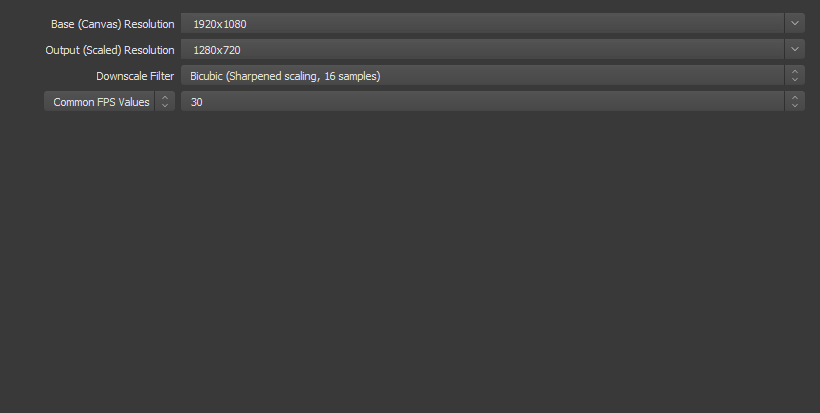
then have the OBS base resolution in the video settings to 1080p
 shy mountain
yes
warped crater
and it said wrong preset, what kind of preset?
warped crater
my preset on output is "Low-latency"
shy mountain
Since you are using the beta NVENC encoder try this:
i'm on a i5-4440 + 1060 6GB GPU and I had no issues streaming for 2 hours Witcher 3
which I believe is more heavy to stream then WoW
Or at least when i streamed on the old encoder it felt heavy for me to stream W3, but streaming WoW:BfA was ok.
warped crater
i'm gonna try that settings and see
My dps still drops to 40, i may try to restart my pc and see if that is the problem, cus i didnt have that issue earlier, it dropped to like 90 but now its even less
 rugged quail
hello all ... ever since the last obs.live update I am starting to have micro freezes/stutters in my games ... are there any other reports like that?
well streams, not games
 warm pewter
Unchecking paycho visual tuning should use less GPU, as that uses some cuda
 deep birchBOT
@rugged quail Can you please provide a log from your last stream. You can find this log in " %appdata%/obs-studio/logs " OR Help > Log Files > Show Log Files. You can simply drag and drop the log file into Discord.
rugged quail
shy mountain
For starters update your OBS to latest version.
rugged quail
@shy mountain everytime I try that it tells me update service is not reachable
shy mountain
Update manually from the website
the 21.1.2 version I think it was, has a broken updater
rugged quail
ok solved it ... version 22.0.2 installed and got another obs.live update
so this should be up to date
warm pewter
Dont use lanczos, dont use your webcam at 1080p, dont use a seperate game capture source for each game
rugged quail
how should i capture games then? screen capture? and why not the webcam at 1080p? or would that need a dedicated stream pc as the impact is too big?
warm pewter
You can use the same game capture source, having multiple will use more resources, and degrade quality. Using full 1080p your cam, is adding unnecessary strain on the system. If the web cam is not full screen and you are not outputting to 1080p, its just a waste of resources with no benefit
rugged quail
ok that makes sense, never though sbout it that way. thanks!
as for game capture ... im actually capturing the .exe files of the game ... would a simply screen capture of the game screen be better?
warm pewter
Screen capture is easier, but game capture is higher quality. There is an option to use a hotkey to capture with game capture, helps if you switch games a lot
 iron sandal
Is it possible to use OBS live to stream to both YT and twitch without the usage of restream? I.eg. have both chats show up on the program and activity feed as well?
warm pewter
No, OBS.Live does not support YT at this time, even if it did, it would not support streaming to both at the same time. Streaming to both services can be a violation of both services ToS
iron sandal
ok thanks for your reply.
 grizzled forum
@warm pewter @shy mountain soooo my loading bug is fixed now
wonder how i did it? I installed obs.live.
it must have refreshed some stuff/previous bug/something, and now everything works as a charm
Next is make paolo buy a elgato stream deck
 neon fern
😄
 serene charm
Hey, perhaps a dumb question, perhaps not. I want to play a song at the end of my stream and I've got the timer programmed for stream deck. If I tell it to mute my desktop audio, will it mute the song as well. Obviously I don't really want to have my desktop sounds being picked up but I still want to be able to play my outro. How would I do it?
warm pewter
play the song on a different audio source
 dapper wolf
@serene charm You could do it using Virtual Audio Cables, or you can just download a specific song and use it as a media source
serene charm
It's in as a media source so I assume it won't mute that, just the sounds coming out from my desktop source?
If so that's perfectly neat for what I need.
dapper wolf
oh if you're using it as a media source, it should still play to the stream regardless of whether desktop audio is muted or not
you just wouldn't hear it on your end unless you monitored it
 storm gorge
Hey guys, I can't seem to get the Media request to work with my widget. I always get "no active widgets were detected for media request" even though I have added the widget to one of my overlays. Any idea what I'm doing wrong?
dapper wolf
I need to start learning support on here
warm pewter
are you using a song from a backup playlist, or an actual request? If you are trying with the tutorial video, that will never activate the widget to show on stream
storm gorge
ok, i feel very stupid now... that was indeed the problem. I didnt bother swapping the video since I just wanted something to configure the widget. Thanks so much man!
warm pewter

rugged quail
Hey there! I have started seeing major swings/drops in my bitrate the past two days at about the same time. First 2-2.5 hours of the stream are fine, steady at 3500, but then it begins to fluctuate and I get Twitch Error 2000. Any ideas?
warm pewter
issues like this are usually between your ISP and the Twitch servers you are connected to
 broken patrol
i am having trouble getting my webcam to scale to the overlay
warm pewter
when you have the source selected, a red box will be around it, with control points, click and drag the control point for the desired size
broken patrol
i did that but it wont fit in the webcam overlay box
 tulip hamlet
Trying to fit a 16:9 into a 4:3?
 warm pewter
post a screenshot of your OBS preview window
broken patrol
warm pewter
you are trying to fit a cam that is 4:3 aspect ratio into a 16:9 frame
The overlay might have a 4:3 frame, you will have to look to see if there is one in the overlay that is not visible
rugged quail
hello, i tried obs live and i would like to unsubscribe/ unlink my account to it and try another program, i would like to know how to do this, so far i have banned the streamelements chat bot, but was wondering if i could unlik the whole thing, also i recieved emails about my status stream update, but unsubscribed to that too, is there anything else i could do? thank you. i might come back 😃
tulip hamlet
Well, you can uninstall the plugin from OBS Studio with the StreamElements menu at the top. If you think you might come back, it's actually better to leave the connection running so the account can stay up to date with your channel's history. Otherwise, you can disconnect the connection from your Twitch account's Connections settings.
rugged quail
Ty
tulip hamlet
Also, I'd recommend unbanning the bot and instead using the "Part channel" button on the right side of your StreamElements dashboard to avoid confusion if you do come back.
rugged quail
Ok ty, I mostly tried obs live because I hear it uses less cpu, do you think that could in turn better my webcam quality? I run @ 60FPS 6kbitrate 720p
tulip hamlet
It's not just OBS.Live, it's the big picture of using our cloud based overlays with it, since everything isn't running locally on your computer.
And it's a plugin, and doesn't affect core functionality of OBS Studio like video capture.
No difference in how your webcam will look.
rugged quail
Ok thank you
 outer glen
Hey guys I have a problem with this stream deck, I go to add Stream or Scene to my deck and it adds it but it won't work as it says down underneath the options "Please launch OBS Studio" Well I did launch OBS Live so what gives?
 zinc lark
let me test that with mine
Try running a repair on the streamdeck software. I just opened my software, added two new buttons (two different scenes), and then used those buttons to switch scenes just fine
@outer glen poke
 lofty gorge
how do I make the media work with obs live
zinc lark
@outer glen honestly, idk. The other option is to download the latest SD software, and just install that again. The fresh install should fix your issues (and shouldn't lose your SD settings. I know, I have done it before)
tulip hamlet
@lofty gorge Media share controls are not in OBS.Live just yet.
outer glen
So just uninstall and reinstall SD ? OK
lofty gorge
@tulip hamlet any time table by any chanc
tulip hamlet
Soon ™
lofty gorge
wats the best way handle media than just wondering
tulip hamlet
On the site.
outer glen
OK so I downloaded the latest and greatest Stream Deck software and did the repair option, It still asking to start up OBS Studio even though I had started OBS Studio. IDK The Blue options like "Mute Alerts" , "Skip Alerts" etc all reconise that OBS has started because the little red circle with the line through it go away. It just doesn't work for the "Mixer Audio " and down from there options.. .
tulip hamlet
Can you take a quick screenshot of your OBS out of curiosity?
outer glen
Well OBS works as intended, it is Stream Deck that is not recognizing OBS
tulip hamlet
Just wanna confirm some things is all. 😃
outer glen
screanshot
I have two monitors and it won't let me screne shot just one of them sorry
tulip hamlet
What version does it say in the bottom right?
outer glen
18.12.25.297
tulip hamlet
For the sake of argument, finish off the wizard in the top left?
outer glen
ok i did that
tulip hamlet
Now try restarting OBS.
zinc lark

I don't get it. It works perfectly fine for me, lol. I am on the same version of obs.live, and it looks like the same version of SD that you have
outer glen
Yeah IDK man
zinc lark
outer glen
I wonder if uninstalling the SD instead of repair would do the trick?
Exactly same version.
zinc lark
maybe, always worth a shot
outer glen
I'll give it a shot
Holy crap it worked, do not use the repair , just reinstall it all..
Now I can sleep tonight
outer glen
NP glad it worked and now the entire world knows..lol
Thank you for your time guys, now I need to go make dinner... Take care 😉
warped crater
UPDATE from ealier today: After i swapped my gpu to the top spot of my pci, my fps is fixed 😃
rugged quail
hello so i tried removing the streamelements chat bot from my channel by unlinking stream elements from my twitch, but it still taks, i remember you saying to uninstall it in the menu? where is that? sorry and thank you
 ancient zodiac
You remove the bot via the streamelements website dashboard.
rugged quail
i muted it, if thats what you meant
shy mountain
"Part channel" removes the bot from your channel.
rugged quail
ty
deep birchBOT
@warped crater Can you please provide a log from your last stream. You can find this log in " %appdata%/obs-studio/logs " OR Help > Log Files > Show Log Files. You can simply drag and drop the log file into Discord.
shy mountain
here is an analysis of the log.
Disable the windows gaming features and i'm not even sure what the memory capture is
 quasi snow
seems to be because the gpu is not properly defined
but it does provide a link on the subject and how to fix it
you also need to run OBS as admin, just edit the shortcut, click advanced and tick run as admin
warped crater
Why does it have to be runned as admin?
shy mountain
"run as admin" allows higher functionality over capturing gameplay and running specific things and higher priority
 lapis sapphire
Ok so I have a stream deck and I have the button to charge kappagen and for some reason it wasnt working yesterday during the stream. Any reasons why that would happen???
shy mountain
@lapis sapphire Did you have the chat hidden/closed when you opened obs.live?
 kindred hollow
Hi. Does anyone know why I am experiencing massive fps drops recently when having my StreamElements browser sources activated? Using 2 different ones. One for overlay and one for alerts and hype cup. I've not made any changes to either of the browser source, just started happening.
Currently at work and can provide further details later when I get home. Just wondering if someone could potentially pinpoint me in the right direction.
 nova geode
Do you have kappagen enabled? I noticed a certain frame drop in some games when using hypecup and kappagen, try disabling one or both and see if that makes things better! @kindred hollow
kindred hollow
Kappagen is part of my alerts overlay. So I will try that. But I also get the fps drop if I only have the overlay active. Overlay is an image with 4 widgets showing recent cheer, tip, sub and follower.
nova geode
The overlay shouldn't do anything to your fps. Is it a static or an animated one?
kindred hollow
apart from the widgets having text scrolling right to left it's static
nova geode
Then it shouldn't impact the fps at all.
Maybe a log could help. I'm no good at reading those, but other supports here are.
deep birchBOT
@kindred hollow Can you please provide a log from your last stream. You can find this log in " %appdata%/obs-studio/logs " OR Help > Log Files > Show Log Files. You can simply drag and drop the log file into Discord.
kindred hollow
happy to share the url to the browser source via dm with someone to see if it's reproducable or maybe somehow related to something local
I'll go ahead and pull a log when I get home from work tonight
Thanks for your input so far
nova geode
No problem!
lapis sapphire
@shy mountain no. Chat is always open by default
Also, the /raid command in chat doesn't show at the header of the chat. The raid process initiates, but it never shows how many raiders or the "tap to raid now" feature...
shy mountain
the /raid command is a known thing for OBS.Live.
We are still in beta and development of it.
lapis sapphire
@shy mountain cool.
lapis sapphire
Also I was testing my alerts from the streamelements overlay editor and the fake donation amount actually counted towards my donation goal. Is there any way to reset the source like you can in slobs
shy mountain
If you see it in OBS, just show/hide the browser source that holds the overlay or switch scenes
 river forge
warm pewter
river forge
warm pewter
And what is this log supposed to be for?
river forge
stream stops after 1-2 after going live
so have to close and restart stream everytime
serene charm
Has something changed in this recent update that my FPS has plummeted?
 twilit venture
Minutes? Hours? What do you mean "stops". Is obs crashing or stopping or is obs continuing but no stream visable on twitch? So you have to stop it yourself and restart? @river forge
nova geode
then your ISP is having problems.
nova geode
your internet provider. or are you on wifi?
nova geode
this number shows your upload and if that goes to 0 then clearly your internet isnt stable
river forge
i stream for hours
it happens only at start
i go live and wait 1-2 mins
then it will go to 0
i restart obs n all good
every time
funny xD
warm pewter
That is between your ISP and the Twitch servers, nothing related to our services. This log also does not show a disconnect, so would need to see the log from when this happens. All I see are tons of events from SL, SE, and some Vue browser sources
river forge
hmmp its not a big issue for me..just letting u guys know this is my case
i just wait in " Stream Starting scene for a bit longer" 😛
has there been any issue failing to test the tipping url?
cux i just updated obs and failing to do it now
nova geode
no. the tipping url is always https://streamelements.com/YourTwitchName/tip
warm pewter
If you set it up already, why are you going through the setup again?
river forge
it asked me after the update
warm pewter

 river forge
i mean yes
oki
shouldnt care since the link is working .....its just obs dosnt think its working 😛
 plain sonnet
@river forge that image with your kbps, is that your max or do you have it set to something higher?
 grizzled swift
I got a 1080 ti has a main gaming card
twilit venture
I am not familiar with double GPU set ups. last time I check they have to be the same type/build
grizzled swift
😦
twilit venture
I would there for assume a 1050 wouldnt do much isnce you would need a 1080 TI
quasi snow
nah, that's for SLI/Crossfire
quasi snow
but I'm not entirely sure if this could be done fine, better ask in OBS discord
grizzled swift
Ok
quasi snow
!obshelp
deep birchBOT
For the best OBS support, please join their Official Discord @ discord.gg/obsproject
river forge
@plain sonnet i set bitrate to 2000
720p
thers no issue with frame drops or any laggs
plain sonnet
i had the same issue where obs would drop completely out of nowhere when my kbps where low (i think around 2475), after i put it to around 4000 its fine.
plain sonnet
not sure, mine would drop half way through. i think its something with actual obs.
i tried with obs.live and normal and i had the same issue
best thing to do is run a speed test (http://www.speedtest.net/) today and tomorrow, find out your average speed and set obs to 75% of that
warm pewter
@grizzled swift that wont work at all. You cant have a seperate GPU for games and a dedicated GPU for encoding. To capture OBS would need to be using the GPU that is running the display and/or game, so you cant use a seperate GPU for encoding. Also, nvenc is dedicated hardware on the GPU die, so encoding on a 1050ti would give you 0 benifit over just using the 1080ti for everything
 small hull
is there someone here during the day that can help me with my In Game overlay and also my Stream Deck?
 keen pecan
hey guys i'm looking for some help and or info so i just bought a elgato stream deck and it has some very nice integrations with obs.live but i still have some problems with it so... the viewer req button doesn't work and the media request video on or off also doesn't seem to work further i wanted to ask if it is possible to skip / pouse / volume up and down for the obs ground controll music panel is possible?
warm pewter
Media Request features have not been added to OBS.Live yet, so those buttons will not do anything until this is added in OBS.Live
keen pecan
is this in working progress?
warm pewter
Yes, its currently in closed testing, and planned to be the next major update to OBS.Live, but no eta on public release yet
keen pecan
okay no problem thanks for the intel
warm pewter
deep birchBOT
@prime cove Can you please provide a log from your last stream. You can find this log in " %appdata%/obs-studio/logs " OR Help > Log Files > Show Log Files. You can simply drag and drop the log file into Discord.
 radiant pulsar
Anyone know what today's OBS.Live update included? Anything special or just basic stuff?
warm pewter
Nothing was said what it included, but if I had to guess, it was more backend stuff preparing for the next feature update
tulip hamlet
Just ask your question.
 slate parcel
Everytime I click "Start Streaming" this is what I get
deep birchBOT
@slate parcel For the best OBS support, please join their Official Discord @ discord.gg/obsproject
 turbid arch
My X button to close obs / OBS Liveis gone what happened?
tulip hamlet
Did you F11 OBS?
turbid arch
thanks ❤
 limber elk
So. I have one of the superthemes. But for some reason when someone donates. It doesn't pop up on the screen or anything. Any recommendations on a way to fix this?
 astral trellis
Quick question: In the Chat overlay, if I search in emotes and press three letters, it goes to a white screen. Never fails. I can only fix by exiting or relogging?
Anyone else having this problem?
deep birchBOT
@limber elk The default resolution for StreamElements overlays (theme and custom) is 1920x1080. Please add them in OBS at their full resolution and use CTRL+F to fit to screen if necessary. You can then downscale your stream in OBS settings > Video if you'd like https://i.imgur.com/6bWXxjR.png
 shy mountain
@astral trellis Sorry for the late response. Can you provide a recording of this happening?
 blazing sail
Have there been any reports of OBS.live causing OBS to use 40-50% of GPU (GTX 1060)? Even with preview disabled it's using that much sometimes, and I'm using x264 encoding 😮
deep birchBOT
Can you please provide a log from your last stream. You can find this log in " %appdata%/obs-studio/logs " OR Help > Log Files > Show Log Files. You can simply drag and drop the log file into Discord.
 sleek sierra
For some reason hosts wont show up in my activity feed nor does it show the alert when someone hosts. hosts are enabled to show up in activity feed and when i emulate a host alert it works too.
deep birchBOT
@sleek sierra Due to recent changes to Twitch API, we have filtered out hosts and will only show these ones on your activity feed:
- All manual host events (0 hosts included and if filter set to 0)
- All auto host events with at least 1 viewer
 versed field
So random question. I updated my Stream Elements OBS this morning and all the panels went missing...
nova geode
What do you mean? Chat and activity feed?
neon fern
@versed field on the StreamElements menu at the top, do you see "activity feed" & "chat" options?
if not, please use the Report an Issue button in the same menu so we can get the logs
 gray palm
I have the same issue that's being reported in #helpdesk-twitch and dont have acitivt feed & chat
oh lol also now reported
versed field
Same, it's just a blank purple screen lol
shy mountain
@gray palm @versed field Do you both see this?
versed field
I do not see those options sadly
neon fern
ok, please use report an issue and after that logout and log in
shy mountain
report then try again.
versed field
okay it's back up and running for me. thanks for the assistance
shy mountain
We had 1 person when logging out and logging in didn't fix it the first time
gray palm
after relogging and reporting that is
gray palm
yeah i did actually try that before too
but will give it another whirl
still no work 
gray palm
logged in and out at least 5 times and restarted pc once
ran it like 3 times with admin priv
ill try reinstall
shy mountain
Do you have an anti-virus?
gray palm
nah just windows defender
as soon as i updated i lost it all
here's a ss from before
just tried uninstall ->restart -> reinstall still no dice
shy mountain

gray palm
tried a different account same issue so on system end id imagine
shy mountain
@gray palm Question, did you go through the initial setup process?
After logging in?
shy mountain
Ok, thanks for the feedback, as this is good info I also got from another location.
 devout latch
just installed new update and events and twitch dont show lol
they are also not in the streamelements tab anymore
gray palm
no worries
devout latch
help.. lol
gray palm
sounds like the same issue just being discussed above
try logging out and then re-logging then skip the set-up part
shy mountain
@devout latch Do what ⤴ suggested.
devout latch
i dont get any massage
just black screen on every boot
ive logged out and in again
same thing
 visual marsh
Had the same issue, resolved it with.
- Logout
- Login
- Top right 'Do it later'
- Continue
shy mountain
Log out, log back in and when you see "You already have the bot" just click on "Do it later" on the top right.
 stone fiber
are there patchnotes for the recent obs.live update? can't find any in #270206314561404928
shy mountain
For now we mostly are updating the backend in preparations for the next big update.
stone fiber
alright, thanks for the heads up
 quasi tiger
i have a proplem with adding the overlays in obs
deep birchBOT
@quasi tiger To add your overlays to OBS, add a new browser source in your scene. Paste your overlay URL in the browser source properties, set the dimensions to 1920x1080 (unless you changed them on the website), and :ballot_box_with_check: “Shutdown source when not visible” https://youtu.be/KDvLynUqXI4
 wheat rapids
Anyone suddenly getting insane in game frame drops when both @FortniteGame and @deep birch OBS are open? Just started Tuesday
shy mountain
Epic Games pushed a patch earlier today that fixed some FPS drops it seems that people were getting.
If that is not sorted for you, restart PC start OBS, run a recording
and then provide the last log file
!obslog @wheat rapids
deep birchBOT
@wheat rapids Can you please provide a log from your last stream. You can find this log in " %appdata%/obs-studio/logs " OR Help > Log Files > Show Log Files. You can simply drag and drop the log file into Discord.
wheat rapids
@shy mountain That isn't it, I went and updated to that patch and the issue only happens when the OBS is maximized - if it's minimized and I'm streaming it's fine. I have two monitors, game on one and OBS on the other.
deep birchBOT
@wheat rapids Can you please provide a log from your last stream. You can find this log in " %appdata%/obs-studio/logs " OR Help > Log Files > Show Log Files. You can simply drag and drop the log file into Discord.
wheat rapids
Game mode is disabled via registry, but the log file analyzer is still showing it as active. Also, still getting those FPS drops
astral trellis
This is what I get if I type too many letters in the "Search for Emotes" bar.
shy mountain
@wheat rapids After you fiddled in the registry, did you restart your PC?
wheat rapids
@shy mountain Good call, let me go try that
Restartedd, still showing as being on: https://glorp.ninja/obslog?url=https%3A%2F%2Fcdn.discordapp.com%2Fattachments%2F494513233416421386%2F535463221134491648%2F2019-01-17_09-15-11.txt
sleek sierra
I'll ask again because the generic bot answer didnt really answer anything, My host alerst doenst work when someone hosts me, its set to 0 to show up but doesnt. nor does it show up in my activity feed is there a fix for this? i have enabled it and when i do a test host alert it also shows up
shy mountain
I've resubbed your webhooks just in case @sleek sierra
Let us know if this issue still continues.
sleek sierra
thanks
wheat rapids
@shy mountain Just updated to Windows 1809, so I could turn off Game Mode via the settings menu. Even with that, it'
- it's still incredibly laggy
deep birchBOT
@wheat rapids For the best OBS support, please join their Official Discord @ discord.gg/obsproject
blazing sail
Ok sorry I was streaming when asked to post my log earlier.
warm pewter
Your GPU is being overloaded rendering the canvas. Even if you use x264, OBS will use the GPU to generate the canvas, downsample it if configured, and then send this to the selected encoder. Everything in the "video" tab in the settings is done on the GPU
blazing sail
Hmm, for my CPU would it be better to do it in the output tab then?
warm pewter
Using Lanczos over Bicubic will cause more load on the GPU, you can also try a lower resolution than 900p. The other alternative is to set the output the same as the canvas, and downsample on the CPU using the option in the output tab
blazing sail
Okay maybe I'll try that thanks, are the uncaught typerrors an issue at all? Not even sure what's causing those
Hrm okay I changed it from video to output but I feel like it's something else too though, even while idling right now my GPU is jumping from 8%-38% usage by OBS. Could it be when OBS is trying to refresh all the browser sources?
 gilded vine
Is this an ok place to ask about streaming bitrates?
 nova scaffold
@gilded vine yep, why not. you can also ask in general chat, more people write there, better place
quasi snow
you can check Twitch guidelines here https://stream.twitch.tv/encoding/ @gilded vine
gilded vine
Thanks. I’ve actually done a fair bit of research on what actual bitrate I want to stream at. However, I’m a bit confused what server I should pick. Using Twitch Bandwidth Test, my region servers (US west) gives me all about the same bitrate output. I would just choose local but I get a quality of 0. Other servers have slightly higher rtt but the qualities are in the 80s and 90s. Should I still go for local / lowest rtt?
Local also has lowest rtt if that was confusing
I’ve run the test multiple times for different lengths & different days. Always get quality of 0 for the local
quasi snow
choose the one with best quality or leave the option on auto

 prime cove
I'm telling you the update is connecting and disconnecting me tons of times before go online
It's happening ONLY after I've updated the OBS Live plugin
deep birchBOT
@prime cove Can you please provide a log from your last stream. You can find this log in " %appdata%/obs-studio/logs " OR Help > Log Files > Show Log Files. You can simply drag and drop the log file into Discord.
 spring scarab
Copy paste from other channel cause I was in the wrong one: hey guys, lately the performance of obs.live just screws my stream. I'm not sure what to do. sometimes I boot up and stream fine and others it just dies. The dropped frames percentage goes up and then the KB/s goes down. Couple of things that have helped: making sure windows is updated - when I haven't completed a windows update thats pending it just hoses itself. One time it was because I hadn't completed the tipping setup. Now its hosing itself again but I'm not sure why. Is there a checklist for performance issues?
ok I'll look at logs like you guys said in other channel.
recently Ive already had the comcast guys out here. they replaced a repeater and ran a full 30 min bandwith test. The way I got them here was to say the jitter was bad. Any tests I can run other than saying my internet randomly spikes down
warm pewter
I would start with this, see what it shows for the health and quality of the connection to the Twitch servers https://r1ch.net/projects/twitchtest
spring scarab
So I did notice that when I switched to GPU encoding that my stream stays up just drops frames instead of completely dying.
ok I will download that test
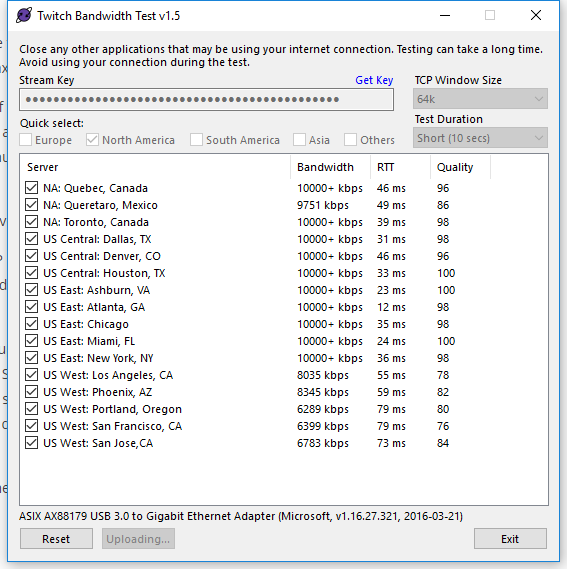
im running it at 3500 bitrate so I suppose im ok? and the quality is above 80 for eastern. I have the server set to auto in obslive. Should i set it to my closest server or leave it as default
warm pewter
I would definitely manually select the server for the one that is the best, which looks to be the east atlanta. Then outside of that, seeing a log from a stream would give more insight
spring scarab
yup, working on that at the moment.
ok so lets look a specific day because I was generalizing earlier. yesterday was PC overwatch. I do xbox and other random stream as well. I started out with the CPU encoding... couldnt get the stream to go well "said encoding overload try switching to faster preset" so I switched to GPU encoding and restarted stream. It worked but looked like shit and my FPS on overwatch was pretty bad, it would go from 60 to 30. Heres the logs
im not sure why i have logs from the 17th, even tho i didnt stream today. does it just generate a log when you open it
is the time stamp when you start the stream or end it
warm pewter
OBS generates a log each time its launched
spring scarab
so is the time stamp when you open it or when the stream ends?
I'm just trying to make sure I give you the right logs
Output 'adv_stream': Number of lagged frames due to rendering lag/stalls: 134 (2.2%)
18:49:03.572: Video stopped, number of skipped frames due to encoding lag: 4177/5982 (69.8%)
I found some of the things you said to look for
Number of lagged frames due to rendering lag/stalls: 2670 (0.3%)
23:01:34.666: Video stopped, number of skipped frames due to encoding lag: 701/889731 (0.1%)
warm pewter
Yeah, its like everything is just being overloaded, and since you have an AMD card, the AMF encoding will look pretty bad, as its a pretty awful hardware encoder. From looking at this, it seems the best options would be to try a lower framerate output for the stream, like 30 fps, as well as doing other things to help the render lag, like capping frame rates in-game
spring scarab
i guess im using the wrong terminology lagged <>= dropped frames
warm pewter
it is common to do, but with OBS, dropped frames means networking related, otherwise, frames are simply skipped
its the difference between the network actually dropping frames, or the renderer/encoder not even rendering the frames
spring scarab
what is AMF
i found this , maybe related to that
18:44:22.104: Required module function 'obs_module_load' in module '../../obs-plugins/64bit/chrome_elf.dll' not found, loading of module failed
18:44:22.110: [CoreAudio encoder]: CoreAudio AAC encoder not installed on the system or couldn't be loaded
18:44:22.470: [AMF] The AMF Runtime is very old and unsupported, consider updating your drivers.
warm pewter
also, make sure to disable all the game bar, and game mode features in windows
AMF is the AMD hardware encoder
so that line is suggesting updating your video drivers
spring scarab
i come from a mac, im a f moron with windows. I'll go update it
spring scarab
still spining... hmm
Its spinning and stuck lol. Alright guys I just wanted to mention that I'm still working on it and I didnt want to leave you hanging. I'll have to circle back. Thanks for the help and education
 gloomy wigeon
Anyone able to help out?
This is the problem im currently facing on obs.live any help?
stone fiber
Log out, log back in and when you see "You already have the bot" just click on "Do it later" on the top right.
@gloomy wigeon
gloomy wigeon
@stone fiber thanks

 left pulsar
So I seem to have the issue of the alert sound effects playing more than once again, which is a bit worrying
deep birchBOT
@left pulsar Make sure to :ballot_box_with_check: “Shutdown source when not visible” for all browser sources (all OBS scenes). If using studio mode, uncheck “Swap Preview/Output scenes After Transitioning.” Also keep in mind that sound can play from any overlay loaded in the browser (editor or launched). https://i.imgur.com/FegZJQS.png https://i.imgur.com/yY0wcFl.png


 hard raven
does anyone know why yesterday on obs.live 22.0.2 I could stream properly and today I have a black screen
warm pewter
Try logging out, and logging back in, then if you see the tipping setup, click do it later
hard raven
tipping setup
warm pewter
or its the bot, dont remember, but if you see it, click the do it later
hard raven
I have the black screen again
deep birchBOT
Can you please provide a log from your last stream. You can find this log in " %appdata%/obs-studio/logs " OR Help > Log Files > Show Log Files. You can simply drag and drop the log file into Discord.
warm pewter
close OBS, launch it, get a new log
it generates a log each time its launched
drag and drop the file in here
hard raven
its the most recent in my files
warm pewter
OBS is using your onboard graphics, you need to go into the nvidia control panel, and set OBS to use your GPU, also this is nothing related to our plugin, and just core OBS
20:19:32.607: D3D11 loaded successfully, feature level used: 45056```And is there a specific way on how I do that
warm pewter
Nvidia control panel > manage 3d settings, then there is an option under the global section to set the display to use the more powerful card, or i think you can set OBS to use the GPU over integrated, but if you try to use display capture, and you set OBS itself to use the nvidia GPU, display capture will be black, since the display is running off the integrated graphics
hard raven
Ok but the nvidia is on the pc or on the obs
warm pewter
part of your pc, right click on the desktop or system tray, if you cant find the nvidia control panel, I think you will want to just google how to do it
hard raven
Yeah I searched it and I don’t have it
warm pewter
Your log shows you have a 1050ti, and a mobile GPU, you have to have the Nvidia control panel, unless you managed to nuke your GPU drivers without reinstalling them 20:19:32.590: Adapter 2: NVIDIA GeForce GTX 1050 Ti
hard raven
Ok but I can’t access it through the search bar on the windows section of the pc
zinc lark
If you type Device Manager
and open that
Then expand the Display Adapters section
you should see the 1050 card. From there, you could right click and update drivers, uninstall drivers, etc
warm pewter
right click your desktop, or go into your system tray
zinc lark
but listen to Kite, he is the best troubleshooter
warm pewter
hard raven
Im in the graphic card nvidia
warm pewter
then go into manage 3d settings, then in the global tab, you can set it so the display always uses the nvidia gpu, or go into the program setup, look for obs64.exe in the list, and there will be an option in that list to select the GPU it uses
spring scarab
hi again, I updated my AMD drivers. Another thing I noticed that when OBS is open and not running a stream its using 20-30 percent of the CPU. I have an intel core i7 -7820hq. I mean seems like its using alot. I compared it to the browser usage when loading my overlay in chrome and its only using 2-4 percent. Could this be my issue or should I paste in my logs again.
hard raven
Manage 3d settings ?
warm pewter
open task manager, expand OBS process, see what is taking the most CPU, and start disabling browser sources 1 by 1, until you see what is taking the most
hard raven
Ok no I clearly don’t have that
warm pewter
then reinstall your video drivers
hard raven
Its in french but thats it
warm pewter
 that device manager, not at all what I said to do
spring scarab
I only have one in each scene
ancient zodiac
https://i.nuuls.com/aj9FF.png @hard raven
 warm pewter
Mines better
ancient zodiac

spring scarab
how do I disable, just click the eye?
warm pewter
yep
warm pewter
whats in the overlay? Animations, kappagen, and hypecup are the most resource intensive widgets
hard raven
I think I will just reinstall it
spring scarab
no animations. Just a kappagen
no hype cup
its a static overlay as the base. Looking over the layers, looks like I added text boxes of 2 plain text boxes and then a follower goal
and a kappa
ancient zodiac
Kappagen will do that.
warm pewter
its probably the kappagen, especially if its set to full screen
ancient zodiac
You can reduce the overall size of kappagen and it will use less cpu generally
ancient zodiac
most computers, not set to full screen
spring scarab
is it just using chrome to load it, then why does chrome use such less cpu
this is when I put the link into chrome
warm pewter
varies from system to system. on my 2700x kappagen idle is at 0-2% CPU usage, and with a full emote explosion it can spike up to around 7.5%. I have it on its own overlay, full screen, and set to 1080p 60fps
you cant really compare CEF to Chrome
spring scarab
CEF, chrome embedded framework?
warm pewter
basically, its Chromium Embedded Framework
spring scarab
ah ok
should I try it on a seperate overlay.
I suppose I'm not married to the idea of kappagen but the hype cup is nice
 stark tide
It would be great if wecould control song requests from OBS live 
warm pewter
Soon™
 fringe carbon

 steel mural
OBS Studio recordings can be found by selecting File > Show Recordings. The output path can be changed under Settings > Output.
 simple marten
Hi guys, I'm using Restream to stream to Mixer, YT and Twitch at the same time and have set up everything around that. I have 2 questions now:
- Why does the activity feed on OBS.live only show the Twitch follows ? Isn't it taking the info from Streamlabs which shows me all 3 platforms ?
- Is it possible to have Restream Chat instead of the normal chat in OBS.live ?
Thanks a lot 😃
quasi snow
nope, it takes info from Twitch and StreamElements not streamlabs
regarding the chat window, just drag restream chat into osb.live, fit it somewhere
 wraith dragon
I have a question but I'm not sure if it's you or OBS Studio that I should be asking. When I'm using Streamelements OBS.Live, the chat doesn't show me any messages caught by AutoMod. In most cases that's great, however, if one of my moderators is afk, then some people might be waiting for their messages to be approved (not all of them are bad messages) and I won't be able to approve them unless I switch over to Chrome to do so (and not until someone actually tells me to approve them, since I can't see them). Is there a way to implement a feature so that we can see AutoMod's messages in Streamelements OBS.Live?
shy mountain
That is a known thing with our Chat window. We currently do not support Audo Mod messages and I'm not sure if we can.
But if we can, it will be added in a future update of OBS.Live.
wraith dragon
Here's hoping! OBS.Live has everything that I need, minus that feature. Thank you for your quick response! 
simple marten
@quasi snow The drag and drop doesn't work for Restream Chat
quasi snow
oh damn, thought it would, then you'll have to use that instead, since OBS.Live only tracks one channel afaik
simple marten
Ok thanks.
It would be nice to be able to import Chat and activity from Restream if you have time 😉
 fallen crown
Has there been any problems witn obs live caputering pubg mobile tencent gaming app for pc
warm pewter
All capture methods are core OBS, has nothing to do with our plugin
quasi snow
it's probably set to session, edit and change it @grizzled swift
grizzled swift
how
quasi snow
click it and on top left there's options
on the overlay editor https://streamelements.com/dashboard/overlays
quasi snow
changed to all time?
grizzled swift
i did
quasi snow
😮
plain sonnet
if you change it in the editor and save it, emulate a test with 1 donation at 100 and a second one at 50. both panels should change and you can see whats going on
grizzled swift
i just added a top tipper manually
but still no data
ho do i get to show
was working yesterday
i did not change anything
 sinful flint
@grizzled swift Make sure you're choosing the time period in the widget's settings too, otherwise it's just Session which is current stream only
steel mural
@rain arrow no one can help you of you don't tell us your issue.
sinful flint
The question was asked in #helpdesk-youtube as well so I deleted it from here rather than us answering the same question twice 😄
steel mural
Asking in multiple channels... 
 dreamy tendon
Hey. Obs live's activity feed is stuck load amd refreshing. For a week or more now. I have accepted updates
Anyone got a fix?
fallen crown
cam anyone tell me why i bring url for overlay to obs and add it to browser source i only get half of the overlay on my screen
deep birchBOT
To add your overlays to OBS, add a new browser source in your scene. Paste your overlay URL in the browser source properties, set the dimensions to 1920x1080 (unless you changed them on the website), and :ballot_box_with_check: “Shutdown source when not visible” https://youtu.be/KDvLynUqXI4
fallen crown
ok thank you
dreamy tendon
Anyone have a fix for the activity feed?
warm pewter
StreamElements > Logout. Then log back in
fallen crown
Any way to test alerts for streamelements alerts on obs live
plain sonnet
go to the overlay editor, open your overlay then use the bell in the bottom left (mute your web browser as sound will echo)
 radiant cosmos
hi Guys!.. 😄
Ahm.. a question... since the last update my bot is Repeating everything twice..
is that a thing for the OBS?
live*
fallen crown
@plain sonnet ok thank you
radiant cosmos
the bot keep sending the messages twice.. 😦
 dry sphinx
Do you have Ground Control & OBS.Live active?
 unborn whale
how will obslive work when obs itself launches service integration? will live just sort of override the built in integration?
also does obslive require a compatibility update or anything after obs updates launch?
radiant cosmos
Nop @dry sphinx i only have the obs live.
warm pewter
with what?
warm pewter
whats black? the preview window? s screenshot would probably be helpful
warm pewter
Update OBS Studio to the latest version, 22.0.2, and if that does not help, I will need to see a log
!obslog
deep birchBOT
Can you please provide a log from your last stream. You can find this log in " %appdata%/obs-studio/logs " OR Help > Log Files > Show Log Files. You can simply drag and drop the log file into Discord.
warm pewter
You will need to get the full installer from their site https://obsproject.com/
the updater is broken in the 21 branch
 slender robin
it says your versionof this file is not compatable @warm pewter
warm pewter

slender robin
?
warm pewter
What says that?
slender robin
warm pewter
is your Windows x86?
warm pewter
hit the windows key, type system, and launch system - control panel, and see what it says
slender robin
ok
 marsh cosmos
Hello, please help! So ever since yesterday, I noticed that an in-game overlay of mine caused my FPS to drop massively while playing Osu!. I would turn SE off and the FPS would be fine, and then turn it back on and it would go down again, from like 90-15.
warm pewter
!obslog
deep birchBOT
Can you please provide a log from your last stream. You can find this log in " %appdata%/obs-studio/logs " OR Help > Log Files > Show Log Files. You can simply drag and drop the log file into Discord.
marsh cosmos
actually sorry, I didn't mean to interrupt, I'll continue when Joey is done
oh okay
slender robin
so its says 32-Bit
warm pewter
Then you need to run obs32.exe, it will be by default located in C:\Program Files\obs-studio\bin\32bit
warm pewter
So, some major things here are that you have all of the Windows Game features turned on. Game Bar, DVR, and most likely Game Mode since you are on 1809. You will want to hit the start button, type settings, and go into gaming. in here turn game bar off, and turn game mode off
It also looks like you are trying to use Lanczos as the down sample filter, on intel integrated graphics. You will want to use Bicubic, or maybe even bilinear.
marsh cosmos
Oh wow! Last time I checked I had it off... That would make SO much sense, let me go do that
and yes, I changed it to Bilinear this afternoon ^^
warm pewter
Also, what FPS do you have the overlay set to in the browser source?
marsh cosmos
warm pewter
Perfect, then lets start with the game mode stuff. Windows just started auto updating to 1809, and that reset these options, so it could have easily gone unnoticed after the update
marsh cosmos
omg! my ingame latency in osu has already gone back to where it was a few days ago
😄

warm pewter

marsh cosmos
lmaoooo
anything else that was off in my logs?
this is so helpful, thank you so much c:
warm pewter
Everything else looks good, no dropped frames, latest log had no render or encoder lag. You could try disabling hardware acceleration on the browser source to see if that gives a little boost as well, but if its all working fine, you can leave it on. It will be in Settings > Advanced > Sources. You can do a test with it on and with it off, see what works best for your system
warm pewter
No problem 


 limber juniper
is this an area where one can get StreamDeck Action help for OBS.Live?
warm pewter
yes
limber juniper
for some reason, when I drop the actions into a streamdeck profile, I get this look https://i.imgur.com/cu2r97x.png
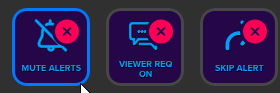
ive tried logging out of OBS.Live in OBS Studio and logging back in.
does the red X mean something is not connected properly?
warm pewter
yes, that would be an indication that it cant detect OBS.Live. What version of OBS.Live are you currently on?
limber juniper
19.1.8.305
warm pewter
in OBS, if you click tools, do you see the Stream Deck in the list?
limber juniper
I have a StreamElements tab next to tools...but under tools is: https://i.imgur.com/y4V1qHB.png
 warm pewter
I just installed the OBS.Live into my Stream Deck for the first time just now to check this, and it worked no problem
limber juniper
I want your luck 😉
warm pewter
Maybe try running a repair on the Stream Deck software
or uninstall reinstall OBS.Live from within the Stream Deck menu
limber juniper
updated streamdeck. Guess they patched recently? Seems to do the trick.
Thanks @warm pewter
warm pewter
warm pewter
Dont spam multiple channels 
 rain arrow
getting it up 1 sec
ok
stay here please
for 1 second
On the donations for the website
it says this for me
For security reasons, Credit Card donations are only available to verified accounts. Please contact support for more details on how to become verified.
how to i veryify it?
im using obs stuidios tho
warm pewter
Where exactly are you seeing this, that is not something I am familiar with seeing, also, this has nothing to do with OBS.Live, which this channel is for
warm pewter
Thats not an option on our site, what exactly are you looking at
warm pewter

rain arrow
Can u setupp donations on stream labs?
warm pewter
You are in the StreamElements discord
rain arrow
can u set up donations in streamelemnts
warm pewter
rain arrow
can u set up donations here?
warm pewter
Yes
 ivory egret
I’m trying to switch everything over to obs live from slobs. I imported everything from slobs. I see my tips but it is not displaying the latest tip on the overlay but I see it under data. What can I do to fix it?
warm pewter
When you say you see it under data, are you referring to the labels page of the widget data? https://streamelements.com/dashboard/session
@rugged quail Are you getting an error or anything?
rugged quail
no error just tried to connect and thats it. i would have to alt + ctrl+del to end it
am i the first to ask this issue?
deep birchBOT
Can you please provide a log from your last stream. You can find this log in " %appdata%/obs-studio/logs " OR Help > Log Files > Show Log Files. You can simply drag and drop the log file into Discord.
rugged quail
upload fail
warm pewter
What upload?
warm pewter
could be, I dont know, I dont use the browser version at all
rugged quail
its uploaded
warm pewter
Why did you put it in #general-chat ? Regardless, I did not see anything that stands out as a login issue. I would try this next. In OBS, go to StreamElements menu, if you see logout as an option click it, if not, close OBS. Then go to the SE site, logout from there then log back in. After that, launch OBS again and try connecting again
 wet shuttle
Hey! I'm not sure that my follower/donations are showing up on stream and I was just wondering if there was a way to check that
shy mountain
@wet shuttle Have you added your overlay to OBS?
 lusty gull
Was hoping someone could help me set up my OBS correctly. I just got my new computer gear and wanna get it right from the start
Everytime I set up OBS before, it was super grainy and I want it looking crisp 😄
shy mountain
Here are some recommendations: https://stream.twitch.tv/encoding/
lusty gull
xD
shy mountain
there we go
lusty gull
Oh that's actually nice
Thanks Keizar
😄
So if my monitor is 1920x1080 and I wanna stream 720p 60fps. I should downscale to 1280x720?
shy mountain
shy mountain
Depending on your PC specs really.
lusty gull
I have a 1080 and ryzen 7 2700x
shy mountain
but at this point this is a general setup question and not an issue related to our tools and features
lusty gull
Oh ok
lusty gull
yeah software


 shy mountain
I can't really exlain in detail
lusty gull
Well it's more of
shy mountain
lusty gull
if i'm using the right settings in obs
shy mountain
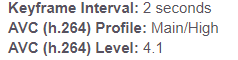
But these are the settings i'm using
shy mountain
At this point I'd like to recommend this video: https://www.youtube.com/watch?v=BtZazqLgBjw

❗UPDATED 2018 GUIDE: https://youtu.be/Zt_HVScA3Js The Ultimate Guide teaching you how to setup your Twitch Stream using OBS Studio. We will walk-through each...
lusty gull
Ok
 dusky bear
99% sure it's not OBS, but the sub alerts not happening, that's a known issue right now correct?
dusky bear
yes, my alert box isn't working at all, if you do a test from the site it works fine, but live alerts aren't
missed a sub, cheer and follow
dusky bear
it's been working fine no problem for months, suddenly acting up tonight
ya, my phone says I got one, and I have the resub message
and my overlay updated with the new follow's name, boss lost health, and the cup got a token for the follow
shy mountain
Well I just resubbed your webhooks just in case.
 formal kelp
Where can I find the change log for obs live?
shy mountain
Most recent addition to OBS.Live is the Streamdeck integration. Anything unannounced is just back end improvements in preparation for future updates. @formal kelp
@dusky bear I do see 3 past events on your activity feed that are follow, cheer and sub 
dusky bear
yup
shy mountain
follow 5 minutes ago, sub 30 minutes ago.
dusky bear
none of those do anything even if you retrigger them
at least for sounds, alerts, etc
shy mountain
which overlay?
shy mountain
yes bcs i replayed it from your AF
dusky bear
but... i click that button and it doesn't 😦
the sub one is still failing :/
wait...
shy mountain
yea i see the sub failing
dusky bear
is it because there's a bad word in the sub?
shy mountain
can i test this?
dusky bear
like... as dumb as it sounds....
shy mountain
i don't want to run tests while you also run tests
i'm trying to look at some potential errors
dusky bear
ya, i'll stop pressing things
shy mountain
actualyl yes
dusky bear
and feel free to do whatever you want, i'm done streaming
shy mountain
if you have any moderation on i nthe tipping settigns for example
it filters sub messages as well
dusky bear
that's amazing
shy mountain
thats why its not showing
was most likely gonna see this in 5-10 minutes of testing other stuff

dusky bear
rofl
shy mountain
dusky bear
i do tech support, that was the first thing I noticed.... but that's funny
shy mountain
yep - this stops the alert from showing regardless if its a tip/resub msg/cheer msg
thats always the last thing at least I check, because its not that common of a "reported" issue
dusky bear
weird that the follow never went off though, nor the cheer from j0e earlier... but w/e
i heard sounds in my ear when you tested, and when I tested
formal kelp
@shy mountain Is this version history published anywhere? I only found out about streamdesk when I visited the steam elements website, not something I do often
shy mountain
Yes. This streamdeck update was published on our Twitter and #announcements
dusky bear
btw, appreciate the help KeiZar
shy mountain
👍
 ripe lion
hi i need help when i stream it doesn't show that i am when i check for the video
shy mountain
What ever you see in the OBS preview window, should be what viewers see.
Just make sure you have some game sources or window capture.
To not show black screen
ripe lion
thxs
 signal sequoia
kind of a more general obs question, but im stuck between 1600x900 60fps w/ bicubic sampling or 1980x1080 60fps bilinear. both use about 25% of my cpu
deep birchBOT
@signal sequoia For the best OBS support, please join their Official Discord @ discord.gg/obsproject
 violet prairie
Hey - got a problem here... i've got a Stream-Elements "!subs" command that always shows the right number (that i also see in my twitch dashboard) - however... if i try to make an overlay in streamelements with sub-counter it's showing a wrong number. Shouldn't this counter use the same source? The command is showing the right number (452 atm) and the overlay is showing 468..
 elfin dove
Needing some help... why cant i use my twitch to sign into my streamlabs dashboard?
Wont that really throw everything off and make it a bit of a hasle tossing between multiple profiles?
plain sonnet
Streamlabs?
elfin dove
Oops lol, streamelements
Sorry lol I have been working with streamlabs, made the switch today..... never streaming with sl again,
Er streaming with
I need sleep 😂😂😂
plain sonnet
Do you get the option for twitch login or it won't let you sign in
elfin dove
Doesnt give me the option..... i went to the streamelements home page to view my dashboard there.... it has a google sign in, but no twitch sign in, also, my twitch shows im not linked with streamelements and doesnt show in my streaming tools, but i used twitch to sign into streamelements obs
Im stuck at the tipping page? I just dont get it, watched the vids and read the articles, but im not seeing any of the options they showed
plain sonnet
do you not get this when on the se site?
elfin dove
Nope, i did when i first started the obs.live, but not at the home site
plain sonnet
i would suggest deleting the cache for se and try again. just to see if it will refresh the content on the page for you
violet prairie
Hey - trying again now^^
I've got a Stream-Elements "!subs" command that always shows the right number (that i also see in my twitch dashboard) - however... if i try to make an overlay in streamelements with sub-counter it's showing a wrong number. Shouldn't this counter use the same source? The command is showing the right number (452 atm) and the overlay is showing 468..
shy mountain
@violet prairie #helpdesk-twitch
 ruby vapor
Well i got a problem.
when i try to setup donation link, i cant continue the setup cuz the test button says as a result "we couldnt verify your tipping link, please try again later"
nova geode
@ruby vapor did you add an image in your channel and put the link to your donation page to the image? The verification is looking for that.
 pale rover
I'm having an issue with host alerts on my stream. When I do a test alert, it shows up in OBSLive, but the real deal doesn't seem to work. Hosts don't even show up in my event list.
deep birchBOT
@pale rover Due to recent changes to Twitch API, we have filtered out hosts and will only show these ones on your activity feed:
- All manual host events (0 hosts included and if filter set to 0)
- All auto host events with at least 1 viewer
pale rover
@deep birch I had a manual host last night that didn't show up.
radiant cosmos
Hi guys, remember me? im the guy who the bot is repeating it self twice... and i just noticed that is just when i open the OBS live... if i have the OBS live close.. it doesnt do that. http://puu.sh/Cz9HY/779c6e7f0d.png


 foggy cypress
my host notifications are not showing up, it works when i emulate but not with real hosts
deep birchBOT
@foggy cypress Due to recent changes to Twitch API, we have filtered out hosts and will only show these ones on your activity feed:
- All manual host events (0 hosts included and if filter set to 0)
- All auto host events with at least 1 viewer
pale rover
@foggy cypress The bot lies.
sleek sierra
@foggy cypress had the same issue uhh someone in here refreshed something for me
Ask a staff member to resub your webhooks ^ worked for me atleast
twilit venture
@radiant cosmos you use ground Controll at the same time?
Did you try to log out and back in? Maybe disable bot rename and enable it?
@grizzled swift looks like the text widget is too small
In the overlay editor
 gentle plaza
is there any fix to the chat not loading. its says ERR_CONTENT_DECODING_FAILED
 lone sigil
I'm not seeing the OBS.Live add on panels on my OBS, I've reinstalled both OBS Studio and OBS.Live
ancient zodiac
Click streamelements at the top and click activity feed and chat.
turbid arch
need help ASAP OBS Live chat with not working a blank white page!
 upbeat berry
Currently I am streaming and the OBS is running at a high CPU causing my computer to be at 100% is there a fix to this
nova geode
@turbid arch click on streamelements menu - log out, log back in!
@upbeat berry depends on your system, your settings and the game you try to play. If you could post a log someone else could take a look at it and maybe make suggestions. I am not a good log reader so I can't really help with that tho!
deep birchBOT
@upbeat berry Can you please provide a log from your last stream. You can find this log in " %appdata%/obs-studio/logs " OR Help > Log Files > Show Log Files. You can simply drag and drop the log file into Discord.
 somber shore
Dumb question but, how long should installing the StreamElements plugin take?
Cuz I've been sat here for over an hour and it hasn't progressed past 15-20% in the last 5 attempts to install it...
Just hangs at - Output folder: C:\Program Files (x86)\obs-studio
Execute: "msiexec" /i "C:\Users\XXX\AppData\Local\Temp\nsyFB7F.tmp\MicrosoftEasyFix51044.msi" /passive /quiet
Downloading OBS ...
Exec OBS installer
Execute: "C:\Users\XXX\AppData\Local\Temp\nsj235B.tmp.exe" /S /D=C:\Program Files (x86)\obs-studio
Exit code 0
Downloading Microsoft Visual C++ 2017 Runtime (x86) ...
Exec C:\Users\XXX\AppData\Local\Temp\nsc9059.tmp.exe /quiet /norestart
Execute: "C:\Users\XXX\AppData\Local\Temp\nsc9059.tmp.exe" /quiet /norestart
Delete file: C:\Users\XXX\AppData\Local\Temp\nsc9059.tmp.exe
Exit code 30
Downloading Microsoft Visual C++ 2017 Runtime (x64) ...
Exec C:\Users\XXX\AppData\Local\Temp\nszE197.tmp.exe /quiet /norestart
Execute: "C:\Users\XXX\AppData\Local\Temp\nszE197.tmp.exe" /quiet /norestart
somber shore
CPU hits 0% as soon as the Microsoft Visual C++ 2017 Runtime (x64) finishes installing. This is a brand new system and the first install of SE and OBS on it.
somber shore
dunno if anyone's online here today bud, i've been here almost an hour, lol
 plucky acorn
damn
somber shore
can't even get SE installed XD
 leaden fog
The install should be about 3 to 5 hell probably not even that @somber shore
somber shore
i left it going for over an hour the first time i installed it... then realised that task manager said the installer wasn't actually doing anything (0% CPU) 😦
leaden fog

mmm Let me see if there's anyone I can @ for you 
@twilit venture any chance you could give advice on this ^^^^
twilit venture
Lol it should not take an hour @somber shore
Stop the installer delete all the files in your Programms folder and try it again
Don't leav obs open in the background
And maybe re-download it from the site
leaden fog
Kiwa to the rescue thx Kiwa 
deep birchBOT
@somber shore OBS.Live is a Plugin for OBS created by StreamElements. You can download OBS.Live here: https://streamelements.com/obslive
Please make sure you have the latest version of OBS installed, Current Version: 22.0.2. You can install OBS here: https://obsproject.com/
 fair comet
in preview game capture black screen but in propreties game capcutere i see game
somber shore
Sorry I went MIA for a while guys, had a visitor ^~ I'll have a go at those suggestions after dinner and get back to you, thanks! ^^
deep birchBOT
@fair comet For the best OBS support, please join their Official Discord @ discord.gg/obsproject
 dire wigeon
I just started using obs.live but when I tried to raid someone, there was no notification on top of the chat that the raid was gathering and also no raid now button. It's only because I tried raiding again it said 'raid is already in progress'. Is this normal, not implemented?
also, I didn't see it, but is there a studio mode? like you can change your overlays/screen in studio mode and it goes online when you leave studio mode? (like in slobs)
ancient zodiac
The raid message likely wont show up in obs, but will show up for people using twitch chat. obslive isnt a direct copy of twitch chat.
I dont know what slobs studio mode does but it doesnt sound like we have something like that .
plain sonnet
do you mean studio mode in obs?
dire wigeon
yes that when you make changes it doesn't go live immediatly, you see 2 screens then, one from what's live atm and 1 for what changes you're making
dire wigeon
I didn't see it, can you tell me where it is?
ancient zodiac

 somber shore
Welp, I uninstalled an deleted everything you suggested, restarted my machine and attempted a re-install of both. OBS went in fine. OBS.Live is now hanging on the Microsoft Visual C++ Redistributable (x86) version and not even getting to the (x64) version... seems the more I try to fix this, the less progress it makes each time I try... 🤔
warm pewter
If the install is hanging on the VC++ runtimes, that is not a good indication for the system itself. You can try installing them separately https://obsproject.com/visual-studio-2017-runtimes
somber shore
i don't understand how that could be a bad indication of the system itself, it's a newly built system and Windows is up to date... 😦 I'll try that link, thanks 😃
 hidden zinc
how do i put wigets on my stream
dry sphinx
Adding Widgets would be done in the Overlay Editor then you can paste the Overlay in OBS.Studio 🙂
deep birchBOT
@hidden zinc To add your overlays to OBS, add a new browser source in your scene. Paste your overlay URL in the browser source properties, set the dimensions to 1920x1080 (unless you changed them on the website), and :ballot_box_with_check: “Shutdown source when not visible” https://youtu.be/KDvLynUqXI4
warm pewter
If the system is having problems installing MS VC++, its not a good sign. Does not matter if its a newly built system, if Windows cant properly install the Microsoft Visual C++ runtime, there could be a problem with Windows, or the system itself
somber shore
ugh... not what I wanted to hear, lol. To be fair though, when i finished a fresh install of Windows it said that there was a metric ton of updates to go in but then during one of the reboots that metric ton just disappeared... dunno if it just botched it's own update process which I've had it do on other systems until several days later... 🤔
 quaint totem
can you trigger a kappa gen using the stream deck button cause I can only get it to work if I run an alert
neon fern
yes, please make sure you have the OBS.Live chat running
quaint totem
ooo
ok I see the chat and I see it type in chat !kappagen but does not trigger the animation
damn i suppose you have to have the chat bot on also?
yep that was it that is kinda of annoying you have to use the chat bot I mean how many bot do we have to use already
thats unfortunate I kinda like the kappagen oh well it was worth a shot
ancient zodiac
Stop using your other bots and just use StreamElements since ours does everything the others do. :)
quaint totem
actually thats not even close to an accurate statement, not to mention a completely ignorant comment. You know how many hours of coding and editing scripts and codes some people have in their bots?
neon fern
StreamElements is an all in one solution, we try to give a streamer everything they need. Unfortunately that means we can't cover 100% of the features that some bots provide
if you just want kappagen command, you should be able to have the bot in the chat and disable all other commands
quaint totem
Thanks @neon fern I completely understand that
somber shore
The thing i really dont get with all this is that OBS needs the MSVC to even install, which it has... i could go and use just OBS now, but it all falls over when I try to add the SE plugin... 🤔
hidden zinc
hey if i have no face cam how do i get a theme with no face cam
 odd kraken
@hidden zinc You can just delete the cam border element in the Overlay-Editor.
hidden zinc
oh ok
dry sphinx
You don't have to delete it. You can hide it with the Eyeball icon in the layers
Just in case you do buy a webcam in the future & want to use the border 
somber shore
@warm pewter Right, I've got it figured out! 😃 For reasons beyond my imagining, the link to the MSVC++ packages at the OBS site you sent were just not gonna work on this system (shrug) So I googled them instead and ended up with slightly more recent versions of the 2 files and they have gone in with no probs whatsoever. OBS.Live is now up and running like this problem never even occurred. So, thank you so much for your help and guidance, do you want a copy of the link I found these files at in case someone else has this problem in the future? (They're direct from MS, in case you're worried 👌 )
quaint totem
Ok I have been messing around with this for a while and is there a way to call trigger different kappagens?
with the streamdeck
warm pewter
what do you mean by different kappagens? Like different emotes? I would suggest just using a chat command on the Stream Deck
quaint totem
right but the only way it triggers is by using !kappagen
warm pewter
right
quaint totem
ok so if I have 2 different ones !kappagen will trigger them both
warm pewter
quaint totem
ok so if on one kappagen I want emote #1 and on a different kappa gen I want emote #2
warm pewter
Then you set up a different chat message button for each one like I showed above
quaint totem
ooooohhh wow I was making that so much more complicated foi myself thank you
warm pewter
 fresh kayak
Anyone know how to get rid of this? D:
tulip hamlet
Of what?
fresh kayak
black on corner
tulip hamlet
Uh. Did you rotate something?
fresh kayak
nope, its set to Vive 16:9 and comes up everytime i readd the source
deep birchBOT
@fresh kayak For the best OBS support, please join their Official Discord @ discord.gg/obsproject
 grim finch
Ok got Streamelements installed with OBS Studio.. but when i get a host.. I don't get an alert (Even though when I test it shows the alert) and it dont show up in the activity feed. I have it set on the filter for minium of 0 and still nothing shows up.. the streamelements activity feed is open when streaming but nothing Please help
shy mountain
@grim finch I've resubbed your webhooks so hopefully now you start receiving the host alerts. Also
deep birchBOT
@grim finch Due to recent changes to Twitch API, we have filtered out hosts and will only show these ones on your activity feed:
- All manual host events (0 hosts included and if filter set to 0)
- All auto host events with at least 1 viewer
grim finch
Thank you @shy mountain
 vernal bloom
yo ive been having trouble connecting to the stream elements website/servers i asked a while aago and it was determined to be a connection issue i spoke to my isp today and they said that it seems like my ip has been blocked by stream elements? can anyone help with this?
shy mountain
@vernal bloom #helpdesk-twitch
vernal bloom
ok than kyou
 sour whale
ok I'm not sure if this is a OBS or twitch problem but ill start here first:
so i have a animation file that it my logo animated. i have a 22MB .mov version, a 3.2MB webm version, a 225kb webm version and a 1.84 MB mp4 version. Every time that i have this file in a scene it crashes my twitch stream and im not sure what is causing it. I have a 4.41 MB gif version that doesn't have any audio on it and that works fine and doesnt crash the stream. Can someone please enlighten me as to what is going on and a potential fix?
 stuck yew
So, I'm having issues using the NVENC Encoder, it used to be working fine, but now it's suddenly stopped working in both OBS and SLOBS. Here's the log.
I have an i7 7700k and GTX 1080 so compatiblity shouldn't be an issue.
But the main error in that log is just: [NVENC encoder: 'streaming_h264'] Failed to open NVENC codec: Generic error in an external library
warm pewter
reinstall/update your video drivers
stuck yew
They're all updated, but I can try reinstalling.
radiant pulsar
If we pause alerts on obs.live will they still appear in the event list? When we resume will it trigger all the alerts?
stuck yew
@warm pewter Reinstalling my gpu drivers fixed it, thanks. 😃
warm pewter
radiant pulsar
Was this not the correct place to post my question above?
dry sphinx
I'm not sure because I haven't tested it myself but I think the Pause is for the alerts not showing on screen but will still show on the Activity Feed.
grim finch
Something I noticed.. My follower goal.. i have it set to show how many I have for Followers ie. 1052/1250 It goes up when I get a follower but when one leaves.. it doesn't go down.. it should right? Or am i doing something wrong.
shy mountain
@grim finch #helpdesk-twitch
 trail crow
Hi there. I am setting up my OBS.Live , but I can't seem to get my tipping to set up right. On the activity Feed Panel I get a "Continue Setup", but if I try I cant get further than the test of the Tipping Panel. I've set up this thou, and used an Image-Panel on my Twitch Channel to link it. But testing it tells me there is an error and that "We couldn't verify your Tipping Link". Any Ideas on what I should change?
quasi snow
you should be able to skip that afaik
if you just setup the tip panel it takes sometime to get recognized iirc
trail crow
Okay. Skipping it works. Thanks. are there any Steps afterwards normally? As the Setup shows me I have only done 50%? Or can I ignore that for now, as the Tipping page does work? And thaks for the fast answer btw 😄
quasi snow
yeah ignore that and try again let's say tomorrow, should work 😃
trail crow
cool. Thx
 short pond
hey guys im not getting sound with notifications with obs live any ideas
shy mountain
@short pond Check your audio settings in OBS.
short pond
what am i looking for its all default
shy mountain
desktop audio should be default, unless you have a specific output for it
and microphone should be your microphone directly set unless you have a specific output for it as well.
(i'm referring to Voicemeter)
short pond
ok ill play a little more sometimes it works and sometimes it dont its strange
shy mountain
you can also check your audio settings on windows
and see what is default and is not.
Out plugin doesn't really touch the audio settings.
short pond
might have done something and not noticed thx for the help
 distant gazelle
today i was streaming rainbow 6 siege.. and obs couldn't maintain 60fps.. anyone able to help out?
shy mountain
R6S is known to be a heavy on the CPU game.
deep birchBOT
@distant gazelle Can you please provide a log from your last stream. You can find this log in " %appdata%/obs-studio/logs " OR Help > Log Files > Show Log Files. You can simply drag and drop the log file into Discord.
distant gazelle
shy mountain
Since apparently you have a beast of a PC which should probably handle the game, there are 2 things that can hinder OBS into encoding properly: https://glorp.ninja/obslog?url=https://cdn.discordapp.com/attachments/484321936906649602/537303434592780298/2019-01-22_20-19-39.txt
The wrong preset part, windows gaming features(this is a must) and multiple game captures.
distant gazelle
i'm using nvenc tho
distant gazelle
as for rendering lag.. i did check my gpu usage on window task manager.. my gpu usage is only at 11-14%
shy mountain
In the log it self it shows on multiple places when the GPU was overloaded
distant gazelle
thank you @shy mountain
grizzled swift
hi
i need some help stream is laggin when poeple watch
i got 2 video card 1 for streaming 1 for gaming
my gaming improoved but streaming feels a bit laggy i dont know why
warm pewter
thats not how it works, you cant have 1 video card for gaming and 1 for streaming, you can only accomplish something like that with a dual PC setup
grizzled swift
well how come my friend got similar setup and got no issues
go check on twitch
borgtv
CPU: Intel i7 - 8700k 4.7Ghz (OC to 5.2Ghz)
Motherboard: ASUS ROG Maximus X Hero
Memory: G.SKILL Trident Z RGB 32GB (3866)
GPU0: ASUS RTX 2080 Ti
GPU1: EVGA GeForce GTX TITAN X 12GB Superclocked (Encoding)
only difference is the card he got is overkill for a 2nd gpu
warm pewter
I already told you that is not how OBS works, you cant have one GPU for gaming and one for encoding, this is from an OBS dev
2080ti also has newer NVENC architecture, so what you are trying to do is a completely wasted effort. If you are doing hardware encoding you want to do it on the 2080ti
 versed ore
Hello everyone, I’m trying to connect another twitch account onto my OBSLive but stream to my original account too on other occasions is there a way to do this? Can’t work it out?