#helpdesk-selive
1 messages · Page 16 of 1

 lone pier
Because the pc is not my own and they dont have discord haha
 shy mountain
aaaah, makes sense
lone pier
Its a volunteer group ^^
lone pier
Ok ill try it and and tell you if it worked ^^ @shy mountain
Waiting for the timer to hit 14:00 here haha
lone pier
@shy mountain it worked! ^^ thanks!!!
shy mountain
We do plan on the Media Request to be added to OBS.Live.
Its our next update to it, but no ETA on it unfortunately.
 cunning frost
so if i run music bot will conflict?
can i disable bot in obs live?
i had !points as a command also disabling this has helped
damn i am so confused right now
haha
its now showing my points(brains) total each time i just type in chat in general
oh now on if i use a ! command not in general chat
shy mountain
Looking
shy mountain
@cunning frost
@cunning frost Since your chat is going crazy atm - turn off OBS.Live and ground control
I have no idea how that is happening
shy mountain
Ok, so i'd recommend to really use the media request page in the dashboard, instead of using Ground Control
and setup your custom bot name in OBS.Live.
cunning frost
think i am about to put my head in a meat mincer to feel better
 lean hamlet
How do you get the access code for the phone app?
 deep birchBOT
@lean hamlet The StreamElements Mobile IRL streaming app is currently in closed beta.
If you'd like to assist with testing when public beta testing becomes available, please fill out this form: https://goo.gl/forms/3DaiLckKDjeMAeVt2
This does not guarantee you to receive a Code.
lean hamlet
Awwww thanks man @shy mountain
 lost mantle
Just applied myself. Would LOVE to use it for my hiking streams! 
cunning frost
Merry Christmas to all @deep birch Thanks for your amazing help/support throughout the year!..... you guys are mint
lost mantle
🤜🏻
 lunar sundial
Can I use obslive with streamlabs donation alerts?
 dry sphinx
OBS.Studio only it works with.
 steel mural
won't work
dry sphinx
⤴
steel mural
OBS.Live is from SE so it only supports SE stuff.
lunar sundial
Ah ffs
 sand flicker
can someone help ! have a problem, the StreamElements overlays are all 1920x1080 but my screen resolution is 1920x1200! so it does not fit!
dry sphinx
Still leave it 1920x1080 for the Overlay. Ctrl + F to fit to screen on OBS.
sand flicker
thx
it still has the black bars: https://i.imgur.com/1QcEXM1.png
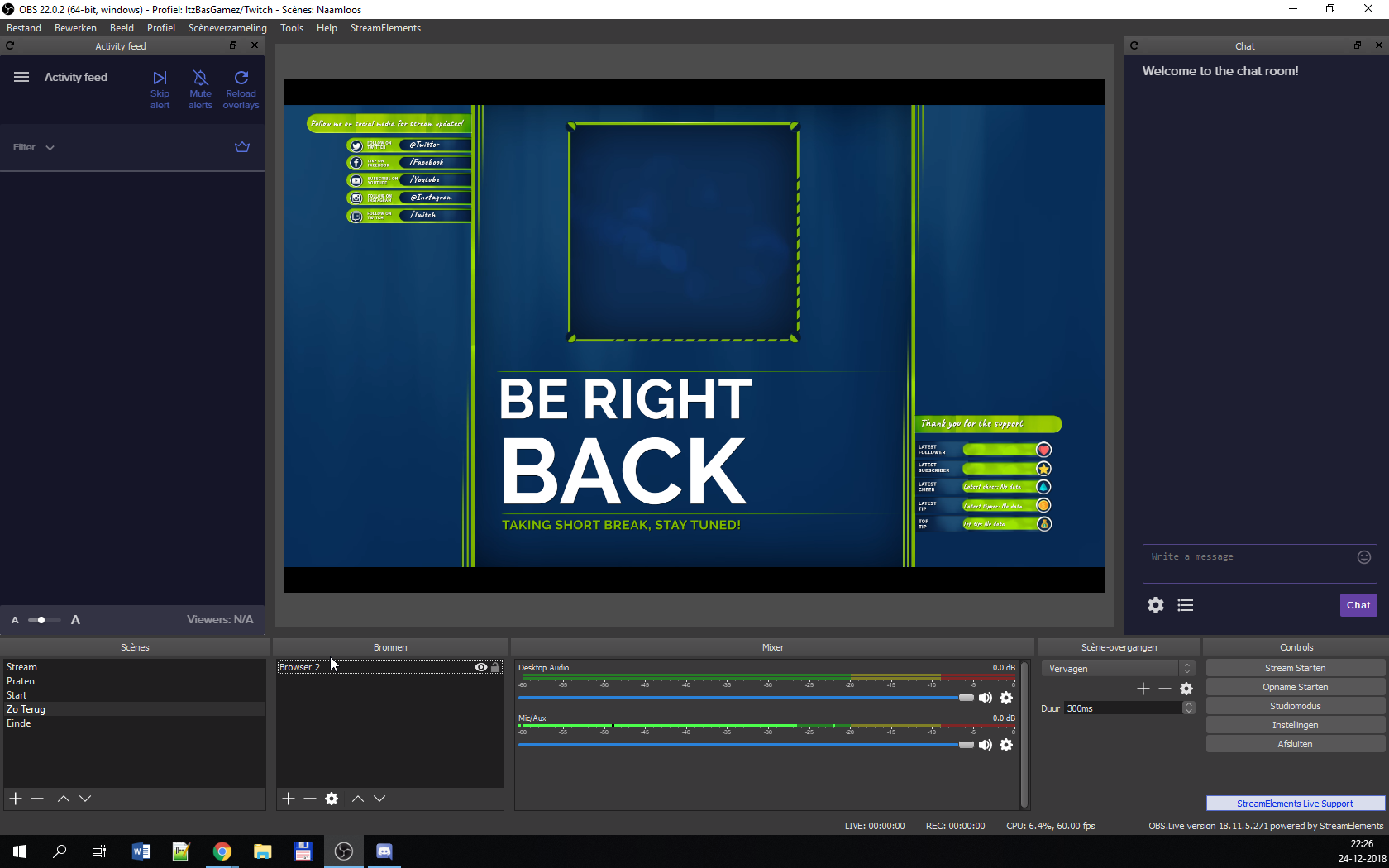
don't look at the
language, i am from the netherlands
sand flicker
someone plz?
 tulip hamlet
Themes are designed in 1920x1080 or 16:9 resolution. While you can resize your overlay's canvas to 1920x1200, the assets in place don't resize with it, so you will need to manually adjust and position things for yourself afterwards.
 misty cradle
My activity feed in obslive has also turned into chatbox
restart solved it^ should ve done that before posting this here sry
merry christmas 😄
 rocky bay
Hey all, Hoping someone can help, I have made the jump to obs.live and imported all the alerts from streamlabs
However it uses the default sound for all files alerts
No matter how I try to change it, it wont play the audio of the .webm
lost mantle
@rocky bay I don't believe the two will work together. OBS.Live is made by the StreamElements people. Can't say for certain, so wait for a staff or actually SE support person to tell you, but yeh.
Also, personally, why mix the two? Keep everything SE, make it easy and simple. Plus support on here is AMAZING imo 😉
rocky bay
Not mixing the two, Just bring all the stuff over from StreamLabs 😃
lost mantle
what do you mean "bring over" ?
is it images and files or web links you use in browser sources?
rocky bay
On SL I had all the .webm files uploaded, I then reuploaded them to my overlay in SE
 plain sonnet
Hey JDM have you tried checking the variations in the alerts?
There is normally default settings in there
 plain sonnet
Hehe
rocky bay
@lost mantle ty man either way 😄
lost mantle
sad part is i'm a remote IT support and account management personnel for a big corp IRL XD
rocky bay
@plain sonnet I just tried adding a variation,
The screen where you select the Video plays the correct sound, however once testing i just get the ding
plain sonnet
What part of the alerts is causing problems? Is it just subs and tips or all of them?
rocky bay
all of them , literally every alert just gives me a ding
rocky bay
No worries my man 😃
plain sonnet
Upload any video and sound files you use to the editor
Then go to the alert box and select what needs to be played. I think that only the subs and tips have variations
There should be an option on the left sidebar for "variations". Go through everyone and adjust it to what you need
plain sonnet
Click save at the bottom when done then you can test with the bell icon
rocky bay
then started again
plain sonnet
Awesome, 😁
 twin plinth
Is there anyway to have the follower goal on the overlays start at a number other than 0?
Sorry if I worded that weird
plain sonnet
I'm not to sure about that one. I know that the counter will start from when you joined SE, not sure about actually entering a number and going from there.
Sorry
twin plinth
Oh ok that makes sense. Thanks anyway lol
plain sonnet
Np 👍
 visual wedge
how do i set up stream elments obs
 raw garnet
Trying to set a custom sound for my bits and it keeps going back to default and no saving. Please help
I have added all variations also with the new custom sound and none of them are working either
 twilit venture
@raw garnet on all your overlays and scenes?
raw garnet
Yes
shy mountain
@raw garnet I'd suggest to recheck your variations and if you have just one overlay, to refresh/clear the cache of the browser source in OBS
 lament crag
Does streamelements offer an app?
 warm pewter
We have a mobile streaming app in development, that is it
lament crag
So nothing that is able to be used at the moment? @warm pewter
warm pewter
What exactly are you looking for, as you are asking in the support channel for our OBS plugin
 nova geode
sure, what do you have problems with?
 night drum
I have a mac, I don't know how to personalize it I mean how to put the titter account where it says @valid ivyitter. and how do I export it?
nova geode
that would be a question for #helpdesk-twitch then. let us go over and continure this there
 graceful summit
Hi. Being that I am new to using StreamElements/OBS.live and this discord, I am not sure this is the proper place, if not I apologize. I was just wondering if their is support or future support for the Elgato Streamdeck via OBS.live . OR if a work around is available. Thank you in advance.
warm pewter
You need to reinstall or repair the stream deck software to reintegrate it with OBS
graceful summit
I will give that a shot, thank you
 barren idol
Why does OBS.Live take up so much CPU usage
warm pewter
That is a loaded question, as there are several variables to what uses CPU with OBS
a log would give us a better idea
!obslog
deep birchBOT
Can you please provide a log from your last stream. You can find this log in " %appdata%/obs-studio/logs " OR Help > Log Files > Show Log Files. You can simply drag and drop the log file into Discord.
warm pewter
You have an i3
barren idol
newest gen
steel mural
still an i3
warm pewter
4 core processor with no hyperthreading, is not really designed for streaming
barren idol
what cpu would u reccomend then
warm pewter
yeah, gen has nothing to do with its a low end processor, and not designed for what you are doing
steel mural
that's the weakest Intel Core CPU from the newest lineup
barren idol
but i also stream off my gpu
steel mural
Recent i5/i7/i9 or Ryzen 5 and up
warm pewter
Does not matter, your CPU will still be used to some extent, and if you are trying to stream and game on the same system, an i3 simply will not be enough
barren idol
ok
warm pewter
1060 is also not going to be the best to rely on for encoding and gaming on
steel mural
but should be sufficient if they play games like Fortnite. Limit fps/vSync should to the trick
warm pewter
locks the game fps to your monitors refresh rate
warm pewter
in some cases, yes
barren idol
ok
warm pewter
but usually only when you use x264 encoding. Typically with nvenc, the hardware can handle resource management much better
barren idol
so if i have vsync on i should take it off my graphics card and put it back to cpu?
warm pewter
There is no way the i3 can handle encoding, with your system you pretty much have to use nvenc
barren idol
ok
 sweet arrow
Can I copy my overlays from streamlabs obs to obslive?
plain sonnet
go to SE dasboard and top right
warm pewter
The most you can do is import your SL alert box to SE.
warm pewter
you need both SL and SE dashboards open, and logged into
sweet arrow
ok thx
graceful summit
@barren idol unless I'm reading it wrong, you should probably reduce your video output to something like 720 at 30fps. Also what bitrate are you streaming at? I didn't see that in the file
barren idol
1000
warm pewter
its not a full log, so you wont see all the details on the encoder, unless a recording or a stream is done
graceful summit
Ah ok.
 mild hazel
OBS.Live isnt showing follower notifications and fllower alerts aren't sending but all other alerts/notifications seem to be working just fine. I googled and couldnt find a clear solution. Anyone have any ideas?
warm pewter
sounds like someone from the staff would need to resub your account to the twitch webhooks
is this on your channel k3n_hd
mild hazel
Yeah this is!
warm pewter
Ok, I posted in a channel so someone from staff can do it once they see it
mild hazel
Thank you!
 polar grail
nova geode
polar grail
nova geode
Have you tried restarting your OBS. Live?
 zinc lark
you should go to the streamelements menu, then reconnect to your twitch account (logout then log back in)
I have done that to myself before, lol
shy mountain
Settings -> audio
 tawdry walrus
wow lol i didnt even see the bar on the left thanks
shy mountain

tawdry walrus
when i try to stream it said invalid url path what do i do
shy mountain
Check your Stream key and also check if you've set a recording path, even though you won't record
shy mountain
Get it from twitch.
shy mountain
I see where this is going, so I'd highly recommend to watch this video about OBS setup: https://www.youtube.com/watch?v=BtZazqLgBjw
tawdry walrus
ok
 meager sigil
How do i disable mic in Ace live streaming
shy mountain
This is not related to OBS.Live, but it should be in the settings of the app somewhere.
shy mountain
Streamelements on top -> Chat
sweet arrow
thx
 polar basin
How can i add to obs the chat and the activity feed?
warm pewter
You install our plugin OBS.Live
polar basin
Where can i find that?
warm pewter
sweet arrow
is there any way i can have a app playing music but it doesnt go to "desktop audio", I want to be playing music but i dont want the stream to hear it
warm pewter
you need to be listening to it through an audio device that you are not capturing
 tight acorn
When I installed OBS.Live it asked me to update to the latest version of OBS. Do I update it to the latest version or just leave it with the OBS the OBS.Live came with?
twilit venture
@tight acorn update it
tight acorn
k]
 pastel turret
my chat has disappeared along with my activity feed how do i fix?
twilit venture
@pastel turret go to the streamElements tab on the top right and enable chat and activity feed again
pastel turret
that option isnt there
twilit venture
do you use OBS live?
pastel turret
twilit venture
did you update OBS live ever?
pastel turret
yea i just reinstalled
 pastel turret
says no updates available o.o
pastel turret
LOL thanx that worked i feel stupid now xD

 inland hearth
i have a problem with the activity feed panel on obs
some one has the same problem?
warm pewter
need some more details, like what is the problem
inland hearth
looks like this
warm pewter
does it ever time out? has this worked before?
 ancient goblet
for some reason i cant see the bottom part of the window in the stream
and it wont fit properly any way to fix this
warm pewter
Ctrl+f with the source selected
warm pewter
Your OBS canvas and game are not the same aspect ratio
ancient goblet
how do i change it
warm pewter
Well, your OBS canvas is set in Settings > Video
ancient goblet
found it ty
 bleak relic
Just a question, when I use the widgets such as the kappa, do I have to have the stream elements website open while I"m streaming?
tulip hamlet
No. The only thing you'd keep it open for is media share.
And maybe if you're doing giveaways or contests.
bleak relic
Thatd werid bc I set up the kappa but it never worked or as I noticed on stream
tulip hamlet
Did you add the overlay in OBS?
 fathom hill
Hello all is there anyway to the delay when your overlay loads in obs? when i switch scenes there is apx 3 seconds before the overlay loads? can you down load overlays made in stream elements? I am using streamlabs OBS Thanks
deep birchBOT
@fathom hill Check out this tutorial for OBS’ studio mode which allows you to preload scenes before transitioning. https://www.youtube.com/watch?v=W8iWsD2Lq3U
warm pewter
In general, we wont really be able to assist with anything related to SLOBS, this channel is for support with our plugin for OBS Studio, OBS.Live
fathom hill
thank you I caught that after I posted sorry about posting in the wrong channel and ik ya'll are competitors but ya'll overlays are alot better
warm pewter
Then maybe you should check out OBS.Live 
fathom hill
thanks i'll look into it
 dusky hatch
my stream isnt picking up any of my game audio how can i fix this
like it did and now it just picks up my mic
shy mountain
Check your added audio devices from Settings -> Audio
 wanton brook
Sorry if this have been asked alot. but my chat feed is GONE. When i try to open the chatfeed again then only Activity feed is visible... and then i mean it is visible instead of chat... so that i have two activity feed xD I have went live already so i havnt tried to restart obslive
nvm, i went offline and restarted obslive 😛 and that sorted it out
nova geode
When something like that happens you can click on the streamelements tab, log out and log back in. That will fix it too @wanton brook
 viscid forge
Hello! I have a problem with the tip! I have conect my paypal etc.. but when im going in to the tip link i just seeing "GAFFLAGAMER HAS NOT SETUP TIPPING YET" What will I do?
plain sonnet
im not sure if this is still valid as the paypal account settings may have changed, but what type of account do you have? when i set mine up i did some looking around and everyone seems to say have a business account... not sure if one of the knowledgeable people could confirm
viscid forge
I dont know actually, Becouse its worked when I used Streamlabs Tip! And another problem I have, its that no information is coming up in activity feed!
zinc lark
@viscid forge It looks like your youtube and twitch have the same name, but I think your youtube account was created first, so it got gafflagamer as the tip link. Your twitch page tip link is https://streamelements.com/gafflagamer-2933/tip
 covert tiger
FWIW: if the obs.live landing page made it more clear that it was a plugin to OBS it wouldn't have taken me so long to try it out. I tried SLOBS, and then when I kept crashing everything due to all electron all the time and running out of memory I switched back to OBS.
 limber juniper
It does say: OBS.Live is StreamElements' add-on to OBS project (Open Broadcaster Software), the leading software for video recording and live streaming. OBS.Live is optimized for gaming & IRL live streaming, integrating both your Twitch chat into OBS, and your StreamElements activity feed. With quick access to all your StreamElements tools (ChatBot, Tipping, Overlays),
covert tiger
this is true
so basically what you're saying is if I'd looked closer sooner I wouldn't have struggled without it for so long ¯_(ツ)_/¯
limber juniper
haha, I was doing it in the least abrasive way possible. However, you do have a point there. I find MANY people not truly understanding what OBS.Live is and why it is so good, compared to other streaming interfaces.
 lapis garden
Hey just a question:
Is there a possibility to show YouTube and twitch chat? I want to stream on two platforms
zinc lark
@lapis garden not as of yet, OBS.live is only built for twitch at the moment
 frigid cape
Why does my game-capture not work??? it literally stays transparent and the red scaling box sometimes flikkers
lapis garden
Oh 😦
covert tiger
I think for me it's partly because I had used SLOBS and it is an application unto itself, so when OBS.Live came out I presumed it was more of the same.
zinc lark
@frigid cape that could be do the game you are attempting to capture. Some games block the capture that way because cheaters use it to enable cheats
lapis garden
@frigid cape Settings of the video capture in obs pls
zinc lark
attempt to try window capture
zinc lark
thats a weird one
zinc lark
I have not experienced this problem, nor have I tried to capture roblox specifically
I know games like Fortnite block game capture
limber juniper
@covert tiger yes! Thats exactly what I was referring to. The fact that it's built as an extension to OBS, is so much better for everyone. OBS, StreamElements, and the Streamers.
frigid cape
the roblox site itself says to use Game Capture
this is th only thing it does with roblox game capture: https://gyazo.com/8d1ebac1b2766f094be4fed90a63bcb5

which is absolutely nothing
warm pewter
First thing to try would be going to the OBS Project site, and download the latest version of OBS Studio, the version you are on is several versions old, and major improvements have been made since then
zinc lark
that version has a bug where it says that there isn't a new update
warm pewter
I did not tell you to use the check for updates button for a reason, that version has a broken updater
zinc lark
!obslive
deep birchBOT
OBS.Live is a Plugin for OBS created by StreamElements. You can download OBS.Live here: https://streamelements.com/obslive
Please make sure you have the latest version of OBS installed, Current Version: 22.0.2. You can install OBS here: https://obsproject.com/
 true lotus
ok um.
im settin my stuff up.
and my alerts are cut off
the red box is where it's supposed to be.
the green is the editor obvs lol
that's me confused lolol
warm pewter
that red box is the entire size of your source, it is not added at the proper resolution
!add
deep birchBOT
To add your overlays to OBS, add a new browser source in your scene. Paste your overlay URL in the browser source properties, set the dimensions to 1920x1080 (unless you changed them on the website), and :ballot_box_with_check: “Shutdown source when not visible” https://youtu.be/KDvLynUqXI4
true lotus
mvp
warm pewter

true lotus
ok, now, why is my pic so small and far away
plain sonnet
is that an alert?
plain sonnet
it looks to be the same as before then. try adjusting the actual gif rather than the box of the alert
plain sonnet
it might be the importing that messed up
true lotus
yea i'm thinking something got borked.
plain sonnet
but adjusting it in the editor should be fine : )
plain sonnet
no worries : )
warm pewter
In the alert in question, if this is checked, you can try unchecking it, sometimes this will be enabled after importing, and its not needed and can bork things more than help, unless you used custom code alerts in SL
true lotus
none of them are
warm pewter
 Then it should be pretty much 1:1 with the overlay editor, as long as the overlay resolution, and browser source resolutions match
true lotus
i mean even in the editor it's weird
plain sonnet
do you have the original files? it might be work, but a reupload might fix the issue if its happening to almost everything
true lotus
i might.
plain sonnet
as long as everything else is fine then at least its not starting from scratch : )
true lotus
all the alerts are borked 😦
with the big space. so i'd have to redo them all.
ahhhhhh
ok i think i found it.
the justification for the text was centered.
which cause it is 1920x1080 moved it WAYYY over
so by moving the justification either left or justified, it works i guess?
oy. well, lots of tinkering. the gifs themselves are coming in too small compared to the text.
warm pewter
 I have not seen anything like this before, might have been something from the import, I dont really have any hands on experience with the imported alerts
true lotus
well even if i add it alone it kinda did the same
i think it's the 1920x1080 thing.
ok. i figured i it out again
i think
i have to go back through and fix all my alerts though to have uniform positioning and text size
 paper fog
What version of OBS is OBS.live based off? 22.0.2?
true lotus
new question. the fonts that show up in the editor are not the same fonts that show up on my screen
warm pewter
started development under 21.0.1 if I recall, but we recommend using the latest version
@true lotus If you change fonts, the OBS cache can get borky with it. After you change a font and save, refresh the cache on the browser source
!cache
deep birchBOT
Right click on the BrowserSource > Properties > Scroll down a bit > Refresh Cache of current page
true lotus
gotcha thanks
paper fog
@warm pewter ooh . I, beeing a dumbass, just realized that obs.live is "just" a plugin for OBS. and not a completely new fork (like SLOBS)
warm pewter



 plain sonnet
nice 👍
true lotus
do ya'll have a stream labels equivalent
or should i just continue to use theirs for now
 livid token
hey guys. any one knows how to activate media share widget? can't make it work
warm pewter
We have different widgets that are labels that you would add to an overlay, all in the cloud, no app needed to run for it @true lotus
@livid token You need to add the widget to an overlay
dry sphinx
It's all a learning process 🙂
true lotus
so i can adjust each widget size, but the position of where it is is where it is in the screen
therefore, if i have the thing at 1920x1080, make it full screen, then adjust where on the thing it is.
livid token
@warm pewter i have done that. but when i press on ground control 'show on stream' it does nothing
keep saying no media share widget
warm pewter
yeah, you will lay it all out in the overlay editor, and then the idea is that it would be full size in OBS. You can always make it in a separate overlay if you wanted to move it separate from other widgets in OBS. Most my scenes are like that were I have a few different overlays that I layer and can move separately in OBS
true lotus
i bet ya'll love seeing the lightbulbs fire haha
warm pewter
@livid token We dont recommend using Ground Control for media request, we recommend controlling it from the site. Also, you need to make sure there is actually media, if its the tutorial video, it will not activate the widget
dry sphinx
Getting the hang of it though @true lotus 
livid token
@warm pewter i've added youtube playlist, also tried using the site. same error in both places
warm pewter
does it work if you have the overlay open in the overlay editor?
livid token
nope. blank window
livid token
@warm pewter any idea?
 minor spear
hey, can someone get in a call and assist with some stream elements stuff?
warm pewter
create a new overlay, add just the media share widget to that, see if it shows up in the overlay editor. If that does not work, try adding a song to the queue to see if that works, if not, seems like there is something blocking the connection to the widget. Also, make sure you are trying this in Chrome
@minor spear People are not always available for voice support, its best to just post your question or issue
livid token
@warm pewter but there is no widget like that. im using the browser source.
is it ok?
warm pewter
You need this widget in your overlay
livid token
yeap found it. it wasnt there until ive exited the OBS and got back in
thnaks
thanks
minor spear
how can i connect my youtube chat to my OBS?
Twitch chat works fine, but is there a way to connect YT as well? or will i have to hhave a separate browser open to read YT chat
steel mural
YouTube is planned but currently not supported
minor spear
so the only way is to have a second monitor so I can read YT chat?
steel mural
This or you could open the chat on your smartphone.
But wouldn't you have to have a second monitor for OBS anyway?
minor spear
I have a second one.
Also, I was playing some music on my starting soon screen... and the audio was muted for copyright issues
How can i play music without having my audio muted for copyright issues?
warm pewter
dont play copyrighted music
steel mural
⤴
plain sonnet
NCS playlists are the best
minor spear
many streamers play music without having this issue
plain sonnet
are you streaming to youtube?
minor spear
Streaming to Youtube,twitch and will soon stream to facebook as well
plain sonnet
twitch will mute the vod due to copyright, youtube wont
minor spear
but during live broadcast it wont be muted right?
plain sonnet
no
plain sonnet
yes, on twitch
steel mural
I think youtube will censor the music
plain sonnet
yt has never done that to me
steel mural
It's new
steel mural
Gimme a sec
minor spear
Alright so Audio will not be muted during a live broadcast on twitch... Now, my next question is... How come my youtube stream title isnt changing the way my twitch title does
steel mural
There is a youtuber who does omegle reactions and on one video youtube was "censoring" the part with some pretty bad music.
minor spear
like when i go live, OBS asks me what i want my stream title to be... I type it and it only displays that title on twitchh, youtube will still have my previous title
minor spear
no its not even a delay i literally have to manually re type the stream title on youtube
because it never updates
My twitch does perfectly fine
but YT doesnt update the title
steel mural
I don't think that this has anything to do with the OBS.Live plugin so I would recommend to ask in #helpdesk-youtube or #general-chat depending on if this has something to do with streamelements or youtube itself.
plain sonnet
where are you updating the title?
minor spear
streamlabs OBS
 true lotus
dumb question. how do i export my streamlabs chatbot commands so they'll come to SE
 ancient fern
Hey so i just got OBS today and i am currently on a laptop. I was trying to get it to capture my game and it wouldnt so i looked it up and found a solution. I am using a window/monitor capture to get the game BUT it isnt recording any audio for my desktop now for some reason, does anyone know what my issue might be?
 ancient zodiac
Configure your audio in Settings -> Audio to the device you receive sound from.
plain sonnet
@true lotus im not sure if this will help you but on the SE dashboard go to import (top right), if this works you will need to have SE and SL dashboards open at the same time
ancient zodiac
@ancient fern yes
@true lotus https://support.streamelements.com/hc/en-us/articles/115000405371-Import-other-platforms-into-StreamElements

StreamElements
Importing other tools into your StreamElements account is really quick and simple.
Use this guide to learn how to import: Streamlabs, Nightbot, Ankhbot/Streamlabs Chatbot, CSV files, Deepbot, Stre...
plain sonnet
👆 🙏
ancient fern
so i did set my audio device to my headset and it still isnt showing any volume coming through
deep birchBOT
@ancient fern For the best OBS support, please join their discord where OBS devs and support volunteers are available all the time discord.gg/obsproject
ancient zodiac
I would recommend asking there ^
plain sonnet
did you do it from here? if so then you might want to ask obs
true lotus
@ancient zodiac MVP
ya'll are amazing btw
you've made this transition so freaking easy for me
i TRUELY appreciate it,
ancient fern
tadpole idk if you were asking me if i changed the setting from there
but i did
and it didnt work
true lotus
dumb question. how do i add points to everyone
ancient zodiac
!addpoints all number
ancient fern
I fixed my problem thanks for the hlep :D
 crisp harness
when i add my overlay source link it doesn't show the full overlay just a portion. Any reason why?
deep birchBOT
@crisp harness To add your overlays to OBS, add a new browser source in your scene. Paste your overlay URL in the browser source properties, set the dimensions to 1920x1080 (unless you changed them on the website), and :ballot_box_with_check: “Shutdown source when not visible” https://youtu.be/KDvLynUqXI4
ancient zodiac
ctrl+f if it doesnt fit itself
 upbeat berry
Hi I am currently having an issue, my chat box and activity feed font went smaller I need to change it
dry sphinx
There's a font size slider on the bottom left of OBS Live on the Activity Feed @upbeat berry
It'll change the font size of the Activity Feed & Chat.
dry sphinx
You're not an idiot. Now you know though 
viscid forge
Hello! My activity feed dosent work, i have connect my twitch acount but its still not showing anything!
shy mountain
When did you first connected with us?
viscid forge
yesterday!
shy mountain
Well, your actual activity feed is empty even in your dashboard.
So the activity feed in OBS.Live doesn't have anything to show.
viscid forge
I got one new follower yesterday and i have got bits etc..
shy mountain
I see its working properly.
But there is nothing else for it to show
Have you connected with us after you've gotten those bits and follower?
shy mountain
Then we can't show you any past events like those, as we haven't started tracking them for you.
viscid forge
Okey my bad, Thank you for the help!
shy mountain
No worries 😃
 radiant cosmos
Hi guys, is there an option to see your whispers on the OBS live? i wonder.
 gleaming silo
hi! i wanna add to my tips option the g2a payment options so the tippers dont need just paypal to tip me.thanks in advance!
 fathom condor
Hi i have been having a issue with obslive crashing after about 1 hour or so when I'm streaming. it has been fine since i started using the service in October with the odd crash here and there but it has been crashing more often i had 4 crashes on xmas eve and 1 on boxing day and i had one earlier today. no idea what's causing it. i have attached the latest log file if that helps. https://obsproject.com/logs/oBVgQsgWyunxIezv
warm pewter
Looks like the x264 encoder is crashing. This type of behaviour is usually related to something with the system, like a ram issue, overclock, or some other system stability problem
true lotus
sometimes google chrome is a b
 smoky ledge
so I had an update for intels GPU and now when I try to record or stream Im getting the following error qsv failed to load. I tried to uninstall the new driver and install the old one but the issue is still there. Anyone can help?
deep birchBOT
@smoky ledge For the best OBS support, please join their discord where OBS devs and support volunteers are available all the time discord.gg/obsproject
smoky ledge
thanks
 real wasp
hey guys can someone tell me why my scenes from streamelements take a couple seconds to come up when I switch to them?
 bleak silo
It's because it's routing to the website that it displays off of then loads onto OBS and displays
In other words its buffering the scene
Also. Anyone know how to bring the panels back up in OBS? The ones for twitch chat and notifications
Never mind. I have figured it out. However, it would be nice to have an option to reload them onto OBS without having to re-log into twitch on OBS.Live
 sonic vault
is there anyway to enable hardware acceleration for encoding on obs.live?
 spring oyster
For some reason, my Stream Deck won't work with OBS Live. I was told to uninstall the Elgato add on, but I don't even see one, which is probably why it isn't working in the first place. Any and all help is appreciated, and thank you.
warm pewter
You need to close OBS, and reinstall or repair the stream deck software @spring oyster
@sonic vault encoding is either x264 (CPU) or hardware with nvenc or whatever the amd equivalent is called (GPU)
If you want to use hardware encoding, simply pick that option instead of x264
spring oyster
@warm pewter, that fixed it, thank you so much.
warm pewter
sonic vault
there was an option for hardware (amd) before i installed the plug.in. it disappeared after installation.
 craggy lantern
how do i import my SLOBS scenes into obs.live?
dry sphinx
Unfortunately it's not possible @craggy lantern
SLOBS scenes/overlays use their own special overlay type file that normal OBS Studio doesn't support and our overlay system also doesn't support.
craggy lantern
oof
i might have to stick with SLOBS until i recreate everything in streamelements
needed the redesign eventually anyuway
sonic vault
ok, i fixed the issue with there being no hardware option. i made obs update then obs.live automatically updated and the option returned.
 serene charm
Hey guys. I'm having a weird issue where OBS is stuttering ever so slightly. It's almost like it's just one frame every few seconds but its almost like a heartbeat it's so regular.
My bandwidth isn't an issue as it's running totally green with no dropped frames at 6000 but I don't know how to cure this irritating issue.
zinc lark
Can you get a log from OBS?
warm pewter
!obslog
deep birchBOT
Can you please provide a log from your last stream. You can find this log in " %appdata%/obs-studio/logs " OR Help > Log Files > Show Log Files. You can simply drag and drop the log file into Discord.
zinc lark
thanks
serene charm
Sure. I'll set it to run for a minute or two to generate one unless it shows logs for streams.
warm pewter
OBS will generate a log each time its launched. The real details in the log will be written once a stream or recording has ended, so you can go into the log folder, and get a log from the stream
warm pewter
drop it in here
warm pewter
GPU cannot keep up with rendering the canvas 22:57:05.997: Output 'simple_file_output': Number of lagged frames due to rendering lag/stalls: 1044 (2.4%)
serene charm
That would likely have been when I was playing at 4K so I switched it down to 2K and it's greatly improved but that one frame makes it jitter.
Is that after the change in graphics settings?
warm pewter
only lines about any type of frame loss is that and this 22:57:05.999: Output 'simple_stream': Number of lagged frames due to rendering lag/stalls: 1042 (2.4%) 22:57:05.999: Output 'simple_stream': Number of dropped frames due to insufficient bandwidth/connection stalls: 127 (0.3%)
serene charm
That would likely account for that one frame after a bunch of time looking by the percentage.
Still not sure how to rectify that without dragging settings all the way to ridiculous.
Hhhm.
Thanks for looking though.
warm pewter
Limit framerate or use vsync, they can be huge helpers when the GPU cant keep up with rendering the canvas. You would probably also drop your bitrate to 4.5-5K, 6K is overkill for 720p/60, even with nvenc encoding
serene charm
I'll pop it to 5K and see if it's happier.
Maybe I can find a balance between the game looking like crap vs OBS health.
I doubt it would much appreciate it if I went up to 1080 60 on stream?
warm pewter
I would not recommend 1080p/60. Next time you stream, or do a test reccording, go into the View menu, and click on Status, this will give you a real time look at what is going on
serene charm
Thanks. Pretty clued up on this stuff but didn't know there was a way to inspect the stream to see what the problem was.
Thank you for your help 😃
warm pewter
 small bronze
Hey guys! I'm trying to reconnect to OBS live, but it says the twitch session has expired.
@warm pewter
Hello?
twilit venture
@small bronze did you try to log back in , in OBS Live?
warm pewter

small bronze
Yeah, it's not going
twilit venture
so you loged out and back in in OBS.Live with no luck?
warm pewter
logout of OBS.Live, close OBS. Go to the SE site, logout and log back in, then launch OBS and try logging in again
small bronze
So it's running and I am able to stream. The options its giving me is "connect with Twitch", but it won't connect that way
warm pewter
if that does not work, will need to check a log for errors
warm pewter
 dawn sedge
hey!
I'm running into a little bit of trouble if someone doesn't mind helping me please 😃
 nova scaffold
@dawn sedge well just ask the question rightaway so we can help 😃
dawn sedge
thanks! soo.. I got a stream deck recently and am having.. trouble.. with it. Ive spent some time on the forums and havent much in the way of a resolution for compatability. I wanted to stream tonight, but now all my scenes and sources are gone. The still exist in the cloud, thank god, but they arent in my OBS anymore. Halp!
please
lol
nova scaffold
Ok, let's start fixing that step by step.
Streamdeck support for all the extended features will be coming soon, the basic functions (scene switching etc.) are working as usual.
nova scaffold
And when it comes to scenes and profiles - installing OBS.live and Elgato software does not delete them, i can take a look if you want
No ETA on that, but really soon
dawn sedge
shoot tomorrow would be nice haha
nova scaffold
we plan media share controls and streamdeck integration into OBS.Live. most likely not tomorrow)
About the scenes - i can take a look what happened here, if we can recover
dawn sedge
it just seems to have wiped the scenes and sources, is there a way to refresh them or pull them down off the cloud?
nova scaffold
Profiles (stream settings) and your scene collection is saved locally
our overlays are in the cloud, so you will always have them
but all the other sources are local, like your webcam, game, monitor etc.
dawn sedge
ok
so do i have to re set them up or how do i get them off the cloud again?
also any idea why they disappeared?
nova scaffold
No idea what happened to them
unless you reinstalled OBS, they should not go anywhere
All your overlays are here:
https://streamelements.com/dashboard/overlays

StreamElements
The Ultimate All in One Platform for Streamers
So you just need to launch them and add as browser source to OBS
dawn sedge
ok so redo them
gotya
thanks for your help
i hope this stream deck stuff gets sorted soon!!
nova scaffold
 me too, i have one and other other people too looks at Kiwa
dawn sedge
are you able to use it in conjuction with SE yet?
warm pewter
the standard OBS integration with Stream Deck still works fine
nova scaffold
You are able to use the basic OBS functions with it
our extended features like skip alerts etc. - not yet.
dawn sedge
ok, cool. I know i hit the "scenes" button then all my stuff in SE OBS disappeared
nova scaffold
ok wait a second
if you hit "scene collection" then you might have switched to a new, empty collection
dawn sedge
😮
nova scaffold
can you click on scene collection again and see what is there?
warm pewter
you need to reinstall or repair the Stream Deck software after installing OBS.Live
nova scaffold
then it will work fine, you can add things like scene switching to it
warm pewter
Well, sounds like you might have used the wrong button in the stream deck, if you pressed a button, and your scenes and sources are gone in OBS
warm pewter
i dont know if there is a button in the stream deck to switch collections though, so that is really odd
nova scaffold
There is your scene collection
click on it, you will see a bunch of options and your scene collections at the bottom of the list
warm pewter
 uneven sluice
hey guys can any of you help me, I have an i7 9700k and rtx 2080 and im trying to stream r6 siege and it just looks so bad
deep birchBOT
@uneven sluice Can you please provide a log from your last stream. You can find this log in " %appdata%/obs-studio/logs " OR Help > Log Files > Show Log Files. You can simply drag and drop the log file into Discord.
uneven sluice
warm pewter
GPU is being completely overloaded, cant keep up with the game, rendering the canvas, and encoding 21:03:24.207: Output 'adv_stream': Number of lagged frames due to rendering lag/stalls: 8797 (27.5%) 21:03:24.207: Video stopped, number of skipped frames due to encoding lag: 50/31904 (0.2%)
outputting at 1080p/60 fps on a single PC is not really viable
dry sphinx
Siege is a heavy game. Especially if trying to stream on high quality and up
warm pewter
lowering output to 720p/60, and limiting in game frame rate would help
warm pewter
you can try just changing the output of the stream to 720p first. As for limiting the in game frame rate, you can try capping it at different increments until you find one that works
dry sphinx
What graphic settings are you trying to play and stream with?
I have mine set to medium
uneven sluice
high
dry sphinx
Try Medium
uneven sluice
thats what im going to try now
dry sphinx
uneven sluice
warm pewter
Still the GPU not keeping up with rendering the canvas 22:08:19.729: Output 'adv_stream': Number of lagged frames due to rendering lag/stalls: 7539 (34.6%)
locking FPS, and lower other settings are really your best option. Settings that impact FPS in Siege, like AA and resolution scaling could benefit depending on what you currently have these set to
uneven sluice
hmmmmmmmmmmm
its in low already
maybe i will try to get a refund and go for the 2080ti rip
haha
so maybe its the gpu itself right?
uneven sluice
superfast or fast? and cbr 2500?
warm pewter
best to start with the default of very fast, and bitrate will depend on output, so for 720/60 I would do 4500
uneven sluice
warm pewter
Still GPU, encoder hung for 4 frames 22:29:31.230: Output 'adv_stream': Number of lagged frames due to rendering lag/stalls: 1348 (14.6%) 22:29:31.230: Video stopped, number of skipped frames due to encoding lag: 4/9185 (0.0%)
warm pewter
Regardless of the encoder used, the canvas is always rendered on the GPU, and then sent to the encoder
The part where the GPU is rendering the canvas, is where the lag is occurring
uneven sluice
and how can we fix this, im pretty sure this is not normal
warm pewter
Overloading the GPU on a single PC setup is actually really common. Everything we have gone over are the pretty standard ways of trying to address this, usually limiting the framerate is the best solution. I would also look into what you have set the resolution to in RB6. From what I remember when I actually played that game, it by default would use a lower resolution scale with temporal AA. As this is a GPU bound game, it can be very demanding on the system, and seeing as your base resolution is 1440p, playing that game at full resolution, at a high FPS will take more compute power, and OBS will pretty much always lose that fight
playing the game at 1080p, with a canvas of 1080p in OBS, might help with the GPU load
uneven sluice
alright im going to probably try that tomorrow thanks for your help
 frozen void
I accidently deleted the chat on obs.live so does anyone know how to add it back
dry sphinx
Log out of OBS.Live then sign back in with your Twitch Account
 icy surge
Everytime I stream imlagging. I dont really see any frame drops on obs or in game, It almost feels like my monitor isnt 144hz when im streaming it sdifficult to play and i have streamed in a while beacuse of it
deep birchBOT
@icy surge Can you please provide a log from your last stream. You can find this log in " %appdata%/obs-studio/logs " OR Help > Log Files > Show Log Files. You can simply drag and drop the log file into Discord.
dry sphinx
If you're using OBS. Studio yes. But post it in the #helpdesk-youtube
Cause this is for OBS.Live plugin.
icy surge
got it ty 😄
frozen void
Also one other thing, when I use obs.live when I login it always uses my twitch chat but I want it to use my youtube chat
dry sphinx
Not possible. OBS.Live is only for Twitch at the moment.
frozen void
oh do you know when it will change
dry sphinx
I do not. No ETA
viscid forge
I wonder íf I can change the name of my bot in Streamelements?
deep birchBOT
@viscid forge Custom bot name requirements
- StreamElements bot modded and in chat
- Active overlay with alerts
- StreamElements tipping page in the panels below the stream (!panels)
- Create a twitch account for the name you want to use
- Ground Control app must be running
Steps to enable custom name
- Sign in to https://twitch.tv with the bot account
- Install and run Ground Control (!gc for download)
- Visit https://twitchapps.com/tmi/ and generate an oAUTH token
- Copy/paste everything in the box to Ground Control oAuth settings and enter the name for the bot account
- Restart Ground Control (custom name may take a few minutes to take effect)
Mac does not currently support renaming the bot.
viscid forge
thx
 last pasture
Hello everyone! For some reason the info on my overlays section (on streamelements website) differs from the imported version on my obs
already tried to refresh cache on my OBS overlay properties, but it didnt change anything
for ex: latest follower when I edit my overlay on streamelements is "Sam", but when I import it into OBS it says "Jeff". Jeff indeed followed the channel,, but 3 days ago
 flat oar
Hey guys, so I've run into a problem. I'm trying to setup my overlays and I need some help. I imported my previous alert box from Streamlabs, which kinda worked. It imported the gifs and sounds, but there are a few issues.
- It displays the wrong text.
- I cannot change the size of the text (even if I change the font size)
- By emulating a follow on the website it echoes and plays in my OBS too.
- On some alerts, the text actually gets cut off.
Any help is appreciated. Not sure if I can post screenshot links here but happy to provide.
plain sonnet
@last pasture try setting everything again, choose a different follower mode (like yearly) then go back to latest, it might be the import messed the settings up
@flat oar you should be able to put a screen shot in here, if you can give a visual aid i might be able to help 😀 and for point 3, that is suppose to happen, if you dont want dual sound, close obs when emulating events
steel mural
Or you can just mute the editor in the top right by clicking on the speaker icon.
plain sonnet
or that : )
 rugged quail
hey @last pasture I just checked your follower alerts on your channel and it updated properly, if the problem is still ongoing, keep us posted 😃
flat oar
Hey guys, thanks, I'll post a few pictures. It's really late here so after I do that I gotta go, but will be back in the morning.
- It displays the wrong text >> https://gyazo.com/fba9b39fa3ca40352395fb6ceedf4b86

- On some alerts, the text gets cut >> https://gyazo.com/82602764890bf785b7b8eb1017216493

- Font size is 0 but font size doesn't change at all >> https://gyazo.com/4d9bc8baceb9f00946bf323228294875
 steel mural
Make the box larger by dragging on this little box
rugged quail
!gc
deep birchBOT
Our Desktop App Ground Control: https://streamelements.com/groundcontrol
rugged quail
Is there a way to get these mod icons in the obs live chat?
rugged quail
Also would be nice if this bot message would show up in the obs live chat
 ocean haven
Hello... I’m using stream elements but I’m on a Mac, is there going to be a Mac version soon? I would love to be a beta tester for that
plain sonnet
@rugged quail is that for actual twitch chat or obs overlay chat
rugged quail
I grabbed the 2 screenshots from twitch chat, those options are not in obs live chat
I have to switch screens to time or ban people or see the reason why the bot did it
ancient zodiac
@rugged quail Pretty sure you can click on a user and the timeout/ban options come up
as for the messages, unsure currently
rugged quail
OH right the clicking, Twitch got me lazy  thanks @ancient zodiac
but the bot messages would still be nice
 steady pewter
Hey, my obs stopped picking up any sound coming from my pc during a stream
Anyone knows what happened?
nova geode
Did you plug in your headphones or make any changes to the windows audio settings while streaming? @steady pewter
I saw that happening to users who's razer headsets got low on battery and they had to plug it in to charge
rugged quail
How can i get the early access Code for Android?
deep birchBOT
@rugged quail The StreamElements Mobile IRL streaming app is currently in closed beta.
If you'd like to assist with testing when public beta testing becomes available, please fill out this form: https://goo.gl/forms/3DaiLckKDjeMAeVt2
This does not guarantee you to receive a Code.
steady pewter
@nova geode I managed to fix it. I disconnected all audio devices and connected them again one by one
nova geode
glad you managed to fix it! and thanks for the heads up!
 regal basin
i need someone i can screen share with to fix my live stream feed to youtube..... can anyone help?
all i did was go froma 4k tv to 1440p 144hz monitor and nothings working on getting a smooth 1080p stream.
 hushed bough
How do you add overlays when doing a stream can you do it when youa re playing ps4
flat oar
@steel mural Thanks I'll resize it. But what about the other issues?
flat oar
Hey looks like I fixed the issues! Apparently there was a variation alert which was set to always trigger... hahahaha
zinc lark
@hushed bough you would need to capture the replay in OBS, and add the overlay as a source
flat oar
Hey guys, how do I change the colour of the text during a donation? For example if someone donates 5$ and says something, it's black right now and hard to see
tulip hamlet
@flat oar Your alertbox has text settings for each type of alert, and even for each variation of those.
flat oar
Yep - that changes the colour of the "___ donated 5$" but not the custom message they can write
 flat oar

 solar berry
Mixer support...when?
tulip hamlet
@solar berry No ETA at this time.
solar berry
In the works though?
flat oar
Can I get some help lol?
nova geode
@flat oar its best to just state the problem, so that the next support can answer your question.
@rugged quail wrong board for this, this is more of a #helpdesk-twitch question. but please watch the video guides we linked to you in #welcome , they do a good job of explaining how to create your own overlay scenes with alert boxes etc.
last pasture
@rugged quail the problem is still happening. I will show what kind of issue im having:
the overlay url is correct, I checked it.
I have no idea why this is hapenning. I tried to refresh cache and refresh browser (in my OBS's overlay settings)
tulip hamlet
@last pasture Try not to ping people as not everyone is available all of the time. Can you explain the issue in some more detail please?
last pasture
My bad @tulip hamlet. I pinged him because this a problem that I had earlier and he was the one from staff that responded
on streamelements website, my overlay shows one info. On my OBS, it shows a different one
thats basically it
so the first PS is from my OBS, second one from overlay's section on website
tulip hamlet
Which overlay is that?
 echo sorrel
Is there a way that I can use my GoPro camera as a face cam or my phone?
nova scaffold
@echo sorrel yeah, there are multiple ways. gopro (depends on the model) can stream to a server, all of them have HDMI out (so you can use a capture card). phone - yes, run a custom rtmp server at home, stream from the phone to that, grab the videofeed via vlc plugin
echo sorrel
@nova scaffold can you brake down the phone into dumby words plz
flat oar
@tulip hamlet Thanks that works. I didn't see the secondary text part.
nova scaffold
there is no dummy way to set that up unfortunately, you will have to google a lot and run a local server @echo sorrel
flat oar
@nova geode Well if you read up I did do that, but then I was left hanging for a while.
flat oar
No
nova scaffold
@echo sorrel no, hell no, grab a simple webcam and be happy. c920 from logitech is like the most common model
dry sphinx
Play what you enjoy. Don't want to play a game & not like it.
nova scaffold
Most people recommend games that range between 200 and 2000 viewers on twitch. everything above is overrun, everything below has not much traffic. but you can get big on anything.
echo sorrel
wb CSGO
nova scaffold
nah, overrun. unless you are really good at it
nova scaffold
yes, 720p 60fps is fine
go watch some youtube videos how to set up everything. do not invest money unless you see growth 😃
echo sorrel
k thx
nova geode
@flat oar i didnt see that! Sorry, I wasn't meaning to come off as rude!
flat oar
@nova geode Me neither haha! No problemo 
 pure pike
i need help
shy mountain
Choose "Auto" choice for a server.
pure pike
i did
shy mountain
Then either use the twitch server tester in the pinned messages here or ask the guys at OBS discord.
deep birchBOT
@pure pike For the best OBS support, please join their discord where OBS devs and support volunteers are available all the time discord.gg/obsproject
pure pike
@shy mountain twitch tester?
shy mountain
rugged quail
i need help fixing my black display capture , i just got a windows laptop, the display capture works fine in streamlabs obs but i wanna use streamelements
shy mountain
Have you tried unplugging and plugging the capture card?
Also turning off OBS and turning it on as admin?
rugged quail
i dont have a capture card, i wasnt aware that i needed one since slobs worked :/
rugged quail
yes
shy mountain
Its best you have a capture card.
rugged quail
yes i understand that, im waiting to get one
should i just use slobs until i get one?
shy mountain
I don't understand how SLOBS will show any game capture. Are you using the xbox stream thingy with windows?
rugged quail
yes
shy mountain
Then you shouldn't have problem with OBS Studio
Our plugin just adds 2 things on top of OBS, nothing more nothing less
We don't change anything with the game capture.
So try restarting OBS as admin
rugged quail
when i open obs studio its black, i click add display capture and its just a black screen no abyss
shy mountain
So try restarting OBS as admin
deep birchBOT
@rugged quail For the best OBS support, please join their discord where OBS devs and support volunteers are available all the time discord.gg/obsproject
rugged quail
it has my activity and chat
shy mountain
I'm not familiar with the xbox and windows stream thing.
so its best to ask the guys over at OBS
 buoyant kraken
Hello are alerts automaticly enabled if you have OBS Live
shy mountain
@buoyant kraken You need an overlay added to OBS in order to have alerts to work properly.
Or at least to show on your stream.
buoyant kraken
Ok I am going to just use overlay editor
I dislike Streamlabs now
Why not OBS Live with youtube?
shy mountain
Its a planned feature.
buoyant kraken
oh ok
deep birchBOT
@buoyant kraken The default resolution for StreamElements overlays (theme and custom) is 1920x1080. Please add them in OBS at their full resolution and use CTRL+F to fit to screen if necessary. You can then downscale your stream in OBS settings > Video if you'd like https://i.imgur.com/6bWXxjR.png
 deep birchBOT
@buoyant kraken Are you a StreamElements all-in-one streamer and interested in stream promotion when you go live? Please fill out this application https://strms.net/sellout and if you meet the 3 requirements posted in the :pushpin: pinned message in #welcome you will be added to the stream announcements.
buoyant kraken
I dont have tipping service as i have not recieved a bank card im 17 getting one soon
 toxic ledge
obs.live are realy done somthing usefull plugin for the obs thumbs up for that 😃 👍 👍 👍 👍 👍
buoyant kraken
how to add mediashare to a streamelements overlay
like how to add that widget
to an overlay
shy mountain
@buoyant kraken You will have to add the media request widget to the overlay from the widget list.
@buoyant kraken https://www.youtube.com/watch?v=17eUkoZ6eIs&list=PLCDDKlFdScbEwdx5AntcQIS1InkFJwHtv&index=9& I'd suggest to watch this video
buoyant kraken
k
last pasture
anyone with a solution to my problem so far?
or any tips? Would be greatly appreciated
nova geode
@last pasture have you tried deleting the browser source in your OBS altogether and making a new one with the URL?
 sage gull
hey guys, I just downloaded obs.live, but it doesn't work. It takes very long to load and then eventually it says: "Oops! We were unable to reach StreamElements servers" Does anyone know why it does this and has a fix for it
deep birchBOT
Can you please provide a log from your last stream. You can find this log in " %appdata%/obs-studio/logs " OR Help > Log Files > Show Log Files. You can simply drag and drop the log file into Discord.
warm pewter
Happy to hear you sorted it, was just going to say from the looks of the logs to first ensure nothing was blocking any communication, as there was a timeout with the web socket connecting to the chat
 spare aspen
I have a question, I’m having a problem with streaming through OBSLive for like 2 days now, it’s causing my game to be choppy. Im using the same game settings that I’ve been using for weeks now. As soon as I turn off obs it stops being choppy.
deep birchBOT
@spare aspen Can you please provide a log from your last stream. You can find this log in " %appdata%/obs-studio/logs " OR Help > Log Files > Show Log Files. You can simply drag and drop the log file into Discord.
spare aspen
warm pewter
That is not a full log from a stream
spare aspen
Hmm could it be because I turned it off once I noticed it was being choppy?
warm pewter
If you ended the stream, the log would show it, OBS generates a log each time its launched, and will only have a complete log once a recording or stream has ended. If I had to go by just what that log shows, trying to output at 1080p is probably part of the problem
 main tiger
Hey guys! Happy New Year.
I am about to make a change from SLOBS to StreamElements, but I am having trouble converting my NerdorDie alerts. I am using the Apex eSport package. Is there a way for me to go about this? 😃
plain sonnet
have they been imported to SE or do you still need to do it?
main tiger
Hey Tadpole, I actually just read through a bunch of your previous messages, I never saw if you figured it out for yourself?
I have already imported them, but I can delete them and redo it if that is better
plain sonnet
i know the nerd or die ones caused issues before (i cant remember for the life of me if it was resolved). there a 2 things you can try. the first is correcting the alert box, click on the alert and then drag the below box to resize it
the other thing you could try is to upload the alerts straight to the editor and set them in the alerts (make sure to check the variation settings in some alerts)
main tiger
Oh I should probably have been a bit more clear; I can get the alerts to show, but I am unable to edit parts of them and many of the secondary text effects look blurred, like the custom CSS not even applying to it if that makes any sense
let me take a screenshot, one moment and thanks for your time
warm pewter
This would not be related to OBS.Live, which this channel is for. Issues with custom alert packages are usually best asked in #dev-chat , especially if this is all done via HTML/CSS/JS in the alert
main tiger
oh I see, that makes complete sense sorry. I will try and ask in there 😃
I am using obs.live though, it is the reason I am making the switch, it is sooo much better than SLOBS! 😄
eitherway thanks, I will try and ask in the other subforum
rugged quail
Why cant i login with youtube instead of twitch in obs
warm pewter
Because there is no support for YT yet
plain sonnet
you cant, its for twitch only
twin plinth
How to I connect my legato to obs
plain sonnet
add a capture source in obs, not sure if it would come under game capture, but you should have an option to select it
true lotus
how do i whitelist twitch clips
twin plinth
@plain sonnet still won't work after looking at obs video. Does obs have a discord?
deep birchBOT
@twin plinth For the best OBS support, please join their discord where OBS devs and support volunteers are available all the time discord.gg/obsproject
plain sonnet
@true lotus i beleive its https://clips.twitch.tv
true lotus
ok, i know on streamlabs yoiu ahd to have a * somewhere
 acoustic token
Is this where I can support regarding streamelements?
tulip hamlet
One of the channels, anyway. This one's specific to issues regarding the OBS.Live plugin for OBS Studio. If it's a more general question, you should ask in #helpdesk-twitch or #helpdesk-youtube depending on which platform you stream on.
acoustic token
Its regarding my host/raid alerts not popping up or showing up on my activity feed
I am using OBS live
tulip hamlet
If they're 0 viewer autohosts, they're automatically disregarded. This is a question better suited to #helpdesk-twitch by the way.
acoustic token
Ok
tulip hamlet
Just in case, I've resubscribed your channel's webhooks. If it continues to happen moving forward, and you're sure that the hosts are for 1 viewer or more, let us know.
acoustic token
Will do, thanks
 spice dagger
Im sure this has been answered earlier, but when my alerts go off, it has an echo that starts a second after
deep birchBOT
@spice dagger Make sure to :ballot_box_with_check: “Shutdown source when not visible” for all browser sources (all OBS scenes). If using studio mode, uncheck “Swap Preview/Output scenes After Transitioning.” Also keep in mind that sound can play from any overlay loaded in the browser (editor or launched). https://i.imgur.com/FegZJQS.png https://i.imgur.com/yY0wcFl.png

 spice dagger
When I shutdown the source when not visible, it takes a second for it to load in when I switch to the scene. Causes black screen
tulip hamlet
That's because you're essentially opening a webpage each time you switch. You'll either want to use Studio Mode to preload scenes or put the alertbox on its own standalone overlay so you can add it into its own separate browser source.
spice dagger
i will try that, thank you
last pasture
still haven't solved my problem. Is there a forum or somewhere I can ask for assistance? I will explain the issue for the third time
my overlay on streamelements website is fine
when I bring it to OBS, it shows wrong data
I even created a new overlay on Streamelements website, but it still didnt work.
last pasture
Ok, will repost the images without links
tulip hamlet
No need.
last pasture
So can be causing this?
what*
If it shows one data on website, should be the same on OBS right?
tulip hamlet
What is the name of the overlay you're using?
tulip hamlet
This likely has to do with the custom coding for these widgets not pulling identical data with each session.
last pasture
I see...so the custom code that works on the website doesnt necessarily works on my OBS then?
tulip hamlet
Looking at this code it seems a bit overcomplicated when it comes to retrieving information. Did you write this yourself?
last pasture
Yes sir I did XD
I know its not the best code, but it works on the website
Unless the way to retrieve info from my OBS is different, or has a different DB
tulip hamlet
Let me give you a better way to retrieve the data.
I'll use the subscriber one as an example.
last pasture
I tried to use the "custom widget" widget as a base
worked from there
sure, that would be great
tulip hamlet
I'd probably do it kinda like this:
window.addEventListener('onWidgetLoad', function (obj) {
    let data = obj["detail"]["session"]["data"];
    latestSub = data["subscriber-latest"]["name"]
});```Yeal, I didn't relate it to be a widget issue, since it showed correct values on the website
But will post there if I do anything custom from now on, thanks
 steep fiber
Hi, anyone know how to prevent game audio going off when using obs, or anything infact. (dual monitor set up) game on left screen - OBS/other stuff on right. When I make right screen active by clicking on it, game audio stops from left monitor stops. heard something about having play in background set up?
tulip hamlet
That's dependent on the game, nothing to do with OBS or Windows. Most do it for your convenience. Few give you the ability to toggle it.
steep fiber
shame. so some games, when u stream, u can't touch the other screen..
tulip hamlet
I mean you can, but the audio will generally cut out.
steep fiber
yup, thats what is happening 😦
tulip hamlet
Often they'll freeze frame too until you refocus.
last pasture
@tulip hamlet with the updated code, it worked. Thanks!!
tulip hamlet
You're welcome. There's a pinned message in #dev-chat with all the information you need about the info.
last pasture
Yep yep, using that now 😄
 sweet quiver
Hello, How to login thru youtube ob obs.live?
tulip hamlet
OBS.Live is currently in development and the beta is for Twitch only at this time.
rugged quail
is there a widget through SE that will allow me to have my latest tipper displayed on my stream screen?
or a way to export tipped data to stream labs
ancient zodiac
Yes there is a widget for that.
and you can export tip data via our chrome extension
 upbeat galleon
How do I get a invite code for streamelements mobile app
deep birchBOT
@upbeat galleon The StreamElements Mobile IRL streaming app is currently in closed beta.
If you'd like to assist with testing when public beta testing becomes available, please fill out this form: https://goo.gl/forms/3DaiLckKDjeMAeVt2
This does not guarantee you to receive a Code.
 spare charm
My obs Live does not have any audio or microphone on the mixer. It is completely blank. I don’t know what to do.
twilit venture
@spare charm add a desktop audio and or microphone!
spare charm
thanks i did not know you had to manually add it. So used to it automatically being there from streamlabs
steel mural
It should be there for OBS on default too. There was probably something messed up.
 rough karma
I'm trying to use a custom overlay, but it keeps showing a black square near the center of the screen. What am I doing wrong?
plain sonnet
send us a screenshot ninja
rough karma
this is from the preview
plain sonnet
that looks like some sort of (possibly a chat box) widget. if you look at the layers tab you should be able to find it clicking on the box (it will be highlighted in the layers panel)
rough karma
I thought about that, so I took it out. Only thing in the overlay is an alert box
This is what pops up when I try to add the browser source.
plain sonnet
there might be something in the custom CSS. what is the custom overlay?
rough karma
It's just one I made in the editor
nova geode
did you set the overlay on the SE site to the resolution you specified in OBS? otherwise you have to use the default resolution of 1920x1080 for the browser source and resize the window in OBS
@rough karma
rough karma
I think that was it
nova geode
SE overlays are always 1920x1080 by default
rough karma
how would I change them on the SE site?
nova geode
when you create a new overlay, you can set its size. i am not aware of an option to change the size of an existing overlay.
also, the max you can stream onto twitch would realistically be 1080p if you are not partnered. so i would not bother to try to stream anything over 720p.
rough karma
Thank you. Finally, is there a way to update the stream title and game from OBS, or do I have to do that directly on Twitch?
nova geode
if you use obs.live then yes. click on the burger menu (looks like 3 horizontal lines in the upper left of the activity feed) - stream settings.
rough karma
👍
 dense quartz
I dont know if this is a relevant question, relating to stream elements, but ive watched my vods and it seems that my screen gets super pixelated with the slightest movements. I stream 720p60 and have a gtx 1070 (i stream with my graphics card not x264) any solutions?
deep birchBOT
@dense quartz For the best OBS support, please join their discord where OBS devs and support volunteers are available all the time discord.gg/obsproject
 pallid parrot
If it is pixelated during dynamic scene changes - bitrate might be too low for selected resolution/framerate.
sage gull
hey, before the latest update the activity feed and chat in obs.live would load very slow and would start working after 2 minutes or so, but after the latest update (which I just downloaded) the activity feed and chat are just completely white and just won't load. I have a good internet connection and have no idea what is causing this.
shy mountain
@sage gull Can you try clikcing on "Streamelements" on top -> log out and then log back in?
sage gull
So I could log out, but then I got a white screen. I restarted obs.live and it would load normally and could click on log in again, but got a white screen after that. I turned off my antivirus, this seemed to work this time, but doesn't always work, because I tried that originally and didn't work. So sometimes everyting loads normally with antivirus on, sometimes it only loads when antivirus is off, and sometimes it just doesn't load completely. Still no clue what could cause this.
 violet prairie
Question: I just switched from OBS Studio to the Streamelements version.... it created TWO shortcuts on my desktop "Obs Studio" and "StreamElements OBS.Live" - but both seem to open the same thing... what is what and why?!
shy mountain
Have you tried running OBS.Live as admin? @sage gull
@violet prairie OBS.Live is just a plugin/addon for OBS Studio
There is an option to switch between obe.live and obs stuido
violet prairie
Alright, so can i delete the OBS.live shortcut? Because if i just open "Obs Studio" it opens the streamelements version (with chat etc.)
sage gull
@shy mountain so, I tried this two times, the first time it loaded perfectly, but the second time it didn't loaded and eventually (instead of completely white, what I got before running it as admin) in the activity feed and chat got the error: ERR_TIMED_OUT.
shy mountain
@sage gull Besides updating OBS.Live, whats the OBS Studio version you have? Seen on the top left of the window.
sage gull
OBS 22.0.2
deep birchBOT
@sage gull Can you please provide a log from your last stream. You can find this log in " %appdata%/obs-studio/logs " OR Help > Log Files > Show Log Files. You can simply drag and drop the log file into Discord.
sage gull
here is the log. Also when I had the error I tried reloading the chat and activity feed, and it loaded instantly.
shy mountain
Can you also provide the previous log file?
sage gull
shy mountain
Do you have another one before this one thats also recent?
shy mountain
Trying to get more info or something from devs.
sage gull
kk, thanks for helping me :)
 shadow swift
is there a way to log into obslive with YT?
warm pewter
Really looks like something is blocking the connection
shy mountain
Its a planned feature.
shadow swift
ok kewl thx
warm pewter
There is a handshake error when connecting to the websockets, and that usually indicates something blocking the connection, like antivirus or firewall
sage gull
yeah that's what I thought too. How can I figure out what is blocking it?
the overlays aren't loading very well right now either, so that has to be it
warm pewter
I would start by uninstalling avast, see if that makes a difference
sage gull
kk
well that worked, I'm gonna install a different antivirus and hope it doesn't interfere with obs
Thanks to all that helped :)
 distant gazelle
how do i use obs.live if i'm streaming on youtube?
rugged quail
Could someone tell me what settings should i use because im trying to stream and my stream stays stable 60fps but game fps goes down
warm pewter
@distant gazelle The main features of OBS.Live are currently only available for Twitch, that is why there is only the option to login with Twitch
@rugged quail That is a loaded question. There is not a single answer that would address that as it depends on your system, what you are streaming, and other factors like your upload rate for your internet
rugged quail
Im streaming cs:go is there possibility to lower cpu usag
warm pewter
that is also a completely loaded question
if you provide a log that is from a stream, it might give some insight on what could be suggested
!obslog
deep birchBOT
Can you please provide a log from your last stream. You can find this log in " %appdata%/obs-studio/logs " OR Help > Log Files > Show Log Files. You can simply drag and drop the log file into Discord.
rugged quail
warm pewter
That log is not from a stream, one from a stream provides more details
warm pewter
Also not from a stream. OBS will generate a log each time its launched, this is from that. The only thing that stands out here is that you are on version 21.1.2, and the latest version of OBS is 22.0.2
 empty parrot
We got any patch notes for the new update anywhere?
 ripe ridge
How can I reset my Chat? (It's not the original OBS.Live Chat)
 blazing sail
Bug Report: When trying to update the OBS.live plugin a prompt comes up from the installer saying that it must close itself to continue. Then of course it closes itself, and does not continue. 😛
Ignore option could be useful here?
warm pewter
The installer checks if OBS is running, if OBS is running, it will close it. Ignoring wont necessarily address anything. This is also the first and only report I have seen of anything like this
blazing sail
Yeah, I even closed all processes of OBS, found the intaller.exe in obs-studio\config\obs-studio\plugin_config\obs-streamelements\obs-streamelements-update.exe and ran the installer directly, and it still does the same thing.


 warm pewter
What is the version of OBS Studio that you are on? If you have not yet, it might be worth it to reboot the system, and try running the install after the reboot. Otherwise an uninstall reinstall might be the only option at this point
blazing sail
OBS 64bit 22.0.2 just rebooted and tried the installer without touching OBS at all and had the same result. Not sure I want to risk uninstall reinstall and losing the plugin all together.. But I suppose for science.
I have OBS in Portable mode so I'll just copy/paste a backup 😄
steel mural
You can export your scenes and profiles via the top menu
warm pewter
I wonder if that has something to do with it, IDK if it was ever tested in portable mode
blazing sail
Oh true I haven't done an export in a while, might as well do that to.
Yeah maybe it's the portable mode
steel mural
Why do you even use portable mode?
blazing sail
Just easier to transfer all my stuff to other PC's
I hate searching for crap in appdata folders etc
Also used to run OBS from a cloud drive at one point
steel mural
Since you can import and export all your stuff, there's no need to search for something in appdata
blazing sail
Well, there's still plugins and such. Such as this, but yeah as I'm trying to resolve this now, it seems perhaps obs.live isn't so friendly with portable mode 😛