#helpdesk-youtube
1 messages · Page 25 of 1
 pallid thorn
 versed tangle
hi. How do i change the place of the text of a donation?
i want the white text on the bottom inside the blue/grey box thing
versed tangle
alright thanks man appreciate it!
 fallen dune
@pallid thorn thanks dude
versed tangle
HELP
 idle saffronBOT
@versed tangle Welcome to the helpdesk! Please let us know how we can assist you today and a support volunteer or staff member will assist you as soon as they are available. Thank you for your patience.
versed tangle
i need help
 eager lilyBOT
Hi @versed tangle, Please ask your question(s) or describe the problem you're looking to solve so staff or a support volunteer can assist you as soon as they are available.
versed tangle
can someone who can help can we call
 idle dune
A big part of ensuring a smooth-running engine is keeping your carburettor and linkages clean and well adjusted. First, make sure that the air coming into the carburettor is clean and free of debris by inspecting the air filter. A clogged air filter is a common cause for black smoke emitting from the exhaust.
versed tangle
@versed tangle it would be the best to write your problem in here, thank you
i cant
idle dune
then post a screen shot
versed tangle
i cant
idle dune
if you cant tell us what the problem is or even show a picture, the going into a dm wont help at all will it
versed tangle
i need to screenrecord
idle dune
use monitor capture
versed tangle
NO
idle dune
fine be like that
versed tangle
IM LEAVING TANKS FOR THE HELP
idle dune
k bye
 dim inlet
cya
 wise bough
hi i have this problem where there is a 45 sec stream delay i tried fixing it in settings and put stream delay on 0 and i dont expect 0 stream delay but like i exepct 10 seconds of stream delay can you help
pallid thorn

wikiHow
This wikiHow teaches you how to change the latency settings on your Twitch account to reduce the stream delay in your live broadcasts. You can change your latency settings on any desktop browser, or open the Twitch website on a mobile...
 lime raptor
hey
i have an issue were basically i put my stream delay to 0 but there is a delay up to 30 seconds plus but when i go to other obs application it streaming with 3 second delay. The issue is i really like the overlays stream elements offer can anyone help pls
idle saffronBOT
@lime raptor For the best OBS support, please join their Official Discord @ discord.gg/obsproject
 fickle pagoda
Stream delay has nothing to do with us or our services.
lime raptor
but how come when i go to other obs applications its absolute fine ?
fickle pagoda
OBS.Live is a plugin for OBS Studio and doesn't affect the core functionality.
You're better off asking in OBS Project's community for more information about stream delay.
lime raptor
ok..
versed tangle
hello
i set my chatbot
and with hi message
i want to reply with user's name
but its replying with ${user} not name
@sick wigeon
pallid thorn
${source}
versed tangle
problem fixed
 summer roost
hello
and one can help me
i have a problem live dashboard and chat not showing on my obs
and im streaming on youtube
any one having this problem ?
pallid thorn
screen shot
 dense torrent
Does SE work with the latest live-stream module from YouTube?
fickle pagoda
Pardon?
dense torrent
Nevermind, I'll be back if I still have questions 🙂
 quasi moon
Hey shortquestion why i cannot use Songrequest Feature on youtube 😦
fickle pagoda
Limitations.
 buoyant tiger
Hello how do I get the currently playing thing to have my music show
fickle pagoda
The now playing widget will connect with either the media request system, plug.dj, or dubtrack.fm. Nothing else.
 mental hazel
Can I connect my YouTube channel to my ps4 account
mental hazel
Thx
 wild ivy
can someone please direct me where i can add the bot to my channel on youtube?
 shy quail
 last orbit
Anyone knows if it's possible to sync donators from other platform (streamlabs) to stream elements?
nvm, I found out about this video and quickly imported the tips from streamlabs :)
https://www.youtube.com/watch?v=yzL1Oc-ebWw

Moving your setup to StreamElements is super easy. Supported tools are - StreamLabs, Nightbot, Deepbot, Moobot, TipeeeStream
 wet acorn
I stream on Twitch so all of my widgets should be twitch related. However, I wanted to add a youtube sub goal. Is there any way I can go with doing that
 hot geyser
helo
 lime walrus
@wet acorn login with your YT avcount to our dashboard the make an overlsy with the widget you want and then add the overlay to obs
 sinful plume
Can someone help me in German <@&382267076632379392>
 robust mango
@sinful plume 👉 #🇩🇪︱deutsch
 burnt wind
I just got stream elements
 split ivy
does the Loyalty System only work for Twitch?
idle dune
yes
 errant scaffold
I think that depends on your location 
Let me see if I can find that link.
I believe here shows what us is available depending on location.
https://streamelements.com/dashboard/tipping/fees
Can't check myself cause I'm at my work computer.

StreamElements
The Ultimate All in One Platform for Streamers
split ivy
how can i setup se.pay?
 balmy dragon
idk
versed tangle
@split ivy is the option for SE.Pay there for you?
it might be possible its not available in your country
split ivy
germany...
versed tangle
I'm gonna ask around for you
split ivy
k thx
versed tangle
you did check your tipping settings, correct?
split ivy
how?
versed tangle
I'll ask around, you may not meet the requirements yet
split ivy
ok, please help me
 spice jolt
Hey , i am having a issue with the app , the alerts and chat are not working
its telling me to login in to twitch but i stream on youtube
i cant connect youtube for some reason
split ivy
Did you find anything @versed tangle
versed tangle
didn't get answered yet, I've asked the question tho, will come back to you when I have more info
split ivy
please do this
can u also help me with tipeeestream? I cant import my alerts 'an arror occured'
errant scaffold
@split ivy Planned. No ETA. https://streamelements.helprace.com/i715-loyalty-for-streamelements-youtube-bot
split ivy
Need help, can any @copper swan.STAFF help me? i cant connect with SE.Pay... only PayPal. @wheat thorn told me to contanct one of SE.Staff members... Please help me
versed tangle
@split ivy ive already said two times, wait for me to answer
Staff has been contacted for you
split ivy
thanks alot
idle dune
@split ivy this is now your final warning, you have been told MULTIPULE times to wait for someone to get back to you.
you have also been told to stick to 1 help channel.
also stop @'ing random people.
split ivy
sorry...
 wide totem
Is there a way I can set up the gamble and watch time from my phone or do I need a pc
versed tangle
@wide totem you can set it up via your phone, its via the streamelements website
however, if this is for youtube, I don't know if these modules are supported
wide totem
Ok thanks
 royal hill
hey, got a little issue and wondering if any1 can help.
i can't get bot commands to work on my YouTube Chat stream.
they work fine on Twitch but not YT.
burnt wind
@royal hill have you enabled them
versed tangle
I connected a youtube channel to my stream elements account, how do I remove it?
versed tangle
@versed tangle You can only delete your account as a whole, you can't remove individual channels
Ok. So what r the negative effects of having an one connected 2 SE
 still fern
is the loyalty point system not avaliable on youtube?
 earnest stone
yep, it isn't
 gilded creek
im trying to put a song with my over lays but its not playing
pallid thorn
media request is not supported on YouTube
gilded creek
is there a way to change the overlay background?
pallid thorn
you can upload pictures to stretch in background, the background looks green but its transparent in obs
gilded creek
is there a way to change my overlay color?
pallid thorn
screen shot the overlay your talking about
pallid thorn
correct if you want to add a solid color you will need to add a blank picture of the color you want
open up paint make a blank jpg or png in the color you want then add it to the overlay in the background as the (bottom) layer
fickle pagoda
To be clear: much like the black in OBS, the green in StreamElements is there to represent transparency, and isn't visible to viewers. We chose green due to the relation to green screens. While there's no way to change that green at this time, it should have no effect on your ability to customize your overlay.
gilded creek
im in paint just color the it i want? @pallid thorn
pallid thorn
example would be make the canvas 1920x1080 then fill the background using paint bucket to the color you want @gilded creek
pallid thorn
yes
go to your overlay editor and upload image
insert image then use the layer tab to drag it to the bottom
gilded creek
now? @pallid thorn
pallid thorn
as long as you drag the image to the bottom of the list it will be the very bottom layer
pallid thorn
what image are you trying to use send it here
gilded creek
background
gilded creek
?
pallid thorn
find background layer at bottom of layers and click change image
 tacit grove
hi there i am on a 1tb datacap and i wanna stream here and there what is a good setting for me?
gilded creek
still don't have the background @pallid thorn
fickle pagoda
Please do not ping people. Not everyone is always available at all hours of the day.
fickle pagoda
What is the issue you're experiencing?
gilded creek
the background for a overlay
fickle pagoda
Please go into detail.
fickle pagoda
You haven't described the issue.
gilded creek
.
i just showed you the picture
i want that to be my overlay
but i don't know how to put it
idle saffronBOT
@gilded creek To add your overlays to OBS, add a new browser source in your scene. Paste your overlay URL in the browser source properties, set the dimensions to 1920x1080 (unless you changed them on the website), and ☑ “Shutdown source when not visible” https://youtu.be/KDvLynUqXI4
gilded creek
this is in stream elements for my overlay
fickle pagoda
Okay.
gilded creek
i want this to be it
fickle pagoda
So follow the bot's instructions to add your overlay to OBS.
gilded creek
it was not in obs, it was in stream elements
fickle pagoda
It doesn't go to your stream directly from StreamElements. You need to add it to OBS. Follow the instructions.
fickle pagoda
So add the image and move the widget to the lowest point in the layers list.
gilded creek
but i don't have the image
fickle pagoda
Well, you can't use what you don't have.
gilded creek
but under layers i don't see overlay
fickle pagoda
It's not named that unless you name it yourself.
gilded creek
so just add the image?
fickle pagoda
Just add the image.
fickle pagoda
Like I said: lower it in the layer list until it's on the bottom.
versed tangle
Hey there, I've sent a message to staff about activating S.E pay on my youtube account that has 1300+ subs on it, but have yet to receive a message. I've had it activated on a twitch account before and the response was much quicker, what should I do?
versed tangle
Have you sent in a ticket @versed tangle? If so please add the support req number and I'll poke around for you!
versed tangle
i did but have no email or anything, deid not save a number, where shoukd I look?
 warm rune
How do I delete my twitch channel? I just want to use it for youtube
 thin verge
Hello everyone I would like to know how to make the url of the site to be on YouTube moderation thank you
versed tangle
@warm rune please keep your question to one channel only, I'll poke around for you and answer here
@versed tangle I'll poke around for you
I'll poke around for you Kunfouze, please be patient!
thin verge
Thank you
versed tangle
thank you lmk. appreciate it
thin verge
@versed tangle ?
versed tangle
What is up Kunfouze?
thin verge
I wait for your answer but you tell me nothing
 solar fern
Can you define what you mean? I'm not quite sure I understand
Are you trying to make the bot a moderator? @thin verge
thin verge
No you know at first you have an url to be the bot in the moderator list in YouTube and I would like to find it please
solar fern

YouTube
Official youtube channel for StreamElements tutorials https://StreamElements.com
That's the url
thin verge
I do not want that 😭 I want to modo the robot but I do not know how to do it
solar fern
Go here: https://www.youtube.com/comment_management
Paste url to bot: https://www.youtube.com/channel/UCjerlCIbLPQwSnYlClkjDXg
Then hit enter: https://i.nuuls.com/2FMMg.png

 livid moth
Hey' in obs Iive cant see the media req tab how I can fix it?
fickle pagoda
Media request is not available for YouTube.
fickle pagoda
Please keep this conversation in the email correspondence. Thank you.
versed tangle
I'd like an immediate response please. the last thing I'd want is to be shunned from you all like StreamLabs
fickle pagoda
You will receive a response via email.
versed tangle
streamers are victims of false reporting all the time, StreamLabs refused to acknowledge further correspondence after being made aware of such reports
I just hope the same isn't going to occur.
Thank you, Nethry.
Netyrh*
..
Nethyr*
 solemn gulch
Hi. I have stream from my channel account that is a part of my main google account but When I go live the chat shows me as the main account and not the channel account. Can you help ?
 covert robin
why are my subscriber alerts not working? i was testing them in an unlisted stream, do they not work over unlisted streams or what?
pallid thorn
@covert robin in order for us to see live subscribers happen the bot must be in your chat as moderator. The bot can not see non public listed streams therefore can not join in most cases. In addition to if the viewers privacy settings are set to private the subscriber alert will not trigger
covert robin
ohhh thanks
versed tangle
hi, why is loyalty not there for youtube?
pallid thorn
their api doesnt allow for it
versed tangle
hmm, k
 loud oracle
hello - when I click "start stream" it only shows facebook options, how can I update this to a different source?
this is on obs live btw
fickle pagoda
Log out using the StreamElements menu at the top and log in with the channel account you want to stream with.
loud oracle
Fantastic, thank you!
 mint yew
Can someone recommend me good commands if you stream fortnite or save the world plz
solar fern
 sly comet
why can't I choose modules for my twitch stream, I mean, I have like 3 different ones that I can use. However on my Twitch, I can select many different modules?
fickle pagoda
Because YouTube's API can't support the loyalty system.
 rose monolith
oi
 queen oar
hi! is se.pay available for youtube streamers?
robust mango
Yes, you need to be in the list of supported regions and have at least 100 YouTube subscribers
queen oar
I am and I do, but I don't have it
robust mango
Could you confirm your username?
queen oar
mitori, yes
robust mango
Refresh and you should see it 😃
queen oar
thank you!
I noticed that I have a number in my tipping link when it's linking my youtube stream and no number when it's linking my twitch channel. would it be possible to choose which one gets the number and which doesn't?
I like how clean the link without the number looks and I would like to use for my primary platform and not lose it to the platform I'll eventually leave
robust mango
Should be possible to swap them, yes. The number just ensures that they're unique as you need a different link for your tipping page for each platform
queen oar
yeah, obviously. thanks, again 🙂
robust mango
Posted the request, can't say for certain how long it'll take but it will get done 👍
queen oar
thank you!
wouldn't it be possible to let users do it themselves? I do have to admit that when mixer support rolls around, I would prefer it to be my main channel. not a big deal, but trying to think forward a bit 🙂
robust mango
Currently it requires a dev to do it, I imagine it could be a possibility in the future but for now it is done manually, if I had to guess I'd say it is likely to stop impersonation
queen oar
yeah, but I mean just having some sort of checkbox to indicate "primary channel" for a person who already has the channel without any numbers in it
maybe I'm blowing this out of proportion, really
anyway, thanks for your help today, I'll be thinking about my mixer channel when mixer support rolls around 😅
robust mango
👍
mint yew
Streamelemenst don't show in my chat Plz help
idle dune
make sure the bot has joined your channel from the SE dashboard and it is modded
mint yew
Ok
I did I but is not working
idle dune
is your stream live (not unlisted or private)?
mint yew
Yes
idle dune
part the bot and rejoin it
mint yew
Ok
idle dune
it might take a minute
versed tangle
How can i do a Follower Line up my stream to see how mutch follows i got at a day
pallid thorn
YouTube api prevents us from implementing loyalty points
idle saffronBOT
@spring void Welcome to the helpdesk! Please let us know how we can assist you today and a support volunteer or staff member will assist you as soon as they are available. Thank you for your patience.
 spring void
https://prnt.sc/pl5a1y idk why but im getting screen like this on youtube live dashboard
 pallid thorn
obs live ver is 19.9.8? what does obs say at the top obs 23 or obs 24.0.2
spring void
I will reinstall obs to see if it helps , if not i'm back here :/
mint yew
When I streamelemenst per a link in my chat it's don't work
pallid thorn
add bot to moderator list
mint yew
I did it
pallid thorn
screen shot the chat window
 nova ibex
Hey, I'm trying to switch my ground control app from my twitch channel to my youtube channel. can you help me with that ?
pallid thorn
did you enter your YouTube account JWT token from SE dashboard?
pallid thorn
restart pc while i check the folders for that app
i have a folder we can try to delete info to clear the cache
 steep glacier
@robust mangohi
 thin saddle
hey can someone tell me how to add overlays on streamelements
idle saffronBOT
@thin saddle To add your overlays to OBS, add a new browser source in your scene. Paste your overlay URL in the browser source properties, set the dimensions to 1920x1080 (unless you changed them on the website), and ☑ “Shutdown source when not visible” https://youtu.be/KDvLynUqXI4
nova ibex
Hey again, I'm making a new overlay for my stream, and for some reason the test alerts do not show on my OBS, but other thigs do show up, I'm afraid
that if I go live the alerts won't work
idle saffronBOT
@nova ibex You can test Alerts via the bell on the lower right corner of the Overlay Editor. Simply go to your Dashboard -> My Overlays -> Pencil/edit button on the overlay. Make sure the "Show Emulated events on stream" option is on to see the alert in OBS/Xsplit https://streamable.com/h6qgy
 nova ibex
yeah thats what I do, they show up in the overlay maker, not on my obs tho
shy quail
Have you enabled the small checkbox next to the bell?
nova ibex
thank you!
 sullen nova
I'm having a similar problem to @nova ibex, except the box for showing alerts on stream is checked. The alerts work in the browser when I test them without the box checked, but they don't work at all when I check the box.
idle saffronBOT
@sullen nova To add your overlays to OBS, add a new browser source in your scene. Paste your overlay URL in the browser source properties, set the dimensions to 1920x1080 (unless you changed them on the website), and ☑ “Shutdown source when not visible” https://youtu.be/KDvLynUqXI4
 prisma hound
I just signed up, but when I go to set up tipping, there is only an option for PayPal tipping. Is credit card tipping not an option?
sullen nova
Thanks @idle saffron, but overall done all of that and nothing appears. The emulation test doesn’t even work when I check the box on the browser. I’ve tried re-authenticating everything, deleting and remaking the browser source scene, deleting and remaking the alert overlay, etc., but no luck so far.
versed tangle
Are you using Google Chrome as your browser?
sullen nova
@versed tangle I use Chrome, but I also tried FireFox
idle saffronBOT
@clever pulsar Please follow our community rules:
- No advertisement or stream promotion
- Respect ALL server members
- No NSFW/NSFL
Thank you
versed tangle
why did my command get deleted..
welp, its 1 a advertisement and 2 NSFW
so please don't do that
 clever pulsar
 karmic robin
y cant i get my overlays on my OBS?
idle saffronBOT
@karmic robin To add your overlays to OBS, add a new browser source in your scene. Paste your overlay URL in the browser source properties, set the dimensions to 1920x1080 (unless you changed them on the website), and ☑ “Shutdown source when not visible” https://youtu.be/KDvLynUqXI4
 median pulsar
versed tangle
median pulsar
versed tangle
@median pulsar could you please describe your problem
 main idol
how to make it join
lime walrus
Then click on "Part channel" and then "join channel".
and the bot will join your live broadcast within 30 minutes.
lime walrus
Did you click it?
lime walrus
did you then click on "join channel"?
main idol
yup
shy quail
There is no watchtime for youtube as youtube does not provide us the API endpoint.
main idol
but the user command is also not working
shy quail
what user command?
main idol
its comming like ${user} its not tagging the use
shy quail
Not sure on this one, as I am not that savy with youtube. I'll ask internally about this.
lime walrus
${user} variable doesn't work currently with Youtube commands
pallid thorn
on youtube this will tag the user that sent the command
 radiant crypt
Hello, what do I need to add to get the chat box on ?
pallid thorn
chat box widget is not available for YouTube overlays
 robust mango
Correct
radiant crypt
alright, thank you for the info 🙂
versed tangle
hey i have a problem with stream elements everytime i go to add a browser\overlay into obs it only shows a line watched you tube videos not sure what issue is can u help me???
idle saffronBOT
@versed tangle To add your overlays to OBS, add a new browser source in your scene. Paste your overlay URL in the browser source properties, set the dimensions to 1920x1080 (unless you changed them on the website), and ☑ “Shutdown source when not visible” https://youtu.be/KDvLynUqXI4
versed tangle
just tried it just shows a single line threw screen
shy quail
Do you have a screenshot by chance?
versed tangle
looks like this
shy quail
How does it look like in the overlay editor? What resolution does the overlay have in the wensite and what is it in the browser source properties?
Got the pics.
Deleted them for security reason. Please check the url in OBS again.
Can you open the overlay in a browser without gettign a 404 error?
versed tangle
yes
shy quail
What version of OBS studio are you on?
Can you try to check / uncheck the browser hardware acceleration in the advanced settings of OBS please?
versed tangle
using obs live \studio
shy quail
There is a version number in the top left of OBS Studio, what does it say please?
versed tangle
shy quail
Can you try to check / uncheck the browser hardware acceleration in the advanced settings of OBS please?
and ofc readd the browser souce again please.
shy quail
yeah you are, scroll down to the sources category.
versed tangle
done now what
shy quail
If you switched it, add the browser source with the overlay back in and see if it is displayed please.
versed tangle
its the same
shy quail
Try to clear the browser source cache: right click the browser source > Properties > Clear cache at the bottom
versed tangle
nope still the same
man they said obs was easier not sure what is goimg on
obs live
shy quail
Lemme try to get a staff to help me with this. Just a sec please.
fickle pagoda
Screenshot this setting from your OBS please.
fickle pagoda
Did you only just disable it?
fickle pagoda
Well, two options at this stage.
Or three, actually.
You can try to enable the browser source hardware acceleration again, see if that helps. If not, disable it and we're down to two options.
Option 1: Downgrade to OBS 23.2.1
Option 2: Wait for our next update to OBS.Live, which supports OBS 24 and up. It won't be a long wait.
versed tangle
so my obs is to good for stream elements or not good but I a mean to new
fickle pagoda
In its current state, OBS.Live doesn't support OBS 24 and up.
An update is coming very, very soon.
versed tangle
well that sucks okay so do I uninstall obs studio and find the older version
or do I have to uninstall stream elements as well
fickle pagoda
When are you next planning on streaming?
versed tangle
Saturday and sunday
fickle pagoda
My recommendation is to just wait for the update.
fickle pagoda
Who knows? 👀
versed tangle
not cool
fickle pagoda
😂
versed tangle
💩
 vale grail
can i get some help
idle saffronBOT
@vale grail Welcome to the helpdesk! Please let us know how we can assist you today and a support volunteer or staff member will assist you as soon as they are available. Thank you for your patience.
vale grail
can i see the peoples names by the like
fickle pagoda
Yes.
idle saffronBOT
@ruby torrent Please follow our community rules:
- No advertisement or stream promotion
- Respect ALL server members
- No NSFW/NSFL
Thank you
 ruby torrent
Oops srry
fickle pagoda
Oh, wait, YouTube, derp. No, you can't track individual stream likes in YouTube.
Subscribers, tips, superchats, members.
That's it.
 glad aspen
hello, I want to try and stream apex legends, but every time I click on gamecapture and capture specific window, apex does not show up
can somebody help?
fickle pagoda
Are you running OBS Studio as an administrator?
fickle pagoda
Run OBS Studio as administrator. When you don't, game capture will not always work.
glad aspen
ok
sullen nova
Just to close the loop on my alert emulation issue, it turns out that filtering software on my computer was blocking that functionality. So I added streamelements.com to the whitelist and it works fine now. Thanks for the help!
fallen dune
how do i remove all my alerts from activity feed in obs..??
 nocturne crystal
you can just hide alert box source, or modify it in the editor
 deep coral
Hi I Have A Question
idle saffronBOT
@deep coral Welcome to the helpdesk! Please let us know how we can assist you today and a support volunteer or staff member will assist you as soon as they are available. Thank you for your patience.
deep coral
While I’m streaming is there a way for notifications to pop up on my screen and stream like for new subscribers and donations and stuff like that?
fickle pagoda

Learn how to customize your alerts and setup different alerts variations with StreamElements Alertbox ----- Overlay Manager guide: https://youtu.be/X7XrDdRE7...
deep coral
Thank You For Assisting Me
In that video the woman is on pc does it work on PlayStation 4 too?
If I do my settings
idle saffronBOT
@deep coral Here is a guide on how to setup the most essential tools for streaming from your console, while using StreamElements tools without involving a Capture Card! It's easy to do, take 4 minutes to read and 10 to 15 minutes to setup!
Read all about it here: https://blog.streamelements.com/how-to-stream-on-console-7b620b1c46c3
 ionic cradle
hi..
i need to set view points for my viewers.. can anyone help me with that... i new to stream elements
versed tangle
Loyalty settings are not available for youtube
ionic cradle
ok thanks...
idle saffronBOT
@wraith elm Please follow our community rules:
- No advertisement or stream promotion
- Respect ALL server members
- No NSFW/NSFL
Thank you
 dull crater
Can you use the loyalty settings for YouTube?
fickle pagoda
Loyalty is not available for YouTube due to limits with the YouTube API.
dull crater
Okay Thank you!
 dark aurora
Can you use mediarequest on Youtube?
shy quail
No.
split ivy
@indigo turret need ya
shy quail
Please keep your questions in one channel. Thank you. I'll answer them in the related channel. #helpdesk-facebook in this case.
queen oar
so youtube is rolling out their new "studio" thing and I can't figure out how to keep my stream key the same in this new... framework?
is it even possible?
or is it doing the facebook thing where you need(ed) a new stream key every time you wanted to stream?
 candid oar
is the radeon 550 and a ryzen five good for streaming and recording?
 trail musk
Can anyone tell mw how to import the chatbot? i cant find it
lime walrus
Please don't ping random staff members like that.
And give time for someone(like me) to answer you.
lime walrus
StreamElements
The Ultimate All in One Platform for Streamers
You can only import commands from Nightbot
trail musk
No i mean import the bot into my channel
Like put the bot in my accoun
s it is on my stream
lime walrus
Theres different wording for that - "how to make the bot join my channel"
not import
trail musk
sorry
lime walrus
go here and on the right side -> "join channel"
Afterwards made sure you mod the bot so that i can join and function properly.
lime walrus
In order for the Bot to function, it needs moderator access. To add StreamElements as a moderator, visit youtube.com/comment_management and paste "https://www.youtube.com/streamelements" into the Moderators list.
YouTube
Official youtube channel for StreamElements tutorials https://StreamElements.com
trail musk
it wont let me
lime walrus
What won't let you?
trail musk
lime walrus
trail musk
Not there
lime walrus
lime walrus
We don't have dlive support
but the process is the same for twitch
same location
same button
lime walrus
We don't have dlive integration/support - so no
trail musk
can you make it happen in the future?
lime walrus
Afaik, no plans for DLive support at the current moment.
trail musk
alright
versed tangle
hi, how to add items to the point shop?
errant scaffold
There's no loyalty point system for YouTube.
versed tangle
😦
 pseudo vale
hi is there any way i can see viewer count in streamelements obs
 brave solstice
@pseudo vale Afaik there is no viewer count in OBS.Live for youtube.
versed tangle
why does it only give me log in trough twitch, it is not giving me youtube, anyone know why?
 novel solar
@versed tangle you’re on the Twitch section of the site. Go to the top left corner and change the account to YouTube, then log in
 rare torrent
Ok cause I am trying to invite one of my moderators to be a bot supervisor and it keeps giving the following error
 mossy talon
help
idle saffronBOT
@mossy talon Welcome to the helpdesk! Please let us know how we can assist you today and a support volunteer or staff member will assist you as soon as they are available. Thank you for your patience.
mossy talon
i need some help setting up my stream stuff
idle saffronBOT
@mossy talon New to Stream Elements?
Check out our YouTube channel https://www.youtube.com/c/streamelements/videos
with tutorial videos from setting up the basics, to in depth details on how to use our product.

fickle pagoda
Do not ping random people.
Nobody can help you if you don't actually ask a question.
mossy talon
srry sir
I'm having issues with stream element because i told it to tell me when people subscribed but it never did.
fickle pagoda
Watch the videos in the YouTube channel linked above.
versed tangle
I have problem with streamelements site, can anyone help me? everytime i click login it automatic goes to log in for twitch, i dellete history on streamelements site but same stuff again, it only gives me log in for twitch
lime walrus
Cna you show me a screenshot of what login button you see?
versed tangle
yes give me sec
lime walrus
too early for me to provide that 
versed tangle
xD
i see this and top right log in
when i click it automaticly goes to twitch log in
lime walrus
Remove the "obslive" part in the URL
 wild nexus
hey guys!! Just found out about streamelements and so far it is a awesome tool. Been playing around with it today and im having a few issues. I have warched some tutorials and have added a few of my own overlays to Xsplit Broadcaster for my stream and works fine when testing it via the Emulate subscriber event option and that works both in SE and Xsplit. However when using a 2nd youtube account to test subscribe to my main channel it never comes through in the stream. Second issue im trying to figure out is its not showing any recent subscribers on the recent widget and I just had a new sub in my stream yesterday though I was not using SE yet. it does show a bunch of random names which then shows in xsplit and in stream but its not picking up on the sub from yesterday. And lastly I noticed during private test stream today that SE is not showing me online at all. I should have been getting data from youtube but I thought because it was private that SE wasnt picking it up. So i changed it to unlisted and SE still showed me offline which idk may be the cause of the 1st two problems above not working. I am signed in to SE using my youtube account with all permissions if that helps. Thanks hope to hear back from someone soon. I would love to use SE during my stream tomorrow.
pallid thorn
private test streams don't allow the StreamElements bot to join the chat thus some alerts/commands/status might not work. If any streamer has privacy settings set you will not see an alert when they subscribe
wild nexus
ok makes sense thank you. how about SE not showing online at all or picking up data? does stream have to be fully public meaning not even in a non private unlisted stream? I mean SE is not showing any data what so ever from my YT channel
rare torrent
 pallid thorn
listed public streams need to be
@wild nexus what is your username for StreamElements
rare torrent
how do i fix the error in that image
rare torrent
no trying to add a moderator of streamelements to bot supervisor for youtube
@ FriendlyNeighborhoodGeeks™#7560
rare torrent
several times the invite links did not work
No I am sending them the links
not vice versa lol
pallid thorn
who are you sending it to
rare torrent
one of my moderator and a already bot supervisor for twitch
pallid thorn
mr double correct
@rare torrent
is that who you are trying to setup as bot supervisor? double? @rare torrent
rare torrent
yup how did u know?
@ FriendlyNeighborhoodGeeks™#7560 sorry for delay got a little sidetracked
rare torrent
ok thxs
wild nexus
@pallid thorn it is same as here Leostixx86
 lyric mirage
Does streamelemts obs app have alerts in it?
pallid thorn
can you DM me your StreamElements account ID https://streamelements.com/dashboard/account/channels @wild nexus
StreamElements
The Ultimate All in One Platform for Streamers
obs live is a plugin for the regular obs studio inside obs studio you can add alerts via a browser source @lyric mirage
wild nexus
@pallid thorn I also did anothertest stream this time public. I did get SE to see that I was live via the little bubble icon next to name however it still said i had no stream activity. joined stream from my daughters tablet and subscribed to my channel that too never showed in streams aleart box and her account is not private. OK where do I find the account ID?
pallid thorn
StreamElements
The Ultimate All in One Platform for Streamers
@wild nexus can you go live for me
wild nexus
ok stand by
ok i am live. I also meant to mention I did get the bot to join in that last public test if that means anything @pallid thorn
pallid thorn
i just want to see if the bot is moderator and I want to see the stream live
wild nexus
you mean a mod on youtube? I did add him there per instructions when setting up
wild nexus
ok I got that one both on google alert and through xsplit
wild nexus
lol so im I just tripping or did you fix something
wild nexus
on YT?
 wild nexus
I do have it in the description
wild nexus
ok got you ill add it there as well. I wonder why it wasnt showing when I was doing the sub from my daughters tablet or from my second yt account
pallid thorn
takes a minute YT api slow
wild nexus
roger that. Thanks again man. Looking forward to using SE.
 fiery helm
Is there a widget to display the number of subscribers of the session (stream)?
lime walrus
Unfortunately, no.
fiery helm
Thank you!
 queen river
Hello. Do Streamelements have a Donation Goal Widget that counts donations from paypal and Youtube SuperChat donations?
pallid thorn
our donation goal widgets only count donations made through the StreamElemenents tipping link on your account
 ember crypt
Does streamelement support new youtube live control panel ? chat system and other stuff?
 near cloak
Aloha all I'm Mekel and I'm new here. Is here where I can ask questions for help ?
lime walrus
Depending on the question @near cloak
But about the timers - is the bot active in your live streams?
As in, does it join your live streams?
@ember crypt In what way?
near cloak
Yes the timers!
ember crypt
@lime walrus you know about new youtube live section? It's different than old live dashboard so does it detect new live section chat or it just work with old one?\
near cloak
It joins my streams but in the last week and a half it stopped working @lime walrus
lime walrus
Im not familiar with a new YT dashboard. @ember crypt
@near cloak Usually timers require a specific active chat.
ember crypt
@lime walrus https://www.youtube.com/watch?v=Ok3qM3ecWJU

Live Control Room is an easy way to reach your audience in real time. Whether you're streaming a video game, hosting a live Q&A, or teaching a class, our too...
lime walrus
Linking from #helpdesk-twitch but it sill applies to Youtube timers: https://discordapp.com/channels/141203863863558144/199460642975907840/508911738528333849 @near cloak
near cloak
My chat is very active just not sure why it stopped working
lime walrus
@ember crypt From what I know, OBS.Live for youtube still works properly.
near cloak
Checking that link now
ember crypt
@lime walrus my question is about new youtube live section I share link above does it work with that?
lime walrus
In what way do we support it?
no need to tag me everytime as well - i can keep track of both of you, but i need to tag you both separately
to know what is for whom 🙂
 dire pilot
Can SE set a YouTube stream's title yet?
 crystal terrace
Why is my chat not working with my livesteam on Youtube? has anyone found a fix to this?
fickle pagoda
What do you mean?
crystal terrace
When I go live on YouTube through OBS my chat does not become active. In the chat box I click live Dashboard at the bottom and it takes me to the YouTube live dashboard which makes sense. I have been trying to stream from the new live control room on YouTube. I have entered my new stream key from the control room but for some reason the chat is till linked to the old YouTube live dashboard. Just not sure how to link it up to the new live control room.
 orchid crypt
Do I have to be sponsored on YouTube to get tips ? Or can stream elements help me even if I'm not sponsored since I need 1000 subs to be reviewed and 4,000 views needed I just get confused I'm halfway to 1k atm
fickle pagoda
Receiving tips has nothing to do with YouTube itself.
 vale zenith
I accidentally signed into Streamelements with my new YouTube account instead of my existing Twitch account. When I go to delete the accidental-account it asks for an email but it has no email listed 😢 How can I un-claim my YouTube from this accidental account?
lime walrus
On the main dashboard page there should be a form for that missing email. @vale zenith
vale zenith
@lime walrus Where exactly? On my information page it shows no email.
vale zenith
@lime walrus Ummmm, I see nothing here.
lime walrus
Oh right, we have disabled it
vale zenith
😆'
lime walrus
so what i would suggest is, if you want to remove the account, sent an email to reem@streamelements.com with the same things the form wants.
vale zenith
Can you give the accident-account the axe?
Ummm, but there is still no email. The form wants an email.
lime walrus
Skip the email
vale zenith
Okay, np
 pallid vigil
Hii I need some help
lime walrus
What is the issue you are facing?
idle saffronBOT
@pallid vigil New to Stream Elements?
Check out our YouTube channel https://www.youtube.com/c/streamelements/videos
with tutorial videos from setting up the basics, to in depth details on how to use our product.
pallid vigil
??????????
lime walrus
Then we will do the long route. 🙂
Go to our dashboard -> my overlays -> create an overlay -> widgets on top -> labels are located a bit down in the widget list 🙂
then follow this:
idle saffronBOT
To add your overlays to OBS, add a new browser source in your scene. Paste your overlay URL in the browser source properties, set the dimensions to 1920x1080 (unless you changed them on the website), and ☑ “Shutdown source when not visible” https://youtu.be/KDvLynUqXI4
lime walrus
Don't forget to save
lime walrus
I'm not sure what you are referring to at the moment.
Our overlays are all-in-one link basically
versed tangle
is there a way for my viewers to get like points for watching the stream?
lime walrus
Youtube doesn't support Loyalty points due to restrictions on the Youtube API.
versed tangle
ok
 hard parcel
I have Viewer Request enabled and all settings set so anyone can request a song. Yet, while testing to make sure everything is working on an unlisted stream, none of the bot commands are working. I have StreamElements set as a moderator for the videos. Anyone have any ideas why this won't work?
pallid thorn
on YouTube?
hard parcel
Yes.
pallid thorn
song request not supported on YouTube and the bot can join non-public streams
hard parcel
Then the website needs to be fixed (for anyone from the company watching this). I am currently on the media request page while signed in under my YouTube account.
 cyan prairie
When i am in my tipping settings it doesn't show the option of g2a donations
Can anyone help me with that?
shy quail
G2A Pay has been disabled until further notice, as there are EU law regulation problems with standards they have to fulfill as a payment provider.
prisma hound
I just want to say that requiring tippers to log in with their YouTube accounts may not be such a big deal, but when it asks for so many permissions... it's too much. For one of my supporters to tip via credit card using StreamElements, they have to give StreamElements the ability to delete their uploaded videos. That honestly makes me look shady. I elected not to use the StreamElements tip page for this reason. I just thought I'd mention it in case nobody has given it any thought.
idle saffronBOT
@copper dome Please follow our community rules:
- No advertisement or stream promotion
- Respect ALL server members
- No NSFW/NSFL
Thank you
shy quail
Could you stop that please?
 floral jay
YES
idle dune
@floral jay why did you do that in #590584291604561930 ??
@floral jay final warning for all of that
 spare sand
Heyyyy
idle saffronBOT
@spare sand Please follow our community rules:
- No advertisement or stream promotion
- Respect ALL server members
- No NSFW/NSFL
Thank you
 tidal spear
Is there a way to sign out from youtube and log in to twitch?
shy quail
On the website or OBS.Live?
tidal spear
obs.live
shy quail
Select StreamElements > Log out at the top in OBS.
tidal spear
thank you
orchid crypt
Hi guys I got my first Elgato 50 s for the laptop and ps4 but I'm not receive any sound what can I do ?
shy quail
Take a look at this help section: https://help.elgato.com/hc/en-us/sections/360004187272-PlayStation-and-Elgato-Gaming
 analog wadi
Hey.. My Alerts are not working can you help me to fix it up please?
shy quail
Are they working when you emulate one in the overaly editor?
 wanton dagger
Como puedo poner el chatbox en obs con un template?
shy quail
#🇪🇸︱español @wanton dagger
 glacial flicker
How to grow my YouTube channel
versed tangle
Hello
idle saffronBOT
@versed tangle Welcome to the helpdesk! Please let us know how we can assist you today and a support volunteer or staff member will assist you as soon as they are available. Thank you for your patience.
analog wadi
@shy quail Yes
shy quail
Are specific alerts not working?
Can you please try to part the bot from your channel, log out, log back in and invite the bot back to your channel, to refresh the connection.
 lunar umbra
I've been using stream elements with obs live now for a while and it's been fantastic but for some reason I can't add my chat to the chatting scene. I've watched a video explaining how to do it and it's a widget but for some reason I don't have it... It's meant to be under stream engagement but the only thing I have under engagement is the countdown widget. Please send help :/
shy quail
chat box widget is not available for YouTube overlays
lunar umbra
Not like this :( is there maybe a rough estimate when it will be?
shy quail
Afaik it is not possible cause of the YT API not providing these data.
lunar umbra
Thanks!
versed tangle
Hi i have question, how to change the size of webcams etc...? 🙂
shy quail
Select the cam frame and drag it in the lower right to make it bigger. Maybe you need to set it to scaled.
versed tangle
thx i find it 🙂
 charred helm
i totally screwed up and instead of adding my youtube channel through my already established twitch connection, i made a youtube separate stream elements. how can i unclaim it so i can add it to my twitch one, which has all my stuff on there
pallid thorn
@charred helm you can DM me you JWT from both accounts
let me know which one is the Twitch one when you DM them to me
charred helm
awesome! is the JWT the account id?
idle saffronBOT
@charred helm You can find your JWT token on your account channels page ("Show Secrets" to reveal the token): https://streamelements.com/dashboard/account/channels
READ ME:
This is a private security token. Do NOT share this token here or other public places, only with a StreamElements staff member in private.
charred helm
perfect
 white girder
fickle pagoda
white girder
fickle pagoda
Asking in another helpdesk channel doesn't change the answer.
 vernal wharf
I'm trying to link my YouTube to my already existing StreamElements account, but it tells me the account is already claimed. I may have done this a while ago and forgot i did. Anyway to get this straightened up so i dont have to keep logging in and out?
Also ive already unlinked streamelements from my youtube, then went and tried to link again and tells me the same thing
pallid thorn
@vernal wharf can you DM me your JWT token from the SE dashboard of both Youtube and Twitch and which one you want to be the primary login
vernal wharf
@pallid thorn just did! thanks!
 polar perch
how do i change my paypal link because im using a new one
fickle pagoda
@T2K_Thirsty#2272 Do not post in multiple channels. What do you mean? Please be more detailed when describing the issue.
polar perch
@fickle pagoda i dont know how to explain it like this is there a chance we could get in a call
fickle pagoda
We unfortunately cannot offer one on one calls.
polar perch
can i send a screen shot
fickle pagoda
You can paste a screenshot here, yes.
polar perch
how do i change the tip link
fickle pagoda
Your link cannot be changed. It's set to match your YouTube channel's name.
polar perch
so i cant put a new tiping link in the description
fickle pagoda
Your tipping link is your tipping link.
polar perch
k
 pearl helm
So I've got a Q. Why does stream elements need so much access to your youtube account when connecting for the first time?
I mean it looks good to use just like to know what I'm allowing in when I accept
fickle pagoda
It's to obtain the permissions for all of our features, all at once.
pearl helm
Hmm ok
 hearty tiger
How does importing Tipeeestream Alerts work? I got the Google AddOn, but it does not really work ... Could someone send me a tutorial?
lime walrus
make sure you are logged into tipeeestream
and our dashboard
and use the import extension
it will make an overlay in "my overlays"
hearty tiger
It don't work... I have AlertboxV2
lime walrus
it should work for any of the tipeestream alertboxes
lime walrus
There is no video tutorial
hearty tiger
this would help me more :p
lime walrus
its as simple as just installing the extension
and importing the alertbox via it
reinstall the exntention
and if an error or something shows up
screenshot it
lime walrus
Then let me ask the devs if we import tipeestream YT alertbox
hearty tiger
okay, thx
lime walrus
@hearty tiger In a new tab, go to chrome://extensions and turn on developer mode in the top right corner, then find our extension and click on "Background page"
In the newly open window, go to "Console"
and then try the import again
screenshot the console and give it to me
lime walrus
@hearty tiger So devs told me that, we don't make an alert widget when we import tipeeestream
but we do import the assets from it
into our library
i've made a test blank overlay in your account
and checked the library and saw some duplicates
but the assets are there
lime walrus
yes you can
hearty tiger
Unfortunately, not all content is there, which is not a problem. I also need a font that does not exist with stream elements. How can I import these and how can I recolor individual letters?
lime walrus
Each letter? You can't.
If the font you want is a paid font and you have it installed on your PC, you can use the custom font option
shy quail
Haven't tried that, but should be possible, although there is put extra load on your PC.
 indigo bobcat
or is it possible to run multiple stream, but for one the audio is coming from winamp, to the other from vlc?
idle saffronBOT
@indigo bobcat For the best OBS support, please join their Official Discord @ discord.gg/obsproject
hearty tiger
@lime walrus but each word? :)
shy quail
That would require custom coding your alertbox. Otherwise I am afraid there is no way to color the words in the alertbox one by one.
 compact token
does anyone know how to change the tipping page url because my owner name is not right and cant figure out how to change
for youtube
fickle pagoda
Your tipping page link is set to your YouTube page's name at the time of account creation.
You cannot change it yourself.
compact token
do you know how to change page name because mine in madestv but it shows mrmadesgaming
fickle pagoda
Changing your page name now will not change your tipping page link.
compact token
ok thanks
compact token
another question when i check my account info there email but my twitch side does
no email
fickle pagoda
We can't always pull an email from YouTube accounts. This is normal and nothing to be concerned about.
compact token
ok
wild nexus
Hey guys. Fairly new to SE. I am having trouble getting my overlay to match up on my encoder. I stream at 2560x1440 and in xsplit its stuck at I think 1080. I have it fitted to screen in xsplit to 2560x1440 but is still not where I have it on the editor canvas in SE. Screenshots below. is there a way to edit the canvas res in SE?
shy quail
In the browser source properties have you made the size 2560x1440, too?
wild nexus
yes sir
shy quail
Can you tick enforce resize please and see if this helps?
wild nexus
yea none of those checks are working
the souurce as a whole is actually fit to my res. Its the individual overlays that needs adjusting. Like the top right overlay need to come right to the edge more and the webcam frame and other bottom overlay needs to come down. but as you see from screenshot of editor I can move them down anymore im guessing because what ever res its stuck at.
shy quail
You can change the overlay resolution in the overlay settings. When you are in your overlay gallery, select the small pencil and edit the overlay resolution.
wild nexus
but if i switch my res in xsplit to 1920x1080 everything is where it should be
shy quail
You would need to rearrange the widgets.
pallid thorn
the premade overlays are made at 1920x1080 resolutions smaller or bigger than that will require the user to adjust the widgets by hand in editor
in the editor manger you can change resolution then start moving the widgets
wild nexus
that did it @shy quail thanks alot that what I was trying to find
Thanks @pallid thorn
 rotund star
I am trying to play around with youtube gaming.. but in obs.live on the chat section it freaks out and will go live but go really fast and show trying to connect and start streaming to activate chat keeps switching real fast and will not show the chat but it is live?? wrong area or not?
shy quail
^ handled in #helpdesk-selive
rotund star
Oops
pallid thorn
removed before someone gets your address
rotund star
thank you.. i didn't mean to send that one 🙂
rotund star
is it normal for youtube to have like a 19-20second delay from the time i say something?
shy quail
The delay is normally dependeant on your upload connection and the encoder settings. Also your viewers playback buffer. https://support.google.com/youtube/answer/7444635?hl=en
rotund star
so when i pull up the browswer source it shows my jokernights gaming in chat but inside of obs it shows my real name? any way to change this? i do select my gaming profile when signing in
shy quail
On the website, is it also showing your real name?
rotund star
no within chat it shows my gaming profile
it is all under 1 account (email)
but live on web browser shows me typing as the gaming
but if i type from obs it shows my real name
shy quail
Can you share a screenshot via PM please?
rotund star
yep let me get it live
shy quail
@rotund star I am not an expert in YT streaming, but I have the same behaviour on my account when I started a test stream.
 safe barn
Ok I added my youtube information to stream elements, not knowing it would force me to stream to youtube each time I pressed start streaming. I've tried to remove it by unlinked my account (done on youtube by removing access) but I still can't go live (to twitch) because I get this blank pop (asking me about youtube) up every time I press start streaming.
safe barn
any ideas?
lime walrus
OBS.Live does not force you to stream to any platform. We do not control the stream key -we only show the docks and provide means to change title/game if possible.
To go live on Twitch, click on "Streamelements" click "logout" then login with the twitch account, then go to "Settings" from the right -> Stream -> make sure the stream key there is set to the twitch stream key.
 weak trellis
Hello! I was wondering if I could get my donation link and username in the top right to be changed so it matches my YouTube channel name? Im not sure why its different!
pallid thorn
your ticket has been put in @weak trellis
weak trellis
Oh okay do I have to do anything else?
weak trellis
Okay perfect thank you again!
 dim willow
How to get streamelement bot on youtube?
errant scaffold
@dim willow Go to Streamelements.com -> Sign in with your YouTube Account -> Far Right Bot Options -> Join Bot -> Read the additional steps to add the bot to be a moderator.
dim willow
@errant scaffold can I do it on mobile?
versed tangle
I get this message when I install ground control
pallid thorn
can you screen shot ground control open?
 hallow gust
Hey do anyone know of a free custom eventlist widget that i could use for streamelements?
the default one is very lacking and it seems to not hide like streamlabs event list does which i wish it did because i dont want it in the way if no recent event.
idle dune
check out #widget-share
 flat warren
how do you get stream elements bot to go in your stream?
pallid thorn
@flat warren https://streamelements.com/dashboard stream must be a public stream | you must add bot to moderator list
StreamElements
The Ultimate All in One Platform for Streamers
flat warren
ok thanks
nocturne crystal
for youtube stuff what do you mean exactly? like new subs?
lime walrus
Create what thing?
idle saffronBOT
@versed tangle To add your overlays to OBS, add a new browser source in your scene. Paste your overlay URL in the browser source properties, set the dimensions to 1920x1080 (unless you changed them on the website), and ☑ “Shutdown source when not visible” https://youtu.be/KDvLynUqXI4
lime walrus
thats the instruction above for adding the overlay to OBS.
 teal jay
have a look at the movie. it's quite informative
lime walrus
the video? yes
If you are referring to overlays being placed on stream - yes
as long as you stream from your PC
Yes
No
you can remove the webcam border from the overlay.

StreamElements Overlays are loaded from a single browser source in your streaming software, making streaming easy. https://streamelements.com/ StreamElements...
 desert summit
it not let live on youtube
hallow gust
does streamelements has a giveaway system like streamlabs has ? thinking of holding one soon for a game during a stream and not sure how to do so with streamelements
pallid thorn
StreamElements
The Ultimate All in One Platform for Streamers
hallow gust
Thanks
eager lilyBOT
Hi @vale hollow, Please ask your question(s) or describe the problem you're looking to solve so staff or a support volunteer can assist you as soon as they are available.
 vale hollow
I am confused how to add alerts when people subscribe to you during a stream
idle saffronBOT
@vale hollow To add your overlays to OBS, add a new browser source in your scene. Paste your overlay URL in the browser source properties, set the dimensions to 1920x1080 (unless you changed them on the website), and ☑ “Shutdown source when not visible” https://youtu.be/KDvLynUqXI4
vale hollow
thanks
 velvet path
Hello, I need some help
idle saffronBOT
@velvet path Welcome to the helpdesk! Please let us know how we can assist you today and a support volunteer or staff member will assist you as soon as they are available. Thank you for your patience.
velvet path
I try to connect my donatepay to my streamelements, but I have a problem when I choose my YouTube account…
pallid thorn
try a private browser and make sure your not using a google account but your actual youtube gaming login
velvet path
I tried. It doesn't work on donatepay.eu, but works fine on donatepay.ru…
pallid thorn
your error in url is on the google account not streamelements perhaps a question for donatepay.eu and .ru
teal jay
my uneducated guess wuold be restrictions on .ru
velvet path
Well, I don't know…
The message says: «Logging in with a Google account is temporarily blocked for this application. You cannot log in to the application using your Google account, because it has not yet passed our verification». I think, the problem is on the donatepay's side.
versed tangle
I have upload 20mbps, what bitrate should I put for streaming on yt in 1920x1080?
idle saffronBOT
@versed tangle There are no "best settings".
Please understand that every setup, will be very different.
Any guides or videos that claim otherwise are misinforming. Your best option is to start with a base and adjust as necessary.
Test, test, and test again. We are happy to offer suggestions for any issues you may be having, but not a list of settings.
versed tangle
I am not asking for best settings I am asking for good bitrate for 1920 quality
idle dune
already answered in obs
earnest stone
haxx!
 round bay
Hi just started using stream elements on android and after about 50 mins the chat box stops and doesn't display anymore chat. Any advice appreciated
Have used it past 2 nights now and on screen in stream elements it displays chat as normal upto approx 50 mins then just stops as if nobody typing but if I log onto youtube on another device and watch the live stream the chat is still continuing on the YouTube app
fickle pagoda
Please provide your device model and the app version.
 faint oar
Been getting this today. I've updated my drivers and still not working (also updated and restarted computer)
fickle pagoda
Don't forget you have the #dreamteam channel for support.
versed tangle
can someone help me
idle saffronBOT
@versed tangle Welcome to the helpdesk! Please let us know how we can assist you today and a support volunteer or staff member will assist you as soon as they are available. Thank you for your patience.
versed tangle
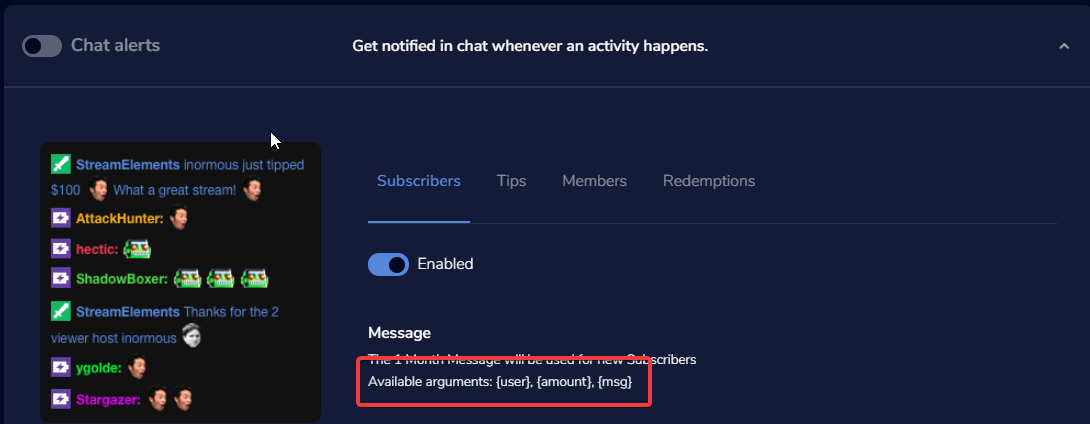
when someone subscribe to me the bot says (user) why doesn't he say his name
in chat
and i want it to display it on screen how do i do that
shy quail
What message have you set in the chat notifications module for subscriptions?
Take a look at the available variables in the module settings.
To get an alert, create an overlay with an alert box and add this overlay as browser source with 1920x1080 resolution to your OBS.
versed tangle
תודה על הסאב (user) this one what do i need to put in this ( )
shy quail
 versed tangle
i need to put this { ?
shy quail
yes.
shy quail
Take a look at this, as it is for twitch, but only the options in the alertbox for the alerts are different ofc: https://www.youtube.com/watch?v=X7XrDdRE7Fk
last orbit
Hello, anyone knows how do I reset my donation goal? do I need to create a new stream goal plugin for this?
idle saffronBOT
@last orbit To reset goals:
- from the overlay editor -> data on top -> goal tab -> reset progress of desired goal
- from the dashboard -> activity feed on the left -> widget data on the right -> goals tab -> reset progress of desired goal
Note: Goal widgets(progress) only counts up and doesn't go down automatically, if you loose followers/subs
last orbit
Awesome
 neat lotus
Hello! My name is crimson cougar and I am migrating from Streamlabs OBS to OBS.Live. I imported my overlays and settings successfully, but they fail to show up. Could someone give me assistance please?
shy quail
Are the overlays in your overlay tab on your StreamElements dashboard? https://streamelements.com/dashboard/overlays
neat lotus
idle saffronBOT
@neat lotus To add your overlays to OBS, add a new browser source in your scene. Paste your overlay URL in the browser source properties, set the dimensions to 1920x1080 (unless you changed them on the website), and ☑ “Shutdown source when not visible” https://youtu.be/KDvLynUqXI4
neat lotus
Yes they are
That seems to have done the trick! Thank you for your time and patience @shy quail
 tough notch
Is the chatbot supposed to work with youtube?
Is the chatbot just always active, or do I need to enable it somewhere? Doesn't seem to work, or does it only work for public streams?
pallid thorn
stream must be public and live and you have to make bot moderator
tough notch
Does youtube not have media share? 
pallid thorn
no media request on youtube
tough notch
y tho
pallid thorn
api restrictions and what not
tough notch
Yeah but why isn't there just via chat commands
pallid thorn
its not allowed on YouTube
tough notch
bruh
idle dune
api restrictions
pallid thorn
in order stay in good standing with a company with api access to get subscribers alerts if the company asks you to remove something you remove it
idle dune
👆 bruh
tough notch
So I guess that's why nightbot does songrequests anyways, because they don't have to serve stuff like alerts?
 tawny shard
anyone know why on streamelements I logged in to my gaming youtube channel but when I go live it chooses my personal one?
lime walrus
Where exactly did you login?
lime walrus
When logging in, does it ask you for which exact account to login with?
tawny shard
yea i chose my gaming one
lime walrus
logout from the app, find the app in the phone settings, clear its cache and data
and try logging in again
tawny shard
phone settings?
lime walrus
Yes -> Settings -> Apps -> Streamelements App -> clear cache and data
tawny shard
i dont have it on my phone..
tawny shard
got me confused lol
lime walrus
cuz you just only said "on the app" and that suggests to me mobile app
tawny shard
yea sorry bout that xD
lime walrus
PC software programs are still not "apps" in my brain
tawny shard
any clue on how to fix it?
lime walrus
So in OBS.Live you login with your gaming account?
tawny shard
yup
lime walrus
check in "Settings" -> Stream -> stream key
tawny shard
everything is logged in on my gaming account
lime walrus
and make sure the stream key there is set to the gaming channel
tawny shard
same stream key and everything
tawny shard
Boomsticks
lime walrus
Ok, link me the channel in my DMs
 abstract pecan
hello sir i am not able to use my alert system in my stream can anyone help me
to fix this problem
shy quail
When you emulate an alert in the overlay editor, is it displayed in the editor?
abstract pecan
when some one subscribe me the alert system is not working i have check the editing sit all alert was one but on my live stream alert are not working
shy quail
When you emulate an alert in the overlay editor, is it displayed in the editor?
Also is the event in the activity feed of StreamElements?
shy quail
Please clear the brower source cache of the browser source in your OBS.
idle saffronBOT
Right click on the BrowserSource > Properties > Scroll down a bit > Refresh Cache of current page
abstract pecan
i also clear the brower source but nothing work
shy quail
Have you muted the alerts in the activity feed by chance?
abstract pecan
not
can i give you my pc as a remote and you can can check and fix aa the problem
all the alert problem
shy quail
No, I do not have the posibility to do remote support.
Is the emulated event also showing in OBS when you emulate one and activate the checkbox next to the emulation bell?
abstract pecan
i don't know where i see the emulation bell
shy quail
!alerts
idle saffronBOT
You can test Alerts via the bell on the lower right corner of the Overlay Editor. Simply go to your Dashboard -> My Overlays -> Pencil/edit button on the overlay. Make sure the "Show Emulated events on stream" option is on to see the alert in OBS/Xsplit https://streamable.com/h6qgy



 shy quail
Please part the bot, log our of your StreamElements dashboard, log back in and invite the bot back. This should restore the connection between StreamElements and Youtube and fix your issue.