#helpdesk-youtube
1 messages · Page 23 of 1
 bright cliff
 errant scaffold
Not in this Server @bright cliff
bright cliff
Okay
 polar caveBOT
@vestal sorrel Please follow our community rules:
- No advertisement or stream promotion
- Respect ALL server members
- No NSFW/NSFL
Thank you
 low thicket
ive been streaming for a while and i just realised i am offline on streamelements any reason?
 robust mango
I answered your email ticket about this already 😃
 versed tangle
i need help
 eager lilyBOT
Hi @versed tangle, Please ask your question(s) or describe the problem you're looking to solve so staff or a support volunteer can assist you as soon as they are available.
versed tangle
oke
eager lilyBOT
Hi @formal smelt, Please ask your question(s) or describe the problem you're looking to solve so staff or a support volunteer can assist you as soon as they are available.
 formal smelt
How do I donate to someone with an apple account?
robust mango
Do you mean Apple Pay? We don't have Apple Pay currently
polar caveBOT
@torn jackal Please follow our community rules:
- No advertisement or stream promotion
- Respect ALL server members
- No NSFW/NSFL
Thank you
 lean spruce
 idle dune
open obs, got to settings > stream and link your account
add whatever capture you want
if you dont wont overlays, press start streaming
 obsidian estuary
Am I just totally missing it, or is there no youtube chat overlay widget?
idle dune
not from what i can see, let me ask internally
obsidian estuary
Perfect, thank you.
obsidian estuary
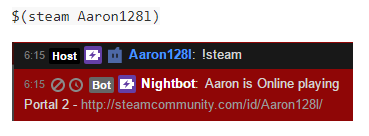
Is there any bot command to hook into a steam profile? My best example is Nightbot's '$(steam)' command that will display the server someone's currently in. https://i.imgur.com/3wzs7AG.png
 chrome moss
ok random question but i need a way if possible to stream my ps4 screen onto youtube with the custom overlays any ideas
 dull shuttle
You will need a capture card and a PC
 worldly meteor
Hey guys! I'm super new to streaming. I'd like to be able to stream iPad Pro gameplay to my PC... to stream using Stream Elements? Any tips on iPad to PC connections?
dull shuttle
Get the apple HDMI dongle and a capture card
 plain kiln
I personally use AVerMedia Live Gamer Portable 2 Plus but the Elgato Game Capture HD60S is another great buy, and a cheaper route would be the AverMedia Live Gamer Portable
worldly meteor
Do you also need the dongle?
plain kiln
Yes youll need the dongle regardless
dull shuttle
Elgato HD60S is a good one, the avermedia one is also equally good
And yes, you need the stupid Apple dongle
plain kiln
All 3 capture cards only accept HDMI, so you need the dongle to go from Apple Lightning or whatever you have to HDMI
worldly meteor
Gotcha... ty both! So, how would they work together.. Ipad Pro to the dongle and the dongle to the Capture Card?
dull shuttle
Yup
worldly meteor
Capture card to PC
dull shuttle
You’ll need 2 hdmi cables also
worldly meteor
ok... I feel like I'm making progress here lol
plain kiln
With either of those AverMedia's I posted you would only need one, no? both are portable not requiring a PC.
dull shuttle
depends on if you want to stream or just capture
worldly meteor
Streaming is what I'm going for
plain kiln
Disregard me then ^-^
dull shuttle
then yes. you'll need 2 HDMI
worldly meteor
ok
dull shuttle
one from dongle to card, one from card to PC
well no
only one right?
because monitor would be OBS
and you're just drawing
unless you want to see your stuff on your monitor, then you'd need 2....but one should work
so card + dongle + one HDMI
plain kiln
Depends on your capture card
worldly meteor
I would like to set it up so I could see it the gameplay on one monitor, and Stream Elements on the other?
plain kiln
mine woudl go ipad > dongle > hdmi to capture card > hdmi from capture card to PC
worldly meteor
ok - if you could pick between ElGato or AverMedia.. what would you choose?
dull shuttle
either one will work
 main acorn
Hello, i have a problem
worldly meteor
Ok ty! I should try to cheaper option to start... AverMedia Live Gamer Portable
the*
Man, that Apple Dongle is awful reviews lol
main acorn
How do I import themes from stream elements to streamlabs?
plain kiln
You would need to ask StreamLabs how to import from SE to SL
worldly meteor
Can I post links in here?
main acorn
ty
worldly meteor
Or, any specific dongle I should look into?
plain kiln
theres several off brand dongles you can use but I can never reccommend going with off brand products with apple
worldly meteor
Ok... Are there more than one type of Apple brand dongle?
I'm seeing a lot of different adapters when I do the google search... not sure if there is a model number?
dull shuttle
you really want to buy the Apple dongle for your ipad
worldly meteor
Ok, I will. I'm just getting a lot of different apple products in my search
Like this
Apple USB Ethernet Adapter, $29
Apple HDMI to DVI Adapter, $29
Thunderbolt 3 (USB-C) to Thunderbolt 2 Adapter, $49
dull shuttle
which ipad pro do you have? they should have a compatible accessories thing on apple.com
worldly meteor
iPad Pro 10.5 Inch Model MQDT2LL/A
dull shuttle
okay so you need the lightning to HDMI
plain kiln
IF you were wanting to go with an off brand dongle (i do not reccommend this) go with this one: https://www.amazon.com/Lighting-Adapter-Charging-Projector-Compatible/dp/B07SBR8P5C/
worldly meteor
ok perfect!
tyu2!
I really appreciate both of your info!
and I have another question lol... sorry...
Is this the Live Gamer Portable AverMedia that you mentioned? https://www.amazon.com/gp/product/B00I0QZMPE/ref=ox_sc_act_title_2?smid=ATVPDKIKX0DER&psc=1
plain kiln
My link is different but yes it seems to be the same one https://www.amazon.com/AVerMedia-AVerCapture-Streaming-Definition-Hardware/dp/B00I0QZMPE
robust mango
If it shows in the overlay editor but not in OBS check you have the tickbox ticked within the event emulator in the bottom left of the overlay editor
Also make sure you're adding the overlay to your OBS
polar caveBOT
To add your overlays to OBS, add a new browser source in your scene. Paste your overlay URL in the browser source properties, set the dimensions to 1920x1080 (unless you changed them on the website), and ☑ “Shutdown source when not visible” https://youtu.be/KDvLynUqXI4
 full iron
its already ticked
its not showing up when i open it in browser
not showing up in obs either
when i test the sub alert it works inside editor but not on obs and neither on in browser
polar caveBOT
Users can choose to make the channels that they subscribe to public or private. By default, all settings are set to private.
Private: When a users subscriptions are set to private, no other user can see what channels they subscribe to. A user's account does not show in a channel's Subscribers List, even if they are subscribed.
Public: When users subscriptions are set to public, another user can see what channels they subscribe to. User subscriptions are listed on their channel page, and their account is listed in the Subscribers List for any channel they subscribe to.
If a user has it set to Private they will not show up in the activity feed. More info: https://support.google.com/youtube/answer/7280190
robust mango
@versed tangle Where do you see this? It is a Twitch widget
 robust mango
Yeah you can
 lyric depot
Good afternoon, I can’t configure the data, it requires 100 subscribers, and I already have 1000 on YouTube, what am I doing wrong?
I can’t set up payment acceptance
robust mango
@lyric depot Please go to https://streamelements.com/dashboard/account/channels and DM me on Discord with your Account ID from that page

StreamElements
The Ultimate All in One Platform for Streamers
polar caveBOT
@versed tangle Please connect your streaming account (Twitch, YouTube, or Facebook) with Discord by going to ⚙ Settings and then Connections here in Discord. https://streamable.com/eg92w

 fickle pagoda
@versed tangle Please try again now.
 nimble reef
hello can you help me figure out how to share my overlays on my discord?
fickle pagoda
Overlay designs cannot be publicly shared. The other person must be given manager access to your channel or vice versa for overlays to be copied from one account to the other.
nimble reef
ok thank you
 analog dagger
Hi
Can you please help me unlinking my YT account, I'm trying to link it but get the message saying the it has already been claimed. Not sure what to do from here
fickle pagoda
Please email us with the form at https://streamelements.com/contact and include the JWT tokens for both your Twitch and YouTube accounts, clearly noting which is which, and we'll merge your accounts for you.
Also note that this will not allow the two channels to share information. The only benefits of merging accounts are being able to switch between them quickly and copy overlay designs from one to the other. StreamElements does not have multistreaming/restream support.
StreamElements
StreamElements is the leading platform for live streamers on Twitch and Youtube. StreamElements includes Overlay management, ChatBot, Tipping, Alerts & Loyalty
analog dagger
JWT?
polar caveBOT
@analog dagger You can find your JWT token on your account channels page ("Show Secrets" to reveal the token): https://streamelements.com/dashboard/account/channels
READ ME:
This is a private security token. Do NOT share this token here or other public places, only with a StreamElements staff member in private.
analog dagger
Okay, I see what you are saying but what I left out is that my YT is not showing in my "Channels", when I try adding it , I get the message saying it's already been claimed
fickle pagoda
I'm fully aware of what's going on.
analog dagger
So I dont have the JWT for my YT
fickle pagoda
Get one JWT token, log out, use the button on the homepage to log into the other type of account, and then get that JWT token.
analog dagger
I'm not sure which other type I used before though, ooof
analog dagger
Figured it out, what do you want me to put in the message body other than the two JWT?
Message sent
Thanks
 crisp sundial
Does your OBS live work with events on YouTube? The instructions only showed that it works for "stream now".
fickle pagoda

Medium
Today we are excited to announce that YouTube streamers can now use StreamElements OBS.Live!
crisp sundial
I just came from that article. It doesn't say if the chat box works with both "live stream now" and "live events" in OBS live.
This is the most common problem I've had with OBS chat boxes from anyone who makes them so that's why I'm asking this early.
 lime walrus
@crisp sundial Can you elaborate on what you mean by "live stream now" and "live events"
crisp sundial
@lime walrus "live stream now" is the screen everyone's used to seeing when they hear about YT streamming. It's the one in Creator Studio that has the chat, preview, and stream health bar on it. That's different from "live events" which is used to schedule a live stream in advance. Using this function you can have your scheduled stream promoted as if it were a video before it actually goes live.
This is live stream now
This is live events
lime walrus
And you are suggesting we add these to OBS.Live?
crisp sundial
No, I'm just trying to see if live events chat will work in OBS live the same as it would with live stream now.
For some reason it doesn't seem to work in Streamlabs OBS or in Restream.io
So I figured I'd ask before making the switch.
lime walrus
Honestly I can't answer that
Because I didn't knew there was a difference.
What I can suggest is, try it, doesn't hurt to try and I will provide the feedback to our QA and Devs
if its something crucial we are missing with the Youtube integration.
crisp sundial
Thanks! I'll try it out when I can.
idle dune
an event is something that is pre-planned.
you wont need it for live stream services like obs or restream
to stream you just click start streaming,
for an event you need to create it on the yt dashboard
 errant nimbus
hey guys, how can i view chat and activity feed from YT in my OBS?
errant nimbus
just like this?
idle dune
yes
 lethal shoal
hey can anyone help me stream to youtube instead of twitch from the app
fickle pagoda
@lethal shoal Log out from the app's menu and log in with your YouTube account.
 vocal elk
My dono link dosent work it jus says return to the merchant
plain kiln
did you setup a payment method for you to receive money?
all this should be green ^-^
can be seen here
StreamElements
The Ultimate All in One Platform for Streamers
vocal elk
Yes
Everything is green
But wen someone try’s to donate it comes up with return to the merchant
vocal elk
That’s not mine
dull shuttle
That's what is linked from your YouTube
vocal elk
Wat
dull shuttle
That's what is linked in your Discord profile
the YT page
and the link on that YT page goes to the SE page
dull shuttle
your old YT?
The link that you just posted goes to the SE page, and the tip button links into PayPal correctly. Where was the error occurring?
 hot summit
I would like to see more logging functions added to StreamElements. I run StreamElements for all things but still have to have Nightbot for it's chat logging ability.
polar caveBOT
@hot summit Check out the StreamElements ideas board: https://strms.net/ideas. You'll be able to add ideas, upvote ideas you agree with, and track their progress with email notifications. Adding and upvoting ideas also helps the staff know which ideas should be prioritized so please take some time to upvote.
vocal elk
@dull shuttle yes but wen someone wants to tip like presses tip and goes to PayPal and is logging in this shows
dull shuttle
That one is above me.
fickle pagoda
@vocal elk This looks to be an issue on PayPal's end.
 abstract marsh
i need help
eager lilyBOT
Hi @abstract marsh, Please ask your question(s) or describe the problem you're looking to solve so staff or a support volunteer can assist you as soon as they are available.
abstract marsh
i tryna add the points but it wont let me and i think it got updated so all the videos i watched on it wont help
errant scaffold
If you're referring to Loyalty Points: Currently that is not available with YouTube.
abstract marsh
ohhhhhh ok thanks
 chilly slate
can someone please help me
 cerulean edge
Hello. I have a problem with connecting to my streaming server on youtube. can you help
versed tangle
Hello! I am having trouble with streamelements on my youtube account, my issue is that I want to activate G2A payment in my tipping settings tab and it tells me that I do not have at least 10 subs when I have way more. What should I do?
lime walrus
@versed tangle make sure its not copyrighted and you can play from spotify or other sources.
@AxzTime#6567 can you provide more details?
@versed tangle please provide me with your account id
polar caveBOT
@versed tangle Please provide your account ID found at the top of this page: https://streamelements.com/dashboard/account/channels This ID is public info and safe to share here.
versed tangle
@lime walrus 5d35fa999c16081f9a6b28eb
versed tangle
you da best! thank you
another quick question, would you have any idea why paysafe is not a payment option for G2A pay, do I need to activate it somewhere or is it not available for my country?
lime walrus
I/we can't really say. Its best to ask the G2A Pay support about that.
 keen lily
Hey there.
I am setting up StreamElements for YouTube. On our Channel we allready have ~130 Subscribers, but the Counter starts with 0. How can i add the old Subscriber to the Counter?
robust mango
@keen lily Fixed, you can go to Activity Feed > Widget Data > Settings and click on Save Changes to force the totals to recalculate
keen lily
Thx!
versed tangle
yeah but I think you need a skrill account, I just wish it would be straightforward
too much hustle for viewers, they want straightforward. I get a lot of donations with paysafecard I just wish more donation services would introduce this method of payment, but thank you for helping out Pieter!
 frosty lynx
i accidentally linked my youtube to my streamelements and i dont know how to unlink it. can someone please advise?
versed tangle
yeah, check here : https://myaccount.google.com/permissions
frosty lynx
thank you
versed tangle
👍
 unkempt turtle
I have a problem adding Paypal to my youtube account
 calm thicket
Hi there! Was wondering if there was a reason why the Loyalty System wasn't available in my Streamelements settings! Anyone have an idea?
idle dune
loyalty points arent available for youtube
calm thicket
Well that explains it! LOL Thanks!
 raven willow
Is alert box working on ps4 too?
@raven willow
@polar cave Is alert box working for ps4?
idle dune
overlays dont work for consoles. if you want to use an overlay either use remote play to your pc or use a capture card, either way you need to stream from a pc to have overlays
 crude umbra
how do I remove my YT account from my Streamelements account
 median current
hi how can i transfer my overlays from Stream labs obs to obs.live i got the .overlay file
wrong one sorry
 abstract haven
how do iget loyalty setting thier is not oprion on the side for loyalty settings
 novel orchid
Yo
idle dune
@crude umbra https://streamelements.com/dashboard/account/security this is not an instant process and you will lose everything under that account
@abstract haven there is no loyalty points for yt
novel orchid
Can anyone help me with doing that? “Thanks for subscribing” part
errant scaffold
You just need to enable Chat Modules in the Bot Modules in Streamelements website when you're signed in your YouTube account.
Did you already have the bot join your channel & made it a moderator @novel orchid ?
errant scaffold
You will have to be live for the bot to join your channel. Doesn't work offline.
As when you go live: It can take a few minutes for the bot to join.
novel orchid
I know but I’m saying when people subscribe will it show like that in the comments?
errant scaffold
Yes it will since you have chat alerts enabled.
 lofty ibex
Hi Guys, I keep seeing the Twitch Activity Feed and Streamchat, though I am streaming on Youtube.. is there anyway I can change this? I use OBS 23.2.1
 untold gyro
Hi guys,
i try to capture a game application wndow on streamelements but it show black screen
any help please?
fickle pagoda
@untold gyro Are you running OBS as an admin?
untold gyro
Yup
fickle pagoda
@lofty ibex Log out using the StreamElements menu at the top, and log in with your YouTube account.
polar caveBOT
@untold gyro For the best OBS support, please join their Official Discord @ discord.gg/obsproject
untold gyro
Thanks!
lofty ibex
@fickle pagoda Thanks!
 royal dagger
Hello. I have changed the Youtube name and want to change the name of tipping page link. How do I do that?
versed tangle
Zu'p\
 shy quail
 wheat thorn
does OBS.Live have a youtube chat plugin yet?
 waxen mica
how to i change my stream elements from twitch to YT
fickle pagoda
@wheat thorn Yes it does.
@waxen mica Log out in the StreamElements menu at the top and then log in with YouTube.
wheat thorn
thank you @fickle pagoda
 summer copper
Need help getting SE pay from us and have 1126 subs
versed tangle
I'm confused, I'm trying to setup my tip link in the cards and it says the website is not authenicated or something like that.
I also am having troubles with the bot working, it only picked up 10/40 of my subs from last night through the alerts.
lime walrus
@versed tangle Im not sure I understand the cards thing and the tipping link.
As for the subs - this is highly dependent on the viewer who is subbing to you if their privacy settings are turned on.
versed tangle
can i have a loyalty system for youtube?
lime walrus
Unfortunately, due to limitations on the Youtube API we don't have loyalty enabled for YT
 hexed idol
Moin, short I ask stream Youtube and Twitch in parallel. is there a way to get subcition alerts from both platforms in one overview and also get the alert displayed? so far it only works for either YT or TW depending on which channel i activate. thanks +greetings
idle dune
@hexed idol you need to make an alert on your twitch account and an alert on your youtube, import both overlays into obs.
this will show alerts of both platforms
idle dune
cool 👍
hexed idol
any chance for a overview were all new follower from different channels are shown?
idle dune
like an activity feed?
hexed idol
yes but in a seperate scaleable window?
idle dune
yes and no. obs.live has a dock that can be popped out and you can resize it.
however it will only be for the account you log in with, either youtube or twitch.
there is no activity feed for both together as SE cant combine the platforms
hexed idol
ok thanks for your help:-)
idle dune
no probs
 mossy current
fickle pagoda
mossy current
fickle pagoda
Editing your overlay is done on the site, not in the app.
 rigid widget
i change my name to The King Ryan in youtube for like a month but when i login in to streamelements my name still BloodKingRyan soo is there anyway to fix this
and my website too
sorry if my grammar is bad
lime walrus
I'll have to ask the devs to manually change it for you
rigid widget
thank you very much
lime walrus
the link would become thekingryan just fyi @rigid widget
rigid widget
yeap got it
versed tangle
Hi my chatbot dosent work
plain kiln
try parting it from your channel and making it rejoin @versed tangle
versed tangle
My comments dont work
plain kiln
try parting it from your channel and making it rejoin @Rainer Calmunt
did you try that?
idle dune
what message did you get when the bot joined your stream?
plain kiln
^ sry for late reply
versed tangle
@idle dune no message
idle dune
then the bot didnt join your channel
have you modded the bot in your channel and are you live (not privet/unlisted)?
versed tangle
Oh now i know why it dosent work he's not a mod
versed tangle
How can i add streamelements to my mods
robust mango
In your YouTube Live chat panel click on the menu button, click on the button which I believe says Manage Moderators, add our YouTube channel as a moderator: https://www.youtube.com/channel/UCjerlCIbLPQwSnYlClkjDXg
versed tangle
The internet site says im not live
worldly meteor
Hey all! How do I set my video source? I'm using Streamelements OBS.. I'm using my iPad Pro, connected to a USB on my PC
lime walrus
@worldly meteor For the best OBS support, please join their Official Discord @ discord.gg/obsproject
fickle pagoda
@versed tangle Please follow our community rules:
- No advertisement or stream promotion
- Respect ALL server members
- No NSFW/NSFL
Thank you
 pearl valley
hey im having a problem with my stinger transition where i go into the transition select area and theirs only the cut and fade transition. Can anyone help me add a stinger transitione ty!
idle dune
click + and add stinger if you have a custom one
idle dune
🍪
 arctic night
Hello added the bot configured it and now I do !discord and it isnt reacting..
Its more like activated
I am on unlisted, maybe thats the issue?
worldly meteor
@plain kiln @dull shuttle got everything I needed, I have a few questions if either of you have time?
dull shuttle
Sup
worldly meteor
Hey! I have the Dongle, and Aver Capture card... I can’t get it to display my ipad to PC. Any suggestions?
I downloaded the aver drivers and software
worldly meteor
I did that as well... it recognizes the source but doesn’t display it.
dull shuttle
Connect the iPad last
worldly meteor
I can check back when you are free tho
dull shuttle
It has a handshake that lets it display
worldly meteor
Hmm.. even if I can’t get it to display in the aver software?
dull shuttle
Plug the dongle in as last step iirc
Make sure your HDMI cables are connected correctly
worldly meteor
Ok ty... will check back
worldly meteor
@dull shuttle Display is working! Now I just have to figure out how to get it to work in OBS
dull shuttle
Add video capture device
Should be good
Sometimes a reboot also helps when adding those devices
Don’t ask why
worldly meteor
Didn't work. I'll try the reboot
to be clear...display is working in the aver media recording software.. when I open Aver stream engine, there's no display
worldly meteor
dang
worldly meteor
Once I add the video source, should I be able to see it in the OBS overlay? Without actually streaming? Or is there a preview?
worldly meteor
Also, when I tried to actually record using the avermedia software, it said it couldn't be cause of copyright. Not sure if that helps
worldly meteor
ok
worldly meteor
Googling.. I'm seeing a lot of HDCP stuff which might be causing the issue.
dull shuttle
PS4?
worldly meteor
iPad Pro
The dongle has hdcp.
I just chatted with apple support, they said there was no way to turn it off and to get ahold of the game developers 😑
plain kiln
Am lazy @worldly meteor mind giving me a tldr of your issue
worldly meteor
Trying to wire my iPad to pc. Bought the dongle, and Avermedia capture card. Want to stream using stream elements obs. Just get a black screen in obs.
Also can’t record in aver software due to the games copyright
 idle saffronBOT
@worldly meteor For the best OBS support, please join their Official Discord @ discord.gg/obsproject
worldly meteor
@plain kiln
plain kiln
what game?
worldly meteor
Battle Bay
plain kiln
try a different game
just try clash of clans - i know it should work with your setup
if CoC doesnt work then its your setup, if CoC works then its BB
worldly meteor
Ok
I’ll try that and check back. Ty!
@plain kiln Shouldn't my iPad screen show up in OBS if I'm not streaming anything at all?
or not playing anything*
plain kiln
Oh sorry I thought your home screen was showing
worldly meteor
no
worldly meteor
rebooted... checking
I can see it in the aver software... the RECentral.
lol - even when I hit Record on the homescreen, I get the copyright protected error
plain kiln
mind sending a ss of that protected error?
worldly meteor
Ok- one sec.. This isn't the software I need to be in to stream tho.
plain kiln
also
idle saffronBOT
@worldly meteor Please provide a log from your last stream. To do this, in OBS go to Help > Log Files > Upload Last Log File and paste the link to the log file here.
dull shuttle
It’s an avermedia issue
dull shuttle
Elgato cards don’t do that
Aver is detecting the device and blocking most likely
I have an HD60 Pro and it works perfect
dull shuttle
Could be HDMI cable (really edge case there)
worldly meteor
from what I understand, iPads don't have the HDCP issue... but the dongles do
plain kiln
^
its pretty much a copyright protection standard in hdmi now
the content source determines if hdcp is needed
i know in p4 theres simply an option to disable HDCP
just gotta find out how to disable for your setup gimmie abit
worldly meteor
can I use a splitter in between the dongle and capture card?
plain kiln
some splitters work
worldly meteor
i'll check back in a few
plain kiln
Before I post this link i want to preface it with neither I nor SE represents it but its supposed to work, ill DM it
I found that link directly from aver'd subreddit saying thats the fix 🤷
worldly meteor
ok
lime walrus
I just want to point out that this issue has nothing to do with our platform and most likely the guys at OBS or Avermedia Support can help more and quicker then we can.
plain kiln
its aver's side
worldly meteor
If it’s aver, is there a capture card that will absolutely work? Aver’s CS can take up to 5 days to respond
Hd60 pro won’t block copyright?
plain kiln
technically aver doesnt either, but youll have to contact them to find out how to disable it
 sly dew
@lime walrus ?
lime walrus
Yes?
sly dew
With the new OBS for Youtube, can we have Loyalty system on youtube? and does the bot delay fixed?
lime walrus
Loyalty system is not available for Youtube, due to restrictions from Youtube's side
sly dew
The competition have it running perfectly ?
lime walrus
I don't know who you are referring to, but I know we don't have a point system for Youtube due to restrictions from Youtube on the way we want to build it.
sly dew
I see, Will it ever change?
lime walrus
Thats up to Youtube
sly dew
And we won't take the one that labs are using just so we don't have to use labs anymore?
lime walrus
I don't understand the question
 rare mountain
Is there a way for me to change my tipping link?
robust mango
It isn't editable by the user, what's the problem with it?
rare mountain
I'm running my channel using a brand account, and for some reason, the name of the tipping link isn't even close to the name of the channel.
In fact, the name of the tipping link is a username I haven't used in over a year now, and that I don't have a single google account with...
robust mango
Does the tipping link match the username you see at the top left of the dashboard?
rare mountain
the SE dashboard? or the YT dashboard?
the only match I do see with the tipping link is when I go into the channel settings, and it gives me the name of the tipping link as "owner" of the channel. But again, I have no account with that name anymore.
 opal frigate
hello there, i have a small issue. When i connect my streamelemnts account with my youtube and also add him as moderator as said in the tutorial, the bot doesnt show up in my viewers and also doesnt function. Anyone here who can help me with this issue?
rare mountain
okay then...
robust mango
@rare mountain This sounds like an issue we're experiencing with YouTube giving us the wrong username
Or rather, an outdated one if you've renamed
@opal frigate Does the SE dashboard page show you as live?
rare mountain
@robust mango how can I fix it?
robust mango
For now you can't, the issue is on YouTube's end so only they can fix it eventually
rare mountain
😩 so what can I do? nothing?
robust mango
Currently yes, as I say YouTube needs to fix this
rare mountain
I want to try to disconnect the channel from StreamElements, and then reconnect it. Maybe that helps. How would I have to do that?
robust mango
Talking from experience, I don't think that'll make a difference
rare mountain
I want to try, though. I will not leave a single stone unturned 😁
versed tangle
How stream elements obs do help me ?
robust mango
@rare mountain https://myaccount.google.com/permissions
rare mountain
thank you!
versed tangle
@robust mango Stream elements obs help me reduce the lag ?
robust mango
Try it and see 🙂
versed tangle
Hope it's true
versed tangle
@robust mango why when i copy the overlay templates, it shows me just a part from the overlay
robust mango
!add
idle saffronBOT
To add your overlays to OBS, add a new browser source in your scene. Paste your overlay URL in the browser source properties, set the dimensions to 1920x1080 (unless you changed them on the website), and ☑ “Shutdown source when not visible” https://youtu.be/KDvLynUqXI4
 keen wave
I have an issue with my account showing no email, so there is no way to close it as it requires and email. Any hep appreciated
robust mango
@keen wave I'll DM you
keen wave
thanks! @robust mango
robust mango
No problem
versed tangle
@robust mango from where i can get a transition ?
opal frigate
@robust mango let me check that mate
robust mango
@versed tangle Beneath where you see Start Streaming, Start Recording etc you'll see Scene Transitions
opal frigate
no , not to my knowledge i joined the bot to the channel and after that it opens up the page as usual
i can part the bot again
versed tangle
@robust mango and, can i get a nice looking transition, or something like that ? I don't want to use fade
robust mango
@versed tangle Sure, but you'll need to research that
versed tangle
u cannot get it from stream elemens ?
robust mango
We don't make scene transitions here
versed tangle
Oww
robust mango
@opal frigate You can try parting/joining the bot, you can try restating the stream. For the bot to join your channel you need to have this channel: https://www.youtube.com/channel/UCjerlCIbLPQwSnYlClkjDXg modded in your YouTube live and you need to be live with a public/listed stream

YouTube
Official youtube channel for StreamElements tutorials https://StreamElements.com
Can take ~5 minutes for the YouTube API to tell us that you're live, sometimes part/rejoining the bot or restarting the stream can help the YouTube API to tell us this, it can be a bit unpredictable
opal frigate
Ok, cuz i already added the link as a mod
also in the tutorial, the women loggs in two youtube accounts. I dont know why cuz i only needed to login in my primary yt account and streamelements was logged in
robust mango
It isn't necessary
robust mango
No problem
opal frigate
@robust mango one last thin g, is streamelents obs working for youtube? F.E. i cant see setting for the media request window. The window is there but nothing to see on it
 cold sonnet
so I copied my overlays from twitch to youtube. my bot joined youtube, but no commands work and the chat is not being displayed?
robust mango
@opal frigate Media Request isn't a feature on the YouTube side of our platform
cold sonnet
the bot does not work on youtube and streamelemnts does not see that i'm live
please help
versed tangle
Thank you streamelements
God bless u
i can stream without lga
lag
that's so much better
i have overlays, that i like, which is very cool
the chat
everything
Thanks
cold sonnet
Anyone here to help? I streamed on youtube today, chat remains empty (and it's not in the widget list) and the bot does not reply to any commands. looks like streamelements does not connect, although alerts work. I added the bot as moderator and everything, still nothing
idle dune
there is no chat widget for you tube to have on your overlays
in the streamelements menu in obs you need to make sure you are logged in to your yt account
what did the bot say when it joined your chat?
cold sonnet
bot said nothing. I‘m using regular OBS. what do I need to do there
I'm on youtube in StreamElements
idle dune
if you are not using obs.live then thats why nothing is working apart from the overlays
obs.live will pass your status through the SE service and set you as live, let the bot know to join, and have the commands work
cold sonnet
oh, with twitch it worked though, without obs.live
idle dune
the se bot for twitch is always in your channel, even offline
for youtube it needs to be told that you are live through obs because of the yt api
as a test you can part the bot and join it again from the se dashboard before installing obs.live
cold sonnet
if I install obs.live will I have to redo my obs overlays and settings?
idle dune
nope, its only a plugin. but you can back everything up in
profile > export
scene collection > export
cold sonnet
weird thing is now the bot connected (new stream)
 twilit notch
hey, when im logged into youtube on obs live, it dosent put a thumbnail on the stream, i have tried to figger it out, but i cant, can i get some help??
twilit notch
yes, when i stream from obs when im logged in to youtube, i cant add a thumbnail
idle dune
you wont be able to, thats purely down to something you need to do on youtube
idle dune
then you need to speak to youtube
twilit notch
ohhh, so its better to be logged in to twitch then
 static pagoda
Yo, boys! When do you plan to integrate mixer?
idle saffronBOT
@static pagoda Our goal is to be everywhere our community is so we are regularly in discussions with other platforms. Although we can't comment on our roadmap, your feedback is appreciated.
versed tangle
the Chat part of OBS.Live just flickers between "Start streaming to activate chat" and "Waiting for your stream to go live" while the stream is live
Any way i can fix that? Eventually it went just white, no chat appeared there
versed tangle
🤔
 sleek acorn
yo whats good
clawclothingco
Aug 17, 23:14 IDT
hi my names louie known as label me
i downloaded the stream elements obs.live and opened it as usual but it asks me to log into my youtube channel and i have a new phone so i dont have access to the email and i have forgotten the password so i pressed try another way and then i put my other email that i have access to (simmondoe@outlook.com) then it said a varificatoin code has been sent to simmondoe@outlook.com i have been waiting for it for like 30mins and i still havent got a code so please respond asap thank you from louie aka label me
Submitted from: https://streamelements.com/dashboard/bot-modules
StreamElements
The Ultimate All in One Platform for Streamers
 vale horizon
so my streamelements are setup
how do i get the TT to speak during the stream when somoene tips?
fickle pagoda
@split raven To set up the bot for your YouTube stream, please follow these steps:
-
Make sure your stream is public. The bot cannot join a private/unlisted stream.
-
Your stream must be live for the bot to join the chat.
-
Add https://youtube.com/c/streamelements as a Comment Moderator at https://www.youtube.com/comment_management
-
When live, be sure to look at Live chat instead of Top chat, as Top chat will hide the bot messages.
Note that it can take some time after going live before the bot joins your chat.
YouTube
Official youtube channel for StreamElements tutorials https://StreamElements.com
Share your videos with friends, family, and the world.
fickle pagoda
Read the last line.
 split raven
its been 2 hours already...
fickle pagoda
You're not currently live.
idle saffronBOT
@split raven Please connect your streaming account (Twitch, YouTube, or Facebook) with Discord by going to ⚙ Settings and then Connections here in Discord. https://streamable.com/eg92w
 split raven
now look
fickle pagoda
Please screenshot your comment moderators setting.
 fickle pagoda
Please be patient. Thank you.
sleek acorn
cactua thta doesnt work for me either
vale horizon
how to make sure your tip TTS works for youtube stream?
idle dune
you can test them in the overlay editor. make sure tts is turned on including for any variables you might set
versed tangle
@vale horizon Can't use the test function in the overlay setup?
novel orchid
Any way to transfer a brand channel to main channel?
lime walrus
Wdym transfer?
lime walrus
Ugh..thats not something we can do. Thats something via Youtube and not related to us.
novel orchid
Oh ok
split raven
@fickle pagoda ?
lime walrus
Dev is going to look into it.
split raven
about my problem?
lime walrus
ye
 dusk charm
Hello! I wanted to add a YouTube account to my twitch account... when I try to add says "CHANNEL IS ALREADY CLAIMED," Facebook normally added. I don't understand how its working

how to add YouTube?
robust mango
It is because you have created a separate account for your YouTube instead of adding it to this existing account. You can DM me with the JWT token of your YouTube account and this account shown in your screenshot, then I will try to merge them together for you. You can find your JWT token on your account channels page: https://streamelements.com/dashboard/account/channels (Don't forget to click on "Show Secrets")
split raven
i have the same problem with the bot again
@fickle pagoda ive opend another live and the bot still not working
split raven
@robust mango can u help me?
if anyone do knows what is the problem plz let me know, ty
robust mango
Sorry I was making dinner, please keep your questions in 1 channel when they are identical questions. For YouTube you need to add our YouTube channel (https://www.youtube.com/channel/UCjerlCIbLPQwSnYlClkjDXg) as a moderator of your YouTube live chat, then go live with a public/listed stream. As long as you have told the bot to join from the SE dashboard page it should join within roughly 5 minutes. If it doesn't show you as live then that would be down to an issue with the YouTube API we're using, which as unfortunate as it is would be down to them to resolve
split raven
everything already done
bot the bot still not showing up
it says on the website that im offline
robust mango
Then the last part of my message where I explain what causes this is the relevant part in your case
robust mango
We wait for YouTube to resolve the issue, yes
robust mango
Then you can talk about that problem in #helpdesk-selive
split raven
already did
robust mango
@golden dew We're aware, notified our developers 7 minutes ago
 golden dew
ok, Thank you
robust mango
We've been able to determine that the issue is on YouTube's end as it is also occurring on other websites which use the same YouTube login method
split raven
@robust mango it works now, can u let me know when the dev figured the problem with the bot
fickle pagoda
@split raven This was an issue on YouTube's side. They had broken the API endpoint that allowed us to detect live streams.
As it was theirs to fix, we can't pinpoint exactly when they did.
split raven
oh ok, so like we need for them to fix it right?
fickle pagoda
Yes, that was all that we could do in this situation.
fickle pagoda
@violet eagle To set up the bot for your YouTube stream, please follow these steps:
- Make sure your stream is public. The bot cannot join a private/unlisted stream.
- Your stream must be live for the bot to join the chat.
- Add https://youtube.com/c/streamelements as a Comment Moderator at https://www.youtube.com/comment_management
- When live, be sure to look at Live chat instead of Top chat, as Top chat will hide the bot messages.
Note that it can take some time after going live before the bot joins your chat.
keen wave
My username is incorrect when using StreamElements with youtube. Why is my username different than my channel name? This is causing my tip page to show an incorrect name than wanted. Any help appreciated. I've had my account deleted and still shows when re-logging after
keen wave
I'm using a brand account and it is pulling some old username instead of the name of the brand account. Any way around this?
fickle pagoda
Weren't you just told in live chat that you can create custom commands at https://streamelements.com/dashboard/bot/commands/custom ?
StreamElements
The Ultimate All in One Platform for Streamers
lime walrus
Have the bot joined in your channel and aeput custom commands from our dashboard. Or from the link above
 buoyant moon
some one help me how can i put oder alart sound ?
need for donation and for subscriber? <@&364840891023622144>
lime walrus

StreamElements Overlays are loaded from a single browser source in your streaming software, making streaming easy. https://streamelements.com/ StreamElements...
buoyant moon
Thanks bro ❤
 tawdry quiver
can someone help me how to get my alerts in chat
 celest nova
проблема помогайте
 midnight parrot
@wet gorge head over to the data section at the top of the overlay editor and click on Goals.
 wet gorge
thank you
midnight parrot
You're welcome 🙂
 tight kraken
What’s happens if you can’t log in?
I asked in Facebook but no one responded, I get a white screen when I try to go to the manager page to edit my overlays
fickle pagoda
Please follow these steps:
- Clear your cache
- Go to chrome://settings/content/cookies and add streamelements-yoink.netlify.com to your allow list, allow cookies in general
- Press Ctrl + Shift + R while looking at the white screen
versed tangle
Hey all
Need some help getting it to connect to YouTube on mobile
It adds a vid to my YouTube
But it isn't really a vid
 old viper
Hey guys, I just switched to YouTube Live instead of Twitch and I am trying to get my Chat and Activity feed to switch from Twitch information to YouTube information. I can't seem to get it to draw its info from YouTube instead of Twitch. I just ran a stream, and it streamed fine (to YouTube) but still is displaying my Twitch Chat and Twitch Activity feed in my OBS drag and drop "tools"
fickle pagoda
Log out in the StreamElements menu at the top and log back in.
tawdry quiver
hi iam a console streamer and when iam live my streamelements still says iam oflline help me
idle saffronBOT
@tawdry quiver Please connect your streaming account (Twitch, YouTube, or Facebook) with Discord by going to ⚙ Settings and then Connections here in Discord. https://streamable.com/eg92w

 fading vale
I want to stream to dlive but every time i try to start streaming It tries to make me stream to YouTube
fickle pagoda
We don't have DLive support. So you should probably use the "Switch to OBS Studio" option in the StreamElements menu at the top.
fading vale
thank you
tawdry quiver
hi iam a console streamer and when iam live my streamelements still says iam oflline help me
lime walrus
@tawdry quiver Is this issue still going on?
tawdry quiver
@lime walrus iam gonna stream later today then i will tell
old viper
@fickle pagoda I shall try this now amigo - thanks!
 bronze beacon
how do you connect this with playstation
idle saffronBOT
@bronze beacon Here is a guide on how to setup the most essential tools for streaming from your console, while using StreamElements tools without involving a Capture Card! It's easy to do, take 4 minutes to read and 10 to 15 minutes to setup!
Read all about it here: https://blog.streamelements.com/how-to-stream-on-console-7b620b1c46c3
idle saffronBOT
@versed tangle Please follow our community rules:
- No advertisement or stream promotion
- Respect ALL server members
- No NSFW/NSFL
Thank you
 visual swift
Hi guys I am using an Avermedia 4k card to stream from PS4 and XBOX to YouTube.
Can you tell me does your software work with YouTube?
As I only really see benefits for twitch users
lime walrus
@visual swift use obs after you get the video from aver media. Tgere are plenty of guides for this setup
versed tangle
Now that OBS.live support YT and we can have chat there, will there be a chatbox widget? Some NerdOrDie overlays that support StreamElements have a chatbox, but they said it relied on SE to work.
and I'm not managing to get their chatbox to work.
errant scaffold
Don't believe the Chat Widget is supported at this time with YouTube.
Double checking.
versed tangle
yeah, not seeing a chat box widget, but the overlay came with one, but nothing happens there during stream :P
so if it can't work, it's back to the browser source one
errant scaffold
It would be due to restrictions with YouTube.
Which confirmed currently not an option.
errant scaffold
Hopefully. Sorry dude 
versed tangle
They have been working on other things with streaming, so there is a little hope :P The new dashboard is pretty nice IMO
Thanks for the answers :)
errant scaffold
For sure 
versed tangle
Oh, one more thing, is it possible to get dark mode for the chat box in OBS.live? it's so bright :P
more of a feature request, will write it in #💭︱feedback-and-ideas
idle dune
do you have obs?
 lucid pumice
Hey my stream elements only works on my desktop but not my phone, so weird. Why ?
Can someone help me with that?
Should I put this in the mobile section ?
versed tangle
idle saffronBOT
@versed tangle Welcome to the helpdesk! Please let us know how we can assist you today and a support volunteer or staff member will assist you as soon as they are available. Thank you for your patience.
versed tangle
guys stream elements wont connect to my stream 😭 dm me with help
versed tangle
hi
idle saffronBOT
@versed tangle Welcome to the helpdesk! Please let us know how we can assist you today and a support volunteer or staff member will assist you as soon as they are available. Thank you for your patience.
idle saffronBOT
@versed tangle Please follow our community rules:
- No advertisement or stream promotion
- Respect ALL server members
- No NSFW/NSFL
Thank you
 analog ore
Hi My Stream is not going live. I have check my internet and it's working fine
lime walrus
Need more info then that.
What are you using to stream? what game are you trying to stream? are you getting an error? did you restart OBS?
 next veldt
how to link the chat bot to youtube i wonder where you get the link
lime walrus
In order for the Bot to function, it needs moderator access. To add StreamElements as a moderator, visit youtube.com/comment_management and paste "https://www.youtube.com/streamelements" into the Moderators list.
next veldt
@lime walrus can you link me any tutorials
lime walrus
Wdym tutorials?
next veldt
i want someone to help me with modorating streamelements
lime walrus

YouTube
Need help? Check out our video guides, covering every feature in StreamElements.
next veldt
at the stream elements says that i activated the chat bot but its not activated
lime walrus
Are you currently live?
next veldt
no
lime walrus
Then the bot won't join your YT channel, until you are live.
next veldt
should i send you a pic and you will tell me if its activated
cause its my first time using it
lime walrus
Does it show this for the bot settings on our main dashboard?
next veldt
yes it show just like this
lime walrus
then you are fine
next veldt
ok thanks have a nice day
versed tangle
i dont know but i try anything and still dont work subscribers alert ...
You have no stream activity
Stream activity will be shown here in real-time.
and this is showin when my i live
 iron tulip
on my dashboard. loyalty isnt popping up?
idle saffronBOT
@versed tangle Users can choose to make the channels that they subscribe to public or private. By default, all settings are set to private.
Private: When a users subscriptions are set to private, no other user can see what channels they subscribe to. A user's account does not show in a channel's Subscribers List, even if they are subscribed.
Public: When users subscriptions are set to public, another user can see what channels they subscribe to. User subscriptions are listed on their channel page, and their account is listed in the Subscribers List for any channel they subscribe to.
If a user has it set to Private they will not show up in the activity feed. More info: https://support.google.com/youtube/answer/7280190
 earnest stone
there's no loyalty for youtube @iron tulip sorry
iron tulip
oof. thanks @earnest stone
versed tangle
my settings is public -.-
versed tangle
I need help setting up media requests on obs.live I watched a bunch of videos and can't find anything on how to put it on the overlays or anything
please help me out
 solid mauve
Is currency available for the youtube version?
fickle pagoda
The Loyalty system is not available on YouTube.
solid mauve
ok thank you and is there a release date?
fickle pagoda
There is not; their API can't support our system.
solid mauve
oh so it will never be available?
fickle pagoda
I can't comment on "never" but as far as I know, not for the foreseeable future.
solid mauve
ok thank you.
hot summit
Hi. Anytime I issue a chat command on my YouTube channel it is responding two times.
fickle pagoda
Can you provide your account ID? You can find it at https://streamelements.com/dashboard/account/channels
StreamElements
The Ultimate All in One Platform for Streamers
Thank you. One moment.
Please use a chat command in your YouTube chat.
hot summit
Done
fickle pagoda
Well that's new. 🤔
hot summit
Let me do another command
fickle pagoda
One moment please.
hot summit
Well it seems to be working correctly now.
I am also seeing this message that never used to 9:53 PM
StreamElements
StreamElements bot running pajaL
fickle pagoda
Yes, I told the bot to leave and rejoin your channel. Which is why I'm very confused as to why it was still responding to you.
Use one more command please.
hot summit
Just did and it posted twice
fickle pagoda
How did you even manage to get two instances of the bot in your YouTube channel? 😂
I've never seen that before.
hot summit
Don't know
fickle pagoda
I've left a message for the devs to look into what might've caused it.
hot summit
Thanks
fickle pagoda
As odd of a fix as this sounds, part the bot from your channel and let the one that shouldn't be there keep responding 😂
At least until we sort it out.
hot summit
Will do
 nimble zephyr
@lime walrus hear hear 
lime walrus
👋
nimble zephyr
Should we do the same and just ask the bot to leave the channel? 😄
lime walrus
I would wait for now
lime walrus
@nimble zephyr I believe its fixed now 🙂
nimble zephyr
Thanks @lime walrus ❤
 pale ether
how to add tips manually?
robust mango
You go to Revenue History > Tip List > Add A Tip
pale ether
oh I somehow missed it. Thank you so much
also one more thing. my currency is not listed on se. any plans to add more currencies?
robust mango
Which currency?
pale ether
@robust mango INR
hot summit
My issue of having a command responding twice seems to be resolved. I parted StreamElements from my channel and it then would respond normally. After about 6 hours I had to rejoin it to my channel as it quit responding but it is working as it should now.
robust mango
👍
 pure linden
what does it mean when it says offline in the streamelements dashboard? and how do it get back to online?
fickle pagoda
In the case of YouTube channels it usually means "Oh, the YouTube API is giving us issues again." 
It shouldn't affect anything much.
pure linden
Okay, it's still connected...just a bug?
fickle pagoda
Yeah, your bot should still work from what I understand.
pure linden
is there an FAQ somewhere if I just want to learn how everything works? I
I'm trying to set up a bot that takes song requests
fickle pagoda
Media request is not available for YouTube.
pure linden
even if its just to collect replies?
i don't want the song to change just would like to get replies
fickle pagoda
Our media request system is not available through YouTube at all.
pure linden
Can I set up a point system or something showing love for the people who spend the most hours on our stream
fickle pagoda
Our Loyalty system likewise can't be supported by their API.
pure linden
Ok, what is available for youtube?
fickle pagoda
pure linden
Yeah, I'm signed up and see that, but the landing page says theres a bunch of features I am interested in and was wondering which ones of the features advertised are available for YouTube
Thanks for your help!
fickle pagoda
What you see is what you get. 🙂
pure linden
doesnt really answer my question. thank you tho
 daring iris
quick question, and thanks in advance! Looking for a transform option to flip an element horizontally (cam overlay). Would normally do this in OBS, but just not seeing it in the editor. Can someone point me in the right direction?
fickle pagoda
@daring iris Can't flip, only rotate.
daring iris
Well that's that then. Thanks!
I'm also running into an issue with alerts where Im using "text over image" option but the text sits on top of the image.
Any way to reposition the text to be on top of the graphic?
fickle pagoda
Text settings>Advanced, play with margins.
daring iris
Thanks!
versed tangle
Let's say I always streamed on Twitch but now I put the streaming info for Youtube in OBS, how to switch to youtube chat and activity feed ?
fickle pagoda
Log out using the StreamElements menu at the top and log in with YouTube.
versed tangle
Oh so that's it, thanks 🙂
daring iris
Is there a YouTube chat widget I'm just not seeing?
fickle pagoda
There is not.
daring iris
forthcoming sometime in the future?
fickle pagoda
¯_(ツ)_/¯
idle saffronBOT
@daring iris Check out the StreamElements ideas board: https://strms.net/ideas. You'll be able to add ideas, upvote ideas you agree with, and track their progress with email notifications. Adding and upvoting ideas also helps the staff know which ideas should be prioritized so please take some time to upvote.
daring iris
For the Hype Cup, can I just have it drop straight in instead of moving across horizontally?
fickle pagoda
Technically no but you can do a trick to make it look like that.
daring iris
Like just put the hyper cup lower on the layers so something else hides it?
fickle pagoda
Or put it on its own overlay and crop the top off.
daring iris
Gotcha
 late marsh
Chat is not appearing on overlay while streaming and also chat alerts & response is not working tried everything still the same
fickle pagoda
There is no chat widget available for YouTube streams. Are you sure you're not using Twitch overlays while streaming to YouTube?
late marsh
yes i am sure
i have been streaming for a year
i know how it works but when i saw other streamers its working 4 them
fickle pagoda
Just tested your overlay and it seems to be working fine.
late marsh
that was tip alert ??
fickle pagoda
Yes, I replayed a past tip alert.
late marsh
but its not appearing in live chat
i mean when some one sub or tip
there is no response
also command are not working either
fickle pagoda
Would you like to go live to test? The bot is not in your YouTube chat while you are offline.
fickle pagoda
The stream must be public for the bot to join.
fickle pagoda
The bot takes time to join your chat after going live. Give it some time.
fickle pagoda
Make sure you've followed these steps:
- Make sure your stream is public. The bot cannot join a private/unlisted stream.
- Your stream must be live for the bot to join the chat.
- Add https://youtube.com/c/streamelements as a Comment Moderator at https://www.youtube.com/comment_management
- When live, be sure to look at Live chat instead of Top chat, as Top chat will hide the bot messages.
YouTube
Official youtube channel for StreamElements tutorials https://StreamElements.com
Share your videos with friends, family, and the world.
The bot is not in your chat yet. Be patient.
It will announce itself when it is.
fickle pagoda
No problem.
daring iris
Sometimes when Im switching scenes in OBS, a graphic or two will drop out of the SE overlay, like a cam overlay. Is there a way to refresh that to bring it back without restarting OBS?
lime walrus
right click the browser source -> properties -> refresh on the bottom
daring iris
"Refresh cache of current page" ?
lime walrus
ye
daring iris
thanks!
Just spent the past 4 hours in Voicemeeter VBAN hell building a new 2-PC setup. Nearly passed out when it finally worked. All of these things seemed trivial in comparison
Really appreciate how helpful and quick to respond you all are. Thank you so much for all the assists tonight! ❤
lime walrus
👍
idle saffronBOT
@versed tangle Please follow our community rules:
- No advertisement or stream promotion
- Respect ALL server members
- No NSFW/NSFL
Thank you
 earnest hare
errant scaffold
earnest hare
errant scaffold
Currently there is no chat widget for YouTube @earnest hare
daring iris
Hey gang! One thing I haven't grasped yet is the mechanism by which the Subscribers data updates. How do we allow/get SE to fetch the current counts as opposed to updating them manually for goals?
 pallid thorn
^ you mean like this more or less
instead of goal track it with text widget for total subscribers
versed tangle
Can you change the default language of the tipping page ? (I want it to be in french by default if possible)
And suggestion: "Don StreamerName" is really not a good translation for a donate button. It should be something like "Faire un don à StreamerName" or at the very least "Don à StreamerName".
Or "Faites un don à StreamerName" or "Donnez à StreamerName".
Freaking french.
 undone sluice
how do you apply for se pay with youtube? im asking for a friend
versed tangle
Hey Bjorn TV is a popular youtube streamer and wondering if he can get SE pay for his youtube?
undone sluice
^ and onlyusemeblade
 rapid remnant
Hey, since the recent Windows update and OBS update, my frame rate has become choppy on both recording and live streaming using the streaming encoder. I have tried different resolutions and different bit rates with no improvement. Any suggestions please? Thanks
I’d just like to add, I’m getting no dropped frames and obs shows 60fps when streaming with very low cpu usage.
idle saffronBOT
@rapid remnant Please provide a log from your last stream. To do this, in OBS go to Help > Log Files > Upload Last Log File and paste the link to the log file here.
lime walrus
@versed tangle Profile on the left -> language option.
As for the button -> the text needs to be specific lengh else it goes out of boundaries.
 spring remnant
my stream keeps saying stream buffering not recieving enough video so what do i do
idle saffronBOT
@spring remnant Please provide a log from your last stream. To do this, in OBS go to Help > Log Files > Upload Last Log File and paste the link to the log file here.
spring remnant
where am i pasting log file?
lime walrus
upload the log here
spring remnant
just in chat?
lime walrus
yes
 exotic portal
i have my YT linked to a different account than my Twitch i would like to have them in the same place
how can i unlink it or fix it
lime walrus
You can't unlink accounts, but we can merge all 3 together.
 runic rock
can someone plz help me get the right settings
 dire copper
why are my overlays not being loaded from my Browser ?
dire copper
ok thanks
!
rapid remnant
Another night, another stream, more choppy footage 😦
Could Restream.io be the issue here?
 hidden perch
Can someone help me figure out how to connect my Astro A50 wireless to my PC?
 neon hornet
How does StreamElements work? Im new to it and also clueless
More specific question,How do I stream with StreamElements?
nimble zephyr
Seems that you are looking for information about the OBS.Live 🙂 Here is some guides for it that could help https://streamersguides.com/streamelements-obs-live-guide/

How to setup StreamElements OBS.Live with the Ultimate Guide to OBS.Live. It is really fast and with it you can use overlays from the cloud!
versed tangle
How do I put a chat widget on my overlay
 slow fulcrum
Can you use OBS live for a PS4
shy quail
@versed tangle There is no chat widget for youtube.
@slow fulcrum You would need a capture card to get your gameplay to your PC where OBS.Live is running and capture it there.
slow fulcrum
👌
rapid remnant
Guys, posted what your bot asked and no response? I’m going to be doing some Ubisoft streams soon, I need this fixed asap. Thanks
 silent sundial
where is loyality?
shy quail
There is no loyalty for youtube.
silent sundial
it will not work?
 formal blade
how much are the streamelements fees?
and how can i connect my streamelements account to my other subtyoutube channel
lime walrus
@silent sundial Wdym fees? We are a completely free platform. As for the other query - are you looking for someone to merge 2 SE accounts?
nimble zephyr
The bot still seems to be stuck on repeating stuff that it shouldn't
for Timers that is
@lime walrus you happen to be able to help out? 😄
lime walrus
nimble zephyr
The thing is that the bot is still triggering timers that shouldn't be active
lime walrus
part the bot and join it again
nimble zephyr
Did it. The messages keep repeating and the bot won't actually leave the channel even if you try it
Banned the bot also and unbanned and removed moderator privildges. It seems that the bot is using an old cache or something
formal blade
Why does tipeeestream say this: https://gyazo.com/1d0a91b8ca37a7741ac907837fc2c28f

 lime walrus
Unfortunately, we can't comment on another platform's decisions.
formal blade
But they lie about streamelements
lime walrus
formal blade
Ah thanks!
lime walrus
This is our fees, what they show, might not be 100% accurate even for bigger sums
but its how they represent tipping fees 
formal blade
alright
lime walrus
I can't say more then this, as tbh i'm not informed
All I know is they show some amounts on the left side and stick a fee in the middle
and on the right side
formal blade
When I go to my new streamlabs account it doesn't show my stream
But on my old account it does
lime walrus
Streamlabs?
lime walrus
Im not sure what the issue is here.
formal blade
can i send you links?
lime walrus
no
formal blade
I can't really explain it without showing you links
lime walrus
Account A - something something
account b - something else something else
formal blade
Account A, shows my old youtube name and is connected to my channel (login with channel)
Account B, shows my new youtube name and is connected to nothing (login with email thats above the subchannel)
lime walrus
what do you mean connected to nothing?
formal blade
I can't see my youtube chat or stream when I go to streamelements/myname
formal blade
But it does show on account A
lime walrus
its showing the last stream sort of
formal blade
yes
formal blade
but on account b its shows an error
formal blade
thats the wrong channel
lime walrus
I will say this again.
Each Youtube Stream has its own individual CHAT
that means, that the profile page with us
will only show the CHAT from the current running stream
its not like Twitch
formal blade
I understand
lime walrus
where its a pure channel with a constant chat channel.
formal blade
where did you find the channel with 32 subscribers?
lime walrus
You linked both profile pages
lime walrus
If I click on this:
I go to the 91k channel
I'm still not sure what the issue is here.
formal blade
the url
i want streamelements.com/nasnas
not nasnasdutch
is it possible to switch those?
lime walrus
Do you own both accounts?
formal blade
yes
formal blade
alright, thanks!
I just changed my YouTube name 1 week ago thats why it shows my old name I think
formal blade
Is it possible to import a tipeeestream embed link into streamelements?
lime walrus
embed link?
idle saffronBOT
@formal blade To add your overlays to OBS, add a new browser source in your scene. Paste your overlay URL in the browser source properties, set the dimensions to 1920x1080 (unless you changed them on the website), and ☑ “Shutdown source when not visible” https://youtu.be/KDvLynUqXI4
lime walrus
StreamElements
The Ultimate All in One Platform for Streamers
and here is how you import stuff from tipeeestream
formal blade
Do you know if it's possible to import all my tipeee scenes into my streamelements scene?
versed tangle
How do you do so that when I stream my stream game doesnt freeze after 10 seconds then back to normal then back to freezing
idle saffronBOT
@digital depot Please follow our community rules:
- No advertisement or stream promotion
- Respect ALL server members
- No NSFW/NSFL
Thank you
 calm glen
Signed in to twitch through OBS live - If I login to my YouTube Channel through OBS live but not seeing it on streamelements.com and trying to attach the account results in "Channel already Claimed". I'm not understanding StreamElements capabilities with multiple channels.
idle dune
when you are on your account in the se dashboard click on your icon and go settings then add channel.
the fact that it says "already claimed" means you have set it up separately.
you can log out and log into your other account
calm glen
@idle dune I would like both channels under one account so I won't have to log out and log in. I didn't create two separate streamelements accounts to my knowledge.
idle dune
i have asked if it can be done to link them.
someone will be in touch soon
calm glen
Much obliged. I'm assuming some form of the functionality exists since you can add channels as you have shown above.
idle dune
yes it is.
in the time being you can try again, make sure you are signed into the youtube account you wish to add in se
then try and add it.
if not then sign out of the se dash and try and sign in with that account.
if it works then it can be merged and you can start setting up now
calm glen
I have a youtube channel and a twitch channel. If I try adding the other channel when logged into either, it says they are claimed. They are two separate elements somehow now in the eyes of SE. I will wait to see if there is a solution from support.
Please let me know if this belongs in obslive help
idle dune
its fine here, i have already asked the admins about it
idle dune
@calm glen can you pm me the JWT tokens from both accounts please
idle saffronBOT
@calm glen You can find your JWT token on your account channels page ("Show Secrets" to reveal the token): https://streamelements.com/dashboard/account/channels
READ ME:
This is a private security token. Do NOT share this token here or other public places, only with a StreamElements staff member in private.
calm glen
@idle dune Shared.
 worn prawn
I cannot connect to youtube using streamelements on android, is there a fix for this issue yet? I haven't been able to stream for almost a week
lime walrus
Its being worked on - no ETA on when its going to be fully fixed, but we are hoping soon.
calm glen
Any chance my accounts (Youtube/Twitch) have been integrated yet? (not huge rush just checking in)
robust mango
@calm glen I've just done it for you now
calm glen
@robust mango You are a god among men. Thank you my lord. I see the change.
 crude vale
When we are going to have the same option with youtube like twitch ?
idle dune
when youtubes api lets us
versed tangle
Hi i em new to stream elements, is there a video how to setup everithing up?
shy quail
 modern iris
Please, how to know the time of a subscriber spent on lives ???
shy quail
Afaik not possible due to the restrictions of the Youtube API.
idle dune
@outer mason you have already been answered in #helpdesk-selive
hot summit
Quick question. A StreamElements command has been sent to live chat by accident or is a duplicate. I do not see an option to remove it from chat. Is this possible or does it just have to expire on its own?
idle dune
the broadcaster/mod can remove things from chat,
click the dots next to it and select delete
idle dune
then you would need to ask in youtube forums
hot summit
Thanks
 outer mason
@idle dune i don't see any answer
idle dune
versed tangle
Hello are you able to use stream elemts with YouTube
Im interested mostly in media share but many say it does not work
Can anyone help ?
Thank you
lime walrus
@versed tangle Media Request doesn't work for YT, due to restrictions for our Loyalty system via the YT API.
 cloud dust
Hello,
I switched from TipeeeStream to StreamElements and just can't find a function that allows you to view so called TAX documents to get an overview of the revenues. How do I find the function or output?
lime walrus
What is your YT username?
cloud dust
BantorYT
cloud dust
Have you checked yet? What came out?
lime walrus
Waiting on info.
cloud dust
Okay.
 long mural
hey my recent subscriber and super chat get freeze no scrolling at all...dont know what happen
lime walrus
@long mural are you referring to scrolling text?
long mural
Yea
lime walrus
Its a known issue we found out last night.
long mural
Sorry wrong read 🤔
lime walrus
A fix should come around hopefully today.
long mural
Oh ok 😑
 elder wing
Hi guys, I just joined this discord in order to find solution to my problem of "channel already claimed". My issues is same as Rhadley which I'm unable to link both under same account, twitch and youtube
lime walrus
DM me the JWT tokens from both accounts.
idle saffronBOT
@elder wing You can find your JWT token on your account channels page ("Show Secrets" to reveal the token): https://streamelements.com/dashboard/account/channels
READ ME:
This is a private security token. Do NOT share this token here or other public places, only with a StreamElements staff member in private.
elder wing
Thank you @lime walrus on merging my account
lime walrus
👍
long mural
@lime walrus Did u got solution ?
long mural
ok 😫
 hexed kernel
hey guys! when I add an overlay to obs, the overlay is smaller than the resolution, seems like the overlay link isn't a full page link, so obs is picking the shrinked overlay for obs
do you know how to fix it?
idle saffronBOT
@hexed kernel To add your overlays to OBS, add a new browser source in your scene. Paste your overlay URL in the browser source properties, set the dimensions to 1920x1080 (unless you changed them on the website), and ☑ “Shutdown source when not visible” https://youtu.be/KDvLynUqXI4