#helpdesk-youtube
1 messages · Page 11 of 1
 sand zephyr
 robust mango
@sand zephyr These 3 dots
robust mango
You're not on a computer?
sand zephyr
No sir
robust mango
Can you get on a computer?
sand zephyr
No😣
sand zephyr
Yes dont say mod tho
robust mango
What does it say?
sand zephyr
robust mango
I'd suggest trying when you get on a computer, because you should see this:
And it's Manage Moderators which you need to click on
sand zephyr
Okay
 sly orchid
My chats notification is not working properly
 manic mulch
the loyalty system works for YouTube ?
 obsidian adder
Youtube has not allowed us access to viewer lists so unforuntately we cannot do loyalty at this time @manic mulch hopefully in the future w can for YT
 azure atlas
why is loyalty not working for yt?
 lime walrus
@azure atlas Its literally said above you
 nocturne blade

azure atlas
rip
 turbid canopy
 visual swallow
Not at this time
 ebon lotus
i need he;[
 cyan lake
ask your question, or we can't help
ebon lotus
how i can test the subscriber alert
cyan lake
blue bell, overlay editor, bottom left
cyan lake
use the currently playing widget, and have songs through the media share system. Which is currently not available for youtube unfortunatly
ebon lotus
oh ok 😦
thank you 😃
h0w can i cheak the bot is connected to my chat like chatbot
@cyan lake
 thorn wedge
Hello @ebon lotus just try to type !commands
Or check on our website: https://streamelements.com/dashboard

StreamElements
The Ultimate All in One Platform for Streamers
ebon lotus
if not how to add the chat bot
ebon lotus
whare to go for add the bot
thorn wedge
You click on the link of the Dashboard on our Site: https://streamelements.com/dashboard
StreamElements
The Ultimate All in One Platform for Streamers
ebon lotus
how to setup this chat bot this bot like if some one subscribe the bot will chat thanks for subscribing username
thorn wedge
Hello @ebon lotus you need to enable the Chat alerts here
StreamElements
The Ultimate All in One Platform for Streamers
 versed tangle
@sly orchid I found a fix
Edit a command and click show advanced and where it says "How should the bot send the message" change that to reply
sly orchid
@versed tangle yea its in reply but still its says that user
 frail urchin
how do you add the overlays on obs?
 polar caveBOT
@frail urchin To add your overlays to OBS, add a new browser source in your scene. Paste your overlay URL in the browser source properties, set the dimensions to 1920x1080 (unless you changed them on the website), and :ballot_box_with_check: “Shutdown source when not visible” https://youtu.be/KDvLynUqXI4
ebon lotus
how i can make mod streamelements
 agile zealot
Hello I can't import my streamlabs stuff to SE :/
can't inport nightbot commands/timers ..
nocturne blade
are you getting an error?
thorn wedge
Hello @agile zealot please make sure you logged in both site StreamElements and SL or Nightbot before you importing
agile zealot
yes @nocturne blade "Failed" that is it
I Did @thorn wedge
Ho the import form streamlabs just start
agile zealot
It worked for Streamlabs
thorn wedge
Yay
agile zealot
Well what about nightbot now ? :/
thorn wedge
Does it still shows you an error
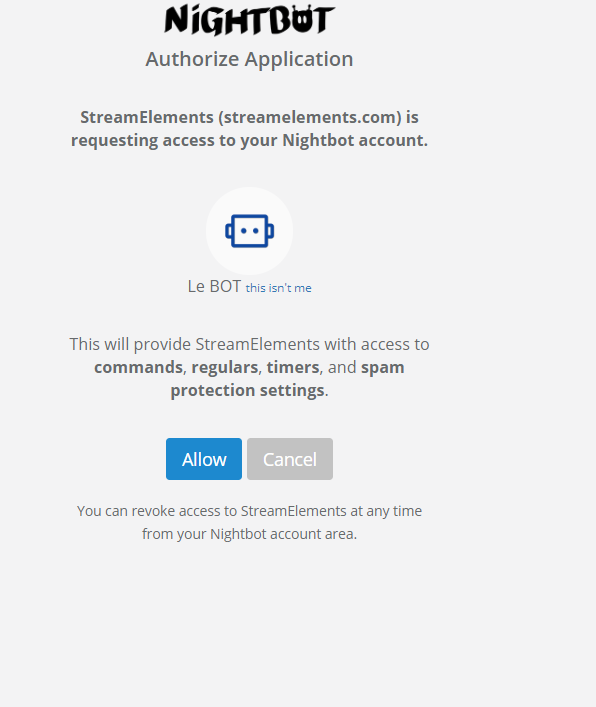 thorn wedge
Click Allow
agile zealot
I just did more than twice
And when I come here, it work ...
Well
All work now .. thanks u
ebon lotus
@thorn wedge how to get that chat to click there to add mod
thorn wedge
You are welcome! @agile zealot
@ebon lotus https://www.youtube.com/comment_management
Share your videos with friends, family, and the world.
save this to the box: https://www.youtube.com/streamelements

YouTube
Official youtube channel for StreamElements tutorials https://StreamElements.com
agile zealot
Is there a strat to use a 2 in 1 Streamlabs (twitch + youtube) ?
Cause I'm using restream to broadcast on both platforms
cyan lake
not sure about StreamLabs, but StreamElements, you can create an overlay for both, and have two browser sources in OBS. Craft them to sit in certain positions, and thus look like one overlay
agile zealot
Sorry my autocorrection wrote it instead of "streamelements", my bad 🤐
Well this hax is interesting but I want it to be at the same position so it can cause overdisplay .. Is events queue are the same between youtube and Twitch ?
I'm asking cause It worked on streamlabs and I hope to find à small hax like your
cyan lake
The queues are seperate at this time
Because we are new to youtube alerts, we wanted them seperate just in case it caused issues, and didn't want twitch alerts to be effected
agile zealot
Legit mmmh🤔 There is no plan to add this feature ?
cyan lake
It is the end goal, just no ETA at this time
agile zealot
Ho okay 👌 thx
 spiral spear
It says "KingJavon tipping page is not activated" How do I activate it. I put my paypall in and everything
cyan lake
can you post the link for it?
spiral spear
spiral spear
it says KingJavon has not setup tipping yet for me
cyan lake
forces a cache refresh
visual swallow
shows the same for me as Scalper posted
 halcyon garden
Sup
 tall remnant
how do i unlink my youtube account from SE
and if i link both my twitch and youtube account under one profile will i be able to run alerts for both YouTube and Twitch at the same time on the same scene?
 torn turtle
Idk how to unlink, and for the alerts each platform has different alerts some are similar but work as their own stuff, like on YouTube you can manage different channels, same on stream elements
thorn wedge
Hello @tall remnant you cannot run alerts on both accounts in the same time since Youtube and Twitch are different platforms and have Different Stream keys for OBS
tall remnant
ok
Here is what i have done
I created a Scene using my SE account that is attached to Twitch
Set all that up the way i want it
then logged out of my SE/Twitch account
Logged into SE/youtube account
set an blank overlay
took the alert animation i liked
put that in the blank overlay
used that overlays url in OBS
and i think i have accomplished Twitch/YouTube alerts all in one OBS Scene
thorn wedge
@tall remnant In the SE website editor it may work but When you will try to stream it will no because the Stream keys are different
tall remnant
even when using Restream.io?
agile zealot
Hello, I'm looking for some documentation about custom css/html for alert box 😃 I imported my streamlabs customization but it didn't work ...
thorn wedge
Hello @agile zealot he will be able to assist you with that @normal tulip
 normal tulip
Hi @agile zealot ! Take a look at pinned message at #dev-chat - there is full (at least everything I know) documentation for custom CSS that you can use on StreamElements.
agile zealot
Okay cool 😃 Is it normal about streamlabs importation failed on it ? 😃
Or I have an other problem ?
normal tulip
There are several problems that might occur. For example triggers or custom variables
Import from streamlabs works flawless when there is not too much custom stuff, unfortunately importing tool is not a human (yet) and can't convert everything
agile zealot
I guess, just to know 😃 @normal tulip
Well I will look for it, but I have no display so I'm confused (about custom alerbox )
I will be back ASAP 😃
 mental gate
I have set-uped my overlays in obs. But the overlays are not updating at all. New YouTube subscriber alert, total subscriber count remains unchanged. Please help!
Also Ground control app is not detecting new notifications at all
 lapis shard
@mental gate you tryed loging in and out again of the SE dashboard?
Are the Events coming through in your dashboard?
Did it work before or are you a new User?
mental gate
I am new user
I also have same issue with others like streamlabs, etc.
Is there any issue with my YouTube account?
Though total subscribers count was working in streamlabs.
thorn wedge
Hello @mental gate are you still having this issue?
mental gate
Yeah.
thorn wedge
What is your Youtube name?
 acoustic estuary
I put in a request to merge a SE account I accidentally created for my Youtube channel with my primary SE account I use with Twitch a couple weeks ago. I reached out again earlier this week. I've received no updates. Why is this taking so long?
 rigid schooner
Where did you make this request? @acoustic estuary
 pale wharf
Hey I need help I'm trying to get stream elements for youtube but its saying that the channel I tried to add is linked to a different account I'm so confused
#helpdesk-youtube Hey I need help I'm trying to get stream elements for youtube but its saying that the channel I tried to add is linked to a different account I'm so confused
Can I get some help
mental gate
I had same issue
But they have replied to ke immediately.
They can merge twitch and YouTube account using JWT tokens of both accounts.
Reply to their e-mail. don't directly send tue JWT tokens.
@pale wharf
acoustic estuary
@rigid schooner I made the request here and also through SE support
rigid schooner
@acoustic estuary DM me your JWT's and I'll get someone to help you out
 dusk grove
can any one help me out setting up donation alerts ?
just read about stream elements
so if anyone can help me out it would be great
cyan lake
@dusk grove have you watched the welcome video yet? That will go over everything you need to know
 mortal plover
What if I don’t have a pc? Only ps4 and iPhone? iPhone is where I edit
I want to be successful
polar caveBOT
@mortal plover Here is a guide on how to setup the most essential tools for streaming from your console, while using StreamElements tools without involving a Capture Card! It's easy to do, take 4 minutes to read and 10 to 15 minutes to setup!
Read all about it here: https://blog.streamelements.com/how-to-stream-on-console-7b620b1c46c3
mortal plover
Thank you!
 long mural
I have import all nightbot command but i want to change some off them timer how to do that?
cyan lake
@long mural you can edit the timers in the Timers section of the dashboard, or the commands in the Chat Commands section
mortal plover
So while I was reading it said for twitch does this also include YouTube? I’m more of a YouTube streamer but I also do a little twitch
cyan lake
You can do a decent amount of it on youtube, there are just a few limitations that youtube has
mortal plover
And well I didn’t realize you couldn’t change your name on twitch.. most likely will need to make a new one
robust mango
You can change your name on Twitch though
robust mango
https://www.twitch.tv/settings/profile - go to your Username section and click on the pencil icon by it
I think you put the wrong company name there 
mortal plover
Okay
 reef juniper
how can i make a giveaway on a youtuzbe livestream?
 dire epoch
@reef juniper I'm not sure if this is what you are looking for, but I use gleam.io you might find this useful.
reef juniper
hmmm ... ok :c
 rich salmon
Quick question , can i connect my youtube to the same account as i have connected my twitch ?
visual swallow
rich salmon
Thanks !
visual swallow

mortal plover
Can you guys help me out with a cool twitch name?
visual swallow
better to ask that question somewhere like #general-chat
 ripe dirge
Hiya guys, can I get a bit of help? I want to enable the loyalty stuff (that's similar to that fussbot), but I don't have a loyalty section on my side bar. How do I enable the loyalty features?
visual swallow
there is no loyalty system for youtube at this time
ripe dirge
Oh...should I link this to my Twitch and then try get it to work through OBS?
visual swallow
Twitch has loyalty, but that is all done via API, based on the twitch viewer list, this will have nothing to do with youtube
ripe dirge
Oh no worries then, thanks for your help with it. Am I best just waiting for this get implemented in the near future?
visual swallow
its planned, but unfortunately no ETA
ripe dirge
That's all the info I needed for it. Thank you for your time 😋 👌
visual swallow
 whole ravine
Alright so
I can’t connect to YouTube through my WiFi
But it’ll work through data
And other WiFi’s
Just not mine
iPhone X
Please help
😢
cyan lake
That is something we are unable to help with, as that is something that is stopping you from your own machine.
@whole ravine
 grim relic
Hello, I need help. I setup stream elements for YouTube and my spam filters won't work
is anybody there?
thorn wedge
Hello @grim relic Please make sure the Bot is connected to your channel
long mural
hey when i put command on chat by default its come with "!" how to remove that
thorn wedge
Hello @long mural if you want the command to pop without the ! you need to set a commadn keyword
long mural
ok thanks
thorn wedge
You are welcome! 
 tawdry lagoon
hello guys! Is the stream loyality store feature, only for twitch?
rigid schooner
Yes
tawdry lagoon
thx :T
 high ember
hello many of my fans are sayin that they have donated but none of the donations are coming through on the app and i have all my stuff set up
robust mango
@high ember You don't have an overlay, so there's no alert box
And you don't have Chat alerts enabled either
 gaunt hawk
I would love to promote your bot and get massive traffic FROM #INDIA
 dim inlet
@gaunt hawk If you want to promote the bot That's up to you go for it 
long mural
can any one tell me that the link we get for overlay can we use it on shadow play if yes then how?
visual swallow
shadow play does not support browser sources, you will need to use broadcasting software that supports browser sources, like OBS Studio
long mural
ok thxs @visual swallow
visual swallow
 wraith tundra
i am not getting loyalty option for my account can anyone help out?
visual swallow
Loyalty is not available for YouTube at this time, only Twitch
wraith tundra
ok
 glad sorrel
My sub alerts wont pop when im live streaming. The Emulator works great - but when i live stream to youtube, i dont get notified on screen or in chat. I do have SE bot as mod in chat. SE Chat bot has worked before, telling me i have a new sub. But has recently stopped working. And the animation that is setup (for new sub) doesnt pop up on screen. Perhaps im over looking something?
thorn wedge
Hello @glad sorrel , please make sure you saved the overlay as a browser source on your OBS. and the OBS has stream key of your Youtube channel.
ebon lotus
How to Setup Text to Speech when ever any one subscribe
thorn wedge
Hello @ebon lotus , You need to go into your Overlay manager, Choose the alertbox and then Subscribers settings. you will see TTS
thorn wedge
Not in the layers section, please click on the Alertbox and choose subscription settings
cyan lake
@keen cape continue asking your questions here please
lapis shard
@keen cape here
 keen cape
?
lapis shard
@keen cape we answer Questions Youtube Related in this Channel
lapis shard
YouTube
Official youtube channel for StreamElements tutorials https://StreamElements.com
but it would be enough typing "StreamElements" in the Moderator pannel
keen cape
Thank u so much
lapis shard
no problem 
keen cape
Stream element is a bot and a Youtube channel?
cyan lake
yes
 cloud coral
@sly scaffold can you help me with my paytm donations to show up on stream
can someone help me with my paytm donations to show up on stream
cyan lake
@near stag, can you assist hdboy?
@cloud coral we currently have G2Apay and Paypal, is PayTM included in G2A?
 near stag
I need his YT channel, bot status, moderator status and everything else
cyan lake
@keen cape Cryonic is the guy that will hlep you. You would know that if you read what I had typed 3 lines up
near stag
@keen cape we need more data, give us the channel, bot status, moderator status of the bot etc.
keen cape
Ok
cloud coral
@cyan lake if someone donates me directly through without any gateway like g2a can the notifications still pop up in the livestream bcoz some people are doing that in their streams but they are not telling us
@cyan lake
 cloud coral
someone plz help
cyan lake
@cloud coral Yes, as long as the payments are made through the tipping link we provide you
cloud coral
no they actually donate directly through paytm but notifications still appear somehow
cyan lake
Because we don't have a connection that way
keen cape
What is he going to do with my link😞
cyan lake
it has to be through the tipping page we provide, or else we can't get the notifications from them @cloud coral
If you go to your tipping settings, do you see an option to connect with G2A? https://streamelements.com/dashboard/tipping-settings
StreamElements
The Ultimate All in One Platform for Streamers
@keen cape he is going to help you
cloud coral
can someone join vc and help me
cloud coral
yep
cyan lake
ok. If you connect G2Apay (if you don't have an account with them yet, I recommend creating one), and place the link we provide you for people to tip through, you will get alert notifications when people tip
cloud coral
no but i donated a streamer directly through paytm number and still the notification appeared
cyan lake
This is the only way that you can get alerts through our system. If they have different alerts, I can't help that. This is the only way I can help you with
We provide alerts, as long as they go through this system
cloud coral
ok thanks , have a good day
keen cape
?
near stag
@keen cape looking at the channel right now. you are not live, the bot will not join an offline channel.
near stag
20 hours ago
keen cape
It didn't work
cyan lake
we can not help when you are not live, as there is no offline chat for testing
keen cape
Ok I will go live
near stag
You need to go live, make it a public stream (not unlisted) and wait for the bot to join, the is usually really quick. And then you see it
And make sure to add StreamElements bot as moderator on youtube otherwise commands with links will not work (this includes the !commands)
near stag
A few seconds
near stag
Go live, make sure the stream is public, i go check
you are NOT live
the stream is either offline or unlisted
keen cape
I am
near stag
ok, scratch that, i do not see the player on the page, but /live works.
Tell the bot the join
near stag
Check our dashboard
And what are you using to stream, a phone? i see a keyboard for half the screen size, goddamit
near stag
i saw the dashboard, the bot should be there
keen cape
:(
near stag
letn me tag someone who can actually fix that.
@cobalt flare YT bot is playing dead again, see ⤴
 near stag
i can't do anything at this point.
keen cape
:(((((((((
near stag
wait for the developer who can take a look, i tagged him
keen cape
Tell me when his here
near stag
he will most likely tag you back
 cobalt flare
only a single channel @near stag ?
near stag
@cobalt flare yes, the only that i saw today
cobalt flare
did it ever work in this channel?
near stag
no idea, tag the channel owner
cloud coral
https://www.youtube.com/watch?v=VlpLBmdvsas he has paytm on stream

YouTube
Hi, Welcome to the stream guys Hope You Enjoy and do not forget to Like, Comment, and Subscribe To My Channel Cosmic YT. ➤Make sure to Subscribe!!! https://w...
keen cape
The guy didn't text me yet:(
cyan lake
@cloud coral I understand athat, but like I said, we don't provide a direct form for the alerts
We only provide alerts currently that go through two systems: Paypal and G2A. G2A processes payments through PayTM, and will alert on screen if you set it up with out tipping page
But that is as far as I can assist you
cyan lake
He is european, so he is probably asleep. But I am not his manager, you can talk directly to him
keen cape
Ok
ebon lotus
is there any thing that i can read chat in my second monitor
lapis shard
@ebon lotus doese youtube have "Pop out" Chat yet? So you can have a Window with the youtube Chat open. Maybe use the Youtube livestream Dashboard Since the Chat is also Displayed there
ebon lotus
@lapis shard yes its have but its take cpu so its lag
lapis shard
What CPU do you have? Use maybe a Browser that isnt that CPU heavy for Chat/dashboard like Opera?
 hallow relic
Hi, I have a streamelements account with youtube and twitch channel. But when I try to change the overlay of youtube, the website transfert me in the twitch overlay...
Someone know how to delete an acount? I would like to delete my twitch acount to don't have any issu... Thanks
cyan lake
@hallow relic let me check out a couple things. Did you link the accounts, or did you create them seperatly?
If you made them seperatly, try logging out of your current account, and when the page loads, log in using the youtube link
hallow relic
I liked my account
cyan lake
ok, what is your twitch username? I can't find the one that is linked in your discord profile
hallow relic
and I try to delete my twitch account because it was a new one. but now when I want to change my overlay on youtube, i have a pasword tequest for twitch 😃
Fratv_5 for twitch
cyan lake
does that happen when you try logging in from the main dashboard through youtube? Try clicking this, then clicking the youtube login: https://streamelements.com/logout
hallow relic
yes exactly the same issue I am on my youtube channel dashboard / go to verlay / and when I try to custom I start to have the tool with green screen and 10 sec after they ask me twtch account
cyan lake
ok, I will see what we can do about that. Did you fully delete your account on twitch itself? Or can you still log in?
hallow relic
no I cant log in now. But when I could log in I was in the overlay page of twtch acount
I had for example the alertbox with twitch parameter but not youtube...
keen cape
:(((
 toxic summit
I'm having the same issue @hallow relic is. I'm in my SE YouTube dashboard.The overlay editor opens for like half a second and then the page seems like it refreshes itself. It then tries to load the editor indefinitely. Then if I close the editor when I get back to my SE dashboard my Twitch account's page is loaded up. I tried logging out of SE and logging back in but same result.
I just tried logging into my YouTube's SE account in an incognito window to rule out any cookie related issue. It seems like the overlay editor is trying to redirect to the Twitch side of things. I go to edit an overlay and it redirects me after a second to the passport.Twitch login page. Something funky is definitely going on behind the scenes.
Twitch overlays are editing just fine.
cyan lake
I think I know what is happening
I hate to say it, but its an unintended bug introduced with a feature that no one should have noticed, lol
cyan lake
I have already reported to it, just have to wait for devs to finally wake up
toxic summit
@cyan lake It's all good. Just hoping it gets fixed quickly!
hallow relic
@scalper thanks for your quick answer. If it is possible could be great to had a feature to disconnect an account from SE.
 rustic prawn
Any tips for getting my channel noticed. I stream from my PS4 and don't seem to get a lot of viewers at all
cyan lake
@hallow relic @toxic summit, your issues should now be resolved
toxic summit
@cyan lake Appreciate the help! I'll dig into some overlays tonight after work
cyan lake
 thanks for reporting it and giving all the details I needed to reproduce it for the devs :)
 wet hinge
does anyone know how to get songrequest and how to make commands
cyan lake
@wet hinge song requests are currently unavailable for youtube. as for commands, there should be a Chat Command section of your dashbaord
wet hinge
for twitch
cyan lake
then this is the wrong channel to ask in, isn't it @wet hinge
hallow relic
@cyan lake THANKS it works perfectly now 😄
cyan lake
@hallow relic glad to hear it 😃
 woeful nimbus
heyy guys, was just wondering if anyone here has time and would help me out try to set up a gaming youtube channel. i'm a newbie and i was wondering if anyone here is kind enough to help meee 😄 thank youuuuuu mention me or pm me cuz i'll reply asap xD sankyuuuuu
 bright sequoia
is anyone here online to help?
cyan lake
yes
keen cape
Its not working :(
bright sequoia
so im having problems setting up my streamlabs loyalty rewards for youtube
lime walrus
@bright sequoia Loyalty points don't work for Youtube, because they haven't open their chat viewer list API.
polar caveBOT
@versed tangle Are you a StreamElements all-in-one streamer and interested in stream promotion when you go live? Please fill out this application https://strms.net/sellout and if you meet the 3 requirements posted in the :pushpin: pinned message in #welcome you will be added to the stream announcements.
long mural
when i type ${user} this on my yt chat i didn't get user name . its show me this As ${user} on chat
any fix?
long mural
no 1 to ans?
thorn wedge
Hello @long mural Please make sure the bot is connected to your channel and you gave it mod permissions
nocturne blade
talk to us
 silk spear
Can you tell me how to connect paytm with g2a?
nocturne blade
you dont need to connect it, once you add g2a as a payment method your viewers from India will be able to pay via paytm
you get your donations to your g2a account from all methods in 1 place
long mural
@thorn wedge i already give him all the permissions and when any of my user say hi bot reply too but no username he use ${user} instated of name
nocturne blade
@silk spear did you connect g2a to your SE account?
silk spear
Yeah
nocturne blade
so thats it, youre set, when someone from India will go to your tipping page they will see paytm
silk spear
@nocturne blade but if i tip someone directly through my paytm that's also works for some streamers. How to do that? that we can tip someone without going to tipping page.
cyan lake
We can't track it if it is not done through the tipping page. When the someone makes a tip through the page, it gives us a transaction to keep an eye on, and then we get notified when it is completed. Plus we are working through G2Apay, not Paytm itself
silk spear
Thanks for help
lime walrus
What do you need help with?
 tardy cradle
My bot isnt joining my stream
lime walrus
Is your channel public?
tardy cradle
yep
lime walrus
did you click on "Join Channel" on the main SE Dashboard?
tardy cradle
yep it says part channel now
lime walrus
Make sure its not muted as well
tardy cradle
how i check?
lime walrus
 opal crystal
Does the Loyalty system only work on twitch?
near stag
@opal crystal yes. for now - twitch only.
opal crystal
That explains a lot. 😂
keen cape
@near stag
polar caveBOT
@serene horizon Are you a StreamElements all-in-one streamer and interested in stream promotion when you go live? Please fill out this application https://strms.net/sellout and if you meet the 3 requirements posted in the :pushpin: pinned message in #welcome you will be added to the stream announcements.
cyan lake
do you 100% mean StreamLabs?
 pseudo trellis
yap
cyan lake
Because this discord is for StreamElements
pseudo trellis
i want to switch to SE
cyan lake
Ok. you don't HAVE to disconnect to switch, but I will see what I can find to get that connection turned off
@pseudo trellis https://cdn.discordapp.com/attachments/342748377416466442/473528439966531585/Screenshot_20180730-1832192.png
 visual swallow
did you mean to post this in #helpdesk-twitch 
 fervent elm
oh. click the wrong channel. sorry
hallow relic
Good evening, are you working on a loyalty system for YouTube ? I try to use fussbot and it seems to work well. But I prefer that all is with streamelements if possible 😉
cyan lake
It is a planned feature, once we get certain information from youtube
hallow relic
Ok thx
 scenic perch
Hi there, I am new to "StreamElements" can you please tell me where is widgets is please thank you.
 exotic lagoon
overlay manager -> edit -> widgets
 tall grove
I cant find the JWT that the streamelements grounded control panel is telling me to find
exotic lagoon
@tall grove click on your name, and then show secrets, or this link: https://streamelements.com/dashboard/account/channels
StreamElements
The Ultimate All in One Platform for Streamers
tall grove
okay ty <3
i tried to use the link at first but it would just bring me to the main se page
polar caveBOT
@tall grove You can find your JWT token on your account channels page: https://streamelements.com/dashboard/account/channels
(Don't forget to click on "Show Secrets")
 lament heath
How do I turn on Stream element bot
thorn wedge
Hello @lament heath you need to go to the following link: https://streamelements.com/dashboard
StreamElements
The Ultimate All in One Platform for Streamers
 halcyon pewter
hiya iam trying to like my youtube account but it is saying thats its linked to a different account
link*
lapis shard
@halcyon pewter you try to link your Youtube Account to your exsistent Twitch StreamElements account?
thorn wedge
Troop please send me your JWT token and usernames of both accounts
I will merge them
halcyon pewter
i did
thorn wedge
You are welcome! 
 reef venture
Hey this is awesome that you do this kind of stuff - I messaged stream labs about getting access to my account since I was banned on twitch ( I was planning on continue using that on youtube ) and they were no help at all, essentially had to start over
thorn wedge
Everything for our Streamers 
 hidden helm
I need help I tried everything but my blue yeti is not picking up to obs streamlabs please help
visual swallow
that is not really something we can help with, you would need to contact support for SLOBS
hidden helm
I meant streamelements the new update for obs
sorry I get them mixed up all the time lol
visual swallow
Ok, was it previously working in OBS Studio? because the OBS.Live plugin should not have touched anything to do with audio. If you have not, I would also make sure your audio settings are correct in OBS. Otherwise a log file should how errors if there are any
hidden helm
yes it was then all of a sudden it just stopped working im kind of a noob to this streaming thing I usually just stream through my PlayStation but I finally got the right internet to stream using obs and now this is the only thing holding me back ]
visual swallow
ok, go to help > log files > show current log, and we can look for errors related to your mic
hidden helm
Ok where do you want me to post the log
visual swallow
here
hidden helm
Ok
visual swallow
you can get the .txt file and drop it in
hidden helm
How do I get the .txt file sorry I’m so potato when it comes to this
visual swallow
The log that it opened should have been opened in notepad, you can just save that out somewhere as a .txt file, or you will have to find it in %appdata%\obs-studio\logs
 calm spear
HELP! All of my custom commands for a channel I help manage are gone.
False alarm!
I am however having an issue, the bot seems to have left the stream or is mia
ebon lotus
how to show paytm tips on screen?
thorn wedge
Hello @ebon lotus you need to add our Overlay into your OBS, and save it as browser source
ebon lotus
paytm**
thorn wedge
We still did not added the Paytm option.
 rigid shoal
how do you update the subscriber alert that stays on the screen
its been saying the same subscribers but theres new ones that is not showing
like where it says latest subscriber
lapis shard
@rigid shoal log out of your StreamElements Dashboard and back in
Clear the cache in OBS for your Browser source
sly orchid
How can i do a command where it will tell me how much points he earned by watching the stream?
visual swallow
there is no loyalty system for YouTube at this time
sly orchid
But i saw youtubers using this as a reply or say if the viewers typed the command in chat.
robust mango
To my understanding there's a limitation with getting the youtube chat list which prevents us from having loyalty points for YouTube yet
sly orchid
But how can they set it?
robust mango
I'm not sure, but i'm told the reason I stated above prevents us from doing it yet
sly orchid
Yea i want to know how that youtuber did it but i know that loyalty points didnt add in stream elements for youtubw
Youtube*
cyan lake
Then you will need to ask that person. YouTube does not provide a reliable way to see who is in your chat and watching your stream, therefore we are not going to make a loyalty system that is not able to award points correctly. @sly orchid
visual swallow
Are you live now, with a public stream? the bot cant join your channel unless you are live doing a public stream
visual swallow
did they go to their dashboard, and click the join channel for the bot? https://streamelements.com/dashboard right side, and if you have not, I would check out the guide in pinned messages as there are more steps, like giving the StreamElements account some type of access, not 100% on the wording as I am much more familiar with the Twitch side of things
long mural
is there any way to delete all chat command at once or reset chat bot?
lapis shard
@long mural no sorry :(
long mural
ok Y_Y
 weak nebula
Is there any way i can change my donation link because I recently changed my name,but the donation link didnt change
near stag
@weak nebula our platform should pick up the new name when you log out and back in. no idea how that works on YT tho, on twitch that works.
cyan lake
youtube is weird, and doesn't really send that information. I think there is a way to get it changed manually, I will poke to find out
@weak nebula can you send me your SE accountID, and the name you changed to?
weak nebula
Should I send it through Dm?
cyan lake
yes please
scenic perch
hi can you show me how to find chat box in widgets
robust mango
@scenic perch There is no YouTube chat box widget, maybe you're thinking of the "Your Channel's Twitch Chat" widget on the Twitch side of our website
scenic perch
@robust mango I am not looking for twitch chat but thank you for telling me ~josephgamerrobox
 safe gyro
I need help, some ppl its making fake donations on my channel they use streamelements to make a donations and refund the donation weeks later i need help, everytime someone refund the donation i lose the donation and 10 dlls, i need help from streamelements to put an agrre and acceptance and send a msg to my mail or something to protect myself...
 ruby pulsar
emm stream elements not joining EXPG YT channel and it in Part time RN and its mod
anyone having that issue and is there fix for that
 hallow barn
is there no youtube live chat overlay option in streamelements?
visual swallow
not at this time
long mural
@ruby pulsar i have same prob
 cursive jungle
@ruby pulsar I have same
ruby pulsar
hm
mortal plover
I can’t stream
thorn wedge
Hello @ruby pulsar @cursive jungle @long mural , Are you still having the issue? The youtube bot should join the channel when you go live.
ruby pulsar
@thorn wedge yes we are, Youtube and Twitch that bot not joining single channel / streams. i made EXPG as community stream but when i do !commands bot no there and pose be instant to join it
and this never happent before on my channel but EXPG has issues
thorn wedge
It doesn't work on your Twitch also?
 livid wing
Hi, I'm currently live-streaming on Youtube for like more than 10 minutes and the bot won't detect me live
lapis shard
@livid wing it needs some time sometimes for the bot to show up.
Give it another 5 minutes if it doesnt join after 15 minutes we need to investigate
livid wing
I have been live for 22 minutes
lapis shard
are you using SE for a longer time? Did the bot show up before?
livid wing
This is my first time using it ^^
lapis shard
did you moderate the bot?
livid wing
yes, I did
lapis shard
can you go to your StreamElements Dashboard?
tell me if on the uper left it sayes "Live" when you log in with Youtube?
livid wing
nope, it says offline
livid wing
it's public
lapis shard
odd
livid wing
should I try a new public live-stream or?
lapis shard
@near stag
help me 🙏
She is using StreamElements for the first time.
Has streamed over 30 min . And the bot doesnt show up in her stream.
her dashboard sayes she is not live
Bot is also moderated
near stag
@lapis shard make sure her stream is public
livid wing
it is
lapis shard
it is
near stag
then i have no idea, her stream must show up as online and the bot should join withhin 1-2 minutes
lapis shard
@livid wing okay log out of your Dashbord and stop your stream.
Log into your Dashboard using your Youtube log in
Start the stream again
this should fix your issue. Not really sure why it doesnt detect you as live
livid wing
Alright, I will try that! thanks for the help!
lapis shard
@livid wing please let me know if it fixed your issue
livid wing
@lapis shard still isn't showing me live in the dashboard
lapis shard


livid wing
I have no idea what to do anymore ^^'
But if I scroll up in this chat, it seems multiple people are having this issue?
near stag
i could summon nuuls, who takes care about the bot part
@livid wing if you have some extra time for testing, i can summon a developer
livid wing
@near stag Yes, I do
near stag
@cobalt flare bot is playing dead again, yt stream is also showing up as offline, ideas? this is where my YT magic ends. ⬆
ruby pulsar
well @thorn wedge works ok on twitch mine
just EXPG bot not joinign on
and i send on twitch and YT
lapis shard
ChrisDealHD:
@thorn wedge over here
http://twitch.tv/expgatherers and
https://www.youtube.com/channel/UCmnUmxyP0CD8LTDqJDwnI_Q/live over here not on my side just EXPG is
thorn wedge
You are live now?
ruby pulsar
well test on EXPG yes
till investigate of bot issue @thorn wedge
@thorn wedge all i need you do come over check why bot not joining all rest there for you investigate why hasn't joined
livid wing
I'm having the same problem with the YouTube bot ^
 keen wharf
Hello, I Was Wondering If The Loyalty Bot Was Working, And If It Worked On You Tube?
obsidian adder
Loyalty does not work on the youtube bot unfortunately as youtube does not give us a list of the active chatters
keen wharf
Oh Ok Thank you
 grim lion
Hello??
Im new to stream elements i need a bit of help
with the obs section of it
@tropic atlas
 tropic atlas
polar caveBOT
tropic atlas
polar caveBOT
@grim lion To add your overlays to OBS, add a new browser source in your scene. Paste your overlay URL in the browser source properties, set the dimensions to 1920x1080 (unless you changed them on the website), and :ballot_box_with_check: “Shutdown source when not visible” https://youtu.be/KDvLynUqXI4
grim lion
where are the overlay urls
 fickle pagoda
In your overlay section, click the Launch overlay button. That'll put it in a new tab, and you can copy it from there. 😃
grim lion
ok 2 secs
grim lion
Hello sorry to bug again
@fickle pagoda
When i put my paypal email in does the money go straight to that paypal email account??
lime walrus
yes
grim lion
ok thx
polar caveBOT
Please refrain from using [at]everyone or [at]here
 earnest stone
just ask you question and someone will help 😃
 regal copper
First I'm using streamelement with my normal youtube channel, which works perfectly fine
but now i transferred my youtube account to my youtube brand account, now stream element stop working and its not show new subscriber notification
even i'm login with my brand account its shows my original account in dashboard
please help me to connect it with my brand account
@everyone
polar caveBOT
Please refrain from using [at]everyone or [at]here
ruby pulsar
please dont @ everyone @regal copper kinda part of rules not random @ hall discord ty.
lapis shard
@regal copper pls stop the everyone
regal copper
ok sorry
ruby pulsar
i had enugh issues that
lapis shard
If you Keep doing this we have to silence you and we want to help you
regal copper
i really need help that why i'm doing sorry
never do it again
lapis shard
Yes and we want to help you
But you wont get far with this Attitude
So
To fix your issue it seems like we need to merge your Account
With the new Youtube id
Let me ask a dev how we should go on about this
regal copper
ok but my youtube id is same
check in 1st image
its just brand account from same id
@lapis shard
ruby pulsar
can @ people you talking for example @KiwaPlay but sed doing everyone be good but only @ once and dupicate just annoys user too here and everyone really annoying deal with and not just 1 person gets alert like hall discord can and dont want that but we do like help you still find out issues just give you heads up.
lapis shard
@regal copper judging by the name Displayed on the top it's still your old Account
I know what you try to say but that's not how Youtube API work
For you it's the same log in
But what youtube doese is creating a new "account"
ruby pulsar
btw any luck @thorn wedge finding out why bot not joining EXPG YT channel yet. just i wondering found out issue of that
lapis shard
I am on it to find out how we can fix this issue
regal copper
@lapis shard
yes its my brand account from same id
plz tell me how to fix it
lapis shard
@regal copper again... I am on it pls wait
lapis shard
I am not a developer I am a Support hero. So I try to Support you by asking around what we can do to fix it
ruby pulsar
im just thinking why bot never came up in YT side 🤔 just waitng for AttackHunter get me back from this even went threw it and seen not there.
regal copper
@lapis shard
any progress on it
any fix..??
lapis shard
not yet
regal copper
ok
 opaque imp
silly question - I have two account one for twitch and one for youtube (from before when you could add your two together) now that I wanna use restream to duel stream I want to add them on the same Stream Elements account but the system won't let me since there is already and account for it - so my question is how do i disable/delete that account for my YouTube channel so that I can add it to the main twitch stream elements account
versed tangle
For some reason I can't seem to find the media share widget to add to my overlay. Anyone else?
visual swallow
There is no media request system for YouTube at this time
versed tangle
So even with media enabled via tip nothing will show correct?
lapis shard
yes only for Twitch
 sly scaffold
@opaque imp DM me your twitch account JWT Token and the youtube account JWT Token from our platform. You can find it like this
!jwt
polar caveBOT
You can find your JWT token on your account channels page: https://streamelements.com/dashboard/account/channels
(Don't forget to click on "Show Secrets")
 onyx jay
hello?
cyan lake
hi
onyx jay
oh
the bot never came to my stream
and i was streaming for over 1 hour
and someone donated but it doesn’t show and it didn’t give me the money
idk what to do i gave it moderator and everything
visual swallow
Was the stream public? as for the dono, did you get an email from paypal from the transaction? did you check your paypal account to see if there is anything pending
visual swallow
Then it would appear that no transaction took place, the tipping page will just use PayPal API, so if you did not get anything from PayPal, or have anything pending, then no transaction went through
onyx jay
what about the bot?
visual swallow
As for the bot, its best to come in while you are live and the bot does not join, not really much we can do about it now
visual swallow
If you are not live it will always be offline
 prisma stump
polar caveBOT
prisma stump
polar caveBOT
@prisma stump Please connect your Twitch and/or YouTube channel with Discord by going to ⚙ Settings and then Connections here in Discord. https://streamable.com/eg92w
 cyan lake
once you connect, we can look into it
regal copper
@lapis shard
any update on my problem
lapis shard
@regal copper not yet. Brand Account seem to be something New for the System.
regal copper
@lapis shard
ok , but pls fix it as soon as possible
otherwise i have to use another software
lapis shard
We are on it
 naive sonnet
We've been having trouble trying to get the chatbot to work during our YouTube stream. For some reason, StreamElements just never detects the streams as ONLINE so the chatbot never joins the chat. Please advise? #ThankYou #CallForHelp
lapis shard
@naive sonnet there seems to be a problem with the youtube API communicating to us that people are live. There for the bot doesnt join
We are working with youtube on a solution for it
 dire stump
I was having the same problem
lapis shard
he isnt joining your channel despite the fact you are live right? @fringe pasture
 fringe pasture
exactly
lapis shard
its a known API issue with youtube we still working on it to fix it ASAP
fringe pasture
also why does it say welcome *old user name8 ?
lapis shard
🙈 sadly nothing we can do as of right now
 warm fulcrum
For me when I stream on YouTube it says on stream elements I’m offline? Anyone got a fix.
cyan lake
@warm fulcrum if you read up at the recent messages, you will see that this is an issue right now with the youtube api
 boreal reef
Hello
Please, tell me why my alerts do not work
My friend gave me a subscribe and it did not work
visual swallow
probably related to what is written above, about the YouTube API issues
boreal reef
Ok. Can i fix it?
visual swallow
if there is an issue with YouTube API not communicating properly, there is nothing you can do about that
 hardy jetty
lapis shard
hardy jetty
lapis shard
What you mean?
regal copper
@lapis shard
is there any fix now..
lapis shard
No
 thorny inlet
Is there still a problem with the Youtube API? Currently I am streaming but StreamElement seems to not be responding whatsoever. Also, I am offline on the dashboard even though I am streaming. Is there a place I have to put my Youtube Stream key in or is this just a reoccurring issue?
 errant scaffold
I believe there was a report about that yesterday in here @thorny inlet
Currently checking.
Yep. Yesterday & reported on Thursday of Youtube API issues.
lime walrus
There is an issue with the Youtube API and our devs are in talk with Youtube abou it
 elfin seal
hey guys
thorn wedge
Hey @elfin seal how are you?
 stuck nova
Hello I need little help
StreamElements
The Ultimate All in One Platform for Streamers
This is my theme resolution but Its showing half
in browser and same for OBS or Steamlabs
when I use 1080p resolution my OBS CPU usage increase to 70-80%
lapis shard
@stuck nova downscale it in obs by setting the Resolution right
In obs
Dont change the Resolution in the overlay itself
stuck nova
ok still it lags
lapis shard
What are you using? @stuck nova
After Scaling it down it's the same CPU usage as a 720 overlay
stuck nova
I am trying this setting
maybe issue when I use animated layers
DO You think animated layer use more cpu or something like that
I am using static version of theme now
lapis shard
@stuck nova yes they do
If your CPU isnt that good I would always use the static Version of the Animated overlay
stuck nova
yeah currently using i5 5th gen 😦 will upgrade to 8th gen in few weeks 😃
lapis shard
After the Upgrade Animated should be no problem
But I5 is a bit low to handle Animated overlays, game and streaming at the same time
stuck nova
yeah I know and I was doing all at 60fps so that might be issue
 trim rune
The bot isn't running in the channel of my buddy
lapis shard
sadly this is a known issue we try our best to figure this issue out together with youtube
trim rune
Oh ok
livid wing
Does streamelements have song request for YouTubers or is it only a Twitch thing?
lapis shard
onl a twitch thing for now
livid wing
Thanks for telling 😄
 simple fern
my commands from streamelements are not working on yt do someone know how to fix it ?
visual swallow
There are issues with the YT API, and we are waiting on YT to address the issue 
simple fern
ok thanks 😃
 pale cedar
i need help
cyan lake
@pale cedar ask your question, and help will come
versed tangle
is there an SE live obs coming for yt also?
pale cedar
how do i make streamelements mod
cyan lake
/mod streamelements in your twitch chat
 broken gorge
My bot won't join my stream even though I've activated everything can a staff member please help me?
visual swallow
There are issues with the YouTube API, nothing that can be done until YouTube addresses the problems
 torn escarp
How long have the YT problems been a thing?
broken gorge
So will the bot just never join untill youtube fixes it?
Or will it just sometimes join and sometimes not?
lime walrus
This has been going on for couple of days unfortunately and we are still waiting for Youtube to fully sort it out as far as I know. Unfortunately, I'm not sure if its working sometimes or not, but from reports it seems to not be working all the time for some people.
 dull adder
I NEED HELP
lime walrus
Well, it would be good if you just post your question.
 waxen raft
Would be to easy. Guessing is more fun. 
lime walrus
Since I don't do youtube and the current issue is the bot not joining live channels, I can only assume that much...but I prefer having to hear the issue

waxen raft
😄
dull adder
How can i make it possible that if you donate to me you cant refund it?
lime walrus
@dull adder I assume you are using PayPal, if someone tries to charge back their tip, you will get a notification about it that the money has been taken but is still in what I call "PayPal Limbo". This means that a ticket/issue as been raised on your account and you can most of the time appeal the charge back.
lime walrus
Is this in anyway related to SE? If not its best this is continued in #general-chat as this is more like a general way to appeal a charge back, rather then an issue with our features/tools
dull adder
no it isnt
versed tangle
Why streamelements bot Say thanks for subscribers after 20mins for all not for each other when they sub at time ??
versed tangle
Can someone help meee?? 😣😣
earnest stone
as far as I know, there's problems with youtube's API, so there's several problems
nothing on SE side but google's
most ppl can't even get bot to be on their channels so u were a bit lucky there
that's my limited knowledge about how things are going on youtube, I don't use that platform to stream
versed tangle
@earnest stone Thanks for answering 🤗 And do you know it's will be fixed?
Sorry for bad english btw ;)
fickle pagoda
We're working with Youtube to figure it out. 😃
versed tangle
Okay thanks 🤗
fickle pagoda
I can English, honest. >.>
 acoustic crystal
Hello! Was hoping I could get some help with this issue. I had a sub occur during my livestream, but I did not hear the sound that should have occurred that I had set for it (am I allowed to post the link that is bookmarked to the exact moment the sub took place live?)
I have all of the sounds set up in my dashboard on Stream Elements, so not sure why it was not heard during the stream.
Any thoughts on what may have prevented the sound from happening?
near stag
@acoustic crystal the easiest way to check is to repeat the alert from the activity feed, this will trigger the same alert (inc. sound) that you had when the event happened. and from that moment you can check what went wrong
this can happen when the overlay is not set up properly (do a test alert for subs in the editor to check it) or the overlay is not working in your stream software (OBS & co).
acoustic crystal
Hello, thank you for the response! May I please share with you the short screen recording I created to document the bug? This is what is happening: I repeated the events from the activity feed as advised with Wirecast open (I have 10.0 version). Subscriber alerts do not sound, but the tip alerts do make a sound. If I have my dashboard open in a web browser and repeat the subscriber activity, I will hear the subscriber sound
Sorry, I thought I could insert paragraph breaks. What I was saying is that If I have my dashboard open in a web browser and repeat the subscriber activity, I will hear the subscriber sound. But if I close the browser and repeat the activity for subscribers, no sound is heard: https://youtu.be/3x_4rXdMrME

Don't miss a thing! Get notified by me personally by joining my Notification Squad email list to get free perks, sneak peaks and exclusives from Paul T befor...
woeful nimbus
hello , is there anyone here willing to help out a newbie in youtube? wanna start up my own gaming channel
near stag
@acoustic crystal Wirecast  i guess nobody from our team can support that tool, the best way would be to ask Wirecast support for audio in the browser source.
versed tangle
So I have been streaming for 20 mins I gave the bot moderator and everything it told me to and it doesent show in chat is me being on mobile a problem?
visual swallow
There are issues with YouTube API's that we are working with them to fix, if you scroll up in this channel you will see this mentioned several times
 olive matrix
hola algun admin habla español?
i need help you, my english is very bad
I need to link my youtube account and twitch
this is the problem
near stag
@olive matrix Ask @compact eagle - he is our spanish support, but is currently streaming himself.
 honest pasture
ever since i changed my youtube name, the bot isn't appearing in my chat even when im live.
 brave coyote
i need help. Can i change the name of the bot?
nocturne blade
@brave coyote not on youtube yet
brave coyote
when can i?
livid wing
Hi, the twitter module won't work
ebon lotus
how to show paytm live donation on live stream ?
 upbeat furnace
@brave coyote We don't have ETA for this
@livid wing Twitter has made big changes to their API that we use for this module. Because of this the module is down for maintenance and we are looking into it.
brave coyote
what dose eta mean?
visual swallow
Estimated time of arrival
versed tangle
Where do i find my JWT Token?
polar caveBOT
@versed tangle You can find your JWT token on your account channels page: https://streamelements.com/dashboard/account/channels
(Don't forget to click on "Show Secrets")
versed tangle
Oh
versed tangle
im trying to set up my tipping for my channel its not working it just go's to a blank screen
visual swallow
That would be an indication that you have cookies being blocked that are required for the tipping settings page
versed tangle
so how do i fix it
versed tangle
Hi there saw the release of a world of warcraft layout for stream elements called doomhammer may I ask how do I find that?
Also in regards to my above question I am new to streamelements however not new to youtube at all haha been streaming 7 nights a week and uploading 7 days a week for a long time, just want to take it to the next level and learn something new. Anyway I can speak to someone via DMs about streamelements? For example everything is setup, currently using a few basic commands that are default for example !commands, !8ball, !uptime, etc nothing complicated. But looking for help in adding let's say commands and ways for people to earn points to be able to use and gain while watching my streams. As far as themes/overlays, dashboard, activity, profile page, tipping settings, etc they are setup and good to go. Just needed help with the bot aspect.
versed tangle
I do not have many viewers how do I get more
lapis shard
@versed tangle ask that in #general-chat
cyan lake
@versed tangle sorry for the late response, but if you are using chrome, click on the Secure word next to the URL of the page, the go to cookies, and look at the blocked cookies. There is a blocked third party cookie, just allow it and the page will work
versed tangle
Ok so i just found out twitch has some themes and youtube has others. In regards to yesterdays question any reason youtube is missing some layouts/themes for example I play warcraft and really interested in using the new doomhammer template and such.
Also in regards to my above question I am new to streamelements however not new to youtube at all haha been streaming 7 nights a week and uploading 7 days a week for a long time, just want to take it to the next level and learn something new. Anyway I can speak to someone via DMs about streamelements? For example everything is setup, currently using a few basic commands that are default for example !commands, !8ball, !uptime, etc nothing complicated. But looking for help in adding let's say commands and ways for people to earn points to be able to use and gain while watching my streams. As far as themes/overlays, dashboard, activity, profile page, tipping settings, etc they are setup and good to go. Just needed help with the bot aspect.
cyan lake
Right now, loyalty is not an option for youtube. We are waiting for a few key features from them (like being able to grab a viewer list)
versed tangle
Can't I still use the layout though and just remove certain features by editing the warcraft layout?
Youtube side should still get access to all themes just put in notes or allow us to use them and edit them on our own. the layouts are still cool.
Is there anyone I can personally DM with my questions in regards to setting 2-3 things up?
cyan lake
@versed tangle If you link your twitch/youtube accounts, you could just duplicate the overlays between them. Or even use the images from twitch in one browser source, and just superimpose the youtube overlay overtop of it
 lofty rain
someone subed to me during stream but the alert never popped up
versed tangle
@cyan lake thank you
lofty rain
can someone help
versed tangle
Thanks @cyan lake sadly I don't use twitch not a fan of it, but tried creating an account and use the layout, it's do-able but yea a few of the pieces of the layout make no sense for youtube purposes. Hopefully someone takes the warcraft layouts and makes youtube versions.
Guess I will stick with my overwatch layout for all of my streams as I like it best, just moved most of the stuff around so it fits each game.
cyan lake
you can pull any piece you want off the layouts, they are 100% customizable
versed tangle
How do I save those parts on my youtube SE account so I can delete my twitch side.
Also how do I disconnect and remove the twitch account?
Tried to just disconnect it from the twitch side but still shows it attached to me.
Nevermind yea figured out how to duplicate it over to my YT side
Thanks so much!!!
Now how do I remove twitch 😄
cyan lake
The account is created, but it doesn't get any information. There is no deletion process, other than forcing a dev to sit down for a few hours and remove it
versed tangle
Hi is there anyway for timers to have the chat bot say specific messages in order? I know you can put timer intervals on them but yea.
 pastel wave
I need help
thorn wedge
Hello @VeXXeZ#3648 how can I help?
 timid juniper
Hello anyone in the chat because I need hel
Help*
Anyone here in chat because I need help
fickle pagoda
@timid juniper Just let us know what the issue is
timid juniper
When I am streaming in YouTube and when I look back to stearmelements it appears that I am not online and I can't use the feature in streamelements
fickle pagoda
I answered you in our live chat already.
We've been seeing issues with the Youtube API and have been working with Youtube devs to figure it out.
There's no ETA.
Just keep an eye out for updates.
timid juniper
What live chat
fickle pagoda
On our website.
timid juniper
Ok
fickle pagoda
Anyway, just keep an eye here for updates.
timid juniper
Than I will wait
versed tangle
Youtube works fine for me :)
Hi is there anyway for timers to have the chat bot say specific messages in order? I know you can put timer intervals on them but yea.
 mystic cloud
does the followage command work for youtube?
thorn wedge
@mystic cloud No
 vital girder
any update on mobile app
errant scaffold
Still in development, @vital girder !
vital girder
ok
timid juniper
Can I change the PayPal account if have I a new paypal
lime walrus
@timid juniper You can by going to your tipping settings and clicking this button:
timid juniper
Ty
 patent quarry
Hello why is the bot not joining my YT stream
errant scaffold
@patent quarry There are issues with YouTube API's that the SE Peeps are working with them to fix.
patent quarry
ok thanks
versed tangle
Do I just keep copying and pasting my question until answered lol?
Hi is there anyway for timers to have the chat bot say specific messages in order? I know you can put timer intervals on them but yea.
cyan lake
@versed tangle no, right now each timer is mutually exclusive (they don't effect each other). The only way to do the way you want is to programatically use the API to build your own timer system (it is possible)
 fresh meteor
When people subscribe to me while I’m live-streaming it doesn’t show when people subscribe with steam elements I need help
errant scaffold
@fresh meteor There are issues with YouTube API's that the SE Peeps are working with them to fix.
fresh meteor
So when are they going to fix it let me know bc my bots haven’t been working steam elements or fussboT
errant scaffold
No idea. Should be announced in #270206314561404928 or here when it gets fixed.
 idle ice
Hi there sorry to bother but I usually stream on twitch and just connected my youtube account. Will all my notification settings move to youtube as well, ie donations or subscribers or do I have to set that up again? Thank you for your time ^^
oooh nvm I figured it out ❤
 rare torrent
how to setup streamelements in pubg live stream?
thorn wedge
Hello @rare torrent have you seen our Guides on Youtube?
versed tangle
Heyy i want to donate a youtuber but i get an error: ERROR! SELLER RESTRICTION.
]
Someone who can help me?
thorn wedge
It is depends which Platform he is using for Tipping @versed tangle
thorn wedge
Yes so I will check the issue
polar caveBOT
@white drift You can find your JWT token on your account channels page: https://streamelements.com/dashboard/account/channels
(Don't forget to click on "Show Secrets")
 white drift
Hi , how i can change the lenguage of the overlays phothos
 lime mantle
Can I get a code
thorn wedge
@lime mantle Hello what code are you referring to?
 tranquil gate
How do i put a point system
lime walrus
@tranquil gate Loyalty points is currently not supported for Youtube, due to the fact we can't get an active viewer list and allocate points. This is due to Youtube's closed API as well.
 minor oriole
Why does the bot take a significantly long time to appear on the stream
lime walrus
@minor oriole There is an on going issue with Youtube's API and our devs are talking to YT's devs about it trying to resolve it
 amber thorn
Is there a way i can play a youtube music playlist through the S.E. media tool? i try to request it but it just plays one song
fresh meteor
I need help
My YouTube is xActionn
Um my bot doesn’t tell me when ppl subscribe on my YouTube live streams and I steam off of ps4 help me
Help!!!
fresh meteor
Yes I do
Can u look into my acc and see please
xActionn
What do I provide u with?
fresh meteor
Can I get help
 light furnace
Question: Media Request Via Youtube playlists in SE. Is there a way to randomize the playlist every time I open it without it start at track number 1?
lime walrus
@light furnace its a requested feature and its in the ideas board already afaik
 tiny kindle


 surreal verge
where can i find a transition for obs on the website?
 bronze violet
When I stream why does the bot not work when someone asks for commands
errant scaffold
@bronze violet There is an on going issue with Youtube's API and the SE devs are talking to YT's devs about it trying to resolve it.
bronze violet
@errant scaffold THank You fortelling me
errant scaffold
No problem 🤘🏼
surreal verge
HELP: where can i find a transition for obs on the website?
lime walrus
An animated transition? I don't think we have one
cyan lake
@tiny kindle The only way we can get PayTM donations is for you to set up G2Apay, and have people make payments through our donation page we provide.
fresh meteor
So am I going to get help
cyan lake
@fresh meteor It looks like you didn't have the bot joined to your channel (done from the dashboard). I joined the bot to your channel, as long as you are live and public, it will be able to join and post the announcements of new subscribers
errant scaffold
Pretty sure but not 100% it's still the issue with Youtube's API going on that the SE peeps are trying to fix ASAP. No ETA.
cyan lake
@fresh meteor I can't even see you streaming right now, so there is no way for me to test
cyan lake
Is your stream public? I am on your channel, but I don't see anything
cyan lake
DM me the direct link. Like I have said multiple times so far, I don't see you streaming on your channel
I said DM
@fresh meteor Did you change your youtube channel name
cyan lake
ok. I think then you need to go to the streamelements website, go to your dashboard, go to log out, then log back in with youtube to re-verify
cyan lake
now you wait for me to troubleshoot. And if you were watching your chat, you would see I have been in there already
fresh meteor
Ok
cyan lake
@fresh meteor I think there are still an issue with youtube sending us certain information. I think this is the case here. It is not something we can fix on our end, it is on youtube
cyan lake
that is my assumption. I can't find the name you changed to in our system, but I can find the name you have linked in discord (AlmightySnake) without issue
 inland warren
Superchats are delayed by about 20 mins
versed tangle
Anyone here
versed tangle
Jjst asked in twitch help desk thnx by the way
 surreal hinge
I want a early access code
@lapis shard @lapis shard @lapis shard @lapis shard @lapis shard
 brittle shard
Kiwa is on a flight right now. Regardless, the only way to get into the early access was to get a code at Gamescom
near stag
Gamescom is over, wait for the open beta.
near stag
Gamescom was this week from tuesday to saturday. And nobody knows when the full version will be out, we just started testing the closed beta
lapis shard
@versed tangle and also I told you that already...
versed tangle
How a person can be notified about the announcement which are done by a streamelemnts
versed tangle
Hey guys where is the option of loyality coin system in mobile desktop site of streamelements
visual swallow
There is no loyalty system for YouTube at this time 
 wise lance
Why do my commands not work???
if someone can help, dm me please
do u need to have the page open on your web browser?
 inland panther
having an issue where the the tips section is looping on buffer anyone help me
lime walrus
@wise lance most likely the bot has not managed to enter your channel due to a peoblem with youtube api
@inland panther can you provide more details?
versed tangle
Hey all, hope this is the right place for this problem, I need some tech support, I linked a youtube channel to stream elements and right after I renamed the youtube channel and then deleted it, now stream elements is stuck with the account I linked, is there a way to unlink the account so that I can start over?
 near stream
when will their be loayalty ponts on yt?
cyan lake
@near stream as soon as youtube gives us a way to view who is viewing your stream
near stream
ight
 radiant sparrow
hi, is it possible to see the lastest Youtube AND Twitch Activities in one window? This would be awesome because i use restream and use both platforms for streaming 😮
cyan lake
@marsh cliff ask your question, or else we can't help
 marsh cliff
My YouTube account does not want to connect and I need to edit my overlay T_T
I give the button to connect your YouTube account then I put my YouTube account and ask me to access all my YouTube accessories I give you allow and the page never loads after that.
@cyan lake HELP BRO PLEASE
cyan lake
What browser are you using? And patience is much needed. I am one person, with many people to help