#dev-chat
1 messages · Page 35 of 1
 indigo flume
 viral patrol
If you want to see example of custom alertboxes, you can visit VisualsByImpulse or NerdOrDie. They sell custom alerts, that are really awesome.
 simple cove
Ah sounds good. I will check some out and see what I can do, thank you
 meager rose
Silly question this... I've never done anything programming wise on streamelements, how do I load a custom widget that someone has coded?
 upper bough
@meager rose 2 ways
- click on the shareable link if is available (only a few ppl can make them, like #widget-share )
- (assuming you have the js, css, html, json files) go to your overlay and add a CustomWidget widget and click on "open eeditor" then replace the default content with the content of your custom widget
meager rose
Brilliant part 2 was exactly what I was looking for, thanks 🙂 @upper bough
meager rose
So I have made a HTTP Get request to an end-point but the response doesn't have the header 'Access-Control-Allow-Origin' header so the browser is blocking it.
No 'Access-Control-Allow-Origin' header is present on the requested resource.
I have tested it with other API links and got a response.
Does anyone know of any way around this so I can access my response?
 broken coyote
cant request http, has to be https, i do believe
upper bough
maybe are you using ajax?
 mild cipher
You can try proxying through https://cors-anywhere.herokuapp.com/, or if you have access to the server yourself, set the header to *
meager rose
No I am using XMLHttpRequest @upper bough
Will look into proxying thanks 🙂
Apologies for the questions, never wrote JS before in my life but I seem to be getting the hang of it. Only ever used PHP and C# at work
viral patrol
About XMLHttpRequest I recommend using fetch, it is way easier. And using MITM that adds Access-Control-Allow-Origin: * is nice workaround to accessing REST API services.
meager rose
got it working, through the proxy and now using fetch instead 🙂
meager rose
What would be the best way have something run every 30 seconds?
I feel a while true with a time check in an if statement would make pages slow
mild cipher
Either setInterval or setTimeout
// setInterval doesn't start until after 30 seconds (unless you call it explicitly)
setInterval(() => {
  console.log('Running every 30 seconds');
}, 30000);

// setTimeout gives you a bit more control for internal checks (if you need to stop it)
const myFunction = () => {
  console.log('Hello world!');
  setTimeout(myFunction, 30000);
}
myFunction(); // start it off
It's usually a good idea to keep a reference on your intervals (especially) and timeouts, then if you need to stop them, use clearInterval() / clearTimeout()
meager rose
Thanks 🙂
Out of interest would this not vary based on the speed of the internet connection?
meager rose
ah ok, i really need to read up on how JS actually works
yeah
to update an element in the dom
mild cipher
So a request -> wait for response -> get response + update -> then start timer -> 30 seconds -> request -> repeat?
meager rose
its a host count that updates the value every 30 seconds
mild cipher
There's actually a viewer counter widget in #widget-share 😄
Typically you can get away with keep the timeout/interval going with no worries, since it's separate to the response, but in the future if you need to wait for responses to resolve, promises are your friend
meager rose
ok, i need to read up on promises
JavaScript is very different to anything I have used before
Yeah this isnt a viewer count, its a count of all accounts that are hosting a stream
unless ofc that has that included
mild cipher
Ah my mistake, I misread
meager rose
its fine 🙂
from what i saw the fetch api request uses a promise?
With the response I get from that, i format it to look how it should then wait 30 seconds to do it again
mild cipher
Correct, you can use async/await with fetch!
const functionThatWaits = async () => {
  // run fetch, wait for response
  const response = await fetch('https://jsonplaceholder.typicode.com/todos/1').then(d => d.json());

  // response exists - do your updates here, start 30 second timer, etc.
  console.log(response);
}
ah thats really cool and simple
i had it split out over 2 functions
well 2 consts
I had an updateHosts and displayHosts
display would call update every 30 seconds
but i learned the hard way how easy it is to lag a page
cheers for the help 🙂
mild cipher
😄
I know the feels of learning a new language. I was the other way around to you, more or less starting with JS and going to C#. It was weird, but I appreciate them both, and have a much better grasp on TS now lol.
meager rose
Well, I created the host count in Python for streamlabs and a friend wanted it and told me he used streamelements so here I am learning JavaScript to make a widget xD
I may release it so its open source
although i am enjoying JS so far, can see myself doing more with it
mild cipher
If you feel like making a community widget, feel free to check out https://strms.net/codeshare so it can be posted to the #widget-share channel 😄

Google Docs
The StreamElements #widget-share and Widget Gallery features custom widgets developed and designed by our community, using a powerful set of tools provided by us, and supported by a great team of Code Gurus and Support Heroes.
Enjoy the process and good luck! 
meager rose
thank you
broken coyote
!dong
meager rose
is it not good practice to do
.then(d => d.text())
.then(c => document.getElementById('host').innerHTML = /*set formatted response here*/)
.catch(console.log("error message here"));
because the second "then" call gives me the string that i can format meaning the promise has complete?
correct me if my hunch is wrong
broken coyote
are you doing a total "hosts" counter, or just session?
meager rose
active hosts while they are live
this includes auto hosts
just a complete beginner with JS so some of the more technical stuff i dont understand yet
got most of it down for the most part
broken coyote
i was going to say if u were just counted host events you could easily just for a i++ for a counter
meager rose
so would it be better to set the elements value in the "then()" function or after the closure has finished?
broken coyote
honestly hard me to tell. im sick and all hop'd up on meds so my thinking isnt clear lol. fyre is far more proficient in Js then i am
meager rose
aye, hope you get better soon 🙂
broken coyote
strep throat sucks
meager rose
decided to do it after the closure as I looked at the then function returning a Promise<string> and I was recommended to do it after a promise was complete
mild cipher
Get better soon SirBoost o7
Chaining thenables is perfectly valid, but can get unreadable eventually if you have too many, and sometimes data can get lost. The shorthand async/await is generally easier to read, but it's up to you! (As a side note, try/catch is the method for catching errors when using async/await)
for your purposes, that's perfectly fine
 glad smelt
would anyone be able to help me create something similar but different like this? I'm not into coding at all 😅 if you're interested please dm me if you have commissions open https://twitter.com/astrokuso/status/1171043432325795842


also a bit late but thanks so much @RadicalHighway_ for the amazing new alerts! they're perfect https://t.co/wmDYeD6jDT
Likes
309
 Twitter
indigo flume
Twitter
indigo flume
I believe some of our code gurus and most of our community artists can be found here: http://bit.ly/StreamersMarket
viral patrol
Also this widget is a video played in bottom left corner. This alert can be achieved by default alertbox with video and delayed text appearance. I think that if you go to StreamersMarket, you will find animation designer who is able to create something alike
glad smelt
but the video played in the left corner changes animation when theres an alert and goes away and back when an alert starts and finishes
how would I make something like that in the default alertbox
viral patrol
Oh. I thought that this animation is hidden on default, but it appears only when new alert is coming
glad smelt
yep, I asked the streamer too but he said something vague about it:
"it's pretty simple. just put the overriding animation on the top layer with a green screen and chrome key it in obs" I'm still confused lol
viral patrol
Yup. So you just need an idle animation and animation for each alert. Idle animation is covered by chroma key which allows alert to be played. Alert animation should start and end with a frame that is one of "idle" frames, so transition between them is seamless.
glad smelt
what widget is this idle animation you're talking about
viral patrol
You need tho have an image in overlay, then a video over it, with background as chroma key. Green screen will cover idle image, but OBS will extract it, so there will be empty space
glad smelt
Do you have an example, like a screenshot on how to do this? I'm still kinda lost sorry
viral patrol
Unfortunately I don't have one
glad smelt
okay so basically
- I have to have an image widget in streamelements overlay like a gif for example that I want on idle on loop
- then a video widget, but what do I have to put as the source?
and the alerts in a separate overlay or in the same behind the image and video?
viral patrol
Alerts are inside same overlay, above image, with green background (so background covers this image)
glad smelt
@viral patrol I have it like this now https://i.imgur.com/kFxRhbE.png is this correct?
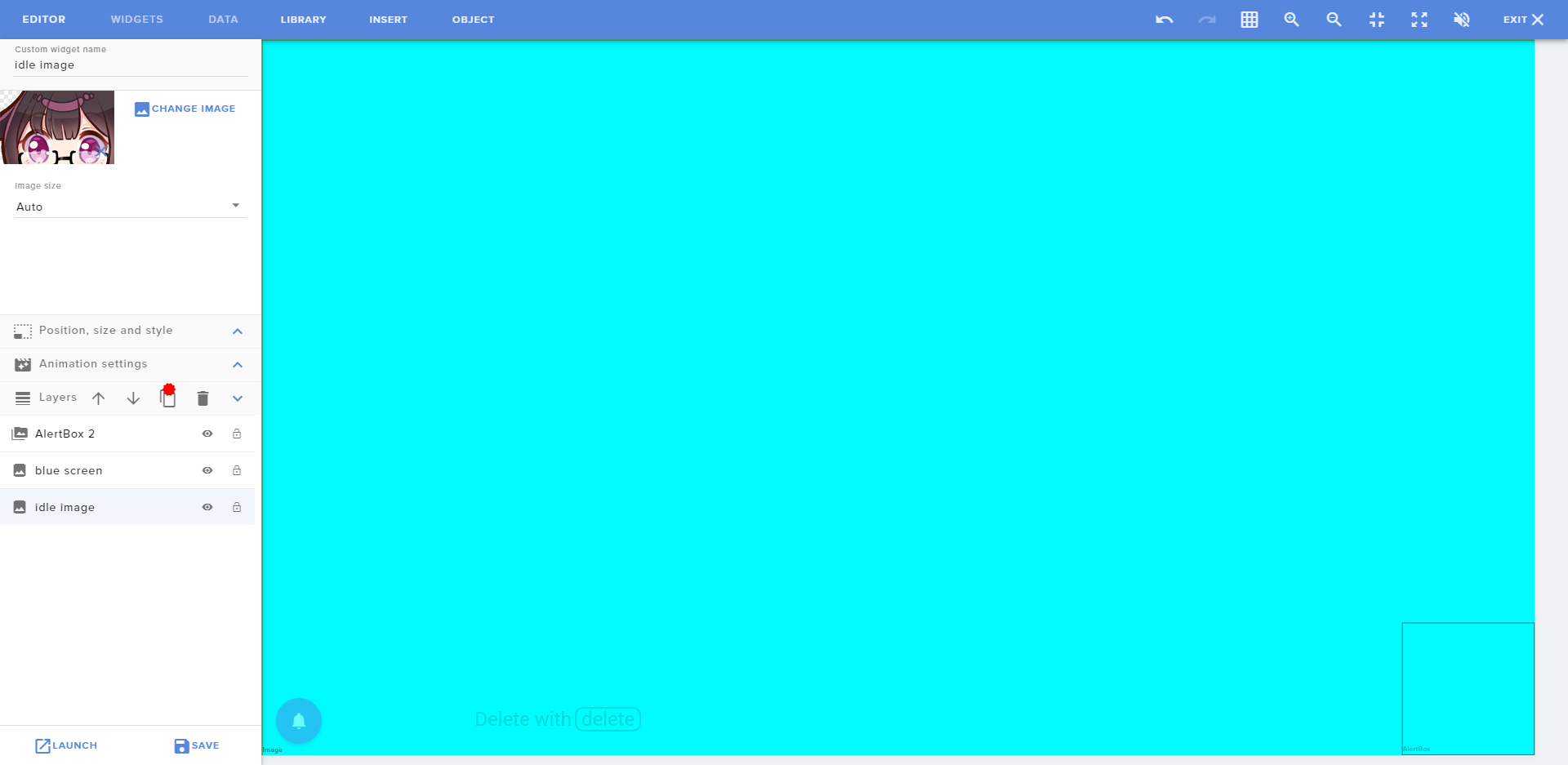 viral patrol
About greenscreen - you need a video file with greenscreen covering image, so it is only covered when alert is played
glad smelt
ah I see
viral patrol

glad smelt
so the alert source should basically be with a green screen
I got it
thank you so much

simple cove
So, I plan on adding the recent events widget to my stream, but for some reason I couldn’t add more than one type? Unless I am following something else 🧐, but I am curious. Is there anyway someone could add an icon or something to the end of it? Like if it shows “a person x100 (bits icon)”
upper bough
@reef whale the right syntax will be !cmd add !subcount Current sub count : ${channel.subs}
 reef whale
@upper bough thx :]
 molten mirage
Anyone here know a thing or two about the HTML/CSS for StreamElements?
I'm trying to make the font in an alert bold, and give it a drop shadow.
It seems like it does not do the default settings, and you would need to put bold/drop shadow stuff in the code itself (for the variation)
Anyone.. have any idea how to do that?
It seems like <b> and even <strong> don't work for bold (unless I'm doing it wrong)
upper bough
font-weight : 700 should do the trick
molten mirage
do you know how to do a drop shadow? <text-shadow: 2px 2px 2px #000000> is what I tried and.. it doesn't appear to work
upper bough
yeah that css looks right to me text-shadow: 1px 1px 2px #000;
molten mirage
            <br>
          <font color="ffc87d"><font size="35"><text-shadow: 2px 2px 2px #000000 ;><font-weight: 700>EMMA123</strong>```

Does anyone see why this isn't working?
Line 1 and 2 have slightly different things, and some aspects of the differences are working and some aren'tSo the color is different right, so that's working but.. the shadow and bold aren't
upper bough
i see whats wrong.. that is not correct html form
molten mirage
yeah I'm a HTML noob I learned this back when Myspace was around.
and never had any reason to learn more than that. Lol
upper bough
<span style="color:#c80000;font-size:35px">EMMA123</span><br>
<span style="color:#ffc87d; font-size:35px;text-shadow: 2px 2px 2px #000000;font-weight: 700">EMMA123</span>```yeah thats it
molten mirage
Yup, appears to be working. The drop shadow and the color being the differences in the lines, and both seem to be working.
simple cove
So, I plan on adding the recent events widget to my stream, but for some reason I couldn’t add more than one type? Unless I am following something else 🧐, but I am curious. Is there anyway someone could add an icon or something to the end of it? Like if it shows “a person x100 (bits icon)”
 rugged rapids
You can try to use an HTML image tag inside the latest cheer message in the widget.
Or code the whole widget yourself.
simple cove
I will look and try to adapt, all got to learn somewhere.
molten mirage
I'm trying to change the font face in the custom CSS/HTML for an alert in streamelements
* {
    font-family: 'Open Sans', sans-serif;
}```
Any idea why this doesn't work?I got it from the Google fonts website. The formatting of the URL and name appears to be correct.
https://fonts.google.com/specimen/Open+Sans?selection.family=Open+Sans
(I actually like the Nunito font for most things, but for an alert with no background on the text it's way too thin to read, even with bold and even with a drop shadow, so something more thick is basically needed for it to be readable at all)
rugged rapids
So you need the custom CSS for the alert? Cause the font Open Sans is also already in the default SE fonts, as it is a google font.
molten mirage
Yeah, the custom CSS is needed yeah. The standard default SE font appears to be Nunito and I can't seem to get it to switch off that
rugged rapids
You can choose a font in the text settings of the alertbox.
molten mirage
But this one is a variation, it doesn't seem like variations are effected by the font chosen in the 'standard' alert text settings.
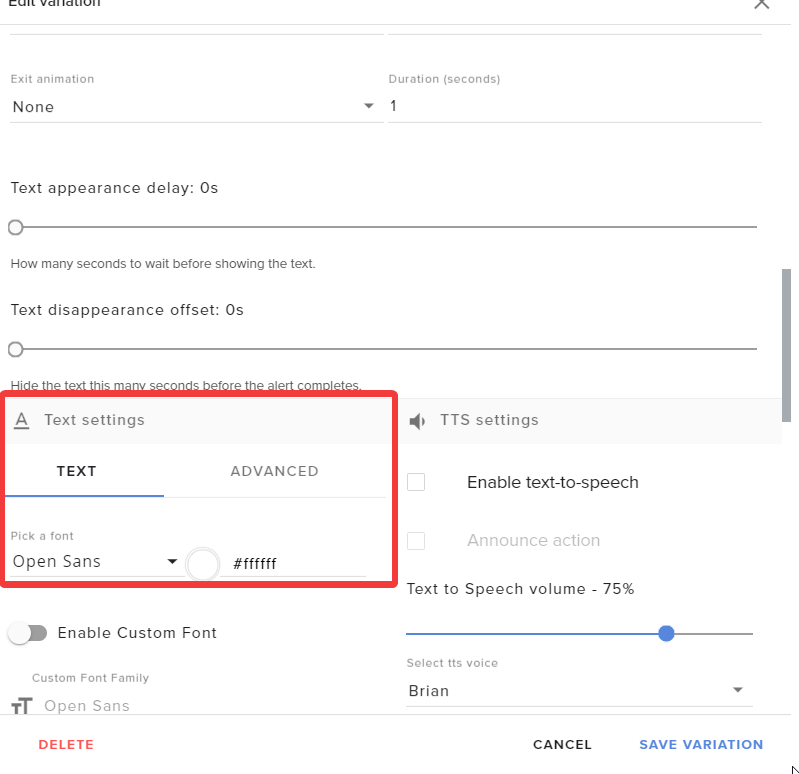 molten mirage
Either I'm blind and dumb as hell, or there is no font setting for variations. I took a screenshot of the specific section
I already have Open Sans selected in that section you appear to be showing , saved as well. Doesn't appear to change anything
rugged rapids
Disable the custom CSS switch in the variation.
molten mirage
Oh it's only enabled there because I tried it on, and off. It doesn't change this outcome, but you're right it should in theory be off.
I think enabling custom CSS on a variation makes the font stay at the default (Nunito) which is why I was trying to change it through the CSS/HTML
rugged rapids
yes, cause you then need to code the font and imports yourself. Disable it and use the font selector.
meager rose
is there a way for me to share my widget editor so they can set the font, text colour and text size etc. instead of just sharing a link with a pre-configured widget?
upper bough
@meager rose you can make to editor to the person that you want to edit your overlay
 high swallowBOT
@meager rose Follow these steps to grant managers/moderators access to your dashboard:
- Click on your Channel Name at the top of the dashboard and select Settings
- Create a new invite at one of three access levels (Bot Supervisor, Editor, Full Control)
- Send this invite to a mod/manager to give them access to your dashboard. The link is one-time-use and expires after 72 hours if not accepted
Video tutorial: https://youtu.be/zl_h-ttZDF0
molten mirage
(if you two are talking about me I found the solution to my problem)
What I typed up above actually worked, I just didn't recognize the font had changed until I changed the weight of it. So it's working now
 inland lichen
I need some help with this
On Screen Commands
by @crude crest
!ping -> https://strms.net/on-screen-commands_by_zanzer
Updated 12-01-2020
Added Sub and Mod only commands
Allowed sound to be played for video commands (in case your video had no sound)
A simple widget that lets streamers have commands that active Gifs / Videos onScreen.
https://www.youtube.com/watch?v=Z7ub7j2uRR8
YouTube
Zanzer
Play GIFs, sounds, and videos on your stream with custom commands!
where di I find the URL for the graphics and sound. all I see in the library is the name of each .
rugged rapids
you can create an imgae widget and in the preview via rightklick you can copy the url
inland lichen
can you be a little more specific please
rugged rapids
In the overlay Editor: Insert at the top > Insert Image / Insert Video > on the left when the widget is selected Change Image / Change Video > select Image/video > rightklick in the preview next to the Change Image / Change Video button > copy url to image/video
inland lichen
thank you Ill try this
inland lichen
Thank you that worked nicely. have a great day.
meager rose
@upper bough would that only give them permission to edit that one overlay only?
upper bough
nop, that will give editor permission to your SE
meager rose
so my only other option is to provide them with the code right so they can add their own widget right?
pasting the code in
broken coyote
I used to keep my widgets on github
 timber bear
@tribal moat Hi we spoke on twitter before regarding video playing after every image and sound redemption the video is Webm as directed but still suffers the same issue
 tribal moat
This would be a question for the helpdesk channels 😃
timber bear
Cheers Sean, thought this may have been more appropriate as it seems API based. I'll pop it in OBS helpdesk in this case. Thanks
 unborn jetty
Does anyone know how I can get this text all on one line?
viral patrol
You can resize alertbox or make the font smaller
 vivid aurora
hi i think i was told to come to this channel to gt with steamelements and twitch is there anyone that is able to help?
viral patrol
Hi! Sure! How can we help you?
 last goblet
I wish that stremelements didnt count emotes when counting capital letters
 hearty crescent
Hello, was wondering if anyone has any idea how to get a define command in chat so I get get definitions of the word? Sorry if in the wrong place, tried a search in the command share channel but no direct hits
 pseudo siren
@hearty crescent you can use Scorpstuff api
https://scorpstuff.com/streamelements.php#general
Command !urban
 arctic field
Can anyone here help me with a CSS issue? I don't know how to use it, but I have a perfect idea for myself on how I want to utilize @viral patrol's "recents" widget!
The "Last Events Rotator"
viral patrol
This widget is very obscure as it was one of the first things I created. You might find this one instead fitting your needs more: https://strms.net/last_events_rotator-by-co6studio

StreamElements
The Ultimate All in One Platform for Streamers
But if you want to use that one instead - I updated code on #widget-share channel, so you can readd this widget to have font settings added
@arctic field ⤴️
 pulsar willow
Hello! 
@warm ledge !title is a default Command ^^
indigo flume
 warm ledge
Ok
 candid radish
Who among you can help create layouts to organize a stream?
viral patrol
@candid radish You can use one of dozens presets you can find in themes gallery, so then you just need to adjust them to fit your needs https://streamelements.com/dashboard/themes
StreamElements
The Ultimate All in One Platform for Streamers
candid radish
@viral patrol I have used it already, and it is of great help, I have more specific questions and I do not know if I should clutter this chat with them.
I am looking for someone who can help me speed up the creative process, someone who worked with layout for a while and know where the different options are that I need.
viral patrol
Oh. We got a lot of talented creators that we feature here: https://www.fiverr.com/stores/streamelements-layouts
candid radish
@viral patrol I have used that as well and the one individual that I spoke with did not even make the promised concept in weeks, although the rating of the user is high.
 steady iron
It happens, @candid radish
 tacit musk
@candid radish If you did not get what they agreed to, you should open a claim with Fiverr. They take those things very seriously.
Also if you want, you can DM the gig details so we can examine if they should stay on our store page.
arctic field
@viral patrol Thank you!! I’ll try them this morning and let you know!
 silver lantern
Anybody got a good example of how to set a user cooldown? I figured out the command cooldown, but can't seem to find the user cooldown 
(and yes, it's my first widget I'm making, I'm still stupid 😉 )
 velvet cave
Hey guys,
Is there a widget, or is it a possibility to make a widget, that pulls your twitch clips and plays them as a video?
viral patrol
@velvet cave I think that thefyrewire had something for replays that created clips and played them on stream
upper bough
 idle niche
Hi there. Having trouble with the social media blade api. It's not bouncing on my end, but on SE it is. https://gyazo.com/aedcc1d41ea771d8bbcb579a6a61859b

https://cdn.discordapp.com/attachments/494513233416421386/679152455254147092/2020-02-18_04-28-51.gif how SE staff see it
 mild cipher
@idle niche OS and browser?
candid radish
@tacit musk I am trying to see if the person if legitimate to get a sample of work based on what I need. I did not pay the money yet, but the person has been promising a sample for weeks. I understand that people are busy, and unreliable sometimes.
velvet cave
Thanks @viral patrol !
indigo flume
pulsar willow
So, I have the optimization point system, so, I would like to make a programming logic with major, equal, minor ... how to do this without optimizations?
Example : if ${user.points_rank} > 1 and <20 response Challenger on chat
Or ${user} is Challenger
Has anyone done this type of procedure in StreamElements?
upper bough
@pulsar willow i think i read some conditional command somewhere.. let me check
pulsar willow
Ok, Thank's.
pulsar willow
I've looked at everything and I don't think
mild cipher
@pulsar willow can you elaborate what you're attempting to do / mean by optimization point system?
 twin condor
This may sound random. Is there a way to make a chat bot response that if hypothetically I type in "!shoutout watermelon" the bot would have a response generated by whatever word follows "shoutout" such as "Shout out to watermelon because it's awesome" ?? LOL like I said, random, but is that something that's possible with the chat bot?
mild cipher
Do you mean a specific personal shoutout depending on the user? Or if you mean a regular shoutout command there's a default template when you add a custom command
twin condor
Not a typical shout out command, but a command that the bot responds with the word following !shoutout, like that sample. Something fun versus the typical streamer shout out command.
So like, if someone types in "!shoutout watermelon" (example) then the bot would respond using the word "watermelon"
mild cipher
Ah okay so the variable you want is ${1} captures the first word after the command, ${2} is the second, etc. If you want the entire sentence after the command then use ${1:}
 keen blaze
I'm looking for a couple of custom features/commands - if you're an dev who is experienced with the SE api and also accepting commissions/custom jobs please pm me.
velvet cave
Hey @keen blaze I’m sure that you could ask your Account Manager for these features/commands, or otherwise maybe in the DreamTeam channel! 
keen blaze
Reason I am looking for a dev is I want it to be self hosted so I have control over the data/hosting of it.
broken coyote
so i assume it will be some form of database?
keen blaze
yeah both would be using a DB of sorts
broken coyote
Depends what it is, I would be interested in it @keen blaze if not, I can pass it onto the other gurus
upper bough
Maybe you could tell here what you need, without giving to much, so the interested /capable/ availables ones can reach you 🙂
viral patrol
@keen blaze Hi! I agree with our guys about more info - we nerds need technology (node/php/python/go/whatever) and a basic example, so one of us can take it. (and if any of you folks will work with neonpuddles - I recommend her totally!)
 pallid jetty
I am attempting to create some custom alerts from the Stream Elements event triggers.
I am getting the event data for all live events (see attached image)
Today I had a group gift sub (2 gifted subs) and the live data is not very usable at all. For starters the 2 events that fired on the live event came through as 2 separate gifted subs. However when I replay the group gift through ground control I get a completely different set of event data - this one is perfect as it has the group gift along with an array of the gift recipients.
Please can you let me know how I can get the live event data to replicate the replay data, or how I can determine group subs gifts from the live event data.
viral patrol
This is due to Twitch forwarding subs one by one, but we can get information if it is part of Community Gift: https://github.com/StreamElements/widgets/blob/master/CustomCode.md#on-event
pallid jetty
Thanks, but does that mean live events won't trigger the correct information?
How do I add in a window.addEventListener to my code?
btw this is custom code and not through the se editor
keen blaze
ty for the replies, the tl;dr of what I am looking for is a queue system very similar to what thefyrewire has built (https://thefyrewire.com/kappa/queue/setup) but with a couple of modifications specific to my stream and I want to host it
viral patrol
@pallid jetty this is a code for custom widget within SE editor. And the difference between live and replayed event is because live is live, and twitch dispatches subs one by one, replayed can be aggregated
 untold phoenix
Hi!
Does anyone know how to re-create Media Request widget in SE custom widget ? All i want is to add fade animation to the video, so it doesn't suddenly appear out from nowhere when "show video" is pressed. Or maybe I am missing something and there is easier way to achieve this?
idle niche
@mild cipher Google Chrome / Win10 / OBS Live
mild cipher
@idle niche Can you go to This PC > right click > Properties > Advanced System Settings > Performance > Settings > what option is currently selected?
idle niche
Ultimate Performance @mild cipher
fixed it @mild cipher "animate controls and elements inside windows" wasn't checked. i checked the box and it is now working properly!
Thanks for your help @mild cipher
 timber lark
Hi! Is there any API with Twitch Channelpoints? Like triggering alerts if someone redeems stuff? Or maybe some minigames connected to channelpoints redemptions?
indigo flume
Not yet
timber lark
did twitch announce anything concerning channel points api? 😄
is it planned or something?
indigo flume
theres a pubsub but i don't know how that works
from what I remember they posted they will open the API I believe, but no ETA was given
timber lark
ah ok, thx
pulsar willow
@mild cipher
It is not just with the points. I just wanted to know if there is conditional logic in this bot. Example: if, if not ... same as in conventional programming.
It is not just with the points. I just wanted to know if there is conditional logic in this bot. Example: if, if not ... same as in conventional programming.
mild cipher
@pulsar willow the pipe acts as a short circuit OR operator ($(1|default)) but off the bat there isn't any conditional logic. but depending on what you're trying do there are possibly customapi options
timber lark
@viral patrol Hi! I've been using this widget for quite some time now. Unfortunately it never triggered on stream after sub giftings. It works perfectly fine when I test it in the editor with test alerts. It also works, when I repeat the live alert on stream!
That has been my workaround so far. Repeating the alert to start the train appearing. My audience and me really like the train! Is there something I can do, to fix this problem?
 austere gale
i have a questen about api'es why are "https://api.streamelements.com/kappa/v2/store/channel/redemptions/me" only showing my own redeem not that redeem other have redeem in my shop?
indigo flume
Because that API point is this page basically: https://streamelements.com/dashboard/account/redemptions
austere gale
how to check all redeems in my shop?
indigo flume
You might have to iterate this point: https://docs.streamelements.com/reference/activities
and search for redemptions
austere gale
soo this https://api.streamelements.com/kappa/v2/activities/channel/top?period=period and https://api.streamelements.com/kappa/v2/store/channel/redemptions/search? to find all redemptions that there currents poeple have redeemet?
indigo flume
then you need to use the activities
and search for the redemption event
hook your code to the activities endpoint
and go redeem an item manually and see how it comes out
and then when you see what the type of event it is
just iterate the activities end point
with the perdio search
austere gale
okay i try:)
austere gale
i just need to find all redeem that i dont have accpt or denyt
i making a thing to minecraft so then one redeem a item they get it ingame and delete it in the shop
soo i will try and see if i can get it to works
viral patrol
You can iterate over that: https://api.streamelements.com/kappa/v2/activities/:channelId?limit=24&types=redemption So no other events will be fetched
austere gale
okay i try thanks
viral patrol
@timber lark I am investigating that issue
austere gale
thanks @viral patrol now it works for me
viral patrol
austere gale
❤️
austere gale
how to find out if i have accept a redeem and not from apien?
if i have the redeemer username
velvet cave
@uneven grotto has some issues with your widget @hushed hazel
 uneven grotto
Hi @hushed hazel for some reason I'm not getting cheerers or subs showing up in the credits - also I cannot adjust the size for the followers or subtitle text. The subtitle text only changes for one scroll, second scroll is always tiny. Thanks for your help!
austere gale
umm how to find out if a redeem is accept or deny with api right now its done'st works becaus every people need to have theys Bearer 'JWT Token' sets can i find it without it?
austere gale
@viral patrol have you a idea of how to do it? 🙂
viral patrol
I think I found another link that will have more details: https://api.streamelements.com/kappa/v2/store/:channelId/redemptions/search?from=2019-02-20T12:24:42.637Z&limit=25&offset=0&page=1&pending=true
It should have an attribute saying if redemption has been accepted
austere gale
i try 🙂
just send "internal server error, an internal server error occurred and 500"
viral patrol
https://api.streamelements.com/kappa/v2/store/:channelId/redemptions/search?from=2019-02-20T12:24:42.637Z&to=2020-02-20T12:24:42.638Z&limit=25&offset=0&page=1&pending=true&searchBy=redeemer.username&sort=%7B%22updatedAt%22:-1%7D
austere gale
i try
viral patrol
This is the exact request I see
austere gale
it seen to works thanks
pulsar willow
Do you know any kind of API you may be using to execute commands like: if ($ {user.points_rank} <= 20 and $ {user.points_rank}> 0 answer: Challenger
if ($ {user.points_rank} <= 40 and $ {user.points_rank}> 20 answer: Master
I found what I want, but I don't know where that is.
that's exactly what i want
How to create a custom API?
 simple wraith
- google how to create custom api
- Stack overflow
- ???
- Profit
But for real, i have no idea.
 vale kelp
Hi, I need a bit of advice on custom commands. I'm trying to trigger a command using keywords in the advanced settings, but they don't seem to be working. e.g. I'd like to trigger the command '!about' with the word 'game'. Command is enabled for offline and online, changes are saved, command is working as normal, but typing the keyword in chat does nothing.
What am I doing wrong?
pulsar willow
@vale kelp Using the API?
vale kelp
I'm in my dashboard on streamelements
I posted this in #helpdesk-twitch and was told to post it here
upper bough
@orteguinha#0476 the pipe acts as a short circuit OR operator ($(1|default)) but off the bat there isn't any conditional logic. but depending on what you're trying do there are possibly customapi options
vale kelp
pulsar willow
@upper bough
You use an example of a custom API anyway, because you only see custom API on other twitch channels and it looks like this command is directed to a specified page, can you explain?
vale kelp
Oh hey, thanks it works now
pulsar willow
@vale kelp Everything is normal on the page you sent the photo
upper bough
@pulsar willow i use that pipe with fyrewire api
vale kelp
@upper bough how did you get it working on my stream?
 pulsar willow
@vale kelp he almost owns the bot
@upper bough I would like to sort people by name and not by rank:
Example: the more points they have, the higher their level in the stream, like gaining experience and getting level, you know? Would ?
vale kelp
Thanks chaps
Now just need to work out regex so I can trigger it with certain phrases in a sentence
pulsar willow
Good
upper bough
@pulsar willow so basically a rank system?
pulsar willow
exactly!
I'm a computer science format, but I didn't understand how to create a custom api on this bot, my god = [
upper bough
@vale kelp on the regex textbox add this \b(what is this test)\b
vale kelp
It worked first time, then nothing
upper bough
@vale kelp mind to invite me as a editor?
upper bough
ill wait 🙂
vale kelp
I added you
upper bough
i mean
high swallowBOT
@vale kelp Follow these steps to grant managers/moderators access to your dashboard:
- Click on your Channel Name at the top of the dashboard and select Settings
- Create a new invite at one of three access levels (Bot Supervisor, Editor, Full Control)
- Send this invite to a mod/manager to give them access to your dashboard. The link is one-time-use and expires after 72 hours if not accepted
Video tutorial: https://youtu.be/zl_h-ttZDF0
upper bough
what was the variations again please @vale kelp
vale kelp
Oh
So for example 'what is this game', 'what's this game', 'what game is this'
Try those for now
vale kelp
How odd....
vale kelp
That's how you separate phrases
Ok
That's great, so now just to figure out why it hates the word 'game' suddenly
vale kelp
I'm sorry!
This is just me, if something is breakable, I'll find a weird way to break it
upper bough
lol
i will ask around and i'll come back
if i dont come back in a while ping me ok?
vale kelp
No worries, thank you for your help, sorry to be a pain
vale kelp
That works, but it's still allergic to the word 'game' for some reason, and that is too broad as it will reply even if you just type 'this'
viral patrol
This might not work I think, it can cause a lot of false positives as there are no line start/end characters in Regex
upper bough
the word "game" is broken on shadowfrax's channel 
vale kelp

mild cipher
Maybe try deleting the command and experimenting with a fresh one, I've encountered bugged out regex before too
vale kelp
Have done that
upper bough
Yeah that the first thing i did
upper bough
nope
simple wraith
brainfart, protected and/or in use command?
vale kelp
Doesn't matter what the command is, does the same on any
mild cipher
Do the keywords work?
vale kelp
'what game is this' = No, 'what is this' = Yes
It's just the word 'game' that is broken
upper bough
just try.. and the last one works
simple wraith
i mean..
mild cipher
I can't really think of anything else aside from something conflicting. I have a few minutes to spare if you want to invite me as a bot commander to have a peek. I'll join the party with Renziito 😄
vale kelp
@upper bough @mild cipher @simple wraith I seem to have fixed it somehow. I went through my custom commands and purged any that I didn't need, and now it seems game is accepted.. Must have been a conflict, but goodness knows where...
upper bough
 vale kelp
Thanks @upper bough for the help, sorry it was a mess
vale kelp
Will let you know if I manage to break it again
vale kelp

mild cipher

 grizzled ledge
Please add a feature to pause our stream than end it on the phone.
 hardy walrus
@grizzled ledge This is the wrong channel for that.
Plus you'd want to do that on our ideas page
high swallowBOT
Check out the StreamElements ideas board: https://strms.net/ideas. You'll be able to add ideas, upvote ideas you agree with, and track their progress with email notifications. Adding and upvoting ideas also helps the staff know which ideas should be prioritized so please take some time to upvote.
upper bough
@vale kelp maybe this : https://discordapp.com/channels/141203863863558144/457957557470887947/664809625169690644
vale kelp
Thanks, I'll check that out
 thorny shale
Was wondering if there was any documentation on html and css syntax. Having an issue trying to use my provided .webm file instead of the generic shark dancing gif when a subscriber notification pops up 🤔
mild cipher
For a webm you'll want the <video> tag:
<video autoplay loop src="https://video.webm" />
thank you so much! 😄 @mild cipher
now I did make that change, but the alert will not show on obs.live. It will only show through the editor on streamelements.com
mild cipher
Is the checkbox at the bottom of the emulate alerts checked?
thorny shale
🤦 it has been a long day my dude, thanks again! @mild cipher
 inland igloo
So i am trying to use the Tiltify donation tracker widget but am unsure of how to get my tiltify campaign to actually showup
anyone have any insight on this
 finite heath
Seems like various twitch APIs are completely broken 
mild cipher
Is this affecting custom widgets atm?
 west zenith
I have added a Custom Widget to my twitch overlay but after Googling and researching I still can't seem to figure out how to change the entrance and exit animations. Is there a way I can change it in the code part? I would prefer Bounce In Up and Rotate Out Down Right if there is a code for these? Thanks 🙂
viral patrol
Animations work for slideshows and alertboxes. For custom widget - animations should be coded within them.
west zenith
I've tried using the drop-down but it doesn't do anything, and I've tried changing the text in CSS and it just stops the whole box altogether
I can see CSS coding for side-in, pop-in and fade-in, but I'm not sure what I need to add if anything for bounceinUp to work
viral patrol
Which particular widget do you have in mind?
west zenith
It's the Custom Widget
viral patrol
Oh, so the default "event list" that is served with it, right?
If so, animations are in the code.
west zenith
Yes that's correct
viral patrol
So if you want to use other appear animations, the only way is to code them.
west zenith
I understand, thats the help I am asking for. I've tried Googling what I need to add in there but I can't seem to get it to work, I'm not sure which code to add. I mentioned this in the helpdesk-twitch channel and was advised I could get help in here
uneven grotto
It doesn't look like @hushed hazel is working on the credit roll widget any more. Can anyone else help me with the code? I think the widget is not showing events other than followers because its under and if else event:
I'm I right in thinking that?
viral patrol
This check is to find if number of subs during session is already reached (so subs from previous sessions are not displayed)
 hushed hazel
@uneven grotto correct - i havent been working on it in a while.
The second part tho - if you mean the if (event.type == ... part, thats an if/elseif statement, essentially the same thing as switch, it just goes through every event type, triggering the appropriate code depending on which one it is. If you mean the inner if statement, read what @viral patrol wrote above
Frankly, debugging this widget is an enormouse pain in the butthole, simply because of how its made to work for the current session and it will not (most likely, as i said i havent worked with it in a while) show test events that you trigger in the overlay manager.
uneven grotto
Hi @hushed hazel, thanks for helping guys!! The problem I'm having is that the credit roll doesn't show anything other than followers and I want it to show followers, subs, cheers and tips.
the if/elseif seems to pass over the other events if I have new followers in a session. Does that sound right?
Yea the big issue is that I cannot test. Is there a way I can change the code to grab ALL subs/cheers etc rather than just the ones in the session for testing purposes? I can understand if you don't want to work on this tho - and that's cool, I was just having a mess around to see if I could figure things out.
hushed hazel
One thing I can tell you is that I have a version that works as far as I know and you can give this a shot. It does not have an infinite scroll option, so it only scrolls through once and its done.
StreamElements
The Ultimate All in One Platform for Streamers
viral patrol
There might be another issue - credit roll uses recent events list to display them, recent events can contain up to 100 events
So if you have 1 sub then 105 followers, only the last 100 followers will be displayed
uneven grotto
@hushed hazel thats really cool!! thanks, it works for my subs and cheers! Wow ❤️
it works for everything btw ^^
hushed hazel
No worries!
west zenith
Hey, wasn't sure if any coding help was available regarding my custom widget animations?
viral patrol
Not yet. This requires widget rewrite, but I think it is a great idea to add animation selection for it, so I have it on my TODO list
west zenith
okay, thank you @viral patrol 🙂
viral patrol

@west zenith I just added that and more fixes to Custom Event list, but you need to manually copy code over to your overlay editor from here: https://github.com/StreamElements/widgets/tree/master/CustomEventList

GitHub
Contribute to StreamElements/widgets development by creating an account on GitHub.
 unkempt dune
did anyone make a viewer queue command yet (not widget)? i want it to be able to type it in chat kinda like song requests
unkempt dune
@upper bough it probably does but i’m streaming directly from a console rn so i can’t use that widget
viral patrol
@unkempt dune So for console streaming and bot-only solution I think you should try this one: https://thefyrewire.com/kappa/queue/setup

 upper whale
Hi, I got black screen when i open display capture
Does anyone know what I should do to fix this problem?
 native trellis
are you on a laptop by any chance?
native trellis
OBS Forums
Depending on your Windows version and what sources you wish to use, you may need to set OBS to run on a specific GPU. Not sure which Windows version you have? Press Windows+R and run "winver".
For Windows 10 1909 or newer:
Open Settings and search for "Graphics Settings". Sel...
upper whale
wow
it works
i searched for like 2 hours without a solution
really thank you very much
 fair talon
hi there !
im searching some tutorial for use the Api with node
to integrate on my bot loyalty points
and the song request
 static blaze
Is there a base code for the widgets in streamelements? Like can i get the code for the goal widget so i can back track how its connected, so i can build my own?
 charred tundra
there is, at the very least, my custom widget goalbar in the #widget-share, I recommend you start with something like that available there
charred tundra
use the Discord search tool  in:widget-share and then whatever keyword
"goal" in this case would serve you well
mild cipher
@fair talon I do remember seeing a node wrapper but I think it's pretty outdated, so your best bet is to just make your own or just make the necessary calls to the API- the docs are all in this channel's header
simple cove
Bizarre, but is there a way to command person specific commands yet? By widget or some other snazzy way?
mild cipher
What kind of command?
simple cove
Say a sound effect?
mild cipher
Not as of yet
simple cove
What about just a text based response? Using maybe pastebin?
mild cipher
 high pollen
Anyone able to assist with the authorization token setup? I've put the authorization in header but when I send a request it gives me 'not found'. Do I have to have the streamer's token or is myself being editor/supermod okay?
^Python script
mild cipher
Are you using the SE channel ID and not the channel name?
Also using your own JWT to access another streamer's account won't work I'm afraid, even if you're an editor/supermod
hardy walrus
@pulsar willow As it's more appropriate for this channel I'll answer with what I know.
With the only method atm for tracking the redemptions being pubsub the consensus from others more knowledgeable is that it's not what would work for us.
Now not to say it's impossible but not something we like right now.
high pollen
@mild cipher I figured it out after scrubbing through this chat for a bit. It was because of the channel ID. Also my JWT does seem to work for the streamer I oversee. Thank you!
 lusty pivot
It's been like 1 month that my friends in Iran cannot open streamelements.com
and none of their alerts and overlays are loading without using a VPN
I've checked and I'm pretty sure the website isn't blocked by Iranian government
What is the problem? 
native trellis
Unfortunately there is nothing we can do, we already spoke to him multiple times and told him to go and contact his ISP. StreamElements is not blocking anyone from the site and it works with a VPN as he and you told us.
lusty pivot
I see. But when you contact ISP they wont do anything for you. 
There is a large number of persian streamers and I'm kinda close to many of them (a list can be found here https://twitchfa.ir)
None of them can access streamelements at this moment.
They can access https://realtime.streamelements.com (104.18.16.52) as I checked with them
But they cannot access the main website (35.156.37.214) which has a different IP than the realtime service
viral patrol
@lusty pivot I think this might be Amazon AWS CDN issue.
viral patrol
But if this issue is persisting for a month, let me tag @finite heath
I am sure he will address that to a proper department.
simple cove
Im busy trying to program a command that uses the original fyrewire API to pull time played in a game from say steam. Whilst I can get the original to work, I am trying to be a little more fancy and pull the information from PasteBin (game code specify) - so I can narrow it down to a single command. But for some reason, whilst I can get it to work, if a little wonky, I can not get it to return the error line if no game name is put in that is listed in pastebin - any gurus spot what I am doing wrong?
$(channel) has played $(customapi.https://decapi.me/steam/hours/[steamid]/$(customapi.https://api.thefyrewire.com/twitch/pastebin/[pastebinid}?filter=$(1)&args=$(error)))
so error is the line included in paste bin for it to return
:[Destiny2] 1085660
:[csgo] 730
:[immortalredneck] 595140
$(error) Sorry that game time is not listed currently.
simple cove
$(channel) has played $(customapi.https://decapi.me/steam/hours/[steamid]/$(customapi.https://api.thefyrewire.com/twitch/pastebin/[pastebinid]?filter=$(1)&args=$(queryencode $(error $(1)))))
viral patrol
@mild cipher ⤴️ (As I never played with pastebin API)
mild cipher
The "error" line is not really an error line, it's just that any untagged line is returned if no filters are matched
One problem you'd probably run into is that if a game isn't matched it'll return your sentence which gets looked up with decapi (https://decapi.../hours/[steamid]/Sorry that game time...) which will return a 404 Page Not Found in the final response
simple cove
I did get that response once - not sure how though lol
So what I need it to do really then, is if it doesnt find the id listed - is to ignore the whole argument and return with the unlisted code?
mild cipher
You can get around this by running it through 2 pastebins.
Game IDs:
:[Portal 2] 620
-1
Final responses:
:[404 Page Not Found] $(args.1) is currently not listed.
$(channel) has played $(filters.1) of $(args.1)!
$(customapi.https://api.thefyrewire.com/twitch/pastebin/B7Qfcfpj?filter=$(customapi.https://decapi.me/steam/hours/STEAM_ID/$(customapi.https://api.thefyrewire.com/twitch/pastebin/k610SwM4?filter=$(queryencode $(1:|$(game)))))&channel=$(channel)&args=$(queryencode $(1:|$(game))))
^ this has a little extra thing where you can just do !hours to lookup the current Twitch game, or do !hours <game> to look that up depending on your paste
hope that helps!
simple cove
I will test it thank you!
@mild cipher If I add a space like Portal 2 for example it bumps me with an error
theelusivewolf has played An error occurred retrieving hours for Steam ID: STEAM_ID with app ID: 620 of Portal 2!
mild cipher
The error is with the steam ID, did you replace it with your own?
hardy walrus
$(customapi.https://api.thefyrewire.com/twitch/pastebin/B7Qfcfpj?filter=$(customapi.https://decapi.me/steam/hours/STEAM_0:0:237242754/$(customapi.https://api.thefyrewire.com/twitch/pastebin/k610SwM4?filter=$(queryencode $(1:|$(game)))))&channel=$(channel)&args=$(queryencode $(1:|$(game))))
That's what you want 
simple cove
ooooh I see!
Could it be technically used for other APIs? Like the Epic one for example?
hardy walrus
I'd say you'd need to look at this https://dev.epicgames.com/docs/services
 real dune
anyone know how to build this?
https://discordapp.com/channels/141203863863558144/259680142459142144/672923157803565090
 flat shard
Hi guys. I want to create custom widget on based on Merchandise Alert Box, but ofc want to customize it. To do so, i'm enable "Enable custom CSS", and start editing html/css/js/json files. But i can't get it work. There 2 problems:
- {{items}} - instead of item-list in any format i get
[object Object], [object Object], [object Object], [object Object], [object Object]. Even in *.js file, if i write
const g = {{items}}
and after that check source code, there will be:
const g = [object Object], [object Object], [object Object], [object Object], [object Object];
- Cannot make any events to trigger.
Could you show, please, what am I doing wrong?
Link to github repository of widget:
https://github.com/patroldo/streamelements-alert-merch-custom-event
Thx for answer in advance!
Best regards.

GitHub
Contribute to patroldo/streamelements-alert-merch-custom-event development by creating an account on GitHub.
mild cipher
AFAIK the typical event listener stuff you have in your JS doesn't work the same way for alertboxes, so you may want to try catching the events with a custom widget, which you might as well do anyway since the custom css for the merch alertbox starts empty
simple cove
$(customapi.https://api.thefyrewire.com/twitch/pastebin/[pastebinid]?filter=wolf-$(sender)&user=$(user)) - any reason why this may have stopped working ? Was fine earlier @mild cipher
hardy walrus
Did you remember to replace the pastebinID in there? 
simple cove
I did indeed. It just wasn’t responding
simple cove
Hmmm
upper bough
without the customapi thing.. it work?
simple cove
Probably not because it uses fyrewires api
hardy walrus
@mild cipher ^^^^^
upper bough
yeah the url works on browser
the customapi thing is for the bot to read the response
try that part on the browser
simple cove
I will test tomorrow thank you
 primal tartan
any one know of a way to give two parameters to an alert like = prime sub and >= 1 month
 vague girder
Hello! Is there a possibility to get latest subscribed user through api?
viral patrol
You can read activity endpoint for subs only and limit displayed events to 1
 nocturne estuary
I'm creating a custom !lurk command on twitch right now and I'm trying to set it up to do random picks with the variable. The issue is that whenever I add more than 3 quotes it gives me the following error "Parsing error at position 374: Mismatched quotation mark". The signs are at 376/500 and I have 7 quotes. I tried testing it where I changed each quote to a number from 1-7 and that seems to have worked. So is it just because my quotes are too long?
viral patrol
It might be that, but maybe you want to use !quote add Your text to have it native or thefyrewire's pastebin service?
 split bobcat
@crude crest With your custom alerts widget (https://discordapp.com/channels/141203863863558144/457957557470887947/664809625169690644) is it possible to set this up so a command in chat triggers an audio file?
 crude crest
You should be able to leave a gif blank and just add an audio file and it work, I haven't tested it - but in theory it should work. If it doesn't I can take a look when I'm back at the hotel tonight
split bobcat
ok @crude crest I will give it a shot
@crude crest how do i get the URL for the sound file i have uploaded?
i may have missed it in your video
crude crest
There's a link to a video in the notes of the widget when you load into
split bobcat
@crude crest what i mean is where do i find this url for a sound I have uploaded
viral patrol
You can add sound to any alertbox, open network tab in developer tools
And play alert
Then you will se a request to get that sound file
You can filter it out to display "Media" only.
crude crest
Sorry I'm out IRL streaming atm .. I have a link to a video that explains it all in the widget
Ohh thanks lx
split bobcat
it works amazingly
paired with the scene change widget is a match made in heaven for my stream lol
 pulsar willow
@narrow belfry ${user.time_online}
pulsar willow
what do you mean? 
 narrow belfry
the watchtimes are "reset" to november data
pulsar willow
yes!
narrow belfry
I extract data from streamelements message history
pulsar willow
ah okay
narrow belfry
from old !watchtime commands
but thanks anyways
I will just count it as 30 days, whatever really...
 narrow belfry
awesome
narrow belfry
okay... Hi I am back... Trying to import the data...
The order should be as following username,twitchID,currentPoints,alltimePoints,watchtime
where TwitchI and watchtime can be empty
Can I do username,currentPoints,watchtime? or does it break?
oh wait, like this right?
username,,currentPoints,,watchtime
narrow belfry
got it working GG
 dusky tangle
hey, I tried to add a continues scrolling text as a ticker on my overlay but it always keeps a gap between the end and the start of the scroll. To resolve this I copy pasted the text a bunch of times but it even causes a bigger gap between the beginning and the end of the scroll.
I had a custom widget in the past but mistakenly removed it so I am looking for someone who knows how to get it back somehow
viral patrol
I think that one of the simplest ways to do so is using jquery marquee: https://github.com/aamirafridi/jQuery.Marquee#usage

GitHub
jQuery plugin to scroll the text like the old traditional marquee - aamirafridi/jQuery.Marquee
dusky tangle
lol i dont even know how to add all this 😒
any idea how to apply this on streamelements?
viral patrol
Hold on for few minutes 😉
StreamElements
The Ultimate All in One Platform for Streamers
dusky tangle
Thanks @viral patrol much appreciated 👍
 grim dagger
Hello,
is it possible to set a command that will work from, for example, 5 hours of viewer?
upper bough
@grim dagger like a timer that trigger every 5 hours?
grim dagger
@upper bough No, it gets the time from $ {user.time_online}
when the viewer has less than 5 hours, the command does not work for him, and if he has more than 5 hours, the command works, can he?
upper bough
${user.time_online} should work with any time the user have watch the stream, let me try myself, brb
grim dagger
I want to create a command that will work from 5 hours, understand? the time will be taken from $ {user.time_online} 😄 😄
upper bough
😮 i see only works for users with 5 hours or more
grim dagger
how to do it? : D
upper bough
there is no if else command built in
maybe using the filters on fyrewire's pastebin
are you familiar with that?
grim dagger
not really, I'm an amateur in these matters. :/
upper bough
what are you trying to do with that users? (the 5+ hours ones)
grim dagger
I want people who are over 5 hours to receive a regular viewer. To the Nightbot bot
command nightbot !regulars add username
high swallowBOT
Chat/Bot Levels
100 - Viewer
250 - Subscriber (Twitch subscribers automatically placed at this level)
300 - Regular
400 - VIP (Twitch VIP automatically placed at this level)
500 - Moderator (Twitch chat moderators automatically placed at this level)
1000 - Super Moderator
1500 - Broadcaster
Dashboard Manager Levels
Bot Supervisor
Editor
Full Access
Owner
https://i.imgur.com/s61Liry.png
 upper bough
you can make StreamElements's bot run command.... and worst yet... a nightbot command
grim dagger
nightbot has Discord and Twitch integrations, does Streamelements have such?
what command would I have to use?
upper bough
afaik there no integracion with discord
but what are you trying to do?
why you want to make your user regular?
i only use StreamElements's bot, maybe the function that you wanna use in nightbot we already have it on SE
grim dagger
because I can then broadcast by bot (nightbot), rank on discord
does streamelements connect to discord? in order to give rankings to subscribers, regular and moderators
upper bough
discord and twitch have integrations for subscribers
streamelements and discord doesn't have that integration atm
grim dagger
so which command should you use to make it work from 5 hours?
upper bough
but like a say you can't make the bot run commands
grim dagger
what do you mean?
upper bough
you can't make the bot run command, not even SE commands like Response: !followage ${user}
but you can use the variables section to retrive the data
or make a request
pulsar willow
You should be able to leave a gif blank and just add an audio file and it work, I haven't tested it - but in theory it should work. If it doesn't I can take a look when I'm back at the hotel tonight
@crude crest is there a script to add that would interact with loyalty point cost? ie !hype costs 5 points, shows redeemed.
crude crest
Not as of yet. I have it on the road map to create a backend API for points for it all. I'm home from PAX and next week and will start activily working on that stuff :)
 reef saddle
Hey
vale kelp
Hi chaps, looking for a way to show the currently queued media requests as a list on my overlay. Any ideas?
viral patrol
I would do that this way:
const channelId="yourChannelId";
$(".main-container").append(`<ul id="list"></ul>`);
fetch(`https://api.streamelements.com/kappa/v2/songrequest/${channelId}/queue/public`).then(response=>response.json()).then(data=>{
    for (let i in data){
      $("#list").append(`<li>${data[i]['title']}</li>`);
    }
});
 spring mango
I have a technical question. I have an idea for a bot for my discord to talk to twitch/stream elements is there an API that I can use for stream elements to use in this way? I am not a developer, but looking to commission one <-- only if it is allowed in this discord.
vale kelp
Thanks @viral patrol I'll try to implement that
viral patrol
@spring mango it is allowed here. About API - we do have documentation in channel's description
spring mango
If someone is interested in a paid commission to develop a discord bot, please send me a DM, I will be glad to give details.
Thanks @viral patrol
pulsar willow
Hi guys is there any easy way to write out to a txt file the latest superchat as I have a custom titler which I like to use ?
viral patrol
Overlays don't have access to any files located on your computer, due to safety reasons everything is held in safe environment that doesn't allow that. You can create an app that will get that data from SE.
vale kelp
@viral patrol Don't s'pose you'd mind showing me how to add that code to a custom widget when you get a mo would you please? I thought I'd be able to blag it, but my skills are not up to the job sadly.
viral patrol
Replace "yourChannelId" with "59234706f1a33a535d617029" in code above and paste this code in JS tab of code editor.
vale kelp
Thanks @viral patrol, that's showing up now. It doesn't appear to update itself as songs are added or removed though, could you tell me what I need to add to get it to refresh automagically please?
lusty pivot
But if this issue is persisting for a month, let me tag @finite heath
@finite heath I apologize for mentioning you again on this one, But can you look into this issue? I really appreciate it.

 tame ice
Hello guys. I have a website which send notifications to alert services like Streamlabs when a tip is bought through one of the payment providers available in our website.
I'm studying in implement StreamElements to give the users more variety of platforms, and also because was requested for some users.
I checked StreamElements API and apparently the feature to POST a tip is offline, is that correct?
I tried to call the API using my own Channel ID e JWT Token, but I'm getting status code 500.
Also, when I try to put "paypal" on "provider", I get the response that this value isn't allowed. Is there a custom value I should use?
 ornate nimbus
${user.time_online} so i found this in the variable page? Not sure what a variables are but it does not work in chat. I want to know if theres a command that I can either make or activate that tells me how long someone has been watching my stream (lifetime). So all the accumulated hours thanks!
i also tried the command ${user.time_online} for example ${Ju5tinQ.time_online} and other names and it does not work
indigo flume
@tame ice I think provider "paypal" is a reserved term, as that is part of our integration with paypal tipping. You will most likely have to provide a custom name like "website" or "domainname.com"(what ever your site is called).
If this solves the entire issue, then great, if not, then most likely you are not providing all details, as currency is also needed, amount and message in the JSON. I will try and find you the proper payload, but do note that its best to handle tipping via our oauth2 for better security
@ornate nimbus You can't place someone's name in the variable it self. ${user} is usually a targeted person after the command for example:
!watchtime @keizar
the expected response will be Keizar has been watching the stream for 1000 years, 200 days, 10 months, 2 weeks and 1 day
tame ice
Hey @indigo flume thanks for your reply. I manage to get it work. About OAuth, I already applied for my app credentials in the form section on API page, I'm just testing with my own JWT Token.
I have some question about "imported" value, in which case should be true or false?
I notice when I set it to false, it doesn't trigger the tip alert. Is that it?
indigo flume
I belive true when you are importing from streamlabs ot tipeestream or past tips from your system
Am not sure tbh om that
tame ice
No problem, thanks for the help. 😀
viral patrol
Yup. "imported" is true if you want to display alert for imported tip and false when you want to add a tip without triggering alerts (like bulk importing a lot of tips from past).
ornate nimbus
@indigo flume thanks for the response! I tried the command !watchtime @cinder salmon and it still shows the current stream but not lifetime. I saw a another streamer was able to do it but did not recall what app he was using. Is there another option in SE? Because !watchtime only shows the current stream thanks
 flint mirage
could anyone share the css code needed to import a custom font (from my C:/Windows/Fonts/ source) into my alerts? I found this set of code but it is for a building a website with a custom font css - maybe all it needs is a small modification?
@font-face {
font-family: yourfont;
src:url("yourfont.ttf");
}
whateever ur changing {
font-family: yourfont;
}
flint mirage
disregard the above, i found the problem i was having with custom fonts - but i have another question: i want the date and time to appear with my alerts when they pop up, but i want it a different color/size/etc. - would this be doable with custom css?
rugged rapids
yes, with css you can choose the color of specific elements.
flint mirage
can i have it appear as a different text box so i can move it around separately from the rest of the alert text?
rugged rapids
flint mirage
by different i mean the text is not contained in the same textbox as the " [user] has subscribed!" text for example
 sharp lodge
Hi, I have this command in nightbot but cant get it to work in streamelements, anyone knows what I need to do to get it working with streamelemens? $(eval const api = $(urlfetch json http://api.satont.ru/faceit?nick=rowdy); if (api.error) {'Error';} else { 'Lvl: ' + api['lvl'] + ' Elo: ' + api['elo'] })
mild cipher
You'll want this response:
$(customapi.http://api.satont.ru/faceit?nick=rowdy&view=$(queryencode "Lvl: {lvl} Elo: {elo}"))
If you want to look up users, swap out your name for $(1)
sharp lodge
Working, thank u a lot!
tame ice
Guys, does any one knows how long takes the OAuth Credentials revision? I'm about to update my website and I would like to update it already with the StreamElements integration. Thanks.
vale kelp
Hi @viral patrol, thanks for the help with the custom widget this week to show the media request queue. Could you tell me what I need to add to it to get it to update automatically please? It doesn't refresh when songs are added/removed. Cheers.
Also, what would I add to show the user who requested each song?
Here's the code again: const channelId="yourChannelId"; $(".main-container").append(`<ul id="list"></ul>`); fetch(`https://api.streamelements.com/kappa/v2/songrequest/${channelId}/queue/public`).then(response=>response.json()).then(data=>{ for (let i in data){ $("#list").append(`<li>${data[i]['title']}</li>`); } });
Sorry but I'm a bit of a peasant when it comes to code
upper bough
@tame ice i wanna say the revision take place on the weekdays so maybe you will need to have a little more of patiente
tame ice
@upper bough Thank you for the info and no problem, I just wanted to know so I can plan the update ahead.
mild cipher
@vale kelp I don't think there's any events for media requests, but you can wrap that in a timer and update the list (I'd keep it at 10 seconds~ to not spam)
const channelId = "";
$(".main-container").append(`<ul id="list"></ul>`);
const doFetch = () => {
  $("#list").empty();
  fetch(`https://api.streamelements.com/kappa/v2/songrequest/${channelId}/queue/public`).then(response=>response.json()).then(data=>{
    for (let i in data){
      $("#list").append(`<li>${data[i]['title']} - ${data[i]['user']['username']}</li>`);
    }
    setTimeout(doFetch, 10e3);
  });
}
doFetch();

 median magnet
Hey quick question, which of the following can I use with streamelements to create custom commands?
urlfetch, readapi or customapi
Also is it safe to assume viewers are unable to see the URL? It will have an effect in game and I want the request to happen just in case a user had enough points and the bot did the request to the URL
rugged rapids
customapi and to my knowledge your viewers cannot see the url.
median magnet
https://streamelements.com/<user>/commands
Can’t you see the URL here?
StreamElements
The Ultimate All in One Platform for Streamers
rugged rapids
Try it with a test url.
simple wraith
Just a check, is there a (quick) way, i.e through url, to pull the latest tip/dono w/o having to make a whole layout..
rugged rapids
Not that I am aware of.
 queen edge
I am having issues with the Red Flare Super Theme In Game Scene. I cant erase the white lettering for social media etc
Anyone else having this?
rugged rapids
What platform?
queen edge
Well on the streamelements overlay editor
rugged rapids
Twitch, Youtube, Facbook or Mixer?
queen edge
Twitch
rugged rapids
#helpdesk-twitch then.
queen edge
Ok
 azure cipher
Not sure if this is the right spot to ask but how do i get the url of a gif i have uploaded to my streamelements library?
rugged rapids
Add it to a picture widget and rightclick teh preview and copy the url.
steady iron
from the Library view, you can right click - > Inspect and see the URL
azure cipher
thanks!
vale kelp
Hi, code peasant here again... I have this now as a custom widget to show my media request queue on stream, and it updates every 10 seconds (or whatever I set it to). But is there an alternative way to refresh the list instead of doFetch, that would update it without the text blinking as it reloads? const channelId = ""; $(".main-container").append(`<ul id="list"></ul>`); const doFetch = () => { $("#list").empty(); fetch(`https://api.streamelements.com/kappa/v2/songrequest/${channelId}/queue/public`).then(response=>response.json()).then(data=>{ for (let i in data){ $("#list").append(`<li>${data[i]['title']} - ${data[i]['user']['username']}</li>`); } setTimeout(doFetch, 10e3); }); } doFetch();
viral patrol
I think I would do that this way:
const channelId = "";
let first="";
$(".main-container").append(`<ul id="list"></ul>`);
const doFetch = () => {
  fetch(`https://api.streamelements.com/kappa/v2/songrequest/${channelId}/queue/public`).then(response=>response.json()).then(data=>{
    if (first !== data[i]['_id']){
        first = data[i]['_id'];
        $("#list").empty();
        for (let i in data){
          $("#list").append(`<li>${data[i]['title']} - ${data[i]['user']['username']}</li>`);
        }
    }
    setTimeout(doFetch, 10e3);
  });
}
doFetch();
Hi everyone. I was talking with @charred tundra about her amazing Hype Train widget which you can find the post for here. https://discordapp.com/channels/141203863863558144/457957557470887947/625997262593720320
The widget has a meter that counts emotes in chat and when that number is reached it can play a gif/sound/video. The meter is triggered by an event. Follow/sub/cheer/tip etc.
I would like to edit the widget to bypass the alert trigger, have the meter on when browser source is enabled, it would obviously reset on refresh of the source. This way you would could just have it on as a way to encourage the use of emotes whenever you want to get chat hyped at any time. Kitboga actually does something like this on his stream called the Memometer that counts when people use his meme emote to see it something happening during the show is meme worthy.
Twitch has an extension for this but it literally only counts 1 emote per user per minute.. its horrible.. and there is no pay off. The way this works is amazing. Just need to by pass the trigger. My JS skills are only at a level that would break this thing for sure. Any help would be appreciated greatly.
 boreal marten
Is there a way that I can pass text (other than messages tied to alerts) to the SE TTS 'bot'?
pseudo siren
@boreal marten for example !tts command?
boreal marten
@pseudo siren I was thinking more on the backend side of things for a custom widget as opposed to the !tts command
rugged rapids
You can create a store item where you can enter a message which will be read out by TTS.
pseudo siren
And you can add custom command with this response
${redeem tts ${1:}}
 heady cove
The wheel of fortune is not going invisible when not in use by default. I am told it should do that by default. Can anyone give any insight into what I might have done incorrectly in OBS.live or SE?

perhaps @viral patrol ?
 left frigate
SO, I came across this channel where by watching it you get its live points (not the twitch points) then you can use commands like !exchange to send it to the SE store as loyalty points. This is good because, for example, his viewers didn't lose the points when the reset occurred.
I was wondering, how was this made possible? by him? SE feature? Any thoughts on it
simple wraith
What's the easiest way to modify CSS elements of widgets that do not have a widget/custom editor?
i.e: i want to add a transform skew to this widget
rugged rapids
The only way I know of would be via the CSS option of the OBS browser source.


 viral patrol
@heady cove Hi. There is no option I to hide wheel when it is not active besides disabling browser source in OBS (clicking "eye" icon)
rugged rapids
@simple wraith yes: se-widget-countdown > div { transform: skew(-10deg, -6deg); }
simple wraith
 @rugged rapids thanks for confirming, my css brain is slow at times
 marsh relic
is there a way to create an array of fields with same name?
I'd like to make and array of video files that I can then choose from the array based on other criteria in my JS
At the moment I'm just hardcoding the videos into an array myself, but it would be nice if they could be proper form inputs
I did temporarily have video1, video2 etc but it started getting messy having to re-add a new field everytime I wanted a new video
upper bough
@marsh relic There is no "array" type of field.. but believe.. WE REALLY WANNA
marsh relic
haha okay, I'll stick to my hardcoded array for now. I have a cool plugin working for commands that trigger videos but I have to currently manage it in the code until the arrays are possible 🙂
steady iron
@left frigate if he was using SE points system, he lost them, but maybe he recovered them manually. Or he was using another point system
high swallowBOT
- Open
%appdata%\Elgato\StreamDeck\Plugins - Delete the
com.streamelements.obslive.sdplugin folder
hardy walrus
Might need to ask on their server then. All I know is they reenabled it after issues recently.
left frigate
@left frigate if he was using SE points system, he lost them, but maybe he recovered them manually. Or he was using another point system
@steady iron Hi Rene. Right, so I'll try to be clearer. He uses SE points, but if you are a viewer you don't get these points direct and automatically to the Streamer's SE store. You still get the points though. Then when you do want them to appear in the SE store page, you use a command on this streamer chat whic is !exchange (number of points you have) THEN it goes to the SE store!
I love it. I really want to know how he does it.
BTW I am talking Loyalt points, NOT the twitch points. Those are even disabled.
steady iron
That sounds like something custom
steady iron
Just guessing it souinds like he uses a secondary points system, and has a command to convert the points from one system to the other, but I can be wrong.
velvet cave
Hey guys is there a possibility to have a in chat goal for donations for example
when a donation is triggered and posts a chat mesage like user donated 5$
that something counts it in the background and you can do like !donogoal and it will show how much money got donated in a period of time
or maybe a command that connects to your dashboard and sees how much was donated in a period of time?
or would it just be like a !addwin !win command set that you would have to do yourself
 grim karma
weak at the code but I want to know if there is a way to have subscribers be able to trigger this.
I've attempted to make a similar line of code using the mod/vip and replacing vip with sub but it just wont work and it has me scratching my head
    if (obj.detail.listener !== 'message') return;
    let data = obj.detail.event.data;
    let message = data['text'].toLowerCase();
    if (message !== userOptions['command1'] && message !== userOptions['command2'] && message !== userOptions['command3'] && message !== userOptions['command4']) return;
    console.log("Got it! " + message);
    let user = data['nick'].toLowerCase();

    //Preparing userState object containing all user flags
    let userState = {
        'mod': parseInt(data.tags.mod),
        'sub': parseInt(data.tags.subscriber),
        'vip': (data.tags.badges.indexOf("vip") !== -1),
        'broadcaster': (user === userOptions['channelName'])
    };
if (!allowed) return;

    if ((userState.mod && userOptions['managePermissions'] === 'mods')
    || ((userState.vip || userState.mod) && (userOptions['managePermissions'] == 'vips'))
    || userState.broadcaster
    || (userOptions['otherUsers'].indexOf(user) !== -1)) {

        let video = $("#video");
        let source = $("#source");
        allowed = false;
video[0].pause();```I recommend to use stream store items for that, as the widget has no sort of queue/restircion if you open it for subscrubers.
grim karma
@rugged rapids I understand that but would like to know still
rugged rapids
if (((userState.sub || user.userState.vip || userState.mod) && userOptions['managePermissions'] === 'subs') || (userState.mod && userOptions['managePermissions'] === 'mods')
    || ((userState.vip || userState.mod) && (userOptions['managePermissions'] == 'vips'))
    || userState.broadcaster
    || (userOptions['otherUsers'].indexOf(user) !== -1)) {
Make sure the dropdown in the FIELDS also has a way to select subs then, too.
grim karma
ok
boreal marten
@rugged rapids @pseudo siren so... there's no way to pass arbitrary chat text directly to the tts function via js in a custom widget?
 reef granite
is there a way to get channel point redemptions via the streamelements websocket?
velvet cave
@reef granite if you are talking about the Twitch channel points, then no, it's a closed API from Twitch
reef granite
ya, i'm talking about the twitch channel points, not streamelements points. Twitch has a channel points endpoint in their pubsub now.
was hoping I could just get everything from one websocket instead of needing to maintain another one just for channel points.
velvet cave
Last i heard it was a closed API, but I'll double check that for you
reef granite
it's open now. I've gotten it to work. just thought about how silly it would be to put more work in if stream elements already had that functionality.
perhaps something streamelements could add in the future. It might be cool to have alerts and stuff react to certain channel point rewards.
indigo flume
Where?
reef granite
reef granite
channel-points-channel-v1.<channel_id>
indigo flume
At least thats what I know
reef granite
it doesn't seem to fire when you redeem the default channel points but i created a test one and there's a lot of info that fires any time it's redeemed.
i can post a gist of the response it throws if it helps
 cloud glacier
Hello sir
Are u providing api for live that when i ll go live auto play video on my website
Anyone please help me
 buoyant haven
Hey guys. I'm using MrBoost's ultimate chat widget and every time i type it just shows my name and nothing else. How can i fix this?
velvet cave
@broken coyote ^
native trellis
He is probably still sleeping as he is from the US
buoyant haven
So I didnt realize I could import it directly without copy/paste the code... (im new to this). Now I have a new issue.. When i go to import the chatbox widget into a new overlay, i'm not sure where it goes.. or it doesn't pop up in the overlay I sent it to.
Well i figured it out.. I'm a dope. Forgot to refresh after importing 
broken coyote
Yeet
 thick mantle
Hola answers to my prayers. (I hope)
I haven't been able to get my RGB LIFX lights working with Lumia and SE but, I have gotten it to work with Streamlabs.....
Any idea??
 crimson nova
Hello all, I have virtually no experience when it comes to widgets, but I am trying to figure out how to create one (Which i think is basic) I couldn't see it on any of the options, Essentially I have a spot on my overlay for 1 line of text, I want it to fade in/out all of my stream info such as Recent follower, bits, cheers etc. Sadly all I seem to be able to do is get a single value to show and not swap out, and because I have zero knowledge I don't even know what to look for for help as there are four languages, unsure if all four are needed? Thank you for any pointers
rugged rapids
This could be a start for you: https://discordapp.com/channels/141203863863558144/457957557470887947/463070426885652490
crimson nova
Thank you, I was gonna say I searched there... but not back to 2018 XD I will give it a look, its essentially what I am wanting it to do 🙂 Thank you
 harsh knot
Hello, I was wondering about setting up a Follow Goal alert for my stream so when I hit the goal a popup comes up on stream. Is there anyplace for me to start with something like that?
viral patrol
@harsh knot I think this is what you are looking for: https://github.com/StreamElements/widgets/tree/master/AlertsOnProgress
GitHub
Contribute to StreamElements/widgets development by creating an account on GitHub.
harsh knot
Awesome, I will glance over this and see if I can get it working. Thank you! @viral patrol
buoyant haven
@broken coyote Sorry to bother you again.. the audio for the pre-configured gifs isnt playing on stream.. think its just an issue with how i have obs setup probably?
broken coyote
Is the gif triggering?
buoyant haven
Yes. I can hear it on my side and the gif shows on stream but no audio plays for the stream.
broken coyote
eh. sounds like a obs setting issue
buoyant haven
Probably. Ty.
broken coyote
i just did a test and the sound worked fine for me
buoyant haven
Ill figure it out 🙂
I swapped from streamlabs to obs last night so guess I'm still workin out some kinks
Ty for the plugin. Cheers m8.
broken coyote
no problem!
 spark juniper
hey guys, what's the best way to get the OAuth2 credentials?
pseudo siren
pulsar willow
Can anyone help me? me and my friend have a store together but we have 2 different livestreams, I would like to know if I can create a command to transfer points from one livestream to another, Skipnho and JonhPitterTv use a command that transfers from one live to another. I have 1000 points on SkipnhoLive and when I want to transfer the points to the main livestream (Skipnho) I just type !1000 in the chat and the points are transferred to the main livestream. (Sorry for my bad English)
 languid escarp
Hi! Im trying to get a command that serves as a daily win counter that i can updat by doing something like "!addwin" in chat. Is that possible?!
im talking about a command that people can come in and type !wins and itd display "Todays Wins: X" then when i get a win, i can just input a command that updates to the next highest number.
So like !addwin would make it Todays Wins: 1
so on and so forth
Just curious if thats possible!
crude crest
Yup you can just use a counter for it :)
crude crest
@pulsar willow pretty sure you'd need to use the API, connect both streams, and then have it remove from one and add to the other.
pulsar willow
hmm
do you know if I can make a command to reward my viewers? like, !reward "You win 50 coins, Try again in 3 hours" sorry for my bad english
viral patrol
You need to have an API endpoint that will add points and accept amount/username as GET parameters then you create a command like {customapi https://your.website/addPoints/{sender}/1000} and set 1000 as command cost.
And that about winning random number of points - this applies here too.
crude crest
Yeah.. what he said :p
 verbal night
So I mod for a streamer and make commands for him in StreamElements, he recently got a new heart rate monitor and I want to be able to do !bpm (number). Everytime it gets higher I want to be able to raise it, is this possible?
mild cipher
Assuming you mean you want to have a updatable record of his highest BPM and not that you want o make a widget that somehow hooks into his heart and artificially alters his biological cardiac activity (  ) ...
) ...
You'll need two commands, one which shows the record and one which updates it:
!setbpm (number) - New record: ${count bpm ${1}}
!bpm - Current record: ${getcount bpm}
You could always just update the command manually though, which might be a nicer approach because you could also keep a note of the date and game he was playing at the time
 glad stone
Howdy guys, I was wondering if I could have an if/else in a stream elements command. As in I use ${random.1-6} and if its 2 the command makes the statement "your number was 2" else its makes the statement "your number was not 2"
viral patrol
I think I would do that this way: Your number was {random.pick 'not ' 'not ' 'not ' 'not ' 'not ' ''}2
For more complex I think I would use some external service to handle logic based on input data
pulsar willow
Good morning, i have a problem with API : $(eval a=$(urlfetch json https://pastebin.com/raw/0s7FYwJC).split(#);a[Math.floor(Math.random()*a.length)])
This command doesn't work in my streamelements, why is it?
rugged rapids
Most likely cause there are not such variables available with StreamElements. You would need to cut the output beforehand.
pulsar willow
Doesn't he have json treatment?
viral patrol
That is right. We cannot decode JSON objects. You need to use some MITM service that will do that for you.
But you might be interested in that one: https://thefyrewire.com/docs/api/twitch/pastebin/ @pulsar willow
 spare knot
Hello, how to send messages in whispers using SE Bot? I have code to send messages in chat, and dont know how to use whispers through bot. "/w username message" doesnt work, it just send it to chat. Python
mild cipher
As far as I know it isn't possible to initiate a whisper with someone who hasn't requested it through a command, due to potentially very easy abuse (looks like it's coming from the official SE bot account)
/w shroud Your StreamElements account has been compromised, please click this link to recover it.
Other than that, you can select the whisper reply option for custom commands.
thick mantle
Hey smart people!
Is there a way to grab a users profile pic and place it in a "Token" for the HypeCup??
I've seen something similar on someone else's stream; I just don't remember whos....... :/
crude crest
Yes. You'll need to pull the profile pic from an api, there's a few widgets out there that pull user profiles that could show you how.
Awesome Shoutout widget and the Dancing Heads widget are the two I know off-hand.
pulsar willow
Any chance of getting the Bot Counter Widget that's available for Twitch overlays ported over to work for Mixer overlays?
steady iron
It if its working based on SE API, it is likely to work on any platform
If it receive messages from chat it may need an adjustment, and if it is a custom widget, the best would be to reach out to its owner
 upper blade
Any reason why Stream Elements Loyalty settings aren't rewarding users with the points relative to the multipliers set?
timber lark
@nocturne gust I tried to use your Chat directed image widget and I really like this idea. Maybe I am missing something but the pictures I added don't scale with the window size in the editor. So do I really have to adjust size of all pics before I upload them?
 past pewter
Hi there I was wondering is there any way to have my chat type in a command plus any word or words and get added to a list that shows the words they typed. Then is there a way to select people from that list based on the words they typed and have one of the names randomly selected?
example persons 1 2 & 3 say !loot duck 4 5 & 6 say !loot car person 7 says !loot rabbit and persons 8 9 & 10 say !loot hat. Those names would go on a list and the word they said would also be displayed and then i could click on persons 8 9 & 10 because they guessed what my loot was and then i randomly select one of them to get a reward
steady iron
That is a very specific scenario @past pewter I don't think theres anything made already for that, that kind of things are usually custom made
 silent bay
I'm using subscriber-month in my custom widget, but it doesn't update when onEventReceived triggers despite it being called, why is that? subscriber-total works fine, but I need subscriber-month to work fine
ahhh nvm I think I realized where the problem is
is there any way to test subscriber-month in the editor?
(updating the value, that is)
 nocturne gust
@timber lark Some of the pictures that I wanted to use were too big, or didn't scale correctly so I created this Google Drawing, if you insert a picture in here then save it it will be at the correct scale and size for StreamElements. https://docs.google.com/drawings/d/1_ytULOkD8y_tL0n0BHhTgMka7oGa5AMYPKWj77sElvs/edit?usp=sharing

Google Docs
real dune
anyone know how to build this?
https://discordapp.com/channels/141203863863558144/259680142459142144/672923157803565090
upper bough
a random one?
real dune
the standard labels dont do everything
its either 1 or the other
upper bough
shows the names < last ones or all of them, marquee maybe? what do you have in mind?
real dune
all subs in the session of the stream
viral patrol
i think that if you use "Subscribers Credit roll" with horizontal alignment it should do that
real dune
any way to use different ways of showing names, like flip in x
pulsar willow
I would like to take this value: $ {user.points_rank} and use it in another bot, how do I do it?
crude crest
You'd have to use the API to get the value, which you'd need access to the SE bot API :)
silent bay
any way to test updating subscriber-month value with the test redemptions?
 small karma
O/
So I'm looking for a widget like the Awesome Shout-out for Mixer or a way I can use it. I use Lightstream and streamlabs for mixer rn
steady iron
@small karma Next version of the Awesome Shoutout will support Mixer
small karma
@steady iron thank you so much. I really love the design, and I've seen used by others. Can't wait to implement into my channel
past pewter
hi again i have another bot question. is there a way to have people use a command and have there usernames go into a text document i have on my pc?
steady iron
@past pewter overlays are running remotely, they do not have access to your computer files, they work on a sandboxed way. You could send the information to another application using a web request from a widget and then have that other application do any file generation/manipulation
@small karma I was aiming to have it supported already, but ran into difficulties testing, by now I sorted them out and should be able to start testing by this weekend. I do not want to commit to a date cause life happens but the new version should come out "soon"
past pewter
thanks @steady iron i'll look into this a bit more and see if i can figure out to do something like that
steady iron
if you want to see examples of the web requests, the Awesome shoutout does a few to retrieve avatars and to other APIs
indigo flume
What are we suppose to look at?
past pewter
omg
i thought i was in my personal discord
i'll delete those thanks for letting me know
velvet cave
No worries 👌
It happens
pulsar willow
what is the css code for adding the number of months someone has subscribed to an aleret?
indigo flume
GitHub
Contribute to StreamElements/widgets development by creating an account on GitHub.
these are used in the HTML
pulsar willow
do you know how i add the users name, and then on a different line i want it to say SUPPORTER FOR xmonths in a different font size
viral patrol
You can do it like that:
CSS:
#name{
  color:#ff0000;
}
#amount{
  color:#fc05a3;
}
HTML:
<span id="name">{name}</span><br/>
SUPPORTER FOR <span id="amount">{amount}</span> months!
will name and amount translate directly too {{name}} and {{amount}}
viral patrol
Templating variables like {name} will be autopopulated with proper data.
pulsar willow
this may be a pain but can anyone voice chat me about it? im really good at designing the alerts but not at the coding? but I have a basic understanding of it
viral patrol
The best way to see code of alertbox is to create a default one and toggle "enable custom code". Code editor has sample code included.
pulsar willow
yeah ive got that code and ive managed to get some bits done
but adding the video for it for eg i copied from the link above and it isnt loading
ok i got the video added now, but the text now isnt showing
would it be easier not to add css codes etc
is there a way to change the font style and size of a second row of text with fields? @viral patrol
viral patrol
With default or custom code alertbox?
If default - you can set announcement to: {name}<br/><font size=42>SUPPORTER FOR {amount} MONTHS!</font>
pulsar willow
so currently I have alert setup and working, it has 2 lines, the name and then how long they were a supporter - all im trying to do is make the second line of text a smaller font size
omg thank you!!!
ill try it now
perfect thank you so much!
@crude crest
How do I get the value of this variable from streamelements api?
How do I get the value of this variable from streamelements api?
$ {user.points_rank}
crude crest
You have to get access to the API, which you can apply for. Then you'd write a third party end point that would allow you to access it.
thick mantle
I just had a thought and possible solution for an idea that I wanted to implement.....
And that is flashing RGB lights for follows/ subs/ donations etc.
Where would I put this??
$(customapi.https://maker.ifttt.com/trigger/lifx_color/with/key/mykeycodegoeshere?value1=green )
(in the CSS editor I mean......)
upper bough
you can make that on the javascript tab of a custom widget
crude crest
You'd need to do it a bit different. You wouldn't use that format (customapi.), but you could make the call on alerts in a custom widget using JS.
using XmlHttpRequest is a good way to do this.
Then you can send a get or post to the that endpoint above.
thick mantle
What would the script be??
(I am no good at this scripting thing.....) 😅
thick mantle
Would this be correct or, am I missing something??
function maker.ifttt(url) {
var xmlHttp = new XMLHttpRequest();
xmlHttp.open("GET", url, false);
xmlHttp.send(null);
return xmlHttp.responseText;
}
var username = 'glennypennie';
var url = "https://maker.ifttt.com/trigger/lifx_color/with/key/mykeyWOq?value1=green"";
let response = maker.ifttt(url);
console.log(response);
I just replaced things from what you had linked.
fyrewire; my saviour
mild cipher
const key = 'mykeycodegoeshere';
fetch(`https://maker.ifttt.com/trigger/lifx_color/with/key/${key}?value1=green`);
should work, if it's just a simple ping  you can then incorporate that into whatever trigger you're looking for (event/chat message, etc)
mild cipher
You can try replacing the entire JS with just those two lines and it should perform the action as soon as you click save and it reloads
thick mantle
Awesome; so, no need for anything else at all in the stock JS?
mild cipher
Well eventually yes, if you want it happen for certain events 
But to test it's receiving the ping, no
mild cipher
This example might help you extend it further. It'll ping your web address when you get a new follow
const key = 'mykeycodegoeshere';

window.addEventListener('onEventReceived', (obj) => {
  if (!obj.detail.event) return;
  const listener = obj.detail.listener;
  if (listener !== 'follower-latest') return;

  fetch(`https://cors-anywhere.herokuapp.com/https://maker.ifttt.com/trigger/lifx_color/with/key/${key}?value1=green`);
});
You can strip out all the HTML, CSS, JS and JSON, and just have the above in the JS
mild cipher

thick mantle
I just tested out the "test" hasn't worked. :(
I'll try that latest one next.
Hasn't worked either. 😭
mild cipher
I tried it and looks like you will needs cors, so I updated it above accordingly (link changed)
thick mantle
I just tried it; still hasn't worked yet.....
Tried both with and without HTML & CSS.
Do I need to make an account for cors or what ever that is??
(I don't know what it is)
mild cipher
Server stuff, but nope! You can regenerate the key right? If so we can move to DMs, you can send it to me and I'll try from my side, and you can let me know if the light changes
thick mantle
Okay
silent bay
How do I update subscriber-month count with onEventReceived? My rig seems to work on subscriber-total, but if I switch it to subscriber-month, it doesn't work
it updates just fine with onWidgetLoad
mild cipher
Have you tried grabbing the updated count with onSessionUpdate?
silent bay
I'll try that, is it possible to try changing the monthly sub count temporarily with the sub emulation?
mild cipher
You can keep a local count as read from onWidgetLoad then add to it with onEventReceived, if that's what you mean
pulsar willow
Is there a way to trigger a hot key on my pc when the event list gets a certain notification? Ie when stars are receivied it'll trigger a hot key to perform actions on my pc separate to the alert
steady iron
@pulsar willow Overlays are sandboxed and cannot interact directly with your computer. What could be done is to send a web request to something that can. There is a web socket plugin for OBS that allows you to manipulate your OBS, not sure if it can trigger hotkeys but it sure can enable/disable sources and change scenes
you might want to check the excellent system made by @mild cipher , which allows you to trigger these kind of things based on chat commands, called triggerfyre
 glad solar
is it possible to hide a text-widget with a command in chat ? Just that text-widget, or do i need to seperate that text-widget to another overlay and hide the entire overlay in obs ?
pulsar willow
@steady iron would a javascript code not do this though?
steady iron
@pulsar willow the overlays have no visibility to the files on your computer, and neither the Javascript running on it by extension
pulsar willow
@steady iron thanks man i really have no clue about this. hopefully someone comes up with a way stream elements can trigger a hotkey
hardy walrus
@crude crest Is there any kind of limits with the sources or does it work with any kind of direct links? https://discordapp.com/channels/141203863863558144/457957557470887947/664809625169690644
rugged rapids
@thick mantle
use this in the HTML instead of the img-element:
<video autoplay>
    <source src="URLTOVIDEO" type="video/webm">
</video>
have you added it to the correct alert event and the correct type like default or variaion?
rugged rapids
Just replace the img tag and not the whole code in the HTML tab.
thick mantle
Sique, works perfectly now!
Thank you!!
Now, to apply it to the rest of my alerts! 😂
rugged rapids
@thick mantle Please send the HTML code here.
thick mantle
<div class="text-container">
<div class="image-container">
<video autoplay>
<source src="https://cdn.streamelements.com/uploads/c39fde3e-443a-4767-a2e2-3287322d8691.webm" type="video/webm">
</video>
</div>
<div>
<div class="awsome-text-container">
<span id="username-container"></span>
is now following!
<br>
</div>
</div>
</div>
rugged rapids
no issue with the name not being displayed over here with your code.
rugged rapids
Be aware you still need the default JS code to get the name added to the HTML section.
thick mantle
OMG, I'm an idiot...... xD
Okay so; I have the username back.
How do I have it centered and username on top??
Username
is now following!
rugged rapids
You would need to fiddle with the CSS.
thick mantle
You know what I just figured out??
I can still have Custom CSS but, I can also have it unchecked and it still calls my RGB Lights! 😲
viral patrol
This should put username above
<div class="text-container">
    <div class="image-container">
        <video autoplay>
    <source src="https://cdn.streamelements.com/uploads/c39fde3e-443a-4767-a2e2-3287322d8691.webm" type="video/webm">
</video>
    </div>
    <div>
        <div class="awsome-text-container">
            <span id="username-container"></span><br/>
            is now following!
            <br>
        </div>
    </div>
</div>
 lapis dome
Hi. I'm the developer for a particular streamer who is interested in switching from Streamlabs to StreamElements. I need to be able to send custom "alerts" (as Streamlabs calls them: https://dev.streamlabs.com/v1.0/reference#alerts) through the API. In other words, I need to be able to put a custom message on the screen. This message will vary in content, and we would even like to play a custom sound. This is possible with Streamlabs. Can StreamElements do this as well? If so, how can I do it? Thank you.
upper bough
@lapis dome maybe #widget-share is the right place to look around 😁
lapis dome
@upper bough, thank you, but are you saying StreamElements doesn't support it and that I'll need to look for a widget?
upper bough
Im saying that streamelements use widget as a form to make a bunch a cool and custom stuff
lapis dome
@upper bough, OK. Thanks. That's nice. But I'm really looking for a specific answer about the API. Is the API itself capable of custom alerts like I mentioned?
crude crest
@hardy walrus Sorry for the delay was preoccupied 😄 Should work with most sources if you have the direct link. It's just the basic media player. 🙂
I'm not aware of any post methods on the SE alerts API. I don't see any on the docs either.
lapis dome
@crude crest, I see. Thank you.
upper bough
@lapis dome our alertbox is a widget, so if you want some custom alert you have the possibility to make a custom widget, with css,js,html and json
GitHub
Contribute to StreamElements/widgets development by creating an account on GitHub.
crude crest
I'm imagining you're listening for alerts somewhere else then posting to the SL alerst when that comes in.
You can fully customize your alerts anyway you want in the widgets as Renz is saying though.
lapis dome
@upper bough, I understand, but I'm asking about the API only.
@crude crest, that's correct. And yes, I could build my own widget, but that's what I'm trying to avoid.
Is it possible for a widget to just point to a URL on my domain (almost like an iframe)? Then I could populate that page with information?
crude crest
The widgets run in a sandbox environment so most things (like IFrames) wont work outside of the domain right now (for security)
Hopefully that expands in the future 😉
lapis dome
@crude crest, OK. Thank you.
upper bough
but if you have some data you can use some js like XMLHttpRequest() to get it
lapis dome
Thank you for your time.
 languid bough
Don't know if this is the right place but: would there be any way to block a recurring troll's alert from going off in the default AlertBox widget? The troll in question comes in with the same name with a differing number every time e.g.: username420 or username421 so I want to block username* from triggering an event
hardy walrus
@crude crest And it explicitly has to be direct links? I know images shouldn't be a problem as those hosts are a dime a dozen.
crude crest
@hardy walrus No no, you can upload it right to streamelements and then just pull the link from there 🙂
There's a link to a video on how to do that in the top of the code in the JS.
hardy walrus
I personally know how to do it but not sure about the person on twitter. Asked them to join so hopefully they do.
crude crest
@languid bough You'd have to right some regex code to block that name in the alert (IE: you'd have to code it a bit in the alert widget)
@hardy walrus Ahh! Well let them know there's a link to a youtube video right in the code that'll show them how to pull the links :3
Or they can hit me up on twitter or discord or whatever for a hand. 🙂
hardy walrus
It's one of the recent tweets on my twitter if you wanna try to explain it better than I could. 
 thick plover
Heya peeps - hope this is the right place (seeing as it's not specific to a stream platform) but I was wondering how you would go about editing the streamelements tipping page URL? I assume you need to signed up or paying for a package or something (like StreamLabs)?
viral patrol
Everything we serve is free of charge, but there's no wat to do that except purchasing a domain from 3rd party vendor and placing redirect to SE tipping page URL. Also - it is better for you when you want your own domain for any purpose.
thick plover
Aye, figured as much - just wanted to be sure as I could see no real info on it. Thanks for confirming 🙂
So, hypothetically, if I had my own domain (such as signing up to SLABS Prime), how would I go about swapping the domain?
viral patrol
If you use SLABS I don't know if you are domain owner, if you are, almost every domain provider allows you to set record that forwards to your SE tipping page
thick plover
Alright, thanks again Ix 🙂
viral patrol
np!
 green yew
Is there a way for messages/questions that have been redeemed with Twitch Channel Points to appear on screen during a broadcast? Even including an image to appear along side the message? (Like a speech bubble and a character as if they're talking for example)
upper bough
@green yew Hi i made a custom widget that make a speech bubble appear when events happens : https://discordapp.com/channels/141203863863558144/457957557470887947/675006533398167596
And @mild cipher made a great integration with the channels points : https://twitter.com/MikeyHay/status/1231367042344923136
 tight comet
I manage a team of streamers at my company and I was wondering if there is any way to distribute overlays in a one-click manner the way NerdOrDie does for its StreamElements overlays. Is that something I could talk to someone about?
rugged rapids
The streamers can give you editor access to their account, so you can copy overlays to their account and access the overlays there.
high swallowBOT
Follow these steps to grant managers/moderators access to your dashboard:
- Click on your Channel Name at the top of the dashboard and select Settings
- Create a new invite at one of three access levels (Bot Supervisor, Editor, Full Control)
- Send this invite to a mod/manager to give them access to your dashboard. The link is one-time-use and expires after 72 hours if not accepted
Video tutorial: https://youtu.be/zl_h-ttZDF0
viral patrol
And besides that - you might ask @finite heath, but I am not sure if he is around ATM
tight comet
My manager basically said "is there any way you could not spend that time doing that?" so here I am 🙂
The new folks are all a bunch of programmers who normally speak at conferences who are now starting to stream so I'm getting more requests to set these up than usual.
The URL format for it is https://streamelements.com/dashboard/overlays/share/[overlay 1]-[overlay 2]-[overlay 2] but seems like there's something special about those overlays or that account that allows that to work.
hardy walrus
https://twitch-tools.rootonline.de/docs.php and managing with json according to commander root.

 pastel raft
I would like to make a command that will call the date a streamer became affiliate up in chat. Does anyone know if that is possible?
mild cipher
You could ask the streamer to go back through their emails and find their affiliate invite, then make a regular command with the date, maybe even a customapi response with a 'time since' if you want that too
pastel raft
thanks @mild cipher I was hoping for something I could use in multiple channels. I do a lot of modding and thought it might be neat. There is a website that will tell you based on username.
silent bay
Okay, I have a problem: my onEventReceived trigger works fine in editor tests, it works fine when replaying alerts, but it doesn't work when the actual alert happens
 supple thicket
So I'm looking to get the text within the image border, I'm happy to have it scroll. How do I go about it?
twin condor
Didn't there used to be a Ground Control download for Mac? What happened to that and can there please be one??
Maybe even OBS-Live for Mac as well.
hardy walrus
@twin condor GC for Mac was discontinued from my understanding.
 eager ginkgo
@twin condor yes but I believe it has been deprecated
twin condor
How come?? I’m a Mac streamer and would really like this as an option.
thick mantle
Anyone know the script in HTML to resize an image??
Also, to make the image 'wobble'??
@ me or message me; I need to decapitate (head off) for work now.
simple wraith
so, just a generic question, what is the reasoning to not have custom css fields for many of the (default) widgets?
pulsar willow
Wonder if the developer of Ground Control for PC could add an option to output data to txt file, that way I could hook in my AHK scripts and titling apps with the data very easy...
 opaque leaf
Hi
I want to do a custom chat box, with custom bubbles
Does someone know how to do it :p
rugged rapids
Here is an example of a custom chat box you can use as reference: https://github.com/StreamElements/widgets/tree/master/CustomChat
 cold wolf
random question, I see https://streamelements.com/dashboard/bot-commands/variables and am curious if there is a variable available that is the follow age of the person who invoked the command. I tried guessing at ${user.followage} ${user.time_follow} and a few others but couldn't seem to get lucky. The same date that gets output with the !followage command is what i'm looking for. Is there anyway i can see the syntax of the !followage command to steal the part of it that fetches the users follow age?
StreamElements
The Ultimate All in One Platform for Streamers
thick mantle
Can you elaborate on your question a little? @simple wraith
Do you mean "Why don't you use custom CSS fields with your main alert widgets??"
(If that is the question; here be my answer.)
If you use custom gifs/png's/jpg's etc. with your alerts and also use custom CSS fields, it will replace your custom gifs/png/jpg's etc. with the default 'dancing shark' animation.
mild cipher
@cold wolf as Benno suggested, you can use a customapi to return the time portion for your command.
$(customapi.https://decapi.me/twitch/followage/:channel/:user) returns a time like 3 years, 2 months
cold wolf
how do you pass params to that api? there are no examples in the docs... I have this so far and it works: ${customapi.https://decapi.me/twitch/followage/abraxxustv/${user}}
but the precision is terrible, it says you can pass a param to up the precision but no example on how to do it 🤔
mild cipher
The querystring docs are on the main page.
${customapi.https://decapi.me/twitch/followage/abraxxustv/${user}?precision=7}
❤️
thick mantle
Would you happen to know the script for HTML to resize an image @mild cipher ??
Also, to make the image 'wobble'??
mild cipher
you can set width and height css properties, and for wobbling, I believe there's a wobble animation in animate.css
thick mantle
Is this what I change for image size??
.image-container {
margin: auto;
display: table;
If it isn't that, I don't know what to change; I see some font size & weight and a bunch of "animated-letter" stuff.....
mild cipher
I'm guessing you mean the alertbox then. Applying a width/height to the image container probably won't do anything, you need a class on the image itself
<img src="..." class="image">
.image {
  width: 100px;
  height: 100px;
}
Also a hint, you might want to use:
<img src="{image}" class="image">
To use image selected in alertbox (by default there's url to dancing shark).
 plain vine
i am having trouble with window capture it gives me three options but not my game option im trying to stream any ideas how to fix it?
rugged rapids
Let's hop in #helpdesk-selive
 timid cedar
Hiya I'm trying to figure out the best way to go about writing a more complex chat command using the chat commands feature
Or is there a way for me to upload code onto the chat bot itself?
But it's mainly for the chat bot and not an overlay which makes me unsure if it should be a widget
silent bay
I have a problem: my custom widget successfully does what it's supposed to do when I play a test alert, and when I replay an alert that has previously happened, but it fails to do its job with actual alerts
mild cipher
@timid cedar the ${customapi} variable lets you make requests to your own server/scripts. from there you can interact with the SE API (docs in the channel header). you could also make it as a widget, as long as it's for your own channel only and you don't have any editors, as interacting with the points and bot endpoints will require your JWT in your code, which is essentially your account username/password, so you don't want that in any visible place. there's also oauth2 and proxy services if this is for more than one channel
@silent bay where in the code does it fail? have you tried debugging it with actual alerts?
timid cedar
is there a way for the bot to send multiple messages for one command though like
or to wait for a time before running the script
silent bay
I haven't, due to the fact that I don't want to have the overlay open while I'm streaming due to double alerts
mild cipher
Not without using the API- one command = one reponse
thick mantle
Could I message you @mild cipher ?
mild cipher
You can start OBS with --remote-debugging-port=9000 and have dev tools open for your browser source in OBS (localhost:9000)
timid cedar
From what I can see, it can only do one response per command hmmm
silent bay
very well, I'll keep that in mind the next time I'm streaming, the trick with "testing with actual alerts" is that they're subscriber-latest and tip-latest related
but I guess I could donate to myself
mild cipher
@thick mantle feel free to put your question here 😄 if someone knows, they'll be able to jump in and help
silent bay
so just to be sure: I should have my console open in the streamelements editor when I'm testing this?