#helpdesk-twitch
1 messages · Page 987 of 1
 stuck herald
 pseudo jewel
stuck herald
labels > bits > goals > cheer goal
pseudo jewel
stuck herald
labels > bits > goals > cheer goal
Is that duplicated text expected?
stuck herald
this white font being there is new, never had that before.
I set up this, and I have this bit animation there 😡 really ruins my overlay.

 alpine flicker
Hello caldas!
stuck herald
thats ☝️ three different goals, set up as bars, and then I added another text goal, the white numbers here
this is the third time I ask S.E. about it, because no body could help me before. 🥺
alpine flicker
Can you help me with a trouble of a stream campaign?
pseudo jewel
stuck herald
thats ☝️ three different goals, set up as bars, and then I added another text go...
Let me check what can be done, just a sec
stuck herald
pseudo jewel
Let me check what can be done, just a sec
thank you ❤️
I mean, is it supposed to be like that?
pseudo jewel
alpine flicker
Can you help me with a trouble of a stream campaign?
Those are usually worked by the staff, try to contact them using the form here:
https://streamelements.com/contact
StreamElements
StreamElements is the leading platform for live streamers on Twitch and Youtube. StreamElements includes Overlay management, ChatBot, Tipping, Alerts & Loyalty
alpine flicker
Ohh perfect, i will try it, y do 2 tickets, and send message in twitter and i dont have any answer ;/
 tiny hedge
Is anyone able to help me enable custom bot accounts via Ground Control? I know you can use SE.Live but I run on a preprod version of OBS so that isn't an option for me. The website says you can use GroundControl to do it but there isn't an option in the app, it says I have to reach out for support on the Discord.
pseudo jewel
stuck herald
I mean, is it supposed to be like that?
Yes, the cheer goals has this icon. But with a trick you can hide them. On your OBS, open the source properties (double-click) and where is shows Custom CSS, remove everything and add this:
img,p {visibility: hidden;}```
 sweet monolith
Hello, first I posted my problem at nilson1489 discord and there an admin told me that another user had problems importing his commands into streamelement. Is there a known error when importing the commands using an xlsx file?
I have to ask something again: I made a backup of my streamlabs chatbot so that I have commands, timers, qoutes etc as an xlsx file. Then I went to streamelements on Ankhbot/Streamlabs now import and selected the xlsx file for commands, then streamelements import said successful. Now I have the problem that I can't see the commands that were supposedly imported successfully. I go to chat commands in the chatbot and only see the standard stream elements commands there. Nothing is added under individual commands.
Another problem: I don't know how to save the currency from the streamlabs chatbot as a csv file for importing
I tried the following: Import from CSV: Then I selected the Points.xlsx file from the streamlabs chatbot and streamelements said successful import, but the streamelements hours were not updated
pseudo jewel
Fixed
 haughty grotto
pseudo jewel
Fixed
haughty grotto
pseudo jewel
Fixed
It's still showing this
 stuck herald
pseudo jewel
Yes, the cheer goals has this icon. But with a trick you can hide them. On your ...
stuck herald
pseudo jewel
Yes, the cheer goals has this icon. But with a trick you can hide them. On your ...
is there a way to remove only the icon, not the other images I added to the source?
 honest rock
is it possible to change the email thats on my account
pseudo jewel
stuck herald
is there a way to remove only the icon, not the other images I added to the sour...
Sorry, I don't get your question
 ripe kernel
Hello folks! I'm trying to use the "Latest Subscription Gift" label into my overlay, but it does not show the "sender" nor the "name" when I emulate a gifted sub. I tried changing the variables, but it does not work at all. Am I missing something? It just show the normal text "gifted to" by now. On my alert box, it works just fine and shows sender and gifted names
stuck herald
pseudo jewel
Sorry, I don't get your question
can I DM you about it to explain better with screenshots?
pseudo jewel
stuck herald
can I DM you about it to explain better with screenshots?
Sure
haughty grotto
@pseudo jewel It's still not working
 pseudo jewel
haughty grotto
<@!282327953864523776> It's still not working
pseudo jewel
haughty grotto
<@!282327953864523776> It's still not working
Yeah, I saw your previous message, I contacted the staff and they are looking into it. I will let you know again when it is done 🙂
pseudo jewel
haughty grotto
<@!282327953864523776> It's still not working
Now it's working, check again 😉
haughty grotto
pseudo jewel
Now it's working, check again 😉
Alright thanks, is it possible to embed the Top twitch emotes to my own website?
So I can easy show the stats on my site
pseudo jewel
ripe kernel
Hello folks! I'm trying to use the "Latest Subscription Gift" label into my over...
I tested the same on my side and the latest subscription gift didn't update either when I emulate. I will test with another channel and let you know if that will update only for real events
 rustic flame
yo when i click go to dashboard on the main page it just takes me back to the same page instead of the dashboard, does anyone know why this happens?
ripe kernel
pseudo jewel
I tested the same on my side and the latest subscription gift didn't update eith...
Thanks! I tried some other labels and it seems some update when emulate and some doesn't. Maybe that's the case of gifted subs
pseudo jewel
ripe kernel
Thanks! I tried some other labels and it seems some update when emulate and some...
I just tested in another account and it updated only when a real gift sub was given. So yeah, we are stuck on that for emulation 😦
Anyway, I will check with the staff if it is possible to get this option to work with emulation in a future.
pseudo jewel
rustic flame
yo when i click go to dashboard on the main page it just takes me back to the sa...
This is related to cookies or the session locked in your browser. Go to the logout page and try to login again:
https://streamelements.com/logout

StreamElements
The Ultimate All in One Platform for Streamers
pseudo jewel
haughty grotto
Alright thanks, is it possible to embed the Top twitch emotes to my own website?
I don't know if that is against TOS, will check with staff
ripe kernel
pseudo jewel
I just tested in another account and it updated only when a real gift sub was gi...
Perfect! Thanks a lot for the info. Have a great day!
 tardy rain
why does it say an internal server error occured. It block me to delete account
 crude pecanBOT
@lament blade, posting suspicious links will result in not being able to post again.
rustic flame
pseudo jewel
This is related to cookies or the session locked in your browser. Go to the logo...
thank you very much this worked
tardy rain
Ok abandonned to delete sorry
tiny hedge
Is anyone able to help me?
crude pecanBOT
@tiny hedge ⤵️
Welcome to the helpdesk! Please let us know how we can assist you today and a support volunteer or staff member will assist you as soon as they are available. Thank you for your patience.
 tame marsh
Not sure if it's the right channel, but I'll take my chances. Why doesn't the host alert go through when people host my channel? Tried changing variations, didn't work. All other alerts work. Oh, I'm using OBS
tiny hedge
crude pecan
<@333352556761710602> ⤵️
I've asked multiple times what my issue is. I am trying to set a custom bot account through Ground Control
 foggy heart
We can look into the settings for that. Can you share your account ID?
haughty grotto
pseudo jewel
I don't know if that is against TOS, will check with staff
Do you already know if it's allowed and how to embed it?
 muted tide
can enybody give me a tip how to get rid of this evertime i start OBS. i think its a Streamelement Chat or am i wrong ??
 pseudo jewel
haughty grotto
Do you already know if it's allowed and how to embed it?
pseudo jewel
haughty grotto
Do you already know if it's allowed and how to embed it?
I haven't received any response from them so far
 autumn ibex
I've got the Twitter module enabled for the SE chatbot and I've put my name in (I actually put it in twice, one with an @, one without), and I've never seen a tweet of mine show up in chat. I have it formatted as New Tweet from {user}: {tweet} {url}
 delicate sedge
I've been trying to apply for the stream elements dream team and it keeps saying that my follower count is too low despite me having 30k followers.
 fallen goblet
can stream elements run another custom command off of a custom command?
 tame kestrel
How long does it take to apply the overlay settings?
 celest temple
how do i withdraw the money from tips?
foggy heart
delicate sedge
I've been trying to apply for the stream elements dream team and it keeps saying...
Have you sent us an email regarding this?
foggy heart
fallen goblet
can stream elements run another custom command off of a custom command?
It cannot run nested commands
foggy heart
tame kestrel
How long does it take to apply the overlay settings?
Overlay settings should update once you've saved the overlay
foggy heart
celest temple
how do i withdraw the money from tips?
What tipping method are you using (Paypal, SE.Pay)?
tame kestrel
Can I save an overlay on iPhone using the safari web browser?
 dense grail
can i somehow activate se pay without 100followers?
crude pecanBOT
@lilac aurora, posting suspicious links will result in not being able to post again.
 alpine basin
how do i get layer in to obs
crude pecanBOT
@alpine basin ⤵️
To add your overlays to OBS, add a new browser source in your scene. Paste your overlay URL in the browser source properties, set the dimensions to 1920x1080 (unless you changed them on the website) and check Shutdown source when not visible.
 rapid totem
Need help, none of my alerts are working
I use the URL link and put it into a browser file, doesn't show anything on OBS Studio
 unborn fable
The fonts I choose in streamelements aren't transferring over to OBS.
 vestal hatch
I have a question regarding the chat overlay: is it possible to hide commands from the overlay? Such as messages starting with !
rapid totem
Need help, none of my alerts are working
I use the URL link and put it into a browser file, doesn't show anything on OBS Studio
alpine basin
how do i add a midia sours
delicate sedge
foggy heart
Have you sent us an email regarding this?
I have not! Where should I email?
crude pecanBOT
@rapid totem ⤵️
You can test alerts via the Emulate bell on the lower left side of the Overlay Editor. Simply go to your Dashboard > My Overlays > pencil/edit button on the overlay. Make sure the Preview LIVE on stream option is on to see the alert in OBS/XSplit** https://streamable.com/vtulg9
@unborn fable ⤵️
Google Fonts
More than 900 google fonts are supported at this time. You can preview them here: https://fonts.google.com/
Custom Fonts
Steps:
- Install the font on the streaming PC or choose a pre-installed windows font.
- In the overlay widget settings, select Text Settings
- Click on Enable Custom Font
- Type the name of the font as it appears in the windows font directory (This is usually
C:\Windows\Fonts)
Note: After installing fonts, the browser and OBS must be restarted for the font to appear.
@unborn fable ⤵️
Google Fonts
More than 900 google fonts are supported at this time. You can preview them here: https://fonts.google.com/
Custom Fonts
Steps:
- Install the font on the streaming PC or choose a pre-installed windows font.
- In the overlay widget settings, select Text Settings
- Click on Enable Custom Font
- Type the name of the font as it appears in the windows font directory (This is usually
C:\Windows\Fonts)
Note: After installing fonts, the browser and OBS must be restarted for the font to appear.
unborn fable
Thank you!
alpine basin
how do i put game video on my stream
rapid totem
crude pecan
<@686369014720888843> ⤵️
Still doesnt work
celest temple
paypal
 nocturne umbra
Hello all,
i have a weird problem. My alerts don't work.
www.twitch. tv/videos/1273449350 Look at the stream around 43:54. I got bits and my whole animation didn't work.
After readding the alert in my OBS it did work.
Today was the same story but i lucky tested before going live so i readded again.
Anyone any ideas?
crude pecanBOT
@rapid totem ⤵️
The default resolution for StreamElements overlays (theme and custom) is 1920x1080. Please add them in OBS at their full resolution and use CTRL+F to fit to screen if necessary. You can then downscale your stream in OBS settings > Video if you'd like https://i.imgur.com/6bWXxjR.png
 toxic basin
Hi, I have a problem, my alerts dont work, when I click “emulate alert” on the streamlabs overlay page to see the preview, nothing shows up on obs, I put the browser source and everything, but it still doesn’t work
rapid totem
crude pecan
<@686369014720888843> ⤵️
Still doesnt work
crude pecanBOT
@rapid totem ⤵️
Please provide your account ID found at the top of this page: https://streamelements.com/dashboard/account/channels This ID is public info and safe to share here.
rapid totem
crude pecan
<@686369014720888843> ⤵️
5eb47c5ba4bae564558e1cf1
 formal verge
rapid totem
5eb47c5ba4bae564558e1cf1
formal verge
rapid totem
5eb47c5ba4bae564558e1cf1
Hey there, I've been able to see those alerts appearing when adding the overlay as a browser source to OBS. Would you mind providing a screenshot of what you see in OBS currently?
rapid totem
hEY
Im live rn
Let me know when ur in my chat
and ill show my screen
and show u what happens
formal verge
I'll take a look now 🙂
formal verge
I followed you and it appears the sound is coming through, but not the alert. It appears the properties of your browser source aren't the correct resolution
In OBS, you'll want to go to Properties by right-clicking on the browser source.
and change the height and width to 1920x1080
rapid totem
Still doesnt work
formal verge
rapid totem
Still doesnt work
Taking another look for you
rapid totem
Thank you.
 onyx gyro
Hi. Is it possible to add a command in chat for the leaderboard for total watchtime, lets say top 5? I know you can see the leaderboard in the menu and use !watchtime in chat, but is there a way to get an auto updating command for the leaderboard? Thank you.
formal verge
rapid totem
Thank you.
Let's make sure the layer for alerts is above the game layer on your OBS, and that hardware accel is enabled since it sounds like it has been added properly currently.
crude pecanBOT
OBS > Settings > Advanced > Scroll down > Enable or disable Browser Source Hardware Acceleration, depending on its current state > Restart OBS
https://i.imgur.com/ggMe9ZE.png
formal verge
If it is already enabled disable it.
Please let me know if the issue persists, and thanks for your patience while we get this fixed.
onyx gyro
onyx gyro
Hi. Is it possible to add a command in chat for the leaderboard for total watcht...
would anyone know if this feature exists?
 latent plinth
onyx gyro
would anyone know if this feature exists?
latent plinth
onyx gyro
would anyone know if this feature exists?
I do not believe it does.
onyx gyro
ok, thanks. is there perhaps a way to display the leaderboard on stream?
latent plinth
For watchtime?
onyx gyro
Yes
latent plinth
As far as I am aware, there isn't a leaderboard for watchtime.
onyx gyro
A streamer that I watch has managed to find a watchtime leaderboard and put it in their about page, but has to update it manually.
i just found this on the streamelements website. does the top one here display your watchtime ranking?
 latent plinth
onyx gyro
latent plinth
onyx gyro
thank you
rapid totem
Thank you for coming into my stream and helping 🙂
formal verge
rapid totem
Thank you for coming into my stream and helping 🙂
Welcome!
tiny hedge
foggy heart
We can look into the settings for that. Can you share your account ID?
My account id is my name right? My twitch name, if so it is BillyJBryant
crude pecanBOT
@tiny hedge ⤵️
Please provide your account ID found at the top of this page: https://streamelements.com/dashboard/account/channels This ID is public info and safe to share here.
 peak parrot
media reqguest is stuck on auto play even if i turn auto play off
it also always turn down the volume all the way
 undone cliff
Hi there! How do you set a bot timer to automatically send one message at the start of the stream and at the end of the stream? I'm not quite sure how I'd set that up between Online Interval, Offline Interval, and Chat Lines.
peak parrot
im about to break my desk, media request is literally so broken
 keen bramble
stream elements is announcing my sub count every time I do a !so command, how do I stop that
peak parrot
progress bar gone. nice

 worldly peak
I am trying to set up alerts but the widget when testing on obs is all the way to the right. Only get a bit of the left edge of the alert appearing. I can't seem to rest the full box to appear anywhere.
 supple agate
How do I link my youtube and twitch account? I already logged into them seperately, and now when I go under channels > channels I managed > add channels it won't let me link my account because it said it's already claimed.
samething with my trovo lol.
crude pecanBOT
@supple agate ⤵️
Account Merging - Please note:
- Merging accounts only allow faster ways to switch between accounts
- Merging accounts does not allow data sharing between accounts - different streaming platforms, different type of events
- Merging accounts allows duplicating/sharing overlays between the accounts
If you understand the limitations of merging and want to proceed, please find the JWT tokens (!jwt) from both accounts you want to merge and fill out the form here: https://streamelements.com/contact with each token correctly labelled
tiny hedge
foggy heart
We can look into the settings for that. Can you share your account ID?
Account ID: 5ee3c736ab913be5adef4c3d
pseudo jewel
keen bramble
stream elements is announcing my sub count every time I do a !so command, how do...
Can you send the output of the command from your chat:
!cmd show so
pseudo jewel
peak parrot
media reqguest is stuck on auto play even if i turn auto play off
Try to logout and login again from SE dashboard:
https://streamelements.com/logout
StreamElements
The Ultimate All in One Platform for Streamers
peak parrot
pseudo jewel
Try to logout and login again from SE dashboard:
https://streamelements.com/log...
already did that, tried incognito and everything as well
pseudo jewel
peak parrot
already did that, tried incognito and everything as well
Do you use SE.Live plugin on your OBS?
peak parrot
pseudo jewel
Do you use SE.Live plugin on your OBS?
I use normal OBS
pseudo jewel
worldly peak
I am trying to set up alerts but the widget when testing on obs is all the way t...
Check if the resolution of the overlay you added on your OBS is 1920 x 1080:
 worldly peak
pseudo jewel
Check if the resolution of the overlay you added on your OBS is 1920 x 1080:
worldly peak
pseudo jewel
Check if the resolution of the overlay you added on your OBS is 1920 x 1080:
I've played around with it a bunch but wasn't doing much. I just made it much bigger than it needs to be, and it is kind of working now.
 jagged fox
how do i access the dashboard of a friends stream? i got full access and everything i just cant seem to figure out how to get to the right dashboard. im just stuck at my own
nvm
found it
xD
pseudo jewel
peak parrot
I use normal OBS
I'm not very experienced with Media Request, but based on history on this channel, it usually get back to work when you go to Streamelements Menu on top of OBS > Logout > Login.
But as you are not using it, I don't know another option to fix it.
By the way, the option "Viewer requests" is disabled on the screenshot you sent. Shouldn't it be enabled?
peak parrot
pseudo jewel
I'm not very experienced with Media Request, but based on history on this channe...
I'm planning on doing a YLYL stream, where my mods add all the videos to the widget and I watch and react to them, so viewers should not be able to add anything to the widget.
pseudo jewel
worldly peak
I've played around with it a bunch but wasn't doing much. I just made it much bi...
Sometimes when you add the overlay and set it to 1920x1080, it gets out of position. Then you right-click on the overlay > Transform > Fit to Screen
peak parrot
Will it be more optimized if i use the se live plugin instead?
worldly peak
pseudo jewel
Sometimes when you add the overlay and set it to 1920x1080, it gets out of posit...
Now it isn't centred, although it is if I go into streamelements edit tool.
I just move it around and try later, I'm just getting frustrated at this point. Although it is improved.
pseudo jewel
peak parrot
I'm planning on doing a YLYL stream, where my mods add all the videos to the wid...
Hmm okay, that makes sense.
Isn't there a button to add media?
 pseudo jewel
worldly peak
Now it isn't centred, although it is if I go into streamelements edit tool.
pseudo jewel
worldly peak
Now it isn't centred, although it is if I go into streamelements edit tool.
Hmm, okay. Go to your overlays page (https://streamelements.com/dashboard/overlays), click on the three dots and select properties on your overlay.
Tell me which resolution is shown in there. Probably not 1080p
StreamElements
The Ultimate All in One Platform for Streamers
pseudo jewel
peak parrot
Will it be more optimized if i use the se live plugin instead?
I don't know, to be honest. Maybe it is better to wait for someone more experienced on Media request issues and configuration.
peak parrot
alright, thank you
worldly peak
pseudo jewel
Hmm, okay. Go to your overlays page (https://streamelements.com/dashboard/overla...
It says 1080p
Wait I think I somehow solved it deleting that bit of code underneath in obs end.
I'm not going to question it, thanks for the help!
pseudo jewel
worldly peak
Wait I think I somehow solved it deleting that bit of code underneath in obs end...
Hmm, the Custom CSS part?
worldly peak
pseudo jewel
Hmm, the Custom CSS part?
Yeah, there was some default stuff in there.
 sudden trellis
anyone know how to make a transparent alert in streamelements?
like I have a .mp4 that has a transparent background but when I try to make a custom alert in streamelements, the background always becomes black
 ionic kelp
@sudden trellis convert to .webm
sudden trellis
i'll try that now
 hardy talon
You also have to make sure that you are exporting the alpha channel @sudden trellis
sudden trellis
@hardy talon the alpha is being exported. If I play it as a media source in SLOBS, it's transparent but when I try to upload it to streamelements, it's black or now it's grey @ionic kelp
ionic kelp
What are you using to export?
sudden trellis
@ionic kelp I realized the error, I was converting from a .mov to .webm but I wasn't carrying over the alpha which was the issue. I fixed it now and it's working great
hardy talon
That makes sense.
sudden trellis
was bugging the hell out of me for hours lol
hardy talon
It's always a stupid switch that gets missed that has you run in circles for hours. 😄
sudden trellis
lol yep @hardy talon
hardy talon
Been there. Done that. Should really make a shirt for it.
sudden trellis
or just a better converter lol
 unborn folio
The mod backend of the stream store is incredibly slow. We can't even get in to delete the unused sound effects. Any way to fix this, so it can run smoothly again?
 ionic kelp
@unborn folio Could you humor me and try in chrome?
 tiny hedge
I'm trying to set up a Custom Bot Account through Ground Control, my account Id is 5ee3c736ab913be5adef4c3d, my Username is billyjbryant. I dont have SE.LIVE, if someone can assist me to set it up, I would appreciate it.
ionic kelp
@unborn folio What's one of the SFX you're trying to delete so I can have staff take a stab at?
unborn folio
I don't know. We have over 600+ SFX.
foggy heart
tiny hedge
I'm trying to set up a Custom Bot Account through Ground Control, my account Id ...
Should be enabled now
tiny hedge
foggy heart
Should be enabled now
Thank you, it is working, I was able to set it up but I'm seeing the bot respond twice in my channel.
ionic kelp
Do you have a custom dock with the activity feed by chance in OBS?
ionic kelp
Disable it and I bet it'll stop.
tiny hedge
ionic kelp
Disable it and I bet it'll stop.
No go
ionic kelp
@unborn folio I've been told to send you here since it might not be as easy as it seems. Just grab the string of letters/numbers from this page by your email and mention what you're wanting. https://streamelements.com/contact
StreamElements
StreamElements is the leading platform for live streamers on Twitch and Youtube. StreamElements includes Overlay management, ChatBot, Tipping, Alerts & Loyalty
crude pecanBOT
Please provide your account ID found at the top of this page: https://streamelements.com/dashboard/account/channels This ID is public info and safe to share here.
tiny hedge
ionic kelp
Disable it and I bet it'll stop.
Closing and re-opening Ground Control fixed it
tiny hedge
foggy heart
Should be enabled now
Thank you for your help! I really appreciate it!
 tawdry sluice
Is there a way for me to have the bot respond with multiple lines of text?
Ex; Streamelements: Line1 Line2 Line3 ETC
 lean horizon
so i have littel problem
whne i do window capture to stream geforce now
the notificiation thing from streamlabs, the gif with the text window,yes
it plays the noise, but it no do the blip, it only noise no blip
crude pecanBOT
@lean horizon ⤵️
OBS > Settings > Advanced > Scroll down > Enable or disable Browser Source Hardware Acceleration, depending on its current state > Restart OBS
https://i.imgur.com/ggMe9ZE.png
 marsh latch
hi, how to create a command that ejecute commands ?? for example !changeLobby (this command changes the lobby number)
 solemn gulch
Hey there, I am not even sure which helpdesk to even actually ask this in so here I go. How does one change their bank account info for tips. I have it set up through SE.Pay but cannot find how to change it there.
(not from SE.Pay to Paypal. Specifically one bank account to another bank account)
crude pecanBOT
@solemn gulch ⤵️
Please contact us via email for support with SE.Pay. You can use our contact form here: https://streamelements.com/contact Thank you.
 winter summit
hi how do i add desktop audio to one of my scenes its not working and ive tried plug ins but nothing seems to work.
 dry hare
winter summit
hi how do i add desktop audio to one of my scenes its not working and ive tried ...
dry hare
winter summit
hi how do i add desktop audio to one of my scenes its not working and ive tried ...
Add a source > audio output device
winter summit
i’m on mac
ionic kelp
yeah...
Unfortunately apple made that a tad difficult.
1 sec though.
OBS Forums
This is a guide on how to get desktop audio into obs or other applications on macs. This will be done using Blackhole audio.
- Download here (note, you will have to put in your email but that is to get the download link, if you would not like...
 wheat elk
Hello,
I recently connected my twitch account wit streamelements. Unfortunately the data is not synch with my twitch data. Follower 0 etc. When update stream information it worked well. But data from last stream and follower are missing. I tried Google and found two reddit threads which lead me here. Maybe someone could help me out here? What could be the problem?
ionic kelp
when did you exactly join?
 lament blade
I don´t know why but i can´t see my chat because the chat inactive so no one can write in my chat ( pls Help) what should i do?
how hard is it to get streamelements onboarding thing
or like dream team
 worldly escarp
lament blade
I don´t know why but i can´t see my chat because the chat inactive so no one can...
worldly escarp
lament blade
I don´t know why but i can´t see my chat because the chat inactive so no one can...
what do you mean by chat is inactive?
 subtle basin
Hi I need some help, the streamer that I mod for switched from Streamlabs to streamelements OBS and is now completely on streamelements now. He transferred the sub alerts over from streamlabs and the alerts still work. I'm an editor on his streamelements dashboard and I want to edit the alerts or add/remove them, and I'm unable to see any of them. Would anyone be able to assist me here?
I'm checking the "my overlays" category and I don't see any alerts there
 sinful phoenix
What is the code to shout out a twitch user and call what game they're playing
 rotund sun
hello i need help getting my chat back on my obs i got rid of it on accident and dont know how to get it back
 twin sentinel
@sinful phoenix Check out ${1}, they are playing ${game ${1}} at https://twitch.tv/${channel ${1}}
@rotund sun At the top of your SE.Live: StreamElements > SE.Live Docks > Chat
twin sentinel
In SE.Live, that is the plugin developed by StreamElements for OBS Studio.
rotund sun
thank you lol
can i send a screen shot of my obs chat bc it wont connect to twitch says error loading data
still
twin sentinel
Try to log out of SE.Live and out of OBS Studio and log back in to both after that.
sinful phoenix
twin sentinel
<@!251057475023929344> `Check out ${1}, they are playing ${game ${1}} at https:/...
Thank you. - Forgot to so my appreciation 😄
 whole dove
hey my streamelements overlay on OBS isn't working correctly, my chat wont show (won't update or load)
 ripe rain
Hey! the application does not work on twitch, the overlay does not collect statistics, writes "no data". In the leaderboards, he writes "data is not available", the bot is connected. 😏
 stray parrot
Idk why but streamelements always just randomly decides to stop doing certain things for me, like the awesome shoutout for example, and im trying to play a video for following but it does not work, it just freezes
 brave summit
if i choose a custom bot name the bot doesnt work any more
lament blade
ripe rain
Hey! the application does not work on twitch, the overlay does not collect stati...
what's your username?
lament blade
stray parrot
Idk why but streamelements always just randomly decides to stop doing certain th...
try reloading your overlays, that should help
lament blade
brave summit
if i choose a custom bot name the bot doesnt work any more
don't use your own name as the custom bot name
 dry urchin
I've had a search for "7tv"incase there was any plans to be supported for it, and by looking i can't find anything
Would there be any support for it in the future? Asking for a moderation concern, i don't want to have to switch to a new bot because it has more features
ionic kelp
@dry urchin what do you mean support for it?
ionic kelp
Ah
Set them under banned words.
For now at least.
As far as emotes suggest it here.
crude pecanBOT
Check out the StreamElements ideas board: https://strms.net/ideas. You'll be able to add ideas, upvote ideas you agree with and track their progress with email notifications. Adding and upvoting ideas also helps the staff know which ideas should be prioritized so please take some time to upvote.
 quick yoke
do you think that winter time and all that snow could be the reason for me having a bad quality for all the server it used to be good and my speed shows just fine on speedtest
 ripe rain
lament blade
what's your username?
ripe rain
lament blade
what's your username?
cooper_rev2
ripe rain
lament blade
what's your username?
something like this
 lament blade
it should start tracking your stats from now on
ripe rain
it has been set up for a long time
 mellow kestrel
Is there anyway to export activity feed data to text files to display it in a banner in OBS like this?
 ionic kelp
@mellow kestrel Officially we only have it via their respective widgets. For local info you'd need to have something to listen to the API.
 warm knoll
I have an redeem that I've deleted and it now shows up on every redeem done. How do I get rid of it?
lament blade
mellow kestrel
Is there anyway to export activity feed data to text files to display it in a ba...
you can use our widgets to display this data, there's no need for the roundabout way
 red pond
Hi, having an issue where cheering with TTS isnt reading out the message if a word is spammed over and over, is there a way I can allow it?
lament blade
red pond
Hi, having an issue where cheering with TTS isnt reading out the message if a wo...
disabling spam protection, yes
red pond
lament blade
disabling spam protection, yes
all filters are off and still blocks
lament blade
both on bot settings and tipping settings?
red pond
ah tip settings wasnt! thank you
 urban blaze
Hey! I hope this is the right place to ask for help about this, if not, I'm sorry (came here today).
I am setting up a chat box in OBS Studio using Streamelements, and I want chat to go top-to-bottom instead of bottom-to-top- Is it possible to flip it, and if yes, then how?
Thanks in advance!
 novel hemlock
Hey, i wanted to ask if u can help me with stats on stats.streamelements.com cuz it doesnt work after i did change name i guess
crude pecanBOT
@novel hemlock ⤵️
If you changed your name on Twitch, please follow these steps:
- Visit https://streamelements.com/logout and then log in again by connecting with Twitch.
- On the right side of the dashboard page that opens, select Join under bot settings. If it says Part select that and then select Join to send the bot to the chat. Don't forget to mod the bot by typing /mod streamelements in your channel if you have not already.
- Post your old and your new name here so that we can update your channel's chatstats tracking (must be done by staff).
novel hemlock
old name shugichiv1 new name shugichii
lament blade
hello how can I use SE Pay for my transactions I only have Paypal ( can someone help me?) I dont know where to find a Ticket for support
lament blade
lament blade
hello how can I use SE Pay for my transactions I only have Paypal ( can someone ...
what is your channel name?
my youtube channel is : Niethonderd and my twitch is: yt_niethonderd
and where would you like se.pay?
actually on both
let me see
ah I can see the issue
Once you make 100 followers on Twitch, we'll be able to help you here
nice
and youtube?
i have 644 on youtube
same issue, since your Twitch doesn't have enough followers, I can't provide you with with se.pay at the moment
alright thanks for your support and fast responses!
subtle basin
subtle basin
Hi I need some help, the streamer that I mod for switched from Streamlabs to str...
can someone help?
 final bison
Hey, i wanted to ask if u can help me with stats on stats.streamelements.com I did change my name
lament blade
subtle basin
can someone help?
did the streamer import their alertbox over?
lament blade
final bison
Hey, i wanted to ask if u can help me with stats on stats.streamelements.com I ...
sure, old username, new username?
final bison
old name slameless new name LightPassive
lament blade
it should work now
subtle basin
lament blade
did the streamer import their alertbox over?
He said he talked to two people, Keith and Julio i think and they said not to import for some reason
lament blade
meaning two account managers with us
in this case, he needs to maintain communication with them, there's an onboarding process in play here, and I wouldn't want to butt into it
 weak lodge
I attempted to swap from SL to SE about a week ago and I suppose I didn't understand everything that was going to happen and I had to rebuild my OBS , so I could get back to work.
This is all my fault, since I am not an OBS expert and when I get something to work, I usually just leave it. 🙂
I am curiuos, has someone come up with like a "to do list" to make the swap?
Can I have a profile that is my current setup and then a profile for SE, that way - if there is something not quite working, I can swap back until I figure it out?
The reason I ask, when I did install the SE plugin, it seemed that SE just took over and that was a little too much at the time.
 tired acorn
I've been desperately trying for who knows how many hours to figure out how to get my JWT token to link my StreamElements to Subathon Evolved, but every place I try to search just wants to tell me what the token is and gives no clue on how to access it. I even checked the page the program came from and it's screenshot of the StreamElements profile settings must be really out dated becdause I could find nothing similar in my account and can't get the token. Could someone please help? I've got a subathon in a few hours that I've been trying to prep for but keep running into problems.
crude pecanBOT
@tired acorn ⤵️
You can find your JWT token on your account channels page (Show Secrets to reveal the token): https://streamelements.com/dashboard/account/channels
READ ME: This is a private security token. Do NOT share this token here or other public places, only with a StreamElements staff member in private.
subtle basin
lament blade
in this case, he needs to maintain communication with them, there's an onboardin...
Oh okay
lament blade
tired acorn
I've been desperately trying for who knows how many hours to figure out how to g...
you can find the JWT here: https://streamelements.com/dashboard/account/channels and then click on show secrets
StreamElements
The Ultimate All in One Platform for Streamers
tired acorn
Oh thank you SOOO much! ^_^ You are a life saver ^o^
So their screenshot was accurate. They just didn't bother to tell how they got there.
lament blade
buonasera
 astral wedge
I still I have the same question because this just isnt working..... I set up follower alerts on my overlay on the streamelements site then put that into my OBS but when Im live anyone who follows me the notification never works 😦 Yet every other notification works its just the followers wont.Even on the notifications bar from streamelements it doesnt show the follower event yet in my normal OBS activity bar it does. Is there a reason for this?
 sand cape
Hi, I need some help with chat stats, it says that it's offline, and I also changed my username, can someone help me?
lament blade
I'll need the old and new usernames
 median torrent
Hey guys, Is there a way to grab the name of someone who redeems a channel point reward and display it on the stream? not just as an alert but for the rest of the stream
 velvet portal
How can i change my tipping settings? I used to have PayPal setup but am currently trying to change it to direct deposit.
sweet monolith
Hello, first I posted my problem at nilson1489 discord and there an admin told me that another user had problems importing his commands into streamelement. Is there a known error when importing the commands using an xlsx file?
I have to ask something again: I made a backup of my streamlabs chatbot so that I have commands, timers, qoutes etc as an xlsx file. Then I went to streamelements on Ankhbot/Streamlabs now import and selected the xlsx file for commands, then streamelements import said successful. Now I have the problem that I can't see the commands that were supposedly imported successfully. I go to chat commands in the chatbot and only see the standard stream elements commands there. Nothing is added under individual commands.
Another problem: I don't know how to save the currency from the streamlabs chatbot as a csv file for importing
I tried the following: Import from CSV: Then I selected the Points.xlsx file from the streamlabs chatbot and streamelements said successful import, but the streamelements hours were not updated
 clever raft
Hello! I need help with my payments. I see error " Personal Information Invalid. Contact support"
 unborn horizon
hey can i get some help with my streamelements bot 🙂
- I gifted it a sub so it could use my emotes but it dosen't work
 untold perch
Is there a way to change the sub alert based on tier level and prime sub?
ionic kelp
@untold perchOne or the other yes.
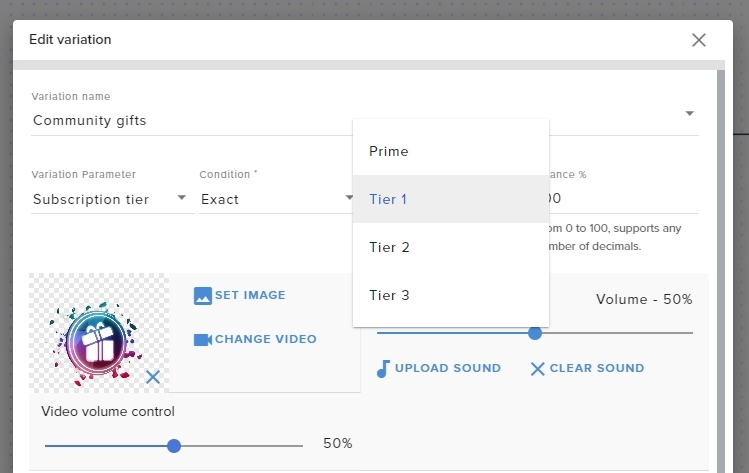
I was looking for that too getting ready to reply on twitter 
untold perch
ionic kelp
I was looking for that too getting ready to reply on twitter <:kekw:623194702560...
Lol thank you idk why my dumb butt couldn’t see this, if only I opened my EYES, lolllll
 timber bough
hi guys -- for some reason, i've noticed that after logging in via twitch the donation button is greyed out when wanting to donate to a streamer -- doesnt anyone know what that's all about?
i don't stream but when i click on "dashboard" or whatever it just redirects me back to the home page
 shell path
please can someone help me with my tips
they are not showing up on my activity page but they are on paypal, also the tips alerts aren't showing up on stream, i have the moderation turned off though
 spare wave
Hi there! I was wondering if anyone could help regarding the command watchtime? Do the minutes only count when you live watch or if you go back and watch saved vods do those count too?
 kindred cairn
my streamlab template looks like its a different size on light stream. i tried "stretch to canvas" already too
lament blade
Hello, I need a bit of help, I wanted to rebrand and re-did my twitch account... i need to switch over the stream elements stuff to match
 cosmic nimbus
 vocal sail
Sorry for only responding now.
Yes they are sharing this. And the problem continues, today it happened again.
crude pecanBOT
@timber bough ⤵️
Please logout of StreamElements at https://streamelements.com/logout and then login again to your account (Twitch/YouTube/Facebook).
@shell path ⤵️
If a viewer tipped through PayPal but no information appears in your StreamElements account, this generally means PayPal has held the tip for verification.
Until PayPal clears the tip and sends back a confirmation to your StreamElements account, no information will appear there and no alert will play, as that confirmation is the only way for us to be aware of a successful transaction.
There is a posibility that the tip may have been sent as an eCheque/eCheck - these tips can take from 7 up to 21+ days to show up on our side. Tippers can usually cancel these.
If you believe there may be an issue with the transaction, you'll need to contact PayPal support as StreamElements is only a passthrough service and never actually gets involved with the transaction or touches the money
@spare wave ⤵️
The !watchtime command is directly tied to the Loyalty system. The Loyalty system must be enabled for viewers' watchtime to count up.
To enable Loyalty, please go to the Loyalty section of your account: https://streamelements.com/dashboard/loyalty
Watchtime counts up every 10 minutes alongside Loyalty points, and only while the stream is live. Reruns will not be counted.
Please note that watchtime is not tracked by Twitch and there is no way to retroactively apply past watchtime to viewers.
@lament blade ⤵️
If you changed your name on Twitch, please follow these steps:
- Visit https://streamelements.com/logout and then log in again by connecting with Twitch.
- On the right side of the dashboard page that opens, select Join under bot settings. If it says Part select that and then select Join to send the bot to the chat. Don't forget to mod the bot by typing /mod streamelements in your channel if you have not already.
- Post your old and your new name here so that we can update your channel's chatstats tracking (must be done by staff).
@kindred cairn ⤵️
The default resolution for StreamElements overlays (theme and custom) is 1920x1080. Please add them in OBS at their full resolution and use CTRL+F to fit to screen if necessary. You can then downscale your stream in OBS settings > Video if you'd like https://i.imgur.com/6bWXxjR.png
@cosmic nimbus ⤵️
Welcome to the helpdesk! Please let us know how we can assist you today and a support volunteer or staff member will assist you as soon as they are available. Thank you for your patience.
timber bough
crude pecan
<@92766303210700800> ⤵️
thanks. that did it. i guess it'd be nice if relogging in via the donation actually triggered asking for more permissions!
formal verge
timber bough
thanks. that did it. i guess it'd be nice if relogging in via the donation act...
We will definitely provide that feedback to our devs! Glad it worked!
lament blade
crude pecan
<@456226577798135808> ⤵️
Ok, I did the instructions. Do i need to send a DM to someone?
formal verge
lament blade
Ok, I did the instructions. Do i need to send a DM to someone?
You can just provide me with the old name, the new name and your account id here
crude pecanBOT
Please provide your account ID found at the top of this page: https://streamelements.com/dashboard/account/channels This ID is public info and safe to share here.
lament blade
formal verge
You can just provide me with the old name, the new name and your account id here
Old name was
SireSmogMurk
New name is
CountSmog
formal verge
lament blade
Old name was
SireSmogMurk
New name is
CountSmog
Should be all good to go!
lament blade
thank you very much
I should be able to remove past usernames from user management without breaking anything?
formal verge
lament blade
I should be able to remove past usernames from user management without breaking ...
correct
lament blade
whats the command to give yourself points? need to make sure soundboard still works
formal verge
lament blade
whats the command to give yourself points? need to make sure soundboard still wo...
!addpoints or !setpoints
lament blade
thank you
 spare sparrow
Hello. Not sure where to post. I stream to twitch YouTube and Facebook. Recently started noticing a huge increase in my memory usage. Stream starts fine and then about 3 hours in it just seems to spike until it basically crashes OBS. Browser sources are set to clear and shutdown when scenes switch. I can't think of anything I've changed or added. No additional scenes, can't think of any plugins. Any suggestions? Or something I could potentially look for in the log? Thinking off the top of my head here, OBS typically runs about 2k memory max and then I see it will start spiking up into the stream. Once it gets around 10k it typically crashes.
 tired ibex
Can someone help.
I cant find it anywhere
What are the fees when someone sends me a tip?
And what is the difference between the "Tipping Settings" and this SE. Tipping thing that i read about but dont have on my page
 vocal axle
any reason why a video on demand source would stay on my OBS page and not disappear
 vocal tundra
buenas noches a todos, queria hacer una pregunta, alguien sabe como se habilita el comando !chastats es que al utilizarlo y entrar al link me muestra una pagina que dice ''error404'' y queria q me aparezcan las estadisticas de mi chat, disculpen las molestias
 drowsy egret
vocal tundra
buenas noches a todos, queria hacer una pregunta, alguien sabe como se habilita ...
drowsy egret
vocal tundra
buenas noches a todos, queria hacer una pregunta, alguien sabe como se habilita ...
#🇪🇸︱español
vocal tundra
drowsy egret
<#485869372691185685>
thanks
 karmic halo
elah
 sweet thorn
How do i allow the steamelements bot to allow twitch clips from viewers?
vocal tundra
ñ
karmic halo
imma leave
 final rose
I am hitting an issue today swapping users to manage commands/timers etc for a few channels I mod for at the moment.
Swapping from my account to either of the 2 accounts where I have Editor or Full Control access kicks me back to the streamelements home page and then I can't get to the dashboard on any account before I clear my cache.
Swapping to any of the 3 accounts I have bot supervisor access isn't causing any issues though I can get to commands etc there and my own account is fine.
Any ideas or suggestions on what I could try for the 2 accounts I can't get into?
crude pecanBOT
@final rose ⤵️
Please logout of StreamElements at https://streamelements.com/logout and then login again to your account (Twitch/YouTube/Facebook).
formal verge
You may need to have the owners of those accounts do the same.
final rose
formal verge
You may need to have the owners of those accounts do the same.
thanks ❤️ I will get one of them to try and see how that goes 🙂
lament blade
Thanks again for the help
 late hollow
how can find the twitch link for walking pinapples on here
lament blade
what do you mean
 spiral raptor
I am an editor level mod for a streamer, and they changed their username on twitch - and now streamelements bot is not in the chat (So not even commands work)
lament blade
they need to part the bot through their SE dashboard
then logout and login
and then add it again
it'll work
spiral raptor
Ok, i see now. I don't know why i didn't see it before in my own streamelements dashboard (Support websites I found showed from ~2 years ago, old interface). Thank you
lament blade
certainly
 nova moth
my alertbox from streamelemnets wont load on OBS
lament blade
does it trigger when you emulate?
 lyric vector
nova moth
lyric vector
nova moth
oh nvm it is now working
lament blade
if it shows the animation when emulating, it would also show it when you get a live event, nothing to worry about @lyric vector
nova moth
probs just a glitch that appeared out of nowhere
But the overlay is not loading strangely
Doesnt pop up
 lament blade
may I please have your username and the overlay name?
nova moth
Canvas Size?
lament blade
awesome glad I could help
nova moth
But the overlay isnt playing. It is just stuck (Sorry this is my first time using Streamelements actually)
lament blade
try reloading the overlay through our activity feed
nova moth
The activity feed?
lament blade
yes, on our website
lament blade
try messing around with the hardware acceleration settings on your OBS
perhaps that would help
lament blade
my pleasure
 feral marlin
Is there any way to disable the host filter to show alerts for 0 viewer hosts?
dry hare
feral marlin
Is there any way to disable the host filter to show alerts for 0 viewer hosts?
Not currently. It’s under evaluation
dry hare
feral marlin
Is there any way to disable the host filter to show alerts for 0 viewer hosts?
Reason being: 0 viewers add nothing to your stream
 prime drift
my chat stats arent working on the stream elements leaderboard extension
can someone help me get this working?
my account name on twitch is the same
 shell dagger
I'm having the chat stats issue, as well. Page just gives me a 404 and the leaderboard shows "No data".
Twitch username is "LustyMouse" 🙂
lament blade
should be fixed now
shell dagger
Thank you 🙂
 terse otter
When someone follows me the alert pops up but it is not showing in my stream chat. can anyone help me with this?
lament blade
terse otter
When someone follows me the alert pops up but it is not showing in my stream cha...
have you turned on Stream Alerts on your bot?
lament blade
try parting the bot and then adding it again, when the mission is over anyway 😛
 opaque gorge
hi, I'm having a problem to make obs show my game
like, I searched on the web and did what was recommended
but the black screen still continues
lament blade
hey, what game would that be?
terse otter
My commands are not working either
lament blade
@terse otter have you done what I asked?
terse otter
where would i check stream alerts on the bot?
lament blade
under modules, on Stream Alerts
however, if your commands aren't working, I'd recommend you part the bot and add it again
terse otter
The alert goes off but it does now show " (name) has joined the cafe" in my stream chat
lament blade
have you parted and added the bot?
 blazing cargo
I can't get Media Request dock to operate properly. I have the widget in my overlay but when I open the dock it stays blank.
crude pecanBOT
@blazing cargo ⤵️
StreamElements menu, on top of OBS > Logout > Login
 dire sky
Hello sorry for disturbing. Can i somehow make my alerts louder? They are at 200% and still barely hearing if i have anything playing in the background
 lavish pumice
you can apply a gain filter in obs to the source for your alerts
lavish pumice
yes
note you'll need to have the source audio controlled by obs
(rather than outputting to desktop)
dire sky
ohhh
 limber imp
hi
dire sky
how do i do that without having the audio also through my main headphones audio source
limber imp
my channle points leader board is blank
lavish pumice
@dire sky if you have obs control the audio (it's a checkbox in the browser source settings) then you won't hear it yourself unless you also enable monitoring in the advanced audio settings
dire sky
the thing is i wanna hear it but if i enable the monitor the stream will hear it twice
lavish pumice
right that can be a bit tricky to get right
you'd generally use a different monitoring audio device than you use for your desktop audio
dire sky
uhhhhhhhhhhhhhhhhhhhhhhhhhhhhh
wait i have an AT2020
so basically if i put the monitor device
on the at2020 headphones
without using them
i can then hear the sound once
right?
lavish pumice
if you don't have those headphones plugged in you won't hear it
there's an alternative option which is to just edit the sound files to be louder
to give you an idea what I do is I have voicemeeter banana installed and my desktop audio outputs to that and voicemeeter outputs to my physical audio device
and then I have obs monitoring also set to my physical device
dire sky
uhhh
lavish pumice
and obs set to capture the virtual device
so that way I can have obs output monitoring audio to my headphones without picking it back up
it's a bit complicated
so the easiest option would probably be to download an audio editor program (like audacity) and to increase the volume of your audio files
lament blade
i have trouble making a hug command which response with ${sender} just hugged ${user} but also add a ${redeem hug} to trigger a sound alert, both work fine seperated but is there also a way to combine this?
ionic kelp
Nope
lament blade
ok clear answer thx
 novel ember
hi how do i exclude channels from the !top offline command
 peak isle
Okk
 fresh scarab
I had issues with my sub counter overlay, yesterday it just stopped working and went from 9 to 0, this has happened before.
anyone else who got this issue? please ping me.
 blissful tundra
fresh scarab
I had issues with my sub counter overlay, yesterday it just stopped working and ...
blissful tundra
fresh scarab
I had issues with my sub counter overlay, yesterday it just stopped working and ...
Yup, start stream, wait for 10-15 minutes and numbers will be back.
fresh scarab
Yeah but it happend on my stream yesterday when it stopped working
 stable ivy
can i get some help with sesponsorships?
crude pecanBOT
@stable ivy ⤵️
Please contact us via email for support with your campaign or sponsorship. You can use our contact form here: https://streamelements.com/contact Thank you.
sand cape
lament blade
I'll need the old and new usernames
Old name - AkaneAkiMei / 61f1323f254e6913b0566045 / new name - evil_muffin_0
 mellow dragon
Hi, I need some help with chat stats, it says that it's offline, and I also changed my username, can someone help me? Old Name iceeBluuee new name : icceBlue
 elfin relic
Hi, I can't open the Overlay Editor in OBS.
 crude pecanBOT
@elfin relic ⤵️
StreamElements menu, on top of OBS > Logout > Login
vocal axle
Two part question:
I added some video on demand commands, they all work but one command seems to stay on my obs screen after the vid is over until I hit refresh.
Is there any way to add multiple videos to a video on demand command so that it randomizes the vids when the command is used?
 frail hazel
mellow dragon
Hi, I need some help with chat stats, it says that it's offline, and I also chan...
frail hazel
mellow dragon
Hi, I need some help with chat stats, it says that it's offline, and I also chan...
fixed
 woeful wolf
Hey! How to fix Top Donation - No data ? It shows recent dono but not top dono
 nimble dune
 boreal dock
How to remove Streamelements tweeting at my Stream!! Help1
boreal dock
How to remove Streamelements tweeting at my Stream!! Help1
Chat bot > modules > disable the twitter module
Or remove streamelements

 late trout
Hello!
I'm new to StreamElements and I'm trying to recreate something that I've successfully done with alerts on other platforms.
I want to have a follower .GIF and a custom sound going together in the alert box. Uploaded both the .GIF and sound. My only issue is that the .GIF starts at random time and doesn't mesh well with the audio I've carefully picked for it.
EDIT: It seems the alert generator can't keep up with the animation for some reason and was displaying the wrong look ONLY in the browser. It displayed properly in OBS.
 distant crag
hey need help witb OBS cant go live for some reason
 reef fractal
Hi, i just switched to StreamElements but i can't make my host (at least) alerts work (no alert and not appearing in the activity feed). I found kind people to try while i touched parameters but it never worked. I saw somewhere that the hosts of little channel with only 0/1 viewers wasn't working, is it the reason? Do i have to use another service to see hosts?
crude pecanBOT
@reef fractal ⤵️
We have filtered out hosts and will only show these ones on your activity feed:
- All hosts coming from an online channel with at least 1+ viewer
- Auto host events with at least 1 viewer - only from a channel that just went offline
Note: If you see X channel has hosted you with no viewers on the back, that is considered an offline host or a host with 0 viewers, we do not show these.
late trout
Can you align/color certain words of your Widget - Latest Follower/Subscriber?
For example I want to have everything in White except the name of the Subscriber ... ? Can this be edited using one/same alert? Or I have to create two and align them separately?
drowsy egret
late trout
Can you align/color certain words of your Widget - Latest Follower/Subscriber?
...
your best option is two separate labels
late trout
They have the exact options I want but for example the subcriber/follower text in Alert widget. The label has only one text option to customize - the entire text.
drowsy egret
late trout
They have the exact options I want but for example the subcriber/follower text i...
oh you meant for an alert? you could do some custom css but it needs a little bit of coding experience
late trout
No, no 🙂 I meant for Labels exactly. Sorry, still new to the terms in the platform.
Just noting that Alerts actually has the type of Text options that I was looking for, in Labels.
drowsy egret
late trout
No, no 🙂 I meant for Labels exactly. Sorry, still new to the terms in the platf...
oh yeah, the label doesn't have too much in terms of customizability compared to alerts but since they are static it shouldnt be hard to use two of them
 rocky tundra
Hi, I have changed my twitch username and I used the !rename command to transfer watchtime etc. But when I checked my favourite streamers top chatters list from stats.streamelements, it only shows my old usernames chats and it doesn't seem to count my new usernames chats. Is there any way I can transfer this data too?
late trout
Any particular reason why the 0 (zero) looks like this in the font?
 drowsy egret
rocky tundra
Hi, I have changed my twitch username and I used the !rename command to transfer...
drowsy egret
rocky tundra
Hi, I have changed my twitch username and I used the !rename command to transfer...
not possible, unfortunately
drowsy egret
late trout
Any particular reason why the 0 (zero) looks like this in the font?
does it show like that if you put it in the name?
late trout
Yes. I just tried renaming "Follower Goal" to something with 0 in it and it is displayed the same way.
drowsy egret
late trout
Yes. I just tried renaming "Follower Goal" to something with 0 in it and it is d...
it looks like it's designed this way:
 late trout
just looks really odd because the rest of the numbers don't match at all
yeah well .... 😅
rocky tundra
drowsy egret
not possible, unfortunately
The streamer cant transfer it for me either?
drowsy egret
rocky tundra
The streamer cant transfer it for me either?
nope 😪
 chilly wren
Hey guys, having some trouble getting my notifications to show up on twitch and OBS. It just started today and I have had no problems previously
rocky tundra
Ok :( thanks for answering
 zenith briar
I need help. "DONATEPAY WILL BECOME AVAILABLE WHEN YOUR CHANNEL HAS AT LEAST 100 FOLLOWERS / SUBSCRIBERS" I have 100 followers on Twitch , but it doesnt recognise it?
 ebon forum
zenith briar
I need help. "DONATEPAY WILL BECOME AVAILABLE WHEN YOUR CHANNEL HAS AT LEAST 100...
ebon forum
zenith briar
I need help. "DONATEPAY WILL BECOME AVAILABLE WHEN YOUR CHANNEL HAS AT LEAST 100...
You need to be logged in from a supported country to see Donatepay as an option in the tipping settings.
So if you use a VPN - turn it off for the setup
zenith briar
ebon forum
You need to be logged in from a supported country to see Donatepay as an option ...
I see it as option. that's not problem
it just says i need 100 followers. Despite im having 100 followers?
 halcyon salmon
hey guys, chat stats not working - 404 page not found - it's a brand new channel - no rename or stuff like that
any ideas?
ebon forum
https://www.twitch.tv/aydinchannel
is that your channel? You just got 101 followers, maybe the system did not catch it yet. let me fix it @zenith briar

Try it now please.
zenith briar
Yeah. It works now. Thanks a lot @ebon forum
 valid cave
Does anyone know how to add a !rank command in valorant I cant get it to work properly
chilly wren
Hey guys, having some trouble getting my notifications to show up on twitch and OBS. It just started today and I have had no problems previously
valid cave
Make sure you have an alert box added to your scenes/overlay
chilly wren
Thanks, i just deleted my old one and put a new on e in and now its working!
 untold sorrel
Hey folks, any idea how I can get a custom widget in streamelements to pick up the fonts on my PC? I've been told its possible
crude pecanBOT
@untold sorrel ⤵️
Google Fonts
More than 900 google fonts are supported at this time. You can preview them here: https://fonts.google.com/
Custom Fonts
Steps:
- Install the font on the streaming PC or choose a pre-installed windows font.
- In the overlay widget settings, select Text Settings
- Click on Enable Custom Font
- Type the name of the font as it appears in the windows font directory (This is usually
C:\Windows\Fonts)
Note: After installing fonts, the browser and OBS must be restarted for the font to appear.
untold sorrel
Yeah I have that working on standard streamelements widgets but, doesn't seem to detect them on this custom widget. Not to worry 🙂
ionic kelp
You sure you properly set where the font family is set?
Also might wanna ask in #dev-chat since that's more appropriate place.
 bleak olive
I am trying to help a streamer prepare with a Tiltify stream. They have it linked, but if I attempt to adjust the layer, I get this message, click the button, and it hangs.
 ionic kelp
Yeah.
they have to connect their ttiltify in integrations.
Not something you can do.
bleak olive
And if they have connected it and I still get the hangup, would that be an indication of an error somewhere?
nocturne umbra
Hello all,
i have a weird problem. My alerts don't work.
www.twitch. tv/videos/1273449350 Look at the stream around 43:54. I got bits and my whole animation didn't work.
After readding the alert in my OBS it did work.
Today was the same story but i lucky tested before going live so i readded again.
Anyone any ideas?
ionic kelp
Have them try doing this once then you should be able to it from there.
bleak olive
Ok, I will check with them for the integration then follow up if I am still unable to access the layer details.
 crimson sleet
I'm trying to use a HypeBoss on my overlays, but I can't seem to change the HP? I changed the Base HP to different values (higher and lower) and even Resetting the boss doesn't affect it. Any help? It's just stuck at 1000 hp.
I'd like to use this to encourage/track a sub goal (with bits equivalents).
Oh, interesting. I exited the Overlay editor and re-opened it, and it reset the HP to the new value. I think that solved the problem.
 sinful oyster
Hi, is there a way to change the bots name for when streaming from mobile not using OBS?
lament blade
My !sr and !soundrequest commands dont work and when I enable it, it just disables again.
 marsh osprey
crude pecan
<@181784624093986816> ⤵️
marsh osprey
crude pecan
<@181784624093986816> ⤵️
Even if people host me with 1 viewer my alerts still dont go through, and the chat alert module does not trigger...
 oblique epoch
Any ideas what to do when one of your video elements dont take: Example... I can change my Follower Animation but my Subscriber Animation refuses to change .. all of my other elements are fine so far.. its JUST my subscriber animation that refuses to change. Kinda frustrating. I even tried starting from scratch, including deleting the animation and reuploading it.
 wintry pecan
i changed my name and the bot isnt working
marsh osprey
wintry pecan
i changed my name and the bot isnt working
when this happened to me, i had to log out and back in to streamelements and reconnect things
wintry pecan
marsh osprey
when this happened to me, i had to log out and back in to streamelements and rec...
kk
 dreamy dirge
in my twitch page when someone donates to me it doesnt appear on the stream how do i fix that
marsh osprey
dreamy dirge
in my twitch page when someone donates to me it doesnt appear on the stream how ...
are they donating through stream elements?
marsh osprey
crude pecan
<@181784624093986816> ⤵️
Can someone please clarify something, do host alerts go through with more than one viewer, or will 1 viewer hosts work? So far for me, its been that hosts have to have more than one viewer for them to appear on my feed and trigger alerts
dreamy dirge
my donation button is the link to my streamelements
they are clicking the button on my twitch channel but ti doesnt appear on screen
marsh osprey
dreamy dirge
my donation button is the link to my streamelements
do you have your alerts set up through stream elements as well?
marsh osprey
ok, well you'll need to set up an alert on streamelements for tips
streamlabs has no way of knowing if you got a donation on streamelements
lament blade
Supposed to do a sleep stream tonight and my song request command doesnt work, no clue what to do
 vague shell
Hey
marsh osprey
lament blade
Supposed to do a sleep stream tonight and my song request command doesnt work, n...
is the songrequest module enabled as well?
lament blade
I dont see a songrequest module at all
lament blade
marsh osprey
is the songrequest module enabled as well?
these are all the modules I get
 marsh osprey
lament blade
these are all the modules I get
marsh osprey
lament blade
these are all the modules I get
when you click on the songrequest chat command to enable it, it should ask if you want to enable the module. press enable both
then see if it works
lament blade
marsh osprey
then see if it works
Ive tried that already, It shows that I enabled it but then when I refresh the page it disables again
marsh osprey
maybe it just doesnt work
and thats why the module is gone
there are other bots out there that have this capability, i suggest checking them out since this isnt working
 jade condor
Follower alerts dont play live. They play when i click the redo button, but only then
Any advice?
 wary nacelle
Hello everyone. I am having trouble getting my bot counter labels on my stream to display anything but "0". I have set up the chat bot correctly and it responds and counts in the chat, but not in the stream itself. Any ideas?
lament blade
marsh osprey
there are other bots out there that have this capability, i suggest checking the...
Yeah idk why its not working, what other bots have media requests?
I tried streamlabs but i need prime for getting donations through media requests
marsh osprey
i just googled song requests on stream and a few came up
lament blade
I would put it to free but I do not want to get ear raped lmaoo
lament blade
marsh osprey
i just googled song requests on stream and a few came up
Aight I'll check it out
 abstract epoch
Hey everyone im having problems getting my overlay to show up on my obs. does anyone have any suggestions
bleak olive
To follow up from my last message, the streamer advised "I can't get back to the integration settings - I connected them and now I can't disconnect or see where I can edit that again." So at this point, I can assume that Tiltify is connected, but I still get the hold up on the connect service.
 stark tusk
Hello my watchtime isn't counting can anyone help?
 mighty bear
I'm having issues with adding variations to the cheer alert for the hype cup. It will say a new variation was successfully created, but nothing shows up in the list. If I change the name of one of the default cheers and save, it disappears.
Is there any way to fix this?
 pliant fulcrum
is there anywhere where I can have just subscribe under the red sub name?
like this
So and So
just subscribed!

 crude pecanBOT
@stark tusk ⤵️
The !watchtime command is directly tied to the Loyalty system. The Loyalty system must be enabled for viewers' watchtime to count up.
To enable Loyalty, please go to the Loyalty section of your account: https://streamelements.com/dashboard/loyalty
Watchtime counts up every 10 minutes alongside Loyalty points, and only while the stream is live. Reruns will not be counted.
Please note that watchtime is not tracked by Twitch and there is no way to retroactively apply past watchtime to viewers.
 weary terrace
Hello
When i am entering !giveaway command in my chat Streamelements is not sending the giveaway page url, only the notification, why?
stark tusk
but some people have seconds counting can't i have it to? or does it just count 10min?
latent plinth
lament blade
I dont see a songrequest module at all
The song request module is located under Other -> Media Requests -> Enable Viewer Requests. https://streamelements.com/dashboard/mediarequest/general
crude pecanBOT
@marsh osprey ⤵️
We have filtered out hosts and will only show these ones on your activity feed:
- All hosts coming from an online channel with at least 1+ viewer
- Auto host events with at least 1 viewer - only from a channel that just went offline
Note: If you see X channel has hosted you with no viewers on the back, that is considered an offline host or a host with 0 viewers, we do not show these.
latent plinth
sinful oyster
Hi, is there a way to change the bots name for when streaming from mobile not us...
There is not. You will need to use SE.Live (recommended) or Ground Control to change the bot name.
crude pecanBOT
If you changed your name on Twitch, please follow these steps:
- Visit https://streamelements.com/logout and then log in again by connecting with Twitch.
- On the right side of the dashboard page that opens, select Join under bot settings. If it says Part select that and then select Join to send the bot to the chat. Don't forget to mod the bot by typing /mod streamelements in your channel if you have not already.
- Post your old and your new name here so that we can update your channel's chatstats tracking (must be done by staff).
latent plinth
stark tusk
but some people have seconds counting can't i have it to? or does it just count ...
It counts seconds, but only updates every 10 minutes.
stark tusk
AHHHHHHHHHHHH okay thank u
 dreamy nova
heya i've been having an issue for a few weeks now where my streamelements alert videos will freeze up or lag, and sometimes get stuck on the screen. when i do audio only for alerts it works just fine. but videos and gifs will completely crash. it worked great for the first few months but a few weeks ago it started this issue with stuttering and freezing. when im on the streamelements preview it looks fine on the browser, but obs and during stream itself it's all wonky. i havent yet found any fixes for this online. any ideas?
weary terrace
weary terrace
Hello
When i am entering !giveaway command in my chat Streamelements is not sen...
can anyone tell me please why its not sending the url of the page?
crude pecanBOT
@dreamy nova ⤵️
OBS > Settings > Advanced > Scroll down > Enable or disable Browser Source Hardware Acceleration, depending on its current state > Restart OBS
https://i.imgur.com/ggMe9ZE.png
dreamy nova
okay let me try that, thanks
latent plinth
weary terrace
can anyone tell me please why its not sending the url of the page?
Do you have a screenshot of what it's showing when you use the command?
 latent plinth
Ah
crude pecanBOT
@weary terrace ⤵️
If links in chat are appearing as ***** either mod the bot or disable block hyperlinks in your twitch channel settings: https://dashboard.twitch.tv/settings/moderation
latent plinth
I think if you make the bot a mod it will get around that
weary terrace
latent plinth
I think if you make the bot a mod it will get around that
i have checked its mod
oh i got it
its working now
thanks!
latent plinth
pliant fulcrum
is there anywhere where I can have just subscribe under the red sub name?
like t...
You will need to edit the variations for your alert as well, but if you change the "Alert Message" to be {name} <br /> just subscribed! it will insert a new line. The <br /> is for new lines where ever you want them.
lament blade
question, does anyone know of a giveaway widget that will not only let my subs enter, but give extra entries to different tier subs, or at the very least allow me to manually enter extra entries for those who have tier 2/3 and streamboss winners?
latent plinth
lament blade
question, does anyone know of a giveaway widget that will not only let my subs e...
You can check in #widget-share but I'm not aware of any.
sinful oyster
latent plinth
There is not. You will need to use SE.Live (recommended) or Ground Control to ch...
Meaning there’s no way to do it on iPad?
latent plinth
sinful oyster
Meaning there’s no way to do it on iPad?
If you have SE.Live open on a desktop somewhere you can probably change it and then stream from an iPad.
lament blade
how do u screen record using the stream elements app
sinful oyster
latent plinth
If you have SE.Live open on a desktop somewhere you can probably change it and t...
Okay 👌🏻 last question would I have to have it open at all times whilst streaming or once it’s set up it would work without opening it up
latent plinth
sinful oyster
Okay 👌🏻 last question would I have to have it open at all times whilst streami...
I... am not sure, I would think it would need to be open.
lament blade
lament blade
how do u screen record using the stream elements app
just askin
sinful oyster
latent plinth
I... am not sure, I would think it would need to be open.
Okay thanks for your help
latent plinth
lament blade
how do u screen record using the stream elements app
You would add a Display Capture source to OBS.
lament blade
@latent plinth wtf
latent plinth
Oh, on mobile?
lament blade
yh
 twin zodiac
can someone help me with something on streamelement?
latent plinth
#helpdesk-mobile >.>
lament blade
@latent plinth ty
latent plinth
I've never touched the mobile app :(
crude pecanBOT
@twin zodiac ⤵️
Welcome to the helpdesk! Please let us know how we can assist you today and a support volunteer or staff member will assist you as soon as they are available. Thank you for your patience.
twin zodiac
hm i stream today but all of my commands didnt work with lurk and so (shoutout) :( and i also chance my twitch name but is that the probblem ?
crude pecanBOT
@twin zodiac ⤵️
If you changed your name on Twitch, please follow these steps:
- Visit https://streamelements.com/logout and then log in again by connecting with Twitch.
- On the right side of the dashboard page that opens, select Join under bot settings. If it says Part select that and then select Join to send the bot to the chat. Don't forget to mod the bot by typing /mod streamelements in your channel if you have not already.
- Post your old and your new name here so that we can update your channel's chatstats tracking (must be done by staff).
twin zodiac
thx it working
bleak olive
bleak olive
I am trying to help a streamer prepare with a Tiltify stream. They have it link...
I wanted to check back on this. I followed up with the streamer and they advised that they did connect Tiltify to SE, but if I try to access the layer, it wants me to integrate Tiltify (even though it already is). I was asked to get in to the layer to make some adjustments, but I am running in to this roadblock.
lament blade
latent plinth
You can check in <#457957557470887947> but I'm not aware of any.
yea I did a basic search in discord for the server, I did not see any, just wanst sure what to search for, thanks anyway
hardy talon
pliant fulcrum
is there anywhere where I can have just subscribe under the red sub name?
like t...
Yes, you can turn on custom CSS and edit the CSS to make the subscriber field a different color.
dry hare
bleak olive
I wanted to check back on this. I followed up with the streamer and they advise...
I don’t believe you can access that section of their dashboard. They will need to remove and reauthenticate to tiltify
bleak olive
They mentioned not being able to find where to remove the authentication. Do you know where that might be located?
 normal trail
!settitle and !setgame all of a sudden stopped working on my stream- how can I fix this? all other commands work still.
marsh osprey
crude pecan
<@780110231807983637> ⤵️
this didnt clarify my question....please
 daring zodiac
Is there a way to add bulleted lists in the chat commands for responses? or even format a response?
latent plinth
daring zodiac
Is there a way to add bulleted lists in the chat commands for responses? or even...
Unfortunately not, twitch doesn't allow newlines in messages.
daring zodiac
Thank you
 naive sky
hi! i have a question/issue regarding timing of my alerts
latent plinth
naive sky
hi! i have a question/issue regarding timing of my alerts
What's your question?
 lofty spade
Question. Can you jump between two twitch channels using the OBS Plugin. IF so How?
naive sky
latent plinth
What's your question?
the timing is off; there's like a 3 second timing difference between what I hear and what the recording/stream hears in OBS (i hear it later than when it happens on stream).
lofty spade
naive sky
the timing is off; there's like a 3 second timing difference between what I hear...
That sounds like typical stream delay.
I would check relay buffer to see if thats it
Or just if you have stream delay on
If its not those two its just Twitch
 harsh helm
Is there a way to hide messages that start with ! for SE on screen chat
latent plinth
Agreed, that's probably typical stream delay
latent plinth
harsh helm
Is there a way to hide messages that start with ! for SE on screen chat
There is not, all messages that go to chat are seen unless they are later deleted.
harsh helm
Is there a way that could be implemented 🤔
naive sky
I was able to reduce the delay to a single second, thanks @lofty spade ! it won't let me go to 0, should I be able to choose 0?
 lofty spade
naive sky
I was able to reduce the delay to a single second, thanks <@!309153158330843139>...
lofty spade
naive sky
I was able to reduce the delay to a single second, thanks <@!309153158330843139>...
If its not enabled then its good. But there is an automatic delay from twitch's side
 hollow shadow
hi, im using obs studio and stream elements, my stream information box is no longer there(where i change my title, going live notification, etc.) how do i add it back?
lofty spade
hollow shadow
hi, im using obs studio and stream elements, my stream information box is no lon...
Go to view, docks, and them Stream Information
Make sure there is a check next to it

 hollow shadow
my activity feed is activated but its not there
worldly escarp
disable it and enabled again
lofty spade
@hollow shadow Completely disconnect and reconnect your twitch to OBS. It seems to be bugged
hollow shadow
by logging out? i already did that
lofty spade
hollow shadow
by logging out? i already did that
Ok, log out in your settings(where you connect twitch to OBS) then restart your PC. Re open obs and re connect. That should fix it. It could be bugged tho.
this page

 midnight bobcat
Im trying to set a follower goal but when I try it doesn’t give the accurate amount of followers I currently have. I have 99 followers but the bar says I have 76. And that’s in accurate. Is there a way for me to change the middle number??
crude pecanBOT
To reset goals:
- from the Overlay Editor > Session data on top right (monitor symbol) > Goals tab > reset progress of desired goal
- from the Dashboard > Activity feed on the left > Widget data on the right > Goals tab -> reset progress of desired goal
Note: Goal widgets (progress) only counts up and doesn't go down automatically, if you lose followers/subs.
 keen magnet
i set up recent follower but after a while the name just disappears and shows no name until the next one follows
dry hare
keen magnet
i set up recent follower but after a while the name just disappears and shows no...
Do you have a recording of this by chance? Can you create a clip and paste the URL minus the https:// here?
crude pecanBOT
@keen magnet ⤵️
Please provide your account ID found at the top of this page: https://streamelements.com/dashboard/account/channels This ID is public info and safe to share here.
dry hare
That too
keen magnet
its easy to find it happened a lot
trust
oh what does account id do
it's right under my facecam, the recent follower overlay half the time had a name and most of the time didnt
here's this
is there anything i can do to fix it
dry hare
keen magnet
is there anything i can do to fix it
Asking staff to peek at it
keen magnet
dry hare
Asking staff to peek at it
awesome thank u so much
dry hare
keen magnet
awesome thank u so much
No prob. Dunno when they’ll reply. They’re handling another issue at the moment. I’d expect something relatively soon
 formal flame
not sure if I'm in the right place but I am trying to update what my streamelements bot says when i get a new subscriber. I just updated it a couple weeks ago but now for the life of me i cannot find it on the streamelements dashboard lol i bet you it's right in front of my face but ive been looking for days and i still cant seem to find where i can edit what the bot says when i get a new subscriber 

dry hare
formal flame
not sure if I'm in the right place but I am trying to update what my streameleme...
I believe it’s under bot modules > events ?
 tiny crystal
im having an issue trying to stream on twitch. I installed a new graphics card today and updated the drivers but get this now
 worldly escarp
keen magnet
its easy to find it happened a lot
worldly escarp
keen magnet
its easy to find it happened a lot
Hey, youre talking about the recent follower?
keen magnet
worldly escarp
Hey, youre talking about the recent follower?
yeah
worldly escarp
ok one sec
worldly escarp
tiny crystal
im having an issue trying to stream on twitch. I installed a new graphics card t...
try opening the OBS as admin
keen magnet
worldly escarp
ok one sec
ok
worldly escarp
keen magnet
ok
I reloaded the overlays, it should work now. if it does disappear again please let us know
keen magnet
worldly escarp
I reloaded the overlays, it should work now. if it does disappear again please l...
awesome idk what that means what’s reloading haha
worldly escarp
keen magnet
awesome idk what that means what’s reloading haha
it should solve it
lament blade
Not sure which channel to ask this in. But, I want to add a plugin to streamelements obs. how do I do that?
I want to add the plugin - Tuna - to my se obs
 potent ibex
lament blade
I want to add the plugin - Tuna - to my se obs
potent ibex
lament blade
I want to add the plugin - Tuna - to my se obs
Streamlabs OBS or StreamElements OBS?
potent ibex
Should just be able to install it, nothing special needed
lament blade
I did the manual download. I guess I can try the installer and see if that works. But the manual download said just drop the two folders in the main directory and it would work but it did not.
potent ibex
Did you restart OBS?
lament blade
Yes
potent ibex
Open your obs-studio installation folder (eg. Right click on the shortcut and click "Open file location")
Navigate two directories up
Drop the contents of the folder plugin in the directory
Merge the files
Tuna should now show up in the tools menu of obs-studio
These steps?
lament blade
This should work, yes
Oh, okay. I put it in the actual stream elements directory. Thanks.
nope, the plugin folder in your OBS
Thanks @lament blade @potent ibex
ionic kelp
lament blade
can you guys
Not the place for that.
 snow tinsel
Hello?
Does anyone know how I can change !songrequest to just !request?
I've tried this
 lament blade
you can assign it the alias request
snow tinsel
Oh ok
snow tinsel
lament blade
you can assign it the alias request
Thanks!
snow tinsel
lament blade
you can assign it the alias request
The media share seems a bit quiet how do I turn it up?
And there seems to be a massive delay between the video and audio
snow tinsel
lament blade
try reloading your overlays through the website
Ty!
snow tinsel
lament blade
try reloading your overlays through the website
Heyo?
lament blade
Restart OBS
snow tinsel
lament blade
Restart OBS
What do you think the issue is?
lament blade
In that case, try playing around with the hardware acceleration settings on OBS, let me know if that helps
snow tinsel
lament blade
In that case, try playing around with the hardware acceleration settings on OBS,...
Where's that?
crude pecanBOT
OBS > Settings > Advanced > Scroll down > Enable or disable Browser Source Hardware Acceleration, depending on its current state > Restart OBS
https://i.imgur.com/ggMe9ZE.png
 sharp gazelle
Hi! I need help with my game capture. It won't display the game, and the screen remains black the whole time. If I can get help with this that would be great 🙂
lament blade
what game would that be?
snow tinsel
 lament blade
either enable or disable it and see if it helps
sharp gazelle
lament blade
what game would that be?
Pokemon Legends Arceus on the nintendo switch
lament blade
so you're using a capture card, I suppose?
snow tinsel
Don't spam
sharp gazelle
snow tinsel
Don't spam
it was an accident. I placed something on my keyboard. Anyway, I am using an elgato HD60 S
lament blade
I'd recommend checking on this with them and if they can't help, directly with OBS
this could be a game specific quirk
sharp gazelle
i've streamed with my nintendo switch before, didn't have issues. This is an OBS issue since the game displays fine on my PC/monitor and on Window Capture, just not Game capture. Something with the settings is off
lament blade
in that case, I'd recommend you reach out to OBS on their discord and ask for help with this
sharp gazelle
okay thank you!
lavish pumice
game capture? you should be using a video capture device source for that.
game capture is for games running on your computer
@sharp gazelle
if you say 'window capture' works then I assume you're using the elgato capture program to show it, don't do that just close it, add a video capture device to obs and if you need to show the capture card input on your screen use a source projector inside obs
 paper flint
Hello, does anyone know the variables for !top online/offline/coins/alltime to make a custom command?
 balmy light
Is there a website for relogging streamelements to my twitch bot account? Ive changed the password and now my bot isnt responding to commands. Im not able to log it back in from the OBS app as it thinks its still logged in and theres no option to log it out
crude pecanBOT
@balmy light ⤵️
- Right-click your OBS desktop shortcut (not the SE.Live shortcut) and navigate to Properties
- In the Target field, add the following to the very end:
--remote-debugging-port=40404(don't forget to add a space before the current path)
https://streamelements.is-serious.business/6ihr2EL.jpg - Open OBS (or restart if it was open)
- Open your web browser and type in:
localhost:40404(try127.0.0.1:40404if you see issues - https://streamelements.is-serious.business/3EGPQFJ.jpg) - Click on StreamElements - Activity feed - https://streamelements.is-serious.business/2kJYt2b.jpg
- Click on >> in top right above the code and select Console - https://imgur.com/a/Xh6zc6A
- Type the following into the console and hit enter:
store.customBot.removeCustomBotIntegration() - Try setting the custom bot name, make sure you follow https://strms.net/custombotname
- Remove the flag added in step 2 from your shortcut properties
balmy light
It doesnt work. When trying to enter localhost:40404 it says its unreachable
balmy light
Yeah neither of the connection methods work. Both say it cant connect to the site
NVM I switched to beta version of OBS.live and back to stable version and that fixed the log out issue
 lethal heron
I'm having issues with my cheer section in the alert box, for some reason the sound and the image wont update.
ionic kelp
Is it the stock alert box or custom?
lethal heron
Yes, each one is different
ionic kelp
Not that. I mean under the variations tab for each alert type.
lethal heron
oh, no i havent touched that
ionic kelp
Have you hit save since making the change for that one?
lethal heron
yes
ionic kelp
try disabling variations and see if it works then.
 wind idol
Hello there 👋 i wanted to ask if i am able to access the dashboard on stream elements for a stream that i mod for?
ionic kelp
Disregarding the message have the person create an invite from this link.
crude pecanBOT
Please provide your account ID found at the top of this page: https://streamelements.com/dashboard/account/channels This ID is public info and safe to share here.
wind idol
Thankyou very much!
 tawny sky
Hi ^^ i recently started using streamelements and i dont know why i dont have access to my chat stats... it sais 404 page not found...
ionic kelp
Have you changed your name since joining?
tawny sky
No, it has been always the same
 young stone
I'm also having issues with accessing SE dashboard. If I try from the main page, it just routes back to the main page (https://streamelements.com/dashboard --> auto changes to https://streamelements.com/). If I go into my Profile first, then I can actually go to https://streamelements.com/dashboard and stay there, but the page doesn't load. I also can't get to the dashboard for other accounts I am Editor in
ionic kelp
You and them need to do this.
crude pecanBOT
Please logout of StreamElements at https://streamelements.com/logout and then login again to your account (Twitch/YouTube/Facebook).
young stone
I've tried that before, and again now. Doesn't work unfortunately
ionic kelp
Reread my message.
young stone
This happened to me a few times before, and the log out-log in method usually works. Doesn't now though somehow :(
Oh, specifically using that URL
woahh ok it works, thank you!!
hmmm I can get into my own dashboard now, but not to those I'm an Editor in
tawny sky
Yes
ionic kelp
1 sec
tawny sky
i was going to write it now
young stone
ionic kelp
Reread the message
Am I missing something? Log out of Streamelements - Done. Via the link - Done. Log in again - Done.
ionic kelp
There's an and
young stone
That's exactly what I had done. following the "and then" even
young stone
 tawny sky
it sais them
ionic kelp

 narrow talon
hi can anyone help me setup an alert when i try to put my own video its blank
 tawny sky
@ionic kelp any update on my issue?
 granite galleon
Is it me or Text Scroll is missing from Media Request? I say this as it seems I can't edit it anymore on one of my old overlays.
ionic kelp
@tawny skySorry about that. Fixed now.
tawny sky
thanks ^^
granite galleon
granite galleon
Is it me or Text Scroll is missing from Media Request? I say this as it seems I ...
Ah I found it, it's in Text Settings before Secondary Text section.
vocal axle
Two part question:
1)I added some video on demand commands, they all work but one command seems to stay on my obs screen after the vid is over until I hit refresh.
2)Is there any way to add multiple videos to a video on demand command so that it randomizes the vids when the command is used?
 still jungle
hi i have a question regarding !song command, i have noticed that if I pause or stop the song the command still show the last song played, is it possible if i pause a song or stop playing it will response as there is no current song playing at the moment ???
 raw kernel
Hey I enabled the Store items & Points system.. I put some videos that you can buy for the points. But everytime someone buys it, its super loud compared to anything else. Do I really have to upload a mute mp4 and the mp3 afterwards? We couldn't find a soundpanel for anything regarding the redeemed items/videos.. would love some help!
 fallow bridge
Hello , ive been trying to import bot commands from nightbot into my stream elemnts and everytime i try it just open a blank window then closes it and nothing happen
 cyan bear
Hey there, for some reason I am unable to withdraw from SE.Pay, even though I am above minimum threshhold. It is telling me I am not.
crude pecanBOT
@cyan bear ⤵️
Please contact us via email for support with SE.Pay. You can use our contact form here: https://streamelements.com/contact Thank you.
 dark lantern
 patent halo
hello my moderators can't edit my commands in the chat I've tried everything like (!command edit !test this is a test....) I would be happy if someone could help me thanks! LG Mike
late trout
So I crated Labels for Latest Follower & Latest Subscriber. However, since I'm still a growing channel I don't receive new ones every stream. I thought that the information will be automatically populated (since there are other plugins that do that). This doesn't seem the case and just stays empty. Is there a way to enable this? Or I have to wait for a new ones to arrive?
Also my follower goal doesn't account my current follower count. Why is that? Can it be set to include my existing follower number?
 keen verge
Looking for assistance please. I've recently updated my Twitch Name (old: Chaplain_chadtp) (new: Padres_Porch) and am having trouble with the SE:Merch store not updating it's link to reflect the new name. Is there a way to update my SE profile to the new Twitch name across the board? Thanks.
 plain pagoda
Hi i am getting "could not add song: internal server error" with my song requests. Is there is fix for this? Thx
ionic kelp
patent halo
hello my moderators can't edit my commands in the chat I've tried everything lik...
Fixed
ionic kelp
plain pagoda
Hi i am getting "could not add song: internal server error" with my song request...
Use link/video id. Not title.
ionic kelp
keen verge
Looking for assistance please. I've recently updated my Twitch Name (old: Chap...
Everything except merch can be fixed on your end easily.
crude pecanBOT
Please logout of StreamElements at https://streamelements.com/logout and then login again to your account (Twitch/YouTube/Facebook).
ionic kelp
To fix merch however it'll require deleting everything you have added so far. Would you like me to have staff do that?
plain pagoda
ionic kelp
Use link/video id. Not title.
okay TY ❤️
 potent dune
First time SE user. Have started working on creating overlays to use on stream, but when I copy/paste the link to the source-board on OBS, only the top-left part is appearing. For example, I am trying to input a "Starting soon" screen with countdown. I do all the editing on SE.com, and it looks great on preview, but when I actually import it, most is cut off, and I can't figure out how to maximize it to fill the whole screen (resizing just makes the current 1/4 of the screen larger). How do I see the rest of my screen?
crude pecanBOT
The default resolution for StreamElements overlays (theme and custom) is 1920x1080. Please add them in OBS at their full resolution and use CTRL+F to fit to screen if necessary. You can then downscale your stream in OBS settings > Video if you'd like https://i.imgur.com/6bWXxjR.png
halcyon salmon
hey guys, chat stats not working - 404 page not found - it's a brand new channel - no rename or stuff like that
any ideas?
ionic kelp
for RoadToMadeira?
ionic kelp
ah. Missed that bit 
 urban nacelle
I i need explanation regarding se.pay. I showed up money then twice it never came to me.
crude pecanBOT
@urban nacelle ⤵️
Please contact us via email for support with SE.Pay. You can use our contact form here: https://streamelements.com/contact Thank you.
 stuck gale
Hey guys,
lament blade
hi so i hAve a question why cant i change the video quality of my twitch stream as in why cant people change the video quality of it while i m streaming
would be great if anyone could help
ionic kelp
Unless you're partnered you're not guaranteed to get those options.
Anyone else is luck with no specific way to really get it.
lament blade
ionic kelp
Unless you're partnered you're not guaranteed to get those options.
wait foreal ?
ionic kelp
Yup
halcyon salmon
affiliate is enough - restart and wait some mins until you can change it
@lament blade
 lofty spruce
Hi, Is it possible to put command data in a widget?
lament blade
so i meant this
 ionic kelp
🤦♂️
ionic kelp
My first statement is correct.
halcyon salmon
ionic kelp
There's a chance you can get it otherwise but not always sure to have it.
lament blade
ionic kelp
There's a chance you can get it otherwise but not always sure to have it.
owh ok
thanks
ionic kelp
@halcyon salmonThose stats are fixed btw
 mellow haven
How do I fully reset my streamelements account?
sand cape
Hi, I need some help with chat stats, it says that it's offline, and I also changed my username, can someone help me?
 gray stratus
i have a quick one i cant check my Donations liek someone donated 5$ and i missed the alert and idk how to have live feed of that only found subs and follows
 plain wharf
hii im having a issue where its saying it coundnt access the specified channel or stream key, i just signed into my twitch on obs studio and it wont stream
narrow talon
narrow talon
hi can anyone help me setup an alert when i try to put my own video its blank
🤔
 dry hare
plain wharf
this keeps showing now too
dry hare
plain wharf
this keeps showing now too
Obs settings > stream > authenticate to twitch
sand cape
Me now ?
plain wharf
dry hare
Obs settings > stream > authenticate to twitch
it says its ok


 dry hare
plain wharf
dry hare
plain wharf
Disconnect it and reconnect it
plain wharf
dry hare
Disconnect it and reconnect it
ive done it 3 times
dry hare
plain wharf
ive done it 3 times
Try this
crude pecanBOT
StreamElements menu, on top of OBS > Logout > Login
sand cape
@dry hare can you help me now . pretty please ☺️
plain wharf
dry hare
Try this
thankyou so much !!
crude pecanBOT
@sand cape ⤵️
If you changed your name on Twitch, please follow these steps:
- Visit https://streamelements.com/logout and then log in again by connecting with Twitch.
- On the right side of the dashboard page that opens, select Join under bot settings. If it says Part select that and then select Join to send the bot to the chat. Don't forget to mod the bot by typing /mod streamelements in your channel if you have not already.
- Post your old and your new name here so that we can update your channel's chatstats tracking (must be done by staff).
sand cape
Yeah but my chat stats îs offline
dry hare
sand cape
Yeah but my chat stats îs offline
Follow the instructions
 gleaming moss
Sorry- was trying to show what I had. My shoutout command is not working. It’s something with using touser.url, or something Im doing wrong to keep getting the @ symbol in the command.
dry hare
gleaming moss
Sorry- was trying to show what I had. My shoutout command is not working. It’s s...
There’s a shoutout template command you can modify to suit your needs when you create a custom command. Delete your current one and use the template
sand cape
Old name - AkaneAkiMei / 61f1323f254e6913b0566045 / new name - evil_muffin_0
gleaming moss
dry hare
There’s a shoutout template command you can modify to suit your needs when you c...
Im doing a custom command as a mod- can I send you what I had? It was working- then it got edited
sand cape
Done
gleaming moss
Im trying to modify commands in the chat @dry hare
 lilac gazelle
Hello,
I would like to use Se.pay. I am from the Netherlands. How can i activate this ?
gleaming moss
Can someone assist me with fixing my shoutout command in twitch within the chat versus the stream elements desktop. Trying to fix my command for an upcoming raid train; I can whisper what I have; I know it’s a simple fix. Much appreciated!
 spiral sleet
Could anyone tell me why "monthly top tip" is not resetting? Hit that session reset button several times now 😦
 novel hedge
Hi, can someone assist in regards to 1099 forms and sponsorships? I have sent in a request that has not been responded to and the lack of clarification is currently holding up mortgage proceedings for me IRL.
gleaming moss
@dry hare Are you able to view my whisper?
dry hare
gleaming moss
Im doing a custom command as a mod- can I send you what I had? It was working- t...
You should be able to ! cmd edit <command name> “<response>”
dry hare
sand cape
Done
Give it a few
 spark anchor
Hey, where do I change the sub multiplier? For loyalty. This option is not appearing.
 scarlet tiger
Do you have access to subs? If so, please try relog
crude pecanBOT
Please logout of StreamElements at https://streamelements.com/logout and then login again to your account (Twitch/YouTube/Facebook).
gleaming moss
dry hare
You should be able to ! cmd edit <command name> “<response>”
Right- Ive tried to edit it; however; the url for the dj’s name has the ‘@‘ symbol in it. I cant remember how to fix it. Just wanted someone to look at my command
scarlet tiger
Great 🙂
dry hare
gleaming moss
Right- Ive tried to edit it; however; the url for the dj’s name has the ‘@‘ symb...
What is the syntax you’re using?
gleaming moss
dry hare
What is the syntax you’re using?
Not sure how to reply without sending a link; I sent a whisper of the command
 tranquil reef
i use streamlabs for alerts and donations but i want to use streamelements as a chat bot but i can't remove the link that comes up from streamelements when i do the !donate command
[2:18 PM]
any idea how to fix that
dry hare
gleaming moss
Not sure how to reply without sending a link; I sent a whisper of the command
Just type what you’re trying to say in chat without the https:// of a link
dry hare
tranquil reef
i use streamlabs for alerts and donations but i want to use streamelements as a ...
You want to do what?
 blissful prairie
Hello. My stream elements bot does not respond to any of the commands im inputing.
tranquil reef
i want to remove the link that comes up when i do !donate ( there is no command for it)
You can Tip to emperordeese using this link etc
 fervent crypt
hello, i am from the uk and i have surpassed 100 followers but i would like se.pay. i was wondering if you could help me please
blissful prairie
blissful prairie
Hello. My stream elements bot does not respond to any of the commands im inputin...
or does this go in #helpdesk-selive
dry hare
tranquil reef
i want to remove the link that comes up when i do !donate ( there is no command ...
There is a command for it, it is a default command. It is under “tip”
crude pecanBOT
@blissful prairie ⤵️
Go to the Dashboard > Right side > Part channel > Join channel (https://streamelements.com/dashboard) https://i.imgur.com/uYVb8OK.png

 olive marten
I can't withdraw money from my SE.pay.
Every time I try it sends me to discord.
tranquil reef
dry hare
There is a command for it, it is a default command. It is under “tip”
I love you so much thank you was driving me NUTTTS
 subtle crane
Hello, where can I get assistance regarding the chatstats page throwing 404 ?
 tropic pendant
Hi! I've just changed my username on Twitch, but my old one is still showing on streamelements, how can I change it? My stats, alert box and my bot are not working because of it
dry hare
gleaming moss
Not sure how to reply without sending a link; I sent a whisper of the command
Whatever you’re typing via twitch chat put as a quote in here, and leave out any URL
crude pecanBOT
@tropic pendant ⤵️
If you changed your name on Twitch, please follow these steps:
- Visit https://streamelements.com/logout and then log in again by connecting with Twitch.
- On the right side of the dashboard page that opens, select Join under bot settings. If it says Part select that and then select Join to send the bot to the chat. Don't forget to mod the bot by typing /mod streamelements in your channel if you have not already.
- Post your old and your new name here so that we can update your channel's chatstats tracking (must be done by staff).
@tropic pendant ⤵️
StreamElements menu, on top of OBS > Logout > Login
olive marten
 crude pecanBOT
@olive marten ⤵️
Please contact us via email for support with SE.Pay. You can use our contact form here: https://streamelements.com/contact Thank you.
subtle crane
subtle crane
Hello, where can I get assistance regarding the chatstats page throwing 404 ?
🙂
blissful prairie
crude pecan
<@729785806859796561> ⤵️
This didnt seem to work. It said bot failed to join in the bottom right corner. I have it marked as a mod as well.
dry hare
subtle crane
🙂
Old name / new name
subtle crane
New name: rusnvc
crude pecanBOT
@blissful prairie ⤵️
StreamElements menu, on top of OBS > Logout > Login
subtle crane
im not sure about the old name, I gues it was renegvde
crude pecanBOT
@blissful prairie ⤵️
Please logout of StreamElements at https://streamelements.com/logout and then login again to your account (Twitch/YouTube/Facebook).
blissful prairie
crude pecan
<@729785806859796561> ⤵️
This managed to work. Thank you so much! 👍
mellow haven
How do I fully reset my streamelements account?
 lilac elbow
Switching from SLOBS to Elements, I have the extension installed and both sites open, yet, around 8 pages in I get an error, any help?
tropic pendant
crude pecan
<@198003640269668354> ⤵️
old name - grimsevers, new name - malice
old name - grimsevers, new name - malice
still can't get my alertbox or other overlays working 😦
tropic pendant
grimsevers / malice
dry hare
tropic pendant
grimsevers / malice
Fixed stats
tropic pendant
thanks!
dry hare
tropic pendant
thanks!
I’m gonna have you do two things before testing alerts
crude pecanBOT
Please logout of StreamElements at https://streamelements.com/logout and then login again to your account (Twitch/YouTube/Facebook).
StreamElements menu, on top of OBS > Logout > Login
dry hare
Do these two things and let’s see if your alerts work
tropic pendant
Alerts are working, thanks! Just my chatbox now
 plush ferry
How can i enable tipping media request? it shows this on the media request settings page but nothing to enable it
 tropic pendant
np! all fixed thanks
lilac elbow
How do I set up anonymous gifts?
 flint cedar
where do i put the links at for the overlays? i cant find it in SE.LIVE
crude pecanBOT
@flint cedar ⤵️
To add your overlays to OBS, add a new browser source in your scene. Paste your overlay URL in the browser source properties, set the dimensions to 1920x1080 (unless you changed them on the website) and check Shutdown source when not visible.
dry hare
plush ferry
How can i enable tipping media request? it shows this on the media request setti...
There should be a settings link
lilac elbow
@dry hare Any help on anonymous?
mellow haven
How do I fully reset my streamelements account?
dry hare
lilac elbow
<@!128166843360739328> Any help on anonymous?
Not sure what you mean
dry hare
mellow haven
How do I fully reset my streamelements account?
I’m not entirely sure if it can just be “reset”. It may require requesting it be deleted and then signing in. Is there a reason you want it reset?
lilac elbow
Anonymous cheers and anonymous sub gifts
Also curious how to set a character limit for the on-screen alerts of donations and bits
mellow haven
dry hare
I’m not entirely sure if it can just be “reset”. It may require requesting it be...
I am a moderator in a twitch channel and I have supermods, which has ability to do !settitle and !setgame, but it wont work for me
 spiral wigeon
mellow haven
I am a moderator in a twitch channel and I have supermods, which has ability to ...
spiral wigeon
mellow haven
I am a moderator in a twitch channel and I have supermods, which has ability to ...
You sure the commands themselves aren't disabled in https://streamelements.com/dashboard/bot/commands/default ?
mellow haven
no they're not
works for all other supermods just fine
I have changed my twitch username, it might have something to do with it
spiral wigeon
If it stopped working after you changed your name then that's definitely it, I don't think the role carries over with name changes, but I'm not one of the devs or mods so I wouldn't be sure. Have you asked the streamer to double check under the user management tab?
dry hare
mellow haven
I have changed my twitch username, it might have something to do with it
Have them send you another manager link
dry hare
lilac elbow
Anonymous cheers and anonymous sub gifts
Also curious how to set a character li...
I’m still not sure what you’re asking for
mellow haven
dry hare
Have them send you another manager link
yea I will tmrw
Cant today anymore
halcyon salmon
can you block user/bots for StreamElements Chat Stats???
gray stratus
i have a quick one i cant check my Donations liek someone donated 5$ and i missed the alert and idk how to have live feed of that only found subs and follows
dry hare
gray stratus
i have a quick one i cant check my Donations liek someone donated 5$ and i misse...
Check the filters in activity feed
gray stratus
dry hare
Check the filters in activity feed
all are active
dry hare
gray stratus
all are active
here?
 gray stratus
dry hare
here?
gray stratus
dry hare
here?
its the same as u yes
still cant find the donation
can find only subs and followers
crude pecanBOT
@gray stratus ⤵️
If a viewer tipped through PayPal but no information appears in your StreamElements account, this generally means PayPal has held the tip for verification.
Until PayPal clears the tip and sends back a confirmation to your StreamElements account, no information will appear there and no alert will play, as that confirmation is the only way for us to be aware of a successful transaction.
There is a posibility that the tip may have been sent as an eCheque/eCheck - these tips can take from 7 up to 21+ days to show up on our side. Tippers can usually cancel these.
If you believe there may be an issue with the transaction, you'll need to contact PayPal support as StreamElements is only a passthrough service and never actually gets involved with the transaction or touches the money
dry hare
odds are this is what happened ^^
gray stratus
oh ty then 🙂 i really appreciate ur answer
 turbid edge
hello!, how i unban a user?
spiral wigeon
My chatstats page is a 404, I don't need to move it from my old name since I didn't use streamelements before now. Account ID being 61f9a4f57822fb6531c7bbf7, username B72nd
 sonic perch
I'm not sure if this is where to post this but bois I need some help. I posted this to reddit also.
TLDR: SEOBS keeps lagging every other second and I can't figure out why. Changed some settings but nothing. Game runs fine but SEOBS lags.
Welp, I'm not sure what else to try so I'm here. I'm not even sure if y'all will be able to help me or not. My SEOBS lags every couple seconds for like a second, even while not streaming/ recording. I just have SEOBS pulled up and it's lagging. My game is fine, no issues. I've tried lowering the bitrate, changing/ lowering a bunch of settings in SEOBS/ in game. Flushed my router etc.
Encoding is set for H. 264 (new), 5k bitrate, downscaled to 1080 from 1440. Downscale filter- Bilinear.
CPU is at 60% while not in a match but when I get into a match it goes up to 100% at times. Warzone uses most of the CPU then OBS uses the rest with other programs like discord/ chrome using a bit etc. i9 9900k/ RTX 2080 super. I'm using 3/4th of my VRAM in game. I've lowered my settings etc to get it just under 1/2 and it still lags.
Around 400mbps download/ 20 upload. I've got a good PC/ good internet. I'm not sure what's going on, it's fairly annoying. I'm not sure if it's just something in my PC that's going bad or what. I can post a log but I'm not sure where to get it from or if I need to stream for a bit and then grab the most recent one etc. IDK. Anyways, thanks for your help/ input.
https://obsproject.com/logs/k6k-_RQCTsT3ZzCk
Edit: I saw it said encoding overloaded. I'm not sure how to fix that.
crude pecanBOT
@sonic perch ⤵️
Please provide a log from your last stream. To do this, in OBS go to Help > Log Files > Upload Current Log File and paste the link to the log file here.
 outer nexus
alerts bugged again?
drowsy egret
FYI: Our dev team is investigating issues with alerts, apologies for the inconvenience!
 warm egret
seems the same on all stream I mod...
they are poppin' in incredibly delayed
warm egret
drowsy egret
FYI: Our dev team is investigating issues with alerts, apologies for the inconve...
Thanks, man
Appreciate the support
 silk shell
hello, i'm wondering why some event triggers for the emotesplosion (emote wall) are showing animated emotes I haven't selected. notlikethis, a 1k bit snowflake thingy, yohiyo, buncha other animated ones I can't even select or unselect anywhere. anyone know why this is happening? Raids and subs show the ones I've selected, bits of various amounts show animated twitch global emotes
 old bone
ive been looking for so long, when im in a imported overlay for my alert box, it has a premade small box but my alerts need a bit more space on the canvas. how do i make the workspace bigger?
spiral wigeon
For them to help you, you need to also put your account ID (https://streamelements.com/dashboard/account/channels) and your old twitch name (assuming you've changed your name in the past)
spiral wigeon
old bone
ive been looking for so long, when im in a imported overlay for my alert box, it...
You can resize your canvas by going to the My Overlays tab and clicking the three dots on the said overlay, then click Properties.
old bone
spiral wigeon
You can resize your canvas by going to the My Overlays tab and clicking the thre...
wicked, thank you!
 abstract hemlock
i didn't find old chat stat page, created a new one for you
 tough sedge
hallo , i need some help with the chat stats thing , i renamed my channel and i lost the track , thank you:)
spiral wigeon
abstract hemlock
i didn't find old chat stat page, created a new one for you
Would you be able to do that for me as well? Account ID 61f9a4f57822fb6531c7bbf7, new name B72nd, haven't used streamelements on this account so just want a new one
abstract hemlock
spiral wigeon
Would you be able to do that for me as well? Account ID 61f9a4f57822fb6531c7bbf7...
done
spiral wigeon
Thank you.
tough sedge
i tried to kick the bot and make it join again but that didnt work
crude pecanBOT
@tough sedge ⤵️
Please provide your account ID found at the top of this page: https://streamelements.com/dashboard/account/channels This ID is public info and safe to share here.
abstract hemlock
old name and new name too please ⤴️
tough sedge
i cant see the ID
oh ok i see it
account ID 5f14be596a285f0ce8cc92ef , old name DrTriHouse , new name AtypicalLUL
 ashen field
hello, i would like to know if it is possible to get the !watchtime command to work and show the watchtime for the last few months or can it only be fixed to show the watchtime from now onwards
abstract hemlock
tough sedge
account ID 5f14be596a285f0ce8cc92ef , old name DrTriHouse , new name AtypicalLUL
fixed