#helpdesk-twitch
1 messages · Page 924 of 1
 tender salmon
Any ideas on my issue mate?
 lament blade
tender salmon
Any ideas on my issue mate?
lament blade
tender salmon
Any ideas on my issue mate?
try reloading the overlays and refreshing the cache on OBS, that should do the trick
 clear raven
they are activated by Follow's Sub's osv on Twitch @lament blade
tender salmon
Done that a few times already sorry. The problem alerts wont even show in the overlay edit or preview screens
lament blade
clear raven
they are activated by Follow's Sub's osv on Twitch <@456226577798135808>
take a look at the #widget-share channel and see if anything suits you there
lament blade
tender salmon
Done that a few times already sorry. The problem alerts wont even show in the ov...
are they variations?
tender salmon
Yes, but the same variations will work fine with other events, so it's not the variations at fault
lament blade
can you tell me which variations would those be? I'd like to have a look
tender salmon
Channel: Danotage He's an SE partner. The last 17 month sub in the activity feed
lament blade
the overlay name is alerts only, right?
tender salmon
Oh sorry, correct
lament blade
I'm looking through and I cannot spot a variation for 17 months
I see 3+ as the highest
tender salmon
Yea, it's the 3 month alert, but it's the last 17 month sub in the activity feed that doesn't work
 uneven jacinth
anyone having same issue cant login to streamelements on obs using twitch it goes back to log in menu everytime, i cleared cache on chrome and logged out and still same issue, activity feed in particular is not working its network error all the time.
lament blade
@tender salmon can I replay the alert? I see that he's live
tender salmon
Sure
 keen wigeon
uneven jacinth
anyone having same issue cant login to streamelements on obs using twitch it goe...
keen wigeon
uneven jacinth
anyone having same issue cant login to streamelements on obs using twitch it goe...
Can you log into your account in our website?
uneven jacinth
yeah i can log in after clearing cache, but now from obs live i cant connect to activity feed, nor see activity feed from the website as well
i get this @keen wigeon

 simple marten
it does! thank you very much
lament blade
tender salmon
Sure
in the message, the viewer used the word embarrassed, which has the word 'ass' in it, that caused it to be picked up and filtered by the profanity screen
this is why we couldn't replicate it as well
tender salmon
lament blade
in the message, the viewer used the word embarrassed, which has the word 'ass' i...
I've mentioned before that the filter is way too sensitive... Names with 'ass' in them (Lass, Sass, etc) used to get that part replaced with some random emote which was at least funny, but completely blocking the alert from playing with zero feedback needs some work if possible
Any chance we could get an option to whitelist words? Regex would be a bonus
 drowsy gulch
Hi, I am having issues with sub emotes not showing up for KappaGen. Any help is appreciated, thank you!
 crude pecanBOT
@drowsy gulch ⤵️
There is currently an on-going development investigation regarding an issue with KappaGen causing Twitch channel emotes to be unavailable. Unfortunately there is no ETA for a resolution at the moment.
uneven jacinth
#helpdesk-twitch message
Any help with this is highly appreciated please its giving me a headache tried many approaches so far nothing
 ebon forum
uneven jacinth
https://discord.com/channels/141203863863558144/199460642975907840/8691720615563...
ebon forum
uneven jacinth
https://discord.com/channels/141203863863558144/199460642975907840/8691720615563...
If you see a network error, i would check that your network is fine and that the OBS network settings are not messed up.
uneven jacinth
ebon forum
If you see a network error, i would check that your network is fine and that the...
all is working only activity feed is not
ebon forum
uneven jacinth
all is working only activity feed is not
The activity feed is connected to our service, StreamElements. Other docks like the Twitch chat in OBS - are not.
So check the network that you have a clear connection for OBS to StreamElements, that indicates a network issue.
uneven jacinth
i understand but activity feed isnt even loading on the website, with a working connection and not even on another pc
this is from SE website inside dashboard
 ebon forum
uneven jacinth
i understand but activity feed isnt even loading on the website, with a working ...
ebon forum
uneven jacinth
i understand but activity feed isnt even loading on the website, with a working ...
This is exactly what i try to get across. You are having network issues and that issue on the image is related to it. Simple - no connection to Twitch and maybe no connection to StreamElements (partially). Please check your network, we can't troubleshoot network issues without any data.
 visual hemlock
So no one knows why I can't see the dynamic text size option in the alerts?
ebon forum
visual hemlock
So no one knows why I can't see the dynamic text size option in the alerts?
Alerts do not support that feature out of the box. It can be added if you wish to code that (custom CSS, HTML, Javascript etc.)
 ashen field
Could i please get some assistance with the chatstats 404 error for this channel? https://stats.streamelements.com/c/samaah__
 proven solstice
@ashen field Hey! Have you changed your Twitch name recently?
 meager solar
Maybe I please have some help my stream elements bot isnt working even tho I set it up
 nimble dune
meager solar
Maybe I please have some help my stream elements bot isnt working even tho I se...
nimble dune
meager solar
Maybe I please have some help my stream elements bot isnt working even tho I se...
Channel name? No links
meager solar
Tabby___77
crude pecanBOT
@meager solar ⤵️
Go to the Dashboard > Right side > Part channel > Join channel (https://streamelements.com/dashboard) https://i.imgur.com/uYVb8OK.png
meager solar
Thanks so much
nimble dune
You're welcome!
ashen field
proven solstice
<@!369235682247311371> Hey! Have you changed your Twitch name recently?
No the name has not been changed but this is a new streamer and the page doesn’t work
crude pecanBOT
@ashen field ⤵️
Please provide your account ID found at the top of this page: https://streamelements.com/dashboard/account/channels This ID is public info and safe to share here.
ashen field
do i share this ID here?
proven solstice
ashen field
do i share this ID here?
Yes, but make sure it's the streamer's channel ID.
ashen field
Okay, the ID is 60f38e9f921c1b1ffa014269
 past skiff
Can someone tell me how to change what the Bot says in chat when I open a giveaway? I can't find where I change this.
proven solstice
ashen field
Okay, the ID is 60f38e9f921c1b1ffa014269
Hey, since we had no previous data for that name, we've created a new page for the channel under the name "samaah__".
ashen field
Thank you, is the page now active?
 ionic kelp
@past skiff no can ddo
past skiff
ionic kelp
<@267802876456337408> no can ddo
Is there a place where I turn that off then? Because what the bot says isn't what is accurate for my giveaway.
proven solstice
@ashen field Yes, it should start tracking chat statistics from now on.
ashen field
Thank you
 robust gyro
Hey, so I've had a follower with an obnoxious name, how do I remove them from my recent follower alert thing?
As in their name is under my webcam as a recent follow, and I want someone else there.
ionic kelp
@past skiff unfortunately no.
 sweet beacon
Hey good morning
crude pecanBOT
@sweet beacon ⤵️
Welcome to the helpdesk! Please let us know how we can assist you today and a support volunteer or staff member will assist you as soon as they are available. Thank you for your patience.
sweet beacon
I have a problem with my streamelements alerts I had streamlabs alerts in my stream but now I changed for streamelements, the problem is that when I receive a alert I just get the sound of my previous alerts from streamlabs and nothing about my streamelements alerts, what am I doing wrong?
past skiff
ionic kelp
<@267802876456337408> unfortunately no.
So.....that makes the giveaway feature unusable then, if the bot is saying the wrong thing. Is there any information as to when this will be fixed? When the ability to modify the bot statement will be added?
proven solstice
@robust gyro Hey, you can navigate to your Activity feed > Widget data > Labels tab
to manually change the latest follower name. Make sure to save the settings and reload your overlays from the activity feed.
proven solstice
past skiff
So.....that makes the giveaway feature unusable then, if the bot is saying the w...
Can you elaborate on what you mean by "the wrong thing"?
robust gyro
proven solstice
<@!387366910670405633> Hey, you can navigate to your Activity feed > Widget data...
That's fantastic, thanks very much 😄
proven solstice
My pleasure!
past skiff
proven solstice
Can you elaborate on what you mean by "the wrong thing"?
It says the default "say !ticket to enter etc" but I'm not using !ticket. And I can't get it to stop, and I can't change it apparently.
ionic kelp
Ticket is an alias for enter which is the default command.
past skiff
I understand that. I am not using the default command of enter, and I have intentionally disabled the alias. I see people have giveaways all the time with specific keywords--I take it this means they aren't using your tool to do so.
ionic kelp
Probably not
proven solstice
sweet beacon
I have a problem with my streamelements alerts I had streamlabs alerts in my str...
Hey! Did you import your Streamlabs overlays into StreamElements?
proven solstice
past skiff
I understand that. I am not using the default command of enter, and I have inten...
Unlike aliases, that are alternatives of the command names,
keywords will trigger commands when the phrase is posted in chat even without the exclamation point.
Since we cannot edit or disable the giveaway announcement in chat, we will advise using the default command.
sweet beacon
proven solstice
Hey! Did you import your Streamlabs overlays into StreamElements?
Yeah but i deleted them casue I thought that might be the cause of the problem, anyway it didn't fixed it
crude pecanBOT
@sweet beacon ⤵️
The default resolution for StreamElements overlays (theme and custom) is 1920x1080. Please add them in OBS at their full resolution and use CTRL+F to fit to screen if necessary. You can then downscale your stream in OBS settings > Video if you'd like https://i.imgur.com/6bWXxjR.png
 jolly trellis
Does anyone know what to do that theres not an alert for each subbomb
so if there are 20 giftsubs subbomb that there is just one alert and not 20
ionic kelp
You want community gift variation.
sweet beacon
crude pecan
<@445586051918987269> ⤵️
I have this done :c Idk what to do :c The streamlabs alerts still show :'c
lament blade
Hi so it says the payment portal was sent to me for my vikings sponsor but I haven't got it what was the email it comes from?
crude pecanBOT
@sweet beacon ⤵️
OBS > Settings > Advanced > Scroll down > Enable or disable Browser Source Hardware Acceleration, depending on its current state > Restart OBS
https://i.imgur.com/ggMe9ZE.png
 placid raptor
what about  @sweet beacon ?
sweet beacon
Aight I'll try
placid raptor
lament blade
Hi so it says the payment portal was sent to me for my vikings sponsor but I hav...
you can set it up via your account without waiting for an email https://strms.net/tipaltisetup
the payment process takes up to 30 business days. once the account is fully set up the next step would be an email about payment submission
sweet beacon
placid raptor
what about <a:THIS:746309354206265365> <@!445586051918987269> ?
Now it says that theres a problem in the Websocket server
lament blade
placid raptor
you can set it up via your account without waiting for an email https://strms.ne...
what email should payment submission come from?
placid raptor
sweet beacon
Now it says that theres a problem in the Websocket server
what are you trying to do?
where does this error show for you?

placid raptor
lament blade
what email should payment submission come from?
payments@streamelements.com I believe
but you have a link that allows you to set it up in your SE account
isn't it better than waiting? 
lament blade
ye thank you 😄
sweet beacon
placid raptor
where does this error show for you?
I'm trying to fix a problem with my alerts, i had streamlabs alerts but now I changed for streamelements, so, now when a alert shows it's just the sound of my old streamlabs alerts and nothing from my streamelements, I have all the settings done but it's just not workin :c
 deft briar
is anyone elses commands extremely slow?
 ashen sparrow
Chatbot is laggy right now. Command responses are like 5-10 minutes late
 vocal tartan
ashen sparrow
Chatbot is laggy right now. Command responses are like 5-10 minutes late
vocal tartan
ashen sparrow
Chatbot is laggy right now. Command responses are like 5-10 minutes late
for me as well, do you know how to fix it?
 novel bolt
Trying, one more time to try to stream OBS Live to Twitch. Have a 150mb fast broadband connection. Can't achieve anything that's watchable. It is slow with huge lags. I can stream to Facebook or Youtube with no real issues - Twitch is a no go - pity.
 twin bone
chatbot seems to be lagging for twitch streamers apparently
 naive egret
Hi I installed leaderboards, my subs and cheers are showing up but for chat stats and points its always no data even if i already enabled loyalty . pls help
 zenith ore
Hey all, I'm having an issue where I can't access the website or dashboard, I can sign in, but the whole page is white
I've already cleared cookies and cache and restarted the browser after
nimble dune
@zenith ore what browser are you using?
zenith ore
Firefox
nimble dune
Try chrome
crude pecanBOT
@zenith ore ⤵️
Our Dashboard and Overlay Editor are Chromium Optimized. We strongly recommend using Chrome. Opera GX and the new Microsoft Edge Chromium might work closest to Chrome as its also Chromium built. Firefox also works, but some things might look a bit different or not work. We do not recommend using Internet Explorer with our Dashboard as it does not support functions.
If the website doesn’t work on chrome, be sure none of your plugins is blocking our website or clear your cookies. You can try if the website works in an incognito tab.
naive egret
i have the same problem, have anyone solved this?
zenith ore
it works there, but that's a workaround, not a fix 😛
it'll do for right now I suppose
nimble dune
zenith ore
it works there, but that's a workaround, not a fix 😛
We recommend using Chrome, as the site is Chromium optimized/built.
 proven plover
How can I make animations and videos play on events?
So when someone chats for the first time in the stream for example
ionic kelp
we don't have any way to do that much less iindicate it needs to happen.
 median citrus
For some reason on both mine and my wife's laptops it is saying my sound alerts source is offline and when I go to the dashboard and try to log in with my twitch it says error code 1001 can someone please help
ebon forum
Would be a network issue when both devices can't connect to Twitch
Check the network, check if you can connect to Twitch at all (mobile app maybe in WiFi?)
lament blade
Hi, I would like to ask you to cancel my payment that I sent to
I want to return the payment back to the account from which the money was deducted for the user as I sent the user account link. Thank you for your help
ebon forum
lament blade
Hi, I would like to ask you to cancel my payment that I sent to
I want to retur...
Hi. I saw your ticket and already replied, let's continue there since that might involve sensitive data
median citrus
@ebon forum that's the thing they both have very strong single to the network
ebon forum
median citrus
<@149255081194160129> that's the thing they both have very strong single to the ...
Network means not only your local connection
lament blade
Okay, it just doesn't show everything in my email, I don't know why, it referred me to discord. I'm going to check my email again, thank yo
median citrus
ebon forum
Network means not only your local connection
I hate not knowing computer stuff can you explain it a bit how can I say dumber for me lmao
ebon forum
median citrus
I hate not knowing computer stuff can you explain it a bit how can I say dumber ...
Short: imagine the internet as a road network. One road is closed, others are fine. If you need that road and it is closed, you get nowhere.
So you need to test the network and see what the actual issue is in your case
median citrus
ebon forum
So you need to test the network and see what the actual issue is in your case
So how could I go about doing that?
ebon forum
median citrus
So how could I go about doing that?
First by checking if you can reach the Twitch website
and then i would recommend a traceroute to see if you can reach everything you need - streamelements, twitch etc
just in general test the network
median citrus
ebon forum
and then i would recommend a traceroute to see if you can reach everything you n...
Ok thank you so much my I pm you later to let you know how that went?
ebon forum
just type here please
 rough bramble
Could someone please help … I have a custom command and was told to do this for the response but it literally came out on the chat this way with no sender or user name …
Could someone please let me know what I have to type in exactly in the response box ? Here is what I want it to say but it didn’t work with what I was told


 vagrant fern
Help me, nothing appears on the chat statistics page. from my twitch channel

 primal cedar
can someone explain why the re-roll doesnt work? tag me pls
placid raptor
rough bramble
Could someone please help … I have a custom command and was told to do this for ...
just make sure these variable look like that ${user}
placid raptor
vagrant fern
Help me, nothing appears on the chat statistics page. from my twitch channel
have you changed names on twitch recently?
placid raptor
primal cedar
can someone explain why the re-roll doesnt work? tag me pls
what is re-roll? 
vagrant fern
placid raptor
have you changed names on twitch recently?
No
crude pecanBOT
@vagrant fern ⤵️
Please provide your account ID found at the top of this page: https://streamelements.com/dashboard/account/channels This ID is public info and safe to share here.
rough bramble
Ok so I have to put a dollar sign so it would look like this for example :
${sender} wants to have a drink with ${user}
vagrant fern
crude pecan
<@757106110141563000> ⤵️
603c5b166fced84ceb36fca7
 worthy adder
is there a way to recover a deleted scenne
placid raptor
a scene is more like a term to describe the OBS setup
do you mean a deleted overlay in the StreamElements dashboard?
or your actual scene in OBS?
worthy adder
placid raptor
a scene is more like a term to describe the OBS setup
do you mean a deleted over...
the dashboard
crude pecanBOT
@lament blade ⤵️
Welcome to the helpdesk! The regular helpdesk channels are in English but we do provide multi-language support in the following channels: #🇩🇪︱deutsch | #🇫🇷︱français | #🇪🇸︱español | #🇵🇹︱português | #🇳🇱︱nederlands | #🇮🇹︱italiano | #🇵🇱︱polski | #🇨🇳︱中文語言服務區-chinese | #🇯🇵︱日本語-japanese | #🇭🇺︱magyar | #🇰🇷︱한국어-korean | #🇹🇭︱ไทย-thai | #🇷🇺︱русский | #🇺🇦︱українська | #🇨🇿︱czech
placid raptor
worthy adder
the dashboard
there's no way to recover a deleted overlay unfortunately
worthy adder
ok thats all i needed to know thacks any way
placid raptor
no worries!
rough bramble
Hi z3Groove not sure if you got my message sorry if u did and u just haven’t had time but asking this Ok so I have to put a dollar sign so it would look like this for example :
${sender} wants to have a drink with ${user}
primal cedar
placid raptor
what is re-roll? <:Think:577953311446138891>
re roll raid, subs etc in streamelements
 serene lotus
How do I delete streamelements account created with YT channel?
placid raptor
primal cedar
re roll raid, subs etc in streamelements
you mean replaying an alert?
placid raptor
serene lotus
How do I delete streamelements account created with YT channel?
we can't unlink 2 owner type accounts from each other - all accounts will be deleted if we delete a channel that has linked accounts
primal cedar
placid raptor
you mean replaying an alert?
yes!
serene lotus
@placid raptor maybe I wasn't clear. I want to remove streamelements account.
and not the YT account
primal cedar
@placid raptor it doenst work on the dashboard when i press the round arrow icon
stream doesnt replay it
serene lotus
I want to add it to another streamelements account but I get an error messae saying this:
 crude pecanBOT
@serene lotus ⤵️
Account Merging - Please note:
- Merging accounts only allow faster ways to switch between accounts
- Merging accounts does not allow data sharing between accounts - different streaming platforms, different type of events
- Merging accounts allows duplicating/sharing overlays between the accounts
If you understand the limitations of merging and want to proceed, please find the JWT tokens (!jwt) from both accounts you want to merge and fill out the form here: https://streamelements.com/contact with each token correctly labelled
serene lotus
should I share JWT token in the form? Is it safe?
placid raptor
you send out that information directly to us, yes
we'll see the ticket and merge the accounts for you with that information
placid raptor
nice! do mention that you want to merge and you get the 'already claimed' error, just so we have a bit of context to the ticket 🙏
placid raptor
primal cedar
<@!360074950838714368> it doenst work on the dashboard when i press the round ar...
and events trigger alerts fine while you're live?
serene lotus
Also this won't delete any data on any accounts right? @placid raptor like alerts, scenes etc
placid raptor
have you submitted any deletion requests in the past?
serene lotus
nope
placid raptor
if there's an active deletion request, meaning one you submitted in less than 48 hours ago, and we merge, it might cause a deletion
if that didn't happen then we're good
serene lotus
so no data loss right?
proven plover
Where do I go to create my own custom widgets?
placid raptor
serene lotus
so no data loss right?
not if you didn't submit a deletion request within the last 48 hours
sorry to repeat but yeah that's legit the answer xD
placid raptor
proven plover
Where do I go to create my own custom widgets?
if you know how to code, you can create a custom widget from the editor and place your code in the relevant tabs
proven plover
Yep ty 🙂
serene lotus
yup submitted request 🙂 thanks
placid raptor
proven plover
Yep ty 🙂
no worries 
proven plover
How would I add my own custom fields?
placid raptor
everything should be a part of your code
first 4 pages are the available tabs in the custom widget's settings
lament blade
can sombody give me the download link for stream elements please
lament blade
thanks
nimble dune
np
 halcyon escarp
hello, im having issues withdrawing my tips is there anyone who could possibly help?
crude pecanBOT
@halcyon escarp ⤵️
Please contact us via email for support with SE.Pay. You can use our contact form here: https://streamelements.com/contact Thank you.
lament blade
could anybody help with the setup and download of SE im having <Error i> ?
 still swan
Hey y'all! Wondering if anyone can help out with fixing a widget - Most Recent Event by WillT - i'm having a problem where gifted subs are reading as "person who was gifted sub subbed" instead of "gifter gifted a sub"
 cobalt laurel
Good afternoon guys, is it possible to play a custom sound when a subscriber writes their first message in the chat?
crude pecanBOT
@still swan, posting suspicious links will result in not being able to post again.
 cerulean crown
 faint ledge
cannot get my camera video to show through el gato hd60 s+
faint ledge
cannot get my camera video to show through el gato hd60 s+
What camera?
faint ledge
canon rebel t5
faint ledge
@cerulean crown
cerulean crown
faint ledge
canon rebel t5
I dont think thats compatable with it, its not withe the camlink
 nimble dune
lament blade
could anybody help with the setup and download of SE im having <Error i> ?
nimble dune
lament blade
could anybody help with the setup and download of SE im having <Error i> ?
can you screenshot the error please?
faint ledge
okay it is the t6 not t5
crude pecanBOT
@quiet turret, posting suspicious links will result in not being able to post again.
faint ledge
any chance thats the same camera as the t6i ?
and thank you for your help homie
@cerulean crown
cerulean crown
faint ledge
any chance thats the same camera as the t6i ?
theyre different cameras but im not too sure the differences
faint ledge
any chance i could just not have it plugged in right?
cerulean crown
I found a reddit feed called "Help using Canon Rebel T6 with Elgato HD60s capture card" and someone said
"Hi I've attempted to use the Canon T6 as a webcam with both the HD60S and Cam Link. Just wanted to give you a heads up the camera is not properly compatible with either. Your video will be very choppy once you get it to work. You do need to change some settings to get the camera to work properly as well. I believe you have to move it into movie mode to get any initial feed out of it."
rough bramble
Could someone just give tell me what variables for sender and user I need to type in the response box… cause I was told this and it didn’t work and I was now told to type in ${sender} wants to have a drink with ${user}
Is this correct? I just want to be sure so i don’t make this mistake again

 quaint quiver
as a mod can you set up streamelements or does the actual creator have to set it up initially
 idle panther
The hosts alerts aren't working, someone will host my channel or my friend's (both using StreamElements) and the host alerts don't pop (and we are both set at 0). They aren't registering in the activity dashboard either.
crude pecanBOT
@idle panther ⤵️
Due to changes to Twitch API, we have filtered out hosts and will only show these ones on your activity feed:
- All hosts coming from an online channel with at least 1+ viewer
- Auto host events with at least 1 viewer - only from a channel that just went offline
Note: If you see X channel has hosted you with no viewers on the back, that is considered an offline host or a host with 0 viewers, we do not show these.
 lucid tide
Arielsiren6314 is my gamertag but I forgot my password what should I do to get a new password
 hot venture
Hello since 2 day my commands will not work
crude pecanBOT
@hot venture ⤵️
Go to the Dashboard > Right side > Part channel > Join channel (https://streamelements.com/dashboard) https://i.imgur.com/uYVb8OK.png
nimble dune
hot venture
Hello since 2 day my commands will not work
Seems to be working for me
 hot venture
nimble dune
Seems to be working for me
hot venture
nimble dune
Seems to be working for me
lmao But only 2 hours ago they were not working x)
nimble dune
😄
rough bramble
Hey Danii can I ask a quick question please ?
I want to put an !drink as a command … what So I put ? Blank wants to have a drink with blank … what are the variables ? Could u type it for me by filling in the blanks please ?
Or if anyone can help me 😦
Sorry I’m new to this and would really appreciate the help
proven plover
I want to upload a video with a transparent background but I only found .mov and streamelements doesnt support that... Is there another format that does do transparency?
 jade remnant
webm
proven plover
Seems that premier cant export as webm
 elder sorrel
Doesn't Premier have a plug in for converting to Webm?
Haven't touched that program in forever.
nimble dune
@rough bramble ${sender} wants to have a drink with ${1} at the GCrew Lounge
rough bramble
Ok thank u so much!
proven plover
elder sorrel
Doesn't Premier have a plug in for converting to Webm?
Ye found it 🙂
Does streamelements have a library of sounds to use for alerts and such?
elder sorrel
proven plover
Does streamelements have a library of sounds to use for alerts and such?
Nice! Alerts? yes. A library for sounds? No. Alerts can be found here: https://streamelements.com/dashboard/themes

StreamElements
The Ultimate All in One Platform for Streamers
proven plover
Ty
and how do I upload a video in custom css?
Also is there a way to make the animations to actually fit inside the alert box
 left turret
hey. I'm trying to put my overlays in streamelements, and it appears that black bar. if i stream is the black bar going to show up?

 dry hare
left turret
hey. I'm trying to put my overlays in streamelements, and it appears that black ...
dry hare
left turret
hey. I'm trying to put my overlays in streamelements, and it appears that black ...
Yes.
Make sure when you add the overlay it is 1920x1080
Are you on a 16:10 monitor (1920x1200) by chance?
 fluid reef
Hi everyone. I think my last Q might have been missed... Please assist me with something basic.
I am trying to set up a fixture command for a tournament streamer, something looking like this:
!command add !fixtures yyyy-mm-dd hh:mm - Team 1 vs Team 2 {Next Line}
yyyy-mm-dd hh:mm - Team 3 vs Team 4 {Next Line}
yyyy-mm-dd hh:mm - Team 5 vs Team 6 {Next Line}
Anyway to create a next line in command?
left turret
dry hare
Are you on a 16:10 monitor (1920x1200) by chance?
1920x1080
dry hare
left turret
1920x1080
Double-check your overlay source resolution and make sure it’s 1920x1080
It should fit
dry hare
fluid reef
Hi everyone. I think my last Q might have been missed... Please assist me with s...
Twitch chat doesn’t support line breaks so there unfortunately isn’t a way to do that
left turret
and i have the same issue with window capture
fluid reef
dry hare
Twitch chat doesn’t support line breaks so there unfortunately isn’t a way to do...
Thank you.
dry hare
left turret
and i have the same issue with window capture
Window capture you may need to select and hit CTRL+F to fit it
left turret
dry hare
Window capture you may need to select and hit CTRL+F to fit it
i press ctrl f and it have the same problem

 drowsy egret
left turret
i press ctrl f and it have the same problem
drowsy egret
left turret
i press ctrl f and it have the same problem
first, right click the preview window > preview scaling > scale to window
also, make sure your base canvas (settings > video) ais at 1920x1080 and that you don't have rescale output checked in settings > output
crude pecanBOT
@valid harbor ⤵️
Welcome to the helpdesk! The regular helpdesk channels are in English but we do provide multi-language support in the following channels: #🇩🇪︱deutsch | #🇫🇷︱français | #🇪🇸︱español | #🇵🇹︱português | #🇳🇱︱nederlands | #🇮🇹︱italiano | #🇵🇱︱polski | #🇨🇳︱中文語言服務區-chinese | #🇯🇵︱日本語-japanese | #🇭🇺︱magyar | #🇰🇷︱한국어-korean | #🇹🇭︱ไทย-thai | #🇷🇺︱русский | #🇺🇦︱українська | #🇨🇿︱czech
 valid harbor
Q isso
left turret
and this is the wrong channel to make friendships.....
left turret
valid harbor
Q isso
you need to speak in english. They have a portuguese channel and you talk portuguese in there (translated: só podes falar em inglês aqui. Eles têm o #🇵🇹︱português onde podes falar português)
valid harbor
Ok obrigada
 magic mauve
Good night, I have activated commands for my stream, but I put it in my chat and nothing appears, I look at the people in the chat and I can't find the bot. What could I do?
 obtuse gorge
Hallo
 foggy heart
magic mauve
Good night, I have activated commands for my stream, but I put it in my chat and...
foggy heart
magic mauve
Good night, I have activated commands for my stream, but I put it in my chat and...
is the bot properly joined to your channel, and not muted?
crude pecanBOT
@obtuse gorge ⤵️
Welcome to the helpdesk! Please let us know how we can assist you today and a support volunteer or staff member will assist you as soon as they are available. Thank you for your patience.
magic mauve
foggy heart
is the bot properly joined to your channel, and not muted?
Yes, it is, and it have mod and editor permissions
foggy heart
magic mauve
Yes, it is, and it have mod and editor permissions
Can you share your account ID?
magic mauve
foggy heart
Can you share your account ID?
Where can I see that?
crude pecanBOT
@magic mauve ⤵️
Please provide your account ID found at the top of this page: https://streamelements.com/dashboard/account/channels This ID is public info and safe to share here.
foggy heart
magic mauve
5f5833d581ba32be87db49bf
The bot is currently not joined to you channel, please try going here: https://streamelements.com/dashboard, and on the right hand side hit "Join Channel"
magic mauve
foggy heart
The bot is currently not joined to you channel, please try going here: https://s...
Okay, thank you, now it is
 kind osprey
Hello, how can I use my emotes in a customise chat-command?
drowsy egret
kind osprey
Hello, how can I use my emotes in a customise chat-command?
you have to give the bot a sub to your channel
 strong summit
hai, my stream overlay is currently showing two events it shouldnt i was testing one day and ever since then the two top events have stuck there, no matter how many reset's or refresh's . the two at the top stay at the top
 kind osprey
drowsy egret
you have to give the bot a sub to your channel
kind osprey
drowsy egret
you have to give the bot a sub to your channel
a level 3 sub or is level 1 enough?
drowsy egret
kind osprey
a level 3 sub or is level 1 enough?
level 1 is enough if you just need the base emotes
kind osprey
drowsy egret
level 1 is enough if you just need the base emotes
thank you sk1ll 
left turret
drowsy egret
first, right click the preview window > preview scaling > scale to window
also, ...
...... the scale was 1280 xD thank you!!
left turret
dry hare
Window capture you may need to select and hit CTRL+F to fit it
and thank you too
 honest zinc
cant edit/preview any overlays, every time i click on it i get a white page with this error.
 primal cedar
placid raptor
and events trigger alerts fine while you're live?
primal cedar
placid raptor
and events trigger alerts fine while you're live?
through tipee it is working well but if i replay through streamelements it doesnt work
 sudden igloo
Hello! I'm not sure if this is the right place to ask or not but I've been using the StreamElements chat bot and it has been fantastic, I love the commands I have been able to make with the bot; however, it seems that sometimes the bot seems to stop responding. The chat bot will recognize commands but it won't post a reply in chat. Like it will add to counters or add quotes so I know the command is working but it's not always posting the associated response in chat. Is this a reason for this?
 austere flame
anyone know how to get the chat thing back on StreamElements? like when you first load it it gives you the stream screen, alerts, then chat
 tired aspen
 vital fog
Anybody know why my OBS studio would be causing my GPU to Copy Spike?
foggy heart
sudden igloo
Hello! I'm not sure if this is the right place to ask or not but I've been using...
Are there certain commands that do that, or all of them at some point don't respond?
foggy heart
austere flame
anyone know how to get the chat thing back on StreamElements? like when you firs...
You should be able to go to the Streamelements Menu > OBS.Live Docks > "chat" (if you aren't using OBS.Live, then: View > Docks > "chat").
sudden igloo
foggy heart
Are there certain commands that do that, or all of them at some point don't resp...
Seems to be all commands. For example we have a !lurk command and sometimes that doesn't respond, or a !quote command that will not respond sometimes. Similarly there is a command to add quotes or to increase some counters I've made that will sometimes not respond with their lines but when I pull up the quotes or call the counters they were added to, just the message wasn't posted
foggy heart
sudden igloo
Seems to be all commands. For example we have a !lurk command and sometimes that...
Do you use the custom named bot, or the one joined through the online dashboard?
 lofty warren
Hi! I get 404 error page when i try to access my stats page. I'm using the same name (misslunawu) on twitch since I created account. Please help 🖤
ID: 60eab200c612520612b903c9
crude pecanBOT
@lofty warren ⤵️
Please provide your account ID found at the top of this page: https://streamelements.com/dashboard/account/channels This ID is public info and safe to share here.
foggy heart
lofty warren
Hi! I get 404 error page when i try to access my stats page. I'm using the same ...
Should be up now
lofty warren
foggy heart
Should be up now
thank you!
 young pilot
Pq n tanto pra mim cadastrar
lament blade
any one know how to get the default alert sound in SE back after setting custom
@pearl yew
sudden igloo
foggy heart
Do you use the custom named bot, or the one joined through the online dashboard?
We use a custom named bot
lament blade
Anyone please help
 worldly escarp
lament blade
Anyone please help
worldly escarp
lament blade
Anyone please help
check the alert's variations
lament blade
wheres that ?
worldly escarp
lament blade
wheres that ?

 arctic lagoon
Is there a variable to use for a target value input into twitch chat?
lament blade
Like what, for example?
arctic lagoon
Trying to setup a counter but rather than using a standard non-changing amount and have to create a bunch of commands for it would rather have a variable for the amount of the counter change
 sage shell
hello
i am trying to get the !watchtime command to work but it just says that it stays at 0 secs even if its a regualr viewer
@lament blade
lament blade
Enable loyalty, that should fix it
sage shell
i did
lament blade
did you give the system 10 minutes for the initial time tick?
lament blade
arctic lagoon
Trying to setup a counter but rather than using a standard non-changing amount a...
that's not possible, as far as I know
arctic lagoon
lament blade
that's not possible, as far as I know
Thank you for the response. That really is too bad. StreamElements seems extremely limited in it's features for bot commands.
lament blade
what's your username @sage shell
sage shell
DanteONG im live rn
lament blade
so when did you enable loyalty? Because I see no one has any points on your leaderboard
sage shell
i did it about 7-10 minutes ago
lament blade
first tick should come in pretty soon then
sage shell
tick?
lament blade
yeah, of watchtime
sage shell
ok
 patent sage
hi guys. im getting a 404 on my chatstats and nothing is coming out of the chatleaderboard. can anyone help?
lament blade
Have you changed your username lately @patent sage ?
patent sage
i dont think so. i did the first time then changed it
patent sage
joshevangelista
 cosmic bane
Hello I'm having problems with my stream because this with a bitrate that fluctuates a lot however in online games or even videos this does not occur I would like to have a support from you!
I can't speak in English so use google translate, if you have any errors sorry but I need help this started happening 5 days ago, I've already changed the bitrate rate, FPS and nothing so far!
use OBS Studio live
lament blade
@cosmic bane what language do you speak?
cosmic bane
lament blade
<@!573301206710222848> what language do you speak?
portuguese, i'm brazilian
lament blade
#🇵🇹︱português @cosmic bane
cosmic bane
Isso mesmo!
lament blade
@patent sage should be fixed
patent sage
Thanks MrMurdok, does it retroactive show the stats or it starts from scratch?
lament blade
Starts from scratch I'm afraid
lament blade
Glad I could help
cosmic bane
lament blade
<#485869331574554634> <@!573301206710222848>
Should I mention my problem on this tab?
lament blade
Yes
 indigo igloo
hello, maybe s stupid question but, i now use a streamelements overlay, with a chat frame, how do i bring my twitch chat into this frame?
keen wigeon
indigo igloo
hello, maybe s stupid question but, i now use a streamelements overlay, with a c...
Do you mean the chat box widget?
indigo igloo
dont know what or how, i think so
@keen wigeon 🙂 i now config one of the SE Themes and there are on the soon and co pages some chat frames for the chat. and i dont know how to add. chat widget? dont see this
keen wigeon
You can add that in the overlay editor, under "stream tools"
indigo igloo
@keen wigeon you mean , on this page i can find shoutout and co?
there is no chat widget
keen wigeon
In the overlay editor. Go into an overlay in your account and open it for editing.
indigo igloo
ahhhh
that was the way
i also searched kappgen and dont found (again, had this problem before)
thx
 iron garden
guys i just got follow botted, what do I do
 zenith widget

Follow bots are an issue you say? Fear no more!
I've created a tool which lets you remove accounts from your follower list:
https://t.co/oIBikrpyXr
You can filter accounts by follow age and / or account age.
Retweets
974
Likes
3067

 Twitter
·
Twitter
·
Are you tired of @Twitch follow bots and the best you can do is to remove them after they already followed?
Fear no more and block the bots before they can follow you! My blocklist manager got an update to block a lot of known bots: https://t.co/QIQoSQB93f
Retweets
1006
Likes
3024
 Twitter
·
iron garden
Twitter
·
iron garden
thank you
 split bough
Hi, I tried doing a giveaway last night but my chat wasn't able to enter with the commands !enter or !ticket followed by the number of tickets and I'm not too sure why?
worldly escarp
split bough
Hi, I tried doing a giveaway last night but my chat wasn't able to enter with th...
Do the rest of the commands work?
nimble dune
split bough
Hi, I tried doing a giveaway last night but my chat wasn't able to enter with th...
Make sure that the !enter command is enabled here: https://streamelements.com/dashboard/bot-commands/default-commands
 rocky wagon
Hello, I'm not really sure where to post it but, I received a tip, but it doesn't show up on my streamelements dashboard/activity feed, I only noticed I got a tip because of the paypal email, any idea how to fix this ?
 tawdry rivet
Hi, I tried to withdraw a tip that was sent to me from a friend but got an error. Is it because my bank is closed right now or is it something else?
crude pecanBOT
@tawdry rivet ⤵️
Please contact us via email for support with SE.Pay. You can use our contact form here: https://streamelements.com/contact Thank you.
@rocky wagon ⤵️
If a viewer tipped through PayPal but no information appears in your StreamElements account, this generally means PayPal has held the tip for verification.
Until PayPal clears the tip and sends back a confirmation to your StreamElements account, no information will appear there and no alert will play, as that confirmation is the only way for us to be aware of a successful transaction.
There is a posibility that the tip may have been sent as an eCheque/eCheck - these tips can take from 7 up to 21+ days to show up on our side. Tippers can usually cancel these.
If you believe there may be an issue with the transaction, you'll need to contact PayPal support as StreamElements is only a passthrough service and never actually gets involved with the transaction or touches the money
split bough
nimble dune
Make sure that the !enter command is enabled here: <https://streamelements.com/d...
Turns out that wasn't, so I'm hoping it'll work tonight as I'm doing giveaways every night this week and really need it to work hahaha
 trim wedge
Is it possible to let user upload a custom font in a Streamelements custom overlay/widget? maybe through the fields?
crude pecanBOT
Google Fonts
More than 900 google fonts are supported at this time. You can preview them here: https://fonts.google.com/
Custom Fonts
Steps:
- Install the font on the streaming PC or choose a pre-installed windows font.
- In the overlay widget settings, select Text Settings
- Click on Enable Custom Font
- Type the name of the font as it appears in the windows font directory (This is usually
C:\Windows\Fonts)
Note: After installing fonts, the browser and OBS must be restarted for the font to appear.
trim wedge
So the widget doesn't have text settings... it's got text options in the setting page
 ionic kelp
Which widget is that?
trim wedge
I'm basically trying to modify the Hype Goal Bar by overachiever, so that I can fit it in my stream
I've disabled the bar (since I don't want it) all I want is, to be a percentage... that gets filled for every sub + bit + tip I get, and it basically shows how much of my goal has been reached as the combination of all of them
the Hype Goal bar does this pretty well, (other than T3 and T2 being broken which I'm also trying to figure out how to fix)
I just won't be able to do anything with it in my overlay if I'm not able to use my own font with it
crude pecanBOT
@lofty turret, posting suspicious links will result in not being able to post again.
 deft geyser
hell i can´t play a game with obs.live i have no picture of the game
lament blade
@trim wedge custom widget normally do not accept custom fonts
@deft geyser does it apply to a specific game or all games?
deft geyser
all game
lament blade
are you using a laptop?
trim wedge
lament blade
<@!385777169298751489> custom widget normally do not accept custom fonts
dang it
deft geyser
i have only a black screen and on the top left side is a red point only in my screen
i have a gaming pc
lament blade
is that when you try to use game capture?
deft geyser
no
lament blade
then you should try game capture to avoid a black screen
lament blade

 worthy fossil
My loyalty isnt working. It says 0 secs on !watchtime and I cant see Chatstats
do i need to go live again for this to work?
 lusty marlin
Hello! I have a 404 error page when i try to open my chat stats. I haven't changed my account name (Guitarist7225) since the account creation. Could you help? ID 605e5a9dfcfe12b27973043c
crude pecanBOT
@worthy fossil ⤵️
The !watchtime command is directly tied to the Loyalty system. The Loyalty system must be enabled for viewers' watchtime to count up.
To enable Loyalty, please go to the Loyalty section of your account: https://streamelements.com/dashboard/loyalty
Watchtime counts up every 10 minutes alongside Loyalty points, and only while the stream is live. Reruns will not be counted.
Please note that watchtime is not tracked by Twitch and there is no way to retroactively apply past watchtime to viewers.
lament blade
lusty marlin
Hello! I have a 404 error page when i try to open my chat stats. I haven't chang...
should be fine now
lusty marlin
lament blade
should be fine now
no, actually still 404
lament blade
check again please
 random axle
Howdies. Is the time shown in seconds or minutes at 'commands' section ? Asking cause elsewhere it's set to seconds & there's no separate mention above 'user or global cooldown' box.
lusty marlin
lament blade
check again please
yes, now is fine, thank you!
nimble dune
worthy fossil
My loyalty isnt working. It says 0 secs on !watchtime and I cant see Chatstats
Have you changed your username on Twitch?
 calm glacier
😫
nimble dune
calm glacier
😫
Hi there, do you need help?
calm glacier
Hi
 drowsy linden
nimble dune
<@232322257697898498> Hey! Wrong channel 😄 this is the helpdesk channel <:LULW...
drowsy linden
nimble dune
<@232322257697898498> Hey! Wrong channel 😄 this is the helpdesk channel <:LULW...
lol
rough bramble
I only have these emotes to choose from … is there an issue why I can’t access all the emotes for kappagen ?
 crude pecanBOT
@rough bramble ⤵️
There is currently an on-going development investigation regarding an issue with KappaGen causing Twitch channel emotes to be unavailable. Unfortunately there is no ETA for a resolution at the moment.
rough bramble
Ok I wasn’t sure if it was fixed yet or not … thank u!
placid raptor
no worries 🙏
 real roost
Can I get a email address for deeper questions?
ionic kelp
https://streamelements.com/contact @real roost
 nimble canyon

Is there an option that Session data refreshes after you end your stream? Resetting session data manually is very annoying
as I forget it a lot, is there a way to automate that?
 faint torrent
Can I ask is anyone else getting interal server error on their stream element bot for the last 2 days ?
ebon forum
nimble canyon
<:skeeHI:859773834504962068>
Hi. Go to that page:
https://streamelements.com/dashboard/session
Click on "Settings" and enable this:
"Reset session 15 min after each stream end"
This is the automation that resets the session, should be enabled by default
nimble canyon
I have it on but it never resets
I thought maybe there is something I'm missing
Specifically goals
ebon forum
Just to be sure, i would recommend to remove the bot, log out, log back in and add the bot
This should get us fresh data and might fix that
nimble canyon
ebon forum
Hi. Go to that page:
https://streamelements.com/dashboard/session
Click on "Set...
Ticked it off, logged out, logged back in and ticked on the setting seemed to have worked 😉
 balmy heron
Hi i have a problem some of my viewers are recieving error while they try to donate me here is an example and can you help me to fix it? Thank you
 indigo igloo
Hi Team and Community, sorry for that stupid Question again,
I want to use one of your Free provided Overlays, Live, Starting, BrB, Ending and Chat.
So all is ok at this Point but i want one of this (Live) for some reasons only with the Cam Frame and without all the other Stuff, so i can switch from "only Cam" to "with all".
How can i do so? Dublicate on the Dashboard is the wrong whay or i am doing something wrong?
placid raptor
you can create one scene called live1 and only has the cam frame, and one scene called live2 that has everything
indigo igloo
no no no we talk about 2 things.
so, i now choose an theme in SE (Website, Dashboard)
now i have them listet on my overlays
how can i now make from the live (with cam) another (without cam)
when i dublicate it with another name, every change on one of them will be on both
<-- sorry bad english
placid raptor
what language do you speak? I don't really understand what is the request here
there are non-english channels available in the server
indigo igloo
german
ebon forum
indigo igloo
german
Let's continue in #🇩🇪︱deutsch
balmy heron
Hi i have a problem some of my viewers are recieving error while they try to donate me here is an example and can you help me to fix it? Thank you
 placid raptor
sorry but that's not an error that's a loading indication
do you have a screenshot of the actual error?
ionic kelp

placid raptor
is this you trying to donate yourself?
 dawn stump
Bom diaa
crude pecanBOT
@lament blade, posting suspicious links will result in not being able to post again.
ionic kelp
@deep burrow overlays yes. Commands require a little work.
 hardy ingot
Hello, I have a big problem. Tonight I have a giveaway over 5000€ and my randomizer is broke.
I need a new randomizer that gives me random one name of my current viewers.
What kind of command I have to insert for this?
ebon forum
Commands need to be transferred manually. There is no way to transfer those. Overlays work with a linked account. All other data is also manual.
 golden trench
the mediashare isnt working for me, whenever i enable the !sr command in chat commands, i leave the page and come back and its disabled.
ebon forum
hardy ingot
Hello, I have a big problem. Tonight I have a giveaway over 5000€ and my randomi...
Our giveaway tool is not working for you in that case?
golden trench
golden trench
the mediashare isnt working for me, whenever i enable the !sr command in chat co...
it also asks me to enable the module, and when i click view module it takes me to the command page with nothing showing
hardy ingot
also possible, that all users can insert their name in a jar by tipping !Promo. And I will draw a winner out of this jar. is their a kind of command for something like that?
ebon forum
golden trench
the mediashare isnt working for me, whenever i enable the !sr command in chat co...
Is the media share itself enabled?
Viewer requests have to be enabled for media share.
golden trench
ebon forum
Is the media share itself enabled?
 hardy ingot
ebon forum
Our giveaway tool is not working for you in that case?
hardy ingot
ebon forum
Our giveaway tool is not working for you in that case?
the giveaway isnt good for something like that
ebon forum
hardy ingot
the giveaway isnt good for something like that
This is exactly what it is designed for, you can pick one or multiple winners
hardy ingot
and I always have another giveaway there
ebon forum
But yeah managing multiple giveaways is not easy
hardy ingot
and in fact everybody have to buy a ticket there. Thats not legal in Germany. Not even for points. I just want somebody random from my viewers to gift them.
golden trench
ebon forum
Viewer requests have to be enabled for media share.
they are enabled
k thanks for the help @ebon forum
ebon forum
hardy ingot
and I always have another giveaway there
Please no DM's. Giveaway entry for free (free tickets) works in Germany. But there are other solutions that make it easier, just not on our platform. The only thing we could offer would be a random user command.
Otherwise we do not have a randomizer that can pick one user
hardy ingot
ebon forum
Please no DM's. Giveaway entry for free (free tickets) works in Germany. But the...
ok, this command will be very helpfull
ebon forum
@hardy ingot Please create a command with that variable:
${random.chatter}
This one picks a random person from those who are currently in the chat.
 nimble drift
Hey there, getting the 404 chat stats error. I used to be under Banzai5150 and am now ObsoletePaper. Don't care about the old stats just would like the going forward stuff if possible. Thanks
hardy ingot
ebon forum
Otherwise we do not have a randomizer that can pick one user
nice thank you
lament blade
hey everyone, so i am trying to get onto my stream elements dashboard for twitch but every time i click dashboard it just opens the same page and i cant get onto my dashboard
crude pecanBOT
@lament blade ⤵️
Please logout of StreamElements at https://streamelements.com/logout and then login again to your account (Twitch/YouTube/Facebook).
lament blade
okay thank you i dont know why i didnt try that
 somber nacelle
Hello. I hope this is the correct channel for this question:
is there any way to connect the streamelements bot to discord, so I can type a command in twitch chat and something happens on my discord server?
 compact basin
Hi, Do u guys know a way to make a boxed chatbox like this?
 ebon forum
compact basin
Hi, Do u guys know a way to make a boxed chatbox like this?
ebon forum
compact basin
Hi, Do u guys know a way to make a boxed chatbox like this?
Looks like a custom widget, our default chat widget can't do that.
The only one i know that comes close to that is a paid RuTonyChat program
compact basin
well I found a chatbox like this but mesages comes from same side
 ebon forum
somber nacelle
Hello. I hope this is the correct channel for this question:
is there any way to...
ebon forum
somber nacelle
Hello. I hope this is the correct channel for this question:
is there any way to...
We do not have an integration with Discord, no Discord bot, so it is not possible.
 trail basin
So apparently someone sent me some money but I don't think I had my paypal setup correctly.. Who do I talk to because that money is sitting somewhere :/
ebon forum
trail basin
So apparently someone sent me some money but I don't think I had my paypal setup...
PayPal transactions are instant
trail basin
I don't think I had an account loaded in there though
ebon forum
So if you do not see the transfer on your PayPal, it did not went through. If you use SE.Pay - check the transactions for it.
compact basin
compact basin
well I found a chatbox like this but mesages comes from same side
and this is a chatbox made on StreamElements
somber nacelle
thx Cryonic
compact basin
how can we make our customized textbox advanced like this
somber nacelle
next question then:
is there a way to "de-rank" people when they aren't active on my server? the only thing I see is to manually reset xp
ebon forum
compact basin
and this is a chatbox made on StreamElements
With custom widgets almost everything is possible. That includes custom CSS, HTML and Javascript. If you are up for some coding, you can get that done. Maybe one exists in #widget-share - too many widgets to remember them all.
compact basin
thank you I'll look at them ^^
ionic kelp
#general-chat @somber nacelle
 sinful pine
Believe it or not, I accidentally changed the tip panel image and I'm trying to get the old one back. It was one of the presets. For some reason I can't download it again. Any ideas ?
nimble dune
sinful pine
Believe it or not, I accidentally changed the tip panel image and I'm trying to ...
sinful pine
Dayum, that was lightning fast. I really appreciate it
nimble dune
No problem!
balmy heron
placid raptor
is this you trying to donate yourself?
no it was from one of my viewer screenshot of my donating page and it was loading and above the loading it says error 
sudden igloo
sudden igloo
We use a custom named bot
Does the custom named bot introduce some kind of delay?
 lyric talon
Hello, My media request seems to play the music completely fine. but when I try to "show on stream" I get a message saying there's no active widgets, I made sure all my widgets are in the browser source, etc. anyone had similar issue?
crude pecanBOT
@lyric talon ⤵️
StreamElements menu, on top of OBS > Logout > Login
lyric talon
Thanks, I just tried re adding the browsers and it worked lol not sure why but thanks!
nimble dune

lament blade
is there a way top set up TTS with channel points?
lament blade
placid raptor
https://support.streamelements.com/en/categories/34-loyalty-system-and-stream-st...
Is there a way to skip a TTS if they're spamming anything?
ionic kelp
Via the activity feed yes.
placid raptor
you can also separate the TTS widget to its own overlay and browser source
that allows you to just hide the browser source and unhide it to cancel the spam redemption
 formal spoke
is there a way to have a daily and monthly sub goal at the same time?
lament blade
placid raptor
you can also separate the TTS widget to its own overlay and browser source
when i set this up. it wont use channel points from twitch though will it?
 signal gorge
hi, how do i see my stream's !gamble configuration?
all i can find is info on roulette and slots
 fallow coyote
is there russian support ??
 neon mulch
anyone can help me with an issue? i had the RAID sponsorship, the campaign is going on with 2 days remaining ,i shared my campaign link but many of them they completed the lv10 account with new account arent stil counted ,there's a reason?
nimble dune
fallow coyote
is there russian support ??
#🇷🇺︱русский <
ebon forum
fallow coyote
is there russian support ??
Есть, давайте в #🇷🇺︱русский
fallow coyote
ок
 amber birch
Any update to the !kappagen overlay?
ionic kelp
Nope
 placid parcel
Hello, I would like to consult because on the web there is a section that does not appear to me, but I have some friends who do. The part about "SE.Pay" and "SE.Sporsorships" ... How do I go about seeing that?
crude pecanBOT
@placid parcel ⤵️
SE.PAY is available for streamers who are at least 18 years old, with bank account under their name in one of the following countries, and have at least 101 followers (Twitch) / 101 subscribers (YouTube):
Austria, Belgium, Czech Republic, Denmark, Finland, France, Germany, Ireland, Italy, Netherlands, Poland, Portugal, Slovakia, Spain, Sweden, Switzerland, United Kingdom, United States.
If you meet these criteria and don’t see SE.Pay, let us know.
For information on SE.Pay payment methods, their fees, and settlement times see https://streamelements.com/dashboard/tipping/fees
ebon forum
This is the SE.Pay part. @placid parcel ^ And SE.Sponsorships - that tab is only visible after someone has an actual offer for a campaign through that system.
placid parcel
ebon forum
This is the SE.Pay part. <@!239050845319069696> ^ And SE.Sponsorships - that tab...
SE.Pay is not available in my country.
And what about SE.Sponsorships does it mean that if I start playing a game with a sponsor (such as RAID for example) would that section appear?
ebon forum
placid parcel
SE.Pay is not available in my country.
And what about SE.Sponsorships does it me...
No, you need to get an actual sponsorship offer, this is not 100% related to the games you play. It affects the sponsorship offer selection of course (brands check games that are played).
placid parcel
ebon forum
No, you need to get an actual sponsorship offer, this is not 100% related to the...
I am interested in knowing more about that ... Is there any way I can find out the requirements to apply? Or the games or companies that are offering sponsor?
ebon forum
placid parcel
I am interested in knowing more about that ... Is there any way I can find out t...
Most of the offers are fully automated and distrubuted to the requirements of the brands/publishers who are running those campaigns.
lament blade
hey, is it possible to see the re-subs in streamelements? I got the first re-sub today and didn*t get any alert. 😦
crude pecanBOT
@lament blade ⤵️
Prime Gaming (new and resub) and paid subscriptions (resub only) must be shared in chat manually by the person subscribing in order for the subscription information to be sent to StreamElements. For Prime Gaming, the user needs to have sharing enabled on https://www.twitch.tv/settings/prime. For paid subs, if the share box doesn't show up immediately it will when they refresh the page. https://i.imgur.com/VNJN0Uv.gif https://i.imgur.com/2297EA7.png
lament blade
Hey, is there a staff that can help me regarding the Banned Words filter and a flaw I found?
 magic eagle
how do i test alerts??
crude pecanBOT
@magic eagle ⤵️
You can test alerts via the Emulate bell on the lower left side of the Overlay Editor. Simply go to your Dashboard > My Overlays > pencil/edit button on the overlay. Make sure the Preview LIVE on stream option is on to see the alert in OBS/XSplit** https://streamable.com/vtulg9
 foggy crow
is anyone having issue with chat commands not working. like not saying any thing at all?
 iron fulcrum
Any chance there has been an update to the ${time} variable for formatting? Or has anyone developed a workaround?
nimble dune
foggy crow
is anyone having issue with chat commands not working. like not saying any thing...
Hey, try this:
crude pecanBOT
@foggy crow ⤵️
If your commands recently stopped working and you're using OBS.Live and a custom bot name do the following:
- In OBS.Live, click on the hamburger menu (three stripes) at the top left of your activity feed
- Click on Stream Settings > Custom bot name
- In the Custom bot name field select Set custom bot name, not your already existing username (with capital letters). Note: If you already connected an account that way, the third entry will show as the account name (see image https://i.imgur.com/re4theQ.png).
- Scroll a bit down and click on the purple Connect Custom Bot Account button
- Log in as usual and Authorize the custom bot name
- Back in the Activity feed, click on the Send Test Message button and check if your custom bot name starts working again
nimble dune
You're welcome!
 nova remnant
Hi! i'm new in here. Sorry for stupid question.. but my loyalty point don't match my Twitch channel points. If they bet their points it's something completely diffrent.. Can u maybe help me? ;c
nimble dune
Twitch channel points and loyalty points are two different systems
ionic kelp
@iron fulcrum got a lovely 3rd party api courtesy of @warm shard. He'd be able to answer deets but 1 sec
Documentation for the project DecAPI, a custom API provider intended for Twitch chatbots.
nova remnant
but on the channel of other streamers I knew that it was repeated, that there was the same amount..
ionic kelp
It's like streamlabs and streamelements.
We're do the same thing but completely different.
 torn sun
So I use Lightstream to manage my overlay/stream scenes and I was wondering if Streamelements and OBSLive were compatible with Lightstream?
ionic kelp
You can use our overlays with it yes.
nova remnant
So i have diffrent points on twitch, and then from streamelements also something else?
so the same name of the points here and here is confusing
ionic kelp
Both are whatever you name them. They don't have to be named the same.
And yes 2 different loyalty.
torn sun
The reason I ask is because I am in need of an alert system for Follows, Subs, Hosts, Raids, etc.
ionic kelp
We'll do that yup.
torn sun
Is it possible to send my game source to OBSLive instead of Lightstream?
ionic kelp
You'd be using OBS. OBS.Live isn't an actual program.
nova remnant
I have one more question. if I have set the game (!gamble) on streamlabs, can I personalize the messages people get in response? Because on streamelements I can do that, but i dont see this option on streamlabs on gamble minigame. Sorry.. ;c
 ocean gate
nova remnant
I have one more question. if I have set the game (!gamble) on streamlabs, can I ...
ocean gate
nova remnant
I have one more question. if I have set the game (!gamble) on streamlabs, can I ...
It’s !roulette on SE, and you can change the messages in chat bot > modules
And !gamble is set as a command alias
 worthy rose
Dear streamelements,
I was testing the emote system on my overlay, but my overlay is showing FrankerfaceZ-Emotes, betterTTV emotes only in the overlay editor, but when i am using the browser source in OBS, it shows only the text. So my question is, is there a way to enable FrankerfaceZ/BetterTTV emotes?
P.S it's happening with both the chat and, the kappagen layer
nimble dune
worthy rose
Dear streamelements,
I was testing the emote system on my overlay, but my overl...
Do !emotes update in your chat and then refresh/reload the overlays after 5-10 minutes of using the command.
Make sure you have enabled the !emotes command.
worthy rose
nimble dune
Do `!emotes update` in your chat and then refresh/reload the overlays after 5-10...
It worked instantly after i used !emotes update cmd and refreshed the browser source, thanks for the help 👍
nimble dune
No problem!
 turbid quest
Hey lovers, quick question. The dock that lets me change stream title and game escaped my OBS.live. Where's the option to make it come back?
nimble dune
turbid quest
Hey lovers, quick question. The dock that lets me change stream title and game e...
Hey! View menu -> Docks -> Stream Information
turbid quest
@nimble dune That option is not there? Oh no!
 ruby fog
how do i mute my alerts audio when it is just this
 nimble dune
turbid quest
<@!334412925739728918> That option is not there? Oh no!
nimble dune
turbid quest
<@!334412925739728918> That option is not there? Oh no!
OBS Settings -> Stream -> Disconnect / reconnect account
 vivid grove
is there any option to change !voteskip to % of chatters ?
does it have to be number?

i talk about this thing
drowsy egret
vivid grove
does it have to be number?
has to be a number
 magic gate
hai hai, I have an issue where my streamelements store isn't working. My viewers redeemed the item but the sound effects did not play on stream. I checked the redemptions history and it showed that those redeems were approved as well as their points deducted, but it still did not play.
nvm i got it 
 drowsy egret
 reef lagoon
does anybody know how you can do clean line breaks with stream elements?
reef lagoon
does anybody know how you can do clean line breaks with stream elements?
you can't, it's not supported by twitch chat, you'd need to add those extra characters manually
 drowsy egret
it's because streamelements is a longer username, you would need to try until you get it right
reef lagoon
I just dont understand why in chat my command comes out so messy

isnt there something like a line break?
or what do i need to do to get it to look like the first example?
drowsy egret
reef lagoon
or what do i need to do to get it to look like the first example?
you can try using a shorter message before the break, like "stream music" instead of "stream music playlist"
but as I said, you'd need to try until you get it right by removing or adding words/characters
 hallow elm
Hello. I have 2 alert boxes on my overlay: one for followers and one for everything else. My issue is that, if I get a follower and subscriber at the same time, the "events" are displayed sequentially rather than simultaneously, even though I have separate alert boxes. Is there a way to have the events displayed simultaneously in the same overlay?
reef lagoon
drowsy egret
you can try using a shorter message before the break, like "stream music" instea...
I dont clearly understand what you mean here I got the characters right in a way
drowsy egret
hallow elm
Hello. I have 2 alert boxes on my overlay: one for followers and one for everyth...
I suggest trying to separate these two alertboxes in two separate overlays, maybe that works
hallow elm
Yup, that works as my workaround. Browser sources can be heavy on OBS. Was curious if there was a cleaner solution. Thanks for the quick reply!
drowsy egret
reef lagoon
I dont clearly understand what you mean here I got the characters right in a way
what I mean is that you need to look at the message and see where you need to "cut" it, from your picture, I can see that the word "playlist" goes over to the next line so you can try removing it and go from there
 thorn thorn
Hello, the random viewer variable isnt working correctly " ${random.chatter} " ,does anyone kno how to fix this?? Ive been trying for a while now,thnx in advance! (Tag me plz)
 spiral edge
hey guys, im struggling to get my alerts to show up on stream\
i can hear audio but the gif wont show
dry hare
spiral edge
hey guys, im struggling to get my alerts to show up on stream\
Is your overlay added at 1920x1080?
 stone python
How do I setup !toppoints command
dry hare
stone python
How do I setup !toppoints command
Users can just use !points assuming you have loyalty enabled
stone python
Yeah the loyalty is enabled, but how do I see the top points via command ?
dry hare
!leaderboard I believe or !top
 fiery shell
When I upload a video to be used on my Overlay...it looks like it has a Green Tint to it. I have played in on my comp and it looks normal, just off when it gets uploaded. Any help?
drowsy egret
fiery shell
When I upload a video to be used on my Overlay...it looks like it has a Green Ti...
drag it to a new chrome tab and see how it looks in there
fiery shell
@drowsy egret No change. This is how it looks
 dry hare
is that just in chrome?
drowsy egret
fiery shell
<@!131420870244564992> No change. This is how it looks
then your video needs to be exported again, probably codec issues or something
dry hare
Did you export with an alpha channel at all?
 wispy marsh
Can somebody help me
fiery shell
@dry hare I thought I did. I will go back and make sure....unless that is an issue with Alpha channels
dry hare
fiery shell
<@!128166843360739328> I thought I did. I will go back and make sure....unless t...
it could be the alpha channel
dry hare
wispy marsh
Can somebody help me
do you have an issue using StreamElements?
wispy marsh
@dry hare can you help me?
fiery shell
I've had this happen before...and I don't remember how I fixed it.
crude pecanBOT
@wispy marsh ⤵️
Read and follow our server rules:
- We do not tolerate toxicity! Treat the community team, staff, and all members with respect.
- No advertisement or channel promotion, anywhere on the server.
- No NSFW/NSFL
- No unsolicited DMs or friend requests to server members
Make sure to read the #welcome in any server you join.
wispy marsh
@dry hare no yet just if I don't have followers what's the point to make a live
 lime vapor
Need help with stream delay
drowsy egret
lime vapor
Need help with stream delay
what kind of help?
lime vapor
drowsy egret
what kind of help?
started my stream and went to test it by watching on my phone and there is about a 20s delay to actual live
drowsy egret
lime vapor
started my stream and went to test it by watching on my phone and there is about...
mobile players tend to add more delay, check from your PC instead
 signal ridge
Hi guys! Is there a way to fix this...

I can't make an alert at all. I get this error no matter what computer I use, no matter the browser and even on mobile
drowsy linden
thorn thorn
Hello, the random viewer variable isnt working correctly " ${random.chatter} " ...
now its fixed. 😉
crude pecanBOT
@signal ridge ⤵️
Please provide your account ID found at the top of this page: https://streamelements.com/dashboard/account/channels This ID is public info and safe to share here.
signal ridge
crude pecan
<@172177410257584129> ⤵️
61009f1b2fbed4c121af79cc
lime vapor
drowsy egret
mobile players tend to add more delay, check from your PC instead
stream still like 5s delay not to bad, what about audio echo
thorn thorn
drowsy linden
now its fixed. 😉
Yessir! Appriciate it!
drowsy egret
try this @signal ridge
crude pecanBOT
@signal ridge ⤵️
Please logout of StreamElements at https://streamelements.com/logout and then login again to your account (Twitch/YouTube/Facebook).
signal ridge
crude pecan
<@172177410257584129> ⤵️
Ok I did that
drowsy egret
signal ridge
Ok I did that
I'm looking into it
signal ridge
drowsy egret
I'm looking into it
Thank you
 frank sorrel
Hello! I have recently wanted to add Kappagen to twitch and watched some youtube videos but couldn't find it on the website in the widget area, was wondering if anyone knew it had moved or something had changed with it. If anyone can help me that would be much appreciated!
 signal ridge
drowsy egret
I'm looking into it
signal ridge
drowsy egret
I'm looking into it
any luck?
drowsy egret
signal ridge
any luck?
your account wasn't properly created when you logged in, is it okay if I ask our devs to delete your account so you can create it again?
signal ridge
drowsy egret
your account wasn't properly created when you logged in, is it okay if I ask our...
weird...
signal ridge
drowsy egret
your account wasn't properly created when you logged in, is it okay if I ask our...
if that's what needs to happen, for sure
drowsy egret
signal ridge
if that's what needs to happen, for sure
alright, I've asked our team to delete it
I'll ping you when its done 😄
 clever sun
I've set the sub alert to be a custom video but currently its stuck on this damn shark

I've set it to that on all variations
What is going on here
he wont leave
ionic kelp
@clever sun disable enable custom CSS.
 solemn mortar
Hi! I'm having trouble streaming to twitch.. My internet is D:400mpbs U:30mpbs, But when I try to stream at 1080p 60fps, I keep dropping frames like crazy.. the obs speed says only 1900kbps I don't know why
clever sun
ionic kelp
<@313046379746426880> disable enable custom CSS.
thank you
solemn mortar
why would only my connection to twitch servers be slow??
crude pecanBOT
Dropped Frames means that you have a bad connection between your device and the streaming platform and most likely something related to your ISP not handling the connection properly.
Speed tests usually cannot help solve this problem and its best to use this guide: https://obsproject.com/wiki/Dropped-Frames-and-General-Connection-Issues
If you stream to twitch, use the !twitchtest command and do a connection test to your regional servers.
Use the Twitch Bandwidth Test to find the best Twitch server to stream to. Set Duration to Medium. You can uncheck any regions you're not near.
After the test completes, click the Share Result button to upload a screenshot, which can then be copied and pasted here.
Get Twitch Test from https://r1ch.net/projects/twitchtest.
 ebon fulcrum
is there a way my mods can change my stream title/ game with commands?
zenith widget
Yes, there are 2 default commands -> !settitle/!setgame
 rain bridge
Hi! I hope all is well!
I was told that my chat stats was not behaving properly, and the best way to fix it was to let someone know on here.
My Twitch name is: XRebel_KittyX
When I search for myself on chat stats, it shows "pg not found"
worldly escarp
One sec
 hexed ermine
im getting a response message from streamelements when i am on stream and i checked my timers, allk timers post, what can be giving me the respose message?
dry hare
hexed ermine
im getting a response message from streamelements when i am on stream and i chec...
What is the message?
hexed ermine
@dry hare it says response message, someone said it is a timer that is invalid. i just went and checked and every timer i have enabled pops up
dry hare
Check your custom commands and see if you have one triggered by a keyword
It’s either a timer or a custom command triggered by keyword
worldly escarp
rain bridge
Hi! I hope all is well!
I was told that my chat stats was not behaving properly...
Have you changed your name recently?
hexed ermine
@drowsy linden i looked and i dont see that in timers or custom, it is not set off by a command from a user and it happened exactly a hour apart. but all timers went off that are enabled
@worldly escarp no
ionic kelp
Not you
ionic kelp
Click the thing I indicated in the screenshot to expand and it'll show the box saying it.
hexed ermine
it has happened ever since i also added nightbot
@ionic kelp i dontsee a snapshot from you
ionic kelp
Pinned messages
hexed ermine
i got it
worldly escarp
rain bridge
Hi! I hope all is well!
I was told that my chat stats was not behaving properly...
try now
 trail citrus
I need help with SE.Pay?
worldly escarp
trail citrus
I need help with SE.Pay?
you've been replied on chat
rain bridge
worldly escarp
try now
Thank you! ❤️
 austere rivet
hey, I have a problem with setting the se.pay payment to the end, I get an error submitting the form 😫
 zenith widget
Try the form now
austere rivet
Got this, thanks u a lot ❤️
 low jay
Does anyone know why the !watchtime command is just showing 0 seconds? I can't make changes to the description of the command. I use streamelements from a browser and I stream directly from my ps4.
crude pecanBOT
@low jay ⤵️
The !watchtime command is directly tied to the Loyalty system. The Loyalty system must be enabled for viewers' watchtime to count up.
To enable Loyalty, please go to the Loyalty section of your account: https://streamelements.com/dashboard/loyalty
Watchtime counts up every 10 minutes alongside Loyalty points, and only while the stream is live. Reruns will not be counted.
Please note that watchtime is not tracked by Twitch and there is no way to retroactively apply past watchtime to viewers.
low jay
THANKS
 keen sphinx
i can start stream.i press the button start streaming then write start stream at youtube
crude pecanBOT
@keen sphinx ⤵️
StreamElements menu, on top of OBS > Logout > Login
keen sphinx
THANKS
nimble dune
No problem
 vivid lagoon
My bot doesn’t work :c
crude pecanBOT
@vivid lagoon ⤵️
Go to the Dashboard > Right side > Part channel > Join channel (https://streamelements.com/dashboard) https://i.imgur.com/uYVb8OK.png
vivid lagoon
My bot is joined but the commands don’t work
nimble dune
crude pecan
<@325800167951302678> ⤵️
@vivid lagoon please follow the step ☝️
 fast wraith
is there a way where i can transfer my overlays to another account? am planning to move twitch accounts and i haven't seen any solutions
 weak marten
Question, can the addpoints function be used to double someones points?
worldly escarp
weak marten
Question, can the addpoints function be used to double someones points?
for what purpose?
weak marten
Thinking for a smooth way of doubling someones points.
Working on a game of chance with LB, so thought if that's possible, I'd not have to try and figure out a way to build a point system inside LB.
 errant trail
Hi Streamelements! A streamer I mod for is having this pop up randomly in her chat and we can't work out why? What is this, why is it happening and how do we stop it please?

 feral narwhal
looks like a timer message
zenith widget
https://streamelements.com/dashboard/bot-timers its part of this
StreamElements
The Ultimate All in One Platform for Streamers
errant trail
I've gone through timers
 zenith widget
👍
 stable sierra
placid raptor
stable sierra
placid raptor
 ❓
❓
 ashen elm
hello! i need some help  my chatstats are not found ~ i changed my twitchname some time ago - thanks in advance
dry hare
ashen elm
hello! i need some help <:sad_cat:824254885658755083> my chatstats are not foun...
Old name and new name?
ashen elm
dry hare
Old name and new name?
new name: salxiart
old name: salxandra
dry hare
ashen elm
new name: salxiart
old name: salxandra
Give it about 30 minutes
ashen elm
dry hare
Give it about 30 minutes
thank you very much!! 
 keen token
hello
crude pecanBOT
@keen token ⤵️
Welcome to the helpdesk! Please let us know how we can assist you today and a support volunteer or staff member will assist you as soon as they are available. Thank you for your patience.
 copper dust
Hello I've got the same problem as Salxi... I changed my name and now chatstats are not working
nimble dune
copper dust
Hello I've got the same problem as Salxi... I changed my name and now chatstats ...
post your old name and new name here
copper dust
Old name: PrinceznaKarel
New name: KarloslavXD
 loud hinge
Hello, I am having the same issue as the person above me. My chatstats page also shows a 404 error.
My previous user name is: ChawkHiux and my new one is: HowardHoward
proven solstice
copper dust
Old name: PrinceznaKarel
New name: KarloslavXD
Updated!
copper dust
thank you
proven solstice
my pleasure!
@loud hinge There was no data under the previous name.
We created a new page for you under the new name!
 proven solstice
You're very welcome!
 kind zenith
Hello together
First of all thank you for giving me the opportunity to use streamelements !
I have problem with the chatbot because it's about !roulette I can not give anyone points as well as no one gets points to play.
- when viewers want to see how long they have been watching it always says: 0
can someone help me ?
crude pecanBOT
@kind zenith ⤵️
The !watchtime command is directly tied to the Loyalty system. The Loyalty system must be enabled for viewers' watchtime to count up.
To enable Loyalty, please go to the Loyalty section of your account: https://streamelements.com/dashboard/loyalty
Watchtime counts up every 10 minutes alongside Loyalty points, and only while the stream is live. Reruns will not be counted.
Please note that watchtime is not tracked by Twitch and there is no way to retroactively apply past watchtime to viewers.
kind zenith
If I now write !addpoints it always says that the viewer (username) is not found. what am I doing wrong?
keen wigeon
kind zenith
If I now write !addpoints it always says that the viewer (username) is not found...
Show me the syntax you're using, please.
kind zenith
What do you mean with syntax 🙂
keen wigeon
@kind zenith the command should look like this: !addpoints <username> <number>
Is that what you're using?
 ionic kelp
Don't use @
crude pecanBOT
@keen token ⤵️
Check out this playlist https://youtube.com/playlist?list=PLCDDKlFdScbEwdx5AntcQIS1InkFJwHtv with tutorial videos from setting up the basics to in-depth details on how to use our product.
New to OBS? Here is a 4 step quick start guide https://obsproject.com/wiki/OBS-Studio-Quickstart
Want to learn even more? Here is an in-depth overview https://obsproject.com/wiki/OBS-Studio-Overview
kind zenith
ionic kelp
Don't use @
thx
can i set it so that you can use the @ otherwise i always have to write the user individually
ionic kelp
No. That's treated as the name which it obviously isn't.
kind zenith
ionic kelp
No. That's treated as the name which it obviously isn't.
all right I understood so
thank you man
 ornate shale
i have my overlay all ready how do i put it in OBS
crude pecanBOT
@ornate shale ⤵️
To add your overlays to OBS, add a new browser source in your scene. Paste your overlay URL in the browser source properties, set the dimensions to 1920x1080 (unless you changed them on the website) and check Shutdown source when not visible. https://youtu.be/KDvLynUqXI4
ornate shale
yeah doesnt show up i get the sourse visible but i can see the acuall overlay
crude pecanBOT
@ornate shale ⤵️
OBS > Settings > Advanced > Scroll down > Enable or disable Browser Source Hardware Acceleration, depending on its current state > Restart OBS
https://i.imgur.com/ggMe9ZE.png
nimble dune
disable that
ornate shale
i have but its just blank the ovelay doesnt show viseble
 vital quail
When i click "My dashboard" it doesnt do anything :/
crude pecanBOT
@vital quail ⤵️
Please logout of StreamElements at https://streamelements.com/logout and then login again to your account (Twitch/YouTube/Facebook).
nimble dune
ornate shale
i have but its just blank the ovelay doesnt show viseble
Make sure the browser source has properties of 1920x1080 set
ornate shale
nimble dune
Make sure the browser source has properties of 1920x1080 set
i stream at 720 1280
but sure
ill give it try
ornate shale
nimble dune
Make sure the browser source has properties of 1920x1080 set
it worked tysm
nimble dune
You're welcome!
 amber solstice
Hello. I recently got some pretty large donations on SE Pay, and I have a few questions about chargebacks and what not.
Who would I talk to about this?
crude pecanBOT
@amber solstice ⤵️
Please contact us via email for support with SE.Pay. You can use our contact form here: https://streamelements.com/contact Thank you.
amber solstice
Thank you
 blazing terrace
would this be considered the general help?
im unable to select "live chat" on se for some reason
whereas i was live chatting with someone yesterday
 light oracle
I am curious can I add a camera box to a pre made overlay screen that doesnt have one?
blazing terrace
yes, you can either add it at the top, or edit the overlay and take out a square for your camera
keen wigeon
blazing terrace
whereas i was live chatting with someone yesterday
We're here to help. How can we assist you?
blazing terrace
@keen wigeon soooo i accepted a sponsored stream through SE, and forgot to hit "Start Campaign" yesterday, but i've already met 3/4 of the reqs
light oracle
@blazing terrace is it an option at the top?

would like to just add a camera feed above the desk
blazing terrace
@light oracle you could either edit it by copying a layer and resizing it, deleting some of the settings (like chat) and then add your camera as an overlay
light oracle
yeah but how do I get the actual camera to be part of the overlay
blazing terrace
@light oracle your easiest route would be to just create your own camera overlay though
keen wigeon
blazing terrace
<@!130195984918511616> your easiest route would be to just create your own camer...
Camera sources are added in OBS, not here.
blazing terrace
@light oracle ^^
light oracle
I dont use OBS I use light stream but. get what you are saying thanks
blazing terrace
took the words from my mouth
keen wigeon
blazing terrace
<@!409020761571983361> soooo i accepted a sponsored stream through SE, and forgo...
We can manually update it for you. Let me take a look. It'll be a few minutes.
blazing terrace
@keen wigeon do you need me to pm my info? I'm MrDwanee on twitch if that's all the info you'll need
keen wigeon
No need, I'm checking it out right now 👍
blazing terrace
keen wigeon
No need, I'm checking it out right now 👍
awesome, because i'm already at 7 new members but it didnt register
plus 2 hours of streaming RSL
keen wigeon
blazing terrace
plus 2 hours of streaming RSL
I updated the 2 hour game stream, but you still don't have 4 hours of branded overlay stream, so ask us again when you've completed that.
blazing terrace
keen wigeon
I updated the 2 hour game stream, but you still don't have 4 hours of branded ov...
what do you mean? when i selected the overlays all it showed was the counter, which i have been using at the top
keen wigeon
Sure, everything is ok, you just streamed with it for 2:50 hours and you need 4.
blazing terrace
okay so i need 1:10 more
keen wigeon
Yup.
blazing terrace
so let you know when it gets to 4 hours, and you'll complete that one?
keen wigeon
Yup. 🙂
rough bramble
Hi there any news on this? I know it says no ETA but is there anything @rough bramble ⤵️
 rough bramble
Ok thank U we will get a notification or so I just keep checking
Or do I just keep checking I meant
ionic kelp
Fairly certain someone may post about in #announcements but just keep checking back here if not.
rough bramble
Ok I appreciate it thank u😊
 mental ginkgo
Hi! Is there any widget to use for a subathon? (every sub adds a timer kind of thing) i.e ludwig subathon
placid raptor
check the themes gallery @mental ginkgo
mental ginkgo
Found it! Thank you! @placid raptor
placid raptor
indigo igloo
hi community, so, the kappagen widget doesnt have all the twitch emotes anymore?
crude pecanBOT
@indigo igloo ⤵️
There is currently an on-going development investigation regarding an issue with KappaGen causing Twitch channel emotes to be unavailable. Unfortunately there is no ETA for a resolution at the moment.
rough bramble
Where do I go on my dashboard to set up a “thank u dow the bits” message
Thank u for the bits I meant
Like when someone cheers bits I want it to automatically say thank u
nimble dune
rough bramble
Like when someone cheers bits I want it to automatically say thank u
You mean to the bot say in chat? If yes you can enable chat bot-> modules -> chat alerts
rough bramble
Oh ok thank u I will try it thank u! And thank u for the link !
crude pecanBOT
@bright blaze, posting suspicious links will result in not being able to post again.
lament blade
Hello i setup a custom bot account as chatbot but now there is no response for my commands in chat
if i switch the back to default then streamelements response just fine
nimble dune
lament blade
Hello i setup a custom bot account as chatbot but now there is no response for m...
Hey! Did you choose the 3rd option? https://i.imgur.com/re4theQ.png
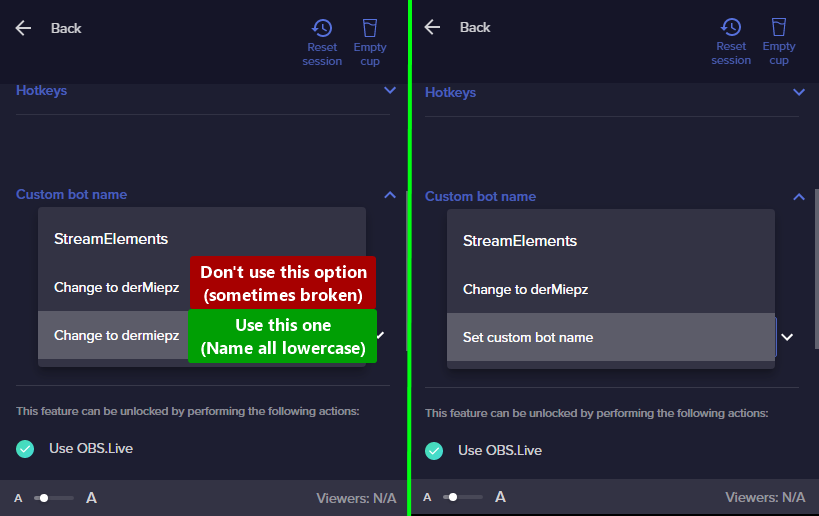 crude pecanBOT
If your commands recently stopped working and you're using OBS.Live and a custom bot name do the following:
- In OBS.Live, click on the hamburger menu (three stripes) at the top left of your activity feed
- Click on Stream Settings > Custom bot name
- In the Custom bot name field select Set custom bot name, not your already existing username (with capital letters). Note: If you already connected an account that way, the third entry will show as the account name (see image https://i.imgur.com/re4theQ.png).
- Scroll a bit down and click on the purple Connect Custom Bot Account button
- Log in as usual and Authorize the custom bot name
- Back in the Activity feed, click on the Send Test Message button and check if your custom bot name starts working again
nimble dune
try the steps ^
lament blade
Awesome that is premium support works thank you !
much love ❣️
nimble dune
You're welcome! 
 reef ingot
Hello, how can i download all files from streamelements?
i cannot use overlays music files and other stuffs on other dashboards
rough bramble
Sorry Daniii just want to make sure so I already have a message saying user has cheered 100 bits but I want to add a example “John thank u for the bits”… do I click “add message” and then what? Does a variable go in there so the user name shows up… for example thank you John for the bits … or no variable and it will know who the user is already ?
nimble dune
rough bramble
Sorry Daniii just want to make sure so I already have a message saying user has ...
Click add message and you will also need to add the variable. {user} thank you for the {amount} bits
rough bramble
Do I have to put a dollar sign or no just the brackets? and literally type in the word {amount} ? no dollar sign ?Last question I promise lol
nimble dune
rough bramble
Do I have to put a dollar sign or no just the brackets? and literally type in th...
No, just the brackets. No dollar sign
{user} thank you for the {amount} bits
rough bramble
Awesome thank u for helping big up to u 😊
If I don’t want to add the amount in my thank u I guess I would just put {user} thank you for the bits? And just eliminate {amount}
Daniii now this is my last question I swear !
nimble dune
rough bramble
If I don’t want to add the amount in my thank u I guess I would just put {user} ...
Yes, if you don't want {amount} just delete it, but with {amount} variation shows the amount in the chat how many bits the user has sent you.
sudden igloo
sudden igloo
Does the custom named bot introduce some kind of delay?
Hello, wanted to follow up again regarding the issues I am having with the StreamElements chat bot. The chat bot will stop responding sometimes. It happens with all commands. Strangely enough commands that advance counters or save quotes will still work but not return a response sometimes as well; e.g., a command to increase a death counter will not return the setup reply but when the counter is called separately it did increase as intended.
 indigo crescent
Hello, is this normal?
 rough bramble
nimble dune
{user} thank you for the {amount} bits
rough bramble
nimble dune
{user} thank you for the {amount} bits
What do I put in the amount box? Leave it at 0 ?
 crude pecanBOT
@sudden igloo ⤵️
Go to the Dashboard > Right side > Part channel > Join channel (https://streamelements.com/dashboard) https://i.imgur.com/uYVb8OK.png
keen wigeon
indigo crescent
Hello, is this normal?
Plenty of weird usernames on Twitch sometimes... I'm not familiar with this being especially worrying, unless you're getting lots of these.
 winter sleet
Heya, can someone help me? I have the issues that when i change the streamelements cheer sound it stays the default one. How can i fix this? (ps only at the cheer alert)
@keen wigeon Just saw u here, can you maybe help me?
keen wigeon
Gladly, don't mention staff here.
winter sleet
Sorry mb
keen wigeon
Your issue hides in the variations. Go there and change the sound on all of them that you want to change.


 pearl fulcrum
Can I get some quick help? I just want to have a variant of the custom lurk command. For example, when someone does !lurk, one of 5 random responses come up. I'm pretty sure it can be done, just don't know how to do it
 random narwhal
my twitch chat isnt showing up in obs :/ idk how to fix it
ionic kelp
@pearl fulcrum ${random.pick 'response1' response'2' 'response3' 'response4'}
Can't include ' in response as it'll break it.
sudden igloo
crude pecan
<@189934629334155264> ⤵️
Thank you, I will try that!
pearl fulcrum
Is response1 and 2 go at the beginning? In between? 1 line?
ionic kelp
where the text is where you replace the response as desired.
pearl fulcrum
Do I make a whole new command and call them that?
ionic kelp
have that as the command response.
pearl fulcrum
So responses go in a ' and on top of that, the response itself can't have a ', right? So my response with the word can't, has to say cant instead
ionic kelp
correct
pearl fulcrum
It's OK I understand. I made a typo as well
rough bramble
I’m adding a message to say thank u for the bits so What do I put in the amount box ? Leave it at 0 ?
 jade remnant
whatever you want these are variations
rough bramble
Daniii said to just put in the message box : {user} thank you for the {amount} bits… but not sure what I put in the box that says 0?
jade remnant
you put what ever you want
these are variations
they show when that amount of bits have been cheered
rough bramble
Ok so if I leave at 0 but I put this message in that daniii sent it will say user thank u for the 100 bits let’s say
jade remnant
if youre doing that for 1, then you dont need the 0
 shadow trout
Hi hello, how do i share an overlay ive made? ive tried https://streamelements.com/dashboard/overlays/share/<editor code> but that just logs me out of SE
rough bramble
Sorry I don’t get what u mean by your answer “if youre doing that for 1, then you dont need the 0”.
lament blade
How do i get to choose my own channel's emotes for the kappagen??? Its only letting me pick from bttv and frankerface

i tried selecting them here and that didn't do anything.
 foggy heart
shadow trout
Hi hello, how do i share an overlay ive made? ive tried ``https://streamelement...
foggy heart
shadow trout
Hi hello, how do i share an overlay ive made? ive tried ``https://streamelement...
Sharing overlays only works through connected accounts, you won't be able to make a link for it
foggy heart
lament blade
How do i get to choose my own channel's emotes for the kappagen??? Its only lett...
There is currently an issue with using sub emotes with kappagen.
lament blade
Do you think it would work as like.. a workaround if i upload them to bttv or ffz with the same name?
drowsy egret
lament blade
Do you think it would work as like.. a workaround if i upload them to bttv or ff...
yup, it should work as they would be part of bttv/ffz emotes
lament blade
thanks for the help 🙂
rough bramble
As you could see I already have this to say user has cheered whatever amount of bits … I want to add a message to say thank u but what do I type in the amount box ? Leave at 0 or put a 1

 cobalt prairie
Hi guys. I have a bit of a problem. Whenever I get raided, my event list overlay shows that I got hosted and raided at the same time, leading to either the host or the raid alert going off when I want it to just be the raid alert that goes off. Meanwhile when people host me, nothing goes off. Is there a way for me to fix this so that an alert goes off when I get hosted and that when I get raided, my raid alert goes off?
 twin dune
Hey! When I try to log into the streamelements attachment to OBS studio it logs into the wrong account, how do I fix this?
crude pecanBOT
@twin dune ⤵️
StreamElements menu, on top of OBS > Logout > Login
 broken bison
I am having an issue with someone who is telling me to quit my stream how do i report that?
twin dune
That's what I did, but it keeps logging me into the same account lol.
dry hare
broken bison
I am having an issue with someone who is telling me to quit my stream how do i r...
You report them on twitch
broken bison
ok
dry hare
twin dune
That's what I did, but it keeps logging me into the same account lol.
So you click streamelements menu > logout and you aren’t prompted to log in with a different platform?
indigo crescent
keen wigeon
Plenty of weird usernames on Twitch sometimes... I'm not familiar with this bein...
I am..That's the thing..
It happened like a month ago too..Like 15
Almost everyday
twin dune
dry hare
So you click streamelements menu > logout and you aren’t prompted to log in with...
It prompts me to log into all of the platforms and every time I click twitch it automatically logs me into the same one, which is my alt testing account.
crude pecanBOT
If you are not seeing the OBS Twitch integrations and have OBS.Live installed, please follow these steps:
- Make sure you are on the latest and greatest version of OBS.Live
- Exit OBS (make sure OBS is not running)
- Delete
%appdata%\obs-studio\plugin_config\obs-browser\obs_profile_cookies - Start OBS.Live
- Settings > Stream > Disconnect > Connect
lucid tide
Sims 4
twin dune
dry hare
See if you can then log in
It worked, thank you <3
 tribal dome
I'm having a weird problem where when I set my bot to my own username, it won't respond to commands while I'm live. It works fine when I'm offline, and it works if I set the bot to StreamElements or my custom Twitch bot account.
Is this the nature of how that's supposed to work, or is there something I could do that will allow my twitch handle to be used as a bot while I'm live?
drowsy egret
tribal dome
I'm having a weird problem where when I set my bot to my own username, it won't ...
try to remove the bot account and re-add it after that, if that doesnt work try this
crude pecanBOT
- Right-click on your OBS desktop shortcut and open the Properties
- In the Target field, add the following to the very end:
--remote-debugging-port=40404(don't forget to add a space before the current path) - Open OBS (or restart if it was open)
- Open your web browser and type in:
localhost:40404 - Click on StreamElements - Activity feed
- Navigate to the Console tab
- Type the following into the console and hit enter:
store.customBot.removeCustomBotIntegration() - Try setting the custom bot name
- Remove the additional flag in step 2 from your shortcut properties.
 dense agate
Is there any way to have my chat start at the top of the chat box instead of the bottom? So basically old messages will be pushed down instead of up if that makes sense?
 tired valve
hi! I need help fixing my S.E. Pay. Apparently something has gone wrong and I cannot fix it without contacting support! Any help would be appreciated 
crude pecanBOT
@tired valve ⤵️
Please contact us via email for support with SE.Pay. You can use our contact form here: https://streamelements.com/contact Thank you.
@lament blade, posting suspicious links will result in not being able to post again.
tired valve
tired valve
hi! I need help fixing my S.E. Pay. Apparently something has gone wrong and I ca...
do we know how long support takes? I am v anxious about fixing it.
 stable abyss
how do i link my twitch to my account with my youtube when it says "channel is already claimed"
crude pecanBOT
@lament blade, posting suspicious links will result in not being able to post again.
 lunar prairie
hi! the person i mod for has an issue with streamelements. It keeps saying "response message" every now and again. Help?
ocean gate
lunar prairie
hi! the person i mod for has an issue with streamelements. It keeps saying "resp...
They’ve got an extra response added to that command/timer that hasn’t been changed
lunar prairie
ocean gate
They’ve got an extra response added to that command/timer that hasn’t been chang...
i do not know what that means but i will forward it! Thank you
OH like the streamer added an extra respone to a timer message?
the "response message" doesnt show up alongside other timer messages, only on its own
lament blade
Hey yall so I just had to reinstall windows. Im trying to take the donations and overlays I have to show up but its not showing on my obs at all
I'll play an emulated event. I'll heard the sound and see the video on the overlay editor
but it wont show the image on my stream
 proven pond
Hey. :)
Is there a possibility in SE to auto-shoutout specific users with a unique sound when writing in the chat for the 1st time every stream? Saw that feature on other streams and just wondering how this works. 
lament blade
Or if I get the image to show up its cut off but not on streamelements
IF anyone can help please I really do need it
 sterile adder
siea
 sharp moat
Can a Staff please fix Chatstats off: zclinadieunechte , thanks
 fleet kestrel
Hello, I wanted to ask when the fortnite partnership challenge will be unlocked on my account?
 narrow flint
Hello guys.
Here is Darloys from germany. I created an account on streamelements to recieve donations and some other stuff.
I wanted to setup my payment details via SEPay but its not showing up in my dashboard. Thats a bit strange i guess because im over 18 years old and at my friends account it is 100% working.
Do you know how i can fix this? Thats the link to my StreamElements page: https://streamelements.com/darloys-6215/tip
Best regards
 grand obsidian
Hello i stream on twitch at Nihilityy_ and my chat stats dont work.
lament blade
i need help my alert box is brok and plays no sound but when i do the test follow is works. I did everything and nun happen please help me plz
crude pecanBOT
@narrow flint ⤵️
Please contact us via email for support with SE.Pay. You can use our contact form here: https://streamelements.com/contact Thank you.
@lament blade ⤵️
If you are not hearing your alerts and/or Media Request, you are most likely using the Control Audio via OBS option in your browser source properties.
To make sure you hear the alerts and the stream also hears them, follow along the screenshot bellow.
https://cdn.discordapp.com/attachments/199460642975907840/685371800456134686/unknown.png
 foggy heart
@sharp moat @grand obsidian any username changes while using SE?
lament blade
crude pecan
<@456226577798135808> ⤵️
i dont ever see my alerts on stream either
i did everthing
but when i do a test follow it works
grand obsidian
@foggy heart no
foggy heart
@sharp moat @grand obsidian Your pages should now be up
sharp moat
Thank you
 upper vigil
yo
hi
gus
i need some one play whit me pls to my twitch canal pls
mayby some one play whit me fortinte
whil i am streeming

 waxen saddle
I have a question regarding Elgato Game Capture and SE. They worked fine together earlier this week, but now SE isn't detecting my capture card. If anyone can offer any kind of advice, that would be wonderful.
crude pecanBOT
@waxen saddle ⤵️
Obs.live is a plugin for OBS Studio for the best OBS support, please join their Official Discord @ https://discord.gg/obsproject
 azure estuary
Question for those that know, in a streams chat how do I edit a command and who can use it, ie the shoutout command is currently set to everyone how do I go about changing it to mods only without going to the dashboard as this is for my buddys stream in which I mod
 undone bloom
So super new . how do i change titles for my streams
azure estuary
you can do it thru twitch dashboard
crude pecanBOT
@azure estuary ⤵️
You can add, remove and make changes to custom commands in chat with !command/!cmd flags:
!command add (commandname) (commandresponse) - allows you **to add **a new custom command
!command remove (commandname) - allows you to delete a custom command
!command edit (commandname) (commandresponse) - allows you to edit an existing custom command
!command show (commandname) - allows you to see the raw response of a command before variables are used
!command options (commandname) -(flag) - allows you to change settings for an existing custom command
More information here: #helpdesk-twitch message
lament blade
Question, how do i choose my title and game when i start streaming using the SE overlay on obs? it just starts and doesnt let me chose
 prisma jewel
can anyone help me setup my advance streaming settings for twitch? i tried switching to advanced settings so i could choose to not upload my music to my VOD and its super laggy now, shows im maxing my GPU, i have an i-7 1165G7 quad core and an intel Iris Xe Graphics card and cant seem to find a good guide online for this setup
crude pecanBOT
@prisma jewel ⤵️
Obs.live is a plugin for OBS Studio for the best OBS support, please join their Official Discord @ https://discord.gg/obsproject
foggy heart
lament blade
Question, how do i choose my title and game when i start streaming using the SE ...
How are you trying to use the overlay to edit the title? You can normally edit it with the Streamelements Menu > OBS.Live Docks > Activity Feed window (if you aren't using OBS.Live, then: View > Docks > Stream Information).
ebon fulcrum
zenith widget
Yes, there are 2 default commands -> !settitle/!setgame
Thank you!
lament blade
yeah i got it ty @foggy heart
prisma jewel
Ok so my last issue was very quickly figured out by going the the official OBS discord. Now onto my next question, randomly when i stream and switch from one scene to another (BRB to main scene, or starting soon to main scene) it will freeze my stream elements and i will lose the stream. Doing this is like rolling a dice, sometimes it doesn’t act up sometimes it does and it’s usually if i switch scenes like 30 minutes to an hour into a stream but tonight it did it just 2 minutes in…
 nova cairn
Hello is there anyway i could "reset" the emulation in streamelements. I've been emulating and testing it out, but it seems that the fake followers/subscribers are showing in my stream.
zenith widget
Refresh the editor and reload the overlay
crude pecanBOT
@prisma jewel ⤵️
Please provide a log from your last stream. To do this, in OBS go to Help > Log Files > Upload Current Log File and paste the link to the log file here.
 silk rivet
Hey, apologies if this is the wrong channel...I was wondering what might be the best way to put reverb on a USB mic? I'm using a Yeti Blackout, and I can't seem to figure out how to add reverb...I read something about VST plugins but when I go to the mic filters in SLOBS, there is no option for me to choose a VST plugin. Any ideas would be super appreciated!
zenith widget
Not sure if we can help with this. This is Streamelements Discord, so we are not able to help with SLOBS as well.
 cobalt current
Im not sure if I should put this in the obs chat or this one, but im having issues with my overlay, I cannot get the one i have during games to stop showing a black screen, i have attempted to edit it and have resaved it and remade it several times and it still is not working, is there anyone who might be able to help me with this issue?
crude pecanBOT
@cobalt current ⤵️
Please provide your account ID found at the top of this page: https://streamelements.com/dashboard/account/channels This ID is public info and safe to share here.
 knotty perch
@zenith widget Hey buddy, i have a question, when i create a custom command and write in it custom Sub Emojis that i have on the channel
When i execute the command, it shows Text in the chat, not the emoji itself
Any idea about that?
cobalt current
@crude pecan do i provide that here directly in chat?
keen wigeon
cobalt current
<@!603953048129110031> do i provide that here directly in chat?
Right here is good.
zenith widget
@knotty perch yes, you need to gift the bot a subscription to your channel
cobalt current
@keen wigeon heres my account id 6101ec3383bb7d15060e9bad
zenith widget
yes
keen wigeon
cobalt current
<@!409020761571983361> heres my account id 6101ec3383bb7d15060e9bad
Which overlay are you having this trouble with?
cobalt current
@keen wigeon its with the force field animated theme
but its only on the part where I would have up when im live and actually playing
the other parts of that overlay seem to be fine, it just shows a black screen for where my games are supposed to show
keen wigeon
cobalt current
the other parts of that overlay seem to be fine, it just shows a black screen fo...
Ok, that's not a problem with the overlay then, it's a problem with the game capture.
cobalt current
@keen wigeon ok, do you know if that might be a problem with twitch or obs? because I was using obs to stream when I was having issues
knotty perch
@zenith widget Awesome, is that any way to change the bot name? Cz im not having access to Activity Feeds as you know
zenith widget
Only via the activity feed in obs.live
keen wigeon
cobalt current
<@!409020761571983361> ok, do you know if that might be a problem with twitch or...
OBS.
cobalt current
ok i will switch over to the appropriate channel and ask there, thank you
proven plover
Is there a way to see a live preview of my stream when bandwidth testing?
How it will look on twitch not how it looks when I send it
silk rivet
zenith widget
Not sure if we can help with this. This is Streamelements Discord, so we are not...
ah okay, my bad. Thanks!!
 coarse anchor
Hey! Recently I got donated but the money are on hold is there anything I can do?
cobalt current
sorry to ask so many questions when just joining, Im having an issue with setting up my donations link, I cant find where im supposed to paste it in twitch, i saw a short video showing where it was, but i still couldnt find it, is it in one of the extensions like twitch studio?
 winged latch
Hey!...I am trying to put my overlay into obs studio but there is no browser source at add
nimble dune
winged latch
Hey!...I am trying to put my overlay into obs studio but there is no browser sou...
Browser
 winged latch
that doesnt work
nimble dune
You don't see the browser?