#helpdesk-twitch
1 messages · Page 919 of 1
 willow dune
 nimble dune
Nope
 lament blade
Anyone know of this issue?
 undone crow
hi 
i was wondering if there was a variable for the streamlabels that would show the amount of gifts a recent gifter gave? so, i have a label for recent gifter: {sender} and if I put {amount} next to it, it shows the amount of months the receiver is subbed for instead of the amount of gifts {sender} gave in that event. is it possible to show that? sorry if this doesn’t make sense ^^
 bronze heath

 fervent sandal
is there a way to edit quotes?
 hexed falcon
Hi, just finished a mediashare stream where for some reason the videos would get a second in then buffer with the loading icon coming in, sometimes the audio would continue tho. I checked the overlay with the mediashare on and it seemed fine there but not in the browser source in obs. Could anyone help out?
lament blade
Hi i am unable to stream the game with obs overlays. i have followed the instructions. however i cannot get the game to stream on my twitch channel. anyone able to help
 drowsy egret
fervent sandal
is there a way to edit quotes?
drowsy egret
fervent sandal
is there a way to edit quotes?
no, you'd have to remove it and then add it again
drowsy egret
lament blade
Hi i am unable to stream the game with obs overlays. i have followed the instruc...
are you saying the game isnt being captured or your stream doesnt go to twitch?
drowsy egret
hexed falcon
Hi, just finished a mediashare stream where for some reason the videos would get...
are you using the media request dock for obs?
hexed falcon
drowsy egret
are you using the media request dock for obs?
no I made an overlay with the media request widget on it then added a browser source
drowsy egret
hexed falcon
no I made an overlay with the media request widget on it then added a browser so...
and you're controlling the media from the website?
hexed falcon
yh
drowsy egret
hexed falcon
yh
are you using chrome or a different browser?
hexed falcon
drowsy egret
are you using chrome or a different browser?
firefox
drowsy egret
hexed falcon
firefox
try with chrome, as other browsers are not fully optimized
hexed falcon
ahh ok ty, if I used the mediarequest dock would that also make it more stable?
lament blade
What can I do if the bot's userlevel has been randomly reset?
drowsy egret
hexed falcon
ahh ok ty, if I used the mediarequest dock would that also make it more stable?
its just more convenient having it in obs
drowsy egret
lament blade
What can I do if the bot's userlevel has been randomly reset?
that should matter I think, is it causing any issues?
lament blade
I think its the cause of many issues of the moderation tools, I tried to make the Blacklisted Words Filter Caps Sensitive and the bot did nothing
I added a (?i) to each entry line to make it caps senstive
Also, are these suppose to show the viewer's profile picture?
 drowsy egret
lament blade
Also, are these suppose to show the viewer's profile picture?
drowsy egret
lament blade
Also, are these suppose to show the viewer's profile picture?
nope, it just uses the default image by design as far as I'm aware
drowsy egret
lament blade
I added a `(?i)` to each entry line to make it caps senstive
you want to block certain words only when used in caps?
lament blade
Yes, words that are written like "SOMETHING" or "SoMeThInG"
 fair meadow
Hello! I am slowly getting better with stream elements. I stream off of ps5 directly and I was wondering if there was any way to get the bit/sub/gifter leaderboards on my twitch profile
 somber citrus
hey could someone help me out with my chat box?
drowsy egret
fair meadow
Hello! I am slowly getting better with stream elements. I stream off of ps5 dire...
you can add our extension, that should work https://dashboard.twitch.tv/extensions/uaw3vx1k0ttq74u9b2zfvt768eebh1
but you need to do that from a PC
 lapis sand
hello could someone help me?
drowsy egret
somber citrus
hey could someone help me out with my chat box?
how can we help?
 crude pecanBOT
@lapis sand ⤵️
Welcome to the helpdesk! Please let us know how we can assist you today and a support volunteer or staff member will assist you as soon as they are available. Thank you for your patience.
lapis sand
so i’m using an overlay from stream elements but every time i try to switch scenes it takes a while for the overlay to load in and it just appears as a black screen until it loads in
how do i fix this
drowsy egret
lapis sand
so i’m using an overlay from stream elements but every time i try to switch scen...
go to the properties of that browser source within obs and uncheck shutdown source when not visible
 lapis sand
i am not sure if this is a problem from stream labs OBS or from the overlay
do i do this for all scenes?
drowsy egret
lapis sand
do i do this for all scenes?
for all scenes that have this issue
lapis sand
okay thank you!
somber citrus
drowsy egret
how can we help?
so i got a chat box on visuals by impulse web and it is not popping up
 foggy heart
For widgets/overlays from third parties, you'd generally have to reach out to them for support. What do you mean by not popping up?
somber citrus
so in the web it works but when i put the link in obs and people type nothing comes up
@foggy heart
foggy heart
What size did you add the overlay as in OBS?
somber citrus
the same as the widget in streamelements.com
crude pecanBOT
@somber citrus ⤵️
The default resolution for StreamElements overlays (theme and custom) is 1920x1080. Please add them in OBS at their full resolution and use CTRL+F to fit to screen if necessary. You can then downscale your stream in OBS settings > Video if you'd like https://i.imgur.com/6bWXxjR.png
foggy heart
Try adding it at that size and see if it works
 wind arch
My chat wont connect on OBS.live
crude pecanBOT
@wind arch ⤵️
StreamElements menu, on top of OBS > Logout > Login
wind arch
thanks that worked!
Ummm how do I change my Stream info using OBS.live? Im used to Streamlabs but it no longer let me go live there and Ive given up with their tech support so Im technically new to OBS.live. I imported my scenes and everything but I cant seem to locate where do I set my Stream Title and Game Tag on this OBS
drowsy egret
wind arch
Ummm how do I change my Stream info using OBS.live? Im used to Streamlabs but it...
you will need to add the stream information dock, you can do this from view > docks
 narrow elbow
im kinda new to the stream elements i was wondering how do i put the overlays on my stream?
 narrow wharf
Hello! I've been looking into an issue that I'm having where previous alerts flash on screen for a millisecond, when new alerts are triggered.
I've figured out that this only happens when the alert animation is set to "video" instead of "image". Is there a reason why images fade (first gif in video I shared), and videos just ...turn black and white but don't actually ever disappear, they just linger there (second gif in the video I shared)? I believe this is what's causing them to flash on stream for a split millisecond just as a new alert is triggered.
How can I make it so that videos fade COMPLETELY, like images do? Thanks! (Yes, I have the same settings for all of them --fade out is set to 1 second. The only difference is how it's uploaded in StreamElements).
this is what i mean by image vs video in how it's uploaded. Images disappear, videos linger but in Black and White.

 shrewd peak
Hello
I can not find the settings for the Bot points
I can do the games, but the Points are disabled
How can i turn them on?
And where can i Add points on the Website without the Commands?
crude pecanBOT
@narrow elbow ⤵️
To add your overlays to OBS, add a new browser source in your scene. Paste your overlay URL in the browser source properties, set the dimensions to 1920x1080 (unless you changed them on the website) and check Shutdown source when not visible. https://youtu.be/KDvLynUqXI4
drowsy egret
narrow wharf
Hello! I've been looking into an issue that I'm having where previous alerts fla...
have you emulated alerts to see how they look in your OBS? videos will stay in the editor but they are not visible in OBS
lament blade
i was doing a sponsored stream and i had to end it for a second due to lag how do i start it up again
drowsy egret
lament blade
i was doing a sponsored stream and i had to end it for a second due to lag how d...
I'll remove your image to protect your privacy but you can just start your stream again
the campaign already started
narrow wharf
drowsy egret
have you emulated alerts to see how they look in your OBS? videos will stay in t...
yes, there is a flicker in OBS and live on stream. I can send you a video of the flicker i'm talking about one moment please (thank you for the quick reply ahh!!)
lament blade
but its not adding onto the stream elements record so how would i complete it
drowsy egret
lament blade
but its not adding onto the stream elements record so how would i complete it
if it doesn't update automatically later today you can send us an email with the VOD of the sponsored segment and we will manually complete that for you
crude pecanBOT
@lament blade ⤵️
Please contact us via email for support with your campaign or sponsorship. You can use our contact form here: https://streamelements.com/contact Thank you.
lament blade
okay thank youu!
narrow wharf
drowsy egret
have you emulated alerts to see how they look in your OBS? videos will stay in t...
First alert in this video is uploaded as an "image".
The jelly bean one, it fades completely and when followed by another alert (a follow alert, in this case) it does not flicker.
Watch what happens after the second alert is played (the foot explosion one, uploaded as a "video" to StreamElements), just before the second follow alert goes off. It flashes for an instant (about 38 seconds in, watch the right hand side for that quick flash).
I believe the culprit is because it's not fully disappeared and just dormant in StreamElements. Curious why Images disappear but videos don't? 
drowsy egret
narrow wharf
I believe the culprit is because it's not fully disappeared and just dormant in ...
first time I see this, let me check
drowsy egret
narrow wharf
First alert in this video is uploaded as an "image".
The jelly bean one, it fad...
I'll do some more testing in my own account and then report to it to the devs
 honest rock
is there a way to make it so TTS doesnt have to wait for an alert to disappear to start talking?
narrow wharf
drowsy egret
I'll do some more testing in my own account and then report to it to the devs
I appreciate it, thank you so much. I think it's easy to miss because it's a quick flicker but I have enough videos uploaded now that I see it often and it drives me nuts 
 edgy rivet
Hello! I am having an issue with a StreamElements Alert box Subscription variations that are returning incorrect values for Variables. For example: For a Resubscriber for Exactly 2 Months the value for:
"{name} resubscribed for {amount} months" - is returning the value of - "resubscribed for 2 OS DNA OS Months"
Further, there is no issue with the values for the original Alerts, only the Alert Variations. Is there someone who could help with this issue?
foggy heart
edgy rivet
Hello! I am having an issue with a StreamElements Alert box Subscription variati...
Is what you posted there the syntax you use in the alert?
 sage vessel
Hi, PayPal had clears the Tip, and I already received the tips but still no information appear in Streamelement Revenue History and definitely not showing in Activity feed also.
drowsy egret
narrow wharf
I appreciate it, thank you so much. I think it's easy to miss because it's a qui...
I'm able to easily reproduce this so I'll report this as a bug but a fix could take a while, a workaround would be to make the video itself fade out
edgy rivet
sage vessel
Hi, PayPal had clears the Tip, and I already received the tips but still no info...
Yes, and in the Variation Dialogue Box it is set to "Months subscribed, Exact, 2, 100%"
sage vessel
sage vessel
Hi, PayPal had clears the Tip, and I already received the tips but still no info...
and I only have one channel for my tipping, which is StreamElement
 heady orbit
after i copy an overlay how do i apply it to my obs
crude pecanBOT
@heady orbit ⤵️
To add your overlays to OBS, add a new browser source in your scene. Paste your overlay URL in the browser source properties, set the dimensions to 1920x1080 (unless you changed them on the website) and check Shutdown source when not visible. https://youtu.be/KDvLynUqXI4
sage vessel
edgy rivet
Yes, and in the Variation Dialogue Box it is set to "Months subscribed, Exact, 2...
Sorry I don't understand?
narrow wharf
drowsy egret
I'm able to easily reproduce this so I'll report this as a bug but a fix could t...
thank you so much! That's fantastic news. I appreciate the quick turnaround.
narrow wharf
drowsy egret
I'm able to easily reproduce this so I'll report this as a bug but a fix could t...
is there anyway I can make the video fade out on my end or is that the part that needs fixing? My solution in the meantime was going to be to convert them all to "images" and just add the audio separately. Would take a while but might be faster than waiting for a fix?
drowsy egret
narrow wharf
is there anyway I can make the video fade out on my end or is that the part that...
yeah, you can either transform them to images or use a video editing software to add the fade out
narrow wharf
drowsy egret
yeah, you can either transform them to images or use a video editing software to...
oh interesting idea re: the video software to fade out thank you  will try it
 lost patrol
Hi Support, is it normal for the chatbot to remove ALL messages when using link protection? I ask because Twitch's Automod will just asterisk out the offending hyperlink vs removing all of the user's messages which I prefer.
foggy heart
lost patrol
Hi Support, is it normal for the chatbot to remove ALL messages when using link ...
The chatbot will timeout a user posting links, which deletes all messages
lost patrol
@foggy heart any plans on changing this?
foggy heart
You can remove the link protection from the bot options.
 mild glen
can anyone tell me if this is a legit email address for Stream Elements please
payments@streamelements.com
foggy heart
mild glen
can anyone tell me if this is a legit email address for Stream Elements please
p...
Yes, that is legitimate
mild glen
foggy heart
Yes, that is legitimate
ok just double checking thank you
 fleet obsidian
Hey there 
I've just created a "birthday" Alert for 12, 24, etc months and put them into a variant --> "months subscribed - exact - 12"
But I also have tier 2 and tier 3 variants.
I would like to have a tier 2 subscriber also have a 12 month birthday alert and not the "tier 2 alert". Is this possible?
Because if I try it out it always shows the Tier2/3 Alerts. Even if I unselect "Pick an alert randomly when more than one matches" it doesn't worked.
How can I get priority to the 12/24/36 month alert?
drowsy egret
fleet obsidian
Hey there <:ellamiHi:475334406484131841>
I've just created a "birthday" Alert f...
it's not currently possible to have multiple conditionals 


 molten ether
I have an authentication problem with twitch, could someone help me? I can't open the stream?
drowsy egret
molten ether
I have an authentication problem with twitch, could someone help me? I can't ope...
try reconnecting your account from obs settings > stream
molten ether
thanks
 azure stump
 ionic kelp
#🇵🇹︱português
 opaque cargo
Hello support. I'm having a problem with my follower goal overlay. When I emulate a follower event instead of incrementing the number by one it jumps to a seemingly random number. The only thing I've been able to figure out is that the number never exceeds 50 for some reason. The problem occurs using the StreamElements follower goal and the imported StreamLabs goal aswell.
 zenith widget
That is an intended behavior when emulating alerts. Refreshing the editor will fix the number to what it actually is
opaque cargo
oh 😅 thanks
 open sand
Anyone with StreamElements: Response message -- chat bot going randomly 
zenith widget
Check your timers
open sand
How do I know which one is faulty?
zenith widget
 open sand
There is no such timer
 worldly escarp
open sand
There is no such timer
worldly escarp
open sand
There is no such timer
do you have any active timers?
open sand
All my timers are active
zenith widget

 loud marsh
im trying to start a twitch account. i am using the program OBS and im trying to add widget to my OBS live but the icons are blank
worldly escarp
loud marsh
im trying to start a twitch account. i am using the program OBS and im trying to...
what icons?
 golden sinew
Hey guys, so i had a sponsorship option not cross off once stream ended, anything i can do to get it completed?
worldly escarp
golden sinew
Hey guys, so i had a sponsorship option not cross off once stream ended, anythin...
which goal?
golden sinew
it was a sponsorship that required me to buy a 49.99 pack, and open it on stream, i did it and didnt cross off, and i dont really wanna lose 49.99 :/
crude pecanBOT
@golden sinew ⤵️
Please contact us via email for support with your campaign or sponsorship. You can use our contact form here: https://streamelements.com/contact Thank you.
golden sinew
Thank you ❤️
loud marsh
worldly escarp
what icons?
the widgets, for chat and stuff
lament blade
Streamelements stopped working for me after name change, help pls 🙂
lament blade
lament blade
Streamelements stopped working for me after name change, help pls 🙂
Logout and log back into the website, that should work
lament blade
lament blade
Logout and log back into the website, that should work
I have done that more than I can remember and still nothing :/
What items do not work for you?
lament blade
lament blade
What items do not work for you?
everything, activity feed doesnt update, commands dont work, streamelements doesnt even appear on my user list
 shy spruce
lament blade
What items do not work for you?
shy spruce
lament blade
What items do not work for you?
also as a mod on SE dashboard, it still show the old name for me
lament blade
shy spruce
also as a mod on SE dashboard, it still show the old name for me
Are you a mod for the above channel?
shy spruce
lament blade
Are you a mod for the above channel?
yes, for @lament blade . Old twitch username was beastw420, new is BeastyLuna
 devout swan
Hello everyone, I’ve changed my twitch name but my streamelements bot isn’t synced somehow. And I’ve lost all the date I’ve had (donos, bits, subs, follows) how is this possible and is there a way to get that intel back?
crude pecanBOT
@devout swan ⤵️
Please logout of StreamElements at https://streamelements.com/logout and then login again to your account (Twitch/YouTube/Facebook).
devout swan
I did
lament blade
And nothing?
devout swan
And remove se as mod and re added again on twitch
And my overlays r gone (recent sub etc etc )
shy spruce
Same issue we're having as @devout swan
lament blade
Gotcha guys, we'll be looking into it right now
lament blade
lament blade
Gotcha guys, we'll be looking into it right now
Thank you !
devout swan
lament blade
Gotcha guys, we'll be looking into it right now
Cheers but lost everything so hope I get all the intel back😥😥
Old name Darcaiintv switched to -> ecv_richie
lament blade
@devout swan everything is lost for you because you submitted a request to close your account
devout swan
Wait what😳
lament blade
@lament blade try parting the bot from your channel and adding it back in
devout swan
So I’ve lost everything then and need to redo all and every I tell I had is gone for ever?
lament blade
that's correct
devout swan
It is what it is then
Gonna redo all today then.. but even then the bot doesn’t show actions tho
I’ve tried adding !discord but doesn’t show in chat
lament blade
part the bot and add it back @devout swan
lament blade
lament blade
<@456226577798135808> try parting the bot from your channel and adding it back i...
didnt do anything
that would fix commands not working for you @lament blade
no
 slender vortex
@lament blade I need help again
slender vortex
When I do a photo of my merch I size it then it says cant save image to low quality and i resize it then it is to small? and I have been resizing it on different apps for hours and can fiqure it out?
lament blade
lament blade
bot is working for you now <@456226577798135808>
Thank youuuuuuuu ❤️
your merch image size should be 6000*6000 in size
slender vortex
how do I resize it im useing canvar what website do you recommend?
lament blade
I would actually recommend having an artist do it so you can get the best quality
lament blade
you can contact fiverr artists for it, for example
slender vortex
They are really expensive for a good one
 proven gull
Hey, my chat bot stopped working and I can't find any leads on how to get it working again, any advice?
lament blade
@proven gull did you change your name recently?
proven gull
No name changes
lament blade
and we're talking about twitch right?
lament blade
are you using OBS.Live?
proven gull
no
normal OBS
Unknown command: '/unmute' (Tip: Send Twitch Chat Commands with a point in front instead, e.g. ".mods", to circumvent Chatty's command system and use Twitch Chat commands Chatty doesn't know about yet.)
streamelements is already a moderator of this channel.
lament blade
are you using Ground Control?
proven gull
no
don't even know what it is
fyi, it was working fine a week ago
I don't know that I changed anything
I 'parted' and 'joined' channel too, no change
lament blade
I'd say
part the bot
log out of the website
log back into the website
add the bot
mod the bot
let's see if it helps
devout swan
I can't seem to get the bot working.
Have placed new commands tried to test it
added and readded it aswel
nimble dune
devout swan
I can't seem to get the bot working.
Please part the bot from your dashboard https://i.imgur.com/uYVb8OK.png > logout of StreamElements at https://streamelements.com/logout > log in again > re-invite the bot (join channel) > mod it (make sure it's not muted).
proven gull
I did all the above, still broken
nimble dune
proven gull
I did all the above, still broken
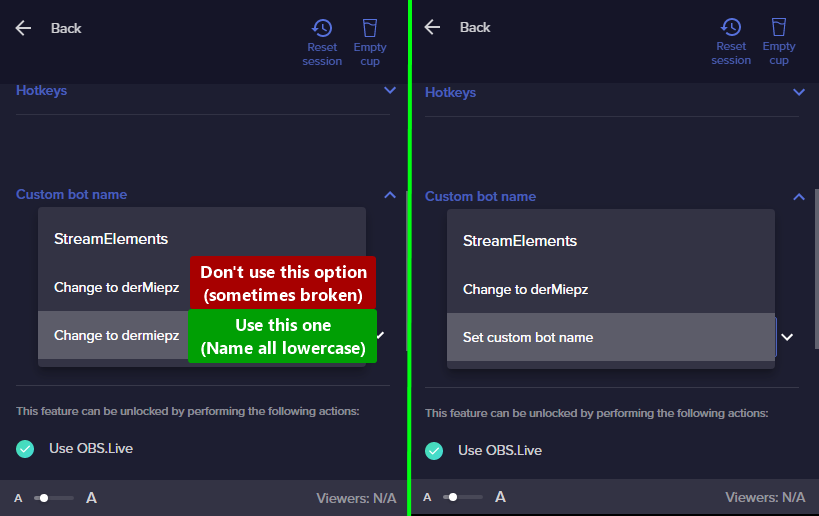
Custom Bot Name enabled: true
 crude pecanBOT
@proven gull ⤵️
If your commands recently stopped working and you're using OBS.Live and a custom bot name do the following:
- In OBS.Live, click on the hamburger menu (three stripes) at the top left of your activity feed
- Click on Stream Settings > Custom bot name
- In the Custom bot name field select Set custom bot name, not your already existing username (with capital letters). Note: If you already connected an account that way, the third entry will show as the account name (see image https://i.imgur.com/re4theQ.png).
- Scroll a bit down and click on the purple Connect Custom Bot Account button
- Log in as usual and Authorize the custom bot name
- Back in the Activity feed, click on the Send Test Message button and check if your custom bot name starts working again
proven gull
Okay. Issue identied. Thank you. but now the Custom Bot Name won't work any longer
nimble dune
proven gull
Okay. Issue identied. Thank you. but now the Custom Bot Name won't work any long...
Do you want to use the custom bot name?
proven gull
I do
 hardy ingot
The timers work now, but the Broadcaster is still missing.

And I have a new question. How can my Chat use this Icon. They all buyed them, but cant use them.

 placid raptor
hardy ingot
The timers work now, but the Broadcaster is still missing.
placid raptor
hardy ingot
The timers work now, but the Broadcaster is still missing.
the current broadcaster name shouldn't appear there
you don't need to manually add it and assign it with roles
placid raptor
hardy ingot
And I have a new question. How can my Chat use this Icon. They all buyed them, b...
are these just visual assets you wish to allow chatters to redeem so that they show up on stream?
if so please make sure to follow the instructions here https://streamelements.elevio.help/en/articles/122-setting-up-stream-perks
the bottom 3 articles in that section could be pretty cool for chat interaction https://streamelements.elevio.help/en/categories/34-loyalty-system-and-stream-store
if you set the stream perks up based on the stream perks article and still see an issue, please post here what is the exact behavior that you see 👍
hardy ingot
placid raptor
the current broadcaster name shouldn't appear there
ok, thank you alot
placid raptor
no worries 🙏
hardy ingot
placid raptor
are these just visual assets you wish to allow chatters to redeem so that they s...
Ok, I think this is a missunderstanding. I thought if my followers buy this Icon they can use it in chat. But it seems to be just a short overlay message. Is there a way to create chat-Icons?
 alpine surge
hey folks! this may have been addressed, but for the JAR, the emotes are being dropped as black boxes with a green cross through.
for the emote events
 opal kraken
Hey guys need assistance please! Havent streamed in a while but ever since i updated and downloaded the stream elements plug in ive noticed my frames drop massively in game. Please if theres any other info you need from me I really would like to find out what is the root of this.
 craggy parrot
Is there a way to use a custom font in a custom code widget if I installed the font on my PC?Or do I have to host it on a server to import it via url?
ionic kelp
Either one works.
placid raptor
hardy ingot
Ok, I think this is a missunderstanding. I thought if my followers buy this Icon...
not through the stream store, it doesn't allow viewers to purchase emotes to use in chat
emotes come from twitch or bttv or ffz and users need to have accounts in these sites to be able to use in twitch chat
hardy ingot
placid raptor
not through the stream store, it doesn't allow viewers to purchase emotes to use...
ok, thank you ^^
craggy parrot
ionic kelp
Either one works.
Oops sorry for bothering you, I made a syntax mistake xD
 valid owl
Hi guys! My chat command !discord doesn't work when someone say it in the chat
valid owl
valid owl
Hi guys! My chat command !discord doesn't work when someone say it in the chat
Can you help me?
valid owl
nimble dune
Do other commands work?
nope
crude pecanBOT
@valid owl ⤵️
Go to the Dashboard > Right side > Part channel > Join channel (https://streamelements.com/dashboard) https://i.imgur.com/uYVb8OK.png
valid owl
Now it work! Thanks :3
 potent osprey
Hi @viscid pebble, is there anyone available to help me with my account please?
crude pecanBOT
@undone flame, posting suspicious links will result in not being able to post again.
 undone flame
@viscid pebble can someone dm me pls its urgent
 scarlet tiger
What is your issue?
potent osprey
scarlet tiger
What is your issue?
I need an account merge. I have looked on Google and it has pointed me here, apparently I need someone from support to do this for me.
crude pecanBOT
@potent osprey ⤵️
Account Merging - Please note:
- Merging accounts only allow faster ways to switch between accounts
- Merging accounts does not allow data sharing between accounts - different streaming platforms, different type of events
- Merging accounts allows duplicating/sharing overlays between the accounts
If you understand the limitations of merging and want to proceed, please find the JWT tokens (!jwt) from both accounts you want to merge and fill out the form here: https://streamelements.com/contact with each token correctly labelled
scarlet tiger
@undone flame What is your issue?
undone flame
i have to wait for my se.pay bank details to update when my tips will be refunded in next 3 days @scarlet tiger
scarlet tiger
When you submitted your details?
potent osprey
Hi, you say !jwt, where do I get this?
crude pecanBOT
You can find your JWT token on your account channels page (Show Secrets to reveal the token): https://streamelements.com/dashboard/account/channels
READ ME: This is a private security token. Do NOT share this token here or other public places, only with a StreamElements staff member in private.
 amber birch
Is there still an issue with the kappagen overlay where my own emotes are not available for the emotesplosion?
ionic kelp
Correct
 gaunt dagger
Does Streamelements need to be subscriber, to add sub emotes for kappagnen?
crude pecanBOT
@gaunt dagger ⤵️
There is currently an on-going development investigation regarding an issue with KappaGen causing Twitch channel emotes to be unavailable. Unfortunately there is no ETA for a resolution at the moment.
nimble dune
gaunt dagger
Does Streamelements need to be subscriber, to add sub emotes for kappagnen?
No, check the bot message above
 low tartan
I have a songrequest issue. A few months ago, I disabled songreqeust on my stream, in favor of using another media request tool. I want to reenable songrequest now, but everytime I go into Chat Commands and enable !songrequest, it does not save the setting. Each time I refresh the Chat Commands page, !songrequest is disabled. Do you have any suggestions of what I should do? NOTE: When I go the the Modules page, I do not see a songreqeust module.
crude pecanBOT
@rare isle, posting suspicious links will result in not being able to post again.
 signal wasp
Hello, I've problem with accessing my web dashboard. I think It might be related to twitch. I've recently re-enabled 2fa on twitch, since then dashboard is not responding and some stuff is not working as expected.
 hexed orbit
Hi All, Im attempting to add to add a sound effect, added it via a stream store thing, but cannot hear it when used?
 ebon forum
hexed orbit
Hi All, Im attempting to add to add a sound effect, added it via a stream store ...
ebon forum
hexed orbit
Hi All, Im attempting to add to add a sound effect, added it via a stream store ...
Do you have the store redemption widget in your overlays? This is what plays sounds
ebon forum
signal wasp
Hello, I've problem with accessing my web dashboard. I think It might be related...
Clear cache and cookies just to be sure, that should help
hexed orbit
ebon forum
Do you have the store redemption widget in your overlays? This is what plays sou...
I cannot find where to add it via the SE overlay options
ebon forum
hexed orbit
I cannot find where to add it via the SE overlay options
Edit the overlay and add the store redemption widget, this is what you need
 heady valve
Hello I am trying to deactivate my account but it is giving me an internal error. Please help
ebon forum
heady valve
Hello I am trying to deactivate my account but it is giving me an internal error...
Please check the spelling and try again. if that fails with a specific error, we can take a look at it. But make sure you type in everything correctly, it is also case sensitive
heady valve
where do i locate the jwa token?
hexed orbit
ebon forum
Edit the overlay and add the store redemption widget, this is what you need
Thank you!
ebon forum
heady valve
where do i locate the jwa token?
On that page:
https://streamelements.com/dashboard/account/channels
Click on "Show secrets"

StreamElements
The Ultimate All in One Platform for Streamers
 regal karma
Anyone know why the dashboard, settings or profile might not load for me? The website works fine unless I navigate to any personilized feature
ionic kelp
For you or another streamer?
regal karma
Myself. (using Firefox)
ionic kelp
Try chrome
regal karma
Works on Chrome but not on Firefox. (used to)
crude pecanBOT
Our Dashboard and Overlay Editor are Chromium Optimized. We strongly recommend using Chrome. Opera GX and the new Microsoft Edge Chromium might work closest to Chrome as its also Chromium built. Firefox also works, but some things might look a bit different or not work. We do not recommend using Internet Explorer with our Dashboard as it does not support functions.
If the website doesn’t work on chrome, be sure none of your plugins is blocking our website or clear your cookies. You can try if the website works in an incognito tab.
signal wasp
ebon forum
Clear cache and cookies just to be sure, that should help
Don't know why, but helped, thanks!
 granite ridge
hello the streamer i mod for uses stream elements and we keep getting response message and we dont know what it is
ionic kelp
@granite ridge timers. See my pinned message.
granite ridge
thank u @ionic kelp
 junior bramble
Heya! I keep getting 404 error when I want to view my chat stats. I already saw others who had the same issue because they changed their Twitch usernames, but I don't remember changing mine. I would be really glad if somebody could help me ^^ Thanks in advance
placid raptor
junior bramble
Heya! I keep getting 404 error when I want to view my chat stats. I already saw ...
of course! what's the current twitch username? don't post links though 
junior bramble
placid raptor
of course! what's the current twitch username? don't post links though <:keanYou...
ItsJustCube
placid raptor
I created a fresh page for you!
junior bramble
Thank you! ❤️
placid raptor
anytime
 frozen scarab
I changed my twitch username and now only followers are being recognised on the dashboard, no subs/tip/raids will come through dashboard or my alert widget. Can I please have a backend reset or check?
crude pecanBOT
@frozen scarab ⤵️
If you changed your name on Twitch, please follow these steps:
- Visit https://streamelements.com/logout and then log in again by connecting with Twitch.
- On the right side of the dashboard page that opens, select Join under bot settings. If it says Part select that and then select Join to send the bot to the chat. Don't forget to mod the bot by typing /mod streamelements in your channel if you have not already.
- Post your old and your new name here so that we can update your channel's chatstats tracking (must be done by staff).
frozen scarab
crude pecan
<@258174118887817216> ⤵️
Thankyou for the quick response. I have done the parting and re-modding when I first changed my name. I’ve just done it again for security. ThePurpleEagle2242 was my old username. ThePurpleEagle is my new one. Thanks again
 sharp portal
Can't get the Bingo to work, seeing this. Any ideas? Thanks

 vivid harness
cant start streaming and have it put anything on my stream
placid raptor
frozen scarab
Thankyou for the quick response. I have done the parting and re-modding when I f...
done 👍
placid raptor
sharp portal
Can't get the Bingo to work, seeing this. Any ideas? Thanks
aye! so you can use the command as !bingo all AMOUNT
there's an issue with twitch emotes and it also affects the module
we discussed this in twitch chat during stream ⤴️
vivid harness
im trying to stream but it wont show that im streaming on twitch
placid raptor
vivid harness
im trying to stream but it wont show that im streaming on twitch
could you elaborate please?
vivid harness
what do you mean?
placid raptor
What do you see in OBS > settings > stream?
are you using OBS.Live, if so, have you logged into your streamelements account within OBS.Live?
frozen scarab
placid raptor
done 👍
Thankyou 👍
placid raptor
anytime! 
 strange laurel
hi i need help with my alert
i have made one but and convertet it to webm but stil have black background
better if you dm me if you can help
 sage ridge
Hello i got an error http 400 pop up can someone help me trouble shoot this
every time i boot obs up it says twitch authentication error and i just hit affliate yesterday. http 400 error pops up after
nimble dune
sage ridge
every time i boot obs up it says twitch authentication error and i just hit affl...
Disconnect and reconnect account in OBS Settings > Stream
sage ridge
thanks for the help
nimble dune
You're welcome
 solid vapor
Hi guys, I still need help with this, I still can't click this link and have never been able to, anyone know?
 placid raptor
yeah I was like  when nothing happened
it's pretty new I'm fairly sure it require mild tweaking
I'll bring it up again though, thank you!
placid raptor

you and me both
I spent a good 2 minutes clicking it knowing nothing will happen but still hoping

strange laurel
can somone help me
placid raptor
strange laurel
can somone help me
how can we help?
 mint herald
Hi guys, I've been having an issue where my streamelements bot hasn't been responding in chat in any way, I tried part channel and rejoin but it didn't work, anyone have a fix for this? I'd be greatly appreciative
I do also use obslive I'm not sure if this could be linked to the issue
nimble dune
mint herald
Hi guys, I've been having an issue where my streamelements bot hasn't been respo...
Do you use a custom bot name via OBS.Live?
crude pecanBOT
@mint herald ⤵️
If your commands recently stopped working and you're using OBS.Live and a custom bot name do the following:
- In OBS.Live, click on the hamburger menu (three stripes) at the top left of your activity feed
- Click on Stream Settings > Custom bot name
- In the Custom bot name field select Set custom bot name, not your already existing username (with capital letters). Note: If you already connected an account that way, the third entry will show as the account name (see image https://i.imgur.com/re4theQ.png).
- Scroll a bit down and click on the purple Connect Custom Bot Account button
- Log in as usual and Authorize the custom bot name
- Back in the Activity feed, click on the Send Test Message button and check if your custom bot name starts working again
mint herald
nimble dune
Do you use a custom bot name via OBS.Live?
i do
 lean quiver
Hi SE friends. I'm setting up Kappagen. When I go to the Select Emotes menu to select the emotes fro the Emote Explosion, my channel emotes do not appear. I can only choose from BTTV and FFZ emotes. Is this by design?
 crude pecanBOT
@lean quiver ⤵️
There is currently an on-going development investigation regarding an issue with KappaGen causing Twitch channel emotes to be unavailable. Unfortunately there is no ETA for a resolution at the moment.
nimble dune
crude pecan
<@682945494879699001> ⤵️
@mint herald follow the steps 👆
mint herald
nimble dune
<@!682945494879699001> follow the steps 👆
thank you i willl right now, i appreciate the help!
nimble dune

mint herald
it worked!!!!!! Thank you so much ❤️
nimble dune
You're welcome!
mint herald
have a lovely day
nimble dune
You too!
 unique geode
Can someone help me with a thing?
I am trying to change title but this messages comes up " something went wrong while trying to update the title. "
placid raptor
when do you see the error?
amber birch
any update to the kappagen overlay?
crude pecanBOT
@amber birch ⤵️
There is currently an on-going development investigation regarding an issue with KappaGen causing Twitch channel emotes to be unavailable. Unfortunately there is no ETA for a resolution at the moment.
placid raptor

unique geode
i am typing !settitle (text)
The bot is responding: " something went wrong while trying to update the title"
I am supermod
placid raptor
try to change the command to be for mods only
unique geode
i have tryed that to
placid raptor
is the bot modded?
unique geode
yes
placid raptor
follow these steps and let me know if the same happens -
Please part the bot from your dashboard > logout of StreamElements at https://streamelements.com/logout > log in again > re-invite the bot > mod it (make sure it's not muted).
unique geode
It's still the same problem
placid raptor
solid vapor
( I want to participate but i also HATE having notifications i can't get rid of)
just to update I've brought it up with dev and I believe [but can't promise] this it should be fixed in the next several business days
feel free to @ me if you're curious about progress
 spice niche
can anyone help me setup my first stream?
 tulip orbit
how do i setup a chat overlay on the obs extension?
placid raptor
spice niche
can anyone help me setup my first stream?
Please feel free to refer to the following set of articles for great information on the getting started process - https://strms.net/getting-started
@tulip orbit you can also check that link up, it's pretty specific as to how to start
lament blade
hey i didnt hit start campaign before streaming, i forgot, but i just streamed for 4 hours and 3 of them playing raid, does it still count
on the sponsored stream
crude pecanBOT
@lament blade ⤵️
Please contact us via email for support with your campaign or sponsorship. You can use our contact form here: https://streamelements.com/contact Thank you.
lament blade
Hello, i accidently removed an overlay...
I worked on it the last hours and wanted to delete the old one and now i deleted the one i worked on, the Alerts are still working but i dont see the overlay in my dashboard so i cant edit it...
drowsy egret
lament blade
Hello, i accidently removed an overlay...
I worked on it the last hours and want...
if the overlay is deleted there's no way to get it back
lament blade
drowsy egret
if the overlay is deleted there's no way to get it back <:Sadge:8340808761821102...
great im fucked.
lets to the 5 hours work again yeet
 sterile ore
Hello! im getting an error f or streamelements where in the obs the chat widget isnt working.. it says, error loading data
what can i do
crude pecanBOT
@sterile ore ⤵️
StreamElements menu, on top of OBS > Logout > Login
 leaden sinew
Hi, I have a question on givaways, is this the right place to ask?
I really like the idea of giveaways through SE , but I'm a bit unclear on how would viewers get points to buy tickets. Do they automatically get points for watching? Or is it channel points??
drowsy egret
leaden sinew
I really like the idea of giveaways through SE , but I'm a bit unclear on how wo...
they get x amount of points every 10 minutes, you can define how much on this page: https://streamelements.com/dashboard/loyalty
 glad robin
Anyone else having issues accessing their dashboard for others? I'm an editor for a streamer, a full access editor for another and then have my own profile. I'm able to see my dashboard and info as well as the party I have full access on but starting today, I cannot access the party that I have "editor" rights on. She did not revoke the access and hasn't even logged in herself in a bit so we're stumped why I cannot access her profile. When clicking on that profile option, I'm taken back to the login screen and either have to log in again or presented with the "dashboard" button which directs me right back to the same page over and over again. I've already cleared cashe/cookies and I've tried it on two different browsers (FF & Chrome) and two different computers. Thoughts??
crude pecanBOT
@glad robin ⤵️
Please logout of StreamElements at https://streamelements.com/logout and then login again to your account (Twitch/YouTube/Facebook).
ionic kelp
You and them need to do that.
 modern glacier
Hello! I'm trying to get StreamElements bot on twitch to use emotes and cannot figure it out. Any help would be greatly appreciated!
ionic kelp
Is it subbed or you using custom bot name?
ionic kelp
Someone yes.
modern glacier
Oh interesting. Can I rename the bot as well? How does that effect it?
ionic kelp
You'd use your account and it would respond under your name.
modern glacier
Ohh interesting. Then I don't have to gift it a sub?
ionic kelp
Not in that case no.
modern glacier
Do I rename the bot under the Streamelements dashboard?
crude pecanBOT
Currently renaming the bot fully works with OBS.Live. You can follow this video guide to set it up: https://discordapp.com/channels/141203863863558144/494513233416421386/561516184718278676
OBS.Live is a Plugin for OBS created by StreamElements. You can download OBS.Live here: https://streamelements.com/obslive
Please make sure you have the latest version of OBS installed, Current Version: 26.1.1. You can install OBS here: https://obsproject.com/
lament blade
Hey, i want my Sub Goal to show my Current subs (1) and the Follow goal to show my current Followers (340)
Why are there that weird numbers? 🤔
 crude pecanBOT
To reset goals:
- from the Overlay Editor > Session data on top right (monitor symbol) > Goals tab > reset progress of desired goal
- from the Dashboard > Activity feed on the left > Widget data on the right > Goals tab -> reset progress of desired goal
Note: Goal widgets (progress) only counts up and doesn't go down automatically, if you lose followers/subs.
ionic kelp
Read the last bit

 golden turret
Hi I hope you can help me..
I'm having two issues with the overlays in streamelements I'm hoping you can help me with .. I'll prob kick myself when i get the answer to the text one.. but they are driving me nuts
-
I have a new webm video and sound effect for subs .. the webm video alert is designed to be full screen.. the issue I'm having is that with the option to have the text over the image (in the overlay designer) the text never appears .. if chose either of the other two options (in line or column) the text appears and the webm plays .. this also happens when i used the default alert box.
-
using a variation on the sub alert when this plays the sound the first 1/2 second is just garbled noise (when played as a browser source in OBS).. but when i use the same sound for the standard version of the alert it plays fine..
Thanks in advance !
 subtle gulch
Hey guys! new streamer. Using Stream elements OBS studio. Need to know a couple of things. 1) how to get my twitch set up from studio to my dashboard? and 2) how to change my chat background to transparent? Thanks in advance!
drowsy egret
golden turret
Hi I hope you can help me..
I'm having two issues with the overlays in streamel...
for the text, play around with the margins, these can be found in text settings > advanced
for the sub alert, does it play normally in the editor?
drowsy egret
subtle gulch
Hey guys! new streamer. Using Stream elements OBS studio. Need to know a coupl...
not sure what you mean by getting your twitch setup from studio to your dashboard, can you elaborate? as for the chat background, do you mean in your screen or as an obs dock?
golden turret
drowsy egret
for the text, play around with the margins, these can be found in text settings ...
I'm sure it did play in the editor, but Ive been playing so long i'm not sure 😄 .. i'll double check !
Thanks i'll take a look a the margins!
 cloud bluff
hello guys, i started to use streamelements for my twitch channel today for the first time. i added a custom API command to show automatically my latest video on youtube and on browser it is working - shows the link properly and people can click on it. but from mobile people can see that link but they can't click on it - only copy/paste.
how could i fix it?
drowsy egret
cloud bluff
hello guys, i started to use streamelements for my twitch channel today for the ...
whats the command name?
can you type it in your chat so I can see?
drowsy egret
have you tried without the /me at the beginning?
cloud bluff
no i will try now
same issue, not working
can i paste here what i typed in my command?
i fixed it!
LOL
it was this symbol " "
 quick tangle
Hello, can someone help me for add a command discord link in StreamElements? Thank you.
drowsy egret
quick tangle
Hello, can someone help me for add a command discord link in StreamElements? Tha...
you can do that from the commands page, here: https://streamelements.com/dashboard/bot-commands/custom-commands
shrewd peak
Hello
I can not find the settings for the Bot points
I can do the games, but the Points are disabled
How can i turn them on?
And where can i Add points on the Website without the Commands?
drowsy egret
shrewd peak
Hello
I can not find the settings for the Bot points
I can do the games, but the...
you can give points here: https://streamelements.com/dashboard/leaderboard/current
and settings are here: https://streamelements.com/dashboard/loyalty
golden turret
drowsy egret
for the text, play around with the margins, these can be found in text settings ...
Sk1ll .. thanks for the margin suggestion! .. it was set to -50 ! ..
Like I said I was sure i'd kick myself once I got the answer LOL..
Re the sound.. playing the sound though the editor, my sound would play fine for the standard sub but for the a variation it would be hit and miss.. it would be fine for an alert then break then be fine again .. but though OBS it was always that first 1/2 second that was like buzzing when your a game crashed .. just on the off chance, I deleted the sound from StreamElements site, and re uploaded the sound .. and now it seems to be fine ....
drowsy egret
golden turret
Sk1ll .. thanks for the margin suggestion! .. it was set to -50 ! ..
Like I said...
well, if it works it works 
golden turret
😄
 sudden yoke
hi all. Can someone help me find my custom bot please? I had it working for like a month and then I noticed that it isn't connected, but when I go to reconnect it, the 'custom bot name' section in Ground Control is missing. I have gone back and made sure everything is done (have an overlay, set up tipping, etc). Is there another thing I need to do? It was working... i tried looking through other answers, but couldn't find anything. thanks for all your help. 🙂
drowsy egret
sudden yoke
hi all. Can someone help me find my custom bot please? I had it working for like...
give me your account id and I'll check if the custom bot name option is enabled for you
crude pecanBOT
Please provide your account ID found at the top of this page: https://streamelements.com/dashboard/account/channels This ID is public info and safe to share here.
sudden yoke
drowsy egret
give me your account id and I'll check if the custom bot name option is enabled ...
here you go: 60a06ee525ebda34325ea9aa
drowsy egret
sudden yoke
here you go: 60a06ee525ebda34325ea9aa
I've enabled the option, restart GC to check
sudden yoke
drowsy egret
I've enabled the option, restart GC to check
hi thanks 🙂 i can turn it on now. Now my only options seem to be 'streamelements' bot or my username. Are we not able to connect another account to use for the bot like before? or can I change the name? (i entered another name in the field next to the auth token, but it won't use it) Thanks again!
 round blaze
Hello everyone! Is there anybody that knows about the overlay editor? I’ve imported a transparent webm video file to use for an overlay and I have black bars on the top and bottom. I can resize to get rid of the bottom but the top stays.
 drowsy egret
sudden yoke
hi thanks 🙂 i can turn it on now. Now my only options seem to be 'streamelement...
drowsy egret
sudden yoke
hi thanks 🙂 i can turn it on now. Now my only options seem to be 'streamelement...
you need to add it as a bot account, you should see the option in the same place you can select the bot name
sudden yoke
drowsy egret
you need to add it as a bot account, you should see the option in the same place...
Hi! yeah that is what I mean, i don't see that option. can i find it somewhere else? (adding a picture to make sure we are in the same place)
 drowsy egret
sudden yoke
Hi! yeah that is what I mean, i don't see that option. can i find it somewhere e...
drowsy egret
sudden yoke
Hi! yeah that is what I mean, i don't see that option. can i find it somewhere e...
adding the token for the bot account doesnt work?
 red swallow
Hey, I'm having an issue with alerts. Sometimes when someone raids it shows as both a raid and a host. I'm pretty sure that's a Twitch side issue. However, streamelements will only play the host alert automatically. I have to click the replay on the raid alert manually. Any way I can prioritise the raid alert when this happens?
drowsy egret
round blaze
Hello everyone! Is there anybody that knows about the overlay editor? I’ve impor...
and this bar is not part of your webm file?
sudden yoke
drowsy egret
adding the token for the bot account doesnt work?
Ha! excellent thanks. Is there any way to get the custom bot to work without having ground control open or can I dock ground control into OBS? Thanks again for all your help 😄
drowsy egret
sudden yoke
Ha! excellent thanks. Is there any way to get the custom bot to work without hav...
if you want to do this from OBS you can just use obs.live which will have the option to select a custom account for the bot as well
sudden yoke
drowsy egret
if you want to do this from OBS you can just use obs.live which will have the op...
ok, can you point me to instructions for that please 🙂 thanks again 🙂
crude pecanBOT
Currently renaming the bot fully works with OBS.Live. You can follow this video guide to set it up: https://discordapp.com/channels/141203863863558144/494513233416421386/561516184718278676
lament blade
Quick question. I'm trying to set up KappaGen to do emote explosions. It's working fine, but no Twitch or channel emotes are showing up in the options menu. Any idea why they wouldn't show up?
crude pecanBOT
@lament blade ⤵️
There is currently an on-going development investigation regarding an issue with KappaGen causing Twitch channel emotes to be unavailable. Unfortunately there is no ETA for a resolution at the moment.
lament blade
Well, that answers my question!
 trim gulch
anyone else having an issue with opening the webpage?
 ripe elk
it wont go live on twitch
drowsy egret
trim gulch
anyone else having an issue with opening the webpage?
are you opening the website in chrome or other browser?
crude pecanBOT
@ripe elk ⤵️
StreamElements menu, on top of OBS > Logout > Login
ripe elk
is streamelement differnt then streamlab?
drowsy egret
ripe elk
is streamelement differnt then streamlab?
yeah 😄
spice niche
Can anyone help me setup my first stream I suck at guides
 tired ridge
is the bot down?
 novel oyster
is anyone having issues streaming?
 floral venture
is there a stream label that shows the last subscriber + how many months they've been subscribed? for example latest subscriber: namehere x3 (for resubscribing for a total of 3 months)
tired ridge
@novel oyster The streamelements bot is not showing any commands in my stream so idk what's going on
drowsy egret
tired ridge
is the bot down?
not down, whats your account id? you can find it here: https://streamelements.com/dashboard/account/channels
novel oyster
tired ridge
<@!237637783341105152> The streamelements bot is not showing any commands in my ...
yea idk if its streamelements or what but I went live and everything was fine then suddenly I started dropping as if there was some internet issue or whatever... but I checked my net and its fine
 tired ridge
drowsy egret
not down, whats your account id? you can find it here: https://streamelements.co...
tired ridge
drowsy egret
not down, whats your account id? you can find it here: https://streamelements.co...
5a6be39780b90f0001eae682
novel oyster
but made the stream heeellla laggy
drowsy egret
novel oyster
yea idk if its streamelements or what but I went live and everything was fine th...
your internet can work fine for other websites and speed tests but the connection to twitch servers can be having issues
novel oyster
drowsy egret
your internet can work fine for other websites and speed tests but the connectio...
I tried switching servers but did the same thing so idk guess I will have to wait and see maybe tomorrow? idk
 radiant tartan
hey! i want to make a stream squad command that i can do !setsquad or smth at beginning of stream and if people do !squad or !streamsquad will pu what i set earlier
is that possible?
we currently have a stream squad command but i have to edit it in streamelements every time i want to change it
floral venture
@drowsy egret is there a stream label that shows the last subscriber + how many months they've been subscribed? for example latest subscriber: namehere x3 (for resubscribing for a total of 3 months)
 fiery ridge
Hey just wondering if I signed in with Twitch via OBS.Live but wanted to sign out and switch to FB, where would I find that in the program? Thanks!
drowsy egret
radiant tartan
hey! i want to make a stream squad command that i can do !setsquad or smth at be...
not possible
drowsy egret
floral venture
<@!131420870244564992> is there a stream label that shows the last subscriber + ...
not as a label but you can add an event list for subscribers and set 1 as maximum events
floral venture
thank you!
drowsy egret
oh wait, it is possible actually
add {amount} to show the months 😄

@floral venture sorry for the ping, but making sure you get the message 😄
floral venture
drowsy egret
<@!193821012725334017> sorry for the ping, but making sure you get the message �...
ah I see, thank you! and no worries for the ping, I appreciate it 😄
 stable jacinth
Hola alguien habla español?
drowsy egret
stable jacinth
Hola alguien habla español?
aca #🇪🇸︱español 🙂
 manic flint
hey yall, hopefully someone can help- I just started streaming and my stream will randomly crash? My cpu usage is always at >1%, my frames dont drop, my internet is fine, and the little color box is always green :((
 vital orchid
Hey, I'm wondering if anyone knows how to fix this, for the last month or so when I sign in to edit commands for the multiple streams i mod for, no matter where i go on the website if i have a direct link it always just sends me back to the homepage. even when there i click to go to my own dashboard and it sends me straight back to the homepage and tells me to go to my dashboard and that just repeats. I'm the only mod for most of these streamers and I manage a lot of the bot work so not being able to access the website at all is damaging their streams as I cant update things that need updating. I don't know if this is the right channel for this as i cant seem to find a help desk for the website itself but as these are twitch streamers its my best bet.
as far as troubleshooting, ive disabled all my browser add-ons, ive logged in on a different browser, i've logged on with youtube instead of twitch and ive logged on with a different device entirely yet ive had the same issue every time. i dont know what else i can do as i cant find anything online talking about my particular issue. the closest i found was for the chat stats not loading which was username changes and i havent even changed my username so it couldnt be a similar reason
these streamers need me to keep track on commands and giveaways as they don't stream directly at their pc and cant do it themselves. so as you can imagine its been a stalemate. its been so long now that ive run out of ideas and decided to come here to ask for help. im at the end of my tether with it as ive tried everything i can possibly think of
 iron obsidian
Question, my customised subscriber alert for specific usernames, was overridden by the fact that the person who subscribed was Tier 2.
And yeah, the username alert is ABOVE the tier 2 variant. 
(i presume this is going to happen to tier 3 as well, and I also assume its just because the system has the username specific alert imbedded as only tier 1)
Could be wrong.
crude pecanBOT
@steady elbow ⤵️
To reset goals:
- from the Overlay Editor > Session data on top right (monitor symbol) > Goals tab > reset progress of desired goal
- from the Dashboard > Activity feed on the left > Widget data on the right > Goals tab -> reset progress of desired goal
Note: Goal widgets (progress) only counts up and doesn't go down automatically, if you lose followers/subs.
floral venture
how do I emulate a kappa gen explosion event for when someone subscribes?
worldly escarp
floral venture
how do I emulate a kappa gen explosion event for when someone subscribes?
Add a kappagen alert and then mark subs only in the alerts settings
 grand prawn
hi i need an assist
hi, i just completed the campaign, and I have 2 people who did this on IOS and they did not count, i was told to send their usernames and they would be counted after the fact. the first username is player_58711353 and the second is player_58703720
ive been in the contact an agent section for like 30 mins without a response
zenith widget
Not sure who told you that players will be added to your count, but mobile events are delayed by a few hours.
There is nothing we can do about this, as mobile events are trickier to track and the event comes from the publisher directly.
loud marsh
im currently having issues with setting up background fetures to my stream such as chat and notifications
whenever i upload stuff to OBS live it shows up as invisible
 fallow tide
hey there, im having issues with the chat stats, i got an 404 error, i would like to see them 😄
crude pecanBOT
@loud marsh ⤵️
The default resolution for StreamElements overlays (theme and custom) is 1920x1080. Please add them in OBS at their full resolution and use CTRL+F to fit to screen if necessary. You can then downscale your stream in OBS settings > Video if you'd like https://i.imgur.com/6bWXxjR.png
@fallow tide ⤵️
If you changed your name on Twitch, please follow these steps:
- Visit https://streamelements.com/logout and then log in again by connecting with Twitch.
- On the right side of the dashboard page that opens, select Join under bot settings. If it says Part select that and then select Join to send the bot to the chat. Don't forget to mod the bot by typing /mod streamelements in your channel if you have not already.
- Post your old and your new name here so that we can update your channel's chatstats tracking (must be done by staff).
loud marsh
Thank you very much
fallow tide
my old username was el_ricotero_78 and my new one is wdeweisheim, i hope you can fix this 🙂
lament blade
Good evening, I'm curious how to gave my !raffle a unique command name i.e. !r instead of !raffle on the module? Appreciate any assist on this.
!raffle is a default command so you cannot change it, perhaps you can give it an alias, but I'm not too sure about it
Would be sweet to gave it a custom alias, I already set up a unique bot so figure might be a setting for that too.
iron obsidian
Yeah use an alias in the settings of the command is the easiest way.
It's also a work around to alerts not having to have the "!" in front of them
 spring goblet
I'm very new to streaming and im looking for someone to answer a handful of quesions for me? Lol thanks in advance!
crude pecanBOT
Check out this playlist https://youtube.com/playlist?list=PLCDDKlFdScbEwdx5AntcQIS1InkFJwHtv with tutorial videos from setting up the basics to in-depth details on how to use our product.
New to OBS? Here is a 4 step quick start guide https://obsproject.com/wiki/OBS-Studio-Quickstart
Want to learn even more? Here is an in-depth overview https://obsproject.com/wiki/OBS-Studio-Overview
 loud marsh
Hello. How do I activate my stream overlay?
lament blade
Appreciate that.
crude pecanBOT
@loud marsh ⤵️
To add your overlays to OBS, add a new browser source in your scene. Paste your overlay URL in the browser source properties, set the dimensions to 1920x1080 (unless you changed them on the website) and check Shutdown source when not visible. https://youtu.be/KDvLynUqXI4
loud marsh
I can add it yes. But how do I see it on my screen while I’m in game
lament blade
you see it on obs, not in game
iron obsidian
Anyone got an idea about the username specific resub alerts being over thrown by tier 2 and 3?
 crimson night
I lost all "steamElement" points after I changed my twitch username. 😭
lament blade
crimson night
I lost all "steamElement" points after I changed my twitch username. 😭
you can talk to the streamer or their mods and they can help you with that
crimson night
ok. thx ^^
crude pecanBOT
Currently renaming the bot fully works with OBS.Live. You can follow this video guide to set it up: https://discordapp.com/channels/141203863863558144/494513233416421386/561516184718278676
nimble dune
crimson night
I lost all "steamElement" points after I changed my twitch username. 😭
Use !rename oldusername command in the streamer's chat.
replace oldusername with your old username
crimson night
-0- thx.😀
 foggy oriole
Hi I'm trying to find a command that prints out my schedule does anyone know of a good command for that?
lament blade
you can just create a custom command with your schedule
foggy oriole
Yea i figured that but I was hoping someone would have one that auto updates to my schedule so I don't have to go in and change the command every week
lament blade
No such thing at the moment
foggy oriole
Ah ok Tha k you
loud marsh
As I said before is it possible to see your overlay without having to switch mid stream to OBS to see chat
I’ve looked up tutorials and they open settings and it’s right there. But it’s not for me
 velvet dawn
Greetibgs
Greetings*
I cant log out of Ground Control
Ive deleted the token, logged out of my session in Chrome, uninstalled the program, deleted the AppData StreamElements folder, etc
Anyone with a solution?
I've pasted the token for another account but it keeps logging me back in with the same one
nimble dune
velvet dawn
Well....
I should correct my issue
its not that I cant log out
Its that whenever I log in with a different account, I doesnt do it. It just logs me back on with the other account
the one that ive already signed out
Doesnt matter if I login with the token or through the explorer, it still logs me back in with the same account
worldly escarp
velvet dawn
Doesnt matter if I login with the token or through the explorer, it still logs m...
youve changed the JWT token?
velvet dawn
yes
ive put it manually
I tried the token for a different twitch account, nothing
tried the token for a youtube account, nothing
still logs me back in with the same old twitch account
 spark wasp
hey, if someone could help me with some weird alert issue would be awesome
TTS doesn't play for some reason for some subs and donation, while other subs and donation of the same amount/way do get TTS and i can't figure out 😦
the only thing i figured so far that for some reason the message doesn't show up in the alert itself as if there is no text, but i can see it in the activity feed
lament blade
Hey, I'd go through the different variations and see if TTS is set across all of them
spark wasp
awesome thank you
to be exact, i had a resub yesterday with prime that didnt play/show any text
lament blade
oh was it prime?
spark wasp
yep
lament blade
there's a situation where a user will not enable showing their prime subs
if that happens we cannot see it
and TTS will not work
spark wasp
the other scenario is, a 3€ donation i recieved yesterday didnt show and play the text - 2 days ago the same amount did play/show the text
this made me feel some kind of setting is not the way i want
lament blade
you can always check the TTS settings on your variations and see if it's all right
spark wasp
ye they all set the same 😄 that's why i can't figure it out
maybe it was about the text itself with the donation "... bigus dickus himself" just something that got filtered
it happened so close to each other with the prime and that donation so it did throw me of a little 😄
lament blade
that's possible, if you've got a profanity filter on
dono's shouldn't slip past you
spark wasp
didnt slip only no text and TTS like with the prime
lament blade
can you see the donation on your activity feed?
spark wasp
yes and can replay it
lament blade
the prime sub thing is the twitch privacy thing
as for donations
I'd have to say it's profanity
spark wasp
will try 1sec
doesn't work text wont show/play TTS
oh ok now, just took a second
❤️
this already helped a lot! thank you
even the prime sub actually got blocked by it
without any bad word at least i can't see any 😄
sorry to have bothered, was very easy after all
 craggy parrot
If I emulate a custom subscriber event do i add the subscribers I type in or do I simulate having the amount of subscribers I typed in?
So If I type 2 subscribers and then do this another time, do i emulate having 2 subscribers or 4?
lament blade
add it to what exactly?
 tropic scroll
hello! is there a way to do a private non-published stream from obs live? at least, without setting up a completely different account?
craggy parrot
lament blade
add it to what exactly?
I got a virtual subscriber count that matches my actual one on start of the stream elements widget editor. If I now emulate a custom subscriber event (the one where I can type in the amount.) Do I simulate having the amount of subscribers I typed in or do i simulate having the amount of subscribers = my actual subscriber count + the subscribers I typed in?
lament blade
emulating an event would only emulate the number you add, not your total plus the new number
craggy parrot
lament blade
emulating an event would only emulate the number you add, not your total plus th...
Ok, thanks 🙂
lament blade
Hi, I need help changing the font in StreamElements for my overlays. I am trying to use the font Graystroke.
crude pecanBOT
@lament blade ⤵️
Google Fonts
More than 900 google fonts are supported at this time. You can preview them here: https://fonts.google.com/
Custom Fonts
Steps:
- Install the font on the streaming PC or choose a pre-installed windows font.
- In the overlay widget settings, select Text Settings
- Click on Enable Custom Font
- Type the name of the font as it appears in the windows font directory (This is usually
C:\Windows\Fonts)
Note: After installing fonts, the browser and OBS must be restarted for the font to appear.
lament blade
It's still not working.
May I share my overlay token?
I typed C:\USERS\USER-PC\APPDATA\LOCAL\MICROSOFT\WINDOWS\FONTS\GRAYSTROKE REGULAR.OTF
tropic scroll
in order to get sounds from my overlay .. do I need to have the 'control audio via OBS' box checked? at one point I know it was working - but with it checked it's not working. ??
 crude pecanBOT
@tropic scroll ⤵️
If you are not hearing your alerts and/or Media Request, you are most likely using the Control Audio via OBS option in your browser source properties.
To make sure you hear the alerts and the stream also hears them, follow along the screenshot bellow.
https://cdn.discordapp.com/attachments/199460642975907840/685371800456134686/unknown.png
 radiant trellis
Hi guys I have a question, is it possible to add a delay to sub/follow labels? Example: Alert showing for 5 seconds and after that time the label will refresh
zenith widget
Unfortunately the labels cannot be delayed - they update in real time when the alert happens.
lament blade
Hi everyone I'm having a problem with streamelements. Since I changed my name on twitch streamelements no longer works on twitch
crude pecanBOT
@lament blade ⤵️
If you changed your name on Twitch, please follow these steps:
- Visit https://streamelements.com/logout and then log in again by connecting with Twitch.
- On the right side of the dashboard page that opens, select Join under bot settings. If it says Part select that and then select Join to send the bot to the chat. Don't forget to mod the bot by typing /mod streamelements in your channel if you have not already.
- Post your old and your new name here so that we can update your channel's chatstats tracking (must be done by staff).
radiant trellis
zenith widget
Unfortunately the labels cannot be delayed - they update in real time when the a...
Thx :/
 vocal sail
Helo!
I'm not able to reset at €50, I've already gone to the top top icon in the widgets edit to reset, but nothing happens.
 worldly escarp
vocal sail
Helo!
I'm not able to reset at €50, I've already gone to the top top icon in the...
worldly escarp
vocal sail
Helo!
I'm not able to reset at €50, I've already gone to the top top icon in the...
have you tried to reset session?
 umbral raft
How do you connect OBS to Twitch? I accidentally connected it to YouTube instead
worldly escarp
umbral raft
How do you connect OBS to Twitch? I accidentally connected it to YouTube instead
have you logged out first?
umbral raft
worldly escarp
have you logged out first?
not yet
vocal sail
worldly escarp
have you tried to reset session?
Yes
worldly escarp
umbral raft
not yet
try first and then login with twitch
umbral raft
worldly escarp
try first and then login with twitch
I've restarted it, but the OBS is still connecting to YouTube
ionic kelp
You need to properly connect in OBS settings then do this and login with youtube
crude pecanBOT
StreamElements menu, on top of OBS > Logout > Login
umbral raft
Ohhh okay, thank you!!
vocal sail
worldly escarp
have you tried to reset session?
See? It continues at €50/€450 and not €0/450

@worldly escarp If I choose this option then it's 0, but I don't know if this is the right option: Normal, I have on Total

but the correct option must be the total
 livid fulcrum
Hello there, my streamelements suddenly stopped working (I cant use my usual commands, it wont show anything). Any help? thanks
crude pecanBOT
@livid fulcrum ⤵️
If your commands recently stopped working and you're using OBS.Live and a custom bot name do the following:
- In OBS.Live, click on the hamburger menu (three stripes) at the top left of your activity feed
- Click on Stream Settings > Custom bot name
- In the Custom bot name field select Set custom bot name, not your already existing username (with capital letters). Note: If you already connected an account that way, the third entry will show as the account name (see image https://i.imgur.com/re4theQ.png).
- Scroll a bit down and click on the purple Connect Custom Bot Account button
- Log in as usual and Authorize the custom bot name
- Back in the Activity feed, click on the Send Test Message button and check if your custom bot name starts working again
 knotty leaf
hello i hope everything is ok with you.
I needed help.
I'm trying to add an intem to my store and when I click add then in the end it doesn't add me and something appears wrong could someone help me?
livid fulcrum
it works, but not with my name!
ionic kelp
Did you choose name 3 in the list?
livid fulcrum
ionic kelp
Did you choose name 3 in the list?
working 🙂 thanks
knotty leaf
I wanted to add an item to my streamelements store and I can't get it
at the stream store
 torn pumice
Hey, I was wondering if it's possible to get the !quote add command available for everyone in the twitch chat?
ionic kelp
It is not unfortunately.
torn pumice
Aw :/
ionic kelp
@knotty leafYou can't do this? https://streamelements.is-serious.business/4k51NLF.gif
 knotty leaf

I already have an item there so I'll show the error that gives me 2 minutes

bottom right
knotty leaf
ionic kelp
<@!671738311441907723>You can't do this? https://streamelements.is-serious.busin...
yes
ionic kelp
Please don't post in multiple channels. Please keep it to #🇵🇹︱português
 drowsy linden
ionic kelp
Please don't post in multiple channels. Please keep it to <#485869331574554634>
drowsy linden
ionic kelp
Please don't post in multiple channels. Please keep it to <#485869331574554634>
do you know what could cause this error when creating items in the SE store?
red swallow
loud marsh
As I said before is it possible to see your overlay without having to switch mid...
Your problem is you can't see OBS without opening OBS? Get a 2nd monitor if you have to switch to it to see everything.
placid raptor
solid vapor
( I want to participate but i also HATE having notifications i can't get rid of)
the announcement center issue was fixed today 
 dry hawk
hi, i am trying to make a command for the streamelements bot, which excutes the raid command, however it only types the words "/raid user " the bot can excute commands such as "/me" and its an editor in chat, is there a way to do this ?
unique geode
Hello
I asked this yesterday but i did not get a answer.
My streamelements are buged or something. I am trying to change title but my SE bot are replying: " something went wrong while trying to update the title ". Someone got any ideas?
 unique geode
As you can see i wrote back to you 🙂
Its not my own channel. I have supermod and i have full controll on streamelements
placid raptor
doesn't matter, the channel owner needs to perform these steps
if the same issue persists let us know
unique geode
he tried your steps yesterday. It did not work
 daring crypt
Many twitch affiliate streamers have recieved a mail with some fortnite danger frog wrap codes.
I am a twitch affiliated streamer too, how do i get them?
placid raptor
unique geode
he tried your steps yesterday. It did not work
what's the channel name? don't post links
 tropic obsidian
is there a way for streamelements overlay show follows and the rest of alerts simultaneously? cause my donos have to wait in queue for all the follows
 nova robin
is there anyway to let a mod use my dashboard to customize my commands or anything like that?
 rustic karma
I'm trying to switch to a channel I manage on the streamelements website, but I get stuck in an infinite dashboard login loop instead. Is this a known issue?
 faint crystal
does anyone know if you can make a command for Latest TikTok Upload ?
crude pecanBOT
@nova robin ⤵️
Chat/Bot Levels
100 - Viewer
250 - Subscriber (Twitch subscribers automatically placed at this level)
300 - Regular
400 - VIP (Twitch VIP automatically placed at this level)
500 - Moderator (Twitch chat moderators automatically placed at this level)
1000 - Super Moderator__
1500 - Broadcaster
Dashboard Manager Levels
Bot Supervisor
Editor
Full Access
Owner
https://i.imgur.com/s61Liry.png
@nova robin ⤵️
Follow these steps to grant managers/moderators access to your dashboard:
- Click on your channel name at the top of the dashboard
- Create a new invite at one of three access levels (Bot Supervisor, Editor, Full Control)
- Send this invite to a mod/manager to give them access to your dashboard. The link is one-time-use and expires after 72 hours if not accepted
Video tutorial: https://youtu.be/zl_h-ttZDF0
@rustic karma ⤵️
Please logout of StreamElements at https://streamelements.com/logout and then login again to your account (Twitch/YouTube/Facebook).
nimble dune
You and the streamers have to do that.
unique geode
placid raptor
what's the channel name? don't post links
gekkoen
nimble dune
faint crystal
does anyone know if you can make a command for Latest TikTok Upload ?
I don't know, but you can try asking in #dev-chat
placid raptor
@unique geode can we remove followers mode?
nova robin
crude pecan
<@187395035979841536> ⤵️
I dont have my name up the top, ive logged in using twitch, do I have to create an actual account ?
unique geode
placid raptor
<@!165531832098619394> can we remove followers mode?
Yes, as long as this get fixed 🙂
placid raptor
 ?
?
well then to test we need followers mode removed
I'm afraid I can't hang around all day to check the issue
mind asking the creator to remove it?
@unique geode
nimble dune
nova robin
I dont have my name up the top, ive logged in using twitch, do I have to create ...
That's an old video with the old dashboard version, here is the link https://streamelements.com/dashboard/account/channels
unique geode
placid raptor
<:HAhaa:466242439104036875> ?
i will ask him now
placid raptor
thank u
unique geode
placid raptor
thank u
he said yes
 hushed radish
How do I check for updates?
I lost my Dock in OBS that allowed me to change the title of my Twitch stream, but it seems to be gone now
nimble dune
hushed radish
I lost my Dock in OBS that allowed me to change the title of my Twitch stream, b...
Disconnect and reconnect account in OBS Settings > Stream
hushed radish
nimble dune
Disconnect and reconnect account in OBS Settings > Stream
awesome, your rock!
nova robin
nimble dune
That's an old video with the old dashboard version, here is the link <https://st...
Thank you for this!
nimble dune
No problem
 rocky elbow
hello, is there a bot command to steal points from another user?
ionic kelp
There might be a way to do that but lemme look at something.
 zenith crane
Hi guys, I have a question for the Chat stats. Sadly I cannot see my Chatstats. It gives me a "404 page not found" alert. I changed my name once, can anyone help?
ionic kelp
Have you changed your name by chance?
zenith crane
Yes as I mentioned above. I already tried finding it under my old name, but it won't show either.
 zenith crane
 all good
zenith crane
ionic kelp
Was it before or after you've logged in/joined SE?
before
ionic kelp
What's the name it should be under then?
zenith crane
I started streaming in april and changed my name in march I think
zenith crane
ionic kelp
What's the name it should be under then?
saendu2k
unique geode
@placid raptor Did you find something wrong?
ionic kelp
zenith crane
saendu2k
Should have something from now.
zenith crane
yayy! thanks 
 haughty crow
Hi sorry to hop on in but my chat stats are broken too and I've searched through every past username and non of them have chat stats
ionic kelp
rocky elbow
hello, is there a bot command to steal points from another user?
The way of doing it is via a 3rd party api and the person I can ask about it appears to be offline. I'll ping them and ask about it but looking closer at it doesn't look like you could do it the way you might wanna do.
ionic kelp
haughty crow
Hi sorry to hop on in but my chat stats are broken too and I've searched through...
bramry your current and have you changed it by chance?
haughty crow
ionic kelp
`bramry` your current and have you changed it by chance?
bramry is my current yes, I've changed it multiple times but I should have a full list of all past usernames if you need them
placid raptor
@unique geode mind maybe responding a bit quicker?
we're trying to test an issue here and I have a lot more things to do :]
ionic kelp
Have you changed it since logging in/connecting to SE?
haughty crow
ionic kelp
Have you changed it since logging in/connecting to SE?
I have not
ionic kelp
1 moment then
unique geode
placid raptor
<@!165531832098619394> mind maybe responding a bit quicker?
Responding to what?
rocky elbow
ionic kelp
The way of doing it is via a 3rd party api and the person I can ask about it app...
OK thanks for checking it, looking forward to yall's answer!
ionic kelp
Are you wanting a basic steal with a chance of getting x-xxx amount or that in addition to having the "victim" having a chance to steal some in return on fail?
unique geode
placid raptor
<@!165531832098619394> mind maybe responding a bit quicker?
I did answer you straight away
rocky elbow
ionic kelp
Are you wanting a basic steal with a chance of getting x-xxx amount or that in a...
Yup. I know of the random.pick and random.1-50 commands. But not sure how to steal actual points from a user
ionic kelp
That I can get without issue. It's just do you want the attempt to steal or with the inverse done if it fails?
vital orchid
vital orchid
Hey, I'm wondering if anyone knows how to fix this, for the last month or so whe...
just wondering if anyone has seen my post from earlier, I'm modding again later today and really need access to the website but i still cant get into it x.x its getting to the point i want to stop using streamelements all together and just throw it out because its not working at all and theres no solutions online
crude pecanBOT
@vital orchid ⤵️
Please logout of StreamElements at https://streamelements.com/logout and then login again to your account (Twitch/YouTube/Facebook).
ionic kelp
You and them need to do that.
ionic kelp
Reread that
vital orchid
okay, i got in myself and got to every moderation area except one. so ill message that streamer to ask them to do the same
rocky elbow
ionic kelp
That I can get without issue. It's just do you want the attempt to steal or with...
Yup, just the steal command. I'd imagine the command would be like:
$(random.pick 'you just stole $(steal) $(random.1-50) channel points from $(1)' 'you couldn't steal from $(1)' '$(1) stole $(steal) $(random.1-50) from you instead!')
ionic kelp
That is ezpz and will only take a second.
placid raptor
@unique geode I consulted development about this. the error is a bit different but the symptoms are pointing to a token authorization issue
these steps that I provided you with (Please part the bot from your dashboard > logout of StreamElements at https://streamelements.com/logout > log in again > re-invite the bot > mod it (make sure it's not muted).)
should legit fix it, but from what it looks like I don't believe the creator did that on their side
this should refresh the authorization token altogether and hopefully resolve this
the streamer mentioned that someone from your community will jump in and fix it, make sure they do the above on the creator's side
ionic kelp
Actually
Yeah. That's what I was wanting to clarify since that actually isn't possible with what I have.
I've pinged them since this is the gotta ask him territory.
unique geode
placid raptor
<@!165531832098619394> I consulted development about this. the error is a bit di...
Okay. I will make sure that he does these steps. I will contact you if the problem is not fixed
Thank you for trying to help out 🙂
placid raptor
no worries at all
rocky elbow
ionic kelp
I've pinged them since this is the gotta ask him territory.
sorry but was this directed towards my steal question?
ionic kelp
Yeah. If it was just a simple steal attempt with either they get 1+ or nothing then I could just grab the needed bit. The inverse unfortunately isn't possible with it.
rocky elbow
ahh gotcha. hm would you be able to share the bit for a regular steal?
haughty crow
ionic kelp
1 moment then
sorry to bother but was there any updates to my chat stats being broken?
ionic kelp
@placid raptor 
ionic kelp
rocky elbow
ahh gotcha. hm would you be able to share the bit for a regular steal?
Actually rereading and looking it actually can't properly do it even in that case.

rocky elbow
oh no  hm actually, would you know what the command variable is for the !give command? i don't know how to view the command line since it's a default command
ionic kelp
!give target amount
solid vapor
placid raptor
the announcement center issue was fixed today <:POGGERS:629073825354743828>
pogs update I JUST CHECKED ITS REALLY FIXED THANK YOU SO MUCH
placid raptor
ask away @past copper
 past copper
i connected streamelements with my Twitch account and after i changed my name it dont work anymore and i literally tryd everything
placid raptor
what doesn't work anymore? commands?
Please part the bot from your dashboard > logout of StreamElements at https://streamelements.com/logout > log in again > re-invite the bot > mod it (make sure it's not muted).
past copper
yes
placid raptor
follow 
placid raptor
from your dashboard
you part and invite it back from the main page of the dashboard
and mod it via that command in chat
 stray parrot
Hello <3
Okay so my follow alert from streamelements shows the name backwards on stream, the rest of the text is fine
past copper
@placid raptor thanks it works nice
unique geode
I have a question @placid raptor . Can i login to his twitch and do it my self?
placid raptor
not 100% it'll work. but it shouldn't be complicated for the creator to follow these steps
it's parting the bot, logging out and back in, inviting the bot again and modding it
lament blade
I figure out how to change the alias name of the raffle thank to the legend here but how do I change the !join alias for sraffle/raffle? Appreciate any assist. (:
unique geode
@placid raptor
yes i know. but i dont think he know how.
hmm.. i will try to tell him again in details
haughty crow
@placid raptor can you help me? my chat stats are broken and show the 404 error, my twitch username is bramry and I haven't changed my name since linking with SE
 crimson bone
Hey! I'm having an issue with command spamming. We have commands for emotes. We WANT people to spam these commands, but once someone wrote a command, no one else can write the same command unless it's 10 seconds later even though the cool down is at 0. How can I fix this? Thank you?
placid raptor
haughty crow
<@!360074950838714368> can you help me? my chat stats are broken and show the 40...
created a fresh page for you 🙏
haughty crow
placid raptor
created a fresh page for you 🙏
thank you so much!
loud marsh
Hello. I’ve been having issues activating my game overlay. For my streams. I may be wrong but I believe seeing a video of someone being able to see there chat/alerts mid stream in game. Can anyone help me
crude pecanBOT
@narrow aspen ⤵️
Read and follow our server rules:
- We do not tolerate toxicity! Treat the community team, staff, and all members with respect.
- No advertisement or channel promotion, anywhere on the server.
- No NSFW/NSFL
- No unsolicited DMs or friend requests to server members
Make sure to read the #welcome in any server you join.
 narrow aspen
stray parrot
stray parrot
Okay so my follow alert from streamelements shows the name backwards on stream, ...
narrow aspen
stray parrot
stray parrot
Okay so my follow alert from streamelements shows the name backwards on stream, ...
please someone
rocky elbow
ionic kelp
`!give target amount`
sorry got distracted irl. is there like a command variable in the ${} format under give?
ionic kelp
Nope.
rocky elbow
ahh ok, thanks for your help with this!
also is there a way to use the /timeout command without deleting the previous messages?
 edgy gull
hello i blocked my bot but how can i get him back?
nimble dune
edgy gull
hello i blocked my bot but how can i get him back?
Make sure you mod the bot
Type /mod streamelements in your chat
edgy gull
ok thx i will try this


 vocal sail
Helo!
I'm not able to reset at €50, I've already gone to the top top icon in the widgets edit to reset, but nothing happens.

Yes i already reset session
edgy gull
nimble dune
seems to be working for me
will it work know? sry for timeout
nimble dune

edgy gull
xD
edgy gull
thank you ^.^
nimble dune
You're welcome!
 teal spire
how to fix encoding lag?
edgy gull
i had the same problem with OBS. know i use streamlabs and all is fine
lament blade
I figure out how to change the alias name of the raffle thank to the legend here but how do I change the !join alias for sraffle/raffle? Appreciate any assist.
red swallow
loud marsh
Hello. I’ve been having issues activating my game overlay. For my streams. I may...
That's not an OBS feature.
Sometimes when I get a raid, Twitch detects it as both a host and a raid. When this happens, only the host alert plays automatically. Is there a way I can prioritise the raid alert?
 thick sedge
Hi, just curious if anyone else has come across this issue?
I use OBS.Live functionality for a custom bot account, but I started using the account as an alt stream account too.
Worked fine until yesterday (the account got affiliated) and now I am unable to relink the custom bot, or even use my main account as a custom bot so only have the option for chatbot named as StreamElements.
crude pecanBOT
@thick sedge ⤵️
- Right-click on your OBS desktop shortcut and open the Properties
- In the Target field, add the following to the very end:
--remote-debugging-port=40404(don't forget to add a space before the current path) - Open OBS (or restart if it was open)
- Open your web browser and type in:
localhost:40404 - Click on StreamElements - Activity feed
- Navigate to the Console tab
- Type the following into the console and hit enter:
store.customBot.removeCustomBotIntegration() - Try setting the custom bot name
- Remove the additional flag in step 2 from your shortcut properties.
 hot jetty
I'm trying to make an overlay for my Twitch stream... is there an easy way to take group/folder of items and center it?
foggy heart
hot jetty
I'm trying to make an overlay for my Twitch stream... is there an easy way to ta...
There isn't a center button for the editor, but you should be able to drag all elements and manually center them
 broken lantern
My streamelements is not working!I can’t even go to dashboard.
 drowsy egret
broken lantern
My streamelements is not working!I can’t even go to dashboard.
drowsy egret
broken lantern
My streamelements is not working!I can’t even go to dashboard.
try with chrome
broken lantern
drowsy egret
try with chrome
i tried. same thing.
drowsy egret
broken lantern
i tried. same thing.
did you try on your desktop?
broken lantern
drowsy egret
did you try on your desktop?
yess!!! it’s not working as well. every time i click on “my dashboard” it goes to the inicial page 😭
drowsy egret
broken lantern
yess!!! it’s not working as well. every time i click on “my dashboard” it goes ...
is this for your twitch account?
broken lantern
drowsy egret
is this for your twitch account?
yep
but i want to go to a full control account that i have access there
drowsy egret
broken lantern
but i want to go to a full control account that i have access there
you will need to be re-invited as editor
broken lantern
drowsy egret
you will need to be re-invited as editor
ok, tysm!
 quartz yoke
Love some support with pubg with obslive. so last few weeks live or recording been have on going network errors even though l have upload 15 and download 60, seens happen mainly with gameplay, developers keep send same infor to do and l have, Never had issues before.
hot jetty
foggy heart
There isn't a center button for the editor, but you should be able to drag all e...
Thank you!
 covert hearth
Hello! I'm in need of some assistance 😅
 last dome
Any update on when kappagen will support the animated twitch emotes ? (I tried searching but didn't find an answer)
 elfin sparrow
covert hearth
Hello! I'm in need of some assistance 😅
elfin sparrow
covert hearth
Hello! I'm in need of some assistance 😅
Whatcha need?
crude pecanBOT
@covert hearth ⤵️
Welcome to the helpdesk! Please let us know how we can assist you today and a support volunteer or staff member will assist you as soon as they are available. Thank you for your patience.
foggy heart
last dome
Any update on when kappagen will support the animated twitch emotes ? (I tried s...
No ETA on that as of now
last dome
foggy heart
No ETA on that as of now
Is it at least planned to be fixed ?
foggy heart
last dome
Is it at least planned to be fixed ?
Yes, we do have our team looking into it now
last dome
foggy heart
Yes, we do have our team looking into it now
Okay, thanks 
 slender totem
i had a quick question, when i go to login on the page for twitch on stream elements because i want to add streamelements to my stream, it just redirects me to the dashboard over and over again and im unsure why?
it doesn't log me in, it also says on the bar above "something went wrong" error
elfin sparrow
slender totem
i had a quick question, when i go to login on the page for twitch on stream ele...
Are you using chrome?
slender totem
yes
elfin sparrow
Are you already signed in with a different platform? Does it give you the option to sign out?
slender totem
no it still has the login in the top right
elfin sparrow
slender totem
no it still has the login in the top right
You could try refreshing the page and clearing cookies
slender totem
i've done that a few times, and it loads up the login page for twitch, but after it does the exact same thing and just redirects
 hasty pelican
Quick questions - Trying to find the command to make a Twitch Mod a Super Twitch Mod so they have more control to assist. I did not find anything on the site...unless I missed it. Thank you in advance!
elfin sparrow
hasty pelican
Quick questions - Trying to find the command to make a Twitch Mod a Super Twitch...
In SE dashboard under bot - Chat commands > user management > add new - type in the username of your mod, then in the dropdown menu choose super mod
 rocky juniper
Hello. My streamlabs obs isnt counting my viewers loyalkty points. Before i had it set up so every 5 min they watch then get a loyalty point. But its not giving that to anyone right now. what do i do to fix this so i dont have to manually give my veiwers points?
hasty pelican
elfin sparrow
In SE dashboard under bot - Chat commands > user management > add new - type in ...
Thank you!!!
crude pecanBOT
@rocky juniper ⤵️
We're not able to troubleshoot issues with using our overlays in StreamLabs OBS (SLOBS) as we don't have the tools to support their software. We recommend using OBS Studio or OBS Studio with our plugin OBS.Live.
hasty pelican
One last question...Having an issue with adding a command.... is it
!commandadd !abc TEXT
or
!add command !abc TEXT
 dry hare
hasty pelican
One last question...Having an issue with adding a command.... is it
```!command...
dry hare
hasty pelican
One last question...Having an issue with adding a command.... is it
```!command...
!command add <commandName> <response>
 mortal ginkgo
@drowsy egret sent you email. Please respond.
 quiet quiver
i have a donation page from streamelements set to my twitch but how do i set alerts when someone donates so i know on twitch?
elfin sparrow
quiet quiver
i have a donation page from streamelements set to my twitch but how do i set ale...
There is a tip/donation alert in the alert box widget
quiet quiver
how do i find the alrt box widget?
elfin sparrow
quiet quiver
how do i find the alrt box widget?
If you go into one of your overlays in the overlay editor on the StreamElements dashboard, there is a little plus sign. Click that and the top option is alert > alertbox
quiet quiver
oh ok thank you
lament blade
does anyone know what !roulette is and how to use it? its for channel points, right?
drowsy egret
lament blade
does anyone know what !roulette is and how to use it? its for channel points, ri...
its for loyalty points, this is unrelated to twitch channel points
 gilded quest
I'm having trouble with my lives, I open it in obs but twitch doesn't transmit, and I'm not able to live, can someone help me?
drowsy egret
lament blade
whats loyalty points?
it's something you can enable from within SE, you can set it up here: https://streamelements.com/dashboard/loyalty
crude pecanBOT
@gilded quest ⤵️
StreamElements menu, on top of OBS > Logout > Login
hasty pelican
dry hare
```!command add <commandName> <response>```
So, I'm one of the mods for a stream...and the dang channel seems to be hating me...wont let me add the command at all. lol I'm just about to give up and let the admin do it. lol
hasty pelican
lament blade
does anyone know what !roulette is and how to use it? its for channel points, ri...
Have you also done !gamble - this one is fun in our live. example. !gamble 10 or !gamble 15% etc. 🙂
lament blade
i just set up the points with the lnk Sk1ll gave! was wondering how to get them
and no, how do i enable gamble?
theres no !gamble for Stream Elements
hasty pelican
You're correct my mistake. I just looked at the commands again.
lament blade
how do i add gamble tho?
gilded quest
I'm having trouble with my lives, I open it in obs but twitch doesn't transmit, and I'm not able to live, can someone help me?
dry hare
hasty pelican
So, I'm one of the mods for a stream...and the dang channel seems to be hating m...
The streamer will need to make you a bot supervisor in their StreamElements dashboard
hasty pelican
dry hare
The streamer will need to make you a bot supervisor in their StreamElements dash...
What steps do they need to do for that.
dry hare
hasty pelican
What steps do they need to do for that.
log into their dashboard > Click profile pic > Click Settings > select bot supervisor and put in your e-mail address you use for twitch > Click Send Invite link button
lament blade
@hasty pelican mind if i dm you and u can tell me how to use the gamble?
hasty pelican
lament blade
<@!748239920698622055> mind if i dm you and u can tell me how to use the gamble?
I'm not the host of the twitch I mod in...sadly, I was just assuming it was through this bot. lol sorry!
lament blade
oh oki xD
 feral narwhal
The gamble is simple to use
 sly vortex
dry hare
The streamer will need to make you a bot supervisor in their StreamElements dash...
sly vortex
dry hare
The streamer will need to make you a bot supervisor in their StreamElements dash...
I have made her a !mod with mod command , made her /mod with that command , i have made her a bot supervisor and she still can't create commands with the !commands add this is an absolute nightmare. what more can we possibly to do get this working. its not very consumer friendly at this point
dry hare
sly vortex
I have made her a !mod with mod command , made her /mod with that command , i ha...
lemme ping staff to see if they can peek in and identify what's happening
sly vortex
i appreciate you thank you.
drowsy egret
sly vortex
I have made her a !mod with mod command , made her /mod with that command , i ha...
if I understood correctly this is for your channel, right? If so, !command is currently disabled, I've enabled it now so you can ask them to try again
sly vortex
yes for my channel. it is? i have been using the command for the past 4 hours and it works fine for me , but not her.
ill ask.
novel oyster
Sooo is anyone else having connection issues to twitch servers or anything like it?
drowsy egret
novel oyster
Sooo is anyone else having connection issues to twitch servers or anything like ...
you were the one dropping frames right?
 cosmic fulcrum
hi frens  bit of an issue i've had for a while: my alerts' TTS don't play until the alert disappears. my TTS delay is set to 0
sly vortex
drowsy egret
if I understood correctly this is for your channel, right? If so, !command is c...
variables dont work either?
 novel oyster
drowsy egret
you were the one dropping frames right?
novel oyster
drowsy egret
you were the one dropping frames right?
Yes
Like it was completely fine the first 40min then it started dropping :(
drowsy egret
sly vortex
variables dont work either?
the correct variable is ${time.TIMEZONE}
replace "timezone" with your own timezone
drowsy egret
novel oyster
Like it was completely fine the first 40min then it started dropping :(
have you tried doing a bandwidth test?
crude pecanBOT
Use the Twitch Bandwidth Test to find the best Twitch server to stream to. Set Duration to Medium. You can uncheck any regions you're not near.
After the test completes, click the Share Result button to upload a screenshot, which can then be copied and pasted here.
Get Twitch Test from https://r1ch.net/projects/twitchtest.
hasty pelican
drowsy egret
the correct variable is `${time.TIMEZONE}`
replace "timezone" with your own tim...
I'll try this thanks
novel oyster
drowsy egret
have you tried doing a bandwidth test?
its so weird cause it was fine the first 30 min
But I will give it a shot in a bit
 lofty quest
hey could anyone help me trying to figure out how to see donations in twitch activity feed (solved the issue for those having this issue just download streamelements plugin)
 ashen kestrel
my bot hasn't been working since i changed my twitch name it all transferred through though when i checked is anyone able to help
covert hearth
elfin sparrow
Whatcha need?
Oh thanks for the reply
So ahm I'm currently using an overlay of stream elements, but the last couple of days the custom font I put on it is not working properly, I saved in the font desired and started using it with no problems, but now the font is missing, replacing for some other random font. What can I do?
novel oyster
drowsy egret
have you tried doing a bandwidth test?
Thank you I changed servers and it works well! :D
 viral acorn
Here to report the Dashboard being inaccessible on Firefox.
No adblock, no Enhanced Tracking Protection. 91.0b2.
I understand that it is Chromium, and works best on Chrome, but I'm looking at a blank white screen.
Also -- any word of cross-chat-commands that would work on Youtube and Twitch simultaneously?
lament blade
unable to access my dashboard consistently and accessing another account i have full access to is entirely out of the question (which is actually the reason i was on the website today in the first place) tried chrome and firefox and neither worked for me. same issue in edge.
 mystic reef
Hello there, I'm wondering if I can get some help fixing a widget, it was working just the other night then the next time i used it it wasn't working again and i'm not sure what i did in the first place to get it working how i wanted
foggy heart
lament blade
unable to access my dashboard consistently and accessing another account i have ...
Generally, it's good to logout, clear the cookies and cache of the browser, then log back in. If the other account you manage has issues, it's good to have them re-invite you
foggy heart
mystic reef
Hello there, I'm wondering if I can get some help fixing a widget, it was workin...
What is the widget, and how has it stopped working?
mystic reef
foggy heart
What is the widget, and how has it stopped working?
It's just a simple follower bar, i'm trying to keep track of followers as i reach for my 100 follower goal. I'm 85/100 and the other day the bar was filled to the appropriate spot, but now it's empty again and instead of just numbers it has "$" in front of it. I was able to remove the $ but can't figure out how to get the bar to fill again
foggy heart
mystic reef
It's just a simple follower bar, i'm trying to keep track of followers as i reac...
you should be able to manually through the dashboard
crude pecanBOT
@mystic reef ⤵️
To reset goals:
- from the Overlay Editor > Session data on top right (monitor symbol) > Goals tab > reset progress of desired goal
- from the Dashboard > Activity feed on the left > Widget data on the right > Goals tab -> reset progress of desired goal
Note: Goal widgets (progress) only counts up and doesn't go down automatically, if you lose followers/subs.
mystic reef
foggy heart
you should be able to manually through the dashboard
i'm very new to stream elements
mystic reef
crude pecan
<@234175947341955082> ⤵️
idk if i'm not doing something right but i went in and updated it and it's still not doing anything
it finally worked
lament blade
hey when i try to stream valorant it just shows a black screen do you know why??
mystic reef
sometimes when i switch games i have to play with game capture, it doesn't always capture so i have to set it specifically to that window, dunno if that'll help or not
 maiden stone
Hi how do i instal soundtrack twitch at the streamelements
crude pecanBOT
@lament blade ⤵️
Obs.live is a plugin for OBS Studio for the best OBS support, please join their Official Discord @ https://discord.gg/obsproject
foggy heart
maiden stone
Hi how do i instal soundtrack twitch at the streamelements
Could you describe what you are trying to do more?
amber birch
any update to the kappagen overlay?
drowsy egret
amber birch
any update to the kappagen overlay?
no updates yet 
novel oyster
WELLLLL nevermind same issue after 1h 🥲
and I picked a server that seems to have a great bandwidth then it drops again
 fickle plank
what does this mean emulation sent but alerts are paused in the activity feed\
novel oyster
fickle plank
what does this mean emulation sent but alerts are paused in the activity feed\
You probably paused your activity feed (incoming followers, tips,raids and all that) thats why it wont pop up
drowsy egret
novel oyster
and I picked a server that seems to have a great bandwidth then it drops again
is the bandwidth test giving you low bitrate now?
novel oyster
if you open your streamelements dashboard and head on over to the second thing called "activity feed" you could check if its paused up top :)
novel oyster
drowsy egret
is the bandwidth test giving you low bitrate now?
so I checked it and the server says that its equaly as good as when I did the server test originally but somehow was still dropping frames and same thing kept happening. Yet again I highly doubt its my net or my pc doing anything cause I just ran the speedtest and I'm pulling 675+ Download and 332+ Upload
it seemed alright first hour then it got bad after an hour or so. the Twitch Bandwidth test is showing same numbers as last time I checked it

drowsy egret
novel oyster
so I checked it and the server says that its equaly as good as when I did the se...
if you get me the logs from where you dropped frames I can run them by our dev team to see if they find anything weird
novel oyster
Ooof.... do you think I can pull logs even after closing OBS.live ? cause I had some trouble getting that to work last time 😅
 faint bronze
Is there a way to use the !addpoints command with the @inner pivot from the Twitch chatlist? ie if I do !addpoints @gloomy kayakCDN 1000 it wont work, but !addpoints RyanCDN 1000 will work
drowsy egret
novel oyster
Ooof.... do you think I can pull logs even after closing OBS.live ? cause I had ...
yeah, you just need to find the correct log file in the folder
faint bronze
shoot, sorry for the tag
novel oyster
would you happen to know where that would be or what it would be under?
it was literally my last streams so shouldn't be any issues finding the right files
 fallow wyvern
Good morning/noon/night Everyone! Hope everyone is doing well. I am attempting to add channel points to an overlay so that they can be used, but I'm not quite sure how to go about it. If anyone could help me out or redirect me to a video that would be great!
 cloud shoal
Hey folks. is there a wheel/random prize picker widget for SE?
iron obsidian
Bumping this from yesterday, but I'm struggling to get an answer on whether its just a coding issue, but usernames specific sub alerts through the overlays are being overthrown by Tier 2 and Tier 3 sub alerts even when they are above them in the order list.
Examlple:
username david69's custom username alert will work if he subs tier 1, but if he subs tier 2 or 3, it will play the tier 2/3 alert instead of his username one.
 little junco
Hi
novel oyster
@iron obsidian idk if you already tried and idk if it will help but just maaaybe... have you tried adding in a different variation and setting it to that user in particular just changing the tier?
iron obsidian
You can't set a username & tier at the same time. Its Username OR Tier.
I thought username would encompass all tiers, but that doesn't seem to work.
drowsy egret
iron obsidian
I thought username would encompass all tiers, but that doesn't seem to work.
I'll ask our devs and get back to you with more info
iron obsidian
Thanks skill, its probably just a string of code honestly, just an interesting one I found through the process of adding custom alerts for chat.
 half imp
im on studio obs and want to stream my stream overlay and record just gameplay from the game how can i
cosmic fulcrum
cosmic fulcrum
hi frens <a:peepoHey:837366347213963306> bit of an issue i've had for a while: m...
bump?
velvet dawn
Greetings. MY media request widget keeps stuttering. The song and video play fine, but it stutters 2 or 3 times a song. Its a dealbreaker for me because I play drums to the songs that I play on the media widget and the stuttering throws me off time! 😦
Any idea why the stuttering is happening?
nvm, I just solved it by deleting the widget from my overlays on the Streamelements website and creating a whole new widget
novel oyster
So if anyone could just let me know where I can find the logs… would be pog then I should be set 
worldly escarp
novel oyster
So if anyone could just let me know where I can find the logs… would be pog then...
 half imp
im on studio obs and want to stream my stream overlay and record just gameplay f...
half imp
half imp
im on studio obs and want to stream my stream overlay and record just gameplay f...
Bump
crude pecanBOT
@timber canyon, posting suspicious links will result in not being able to post again.
 keen wigeon
half imp
Bump
keen wigeon
half imp
Bump
What kind of difficulty are you running into?
half imp
Trying to stream a scene that’s built for twitch then just record the gameplay source without webcam or anything
worldly escarp
novel oyster
these are from today
are you using more than one game capture?
keen wigeon
half imp
Trying to stream a scene that’s built for twitch then just record the gameplay s...
Did you manage to create a game capture source in OBS and add our overlay as a source over it?
 gleaming dove
Hello, I am having an issue trying to get the Raid shadow legends goal alerts on my Streamelements obs
 wild flare
Do you have to Subscribe to a Twitch streamer before you can be mod for them
gleaming dove
Don't think so
wild flare
ok thx
gleaming dove
Because I had mods in mine before I had Affiliate
keen wigeon
gleaming dove
Hello, I am having an issue trying to get the Raid shadow legends goal alerts on...
You mean the widget? You add it as a separate browser source, just like any other overlay.
novel oyster
worldly escarp
are you using more than one game capture?
I’m using displays capture actually but I do have a few different sources they are just not on at the same time
Haven’t had this problem until 2 days ago
Unless you were talking about another software then no, it should just be OBS.live
 vapid perch
novel oyster
Haven’t had this problem until 2 days ago
vapid perch
novel oyster
Haven’t had this problem until 2 days ago
Hi swixie:>
novel oyster
vapid perch
Hi swixie:>
Ayyy whats up 😂
vapid perch
:)
gleaming dove
keen wigeon
You mean the widget? You add it as a separate browser source, just like any othe...
Turns out, I was looking into the wrong thing, so basically with the "stream starting soon" overlay there was 2 others that you don't need to use
keen wigeon
gleaming dove
Turns out, I was looking into the wrong thing, so basically with the "stream sta...
Ok, good to hear you have it figured out. 🙂
Make sure to add the widget to your in-game overlay, that's the important one.
gleaming dove
keen wigeon
Ok, good to hear you have it figured out. 🙂
Make sure to add the widget to your...
Yeah I have done that, can i send a photo to make sure I've done it right?
 runic valve
It looks like this might be the place to seek support when you change your Twitch username. My chat stats won't load and my bot isn't working due to a recent name change. Former name: StuffAllisonMade // New Name: CrewelMagic - Can someone help?
 potent agate
hey so i just streamed and whenever someone followed me their names wouldnt pop up but if i did an emulation it would all work and my activity feed was empty anyone know anything?
gleaming dove
potent agate
hey so i just streamed and whenever someone followed me their names wouldnt pop ...
try relogging into your obs
keen wigeon
gleaming dove
Yeah I have done that, can i send a photo to make sure I've done it right?
If you see the widget on the screen, you've done it right. 🙂
potent agate
ok lemme see
gleaming dove
keen wigeon
If you see the widget on the screen, you've done it right. 🙂
SO the red and blue widget?
keen wigeon
gleaming dove
SO the red and blue widget?
Yes. And the red one should display the correct number according to your goal progression.
gleaming dove
keen wigeon
Yes. And the red one should display the correct number according to your goal pr...
Yeah sweet
potent agate
@gleaming dove as in close it and reopen?
keen wigeon
runic valve
It looks like this might be the place to seek support when you change your Twitc...
Yes, this is the place. I'll take care of it. 🙂
gleaming dove
potent agate
<@!194997587567312896> as in close it and reopen?
at the top should say stream elements click that, then there should be a logout thing
potent agate
on obs?
gleaming dove
potent agate
on obs?
are you using stream elements obs?
potent agate
no im using obs studio and streamelemssnts the website for my alerts
gleaming dove
potent agate
no im using obs studio and streamelemssnts the website for my alerts
then I am unsure sorry
runic valve
keen wigeon
Yes, this is the place. I'll take care of it. 🙂
Thank you! I've tried everything and I'm so grateful to have found the right place.
crude pecanBOT
@runic valve ⤵️
If you changed your name on Twitch, please follow these steps:
- Visit https://streamelements.com/logout and then log in again by connecting with Twitch.
- On the right side of the dashboard page that opens, select Join under bot settings. If it says Part select that and then select Join to send the bot to the chat. Don't forget to mod the bot by typing /mod streamelements in your channel if you have not already.
- Post your old and your new name here so that we can update your channel's chatstats tracking (must be done by staff).
keen wigeon
runic valve
Thank you! I've tried everything and I'm so grateful to have found the right pla...
Just to make sure you did all the other steps as well, in case anything might not be working ⤴️
crude pecanBOT
@potent agate ⤵️
Please provide your account ID found at the top of this page: https://streamelements.com/dashboard/account/channels This ID is public info and safe to share here.
potent agate
60eaa4d846466f41ddb2f71a
runic valve
keen wigeon
Just to make sure you did all the other steps as well, in case anything might no...
I've done all the other steps.
potent agate
there ya go
keen wigeon
runic valve
I've done all the other steps.
And the bot still doesn't work?
runic valve
It works when I'm not live but did not work when I was live.
potent agate
@keen wigeon DUDE THANNK U OMG IT WORKED
runic valve
keen wigeon
And the bot still doesn't work?
When I last streamed six hours ago, I had not done these steps and it did not work. I have not streamed since trying these steps.
potent agate
oml thank u damn
ionic kelp
@runic valve do this as well.
crude pecanBOT
StreamElements menu, on top of OBS > Logout > Login
keen wigeon
Yeah, do what he said and just test it again, will probably all be fine.
keen wigeon
potent agate
oml thank u damn
Happy to help. 😆
runic valve
ionic kelp
<@826147335113408564> do this as well.
Someone has done something in my chat, so I'm hopeful!
ionic kelp
That was me checking something
keen wigeon
runic valve
When I last streamed six hours ago, I had not done these steps and it did not wo...
Regarding the chat stats - I don't see a chat stats page under your last username, I'll create a new one for the new user, ok?
runic valve
OK. I didn't know it was missing. Thank you!
keen wigeon
runic valve
OK. I didn't know it was missing. Thank you!
Ok, you have a new page, empty right now and will start gathering new data from now on.
runic valve
Thank you. Is there a way to test followers and such without going live since it worked when I was not live and did not work when live?
ionic kelp
Like that?
ionic kelp

 unborn fog
yo my leaderboard isnt working
keen wigeon
unborn fog
yo my leaderboard isnt working
Your loyalty is disabled. Enable it in order to enable leaderboard.
unborn fog
where do i do that
crude pecanBOT
The !watchtime command is directly tied to the Loyalty system. The Loyalty system must be enabled for viewers' watchtime to count up.
To enable Loyalty, please go to the Loyalty section of your account: https://streamelements.com/dashboard/loyalty
Watchtime counts up every 10 minutes alongside Loyalty points, and only while the stream is live. Reruns will not be counted.
Please note that watchtime is not tracked by Twitch and there is no way to retroactively apply past watchtime to viewers.
ionic kelp
There.
unborn fog
thanks
 sharp sigil
i cant get the dashboard to open on the website, its just a blank page
crude pecanBOT
@sharp sigil ⤵️
Please logout of StreamElements at https://streamelements.com/logout and then login again to your account (Twitch/YouTube/Facebook).
sharp sigil
that didnt fix anything 😦
nimble dune
What browser are you using?
sharp sigil
firefox
crude pecanBOT
@sharp sigil ⤵️
Our Dashboard and Overlay Editor are Chromium Optimized. We strongly recommend using Chrome. Opera GX and the new Microsoft Edge Chromium might work closest to Chrome as its also Chromium built. Firefox also works, but some things might look a bit different or not work. We do not recommend using Internet Explorer with our Dashboard as it does not support functions.
If the website doesn’t work on chrome, be sure none of your plugins is blocking our website or clear your cookies. You can try if the website works in an incognito tab.
 timid yacht
Is there a way to have the Marathon timer and viewers add time to it by a certain amount currency points if redeemed?
 ornate merlin
hi all! My stream elements bot commands suddenly don't seem to be working...
two stream ago i changed the bot name to my username so that i could use my own emotes in the slot machine command. The next stream they weren't working. Now setting up for my next stream, they still don't appear to be working.
where should i be troubleshooting first? I've tried parting/re-joining. What would be the next step?
crude pecanBOT
@ornate merlin ⤵️
If your commands recently stopped working and you're using OBS.Live and a custom bot name do the following:
- In OBS.Live, click on the hamburger menu (three stripes) at the top left of your activity feed
- Click on Stream Settings > Custom bot name
- In the Custom bot name field select Set custom bot name, not your already existing username (with capital letters). Note: If you already connected an account that way, the third entry will show as the account name (see image https://i.imgur.com/re4theQ.png).
- Scroll a bit down and click on the purple Connect Custom Bot Account button
- Log in as usual and Authorize the custom bot name
- Back in the Activity feed, click on the Send Test Message button and check if your custom bot name starts working again