#helpdesk-twitch
1 messages · Page 880 of 1
 nimble comet
 dry hare
It costs money to gift a sub to the bot. Hence why I suggested letting the bot use your name
 white umbra
where i can change the name?
dry hare
Hamburger menu of the activity feed panel > stream settings if I remember correctly
white umbra
where i can change bot name?

 indigo lily
hey guys
i change my name on twitch recently and streamelements doesn't work
how to fix this?
 somber tartan
I'm using streamlabs and want to include a bot with a custom name in chat. I've been told to use StreamElements since streamlabs wants you to use Prime to give the bot a custom name, but i can't find on the site how to incorporate this bot into my chat. I've made an account with the bot's name and made it a moderator, but commands don't work.
Help? Thanks!
white umbra
Thank you guys!!!!
 prime blade
Heya guys! Just a curiosity questions, I've seen that it is possible to stream using dual PC over wifi using NDI tools, now my question is...does that really improve performance?
I'm asking that because the tool has to be downloaded on both machines and both need to have OBS open and running. Wouldn't that mean that the gaming PC still has to encode the images and then send them to the encoding PC?
 viscid pebbleBOT
@indigo lily If you changed your name on Twitch, please follow these steps:
- Visit https://streamelements.com/logout and then log in again by connecting with Twitch.
- On the right side of the dashboard page that opens, select Join under bot settings. If it says Part select that and then select Join to send the bot to the chat. Don't forget to mod the bot by typing /mod streamelements in your channel if you have not already.
- Post your old and your new name here so that we can update your channel's chatstats tracking (must be done by staff).
 ebon forum
somber tartan
I'm using streamlabs and want to include a bot with a custom name in chat. I've ...
ebon forum
somber tartan
I'm using streamlabs and want to include a bot with a custom name in chat. I've ...
You need our OBS.Live to get the ability to change the bot name
 dusty rover
I can add my fried for modify my streamelements configuration?
Voces atendem algum br por esse chat?
viscid pebbleBOT
@dusty rover "Follow these steps to grant managers/moderators access to your dashboard:
- Click on your channel name at the top of the dashboard
- Create a new invite at one of three access levels (Bot Supervisor, Editor, Full Control)
- Send this invite to a mod/manager to give them access to your dashboard. The link is one-time-use and expires after 72 hours if not accepted
Video tutorial: https://youtu.be/zl_h-ttZDF0"
ebon forum
prime blade
Heya guys! Just a curiosity questions, I've seen that it is possible to stream u...
Yes, it is possible and gives you a slight performance boost. It is not as good as a capture card solution.
The idea behind it is:
You send a stream with high bitrate (50-100mbit/s) and low hardware usage to the 2nd PC and the second PC actually does the work of compressing the stream with good quality and bitrate that works for Twitch etc.
This is a complex topic and can be janky, just like everything with a dual PC setup - but worth it if you got the hardware.
 round salmon
Just dont know if Ive unchecked something and it aint working right or something
lol
somber tartan
ebon forum
You need our OBS.Live to get the ability to change the bot name
Well shucks, good to know! Do you know if i can transfer my stream layout stuff from Streamlabs to OBS.Live? If not, no worries :)
prime blade
ebon forum
Yes, it is possible and gives you a slight performance boost. It is not as good ...
Mh I see, just wondering if I should ditch my capture card to use less cables :) thank you!
 feral patio
can anyone help with fixing my friends chat stats, I should have all the needed information🤞🏼
feral patio
feral patio
can anyone help with fixing my friends chat stats, I should have all the needed ...
old username was WhoElseButSmoov
new username WEBSmoov and ID is 6010e2ab62f769c9793b1bd6 < if anyone is able to help, I had a really helpful person last night who said to pop back in
 marsh hare
I changed my streamelements bot name, when I send a test message it doesn't show in my Twitch chat
 amber echo
I got a issue. my !subs command doesnt fetch the amount of subscribers. It used to do it but now it just returns with 0 subs when its alot more. I tried to reset the session on the streamelements site but it didnt work. any solution?
viscid pebbleBOT
@amber echo Go to the Dashboard > Right side > Part channel > Join channel(https://streamelements.com/dashboard)

 obtuse holly
Soo i just got Streamelemets OBS setup last night and now when go to to hit "Start Streaming" this just happens
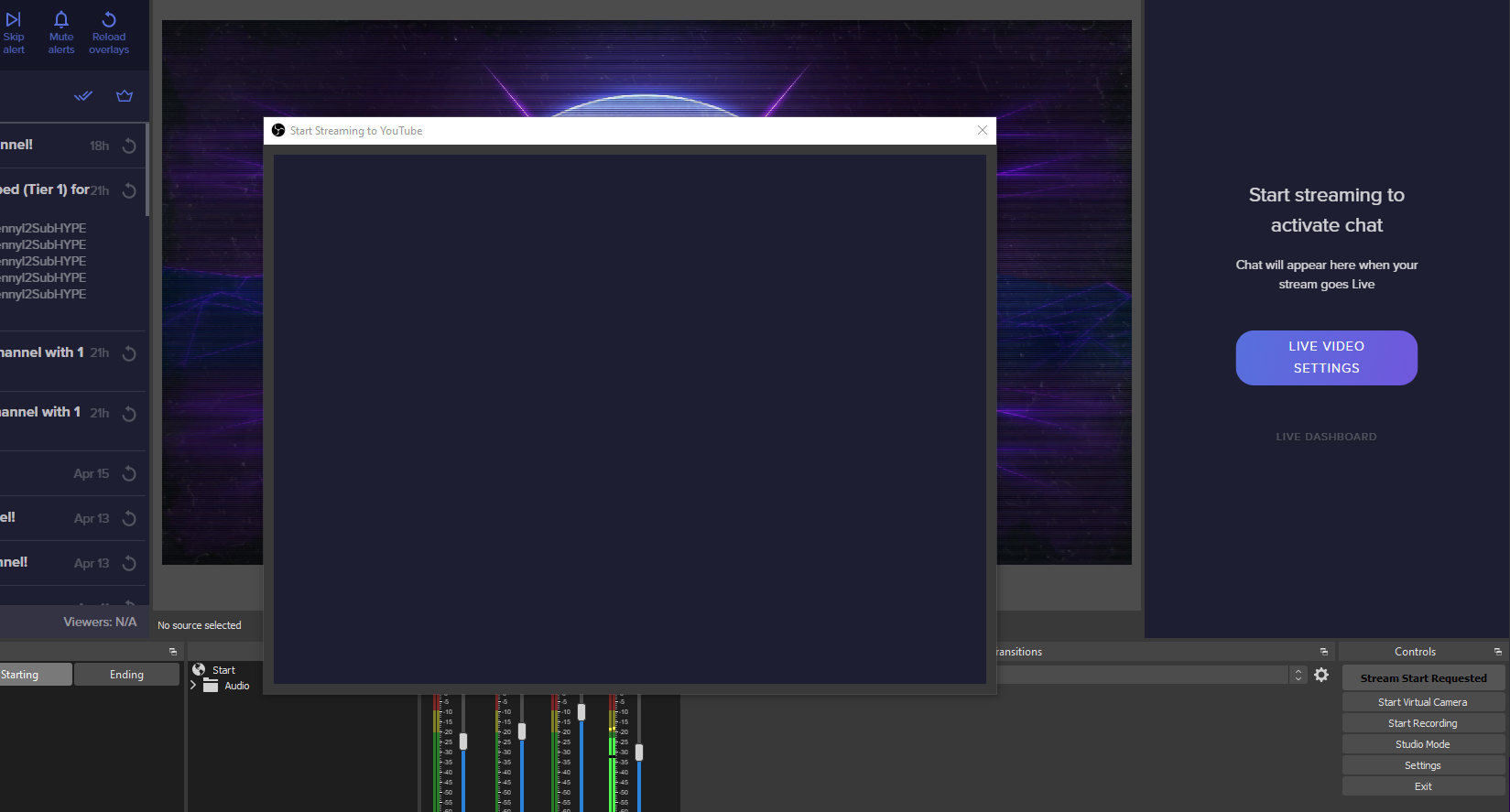
I've tried closing and reopening it but still happens
viscid pebbleBOT
@obtuse holly StreamElements menu, on top of OBS > Logout > Login
 pure moat
I can not
ebon forum
pure moat
I can not
What is your twitch channel?
The one linked to your discord is dead.
pure moat
ebon forum
What is your twitch channel?
blancohwk
 unreal void
guys can you tell me why the streamelements bot doesn't work
 slender delta
What doesnt work?
unreal void
i programmed all the timers and comands but it doesn't work
ebon forum
pure moat
blancohwk
Followers do work, i just tested one. So you are getting events.
Now we need to look at the alertbox etc.
How that is set up
unreal void
alerts work that's the chatbot that doesn't
ebon forum
unreal void
alerts work that's the chatbot that doesn't
Do you not get any response from the bot? Btw the previous message was for another user 🙂
 viscid ridge
so I'm trying to set up my tipping, but it won't let me finish
unreal void
ebon forum
Do you not get any response from the bot? Btw the previous message was for anoth...
excuse me lol, but yes chat alerts are active but as you can see they doesn't work
if i write for example !instagram (command that i wrote) it doesn't work
ebon forum
unreal void
excuse me lol, but yes chat alerts are active but as you can see they doesn't wo...
i see you have the custom bot name enabled. Please turn that function off and try again
marsh hare
Can someone help me with changed streamelements chatbot name?
pure moat
ebon forum
Followers do work, i just tested one. So you are getting events.
Yesterday I streamed and I didn't get the alerts, on dashboard says my last stream is on Friday, I don't understand
ebon forum
pure moat
Yesterday I streamed and I didn't get the alerts, on dashboard says my last stre...
Please check your alerts etc. And the activity feed:
https://streamelements.com/dashboard/activity
You should see all your events from the last stream here
unreal void
how do i remove the custom bot?
ebon forum
unreal void
how do i remove the custom bot?
OBS.Live - activity feed - menu - set the custom bot name back to StreamElements
 loud anvil
Can't find Console tab
marsh hare
! am trying to change the custom bot name but it is not working. I have tried everything @ebon forum
viscid pebbleBOT
@marsh hare "1) Right click on your OBS desktop shortcut and open the Properties
2) In the Target field, add the following to the very end: --remote-debugging-port=40404 (don't forget to add a space before the current path)
3) Open OBS (or restart if it was open)
4) Open your web browser and type in: localhost:40404
5) Click on StreamElements - Activity feed
6) Navigate to the Console tab
7) Type the following into the console and hit enter: store.customBot.removeCustomBotIntegration()
8) Try setting the custom bot name
9) Remove the additional flag in step 2 from your shortcut properties."
pure moat
ebon forum
Please check your alerts etc. And the activity feed:
https://streamelements.com/...
I know you look at it there, but because yesterday's stream doesn't take it into account
ebon forum
pure moat
I know you look at it there, but because yesterday's stream doesn't take it into...
Not sure what happened yesterday, i just tested the alerts and they do work
So we need more data here
pure moat
ebon forum
Not sure what happened yesterday, i just tested the alerts and they do work
ok, thks 😎 🤟
loud anvil
unreal void
i can't find it 😦
I just found it, done everything, and it still doesn't work
unreal void
where is it?
loud anvil
Apparently there's some general problem with the bots that use custom names
ebon forum
Not a general issue, more like disconnects etc. It is custom and running through OBS.Live
which is not guaranteed to work all the time 100% stable
pure moat
ebon forum
Not sure what happened yesterday, i just tested the alerts and they do work
I'm leaving, the alerts are coming out. thks thks thks
ebon forum
unreal void
i use the standard obs version to stream
Well if you do not use OBS.Live or an old version of Ground Control to customize the bot name, then how is it showing up as custom bot name enabled?
marsh hare
I am stuck at the navigate to the console tab in my instructions @ebon forum not sure what the console tab is
loud anvil
marsh hare
I am stuck at the navigate to the console tab in my instructions <@!149255081194...
That little tab at the top > corner
ebon forum
marsh hare
I am stuck at the navigate to the console tab in my instructions <@!149255081194...
Press F12 if in Chrome
loud anvil
There's a >> in there, press it and there will be some options - Console will be the first of them
Also got stuck in that step :p
And it didn't work for me :/
 lament blade
any way to delete the accounts I don't use in streamelements like my YT and Facebook account but still keep my twitch stream elements account
marsh hare
I found the console but I don't know how to type in it
Okay I followed the instructions and it is still not working @ebon forum
 abstract stratus
is there a way i can get the twitch bits gif to my stream elements, i can't find a place to download them
something like these

 cedar pagoda
Hi so ive been hitting this issue with streamelements' web dashboard where i cant access my own dashboard directly and it kicks me out to homepage
same problem occurs when i try to access another channel's streamelements dashboard
viscid pebbleBOT
@cedar pagoda Please logout of StreamElements at https://streamelements.com/logout and then login again to your account (Twitch/YouTube/Facebook).
cedar pagoda
tried that already a bunch of times,
streamelements.com > My Dashboard yellow button > Kicks me back to homepage
streamelements.com > Dropdown menu > Dashboard link > Kicks me back home
lament blade
I'm using chatbox widget in some of my overlays, and when I switch scenes (which also switches overlays) the chatbox history in the new scene doesn't keep the messages that had already been there - is that as intended, or is there a way to 'fix' that?
 foggy heart
cedar pagoda
tried that already a bunch of times,
foggy heart
cedar pagoda
tried that already a bunch of times,
Can you logout, clear the cookies and cache of your browser, then try again?
foggy heart
lament blade
I'm using chatbox widget in some of my overlays, and when I switch scenes (which...
Do you have the sources in OBS set to refresh?
 sacred nest
Hi everyone I'm new to the discord I have been affiliated and want to carry on growing. Hope everyone is well look forward to chatting soon
cedar pagoda
foggy heart
Can you logout, clear the cookies and cache of your browser, then try again?
yeah i just finished doing that, tried it with a different browser as well, same issue
viscid pebbleBOT
@cedar pagoda Please provide your account ID found at the top of this page: https://streamelements.com/dashboard/account/channels This ID is public info and safe to share here.
cedar pagoda
This is my id: 5934c32584b0710b166cb74e
FYI the only way i could get to the dashboard was top right dropdown > Profile > Top right menu > Dashboard
but even then it lets me view some channel's dashboards normally, and one of them kicks me to the homepage
foggy heart
Which dashboard is not loading for you?
cedar pagoda
the one for kkatamina
@foggy heart I can open all of them except my own and kkatamina's
lament blade
foggy heart
Do you have the sources in OBS set to refresh?
In fact, I do. Thanks!
 spice chasm
the sub count - ${channel.subs} - is showing 0 subs for a channel i mod on. any solution?
viscid pebbleBOT
@spice chasm Go to the Dashboard > Right side > Part channel > Join channel(https://streamelements.com/dashboard)
foggy heart
cedar pagoda
This is my id: `5934c32584b0710b166cb74e`
FYI the only way i could get to the d...
Tried it om my end and got the same thing. Where you able to access them normally at some point?
cedar pagoda
yeah, about 2~3 weeks back
lament blade
One more thing I need help with - similar to coolioyoo's problem:
I have a follower goal bar set up to track my way to 50 follows. It says I'm at 25/50 (50%), but I'm actually at 21... and I can't figure out why the tracker's not correct, but I suspect that it would not update correctly upon a new follow, either since it's not accurate now
cedar pagoda
To be completely honest, ever since 2~3 weeks ago streamelements has been buggy overall, dashboard access issues and twitch chatbot not being responsive
viscid pebbleBOT
@lament blade To reset goals:
- from the Overlay Editor > Session data on top right (monitor symbol) > Goals tab > reset progress of desired goal
- from the Dashboard > Activity feed on the left > Widget data on the right > Goals tab -> reset progress of desired goal
Note: Goal widgets (progress) only counts up and doesn't go down automatically, if you lose followers/subs.
cedar pagoda
for not just me but a lot of other mods as well
 drowsy egret
your merch store should now be good to go
cedar pagoda
for example: I dont have tinakitten's dashboard access but we cant edit commands there anymore
spice chasm
viscid pebble
<@!732253640378810389> Go to the Dashboard > Right side > **Part channel** > **J...
okay thank you 😄
it worked, ty 😄
foggy heart
cedar pagoda
To be completely honest, ever since 2~3 weeks ago streamelements has been buggy ...
I'm going to pass this over to out dev team to have a look since it seems to be acting out of the ordinary
feral patio
hi, chat stats for my friend, old username was WhoElseButSmoov
new username WEBSmoov and ID is 6010e2ab62f769c9793b1bd6
drowsy egret
feral patio
hi, chat stats for my friend, old username was WhoElseButSmoov
new username WEB...
on it
feral patio
superstar thankyou
drowsy egret
feral patio
superstar thankyou
chat stats created, remember that they will only start tracking from now on
feral patio
that’s perfect, thankyou so much!
cedar pagoda
foggy heart
I'm going to pass this over to out dev team to have a look since it seems to be ...
alright thank you
 remote storm
Stupid question probably, but is there a way to streamline the bank verification for the SE.Pay?
drowsy egret
remote storm
Stupid question probably, but is there a way to streamline the bank verification...
feel free to DM me your account id and I'll help you get that sorted out
remote storm
drowsy egret
feel free to DM me your account id and I'll help you get that sorted out
Got it sent 😄 Thank you 🙂
 worldly hare
So the streamelements bot isn't working in chat. Like commands and evening. What should I do?
viscid pebbleBOT
@worldly hare Go to the Dashboard > Right side > Part channel > Join channel(https://streamelements.com/dashboard)
worldly hare
Okay thank you
 prime skiff
What did I do
 foggy heart
prime skiff
What did I do
foggy heart
prime skiff
What did I do
Do you have the bot set to block links?
prime skiff
I might
 livid elbow
Hello, i receive a donations 2 days ago but in the streamelements dont show the donation and the donator dont receive the lealty points, why?
viscid pebbleBOT
@livid elbow If a viewer tipped through PayPal but no information appears in your StreamElements account, this generally means PayPal has held the tip for verification.
Until PayPal clears the tip and sends back a confirmation to your StreamElements account, no information will appear there and no alert will play, as that confirmation is the only way for us to be aware of a successful transaction.
There is a posibility that the tip may have been sent as an eCheque/eCheck - these tips can take from 7 up to 21+ days to show up on our side. Tippers can usually cancel these.
If you believe there may be an issue with the transaction, you'll need to contact PayPal support as StreamElements is only a passthrough service and never actually gets involved with the transaction or touches the money
livid elbow
@viscid pebble i received the money, and finished the transaction without problems, i still need to wait this ?
if the transaction finish, i need to send a message to paypal, to send message to you to?
or what?
prime skiff
foggy heart
Do you have the bot set to block links?
I turned everything off and it’s still deleting
viscid pebbleBOT
@prime skiff Please provide your account ID found at the top of this page: https://streamelements.com/dashboard/account/channels This ID is public info and safe to share here.
 glossy flower
Hi! I'm running everything on my mid-2009 macbook pro, with OS X El Capitan, 10.11.6 - I'm trying to add OBS.Live since streamlabs OBS was way too much CPU load for this relic. However, it can't install because it requires Catalina - is there possibly an older version to use with Capitan? Thank you!
drowsy egret
glossy flower
Hi! I'm running everything on my mid-2009 macbook pro, with OS X El Capitan, 10....
we only support catalina and upper 
glossy flower
😢
Is there a browser supported side? I'm trying to set up my custom bot for my channel commands
or am I totally SOL lmao
 keen cargo
hola como puedo hacer que un comando active otro comando?
viscid pebbleBOT
@keen cargo Welcome to the helpdesk! The regular helpdesk channels are in English but we do provide multi-language support in the following channels: #🇩🇪︱deutsch | #🇫🇷︱français | #🇪🇸︱español | #🇵🇹︱português | #🇳🇱︱nederlands | #🇮🇹︱italiano | #🇵🇱︱polski | #🇨🇳︱中文語言服務區-chinese | #🇯🇵︱日本語-japanese | #🇭🇺︱magyar | #🇰🇷︱한국어-korean | #🇹🇭︱ไทย-thai | #🇷🇺︱русский | #🇺🇦︱українська | #🇨🇿︱czech
keen cargo
hello how can I have one command activate another command?
 abstract hemlock
That not possible @keen cargo
keen cargo
hooo rays thank you very much
 vale lake
hello , how can I put a cronometer so when I start stream it apears when it starts???
drowsy egret
vale lake
hello , how can I put a cronometer so when I start stream it apears when it star...
answered in #🇪🇸︱español
worldly hare
So I parted the bot from my channel then made it rejoin but none of the commands for it are working
viscid pebbleBOT
@worldly hare Please logout of StreamElements at https://streamelements.com/logout and then login again to your account (Twitch/YouTube/Facebook).
 inner valve
hello, anyway to clear an alert queue in the case of bots?
abstract hemlock
inner valve
hello, anyway to clear an alert queue in the case of bots?
https://streamelements.com/dashboard/activity you can skip the alert or mark all as read
 inner valve
abstract hemlock
https://streamelements.com/dashboard/activity you can skip the alert or mark all...
inner valve
abstract hemlock
https://streamelements.com/dashboard/activity you can skip the alert or mark all...
in the case of bots ud have to skip 2k + times, so mark as read will prevent the alert from popping up?
 swift quarry
Alguien me puede explicar cómo configurar esta app para mis directos en YouTube
abstract hemlock
it should, let's try it, post here your account ID so i can check it on my end aswell @inner valve
viscid pebbleBOT
@swift quarry Welcome to the helpdesk! The regular helpdesk channels are in English but we do provide multi-language support in the following channels: #🇩🇪︱deutsch | #🇫🇷︱français | #🇪🇸︱español | #🇵🇹︱português | #🇳🇱︱nederlands | #🇮🇹︱italiano | #🇵🇱︱polski | #🇨🇳︱中文語言服務區-chinese | #🇯🇵︱日本語-japanese | #🇭🇺︱magyar | #🇰🇷︱한국어-korean | #🇹🇭︱ไทย-thai | #🇷🇺︱русский | #🇺🇦︱українська | #🇨🇿︱czech
inner valve
abstract hemlock
it should, let's try it, post here your account ID so i can check it on my end a...
the bot didnt happen on my account, will we test it with with a single follow? also not sure where to find my acc id is it my channel name? 😂
viscid pebbleBOT
Please provide your account ID found at the top of this page: https://streamelements.com/dashboard/account/channels This ID is public info and safe to share here.
inner valve
abstract hemlock
it should, let's try it, post here your account ID so i can check it on my end a...
5e348f0baeb5b721f0e7eb53
abstract hemlock
but if it didn't happen on your account, i need the account of the streamer 😓 (you can post the username here not the link)
inner valve
abstract hemlock
but if it didn't happen on your account, i need the account of the streamer 😓 ...
aliebunny
abstract hemlock
i can't access to her account (she need to logout and log back in) also, she isn't live
viscid pebbleBOT
Please logout of StreamElements at https://streamelements.com/logout and then login again to your account (Twitch/YouTube/Facebook).
inner valve
abstract hemlock
i can't access to her account (she need to logout and log back in) also, she isn...
yes this happened earlier this eve, but we were trying to figure out what to do in this case because its not the first time :d
it looks like alerts stopped coming through tho cus i have mod access on SE
abstract hemlock

inner valve
thanks 😄
 tender lagoon
My chat bot is not working
viscid pebbleBOT
@tender lagoon Go to the Dashboard > Right side > Part channel > Join channel(https://streamelements.com/dashboard)
tender lagoon
Ive already done that and it did not fix the issue
viscid pebbleBOT
@tender lagoon Please provide your account ID found at the top of this page: https://streamelements.com/dashboard/account/channels This ID is public info and safe to share here.
tender lagoon
5d3263b4b6d7988683530a22
abstract hemlock
@tender lagoon check if the bot is mute, timeout or ban on your channel
tender lagoon
how do I check that?
abstract hemlock
go to your twitch chat and type /unban StreamElements /untimeout StreamElements
tender lagoon
It looks like the unmute worked
abstract hemlock
tender lagoon
Thank you
abstract hemlock
 viscid pebbleBOT
@steady wave Read and follow our server rules:
- We do not tolerate toxicity! Treat the community team, staff and all members with respect.
- No advertisement or channel promotion, anywhere on the server.
- No NSFW/NSFL
- No unsolicited DMs or friend requests to server members
Make sure to read the #welcome in any server you join.
 steady wave
 little plaza
The bot is in the chat, there are test alerts on the overlay, but there are no, for example, followers on the activity and on the screen
abstract hemlock
little plaza
The bot is in the chat, there are test alerts on the overlay, but there are no, ...
you don't see the followers on your activity feed?
little plaza
abstract hemlock
you don't see the followers on your activity feed?
Yes, but bot is on the chat and streamelements its conected to ttv
And don't see follow alerts on overlay when test alert working
viscid pebbleBOT
You can test alerts via the Emulate bell on the lower left side of the Overlay Editor. Simply go to your Dashboard > My Overlays > pencil/edit button on the overlay. Make sure the Preview LIVE on stream option is on to see the alert in OBS/XSplit** https://streamable.com/vtulg9
little plaza
But test alerts working
abstract hemlock
😅 sorry, i think something is missing in translation
You see the followers on your activity feed, the bot is connected to your twitch account, test alerts works, only live events doesn't trigger the alert, correct?
little plaza
abstract hemlock
You see the followers on your activity feed, the bot is connected to your twitch...
Yes
no no, i don't se folowers on activity feed
But bot is connected, test alerts works
little plaza
Okay, thanks 🙂 ❤️
 restive trellis
Hey guys!
Can anyone tell me how to get end credits to roll? I've added the widget to my layout, but I cant seem to get it to work.
 kindred sapphire
StreamElements support said they were offering a sponsorship, and to go to the discord. where do i go to?
lament blade
hello guys !
foggy heart
kindred sapphire
StreamElements support said they were offering a sponsorship, and to go to the d...
I believe I responded through live chat, but I believe you need to check oyur dashboard to see the tab (left hand side)
viscid pebbleBOT
@lament blade Welcome to the helpdesk! Please let us know how we can assist you today and a support volunteer or staff member will assist you as soon as they are available. Thank you for your patience.
 open fern
Hello, the streamelements commands are not working for me. I try to set the !watchtime command and it doesn't work, I've been waiting for days. I would appreciate some help, thanks in advance.
viscid pebbleBOT
@open fern The !watchtime command is directly tied to the Loyalty system. The Loyalty system must be enabled for viewers' watchtime to count up.
To enable Loyalty, please go to the Loyalty section of your account: https://streamelements.com/dashboard/loyalty
Watchtime counts up every 10 minutes alongside Loyalty points, and only while the stream is live. Reruns will not be counted.
Please note that watchtime is not tracked by Twitch and there is no way to retroactively apply past watchtime to viewers.

StreamElements
The Ultimate All in One Platform for Streamers
 polar turret
Hi everyone, I was wondering if it was possible to make a custom command that only works for a particular user. Is that even possible? I have a custom command already, but anyone can do it, and I'd love to make that command available only to one community member.
open fern
viscid pebble
<@!445985355208982529> The !watchtime command is directly tied to the Loyalty sy...
does not work, it is bugged, it has never worked for me.
 jade moss
can anyone here help me figure out how to install an overlay i purchased? I followed the instructions but it is not working
open fern
streamelements does not work on my channel. It has never typed a message or a command. I don't know where the error is, it's mod in my channel.
viscid pebbleBOT
@open fern Go to the Dashboard > Right side > Part channel > Join channel(https://streamelements.com/dashboard)
 candid cypress
Twitch Test

the closest server to me are both san jose and san fran, which should I stream too?
lament blade
Hey there, I've just set a custom gif as the follower alert image, however stream alerts is squishing the image, how do I fix this?

Original image:

It also appears at the top of the alert box, where I'd prefer for it to be located at the center, as well as not being scaled or anything
 foggy heart
lament blade
Hey there, I've just set a custom gif as the follower alert image, however strea...
foggy heart
lament blade
Hey there, I've just set a custom gif as the follower alert image, however strea...
If the image itself is bigger than the alertbox dimensions, you might have to resize the alert box so it fits properly
lament blade
ahhh ok
tahnk you
i was about to try that cause it dawned on me that I could change the size of the alert box
foggy heart
Yeah, you should be able to adjust the size and location of the image and text so that it looks how you want it to.
lament blade
that kinda sucks for people whos alert images are different dimensinos
 abstract jackal
dumb question .. i know something has change in host alerts . as of what i've understand it supposed to show in my activity feed if someone hosted my stream right ?
lament blade
bruh now its all zoomed out wtf

i set the size to 750x250
which is the dimensions of the gif
foggy heart
Based on the layout you choose for the text, it will adjust the image. If you made adjustments then switched the layout, it will carry those over which can make things look odd
Best to choose the layout first, then move things
lament blade
im confused wdym by layout
viscid pebbleBOT
@abstract jackal "Due to changes to Twitch API, we have filtered out hosts and will only show these ones on your activity feed:
- All hosts coming from an online channel with at least 1+ viewer
- Auto host events with at least 1 viewer - only from a channel that just went offline
Note: If you see X channel has hosted you with no viewers on the back, that is considered an offline host or a host with 0 viewers, we do not show these."
lament blade
The text is where i want it, The gif is really small
 open fern
Hi, when I remove streamelements of my channel from streamelements and add it again, the command works once, then it stops working again. If I push it back in, it works once again.
foggy heart
This part here. I would start with a fresh alertbox, choose this layout, then edit after
 viscid pebbleBOT
@open fern If your commands recently stopped working and you're using OBS.Live and a custom bot name do the following:
- In OBS.Live, click on the hamburger menu (three stripes) at the top left of your activity feed
- Click on Stream Settings > Custom bot name
- In the Custom bot name field select Set custom bot name, not your already existing username (with capital letters). Note: If you already connected an account that way, the third entry will show as the account name (see image https://i.imgur.com/sO7fWOX.png).
- Scroll a bit down and click on the purple Connect Custom Bot Account button
- Log in as usual and Authorize the custom bot name
- Back in the Activity feed, click on the Send Test Message button and check if your custom bot name starts working again

 slate torrent
I am creating an emote explosion and I would like to select my twitch channel emotes for it but when I go to "select emotes" my twitch emotes don't show up as an option
drowsy egret
slate torrent
I am creating an emote explosion and I would like to select my twitch channel em...
we've reported this to our devs already, seems like the widget is bugged
lament blade
Is there a way to accept tips through direct deposit rather than paypal?
open fern
viscid pebble
<@!445985355208982529> If your commands recently stopped working and you're usin...
I don't use obs.live, I use obs studio and the streamelements website.
 ionic kelp
@open fern could you disable followers mode please?
@lament blade that would be via our SE.Pay method.
viscid pebbleBOT
SE.PAY is available for streamers who are at least 18 years old, with bank account under their name in one of the following countries and have at least 101 follower (Twitch) / 101 subscribers (YouTube):
Austria, Belgium, Czech Republic, Denmark, Finland, France, Germany, Ireland , Italy, Netherlands, Poland, Portugal, Slovakia, Spain, Sweden, Switzerland, United Kingdom, United States.
If you meet these criteria and don’t see SE.Pay, let us know.
For information on SE.Pay payment methods, their fees and settlement times see https://streamelements.com/dashboard/tipping/fees
lament blade
I do meet those requirements thank u
So I have to wait until I get a tip to connect a bank account?
also I love your nickname
ionic kelp
Go to tipping settings tab and enable it there https://streamelements.com/dashboard/tipping-settings
lament blade
I've enabled it and made an SEPAY account, however I don't see a setting for bank account routing number or anything.
 hollow arch
hi - i was using social showcase and it was working however now the link will not load the widgit at all. how can i fix this
open fern
ionic kelp
<@445985355208982529> could you disable followers mode please?
I just tried it and no, it doesn't work either 😦
ionic kelp
That was more for me and not you.
open fern
ionic kelp
That was more for me and not you.
ah ok sorry, try now
ionic kelp
Try this.
viscid pebbleBOT
Go to the Dashboard > Right side > Part channel > Join channel(https://streamelements.com/dashboard)
open fern
ionic kelp
Try this.
yes, i do it
 viscid pebbleBOT
Please provide your account ID found at the top of this page: https://streamelements.com/dashboard/account/channels This ID is public info and safe to share here.
open fern
viscid pebble
Please provide your account ID found at the top of this page: <https://streamele...
5e7bf921b82299974be0f7ee
 stuck turtle
hi
open fern
viscid pebble
Please provide your account ID found at the top of this page: <https://streamele...
What else can I do? @ionic kelp
 slender locust
How do i add the music to my overlay?
 novel lotus
hello, someone because the 2-month sub does not appear in the feed?
drowsy egret
novel lotus
hello, someone because the 2-month sub does not appear in the feed?
they have to share their sub in chat before its added to your activity feed
novel lotus
drowsy egret
they have to share their sub in chat before its added to your activity feed
then it only appears if they type a message?
 austere pumice
Is this a good place to get help with audio issues?
novel lotus
sorry my english, i'm using the translator 🙂
viscid pebbleBOT
@austere pumice Obs.live is a plugin for OBS Studio for the best OBS support, please join their Official Discord @ discord.gg/obsproject
drowsy egret
novel lotus
then it only appears if they type a message?
yeah, once they announce their resub it will show the alert
viscid pebbleBOT
@novel lotus Prime Gaming (new and resub) and paid subscriptions (resub only) must be shared in chat manually by the person subscribing in order for the subscription information to be sent to StreamElements. For Prime Gaming, the user needs to have sharing enabled on https://www.twitch.tv/settings/prime. For paid subs, if the share box doesn't show up immediately it will when they refresh the page. https://i.imgur.com/VNJN0Uv.gif https://i.imgur.com/2297EA7.png

 lament blade
Heyo, there's a font that's available for alerts/labels, called Obidee Sans, this font, however, is not available for the chat box. Is there a way I can use this font or no?
novel lotus
viscid pebble
<@!547021390755397633> Prime Gaming (new and resub) and paid subscriptions (resu...
tanksssssss 
 autumn spruce
I thought I had the SE Chatbot setup to announce in chat when I get a raid or a host, but in my most recent stream this did not happen.
Is it the viewers and amount options that I need to tweak?
viscid pebbleBOT
"Due to changes to Twitch API, we have filtered out hosts and will only show these ones on your activity feed:
- All hosts coming from an online channel with at least 1+ viewer
- Auto host events with at least 1 viewer - only from a channel that just went offline
Note: If you see X channel has hosted you with no viewers on the back, that is considered an offline host or a host with 0 viewers, we do not show these."
autumn spruce
my activity feed said it was 3 viewers
 worldly escarp
what is the min viewer amount did you set to announce?
autumn spruce
is that the setting next to the message field? they're both set to 1
lament blade
I've installed a font called Obidee Sans to my computer, but in the ChatBox settings, after enabling the "Custom Font Family" setting and typing in "Obidee Sans", it does not use the custom font.
viscid pebbleBOT
@lament blade Google Fonts
More than 900 google fonts are supported at this time. You can preview them here: https://fonts.google.com/
Custom Fonts
Steps:
- Install the font on the streaming PC or choose a pre-installed windows font.
- In the overlay widget settings, select Text Settings
- Click on Enable Custom Font
- Type the name of the font as it appears in the windows font directory (This is usually
C:\Windows\Fonts)
Note: After installing fonts, the browser and OBS must be restarted for the font to appear.
lament blade
ok so like, i typed in the font the way it appeared in that folder, "Obidee Sans Regular", i've restarted my browser and OBS, and the font is still not appearing


this is what it should look like btw
 ionic kelp
If you try with an OBS text source does it show then?


 zenith widget
send me the font file and i'll test it
lament blade
zenith widget
send me the font file and i'll test it
here?
zenith widget
Since the font is paid, send me the file in DMs

 zenith widget
 lament blade

zenith widget
You don't need to download any font file that is from Google Fonts
lament blade
ok so
hold on
I've searched the font in the pick a font thing and its not there

google fonts are available for everything but the chatbox for me
zenith widget
lament blade
fucking
my dyslexic ass
i'm gonna cry
sorry for wasting your time i thought it was obidee not odibee
zenith widget
no worries
as you can see i typed it wrong my self as well 
i read "oDibee" yet i type "oBidee"

 open fog
I want to run a giveaway for 5 days and if people come to my stream everyday they could enter the giveaway multiple times! is that something that is possible?
 plucky aurora
Hi, does anyone know how to copy one overlay into another. I am trying to combine all my overlays into 1 single one.
worldly escarp
plucky aurora
Hi, does anyone know how to copy one overlay into another. I am trying to combin...
you can duplicate the widget and choose "another overlay"
 plucky aurora
i dont see that option....it asks me the channel i want to add to and then it says done
plucky aurora
worldly escarp
you can duplicate the widget and choose "another overlay"
this happen after that
 worldly escarp
plucky aurora
this happen after that
worldly escarp
plucky aurora
this happen after that
you can duplicate the widget from inside the overlay
plucky aurora
worldly escarp
you can duplicate the widget from inside the overlay
i want to duplicate the one on the right into the one on the left....which one should i open first?
 worldly escarp
the one you want to move
 dusk rivet
I cannot seem to be able to get timezones displayed, other than CET or UTC. I tried AET, PT, JST; it defaults to UTC?
Such as ${time.JST} says 5:45..
plucky aurora
worldly escarp
the one you want to move
then what do i do 🙂

@worldly escarp can u help me out with the next step pls 🙂
 limpid bear
Hi everyone, one question, as a moderator, is there a way to edit cooldowns on a timer from chat? Asking since I don't have access to the streamer's dashboard and sometimes this timers can be a bit spammy.

 umbral prairie
hi have a question not sure if this is the correct place but my Streamelements shout out and other commands stopped working? anything i can do to fix it?
viscid pebbleBOT
@umbral prairie Go to the Dashboard > Right side > Part channel > Join channel(https://streamelements.com/dashboard)
viscid pebbleBOT
@umbral prairie If your commands recently stopped working and you're using OBS.Live and a custom bot name do the following:
- In OBS.Live, click on the hamburger menu (three stripes) at the top left of your activity feed
- Click on Stream Settings > Custom bot name
- In the Custom bot name field select Set custom bot name, not your already existing username (with capital letters). Note: If you already connected an account that way, the third entry will show as the account name (see image https://i.imgur.com/sO7fWOX.png).
- Scroll a bit down and click on the purple Connect Custom Bot Account button
- Log in as usual and Authorize the custom bot name
- Back in the Activity feed, click on the Send Test Message button and check if your custom bot name starts working again
umbral prairie
yes that worked. thank you you guys awesome
 latent hound
Accidentally reset my "all time" list for currency...trying to readd manually, but the currency only goes to the "current" list. Not the "all time" list. Any way I can fix this?
worldly escarp
latent hound
Accidentally reset my "all time" list for currency...trying to readd manually, b...
you mean the points from the leaderboard?
 somber lagoon
Hello, I have a question...might be a silly one. How do you reset your follower goal numbers in the overlay? Specifically the number I am currently at, not the actual goal?
 viscid pebbleBOT
To reset goals:
- from the Overlay Editor > Session data on top right (monitor symbol) > Goals tab > reset progress of desired goal
- from the Dashboard > Activity feed on the left > Widget data on the right > Goals tab -> reset progress of desired goal
Note: Goal widgets (progress) only counts up and doesn't go down automatically, if you lose followers/subs.
 torn meteor
@worldly escarp could you help me with the question i had
worldly escarp
torn meteor
<@!689904735917965342> could you help me with the question i had
sure, which question?

 keen wigeon
Did you enter a US address?
lament blade
Hello, my live after 05:25 minutes crashes, can you tell me why?
keen wigeon
You live meaning your stream?
worldly escarp
torn meteor
<@!409020761571983361> not that i know of
what we're asking is what address have you entered the NZ or Us one?
torn meteor
nz one
worldly escarp
torn meteor
nz one
ok to my understanding , thats why you got this form
torn meteor
so what would i do then @worldly escarp
 willow coral
Are we allowed to manually connect to stream elements websocket for creating custom, locally hosted overlays? The overlays I'm working with don't work through browser source - causes too much lag. Thinking that if they were locally hosted, there would be less stress on the network for downloading each incoming alert
 south minnow
Hi
Im starting streaming on twitch and I created my overlays but I don't know how to upload them to my channel
can somebody help me ?
thnx
viscid pebbleBOT
@south minnow To add your overlays to OBS, add a new browser source in your scene. Paste your overlay URL in the browser source properties, set the dimensions to 1920x1080 (unless you changed them on the website) and check Shutdown source when not visible. https://youtu.be/KDvLynUqXI4
south minnow
Im streaming on ps5. does it prefer ?
viscid pebbleBOT
@south minnow Consoles do not have native support for overlays. You would need a capture card, PS4 remote play or Xbox companion app and a PC with OBS in order to have overlays over your console gameplay.
We have a blog post about how to set up console streaming with our essential tools: https://blog.streamelements.com/how-to-stream-on-console-7b620b1c46c3
south minnow
thnx for your help
lament blade
how can i make the custom command so the custom response will show one of my custom emotes in twitch chat?
ionic kelp
Simply add the emote to the response. However it has to be a sub whether an actual gifted one or using the custom bot name option of someone who is to properly appear.
lament blade
ok thank you
worldly escarp
torn meteor
so what would i do then <@!689904735917965342>
We are looking into this No ETA on a fix yet and I would recommend to wait a day or two.
torn meteor
thank you
 hollow kernel
Hello Guys!
My english is very bad but i try my best: I want to create a chat command, which add/remove to random chatter a random amount of my loyalty points. Choosing a random chatter is no problem, but i don't find the right variable to add points with a chat command? I hope u understand my problem and can help me 😄
ionic kelp
You make total sense.
However you are correct in not finding a variable for it as it doesn't exist.
However.
There is a 3rd party API that can do that.
I can fins it but unfortunately won't be able to help beyond that atm.
Follow the instructions from this comment. https://streamelements.helprace.com/i519-provide-an-addpoints-variable
 hollow kernel
@ionic kelp Thank you very much! They really have to add a variable like this.. 😮
ionic kelp
There's an upvote option there.
hollow kernel
@ionic kelp Thx im leave a upvote there 😄
plucky aurora
@worldly escarp any update on my issues? 😀
plucky aurora
plucky aurora
then what do i do 🙂
Here
open fern
hi! I don't know why this happens to me. The streamelements commands do not work on my channel. If I hit exit channel and add it again, the commands work only once and it doesn't work again. When I kick out and add back to streamelements, it works again once and no more. I don't use obs.live, I use obs studio and the streamelements website. Help pls
dusk rivet
Hey guys, anyone knows why the time command refuses to accept other time zones for me? It only displays UTC, even to eg ${time.AET} or ${time.JST} 🤔
worldly escarp
plucky aurora
<@689904735917965342> any update on my issues? 😀
just choose the widget within the overlay that you wish to copy and click on duplicate
 lament blade
Hey 🙂 I had SE Pay active on my SE-Youtube Account. Since I plan to switch to Twitch for streaming I linked my Twitch-Account as well, but now I'm not able anymore to choose SE Pay in the tipping setup. How can I get that back for my Twitch-Linked SE-Account?
worldly escarp
lament blade
Hey 🙂 I had SE Pay active on my SE-Youtube Account. Since I plan to switch to T...
even if you have Se.pay active on your YT it will not reflect on your twitch account, you still need over 100 followers on twitch before the Se.pay unlocks.
lament blade
worldly escarp
even if you have Se.pay active on your YT it will not reflect on your twitch acc...
Ahh I see 🙂 Thanks for the info 🙂
worldly escarp
open fern
hi! I don't know why this happens to me. The streamelements commands do not work...
Have you tried parting the bot first? and re-join?
open fern
worldly escarp
Have you tried parting the bot first? and re-join?
How to separate it? I have tried to remove the bot from my channel and merge it. When I do that, the command works once and never works again until I kick it out and join it again.
worldly escarp
open fern
How to separate it? I have tried to remove the bot from my channel and merge it....
 open fern
worldly escarp
open fern
worldly escarp
yes, that is what I have explained to you. I have done that many times and in doing so, I use a command and it works but ONCE. After that it never works again
worldly escarp
open fern
yes, that is what I have explained to you. I have done that many times and in do...
ok , are you using custom bot?
worldly escarp
is the bot called streamelements?
 pallid swan
Hello, Im using Streamelements for my total subscriber counts. I currently have 6 Subscriber but the count shows only 0. Can someone help me with this?
 open fern
worldly escarp
is the bot called streamelements?
open fern
worldly escarp
is the bot called streamelements?
when it works yes
worldly escarp
most of the commands were off, also you're also using the streamlabs bot
open fern
worldly escarp
most of the commands were off, also you're also using the streamlabs bot
yes, I am interested in the !watchtime command. And yes, I use streamlabs also for all the other commands
viscid pebbleBOT
@open fern The !watchtime command is directly tied to the Loyalty system. The Loyalty system must be enabled for viewers' watchtime to count up.
To enable Loyalty, please go to the Loyalty section of your account: https://streamelements.com/dashboard/loyalty
Watchtime counts up every 10 minutes alongside Loyalty points, and only while the stream is live. Reruns will not be counted.
Please note that watchtime is not tracked by Twitch and there is no way to retroactively apply past watchtime to viewers.
StreamElements
The Ultimate All in One Platform for Streamers
open fern
now I'm seeing that it works!!! I don't know why. What have you done?
worldly escarp
open fern
now I'm seeing that it works!!! I don't know why. What have you done?
the watchtime only works when youre live
open fern
worldly escarp
the watchtime only works when youre live
ah yes? it's working for me now without being. Why is that?
worldly escarp
it shows you 0...
open fern
worldly escarp
it shows you 0...
yes, I mean that before there was no response from streamelements to the commands and now there is. That was the problem!
thanks for all Maya!!
worldly escarp
the command wasnt enabled
open fern
worldly escarp
the command wasnt enabled
where? How did you enable it and where?
worldly escarp
open fern
where? How did you enable it and where?
https://streamelements.com/dashboard/bot-commands/default-commands also just in case https://streamelements.com/dashboard/bot-modules
StreamElements
The Ultimate All in One Platform for Streamers
StreamElements
The Ultimate All in One Platform for Streamers
open fern
worldly escarp
https://streamelements.com/dashboard/bot-commands/default-commands also just in ...
what was not enabled there? it was only the watchtime command, right?
worldly escarp
open fern
what was not enabled there? it was only the watchtime command, right?
none of them were enabled...
open fern
worldly escarp
none of them were enabled...
I was only interested in the watchtime command. Do I have to have the others activated for it to work?
worldly escarp
no
open fern
ah ok, then I don't understand what the error was before. Now it does work, but I don't know what has changed hahaha. Thanks for all 🙂
worldly escarp
👍
plucky aurora
worldly escarp
just choose the widget within the overlay that you wish to copy and click on dup...
Ok sure I'll give it a try thanks😀
lament blade
Anyone willing to hop in a Discord chat for 30 min or less that can help me with setting up new follow/sub notifications to plug into my SE/ OBS studio. I also have a few questions on some el Gato Stream Deck stuff. I'll be available at 530 pm CST today.
 terse pebble
I have changed my Twitch name a couple of times over the last couple of years, and I can't get StreamElements bot working at all. How do I go about fixing it? Also, my stream statistics in the SE dashboard aren't updating either.
viscid pebbleBOT
@lament blade New to StreamElements?
Check out our YouTube channel https://www.youtube.com/c/streamelements/videos
with tutorial videos from setting up the basics, to in-depth details on how to use our product.
New to OBS? Here is a 4 step quick start guide
https://obsproject.com/wiki/OBS-Studio-Quickstart
Want to learn even more? Here is an in-depth overview
https://obsproject.com/wiki/OBS-Studio-Overview
@terse pebble If your commands recently stopped working and you're using OBS.Live and a custom bot name do the following:
- In OBS.Live, click on the hamburger menu (three stripes) at the top left of your activity feed
- Click on Stream Settings > Custom bot name
- In the Custom bot name field select Set custom bot name, not your already existing username (with capital letters). Note: If you already connected an account that way, the third entry will show as the account name (see image https://i.imgur.com/sO7fWOX.png).
- Scroll a bit down and click on the purple Connect Custom Bot Account button
- Log in as usual and Authorize the custom bot name
- Back in the Activity feed, click on the Send Test Message button and check if your custom bot name starts working again
pallid swan
Hello, Im using Streamelements for my total subscriber counts. I currently have 6 Subscriber but the count shows only 0. Can someone help me with this?
 viscid pebbleBOT
@pallid swan Please provide your account ID found at the top of this page: https://streamelements.com/dashboard/account/channels This ID is public info and safe to share here.
pallid swan
my ID is karmabay
zenith widget
Logout from our dashboard and login again. Afterwards, gives it 5 to 10 minutes and then go here: https://streamelements.com/dashboard/session -> totals tab -> reset session
StreamElements
The Ultimate All in One Platform for Streamers
 open olive
how do I activate TTS on subs? There is a sub notification popping on stream, but I couldn't make TTS to work to read out messages
pallid swan
zenith widget
Logout from our dashboard and login again. Afterwards, gives it 5 to 10 minutes ...
i will try this, thank you
 lime otter
I'm having some big problems. I'm a mod on two channels and editor on the dashboard. I login with my twitch and switch to any of the channels. When they load, it logs me out and i can't manage their channels
 void peak
Hey, StreamElements bot is writing the code for my emotes, rather than the emotes themselves?
viscid pebbleBOT
@lime otter Please logout of StreamElements at https://streamelements.com/logout and then login again to your account (Twitch/YouTube/Facebook).
 wary halo
let all the streamers do that ^^
lime otter
@void peak did you asked twitch to give the bot the free sub?
wary halo
void peak
Hey, StreamElements bot is writing the code for my emotes, rather than the emote...
the bot needs a sub for your channel or take your name
lime otter
if you didn't, bot can't use the emeotes
void peak
@lime otter How do I do that?
lime otter
and you need to be partner to ask that
wary halo
#smalldetail
lime otter
polar turret
Hi everyone, I was wondering if it was possible to make a custom command that only works for a particular user. Is that even possible? I have a custom command already, but anyone can do it, and I'd love to make that command available only to one community member.
lime otter
it's on the last section of the page
wary halo
polar turret
Hi everyone, I was wondering if it was possible to make a custom command that on...
not possible
polar turret
Damn. That's a shame.
wary halo
lime otter
it's on the last section of the page
only 2% of all streamers is partnered, not likely that this person is 😛
just gift it a sub or let it use your own name
viscid pebbleBOT
Currently renaming the bot fully works with OBS.Live.
You can follow this video guide to set it up: https://discordapp.com/channels/141203863863558144/494513233416421386/561516184718278676
lime otter
viscid pebble
<@!652570136024317963> Please logout of StreamElements at <https://streamelement...
it worked for a few seconds and logged me out of SE again
pallid swan
zenith widget
Logout from our dashboard and login again. Afterwards, gives it 5 to 10 minutes ...
i tried this, but the total sub count on my overlay is still 0. the total sub count in the widget data is also 0 😦 but under the goal tab, it correctly says 6 subs
viscid pebbleBOT
@pallid swan To reset goals:
- from the Overlay Editor > Session data on top right (monitor symbol) > Goals tab > reset progress of desired goal
- from the Dashboard > Activity feed on the left > Widget data on the right > Goals tab -> reset progress of desired goal
Note: Goal widgets (progress) only counts up and doesn't go down automatically, if you lose followers/subs.
latent hound
worldly escarp
you mean the points from the leaderboard?
Yes
 keen imp
So I was hoping someone might be able to help me figure out how to make a single line scrolling text ticker that includes latest Follower, Sub, Tip and Cheer.
somet like this image (this is just a random txt file)
 lime otter
I'm having some big problems. I'm a mod on two channels and editor on the dashbo...
lime otter
lime otter
I'm having some big problems. I'm a mod on two channels and editor on the dashbo...
tried switching browsers, logging again but it logs me out even faster
wary halo
lime otter
tried switching browsers, logging again but it logs me out even faster
all the streamers you are editor for need to do it
 nocturne heron
Hello! Is there a way to connect a chat command with a key (hotkey)?
pallid swan
viscid pebble
<@!454403126024339466> To reset goals:
- from the Overlay Editor > **Session dat...
my problem is, the total sub count on my overlay doesnt show my exact total sub, it shows 0. yesterday 2 people subscribed, the number went up to 2 for a moment and kept resetting back to 0
lime otter
wary halo
all the streamers you are editor for need to do it
they need to add me again?
wary halo
no, it's just a relog
their Twitch token expired
which happens every 30-ish days usually
lime otter
wary halo
no, it's just a relog
they need to login to the dashboard? right?
wary halo
to their StreamElements dashboard yes
with the logout link first
from the bot command
lime otter
k, i'll try
latent hound
latent hound
Accidentally reset my "all time" list for currency...trying to readd manually, b...
Is there a way for me to fix this?
lime otter
wary halo
with the logout link first
so, didn't work, also tried removing me as full control and adding again but no luck
 echo root
Hi, I'm wondering, is there a way for me to give someone VIP status for a set amount of time? For example 24 hours then it automatically comes off
ebon forum
echo root
Hi, I'm wondering, is there a way for me to give someone VIP status for a set am...
Only manually, no automation possible
 teal mural
okay i Change my name on Twitch , and now StreamElements loyalty points dont work
 minor scroll
السلام عليكم
teal mural
can someone help ?
lime otter
lime otter
I'm having some big problems. I'm a mod on two channels and editor on the dashbo...
still trying to find a way on this, tried switching browsers, anon browser, removing me from the dashboard, adding again, nothing worked
viscid pebbleBOT
@teal mural If you changed your name on Twitch, please follow these steps:
- Visit https://streamelements.com/logout and then log in again by connecting with Twitch.
- On the right side of the dashboard page that opens, select Join under bot settings. If it says Part select that and then select Join to send the bot to the chat. Don't forget to mod the bot by typing /mod streamelements in your channel if you have not already.
- Post your old and your new name here so that we can update your channel's chatstats tracking (must be done by staff).
ebon forum
And if you are looking at a different channel - !rename "oldname"
 worldly lion
how to make streamelements chatbot thank follows , subs , raids , etc ?
ebon forum
worldly lion
how to make streamelements chatbot thank follows , subs , raids , etc ?
Our website - Modules - Chat Alerts. This is where you can set that up for each alert.
teal mural
thanks help a lot !
worldly lion
ebon forum
Our website - Modules - Chat Alerts. This is where you can set that up for each ...
thanks
 spark pendant
Some help, if possible?
I recently discovered an issue with streamelements alerts if the width and height isnt set correctly. The few videos I found explainging the fix, is to change those to 1920×1080 in alert settings.
My question is, should I be changing it my actual obs canvas, or 1920×1080 is like the default setting to force it to work?
 merry niche
I can put 2 accounts in streamelements I don't know how to do it I need help
ebon forum
spark pendant
Some help, if possible?
I recently discovered an issue with streamelements alert...
You only need to set the browser source settings to 1920x1080 and then resize the frame in the canvas. Your canvas can be whatever - mine is 2560x1440 for example. OBS will scale the widgets accordingly, as long as the original source dimensions are correct.
ebon forum
merry niche
I can put 2 accounts in streamelements I don't know how to do it I need help
https://streamelements.com/dashboard/account/channels
You can connect accounts here on that page^
lament blade
Hello, I reported a streamer for breach of TOS on your platform, they were banned from Streamlabs and after my initial report, they have now continued abuse of their animals and abuse of moderation, viewers, and verbal abuse of their partner. I have gathered all new evidence but I would like to make another report if it is ok to do so. A previous server mod told me one report would suffice but more breach of TOS has been added daily.
lime otter
lime otter
I'm having some big problems. I'm a mod on two channels and editor on the dashbo...
just got a workaround getting full control on another account, but still no access on the main mod account
 tropic tiger
So I'm modding a friend of mine's twitch and every so often in her stream, StreamElements will send a message saying "Response Message". I looked through settings and commands but am not seeing anything that explains why she is getting said message. Does it have anything to do with the fact that she changed her twitch username recently?
 ionic kelp
@lime otter has every single person done the logout link?
lime otter
@ionic kelp only the one i'm trying to use the dashboard
i can remove myself of the other one
ionic kelp
If it is someone else's you cant access they have to logout too.
This usually happens when they haven't.
lime otter
can i just remove myself from their channel, the other one is offline rn
my dash on the first picture, i need the third, and i can remove the 4
 ionic kelp
doesn't matter. Just waiting on logout and login.
lime otter
the third one already logged and everything but nothing happened
tropic tiger
Also, I noticed in an above message saying that the staff has to update chat stats tracking manually after a username change. Can I let you all know about my friends name change or do they have to let you know?
spark pendant
@ebon forum Thanks for response.
Ok, my obs base canvas is 1440p as well. Rescaled to 720 for twitch stream, so I can have streamelements alert size settings set to whatever, 1280×720 if I want(makes its easier to position things for me) I just gotta make sure when I add the browser url to obs to set that to 1920×1080 and I will be all good?
ebon forum
spark pendant
<@149255081194160129> Thanks for response.
Ok, my obs base canvas is 1440p as w...
Yes. You need to make sure that the source resolution is always correct, OBS will take care of the scaling afterwards.
 hollow fractal
 viscid pebbleBOT
Please logout of StreamElements at https://streamelements.com/logout and then login again to your account (Twitch/YouTube/Facebook).
tropic tiger
also the issue with the "Response Message" isn't with the timers. There are only 2 timers and they're working properly
ebon forum
tropic tiger
also the issue with the "Response Message" isn't with the timers. There are only...
"Response Message" is an empty timer response with that default message. Please check all timers and see if there is an additional response field that was never filled out.
tropic tiger
ebon forum
"Response Message" is an empty timer response with that default message. Please ...
Hmm, ok. Just weird that it's suddenly happening today and hasn't been an issue before
ebon forum
tropic tiger
Hmm, ok. Just weird that it's suddenly happening today and hasn't been an issue ...
Then the response field was added recently. Check which timer has it and remove the empty field.
tropic tiger
ebon forum
Then the response field was added recently. Check which timer has it and remove ...
Will do. Thanks for the assistance
 wary dock
Good morning, When making custom commands, is there a way to show different text in the se online command list so that people aren’t seeing all the “custom api ...” text and such?
ionic kelp
There is not.
 uncut quarry
I'm not quite sure where else to post it. I'm trying to change profile so I can edit my friend's overlay but everytime I click on them under my channels list I get thrown to having to log back in using my Twitch account, this repeats every single time. Anyone got the same problem?
ebon forum
uncut quarry
I'm not quite sure where else to post it. I'm trying to change profile so I can ...
Tell the channel owner to log out and log back into StreamElements. That link also helps:
https://streamelements.com/logout
Only the channel owner can do it, no mods, not even with full access.
uncut quarry
The problem is not only for that channel. It happens on every single channel I have control over.
ebon forum
uncut quarry
The problem is not only for that channel. It happens on every single channel I h...
The channel owners need to refresh their login. That it happens to multiple channels is a coincidence.
lime otter
same thing with me
ebon forum
uncut quarry
Hmmm alrighty then, cheers
So the user did log out, logged back in and the management system still kicks you out?
lime otter
worked around it using other twitch account
ebon forum
Please provide the channel name, i check the status
uncut quarry
the channel I'm moderating on is Makarimorph. Mine is Buzzling_Buggo
lime otter
ebon forum
Please provide the channel name, i check the status
RCD800 trying to access G_ITZYY and LolaVeiga
G_ITZYY i have Full Control and LolaVeiga Editor
ebon forum
uncut quarry
the channel I'm moderating on is Makarimorph. Mine is Buzzling_Buggo
Target channel is set up correctly and does not need a login refresh. Checking more.
uncut quarry
Thanks ^^
ebon forum
lime otter
RCD800 trying to access G_ITZYY and LolaVeiga
Same here, looks fine
forwarding that to developers
lime otter
okay, thank you so much
@uncut quarry try to get editor or full control with another twitch account in the meantime
vale lake
ola
How do I do for when I change scene, is the scene custom?
can someone help me plis?
 kind sleet
can someone help me with a commad that i want to use i just dont get it
#command-share message
 proven vector
I dont have an access to a account in which i am the Editor. it kicks me from the website...
what do i have to do
lament blade
hey, what FPS should I use for 720p? 30 or 60 ? i really don't know which is best for performance and still looking good
ebon forum
uncut quarry
the channel I'm moderating on is Makarimorph. Mine is Buzzling_Buggo
Small fix was deployed, can you try again?
ebon forum
lime otter
RCD800 trying to access G_ITZYY and LolaVeiga
Please try again, devs did something 🙂
lime otter
still kicking me out, did the /logout but nothing
ebon forum
lime otter
still kicking me out, did the /logout but nothing
Did the channel owner perform a full logout? Only the channel owner can do it.
If yes - we will look deeper into that.
ebon forum
Yes.
uncut quarry
ebon forum
Small fix was deployed, can you try again?
Nope still getting booted
lime otter
ebon forum
Meh, back to developers.
owner logged out and in, nothing
 restive surge
Good day everyone. I am having troubles with StreamElements Bot Spam Filters. Can I ask for help here?
vale lake
hello, how can I change the bot name?
viscid pebbleBOT
@vale lake Currently renaming the bot fully works with OBS.Live.
You can follow this video guide to set it up: https://discordapp.com/channels/141203863863558144/494513233416421386/561516184718278676
vale lake
ok
ebon forum
restive surge
Good day everyone. I am having troubles with StreamElements Bot Spam Filters. Ca...
Yeah please ask the question
restive surge
ebon forum
Yeah please ask the question
Well I set up Banned Words and Link Protection Spam filters for my bot on my channel. I have only those two filters enabled. Banned Words filter has three categories to filter with. But when I got my friend (without VIP/mod/sub) the bot didnt filter anything and I have no idea what Im doing wrong.
I also tested my words filter with the Test Filters button and it work. Its just in my chat that nothing happens
ebon forum
restive surge
Well I set up Banned Words and Link Protection Spam filters for my bot on my cha...
Is the bot in the chat and modded? This is the only way the filters will work
restive surge
ebon forum
Is the bot in the chat and modded? This is the only way the filters will work
yes, I am using bot with the custom name. The account is modded and it responds to commands
ebon forum
restive surge
yes, I am using bot with the custom name. The account is modded and it responds ...
Mh, weird. In general the bot should catch everything that is coming from a non-moderator even with the custom bot name
Custom bot account has to be modded aswell of course
restive surge
ebon forum
Custom bot account has to be modded aswell of course
when the bot responds to command, it always shows as moderator
ebon forum
restive surge
when the bot responds to command, it always shows as moderator
Please try without the custom bot name first
With the default "StreamElements" name
restive surge
ebon forum
With the default "StreamElements" name
Oukie, I will try. Thank you for now
 potent ridge
Are there known issues trying to access other channels you moderate?
ebon forum
potent ridge
Are there known issues trying to access other channels you moderate?
Yes, we are working on a fix
 serene hawk
why is my chatstats not working
uncut quarry
@ebon forum Quick update. I've been able to swap channel and get into it now ^^
ebon forum
uncut quarry
<@!149255081194160129> Quick update. I've been able to swap channel and get into...
Nice
ebon forum
potent ridge
Are there known issues trying to access other channels you moderate?
Looks like that is fixed, please try again.
uncut quarry
Thank you for the assistance
 somber charm
I have a question about the loyalty system can someone tell me the right channel for my question ? Im a little bit conufsed
potent ridge
ebon forum
Looks like that is fixed, please try again.
Confirmed! 
ebon forum
lime otter
owner logged out and in, nothing
Please check now, looks like fix did work 🙂
ebon forum

lime otter

ebon forum

potent ridge
is there a survey I can take?
ebon forum
Currently - no, we only have short term surveys 
Last one was about merch and people wanted ash trays 😄
 prisma geyser
smh SE supporting lung cancer 
somber charm
Get the people points with the loyalty-system of gifted subs ?
ebon forum
somber charm
Get the people points with the loyalty-system of gifted subs ?
Subgifter is getting the points, not the people who got the subs.
ebon forum
serene hawk
Can someone please tell me why my chat stats are not working
That can be fixed. Was the channel renamed recently?
somber charm
@ebon forum ty
 ebon forum
serene hawk
I have not changed
ebon forum
serene hawk
I have not changed
What is your channel name?
serene hawk
to_ja_szymcio
ebon forum
serene hawk
to_ja_szymcio
Ok give me a minute
ebon forum
serene hawk
to_ja_szymcio
Should be fixed now.
abstract stratus
is there a way i can get the twitch bits gif to my stream elements, i can't find a place to download them, so something like these
 latent hound
Accidentally reset my "all time" list for currency...trying to readd manually, but the currency only goes to the "current" list. Not the "all time" list. Any way I can fix this?
I mean the leaderboard
restive surge
@ebon forum okay so when I switched to StreamElements, the spam filter did in fact work
I guess I know now what was the problem
ebon forum
restive surge
<@!149255081194160129> okay so when I switched to StreamElements, the spam filte...
Then you need to make sure that your custom bot account is also a moderator - that should do it.
restive surge
ebon forum
Then you need to make sure that your custom bot account is also a moderator - th...
The problem is that even tho I am using custom name bot, the timeouts are being executed by streamelements account
And since I went straight to custom name, I modded only my bot account, not streamelements
ebon forum
restive surge
The problem is that even tho I am using custom name bot, the timeouts are being ...
Yeah everything needs to be modded, all related accounts
restive surge
ebon forum
Yeah everything needs to be modded, all related accounts
Yeah my bad, thank you for your help.
Since I am here, I have one last smol question. Can spam filters automatically perma ban someone instead of timeout?
ebon forum
restive surge
Since I am here, I have one last smol question. Can spam filters automatically p...
Depends on the settings, do not remember - one second
prisma geyser
id do that through a command, not spam filter
 lapis crow
hi guys
a hava a problem with my streamelements when i open say invalid token refresh
i logout of streamelements em twitch em login again
and nothim changes
someone can helpme?
ebon forum
restive surge
Yeah my bad, thank you for your help.
Filters only have a timeout field with seconds as the unit. So you can enter a high number and get rid of people for a day or so. For bans - requires manual input.
prisma geyser
put two weeks in and youll never see then again 
restive surge
ebon forum
Filters only have a timeout field with seconds as the unit. So you can enter a h...
Okay. Thank you so much for all the help. Much much appreciated
ebon forum
lapis crow
hi guys
a hava a problem with my streamelements when i open say invalid token re...
In OBS.Live? Then you need to check the Stream settings and reconnect Twitch there.
lapis crow
look the mesage
 restive surge
prisma geyser
put two weeks in and youll never see then again <:kekw:623194702560231424>
restive surge
prisma geyser
put two weeks in and youll never see then again <:kekw:623194702560231424>
True haha. As I dont have mods im mainly trying to get rid of bots automatically
ebon forum
lapis crow
look the mesage
Please go to your Stream settings and reconnect Twitch
prisma geyser
well try to ask a viewer who spends a lot of time on your stream to mod for you
restive surge
long timeout works too until I have time to manually ban
prisma geyser
thats usually how people choose their first mod
lime otter
ebon forum
Filters only have a timeout field with seconds as the unit. So you can enter a h...
1209600 so there's plenty of time to review and ban
lapis crow
same problem when i open the program again

 thorn hollow
can someone help me with something
lapis crow
ebon forum
Please go to your Stream settings and reconnect Twitch
i tried this several times
i logout and login
thorn hollow
!help
lapis crow
but when i close the streamelements the message appears again
when i open the program
thorn hollow
hey i have a problem with something can someone please help me
@ebon forum i need help with something can you help me
ebon forum
lapis crow
i tried this several times
This message tells you - the token from Twitch has expired. So you need a fresh login into both OBS.Live and the Stream settings.
The OBS.Live login is triggered with this:
Top menu > StreamElements > Logout button.
ebon forum
thorn hollow
hey i have a problem with something can someone please help me
Please post your question so we can help you.
 hushed quiver
How i can delete the bot on my account twitch?
lapis crow
ebon forum
This message tells you - the token from Twitch has expired. So you need a fresh ...
now works thanks
thorn hollow
so i just did a couple of these overlays on streamelements and I don't know how to import them to twitch i stream on console and i only have a Chromebook
viscid pebbleBOT
@thorn hollow Consoles do not have native support for overlays. You would need a capture card, PS4 remote play or Xbox companion app and a PC with OBS in order to have overlays over your console gameplay.
We have a blog post about how to set up console streaming with our essential tools: https://blog.streamelements.com/how-to-stream-on-console-7b620b1c46c3
 grim coyote
QUestion where do i adjsut volum for my transitions i forgot
ebon forum
You need a PC or a Mac to use our overlays with consoles.
thorn hollow
oh i know but i wanna import some of these overlays to my twitch
ohhh
that sucks
ok thanks for the help
bye
 devout cedar
Hey quick question...my alerts are emulating fine but have not been showing up on stream. Anything I can do that I am not smart enough to understand? Thanks!
ebon forum
devout cedar
Hey quick question...my alerts are emulating fine but have not been showing up o...
Quick question - do you see the events in your Activity Feed? Those would be the alerts.
devout cedar
Yes they do come up in my activity feed but the overlay does not pop up on stream.
latent hound
latent hound
Accidentally reset my "all time" list for currency...trying to readd manually, b...
@ebon forum
 stiff osprey
Do you guys know why the alert is only showning half of it?
 viscid pebbleBOT
@stiff osprey The default resolution for StreamElements overlays (theme and custom) is 1920x1080. Please add them in OBS at their full resolution and use CTRL+F to fit to screen if necessary. You can then downscale your stream in OBS settings > Video if you'd like https://i.imgur.com/6bWXxjR.png
 stiff osprey
😄 thanks
 tropic mango
hi, i'm from brazil and i wanted to know if there's another option to receive donations other than pay pal
 raven jackal
Is there a widget that uses the subpoints? Or calculates them and also takes subs that run out in account?
devout cedar
Thanks!!!!
ionic kelp
@raven jackal not possible as twitch nuked that endpoint.
raven jackal
Okay thought maybe someone did a workaround by using the normal subs
Thanks anyways
 candid river
Hi, I'm trying to have TTS activate on any cheer alert at 100+ bits. It is currently activating only at 101+, not at 100.
My variation setting is set to enable TTS when the amount is "at least 100", and I'm unsure if there are more settings to check. Thank you!
cedar pagoda
streamelements is failing to settitle and setgame for multiple channels from multiple mods, is this a known issue?
tropic mango
is the donation part in stream elements not loading for anyone?
ebon forum
tropic mango
is the donation part in stream elements not loading for anyone?
No, it is operational. Can you provide more details, screenshots etc?
tropic mango
it's opening now! thanks
i just cleaned the cookies from my google chrome (idk if that's how you say that in english)
 unborn brook
Hello, I have problem with the "bank detail being verified" it should have took 7 BD, but in my case its more than that.
I still have the red "alert" about my personal info and the bank info being wrong. (I never change any of it, it was working perfectly).
Where should I write to get the support please?
Thanks
ebon forum
tropic mango
i just cleaned the cookies from my google chrome (idk if that's how you say that...
Yeah that's how we say it. Thanks for the update
ebon forum
unborn brook
Hello, I have problem with the "bank detail being verified" it should have took ...
Feel free to DM me (this might require personal information) - i give you the steps what to do.
 native shale
hey with fyrewire how did u do sub queue when i do it it says that queue is closed but normal queue works
autumn spruce
Hi, I never got an answer to this earlier. I had a raid/host of 3 viewers yesterday during my stream, so I should have had the chatbot announce it but nothing happened. Here is my setting for it.
 ionic kelp
@autumn spruce Did it trigger in the activity feed/alertbox?
autumn spruce
ionic kelp
<@!663763723286085652> Did it trigger in the activity feed/alertbox?
yes, it shows up in the activity feed in the stream elements dashboard
ionic kelp
Did neither of them trigger the message?
autumn spruce
ionic kelp
Did neither of them trigger the message?
nothing popped up in the twitch chat
 cloud terrace
how do i add a bot on twitch
viscid pebbleBOT
@cloud terrace New to StreamElements?
Check out our YouTube channel https://www.youtube.com/c/streamelements/videos
with tutorial videos from setting up the basics, to in-depth details on how to use our product.
New to OBS? Here is a 4 step quick start guide
https://obsproject.com/wiki/OBS-Studio-Quickstart
Want to learn even more? Here is an in-depth overview
https://obsproject.com/wiki/OBS-Studio-Overview
autumn spruce
ionic kelp
Did neither of them trigger the message?
Does the stream elements dashboard need to be open while i'm streaming? i'm googling around and it sounds like that might be my problem. Thats not really made clear anywhere
ionic kelp
It shouldn't but I'm not sure why it wouldn't trigger assuming you had everything the correct way.
viscid pebbleBOT
Please provide your account ID found at the top of this page: https://streamelements.com/dashboard/account/channels This ID is public info and safe to share here.
autumn spruce
Just post in this channel? or should I dm it to someone?
ionic kelp
Here
autumn spruce
6080dc9fdcff63e571953f26
ionic kelp
And you're explicitly sure it was in your SE activity feed and not twitch's?
 ripe sedge
I've changed my twitch name from BinaryRun to LunaVisits. Can a staff member please transfer my stats?
autumn spruce
ionic kelp
And you're explicitly sure it was in your SE activity feed and not twitch's?
Here's a screenshot from my SE dashboard
 ebon forum
ripe sedge
I've changed my twitch name from BinaryRun to LunaVisits. Can a staff member ple...
ebon forum
ripe sedge
I've changed my twitch name from BinaryRun to LunaVisits. Can a staff member ple...
Fixed
ripe sedge
Thank you cryonicTV.
viscid pebbleBOT
StreamElements menu, on top of OBS > Logout > Login
vale lake
how can I host someone????
ripe sedge
@vale lake Type /host <name> in your chat.
 wide grove
Hi there, not sure if anyone has this issue, after changing name on twitch, the commands no longer work in chat
Thanks : D
ripe sedge
Yup
vale lake
ok
ripe sedge
Like /host streamelements
vale lake
a ok thanks
 weary ferry
I'm trying to live stream from my surface 2 laptop through streamelements. Does anybody know how to get the video from the playstation onto the actual stream. All I see is my overlay with a black screen
viscid pebbleBOT
@weary ferry Consoles do not have native support for overlays. You would need a capture card, PS4 remote play or Xbox companion app and a PC with OBS in order to have overlays over your console gameplay.
We have a blog post about how to set up console streaming with our essential tools: https://blog.streamelements.com/how-to-stream-on-console-7b620b1c46c3
ebon forum
Since the laptop has no internal PCI-e slots, only external capture cards would work.
 loud zenith
weary ferry
loud zenith
weary ferry
thank you!
vale lake
how can I add custom emotes in my twich?
 rugged tendon
Hello
I have a question regarding Stream Information in OBS
Before I got Affiliate, I could view Stream Information in View > Docks > Stream Information.
When I had to enable 2-Factor Auth, that dock disappeared
 sacred mirage
i have a question about chatstats? mine always gives a 404 error user not found
rugged tendon
Now I am an Affiliate and cannot edit the Stream information in OBS directly
 peak ether
Hello there, I already asked in the Italian chat but I need more help. It's been a few days that the StreamElements bot is present in chat during stream but it doesn't work. I tried to disconnect it and reconnect it but it still doesnt work. Is there any other method to make it work? thank u in advance for your help :)
rugged tendon
vale lake
how can I add custom emotes in my twich?
Become an Affiliate.
ebon forum
rugged tendon
Now I am an Affiliate and cannot edit the Stream information in OBS directly
Please log out and log back in, website + OBS.Live - we need to refresh the data after you changed the status
 ionic shuttle
Hey I have a problem
I did a name change and now my custom command and my custom chat bot no longer work
I've already tried resigning in and everything
rugged tendon
 vale lake
rugged tendon
Become an Affiliate.
vale lake
rugged tendon
Become an Affiliate.
F
rugged tendon
rugged tendon
This happens when starting OBS every time
vale lake
rugged tendon
Become an Affiliate.
I wont be only because I only have 3 viewrs in my streams
rugged tendon
vale lake
I wont be only because I only have 3 viewrs in my streams
Then you cant add Emotes.
vale lake
😦
sacred mirage
any idea why i always see 404 error for chatstats?
404 - Page Not Found on bottom of streamelements chatstats page
vale lake
¯_(ツ)_/¯
rugged tendon
sacred mirage
404 - Page Not Found on bottom of streamelements chatstats page
I have the same thing. Seems to be broken

 sacred mirage
thanks...
 inland plank
Bits alerts wont change in the editor? plays default sound and animation even after saving?
 ionic kelp
Did you change variations?
inland plank
ionic kelp
Did you change variations?
nope, at 0-100k bits does the exact same alert
 blazing storm
https://end-your.life/u8YQsq3Y
my chat bot always types x2 and i dont know why ^^

Uploaded at 4/27/2021, 6:25:10 PM by Hiiro
 tight sequoia
How do i trigger a separate alert/video when i hit a specific goal? Say I hit 100 followers, I want it to play a different alert than if it was my 96th follower
ionic shuttle
Hey my stream elements hasn't been working since my name change on twitch what do I do?
 wind falcon
can someone tell me what personal information is received by someone who donates to me through StreamElements? i.e do they receive my name? what appears on their bank statement? just worried about personal data
wary halo
for paypal: real name and email
for paypal business account: business name (RubenSaurus for example)
SEpay: Channel name: RubenSaurus
wind falcon
Hmm I thought about paypal but dont really want people to know my real full name or personal email address
I guess SEpay would be the way to go?
wary halo
I only use SEpay, because paypal takes a pretty large cut too
wind falcon
Oh really I wasnt aware of that... cheeky beasts haha, I will take a look at SEpay 😄
wary halo

marsh hare
Does anyone know if you have to have an active overlay for you to change the bot name from streamelements to one of your own?
wind falcon
Where do i find the SEpay btw?
rugged tendon
wind falcon
Where do i find the SEpay btw?
That would have been my next question XD
wary halo
On your dashboard if you meet the requirements
viscid pebbleBOT
SE.PAY is available for streamers who are at least 18 years old, with bank account under their name in one of the following countries and have at least 101 follower (Twitch) / 101 subscribers (YouTube):
Austria, Belgium, Czech Republic, Denmark, Finland, France, Germany, Ireland , Italy, Netherlands, Poland, Portugal, Slovakia, Spain, Sweden, Switzerland, United Kingdom, United States.
If you meet these criteria and don’t see SE.Pay, let us know.
For information on SE.Pay payment methods, their fees and settlement times see https://streamelements.com/dashboard/tipping/fees
ionic kelp
Tipping settings tab and enable https://streamelements.com/dashboard/tipping-settings
wind falcon
Ah! new streamer here haha only at 52 followers 😛 still a slight way to go
rugged tendon
ionic kelp
Tipping settings tab and enable <https://streamelements.com/dashboard/tipping-se...
That page is blank for me
wind falcon
no doubt! I have noticed a webcam seems to help
wary halo

ionic kelp
Might take a second to load.
rugged tendon
Nope. Clearly does not load at all
viscid pebbleBOT
@rugged tendon Our Dashboard and Overlay Editor are Chromium Optimized. We strongly recommend using Chrome. Opera GX and the new Microsoft Edge Chromium might work closest to Chrome as its also Chromium built. Firefox also works, but some things might look a bit different or not work. We do not recommend using Internet Explorer with our Dashboard as it does not support functions.
If the website doesn’t work on chrome, be sure none of your plugins is blocking our website or clear your cookies. You can try if the website works in an incognito tab.
rugged tendon
I use Chromium
ionic kelp
Chromium without google shit?
ebon forum
If the tipping settings page is not loading, please try to delete cookies and cache in your browser.
That did help earlier today
rugged tendon
Ok worked
Can I somehow cache the Tips I get in Streamelements for a short period until I hit 101 Followers?
ionic kelp
With SE.Pay they do that albiet for a limited time before you have to cash out.
rugged tendon
Yes, but I have Paypal connected. What happens if I simply disconnect?
ionic kelp
But otherwise there is no way as it's entirely directed to whatever method.
rugged tendon
I cant get tips anymore right?
Ah ok
Why does this happen? I am not even logged into twitch

Every time I start OBS
 nimble dune
rugged tendon
Why does this happen? I am not even logged into twitch
nimble dune
rugged tendon
Why does this happen? I am not even logged into twitch
Disconnect and reconnect account in OBS Settings > Stream
rugged tendon
nimble dune
Disconnect and reconnect account in OBS Settings > Stream
Perfect, Thanks
Do I have to do that every month because of Twitch auth?
ionic kelp
Not sure about how often but yes.
rugged tendon
Cant believe it.... Most annoying thing ever. OBS shouldnt make that an error message but a "please relog" screen
ionic kelp
It's simply returning the response when you start OBS and it tries to connect. Not something on their end unfortunately.
Just how it's interpreted.
rugged tendon
Yes I know that. But it could be interpreted in a better and user friendly way
ionic kelp
That would be on twitch tbh as OBS doesn't understand that's the specific reason why.
lament blade
Hello, So, i moved from Stream labs to Elements today, not long after streaming a few of my regulars were saying that it kept stopping and starting again for them, i triple checked all my settings and they are almost identical from SLOBS other people said they had no issues, normally this would be down to the viewers not being able to download what you are uploading, but switching back to SLOB fixed the issue for them, Anyone else had this issue ?
lament blade
HI. Why i cant see widgets on screen? Like notification. I hear sound but no visiual.
Also i've set up bot minuteman and its not working on chat.. why?
viscid pebbleBOT
OBS > Settings > Advanced > Scroll down > Enable or disable Browser Source Hardware Acceleration, depending on its current state > Restart OBS
https://i.imgur.com/ggMe9ZE.png

 steep peak
I've changed my name on Twitch, SE.Staff! 🙂
Old name:
ghilliekinglive
New name:
ghillieking_
ebon forum
steep peak
I've changed my name on Twitch, SE.Staff! 🙂
**Old name:**
ghilliekinglive
**N...
chatstats are fixed 🙂
 stuck harbor
Hey I recently already wrote here in the channel but somehow I havent heard back.... I somehow not getting any alerts on stream and also nothign in the activity feed. The only thing showing up there are raids for some reason....
How can I fix that?
lament blade
does anyone know why it is not working to give everyone points in the chat?
does anyone have an example command to give points to everyone in the chat please?
 fleet wolf
Hi, is there any known issue on tipping settings page? it goes blank!
steep peak
ebon forum
chatstats are fixed 🙂
Thank you!
wary halo
refresh the cache of the page
fleet wolf
I did, but nothing happens
lament blade
yes already i'm not able to give points for the command in the chat
fleet wolf
A little menu appers for few millisecs and then goes
ionic kelp
What browser are you using?
ionic kelp
I assume the chromium version of it?
ionic kelp
It would be the opposite as it's supposed to work flawlessly with chromium
Could you try in incognito please?
ionic kelp
Delete cookies for the website.
fleet wolf
i did it already... i repeat
ionic kelp
Right clicked the icon in url bar then cookies then removed them all?
fleet wolf
alright. now it works
ionic kelp
And reopened the browser?
fleet wolf
thanks
 marsh bough
hi
fleet wolf
Thanks for your incredible and fast response! we appreciate it! ❤️ ❤️ ❤️ ❤️
marsh bough
when you're setting up a chat command, how do you insert a 'line break' so that you are on the next line in twitch chat? is it just extra spacebar?
ionic kelp
Not possible.
fleet wolf
BTW, your nickname is kind of dangerous to be mentioned on unix environments 🙂
ionic kelp
There's ugly text hacks but outside of that no-go.
marsh bough
in the Response field?
ive seen people that have links on each sucesssive line
as opposed to just next to eac hother
as in:
ionic kelp
You can try with this but that's about it https://www.emptycharacter.com/
Empty Characters, Whitespaces & Blank Unicode Characters
And I mean it.
marsh bough
ok
 sudden temple
Hello SE peeps! I love SE. No issues here. Just a request: How to I remove the automatically added PogChamp emote to events like Subs?
 solemn granite
Hello! Can I somehow change the bank account I linked to SE Pay?
viscid pebbleBOT
@solemn granite Please contact us via email for support with SE.Pay. You can use our contact form here: https://streamelements.com/contact Thank you.
solemn granite
When will I get response?
stuck harbor
Hey asking again if somebody can help. My alerts are not showing up and the activity feed is only showing raids. How to fix this issue?
viscid pebbleBOT
@stuck harbor Please provide your account ID found at the top of this page: https://streamelements.com/dashboard/account/channels This ID is public info and safe to share here.
stuck harbor
5ff75cefd6bf7a7d7ea185c3
wary halo
reported it for you to staff, might take a bit
stuck harbor
wary halo
reported it for you to staff, might take a bit
Thank you very much 🙏🏻
 tidal lake
Please Guys
I Need an Help
My Primary Overlay for twitch was eliminated Randomly
Is there a hope to take it back with the previuous link?
tidal lake
My Gosh...
My PC Restarted from itself and i needed to re-access the StreamElements site
and then the 2 overlays was GONE
viscid pebbleBOT
@tidal lake Please provide your account ID found at the top of this page: https://streamelements.com/dashboard/account/channels This ID is public info and safe to share here.
wary halo
And you are on the same account as before?
rugged tendon
How do I filter bots in SE Leaderboard?
I can do it manually, sure, but is there an auto-filter?
drowsy egret
rugged tendon
I can do it manually, sure, but is there an auto-filter?
no autofilter for that
rugged tendon
Thats sad.
e.g. best way to handle bots is to look at twitchbot-sites and copy paste every entry?
drowsy egret
rugged tendon
e.g. best way to handle bots is to look at twitchbot-sites and copy paste every ...
yeah but I don't think you're gonna find a list that has every single bot in it
rugged tendon
oh well. Might aswell delete the option to gain points when watching ^^
 glad geyser
Hello, I'm a moderator on my friend's twitch and we found out that the chat stats page doesn't work. I did a little look around and apparently the nickname didn't change there. Could you please rebind it? Her previous nickname was Lucius_Mensi and now its Lucy_mensi @viscid pebble

 river fossil
Hi, how can I share and overlay like this one
https://streamelements.com/dashboard/overlays/share/6007d969f53099af81f3ea94
StreamElements
The Ultimate All in One Platform for Streamers
 narrow carbon
is there a way to filter messages starting with "!" from the streamelements chat box? I don't want my overlay to chat to be spammed with commands
viscid pebbleBOT
@glad elm Read and follow our server rules:
- We do not tolerate toxicity! Treat the community team, staff and all members with respect.
- No advertisement or channel promotion, anywhere on the server.
- No NSFW/NSFL
- No unsolicited DMs or friend requests to server members
Make sure to read the #welcome in any server you join.
 gleaming flume
my streamelements bot is not working commands are not coming through. i have tried unmodding and re modding him but it did not work. so i tried logging in and out of my twitch on the streamelements website but it did not work
viscid pebbleBOT
@gleaming flume StreamElements menu, on top of OBS > Logout > Login
 zealous ruin
hey am i able to add s vtube person to streamelements
 patent owl
i wanted to link my facebook account with twitch, but he created another account instead of linking how to solve?
 glad field
The bit cup for me isn't working. People are cheering bits and nothing is happening. Testing the cup with an emulation works though... Any help? Did I set it up wrong?
 wicked ravine
@viscid pebble hey my chat statistics in SE aren't working. I changed my username a couple months ago from Lor_dono to Lor_koh, could you help me out?
lament blade
Hello guys, how can i make the bot responds different responses to one command! please. i just smashed google search got nothing 😦
 shell cipher
i need help with letting mods change win loss counter 
viscid pebbleBOT
@lament blade Please ask your question in one helpdesk channel only. A support volunteer or StreamElements staff member will assist you as soon as they are available. Asking in multiple places will only result in confusion, not faster answers. Thank you for your patience.
 pliant axle
out of 4 streams a week, atleast one of them SE is 'down' and doesnt show alerts or respond to any commands. It starts working again on its own. Any ideas from SE support? has been going on for months
@viscid pebble
 shadow narwhal
So, the twitch total sub label on stream elements only displays a number that isn't reflected on my twitch dashboard. Is there any reason for that, or any way for stream elements to properly show how many subscribers I see on my dashboard?
EX, the label says 63, but my dashboard says 84. Resetting the session, changing to relative, or monthly does nothing to solve the issue.
lament blade
trying to make an overlay in se and no matter what font i choose the chat box looks the same? itll change on the se overlay page but not in my stream


(top is the preview and bottom is what literally all the fonts look like)
 maiden star
How do I remove mods? If there aren’t in my chat
viscid pebbleBOT
@lament blade Right click on the BrowserSource > Properties > Scroll down a bit > Refresh cache of current page
@pliant axle Please provide your account ID found at the top of this page: https://streamelements.com/dashboard/account/channels This ID is public info and safe to share here.
@shadow narwhal Go to the Dashboard > Right side > Part channel > Join channel(https://streamelements.com/dashboard)
lament blade
that fixed it thank you sm!!!
 robust herald
Hi guys, do you have any tips how to skip all alerts? Bots.
pliant axle
viscid pebble
<@!131487720164818944> Go to the Dashboard > Right side > **Part channel** > **J...
so part and rejoin is the only solution? @viscid pebble
parting and rejoining the channel didn't improve the situation either @viscid pebble
drowsy egret
robust herald
Hi guys, do you have any tips how to skip all alerts? Bots.
you can click the pause button, reload your page and resume then, I think that skips all the backlog
pliant axle
unfortunately we depend on these custom commands quite a bit for stream functionality, so when SE stops working randomly, its a huge hit to the stream of 60+ people
drowsy egret
pliant axle
unfortunately we depend on these custom commands quite a bit for stream function...
your account id is in this page: https://streamelements.com/dashboard/account/channels, paste it here so I can check if there's something wrong with your account
 timid whale
Hey everyone. I've been trying to set up my twitch donations button on my channel for SO long and every time i try link it to streamelements or streamlabs it just fails
anyone got any ideas?
"Something went wrong" every time
pliant axle
drowsy egret
your account id is in this page: https://streamelements.com/dashboard/account/ch...
that just redirects me to the dashboard, no ID listed that I can see
but if this helps... its this account https://streamelements.com/xorosegold
and ty again for looking!


 pliant axle
ill try again
For whatever reason, I cannot see this page. It keeps redirecting me to the general dashboard
tried on 3 browsers XD
I got it through the API, since the link didnt work. 5c56567763b811926bb2085a @drowsy egret
drowsy egret
pliant axle
I got it through the API, since the link didnt work. 5c56567763b811926bb2085a <@...
give me a moment and I'll get back to you
pliant axle
drowsy egret
give me a moment and I'll get back to you
I appreciate you looking, no worries!
@drowsy egret it seems to be related to a custom bot name, when I just set it back to 'streamelements' vs 'xorosegold' (her channel name for the bot) it seems to work. Itll work with a custom name about 75% of the time, seems totally random.
although for some reason, other moderators (myself) are unable to get the bot to respond to me, for whatever reason. It only responds to normal users it seems.... very odd
lament blade
Hey
So I am trying to use the overlays but when I stick the overlays where I want them on the website, its not where I put them in my OBS
 cloud portal
Hey how do I connect a discord invite link to my stream elements
drowsy egret
pliant axle
<@!131420870244564992> it seems to be related to a custom bot name, when I just ...
can you use a command right now so I can see if the bot responds to you?
pliant axle
sure ill try
im xorosegoldbot
no response to me, and commands only working once I set it back to a non custom name for the bot itself
drowsy egret
oh but the custom bot name is using your account?
pliant axle
the custom bot account was set to use her name, just xorosegold
most of the time it works, but randomly stops without reason and comes back without reason, as far as I can tell
ive had it use my name in the past, but removed it since there were issues
drowsy egret
has she tried using a different account for the bot instead of using her own account?
drowsy egret
that might be the reason your commands are not working
pliant axle
right that is why my commands are not working (in response to me), when its using my name
 lusty widget
for a sponsor it says add raid pannel Raid: Shadow Legends panel for your stream info
pliant axle
but once I remove it, shouldnt it respond to me? and why does the custom bot name not work at all right now no matter what account we use?
drowsy egret
pliant axle
but once I remove it, shouldnt it respond to me? and why does the custom bot nam...
she might have to remove your bot account completely from obs.live
ask her to try these steps:
viscid pebbleBOT
"1) Right click on your OBS desktop shortcut and open the Properties
2) In the Target field, add the following to the very end: --remote-debugging-port=40404 (don't forget to add a space before the current path)
3) Open OBS (or restart if it was open)
4) Open your web browser and type in: localhost:40404
5) Click on StreamElements - Activity feed
6) Navigate to the Console tab
7) Type the following into the console and hit enter: store.customBot.removeCustomBotIntegration()
8) Try setting the custom bot name
9) Remove the additional flag in step 2 from your shortcut properties."
pliant axle
i shall try that
however, thats the smaller of the two issues
the main issue seems to be the custom bot name randomly stopping the bot from responding at all, no matter what account it uses
drowsy egret
we can troubleshoot that using the same steps
removing the account completely and trying again
pliant axle
okay, ill work on that after stream is over
lament blade
lament blade
So I am trying to use the overlays but when I stick the overlays where I want th...
sk1ll
pliant axle
roger that, thanks for the feedback @drowsy egret
lusty widget
for a sponsor it says add raid pannel Raid: Shadow Legends panel for your stream info whats this mean
drowsy egret
sure, feel free to report back to us if you guys are still having issues
drowsy egret
lament blade
So I am trying to use the overlays but when I stick the overlays where I want th...
make sure your browser source for the overlays are 1920x1080
pliant axle
drowsy egret
sure, feel free to report back to us if you guys are still having issues
thank you again very much!
drowsy egret
lusty widget
for a sponsor it says add raid pannel Raid: Shadow Legends panel for your stream...
you need to add a panel to your stream information, below the video player
cloud portal
What about my question
 mystic warren
hi! i'd love some help from anyone. my obs is having horrible dropped frames and an unstable connection to twitch and i haven't changed any of my settings. please help. i really need it.
lusty widget
2
lament blade
drowsy egret
make sure your browser source for the overlays are 1920x1080
how do i do that?
drowsy egret
cloud portal
Hey how do I connect a discord invite link to my stream elements
not sure what you mean, are you asking about a link to your discord server in your twitch chat?
lusty widget
@drowsy egret BY that do i do it on the twitch dashbaord
timid whale
Hi team, im trying to link a twitch donation button (creating a custom panel on my twitch panels + linking to my streamelements donation link) but everytime I click confirm "Something went wrong" any ideas why this might not be working?
drowsy egret
lusty widget
<@!131420870244564992> BY that do i do it on the twitch dashbaord
on your twitch page, about section, there's an edit panels button
 cloud portal
Yea. My wife n i have a discord . But I wanted to add a comment with the link in it for ppl to click
drowsy egret
cloud portal
Yea. My wife n i have a discord . But I wanted to add a comment with the link i...
you need to create a custom command and add the discord invite link as a response
lament blade
drowsy egret
make sure your browser source for the overlays are 1920x1080
in obs?
cloud portal
Ok. That was the last thing I was gonna try
But I thought there was a socials thing
In streamelements I could just copy n past
drowsy egret
timid whale
Hi team, im trying to link a twitch donation button (creating a custom panel on ...
you might have to reach out to twitch support
drowsy egret
lament blade
in obs?
yeah
drowsy egret
lament blade
ok
 mystic warren
any chance i could get some help with horribly dropped frames? unstable connection? i've changed servers. i've brought down my bit rate. i checked my firewalls. no change. my streams were just fine last thursday. i'd love some personal help with this
viscid pebbleBOT
@mystic warren Dropped Frames means that you have a bad connection between your device and the streaming platform and most likely something related to your ISP not handling the connection properly.
Speed tests usually cannot help solve this problem and its best to use this guide: https://obsproject.com/wiki/Dropped-Frames-and-General-Connection-Issues
If you stream to twitch, use the !twitchtest command and do a connection test to your regional servers.
lament blade
drowsy egret
yeah ik, i just thought you talking about my webpage for a sec
mystic warren
i have done that. and my internet speed/ upload and download are excellant
i cant find the problem
lusty widget
last thing it says Add Raid Overlays
Branded overlays and widgets ready for your campaign
Copy this URL to your OBS whats this mean
what sources would it be
@drowsy egret
anyone
cloud portal
drowsy egret
you need to create a custom command and add the discord invite link as a respons...
So this
 drowsy egret
cloud portal
So this
drowsy egret
cloud portal
So this
exactly, but you want to change the userlevel to everyone so that anyone can use the command
cloud portal
I mean I dont just anyone to join
Don't want*
Don't want ass hats to join
Also will the discord invite link expired
Expire
lusty widget
@drowsy egret for a sponsored stream it says to have the overlays but do i need to have them becuse im on mabbook and when i go to add a browser source it doesnt like mr
cloud portal
But thank u for the help.
drowsy egret
lusty widget
<@!131420870244564992> for a sponsored stream it says to have the overlays but d...
yeah, the provided overlays are needed
cloud portal
Oh also a question how do I get sound alerts to work. Do I need obs
lusty widget
@drowsy egret i cant add them though bc in obs it shows a black screen for browser source
cloud portal
To install the extension n then get the sounds
drowsy egret
lusty widget
is there a way to add the overlays as a image
no, they will show events in real time so they have to be the way they are
lusty widget
ok
lusty widget
lusty widget
<@!131420870244564992> i cant add them though bc in obs it shows a black screen ...
look
@drowsy egret
 night swift
How do I fix streamelement so that it can announce new follower , raids etc.... it randomly stop doing it.
night swift
From the website or obs?
cloud portal
From the website
lament blade
hello guys, the followers count is wrong in my dashboard, so when i setup followers goal it shows the wrong figure. people think im trying cheat them lol
lusty widget
anyone know why obs browser source shows up black