#helpdesk-twitch
1 messages · Page 870 of 1
 upper path
 worldly escarp
OBS.live is a plugin for OBS created by streamelements
upper path
worldly escarp
OBS.live is a plugin for OBS created by streamelements
thank you. But what is a plugin?
 ionic kelp
Imagine what SLOBS does but their stuff as an independent part of OBS.
upper path
okay thanks!
 wide jay
Hello how do I make a custom name for my bot I’m on iOS iPhone 8+ btw
ionic kelp
Not possible.
 cinder stump
Hey everyone, I am having issues with certain webm elements loading in with the rest of my overlay, sometimes refreshing cache gets it to load but it is a bit hit and miss.
 lament blade
I have a doubt. My loyalty settings does not appear subscriber multiplier and the channel extension doesn’t show my subscribers.
 slender delta
lament blade
I have a doubt. My loyalty settings does not appear subscriber multiplier and th...
slender delta
lament blade
I have a doubt. My loyalty settings does not appear subscriber multiplier and th...
Are you trying to say that your subscribers do not get a loyalty bonus? And what channel extension?
 keen wigeon
cinder stump
Hey everyone, I am having issues with certain webm elements loading in with the ...
keen wigeon
cinder stump
Hey everyone, I am having issues with certain webm elements loading in with the ...
What is the issue exactly?
slender delta
And is it in your Overlay Editor, in OBS, or what? ^
cinder stump
In overlay editor, browser and obs. I have double checked the element is uploaded and I can see it in editor but when I go to preview or view the overlay in obs or stream half the time it won't load in at all.
 viscid pebbleBOT
@cinder stump OBS > Settings > Advanced > Scroll down > Enable or disable Browser Source Hardware Acceleration, depending on its current state > Restart OBS
https://i.imgur.com/ggMe9ZE.png
 slender delta
Go ahead and try that real quick.
lament blade
slender delta
Are you trying to say that your subscribers do not get a loyalty bonus? And what...
yes, my subscribers do not get a loyalty bonus and this extension in panels. This is my 5 day in stream
cinder stump
viscid pebble
<@!303479754739154944> OBS > **Settings** > **Advanced** > Scroll down > Enable ...
My pc is currently down for repairs so I have been using the streamelements app to live stream, I don't know if there is an option to enable that on android.
 zenith widget
@lament blade if you recently got affiliated, logout from our dashboard and login again
as for the extension, uninstall and install it again, after you logout/login to our dashnoard
@cinder stump if you are having issues with our IRL app, please ask in #helpdesk-mobile as the issue you are describing is a bit confusing right now
lament blade
zenith widget
<@456226577798135808> if you recently got affiliated, logout from our dashboard ...
OMG! :-0 Thanks bro
 languid flame
looking for assistance on how to import overlays into stream elements
zenith widget
From where?
languid flame
Own3d
zenith widget
Ask them for instructions on how to import their overlays to our system
they provide custom themes and should have a way
languid flame
awesome, thank you for the guidance!
cinder stump
zenith widget
<@!303479754739154944> if you are having issues with our IRL app, please ask in ...
The issue is with the overlay from the overlay editor, I can dm you a preview link so you can see the issue for youself if you like
viscid pebbleBOT
@cinder stump Please provide your account ID found at the top of this page: https://streamelements.com/dashboard/account/channels This ID is public info and safe to share here.
cinder stump
viscid pebble
<@!303479754739154944> Please provide your account ID found at the top of this p...
5f559e369a074d3ccfe2d66b
zenith widget
name of overlay
cinder stump
zenith widget
name of overlay
Overdrive Scene - In - Game
zenith widget
Everything loads fine for me, but I do notice that you have a lot of hidden widgets in the overlay, so this might hinder you specifically from being able to load the overlay properly
cinder stump
zenith widget
Everything loads fine for me, but I do notice that you have a lot of hidden widg...
Yeah I might try and remove these, do hidden widgets still load when loading the overlay?
zenith widget
Unfortunately, yes
since they are still part of the overlay, they still load, even though hidden, but are not going to make sound if they are the type of widget that makes sound
cinder stump
zenith widget
Unfortunately, yes
No worries I will keep that in mind. Thanks for your assistance, without your application I would of missed two streams and now I am confident I can take my stream on the road whenever I am away from my PC.
 torn karma
I may be missing it somewhere in the menus, but I believe my own channel emotes aren't showing as an option to enable in the Kappagen widget for the emotesplosions. Should I be seeing an option to select which of my channel emotes appear in the emotesplosion?
(edit: tried the !emotes update thing and I'm not sure it helped unfortunately)
zenith widget
which overlay holds your kappagen widget?
torn karma
I followed the message advice that held the !emotes update part and deleted then readded them, but they weren't working still so I deleted it. Should I readd the kappagen widget to one?
zenith widget
i was not able to find the widget in any of the last 4 edited widgets on your account
hence why i was asking
but adding a fresh kappagen widget doesn't show your sub emotes for some reason
torn karma
yeah, I deleted it because it wasn't working. I just added it back to my Just Chatting Overlay (current)
zenith widget
There seems to be an issue for Kappagen to list sub emotes, but they are there 
torn karma
the BTTV and FFZ emotes work fine for me, yeah, I'm just missing my sub emote list
torn karma
yes, those show up when just used in chat
not during the emotesplosion though unfortunately
zenith widget
reported to devs
torn karma
I appreciate it!
 fringe shoal
Hey Folks, I can't seem to get stream store redemptions to show up in OBS. I am trying to add a sound redemption
zenith widget
Steps to make a command trigger sound on stream:
- Go to Stream Store page here: https://streamelements.com/dashboard/store/items
- Add an item that has these settings on it:
- Stream Perk
- Loyalty settings to your desire
- (Next step) Add contents (image and/or sound you want to play)
- "Redeeming this item shows an alert
- Redemable via chat
- Skip Requirements
- Get the item name/command from the 2nd creation page
- Go to commands page here: https://streamelements.com/dashboard/bot-commands/custom-commands
- Add command with desired name and have response for command as:
${redeem item_name_here} - Go to your overlays and edit the overlay you use.
- Click on "widgets" and add "Store redemptions" widget. Click save and you should be golden.
- Test your own command in chat and have OBS or editor open to hear sound
 long ice
what do i put for business type on the paypal business? im trying to connect my paypal with streamer elements and twitch
fringe shoal
@zenith widget there we go... thanks! just needed to do step 5
long ice
zenith widget
Entertainer
thats not a option. they have stuff like individual, partnership, corporation, government, and non profit
zenith widget
We can't really help on this, as is not part of our tools and features.
Making a business account on PayPal to my own knowledge is tied to actually having a business registered to your name
as in, they will require you a company registration number
at some point
long ice
so i can use my personal? that would have been easier, wonder why everyone says you have orshould use business
zenith widget
long ice
so how do i connect my paypal to twitch? i tried looking at the video on streamer elements but its pixely and i cant make it bigger or clearer
 atomic tree
Is there a way to popout streamelements alerts? I use VR and I can bind opened windows to my hands. For example, I popped out Twitch chat and put it on the back of my left hand. I would like to popout streamelements alerts and put them on the back of my right hand. All I need is a little open window with the alerts listed and updated live. Unfortunately, the widget in obs.live is not an option for this.
viscid pebbleBOT
@long ice Twitch's official help guide for Panels: https://help.twitch.tv/customer/portal/articles/2416760-how-to-edit-info-panels
atomic tree
That's perfect. Wow. I'm so blind. I was looking at that exact page and thinking to myself, "man it would be great if I could just popout this" 

Thanks 
zenith widget
👍
atomic tree
I see my problem. I was looking at the dashboard, rather than the activity feed. The popout option is only available in the activity feed. Thank you
 ancient warren
Hello, need some help, I'm unable to suppress my account, it says username invalid
zenith widget
@ancient warren Please provide me with these details and I will ask the devs to delete your account:
Username:
Email:
Account ID:
JWT Token:
Reason for closure:
Error when using the closure form:
 sand bison
i cant make alerts in my stream. Can someone help ?
worldly escarp
sand bison
i cant make alerts in my stream. Can someone help ?
Can you please clarify?
sand bison
what do you mean
worldly escarp
sand bison
what do you mean
what do you mean by cant make alerts? you've added them to the obs and they're not showing?
sand bison
i dont know how add them to obs
viscid pebbleBOT
@sand bison New to StreamElements?
Check out our YouTube channel https://www.youtube.com/c/streamelements/videos
with tutorial videos from setting up the basics, to in-depth details on how to use our product.
New to OBS? Here is a 4 step quick start guide
https://obsproject.com/wiki/OBS-Studio-Quickstart
Want to learn even more? Here is an in-depth overview
https://obsproject.com/wiki/OBS-Studio-Overview
sand bison
i dont find video for my problem
viscid pebbleBOT
@sand bison To add your overlays to OBS, add a new browser source in your scene. Paste your overlay URL in the browser source properties, set the dimensions to 1920x1080 (unless you changed them on the website) and check Shutdown source when not visible. https://youtu.be/KDvLynUqXI4
sand bison
i got it thanks
 lone pagoda
Hello there, I'm just dealing with some issue on your website: When I log in I'm usually redirected to my dashboard, but now, it just redirects me back to the main page with button "my dashboard". I tried reloging in, clearing cookies and web datas, using diferrent browser and so, but nothing helped. And to add, I'm not the only one, I spoke with two of my friends and they are having the same issue. If its needed, I can send some videos so you can see what exactly is going on.
Thanks for the reply,
greetings from Czechia, Tomas
worldly escarp
logout here https://streamelements.com/logout and log back in (use chrome)

StreamElements
The Ultimate All in One Platform for Streamers
lone pagoda
Thanks, helped for my own dashboard, but when I need to moderate others setting, it just pops out again :/
ionic kelp
They need to do the same as well.
lone pagoda
Alright, thanks for being helpful
lament blade
Can someone help me please? I have an error in Stream Elements OBS in the activity feed called 400
worldly escarp
lament blade
Can someone help me please? I have an error in Stream Elements OBS in the activi...
try logout and login, also can you login to https://streamelements.com/ with your twitch?
StreamElements
StreamElements is the leading platform for live streaming on Twitch,Youtube and Facebook gaming. StreamElements features include Overlays, Tipping, Chat Bot, Alerts, merchandise, stream integrated and cloud-based.
lament blade
worldly escarp
try logout and login, also can you login to https://streamelements.com/ with you...
I did it but it still doesn't work
 vague spade
my bot got stuck spammign a follow message, disconencted it and unmodded it, remodded and connected and now it doesn't work 😦
viscid pebbleBOT
@vague spade Go to the Dashboard > Right side > Part channel > Join channel(https://streamelements.com/dashboard)
 lament blade
I've done everything but that's still there
 viscid pebbleBOT
@lament blade StreamElements menu, on top of OBS > Logout > Login
lament blade
I did it but it still doesn't work
 astral bane
Hello, i have a big problem with my streamelements activity feed, i'm looking for some help, is here anybod who can help me?
lament blade
zenith widget
as per instructions?
yes
zenith widget
Restart OBS and/or your PC
lament blade
I've tried everything
zenith widget
astral bane
Hello, i have a big problem with my streamelements activity feed, i'm looking fo...
what is the problem with the activity feed? I need to know now
lament blade
uninstalled and reinstalled
zenith widget
reinstalling doesn't do anything
lament blade
lament blade
I've done everything but that's still there
@zenith widget
zenith widget
I understand
and i want to see if @astral bane has the same issue as you
so that i can see if i should emergency notify the devs or not
else you just need to click this button:

and see if that helps
astral bane
zenith widget
and i want to see if <@!498493564783951872> has the same issue as you
i have a different problem i guess
astral bane
zenith widget
what is the problem with the activity feed? I need to know now
well, briefly my activity feed doesnt show anything but follows, no bits no raid no subs are showed in my acitivity feed
lament blade
zenith widget
else you just need to click this button:
i clicked many times
zenith widget
Did you check the filter?
astral bane
zenith widget
Did you check the filter?
yes i did
viscid pebbleBOT
@astral bane Please provide your account ID found at the top of this page: https://streamelements.com/dashboard/account/channels This ID is public info and safe to share here.
zenith widget
@lament blade is the activity feed working in the dashboard?
astral bane
5ebc2af33160b76ccfeb942d
lament blade
zenith widget
<@456226577798135808> is the activity feed working in the dashboard?
in the dashboard its work
zenith widget
do youu have any anti-virus or firewall?
astral bane
keizar it works now
zenith widget
yes it should be good now
lament blade
zenith widget
do youu have any anti-virus or firewall?
yes i have one
zenith widget
@lament blade white list OBS Studio in your anti-virus
as in, forcefully white list it
and its entire folder
lament blade
ok
zenith widget
@astral bane backend thing
astral bane
thank you so much i had this problem for 2 days i was going crazy, thank you for helping me
zenith widget
Something on your side is preventing the OBS client to connect properly to the server.
As it looks, so far this might be a local issue to you only
Might be worth while to restart your router. Literally unplug it from the power cord, wait 5 to 10 minutes and then plug it back into the power
zenith widget
asked one of the devs about this
lament blade
ok
 toxic basin
Why does my media request always start like this? Is it intended? :/ I have to click on either button each time and then it pops out of my OBS.Live and I have to drag it in. Not the biggest deal but it's a bit annoying 
 viscid pebbleBOT
@lament blade Please provide a log from your last stream. To do this, in OBS go to Help > Log Files > Upload Last Log File and paste the link to the log file here.
@toxic basin StreamElements menu, on top of OBS > Logout > Login
 potent minnow
why can i not download any of my overlays
viscid pebbleBOT
@potent minnow To add your overlays to OBS, add a new browser source in your scene. Paste your overlay URL in the browser source properties, set the dimensions to 1920x1080 (unless you changed them on the website) and check Shutdown source when not visible. https://youtu.be/KDvLynUqXI4
potent minnow
how do i add them to streamlabs
viscid pebbleBOT
@potent minnow We're not able to troubleshoot issues with using our overlays in StreamLabs OBS (SLOBS) as we don't have the tools to support their software. We recommend using OBS Studio or OBS Studio with our plugin OBS.Live.
potent minnow
ok
 frank ledge
why i cant connect to twitch in program?
zenith widget
can you elaborate?
 iron tide
Hello! can someone help me with chat stats? getting 404 after name chnage
 visual viper
Hey, is it possible to count how many times my viewers use specific command in chat?
viscid pebbleBOT
@iron tide If you changed your name on Twitch, please follow these steps:
- Visit https://streamelements.com/logout and then log in again by connecting with Twitch.
- On the right side of the dashboard page that opens, select Join under bot settings. If it says Part select that and then select Join to send the bot to the chat. Don't forget to mod the bot by typing /mod streamelements in your channel if you have not already.
- Post your old and your new name here so that we can update your channel's chatstats tracking (must be done by staff).
 wary halo
visual viper
Hey, is it possible to count how many times my viewers use specific command in c...
wary halo
visual viper
Hey, is it possible to count how many times my viewers use specific command in c...
That's what the chatstats page is for
iron tide
old bubbles__x new awildbubbles
visual viper
Thank you! And also is it possible to check how many times each timer was send during one stream?
wary halo
Afaik there is no counter for timers
 patent verge
Hello! I still have issues with my bot. Once it worked again but now it doesn’t show up in my stream anymore (the chat announcements etc) and I’m wondering if I’m missing smth? Banning/muting ppl works tho.
The timer messages never showed up at all which is weird.
 ebon forum
patent verge
Hello! I still have issues with my bot. Once it worked again but now it doesn’t ...
ebon forum
patent verge
Hello! I still have issues with my bot. Once it worked again but now it doesn’t ...
Are you using the custom bot name? If yes, try turning it off.
patent verge
ebon forum
Are you using the custom bot name? If yes, try turning it off.
thanks for the reply! I’m not. I just tried reconnecting it now it works, but I had the same issue before and when I was streaming it didnt work anymore
ebon forum
patent verge
thanks for the reply! I’m not. I just tried reconnecting it now it works, but I ...
We would need more data, can you ping us when it is not working so we can check?
If that happens again
patent verge
yes I will! Thank you. Is there any way I can make sure the timers work before i start streaming? one time the bot worked but the timers didn’t show up ever
 sick tundra
Heyo, how would I go about setting up my raid alerts so that no alert is playing when the raid is smaller than 5 raiders? The conditions I have are only "exact" and "at least". If I set up a variation with at least 5 raiders, everything below that will trigger the standard animation.
iron tide
@ebon forum can someone fix my chatstats at all from changing username? old bubbles__x new awildbubbles
ebon forum
iron tide
<@!149255081194160129> can someone fix my chatstats at all from changing usernam...
Give me a minute
iron tide
ty ty 🙂
ebon forum
iron tide
ty ty 🙂
fixed
iron tide
Perfect!
ebon forum
sick tundra
Heyo, how would I go about setting up my raid alerts so that no alert is playing...
In the raid alert (main alert) there is a "Minimum amount" field - this is what you need
So you can remove the variation
ebon forum
patent verge
yes I will! Thank you. Is there any way I can make sure the timers work before i...
for timers - you can check if the bot uses them - but that takes time. If the bot responds to commands, you are good to go.
patent verge
ebon forum
for timers - you can check if the bot uses them - but that takes time. If the bo...
He responds now - I just guess that it will work now. Anyways thanks so much for your time and responses! I’ll let you know if it stops again
sick tundra
ebon forum
So you can remove the variation
thanks. Is there a way to make the variation the main alert so I don't have to set it all up again? Or do I just copy/paste everything and then get rid of the variation?
ebon forum
sick tundra
thanks. Is there a way to make the variation the main alert so I don't have to s...
You can even leave the variation in there, it will replace the main alert if the conditions for the variation are met.
sick tundra
oh snap, that makes it easier
ebon forum
You do not have to replace it
sick tundra
thank you 
ebon forum
Should work fine
sick tundra
yep, perfect. At least when emulating the raid with 3 viewers nothing goes through
appreciate the quick help!
Legendary support is legendary

ebon forum

 clear perch
Hi, is there anyone who know how to set donation payments for credit or debit cards with streamelements? I see some videos on youtube but i dont see same setting like them. I see only paypall
viscid pebbleBOT
@clear perch SE.PAY is available for streamers who are at least 18 years old, with bank account under their name in one of the following countries and have at least 101 follower (Twitch) / 101 subscribers (YouTube):
Austria, Belgium, Czech Republic, Denmark, Finland, France, Germany, Ireland , Italy, Netherlands, Poland, Portugal, Slovakia, Spain, Sweden, Switzerland, United Kingdom, United States.
If you meet these criteria and don’t see SE.Pay, let us know.
For information on SE.Pay payment methods, their fees and settlement times see https://streamelements.com/dashboard/tipping/fees
ebon forum
 stone crest
I don't know why but no one can give me a twitch follower
stone crest
I don't know why but no one can give me a twitch follower
can you give me your account ID? located here: https://streamelements.com/dashboard/account/channels
StreamElements
The Ultimate All in One Platform for Streamers
stone crest
of course : 606dad808ef54b258d7651d3
ebon forum
stone crest
of course : 606dad808ef54b258d7651d3
Fixed now
 ebon forum
Where do you see it?
stone crest
and now i dont have
frank ledge
why overlay not equal with my OBS? PLS answer
ebon forum
Also you gave me the account ID for that channel: https://www.twitch.tv/Rybon @stone crest

Twitch
Rybon streams live on Twitch! Check out their videos, sign up to chat, and join their community.
ebon forum
so that one is correct
viscid pebbleBOT
@frank ledge The default resolution for StreamElements overlays (theme and custom) is 1920x1080. Please add them in OBS at their full resolution and use CTRL+F to fit to screen if necessary. You can then downscale your stream in OBS settings > Video if you'd like https://i.imgur.com/6bWXxjR.png
 stone crest
frank ledge
why overlay not equal with my OBS? PLS answer
stone crest
frank ledge
why overlay not equal with my OBS? PLS answer
i dont know
I don't know why I have 0 followers as I am 45
 slow portal
How do I get an end of stream summary emailed to me? I think I turned them off once and I can't find them to turn them on again 😂
 light spindle
hey, my friend is trying to set up an on screen chat, but his quality looks shit, i gave him my chat url to test in his obs and mine looks shit in his obs, he copied my settings exactly, any idea what we should do to fix this, like where the issue lies https://i.imgur.com/6IyJtYv.png
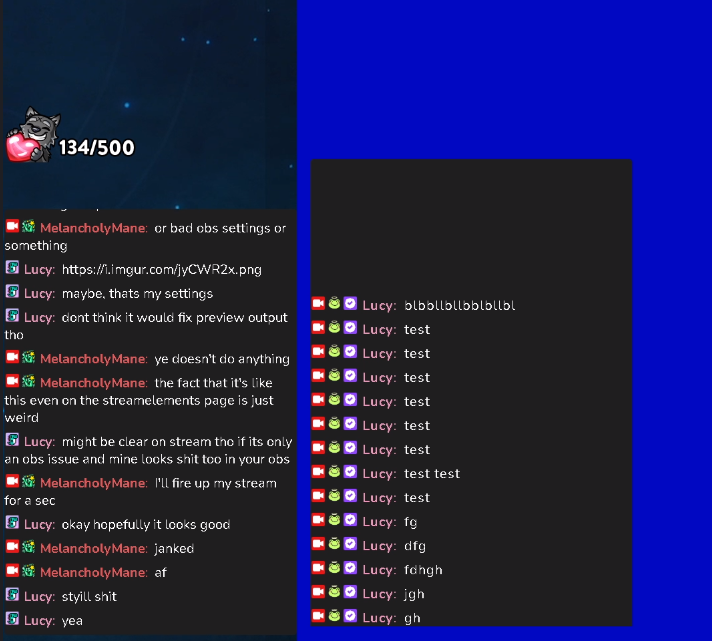
in his stream ^
compared to my stream, same file
 ionic kelp
@light spindle Their name is filtered in settings.
light spindle
im not sure what you mean
ionic kelp
In the widget settings their name is filtered.
light spindle
i dont mean him not showing in my chat, i mean his chat output is bad quality
left is his chat, and my url in his obs, mine also looking bad, second screenshot in my chat in my obs
ionic kelp
Ah
light spindle
same file, but looking bad on his stream, were not sure what we should do to fix
wary halo
stone crest
I don't know why I have 0 followers as I am 45
Then you need to contact Twitch, as they aren't even showing it on their site.
stone crest

sad
can you see me followers on the twitch?
my friend cannot give me an observation
 ebon forum
stone crest
my friend cannot give me an observation
ebon forum
stone crest
my friend cannot give me an observation
You need to talk to Twitch, not to us, we can't do anything about it.
 wicked lake
Hi, I'm new here and I'm having an issue with my Stream Elements only showing Raids in my activity feed. Raid notifications and alerts properly show on my overlays however, I do not see follows, and follow alerts do not appear on my streams. Any help would be appreciated! Thank you in advance!
ebon forum
wicked lake
Hi, I'm new here and I'm having an issue with my Stream Elements only showing Ra...
Hi. Can you post your account ID here? It is on that page:
https://streamelements.com/dashboard/account/channels
StreamElements
The Ultimate All in One Platform for Streamers
wicked lake
5ff8e4dd19a3ad81378d55c7
ebon forum
wicked lake
5ff8e4dd19a3ad81378d55c7
fixed
wicked lake
Thank you!
slow portal
How do I turn on StreamElements stream reports? I'm not getting them through at the moment
ebon forum
slow portal
How do I turn on StreamElements stream reports? I'm not getting them through at ...
We would need your email and account ID (you can DM me if you want). We would be able to manually check that
slow portal
ebon forum
We would need your email and account ID (you can DM me if you want). We would be...
I have send a DM with my email 🙂
lament blade
Hi all!
Is there anyway to use streamelements bot to prevent follow bot attacks?
ebon forum
lament blade
Hi all!
Is there anyway to use streamelements bot to prevent follow bot attacks?
Not really. Most people just disable the follow alert once they are hit and then clean up afterwards
lament blade
ebon forum
Not really. Most people just disable the follow alert once they are hit and then...
someone gave a tool that could remove those follows, but it's currently down, any alternative way to remove the bots?
ebon forum
lament blade
someone gave a tool that could remove those follows, but it's currently down, an...
The tool from commander root i believe is the only one i know about
at least when it comes to mass removal
wary halo
It will be back up soon, Twitch was a bit overloaded from it so they asked him to take it down for a little bit until they fixed it
 foggy crow
I am have issue with kappagen not working anyone have some suggestion?
 frigid moat
how can i revert back to the last version? this update has screwed my media request
 cosmic bloom
Quick question, can a contest be activated with a command in Twitch, without being in the contest screen in streamelements?
 coarse patrol
question about twitch chat stats
I just logged in streamelements and tried to see my chat stats, but it only shows 404 not found. I didn't changed my nickname.
ebon forum
coarse patrol
question about twitch chat stats
I just logged in streamelements and tried to se...
Give us your account ID from that page please:
https://streamelements.com/dashboard/account/channels
And your current nickname, we fix that.
coarse patrol
ebon forum
Give us your account ID from that page please:
https://streamelements.com/dashbo...
606f1e034d993b001be7c616 / id: redracoon77
ebon forum
coarse patrol
606f1e034d993b001be7c616 / id: redracoon77
fixed
foggy crow
Is kappagen or the emotesplosion no longer working?
ebon forum
foggy crow
Is kappagen or the emotesplosion no longer working?
should be working, we are currently investigating a different bug - channel emotes are not working in kappagen
 elder lava
Wow, that's exactly what I came here looking for! Thanks.
ebon forum
If you people can provide us the account ID for the affected channels - we take those to devs. Account ID are here: https://streamelements.com/dashboard/account/channels
And can be shared safely.
 quasi briar
Hey I have a question, I have the x Box app and I stream from there to my twitch, but when I play with my friends I haven't found the way to turn up the volume of the party because it only lets me change the desktop audio, wich is the same for both, what can I do?
 autumn moth
hello can you fix the 404 issue/problem please? here is my id: [ 5ff1c655781b33408ca4df75 ]
foggy crow
ebon forum
should be working, we are currently investigating a different bug - channel emot...
ok thank you is there a eta for a fix?
 charred gulch
Hi, are there issues with !kappagen command? Its not working for me somehow
ebon forum
charred gulch
Hi, are there issues with !kappagen command? Its not working for me somehow
No ETA, developers are looking into it
ebon forum
charred gulch
Hi, are there issues with !kappagen command? Its not working for me somehow
see above - looks like a bug, we are on it
charred gulch
cheers mate, good luck devs !! ❤️
ebon forum
autumn moth
hello can you fix the 404 issue/problem please? here is my id: [ 5ff1c655781b334...
should be fixed
lament blade
Hi, my chat stats is showing a 404, where should i ask so it is fixed?
username: VamoTheo
 final thistle
Hey guys, I am putting this in StreamElements and OBS 's discords. I would like to say that my overlay is a little blurry and you cant see the text on there, any tips on making it more clear? Thanks! ~Ellen aka EllenGaming or ellenzgaming
quasi briar
quasi briar
Hey I have a question, I have the x Box app and I stream from there to my twitch...
Is there a way to only take the audio from one tab?
 zinc sparrow
hi kann jmd deutsch ?
ionic kelp
#🇩🇪︱deutsch @zinc sparrow
zinc sparrow
kannst du mir helfen ?
wary halo
click here >> #🇩🇪︱deutsch <<
lament blade
Can you please fix the chat stats 404 error?
id: 6050f5264bfe95d34025d9c9
nick VamoTheo
 vestal hull
Hello everyone,
I need help with an account issue. I have mistakenly linked my twitch and youtube streaming channels to two different streamelements accounts, and I am unable to copy overlay elements and other stuff between them.
When I attempt to relink my twitch to the other streamelements account (or vice versa) it says "Account already claimed". Is there a way to unlink one of them so they can be added to the same login?
Thanks
ebon forum
lament blade
Can you please fix the chat stats 404 error?
id: 6050f5264bfe95d34025d9c9
nick V...
fixed
 subtle holly
also having issue with emotesplosion not working... 5da3c69838307a89b5c9f266
lament blade
ebon forum
fixed
thanks a bunch!
ebon forum
subtle holly
also having issue with emotesplosion not working... 5da3c69838307a89b5c9f266
thanks for the account ID, we look into that
lament blade
By the way, do you know why the image of the store items do not show in the leaderboard, it just shows an blank image? Whereas in the store itself it works perfectly.
 median bear
Overlay text effects such as Fade Out or Fade In not working.
The text/image I apply effects simply pops in and out despite the selected effect.
Additionally, I have a tip notification that will not appear at all.
ID: 5c5dbc14368798ebaa88c6ba
 slim sundial
how do i add the watchtime command?
 gleaming crypt
Hi need help with an issue. I'm not sure if I've done something wrong but my mods cannot edit my stream info via chat by entering !xxx anyone know why this could be ? thanks
 upper grail
Hey guys, today i set up an animated overlay (by streamelements) for my wife, but the time for loading is quite long (around 5 seconds), when i change the scenes. Is there a way to make it faster?
 dusty spire
ever time i try to go to my dashbord it keeps go back to the streamelments home page any way to fix this
viscid pebbleBOT
@dusty spire Please logout of StreamElements at https://streamelements.com/logout and then login again to your account (Twitch/YouTube/Facebook).
dusty spire
ty that worked
 toxic robin
how do i make a chat text to say if i got a follow of donated or host?
ebon forum
toxic robin
how do i make a chat text to say if i got a follow of donated or host?
Modules - Chat alerts. Bot will post alerts in chat
 rocky tapir
Hello there! It's any chanc to add TTS to streamelemnt app for do IRL?
ebon forum
rocky tapir
Hello there! It's any chanc to add TTS to streamelemnt app for do IRL?
It is added, you just need to set up TTS for alerts in the "MOBILE" overlay that the app is using
the app is capable or playing TTS and other audio via speakers (internal/external)
 thorn moss
I had a viewer get time out and message delete from my chat today by stream elements mod. I’ve never had this before. Can someone tell me why please and how to change it
rocky tapir
ebon forum
It is added, you just need to set up TTS for alerts in the "MOBILE" overlay that...
Thanks
ebon forum
thorn moss
I had a viewer get time out and message delete from my chat today by stream elem...
Check the spam filter section, this is where all the moderation tools of the bot are
thorn moss
Which one would it be though do you know. None of the message were bad or lengthy
ebon forum
thorn moss
Which one would it be though do you know. None of the message were bad or length...
Well something must have triggered the enabled spam filters. We do not have logs, so i can't check what it was
rocky tapir
And then when I do on my desk emulate and opened the app on my phone should I see the allert as well on my phone or just the sound? Because I can hear just a sound but nothing about the allert
ebon forum
rocky tapir
And then when I do on my desk emulate and opened the app on my phone should I se...
The alert will be on stream, the app can show basic alert
rocky tapir
ebon forum
The alert will be on stream, the app can show basic alert
So then is fine don't see any allert when I do a emulate right?
thorn moss
ebon forum
Well something must have triggered the enabled spam filters. We do not have logs...
Thank u I think I sorted it now. Think it was cause it was abit long. Would this action. Delete all his messages or just the one in question.
rocky tapir
Oh thanks just I approached now this app and still I'm feel confuse
ebon forum
thorn moss
Thank u I think I sorted it now. Think it was cause it was abit long. Would this...
Depends on how you set it up
 daring folio
So now where do I change the custom bot name?
viscid pebbleBOT
Currently renaming the bot fully works with OBS.Live.
You can follow this video guide to set it up: https://discordapp.com/channels/141203863863558144/494513233416421386/561516184718278676
 native lance
Hi there ! im stereaming right now and i dont have good internet connection. How can i send lower queality strream than 1080p
ebon forum
daring folio
So now where do I change the custom bot name?
- In OBS.Live, click on the hamburger menu (three stripes) at the top left of your activity feed
- Click on Stream Settings > Custom bot name
- In the Custom bot name field select Set custom bot name, not your already existing username (with capital letters). Note: If you already connected an account that way, the third entry will show as the account name (see image https://i.imgur.com/sO7fWOX.png).
- Scroll a bit down and click on the purple Connect Custom Bot Account button
- Log in as usual and Authorize the custom bot name
- Back in the Activity feed, click on the Send Test Message button and check if your custom bot name starts working again"
 native lance
Please help ASAP
ebon forum
native lance
Please help ASAP
Set the downscale option in OBS to 720p
native lance
Where is it cyrnic ❤️ ?
ebon forum
native lance
Where is it cyrnic ❤️ ?
Video settings
native lance
😦
i cannot find it
https://gyazo.com/80ae6e57ae0720e699b856a80b4ce3bb
 ebon forum
2nd field
vestal hull
Hi guys. I have mistakenly linked my twitch and youtube streaming channels to two different streamelements accounts, and I am unable to copy overlay elements and other stuff between them.
When I attempt to relink my twitch to the other streamelements account (or vice versa), it says "Account already claimed". Is there any way to unlink one of them so they can be added to the same login? Thanks a ton.
daring folio
CryonicTV Thank you
viscid pebbleBOT
@vestal hull Account Merging - Please note:
- Merging accounts only allows faster ways to switch between accounts
- Merging accounts does not allow data sharing between accounts - different streaming platforms, different type of events
- Merging accounts allows duplicating/sharing overlays between the accounts
If you understand the limitations of merging and want to proceed, please find the JWT tokens (!jwt) from both accounts you want to merge and you will be directed to DM them to a staff member
median bear
Trying to create a cheer event. The event keeps running the default event even though I've already updated the image & audio, and saved the settings
ID: 5c5dbc14368798ebaa88c6ba
ebon forum
native lance
https://gyazo.com/07dab0bef410216a296cb5343ef3b534
yes
ebon forum
median bear
Trying to create a cheer event. The event keeps running the default event even t...
check alert variations please (cheer alert variations)
median bear
ebon forum
check alert variations please (cheer alert variations)
Just saw this myself. THANKS
lament blade
I have a streamelements account for my twitch and I tried connecting my youtube to it. When I tried to do this I got an error saying "channel already claimed". How can I merge the channels?
viscid pebbleBOT
@lament blade Account Merging - Please note:
- Merging accounts only allows faster ways to switch between accounts
- Merging accounts does not allow data sharing between accounts - different streaming platforms, different type of events
- Merging accounts allows duplicating/sharing overlays between the accounts
If you understand the limitations of merging and want to proceed, please find the JWT tokens (!jwt) from both accounts you want to merge and you will be directed to DM them to a staff member
You can find your JWT token on your account channels page (Show Secrets to reveal the token): https://streamelements.com/dashboard/account/channels
READ ME: This is a private security token. Do NOT share this token here or other public places, only with a StreamElements staff member in private.
native lance
Viewers can only see me in 1080p right now ...
vestal hull
Awesome! Thanks.
native lance
guys im streaming as " jokeratorro "
on twtich righty now please check it out to help with that issue or please tell advice to fix it ❤️
ebon forum
native lance
on twtich righty now please check it out to help with that issue or please tell ...
You would need to restart the stream, resolution change should not happen while live
 wise glade
What is this?
 native lance
i did and the change is that noone can change quality now
its only 1080p
and issue that its lagging hard stayed 😦
ebon forum
wise glade
What is this?
an empty timer response, please check all your timers - one of them has an empty field
ebon forum
native lance
and issue that its lagging hard stayed 😦
You need to restart the stream with the downsampled resolution....
ionic kelp
It has response message as the text
wise glade
ebon forum
an empty timer response, please check all your timers - one of them has an empty...
thnx
i have not?
 native lance
i did i restarted it and the change is that noone can change quality now
its only 1080p
and issue that its lagging hard stayed 😦
ionic kelp
expand the first 2 with the arrow
native lance
i ill again
ionic kelp
@native lance Unless you are partnered you won't get the option automatically. Affiliates and everyone else is at twitch's choice.
native lance
so they can watch me in the best quality ?
ionic kelp
By default whatever the 2nd spot from that OBS settings screenshot is what you'll do. There's still a chance you might get it though.
 signal vortex
hello, my !watchtime isn't working. it keeps saying 0 secs watching
viscid pebbleBOT
The !watchtime command is directly tied to the Loyalty system. The Loyalty system must be enabled for viewers' watchtime to count up.
To enable Loyalty, please go to the Loyalty section of your account: https://streamelements.com/dashboard/loyalty
Watchtime counts up every 10 minutes alongside Loyalty points, and only while the stream is live. Reruns will not be counted.
Please note that watchtime is not tracked by Twitch and there is no way to retroactively apply past watchtime to viewers.
StreamElements
The Ultimate All in One Platform for Streamers
signal vortex
I googled it many times but doesn't seem others have the same issue :p
native lance
i made it even lower now i ill see in 2 mins
https://gyazo.com/b84c002d8b4d570f09c7e2d2cfe3300c

i cannot understand so by default they have to see my stream in the best quality ? why not the worst ? or its just one to pick. where i can pick that ?
native lance
can u reply again ? i dont undestand if "by default " means
ionic kelp
By default you'll automatically have skalowana. Having the other lower options is not guarunteed.
native lance
so twitch choice is to make it one option for me ? and is static ? like i cannot change it ? or its just one and i can change it by sending scalled quality with the lowest option , storry im trying stream and play poker same time its really hard to undestand it and im not fluent eng u know 😦
native lance
is there maybe different option to lower quality ? propably i made it before on extreme high and now need to reverse it 😦
ionic kelp
Only the option you have in the screenshot.
native lance
to be sure its all i can do now ?
https://gyazo.com/4d1d4fa79089272295f13e4b37cab408
 ionic kelp
I wouldn't go that low as it'll look like crap but yes.
 split turtle
Hello! I manage a streamer and he wants to start doing contests. I created the widget "contests". Now does he just have to add that into OBS then I can control when a contest occurs/it will show on his stream?
 finite plaza
yo i want know if someone can help me
sometime when i do big mouvement my stream being pixelised
on twitch but not in my obs
in my obs its still clean
daring folio
My chat is not triggering Kappagen. It triggers custom commands and regular commands. Even in preview section of SE it's not triggered. It worked until I reconnected my custom bot name. I'm sure it's a switch I need to flip but no idea where to look ;p The emotes wall works in preview and obslive, just no emote explosion.
 thorny robin
Is there anyway I can fix my !roulette/ !Gamble ?
 tame rune
Hi guys, I have a problem with Se.Pay. I have registered but when I go to do the setup for the withdrawal of the money, I enter all my data I go ahead and it gives me an error that says "Form Submission Failed", I do not know how many times I have tried but nothing
do you know what the problem is? I am going crazy
sorry for the poor English
viscid pebbleBOT
@tame rune Please contact us via email for support with SE.Pay. You can use our contact form here: https://streamelements.com/contact Thank you.
lament blade
Hi.
 cosmic bramble
How do I share my screen
lament blade
When I streamed today I noticed that! KappaGen did not work. after i had stopped my stream i went to checkl my overlay on streamelements webpage, and to test the overlay. but when i click, Emulate / Emote event / kappa
nothing happend, then i went to in settings / Emotesplosions / select emotes. but could see the emoji I made myself. the only emojis was shown was BTTV emojis. I have cleaned cookies, run ccleaner, uninstalled OBSlive and reinstall. it still does not work. everything else works. so hope here is someone who can help.

 daring folio
SunDancer I'm having the exact same issue with the same results from the SE emote page. Must be on their end. My emotes work but no explosions.
lament blade
been trying to get working for 4 houiers now
houers*
what will happen if i remove Personal Access Token
Hi guys im using 4k60 pro mk2 elgato and i play ps5 when ever i starting to play a 120hz game it starts to freak out how ever when i play 60hz there is no issue at all but I obviously need and want the 120hz
daring folio
SunDancer If you add an emote after !Kappa... it works. The only problem I see is the custom chosen emotes. My guess is that page is getting updated.
SunDancer the issue is NOT WITH YOU. It's definitely on their end.
ebon forum
daring folio
SunDancer If you add an emote after !Kappa... it works. The only problem I see i...
We have a minor bug with kappagen not working with channel emotes currently
Developers are on it
Please be patient
lament blade
@daring folio hope you are right, had so many viewers trying to use the command. @ebon forum oh in some way im glad to hear, now i can releax 😄 thanks for info.
daring folio
@ebon forum Thanks again
 narrow snow
Hey, how do i can fix this?
 viscid pebbleBOT
@narrow snow Please provide your account ID found at the top of this page: https://streamelements.com/dashboard/account/channels This ID is public info and safe to share here.
 vestal hatch
Hello, I'd like to enable custom name feature on Stream Elements Ground Control. How would I get about doing this?
My channel name is NekkoPunch
viscid pebbleBOT
@vestal hatch Currently renaming the bot fully works with OBS.Live.
You can follow this video guide to set it up: https://discordapp.com/channels/141203863863558144/494513233416421386/561516184718278676
vestal hatch
Can I please get custom bot names enabled in Ground Control? Channel name is same as discord name
viscid pebbleBOT
@errant hawk "Follow these steps to grant managers/moderators access to your dashboard:
- Click on your channel name at the top of the dashboard
- Create a new invite at one of three access levels (Bot Supervisor, Editor, Full Control)
- Send this invite to a mod/manager to give them access to your dashboard. The link is one-time-use and expires after 72 hours if not accepted
Video tutorial: https://youtu.be/zl_h-ttZDF0"
 slim saddle
Hello guys, i found this dc server while i searched for obs studio problems... May you guys can help me here?
viscid pebbleBOT
@vestal hatch Currently renaming the bot fully works with OBS.Live.
You can follow this video guide to set it up: https://discordapp.com/channels/141203863863558144/494513233416421386/561516184718278676
@slim saddle Obs.live is a plugin for OBS Studio for the best OBS support, please join their Official Discord @ discord.gg/obsproject
slim saddle
thank you 🙂
vestal hatch
@abstract hemlock I already use Ground Control and don't want to install a plugin on OBS at this moment. Can I get it enabled through Ground Control?
 abstract hemlock
vestal hatch
<@!487269278207311873> I already use Ground Control and don't want to install a ...
abstract hemlock
vestal hatch
<@!487269278207311873> I already use Ground Control and don't want to install a ...
restart GC
vestal hatch
awesome, thank you! I appreciate the help
 errant hawk
viscid pebble
<@!193501532346515457> "Follow these steps to grant managers/moderators access t...
errant hawk
viscid pebble
<@!193501532346515457> "Follow these steps to grant managers/moderators access t...
I needed to send my overlays to a friend, like this one https://strms.net/boxed_chat_by_cocahh
StreamElements
The Ultimate All in One Platform for Streamers
wary halo
not possible, if you are editor on his account then you can copy it from your account to his account
those special sharing links are only for StreamElements and a couple of companies
errant hawk
tks man


 bright jackal
When i use themes from streamelements, and i switch themes while live, the screen gets back for 2 seconds, and then the theme appears, is this because its a browser source?
 tribal ledge
trying to log in gives me this weird screen
viscid pebbleBOT
@tribal ledge StreamElements menu, on top of OBS > Logout > Login
lament blade
hi if i use streamlabs obs, can i still use the streamelements stream store for the sound effects?
 solar oak
guys where can i find a countdown timer for starting soon
thorny robin
can someone help with explaining why my !roulette command does not work?
 onyx onyx
hello. probably has been answered a million times here but I couldnt find it. how do I combine 2 custom widget in my overlay manager? I want to use a coin toss widget and sideways chat but they always open seperatly. anyone can help? thx edit: or do I simply add multiple browser sources to my OBS scene?
 wary halo
thorny robin
can someone help with explaining why my !roulette command does not work?
wary halo
thorny robin
can someone help with explaining why my !roulette command does not work?
do you have the roulette module turned on here? https://streamelements.com/dashboard/bot-modules
thorny robin
yes, it activates, but says everyone has no channel points
lament blade
lament blade
hi if i use streamlabs obs, can i still use the streamelements stream store for ...
respond to this when you can please
Salve come mai nella live stream element mi banna tutte le persone per 600 secondi le banna tutte come mai vorrei togliere questa cosa mi potete aiutare
viscid pebbleBOT
@lament blade Welcome to the helpdesk! The regular helpdesk channels are in English but we do provide multi-language support in the following channels: #🇩🇪︱deutsch | #🇫🇷︱français | #🇪🇸︱español | #🇵🇹︱português | #🇳🇱︱nederlands | #🇮🇹︱italiano | #🇵🇱︱polski | #🇨🇳︱中文語言服務區-chinese | #🇯🇵︱日本語-japanese | #🇭🇺︱magyar | #🇰🇷︱한국어-korean | #🇹🇭︱ไทย-thai | #🇷🇺︱русский | #🇺🇦︱українська | #🇨🇿︱czech
 neon coral
Hello, I just dropped by to ask for some help. For some reason I can't access Dashboard after logging in through Twitch on any of my devices. I have noticed it like 2 days ago and I still couldn't find any way of fixing it. Do you have any idea why it it happening?
thorny robin
wary halo
https://streamelements.com/dashboard/loyalty
I just set it up, i'm not sure if it links with channel points on twitch, but It still says no points for everyone
wary halo
thorny robin
I just set it up, i'm not sure if it links with channel points on twitch, but It...
it takes 10 minutes before the first points are given, and it is not tied to channel points
viscid pebbleBOT
@neon coral Please logout of StreamElements at https://streamelements.com/logout and then login again to your account (Twitch/YouTube/Facebook).
thorny robin
okay thank you so much, i hope this works
neon coral
viscid pebble
<@!342780209310859266> Please logout of StreamElements at <https://streamelement...
I would've swore that I did just that, but it works! Thank you, bot, and the awesome people that programmed you! (or the person behind it, I don't know..  )
) 
wary halo

neon coral


 ember nymph
Can somebody help me? I streamed yesterday without any problem and today I can't connect to the Twitch-Server anymore... I've haven't changed any setting since yesterday... Logout and login doesn't work...

 tiny remnant
is there a place i can input my specs and find the best recommended settings for streaming?
bright jackal
Can someone please help me? i am using themes from streamlabs. i added them as browser source, but whne i switch from stream starting to play for example i see 2 secs of blackscreen
viscid pebbleBOT
@ember nymph Obs.live is a plugin for OBS Studio for the best OBS support, please join their Official Discord @ discord.gg/obsproject
lament blade
Ciaoooo qualcuno mi sa dire la differenza tra subscribers e regulars nelle opzioni dei filtri spam per la chat grazie
viscid pebbleBOT
@lament blade Welcome to the helpdesk! The regular helpdesk channels are in English but we do provide multi-language support in the following channels: #🇩🇪︱deutsch | #🇫🇷︱français | #🇪🇸︱español | #🇵🇹︱português | #🇳🇱︱nederlands | #🇮🇹︱italiano | #🇵🇱︱polski | #🇨🇳︱中文語言服務區-chinese | #🇯🇵︱日本語-japanese | #🇭🇺︱magyar | #🇰🇷︱한국어-korean | #🇹🇭︱ไทย-thai | #🇷🇺︱русский | #🇺🇦︱українська | #🇨🇿︱czech
rocky tapir
Hello guys someone know how to show the allert on streamelemnt app, I been already in mobile - mobile allert and make setting for the app in that way but my allert doesn't come show up
 toxic tendon
Hi Im having an issue with there being about a 10 second delay on my stream
 foggy heart
rocky tapir
Hello guys someone know how to show the allert on streamelemnt app, I been alrea...
foggy heart
rocky tapir
Hello guys someone know how to show the allert on streamelemnt app, I been alrea...
I believe the alerts you do for mobile don't show for you but do on stream.
foggy heart
toxic tendon
Hi Im having an issue with there being about a 10 second delay on my stream
That might be something you have to look at you twitch/obs settings for.
rocky tapir
foggy heart
I believe the alerts you do for mobile don't show for you but do on stream.
but i make a test and dosent show up even the chat on screen I suppose make something wronk just try ti guess what if one of you guys know cheer me up please
toxic tendon
foggy heart
That might be something you have to look at you twitch/obs settings for.
Ive been trying to go through it for like an hour now and cant figure out why
foggy heart
toxic tendon
Ive been trying to go through it for like an hour now and cant figure out why
I know Twitch has some latency features that might be worth looking into. Here's a page: https://help.twitch.tv/s/article/low-latency-video?language=en_US
toxic tendon
Ive tried both low latency and normal options and the result is the same
 desert yew
I'm trying to set up alerts on an overlay and I made it big enough to be where I wanted on the stream but when I actually published it, it was tiny. What did I miss? Why would it show it in the appropriate space on the overlay build page but not on the stream? Sorry if this is vague or just a stupid question. If there is a pinned answer somewhere, just send me the link and I'll be on my way. Thanks!
viscid pebbleBOT
@desert yew The default resolution for StreamElements overlays (theme and custom) is 1920x1080. Please add them in OBS at their full resolution and use CTRL+F to fit to screen if necessary. You can then downscale your stream in OBS settings > Video if you'd like https://i.imgur.com/6bWXxjR.png
 crimson coyote
hello i need help with my alerts not working on my overlay in obs the emulate works fine but anything coming from twitch is not triggering
rocky tapir
crimson coyote
hello i need help with my alerts not working on my overlay in obs the emulate wo...
maybe you didnt put the right size on OBS, show you just part of the allert?
crimson coyote
negative when emulate is activated you can see it no problem and the audio plays triggered event from twitch nothing
i have even removed connection from twitch and re authorized stream elements and still isnt working
 kindred valve
does anybody have a command for random messages that pop up and i what points taken away if they got a bad roll
and add if they get a good roll
desert yew
viscid pebble
<@!812062287141404693> The default resolution for StreamElements overlays (theme...
Is that the same for Lightstream as well?
 tiny mortar
Hi I'm wondering if I can use my channel's custom emotes in kappagen emoteslopions. I only see BTTV and FFZ emotes available to select
foggy heart
tiny mortar
Hi I'm wondering if I can use my channel's custom emotes in kappagen emoteslopio...
You can, but there is currently a bug so it may not work as intended at the time
tiny mortar
ah maybe that's it. I thought it was working the other day so that makes sense
lament blade
hi i am using streamlabs obs, im trying to test the sound effects in the stream store but it doesnt work when im buying them
viscid pebbleBOT
@lament blade We're not able to troubleshoot issues with using our overlays in StreamLabs OBS (SLOBS) as we don't have the tools to support their software. We recommend using OBS Studio or OBS Studio with our plugin OBS.Live.
 little moon
hello i need hellp please
viscid pebbleBOT
@little moon Welcome to the helpdesk! Please let us know how we can assist you today and a support volunteer or staff member will assist you as soon as they are available. Thank you for your patience.
 humble verge
Having trouble accessing the dashboard. When I press "my dashboard", it just loads back to the same page.

Pretty much everything links back to that ^
Even if I just type in the Dashboard URL
Oh, just had to log out and back in, nevermind
viscid pebbleBOT
@humble verge Please logout of StreamElements at https://streamelements.com/logout and then login again to your account (Twitch/YouTube/Facebook).
 modern ocean
Hello streamelements wont let me connect to error http 400
foggy heart
modern ocean
Hello streamelements wont let me connect to error http 400
What are you trying to log into?
 quartz harness
algum br pra me ajudar? nao consigo desconectar minha conta do facebook pra abrir live na twitch quando clico em startar live ele abre as informações do facebook
viscid pebbleBOT
@quartz harness Welcome to the helpdesk! The regular helpdesk channels are in English but we do provide multi-language support in the following channels: #🇩🇪︱deutsch | #🇫🇷︱français | #🇪🇸︱español | #🇵🇹︱português | #🇳🇱︱nederlands | #🇮🇹︱italiano | #🇵🇱︱polski | #🇨🇳︱中文語言服務區-chinese | #🇯🇵︱日本語-japanese | #🇭🇺︱magyar | #🇰🇷︱한국어-korean | #🇹🇭︱ไทย-thai | #🇷🇺︱русский | #🇺🇦︱українська | #🇨🇿︱czech
lament blade
My tips arent showing up with the streamlabs obs alertbox, any help? 😄
viscid pebbleBOT
@lament blade We're not able to troubleshoot issues with using our overlays in StreamLabs OBS (SLOBS) as we don't have the tools to support their software. We recommend using OBS Studio or OBS Studio with our plugin OBS.Live.
 fervent matrix
Hello everyone! Did something happen to KappaGen? My channel's emotes no longer show up as a select-able option for emote explosions. 😩
foggy heart
fervent matrix
Hello everyone! Did something happen to KappaGen? My channel's emotes no longer ...
There's a bug with that at the moment, but we're looking into it
fervent matrix
foggy heart
There's a bug with that at the moment, but we're looking into it
good to know, thanks!
 chrome oyster
hai
viscid pebbleBOT
@chrome oyster Welcome to the helpdesk! Please let us know how we can assist you today and a support volunteer or staff member will assist you as soon as they are available. Thank you for your patience.
 wind needle
hi
viscid pebbleBOT
@wind needle Welcome to the helpdesk! Please let us know how we can assist you today and a support volunteer or staff member will assist you as soon as they are available. Thank you for your patience.
 inland marlin
Hi
 elfin patrol
I've discovered an odd quirk where one specific user resubs, and his name, which has an underscore mid-name, gets formatted with an emote name randomly after the underscore in the alert - the alerts work for everyone else normally, even with underscores in their name. I can reproduce it by replaying the alert, and I went back in the dashboard and replayed where he resubbed last month, and the same thing happens. Running on OBS Studio with the OBS.Live plugin.
Just confirmed in the editor it happens there as well, testing with a custom sub message
And tested with my original imported alertbox - it happens to be "_muffin" that triggers the random emote name as a substitution
foggy heart
elfin patrol
And tested with my original imported alertbox - it happens to be "_muffin" that ...
Let me test it and see if I can figure out why it does that.
elfin patrol
I tried a few other words.. it's a profanity filter 😄
But I don't know where it's enabled or how to turn it off
elfin patrol
I checked there, everything is off and no banned words added
Does it read from Twitch (and banned words there)?
ionic kelp
I got you
https://streamelements.com/dashboard/tipping-settings tipping settings then moderation at bottom.
StreamElements
The Ultimate All in One Platform for Streamers
 grim coyote
QUestion where can i find import stuff for my alerts so dont have to manualy hate myself for next 3 hours
 grim coyote
labs
ionic kelp
Go to the dashboard and import in top right. Install the extension and have both dashboards open when importing.
inland marlin
sorry for my bad english, But how i can create a watchtime for the stream, because the watchtime of the streamelements always show 0 seconds
viscid pebbleBOT
@inland marlin The !watchtime command is directly tied to the Loyalty system. The Loyalty system must be enabled for viewers' watchtime to count up.
To enable Loyalty, please go to the Loyalty section of your account: https://streamelements.com/dashboard/loyalty
Watchtime counts up every 10 minutes alongside Loyalty points, and only while the stream is live. Reruns will not be counted.
Please note that watchtime is not tracked by Twitch and there is no way to retroactively apply past watchtime to viewers.
StreamElements
The Ultimate All in One Platform for Streamers
grim coyote
Working on it sooo hungry and Barly awake
 vapid harness
Good evening guys. I'm using s KappaGen overlay for emoteXplosion and just noticed today that I can only choose emotes from BTTV or FFZ emotes. Anyone know why?
foggy heart
vapid harness
Good evening guys. I'm using s KappaGen overlay for emoteXplosion and just notic...
The Kappagen widget is bugged at the moment, so that's why the option isn't there
 cold lynx
hello! i recently changed my twitch username and now my chat commands wont work at all. everything else on my streamelements dashboard has updated and synced i think
viscid pebbleBOT
@cold lynx If you changed your name on Twitch, please follow these steps:
- Visit https://streamelements.com/logout and then log in again by connecting with Twitch.
- On the right side of the dashboard page that opens, select Join under bot settings. If it says Part select that and then select Join to send the bot to the chat. Don't forget to mod the bot by typing /mod streamelements in your channel if you have not already.
- Post your old and your new name here so that we can update your channel's chatstats tracking (must be done by staff).
cold lynx
okay old username is bblaiseee new one is blaisey_bee
i think that worked though, thank you!
foggy heart
cold lynx
okay old username is bblaiseee new one is blaisey_bee
Your chatstats page should be updated as well
vapid harness
@foggy heart thanks. It was my 1st thought and came here to confirm
 copper swallow
hey so I have an overlay for just chatting but I cant seem to get my webcame to show up even though it shows up just fine on my gaming overlay. Does anyone have any idea why this is?
foggy heart
copper swallow
hey so I have an overlay for just chatting but I cant seem to get my webcame to ...
Is the camera overlay above the just chatting overlay?
copper swallow
yeah I've moved it all over and nothing changed
foggy heart
If you remove the overlay, does the camera show as normal?
copper swallow
i fixed it. apparently restarting obs somehow got it working
 onyx steppe
Hello Guys , I need help with the kappagen widget , for the emote explosion , when i click on " select emote " , I can only see emotes from BTTV Global Emotes and FFZ Global Emotes , I can't see my own emotes ! How do I solve this ? Thanks a lot !
ionic kelp
Known issue atm.
onyx steppe
ionic kelp
Known issue atm.
Thanks , i will Wait then ^^
 heady marsh
I have an event history list overlay (last 4 follows/raids/subs/whatever). I would like it to start from scratch each stream, but I'm not sure how. I reset things and it cleared everything but the raids, so the 4 entries in the list are all raids from over the last several days. What's the best way to full-clear that history either after the stream of before the next one starts?
 dusty obsidian
hello, my chat stats command is giving me a 404 error when i try to pull them up, my twitch username has been gbave ever since i began streaming
zenith widget
fixed
dusty obsidian
thank you!
 white swan
has anyone had issues with output dropping to 0 kbs ?
 peak spear
Hi, I’m really scared. I started streaming, having a good time and a message pops up saying my ip was leaked and I should end stream now. And I can’t find anything about it. Is it a troll or did I actually just get my ip leaked?
white swan
i would guess troll never seen that msg been doing this since 2017 but i dont know for sure
peak spear
I’m gonna send a screenshot of it
ionic kelp
If it was from someone in chat/alertbox then definitely a troll
peak spear
 peak spear
Oh yea it probably is because I clicked their name and it said they joined 1 hour ago with 20k followers
I was so scared
Now I’m sad I ended my stream
white swan
Sudo are you aware of any network issues with SE
ionic kelp
Your issue is something for the OBS discord.
viscid pebbleBOT
Obs.live is a plugin for OBS Studio for the best OBS support, please join their Official Discord @ discord.gg/obsproject
white swan
ive tried lowering bitrate and everything still hitting over 50% dropped frames on network
 inland carbon
Hey my follower goal is not accurate, anyway to fix that? It's set to a specific goal, counting Total
 craggy ivy
The bot will not rejoin the channel no matter how many times I ask it to part and rejoin
Its not showing up on the viewer list
viscid pebbleBOT
@inland carbon To reset goals:
- from the Overlay Editor > Session data on top right (monitor symbol) > Goals tab > reset progress of desired goal
- from the Dashboard > Activity feed on the left > Widget data on the right > Goals tab -> reset progress of desired goal
Note: Goal widgets (progress) only counts up and doesn't go down automatically, if you lose followers/subs.
ionic kelp
Looks fine to me captain
 craggy ivy
Sorry its not for my stream I apologize
I shouldve specified
Peachesttv
It looks like you got it working
ionic kelp
Didn't do nuffin
craggy ivy
I dont know what was happening
It was not working and then as soon as you walked in it started working
I feel so silly
grim coyote
hey SUdo would you recomend SEpay?
craggy ivy
Thank you
inland carbon
Had to refresh a bunch and change the Totals tab but i got it workign thank you sudo
ionic kelp
That's up to you hersir but it does give another option for those that don't have/can't use PayPal along with less worry about chargebacks.
grim coyote
alright il keep it in mind
 finite atlas
my custom bot is repeating the same messages, what do i do?
zenith widget
Are you using Ground Control?
finite atlas
i don't think so? i'm just on obs live
viscid pebbleBOT
@finite atlas Read and follow our server rules:
- We do not tolerate toxicity! Treat the community team, staff and all members with respect.
- No advertisement or channel promotion, anywhere on the server.
- No NSFW/NSFL
- No unsolicited DMs or friend requests to server members
Make sure to read the #welcome in any server you join.
 ivory gust
Anyone having issues with their bot not being in the chat? I've tried resetting it by parting and joining a few times, but it's not working.
viscid pebbleBOT
@finite atlas If your commands recently stopped working and you're using OBS.Live and a custom bot name do the following:
- In OBS.Live, click on the hamburger menu (three stripes) at the top left of your activity feed
- Click on Stream Settings > Custom bot name
- In the Custom bot name field select Set custom bot name, not your already existing username (with capital letters). Note: If you already connected an account that way, the third entry will show as the account name (see image https://i.imgur.com/sO7fWOX.png).
- Scroll a bit down and click on the purple Connect Custom Bot Account button
- Log in as usual and Authorize the custom bot name
- Back in the Activity feed, click on the Send Test Message button and check if your custom bot name starts working again
ivory gust
nevermind mine finally came back
finite atlas
oh no my bot still isn't stopping with the repeated messages 😦 does anyone know how to fix this?
zenith widget
what was the command used to trigger that?
and did you try the above steps that were linked to you?
finite atlas
!so
 livid trench
Not 100 Percent sure this is the right channel to ask this in but, I just recently starting using the s2 shoutout widget and for some streamers it will just show the last person who was shouted out and not the one currently being shouted out. Is there a fix for this?
zenith widget
S2 shoutout widget?
livid trench
It was one that was posted in February in the widget-share
viscid pebbleBOT
@livid trench Right click on the BrowserSource > Properties > Scroll down a bit > Refresh cache of current page
zenith widget
If this doesn't help, then you will have to ask the creator of the widget in #dev-chat
 zealous ruin
hey am i able to add a donation goal that works?
livid trench
viscid pebble
<@!738664748215959552> Right click on the BrowserSource > **Properties** > Scrol...
That just makes it say "username" I did try that already 😦 Okie, let me see if I can do that. Appreciate it!
zealous ruin
that pretty much goes up every time i get donated?
zenith widget
Yes, there is a default goal widget in the overlay editor you can add and some custom ones in #widget-share
zealous ruin
ok ty
 tight sequoia
How do i loop the subscriber credit roll widget? it scrolls through my subs once and disappears
cinder stump
Is there any way to reset aggregates data?
viscid pebbleBOT
To reset goals:
- from the Overlay Editor > Session data on top right (monitor symbol) > Goals tab > reset progress of desired goal
- from the Dashboard > Activity feed on the left > Widget data on the right > Goals tab -> reset progress of desired goal
Note: Goal widgets (progress) only counts up and doesn't go down automatically, if you lose followers/subs.
 dire flicker
is there any way to fix top chatters and top emotes on the leaderboard
viscid pebbleBOT
@tight sequoia Right click on the BrowserSource > Properties > Scroll down a bit > Refresh cache of current page
zenith widget
@dire flicker what do you mean by fix?
 fervent aurora
can i get help with sponsorships here?
zenith widget
dire flicker
<@!120611700993949696> can i send a screenshot here or dm
here is fine
zenith widget
fervent aurora
can i get help with sponsorships here?
what kind of help?
dire flicker
 viscid pebbleBOT
@dire flicker If you changed your name on Twitch, please follow these steps:
- Visit https://streamelements.com/logout and then log in again by connecting with Twitch.
- On the right side of the dashboard page that opens, select Join under bot settings. If it says Part select that and then select Join to send the bot to the chat. Don't forget to mod the bot by typing /mod streamelements in your channel if you have not already.
- Post your old and your new name here so that we can update your channel's chatstats tracking (must be done by staff).
fervent aurora
with the raid shadow legends sponsorship it made me use my twitch to sign up. however a couple days after my original stream for the sponsorship it I realised i could complete the bonus challenge where u buy the 50$ pack and you get 100$, however when I bought this pack on the same account it thinks iv used a different one.
viscid pebbleBOT
@fervent aurora Please contact us via email for support with your campaign or sponsorship. You can use our contact form here: https://streamelements.com/contact Thank you.
 wispy fiber
hi ; I changed my pasword recently and then had some problems with the streamkey, I managed to get everything in order, exept I think my kappagen is not connecting trough the overlay to show my own emotes in the kappaexplosion option, its just showing 2 groups; I ben reloging both on OBS and on the site; but I cannot figure out how kappagen picks up the chat emotes trough the streamelements OBS or site.
zenith widget
Its a known issue that sub emotes are not shown and not working correctly with Kappagen.
wispy fiber
ahh; when did this occur? any fix incoming? I tought I was just my own timing
cause it did work on my last weeks streaming
wispy fiber
ah okay, thank you; Il be patient; its not the worst that can happen on stream 🙂 thx for answer.
lament blade
How many followers do I need to have on Twitch to turn on SE.Pay?
viscid pebbleBOT
@lament blade SE.PAY is available for streamers who are at least 18 years old, with bank account under their name in one of the following countries and have at least 101 follower (Twitch) / 101 subscribers (YouTube):
Austria, Belgium, Czech Republic, Denmark, Finland, France, Germany, Ireland , Italy, Netherlands, Poland, Portugal, Slovakia, Spain, Sweden, Switzerland, United Kingdom, United States.
If you meet these criteria and don’t see SE.Pay, let us know.
For information on SE.Pay payment methods, their fees and settlement times see https://streamelements.com/dashboard/tipping/fees
 maiden ledge
is it possible to turn off the !nuke command?
ionic kelp
It is not unfortunately.
maiden ledge
No worries, thank you
 viral wolf
Hey! Im a mod for the channel rudiscoo and were having problems with the chatstats page showing a 404 error, also !watchtime always responds with 0 minutes watched
viscid pebbleBOT
@viral wolf The !watchtime command is directly tied to the Loyalty system. The Loyalty system must be enabled for viewers' watchtime to count up.
To enable Loyalty, please go to the Loyalty section of your account: https://streamelements.com/dashboard/loyalty
Watchtime counts up every 10 minutes alongside Loyalty points, and only while the stream is live. Reruns will not be counted.
Please note that watchtime is not tracked by Twitch and there is no way to retroactively apply past watchtime to viewers.
StreamElements
The Ultimate All in One Platform for Streamers
@viral wolf If you changed your name on Twitch, please follow these steps:
- Visit https://streamelements.com/logout and then log in again by connecting with Twitch.
- On the right side of the dashboard page that opens, select Join under bot settings. If it says Part select that and then select Join to send the bot to the chat. Don't forget to mod the bot by typing /mod streamelements in your channel if you have not already.
- Post your old and your new name here so that we can update your channel's chatstats tracking (must be done by staff).
viral wolf
Thanks for the quick answer! Ive enabled loyalty settings now and he said he never changed his name as far as he knows (its an old acc)
Should i try to part and rejoin nevertheless?
zenith widget
fixed
viral wolf
😍 just saw, tyvm, ur awesome
 proven bone
hello, can someone help?
viscid pebbleBOT
@mortal wolf The !watchtime command is directly tied to the Loyalty system. The Loyalty system must be enabled for viewers' watchtime to count up.
To enable Loyalty, please go to the Loyalty section of your account: https://streamelements.com/dashboard/loyalty
Watchtime counts up every 10 minutes alongside Loyalty points, and only while the stream is live. Reruns will not be counted.
Please note that watchtime is not tracked by Twitch and there is no way to retroactively apply past watchtime to viewers.
StreamElements
The Ultimate All in One Platform for Streamers
viscid pebbleBOT
@proven bone The !watchtime command is directly tied to the Loyalty system. The Loyalty system must be enabled for viewers' watchtime to count up.
To enable Loyalty, please go to the Loyalty section of your account: https://streamelements.com/dashboard/loyalty
Watchtime counts up every 10 minutes alongside Loyalty points, and only while the stream is live. Reruns will not be counted.
Please note that watchtime is not tracked by Twitch and there is no way to retroactively apply past watchtime to viewers.
StreamElements
The Ultimate All in One Platform for Streamers
solar oak
guys how can i make for example 0/10 sub for a stream and for example 0/1000 bits for the day ?
zenith widget

for subs
for cheers, unfortunately there isn't a similar method
you might have to look in #widget-share for a goal widget that supports cheers and session data
zenith widget
It would be best to contact the creator of the widget, as we are not able to fully support custom coded widgets, due to the custom code in them
 ornate rover
zenith widget
It would be best to contact the creator of the widget, as we are not able to ful...
ornate rover
zenith widget
It would be best to contact the creator of the widget, as we are not able to ful...
On it, thanks!
 tribal anvil
Hello, i removed a donation from the revenue history however the tipper is still appearing on my overlays. Is there any way to fix that?
zenith widget
Activity feed on the left -> widget data on the right -> Labels -> remove from there
tribal anvil
thanks! also for those labels how do I display the number of cheers/donations and amount of months subbed? my current overlay is only showing the username
 whole rock
morning guys, trying to give my bot a custom name but when in ground control I have no option to select "custom bot name"
viscid pebbleBOT
@whole rock Currently renaming the bot fully works with OBS.Live.
You can follow this video guide to set it up: https://discordapp.com/channels/141203863863558144/494513233416421386/561516184718278676
zenith widget
@tribal anvil There are various widgets in the labels section you can use to display those
whole rock
I dont use OBS.Live so was trying to do it with ground control. Assuming it cant work without OBS live?
zenith widget
restart ground control now
whole rock
still only showing this after I've restarted GC. 😦
 zenith widget
You are not looking at the right spot
tribal anvil
Thank you for the help Keizar
 austere stag
hey yall, im not sure if this is the correct channel to ask, but is there a way to "split" audio in OBS/StreamElements so that what I'm hearing is different from what is being broadcast? Long story short, I'd like to do some Co-working/study streams, but I want to be able to hear my lectures/tutor videos while chat hears my lo-fi playlist in the background. However, I do NOT want to hear the music myself during this time, as it tends to distract me when I'm trying to actively listen to lectures. Is there any way to achieve this?
viscid pebbleBOT
@austere stag How to exclude audio sources for a stream or recording: https://obsproject.com/forum/resources/8/
VoiceMeeter Banana guide: https://obsproject.com/forum/resources/397/
 drowsy hamlet
Hello, a friend of mine migrated from SLOBS to OBS.LIVE, however when importing data, in her aggregates the amount of donations is wrong, for example the top tipper of all time is a guy who donated 400R $ to her, but there it's 2000, I believe that on import, StreamElements converted the value into reais as if it were dollars to reais again
How can we correct this wrong information when it is not possible to edit it?
solar oak
zenith widget
but it doesnt show me like 0/10
i want the 0 to show there too
if none has subbed
zenith widget

I just added the widget is showed and its showing no data, meaning your session has reset
unless you mean you want to remove that "no data" part
simply do this

@drowsy hamlet i need a name
drowsy hamlet
zenith widget
<@!249678866170249226> i need a name
jimelol1
zenith widget
I've removed all imported tips and reset the aggregates so it show properly
When they are importing tips, tell them to make sure they are importing it once
drowsy hamlet
zenith widget
When they are importing tips, tell them to make sure they are importing it once
Okay, thank you, I'm very grateful
 hollow charm
HELLO
lament blade
Now Idk if im seeing weirdly But where is the Media Share Widget if there is one, Or have I Been silly
zenith widget
there is a search option in the overlay editor when you click on the (+) button to add widgets
just type 'media' and its going to highlight the path to the widget
lament blade
ohh ive been looking in the wrong place 😂 Thanks!
 hollow nacelle
how do I get my time in a command?
zenith widget
@hollow nacelle Dashboard -> left side menu -> scroll to the bottom -> you should be able to see "Timers"
hollow nacelle
with "time" i mean like "1:32" am cst, like how do i do that?
lament blade
Hi, how can i set ideal as payment provider on my streamelements tip page?
viscid pebbleBOT
@lament blade SE.PAY is available for streamers who are at least 18 years old, with bank account under their name in one of the following countries and have at least 101 follower (Twitch) / 101 subscribers (YouTube):
Austria, Belgium, Czech Republic, Denmark, Finland, France, Germany, Ireland , Italy, Netherlands, Poland, Portugal, Slovakia, Spain, Sweden, Switzerland, United Kingdom, United States.
If you meet these criteria and don’t see SE.Pay, let us know.
For information on SE.Pay payment methods, their fees and settlement times see https://streamelements.com/dashboard/tipping/fees
lament blade
Allright ! Just started streaming on this account, i'll wait thanks.
solar oak
how can we be part of SE staff?
zenith widget
StreamElements
StreamElements is the leading platform for live streaming on Twitch and Youtube. StreamElements features include Overlays, Tipping, Chat Bot, Alerts, Loyalty, all fully integrated and cloud-based.
solar oak
@zenith widget can you explain what these things are,i read tel aviv new york etc etc
zenith widget
Those are jobs. Every member in pink you see on the left is a staff member, working in the company
drowsy hamlet
Hello again, I wanted to clarify a question about StreamStore's text-to-speak function, everything is working as it should, except that I can't repeat the messages retrieved by the activity panel, this is not possible or is some configuration wrong mine?
ebon forum
drowsy hamlet
Hello again, I wanted to clarify a question about StreamStore's text-to-speak fu...
Not sure if you can replay the items from the stream store with TTS, never tested that functionality myself
 velvet ingot
Hi
I'm having an issue with Kappagen where my Twitch emotes aren't showing up
Only FFZ
How would I go about fixing this issue?
ebon forum
velvet ingot
Only FFZ
We have a minor bug that developers are working on, this will take some time.
velvet ingot
Oh so this is just a bug with the site and will fix itself soon?
Also thanks for the reply @ebon forum
ebon forum
Yes this is a minor bug where Kappagen can't use channel emotes right now
velvet ingot
Awesome appreciate the help!
 junior flume
Hey im trying to connect another account to be my custom bot account and it's not letting me in Streamelements obs
Is there anyway to fix that?
ionic kelp
Define not letting you.
junior flume
I click the connect custom bot account I log in like it tells you. I authorize it and than nothing happens. In the chat it still says streamelements and not my other account if that makes sense/
viscid pebbleBOT
@junior flume "1) Right click on your OBS desktop shortcut and open the Properties
2) In the Target field, add the following to the very end: --remote-debugging-port=40404 (don't forget to add a space before the current path)
3) Open OBS (or restart if it was open)
4) Open your web browser and type in: localhost:40404
5) Click on StreamElements - Activity feed
6) Navigate to the Console tab
7) Type the following into the console and hit enter: store.customBot.removeCustomBotIntegration()
8) Try setting the custom bot name
9) Remove the additional flag in step 2 from your shortcut properties."
ebon forum
Feel free to try that fix^
junior flume
Thank you so much @ebon forum that seemed to have fixed it!
hollow nacelle
the time thing didnt work, can anyone help me figure out a command for "time" like "3:30" am cst or something like that.
 wide scaffold
How do I turn off post-stream notifications from stream element to email?
Like this
 ebon forum
wide scaffold
How do I turn off post-stream notifications from stream element to email?
ebon forum
wide scaffold
How do I turn off post-stream notifications from stream element to email?
In the email there an unsubscribe button
wide scaffold
Oh, yes. Thank you man 
hollow nacelle
zenith widget
https://discord.com/channels/141203863863558144/199460642975907840/3280815344794...
how do I make the time into 12 hour and not military time "18:30"?
kindred valve
does anybody have a command for random messages that pop up and i what points taken away if they got a bad roll and for good get points
ebon forum
kindred valve
does anybody have a command for random messages that pop up and i what points ta...
Not like that, we have random messages as quotes but this does not influence points at all
kindred valve
Hmmm
ebon forum
kindred valve
Hmmm
Check the modules and minigames, this is pretty much all we got when it comes to points related to answers.
 grim wraith
Hey all, could I please have some help in updating my chatstats due to a name change?
Old name : ryanrodrigues66 , New name: ryanm_rodrigues
ebon forum
grim wraith
Hey all, could I please have some help in updating my chatstats due to a name ch...
Should be fixed
grim wraith
Thanks
 hexed zephyr
Hey. Is there a way to display the number of subs/follows/cheers you’ve gained during your current stream?
*Not the total number just the number for that session.
ebon forum
hexed zephyr
Hey. Is there a way to display the number of subs/follows/cheers you’ve gained d...
Yes, look out for widgets that let you select "Session" data - this is designed for a single stream.
hexed zephyr
ebon forum
Yes, look out for widgets that let you select "Session" data - this is designed ...
Thank you so much for the reply! But when I select session sub count it is displaying my sub count at 75 for some reason...
Do I have to reset session data or will that reset everything if I do?
ebon forum
hexed zephyr
Thank you so much for the reply! But when I select session sub count it is displ...
If you selected the correct widget with session data, it will display session data. Yes, might need a reset
hexed zephyr
ebon forum
If you selected the correct widget with session data, it will display session da...
Ok thank you
solar oak
@hexed zephyr look up ,i required the same thing
 sharp crystal
Greetings! I used the kappagen alerts with my own channel emotes. Since yesterday it doesn't work anymore and i checked why: My emotes no longer show up in the emote list to choose from. Any ideas?
rocky tapir
hello there how i can change the allert with the one is already in streamelement
slender delta
Theyre probably bot accounts that do various statistical data on the platform for misc sites like sullygnome and others
If you dont want them you can simply set their points to 0/ban them/blacklist them on the leaderboard
slender delta
rocky tapir
hello there how i can change the allert with the one is already in streamelement
Simply create a new alertbox in the overlay eeditor and edit it to your hearts desire.
slender delta
sharp crystal
Greetings! I used the kappagen alerts with my own channel emotes. Since yesterda...
Type !emotes update in your chat
hexed zephyr
solar oak
<@!314217230390919174> look up ,i required the same thing
Oh wow you did lol
Did resetting your session data work? Or does the number just reset once you start up the stream?
slender delta
Yep, because as I said theyre a bot account.
Pretty much every channel on twitch has 1-40+ bot accounts in their channel at any given time for misc reasons
 wary echo
Hello! I've had an issue with my follower alerts for some time now. My ID is 5fc3c49ed0517f3cb8267116
It was added to dev investigations on Jan 24th. I finally got round to checking if it had gotten fixed but it hasn't. >< I would really appreciate a follow up whenever someone is available.
Thank you in advance.
sharp crystal
slender delta
Type `!emotes update` in your chat
Thanks for the hint! Streamelements answers, that the emotes have been updated. But They are still gone after a full reload of the page. Does this take some time?
ebon forum
wary echo
Hello! I've had an issue with my follower alerts for some time now. My ID is 5fc...
Will ping them again. We can fix that here, only developers can fix it.
wary echo
ebon forum
Will ping them again. We can fix that here, only developers can fix it.
I appreciate that! thank you x
lament blade
How do I Give a Mod Dashboard Access For media share?
viscid pebbleBOT
@lament blade "Follow these steps to grant managers/moderators access to your dashboard:
- Click on your channel name at the top of the dashboard
- Create a new invite at one of three access levels (Bot Supervisor, Editor, Full Control)
- Send this invite to a mod/manager to give them access to your dashboard. The link is one-time-use and expires after 72 hours if not accepted
Video tutorial: https://youtu.be/zl_h-ttZDF0"
 heavy pine
Does anyone know how to enable BTTV emotes to fly across the screen like regular emotes when used?
 sinful dock
Yesterday my kappagen removed all my personal and standard twitch emotes and only shows bttv and franker emotes. How do I get all my other emotes back for my emote wall (kappagen)
ebon forum
sinful dock
Yesterday my kappagen removed all my personal and standard twitch emotes and onl...
This is a bug and is being fixed by our developers right now
sinful dock
ebon forum
This is a bug and is being fixed by our developers right now
Okay thank you will they just magically reappear again or will I have to go back and select the emotes I want
sharp crystal
ebon forum
This is a bug and is being fixed by our developers right now
Good to know, thanks! I just got told to do "!emotes update" which didn't work.
 zinc timber
hey guys i want to set up my tips on my twitch channel. how can i be guaranteed my viewers will not see any of the private informations i give stream elements?
ebon forum
have you renamed your channel recently?
 crimson phoenix
Hey, some of bttv emotes on my channel are not recognized by the bot, is there a way to fix it?
 soft tiger
Hello, can you tell me, how to trigger many commands by one !word ?
 zenith thicket
Hello! The Audio for my alerts is working on OBS but the visual is not popping up during testing at all. Can anyone help? I've rechecked, readded, refreshed the browser source. And the alerts window is above all other sources in my scenes.
 iron grove
help
viscid pebbleBOT
@iron grove Welcome to the helpdesk! Please let us know how we can assist you today and a support volunteer or staff member will assist you as soon as they are available. Thank you for your patience.
@zenith thicket The default resolution for StreamElements overlays (theme and custom) is 1920x1080. Please add them in OBS at their full resolution and use CTRL+F to fit to screen if necessary. You can then downscale your stream in OBS settings > Video if you'd like https://i.imgur.com/6bWXxjR.png
iron grove
hello?
viscid pebbleBOT
@iron grove Welcome to the helpdesk! Please let us know how we can assist you today and a support volunteer or staff member will assist you as soon as they are available. Thank you for your patience.
zenith thicket
viscid pebble
<@!689195862278144176> The default resolution for StreamElements overlays (theme...
thank you!! my resolution was too low and they were not appearing! that fixed it!
 scarlet tiger
@crimson phoenix Hello, if you still need help, please use !emotes update command.
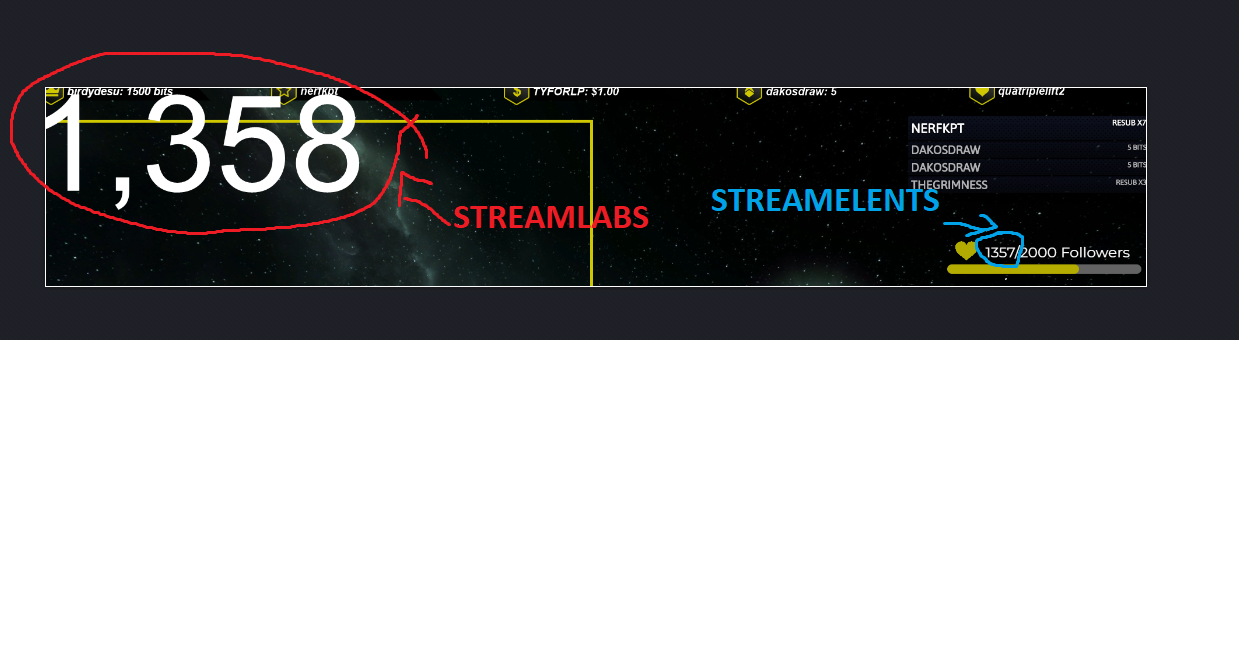 viscid pebbleBOT
@iron grove Please provide your account ID found at the top of this page: https://streamelements.com/dashboard/account/channels This ID is public info and safe to share here.
wary halo
one moment please
iron grove
ok
wary halo
iron grove
ok
should count up from now on with new follows!
 tardy copper
Hello, I am a bit puzzled by the loyalty points. A few people in my chat have an error when redeeming sounds claiming they do not have enough points, but they do. I've tried resetting their points and adding them back but it keeps giving the same error. Other people can redeem the sounds just fine.
onyx onyx
hey again. Is there an option /widget that people get a whisper by my bot after watching my stream for a certain amount of time? I would like to use it for giveaways. So that people that watch lets say atleast 30min get automatically a whisper with the password to join the giveaway. Is there anything like that already? TY guys
wary halo
tardy copper
Hello, I am a bit puzzled by the loyalty points. A few people in my chat have an...
let them log in to the StreamElements website
wary halo
that is because goals don't go down
they only go up
if you want to reset a goal or change it's number you can do that here:
viscid pebbleBOT
To reset goals:
- from the Overlay Editor > Session data on top right (monitor symbol) > Goals tab > reset progress of desired goal
- from the Dashboard > Activity feed on the left > Widget data on the right > Goals tab -> reset progress of desired goal
Note: Goal widgets (progress) only counts up and doesn't go down automatically, if you lose followers/subs.
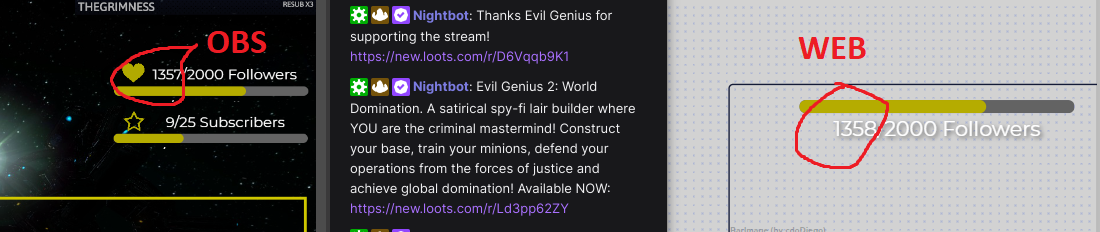 hexed zephyr
Hey, is it possible to setup a sub/follower/cheer goal that automatically resets back to 0 once the threshold is reached?
For example I want to setup a sub goal that starts at 0/5 and once we reach 5/5 it resets back to 0/5.
Any help is greatly appreciated thanks!
viscid pebbleBOT
@iron grove Right click on the BrowserSource > Properties > Scroll down a bit > Refresh cache of current page
iron grove
yeah
but
i push the button everytime?
new follower
press this button
everytime new follower
 ivory gust
Hello I would like to know how we could disconnect from our Twitch account if the one who proposed to us is not the right one Regards @ivory gust
 old wasp
hey! i saw a widget on tiktok called "socials showcase by breci" i cant find it on streamelemts tho and it was supposed to be there.. does anyone have any idea how it works, its my first time using streamelements...
slender delta
old wasp
hey! i saw a widget on tiktok called "socials showcase by breci" i cant find it ...
slender delta
ivory gust
Hello I would like to know how we could disconnect from our Twitch account if th...
Mind rephrasing this?
slender delta
iron grove
cant update automat..
What exactly is your issue?
iron grove
xD
slender delta
hexed zephyr
Hey, is it possible to setup a sub/follower/cheer goal that automatically resets...
Possible? Yes, but not added in SE yet and would require some custom coding .
iron grove
my goal followers cant update
hexed zephyr
slender delta
Possible? Yes, but not added in SE yet and would require some custom coding .
Ok thanks for explaining that
crimson phoenix
scarlet tiger
<@!287985107883655169> Hello, if you still need help, please use `!emotes update...
hello, it did not solve the problem
iron grove
...
 mortal vine
how do i unmod streamlabs
 nimble dune
Type /unmod streamlabs in your chat
wary halo
/ban streamlabs should do it
mortal vine
awesome thank you
scarlet tiger
crimson phoenix
hello, it did not solve the problem
Where exactly is that problem with BetterTTV emotes, please? In chat widget?
mortal vine
when i type in a command on obs live i get stream elements and streamlabs response and i unmoded streamlabs
 carmine bone
Hello, I have my first subscriber but I am quite new to this. How can I check how much balance I earn? (I chose my payment method as hold).
 upbeat willow
why is my follower goal not updating? I hope I don't always have to enter this manually?
viscid pebbleBOT
@upbeat willow Please provide your account ID found at the top of this page: https://streamelements.com/dashboard/account/channels This ID is public info and safe to share here.
upbeat willow
@viscid pebble 5ff7827f845fc20623729c4d
 pseudo jewel
mortal vine
when i type in a command on obs live i get stream elements and streamlabs respon...
pseudo jewel
mortal vine
when i type in a command on obs live i get stream elements and streamlabs respon...
You need to remove the streamlabs bot from your channel or disable the Streamlabs commands (I think it's called Cloudbot on Streamlabs)
nimble dune
carmine bone
Hello, I have my first subscriber but I am quite new to this. How can I check ho...
Creator dashboard > insights > channel analytics
 lament blade
hi I stream from my phone and i do all the mod stuff on my chome book but i went to go stream today and when i tap go live nothing happens? I also just got the stream Element bot
wary halo
upbeat willow
<@!155149108183695360> 5ff7827f845fc20623729c4d
fixed, should update from now on with new events
upbeat willow
@wary halo Like right now? Have you fixed that now?
mortal vine
@pseudo jewel Is there a way to disable the streamlabs bot. I disabled cloudbot and it still comes up twice
 cursive inlet
hey! my streamelements bot is buggy, he is connected in dashboard but not in twitch dashboard
wary halo
upbeat willow
<@!156048565058142208> Like right now? Have you fixed that now?
I gave the ID to staff and they resubbed the webhooks of your account
upbeat willow
Okay i hope it works. Thx :)
nimble dune
cursive inlet
hey! my streamelements bot is buggy, he is connected in dashboard but not in twi...
mod the bot
pseudo jewel
mortal vine
<@!282327953864523776> Is there a way to disable the streamlabs bot. I disabled...
Well, the easier, quick and dirty way is /ban streamlabs
viscid pebbleBOT
@cursive inlet Go to the Dashboard > Right side > Part channel > Join channel(https://streamelements.com/dashboard)
carmine bone
@nimble dune Thanks for quick reply, I have 1 sub showing there, however writes $0.00 still. It needs some time or will show when I reach $100?
upbeat willow
@wary halo but I only see that it works when the next person follows right?
mortal vine
@pseudo jewel lol im on it thank you
wary halo
upbeat willow
<@!156048565058142208> but I only see that it works when the next person follows...
correct
cursive inlet
viscid pebble
<@!248084140241584128> Go to the Dashboard > Right side > **Part channel** > **J...
i did, but it wont shop up in twitch

 wary halo

upbeat willow
@wary halo can I now manually set the correct number again and then it should work? because now it is still 2 followers too late
wary halo
yes
upbeat willow
okay thank you vm
wary halo
pseudo jewel
carmine bone
<@!334412925739728918> Thanks for quick reply, I have 1 sub showing there, howev...
It needs some time to update... You can see when it was the last update in Channel Analytics > View my Payouts on your twitch account
cursive inlet
thanks!!!
nimble dune

cursive inlet
now iam back live but still have problems
viscid pebbleBOT
@cursive inlet If your commands recently stopped working and you're using OBS.Live and a custom bot name do the following:
- In OBS.Live, click on the hamburger menu (three stripes) at the top left of your activity feed
- Click on Stream Settings > Custom bot name
- In the Custom bot name field select Set custom bot name, not your already existing username (with capital letters). Note: If you already connected an account that way, the third entry will show as the account name (see image https://i.imgur.com/sO7fWOX.png).
- Scroll a bit down and click on the purple Connect Custom Bot Account button
- Log in as usual and Authorize the custom bot name
- Back in the Activity feed, click on the Send Test Message button and check if your custom bot name starts working again
nimble dune
^
cursive inlet
okay now its back again, thanks a second time 🙂
nimble dune
You're welcome!
 proven nymph
Hi there - I went to withdraw my tips from SE Pay and had this notification. I've never had these issues before and none of my info is changed. What do I need to do?
 viscid pebbleBOT
@proven nymph Please contact us via email for support with SE.Pay. You can use our contact form here: https://streamelements.com/contact Thank you.
 steel orbit
After completing a campaign for a sponsored event, how long will a campaign prompt me that payment is processing and to await an email before payments are actually received?
 winter totem
can i use obs to stream from ps5?
viscid pebbleBOT
@winter totem Consoles do not have native support for overlays. You would need a capture card, PS4 remote play or Xbox companion app and a PC with OBS in order to have overlays over your console gameplay.
We have a blog post about how to set up console streaming with our essential tools: https://blog.streamelements.com/how-to-stream-on-console-7b620b1c46c3
winter totem
ok thanks
crimson phoenix
scarlet tiger
Where exactly is that problem with BetterTTV emotes, please? In chat widget?
Well it doesnt count or even reckognize few emotes, they just arent in the chat stats of the channel
 forest tangle
Hello friends! Hoping someone can answer my question. I'm trying to run a raffle on Twitch to choose who gets to be the next players in my Community Day. We are playing Apex, which will need 2 players. Does the raffle with multiple winners choose two at a time? Or how can I set it up to be like that?
 robust glen
How can I reset everything back to default (custom css, etc.)? How can I disable messages on sub alerts?
 tame willow
Hey there friends! I'm having trouble while setting up my StreamElements Leaderboard. It basically just don't work at all. I made sure I connected my Twitch acc with SE and activated the extension for top chatters. Any ideas about what it can be? Thank you folks!
 devout topaz
Hey! Is it anyway to import påverkats on streamelemebts from a iOS device ? From browser?
lament blade
im on xbox can i use streamelements and alerts and stuff on my xbox
viscid pebbleBOT
@lament blade Consoles do not have native support for overlays. You would need a capture card, PS4 remote play or Xbox companion app and a PC with OBS in order to have overlays over your console gameplay.
We have a blog post about how to set up console streaming with our essential tools: https://blog.streamelements.com/how-to-stream-on-console-7b620b1c46c3
 barren nova
Hello everyone I'm having a small issue. I have tried to import settings from SLOBS to OBS live and while importing tips, it somehow double the data of the tippers as if they had donated twice the amount. This screws up my labels that indicate top donator etc. Anyone know how to change this data?
mortal vine
are there different alert sounds available or do i have to download some
 eternal root
why can i not access my dashboard????????????
viscid pebbleBOT
@eternal root Please logout of StreamElements at https://streamelements.com/logout and then login again to your account (Twitch/YouTube/Facebook).
 feral furnace
Anyone know why the loyalty leaderboard all time view only shows the number of points for minutes spent watching, is not including points that are added to the user using the !add command or a user wins in a !raffle? The current view is showing the correct number of points based on earnt from watching, won and spent
 lyric zealot
anyone know why my twitch sub emotes dissapeared from KappaGen? all that's left is BetterTTV right now
wary halo
Bug is known, devs will fix it after the weekend
lyric zealot
ahhh thank you @wary halo , glad to know im not the only one
feral furnace
I don't even understand what !emotes does
lyric zealot
wait @wary halo which error is known?
wary halo
sub emotes in kappagen widget not showing
 ancient atlas
i dont see se pay please help
viscid pebbleBOT
@ancient atlas SE.PAY is available for streamers who are at least 18 years old, with bank account under their name in one of the following countries and have at least 101 follower (Twitch) / 101 subscribers (YouTube):
Austria, Belgium, Czech Republic, Denmark, Finland, France, Germany, Ireland , Italy, Netherlands, Poland, Portugal, Slovakia, Spain, Sweden, Switzerland, United Kingdom, United States.
If you meet these criteria and don’t see SE.Pay, let us know.
For information on SE.Pay payment methods, their fees and settlement times see https://streamelements.com/dashboard/tipping/fees
old wasp
be right back
wary halo
Should we all hold our breath until you get back? Kappa
 formal lance
Hallo ich brauche Deutschen Support gibt es des ?
wary halo
click here >> #🇩🇪︱deutsch
mortal vine
are there different alert sounds available or do i have to download some
wary halo
there are a bunch in #426825216887619594 as well
barren nova
hey @wary halo you seem to know a lot of what's going on x) care to help me on my issue?
barren nova
barren nova
Hello everyone I'm having a small issue. I have tried to import settings from SL...
.
Oh and also for some reason tips don't show on my streaelements companion on mobile in the event feed.
viscid pebbleBOT
@barren nova Please provide your account ID found at the top of this page: https://streamelements.com/dashboard/account/channels This ID is public info and safe to share here.
 whole otter
Hi, I can not upoad a .webm file to stream elements . It doesn't loads and it doesn't works when I press submit. Please I need help
 heady marsh
I can't figure out how to clear the history of recent raids in the widget data, everything else I can clear out, but the recent raid entries I can't.Thoughts?
 unkempt cosmos
Hello, i have really simple question, can i ignore somehow users from chat stats dashboard? I don't want to see how many messages streamelements sent??
 terse crater
Hi, I had a question around the Streamelements leaderboard extension. I love that it can track chatters, subs, gifts and points and so on but sadly it shows no data in the panel on my about page. Are there requirements for it to start showing data? I went to the streamelements page and signed in with my twitch although I don't really use it for much else. Am I missing something?
 autumn lagoon
Hey Guys, we are running into the problem, that our bot is double posting messages in the chat... does anyone know why?
 terse crater
@unkempt cosmos I can maybe answer that as I seen it a moment ago. When you configure you can whitelist and blacklist usernames afaik
ebon forum
Should be fixed now
whole otter
Hi, I can not upoad a .webm file to stream elements . It doesn't loads and it doesn't works when I press submit. Please I need help
 unkempt cosmos
@terse crater I mean, I want to allow streamelements to type in my chat, but don't count in chat stats dashboard..


 unkempt cosmos
@terse crater Love you man ❤️ Or girl KEKW
autumn lagoon
autumn lagoon
Hey Guys, we are running into the problem, that our bot is double posting messag...
Does anyone have a clue`?
viscid pebbleBOT
@autumn lagoon Go to the Dashboard > Right side > Part channel > Join channel(https://streamelements.com/dashboard)
autumn lagoon
Thx guys ❤️
 obsidian bronze
hello i hope this is the right channel,
Twitch have moved the API again for the command what shows your hoster, that was the last version i got with your help
Thanks to all the users currently hosting: ${customapi.https://api.crunchprank.net/twitch/hosts/'${channel}'?implode}.
since a few days this is the message i get
https://cdn.discordapp.com/attachments/370226812669788161/830174640626073620/unknown.png


 white harbor
What causes my CPU to spike when an alert is on?
 mental flume
how do i take obs off test mode ?
viscid pebbleBOT
@mental flume Obs.live is a plugin for OBS Studio for the best OBS support, please join their Official Discord @ discord.gg/obsproject
lament blade
I have am having a problem with the overlay editor. Not sure the proper channel to post this in... I have a custom GIF I am trying to align with the text for a new follwer, but the alert keeps looping so the text always comes in at different points of the gif. I can't get the gif to start from the beginning for each follower. I have a intro and outro set. I also, tried adjusting the GIF to loop once, but then it will only play once in the editor and wont trigger again even if i emulate a new follower. Any help is appreciated.
autumn lagoon
viscid pebble
<@!369593691750400001> Go to the Dashboard > Right side > **Part channel** > **J...
Doesnt seem to fix the problem. Appears again...
 sly stratus
Hi, i use kappagen but i am having issues atm, i use both emotes on screen and emotesplosion but the emotesplosion isn't working, only the emotes on screen are working. I use it everyday no problem but today it's doing so, any suggestion please? Thanks
foggy heart
sly stratus
Hi, i use kappagen but i am having issues atm, i use both emotes on screen and e...
The Kappagen widget is a bit bugged atm, so you may see issues with it.
sly stratus
foggy heart
The Kappagen widget is a bit bugged atm, so you may see issues with it.
Ok so it's not an issue on my end, and it should get back to normal sometime soon?
 tulip sage
Hi, my obs.live chat box has disconnected and i do not know how to reconnect, and obs has stopped responding to my elgato stream deck.. Thanks!
foggy heart
sly stratus
Ok so it's not an issue on my end, and it should get back to normal sometime soo...
It's been looked into by the dev team now
viscid pebbleBOT
@tulip sage StreamElements menu, on top of OBS > Logout > Login
sly stratus
foggy heart
It's been looked into by the dev team now
Oh ok thank you 🙏
 potent vector
Hello, i banned someone on media request could you please unban him for me thanks!
😇
 unkempt atlas
For custom commands I've added (for Pretzel and Stream Raiders), is there a way to show what those commands do in the !commands screen instead of the beginning of the script, to show users what those commands actually do?
 sacred narwhal
hi kappagen down? the emotion explosion is gone to my own emoticons are not in the list
 dusky niche
Hey guys, can someone help me? I switched my username on twitch and all my chat commands stopped working
viscid pebbleBOT
@dusky niche If you changed your name on Twitch, please follow these steps:
- Visit https://streamelements.com/logout and then log in again by connecting with Twitch.
- On the right side of the dashboard page that opens, select Join under bot settings. If it says Part select that and then select Join to send the bot to the chat. Don't forget to mod the bot by typing /mod streamelements in your channel if you have not already.
- Post your old and your new name here so that we can update your channel's chatstats tracking (must be done by staff).
 dim sorrel
Hello, I've been trying to set up my alerts for mass gifting subs not to trigger for every single sub. but I can't figure out how to do that. I just want one alert that says "Blank gifted 10 subs"
I tried to set up a variation but its not working
wary halo
use the community gift variation
 floral pebble
anyone has an idea how i get my twitch viewer count live in stream?
sacred narwhal
my own emoticons are not in that list from kappagen it dont work anymore is there some error ?
 wary halo
yes it's an error and will be fixed after the weekend
sacred narwhal
@wary halo 😦
 zealous owl
havinghey guys, one of my viewers cant redeem any points. Always get the "You dont have enough points" but he was 82k
wary halo
let him log in to the StreamElements website
floral pebble
@wary halo alerts visuals dont show up but sounds work is that a problem?
in stream elements
dim sorrel
Thank you ruben!
viscid pebbleBOT
@floral pebble The default resolution for StreamElements overlays (theme and custom) is 1920x1080. Please add them in OBS at their full resolution and use CTRL+F to fit to screen if necessary. You can then downscale your stream in OBS settings > Video if you'd like https://i.imgur.com/6bWXxjR.png
floral pebble
yeah its axactly the same how i have it and till tis day it worked and now it dont workj
viscid pebbleBOT
@floral pebble OBS > Settings > Advanced > Scroll down > Enable or disable Browser Source Hardware Acceleration, depending on its current state > Restart OBS
https://i.imgur.com/ggMe9ZE.png
wary halo
disable that
floral pebble
ok
@wary halo thats not obs.live? because its not under thatt tab with me
or is it a other one lol
wary halo
that is OBS.Live, I just have a custom skin on it 😛
floral pebble
aha ok because i cant find it as you shown me
i see it now
damm im not that smart
 simple hill
okay so i have a follower goal widget thingy on my stream but the number of followers i have on the goal bar is like 20 away from my actual follower is there anyway to fix this ?
viscid pebbleBOT
@simple hill To reset goals:
- from the Overlay Editor > Session data on top right (monitor symbol) > Goals tab > reset progress of desired goal
- from the Dashboard > Activity feed on the left > Widget data on the right > Goals tab -> reset progress of desired goal
Note: Goal widgets (progress) only counts up and doesn't go down automatically, if you lose followers/subs.
simple hill
is there anyway to get a widget that actually actively counts that stuff ?
lament blade
Hey guys, I want to stream Rainbow Six Siege on competitive settings. I have a r5 3600 and a rx580 8GB should I stream with my R5 or with my RX?
 rough notch
Hi, how to unban user on mediarequest?
 sleek gale
Hey guys. I'm trying to change the volume or deactivate an audio from my points store, but I'm not getting it, because this message always appears: "something went wrong" and no changes are saved. Can someone help me solve it?
 rough notch
@viscid pebble Hi, how to unban user on mediarequest?
foggy heart
rough notch
Hi, how to unban user on mediarequest?
Do you have the username you'd like unbanned?
viscid pebbleBOT
@lament blade Welcome to the helpdesk! Please let us know how we can assist you today and a support volunteer or staff member will assist you as soon as they are available. Thank you for your patience.
@sleek gale Our Dashboard and Overlay Editor are Chromium Optimized. We strongly recommend using Chrome. Opera GX and the new Microsoft Edge Chromium might work closest to Chrome as its also Chromium built. Firefox also works, but some things might look a bit different or not work. We do not recommend using Internet Explorer with our Dashboard as it does not support functions.
If the website doesn’t work on chrome, be sure none of your plugins is blocking our website or clear your cookies. You can try if the website works in an incognito tab.
potent vector
@foggy heart Hello, would you also help me? i accidentally banned user on mediarequest
rough notch
Sadge
foggy heart
@rough notch @potent vector are these requests related?
lament blade
How do I stop people from getting timed out on twitch can I turn it off 🤔
foggy heart
And that user is pajalockpatiroadamcy?
potent vector
Yes
viscid pebbleBOT
@potent vector Please provide your account ID found at the top of this page: https://streamelements.com/dashboard/account/channels This ID is public info and safe to share here.
potent vector
Send here id?
foggy heart
Yes, that's fine
potent vector
5d079a92b9d10eb32bf66988
 radiant swallow
Can someone please help me add my twitch chat on stream using Lightstream? Do I add it with a URL?
foggy heart
potent vector
5d079a92b9d10eb32bf66988
That user should be unbanned now
 silver field
is there a way to make a command that only the broadcaster and mods can use? if so, please help
foggy heart
silver field
is there a way to make a command that only the broadcaster and mods can use? if ...
You can set user levels for your commands here: https://streamelements.com/dashboard/bot-commands/default-commands
 rocky shuttle
I lost all my sound from my microphone but still have in game sound. how do i fix that?
viscid pebbleBOT
@rocky shuttle Obs.live is a plugin for OBS Studio for the best OBS support, please join their Official Discord @ discord.gg/obsproject
 untold rain
Does SE.Pay only do manual withdrawals or does it also do automatic ones?
 sterile garnet
Hey all! Is there a volume control for Media Request?
Currently it is far too quiet and I would like to be able to control the volume of the content
abstract hemlock
untold rain
Does SE.Pay only do manual withdrawals or does it also do automatic ones?
only manual ones
abstract hemlock
sterile garnet
Currently it is far too quiet and I would like to be able to control the volume ...
You should be able to do it directly on the media request dock on obs.live