#helpdesk-twitch
1 messages · Page 866 of 1
 willow pagoda
 drowsy egret
try disconnecting your account from twitch (https://www.twitch.tv/settings/connections) and relogging to the SE website
 viscid pebbleBOT
@crimson coyote Please provide your account ID found at the top of this page: https://streamelements.com/dashboard/account/channels This ID is public info and safe to share here.
willow pagoda
My Account id Is 604e7d18bfc01769dc39b022 and im having a Twitch and Stream Key error not sure why but after the update it crashed
and its not letting mew stream
 runic hound
drowsy egret
try disconnecting your account from twitch (https://www.twitch.tv/settings/conne...
runic hound
drowsy egret
try disconnecting your account from twitch (https://www.twitch.tv/settings/conne...
Still isn't working

Well something changed that I played no part in, but praise techno-christ
 sour plank
Hello
I can't seem to find the tutorials section for SE?
Is it cause I'm on the phone version and not the desktop version perhaps?
 crimson coyote
5ffa18f587f4728118deecb2
 spark basin
I am trying to set up follower alerts and I have linked the browser link, but no alerts are showing up in obs. Is there something I'm doing wrong?
I am in a call with a friend because he was trying to help and it's not working
 somber echo
Hi, I wanted to make a stats command for mi twitch channel and i dont know how to put an active hosts count
 fickle osprey
my Streamelements bot isnt showing up in chat or doing commands
spark basin
spark basin
I am trying to set up follower alerts and I have linked the browser link, but no...
Sounds are coming through but not text or images.
I am unsure if this is a problem on OBS's side or StreamElements side.
 alpine blade
Is twitch beta studio good 2 stream on?
 keen plover
hey, I just upgraded my inetrenet speed to 100 mb download and 10 mb upload, I was streaming with certain settings on StreamElements OBS, what settings should I "increase"? my graphics card is not that good tho (rx 560), I just got better internet only
 round crater
Hi! I need some help . Hosts with 1 users do not appear on my chat and my live stream , can anyone help me ?
 fickle axle
I want to delete my streamelements account but it keeps saying server error can someone help me delete it?

 still marsh
They're not separate notifications. I simply deleted everything and started over to get it working. Weird lag/bug I guess. Thank you though.
 cinder olive
 lament blade
can someone help my chat does not pop up on the right hand side?
lament blade
can someone help my chat does not pop up on the right hand side?
Click 'view' at the top, then 'docks'
lament blade
My stream FPS goes down a lot I have good internet and my specs are a 1660 super and a r5 3600 can someone please help me
 bitter wing
how do i do live
chat
because i need to extend the se sponsorship for like 2 hours
viscid pebbleBOT
@lament blade Please provide a log from your last stream. To do this, in OBS go to Help > Log Files > Upload Last Log File and paste the link to the log file here.
bitter wing
but chat with us only bringfs me to articles
cinder olive
bitter wing
how do i do live
How do you go live? You.. uh.. go live? Not sure what youre asking here
bitter wing
live chat
cinder olive
fickle axle
I want to delete my streamelements account but it keeps saying server error can ...
Submit a ticket
cinder olive
alpine blade
Is twitch beta studio good 2 stream on?
Nope
cinder olive
keen plover
hey, I just upgraded my inetrenet speed to 100 mb download and 10 mb upload, I w...
Increase your bitrate/resolution, about it
cinder olive
round crater
Hi! I need some help . Hosts with 1 users do not appear on my chat and my live s...
Hosts that have 1 viewer and are offline do not show up.
cinder olive
bitter wing
live chat
Like a chat on your stream?
Go to the SE dashboard, create an overlay, and add the stream chat to it.
lament blade
My internet speed is 50 and my upload is about 15 is that bad for streaming?
bitter wing
with staff
lament blade
?
cinder olive
bitter wing
because i need to extend the se sponsorship for like 2 hours
Very unlikely to happen but ill forward the message
bitter wing
i talked to someone yesterday
it was extended but i got home from the hospital not to long ago
cinder olive
lament blade
My internet speed is 50 and my upload is about 15 is that bad for streaming?
depends on your resolution and bitrate. please follow the instructions above
bitter wing
and it didnt update all my time streaming raid
i was told i would get an extra day but only got 20 hours
wait i got it
lament blade
Is 720p and a nitrate of 5000 good for my internet @cinder olive
cinder olive
lament blade
Is 720p and a nitrate of 5000 good for my internet <@311873541542772736>
 cosmic fulcrum
i'm having an issue with the overlay designer here. when i click "text over image" (40-second mark), the text just disappears. is this a bug?
 proud mountain
how can i made the !top online command from minutes in hours?
lament blade
I’ll check that out later thx
 worldly escarp
proud mountain
how can i made the !top online command from minutes in hours?
worldly escarp
proud mountain
how can i made the !top online command from minutes in hours?
how many hours? you can just use 60 minutes for example
worldly escarp
cosmic fulcrum
i'm having an issue with the overlay designer here. when i click "text over imag...
go to the text setting > advanced and play with the " top"margin
 proud mountain
worldly escarp
how many hours? you can just use 60 minutes for example
proud mountain
worldly escarp
how many hours? you can just use 60 minutes for example
how exactly do you do that? and then does it say how many hours did you have?
 distant willow
anyone can help importing from streamelement to streamlab obs
worldly escarp
proud mountain
how exactly do you do that? and then does it say how many hours did you have?
The command only shows the top 5 viewers in the last 5 minutes , that cannot be adjusted.
proud mountain
worldly escarp
The command only shows the top 5 viewers in the last 5 minutes , that cannot be ...
So you can't change it in hours, not even with a new command?
viscid pebbleBOT
@distant willow We're not able to troubleshoot issues with using our overlays in StreamLabs OBS (SLOBS) as we don't have the tools to support their software. We recommend using OBS Studio or OBS Studio with our plugin OBS.Live.
worldly escarp
proud mountain
So you can't change it in hours, not even with a new command?
If you really want you can use a custom command with ${user.time_online} but that will show you one user
proud mountain
worldly escarp
If you really want you can use a custom command with ${user.time_online} but tha...
And that doesn't work with 10 users or 5 no matter what number?
 short hound
My acutivity feed and chat are showing blank that i have nothing, how do i fix that
distant willow
i downloaded obs how do i import it now
 zenith widget
@proud mountain no
viscid pebbleBOT
StreamElements menu, on top of OBS > Logout > Login
zenith widget
@distant willow import what exactly?
proud mountain
what no?
worldly escarp
proud mountain
And that doesn't work with 10 users or 5 no matter what number?
it wont work with 10 users
distant willow
the overlay i choice, im in obs.live figuring how to import it
viscid pebbleBOT
@distant willow To add your overlays to OBS, add a new browser source in your scene. Paste your overlay URL in the browser source properties, set the dimensions to 1920x1080 (unless you changed them on the website) and check Shutdown source when not visible. https://youtu.be/KDvLynUqXI4
proud mountain
5 users
worldly escarp
the !top command shows 5 users, the custom works with one at a time
proud mountain
I don't care about the user, just want it to be in hours and not just one person on the list
 digital gazelle
Hello I'm new. I'd like to record my streams on my mobile device while I stream from it on twitch. Can anyone point me to something I could read or a resource I could use to help me do this?
worldly escarp
digital gazelle
Hello I'm new. I'd like to record my streams on my mobile device while I stream ...
I suggest you should google it, since its not something we can help with atm
 pearl hedge
I'm curious; is there a widget to add a timer on screen? For example: I have to take my glasses off while I play for a certain amount of time as a channel point reward redemption. Can I have a command that allows a timer to tick down when my mod activates it via command?
 low quiver
Just wanted to follow up on this issue. Wasn't sure if it was going to be an immediate fix or not. As a refresher the problem I'm running into is new followers not showing up on my stream elements activity feed, widgets, or alerts. All other "events" seem to work fine.
zenith widget
There is no ETA on when the devs will look into your issue.
There are other accounts added to the list, so I would advise to be patient.
 shut jewel
hello! so i have a problem, I'm setting up my alerts for twitch, and in the alert box widget there are no followers and bits alerts, this has had me perplexed for 2 days now and i can't seem to find any info, all videos and articles are out of date, so where did the options for followers and bits alerts go??
another thing, how do i test out my purchase alerts??
please answer as soon as possible, I must stream today!
worldly escarp
shut jewel
hello! so i have a problem, I'm setting up my alerts for twitch, and in the aler...
Let me check, whats your account id?
shut jewel
worldly escarp
Let me check, whats your account id?
for my twitch: 6061a400aef464368869900c
zenith widget

 last shard
Hey all is there an issue with alert variations saving at the moment? I'm using the Glitch 2.0 alert from NerdOrDie and whenever trying to add more than 3 sub alert variations and then click save it gets stuck in an never ending save-loop and doesn't commit the changes 😣
zenith widget
shut jewel
for my twitch: 6061a400aef464368869900c
Check screenshot. That being said, you don't have an alert widget in your overlay.
shut jewel
zenith widget
Check screenshot. That being said, you don't have an alert widget in your overla...
?
hmm
zenith widget
Your question is "so where did the options for followers and bits alerts go??"
- You are not a twitch affiliate to get bits yet.
- Follower alert is there under the emulation
- There is no alert widget in your overlay to display any event
- Purchase event is something external

 ionic kelp
You're logged in with youtube.
shut jewel
:0
zenith widget
2 different platforms, 2 different accounts
worldly escarp
last shard
Hey all is there an issue with alert variations saving at the moment? I'm using ...
HI, since that is a custom widget I would recommend checking with discord.gg/nerdordie
shut jewel
sorry for wasting your time
 eager ore
Can I change this message from !buy when not available? item not found, you can see all items here https://StreamElements.com/kynshinlol/store elementsS

StreamElements
The Ultimate All in One Platform for Streamers
shut jewel
thankyou so much
zenith widget
eager ore
Can I change this message from !buy when not available? item not found, you can ...
default command's response cannot be edited, no
eager ore
thanks
last shard
worldly escarp
HI, since that is a custom widget I would recommend checking with discord.gg/ne...
Would they be able to help? Only cause it is stream elements that won't "save" the changes. I have the same alert variations set up on another alert pack from them which works perfectly fine. It's strange that on this alert pack it allows me to add 3 alert variations and saves fine but any more and it gets "stuck" saving the changes but the preview emulation event works perfectly fine. Thanks for the reply by the way
zenith widget
The reason you are not able to save is because of the custom alert widget - there is a specific save size of the overlay that the system is limited to, but because its a custom coded widget, when you add a few variations to it, the "file" size of the overlay is being reached more easily, meaning that it won't save because its over the limit. I hope this makes sense
And no, we do not intend to increase the limit, due to other backend factors
TL'DR' - the bigger the custom code in the widget, the bigger the "file" size is.
and the more you replicate that code, the bigger the size gets, etc.
idk if i'm explaining this properly without sounding toooo technical 
last shard
zenith widget
The reason you are not able to save is because of the custom alert widget - ther...
Yup that makes sense, thanks for clearing that up 😊
low quiver
zenith widget
There are other accounts added to the list, so I would advise to be patient.
Gotcha thanks for the update
last shard
The other custom widget I have from them must have a smaller starting code so allowed more flexibility with regards to variations but yeah that explanation makes sense @zenith widget
spark basin
I am trying to set up follower alerts and I have linked the browser link, but no alerts are showing up in obs. Is there something I'm doing wrong? Sounds are coming through but not text or images. I am unsure if this is a problem on OBS's side or StreamElements side. Can anyone help?
lament blade
spark basin
I am trying to set up follower alerts and I have linked the browser link, but no...
make sure that the sourcce resolution matches the overlay resolution
zenith widget
@oak crater I don't think we can help you with that issue. Not sure how you are streaming and using nvidia visual effects. Don't even know what "nvidia visual effects" is.
 oak crater
Its the nvidia filters
zenith widget
That doesn't tell me anything
oak crater
Nvidia Gforce experience software?
oak crater
no
i am streaming through se obslive
you can use filters on games with the nvidia software
viscid pebbleBOT
@oak crater Obs.live is a plugin for OBS Studio for the best OBS support, please join their Official Discord @ discord.gg/obsproject
zenith widget
I wanted to leave the message here, but delete it in the other channels, but it was deleted here by accident
Next time, don't ask the same question all the other helpdesk channels. It creates confusion
 shell coral
Hola soy de México
viscid pebbleBOT
@shell coral Welcome to the helpdesk! The regular helpdesk channels are in English but we do provide multi-language support in the following channels: #🇩🇪︱deutsch | #🇫🇷︱français | #🇪🇸︱español | #🇵🇹︱português | #🇳🇱︱nederlands | #🇮🇹︱italiano | #🇵🇱︱polski | #🇨🇳︱中文語言服務區-chinese | #🇯🇵︱日本語-japanese | #🇭🇺︱magyar | #🇰🇷︱한국어-korean | #🇹🇭︱ไทย-thai | #🇷🇺︱русский | #🇺🇦︱українська | #🇨🇿︱czech
 worn temple
Hello, is there anyway to remove my name from a raffle? i am the host of it and i accidently bought 2 tickets and dont want to restart it
worldly escarp
worn temple
Hello, is there anyway to remove my name from a raffle? i am the host of it and ...
sorry but currently theres no option to remove the host from the raffle
 hard grove
im currently being follow botted how can i make it stop?
worldly escarp
hard grove
im currently being follow botted how can i make it stop?
you can use this to remove them https://twitter.com/CommanderRoot/status/1232278323084091393

Follow bots are an issue you say? Fear no more!
I've created a tool which lets you remove accounts from your follower list:
https://t.co/oIBikrpyXr
You can filter accounts by follow age and / or account age.
Retweets
963
Likes
2973

 Twitter
·
Twitter
·
 warped umbra
Hi gang. I have inititated a giveaway through stream lements and is being recognised on OBS by the widget. Whenver !ticket 1 or !enter 1 is typed it does not add an entry. Any ideas what may be wrong?
ionic kelp
Command is disabled 
warped umbra
FACE PALM. cheers
 native bridge
good morning How can I exports thing from tipeestream to stream elements?
lament blade
native bridge
good morning How can I exports thing from tipeestream to stream elements?
we have an import tool on our website that should allow you to do that
 tough pewter
Hi there,
I am unable to see my chatstats on streamelements.com.
Ist says Error 404 when I click on it.
Thank you and kind regards!
worldly escarp
tough pewter
Hi there,
I am unable to see my chatstats on streamelements.com.
Ist says Error...
Have you changed your name ?
tough pewter
worldly escarp
Have you changed your name ?
No I havent
worldly escarp
can you provide your account id please?
viscid pebbleBOT
Please provide your account ID found at the top of this page: https://streamelements.com/dashboard/account/channels This ID is public info and safe to share here.
tough pewter
worldly escarp
can you provide your account id please?
Sure! 60531a28825f0e0ffcadc890
tough pewter
worldly escarp
can you provide your account id please?
This was the ID, right?
ionic kelp

tough pewter
ionic kelp
<:Yup:797897269772156988>
Thank you! @worldly escarp are you still there?
tough pewter
Its still the same issue
worldly escarp
refresh page
tough pewter
Same issue
 ionic kelp
Might wanna give it a few minutes as it can be wonky sometimes.
tough pewter
Okay! Thank you for your help Guys
native bridge
@lament blade is not working I think , it not import my alerts
lament blade
It should, but not as complete alerts, it should import the files and that's it, not arrange them
did it do that?
native bridge
I think no , how I do that?
lament blade
you can edit the various properties of our alerts, when you do that, can you see your own gifs? sound effects?
native bridge
he dont appear my las importation only one about 3 years ago
tough pewter
@worldly escarp it seems like the site ist working now (no error).
But everything is set to 0
worldly escarp
I had to add your user to the chatstats so its been reset.
 upper steeple
for some reason the default commands are not working in a stream that I moderate. We have parted the bot and rejoined it but it doesn't fix the problem
zenith widget
streamer name?
upper steeple
WoefulDragon
zenith widget
sorted ⤴️
 lean jackal
help needed
 cursive path
Gday, I would love some help please
My events widget has been working fine since the beggining until all of a sudden when i was logged out of OBS one day. When I logged back in and emulated my events widget, it worked fine as instructed however the overlay / sounds / anything does not work whilst im live or an event outside the emulation occurs
Please reply/ping :)
Thank you
worldly escarp
cursive path
Gday, I would love some help please
My events widget has been working fine sinc...
so alerts work only when emulating?
cursive path
yup unfortunatly
worldly escarp
can u see the emulations on the OBS while offline?
cursive path
you mean not live? yes I can
anything that isnt emulated doesnt come up whether live or not
worldly escarp
try running the OBS as admin see if that helps..
cursive path
I'll give it a shot, thanks!
 languid kestrel
Hi guys, I know Twitch recently made some changes to how host/raids are handled but has that had an effect on how Streamelements gets the notifications? When someone raids, I only ever seem to get accompanying host alert trigger and the raid alert is lost.
Thanks!
viscid pebbleBOT
@languid kestrel "Due to changes to Twitch API, we have filtered out hosts and will only show these ones on your activity feed:
- All hosts coming from an online channel with at least 1+ viewer
- Auto host events with at least 1 viewer - only from a channel that just went offline
Note: If you see X channel has hosted you with no viewers on the back, that is considered an offline host or a host with 0 viewers, we do not show these."
shut jewel
hi so I added a variation to my twitch sub alert, and when I emulate, it only emulates the variation, should i be worried?
worldly escarp
shut jewel
hi so I added a variation to my twitch sub alert, and when I emulate, it **only*...
why would you be worried?
cursive path
worldly escarp
try running the OBS as admin see if that helps..
Thank you so much Maya. Did what you said and got a friend to follow whilst I was offline everything (overlay and sounds) worked!
shut jewel
worldly escarp
why would you be worried?
because maybe it would only show resubs and not subs? idk im paranoid
 severe wharf
Hello, I kind of messaged the other day but i got ignored... hope i can get some help. bec streamelements still doesnt reflect the number of (new) followers i have in the dashboard even though everything else is shown. i dont get notified either when i get a new follower from the chatbot even though i have everything on in the streamlabs chatbot...

see here it's just 0 followers the whole time and no follower from the activity feed at all on streamelements even though it's on.
 ionic kelp
And you're sure they explicitly brand new followers and not refollows?
But also this please
viscid pebbleBOT
Please provide your account ID found at the top of this page: https://streamelements.com/dashboard/account/channels This ID is public info and safe to share here.
severe wharf
i even have these on for so long
 severe wharf
ionic kelp
And you're sure they explicitly brand new followers and not refollows?
severe wharf
ionic kelp
And you're sure they explicitly brand new followers and not refollows?
yes. 😦 this has been goin on for a while idk why >< im p new with streamelements so im not sure if it's a me problem or if it is a system problem ><
lament blade
Please provide us with the account ID and we will resolve this
severe wharf
viscid pebble
Please provide your account ID found at the top of this page: <https://streamele...
5ff9c93d5013019edbbed43f here you go ><
lament blade
fix'd
shut jewel
these people rock<3
 slender laurel
How do I stop twitch soundtrack playing through the desktop audio in OBS? Ive doneeverything ive found online to fix the problem but nothing has worked
viscid pebbleBOT
If you are not hearing your alerts and/or Media Request, you are most likely using the Control Audio via OBS option in your browser source properties.
To make sure you hear the alerts and the stream also hears them, follow along the screenshot bellow.
https://cdn.discordapp.com/attachments/199460642975907840/685371800456134686/unknown.png
 worldly escarp
slender laurel
Works when I test, but not when It happens via twitch
worldly escarp
slender laurel
Works when I test, but not when It happens via twitch
you mean while streaming..
slender laurel
yes
viscid pebbleBOT
@slender laurel Obs.live is a plugin for OBS Studio for the best OBS support, please join their Official Discord @ discord.gg/obsproject
 trail abyss
hi there I'm new to streamelements and i was wondering if it possible to use the variable {game} to call a specific user's last game. I'm wanting to create a special shoutout command for specific users like !(twitch name) is there a way to do this
 keen wigeon
trail abyss
hi there I'm new to streamelements and i was wondering if it possible to use the...
keen wigeon
trail abyss
hi there I'm new to streamelements and i was wondering if it possible to use the...
The variable ${game ${1}} returns the game that is currently set in the username's channel, if ${1} is a Twitch username.
Check out the !shoutout command from the existing custom command templates, the syntax is already set up there.
 feral bough
hello i am having problems with error code HTTP 400 invalid refresh token. I have tried logging out of obs and back in but hasn't worked. It is also saying visit dashboard.soundalerts.com/settings#setup
i am only having the error code HTTP 400 invalid refresh token now
keen wigeon
Where are you seeing this error? Can you provide a screenshot?
 ionic talon
hello, is there a way to use the channel emotes in the chat modules?
 prisma relic
ionic talon
hello, is there a way to use the channel emotes in the chat modules?
prisma relic
ionic talon
hello, is there a way to use the channel emotes in the chat modules?
channel emotes should work for bot responses. but the but would need to be a sub to your channel
ionic talon
ooooooooooooooooh right!
is there a way to give it the sub or not?
i don't want to pay every month
ionic kelp
Someone has to or you use the custom bot name in OBS.Live and use your account.
prisma relic
i know that partners get free bot subs; but i don't believe affiliates do
 mystic mantle
The SE.Merch isn't loading on firefox. Anything to solve this?
keen wigeon
First, try Chrome. 🙂
mystic mantle
Haha figured. 😄 will try
 obsidian ibex
I downloaded a pastbroadcast but i dont have any sound in it
I can hear the sound in twitch
ionic kelp
You'd have to contact twitch support about that.
 zinc tree
did anyone have an idea why my commands does not work ?
viscid pebbleBOT
@zinc tree Go to the Dashboard > Right side > Part channel > Join channel(https://streamelements.com/dashboard)
 zinc tree
already done
keen wigeon
Are you using a custom bot name?
zinc tree
yeah
viscid pebbleBOT
@zinc tree If your commands recently stopped working and you're using OBS.Live and a custom bot name do the following:
- In OBS.Live, click on the hamburger menu (three stripes) at the top left of your activity feed
- Click on Stream Settings > Custom bot name
- In the Custom bot name field select Set custom bot name, not your already existing username (with capital letters). Note: If you already connected an account that way, the third entry will show as the account name (see image https://i.imgur.com/sO7fWOX.png).
- Scroll a bit down and click on the purple Connect Custom Bot Account button
- Log in as usual and Authorize the custom bot name
- Back in the Activity feed, click on the Send Test Message button and check if your custom bot name starts working again
 zinc tree
i used the name of my twitch dont want to do another twitch account for a name , i think i set it back to streamelements , i hope this will work
okay i change it back and works now
 wet shuttle
How do i create a twitch giveaway that you have to sub in order for your chance to win?
 wary halo
You know that sub only giveaways are against Twitch TOS?
Because you have to pay to enter, that makes it fall under gambling
trail abyss
hi i figured out my shoutout issue. What i want to know is there a way to get a command to automatically run when a certain user enters the chat?
not for when any user enters the chat because that would shout out people who just want a quiet lurk but just specific ones
wet shuttle
does it have to be a free give away?
why is that one of the options for giveaways on stream elements if it is against the rules on twitch?
ionic kelp
@trail abyss Not possible.
trail abyss
Ok that's fine I just thought it would of been cool as my VIPs came in to get shouted out but I guess I can do them automatically
ionic kelp
@wet shuttle There is no sub only giveaway. Only higher odds for them to win.
wet shuttle
theere is an option to check off for subscribers only
wet shuttle
ionic kelp
<@!801950945672036372> There is no sub only giveaway. Only higher odds for them ...
^
what is the recommended settings for a giveaway?
 regal dew
hey guys im partnered with vibepay are you guys going to make it so we and take out with them if you know what i mean so like they can dono to us via card paypal vibepay ect
 weary sand
hi all. can someone help me? just started streaming and i use anoverlay from streamelements but the follower count is reading wrong? it says i have 5 but i have 11 (please dont laugh) TIA
prisma relic
weary sand
hi all. can someone help me? just started streaming and i use anoverlay from str...
which overlay are you using? my guess is that it reading the month/last 30 days
you can see the data here: https://streamelements.com/dashboard/session
weary sand
prisma relic
which overlay are you using? my guess is that it reading the month/last 30 days
ya im not even at it a month. its the justice league overlay but i only used it as they were just 2 black bars to put my recent followers and followgoal on. if that makes sense
prisma relic
check that link above and see what it says in the "Total" tab
 jovial hill
Anyone know why do I have a tier 3 subscription to my own channel? It's been 2nd month of subscription.
I checked I didn't pay for anything, nor anybody ever gifted me the subscription.
I'm just an affiliate i think.
ionic kelp
@jovial hill Because that's how twitch fucntions?
jovial hill
So, every streamer is also its lift-time subscriber?
ionic kelp
Yes. How else would they use all their emotes 
 rotund pewter
Hi i need some help with my account. I need to change my account name and remove twitch and fb and also if possible need to change tip url
viscid pebbleBOT
There is no easy way to unlink 2 owner-type accounts from each other. The only way is to make a closure request from here: https://streamelements.com/dashboard/account/security
WARNING: In submitting a closure request, all linked channels within the account will be deleted and you will lose all associated data. This includes overlays, custom commands, timers and past data (tips, subs, etc). You can still reconnect with the deleted account, but you are essentially starting fresh.
ionic kelp
Read that carefully.
rotund pewter
Can i change account name ?
jovial hill
One of my audience told me that I probably bought subscription in my own channel...
rotund pewter
and also can i change tipping url
jovial hill
Then I'm scared as fuck
ionic kelp
They have no idea what they're talking about.
jovial hill
But i check all my statements but found nothing
ionic kelp
Change your name on twitch and then redo this.
viscid pebbleBOT
Please logout of StreamElements at https://streamelements.com/logout and then login again to your account (Twitch/YouTube/Facebook).
ionic kelp
Anyone who is affiliate/partner automatically has a t3. That's just how it is.
viscid pebbleBOT
You can find your JWT token on your account channels page (Show Secrets to reveal the token): https://streamelements.com/dashboard/account/channels
READ ME: This is a private security token. Do NOT share this token here or other public places, only with a StreamElements staff member in private.
 fluid fable
I am having huge issues with getting Tiltify to work... I click connect and it says.. "Getting Things Ready" but it has been like that for a long time..
ionic kelp
@fluid fable Have you already connected it in the integrations section of the dashboard?
rotund pewter
I am trying to delete my account but its keep saying invalid username
Guys you should make things straight forward and easy 😦
keen wigeon
@rotund pewter Sorry you're having trouble 😦
We'll be happy to help. Do you want to permanently delete the account, or are you doing it because you want to link it to another account you have with us?
rotund pewter
I want to start fresh and need to change my account and tipping url there are old accounts linked to my accounts
fluid fable
sudo oh.. I will look there a second 😄 something new..
@ionic kelp there's an integrations tab in streamelements?
ionic kelp
Dashboard and import in top right.
keen wigeon
We can link accounts together for you to make sure you have what you need. Changing the tip page URL is also possible. Deleting your account is less advisable.
Please send us an email to support@streamelements.com, explain exactly which changes you would like made, and provide all account IDs and JWT tokens of the channels in question, making sure to specify which JWT goes with which account ID.
fluid fable
oh I found it 🙂 thanks
rotund pewter
Thanks i will send you right away
weary sand
prisma relic
check that link above and see what it says in the "Total" tab
it says 11 now but i just changed it to 11 in follower goal progress in goals?! should i have done that
prisma relic
goal is where you want it to be (like if you have a goal bar) ... normally like 50 or 100
weary sand
prisma relic
goal is where you want it to be (like if you have a goal bar) ... normally like ...
ok i thought that you edit goal amount within overlay edit?
prisma relic
oh ya; the amount is in the overlay... the progress is in the session data. you are correct
weary sand
prisma relic
oh ya; the amount is in the overlay... the progress is in the session data. you ...
do i need to reset that every time?
prisma relic
nope. it will continue to count up from there.
it won't count down though (it can't track unfollows)
weary sand
prisma relic
it won't count down though (it can't track unfollows)
i hope the unfollows dont happen😆 thank you so much for your help.
rotund pewter
email sent
 misty urchin
Umm hi, this is a bit awkward. I was wondering if somebody could help me with a donation button...
viscid pebbleBOT
@misty urchin Twitch's official help guide for Panels: https://help.twitch.tv/customer/portal/articles/2416760-how-to-edit-info-panels
 floral meteor
Hi team, my wife changing her name on Twitch and it messed up the tracking / stats. Could either of you help me finalize this for me? (I signed out and back in + re-linked the bot to my feed, as well as edit rights.)
Old name: melissa69800 | New name: urban_meliss
Thank you ^^
fluid fable
another little report.. sometimes giftsub alerts come like 5 mins after the fact into streamelements. Not sure if it is a Twitch bug or a Streamelements bug.. but it seems to be that way from time to time.
keen wigeon
floral meteor
Hi team, my wife changing her name on Twitch and it messed up the tracking / sta...
Looking into it.
keen wigeon
floral meteor
Hi team, my wife changing her name on Twitch and it messed up the tracking / sta...
Created a new chat stats page under the new username.
floral meteor
keen wigeon
Created a new chat stats page under the new username.
I am French and I do not speak English very well, I am trying to understand, You told me to redo a new streamelements account? I did not understand well?
fluid fable
Interesting, changing scenes makes Tiltify play the last 3 alerts again on stream 😄
keen wigeon
floral meteor
I am French and I do not speak English very well, I am trying to understand, You...
No, I told you I fixed it myself. 🙂
It's already up at https://stats.streamelements.com/c/urban_meliss
StreamElements
Description Chat Stats tracks emote usage on Twitch in real time. See which emotes are the most popular on every Twitch channel
floral meteor
keen wigeon
No, I told you I fixed it myself. 🙂
It's already up at https://stats.streamelem...
Great, thank you! unfortunately the chat commands are still not working ... can help us?
 coarse chasm
Thanks mate
floral meteor
keen wigeon
No, I told you I fixed it myself. 🙂
It's already up at https://stats.streamelem...
I just tested unban and the streamelements did not ban , before the name change everything worked perfectly even the same evening of the day when the name of the channel was changed
viscid pebbleBOT
Please logout of StreamElements at https://streamelements.com/logout and then login again to your account (Twitch/YouTube/Facebook).
floral meteor
yes i just did it
viscid pebbleBOT
Go to the Dashboard > Right side > Part channel > Join channel(https://streamelements.com/dashboard)
ionic kelp
Do that.
lament blade
someone knows how to use the variable ${arg} ${arg.emote} and ${arg.word} ? pls
floral meteor
I just did it, dissociate from the chain and re-associate with the chain
ionic kelp
Seems to be working now
floral meteor
Great it also seems to me, the box alerts no longer worked either, do you think it will be restored at the same time? in all again thank you for your competence
lament blade
im confused on how to setup media share
prisma relic
did you watch the video on https://streamelements.com/dashboard/mediarequest/general ?
floral meteor
my wife will launch a live test, i will try
 molten schooner
i have a question about giveaways: what can i use as a giveaway?
 hexed cipher
Hey, I'm currently struggling to make a Widget. I want a Sub Counter, not a Sub Goal, just a counter of how many Subs I currently have displayed on Stream. Is that somehow possible?
 limpid flame
Hi, I have a question, how to fix the 404 error in the chat stats?
prisma relic
limpid flame
Hi, I have a question, how to fix the 404 error in the chat stats?
have you changed your name on Twitch?
prisma relic
hexed cipher
Hey, I'm currently struggling to make a Widget. I want a Sub Counter, not a Sub ...

 violet plume
I'm having an issue with audio repeating when live on twitch. It will sound sound sound the way I just typed that. It's not consistent. Sometimes it will happen multiple times in a short period of time, then sometimes not for a while. I'm not sure where to start troubleshooting.
limpid flame
prisma relic
have you changed your name on Twitch?
in this case I did not, but a friend did, but he did change his name.
 slate latch
Hello, i've been trying to stream csgo for the past 3 days, and everytime i try to Alt+Tab to change between GoogleChrome/CS:GO my obs shows Decodification error and the pc crashes and close the live
prisma relic
limpid flame
in this case I did not, but a friend did, but he did change his name.
so do you have a 404 on your stats or does your friend that changed their name have a 404 on theirs?
viscid pebbleBOT
Valve has implemented a trusted mode which does not allow OBS to hook CS:GO using Game Capture. Read more in their announcement post here https://blog.counter-strike.net/index.php/2020/07/30736/.
Additionally, they have no plans on allowing OBS in trusted mode.
https://support.steampowered.com/kb_article.php?ref=8835-KLXV-0292#whitelist
You will need to run the game in either windowed or borderless fullscreen and use Window Capture instead.
Alternately, you can launch the game with -allow_third_party_software.
slate latch
yeah i already use this command, been streaming everything fine for the past 6 months, this began 2 days ago
prisma relic
I would check the OBS discord to be honest
limpid flame
prisma relic
so do you have a 404 on your stats or does your friend that changed their name h...
my friend, I would like to help him.
 zenith wind
is there a problem with the alerts?
i got this while streaming today says in chat follow but came up with host alert but when i test of stream it came up with follow
 prisma relic
limpid flame
my friend, I would like to help him.
prisma relic
limpid flame
my friend, I would like to help him.
what was there previous name and new name? I'll have someone look into it
prisma relic
zenith wind
i got this while streaming today says in chat follow but came up with host alert...
This doesn't look like a streamElements alert 🤔
 coarse chasm
Hey man
zenith wind
prisma relic
what was there previous name and new name? I'll have someone look into it
i tried streamlabs but they said it looks like a stream element
coarse chasm
I don't really get streamElements it will send in chat my title and after that no one joins
zenith wind
prisma relic
as the chat bot says stream element
prisma relic
zenith wind
i tried streamlabs but they said it looks like a stream element
do you have that alert on one of the SE overlays? https://streamelements.com/dashboard/overlays
zenith wind
nope
prisma relic
that is not an SE alert; or it is custom code that is not done correctly.
where do you edit that at?
zenith wind
on streamlabs but it comes up with stream elements
 inland wedge
Hi guys, i have a problem with SE Pay, there is that red sign ,,Personal Information Invalid. Contact Support". I delivered my bank details but there is also problem with that because yellow sign ,, Your bank details are being verified. This process takes up to 7 business days." is still up after this time and nothing had change. What am i supp to do ?
viscid pebbleBOT
Please contact us via email for support with SE.Pay. You can use our contact form here: https://streamelements.com/contact Thank you.
coarse chasm
Pjonp why is there only PayPal for twich set up?
limpid flame
prisma relic
what was there previous name and new name? I'll have someone look into it
his previous name was elpelardo and his new name is lolomorera, thank you!
ionic kelp
You don't meet the requirements @coarse chasm
viscid pebbleBOT
SE.PAY is available for streamers who are at least 18 years old, with bank account under their name in one of the following countries and have at least 101 follower (Twitch) / 101 subscribers (YouTube):
Austria, Belgium, Czech Republic, Denmark, Finland, France, Germany, Ireland , Italy, Netherlands, Poland, Portugal, Slovakia, Spain, Sweden, Switzerland, United Kingdom, United States.
If you meet these criteria and don’t see SE.Pay, let us know.
For information on SE.Pay payment methods, their fees and settlement times see https://streamelements.com/dashboard/tipping/fees
coarse chasm
ionic kelp
You don't meet the requirements <@!733391255479910490>
Can't I use my parents
ionic kelp
Read all of that.
spark basin
lament blade
make sure that the sourcce resolution matches the overlay resolution
I’m not sure what you mean by this. Like the resolution of the browser source? Or what?
keen wigeon
spark basin
I’m not sure what you mean by this. Like the resolution of the browser source? O...
Yes, the browser source resolution should match the canvas size of the overlay.
Usually 1920x1080.
spark basin
Okay. I will try that.
prisma relic
limpid flame
his previous name was elpelardo and his new name is lolomorera, thank you!
should be good 🙂
viscid pebbleBOT
@lament blade If you changed your name on Twitch, please follow these steps:
- Visit https://streamelements.com/logout and then log in again by connecting with Twitch.
- On the right side of the dashboard page that opens, select Join under bot settings. If it says Part select that and then select Join to send the bot to the chat. Don't forget to mod the bot by typing /mod streamelements in your channel if you have not already.
- Post your old and your new name here so that we can update your channel's chatstats tracking (must be done by staff).
 feral rover
Hi, I just changed my channel name on twitch and now my stream elements commands arent working, how do I fix this? I might just be blind/being silly
viscid pebbleBOT
@feral rover If you changed your name on Twitch, please follow these steps:
- Visit https://streamelements.com/logout and then log in again by connecting with Twitch.
- On the right side of the dashboard page that opens, select Join under bot settings. If it says Part select that and then select Join to send the bot to the chat. Don't forget to mod the bot by typing /mod streamelements in your channel if you have not already.
- Post your old and your new name here so that we can update your channel's chatstats tracking (must be done by staff).
feral rover
Old: CatchingFire19
New: Enticing_Blaze
limpid flame
prisma relic
should be good 🙂
there it was updated, thanks 🙂
 nimble dune
@prisma relic ^^^
nimble dune
feral rover
Old: CatchingFire19
New: Enticing_Blaze
^
 stone stratus
Hello?
viscid pebbleBOT
@stone stratus Welcome to the helpdesk! Please let us know how we can assist you today and a support volunteer or staff member will assist you as soon as they are available. Thank you for your patience.
stone stratus
Thx, um, i am getting lag spikes with the software. It's not my network,. but my bitrate output goes down to 0 every now and again.
oh
 cold turtle
Hello! I am having trouble with getting my game to show up on my stream. I have chosen the correct source (the cs.exe-file), but the background is only black. Thank you in advance for the help
prisma relic
is it CSGO?
cold turtle
Yes it is
viscid pebbleBOT
Valve has implemented a trusted mode which does not allow OBS to hook CS:GO using Game Capture. Read more in their announcement post here https://blog.counter-strike.net/index.php/2020/07/30736/.
Additionally, they have no plans on allowing OBS in trusted mode.
https://support.steampowered.com/kb_article.php?ref=8835-KLXV-0292#whitelist
You will need to run the game in either windowed or borderless fullscreen and use Window Capture instead.
Alternately, you can launch the game with -allow_third_party_software.
prisma relic
^ try this
cold turtle
I have tried that also, as I read the faq for troubleshooting, but Im not able to figure it out 😬
Or how do I run the game with allow third party software?
Or how I launch with the untrusted launch option
prisma relic
add the -allow_third_party_software to the shortcut launcher on your desktop
 modern field
Does anyone have any advice on how to make Raid alerts take priority? All my raids seem to trigger the Host Alert rather than the raid alert.
cold turtle
@prisma relic Where do I add it? In properties? And the url-adress?
@prisma relic or just as the name on the app?
viscid pebbleBOT
@lament blade Welcome to the helpdesk! Please let us know how we can assist you today and a support volunteer or staff member will assist you as soon as they are available. Thank you for your patience.
nimble dune
The bot doesn't work?
prisma relic
cold turtle
<@229122038294380545> or just as the name on the app?
in the target; right-click properties
 lament blade
Streamelemnts says o ramger is now on live and the title
Of the live
How can i put that the streamelemnts dont says that?
Or is obligatory
?
cold turtle
@prisma relic when i right click the app, it doesnt show any of that. It says that the filetype is a internett shortcut (.url). Can not see anything about target and where it starts from. It only says its placed at my desktop and that the url-adress is: steam://rungameid/730
lament blade
😓
cold turtle
@prisma relic can this be some of the problem maybe? That its running wrong?
I figured it out
 scarlet root
*ChatStats needs fix
Old Username: activecollapse
New username: stopsigncam
*ChatStats Needs Fix
Old Username: VapeTyler
New Username: tylermauro
 upbeat belfry
Hi! It looks like my follower count on my stream elements dashboard is different from the count in my twitch account. It'd be fine except my follower goal overlay is wrong, too. I've tried logging out and back in and that's not working. I'm HaleyFromMyspace on stream elements.
 dim forum
stupid question but i changed my name on twitch and looking to part and return to the channel for the bot
viscid pebbleBOT
@dim forum If you changed your name on Twitch, please follow these steps:
- Visit https://streamelements.com/logout and then log in again by connecting with Twitch.
- On the right side of the dashboard page that opens, select Join under bot settings. If it says Part select that and then select Join to send the bot to the chat. Don't forget to mod the bot by typing /mod streamelements in your channel if you have not already.
- Post your old and your new name here so that we can update your channel's chatstats tracking (must be done by staff).
Go to the Dashboard > Right side > Part channel > Join channel(https://streamelements.com/dashboard)
 marble rapids
obs just updated and it dropped all of my settings, it doesnt even recognize my gaming computer anymore and all sound is gone, im so tired of this always happening
bitter wing
how long does it take to receive a se sponsorship payout?
wary halo
up to 30 days after the end of the campaign
 amber spear
hello, i have a dumb question but can i have streamelement bot join my discord? and how can i do it
wary halo
nope, not possible
lament blade
im new too this discord can someone help me with streamelements sponsorships?
marble rapids
thanks for the help
viscid pebbleBOT
@lament blade Please contact us via email for support with your campaign or sponsorship. You can use our contact form here: https://streamelements.com/contact Thank you.
marble rapids
#helpdesk-twitch i really need some help from a bug on OBS
 fair badger
Hi i need help to merge, I login first and understand that i can't merge after it, and I already read about Account Merging above (from SE.Support), and I already have both JWT key ready, who I can contact privately? thank you before
viscid pebbleBOT
@marble rapids Obs.live is a plugin for OBS Studio for the best OBS support, please join their Official Discord @ discord.gg/obsproject
lament blade
#helpdesk-twitch Hi, how do my viewers use points for my giveaway I set up on stream elements, is it twitch channel points ?
lament blade
How do you earn loyalty points
wary halo
fair badger
Hi i need help to merge, I login first and understand that i can't merge after i...
DM @drowsy egret
wary halo
lament blade
How do you earn loyalty points
by watching, following, subbing, donating etc. etc.
lament blade
wary halo
by watching, following, subbing, donating etc. etc.
Ok thank you so much
fair badger
wary halo
DM <@!131420870244564992>
thank you for your reply
wary halo
lament blade
Ok thank you so much
It's explained a bit at the start of this vid: https://youtu.be/nP_QX8Jgio0
 brisk shard
Forgive me if I ask a question in the wrong thread. Can I expect the addition of the "Nikkyou Sans" font?
wary halo
if it's a free font you can just use it yourself
viscid pebbleBOT
Google Fonts
More than 900 google fonts are supported at this time. You can preview them here: https://fonts.google.com/
Custom Fonts
Steps:
- Install the font on the streaming PC or choose a pre-installed windows font.
- In the overlay widget settings, select Text Settings
- Click on Enable Custom Font
- Type the name of the font as it appears in the windows font directory (This is usually
C:\Windows\Fonts)
Note: After installing fonts, the browser and OBS must be restarted for the font to appear.
brisk shard
oh! thx a lot!
 empty talon
i need help with my alerts
can one help plz
i tring so my to put them in my stream
viscid pebbleBOT
@empty talon To add your overlays to OBS, add a new browser source in your scene. Paste your overlay URL in the browser source properties, set the dimensions to 1920x1080 (unless you changed them on the website) and check Shutdown source when not visible. https://youtu.be/KDvLynUqXI4
empty talon
i need help with the alerts
wary halo
that might help
https://i.imgur.com/YRs4uQW.png @tulip spade pick image for static overlay or video for animated overlay
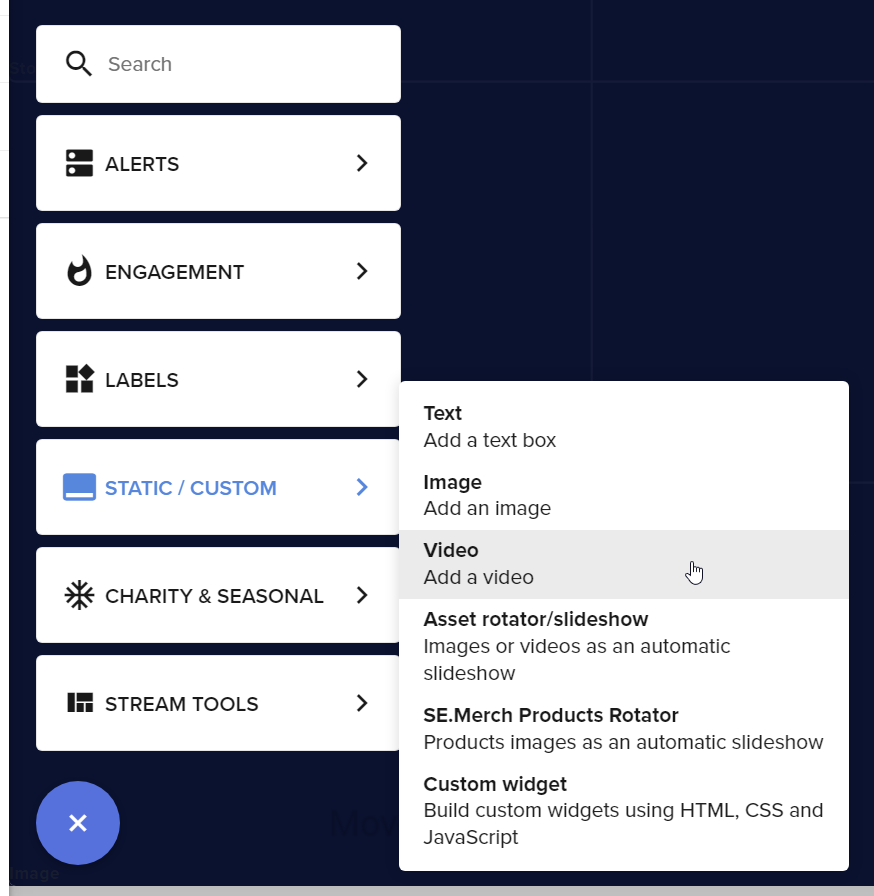
then add your webm file there
 tulip spade
help. i have custom overlays yhat i want to implement to streamelements
tulip spade
nothing shows up
wary halo
screenshot please
tulip spade
i have overlays that were made form an outside source that i would like to implement
wary halo
yes but you are saying nothing shows up, so I am curious as to what you did and where nothing shows up
did you go to the overlay editor? did you select video widget? did you add the webm file to it?
etc. etc.
tulip spade
it was not ahoweing in editor
wary halo
can you screenshot it with the settings menu open from the widget?
 old flare
i need help with the bot i cant manage to make it work, its was all fine until 2 says ago, already part and leave the bot but still doesnt work no t even the basic commands like !commands, already check and yes they're enabled, tried enabling/disabling still not working
Can anyone plz help?
viscid pebbleBOT
@old flare If your commands recently stopped working and you're using OBS.Live and a custom bot name do the following:
- In OBS.Live, click on the hamburger menu (three stripes) at the top left of your activity feed
- Click on Stream Settings > Custom bot name
- In the Custom bot name field select Set custom bot name, not your already existing username (with capital letters). Note: If you already connected an account that way, the third entry will show as the account name (see image https://i.imgur.com/sO7fWOX.png).
- Scroll a bit down and click on the purple Connect Custom Bot Account button
- Log in as usual and Authorize the custom bot name
- Back in the Activity feed, click on the Send Test Message button and check if your custom bot name starts working again
old flare
thank you all good now
lament blade
Hey guys, for some reason my "custom bot" disconnected and it wont reconnect
any ideas how to fix it
viscid pebbleBOT
@lament blade If your commands recently stopped working and you're using OBS.Live and a custom bot name do the following:
- In OBS.Live, click on the hamburger menu (three stripes) at the top left of your activity feed
- Click on Stream Settings > Custom bot name
- In the Custom bot name field select Set custom bot name, not your already existing username (with capital letters). Note: If you already connected an account that way, the third entry will show as the account name (see image https://i.imgur.com/sO7fWOX.png).
- Scroll a bit down and click on the purple Connect Custom Bot Account button
- Log in as usual and Authorize the custom bot name
- Back in the Activity feed, click on the Send Test Message button and check if your custom bot name starts working again
 nocturne ibex
I'm coming from streamlabs and using alertboxes from them. Now using streamelements, my OBS sources timeout or something and begin displaying default names until I manually refresh. Any sorta fix for this?
lament blade
viscid pebble
<@456226577798135808> If your commands recently stopped working and you're using...
It doesnt show up even after I enter token and everything.
send test message is also not clickable
 edgy dock
Does anyone else have trouble getting the Kappagen widget to work? I feel like I followed all the instructions but it doesn't show up on my SLOBS.
viscid pebbleBOT
@edgy dock We're not able to troubleshoot issues with using our overlays in StreamLabs OBS (SLOBS) as we don't have the tools to support their software. We recommend using OBS Studio or OBS Studio with our plugin OBS.Live.
brisk shard
viscid pebble
**Google Fonts**
More than 900 google fonts are supported at this time. You can ...
It has working, but not in all widgets - on chatbox and alertbox widgets I can choose only 2 font. Should I asking about font settings overlaymaker or it can switched by Editor in CSS/JS/FIELDS?
 vagrant solstice
Does anyone know the imagem size for Stream Store (not merch, loyalty store) perks?
 flint atlas
New Question:
i do all the process and can't get my user as the bot for replies. I need to do another thing?

now the commands don't work too.
 pale pasture
are you able to make a custom message tts reward for loyalty points?
flint atlas
pale pasture
are you able to make a custom message tts reward for loyalty points?
https://youtu.be/46UTAl1KkOk maybe this work for you
 stark oracle
can anyone help me it says 404 not found on my chatstats
 foggy heart
@stark oracle Can you share your account ID?
stark oracle
60647c67193876bbdbd390b4
foggy heart
stark oracle
60647c67193876bbdbd390b4
Thanks. Have you changed your twitch username at all?
foggy heart
Okay, one moment
upbeat belfry
Hi! It looks like my follower count on my stream elements dashboard is different from the count in my twitch account. It'd be fine except my follower goal overlay is wrong, too. I've tried logging out and back in and that's not working. I'm HaleyFromMyspace on stream elements.
foggy heart
stark oracle
yes
Should be up now
stark oracle
foggy heart
Should be up now
Yes, thank you!
foggy heart
upbeat belfry
Hi! It looks like my follower count on my stream elements dashboard is different...
Check this page: https://streamelements.com/dashboard/session. You should be able to reset/adjust the counts there
 fervent sluice
Hi there - having a problem with my StreamElements - for some reason it keeps wanting to go Live on YouTube instead of Twitch even though I keep selecting Twitch as my output
viscid pebbleBOT
@fervent sluice StreamElements menu, on top of OBS > Logout > Login
fervent sluice
That worked! thanks!!
lament blade
Hi.
I dont understand how to work my StreamElements on mobile
 mortal garnet
Hi im trying to go live on twitch and it has a notifcation that says " Could not access the specifed channel or stream key, please double-check your stream key. If it is correct, there may be a problem connecting to the server." that happens when im logged in on twitch. but when im logged out it works on youtube. and either way it wont let me stream on twitch and it does not give me the option to logout of youtube.
viscid pebbleBOT
@mortal garnet StreamElements menu, on top of OBS > Logout > Login
mortal garnet
i tried that
 abstract hemlock
on settings> stream disconnect and connect your twitch account again
 icy remnant
is there a way for mods to enable/disable overlays through a twitch command?
 sweet zenith
I recently created a twitch I’m a apart of a cod league team and I want to stream our games and stuff any tips on how to gain subs
 solemn idol
please can you check if the developer team as fixed my streamelements account yet?
drowsy egret
solemn idol
please can you check if the developer team as fixed my streamelements account ye...
not yet, someone will reach out to you when fixed
 honest ferry
Hello! I recently had a name change in Twitch. I already did the steps to logout and log in again, then remove and add the bot to the chat. I noticed that my new subs or cheers are not flowing to OBS with the streamelements integration, only the new followers are showing there. Could you please update my channel chatstats tracking?
Old name: thiziz_
New name: thiiziz
foggy heart
honest ferry
Hello! I recently had a name change in Twitch. I already did the steps to logout...
one moment, I can look at this
honest ferry
foggy heart
one moment, I can look at this
Thank you very much!
foggy heart
honest ferry
Thank you very much!
Should be good with the chatstats page
honest ferry
foggy heart
Should be good with the chatstats page
will the new subs and cheers reflect on streamelements now? Because for example, yesterday after the name change, I was live and received 5 new subs. But they only show in twitch, but not in yesterday's status in streamelements
foggy heart
honest ferry
will the new subs and cheers reflect on streamelements now? Because for example,...
Try logging in and out of OBS as well
honest ferry
foggy heart
Try logging in and out of OBS as well
will do that, thank you!
 stuck void
hello I need help. My stream sometimes crash but my upload is in normal. Anyone know what is this? (its writing disconecting)
 wary basalt
Hello, my command bot isn't working. We tried disconnecting the bot and reconnecting it to the chat, but nothing works still.
 leaden pewter
So im trying to set up the SE store but when i edit or add an item it just loads endlessly screenshot attached. Also cant delete the item i unpublished
 viscid pebbleBOT
@leaden pewter Please provide your account ID found at the top of this page: https://streamelements.com/dashboard/account/channels This ID is public info and safe to share here.
leaden pewter
viscid pebble
<@!754395644407447592> Please provide your account ID found at the top of this p...
5fbdab335bdcf441d0350e93
foggy heart
leaden pewter
5fbdab335bdcf441d0350e93
I have reported the issue, and you should see it fixed up in a couple days
 long fable
Needing help, i configured the SE.Pay wrongly , i need to reset it
 green estuary
idk if this is the right chat. but i created my own overlay. saved it, and copied the URL. when i paste the URL under my browser source, it says invalid token. 😦
foggy heart
green estuary
idk if this is the right chat. but i created my own overlay. saved it, and copie...
The overlay says invalid token, or OBS Itself?
green estuary
foggy heart
The overlay says invalid token, or OBS Itself?
when i paste the overlay URL, and hit okay. its just black screen. so, when i hit "open in streamelements overlay editor" it says "invalid token"
 tough turret
hello
green estuary
foggy heart
The overlay says invalid token, or OBS Itself?
whats weird is when i paste the url into my internet browser, it comes up.
foggy heart
green estuary
whats weird is when i paste the url into my internet browser, it comes up.
Do you have OBS.Live installed in OBS?
green estuary
foggy heart
Do you have OBS.Live installed in OBS?
LOL i just exited the program, and restarted it; and now its working. weird... sorry for bothering you
foggy heart
green estuary
LOL i just exited the program, and restarted it; and now its working. weird... s...
It's no problem at all, glad it's working aha
viscid pebbleBOT
@ocean hinge Read and follow our server rules:
- We do not tolerate toxicity! Treat the community team, staff and all members with respect.
- No advertisement or channel promotion, anywhere on the server.
- No NSFW/NSFL
- No unsolicited DMs or friend requests to server members
Make sure to read the #welcome in any server you join.
 raven lantern
hello, my activity feed wont update on streamelements, anyone know a fix?
viscid pebbleBOT
@raven lantern Please provide your account ID found at the top of this page: https://streamelements.com/dashboard/account/channels This ID is public info and safe to share here.
raven lantern
5a96e64d02d677000159569f
foggy heart
raven lantern
hello, my activity feed wont update on streamelements, anyone know a fix?
Are you seeing this issue online, or in OBS.Live (OBS Studio)?
raven lantern
Both on OBS studio as well as looking at the activity feed directly on the streamelements website
foggy heart
Should be fixed now
raven lantern
tyvm it looks like that did the trick! much appreciated!
 unreal furnace
Hello! I recently changed my name on Twitch and the streamelements commands stoped working in my chat I've tried logging out and back into the streamelements site but still have the same issue
worldly escarp
unreal furnace
Hello! I recently changed my name on Twitch and the streamelements commands stop...
what Bot are you using?
 muted cosmos
is there a way i can remove watchtime for banned users in my chat?
unreal furnace
worldly escarp
what Bot are you using?
streamelements and cloudbot, both of them have had the same issue I put in a ticket with cloudbot already and that one seems to have been fixed now I just need elements sorted out
zenith widget
unreal furnace
streamelements and cloudbot, both of them have had the same issue I put in a tic...
What cloudbot are you referring to?
zenith widget
muted cosmos
is there a way i can remove watchtime for banned users in my chat?
https://streamelements.com/dashboard/leaderboard/watchtime -> search on top -> find his position then go to that position -> edit button or the trash can button
unreal furnace
It's just the bot that comes with streamelements I'm having issues with, it's not showing up in my chat anymore so when people try to do song requests the comand isn't working. Streamelements is already set as a mod on my channel and I logged out and logged back in with my new twitch name into the streamelements site and the commands still don't work
viscid pebbleBOT
@unreal furnace Go to the Dashboard > Right side > Part channel > Join channel(https://streamelements.com/dashboard)
unreal furnace
that did it, thank you 
round crater
hi! im trying to use CLIP COMMAND , when i send that msg on chat it says error has ocurred
worldly escarp
round crater
hi! im trying to use CLIP COMMAND , when i send that msg on chat it says error h...
what do you mean? what clip command?
round crater
$(customapi.https://api.thefyrewire.com/twitch/clips/create/instantclipsbot/$(channel)?title=$(queryencode $(1:)|'0'))
this is meant to be in a command , trigger !clip
then the response should be a clip by streamelements of lasts 30 secs
the response im getting is error has ocurred
round crater
thanks
 hazy yew
Hello! I am not sure how to get my overlays to properly work I spent a bunch of time trying to set them up but they don’t seem to be showing up on my stream
viscid pebbleBOT
New to StreamElements?
Check out our YouTube channel https://www.youtube.com/c/streamelements/videos
with tutorial videos from setting up the basics, to in-depth details on how to use our product.
New to OBS? Here is a 4 step quick start guide
https://obsproject.com/wiki/OBS-Studio-Quickstart
Want to learn even more? Here is an in-depth overview
https://obsproject.com/wiki/OBS-Studio-Overview
leaden pewter
foggy heart
It's no problem at all, glad it's working aha
love OP btw thanks for your help earlier
 wintry umbra
Hi, I wanted to know where the bits donated to me go live, they are reflected in the streamelements page but not in my paypal
lament blade
wintry umbra
Hi, I wanted to know where the bits donated to me go live, they are reflected in...
bits are on your Twitch revenue and must be withdrawn from there
wintry umbra
Oh perfect haha thank you so much I'm new in this
lament blade
no worries
 novel quiver
Hey guys, i dont see a chat for this question so feel free to point me in the right direction.
So, what i wanted to ask is if there is a way on Streamelements to rotate out widgets? Example, have a donation goal, that switches to a sub goal, that switches to a follower goal, and goes back to a donation goal, in a loop? i dont want to have a bunch of bars on my screen and thought that would be a nice touch, i just cant find any info on it.
worldly escarp
novel quiver
Hey guys, i dont see a chat for this question so feel free to point me in the ri...
you can try the event rotator its in the widgets under themes gallery
 rich valley
Hi, is anyone available to help me add my twitch chat as an overlay with a transparent background
lament blade
rich valley
Hi, is anyone available to help me add my twitch chat as an overlay with a trans...
In the overlay settings, set the chat widget to custom, the default for the custom is transparent
rich valley
is there a way to make the dark chat have opacity?
lament blade
yes, set to custom chat and mess around with the color correction
rich valley
the color correction on the streamelements dashboard or on OBS Live?
worldly escarp
the overlay edit in the dashboard
rich valley
ok i'm not seeing any color correction option
novel quiver
@lament blade any idea how i could fade out a widget and fade in another one in a loop every 20 seconds or so?
rich valley
the closest thing is opacity but that also makes the text opaque
worldly escarp
you can also change the text color
worldly escarp
novel quiver
<@456226577798135808> any idea how i could fade out a widget and fade in another...
use the animation settings
novel quiver
i see that you can use them to animate how they come in and out but not have them actually go in and out on a timer
lament blade
making widgets fade in and out is currently not something we can do
lament blade
rich valley
the closest thing is opacity but that also makes the text opaque
when in custom chat mode, go to the settings page, you should have a coloring option for the background
 rich valley
awww thank you
novel quiver
ok thanks.
 pulsar pawn
Hi! Yesterday a viewer subbed for 6 months and no alert. Also the prime subs havent been shouted, both events can not be hand shouted because they didnt appear in the event list in my SE dashboard.
rich valley
I'm sorry i'm having trouble trying to change the font color too
 visual pasture
Guys can someone tell me what is overlays and theme
viscid pebbleBOT
New to StreamElements?
Check out our YouTube channel https://www.youtube.com/c/streamelements/videos
with tutorial videos from setting up the basics, to in-depth details on how to use our product.
New to OBS? Here is a 4 step quick start guide
https://obsproject.com/wiki/OBS-Studio-Quickstart
Want to learn even more? Here is an in-depth overview
https://obsproject.com/wiki/OBS-Studio-Overview
 narrow solstice
let's say i'm streaming on multiple platforms simultaneously (YT, Twitch). Can I create one alert box that shows events from all of them up at the same time so i don't have to make one for each platform?
narrow solstice
bummer. thx for the quick response
 lavish comet
I got a question
Im trying to export my settings out of streamelements on the website how do i do such thing?
ionic kelp
What do you mean settings?
 versed spade
Hi, how do I fix my watch-time command ? When anyone uses it it always says 0s spent 
viscid pebbleBOT
The !watchtime command is directly tied to the Loyalty system. The Loyalty system must be enabled for viewers' watchtime to count up.
To enable Loyalty, please go to the Loyalty section of your account: https://streamelements.com/dashboard/loyalty
Watchtime counts up every 10 minutes alongside Loyalty points, and only while the stream is live. Reruns will not be counted.
Please note that watchtime is not tracked by Twitch and there is no way to retroactively apply past watchtime to viewers.
StreamElements
The Ultimate All in One Platform for Streamers
@lavish comet To add your overlays to OBS, add a new browser source in your scene. Paste your overlay URL in the browser source properties, set the dimensions to 1920x1080 (unless you changed them on the website) and check Shutdown source when not visible. https://youtu.be/KDvLynUqXI4
 jovial surge
Hey how do I enable bttv emotes on overlays like chat and stuff?
jovial surge
Get a capture card and stream from pc
visual pasture
I dont have a pc
visual pasture
How
worldly escarp
jovial surge
Hey how do I enable bttv emotes on overlays like chat and stuff?
activate the !emotes for the chat https://streamelements.com/dashboard/bot-commands/default-commands
StreamElements
The Ultimate All in One Platform for Streamers
jovial surge
Ty maya
viscid pebbleBOT
@visual pasture Consoles do not have native support for overlays. You would need a capture card, PS4 remote play or Xbox companion app and a PC with OBS in order to have overlays over your console gameplay.
We have a blog post about how to set up console streaming with our essential tools: https://blog.streamelements.com/how-to-stream-on-console-7b620b1c46c3
jovial surge
worldly escarp
activate the `!emotes` for the chat https://streamelements.com/dashboard/bot-com...
Does that enable it in chat overlay? And the emotes on screen overlay?
versed spade
visual pasture
How
just type in your stream's chat /mod streamelements
worldly escarp
jovial surge
Does that enable it in chat overlay? And the emotes on screen overlay?
that activates it on the chat
visual pasture
K
jovial surge
How do I activate it on the overlays was my question
worldly escarp
jovial surge
How do I activate it on the overlays was my question
you can add the kappagen alerts..if thats what you're looking for
pulsar pawn
ionic kelp
Did it show in twitch chat that they subbed? <@324078654181343233>
No. It didnt. They told me about it, otherwise I would have missed it
viscid pebbleBOT
Prime Gaming (new and resub) and paid subscriptions (resub only) must be shared in chat manually by the person subscribing in order for the subscription information to be sent to StreamElements. For Prime Gaming, the user needs to have sharing enabled on https://www.twitch.tv/settings/prime. For paid subs, if the share box doesn't show up immediately it will when they refresh the page. https://i.imgur.com/VNJN0Uv.gif https://i.imgur.com/2297EA7.png

 jovial surge
No I have the chat overlay and the overlay that makes emotes that are used in chat appear on screen but they don’t show betterttv emotes how do I enable bttv emotes here?
 shrewd oak
my stream preview got zoomed in really badly anyone can help?
ionic kelp
Unless that happens we don't get any info that it occurred.
 round agate
Hello, I get a 404 on my ChatStats. I have not changed my twitch name since using elements. Thanks
keen wigeon
round agate
Hello, I get a 404 on my ChatStats. I have not changed my twitch name since usin...
Did you ever use chatstats in the past?
lavish comet
Im trying to pull the loyalty program stats out of streamelements, I dont stream on pc
round agate
keen wigeon
Did you ever use chatstats in the past?
Nope, the first time I tried to check it out it was just a 404
viscid pebbleBOT
@round agate Please provide your account ID found at the top of this page: https://streamelements.com/dashboard/account/channels This ID is public info and safe to share here.
round agate
keen wigeon
Did you ever use chatstats in the past?
I did change my twitch name at one point, but it was before using StreamElements (was still on SLOBS at that point)
keen wigeon
Fixed, should be up now.
round agate
@keen wigeon perfect - thankyou very much 🙂
ionic kelp
@visual pasture you cant without a PC #helpdesk-twitch message
 robust anvil
hi, when i active the overlay on streamlabs i cant see the alert box, someone can help me?
viscid pebbleBOT
We're not able to troubleshoot issues with using our overlays in StreamLabs OBS (SLOBS) as we don't have the tools to support their software. We recommend using OBS Studio or OBS Studio with our plugin OBS.Live.
 silver bear
how do I remove streamelements bot of my twitch
lament blade
silver bear
how do I remove streamelements bot of my twitch
you can remove it from your dashboard
silver bear
I got it out thanks
visual pasture
Guys can someone tell me what should i add to console
 lone scaffold
Hello, I would like to know if the timer /commercial 60, gives you a message when the bot runs the commercial, I just added it to a partner friend, but I didn't see the message of "running a commercial"
lament blade
visual pasture
Guys can someone tell me what should i add to console
you're going to need a capture card to stream onto your PC and then add our overlays, we currently do not support direct-to-console-stream
 small elbow
can someone help me figure out the alerts for an overlay set up?
viscid pebbleBOT
@small elbow New to StreamElements?
Check out our YouTube channel https://www.youtube.com/c/streamelements/videos
with tutorial videos from setting up the basics, to in-depth details on how to use our product.
New to OBS? Here is a 4 step quick start guide
https://obsproject.com/wiki/OBS-Studio-Quickstart
Want to learn even more? Here is an in-depth overview
https://obsproject.com/wiki/OBS-Studio-Overview
small elbow
viscid pebble
<@!288057787462844427> New to StreamElements?
Check out our YouTube channel <htt...
i did actually see this but I feel like the issue I'm having is different than what you're thinking I am trying to set up an overlay everything is working out well except for the alerts the image i place in the alert is covering the text and I was hoping someone cold eithe rfix this for me or be nice an dshow me how to fix this issue
keen wigeon
Did you try to change the layout? There are option for the text to be below, above or to the side of the image.
small elbow
I wanted the text on top of the image
so i selected text over image seemed self explanitory so I thought i had it right but it doesnt show the text at all...
the image i'm using includes a box for where the text should sit
worldly escarp
small elbow
I wanted the text on top of the image
play with the advnaced and margin
 misty harness
can anyone change my chat stats from my old username to my new one/ port it over for me?
viscid pebbleBOT
@small elbow Text not showing up over your alerts? Go to the Advanced Text Settings and set the top margin to 50, you can work your way to the right position from there.
 vast shard
Having an issue on a new Overlay... the Now playing widget loads Blank..
worldly escarp
small elbow
those i dont understand i wish someone could look at my screen and show me >.<
on the alert settings >text setting >advanced> margin
small elbow
alright i did this thing it looks like the text is behind the image
worldly escarp
small elbow
alright i did this thing it looks like the text is behind the image
what is your account id?
 candid sequoia
Пр
viscid pebbleBOT
@candid sequoia Welcome to the helpdesk! The regular helpdesk channels are in English but we do provide multi-language support in the following channels: #🇩🇪︱deutsch | #🇫🇷︱français | #🇪🇸︱español | #🇵🇹︱português | #🇳🇱︱nederlands | #🇮🇹︱italiano | #🇵🇱︱polski | #🇨🇳︱中文語言服務區-chinese | #🇯🇵︱日本語-japanese | #🇭🇺︱magyar | #🇰🇷︱한국어-korean | #🇹🇭︱ไทย-thai | #🇷🇺︱русский | #🇺🇦︱українська | #🇨🇿︱czech
misty harness
maya, is it possible to receive help after you help cynreow?
vast shard
So... I have 1 overlay with a widget that works , called Currently playing...The new overlay doen not have a Widget Called that..
misty harness
misty harness
can anyone change my chat stats from my old username to my new one/ port it over...
does anyone know how to help me here?
worldly escarp
misty harness
does anyone know how to help me here?
sure whatare your old and new names?
misty harness
scottnealwilson__ is my old name and my new one is ScottNW is my new one
worldly escarp
one sec
vast shard
vast shard
So... I have 1 overlay with a widget that works , called Currently playing...The...
I cannot Find a "Currently Playing" widget I do see a "Now Playing" but that does not load the title of what is playing ...😩
 winged socket
Guys I've a problem about donations (tips). If I want to put on the tip page the possibility of playing an audio-clip, what I have to do? If you want I can add an image to explain better this option. Sorry for my bad english.
worldly escarp
vast shard
I cannot Find a "Currently Playing" widget I do see a "Now Playing" but that doe...
are you referring to the currently played music?
vast shard
From the Media player Yes..
worldly escarp
misty harness
scottnealwilson__ is my old name and my new one is ScottNW is my new one
Done, refresh page
winged socket
winged socket
Guys I've a problem about donations (tips). If I want to put on the tip page the...
How can I add this possibility?!
 vast shard
I copied it from the working and its happy... 🙂
misty harness
@worldly escarp Thank you very much 🙂
vast shard
Thank you for your time
visual pasture
Guys i live stream on ps4 but they r visible on my channel but only when i am live when i stop the stream it is not visible for anyone on my channel
lament blade
visual pasture
Guys i live stream on ps4 but they r visible on my channel but only when i am li...
You cannot use our overlays if you stream directly from your console
 brave ember
I get a 404 page on my chatstats... any suggestions?
 winged arch
hello! i was going to ask will there be a streamelement for trovo? thank you
 remote quarry
hello, is there any way to trigger command to use word with question mark? for example "zagramy" triggers the command for me but if I put "zagramy?" it doesn't work and it is triggering me so hard
 viscid pebbleBOT
@lament blade If your commands recently stopped working and you're using OBS.Live and a custom bot name do the following:
- In OBS.Live, click on the hamburger menu (three stripes) at the top left of your activity feed
- Click on Stream Settings > Custom bot name
- In the Custom bot name field select Set custom bot name, not your already existing username (with capital letters). Note: If you already connected an account that way, the third entry will show as the account name (see image https://i.imgur.com/sO7fWOX.png).
- Scroll a bit down and click on the purple Connect Custom Bot Account button
- Log in as usual and Authorize the custom bot name
- Back in the Activity feed, click on the Send Test Message button and check if your custom bot name starts working again
lament blade
yes it doesnt show up @viscid pebble
I authorize and everything new bot doesnt show up, and I cant try to send test message
 foggy gulch
I'm trying to set up a command to do two things (increment a counter, and redeem a sound from the shop). How I thought it would work:
Sojourner has squished ${count test} widows ${redeem squished}
this results in the counter incrementing and the squished reward being redeemed (played), the issue though is that nothing is displayed in chat.
 gray nacelle
How to appear subs on live stream but it’s not on system
 ebon forum
gray nacelle
How to appear subs on live stream but it’s not on system
ebon forum
gray nacelle
How to appear subs on live stream but it’s not on system
So you do not see subscribers in our system (activity feed)?
 marsh inlet
How can i add twitch chat no stream?
ebon forum
marsh inlet
How can i add twitch chat no stream?
You need to add the widget to one of the overlays you use (or make a new one).
Widget is called "Your Twitch chat"
marsh inlet
Is there a YT tutorial?
ebon forum
marsh inlet
Is there a YT tutorial?
We have a few guides here:
https://www.youtube.com/channel/UCjerlCIbLPQwSnYlClkjDXg

YouTube
Official YouTube channel for StreamElements
StreamElements (www.StreamElements.com) is the premier provider of tools and services for livestream and video on demand production, monetization, audience engagement, influencer marketing, and brand sponsorships. Representing a new type of media company, StreamElements powers over 1 million digital c...
marsh inlet
thenks
ebon forum
That should also cover the overlay setups and adding widgets.
marsh inlet
How add chatbox widget?
ebon forum
marsh inlet
How add chatbox widget?
Create an overlay (or edit the existing one) and add the widget called "Your Twitch chat" via the + button
marsh inlet
Browser or Text?
ebon forum
marsh inlet
Browser or Text?
The overlay is a browser source
marsh inlet
what url should i paste?
 gusty bloom
I'm trying set-up obs and there used to be a widget tab under Alerts and Overlays on stream elements but I can't see it anywhere. Can anyone point me in the right direction? thanks --- EDIT oh i might have figured it out
ebon forum
marsh inlet
what url should i paste?
the one from the overlay, please watch the youtube guides i sent you
gray nacelle
ebon forum
So you do not see subscribers in our system (activity feed)?
I meant to say setting
ebon forum
gray nacelle
I meant to say setting
Please provide some more details what exactly you look for
marsh inlet
ebon forum
the one from the overlay, please watch the youtube guides i sent you
It's only channel.
gray nacelle
ebon forum
Please provide some more details what exactly you look for
On the dashboard on Twitch, doesn’t say affiliated for add subs on the channel
ebon forum
marsh inlet
It's only channel.
On that channel we have multiple videoguides that show you everything
ebon forum
gray nacelle
On the dashboard on Twitch, doesn’t say affiliated for add subs on the channel
The Twitch dashboard is not on our end, we can't help out with that
winged arch
will there be support for trovo?
ebon forum
winged arch
will there be support for trovo?
Currently we can't give a clear answer to that question.
We are looking into it
winged arch
ok, thanks
lament blade
Im trying to set up a follow bot but im not sure if its working... how can i test it
 uneven moth
Hi! I'm trying to create a redeemable item that allows sends a message, but there is no option to enable message writing. Could someone help me?
 visual pasture
lament blade
You cannot use our overlays if you stream directly from your console
visual pasture
lament blade
You cannot use our overlays if you stream directly from your console
Wdym
lament blade
Hey, question about the SE sponsorship program: Completed my raid shadow legends campaign, and it says i will recieve a mail: Is there any time estimation on when that will arrive? best regards
ebon forum
lament blade
Hey, question about the SE sponsorship program: Completed my raid shadow legends...
Up to 30 business days, this is the payment timeframe.
 atomic moss
when will there be new sponsorships on my sponsor page?
lament blade
Ok, thanks for the information 🙂
ebon forum
atomic moss
when will there be new sponsorships on my sponsor page?
When we have a new campaign for you, no ETA on that.
 dense knoll
 vale cove
I am trying to stream to twitch and the last stream I did was on facebook and this keeps on popping up whenever I try to click the stream button (I already changed where to stream in obs and set it to twitch)

 violet jay
yo we have a problem here
i have been asking
for the past
2 weeeks
and no one replied to me
like i need here
when i click on skip alerts
or replay alert
or mute alert
nothing happens
at all
zenith widget
Can you please write in 1 long sentence instead of 2 words per line? We are all human here.
zenith widget
Go to your overlay -> edit -> click on the alert widget -> disable the follower event -> save overlay
and just wait out the storm to pass through
violet jay
yo we have a problem here i have been asking for the past 2 weeeks and no one replied to me like i need here when i click on skip alerts or replay alert or mute alert nothing happens at all
ok
where is overlay?
zenith widget
https://streamelements.com/dashboard -> my overlays -> edit
zenith widget
Then go ask their support for help on this.
Our system is not connected to the streamlabs alert box
so skipping alerts via us will not work for their stuff
or even muting
zenith widget
Thats up to you what you want to do
 sonic sequoia
hey everyone.... A friend of mine has a lil prob. His streamelements says ${channel.subs} is 0 but he definitely has a couple of subs. What is he supposed to do?
zenith widget
logout from our dashboard and log back in, afterwards part the bot and then join it again
sonic sequoia
k ty & happy easter 😉
vale cove
vale cove
I am trying to stream to twitch and the last stream I did was on facebook and th...
hello, any solution for my prob?
viscid pebbleBOT
@lament blade Read and follow our server rules:
- We do not tolerate toxicity! Treat the community team, staff and all members with respect.
- No advertisement or channel promotion, anywhere on the server.
- No NSFW/NSFL
- No unsolicited DMs or friend requests to server members
Make sure to read the #welcome in any server you join.
viscid pebbleBOT
To add your overlays to OBS, add a new browser source in your scene. Paste your overlay URL in the browser source properties, set the dimensions to 1920x1080 (unless you changed them on the website) and check Shutdown source when not visible. https://youtu.be/KDvLynUqXI4
 unborn lodge
is there a way to set up a contest using chat commands ?
runic hound
Back again with the same issue. Just cannot get the chat widget to stay consistently working. Ive logged out/logged back in, as well as disconnected Twitch from streamelements and OBS. Here are some pics, with the last one being me tracking the widget by time. It seems to only work between 5-10 minutes after refreshing my overlays.


 raven marten
hi hello! is there any streamelements staff members who can discord pm me regarding a personal question please? i would love some help in regards to a specific matter!!
ebon forum
raven marten
hi hello! is there any streamelements staff members who can discord pm me regard...
you can DM me if that is is personal information
flint atlas
Sorry for ask again, but can someone tell me why don’t work the bot with my name? The commands don’t respond except if I put StreamElements
 viscid pebbleBOT
@flint atlas "1) Right click on your OBS desktop shortcut and open the Properties
2) In the Target field, add the following to the very end: --remote-debugging-port=40404 (don't forget to add a space before the current path)
3) Open OBS (or restart if it was open)
4) Open your web browser and type in: localhost:40404
5) Click on StreamElements - Activity feed
6) Navigate to the Console tab
7) Type the following into the console and hit enter: store.customBot.removeCustomBotIntegration()
8) Try setting the custom bot name
9) Remove the additional flag in step 2 from your shortcut properties."
ebon forum
Try that fix^
 floral crane
hello. im trying to make a tip goal but it wants to count in all my tips from the beginning. how can i create a fresh goal?
viscid pebbleBOT
@floral crane To reset goals:
- from the Overlay Editor > Session data on top right (monitor symbol) > Goals tab > reset progress of desired goal
- from the Dashboard > Activity feed on the left > Widget data on the right > Goals tab -> reset progress of desired goal
Note: Goal widgets (progress) only counts up and doesn't go down automatically, if you lose followers/subs.
floral crane
as seen here there is only a "goal end date" and i need a "goal start date" because its counting all my tips ever

ok thx that worked!!
flint atlas
ebon forum
Try that fix^
Thanks! I’m gonna try it
cold turtle
Hello! Im having trouble to get cs:go to be shown on my stream. Like, the window. I have tried to write in the "allow-third-party-command" in the game, at that worked, but I was not able to play competitive matches, as it said it affected my trust/loyalty. Someone please help me. A friend of mine is using streamelements to stream, and its working, but I'm having trouble with it.
 bitter folio
How do you name your bot?
cold turtle
@bitter folio Was this question to me?
bitter folio
It's to anyone lol, I'm new here just trying to figure stuff out
cold turtle
@bitter folio Haha, allright. I just asked a question also, so thought maybe it was to me. But then we're good! lol
viscid pebbleBOT
@cold turtle Valve has implemented a trusted mode which does not allow OBS to hook CS:GO using Game Capture. Read more in their announcement post here https://blog.counter-strike.net/index.php/2020/07/30736/.
Additionally, they have no plans on allowing OBS in trusted mode.
https://support.steampowered.com/kb_article.php?ref=8835-KLXV-0292#whitelist
You will need to run the game in either windowed or borderless fullscreen and use Window Capture instead.
Alternately, you can launch the game with -allow_third_party_software.
@bitter folio Currently renaming the bot fully works with OBS.Live.
You can follow this video guide to set it up: https://discordapp.com/channels/141203863863558144/494513233416421386/561516184718278676
If you don't want to use OBS.Live and want to stick with Ground Control, please let us know your Twitch username.
ionic kelp
#🇫🇷︱français
 hasty charm
Hi, I wanted to ask if by putting what the twit sent when I'm on stream, you could put the game I was playing
lament blade
hey my twitch user is arise_0 i cant access my chat stats it just says something like 404
404 page not found it says
 crimson kraken
Good morning, I have a problem with my channel. I set up the right overlayer, I test the messages on the dashboard and there the TSS works, but during the live the TSS does not work.
 oak heath
Hello, after a friend change the user name on twitch, the alerts for bits, cheers and sub has stopped working
viscid pebbleBOT
@oak heath If you changed your name on Twitch, please follow these steps:
- Visit https://streamelements.com/logout and then log in again by connecting with Twitch.
- On the right side of the dashboard page that opens, select Join under bot settings. If it says Part select that and then select Join to send the bot to the chat. Don't forget to mod the bot by typing /mod streamelements in your channel if you have not already.
- Post your old and your new name here so that we can update your channel's chatstats tracking (must be done by staff).
oak heath
@viscid pebble Old name : Corotiinhu // New name: Rajaadaum
 lament gust
Hi! My chat commands stopped working while live. I tested them before and after the stream (offline) and they worked perfectly. I have them all enabled both in the online and offline options. Is there something I'm missing or it just bugged? Thanks in advance
lament blade
https://prnt.sc/111r8f4 how to make this follower goal to 0/10?
 viscid pebbleBOT
@lament blade To reset goals:
- from the Overlay Editor > Session data on top right (monitor symbol) > Goals tab > reset progress of desired goal
- from the Dashboard > Activity feed on the left > Widget data on the right > Goals tab -> reset progress of desired goal
Note: Goal widgets (progress) only counts up and doesn't go down automatically, if you lose followers/subs.
ebon forum
lament gust
Hi! My chat commands stopped working while live. I tested them before and after ...
custom bot name active?
lament gust
I don't think so but not sure. How can I check that? I mean the bot is called StreamElements (also now they stopped working again)
It's like when I open OBS it stops working, when I close it they work again, just realized
lament gust
ebon forum
custom bot name active?
Just checked and it was, turned it off and now works. Thanks LUL
lament blade
please @viscid pebble? my twitch user is arise_0 i cant access my chat stats it just says something like 404
404 page not found it says
 bronze mural
how to put ideal in your donation button
viscid pebbleBOT
@bronze mural SE.PAY is available for streamers who are at least 18 years old, with bank account under their name in one of the following countries and have at least 101 follower (Twitch) / 101 subscribers (YouTube):
Austria, Belgium, Czech Republic, Denmark, Finland, France, Germany, Ireland , Italy, Netherlands, Poland, Portugal, Slovakia, Spain, Sweden, Switzerland, United Kingdom, United States.
If you meet these criteria and don’t see SE.Pay, let us know.
For information on SE.Pay payment methods, their fees and settlement times see https://streamelements.com/dashboard/tipping/fees
 wanton spire
Hello! Hope everyone is doing well! I need help with the 'host alert'. Whenever I emulate it in streamelements, everything seems to be fine, but I've noticed that streamelements isn't detecting the host when I'm live. I've checked in the Stream Manager on twitch.tv and it shows there are people hosting. How would I go about fixing this situation?
viscid pebbleBOT
@wanton spire "Due to changes to Twitch API, we have filtered out hosts and will only show these ones on your activity feed:
- All hosts coming from an online channel with at least 1+ viewer
- Auto host events with at least 1 viewer - only from a channel that just went offline
Note: If you see X channel has hosted you with no viewers on the back, that is considered an offline host or a host with 0 viewers, we do not show these."
 jaunty vine
With StreamElements modded, a POST to the say endpoint with the message: "/followers" can activate followers mode along with other chat commands.
However, a POST to the say endpoint with the message: "/delete {uuid}" does not delete the message. It posts as a message.
Is there anything I can do about this? Is this something on StreamElement's end that can be ramified, or is it Twitch?
 oak heath
I have followed the steps but the alerts seens to not work properly 😦
lament blade
I need help related to a sponsorship, I don't know where I should ask help for that
viscid pebbleBOT
@lament blade Please contact us via email for support with your campaign or sponsorship. You can use our contact form here: https://streamelements.com/contact Thank you.
 elfin wolf
hey! I've had over 900 bots follow my Twitch account {side note: dont feel i've earned it obviously 😦 }, should i/ can i do anything about it?
it'd be ridiculous to report all 900+ bots individually haha
ebon forum
elfin wolf
hey! I've had over 900 bots follow my Twitch account {side note: dont feel i've ...
Twitch will remove those at some point. Sometimes it takes a while.
wary halo
elfin wolf
it'd be ridiculous to report all 900+ bots individually haha
Just added another feature to my @Twitch follower remover tool:
Being able to remove follows from accounts which are banned from chat. Why should they see when you're live?
https://t.co/oIBikrpyXr
Retweets
114
Likes
430
 Twitter
·
Twitter
·
 fervent elm
Hey! Is there a way to reset the death counter on a command as a moderator in chat?
 errant ledge
Is there a way to change the number of followers in the Follower Goal? Because with me too many followers are displayed.
viscid pebbleBOT
@errant ledge To reset goals:
- from the Overlay Editor > Session data on top right (monitor symbol) > Goals tab > reset progress of desired goal
- from the Dashboard > Activity feed on the left > Widget data on the right > Goals tab -> reset progress of desired goal
Note: Goal widgets (progress) only counts up and doesn't go down automatically, if you lose followers/subs.
errant ledge
thanks
lament blade
Is it possible to use timers with a random number?
Wanted to set a timer for the bot to send a raffle in my chat randomly, between 30 to 90 minutes when I am online.
I need help because i want to have my twitch and youtube on the same account but its saying my youtuie is claimed
i submitted a close request on the youtube account
viscid pebbleBOT
@lament blade Account Merging - Please note:
- Merging accounts only allows faster ways to switch between accounts
- Merging accounts does not allow data sharing between accounts - different streaming platforms, different type of events
- Merging accounts allows duplicating/sharing overlays between the accounts
If you understand the limitations of merging and want to proceed, please find the JWT tokens (!jwt) from both accounts you want to merge and you will be directed to DM them to a staff member
@lament blade You can find your JWT token on your account channels page (Show Secrets to reveal the token): https://streamelements.com/dashboard/account/channels
READ ME: This is a private security token. Do NOT share this token here or other public places, only with a StreamElements staff member in private.
wary halo
DM those tokens from both accounts to @drowsy egret and he will merge them for you
lament blade
Ouuuuweeee
 winged trellis
Hi, all of a sudden my bank is invalid on SE pay. But it was working before and now its not.
I already verified my bank with a statement as well
 prime cairn
Hi, My alerts for new followers are not showing and follower widget goals are not updating on stream. It work's if I emulate it but an actual follow does nothing.
 final rune
Yo ! New to StreamElements , im wondering , how do i tag the game on twitch , and add a description / name ?
Cuz when i click start , it starts without letting me write anything
viscid pebbleBOT
@winged trellis Please contact us via email for support with SE.Pay. You can use our contact form here: https://streamelements.com/contact Thank you.
@prime cairn Please provide your account ID found at the top of this page: https://streamelements.com/dashboard/account/channels This ID is public info and safe to share here.
prime cairn
@viscid pebble 5ff60acdff7a694dbba95709

 hallow ether
Hu
 tall forge
The streamelements bot is not working on my channel
hallow ether
Can you tell me how to get them to say thank you for following
tall forge
I have gone to the website and activated it and it has not joined
viscid pebbleBOT
@tall forge If your commands recently stopped working and you're using OBS.Live and a custom bot name do the following:
- In OBS.Live, click on the hamburger menu (three stripes) at the top left of your activity feed
- Click on Stream Settings > Custom bot name
- In the Custom bot name field select Set custom bot name, not your already existing username (with capital letters). Note: If you already connected an account that way, the third entry will show as the account name (see image https://i.imgur.com/sO7fWOX.png).
- Scroll a bit down and click on the purple Connect Custom Bot Account button
- Log in as usual and Authorize the custom bot name
- Back in the Activity feed, click on the Send Test Message button and check if your custom bot name starts working again
hallow ether
Hi my bot won’t say thank you for following
tall forge
Still not working
made the bot an editor , and a moderator
activated it and everything
wary halo
hallow ether
Hi my bot won’t say thank you for following
chat alerts module here https://streamelements.com/dashboard/bot-modules
StreamElements
The Ultimate All in One Platform for Streamers
wary halo
tall forge
Still not working
you changed it to StreamElements but didn't changed it back to your name?
you first need to change it back to the default StreamElements bot

 heavy kelp
2 week
wary halo
and did you get any bits in that period?
because it can't see bits from before you joined
wary halo
Also when the screen is blank like that it's usually a local issue, maybe a browser extension blocking something or your AV
lone scaffold
Hello, I would like to know if the timer /commercial 60, gives you a message when the bot runs the commercial, I just added it to a partner friend, but I didn't see the message of "running a commercial"
lament blade
my mic isnt working whys that
Hi, how i can reach my donation on streamlabs? thanks
huh
viscid pebbleBOT
@lament blade Obs.live is a plugin for OBS Studio for the best OBS support, please join their Official Discord @ discord.gg/obsproject
 twin sentinel
@lone scaffold Afaik the bot can only do one action at a time. So there won't be a message when you start a commecial via such a command.
@lament blade Best to contact StreamLabs on this. This server is StreamElements.
lament blade
sorry streamelements i meant
twin sentinel
How has the donation reached you, via PayPal or SE.Pay?
lament blade
i think paypal
twin sentinel
Then the money will be handled by paypal.
lament blade
but in how many time
twin sentinel
Afaik instantly. Otherwise contact PayPal.
lament blade
mh
twin sentinel
In some cases there are steps missing on initial setup of the paypal account. Check this.
lament blade
but the money doesen't arrived
viscid pebbleBOT
@lament blade If a viewer tipped through PayPal but no information appears in your StreamElements account, this generally means PayPal has held the tip for verification.
Until PayPal clears the tip and sends back a confirmation to your StreamElements account, no information will appear there and no alert will play, as that confirmation is the only way for us to be aware of a successful transaction.
There is a posibility that the tip may have been sent as an eCheque/eCheck - these tips can take from 7 up to 21+ days to show up on our side. Tippers can usually cancel these.
If you believe there may be an issue with the transaction, you'll need to contact PayPal support as StreamElements is only a passthrough service and never actually gets involved with the transaction or touches the money
lament blade
so i have to attend some days
lone scaffold
twin sentinel
<@!375719509882830849> Afaik the bot can only do one action at a time. So there ...
ohhh ok thank you, is because I was wondering if the timer really works because it didn't say me something or if the commercial was running, but after the stream I saw a message that says "failed to run commercial, channel is offline" so I think it works
lament blade
ok
because i've seen the message of the donation in the chat too
so the tip must be done it
 flat bolt
Hey, good night! can someone help me with Kappagen?
or where should I go to get help with it?
 jolly flame
Hey guys, is it possible to change my merch store URL? It's still using my old username
drowsy egret
jolly flame
Hey guys, is it possible to change my merch store URL? It's still using my old u...
it's tied to your twitch username, if you changed it we will need to fully reset your store
 trim dagger
hi, my chatstats has the error 404, page not found
 solemn hamlet
Hello, I use KappaGen for my stream and it works pretty good when I receive subs, hosts, donations and so on. Unfortunately it doesn't work at all with the !kappagen command. No matter which number I use (e.g. !kappagen  100) only one Emote shows up. What's could be the issue?
jolly flame
drowsy egret
it's tied to your twitch username, if you changed it we will need to fully reset...
That's fine, I've already deleted all my old merch so I'm happy to do a complete reset 🙂
Old username was Zak_LM if you need it
viscid pebbleBOT
@jolly flame Please provide your account ID found at the top of this page: https://streamelements.com/dashboard/account/channels This ID is public info and safe to share here.
drowsy egret
jolly flame
I got you fam
done, store was reset
jolly flame
drowsy egret
done, store was reset
Thank you!
solemn hamlet
If this is the wrong channel for the KappaGen question please let me know which one to use. Thanks
foggy heart
solemn hamlet
If this is the wrong channel for the KappaGen question please let me know which ...
Do you have the command enabled in the dashboard?
solemn hamlet
foggy heart
Do you have the command enabled in the dashboard?
Where do I find it in the Dashboard?
viscid pebbleBOT
@lament blade Welcome to the helpdesk! The regular helpdesk channels are in English but we do provide multi-language support in the following channels: #🇩🇪︱deutsch | #🇫🇷︱français | #🇪🇸︱español | #🇵🇹︱português | #🇳🇱︱nederlands | #🇮🇹︱italiano | #🇵🇱︱polski | #🇨🇳︱中文語言服務區-chinese | #🇯🇵︱日本語-japanese | #🇭🇺︱magyar | #🇰🇷︱한국어-korean | #🇹🇭︱ไทย-thai | #🇷🇺︱русский | #🇺🇦︱українська | #🇨🇿︱czech
foggy heart
solemn hamlet
Where do I find it in the Dashboard?
lament blade
@viscid pebble italiano 😂
solemn hamlet
foggy heart
https://streamelements.com/dashboard/bot-commands/default-commands
Yes it was activated for user level Moderator
foggy heart
solemn hamlet
Yes it was activated for user level Moderator
Is that the intended level for that? Also, how do the settings for the Kappagen look in the overlay editor?
solemn hamlet
foggy heart
Is that the intended level for that? Also, how do the settings for the Kappagen ...


Yes, Moderator is the intended level for the KappaGen command.
foggy heart
solemn hamlet
Is that a custom emoji?
solemn hamlet
yes but also didn't worker with others
solemn hamlet
I've also seen other channel where the !k command also works instead of !kappagen. Also doesn't work for me.
foggy heart
solemn hamlet
I've also seen other channel where the !k command also works instead of !kappage...
Try doing !emotes update, then test again. As for the !k, that is likely an alias. You can set that where it says "Command Aliases"
solemn hamlet
foggy heart
Try doing !emotes update, then test again. As for the !k, that is likely an alia...
What is !emotes update?
foggy heart
solemn hamlet
What is !emotes update?
Sorry, that's a command you can type in chat
solemn hamlet
foggy heart
Sorry, that's a command you can type in chat
still doesn't work. only 1 emote shows up when I type !kappagen 🙂 25
foggy heart
What happens when you use other emotes? Like default ones in twitch chat, or maybe ones from your channel?
solemn hamlet
same
foggy heart
Can you provide your account ID?
solemn hamlet
twitch channel?
still marsh
Is there a way for streamelements to speak as the streamer so that emotes can be used in responses?
viscid pebbleBOT
@solemn hamlet Please provide your account ID found at the top of this page: https://streamelements.com/dashboard/account/channels This ID is public info and safe to share here.
solemn hamlet
viscid pebble
<@!344268185609961492> Please provide your account ID found at the top of this p...
5fd17083819134d470511452
foggy heart
solemn hamlet
5fd17083819134d470511452
Let me look into this and get back to you!
solemn hamlet
foggy heart
Let me look into this and get back to you!
ok, thanks!
 full fable
Do you guys think its better to insert a video and sound to play together for alerts? or a video with audio in it?
@still marsh I've always assumed I'd have to sub the bot - but not sure if thats accurate
🙂
 tawdry star
@dry hare I've been having this strange issue where I've setup my bot custom command for shoutout to !so and left the default message. The command is saved and active. All my other commands work except this one. What could be going wrong? I tried parting the bot from my channel and rejoining it but that didn't help either.
 autumn olive
Hi so I imported my stats to stream elements but only points came through and not all of them. None of my subs came through
Any ideas
tawdry star
tawdry star
<@!128166843360739328> I've been having this strange issue where I've setup my b...
SCRATCH THAT. I fixed it. I was testing the command on my offline channel chat and had to change the command under advanced settings to both offline and online. Thanks!
runic hound
runic hound
Back again with the same issue. Just cannot get the chat widget to stay consist...
Waiting for some help with this still, no idea what could be going wrong.
drowsy egret
runic hound
Waiting for some help with this still, no idea what could be going wrong.
have you tried re-adding the chat widget and not doing any modifications to it just to see if it works before customizing it?
 daring canopy
how can i set that the bot writes things in the chat with, for example, discord link post how do i set that?
drowsy egret
daring canopy
how can i set that the bot writes things in the chat with, for example, discord ...
you need to setup timers, you can find that in the left menu
jaunty vine
jaunty vine
With StreamElements modded, a POST to the ``say`` endpoint with the message: "/f...
Hello! 
Is there somebody at StreamElements that works with the API able to assist me with this?
drowsy egret
jaunty vine
Hello! <:anne7:814619369383919658>
Is there somebody at StreamElements that work...
you'll be luckier asking in #dev-chat 😄
 daring canopy
@drowsy egret thanks
drowsy egret
the email takes a bit to arrive, you should be getting it in the next few days
 visual moth


 soft bloom
why people out of us can't use se pay?
drowsy egret
soft bloom
why people out of us can't use se pay?
they can, its available in these countries: Austria, Belgium, Czech Republic, Denmark, Finland, France, Germany, Ireland , Italy, Netherlands, Poland, Portugal, Slovakia, Spain, Sweden, Switzerland, United Kingdom, United States.
 lone stirrup
👋
soft bloom
@drowsy egret what about greece?
drowsy egret
soft bloom
<@!131420870244564992> what about greece?
only in the countries I mentioned before
soft bloom
yes, i know! but why we can't use it?
 mint mural
hi
drowsy egret
soft bloom
yes, i know! but why we can't use it?
we don't have the ability to offer withdrawals to banks from other countries
mint mural
was wondering if i could get some help plz..
mint mural
i just downloaded stream elements/obs.live so i can stream apex legends and i'm dropping frames on my stream but not in game.
anyone have an idea why?
viscid pebbleBOT
@mint mural Dropped Frames means that you have a bad connection between your device and the streaming platform and most likely something related to your ISP not handling the connection properly.
Speed tests usually cannot help solve this problem and its best to use this guide: https://obsproject.com/wiki/Dropped-Frames-and-General-Connection-Issues
If you stream to twitch, use the !twitchtest command and do a connection test to your regional servers.
mint mural
thanks
 remote zinc
How do I delete my stream elements account
 mighty pecan
Hey all, I want to know if there is a function that can play an alert on stream when someone reaches a certain amount of loyalty points (eg. 10,000 points) on the leaderboard automatically?
 formal drift
Hey guys, can anyone help me? It's been a few days that my !volume command stopped working. !sr !skip and other commands are fine, but when I try to change the volume, I get a message saying "Eeiris, an error ocurred, please try again later."
drowsy egret
mighty pecan
Hey all, I want to know if there is a function that can play an alert on stream ...
We don’t have twitch points integration at the moment
mighty pecan
@drowsy egret isn't there points on the loyalty system in streamelements?
cinder olive
mighty pecan
Hey all, I want to know if there is a function that can play an alert on stream ...
No but that is technically possible, question best to be asked in #dev-chat
mighty pecan
@cinder olive will do, thank you!
drowsy egret
mighty pecan
<@131420870244564992> isn't there points on the loyalty system in streamelements...
Oh, I thought I read twitch points for some reason. I’m not aware of any existing tool that can achieve this, it would probably require a custom widget
Well, I basically said the same as Mitch 
mighty pecan
@drowsy egret thanks also, I'll see if the code gods have a workaround :)
runic hound
drowsy egret
have you tried re-adding the chat widget and not doing any modifications to it j...
Yes, works for about 5 minutes, then I have to reload the overlay to get it working again.
 lavish crane
I have a question about the follower goals - when I add mine to an overlay, it sets it at 74/100 - how can I reset it?
 solar flower
Oi