#helpdesk-twitch
1 messages · Page 860 of 1
 keen mesa
 vague kraken
how do I set up my notifications on stream and “!”
 dull pilot
i literally JUST started streaming IRL from my phone, used the SE app today and it was perfect BUT now my stream is not showing up on my twitch page for replay? any way to get it there?
 drowsy egret
dull pilot
i literally JUST started streaming IRL from my phone, used the SE app today and ...
drowsy egret
dull pilot
i literally JUST started streaming IRL from my phone, used the SE app today and ...
this is something you need to setup on twitch's end
 fallow bridge
is there a solution for media request playing twice when you click SHOW ON STREAM ?
drowsy egret
fallow bridge
is there a solution for media request playing twice when you click SHOW ON STREA...
you might have the media request widget in two different scenes
fallow bridge
drowsy egret
you might have the media request widget in two different scenes
im not in studio mode , its just one scene in front of me
drowsy egret
fallow bridge
im not in studio mode , its just one scene in front of me
I know, but the audio might still be playing from the other scene
go to the browser source properties and check "shutdown source when not visible"
 fallow bridge
i dont have the media request as a browser source , i just added it in the overlay editor and i show it in the obs
drowsy egret
fallow bridge
i dont have the media request as a browser source , i just added it in the overl...
do it for your overlays
 severe geyser
@drowsy egret hi, how are u doing, i got a questition, ive posted it in #general-chat cause there is no support channel where i think it could fit in
fallow bridge
drowsy egret
do it for your overlays
thank you man ! it worked ❤️
drowsy egret
severe geyser
<@!131420870244564992> hi, how are u doing, i got a questition, ive posted it in...
post it here if you want
severe geyser
Hello all, i have a questition, is there a way to check all files i have uploaded to streamelements database? i wanne clean up my data a bit and i need to chane some overlay files but i dont have the original files anymore, so i hope i can download them from the database
@drowsy egret
that database i mean,
is there a way to have an overview of it and export files?
 drowsy egret
severe geyser
Hello all, i have a questition, is there a way to check all files i have uploade...
drowsy egret
severe geyser
Hello all, i have a questition, is there a way to check all files i have uploade...
there's no easy way to do this but you can "upload" something so you can see all your uploaded files and download them from there using the inspect element tool
for videos its easier since you can press the 3 dots and click download
severe geyser
inspect element tool? where do i find this?
drowsy egret
right click > inspect
severe geyser
i know what u mean, but i cant see the file
maybe u got a minute so i can show u via screenrecording?
well i found the connected file u mean 😉
its written a liottle bit lower in the script. thanks
 viscid scarab
Hi people, I can't get into user management
drowsy egret
viscid scarab
Hi people, I can't get into user management
the menu wont be highlighted but the option will show
viscid scarab
drowsy egret
the menu wont be highlighted but the option will show
How come?
 tight spear
hello guys i have a problem with the streamelements extension on my twitch anyone can help me?
drowsy egret
viscid scarab
How come?
what are you seeing when you click the menu?
viscid scarab
drowsy egret
what are you seeing when you click the menu?
User management has moved to the Chat Commands page, under User management tab
drowsy egret
viscid scarab
User management has moved to the Chat Commands page, under User management tab
thats what I meant, if you click user management the page will still load the user management tab but the menu wont be highlighted
viscid scarab
drowsy egret
thats what I meant, if you click user management the page will still load the us...
Do you know how I can forgive super moderator?
 runic ember
can anyone tell me how to sett up a discount code for my se: merch site ?
drowsy egret
runic ember
can anyone tell me how to sett up a discount code for my se: merch site ?
not possible, we don't have any kind of discount codes
runic ember
drowsy egret
not possible, we don't have any kind of discount codes
ohhh okay well my supportors told me when they ordered it gave them an option for a discount code but i was unsure
drowsy egret
runic ember
ohhh okay well my supportors told me when they ordered it gave them an option fo...
the option is there but we don't offer discount codes for now
runic ember
drowsy egret
the option is there but we don't offer discount codes for now
ahhh okok is this something to come in the futer then ?
drowsy egret
runic ember
ahhh okok is this something to come in the futer then ?
possibly but I can't make any promises 😄
viscid scarab
Do you know how I can forgive super moderator?
runic ember
drowsy egret
possibly but I can't make any promises 😄
thankyouuuu for the help
tight spear
hello guys i have a problem with the streamelements extension on my twitch anyone can help me?
drowsy egret
viscid scarab
Do you know how I can forgive super moderator?
try !level username reset
tight spear
@drowsy egret any idea about me plz?
drowsy egret
@tight spear what's wrong with your extension?
tight spear
it apperas only the subs while i have put and the other tabs
like chatters etc
and on cheers tab it buggs


if u can see
a lot of my viewers use my channel points for example
but on the extension it doesnt appear
 viscid pebbleBOT
@tight spear Please provide your account ID found at the top of this page: https://streamelements.com/dashboard/account/channels This ID is public info and safe to share here.
tight spear
602e431096df52a198c29cc0
drowsy egret
@tight spear the points leaderboard is tied to the loyalty system, not the twitch points feature
tight spear
wdym about loyalty system? but and it doesnt appear my chatters also

and on cheers when i click it it buggs
and i have to refresh
 lament blade
how can i get notifications for when someone follows or raids
viscid pebbleBOT
@lament blade New to StreamElements?
Check out our YouTube channel https://www.youtube.com/c/streamelements/videos
with tutorial videos from setting up the basics, to in-depth details on how to use our product.
New to OBS? Here is a 4 step quick start guide
https://obsproject.com/wiki/OBS-Studio-Quickstart
Want to learn even more? Here is an in-depth overview
https://obsproject.com/wiki/OBS-Studio-Overview
tight spear
drowsy egret
<@!249606808119934976> the points leaderboard is tied to the loyalty system, not...
i found that about loyalty points ok with that. What about top chatters and cheers?
drowsy egret
@tight spear I've fixed your chat stats page, it will start tracking from now on
so chat stats will start working on the extension now
tight spear
and can u tell me how it works(chat stats) if you have any space time? and my last problem is the cheers tab, thats what i get when i click it
 drowsy egret
tight spear
and can u tell me how it works(chat stats) if you have any space time? and my la...
drowsy egret
tight spear
and can u tell me how it works(chat stats) if you have any space time? and my la...
there's a bug, if you haven't been donated cheers yet the extension will simply not load
I suggest you disable the cheers tab from the extension until you received your first cheer
tight spear
okay buddy thanks ❤️
tight spear
drowsy egret
there's a bug, if you haven't been donated cheers yet the extension will simply ...
can you tell me how top chatters works? any message count as 1 point?
drowsy egret
tight spear
can you tell me how top chatters works? any message count as 1 point?
I believe so yeah
tight spear
can you type a message on my channel to check it out? sorry for your time thats my last question and again thans
thanks*
tight spear
appreciated so much
tight spear
drowsy egret
sure, 1 sec
goodnight ❤️
 azure crystal
How does one change the following notification?
 foggy heart
azure crystal
How does one change the following notification?
foggy heart
azure crystal
How does one change the following notification?
The alert that plays when you get a follower?
azure crystal
Yes
 pseudo dock
my bot is not working, I changed my Twitch username and now my commands don't work
foggy heart
azure crystal
Yes
You should be able to change those alerts in the overlay editor where you have that alert: https://streamelements.com/dashboard
viscid pebbleBOT
@pseudo dock If you changed your name on Twitch, please follow these steps:
- Visit https://streamelements.com/logout and then log in again by connecting with Twitch.
- On the right side of the dashboard page that opens, select Join under bot settings. If it says Part select that and then select Join to send the bot to the chat. Don't forget to mod the bot by typing /mod streamelements in your channel if you have not already.
- Post your old and your new name here so that we can update your channel's chatstats tracking (must be done by staff).
azure crystal
foggy heart
You should be able to change those alerts in the overlay editor where you have t...
I do not see where I could make a change to that alert here
foggy heart
azure crystal
I do not see where I could make a change to that alert here
Do you see the "My overlays" option to the left on the dashboard?
azure crystal
Yes I am on that page
pseudo dock
viscid pebble
<@!794392819694567425> If you changed your name on Twitch, please follow these s...
old name Call_Me_Psy and new name PsyLokii
foggy heart
So you would then choose the overlay that has your alerts on it and change the follower notification in the alertbox settings
azure crystal
I do not see a following overlay to select from
foggy heart
pseudo dock
old name Call_Me_Psy and new name PsyLokii
Chatstats page should be up, and the bot should be responding now!
foggy heart
azure crystal
I do not see a following overlay to select from
Can you share a screenshot of what you see?
pseudo dock
what happened???
 foggy heart
pseudo dock
what happened???
foggy heart
pseudo dock
what happened???
What do you mean?
azure crystal
foggy heart
Can you share a screenshot of what you see?
How would I do that?
pseudo dock
my games are not showing up nor my overlays or anything
foggy heart
what happens when you log into that page? Nothing should have changed with the overlays or OBS settings
foggy heart
azure crystal
How would I do that?
Use snipping tool or another screen capture method (Prnt Sc + Paint)
pseudo dock
logged in and everything is gone
azure crystal
foggy heart
Use snipping tool or another screen capture method (Prnt Sc + Paint)
Nope can't seem to figure that one out
foggy heart
pseudo dock
logged in and everything is gone
What happens when you log into the dashboard online?
pseudo dock
this is what is happening, I even uninstalled and reinstalled
 foggy heart
pseudo dock
this is what is happening, I even uninstalled and reinstalled
foggy heart
pseudo dock
this is what is happening, I even uninstalled and reinstalled
Try logging on the website through a web browser
pseudo dock
foggy heart
Try logging on the website through a web browser
I am logged in
foggy heart
So what does the web browser show you?
pseudo dock
I am logged in and I am on dashboard
azure crystal
I figured out how to make an overlay. How do I use it?
foggy heart
Okay, try going to your overlays. We may just need to copy the urls and add them as new sources.
viscid pebbleBOT
@azure crystal To add your overlays to OBS, add a new browser source in your scene. Paste your overlay URL in the browser source properties, set the dimensions to 1920x1080 (unless you changed them on the website) and check Shutdown source when not visible. https://youtu.be/KDvLynUqXI4
pseudo dock
foggy heart
Okay, try going to your overlays. We may just need to copy the urls and add them...
what about my streamelements bot? not working either
foggy heart
There's another fix we can try for the bot, let me bring that up
viscid pebbleBOT
@pseudo dock If your commands recently stopped working and you're using OBS.Live and a custom bot name do the following:
- In OBS.Live, click on the hamburger menu (three stripes) at the top left of your activity feed
- Click on Stream Settings > Custom bot name
- In the Custom bot name field select Set custom bot name, not your already existing username (with capital letters). Note: If you already connected an account that way, the third entry will show as the account name (see image https://i.imgur.com/sO7fWOX.png).
- Scroll a bit down and click on the purple Connect Custom Bot Account button
- Log in as usual and Authorize the custom bot name
- Back in the Activity feed, click on the Send Test Message button and check if your custom bot name starts working again
 pseudo dock
viscid pebble
<@!794392819694567425> If your commands recently stopped working and you're usin...
pseudo dock
viscid pebble
<@!794392819694567425> If your commands recently stopped working and you're usin...
nothing still
viscid pebbleBOT
@pseudo dock Please provide your account ID found at the top of this page: https://streamelements.com/dashboard/account/channels This ID is public info and safe to share here.
pseudo dock
I see this

@viscid pebble
it is working now except some of my commands
how do I enable !gamble on my stream with streamelemts?
streamelements*
pseudo dock
My notifications are not working,
 maiden snow
my last 2 streams my emote picker was not allowing viewers to choose one of the emotes by using channel points
 valid lion
hi, i usually receive my stream summary email within a half hour after my streams. its been almost 3 hours and i havent seen the email come through. I've checked my junk mail as well. is this normal to take this long sometimes?
 severe ridge
hey SE team im having an issue still with the !warchtime command
watchtime* my viewers a majority of them is says 0 seconds
but some it has like 40 minutes, or 8 hours, but their followage works
ive disconnected and reconnected the bot from chat but its still not working
 prisma relic
severe ridge
hey SE team im having an issue still with the !warchtime command
prisma relic
severe ridge
hey SE team im having an issue still with the !warchtime command
do these viewers to respond as 0 have more than 10 minutes when you check their name in the leaderboard?
 fallow crane
hey i have a question, i was wondering how to clear the activity feed. i see it says reset session but that dosent delete the entries on the activity feed, thanks
severe ridge
prisma relic
do these viewers to respond as 0 have more than 10 minutes when you check their ...
defenitly most of them are multiple hours watching my stream
its what is extremely weird to me idk how to fix this specific issue
prisma relic
and you have loyalty turned on in: https://streamelements.com/dashboard/loyalty ?
severe ridge
double checkin now
nooo i do not
didnt know that was needed
i disabled it cause i dont use the stream elements system for points butr ill turn it back on
fallow crane
would anyone know how to delete the activity feed and start fresh?
prisma relic
try to enable it; i'm not sure if there is a command check to that settings first to pull the data
severe ridge
gotcha
also if i may ask who does the stream elements leaderboard panel for twitch?
im trying to get certain names blocked i each catagory but it doesnt have like a blanket block
prisma relic
@severe ridge go to https://streamelements.com/dashboard/leaderboard/watchtime and see the list there; post in your Twitch channel a name to see if the stats match
 stark sparrow
Hope I'm in the right place. I'm looking for more info on how to get the SE.Sponsorship tab on streamelements
And everything related to this ^
 zenith widget
Its invite only and in beta currently.
prisma relic
fallow crane
would anyone know how to delete the activity feed and start fresh?
I don't believe it is possible. I think it auto resets after 30 days. ...err rather only holds last 30days of activity
stark sparrow
Thank you Keizar, is that the only way to pursue sponsorships through StreamElements or does creating a ticket gain any traction?
I don't want to step on any toes
fallow crane
prisma relic
I don't believe it is possible. I think it auto resets after 30 days. ...err rat...
ah damn so it will reset in 30 days? or do you not know fors ure
prisma relic
fallow crane
ah damn so it will reset in 30 days? or do you not know fors ure
about 95% sure from what i've seen in the past. it's 30 day running alerts. and can't be cleared
fallow crane
alright because i still see the folowers from months ago idk though
zenith widget
stark sparrow
Thank you Keizar, is that the only way to pursue sponsorships through StreamElem...
We invite based on our needs and minimum requirements if met. Asking for it won't get you invited to it.
stark sparrow
Thank you so very much for the info Keizar!
 fading cedar
When someone raids me it uses my host alert instead of my raid alert. How to fix?
 young urchin
hi i have some questions that i really dont know how to ask about stream elements, something about not being about to authenticate with twitch and it glitches out my chat, if someone could vc so i could screen share that would be awesome
zenith widget
@fading cedar You can turn off the host alert from the alert widget. But this is a hard work around. In general its dependent on Twitch and how they send us the events - if the raid event comes before the host even via the API, we only show the raid alert and vise versa.
@young urchin just show a screenshot of what you are getting
 zenith widget
Settings -> Stream -> either disconnect button -> connect OR remove the stream key and add it again from Twitch
severe ridge
prisma relic
<@!172649421455097866> go to https://streamelements.com/dashboard/leaderboard/wa...
Yeah defenitly not correct
i was gonna say maybe it was from me changing my username but my username has 2600 minutes watched, but ive streamed more then 600 hours since so im confused
prisma relic
what does your leaderboard say? 2600?
severe ridge
for my new changed username, for my old username it has 10,890
prisma relic
i see 1 day 19 hours in your chat (2600 minutes)
severe ridge
which is the odd part ive spent a lot more then that
prisma relic
what is your old username?
severe ridge
dagina99
followage works and most other commands seem to its just the watch time command
prisma relic
hmm.... this is odd... 🤔 i'll ask
 shy panther
I some questions about TTS - regarding not generally available features/integrations, is this the best place to ask?
zenith widget
If you are streaming on Twitch, yes
shy panther
I work for a streamer who is interested in organising and using custom TTS voices, is this something streamelements can handle? Or do you use an in-house TTS system?
zenith widget
I can't say what TTS system we use, as i'm not familiar, but I do know that custom TTS voices is not possible. We add voice options based on demand and availability of said TTS voices
shy panther
so it wouldn't be possible to make specific voices available to a specific streamer if they had them created and made available using the same TTS service that you use?
prisma relic
severe ridge
even if they need to full reset it all i dont mind
Did you change your Twitch name or start a new Twitch account?
shy panther
I only ask as we'd prefer to use an established alerts system with twitch integration, rather than developing another system from the ground up, as it would save time and resources
zenith widget
shy panther
so it wouldn't be possible to make specific voices available to a specific strea...
unfortunately, no.
zenith widget
shy panther
I only ask as we'd prefer to use an established alerts system with twitch integr...
not sure what type of twitch integration you are referring to, though
prisma relic
severe ridge
even if they need to full reset it all i dont mind
try !rename <oldusername> in your chat... !rename dagina99
severe ridge
okay
severe ridge
prisma relic
try `!rename <oldusername>` in your chat... `!rename dagina99`
just changed name not a new account
and no responce
prisma relic
How long ago was the name change?
shy panther
zenith widget
unfortunately, no.
No worries, thanks for your help!
 dense stag
hello how is everyone?
prisma relic
shy panther
No worries, thanks for your help!
if you host your own TTS service and want to use SE for integration of that using custom alerts, you could go that route
dense stag
im having trouble setting up the queue system so viewers can join the game and for not so i dont get lost between who is first
can anyone help me out with this issue?
severe ridge
early last year
prisma relic
severe ridge
and no responce
SE was not in your chat when you tried the command. try again.
severe ridge
wasnt made aware until recently the watch time doesnt work
it should be i didnt part it from the channel
says its there too
severe ridge
in obs?
 zealous ruin
yes
severe ridge
top right there is a 'view' section
then a sub section Docs
docks*
itll be there
then just drag it into a section itll auto slip in
zealous ruin
ok ty and one more thing
severe ridge
prisma relic
SE was not in your chat when you tried the command. try again.
space is one of my mods been around for nearly every stream should defenitly have watch time
zealous ruin
i want to add a connection w discord to send a notification
where isthe connections tab
prisma relic
zealous ruin
i want to add a connection w discord to send a notification
there is no built in Discord integration
zealous ruin
yes ik i want to add a link and im pretty sure there should be a tab to add connections
prisma relic
zealous ruin
so i cant add?
prisma relic
There is no way to connect StreamElements to Discord currently
zealous ruin
mmm i know a streamer that uses streamelements and their discord sends out a notification that they are live
 iron shale
Heyo, I'm having an issue with clashing commands, I want to be able to turn off my StreamElements store or at least disable the !buy command. Is that even possible>?
prisma relic
zealous ruin
mmm i know a streamer that uses streamelements and their discord sends out a not...
That is set up through Discord with the Webhooks most likely; there is currently no option to do it with StreamElements
 willow wigeon
hey, i have to reset my pc since theres an issue but i want to keep all my scenes and stuff on obs, is there a way to keep all my obs stuff and not have to redo all my scenes?
zealous ruin
willow wigeon
hey, i have to reset my pc since theres an issue but i want to keep all my scene...
not a helper but mayeb try extracting to a flashdrive
iron shale
zealous ruin
you wouldnt know how to do that huh?
Are you looking for a bot that shouts out your channel when you go live? You might be looking for MEE6
zealous ruin
iron shale
Are you looking for a bot that shouts out your channel when you go live? You mig...
yah but i cant find a way to do it
zealous ruin
iron shale
Are you looking for a bot that shouts out your channel when you go live? You mig...
mee6 doesnt do it
 iron shale
zealous ruin
mee6 doesnt do it
iron shale
zealous ruin
mee6 doesnt do it
I'm using MEE6 to do it on mine :)
prisma relic
@iron shale ^
severe ridge
yeah people that have been watching for ages have time, butnewer people have 0 watch time including my mods
brb
zealous ruin
iron shale
I'm using MEE6 to do it on mine :)
woudl you be able to help me with it?
zealous ruin
ok
iron shale
prisma relic
https://streamelements.com/dashboard/bot-commands/default-commands
So if I turn that command off it should do the job?
prisma relic
click the X on buy and yup
iron shale
prisma relic
click the X on `buy` and yup
Brilliant, lifesaver <3
 ashen beacon
upon trying to set up twitch alerts for tips, I am unable to get the tip message to show with the donation.
{name} tipped {currency}{amount} {message}!
This is what i have in the alert message
 steep patrol
anyone else having trouble with the SEMerch?
zenith widget
- What issue?
- #helpdesk-merch
steep patrol
did not see that section i will ask in there
prisma relic
ashen beacon
upon trying to set up twitch alerts for tips, I am unable to get the tip message...
are you using the default alert box?
ashen beacon
I am using the Tip alert box
 cinder olive
ashen beacon
upon trying to set up twitch alerts for tips, I am unable to get the tip message...
cinder olive
ashen beacon
upon trying to set up twitch alerts for tips, I am unable to get the tip message...
Is your alert not showing?
Is the amount of the donation not showing?
What exactly is happening?
prisma relic
^ what you have is correct
ashen beacon
It is showing up, the amount of donation is showing, the logo is showing, just no message
cinder olive
ashen beacon
It is showing up, the amount of donation is showing, the logo is showing, just n...
As in no words?
ashen beacon
Yes. I have to goto Activity to see the dono message
 ashen beacon
cinder olive
ashen beacon
cinder olive
Yes that is checked off
 severe orbit
Hello! I was wondering if I could get help with streamelements showing follow/sub/donate alerts on my livestream, but they all appear in the same box in my overlay instead of under their own category. Is there a way to disable the alert altogether so I can just use the streamlabs alerts I already have?
ashen beacon
ashen beacon
Yes that is checked off
as in its on
cinder olive
severe orbit
Hello! I was wondering if I could get help with streamelements showing follow/su...
Disable the SE alert box in your overlay.
cinder olive
ashen beacon
as in its on
If that checkbox is checked, then the donation message will show. If it is still not showing after that checkbox is checked, then there may have been a word in the donation that was blocked
severe orbit
Can I do that in the StreamElement website? I don't think I have an option for that in streamlabs obs : (
cinder olive
ashen beacon
as in its on
You can test to see if the donation message will show by going to Emulate>Tip>Custom
cinder olive
severe orbit
Can I do that in the StreamElement website? I don't think I have an option for t...
Are you using our overlays?
ashen beacon
cinder olive
You can test to see if the donation message will show by going to Emulate>Tip>Cu...
Is there a way to disable the block? I do not have any filters on streamelements
severe orbit
also my overlay is a png, I'm not using SE overlays
cinder olive
If you arnt using any SE overlays, then how is our alerts showing up on the live stream?
severe orbit
I have no idea- It used to show up over my regular streamlab alerts, so I hid the stream lab alerts
and now SE alerts are all showing up above my regular follow box...
prisma relic
ashen beacon
Is there a way to disable the block? I do not have any filters on streamelements
and @cinder olive ... i just want to clarify; that does not need to be checked;
 cinder olive
For our alerts to show up on your stream, you would need to be using one of our alert boxes from our overlays.
cinder olive
severe orbit
I have no idea- It used to show up over my regular streamlab alerts, so I hid th...
https://streamelements.com/dashboard/overlays Head over to this link and see if you have any overlays under it

StreamElements
The Ultimate All in One Platform for Streamers
severe orbit
idk if this helps, but this is what my SE looks like

and where everything is showing up in streamlabs obs

ah, I went to the link and it says no overlays
cinder olive
If you go to the link and it says no overlays, then you do not have any overlays with us
severe orbit
oh are you saying the alert pop ups might not be a SE thing?
cinder olive
Indeed
severe orbit
oof okay I'll keep playing around with streamlabs then ;;;; thank you!
ashen beacon
@cinder olive I just tested a custom tip, with no blocked terms and it still does not show the message
severe ridge
im back
prisma relic
severe ridge
yeah people that have been watching for ages have time, butnewer people have 0 w...
... i didn't realize this; but that !rename command is an option 🤣 make sure it's on
 prisma relic
check the name you typed
severe ridge
ah thats why it isnt mine
it was someone that was trolling me my old username was already merged
forgot bout that
ill get back into iot another time gotta do some other stuff
just an issue annoying me
cinder olive
severe ridge
ill get back into iot another time gotta do some other stuff
Easiest way is to simply go in and manually edit it
Remove the old account's points & watchtime, and if you so please, add them to your new.
 high apex
All of my streamelements history was deleted a month ago, is there anyway of getting it back?
 ionic kelp
What do you mean?
 broken steppe
Can anyone help me please. I use the Streamelements media request to play music on twitch. The volume command works while i am not live. If i go live....the command can not be used...and in the media request the volume Slider is gone. Any idea?
cinder olive
broken steppe
Can anyone help me please. I use the Streamelements media request to play music ...
How are you playing the music?
Through OBS.Live? GC? Or through the dashboard
high apex
It use to have my old history like from last year saying the hosts and subs and stuff, then one day it just all reset and now it only has the history from a few months ago
zenith widget
what history are you referring to?
 dapper glade
this is telling me on SE.PAY
Personal Information Invalid. Contact Support
Photo ID Invalid. Contact Support
Bank Details Invalid. Contact Support
WHY?
zenith widget
Since you've received a substantial amount of total tip amount, the payment mediator has increased your security tier
that being said, please keep to the ticket chain.
dapper glade
its been forever and there is no response
zenith widget
4 hours is not for ever.
There is a reason you haven't received a response currently and we will not discuss this over public channels.
dapper glade
then respond to my email
 devout creek
Hello, I am having a little bit of a problem with Streamelements. I hope I can share it with you and come to some kind of solution together, or at least for me to find the right answer.
On March 19, around 2am CET I have received certain donations using SE.Pay, although when I check SE.Pay I can not see the money there ready to be withdrawn. Where could be the issue?
viscid pebbleBOT
@devout creek Please contact us via email for support with SE.Pay. You can use our contact form here: https://streamelements.com/contact Thank you.
severe ridge
cinder olive
Remove the old account's points & watchtime, and if you so please, add them to y...
definitely not the easiest way since ill be doing it to probably 30 odd Accounts its not just me having the issues all my viewers are too
zenith widget
Please ignore my last message, as it was for someone else, who is being rude and not understanding his own issue.
Please use the above tagged form, thank you
zenith widget
No worries
 distant tartan
Hello, I just have one question. If i go live with my gameplay overlay will my screen show?
 little oak
@distant tartan Game capture = game only, Display capture = whole screen and windows capture = specific window aka chrome
lament blade
hi
distant tartan
I tried it but my overlay didnt show
dapper glade
@zenith widget
Thank You for responding to my email also the most recent donation is refunded as well, Sorry for being rude earlier im just stressed about this situation.
little oak
@distant tartan when you emulated it on the SE site did you see it in OBS as well?
distant tartan
Yes
little oak
did you hear it on obs but not see it?
distant tartan
Yes
little oak
lets checc the resolution
viscid pebbleBOT
The default resolution for StreamElements overlays (theme and custom) is 1920x1080. Please add them in OBS at their full resolution and use CTRL+F to fit to screen if necessary. You can then downscale your stream in OBS settings > Video if you'd like https://i.imgur.com/6bWXxjR.png
 little oak
also correct?
little oak
ok try this
viscid pebbleBOT
OBS > Settings > Advanced > Scroll down > Enable or disable Browser Source Hardware Acceleration, depending on its current state > Restart OBS
https://i.imgur.com/ggMe9ZE.png
 distant tartan
Its enabled
little oak
disable and restart OBS then try again to see overlay being active
 dry obsidian
Hi @zenith widget Thanks for your assistance with my donation. I just am questioning the fact that it was processed as Fraud ? What’s going on ? I sent it on my own wifi. I can email proof cards, and details. With and authorization paper if needed. Let me know what’s going on please.
distant tartan
It doesnt even say to paste the URL if i try game capture and display capture @little oak
To the overlay
 turbid sleet
Hello, can someone help me unlink Twitch from my SE account pls?
zenith widget
@dry obsidian We are not going to share over public channels or DMs as to why your previous tip, you've processed via our system, was refunded and why we are not allowing the current one to be processed as well.
 green oracle
Hi guys, the leaderboards extension on my Twitch page shows "no data". Logging out and bag into SE Dashboard, Uninstalling and Reinstalling the extension didn't work. I did have a name change.
little oak
@distant tartan does the overlay show or not even if nothing is captured? if youre asking will it show if you capture with the options i listed then yes the alerts will show no matter what but i did read overlay so i went with an overlay as in the stuff you mad like cam etc...
dont worry nothing we did will hurt your obs
viscid pebbleBOT
@green oracle If you changed your name on Twitch, please follow these steps:
- Visit https://streamelements.com/logout and then log in again by connecting with Twitch.
- On the right side of the dashboard page that opens, select Join under bot settings. If it says Part select that and then select Join to send the bot to the chat. Don't forget to mod the bot by typing /mod streamelements in your channel if you have not already.
- Post your old and your new name here so that we can update your channel's chatstats tracking (must be done by staff).
devout creek
How long does it take SE.Pay support to reply?
little oak
time varies depending how busty staff is
zenith widget
@devout creek I already replied to your ticket
little oak
omg i said busty lmao
zenith widget
little oak
time varies depending how busty staff is
wish i was busty 
little oak
 dry obsidian
@zenith widget Ok. Not an issue. What shall I do ?Are you able to share via email ticket ?
zenith widget
dry obsidian
<@120611700993949696> Ok. Not an issue. What shall I do ?Are you able to share v...
We will not share the reason the tip was refunded even over email correspondence, as per our terms
green oracle
viscid pebble
<@!400775646923718697> If you changed your name on Twitch, please follow these s...
Done!
Old name: mekwewe
New name: 4amlaundry
distant tartan
If I do Browser the overlay will show on a black screen. If i do Game capture it shows only i think the screen but not the overlay. If i do Display capture it will show the screen and without overlay.
For me
little oak
do you have the overlay scene at the very top on obs?
its a must when using an overlay
got to be number #1
distant tartan
How on the very top? Im very new to this stuff so I dont know a bunch of things
little oak
 green oracle
It's showing countries but the rest isn't showing.
dry obsidian
@zenith widget Ok. So i’m supposed to just hope it isn’t processed as fraud ? LOL.
Sorry That was rude. Ok. I shall try again.
 hard sierra
Can I copy stuff from one overlay to the next?
little oak
yes you can you can duplicate anything within the overlay to another overlay
you see the two boxes at the top
lesft side
hard sierra
Without over writing what I have already done?
 wide seal
Quick question, what should be my settings for OBS? my Twitch live stream is choppy but my video on OBS is not, any suggestions?
little oak
there is no best settings, its all about testing
best setting videos are a lie, dont believe in them
as all machines are different
viscid pebbleBOT
There are no "best settings".
Please understand that every setup will be very different.
Any guides or videos that claim otherwise are misinforming. Your best option is to start with a base and adjust as necessary.
You can run the OBS auto-configuration tool. To use the auto-config, click on the Tools menu in OBS, select Auto-Configuration Wizard, and then just follow the on-screen directions.
You can use this tool to get baseline settings for your hardware and adjust as necessary from there.
Test, test, and test again. We are happy to offer suggestions for any issues you may be having afterward, but not a list of settings.
Thank you
little oak
^^^ for you
wide seal
@little oak yeah i've tried a few different things but it only works temporarily then it goes back being choppy
little oak
yeah same here till i hit my sweet spot
did a lot of testing and headache medicine lol
Auto wizard will give you an idea if you run it
you have AMD or nvidia?
wide seal
No what is that??
little oak
your pc do you have and AMD or you have a Nvidia aka graphics card
distant tartan
My game is showing but my overlay still doesnt show @little oak
wide seal
i have Elgato
little oak
do you have a display overlay or just an alert for follows/subs?
so you must be a console streamer right? @wide seal
wide seal
Yes!
little oak
well sometimes console can be choppy
distant tartan
I have follow/sub/dono/cheer alert
little oak
its all about setting your elgato to the right resolution as to having the pc hit your sweetspot
wide seal
Even if Im starting my stream from obs on my PC laptop?
little oak
yes cause it can be triccy as youre prolly using a laptop
wide seal
Oh ok gotchu!
little oak
yeah id run the auto wizard and see what you get from that then test on
little oak
yes thats where you can start from to give you an idea
@distant tartan they should trigger as you are live and the follow sub etccc starts to fly in
to test it do this
viscid pebbleBOT
You can test alerts via the Emulate bell on the lower left side of the Overlay Editor. Simply go to your Dashboard > My Overlays > pencil/edit button on the overlay. Make sure the Preview LIVE on stream option is on to see the alert in OBS/XSplit** https://streamable.com/vtulg9
 little oak
make sure when you do it via site make sure you see it in obs
@wide seal trust me you will find your\ sweet spot or you will find your laptop cant handle it
distant tartan
Oh sorry and i have like a bar below saying recent follow/sub etc.
little oak
always keep alerts/overlay number one on the source section on obs
lament blade
Good day everyone ! I setup my StreamElement and made a business Paypal account so I can receive donations. Problem is, it seems that it shows my real address and email ! If someone does donate through StreamElement, will they see these informations ? Thank you for your time and I wish you a nice day. 🙂
wide seal
Ok I just finished the auto wizard!
little oak
@distant tartan so you see it via obs?
wide seal
what should i try if that doesnt work?
little oak
@lament blade they see what info you put in the bidness acount on paypal
distant tartan
@little oak i see every overlay in OBS what i have (BRB, starting soon, stream ended)but the game capture and display capture doesnt show it.
little oak
if you have the overlay url in the source as number one it will override everything you do on obs

number one is my overlay/alerts
see how game capture at the bottom
 ruby jungle
i cant setup de se.pay donation but i have 100 followers
i just cant press submit can someone help me?
zenith widget
Make sure the dashboard is set to english before using the form
zenith widget
yes
ruby jungle
or can you do it with email from you parents
like when you say you are under 18 if your parents are fine with it
zenith widget
If you are not of legal age, then you will need to have your parents consent to use their details when setting up SE.Pay.
ruby jungle
so i have to fill in my parents there info or can i do at the next step
zenith widget
I would suggest to have your parents with you while filling out the form
severe ridge
cinder olive
Easiest way is to simply go in and manually edit it
yeah its not counting towards anyone at all and if i just add time i have no clue if itll begin counting them, so im unsure whats going on, but changed a few settings hoping itll start working
ruby jungle
oke so there is no step after i press submit where i then have to fill my parents info in?
zenith widget
Its either your info or your parents
zenith widget
Uninstall OBS.Live and OBS Studio and install it via this one: https://cdn.streamelements.com/obs/dist/obs-streamelements-installer-wrapper/windows/latest/obs-streamelements-setup-stable.exe
willow wigeon
The issue is still happening
zenith widget
Uninstall OBS.Live and try and run OBS studio as is
willow wigeon
When I go to open it gives me the error "The code execution cannot proceed because VCRUNTIME140_1.dll was not found.
zenith widget
And this is without OBS.Live installed?
willow wigeon
yes
viscid pebbleBOT
@willow wigeon Obs.live is a plugin for OBS Studio for the best OBS support, please join their Official Discord @ discord.gg/obsproject
lament blade
Hey my message got deleted?
zenith widget
That question is not for this channel. Ask in #general-chat
lament blade
it was about twitch
zenith widget
You are asking a generalized question about what streaming platform to use,
lament blade
on twitch
zenith widget
this channel is used for asking questions about our tools and features
not for tips and tricks
zenith widget
sub tracker? what sub tracker?
 haughty shoal
as it how many subs you have
zenith widget
I'm confused as to what exactly you are referring to
haughty shoal
Stream elements overlays
Stat tracker for subscribers dose not work hasnt updated in days stays at 0
Subscriber alerts do not work
zenith widget
events seem to be coming in
 viscid pebbleBOT
@haughty shoal Right click on the BrowserSource > Properties > Scroll down a bit > Refresh cache of current page
willow wigeon
Hey, so I have my obs on a vertical monitor and i was just having an issue before that you helped me with and i got it fixed, and I run my obs on a vertical monitor and the resolution of the preview is off and its making everything else weird
like the way my game capture fits on the screen
not sure if you'd know how to fix that
zenith widget
That might be for the OBS guys to take a look at
haughty shoal
 zenith widget
as we only add a few docks and don't dabble in the UI part
willow wigeon
kk
haughty shoal
as u can see it will not update
zenith widget
@haughty shoal Logout from dashboard -> login to dashboard -> wait 10 minutes -> go to Activity feed on the left -> widget data on the right -> Totals tab -> reset session
haughty shoal
ty works
 split matrix
I just created my acc. Is there any chance to see latest follows/subs in the widget cause its shows nothing
 hollow flame
Does gambling work when the stream is offline? Roulette is turned on and the actual command is set to “both” but when I use !gamble nothing happens. I Aspen waited an hour and tried it again to no success. Is this a feature or a bug?
zenith widget
Works just fine
 viscid pebbleBOT
@hollow flame Go to the Dashboard > Right side > Part channel > Join channel(https://streamelements.com/dashboard)
 zenith widget
@split matrix If you just signed up with us, we do note get past data retroactively
hollow flame
I tried it yesterday and !points worked and when I did !gamble 20 (min is set to 50) I even get a response that it is not the minimum requirement. But when I use !gamble or !gamble 60 it just didn't respond
I will try again right now, maybe it solved itself
split matrix
zenith widget
<@!416280113345200138> If you just signed up with us, we do note get past data r...
Oke
 autumn sluice
i changed my nickname and my bot dont work anymore anyone can help me?
viscid pebbleBOT
@autumn sluice Go to the Dashboard > Right side > Part channel > Join channel(https://streamelements.com/dashboard)
hollow flame
zenith widget
Works just fine
I tried it again and weirdly it only works when I do !gamble all

It didn't react to the first gamble so I tried !points cause he always responds to it
zenith widget
 hollow flame
rip
zenith widget

The only issue i see here is that the bot is responding slow
did you part and join it as instructed?
hollow flame
I added myself to the whitelist so I don't get included with the loyalty points, but I removed it yesterday, but !points works so idk
hollow flame
zenith widget
did you part and join it as instructed?
Not yet, are there any consequences to doing that?
hollow flame
ok I will give it a shot!
I set the minimum to 50 so maybe I need 51 points to gamble
hollow flame
zenith widget
bad ones? no
and I got another question. How does the cooldown for the module roulette work with the cooldown for the user in chat commands.
In the roulette module the cooldown is set to 180 seconds, but in chat commands it is 60 second user cooldown. Should I set them the same or does one ovveride the other?
zenith widget
You still need to place a number
simply using the command as is won't work
Set them the same
as from what I see it won't respond everything regardless
hollow flame
zenith widget
simply using the command as is won't work
ohhh I swear doing !gamble sometimes gambled the minimum amount possible
zenith widget
they overlap basically
well at 180 seconds, you are hitting the cooldown most of the time anyway
hollow flame
ah ok so I will set them the same 👍
@zenith widget may I bother you with 2 more questions? 😄
zenith widget
just ask the questions
hollow flame
@zenith widget
-
Is there a documentation for the StreamElements Bot? I have found out how to use the quotes and how to add/remove commands by searching pinned posts here, but is there a site where all info is condensed into one pdf. (Similar to this https://cdn.streamlabs.com/chatbot/Documentation_Twitch.pdf)
-
Can I make it so the Bot only responds to the message when it is only a certain word and nothing else? I tried using the RegEx, but I am a bit lost tbh. I want it so if the RegEx matches only LUL then the bot responds. If they write "test LUL" I don't want it to respond.
zenith widget
- depending on what you need, but most variables are listed in the variables tab on the dashboard -> commands page
- you can use keywords for commands.
also no need to tag me every message
hollow flame
- Ok was just wondering if it exists and I didn't find it yet, but I have seen all the variables that can be used.
- Yes but if I specify a word I think it responds when the word is contained in the message at least once, not exclusively
zenith widget
For the keywords - yes
there is no way to make a command trigger exclusively on first time a word is mentioned or only a specific user
hollow flame
With exclusive I mean the message only contains the word and nothing else
zenith widget
alias in that case
hollow flame
so if I want the bot to react to "LUL" with "LUL" it will also react when someone writes "Text LUL" or "LUL Text"?
zenith widget
thats for keywords
alias is...well primeexample
the default command name is !roulette but you use !gamble
so gamble is an alias of the command roulette
hollow flame
Yeah I understand that but I don't want it to be used with ! I just want it to react if the message is "LUL" and nothing else
zenith widget
keywords
hollow flame
I did that, but as it says "They can be anywhere in the message"
so if the word is somewhere in the message it will react
zenith widget
yes
hollow flame
Maybe I am not expressing myself well enough.
I want to have it where the bot should react when the message is "LUL", but when the message is "Text LUL" or "LUL Text" the bot ** should not** react.
prisma relic
A) command alias
B) go regEx 😉
hollow flame
I tried it with RegEx, but to no success. Do you know how I could achieve this result with RegEx?
prisma relic
sure. what did you use for your regEx?
hollow flame
I went here to check out Googles RE2 since StreamElements says it sues that: https://github.com/google/re2/wiki/Syntax
and from this I gathered if I want LUL exclusively I need to write: L{1}U{1}L{1}

GitHub
RE2 is a fast, safe, thread-friendly alternative to backtracking regular expression engines like those used in PCRE, Perl, and Python. It is a C++ library. - google/re2
prisma relic
just type: LUL
hollow flame
Ok but in chat it also responds if there is more text
 edgy crown
hello - the !emotes bttv command is not working
hollow flame
I only want it to respond to the first message because it is only "LUL", it should not respond to message 2 or 3 because they contain other text.

I typed LUL into the RegEx field and saved it
prisma relic
so just LUL ... nothing else
hollow flame
exaclty
 prisma relic
edgy crown
hello - the !emotes bttv command is not working
prisma relic
edgy crown
hello - the !emotes bttv command is not working
does !emotes refresh work?
hollow flame
Thank you for the support KeiZar and pjonp. ❤️
edgy crown
prisma relic
does `!emotes refresh` work?
oh it worked!
thank you very muh @prisma relic
appreciate it very much
edgy crown
Is there a page i can check what I can type after the command such as !emotes refresh? I didn't know I can type refresh there
 sleek basin
for some reason every time i try to go to the Dashboard it just refreshes the website?
viscid pebbleBOT
@sleek basin Please logout of StreamElements at https://streamelements.com/logout and then login again to your account (Twitch/YouTube/Facebook).
sleek basin
ok wow that was simple.... thank you
 scarlet tiger
Fixed?
sleek basin
yeah
scarlet tiger
great
@edgy crown it is not on command list, because its not public command
ooh, its there - see https://streamelements.com/username/commands
 golden badge
how do i switch to a different twitch account on the website
it auto logs me into my og account
viscid pebbleBOT
Please logout of StreamElements at https://streamelements.com/logout and then login again to your account (Twitch/YouTube/Facebook).
golden badge
when i hit twitch it logs me into my account instead of giving me a choice
prisma relic
https://www.twitch.tv/settings/connections ... scroll down and remove the connection
 languid solar
Is there a way to put negative random numbers? I mean, between -100 and 100
edgy crown
scarlet tiger
ooh, its there - see <https://streamelements.com/username/commands>
i only see commands, but not the connecting words after the commands
 oak sequoia
Can I ask guys if you have some regex for filtering racial slurs and inappropriate usernames on banned words
prisma relic
languid solar
Is there a way to put negative random numbers? I mean, between -100 and 100
not exactly.... but you could do a random pick of '-' or ' ' in front of a random number 1-100
prisma relic
oak sequoia
Can I ask guys if you have some regex for filtering racial slurs and inappropria...
most of the filtering should be provided by Twitch for chat stuff
prisma relic
edgy crown
i only see commands, but not the connecting words after the commands
it's just !emotes bttv/ffz/refresh i believe ... those are the ones that i know of
 mystic lintel
I recently changed my Twitch name and I cannot update my stream elements iiAsh_CPT
edgy crown
prisma relic
it's just !emotes bttv/ffz/refresh i believe ... those are the ones that i know ...
are there any connecting words for other commands?
prisma relic
not to my knowledge; it's a setting command basically that lets you refresh or check the status
to add them; you have to do it with the BTTV or FFZ service
prisma relic
mystic lintel
I recently changed my Twitch name and I cannot update my stream elements iiAsh_C...
how do you mean you can't update?
mystic lintel
prisma relic
how do you mean you can't update?
When someone follows or subs, it does not update my widgets or show alerts
viscid pebbleBOT
Please provide your account ID found at the top of this page: https://streamelements.com/dashboard/account/channels This ID is public info and safe to share here.
languid solar
prisma relic
not exactly.... but you could do a random pick of '-' or ' ' in front of a rando...
Thats exactly what i did. Thanks
 late orbit
I have set up an item on the stream store and enabled it but when I type !items into my chat it comes back saying no items are available
 urban oar
Hey guys. Is there any possiblity to change the overlay resolution in streamelements of an already existing overlay?


 urban oar
scarlet tiger
is this what you wanted?
urban oar
scarlet tiger
is this what you wanted?
exactly. ty 🙂
scarlet tiger

edgy crown
prisma relic
to add them; you have to do it with the BTTV or FFZ service
thank you
 charred plume
The commands are no longer working in chat, how can I solve it? I recently changed my nickname
viscid pebbleBOT
@charred plume If you changed your name on Twitch, please follow these steps:
- Visit https://streamelements.com/logout and then log in again by connecting with Twitch.
- On the right side of the dashboard page that opens, select Join under bot settings. If it says Part select that and then select Join to send the bot to the chat. Don't forget to mod the bot by typing /mod streamelements in your channel if you have not already.
- Post your old and your new name here so that we can update your channel's chatstats tracking (must be done by staff).
scarlet tiger
@maiden coyote what is your old name?
charred plume
viscid pebble
<@!377958979453714434> If you changed your name on Twitch, please follow these s...
old: Alecohtt new: Justezera_
charred plume
viscid pebble
<@!377958979453714434> If you changed your name on Twitch, please follow these s...
It is working again, thank you
scarlet tiger
 tranquil helm
hello! my overlay alertbox glitched out.. i cant change my subscribed alert anymore..
 outer radish
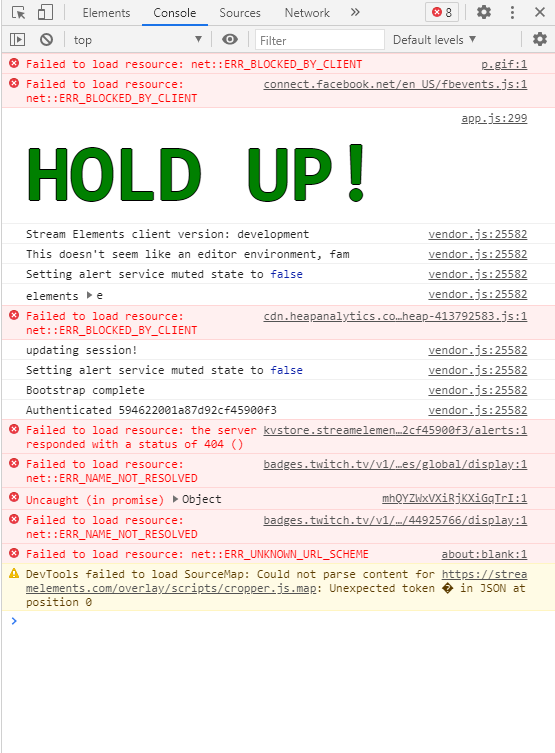
I installed a Widget for Phasmophobia made by GlitchedMythos, and last night everything was working fine, but now it suddenly no longer reacts to any of the chat commands, i asked Mythos, and based on the Dev Console thing on Chrome, he said i should try and ask here.
The stream elements bot is working fine, it reacts to commands like it should, it's just the Widget, and i have tried a fresh install and all, and i'm wondering if something is going on, on the stream elements side of things?
i took a screenshot of what was in the dev console.
I'm sorry if my question dosnt make much sense, i'm not very good at these things xD
https://i.imgur.com/qr0eBls.png
 languid mesa
hello
 junior arrow
Hi
 sterile forge
can i get the custom name feature enabled in Ground Control?
scarlet tiger
@sterile forge your twith username? 🙂
scarlet tiger
@sterile forge should be done
sterile forge
awesome! I'll let you know if I have issues
 winged yoke
Morning all , any update on the follower alert issue and or the credits not working properly by chance ?
 bitter hatch
Hey everyone
Hope you’re doing fine !
Maybe someone can help me, my verification for the se tips isn’t working
Anyone?
scarlet tiger
what error you getting if any?
 river fossil
Hello, can someone help me?
I wanna know if it's possible to change the command "!buy", that redeem items from the store.
scarlet tiger
its alias i think
 scarlet tiger
redeem is command
 abstract hearth
I need help.
scarlet tiger
hm?
viscid pebbleBOT
Please logout of StreamElements at https://streamelements.com/logout and then login again to your account (Twitch/YouTube/Facebook).
scarlet tiger
try this
 snow walrus
ok
abstract hearth
when i start the stream i get a blank page.?
snow walrus
Tgx
scarlet tiger
@abstract hearth screenshot?
abstract hearth
 viscid pebbleBOT
StreamElements menu, on top of OBS > Logout > Login
scarlet tiger
this can help
abstract hearth
thanks. it fixed it.
scarlet tiger
great
snow walrus
If i click on create it doesnt work
 viscid pebbleBOT
Our Dashboard and Overlay Editor are Chromium Optimized. We strongly recommend using Chrome. Opera GX and the new Microsoft Edge Chromium might work closest to Chrome as its also Chromium built. Firefox also works, but some things might look a bit different or not work. We do not recommend using Internet Explorer with our Dashboard as it does not support functions.
If the website doesn’t work on chrome, be sure none of your plugins is blocking our website or clear your cookies. You can try if the website works in an incognito tab.
scarlet tiger
 lime wyvern
hi
scarlet tiger
Some troubles? 🙂
 mystic swan
Hi! - I have a question about the TalkShow Overlay. The countdown timer on start screen works great but I have it 'supposedly' set to change to a message once it gets to zero. Sometimes it works and sometimes it doesn't. Any advice is appreciated, thanks!

 narrow birch
okay, I feel like an idiot right now, but how do I make a command that edits another command with the string in the command?
as in: !setcode XXX to change !code to say Code: XXX
narrow birch
nope
 lament blade
Helo guys
scarlet tiger
or is code always number?
narrow birch
nah, the code is lobby codes so numbers and letters
lament blade
Im having a truble
scarlet tiger
what trouble?
mystic swan
mystic swan
Hi! - I have a question about the TalkShow Overlay. The countdown timer on start...
I just realised this might not be the right forum? Can you let me know if I should ask this elsewhere?
 weak current
Hey Guys. Short Question... MY Chat Commands didnt work offline? Although the Basic Commands like "!commands" dont work... Yes, Bot is in the Chat... Yes... Moderator... Yes Online/Offline Enabled! Any Ideas? Greetings from Germany 🙂
scarlet tiger
should work unless are set to Offline-only
 random parrot
Is there anyway to get the bot to display the last subscriber?
basically use any widget data?
scarlet tiger
sec
weak current
scarlet tiger
should work unless are set to Offline-only
Yeah... but should..
scarlet tiger
your username?
weak current
frippitv
viscid pebbleBOT
 It looks like you tried to purge using a user ID, format:
 !purge <ID> <count>.
viscid pebbleBOT
Go to the Dashboard > Right side > Part channel > Join channel(https://streamelements.com/dashboard)
weak current
ok
mystic swan
sorry @scarlet tiger is the the right area to ask about overlay issues?
scarlet tiger
sorry, i cannot help you with this 😦
mystic swan
Ok, thanks anyway. I'll try to find the answer somewhere else. 🙂
viscid pebbleBOT
@weak current If your commands recently stopped working and you're using OBS.Live and a custom bot name do the following:
- In OBS.Live, click on the hamburger menu (three stripes) at the top left of your activity feed
- Click on Stream Settings > Custom bot name
- In the Custom bot name field select Set custom bot name, not your already existing username (with capital letters). Note: If you already connected an account that way, the third entry will show as the account name (see image https://i.imgur.com/sO7fWOX.png).
- Scroll a bit down and click on the purple Connect Custom Bot Account button
- Log in as usual and Authorize the custom bot name
- Back in the Activity feed, click on the Send Test Message button and check if your custom bot name starts working again
 potent tusk
pls can someone help me, my follower alert is not working, and I can't fix it
scarlet tiger
known issue afaik
potent tusk
In tests on the streamelements website the alert works but in the application the image does not appear and only the sound is reproduced
the gif
and the text
 fading tulip
Hello, i dont know if this is a normal question. But the streamelemnts panel of chat stats didnt work? Is it normal?
Or i donk know how to configure it
potent tusk
!accell
viscid pebbleBOT
@potent tusk OBS > Settings > Advanced > Scroll down > Enable or disable Browser Source Hardware Acceleration, depending on its current state > Restart OBS
https://i.imgur.com/ggMe9ZE.png
 nimble dune
^
scarlet tiger
hmm :DDD
nimble dune
😄
weak current
custom bot Name with my "normal" twitch login or with a 2. (Bot) Account?
weak current
works both? ok
nimble dune
potent tusk
hm I will test thanks :D
Disable that
viscid pebbleBOT
@potent tusk The default resolution for StreamElements overlays (theme and custom) is 1920x1080. Please add them in OBS at their full resolution and use CTRL+F to fit to screen if necessary. You can then downscale your stream in OBS settings > Video if you'd like https://i.imgur.com/6bWXxjR.png
nimble dune
Set dimensions to 1920x1080
potent tusk
when I activated the app the alert appeared on the website and not in the app]

 potent tusk
it is in portuguese because i am brazilian
weak current
@scarlet tiger it works! thx!
scarlet tiger
great!
fading tulip
Why i dont have any data?
 nimble dune
potent tusk
it is in portuguese because i am brazilian
nimble dune
potent tusk
it is in portuguese because i am brazilian
Can you restart OBS, and test it again?
 fringe plaza
Is there a way to have my commands moved/imported from MixitUp?
edgy crown
How do I assign someone as a Super Moderator so that person can use the super moderator commands?
viscid pebbleBOT
Chat/Bot Levels
100 - Viewer
250 - Subscriber (Twitch subscribers automatically placed at this level)
300 - Regular
400 - VIP (Twitch VIP automatically placed at this level)
500 - Moderator (Twitch chat moderators automatically placed at this level)
1000 - Super Moderator__
1500 - Broadcaster
Dashboard Manager Levels
Bot Supervisor
Editor
Full Access
Owner
https://i.imgur.com/s61Liry.png
 edgy crown
so I just type this? !level <user> 1000
edgy crown
Thank you!!
fringe plaza
fringe plaza
Is there a way to have my commands moved/imported from MixitUp?
My goal is to yeet mixitup
potent tusk
nimble dune
Can you restart OBS, and test it again?
did not work again :/
 craggy burrow
Hello! I'm helping a friend set up their alerts via OBS Live. All actions show up but test tips we have sent through. IS there a tip moderation page?
 keen orbit
Is it normal that the custom bot name only works while I have obs.live running? Because if someone is following me while it's not running it's not spikehidden_bot who sends the message it's StreamElements.
lament blade
Hey there, there's a problem with my host alerts, they're not showing even in the feed
nimble dune
keen orbit
Is it normal that the custom bot name only works while I have obs.live running? ...
Only works when OBS.Live is running
nimble dune
potent tusk
did not work again :/
Sorry, I don't know :/
keen orbit
nimble dune
Only works when OBS.Live is running
Thanks! I already thought I did something wrong.
fringe plaza
I'm sorry for asking again but I am trying to fix some issues with my computer. I need an easy way to move commands from MixitUp to Streamelements
nimble dune
lament blade
Hey there, there's a problem with my host alerts, they're not showing even in th...
"Due to changes to Twitch API, we have filtered out hosts and will only show these ones on your activity feed:
- All hosts coming from an online channel with at least 1+ viewer
- Auto host events with at least 1 viewer - only from a channel that just went offline
Note: If you see X channel has hosted you with no viewers on the back, that is considered an offline host or a host with 0 viewers, we do not show these."
 pastel python
i have problem with tippingpage can someone help me
lament blade
nimble dune
"Due to changes to Twitch API, we have filtered out hosts and will only show the...
Thanks for the info
 astral talon
Im having an issue with alerts. Every time I upload an alert image (png) it always leaves a ton of space below the image even though it is cropped. This causes the text to be too low and I can't center it. Might be an easy fix but I've spent enough time trying to figure it out on my own. Any ideas?
astral talon
Okay I figured that out
lament blade
how do i add a notification when someone follows me
scarlet tiger
@lament blade in chat? on overlay?
astral talon
But now I can't preview in OBS EDIT: Jk its a sizing issue
astral talon
@lament blade Im new to this but pretty sure you sign into your streamelement* and its under overlays. You can set up custom alerts or they are set up by default (I believe?) once you set up streamelements
 slim mulch
is there a way to have the global cooldown set to 0 for when i create a new custom command
 north pier
Any reason, why Sound-Commands doesnt work properly ?
They worked for the last weeks, but they broke.
The points are getting removed, but there isn't any sound played.
Does anyone have an idea why ?
 slender cobalt
Hi guys, any idea for why streamelements bot isn't saying things properly. Such as: "You can find a list of all Commands here ***" As an example
viscid pebbleBOT
If links in chat are appearing as ***** either mod the bot or disable block hyperlinks in your twitch channel settings: https://dashboard.twitch.tv/settings/moderation
slender cobalt
Ah, thank you
viscid pebbleBOT
@cerulean glacier To add your overlays to OBS, add a new browser source in your scene. Paste your overlay URL in the browser source properties, set the dimensions to 1920x1080 (unless you changed them on the website) and check Shutdown source when not visible. https://youtu.be/KDvLynUqXI4
 cerulean glacier
THANKS
 amber ridge
in obs activity feed, it no longer shows my channel point redemption or hosts, anyone know how i can fix this?
viscid pebbleBOT
@amber ridge "Due to changes to Twitch API, we have filtered out hosts and will only show these ones on your activity feed:
- All hosts coming from an online channel with at least 1+ viewer
- Auto host events with at least 1 viewer - only from a channel that just went offline
Note: If you see X channel has hosted you with no viewers on the back, that is considered an offline host or a host with 0 viewers, we do not show these."
amber ridge
ok so that answers the host question........ what about channel point redemptions?
fading tulip
Hello! Can someone help me?
I dont have chat stats?
StreamElements
Description Chat Stats tracks emote usage on Twitch in real time. See which emotes are the most popular on every Twitch channel
 wanton slate
Hello 🙂 I have a chat stats 404 Error
StreamElements
Description Chat Stats tracks emote usage on Twitch in real time. See which emotes are the most popular on every Twitch channel
 muted sapphire
Dose anyone know why the !settitle command isnt working in my channel for my SuperMod?
 abstract hemlock
@fading tulip @wanton slate either one of you changed your username recently?
viscid pebbleBOT
@muted sapphire Go to the Dashboard > Right side > Part channel > Join channel(https://streamelements.com/dashboard)
wanton slate
I changed my username about 2-3 months ago
 digital cloak
hi hi,
I'm trying to create custom counters isolated by user, I know that ${count ${user}} would create a counter for each one of them, but, is there a way to add a prefix/suffix in a way that I could create more than one counter name for each user? Let's say, I want to count how many "!hug" or "!love" commands someone used
tried appending ${touser} to something else to no avail, like: ${count hugcounter${touser}}
abstract hemlock
@wanton slate could you post here your old and new username?
wanton slate
Ok. Working on that 🙂
fading tulip
abstract hemlock
<@!625146422534078494> could you post here your old and new username?
mm nope, i dont change my name
wanton slate
My apologies. I have not changed my name on this account that I am currently having trouble with.
abstract hemlock
@wanton slate @fading tulip if i can't find your chatstat its ok if i create a new one?
abstract hemlock
@fading tulip done
wanton slate
Oh? I would prefer not to but I would appreciate you do if you cant find it 🙂
abstract hemlock
wanton slate
Oh? I would prefer not to but I would appreciate you do if you cant find it 🙂
i tried 😓 .. new page for you too
wanton slate
It's okayyy. THANK YOU. You are amazing! I did not expect to get help that fast 😄
fading tulip
abstract hemlock
<@!235699362443952128> done
Thanks! And now i have a problem with the panel
I set de default for the chat stats

But then it appears de countdown by default
wanton slate
At least i know my top chatters in nightbot XD
abstract hemlock
@fading tulip let's try to delete the extension and add it again
fading tulip
Okey
fading tulip
abstract hemlock
<@!235699362443952128> let's try to delete the extension and add it again
I try the deleting the app, and reinstaling and still not work
 spark owl
hii
fading tulip
Countdowns is by default
spark owl
how can i export my latest donations from elemnts to stream labs?
 long remnant
Hello, in my livestream I see some of the bot messages come up but it is the same one always, even when I have set 3 to rotate, for instance when I am tipped bits it shows the same message over and over. I now deleted that message in hopes that it will rotate through the other two I added for tips.
abstract hemlock
@fading tulip you're right, that by design if you enable the Countdown that will be the default panel
abstract hemlock
spark owl
how can i export my latest donations from elemnts to stream labs?
you may need to ask SL about that
spark owl
abstract hemlock
you may need to ask SL about that
ok
 hexed crow
привет здес есть русские ?
 reef merlin
how do I can change my twitch channel to another twitch channel?
viscid pebbleBOT
@hexed crow Welcome to the helpdesk! The regular helpdesk channels are in English but we do provide multi-language support in the following channels: #🇩🇪︱deutsch | #🇫🇷︱français | #🇪🇸︱español | #🇵🇹︱português | #🇳🇱︱nederlands | #🇮🇹︱italiano | #🇵🇱︱polski | #🇨🇳︱中文語言服務區-chinese | #🇯🇵︱日本語-japanese | #🇭🇺︱magyar | #🇰🇷︱한국어-korean | #🇹🇭︱ไทย-thai | #🇷🇺︱русский | #🇺🇦︱українська | #🇨🇿︱czech
abstract hemlock
@reef merlin logout of twitch.tv first then logout of StreamElements and login again
reef merlin
thanks, but now do I logout from the account in the streamelements tab in OBS?
 inland kayak
why the hack doesn,t my queue limit change when i change it WTF
hollow flame
I have added a new overlay and when I try to duplicate something from another overlay it does not show the new overlay. I even waited 1 day but it still does not appear. How can I solve this?
 native bough
I have a common problem of not having chat stats because I changed my name :/
viscid pebbleBOT
If you changed your name on Twitch, please follow these steps:
- Visit https://streamelements.com/logout and then log in again by connecting with Twitch.
- On the right side of the dashboard page that opens, select Join under bot settings. If it says Part select that and then select Join to send the bot to the chat. Don't forget to mod the bot by typing /mod streamelements in your channel if you have not already.
- Post your old and your new name here so that we can update your channel's chatstats tracking (must be done by staff).
native bough
If I could just get a ping when finished that would be great
foggy heart
native bough
If I could just get a ping when finished that would be great
Chatstats page should be good to go.
native bough
Ty
 dusty agate
Hello and good afternoon my !watchtime command is not registering peoples watch time and it keeps coming up as "0" even for myself. I've already checked the command in streamelements and it is present and configured correctly. Any solution?
viscid pebbleBOT
@drowsy karma Read and follow our server rules:
- We do not tolerate toxicity! Treat the community team, staff and all members with respect.
- No advertisement or channel promotion, anywhere on the server.
- No NSFW/NSFL
- No unsolicited DMs or friend requests to server members
Make sure to read the #welcome in any server you join.
 hexed jolt
Does anybody know any non-copyright music i can use in my streams?
 somber socket
Hi. Does anyone else have a problem with Se.pay. You can no longer pay out and contact is also not possible. Very mysterious
 wary halo
hexed jolt
Does anybody know any non-copyright music i can use in my streams?
wary halo
hexed jolt
Does anybody know any non-copyright music i can use in my streams?
StreamBeats
viscid pebbleBOT
@somber socket Please contact us via email for support with SE.Pay. You can use our contact form here: https://streamelements.com/contact Thank you.
somber socket
check thx
 wet topaz
 tall marsh
Hello my friends. There is one thing I would like to ask. A friend of mine wants to change the way of streaming Youtube to twitch. But the Obs Live StreamElements probgram doesn't allow it. Both accounts are linked. When he chooses to start stream, he pops up recommending a stream on YT and cannot be canceled.
viscid pebbleBOT
@tall marsh StreamElements menu, on top of OBS > Logout > Login
tall marsh
SRL ?
i am so stupid ...
i was try help her 40 min to get this ...
Ok its work. Ty for suport ❤️
 vivid owl
Hello there can someone give any tips as to why my stream kept stopping today?
 zenith compass
ok I have tried to uninstall then reinstall StreamElements Live and will not give me options for activity feed or chat?

 quartz robin
everytime with obs when i enable ndi i get immediately crashed i am using a stream elements obs live plugin
viscid pebbleBOT
@quartz robin Obs.live is a plugin for OBS Studio for the best OBS support, please join their Official Discord @ discord.gg/obsproject
@zenith compass StreamElements menu, on top of OBS > Logout > Login
 willow forge
hi
i have a peoblem
i just intalled obs.live but it give me error and i reinstalled and the same how can i fix it?
 grand ridge
Hi guys, I'm also having a chat stats issue

but i also don't seem to have a chats page
I read somewhere this might be related to me changing my twitch name ?
Is that relevant even though i never used stream elements with my old twitch name ?
viscid pebbleBOT
@grand ridge Please provide your account ID found at the top of this page: https://streamelements.com/dashboard/account/channels This ID is public info and safe to share here.
grand ridge
604cada9d2ef61251480ebda
foggy heart
grand ridge
604cada9d2ef61251480ebda
Page should be up now
foggy heart
willow forge
i just intalled obs.live but it give me error and i reinstalled and the same how...
What error are you getting?
grand ridge
Thanks a lot for the help guys.
 zenith summit
Question. I know there is a command for a user to transfer their stats “!rename” but that has to be the user typing it. Is there a way to input it where a mod or the streamer itself can do this for a user?
scarlet tiger
Nope
You can remove his points in leaderboard but its useless
User itself can do it by !rename <old_name>
inland kayak
This support is verry i never get any f*cking support
slim mulch
is there aa way for a single command to trigger a sound from the store and display text in chat?
For example if i did !so it would display check out soandso .....then also play a sound at same time
 nimble vigil
@slim mulch That's what I'm trying to figure out myself. So far, I found out that you can trigger a chat message which will play the sound using the $(redeem sfx) variable in the response, but if I do that, any other text that I want the message to include no longer gets posted. I would expect it to perform the redemption as well as to post the chat message, but that's not happening
foggy heart
@slim mulch @nimble vigil Feel free to check out the developers-api channel, as there may be some helpful suggestions there
 west bay
Hi guys. I switched from Streamlabs to StreamElements a week or so ago and am loving the change for multiple reasons. There is only ONE issue I am having: On Streamlabs Ankhbot, I was able to make a !lurk command that played a sound and also responded with a message in chat. Through StreamElements, I have figured out how to make a !lurk command that will either play a sound OR say the message, but I am hoping there is a way to make the custom command do both. Anyone able to point me in the right direction? Thanks in advance!
 noble helm
Has anyone else been having alert issues? This week has been weird because I haven't changed a single setting for my alert box and suddenly the alerts stopped showing up or working. Any advice or news on this?
nimble vigil
Interesting that myself, @slim mulch , and @west bay are all having the same problem LMAO
west bay
My apologies, I didn't realize this was a common issue 😂 It would not be the end of the world if this isn't possible but since SE has the ability to have a single timer trigger multiple responses I simply figured this would be included in custom commands as well
I'll see what developer API has to offer on the subject
lament blade
how can you set the labels to repeat themselves without having to go through once sorry for my bad english xD

like this

its very frustrating :c
foggy heart
lament blade
how can you set the labels to repeat themselves without having to go through onc...
Sorry, i'm not entirely sure what you're asking. We do have channels in different languages if you feel like that might be easier!
 dusk hearth
My stream is being really laggy and not good. What can I do to fix that?
lament blade
maybe you know know what i mean? there is so much space before its repeating
and i want to know how i can do it like in this example there is not so much space
lament blade

foggy heart
lament blade
maybe you know know what i mean? there is so much space before its repeating
Are you using a specific overlay?
lament blade
i can show it wait
viscid pebbleBOT
@lament blade Please provide your account ID found at the top of this page: https://streamelements.com/dashboard/account/channels This ID is public info and safe to share here.
lament blade
in this chat?
foggy heart
@lament blade that screenshot has your overlay url, which you don't want to post! But yes, the account ID can go here.
lament blade
5dcae7523dd9d42295c3e1d4 oh thank you
foggy heart
lament blade
5dcae7523dd9d42295c3e1d4 oh thank you
I think I see what you mean. I can look into it, but i'm not exactly sure how to make that change.
lament blade
I would be very grateful 🙂
high apex
zenith widget
what history are you referring to?
the history that says this person hosted you, or this person donated, that's usually on the dashboard
 lean nimbus
yikes
 latent hound
My streamelements timed out two users in the chat and I did not setup permissions for it to do that. I'm also not positive why it happened. What do I do?
lean nimbus
dk
 spring whale
does anyone know how long it usually takes for an S.E. Pay withdrawal to process? I made one today and it has neither shown in my bank or my paypal.
 solar stag
My in-OBS media requests won't work properly, or work at all really. However, when I use the streamelements website for media requests, it works fine. But the problem with that is I have keys bound to operate my media requests using my streamdeck. How do I fix this
 manic trout
HELP!
 coral cipher
im using OBS.LIVE to stream video but everything i hit start stream it says my stream key isnt corret (which i reset mulitple times) and it says "or cant connect to server" anyone have any tips?
viscid pebbleBOT
@coral cipher Obs.live is a plugin for OBS Studio for the best OBS support, please join their Official Discord @ discord.gg/obsproject
 proud geyser
hi! is there a way to block specific users from donating? like people abusing the tts option and being toxic?
 proud geyser
tysm!!!
latent hound
latent hound
My streamelements timed out two users in the chat and I did not setup permission...
Can I get help with this issue?
viscid pebbleBOT
@latent hound Please provide your account ID found at the top of this page: https://streamelements.com/dashboard/account/channels This ID is public info and safe to share here.
 lethal copper
Hello Streamelements! Is there a way to insert a custom font I bought from Ownedtv into a static text in the overlay editor?
viscid pebbleBOT
@lethal copper Google Fonts
More than 900 google fonts are supported at this time. You can preview them here: https://fonts.google.com/
Custom Fonts
Steps:
- Install the font on the streaming PC or choose a pre-installed windows font.
- In the overlay widget settings, select Text Settings
- Click on Enable Custom Font
- Type the name of the font as it appears in the windows font directory (This is usually
C:\Windows\Fonts)
Note: After installing fonts, the browser and OBS must be restarted for the font to appear.
lethal copper
Did you guys make a video on this?
zenith widget
No. Which step is not clear?
late orbit
I have set up an item on the stream store and enabled it but when I type !items into my chat it comes back saying no items are available
zenith widget
Did you tick the option to allow redemption via chat on the item?
late orbit
I don't see that option, only redeemable via website and redeemable via extension
late orbit
It's an Access Code list
late orbit
Is this because they would need to be on the site to get the redemption
 warm cobalt
If I delete a tip does it return the money or just the tip history? I want to make a tip goal in stream elements but I don't like how it includes old tips
late orbit
I was thinking it may whisper the code it chooses to the redeemer. That's fine, I'll look at a different approach for this
zenith widget
@warm cobalt Deleting a tip does not refund any money. What exactly are you trying to achieve here?
warm cobalt
@zenith widget Trying to make a tip goal since I'm raising money for a charity, don't want it to include old tips! TY for answering!
viscid pebbleBOT
@warm cobalt To reset goals:
- from the Overlay Editor > Session data on top right (monitor symbol) > Goals tab > reset progress of desired goal
- from the Dashboard > Activity feed on the left > Widget data on the right > Goals tab -> reset progress of desired goal
Note: Goal widgets (progress) only counts up and doesn't go down automatically, if you lose followers/subs.
zenith widget
That being said, look into Tiltify and ExtraLife as we do have integration with them
As Charity usually falls under different tax category and we are not able to provide you with any document that separates tips made for charity if made via our tipping link/system
 sterile nimbus
hey i need some help. I have an Imac and i can't install the SM on my obs. my question is that if its available for mac. thanks ❤️
zenith widget
Whats SM?
 stiff bough
Hey does someone know how to fix dono alerts? My past couple streams my dono alert hasn't shown up on stream but all I others do
zenith widget
How are you sure you are getting tips?
sterile nimbus
zenith widget
Whats SM?
yoo im sorry. SE i mean
zenith widget
Its available yes for 10.36+

StreamElements
Download StreamElements OBS.Live to makes live streaming on Twitch/YouTube/Facebookeasy. Live Stream your broadcast from anywhere, save on CPU with StreamElements Open Broadcast Software (OBS) plugin.
lament blade
Hey ich möchte meine Bank ändern bei SE pay finde dazu aber kein option eine neue verbindung einzubinden
viscid pebbleBOT
@lament blade Welcome to the helpdesk! The regular helpdesk channels are in English but we do provide multi-language support in the following channels: #🇩🇪︱deutsch | #🇫🇷︱français | #🇪🇸︱español | #🇵🇹︱português | #🇳🇱︱nederlands | #🇮🇹︱italiano | #🇵🇱︱polski | #🇨🇳︱中文語言服務區-chinese | #🇯🇵︱日本語-japanese | #🇭🇺︱magyar | #🇰🇷︱한국어-korean | #🇹🇭︱ไทย-thai | #🇷🇺︱русский | #🇺🇦︱українська | #🇨🇿︱czech
 peak parrot
sorry, i forgot, my bad
viscid pebbleBOT
@lament blade Welcome to the helpdesk! Please let us know how we can assist you today and a support volunteer or staff member will assist you as soon as they are available. Thank you for your patience.
zenith widget
Can you elaborate?
lament blade
How do I setup Media Request on Multiple Scenes without echo?
viscid pebbleBOT
@lament blade Make sure to ballot_box_with_check: “Shutdown source when not visible” for all browser sources (all OBS scenes). If using studio mode, uncheck “Swap Preview/Output Scenes After Transitioning.” Also, keep in mind that sound can play from any overlay loaded in the browser (editor or launched). https://i.imgur.com/6bWXxjR.png https://i.imgur.com/yY0wcFl.png
 lament blade
Thanks Bot 🙂
is OBS.live / Twitch down? I've refreshed my key check it, double checked all connections, was working fine perfectly yesterday. Even logged out and back in with my twitch account.
 zenith widget
I saw that you are running a rerun
try and stop the rerun before trying to go Live
and then in Settings -> Stream make sure your stream key is freshly added after the rerun is disabled
lament blade
cheers ... wow didnt even think of that thanks @zenith widget thought it auto stopped the reruns when you activate the stream , guess not
 limber halo
why I can not go into my dashboard?
zenith widget
What browser are you using?
limber halo
chrome
zenith widget
What page are you trying to access and what are you seeing?
limber halo
Im on the main page then I click 'my dashboard' then somethink is loading and after 10 seconds Im back on the main page
viscid pebbleBOT
@limber halo Please logout of StreamElements at https://streamelements.com/logout and then login again to your account (Twitch/YouTube/Facebook).
limber halo
thank you for help its working
 cobalt quarry
Can I get help with overlays? I tried to get a alert overlay in Streamlabs OBS and when I test the alert only half is shown
viscid pebbleBOT
@cobalt quarry We're not able to troubleshoot issues with using our overlays in StreamLabs OBS (SLOBS) as we don't have the tools to support their software. We recommend using OBS Studio or OBS Studio with our plugin OBS.Live.
cobalt quarry
I'll download OBS.Live and try that thanks!
 lime pendant
Hi everyone, not sure if this is the right place to ask but i'm having issues with a tipping page. My tipping page that I can edit from dashboard is different to the tipping page connected to all of my urls, the money still goes to the same place but the alerts don't trigger and I can't edit the tipping page as it's the correct URL. Can anyone help?
I changed my twitch name recently and I think it's been affected since that
zenith widget
Thats because each platform account(as in, Twitch, Youtube, mixer(yes even the non-existing one), facebook) has its own tipping link.
And each link should be used with its connected account
as in, twitch account -> twitch link
youtube -> youtube link
the current one on your twitch account is your Youtube one
this is where you can find your Twitch account's link
 lime pendant
ahhh, legendary! thank you so much, that could've taken me ages. Much appreciated!
zenith widget
lament blade
CIAO
 simple hill
having issues with my bitrate up and down floating between 3kto7k in turn i cannot stream just wondering what i can look at to try resolve the issue its only been in the last week or so ?
viscid pebbleBOT
@simple hill Obs.live is a plugin for OBS Studio for the best OBS support, please join their Official Discord @ discord.gg/obsproject


 zenith widget
ask for the invite link to be generated again with a different role
zenith widget
name of the person generating the link
I said name, not link
I see you are already added as a manager to their account
 fluid ore
Is there a way to see edits history? Like if one of the manger had added points or watchtime to a viewer or themselves.
zenith widget
We do not keep logs of such actions, unfortunately.
fluid ore
Ah okay, thank you!
 junior light
guys how enable paymant not only with paypal?
viscid pebbleBOT
@junior light SE.PAY is available for streamers who are at least 18 years old, with bank account under their name in one of the following countries and have at least 101 follower (Twitch) / 101 subscribers (YouTube):
Austria, Belgium, Czech Republic, Denmark, Finland, France, Germany, Ireland , Italy, Netherlands, Poland, Portugal, Slovakia, Spain, Sweden, Switzerland, United Kingdom, United States.
If you meet these criteria and don’t see SE.Pay, let us know.
For information on SE.Pay payment methods, their fees and settlement times see https://streamelements.com/dashboard/tipping/fees
 mild laurel
hello ... someone help me? how do i add streamlements overlay alerts to streamlabs?
viscid pebbleBOT
@mild laurel To add your overlays to OBS, add a new browser source in your scene. Paste your overlay URL in the browser source properties, set the dimensions to 1920x1080 (unless you changed them on the website) and check Shutdown source when not visible. https://youtu.be/KDvLynUqXI4
@mild laurel We're not able to troubleshoot issues with using our overlays in StreamLabs OBS (SLOBS) as we don't have the tools to support their software. We recommend using OBS Studio or OBS Studio with our plugin OBS.Live.
 sturdy field
How do I finish the tipping section on my twitch
zenith widget
You click on the last panel link to get copied and then hit complete.
 jaunty cosmos
Hey I tried putting alerts for followers and hosts on my overlay, but it never play while I'm streaming. Is there a way to fix this (I don't use OBS btw)
zenith widget
What are you using for streaming?
jaunty cosmos
My PS4, but I can use the overlay from my laptop, so if you are watching on pc then you would be able to see the overlay.
viscid pebbleBOT
@jaunty cosmos Consoles do not have native support for overlays. You would need a capture card, PS4 remote play or Xbox companion app and a PC with OBS in order to have overlays over your console gameplay.
We have a blog post about how to set up console streaming with our essential tools: https://blog.streamelements.com/how-to-stream-on-console-7b620b1c46c3
 amber junco
how come my obs is blurry like chat box and stuff i can't read it
jaunty cosmos
Yes I'm not worried about the ps4 having an overlay, I just want my alerts to go off on Laptop and PC
zenith widget
@amber junco Right click desktop -> Display settings -> set scale to 100%
@jaunty cosmos and how are you opening the overlay on your laptop/pc?
amber junco
@zenith widget it's already on 100%
jaunty cosmos
Through overlay expert
zenith widget
@jaunty cosmos what is overlay expert?
@amber junco if text is blurry in the chat window and the scale is set to 100%, then something to do with font sharpening in Windows. I can't really remember what the settings was
google "Windows 10 blurry text in apps" or somethng simiarl
jaunty cosmos
An extension on twitch
zenith widget
I have no idea what that extension is and its suppose to do, but if you are adding the overlay as a browser source and its suppose to load it on the stream
zenith widget
👍
zenith widget
jaunty cosmos
An extension on twitch
so to continue, you most likely either have not added the overlay properly OR the extension cannot load our overlays in general.
amber junco
nevermind it's doing it again
jaunty cosmos
No it adds them, like a have a starting ,BRB, ending, and a basic overlay on the screen when playing from my laptop.
zenith widget
amber junco
nevermind it's doing it again