#helpdesk-twitch
1 messages · Page 838 of 1
 viscid pebbleBOT
@coarse roost New to StreamElements?
Check out our YouTube channel https://www.youtube.com/c/streamelements/videos
with tutorial videos from setting up the basics, to in-depth details on how to use our product.
New to OBS? Here is a 4 step quick start guide
https://obsproject.com/wiki/OBS-Studio-Quickstart
Want to learn even more? Here is an in-depth overview
https://obsproject.com/wiki/OBS-Studio-Overview
 drowsy egret
are you referring to StreamElements loyalty points or Twitch channel points?
 tropic belfry
hello my friend's chatstats page doesn't work https://stats.streamelements.com/c/maneyvice

StreamElements
Description Chat Stats tracks emote usage on Twitch in real time. See which emotes are the most popular on every Twitch channel
 lament blade
Hi, I was wondering how do I activate my ovalays on my stream in obs if their are links?
I'm having troubles with that
drowsy egret
tropic belfry
hello my friend's chatstats page doesn't work https://stats.streamelements.com/c...
did he recently change his username?
viscid pebbleBOT
@lament blade To add your overlays to OBS, add a new browser source in your scene. Paste your overlay URL in the browser source properties, set the dimensions to 1920x1080 (unless you changed them on the website) and check Shutdown source when not visible. https://youtu.be/KDvLynUqXI4
tropic belfry
drowsy egret
did he recently change his username?
they said they might have a few years ago but they can't remember
drowsy egret
tropic belfry
they said they might have a few years ago but they can't remember
a staff member will take a look at it
tropic belfry
thank you sk1ll 🙂
 sinful basin
hello, trying to get my overlay going for the first time but it doesn't show up or it only shows up on part of my stream and cuts the rest off. Seems like I have the aspect ratio wrong or something similar. Any help is greatly appreciated.
viscid pebbleBOT
@sinful basin The default resolution for StreamElements overlays (theme and custom) is 1920x1080. Please add them in OBS at their full resolution and use CTRL+F to fit to screen if necessary. You can then downscale your stream in OBS settings > Video if you'd like https://i.imgur.com/6bWXxjR.png

 fallen wren
hello
 charred quartz
fallen wren
hello
charred quartz
fallen wren
hello
hi
 mellow crystal
Helloo
Idk if I just type my issue here..... but.. my tipping page does not show my tips. I have the money from donations in my paypal but it does not get registered on the streamelements website, nor does it pop up on my overlays? HAlp :;(
viscid pebbleBOT
@mellow crystal Please provide your account ID found at the top of this page: https://streamelements.com/dashboard/account/channels This ID is public info and safe to share here.
charred quartz
can u send me the tipping page link ppl are using in your stream please?
mellow crystal
https://streamelements.com/ochiva_/tip @charred quartz
charred quartz
?
charred quartz
mellow crystal
https://streamelements.com/ochiva_/tip <@!207573201000202241>
should be fixed by now
lament blade
i give streamelements bot moderator permission but i cant use any command .u know something/
i cant enable the bot on my twitch channel
charred quartz
are uusing custom name?
lament blade
nope
viscid pebbleBOT
@lament blade Please provide your account ID found at the top of this page: https://streamelements.com/dashboard/account/channels This ID is public info and safe to share here.
viscid pebbleBOT
@mellow crystal if a viewer tipped through PayPal but no information appears in your StreamElements account, this generally means PayPal has held the tip for verification. Until PayPal clears the tip and sends back a confirmation to your StreamElements account, no information will appear there and no alert will play, as that confirmation is the only way for us to be aware of a successful transaction. If you believe there may be an issue with the transaction, you'll need to contact PayPal support as StreamElements is only a passthrough service and never actually gets involved with the transaction or touches the money
 brave ermine
was trying to check chatstats but it seems to lead me to an error page is it something on my end?
 vital tundra
is there a way of creating a !clip command for my viewers on twitch to use to clip the last 30-60 seconds?
 abstract hemlock
@vital tundra you can take a look at this widget #widget-share message
viscid pebbleBOT
@brave ermine Please provide your account ID found at the top of this page: https://streamelements.com/dashboard/account/channels This ID is public info and safe to share here.
 jolly glade
Hello i have a problem where my stream would randomly crash after a couple hours has anyone experienced similar issue and know a fix ?
viscid pebbleBOT
@jolly glade A crash log is required to investigate the cause of your issue. Please upload the last crash log.
- In OBS, click the Help menu
- Select Crash Reports and then Upload Last Crash Report
- Copy the URL and paste it to the chat here.
Note: If you are not able to follow the above steps, open your file explorer and go here: %appdata%\obs-studio\crashes and provide the last listed file.
 cloud apex
Hello, any help on why my Host alerts doesn't pop up? Only Raid alerts seems to work. I have the host amount even set to 0 views count to show but nothing happens~ Thankyou beforehand
viscid pebbleBOT
@cloud apex "Due to changes to Twitch API, we have filtered out hosts and will only show these ones on your activity feed:
- All hosts coming from an online channel with at least 1+ viewer
- Auto host events with at least 1 viewer - only from a channel that just went offline
Note: If you see X channel has hosted you with no viewers on the back, that is considered an offline host or a host with 0 viewers, we do not show these."
jolly glade
did i upload the correct files ?
vital tundra
Hi thanks but I was hoping for a command if there was one
 deep tinsel
Hello i need help
brave ermine
601a65777912fff4c29fb81c
lament blade
hi,
my alerts are buggy. the first 2 seconds are not visible and the rest is lagging
 zenith widget
Check the alert animation settings for teh first 2 seconds being visible.
As for the lagging issue, are you using video assets?
lament blade
yes, im using short videos
its not lagging, when i emulate it in streamelements...its only laggy in my stream
viscid pebbleBOT
@lament blade OBS > Settings > Advanced > Scroll down > Enable or disable Browser Source Hardware Acceleration, depending on its current state > Restart OBS
https://i.imgur.com/ggMe9ZE.png
 zenith widget
See if this helps mitigate the lag
as for the 2 second interval, did removing the animation settings or adjusting those help?
 untold void
I am having trouble trying to get the overlay I got from the themes into the obs
viscid pebbleBOT
@untold void To add your overlays to OBS, add a new browser source in your scene. Paste your overlay URL in the browser source properties, set the dimensions to 1920x1080 (unless you changed them on the website) and check Shutdown source when not visible. https://youtu.be/KDvLynUqXI4
lament blade
viscid pebble
<@456226577798135808> OBS > **Settings** > **Advanced** > Scroll down > Enable o...
thank you very much! worked perfectly!!!
 whole tangle
Hello! I was told i could make my ground control bot name the same? My Twitch name is yjgold. Cheers!
zenith widget
restart ground control now
 low berry
how do i add the recent followers and recent subs bar to my twitch stream
viscid pebbleBOT
@low berry New to StreamElements?
Check out our YouTube channel https://www.youtube.com/c/streamelements/videos
with tutorial videos from setting up the basics, to in-depth details on how to use our product.
New to OBS? Here is a 4 step quick start guide
https://obsproject.com/wiki/OBS-Studio-Quickstart
Want to learn even more? Here is an in-depth overview
https://obsproject.com/wiki/OBS-Studio-Overview
 mighty storm
As I gain followers on my new twitch channel I often find that stream elements and twitches follower count don't sync with stream elements always having more followers. I've been adjusting the follower count before going live I just didn't know if there was an easier way to sync everything up?
viscid pebbleBOT
@mighty storm Please provide your account ID found at the top of this page: https://streamelements.com/dashboard/account/channels This ID is public info and safe to share here.
 viscid pebbleBOT
Please provide your account ID found at the top of this page: https://streamelements.com/dashboard/account/channels This ID is public info and safe to share here.
mighty storm
BergmanJoe username
zenith widget
where are you adjusting follower count?
mighty storm
Under the widget data
zenith widget
Right
viscid pebbleBOT
To reset goals:
- from the Overlay Editor > Session data on top right (monitor symbol) > Goals tab > reset progress of desired goal
- from the Dashboard > Activity feed on the left > Widget data on the right > Goals tab -> reset progress of desired goal
Note: Goal widgets (progress) only counts up and doesn't go down automatically, if you lose followers/subs.
 opaque imp
@mighty storm wow, i actually have been experiencing the same problem. Whenever I set a "follower goal", my current number of followers seems to be totally different on Stream Elements than on Twitch..
Is there a way to set a custom donation goal which does not include amounts of my previous donations?
zenith widget
Note: Goal widgets (progress) only counts up and doesn't go down automatically, if you lose followers/subs.
opaque imp
@zenith widget I have a browser source code that shows my current followers, subs and viewers.. so surely it wouldn't be that hard to implement into actual Stream Elements right?
So if I "reset" goal on the followers.. will it then sync up with my current number?
zenith widget
opaque imp
Also is it possible to make 2 custom donation goals for separate things? Atm, i can't seem to get rid of Stream Elements counting in my previous donations..
@zenith widget Thank you for that video, I appreciate that explanation 👊🏼
zenith widget
as for the 2 goal bars - not really
opaque imp
Or just one goal bar, but keeping it separate from "total donations"
zenith widget
the default goal widgets use the goal data
while custom coded goal widgets, only if coded properly to keep their own count, can be separated
opaque imp
So what should I use? Since when i make a new goal it's already maxed out cause of the past donations received
viscid pebbleBOT
To reset goals:
- from the Overlay Editor > Session data on top right (monitor symbol) > Goals tab > reset progress of desired goal
- from the Dashboard > Activity feed on the left > Widget data on the right > Goals tab -> reset progress of desired goal
Note: Goal widgets (progress) only counts up and doesn't go down automatically, if you lose followers/subs.
opaque imp
Are you aware of any othe custom widgets that would work well for this?
zenith widget
Check #widget-share
 fading obsidian
Hi all, hopefully this is the right place to ask. Quick preface. Using streamelements to do follow alerts, etc via browser sources to OBS. A while back, I noticed that the audio was still playing but the related gif is not. I have already done what seemed to be the fix for most in disabling browser source hardwre acceleration in obs itself to no avail. Best I can tell if I actually open up the browser source itself, and test in the overlay editor, they are not being sent there either.
lament blade
I'm trying to setup my bot name but its not giving me the option to
if anyone can help that'll be great
I got it for some reason it thought i didn't set up my tipping page
 distant holly
hello i am trying to figure out how to add the overlay i made to mt stream. how do i do that?
ive only been streaming about a month now and i am still learning how to do things
i have it all made and saved but how do i have it on stream?
viscid pebbleBOT
@distant holly To add your overlays to OBS, add a new browser source in your scene. Paste your overlay URL in the browser source properties, set the dimensions to 1920x1080 (unless you changed them on the website) and check Shutdown source when not visible. https://youtu.be/KDvLynUqXI4
@lament blade Currently renaming the bot fully works with OBS.Live.
You can follow this video guide to set it up: https://discordapp.com/channels/141203863863558144/494513233416421386/561516184718278676
If you don't want to use OBS.Live and want to stick with Ground Control, please let us know your Twitch username.
@fading obsidian The default resolution for StreamElements overlays (theme and custom) is 1920x1080. Please add them in OBS at their full resolution and use CTRL+F to fit to screen if necessary. You can then downscale your stream in OBS settings > Video if you'd like https://i.imgur.com/6bWXxjR.png
fading obsidian
Well then, I guess it's always the simple things! Working now, cheers!
distant holly
viscid pebble
<@!506926566261915659> To add your overlays to OBS, add a new browser source in ...
oh man obs isnt supported on chormebooks it says i cant do it
so i guess i need to use a different laptop huh.
 gloomy jacinth
hi i'm looking to set up a !song command so people can find what's playing on a youtube playlist
zenith widget
You can use "!currentsong" but you will have to use Media Request in order to make it work, else we don't have other way to show current songs from YT
 wooden pelican
Hey! I'm trying to upload images to my StreamElements overlay, but it's not acknowledging the file uploads. It was working before (I have 7 images uploaded already), I still have plenty of memory space available and I have tried on Chrome and Safari. I have also tried disabling extensions and tried with PNG and JPG uploads.
zenith widget

glad to see the 2nd invite link helped
can you DM me the image you are trying to upload?
 zenith widget
and is it just 1 image or a bunch of them are not being uploaded?
wooden pelican
Just one at a time. I've tried a few different ones, below and above 1MB. And JPG and PNG.
Oops, thought I DM'd that. I'm new to this 😅
zenith widget
no worries
I managed to upload the image to my own account and yours. Something is blocking the upload function on your side for sure
try restarting your pc/laptop and trying in incognito mode to upload the other images
wooden pelican
Okay great thanks. I'll give that a go now and report back!
Still not working! 😕
When this is blue, does that indicate something is uploading?
zenith widget
yes
There is 1 thing that comes to mind when something is being refused to be uploaded - you might have a virus on your pc/laptop
Considering you said you managed to do it before, but then it doesn't work, the only time i've seen this happen is when the pc/laptop needs a thorough check with an anti-virus/malware
other thing we can check just in case is, via the dev console - while having chrome open, press F12 to open the dev console
navigate to the console tab
and try to upload the file
when it fails or gets stuck
a red or yellow error will appear
like so on the bottom
screenshot that
wooden pelican
How do I do that on a Macbook?
 ionic kelp
*Cmd
wooden pelican
Oh it's Command+Option+C I think
Thanks, looking now
It's worked!!
I was waiting for an error message but the image actually uploaded
Tried another one too and that was fine
zenith widget
thats awesome to hear


 fallow ice
Stream elements bot isn't working for someone I mod for its disappeared from his chat any ways to fix it ??
viscid pebbleBOT
@fallow ice Go to the Dashboard > Right side > Part channel > Join channel(https://streamelements.com/dashboard)
 fallow ice
Thanks. I'll see if this works if not what other issues could it be
viscid pebbleBOT
If your commands recently stopped working and you're using OBS.Live and a custom bot name do the following:
- In OBS.Live, click on the hamburger menu (three stripes) at the top left of your activity feed
- Click on Stream Settings > Custom bot name
- In the Custom bot name field select Set custom bot name, not your already existing username (with capital letters). Note: If you already connected an account that way, the third entry will show as the account name (see image https://i.imgur.com/sO7fWOX.png).
- Scroll a bit down and click on the purple Connect Custom Bot Account button
- Log in as usual and Authorize the custom bot name
- Back in the Activity feed, click on the Send Test Message button and check if your custom bot name starts working again
 ionic kelp
streamer name? No links.
fallow ice
I edited the picture
ionic kelp
....
fallow ice
There is no name showing
ionic kelp
I'm asking for it.
fallow ice
Asking what?
ionic kelp
For the streamer's name.
fallow ice
Oh keeno
 brisk ether
Hello, for Commands can you set the cooldown to unlimited or only once per person?
fallow ice
I'll ask him to do that his name recently changed on twitch
zenith widget
@brisk ether unlimited, as in no cooldown is just remove the number from the cooldown.
viscid pebbleBOT
@fallow ice Please logout of StreamElements at https://streamelements.com/logout and then login again to your account (Twitch/YouTube/Facebook).
ionic kelp
Have him do that.
zenith widget
unless you mean like they can never use the command, no way to do that
brisk ether
@zenith widget i mean that one person can use the command only once for forever and then not anymore
fallow ice
That didn't work @ionic kelp
zenith widget
brisk ether
<@!120611700993949696> i mean that one person can use the command only once for ...
Not possible.
brisk ether
@zenith widget sadly :/ would be amazing if this would be possible. Because 1 day cooldown is not enough
viscid pebbleBOT
@brisk ether Check out the StreamElements ideas board: https://strms.net/ideas. You'll be able to add ideas, upvote ideas you agree with and track their progress with email notifications. Adding and upvoting ideas also helps the staff know which ideas should be prioritized so please take some time to upvote.
ionic kelp
Did they specifically do it broke?
fallow ice
Yeah he did it
ionic kelp
Because the username doesn't match the platform he's on.
fallow ice
He logged out and logged back in
@ionic kelp is there anyway u could dm him via discord directly to help him ?
 lean night
Hi, how do I share my streamelements overlay to my friends like what other creators are doing? They have this link that if I click, the overlay is automatically placed on my dashboard. how do i do that?
ionic kelp
Not possible.
viscid pebbleBOT
"Follow these steps to grant managers/moderators access to your dashboard:
- Click on your channel name at the top of the dashboard
- Create a new invite at one of three access levels (Bot Supervisor, Editor, Full Control)
- Send this invite to a mod/manager to give them access to your dashboard. The link is one-time-use and expires after 72 hours if not accepted
Video tutorial: https://youtu.be/zl_h-ttZDF0"
ionic kelp
That's the only way.
fallow ice
The only way is to log out and in again ??
lean night
How do I create this share link? https://streamelements.com/dashboard/overlays/share/5de9a01f0a74c326b5fa6c68
StreamElements
The Ultimate All in One Platform for Streamers
if you click that link, the overlay will automatically go to your dashboard
ionic kelp
You don't. It's limited to certain individuals/brands.
 cinder spindle
viscid pebbleBOT
cinder spindle
viscid pebbleBOT
StreamElements menu, on top of OBS > Logout > Login
 humble marten
Where can i select an overlay in the obs studio ?
 velvet spoke
you can't, it's not implemented that way yet.
You load them up through a browser source
 misty kraken
Hello, is there a way to send an automatic message if someone types a command that is below their user level? The bot should say something: This is command is for vips or higher.
 solid stag
hello there, i having some issues with the custom bot... is there anyone who can help me?
misty kraken
Ok thank you
solid stag
ionic kelp
<@!444496488060420117> What's the issue?
seams that obs.live can't use the bot profile anymore. it's appear the connection inside the profile (and i have connected it again) but inside obs.live nothing is changing.
viscid pebbleBOT
If your commands recently stopped working and you're using OBS.Live and a custom bot name do the following:
- In OBS.Live, click on the hamburger menu (three stripes) at the top left of your activity feed
- Click on Stream Settings > Custom bot name
- In the Custom bot name field select Set custom bot name, not your already existing username (with capital letters). Note: If you already connected an account that way, the third entry will show as the account name (see image https://i.imgur.com/sO7fWOX.png).
- Scroll a bit down and click on the purple Connect Custom Bot Account button
- Log in as usual and Authorize the custom bot name
- Back in the Activity feed, click on the Send Test Message button and check if your custom bot name starts working again
ionic kelp
Choose the 3rd option.
solid stag
used, connected trough that, but the name don't change and stay "custom bot" without using the bot profile
viscid pebbleBOT
"1) Right click on your OBS desktop shortcut and open the Properties
2) In the Target field, add the following to the very end: --remote-debugging-port=40404 (don't forget to add a space before the current path)
3) Open OBS (or restart if it was open)
4) Open your web browser and type in: localhost:40404
5) Click on StreamElements - Activity feed
6) Navigate to the Console tab
7) Type the following into the console and hit enter: store.customBot.removeCustomBotIntegration()
8) Try setting the custom bot name
9) Remove the additional flag in step 2 from your shortcut properties."
solid stag
ok it's working! thanks!
lament blade
Hey, so i received a donation through the streamelements tipping service, and paypal has put it on hold. I clicked on get my money, and it is saying that whoever sent the money has to confirm via email that they received the "product", and then i get my money. Kind of ridiculous to expect every single donator to confirm, so im wondering what im doing wrong here
if there is anyone who can help me with this i would be eternally grateful
 vestal yacht
Hey I'm using OBS. with the .live extension. This probably a common problem but for some odd reason my alerts doesn't show up in obs, well they do for half a second but then disappears and no sound plays. I have a separate overlay for alert box and all my alerts go through the same alert box - and yes my alerts are set to a good duration and minimun is set to 0 bcs i saw a fix online, but it still disappears. So how does it happen? I test my alerts in StreamElements for a while and the suddenly: They are broken. | *** I really need help 🙂 thx in advance***
lament blade
wo kann ich die shards kaufen für mein raid shadow legendds placement ich finde das nicht
vestal yacht
 coarse roost
i dont have one but i want to start one
coarse roost
i dont have one but i want to start one
Its quite simple you just go to paypal and set it up 🙂
lament blade
Hi! I just changed my name this morning and now my activity feed is not updating and the alert box is not going off either. I already relogged on the website and in OBS Live :(
 azure burrow
Looking for help. I have Ground Control and want to change the SE bot name but the option is not showing. Yes I have set up a tipping page. Yes I have linked the tipping page from my channel. Yes I have multiple overlays in SE. Thank you!!!!
lament blade
How can i use de command !sub ?
velvet spoke
lament blade
How can i use de command !sub ?
Gotta be more precise with this question.
Because i doubt "Type !sub in chat" is the answer you're looking for
viscid pebbleBOT
@vestal yacht OBS > Settings > Advanced > Scroll down > Enable or disable Browser Source Hardware Acceleration, depending on its current state > Restart OBS
https://i.imgur.com/ggMe9ZE.png
humble marten
how and where can i put an overlay on my stream ? sry again
velvet spoke
humble marten
how and where can i put an overlay on my stream ? sry again
add a browersource and set as below
viscid pebbleBOT
The default resolution for StreamElements overlays (theme and custom) is 1920x1080. Please add them in OBS at their full resolution and use CTRL+F to fit to screen if necessary. You can then downscale your stream in OBS settings > Video if you'd like https://i.imgur.com/6bWXxjR.png
humble marten
ah thanks
 echo root
Hi, im hoping to get some help with an alert issue im having. I have a normal size alert for donations and a full screen alert for donations. I am trying to have the normal one for dono's upto £25 and for £25 and over for it to switch to the full screen alert. I have tried several things including two alert boxes one full size and one smaller but the only way I could do it is to have the normal alert in the full screen box and it shows full screen which is not what I want. any suggestions?
echo root
I have made a variant but when I do that both alerts overlap and play
velvet spoke
only trigger from 25
echo root
ohhhhhhhhhhhhhhh
I couldnt find a variant option to allow me to only go upto a certain amount
velvet spoke
...
echo root
and when it plays it plays full screen
velvet spoke
That would cover the "only play bigscreen"
but it's a good one to point out there isn't a "up to"
humble marten
where can find the URL in the settings ?
humble marten
i mean in the obs studios
viscid pebbleBOT
The default resolution for StreamElements overlays (theme and custom) is 1920x1080. Please add them in OBS at their full resolution and use CTRL+F to fit to screen if necessary. You can then downscale your stream in OBS settings > Video if you'd like https://i.imgur.com/6bWXxjR.png
echo root
@velvet spoke So i tried that before making a variant for both, but if I put the variant in the full screen alert box, then it shows the smaller alert as full screen. If i put it in the small alert box then it plays both alerts at the same time
velvet spoke
Well, the easiest way tbh to "hide" the smaller one
is when it triggers it's longer than the smaller version
because it covers it, anyways
but you have to make two seperate alert boxes
but you'd still hear audio
so it's a dodgy "workaround"
let me poke someone in the backend 😛
echo root
haha thanks very much. Im sure it can be done as ive seen other streamers do it, just fiddly 🙂
humble marten
im so lost i dont know where i should go in the settings ehere the url thing is
velvet spoke
humble marten
im so lost i dont know where i should go in the settings ehere the url thing is
⬆️ right click in your sources panel, select add, add browser (known as browser source)
humble marten
ok
 burnt cargo
guys im new I just wnat to start streaming on twitch, some tips? maybe about streamlabs?
velvet spoke
burnt cargo
guys im new I just wnat to start streaming on twitch, some tips? maybe about str...
Tips: don't ask about the other competitor in the wrong discord
velvet spoke
burnt cargo
guys im new I just wnat to start streaming on twitch, some tips? maybe about str...
velvet spoke
echo root
haha thanks very much. Im sure it can be done as ive seen other streamers do it,...
Olright, here's how
Big alert: no variants. Minimum value 25
Small alert: minimum value 0, but add a variant
where you mute / remove all audio video alerts, and set the condition at "at least 25"
25 will trigger big screen and technically the small one, but because it triggers to "not show/do anything" you don't hear or see anything 🙂
lament blade
With dontation, Can I Use a debit card?
echo root
@velvet spoke absolutely perfect thank you so much. Works just as I want it to! Great workaround 🙂
velvet spoke

 spiral cedar
Hey gang, I can't seem to get the text for my Follow Alert in Alert Box working. The audio plays but the text doesn't show up on my overlay. How can I fix this?
viscid pebbleBOT
OBS > Settings > Advanced > Scroll down > Enable or disable Browser Source Hardware Acceleration, depending on its current state > Restart OBS
https://i.imgur.com/ggMe9ZE.png
 wise moat
Hey, the streamelement chat stat. Do you need to enable that? Or how do you get it to start seeing your channel and picking up stats?
 full jewel
I’ve linked stream elements to my twitch but I’m still not getting the commands and stuff any help?
spiral cedar
Was this solution directed at me @viscid pebble? It looks like the text doesn't even appear in StreamElements.
Actually I fixed it @viscid pebble. All I had to do was change the Layout from 'Text over image' to 'Row'. It probably didn't appear because there is no image to begin with
velvet spoke
Twas, but good to know you fixed it
full jewel
How to I get my streamelements commands to work?
velvet spoke
enable them and/or make them.
 untold bay
Hi everyone, i just created a new alert, and first used a sound for the subs alert, then i tried to change it but it doesn't change, even with a new sound, i can't hear the new music for the subs alert
i still hear the old sound
 paper condor
any idea how to import overlays from my overlays to obs? cant figure out how. thanks
 gloomy sun
Hello, I'm trying to set up automatic tweets where if I tweet something from my account it'll publish a message to my twitch chat. Unfortunately I'm having a hard time understanding how to set it up. Here's what I've got. I'm wondering if there's a step somewhere where I have to vertify my twt account somehow with Stream Elements. I set it up for auto tweeting when I go live (though I don't use the feature, I'm using Streamlab's instead)
 nova pecan
hi how do i put my overlay on streamelement to streamlabs
 random current
how do you make the bot send an automatic message at times?
 spare hedge
Hey, what would the syntax be for adding a global cooldown to a command in chat with !command edit?
viscid pebbleBOT
You can add, remove and make changes to custom commands in chat with !command/!cmd flags:
!command add (commandname) (commandresponse) - allows you **to add **a new custom command
!command remove (commandname) - allows you to delete a custom command
!command edit (commandname) (commandresponse) - allows you to edit an existing custom command
!command show (commandname) - allows you to see the raw response of a command before variables are used
!command options (commandname) -(flag) - allows you to change settings for an existing custom command
!command alias basecommand - Shows the alias commands for !basecommand
!command alias add basecommand aliascommand1 aliascommand2 - Adds alias commands !aliascommand1 and !aliascommand2 for command !basecommand
!command alias remove basecommand aliascommand1 - Removes alias command !aliascommand1 from command !basecommand
Valid flags for !cmd options include: -enable -disable -cd (number in seconds) -usercd (number in seconds) -cost (number) -level (number) -type (say, whisper or reply) -count (number)
Syntax example: !cmd options twitter -usercd 60 -type reply -level 250
spare hedge
Awesome thank you!
random current
how do you make the bot send an automatic message at times?
 serene trellis
Hello! I have tips pending withdraw but SE say my bank details are incorrect. What do I need to do to get this fixed? Thanks!
viscid pebbleBOT
@serene trellis Please contact us via email for support with SE.Pay. You can use our contact form here: https://streamelements.com/contact Thank you.
lament blade
Hey, is this normal for a custom widget to not show?
 cedar blaze
HI when i try to import nightbot in StreamElemts im on this page: https://streamelements.com/login/nightbot?code=abe42950a8cba25561eb3ed357d55cc459334f60 the Window just close and didnt do anything and didnt import settings
StreamElements
The Ultimate All in One Platform for Streamers
vestal yacht
viscid pebble
<@!530045871182839818> OBS > **Settings** > **Advanced** > Scroll down > Enable ...
Thank You so much!
 dry hill
Hey, I got an issure where my alerts are not working e.g. after a follower event. It shows up when I use the test feature though. Besides I don't see pretty much anything on my dashboard. I assume both problems are somehow connected. Already tried reconnecting SE to my twitch.
 proud yacht
Have U set up Ur twitch to se?
If U don't link Ur stream to twitch U won't get the alerts
 flint chasm
hey, i got some problems setting up my overlays, can someone help me ?
dry hill
proud yacht
Have U set up Ur twitch to se?
I mean I locked into SE via twitch. Shouldn't that do it or am I missing something?
vestal yacht
dry hill
Hey, I got an issure where my alerts are not working e.g. after a follower event...
I had the exact same issue and SE support fixed it! Check My thread
vestal yacht
viscid pebble
<@!530045871182839818> OBS > **Settings** > **Advanced** > Scroll down > Enable ...
@dry hill here You go mate! Good luck with your stream
 viral fog
I’m not sure how to do emotes on twitch
lament blade
So, my question seemed to get drowned amongst other issues, so here it is again: Hey, so i received a donation through the streamelements tipping service, and paypal has put it on hold. I clicked on get my money, and it is saying that whoever sent the money has to confirm via email that they received the "product", and then i get my money. Kind of ridiculous to expect every single donator to confirm, so im wondering what im doing wrong here
 rustic siren
It wont let me stream with my stream key !
velvet spoke
rustic siren
It wont let me stream with my stream key !
Either connect with your profile (as that gets it automatically), check your streamkey, or reset it.
velvet spoke
lament blade
So, my question seemed to get drowned amongst other issues, so here it is again:...
Seems more like a donater issue; this isn't required for every tip/donation.
rustic siren
I reset the stream key and it says it has trouble connecting to the server
dry hill
vestal yacht
I had the exact same issue and SE support fixed it! Check My thread
Yo cheer mate! I'll give it a shoot and let you know how it turned out!
 cosmic wharf
Guessing its not possible to have custom TTS from Twitch Channel points or anything Twitch Channel points integrated into SteamElements?!
lament blade
Huh, so its because of the donators preferences then?
velvet spoke
lament blade
Huh, so its because of the donators preferences then?
could be an unvalidated account, unknown source, or anything really. This hardly happens and it's more of a PayPal / user setting.
velvet spoke
cosmic wharf
Guessing its not possible to have custom TTS from Twitch Channel points or anyth...
thirdparty, yes. Natively, no.
lament blade
Alrighty, thanks
cosmic wharf
velvet spoke
thirdparty, yes. Natively, no.
rip. thanks
velvet spoke
My guess: new user, unverified, uses a creditcard, first donation - no other activity
proud yacht
Not sure
lament blade
Thanks a bunch!
vestal yacht
dry hill
Yo cheer mate! I'll give it a shoot and let you know how it turned out!
Cool i havn't tried it myself yet but I'm sure it's the solution
rustic siren
I connected my twitch account and it brought up my chat and settings but it wont bring up my gameplay, Im streaming from an xbox.
It says reset stream key but it still wont work
viscid pebbleBOT
@rustic siren Obs.live is a plugin for OBS Studio for the best OBS support, please join their Official Discord @ discord.gg/obsproject
velvet spoke
⬆️ if you've reset it a few times, we can't help you further here, try it w/ the OBS guys.
 twilit spindle
why are my twitch points not the same with streamelements? can someone help me?
vestal yacht
twilit spindle
why are my twitch points not the same with streamelements? can someone help me?
I don't think they are the same
velvet spoke
Twitch Points is... you guessed it
Twitch.
SE loyalty points are.. you guess it, not twitch
 woven raft
How do people like xQc and Poke get emotes to pop up on the screen when spammed?
velvet spoke
KappaGen
gloomy sun
gloomy sun
Hello, I'm trying to set up automatic tweets where if I tweet something from my ...
just bumping this in case it got missed
woven raft
velvet spoke
KappaGen
Bless you
velvet spoke
gloomy sun
Hello, I'm trying to set up automatic tweets where if I tweet something from my ...
Easy
give me a minute
 ocean stream
hi i need help with custom chat bot, i switched to slobs and have tried to get bot back thru ground control but the option still hasnt popped up for custom bot... please help? THX
velvet spoke
gloomy sun
Hello, I'm trying to set up automatic tweets where if I tweet something from my ...
should be enough, if you wanted to use replies and retweets, too.
link twitter here: https://streamelements.com/dashboard/social-media
StreamElements
The Ultimate All in One Platform for Streamers
that's also where you can setup the automated stuff 🙂
gloomy sun
Thanks! So I actually linked my twitter in that link already - as for the screenshot, I had it as "rissanaplays" instead of "@rissanaplays". Is the lack of @ the issue?
velvet spoke
could be, easy way to test, no?
add it with and without
then remove the other, tweet a test 😛
gloomy sun
You're right, sorry. I did test it last night a bunch of times with and without and had no results. Maybe it only works when I'm live?
velvet spoke

gloomy sun
(and yeah I did test just now as well, with all lowercase letters, @ included, @ not included, and twitter capitalization)
velvet spoke
gloomy sun
(and yeah I did test just now as well, with all lowercase letters, @ included, @...
i've poked behind the screen
waiting for a re-poke - cause i know it works for me, but I haven't verified if you need to be live or not
 onyx tendon
I get my Affi before 2 days an i wanne Set the Points for Sub Me but i dont find it in Loyalty anyone can help me ?
gloomy sun
Thank you! Please @ me if you get a reply otherwise I might not see it LOL
onyx tendon
Or for Cheering
 fast chasm
Hi got a problem with Se pay
viscid pebbleBOT
@fast chasm Please contact us via email for support with SE.Pay. You can use our contact form here: https://streamelements.com/contact Thank you.
 cinder olive
gloomy sun
Thank you! Please @ me if you get a reply otherwise I might not see it LOL
cinder olive
gloomy sun
Thank you! Please @ me if you get a reply otherwise I might not see it LOL
Are you tryingt og et your tweets to show up in chat, or tweet when you go live?
 night owl
hey, i have a Question, can i make a auto message if someone write like "can you say my name" and the bot answer "yes, but wait for the $(count) other"
gloomy sun
@cinder olive tweets showing up in chat! I already have an auto tweet setup for when I go live
cinder olive
gloomy sun
<@!311873541542772736> tweets showing up in chat! I already have an auto tweet s...
And you went to https://streamelements.com/dashboard/bot-modules, added your username, and enabled the module?
StreamElements
The Ultimate All in One Platform for Streamers
Once you do all 3 of the above, it takes a minute to go rfom twitter to twitch but just tested and does work
velvet spoke
I mena, mine works @cinder olive but offline, i didnt see it in chat
so hence the question behind the curtains
cinder olive
velvet spoke
I mena, mine works <@!311873541542772736> but offline, i didnt see it in chat
Just tested mine while offline and worked 🤔
 craggy anvil
Hey all, can someone explain me how I can make the bttv emotes shown on my chat from elements? there only is the name of the emotes as text
cinder olive
(Just set it up for first time ever and tweeted "test @wary halo " then promptled deleted to mess with him
cinder olive
craggy anvil
Hey all, can someone explain me how I can make the bttv emotes shown on my chat ...
Settings > Stream > Chat with FFZ & BTTV
 wary halo

cinder olive
🏓
 jaunty dagger
hey I need help with custom commands
gloomy sun
and then I was just tweeting the word "test" to try it but nothing shows up in chat while offline
craggy anvil
cinder olive
Settings > Stream > Chat with FFZ & BTTV
yes, already have that, but like on the onstream chat ,the streamelements widget'' not obs chat, it won't shown as emotes, only as text
jaunty dagger
I want to do a sub hype with my own emote and not a random emote whats the variable for that
cinder olive
jaunty dagger
I want to do a sub hype with my own emote and not a random emote whats the varia...
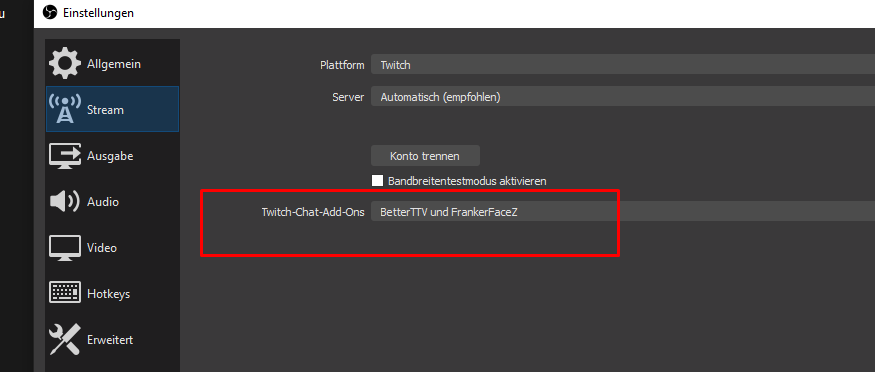
So you are using OBS.Live, logged in to SE, and your Settings > Stream setting looks like this?
If so, use the SE Chat, not the OBS chat.
night owl
Hey, can you help me, i want to trigger the bot, if someone have a word in his message like "poop" and the boot answer with "$(count) user wants to poop to"
jaunty dagger
using SLOBS
cinder olive
night owl
Hey, can you help me, i want to trigger the bot, if someone have a word in his m...
Make the command, add a keyword to the command for "poop"
cinder olive
jaunty dagger
using SLOBS
We cannot provide support for SLOBS.
night owl
oh lol, thanks xD
craggy anvil
me lost 
ocean stream
is custom chat bot possible with slobs and ground control?
cinder olive
craggy anvil
me lost <a:PepeS:809107662439579668>
Open your OBS. Go to settings in the bottom right. Then got o "Stream" in the top left.
jaunty dagger
but I'm just looking for a variable to use in SE to make myt emote in the command not the $[random.emote] one
cinder olive
Select the setting I show in the screenshot.
cinder olive
craggy anvil
Already done
Please send a screenshot of the setting set, and that you are using the SE chat & not OBS chat.
 jaunty dagger
so is there no variable for imputing your custom emote in a command for SE?


 oblique steeple
It can take a while until the emotes are synced. You can also type !emotes update in your chat. Note that even after typing the command, it may take a bit.
jaunty dagger
well when I made a custom overlay the emotes were there to use but I want to make a command using them
oblique steeple
My message was meant for Maqical. @jaunty dagger I can't help you with your issue because I never used a sub hype
jaunty dagger
ok
craggy anvil
@jaunty dagger get BTTV, upload your custom Emotes, get a command from elements with those emotes in it (since the bot can use it with bttv) then get kappegen and you should be good to go if I understood it right 
@oblique steeple yea weird is just some of them work, just not all 
oblique steeple
When did you add those emotes?
oblique steeple
Yeah then it might take a bit longer
craggy anvil
but there is no setting like from the se chat where I need to enable or add bttv?
oblique steeple
Nope.
craggy anvil
some people said there should be a bttv theme http://prntscr.com/yzz6c9

but wasn't sure about that
oblique steeple
That's just for the chat's appearance. Only a theme like it says
 light bay
Hey, I'm trying to set custom gif's for subscribers but it won't change it, anything I can do?
gloomy sun
gloomy sun
bumping again - tested it a few more times but no dice. These were the only things that I touched in order to try to get it to work - did I miss a step? Or should I just give up for now?
 high merlin
Can anyone tell me how to set command permission levels from chat?
 atomic flax
A bit of trouble Importing overlays,the sides of the alerts are cut off... I have it size to 1920x1080 so I don’t get why this is happening.
 sharp sail
I cant edit or add commands can some1 help?
 next portal
Hi - just wondering if there are any known issues with the Streamelements bot at the moment. I am a moderator in a friend's Twitch channel (ftwenn) and the bot does not react in chat at all. We already tried letting it part and rejoin and we tried muting and unmuting it too, but nothing seems to help.
next portal
No editing and add commands works without any issues.
high merlin
@sharp sail Where are you trying to edit?
 muted blaze
Could @viscid pebble direct me to the right area for SE.Sponsorship issues?
Can we not ping staff?
 faint minnow
Hi guys, my friend have problem, she is using streamlabs obs, but today she starts using some custom overlay with alerts from streamelements. She imported s-labs to s-elements and every donation from history shows on stream. But when new dono or follow or anything will come, there isnt no more alerts. Test follow is working but everything else isnt. Is there any way how to setup s-elements as default? Maybe its because activity feed isnt refreshing?
drowsy egret
faint minnow
Hi guys, my friend have problem, she is using streamlabs obs, but today she star...
please ask her to share her account id, a staff member will be able to take a look with that
viscid pebbleBOT
Please provide your account ID found at the top of this page: https://streamelements.com/dashboard/account/channels This ID is public info and safe to share here.
faint minnow
you mean this? 601a27d6b6d6c1f6b7661cbc
drowsy egret
faint minnow
you mean this? 601a27d6b6d6c1f6b7661cbc
yes, I'll ask for someone to check
wary halo
muted blaze
Ping or DM :)
You can use our contact form here: https://streamelements.com/contact Thank you.
faint minnow
drowsy egret
yes, I'll ask for someone to check
thank you
muted blaze
Thank you, it was with "payment details not being entered properly" or something
 tribal rain
Dont need help but more of a question. Does Streamelements not have a queue system?
drowsy egret
@faint minnow should be fixed now, ask her to check 😄
faint minnow
drowsy egret
<@!145260407966138368> should be fixed now, ask her to check 😄
i think its working now, thank you very much
 keen stirrup
hi i have the 404 page not found error for chat stats, is it possible someone could fix it /?
old user: milkyanna
new user: annaisntfound
drowsy egret
keen stirrup
hi i have the 404 page not found error for chat stats, is it possible someone co...
I'll ask a staff member to fix it
keen stirrup
thank you !!!!!
drowsy egret
keen stirrup
thank you !!!!!
fixed 😄
keen stirrup
thank you so much :)
 honest wyvern
Hi, I am having trouble with my Merch store, trying to create/add new items and it's just sat at creating, has been like that for nearly 3 hours now
 lavish token
im just trying to start steaming how do i import my overlays from stream elements to streamlabs ive been looking around for a answer and im just not finding it please help
drowsy egret
lavish token
im just trying to start steaming how do i import my overlays from stream element...
from SL to SE you can use the Import menu on your dashboard, from SE to SL you'd have to ask them
 hazy maple
Can I get a member who deals with SE Pay to contact me please?
lavish token
ok yea it lets me import form sl to se but not from se to sl
drowsy egret
hazy maple
Can I get a member who deals with SE Pay to contact me please?
use this form to explain your issue: https://streamelements.com/contact
dry hill
vestal yacht
Cool i havn't tried it myself yet but I'm sure it's the solution
Hasn't worked out unfortuneatly 😦
 lilac oak
Hi all. Looking for a quick and dirty way to add a UTC clock to my stream. Any thoughts?
drowsy egret
lilac oak
Hi all. Looking for a quick and dirty way to add a UTC clock to my stream. Any...
You want it as a chat command or displayed on your stream?
drowsy egret
lilac oak
Sorry for the delay, on my stream as an overlay.
You could use a custom widget, a quick search led me to this: #widget-share message
lilac oak
@drowsy egret Perfect.
 supple geyser
i have changed my name on twitch and now my activity feed and donate button are not working, i'm not sure what the issue is
viscid pebbleBOT
@supple geyser Please logout of StreamElements at https://streamelements.com/logout and then login again to your account (Twitch/YouTube/Facebook).
 random summit
@viscid pebble my streamelements bot doesn't react to any command since 2 weeks
viscid pebbleBOT
@random summit If you changed your name on Twitch, please follow these steps:
- Visit https://streamelements.com/logout and then log in again by connecting with Twitch.
- On the right side of the dashboard page that opens, select Join under bot settings. If it says Part select that and then select Join to send the bot to the chat. Don't forget to mod the bot by typing /mod streamelements in your channel if you have not already.
- Post your old and your new name here so that we can update your channel's chatstats tracking (must be done by staff).
random summit
i didnt change my name
 strong kernel
Start by making the bot a moderator.
random summit
i did
strong kernel
It's not.
random summit
streamelements è già moderatore del canale. its already a mod
strong kernel
This is from your channel. It is not currently a mod.
supple geyser
old name: LoddyHi new name: LoddyTTV and its still not working
strong kernel
Please make it a mod using /mod StreamElements
random summit
StreamElements è già moderatore del canale.
viscid pebbleBOT
@random summit Welcome to the helpdesk! The regular helpdesk channels are in English but we do provide multi-language support in the following channels: #🇩🇪︱deutsch | #🇫🇷︱français | #🇪🇸︱español | #🇵🇹︱português | #🇳🇱︱nederlands | #🇮🇹︱italiano | #🇵🇱︱polski | #🇨🇳︱中文語言服務區-chinese | #🇯🇵︱日本語-japanese | #🇭🇺︱magyar | #🇰🇷︱한국어-korean | #🇹🇭︱ไทย-thai | #🇷🇺︱русский | #🇺🇦︱українська | #🇨🇿︱czech
random summit
it started to works again ty @strong kernel
supple geyser
supple geyser
old name: LoddyHi new name: LoddyTTV and its still not working
i logged out and logged back in and its still not working
drowsy egret
supple geyser
i logged out and logged back in and its still not working
I passed this to a staff member, I’ll let you know once it’s fixed
supple geyser
thank you
strong kernel
supple geyser
i logged out and logged back in and its still not working
Regarding your tipping page link, you need to actually change the URL in your panels for the button to work. It's still pointing to the old one.
And your activity feed appears to be just fine.
random summit
@strong kernel it stops to works again
 visual terrace
hello everyone can anyone tell me now can i put the URL link of the twich chatbox on the steam elements?
strong kernel
visual terrace
hello everyone can anyone tell me now can i put the URL link of the twich chatbo...
What do you mean?
supple geyser
strong kernel
And your activity feed appears to be just fine.
your follow worked on obs but bits and host are not popping up
strong kernel
supple geyser
your follow worked on obs but bits and host are not popping up
If it continues to happen the next time you're live, feel free to reach out, particularly for bits. Regarding hosts, not all will appear:
viscid pebbleBOT
@supple geyser "Due to changes to Twitch API, we have filtered out hosts and will only show these ones on your activity feed:
- All hosts coming from an online channel with at least 1+ viewer
- Auto host events with at least 1 viewer - only from a channel that just went offline
Note: If you see X channel has hosted you with no viewers on the back, that is considered an offline host or a host with 0 viewers, we do not show these."
supple geyser
i got it thank you so much for your help ❤️
visual terrace
strong kernel
What do you mean?
i have a overlay but i dont know how to to copy the URL of the chatbox in order to make the overlay play the cam and the chat box but wen i try to copy the chatbox it puts a userlogin of twich and a password
strong kernel
visual terrace
i have a overlay but i dont know how to to copy the URL of the chatbox in order ...
Please be more clear when explaining the issue or provide screenshots.
 little bronze
hey everyone need help with something please i turned on my OBS to stream and my chat isnt their for some reason and i dont know hot to get it back to normal?
cinder olive
little bronze
hey everyone need help with something please i turned on my OBS to stream and my...
Click View then Docks, then Chat for the OBS chat. Click StreamElements then Chat for SE chat.
cinder olive
visual terrace
i have a overlay but i dont know how to to copy the URL of the chatbox in order ...
Are.. you asking how to add a overlay to your OBS? Are you asking how to login to se in OBS?
visual terrace
cinder olive
Are.. you asking how to add a overlay to your OBS? Are you asking how to login ...
no i have and overlay but i want to put the URL of the chatbox behind the overlay but the question is how can i put the chat box URL
little bronze
No I had someone set everything up for me and streamed many times never had this problem I turned on OBS and my chat is not beside my live scene and my live scene is in the middle of the screen now to ?
Did you guys get the photo I posted I don’t see it ?
strong kernel
little bronze
No I had someone set everything up for me and streamed many times never had this...
Follow Mitch's instructions.
cinder olive
visual terrace
no i have and overlay but i want to put the URL of the chatbox behind the overla...
Do you speak another language?
little bronze
Hey @cinder olive thank you so much it worked !
visual terrace
cinder olive
Do you speak another language?
spanish
cinder olive
visual terrace
spanish
Then I would attempt to get assistance in #🇪🇸︱español
random summit
@strong kernel streamelements doesn't work when i open obs studio
viscid pebbleBOT
@random summit If your commands recently stopped working and you're using OBS.Live and a custom bot name do the following:
- In OBS.Live, click on the hamburger menu (three stripes) at the top left of your activity feed
- Click on Stream Settings > Custom bot name
- In the Custom bot name field select Set custom bot name, not your already existing username (with capital letters). Note: If you already connected an account that way, the third entry will show as the account name (see image https://i.imgur.com/sO7fWOX.png).
- Scroll a bit down and click on the purple Connect Custom Bot Account button
- Log in as usual and Authorize the custom bot name
- Back in the Activity feed, click on the Send Test Message button and check if your custom bot name starts working again
 plush ibex
who much donations and tips did i make this last live stream
and were is my money from 3 to 4 days of the the last time we did this
 unborn tinsel
Ok I have a question 🙋♀️ just wondering when someone subs using a token though iOS how do I get in to pop on my stream ?
lament blade
CIAO
 plucky linden
How do I add custom commands
viscid pebbleBOT
@plucky linden New to StreamElements?
Check out our YouTube channel https://www.youtube.com/c/streamelements/videos
with tutorial videos from setting up the basics, to in-depth details on how to use our product.
New to OBS? Here is a 4 step quick start guide
https://obsproject.com/wiki/OBS-Studio-Quickstart
Want to learn even more? Here is an in-depth overview
https://obsproject.com/wiki/OBS-Studio-Overview
strong kernel
plush ibex
if i dont see it in 3 to for days were havimg the same talk
None. Zero. You've made absolutely no money.
plush ibex
sunday today i did and its going somewhere i want to know were
cinder olive
Do you have a screenshot or clip of the donos?
 fierce snow
Hi can we put string like {game} in automatic tweet ?
plush ibex
no im trying to find it i live stream five to 10 hours thats a crap tone to go through
cinder olive
plush ibex
no im trying to find it i live stream five to 10 hours thats a crap tone to go t...
Did it look anything like this?
plush ibex
ya
cinder olive
Those are fake donations.
You can simply type those into any twitch chat by typing "/me has donated 400$."
fierce snow
to avoid that stop allowing ./me command
plush ibex
i have the bot to stop that idk y it slacks at that
fierce snow
i think you can disable it in your chat setting
cinder olive
./me is indeed enabled in your stream currently.
plush ibex
ill get around to it if it is dm it to me
 shy kelp
can anyone point me in a direction to learn about Nightbot commands. i saw where "viewer" please follow if you enjoy the stream link popped up in the chat.
cinder olive
shy kelp
can anyone point me in a direction to learn about Nightbot commands. i saw where...
This is a discord for StreamElements support. We do not provide support for nightbot.
 grand escarp
My alerts dont work for follows and only shows hosts and raids. My dashboard also doesn't keep track of any followers
viscid pebbleBOT
@grand escarp Please provide your account ID found at the top of this page: https://streamelements.com/dashboard/account/channels This ID is public info and safe to share here.
 spare tulip
Hello
grand escarp
flelipo
cinder olive
grand escarp
flelipo
Account ID, not user. Follow the instructions please 
grand escarp
5ff80c09578531dc47af0439
 grand oak
Any idea how to prevent people from adding themselves high up in the point leaderboard? They haven't legitimately earned any points nor have they ever talked in chat. The leaderboard was reset recently so there's no way they would have watched stream long enough to get very high.
cinder olive
grand oak
Any idea how to prevent people from adding themselves high up in the point leade...
Are they moderator? Or have bot editor access?
Only other way to get points would be to gamble.
grand oak
we have gambling disabled and they have never talked in chat. I don't see them listed as having any access level
viscid pebbleBOT
@spare tulip Welcome to the helpdesk! Please let us know how we can assist you today and a support volunteer or staff member will assist you as soon as they are available. Thank you for your patience.
cinder olive
grand oak
we have gambling disabled and they have never talked in chat. I don't see them l...
Then it would either have to be watchtime, or a moderator giving points.
grand oak
I would agree with watchtime, but we reset the leaderboard and they're much higher than possible. So far only the broadcaster and myself can add points
cinder olive
What stream is this for?
grand oak
TheGeekEntry
cinder olive
Has he dropped bits, subs, or tipped?
grand oak
there's nothing in the activity log about subs or bits. A tip that high would be hard to miss
the #2 and #3 spots are the ones in question
azure burrow
Says online to ask here so asking again. I want to change SE bot name. Did all I was supposed to. Got app. Linked pay page. Etc. still no option in app to change bot name.
viscid pebbleBOT
@azure burrow Currently renaming the bot fully works with OBS.Live.
You can follow this video guide to set it up: https://discordapp.com/channels/141203863863558144/494513233416421386/561516184718278676
If you don't want to use OBS.Live and want to stick with Ground Control, please let us know your Twitch username.
azure burrow
Thank you it’s maxcellgames
 errant nebula
I need help with twitch. Is there any other way to collect donations besides PayPal?
viscid pebbleBOT
@errant nebula SE.PAY is available for streamers who are at least 18 years old, with bank account under their name in one of the following countries and have at least 101 follower (Twitch) / 101 subscribers (YouTube):
Austria, Belgium, Czech Republic, Denmark, Finland, France, Germany, Ireland , Italy, Netherlands, Poland, Portugal, Slovakia, Spain, Sweden, Switzerland, United Kingdom, United States.
If you meet these criteria and don’t see SE.Pay, let us know.
For information on SE.Pay payment methods, their fees and settlement times see https://streamelements.com/dashboard/tipping/fees
errant nebula
Is that it? I can't link a regular card?
drowsy egret
errant nebula
Is that it? I can't link a regular card?
you need to use a tipping system to be able to receive money to your account
errant nebula
@drowsy egret Can you just PM me
strong kernel
errant nebula
<@!131420870244564992> Can you just PM me
There's nothing further to be said. Only PayPal and SE.Pay are available options. We do not offer any other alternatives.
strong kernel
 graceful silo
I'm unsure if I should (or can) move my question again.
graceful silo
I'm unsure if I should (or can) move my question again.
Which overlay did you add the tiltify alert widget to?
graceful silo
I created a browser source for the overlay that Tiltify offered. I didn't realize I needed to add a new widget.
strong kernel
If you want to use something Tiltify is providing, you will need to reach out to them for assistance. If you're wanting to use our Tiltify integration, you need a widget in one of your StreamElements overlays.
graceful silo
I see. The integration was what I preferred, but I clearly didn't understand how it worked.
 safe wave
How do I make my twitch chat show up in obs?
viscid pebbleBOT
@safe wave OBS.Live is a Plugin for OBS created by StreamElements. You can download OBS.Live here: https://streamelements.com/obslive
Please make sure you have the latest version of OBS installed, Current Version: 26.1.1. You can install OBS here: https://obsproject.com/
safe wave
nevermind
 woeful juniper
So I had the issue again today where OBS Live hiccuped and I lost my custom bot. I was in a one-on-one chat with someone to figure it out, but there wasn't a fix figured out.
Is there anything I can do to fix this? I hate having to switch off my custom bot.
I don't want to have to restart OBS every time this happens because that splits up my VOD.
viscid pebbleBOT
@woeful juniper StreamElements menu, on top of OBS > Logout > Login
strong kernel
No restart required.
woeful juniper
Okay, well is there a reason why this happens in the first place? Is there anything I can change in OBS Live settings or something? This has only started being an issue for the last few months.
strong kernel
Tokens expire. It happens. It's a security risk for Twitch if they didn't.
woeful juniper
It happens on a weekly basis.
Sometimes twice a week.
If it were the token, wouldn't it be 30 days?
strong kernel
That depends on the issuer of the token, in this case Twitch. They can make them expire as quickly as they want.
woeful juniper
Hmm. But I also use another service to do features that SE doesn't have, haven't had an issue with that.
 pine heart
When I pick "Game Capture" then "specific window" then the window I want it does not show me any window at all
viscid pebbleBOT
@pine heart Obs.live is a plugin for OBS Studio for the best OBS support, please join their Official Discord @ discord.gg/obsproject
 ripe scarab
So, my GIFs keep disappearing... are they being pulled because someone is claiming them?
drowsy egret
ripe scarab
So, my GIFs keep disappearing... are they being pulled because someone is claimi...
care to elaborate? where are they disappearing from? your overlays?
ripe scarab
no, store redemptions
the store entries are there, but the related media (the GIF) gets removed
it causes the related command to play the last played GIF
I don't have screen shots or anything, I usually end up fixing them on the fly
The funny thing is the original GIFs are there, the new ones I made are the ones disappearing
drowsy egret
ripe scarab
it causes the related command to play the last played GIF
so once you create a new store item the alert asset gets removed after a while?
you don't see them on your store or they just don't play on your overlays
ripe scarab
yeah, but my older (unused) assets stick around
the files straight up disappear from my "uploaded media" thingy
drowsy egret
how long they take to disappear? just right after you upload them or they stay for a while?
ripe scarab
I think I re-scaled/sized them a couple/few months ago
and the new ones have been slowly dis-appearing
the old (original) ones are still there though
when the newer ones disappear, I just re-link the things to the old files
drowsy egret
could it be that you set a limited amount?
ripe scarab
nope
viscid pebbleBOT
@ripe scarab Please provide your account ID found at the top of this page: https://streamelements.com/dashboard/account/channels This ID is public info and safe to share here.
drowsy egret
I'll take a look
ripe scarab
Thank you!
drowsy egret
ripe scarab
Thank you!
alright so, my first suggestion would be to rename your gifs before uploading them, I'm not sure if having duplicated filenames could cause this kind of issue
ripe scarab
Pretty sure I have the resized files here... I'll try that, renaming before re-uploading
 orchid pawn
hi, please i create a custom botname on my twtich channel, but now i want rename my custom name, need help ty!!
drowsy egret
orchid pawn
hi, please i create a custom botname on my twtich channel, but now i want rename...
you would have to create a new twitch account and use that as your new bot custom name
either that or change that account username
orchid pawn
ok i create a new acccount but i cant add the new account
drowsy egret
if it lets you
woeful juniper
Is there any way to see a database or something of all the quotes my channel has? Other than typing in the command in chat to search?
 worthy wing
I've looked in a few places how do you use the custom widgets in already made overlays
drowsy egret
orchid pawn
thanks <@!131420870244564992>
scroll down, you will see this
 slender yoke
Hello. I'm trying to use the !points command to check points for my stream store and it's not working?
I haven't changed the name of the store currency
 idle linden
Followers still haven't been fixed in showing up in Activity feed. Is this ever going to be fixed or a solution given? :/
slender yoke
@idle linden i have no problem with that
drowsy egret
slender yoke
Hello. I'm trying to use the !points command to check points for my stream store...
make sure the command is enabled
orchid pawn
drowsy egret
scroll down, you will see this
done! thanks so much!
slender yoke
@drowsy egret I can't find it in the list?
drowsy egret
slender yoke
<@!131420870244564992> I can't find it in the list?
should be under default commands
idle linden
I had this problem since day one with StreamElements.... @slender yoke
drowsy egret
woeful juniper
Is there any way to see a database or something of all the quotes my channel has...
I'm afraid thats not a feature currently
woeful juniper
Can there please be a feature for that? StreamLabs does
viscid pebbleBOT
@idle linden Please provide your account ID found at the top of this page: https://streamelements.com/dashboard/account/channels This ID is public info and safe to share here.
idle linden
@viscid pebble 5ffa2803f3c4c7717ca97d7e
Am I doing something with this now? This thing is laughable says member since 9/01/2021... I didn't realize I could Time-travel... sorry for bothering all ya' in the past with future problems. lol
drowsy egret
idle linden
Am I doing something with this now? This thing is laughable says member since 9/...
issue should be fixed now. also, date format is dd/mm/yyyy so its actually Jan 9th 😄
idle linden
Daang Europeans.. and yoru DD MM YYYY ! XD lol wait.. but I've been a member since back in 2020... o.o (stares)
Also Thank you, I take it there is nothing the "user" can do to fix it then. -_- have a good day!
 thorny escarp
I had to reset the password on the twitch account that is my streamelements custom bot name. Now I can't reattach it to my streamelements account for some reason. I click connect custom bot account in the activity feed in OBS.Live, log into the account and then nothing happens. It still says "Set custom bot name" int he current bot name account and "Connect Custom Bot Account" is still able to be clicked. Please help.
drowsy egret
thorny escarp
I had to reset the password on the twitch account that is my streamelements cust...
you need to login with your main twitch account, then you can add your custom bot account using the hamburger menu in your activity feed dock
thorny escarp
Yes. I have done all that.
Please read the above.
I have also already tried logging out and logging back in on OBS.Live.
drowsy egret
thorny escarp
I have also already tried logging out and logging back in on OBS.Live.
try removing the connection from your twitch settings on your bot account: https://www.twitch.tv/settings/connections
click disconnect right next to StreamElements - Custom Bot
and then try again
 fading abyss
How to fix delay on stream?
thorny escarp
There was nothing there for StreamElements - Custom Bot. There was a listing for StreamElements by itself. I deleted that, tried again and got the same result.
Still not reconnecting.
Now Stream Elements - Custom Bot is there in Other Connections, but it still not listed as an option again for me in OBS.live
viscid pebbleBOT
@thorny escarp "1) Right click on your OBS desktop shortcut and open the Properties
2) In the Target field, add the following to the very end: --remote-debugging-port=40404 (don't forget to add a space before the current path)
3) Open OBS (or restart if it was open)
4) Open your web browser and type in: localhost:40404
5) Click on StreamElements - Activity feed
6) Navigate to the Console tab
7) Type the following into the console and hit enter: store.customBot.removeCustomBotIntegration()
8) Try setting the custom bot name
9) Remove the additional flag in step 2 from your shortcut properties."
thorny escarp
I am stuck on Step 6. I do not have a Console tab.
I have html, body, styles, computed and event listeners
Ahh there we go I found it
The return on the command was this: Promise {<pending>} Trying to set the bot name now again
That worked, thank you for your help.
 maiden hollow
I have received no email after being told "payment confirmation will be sent via email" for 5+ hours, is this normal or should I have received the email by now?
 foggy heart
maiden hollow
I have received no email after being told "payment confirmation will be sent via...
foggy heart
maiden hollow
I have received no email after being told "payment confirmation will be sent via...
This is normal, as it doesn't happen immediately
 vivid python
I dunno where to put this but, I keep getting a log in loop on the website when I try to log in. And if I do log in the dashboard itself isnt loading
viscid pebbleBOT
@vivid python Please logout of StreamElements at https://streamelements.com/logout and then login again to your account (Twitch/YouTube/Facebook).
vivid python
I did 3 times and am still getting the loop
foggy heart
vivid python
I did 3 times and am still getting the loop
It might help top clear the cookies and cache of the browser. Does the same thing happen in a private window? Also, which browser are you using?
vivid python
Ive tried on both chrome & opera. On an incognito tab it got to my dashboard but when I try to get to someones account that I have mod privileges for it just loops
 deft condor
hey! after nuking OBS im still having the issue, im starting to wonder if its something on my end that maybe im doing wrong
i just wrapped up my stream and it worked about half the time, i do however have a log from the stream tho if youd like to take a look
foggy heart
vivid python
Ive tried on both chrome & opera. On an incognito tab it got to my dashboard but...
Yeah, I would try clearing the cache and see how the browser responds after that. I'm not seeing any issues when I try on a fresh chrome window
deft condor
actually as i look thru the logs i do see a few errors for SE stuff
foggy heart
deft condor
actually as i look thru the logs i do see a few errors for SE stuff
Can you share those errors?
deft condor
yeah do u want me to just drop the log in here
vivid python
So I got to my dashboard through this way. Still cant get to another streamers page that I mod for though
foggy heart
deft condor
yeah do u want me to just drop the log in here
is it the same one as what you sent before?
deft condor
no its a recent log
from today on stream
apparently the last one i sent wasnt from a stream so there were no errors
foggy heart
deft condor
from today on stream
oh yeah, you can post it here
deft condor
foggy heart
vivid python
So I got to my dashboard through this way. Still cant get to another streamers p...
The account you mod for one still loops?
vivid python
Yep. Sends me straight back to the login page every time
foggy heart
vivid python
Yep. Sends me straight back to the login page every time
You might have to have the owner of that account follow the same steps you did, mainly the logging out and back in
vivid python
Ill let them know and get back to you if it works or not
foggy heart
deft condor
based on the obs analyzer, i saw a few issues that may be worth looking at on the obs side: https://obsproject.com/tools/analyzer?log_url=
deft condor
okay awesome! i wasnt sure if it was an OBS issue or SE but the obs discord just told me to come here and then you guys said you couldnt replicate it so i had no idea what was going on lol
apparently the only issues are for audio and refresh rates
 tawdry thunder
hey there, im an aspiring content creator and streamer, i was looking for help with bringing my overlays over to obs... also looking for help streaming from xbox one to laptop.. anything will help
viscid pebbleBOT
@tawdry thunder New to StreamElements?
Check out our YouTube channel https://www.youtube.com/c/streamelements/videos
with tutorial videos from setting up the basics, to in-depth details on how to use our product.
New to OBS? Here is a 4 step quick start guide
https://obsproject.com/wiki/OBS-Studio-Quickstart
Want to learn even more? Here is an in-depth overview
https://obsproject.com/wiki/OBS-Studio-Overview
foggy heart
deft condor
apparently the only issues are for audio and refresh rates
I did see a message on there as well about your GPU being maxed out and OBS being unable to render properly
deft condor
foggy heart
I did see a message on there as well about your GPU being maxed out and OBS bein...
yeah i see that as well, idk why it says that lol i have a 1070ti and only play cs/valorant which are CPU intensive
it might be cus i dont use vsync/framerate limits on my games tho
foggy heart
deft condor
it might be cus i dont use vsync/framerate limits on my games tho
Yeah, it seems like OBS may be having a hard time keeping up while everything is going at once, however I wouldn't be able to confirm the exact reason. This is where I'd ask the OBS community about optimization
deft condor
foggy heart
Yeah, it seems like OBS may be having a hard time keeping up while everything is...
sorry to bother again! i recently switched to X264 encoding bc someone recommended that i do that based on the fact that my 5600x would probably be a better encoding option vs my 1070ti, do you think that could possibly be whats causing my issue? does CPU handle browser sources and such?
i also use quite a few webm files which ive heard are pretty cpu intensive but i would think a CPU like a 5600x would be able to handle those and alerts at the same time, i mean i rarely get over 15% cpu usage when streaming lol
foggy heart
deft condor
i also use quite a few webm files which ive heard are pretty cpu intensive but i...
So it looks like the CPU might be getting a lot of tasks at once. The sources and such are handled by the CPU, but the encoding can be set to either the CPU or GPU. For encoding, I usually recommend trying both and seeing what handles better
deft condor
i havent always had this issue but i cant remember if this started happening before or after switching my encoder
actually the only webm files i use are alerts lol
anyways! ill just switch encoders and see if that possibly fixes my issue
foggy heart
deft condor
anyways! ill just switch encoders and see if that possibly fixes my issue
definitely worth a try! I know that normally sometimes a sudden spike in CPU usage, whether it lasted long or not, would cause my OBS to act up
foggy heart
yeah, it's like that sometimes lol
deft condor
the reason i switched was because my game ran choppy when i had obs window open but recently ive found out that its just bc i have diff refresh rates and just need to update windows
lmao thank you so much for all the help really appreciate u and cryonic and sudo for all the help you guys have given me, you guys are the best seriously
foggy heart
deft condor
lmao thank you so much for all the help really appreciate u and cryonic and sudo...
Glad we could help out! 😆
lament blade
so my stream is delayed for my chat and it isnt live after a raid. i have low latency and my stream delay is off
any suggestions would be appreciated so I can go back to live viewers while im streaming
the delay is 7 mintues right now
zenith widget
Delay can happen based on your connection with the streaming server and your upload speed.
lament blade
this is the first time im using this ive never had this issue on streamlabs
zenith widget
If your ISP is currently having issues or just you in your local area with connecting to the twitch servers, then that might be the issue. Nothing we can do to help on the matter.
lament blade
gotcha thank you
zenith widget
Just to point out, OBS.Live is a plugin for OBS Studio
and SLOBS is a fork of OBS Studio
so the best place to ask for help on OBS related things is here: https://discord.gg/obsproject
that being said, i believe they will tell you the same that your upload speed matters here
lament blade
my upload speed is fine ive tested it 7 times and it isnt an issue
zenith widget
speed tests are inconclusive
viscid pebbleBOT
Dropped Frames means that you have a bad connection between your device and the streaming platform and most likely something related to your ISP not handling the connection properly.
Speed tests usually cannot help solve this problem and its best to use this guide: https://obsproject.com/wiki/Dropped-Frames-and-General-Connection-Issues
If you stream to twitch, use the !twitchtest command and do a connection test to your regional servers.
zenith widget
also speedtests always try and connect to the closest possible server to you, rather then to a server you'd like
hence the twitch tester
 sage island
i feel this is a stupid question to ask. How can i get my commands to work. But my commands suddenly stopped working. I didnt change the name. I have parted and reset role for SE. No such luck. Please, any help is welcomed!
ionic kelp
@sage island Try modding the bot first.
 gleaming nebula
Yo
Im an idiot cant get the timers to work
All my other commands work. Is it something im missing?
ionic kelp
Mind screenshotting what you have for them in the timers section?
gleaming nebula
Yea one sec
viscid pebbleBOT
@sage island If your commands recently stopped working and you're using OBS.Live and a custom bot name do the following:
- In OBS.Live, click on the hamburger menu (three stripes) at the top left of your activity feed
- Click on Stream Settings > Custom bot name
- In the Custom bot name field select Set custom bot name, not your already existing username (with capital letters). Note: If you already connected an account that way, the third entry will show as the account name (see image https://i.imgur.com/sO7fWOX.png).
- Scroll a bit down and click on the purple Connect Custom Bot Account button
- Log in as usual and Authorize the custom bot name
- Back in the Activity feed, click on the Send Test Message button and check if your custom bot name starts working again
ionic kelp
You need to hit stop roleplaying in the top right.
gleaming nebula
ionic kelp
It would help if you're on desktop but that does help regardless.
Is there any reason you have the chat lines so high?
gleaming nebula
I dont really need it on when im offline.I didnt want it spamming while ppl keep talkin if things get busy
sage island
THAT WORKEDDD
ionic kelp
You can click the checkmark for that option and it'll only do it when online.
sage island
What a speedy response, and thank you!
gleaming nebula
Yea I had it off for offline but wasnt sure if thats why it wasnt working or not
ionic kelp
Something that explains timers a little bit <#helpdesk-twitch message>
gleaming nebula
Which tab can I find the activate bot and leave channel? I cant find it maybe that will fix the timers
viscid pebbleBOT
@gleaming nebula Go to the Dashboard > Right side > Part channel > Join channel(https://streamelements.com/dashboard)
ionic kelp
But the main issues is you've got a 5 minute window to have those 150 chat lines go through and if that isn't met it restarts the 5 minutes until it's met.
That's why having a lower line count is generally recommended unless your chat is SUPER active.
gleaming nebula
So what number do you reccomend?
ionic kelp
That's all dependent on your chat. You can set it to 0 if it's generally dead.
gleaming nebula
Omg duh im an idiot
I thought it ment like every 100 lines or 45 mins whatever comes firsr
Thats a minimum
Damn ty
Ty so much im sure that fixed it
 magic wedge
Hello, I have a question regarding giveaways, is it possible to make them like ‘follower only’ or anything like that?
zenith widget
You can make them subscriber only
magic wedge
Fair enough, I think I already found an option tho haha
 raw horizon
👀 Hey so, someone tipped me today and the alert didn't go through (Doesn't even show up in the dashboard) as it usually does.
zenith widget
how are you sure you got tipped?
raw horizon
I got an email from paypal that it's pending.
And it also showed up in my paypal dashboard.
zenith widget
Since its pending, we won't be showing you the tip, until its accepted by you
raw horizon
Oh, that's odd. Usually they go through instantly. Is there a way for me to fix that?
zenith widget
as we have not received the "OK" event from PayPal
yes, go your paypal account and accept the tip
most likely the tipper doesn't have a verified account
zenith widget
Its an issue on either your side or theirs
paypal wise
nothing we can do to help here
besides give information
raw horizon
I really appreciate you being so fast on the matter either way!
zenith widget
👍
raw horizon
Yeah there's no accept button on paypal either to accept the payment.
zenith widget
paypal support 
ionic kelp
That can take a few days.
zenith widget
you'll see it in like 15+ days
ionic kelp
Yup.
zenith widget
or 7
can't remember the period for paypal eCheques
but 15 and 21 lingers in my brain
raw horizon
I see. Thanks  Didn't know about this yet.
zenith widget
i think the tipper can still cancel it
orchid pawn
Hello, I need a little help, the bot does not show me the host alerts in the chat, I have checked and everything is correct I do not know what is the problem , thanks
all other notifications are working properly
viscid pebbleBOT
"Due to changes to Twitch API, we have filtered out hosts and will only show these ones on your activity feed:
- All hosts coming from an online channel with at least 1+ viewer
- Auto host events with at least 1 viewer - only from a channel that just went offline
Note: If you see X channel has hosted you with no viewers on the back, that is considered an offline host or a host with 0 viewers, we do not show these."
 sly minnow
Howdy all, I have small problem with media request on theme. I am doing it (see ss), and there is no sound I try to unmute (pressing m) but is quickly muted again, on stream I have kind of random success as I can hear sound and sometimes no. How to control it properly ?
lament blade
hello
im trying to get bot commands to work...i see all is turn on..also i see variants..in...here...${settitle "<title>"}
Sets the title to <title> - quotation marks required if the title contains spaces
${settitle "ELECTRIC BODYBUILDER FROM RUSSIA"}
ELECTRIC BODYBUILDER FROM RUSSIA
i dont know how it got there..
and i cant delete it...any ideas?
ionic kelp
@sly minnow Are you managing it through ground control or OBS.Live by chance as well?
ionic kelp
Not you.
lament blade
sorry
i'lll rtfm..sorry my bad..i dont want to bother anyone..
oh..silly me its just a string call..im soooo sorry...i am really having trouble thou...i type ! commands in chat box i should see a list of commands right?..but i dont...any ideas..?
im sorry to be a bother but i been working on this sinse 4/20/20...
i've made it this far...omg...what a mt..to climd being a live drummer...
how to add up some variable like increase 10+5 to get 15?
ionic kelp
!commands simply links to the page with the enabled commands.
sly minnow
@ionic kelp ground control only, but I have obs.live installed.
ionic kelp
Assuming it's enabled.
GFY dyno
@sly minnow If you have either of them open with the MR bit open that would be why it's doing that.
lament blade
<new guy here with this stream elements stufff.....my grands kids can figure this studd out better than me..gamers...so if i hear you right use ground control to control bot in chat box..so !commands will work and i will see a list of commands?..
ionic kelp
No
None of that is for you.
Using !commands (A default command) will link to the page with all of the publicly enabled ones.
lament blade
i shalll wait my turn sorry
say my name so i know u chatting to me please...this is way to confusing..thak u
zenith widget
He is tagging the right person he is giving information to.
zenith widget
lament blade
im trying to get bot commands to work...i see all is turn on..also i see variant...
what exactly was the issue here?
sly minnow
@ionic kelp sorry I am not getting it?🤔
lament blade
hello
ionic kelp
@sly minnow Do you have GC or OBS.Live open at the same time you have said page on the website open
lament blade
zenith widget
what exactly was the issue here?
in stream elements..obs.live.....bots in web interface..alllll turned..on...I type !command..in chat box while live.....i dont see anything....
viscid pebbleBOT
@lament blade If your commands recently stopped working and you're using OBS.Live and a custom bot name do the following:
- In OBS.Live, click on the hamburger menu (three stripes) at the top left of your activity feed
- Click on Stream Settings > Custom bot name
- In the Custom bot name field select Set custom bot name, not your already existing username (with capital letters). Note: If you already connected an account that way, the third entry will show as the account name (see image https://i.imgur.com/sO7fWOX.png).
- Scroll a bit down and click on the purple Connect Custom Bot Account button
- Log in as usual and Authorize the custom bot name
- Back in the Activity feed, click on the Send Test Message button and check if your custom bot name starts working again
lament blade
how to add up some variable? For example, any variable has 10, how to increase 10+5 to get 15?
sly minnow
I have gc and obs.live open in the same time, is this wrong?
ionic kelp
I think that's the reason for it wanting to act wonky.
Does it behave the same way within those?
 little oak
@lament blade try ${count kills "+${1}"}
sly minnow
@ionic kelp i will check it out and be back tomorrow. Cheers
 chilly sierra
hi!
lament blade
viscid pebble
<@456226577798135808> If your commands recently stopped working and you're using...
i thought i said stream elements....sorry not live...here i am looking for a hamburger...when..welll...theres a joke in there somewhere...tell u later..anyways....i see bot in chat now...thank you..that was not me...anyways...i do the command...!comannds and still nothing..any ideas..
This command
!cmd edit !test ${customapi.https://twitch.center/customapi/math?expr=${channel.followers}$(1|'-1')}
When to use !test -10 decrease 10, but when use !test +10 the result is this ???
 lament blade
I want to show ${channel.followers} +10 in result, just that
ionic kelp
You simply wanna have the amount decrease/increase by whatever is inputted following the command?
lament blade
increase the result, better not need to use +10, example !command +10
one command add up and show the result final
lament blade
lament blade
i thought i said stream elements....sorry not live...here i am looking for a ham...

I want to show ${channel.followers} +10
like
Hey guys we have 113 follows, help to get 123, following now
zenith widget
@lament blade it is not clear what you are using here. OBS.Live or ground control?
ionic kelp
Technically this should work if you want it hard set with a specific number ${channel.followers} ${customapi.https://twitch.center/customapi/math?expr=${channel.followers}+10}
zenith widget
@lament blade the +10 cannot be added to that variable, which means, goals cannot be set in the chat commands/timers. Then again you can still do "We currently have ${channel.followers} out of 1337"
lament blade
zenith widget
<@456226577798135808> it is not clear what you are using here. OBS.Live or groun...
zenith widget
@lament blade yes, that is our main website page
lament blade
zenith widget
<@456226577798135808> yes, that is our main website page
what im useing
zenith widget
Right, thats the entire website,
It does NOT tell me what exactly you are using, software wise
is it OBS.Live
or Ground Control?
lament blade
zenith widget
<@456226577798135808> yes, that is our main website page
oh ok...obs stream elements
viscid pebbleBOT
@lament blade If your commands recently stopped working and you're using OBS.Live and a custom bot name do the following:
- In OBS.Live, click on the hamburger menu (three stripes) at the top left of your activity feed
- Click on Stream Settings > Custom bot name
- In the Custom bot name field select Set custom bot name, not your already existing username (with capital letters). Note: If you already connected an account that way, the third entry will show as the account name (see image https://i.imgur.com/sO7fWOX.png).
- Scroll a bit down and click on the purple Connect Custom Bot Account button
- Log in as usual and Authorize the custom bot name
- Back in the Activity feed, click on the Send Test Message button and check if your custom bot name starts working again
lament blade
zenith widget
first of all...its not there...no hamburgers,..in corners..of any window here...sorry......r you refering to the drop down meue labeled streamelements....in there i see stream settings. custombot name.....ext...i done did all that..like 20 thousnads times...sorry...like i said i been battleing my way since 4/20/20..i have video profff...no i dont drink..nor do i do drugs...im a musian....and a dislec sec....
zenith widget
Show me a screenshot of what you are using
lament blade
zenith widget
Show me a screenshot of what you are using
for the record you never said anything about bot name...
its werking now
zenith widget
You said it your self
that you are having issues with the bot responding to commands
lament blade
im going to go take out the trash now...thanks guys and girls..
zenith widget
when i checked your channel and used a special command I explicitely saw the bot return a message saying "Custom bot name: enabled"
which means that either you are using OBS.Live right now
and are not following the instructions provided properly
or you are using ground control
Since you say you have video of what you are doing, I'm asking for a simple screenshot
of the application that you are using
that you see the custom bot name
 old mirage
is there a way to setup join queue, display queue commands on the bot?
zenith widget

 left thistle
Hello, i'm having trouble with the Video on Command Widget. Everything works fine but my video only shows the first second or two then freezes for the remainder of the video
note: im using OBS and the browser source. All sounds are fine. Preview in actual browser is fine
lament blade
ionic kelp
Technically this should work if you want it hard set with a specific number `${c...
to work don't use +
use URL encoded %2B
and work now
ionic kelp

 simple anvil
does anyone else have trouble with custom chat bot, just not working at random?
 silver mist
hi, sorry if this is the wrong place to ask, but I'm having trouble with my chat-stats page. It just returns a 404. twitch user shaggedy
ionic kelp
@silver mist Have you changed your name at any point since using us?
silver mist
since using stream elements? nope, there has been a name change on the account but that was at least 12 months ago
I did only activate SE today so I very well could be missing something in the setup?
ionic kelp
It should actually still return something but as far as why it might just be a hiccup as that does happen with chatstats.
 minor flicker


 lament blade
guys when ı want to stream fortnite, fortnite crashes my species are : RTX 2060 16gb ram and R5 3500X ı using my gpu for streams
this happening on fortnite ıdk why
silver mist
@ionic kelp so I should just give it 24 hours and see if it fixes itself?
ionic kelp
Shouldn't be that long but wait yes.
 subtle trail
wie kann ich den stream schlüssel in obs eingeben
ionic kelp
#🇩🇪︱deutsch
 rare crown
Hi! Can anyone help my? Folow TTS not work. It worked before. When someone folow is playing folow music and gif. After this should become TTS "Username welcome chanel".
If i emulate folower TTS work. But true folower its not work TTS.
viscid pebbleBOT
@rare crown Please provide your account ID found at the top of this page: https://streamelements.com/dashboard/account/channels This ID is public info and safe to share here.
rare crown
@viscid pebble Account ID 5c3481d29b0e0d715cc04384
lament blade
zenith widget
<@456226577798135808> the +10 cannot be added to that variable, which means, goa...
this works - ${customapi.https://twitch.center/customapi/math?expr=${channel.followers}%2B10}
zenith widget
Thats a custom API, not our built in variables
 stable finch
I have a problem with the alerts, if I set everything correctly in the editior, the standard animation comes anyway. only the sound has changed
zenith widget
@rare crown there seems to be a change the in the TTS of some old alert widgets.
Unfortunately, the only way to fix this is by removing the current alert widget and adding in a fresh one and setting that up.
@stable finch check the variations of the alert
@fringe furnace that would be a question for #dev-chat
 fringe furnace
zenith widget
<@!424610793384837121> that would be a question for <#259680142459142144>
fringe furnace
zenith widget
<@!424610793384837121> that would be a question for <#259680142459142144>
Alright I wasnt sure where I should send it so I sent it here and there so Ill delete it from here
rare crown
I can't find the folow alert files i installed. Can I somehow download them from StreamElemet?
ionic kelp
Any particular reason you need them?
rare crown
I would not like to make a new folow announcement. (gif and sound)
ionic kelp
Not sure what you mean by that.
rare crown
🤨 I don't want to make a new announcement but to use the old. Only want work TTS.
magic wedge
So If someone follows me , they get 300 loyalty points, but do they lose them as soon as they unfollow
ionic kelp
Not possible.
 north pewter
I am a mod I want to create a command in the chat but only mods can use it can someone help me there
magic wedge
Thanks for all the help so far, I have 1 more question tho, is it still possible for me to add the ‘giveaway’ widget , the video about it is from 2017 and outdated since it doesn’t have the ‘widget’ tab anymore I think
velvet spoke
north pewter
I am a mod I want to create a command in the chat but only mods can use it can s...
set the permissions to mod in the commands dashboard? Do people even check? https://streamelements.com/dashboard/bot-commands/custom-commands
StreamElements
The Ultimate All in One Platform for Streamers
 delicate chasm
Bom dia!
north pewter
@velvet spoke but as a Mod you can´t use the dashboard i search for a command in the chat
like !cmd add ********
north pewter
@velvet spoke ok Thanks
 winged horizon
Hey guys, I have tried google and several forums but I found no solution to my problem. When I go into my StreamElements overlays and edit the alert for followers everything works as I set it up. However, when I edit the sub/cheer/raid alert (basically anything else) it always plays the default sound and animation. I replaced both picture and sound, hit save like 100 times but it doesn't matter. If this is the wrong place to ask, please point me in the right direction. It drives me insane and I don't know what to do. Cheers!
 mellow vale
Good morning!
I am writing to ask for information: we have applied to the Magic: The Gathering Content Creator Program, our request has been in the approval phase for 23 days.
We would like to ask how long it usually takes to receive the answer? Thank you!
 ebon forum
mellow vale
Good morning!
I am writing to ask for information: we have applied to the Magic:...
ebon forum
mellow vale
Good morning!
I am writing to ask for information: we have applied to the Magic:...
Hi. Have you emailed them about it or not yet?
little oak
@winged horizon Edit your variations not just your defaults alerts
mellow vale
ebon forum
Hi. Have you emailed them about it or not yet?
Nope🤔
It's my first message to the support.
ebon forum
mellow vale
Nope🤔
Try to email them about it: creators@wizards.com
mellow vale
Thank you very much
winged horizon
little oak
<@!402084759804575744> Edit your variations not just your defaults alerts
The problem is that, for example, even if I remove the sound of the sub alert it still plays. I did not set up any variations.
 sharp oak
for some reason i opened obs a few minutes ago and now nothing is working wont pick up sound and wont connect to twitch even after it accepted the new stream key
viscid pebbleBOT
@sharp oak Obs.live is a plugin for OBS Studio for the best OBS support, please join their Official Discord @ discord.gg/obsproject
sharp oak
oh hell sorry
ebon forum
azure burrow
I really need assistance with a feature of Ground Control, are any staff on?
Yes. Just post your question.
azure burrow
I would like to change my bot name using ground control, not obs.live. my twitch name is maxcellgames
ebon forum
azure burrow
I would like to change my bot name using ground control, not obs.live. my twit...
Should be working now, try it
azure burrow
ebon forum
Should be working now, try it
all good now, thank you so much
sharp oak
is there another route to go if obs support is absolutely no help?
ebon forum
sharp oak
is there another route to go if obs support is absolutely no help?
OBS support is your best bet to get the support for it.
sharp oak
welp guess i need to switch to slobs than thats sad
 frigid wraith
How can I logg out the stream element acount and put my another twitch account
ebon forum
frigid wraith
How can I logg out the stream element acount and put my another twitch account
On the website or in OBS.Live?
frigid wraith
On the web site stream elements
little oak
Streamelelments is account based in order to sign out of obs.live/se site and put in another account you need to sign out of your twitch via twitch site
lament blade
I made an overlay and I can’t activate it I am wondering how I can get that activate
viscid pebbleBOT
@lament blade To add your overlays to OBS, add a new browser source in your scene. Paste your overlay URL in the browser source properties, set the dimensions to 1920x1080 (unless you changed them on the website) and check Shutdown source when not visible. https://youtu.be/KDvLynUqXI4
frigid wraith
Like every time I click log out and I put log in it will go back to my old account
I want to put my new twitch account on stream element
viscid pebbleBOT
@frigid wraith Please logout of StreamElements at https://streamelements.com/logout and then login again to your account (Twitch/YouTube/Facebook).
frigid wraith
Yes but every time I log in it doesn't give option to put. A new account
little oak
please read what i posted above
frigid wraith
Can I add you and show you an vid
little oak
No, As we do not provide 1:1 support
Streamelelments is account based in order to sign out of obs.live/se site and put in another account you need to sign out of your twitch via twitch site
frigid wraith
And then
When I put log out
It says thus
This
I put twitch this show up
Is there is any option that day make a new account
?
 inner igloo
oi oi crew, anybody of the team got a sec to merge two accounts? my friend accidentally created a new one for his twitch instead of adding it to his youtube acc
ionic kelp
For privacy reasons we need them to give info themselves.
inner igloo
okay, I'll invite him to the discord
 sage star
okay, asking myself then 🙂
anybody got a second to sort the two accounts problem out for me?
ionic kelp
Got 2 things for you then before grabbing staff.
viscid pebbleBOT
Account Merging - Please note:
- Merging accounts only allows faster ways to switch between accounts
- Merging accounts does not allow data sharing between accounts - different streaming platforms, different type of events
- Merging accounts allows duplicating/sharing overlays between the accounts
If you understand the limitations of merging and want to proceed, please find the JWT tokens (!jwt) from both accounts you want to merge and you will be directed to DM them to a staff member
ionic kelp
And this
viscid pebbleBOT
There is no easy way to unlink 2 owner-type accounts from each other. The only way is to make a closure request from here: https://streamelements.com/dashboard/account/security
WARNING: In submitting a closure request, all linked channels within the account will be deleted and you will lose all associated data. This includes overlays, custom commands, timers and past data (tips, subs, etc). You can still reconnect with the deleted account, but you are essentially starting fresh.
ionic kelp
Should you understand those I'll grab staff.
sage star
yeah I know about this, my friend told me already 🙂
ionic kelp
Do you have the JWT tokens for both by chance?
sage star
yeah I do
ionic kelp
@sage star You can DM @placid raptor indicating which is which.
 cerulean shadow
i am trying to find my "cart" in my own dashboard. im btrying to place a personal order but it says i have 300+ dollars in a cart that i cant find to empty and start from 0. Thanks MERCH GODS
frigid wraith
What is a token
little oak
a JWT token is just a token format to show authentication of proven ownership moreless
if that swhta you mean
ebon forum
cerulean shadow
i am trying to find my "cart" in my own dashboard. im btrying to place a persona...
on the main SE.Merch page, there is banner with the "order now" button
click on it, then you can select what you want and clean up etc.
 solid wing
yeah so with the watchtime stuff, don't really know why it doesn't work. i just ended up disabling the default command for it, and added a custom command for it:
!cmd add !watchtime ${user} has spent ${user.time_online|'0 seconds'} watching ${channel}
!cmd add !lurktime ${user} has spent ${user.time_offline|'0 seconds'} in ${channel}'s offline chat. @turbid bobcat
lament blade
My bank account isnt getting accepted on SEPay. I was wondering if there was a way that maybe I could just reset it and do it again?
viscid pebbleBOT
@lament blade Please contact us via email for support with SE.Pay. You can use our contact form here: https://streamelements.com/contact Thank you.
frigid wraith
Where can I find my token?
 turbid bobcat
solid wing
yeah so with the watchtime stuff, don't really know why it doesn't work. i just ...
turbid bobcat
solid wing
yeah so with the watchtime stuff, don't really know why it doesn't work. i just ...
Oh sorry! I replied in the other chat, it's the identical one already in my commands sadly.
I've tried it in both custom command and activating the default one.
My friend uses StreamElements as well and when I'm in his stream it's 0 sec as well.
little oak
@frigid wraith you do not need a token for i dont know why you need it no one has asked for it... youre trying to do everything with a cell phone, i'd advise to use a pc
viscid pebbleBOT
@turbid bobcat The !watchtime command is directly tied to the Loyalty system. The Loyalty system must be enabled for viewers' watchtime to count up.
To enable Loyalty, please go to the Loyalty section of your account: https://streamelements.com/dashboard/loyalty
Watchtime counts up every 10 minutes alongside Loyalty points, and only while the stream is live. Reruns will not be counted.
Please note that watchtime is not tracked by Twitch and there is no way to retroactively apply past watchtime to viewers.
StreamElements
The Ultimate All in One Platform for Streamers
solid wing
turbid bobcat
My friend uses StreamElements as well and when I'm in his stream it's 0 sec as w...
that's...weird, that command actually works for me with loyalty disabled too
so
i'm baffled
 inner flower
Where can I find the timer to make a Subathon?
solid wing