#helpdesk-twitch
1 messages · Page 829 of 1
 viscid pebbleBOT
@lament blade Please provide your account ID found at the top of this page: https://streamelements.com/dashboard/account/channels This ID is public info and safe to share here.
 lament blade
5ffa04923c0d4a235ba29c01
 zenith widget
Fixed
zenith widget
Something on our side
lament blade
thankyou admin! 😄
 meager cradle
hi, in the stream store when you make redeems with sound alert. we upload files right. is there somewhere where we can access the files and download them again to our computer?
 cobalt crag
how can i move my cam into the thing for it?
zenith widget
Click on the video source and scale it with the red border and just hold click drag it
 true mason
I just changed my username on twitch but now my SE wont work in my chat, ive already logged out and relogged in
viscid pebbleBOT
@true mason If you changed your name on Twitch, please follow these steps:
- Visit https://streamelements.com/logout and then log in again by connecting with Twitch.
- On the right side of the dashboard page that opens, select Join under bot settings. If it says Part select that and then select Join to send the bot to the chat. Don't forget to mod the bot by typing /mod streamelements in your channel if you have not already.
- Post your old and your new name here so that we can update your channel's chatstats tracking (must be done by staff).
true mason
yeah i did that but dont see the join button
zenith widget
What do you see?
true mason
so i got it to work, but when i have it under custom bot in my OBS LIVE it doesnt work again
viscid pebbleBOT
If your commands recently stopped working and you're using OBS.Live and a custom bot name do the following:
- In OBS.Live, click on the hamburger menu (three stripes) at the top left of your activity feed
- Click on Stream Settings > Custom bot name
- In the Custom bot name field select Set custom bot name, not your already existing username (with capital letters). Note: If you already connected an account that way, the third entry will show as the account name (see image https://i.imgur.com/sO7fWOX.png).
- Scroll a bit down and click on the purple Connect Custom Bot Account button
- Log in as usual and Authorize the custom bot name
- Back in the Activity feed, click on the Send Test Message button and check if your custom bot name starts working again

 sharp belfry
Hey team my chatter page just shows a 404, I tried the steps to hook it back up but no luck.
My old name was theunicorn72 and the new one is theunicornnz.
Appreciate any help
true mason
okay so now i post my old username in here?
zenith widget
sharp belfry
Hey team my chatter page just shows a 404, I tried the steps to hook it back up ...
https://stats.streamelements.com/c/theunicorn72 there is nothing on the old name as well. Would you like a fresh page?

StreamElements
Description Chat Stats tracks emote usage on Twitch in real time. See which emotes are the most popular on every Twitch channel
zenith widget
true mason
okay so now i post my old username in here?
old name for what exactly?
true mason
- Post your old and your new name here so that we can update your channel's chatstats tracking (must be done by staff).
zenith widget
Done
zenith widget
true mason
3) Post your old and your new name here so that we can update your channel's cha...
yes
zenith widget
done
true mason
Legend thank you for the help here & twitter
 fresh loom
Hello is there any way I can get a timer for speed runs stream on twitch using streamelements im on xbox and do not have a capture card I stream from lightstream
Thanks
zenith widget
Speed run timer as in, with splits and all that stuff?
 main jacinth
hi @zenith widget i changed my name as well a few hours ago and did the steps for relogging in and out
the 4th step is apparently not on my hand?
lament blade
Hi if my friend buy in my store i need give the money?
zenith widget
What store and what money?
viscid pebbleBOT
@main jacinth Please provide your account ID found at the top of this page: https://streamelements.com/dashboard/account/channels This ID is public info and safe to share here.
viscid pebbleBOT
@lament blade Please check the FAQ for SE.Merch here: https://strms.net/semerch-faq
main jacinth
5fac0bc347bc8c442fa25c63
zenith widget
@main jacinth not sure what 4th step you are referring to, but i see your chatstats is working https://stats.streamelements.com/c/baconrussofficial
main jacinth
viscid pebble
<@!221757652047233037> If you changed your name on Twitch, please follow these s...
was gonna say this 4th step
main jacinth
zenith widget
<@!624148494319616011> not sure what 4th step you are referring to, but i see yo...
oh thanks a bunch!
lament blade
how to add external source (url) on overlay's online pages (not OBS)?
Hi if my friend buy in my store i need give the money?
viscid pebbleBOT
@lament blade Please check the FAQ for SE.Merch here: https://strms.net/semerch-faq
zenith widget
@lament blade Embeding external pages/links into the overlays is not allowed due to security concerns
lament blade
zenith widget
<@456226577798135808> Embeding external pages/links into the overlays is not all...
ok, thank you
fresh loom
@zenith widget juat a timer i can start when I do a zombies EE run and stop when finished dont need split times
zenith widget
We don't have such a widget unfortunately.
fresh loom
@zenith widget do you know of anyother way to do it is the any way I can use a window capture and run livesplit with out a capture card
zenith widget
I'm not aware of any alternative, no
fresh loom
Ok thanks for your help
 bright scaffold
Got a question about the streamlabs bot
sorry not streamlabs streamelements
how do i implement it or does it do it automaticly
zenith widget
https://streamelements.com/dashboard -> right side -> join channel
zenith widget
yes
bright scaffold
thanks a lot 😄
 final star
Hello there, i dont know if this is the correct channel, but i just set up my tipping page on streamelements and had my gf make a test donation, and its says that she succesfully donated and its not showing up on mu dashboard or reveniew page. Im new to all of this so any help is appreciated. Thanks in advance
 placid raptor
Have you checked the paypal account? Could be that it's on hold and needs to be claimed
 cedar thicket
Hey!
In the custom chat commands, how do i make the bot listen to the first line on the keyword?
I want it to answer when someone write for example hi, hello, howdy and only react if its the first word in the sentence. Not somewhere in the middle 🙂
I got this RegEx code ^(?i:hello)$ and it worked a couple times then stopped. Any ideas on how i could make it work again and how to add several keywords without having to make multiple commands?
final star
placid raptor
Have you checked the paypal account? Could be that it's on hold and needs to be ...
Yes i have but there are no new notifications on my paypal account
placid raptor
check closely
if the transaction doesn't show on your activity feed and revenue history, something on the way didn't work
when a transaction is successful it registers in both places, and trigger an alert if you're live and have it setup
final star
placid raptor
if the transaction doesn't show on your activity feed and revenue history, somet...
I just fixed it, i forgot the ( . ) in .com for my email 💀
 it happens
 neon mulch
hihi! i changed today my twitch username but now the streamelements bot chat commands arent workin ,idk what to do
cedar thicket
@placid raptor Yes, but that we it will react if you say asdfasdfasdf hello
placid raptor
@neon mulch Please part the bot from your dashboard > logout of StreamElements at https://streamelements.com/logout > log in again > re-invite the bot > mod it (make sure it's not muted). Let us know if it's solved with that
 prisma bramble
is there a way to create a leaderboard that includes people who have guessed the outcome of a match using channel points predictions?
I want to make a list of viewers who will compete for prizes in this way
cedar thicket
As example, i added what as a keyword, so i want it to only write the message if what is the first word
neon mulch
@placid raptor wait ,how to see if the mod isnt muted?
neon mulch
on the streamelements dashboard or on twitch dashboard?
 ebon forum
neon mulch
on the streamelements dashboard or on twitch dashboard?
ebon forum
neon mulch
on the streamelements dashboard or on twitch dashboard?
This is on our dashboard.
placid raptor
happy to hear it's fixed
@cedar thicket remove the keywords if you had any and use this regex ^(word1|word2|word3)
if you're still in my chat you can see this works
 tough mirage
What is the difference between the "Current" leaderboard and the "All time" leaderboard?
placid raptor
current is current, all-time will show the max points the user ever had
tough mirage
Ohh, got it, thanks!
placid raptor
no worries
cedar thicket
@placid raptor Yeah i cannot get it to work for some weird reason. Even trying with just 1 word in it and it doesnt trigger
cedar thicket
Still no response..
What is going on 😄
Added the ^(word|words)
The first one i posted worked for a bit then something happened and i dont know what.
Maybe something has happened to the bot for my part?
 wraith maple
Does anyone have the same problem that you can't add custom sounds to your alerts?
placid raptor
is the bot setup via OBS.Live @cedar thicket ?
@wraith maple doesn't sound familiar, feel free to elaborate
wraith maple
This is what happens when I try to add a custom sound: https://gyazo.com/9c534a9045e032afaf57953ea8762ac6

 foggy river
hi im trying to add alerts and an overlay from nerdordie but it doesnt let me upload any of the webm files idky it wont accept them
 ionic kelp
@wraith maple could you press F12, switch to console tab, and try again. Need a screenshot of when red text appears.
wraith maple
Alright
placid raptor
foggy river
hi im trying to add alerts and an overlay from nerdordie but it doesnt let me up...
do the same thing that was suggeested by sudo please
ebon forum
wraith maple
This is what happens when I try to add a custom sound: https://gyazo.com/9c534a9...
Can't see the exact file name on that gif, can you tell us the filename with the ending? Does not look like OGG.
wraith maple
 cedar thicket
@placid raptor No it is not,
placid raptor
ok so before parting and re-inviting you'll need to go over the command settings
get rid of cooldown, make sure you can use the command offline too, make sure everyone can run it
Please part the bot from your dashboard > logout of StreamElements at https://streamelements.com/logout > log in again > re-invite the bot > mod it (make sure it's not muted).
cedar thicket
^(word|words) in regex
placid raptor
is it chrome @wraith maple ?
wraith maple
Nope it's Firefox
placid raptor

Use Chrome. 
Or any Chromium based browser as the website is optimized for them
this should do the trick!
wraith maple
Ok thanks LULW
placid raptor
:P no worries, thanks for the cooperation
ok @cedar thicket you won, give me your accountid
 boreal wolf
Hello Guys .. i have a problem to import Streamlabs to streamelements
viscid pebbleBOT
@cedar thicket Please provide your account ID found at the top of this page: https://streamelements.com/dashboard/account/channels This ID is public info and safe to share here.
cedar thicket
5d4c3019a1e5a679ceea5c1c
ebon forum
boreal wolf
Hello Guys .. i have a problem to import Streamlabs to streamelements
You need to be logged into both SE and Streamlabs before importing - make sure you log in a second browser tab before importing.
cedar thicket
Am i screwed doctor?
foggy river
this is what i get im on safari rn
boreal wolf
thx @ebon forum it will run 🙂
ebon forum
foggy river
this is what i get im on safari rn
Our site is optimized for Chrome&Chromium. Try those.
 civic jolt
I'm having a problem with my alerts. I can't seem to get the alerts from my streamelements store to show up in my OBS. They work just fine in the overlay when I'm testing them, but they're not going over to OBS. Any ideas as to what might be the problem?
My twitch alerts are showing up just fine.
Nevermind, I think I may have it figured out.
 proven owl
Hello, does anyone know a program where you can easily dising transitions and banners btw. Im german
 sleek quartz
hi there my alerts are misbehaving they all work with the custom on ei have made apart from the one for the bits goes back to default
ebon forum
proven owl
Hello, does anyone know a program where you can easily dising transitions and ba...
This is usually not easy in any way. Most people use common editor tools like Premiere, After Effects and Sony Vegas.
I suggest trying Fiverr to actually find an artist who would create those for you.
Or learn from scratch.
ebon forum
sleek quartz
hi there my alerts are misbehaving they all work with the custom on ei have made...
Hi.
Can you explain a bit more?
Also bit have multiple Variations by default, so please check that you also updated Variations aswell.
proven owl
ok thank you
 soft bloom
how can i reset my follower's goal on site?
viscid pebbleBOT
To reset goals:
- from the Overlay Editor > Session data on top right (monitor symbol) > Goals tab > reset progress of desired goal
- from the Dashboard > Activity feed on the left > Widget data on the right > Goals tab -> reset progress of desired goal
Note: Goal widgets (progress) only counts up and doesn't go down automatically, if you lose followers/subs.
sleek quartz
@ebon forum this is whats happening
 sleek nova
I have an issue with Giveaways not accepting chat commands. Users can access the "Public Page" to purchase a ticket to a giveaway with no issues, however the command ~ !ticket 1 ~ is not giving them a ticket
ebon forum
sleek quartz
<@!149255081194160129> this is whats happening
There are 5 or 6 default variations for the cheer alerts set to different amounts
So please edit those aswell
not just the main alert
sleek quartz
ebon forum
There are 5 or 6 default variations for the cheer alerts set to different amount...
thank you
lament blade
hi
 nimble dune
lament blade
hi
nimble dune
lament blade
hi
Hi
viscid pebbleBOT
@lament blade Welcome to the helpdesk! Please let us know how we can assist you today and a support volunteer or staff member will assist you as soon as they are available. Thank you for your patience.
 feral hound
is this on stream elements
lament blade
how are you
feral hound
nimble dune
Bot->Modules->Chat alerts
do i click on that on stream elment and do i have to be on computer or can i do this on mobile and the app or online?
nimble dune
feral hound
is this on stream elements
StreamElements
The Ultimate All in One Platform for Streamers
ebon forum
feral hound
how do i make it where it says when someone follows in chat
Enable chat alerts in the modules on our website. There you can set that up. But beware, lurkers hate it.
boreal wolf
hm .. i have since 10minutes this screen .. is this broken and i must make this again? or must i wait?
ebon forum
boreal wolf
hm .. i have since 10minutes this screen .. is this broken and i must make this ...
The Import tool can have issues with big video files
Try to remove the big video files and try again
boreal wolf
ok
how big is to big?
i have only webm files they are not so big
maximum is 23mb files
ebon forum
boreal wolf
how big is to big?
I would go down to like below 10mb, not sure on the file size, i just know it is problematic.
Our system can handle up to 30MB file size, but not the import tool
boreal wolf
hm ok
oh .. ok :/
@ebon forum i have reimport from streamlabs and it will run 🙂 without deleting
 upbeat patio
So i was wondering if there is any way for me to share overlays that i create available for my viewers to use?
ionic kelp
There is not.
upbeat patio
rip 😦 - thanks anyways
ionic kelp
It's limited to certain individuals/companies.
upbeat patio
understandable - just wanted to double check
i'll have to create a youtube video over it with a tutorial on how to set it up and import all the several assets and widgets - thanks anways.
 turbid wing
Hi there, I was wondering if you'd be able to help me get the custom name feature through ground control?
 raw arrow
Hello um how do I get like bots on my stream
 gentle current
Hello, i got some premade overlays in the streamelements website, but how do i use those overlays in streamelements obs?
viscid pebbleBOT
@gentle current To add your overlays to OBS, add a new browser source in your scene. Paste your overlay URL in the browser source properties, set the dimensions to 1920x1080 (unless you changed them on the website) and check Shutdown source when not visible. https://youtu.be/KDvLynUqXI4
gentle current
ok ty
 sand nimbus
Hello everyone. I use SE.Pay for my tips. I can't remember if i gave my bank details for withdraw. Is there a setting where i can see what i gave?
If i go to transactions it doesn't say where the money goes to. Manual Withdrawal: N/A
 neat girder
some one can help me?
 iron jackal
Hi, I have an issue. Yesterday I was streaming and someone donated but the alert didn't went off. My chat kept saying to me that I got a donation and stuff, but when I go to my dashboard I see this:
But if you go to the tip page, you can see the donation:
 dusk whale
I was hoping someone could help me with the Goals widgets in the overlays.
 vernal socket
Follower alerts only show up when I emulate them, but not on a live stream. Tips work, but not follows. Any idea?
ebon forum
sand nimbus
Hello everyone. I use SE.Pay for my tips. I can't remember if i gave my bank det...
Hi. Yes, we can figure that out for you. There is no way for you to see the bank details.
Wish to change your account?
 charred quartz
vernal socket
Follower alerts only show up when I emulate them, but not on a live stream. Tip...
charred quartz
vernal socket
Follower alerts only show up when I emulate them, but not on a live stream. Tip...
are u Live now?
charred quartz
alright, start a stream test and send link here
ionic kelp
*username
sand nimbus
ebon forum
Hi. Yes, we can figure that out for you. There is no way for you to see the bank...
if i change my account, what would happen to the withdraw that i did?
 supple ridge
Is this the right channel to get help if reward redemption is broken? I'm part of the Magic: The Gathering Creator Program and none of the reward redemption is currently working.
ebon forum
sand nimbus
if i change my account, what would happen to the withdraw that i did?
Withdraws go to the account that was set at the point of withdrawal
 main isle
Hi I Need Help On How To Setup My InterMission Overlays Etc.
sand nimbus
ebon forum
Withdraws go to the account that was set at the point of withdrawal
Do i get an email about the withdraw or do i need to wait a few days and then check to see if it went to my bank? Cause i'm not changing accounts when i'm not sure.
ebon forum
sand nimbus
Do i get an email about the withdraw or do i need to wait a few days and then ch...
There is no email, you need to check in a few business days.
You can't change your bank account on your own without our help, so the account is the same as you set it up.
sand nimbus
ebon forum
There is no email, you need to check in a few business days.
You can't change yo...
Alright. Then i will wait a few days 😉 thnx for the help!
iron jackal
Can someone help here? #helpdesk-twitch message 😊
placid raptor
do you see that dono on the activity feed and revenue history? @iron jackal
iron jackal
The dono is only visible in the tips page (grapesgames/tip).
dusk whale
Hey! I was wondering if there was a way to get a goal bar that adds the total cash value of subs, bits and donations together?
ionic kelp
@dusk whale Not with bits as that's against twitch ToS. Others shouldn't be too hard.
dusk whale
So you can get one for money spent on subs and donations though? Would I be able to get a hand with that if its not too much.
dusk whale
Fair enough! Thanks for the help 🙂
 jaunty trail
Hi! i have an issue with loyality points, my bot is saying that my users, after they changed name, (they used !rename in chat), cannot redeem with points bc they are not sub (they are), and that they dont have enough points but they do! What can i do?
viscid pebbleBOT
Please logout of StreamElements at https://streamelements.com/logout and then login again to your account (Twitch/YouTube/Facebook).
ionic kelp
have them do that.
jaunty trail
If someone changes name must do this? 😢
 median flint
hi im struggling to set up the !bet to allow people to gamble
jaunty trail
it will be hard to explain to everyone that will change name LUL
sleek nova
I have an issue with Giveaways not accepting chat commands. Users can access the "Public Page" to purchase a ticket to a giveaway with no issues, however the command ~ !ticket 1 ~ is not giving them a ticket. I've attempted a "Part channel" and rejoin to no avail. Can anyone assist?
ebon forum
sleek nova
I have an issue with Giveaways not accepting chat commands. Users can access th...
make sure you enable the !enter command (!ticket is just an alias for the !enter command).
sleek nova
@ebon forum Ahh that explains it, ty
jaunty trail
They did it, but it still not workin
median flint
how do i get everything set up tbh I just want to be able to allow people to gamble
 normal fog
Any cool way to use a spinningwheel with chatcommand using points? 🙂
And different "command prices" depending on where the wheel lands^^
 barren badger
I am trying to record for my twitch but when I press start streaming the screen is still black, could I get a quick explanation why and how to fix it?
 candid shale
barren badger
I am trying to record for my twitch but when I press start streaming the screen ...
candid shale
barren badger
I am trying to record for my twitch but when I press start streaming the screen ...
is it black in OBS.Live? or Black on Twitch?
 marble sleet
hi ich brauche hilfe mir wir der letzte tip nicht angezeigt muss man dafür affiliat sein ??
barren badger
@candid shale On both
candid shale
barren badger
<@!422544006564806656> On both
Sorry...
Have you setup your game capture?
Quick Question about subtitles/captions. Is there a way to have seperate subtitles in one brouser window. IE if we was to squad stream, I would have green text, my squad members would have, say pink, yellow and cyan?
So on my stream it will look something like this:
barren badger
candid shale
Sorry...
Have you setup your game capture?
Yes and watched numerous tutorials that only tell me about how to set it up and not what to do if it does not work
 dense tartan
hi
candid shale
barren badger
Yes and watched numerous tutorials that only tell me about how to set it up and ...
is the game coming though in the game capture frame?
ebon forum
 woeful solar
Is anyone availble for some troubleshooting?
woeful solar
Is anyone availble for some troubleshooting?
Yes, please ask your question
woeful solar
I am using SE to do all of my streaming and my wife wants to start streaming as well. So i set her up her own account and got her all squared away...but when she goes live...its under my account and not hers, yet it tells my chat she is the broadcaster. I signed out, closed everything down, reopened and signed her in again and it still does this.
barren badger
candid shale
is the game coming though in the game capture frame?
Nope
candid shale
barren badger
Nope
whether you're live or not, you should still see the game in the capture window. Try "Window Capture" instead - some games have a weird hook thing that stops capturing this way.
 dapper remnant
Is anyone availble for some Question? @viscid pebble
ebon forum
woeful solar
I am using SE to do all of my streaming and my wife wants to start streaming as ...
Depends on where. Is that on the website, on our OBS.Live or where is she logged in with your account? Need more details.
ebon forum
dapper remnant
Is anyone availble for some Question? <@!155149108183695360>
Just ask the question.
dapper remnant
Ney short question what it could be if a viewer makes after 20 minutes watching from the stream !watchtime and the bot every time 0 seconds
woeful solar
OBS Live. She is logged in under her twitch info but it streams to my twitch.
ebon forum
dapper remnant
Ney short question what it could be if a viewer makes after 20 minutes watching ...
Please enable Loyalty points in the Loyalty section on our site, this is linked with watchtime.
ebon forum
woeful solar
OBS Live. She is logged in under her twitch info but it streams to my twitch.
Did you log out in the top menu, StreamElements, Logout?
There are 2 logins in OBS.Live - the one in the top menu and the one in Stream settings.
dapper remnant
@ebon forum Thanks
barren badger
candid shale
whether you're live or not, you should still see the game in the capture window....
Ok, will do later
 main knot
does anyone know why the sub goal widget doesn't automatically?
woeful solar
Still no luck. I can only find one place to log out and thats in the menu
candid shale
lament blade
settings, log out - log in - you might have lost your session key - it happens sometiems
lament blade
candid shale
settings, log out - log in - you might have lost your session key - it happens s...
^^
 lusty saddle
Having some problems,
ebon forum
lament blade
Close, reopen OBS.Live, go to the Settings, Stream - disconnect Twitch there.
Then go to the top menu - StreamElements - Logout, log back in with your account. And then change accounts in both places.
candid shale
lament blade
^^
Tools -> Settings -> logout of twitch? or whatever platform you use.
lament blade
lament blade
ebon forum
Close, reopen OBS.Live, go to the Settings, Stream - disconnect Twitch there.
Th...
It's literally bugged on this screen
main knot
does anyone know why the sub goal widget doesn't automatically?
candid shale
lament blade
It's literally bugged on this screen
yes. Try loging out of twitch in the settings. then re-log back in.
lament blade
candid shale
yes. Try loging out of twitch in the settings. then re-log back in.
I did both
candid shale
lament blade
I did both
latest GPU drivers?
What OS are you running there?
 grave dove
Hii  Im planning to start streaming soon and I made some alerts for followers, host, etc. however when I did a test stream a while ago I had a friend try and host me but the alert didn’t show up on the screen. Had another friend do the same and it didn’t show up.
 ornate escarp
Hi, for some reason when someone in my chat uses the !followage, !watchtime and similair commands it always comes back saying 0 seconds anyone know why this is?
viscid pebbleBOT
@ornate escarp 10 minutes of watch time is given to those in chat when the loyalty points are handed out (every 10 minutes). Therefore, loyalty must be enabled to watch time to work properly.
There is no direct link between watch time and all-time points.
It can’t be calculated from the number of all-time points a user has because subs may earn points at a faster rate and !bonus all command increases all-time points for users in the chat at that time.
Giving points to a single user do not affect all-time, only when giving to all in chat.
@grave dove "Due to changes to Twitch API, we have filtered out hosts and will only show these ones on your activity feed:
- All hosts coming from an online channel with at least 1+ viewer
- Auto host events with at least 1 viewer - only from a channel that just went offline
Note: If you see X channel has hosted you with no viewers on the back, that is considered an offline host or a host with 0 viewers, we do not show these."
lusty saddle
Hope you can help. I am running win 10 pro, Have two problems 1/ I have the realtek optical to sound bar. Ear buds in front jack, USB camera and mike. So in devices I have various objects, AMD Hi def Audio, USB mike, Realtek digital audio, Firefox and master Volume. Each with input and output dropdowns. I have had a stream with just mike audio no desktop audio. 2/ Streaming lichess, what address do i put in firefox so i get the best connection through twitch to lichess. Have just been selecting my page. No connection appears in lichess on my streamer page, just the image i downloaded in Twitch. I have been accepted.
Also checked device properties, to enable and disable.
So many variables.
Also, 1 3d monitor, 1 HD T.V with HDMI audio.
Using stream elements, for various purposes.
Thanks for any assistance
Using z390 Gigabyte Aoros Ultra, i7 4.5G 16g 3200 mem. 12Mbs up 69 down
Through VPN
 zinc zealot
Hi, how can I setup watchtime and the points System on my stream on twitch
I’m on mobile btw
ebon forum
zinc zealot
Hi, how can I setup watchtime and the points System on my stream on twitch
Enable loyalty on our dashboard and there are the settings for the points. Watchtime is automatically enabled with loyalty together.
ebon forum
lusty saddle
Hope you can help. I am running win 10 pro, Have two problems 1/ I have the real...
For Desktop audio - check Settings - Audio - Desktop device. Your desktop device should of course be selected there.
For lichess - no idea, as this is not a part of our toolset or even remotely close to it.
proven owl
Your own advertising is prohibited here (help request for affiliate)
lament blade
anyone there ?
 quasi gulch
Hello.I got a new PC and was wondering which hotkey to setup for push to talk in game only.Would also like to know if followers or anyone can hear my in game voice chat as well.Had this working before but forgot which hotkey to bind for this.
zinc zealot
Thanks @ebon forum
ebon forum
lament blade
anyone there ?
Yep, here and there.
ebon forum
quasi gulch
Hello.I got a new PC and was wondering which hotkey to setup for push to talk in...
PTT Hotkey - mouse button on the side is the easiest. That's a personal preference.
Audio - make sure the game chat is running through the same device as your desktop output.
 leaden bridge
I need some help and heard this was the place to go. My widget data is only updating bits and not followers subscribers etc. I have to manually enter them
 hollow blaze
Hello I need a lil bit help about stingers pls can u help me
 plush pollen
my bot timers and commands are not working while i stream but the work when im offline
can anyone help
 pale basin
How can I completely delete my SE account? It just doesn't work
 limber marsh
When i test a gifted sub alert, the number of months theyve subbed just says "gift" instead of the number. So it says "Subbed for gift months" instead of "Subbed for 5 months" or whatever. Is there a fix? is it just doing that when it emulates?
viscid pebbleBOT
@plush pollen If your commands recently stopped working and you're using OBS.Live and a custom bot name do the following:
- In OBS.Live, click on the hamburger menu (three stripes) at the top left of your activity feed
- Click on Stream Settings > Custom bot name
- In the Custom bot name field select Set custom bot name, not your already existing username (with capital letters). Note: If you already connected an account that way, the third entry will show as the account name (see image https://i.imgur.com/sO7fWOX.png).
- Scroll a bit down and click on the purple Connect Custom Bot Account button
- Log in as usual and Authorize the custom bot name
- Back in the Activity feed, click on the Send Test Message button and check if your custom bot name starts working again
 hushed mantle
Hi! Been trying to set up my twitch stream for a while and wonder if I need anything else to run it smoothly. Or if anyone has expertise running a stream through their laptop instead of a desktop please shoot me a message 🙂
viscid pebbleBOT
@hushed mantle Obs.live is a plugin for OBS Studio for the best OBS support, please join their Official Discord @ discord.gg/obsproject
@hidden pollen Read and follow our server rules:
- We do not tolerate toxicity! Treat the community team, staff and all members with respect.
- No advertisement or channel promotion, anywhere on the server.
- No NSFW/NSFL
- No unsolicited DMs or friend requests to server members
Make sure to read the #welcome in any server you join.
 hidden pollen
viscid pebbleBOT
hidden pollen
viscid pebbleBOT
@hidden pollen Welcome to the helpdesk! The regular helpdesk channels are in English but we do provide multi-language support in the following channels: #🇩🇪︱deutsch | #🇫🇷︱français | #🇪🇸︱español | #🇵🇹︱português | #🇳🇱︱nederlands | #🇮🇹︱italiano | #🇵🇱︱polski | #🇨🇳︱中文語言服務區-chinese | #🇯🇵︱日本語-japanese | #🇭🇺︱magyar | #🇰🇷︱한국어-korean | #🇹🇭︱ไทย-thai | #🇷🇺︱русский | #🇺🇦︱українська | #🇨🇿︱czech
viscid pebbleBOT
@hidden pollen Welcome to the helpdesk! Please let us know how we can assist you today and a support volunteer or staff member will assist you as soon as they are available. Thank you for your patience.
 wraith jolt
Brand new to Twitch and OBS Stream Elements. I've got OBS set up to stream with my source being "Display Capture" and I can click "Start Streaming". After that, I don't know what to do. How do I see what I'm capturing (on another computer) in Twitch? I'm logged into twitch and I've looked everywhere and can't find anywhere that there's a live stream going on.
viscid pebbleBOT
@wraith jolt New to StreamElements?
Check out our YouTube channel https://www.youtube.com/c/streamelements/videos
with tutorial videos from setting up the basics, to in-depth details on how to use our product.
New to OBS? Here is a 4 step quick start guide
https://obsproject.com/wiki/OBS-Studio-Quickstart
Want to learn even more? Here is an in-depth overview
https://obsproject.com/wiki/OBS-Studio-Overview
 magic tundra
i need help with overlay setup
viscid pebbleBOT
@magic tundra New to StreamElements?
Check out our YouTube channel https://www.youtube.com/c/streamelements/videos
with tutorial videos from setting up the basics, to in-depth details on how to use our product.
New to OBS? Here is a 4 step quick start guide
https://obsproject.com/wiki/OBS-Studio-Quickstart
Want to learn even more? Here is an in-depth overview
https://obsproject.com/wiki/OBS-Studio-Overview
magic tundra
is there no humans i could talk to?
 strong kernel
magic tundra
is there no humans i could talk to?
strong kernel
magic tundra
is there no humans i could talk to?
A human made the bot send that. It's still the best way to start.
magic tundra
when i browser overlay my overlay in obs, its clipped off the bottom of the stream
limber marsh
I just imported my Tips from StreamLabs to StreamElements and all of the tip data on my overlays is outdated. Is it just catching up or do I need to re-do the widgets?
will it only update if someone donates through StreamElements?
 oblique locust
when i try to start streaming on OBS it says, (your current video card driver does not support this NVENC update your drivers) help?
 drowsy oak
Hi there! The streamelements dashboard doesn't seem to be working? I am trying to start a giveaway for my friend during his stream but we both can't access it. Is there something wrong with the website at the moment?
charred quartz
oblique locust
when i try to start streaming on OBS it says, (your current video card driver do...
what is your video card? did your nvidia drivers are up to date?
 potent snow
I'm unable to stream as says stream key is wrong but I logged in with twitch?
 broken roost
guys i just clicked in import alert boxes and other things but the progress loading doesnt ends, I think got bugged
what do i do? anyone can help?
strong kernel
limber marsh
will it only update if someone donates through StreamElements?
Yes, only tips made through the StreamElements tipping page are recognized by our system.
drowsy oak
Is the Dashboard on StreamElements down at the moment??
strong kernel
drowsy oak
Is the Dashboard on StreamElements down at the moment??
Not to my knowledge.
viscid pebbleBOT
@magic tundra The default resolution for StreamElements overlays (theme and custom) is 1920x1080. Please add them in OBS at their full resolution and use CTRL+F to fit to screen if necessary. You can then downscale your stream in OBS settings > Video if you'd like https://i.imgur.com/6bWXxjR.png
 drowsy oak
@strong kernel i can't get into my dashboard and neither can my friend
strong kernel
drowsy oak
<@!107215138561478656> i can't get into my dashboard and neither can my friend
Describe the behavior?
drowsy oak
viscid pebbleBOT
@drowsy oak Please logout of StreamElements at https://streamelements.com/logout and then login again to your account (Twitch/YouTube/Facebook).
drowsy oak
@viscid pebble I've tried that many times 😦
 oak rose
Ji
charred quartz
drowsy oak
<@!155149108183695360> I've tried that many times 😦
are u using chrome? if yes did u tried using anonymous or cleaning cache/cookies?
drowsy oak
the logout link allowed me to log in and access my dashboard, however when i try to click on my friend's account which i manage, it takes me back to the first screen again.
 half otter
Hello, I have a problem with loyalty points - the bot does't automatically add points for donation / bits (this is confirmed) and I dont know if it also adds for sub / follow. Here are my settings under the Loyalty Points tab
strong kernel
drowsy oak
the logout link allowed me to log in and access my dashboard, however when i try...
They need to do the same thing.
leaden bridge
My widget data is only updating bits and not followers subscribers etc. I have to manually enter them
 compact elk
im not sure where to post this but i havent received an email for setting up my payment details for my first S.E Sponsorship i completed
leaden bridge
Is anyone able to help?
drowsy oak
@strong kernel that seemed to work for the time being. thank you SO much 🙂
 real sky
Hello team, i previously was streaming to FB Live, i have switched the settings to my Twitch account however when i press to start streaming it still wants to got FB live. Can someone please help?
 vestal rivet
Hey how do I put a command to @ the usee such as lurk?
strong kernel
vestal rivet
Hey how do I put a command to @ the usee such as lurk?
When setting up the command in the dashboard, the dropdown for how it's sent includes an option of "reply." That'll do it.
viscid pebbleBOT
@real sky StreamElements menu, on top of OBS > Logout > Login
real sky
viscid pebble
<@!521403469895172103> **StreamElements** menu, on top of OBS **> Logout > Login...
Thank you! 🙂
limber marsh
@strong kernel that fixed the recent donation, thanks. will the Top Monthly Donation update too next time?
charred quartz
real sky
Hello team, i previously was streaming to FB Live, i have switched the settings ...
in obs settings u head into Stream and change the service from fb to twitch
real sky
charred quartz
in obs settings u head into Stream and change the service from fb to twitch
I had already done that, i needed to log out and log in under Twitch 🙂 Thanks for the help though
 haughty flint
hey im trying to stream among us aka bluestacks on my pc and it says they dont see anything
vestal rivet
Ok thx
 paper tide
I changed my user name in twitch and now my streamelements bot wont work in chat?
viscid pebbleBOT
@paper tide If you changed your name on Twitch, please follow these steps:
- Visit https://streamelements.com/logout and then log in again by connecting with Twitch.
- On the right side of the dashboard page that opens, select Join under bot settings. If it says Part select that and then select Join to send the bot to the chat. Don't forget to mod the bot by typing /mod streamelements in your channel if you have not already.
- Post your old and your new name here so that we can update your channel's chatstats tracking (must be done by staff).
@haughty flint Obs.live is a plugin for OBS Studio for the best OBS support, please join their Official Discord @ discord.gg/obsproject
paper tide
i did all that and dont have a join option or a part option
but my old user name is scrappymamaof2 and my new username is scrappymama
 wary halo
click on the DO IT LATER button in the bottom right because you didn't finish the setup on the dashboard
leaden bridge
Anyone able to help? My widget data is only updating my bit donations from twitch, not follows or total subs/followers
viscid pebbleBOT
@haughty flint Obs.live is a plugin for OBS Studio for the best OBS support, please join their Official Discord @ discord.gg/obsproject
paper tide
i also dont have a do it later button
viscid pebbleBOT
@paper tide Please provide a proper screenshot with the issue visible. If not sure how to take a screenshot, you can check here: https://www.take-a-screenshot.org
lament blade
Peeps, what's the command for the watchtime to appear in twitch chat. It just appears 0 seconds.
viscid pebbleBOT
@lament blade 10 minutes of watch time is given to those in chat when the loyalty points are handed out (every 10 minutes). Therefore, loyalty must be enabled to watch time to work properly.
There is no direct link between watch time and all-time points.
It can’t be calculated from the number of all-time points a user has because subs may earn points at a faster rate and !bonus all command increases all-time points for users in the chat at that time.
Giving points to a single user do not affect all-time, only when giving to all in chat.
lament blade
Thank you Mr/Ms bot!
paper tide
im not sure what you want a screenshot of?
theres nothing there.
its just not working in my chat
strong kernel
paper tide
im not sure what you want a screenshot of?
Screenshot your StreamElements dashboard.
paper tide
nevermind. Ok I found it. Thank you!!!
 lofty night
Good night, my OBS is not giving to import a transition, can someone help me?
viscid pebbleBOT
@lofty night Obs.live is a plugin for OBS Studio for the best OBS support, please join their Official Discord @ discord.gg/obsproject
haughty flint
so for some reason it wont let me use my camera while playing the game why is this
viscid pebbleBOT
@haughty flint Obs.live is a plugin for OBS Studio for the best OBS support, please join their Official Discord @ discord.gg/obsproject
 exotic cipher
someone could help me please?
viscid pebbleBOT
@exotic cipher Welcome to the helpdesk! Please let us know how we can assist you today and a support volunteer or staff member will assist you as soon as they are available. Thank you for your patience.
cedar thicket
hey @untold crest I ran into some issues with your bot trivia. :/
I was told by my friend that you should take a look at the script and look at url encoding and management of "&", since as you can see it ends the message there and doesnt finish it. Maybe you know of this issue or maybe know how to handle it?
Also i added some "|" between all the answers in your wrapText code to make it easier to read the options on the question since it divides the answers a bit more visually. Maybe its worth adding in the original link?
Anyways really nice work on the trivia bot!
exotic cipher
well i have a problem to conect my twitch account and streamelements
I conect the two of them but seems like it's not vinculated
 wispy thunder
how do I use the animated overlays nothing saves i only get one section when i use the url link
viscid pebbleBOT
@wispy thunder The default resolution for StreamElements overlays (theme and custom) is 1920x1080. Please add them in OBS at their full resolution and use CTRL+F to fit to screen if necessary. You can then downscale your stream in OBS settings > Video if you'd like https://i.imgur.com/6bWXxjR.png
strong kernel
exotic cipher
I conect the two of them but seems like it's not vinculated
StreamElements does not have multistreaming support. Merged channels do not share any data; the only benefit of merging is to quickly swap between them in the dashboard.
exotic cipher
the thing there are any information there of my lives streams
viscid pebbleBOT
@exotic cipher Please provide a proper screenshot with the issue visible. If not sure how to take a screenshot, you can check here: https://www.take-a-screenshot.org
wispy thunder
I'm trying to put my name in the twitter instagram ext boxes but it still keeps saying twitter or youtube instead? on animated overlays. what am i doing wrong in the editor?
viscid pebbleBOT
@wispy thunder To edit the text of a widget, click on it and select Settings at the bottom left.
 calm lily
lofty night
Good night, my OBS is not giving to import a transition, can someone help me?
calm lily
lofty night
Good night, my OBS is not giving to import a transition, can someone help me?
Do you still need help with this? Click the settings, and you should see something like Add: Stinger click that and you should be able to add it
wispy thunder
ok only a couple more questions. so my animated overlay has last followers recent tips and all that how do i get those widgets to work properly?
 timid kettle
Hello, where on the site can i check if the alert when someone donates me works properly?
viscid pebbleBOT
@timid kettle You can test alerts via the Emulate bell on the lower left side of the Overlay Editor. Simply go to your Dashboard > My Overlays > pencil/edit button on the overlay. Make sure the Preview LIVE on stream option is on to see the alert in OBS/XSplit** https://streamable.com/vtulg9

 rancid pond
Any idea why when i add things to my scene it kills my fps? i can run a solid 60 but then start to lag when i add in my header ect
viscid pebbleBOT
@rancid pond Please provide a log from your last stream. To do this, in OBS go to Help > Log Files > Upload Last Log File and paste the link to the log file here.
rancid pond
viscid pebbleBOT
@rancid pond 1) Restart OBS
2) Start your stream/recording for about 30 seconds. Make sure you replicate any issues as best you can, which means having any games/apps open and captured, etc.
3) Stop your stream/recording.
4) Select Help > Log Files > Upload Current Log File. Copy the URL and paste the link here.
Note: If you do not see an obsproject.com URL, you will need to update OBS Studio to version 22+.
 zinc obsidian
Hello trying to troubleshoot follower notifications once again can someone please help me
viscid pebbleBOT
@zinc obsidian Please provide your account ID found at the top of this page: https://streamelements.com/dashboard/account/channels This ID is public info and safe to share here.
 torn osprey
My autohosts are not coming up on the activity feed
Where can I change this setting?
viscid pebbleBOT
@torn osprey "Due to changes to Twitch API, we have filtered out hosts and will only show these ones on your activity feed:
- All hosts coming from an online channel with at least 1+ viewer
- Auto host events with at least 1 viewer - only from a channel that just went offline
Note: If you see X channel has hosted you with no viewers on the back, that is considered an offline host or a host with 0 viewers, we do not show these."
 pseudo tinsel
Hey for the past few months I've had the TTS for bit and resub alerts be delayed by roughly 5 seconds after the soundfile finishes. I've checked the TTS delay settings and they were all at 0. Unsure what to do next.
strong kernel
pseudo tinsel
Hey for the past few months I've had the TTS for bit and resub alerts be delayed...
Has nothing to do with the sound file itself but the entire duration of the alert. TTS only plays after that.
pseudo tinsel
strong kernel
Has nothing to do with the sound file itself but the entire duration of the aler...
so once the image goes off that's when the TTS starts? I'll tinker around with that then. Thanks
zinc obsidian
5fb72f0b52ddf8497bef80d5
@viscid pebble
 jovial hill
Anyone possibly know why this clip on Youtube is auto-skipped in Song Request Module? https://youtu.be/fmUsIx2ZOz4
It's not age-restricted but the error shown in StreamElements is "this video is not available in your country"
However I can watch it normally and upon checking with online tool, it has no country restriction...
I suspect it's a bug somehow....
It's not just this clip but I've seen some other videos also returned this error.
ionic kelp
Is it for this video by chance?
jovial hill
Edit: typo
 lunar hare
Im new to this streaming service how do i add the theme into my OBS?
jovial hill
Yes, that's the video
viscid pebbleBOT
@lunar hare To add your overlays to OBS, add a new browser source in your scene. Paste your overlay URL in the browser source properties, set the dimensions to 1920x1080 (unless you changed them on the website) and check Shutdown source when not visible. https://youtu.be/KDvLynUqXI4
 woven ridge
i have a question, when i try and give points to people in my channel the !addpoints command doesnt work unless i give to all, but the !givepoints command works for individuals. Am I supposed to use give points?
strong kernel
Don't put @ in front of the name when using !addpoints
woven ridge
i tried that but i swear it said name not found but ill try it again next time.
what is the difference between add and give?
lunar hare
When i put in the theme its too small and wont fit into the screen correctly can someone please help!
viscid pebbleBOT
@lunar hare The default resolution for StreamElements overlays (theme and custom) is 1920x1080. Please add them in OBS at their full resolution and use CTRL+F to fit to screen if necessary. You can then downscale your stream in OBS settings > Video if you'd like https://i.imgur.com/6bWXxjR.png
strong kernel
woven ridge
what is the difference between add and give?
Add makes points out of nowhere. Give uses your points to give to someone else.
viscid pebbleBOT
@full osprey Read and follow our server rules:
- We do not tolerate toxicity! Treat the community team, staff and all members with respect.
- No advertisement or channel promotion, anywhere on the server.
- No NSFW/NSFL
- No unsolicited DMs or friend requests to server members
Make sure to read the #welcome in any server you join.
 leaden ether
Hey guys, I want to know your opinion.
I came across a peculiar stream that let's people transfer their points from one stream to another (the one in the screenshot is from the secondary stream) and when I type "X" command - X being !transferir in that case - it will add points on the primary stream with the store and whatnot. I really found this interesting and it has a potential of growing many ones streams and help friends as you grow! If anyone has a slight idea of they created this (btw tried contacted them with no success at all on an answer) please respond to this or DM me on discord.
leaden ether
leaden ether
Hey guys, I want to know your opinion.
I came across a peculiar stream that let'...
This is stream B with a command to send points to the main stream A!
 queen lake
been having issues with follower alerts not popping up on my overlay. was told to refresh cache in OBS as well as reloading overlays in ground control, but that seems to be only a temporary fix. can usually see around 1 - 2 alerts before it freezes and i have to go to OBS again. on-screen chat is fine and emotes show up fine as well. any help?
strong kernel
queen lake
been having issues with follower alerts not popping up on my overlay. was told t...
Your followers are in your activity feed?
queen lake
yes whenever they don't show up i try to replay them, but that doesn't work and i end up reloading the whole thing /:
viscid pebbleBOT
@queen lake Please provide your account ID found at the top of this page: https://streamelements.com/dashboard/account/channels This ID is public info and safe to share here.
queen lake
5e625d082f8e31573f2a573b
strong kernel
queen lake
5e625d082f8e31573f2a573b
What is the Browser Source Hardware Acceleration setting set to in Settings>Advanced?
queen lake
Enable Browser Source Hardware Acceleration is checked on
strong kernel
Try having it disabled for next time.
queen lake
alright i'll see if this fixes it, thank you for the help!
 molten pond
I used Twitch to login to my Streamelements account, but have since lost access to that account. Anyone know how I might be able to login to that account? I did not link YT or FB accounts unfortunately. I did put in a ticket to recover the account, but it would be wonderful if I could get access to the account to edit my overlays now.
ionic kelp
Not possible.
ionic kelp
Because they're tied to the account you log in with.
molten pond
Every other service I've ever used just uses it as another validation option, so if you lose one account, you can just provide email and verify account or something of that nature to get in.
Seems really absurd to rely on another company to manage SE's user's accounts and let them deny them access to SE's service.
 split ginkgo
Hi
zenith widget
@molten pond We rely on a login token from the given platform you login from. If that platform does not provide a login token from the currently logged in account, we can't do anything about it. Sorry.
molten pond
@zenith widget that seems to be quite the oversight, many sites use login tokens and also have their own accounts linked for scenarios just like this.
zenith widget
Its not an oversight, but an intended thing. Having an additional method like email recovery or password recovery might pose a security risk of someone stealing an account, which we all know is a common method of people trying to steal accounts.
Can't hack a password database if there is no database to begin with
molten pond
The inability to recover accounts if a third party suspends the account of your user is absolutely an oversight. SE'sinability to safely host user accounts or even just to recover and migrate them manually to another 3rd party service is baffling. To do the latter, you wouldn't even need local account storage, just a token to migrate account data when a user is verified to a new 3rd party login method.
zenith widget
The 3rd party here is us, not Twitch. Just to elaborate on something, we also in a way abide by their ToS and Community rules. If they suspend someone for something, then there is a good reason for that and we can't simply overwrite anything.
If you are referring to generally linking different platform accounts within our system, there is a method, but considering there is no access to the original account, that method cannot be used.
But lets not turn this channel into a discussion on whos right and whos wrong. It is what it is and this is how we've built our login system.
molten pond
I'm not logging into twitch, I'm logging into streamelements, that would make twitch the 3rd party. Not to mention that's completely irrelevant.
zenith widget
All that being said
if you can verify that you are the owner of said suspended account
and depending on what you require from said account
i may be able to give you specific access
 gleaming valley
Hi there, I'm trying to add YouTube channel into my SE-Twitch channel, but it says that "CHANNEL IS ALREADY CLAIMED"
What to do to make these two channels linked in SE?
 prisma relic
if you log out of your Twitch account can you log into the youTube one?
viscid pebbleBOT
Please logout of StreamElements at https://streamelements.com/logout and then login again to your account (Twitch/YouTube/Facebook).
 glacial sonnet
The Bits/Cheers I get from people using SoundAlerts doesn't seem to get updated on the streamelements Labels. Is there a way to link these 2 up?
gleaming valley
prisma relic
if you log out of your Twitch account can you log into the youTube one?
yes, i can log in both
ionic kelp
@glacial sonnet Not automatically.
viscid pebbleBOT
@gleaming valley Account Merging - Please note:
- Merging accounts only allows faster ways to switch between accounts
- Merging accounts does not allow data sharing between accounts - different streaming platforms, different type of events
- Merging accounts allows duplicating/sharing overlays between the accounts
If you understand the limitations of merging and want to proceed, please find the JWT tokens (!jwt) from both accounts you want to merge and you will be directed to DM them to a staff member
ionic kelp
Much less actually at all.
glacial sonnet
Oh, so it's not possible?
gleaming valley
viscid pebble
<@!374794881140391936> Account Merging - __Please note:__
- Merging accounts onl...
cuz I want to import overlays from another.
prisma relic
correct. that will work.
 wooden crater
Is there any way to do custom CSS for Loyalty Point redemption alerts? The settings seem far more limited than for standard alerts
gleaming valley
viscid pebble
<@!374794881140391936> Account Merging - __Please note:__
- Merging accounts onl...
so, I need to type "!jwt"?
viscid pebbleBOT
You can find your JWT token on your account channels page (Show Secrets to reveal the token): https://streamelements.com/dashboard/account/channels
READ ME: This is a private security token. Do NOT share this token here or other public places, only with a StreamElements staff member in private.
prisma relic
copy those tokens into like note pad for now. DO NOT POST THEM here!
once you have your token for Twitch & the one for Youtube let me know. I'll try to find a staff member that you can DM
prisma relic
Alright. I'll let you know when I hear back. or a Red name will tag you here.
gleaming valley
Noted and thank you!
zenith widget
@sonic oasis Steps to make a command trigger sound on stream:
- Go to Stream Store page here: https://streamelements.com/dashboard/store/items
- Add an item that has these settings on it:
- Stream Perk
- Loyalty settings to your desire
- (Next step) Add contents (image and/or sound you want to play)
- "Redeeming this item shows an alert
- Redemable via chat
- Skip Requirements
- Get the item name/command from the 2nd creation page
- Go to commands page here: https://streamelements.com/dashboard/bot/commands/custom
- Add command with desired name and have response for command as:
${redeem item_name_here} - Go to your overlays and edit the overlay you use.
- Click on "widgets" and add "Store redemptions" widget. Click save and you should be golden.
- Test your own command in chat and have OBS or editor open to hear sound
 sonic oasis
Thank you!!
prisma relic
@gleaming valley ^ you can DM Keizar
viscid pebbleBOT
@crude sorrel Read and follow our server rules:
- We do not tolerate toxicity! Treat the community team, staff and all members with respect.
- No advertisement or channel promotion, anywhere on the server.
- No NSFW/NSFL
- No unsolicited DMs or friend requests to server members
Make sure to read the #welcome in any server you join.
prisma relic
wooden crater
Is there any way to do custom CSS for Loyalty Point redemption alerts? The setti...
🤔 ya. i am not seeing the toggle for custom CSS for redemption. You might have to go full custom widget
wooden crater
Damn. I did a bit of cusom CSS for my main alerts but that is probably way above my expertise. Mostly I'm just trying to get a consistent style, so since i used css on my others I won't be able to unless I can figure out how to do custom css on this one
it also seems like it restricts you to using an image whereas the other alerts let you use a video
prisma relic
you did the CSS override for the main alert box?
wooden crater
yeah, took a lot of tweaking as i was learning on the fly
prisma relic
jump over to #dev-chat and i'll try to point ya in the right direction; i haven't played with the redemptions yet but can give it a quick shot
wooden crater
will do!
 willow wren
Good morning, when i am in live with Twitch i don't see the alert box and the timers from stream elements, what could be the problem ?
maybe I superimposed the alert boxes of streamlabs obs and streamelements, is it possible?
viscid pebbleBOT
@willow wren To add your overlays to OBS, add a new browser source in your scene. Paste your overlay URL in the browser source properties, set the dimensions to 1920x1080 (unless you changed them on the website) and check Shutdown source when not visible. https://youtu.be/KDvLynUqXI4
@willow wren Go to the Dashboard > Right side > Part channel > Join channel(https://streamelements.com/dashboard)

 grizzled dust
Hey there so when i try to download OBS for streamelements my laptop tells me that Mode S does not support the app unless Mode S is turned off. would StreamElements OBS.Live be safe for my laptop?
ionic kelp
"Security".
grizzled dust
Its something that was preinstalled into my laptop when i bought it i think its for security purposes to prevent malware when downloading apps that arent verified my Microsoft or soemthing like that
zenith widget
Frequently asked questions about Windows 10 S and Windows 10 in S mode
Or what Sudo linked me
it seems to be a limiter to the MS Store apps only?
In general, yes OBS.Live is safe, as its an addon/plugin for OBS Studio
we add stuff to OBS Studio basically
grizzled dust
alright because once i turn off Mode S it says i can not turn it back on
I've had this question for a very long time because i have been wanting to have a personal background for when i go live but every time i want to download OBS it says that i can't do it due to Mode S but if its safe ill just remove Mode S and download the streamelements
grizzled dust
Alright ill turn it off and add the program
viscid pebbleBOT
@storm hatch Read and follow our server rules:
- We do not tolerate toxicity! Treat the community team, staff and all members with respect.
- No advertisement or channel promotion, anywhere on the server.
- No NSFW/NSFL
- No unsolicited DMs or friend requests to server members
Make sure to read the #welcome in any server you join.
 storm hatch
ok
ionic kelp
@celest portal Ask again. Had to nuke your stuff unfortunately.
 celest portal
Kk 😄
I wanted to extract my Tipeeestream Alerts to SE via the Chrome expansion.
The expansion said it extracted one scene and confirmed with "done".
But after looking into SE "My overlays" it still said, that I haven't any overlays.
So what went wrong and how do I fix it?
zenith widget
The import tool only imports assets from tipeee
celest portal
So my own uploaded images and sounds can't be imported?
ionic kelp
That's what is gotten.
celest portal
Aaaaah okay. Thank you. 💙
 untold crest
cedar thicket
hey <@!275566474108862465> I ran into some issues with your bot trivia. :/
I was...
untold crest
cedar thicket
hey <@!275566474108862465> I ran into some issues with your bot trivia. :/
I was...
Thank you for your report. The issue has been solved and it is now not using URL to send message, it sends it in post body.
 vivid spear
Hi uhmmm, Im trying to set up my command for !time Im wondering how to make my command to PST. I kept trying to change the current time is ${time.PST} but it doesnt change anything. What do I put?
zenith widget
 winged pawn
Hey all, with the Bingo Module, do we know the rules? Ie can viewers only put 1 emote in at a time?
 vale saffron
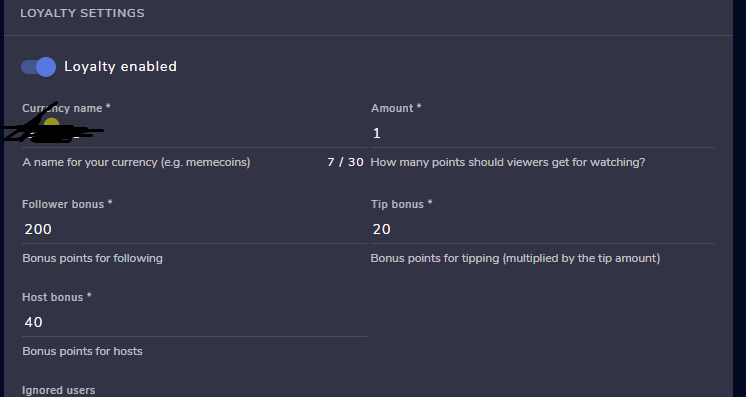
hey do you know why i cant add loyalty points to people that sub?
i cant find the option
viscid pebbleBOT
Please logout of StreamElements at https://streamelements.com/logout and then login again to your account (Twitch/YouTube/Facebook).
vale saffron
tnx
 stoic pulsar
hello so i use streamlabs to stream on twitch is there a way to link or import the loyalty points from streamelements to where they are linked together??
 lean path
How do i even get the sponsor tab to appear? I am partnered on Twitch with 6k followers with 30%+ us audience.
this is so strange
zenith widget
@stoic pulsar You can import, but not link the 2 systems together. https://streamelements.com/dashboard/account/import
zenith widget
@lean path If you are referring to SE.Sponsorships, that will be activated on your account when you meet the minimum requirements for it. I can't tell you the minimum requirements though
lean path
hmm ok
 ember fog
My mod cant change the title with !settitle , can soimeone help me ?
viscid pebbleBOT
@ember fog Go to the Dashboard > Right side > Part channel > Join channel(https://streamelements.com/dashboard)
ember fog
Still dosent work
zenith widget
@ember fog
seems to be working
Command is set to Super Mod, so if you mod is not a super mod, he won't be able to use the command
ember fog
@zenith widget ok thanky you alot
 digital needle
does OBS.LIVE work on a mac?
 rapid arch
Good evening, may I know why !points command not working?
ionic kelp
@digital needle Yes. As long as you're viewing from an OSX browser the download option for Mac should show.
zenith widget
digital needle
does OBS.LIVE work on a mac?

StreamElements
Download StreamElements OBS.Live to makes live streaming on Twitch/YouTube/Facebookeasy. Live Stream your broadcast from anywhere, save on CPU with StreamElements Open Broadcast Software (OBS) plugin.
@rapid arch what exactly is the issue?
rapid arch
once my viewers type !points in chat room, there is nothing happen.
zenith widget
 trim wyvern
Hi again have issue with twitch alerts
trim wyvern
Hi again have issue with twitch alerts
What is not working exactly? I just followed and showed up on your account
ionic kelp
Does the bot respond to other commands?
rapid arch
yes
trim wyvern
zenith widget
What is not working exactly? I just followed and showed up on your account
thanks I just changed overlay and looks fine now
zenith widget
rapid arch
yes
fixed it - had to part and join it again
rapid arch
OK, thank you. I saw you test it just now. Thank you very much for your help.
 gentle stone
Hey there hopefully you guys can help me. I run a twitch stream through OBS (original) NOT stream labs obs. I am trying to use the Kappagen Emote widget in stream elements. When I set it up it functions (kinda) I can see the emotes on the screen BUT they are triggering off my screen. Sometimes I don’t see them at all sometimes i catch only a small fraction of what should be displayed... sometimes it triggers in center of screen. I have tried playing around with the sizing of the scene in OBS and tried resizing it in StreamElements ... nothing seems to be working. Any ideas on what’s going on?
zenith widget
@lofty spear shuld be able to find in the stremalabs settings somewhere
viscid pebbleBOT
@gentle stone The default resolution for StreamElements overlays (theme and custom) is 1920x1080. Please add them in OBS at their full resolution and use CTRL+F to fit to screen if necessary. You can then downscale your stream in OBS settings > Video if you'd like https://i.imgur.com/6bWXxjR.png
gentle stone
Ty
 hearty pike
hey when i stream my overlays don't appear does anyone know why that could be
viscid pebbleBOT
@hearty pike To add your overlays to OBS, add a new browser source in your scene. Paste your overlay URL in the browser source properties, set the dimensions to 1920x1080 (unless you changed them on the website) and check Shutdown source when not visible. https://youtu.be/KDvLynUqXI4
hearty pike
ok thank you:)
 flint notch
I don't see the live menu
zenith widget
@cinder jungle Not sure what you are trying to achieve here. Do you want to show the uptime on the stream with a dynamic goal on the back?
@flint notch are you referring to OBS.live?
flint notch
yes
zenith widget
So you don't see "Streamelements" on top of OBS?
 balmy elbow
@viscid pebble hello im doing a SE sponsored stream (conquerors blade) and my SE bot is not working so the commands are not responding
and i do NOT wanna restart my stream just saying
zenith widget
@cinder jungle not possible for commands
viscid pebbleBOT
@balmy elbow If your commands recently stopped working and you're using OBS.Live and a custom bot name do the following:
- In OBS.Live, click on the hamburger menu (three stripes) at the top left of your activity feed
- Click on Stream Settings > Custom bot name
- In the Custom bot name field select Set custom bot name, not your already existing username (with capital letters). Note: If you already connected an account that way, the third entry will show as the account name (see image https://i.imgur.com/sO7fWOX.png).
- Scroll a bit down and click on the purple Connect Custom Bot Account button
- Log in as usual and Authorize the custom bot name
- Back in the Activity feed, click on the Send Test Message button and check if your custom bot name starts working again
flint notch
I fixed the problem
zenith widget
@balmy elbow you don't need to restart anything, just follow the steps above
zenith widget
tbe custom bot option is enabled
so follow the above steps
unless you are using ground control
balmy elbow
doesnt work for me
zenith widget
Are you using OBS.Live?
zenith widget
in that custom bot option, change the bot to the normal name then
I am fully aware
There it goes, I see it responded this time
even the custom name 
 lament blade
hey all, i have set instant replay widget but its not working, anyone could help me please? 😄
zenith widget
Fyrewire has pushed an update to it afaik, that should fix the issue you are experiencing
foggy river
can you change the colour of webm files ?
zenith widget
If its your assets, you can edit the color, yes
 serene finch
I accidentally opened my streamelements for my fb gaming on a separate account to my YT and Twitch (currently multistreaming) how do i go about merging/closing the FB gaming on so i can add it to ther other account?
viscid pebbleBOT
@serene finch Please ask your question in one helpdesk channel only. A support volunteer or StreamElements staff member will assist you as soon as they are available. Asking in multiple places will only result in confusion, not faster answers. Thank you for your patience.
serene finch
ok fair enough. I wasnt too sure which one would be best.
serene finch
yeah currently restreaming
 raven flint
Well streaming to both platforms at the same time is against Twitch TOS.
raven flint
^
 white galleon
Hi There! I need some help with my Sub Counter
I want to make a counter for my Subs which starts with 0 even though I already have subs
Is that possible in any way?
And I also don't want a goal
That'd be great
ebon forum
white galleon
I want to make a counter for my Subs which starts with 0 even though I already h...
We have session widgets for that, this is the easiest way to have a subcounter. Session = one stream.
If you look for something long-term, the goal is easier to manage.
white galleon
I want to make a stream in a month or so, where every sub they gifted berfore that is 1 hour more in that Stream
white galleon
white galleon
I want to make a stream in a month or so, where every sub they gifted berfore th...
And it would be great if my viewers could see how many hours there currently are
wary halo
white galleon
I want to make a stream in a month or so, where every sub they gifted berfore th...
1 hour per sub is highly not recommended, what if someone donates 10 and then another user 10 too, it could become really big really fast
vivid spear
About my concerns on the time zones, is there a way that my command !time will show the time but not in military time form? Thank you
 forest mica
@wary halo do you know how to add black list words to text to speech ?
ionic kelp
@vivid spear No but using a 3rd party api you can.
wary halo
forest mica
<@!156048565058142208> do you know how to add black list words to text to speec...
you do that in the tipping settings afaik
white galleon
wary halo
1 hour per sub is highly not recommended, what if someone donates 10 and then an...
well it isnt 100% sure that it will be 1 hour, but I have nothing against a 24 hour stream or so
wary halo
white galleon
well it isnt 100% sure that it will be 1 hour, but I have nothing against a 24 h...
what about 50 hours? 😛
forest mica
@wary halo thanks! will it work for subs too ?
wary halo
yes that should go from the same list
forest mica
@wary halo thanks so much
white galleon
white galleon
I want to make a counter for my Subs which starts with 0 even though I already h...
but how would that work permanently and without a goal?
 zenith totem
guys i set timers for link instagram so it dosnt work i mean bot not chating.what can i do?
???
viscid pebbleBOT
@static garden If you changed your name on Twitch, please follow these steps:
- Visit https://streamelements.com/logout and then log in again by connecting with Twitch.
- On the right side of the dashboard page that opens, select Join under bot settings. If it says Part select that and then select Join to send the bot to the chat. Don't forget to mod the bot by typing /mod streamelements in your channel if you have not already.
- Post your old and your new name here so that we can update your channel's chatstats tracking (must be done by staff).
 static garden
yt
 wispy jay
with commands, is there a way that when you add a cooldown to commands !cmd options basecommand -cd 60 it returns "this command is on cooldown" if it's used within the cooldown period?
 stuck wharf
@wispy jay On the stream elements web page when creating a command go onto the advanced settings for the command and there is an option for global cooldown and user cooldown
 surreal gorge
When I'm streaming and someone follows me then the widgets don't get updated and none of the alerts work. Anyone able to assist?
ebon forum
surreal gorge
When I'm streaming and someone follows me then the widgets don't get updated and...
Yes we can fix that. Can you provide us your channel name?
surreal gorge
Hobby_Less
ebon forum
surreal gorge
Hobby_Less
Fixed, check with new events (refollow etc.)
surreal gorge
Thanks a lot
 broken palm
Im having the same issue and have been searching for a fix for awhile, every other alert works except the Follow (and the chatbot doesnt work for follow either)
surreal gorge
@ebon forum If someone follows me while I'm not streaming will it also update?
ebon forum
surreal gorge
<@!149255081194160129> If someone follows me while I'm not streaming will it als...
Yes
ebon forum
broken palm
Im having the same issue and have been searching for a fix for awhile, every oth...
This might be something different, but let me test - also need your channel name
broken palm
ebon forum
This might be something different, but let me test - also need your channel name
Channel name is DragAmen
 random belfry
surreal gorge
When I'm streaming and someone follows me then the widgets don't get updated and...
random belfry
surreal gorge
When I'm streaming and someone follows me then the widgets don't get updated and...
I have the same issue, Channel name is chickenscoop21
ebon forum
broken palm
Channel name is DragAmen
Fixed, did a testfollow - you should see my twitch name in the activity feed
ebon forum
random belfry
I have the same issue, Channel name is chickenscoop21
Same, fixed^
random belfry
thanks!
broken palm
ebon forum
Fixed, did a testfollow - you should see my twitch name in the activity feed
Awesome thank you so much, I felt so bad my last stream, had a couple followers go unwelcomed/unnoticed by me lol
 mystic lintel
surreal gorge
<@!149255081194160129> If someone follows me while I'm not streaming will it als...
mystic lintel
surreal gorge
<@!149255081194160129> If someone follows me while I'm not streaming will it als...
This happens to me too. My Twitch is iitz_Ash_TTV_BTW
ebon forum
mystic lintel
This happens to me too. My Twitch is iitz_Ash_TTV_BTW
Fixed.
mystic lintel
Thank you
 halcyon umbra


 hot charm
I am having an issue where chatters are getting timed out by streamelements, someone came in and said Hi CORNdawg and got a 300 second time out. Is this a setting I have set up?
lament blade
zenith widget
Fyrewire has pushed an update to it afaik, that should fix the issue you are exp...
thank you and sorry for not answering, i finally talked with him and he gave me the new updated widget, seems streamelements did not update it yet :S
ebon forum
hot charm
I am having an issue where chatters are getting timed out by streamelements, som...
Have you checked the spam filter settings etc? It is a separate entry in the bot section on our website.
hot charm
I have cap protection and banned words turned on
ebon forum
hot charm
I have cap protection and banned words turned on
Part of your name is in caps
zinc obsidian
Sorry to bother again but has there been any update to the fix for my follower notifications not working yet?
ebon forum
check that caps protection is set higher than 4 letters @hot charm
ebon forum
zinc obsidian
Sorry to bother again but has there been any update to the fix for my follower n...
Hi. Have you provided us with your channel name already?
hot charm
So under the min put 4 and have the max higher than that? It was set to 10
zinc obsidian
I have given my ID number but haven't been asked for anything following after that my channel name is DaddyTravvy @ebon forum
ebon forum
hot charm
So under the min put 4 and have the max higher than that? It was set to 10
It is either caps protection or the banned word filter kicking in. You need to figure out what exactly it is.
ebon forum
zinc obsidian
I have given my ID number but haven't been asked for anything following after th...
The usual fix did not help here. Have you renamed your channel maybe?
zinc obsidian
No I haven't changed anything since i started streaming. Follower notifications stopped working on the 14th of Dec last year and asked to have it fixed a few times and was told it was fixed a couple times. I reloaded everything after each apparent fix and nothing changed.
Sorry not sure if it makes a difference but my username is daddytravvy my display name is DaddyTravvy @ebon forum
ebon forum
zinc obsidian
Sorry not sure if it makes a difference but my username is daddytravvy my displa...
This is fine. Looks like we need a manual fix. Give me some time
zinc obsidian
Not a problem thank you!
ebon forum
zinc obsidian
Not a problem thank you!
This might take some time as this is a fix for developers.
 foggy drum
Having trouble loading the merch section anyone know why?
viscid pebbleBOT
@foggy drum Our Dashboard and Overlay Editor are Chromium Optimized. We strongly recommend using Chrome. Opera GX and the new Microsoft Edge Chromium might work closest to Chrome as its also Chromium built. Firefox also works, but some things might look a bit different or not work. We do not recommend using Internet Explorer with our Dashboard as it does not support functions.
If the website doesn’t work on chrome, be sure none of your plugins is blocking our website or clear your cookies. You can try if the website works in an incognito tab.
foggy drum
Okay thanks
 grave plank
any word on this btw?
ebon forum
grave plank
any word on this btw?
Hi. As far as i can see, you asked about a share overlay function or a way to edit for all 46 streamers that you manage?
grave plank
ebon forum
Hi. As far as i can see, you asked about a share overlay function or a way to ed...
Hi there, yeah I work for GetRekt Labs, as the resident alert/widget coder. It would be a nice feature to have on my account if possible as I setup for around 2-3 streamers a week
ebon forum
grave plank
Hi there, yeah I work for GetRekt Labs, as the resident alert/widget coder. It w...
Would need to check with colleagues if we can provide that.
There is currently a workaround to be added as editor for the channels, but it is not ideal.
lament blade
Hi! My activity feed isn't updating, can't get counts on the followers nor anything, i received follows while offline and they don't show up
grave plank
ebon forum
Would need to check with colleagues if we can provide that.
There is currently...
That would be amazing if possible, I hold a few custom widgets on my end and would be good to just get an easier way to transfer them across different accounts without needing to copy paste the code every time. Also if they delay on sending invite links across, this means I can start developing alerts on my end and just easily send them across.
viscid pebbleBOT
Please logout of StreamElements at https://streamelements.com/logout and then login again to your account (Twitch/YouTube/Facebook).
StreamElements menu, on top of OBS > Logout > Login
charred quartz
@lament blade ^^^^^^^^^^^^^
lament blade
charred quartz
<@456226577798135808> ^^^^^^^^^^^^^
done
charred quartz
lament blade
done
if it didn't work by now u should send me your accountID
viscid pebbleBOT
Please provide your account ID found at the top of this page: https://streamelements.com/dashboard/account/channels This ID is public info and safe to share here.
ebon forum
grave plank
That would be amazing if possible, I hold a few custom widgets on my end and wou...
please email aviv@streamelements.com with that request, this is our support lead, he can arrange everything 🙂
grave plank
perfect thanks!
lament blade
charred quartz
if it didn't work by now u should send me your accountID
6014227aaaf7b8a8409acd26
 spice totem
i can´t stream on several platforms. Because every time when i click the button Start Streaming pop´s a window for Youtube setup and this window didn´t load and i can´t stream on Twitch
viscid pebbleBOT
@spice totem StreamElements menu, on top of OBS > Logout > Login
 vestal raptor
I have some problems with the Viewertime-command. Loyalty system is activated, command is set, but i doesnt work
it*
lament blade
charred quartz
if it didn't work by now u should send me your accountID
6014227aaaf7b8a8409acd26
I had to delete my previous SE account and started a fresh one! If I change the bot's name, do I have to do anything different?
ebon forum
vestal raptor
I have some problems with the Viewertime-command. Loyalty system is activated, c...
what is the response when you try the !watchtime command?
vestal raptor
ebon forum
what is the response when you try the !watchtime command?
still o seconds
wary halo
when did you activate loyalty?
vestal raptor
previously
vestal raptor
yes, right now
viscid pebbleBOT
@viral anvil 10 minutes of watch time is given to those in chat when the loyalty points are handed out (every 10 minutes). Therefore, loyalty must be enabled to watch time to work properly.
There is no direct link between watch time and all-time points.
It can’t be calculated from the number of all-time points a user has because subs may earn points at a faster rate and !bonus all command increases all-time points for users in the chat at that time.
Giving points to a single user do not affect all-time, only when giving to all in chat.
ebon forum
Well loyalty works once every 10 minutes
 ember hawk
Good Morning All, I want to create a custom command that will go and grab a random line from a text file on my Google Drive or wherever I need to store it for it to work. How can I do this? I'm thinking !dadjokes and then it posts a random dad joke to chat from a list of dad jokes I have created.
wary halo
and since you are only live for 12 minutes, the first viewers should have their first points by now and not before
vestal raptor
thanks
charred quartz
lament blade
6014227aaaf7b8a8409acd26
I had to delete my previous SE account and started a f...
set bot name as default and check if it is working
lament blade
How do I sync vips in my chat with discord server
wary halo
you can do it with bots like mee6
lament blade
charred quartz
set bot name as default and check if it is working
thing is, i have an event rotator widget to show last follower, etc and it's not working, because of the activity feed, i re-logged SE at obs and changed the bot to default, i just received a follow while offline and it didn't update
 uneven gulch
How do I disable the bot and add alerts to my stream?
ebon forum
uneven gulch
How do I disable the bot and add alerts to my stream?
You can remove the bot with the "part channel" button in our dashboard.
viscid pebbleBOT
@uneven gulch To add your overlays to OBS, add a new browser source in your scene. Paste your overlay URL in the browser source properties, set the dimensions to 1920x1080 (unless you changed them on the website) and check Shutdown source when not visible. https://youtu.be/KDvLynUqXI4
ebon forum
This is what you do with your alerts once you set those up^
 rough sedge
people I can't edit my overlay, help pls
lament blade
Hey. I´ve got a question. Ive been trying to go from Slobs to all on Stream Elements for 1week now but i always run into problems. Now for example i need help with donation settings. i set up 4 variatons , each playing at atleast a minimum amount, like 1+, 5+, 10+, 15+problem is they dont work. The normal one works , 1 - 5 but the 5-10 or 10-15 ones dont work, they just give me a dancing shark, 15+ works again. Why does it have to be so weird 😢
 fresh glade
i dont know what im doing wrong . i was able to figure out where to edit all my social media info in the overlay i selected but when i save it and preview it to see if it was done correctly it still dopesnt have the changes in it
help please
lament blade
fresh glade
i dont know what im doing wrong . i was able to figure out where to edit all my ...
re-open or refresh maybe
ebon forum
rough sedge
people I can't edit my overlay, help pls
Can you provide us an error or just in general more details?
rough sedge
I already tried to edit this page, but it doesn't change
ebon forum
rough sedge
I already tried to edit this page, but it doesn't change
And do you get an error or something else?
Remember to save, the editor has no autosave.
fresh glade
same with my overlay i can in and edit b ut after i hit save it doesnt change the social media info
viscid pebbleBOT
@fresh glade To edit the text of a widget, click on it and select Settings at the bottom left.
rough sedge
ebon forum
And do you get an error or something else?
Remember to save, the editor has no a...
normally it already changes before saving, but it is not changing
ebon forum
rough sedge
normally it already changes before saving, but it is not changing
Can you provide more details please what exactly is not changing, an error code if you get any etc?
rough sedge
ebon forum
Can you provide more details please what exactly is not changing, an error code ...
the overlay information is not changing, there is no error code
ebon forum
rough sedge
the overlay information is not changing, there is no error code
Which widget is affected?
fresh glade
thanks
rough sedge
ebon forum
Which widget is affected?
none changes
ebon forum
rough sedge
none changes
Can you give me your channel name, i check that for you
rough sedge
ebon forum
Can you give me your channel name, i check that for you
jlucasfmm
rough sedge
ebon forum
Can you give me your channel name, i check that for you
try to do in a valorant overlay
ebon forum
rough sedge
try to do in a valorant overlay
AAAAAAAAAAAAA - STATIC IN GAME VALORANT
Saved that one, check if you see Placeholder text instead of instagram.
rough sedge
ebon forum
AAAAAAAAAAAAA - STATIC IN GAME VALORANT
Saved that one, check if you see Placeh...
ok, one minute
rough sedge
ebon forum
AAAAAAAAAAAAA - STATIC IN GAME VALORANT
Saved that one, check if you see Placeh...
it's not changing
ebon forum
rough sedge
it's not changing
i just changed that myself, the overlay is updated
can i DM you, because overlay links have sensitive information?
 prisma stream
hello, wondering if anyone has any idea on how to add in different ranks for hours watched on stream that i can manually add myself
wary halo
doesn't exist afaik
prisma stream
oh okay thank you
@wary halo would I be able to Pm you about something about what I asked?
wary halo
Why not ask it here? there are more people watching here who might have ideas or solutions
prisma stream
good point, when I click on the edit command for the stream currency it says "@$user, you are currently a $rank with $hours hours dedicated to fearlessvillain with $points cosmics, with your next rank being $nextrank in $nxtrankreq hours."
wary halo
wait what are you clicking where exactly?
prisma stream
on the chat commands on default
viscid pebbleBOT
@prisma stream Please provide a proper screenshot with the issue visible. If not sure how to take a screenshot, you can check here: https://www.take-a-screenshot.org
prisma stream
 wide orbit
heeeyy
wary halo
prisma stream
that is not how it works
that is not the response
you can't edit default commands
wide orbit
some issues i run into when enabling custom css ,
the animation i uploaded not showing anymore and a dancing shark show up instead
and couldn't figure out how to replace it my animation
is the is a code or something i should put in the html like {image} or something in order to make my animation work instead of that dancing shark ?????
ionic kelp

wide orbit
whats that mean
wary halo
it means yes
wide orbit
👍
 simple ibex
Hey, how i can activate the counter of the watchtime? the command is activated, but the leaderboard say all time ''no data avalaible''
 bitter pecan
Hi I'm still having problems with my follower alert. Subscriber alerts are working fine, but I'm not getting the alert or activity feed update for followers
lament blade
Got the shark issue too. But on the website. I havent changed anything about the CSS tho
lament blade
lament blade
Hey. I´ve got a question. Ive been trying to go from Slobs to all on Stream Elem...
referring to this
 tough burrow
Hi everyone, my apologies in advanced if this is the wrong channel so if it is, if I may get direction.
My question is, I have streamelements obs (obviously lol) on my pc but long story short, I have to replace certain things in it (motherboard perhaps, memory, etc not sure yet) but when I get it back up and running, when I re-download obs and log in, will all my scenes and settings still be there OR would I need to set everything back up again? Thank you in advanced
ebon forum
tough burrow
Hi everyone, my apologies in advanced if this is the wrong channel so if it is, ...
Replacing parts usually works fine, but replacing the motherboard can ruin your Windows
But in general nothing will happen to your OBS files
Best practice would be to export your profiles and scene collections before replacing parts.
 mental blaze
hey i need some help with some things and for streaming csgo plz
charred quartz
mental blaze
hey i need some help with some things and for streaming csgo plz
how can i help you?
tough burrow
ebon forum
Best practice would be to export your profiles and scene collections before repl...
Unfortunately, the issue happened before I could save anything. I was hoping that once fixed, if I logged in, everything is saved within the program itself. Thank you, I'll hope for the best because I had a LOT of things set up lol
ebon forum
tough burrow
Unfortunately, the issue happened before I could save anything. I was hoping tha...
You have 2 options here:
- Windows starts as usual, only the activation resets, you will be able to use it normally.
- You run into issues with windows and might need to extract the files while using that drive as secondary.
charred quartz
ebon forum
Replacing parts usually works fine, but replacing the motherboard can ruin your ...
if something after replacing parts happens that prevents you from accessing windows and thus files etc, there is always linux for trying some stuff before giving up these files, u can boot directly from a usb flashed its pretty easy
 zenith oracle
Yo! I'm just having some trouble with getting the horizontal chat overlay working - I can test and it shows up fine in the preview, but when I add the browser source to OBS Studio, it doesn't actually update. I can see that it's pulling in the background from the element, but doesn't show any chat messages. Any ideas?
charred quartz
have u reloaded the websource?
zenith oracle
I have, I've tried clearing it and re-adding it, logging in and out of Streamelements, and restarting OBS, but it just won't pull any chat messages into the live view.
tough burrow
@ebon forum @charred quartz thank you both! Appreciate it fellas! Have a great weekend!
charred quartz
zenith oracle
I have, I've tried clearing it and re-adding it, logging in and out of Streamele...
check if when it works in preview how it act in the obs at the same time
also send a screenshot of the preview working
zenith oracle
LOL I am cursed. I dunno why, I literally didn't change anything, but it's working now. 😅 Before, the chat ticker in the bottom right corner of the OBS preview window just wouldn't show anything. Then I tried it with the preview open at the same time, and now it's working. Continued working after closing the preview.
Thank you sir 🙏
 quartz drum
Not sure if this is the best place to put this if not sorry 😁 how do i make a command into a list format? ive tried a few ways but it just wont make it into a list without sticking it close together
charred quartz
its not possible in twitch :/ @quartz drum
quartz drum
😢 anything else i can try to maybe get a similar result?
charred quartz
nope :X twitch simple condense messages that use paragraph breakers https://www.reddit.com/r/Twitch/comments/crn1ko/line_breaks_for_chat_commands/ @quartz drum
quartz drum
Shame thanks for the help ❤️
leaden bridge
Was wondering if anyone could help, my widget data doesn't update my most recent follower or my follower/sub total, only bits. Is there a fix for this?
 calm cliff
how do some streamers do live tv shows or songs without copyright issues?
wary halo
They either have contracts with those shows or could still get issues in the future
 pure crag
Is there a way to do a giveaway where a mod or broadcaster can run a command to give a ticket to a user? instead of the user having to run the command himself?
 stuck hare
Which is better? Display or Game capture? My streams are always laggy and choppy> I have a good pc and cant figure out whats happening. My gameplay is also ruined when I stream. I get major fps stutters and often crash. Help 😦 (I stream fortnite)
ebon forum
stuck hare
Which is better? Display or Game capture? My streams are always laggy and choppy...
Game capture is always better.
And Fortnite can run on a toaster, but you need to adjust the settings properly for both the game and the stream.
ebon forum
pure crag
Is there a way to do a giveaway where a mod or broadcaster can run a command to ...
On our end people need to enter via ticket.
There are 3rd party tools that might function differently, but a ticket or keyword is expected by the most, so you give the items away to actual active users.
stuck hare
Thanks @ebon forum Okay ill run it on game capture. For the stutters and crashes do you have a video or a link you can send?
ebon forum
stuck hare
Thanks <@!149255081194160129> Okay ill run it on game capture. For the stutters ...
Not really, stream settings are individual and so are game settings
You need to check what is overloaded and adjust accordingly
stuck hare
@ebon forum Okay beautiful 💯
 vague umbra
Hello, I have a problem with this button on my application... and I can click it 100 times and it won't work... it doesn't open anything... I've tried restarting the program, restarting my pc, removing the tab and adding it back on... idk what to do anymore
EDIT: I am just dumb.... I have to add it first... my bad
 hidden canyon
Hello, I was running a stream last night, and the odd thing about it was that the in-game sounded fine, my vocals were fine, but my brother who was co-hosting with me had this odd echo. I was not running twitch at all, I had OBS and Discord and My brother was wearing a headset, I was not. Today we did a sound test to see if maybe me wearing a headset would fix it, and it did not. It made it worse because now we cant hear him at all. I was hoping someone could walk me through the proper set up so that I can host friends on voice chat while I stream on Twitch without the echo coming from my players. I'm really new to this and have never hosted people on my live stream before.
 alpine fog
hello, my tips received through StreamElements are not populating in overlays or in dashboard /fortherecordnola
ebon forum
alpine fog
hello, my tips received through StreamElements are not populating in overlays or...
Are you sure you are getting donations through our link in that case?
alpine fog
yes, the link leads to the StreamElements tip page
ebon forum
alpine fog
yes, the link leads to the StreamElements tip page
But are you sure people do donate through it?
lament blade
Okay so i wanna put in my lurk command that the name of the person that wants to lurk is in there .. like
!lurk
0h__Yeah is lurking now...
How do i do that?
alpine fog
ebon forum
But are you sure people do donate through it?
yes, the tips came in through paypal
ebon forum
alpine fog
yes, the tips came in through paypal
This is not the correct answer. People can send the money to Paypal through a different link or directly.
Can you confirm that the tips were done through our link?
alpine fog
hard to really say right, but i figured they were because thats the only place i divulged that paypal account and the tip was one of the suggested amount of specifically $13.37. thank you so much for your time @ebon forum i hope im not being a terrible bother
ebon forum
alpine fog
hard to really say right, but i figured they were because thats the only place i...
No this is fine, i just try to figure our what happened and where the money went
Usually our tips include a message similar to "Thanks for your tip"
would be good if you can check that.
alpine fog
ebon forum
No this is fine, i just try to figure our what happened and where the money went
yes just confirmed
ebon forum
This would be in the email and paypal transaction.
 teal locust
why is TTS not working, I've been trying to set it up and tried a few fixes from google and I can get it to work
ebon forum
alpine fog
Yep looks correct. Time to dig deeper
ebon forum
alpine fog
Was your Paypal verified? Usually means adding a credit card or bank acc.
alpine fog
ebon forum
Yep looks correct. Time to dig deeper
why does that matter to streamelements ?
lament blade
Hey. I´ve got a question. Ive been trying to go from Slobs to all on Stream Elements for 1week now but i always run into problems. Now for example i need help with donation settings. i set up 4 variatons , each playing at atleast a minimum amount, like 1+, 5+, 10+, 15+problem is they dont work. The normal one works , 1 - 5 but the 5-10 or 10-15 ones dont work, they just give me a dancing shark, 15+ works again. Why does it have to be so weird
ebon forum
alpine fog
why does that matter to streamelements ?
If Paypal is not verified, it does not send API events. So we never hear anything about donations.
alpine fog
ebon forum
If Paypal is not verified, it does not send API events. So we never hear anythin...
ah... i see. thank your i’ll add a card
calm cliff
Is it possible to play the music of soundtrack by twitch only live without having the sound in headphones?
 gloomy dome
Hello, I recently donated to Tubbo on twitch and it went through one time and I donated a dollar more and it said "Could not proccess" or something like that. I kept retrying it to see if the payment could go through since i thought I entered my information wrong. I got a text from my bank and it said unusual activity and found out that my card was cancelled because the transactions actually did go through more times than I clicked even though it said my payments could not go through. Now I am freaking out since it charged me more times than I clicked and it told me that it never went through when trying to pay.
Could I have help with this?
wary halo
It is being looked in to
gloomy dome
Okay
 abstract hemlock
@gloomy dome the streamer need to reach out to us about this
gloomy dome
abstract hemlock
<@!762443211255447654> the streamer need to reach out to us about this
How do I contact the streamer I dont think they will see it he is very popular
abstract hemlock
he will see a notification on his SE Dashboard but you can reach out to any of his mods
gloomy dome
okay
 storm pagoda
Hi! I'm a bit confused about the Stream Elements Store items and the redemption alert. The redemption alert appears to just be an alert saying someone redeemed that item but is there a way to have the item redeemed appear instead? For instance, if I have a store item as a picture that can appear on stream when redeemed, how would that work out?
teal locust
why is TTS not working, I've been trying to set it up and tried a few fixes from google and I can get it to work
 novel pond
is there a way for me to set a delay on chatbot responses? like if someone puts in a command and i want it to wait 2 seconds before responding?
abstract hemlock
storm pagoda
Hi! I'm a bit confused about the Stream Elements Store items and the redemption ...
you need to create the item on your store as a stream perk
abstract hemlock
teal locust
why is TTS not working, I've been trying to set it up and tried a few fixes from...
could you please elaborate a little bit more, even showin' a small clip about this behavior
abstract hemlock
novel pond
is there a way for me to set a delay on chatbot responses? like if someone puts ...
that's not possible, but may i ask why you want a delay on the response?
storm pagoda
abstract hemlock
you need to create the item on your store as a stream perk
And how do I control where it appears? Is it just the one redemption alert in the overlays widgets?
abstract hemlock
the image that you setup as the item asset will replace the default one
novel pond
abstract hemlock
that's not possible, but may i ask why you want a delay on the response?
i'm trying to make a clip play when people shoutout someone, but only if they use the reward (so i can put time limits and such). right now, people can bypass the reward because of the way i had to set it up. If i could put a 2 second delay, i can ensure that the video will only play when people use the reward.
 edgy delta
evening, just been looking through SE, however unable to find what I'm looking for. Can someone let me know where quotes are saved?
edgy delta
oh, so how would I go about deleting or editing them
novel pond
so basically, the i have the source being turned on and off by Lioranboard, but the clips have to be triggered by a mod using the command, so i created a way for the reward to trigger the chatbot to input the command by creating a separate command that users type into the reward. Right now, if they type in the reward command stright to chat, the video doesnt play, but the audio does. i could fix this with a delay because i could set the source as turned off when not visible, without the delay, doing that would just cause the videos to never work
edgy delta
@novel pond have you got the source set to refresh and disable when not active?
that could be the issue
calm cliff
Is it possible to play the music of soundtrack by twitch only live without having the sound in headphones?
edgy delta
@calm cliff you can allow obs to listen for the audio track but disable it to your output in audio settings
calm cliff
how
edgy delta
or use something like voicemeter banana to seperate audio tracks and mute that channel
novel pond
edgy delta
<@!199962166378496011> have you got the source set to refresh and disable when n...
i want it to be shutdown when not active. but for me to be allowed to do that and things not just break, I need to be able to have a delayed output from the chatbot
edgy delta
@novel pond I found touch portal was better for that type of thing
teal locust
abstract hemlock
could you please elaborate a little bit more, even showin' a small clip about th...
I've been trying to set it up since last night and I don't hear anything and I tried recording from OBS to see if maybe and it just doesn't play anything at all, I have it enabled and all the settings seem correct.
novel pond
liroanboard isnt the thing giving me problems though. it's the way the clips player works, which wouldnt change by switching to touch portal
edgy delta
very true sorry
is it linked to obs and shown connected ? for it to activate
sorry been a while since i used the software
novel pond
i'm already doing a huge workaround to just get it to work for people besides just me and the mod, cause i want people to be able to share other streamers they think are cool easily. at this point, it's just me trying to make it perfect so that people wont be able to abuse it down the line
edgy delta
would a shoutout system not work for you ?
showing the streamer and channel and only allowing mods to activate?.
novel pond
edgy delta
is it linked to obs and shown connected ? for it to activate
so when i click the box for it to shutdown when not active, the video never plays because the chatbot inputs the clip command about a second before lioranboard is able to activate the source. so the clip player never realizes it's been activated
i dont want only mods because i only have me and 1 mod and they arent always around and i cant always easily get to my chatbox to input the command
 crimson dawn
I'm having some huge problems , when im live streaming my kb/s drops to 0 and all the internet from the house goes away
but when i game without obs running no problems
edgy delta
I have a system but you can allow anyone to active the shout out feature, this shows the streamers emote on screen and what they last played and a full link in chat
novel pond
crimson dawn
I'm having some huge problems , when im live streaming my kb/s drops to 0 and al...
try lowering the output resolution
edgy delta
@crimson dawn are you running obs as admin
crimson dawn
ive been streaming for 4 months noiw never had any problems but since sunday when i changed the encoder for better quality im having problems
charred quartz
crimson dawn
I'm having some huge problems , when im live streaming my kb/s drops to 0 and al...
This is almost related to lowend router by self experience, that match the truth or do you have a highend router ?
edgy delta
@crimson dawn have to tried going back to old settings just to see if its doing the same thing, also try running the auto config again
crimson dawn
@charred quartz i have a good router thats not the problem amd good internet 800mb download and 40 mb upload
i tryed old settings dint work aswell
edgy delta
very strange
charred quartz
Can u send here the model of it just for making sure, that really looks like data overload.
crimson dawn
yeah i know very frustrating
charred quartz
Also dm me a print of your encoder settings pls
crimson dawn
its the standard modem/router we gett from the provider but i have a linksys switch aswell
edgy delta
have you just added the switch ?
charred quartz
If it is possible in the tags of it, should have a model number u can dm it also
crimson dawn
no its been there since day 1
 cerulean shadow
Can anyone tell me how to link stream elements store to twitch?
charred quartz
cerulean shadow
Can anyone tell me how to link stream elements store to twitch?
what u mean by that? detail it more
 rose gale
My stream element bot doesn't work when I'm live but works offline, any thoughts
viscid pebbleBOT
@rose gale Go to the Dashboard > Right side > Part channel > Join channel(https://streamelements.com/dashboard)
rose gale
ive done that several times
 twin tulip
I'm not sure where to ask this - if I set a giveaway to Subs Only and a Sub buys a ticket but their sub expires and is not renewed before the drawing - will their tickets still be valid for the drawing?
abstract hemlock
we may need to troubleshot this next time you're live @rose gale
@twin tulip i've never test it, but i think the ticket will be valid
twin tulip
ok, thank you
rose gale
okay because it all my commands work offline just not live
abstract hemlock
yep i see that
cerulean shadow
@charred quartz i have merch but i cant find a url or link so it is advertised on my twitch
 night coral
I can't figure out how to get the overlays to work in OBS live
viscid pebbleBOT
@night coral To add your overlays to OBS, add a new browser source in your scene. Paste your overlay URL in the browser source properties, set the dimensions to 1920x1080 (unless you changed them on the website) and check Shutdown source when not visible. https://youtu.be/KDvLynUqXI4
 late sparrow
what's the ideal image resolution for a redemption item preview asset?
charred quartz
late sparrow
what's the ideal image resolution for a redemption item preview asset?
there is not a recommended one as the size of redempts are customised by the streamer. Use one that accommodate your higher res of all items.
late sparrow
charred quartz
there is not a recommended one as the size of redempts are customised by the str...
thanks - I was trying to use panel-sized images so that viewers can't see the video asset until redeeming and it was displaying oddly.
 opaque parcel
how do I apply my custom overlay to OBS studios
charred quartz
using editor and adding them in obs as web source
lament blade
hey there! so i have signed into my streamelements with a different twitch account but my stream is playing on my other twitch account. is there a fix for this?
 faint oxide
Hi! In my Chat Alert Modules, Tips, Hosts, Raids all work, but the Follower Chat Alert is not working at all. Everything else in Streamelements is working just fine besides the Follow Chat Alert. I've cleared my cache and reset my personal access token multiple times and it still does this... Any thoughts anyone?
 burnt horizon
Hi. first time using stream elements, and I'm trying to add my alerts to obs and when I emulate my followers alert it shows the wrong one, it shows the stream elements one instead of mine. Any thoughts? thanks
 broken pasture
CAN yall teach me how to stream on twitch
viscid pebbleBOT
@broken pasture New to StreamElements?
Check out our YouTube channel https://www.youtube.com/c/streamelements/videos
with tutorial videos from setting up the basics, to in-depth details on how to use our product.
New to OBS? Here is a 4 step quick start guide
https://obsproject.com/wiki/OBS-Studio-Quickstart
Want to learn even more? Here is an in-depth overview
https://obsproject.com/wiki/OBS-Studio-Overview
@faint oxide Please provide your account ID found at the top of this page: https://streamelements.com/dashboard/account/channels This ID is public info and safe to share here.
rose gale
Alright I'm live now and still my bot doesn't work
faint oxide
Account ID - 5ff8c794ab474f3c7cc9ae9e
 drowsy bolt
How often do things like follower count and latest follower update?
 left holly
how do i start streaming on twich
 round igloo
wrong chat-
faint oxide
viscid pebble
<@!174368669437132801> Please provide your account ID found at the top of this p...
Account ID - 5ff8c794ab474f3c7cc9ae9e
 pale kelp
hi, i got a donation back in septemer of 2020 and i STILL havent been able to get it. idk what to do. I called and emailed... and it makes me sad may i plz have health.. - @pale kelp
viscid pebbleBOT
@pale kelp Please contact us via email for support with SE.Pay. You can use our contact form here: https://streamelements.com/contact Thank you.
pale kelp
i did that already  I send an email out almost every month
drowsy bolt
Are you sure they aren’t responding? Check your spam folder or something
They wouldn’t just ignore you
abstract hemlock
@rancid mist no need to ping the whole role
viscid pebbleBOT
@rancid mist Please provide your account ID found at the top of this page: https://streamelements.com/dashboard/account/channels This ID is public info and safe to share here.
 rancid mist
Sorry, Renziito!
 oblique plank
U have a question
How to setup when someone joins your chat it tells them the rules
 sturdy saffron
Hello, i have a question. Could you know why when im streaming through streamelements OBS, my stream is allright, and when i end my stream, in twitch archive there is not any sound on videos? Im not playing any music. Sometimes (not often) there is my voice, or other Discord users, but mostly there is no any sound, any discord, any microphone, any game sounds? Did you heared about something like this?
 verbal stratus
Hey.. Can someone help me ? I'm trying to make my first widget for Twitch but I cannot animate my css classes. I read and saw some tutorials but not successful at all.
 fresh jungle
Hello, I can not login to twitch, I put in my login info and authorize, it loads for a couple seconds and then brings me back to the "Connect" Screen
verbal stratus
ionic kelp
<#259680142459142144> <@305102175204278274>
ty
 frail quiver
Hello, is it possible to put several scenes into something like a folder so I can make it easier to switch between overlay sets for different games? Thank you in advance
charred quartz
frail quiver
Hello, is it possible to put several scenes into something like a folder so I ca...
"Scene Collection" are meant for that 🙂, u can find it in the top menu - dropdown
frail quiver
Awesome thank you
wispy jay
stuck wharf
<@675937442888417281> On the stream elements web page when creating a command go...
The cooldown is sorted, it's when a user tries to use the command while in cooldown, is there a way that i can have it say 'command on cooldown' so users know why its not worked for them
 jovial sapphire
Hi, so im not understanding whats going on with my alert box. At times when i do a test it works correctly and it shows the text underneath the star in the middle. but then ill run another test and it starts doing this and bunching characters together all on the left side. any idea why this is happening? thank you
charred quartz
does it happens it real situation/alerts too? @jovial sapphire
jovial sapphire
@charred quartz you know i havent tried it yet live. Im making my stream return soon, so ive have just been testing it through the actual streamlabs editor and in the streamlabs OBS activity feed. if that makes sense.
 royal nacelle
hey so my followers are not showing up in stream elements at all ive had a few new followers recently and none are showing up in SE which means my alerts arent showing up. it says that my last follow was DEC 26th and ive ahd a few since then when i test my alerts everything works fine SE just isnt getting my actual notifications from twitch tho??
charred quartz
jovial sapphire
<@!207573201000202241> you know i havent tried it yet live. Im making my stream ...
streamlabs? / u should wait for live tho, as these emulations can have strange msgs some times
viscid pebbleBOT
@royal nacelle Please provide your account ID found at the top of this page: https://streamelements.com/dashboard/account/channels This ID is public info and safe to share here.
jovial sapphire
@charred quartz embarrassing ! im sorry i meant stream elements i was helping a buddy out on that platform for his stream. and yeah ill give it a shot thank you
royal nacelle
viscid pebble
<@!543338806770794501> Please provide your account ID found at the top of this p...
5fa8c2f036cb65137c34a3bf
 late knot
Hello, I'm trying to switch from the Streamlabs leaderboard over to StreamElements one, but I cannot see anything on the chat stats panel. I saw a reddit post about contacting support if I recently changed my Twitch username (xAfflictionGG -> xAfflictionTV) and I did a few months ago so I'm not sure if that's what's affecting it.
I also configured the extension to filter out someone's username on the leaderboards, but am not seeing the changes reflected on the panel. If anyone can help, that'd be great! My account ID is 5fdfe909f0cd16550191f883 if that helps. Thank you so much 
 sterile tusk
So I made a new account for twitch and I’m trying to connect with streamelements but whenever I sign out of my old twitch acc on the website and click on twitch to put in my new one, it automatically logs me into my old one and doesn’t give me an option to put in another account
prisma relic
are you still going to be using the old account too @sterile tusk ?
sterile tusk
prisma relic
are you still going to be using the old account too <@!508849493999878155> ?
Probably not
prisma relic
log into the old Twitch account (that is connected to SE) and go to https://www.twitch.tv/settings/connections ... at the bottom should be a disconnect button. this will force break the link. Then log out of Twitch
When you go to log into SE again it should ask you to log into Twitch again (this time with your new account).
But you will start from scratch. If you are just looking for a name change; it'd be best to just do that on Twitch
sterile tusk
It worked thanks 🙂
prisma relic
How long have you had your StreamElements account @late knot ? I don't think it can get all the stats from Labs if you didn't also have the SE bot in your channel
late knot
Oh it only starts recording chat stats after I get the bot in my channel? If so, that's fine! I thought it was just something you could pull off some api stuff
 split kayak
heres the thing i login in to obs.live it doesn't work
 raw sigil
@viscid pebble this person is going into other communities through stream elements and harassing them about their channels, trying to sell followers cheat Flosterjames123 #8854
TO everyone else, DO NOT FALL FOR THE SCAM
prisma relic
can you DM me a screen shot of the DM they sent you @raw sigil
frail quiver
where do I adjust my stream description before going live?
prisma relic
Are you using OBS.Live?
 shy aurora
Heyey 🙂 , so i got told to contact u guys here if i wanted to have the streamelements bot name changed and yes, I do use the ground control thingie
 radiant rover
Hello i wanted help on seeing my chat on obs and not just a widget
 low pawn
does anyone know why the streamelements bot messages aren't being displayed in my live chat? viewers and I can read the mssages but it doesnt display in the screen
radiant rover
@everyone
 plucky walrus
Does anyone know how i can raise the volume of streamelements alerts? I'm not able to adjust that in my obs
ionic kelp
@plucky walrus done via the overlay editor.
plucky walrus
is it through the website or obs
prisma relic
Check the filtered users on the chat widget settings @low pawn
low pawn
prisma relic
Check the filtered users on the chat widget settings <@!388467314456133641>
I managed to check that xD but thanks, it's correct
plucky walrus
@ionic kelp got it, thanks alot
broken pasture
do ANY OF YALL PLAY RUST OR RAFT OR FORTNITE
viscid pebbleBOT
Please ask your question in one helpdesk channel only. A support volunteer or StreamElements staff member will assist you as soon as they are available. Asking in multiple places will only result in confusion, not faster answers. Thank you for your patience.
 fickle locust
Am apaños hechos
plucky walrus
If I use SoundAlerts for Bits, how can I connect that extention to StreamElements so it that it can update the overlay when someone uses them?
ionic kelp
@plucky walrus can't. That uses something entirely separate from what we can use to get info from cheer activity.