#helpdesk-twitch
1 messages · Page 824 of 1
 round osprey
 hollow latch
Hey! How do i add a donation goal widget? I cant find it anywhere in the overlay maker
 zenith widget
can you show me what exactly you are editing?
zenith widget
hollow latch
Hey! How do i add a donation goal widget? I cant find it anywhere in the overlay...
hollow latch
ahhh cheers!
Also is there any way to reset whats in the goal? I have money in the goal from a charity stream i did a couple weeks back and its showing in the goal
 viscid pebbleBOT
@hollow latch To reset goals:
- from the Overlay Editor > Session data on top right (monitor symbol) > Goals tab > reset progress of desired goal
- from the Dashboard > Activity feed on the left > Widget data on the right > Goals tab -> reset progress of desired goal
Note: Goal widgets (progress) only counts up and doesn't go down automatically, if you lose followers/subs.
hollow latch
cheers!
 lament blade
good morning when I go to see the chat stats edce 404 page not found what can I do?
 tidal hare
Hello, I just created an account here.
 mighty night
I cant see my folowers on dashboard and i dont see any alerts :/
zenith widget
@tidal hare New to StreamElements?
Check out our YouTube channel https://www.youtube.com/c/streamelements/videos
with tutorial videos from setting up the basics, to in-depth details on how to use our product.
New to OBS? Here is a 4 step quick start guide
https://obsproject.com/wiki/OBS-Studio-Quickstart
Want to learn even more? Here is an in-depth overview
https://obsproject.com/wiki/OBS-Studio-Overview
@lament blade If you changed your name on Twitch, please follow these steps:
- Visit https://streamelements.com/logout and then log in again by connecting with Twitch.
- On the right side of the dashboard page that opens, select Join under bot settings. If it says Part select that and then select Join to send the bot to the chat. Don't forget to mod the bot by typing /mod streamelements in your channel if you have not already.
- Post your old and your new name here so that we can update your channel's chatstats tracking (I can change it for you)
@mighty night Please provide your account ID found at the top of this page: https://streamelements.com/dashboard/account/channels This ID is public info and safe to share here.
mighty night
5ff8835abd17f51ea7ce0c1e
zenith widget
Should be good now
lament blade
@zenith widget andrex180204 my old name, my new name d3ma_St
zenith widget
I was not able to find an old chatstats page, so i created a fresh one fro you
lament blade
ok thanks
then i have another problem, it doesn't show me my stats in the dashboard
zenith widget
whats stats and which dashboard?
lament blade
on the stream elements dashboard I can't see my followers etc ...
zenith widget
fixed
lament blade
thanks you are the best
 night elk
when i done install this prog i get black screen before live and i cant fix this. pls help
 wraith copper
Hi there I am unable to use some of my features including donation button. I changed my username recently from cheriearmour to cherrypits
 junior stream
hello, is there an audit log?
I think I accidentally changed something in streamelements
and I want to see what I changed so I can fix it
zenith widget
Unfortunately no, there isn't a log page/file/location/tracker
@wraith copper simply logout and login again to get the new links
@night elk run OBS as admin
zenith widget
changed where?
junior stream
streamelements settings
night elk
thx
zenith widget
junior stream
streamelements settings
That is extremely vague. Here is a run down of all possible "settings":
- Custom command
- Chat alert module for the bot
- Roulette module
- Overlay Alert widget settings
- Overlay goal widget settings
the list can get very long
junior stream
custom command and gamble function
zenith widget
Ok, we are getting somewhere. What are you looking for exactly right now? default settings for the roulette module?
 lusty hawk
junior stream
zenith widget
Ok, we are getting somewhere. What are you looking for exactly right now? defaul...
lusty hawk
junior stream
zenith widget
Ok, we are getting somewhere. What are you looking for exactly right now? defaul...
basically I know I changed an amount of something in the commands/tags section
I want to change it back to what it was
but I dont remember
is there an audit log to remind me what it was before
or are changes just done instantly and fully
zenith widget
@lusty hawk
This is the default settings for the roulette module @junior stream
default name is roulette
you can change it to gamble if you want
 fluid wren
Hi my dashboard and activity feed is still blank but I streamed a couple of days ago. New followers etc are not showing up on my dashboard, or within certain overlays.
 autumn star
Hi my whatchtimes is on 0 sec for everyone... Do you know how to fix??
zenith widget
@autumn star 10 minutes of watch time is given to those in chat when the loyalty points are handed out (every 10 minutes). Therefore, loyalty must be enabled to watch time to work properly.
There is no direct link between watch time and all-time points.
It can’t be calculated from the number of all-time points a user has because subs may earn points at a faster rate and !bonus all command increases all-time points for users in the chat at that time.
Giving points to a single user do not affect all-time, only when giving to all in chat.
@fluid wren Please provide your account ID found at the top of this page: https://streamelements.com/dashboard/account/channels This ID is public info and safe to share here.
fluid wren
Account ID is: 5fa8f814a9b4551208cf22c5
autumn star
zenith widget
<@!444931357764878367> 10 minutes of watch time is given to those in chat when t...
how can i active it
zenith widget
Activate the loyalty system
autumn star
in streamelements dashboard?
zenith widget
yes
 smoky wing
i dont understand how im supposed to set the overlays in streamlabs with just links
zenith widget
@smoky wing To add your overlays to OBS, add a new browser source in your scene. Paste your overlay URL in the browser source properties, set the dimensions to 1920x1080 (unless you changed them on the website) and check Shutdown source when not visible. https://youtu.be/KDvLynUqXI4
smoky wing
thx ill try it
 barren minnow
Trying to change the fonts in parts of my overlay, they look fine in the editor and the preview, but when i look over on the OBS screen the fonts look like they've defaulted to Times New Roman or some other serif typeface. The font im using is advent pro from the dropdown list in the editor.
any ideas?
zenith widget
Save the overlay and restart OBS
barren minnow
well that was a simple fix 😛 thanks
 blissful maple
I’m trying to go live but when I do it says I am live on obs but not on twitch. Any help would be great thanks
zenith widget
Stop stream -> Settings -> stream -> check your stream key is the proper one
blissful maple
There’s no stream key on the settings tab for me
blissful maple
That’s worked thanks !
 crude trellis
I keep trying so many different things to get my custom commands to work but it won’t post hyperlinks it just shows three ***
zenith widget
Mod the bot
 prime oracle
How can I get a stream overlay off my phone to my xbox?
zenith widget
Consoles do not have native support for overlays. You would need a capture card, PS4 remote play or Xbox companion app and a PC with OBS in order to have overlays over your console gameplay.
We have a blog post about how to set up console streaming with our essential tools: https://blog.streamelements.com/how-to-stream-on-console-7b620b1c46c3
fluid wren
zenith widget
<@!308331841709146113> Please provide your account ID found at the top of this p...
Account ID is 5fa8f814a9b4551208cf22c5
crude trellis
I have the link blocker turned off and still posts ***
crude trellis
Nvm it was twitch
 velvet seal
my merch rotator isnt showing up and i cant edit it
crude trellis
I had hyperlinks blocked on my twitch moderation. I’m such a noob
zenith widget
@velvet seal please don't post in multiple channels
does the rotator widget show up in the overlay editor?
velvet seal
velvet seal
my merch rotator isnt showing up and i cant edit it
no
 heavy marsh
How do I unlink stream elements from my twitch? I have two bots and two sets of points
zenith widget
https://streamelements.com/dashboard -> right side -> part channel
heavy marsh
Oh I never completed the set up. My mistake, thank you!
velvet seal
zenith widget
does the rotator widget show up in the overlay editor?
can you still help or wht
zenith widget
Im looking into it
velvet seal
k
 earnest schooner
Hi guys, to start a contest a viewer has to digit !bet and then the answer and then points, is that correct? For example !bet Yes 2000? is that the right order?
zenith widget
yes
earnest schooner
Thanks a million
 viral raven
 acoustic lake
hello, which buffer size should i be using?
zenith widget
velvet seal
can you still help or wht
Your store needs to be online in order for the widget to work.
velvet seal
ok
 civic hazel
Hi, my widgets and information on streamelements aren't updating. It doesn't show any new followers since december. Can you help me?
 jovial hill
Is there a way to get higher resolution for the videos from media request?
Those videos always look kinda terrible when I put them on stream, even tho 1080p version is available on youtube...
 green flame
Is anyone having issues with bot not responding or any text related items (Not showing follows in chat)
lament blade
I keep getting a message saying an error occurred when using media requests. The video doesn't play on the overlay and on the website I get that error message
 slow quail
How do I show my current game? {game} ?
 worldly glade
how do I enable timers?
 mint yoke
Hi, how do I use my streamelements overlay on the mobile app?
 verbal horizon
Hi, my connection between twitch and streamelements is now broken for about a month. I posted here multiple times and you said you fixed that. But it is still completely broken.
I tried closing my account so I can restart from scratch but it won't let me close the account with "Invalid username"
What can I do?
 untold quail
Hi!, i accidentally made a second account on StreamElements. Instead of adding it in my profile. When i add my twitch account to my original account, it says account is already claimed. Is it ok for me to delete my newly created account?
 random crag
Hello,
I am using StreamElements plugin for OBS 26.1.1.
For some reason stream activity such as new followers does not show up in my stream activity.
Additionally i do not see any "stats" in my Dashboard for new followers gained etc.
My Twitch is connected and i see my chat in OBS using the SE plugin.
Furthermore my follower alert does also not work. When i emulate it from the website it shows in my OBS window but it does not stream it on twitch.
Help needed 🙂 Thanks
 inner igloo
untold quail
Hi!, i accidentally made a second account on StreamElements. Instead of adding i...
inner igloo
untold quail
Hi!, i accidentally made a second account on StreamElements. Instead of adding i...
exact same problem here
 wary halo
@untold quail it's better to let a staff member merge those accounts in to one
lament blade
Stream elements wont let me stream to twitch, only youtube. Anyone know how to fix?
viscid pebbleBOT
@untold quail Account Merging - Please note:
- Merging accounts only allows faster ways to switch between accounts
- Merging accounts does not allow data sharing between accounts - different streaming platforms, different type of events
- Merging accounts allows duplicating/sharing overlays between the accounts
If you understand the limitations of merging and want to proceed, please find the JWT tokens (!jwt) from both accounts you want to merge and you will be directed to DM them to a staff member
@untold quail You can find your JWT token on your account channels page (Show Secrets to reveal the token): https://streamelements.com/dashboard/account/channels
READ ME: This is a private security token. Do NOT share this token here or other public places, only with a StreamElements staff member in private.
untold quail
viscid pebble
<@!669663948772999198> Account Merging - __Please note:__
- Merging accounts onl...
Thank you!
wary halo
@untold quail you can DM those tokens to @placid raptor when you have them
viscid pebbleBOT
@lament blade StreamElements menu, on top of OBS > Logout > Login
 silent glacier
Hello! Does anyone know if theres a way I can change my stores links? I didnt know how to use at first and my streamelements/channelname/store is connected with my youtube, but I dont use that. And my twitch store have some number next to my channel name, which is not that good. Id like to change that but idk if thats possible 
wary halo
@inner igloo check the messages from the bot for davidangelo, you can do the same
inner igloo
yeah just read it, thanks 🙂
viscid pebbleBOT
@random crag Please provide your account ID found at the top of this page: https://streamelements.com/dashboard/account/channels This ID is public info and safe to share here.
@verbal horizon Please provide your account ID found at the top of this page: https://streamelements.com/dashboard/account/channels This ID is public info and safe to share here.
random crag
5ff9c002845fc25a527e5f7b
wary halo
reported it to staff 😄
 wild spear
Good morning, I configured the bot to send some information with some command I tried everything could someone help me with this? follow the prints
random crag
Thanks
wild spear
wary halo
wild spear
Good morning, I configured the bot to send some information with some command I ...
So what is the problem exactly?
wild spear
wary halo
So what is the problem exactly?
when I or anyone in the live type the command the bot doesn't say anything
viscid pebbleBOT
@wild spear If your commands recently stopped working and you're using OBS.Live and a custom bot name do the following:
- In OBS.Live, click on the hamburger menu (three stripes) at the top left of your activity feed
- Click on Stream Settings > Custom bot name
- In the Custom bot name field select Set custom bot name, not your already existing username (with capital letters). Note: If you already connected an account that way, the third entry will show as the account name (see image https://i.imgur.com/sO7fWOX.png).
- Scroll a bit down and click on the purple Connect Custom Bot Account button
- Log in as usual and Authorize the custom bot name
- Back in the Activity feed, click on the Send Test Message button and check if your custom bot name starts working again
 wary halo
ow and you can get a DMCA strike for that music, but you know that already right? 😛
verbal horizon
5fbead304d0d464090ce9a72
I shared that here twice already. You said you fixed it before but it didn't do a thing.
wary halo
I will tell them that too then
verbal horizon
Thank you
wild spear
wary halo
ow and you can get a DMCA strike for that music, but you know that already right...
yes bro ❤️ TKS TKS ❤️
 stable cedar
how can i change my stream title
 modern wing
I cant access the User Management tab>
 fervent sequoia
i imported my overlays from streamlabs... but the text is randomly not at the correct place anymore
slow quail
fervent sequoia
i imported my overlays from streamlabs... but the text is randomly not at the co...
Move it down in text settings
fervent sequoia
slow quail
Move it down in text settings
alr lemme try
slow quail
What's the right code for an Overlay? {$game} ${game {game}
these 3 don't work
 deep reef
i made a theme online but how do i import it to stream elements
i mean obs studio
???
wary halo
verbal horizon
5fbead304d0d464090ce9a72
I shared that here twice already. You said you fixed it...
should be fixed now, let us know if it still doesn't work
wary halo
random crag
5ff9c002845fc25a527e5f7b
fixed
 low stratus
@wary halo My twitch account wont allow me to recieve bits,is there a way you could help me?
 placid raptor

 👉
👉  random crag
wary halo
fixed
random crag
wary halo
fixed
Awesome, thank you!
verbal horizon
wary halo
should be fixed now, let us know if it still doesn't work
Still no good. Just followed with another account for testing and the activity feed is still empty and no alert fired
velvet seal
i just imported my alerts from streamlabs but they dont show up in preview and also is there a way so test the alert in obs live ???
 buoyant glade
how come myoverlay doesnt show when i play games and i cant access the scenes
 keen ice
Hey guys is there a ! chat command that will display how many subs have been gained in the session since being live?
 calm lily
buoyant glade
how come myoverlay doesnt show when i play games and i cant access the scenes
calm lily
buoyant glade
how come myoverlay doesnt show when i play games and i cant access the scenes
did you add your browser source to OBS?
velvet seal
velvet seal
i just imported my alerts from streamlabs but they dont show up in preview and a...
Can someone reply to this please
 onyx oasis
Buenas estoy creando comandos en el bot
y cuando voy a mi canal y pongo el comando y no me sale
y en la lista de usuarios no me sale el bot conectado en el canal
Hi, I'm creating commands in the bot
and when I go to my channel and put the command and it doesn't come out
and in the list of users I do not get the bot connected in the channel
calm lily
velvet seal
i just imported my alerts from streamlabs but they dont show up in preview and a...
theres an "emulate alerts" button on the overlay editing screen.
calm lily
I'm having an issue. I want my streamelements bot to have a !hype command with some of my subscriber emotes, but i can't get the emotes to populate as actual images, and not letters when the command is triggered. how do i fix this?
 ionic kelp
@calm lily Someone has to gift it a sub or use the custom bot name in OBS.Live/GC.
calm lily
i don't have a custom bot name lol it's just the streamelements
ionic kelp
I know. I said that's how you can fix it.
 rigid ledge
Anybody know how to change email address linked to my streamelements account?
ionic kelp
Change it on twitch.
rigid ledge
so change my twitch account email? and that will be linked w/ streamelem.?
ionic kelp
Do that then this.
viscid pebbleBOT
Please logout of StreamElements at https://streamelements.com/logout and then login again to your account (Twitch/YouTube/Facebook).
rigid ledge
okay thank you
verbal horizon
So my events are STILL broken ... anything else I can try to do? I think it has now been three or four times you said it should be fixed now but nothing seems to be making a difference. (Account ID 5fbead304d0d464090ce9a72 )
At this point I would actually like to just purge my whole account and start over fresh. Can I do that?
 hasty plank
Hey there,
is there any problem with the Deepbot Import? SE is not able to connect to Deepbot using the API Secret
 fresh warren
random crag
Hello,
I am using StreamElements plugin for OBS 26.1.1.
For some reason stream a...
fresh warren
random crag
Hello,
I am using StreamElements plugin for OBS 26.1.1.
For some reason stream a...
same problem
Account ID 5fda2766a5eb28a12bf4a2b2
fervent sequoia
Discord streamer more isn't displaying my friends stream
velvet seal
i imported an alert from streamlabs but when i preview it it isnt the same one
fresh warren
the last time that it noticed followers was on december 28th
 sick relic
Do we have a way of using linebreaks in custom commands yet?
velvet seal
velvet seal
i imported an alert from streamlabs but when i preview it it isnt the same one
cn you reply plz
 ember meteor
I want to get !watchtime to work but it always says 0 seconds for everyone
 lethal mango
People help me for the love of god, I'm asking for support here for almost a month, I have already sent a ticket by email, until today I have not solved my problem, I have followed all the steps that they indicated to me and nothing works, my overlays do not work anymore, nor creating from 0 and not even adding a ready, I create or add it and then when I click on the pre view of a white screen and if I click on edit it keeps loading forever, and the overlay doesn't work
 unique plover
random crag
Hello,
I am using StreamElements plugin for OBS 26.1.1.
For some reason stream a...
unique plover
random crag
Hello,
I am using StreamElements plugin for OBS 26.1.1.
For some reason stream a...
Same problem! My account id is: 5ff64128dc4aeff4cc76cb71
calm lily
 frigid silo
Can I stream games without showing my face
frigid silo
Can I stream games without showing my face
yes, you just don't add a webcam when you set up your obs
 fluid robin
Hi Anyone know why StreamElements is not detecting my new followers
 strange halo
Anyone know why I can't import my overlays from one Twitch Channel I manage to my main Twitch channel?
The option to import from other channels button is grayed out
lament blade
hey there who can help me out. i set some timers in streamelements but they don,t show up in de chat
had a question about my payout methods.
what is a swift code again?
 wanton jetty
Did SE get rid of there bits boss widget ?
 urban flame
hey pls help, this process cant run!!${count coin +${random.10-50}}
 slender yoke
Can I get some support here on a SE widget that is not functioning?
 restive oar
i cant save my alerts browser, im trying to put variations on for certain alerts and it wont save can i get a bit of help? Thankyou
slender yoke
I ask because the instant replay widget has not been functioning lately
lament blade
hello
 severe dagger
does anyone know why my streamelement keeps crashing my stream? it'ss say im still streaming on obs but I'm actually "offline" and not streaming
 native zephyr
how do i update my stream title from obs?
 wraith perch
I'm not seeing my pubg on the other phone I'm watching my YouTube video live with no game showing but yet I'm playing help
native zephyr
am i able to update my stream title from obs?
 midnight mulch
How can I reject a donation thats been paid by credit card?
 blissful garnet
ive tried to get help here like 4x
any1 know how to fix no data for leaderboard and watchtime ect
changed twitch username month back been broken since
ive tried to delete the extention / log out and in and such
viscid pebbleBOT
@blissful garnet If you changed your name on Twitch, please follow these steps:
- Visit https://streamelements.com/logout and then log in again by connecting with Twitch.
- On the right side of the dashboard page that opens, select Join under bot settings. If it says Part select that and then select Join to send the bot to the chat. Don't forget to mod the bot by typing /mod streamelements in your channel if you have not already.
- Post your old and your new name here so that we can update your channel's chatstats tracking (must be done by staff).
blissful garnet
thank u will try this now
SmokiN_ttv - old name
SmokiN___ - 3 underscores for new name
 hardy drift
hey i'm kinda new to Streamelements....got a question regarding copying elements from a theme to a personal scene
I know you can click the duplicate to other overlays, but it doesn't show the "personal" category
is there some setting i'm missing to get that to work right?
not sure if this is the right spot for that?
severe dagger
nobody answersa on here lol
hardy drift
Hrmmm, well that's inconvenient. Thanks though for the heads up
 dusky junco
any variable for last subscriber?
cant find a way to get it into the chat per hand :D
 regal trout
hello!!! i am new streamer on twitch and i want some help!! my watchtime command doesnt work( i have it open). Can someone help me?
it says 0 watchtime when someone type !watchtime
viscid pebbleBOT
@regal trout 10 minutes of watch time is given to those in chat when the loyalty points are handed out (every 10 minutes). Therefore, loyalty must be enabled to watch time to work properly.
There is no direct link between watch time and all-time points.
It can’t be calculated from the number of all-time points a user has because subs may earn points at a faster rate and !bonus all command increases all-time points for users in the chat at that time.
Giving points to a single user do not affect all-time, only when giving to all in chat.
hardy drift
oh there is a helper here
hardy drift
in my streamelements, it shows personal
this is from the "new" features video
but mine only shows categories of THEMES
wary halo
have you made a personal overlay yet?
hardy drift
yes, i have a couple
there are animated super themes that i found on the gallery
i'd like to copy the chat box into the Raid Loading in the Personal category
wary halo
and which overlays are at the bottom when you scroll down?
wary halo
I mean on the white screenshot
hardy drift
that's it, just more of them
viscid pebbleBOT
@hardy drift Please provide your account ID found at the top of this page: https://streamelements.com/dashboard/account/channels This ID is public info and safe to share here.
 dapper pasture
Hello guys! I have a questioin regarding the leaderboard extension.
I want to ignore/ban/block an user from my leaderboard because I had to ban his account and I don't want his name showing anywhere near my channel anymore.
I did ignore him from every panel, through extension settings, but the cheers panel still shows his name since he had cheered some bits in the past.
I see this data in "aggregates" tab, inside "widget data", but I cannot edit it.
Is there any way to do so?

 feral mango
for media share, I can make it free (from what i see). is it through a website? Is there any way to have it via command?
hardy drift
mmmm k
velvet seal
If I have imported alerts from streamlabs would that have included my donation goal
wary halo
no
velvet seal
Oh
wary halo
because we can't track data from before you joined
velvet seal
How do I add a donation goal
regal trout
i asked about watchtime not points!
lament blade
lament blade
i have problem
can someon help me
regal trout
when someone is typing !watchtime a message appers : you have 0 secs watching time
velvet seal
Ok tysm
wary halo
regal trout
i asked about watchtime not points!
oh sorry, my bad
regal trout
its ok
wary halo
did you activate the loyalty points?
regal trout
wait i ll check
 dense dragon
Just a quick question: If I am multistreaming (Twitch,Youtube, Facebook) will I get all of my on stream alerts from the different platforms? So far I've only been able to get my twitch alerts only.
wary halo
dense dragon
Just a quick question: If I am multistreaming (Twitch,Youtube, Facebook) will I ...
only the one you are logged in to
strange halo
Anyone know why I can't import my overlays from one Twitch Channel I manage to my main Twitch channel?
The option to import from other channels button is grayed out
regal trout
loyalty points you mean the channel points? @wary halo
dense dragon
@wary halo so there is no way to have alerts from all 3? Im losing out on interactions when I miss those follows/likes.
regal trout
ok.. i just emable this... now my watchtime comand will work?
wary halo
dense dragon
<@!156048565058142208> so there is no way to have alerts from all 3? Im losing o...
StreamElements does not support multistreaming
wary halo
regal trout
ok.. i just emable this... now my watchtime comand will work?
after 10 minutes yes
because it will only give points every 10 minutes
and that is why the bot talked about the points 😉
dense dragon
@wary halo Ok, thanks bud!
regal trout
but i dont care about points,,, points are already working from twitch settings!! i have problem with the command watchtime
 solar sierra
Is there any way for me to ignore a certain variation of an alert if another alert meets the the same parameters? For example, I have a "biggest tip" alert that plays when there is a new session top tipper. I want a different alert to play for tips higher than certain amount but if the tip is the session top tipper, the biggest tip variation always overrides. Any way to order this so the biggest tip variation doesn't interfere with the other variations that I would like to take priority?
wary halo
watchtime is measured by.... points @regal trout
wary halo

 viral thistle
Hi, I am having some issues with my stream elements displaying the correct data on my dashboard and activity feed. Can someone please help with this.
 drowsy coyote
Hi is there anyway someone can help me with stream overlays bot tipping etc
 mortal dove
@wary halo My streamlive obs randomly closed programmed twice. Any idea why this happens
strange halo
Anyone know why I can't import my overlays from one Twitch Channel I manage to my main Twitch channel?
The option to import from other channels button is grayed out.
frigid silo
So can I stream on my streamelements on my phone so I can put a pokemon go screen of my phone and a facecam
dapper pasture
dapper pasture
Hello guys! I have a questioin regarding the leaderboard extension.
I want to ig...
Hey @wary halo, sorry if I am getting in the way of something, but I see you are helping a lot ATM. Do you happen to know anything about this case I mentioned?
frigid silo
I have to stream on my phone because my pc doesn't have a webcam or mic
wary halo
not possible @frigid silo
wary halo
dapper pasture
Hey <@!156048565058142208>, sorry if I am getting in the way of something, but I...
I do not at the moment but will ask around internally
frigid silo
Oh ok
dapper pasture
wary halo
I do not at the moment but will ask around internally
Thanks!!
dusky junco
No way to get the last subscriber into the twitch chat? damn :/
wary halo
No, I don't see a variable for it
dusky junco
ok thanks
wary halo
dapper pasture
Thanks!!
It's a known issue but has not been fixed yet
dusky junco
i thinking that i dont see it maybe or anybody knows a apilink for that ... but then i have to wait :D
dapper pasture
wary halo
It's a known issue but has not been fixed yet
Okay. So I didn't miss or mess anything when adding the user to ignore list, right?
That's already a relief. Hope it gets fixed soon. Thanks!!!
 quasi egret
Can't figure out the regex for "any command except !uptime" (essentially, an expression that starts with an exclamation mark, but isn't "!uptime").
I had it at one point, but I found a way around it. Now I don't remember how it went.
strange halo
Can anyone help with importing overlays from one Twitch channel to another?
 wheat pond
How do I add channel points to my streams?
wary halo
CCV of 3
50 followers
stream on 8 different days
drowsy coyote
Is there anyway I can get help with stuff
wary halo
here
drowsy coyote
I’m looking to get overlays music bots etc basically a whole stream but it confuses me is there anyway someone can do it for me?
viscid pebbleBOT
@drowsy coyote New to StreamElements?
Check out our YouTube channel https://www.youtube.com/c/streamelements/videos
with tutorial videos from setting up the basics, to in-depth details on how to use our product.
New to OBS? Here is a 4 step quick start guide
https://obsproject.com/wiki/OBS-Studio-Quickstart
Want to learn even more? Here is an in-depth overview
https://obsproject.com/wiki/OBS-Studio-Overview
strange halo
Anyone know why the import option is grayed out for me?
viral thistle
viral thistle
Hi, I am having some issues with my stream elements displaying the correct data ...
Any chance I can get any help on this from someone please?
 mental compass
can anyone help me with the Merch Panels and how to add them
 sonic bison
Heey all my alerts work exception for my followers, their not show in the feed and the alert is not trigged
viscid pebbleBOT
@sonic bison Please provide your account ID found at the top of this page: https://streamelements.com/dashboard/account/channels This ID is public info and safe to share here.
sonic bison
5ffadffbdf20089de3f69663
wary halo
sonic bison
5ffadffbdf20089de3f69663
fixed
civic hazel
sonic bison
Heey all my alerts work exception for my followers, their not show in the feed a...
Hi I'm having the same problem, so here is my ID: 5fc86866ebb4e437ddb8903e. Can you help me?
sonic bison
wary halo
fixed
Thanks their still now show in my feed but ill see if they come in next stream
wary halo
sonic bison
Thanks their still now show in my feed but ill see if they come in next stream
missed events will not show, only new ones
sonic bison
Oke thanks for the quick help
wary halo
civic hazel
Hi I'm having the same problem, so here is my ID: 5fc86866ebb4e437ddb8903e. Can ...
fixed
civic hazel
wary halo
fixed
Thank you!!
viral thistle
viral thistle
Any chance I can get any help on this from someone please?
Can someone please help me?
 maiden hawk
@keen spindle I was not using OBS.Live, but I did just download it
quasi egret
@viral thistle You should probably be more specific about what details are off.
viral thistle
@quasi egret I am having issues with my dashboard displaying the correct information. I.e follower count being incorrect. New followers etc aren't appearing on my activity count as it should.
viscid pebbleBOT
@viral thistle Please provide your account ID found at the top of this page: https://streamelements.com/dashboard/account/channels This ID is public info and safe to share here.
viral thistle
5ff715be7ca15742a8913e33
wary halo
viral thistle
5ff715be7ca15742a8913e33
fixed
well, the new follows will show up
missed events will not
you can adjust the totals number in the data tab
quasi egret
quasi egret
Can't figure out the regex for "any command except !uptime" (essentially, an exp...
Does anyone have experience with RE2? Any ideas how to create this expression?
maiden hawk
Hi all, hope everyone is having a good day! I'm new to Twitch streaming and I have all my scenes and sources setup through OBS Studios/OBS.Live and Streamelements. The only issue I'm coming across is the alert box. I'm currently using the overlays through Streamelements, and when I "emulate" the alerts, it transfers perfectly. My problem is they don't show up live or when someone follows on Twitch. Any tips would be appreciated!
lament blade
It doesn't work to stream YouTube it says unable to connect to YouTube
viscid pebbleBOT
@maiden hawk Please provide your account ID found at the top of this page: https://streamelements.com/dashboard/account/channels This ID is public info and safe to share here.
@lament blade StreamElements menu, on top of OBS > Logout > Login
viral thistle
@wary halo got it thank you. I also have it set so that the streamelements bot displays a message whenever someone follows etc (Chat alerts) however earlier today it wasn't working. Is this something else that has now been fixed or is this something different?
maiden hawk
5ffa35b595beb630ef25fddb
wary halo
viral thistle
<@!156048565058142208> got it thank you. I also have it set so that the streamel...
it's all fixed with the same thing
 crimson cairn
General question: is it possible to alias !quote add and/or change the permissions level so that regulars can add quotes?
viral thistle
@wary halo Awesome. Thanks for the help !
 drowsy nimbus
Anybody good enough with CSS to help me get Restream's chat widget to match my Nerd or Die overlay pack? Happy to pay for the help.
 gusty yew
Can someone help me? When I do a giveaway on my own channel it's working in 100% , but when my friend give me a access to his dashboard I can start it but when somebody type !ticket 1 it's not counting
 strong kernel
drowsy nimbus
Anybody good enough with CSS to help me get Restream's chat widget to match my N...
strong kernel
drowsy nimbus
Anybody good enough with CSS to help me get Restream's chat widget to match my N...
We do not have support for Restream or any multistreaming. You may be barking up the wrong tree here.
strong kernel
gusty yew
Can someone help me? When I do a giveaway on my own channel it's working in 100%...
Did you check to make sure the !enter command is enabled?
gusty yew
Oh it's off I didn't notice it, thanks a lot
lament blade
is anyone else having issue with TTS for cheer (bits) mine just wont talk when they donate
maiden hawk
maiden hawk
Hi all, hope everyone is having a good day! I'm new to Twitch streaming and I ha...
Wasn't sure if anyone was able to help with this, but it would be much appreciated!
strong kernel
lament blade
is anyone else having issue with TTS for cheer (bits) mine just wont talk when ...
TTS settings are per variation. Just setting it in the main alert isn't enough. You need to go into each variation and set it there.
strong kernel
maiden hawk
Wasn't sure if anyone was able to help with this, but it would be much appreciat...
Your webhooks have been resubscribed and you'll receive follower events moving forward. Past events will not appear.
lament blade
strong kernel
TTS settings are per variation. Just setting it in the main alert isn't enough. ...
Thank you so much!
maiden hawk
strong kernel
Your webhooks have been resubscribed and you'll receive follower events moving f...
Thanks so much! Have a great day
 warm wagon
Hey can I display the names of everyone that chatted on a session on the credit rolls widget?
 calm saddle
Hi, I have created a new account and linked with my Twitch however it is not pulling my followers or subs correctly. The names in my Latest Followers don't match what they actually are (they look like filler ones to me). And yes, it says I have 0 followers on my Stream Elements dashboard. It does have have the details of my last stream so I know it is linked...and have linked Nightbot. Do I need to actually stream again before it can update the follower information or something? Thanks in advance. Andrew.
hardy drift
so still having the problem that some of my overlays don't show when trying to duplicate elements
anyone know how to fix that?
 lament sparrow
Hello, I recently switched to StreamElements from Streamlabs a few weeks ago and none of my stats in StreamElements will load. Everything is at 0 on and off stream. When setting up alerts and testing, everything shows up in OBS but when I am live, I get no alerts. I went and disconnected Streamlabs and Twitch from their separate websites multiple times but to no avail. I even disconnected StreamElements and Twitch the same way, still nothing.
strong kernel
calm saddle
Hi, I have created a new account and linked with my Twitch however it is not pul...
Dashboard is recents, not totals. Past information is never retrieved; a history is not sent through Twitch's API.
viscid pebbleBOT
@hardy drift Please provide a proper screenshot with the issue visible. If not sure how to take a screenshot, you can check here: https://www.take-a-screenshot.org
strong kernel
lament sparrow
Hello, I recently switched to StreamElements from Streamlabs a few weeks ago and...
Dashboard is recents, not totals. Past information is never retrieved; a history is not sent through Twitch's API.
lament sparrow
strong kernel
Dashboard is recents, not totals. Past information is never retrieved; a history...
I have streamed with SreamElements enabled for at least two weeks, still no update to my data. Also follow alerts to not show when Live or Offline. I tested earlier today with a dummy Twitch account.
hardy drift
no personal
viscid pebbleBOT
@lament sparrow Please provide your account ID found at the top of this page: https://streamelements.com/dashboard/account/channels This ID is public info and safe to share here.
strong kernel
hardy drift
no personal
Scroll down?
hardy drift
i did, not there
strong kernel
Screenshot it.
lament sparrow
5ff62d6f87f4721530c9e3bd
hardy drift
strong kernel
What browser are you using?
strong kernel
lament sparrow
5ff62d6f87f4721530c9e3bd
Your webhooks have been resubscribed and you should receive new follower events moving forward.
lament sparrow
strong kernel
Your webhooks have been resubscribed and you should receive new follower events ...
Thank you so much for your prompt response! Have a good day.
hardy drift
Firefox
strong kernel
hardy drift
Firefox
There's your problem. Use Chrome.
strong kernel
Use Chrome.
calm saddle
strong kernel
Dashboard is recents, not totals. Past information is never retrieved; a history...
Oh, thank you! Really appreciate your help. 🙂
hardy drift
Chrome works....never would have thought browser would be an issue
<salute> my friend, thanks
@strong kernel
 ornate lava
Hi Please can I have some help with stream elements and my twitch?
viscid pebbleBOT
@ornate lava Welcome to the helpdesk! Please let us know how we can assist you today and a support volunteer or staff member will assist you as soon as they are available. Thank you for your patience.
@ornate lava If you changed your name on Twitch, please follow these steps:
- Visit https://streamelements.com/logout and then log in again by connecting with Twitch.
- On the right side of the dashboard page that opens, select Join under bot settings. If it says Part select that and then select Join to send the bot to the chat. Don't forget to mod the bot by typing /mod streamelements in your channel if you have not already.
- Post your old and your new name here so that we can update your channel's chatstats tracking (must be done by staff).
 tropic wolf
Hi there I'm new to StreamElements and I can't seem to get chat alerts working
strong kernel
tropic wolf
Hi there I'm new to StreamElements and I can't seem to get chat alerts working
Please be as descriptive as possible when explaining your issue, such as specifying which types of alerts are not working.
tropic wolf
chat alerts - gets notified in chat when an activity happens such as a new follower, sub, etc.
as well as any chat bot commands @strong kernel
there are no interactions from StreamElements in the twitch chat
strong kernel
tropic wolf
chat alerts - gets notified in chat when an activity happens such as a new follo...
You can't get subs. You're not an affiliate. So you're talking about followers.
viscid pebbleBOT
@tropic wolf Please provide your account ID found at the top of this page: https://streamelements.com/dashboard/account/channels This ID is public info and safe to share here.
tropic wolf
@strong kernel yes I mean followers sorry I tried being descriptive lmaooo
here's my account ID: 5ffc0f5d87f4727433e960f1
strong kernel
tropic wolf
<@!107215138561478656> yes I mean followers sorry I tried being descriptive lmao...
Your webhooks have been resubscribed and you should receive new follower events moving forward.
tropic wolf
strong kernel
Your webhooks have been resubscribed and you should receive new follower events ...
am I able to test it when I'm offline or does it only work when I'm streaming?
 lyric hemlock
Hey everyone! I use streamelements for my overlays than transfer to go light stream since I stream on Xbox. I’m having issue when I get new followers that nothing appears for alerts? Is anyone else had trouble? Thanks for any helps or tip.
 stoic vault
Hi. I want two OBS profiles for two different Twitch/StreamElements profiles. Is it possible to make it simple or I have to log out from OBS and OBS.live each time I change profile.
strong kernel
stoic vault
Hi. I want two OBS profiles for two different Twitch/StreamElements profiles. Is...
You need to relog to switch in OBS.Live.
stoic vault
Ok. Not that bad. Thanks
quasi egret
quasi egret
Can't figure out the regex for "any command except !uptime" (essentially, an exp...
Anyone know the RE2 Regex for this?
 sturdy bane
Hi i have the Hyperboss on my channel but I cant update the base HP and it wont change to anything other than 1000 which is the default. am i missing something here?
strong kernel
quasi egret
Anyone know the RE2 Regex for this?
Not possible in RE2.
quasi egret
There's no group negation at all?
strong kernel
Nope.
quasi egret
Can I make uptime a custom command that does what the original command does?
Then just disable it?
strong kernel
If you've got an API that'll do it, sure, just disable the default command and make a custom command.
quasi egret
Thanks. I'll look into it.
Though I do think it's a little strange for a literal custom command to be found and executed before a regex catches it, while a literal default command isn't.
 dusky mountain
i made commands but not on channel
 tough ledge
Is someone avail to help a brand new streamer set up bot stuff? I've seen others do it, but not sure where to get started
 young zephyr
Hello! I am having an issue with my Raid alerts. They only play when I replay them in the activity feed but not when the raid happens.
Any idea on what might be causing this?
5a51eb907e2a1e0001cee2ba is my ID
native zephyr
is there a way to see if i have my stream set on delayed or not?
if so how do i change it
viscid pebbleBOT
New to StreamElements?
Check out our YouTube channel https://www.youtube.com/c/streamelements/videos
with tutorial videos from setting up the basics, to in-depth details on how to use our product.
New to OBS? Here is a 4 step quick start guide
https://obsproject.com/wiki/OBS-Studio-Quickstart
Want to learn even more? Here is an in-depth overview
https://obsproject.com/wiki/OBS-Studio-Overview
young zephyr
I've asked this a few times already so if you don't know the issue please tell me so I don't feel like I'm just getting ignored
 nimble wharf
Hi, I’ve just joined the discord. Stream elements was recommended by a Friend. However I’m new to all this. I currently stream with no camera but stream fifa and cod. I just need advice on the whole set@up. A stepbystep guide if that’s possible ?
strong kernel
young zephyr
I've asked this a few times already so if you don't know the issue please tell m...
The issue is being investigated. Repeating here will not result in a faster resolution.
young zephyr
strong kernel
The issue is being investigated. Repeating here will not result in a faster reso...
THANK YOU! Literally first person to let me know anything was happening
 plush roost
anyone know how the !addpoints command work on twitch ?
strong kernel
plush roost
anyone know how the !addpoints command work on twitch ?
As broadcaster, you type !addpoints username ### and that'll give that viewer that amount of loyalty points.
sturdy bane
did uh you guys see what I said? or not
plush roost
strong kernel
As broadcaster, you type `!addpoints username ###` and that'll give that viewer ...
im a moderator ,i got supermod powers but it still doesnt work
strong kernel
sturdy bane
did uh you guys see what I said? or not
You need to reset the boss for the new base HP to apply.
plush roost
the description for !addpoints is Give points to viewers. Use 'all' for all chatters what does that even mean?
nimble wharf
Can anyone private messsage me and tell me everything I need to know please?
sturdy bane
ok thank you! @strong kernel
strong kernel
plush roost
the description for !addpoints is Give points to viewers. Use 'all' for all chat...
!addpoints all ### gives that number of points to all viewers currently in your chat.
plush roost
strong kernel
`!addpoints all ###` gives that number of points to all viewers currently in you...
i see thanks, i'll be back if i have anymore questions thanks
 onyx jolt
Hey guys. Bit of a tricky question. Is there a way I can do up a multistream command for multiple users? Can someone tell me if this is possible or what variables to use? My idea/thought process below:
Command: !multi
Response: We're live etc etc, come tune in at https://multistre.am/MYCHANNEL/FRIEND1/FRIEND2
And usage in chat would be !multi @prime sparrow1 @prime sparrow2
strong kernel
nimble wharf
Can anyone private messsage me and tell me everything I need to know please?
New to StreamElements?
Check out our YouTube channel https://www.youtube.com/c/streamelements/videos
with tutorial videos from setting up the basics, to in-depth details on how to use our product.
New to OBS? Here is a 4 step quick start guide
https://obsproject.com/wiki/OBS-Studio-Quickstart
Want to learn even more? Here is an in-depth overview
https://obsproject.com/wiki/OBS-Studio-Overview
strong kernel
onyx jolt
Hey guys. Bit of a tricky question. Is there a way I can do up a multistream com...
Wouldn't work like that, you can't put the @ in front of them and make that work. But without the @, it becomes very simple.
https://whatever/${channel}/${1}/${2}
 elfin axle
Hey I am experiencing an issue with the streamelements activity feed. Its not showing recent activity so alerts are not working.
strong kernel
elfin axle
Hey I am experiencing an issue with the streamelements activity feed. Its not sh...
Please provide your account ID found at the top of this page: https://streamelements.com/dashboard/account/channels This ID is public info and safe to share here.

StreamElements
The Ultimate All in One Platform for Streamers
onyx jolt
strong kernel
Wouldn't work like that, you can't put the @ in front of them and make that work...
Thanks @strong kernel! After that's setup, is there a way for chat to just use !multi to obtain the link that the command has previously set?
strong kernel
No. You'd need to copy the link and put it into a different command.
elfin axle
strong kernel
Please provide your account ID found at the top of this page: https://streamelem...
5ae61ce13b9bb0afaf4f59f5
 little ridge
Hello! can anyone help me out? my Streamelements Activity feed section is only showing Hosts and Raids, anything else gets ignored :(. also, my bot died out of nowhere and i cannot get it to work a gain... my twitch username is Pelaxix
strong kernel
elfin axle
5ae61ce13b9bb0afaf4f59f5
Your webhooks have been resubscribed and you should receive new follower events moving forward.
strong kernel
little ridge
Hello! can anyone help me out? my Streamelements Activity feed section is only s...
Your webhooks have been resubscribed and you should receive new follower events moving forward.
elfin axle
strong kernel
Your webhooks have been resubscribed and you should receive new follower events ...
Appears to be working now, thank you!
 reef bramble
I can't access the site, I click on My Dashboard and it goes back to the main page ... I already logged out and logged in but nothing... any help?
strange halo
Alerts aren't working, could anyone help?
If anyone can help with my activity feed not working, I'd be grateful
5fd408dd8342e874e24d6e94
 mighty karma
Hiya, just wondering if there is any sort of overlay which shows an event box like slobs has, I don't like using slobs, prefer obs with stream elements but I can't find the eventlist
 celest oasis
reef bramble
I can't access the site, I click on My Dashboard and it goes back to the main pa...
celest oasis
reef bramble
I can't access the site, I click on My Dashboard and it goes back to the main pa...
https://streamelements.com/logout then log back in should fix your issue
StreamElements
The Ultimate All in One Platform for Streamers
celest oasis
mighty karma
Hiya, just wondering if there is any sort of overlay which shows an event box li...
Hi if you go to your overlays and create and new overlay> hit the plus (+) button at the bottom left> labels> others> event list
mighty karma
celest oasis
Hi if you go to your overlays and create and new overlay> hit the plus (+) butto...
aaah perfect thank you so much!
celest oasis
mighty karma
aaah perfect thank you so much!
there are also some cool custom made ones in #widget-share but you'd have to browse through it to find em 😄
little ridge
strong kernel
Your webhooks have been resubscribed and you should receive new follower events ...
thank you, it works now! do you know anytthing about the bot? i've tried leaving the channel and rejoining to no luck 😦
 prisma relic
little ridge
thank you, it works now! do you know anytthing about the bot? i've tried leaving...
prisma relic
little ridge
thank you, it works now! do you know anytthing about the bot? i've tried leaving...
Are you using a custom bot name in OBS?
native zephyr
how do i get games activated and on my stream, to give viewers points as they watch
strong kernel
native zephyr
how do i get games activated and on my stream, to give viewers points as they wa...
Loyalty settings section of your account.
 cyan nacelle
Im new to streaming CoD Modern Warfare and when i stream you can hear everything but the game chat. i can hear it but the stream cant any advice?
strong kernel
cyan nacelle
Im new to streaming CoD Modern Warfare and when i stream you can hear everything...
Obs.live is a plugin for OBS Studio for the best OBS support, please join their Official Discord @ discord.gg/obsproject
little ridge
native zephyr
how do i get games activated and on my stream, to give viewers points as they wa...
yes, could that be it?
cyan nacelle
strong kernel
Obs.live is a plugin for OBS Studio for the best OBS support, please join their ...
thats what im using
little ridge
the channel name
 uncut scroll
how can i get my follow alert from my overlay to actually come up on my live? can anyone help me?
 cold leaf
I need help setting up a custom bot on twitch, I tried following the tweet and the bot works, it just can't do any commands and doesn't show up on my dashboard in streamelements.com
strong kernel
uncut scroll
how can i get my follow alert from my overlay to actually come up on my live? ca...
Please provide your account ID found at the top of this page: https://streamelements.com/dashboard/account/channels This ID is public info and safe to share here.
StreamElements
The Ultimate All in One Platform for Streamers
uncut scroll
@strong kernel its rachel_c000
cold leaf
I've followed the steps and got the bot to send a test message out, just having difficulty configuring commands and timers to the bot on streamelements.com
strong kernel
uncut scroll
<@!107215138561478656> its rachel_c000
Reread the instructions. That is not your account ID.
cold leaf
To be clear, Im literally just trying to get rid of stream elements bot and use all my timer and trigger commands on my new bot, PengaBot
strong kernel
cold leaf
To be clear, Im literally just trying to get rid of stream elements bot and use ...
Screenshot your custom bot settings in OBS.Live.
cold leaf
Where can I find the custom bot settings
Do you mean where I gave it Super Moderator?
my bad
strong kernel
The menu in the activity feed in OBS.Live.
 ionic kelp
3 bars in top left.
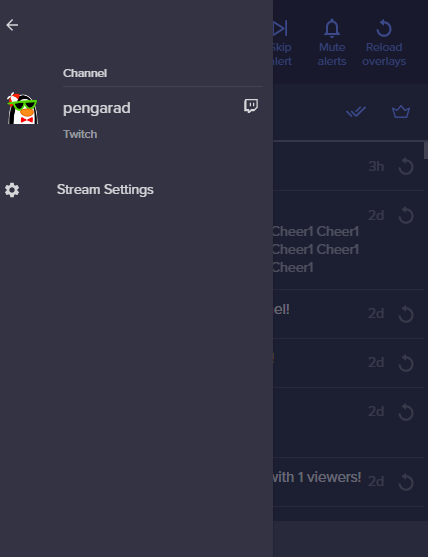 ionic kelp
Settings then bottom.
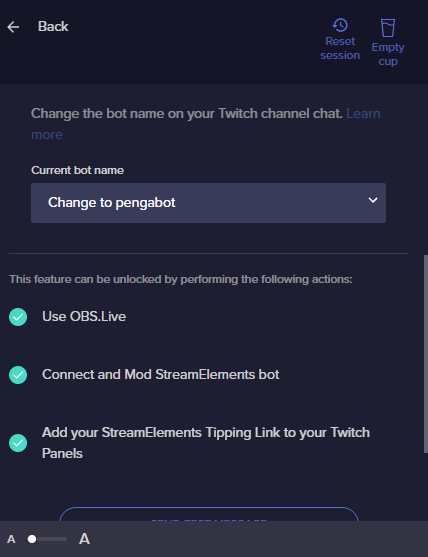 ionic kelp
In the dropdown is that the 2nd or 3rd option?
cold leaf
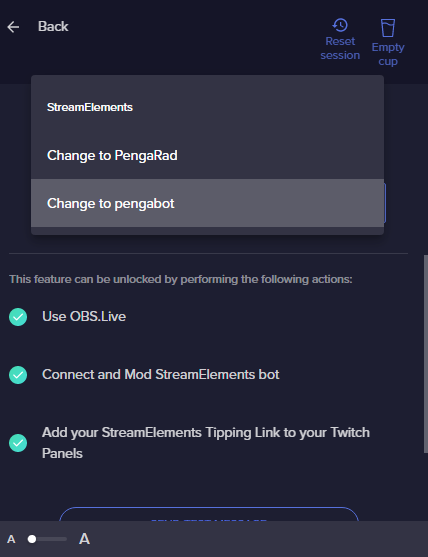
pengarad is my main
and pengabot is the desired account I want
I want stream elements out of here and pengabot to take the position of streamelements
You know what I mean?
ionic kelp
Disconnect option 3.
Logout from the OBS.Live menu up top.
Log back in.
Reconnect bot.
cold leaf
ionic kelp
Disconnect option 3.
Logout from the OBS.Live menu up top.
Log back in.
Reconnec...
when I log in, do I log in with my main account or the bot account?
strong kernel
cold leaf
when I log in, do I log in with my main account or the bot account?
Top menu: main account. Menu in bot connection: bot account.
cold leaf
strong kernel
Top menu: main account. Menu in bot connection: bot account.
Ive already logged out of OBS live
Ill relogin with my main acc
Nethyr, im lost
I relogged in and pengabot is still the third option
cold leaf
I disconnected and reconnected it, it ended up as the third option again, Nethyr
cold leaf
Thats what we want?
strong kernel
Yes. Were you expecting something different?
cold leaf
Honestly, yeah
strong kernel
cold leaf
Honestly, yeah
Well it works.
 fleet cipher
How do I setup rank command for rocket league on stream elements?
cold leaf
So streamelements will no longer do commands?
cold leaf
That's sweet, I tried to search for youtube videos and i looked at that one tweet on how to set it up, nothing about this!
Thanks man
Have a good day
 uneven goblet
Hey guys I need help understanding these commands
How do I turn volume up for the music?
ionic kelp
!volume #
 fresh sinew
I'm having trouble saving an alert, I changed all of my alerts and they all saved just fine. The subscriber alert won't change at all no matter how much I mess with it. What could be the problem?
 loud zinc
Can someone help me with getting my recent donation data to display on my personal Streamlabs OBS Overlay. I want to use the data from my tipping to display.
 restive python
I'm having a problem that I cannot for the life of me figure out. My SE overlay alertbox is not displaying real alerts. The emulated ones work but when twitch tells me on my activity box in OBS it does not display the alert. SE bot does actually come in clutch in chat and announces the follow and its saved me every time. I also just realized SE has not picked up ANY of my stream stats for the last month. I switched from SLOBS to OBS around the beginning of the year and SLOBS worked fine. It seems like Twitch and SE are not talking. Not sure if they had an argument but I would like those 2 to get with the program lol. Anyway. If you think you have the answer to my problem please feel free to DM me. I might not get back to this until tomorrow but just thought I'd send a message.
 dusty thunder
new BTTV/FFZ wont load/track in my friends chatstats, can someone help him. twitch name: SteamyFreshMeme
bttv/ffz emotes
zenith widget
@fresh sinew did you check the variations?
@loud zinc If you are referring to getting tips via our link and displaying it on a Streamlabs overlay/label - that is not possible, as our systems are separate.
@restive python Please provide your account ID found at the top of this page: https://streamelements.com/dashboard/account/channels This ID is public info and safe to share here.
restive python
5ff8e835845fc2385f7a277d
zenith widget
@dusty thunder Give it like 5-10 minutes, refresh the chatstats page and then try again
@restive python should be good now
dusty thunder
@zenith widget alright, thank you
loud zinc
zenith widget
<@!227160615859388416> If you are referring to getting tips via our link and dis...
Oof then I may have to find a new provider for that service. Thanks a bunch
zenith widget
Streamelements (us) and Streamlabs are 2 different companies
So if you are using our tipping link
it won't be connected to Streamlabs
same applies if you are using Streamlabs tipping link, it won't be connected to our alert widget for the overlays
restive python
zenith widget
<@!124401105315692545> should be good now
What kind of black magi- never mind I do not wish to know. Take care brother...
seriously thank you!!!
zenith widget


 wise hamlet
hello, I have a problem, it doesn't show me my follow, nor host for some days and it doesn't show me the alerts when it doesn't appear in the activity feed
zenith widget
@wise hamlet Please provide your account ID found at the top of this page: https://streamelements.com/dashboard/account/channels This ID is public info and safe to share here.
wise hamlet
hi agains, 5ff8ba3929f6f45c33d5c5ee
zenith widget
@blissful garnet https://stats.streamelements.com/c/smokin___ - there is a chatstats page here. Not sure what is needed to be done here
@wise hamlet fixed
wise hamlet
OMG, Ty!
 zenith widget
Thats the loyalty points system, meaning that you need the loyalty system turned on
blissful garnet
it is now turned on still no data, or does it only go off of data after its turned on
zenith widget
Its not going to populate anything right now.
You must be online to start giving out points to people
blissful garnet
ah alright thanks
 coarse nymph
I'm having an issue where my chat and notifications panels no longer show up in my user interface of OBS. This happened after an update. Any help would be appreciated!
zenith widget
Streamelements on top of OBS -> Chat + activity feed
coarse nymph
You rock! Thanks!
blissful garnet
@zenith widget last question, when i do !watchtime and likewise commands it says 0 secs for every1 but its been turned on
blissful garnet
okay thanks
 wooden river
hello, i have a problem where my chat alert module and my dashboard isn't tracking anything. ID is 5ffac2ddd6bf7aab98b44eef
 jovial obsidian
 hidden gust
Hello, I have a problem which is my dashboard deleted everything from it ( If someone raided me in the past i won't see it in my dashboard )
hidden gust
wooden river
hello, i have a problem where my chat alert module and my dashboard isn't tracki...
Use everything for StreamElemnts(don't use streamlabs alert box and use obs as the streaming software)
zenith widget
wooden river
hello, i have a problem where my chat alert module and my dashboard isn't tracki...
fied
zenith widget
hidden gust
Hello, I have a problem which is my dashboard deleted everything from it ( If so...
Not sure I understand what you mean
hidden gust
it did reset everything
That's what happend to me
not the follows
omg
wait
i can't see that
zenith widget
There is a filter button for the activity feed
zenith widget
Well, you are just mentioning your raid events reset
while i can clearly see them
when i filter out the follower events
zenith widget
Ok, so what exactly is the issue here?
 pallid folio
anyone else having their widgets zoomed in like this by default?
searched around in this disc and couldn't find a solution
already tried restarting them, zooming out via scroll wheel, - and + button
zenith widget
MInimize, right click desktop -> customize -> check zoom levels
or..not customize but Display settings
pallid folio
ahh it fixed it immediately. thanks so much!!
pallid folio
yep it was
 pallid folio
goat
 long gyro
My activity feed is has updated since early December. Neither in stream elements web page or the program. Last time I asked they said it’s a world wide issue I’m just curious if anyone knows when it’ll be fixed. My twitch feed is still updating. It’s affecting the alert box is there a way for me to fix it?
long gyro
long gyro
My activity feed is has updated since early December. Neither in stream elements...
I noticed hosts and raids still pop up in the feed but, no followers, subs, donations
Any and all help appreciated
 earnest topaz
I have aliased !ticket to !swag for a channel I am assisting with. My question, is there a way to Alias it so !swag will send "!ticket 1" so they dont have to type "!swag 1" which looks wierd and slightly redundant when it is a simple 1 entry per a person giveaway they run?
ionic kelp
@earnest topaz Nope. Have to specify the amount.
lament blade
I can't cashout my Donations can anybody help me pls?
prisma relic
!accountid @long gyro
long gyro
prisma relic
!accountid <@!758213704197079080>
5fcc1f7feb429e2f4cbbedd6
long gyro
Last update was dec 28 I’ve had roughly 20 more followers since
 deep escarp
Hi
long gyro
If needed I can do a side by side of my twitch activity and SE
prisma relic
I sent it in for a look. I'm thinking something got outta sync
long gyro
Last time I asked I was told it was a world wide issue but was curious since it had been a while lol. Thank you
zenith widget
@long gyro I added your account to a list of devs to take a look at.
@lament blade what cashout? SE.Pay?
long gyro
zenith widget
<@!758213704197079080> I added your account to a list of devs to take a look at.
Thank ya
lament blade
@zenith widget Yes SE.Pay
Hello its not working theyre said No stream collections are avaible Please help me
 full jungle
Hey there, quick question I cannot for the life of me figure out.
Tonight during my stream I had someone tip $200 through the streamlabs website. The sound alert aspect went off but not the animation. Not the worst thing in the world but I felt bad for such generosity nothing showed up on screen despite me having something set up.
Few things: It worked the other day, this isn't my first paypal/cash donation and it showed up just fine.
I haven't changed anything at all lately.
If I go to streamelements and do an emulation of a $200 tip, it plays on screen as it should.
If I try to replay the alert, the audio and TTS replay but still nothing shows up on screen.
I tried refreshing the browser source and no luck. If I replay any recent notif (including a previous tip) they all play fine all except for this particular one, no animation.
Is this just something that happens sometimes? if so I understand, I'm just trying to prevent it if at all possible. Thanks for any help 🙂
ionic kelp
@full jungle you'd have to speak with them.
lament blade
my tipping page keeps saying seller restrictions how do i fix that?
because it's not allowing people to donate
 ashen sparrow
I've added a lot of users to the ignored list (about 200) in the loyalty settings. While this works perfectly fine for loyalty points, all these ignored users still gather watchtime. So I have to delete watchtime manually for each of them. I've read that ignored users should also not gather watchtime. But for me it doesn't work somehow.
 strange gyro
Hello! Is there a way to have streamelements bot run a chat command when x amount of new people follow/sub during a stream?
zenith widget
@lament blade The default resolution for StreamElements overlays (theme and custom) is 1920x1080. Please add them in OBS at their full resolution and use CTRL+F to fit to screen if necessary. You can then downscale your stream in OBS settings > Video if you'd like https://i.imgur.com/6bWXxjR.png
 lament blade
i still don't know how to fix this problem
lament blade
zenith widget
<@456226577798135808> The default resolution for StreamElements overlays (theme ...
ok thanks
zenith widget
@ashen sparrow in that case its bugged and we will have to check on this and fix it.
zenith widget
lament blade
i still don't know how to fix this problem
fix what problem?
prisma relic
not that i know of @strange gyro .... but seems like a good idea worth looking into; see the header in #💭︱feedback-and-ideas
zenith widget
strange gyro
Hello! Is there a way to have streamelements bot run a chat command when x amoun...
no
strange gyro
 oh i am surprised, but thank you for the quick responses
zenith widget
lament blade
<@!120611700993949696> Yes SE.Pay
Please contact us via email for support with SE.Pay. You can use our contact form here: https://streamelements.com/contact Thank you.
lament blade
thanks it working
zenith widget
lament blade
Hello its not working theyre said No stream collections are avaible Please hel...
stream collections? where are you seeing this and what exactly are you trying to do?
lament blade
zenith widget
fix what problem?
every time someone donates it says "error restricted user"and i can't seem to fix that because i've had many people tell me it's not working for any of them
zenith widget
lament blade
my tipping page keeps saying seller restrictions how do i fix that?
Ok I see, this means your PayPal account is suspended or restricted. Contact their support
lament blade
ok thanks i'll make sure i do so
is there a way to copy over settings from another overlay?
ionic kelp
You can duplicate widgets if that's what you're wanting to do. Otherwise you can duplicate overlays entirely.
lament blade
ok thanks
ionic kelp
For widgets themselves click the layer for the widget then the 2 squareson top of another. To duplicate everything click the 3 dots in the overlay library.
lament blade
@zenith widget thx
full jungle
ionic kelp
<@136951268085202945> you'd have to speak with them.
Who is them in this case?
ionic kelp
Streamlabs
zenith widget
This is the Streamelements discord
and you are mentioning an issue with SL
so, its best to ask them
full jungle
oh my bad, It is streamelements, I don't use streamlabs. 😰 sorry it was a typo
 halcyon maple
@prisma relic Yo just pinging you, seeing if you've heard anything back from the devs about the !command permissions?
prisma relic
I'll take a look @halcyon maple
zenith widget
@full jungle is it intentional for your tip alert to have custom CSS enabled on it?
prisma relic
.... can you refresh my memory? i'm going ask that ^ big brain about it.
it was that the !cmd command could not be set to 'broadcaster' only, correct? even when set, mods could use it?
full jungle
zenith widget
<@!136951268085202945> is it intentional for your tip alert to have custom CSS e...
Yes, I use a custom alert I purchased through Nerd Or Die.
The alert also worked recently and still works properly if I do a custom tip alert of the same amount I received tonight. I don't have any variations or anything either.
zenith widget
Thats a Nerd or Die issue.
I'll give you a screenshot which you can show to NoD, so taht they can help you fix the code
full jungle
okay thank you, I appreciate it.
zenith widget
Its from the console, when trying to replay the $200 tip
so if they need more of this screenshot, F12 -> console tab while in the overlay editor -> this button
full jungle
Cool, thank you! I'll be sure to check with them. I'm also hopeful it was just some weird one off bug since I can still send through "fake" $200 tip alerts, but what do I know haha. Appreciate all the help 🙂
zenith widget
custom widgets are weird
as they can be coded to work with the emulation
but actual events sometimes are little bit different
full jungle
Ah I see, yeah adding another layer into the mix can easily complicate something that I'm sure is complex enough on its own lol. Thank you again, I've reached out to NoD!
young zephyr
Would like to say issue my issue fixed itself or me remaking the alert fixed it.
 bright holly
How can i set a custom pic on the tip page?
ionic kelp
Which one?
velvet seal
when i make a browser source in obs.live some of the source gets cut off what can i do
ionic kelp
Set the size to 1920x1080in properties
velvet seal
ok
 left quiver
Unfortunately, this issue still persists. Do you have any additional steps I can take to resolve this? Thank you for all your efforts!
 plush viper
working in the editor right now, had a question about animations. I'm selecting multiple animation options and none of them work. do you know why this might be?
prisma relic
do you have the 'custom CSS' toggled on @plush viper ?
ionic kelp
Or hit save?
plush viper
i've hit save, nothing changed, where would i find the option to enable custom css
im looking at the code of the custom widget, theres animation options in fields but not animation code in the css, just general style options. could this be the case
prisma relic
you want this OFF
plush viper
ita a custom widget, slideshow social media names
prisma relic
ok... wait; you are saying 'custom widget' ... and that means you need to handle all the animations.
ahhh. ok. ya. which one is it?
plush viper
socialmedia rotation widget by benno
prisma relic
1 sec taking a look
plush viper
no problem 😄
 split kettle
hey quick question how do i add streamelements to my twitch
prisma relic
@plush viper are you trying to do different animations for different events?
plush viper
im just trying to change the animation of the transition between slides
it rotates between all my social media and it kind of just blinks from one to the next, i cant get it to fade into the next for instance
prisma relic
ahhh... i see it; the first animation does the selected one. the others do the default like 'zoom-in' /out
plush viper
i messed with both of them and nothing happens
prisma relic
do you want it the same for all of them?
plush viper
yeah
split kettle
 nimble dune
Bot?
nimble dune
Bot?
i think so
nimble dune
@split kettle First mod the bot type in your chat /mod streamelements
Then go here https://streamelements.com/dashboard in right side click join channel.
reef bramble
celest oasis
https://streamelements.com/logout then log back in should fix your issue
yes, but I am editor of 5 ou 6 channels and if I change my channel to other it goes back to main page
ionic kelp
@reef bramble they need to do the same as well.
prisma relic
if you set it like this @plush viper do they all come in from the left and leave to the right?
plush viper
oh how weird, those settings arent even there for me, ill show u what mine looks like
one sec
only animation options i have are at the bottom of settings
should I try to add the widget again or do something to improt it properly?
import*
prisma relic
i't may have gotten updated? i just did a fresh install from: #🤖┋bots message
plush viper
i cant load that link
 bad PJ. Giving private link.
prisma relic
bad PJ. Giving private link.
prisma relic
it wasn't a private link.
plush viper
am i not in the server that its from or something? just says i dont have access
plush viper
ah this works
thank you for the help
last question, how do i take this widget and add it to another overlay i already have
prisma relic
there is a lil icon in the layer tab
split kettle
is there a trrick to getting the image to upload corretly into the panel
plush viper
got it, thanks
prisma relic
into the Twitch panel @split kettle ? .... i think it has to be a specific size or dimensions.
split kettle
Yeah I have downloaded the pic of the stream element website and it doesn’t like it
split kettle
prisma relic
thank you. if you remove the text in the 'description' will it go through?
split kettle
prisma relic
thank you. if you remove the text in the 'description' will it go through?
I’ll give it a go
split kettle
prisma relic
thank you. if you remove the text in the 'description' will it go through?
Nope still blocks it
prisma relic
can you post it with no image?
split kettle
But how will it link?
 short mason
that doesnt let me disable it lmao
thats just settings
i wanna completely remove the function
prisma relic
prisma relic
oh a command.. hahah you should have mentioned it was a command; did you turn it off?
short mason
no
i searched for it but it doesnt come up
i think its built into the donating thing itself
prisma relic
it's under '!tip'
they hide it 😉
I mean you can use SE for tips too ... but that's all up to you
short mason
lmao it worked thanks
split kettle
prisma relic
<@!364574795184209930> .... try without a title?
so i got it to work twtich doesnt like the images that i downed from the website but allows me to crop a image down
prisma relic
so it was the image? 🤔 .... i'll try. you are using macOS?
split kettle
I downloaded a pic of google images and I’m on windows
 novel marten
hi, please help me with the media request tool. when i paste the youtube url then click add media a message pops up saying please enter valid youtube url. i have copied the url from the youtube share link and also used the url in the address bar. both times, the same message appeared. thanks for your help.
reef bramble
ionic kelp
<@287051592484782080> they need to do the same as well.
oh okok, thanks!
fresh warren
hello, I have a problem, it doesn't show me my follow,
zenith widget
@novel marten what browser are you using?
Please provide your account ID found at the top of this page: https://streamelements.com/dashboard/account/channels This ID is public info and safe to share here. @fresh warren
fresh warren
Account ID 5fda2766a5eb28a12bf4a2b2
lament blade
Hello Guys
why ppl can just donate with paypal ?
i cant link it to other payment methods
 wintry kayak
okay so question. if i start me streamelements obs my discord goes fully muted is there a way i can fix this?
 prisma relic
do you get a purple bar on the top of discord when you open OBS that says streamer mode enabled?
wintry kayak
yeh
prisma relic
that means that streamer mode is enabled automatically.
but i can't really help more than that 🤣 .... that's a Discord or OBS question
wary halo
lament blade
Hello Guys
why ppl can just donate with paypal ?
i cant link it to other payment...
You need at least 101 followers
lament blade
ahh thank you ^^
zenith widget
fresh warren
Account ID 5fda2766a5eb28a12bf4a2b2
I've reported your account to the devs to take a look
fresh warren
Thank you
 limber bloom
So idk if this is really the place for this and I'm sorry if it isn't but I was curious if I could change the green sword moderator badge? Does anyone know if it's possible?
 uneven temple
Wait really ???
zenith widget
or within bttv/ffz settings
uneven temple
:o
uneven temple
Damn I need to take a look then thanks
limber bloom
Sweeettttt thank youuu it was bugging me so much 😂😂😂
 noble spoke
Hi all, Im having a problem with my streamelements bot in chat. i have set timers as well as modules but last stream none of them went off. is there something im missing?have i silenced streamelenets in chat and not knowing it ?
 blissful verge
Hey Guys, is it possible to add a youtube playlist to the mediashare queue instead of just 1 song at a time?
viscid pebbleBOT
@noble spoke Go to the Dashboard > Right side > Part channel > Join channel(https://streamelements.com/dashboard)



 novel marten
@zenith widget hi, I used Firefox to get to YouTube.
noble spoke
thank you @viscid pebble
 dense dagger
Hello! I'm having a problem with my overlays' streamelements at streamlabs OBS. When I creat the browse source seems like my streamelements are not loggin
viscid pebbleBOT
@dense dagger To add your overlays to OBS, add a new browser source in your scene. Paste your overlay URL in the browser source properties, set the dimensions to 1920x1080 (unless you changed them on the website) and check Shutdown source when not visible. https://youtu.be/KDvLynUqXI4
@dense dagger We're not able to troubleshoot issues with using our overlays in StreamLabs OBS (SLOBS) as we don't have the tools to support their software. We recommend using OBS Studio or OBS Studio with our plugin OBS.Live.
 winged dew
help! sorry to join and immediatly ask for help but i cannot for the life of me find where on twitch i add the tip link
ionic kelp
#🇮🇹︱italiano @livid fiber
@dense dagger As the bot said we can't help with issues if you use SLOBS.
 livid fiber
ionic kelp
<@192033382530547712> As the bot said we can't help with issues if you use SLOBS...
livid fiber
ionic kelp
<@192033382530547712> As the bot said we can't help with issues if you use SLOBS...
Thx
winged dew
please helpz meee
 jolly trellis
Can I choose an own botname somehow?
 cinder olive
winged dew
help! sorry to join and immediatly ask for help but i cannot for the life of me ...
cinder olive
winged dew
help! sorry to join and immediatly ask for help but i cannot for the life of me ...
Add it to your 'about me' section on twitch, where your panels go.
cinder olive
dense dagger
At OBS studio is the same <@!66043140208857088>
There is nothing wrong in this screenshot, you need to either login or manually add your overlays, or both to see them.
cinder olive
jolly trellis
Can I choose an own botname somehow?
#helpdesk-twitch message Click this link and follow the instructions closely.
cinder olive
 boreal tide
hello, can someone help me out
boreal tide
hello, can someone help me out
Can only do as such if you ask a question 😉
boreal tide
sorry
i cant seem to get the streamelements bot in my chat
i modded it by doing /mod streamelements
but the commands dont work
boreal tide
cinder olive
Can only do as such if you ask a question 😉
:/
cinder olive
Do this; if it says part, click it and click join channel. If it says join channel, click that.
viscid pebbleBOT
@boreal tide Go to the Dashboard > Right side > Part channel > Join channel(https://streamelements.com/dashboard)
dense dagger
cinder olive
There is nothing wrong in this screenshot, you need to either login or manually ...
I'm connected at streamelements and added the overlay mannually
viscid pebbleBOT
@dense dagger Please provide a log from your last stream. To do this, in OBS go to Help > Log Files > Upload Last Log File and paste the link to the log file here.
dense dagger
Error uploading log:
cinder olive
Alright, thats odd
Head over to the log directory <C:\Users<username>\AppData\Roaming\OBS\logs> and manually send me your log
 dawn olive
Hi, my bot wont work in my chat.. when i do !discord wich is one of my commands nothing happnes... and same with my friend..
viscid pebbleBOT
@dawn olive Go to the Dashboard > Right side > Part channel > Join channel(https://streamelements.com/dashboard)
You can download our Desktop App Ground Control here: https://streamelements.com/groundcontrol
 late flint
Hi guys! I'm having a issue with the alerts.
I changed the default picture to one I created, but it is still showing the default image. Is there something else I have to do to fix this issue?
calm lily
check the cariation settings
variation*
you can disable the variations so the same image appears every time.
dawn olive
oh my god.. the bot was banned from my channel.. that was why it didnt work...
late flint
calm lily
you can disable the variations so the same image appears every time.
I'm in love with you 😭 Thank you so much!!!!
calm lily
late flint
I'm in love with you 😭 Thank you so much!!!!
❤️ you're welcome!! It happened to me too!
 stoic pond
Hi, i need help please... when i start stream and i try to stream cs:go i have blackscreen in OBS and on stream.. i have notebook with nvidia graphics
viscid pebbleBOT
@stoic pond Valve has implemented a trusted mode which does not allow OBS to hook CS:GO using Game Capture. Read more in their announcement post here https://blog.counter-strike.net/index.php/2020/07/30736/.
Additionally, they have no plans on allowing OBS in trusted mode.
https://support.steampowered.com/kb_article.php?ref=8835-KLXV-0292#whitelist
You will need to run the game in either windowed or borderless fullscreen and use Window Capture instead.
Alternately, you can launch the game with -allow_third_party_software.
nimble dune
 wicked dagger
How to return default sounds? Can'f find them
wicked dagger
How to return default sounds? Can'f find them
Pinned messages
dense dagger
cinder olive
Head over to the log directory <C:\Users\<username>\AppData\Roaming\OBS\logs> an...
Sent you for private chat
cinder olive
First make sure to always run your OBS as admin
Second you only have one browser source, which is the default which, which is why you are seeing what you are seeing.
dense dagger
Already done 😦
 muted loom
Anyway to pin down or fix why my emote explosion causes my bit rate to look bad?
 peak flare
How to I remove the streamelements chatbot? It used to have a part channel option but I can't find it anymore. Please ping me if you know
viscid pebbleBOT
Go to the Dashboard > Right side > Part channel > Join channel(https://streamelements.com/dashboard)
ionic kelp
Might need to hit do later.
peak flare
Ohhhh thanks
 coarse sage
I am having a problem with my bot, as of sunday it no longer works. I thought it was down at first, but after 2 more streams it still not working. I have removed bot from the channel and readded, unmodded, remodded and still does not respond to any commands or post anything in my channel
ionic kelp
@coarse sage Use the custom bot name in OBS.Live?
 nova sinew
Can I post my Twitch link in here?
ionic kelp
No.
viscid pebbleBOT
Read and follow our server rules:
- We do not tolerate toxicity! Treat the community team, staff and all members with respect.
- No advertisement or channel promotion, anywhere on the server.
- No NSFW/NSFL
- No unsolicited DMs or friend requests to server members
Make sure to read the #welcome in any server you join.
coarse sage
@ionic kelp yes, i do use the custom name
viscid pebbleBOT
If your commands recently stopped working and you're using OBS.Live and a custom bot name do the following:
- In OBS.Live, click on the hamburger menu (three stripes) at the top left of your activity feed
- Click on Stream Settings > Custom bot name
- In the Custom bot name field select Set custom bot name, not your already existing username (with capital letters). Note: If you already connected an account that way, the third entry will show as the account name (see image https://i.imgur.com/sO7fWOX.png).
- Scroll a bit down and click on the purple Connect Custom Bot Account button
- Log in as usual and Authorize the custom bot name
- Back in the Activity feed, click on the Send Test Message button and check if your custom bot name starts working again
novel marten
@zenith widget it worked when I copied the YouTube video URL through opera
 grand hill
I am having an issue with the events rotator widget. It will show the number of new followers this month but I cannot get it to show the total number of followers
coarse sage
still doesnt work, it works fine without the custom name
I got it to send a test message, but wont respond to commands at all
 amber crypt
my stream key is not valid and i have reset it and copied and pasted it multiple times to
ionic kelp
@coarse sage is that the 3rd option as shown in the image?
coarse sage
@ionic kelp yes
ionic kelp
try this.
viscid pebbleBOT
StreamElements menu, on top of OBS > Logout > Login
ionic kelp

amber crypt
my stream key is not valid and i have reset it and copied and pasted it multiple times to
viscid pebbleBOT
Obs.live is a plugin for OBS Studio for the best OBS support, please join their Official Discord @ discord.gg/obsproject
 neat tide
Hello Guys
First of all sorry my English is not the best i am from Germany ^^
Yesterday i read that i can reactivate my "Ground Control" Custom Bot Name settings when i ask here !?
i don't want use OBS.Live i only use Standard OBS.
My Twitch name is the same like here.
hope you guys can reactivate it for me. thx
grand hill
I am having an issue with the events rotator widget. It will show the number of new followers this month but I cannot get it to show the total number of followers
 leaden knoll
Trying to setup some notifications on the chat alerts, but I can't remove pogchamp from the end of any chats and/or add a message at the end. Anyone able to provide insight on how to change that message?
 uncut comet
hey, I already edited my overlay, but when i try to paste in on the OBS it appears cutted
an
and honestly I don't know what did I do wrong
viscid pebbleBOT
The default resolution for StreamElements overlays (theme and custom) is 1920x1080. Please add them in OBS at their full resolution and use CTRL+F to fit to screen if necessary. You can then downscale your stream in OBS settings > Video if you'd like https://i.imgur.com/6bWXxjR.png
uncut comet
thank you so much
 grizzled roost
hy i have the streamelements bot in my twitch chat, ut in the last stream it didn't work and its is not working even right now that i am not in live
viscid pebbleBOT
@grizzled roost If your commands recently stopped working and you're using OBS.Live and a custom bot name do the following:
- In OBS.Live, click on the hamburger menu (three stripes) at the top left of your activity feed
- Click on Stream Settings > Custom bot name
- In the Custom bot name field select Set custom bot name, not your already existing username (with capital letters). Note: If you already connected an account that way, the third entry will show as the account name (see image https://i.imgur.com/sO7fWOX.png).
- Scroll a bit down and click on the purple Connect Custom Bot Account button
- Log in as usual and Authorize the custom bot name
- Back in the Activity feed, click on the Send Test Message button and check if your custom bot name starts working again
 median yarrow
Hey is chat status down?
StreamElements
Description Chat Stats tracks emote usage on Twitch in real time. See which emotes are the most popular on every Twitch channel


nvm its back now
I am seeing stats that arent apart of the stream
grand hill
I am having an issue with the events rotator widget. It will show the number of new followers this month but I cannot get it to show the total number of followers
 zealous kelp
Does anyone know why there is a small delay in my alerts? To be more specific-- My raid alert is a couple seconds of a rap that I sometimes rap along to to be funny but when I do it (on my end) I'm right in sync with it, but for some reason when I watched my vods/clips and see it there it always seems to be just a little bit ahead of me.
I could go through and handle delays all around my OBS but that seems cumbersome.
 short cape
Is there a way to add padding in front of the text in the Twitch chat?
I Hate that the texts are touching the left side of the box 
 loud locust
im having an issue on my timer messages. one of them just pops up saying, "Enter message here." I cant find anything under my timer messages reflecting why that would be happening
lament blade
question, I have a link to an overlay I made some time ago. I have deleted the overlay on my Streamelements dashboard. Is there some sort of way to use the link to recreate that overlay?
 pallid yacht
Hi! Can anyone help me with the command of counts? I wanna to put this command in my chat, so, the count isn't change the number, i wanna to numbers change when the command ar activate
 limber cloud
sombady can help me about streaming in VR
 turbid island
i am using streamelements obslive for my streams and using streamlabs alerts, i was wondering if there is a way to get my tips (im using streamlabs tipping page) to get the tips in my acitivity feed, they only appear after stream when i import tip history via the chrome extension
 ebon forum
@turbid island OBS.Live activity feed will only show tips made through our (StreamElements) tipping link that is connected to the channel that you log in with.
May i suggest to try out our donation link and import the alertbox aswell, since you already use our extension to import the tip history?
@lament blade sadly the answer is no.
Deleted overlays can't be restored.
But all the assets (audio files, pictures and videos) used in the overlay are in our system, so you can recreate the overlay.
lament blade
thanks so much!
lament blade
Hii
I downloaded streamelements recently and i was wondering is there a way to stream games using streamelements mobile? Im sorry if this sounds dumb as I said im new :)
ebon forum
@lament blade not directly, you would need to capture your phone or alternatively using emulation for mentioned mobile games.
 glass stirrup
Hello, my giveaway isnt working when my friends try using the !ticket command
Can anyone help?
ebon forum
@glass stirrup your !enter/ticket command was disabled. Enabled that for you.
 pine mortar
im having an issue with my raffles starting and seeing when people follow
it doesnt say streamelemnts then this person followed or i went live
 buoyant grove
Hello, nice to meet you guys,
Im having an issue with the streamalerts custom code, who can help me?
 wild junco
I've set up a death counter command, when I use "!editcount death" it doesn't change the death count - anyone know why?
zealous kelp
My custom bot was disconnected from my account and I cant get it to reconnect through OBS. Any advice?
lament blade
hey guys i wanna make a basic twitch chat overlay with white text and black outline for readability, but i cant get it done there is no preset outline function and the stroke is super weird and not usable for this case, can someone help me with that?
 fringe jungle
can i get g2a pay enabled on my streamelements account
ionic kelp
@fringe jungle You don't meet the requirements and it's not longer offered anyways.
ebon forum
@fringe jungle We do not support G2A.Pay anymore. They do not fit EU regulations at this point.
We have alternatives - SE.Pay in most regions.
fringe jungle
which countries have SE.Pay
viscid pebbleBOT
SE.PAY is available for streamers who are at least 18 years old, with bank account under their name in one of the following countries and have at least 101 follower (Twitch) / 101 subscribers (YouTube):
Austria, Belgium, Czech Republic, Denmark, Finland, France, Germany, Ireland , Italy, Netherlands, Poland, Portugal, Slovakia, Spain, Sweden, Switzerland, United Kingdom, United States.
If you meet these criteria and don’t see SE.Pay, let us know.
For information on SE.Pay payment methods, their fees and settlement times see https://streamelements.com/dashboard/tipping/fees
ionic kelp
Turkey?
fringe jungle
yep
 thick crag
My SE is not working at all after twitch name change
viscid pebbleBOT
If you changed your name on Twitch, please follow these steps:
- Visit https://streamelements.com/logout and then log in again by connecting with Twitch.
- On the right side of the dashboard page that opens, select Join under bot settings. If it says Part select that and then select Join to send the bot to the chat. Don't forget to mod the bot by typing /mod streamelements in your channel if you have not already.
- Post your old and your new name here so that we can update your channel's chatstats tracking (must be done by staff).
fringe jungle
so what do i do
thick crag
Ok its working now, thanks 🙂
ionic kelp
Unfortunately not really anything we can help with. There may be 3rd party options but it's a matter of do you live where they're available.
fringe jungle
wdym by 3rd party option, like to streamelements?
ebon forum
@fringe jungle Turkey has Bynogame integration with StreamElements. Try to connect it.
fringe jungle
does that have any requirements?
 true geode
hi, my follower alerts are not working but the sub alerts work. The follower alerts work whenever I do the test but not when live...any suggestions?
ionic kelp
That's something you'd have to ask them as that's not through us.
fringe jungle
oh ok
 magic jungle
true geode
hi, my follower alerts are not working but the sub alerts work. The follower ale...
magic jungle
true geode
hi, my follower alerts are not working but the sub alerts work. The follower ale...
Did you enable the sub alerts, or are they 50% transparent in the editor
true geode
@magic jungle 😅 where do i check that?
nimble dune
zealous kelp
My custom bot was disconnected from my account and I cant get it to reconnect th...
What happens when you try to reconnect? You can't login?
dusky mountain
anyone help me set up obs?
loud locust
HELP! im having an issue on my timer messages. one of them just pops up saying, "Enter message here." I cant find anything under my timer messages reflecting why that would be happening
viscid pebbleBOT
@dusky mountain New to StreamElements?
Check out our YouTube channel https://www.youtube.com/c/streamelements/videos
with tutorial videos from setting up the basics, to in-depth details on how to use our product.
New to OBS? Here is a 4 step quick start guide
https://obsproject.com/wiki/OBS-Studio-Quickstart
Want to learn even more? Here is an in-depth overview
https://obsproject.com/wiki/OBS-Studio-Overview
 rigid tiger
hey everybody, i got a question, i just started resently streaming and i dont have a Webcam or streamcam yet, is it possible to use my Cellphone camera and stream the video on twitch, and if yes, How ? plz advice, thx
 gilded shore
@rigid tiger which cellphone you have ?
rigid tiger
samsung
gilded shore
check
DroidCam OBS on playstore
dusky mountain
im stuck on setting obs up when i set it up and stream it comes up with like loads off different screens
gilded shore
no, this is an app to connect your phone camera to your obs on pc and, works with wifi and cable
https://play.google.com/store/apps/details?id=com.dev47apps.obsdroidcam&hl=de&gl=US
zealous kelp
nimble dune
What happens when you try to reconnect? You can't login?
I can log in to the account just fine, I have 2fa on it, put in my authenticator code and the window goes away after I authorize and then just... Nothing. Nothing changes and it still tells me that I need to connect the account.
nimble dune
!botdebug
 untold crest
- Right click on your OBS desktop shortcut and open the Properties
- In the Target field, add the following to the very end:
--remote-debugging-port=40404(don't forget to add a space before the current path) - Open OBS (or restart if it was open)
- Open your web browser and type in:
localhost:40404 - Click on StreamElements - Activity feed
- Navigate to the Console tab
- Type the following into the console and hit enter: store.customBot.removeCustomBotIntegration()
- Try setting the custom bot name
- Remove the additional flag in step 2 from your shortcut properties.
nimble dune
Thank you 😄
untold crest
Let me be a bot this time 😉
nimble dune
untold crest
1) Right click on your OBS desktop shortcut and open the Properties
2) In the Ta...
@zealous kelp Try this.
 green spindle
hello i am having issues getting the chat bot to work in my chat. i ahve it activated and its not in my chat... and when it is the timers and chat commands dont work