#helpdesk-twitch
1 messages · Page 820 of 1
 iron cedar
 iron cedar
;3
 lost atlas
is there a user manual for streamelements I can download somewhere?
 viscid pebbleBOT
@lost atlas New to StreamElements?
Check out our YouTube channel https://www.youtube.com/c/streamelements/videos
with tutorial videos from setting up the basics, to in-depth details on how to use our product.
New to OBS? Here is a 4 step quick start guide
https://obsproject.com/wiki/OBS-Studio-Quickstart
Want to learn even more? Here is an in-depth overview
https://obsproject.com/wiki/OBS-Studio-Overview
lost atlas
yeaaaaahhh i can't watch videos to learn how to do things, i was hoping there'd be a pdf like lightworks has?
iron cedar
oh one more question, is there is a way to install obs.live as plugin instead of installing second obs with obs.live in it?
 spiral robin
My alerts also doesnt work. Even if i use a diffrent standart overlay
 wary halo
lost atlas
yeaaaaahhh i can't watch videos to learn how to do things, i was hoping there'd ...
wary halo
lost atlas
yeaaaaahhh i can't watch videos to learn how to do things, i was hoping there'd ...
no, that is not something that is available
 brisk nacelle
wary halo
iron cedar
oh one more question, is there is a way to install obs.live as plugin instead of...
brisk nacelle
wary halo
iron cedar
oh one more question, is there is a way to install obs.live as plugin instead of...
OBS.Live IS a plugin 😛
spiral robin
Someone know how i can fix the alerts??
wary halo
spiral robin
Someone know how i can fix the alerts??
all of them? or only follows?
spiral robin
ehm idk i just get follower atm i am new at twitch ^^
but they also dontdisplayed as last follower in the overlay
viscid pebbleBOT
@spiral robin Please provide your account ID found at the top of this page: https://streamelements.com/dashboard/account/channels This ID is public info and safe to share here.
spiral robin
5ff71abd845fc26858703fb0
wary halo
staff will fix it in a minute, new events after that will show up as normal
missed events will not show
spiral robin
omg if this works i love u i sitting here for hours and hours
found absolutly nothing
wary halo
it's a bug that started recently but is easy to fix 🙂
spiral robin
okay okay, it was realy realy frustating me. It worked in simulaion but not in stream. Thank you very mutch !
need i to change something in my overlay or so or i can just start with the streaming in some minutes?
wary halo
no need to change anything 🙂
spiral robin
awesome ! made my day ❤️
 soft tapir
i still haven't got my streamelements overlays fixed, the stream alerts seems to be not working and when i looked at the activity feed there's zero activity even though someone followed me. and when i check on the streamelements web theres no activity detected.
 dense quarry
Hello, it does not show me in my stream chat when they make me a host or an autohost. What I can do?
viscid pebbleBOT
"Due to changes to Twitch API, we have filtered out hosts and will only show these ones on your activity feed:
- All hosts coming from an online channel with at least 1+ viewer
- Auto host events with at least 1 viewer - only from a channel that just went offline
Note: If you see X channel has hosted you with no viewers on the back, that is considered an offline host or a host with 0 viewers, we do not show these."
@soft tapir Please provide your account ID found at the top of this page: https://streamelements.com/dashboard/account/channels This ID is public info and safe to share here.
soft tapir
viscid pebble
"Due to changes to Twitch API, we have filtered out hosts and will only show the...
ID 5ff9c58692783823e1adb4c7
 placid raptor
fixed @soft tapir
soft tapir
placid raptor
fixed <@!309354271886016512>
Thanks a lot man! appreciate it 👍🏻
 fossil orbit
question on timers as a new Twitch streamer with usually just a few viewers. If I want a timer to pop in once in a while (say every 30 minutes) and nobody is usually chatting, should I set the chat lines to 0 in the time to make sure it goes off? I didn't understand apparently how it worked fully when I set it up before stream last night and it was on the default of 20 lines so it never went off during a 2 1/2 hour stream
basically just trying to get the bot to pop in chat every 30 minutes and remind any viewers to follow
 lament blade
Hello, Seems that it's not reading the Follower data from Twitch and triggering my alerts and updating my labels correctly. When I do an Emulate, it shows up fine. But when others follow my Twitch channel the alerts do not show and the label isn't updated. May I know what I can do to fix this issue please?
 rancid pond
how do i get a theme from stream elements to my obs
viscid pebbleBOT
@rancid pond To add your overlays to OBS, add a new browser source in your scene. Paste your overlay URL in the browser source properties, set the dimensions to 1920x1080 (unless you changed them on the website) and check Shutdown source when not visible. https://youtu.be/KDvLynUqXI4
@lament blade Please provide your account ID found at the top of this page: https://streamelements.com/dashboard/account/channels This ID is public info and safe to share here.
wary halo
fossil orbit
basically just trying to get the bot to pop in chat every 30 minutes and remind ...
yes, chatlines to 0
fossil orbit
wary halo
yes, chatlines to 0
Thanks that's what I thought. Although I also just realized at this point I should probably just leave it where it is and remind viewers myself to make it more personal until I build my follower count
 raw basin
Hi All... i need an expert on a very easy problem i guess... After a few days i still don't see the solution... 😟
I use the following command in Stream Elements Bot !dance and the response is :
$(customapi.https://api.thefyrewire.com/twitch/pastebin/pXEkhuWt?user=${user}&target=${1})
The code in Pastebin is:
$(user) and $(1) went head to head in a dance battle! After the dust settled... $(user) emerged victoriously!
$(user) and $(1) went head to head in a dance! After the dust settled... $(1) emerged victoriously!
But for some reason stream elements can't get the names correct... the person (in this test case myself) who enters the comand is also the target...
Who know what i do wrong?!
lament blade
my id 5fff02d626da6b01d2555fa7
 visual marlin
so i tried enabling loyalty but the watchtime command still does not work
it still displays "0 secs watched" for all viewers
anything else i can try?
wary halo
it takes at least 10 minutes before people get points
 eager plinth
hey, i manage the administration stuff for a streamer friend of mine, some days ago we did set up streamelements and we noticed all alerts work except the follower alert, is there any quick fix we could try?
viscid pebbleBOT
@eager plinth Please provide your account ID found at the top of this page: https://streamelements.com/dashboard/account/channels This ID is public info and safe to share here.
wary halo
from the streamers account ^^
eager plinth
one moment please
 boreal heath
Ya I've done that half a dozen times now. Lol
wary halo
and still nothing?
eager plinth
His Account ID is 5ff753ed29f6f433adce4f60
wary halo
then you might want to uninstall and reinstall it @boreal heath
because I was ensured it was activated on your account
wary halo
eager plinth
His Account ID is `5ff753ed29f6f433adce4f60`
i'll report it to staff, will be fixed soon (5-10 mins) missed events will not show, but new ones will
eager plinth
thanks a lot, have a nice day! 
 inland drum
hallo ich brauche hilfe der bot reagiert nicht mehr in meinem stream woran liegt das
wary halo
#🇩🇪︱deutsch <<<
 mellow dew
5ff9d2c7d3cf18502e85bd97
@wary halo you know how i did to appear my followers in my dashboard?
just dont appear
wary halo
if you just joined, there will be none until you get new ones
mellow dew
but have new followers
wary halo
I have send your ID to the staff so they can fix the webhooks and new followers will be shown
mellow dew
more than 15
wary halo
just not old ones
and it's already fixed I heard
so when a new follower comes, it will show on the dashboard
mellow dew
wary halo
so when a new follower comes, it will show on the dashboard
Ok, thank you!
 icy quail
Is there any way to set a minimum tts for a single user in cheer settings? So like a single user has to donate 200 bits for TTS while everyone else is 100 bits
 winter estuary
hey, follower sound is playing but not displaying anything on screen like the alrt
any help?
viscid pebbleBOT
@winter estuary OBS > Settings > Advanced > Scroll down > Enable or disable Browser Source Hardware Acceleration, depending on its current state > Restart OBS (This does not apply for OBS on Mac)
https://i.imgur.com/ggMe9ZE.png
 lament blade
Trying to stream and I keep getting this? Anyone know what this means. Yes I’ve logged out and logged back in. Not sure what to do
 nimble dune
lament blade
Trying to stream and I keep getting this? Anyone know what this means. Yes I’ve ...
nimble dune
lament blade
Trying to stream and I keep getting this? Anyone know what this means. Yes I’ve ...
Ask streamlabs, this is the StreamElements server
 unique ore
Is there a way to have xsolla tracking link purchases show up in streamelements? They only have support for streamlabs on the xsolla dashboard.
rancid pond
so i have a ryzen 7 2070 super and 16 GB of ram and my stream is still kinda choppy on low settings but my friends with worse specs can run a better looking stream can some1 go over my setting with me?
viscid pebbleBOT
@rancid pond Obs.live is a plugin for OBS Studio for the best OBS support, please join their Official Discord @ discord.gg/obsproject
 fallen sequoia
Hey, after I changed my twitch name the Bot is not working anymore.
I reconnected him for 3 times and its still Not working. Can someone help me ?
viscid pebbleBOT
@fallen sequoia If you changed your name on Twitch, please follow these steps:
- Visit https://streamelements.com/logout and then log in again by connecting with Twitch.
- On the right side of the dashboard page that opens, select Join under bot settings. If it says Part select that and then select Join to send the bot to the chat. Don't forget to mod the bot by typing /mod streamelements in your channel if you have not already.
- Post your old and your new name here so that we can update your channel's chatstats tracking (must be done by staff).
fallen sequoia
old name: snowballmts
New name: SnowballTrace
 true cipher
Not sure if this is the correct channel, but here goes i guess. I do apologise if i'm in the wrong place.
I've set up a bot account so i can have a robot post my links, do command responses, announce follows, etc in my chat, but the issue here is with the Chatbox Widget. As you can see in the image, the bot account is in the "ignored chatters" tag but it still appears in the widget/overlay. The streamelements BOT is ignored like normal but not my BOTarian_. Is there a setting I might be missing somewhere?
 verbal cliff
HI im having troubles with the bot chat alerts. I have followers enabled but nothing appears in the chat when I get a new follower. The commands work fine but nothing in enabled in modules works. Do you guys now what it could be?
viscid pebbleBOT
@verbal cliff Please provide your account ID found at the top of this page: https://streamelements.com/dashboard/account/channels This ID is public info and safe to share here.
 fickle ether
hello, I have 171 followers and I cant activate more payment methods for donations can anyone help ?
verbal cliff
5ff955ee6c80f566295d8477
lament blade
Hello, my stream alerts dont seem to be working when im actually streaming, everything is fine when i use the emulate button but the real alerts dont pop up, can someone help me with this please?
viscid pebbleBOT
@fickle ether SE.PAY is available for streamers who are at least 18 years old, with bank account under their name in one of the following countries and have at least 101 follower (Twitch) / 101 subscribers (YouTube):
Austria, Belgium, Czech Republic, Denmark, Finland, France, Germany, Ireland , Italy, Netherlands, Poland, Portugal, Slovakia, Spain, Sweden, Switzerland, United Kingdom, United States.
If you meet these criteria and don’t see SE.Pay, let us know.
For information on SE.Pay payment methods, their fees and settlement times see https://streamelements.com/dashboard/tipping/fees
@lament blade Please provide your account ID found at the top of this page: https://streamelements.com/dashboard/account/channels This ID is public info and safe to share here.
wary halo
verbal cliff
HI im having troubles with the bot chat alerts. I have followers enabled but not...
fixed
lament blade
at the top of which page
wary halo
from the link
lament blade
5ff67edc7ca15700828eebca
wary halo
thanks
 drowsy wedge
i have renamed my twitch name and now streamelements is not working on my stream as a mod. please help
viscid pebbleBOT
@drowsy wedge If you changed your name on Twitch, please follow these steps:
- Visit https://streamelements.com/logout and then log in again by connecting with Twitch.
- On the right side of the dashboard page that opens, select Join under bot settings. If it says Part select that and then select Join to send the bot to the chat. Don't forget to mod the bot by typing /mod streamelements in your channel if you have not already.
- Post your old and your new name here so that we can update your channel's chatstats tracking (must be done by staff).
verbal cliff
thank youuu!! @wary halo
wary halo
lament blade
5ff67edc7ca15700828eebca
fixed
new events will show, missed events will not
as there is no way to trace them
lament blade
Ok thank you, I will be sure to come back should I need more help
drowsy wedge
viscid pebble
<@!759535418277363804> If you changed your name on Twitch, please follow these s...
i dont see the "join" under bot settings on the dashboard
wary halo
finish the setup or click on DO IT LATER in the bottom right corner
drowsy wedge
wary halo
finish the setup or click on DO IT LATER in the bottom right corner
Thanks so much!! working now
appreciate the help so much
true cipher
Is this an issue that can be fixed or?....
#helpdesk-twitch message
 meager shard
hello ! everytime I add a new variation (ex : new cheer alert for xx amout or new alert when "nickname" resub) and try to save my overlay it's stuck on "saving..." indefinitely. If I edit the already existing one it saves perfectly, I just can't add any new variations.
 wide shore
how do i do custom stuff with my loyalty points
 dense trail
on streamelements overlay maker when i click follow goal it displays the wrong number, but when i hit total followers its accurate what do i do @viscid pebble
viscid pebbleBOT
@dense trail To reset goals:
- from the Overlay Editor > Session data on top right (monitor symbol) > Goals tab > reset progress of desired goal
- from the Dashboard > Activity feed on the left > Widget data on the right > Goals tab -> reset progress of desired goal
Note: Goal widgets (progress) only counts up and doesn't go down automatically, if you lose followers/subs.
wary halo
go to that tab and fill in the right number
raw basin
raw basin
Hi All... i need an expert on a very easy problem i guess... After a few days i ...
So nobody knows why the stream elements doesn't understand that if i do !<command> <target> it doesn't work??
wary halo
not someone that is ONLINE right now it seems 😛
 amber frigate
I got a question, i want to change my prime resub variations by count but i cant see any option to that on overlays i saw that on some huge streamers they are using it
 narrow acorn
hey, I'm here cause my stream alerts are not working and I don't know how to fix it. Need Help
viscid pebbleBOT
@narrow acorn Please provide your account ID found at the top of this page: https://streamelements.com/dashboard/account/channels This ID is public info and safe to share here.
narrow acorn
5ffa2a7cff7a69e288bfc673
 zinc hornet
Can i get SE.Pay enabled on my account?
viscid pebbleBOT
@zinc hornet SE.PAY is available for streamers who are at least 18 years old, with bank account under their name in one of the following countries and have at least 101 follower (Twitch) / 101 subscribers (YouTube):
Austria, Belgium, Czech Republic, Denmark, Finland, France, Germany, Ireland , Italy, Netherlands, Poland, Portugal, Slovakia, Spain, Sweden, Switzerland, United Kingdom, United States.
If you meet these criteria and don’t see SE.Pay, let us know.
For information on SE.Pay payment methods, their fees and settlement times see https://streamelements.com/dashboard/tipping/fees
 naive rivet
Hello, i am here seeking for help as StreamElements is not getting my follower data and thus not playing alerts or show in my overlay whenever i get a new follow, while hosts and raids do work normally.
viscid pebbleBOT
@naive rivet Please provide your account ID found at the top of this page: https://streamelements.com/dashboard/account/channels This ID is public info and safe to share here.
naive rivet
5ff6fbd1be772b5c3aeceebf
I believe it could be because of a recent name change, my old twitch username is Mckiller2
viscid pebbleBOT
@naive rivet If you changed your name on Twitch, please follow these steps:
- Visit https://streamelements.com/logout and then log in again by connecting with Twitch.
- On the right side of the dashboard page that opens, select Join under bot settings. If it says Part select that and then select Join to send the bot to the chat. Don't forget to mod the bot by typing /mod streamelements in your channel if you have not already.
- Post your old and your new name here so that we can update your channel's chatstats tracking (must be done by staff).
wary halo
yeah but it's not only that 😉
wary halo
naive rivet
5ff6fbd1be772b5c3aeceebf
fixed
wary halo
narrow acorn
5ffa2a7cff7a69e288bfc673
fixed
naive rivet
What was the cause of this, i am really interested because i tried all possible common sense fixes and nothing helped 😂
naive rivet
Ah i see, so it should work as intended now?
wary halo
yes
naive rivet
Thank you, i almost started getting grey hairs from this 😅
 opal pasture
Hello, also occurs to me @naive rivet could you help me?
wary halo
He can not, but we can 😛
viscid pebbleBOT
@opal pasture Please provide your account ID found at the top of this page: https://streamelements.com/dashboard/account/channels This ID is public info and safe to share here.
unique ore
Is there a way to have xsolla tracking link purchases show up in streamelements? They only have support for streamlabs on the xsolla dashboard.
opal pasture
5fe0103e32a3cfecce5fcaf5
wary halo
I'll ask around internally for your question @unique ore
unique ore
wary halo
I'll ask around internally for your question <@!180506729828581376>
Thank you. Appreciate it!
opal pasture
wary halo
He can not, but we can 😛
haha
wary halo
unique ore
Thank you. Appreciate it!
There is no Xsolla integration at the moment
unique ore
Damn lol
wary halo
opal pasture
5fe0103e32a3cfecce5fcaf5
fixed
opal pasture
Does it take time to solve the problem?
wary halo
I literally just said it was fixed 😛
ah
There are more issues with your account I just heard
So it will probably be fixed tomorrow because of the timezones from the devs
opal pasture
Seriously?
wary halo
yes
opal pasture
Oh, man, that's right.
 mighty stirrup
Hi I would like to know why when I am creating my alert box and make it where it says on top of image it does not show up I
viscid pebbleBOT
@mighty stirrup Text not showing up over your alerts? Go to the Advanced Text Settings and set the top margin to 50, you can work your way to the right position from there.
mighty stirrup
Thank you! ill try this out
 grizzled dust
im having tipping issues and cant withdrawl put in wrong routing number can someone help?
viscid pebbleBOT
@grizzled dust Please contact us via email for support with SE.Pay. You can use our contact form here: https://streamelements.com/contact Thank you.
@echo heath Welcome to the helpdesk! Please let us know how we can assist you today and a support volunteer or staff member will assist you as soon as they are available. Thank you for your patience.
 vapid spire
wanted to know if theres a way to set gifted sub alert variations for different Tiers of subscriptions for Twitch? Only option I see for Variation Parameter is Gift then Chance %
 echo heath
viscid pebble
<@!362972370752765952> Welcome to the helpdesk! Please let us know how we can as...
echo heath
viscid pebble
<@!362972370752765952> Welcome to the helpdesk! Please let us know how we can as...
I have a problem regarding the alerts on the platform, everything is already activated and configured and all alerts are working normally, however when I receive a donation through the donation link from Streamelements itself, I do not receive any notification on live
vapid spire
wary halo
all tiers are possible to set in the alertbox
yes but is that possible for gifted subs?
wary halo
euh, no idea actually
 dawn wren
Hey I need help?
echo heath
viscid pebble
<@!362972370752765952> Welcome to the helpdesk! Please let us know how we can as...
some of my followers have already asked me about it, as they send donations to talk to me during the live and unfortunately it doesn't end up appearing on the live.
vapid spire
wary halo
euh, no idea actually
because theres no Exact option, just chance?
viscid pebbleBOT
@echo heath if a viewer tipped through PayPal but no information appears in your StreamElements account, this generally means PayPal has held the tip for verification. Until PayPal clears the tip and sends back a confirmation to your StreamElements account, no information will appear there and no alert will play, as that confirmation is the only way for us to be aware of a successful transaction. If you believe there may be an issue with the transaction, you'll need to contact PayPal support as StreamElements is only a passthrough service and never actually gets involved with the transaction or touches the money
dawn wren
How do I copy my tipping page and so I’m able to paste it?
wary halo
vapid spire
because theres no Exact option, just chance?
yeah I don't see any options for it either
echo heath
viscid pebble
<@!362972370752765952> if a viewer tipped through PayPal but no information appe...
thanks, i gona see what i can do here
dawn wren
How do I get there that’s what I need the link?
wary halo
that is the link to the tipping page yes
you get there by clicking on the link I send, then on the tipping settings button and then on the tip panel setup
that is why I send all those screenshots 😛
lament blade
Hi I'm trying to get alerts with twitch to work. I'm using obs.live
the test alerts all work great but doesn't actually work when people follow me?
the bot announces when im going online but also doesnt announce when when i get new followers in chat?
wary halo
one moment 😛
lament blade
okie thank you
wary halo
Please provide your account ID found at the top of this page: https://streamelements.com/dashboard/account/channels This ID is public info and safe to share here.
lament blade
5ffa9c82df20088a3bf5b8e6
also my stats havent been updated as well?
I'm not sure if thats all related.
Zero views so far.
wary halo
lament blade
5ffa9c82df20088a3bf5b8e6
fixed
everything should work as intended now
missed events can't be shown but new ones will show up
lament blade
ah thank you so much. quick question if a follower, unfollows and refollow does a notification still show?
wary halo
it shouldn't but it happens yes
lament blade
@wary halo thank you for your help ❤️ that was so fast. please have a wonderful day
 prisma relic
Ran across this in the widget share look for something else, maybe it is closer to what you are looking for? #widget-share message
 crisp frost
Got tipped before setting up the SE.Pay and its saying I have 0$ in my balance
wary halo
yeah if it was BEFORE you set it up, it's probably being send to paypal if you had that connected
crisp frost
Ah gotcha. Cheers
vapid spire
hi just following up, so for gifted sub alerts, there is no way to set it up for specific tiers?
 flat jasper
not able to withdrawl a donation
 strong kernel
@lean compass Read and follow our server rules:
- We do not tolerate toxicity! Treat the community team, staff and all members with respect.
- No advertisement or channel promotion, anywhere on the server.
- No NSFW/NSFL
- No unsolicited DMs or friend requests to server members
Make sure to read the #welcome in any server you join.
 restive tangle
Is SE down at the moment? Unable to shout people out
flat jasper
hello?
 gilded shore
My Timed Messages stopped working ? is something down
strong kernel
@stoic stump Read and follow our server rules:
- We do not tolerate toxicity! Treat the community team, staff and all members with respect.
- No advertisement or channel promotion, anywhere on the server.
- No NSFW/NSFL
- No unsolicited DMs or friend requests to server members
Make sure to read the #welcome in any server you join.
 dapper elbow
I am having trouble getting my HypeCup to work with emote combos. They seem to be working fine in the overlay editor but in OBS it doesnt work at all
 drowsy cedar
Anyone know why my stream elements bot isn’t working but I have it activated
 carmine finch
I am having some trouble getting the overlay I chose integrated into OBS. the help center instructions are not very clear to me. could someone dm me with the exact, step by step instructions on how to make this happen?
 tribal escarp
hello, I recently changed my twitch name and I believe my chat stats are no longer available. Is there a way to fix this issue? Also, it seems my bot timers haven't been working, is this due to my name change as well? thank you for your time.
strong kernel
carmine finch
I am having some trouble getting the overlay I chose integrated into OBS. the he...
To add your overlays to OBS, add a new browser source in your scene. Paste your overlay URL in the browser source properties, set the dimensions to 1920x1080 (unless you changed them on the website) and check Shutdown source when not visible. https://youtu.be/KDvLynUqXI4
strong kernel
tribal escarp
hello, I recently changed my twitch name and I believe my chat stats are no long...
If you changed your name on Twitch, please follow these steps:
- Visit https://streamelements.com/logout and then log in again by connecting with Twitch.
- On the right side of the dashboard page that opens, select Join under bot settings. If it says Part select that and then select Join to send the bot to the chat. Don't forget to mod the bot by typing /mod streamelements in your channel if you have not already.
- Post your old and your new name here so that we can update your channel's chatstats tracking (must be done by staff).

StreamElements
The Ultimate All in One Platform for Streamers
strong kernel
drowsy cedar
Anyone know why my stream elements bot isn’t working but I have it activated
Please provide your account ID found at the top of this page: https://streamelements.com/dashboard/account/channels This ID is public info and safe to share here.
StreamElements
The Ultimate All in One Platform for Streamers
tribal escarp
strong kernel
If you changed your name on Twitch, please follow these steps:
1) Visit https:/...
I did the first two steps, but where do I post my old and new username? My old one was kelloggschan and my new one is toxicgirlbb
dapper elbow
@flat jasper Chill out man. They can't get to everyone instantly. You just tagging them repeatedly won't help solve your issue any faster
 rocky trellis
Hello, I have problem with OBS Live from Stream Elements, my alerts wont work same as activity feed on obs, shows nothing. Tried everything, can U help please?
flat jasper
@dapper elbow been like 20 min already lmfao
dapper elbow
@flat jasper I've been trying to get my problem fixed for 2 days but I'm not complaining. You'll get your issue solved eventually
 bitter ravine
they so my media request is just blank. any fixes?
 past wind
So I'm a mod on my friend's channel, he's having the same issues except any new stats like followers and stuff aren't even showing up his old and new names:
Old: MoistOrphans
New: KidDynom1te
@strong kernel
bitter ravine
well his fist problem i see is his name was moistOrphans
past wind
yea, he changed it for that reason
It was a meme account then he changed it around
He didn't use twitch before
bitter ravine
never mind i fixed my problem. just turned my pc off and on again. maybe he can try that
bitter ravine
but... did he turn it off and on again?
bitter ravine
jk no tell him to go into obs and look at the activity feed and make sure he is signed in (sounds stupid but might be the problem) if hes not tell him to click sign in and when it does close the application and restart it and it should work
thats what happened to me when i had that problem
past wind
yea he's signed in
I can see it rn
He can see chat also
setup is complete
thats ok
I think staff actually needs to weigh in on this one to get it fixed
ive looked at everything that i can think og
of
strong kernel
dapper elbow
I am having trouble getting my HypeCup to work with emote combos. They seem to b...
Do me a favor and put a Kappa into your chat every four seconds.
strong kernel
dapper elbow
I am having trouble getting my HypeCup to work with emote combos. They seem to b...
Works fine.
strong kernel
dapper elbow
I am having trouble getting my HypeCup to work with emote combos. They seem to b...
Now for OBS. Can you do it once more for me?
dapper elbow
It wont show in OBS
strong kernel
I need you to do the exact same thing you did moments ago.
A Kappa every four seconds.
There you go.
Bear some things in mind here:
You have it set so only one emote per 3 seconds counts per person in chat, yourself included.
No matter how many of the emote you put into a single line, that's still considered one instance. Putting four into the same line won't trigger it.
past wind
Okay things are working now but will past followers before it started working show up?
past wind
Okay, did you do something or was it because i made the bot rejoin the chat?
strong kernel
Your friend's webhooks were resubscribed.
It's a staff thing. Specifically for followers.
past wind
Thanks! I appreciate the help
strong kernel
rocky trellis
Hello, I have problem with OBS Live from Stream Elements, my alerts wont work sa...
To add your overlays to OBS, add a new browser source in your scene. Paste your overlay URL in the browser source properties, set the dimensions to 1920x1080 (unless you changed them on the website) and check Shutdown source when not visible. https://youtu.be/KDvLynUqXI4
strong kernel
flat jasper
not able to withdrawl a donation
Now that you're hopefully calmed down, withdrawal questions are handled via email. You can email us at support@streamelements.com.
 craggy vapor
Hi
flat jasper
where is my account id listed?
craggy vapor
Can you explay me why my points Chanel, when im going to my dashboard there is write browse another channel i can have my channel points on twich
Why????
viscid pebbleBOT
@craggy vapor Welcome to the helpdesk! The regular helpdesk channels are in English but we do provide multi-language support in the following channels: #🇩🇪︱deutsch | #🇫🇷︱français | #🇪🇸︱español | #🇵🇹︱português | #🇳🇱︱nederlands | #🇮🇹︱italiano | #🇵🇱︱polski | #🇨🇳︱中文語言服務區-chinese | #🇯🇵︱日本語-japanese | #🇭🇺︱magyar | #🇰🇷︱한국어-korean | #🇹🇭︱ไทย-thai | #🇷🇺︱русский | #🇺🇦︱українська | #🇨🇿︱czech
 cloud patio
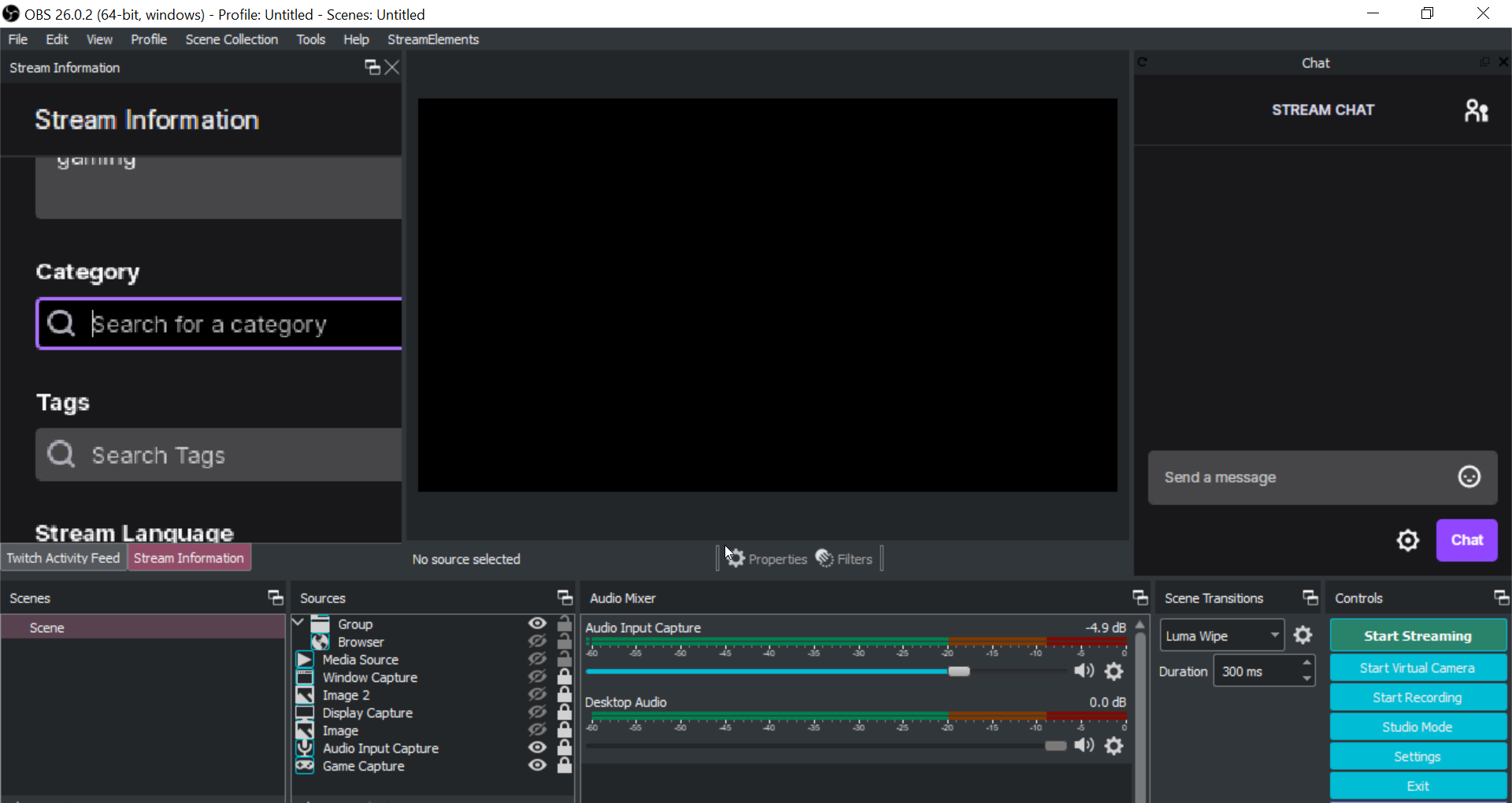
https://i.imgur.com/3aG73Fj.png does anyone know what happened to my obs? I was gonna stream an hour or two ago but I'm not able to because of this problem. Ping me if anyone can respond, thank you
 tiny bison
viscid pebbleBOT
tiny bison
viscid pebbleBOT
@cloud patio Obs.live is a plugin for OBS Studio for the best OBS support, please join their Official Discord @ discord.gg/obsproject
 tiny bison
looking to enable this
viscid pebbleBOT
@tiny bison Currently renaming the bot fully works with OBS.Live.
You can follow this video guide to set it up: https://discordapp.com/channels/141203863863558144/494513233416421386/561516184718278676
If you don't want to use OBS.Live and want to stick with Ground Control, please let us know your Twitch username.
strong kernel
tiny bison
<@!155149108183695360> my twitch username is AtlasDowns
Restart Ground Control.
tiny bison
Thank you!
 exotic niche
Someone please help, I previously had my streamelements obs connected to youtube, then I changed my settings and connected it to my twitch. But when I click start streaming it takes me to a youtube window. How can I stream to twitch now
 pearl oasis
hola alguien podria darme una mano ? estoy en mi panel de control de streamelements y no esta tomando información de los followers que recibo en twitch
 agile spire
Hi, my stream alerts don't seem to be working when I'm actually streaming, everything is fine when I use the emulate button, but the real alerts don't pop up, my dashboard is not updating or showing any activity, can someone help me with this please?
pearl oasis
agile spire
Hi, my stream alerts don't seem to be working when I'm actually streaming, every...
I have the same problem. in the control panel I don't see activity either, I think that's why it doesn't update
viscid pebbleBOT
@exotic niche StreamElements menu, on top of OBS > Logout > Login
@agile spire Please provide your account ID found at the top of this page: https://streamelements.com/dashboard/account/channels This ID is public info and safe to share here.
@pearl oasis Please provide your account ID found at the top of this page: https://streamelements.com/dashboard/account/channels This ID is public info and safe to share here.
pearl oasis
viscid pebble
<@!379838500708810762> Please provide your account ID found at the top of this p...
My ID is 5ff91762efb1c0a61aa7b19b
 balmy wing
i want to add a gif as my "starting soon" screen, how would i do that?
viscid pebbleBOT
@balmy wing We've released our new Overlay Editor revamp. You can check out the changes and how to work with it here: https://youtu.be/X5VzXjqAsjk
Check out our blog post as well: https://blog.streamelements.com/streamelements-overlay-editor-just-got-even-better-c22cb5b4853e
agile spire
viscid pebble
<@!509668981989441567> Please provide your account ID found at the top of this p...
My ID 5ffa3f50a8c546beb3868d43
 willow kindle
Holaaaaa soy nuevaaaa🥰
rancid pond
anyone know how to set up followers and subs names in overlays? downloaded 1 and only the tips work
 ripe merlin
20 mins later. Can someone tell me how you see all the channels you follow? I think im going crazy. Or they keep moving it.
 livid flume
i just started a giveaway
how often will it announce that theres a giveaway
do i have to change it somewhere ?
strong kernel
It does not repeatedly announce the giveaway on a timer.
viscid pebbleBOT
@rancid pond New to StreamElements?
Check out our YouTube channel https://www.youtube.com/c/streamelements/videos
with tutorial videos from setting up the basics, to in-depth details on how to use our product.
New to OBS? Here is a 4 step quick start guide
https://obsproject.com/wiki/OBS-Studio-Quickstart
Want to learn even more? Here is an in-depth overview
https://obsproject.com/wiki/OBS-Studio-Overview
rancid pond
anything more specific than going through 100 videos?
livid flume
can you set it to a timer ?
strong kernel
livid flume
can you set it to a timer ?
You will need to make a timer yourself.
livid flume
the command to join is !ticket right ?
strong kernel
!ticket is an alias for !enter. Both should work.
ripe merlin
I found it.
 peak storm
Hi, seems like Emote Combos are broken atm? 🤔
 covert turret
i got a donation today and i don't know where to collect it its not showing on my streamelement page
strong kernel
peak storm
Hi, seems like Emote Combos are broken atm? 🤔
Emote combos are working fine.
strong kernel
covert turret
i got a donation today and i don't know where to collect it its not showing on m...
Can you screenshot how you were notified of the tip?
peak storm
@strong kernel ok well they used to work fine for the channel im moderating for, but for a few days now they have not been triggering.
covert turret
it was notified in my chat but no emails or anything of the donation
strong kernel
covert turret
it was notified in my chat but no emails or anything of the donation
Please screenshot the chat message.
strong kernel
peak storm
<@!107215138561478656> ok well they used to work fine for the channel im moderat...
covert turret
strong kernel
Those are trolls.
Real tip notifications will never come from the tipper, only from the bot.
covert turret
ok
peak storm
@strong kernel minimum is set to 5... https://i.imgur.com/iI6s3th.png
 strong kernel
Type !emotes update in the chat.
peak storm
Does SE have like some sort of "allocation" of Regex for each Twitch channel? I assume this is what is causing this as I have encountered similar issues with chat commands not triggering their Regex word matches, even though the same matching works in my personal channel.
ok ill try that, but peepoRiot has triggered combos for the past 6 months in this channel
@strong kernel worked Pog 
rancid pond
anyone know how to set up followers and subs names in overlays? downloaded 1 and only the tips work
 mint belfry
hi! i was wondering if anyone had any ideas for making my stream run better for apex, whats the most optimal for it etc. my computers hardware are, rtx 2060 super, ryzen 5 3600 and 16gb ram at 3200mhz. thank you in advance!
strong kernel
rancid pond
anyone know how to set up followers and subs names in overlays? downloaded 1 and...
What do you mean "downloaded?" StreamElements is a cloud-based service.
viscid pebbleBOT
@mint belfry There are no "best settings".
Please understand that every setup will be very different.
Any guides or videos that claim otherwise are misinforming. Your best option is to start with a base and adjust as necessary.
You can run the OBS auto-configuration tool. To use the auto-config, click on the Tools menu in OBS, select Auto-Configuration Wizard, and then just follow the on-screen directions.
You can use this tool to get baseline settings for your hardware and adjust as necessary from there.
Test, test, and test again. We are happy to offer suggestions for any issues you may be having afterward, but not a list of settings.
Thank you
rancid pond
from the stream gallery
mint belfry
thank you nethyr, i have seen that 3500 for bitrate is the most popular/recommended is this true?
rancid pond
just used a premade and only 1 of the recents work the tips, followers and subs dont show recents
strong kernel
rancid pond
just used a premade and only 1 of the recents work the tips, followers and subs ...
Events that took place prior to you connecting on the 9th will not appear in your dashboard or on your overlays. You can make manual adjustments to the information in https://streamelements.com/dashboard/session but that's it.
StreamElements
The Ultimate All in One Platform for Streamers
mint belfry
ok i got told use 6000 bitrate, if it still runs bad i will try 3500 out
rancid pond
so i cant make a bot or alerts do that? i have to do it manualy but the tips in that overlay are automated?
strong kernel
They're automatic, but Twitch does not send a history. Anything that took place before you connected might as well not exist.
rancid pond
thats fine but, how do i automate those
 ionic kelp
Wait for them to appear from an event happening.
rancid pond
i did for about 20 minutes still didnt show
the tips work and are animated but followers/subs wont show and arnt animated
 midnight storm
Good evening.
A few days ago the feeds of activities such as new followers are no longer being registered, does anyone know how to solve them?
viscid pebbleBOT
@midnight storm Please provide your account ID found at the top of this page: https://streamelements.com/dashboard/account/channels This ID is public info and safe to share here.
midnight storm
viscid pebble
<@!355842873520029698> Please provide your account ID found at the top of this p...
5fceb7b055298cbfbf46c264
 ionic dagger
hi, can someone can help me with the spam filter, i tried to put clip.twitch.tv in the withelist but did not work. how can i do?
strong kernel
ionic dagger
hi, can someone can help me with the spam filter, i tried to put clip.twitch.tv ...
That may be because the URL is clips.twitch.tv
ionic dagger
yeap i used that
rancid pond
so is there no way to automate recents?
ionic dagger
but still didnt work
strong kernel
rancid pond
so is there no way to automate recents?
It's automatic.
rancid pond
k, and i get that right. but is there a way to do so myself when its not working.
strong kernel
That would be manual. As in, not automated.
rancid pond
and i get that too. is there a way to make it work? when it is not automated and supposed to be is my question.
nice
is there a place i can post that ss to get more help or is that just, automated and supposed to work too
 hearty blade
midnight storm
Good evening.
A few days ago the feeds of activities such as new followers are n...
hearty blade
midnight storm
Good evening.
A few days ago the feeds of activities such as new followers are n...
Im having this issue too. Anyone find a fix? My alertbox won't work when new people follow.
strong kernel
rancid pond
and i get that too. is there a way to make it work? when it is not automated and...
You have had zero activity since the 9th. You have had no tips come in. You cannot receive subs as you are not an affiliate. You do not appear to have received any new followers. When you actually do, then the overlay will fill in. Not before. Not out of nowhere. Something needs to actually happen.
viscid pebbleBOT
@hearty blade Please provide your account ID found at the top of this page: https://streamelements.com/dashboard/account/channels This ID is public info and safe to share here.
hearty blade
5ffa5e325415bb48060df28d
strong kernel
hearty blade
5ffa5e325415bb48060df28d
Your webhooks have been resubscribed and you should see follower events moving forward.
hearty blade
Thank you 🙂
midnight storm
strong kernel
Your webhooks have been resubscribed and you should see follower events moving f...
Me too? rsrsrsrs
strong kernel
midnight storm
Me too? rsrsrsrs
Yes, yours already were.
midnight storm
strong kernel
Yes, yours already were.
Thank you so much
 broken ocean
im trying to use the kappagen overlay but id doesnt seem to be centering in my slobs and was wondering if someone could help or point me in a right direction
viscid pebbleBOT
@broken ocean We're not able to troubleshoot issues with using our overlays in StreamLabs OBS (SLOBS) as we don't have the tools to support their software. We recommend using OBS Studio or OBS Studio with our plugin OBS.Live.
rancid pond
strong kernel
You have had zero activity since the 9th. You have had no tips come in. You cann...
k sorry, different question then. where can i connect my twitch to streamelements other than signing in because i got 4 followers today so something actually happened and it still didnt work even after 20 minutes of waiting for it
strong kernel
rancid pond
k sorry, different question then. where can i connect my twitch to streamelement...
Your webhooks have been resubscribed as well.
 static tapir
My stream wont stop buffering for folks. But its reading g I have no frames dropped. How do I fix this?
strong kernel
static tapir
My stream wont stop buffering for folks. But its reading g I have no frames drop...
That usually just means their internet can't handle the quality you're streaming at.
static tapir
But we tried watching our own stream and it keeps buffering lol
What are some good settings to run at
viscid pebbleBOT
@static tapir There are no "best settings".
Please understand that every setup will be very different.
Any guides or videos that claim otherwise are misinforming. Your best option is to start with a base and adjust as necessary.
You can run the OBS auto-configuration tool. To use the auto-config, click on the Tools menu in OBS, select Auto-Configuration Wizard, and then just follow the on-screen directions.
You can use this tool to get baseline settings for your hardware and adjust as necessary from there.
Test, test, and test again. We are happy to offer suggestions for any issues you may be having afterward, but not a list of settings.
Thank you
rancid pond
strong kernel
Your webhooks have been resubscribed as well.
im unfamiliar with web hooks, wdym
strong kernel
It's staff stuff.
rancid pond
so there is nothing i can do? other than just do it manualy?
boreal heath
wary halo
then you might want to uninstall and reinstall it <@!329776728983601176>
No joke that legitimately worked lol. Thanks!
 brave lantern
Hello, sorry if I'm intruding on anything currently going on but i recently encountered an issue after changing my name on twitch, I changed my username on twitch earlier, and i havent been able to get the bot in my chat despite all the information being updated on my dashboard, what possible solutions are there to fix this problem?
 cinder epoch
no meu streamelements nao esta aparecendo os follow que eu ganho entao nao aparece os alertas alguem por favor pode me ajduar
viscid pebbleBOT
@brave lantern If you changed your name on Twitch, please follow these steps:
- Visit https://streamelements.com/logout and then log in again by connecting with Twitch.
- On the right side of the dashboard page that opens, select Join under bot settings. If it says Part select that and then select Join to send the bot to the chat. Don't forget to mod the bot by typing /mod streamelements in your channel if you have not already.
- Post your old and your new name here so that we can update your channel's chatstats tracking (must be done by staff).
@cinder epoch Welcome to the helpdesk! The regular helpdesk channels are in English but we do provide multi-language support in the following channels: #🇩🇪︱deutsch | #🇫🇷︱français | #🇪🇸︱español | #🇵🇹︱português | #🇳🇱︱nederlands | #🇮🇹︱italiano | #🇵🇱︱polski | #🇨🇳︱中文語言服務區-chinese | #🇯🇵︱日本語-japanese | #🇭🇺︱magyar | #🇰🇷︱한국어-korean | #🇹🇭︱ไทย-thai | #🇷🇺︱русский | #🇺🇦︱українська | #🇨🇿︱czech
brave lantern
Old username: Z2A_GamesYT
New Username: ZsNOTCute
rancid pond
is there any other place to connect my account, if theres no new alerts
strong kernel
rancid pond
is there any other place to connect my account, if theres no new alerts
Your webhooks have already been resubscribed. New follower alerts will come in moving forward. You will not see past events pop in.
 drowsy citrus
Is there a place to change my banking details for se.pay?
viscid pebbleBOT
@drowsy citrus Please contact us via email for support with SE.Pay. You can use our contact form here: https://streamelements.com/contact Thank you.
rancid pond
was that today or on the 9th because i did get 4 followers that didnt show up in my logs
strong kernel
Today.
 drowsy nimbus
I have overlays set up in Facebook that I'd like to use on Twitch. I mistakenly linked Twitch to stream elements directly and If I try to link my Twitch to the FB account that has all my overlays it says the Twitch account is already claimed. Is there a way to get my FB overlays to my Twitch account?
viscid pebbleBOT
@drowsy nimbus Account Merging - Please note:
- Merging accounts only allows faster ways to switch between accounts
- Merging accounts does not allow data sharing between accounts - different streaming platforms, different type of events
- Merging accounts allows duplicating/sharing overlays between the accounts
If you understand the limitations of merging and want to proceed, please find the JWT tokens (!jwt) from both accounts you want to merge and you will be directed to DM them to a staff member
drowsy nimbus
Thanks @viscid pebble I do understand and would like to merge the accounts.
strong kernel
drowsy nimbus
Thanks <@!155149108183695360> I do understand and would like to merge the accoun...
Please DM me the JWT tokens, clearly labeling which is which.
strong kernel
drowsy nimbus
Thanks <@!155149108183695360> I do understand and would like to merge the accoun...
Your channels have been merged.
 split lagoon
Hi! I'm hoping to get assistance with setting a custom bot name. I'm using Ground Control and not Obs.live. Twitch username is AppleGlass--let me know if other info is needed. Thank you!
drowsy nimbus
Thank you @strong kernel !
 charred quest
Hi @viscid pebble , I seem to have an issue with SE commands.
 plain mural
Is anyone able to give me a hand? The second I open stream elements, I cannot see my activity feed. It says "You have no stream activity stream activity will be shown here in real-time." I had to move over my Twitch Activity Feed, which works.. But I have a feeling my account isn't syncing properly or something? I've reinstalled, re-connected/disconnected multiple times. Tyvm
lament blade
Hello can anyone help me out? I am trying to enable my chat commands but everytime i do they unenable right away...
 indigo shore
I'm having the same issue as you with the activity feed, please lmk if you find a solution @plain mural
plain mural
@indigo shore Will do. Please let me know if you find an answer too
rancid pond
ty @strong kernel it works
 muted cosmos
so when i go to chat stats on someones channel, my old username and my new username are seperate from each other, i already did the rename command and the message count isnt combining

 zenith widget
Chatstats names cannot be edited
muted cosmos
yeah but the thing is my old username just showed up on the leaderboard like my new one and old one now have seperate places in the leaderboard
 marble galleon
Is there a way to reset my sub goal without having to make a new one? I'd like it to just reset weekly, but I don't think I'm doing it right
muted cosmos
like before it showed my new username with the amounts combined and now all of a sudden theyre seperate
viscid pebbleBOT
To reset goals:
- from the Overlay Editor > Session data on top right (monitor symbol) > Goals tab > reset progress of desired goal
- from the Dashboard > Activity feed on the left > Widget data on the right > Goals tab -> reset progress of desired goal
Note: Goal widgets (progress) only counts up and doesn't go down automatically, if you lose followers/subs.
zenith widget
@muted cosmos Like I said, names in chatstats cannot be changed, updated, merged or removed
zenith widget
You might have used a !rename command, but that does NOT affect chatstats
not sure what kind of merge you are referring to, when I say that chatstats cannot be manipulated in anyway
 quasi quiver
how long dose it take for you name to update like the dono link and stuff
zenith widget
If you've renamed your channel, simply logout and login to our dashboard
quasi quiver
tanks so much
 inland chasm
quick question how do i put up my media share
indigo shore
has anyone figured out how to get activity feed to work?
mine remains on "You have no stream activity
Stream activity will be shown here in real-time."
 ashen sparrow
I have a sub alert variation for tier 2 and tier 3 subs. And I have a sub variation for 12 months, 24 months, 36 months etc.
How do I set this up, that the anniversary variations always have the highest priority in showing up?
zenith widget
@inland chasm Dashboard -> My overlays -> edit on an overlay -> (+) button -> media on top -> follow highlighted path -> add media request widget -> save
Then use the Media Request page to show on stream
if that is what you are looking for
viscid pebbleBOT
@indigo shore Please provide your account ID found at the top of this page: https://streamelements.com/dashboard/account/channels This ID is public info and safe to share here.
indigo shore
@viscid pebble 5ff9953463d968554bef7fb9
zenith widget
@ashen sparrow The tier will always take priority over the amount of months resubbed.
 runic gull
Using a basic counter command like ${count <nut>} Is it possible to add any kind of variable to have the counter reset to 0 automatically after/before every stream, or must this be done manually
zenith widget
Must be done manually
runic gull
ty ty
 jovial pond
Anyone talk me through how to add a donation button on my channel or do I need a computer for that
prisma relic
runic gull
Using a basic counter command like ${count <nut>} Is it possible to add any kind...
you could try adding the reset into the "going live" module and see if that works
indigo shore
viscid pebble
<@!797434907210547231> Please provide your account ID found at the top of this p...
5ff9953463d968554bef7fb9
 dry trout
Do you guys have any idea as to why my overlays wont pop up?
prisma relic
are you having issues with static things like images/text or dynamic things like alerts?
dry trout
I don't know let me try something rq
 shell fractal
does anyone know why my first sub wont appear in any activity feeds besides the one twitch has?
zenith widget
indigo shore
5ff9953463d968554bef7fb9
should be good now
dry trout
@prisma relic Not that I know of I put the url in the browser source so it can pop up my overlay that i got from streamelements but nothing shows up
prisma relic
are you looking at like a main overlay with graphic stuff or text? or an event that should pop up on screen?
dry trout
Main overlay
prisma relic
so something should always be there? like camera border for example.
dry trout
No just a red box but nothing in it
prisma relic
but it's a red box that you always see on the Overlay editor right?
dry trout
like on the website?
prisma relic
correct. on the website; the box is always there?
dry trout
Not by how it looks
prisma relic
can you post a screenshot of the overlay in the website editor?
flat jasper
whats the estimated response time to an email ?
runic gull
prisma relic
you could try adding the reset into the "going live" module and see if that work...
Appreciate you. I'll give that a shot
zenith widget
@flat jasper If its about SE.Pay, you will have to wait a bit more
lament blade
good mornig, i've a problem with streamelements. On dashboard i can't see my statics of follower ecc.. and on my feed activities there is nothing. who can help me? i have a new profile.
prisma relic
ok. thank you. So there is stuff that should always be there (static).
To add your overlays to OBS, add a new browser source in your scene. Paste your overlay URL in the browser source properties, set the dimensions to 1920x1080 (unless you changed them on the website) and check Shutdown source when not visible. https://youtu.be/KDvLynUqXI4
skip to about 1min 50sec
prisma relic
lament blade
good mornig, i've a problem with streamelements. On dashboard i can't see my sta...
have you gotten new followers since you made the profile?
... and are you talking about you just join StreamElements or you changed your name on Twitch?
lament blade
i've new profile for twitch and streamelements. i have got new follower but overlay doesn't work maybe for this reason?
prisma relic
So you created a new Twitch account and then a new SE account. And after that got a follower but it is not showing up?
dry trout
Still nothing
viscid pebbleBOT
@dry trout OBS > Settings > Advanced > Scroll down > Enable or disable Browser Source Hardware Acceleration, depending on its current state > Restart OBS (This does not apply for OBS on Mac)
https://i.imgur.com/ggMe9ZE.png
prisma relic
let's try that ^
dry trout
ok
lament blade
@prisma relic yes
dry trout
Nope the setting was already on
prisma relic
try turning it off. and do the restart again
lament blade
there is nothing
viscid pebbleBOT
@lament blade Please provide your account ID found at the top of this page: https://streamelements.com/dashboard/account/channels This ID is public info and safe to share here.
dry trout
just did
 sand crow
yo is there any streamelements admins i got a problem with the sponsorship not showing up here
it didnt update for some reason
prisma relic
is the MtG @sand crow ?
prisma relic
that had your email in in @lament blade ... copy paste that long number string thing
sand crow
one 1 thing didnt update
lament blade
my id?
prisma relic
oh oh. i was thinking it was the Magic the Gathering one. Ya. staff will have to look into the sponsorship thing.
sand crow
na it was Raid. it said pay 50$ and open up the shards so i did and its not marked as complete
prisma relic
did it work @dry trout ? ... if not, can you get other overlays to load correctly?
dry trout
I can try
prisma relic
correct @lament blade ... its like the 5kljsd94598skdj34j thing
lament blade
ID profile
5ff712560b64a8aeaa357a79
zenith widget
@sand crow please email us here: support@streamelements.com with your account name and we will take a look at whats the issue
sand crow
ight thnaks
prisma relic
you won't see old events; just new ones @lament blade
lament blade
@prisma relic SE never showme the follwer since start of profile.
prisma relic
correct. you will only see new followers. from 5 minutes ago on
dry trout
Still nothing
shell fractal
why aren't subs updating on my overlays
prisma relic
you can't get any overlay to load @dry trout ?
lament blade
how can i verify if now work?@prisma relic
dry trout
nope
prisma relic
are you using windows or Mac ? ... did you follow the instructions in that youtube video?
dry trout
windows and i followed it step by step
lament blade
Hello all! I'm having a problem with SE overlay as well. Seems that it's not reading the Follower data from Twitch and triggering my alerts and updating my labels correctly. When I do an Emulate, it shows up fine. But when others follow my Twitch channel the alerts do not show and the label isn't updated. May I know what I can do to fix this issue please?
my account ID 5fff02d626da6b01d2555fa7 can you check please?
prisma relic
thank you for that great explanation and question @lament blade. Request has been sent 
and it was fixed before i could finish typing that 🤣
 tender furnace
Hi! I set up a follower goal for my overlay and stream elements and my follower both say I have 21 followers but I only have 13 on twitch if anyone has a fix? Thanks in advance!
 deft violet
Its not letting me set up live chat, anyone know how to fix it?
viscid pebbleBOT
@tender furnace To reset goals:
- from the Overlay Editor > Session data on top right (monitor symbol) > Goals tab > reset progress of desired goal
- from the Dashboard > Activity feed on the left > Widget data on the right > Goals tab -> reset progress of desired goal
Note: Goal widgets (progress) only counts up and doesn't go down automatically, if you lose followers/subs.
tender furnace
Fixed thankyou!
 lapis crescent
Is this where i ask for info about SE.pay?
ionic kelp
If it doesn't involve your banking/personal information yes.
lapis crescent
im just trying to set it up but its not showing/letting me is all
ionic kelp
You don't meet the requirements.
viscid pebbleBOT
SE.PAY is available for streamers who are at least 18 years old, with bank account under their name in one of the following countries and have at least 101 follower (Twitch) / 101 subscribers (YouTube):
Austria, Belgium, Czech Republic, Denmark, Finland, France, Germany, Ireland , Italy, Netherlands, Poland, Portugal, Slovakia, Spain, Sweden, Switzerland, United Kingdom, United States.
If you meet these criteria and don’t see SE.Pay, let us know.
For information on SE.Pay payment methods, their fees and settlement times see https://streamelements.com/dashboard/tipping/fees
lapis crescent
ahh ok thank you
 gleaming stone
streamelements continues to lose connection with my twitch
lament blade
prisma relic
thank you for that great explanation and question <@456226577798135808>. Request...
thank you i'll check 🙂
 eternal crystal
why mine overlay in obs studios is showing black screen..?
viscid pebbleBOT
@eternal crystal OBS > Settings > Advanced > Scroll down > Enable or disable Browser Source Hardware Acceleration, depending on its current state > Restart OBS (This does not apply for OBS on Mac)
https://i.imgur.com/ggMe9ZE.png
 craggy burrow
Hi, I have a subscriber on Twitch that recently changed their username (still an active subscriber) but streamelements doesn't recognize them as a subscriber. Is there a fix for this?
 untold crest
If they have account on SE website, they need to relogin there
 ocean gate
viscid pebble
<@!502070408086814735> OBS > **Settings** > **Advanced** > Scroll down > Enable ...
ocean gate
viscid pebble
<@!502070408086814735> OBS > **Settings** > **Advanced** > Scroll down > Enable ...
Just so you guys are aware, the latest release of OBS (vanilla) on Mac does now support Browser Source Hardware Acceleration
zenith widget
We are aware, thank you 🙂
 gilded shard
I'm hoping this is the right channel. I'm having some issues after switching to labs but strong recommendation from friends and fellow streamers. Trying to trouble shoot issues I've realised my activity feed is only upto date for raids and nothing else is showing.
 sudden hamlet
hey there.. I've got overlays set up but for some reason donations or tips do not show up on stream. Is there a trick to making this happen?
zenith widget
@gilded shard so you switched to Streamlabs or to us?
zenith widget
@sudden hamlet Is your paypal account fully verified within PayPal?
viscid pebbleBOT
@gilded shard Please provide your account ID found at the top of this page: https://streamelements.com/dashboard/account/channels This ID is public info and safe to share here.
gilded shard
5ff9dac726d1186dac9c315a
zenith widget
should be good now
gilded shard
thank you your follow showing. so hopefully working now 🙂
sudden hamlet
@zenith widget yes, it is. And, I have received donations -- they just don't alert in the overlays on stream. And streamelements doesn't include the money in the report email I get after the stream.
ionic kelp
How do you know you actually received something?
sudden hamlet
revenue section of streamlabs -- and verified with Pay Pal that the tips went through.
ionic kelp
That would be why. Unless they use our link it won't show.
sudden hamlet
I am using the streamelements link
and I have pay pal linked to tips via streamelements.
 delicate pecan
Hi, can I ask if there is more partnership programs what I cant see ? or what to do to see them cuz I have there this one for long time and no other one... Thanks
zenith widget
If you don't see any other offer, either there is nothing new or you don't meet the requirements for the automatic offers
@sudden hamlet Just to point out, I see you have our link and there are tips in the revenue history page, are you using the overlay from us?
sudden hamlet
I am using the overlays through streamelements. Subs show up.. gifted subs show up.. bits show up -- but tips haven't. Have only done them two days.. but there's no alert and nothing in chat.
zenith widget
You don't have chat alerts on, to have the bot even mention anything in chat
sudden hamlet
then why are the others showing up?
zenith widget
Are you sure OUR bot (Streamelements) is mentioning stuff in chat?
sudden hamlet
it's the only one I have. I added the streamlabs url to my stream as an overlay
and it works fine. Not very fancy.. but gets the job done. I'll upgrade eventually.. but no tip mentions
zenith widget
as for the alerts via the overlay, there are 2 remarks:
- 0 volume/no sound set on the tip alert - meaning you won't hear it happen on the spot
- the minimum amount you've set for the tip amount is $25 - meaning anything bellow $25 won't show up as an alert
sudden hamlet
yeah.. I have the volume off because I'm doing interviews and calls on the show. The sounds can be distracting. I can see the overlays pop up.. and on commercial breaks.. I read the subs and bits..
two of teh donations were 50 dollars each yesterday and there was no pop up. And, I thought I'd set the minimum to a dollar. That's what I want it to be.
zenith widget
Considering its a 5 second duration and when i replied it from the activity feed
it did show up in the overlay
but it went away pretty fast
sudden hamlet
very odd.. will it not be there for me to see when I have a chance to look? As it is, I get a list of the follows, bits and subs that I can refer to on the breaks. Donations didn't show up. I admit the overlays may have h appened..but I didn't see them. Fast duration. I'll change that. But, I would like to be able to scroll back through on breaks to read them.
btw.. thank you so much for your help.
changed it to 1.
the minimum dono amount
delicate pecan
zenith widget
If you don't see any other offer, either there is nothing new or you don't meet ...
Thanks, can I ask if there will be some update like you can see locked one and requirements ?
zenith widget
If you are referring to an update of when a new offer shows up and what the requirements will be for it - that won't be public information unfortunately.
delicate pecan
ok thanks
I am mostly asking if there is also other req. than avg viewers views followers etc ... like played games .....
zenith widget
I cannot say
delicate pecan
I understand
sudden hamlet
looked through the custom overlays tonight.. some are very nice.. Do I get to choose which to use and which to not use? Obviously, not a gamer... so, I'd just use them for the chat announcements.
zenith widget
yes
sudden hamlet
okay.. thanks for the help.. Take care
 craggy quarry
how do i get se to part from my channel the site doesnt give me the option
viscid pebbleBOT
Go to the Dashboard > Right side > Part channel > Join channel(https://streamelements.com/dashboard)

 scarlet tiger
this?
craggy quarry
ya i dont get that option
ionic kelp
Hit do later
craggy quarry
this is all i get
zenith widget
Either close the welcome tab or scroll down
eternal crystal
thanks @viscid pebble
lament blade
can i use song requests and the music stuff if im streaming on xbox with no obs
!console
huh
lament blade
oh ty
zenith widget
Consoles do not have native support for overlays. You would need a capture card, PS4 remote play or Xbox companion app and a PC with OBS in order to have overlays over your console gameplay.
We have a blog post about how to set up console streaming with our essential tools: https://blog.streamelements.com/how-to-stream-on-console-7b620b1c46c3
lament blade
ok thanks
gilded shard
this might seem like an odd question. the overlay im using comes with a now playing feature, is it possible to link this to Soundtrack by Twitch?
zenith widget
No
gilded shard
no problem thank you
lament blade
having abit of trouble with my stream elements twitch bot not connecting to my twitch account tried it 5 times now anyone have a possible fix for it
true cipher
I have an issue with the chatbox widget. The "ignore" feature seems to not work on my own inputs (works fine for the streamelelements user)
 flat forum
When I change the Cheer video it will not change it from the default one
ionic kelp
@flat forum variations.
viscid pebbleBOT
@lament blade Go to the Dashboard > Right side > Part channel > Join channel(https://streamelements.com/dashboard)
zenith widget
@true cipher place your name in lower case
flat forum
Thats the fix for the sub counter not working?
flat forum
Oop, sorry
flat forum
thegamblingdutchmen
true cipher
zenith widget
<@!264147144632434689> place your name in lower case
tyty
zenith widget
They need to logout from our dashboard and login again
flat forum
Alright, I will forward it, thanks for the amazing help KeiZar
 novel spire
Good Morning guys! Does someone know if the SE bot is properly working? I already tried to "Part channel > Join channel" and it still not work
viscid pebbleBOT
@novel spire Please provide your account ID found at the top of this page: https://streamelements.com/dashboard/account/channels This ID is public info and safe to share here.
novel spire
5fff32c1835613839e65e9f0
 radiant birch
Is there anyway to have a faster response on who enters the stream/chat?
zenith widget
What does that mean?
radiant birch
I feel like the obs.live chat + number of viewers takes a fair amount of time to update
radiant birch
I'd like to say hi to anyone that joins the stream, but not everyone chats right away etc
zenith widget
@radiant birch viewer count on OBS.Live activity feed or anywhere for that matter takes a while to update yes
This is a limitation from Twitch, not us
radiant birch
I see, I wonder if it could exclude the usual bots tho
commanderroot and so many others. I don't mind the bots, but it clutters the screen when I'm trying to check who joined
novel spire
zenith widget
<@!319954801465229314> Seems to be working fine.
🤔🤔 I tried to use it on my live yesterday night and was not working, but thanks for the help!!
viscid pebbleBOT
@novel spire If your commands recently stopped working and you're using OBS.Live and a custom bot name do the following:
- In OBS.Live, click on the hamburger menu (three stripes) at the top left of your activity feed
- Click on Stream Settings > Custom bot name
- In the Custom bot name field select Set custom bot name, not your already existing username (with capital letters). Note: If you already connected an account that way, the third entry will show as the account name (see image https://i.imgur.com/sO7fWOX.png).
- Scroll a bit down and click on the purple Connect Custom Bot Account button
- Log in as usual and Authorize the custom bot name
- Back in the Activity feed, click on the Send Test Message button and check if your custom bot name starts working again

 dreamy star
hey fam, I'm trying to figure out a way to silently redeem a store audio alert on a timer - I've tried setting a bot timer to say a trigger phrase in chat of a second custom command to trigger the store redeem but I think the bot is ignoring itself - any other ideas how I can make this work?
zenith widget
@radiant birch There is an unwritten rule to not call out lurkers, so ignoring bot accounts, I would advise against trying to welcome every single person that joins and doesn't chat at all. Let them naturaly start talking in your chat.
 little oak
on twitch Lukerrs HATE being called out 
novel spire
viscid pebble
<@!319954801465229314> If your commands recently stopped working and you're usin...
@zenith widget maybe this is the cause for the bot was not working yesterday. By the way, thanks for the follow and help 😁😁
 tawny crag
Hello, my ground control looks like this, i cant see any incomming followers/subs & songrequest is also blank. Any fix?
 cold quarry
i need help for setting up streamelements bot
cold quarry
cold quarry
i need help for setting up streamelements bot
here
@tawny pivot can you help me (sorry for the ping)
the bot is not responding when i commanded
 wet hull
Is it just me or is streamelements having issues with their twitch chat? It seems to get stuck every once in a while?
viscid pebbleBOT
@cold quarry Not all staff are able to assist with support issues. Please refrain from pinging them or sending them DMs unless asked to.
lament blade
can somebody help me. When someone puts "!watchtime" on my chat it says 0 secs no matter what (i have da loyalty setting on)
viscid pebbleBOT
10 minutes of watch time is given to those in chat when the loyalty points are handed out (every 10 minutes). Therefore, loyalty must be enabled to watch time to work properly.
There is no direct link between watch time and all-time points.
It can’t be calculated from the number of all-time points a user has because subs may earn points at a faster rate and !bonus all command increases all-time points for users in the chat at that time.
Giving points to a single user do not affect all-time, only when giving to all in chat.
lament blade
well how can i get the loyalty points i have them enabled so do i have to be an affiliate for that
 pure ridge
Is it just me or does anyone else have problems since the last patch/update with stream elements dropping the stream but showing you're still streaming? This has happened 4 times in the last 2 weeks or so. Once, after about 15 minutes the stream started again. That was the first time and I didn't notice until a viewer came back into chat and told me. Couldn't close OBS either when it happened other days. It just sits there telling me it's stopping the stream and doesn't do anything else.
I had to use task manager to shut it down so I could restart the program.
And what happened to OBS.Live?
 icy scroll
having issue that my bot timers arent working
pure ridge
It use to tell at the top I was running OBS.Live only now it says OBS 26.1.1. Since the last update, I now have 2 icon shortcuts and both lead to the same .exe but both are named different.
 drifting jewel
hi i wanna ask how do i make streamelements type out a thank you message whenever i get donations
little oak
@drifting jewel Yes you can, you can customize here https://streamelements.com/dashboard/bot-modules you can have it say what ever you like  Make sure its turned on
 fickle stream
Can someone help me? Rerun is not counting points in the StreamElements store
drifting jewel
little oak
<@!335432807797227521> Yes you can, you can customize here <https://streamelemen...
thanksssssss!
little oak
Welcome
 prisma owl
Hello. i am new on this server and also as a streamer. i got a little problem with my streamelements-activity feed. it is connetet to my twitch channel but doesnt show any follwos or something. the only activity i can see was a donation directly over streamelemenmts. looks like some connetion issue between twitch and my streamelements feed.
viscid pebbleBOT
@prisma owl Please provide your account ID found at the top of this page: https://streamelements.com/dashboard/account/channels This ID is public info and safe to share here.
prisma owl
5ff8f94804c2095ec53d859a
little oak
clip and ship!!! will ping when youre resubbed for your webhook
prisma owl
thx but where do i find that?
prisma owl
thx. hmmm shouldnt there now be some follows in my activity feed?
little oak
Anything before the webhook resub, will be missed. Anything from this moment forward will be in your activity feed.
prisma owl
oh ok. i will test it. thx man. u saved my whole week 😘
little oak
You're Welcome
 keen orbit
Hello, i would like to know, i'm trying to set my alert box, but can't set it on my obs.. Anything i'm doing wrong ?
viscid pebbleBOT
To add your overlays to OBS, add a new browser source in your scene. Paste your overlay URL in the browser source properties, set the dimensions to 1920x1080 (unless you changed them on the website) and check Shutdown source when not visible. https://youtu.be/KDvLynUqXI4
keen orbit
That's what i did .. but when i try it, it doesn't show :/
viscid pebbleBOT
OBS > Settings > Advanced > Scroll down > Enable or disable Browser Source Hardware Acceleration, depending on its current state > Restart OBS (This does not apply for OBS on Mac)
https://i.imgur.com/ggMe9ZE.png
 sturdy trellis
Hi I have been using SE for about 3 yrs & GC a little shorter, in all this time i have never had my bot announce a host (someone hosting my channel whilst im broadcasting). i got so annoyed (tried to sort it to no avail) || just started using scorpbot just to announce my hosts. anyway my laptop had to be reset back to factory so thought the issue would be gone. but it hasnt please help.
Ive re installed, disconected, parted the bot from The channel all to no avail. I even reset my browser history too
it did announce once sorry for a raid, it only announses when twitch does, but twitch doesnt either
lament blade
i still cant connect custom bot name i log in and authorize but still not showing up and not able to send test messages
 smoky flare
hi all, having some issues setting up my raid alert (not sure whether to put this in twitch or obs live helpdesk). i am pretty new to all this so sorry if i have missed something obvious.
so what i want is when someone raids me on twitch i want to play a full screen video with sound that is about 10 seconds long, and have the raid alert "username has raided with 10 viewers" come up covering the whole screen. it seems i have 3 options but i am struggling to get them to work and have no idea which is best.
- create a new scene in obs with the media source in, and manually change to the scene when i see a raid come in.
- add the media source to my main scenes and trigger it when a raid comes in
- incorporate the video into the actual alert
1 & 2 - the video bit is easy, but i am still struggling with getting it to sidechain the desktop audio completely so i don't have a soundclash
3 - the filesize of the video is too big to upload to the overlay maker on streamelements (i could reduce it down but i'd like to avoid it if it can, but i also know that having it stored locally and not online may be better for the stream)
a big problem i am having with all options though is in the streamelements overlay maker, getting the raid text to fill the screen and go over the top of either the bg vid i upload or no image. underneath or to the side works fine but "text over image" there is no text at all.
thanks again awesome software and service, sorry if i made no sense 🙂
 blissful garnet
HELLO
3rd times a charm i guess. havent gotten any help at all yet
my leaderboard info says no data i assume because i changed twitch name weeks ago, any way to fix ?
sturdy trellis
lament blade
i still cant connect custom bot name i log in and authorize but still not showin...
maybe daft question but have you created a twitch account for your bot?
lament blade
do you mean like a new bot user
lament blade
nope i used custom bot name in order for my notifications to work yesterday and it used my name for my stream and let my notifications work today it stopped working and my notifications have stopped
Hello, any idea why my Media Request stuttering/lagging always when i enter fullscreen mode any game, i have decent pc and 100/100 mb ethernet connection?
sturdy trellis
create a twitch channel in your bots name, while your logged in use Gc app to gen Auth code
sturdy trellis
lament blade
nope i used custom bot name in order for my notifications to work yesterday and ...
Steps to enable custom name
- Sign in to https://twitch.tv/ with the bot account
- Install and run Ground Control (!gc for download)
- Visit https://twitchapps.com/tmi/ and generate an oAUTH token
- Copy/paste everything in the box to Ground Control oAuth settings and enter the name for the bot account
- Restart Ground Control (custom name may take a few minutes to take effect)
 vivid pier
When people unfollow the followergoal does not go down
id: 5ff85669a57a4d71a3de6668
 verbal horizon
Could you please recreate my Webhooks?
AccountId: 5fbead304d0d464090ce9a72
viscid pebbleBOT
@vivid pier To reset goals:
- from the Overlay Editor > Session data on top right (monitor symbol) > Goals tab > reset progress of desired goal
- from the Dashboard > Activity feed on the left > Widget data on the right > Goals tab -> reset progress of desired goal
Note: Goal widgets (progress) only counts up and doesn't go down automatically, if you lose followers/subs.
lament blade
My chat on Obs.live won't work I have my Twitch connected but it wont work
 hollow shadow
so for the store, my viewers can claim that without heading to the stream elements page? if so can i see it while the stream is offline or do i have to wait till its online?
 trim atlas
Hi there, for about a week now I have been having some issues with my stream. My bitrate and stability randomly tank, making my stream go offline. I then have to go to task manager to quit the programs. All other apps and programs still work. My alerts have been delayed, if running at all, and the chat claims it is connected but not showing anything.
viscid pebbleBOT
@warped robin Read and follow our server rules:
- We do not tolerate toxicity! Treat the community team, staff and all members with respect.
- No advertisement or channel promotion, anywhere on the server.
- No NSFW/NSFL
- No unsolicited DMs or friend requests to server members
Make sure to read the #welcome in any server you join.
pure ridge
Today's stream was a complete failure due to OBS repeatedly and randomly dropping the stream. Thank you for whatever you did last update to cause this problem. And since I use the OBS viewer to watch my stream chat, it does NOT TELL ME the stream is stopped. It shows the stream still going. I have to use my laptop and watch it on Twitch so I'll know I have no stream going. This is going into the 3rd week and getting worse. Yesterday it dropped twice, today 3 times. Please fix whatever is causing this. I'm about ready to delete the program and use something else.
 keen plaza
Media request on stream elements website not playing,
I get an error has occured please try again later, been going on for 3 days with nothing changing from my side.
would appreciate help on this, thank you.
 daring wharf
Hello guys! Probably a simple answer.. but how do I make it so that only the "- £2" of this text; "USERNAME - £2" is a different colour? Thanks 
trim atlas
@pure ridge dude, I've been having the same issue since the update
pure ridge
@trim atlas If you should come across a solution, PM me here on Discord, please.
trim atlas
pure ridge
<@!390909125644779531> If you should come across a solution, PM me here on Disco...
same to you, it's super frustrating. my chat isn't working, alerts not working
 fickle ocean
Hi, my internet stutters despite the speed.
During the striming in OBS there is a red square next to it (3000 kb / s) this square shows the link and how it works well it is in green.
What's the problem? Maybe the computer format will help? (30 gb of free space on the C drive, 1050 t and 4 gb - it trims from it because the processor, despite the i7 7700, I have it 100% loaded)
Is this the fault of the supplier?
viscid pebbleBOT
Obs.live is a plugin for OBS Studio for the best OBS support, please join their Official Discord @ discord.gg/obsproject
fickle ocean
(sorry for bad english but i use google translate)
pure ridge
@trim atlas I agree. I've no problem with my chat but after the update, the SE bot was no longer an admin and I had to go re-add it.
trim atlas
pure ridge
<@!390909125644779531> I agree. I've no problem with my chat but after the updat...
I've tried disconnecting and clearing cookies etc
 rancid tulip
hi
how to i stream from obs to my twitch??
i am clicking stream but it says i need to activate my stream key
 scarlet kernel
Hello! I run a dual computer stream set up with my Gaming-PC being a windows PC, and my stream computer being my 2019 MacBook Pro. Stream labs does not support Elgato Capture cards for 1080P, only 720P. Therefore, I use Wirecast to stream my elgato at 1080P at 60 FPS and use a cam link for my video camera. I send the video from my Gaming PC through the capture card to Wirecast on the MacBook. I use stream elements for my overlays and I was successful in connecting my Streamelements URL’s as web displays in the Wirecast software. My only issue is that the alert box does not show up live on my stream, but the framing and text boxes and everything else show up. The only thing I can’t get working is the alert boxes. Any insight would be helpful. I’m not sure if there is a setting I have unchecked or if there is something I’m missing.
 bitter basin
hey i require assistance My friend stream elements say that he has no recent followers and the alerts don't go off. It's the correct account, it does show how many followers he has in total but thats about it. Help!
trim atlas
i changed my name and now my chat stuff isn't working
 deft pond
how do i remove the streamelements bot
scarlet kernel
scarlet kernel
Hello! I run a dual computer stream set up with my Gaming-PC being a windows PC,...
I should all correct, that Streamlabs doesn’t support 1080P for OSX for the elgato capture card. That’s why I’m using Wirecast
nimble dune
deft pond
how do i remove the streamelements bot
Click part channel https://i.imgur.com/uYVb8OK.png https://streamelements.com/dashboard
daring wharf
@nimble dune Please may you help me with how I make it so that only the "- £2" of this text; "USERNAME - £2" is a different colour? Thanks
lament blade
How to fix it? "failed to run commercial, please re-login to StreamElements"
 tawny lava
I cash my money for my SE merch out almost 2 months ago and never received the money
nimble dune
@rancid tulip Go to OBS settings->stream and select twitch then put your stream key, or just connect your accont 😄
nimble dune
daring wharf
<@!334412925739728918> Please may you help me with how I make it so that only th...
Is that for bot? Chat alerts?
 little nacelle
@nimble dune Thx I will check
viscid pebbleBOT
@little nacelle if a viewer tipped through PayPal but no information appears in your StreamElements account, this generally means PayPal has held the tip for verification. Until PayPal clears the tip and sends back a confirmation to your StreamElements account, no information will appear there and no alert will play, as that confirmation is the only way for us to be aware of a successful transaction. If you believe there may be an issue with the transaction, you'll need to contact PayPal support as StreamElements is only a passthrough service and never actually gets involved with the transaction or touches the money
nimble dune
Ask streamlabs
 placid vine
oh sorry i meant streamelements
im sorry xD
Hi, i have a problem with my streamelements donations. I want to add my Ideal banking information so people can donate with ideal besides Paypal. But I dont get the Ideal option. I only see the connect paypal option. can someone help me?
viscid pebbleBOT
@placid vine SE.PAY is available for streamers who are at least 18 years old, with bank account under their name in one of the following countries and have at least 101 follower (Twitch) / 101 subscribers (YouTube):
Austria, Belgium, Czech Republic, Denmark, Finland, France, Germany, Ireland , Italy, Netherlands, Poland, Portugal, Slovakia, Spain, Sweden, Switzerland, United Kingdom, United States.
If you meet these criteria and don’t see SE.Pay, let us know.
For information on SE.Pay payment methods, their fees and settlement times see https://streamelements.com/dashboard/tipping/fees
 sterile barn
@viscid pebble Have been trying to reach you this whole week with no response, please help me understand why my TTS is not working. Thank you!
scarlet kernel
Hello! I run a dual computer stream set up with my Gaming-PC being a windows PC, and my stream computer being my 2019 MacBook Pro. Stream labs does not support Elgato Capture cards for 1080P on Mac OSX, only 720P. Therefore, I use Wirecast instead to stream my elgato at 1080P at 60 FPS and use a cam link for my video camera. I send the video from my Gaming PC through the capture card to Wirecast on the MacBook. I use stream elements for my overlays and I was successful in connecting my Streamelements URL’s as web displays in the Wirecast software. My only issue is that the alert box does not show up live on my stream, but the framing and text boxes and everything else show up. The only thing I can’t get working is the alert boxes. Any insight would be helpful. I’m not sure if there is a setting I have unchecked or if there is something I’m missing.
 stable ferry
Hey anyone know why I can't get bttv emotes to show up in the SE overlay but it still works on my twitch and obs?
It just shows text... no bttv emote
 calm cliff
why dont see follower on streamelement of my twitch channel?
nimble dune
stable ferry
Hey anyone know why I can't get bttv emotes to show up in the SE overlay but it ...
Do !emotes update in your chat and then refresh/reload the overlays after 5-10 minutes of using the command
 ocean path
Hi, I don't see an option for custom twitch bot name in either ground control or OBS.Live, am I missing something?
nimble dune
ocean path
Hi, I don't see an option for custom twitch bot name in either ground control or...
In ground control the staff needs to enable it for you, and in OBS.Live you should see in Activity feed->menu->stream settings->custom bot name
ocean path
nimble dune
In ground control the staff needs to enable it for you, and in OBS.Live you shou...
Oh I see it in OBS.Live now. Thanks! Do you know where I would go to ask staff to enable it in ground control? The replacement web browser plugin that OBS.Live uses breaks some javascript stuff I'm doing in a browser source...
nimble dune
ocean path
Oh I see it in OBS.Live now. Thanks! Do you know where I would go to ask staff t...
Here, I'm not a staff or support so I can't 😄
 nimble swan
I have a question about the leaderboard. One of my sub gifters changed his name and now he is doubled in the leaderboard - with both names. How can I delete the old name?
calm cliff
why my dashboard doesn t show my follower count?
 shut ginkgo
Hello! My chat bot disappear from my streams. How can i fix it? Commands don't work, what's wrong?
lament blade
Hello guys! Anyone know if is normal streamelements not appearing on iPhone chat? I have wizebot and streamelements but only streamelements not showing on iPhone, only in Pc... 🤔
viscid pebbleBOT
@shut ginkgo Go to the Dashboard > Right side > Part channel > Join channel(https://streamelements.com/dashboard)
 muted tusk
i want question is anyone doing something to bot, since i seening random followers messages going off even not a atual followers?
no one doesnt have my JWT or anything provent this so must be something else doing this.
if want more details then that screenshot, i cant get enough details whats spamming alerts with fake names doesnt essist on twitch? this how much i got form it?
nimble dune
muted tusk
i want question is anyone doing something to bot, since i seening random followe...
that would be fake following, or just a follower bot
calm cliff
why dont see follower on streamelement of my twitch channel?
ocean path
ocean path
Hi, I don't see an option for custom twitch bot name in either ground control or...
If someone on staff could enable custom bot name in my ground control that would be super helpful!
muted tusk
nimble dune
that would be fake following, or just a follower bot
this been happening in in day 1 yesterday so idk what made it started do this. even when them followed even if bot or not, doesnt count up so must be somethign inside bot making fake alerts
i checked channels per each 1, says channel desnt essist
 fossil kettle
Hello SE team! I'm having issues with my !shoutout command. The first half of the message prior to the twitch.tv${channel ${1}} link seems to be disappearing when I use the command during stream and I'm not sure why or how to fix it. I've tried to shorten the message prior to the link and also attempted changing the variable in the link to ${1} instead of ${channel ${1}}, but these were unsuccessful at fixing this predicament. I would super appreciate any insight you might have 🙂
calm cliff
o I've recently start streaming and currently are trying to reach the affiliate goal. To do that I've been putting up a follower goal so people, if they feel gracious, can drop a follow and see the meter go closer to the goal. However, the stream elements follower count is a few followers off of what twitch says the count is. Not sure why this is happening and curious as to how I would be able to fix this.
scarlet kernel
Third posting now? Can I get some help please @viscid pebble 😂😂
Hello! I run a dual computer stream set up with my Gaming-PC being a windows PC, and my stream computer being my 2019 MacBook Pro. Stream labs does not support Elgato Capture cards for 1080P, only 720P. Therefore, I use Wirecast to stream my elgato at 1080P at 60 FPS and use a cam link for my video camera. I send the video from my Gaming PC through the capture card to Wirecast on the MacBook. I use stream elements for my overlays and I was successful in connecting my Streamelements URL’s as web displays in the Wirecast software. My only issue is that the alert box does not show up live on my stream, but the framing and text boxes and everything else show up. The only thing I can’t get working is the alert boxes. Any insight would be helpful. I’m not sure if there is a setting I have unchecked or if there is something I’m missing.
 final hamlet
i want to start streaming twitch from my phone, but i dont know where to start. I want to start small, and if i do well go further with it. so where should i start? i have a 200$ budget at first, and assuming i have nothing but the twitch app on my phone, and a laptop, what do i do? what kind of software do i get? i also want to start youtube but i know what i will do with that. how can i grow my twitch channel and grow a fanbase? thank you guys. also keep in mind i have very limited knowledge of this stuff so any kind of jargon will go over my head
 weak crypt
Hello guys! can someone tell me please how i can add a widget with live viewers at obs ?
 tropic iron
Is there a way I can use cash app instead of PayPal to get donations?
 swift parcel
@fossil kettle you can keep that variable thats in the channel name to ${1} dont need the extra fluff might be the reason why
@ocean path sorry for the delay ground control should be good for you
@tropic iron not at this time but you can always put it on the idea board for consideration
tropic iron
Ok thank you
ocean path
swift parcel
<@!427659688092368899> sorry for the delay ground control should be good for you
Perfect thanks so much!
fossil kettle
@swift parcel Thank you! Unfortunately, changing the variables to ${1} for the channel link didn't help, but I appreciate your recommendation 🙂
swift parcel
@weak crypt #widget-share message <-- that'll take you to the message for the link for a widget it'll make a new overlay and you can duplicate it over to your other overlays you want it on
eternal crystal
may I know why mine game capture can't be shown on my window screen..?
 azure kite
I dont know if its a twitch thing, but i dont think it fits in the developers channel, so imma ask here 🙃 is there a way for the viewers, when they tip or cheer to add delay to the tts message? i've seen it in some streams where they add /// to delay the tts, but it doesnt say "slash slash slash..." 
weak crypt
swift parcel
<@!332958328005328896> https://discord.com/channels/141203863863558144/457957557...
thank you so much for the help 🙂
verbal horizon
Is there someone from staff here, that can resub my Webhooks? My Overlays don't receive any events anymore (even though simulated events work fine). Account ID is 5fbead304d0d464090ce9a72
 weak crag
How do I put my overlay on my stream
viscid pebbleBOT
@weak crag To add your overlays to OBS, add a new browser source in your scene. Paste your overlay URL in the browser source properties, set the dimensions to 1920x1080 (unless you changed them on the website) and check Shutdown source when not visible. https://youtu.be/KDvLynUqXI4
 pulsar hearth
i plug in a capture device for my xbox and its still black
lament blade
Hello guys! Anyone know if is normal streamelements not appearing on iPhone chat? I have wizebot and streamelements but only streamelements not showing on iPhone, only in Pc... 🤔
 zenith mantle
hello could someone tell me how to to make a winner on giveaway?
 tiny carbon
Hi there, wondering if there is a way you can get automod to mod channel names, so that a particular person spamming your chat with fake channel trolls, can't get past automod to be noticed?
strong kernel
lament blade
Hello guys! Anyone know if is normal streamelements not appearing on iPhone chat...
Our overlays are made for use on PC, specifically with OBS Studio. We cannot guarantee any given app has the functionality to support them.
strong kernel
zenith mantle
hello could someone tell me how to to make a winner on giveaway?
Close the giveaway first.
strong kernel
tiny carbon
Hi there, wondering if there is a way you can get automod to mod channel names, ...
The banned words list can be set to ban usernames as well as messages.
tiny carbon
Great thankyou
So to clarify it won't come up on your alerts or in your chat when they follow?
strong kernel
Oh, for alerts, you'll want to look at the Tipping moderation settings in your Tipping settings. Those actually apply to all alerts.
tiny carbon
Great thank you. Question though...will it still come up in your stream chat when they follow?
strong kernel
Are you using chat alerts?
tiny carbon
Is that a specific setting, I thought that was just the way to alert the streamer of an action?
strong kernel
Actually, follows don't appear in your chat by default.
Chat alerts are how you have our bot announce them.
strong kernel
Chat alerts are in the Modules section of your account.
 crisp schooner
So I'm looking to do a giveaway via streamelements on Monday... but I cannot use overlays, as I've no pc...I stream directly from my PS4, and I use an amazon tablet to keep up with chat... any ideas as to how the giveaway feature would work for someone like me?
strong kernel
crisp schooner
So I'm looking to do a giveaway via streamelements on Monday... but I cannot use...
Giveaways do not require you to have a PC. As long as you can start it from your account, your viewers are the ones who either buy tickets via chat commands or go to a webpage.
There is also a setting to announce it starting in chat. Just starting, though; you'll want to mention it yourself while you stream.
crisp schooner
Alrighty
 meager pollen
I have made a second Twitch account and want to use the ground control software for the new account. I seem to be unable to make it connect to it. I have tried logging out from both Twitch accounts on both Twitch and Streamelements website, uninstalled ground control, restarted the PC and download ground control again. It will ask me to log in through Streamelements. It will then open an internet tab and ask to aunthenticate with the new account, I accept and then see in the ground control software saying I have no activity yet. Then if I choose to click the upper left lines I see it actually is logged back into the old account (which has a lot of history but apparently doesn't show up at first). Then I attempt to click settings and delete the JWT that is there for the old account. It asks me to either log in via Streamelements or manually. Choosing via Streamelements it will ask to aunthenticate with the new account again, but clicking to accept, an error occurs. If I delete the old JWT code and insert the one for the new account, it will seem to have logged in, but again same thing, saying there is no stream activity yet and if I click the three lines...there is the old account.
Please staff, I am going insane about this and I have no clue anymore what to do 
crisp schooner
Will streamelements announce who wins?
strong kernel
crisp schooner
Will streamelements announce who wins?
Yes.
strong kernel
meager pollen
I have made a second Twitch account and want to use the **ground control** softw...
If you've only just connected the account to StreamElements, yes, it'll say there's no activity. Twitch doesn't send a history through their API. Only new events after connecting will appear.
crisp schooner
Ty!
meager pollen
@strong kernel Ok, but when I click the three lines it shows the old account icon and name..so something doesn't seem right. Which is really strange because I am not logged into the old account on either Twitch website or Streamelements website, but I suppose Streamelements ground control works in mystic ways.
 faint prawn
Is there a help desk for the the actual site itself and referring to Bot Modules? My messages are not saving. Thanks
 frigid furnace
my obs keeps crashing over and over
viscid pebbleBOT
@frigid furnace A crash log is required to investigate the cause of your issue. Please upload the last crash log.
- In OBS, click the Help menu
- Select Crash Reports and then Upload Last Crash Report
- Copy the URL and paste it to the chat here.
Note: If you are not able to follow the above steps, open your file explorer and go here: %appdata%\obs-studio\crashes and provide the last listed file.
 nova peak
Hello everybody 🙂
my express settings in the OBS are unfortunately no longer visible (there you set title, game etc.). My activity feed and my chat weirdly already. does anyone know how to open the window again?
viscid pebbleBOT
@frigid furnace 1) Uninstall OBS.Live and OBS Studio completely, but leave this unchecked https://i.imgur.com/LBaHgM1.png
2) Download and install OBS Studio from https://obsproject.com/
3) If it doesn't crash, install OBS.Live too.
-
It's fixed? Nice!
-
It crashes again?
- Repeat steps 1 and 2
- Duplicate the current "Scene Collection" at the very top of OBS, call it something like "Backup" and remove all browser sources in that backup
- Install OBS.Live and see if it still crashes
- If yes, repeat steps 1 and 2, leave OBS.Live uninstalled, tell us that it didn't work and use your old default scene collection again.
 strong kernel
nova peak
Hello everybody 🙂
my express settings in the OBS are unfortunately no longer vi...
strong kernel
nova peak
Hello everybody 🙂
my express settings in the OBS are unfortunately no longer vi...
View>Docks
 quasi kiln
Hi, i recently helped a streamer with a !subs command, and we made it use both ${channel.subs} Variable and ${channel.subpoints} variable and they both return the same value,
which should be an error since at least one of the streamers subs is a Tier 2 which should make subpoints be 1 point higher than the current amount of subs if iam not misstaken,
since it say so in the twitch dashboard
nova peak
and with which link @strong kernel 🙂
viscid pebbleBOT
if a viewer tipped through PayPal but no information appears in your StreamElements account, this generally means PayPal has held the tip for verification. Until PayPal clears the tip and sends back a confirmation to your StreamElements account, no information will appear there and no alert will play, as that confirmation is the only way for us to be aware of a successful transaction. If you believe there may be an issue with the transaction, you'll need to contact PayPal support as StreamElements is only a passthrough service and never actually gets involved with the transaction or touches the money
strong kernel
nova peak
and with which link <@!107215138561478656> 🙂
These options appear only when you are logged in with your Twitch account via Settings>Stream.
strong kernel
quasi kiln
Hi, i recently helped a streamer with a !subs command, and we made it use both ...
Twitch does not send their sub points via their API any longer.
quasi kiln
@strong kernel ah, i see. so that is why they both return the same value?
strong kernel
quasi kiln
<@!107215138561478656> ah, i see. so that is why they both return the same value...
Correct.
 worn dagger
Has anyone dealt with the browser source on OBS Studio?
Because my Browser source won't work no matter what I do
viscid pebbleBOT
@worn dagger OBS > Settings > Advanced > Scroll down > Enable or disable Browser Source Hardware Acceleration, depending on its current state > Restart OBS (This does not apply for OBS on Mac)
https://i.imgur.com/ggMe9ZE.png
quasi kiln
Thanks for info @strong kernel maybe a removal of that variable is in place since it's not necessary or "Possible" to used to get the information that u were expecting?
worn dagger
Yeah its on
strong kernel
So turn it off.
worn dagger
Ok
I'm actually stupid
Thank you (:
Never mind it still doesn't work...
It shows the default browser source but when I try to show the chat from stream elements it doesn't work
strong kernel
We're not Streamlabs.
viscid pebbleBOT
@worn dagger Please provide a proper screenshot with the issue visible. If not sure how to take a screenshot, you can check here: https://www.take-a-screenshot.org
worn dagger
viscid pebbleBOT
@worn dagger The default resolution for StreamElements overlays (theme and custom) is 1920x1080. Please add them in OBS at their full resolution and use CTRL+F to fit to screen if necessary. You can then downscale your stream in OBS settings > Video if you'd like https://i.imgur.com/6bWXxjR.png
 worn dagger
Ooo It worked thank you so much this is a really good discord community alreadt
Already
 knotty mantle
@fossil kettle DM me the full message as it stands in streamelements, and I'll see if I can see what goes wrong. screenshot the message in chat as well.
I still need help with this
"I want to add a tip goal - but one that starts on 0, not an amount that goes back to a certain date or whatever I haved recieved since the beginning. Please add a start date.  "
"
viscid pebbleBOT
@knotty mantle To reset goals:
- from the Overlay Editor > Session data on top right (monitor symbol) > Goals tab > reset progress of desired goal
- from the Dashboard > Activity feed on the left > Widget data on the right > Goals tab -> reset progress of desired goal
Note: Goal widgets (progress) only counts up and doesn't go down automatically, if you lose followers/subs.
worn dagger
viscid pebble
<@!648949663533236244> The default resolution for StreamElements overlays (theme...
Is the default size always to be used or can I resize it so that it fits the overlay?
strong kernel
worn dagger
Is the default size always to be used or can I resize it so that it fits the ove...
The overlay itself defaults to that size. You can resize the widgets to whatever you want within it.
If you want to change the actual canvas dimensions themselves, then you can do so using the three dot menu on the overlay, before going in to edit.
lament blade
Hey!
Somehow Streamelements is not picking up my Twitch activity. So alerts etc are not working.
Is this a known problem?
strong kernel
lament blade
Hey!
Somehow Streamelements is not picking up my Twitch activity. So alerts etc ...
What kind of alerts?
strong kernel
I see you're not an affiliate. So you probably mean follows.
lament blade
Yes indeed
strong kernel
You should be fine moving forward now.
lament blade
What do you mean?
strong kernel
Moving forward, you will see follow events come in.
lament blade
I already had 15 new followers when using the overlay
strong kernel
The fix was only just applied.
Past events aren't going to suddenly appear. They're lost.
lament blade
Oh alright, thanks!
 ruby kernel
Emm, i just tried to follow but its still not coming through to his activity
may it be that something is not setup right?
 bright turret
Yo hows it going everyone!
lament blade
ruby kernel
may it be that something is not setup right?
Its also not getting all my followers.
Like its saying I have 0 followers when i have 36
 glacial dawn
streamelements wont let me change my sub alert, its stuck on the default one, however i can change the audio for it? why?
strong kernel
glacial dawn
streamelements wont let me change my sub alert, its stuck on the default one, ho...
Edit the variations, not just the main alert.
glacial dawn
thank you
lament blade
I cannot switch the streaming platform from youtube to twitch even though I have all my twitch info and my stream key on there for twitch
viscid pebbleBOT
@lament blade StreamElements menu, on top of OBS > Logout > Login
fossil kettle
knotty mantle
<@!724392718444527676> DM me the full message as it stands in streamelements, an...
Hi Cass!! Thank you so much! I think I just figured it out. I had 'badass' in the response and it seems like it must be a banned word within SE. Once I removed it, the full message appeared. I appreciate your willingness to help!
lament blade
Thank you!
knotty mantle
@fossil kettle oh good! 🙂
 sinful shoal
So it appears the website has created two different accounts for me, one for twitch and one for youtube and I want to merge the two. Is there a way to do that?
viscid pebbleBOT
@sinful shoal Account Merging - Please note:
- Merging accounts only allows faster ways to switch between accounts
- Merging accounts does not allow data sharing between accounts - different streaming platforms, different type of events
- Merging accounts allows duplicating/sharing overlays between the accounts
If you understand the limitations of merging and want to proceed, please find the JWT tokens (!jwt) from both accounts you want to merge and you will be directed to DM them to a staff member
 royal cedar
I'm sure everyone is asking this a lot, where can I find possible solutions for alerts not working?
strong kernel
royal cedar
I'm sure everyone is asking this a lot, where can I find possible solutions for ...
Which alerts?
lament blade
strong kernel
The fix was only just applied.
Labels are not working too.
royal cedar
Any of them, alertbox only works if I use emulate
strong kernel
lament blade
Labels are not working too.
Your follows and labels appear to be working fine. Just tested them.
lament blade
strong kernel
Your follows and labels appear to be working fine. Just tested them.
I'm not using my personal account coupled to Discord.
strong kernel
That would've been useful information.
strong kernel
No links.
ruby kernel
i noticed.
strong kernel
lament blade
what
strong kernel
That's recents.
Not total.
And since it was just connected, no recents are known.
Webhooks have been resubscribed. New follow events should come in moving forward.
royal cedar
strong kernel
Which alerts?
Is there a frequent fix list that I could check before taking your time? 😛
strong kernel
royal cedar
Is there a frequent fix list that I could check before taking your time? 😛
I'm the frequent fix. 😂
royal cedar
It just seems like you have so much work at the same time
strong kernel
Well, I'll save you time and tell you I've already resubscribed your webhooks, so new follows should come in moving forward.
royal cedar
Ok so a possible problem I have is that I have an alertbox configured for every different overlay/scene. If I emulate an alert on the same overlay I have open on obs it works, but if I emulate it on a different one it doesnt. I also tried following with my bot account and it didn't work.
strong kernel
The fix was just applied.
royal cedar
that worked
strong kernel
Your past testing won't reflect that.
royal cedar
you follow worked, so I'm gonna guess it should be fixed! Thank you so much, I hope you are not too stressed
calm cliff
lament blade
what
i got the same problem
viscid pebbleBOT
@calm cliff Please provide your account ID found at the top of this page: https://streamelements.com/dashboard/account/channels This ID is public info and safe to share here.
strong kernel
calm cliff
5ff9a7e9be772b5bb8fb059f
Your webhooks have been resubscribed and you should receive follower events moving forward.
calm cliff
tnx
 untold wadi
My buddy pays for overlays from you guys, and we want to customize them for our community. How would we go about this. Ima read a faq page maybe it's there.
strong kernel
untold wadi
My buddy pays for overlays from you guys, and we want to customize them for our ...
StreamElements is 100% free. Nobody pays for anything from us.
viscid pebbleBOT
@untold wadi We've released our new Overlay Editor revamp. You can check out the changes and how to work with it here: https://youtu.be/X5VzXjqAsjk
Check out our blog post as well: https://blog.streamelements.com/streamelements-overlay-editor-just-got-even-better-c22cb5b4853e
 quasi egret
Hello. I'm trying to use a regular expression to do a pattern match for a command to execute. The box says I can input up to 500 characters, but the "Save" button becomes inactive as soon as I pass 100.
Is there any way to use a longer RegEx?
 gray gate
working on a new overlay, but for some reason when i play back the alerts in Streamelements edit theme page the alert drops frames and lags out. When go check to see if same on obs its sometimes just the same as Streamelelements or worst. I check the video file itself and works prefect when i just watch it back normal. My animeated webcam seems to have no lag/fps drop issues.
strong kernel
quasi egret
Hello. I'm trying to use a regular expression to do a pattern match for a comman...
No, and that's just an interface bug. The limit is meant to be 100 characters. What exactly are you trying to have it find?
lament blade
hi everytime i try change scenes it say that there is an encoding error and the stream has stopped what do i do?
viscid pebbleBOT
@lament blade Obs.live is a plugin for OBS Studio for the best OBS support, please join their Official Discord @ discord.gg/obsproject
 reef bramble
Is there a problem with the site? I click on "My Dashboard" and it always goes back to the main page ..
viscid pebbleBOT
@reef bramble Please logout of StreamElements at https://streamelements.com/logout and then login again to your account (Twitch/YouTube/Facebook).
reef bramble
didn't solve :/
 meager jolt
Hi, I have a friend trying to add me as a manager in his SE dashboard however I keep getting the following error when I click on the link that he is sending to me. roleplay.missing scope invitations:manage we have tried multiple links, they all do the same
strong kernel
meager jolt
Hi, I have a friend trying to add me as a manager in his SE dashboard however I ...
You need to stop roleplaying another account before clicking a link.
 junior plover
i can't restore my back up
viscid pebbleBOT
@junior plover Please provide a proper screenshot with the issue visible. If not sure how to take a screenshot, you can check here: https://www.take-a-screenshot.org
meager jolt
@strong kernel so I can only be an editor in 1 account at a time?
strong kernel
meager jolt
<@!107215138561478656> so I can only be an editor in 1 account at a time?
No, you just can't use a link while you're actively roleplaying another account.
Go back to your own account first.
junior plover
strong kernel
junior plover
You didn't back up a profile? You need both a profile and a scene collection to restore.
strong kernel
Try backing up the profile again.
junior plover
cant backup now the profile because i just reset whole appdata
meager jolt
@strong kernel Thanks for your help... it's now working!!
sterile barn
@strong kernel man i been tryna get my TTS to work for like a week now, cant get a hold of you guys, hit me back pls ❤️
strong kernel
sterile barn
<@!107215138561478656> man i been tryna get my TTS to work for like a week now, ...
First, pinging the bot does nothing. Second, TTS settings are per variation. Enabling it just on the main alert won't get you anywhere. You need to configure each and every variation you have.
 wise grail
Will StreamElements add a merch section to the streamelements panel? Thank you
strong kernel
wise grail
Will StreamElements add a merch section to the streamelements panel? Thank you
Not planned.
wise grail
strong kernel
Not planned.
Thank you! I hope it becomes a thing in the future 🙂
 wet sleet
Hi there - I have recently set up a second Twitch channel and wanted to use the custom bot name for a bot account I created along side the streamer account - but I am unable to get the custom bot option to show up in Ground Control. I don't use OBS Live - but having read some of the post on this Discord it appears the only way to use the custom bot feature is now through OBS Live? Is this true? I am still able to use my custom bot name on my main account i've been using for years now and I still just use Ground Control for to get the custom bot name. Thanks
reef bramble
any help for me?
viscid pebbleBOT
@wet sleet Currently renaming the bot fully works with OBS.Live.
You can follow this video guide to set it up: https://discordapp.com/channels/141203863863558144/494513233416421386/561516184718278676
If you don't want to use OBS.Live and want to stick with Ground Control, please let us know your Twitch username.
wet sleet
viscid pebble
<@!799430790039339009> Currently renaming the bot fully works with OBS.Live.
Yo...
Hi - yeah I don't want to use OBS Live - i just wanna continue using Ground Control if that's an option. The usernames are:
- Streamer account: PhattiusThicc
- Bot account: PhattyBotBatty
Thanks
strong kernel
wet sleet
Hi - yeah I don't want to use OBS Live - i just wanna continue using Ground Cont...
Restart Ground Control.
wet sleet
strong kernel
Restart Ground Control.
Thats wonderful. Thanks for being so quick!
 soft lodge
Hello. I'm trying to link my youtube to my twitch account, but it tells me that the account has already been claimed. I think it'd because i made a separate streamelements account for my youtube. I was wondering if there was a way that i could either unclaim my youtube or just be able to link it to my twitch
viscid pebbleBOT
@soft lodge Account Merging - Please note:
- Merging accounts only allows faster ways to switch between accounts
- Merging accounts does not allow data sharing between accounts - different streaming platforms, different type of events
- Merging accounts allows duplicating/sharing overlays between the accounts
If you understand the limitations of merging and want to proceed, please find the JWT tokens (!jwt) from both accounts you want to merge and you will be directed to DM them to a staff member
You can find your JWT token on your account channels page (Show Secrets to reveal the token): https://streamelements.com/dashboard/account/channels
READ ME: This is a private security token. Do NOT share this token here or other public places, only with a StreamElements staff member in private.
@soft lodge Not all staff are able to assist with support issues. Please refrain from pinging them or sending them DMs unless asked to.
 lament cloud
Hi!
strong kernel
soft lodge
Hello. I'm trying to link my youtube to my twitch account, but it tells me that ...
Do you understand the limitations of merging?
soft lodge
Yes I understand
strong kernel
soft lodge
Yes I understand
DM me your JWT tokens, clearly labeling which is which.
 worthy stirrup
it says invalid login token when i try to edit overlays in obs.live
viscid pebbleBOT
@worthy stirrup StreamElements menu, on top of OBS > Logout > Login
worthy stirrup
oh ok ty
 carmine belfry
Hi guys! I'm having a problem cuz my control panel doesn't load the data from my channel. Also, my Alerts doesn't work when I am streaming
viscid pebbleBOT
@carmine belfry Please provide your account ID found at the top of this page: https://streamelements.com/dashboard/account/channels This ID is public info and safe to share here.
strong kernel
soft lodge
Yes I understand
Your channels have been merged.
soft lodge
ty so much
 haughty cove
Hello, can't make my activity feed to update, also my alerts don't show on stream. Test alerts work on OBS and on streamelements website.
viscid pebbleBOT
@haughty cove Please provide your account ID found at the top of this page: https://streamelements.com/dashboard/account/channels This ID is public info and safe to share here.
haughty cove
5ffa4bb351165dddc29e2e97
carmine belfry
@viscid pebble Here is my ID: 5ffa53682213bf332463b92a
quasi egret
strong kernel
No, and that's just an interface bug. The limit is meant to be 100 characters. W...
I was trying to exclude a set of words, but I found a way around it. Thanks for the info.
strong kernel
@haughty cove @carmine belfry Your webhooks have been resubscribed and you should receive follower events moving forward.
 crimson ridge
Hello I have a problem. I have set up my chat in OBS Studio with Streamlabs. Now I have displayed the chat with Stream Elements. And then I tried to deactivate it again. Now the chat from Stream Elements is still displayed although I have not set any scenes there. The chat no longer goes away. Can anyone help me.😢
So the chat is always double. And I deactivated the chatbot and deactivated the account and logged out of Streamelements. But the chat just doesn't go away when I write something. It's always double now.
viscid pebbleBOT
@crimson ridge Please provide a proper screenshot with the issue visible. If not sure how to take a screenshot, you can check here: https://www.take-a-screenshot.org
crimson ridge
haughty cove
Thank you!
crimson ridge
the left side is from streamlabs with a scene. the right chat has no scene and i can't get rid of it.
the right chat is from streamelements. but i have deactivated the chatbot and logged out. why does it keep writing when i write in my chat at obs studio?
strong kernel
The bot has absolutely nothing to do with anything that appears on your overlay.
The only way for something to appear in OBS is for it to be added as a source.
 humble seal


 crimson ridge
yes exactly and that's what i don't understand. there is only one source and one scene from streamlabs with the chat but not from streamelements. that's only since i logged into streamelements once with my twitch account and then activated the chatbot. but i deactivated it again but it still keeps posting.
crimson ridge
@strong kernel It worked, everything is OK again.🍀 👍 😉
 mighty hamlet
hello can anyone help me with a situation that it doesn't let me start my stream and it wont show my stream button
viscid pebbleBOT
@mighty hamlet Please provide a proper screenshot with the issue visible. If not sure how to take a screenshot, you can check here: https://www.take-a-screenshot.org
lament blade
Hello. I got a problem with my SE twitch chat. When I type a command it doesn't see to pop up the generated text. I tried the same in other channels too but SE wouldn't let me see the generated text too. I tried part n join but no avail
viscid pebbleBOT
@lament blade Please provide a proper screenshot with the issue visible. If not sure how to take a screenshot, you can check here: https://www.take-a-screenshot.org
strong kernel
Works fine.
lament blade
Oh. It doesn't show up in mine sadly. Will try part n rejoin 😅
viscid pebbleBOT
@lament blade Welcome to the helpdesk! Please let us know how we can assist you today and a support volunteer or staff member will assist you as soon as they are available. Thank you for your patience.
@lament blade Read and follow our server rules:
- We do not tolerate toxicity! Treat the community team, staff and all members with respect.
- No advertisement or channel promotion, anywhere on the server.
- No NSFW/NSFL
- No unsolicited DMs or friend requests to server members
Make sure to read the #welcome in any server you join.
 soft lotus
Hello, i was wondering if there's any way to trigger 2 commands by typing only 1 command, what i'm trying to do is when i type !clear, streamelements clears the chat with /clear then sends a message saying All messages above were cleared.
strong kernel
soft lotus
Hello, i was wondering if there's any way to trigger 2 commands by typing only 1...
One command, one response.
soft lotus
Thanks @strong kernel !
 cerulean tartan
anyone got a good widget for recent followers/Subscribers . just useing the base text 1 atm
strong kernel
Check #widget-share
inland chasm
how do stream on twitch from obs studio its not working for me