#helpdesk-twitch
1 messages · Page 801 of 1

 zenith widget
Are you an affiliate?
 radiant pelican
no
 pearl nexus
hey everyone
radiant pelican
I must have 50 followers to have channel points?
zenith widget
Then you don't have access to channel points - you need to be an affiliate to use them
 remote cloak
radiant pelican
I must have 50 followers to have channel points?
remote cloak
radiant pelican
I must have 50 followers to have channel points?
correct
pearl nexus
when i use !watchtime in my own channel , it only says 0 seconds
and for others who use it aswell
 viscid pebbleBOT
10 minutes of watch time is given to those in chat when the loyalty points are handed out (every 10 minutes). Therefore, loyalty must be enabled to watch time to work properly.
There is no direct link between watch time and all-time points.
It can’t be calculated from the number of all-time points a user has because subs may earn points at a faster rate and !bonus all command increases all-time points for users in the chat at that time.
Giving points to a single user do not affect all-time, only when giving to all in chat.
pearl nexus
where do i enable loyalty?
 little oak
Can Be Turned On Here https://streamelements.com/dashboard/loyalty
 blissful verge
Can someone help me? I can't connect tiltify to my account. Nothing happens when i push "connect"
I'm part of the Fallout For Hope campaign starting on monday, so I need to get this fixed ASAP.
zenith widget
Make sure you are logged into your tiltify account and then go here: https://streamelements.com/dashboard/account/integrations
and then click connect
blissful verge
Thanks @zenith widget That worked!
 woven charm
He, could you please tell me where I can change the tipping sound? Was looking on tipping setting but could not find it. Thank you in advance
zenith widget
in the alert widget -> tipping alert specifically
 willow imp
Hey! Have a problem with the watchtime not being saved properly. It always says people have been watching for 0hrs. Worked before though, any idea how I could fix this?
viscid pebbleBOT
@willow imp 10 minutes of watch time is given to those in chat when the loyalty points are handed out (every 10 minutes). Therefore, loyalty must be enabled to watch time to work properly.
There is no direct link between watch time and all-time points.
It can’t be calculated from the number of all-time points a user has because subs may earn points at a faster rate and !bonus all command increases all-time points for users in the chat at that time.
Giving points to a single user do not affect all-time, only when giving to all in chat.
willow imp
Strange, I have loyalty points enabled since forever. Will quickly check on that.
Loyalty points are enabled.
Disabled and reenabled, will check during the first stream if it works now.
 paper ferry
Hello, i have a question about SE.Pay, where do i have to go for this issue?
viscid pebbleBOT
@paper ferry Please contact us via email for support with SE.Pay. You can use our contact form here: https://streamelements.com/contact Thank you.
 charred bluff
Will I receive a message when staff updates my channel stats tracking?, my old username was "hugox33_" and now my username is "yugotsugi"
zenith widget
There are no chatstats on hugox33_ - want me to create a new fresh page for you?
charred bluff
zenith widget
There are no chatstats on `hugox33_` - want me to create a new fresh page for yo...
That's cuz that was my old username maybe?, but if it makes it work, yes please :3
viscid pebbleBOT
@tender seal SE.PAY is available for streamers who are at least 18 years old, with bank account under their name in one of the following countries and have at least 101 follower (Twitch) / 101 subscribers (YouTube):
Austria, Belgium, Czech Republic, Denmark, Finland, France, Germany, Ireland , Italy, Netherlands, Poland, Portugal, Slovakia, Spain, Sweden, Switzerland, United Kingdom, United States.
If you meet these criteria and don’t see SE.Pay, let us know.
For information on SE.Pay payment methods, their fees and settlement times see https://streamelements.com/dashboard/tipping/fees
zenith widget
charred bluff
That's cuz that was my old username maybe?, but if it makes it work, yes please ...
should be good now
charred bluff
zenith widget
should be good now
Already checked and it is!, thank you for the support!
 tender seal
how to contact se.pay support?
viscid pebbleBOT
@tender seal Please contact us via email for support with SE.Pay. You can use our contact form here: https://streamelements.com/contact Thank you.
woven charm
zenith widget
in the alert widget -> tipping alert specifically
worked thanks$
 bronze stirrup
@swift parcel Seeing as we were talking about this yesterday... during my stream that evening I got raided twice and I noticed the following thing. With my first raid (the one with the red lines), I got the host alert. That raid had the same amount of viewers for the host as for the raid itself.
The second raid had more people raiding that viewing through the host. On that one I actually did get the raid alert.
So now I'm wondering if a host alert pops when the raid doesn't exceed the amount of people of the host?
 still pond
I have a streamelements overlay on rn and I can see everything but the Alertbox, even after emulating it on the web editor (which I can see the Alertbox there), it doesn't show the Alertbox in OBS
 glacial eagle
Hello, How can I show on chat streaming the leaderboard of loyalty points? Thank you!
viscid pebbleBOT
@still pond OBS > Settings > Advanced > Scroll down > Enable or disable Browser Source Hardware Acceleration, depending on its current state > Restart OBS (This does not apply for OBS on Mac)
https://i.imgur.com/ggMe9ZE.png
 still pond
Unfortunately I tried this already
I even tried another overlay, everything works fine but the AlertBox only shows in the Web Editor, not in stream/preview of OBS
 quiet mason
Is there any way to do variants of subscription alerts different sizes? i tried to put them into different layers but once i hide the original sub layer all the variants disappear
still pond
okay so i can see my alertbox, what you have to do is press "preview live on stream" and you should be able to see it
 primal sparrow
I'm curious what the variable command would be for setting up an alert through Mix it up where it reads "joe just tipped $10"
What would the variable be? I know on Mix It Up and streamlabs it's $username TIPPED $donationamount
Is it the same?
 granite quarry
Hey it's not letting me sign up
 ionic kelp
@quiet mason unfortunately not without multiple alertboxes and that's not guaranteed to work flawlessly.
 hasty briar
If we have a custom font how do we get it into Streamelements ? because i typed the name of the font perfectly n it didnt work
 silk gust
Hello, I'm trying to export data from Donation Alerts to Stream Elements, as a result, some kind of error occurs and the data is not exported, is there a solution to this problem?
ionic kelp
@silk gust are both dashboards open?
viscid pebbleBOT
@hasty briar Google Fonts
More than 900 google fonts are supported at this time. You can preview them here: https://fonts.google.com/
Custom Fonts
Steps:
- Install the font on the streaming PC or choose a pre-installed windows font.
- In the overlay widget settings, select Text Settings
- Click on Enable Custom Font
- Type the name of the font as it appears in the windows font directory (This is usually
C:\Windows\Fonts)
Note: After installing fonts, the browser and OBS must be restarted for the font to appear.
silk gust
@ionic kelp yes
@ionic kelp I have reinstalled it several times, the error still pops up
ionic kelp
Press F12 and switch to the console tab up top. Try doing it again and look for blocks of red text.
 gritty lintel
hi i am trying to grow on twitch and i have a question with the Streamelements overlay, does it work for Ps4?
ionic kelp
Not without streaming from PC.
 haughty bridge
Does anyone know why watchtime doesn’t work and shows 0 seconds
viscid pebbleBOT
@haughty bridge 10 minutes of watch time is given to those in chat when the loyalty points are handed out (every 10 minutes). Therefore, loyalty must be enabled to watch time to work properly.
There is no direct link between watch time and all-time points.
It can’t be calculated from the number of all-time points a user has because subs may earn points at a faster rate and !bonus all command increases all-time points for users in the chat at that time.
Giving points to a single user do not affect all-time, only when giving to all in chat.
haughty bridge
I have loyalty enabled
 lofty moth
This is NOT my internet I'm pretty sure, can anyone else from EU share their results? https://i.imgur.com/vGCFst0.png
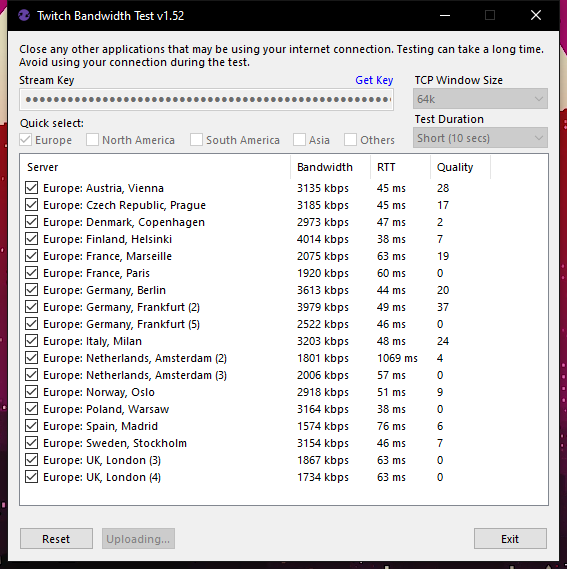
Literally cannot stream rn
ionic kelp
That would be why. Your connection (or somewhere in between) to twitch is having issues.
haughty bridge
@ionic kelp do you know why my watchtime doesn’t work and shows 0 seconds tho I have loyalty enabled?
lofty moth
Yeah I see that, is twitch having problems? That would explain it
ionic kelp
When did you enable it?
lofty moth
But they did not say anything anywhere that I could find
haughty bridge
A month ago?
silk gust
@ionic kelp unfortunately I don't really understand how to check the error, because this is an extension and not a page ... and how it should read, or you need a f12 screen from the SE page
ionic kelp
@lofty moth From what I see it's an issue from your end to twitch and not twitch's. We'd have more people complaining if it was.
haughty bridge
?
lofty moth
ionic kelp
<@549243893317632024> From what I see it's an issue from your end to twitch and ...
I thought so too, where the issue could be? I had 0 issues up until cyberpunk came out last night
ionic kelp
That's not something we can help with as it's an issue on your end somewhere.
haughty bridge
Is there any other reason as to why it says 0 seconds then?
ionic kelp
@haughty bridge You have only 1 stream in VODS and it wasn't long enough to trigger time increase.
It has to be at least 10 minutes long.
haughty bridge
Yes I know that
ionic kelp
That was only 30 seconds.
haughty bridge
But it’s for another friend
ionic kelp
........
haughty bridge
So is it just broken?
ionic kelp
You never said it was for another channel.
haughty bridge
I did now lol
ionic kelp
What's their channel name. No links.
haughty bridge
Kimchichurro
ionic kelp
I see no issues. Leaderboard is full and showing.
 lilac tendon
Hello, my activity feed is still not working since yesterday and I don't know why.
 frail wave
Hey i have a question
I often stream but everytime i speak with somebody at discord i get mutet
Can you help me😊?
haughty bridge
Thanks
lofty moth
@ionic kelp asked my friend to do the same, can't be a coincidence right?
 lament blade
Hey, I keep getting such errors. Can you help me?
 lunar frigate
hey guys
i need your help
a friend gave me full controll access to his streamelements and i cant open it
lament blade
how do i add a stinger transition?
 meager mural
hello can any1 help me? when i type in !subs in my channel! its keep saying you got 0 subs.. but i got 19subs! how do i fix it
lament blade
How can i add a video background when somebody donates or sub? i Have sound / gif but i want to have a backround to?
 ember turtle
Hello guys, I'm mod of one streamer, and Stream Elements bot keeps writing "response message" in the chat, can anyone help us how to get rid of it? thank you in advance ❤️
ionic kelp
@ember turtle There's a timer like this https://streamlabs-is-a.totallysuspicious.website/5XnJFwc.jpg
 ember turtle
@ionic kelp so all we need to do is click on the "x"? will it delete the "bug"?
frail wave
Can i stream games With stream Elements?
ionic kelp
Yup Sata
frail wave
?
ionic kelp
No as it is not a program to do so.
ember turtle
okay thank you very much ❤️
 hollow acorn
Hi, i was wondering how to edit a scene in browser if the scene itself does not show.
I have a full scene collection on streamelements that was imported from streamlabs but it does't show in browser
 untold spear
Hi guys, I'm hosting a giveaway and I've set loyalty points to .1 every ten minutes. However, nobody is being awarded points for watching, only if they tip.
I'm trouble shooting by scaling up my scale to one point every 10 minutes to see if that helps.
Any light that can be shed on this error would be very helpful
 balmy tide
Hello! I'm new around here, so forgive me for posting in the wrong place, or something...
I've been trying to learn Japanese on stream, and I'd like to know if anyone would be interested in developing a Japanese dictionary widget for Twitch. If such a widget already exists, please do tell me where to find it!
I can explain what I want to those willing to do it, though. We can discuss the details via PMs, so feel free to send a message to me.
Thanks in advance!
untold spear
(I've already started and restarted the giveaway multiple times)
 fierce mesa
Can I dm a staff is that allowed just clear the process faster the staff should see this cas they email me original
 covert elm
hi! i've been using streamelements overlays. I recently started using a new animated one, and i notice that i get a ton of lag on my gameplay/cam when i have the overlay turned on. even just turning the overlay invisible makes for a huge improvement to lag in gameplay/cam. any ideas for how i can improve lag? Should I just try out a static scene instead?
 brave socket
Hey anyone, my games arent capturing and im running as admin any advice? I already did !blackscreen
 crystal hamlet
Is there a reason my donations are coming through PayPal as “goods and services” which are putting them all on hold until I have a tracking number?
 queen solar
I am wondering if anyone knows a way to look through the list of all your quotes without typing !quote 1 one by one?
 restive aspen
@staff my twitch chat stats still don't show up
 ornate crane
How can i reset my Tip goal
queen solar
@ornate crane go into activity feed on the dashboard, widget data, goals, then type 0 in the tip progress
 sweet pivot
i need help with my twitch pop ups there is always a pop up that appears and i dont know how to get rid of it
viscid pebbleBOT
@covert elm OBS > Settings > Advanced > Scroll down > Enable or disable Browser Source Hardware Acceleration, depending on its current state > Restart OBS (This does not apply for OBS on Mac)
https://i.imgur.com/ggMe9ZE.png
@heady olive New to StreamElements?
Check out our YouTube channel https://www.youtube.com/c/streamelements/videos
with tutorial videos from setting up the basics, to in-depth details on how to use our product.
New to OBS? Here is a 4 step quick start guide
https://obsproject.com/wiki/OBS-Studio-Quickstart
Want to learn even more? Here is an in-depth overview
https://obsproject.com/wiki/OBS-Studio-Overview
 tidal relic
404 page not found for !chatstats can anyone help to fix it? channel name : WolfieBae
sweet pivot
i need help with my twitch pop ups there is always a pop up that appears and i dont know how to get rid of it
if so please @ me
lament blade
hello! every time i try to turn on media requests, i says "NO ACTIVE WIDGETS WERE DETECTED FOR MEDIA REQUEST", how do i fix this?
viscid pebbleBOT
@sweet pivot Please provide a proper screenshot with the issue visible. If not sure how to take a screenshot, you can check here: https://www.take-a-screenshot.org
sweet pivot
i only want the one on the right
 dry hare
@lament blade that would indicate that you need to add the media request widget to your overlay
lament blade
how do i do that?
dry hare
Streamelements.com > my overlays > edit overlay > add widget > engagement > media request
@sweet pivot the alert?
Select the one you don’t want in the layers list and click the trash can icon to delete it
lament blade
where do i find the media request widget?
viscid pebbleBOT
@lament blade New to StreamElements?
Check out our YouTube channel https://www.youtube.com/c/streamelements/videos
with tutorial videos from setting up the basics, to in-depth details on how to use our product.
New to OBS? Here is a 4 step quick start guide
https://obsproject.com/wiki/OBS-Studio-Quickstart
Want to learn even more? Here is an in-depth overview
https://obsproject.com/wiki/OBS-Studio-Overview
 jagged delta
nvm it belongs here i think
 crisp swallow
looking for someone to help me create an overlay and a few other things help setup my twitch willing to pay 😄
jagged delta
Its been like this for 3 months and I've done everything
lament blade
okay, where do i go from here? @dry hare
dry hare
edit overlay > add widget > engagement > media request
lament blade
i already did that i think, how do i add it to obs?
dry hare
crisp swallow
looking for someone to help me create an overlay and a few other things help set...
Nerd or Die, Visuals By Impulse, Fiverr. Or you can use a template overlay inside the dashboard.
viscid pebbleBOT
@lament blade To add your overlays to OBS, add a new browser source in your scene. Paste your overlay URL in the browser source properties, set the dimensions to 1920x1080 (unless you changed them on the website) and check Shutdown source when not visible. https://youtu.be/KDvLynUqXI4
lilac tendon
Am i the only one their activity feed is not up to date?
lament blade
ty!
 sonic bobcat
Hey guys! I stream from SLOBS and wanted to add the duel command to my stream. I already run streamlabs chatbot, and not sure how to add them to my chat. Thanks!
dry hare
@sonic bobcat you probably want to ask in the streamlabs discord
restive aspen
I think I know why my stats didn't show up it's because I banned streamelements 
sonic bobcat
But the duel stuff is thru stream elements?
They wouldnt know how to do streamelements stuff
dry hare
you would need to add the chatbot to your channel and make it a moderator
sonic bobcat
where can i add the chatbot thats where im having atrouble
dry hare
streamelements.com > log in with your twitch, then click "Join Channel" button on the main dashboard page.
 verbal arrow
please help . . i just redeemed my free hoodie on deuceace stream but i dont know where my code is to redeem it??
restive aspen
I did that
@ruby vortex I modded streamelements. are you able to add my chatstats?
 steady hornet


 true pine
Is this the chat to ask about custom CSS for alerts?
Cause I cannot figure out how to code a center reveal into my text for the life of me
true pine
Ty
 candid frigate
If I wanted to set up a Prime Sub Goal or a Tier 2 Sub Goal, for example, is this possible?
 strong kernel
Not possible.
 novel pond
last night, a follower kindly tipped me, but i only found out today when checking my e-mail. My alert never went off, it wasnt in chat, it didn't even appear in my activity feed. I have tips set up through streamelements, and double checked that my alert was set to go off for tips (it was) so i'm wondering if anyone can maybe help me figure out how to fix this so it doesn't happen again. i hate that my follower may think i'm ungrateful
viscid pebbleBOT
@novel pond if a viewer tipped through PayPal but no information appears in your StreamElements account, this generally means PayPal has held the tip for verification. Until PayPal clears the tip and sends back a confirmation to your StreamElements account, no information will appear there and no alert will play, as that confirmation is the only way for us to be aware of a successful transaction. If you believe there may be an issue with the transaction, you'll need to contact PayPal support as StreamElements is only a passthrough service and never actually gets involved with the transaction or touches the money
candid frigate
@strong kernel Is there a technical limitation to this? For example, Discord can pull T2 and T2 data from the API. Perhaps Prime isn't possible as it shows as a T1 response in the API, but wouldn't it be feasible to use the T2 and T3 data for things like onscreen goals and progress bars?
strong kernel
It's not a data point our system stores for the sake of goals. You would need custom coding that stored the data for you.
 vernal pilot
is there a way to trigger "${count.edit deathcount -1}" with emote rather than command name ?
strong kernel
Come to think of it, I've never tried making an emote a keyword. Give it a shot, let me know how it goes. 
 signal cobalt
Can I somehow "skip" the delay without having to close the stream and start it again?
 rocky peak
How can I delete messages but not mute the user?
 neat tulip
can someone help me i am trying to set a screenshot of my stream as a transparent overlay on SE but my screen shot is not scaling to full size of the screen
 gentle timber
Hey there, does anyone know of a way to set up a queue for chat to join?
strong kernel
gentle timber
Hey there, does anyone know of a way to set up a queue for chat to join?
Not a default tool. Look for community created solutions.
strong kernel
rocky peak
How can I delete messages but not mute the user?
On your own or with the bot? Bot won't delete individual messages, just purge all of them.
 queen depot
Hello there, i added some items in the store, but when i type !store in the twitch chat the bot is answering this : StreamElements
: @queen depot, no items found 😦
How i change this?
strong kernel
@queen depot
queen depot
i did this
and i added allready items in the store
but in the twitch chat when i want to spam !store to show the people the link go in the bot is responding no items found
and i cant find the command so i can edit it
strong kernel
That is a screenshot from your account, as you can see from the top left and top right.
Default commands cannot be edited.
queen depot
nah bro i didnt add items in my own store i added in another channel i am bot supervisor
fruityslots channel
strong kernel
queen depot
ok know its working but i cant change it to writing like " Check our new Amazing Fruity Store and redeem your points!! :)
https://streamelements.com/fruityslots/store PogChamp" for example?

StreamElements
The Ultimate All in One Platform for Streamers
i see in other streams that the !store command can wrote what ever they like
are u sure i cant change it?
strong kernel
Default commands cannot be changed.
Default commands can be disabled.
Custom commands can be made.
 late cloak
So I can't change the answers of the 8ball?
strong kernel
late cloak
So I can't change the answers of the 8ball?
You can, from the Modules section. 8-ball is a module, it plays by different rules.
 small patio
hey is there a way to unban someone from sr?
strong kernel
small patio
hey is there a way to unban someone from sr?
Send an email to support@streamelements.com with their username and your account ID. As well as context, of course.
small patio
ok perfect, thank you 🙂
lament blade
Can I get a whole box of my merch free to wear for my youtube channel
strong kernel
We do not send free boxes of merch out, no.
lament blade
But it's my merch
strong kernel
It's your design. It's not your garments. You can purchase a bundle at cost from within the SE.Merch section of your account.
lament blade
How much would it be
 rare dawn
Is there a way that my friend can make money with being 14 yr old he only get like 1-4 viewers per stream
If not is there something I can do to help him get any benefits
lament blade
Try twitch it's how ninja gets paid
rare dawn
No my friend but he don’t get paid
 hasty fog
hey i just changed my twitch username and the chatbot doesn't work anymore 😦 i tried to re-add and re-setup it still didn't work
viscid pebbleBOT
@hasty fog If you changed your name on Twitch, please follow these steps:
- Visit https://streamelements.com/logout and then log in again by connecting with Twitch.
- On the right side of the dashboard page that opens, select Join under bot settings. If it says Part select that and then select Join to send the bot to the chat. Don't forget to mod the bot by typing /mod streamelements in your channel if you have not already.
- Post your old and your new name here so that we can update your channel's chatstats tracking (must be done by staff).
 harsh sand
Hello, offline channel hosts in streamelements do not appear and you told me that it was twitch responsible, but in streamlabs they do appear, so how do I import the alerts from streamelements to streamlabs OBS?
rare dawn
Is there a way that my friend can make money with being 14 yr old he only get like 1-4 viewers per stream
viscid pebbleBOT
@harsh sand "Due to changes to Twitch API, we have filtered out hosts and will only show these ones on your activity feed:
- All hosts coming from an online channel with at least 1+ viewer
- Auto host events with at least 1 viewer - only from a channel that just went offline
Note: If you see X channel has hosted you with no viewers on the back, that is considered an offline host or a host with 0 viewers, we do not show these."
hasty fog
i can't find the part that says "bot settings" but i reactivated the bot basically
the username is elseworldtv > elsewhere
o wait im blind lmao
its back on 😄 just need help switching the names
harsh sand
Yes but offline channels host dont appear, and in Streamlabs OBS, they appear. So how do I import the alerts from streamelements to streamlabs OBS?
strong kernel
There's no "importing the alerts."
We do not show those alerts. We use a different API endpoint.
rare dawn
If my friend has this bot what are all the benefits to it
viscid pebbleBOT
@rare dawn New to StreamElements?
Check out our YouTube channel https://www.youtube.com/c/streamelements/videos
with tutorial videos from setting up the basics, to in-depth details on how to use our product.
New to OBS? Here is a 4 step quick start guide
https://obsproject.com/wiki/OBS-Studio-Quickstart
Want to learn even more? Here is an in-depth overview
https://obsproject.com/wiki/OBS-Studio-Overview
lament blade
How muck will a bundle of my merch be
harsh sand
@strong kernel so i have to do it manually?
strong kernel
@harsh sand Offline hosts will never be shown through our overlays.
harsh sand
Oh ok thanks
 hybrid tartan
Hi I would like some help on my OBS.Live because the Media Request is not showing up or working its just started like this today!!! Can someone please help me?
viscid pebbleBOT
@hybrid tartan StreamElements menu, on top of OBS > Logout > Login
 pallid depot
how do i test alerts
viscid pebbleBOT
@pallid depot You can test alerts via the Emulate bell on the lower left side of the Overlay Editor. Simply go to your Dashboard > My Overlays > pencil/edit button on the overlay. Make sure the Preview LIVE on stream option is on to see the alert in OBS/XSplit** https://streamable.com/vtulg9

 eager sigil
pallid depot
eager sigil
pallid depot
when i emulate the alert in stream elements on obs studio it only shows half of the alert
eager sigil
i wanted
pallid depot
i need help
eager sigil
I wanted to know considering my settings, why will it only show one sub?
 spare hedge
Hey is it possible to use if statements in commands with =, > and <?
eager sigil
but on streamlasbs. Got a new sub today, but it didnt get added to streamlabs today too 🙂 So im fine about the most recent one
strong kernel
@pallid depot Stop spamming and be patient. Thank you.
@eager sigil Twitch does not send a history of events. Anything that took place prior to connecting to StreamElements will not appear.
@spare hedge If statements cannot be used in commands.
 lavish gust
Hey I am curious if it is possible to change an overlay to be 2k instead 1080p
spare hedge
@strong kernel aw well, thanks for the quick response though!
pallid depot
why is stream elements better than stream labs this is a real question
viscid pebbleBOT
@pallid depot The default resolution for StreamElements overlays (theme and custom) is 1920x1080. Please add them in OBS at their full resolution and use CTRL+F to fit to screen if necessary. You can then downscale your stream in OBS settings > Video if you'd like https://i.imgur.com/6bWXxjR.png
 pallid depot
Thank you i apologize for being inmpatient my problem was solved sorry again
neat tulip
hi can someone help me?
 spark mulch
tried this, but the subscribers still dont get extra loyalty points per 10 mins..
eager sigil
@strong kernel Is it possible to manually at the subscribers myself?
strong kernel
eager sigil
<@!107215138561478656> Is it possible to manually at the subscribers myself?
Not possible.
lament blade
How do I add streamElaments to my mod list?
 rustic raptor
 abstract hemlock
@rustic raptor you don't need to post the same question on every channel
@rustic raptor that look like the instructions from the overlays of own3d or nerdordie...
viscid pebbleBOT
@grand crater Welcome to the helpdesk! Please let us know how we can assist you today and a support volunteer or staff member will assist you as soon as they are available. Thank you for your patience.
 grand crater
is there a way withtin my stream where i can ask a question and who ever gets it right will get points?
lavish gust
So I changed the width and height but it still doesnt fit the canvas that is the same height and width?
 mortal kite
Trying to figure out why when I stream on twitch streamelements shows I’m offline on the dashboard and my timers don’t work
restive aspen
@viscid pebble could you help me get my chat stats on streamelements. I modded streamelements
 eager hill
I'm having issues getting my activity feed to show in my OBS i looked at my overlays to make sure they are enabled and I also checked to see if they are enabled in twitch. I can see them in twitch but not in OBS. OBS also just says N/A for current viewers while twitch showed the correct amount. I've tried looking for other info but most info i found pointed to look in discord, so here I am 🙂
edit: I found the issue and the activity feed it looking at the wrong account despite it being changed in the "Stream" options menu. How do I get the activity feed to look at the right account now?
lament blade
help me
viscid pebbleBOT
@eager hill StreamElements menu, on top of OBS > Logout > Login
 fervent elbow
can Streamelements do an auto shoutout to fellow streamers?
ionic kelp
Outside of when they raid/host not really.
fervent elbow
upon first chat?
ionic kelp
Nope
fervent elbow
hmm ahnkbot can but it now is part of streallabs
streamlabs
i prefer not to use streamlabs
 gleaming forum
greetings, I am looking to merge my twitch and youtube streamelements accounts. Is this the right place to go?
 jolly tiger
im trying to change the text on an overlay so it has my youtube channel name on it, and i did it before ages ago but i dont remember how to
viscid pebbleBOT
@gleaming forum Account Merging - Please note:
- Merging accounts only allows faster ways to switch between accounts
- Merging accounts does not allow data sharing between accounts - different streaming platforms, different type of events
- Merging accounts allows duplicating/sharing overlays between the accounts
If you understand the limitations of merging and want to proceed, please find the JWT tokens (!jwt) from both accounts you want to merge and you will be directed to DM them to a staff member
abstract hemlock
@jolly tiger click on the label, then settings (change the message field)
gleaming forum
@viscid pebble I understand -- primarily I want to duplicate overlays between the account. Please let me know what staff member to DM the information to 🙂
 spice folio
i think my active feed is still connected to facebook how do i change it to twitch active feed
jolly tiger
abstract hemlock
<@!522553825203191840> click on the label, then settings (change the message fi...
thank you much appreciated
 supple ether
Hi, I was wondering if it's possible to limit giveaways to followers and subscribers only?
abstract hemlock
DM me the tokens @gleaming forum
viscid pebbleBOT
@spice folio StreamElements menu, on top of OBS > Logout > Login
eager hill
@viscid pebble thank you I totally missed that one, everything is good as gold now!
 river quartz
new to streaming. i created my over lay but cant seem to get my streaming to work on my overlay its only showing overlay and black screen
lament blade
having trouble connecting to twitch, can't go live, something with my stream key
 west crescent
My regular followers/viewers can't use !kappagen unless they are VIP or Subscribe... Why? I don't see a setting to change this
 winged arrow
i use obs live on a big tv but the menus are very small can i scale obs live?
novel pond
my bot keeps disappearing from my chat. is that supposed to happen? is there a way for me to like summon it back?
novel pond
west crescent
My regular followers/viewers can't use !kappagen unless they are VIP or Subscrib...
i saw this in the bot commands earlier today. maybe you need to change it there?
ionic kelp
@novel pond channel name? No links.
novel pond
channel name is Almost_fayemous, same as discord
viscid pebbleBOT
If your commands recently stopped working and you're using OBS.Live and a custom bot name do the following:
- In OBS.Live, click on the hamburger menu (three stripes) at the top left of your activity feed
- Click on Stream Settings > Custom bot name
- In the Custom bot name field select Set custom bot name, not your already existing username (with capital letters). Note: If you already connected an account that way, the third entry will show as the account name (see image https://i.imgur.com/sO7fWOX.png).
- Scroll a bit down and click on the purple Connect Custom Bot Account button
- Log in as usual and Authorize the custom bot name
- Back in the Activity feed, click on the Send Test Message button and check if your custom bot name starts working again
 ionic kelp
Do that.
novel pond
i did that already. do i need to unlink and re link it every time?
ionic kelp
The 3rd option?
novel pond
the 3rd option is the custom bot name. clicking it does nothing. i have a purple "send test message" button and clicking that does not get the bot to respond
ionic kelp
Remove it and re-add it.
novel pond
it still is not working :/
novel pond
ok. figured it out. somehow, my bot got muted. looked up how to unmute it and now it's working again
 modern valve
I'm getting an error 404 for my chat stats
viscid pebbleBOT
@modern valve If you changed your name on Twitch, please follow these steps:
- Visit https://streamelements.com/logout and then log in again by connecting with Twitch.
- On the right side of the dashboard page that opens, select Join under bot settings. If it says Part select that and then select Join to send the bot to the chat. Don't forget to mod the bot by typing /mod streamelements in your channel if you have not already.
- Post your old and your new name here so that we can update your channel's chatstats tracking (must be done by staff).
modern valve
old: rstyz
new: xcjoc
modern valve
thank you
zenith widget
I've reported your channel to the devs to fix the loading
zenith widget
hopefully later today
 bitter arrow
ok thank you
 untold haven
RE: https://twitter.com/Lonkley/status/1337181070723145730
Lonkley (@untold haven)
@StreamElementsS Setting the sound asset for stream store item redemptions is missing the submit button. Chrome 87, incognito to make sure a plugin isn't breaking anything. Missing on both new uploads and existing in use sounds. Image assets work fine.
Twitter•Today at 3:43 PM
[11:16 PM]
I thought it was fixed, but the submit quietly pops a "Something went wrong error"

@StreamElementsS Setting the sound asset for stream store item redemptions is missing the submit button. Chrome 87, incognito to make sure a plugin isn't breaking anything. Missing on both new uploads and existing in use sounds. Image assets work fine.

 Twitter
·
zenith widget
Twitter
·
zenith widget
Remove the console text
I can use an uploaded sound without any issue. Are you sure you are clicking the right button?
zenith widget
And in the video i created a new item
untold haven
Sound uploads. plays. but there is no submit button to attach to the new item
zenith widget
zenith widget
So in conclusion, if you are clicking on anything else but "Upload sound" you won't see the "submit" button for the sound file.
lament blade
what are the best settings for an internet speed of 650mbps? It is always pretty laggy to me
like bitrate settings
viscid pebbleBOT
@lament blade There are no "best settings".
Please understand that every setup will be very different.
Any guides or videos that claim otherwise are misinforming. Your best option is to start with a base and adjust as necessary.
You can run the OBS auto-configuration tool. To use the auto-config, click on the Tools menu in OBS, select Auto-Configuration Wizard, and then just follow the on-screen directions.
You can use this tool to get baseline settings for your hardware and adjust as necessary from there.
Test, test, and test again. We are happy to offer suggestions for any issues you may be having afterward, but not a list of settings.
Thank you
untold haven
I was using Set Asset. Upload does work
lament blade
i've done that and it doens't really work. it's still laggy
How do I set up commands with my bot?
viscid pebbleBOT
@lament blade Obs.live is a plugin for OBS Studio for the best OBS support, please join their Official Discord @ discord.gg/obsproject
@lament blade You can add, remove and make changes to custom commands in chat with !commands/!cmds flags:
!commands add (commandname) (commandresponse) - allows you **to add **a new custom command
!commands remove (commandname) - allows you to delete a custom command
!commands edit (commandname) (commandresponse) - allows you to edit an existing custom command
!commands show (commandname) - allows you to see the raw response of a command before variables are used
!commands options (commandname) -(flag) - allows you to change settings for an existing custom command
Valid flags for !cmds options include: -enable -disable -cd (number in seconds) -usercd (number in seconds) -cost (number) -level (number) -type (say, whisper or reply) -count (number)
Syntax example: !cmds options twitter -usercd 60 -type reply -level 250
untold haven
Set asset used to.. But its fine for the moment
zenith widget
@untold haven so don't use "set asset" for a sound.
 woeful juniper
Question: So a channel I mod for we are trying to set up commands using the ${user} variable but for some reason It only works for the couple of us that are IN chat at the moment testing the commands, but not for users that are not in chat. However in another channel it works fine whether someone is in the chat or not. I hope that explanation made sense, but if anyone can help with a solution to this, that'd be great. I'm not sure why it's being that way.
zenith widget
The person you are trying to tag with the command must have at least spoken once in the chat while the bot has been there
woeful juniper
Okay, so if they spoke in the chat BEFORE the bot was set up, it won't work?
zenith widget
Nope, the bot doesn't know they have ever visited the channel.
woeful juniper
Gotcha.
novel pond
my merch store wont let me edit anything or create anything new
zenith widget
What browser are you using?
novel pond
chrome
viscid pebbleBOT
@novel pond Please provide your account ID found at the top of this page: https://streamelements.com/dashboard/account/channels This ID is public info and safe to share here.
novel pond
5fc0d159bd80297bac76117e
quiet mason
How can i make kappagen make my chat emotes appear exclusively? Sometimes people post nasty emotes and they show up on screen with kappagen
zenith widget
You can't disable all emotes. You can edit the explosion, but not what emotes are shown from normal chatting
You can blacklist those emotes in the twitch moderation settings I believe
zenith widget
novel pond
5fc0d159bd80297bac76117e
reported to the devs
lament blade
Good morning, How can I change my bank details in SE.Pay? Thank you for your help in advance.
viscid pebbleBOT
@lament blade Please contact us via email for support with SE.Pay. You can use our contact form here: https://streamelements.com/contact Thank you.
lament blade
Ok thx
I dont know if this is an obs or twitch problem... but my alerts are not being picked up. Someone donated me £3.33 last night as a test. Now normally payments show up in my activity feed and on stream. But nothing has shown for both. The money is in my paypal but not registered for my activity feed and my alert box never went off... Can someone help me here?
 tender thicket
Hi guys, I have a problem with streamelements overlay. My graphic designer sent me the new alerts for the channel. The problem is that I can't insert the text inside (having the alerts with the section where the names of the users should be inside) I tried a bit to turn between the settings but I couldn't figure it out. Anyone know how to fix?
zenith widget
@lament blade Make sure they didn't tip you via a different link somehow and if that is not the case, then check if the tip in PayPal needs to be accepted(if its on-hold basically)
@tender thicket there are layout options - choose the "text over image" one and then follow this:
viscid pebbleBOT
Text not showing up over your alerts? Go to the Advanced Text Settings and set the top margin to 50, you can work your way to the right position from there.
lament blade
Hello everyone! Could you explain me how to use bots?
What is the Deepbot API secret?
Thanks for support
tender thicket
@zenith widget Problem is that the alert is a webm file
lament blade
zenith widget
<@456226577798135808> Make sure they didn't tip you via a different link somehow...
The payment went straight through, they used https://streamelements.com/pandazlive_/tip and this has always worked on stream before... I'm a little worried something has broken on my streamelements
tender thicket
Even having selected that option the text is still below the video
(alert animated ofc)
zenith widget
tender thicket
<@!120611700993949696> Problem is that the alert is a webm file
thats even better as we recommend .webm videos
tender thicket
Oh thats cool! Then it's very weird that the text doesnt show up within the webm animation but still underneath no matter what settings i choose
zenith widget
lament blade
The payment went straight through, they used <https://streamelements.com/pandazl...
Nothing is broken so far on our side - most likely the tipper's account is not verified and the tip is on-hold or something similar if its not showing on our side.
viscid pebbleBOT
@tender thicket Please provide your account ID found at the top of this page: https://streamelements.com/dashboard/account/channels This ID is public info and safe to share here.
zenith widget
@lament blade its a bit self explanatory
but this is for importing settings and commands from Deepbot into our bot
tender thicket
5e1b062b1184dd3b7a6b33ac That's my ID
tender thicket
@zenith widget not doing anything on it right now, im gonna upload back the webm files so you can check it
Gimme 1 sec
Cool
You can proceede
lament blade
zenith widget
Nothing is broken so far on our side - most likely the tipper's account is not v...
I'll need to check when I'm home, as I 100% received the payment as my paypal balance went up
zenith widget
@tender thicket
zenith widget
its literally what I explained above as well in text 🙂
but as I've seen time and again, pictures > words
tender thicket
Guess the issue was the text margin
spare hedge
Hey, is it possible to enable a command when a custom command is run? So mod runs command A which enables commands B & C then mod runs command D which disables commands B & C?
zenith widget
No - enabling/disabling commands needs to be done manually via the dashboard or via the chat command that is
!cmd enable command_name i believe it was
refer to the bot:
viscid pebbleBOT
You can add, remove and make changes to custom commands in chat with !commands/!cmds flags:
!commands add (commandname) (commandresponse) - allows you **to add **a new custom command
!commands remove (commandname) - allows you to delete a custom command
!commands edit (commandname) (commandresponse) - allows you to edit an existing custom command
!commands show (commandname) - allows you to see the raw response of a command before variables are used
!commands options (commandname) -(flag) - allows you to change settings for an existing custom command
Valid flags for !cmds options include: -enable -disable -cd (number in seconds) -usercd (number in seconds) -cost (number) -level (number) -type (say, whisper or reply) -count (number)
Syntax example: !cmds options twitter -usercd 60 -type reply -level 250
spare hedge
ah darn, cheers for the info anyway @zenith widget
 split siren
I'm getting this error with !setgame and !settitle in a channel i moderate for, does anyone know how to fix this? I've tried turning the commands on and off, streamer has unmodded and remodded the bot. It's worked fine for months until now. Any thoughts?
viscid pebbleBOT
@split siren Go to the Dashboard > Right side > Part channel > Join channel(https://streamelements.com/dashboard)
 split siren
did that, still happening
zenith widget
Streamer name
 zenith widget
👍
 cold eagle
So with adding a video, is there any way to have it coming in and out at different times say like with the options you have with an image, ie comes in for 20 seconds and then goes away for 5 mins, then comes back in again, rinse and repeat....
zenith widget
Asset rotator widget can help you with that
 sick ether
Hello all is anyone availiable to help with commands they appear in my stream twice i cant fuigure out why
zenith widget
Are you using ground control or obs.live?
sick ether
obs live i tihnk
viscid pebbleBOT
@sick ether StreamElements menu, on top of OBS > Logout > Login
sick ether
its doubling in my feed obviously iv done a wrong command or something
its not a command oops it s atimer
lament blade
hi i have a situation i would like some help with: i have been told to put Wanna̭ ͛bͬecome famous̰? Buỷ fỏllowers, p͋rimes̽ and̵ view̻ers ͭon *** (bigfollows .com)! and bigfollows.com as words and phrases on the banned list. I did that and a few minutes ago that first phrase has once again showed up in my chat. I banned it but it is still coming through the chat.
zenith widget
so did you add any of the terms here: https://dashboard.twitch.tv/settings/moderation/blocked-terms ?
 somber shore
@lament blade from the dashboard on twitch go to your channel moderation settings and enable Email Verification that will stop the bots as in most cases bot accounts are not verified
lament blade
yes
 lapis epoch
Hey ho, a girlfriend of mine (jacqueen_89 on twitch) wants to fill up the form for SE.Pay. She fills up the complete Form, but the Button to send it is still not active? Thx
viscid pebbleBOT
@lapis epoch Please contact us via email for support with SE.Pay. You can use our contact form here: https://streamelements.com/contact Thank you.
zenith widget
and make sure that they email us and not you
lament blade
@zenith widget May i ask you something?
zenith widget
Just ask the question you have.
lament blade
will my friends have to verify their emails to talk to me as well?
zenith widget
I believe so
 prisma elk
Buenas, por qué cuando inicio una apuesta si que me sale en el chat que se ha iniciado la apuesta pero pongo el comando !bet (lo que sea) y los puntos y el bot no coge la apuesta, no hace nad
nada
ionic kelp
Escribe ingles aqui or en #🇪🇸︱español
prisma elk
ok
When I place a bet I get the command in the chat but I put !bet win 50 for example and it does nothing
and Send confirmation when entering via chat in marked
viscid pebbleBOT
@prisma elk Please provide your account ID found at the top of this page: https://streamelements.com/dashboard/account/channels This ID is public info and safe to share here.
prisma elk
My ID is Llobat
 umbral fossil
hi! just started adding commands to my twitch chat and im testing out some of it right now and I noticed that links shows as ***, is it just shown like this to me or its not working???
viscid pebbleBOT
@umbral fossil If links in chat are appearing as ***** either mod the bot or disable block hyperlinks in your twitch channel settings: https://dashboard.twitch.tv/settings/moderation
umbral fossil
oh okay, thanks for the help!!
 rugged echo
hi guys, someone can help me? i want to take away this option of the donator to send a video when he donate to me
cold eagle
Hi Guys, is there anyway of triggering a video using a command within SE (I only have access to the SE dashboard and not OBS.Live, I would like to be able to set a command and trigger a small video, thanks.
 cold flower
I'm adding a video (webm). It's showing with in the browser, but when added to OBS as a browser source, it's not showing? I've added some other static photo elements beside it, just to make sure the browser source is showing (which it is) - any thoughts on this?
 vale meteor
Hey, i have a question about the labels on StreamElements. Can i put the resub month for a subscriber into the Last Sub Textbox? I didn`t find it. It looks for me better to show up the resub month in my Overlay.
ionic kelp
@cold flower Mac?
cold flower
Follow Up - Here's the video playing with in the browser - here it is not running within OBS.
cold flower
ionic kelp
<@470994185722396684> Mac?
Yes
ionic kelp
@cold eagle Latest post in #widget-share might help
cold flower
Here's the video not running.
ionic kelp
2 things
viscid pebbleBOT
We're not able to troubleshoot issues with using our overlays in StreamLabs OBS (SLOBS) as we don't have the tools to support their software. We recommend using OBS Studio or OBS Studio with our plugin OBS.Live.
ionic kelp
And due to a missing feature on Mac static images are recommend for overlay widgets.
cold flower
ionic kelp
And due to a missing feature on Mac static images are recommend for overlay widg...
So if I wish to run a looped video. I need to add it as a widget?
ionic kelp
No. Anything outside of static images don't properly work atm due to something missing from base OBS.
cold flower
ionic kelp
No. Anything outside of static images don't properly work atm due to something m...
In the example clips I sent. Static images are working on Mac, and with in SLOBS.
#helpdesk-twitch message
ionic kelp
Exactly
cold flower
ionic kelp
Exactly
Sorry. The phrasing caught me off guard. Anything outside of 😉
 dense bay
Hello. Question. Is there a limit on how many managers I can have for my account?
cold flower
ionic kelp
No. Anything outside of static images don't properly work atm due to something m...
Any info on when this will be fixed?
ionic kelp
It's being worked on by the OBS devs but no eta unfortunately.
 maiden cove
Hello everyone. I'm having some problems with my chat bot. Can anyone help me?
 hollow parcel
I created a follower alert on the StreamElements website, then copied the url and put it as a browser source in OBS Studio, then asked a friend to unfollow and follow, but still no notification appeared on the screen. Any ideas?
lament blade
How do I activate se.pay, Im from Portugal
viscid pebbleBOT
SE.PAY is available for streamers who are at least 18 years old, with bank account under their name in one of the following countries and have at least 101 follower (Twitch) / 101 subscribers (YouTube):
Austria, Belgium, Czech Republic, Denmark, Finland, France, Germany, Ireland , Italy, Netherlands, Poland, Portugal, Slovakia, Spain, Sweden, Switzerland, United Kingdom, United States.
If you meet these criteria and don’t see SE.Pay, let us know.
For information on SE.Pay payment methods, their fees and settlement times see https://streamelements.com/dashboard/tipping/fees
ionic kelp
@crisp swallow Not the place for that. #art-marketplace
crisp swallow
Thank you sudo sorry about that
 lethal rune
Hi. I use streamelements since last week. In this period I got 10+ follower, so streamelements registered only 10 follower. I want to use the follower goal overlay but it show that I have only 10 follower instead of my 26 total. How can i fix it ? Thank you
lament blade
Hello, andy staff wants to help me?
viscid pebbleBOT
@lethal rune To reset goals:
- from the Overlay Editor > Session data on top right (monitor symbol) > Goals tab > reset progress of desired goal
- from the Dashboard > Activity feed on the left > Widget data on the right > Goals tab -> reset progress of desired goal
Note: Goal widgets (progress) only counts up and doesn't go down automatically, if you lose followers/subs.
 iron forum
Is there a way which allows you to create an animated text
ionic kelp
It only tracks when you start using.
iron forum
iron forum
Is there a way which allows you to create an animated text
?
for a latest donation text, for example?
lethal rune
viscid pebble
<@!139987202724724736> To reset goals:
- from the Overlay Editor > **Session dat...
Thank you so much. You're very kind
The staff of streamelements is awesome
dry hare
hollow parcel
I created a follower alert on the StreamElements website, then copied the url an...
Make sure the bot is moderator on your channel, and tbh I don’t know if alerts will trigger when your not live. That’s beyond my current knowledge at the moment.
dry hare
maiden cove
Hello everyone. I'm having some problems with my chat bot. Can anyone help me?
What kind of problems?
 civic torrent
When someone follows me on twitch it doesnt play the custom sound i added to it. When i check to see if its still there within the overlay editor it shows it there but plays the default sound and NOT the custom sound. How do i fix this?
Nvm i found it thanks tho!
maiden cove
When I launch Obs.Live streamelements chat bot stops working. None of the commands work. Any ideas why this is happenning? It came out of nowhere.
ionic kelp
Channel name? No links.
maiden cove
BeyazYakaPlus
viscid pebbleBOT
If your commands recently stopped working and you're using OBS.Live and a custom bot name do the following:
- In OBS.Live, click on the hamburger menu (three stripes) at the top left of your activity feed
- Click on Stream Settings > Custom bot name
- In the Custom bot name field select Set custom bot name, not your already existing username (with capital letters). Note: If you already connected an account that way, the third entry will show as the account name (see image https://i.imgur.com/sO7fWOX.png).
- Scroll a bit down and click on the purple Connect Custom Bot Account button
- Log in as usual and Authorize the custom bot name
- Back in the Activity feed, click on the Send Test Message button and check if your custom bot name starts working again
 clever depot
Yo, so I am 90% sure I have set up donos properly but whenever someone donates anything, it doesnt show up on stream. I have no idea how to fix it as I have tried all I can find.
plz ping when reply 🙂
maiden cove
ionic kelp
Channel name? No links.
Thank you very much! Worked like magic.
 burnt sky
Is there a way i can set up loyalty point for "killing" the hype boss ?
 sacred silo
so i have my obs alert box url to the url from stream elements where my alert box is. but when i emulate an event, it doesnt show that its working
how do i get it so that it shows in my obs so i can make sure position and all that is ok
viscid pebbleBOT
You can test alerts via the Emulate bell on the lower left side of the Overlay Editor. Simply go to your Dashboard > My Overlays > pencil/edit button on the overlay. Make sure the Preview LIVE on stream option is on to see the alert in OBS/XSplit** https://streamable.com/vtulg9
 sacred silo
it is on tho, nothing happens
ionic kelp
No sound no nothing?
sacred silo
i get the sound from my browser but nothing from obs
viscid pebbleBOT
OBS > Settings > Advanced > Scroll down > Enable or disable Browser Source Hardware Acceleration, depending on its current state > Restart OBS (This does not apply for OBS on Mac)
https://i.imgur.com/ggMe9ZE.png
 jolly dome
👀👀
sacred silo
still not seeing anything in the overlay
 quartz dagger
Watchtime command doesnt work in twitch chat
it shows 0 seconds for everyone
I also turned on loyalty settings
but doesnt seem to work
 spiral light
is there a way to limit the length of a variable in an overlay? i have Recent Donation: {name} - {currency}{amount} and people donate with ridiculously long names just to mess with the overlay
sacred silo
still not getting anything in the overlay
 cobalt wigeon
I need help how do i add a link to my manager
 wise dagger
Any clue why this would be happening?
"@wise dagger 1000000000" shouldn't be showing? Thanks!!
 outer pendant
Hello, is there anyone available to help me out with a quick question?
burnt sky
I have a problem with Hypeboss - How do i get the background colour on the "Health" to show ?
lament blade
So I was tipped twice last stream, my goal for tips should of stacked. However my second tip restarted my goal... how do I change it so they stack?
 thick hemlock
heya everyone! I need help with small thing, so people in my stream cant watch in different res, other streams can but my stream isn't, any idea?
 pulsar snow
Hi, my donate is reset, does anyone know what's going on?
 shrewd crag
can anyone help me capture chrome on twitch for streaming and recording? it keeps giving me the black screen even after i turned off the "Use hardware acceleration when available" setting in chrome pls help im dying i dont know what to do
sorry i probably shouldve gone to obs help desk for this my apologies i will go there
 heady olive
where is the botton where it says start stream?
 cursive scaffold
 patent terrace
I'm sorry, but im not familiar with this kind of software (OBS). Got 2 questions - is there a way the Audio "Desktop Audio" doesnt put out everything thats happening on my pc? 2nd I'm trying to use Pretzel as a music platform, but it isnt showing any song info in chat etc. Sorry for the disturbance
 orchid tinsel
hello, trying to swap from facebook to twitch but everytime i start stream, it says streaming to facebook after i've changed the service to twitch etc
orchid tinsel
patent terrace
I'm sorry, but im not familiar with this kind of software (OBS). Got 2 questions...
just mute it maybe?
patent terrace
orchid tinsel
just mute it maybe?
Then i got no ingame sound.
 modest hornet
hello
 obtuse agate
Jiii
modest hornet
do you speek turkısh
 wraith patrol
im struggling to add my panels to my twitch channel, is there anyone that knows how to do this, im really new to streaming sorry
viscid pebbleBOT
@wraith patrol New to StreamElements?
Check out our YouTube channel https://www.youtube.com/c/streamelements/videos
with tutorial videos from setting up the basics, to in-depth details on how to use our product.
New to OBS? Here is a 4 step quick start guide
https://obsproject.com/wiki/OBS-Studio-Quickstart
Want to learn even more? Here is an in-depth overview
https://obsproject.com/wiki/OBS-Studio-Overview
@median hill Welcome to the helpdesk! Please let us know how we can assist you today and a support volunteer or staff member will assist you as soon as they are available. Thank you for your patience.
@orchid tinsel StreamElements menu, on top of OBS > Logout > Login
 median hill
Spick italy pls
dry hare
#🇮🇹︱italiano
median hill
Già fatto ma non mi risponde nessuno
 stuck wharf
How do i use the variable things with making a full command? Eg ${count <name> <value>} & ${random.1-100}
 dusty turret
how do I get into the payment information apparently I forgot to do the tax form so I cant withdraw money
but I cannot find out how to get to that page
 tidal pendant
Hello! Is there a way to get StreamElements notif/alert for channel reward redeems?
 gaunt zinc
Hey there, pretty please could I have my chat stats page changed after a rename from **limestorlis **to limespls ? Thanks in advance!
 fallen quest
Hey is there a way to get overlays from stream elements to slobs, I use a mac and obs.live is only for pc
 tulip frost
Hi there everyone,, is there a Bot that says automatic how manny viewers you got ? if yes where can i find it ?
gaunt zinc
fallen quest
Hey is there a way to get overlays from stream elements to slobs, I use a mac an...
You can add them as a browser source, the same way you would in OBS.Live 🙂
viscid pebbleBOT
We're not able to troubleshoot issues with using our overlays in StreamLabs OBS (SLOBS) as we don't have the tools to support their software. We recommend using OBS Studio or OBS Studio with our plugin OBS.Live.
fallen quest
gaunt zinc
You can add them as a browser source, the same way you would in OBS.Live 🙂
at what ratio do I put the overlay into the scene
mortal kite
trying to figure out what bitrate to use when i stream to twitch
gaunt zinc
fallen quest
at what ratio do I put the overlay into the scene
depends on what the overlay is set to, which you can see here
1080p = 1920x1080
fallen quest
gaunt zinc
depends on what the overlay is set to, which you can see here
Like the width and height when I add it to the scene
gaunt zinc
mortal kite
trying to figure out what bitrate to use when i stream to twitch
The recommended maximum is 6000kb/s, but you can push it a bit higher if needed. Firstly, though, go to speedtest.net and run a test. If you have less than 6Mb/s upload speed, then you'll have to lower the bitrate. Although technically you should allow for more, seeing as there will be other things running, so aim to have at least 10Mb/s upload speed for 6000
mortal kite
i have 20upload
gaunt zinc
fallen quest
Like the width and height when I add it to the scene
yeah, find out the size of the overlay by looking at its properties from the Overlays page in the SE dashboard. It will say 'overlay resolution'. If it says 1080p, that means 1920x1080, which means 1920 pixels across and 1080 pixels down.
Width = 1920
Height = 1080
but it might say a different size, so it depends on what it says for the individual overlay
gaunt zinc
mortal kite
i have 20upload
cool, you'll be fine with 6000kb/s!
mortal kite
so dont do 6500
gaunt zinc
wouldn't do any harm - give it a try and see if you notice the difference in quality 🙂
mortal kite
ok thank you just trying to set up my settings for twitch
 tawny dove
Hey guys, I am doing a charity stream tomorrow but when I use !donate it won't stop giving my own donation link. Is there a way to cancel my link?
gaunt zinc
stuck wharf
How do i use the variable things with making a full command? Eg ${count <name> ...
pretty much in the way you've used them! For example you could add a !death command:
${channel} has died ${count deaths} times
which would start at 0 and increment by 1 every time the command !death is typed.
e.g. "Sprogg has died 1 times"
Or for random numbers:
${user} has a ${random.1-100}% cool rating
e.g. "Sprogg has a 69% cool rating"
stuck wharf
Oh okay thanks, didn't know if i could just paste it in chat but that clears it up thanks
gaunt zinc
tawny dove
Hey guys, I am doing a charity stream tomorrow but when I use !donate it won't s...
Hey there @tawny dove, it's set as an alias on the !tip command 🙂
no worries @stuck wharf!
apparently I'm working for streamelements tonight haha
tawny dove
Ooo thank you!
 thin root
HI
gaunt zinc
wraith patrol
im struggling to add my panels to my twitch channel, is there anyone that knows ...
If you go to the About section on your channel, there's a little button that says "Edit Panels" 🙂
gaunt zinc
tawny dove
Ooo thank you!
no worries!
thin root
im tryna stream osu on twitch and its coming up with only a black screen
gaunt zinc
Are you using a game capture source?
thin root
how do i do that
bitter arrow
hi my merch store is still getting stuck on the loading screen
thin root
ok cool
bitter arrow
?
 onyx skiff
my overlay stopped working suddenly
when i try to go to the customization it says invalid authorization token
please help im supposed to be live
i may need to be in obs instead of twitch my b
 echo sable
Good evening. I'm trying to use a widget in an overlay that rotates between my latest subs, cheers and donations ect and it has the option to change what animation it uses. Things like Fade in left / bounce out right ect.
Unfortunately for some reason the animations are not applying regardless of which ones I set and is just swapping with no animation. It was working a few days ago. Does anyone know if there is an issue somewhere?
 smoky finch
 spice oar
does the countdown timer reset on the stream starting soon ?
 fathom summit
Hi. Set up the KappaGen emote wall and it was working pretty well the first day or so. Now it has about a 15% success rate, maybe.
Sometimes it works, but then try again and it shows up in preview but not on screen on Twitch. There are times it works on Twitch, but does not show up on preview. Then there are times it doesn't work at all in either space. There are also times that if you use say 8 emotes in a message, only 2 will show up on preview and Twitch, or any combination of preview and/or Twitch mentioned above.
I'm using OBS 24.0.6 and have tried having it set on "Refresh Browser when source becomes active" and not, no difference. Also don't have any restrictions set. Should display every emote users use no matter how many or how often.
 swift parcel
@smoky finch currently in a testing beta watch the announcements for more info
@spice oar if you refresh the overlay browser source it's apart of in your streaming software yes
spice oar
Thank you @swift parcel
 verbal magnet
Hey. I'm getting a 404 - Page not Found error when trying to look at my chat stats. I assume this is because I changed my name previously, because the page for my old name still exists. Is there any way to fix this?
swift parcel
@verbal magnet you'll have to get in touch with staff to get that fixed
verbal magnet
How can I get in touch with them?
swift parcel
actually what was your old username and new user name please @verbal magnet
verbal magnet
old: thechillimonkey
new: chilliwow
swift parcel
@verbal magnet and should be fixed now
verbal magnet
Awesome, thanks for the quick help! :)
 mystic lantern
Idk if this is an obs.live issue or an obs studio issue but my game capture feature doesn't show anything but a black screen. It started randomly
viscid pebbleBOT
@mystic lantern Obs.live is a plugin for OBS Studio for the best OBS support, please join their Official Discord @ discord.gg/obsproject
 round palm
Is there a way to automatically reset tip goals, at the start of every month for example?
viscid pebbleBOT
@round palm To reset goals:
- from the Overlay Editor > Session data on top right (monitor symbol) > Goals tab > reset progress of desired goal
- from the Dashboard > Activity feed on the left > Widget data on the right > Goals tab -> reset progress of desired goal
Note: Goal widgets (progress) only counts up and doesn't go down automatically, if you lose followers/subs.
round palm
I know how to reset them manually, but can I have it reset automatically?
 dreamy frigate
hi guys, i changed my name on twitch and now streamelements isnt in my channel, how do i get it back? none of my commands work anymore, and I forget how I set it up lol
gaunt zinc
dreamy frigate
hi guys, i changed my name on twitch and now streamelements isnt in my channel, ...
On your dashboard on the right hand side, click Part Channel and then Join Channel 🙂
dreamy frigate
thanks man! cheers. @gaunt zinc
gaunt zinc
no worries @dreamy frigate!
 night cliff
Hello, does anyone know why when I put the link of my overlay in OBS instead of leaving the overlay I get the login menu?
swift parcel
@night cliff in your "my overlays" section hit the preview button of the overlay you're trying to put in and copy and paste that URL when the new tab pops up
night cliff
@swift parcel I do that and what I have told you appears
swift parcel
@fresh star if you're doing a desktop capture right click the desktop capture source and there will be a drop down to switch monitors
@night cliff you're pasting something that looks like streamelements.com/overlay/bunchofnumbersandletters/morenumbersandlettersandrandomcasing into the browser source right?
night cliff
@swift parcel yes
@swift parcel
@swift parcel I put the link of the overlay and I get this
viscid pebbleBOT
@night cliff Please logout of StreamElements at https://streamelements.com/logout and then login again to your account (Twitch/YouTube/Facebook).
night cliff
not solved
 hushed mural
so, im looking at a custom widget, and i want to sync them up, is there a way to make a clock that they can both use?
dry hare
@night cliff can you DM me the overlay link?
night cliff
@dry hare yeah
dry hare
Do me a favor, and create a new overlay using one of the templates and see if that overlay works
try a template overlay and see if it displays correctly in OBS
odds are the URL isn't being copied correctly
night cliff
but an overlay made by me or one created?
dry hare
There's a "Themes Gallery" that you can add pre-built overlays to your overlays list. pick a pre-made overlay template and see if it adds correctly
night cliff
is what I always do and I get the login screen
 fresh star
@swift parcel
dry hare
you're using a pre-made overlay template?
fresh star
i know theres a dropdown its selected on my first monitor
but it just doesnt show anything
just a black screen
night cliff
@dry hare yes
hushed mural
orsana does it matter if he was logged in correctly? pretty sure u dont need to be logged in to use the overlay if u have the link. they mightve just used the wrong link or something i would assume
dry hare
@night cliff have you tried creating a new overlay from a template and adding that to OBS?
hushed mural
i think i know the problem
dry hare
like BRAND NEW
hushed mural
if u take the link and accidentally click a key it will redirect u to the homepage
so try to copy the link again and repaste
night cliff
@dry hare yes and the same thing happens to me
hushed mural
@night cliff can i send u a overlay link? to see if that one works?
swift parcel
@fresh star that's more of a OBS issue than anything we can do here for you. They do have a discord for support
viscid pebbleBOT
Obs.live is a plugin for OBS Studio for the best OBS support, please join their Official Discord @ discord.gg/obsproject
round palm
Is there a way to get a label that counts any kind of subscriber, new subs and resubs?
hushed mural
isnt latest subscriber all?
because i think latest subscriber is all of them
then latest new subscriber is only for unique subs
and the same for the rest
round palm
I see, I got a load of subs in one day so I don't know who the last one was 😅 I wasn't sure if the one "latest subscriber" shows was actually the latest
thanks though!
hushed mural
im not 100% sure, but im fairly certain thats how
 bold rock
omg, I'm about to lose it honestly, I can't figure out why it seems to be one or the other, I either have game audio and no voice or voice and no game audio!
 south palm
Hi, I currently mod for a streamer and im trying to access her streamelements to make the changes that she wants for her stream. Is there anyway I can go to shared access to act as her?
dry hare
@south palm she needs to go into her streamelements dashboard settings and send you an invitation link?
south palm
Okay, and when she does that where do I go on the streamelements website after I sign in?
to act as her
dry hare
@hushed mural for your widget you might ask in #dev-chat where the geniuses who make magic live
hushed mural
ohh i see
dry hare
@south palm you’ll be able to click on your profile to change to her stuff
south palm
Okay! Thank you
dry hare
@mortal kite @bold rock can you both elaborate on what your issues are exactly?
mortal kite
I have no desktop audio in the stream the meter isn’t even moving
dry hare
You need to add your audio output source to your scene
mortal kite
I’ve switch it to something else and back to default still nothing
dry hare
It should be the same as what device you’re using for game audio
Also don’t use the baked in desktop audio Mic/Aux. go disable that garbage in your obs settings and add the audio devices to the scene as sources
mortal kite
Am I allowed to post a pic of the settings here
dry hare
Audio settings? Sure
mortal kite
dry hare
Why so many browser sources?
So go into your obs settings > audio
Disable all desktop/mics
Disable all of them
They’re bad
mortal kite
dry hare
Desktop audio > change to disabled
Mic/auxiliary audio > change to disabled
mortal kite
Ok
dry hare
Now in your scene what do you see?
dry hare
Oh, and on the webcam source > click the gear > hide
dry hare
Yeah
Well the gear in the audio source list
Not the source source list
Make sure it’s visible in the actual source list
You can hide the audio meter for it
dry hare
Screenshot it for meh
mortal kite
dry hare
Okay. So next add audio output
Whatever device you hear sounds through
Pick it from the drop down menu
Don’t leave it on default
Input is your mic, make sure that the audio input lists your mic
And not “default”
mortal kite
Wait so audio output is for headphones
mortal kite
Ok
dry hare
And your browser sources are what?
You should be able to consolidate them into one overlay and just add the one browser source
You can add a lot of widgets to a single overlay
dry hare
yeah, you can just duplicate your merch alert to your main overlay and it will work perfectly fine. then you can remove the merch alert overlay 😄
also, @mortal kite are you seeing meters move correctly?
dry hare
sweet
I recommend making sure that you don't allow any of the meters to exceed -6db on the meter.
that way you aren't blowing out your viewer's ears
dry hare
np! Good luck!
mortal kite
Will do it’s my sons stream trying to get him all dialed in
 untold iris
Guys,
I have a question about my followers, they are no longer updating in StreamElements and then not showing as notifications in the stream too.
What could be the problem?
viscid pebbleBOT
@untold iris StreamElements menu, on top of OBS > Logout > Login
untold iris
Sorry if i ask that stupid but where is a menu on StreamElemts, can´t find it?
dry hare
Do you have a menu for StreamElements at the top of your OBS Studio?
untold iris
don´t think so
I don´t think that there is a problem with obs i think it is something with StreamElements and twitch because in the Past the Followers were updatet fine but since today they don´t update anymore?
 scarlet tusk
my display capture isn't fitting the window properly, it was before but no it istn't
now*
mystic lantern
I was live and my activity feed is no longer showing recent alerts. It's stuck like 2 hours behind as of now
viscid pebbleBOT
@mystic lantern StreamElements menu, on top of OBS > Logout > Login
@untold iris Go to the Dashboard > Right side > Part channel > Join channel(https://streamelements.com/dashboard)
dry hare
@scarlet tusk select your source in the source list and push CTRL+F
scarlet tusk
@dry hare thanks!
viscid pebbleBOT
@brisk cobalt Read and follow our server rules:
- We do not tolerate toxicity! Treat the community team, staff and all members with respect.
- No advertisement or channel promotion, anywhere on the server.
- No NSFW/NSFL
- No unsolicited DMs or friend requests to server members
Make sure to read the #welcome in any server you join.
 rich valley
Hey does anyone know why the media share function hasn't been working?
rich valley
i think there is a tutorial on the website \
i know you have to set it up there on their dashboard
 mint panther
there is?? can you help
 terse parrot
i set it up on the my overlays and then add the browser url to a browser source whereever you are streaming from
mint panther
on twich
 pseudo pecan
HI
mint panther
Could you explain more or help me
viscid pebbleBOT
@mint panther New to StreamElements?
Check out our YouTube channel https://www.youtube.com/c/streamelements/videos
with tutorial videos from setting up the basics, to in-depth details on how to use our product.
New to OBS? Here is a 4 step quick start guide
https://obsproject.com/wiki/OBS-Studio-Quickstart
Want to learn even more? Here is an in-depth overview
https://obsproject.com/wiki/OBS-Studio-Overview
 lavish compass
 silk seal
Greetings everyone, in today's stream I noticed I wasn't receiving alerts and the Overlay wasn't updating when I checked Stream Elements it turned out my Activity Feed was not updating. Any idea how I can fix this?
spark mulch
any other suggestions to fix this functionality not working?
 frail quail
Help?
viscid pebbleBOT
@frail quail Welcome to the helpdesk! Please let us know how we can assist you today and a support volunteer or staff member will assist you as soon as they are available. Thank you for your patience.
ionic kelp
What do you mean?
 hallow rampart
Im setting up an overlay on lightstream and its asking me for my streamelements url
I just don't know where to find it
ionic kelp
Go to your overlay list and click the preview button for the overlay you want. That's the link you'd wanna use. Beyond that you'd have to speak with them about how to use it.
frail quail
how can i rename my bot?
viscid pebbleBOT
Currently renaming the bot fully works with OBS.Live.
You can follow this video guide to set it up: https://discordapp.com/channels/141203863863558144/494513233416421386/561516184718278676
If you don't want to use OBS.Live and want to stick with Ground Control, please let us know your Twitch username.
 misty steeple
Where can I find the link for my merch
ionic kelp
@misty steeple https://streamelements.com/dashboard/se-merch and go to store right there.
 daring flicker
Hi everyone, i have a problem with the follow alert, i have new follows but not appear on streamelements.
 high storm
Hi. How can I modify Social Media URL in "Profile page" > "PUBLIC SETTINGS"? They don't let me input anything.
frail quail
how can i rename my bot?
viscid pebbleBOT
@frail quail Currently renaming the bot fully works with OBS.Live.
You can follow this video guide to set it up: https://discordapp.com/channels/141203863863558144/494513233416421386/561516184718278676
If you don't want to use OBS.Live and want to stick with Ground Control, please let us know your Twitch username.
 primal gust
Hey there not sure whether this is a known bug since it looks like some people may have already posted about it in here but for some reason none of my new followers are showing up in my chatbot, overlays or activity feed. Tried resetting the session but doesn't appeared to have fixed it. The issue first started roughly a week ago.
 slate seal
Hi, is there a chat command to add a SE timer?
 whole swan
Hey my Alert box works sometimes and not others
Wondering if anyone else is having that issue.
zenith widget
primal gust
Hey there not sure whether this is a known bug since it looks like some people m...
Should be good now. Resubbed your webhooks
@slate seal unfortunate, no.
@whole swan need more details on the matter.
primal gust
ty
bitter arrow
hi?
 exotic kindle
hey im having trouble gconnecting to streamlabs with streamelements
zenith widget
Wdym connecting to SL with us?
viscid pebbleBOT
@bitter arrow Please provide your account ID found at the top of this page: https://streamelements.com/dashboard/account/channels This ID is public info and safe to share here.
exotic kindle
im using chrome
but i meant in like streamlabs obs
im unsure of how to connect it to streamelements
zenith widget
I don't know what you are trying to do
but SL and us are 2 different companies
we do not have any connection between us
exotic kindle
can u attactch the bot commands to streamlabs ?
zenith widget
We have our own bot with its own commands. Again I'm not sure what exactly you are trying to connect here
exotic kindle
are we abkle to hop into a call so i can better explain?
 umbral garnet
How to have a music command
 fickle quail
how do i clip a part of my stream
south palm
Hi! My streamer is saying that I already have access to her streamelements, but I dont see her as my shared access when I click on my profile pic. It's just me. So, is there anyway she can un-do giving me access and sending me another invite?
zenith widget
- click on your channel name
- click on their channel if they are listed
You are now roleplaying as them
south palm
Right, I tried that but she's not listed. It's only showing me my channel.
So, I asked her to just send me another invite but its not showing her an option to send me another one.
 lost ocean
Hey, I'm having issues getting the StreamElements bot to work in my stream. It was working up until a few days ago. I've tried parting the channel and rejoining but nothing has changed. Are there other common fixes for this?
viscid pebbleBOT
@lost ocean If your commands recently stopped working and you're using OBS.Live and a custom bot name do the following:
- In OBS.Live, click on the hamburger menu (three stripes) at the top left of your activity feed
- Click on Stream Settings > Custom bot name
- In the Custom bot name field select Set custom bot name, not your already existing username (with capital letters). Note: If you already connected an account that way, the third entry will show as the account name (see image https://i.imgur.com/sO7fWOX.png).
- Scroll a bit down and click on the purple Connect Custom Bot Account button
- Log in as usual and Authorize the custom bot name
- Back in the Activity feed, click on the Send Test Message button and check if your custom bot name starts working again
 modern sapphire
i need help my commands stopped working in chat and my bot is in my channel
viscid pebbleBOT
@modern sapphire Go to the Dashboard > Right side > Part channel > Join channel(https://streamelements.com/dashboard)
 grand fulcrum
Hi there! i just recieved 2 donations from my streamelements link but neither showed up on my screen! im super bummed because one was $50 and it totally took away from the effect 😦 is there a way to fix this?
south palm
@zenith widget mine is tiaaaa22 and hers is MondaScott
zenith widget
@grand fulcrum and how are you sure you got tipped?
zenith widget
Check and see if you need to accept the tips in your paypal
or if you need to verify your paypal account
@south palm refresh and you should see her listed where I showed
grand fulcrum
zenith widget
you can tell her that she can change your editor level from the same page the invite link is generated if need be
grand fulcrum
money is on hold? is that why?
zenith widget
@grand fulcrum yes
grand fulcrum
How can i fix that lol
zenith widget
Verify your paypal account
or click on "get your money sooner" to get more info
on why it might be on-hold
if all fails, simply cotnact paypal support
south palm
got it thank you so much!!
 primal thicket
Hello there. My SE isnt working at all for my Twitch page anymore. Same with YT.
viscid pebbleBOT
@primal thicket Please logout of StreamElements at https://streamelements.com/logout and then login again to your account (Twitch/YouTube/Facebook).
 stone veldt
How do I see the media/song request queue? I can't see it
primal thicket
I have with both multiple times. SE is mod on Twitch and Approved user on YT
ionic kelp
Do you use the custom bot name option?
primal thicket
Didnt know that was an option
ionic kelp
It's working for me on twitch https://streamlabs-is-a.totallysuspicious.website/2B78yif.jpg

 prisma relic
are you looking for https://streamelements.com/dashboard/mediarequest/general @stone veldt ?
primal thicket
yeah just did a command and it worked but that was the case before. (Not everything was inop)
timers and chat alerts were inop
prisma relic
timers require an amount of chats to prevent it from just spamming. did you have an active chat when they weren't working?
primal thicket
I did yes
Not one timer or chat alert came across. Same with YouTube channel as well.
prisma relic
can you post a screen shot of your timer?
primal thicket
prisma relic
knock all your settings to what I have in my image.
primal thicket
just came across
prisma relic
i might be the chat setting then?
primal thicket
could be. I did what you said, signed out and signed in.
Typed test 10 times....few minutes later, the timer went off
primal thicket
Great thanks! How can I fix YT? Was told to ask in one area during my request
prisma relic
You'd have to switch back to YT channel .... I don't know how the yT timers work
not sure if you have to be live or how that works with chat count 🤷
primal thicket
Thank you!
prisma relic
no problem. happy streaming 🙂 
 cloud apex
Hello! sorry, im having an issue, stream elements stopped registering my follows. I already unlinked and linked again my accounts, logged in and out, reseted the data session but nothing seems to work. It does register Tips Cheers Raids Host Subs. But follows not. Nothing seems to work can somebody help me?
zenith widget
Should be good now. I resubbed your webhooks
cloud apex
OMG it's working now! thank you so much 
 warped pecan
how does quotes work?
lament blade
@zenith widget I believe streamelements goals are broken... both my donation and sub goals does not stack..
zenith widget
What do you mean does not stack?
lament blade
zenith widget
What do you mean does not stack?
So when I get a donation it went up to £3.33, but the next donation of £4.00 should of changed it to £7.33 instead it changed my goal to £4.
Then with twitch subs, my goal is 5. I was on 2/5. Someone subbed but instead of going to 3 it went to 22/5 because it counted their months subbed rather than just the 1 sub...
How do I change these 😦
zenith widget
That sounds like you are triggering the test alerts
If yes, then simply reload the overlay editor and the values will return to normal.
Same includes if you have the overlay loaded somewhere - simply reload it
but this is ONLY if you are testing the alerts
but it most def. sounds like it
lament blade
but why would a goal be counting the months subbed instead of a single sub itself?
lament blade
So I need to test this on a live stream now to see if it stacks?
zenith widget
Yes
lament blade
ill give that a go thankyou
 heady ivy
How do I fix my watch time on my stream
viscid pebbleBOT
@heady ivy 10 minutes of watch time is given to those in chat when the loyalty points are handed out (every 10 minutes). Therefore, loyalty must be enabled to watch time to work properly.
There is no direct link between watch time and all-time points.
It can’t be calculated from the number of all-time points a user has because subs may earn points at a faster rate and !bonus all command increases all-time points for users in the chat at that time.
Giving points to a single user do not affect all-time, only when giving to all in chat.
heady ivy
Thanks
heady ivy
Is there a way to get alerts on xbox one
viscid pebbleBOT
@heady ivy Consoles do not have native support for overlays. You would need a capture card, PS4 remote play or Xbox companion app and a PC with OBS in order to have overlays over your console gameplay.
We have a blog post about how to set up console streaming with our essential tools: https://blog.streamelements.com/how-to-stream-on-console-7b620b1c46c3
 wispy kettle
Is there like a "best" audio format for alerts? Maybe one that performs better or something? I am exporting a sound and have options like .wav, mp3, or aac…
wispy kettle
Ok, just wondering. I was trying out clipping audio in Adobe Audition and it has a ton of options, of course.
Thanks.
prisma relic
🤞 it's for Twitch
.... i see yT in the username 🤣
when you say 'channel points' you mean the Twitch points or S.E. points?
ionic kelp
By getting affiliate.
prisma relic
the Twitch points are controlled by Twitch; i think you need to be ^
affiliate or partner to unlock those (and emotes)
high storm
high storm
Hi. How can I modify Social Media URL in "Profile page" > "PUBLIC SETTINGS"? The...
Excuse me, but anyone know how? This is not a "for Twitch" problem though.
zenith widget
Just replace the link. If you are looking to remove a social link from that page, unfortunately, you won't be able to due to a bug with the forms, where they require a text to be present once added. @high storm
@lament blade you need to be an affiliate to get those
prisma relic
Correct @lament blade those are controlled by Twitch
Yup yup. when you unlock the emotes
Go to your Twitch dashboard; there should be a goal target
prisma relic
that'd be like a #general-chat question?
zenith widget
And this is a channel to ask questions specific to our tools for Twitch
prisma relic
this is Twitch support chat 🙂
zenith widget
and not for hardware questions 🙂
high storm
zenith widget
Just replace the link. If you are looking to remove a social link from that page...
Thank you for the reply. Replacing is not working. I click the specific form but none of them can be editable.
warped pecan
got a question, how to test an alert with a long username?
viscid pebbleBOT
@warped pecan You can test alerts via the Emulate bell on the lower left side of the Overlay Editor. Simply go to your Dashboard > My Overlays > pencil/edit button on the overlay. Make sure the Preview LIVE on stream option is on to see the alert in OBS/XSplit** https://streamable.com/vtulg9


 zenith widget
@warped pecan click on teh custom alert and then you can place what ever name you want
zenith widget
Well for followers, can't help much, but you can simulate it with the sub alert
and get a very close perspective
warped pecan
ok
zenith widget
as long as you have the same settings between the alerts
warped pecan
just cant get afont i like that isnt a pain in the butt
been planing this switch from streamlabs to stream elements and was gonna do it tonight but just finialising alerts
 tacit dawn
How do you set up alerts
viscid pebbleBOT
@tacit dawn New to StreamElements?
Check out our YouTube channel https://www.youtube.com/c/streamelements/videos
with tutorial videos from setting up the basics, to in-depth details on how to use our product.
New to OBS? Here is a 4 step quick start guide
https://obsproject.com/wiki/OBS-Studio-Quickstart
Want to learn even more? Here is an in-depth overview
https://obsproject.com/wiki/OBS-Studio-Overview
 pallid pewter
Hey need some answers. Did SE turned of profanities? Because it turned off and nword got through. I had it turned on.
zenith widget
That option is always yours to control.
We are not touching it on global scale, else we would have a lot of angry people on our hands
high storm
high storm
Thank you for the reply. Replacing is not working. I click the specific form but...
Still not working... I'll give up.
zenith widget
Streamelements
pallid pewter
zenith widget
We are not touching it on global scale, else we would have a lot of angry people...
Could it be bug? we looked and nobody tturned it off
*turned
zenith widget
@high storm
@pallid pewter you can try and part the bot and join it again just in case
pallid pewter
Okay thanks!
zenith widget
prisma relic
Yup. you need to be affiliate; as mentioned ^
high storm
zenith widget
<@!435506846795694081>
It's not working for me.
zenith widget
That text you are trying to click on is a placeholder, based on your name.
Check the start of my video
 glacial sonnet
If I have an item in the stream store. And people keep redeeming it. Is there a way for people to check how many of that item they've redeemed?
zenith widget
wraith patrol
so i have a problem and the videos didnt really help is there someone i could message for help?
high storm
zenith widget
Check the start of my video
Oh no! I've just realized it. So it looks like filled but it's empty in fact. I understood. Thank you. All works.
wraith patrol
so ive tried to add a donate button and its wont let me but i cant take it out of my stream elements dashboard either
zenith widget
take it out of the dashboard?
i'm confused
are you referring to the tipping link or panels?
wraith patrol
the panels so ive got the link but when i add it it says something went wrong
zenith widget
when adding the panel, try using a different iamge to the one we supply you with
 lilac pilot
So, I'm a turkish streamer and, I was using ByNoGame and Streamelements to receive my donations
lately, my viewers were telling me that they're tipping but it is not shown own screen.
I check my streamelements dashboard and activity list but saw none of the tips.
And then checked that turkish site ByNoGame, finally I could see the donations. But I can't link this website with Streamelements anymore.
Back then, we could choose an other payment method, rather than paypal. Right now, I juts can't.
zenith widget
Go here: https://streamelements.com/dashboard/account/integrations - if Bynogame is shown there, disconnect it, then go back to your bynogame account and look for where the connection between was is established
queen depot
Hello how can i make bot send private msg to people typing !points in the chat so dont be so much spam in the chat?
lilac pilot
@zenith widget just disconnected it from bynogame and renewed by connection
still not shown on streamelements
lament blade
hey right