#helpdesk-twitch
1 messages · Page 787 of 1
 abstract hemlock
@analog vector did you added the redemption widget on your overlay?
@lament blade you need to add the Top cheerer label
 coarse yarrow
How do I take down a notification when someone subs.
Where do I find it in stream elements to remove it ?
abstract hemlock
@coarse yarrow You need to edit your overlay here: https://streamelements.com/dashboard/overlays and then edit the sub setting on your alertbox

StreamElements
The Ultimate All in One Platform for Streamers
 lament blade
oooo wait lemme see if i can find that
coarse yarrow
Thank you so much.
lament blade
@abstract hemlock you legend
 near flame
my kb/s rate keeps dropping so much when i try to stream is that my wifi or twitch thats making that problem? is there a way i can up it?
coarse yarrow
Why when I change the settings in the alert box and hit save. Go out and come back in it is back to original sub setting ? Am I missing something ?
@abstract hemlock what am I missing
abstract hemlock
probably you didn't wait for the overlay to save
coarse yarrow
Let me try that thank you brb
@abstract hemlock ok went into sub alertbox delete the sound and image. Hit saved and waited . Closed alert box . Hit saved again waited for it to save . Leave go back into the overlay open the sub settings and the old notification is still there .
 dull fog
hello everyone. it seems i have a problem. iv done my overlays on the web yet when i copy over the browser source its only sowing half of the screen compared to what iv done on SE. i cant not move it any further over and it appers like this can anyone help me fix this issue?
coarse yarrow
How can I just turn it off without deleting it ? Till I can figure out what I am doing wrong. Just the sub sound?
I want all my other alerts to work BUT that sub alert ?
 pseudo onyx
Do alerts still trigger when you're offline?
abstract hemlock
@pseudo onyx you will recieve the event on the activity feed and if you have OBs open you will see the alert
 viscid pebbleBOT
@dull fog The default resolution for StreamElements overlays (theme and custom) is 1920x1080. Please add them in OBS at their full resolution and use CTRL+F to fit to screen if necessary. You can then downscale your stream in OBS settings > Video if you'd like https://i.imgur.com/6bWXxjR.png
 abstract hemlock
@coarse yarrow You can disable the alerts
pseudo onyx
@abstract hemlock so if I'm not streaming to twitch and someone donates, I'll still see the alert in obs?
abstract hemlock
and on your activity feed
pseudo onyx
Ok, thanks!
lament blade
how do i set a hotkey on my keyboard to skip an alert
abstract hemlock
@lament blade on OBS Activity Feed(the one of StreamElements) > StreamSettings> hotkeys
 graceful folio
SALVE
 karmic basalt
I am having an issue with the bot, it is not working in my stream even tho is says it is set up in streamlabs OBS
viscid pebbleBOT
@karmic basalt We're not able to troubleshoot issues with using our overlays in StreamLabs OBS (SLOBS) as we don't have the tools to support their software. We recommend using OBS Studio or OBS Studio with our plugin OBS.Live.
karmic basalt
ok ty
 hazy geode
hello i need help with deactivating merch
 prisma relic
can you try posting in #helpdesk-merch @hazy geode 🙂
 maiden ore
@maiden ore give me the streamer username and i'll check
@abstract hemlock his twitch username is "soyfnbr"
 chilly sun
I activated the roulette with my account linked to SE any idea why it isnt working/not active at al
all*
 hazy apex
Salve gurizada
 coarse field
hype cup default cheer spritesheets need some attention, 200 bits for example drops a non displaying token
@chilly sun is streamelements bot parked in your channel and does it have moderator rights?
and have you set up loyalty currency?
chilly sun
that may be why, what is the name of the bot so i can give mod rights, also i havent seen him parked in channel during stream
coarse field
default is "streamelements"
chilly sun
ok thanks man, and yea ive set up the loyalty currency
coarse field
okay once you got the bot in there with mod it should work, just tested mine and no issues
chilly sun
sweet, appreciate the help
lament blade
if i mute desktop audio does that mute the alerts too
coarse field
@lament blade mute where? In obs live?
lament blade
nvm i got it
 bronze crest
hello everybody
i have a question
mostly i see bots promoting on chat for shoutout and instagram or twitter even discord
so how they do it
coarse field
@bronze crest activate bot on your streamelements dashboard page, then add timers and/or chat commands from within the bot section (found in the left hand column on you streamelements page)
 austere mesa
This is my Upload and download speed What bitrate should I use to stream 720P60
bronze crest
ok I'll give it a try
viscid pebbleBOT
@austere mesa There are no ""best settings"".
Please understand that every setup will be very different.
Any guides or videos that claim otherwise are misinforming. Your best option is to start with a base and adjust as necessary.
You can run the OBS auto-configuration tool. To use the auto-config, click on the Tools menu in OBS, select Auto-Configuration Wizard and then just follow the on-screen directions.
You can use this tool to get baseline settings for your hardware and adjust as necessary from there.
Test, test, and test again. We are happy to offer suggestions for any issues you may be having afterwards, but not a list of settings.
Thank you :SEheart:
bronze crest
which type of command i should put
coarse field
check this page out, guides you through it https://obstutorials.com/shoutout-command-for-streamelements/

Learn how to create a shoutout command for StreamElements commonly called by !shoutout or !so. OBSTutorials.com provides clear directions for the shoutout command.
bronze crest
thankyou
coarse field
@austere mesa depends on how you encode your stream. Like SE says, run the wizard and then test it out. Bear in mind if your viewers are watching on mobile or have slow internet then higher bitrates will prevent them watching unless you're lucky enough to get the transcoding options from twitch, they prioritise partnered streamers though so you only get it if there's spare capacity. This page walks you through fine tuning your settings and what they do https://obsproject.com/forum/threads/technical-explanation-of-obs-settings.642/
 nocturne moth
is SE down?
 zenith widget
We shouldn't be no.
 bright path
SE sign up screen is frozen and won't let me go anywhere else on the screen
bronze crest
can anyone tell me about the programmes and challenge section in steamelements and what are the requirements coz its been under process since a month
 sly hornet
unable to load in my activity feed in S.E. OBS, just shows up with this after a little while
viscid pebbleBOT
@sly hornet StreamElements menu, on top of OBS > Logout > Login
sly hornet
Oh @zenith widget magic man, fix all of our problems ahaha
 opaque cipher
ive had trouble with super delayed alerts for like raids and subs, and ive noticed a few other streamers with the same problem. any reported issues with that?
zenith widget
Alerts are being delayed due to a massive follower bot spam that we got from multiple channels.
We've mitigated the issue and all alerts except follower alerts should start coming in normally, as there is a backlog of them.
If subs/cheerts/tips don't show up right away after 30 minutes, please let us know.
opaque cipher
Thanks!
sly hornet
I've logged out but it struggled to log me back in, took about 2 mins to get me in but it has loaded everything through 
bright path
all set thank you
coarse field
@bronze crest just noticed that command for a shoutout in the guide is not right, replace the end part ${user} with ${1} and it works fine
zenith widget
@viscid valley not sure i understand what you are trying to do
 viscid valley
i have clikt somewere and i can not fix it
zenith widget
Click on the display capture source and then use CTRL + F on your keyboard
 amber pumice
Importing fails for everything I try to import
viscid valley
thanks it works again
 tender elk
is their something going on with stream elements?
zenith widget
There is a minor issue with the website loading and events being processed and devs are looking into it.
 nocturne rover
Im doing a giveaway with streamelements, my viewers are telling me they arent recieving any points for following etc.
 ripe finch
they're working on that
tender elk
alot of streamers currently having issues right now
prisma relic
When are you drawing the winner @nocturne rover ? .... can you delay a few hours?
ripe finch
it's happening with a lot of people
 brittle rampart
Okay, figured. THanks guys.
prisma relic
.... it's going crazy. see message in #general-chat
nocturne rover
the winner wont be drawn til tuesday
zenith widget
Follower Alerts are disabled system wide, due to follower bots hitting a lot of streamers right now.
This caused overload on our system and are currently mitigating this and gradually restoring the alerts back to normal.
@tender elk @brittle rampart
tender elk
oh ok when is it going to be back to normal?
brittle rampart
Ahhh shitty. I hate shitty people.
zenith widget
Hopefully within 30 minutes. Can't give an ETA at the moment
tender elk
ok thanks
brittle rampart
Good luck with the mitigations, that shits a pain. Thanks for the update.
 sullen silo
my activity is delayed and not matching up with my twitch feed
zenith widget
Follower Alerts are disabled system wide, due to follower bots hitting a lot of streamers right now.
This caused overload on our system and are currently mitigating this and gradually restoring the alerts back to normal.
sullen silo
ah okay makes sense thank you!
tender elk
how often does it happens
zenith widget
Last follower spam was i believe last year
tender elk
their was a follower botted spam when valorant beta came out
zenith widget
This is bigger
tender elk
their still going to be lots of follower botted going to be happening each year if twitch does something about it
prisma relic
ya. i think Twitch should add like a must be a member for 24 hours before following
tender elk
they should ban follower botted sites their also view botting happening alot on twitch
prisma relic
well they can't control the other sites only the people that interact with their site
tender elk
their is a tool to remove fake followers it was created by commanderroot
but that does not work they still coming in hard
prisma relic
ya; it's not about the removal... it's the new ones and they all get queued up.
is commanderroot a real person? hahaha i also thought it was a Twitch thing?
 cinder olive
its a bot coded by a reasl person
prisma relic
what if it's a real person coded by a bot?
zenith widget
what if its not an off-topic channel? 
Right, so as much as its OK to talk about this topic, at least move to #general-chat 🙂
tender elk
@zenith widget by away i have issues with bot timers on stream elements dash board
zenith widget
tender elk
i did set to interval minuts but only one timer works beside showing other 3 timers
prisma relic
can you post a screen shot of your timer setup ?
prisma relic
are you hitting the chat line requirement for that timeframe?
bot message i believe are ignored
tender elk
yea i set everything currently and its active but i dont think the bot sees other timers
prisma relic
set the interval for all of them to 1 minute and 0 lines.
tender elk
yea
prisma relic
type something in your chat
tender elk
do i have to be live to see if the bot works
prisma relic
nope. it should work offline.
tender elk
couse i dont see the bot timer
 sacred narwhal
how to disable text alert in the widget ? i have only image for that
prisma relic
you sure you set it to 1 minute offline / 0 lines @tender elk ?
tender elk
yea
prisma relic
which alert are you using @sacred narwhal ? ... screenshot including the leftside panel will help most 🙂
🤣 here is our chat side to side @tender elk
tender elk
ok
sacred narwhal
@prisma relic only want the new name of follow
prisma relic
please tell me you have the toggles on the left turned on 🙂
tender elk
prisma relic
over on the left where is says "{name} is following" ... nuke that @sacred narwhal
tender elk
oh now i see it popping in
viscid pebbleBOT
@opaque lion If your commands recently stopped working and you're using OBS.Live and a custom bot name do the following:
- In OBS.Live, click on the hamburger menu (three stripes) at the top left of your activity feed
- Click on Stream Settings > Custom bot name
- In the Custom bot name field select Set custom bot name, not your already existing username (with capital letters). Note: If you already connected an account that way, the third entry will show as the account name (see image https://i.imgur.com/sO7fWOX.png).
- Scroll a bit down and click on the purple Connect Custom Bot Account button
- Log in as usual and Authorize the custom bot name
- Back in the Activity feed, click on the Send Test Message button and check if your custom bot name starts working again

 ionic kelp
99% sure that's the issue as it's not responding to other commands
prisma relic
🤔 ... ya. it's being spammy now @tender elk
prisma relic
Is that a fixed overlay?
 opaque lion
@ionic kelp thank you!!!!!
sacred narwhal
@prisma relic its a gif
tender elk
also i have issues with stream elements program feature the apply is grey out who could help me with it
sacred narwhal
@prisma relic just want that the new follower name comes in the banner
prisma relic
but the {name} back in on the left side @sacred narwhal ... then it's going to be aligning those.
 wide fulcrum
Hi, while streaming the other day my stream elements bot was timing out people in chat for no reason how do I stop this.
prisma relic
i like screen shots @tender elk 🙂 ... which button.. where?
tender elk
sacred narwhal
@prisma relic its not fit
prisma relic
Oh; the content stuff... um ... that is a staff question.
ionic kelp
@tender elk email creators@wizards.com
prisma relic
@wide fulcrum check the spam filters; https://streamelements.com/dashboard/bot-spam-filters ? maybe too many caps? or emotes?
perfect @sacred narwhal .... now we want to move it up and remove the "is now following" part
wide fulcrum
@prisma relic don’t think that’s the issue it was just normal chat.
sacred narwhal
@prisma relic ok now but name is still under the banner
prisma relic
go to the text settings; advanced; maybe margin top - 300?
that will move it around... it's a guessing game at that point
sacred narwhal
@prisma relic thx check it
tender elk
thank you for helping me out with bot timer
sacred narwhal
@prisma relic great but tha banner is there first than the name 😦
prisma relic
Do you have any of those filters enabled @wide fulcrum ? ... it's hard to debug if we don't know what was causing the message removal ... links, caps, emotes?
sacred narwhal
@prisma relic so the follow name is faster than the banner is coming up
prisma relic
so this is when you get into the cross roads .... either have to trick the built in tools to make it look right (which is what we've been trying); edit your GIF to match the tools; or go custom Overlay
 burnt fulcrum
How do you apply the chat bot on stream on twitch??
prisma relic
did you create an account and link it to your Twitch account?
wide fulcrum
@prisma relic I had them all enabled but it was just normal chat which is whats weird
prisma relic
Ya. It depends on the settings and which one is triggering it... so if someone says like... "HI!" it could grab them
depends on how strict you make it 🙂
wide fulcrum
@prisma relic ok I will play around with it. thanks for your help
prisma relic
yup yup. if you see it happening try to figure out why what is causing it.. and have a mod around to help un-"timeout" people if possible. .... and if there is still an issue please let us know!
🙂
 twin cliff
hello, I'm having problem with my overlay and alerts. i tried multiple times to add the URL of the overlay from StreamElements to the browser source in OBS but nothing happens. even alerts don't show up. do you know how i can solve this?
prisma relic
does it work in the Browser?
twin cliff
yeah it shows up
prisma relic
so it is working in the Browser but not when you import into OBS?
twin cliff
yeah exactly
prisma relic
make sure the "Preview" is checked
twin cliff
it is checked
viscid pebbleBOT
@twin cliff OBS > Settings > Advanced > Scroll down > Enable or disable Browser Source Hardware Acceleration, depending on its current state > Restart OBS (This does not apply for OBS on Mac)
https://i.imgur.com/ggMe9ZE.png
 prisma relic
thanks @wary halo
 willow coral
trying to share an overlay with another creator, although the import from other channels button is disabled. could someone please help?
zenith widget
You can duplicate the overlay to their account
but you need to be added as an editor to their account
viscid pebbleBOT
"Follow these steps to grant managers/moderators access to your dashboard:
- Click on your channel name at the top of the dashboard
- Create a new invite at one of three access levels (Bot Supervisor, Editor, Full Control)
- Send this invite to a mod/manager to give them access to your dashboard. The link is one-time-use and expires after 72 hours if not accepted
Video tutorial: https://youtu.be/zl_h-ttZDF0"
willow coral
@zenith widget thank you ❤️
 long rover
why is it when I use streamelement obs.live I always mid stream disconnect (reconnecting) but back when I used streamlabs it was never an issue
viscid pebbleBOT
@long rover Please provide a log from your last stream. To do this, in OBS go to Help > Log Files > Upload Last Log File and paste the link to the log file here.
zenith widget
Click on "Tools" on top of OBS -> Output Timer -> make sure its set to these settings
@willow coral I would prefer not over DMs, unless you have personal information to share with me about something that would require personal information.
zenith widget
👍
willow coral
so i have full control over the other channel, but when i go to duplicate the overlay it doesn't show his channel as an option - only mine
 magic flame
Hey ! I have a problem with my !watchtime command. When my viewers use it on my channel, the bot always say 0s. Do you know what I can do to fix it ? 🙂
viscid pebbleBOT
10 minutes of watch time is given to those in chat when the loyalty points are handed out (every 10 minutes). Therefore, loyalty must be enabled to watch time to work properly.
There is no direct link between watch time and all-time points.
It can’t be calculated from the number of all-time points a user has because subs may earn points at a faster rate and !bonus all command increases all-time points for users in the chat at that time.
Giving points to a single user do not affect all-time, only when giving to all in chat.
long rover
Click on "Tools" on top of OBS -> Output Timer -> make sure its set to these settings
@zenith widget what's that for?
zenith widget
Its a timer that can shut down your stream
viscid pebbleBOT
@long rover Obs.live is a plugin for OBS Studio for the best OBS support, please join their Official Discord @ discord.gg/obsproject
@willow coral Please provide your account ID found at the top of this page: https://streamelements.com/dashboard/account/channels This ID is public info and safe to share here.
willow coral
I managed to sort it out, thank you
 dreamy bridge
Hi, I hope you can help me, I want the alert of gift subs to be full screen but normal subs just be a little animation on part of the screen. but I cant adjust placement and size of gifs for the individual alert so, made a second alert overlay for community gifts that is full screen, but now both goes off
I was wondering if there is a way to adjust the individual placement and size of a gif for the different variations
prisma relic
you'd need 2 different widgets on the same overlay; or 2 separate overlays.
dreamy bridge
we tried with 2 seperate overlays, but the one meant for just subscribers (not gifted) shows up even on gifted
 raw cedar

 dreamy bridge
@prisma relic Yea
 drowsy dawn
hello, i am trying to stream and it is coming up with error code - please help!!!
lament blade
streamelements how i cen activeer my bot to say somthing
viscid pebbleBOT
@drowsy dawn Obs.live is a plugin for OBS Studio for the best OBS support, please join their Official Discord @ discord.gg/obsproject
@lament blade Go to the Dashboard > Right side > Part channel > Join channel(https://streamelements.com/dashboard)
 lament blade
ok
 pure drift
Hello, I am the other half of washed's dilema. We have managed to copy the overlay to my twitch but it isnt showing up on the obs side of things. Is this a streamelements thing or obs?
viscid pebbleBOT
@pure drift To add your overlays to OBS, add a new browser source in your scene. Paste your overlay URL in the browser source properties, set the dimensions to 1920x1080 (unless you changed them on the website) and check Shutdown source when not visible. https://youtu.be/KDvLynUqXI4
long rover
how can I fix the reconnecting issue with obs??
viscid pebbleBOT
@long rover Obs.live is a plugin for OBS Studio for the best OBS support, please join their Official Discord @ discord.gg/obsproject
prisma relic
@dreamy bridge ... i think you wanna it up like this?
dreamy bridge
So yea I did that, the issue is I am using gifs and I cant position them, they just go splat on in the middle, which works fine for a full screen gif, but not so much for a normal one
If it was images I could just photoshop them into a 1920x1080 template and position them in there
drowsy dawn
hi, i have been told to contact you!
dreamy bridge
But gifs are abit harder to work with
lament blade
I have a question can I upload my own script to streamelements?
prisma relic
you should do the positioning in OBS if possible for that overlay
dreamy bridge
Yea thats what i did, but then, when there are 2 diffrent overlays, it just plays both
prisma relic
what kinda script @lament blade ?
lament blade
python files
zenith widget
@drowsy dawn Let me clear something out:
- The person suggesting that, is a nitro booster not a support person, unless someone can vouch for them being support.
- Yes, we handle the login process for the OBS.Live side
- we do NOT touch your stream key which is mentioned in the error you are getting. Follow what is said on the error window
prisma relic
negative; the Overlay is JavaScript (HTML/CSS/JS/JSON)
lament blade
so all those language works?
drowsy dawn
the error message does nothing, i dont have a clue lol
prisma relic
ya @dreamy bridge ... they would need to have different trigger events. if they share the same then both would proc
drowsy dawn
thank you ill look
prisma relic
That is the basic "front end code" for a website @lament blade .... depends on the script you want to import
lament blade
alright thank you
prisma relic
... if it is python; then it is most likely not something that was made with the events that SE reads and responds too
if it is something you purchased; then there might be a separate package to use from them.
Python is an odd one for stream tools though 🙂
lament blade

prisma relic
hahah; i think Slabs uses that. after i said that it hit me.
lament blade
streamelements how i dit but de bot dont wanne say somthing
viscid pebbleBOT
@lament blade Please logout of StreamElements at https://streamelements.com/logout and then login again to your account (Twitch/YouTube/Facebook).
@lament blade Go to the Dashboard > Right side > Part channel > Join channel(https://streamelements.com/dashboard)
lament blade
streamelements if i do this its says your bot is curent not in your chat
streamelements if i do this it says your bot is courentily not in your chat
prisma relic
what is your Twitch name.... not a link. do not post link. just name? i'll join in
prisma relic
^ yes @lament blade your username 🙂
lament blade
my twitch name is plopcola im dutch but a ken spreek engels
Oh and btw if I upload my script to streamelements and then change the script a bit would streamelements also change it or do I need to import the script again. 🙂
prisma relic
where are you uploading the script? are you making a new overlay?
lament blade
yeah
prisma relic
are you doing the custom code route?
lament blade
yes
prisma relic
so that will need to be in JavaScript.
lament blade
yeah
prisma relic
hahah; sorry for the questions. just want to make sure
lament blade
np
prisma relic
it's not really linked to any outside source; so if you change something you'd need to change it in the editor as well.
...unless you are doing magic and importing it as a gitHub project
lament blade
ohh so Github Project works?
lament blade
alright thats op 🙂
prisma relic
ya; if you are going the custom route; then the #dev-chat chat if you have any questions 😉
 quaint panther
heja
to enable donations on my channel, do i need 100 followers AND subs or only followers will be enough?
viscid pebbleBOT
SE.PAY is available for streamers who are at least 18 years old, with bank account under their name in one of the following countries and have at least 101 follower (Twitch) / 101 subscribers (YouTube):
Austria, Belgium, Czech Republic, Denmark, Finland, France, Germany, Ireland , Italy, Netherlands, Poland, Portugal, Slovakia, Spain, Sweden, Switzerland, United Kingdom, United States.
If you meet these criteria and don’t see SE.Pay, let us know.
For information on SE.Pay payment methods, their fees and settlement times see https://streamelements.com/dashboard/tipping/fees.
 jovial hinge
Hey, I want to create a command that follow this:
"!command <name>"
and the answer would be "speedrun.com/<name>
Like how can i put any text in the <name> place to get something that works ?
thank you 
prisma relic
{1} ?
jovial hinge
yeah but i can't put an espace between the command and the {1}
like i want to be able to write this:
jovial hinge
!leaderboard oot
and get as answer "speedrun.com/oot"
ionic kelp
${queryescape ${1:}}
jovial hinge
i still cannot put an espace between the command and the variable
ionic kelp
Yes you can. Use what I posted.
prisma relic
oh crap i missed the $ haha
prisma relic
did you get it?
prisma relic
sudo wins.
jovial hinge
ionic kelp
For the first one you just need ${1:}
lament blade
and pjonp a guy asked if you could use the streamelement in discord
ionic kelp
No.
prisma relic
negative.
jovial hinge
yeah it works
lament blade
alright I tell him
jovial hinge
alright this works too
prisma relic
you want the query for the link
ionic kelp
The second was fine.
ionic kelp
Not if you have multiple words spaced out.
jovial hinge
i can only have one word so it's alright 🙂
prisma relic
if it's a Twitch username then you nope space
jovial hinge
this is for a link so no space yeah
prisma relic
right; that but you want to either not have the colon for the link or use the queryescape
jovial hinge
I tried doing it and the output link works without any problem
prisma relic
do you see any difference between:
!leaderboard pjonp
!leaderboard pjonp what is my position?
jovial hinge
yeah but as i said i cannot have more than one word
prisma relic
yes. you are correct.
i'm just trying to point out like was mentioned before by Sudo, so in the future if you expand you command list have issues... you are aware of the difference 😉
jovial hinge
Yeah i got it ! thank you
Also do you know how can i write a message in the chat (i mean the bot)
when somebody follows/sub etc.. ?
prisma relic
prisma relic
should be in the bot module tab ^^
jovial hinge
sorry
 sacred silo
hi ! good afternoon ! I'm having a problem where I don't get any alerts from hosts with 0 viewers (maybe 1 too, not sure). I've already configured the alert to trigger with a minimum of 0 but it doesn't work anyway. Kinda sad cause obviously most hosts are viewers hosting on their personal pages and I would like to get that notification and be thankful for it. Any way to fix this?
prisma relic
I don't believe so @sacred silo
sacred silo
@prisma relic so it's a streamelements thing? cause It did work on streamlabs =S
viscid pebbleBOT
"Due to changes to Twitch API, we have filtered out hosts and will only show these ones on your activity feed:
- All hosts coming from an online channel with at least 1+ viewer
- Auto host events with at least 1 viewer - only from a channel that just went offline
Note: If you see X channel has hosted you with no viewers on the back, that is considered an offline host or a host with 0 viewers, we do not show these."
prisma relic
I am not 100% sure on that; but i think it was and API thing
sacred silo
Ok ! Thanks for the answer !
 deft dune
(sry f or the bad english but in german noone answer my question :/ )
Is it normal that no follows are currently displayed in the activity feed and not recognized in the dashboard (the bot does not react to it either, e.g. with a follow because it does not see it)? (the problem has only been a few days)
prisma relic
there has been an issue with the follows for the last few hours; And they were disabled. i'm not sure if they are back online yet
 elder vine
my streamelements keeps crashing
prisma relic
the website is crashing?
 grave rune
Hi, why bttv emotes stopped in chatstats?
 leaden sedge
Hello everyone
I have a problem. When Twitch stream is offline or bandwidth mode, all sound effects work (reedem). The moment I start regullar stream, most of sound effects does not work, it says it is reedemed, but no sound. I reuploaded all sounds in MP3, recreated all sound effects redeem and commands, same result. What is wrong?
 strong raptor
anyone got a working shoutout command as ive tried shoutout to fellow streamer ${1}! Check 'em out at https://twitch.tv/${1}, they were playing ${game ${1}} and its not posting the channel name at the end of the twitch link
 weak delta
 reef bramble
where can I get a donation goal bar? I search on Widgets but I find nothing 
 nimble dune
@reef bramble In overlay editor
jovial hinge
Like if you want to add a clip into a !clip command
reef bramble
omg @nimble dune I'm so blind  thank you!!
jovial hinge
or how do you read a customapi ?
 narrow ibex
or how do you read a customapi ?
@jovial hinge With this ${customapi.link-to-api.com} Varibale
 lavish drift
hello my twitch chat stats is having some issues as lately I cant able to view my chat stats and it kept saying either error or no data https://stats.streamelements.com/c/seyren93
StreamElements
Description Chat Stats tracks emote usage on Twitch in real time. See which emotes are the most popular on every Twitch channel
 balmy trail
Hi im trying to get alerts set up through the overlays tab to export to streamlabs obs but it is not showing my total followers or latest follower
jovial hinge
also can we get the name of the last raider ?
like if i want to put it in a command for example
lament blade
Hi, i need help to tart up a channel on twitch and youtube, i hope you get this massage and can help me start up the 2 hannels and help me get some basic mods and edits.
deft dune
there has been an issue with the follows for the last few hours; And they were disabled. i'm not sure if they are back online yet
@prisma relic its since november 3 :/ dont know if this is the problem but if then ty
 north wing
Hello - why dont I have a "refresh aggregates" button?
jovial hinge
because of your theme right ? @north wing
 acoustic abyss
how do i add the window were i can change the name and game of my stream in the stream elements obs live app_
north wing
@jovial hinge I'm in dashboard>widget data and I wanted to refresh my aggregates to get my top tip data but theres no refresh option
Also my follwer count is wrong in there, it always has been. It says 20 but it's 32...
viscid pebbleBOT
To reset goals:
- from the Overlay Editor > Session data on top right (monitor symbol) > Goals tab > reset progress of desired goal
- from the Dashboard > Activity feed on the left > Widget data on the right > Goals tab -> reset progress of desired goal
Note: Goal widgets (progress) only counts up and doesn't go down automatically, if you lose followers/subs.
jovial hinge
does somebody knows the syntax of the default quote command ?
i want to create another one but we just can not see how it's written
 daring wharf
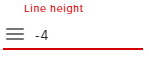
When editing where the line is e.g. "ScottFpmg is now following" how do i make it go down if its too high up, when 'Line Height' gets to 0 I can't move it down more
 tight harness
@jovial hinge It isn't possible to make the quote command as a custom command
@daring wharf Try setting a minus number
daring wharf
@tight harness I tried, just comes up red: https://prnt.sc/vj4ltx
 jovial hinge
I mean, even with twitch center ? @tight harness ? because i can addquote, i can read quote, i can del quote, but there's not variable that allows you to not be necessary
 slim lake
I have a question about streamlabs on mobile
lament blade
Can someone tell me how i can add Overlays in obs.live? I got everything seted up but i cant find a button to aplly the overlay
slim lake
How can I stream my game play on my mobile
 ivory flume
Can anyone help me, I need to import my tipeeestream alerts into streamelements but when I use the chrome widget it says always „an error corrupted“ why? Please answer me
viscid pebbleBOT
@astral goblet Read and follow our server rules:
- We do not tolerate toxicity! Treat the community team, staff and all members with respect.
- No advertisement or channel promotion, anywhere on the server.
- No NSFW/NSFL
- No unsolicited DMs or friend requests to server members
Make sure to read the #rules in any server you join.
 ocean drift
im editor on someones streamelements, but the command to change title is not working, is there another way so i can change the title?
 broken rover
 worn lava
When changing this to my own stream name the bot stops working. was working last week. works fine back on "StreamElements". (I am not using another profile)
 cedar hill
Can someone help me get my chatstats re enabled
viscid pebbleBOT
@cedar hill If you changed your name on Twitch, please follow these steps:
- Visit https://streamelements.com/logout and then log in again by connecting with Twitch.
- On the right side of the dashboard page that opens, select Join under bot settings. If it says Part select that and then select Join to send the bot to the chat. Don't forget to mod the bot by typing /mod streamelements in your channel if you have not already.
- Post your old and your new name here so that we can update your channel's chatstats tracking (must be done by staff).
cedar hill
Well I did all that cause I have changed my name twice and last time I did exactly that and no one fixed it so do I need to post my original name or my last name
?
 wary halo
both
cedar hill
LGNSuros_Prime & Crimson_Devourer My new name is Itz_prime_
Itz_Prime_
Why it keep doing that? there is an underscore before and after prime
cedar hill
Thank you
cedar hill
Yes
wary halo
good, just making sure
 past island
earlier i closed the music tab and i cant open it back up on the streamelements obs app thing
wary halo
StreamElements menu in the top bar in OBS > Media Request
ivory flume
Hello?
viscid pebbleBOT
@ivory flume Welcome to the helpdesk! Please let us know how we can assist you today and a support volunteer or staff member will assist you as soon as they are available. Thank you for your patience.
wary halo
Yes
@cedar hill should be all good now
ivory flume
Hello Can anyone help me, I need to import my tipeeestream alerts into streamelements but when I use the chrome widget it says always „an error corrupted“ why? Please answer me
 nova smelt
can someone help me with setting up a chat command?
this works properly when someone just says the word lurk in chat, but not when people use the !lurk command
 ancient moat
Hi having a issue with the StreamElement bot on my twitch channel where it is not working, though sometimes it turns on then turns off, i can see it in my chat, though its not running commands
 mossy vault
Hello, can anyone help mi with "chat stats - 404 page not found problem"? I did change my twitch username some time ago, but I don't rememebr old one.
 random prism
is there any way to have a giveaway use a different command other than !ticket?
 potent flax
i'm having issues with my subscribers alerts on stream elements
im confused why all the other alerts allow for me to change them. I've tried starting fresh overlays. no matter what it always shows as that purple default subscriber alert
coarse yarrow
@potent flax having the same trouble
It can't be turned off . Everytime it is disabled . Exit out go right back in and it is there again
potent flax
that doesn't sound right. i've seen everyone & their mom with custom sub alerts lol it definitely can work somehow.
 red saddle
I just changed my twitch username and now the streamelements bot is gone
Ive tried reinstalling seobs, redo the bot setup but it shows that the bot setup is already done
StreamElements is still a mod in my chat its just not there
Also been on the website but couldnt find anything, what do I do
viscid pebbleBOT
@red saddle If you changed your name on Twitch, please follow these steps:
- Visit https://streamelements.com/logout and then log in again by connecting with Twitch.
- On the right side of the dashboard page that opens, select Join under bot settings. If it says Part select that and then select Join to send the bot to the chat. Don't forget to mod the bot by typing /mod streamelements in your channel if you have not already.
- Post your old and your new name here so that we can update your channel's chatstats tracking (must be done by staff).
 fathom maple
Hello... with problem on se.pay where i can type?
potent flax
why am i being ignored? i've asked the same question 3 times lol the bot immediately answers the guy after me. what the heck lol
 stoic brook
I am involved in a twitch storm today. I am required to do a giveaway and I am looking at your options for this in the stream elements dashboard and the two options seem like this will not work. So basically I need to do a giveaway and the users will need to type in ACR to the chat to enter. The giveaway option seems odd and is not clear on how to do this as it reverences tickets. It just seems confusing and I really don't understand it. I just want my users to type ACR in the chat and then I want to pick one winner.
 latent oracle
HEY GANG, did a quick search, didnt see a definitive answer. Im using the StreamELEMENTS chat. the emotes randomly populate WRONG for no obvious reason. sometimes I get the text, sometimes I get the actual emote. I cant make sense of it. DID I MISS A SETTING Somewhere so Ill get consistent emotes in my on screen chat (same thing happens with a emote wall)
these are literally the same exact things, posted a few minutes apart
 leaden epoch
Question: I can't see where I can show my twitch users the "tips" statistics. Is this possible?
 long osprey
where can my viewers ad a title to the media request?
 crisp island
hi i was hoping that someone could help me. streamelements is a mod for my channel but its not responding to anything in my twitch chat
narrow ibex
hi i was hoping that someone could help me. streamelements is a mod for my channel but its not responding to anything in my twitch chat
@crisp island Do you use OBS.Live + Name?
crisp island
i do use obs.live my name is rotting chrysalis
ive disconnected it and unmoded it then did it all over again and its still not working
 trim island
@narrow ibex The fact if she uses OBS.live or OBS don't matter. The bot is not connecting responding in her chat.. It connects and it allows us to moderate it, but there is no response. It only responded once on the 6th of November 2020 with StreamElements bot running 🤖.
Any @viscid pebble can help us with explaning what is happening here or how to resolve ?
narrow ibex
i do use obs.live my name is rotting chrysalis
@crisp island I mean if you use Custombotname 🙂
trim island
I jeez fritzi I think you might found it LOLZ
The 1 thing I forgot to check in OBS.live. it was set to her own account ( which was weird, cause that also didn't respond :S
narrow ibex
Any @viscid pebble can help us with explaning what is happening here or how to resolve ?
@trim island I will try it 😄
 mortal dove
hi guys got a issue my stream live obs. latest follows.bits ect is usually on the left and now its gone
viscid pebbleBOT
If your commands recently stopped working and you're using OBS.Live and a custom bot name do the following:
- In OBS.Live, click on the hamburger menu (three stripes) at the top left of your activity feed
- Click on Stream Settings > Custom bot name
- In the Custom bot name field select Set custom bot name, not your already existing username (with capital letters). Note: If you already connected an account that way, the third entry will show as the account name (see image https://i.imgur.com/sO7fWOX.png).
- Scroll a bit down and click on the purple Connect Custom Bot Account button
- Log in as usual and Authorize the custom bot name
- Back in the Activity feed, click on the Send Test Message button and check if your custom bot name starts working again
mortal dove
also its gone from docks
latent oracle
UPDATE——/ the emote thing looks like it’s TWITch
trim island
❤️ @narrow ibex
narrow ibex
@trim island Follow the steps from the Bot message 🙂
crisp island
but why cant i use my name in it?
mortal dove
The dock is gone along with latest stream info
crisp island
i dont understand why it bugged out
trim island
@narrow ibex Will do, I will see what I can do to help her 🙂
narrow ibex
but why cant i use my name in it?
@crisp island Where you want to use your name? 🙂
crisp island
we fixed it thanks so much
narrow ibex
You are welcome
 verbal sonnet
Hi, my streamelements leaderboard on my twitch panelis not showing any information
fathom maple
@viscid pebble i have an issue on se.pay with Personal Information Invalid. Contact Support can you help me with that?
viscid pebbleBOT
@fathom maple Please contact us via email for support with SE.Pay. You can use our contact form here: https://streamelements.com/contact Thank you.
 forest beacon
yesterday i was using the streamelements chat alerts and they were working correctly and speaking in chat when i used the streamlabs test widgets, but when i tried it today it stopped working. is there a way for me to fix it? i cant find any tutorials online
 robust gyro
For multiple gifted subs, how do I have just the alert that someone gifted them instead of showing each individual gifted sub?
 wheat tusk
Not sure if this is the right spot but I'm part of the Magic Creator program and I have the Heptawin and Pentawin challenges that I've redeemed and posted onto twitter a few times now, but haven't received any of the rewards emails for them.
 slate frigate
can u have nightbit and sreamelements at the same time, im trying to get the "watchtime" command and i made it but nothing happens when typed in chat
 gaunt chasm
emote dont work
 paper valve
so does the overlay work after its enabled or do you need to add the url from the preview to obs sources?
 hoary chasm
Hello, I was wondering if there is a way to pull the game being played from the Category field filled out in twitch as a text box in the overlay editor. like { category }? is that even possible?
abstract hemlock
@hoary chasm you can try this widget: #widget-share message
 safe idol
hi so my chat is saying error loading data any suggestions what to do?
abstract hemlock
post here your twitch username (if you changed your username also post here your old username)
 hallow vault
Can anyone direct me to a help page about preventing / removing ascii art from the chat? Not sure if it's in symbol protection or not... I do want to allow emote spam (that's fine)... just not the ascii art.
viscid pebbleBOT
@lament blade Read and follow our server rules:
- We do not tolerate toxicity! Treat the community team, staff and all members with respect.
- No advertisement or channel promotion, anywhere on the server.
- No NSFW/NSFL
- No unsolicited DMs or friend requests to server members
Make sure to read the #rules in any server you join.
coarse yarrow
Ok sub alert for twitch. I have done everything I was told to do. Made sure I waited for it to save before exiting. Go back in after and the same sub alert is there again. And working. How do I get it to delete / change it ?? Please help
 pine axle
Hello. I'm trying to setup an item store that allows the viewer to send a TTS message using points. But the bot isn't reading the message it's only showing it
 marble walrus
hey question. I gift a sub each month to streamelements. it just ran out but it says "Sorry, a gift subscription to this channel is not available for this user." any ideas?
abstract hemlock
@marble walrus can you provide a screenshot please 🙂
 cursive knoll
can I use !module to enable/disable chat alerts via chat? if so, whats the command? If I try to use, it only allows me to use with roulette it seems
nvm, seems it is !module chatalerts enable/disable
couldn't find docs for it anywhere thought, had to do it via trial and error :/
ancient moat
Hi, can someone please help, the stream elements bot is not taking any commands, if you reply to me please tag my name or dm, as i dont get message's other wise,
narrow ibex
Hi, can someone please help, the stream elements bot is not taking any commands, if you reply to me please tag my name or dm, as i dont get message's other wise,
@ancient moat If you use OBS.Live +CustomBot name try this:
viscid pebbleBOT
If your commands recently stopped working and you're using OBS.Live and a custom bot name do the following:
- In OBS.Live, click on the hamburger menu (three stripes) at the top left of your activity feed
- Click on Stream Settings > Custom bot name
- In the Custom bot name field select Set custom bot name, not your already existing username (with capital letters). Note: If you already connected an account that way, the third entry will show as the account name (see image https://i.imgur.com/sO7fWOX.png).
- Scroll a bit down and click on the purple Connect Custom Bot Account button
- Log in as usual and Authorize the custom bot name
- Back in the Activity feed, click on the Send Test Message button and check if your custom bot name starts working again
 tired trout
Good night.. how to fix it?.. missing message statistics - https://www.twitch.tv/dizelden
tired trout
@abstract hemlock No, just 2-3 hours ago everything was visible, but now it is not.. nick did not change, slightly changed the description of the channel.
@abstract hemlock I just got it working, too... thank you for your quick help..
abstract hemlock

 topaz steppe
Hi guys, I'm having some issues with alerts
 native pelican
Hey all. I'm new to streaming. I'm setting up my streamelements OBS right now, and I'm having trouble connecting audio. I can't seem to get audio from either my mic or my game capture to register audibly in the stream. Any suggestions? I just want to be able to hear myself through my mic, and hear my gameplay as well.
topaz steppe
I've made a custom background. When I use the background above or to the side of the text, everything work's as you'd expect. However if I use the layout option for putting the text over the background image, the text never appears
Of course, I've checked that the text is white since the background is black, but I'm not sure what to do?
viscid pebbleBOT
@native pelican New to StreamElements?
Check out our YouTube channel https://www.youtube.com/c/streamelements/videos
with tutorial videos from setting up the basics, to in-depth details on how to use our product.
New to OBS? Here is a 4 step quick start guide
https://obsproject.com/wiki/OBS-Studio-Quickstart
Want to learn even more? Here is an in-depth overview
https://obsproject.com/wiki/OBS-Studio-Overview
abstract hemlock
@topaz steppe check text settings > advance settings > Margins
topaz steppe
@abstract hemlock That seems to be it. Nice one 👍🏻
 atomic snow
I'm trying to close my stream elements account but it keeps telling me that I used an invalid email and when i check the email linked to my account it says there isn't an email.
abstract hemlock
@atomic snow send us an email to support@streamelements.com with the following information
Username:
Email:
Account ID:
JWT Token:
Reason for closure:
Error when using the closure form:
 nova gust
Is there a way to stop notifications popping up from people who unfollow and re-follow?
Please @ me if you know how, thank you.
 low nacelle
Has anyone else had an issue with Nvidia Broadcast + OBS Studios completely obliterating your computer?
I've got a 3070 + a 3600x and at least twice my computer has had a huge lag spike that goes on until I close Nvidia Broadcast
viscid pebbleBOT
@warped hedge Welcome to the helpdesk! Please let us know how we can assist you today and a support volunteer or staff member will assist you as soon as they are available. Thank you for your patience.
@low nacelle Obs.live is a plugin for OBS Studio for the best OBS support, please join their Official Discord @ discord.gg/obsproject
 polar rivet
I can't get my subscriber sound to change from default. It plays correct on stream elements overlays and in the OBS Live software. But when someone subscribes on my channel it always uses the default sound instead. All of my other alerts work fine. They're all the same mp3 file format too... Any help?
abstract hemlock
@polar rivet check the variations
viscid pebbleBOT
@warped hedge New to StreamElements?
Check out our YouTube channel https://www.youtube.com/c/streamelements/videos
with tutorial videos from setting up the basics, to in-depth details on how to use our product.
New to OBS? Here is a 4 step quick start guide
https://obsproject.com/wiki/OBS-Studio-Quickstart
Want to learn even more? Here is an in-depth overview
https://obsproject.com/wiki/OBS-Studio-Overview
 warped hedge
I dont see what i need help with
I want to know how to put the rewards list on my stream
 jaunty ice
How can I get support?
abstract hemlock
@warped hedge what kinda of rewards?
viscid pebbleBOT
@jaunty ice Welcome to the helpdesk! Please let us know how we can assist you today and a support volunteer or staff member will assist you as soon as they are available. Thank you for your patience.
jaunty ice
Triggerfyre gave me the stream elements overlay but is not working
They said that I needed to talk to you guys
warped hedge
I have waste a point and highlight msg
abstract hemlock
@warped hedge those are twitch points at the moment we don't have an integration with that
jaunty ice
Triggerfyre
 rocky zinc
I want to add a !win command and for it to return "TotalWins+1"
warped hedge
Fuck im way behind i still have to upload a new video for YouTube i made it but never uploaded it
rocky zinc
So like If I do !win with 3 wins, it will return "4 wins"
Any idea on how to do this?
And also a command to reset wins
abstract hemlock
@rocky zinc !win ${count wins} !resetwin ${count wins 0}
 sudden flicker
The merch store does not want to open up
viscid pebbleBOT
Please provide your account ID found at the top of this page: https://streamelements.com/dashboard/account/channels This ID is public info and safe to share here.
sudden flicker
5f99a9b1b12d6e2b743ee026
abstract hemlock
@sudden flicker i'll report this to our dev team
sudden flicker
Thank you
 fallow cave
i have a 404 error on my chatstats -.-
 lapis fiber
I redeemed a Gift Card at the store but did not receive the code
viscid pebbleBOT
@fallow cave Please provide your account ID found at the top of this page: https://streamelements.com/dashboard/account/channels This ID is public info and safe to share here.
abstract hemlock
@fallow cave Did you change your twitch username recently?
 languid oxide
can someone help me my stream elements updated and now i cant reconnect my twitch to it
abstract hemlock
@lapis fiber check here: https://streamelements.com/dashboard/account/redemptions
fallow cave
5a24a9b300061500012b2c2d
viscid pebbleBOT
@languid oxide StreamElements menu, on top of OBS > Logout > Login
fallow cave
@abstract hemlock no i have not changed my username
abstract hemlock
@fallow cave fixed
languid oxide
its not allowing me to log back in i have just a blank screen
fallow cave
thanks @abstract hemlock what was the mistake ?
languid oxide
can anyone help
 weary sierra
okey dont know where to put this but wonder if there is a way to hide your paypal email from being shown to tipers/donators?
languid oxide
can anyone help me i cant log back into stream elements
abstract hemlock
on obs or browser? @languid oxide
@weary sierra afaik that possible, paypal will send them a receipt of the tip i recommend create a bussiness' paypal
weary sierra
@abstract hemlock will look in to that
potent flax
i need help with stream elements alerts not changing even though i clearly made it something else. it still pops up as the default image
abstract hemlock
@potent flax check the variations
lament blade
Changed it via the variations?
viscid pebbleBOT
@vagrant shale Read and follow our server rules:
- We do not tolerate toxicity! Treat the community team, staff and all members with respect.
- No advertisement or channel promotion, anywhere on the server.
- No NSFW/NSFL
- No unsolicited DMs or friend requests to server members
Make sure to read the #rules in any server you join.
potent flax
idk what that means lol how do i change it with variations?
lament blade
Variations: another word for multiple things. Such as a variety of foods "wow there's chicken, cheese, burgers! What a variety of food."
potent flax
yaay!! it worked ! thank you all :)\
lament blade
Trying to make a sub goal label, but it is saying I have 46 subs when I clearly do not, any one know how to reset this?
viscid pebbleBOT
@lament blade To reset goals:
- from the Overlay Editor > Session data on top right (monitor symbol) > Goals tab > reset progress of desired goal
- from the Dashboard > Activity feed on the left > Widget data on the right > Goals tab -> reset progress of desired goal
Note: Goal widgets (progress) only counts up and doesn't go down automatically, if you lose followers/subs.
lament blade
Thanks!
daring wharf
When editing where the line is e.g. "ScottFpmg is now following" how do i make it go down if its too high up, when 'Line Height' gets to 0 I can't move it down more?
abstract hemlock
@daring wharf Text Settings> advance settigns > margins
daring wharf
@abstract hemlock Thank you 🙂
potent flax
does anyone know a widget i can use in order to link all my URLs& channels? i want something like under my webcam that rotates my social media accts & youtube channel
abstract hemlock
You can try this: #widget-share message
potent flax
i went to the link but i dont see a download button anywhere lol
it just shows how it wors
works
abstract hemlock
potent flax
i appreciate the assistance thank you!
potent flax
okay im back! so i have it connected to obs studio. but for some reason i cant figure out why it isnt alighed on OBS but shows up normal on stream elements
 median cipher
Hello, i’m having trouble logging in as a manager of another channel, is this z known ishue?
median cipher
I try logging in the way I usually do, the pagd reloads and nothing happens
I’m still on mh page
abstract hemlock
@median cipher ask to the streamer to logout and log back in
using this link https://streamelements.com/logout
potent flax
on stream elements the social media rotator widget you helped me with looks fine only with STREAM ELEMENTS. but on OBS its like partially cropped. like i can only see half of my "@ name" lol
once i link it via browser thru sources...like i copied the link on stream elements but once it carries over on obs its cropped. sorry if i said it weird lol
viscid pebbleBOT
@potent flax The default resolution for StreamElements overlays (theme and custom) is 1920x1080. Please add them in OBS at their full resolution and use CTRL+F to fit to screen if necessary. You can then downscale your stream in OBS settings > Video if you'd like https://i.imgur.com/6bWXxjR.png
median cipher
And then what?
abstract hemlock
@median cipher once the streamer log back you should be able to roleplay as usual
median cipher
Weird fix, thanks!
potent flax
you guys are the best! it worked yet again thanks lol
 brittle raft
Hey, can I get some help? I'm new to this. I'm streaming but twitch says I'm not
It says that I'm offline.
viscid pebbleBOT
@brittle raft StreamElements menu, on top of OBS > Logout > Login
 placid raptor
just log in to SE with your twitch account  @brittle raft
 subtle plume
hey
placid raptor
still no what @brittle raft
brittle raft
It still isn't working
subtle plume
so basically im trying to import my scenes and souces and it wont work
brittle raft
still says I'm offline when I was streaming
placid raptor
Nice @subtle plume
@brittle raft it takes about 10-15 minutes for the indication from twitch to come in
brittle raft
so when I start streaming, It takes that amount of time for it to say that I'm live?
I mean, people can't watch me when I am streaming
Not the notifications
placid raptor
what? @brittle raft
what is the issue?
please be specific, 'ppl can't watch me' is almost as general 'it doesn't work'
 wintry robin
Hey hey, ive got a real quick one,
I want to disable the !buy command for the streamelements bot, but I cant find it anywhere in the settings?
Anyone know how to find/disable it?
Ive tried using the disable commands command and it says that there is no command by the handle of !buy but its definitely there
placid raptor
it's also definitely a custom command @wintry robin
which you can search for here - https://streamelements.com/dashboard/bot-commands/custom-commands to the left of 'ADD NEW COMMAND'
wintry robin
Nope
Its not under custom commands
Already looked there
seems to be linked to the SEMerch Store
 primal heart
anyone know how to fix !settitle and !setgame for stream elements>?
placid raptor
you set this up via your merch page then @wintry robin
ok.
so redeem is a default command. buy is its alias
the commands and timer linked to merch, is set up from your merch hub
I can't tell if you have set aliases to other commands
but the !merch command it was added when done from the merch hub, and a timer named 'merch', too
primal heart
literally just figured it
using nightbot command instead
the stream elements was not working
thanks!
placid raptor
@primal heart before I started working here it drove me crazy too 
You can check out the user levels set for !setgame and !settitle
it's set to super moderator
if you change it to 'moderator' you'll be able to run them well
viscid pebbleBOT
@scenic barn Read and follow our server rules:
- We do not tolerate toxicity! Treat the community team, staff and all members with respect.
- No advertisement or channel promotion, anywhere on the server.
- No NSFW/NSFL
- No unsolicited DMs or friend requests to server members
Make sure to read the #rules in any server you join.
 topaz goblet
Anyone know of a way (or has a widget) to show the most recent argument given after a command on an overlay?
I.e. Someone types !overlaytext {arg1} ; and text on the overlay changes to {arg1}?
topaz goblet
ah ok, thanks
 stable holly
Hey there ! Can you help with automatic announcements when we receive a new follower please ? Never works lol
 quiet vale
Hello how does the average viwers look on twitch?
stable holly
I am trying to get auto messages in the chat when we receive a new follower please
stable holly
Thank you will look into that now. I actually think I have it set up right but it doesn’t seem to work lol but will check this link thank you
viscid pebbleBOT
@stable holly Go to the Dashboard > Right side > Part channel > Join channel(https://streamelements.com/dashboard)
wary halo
do that please and then make the bot a moderator again
because it shows as a mod but it says it's not
 restive sky
Please for the love of god helpo me close my account this JWT token stuff is a bunch of bullshit
 slow zealot
my chat stats dont work and i think it is because i changed my twitch user name can someone help me get them working
placid raptor
It's required regardless of your opinion of it @restive sky
@slow zealot read up please, instructions are right there 
restive sky
Required or not its a crappy system which is keeping me with an account thats effecting my streaming because its not plaing cut and dry to get that token my question was never if it is required it was where is it so i can delete my account
viscid pebbleBOT
You can find your JWT token on your account channels page (Show Secrets to reveal the token): https://streamelements.com/dashboard/account/channels
READ ME: This is a private security token. Do NOT share this token here or other public places, only with a StreamElements staff member in private.
slow zealot
im confused @placid raptor
restive sky
ssigh same page google suggests and there is no token there nothing marked as token
wary halo
restive sky
Ruben thanks
wary halo
It's just a security backup, because some people are dumb and delete their accounts by accident if this extra step is not in place 😛
viscid pebbleBOT
@slow zealot If you changed your name on Twitch, please follow these steps:
- Visit https://streamelements.com/logout and then log in again by connecting with Twitch.
- On the right side of the dashboard page that opens, select Join under bot settings. If it says Part select that and then select Join to send the bot to the chat. Don't forget to mod the bot by typing /mod streamelements in your channel if you have not already.
- Post your old and your new name here so that we can update your channel's chatstats tracking (must be done by staff).
restive sky
Thank you very much
slow zealot
old username is BlurTmax new user is vwhitts
placid raptor
I don't see stats under BlurTmax
slow zealot
could you try TomWhitty12
placid raptor
no data but renamed to vwhitts
slow zealot
thank you
placid raptor
no worries
slow zealot
is there a way to check old twitch usernames in order to restore all chat stat history? @placid raptor
 civic ruin
hello i have a question
i start doing streams and i want to put points and i set up and they don appear in the stream
i dont know what to do
wary halo
this is the StreamElements points system
if you want the channel points from Twitch themselves you need to be an affiliate first.
civic ruin
if you want the channel points from Twitch themselves you need to be an affiliate first.
@wary halo ok and how can i be a affiliate
?
wary halo
placid raptor
@slow zealot basically if nickname was changed and your chatstats weren't renamed, it's stats we can't get back
civic ruin
ok thanks you very much
stable holly
do that please and then make the bot a moderator again
@wary halo hey mate Joined the Channel thank you. How do I make it a Mod again ?
placid raptor
type in your chat /mod streamelements
stable holly
Thanks buddy
Says it is already a moderator of the channel. So now it should work hey!
 prime pebble
there is a way to send the advertising during the live "not at the beginning". If a bot can do it automatically
placid raptor
it that a question @prime pebble ?
prime pebble
yes
placid raptor
so you're asking if there's a way to run ads during stream and not at the start?
 halcyon yoke
@placid raptor @prime pebble Hi, at the start of stream ok, but during, its possible???
With some bot
not manually
placid raptor
I think the timing of when ads run is a question for Twitch, guys
halcyon yoke
@placid raptor mhm ok. If you want that run, you have to do it manually in the settings
ionic kelp

viscid pebbleBOT
To have StreamElements run ads for you, do the following:
- The bot StreamElements is added as an Editor to your Twitch channel here: https://dashboard.twitch.tv/community/roles
2.a) To create a Timer, go here: https://streamelements.com/dashboard/bot-timers - add a timer with a response /commercial <30|60|90|120|150|180> to indicate the ad duration and also select the time interval that the response will be sent while you are online. Example: /commercial 30 and timer every 10 minutes (online interval).
2.b) To create a Custom command, go here: https://streamelements.com/dashboard/bot-commands/custom-commands and add command with the response /commercial <30|60|90|120|150|180> to indicate the ad duration. Example: !ads command with response /commercial 30
placid raptor

halcyon yoke
@placid raptor thanks for your time
 dreamy palm
Hi there! Are streamelements sponsorships for selected countries or anyone could have em?
placid raptor
I didn't do anything @halcyon yoke !
Thank you @ionic kelp
halcyon yoke
Yes THX @ionic kelp
 dry vault
If you go to view my chat stats on the streamelements website, it returns 404 - Page Not Found, and I have not changed my name recently. Username - ShatterUHC
placid raptor
fixed @dry vault
dry vault
thank you so much!
placid raptor
if this happens often plz @ me, like within a day or two
dry vault
okay, i appreciate it
placid raptor
no worries
prime pebble
@placid raptor When write the comand in chat, says Failed to run commercial, channel is not Twitch affiliate/partner, why? Im Affiliate
 pine hamlet
Anything out there to show channel point challenges / goal events on stream? Eg someone adding points to the challenge or it being completed?
placid raptor
no need to spam or tag @prime pebble I saw that, I'm checking
wary halo
You can only run a x amount of ads per hour
prime pebble
@placid raptor sorry
placid raptor
no worries
it could be because of the reason ruben just mentioned @prime pebble
have you run ads during the last hour? if you think everything is set properly perhaps wait a bit and try running it later?
prime pebble
@placid raptor thanks
halcyon yoke
@placid raptor @prime pebble he will wait for the time and try
Thanks for your time
placid raptor
this time it was @wary halo that assisted
wary halo
Leave me out of it 
halcyon yoke
@wary halo ahah thanks
 short needle
How do I add the !so command
placid raptor
mossy vault
@placid raptor Hello, I have the same problem with chat stats - 404 page not found. My username: SuansS
placid raptor
hey, fixed but you have no data @mossy vault
mossy vault
@mossy vault thanks, i did change my nickname a few months ago, but I don't remember old one, maybe that is the reason
 serene elbow
Is there a way to not have the bot send the message in chat that I'm live?
 crystal peak
Hi totally newbie trying to set up commands. Just wondering. Sound commands, do need affiliate to do them?
 stiff saddle
my dono not working
my paypal is connected but im not getting alerts or the money from donations
viscid pebbleBOT
@stiff saddle if a viewer tipped through PayPal but no information appears in your StreamElements account, this generally means PayPal has held the tip for verification. Until PayPal clears the tip and sends back a confirmation to your StreamElements account, no information will appear there and no alert will play, as that confirmation is the only way for us to be aware of a successful transaction. If you believe there may be an issue with the transaction, you'll need to contact PayPal support as StreamElements is only a passthrough service and never actually gets involved with the transaction or touches the money
@errant rune Read and follow our server rules:
- We do not tolerate toxicity! Treat the community team, staff and all members with respect.
- No advertisement or channel promotion, anywhere on the server.
- No NSFW/NSFL
- No unsolicited DMs or friend requests to server members
Make sure to read the #rules in any server you join.
 naive kelp
@viscid pebble Is there someone I can talk to in regards to SE.Sponsorships?
wary halo
Who did you get the email from?
 loud gazelle
is chatstats only for people who are Affiliate Twitch streamer or can everyone have chatstats?
wary halo
everyone
loud gazelle
okay thank you guys
ionic kelp
GFD discord.
naive kelp
@wary halo What email would you be referring to?
loud gazelle
my streamer renamed his twitch channel and doesnt have chatstats
wary halo
@wary halo What email would you be referring to?
@naive kelp the email about the sponsorship, or didn't you get one?
viscid pebbleBOT
@loud gazelle If you changed your name on Twitch, please follow these steps:
- Visit https://streamelements.com/logout and then log in again by connecting with Twitch.
- On the right side of the dashboard page that opens, select Join under bot settings. If it says Part select that and then select Join to send the bot to the chat. Don't forget to mod the bot by typing /mod streamelements in your channel if you have not already.
- Post your old and your new name here so that we can update your channel's chatstats tracking (must be done by staff).
naive kelp
I didn't get one no, i've been operating off the Se.Sponsorship tab on the website
naive kelp
Yeah, I currently have a Campaign in progress and I have an issue I need to talk to an agent about surrouning Revenue
wary halo
creators@wizards.com is where you can reach them
naive kelp
It's not with MTGA for us
wary halo
one moment
naive kelp
ok ok
 wheat mist
Needs help, a username chance, we logged out of stream elements and back in but for some reason the text bot is not joining the channel we're not sure what we can do?
wary halo
ok ok
@naive kelp you need to send in a support ticket through here: https://streamelements.com/contact
viscid pebbleBOT
@wheat mist Go to the Dashboard > Right side > Part channel > Join channel(https://streamelements.com/dashboard)
wheat mist
Thank you
 fringe jasper
My sub alerts won’t appear when I get a twitch prime sub
I don’t see an option for variation in the settings either
Is there any workaround/option I’m missing for this?
naive kelp
@wary halo I have, is there anyone I can talk to to speed up the process?
alternatively, how long will I be waiting for a reply from a ticket?
ionic kelp
@naive kelp Unfortunately that's beyond what us non-magenta users can answer. I do promise you'll get one.
 nimble grotto
I'm new to this discord, do I just type in my question/problem here?
wary halo
yes
nimble grotto
Cool, thank you. I'm having an issue with the chatbot. I set it up last week and tested it, it was working fine. But now, it's just not responding to any commands at all? I've disconnected it from the channel and reconnected it but it still is MIA
viscid pebbleBOT
@nimble grotto If your commands recently stopped working and you're using OBS.Live and a custom bot name do the following:
- In OBS.Live, click on the hamburger menu (three stripes) at the top left of your activity feed
- Click on Stream Settings > Custom bot name
- In the Custom bot name field select Set custom bot name, not your already existing username (with capital letters). Note: If you already connected an account that way, the third entry will show as the account name (see image https://i.imgur.com/sO7fWOX.png).
- Scroll a bit down and click on the purple Connect Custom Bot Account button
- Log in as usual and Authorize the custom bot name
- Back in the Activity feed, click on the Send Test Message button and check if your custom bot name starts working again
nimble grotto
That worked! Thank you so much 😁
 burnt crescent
anyone any advice for black game capture/display capture screens? i tried a lot of things but nothing worked
viscid pebbleBOT
Obs.live is a plugin for OBS Studio for the best OBS support, please join their Official Discord @ discord.gg/obsproject
 slim fiber
hey guys random question on the store redemption widget
I've set up a custom alert for it but it has some underlying text. does that show up?
i cant find out where to get rid of it if I need to do that
wary halo
that is just from the example
 keen remnant
Whenever I put connect my acc and stream key and server it still says that im going to stream on youtube (
I pressed apply
viscid pebbleBOT
@keen remnant StreamElements menu, on top of OBS > Logout > Login
 ebon fulcrum
My sponsorship campaign says I still have a day left to compete but my page is now showing that I've completed the sponsorship and that the payment is processing. I really wanted to reach the max goal and was very close to it, is there a way to reverse this so I can get my final day to try to reach the max goal?
keen remnant
@viscid pebble Ah thx
wary halo
My sponsorship campaign says I still have a day left to compete but my page is now showing that I've completed the sponsorship and that the payment is processing. I really wanted to reach the max goal and was very close to it, is there a way to reverse this so I can get my final day to try to reach the max goal?
@ebon fulcrum please send in a ticket through this form: https://streamelements.com/contact
There was a slight issue with the sponsorship and the team is working on it.
 supple shadow
can anyone help me, i cant find the widget for the multimedia. i want the video on my screen and can use the up and down volume for the music sound. i have seen a explain video , but i think its the old version .Can anyone help me with this?
rocky zinc
So I've got my bot to add a win when I do !win and I can reset it...
No idea how to display it.. I tried !wins "${wins}"
without quotation marks ofc
 round belfry
Any way to change the text the bot replies when you do !addpoints supermod command?
rocky zinc
I have my win counter like this btw "${count wins}"
I just want to be able to display the wins without adding one to it.
 brave hamlet
how can i enable chatstats for my channel ?
lament blade
hello all, sorry my english i am not very good.
First I activated the bots for my chat on twitch but they are not gone, do you have any advice?
hello emm so if i want to load my overlays and edit the page will load and when i want to edit the text and change the text nothing happens even if i click save @everyone
@viscid pebble
 true anvil
Ayo, can i get some help wiht my prob real quick
 lunar timber
Hey i get 90mbps upload and download speed
but it only shows 2000kbps speed while streaming
and i have a good PC..can anyone help me?
true anvil
Hello, In some of my streams, my streamelements bot doesnt work and my command are non existant and idk why, everything id connected but some streams it works and other it doesnt, is this a bug becaseu its been happening for a while now?
narrow ibex
Hello, In some of my streams, my streamelements bot doesnt work and my command are non existant and idk why, everything id connected but some streams it works and other it doesnt, is this a bug becaseu its been happening for a while now?
@true anvil Are you using OBS.Live + CustomBotname?
true anvil
yes
viscid pebbleBOT
If your commands recently stopped working and you're using OBS.Live and a custom bot name do the following:
- In OBS.Live, click on the hamburger menu (three stripes) at the top left of your activity feed
- Click on Stream Settings > Custom bot name
- In the Custom bot name field select Set custom bot name, not your already existing username (with capital letters). Note: If you already connected an account that way, the third entry will show as the account name (see image https://i.imgur.com/sO7fWOX.png).
- Scroll a bit down and click on the purple Connect Custom Bot Account button
- Log in as usual and Authorize the custom bot name
- Back in the Activity feed, click on the Send Test Message button and check if your custom bot name starts working again
narrow ibex
Go for it
true anvil
ok
 worn rain
Hey yo,chat stats stop working,😕 (not changing nickname) Twitch - thegreat_ismad
lunar timber
Hey i get 90mbps upload and download speed
but it only shows 2000kbps speed while streaming
and i have a good PC..can anyone help me?
true anvil
@narrow ibex thx so much homie
crystal peak
I have channel points on could someone direct me to redemption settings please
 buoyant epoch
hey i need some help here
i setup the song request on stream
and press show on stream button
but the song is to loud
anyway to lower the sound?
brave hamlet
how can i enable chat stats for my channel?
 plain turret
Hi, I deleted my streamelements account but i'¡m receiving an email with my stats every end of transmision, anyone can help me to remove enterely my account? Thank you
lunar timber
Hey i get 90mbps upload and download speed
but it only shows 2000kbps speed while streaming
and i have a good PC..can anyone help me?
 grizzled harness
Hi
narrow ibex
Hi
@grizzled harness hi
round belfry
Any way to change the text the bot replies when you do !addpoints supermod command?
 ripe whale
Hi, I have one little problem with streamelements overlay. It's work for all alerts but only not for the cheer alert:
ionic kelp
Variations tab.
ripe whale
oh there are default variation setting ... ok thank you for the quick answer ^^
 hazy pawn
Guys, I am looking at the "Event List" widget for Twitch.
This is when the text is "right aligned" - should it really be like this? or is this a bug?
As in, not all names are actually on the right side
This feels like a widget bug, but its weird, since it should also be a really popular widget.
 timber jay
Hi everyone was wondering if you guys encountered the same problem I have been trying to create the holiday bundle but every time I try it just gets stuck at creating and won't do anything
viscid pebbleBOT
@timber jay Please provide your account ID found at the top of this page: https://streamelements.com/dashboard/account/channels This ID is public info and safe to share here.
 vale kraken
Can someone help me? I can't switch from Facebook chat back to Twitch chat on OBS
viscid pebbleBOT
@vale kraken StreamElements menu, on top of OBS > Logout > Login
 bronze raven
Hi, whenever i change the scene my cam freeze. May I know how can I fix this please?
vale kraken
in the OBS STUDIO?
hazy pawn
@vale kraken - I think the help assumes you have OBS.Live installed
If so, in the "StreamElements" menu, there is a logout/login
Megan, there is also an OBS Studio specific help discord
 dull vigil
hello, i need help
supple shadow
any answer for this x2 ? can anyone help me, i cant find the widget for the multimedia. i want the video on my screen and can use the up and down volume for the music sound. i have seen a explain video , but i think its the old version .Can anyone help me with this?
dull vigil
why is nobody watching me on twitch
bronze raven
Thank you @hazy pawn !
hazy pawn
@bronze raven - Yea, they deal with OBS issues all the time there, 110% sure they can fix your camera problem
bronze raven
Okay. Thank you so much 😊
lament blade
hey! just wanted to know if it was possible to share custom overlays with friends and if so how? I created a custom overlay that some of my friends are interested in and wanted to make sure there was an easier way to share it that didnt involve them having to manually set it up themselves (because there was a bit of custom html css and js involved)
vale kraken
Found it! Thank you
 faint flax
how can i reset my Donation Goal ?
viscid pebbleBOT
@faint flax To reset goals:
- from the Overlay Editor > Session data on top right (monitor symbol) > Goals tab > reset progress of desired goal
- from the Dashboard > Activity feed on the left > Widget data on the right > Goals tab -> reset progress of desired goal
Note: Goal widgets (progress) only counts up and doesn't go down automatically, if you lose followers/subs.
 raven lantern
I have a problem where the activity (follow, host, etc) has a long reaction to play the alert, and today I'm noticing my activity feed on SE is not synced with my real twitch activity, anyone run into this problem?
 small glade
hey i have an issue, i have setup a follow alert and when i import it into obs studio i can hear it twice (meaning that the sound is there) but no image or text shows up
lament blade
My friend have a problem with bot. When she opens streamelements OBS, bot stops working and after she close OBS everything is fine. Why?
 flat summit
how do i enable nightbot?
viscid pebbleBOT
@lament blade If your commands recently stopped working and you're using OBS.Live and a custom bot name do the following:
- In OBS.Live, click on the hamburger menu (three stripes) at the top left of your activity feed
- Click on Stream Settings > Custom bot name
- In the Custom bot name field select Set custom bot name, not your already existing username (with capital letters). Note: If you already connected an account that way, the third entry will show as the account name (see image https://i.imgur.com/sO7fWOX.png).
- Scroll a bit down and click on the purple Connect Custom Bot Account button
- Log in as usual and Authorize the custom bot name
- Back in the Activity feed, click on the Send Test Message button and check if your custom bot name starts working again
@small glade Make sure to ballot_box_with_check: “Shutdown source when not visible” for all browser sources (all OBS scenes). If using studio mode, uncheck “Swap Preview/Output Scenes After Transitioning.” Also, keep in mind that sound can play from any overlay loaded in the browser (editor or launched). https://i.imgur.com/6bWXxjR.png https://i.imgur.com/yY0wcFl.png



 tender hatch
Can someone help my merch has been updating for 12 hour how can i fix this
nimble dune
 pulsar wyvern
hey
[12:57 PM]
none of my custom comands are working
[12:57 PM]
do you guys know a fix
viscid pebbleBOT
@pulsar wyvern Go to the Dashboard > Right side > Part channel > Join channel(https://streamelements.com/dashboard)
pulsar wyvern
doesnt show that
lament blade
Are you on Youtube or Facebook?
pulsar wyvern
fixed it thanks!
 sharp egret
Hello guys, I just wanted to ask for if I can activate a command that shows how much has been donated to my channel? I viewer asked for it today and I found no way how I could make this command real. So I just wanted to ask for if there's a way to activate a command like that?
Or maybe a command for my session data would be even better. Is that possible?
 wispy sable
Hello, I'm trying to add media share to my overlay to be able to have music playing as I stream. I can't figure out how to add it in and doesn't look like there's an add widget section on my simple overlay. Please help!
 split rain
Hey guys, I have an issue with my subscription variations where gifted and resubs don't show as "{name} just resubscribed for {amount} months!" or "{sender} gifted {name} a subscription!" they just have the name as a new subscriber. Any ideas would be helpful
 oblique lotus
hello, I keep receiving this message from the bot: failed to run commercial, please re-login to StreamElements how can I fix it? thank you
 scarlet tiger
Known bug.
oblique lotus
so is not something I can fix, right?
 rain perch
Hey guys! Do you know the command to reset a custom counter in the Steam Elements page?
split rain
with custom CSS off it works FYI
 torpid brook
Does anyone know how long it takes to update overlays that you import?
Also, does anyone know how to make StreamElements bot actually log the watchtime of viewers? Every time someones uses the command it just says 0 seconds.
scarlet tiger
You must have loyalty enabled.
rain perch
Hmm the countdown did not reset
 desert gazelle
Hello everyone, can someone help set up the stream? True, my English is not very good .. but I will try to translate and understand help.
I have problems with the sound of music playing in the background
 half valve
is there a way I can merge my youtube account into my twitch account? it says my youtube channel is already claimed
scarlet tiger
yes
viscid pebbleBOT
@half valve Account Merging - Please note:
- Merging accounts only allows faster ways to switch between accounts
- Merging accounts does not allow data sharing between accounts - different streaming platforms, different type of events
- Merging accounts allows duplicating/sharing overlays between the accounts
If you understand the limitations of merging and want to proceed, please find the JWT tokens (!jwt) from both accounts you want to merge and you will be directed to DM them to a staff member
torpid brook
I am having an immensely difficult time trying to set up these widgets in OBS Studio.
Are there any resources that may help me understand how to do this better?
 meager sky
Testing to see if this works?
Trying to remove my streamelements bot from channel but don't see option to part it
viscid pebbleBOT
@torpid brook To add your overlays to OBS, add a new browser source in your scene. Paste your overlay URL in the browser source properties, set the dimensions to 1920x1080 (unless you changed them on the website) and check Shutdown source when not visible. https://youtu.be/KDvLynUqXI4
@meager sky Go to the Dashboard > Right side > Part channel > Join channel(https://streamelements.com/dashboard)
torpid brook
Whenever I paste the URL into the browser source properties, nothing shows up.
It is the first item, or top item in sources.
viscid pebbleBOT
@torpid brook The default resolution for StreamElements overlays (theme and custom) is 1920x1080. Please add them in OBS at their full resolution and use CTRL+F to fit to screen if necessary. You can then downscale your stream in OBS settings > Video if you'd like https://i.imgur.com/6bWXxjR.png
torpid brook
Thanks for trying.
 shrewd verge
Hello! I want to make a Kappagen with just 1 emote but when i simulate an event it shows multiple emotes which I also did not select to be shown . Can anybody help?
 strong kernel
@shrewd verge Simulations will just use a bunch of emotes, not the one you picked. Actual events will use the single emote.
shrewd verge
Thanks for helping, fixed it!
lament blade
tts isnt working anymore on my overlay. i have it enabled and its the updated URL. any solutions?
could someone send me default.ogg sound file for the alerts?
i can't set it as a sound, there's no option for it
hey, got a question about the challenge thingy. can someone help me with that
my "challenges" page is basically not working
i was just setting up the vikings thing and now it says "You have no active challenges"
wary halo
please send in a ticket through this form: https://streamelements.com/contact
lament blade
You want my full name or my twitch username? @wary halo
wary halo
I want nothing 😛 but for the form you can just use the twitch username
 main jay
Hello,
I don't know if this is the right channel for this or if it should go in the YouTube one, but a few days ago, I was trying to set up tipping for my YouTube channel. Now in OBS, even when I switch to my Twitch profile to go live It pulls up a start streaming to YouTube window. How do I stop it from doing that one my profiles that are not streaming to my YouTube account?
viscid pebbleBOT
@main jay StreamElements menu, on top of OBS > Logout > Login
main jay
That was super easy, Thank you.
torpid brook
Is there a workaround for having to manually resize all alerts/widgets in OBS Studio when using widgets/alerts?
Specifically, if I have pre-placed areas for things like Chat, Alerts, etc and just want to use the URL and have it fill that space.
strong kernel
StreamElements overlays default to 1920x1080. If added at the correct resolution in OBS, where you place it in the editor is where it'll end up in your OBS.
torpid brook
I am sorry, I do not understand.
viscid pebbleBOT
@torpid brook The default resolution for StreamElements overlays (theme and custom) is 1920x1080. Please add them in OBS at their full resolution and use CTRL+F to fit to screen if necessary. You can then downscale your stream in OBS settings > Video if you'd like https://i.imgur.com/6bWXxjR.png
strong kernel
Widgets are components of overlays.
You can have multiple widgets in a single overlay.
torpid brook
Which also confused me lol
Let me start again, I bought a package deal and am bumbling through.
strong kernel
Add widgets to overlay.
Add overlay to OBS.
Everything you added to the overlay will show up.
torpid brook
I isolated each widget I wanted from the group, and added them in individually.
They had pre set locations/sizes
But to get them to work I had to resize them
to 1920x1080
Then manually resize.
strong kernel
If you purchased a premade package then you should ask the creators for instructions.
torpid brook
Thank you.
 mild oar
Hello!, i need some help, my leaderboard stopped updating and is now not logging information
viscid pebbleBOT
@mild oar If you changed your name on Twitch, please follow these steps:
- Visit https://streamelements.com/logout and then log in again by connecting with Twitch.
- On the right side of the dashboard page that opens, select Join under bot settings. If it says Part select that and then select Join to send the bot to the chat. Don't forget to mod the bot by typing /mod streamelements in your channel if you have not already.
- Post your old and your new name here so that we can update your channel's chatstats tracking (must be done by staff).
mild oar
I didn't change my name
The bot is already mod in the channel
"old" name: ChinchyPandora7
"new" name: ChinchyPandora7
(Like I said, I didn't change the name, but I guess you still need the name of the channel)
 thorn minnow
Hi there, I'm on the mod team for a streamer named OtterboyTV, One of our newer mods received a DM and an email from CaptainBlackSheep. He was not sure how to proceed, and as such I wanted to see if I could confirm if it was real? I have images to go with, but I don't want to post them here as I don't know the rules fully.
strong kernel
@fierce panther ⤴️
 willow flame
Hey everybody, I've got a question about a feature regarding Sub Points.
strong kernel
Sub points are not sent through Twitch's API any more.
strong kernel
They're not. We can do sub counts, but not sub points.
willow flame
so im being told that the API can provide tier information. Is it possible to impelement some kind of calculator, since sub points are based on tiers?
strong kernel
It can provide tier information, but it doesn't inform us when someone's sub falls off.
There's no feasible way to do sub points any more.
thorn minnow
if your trying to look at sub points, i think your twitch channel analyitics will show you that
torpid brook
Is there a way to make widgets that only show up whenever the data is changed?
strong kernel
@torpid brook You would need to custom code the widget yourself.
torpid brook
Thank you.
willow flame
@thorn minnow thanks. I mean for a live interpretation of sub points on stream.
 summer coyote
Hiii there! I would ask... is there any posibility to make streamelements command get readed by tts in overlay? like !tts hello and if is allowed, in overlay show "username: hello" then tts read it.
 celest sigil
Can anybody help with dropping frames? Not sure what's going on, but I'm dropping 60% frames. Was doing it last night, woke up tested it this morning and it was fine. Then I tried to stream again tonight and it's dropping 60% frames again.
Any ideas?
 kindred quartz
not sure where to ask, but having an issue with an overlay alert I am working on.. I was making an Alert box and seems all alerts except for the Cheer alert will accept the uploaded sound bite i added.. I tried to use the same alert that was accepted and worked on another alert to see if the file was issue and it's not..
 hushed plinth
@sleek spire do you have the "Store Redemptions" alert box in your overlay?
I think that's what you may need to hear the store redemptions if you don't have that in your overlay
 wispy storm
Hey Guys, how do I get twitch alerts to stay on screen (past the set duration) until a new one is triggered?
hushed plinth
You could probably code it in if you enable custom CSS and add in some code that checks if there has been a new twitch alert, if not to keep the other one up. but I'm no coder.
wispy storm
Yeah, im a basic coder so CSS and basic HTML is Ok. Ill have to trigger the timer with JS most likely
Ill see what I can do
kindred quartz
@sleek spire is there a way for it to play live?
hushed plinth
idk if by making the max amount of seconds in the settings would do that without the coding. I'm a little bit confused on what you mean by having the twitch alerts stay on screen. Do you mean like "latest follower" and stuff? because if you're not using an overlay that comes with one you could add some static image and put the thing that calls up the latest follower there.. unless they took that away
otherwise yeah you're probably right sneaky
wispy storm
Yeah, so for example Follower is Trigger > 10 Seconds passes > Follower dissapears. Trying to have it so the alerts are persistant and that Follower Triggers > 10 Seconds Passes > Follower remains until new follow is triggered.
 void sierra
I have a question how do i make a !clip command to clip somethimg\
viscid pebbleBOT
@celest sigil Please provide a log from your last stream. To do this, in OBS go to Help > Log Files > Upload Last Log File and paste the link to the log file here.
strong kernel
@kindred quartz After opening your cheer alert to edit, open the Variations menu and edit those, not the main alert.
strong kernel
@celest sigil https://obsproject.com/analyzer/?url=https%3A%2F%2Fobsproject.com%2Flogs%2FFtHxguarWc-i-kw8
It's your connection.
Likely due to streaming on wi-fi. You may want to look into an ethernet connection.
celest sigil
Any idea what could be causing it to only happen somtimes? My connection speeds seem fine when I test them and for other things, I've always used wi-fi and it was working fine just this morning.
strong kernel
Speed test isn't an indication of your connection to Twitch ingest servers. It's a best case scenario shown by establishing multiple connections. Use this: https://r1ch.net/projects/twitchtest
Test your upload bandwidth and connection quality to Twitch
celest sigil
Thank you for the help! I'll do some more tweaking on my end.
supple shadow
Clicbumtvayer a las 18:22
any answer for this x3 ? can anyone help me, i cant find the widget for the multimedia. i want the video on my screen and can use the up and down volume for the music sound. i have seen a explain video , but i think its the old version .Can anyone help me with this?
No answer ? is there any other way to contact suport?
strong kernel
If you want to show media request on stream, you need to add a media request widget to your overlay.
And the best way to control it would be with OBS.Live.
viscid pebbleBOT
@supple shadow We've released our new Overlay Editor revamp. You can check out the changes and how to work with it here: https://youtu.be/X5VzXjqAsjk
Check out our blog post as well: https://blog.streamelements.com/streamelements-overlay-editor-just-got-even-better-c22cb5b4853e
supple shadow
thanks for all , i wil chek it tomorow .
kindred quartz
Thanks @strong kernel I appreciate it.. this is the first time i attempt to do anything like this
 steel moat
ok so this is all new to me i just want to stream on twitch with obs but i dont know how
viscid pebbleBOT
@steel moat New to StreamElements?
Check out our YouTube channel https://www.youtube.com/c/streamelements/videos
with tutorial videos from setting up the basics, to in-depth details on how to use our product.
New to OBS? Here is a 4 step quick start guide
https://obsproject.com/wiki/OBS-Studio-Quickstart
Want to learn even more? Here is an in-depth overview
https://obsproject.com/wiki/OBS-Studio-Overview
 sterile pelican
I am unable to submit my bank information after finish the submission fails and I have reviewed the info
viscid pebbleBOT
@sterile pelican Please contact us via email for support with SE.Pay. You can use our contact form here: https://streamelements.com/contact Thank you.
 alpine rock
my Chat commands were working two weeks ago, but suddenly they stopped workin