#helpdesk-twitch
1 messages · Page 777 of 1
 viscid pebbleBOT
 placid raptor
@gray creek @ruby nest this could help you too
 uncut dagger
hey @placid raptor can you help me with overlays
placid raptor
Get 50% off NORDPASS (ad, duh) ►► https://nordpass.com/alphagaming
I get asked this a lot, especially streamers looking to switch from StreamLabs to StreamElements. Here you go.
TWITCH ►► ...
what do you need @uncut dagger
 frosty dragon
on the stream store for loyalty, are you able to set an item to be claimed only once per person?
placid raptor
and if you're streaming on YT, please post on YT @uncut dagger
uncut dagger
no twitch
placid raptor
@frosty dragon you can make the individual cooldown extremely high 
you can do item cooldown and command cooldown, so be aware
uncut dagger
i dont understand like tutorials that have been already recorded
placid raptor
that kinda answers your need though
1 timer

just set it to something that makes sense. we have no setting to allow a user to redeem an item once
 gray creek
so groove i have the giveaway reminder up
frosty dragon
that should be a thing tho
uncut dagger
@placid raptor could you call me?
gray creek
but how will my viewers be able to enter the giveaway when there's no link
placid raptor
I'll give you guys time to review some basic videos. Please stop asking to get calls, that's not how it works here
If you have legitimate questions feel free to ask them here
but if you're gonna ask 'how I make overlays'
I'm gonna send you to videos
uncut dagger
no i know how to make them i already have made them just dont know how to activate them on my stream
placid raptor
giveaways work via chat @gray creek viewers enter with a command
frosty dragon
on the stream store for loyalty, are you able to set an item to be claimed only once per person?
Figured it out... i think..
Category cooldown is a thing, which allows days to be set. the max in the cooldown period is 2592000 which is 7101 years or 71 century's. Thank me later 😉
placid raptor
@uncut dagger I don't understand what that means. could you rephrase the question? what is 'activate them on my stream' means?
uncut dagger
activate the overlays on my stream
gray creek
so do i got to put the link in a command chat that i create?
placid raptor
@frosty dragon well GGs, I disregarded category cooldown. nice job
@gray creek What link?
gray creek
that will take them to the giveaway site to enter how much ticket they want to purchase?
frosty dragon
Another question, is there a way to only be able to redeem something if you're a subscirber or channel VIP?
or is that not a thing.
placid raptor
so @gray creek you do that via chat. commands related to giveaway should be enabled
when you start, users can enter, when you finish, you can draw winners
if you want an overlay, all you have to do is add the widget, it's automatically updated with each giveaway you run
anything else?
@frosty dragon yes you can set certain user levels for commands
so if you have !sfx1 and you want only subs to get it, you can set it up in the command
that's also relevant for the item, you have user levels for that too
but easier to just limit the commands imo
frosty dragon
hmmm so its not possible to do it in the actual store page but it can be done thru commands
placid raptor
you can choose user levels for both items in store, and commands
frosty dragon
Where is the user level in the store??? Its either i'm blind or its not here?
placid raptor
the on and off for the giveaway is done from here @gray creek https://streamelements.com/dashboard/giveaways
commands are user level, items are sub or no sub
@frosty dragon
 fallen venture
So I assume no one knows how to help me, I just got ignored lol 😂
frosty dragon
hm i need to get affiliate in order to be able to see that box then
placid raptor
@fallen venture have you seen how many questions 2 ppl asked? :]
you can just re-post if you see that your question is no longer visible in chat
@frosty dragon yeah no subs without affiliate so you're right on that
fallen venture
I have problem with raffle, when I set ammount for points, website will save it but bot in twitch will still raffle with other ammount of points, I have no idea how to fix this? I think it's bug?
frosty dragon
Hmmmmm whenever i set it to the max and try to create it it comes up with something went wrong.
so i guess there isnt a way of doing it
gray creek
yea i got it now groove
placid raptor
max as in centuries from now? yeah I wouldn't set that for it as well. just go with something reasonable @frosty dragon
 pulsar venture
Yo I'm new to streaming and I'm wondering what artists can I play do you know
 wary halo
Harris Heller has a StreamBeats collection
pulsar venture
Do you know of any rappers I can play
 marble sky
Holla all, I'm having issues with my Chat Stats as they give me a 404 upon clicking the button. Anyone I can speak to about it?
viscid pebbleBOT
@marble sky If you changed your name on Twitch, please follow these steps:
- Visit https://streamelements.com/logout and then log in again by connecting with Twitch.
- On the right side of the dashboard page that opens, select Join under bot settings. If it says Part select that and then select Join to send the bot to the chat. Don't forget to mod the bot by typing /mod streamelements in your channel if you have not already.
- Post your old and your new name here so that we can update your channel's chatstats tracking (must be done by staff).
 sharp hazel
hello everyone, I have a problem with donations who can I ask?
marble sky
I believe I changed from velvetmamba to VelvetMamba.
@marble sky Note that this was just a display name change, not a username change. unsure if that matters.
 warped radish
My condensed recent follow, sub, bits tip bar has been broken for a while and it looks like its not getting fixed any time soon
is there a newer one anywhere?
viscid pebbleBOT
@floral dust Welcome to the helpdesk! The regular helpdesk channels are in English but we do provide multi-language support in the following channels: #🇩🇪︱deutsch | #🇫🇷︱français | #🇪🇸︱español | #🇵🇹︱português | #🇳🇱︱nederlands | #🇮🇹︱italiano | #🇵🇱︱polski | #🇨🇳︱中文語言服務區-chinese | #🇯🇵︱日本語-japanese | #🇭🇺︱magyar | #🇰🇷︱한국어-korean | #🇹🇭︱ไทย-thai | #🇷🇺︱русский | #🇺🇦︱українська | #🇨🇿︱czech
 wild zinc
Can you put the twitch overlays to facebook ?
 lament blade
I have an issue with the shoutout command, when i do the shoutout insted of showing the link to the streamer it gives me *** anyone knows how to fix this?
 sage wolf
Hiiii
 pseudo nexus
I accidentally gave someone 5 years of watchtime and I can’t undo it
 ionic kelp
@lament blade mod the bot.
@pseudo nexus modify it here https://streamelements.com/dashboard/leaderboard/watchtime

StreamElements
The Ultimate All in One Platform for Streamers
 wild junco
Is there currently any way on StreamElements to trigger sound effects when certain users/subscribers enter the chat?
 gentle seal
tbh im about to uninstall i changed one thing and now its all messed up and i cant get my chat box and now my night bot not working andeverything i put in there is just messed up
 spice siren
Help, any bots on the Twitch channel have stopped working.
NightBot, StreamElements
Timers, CAPS, long messages do not work.
 nova gust
I want it to fit within a small box, but when a new name comes in it spills outside the box and I'm not sure how to set bounds
FIXED
 halcyon sail
hello everybody. Can anyone help with StreamElements on Twitch and timers?
I seem to have them appearing WAY too close to each other.
 shy field
Yea
halcyon sail
I have 6 of them, told them to pop every 15 minutes, but they show up some times every few seconds
shy field
Make sure the chat lines
So that means people need to chat in your stream
What is the time for all of them and the chat line
halcyon sail
two scenarios:
first one was 15 minutes and 0 chat lines
that was almost all of them talking at the same time
second scenario was 15 minutes and 3 chat lines
shy field
Ok so make the chat line like 3 to 5
halcyon sail
but then after three chat lines, they all poped off together
shy field
Bc you don’t want to spam them in chat
So put them on different chat
One on 3
Another one on 4
halcyon sail
ok 🙂 so I gather there is no global cooldown option?
one after the other every 15 minutes?
shy field
Idk about it personally but that’s what I have is different chat times and mine works great
It should or else there’s something else wrong with it
halcyon sail
it's not doing it
regardless of chat lines, there should be a global hold
even if I set it to 20 chat lines, the effect is that after that, they all pop off together
shy field
I have 3 they don’t pop off right
halcyon sail
how do I get someone "official" to look at this?
shy field
Have fun with that 😂
halcyon sail
😄
four chat lines, one triggers... and then four minutes later another...
they should have waited 15 minutes....
shy field
Ok are they all on the 15 timer tho
halcyon sail
yes
 gloomy saddle
guys can u help me plz why i dont have info about translation in obs? (twitch)
halcyon sail
but isn't that the definition of a timer? to create a rolling announcement line?
which means, that the timer is ordered, as I can move them up and down
shy field
Umm srry don’t know @gloomy saddle
shy field
No it means 15 then if you want one after 25
halcyon sail
otherwise, give me a specific time they should pop up and then I can manage when they appear
shy field
I have one on 15 another on 25 and my last one on 35
halcyon sail
if a timer is just counting off for that individual timer, then no matter what timers I make, they will eventually ALL trigger at the same time
this cannot be desired
spice siren
Everyone has a chat problem?
spice siren
Bots in chat dont not working
I understand that everyone has a problem with bots.
NightBot, StreamElements Timers, CAPS, long messages do not work.
wild junco
Any ideas why none of my images are uploading properly in the overlay editor? They upload but then have no preview and don't show up on the emulator?
placid raptor
is this a first for you @wild junco ? was it previously working as expected?
wild junco
Yes @placid raptor it's just stopped working today
placid raptor
@spice siren you need to explain your issue. 'X Y Z doesn't work' is very vague
do you have those bots in your channel? were they working properly and now they're not working? what changed?
@wild junco have you confirmed all the file extensions and formats are valid to be used? are you using Chrome?
wild junco
When I am editing my alertbox on the streamelements website and I go to upload an image it doesn't show up
Using the same file formats I've always used
And using safari
placid raptor
Can you use Chrome please and let me know if it uploads properly?
wild junco
Yep that's the badger, working now. Thanks
placid raptor
no worries
 true hound
Do you know how to schedule the bot to send a scheduled message to the chat ????
 tribal flicker
Hola alguien sabe como hacer para que se reproduzca un audio con un comando?
lament blade
can someone please fix my chatstats my name is vortex1x_ on twitch
 grave needle
I am trying to fill out the twitch affiliate form and it says that Address 2 is optional, but everytime I proceed it says that the form failed due to Address 2 being wrong? Does anyone here know of this issue and can help me? 🙂
 clear lark
Hello 👋
I'm trying to use the song request overlay, but the volume is being turned down all the time whenever I reload the page. StreamElements really wants to lower the volume, but I need it to be at full so I can use my own controls.
lament blade
Do you know how to schedule the bot to send a scheduled message to the chat ????
@true hound https://streamelements.com/dashboard/bot-timers
StreamElements
The Ultimate All in One Platform for Streamers
 gusty ice
Not sure where to ask this but I have a balance of 23.24 for over a week and I still can't withdraw the funds from SE.Pay
viscid pebbleBOT
@gusty ice Please contact us via email for support with SE.Pay. You can use our contact form here: https://streamelements.com/contact Thank you.
clear lark
Oh, it also resets my volume settings if I stop showing on stream and show it again, it's being turned down to 20% or something.
 worn wedge
To have !watchtime need to enabled loyalty settings?
Because when i write it say all time 0 secs
clear lark
Oh no it does it all by itself after some time 😖
And at points, I can't turn it up, unless I reaload the page. Who thought this was good design for starters? I'd like to suggest some customization options - and on that note, some other way than discord to get help/submit a ticket. It might be the newest thing, but I get aggravated by a direct Discord link for support. I can't choose general help or a channel for overlay help, so opted for the platform I stream from.
And also please help me turn the volume to 100% for good. It's pretty annoying having my setttings reset, I'm not sure I'll actually use the feature if I can't have the video in 1080p, and with consistent volume
lament blade
How do I get discord audio on stream elements obs
wild junco
If I set up sound effect redemptions in Streamelements and use them in streamlabs - is it normal that I can't hear them when I test off stream?
viscid pebbleBOT
@wild junco We're not able to troubleshoot issues with using our overlays in StreamLabs OBS (SLOBS) as we don't have the tools to support their software. We recommend using OBS Studio or OBS Studio with our plugin OBS.Live.
ionic kelp
Yes. Just need to make sure an option is enabled in the overlay editor.
Fak
Dangit. 1 sec.
@wild junco here #helpdesk-selive message
lament blade
Hey How are we all, I Have another Question about SE.pay it says in the Tipping Setttings It Says Enter Your Paypal Email I Dont have a paypal account so do i link my master card one or what?
 winter lagoon
Yo my activity feed is gone as in reset, was there anything about that or is that only me? Twitch name Sunowi
I have been inactive for 3 months though so that could be reason as to why but I would need a confirmation on that.
lament blade
ok
 cinder whale
i need to make a paypL
 trim knoll
@viscid pebble My watchtime is glitched can someone help
viscid pebbleBOT
@trim knoll 10 minutes of watch time is given to those in chat when the loyalty points are handed out (every 10 minutes). Therefore, loyalty must be enabled to watch time to work properly.
There is no direct link between watch time and all-time points.
It can’t be calculated from the number of all-time points a user has because subs may earn points at a faster rate and !bonus all command increases all-time points for users in the chat at that time.
Giving points to a single user do not affect all-time, only when giving to all in chat.
ionic kelp
Fuk
 fresh nova
oh
ionic kelp
Were you the friend rename or that one after?
fresh nova
I was the merch one
ionic kelp
 mighty badger
I'm trying to add the chatbox, but I don't want it to always overlay a part of my stream. Is there a way I can box the messages that have been send so they stand out, and then disappear again to not obfuscate my stream anymore?
ionic kelp
Display on send but disappear after a few seconds?
lament blade
what happened with my message xd
mighty badger
There are 4 "modes": Dark, Checkered, White, and Custom. I had hoped that Custom would give me some more freedom than just change BG color for the whole chatbox
ionic kelp
@lament blade was yours about your friend and bot not working?
lament blade
yes
 pastel nexus
commands aint working they was working the other day
viscid pebbleBOT
If you changed your name on Twitch, please follow these steps:
- Visit https://streamelements.com/logout and then log in again by connecting with Twitch.
- On the right side of the dashboard page that opens, select Join under bot settings. If it says Part select that and then select Join to send the bot to the chat. Don't forget to mod the bot by typing /mod streamelements in your channel if you have not already.
- Post your old and your new name here so that we can update your channel's chatstats tracking (must be done by staff).
lament blade
old name: blackyxdddd
new name: blackyfnbrr
mighty badger
Will do~
viscid pebbleBOT
@cinder whale Read and follow our server rules:
- We do not tolerate toxicity! Treat the community team, staff and all members with respect.
- No advertisement or channel promotion, anywhere on the server.
- No NSFW/NSFL
- No unsolicited DMs or friend requests to server members
Make sure to read the #rules in any server you join.
ionic kelp
@muted aspen sorry bout that
viscid pebbleBOT
If you changed your name on Twitch, please follow these steps:
- Visit https://streamelements.com/logout and then log in again by connecting with Twitch.
- On the right side of the dashboard page that opens, select Join under bot settings. If it says Part select that and then select Join to send the bot to the chat. Don't forget to mod the bot by typing /mod streamelements in your channel if you have not already.
- Post your old and your new name here so that we can update your channel's chatstats tracking (must be done by staff).
 muted aspen
Old Name: CalebTooSmooth
New name: thesecretlab
Ok I login in still didn’t work
???
 ocean pike
Hey, guys! What is the "Paid Upgrade" option under the variation parameters in the Subscriber alerts variations? Is it someone continuing a gift sub?
ionic kelp
@muted aspen neither of those names exist and the one in your account didn't either. Any chance for an earlier name?
But 1 sec while I look at your channel.
muted aspen
My old name for twitch was: CalebTooSmooth
ionic kelp
Could you hit part from the dashboard
muted aspen
My new name now is: TheSecretLab
ionic kelp
Caleb one isn't showing in the system.
viscid pebbleBOT
Go to the Dashboard > Right side > Part channel > Join channel(https://streamelements.com/dashboard)

 open geyser
Hey guys How do I turn off welcome messages? Looked everywhere an just can't see it
ionic kelp
There aren't any 
 nimble dune
You mean live announcements? 🤔
open geyser
Every time someone joins the stream it posted a message in chat
ionic kelp
Um.... screenshot?
ionic kelp
 streamlabs?
open geyser
Well it me bybthe looks so must be in twitch somewhere
ionic kelp
¯\_(ツ)_/¯
ocean pike
Hi! When having two alert variations for subs - one for resubs and one for T2 subs, which one will the system pick if someone resubs with a T2 sub?
Anyone?
ionic kelp
@ocean pike Not that I can answer but gimme a sec to grab someone who can.
 sick ether
Stream elements says im live but im offline help plz
ocean pike
@ionic kelp sorry for the tag, just wanted to find out, what time zone are most of the staff at? About 3-4 of my last questions have gone into a black hole.  Perhaps, I have to ask them at a different time.
ionic kelp
Majority are EU along with the more knowledgable people.
@sick ether 
If you mean on the dashboard I'd say it's just a visual glitch.
ionic kelp
Chrome?
sick ether
yes
ionic kelp
Yeah. I'd say visual glitch.
 potent snow
how would I go about changing the default response to the !watchtime command?
ether im blind or just not looking hard enough
ionic kelp
You can't.
potent snow
ahhh -.- shame.. thx for the responce
sick ether
@ionic kelp thx\
 idle gyro
 worn monolith
so im trying to set up a bot command to say something and redeem a sound effect at the same time, just putting "text ${redeem sound}" isn't working, is this doable or do i just need to abandon my hopes and dreams
 stark helm
Hi! I'm doing jumpscare alerts for donations, but the time limit for alert is 60 :c is there anyway to increase it?
 visual grove
Every time I change the streamelements bot name it stops working in chat
viscid pebbleBOT
@visual grove If your commands recently stopped working and you're using OBS.Live and a custom bot name do the following:
- In OBS.Live, click on the hamburger menu (three stripes) at the top left of your activity feed
- Click on Stream Settings > Custom bot name
- In the Custom bot name field select Set custom bot name, not your already existing username (with capital letters). Note: If you already connected an account that way, the third entry will show as the account name (see image https://i.imgur.com/sO7fWOX.png).
- Scroll a bit down and click on the purple Connect Custom Bot Account button
- Log in as usual and Authorize the custom bot name
- Back in the Activity feed, click on the Send Test Message button and check if your custom bot name starts working again
 worn monolith
im trying to do a command that does "bloodf6Horse ${redeem horse}" but when i do my chat command if i have ${redeem horse} in it then no text gets sent to chat, if i just have "bloodf6Horse" it works
it seems having ${redeem} suppresses any messaging in channel
visual grove
the issue only occurs when I try using my own username as the bot name
which is what i really want
nimble dune
@visual grove Click set custom bot name and login with your account
 karmic owl
Anyone know how to get chatpolls to work? It's all set up but not showing on stream
 celest oasis
That's because that variable is use to make the command be used without having to do !redeem (itemname) @worn monolith
worn monolith
so no workaround to get it to do both? i've tried making a second command that just has an alias but no go either :/
celest oasis
what exactly are you trying to do
worn monolith
I want it to spit out the "bloodf6Horse" text (a bttv emote) and play a sound clip at the same time
celest oasis
Currently there isn't a work around since that variable closes off the command but I'll double check @worn monolith
worn monolith
dang, I may have to add a second bot then I guess 
lament blade
Who do I message for a account closure?
ionic kelp
Is it not working from the website?
lament blade
Nope
ionic kelp
Try all lowercase?
 spiral rain
Can anyone tell me why the !editcounter doesnt work? Response is: "Lazyfail has collected a stunning amount of ${count mounts 315} mounts!"
 novel topaz
re: Kappagen overlay. I can run !kappagen on my stream but nobody else can. How can I fix this?
and I have subscriber-only DEselected
lament blade
How Do I Change/Make My SE Bot have a new name?
viscid pebbleBOT
@lament blade Currently renaming the bot fully works with OBS.Live.
You can follow this video guide to set it up: https://discordapp.com/channels/141203863863558144/494513233416421386/561516184718278676
If you don't want to use OBS.Live and want to stick with Ground Control, please let us know your Twitch username.
 dry hare
@novel topaz make sure that the command itself is set to “everyone”.
Check the commands list and edit the command to see the permissions
novel topaz
Ahh!!
lament blade
nevermind then i cant make a 2nd account for some reason
lament blade
For My 2nd Question its about Donations Again Yes again. Do i need a paypal email because my dad cant take in money from somewhere else or i will have to wait 6 Months. But I Do have a Revoult Junior Account
lament blade
Hello guys, how do I put back on channel name for the current stream it is gone in my tabs
There was a third tab here where I could easily change name of the stream and game name
I stream on ps4 i noticed threw elements that u can apply over lays can u do that threw consoles i cant figure that out
viscid pebbleBOT
@lament blade Consoles do not have native support for overlays. You would need a capture card, PS4 remote play or Xbox companion app and a PC with OBS in order to have overlays over your console gameplay.
We have a blog post about how to set up console streaming with our essential tools: https://blog.streamelements.com/how-to-stream-on-console-7b620b1c46c3
lament blade
ok thank you
 pseudo depot
@viscid pebble
everytime i try to stream on twitch it says that im streaming on obs but doesnt shiw the stream on twitch.tv
nimble dune
@lament blade You can also set in activity feed settings, but top of OBS View->Docks->Stream information
stark helm
is there anyway to make an alertbox tip alert go more than 60 segs?
nimble dune
@lament blade Go to OBS settings->stream disconnect your account and connect again
 low kite
What’s the “max” request timeout for the bot response?
lament blade
thanks @nimble dune
 torn roost
how can i check my stream key matches?
@viscid pebble
nevermind
ahhah i figured it outtt
nimble dune
@torn roost OBS settings->stream but if your account is connected then you not need to add
torn roost
sorry guys
nimble dune
No problem 😄
torn roost
thanks for the help anyway
 stone hull
So since discord is the only customer support i see, has anyone ever been asked for streamelement account id? Is that safe?
nimble dune
Yes it is safe
stone hull
ok thank you
 jagged badger
does someone know why my chatstats wont load?
https://prnt.sc/v83slc
 viscid pebbleBOT
@jagged badger If you changed your name on Twitch, please follow these steps:
- Visit https://streamelements.com/logout and then log in again by connecting with Twitch.
- On the right side of the dashboard page that opens, select Join under bot settings. If it says Part select that and then select Join to send the bot to the chat. Don't forget to mod the bot by typing /mod streamelements in your channel if you have not already.
- Post your old and your new name here so that we can update your channel's chatstats tracking (must be done by staff).
 left dragon
Hey y'all, my bot straight up never shows up in my chat
viscid pebbleBOT
@left dragon Go to the Dashboard > Right side > Part channel > Join channel(https://streamelements.com/dashboard)
left dragon
@left dragon Go to the Dashboard > Right side > Part channel > Join channel(https://streamelements.com/dashboard)
https://i.imgur.com/uYVb8OK.png
@viscid pebble I've done that a few times now
 worn vault
can anyone help me with my !watchtime command. it keeps saying 0seconds for everyone
viscid pebbleBOT
@worn vault 10 minutes of watch time is given to those in chat when the loyalty points are handed out (every 10 minutes). Therefore, loyalty must be enabled to watch time to work properly.
There is no direct link between watch time and all-time points.
It can’t be calculated from the number of all-time points a user has because subs may earn points at a faster rate and !bonus all command increases all-time points for users in the chat at that time.
Giving points to a single user do not affect all-time, only when giving to all in chat.
@left dragon If your commands recently stopped working and you're using OBS.Live and a custom bot name do the following:
- In OBS.Live, click on the hamburger menu (three stripes) at the top left of your activity feed
- Click on Stream Settings > Custom bot name
- In the Custom bot name field select Set custom bot name, not your already existing username (with capital letters). Note: If you already connected an account that way, the third entry will show as the account name (see image https://i.imgur.com/sO7fWOX.png).
- Scroll a bit down and click on the purple Connect Custom Bot Account button
- Log in as usual and Authorize the custom bot name
- Back in the Activity feed, click on the Send Test Message button and check if your custom bot name starts working again
left dragon
YESSS THANK YOUUUU
nimble dune

left dragon
I was about to give up and get a different bot lol, but this is amazing!!!!
Question, is there a way to program hooks into bot commands?
like webhook calls
 tardy nymph
Just a random question... If I revoke an OAuth2 grant from https://www.twitch.tv/settings/connections on the twitch side, how do I get SE to work again after logging in to the web interface? It seems to be using the old token or something. I was testing something and wish I didn't.
StreamElements: @dmatech, something went wrong while trying to update the game.
 gilded coral
Im trying to add the command subs but it says invalid syntax any way i can fix this?
lament blade
hey guys, I click the top left icon to enable it and it automatically switches back off.
 paper hawk
hey looking for some assistance and dont know what to do lol been using SL for a while but want to switch it up to Stream elements, and im super confused where is the best place to get assistance"?
lament blade
im brand new to stream elements so Im sorry for the stupid question
 worldly marten
Hey guys,
everytime i buy something in soundshop i got positive feedback from SE in Chat but it doesnt play any sound. Every other Viewer can buy Sounds ...
you got any idead why this happens?
 odd burrow
Hey guys, I have a doubt, Yesterday i was doing my live and a viwer said for me that he was not earning points of my store. How can I solve this?
wary halo
we do, but it's busy
paper hawk
ahh ok wasnt sure if we were in the right place
wary halo
and you didn't really specify what you need help with, so that makes it a bit harder
paper hawk
oh well im so sorry to have wasted your time
wary halo
@odd burrow have you enabled the loyalty system?
worldly marten
seems to be ok. so much peaple want support so its okay tow ait a little bit i think
wary halo
oh well im so sorry to have wasted your time
@paper hawk you didn't, but i can't help if i don't know what you need help with
no need to get so defensive
seems to be ok. so much peaple want support so its okay tow ait a little bit i think
@worldly marten what is the message you get from the bot?
worldly marten
@wary halo
DeltaForceAssault
: !redeem GG
Moderatordominator_play_bot
: @worldly martenForceAssault, du hast erfolgreich GG für 150 Karma eingelöst. elementsOkay
its german so sry
wary halo
it's okay, we also have a german channel if you think that is easier to get helped with your issue 😉
#🇩🇪︱deutsch <<
worldly marten
i know but i think english was more effective cause more peaple will read it^^
wary halo

worldly marten
just ignore if my english was crap
wary halo
I'll ask around if anyone internally knows the answer to your situation
worldly marten
do you need any more information?
want to see it? i can send you the stream in private?
wary halo
It's okay for now, will ping if i need more info
worldly marten
ok 🙂
tardy nymph
If anyone can help me with that OAuth2 issue that would be quite nice. It might resolve itself over time.
 sudden anvil
is it possible to make a custom quote command or edit the default one? i want to add the date it was added and game i was playing. idk how if it is
4th time's the charm?
wary halo
If anyone can help me with that OAuth2 issue that would be quite nice. It might resolve itself over time.
@tardy nymph #dev-chat
is it possible to make a custom quote command or edit the default one? i want to add the date it was added and game i was playing. idk how if it is
@sudden anvil Don't know if that is possible ( i think not) but will ask around for you so that someone who does know can answer it
sudden anvil
cheers 
tardy nymph
@wary halo: It's not actually a developer question but they might know. I mistakenly hit the "Disconnect" button in Twitch and it broke the SE bot. Logging in to SE and re-authorizing didn't seem to fix things, but they might get automatically fixed eventually.
 crimson flame
I win't expand the size it just stays like this and idk how to fix it
viscid pebbleBOT
@crimson flame The default resolution for StreamElements overlays (theme and custom) is 1920x1080. Please add them in OBS at their full resolution and use CTRL+F to fit to screen if necessary. You can then downscale your stream in OBS settings > Video if you'd like https://i.imgur.com/6bWXxjR.png
 crimson flame
thank you
 stray veldt
hey sorry for the question but i cant find my audio settings and when i stream, it doesnt pick up my friends on discord
 shy sand
how do i get my overlay from stream labs to OBS
stray veldt
@shy sand u prolly just need the layouts url and then put the url in obs
i cant find my audio settings and when i stream, it doesnt pick up my friends on discord
viscid pebbleBOT
@stray veldt Obs.live is a plugin for OBS Studio for the best OBS support, please join their Official Discord @ discord.gg/obsproject
 gloomy mountain
I have a problem with the streamelements BOT, since I started streaming with OBS Live the BOT no longer sends messages or responds to custom commands.
But when I go back to the old program everything goes.
I don't know how to fix
viscid pebbleBOT
@gloomy mountain If your commands recently stopped working and you're using OBS.Live and a custom bot name do the following:
- In OBS.Live, click on the hamburger menu (three stripes) at the top left of your activity feed
- Click on Stream Settings > Custom bot name
- In the Custom bot name field select Set custom bot name, not your already existing username (with capital letters). Note: If you already connected an account that way, the third entry will show as the account name (see image https://i.imgur.com/sO7fWOX.png).
- Scroll a bit down and click on the purple Connect Custom Bot Account button
- Log in as usual and Authorize the custom bot name
- Back in the Activity feed, click on the Send Test Message button and check if your custom bot name starts working again
shy sand
when i copy the url it says copied to clip board where is that?
worldly marten
seems like my problem will be some of this "rare happening stuff" x)
paper hawk
When i log into SE for the first time and associate my Twitch with it i dont see any of my followers or recent activity i have been using streamlabs up until now
wary halo
When i log into SE for the first time and associate my Twitch with it i dont see any of my followers or recent activity i have been using streamlabs up until now
@paper hawk 'old' follows and events can't be seen until you joined, all new events since you joined should be shown as normal.
because we can't track those events if you didn't join before
paper hawk
ty @wary halo next topic do i go live from within the SE page, or do i still go live using Streamlabs?
paper hawk
ok so i need to learn OBS too lol
viscid pebbleBOT
@paper hawk New to StreamElements?
Check out our YouTube channel https://www.youtube.com/c/streamelements/videos
with tutorial videos from setting up the basics, to in-depth details on how to use our product.
New to OBS? Here is a 4 step quick start guide
https://obsproject.com/wiki/OBS-Studio-Quickstart
Want to learn even more? Here is an in-depth overview
https://obsproject.com/wiki/OBS-Studio-Overview
 jagged nexus
is there anyway to be able to upload more than 30mb for overlays?
wary halo
cheers :itsche6Shaka:
@sudden anvil I was told by staff that this is not possible unfortunately
is there anyway to be able to upload more than 30mb for overlays?
@jagged nexus not possible
jagged nexus
dang, I cant use any of my overlays. Well thanks
shy sand
after i have copied the url of my overlay where to i paste it in OBS
viscid pebbleBOT
@shy sand To add your overlays to OBS, add a new browser source in your scene. Paste your overlay URL in the browser source properties, set the dimensions to 1920x1080 (unless you changed them on the website) and check Shutdown source when not visible. https://youtu.be/KDvLynUqXI4
 pastel zodiac
Hi there, im having an issue, I have an overlay with a widget/addet rotator with a video
The video is working fine in the streamelements editor, but when I add the browser source to OBS, it doesnt show the video, i have the video to play every 10 seconds, and works fine in the SE Editor, but it doesnt work at all in OBS, I've added a static image as another source in the SE Editor, and that shows, the assets rotator is the one that's not showing up at all
viscid pebbleBOT
@pastel zodiac OBS > Settings > Advanced > Scroll down > Enable or disable Browser Source Hardware Acceleration, depending on its current state > Restart OBS (This does not apply for OBS on Mac)
https://i.imgur.com/ggMe9ZE.png

 patent crest
Hi, i have disconnected my twitch stream with streamelements but the bot still persists in my chat? there is no option to remove this or part the bot, any help?
sharp hazel
Good evening, I have a problem with donations.
I receive them through pay pal, the problem that blocks them and after I confirm them by putting the date of the donation tells me that an email will be sent to the donor, after he has confirmed the donation will have to spend seven days before receiving the money, obviously as what is not normal, the problem is that I do not know how to solve it.
Thank you all !
 strong kernel
@pastel zodiac Per the bot message, please disable it if it's already enabled.
viscid pebbleBOT
@patent crest Go to the Dashboard > Right side > Part channel > Join channel(https://streamelements.com/dashboard)
patent crest
i have done that and i get the "this bot is not in your channel, yet the bot still send chat messages daily?
strong kernel
@sharp hazel You will need to contact PayPal. StreamElements is a passthrough service and is not actually involved with the transaction and never touches the money.
viscid pebbleBOT
@patent crest Please provide a proper screenshot with the issue visible. If not sure how to take a screenshot, you can check here: https://www.take-a-screenshot.org
tardy nymph
Disregard my earlier request. It seems to be resolved.
viscid pebbleBOT
@primal sinew Read and follow our server rules:
- We do not tolerate toxicity! Treat the community team, staff and all members with respect.
- No advertisement or channel promotion, anywhere on the server.
- No NSFW/NSFL
- No unsolicited DMs or friend requests to server members
Make sure to read the #rules in any server you join.
 hazy gulch
Hey. I have a question:
I use OBS.Live. You can change the name of the Bot to your channel's name there. The problem is, if I do that, the bot is not working. If I use the normal name "Streamelements" it works perfectly. What can I do?
viscid pebbleBOT
@hazy gulch If your commands recently stopped working and you're using OBS.Live and a custom bot name do the following:
- In OBS.Live, click on the hamburger menu (three stripes) at the top left of your activity feed
- Click on Stream Settings > Custom bot name
- In the Custom bot name field select Set custom bot name, not your already existing username (with capital letters). Note: If you already connected an account that way, the third entry will show as the account name (see image https://i.imgur.com/sO7fWOX.png).
- Scroll a bit down and click on the purple Connect Custom Bot Account button
- Log in as usual and Authorize the custom bot name
- Back in the Activity feed, click on the Send Test Message button and check if your custom bot name starts working again
lament blade
help
viscid pebbleBOT
@lament blade Welcome to the helpdesk! Please let us know how we can assist you today and a support volunteer or staff member will assist you as soon as they are available. Thank you for your patience.
strong kernel
We do not provide 1 on 1 voice support.
lament blade
no
strong kernel
Please describe your issue clearly and in detail.
lament blade
im gonna show you my trouble
no need to talk on voice
i put my jwt token to ground control
but it open old twitch
all the time
An error occurred, please try again or enter the JWT token manually.
strong kernel
JWT tokens are unique to each individual channel within StreamElements. If you would like to change which channel you are logged in with in StreamElements, either use the login function or copy the JWT token from your StreamElements account while logged in with the correct Twitch account.
hazy gulch
Thank you. So it is working with a custom bot name. Is there a possibility to use "change to 'broadcaster name'" and not "custom"?
strong kernel
@hazy gulch Not at this time. But by connecting your own Twitch account to the custom option, you're effectively achieving the same thing.
hazy gulch
Okay. Yes I will do that.
Do you know, if it's planned to be fixed?
strong kernel
We cannot provide an ETA for a fix.
hazy gulch
Okay. No worries.
Thank you for your help.
Have a nice evening:)
 slate chasm
im having issues with SE.Pay
viscid pebbleBOT
@slate chasm Please contact us via email for support with SE.Pay. You can use our contact form here: https://streamelements.com/contact Thank you.
slate chasm
thank you
 midnight pulsar
hello i need some help with something
viscid pebbleBOT
@midnight pulsar Welcome to the helpdesk! Please let us know how we can assist you today and a support volunteer or staff member will assist you as soon as they are available. Thank you for your patience.
 undone bay
hi i need help
viscid pebbleBOT
@undone bay Welcome to the helpdesk! Please let us know how we can assist you today and a support volunteer or staff member will assist you as soon as they are available. Thank you for your patience.
midnight pulsar
sooo yesterday while I was streaming someone donated to me three different times but their alerts never popped up on my stream. I am currently using the streamelements for my donation page but I am using a streamlabs alert widget for my alerts such as donos and follows. How do I set it up for when someone donates to me their alert pops up on my stream?
strong kernel
@midnight pulsar A tip through StreamElements will never trigger a Streamlabs alert or vice versa. We're competitors. Our systems do not communicate.
midnight pulsar
mhmmm okay so I would have to set up a StreamElements alert widget then correct?
strong kernel
Yes.
midnight pulsar
sweet thanks for the help!
 steel charm
Over the Summer I began trying to take streaming more seriously and started out doing it directly from my PS4. Once I made affiliate, I decided I would try to upgrade my set up and purchased an Elgato HD60s and a camera for a facecam. I took about a month break from streaming to wait for my new equipment to come in and learn how to set it up. I'm now getting the issue of my chat being able to hear my game audio, but I can't. My headphones/mic are connected directly to my laptop and I've had it work before. I ended up spending my whole last stream trying to fix my audio with some help from a few people in my discord, but we couldn't figure it out. Can anyone help me with this or possibly point me in the right direction?
viscid pebbleBOT
@steel charm If you are having issues with Elgato hardware or software, we recommend reaching out to their support here: https://e.lga.to/help
low kite
What’s the “max” request timeout for the bot response?
 serene gyro
Hello guys. I have 1 issue with obs live when i'm streaming. In some games my stream is starting to laggy and i can't figure it out why. Is not on all games thought only in somes. Like Dirty Rally 2.0 eariler i was streaming that game. When i started to race and i saw that stream started to lag and fps is droped meanwhile i was playing the game with 90-120 fps just fine. I was on ultra settings tried to change it to medium and is kinda worked little bit better but i dont think that this is the REAL solution. I have rtx 2080 ti and i7 8700k... i doubt that the problem is in hardware. The other game that i can give for example is Squad... while i am at the menu stream is laggy and fps is droping but when i connect in some servers and start playing and stream s running just normal.
viscid pebbleBOT
@serene gyro Obs.live is a plugin for OBS Studio for the best OBS support, please join their Official Discord @ discord.gg/obsproject
true hound
@true hound https://streamelements.com/dashboard/bot-timers
@lament blade thank youuuuuu ❤️
StreamElements
The Ultimate All in One Platform for Streamers
 rare marsh
Hey there! I just started using an overlay and I got everything working through OBS Live. However, I'm not sure how to add the links for the social media icons. (twitter, facebook, youtube etc.) I figured this would be done in the overlay editor for stream elements but I can't seem to find it, does anyone know?
viscid pebbleBOT
@rare marsh To edit the text of a widget, click on it and select Settings at the bottom left.
strong kernel
TTS settings for alerts are in the alertbox widget's settings within the overlay editor.
 nova marsh
Hey my sound bytes for my notifications arent working in OBS, the sounds work in the overlay editor but theyre silent on obs and my streams, I have the sound on and up for the notifications, and it says sound is coming through but I cannot hear them
viscid pebbleBOT
@true hound Read and follow our server rules:
- We do not tolerate toxicity! Treat the community team, staff and all members with respect.
- No advertisement or channel promotion, anywhere on the server.
- No NSFW/NSFL
- No unsolicited DMs or friend requests to server members
Make sure to read the #rules in any server you join.
nova marsh
Anyone know how i can fix my issue? I have been trying to fix it for awhile but nothing i seem to do fixes it
strong kernel
It sounds like the device used in OBS for your desktop audio is not the same as what you're actually using yourself to listen to things. You should check both your OBS and your Windows audio settings.
nova marsh
execpt, switch it over to my brbr, starting, or ending screen and the notifications make sounds
its just my in game screen they dont work in
 primal bloom
Hi the Streamlabs OBS discord is not very helpful so I was wondering if anyone knows why some of the TTS voices in the Alert Box settings are gray, and why I can't choose them as an option.
strong kernel
We're not Streamlabs. We cannot help you with their systems.
celest oasis
@nova marsh Try replacing the browser source you used ... delete the current one your using and try adding a new one
 long sun
i changed my stream too twitch from youtube and when i use obs.live it still does youtube so i had to turn it off to start twitch because the start stream was still youtube
viscid pebbleBOT
@long sun StreamElements menu, on top of OBS > Logout > Login
long sun
so logout then login ok
 river shoal
how can I make twitch clips permitted in my chat, but other links banned?
strong kernel
You can add clips.twitch.tv to the whitelist in the Link Protection option of the bot spam filters.
river shoal
ok thank you
true hound
hello I usually have problems when I am streaming, the game is lagging or direct ... I have a Dell g3 Notebook / Intel Core i7-8750H / NVIDIA GeForce GTX 1050 Ti Mobile / RAM 16gb / Intel Optane 16gb M10 M.2 42mm and my wi-fi has 230mbps download and 170 upload ... Does anyone have any ideas or recommendations ??? :c :c
viscid pebbleBOT
@true hound Please provide a log from your last stream. To do this, in OBS go to Help > Log Files > Upload Last Log File and paste the link to the log file here.
 real pasture
Hello can u make button to reset view time aswell same as leaderboard points in future
viscid pebbleBOT
@real pasture Check out the StreamElements ideas board: https://strms.net/ideas. You'll be able to add ideas, upvote ideas you agree with and track their progress with email notifications. Adding and upvoting ideas also helps the staff know which ideas should be prioritized so please take some time to upvote.
true hound
@true hound Please provide a log from your last stream. To do this, in OBS go to Help > Log Files > Upload Last Log File and paste the link to the log file here.
@viscid pebble https://obsproject.com/logs/kDLcEIZrUDEybCl8
something like that?
strong kernel
@true hound https://obsproject.com/analyzer/?url=https%3A%2F%2Fobsproject.com%2Flogs%2FkDLcEIZrUDEybCl8
Looks like you're using an old version of OBS Studio, on the wrong GPU.
strong kernel
Please follow the instructions included within the URL above.
true hound
oh sorry
 light meadow
how do i disable the !donate command because i use streamlabs for my donations and i don't want to confuse my viewers with two links
its been driving me mad id really appreciate it if you could help
strong kernel
!donate is an alias for !tip. You want to disable !tip.
 somber crane
I changed my name on twitch and now my alertbox and recent info isnt showing up on my dashboard. How can i fix this?
viscid pebbleBOT
@somber crane If you changed your name on Twitch, please follow these steps:
- Visit https://streamelements.com/logout and then log in again by connecting with Twitch.
- On the right side of the dashboard page that opens, select Join under bot settings. If it says Part select that and then select Join to send the bot to the chat. Don't forget to mod the bot by typing /mod streamelements in your channel if you have not already.
- Post your old and your new name here so that we can update your channel's chatstats tracking (must be done by staff).
somber crane
my old Username was RedCalberg and my new one is Calberg_
 thorn pollen
So I've been trying to update my merch store, it has been creating/updating for hours.... what can I do?
lament blade
Old twitch name NorahCPerkins new twitch name NorahPerk the chatstats is bugged pls help :)
dry hare
@lament blade give it a few minutes
viscid pebbleBOT
@thorn pollen Please provide your account ID found at the top of this page: https://streamelements.com/dashboard/account/channels This ID is public info and safe to share here.
thorn pollen
Account ID is 5ecc24f5aa67ae719ec11eb6
viscid pebbleBOT
@neon ledge Welcome to the helpdesk! The regular helpdesk channels are in English but we do provide multi-language support in the following channels: #🇩🇪︱deutsch | #🇫🇷︱français | #🇪🇸︱español | #🇵🇹︱português | #🇳🇱︱nederlands | #🇮🇹︱italiano | #🇵🇱︱polski | #🇨🇳︱中文語言服務區-chinese | #🇯🇵︱日本語-japanese | #🇭🇺︱magyar | #🇰🇷︱한국어-korean | #🇹🇭︱ไทย-thai | #🇷🇺︱русский | #🇺🇦︱українська | #🇨🇿︱czech
 buoyant jasper
how do I set up the donation system?
 stable rapids
How to undo that thing I did?
viscid pebbleBOT
@mossy knoll Read and follow our server rules:
- We do not tolerate toxicity! Treat the community team, staff and all members with respect.
- No advertisement or channel promotion, anywhere on the server.
- No NSFW/NSFL
- No unsolicited DMs or friend requests to server members
Make sure to read the #rules in any server you join.
strong kernel
@stable rapids Studio mode button in the bottom right.
viscid pebbleBOT
@buoyant jasper New to StreamElements?
Check out our YouTube channel https://www.youtube.com/c/streamelements/videos
with tutorial videos from setting up the basics, to in-depth details on how to use our product.
New to OBS? Here is a 4 step quick start guide
https://obsproject.com/wiki/OBS-Studio-Quickstart
Want to learn even more? Here is an in-depth overview
https://obsproject.com/wiki/OBS-Studio-Overview
stable rapids
@strong kernel Thank you
 eternal glen
does anyone know how to edit this part of the streamelements store? I changed my nickname on twitch 2 months ago, I just created my store on streamelements today, and my old nickname appeared, I don't know why
strong kernel
@eternal glen That text is edited in the Profile section of your account.
eternal glen
thanks
 grizzled sentinel
!trackid? where do i find this?
 ionic canyon
Bro, my chatbox not working 😦
I change my name on Twitch recently
It can be that?
 rare thicket
Hey folks, I'm looking to run a giveaway every hour during a 24h marathon. Any tips or tricks to automate this?
 night gull
Hey, so i was doing a stream and someone cheered and they noticed that the "Latest Cheer" feature didnt do anything. Dont know what is wrong here
The Alert Box gave a small 3 second notification but that was it.
Disregard, after deleting and replacing it with a new one it updated. I hope it was just a minor glitch
viscid pebbleBOT
@ionic canyon Go to the Dashboard > Right side > Part channel > Join channel(https://streamelements.com/dashboard)
 zenith widget
@rare thicket Get a mod to help you.
viscid pebbleBOT
@rare thicket "Follow these steps to grant managers/moderators access to your dashboard:
- Click on your channel name at the top of the dashboard
- Create a new invite at one of three access levels (Bot Supervisor, Editor, Full Control)
- Send this invite to a mod/manager to give them access to your dashboard. The link is one-time-use and expires after 72 hours if not accepted
Video tutorial: https://youtu.be/zl_h-ttZDF0"
 quasi geode
So, I am still having issues giving link permission. I will do a !permit username and nothing happens. I know other streamers that use SE and get a notification that the user has 60 seconds. What do I need to set to allow the !permit override to work.
dry hare
Mod the bot
quasi geode
I did.
viscid pebbleBOT
@quasi geode Go to the Dashboard > Right side > Part channel > Join channel(https://streamelements.com/dashboard)
dry hare
Make sure the command is enabled?
Or the bot is blocking
If you aren’t blocking links with the bot there’s not really anything to permit
 worn cradle
Is there a way i can change my streaming catagory for a streamer im a mod for with a command using the streamelements bot?
ionic kelp
@quasi geode command isn't enabled
quasi geode
@ionic kelp Thank you very much, that fixed it.
 jaunty zealot
when i put my overlay it is not maxed theres no latest follower just overlay.
 atomic sage
I changed my name from qaulity_ to qaulitytv
viscid pebbleBOT
@jaunty zealot The default resolution for StreamElements overlays (theme and custom) is 1920x1080. Please add them in OBS at their full resolution and use CTRL+F to fit to screen if necessary. You can then downscale your stream in OBS settings > Video if you'd like https://i.imgur.com/6bWXxjR.png
jaunty zealot
ok
dry hare
@atomic sage is there an issue there? Or are you just announcing you changed your name?
jaunty zealot
hi i put browser put the link ctrl f then still zoomed help?
ionic kelp
Do Ctrl+R as well.
zenith widget
Your Canvas size is not 1920x1080 sized
go to settings -> video and provide a screenshot
viscid pebbleBOT
@jaunty zealot Please provide a proper screenshot with the issue visible. If not sure how to take a screenshot, you can check here: https://www.take-a-screenshot.org
@jaunty zealot To add your overlays to OBS, add a new browser source in your scene. Paste your overlay URL in the browser source properties, set the dimensions to 1920x1080 (unless you changed them on the website) and check Shutdown source when not visible. https://youtu.be/KDvLynUqXI4
zenith widget
Is your monitor resolution also 1600x900?
jaunty zealot
yes
viscid pebbleBOT
The default resolution for StreamElements overlays (theme and custom) is 1920x1080. Please add them in OBS at their full resolution and use CTRL+F to fit to screen if necessary. You can then downscale your stream in OBS settings > Video if you'd like https://i.imgur.com/6bWXxjR.png
zenith widget
hit CTRL + F after you place the overlay as 1920x1080 in the properties
 floral jacinth
Stream elements is no longer showing up in my chat as a moderator but nightbot is ?
lament blade
hey, does anyone know if there's a way to add 'Founders Badges Left: ' with stream elements
zenith widget
Go to the Dashboard > Right side > Part channel > Join channel(https://streamelements.com/dashboard)
StreamElements
The Ultimate All in One Platform for Streamers
@floral jacinth ⤴️
@lament blade Founders badges are reserved for your first subscribers. There is no way for us to know if those who subbed first have returned
lament blade
if < 10 subs
Founders badges left = 10 - paid subscribers
doesnt seem too hard to implement for future
but thank you for the reply ❤️
zenith widget
It doesn't seem like a good feature to have. I can go into your channel and gift you 10 random subs, what then? 🙂
feature becomes redundant instantly
zenith widget
prove it 🙂
zenith widget
I'm 99.9999% sure that if I gift you subs, the founders badges get assigned to those people
lament blade
they dont
i got affiliated a few days ago
gifted subs dont get the founder badge
you have to sub yourself to get it
zenith widget
That 0.01% is if the gifter needs to continue the sub
Still I don't find this feature interesting.
That being said you can always place it in the ideas board
viscid pebbleBOT
@lament blade Check out the StreamElements ideas board: https://strms.net/ideas. You'll be able to add ideas, upvote ideas you agree with and track their progress with email notifications. Adding and upvoting ideas also helps the staff know which ideas should be prioritized so please take some time to upvote.
floral jacinth
I already done all this I did have it before but now it’s not there ?
viscid pebbleBOT
@floral jacinth Please provide your account ID found at the top of this page: https://streamelements.com/dashboard/account/channels This ID is public info and safe to share here.
viscid pebbleBOT
@floral jacinth If your commands recently stopped working and you're using OBS.Live and a custom bot name do the following:
- In OBS.Live, click on the hamburger menu (three stripes) at the top left of your activity feed
- Click on Stream Settings > Custom bot name
- In the Custom bot name field select Set custom bot name, not your already existing username (with capital letters). Note: If you already connected an account that way, the third entry will show as the account name (see image https://i.imgur.com/sO7fWOX.png).
- Scroll a bit down and click on the purple Connect Custom Bot Account button
- Log in as usual and Authorize the custom bot name
- Back in the Activity feed, click on the Send Test Message button and check if your custom bot name starts working again
lament blade
that's weird, my gifted subs didn't get a Founders Badge at all
floral jacinth
And what if you’re not using obs live ?
lament blade
and from the sub download excel :
i do think it's interesting because it would encourage others to sub for the badge
but regardless thank you
peace
zenith widget
@floral jacinth it showed up after i clicked on this:
floral jacinth
Where do I locate that or have you done it ?
viscid pebbleBOT
@floral jacinth Go to the Dashboard > Right side > Part channel > Join channel(https://streamelements.com/dashboard)
floral jacinth
On mobile
floral jacinth
Perfect thank you
floral jacinth
👌🏽👌🏽
 old thorn
has a very long delay of TSS even though it says 0 in settings. Anyone know what the error might be?
 mossy silo
why cant i stream to twitch everytime i click to stream it goes to fb
viscid pebbleBOT
@mossy silo StreamElements menu, on top of OBS > Logout > Login
mossy silo
THANK YOU
 potent flax
is it possible for someone to help me? I have been trying to test going live for the past few hours. still no luck. it says im live on Twitch. But all's i get is black screen & still offline when i check on another device]
halcyon sail
help
 untold crest
@potent flax Maybe you have test stream mode enabled?
potent flax
where do i check that
untold crest
Check if your stream key has ?bandwidthtest=true
potent flax
im sorry I am literally brand new to streaming, where do i check that on OBS
do i have to sign back out, my stream key was copied from the site
untold crest
Copy again and/or sign to OBS via Twitch instead of copying the code
potent flax
okay i restarted my pc, reinstalled OBS studio, and logged in with twitch directly instead of code
i have another question that seems silly, how do i play my games while obs is open? do i have to go back and forth between screens? how do ppl talk with chat while playing. I thought everything was done from OBS
 ruby scroll
Hello, and how to log out of your twitch account in OBS and go to YouTube
viscid pebbleBOT
StreamElements menu, on top of OBS > Logout > Login
untold crest
@potent flax OBS catches your mic input even if it is not in foreground, so you don't have to alt-tab to talk to people
potent flax
okay thank you
it says i have dropped frames, idk where to start. i am on ethernet
untold crest
Seems like your internet connection may not be sufficient for proper streaming or you may use Twitch server that is overloaded/too far
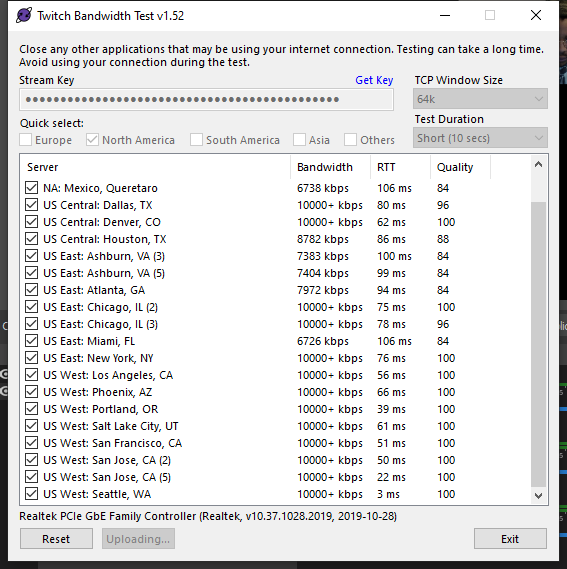
Test your upload bandwidth and connection quality to Twitch
This tool above will let you know which server and bitrate are the best for you
untold crest
The other one is https://inspector.twitch.tv/#/ but TwitchTest checks multiple servers in a bulk.
potent flax
it's running now, i'll be honest. idk what any of this means...KBPS is what i'll need to change in order to get it to run? or is this just telling me whether or not my network can handle streaming.
ruby scroll
I logged in to my YouTube account but it doesn't show up in OBS
untold crest
The "Bandwidth" column will let you know what is the max bitrate you can use, Quality - what server is most reliable for you
 opal epoch
how do i import downloaded overlays that are on my pc to the overlays tab thing
potent flax
 untold crest
In OBS settings => Stream, change server to US West: Seattle, WA
potent flax
it's locked in at AUTO
 hushed epoch
how do i get FFZ emotes to appear in the chat overlay?
untold crest
@potent flax This is odd. Are you streaming RN? You cannot change server when you're live
@hushed epoch After you update emote list on FFZ make sure you run !emotes update in your chat
potent flax
sorry you're right, I was still running "start stream" even though it isn't working...i turned it off & set it too US WEST SEATTLE ..now what lol
thank you for all your help by the way
untold crest
And from now on you should be able to stream using this server. This one should be more stable
potent flax
dont i need to change the bitrate or something?
untold crest
What bitrate do you have RN?
potent flax
or just try the stream to see if i go live now
untold crest
Just do not exceed 6000 as it is hard cap for non-partners
hushed epoch
hmmm the SE bot replied with success, but they still dont appear 🤔
untold crest
@hushed epoch You may also need to clear cache of overlay with your chat
potent flax
2500 kbps is what it says
untold crest
So go to 6000. 2.5k is pretty low
hushed epoch
how can i clear cache?
potent flax
now try?
untold crest
@hushed epoch double click on browser source in sources list, scroll down and there you should have see clear cache. If this doesn't help you may want to clear whole web cache for OBS - when obs is off, remove contents of %AppData%\obs-studio\plugin_config\obs-browser\Cache
@potent flax Please do. And let me know how it works, so I can relax my hands (I keep my fingers crossed and it is hard to type 🙂 )
hushed epoch
haha thats weird @untold crest . the first method did nothing. the 2nd method fixed the emotes not appearing in the Stream Chat widget (which is great) but they still dont show up in the chat overlay 🤔
potent flax
i'm live right now....and still nothing. sorry lol
hushed epoch
ok now it works. after deleting the content of the \Cache\ folder i also had to go to the browser source and clear the cache and now it all works perfectly. thanks @untold crest
potent flax
well i mean i "started stream" but still nothing when i go on twitch.
and idk...send log again?
 crystal condor
Hello everybody, I have one question and i hope you will be able to help me. Few months ago I connect my Twitch Channel to streamelements but i never really use it. I disable all alert from it but i still receive mail from the website after each stream. I would like to know how i can disconnect streamelements from twitch
untold crest
This is absolutely odd, like twitchtest provided you nice results and still dropped frames
The other issue here may be your ISP throttling it. There can be several of them, but it is connection issue
Please check twitch inspector too
@crystal condor I think on the bottom of the email you can find unsubscribe link
potent flax
where is twitch inspector? someone i email? or another troubleshoot support ?
untold crest
@potent flax https://inspector.twitch.tv/#/
crystal condor
@untold crest yes thank you !
untold crest
Basically support here is for StreamElements services, but we step ahead and try to provide help in more areas. Sometimes our options are limited as we cannot check Twitch data directly, so we forward to best tools we found so far. Twitch provides their service mostly "As is", so it is hard to reach them (this is my perspective based on my experience)
 clear igloo
Hello, recently I changed my name and right now my chatstats doesn't work. Anybody know how to fix it?
untold crest
@clear igloo Please provide your old and current username so your stats can be transferred to new, cozy place 🙂
clear igloo
Old: TomalaFN
Now: Tomala_
hushed epoch
hmm the overlay is a full 1920x1080 thing right? but if i just want to have an easily-movable chat overlay, whats the best way to achieve that?
maybe like put it in the top-left corner of the overlay editor? 🤔
untold crest
@hushed epoch You can create a chat widget on separate overlay and put it on the top left corner of it
Or you can crop overlay window in OBS
hushed epoch
gotcha, looks like i was on the right track. thanks again
 sharp sigil
I can't give my bot a custom name, It just gives it my name.
potent flax
the bandwidthtest also just tells me dropped frames...but my internet is really good & fast. would a speed test be another way of testing my capabilities?
silly question, do i actually need a mic or audio input device for it to work? it says "0 delay" on the inspector but also saysAudio/Video configuration issues detected. Address the following to optimize your stream's viewing experience:
The stream is unstable. Please check your network connection
untold crest
I think that audio device is not necessary to have reliable results from test stream as your desktop audio should be broadcasted too with default setup
@clear igloo It is done now
clear igloo
@untold crest thank you a lot!
untold crest
It is indeed. I wonder where can the problem be located then.
potent flax
im sorry to keep stressing you, it's frustrating for it to say everything is fine but then doesn't actually work. idk
ionic kelp
Best idea I can suggest is try streaming while connected with a VPN. If it works then you know it's most likely an issue via your ISP.
potent flax
Any VPN suggestions? or simply find a free one online?
untold crest
I see that you have not common resolution (try to use 1920x1080) in OBS settings, antivirus (McAfee) enabled (try to disable it for test time), and as sudo mentioned - try to connect via VPN so you can exclude your ISP throttling your connection
I usually go with NordVPN, they have trial for their services
 hot eagle
hi, i'm trying to put a custom chat box but i can't find how to change the color of the chat text, i have a dark layout and i want the text to be white, is there a way to do that? thanks
ionic kelp
I'd highly recommend the newest one in #widget-share
untold crest
untold crest
Yup. From my experience Windows built-in (Defender) is one of most reliable AV software on the market ATM
hot eagle
thanks! @ionic kelp @untold crest
untold crest
I am using only this for few years now and had no issues whatsoever
potent flax
im downloading nordVPN now, i also did the other steps altogether too..once i DL nord...then try to go live ..yet again?
 spice widget
Hey guys,
there is still no fix for the rotating assets widget. WEBM are still not working. Any idea when it will be fixed?
untold crest
@potent flax please do. You may also want to select different server for being sure, besides Seattle seems to be perfect for you, others can be checked too.
lament blade
Hello my streamelements bot doesn't seem to reply whenever someone follows or subs, it set has a moderator so i m not sure what i am doing wrong
can anyone help?
viscid pebbleBOT
@lament blade If your commands recently stopped working and you're using OBS.Live and a custom bot name do the following:
- In OBS.Live, click on the hamburger menu (three stripes) at the top left of your activity feed
- Click on Stream Settings > Custom bot name
- In the Custom bot name field select Set custom bot name, not your already existing username (with capital letters). Note: If you already connected an account that way, the third entry will show as the account name (see image https://i.imgur.com/sO7fWOX.png).
- Scroll a bit down and click on the purple Connect Custom Bot Account button
- Log in as usual and Authorize the custom bot name
- Back in the Activity feed, click on the Send Test Message button and check if your custom bot name starts working again
untold crest
You can change it to "StreamElements" and click "SAVE" too
 edgy lichen
how do I reduce traffic on my network when gaming? I’m a twitch streamer but get dropped frames constantly. Is there any way to dedicate the useage to my laptop as I am on Ethernet. My upload is 4.74
lament blade
@viscid pebble thank you i have enabled it, need a follower to check if it is working
 prisma beacon
Hey so I just got my first paypal donation today but it says the money is on hold until I provide a tracking number? How do I make sure this doesn't happen in the future? Should I just disable paypal tipping and just use SE.Pay?
potent flax
even with VPN up still not working, i have to be doing something wrong.
i even tried to stream straight thru geforce experience & log in thru twitch...i got an access denied message
untold crest
@potent flax You may also want to run test stream to YT, just to test it
jaunty zealot
It's to much zoomed in even when I put it in my resulotion and all of it
untold crest
@edgy lichen You would need to use QoS, but it is not an easy task
jaunty zealot
Won't work
untold crest
@prisma beacon This is odd as tips are not trackable. You may need to setup your PayPal account to not have this issues.
 signal badger
how to go about relinking chat stats after a name change on twitch?
prisma beacon
@untold crest What specifically do I need to change?
untold crest
@signal badger please provide your old and new username
@prisma beacon I am not sure TBH as it worked out of the box for me and everybody I worked with so far.
signal badger
its not for my channel, but a channel i mod for. old username: dimeax__ | new username: Dimeax
potent flax
youtube is telling me i have to wait 24hours before i can go live. does twitch have a similar built in process? i've never went live before...like ever. is that why i cant get on? i have to wait
prisma beacon
@untold crest Did you just enter your paypal email into streamelements and off you went? It could possibly be just because I haven't used my paypal in a while
untold crest
@prisma beacon Exactly. All tips received went directly to my balance, nothing was on hold
@signal badger It is migrated now.
prisma beacon
@untold crest Did you need a business account?
signal badger
@signal badger It is migrated now.
@untold crest thank you! appreciate it
 steady quiver
Hi guys, how can i see my top donator and top subs gifter?
untold crest
@prisma beacon This shouldn't affect this. Asking for tracking number for me was like you sold something on ebay instead of tip. But the best way to solve is to query PayPal representatives.
@steady quiver If you want to display that, you can use widget for it.
prisma beacon
Okay, thanks, hopefully it's just that I haven't used my account in a while. It asked if it was a digital good or service which I just said yes to. Hopefully after that it won't do it again 😛
steady quiver
@untold crest nope, i making a ranking and i want to see my top donator and top sub gifter of the history of my channel
but i can't remember how to do that ( thank you for your answer btw )
untold crest
You can do it via our extension, you can check widget data too: https://streamelements.com/dashboard/session
steady quiver
thank you so much
potent flax
i still don't get what im doing wrong. its annoying everyone's answers are so easy to fix except mine.
 astral blaze
i changed my username on twitch. can i get help making my chat stats update for twitch channels?
untold crest
@potent flax I feel you bro. I have no clue what can we do to beat that together.
potent flax
i'll call my ISP tomorrow and see if they're throttling it i guess. With a VPN it should be working already. the VPN app literally says "ON" and i restarted OBS then still nothing. but because Geforce didn't work either it makes me think it has nothing to do with OBS lol
untold crest
Have you tried using different server than Seattle?
 primal venture
is the merch store worth doing
steady quiver
@untold crest On my widget data there's only my top cheers , is there a way to see my top sub gifter too?
untold crest
I would go via:
And just not save that overlay after this
And SE extension displays even more data AFAIK.
steady quiver
sorry for the stupid question, how do i get there?
placid raptor
in your dashboard > my overlays > edit the relevant overlay @steady quiver
steady quiver
Thank you!
untold crest
Or if you're looking for extension, it is located here: https://dashboard.twitch.tv/extensions/uaw3vx1k0ttq74u9b2zfvt768eebh1-0.4.1
potent flax
im in a different server....no more dropped framerates from log but now whats the issue?
untold crest
It should be all OK now.
So the issue was that "Auto" server connected you to Seattle (which seemed to be the most reliable for you but it wasn't).
potent flax
but im still not streaming still not "live" on twitc
i can see in OBS where it says zero dropped frames, so confusing
untold crest
Hmmm. Does your Stream Key include test stream parameter?
potent flax
is there a 1 800 number i can call? or have someone troubleshoot directly. this is exhausting lol & idk what that is... the bandwidtth thing? no...i connected directly thru OBS again. the steam key method didn't work either.
untold crest
Unfortunately there's no hotline for that I am aware of, Twitch has their support here: https://help.twitch.tv/s/contactsupport
And as I mentioned - StreamElements is 3rd party, so we can help you with experience, but we don't have access to all events that happened on your account.
edgy lichen
@untold crest I’ll look at that
steady quiver
Sorry for the off- topic question . Does anyone know the size of a file to upload to discord? I want to upload an image but it changes the size and it looks too small
 scarlet tiger
What you talking about?
 pallid wagon
Hello! there are some problems with chatstats. Everything worked well before. But now you can't go to the global statistics and write a 404 error on the page...
untold crest
@steady quiver Discord resizes image, but you can click on it and select "open original"
@pallid wagon Global stats page seems to be working: https://stats.streamelements.com/
But if you are referring to your own channel, did you rename recently @pallid wagon ?
 austere berry
I've learned from my mistakes, so this time I ask before doing.
I usually live stream on Twitch, but I'm going to try a mixed stream where I do the "warmup" on Youtube like 30 minutes and then move over to Twitch for the main content. For Twitch I have alerts and such setup, but I'm thinking I have to set things up for Youtube too, would you recommend creating a separate account for this, or connect to existing twitch-based account?? I had a disaster when I disconnected my former Mixer account from the mainaccount a few weeks ago, don't want the same to happen again ofc, but I do have a store and stuff connected to the main account. So might be best to just hook up YT too ??
untold crest
@pallid wagon Fixed
pallid wagon
@untold crest Thanks a lot 
ionic kelp
@austere berry You can merge accounts but from your experience it won't be good should you want to remove either one. If you don't mind the hassle of logging in and out to switch accounts then just leave them separately. Otherwise there's not much gained by combining them.
austere berry
yeah Ihad mixer/twitch merged, but everything was deleted when unmerging.... not happy then.
the issue is my store won't be available for the YT audience if I have two separate accounts, and I won't be able to duplicate certain overlays between accounts / platforms ??
ionic kelp
@austere berry Anything you have on one platform won't work on another. You can copy overlays to an extent but beyond that nothing can carry across.
austere berry
but if the accounts were merged, then I can copy an overlay to the other (and if it's alerts and stuff I have to change them to function with desired platform ofc) but the store and tipping would be the same. Right?
ionic kelp
Stores and tipping would be separate.
You can however create an invite from your twitch account and add your youtube to copy them over without worrying about losing everything again.
Yes merging will make it easier to switch between the 2 but there is no undo once they're merged.
 half shale
how do i do a bandwith test mode in stream elements obs? I've checked the box for it but i cant seem to find out how to do it. plz help
austere berry
@ionic kelp thanks. I'll think about what to do then. I would have loved the store to be the same, but I suppose I can just link to the existing store ofc
won't get alerts on YT but hey....
ionic kelp
@half shale OBS Settings > Stream: Does it say disconnect account or is it your stream key?
half shale
it says disconnect account
ionic kelp
There should be a bandwidth option there then.
half shale
there is a enable bandwith test mode check mark but i have it checked i just dont know how to use it i guess is my question
untold crest
You just start your stream you can analyze via logs and/or via inspector website
Oh. This above may be the issue of @potent flax too. If you have this option checked, your stream won't appear live on Twitch
half shale
oohhh ok thank you so much, will help a lot with troubleshooting
untold crest
@half shale Here's a website I wrote about: https://inspector.twitch.tv/#/
 lime remnant
Hello! My chat stats page just says 404 not found.
untold crest
@lime remnant Did you rename recently? If so, please provide your old and new username.
And if not, just current username.
 limber fractal
Hello,
I changed my twitch account name yesterday and now my all time chat statistics are lost
Can anyone help me please?
fallen venture
tbh i doubt, still waiting someone to help me aswel, posted few times now 😄
 fading parrot
my chat stats page also shows 404 (havent changed name recently)
(username: haz429)
lament blade
Heya! I have a question.
I am a mod in a twitch stream and I am trying to figure out how to make a command that @'s people when they trigger a specific command I made. I tried with ${user} and $(user) , but both seem to mention their usernames without the @
Sorry about my English, not my first language!
Thank you!
fading parrot
i think you can do @${user} to add the @
 lyric zephyr
my friend gave me a sub so i didn't receive the money, i got the sub on saturday
what do I do?
dry hare
@lyric zephyr Sub payouts only happen when you reach the payout threshold set on Twitch. More information can be found via Twitch's Help FAQ here: https://help.twitch.tv/s/article/affiliate-payout-faq?language=en_US
 shrewd shore
Hey everyone! Would this be the right channel to inquire about AlertBox settings/issues for use with Twitch?
lime remnant
@untold crest no rename recently, I am just MaxPanda
 viral root
The chatstats page doesn't work for the streamer i mod for. His old Twitchname is milanknol1 and new name is milanknol.
Could you guys update the chatstats tracking?
He didn't have any stats on his old name. If a completely new stats page is easier it's not a problem. Thanks :)
 covert lava
Out of curiosity with the Stream store are you able to make it so commands make gifs/images pop up on screen? Also with the command portion does it allow setting the command to specific things or does it always have to be !redeem (command)
astral blaze
Yo can anyone help me sync my twitch chat stats from my old name to my new one?
 wild dawn
Hello any <@&382267076632379392> here?? We have kinda urgent situation:
https://cdn.discordapp.com/attachments/657376417410973728/771021395165446144/image0.jpg

Tried restarting phone 2 time doesnt work, app always just keeps loading
untold crest
@wild dawn Try to go to app settings and clear data and cache then run it again.
 weak delta
@wild dawn move with me down to #helpdesk-mobile
shrewd shore
Posting to hopefully correct channel :)
In the Overlay Editor, when I create a new AlertBox, open its settings, click the settings gear next to "Cheer alert", expand "Variations" at the bottom, click button "Add New Variation", I am presented with a choice: A drop down list that contains the names/variations that already exist in all other alert boxes that I can use to copy in the settings/configuration of the selected one, or a button "Start with blank".
When selecting an existing item with the "Copy From" drop down list, it doesn't actually copy in any of the settings. In reality, it only copies in the name. The variations condition isn't set, as well the video, sound, volume, etc. isn't set.
Is there a way to copy variations from one alertbox to another? I'm looking for a way to copy 15+/- variations from an existing AlertBox for cheer sfx to any new one that comes with a Theme. It's really messy to have two alert boxes running, and it is pretty time consuming to recreate all the variations from the first into the second whenever the second is replaced from a new theme (seasonal, events, etc)
 spark trout
Hey, question here. My stream Information Disappeared when i installed the New OBS26. I cant find it on the docks. is that normal now?
worldly marten
Hey guys,
everytime i buy something in soundshop i got positive feedback from SE in Chat but it doesnt play any sound. Every other Viewer can buy Sounds ...
you got any idead why this happens?
Message:
DeltaForceAssault: !redeem GG
play_bot: @worldly marten, du hast erfolgreich GG für 150 Karma eingelöst. elementsOkay
weak delta
Ah well, gotta verify that the redeem widget is added to an overlay that is then added in OBS.
Ah I see you say every other viewer can buy sounds.
Missed that.
worldly marten
yes... only i cant play souinds... but the feedback for "buying" was positive and i got less points on SE
pretty weird^^ the "mod" cant play sounds 😄 but every normal viewer can
i tryied alreada rebooting computer... router... relog in twitch and SE.... nothing worked
weak delta
No, it wouldn't be anything on your end like that. One moment.
worldly marten
and yes i am pretty sure i got the right stream sound store^^
ok
we tryied
!enablesfx
!openstore
but this dont change anything
weak delta
I've asked the fellows @worldly marten - I'll see if I can't get you an answer. I'm not 100% sure why it wouldn't work for specific users especially a mod.
worldly marten
ok. my "streamer" said he didnt change anything. first day it worked normal then 2 days without stream and then its me only who cant play sounds^^.
the streamer deleted some "bots" from the point ranking. and got some more sounds for the store but did not change settings. so we are just sitting here and dont know whats happening^^. yeah i wait NP
true hound
Does anyone know why when I am on stream it does not appear in discord that I am live? (when it appears just below my name in the connected server)
 real flower
Have you linked your Twitch account to Discord?
true hound
yes
real flower
It can be a bit delayed as well.
true hound
Enable streamer mode
@dry hare the first?
It can be a bit delayed as well.
@real flower any time i have been 4 hours and nothing
true hound
i need to have stream mode active always???
real flower
Only when streaming
dry hare
Do you have the automatically enable/disable toggle on?
as shown in the above screenshot?
real flower
If you use OBS, it should automatically turn it on/off
 zinc nimbus
hi, I just would like to ask when I use bot custom commands (like !commands) when I setup what to answer is there any option to make line break? like html <br>
real flower
Yes
true hound
now in the next stream should it work?
true hound
okey thank you ❤️
zinc nimbus
so can someone give me an advice? is it possible to make a linebreak?
lament blade
i cant get to strream elements dash board
nimble dune
@lament blade Clear your browser's cache and cookies.
lament blade
how
nimble dune
What browser you using?
viscid pebbleBOT
@lament blade Please logout of StreamElements at https://streamelements.com/logout and then login again to your account (Twitch/YouTube/Facebook).
lament blade
thanks this worked righht away
nimble dune
worldly marten
@weak delta any update?
 broken geyser
Can I use this on Xbox
viscid pebbleBOT
@broken geyser Consoles do not have native support for overlays. You would need a capture card, PS4 remote play or Xbox companion app and a PC with OBS in order to have overlays over your console gameplay.
We have a blog post about how to set up console streaming with our essential tools: https://blog.streamelements.com/how-to-stream-on-console-7b620b1c46c3
 lime steppe
hey, i recently changed my twitch username
" If you changed your name on Twitch, please follow these steps:
- Visit https://streamelements.com/logout and then log in again by connecting with Twitch.
- On the right side of the dashboard page that opens, select Join under bot settings. If it says Part select that and then select Join to send the bot to the chat. Don't forget to mod the bot by typing /mod streamelements in your channel if you have not already.
- Post your old and your new name here so that we can update your channel's chatstats tracking (must be done by staff). "
I've done all of these steps
this is the old username : shamimansari
this is the new : Shamooli
StreamElements
The Ultimate All in One Platform for Streamers
lament blade
@true hound trial and error is what i did, i was actually doing the same thing tonight and noticed theres a lot of dud bots that dont work
halcyon sail
help
viscid pebbleBOT
@halcyon sail Welcome to the helpdesk! Please let us know how we can assist you today and a support volunteer or staff member will assist you as soon as they are available. Thank you for your patience.
halcyon sail
is there a way to setup the timers so that they have no chance of popping off too soon? I would ideally like to have them on a rolling 15 minute pop off.
 chrome epoch
Am I correct in that if I put multiple responses in chatbot, it'll select one of them if both fall in the same value?
 vocal quest
I have a problem with my streamstore. Lots of users on my stream when they try to open the stream store and click on "my dashboard" they can't get into the store but they are redirected again and again to the log-in page.
Every time I have to tell them to log in from another browser in order to be able to go to the streamstore.
This happens when you have to log in to donate on streamelements.
Does someone has the same issue?
 modest sapphire
hi, this seems to be a regular occurance. chat stats seems to reset my name every 24 hours as have page 404 on my chat stats again and nothing is showing on the stream elements leader board widget. i've already messaged about this and every time its been updated it reverts back to the 404 error. now its stopped working again and been like this for a week.
is there any way to make this permanent a permanent fix?
ID - 5f86f41dd6895492903360d7. Old twitch name used to be syn_the_tk or synthetekk, now - synfetic. Thanks in advance
 calm pumice
Hey everyone. I have a small problem, maybe someone can help me? The bot completely ignores commands issued from my bot account
I think that happened after I tried to change it's access level from moderator to super moderator
Basically none of the commands work if I try to send them as my bot account in chat
 kindred bronze
can someone pls help me with chatstats on twitch im still having trouble accessing mine. ive had this problem before and it got fixed. idk why it stopped working again since i didnt change my twitch name. thank u, duhnni (username)
calm pumice
Also I have 404 on my stats page too (neris_exe) I did change the username before
 ashen sparrow
Alertbox is not working for me right now. No alerts while testing in overlay editor. No alerts while livestreaming
 light dragon
So i've had issues with my stream stuttering the past couple of days, looked at twitch inspecter and found this:
https://www.speedtest.net/result/10326203085.png internet shouldnt be the issue, i'm not sure though
 halcyon sail
@light dragon this is not really a streamelements support thing. But I'd say that your ISP is not reliable, or you have contention on the line. if a cable modem, then you are on a shared loop, meaning others in the loop will have shared bandwidth with you.
and if not cable modem, still, reliability issues from your ISP might exist
light dragon
It's unfortunatly a cable modem
Also, my apologies if its not a streamelements support thing, i didn't know where else to go
this might help?
 wispy oar
in the stream elements bot, can custom commands have arguments? if so, how do you reference them? for example, if i make a custom !foo command, how can i make !foo bar do something with the bar argument?
 burnt rover
Dont listen to him that could definitely be a streamelements problem
I had a similar problem that involved settings changes not my ISP being off
wispy oar
for posterity, i figured it out. arguments are addressable with ${1} for the first, and so on
spice siren
How to make yourself a paid subscriber or a bot on my channel.
 amber dawn
So in the stream elements tipping page I type in my paypal email for tipping and it turns the line red and I cant connect and it doesnt give me feedback of what is wrong does anyone have any answers???
lament blade
does streamelements bot do reactions?
 noble yacht
anyone knows how to make streamelements vertical align text? I'm kinda having trouble some text are being hidden from the alert.
amber dawn
Streamelements gotta explain some of this shit better nightbot and streamelements websites are so shitty
 fringe comet
Still having this issue
Tried with a fresh overlay too
https://discordapp.com/channels/141203863863558144/199460642975907840/770391210379575386
 raw vale
In twitch I was called iBackUp_, I changed my name to perezoso_ and when I tried to do the !rename I was told the UserID of ibackup_ does not match yours., I changed my name to perezosoFanDeJavikYMajo, but even so, when using the !rename I was told the UserID of ibackup_ does not match yours.
 toxic wing
Hi guys. Can someone help with an account merge? Please.
lament blade
hi, i streamed through my phone today and I received two donations. however, nothing popped up in the stream. did I do something wrong? am i supposed to enable something inside the app? thanks (please @ me)
 thorn dawn
My commands aren't working. If anyone has a fix I would loveee some help. I linked and unlinked like 3 times, and nothinf. Stream elements is a mod in my chat AND someone gifted a sub as well.
 hollow mauve
I'm trying to enable media share but regardless of what I do, it can't seem to detect that I have a widget showing media request.
NO ACTIVE WIDGETS WERE DETECTED FOR MEDIA REQUEST
Even the preview doesn't show it, and the overlay definitely has a media request widget
I am using regular OBS
viscid pebbleBOT
@hollow mauve Not all staff are able to assist with support issues. Please refrain from pinging them or sending them DMs unless asked to.
hollow mauve
Fair enough
 crisp saddle
Loyalty isn’t working at all for me Tried everything. What the hell...
celest oasis
if you are trying to connect your paypal first make sure you are using the right email and have typed it properly than hit the connect button beside it it isn't an SE issue something you type is not right or you arent using the proper email your PayPal @amber dawn
You can make the bot do reactions if you type reaction you want as a command and then give it a keyword so that when someone types it in chat it'll react with whatever you want it to @lament blade
viscid pebbleBOT
@noble yacht Text not showing up over your alerts? Go to the Advanced Text Settings and set the top margin to 50, you can work your way to the right position from there.
celest oasis
What exactly isn't working with loyalty for you is the points not generating? or are the commands to see the points not working @crisp saddle
@hollow mauve on the StreamElements webpage go all the way down to more and hit show on stream if it's already on turn it off than back on than exit the page than it should pop up on your overlay with the song you are playing
You could also download OBS.live so that you can control the function directly in obs it's an extension for your streamelements media request, acitivy feed, and twitch chat
potent flax
is there anyone available to assist? Twitch is blocking me from streaming? it isn't SLOBS, OBS studio, Geforce Experience, I even tried to "go live" on my iphone and they all say i'm "live" but when i go to view my twitch page..it still shows offline. I redid my steam key, disconnected firewall, tried VPN, idk what the issue is i just want to stream lol
celest oasis
Only thing I could say is try reconnecting your account through the OBS studio settings and make sure your bitrate is at the appropriate levels if that doesn't work try to reset your stream key through Twitch Settings so it generates a new key and re follow the first step again. @potent flax
potent flax
tried it, still nothing. this is disheartening. im still running live off my phone and im still showing offline. it doesnt make any sense. i even did the bandwidth test
toxic wing
Hi guys, I acccidently signed up twice for my Twitch account and then my YouTube account. Is there anyway to link them both together?
 solid nymph
@toxic wing no there is not a way to
You can use Streamlabs, but you have to buy prime if you want to stream on both at the same time
toxic wing
I have Prime.
solid nymph
Add me and screen share me
toxic wing
I don't mean to stream together, I just meant to connect Streamlabs to both accounts so I can access them both on the same account.
viscid pebbleBOT
@toxic wing Account Merging - Please note:
- Merging accounts only allows faster ways to switch between accounts
- Merging accounts does not allow data sharing between accounts - different streaming platforms, different type of events
- Merging accounts allows duplicating/sharing overlays between the accounts
If you understand the limitations of merging and want to proceed, please find the JWT tokens (!jwt) from both accounts you want to merge and you will be directed to DM them to a staff member
@toxic wing You can find your JWT token on your account channels page (Show Secrets to reveal the token): https://streamelements.com/dashboard/account/channels
READ ME: This is a private security token. Do NOT share this token here or other public places, only with a StreamElements staff member in private.
@lament blade Read and follow our server rules:
- We do not tolerate toxicity! Treat the community team, staff and all members with respect.
- No advertisement or channel promotion, anywhere on the server.
- No NSFW/NSFL
- No unsolicited DMs or friend requests to server members
Make sure to read the #rules in any server you join.
 cursive garnet
when someone host me its not showing on chat. im using streamele for obs and i have streamlabs as a mod
viscid pebbleBOT
@cursive garnet "Due to changes to Twitch API, we have filtered out hosts and will only show these ones on your activity feed:
- All hosts coming from an online channel with at least 1+ viewer
- Auto host events with at least 1 viewer - only from a channel that just went offline
Note: If you see X channel has hosted you with no viewers on the back, that is considered an offline host or a host with 0 viewers, we do not show these."
limber fractal
Hello,
I changed my twitch account name yesterday and now my all time chat statistics are lost
Can anyone help me please?
viscid pebbleBOT
@limber fractal If you changed your name on Twitch, please follow these steps:
- Visit https://streamelements.com/logout and then log in again by connecting with Twitch.
- On the right side of the dashboard page that opens, select Join under bot settings. If it says Part select that and then select Join to send the bot to the chat. Don't forget to mod the bot by typing /mod streamelements in your channel if you have not already.
- Post your old and your new name here so that we can update your channel's chatstats tracking (must be done by staff).
toxic wing
@toxic wing You can find your JWT token on your account channels page (Show Secrets to reveal the token): https://streamelements.com/dashboard/account/channels
READ ME: This is a private security token. Do NOT share this token here or other public places, only with a StreamElements staff member in private.
@viscid pebble - I have got them, who do I DM them to?
strong kernel
@toxic wing Do you understand the limitations?
toxic wing
Yes.
 zealous aurora
the stremelements is having problems in chrome, mine does not open is with white screen. No mozila opens!
strong kernel
@toxic wing DM me both JWT tokens, clearly labeling which is which.
@zealous aurora 1. Clear your cache
2. Go to chrome://settings/content/cookies and add streamelements-yoink.netlify.com to your allow list, allow cookies in general
3. Press Ctrl + Shift + R while looking at the white screen
@toxic wing Your channels have been merged.
potent flax
FINALLY GOT IT TO WORK!!!!! for some reason i had 2 accounts attached to my twitch? i was trying to stream on an acct that just didnt work...as soon as i tried a new one it worked. why is that??
now im having input delay though, how to fix?
viscid pebbleBOT
@potent flax Obs.live is a plugin for OBS Studio for the best OBS support, please join their Official Discord @ discord.gg/obsproject
limber fractal
My old name is „F2F_Venom7“
My new name is „SamiF2F“
Thank u!
I followed the steps
 steel pond
Hi i have a question.
I was wondering how you can give your viewers more ways to tip you. If they click on pay within my donation page they can only pay with paypal. Do i need to meet some requirements on Twitch or do i need to do something to give them the possibility to donate with credit card for example ?
zealous aurora
the third option works, thanks.
 frosty wasp
Hello,
I've got a chat stats 404 error. I haven't changed my username: FRESHvibe_ (underscore after username)
https://stats.streamelements.com/c/freshvibe_ (underscore after username)
Send help!
StreamElements
Description Chat Stats tracks emote usage on Twitch in real time. See which emotes are the most popular on every Twitch channel
viscid pebbleBOT
@steel pond SE.PAY is available for streamers who are at least 18 years old, with bank account under their name in one of the following countries and have at least 101 follower (Twitch) / 101 subscribers (YouTube):
Austria, Belgium, Czech Republic, Denmark, Finland, France, Germany, Ireland , Italy, Netherlands, Poland, Portugal, Slovakia, Spain, Sweden, Switzerland, United Kingdom, United States.
If you meet these criteria and don’t see SE.Pay, let us know.
For information on SE.Pay payment methods, their fees and settlement times see https://streamelements.com/dashboard/tipping/fees.
steel pond
ohh okay thanks! this helps
lament blade
@celest oasis is there instructions on how to do this?
calm pumice
@viscid pebble Hi! Do you know why StreamElements bot can ignore commands from a user? It doesn't react to my bot's commands in any way but works fine for any other user (including me)
lament blade
hi, i streamed through my phone today and I received two donations. however, nothing popped up in the stream. did I do something wrong? am i supposed to enable something inside the app? thanks
celest oasis
Create a custom command fill in whatever you want and then add the words you want the bot to reply to in the keywords area @lament blade
 hollow latch
Hey! So ive just made a recents and alerts overlay for another streamer using the editor, is there any way i can send it to him? I dont have his login so i cant make it on his account
 mossy pagoda
My merch qas all setup and now it disappeared, first time user
celest oasis
They would have to add you as an editor on their account than you can share overlays between each account @hollow latch
hollow latch
okay cheers 🙂
hushed epoch
getting dropped frames to twitch at 4500kbps even though im on 1000/1000 fiber... is it just twitch being twitch?
 brisk sun
Hello, I am just streaming from ps4 for the time being, how do I get the bot working, do I have to use it through stream elements or twitch, sorry I am new :/
viscid pebbleBOT
@brisk sun Consoles do not have native support for overlays. You would need a capture card, PS4 remote play or Xbox companion app and a PC with OBS in order to have overlays over your console gameplay.
We have a blog post about how to set up console streaming with our essential tools: https://blog.streamelements.com/how-to-stream-on-console-7b620b1c46c3
crimson flame
How do I get it to where the viewers can hear my music in the background?
strong kernel
@hushed epoch Speed tests aren't an indicator of your connection to Twitch ingest servers; they're best case scenarios generated by establishing multiple connections for the test. You can test your direct connection to the Twitch ingest servers using this tool: https://r1ch.net/projects/twitchtest
Test your upload bandwidth and connection quality to Twitch
hushed epoch
thanks
ah r1ch i remember him from the obs irc channel lol
didnt realize his site is still up
 terse vale
when i try to connect my OBS to y twitch account it says "failed to get text from remote: connection timed out after 5000 milliseconds"
hushed epoch
pretty great test results if you ask me. doesnt explain why im getting such trash frame drops https://i.imgur.com/tkC0M0D.png
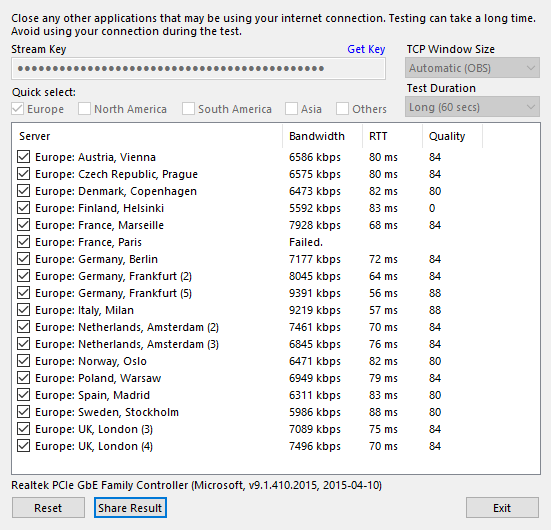


i was mainly using milan and frankfurt already based on experience in PoE lol... but i also tried prague, vienna and warsaw and they were clearly worse
strong kernel
@hushed epoch Check here for some possible solutions: https://obsproject.com/wiki/Dropped-Frames-and-General-Connection-Issues
This guide contains every piece of dropped frames / disconnect / network related advice we can give. If you really truly honestly super duper actually 100% tried everything in…