@solar berry Consoles do not have native support for overlays. You would need a capture card, PS4 remote play or Xbox companion app and a PC with OBS in order to have overlays over your console gameplay.
We have an blog post about how to setup console streaming with our essential tools: https://blog.streamelements.com/how-to-stream-on-console-7b620b1c46c3
#helpdesk-twitch
1 messages · Page 751 of 1
 round brambleBOT
 solar berry
already tried a capture card. plus i have a few streaming friends who are doing it without a capture card
 twin sentinel
What was the issue with the capture card?
What are your streaming friends using?
solar berry
just the companion app thats about it
its not readying the capture card at all
reading"""
twin sentinel
Contact the capture card manufacturer for support.
solar berry
put the capture card on my ps4 and its fine just not my xbox
 ember plinth
Anyone able to walk me through making someone a supermod? I actually want all 3 of my mods to be supermods if thats possible?
 untold crest
@ember plinth You can set this up here: https://streamelements.com/dashboard/bot-commands/user-management
 pseudo crystal
Always shows 0
Am i missing something here? I tried the logout/login a few times already, Dashboard is showing the number correctly
 lament blade
Any idea why a custom font in the overlays maker that has cyrillic characters doesn't seem to actually apply on cyrillic characters?
 zenith widget
Unfortunately, some if not most fonts even if they have a cyrillic characters, may not actually work with cyrillic in general. It may not be up to us.
lament blade
It would be much better then to have an option for the user to upload a custom font and use it.
 vital condor
Hi, i am having trouble adding my twitch channel together with my facebook & youtube. it is saying my twitch channel is already claimed
lament blade
I have managed to get the Helvetica font to work for a bit when type it as Helvetica.ttf but only in the chat widget. But now it doesn't seem to work anymore...
 cinder notch
Hello , i set the default template and through streamelements obs live theres only follower / ig / facebook templates with black screen background , how i set the template capture the game window and the talk template capture whatever background i want cuz its still black. I copied everything according to the guide from the site . Even deleted css lines shown
 pale elk
@cinder notch
To set up a StreamElements overlay in OBS, it should be on the top of your sources list.
As for backgrounds for the talk template, you but your camera behind that. If you want a custom background, you'd have to use a greenscreen and put your desired background image underneath your camera with a chroma key filter added.
(Not sure if I fully understood the issue. If possible, could you attach a screenshot?)
 full pond
Hello I’m trying to set up stream elements but my chat bot never works.
pale elk
@full pond could you be a bit more specific as to what isn't working?
Alerts, commands, etc?
Also, have you activated the bot on the StreamElements dashboard?
full pond
Commands.
pale elk
@vital condor Have you linked it to a different StreamElements account previously? You may have to get a staff member to help you unlink the account ID if it's been linked previously.
round brambleBOT
@full pond Go to the Dashboard > Right side > Part channel > Join channel (https://streamelements.com/dashboard)
 cinder notch
@pale elk lets forget about the talkscreen , the main game one - should i set it up in regular obs or in SE obs live ? Shouldnt i add what the window must capture anywhere in the options ?
full pond
How do I give the chat bot moderator access
pale elk
@cinder notch I mean, yes, but I kinda need to see what's going on.
I have mine set up so it appears like this. (Ignore the no signal, that's just cause my Switch is currently powered off)
Could you show me a screenshot of how you have StreamElements set up in OBS so I can get a better look at it?
full pond
Ok
pale elk
@weak delta You know what @cinder notch is having an issue with by any chance? (Doing my best to help. 😅 )
 timber jasper
When i google adding chat box widget, the display options look very different to when im logged into my OBS - Anyone know where i add the chat widget
cinder notch
@pale elk yes sure i will send you tonight cuz im not at home right now.however i can explain - i copy the template from url and paste in obs, hide everything else in lets call it scene 1 except the template i recently created and the screen i see its for instance like your one you juse sent - my recent followers and black screen
full pond
My chat bot is still is not working is there any other things to do to get it to work
pale elk
@timber jasper hit the blue plus while in the overlay editor and select "Your stream's chat" under "STREAM TOOLS".
@cinder notch So the Overlay itself works?
Or are you having an issue just displaying your game?
cinder notch
Overlay works yes, displaying the game however does not
 pale elk
@full pond what commands are you trying to trigger?
There are premade default commands as well as custom commands that you can add.
full pond
I want to add a custom command but the chat bot won’t enter my stream.
pale elk
@timber jasper No. That's just the OBS window, you want the StreamElements overlay editor:
@full pond Try typing !8ball like I did here.
timber jasper
overlay editor - Ok - Thanks @pale elk ill try to find it and play around
pale elk
@timber jasper You'll probably have to go to your StreamElements dashboard Chrome/etc. first.
 rotund dagger
does anyone know how to import an overlay i bought from own3d into streamelements to edit it
full pond
It did not work.
pale elk
@rotund dagger There should be a link included that imports it automatically (most overlay marketplaces should include one), but you can take the files and import them by adding them in the StreamElements overlay editor, hitting the blue plus button and using the image & video options under the Static/Custom tab.
 surreal shadow
Wondering if Someone can help me set up this command. I want a counter that mods can add to whenever a character heals in game. I noticed theres a string that mods can type out to add to a counter but wondered if you can set up a way so if they type in !addheal it will automatically tell it to increase the !heal counter by one or !delheal to decrease by one. I would then want !heal to show how many times they've healed. Thanks
pale elk
@full pond Make sure that your bot commands are active and that StreamElements has mod status on your channel.
@surreal shadow See if there's something like that in #command-share maybe.
full pond
How do I give streamElements mod?
untold crest
@full pond https://discordapp.com/channels/141203863863558144/199460642975907840/753559211400757280 You got your answer right after your question
round brambleBOT
@cinder notch OBS > Settings > Advanced > Scroll down > Enable or disable Browser Source Hardware Acceleration, depending on its current state > Restart OBS (This does not apply for OBS on Mac)
https://i.imgur.com/ggMe9ZE.png

 weak delta
I am trying to go through the messages to get a better grasp but currently dealing with poor internet.
cinder notch
Should i do in it in normal obs or SE obs or it doesnt matter ?
weak delta
Well.
When you say SE OBS, you're referring to OBS.Live which is just a plugin on top of "normal OBS" which is called OBS Studio.
And OBS.Live main feature is added docks for you to track events, view chat and control media request.
So either choose to use OBS Studio, or OBS Studio with the OBS.Live plugin installed. The process of adding your overlays is the same.
cinder notch
I guess its obs studio + the plugin installed cuz i worked last 2 days with it
weak delta
This is a wise choice.
surreal shadow
On another topic, my raffle has only been awarding one winner instead of multiple when using the !raffle command. Any ideas why?
round brambleBOT
@ionic kelp mass deleted 2 messages.
 gloomy mango
Hi you guys... I need your help
I use the SLOBS and when am streaming, after a while the overlays from streamelements dont show up
and the alerts also
what can be causing this?
anyway to fix it?
round brambleBOT
@gloomy mango We're not able to troubleshoot issues with using our overlays in StreamLabs OBS (SLOBS) as we don't have the tools to support their software. We recommend using OBS Studio or OBS Studio with our plugin OBS.Live.
 kind timber
idk how to import streamelements Overlays to Stream Obs so i can use them on twitch
round brambleBOT
@kind timber To add your overlays to OBS, add a new browser source in your scene. Paste your overlay URL in the browser source properties, set the dimensions to 1920x1080 (unless you changed them on the website) and check Shutdown source when not visible. https://youtu.be/KDvLynUqXI4
kind timber
thx :))
 marsh moth
Hi, my main account is signed into twitch and i love it, howveer i have another account on youtube which i dont use that i would like to intergrade with the main twitch account, the issue is it is assosiatied with another streamelements account i dont use. can i delete or disconnect a youtube account from my 2nd stream elements account to then attach to my main SE account?
 ionic kelp
@marsh moth Yes you can do that but there's the option to also merge as is. However there is a small warning attached to it.
Once merged you can't remove one without deleting everything from both accounts (And I mean EVERYTHING).
round brambleBOT
Account Merging - Please note:
- Merging accounts only allows faster ways to switch between accounts
- Merging accounts does not allow data sharing between accounts - different streaming platforms, different type of events
- Merging accounts allows duplicating/sharing overlays between the accounts
If you understand the limitations of merging and want to proceed, please find the JWT tokens (!jwt) from both accounts you want to merge and you will be directed to DM them to a staff member.
ionic kelp
That's the other bit about merging.
timber jasper
Hi guys - I have created a webcam overlay thing to drop my webcam picture in . And when i use my laptop webcam i can resize it perfectly to fix. But i have new webcam and the picture doesnt size into my webcam overlay - And when i go resize it only resizes to scale..not sides or top how i want
is there a way around this - thanks
marsh moth
I am not really wanting to merge if its going to delete everything, is there a way of exporting all my overlays and settings and getting them back after merging?
ionic kelp
Not without another account for that platform.
timber jasper
any ideas?
marsh moth
the issue i have is, before i knew what i was doing and experimenting with platforms i made a twitch account and youtube account seperately on seperate stream elements accounts. if i could just delete the youtube one and sign back in with my main one that would fix it. im not sure how to solve this without having to delete everything by merging, and i simply cant do that
@timber jasper if the camera ratio does not fit to your overlay ratio you can use ALT and grab the side of your camera and resize the actual camera in OBS or Streamlabs to fit the scale of your overlay.. i hope this helps
ionic kelp
So you want to use the YT account still or just remove it?
lament blade
Hey can anyone help me how to export widget from Streamelements so I can edit it on other account?
marsh moth
it depends if i would be able to re-sign back into it on my main SE account after its removed from the one i dont use
ionic kelp
@marsh moth unless you merge "accounts" they remain independent of another. It's only when merged they become 1.
 solid void
Hello in my account i cant find se pay
ionic kelp
@solid void you don't meet the requirements.
round brambleBOT
SE.PAY is available for streamers who are at least 18 years old, with bank account under their name in one of the following countries and have at least 101 follower (Twitch) / 101 subscribers (YouTube):
Austria, Belgium, Czech Republic, Denmark, Finland, France, Germany, Ireland , Italy, Netherlands, Poland, Portugal, Slovakia, Spain, Sweden, Switzerland, United Kingdom, United States.
If you meet these criteria and don’t see SE.Pay, let us know.
For information on SE.Pay payment methods, their fees and settlement times see https://streamelements.com/dashboard/tipping/fees.
solid void
ah ok thanks a lot i didnt know that one criteria is the follower count, thanks
round brambleBOT
@plain adder
Read and follow our server rules:
- We do not tolerate toxicity! Treat the community team, staff and all members with respect.
- No advertisement or channel promotion, anywhere on the server.
- No NSFW/NSFL
- No unsolicited DMs to server members
Make sure to read #welcome in any server you join.
 slender prism
Is there a way to integrate discord using a dedicated streaming PC? I run discord on the gaming pc, and obs.live on a second PC. The second PC captures everything from discord on the 1st pc. The streaming PC is not set up for audio input. I do everything on the gaming pc. The overlay from discord seems to require the pc with obs.live running to have discord active. Suggestions?
oops. I guess I should have posted this in the obslive help. sorry, will repost there
surreal shadow
On another topic, my raffle has only been awarding one winner instead of multiple when using the !raffle command. Any ideas why?
@surreal shadow
 inner warren
is there anyway to put on the countdown a specific date for the next stream, going on vacation and so need to change it ?
untold crest
You can use I will be back in ${time.until 2020-09-21T09:36:44+02:00} bot variable for !countdown command and let user know about that command by having it in your stream title when you are away
timber jasper
Really need help with an urgent issue guys - So for the first time i tried to add my own webcam (not laptop) set it up all fine but when i went to stream it gave me this NVEVC driver issue .. So i tried to revert to my laptop webcam. Same issue - I saw a youtube fix to change my settings from NECEV hardware to X264 SOFTWARE. That alows me to stream byt my viewers say they cant see me and bottom left hand says encoding overload
=/
round brambleBOT
@timber jasper For the best OBS support, please join their Official Discord @ discord.gg/obsproject
timber jasper
ok thanks
inner warren
@untold crest anyway of adding this on the leaderboard countdown to the next date ?
 pallid wagon
Hi i get some problems with chatstats , open link and ... 404 page not found
ionic kelp
@kind timber https://dashboard.twitch.tv/settings/channel Video player banner
kind timber
thx @ionic kelp :))
ionic kelp
@pallid wagon What's your new name? Is 1kko your previous one?
kind timber
sudo the thing is i needed dowloaded and i only have it as the link thingy
ionic kelp
No idea what you're talking about.
round brambleBOT
@ionic kelp mass deleted 2 messages.
ionic kelp
You can't use our overlays for this.
kind timber
oof
ionic kelp
You have to use an image.
pallid wagon
@ionic kelp yea
kind timber
guess so
pallid wagon
jsut use rename ?
pallid wagon
ikko_hh_
lament blade
i have a question about super mod can someone help me ?
pallid wagon
@ionic kelp Underscore before HH and after
pallid wagon

 zealous topaz
My se merch link doesn't work and just says "sorry we couldn't find what you were looking for."
ionic kelp
@pallid wagon Stats should be working now
pallid wagon
@ionic kelp thx
ionic kelp
@zealous topaz Link doesn't change when you change your name.
ionic kelp
Unfortunately we'd need to nuke your store (Yes the 2 items) for you to be able to update it.
 mortal dove
?
ionic kelp
Not you.
zealous topaz
How do you do that
ionic kelp
I can have staff do it. Would you like them to?
mortal dove
is there any staff here bro
round brambleBOT
@mortal dove For the best OBS support, please join their Official Discord @ discord.gg/obsproject
mortal dove
for obs live
pallid wagon
@ionic kelp 404 - Page Not Found // nope 
ionic kelp
@zealous topaz Start again and it should redirect to your new name.
mortal dove
@ionic kelp yo
zealous topaz
Thank you
ionic kelp
@pallid wagon Looks "fine" to me. https://streamlabs-is-a.totallysuspicious.website/6fTnnLL.jpg
 pallid wagon
@ionic kelp
mortal dove
?
ionic kelp
You need to ask in the OBS server the bot linked.
mortal dove
they say thats not for obs live when i ask there
 hexed mason
hey does anyone know how to put the overlay of my store?
when someone buy
nothing happens to me]
what should I do
nothing appears in the stream
help me PLSS
ionic kelp
@mortal dove Your issue has nothing to do with OBS.Live and is more appropriate for their server.
@hexed mason Redemption widget is what you want for your overlay.
ionic kelp
Click the + on the overlay editor.
And search redemption.
It'll show you where it is.
 barren sandal
Is there a way to set up a number guessing chat game? where I enter what the number to be guessed is and wait for the first person chatting to say the number?
Either with an existing widget or chat command?
I've found several contest bots that are close but they all choose their random winner. Nothing specific to be triggered by a predetermined answer other than the emote one but it has no variable to change it to number :/
bit lost
 loud magnet
I’m copying various overlays but am noticing they all have the same url for some reason..any idea what this is the case? Previously they all had unique urls
pallid wagon
my missions imposible
 thorn elk
i got an issue, i change my name from knukka_bear to knukkabear
then all the notification is not working anymore
ionic kelp
@pallid wagon Bopped staff for forgetting to hit enter. SHOULD be good now.
round brambleBOT
@thorn elk If you changed your name on Twitch, please follow these steps:
- Visit https://streamelements.com/logout and then log in again by connecting with Twitch.
- On the right side of the dashboard page that opens, select Join under bot settings. If it says Part select that and then select Join to send the bot to the chat. Don't forget to mod the bot by typing
/mod streamelementsin your channel if you have not already. - Post your old and your new name here so that we can update your channel's chatstats tracking (must be done by staff).
ionic kelp
Ignore the last part.
pallid wagon
@ionic kelp thx . All good 
thorn elk
@thorn elk If you changed your name on Twitch, please follow these steps:
- Visit https://streamelements.com/logout and then log in again by connecting with Twitch.
- On the right side of the dashboard page that opens, select Join under bot settings. If it says Part select that and then select Join to send the bot to the chat. Don't forget to mod the bot by typing
/mod streamelementsin your channel if you have not already.- Post your old and your new name here so that we can update your channel's chatstats tracking (must be done by staff).
@round bramble old name : knukka_bear , new name : knukkabear
ionic kelp
@thorn elk Stats should be updated to new name and you can handle everything else.
thorn elk
@ionic kelp how about the activity feed
ionic kelp
If you mean in OBS....
round brambleBOT
StreamElements on top of OBS > Logout > Login
thorn elk
yes..done that..but will it show the notification it missed?
i got a new sub during the stream, but it doesnt show it and it dont show in my overlay too,
lament blade
how to show my chat? obs 64 bits?
 chrome folio
@lament blade OBS Studio or OBS.live?
round brambleBOT
@thorn elk Prime Gaming (new and resub) and paid subscriptions (resub only) must be shared in chat manually by the person subscribing in order for the subscription information to be sent to StreamElements. For Prime Gaming, the user needs to have sharing enabled on https://www.twitch.tv/settings/prime. For paid subs, if the share box doesn't show up immediately it will when they refresh the page. https://i.imgur.com/VNJN0Uv.gif https://i.imgur.com/2297EA7.png


 coral sigil
My game capture is not working, any suggestions?
cinder notch
Here are the screenshots from obs live. Right now i have game capture on cuz it doesnt capture anything without it . Is it supposed to be like this ? @pale elk
coral sigil
Is OBS runned as admin? @coral sigil
@scarlet tiger no
 scarlet tiger
Try it
 fading slate
Hi! My !watchtime does not work, how can I enable it? I imported the watchtime from streamlabs but it does not add anything while streaming
round brambleBOT
@fading slate 10 minutes of watchtime are given to those in chat when the loyalty points are handed out (every 10 minutes). Therefore, loyalty must be enabled for watchtime to work properly.
There is no direct link between watchtime and all-time points.
It can’t be calculated from the amount of all-time points a user has because subs may earn points at a faster rate and !bonus all command increases all-time points for users in chat at that time.
Giving points to a single user does not affect all-time, only when giving to all in chat.
lament blade
Hey guys. Is it possible to hide commands on chat when someone uses any of them please?
chrome folio
@lament blade no, only Twitch commands are hidden from the chat.
lament blade
Thanks very much 👍
fading slate
so I need Loyalty enabled
fading slate
But I don't want a point system, can I disable that or can I disable the point commands
ionic kelp
not if you want watchtime.
fading slate
oke... thanks tho
 ivory crest
Hello i need help because my chat stats is broken i cant see in the leaderboard how many emotes did my viewers send
Actual name PTG_ie
earlier vxenoxv(but i am not sure)
thanks in advance
 sturdy jay
Evening. Could someone tell me how we manage the 'regular' permission for viewers please? Does this rank get assigned automatically after x hours of viewing or something similar or is it something we have to set manually (and if so, how please?)
 sly igloo
Anyone speak russian?
 nimble dune
@sly igloo ▶️ #🇷🇺︱русский
 vague root
I need help with my se.pay
ionic kelp
@vague root Does it involve delayed payout?
round brambleBOT
Please contact us via email for support with SE.Pay. You can use our contact form here: https://streamelements.com/contact Thank you.
ionic kelp
Fill that out and they'd be able to answer you.
vague root
Okay thank you @ionic kelp
 dull ginkgo
Game capture isn't working. How do I fix it?
round brambleBOT
@dull ginkgo For the best OBS support, please join their Official Discord @ discord.gg/obsproject
 thin sapphire
hover to stop auto scroll on the chat
 clever frost
How do I put your default overlays into twitch
round brambleBOT
@clever frost We've released our new Overlay Editor revamp. You can check out the changes and how to work with it here: https://youtu.be/X5VzXjqAsjk
Check out our blog post as well: https://blog.streamelements.com/streamelements-overlay-editor-just-got-even-better-c22cb5b4853e
@clever frost To add your overlays to OBS, add a new browser source in your scene. Paste your overlay URL in the browser source properties, set the dimensions to 1920x1080 (unless you changed them on the website) and check Shutdown source when not visible. https://youtu.be/KDvLynUqXI4
 stable moon
Quick question: I am adding a tip goal to my overlays it has a tip sum of $63.33 in the middle I wanna change to 0. I got a total of $63.33 worth of tips because I just got affiliate on twitch last week which I am super excited about. Now how do I change that?
lament blade
someone on the staff who can fix my stats problem??
 ripe zephyr
lament blade
ripe zephyr
lament blade
I changed names and my commands aren't working. I already parted in dash board and re initialized. It worked now stopped
 soft heath
my media request widget is not showing up in obs at all even though i added it
 rustic pond
so im using obs
and is says im streaming but in twitch
it all the sudden says offline
ive tried everything for the past 4 months
i give up and finally seekinghelp
chrome folio
@rustic pond did you change your profile name?
rustic pond
no
 spice siren
How to create a VIP or moderator purchase function through loyalty points and so that he automatically has a status!
rustic pond
@chrome folio no
chrome folio
@rustic pond OBS Studio or OBS.live?
and what is the OBS version (at the top of the screen, on the left)?
chrome folio
- go to Settings > Stream > click on Disconnect button and re-login with your Twitch account.
chrome folio
- Relog to StreamElements, go to StreamElements menu, on the top, click on Logout and Login...
If it doesn't work, go to OBS > Settings > Stream > click on Disconnect button, copy your stream key - https://dashboard.twitch.tv/settings/channel - and paste your key in "Stream key" text area and click on Ok button. Don't click on "Connect account" button.
rustic pond
i have done that and nothing
 jaunty aspen
Hi everyone quick question, i wrote to help but they couldn't help lol. I'm trying to duplicate an overlay (i customized a preset from the "force field" template) and it loads for hours without any result. It seems that blank templates can be duplicated in a few seconds but not when they are customized. is that normal? thanks!
 jade remnant
if you have the obs.live plugin, you have 2 settings, both in obs
settings > stream
streamelements > logout
dont use stream keys, connect your account
 robust wedge
alright hii, so for weeks already im not able to use the groundcontrol app anymore, i open it, its shown in my taskbar, when i hover over it its shows me a lil white empty window but nothing more, it doesnt actually let me access to it, i tried reinstalling, diffrent combabilty modes, using it as admin, i cant get it to work anymore. i used it before but then it suddenly stopped showing and i have legit no clue what could even cause that
poke me if you reply pls
 sonic radish
hi guys. is there a way to make the bot NOT announce media request details after someone requests a song? i feel it's needless spam but can't find how to disable it.. example: @pastel pasture, added Movieclips - "Shrek the Third (2007) - Damsels of Destruction Scene (8/10) | Movieclips" to the queue at #1 (playing ~now) https://url/
 topaz tusk
i need help
 viscid pebbleBOT
Hi @topaz tusk, Please ask your question(s) or describe the problem you're looking to solve so staff or a support volunteer can assist you as soon as they are available.
topaz tusk
i need to figure out how to set up my stream. i want to set notifactions when i gett followers. i also need to learn how to set up donations.
 patent lark
do costom commands take time to activate or have i done something wrong? i set the command to be able to be used by everyone but it is isnt working?
round brambleBOT
@topaz tusk New to StreamElements?
Check out our YouTube channel https://www.youtube.com/c/streamelements/videos
with tutorial videos from setting up the basics, to in depth details on how to use our product.
New to OBS? Here is a 4 step quickstart guide
https://obsproject.com/wiki/OBS-Studio-Quickstart
Want to learn even more? Here is an in-depth overview
https://obsproject.com/wiki/OBS-Studio-Overview
 fringe sorrel
hey guys cannt seem to figure out why my bot will not show up in chat
and non of comands are working..
lament blade
Hi, after name change on twitch... my chatstats stopped work (404 page not found)
Old: darksoghatert
New: aotempest
fringe sorrel
it says it joined the channel but its not there?
 slender badger
es ce quon a du support en frencais ici ke part
round brambleBOT
@slender badger Welcome to the helpdesk! The regular helpdesk channels are in English but we do provide multi-language support in the following channels: #🇩🇪︱deutsch | #🇫🇷︱français | #🇪🇸︱español | #🇵🇹︱português | #🇳🇱︱nederlands | #🇮🇹︱italiano | #🇵🇱︱polski | #🇨🇳︱中文語言服務區-chinese | #🇯🇵︱日本語-japanese | #🇭🇺︱magyar | #🇰🇷︱한국어-korean | #🇹🇭︱ไทย-thai | #🇷🇺︱русский | #🇺🇦︱українська | #🇨🇿︱czech
 slender vapor
hello, having some issues with bot commands working. My bot is showing as in the channel, but none of the commands are registering in chat
The bot has appropriate permissions, however, when using commands nothing is working
any assistance is appreciated
I submitted a report via my obs so hopefully if anyone is able to help, they can review that
round brambleBOT
@slender vapor If your commands recently stopped working and you're using OBS.Live and a custom bot name do the following:
- In OBS.Live, click on the hamburger menu (three stripes) at the top left of your activity feed
- Click on Stream Settings > Custom bot name
- In the Custom bot name field select Set custom bot name, not your already existing username (with capital letters). Note: If you already connected an account that way, the third entry will show as the account name (see image https://i.imgur.com/sO7fWOX.png).
- Scroll a bit down and click on the purple Connect Custom Bot Account button
- Log in as usual and Authorize the custom bot name
- Back in the Activity feed, click on the Send Test Message button and check if your custom bot name starts working again
 slender vapor
Thank you
 mighty phoenix
Hello all! Quick question. What is the variable for 12hour am-pm clock for the !time command?
for the bot.
 strong kernel
See the very bottom of the pinned messages.
round brambleBOT
@lament blade Welcome to the helpdesk! The regular helpdesk channels are in English but we do provide multi-language support in the following channels: #🇩🇪︱deutsch | #🇫🇷︱français | #🇪🇸︱español | #🇵🇹︱português | #🇳🇱︱nederlands | #🇮🇹︱italiano | #🇵🇱︱polski | #🇨🇳︱中文語言服務區-chinese | #🇯🇵︱日本語-japanese | #🇭🇺︱magyar | #🇰🇷︱한국어-korean | #🇹🇭︱ไทย-thai | #🇷🇺︱русский | #🇺🇦︱українська | #🇨🇿︱czech
 warm ermine
#🇵🇹︱português
mighty phoenix
Hi @strong kernel I have that command but it's giving me 24hr military time instead of 12. Thank you.
strong kernel
There's no option for 12h.
 halcyon fulcrum
When testing the standard alertbox in the overlay editor, it shows a name in each alert. However, when I am live on twitch, it shows the alert and a $username in place of the name in the chat, yet shows the name correctly in the stream alert on screen. How do I get the name to show on the chat messages? It used to work but stopped a month or two ago.
 frank atlas
Hi guys, quick question. I'm setting up new alerts with text over image, but the text never shows up on screen, only the image I uploaded. Why can that be?
round brambleBOT
@frank atlas Text not showing up over your alerts? Go to the Advanced Text Settings and set the top margin to 50, you can work your way to the right position from there.
 sudden cloak
viscid pebbleBOT
sudden cloak
viscid pebbleBOT
Hi @sudden cloak, Please ask your question(s) or describe the problem you're looking to solve so staff or a support volunteer can assist you as soon as they are available.
 finite tide
@strong kernel hey nethyr, can i send private message to you please?
 lilac bear
What's the requirements to make a channel available on chatstats page? If a channel is renamed something must be done to recover their page?
round brambleBOT
@lilac bear If you changed your name on Twitch, please follow these steps:
- Visit https://streamelements.com/logout and then log in again by connecting with Twitch.
- On the right side of the dashboard page that opens, select Join under bot settings. If it says Part select that and then select Join to send the bot to the chat. Don't forget to mod the bot by typing
/mod streamelementsin your channel if you have not already. - Post your old and your new name here so that we can update your channel's chatstats tracking (must be done by staff).
lilac bear
the old name is: amanda_dv the new one is amandawindy
 wary halo
i'll send it in
lilac bear
Thanks
lament blade
the alertbox isn't showing completely in OBS, half of it is cut off from the right
round brambleBOT
@lament blade The default resolution for StreamElements overlays (theme and custom) is 1920x1080. Please add them in OBS at their full resolution and use CTRL+F to fit to screen if necessary. You can then downscale your stream in OBS settings > Video if you'd like https://i.imgur.com/6bWXxjR.png

 drowsy egret
My SE.Merch store is stuck on Building your SE.Merch store... I've tried over several days to rule out any weird account rate issues. I can provide HTTPS request logs if needed
wary halo
 tulip edge
Can someone help me figure out why my donations don't show up on my streamelements account but in my PayPal?
round brambleBOT
@chilly parcel
Read and follow our server rules:
- We do not tolerate toxicity! Treat the community team, staff and all members with respect.
- No advertisement or channel promotion, anywhere on the server.
- No NSFW/NSFL
- No unsolicited DMs to server members
Make sure to read #welcome in any server you join.
 rough compass
I have fully control to a ttv account, but if i type !watchtime in the chat it says 0 seconds? how can i fix it pls ?
round brambleBOT
@rough compass 10 minutes of watchtime are given to those in chat when the loyalty points are handed out (every 10 minutes). Therefore, loyalty must be enabled for watchtime to work properly.
There is no direct link between watchtime and all-time points.
It can’t be calculated from the amount of all-time points a user has because subs may earn points at a faster rate and !bonus all command increases all-time points for users in chat at that time.
Giving points to a single user does not affect all-time, only when giving to all in chat.
round brambleBOT
@mortal dove Dropped Frames means that you have a bad connection between your device and the streaming platform and most likely something related to your ISP not handling the connection properly.
Speed tests usually cannot help solve this problem and its best to use this guide: https://obsproject.com/wiki/Dropped-Frames-and-General-Connection-Issues
If you stream to twitch, use the !twitchtest command and do a connection test to your regional servers.
@mortal dove For the best OBS support, please join their Official Discord @ discord.gg/obsproject
 golden rivet
hey, I'm having issues with a custom alert overlay . I'm trying to edit the alert settings and test it but it will not change from the default video, even though it shows my custom video in the top left . am I doing something wrong ?
 pale tendon
Hello, I am trying to make some commands that will play sound effects. I have !chicken that uses ${redeem chicken} that plays a chicken sound, and works fine. I tried to add some more sound effects to the store, and added a command as I did with !chicken , but it only shows "item not found, you can see all items here (store)" . I copyed the name of the item in the store, but still doesn't work.
Can anyone help me with this? (I'm new to streamelements btw)
mortal dove
@golden rivet lmao
lilac bear
would need some action after that?
the old name is: amanda_dv the new one is amandawindy
@lilac bear does it need something to update the chat stats or just wait?
strong kernel
Needs a staff member to not be busy tending to a headache. 
 naive cipher
Hi! Can normal viewers make quotes or is it something only the mods and the channel owner can make?
strong kernel
Mods and above only.
naive cipher
I'm assuming there's no way to make it possible for them to be able to do so?
naive cipher
Oof, certainly a bummer, idk why they wouldn't give out the option to do so
thanks though
rough compass
still not fixed rip
chrome folio
@rough compass what is the profile name? Example: twitch phph (without link)
 cobalt tapir
Any ideas why some alerts come through with lower resolution highlight text?
https://clips.twitch.tv/OnerousBlightedHabaneroCoolCat
 lament blade
Can someone tell me how to reset my SE.Pay Settings? So i can add another Bank Account?
rough compass
@chrome folio it is twitch v0ltz_zx
chrome folio
@rough compass the leaderboard (Loyalty points) is working - https://streamelements.com/v0ltz_zx/leaderboard
rough compass
yeah i know, but the watchtime doesnt
idk how on another account i could fix it to part the bot of the channel and let him join back but on this account it doesnt work
@chrome folio
rough compass
yeah i did haha but still says 0 secs
strong kernel
Watchtime is not retroactive.
Everyone starts at 0 from the moment loyalty is enabled.
rough compass
ik 😂
lament blade
Is it a way to have the bot greet people when they say something for the first time?
strong kernel
There is not, no.
 hard zinc
hey all, does anybody know how to display the loyalty points onstream? Like a text list? Thanks for helping
i just saw the "widget-share" channel and there is something which displays those points, but thank you
chrome folio
@hard zinc yes, you can use a custom widget to get the data - https://discordapp.com/channels/141203863863558144/457957557470887947/626365962773463060
hard zinc
yes, thats what i saw. just what i looked for! tyvm
 snow stone
@strong kernel my custom bot is not here an wont react..
round brambleBOT
@snow stone If your commands recently stopped working and you're using OBS.Live and a custom bot name do the following:
- In OBS.Live, click on the hamburger menu (three stripes) at the top left of your activity feed
- Click on Stream Settings > Custom bot name
- In the Custom bot name field select Set custom bot name, not your already existing username (with capital letters). Note: If you already connected an account that way, the third entry will show as the account name (see image https://i.imgur.com/sO7fWOX.png).
- Scroll a bit down and click on the purple Connect Custom Bot Account button
- Log in as usual and Authorize the custom bot name
- Back in the Activity feed, click on the Send Test Message button and check if your custom bot name starts working again
 plain gorge
Hello, can I have the same tip data assigned to two stramelements accounts?
ionic kelp
@plain gorge no.
lament blade
Hi can someone help me. My commands aren't working. I changed my name and it worked for a bit now stopped
round brambleBOT
@lament blade If you changed your name on Twitch, please follow these steps:
- Visit https://streamelements.com/logout and then log in again by connecting with Twitch.
- On the right side of the dashboard page that opens, select Join under bot settings. If it says Part select that and then select Join to send the bot to the chat. Don't forget to mod the bot by typing
/mod streamelementsin your channel if you have not already. - Post your old and your new name here so that we can update your channel's chatstats tracking (must be done by staff).
lament blade
Old is dj_nfxiou5 new name is dj_rca_official
plain gorge
Can I have two Twitch accounts linked to one streamelements account?
ionic kelp
Yes but they won't share data.
lament blade
It's still not working after doing what support ai said
I wait I see something about with OBS live. Let me try that
plain gorge
in that case, as a second Twitch account under my SE account, will tips from both Twitch accounts be allowed to come to one data?
plain gorge
that is, it is not possible to operate two Twitch accounts with one bank account?
strong kernel
You can add the same bank account to two Twitch accounts but their balance will not be shared.
round brambleBOT
@warped geyser Welcome to the helpdesk! Please let us know how we can assist you today and a support volunteer or staff member will assist you as soon as they are available. Thank you for your patience.
 warped geyser
so im trying to stream to my twitch but it keep prompting me to my facebook instead
idk what i;m doing wrong 😦
round brambleBOT
@warped geyser StreamElements on top of OBS > Logout > Login
 quiet totem
i need help with twitch/obs is anyone available
round brambleBOT
@quiet totem Welcome to the helpdesk! Please let us know how we can assist you today and a support volunteer or staff member will assist you as soon as they are available. Thank you for your patience.
plain gorge
what I have to do on two Twitch accounts and assign one bank details
quiet totem
everytime i stream about 30-60mins in everything connected by usb shuts off and reboots and itll do it every 10 mins or so
strong kernel
@plain gorge Fill out the form twice.
round brambleBOT
@quiet totem Please provide a log from your last stream. To do this, in OBS go to Help > Log Files > Upload Last Log File and paste the link to the log file here.
plain gorge
but earlier he wrote that I can not have the same tip data on two SE accounts
quiet totem
mortal dove
Absolute lowest bitrate for 720p 60fps?
I have 20mb upload. But my bitrate drops so inconsistently
ionic kelp
@plain gorge And that's the truth.
plain gorge
then why, Nethyr, I am writing to fill in the form twice?
strong kernel
If you want to use the same bank info in two different channels, you need to fill the form out for each of those channels. The same bank info can be used in both, but the two are still entirely separate and do not share balances.
If one gets a $20 tip and the other gets a $10 tip, you can't withdraw $30. They're separate.
round brambleBOT
@quiet totem For the best OBS support, please join their Official Discord @ discord.gg/obsproject
plain gorge
And what is the best solution to have only an SE account and connect two Twitch accounts or have a separate SE account for each Twitch account?
strong kernel
Both effectively work the same. The only benefits of merging them are to swap between their dashboards quickly and to copy overlay designs between them.
They are otherwise completely separate.
plain gorge
In any case, Mr. "sudo rm -rf" I write that I cannot have one data for tips and you, Nethyr, you write that I can, I don't know if I can give my data to two SE accounts
 exotic plaza
Heyo! Trying to figure out how to get my custom bot name again --i had it at one point but recently realized it's not there anymore
Downloaded the groundcontrol client but I don't see it in the settings for that
round brambleBOT
@exotic plaza Currently renaming the bot fully works with OBS.Live.
You can follow this video guide to set it up: https://discordapp.com/channels/141203863863558144/494513233416421386/561516184718278676
If you don't want to use OBS.Live and want to stick with Ground Control, please let us know your Twitch username.
exotic plaza
I've been using OBS Vanilla so I'd probably rather just use that I think. My twitch name is DEADxMOUTH
strong kernel
So you know, OBS.Live is a plugin for OBS Studio, not its own software. It's still OBS Studio underneath, just with more StreamElements controls.
exotic plaza
Yeah, I know. I just already have a plugin in there, and there's not much use for me at the moment. I used to use it but I haven't really bothered lately
Is installing OBS.Live at this point going to interfere with anything I already have setup?
strong kernel
It shouldn't.
exotic plaza
oh boi, it did change me over to light mode at least, where's the setting for dark mode in obslive?
strong kernel
For the chat?
exotic plaza
chat / stream ino and activity feed / stats
strong kernel
See pinned messages in #helpdesk-selive
exotic plaza
it went funky-fied
plain gorge
@strong kernel so from what you write, I can have one bank details for two SE accounts or one SE account with two Twitch accounts connected
strong kernel
You're misunderstanding.
Having the two channels merged in a single account has absolutely no bearing on what bank account you use for each of them.
Merged into one account or kept separate, their SE.Pay accounts are separate.
exotic plaza
Okie I think I got it so far, now to fiddle with the bot name situation
Hmm, okay, so the custom bot name is enabled it's saying, but should it not also show up in chat userlist? Or does it just show up in chat as "Streamelements"
plain gorge
@strong kernel I understand everything, but I was misled earlier by saying that I cannot use one bank details for two accounts
@strong kernel Thank you for your help
 scenic nova
Are there issues with overlays and alerts right now? A streamer I mod for can't get one specific overlay to show or any of his alerts. Hes tried reloading it
Hmm, they're playing in the editor so it must be an issue on his end?
 still skiff
Is there a way to have most recent cheer/ tip be in the same widget?
strong kernel
Check #widget-share for combined event rotators.
still skiff
Also trying to have that specific label delayed (if possible) where the label wont change until the animation covers it
I have an animation bar that would wipe over the current sub name, then once the wipe goes away the new sub name would be there. currently the name switched before the wipe can conceal it
 brave inlet
Hello, for my last 2 streams, my audio has been slightly delayed. It used to work perfectly, any idea why?
round brambleBOT
@brave inlet For the best OBS support, please join their Official Discord @ discord.gg/obsproject
 celest belfry
how do i get my saved overlayst obs
round brambleBOT
@celest belfry To add your overlays to OBS, add a new browser source in your scene. Paste your overlay URL in the browser source properties, set the dimensions to 1920x1080 (unless you changed them on the website) and check Shutdown source when not visible. https://youtu.be/KDvLynUqXI4
tulip edge
I still need help with my donations not showing up
 ebon fulcrum
Am I able to see the average watch time in a setting? If that question makes sense. Twitch doesn’t seem to offer this statistic in their analytics section from what I’m seeing.
ionic kelp
@ebon fulcrum 99% sure that's not something they provide much less we can.
cobalt tapir
Sullygnome's viewer hours stat/avg viewers would be a decent approximation @ebon fulcrum
Oh they have an hours watched. That's even better
ebon fulcrum
Thank you @cobalt tapir & @ionic kelp I appreciate it
ebon fulcrum
Oh wow @cobalt tapir this is a crazy helpful resource! Thank you! 
cobalt tapir
I don't think it works quite as well as I wanted in my head. But sullygnome has a ton of useful stats
ebon fulcrum
Oh absolutely it’s got even more stats on it than I’ve even thought about keeping an eye on.
Holy crap wow okay I know I keep saying this but again ty for that resource...crazy cool tool. Have a good one!
tulip edge
How can I get help?
ionic kelp
How do you know you're not getting anything?
tulip edge
My brother donated three times and it went into my PayPal but doesn't show up on my streamelements account.
I want to figure out what I am screwing up.
ionic kelp
Is your email verified with PayPal?
tulip edge
Im very certain it is yes.
ionic kelp
I would double check that. Otherwise you'd need to speak with them as we only get notifications if it properly goes through on PP's end.
tulip edge
Is there a way I can screen share to see if I have the settings right?
Bro you're way to smart thank you
ionic kelp
Was that it?
 drifting horizon
does https://streamelements.com/ not support custom made alerts?

StreamElements
StreamElements is the leading platform for live streaming on Twitch and Youtube. StreamElements features include Overlays, Tipping, Chat Bot, Alerts, Loyalty, all fully integrated and cloud-based.
It seems to want to me to hire someone instead of give me access to those tools
streamlabs makes it pretty intuitive. what gives?
cobalt tapir
If you make an alert box there is a custom css option
drifting horizon
I have to know CSS to do this?
that's absurd
I haven't studied CSS in 10 years
ionic kelp
@drifting horizon depends what you mean by custom.
ionic kelp
You can do that within the editor.
drifting horizon
How?
round brambleBOT
We've released our new Overlay Editor revamp. You can check out the changes and how to work with it here: https://youtu.be/X5VzXjqAsjk
Check out our blog post as well: https://blog.streamelements.com/streamelements-overlay-editor-just-got-even-better-c22cb5b4853e
drifting horizon
thx
oh I see where I was confused. didn't realize "overlay" referred specifically to overlays for alerts as overlays are used for general formatting as well
I love this! Actually WAY more customizable than StreamLabs. Just had to get there. Way to go
 dawn rapids
when I am trying to put an overlay i created into OBS on mac, i create a browser source, put in my url, set the dimensions to 1920x1080, but nothing is showing up. any ideas?
ionic kelp
@dawn rapids is any of it animated?
drifting horizon
No but I am having problems previewing my overlays. How do I do that, and do I have to be on twitch?
 peak cove
has how to configure automatic response of the bot?
drifting horizon
https://blog.streamelements.com/1-minute-twitch-stream-setup-89a6c73c85b9 << .4 Click Save followed by Launch Overlay. << where is the launch overlay button???
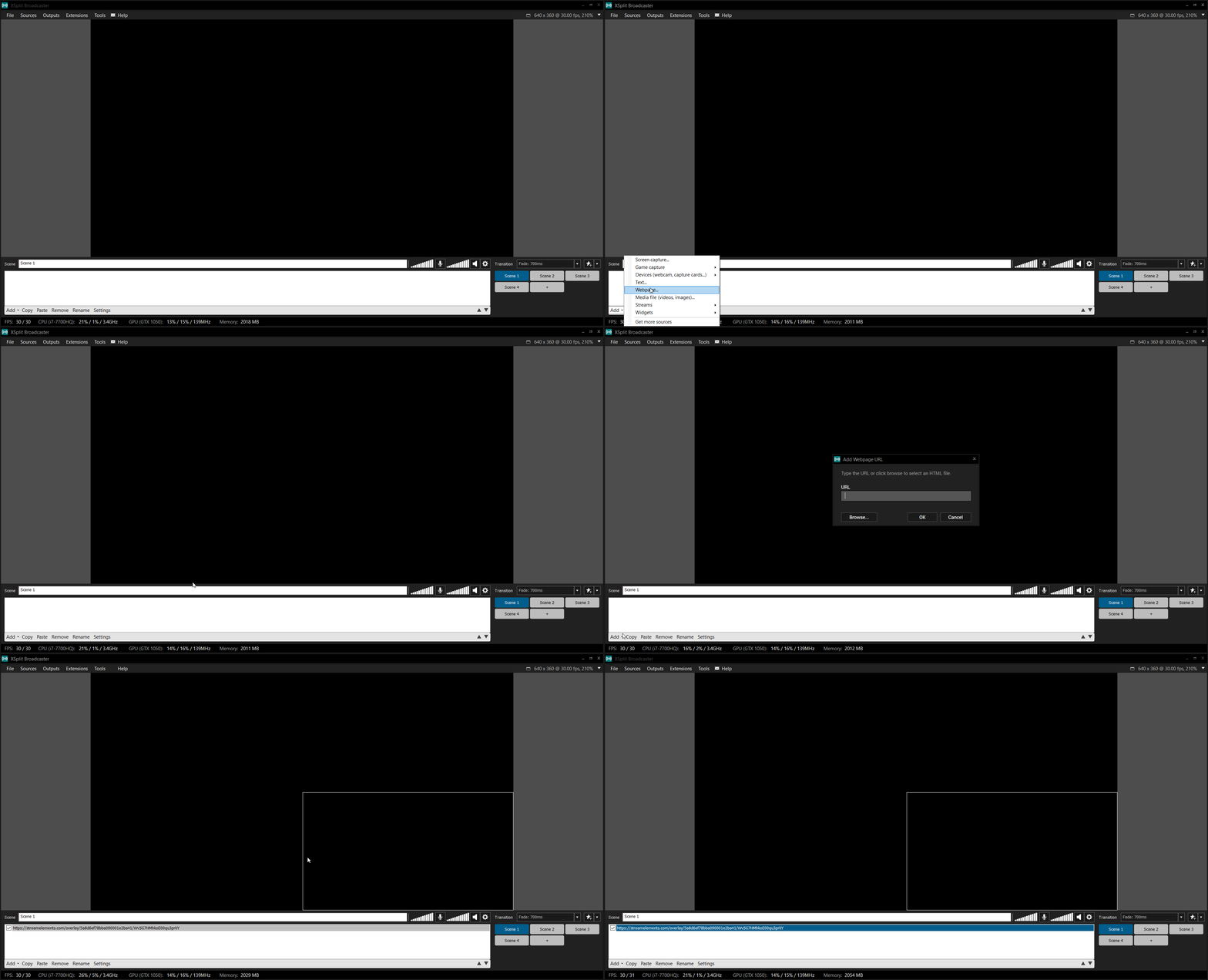 ionic kelp
It's the preview button in top right.
drifting horizon
not preview. "launch overlay"
as it says
how do i get a test notification
that's what im trying to do. test the alert.
round brambleBOT
You can test alerts via the Emulate bell on the lower left side of the Overlay Editor. Simply go to your Dashboard > My Overlays > pencil/edit button on the overlay. Make sure the Preview LIVE on stream option is on to see the alert in OBS/XSplit** https://streamable.com/vtulg9

 empty aspen
 full spoke
hi, sorry is it possible to download obs.live on mac because i can only download the windows version therefore i cant open it on my mac.
round brambleBOT
@empty aspen To add your overlays to OBS, add a new browser source in your scene. Paste your overlay URL in the browser source properties, set the dimensions to 1920x1080 (unless you changed them on the website) and check Shutdown source when not visible. https://youtu.be/KDvLynUqXI4
zenith widget
@full spoke no - obs.live is not supported on mac
full spoke
thank youuu
peak cove
has how to configure automatic response of the bot?
zenith widget
You can setup timers here: https://streamelements.com/dashboard/bot-timers
StreamElements
The Ultimate All in One Platform for Streamers
 safe widget
Hi guys! Need some help. Want to stream path of exile but if i dont fix my fps ingame to 60, ive got massive fps drops in obs - twitch. what can i do?1660 ti - i7 8700 16gb ram..
round brambleBOT
@safe widget There are no "best settings".
Please understand that every setup will be very different.
Any guides or videos that claim otherwise are misinforming. Your best option is to start with a base and adjust as necessary.
You can run the OBS auto-configuration tool. To use the auto-config, click on the Tools menu in OBS, select Auto-Configuration Wizard and then just follow the on-screen directions.
You can use this tool to get baseline settings for your hardware and adjust as necessary from there.
Test, test, and test again. We are happy to offer suggestions for any issues you may be having afterwards, but not a list of settings.
Thank you 
@safe widget For the best OBS support, please join their Official Discord @ discord.gg/obsproject
 formal swan
@zenith widget I still have not received a payout for my own merch I have bought full price i got my own merch before I saw a kick back on money paid out to me buy stream elements what do I do
 white umbra
Where i can set to donations buffer timer?
 grand sundial
Is it possible to remove an donation?
There was a kid who put a 0 to much, ive repayed him, but his name is still in the leaderboard for top tip, can i remove it?
white umbra
haloo admins?
zenith widget
@white umbra If you tag random staff members en masse, you will get kicked from the server.
Do not do it again!
round brambleBOT
@white umbra Not all staff are able to assist with support issues. Please refrain from pinging them or sending them DMs unless asked to.
white umbra
Why they are online then? @zenith widget
zenith widget
@formal swan I would suggest to be patient. There is nothing I can do to help speed up the process.
@white umbra Being online, does NOT mean you can ping them, without knowing what the staff member does in the company.
@grand sundial You can remove the entry in the revenue history.
grand sundial
Thank you for replying KeiZar,
I did remove it there, but its still showing in my all time overlay :/
white umbra
@zenith widget help pls then, where i can set donations buffer timer
zenith widget
I dont understand what tip buffer timer you are referring to
white umbra
if somebody donate me then he first saying the text and then music not both in same time
round brambleBOT
@white umbra Please provide your account ID found at the top of this page: https://streamelements.com/dashboard/account/channels This ID is public info and safe to share here.
white umbra
@zenith widget
zenith widget
Read the above bot response!
zenith widget
I just tested your tip alerts and I could not reproduce the issue you are describing.
round brambleBOT
@white umbra Right click on the BrowserSource > Properties > Scroll down a bit > Refresh cache of current page
grand sundial
Thank you for replying @zenith widget
I did remove it there, but its still showing in my all time overlay :/
zenith widget
which overlay?
grand sundial
"Highest Alltime Tipper"
white umbra
@zenith widget idk my brother donated me yesterday and text and music comes the same time but i want to first hes talking the text and after this comes music
zenith widget
@grand sundial no such overlay
zenith widget
@white umbra Again, i replied your latest tip events and a few test tips and I could not reproduce the issue
follow what the bot is saying
round brambleBOT
Right click on the BrowserSource > Properties > Scroll down a bit > Refresh cache of current page
zenith widget
@grand sundial you may need to remove them from here
grand sundial
I did that too 😦
 fervent abyss
is there any way for the bot to add points to whoever makes a pyramid of emotes?
zenith widget
No
 spring tundra
Hi guys! I thought I had my tip settings set up correctly, but when I withdrew my money last time, it never went to my account. Can I get help with this?
white umbra
@zenith widget go watch and listen 0:16:45
zenith widget
paysafecard?
round brambleBOT
@white umbra
Read and follow our server rules:
- We do not tolerate toxicity! Treat the community team, staff and all members with respect.
- No advertisement or channel promotion, anywhere on the server.
- No NSFW/NSFL
- No unsolicited DMs to server members
Make sure to read #welcome in any server you join.
spring tundra
I go to my Dashboard>SE Pay> Select Witrhdraw Money
I do not see any options to double check my banking details
zenith widget
@grand sundial the custom widget is loading the data directly from the aggregates and unfortunately, there is nothing we can do to fix the aggregates. Someone just needs to tip 50.01
round brambleBOT
@spring tundra Please contact us via email for support with SE.Pay. You can use our contact form here: https://streamelements.com/contact Thank you.
spring tundra
Great! I am emailing now. Thank you very much 😄
grand sundial
Alright bud, Then i know it cant be done atleast and it wasnt on my end :3
Cheers for your time ❤️
untold crest
@grand sundial if you want to overwrite top tipper with something, you may also manually add tip of 50.01 here: https://streamelements.com/dashboard/tipping/list
white umbra
@zenith widget i have this problem if someone donate me he saying the text same time with a music
round brambleBOT
@white umbra Right click on the BrowserSource > Properties > Scroll down a bit > Refresh cache of current page
white umbra
i need to do this in streamelement obs?
zenith widget
Yes
 dense hound
im confused on how I use an overlay using OBS Live
round brambleBOT
@dense hound To add your overlays to OBS, add a new browser source in your scene. Paste your overlay URL in the browser source properties, set the dimensions to 1920x1080 (unless you changed them on the website) and check Shutdown source when not visible. https://youtu.be/KDvLynUqXI4
 forest obsidian
Kmasero Omaer Olsaer
 tidal panther
Oh do you set up donos on mobile to ps4 account
round brambleBOT
@tidal panther Consoles do not have native support for overlays. You would need a capture card, PS4 remote play or Xbox companion app and a PC with OBS in order to have overlays over your console gameplay.
We have an blog post about how to setup console streaming with our essential tools: https://blog.streamelements.com/how-to-stream-on-console-7b620b1c46c3
 distant dawn
Hello there. Stream Elements sees my follower count as 89 in the built in "follower goal" widget, as opposed to my real 45, preventing me from setting up a goal properly
round brambleBOT
@distant dawn To reset goals:
- from the Overlay Editor > Session data on top right (monitor symbol) > Goals tab > reset progress of desired goal
- from the Dashboard > Activity feed on the left > Widget data on the right > Goals tab -> reset progress of desired goal
Note: Goal widgets (progress) only counts up and doesn't go down automatically, if you loose followers/subs.
 lone scaffold
Hello I have a question, I'm using a overlay from Streamlabs, and I received two donations, but donation alerts are not showing up on the stream, altough I receive the donation.
It's because my tip page is from Streamlabs, or tip alerts should work too with streamlabs donation page?
sorry, my overlay is from streamelements*
zenith widget
If your tipping link is not from us, we won't be able to show any tip alerts from SL's tipping link
lone scaffold
So to see the tip alert on the stream, if I'm using a streamelements overlay, the alert will only show up if my tipping link is from Streamelements?
zenith widget
yes
lone scaffold
Thank you so much!
 dark thorn
Hello,
How do I move the message alert in text setting? I would like to place it in the middle and lower it.
 calm geode
Hey guys, i need help with Streamelements Chat stats (is this the right helpdesk?
zenith widget
@dark thorn advanced -> adjust margins
round brambleBOT
@calm geode If you changed your name on Twitch, please follow these steps:
- Visit https://streamelements.com/logout and then log in again by connecting with Twitch.
- On the right side of the dashboard page that opens, select Join under bot settings. If it says Part select that and then select Join to send the bot to the chat. Don't forget to mod the bot by typing
/mod streamelementsin your channel if you have not already. - Post your old and your new name here so that we can update your channel's chatstats tracking (must be done by staff).
dark thorn
Ah yes indeed, thank you.
On the other hand, the text is displayed before the alert (barely a second I would say) how do I make it appear later? Similarly, when the alert is over, the text is still displayed and leaves one second later. When I say the text, I mean the X bits X amount alert
I think everything happens in CSS, right? @zenith widget
zenith widget
In the animation settings -> text appearance delay
dark thorn
There is EVERYTHING, thank you
 raw horizon
👀 So apparently someone in my chat is trying to tip and it no work. They're using PayPal.
And according to Streamelements on their end they "Successfully" tipped.
Same happened yesterday.
ionic kelp
Hopping into chat ^^^^
dark thorn
When I change the font of the text, directly on streamelement we see the change, but I save on the site, when I do a real test, the font does not change for the text. Why ?
zenith widget
restart the browser/obs
dark thorn
Ah yes, indeed, I didn't have the idea to do it, because it changed for the rest of the modifications, except for the font.
 rough grail
How do i reset a dono goal on streamelements?
round brambleBOT
@rough grail To reset goals:
- from the Overlay Editor > Session data on top right (monitor symbol) > Goals tab > reset progress of desired goal
- from the Dashboard > Activity feed on the left > Widget data on the right > Goals tab -> reset progress of desired goal
Note: Goal widgets (progress) only counts up and doesn't go down automatically, if you loose followers/subs.
calm geode
@round bramble
Steps Done.
https://stats.streamelements.com/c/debaba_tv
@calm geode my Old is Waffengebrauch my new is debaba_tv
StreamElements
Description Chat Stats tracks emote usage on Twitch in real time. See which emotes are the most popular on every Twitch channel
 pastel dune
Hello, my StreamElements ChatStats page has a 404 error. Mostlikely because I changed the usernamer a while back - any way to merge the names?
zenith widget
@calm geode done
round brambleBOT
@pastel dune If you changed your name on Twitch, please follow these steps:
- Visit https://streamelements.com/logout and then log in again by connecting with Twitch.
- On the right side of the dashboard page that opens, select Join under bot settings. If it says Part select that and then select Join to send the bot to the chat. Don't forget to mod the bot by typing
/mod streamelementsin your channel if you have not already. - Post your old and your new name here so that we can update your channel's chatstats tracking (must be done by staff).
calm geode
@zenith widget Damn quick! TY
pastel dune
Old: YourAverageLightskin New: Bilson___
zenith widget
should befine now
pastel dune
Still gives me a 404 - page not found
zenith widget
welp, fresh page it is
pastel dune
Cheers I can get on it now atleast^^
 topaz umbra
Hey guys n gals does SE have Alert Parries? for when i get sent 1 bit 100 times
raw horizon
The donations still don't work for one of my viewers.
 visual surge
Hi, need help. Every time i hit the start streaming button, it keeps on streaming to facebook when i already changed the setting to stream to twitch
 sturdy harbor
round brambleBOT
sturdy harbor
round brambleBOT
@sturdy harbor To add your overlays to OBS, add a new browser source in your scene. Paste your overlay URL in the browser source properties, set the dimensions to 1920x1080 (unless you changed them on the website) and check Shutdown source when not visible. https://youtu.be/KDvLynUqXI4
@visual surge StreamElements on top of OBS > Logout > Login
wary halo
The donations still don't work for one of my viewers.
@raw horizon contact PayPal, they are probably holding the money
If they do that, we don't get a signal that a donation happend so it won't show up in our systems
 tender needle
hey how can viewers request media for free?
kind timber
its on streamelements on configs and stuff
tender needle
thanks I figured it out
round brambleBOT
@ionic kelp mass deleted 3 messages.
ionic kelp
@late kettle you don't need to delete to add it to them.
round brambleBOT
Account Merging - Please note:
- Merging accounts only allows faster ways to switch between accounts
- Merging accounts does not allow data sharing between accounts - different streaming platforms, different type of events
- Merging accounts allows duplicating/sharing overlays between the accounts
If you understand the limitations of merging and want to proceed, please find the JWT tokens (!jwt) from both accounts you want to merge and you will be directed to DM them to a staff member.
 late kettle
yea...i have overlays on facebook...to import to twitch to allow twitch stats to bbe displayed
late kettle
yeah im not going to be streaming on faceook...im trying to save all of the work i put into setting up my overlays
 surreal hamlet
Guys my Media Request its not working- anyone can help me?
ionic kelp
@late kettle before I proceed there's 1 last warning.
round brambleBOT
There is no easy way to unlink 2 owner-type accounts from each other. The only way is to make a closure request from here: https://streamelements.com/dashboard/account/security
WARNING: In submitting a closure request, all linked channels within the account will be deleted and you will lose all associated data. This includes overlays, custom commands, timers and past data (tips, subs, etc). You can still reconnect with the deleted account, but you are essentially starting fresh.
 knotty rain
Hello, is it possible to set "ban" instead of timeout?
 rapid heath
Hello, someone can help me how i put the command !discord in the stream elements bot?
I've tried but this is happening
round brambleBOT
@rapid heath If links in chat are appearing as ***** either mod the bot or disable block hyperlinks in your twitch channel settings: https://dashboard.twitch.tv/settings/moderation
rapid heath
Thank you!!!
 fierce tree
hello?
round brambleBOT
@fierce tree Welcome to the helpdesk! Please let us know how we can assist you today and a support volunteer or staff member will assist you as soon as they are available. Thank you for your patience.
fierce tree
can someone help me
twin sentinel
Please let us know how we can assist you today and a support volunteer or staff member will assist you as soon as they are available. Thank you for your patience.
 rugged adder
hi, I cannot get streamelements page to load. works ok on other laptop, mobile phone, etc. all I get is a white screen & help. I have tried doing the ctrl shift r thing and nothing happens... can you help?
twin sentinel
This is a local issue and most likely something is blocking the connection to StreamElements. Check firewall, AV and other connection settings.
rugged adder
ok, if have a problem, i'll fire back here after checking what you have mentioned. cheers Beano
sorry Benno
fierce tree
When i click preview an overlay it opens a new page to show it but it zoomed in super far.. it also does this when i put it into obs and idk how to change it
round brambleBOT
@fierce tree To add your overlays to OBS, add a new browser source in your scene. Paste your overlay URL in the browser source properties, set the dimensions to 1920x1080 (unless you changed them on the website) and check Shutdown source when not visible. https://youtu.be/KDvLynUqXI4
fierce tree
thx
 glass token
Hi, I'm Alex and i have a problem with alerts, they can't appear when someone follow my channel. What I can do? (I'm spanish so sorry if are mistakes).
 strong hamlet
hello my source not in my obs why is a problem
round brambleBOT
@glass token OBS > Settings > Advanced > Scroll down > Enable or disable Browser Source Hardware Acceleration, depending on its current state > Restart OBS (This does not apply for OBS on Mac)
https://i.imgur.com/ggMe9ZE.png
 elder sorrel
@strong hamlet You may have to do the same thing above
lament blade
please may i confirm something: if an anonymous tipper donates and uses paypal for the transaction, there is no way that i can see that tipper's paypal-registered email address, right? their transaction is completely anonymous to me?
 dull mantle
Hey everyone is there any way to change the redeem message when someone redeems points?
ionic kelp
@dull mantle you mean the "user redeemed item" response?
glass token
Thank you i will try and see
 long warren
Hello! Good Day! I have removed the scene source on accident. The one with globe next to it. Is there a way to retrieve it back?
 unkempt basin
Hello - Apologies if this is in the wrong channel, but I use twitch so I think its the right one. I set up all of my SE olverlays in 1080P, but I am adjusting my base canvas down to 720P to reduce overhead. Is there an easy way to change the canvas size on existing overlways or do I need to remake them?
lament blade
As a mod on a twitch Chanel what command do I do to set up a poll
Like a voting thing
 sweet socket
check #widget-share @lament blade
 random bramble
Media Share isnt auto playing my videos/playlists.
 pearl smelt
does stream elements have transitions
and any tips for overlay appearing slower after transition
 ivory coral
do streamelements loyalty settings only work with twitch or will it work with youtube to?
wary halo
Twitch only
mortal dove
yoooo
would you say these are good numbers
anything concerning?
i have 20mb upload but suffer with intermittent connection hence the low bitrate though
ivory coral
is there any extensions i can get that allows it to go on YT?
random bramble
Twitch only
 harsh ivy
my latest follower etc isnt updating on the dashboard or overlay.. any help?
random bramble
Good luck getting any answers here.
round brambleBOT
@harsh ivy Please provide your account ID found at the top of this page: https://streamelements.com/dashboard/account/channels This ID is public info and safe to share here.
@harsh ivy Please provide your account ID found at the top of this page: https://streamelements.com/dashboard/account/channels This ID is public info and safe to share here.
wary halo
does stream elements have transitions
@pearl smelt we don't, but there are a bunch of free ones on the interwebz
harsh ivy
Account ID
5f4f75dd75291436bf5e8f96
wary halo
i'll send it to staff so they can do magic
wary halo
Account ID
5f4f75dd75291436bf5e8f96
@harsh ivy i've let the staff resub your webhooks so it should work from now on, missed events can't be fixed though.
harsh ivy
oh awesome, thank you for the help 🙂
 maiden maple
Hi! I'm pretty new to streaming and trying to use the 'text over image' option for my alert, however the text doesn't show. It seems to work on both of the other options but not this one
round brambleBOT
@maiden maple Text not showing up over your alerts? Go to the Advanced Text Settings and set the top margin to 50, you can work your way to the right position from there.
 shut creek
Hey 🙂
I Recently changed my name on and now im getting the 404 Error. Old name was SirPanCakesXD New one is SirPanny
Thanks
 muted grotto
anyone knows how to fix infinite loading extension?
lament blade
How do I turn on a stream overlay
round brambleBOT
@lament blade To add your overlays to OBS, add a new browser source in your scene. Paste your overlay URL in the browser source properties, set the dimensions to 1920x1080 (unless you changed them on the website) and check Shutdown source when not visible. https://youtu.be/KDvLynUqXI4
 granite swan
Hello!
I'm trying to configure and use Streamelements for my stream, I kinda understood everything I need but i'm encountering two problems:
-
In the chat widget (to get my twitch chat on screen), I said to ignore messages from "StreamElements", saved the overlay and restarted OBS to be sure, but the bot's messages are still showing...
-
I'm trying to create a shoutout command, using the variable ${args.word} (so it's impossible to "!so LUL" for exemple, as it's an emote), but when I test the command, with my nickname (!so Dkeagle1911), it shows ${args.word} in the response, where it should be my nickname...
Any help would be appreciable haha,
Thank you already!
 static pilot
Hell team,
I’m struggling with an issue in the variations of Sub Alerts. Right now I’m using fields to change the output, although the fields save exactly the same no matter the variation?
Like sub alert is {name} then gifted sub should be {sender} but it seems that when I try to save the variation it changes all of the variations.
I’m using custom CSS btw
 sudden flint
Is there an issue with uploading images right now? If not is there an image size limit?
wary halo
30mb
 quiet sedge
Please I Need Help 😦 Everytime I try to Stream i Got the Error: "NVENC Error: init_encoder: nv.nvEnclninitializeEncoder(enc->session, params) failed: 8 (NV_ENC_ERR_INVALID_PARAM)" ....what can i do???
Wednesday there was no problem 😦
round brambleBOT
@quiet sedge For the best OBS support, please join their Official Discord @ discord.gg/obsproject
sudden flint
Ty @wary halo, my file is .jpg and is only 730kb so I'm not sure why it isn't loading.
I've tried both chrome and edge. I'll try a different file type next.
 nova tartan
Where can i enable SE.pay?
round brambleBOT
@nova tartan SE.PAY is available for streamers who are at least 18 years old, with bank account under their name in one of the following countries and have at least 101 follower (Twitch) / 101 subscribers (YouTube):
Austria, Belgium, Czech Republic, Denmark, Finland, France, Germany, Ireland , Italy, Netherlands, Poland, Portugal, Slovakia, Spain, Sweden, Switzerland, United Kingdom, United States.
If you meet these criteria and don’t see SE.Pay, let us know.
For information on SE.Pay payment methods, their fees and settlement times see https://streamelements.com/dashboard/tipping/fees.
 blissful escarp
do i have to withdraw the money that i got through se pay
i accidentally set it up and i got a donation but i want to get it through paypal
not se pay
wary halo
Yes you need to withdraw it, but there is a minimum of 5 dollar
blissful escarp
i have 90 in there
can i get rid of se pay after i withdraw it
and do paypal or no
wary halo
sure, just disable it as an option in the tipping settings @blissful escarp
blissful escarp
after the withdraw?
wary halo
yes
 atomic silo
Hello, my ground control is stuck like this, and it doesn't play anything. Any solutions?
it's as if there is a video stuck, which can't be removed, skipped, or anything
or if I skip it, it just skips the next video
wary halo
@nova tartan you need a few more followers since Twitch is showing 97 and you need 101 for SEpay
round brambleBOT
@sour kayak For the best OBS support, please join their Official Discord @ discord.gg/obsproject
 shy bridge
need help dm me
blissful escarp
i have another question
 compact mural
Hello... i have a question... what is the best program to broadcast and use StreamElements? obs.live ? xplit ?
blissful escarp
it’s giving me the option to go ahead and delete the se pay
will that get rid of the money too
if i disconnect the se pay
 weary crow
How do i add a donation button
wary halo
Hello... i have a question... what is the best program to broadcast and use StreamElements? obs.live ? xplit ?
@compact mural OBS.Live
peak cove
how to activate a spam filter on messages?
wary halo
if i disconnect the se pay
@blissful escarp withdraw the money first 😛 i don't know what happens if you don't
peak cove
loyalty messages
round brambleBOT
@weary crow New to StreamElements?
Check out our YouTube channel https://www.youtube.com/c/streamelements/videos
with tutorial videos from setting up the basics, to in depth details on how to use our product.
New to OBS? Here is a 4 step quickstart guide
https://obsproject.com/wiki/OBS-Studio-Quickstart
Want to learn even more? Here is an in-depth overview
https://obsproject.com/wiki/OBS-Studio-Overview
wary halo
should also apply to the regular spam filters
peak cove
how do i activate?
atomic silo
can anyone help with my ground control problem? even reinstalling didn't work.
 fallow elbow
hi how do i logout of groundcontrol program i saw a post on reddit saying to ask discord for help!
wary halo
check the pinned messages in this channel
fallow elbow
wow ty no simple logout button xd
atomic silo
no solution for ground control song requests not working?
update: it only works if I click show on stream, otherwise it doesn't play anything.
 onyx geode
hey i need help on a lay out for my over watch team stream to commentate is there anyone willing to help
 mental copper
how do you rename your chat bot?
round brambleBOT
@mental copper Currently renaming the bot fully works with OBS.Live.
You can follow this video guide to set it up: https://discordapp.com/channels/141203863863558144/494513233416421386/561516184718278676
If you don't want to use OBS.Live and want to stick with Ground Control, please let us know your Twitch username.
@bold bramble
Read and follow our server rules:
- We do not tolerate toxicity! Treat the community team, staff and all members with respect.
- No advertisement or channel promotion, anywhere on the server.
- No NSFW/NSFL
- No unsolicited DMs to server members
Make sure to read #welcome in any server you join.
 bold bramble
okay
 regal lion
Hey I have a question, a viewer has donated me 50 euros but i didnt got it on my Paypal, but then someone else has donated me something a minute later and I got from him the Money on my Paypal. Does someone know why? 😮
 loud mulch
how i can do stream but not only in 1080p
 abstract hemlock
@regal lion Did you saw the alert for those donations?
abstract hemlock
@loud mulch transcoding (qualities) are "random" between affiliates
@regal lion If you believe there may be an issue with the transaction, you'll need to contact PayPal support as StreamElements is only a passthrough service and never actually gets involved with the transaction or touches the money.
regal lion
Oh :/
 fallow ruin
!watchtime and !points command is saying 0 seconds and 0 points
round brambleBOT
10 minutes of watchtime are given to those in chat when the loyalty points are handed out (every 10 minutes). Therefore, loyalty must be enabled for watchtime to work properly.
There is no direct link between watchtime and all-time points.
It can’t be calculated from the amount of all-time points a user has because subs may earn points at a faster rate and !bonus all command increases all-time points for users in chat at that time.
Giving points to a single user does not affect all-time, only when giving to all in chat.
 untold crow
hey guys, for some reason when I upload a custom image to my alert box it just shows the original image and not the one I uploaded. Does anyone know how to fix this?
abstract hemlock
@untold crow check the variations settings
untold crow
@abstract hemlock it worked! Thank you 😄
ivory crest
Hello i have got a error 404 in chat stats. how to fix it?
My actual name PTG_ie
Earlier name xvxenox
thanks in advance
halcyon fulcrum
What do I need to do to make the name in an alert show properly in chat? I'm using the alertbox. The alert shows the name on screen, but shows $username in the chat message.
 noble stump
use {user}
halcyon fulcrum
Thank you!
noble stump
my media share doesn't work on stream in the app but it works in the overlay editor any ideas why?
round brambleBOT
@noble stump Right click on the BrowserSource > Properties > Scroll down a bit > Refresh cache of current page
 frail falcon
Hey guys, so my overlays doesnt show on obs, i refreshed the Source alot of times but still the same
round brambleBOT
@frail falcon The default resolution for StreamElements overlays (theme and custom) is 1920x1080. Please add them in OBS at their full resolution and use CTRL+F to fit to screen if necessary. You can then downscale your stream in OBS settings > Video if you'd like https://i.imgur.com/6bWXxjR.png
noble stump
Alredy did that everything works exept the media request
Media request is viseble on the overlay editor but not in obs
and yes i seved my changes
abstract hemlock
save the overlay and delete the browser source that you have on OBS and add it again
frail falcon
mine didnt work
noble stump
nope doesn't work
round brambleBOT
@frail falcon OBS > Settings > Advanced > Scroll down > Enable or disable Browser Source Hardware Acceleration, depending on its current state > Restart OBS (This does not apply for OBS on Mac)
https://i.imgur.com/ggMe9ZE.png
@noble stump StreamElements on top of OBS > Logout > Login
noble stump
hardware exelaration didn't change anything
frail falcon
for me it did...now its working
blissful escarp
hey i entered the wrong ssn and it worked but i cant do anything about it because it says its verifying my bank
noble stump
now this hapens
blissful escarp
what do i do???
knotty rain
Hi, is it possible choice ban instead of timeout lenght in banned words?
round brambleBOT
@blissful escarp Please contact us via email for support with SE.Pay. You can use our contact form here: https://streamelements.com/contact Thank you.
blissful escarp
ok i sent it
 fast pebble
Can someone help me please? Looks like this image is bugging out on the cheer...
I even saved everything, re-opened and it's still doing that O_o
abstract hemlock
@fast pebble check the variations settings
fast pebble
Ah thank you so much 
 uncut stream
What was the setting to help with pixelation?
Like when I play Risk of Rain for example there's so much shit happening on my screen at once that it'll pixel the stream out
Even if the stream software shows it completely clear
 carmine saffron
Question: my !chatstats link isn't working... I'm getting a 404 page not found but i never changed my twitch name afaik... could someone take a look perhaps?
abstract hemlock
twitch username please
carmine saffron
baron_fortesque
abstract hemlock
i just made a new chatstats page for you
carmine saffron
awesome, thank you very much
 mortal rain
Just switched over from Streamlabs. How do I get Text GDI to work with my current follower?
round brambleBOT
@mortal rain We've released our new Overlay Editor revamp. You can check out the changes and how to work with it here: https://youtu.be/X5VzXjqAsjk
Check out our blog post as well: https://blog.streamelements.com/streamelements-overlay-editor-just-got-even-better-c22cb5b4853e
 frank imp
Is there anyway to disable videos from a donation but still keep the notification?
 molten gull
Is there a command for bankheist?
abstract hemlock
@molten gull you can check this: https://discordapp.com/channels/141203863863558144/457957557470887947/714523237819875358
lone scaffold
Hello I'm making my tipping link from streamelements, is there any option to add credit card as payment method too?
round brambleBOT
@lone scaffold SE.PAY is available for streamers who are at least 18 years old, with bank account under their name in one of the following countries and have at least 101 follower (Twitch) / 101 subscribers (YouTube):
Austria, Belgium, Czech Republic, Denmark, Finland, France, Germany, Ireland , Italy, Netherlands, Poland, Portugal, Slovakia, Spain, Sweden, Switzerland, United Kingdom, United States.
If you meet these criteria and don’t see SE.Pay, let us know.
For information on SE.Pay payment methods, their fees and settlement times see https://streamelements.com/dashboard/tipping/fees.
lone scaffold
I have more than 101 followers on twitch but I'm not from those countries
 rose flint
I saw yiu guys have an reticle for helping stream lag. I experience lag all the time, but twitch always says my stream is excellent and requires no changes. I stream in xbox and monitor on my chromebook.
Article*
 wet holly
For my alert box on overlay scenes is the only way to update the alert box change it on every overlay or is there like a master control
 spare haven
ok so a channel i mod for just recently switched to streamelements and the addpoints command which we changed the command to bestow isnt showing up in chat. Ill type !bestow @ user 200 and it says that the user wasnt found idk whats going on because every other command works and ive checked that the command is enabled and that the user we try to give points to is in chat talking im not sure whats going on
spare haven
ok let me try it
thank you jeez i have been adjusting things back and forth and never though to not use the @
round brambleBOT
@amber forum If you changed your name on Twitch, please follow these steps:
- Visit https://streamelements.com/logout and then log in again by connecting with Twitch.
- On the right side of the dashboard page that opens, select Join under bot settings. If it says Part select that and then select Join to send the bot to the chat. Don't forget to mod the bot by typing
/mod streamelementsin your channel if you have not already. - Post your old and your new name here so that we can update your channel's chatstats tracking (must be done by staff).
 amber forum
All that stuff is done
lone scaffold
so there is any option to add credit card on my streamelements tipping link?
round brambleBOT
@lone scaffold SE.PAY is available for streamers who are at least 18 years old, with bank account under their name in one of the following countries and have at least 101 follower (Twitch) / 101 subscribers (YouTube):
Austria, Belgium, Czech Republic, Denmark, Finland, France, Germany, Ireland , Italy, Netherlands, Poland, Portugal, Slovakia, Spain, Sweden, Switzerland, United Kingdom, United States.
If you meet these criteria and don’t see SE.Pay, let us know.
For information on SE.Pay payment methods, their fees and settlement times see https://streamelements.com/dashboard/tipping/fees.
abstract hemlock
@amber forum ask your friend to post here his old and new username
lone scaffold
I'm not from those countries, is there any other option to add credit card as a payment method on my streamelements tipping link?
amber forum
@abstract hemlock Ok
 inland bridge
Hi, I'm having so much trouble trying to connect custom bot name. I've attempted to troubleshoot, disconnect/reconnect and still no luck. There is no option for me to change it in Ground Control but in Stream Elements OBS. I've logged in as the bot like 10+ times but it just won't stick.
 final flax
Old username was Gamingdude1155 and new one is Tutelardwarf @abstract hemlock
abstract hemlock
done @final flax
final flax
ok thanks
 uneven seal
How do find and insert our "donations" link
round brambleBOT
@inland bridge Currently renaming the bot fully works with OBS.Live.
You can follow this video guide to set it up: https://discordapp.com/channels/141203863863558144/494513233416421386/561516184718278676
If you don't want to use OBS.Live and want to stick with Ground Control, please let us know your Twitch username.
 covert vector
hi i have been having major issues on making a account 2 hours ive been getting this https://streamelements.com/login?redirect=https://streamelements.com/dashboard?error=signup already in progress
StreamElements
StreamElements is the leading platform for live streaming on Twitch and Youtube. StreamElements features include Overlays, Tipping, Chat Bot, Alerts, Loyalty, all fully integrated and cloud-based.
inland bridge
@inland bridge Currently renaming the bot fully works with OBS.Live.
You can follow this video guide to set it up: https://discordapp.com/channels/141203863863558144/494513233416421386/561516184718278676
If you don't want to use OBS.Live and want to stick with Ground Control, please let us know your Twitch username.
@round bramble t0futac0
atomic silo
@abstract hemlock hey, sorry for pinging you but do you know anything about the recent ground control bug where it doesn’t play any songs while not showing the video on stream, and doesn’t play automatically when I do show it on stream? It literally stopped working 2 days ago, and I’m not alone with this. I have no way of making song requests work, so I assume this is a bug..
I’ve been asking for days now but failed to get any help, so I’d just like to know if you guys are aware of this bug at this point
lone scaffold
I'm not from those countries, is there any other option to add credit card as a payment method on my streamelements tipping link?
@lone scaffold can someone help me? Thank you
ionic kelp
@lone scaffold Unfortunately if you don't fit into those countries it's not available atm.
lament blade
hey i putted my stream store to redeem some points for a sound effect, but it doesnt go on stream(the redeem). Anyone can help?
ionic kelp
@lament blade You got the redemption widget added to an overlay?
peak cove
donate does not appear on the screen, only the voice, what can it be?
round brambleBOT
@peak cove OBS > Settings > Advanced > Scroll down > Enable or disable Browser Source Hardware Acceleration, depending on its current state > Restart OBS (This does not apply for OBS on Mac)
https://i.imgur.com/ggMe9ZE.png
 umbral cypress
my hype cup seems to be freezing / breaking while emulating subs for some reason, everything else is working
 warped pawn
I've noticed that kappagen emotesplosions sometimes disappear pretty quickly. Is there a way I can set how long they last?
I know about the setting for the duration of chat emotes, but I'm looking for a setting for the duration of emotesplosions.
umbral cypress
i believe they last as long as the event themselves
so the duration would be set by the alert settings
lament blade
Hey, I need help,
 potent root
I have a link for my overlay, now how do I add it to my channel???
lament blade
I managed to successfully add the sources to the scenes after editing the overlays, but for some reason I’m experiencing lag in the overlays appearing around my video capture windows.
spare haven
is there a way to auto give loyalty points to a chatter that uses a channel emote after say someone subs, follows, cheers, or tips? like a thank you for the people welcoming in the new viewer?
warped pawn
@umbral cypress I mean when I use the kappagen command in my chat, not when an alert triggers it.
zenith widget
@spare haven loyalty points can be given when someone followers and then subs and then cheers
but not when they use an emote
spare haven
Alright was just curious if it was possible thanks
zenith widget
@lament blade thats the loading time when you open the scene
@hard sierra resolution of what?
 hard sierra
i got it, thanks though.
 tired yacht
bot stopped responding, what happened ?
ionic kelp
@tired yacht What part isn't wanting to work?
tired yacht
@ionic kelp only the points command is working, otherwise nothing works
ionic kelp
Looks fine to me. You also have the points command disabled https://streamlabs-is-a.totallysuspicious.website/7gfnFpp.jpg

 scenic sapphire
Heyo any staff. I'm the guy reporting Activity Feed taking a lot of GPU usage.
ionic kelp
@scenic sapphire See you've made it from twitter 
Are you using the page with it or doing it in popout mode?
scenic sapphire
@ionic kelp Popout
tired yacht
@ionic kelp
 tired yacht
sorry ;-;
lament blade
@zenith widget will it be visible in the stream though ?
That’s the only thing I’m concerned about.
round brambleBOT
@tired yacht If your commands recently stopped working and you're using OBS.Live and a custom bot name do the following:
- In OBS.Live, click on the hamburger menu (three stripes) at the top left of your activity feed
- Click on Stream Settings > Custom bot name
- In the Custom bot name field select Set custom bot name, not your already existing username (with capital letters). Note: If you already connected an account that way, the third entry will show as the account name (see image https://i.imgur.com/sO7fWOX.png).
- Scroll a bit down and click on the purple Connect Custom Bot Account button
- Log in as usual and Authorize the custom bot name
- Back in the Activity feed, click on the Send Test Message button and check if your custom bot name starts working again
ionic kelp
I'm fairly certain he's using this and this will fix it.
My portuguese is lacking so you'd probably have better luck.
zenith widget
@lament blade well yes. The only way to prevent is to use studio mode or to remove the "shutdown source when inactive" but that may cause double alert sounds
 floral badge
hi stream elements
tired yacht
ok
floral badge
how do i add my gardening overlay to my stream elements phone app
ionic kelp
ionic kelp

 severe delta
So I am trying to setup stream elements credit roll for OBS...I have it saved the way I want it however all it's showing is the main title and subtitle; its not showing followers, hosts, etc...I have everything checked so it should all be showing up. Am I doing something wrong or is this feature broken?>
lament blade
What if I did the multiview windowed option in OBS studio @zenith widget ???
zenith widget
Not sure what you are referring to.
@severe delta if you are having issues with a custom widget, i would suggest to check in #dev-chat
lament blade
Do you not use OBS ? @zenith widget
zenith widget
No I use GoLive
Of course I use OBS
I'm just not sure what you are referring to
is it this?
is this this?
lament blade
Yes
zenith widget
Right, Idk how this works honestly
i've discovered it a few months ago, but I really don't know how it works and figured its mostly used if I'm like rebroadcasting something
or for example i'm broadcasting a big event with multiple camera angles
lament blade
As I’m streaming, I keep the overlay windows open within a browser, and the multiview lets you see all the overlay windows at a single time, so wouldn’t that eliminate the lag during the stream, cuz as I switch between the diff OBS scenes I have, there’s no lag, that’s why I was asking if it’s a good solution?
zenith widget
maybe 
 shy harness
hey
 humble sandal
how do i add chat alerts so whenever someone follows, stream elements replies with thank u for following twitch name
zenith widget
@scenic sapphire I just want to point out that i've heard more side problems being caused when COD is being played.
shy harness
no way
humble sandal
do u midn helping us keizar
zenith widget
@humble sandal https://streamelements.com/dashboard/bot-modules
StreamElements
The Ultimate All in One Platform for Streamers
humble sandal
omg thank u
shy harness
omg ur the best
zenith widget
I mean, if you give 0.00000005 seconds to open what i want to open
humble sandal
LOL
zenith widget
sure i will help 
shy harness
be faster next time
humble sandal
Lmao
shut creek
Any chance someone could help me with the !chatstats 404 error, Posted before but still no update
round brambleBOT
@shut creek If you changed your name on Twitch, please follow these steps:
- Visit https://streamelements.com/logout and then log in again by connecting with Twitch.
- On the right side of the dashboard page that opens, select Join under bot settings. If it says Part select that and then select Join to send the bot to the chat. Don't forget to mod the bot by typing
/mod streamelementsin your channel if you have not already. - Post your old and your new name here so that we can update your channel's chatstats tracking (must be done by staff).
shut creek
Old SirPanCakesXD
New SirPanny
scenic sapphire
@zenith widget Appears so. It's not happening with Battlefront II. That's so weird
zenith widget
@shut creek done
@scenic sapphire yea, i've seen more issues reported with other programs when COD is open
and i have no idea why 
shut creek
Thanks dude 🙂
round brambleBOT
@robust ravine
Read and follow our server rules:
- We do not tolerate toxicity! Treat the community team, staff and all members with respect.
- No advertisement or channel promotion, anywhere on the server.
- No NSFW/NSFL
- No unsolicited DMs to server members
Make sure to read #welcome in any server you join.
lament blade
Hi, I can not put the bot in my live
 carmine warren
anyone els having problems with media request built into SEobs
zenith widget
what problem are you facing?
round brambleBOT
@lament blade Go to the Dashboard > Right side > Part channel > Join channel (https://streamelements.com/dashboard)
carmine warren
media only plays when press show on stream soon as you press stop showing on stream no music plays been like this past 5 days ish
tried reinstalling etc still same
round brambleBOT
@carmine warren StreamElements on top of OBS > Logout > Login
 primal lichen
Where do i go for SE.Pay help
round brambleBOT
@primal lichen Please contact us via email for support with SE.Pay. You can use our contact form here: https://streamelements.com/contact Thank you.
primal lichen
 oof was hoping id have someone i could ask 1 to 1 cause im not sure if my bank is compatible
wary halo
if you use that form and make a ticket, you get 1 on 1 😉
primal lichen
QQ one on one but i hate emails but i guess ill settle for contact form
wary halo
due to the sensitive nature of the information it's not allowed to do that support in discord
primal lichen
Yeah i feel that can i ask you a vagueish question real quick then
wary halo
sure
primal lichen
Would stuff like Cashapp Routing work with SE pay or a Chime bank account? I know some sites (Including paypal) wont let you link those kinds of online banks
zenith widget
If you are from USA for example
wary halo
no i believe that is not an option with SEpay
zenith widget
we need an bank account number + branch code for example
which i don't think Cashapp provides
primal lichen
Ah then sweet chime gives me that
Cashapp just gives routing + account number
Now i just gotta figure out why it denied then so time to wait for a email
zenith widget
@primal lichen goty? 


 primal lichen
I decided to start using SE.Pay tonight 
didnt think itd be this big of a setup
but thank you clip bot xd
primal lichen
Sounds good thanks i prob messed up on the location
 humble bolt
Hi so I'm trying to get music on my streams and the music is allowed to be on the stream so as long as I share links/credit on the stream itself...is there anyway I can get Streamelements to show spotify music on my stream whether it's a command or a widget??
zenith widget
Unfortunately no.
Spotify asked us to take our integration out and afaik the command api that should work, doesn't work all the time
this one
humble bolt
so is the best option youtube?
ionic kelp
And even then you're not allowed to stream spotify music as it's against their ToS
humble bolt
yeah I'm trying to stream Gamechops and their label agreements say as long as I share links on stream but I don't even really know what that means
so is the best way I'm assuming just to loop it on the album on youtube or something?
ionic kelp
Yup.
humble bolt
does !song show the link if people ask?
ionic kelp
Only from our media request.
You actually can use our backup list from that feature with their library.
humble bolt
what is that? sorry I'm just starting to get into streaming lolol
atomic silo
Why doesn’t my media request work on ground control?
humble bolt
I guess for me the easiest thing to do would just keep adding youtube music that's usable for the stream and just keep adding it to the queue in the media request right
zenith widget
@atomic silo can you elaborate?
ionic kelp
@humble bolt https://streamelements.com/dashboard/mediarequest/settings minimum level to you and put the playlist link in the spot.
humble bolt
ok thx
 winter sphinx
Hello , I was having a weird issue while I was streaming, like if I was lagging but my internet seems to be fine
👀
round brambleBOT
@winter sphinx Please provide a log from your last stream. To do this, in OBS go to Help > Log Files > Upload Last Log File and paste the link to the log file here.
winter sphinx
lament blade
thanks now but i can't get them to say something help me please
zenith widget
winter sphinx
?
zenith widget
Read the analysis
zenith widget
- The log is not full
- i don't understand what issue you've experienced
- it might be possible
atomic silo
@zenith widget if the “show on stream” button is not clicked, I can only request songs by copying the link, my viewers cannot with commands. Songs requested by me directly don’t play at all, I can’t even get them to start, it’s as if there was a video stuck in the player. !skip -ing it just skips the upcoming song that would never play on its own. If I start sharing on stream (click the button), it works but it does not autoplay. Someone else contacted me that they have the same issue, and added that on a different pc it works.
winter sphinx
ty ill try
atomic silo
I’d also add that I didn’t change anything, it was working fine then it suddenly became like this.
humble bolt
I keep getting an issue where show on stream doesn't work because it can't find my media share widget
:/
 prisma relic
do you have a media share widget?
zenith widget
@atomic silo open a cmd prompt and type in this:
del %homepath%\.se-gc\config.json
prisma relic
are you using labs or elements ?
prisma relic
i'm not familiar with streamlabs unfortunately
humble bolt
mmk yeah I'm just tryna figure out music on my stream since it's a lil bit of a hassle
humble bolt
I'm trying streamelements as well to play music
trying to see which one works
is there a specific streamelements media share widget for me to add to my overlay
prisma relic
i might be biased, but why not just use Elements?
humble bolt
oh I'm using streamlabs obs so I figured their widgets would all be native right?
prisma relic
🤷 maybe
humble bolt
haha I have streamelements in my chat because I was told it had a lotta good starter commands and stuff