#helpdesk-twitch
1 messages · Page 734 of 1
 lunar pollen
 round brambleBOT
@lunar pollen I am just a simple bot, doing what the amazing support team tells me to do! They are the real MVP's here!
 lusty hinge
I cant get the theme to work in OBS
round brambleBOT
@lusty hinge The default resolution for StreamElements overlays (theme and custom) is 1920x1080. Please add them in OBS at their full resolution and use CTRL+F to fit to screen if necessary. You can then downscale your stream in OBS settings > Video if you'd like https://i.imgur.com/6bWXxjR.png

 harsh remnant
Anyone have any idea why a sub wouldn't show up in my activity feed at all?
round brambleBOT
@harsh remnant Twitch prime (new and resub) and paid subscriptions (resub only) must be shared in chat manually by the person subscribing in order for the subscription information to be sent to StreamElements. For twitch prime, the user needs to have sharing enabled on https://www.twitch.tv/settings/prime. For paid subs, if the share box doesn't show up immediately it will when they refresh the page. https://i.imgur.com/VNJN0Uv.gif https://i.imgur.com/2297EA7.png


 daring crag
I am assuming that the answer to my question is yes?
harsh remnant
@round bramble Thanks!
 wary halo
I am assuming that the answer to my question is yes?
@daring crag yes you can ask here
daring crag
I am having an issue with Kappagen not using the emotes I have selected, and is instead using a bunch of random emotes. Is there something I am missing on this? How can I fix this?
 strong kernel
@daring crag Cheers in kappagen use the cheermote used in the cheer. When emulating, it uses random cheermotes. In practice, if unique cheermotes are not used, then the ones you set will be used.
daring crag
Ahhhhh okay that makes a lot of sense, thank you!
 wise cliff
For some reason I am putting in a command which uses emotes, but when I test it, it only gives the shortcut words instead of the images. What the heck am I doing wrong
strong kernel
The bot needs to be subbed to your channel to use your emotes.
Just like any other Twitch account.
wise cliff
Huh. That's odd I never knew that.
 lament blade
Hey! someone help me I enabled the command! points so that when a person caught on my chat does not happen do not tell them the points. Can someone help me please???
lusty hinge
thanks you i got it working now amazing
strong kernel
@lament blade
wary halo

lament blade
Hello! Trying to set up my Loyalty currency. I am a little confused as to how I set it up so that viewers can do things with the Lotalty points they collect or if they are just for bragging rights.
Thanks!
wary halo
Hello! Trying to set up my Loyalty currency. I am a little confused as to how I set it up so that viewers can do things with the Lotalty points they collect or if they are just for bragging rights.
Thanks!
@lament blade https://www.youtube.com/watch?v=BXGMjHqwVFE&list=PLCDDKlFdScbEwdx5AntcQIS1InkFJwHtv&index=21&t=110s

The StreamElements Stream store lets your viewers redeem Loyalty points (collected by watching your stream) to get special perks, fun sounds, and even game keys and discount codes!
The StreamElements Stream store is part of the Loyalty system, helping you to engage with your ...
and

StreamElements Loyalty System helps grow your community and turn your viewers into fans. Viewers are awarded points for viewing your stream that can be redeemed in various ways.
StreamElements loyalty includes:
- Stream store
- Contest
- Giveaways
- Media Request
- Modules ...
strong kernel
The big "JOIN CHANNEL" button I took a screenshot of for you.
lament blade
Hello guys, could I please ask you to migrate chatstats of rybsonlol into new nickname rybsonlol_?
man sorry because im brazilam so i don't understand very well where is this button?????
lament blade
@strong kernel OMG thank yuo very very much
 topaz stone
Arabic
lament blade
@strong kernel just one more question which is the command that gives points to all viwers
?
strong kernel
!addpoints all
 tired yacht
the variable ${game} is in trouble ?
 sage badger
@strong kernel I need help with overlays when i put the resolution to the right one and put the alert in the middle of the page it ends up of my screen on obs!
round brambleBOT
@sage badger To add your overlays to OBS, add a new browser source in your scene. Paste your overlay URL in the browser source properties, set the dimensions to 1920x1080 (unless you changed them on the website), and ☑ “Shutdown source when not visible” https://youtu.be/KDvLynUqXI4
lament blade
thanks guys!
tired yacht
change the category by bot, the variable ${game} is not updating the category
 tulip cove
I add some sounds on my StreamStore, but when the viewers buy it i can´t hear the sounds
 abstract hemlock
@tulip cove You need to add redemption widget
abstract hemlock
@tired yacht change the category here: http://dashboard.twitch.tv/ and try again
lusty hinge
I cant get my display capture to work on the main overlay
abstract hemlock
@tulip cove If you already have an overlay just add the widget:
round brambleBOT
@lusty hinge For the best OBS support, please join their Official Discord @ discord.gg/obsproject
abstract hemlock
@tulip cove We do not provide one on one voice support. Please ask your questions in text here.
round brambleBOT
@tulip cove We've released our new Overlay Editor revamp. You can check out the changes and how to work with it here: https://youtu.be/X5VzXjqAsjk
Check out our blog post as well: https://blog.streamelements.com/streamelements-overlay-editor-just-got-even-better-c22cb5b4853e
tulip cove
how i add it to the obs?
round brambleBOT
@tulip cove To add your overlays to OBS, add a new browser source in your scene. Paste your overlay URL in the browser source properties, set the dimensions to 1920x1080 (unless you changed them on the website), and ☑ “Shutdown source when not visible” https://youtu.be/KDvLynUqXI4
tired yacht
@abstract hemlock
abstract hemlock
@tired yacht i'll pass this to our dev team.
 hearty summit
Is it possible to adjust the loyalty settings to allow the streamelements bot award people tokens while I am not streaming?
tired yacht
@abstract hemlock thanks
 thorn totem
Can anyone let me know if my request for chatstats to be fixed has been acknowledged?
lament blade
Anyone have issues updated cheer alert on streamelements website? Follows and subs etc are fine but no matter what i do cheers wont update
abstract hemlock
@lament blade do you have the "enable custom CSS" option enable?
abstract hemlock
@lament blade sometime that option overwrite could variations
round brambleBOT
@lament blade Please provide your account ID found at the top of this page: https://streamelements.com/dashboard/account/channels This ID is public info and safe to share here.
lament blade
ziiiiiggy
@abstract hemlock i enabled it and it changed to a dancing shark haha not sure if that helps
but i was just getting the default one
 warm dew
i streamed on YT today. Now when I try to stream on Twitch it keeps wanting to go to my YT dashboard
Settings>stream is twitch btw
lament blade
@abstract hemlock yep thats fixed it thanks alot was scratching my head for a while their 🙂
round brambleBOT
@warm dew Streamelements on top of OBS -> Logout -> login
warm dew
Gotcha tx
thorn totem
@abstract hemlock does that check mark on my message mean it’s done?
 robust kindle
For some reason my follower counter thinks tthat I have 205 followers when in reality I have 189 followers
any way I can fix this
My follower count thinks I have 3 now
round brambleBOT
@robust kindle To reset goals:
- from the overlay editor -> session data on top right (monitor symbol) -> goals tab -> reset progress of desired goal
- from the dashboard -> activity feed on the left -> widget data on the right -> goals tab -> reset progress of desired goal
Note: Goal widgets(progress) only counts up and doesn't go down automatically, if you loose followers/subs
 grand ridge
How can I change my loyalty points logo?
strong kernel
Logo? There is no logo for loyalty points.
 chrome mesa
Thank you for the quick fix yesterday! I now have a new problem though. The individual notification tabs on Dashboard are showing no information. As shown here though, the overall is showing the messages that should be appearing above. TTVCh: TenTheLumari (old: Tiger_Ten)
 covert wigeon
I need help
 viscid pebbleBOT
Hi @covert wigeon, Please ask your question(s) or describe the problem you're looking to solve so staff or a support volunteer can assist you as soon as they are available.
round brambleBOT
@covert wigeon New to Stream Elements?
Check out our YouTube channel https://www.youtube.com/c/streamelements/videos
with tutorial videos from setting up the basics, to in depth details on how to use our product.
New to OBS? Here is a 4 step quickstart guide
https://obsproject.com/wiki/OBS-Studio-Quickstart
Want to learn even more? Here is an in-depth overview
https://obsproject.com/wiki/OBS-Studio-Overview
 keen hill
I stream on twitch on an xbox how would I set up stream elements for my streams?
round brambleBOT
@keen hill Consoles do not have native support for overlays. You would need a capture card, PS4 remote play or Xbox companion app and a PC with OBS in order to have Overlays over your console gameplay.
We have an blog post about how to setup console streaming with our essential tools: https://blog.streamelements.com/how-to-stream-on-console-7b620b1c46c3

 obsidian pendant
I am currently experiencing an issue where Stream Elements and Twitch Dashboard are both saying that I am streaming 1 game, while my channel page (watching my own stream) states that I am streaming Minecraft. No matter what game I have set in either section, I am always streaming Minecraft. All VODs say Minecraft. Can anyone point me in the right direction to fix this?
strong kernel
If the Twitch Dashboard itself is saying the wrong thing, then you'll need to contact Twitch.
obsidian pendant
That's what I was afraid of, figured I'd start with the better customer support first. Thank you!
 prime cloak
Hello
I found a theme that i want to put on my obs it gives me a link but i dont know where to put it
 red dune
Hello I need help with logging in/account creation
 ashen charm
Was wondering if the error with the Streamelements Leaderboard (aka it's not loading) on the twitch page has been picked up by someone or a solution has been found already for it? Several people seem to have posted it in the last few days. With me it also stopped loading from one day on the other. Nothing has been changed (not my name, not the layout, not the pannels, ...) Would love to hear anything to try and fix it, Thanks !
round brambleBOT
@prime cloak To add your overlays to OBS, add a new browser source in your scene. Paste your overlay URL in the browser source properties, set the dimensions to 1920x1080 (unless you changed them on the website), and ☑ “Shutdown source when not visible” https://youtu.be/KDvLynUqXI4
@red dune Welcome to the helpdesk! Please let us know how we can assist you today and a support volunteer or staff member will assist you as soon as they are available. Thank you for your patience.
prime cloak
thank you !
 sleek schooner
Having issues streaming at the moment, whenever I click start streaming, the whole thing freezes and says "a encoder error has occured"
round brambleBOT
@sleek schooner Please provide a log from your last stream. To do this, in OBS go to Help > Log Files > Upload Last Log File and paste the link to the log file here.
red dune
Support AI can I get help with login
 median estuary
im having a hard time setting up my scenes with overlay
sleek schooner
round brambleBOT
@median estuary To add your overlays to OBS, add a new browser source in your scene. Paste your overlay URL in the browser source properties, set the dimensions to 1920x1080 (unless you changed them on the website), and ☑ “Shutdown source when not visible” https://youtu.be/KDvLynUqXI4
strong kernel
@sleek schooner Depending on your encoder, try updating your drivers. If you're using QSV, make sure your iGPU is enabled. If that still doesn't help, try switching to a different encoder in Settings -> Output.
sleek schooner
I just updated my drivers the other day :/
It works when I don't use the NVENC encoder, but now I'm worruied about CPU usage
 patent ibex
I just started streaming last week. I'm struggling to find some basic setup items (setting up alerts, adding stream details before starting the stream, etc). Is there a thorough, yet easy to follow tutorial that is current? I've found a lot of stuff that is kind of dated.
round brambleBOT
@patent ibex New to Stream Elements?
Check out our YouTube channel https://www.youtube.com/c/streamelements/videos
with tutorial videos from setting up the basics, to in depth details on how to use our product.
New to OBS? Here is a 4 step quickstart guide
https://obsproject.com/wiki/OBS-Studio-Quickstart
Want to learn even more? Here is an in-depth overview
https://obsproject.com/wiki/OBS-Studio-Overview
 quaint flint
Is there a way to turn on Timers from chat?
strong kernel
There is not.
quaint flint
dang.. ok
median estuary
i really need help. the ratio thing didnt help
round brambleBOT
@median estuary The default resolution for StreamElements overlays (theme and custom) is 1920x1080. Please add them in OBS at their full resolution and use CTRL+F to fit to screen if necessary. You can then downscale your stream in OBS settings > Video if you'd like https://i.imgur.com/6bWXxjR.png
 twilit arch
how do I go at taking a design I have already made and putting it into a new design?
 autumn cedar
@twilit arch adobe or mesh it together in stream elements overlay creater? Upload the already made design as a static image
Can anyone tell me why my stream chat isn't updating users properly and I have to keep cllosing it and reopening it? Also my activity feed changed completely?
red dune
@round bramble login help please
strong kernel
@red dune "Login help" doesn't say anything about the problem. Be descriptive and ask a question, and we'll be happy to help you.
And that's a bot. It doesn't respond to messages.
red dune
ohhh
ok
Whenever I try to connect via Twitch I just get redirected back to the login page
round brambleBOT
@red dune Please logout of StreamElements at https://streamelements.com/logout and then login again to your account (Twitch/Youtube/Facebook)

StreamElements
The Ultimate All in One Platform for Streamers
red dune
That didn't seem to work. I also tried disconnecting StreamElements from my Twitch profile and that didn't seem to fix it either (it just asked me to re-authorize twitch when I log in and then the same issue happens)
median estuary
now i need to get the game cap to be fullscreen
twilit arch
Is there a way to take two stream elements designs and combine them into one?
strong kernel
"Designs?"
 rugged shell
is it possible to do "sound commands" on streamelements?
also any ETA on when you can change the name on ground control again ? thanks!
round brambleBOT
@rugged shell Currently renaming the bot fully works with OBS.Live.
You can follow this video guide to set it up: https://discordapp.com/channels/141203863863558144/494513233416421386/561516184718278676
If you don't want to use OBS.Live and want to stick with Ground Control, please let us know your Twitch username.
 ionic kelp
@rugged shell sounds commands are possible via stream store.
strong kernel
@rugged shell https://www.youtube.com/watch?v=BXGMjHqwVFE
The StreamElements Stream store lets your viewers redeem Loyalty points (collected by watching your stream) to get special perks, fun sounds, and even game keys and discount codes!
The StreamElements Stream store is part of the Loyalty system, helping you to engage with your ...
twilit arch
@strong kernel I have designed one in a file and then another one in another file like
So I want to combine these two into one instead of two
twilit arch
sorry
strong kernel
And any widget in an overlay can be duplicated to another overlay.
Using the duplicate button.
 shadow river
my tips dont come through how do i set up right
strong kernel
You were given the information 5 hours ago.
shadow river
no i wasnt i never saw it sorry
 grand zephyr
Is there a way to share an overlay to another person?
strong kernel
There is no "share" option. Overlays can only be duplicated between accounts you have manager access to.
 granite helm
hello, i've made a couple new timers, but they aren't popping up in chat. do the timers prioritize themselves?
strong kernel
What did you set the Chat Lines setting to?
granite helm
to 1? all the ones that are set to one work. am i wrong
strong kernel
What are the new ones set to?
 lone egret
i wanted to close my account a few months ago and i tried to make a new one ( last one had a yt that longer exists ) and apparently it isnt deleted
granite helm
they are set to 1 also
is that a thing? they all have to be set to different chat lines?
strong kernel
I don't see any timers in your account.
strong kernel
No. Which is the new timer?
granite helm
its called wrong name
and the newest one is called gardenshoe
so its two timers that aren't going off
it actually seems to be prioritizing 3 commands. mirror, etsy and space
strong kernel
It doesn't "prioritize" timers.
granite helm
@strong kernel now streamelements is banning everyone
strong kernel
The bot will only time people out based on what is set in the Spam filters section.
strong kernel
The timers are set fine. The bot has been parted and rejoined to make sure it's operating as intended.
You set a long interval for the timers. It'll take a while before they go off.
granite helm
there are no banned words, but it would time out people who typed propaganda
strong kernel
Next time, I recommend testing them while the stream is offline, and set them to a short interval.
granite helm
awesome, ty
 cerulean haven
first off before i ask for help i wanna say @granite helm great pic 🙂
cerulean haven
second i just deleted my whole pc and redownloaded obs and my scenes are gone
how do i restore them?
granite helm
im in love with your pic too actually
granite helm
lol me too!
cerulean haven
LOL
strong kernel
OBS scenes are local. They're not backed up unless you specifically used the backup option in OBS.Live, our plugin.
cerulean haven
NOOOOOOO
😦
welp this will be fun LOL
wait if i did back them up how would i get them? @strong kernel
strong kernel
The same backup menu in OBS.Live.
cerulean haven
brb
granite helm
i only have caps protection on, but streamelements is timing out users for random words and emotes. its actually kinda going after one person
granite helm
im in mod view and its saying stream elements timed them out...is it possible twitch might be doing it tho?
cerulean haven
beyond me i got my own probs
granite helm
lol you do you bald brethren
cerulean haven
where is the backup menu? @strong kernel
strong kernel
In the StreamElements menu.
cerulean haven
i want to try it and see
 limpid flume
Hey why am I seeing a message button next to my twitch chat?
it's an arrow pointing left
"Reply to Message"
twilit arch
I added a follower goal and it is displaying the wrong number. I have reset the session data or whatever that was but it still is displaying 30 instead of 28.
please tag me if you have a response. Thanks.
 chrome folio
edit the Follower Goal Progress on the tab Goals - https://streamelements.com/dashboard/session
twilit arch
@chrome folio thanks for that
ionic kelp
@limpid flume that's a new twitch "feature" that's being rolled out for some users.
 uneven anchor
How do u get it to say when someone follows?
strong kernel
Chat alerts module in the Modules section of your account.
uneven anchor
?
 balmy socket
Streamelements bot is not working in my channel
 restive veldt
stream elemesnts wont display watchtime
round brambleBOT
@restive veldt 10 minutes of watchtime are given to those in chat when the loyalty points are handed out (every 10 minutes). Therefore, loyalty must be enabled for watchtime to work properly.
There is no direct link between watchtime and all-time points.
It can’t be calculated from the amount of all-time points a user has because subs may earn points at a faster rate and !bonus all command increases all-time points for users in chat at that time.
Giving points to a single user does NOT affect all-time, only when giving to all in chat.
balmy socket
Streamelements bot say it is in my chat and even displays as a viewer but will not do any of the commands or modules
ionic kelp
Fixed ^^^^
restive veldt
i turned it on but how can i get points in my own stream
 wind bough
hey so, when i got donated, the money is still in pending and is on hold, it hasn't arrived in my balance yet, and its been there for about two weeks or so
any fix?
ionic kelp
@wind bough PayPal?
 merry laurel
hey the !redeem command doesnt work
ionic kelp
 broken saddle
Hello i have an issue with videos on my twitch channel
everyday i set my title game on different games and it appears at the live. But in clips/videos everytime the cageory is set MK 11
How to fix it?
wind bough
@ionic kelp but i can see the money and that its on hold, and its in my reserved
ionic kelp
Unfortunately that's beyond us. We don't handle any of that.
wind bough
okay
twilit arch
Are the dimensions for 1080p 1920x1080 on SE? I am asking this because i am having issues centering things on my overlays.
round brambleBOT
@twilit arch The default resolution for StreamElements overlays (theme and custom) is 1920x1080. Please add them in OBS at their full resolution and use CTRL+F to fit to screen if necessary. You can then downscale your stream in OBS settings > Video if you'd like https://i.imgur.com/6bWXxjR.png
 ornate patio
What is the SE.Sponsorship?
 jolly gazelle
hello guys have no data at chatters leaderboards my old nickname at twitch was Rinkaami and mow its ArinaAmi. Please help me
 meager owl
What’s the wait time on payouts from SE Merch?
 hard hare
Hello. Don’t work timers..., why?
ionic kelp
@meager owl 2 things.
That's a question for #helpdesk-merch.
There is no timeframe we can give due to a high number of payout requests.
round brambleBOT
@jolly gazelle If you changed your name on Twitch please follow these steps:
🔹 Visit https://streamelements.com/logout and then log in again with by connecting with Twitch.
🔹 On the right side of the dashboard page that opens, select "Join" under bot settings. If it says "Part" select that and then select "Join" to send the bot to the chat. Don't forget to mod the bot by typing /mod streamelements in your channel if you have not already.
🔹 Post your old and your new name here so that we can update your channel's chatstats tracking (must be done by staff).
 untold jungle
How do I get my edited text to show up on my overlay? I'm trying to put my socials on the overlay, but they won't show up, I just get the @untold pier, etc. Thanks
 tiny trail
how do i move my overlay on the stream elements overlay maker to my stream
 zenith widget
@untold jungle Click on the widget, close the "layers" tab, click on "settings" tab and edit the text of the widget.
 golden echo
how to activate loyalty points?
ionic kelp
@golden echo loyalty tab will be on the left towards the bottom.
golden echo
i am not able to find it
zenith widget
@tiny trail can you elaborate please?
ionic kelp
You're signed into YouTube then which does not support loyalty.
 sour trout
I think @tiny trail is asking how to add his overlay as a browser source
zenith widget
I think so as well, but being vague is not helpful so its best to them to elaborate 🙂
sour trout
Yep 🙂
 thick wedge
I keep seeing how much money I make in my stream report, but I'm not seeing any of it link to my PayPal account, how do I get paid?
 bitter summit
hey im new to twich streming an would like some help setting up my stuff
round brambleBOT
@bitter summit New to Stream Elements?
Check out our YouTube channel https://www.youtube.com/c/streamelements/videos
with tutorial videos from setting up the basics, to in depth details on how to use our product.
New to OBS? Here is a 4 step quickstart guide
https://obsproject.com/wiki/OBS-Studio-Quickstart
Want to learn even more? Here is an in-depth overview
https://obsproject.com/wiki/OBS-Studio-Overview
zenith widget
@thick wedge That money is based on subs and bits and tips. In order to get the sub/bits money, you need to wait until you gather 100$ with your twitch balance before getting a payout
Tips should go directly to your paypal
thick wedge
I have gathered over $100 in my twitch balance
ionic kelp
Not possible.
 spice girder
thought so rip
ionic kelp
Those are strictly earned.
spice girder
can you put the multiplier higher or something?
ionic kelp
To my knowledge no.
 alpine briar
Hi, I'm hoping someone can help me out. I'm trying to make a chat command add to a counter but also redeem a sound effect at the same time. However when i input both variables. Only the sound plays and no counter in chat from bot. The bot notifies that I've redeemed the sound though (even with chat alerts turned off)
spice girder
alright hanks
zenith widget
 carmine knot
I'm looking to see if this is easily do-able, or do-able at all, not sure 
➡️ Show recent cheers on a StreamElements overlay without the bits animations/images
ionic kelp
I'd say with a custom widget for sure but not sure about default.
carmine knot
Gotcha. Would be a nice option to just show the amount without the cheer animation/badge
round brambleBOT
Check out the StreamElements ideas board: https://strms.net/ideas. You'll be able to add ideas, upvote ideas you agree with, and track their progress with email notifications. Adding and upvoting ideas also helps the staff know which ideas should be prioritized so please take some time to upvote.
 wide cypress
hey guys im struggling to upload a png into my twitch overlay, it keeps showing as a jpeg but is saved as a png
im trying to use the png as a webcam border
jolly gazelle
@jolly gazelle If you changed your name on Twitch please follow these steps:
🔹 Visit https://streamelements.com/logout and then log in again with by connecting with Twitch.
🔹 On the right side of the dashboard page that opens, select "Join" under bot settings. If it says "Part" select that and then select "Join" to send the bot to the chat. Don't forget to mod the bot by typing /mod streamelements in your channel if you have not already.
🔹 Post your old and your new name here so that we can update your channel's chatstats tracking (must be done by staff).
@round bramble
My old is Rinkaami and new ArinaAmi
zenith widget
done
refresh your channel page and the extension should be good now
@wide cypress DM me the image and your username
 swift vault
Gday all, having issues with custom alerts, i have a alert video that displays however the text (name) does not appear. currently its set to text over image. when its set to row the video size displayed goes super small. any ideas?
round brambleBOT
Text not showing up over your alerts? Go to the Advanced Text Settings and set the top margin to 50, you can work your way to the right position from there.
swift vault
cheers mate
how do i increase the size of the alert, as it is i can line the text up however the alert itself is so small
zenith widget
Increase the border of the widget
swift vault
i have done that however the alert still stays the same size
zenith widget
The widget won't resize the asset its showing
meaning the image it self
beyound its original size
but it can make it smaller
swift vault
arghh i see thankyou
 rose lichen
Rnadom question. Is there a spam setting we can set to TTS? Its nice when people use it but then youll have that one person who spams 500 T's and its a 2 minute long alert.
 flat jasper
i need to change my bank account
zenith widget
Tipping settings -> tipping moderation -> TTS anti-spam is there @rose lichen
round brambleBOT
@flat jasper Please provide your account ID found at the top of this page: https://streamelements.com/dashboard/account/channels This ID is public info and safe to share here.
rose lichen
Thank you so much. I was just looking in the wrong area. @zenith widget
flat jasper
5c05ef9749a43d79a8484871
rose lichen
So that changes tipping. Does that also enable for bits as well?
ionic kelp
@rose lichen for cheer alerts as well yes.
rose lichen
Awesome! Thats honestly great news, haha. Love my community but once the snowball begins, its h*ll....
alpine briar
any help with my chat command please?
rose lichen
The next 30 minutes im listening to the letter T and P
zenith widget
@flat jasper enalbed the form for you.
@alpine briar what is it that you need help with?
hard hare
Guys, somebody have a problem with a timer? Or am alone 🥺
alpine briar
I'm trying to make a chat command add to a counter but also redeem a sound effect at the same time. However when i input both variables. Only the sound plays and no counter in chat from bot. The bot notifies that I've redeemed the sound though (even with chat alerts turned off) @zenith widget
rose lichen
Timers work great. Just make sure the chat limit is being reached to what you have it set to. @hard hare
hard hare
Limit? What is mean?
rose lichen
The last setting is "chat lines" what do you have it set to? @hard hare
under Bot Timers
zenith widget
@hard hare there is a pinned message in this channel about timers
hard hare
The last setting is "chat lines" what do you have it set to? @hard hare
@rose lichen chat lines - 5
zenith widget
@alpine briar you can't have both variables in the same command
rose lichen
So 5 people within the last 5 minutes have to have talked with the online interval you have set has been reached. @hard hare
Its to limit your bot being the only one talking if chat is slower that night.
alpine briar
@alpine briar you can't have both variables in the same command
@zenith widget would two commands in the same message trigger? Also anyway to disable the bot message back for the redemption using the variable?
zenith widget
I don't think so as it creates conflict
and no, the response to ${redeem} is a default one for the variable and the default command
alpine briar
Ok thank you! I'll figure out how to add it to the suggestions, would be cool to get that working
hard hare
So 5 people within the last 5 minutes have to have talked with the online interval you have set has been reached. @hard hare
Its to limit your bot being the only one talking if chat is slower that night.
@rose lichen
I understand correctly, does the bot timer react to messages in the chat and is activated when the viewers communicate?
@hard hare there is a pinned message in this channel about timers
@zenith widget where, i dont see...sorry
alpine briar
@hard hare So for example if you set the interval to 10 minutes and the chat lines to 5. The timer will activate every 10 minutes IF there are 5 different messages in your chat
zenith widget
hard hare
@hard hare So for example if you set the interval to 10 minutes and the chat lines to 5. The timer will activate every 10 minutes IF there are 5 different messages in your chat
@alpine briar thnks
 tulip spoke
Hey there, i dont know if thats the correct channel for it, but didnt find the information.
How is it possible to change for se.pay the bank account.
round brambleBOT
@tulip spoke Please contact us via email for support with SE.Pay. You can use our contact form here: https://streamelements.com/contact Thank you
 warm cipher
How do i use a overlay since i have 1
round brambleBOT
@warm cipher To add your overlays to OBS, add a new browser source in your scene. Paste your overlay URL in the browser source properties, set the dimensions to 1920x1080 (unless you changed them on the website), and ☑ “Shutdown source when not visible” https://youtu.be/KDvLynUqXI4
 tranquil fossil
Any guys willing to give some time helping a new streamer fix some issues?
viscid pebbleBOT
Hi @deep viper, Please ask your question(s) or describe the problem you're looking to solve so staff or a support volunteer can assist you as soon as they are available.
tranquil fossil
game capture.
round brambleBOT
@deep viper Valve has implemented a Trusted mode which does not allow OBS to hook CS:GO using Game Capture. Read more in their announcement post here https://blog.counter-strike.net/index.php/2020/07/30736/
Additionally, they have no plans on allowing OBS in Trusted mode
https://support.steampowered.com/kb_article.php?ref=8835-KLXV-0292#whitelist
You will need to run the game in either windowed or borderless fullscreen and use Window Capture instead.
Alternately, you can launch the game with -allow_third_party_software
hard hare
My csgo game not showing on OBS Live
@deep viper
- put the game mode in full screen in the window
- in the obs create a window capture
 deep viper
@deep viper
- put the game mode in full screen in the window
- in the obs create a window capture
@hard hare not working I tried that
hard hare
@hard hare not working I tried that
@deep viper run obs as administrator
deep viper
@deep viper Valve has implemented a Trusted mode which does not allow OBS to hook CS:GO using Game Capture. Read more in their announcement post here https://blog.counter-strike.net/index.php/2020/07/30736/
Additionally, they have no plans on allowing OBS in Trusted mode
https://support.steampowered.com/kb_article.php?ref=8835-KLXV-0292#whitelistYou will need to run the game in either windowed or borderless fullscreen and use Window Capture instead.
Alternately, you can launch the game with-allow_third_party_software
@round bramble this one worked thank you very much
 olive flume
Hi Guys, I'm having the problem that several other people have mentioned where the leaderboard extension is not loading on my Twitch page. Have you guys got any update on that/know what's causing it? My Twitch account is Twitch.tv/denimpirate
zenith widget
Its a local issue on your side with your ISP.
There is nothing we can do to help on this, as you have to wait it out
eventually your ISP will load it
olive flume
Understood. Thanks for coming back to me :)
 dapper pecan
Hi there. I have just set up my loyalty points store and I was trying to find a widget that could help me play the alerts on stream. I cant seem to locate one and I was hoping someone could help me out
zenith widget
@dapper pecan Steps to make a command trigger sound on stream:
- Go to Stream Store page here: https://streamelements.com/dashboard/store/items
- Add an item that has these settings on it:
- Stream Perk
- Loyalty settings to your desire
- (Next step) Add contents (image and/or sound you want to play)
- "Redeeming this item shows an alert
- Redemable via chat
- Skip Requirements
- Get the item name/command from the 2nd creation page
- Go to commands page here: https://streamelements.com/dashboard/bot/commands/custom
- Add command with desired name and have response for command as:
${redeem item_name_here} - Go to your overlays and edit the overlay you use.
- Click on "widgets" and add "Store redemptions" widget. Click save and you should be golden.
- Test your own command in chat and have OBS or editor open to hear sound
 torpid iris
hello i might need some help as i am missing the stream information pannel in obs, any troubleshooting steps?
 jade remnant
view > docks > stream info
torpid iris
oh thanks
lament blade
hey, so I want to let my friends stream to my account and access my activity feed, but not have access to anything else/share my password. Is there any way to do this?
like I'll give them the stream key
zenith widget
Giving the stream key is bsaically hijacking your account, but there is no way to give access to the activity feed directly from twitch
the only way that comes to mind is giving them editor access to your dashboard with us
round brambleBOT
@lament blade Follow these steps to grant managers/moderators access to your dashboard:
- Click on your Channel Name at the top of the dashboard and select Settings
- Create a new invite at one of three access levels (Bot Supervisor, Editor, Full Control)
- Send this invite to a mod/manager to give them access to your dashboard. The link is one-time-use and expires after 72 hours if not accepted
Video tutorial: https://youtu.be/zl_h-ttZDF0
lament blade
I know, they are people I trust
ionic kelp
This is what you want https://dashboard.twitch.tv/settings/channel/authorized-streamers
lament blade
oh cool
I didn't know about that
@zenith widget
can they see it if I set it like that?
how do I send them the activity feed?
 gloomy cloak
I've changed the follower alert but it still has this shark on it. Can anyone help me out?
 twin sentinel
Check that you do not have other variations and the custom CSS option is not enabled.
twin sentinel
If you need the custom CSS option, you need to code the video in there, too. A documentation for that is at the channel hearder of #dev-chat
 north mason
Hello! So I have my Stream Elements connect to my Streamlabs OBS. I like using Stream Elements for receiving tips and using my streamer points redeemable. The issue I am currently having is that my Tip Alert in Stream Elements will look fine, but when it comes up in Streamlabs, it looks like its cut in half and I am not sure what I have done wrong. sorry if I'm bumping my way in
This a screen shot with SE on the left and my SL on the right
round brambleBOT
@north mason We're not able to troubleshoot issues with using our overlays in StreamLabs OBS (SLOBS) as we don't have the tools to support their software. We recommend using OBS Studio or OBS Studio with our plugin OBS.Live.
north mason
sigh okie dokie
twin sentinel
@lament blade Follow the bots instructions to grand access to your StreamElements account.
 marsh sierra
Hey guys trying to upload an Image and it wont get past the loading screen, any quick fixes
twin sentinel
What browser are you using?
marsh sierra
Firefox
round brambleBOT
@marsh sierra Our Dashboard and Overlay editor are Chromium Optimized. We strongly recommend using Chrome. Opera GX and the new Microsoft Edge Chromium might work closest to Chrome as its also Chromium built. FireFox also works, but some things might look a bit different or not work. We do not recommend using Internet Explorer with our Dashboard as it does not support functions.
If the website doesn’t work on chrome, be sure none of your plugins are blocking our website or clear your cookies. You can try if the website works in a incognito tab.
marsh sierra
Imma try the cookies idea, I really dont like chrome

 hazy merlin
Hello, my chatstats are not working. Can u help me, pls. Thx
 untold crest
Have you changed your username?
hazy merlin
Yes, old acc: midnitefps | new acc: mitn1te
untold crest
Thank you! Forwarding that to proper magicians 🙂
hazy merlin
Thank you, too.
lament blade
Have set up SE store (not merch) for sound commands, everything is enabled, store alert has been added to overlays and still no activation in chat when live or offline
untold crest
I see that your store has no items => https://streamelements.com/daveydorkyy/store
@hazy merlin And it is done now
lament blade
@untold crest there are 7 items i've uploaded but as you said nothing has transferred to the store, are there any suggestions to fix this?
untold crest
Are those items visible here: https://streamelements.com/dashboard/store/items ?
And - are they enabled?
lament blade
Visible and enabled yes
untold crest
Can you DM me editor link to your account, so I could check directly there, what seems to be the issue?
You can generate one here: https://streamelements.com/dashboard/account/channels
 mossy trench
Hi I was wondering if there was a way to add my Amazon wishlist to my twitch using streamelements ?
untold crest
@lament blade you have redeem command disabled, so people couldn't write !redeem cheer
 thick pumice
Happy Friday !!!!!! I’ve received money to withdraw in my merch shop but the link doesn’t click, can you help please?
thick pumice
untold crest
@thick pumice The minimum amount of withdraw is $20.
thick pumice
Super, Ta Very Muchski Broski, Most Appreciated & have an Awesome Weekend !!!!!! 😃
mossy trench
Awesome @untold crest thank you 💙 also HAPPY FRIDAY hope y’all have a blessed day 🤙🏾
 knotty rain
Hello, i found !nuke command is working in chat, but i cant to find it on dashboard. It seems like this command works only for super-moderators and streamer?
untold crest
Yes. This command is not present in dashboard as it could do a lot of harm if used wrong. Only super moderator and streamer can use this
knotty rain
And there are no way to allow mods to use it? (Yes, i accept all risks)
untold crest
Unfortunately not. You can add them to bot as super mods to let them use it
knotty rain
Ok, thanks.
 upper dune
hey. the Bot is not operating in my chat. if if tell hem to leave and join he will work for a few moments. After that few moments he isnt responding anymore.
untold crest
Is that on twitch?
round brambleBOT
@upper dune If your commands recently stopped working and you're using OBS.Live and a custom bot name do the following:
1.) In OBS.Live, click on the hamburger menu (three stripes) at the top left of your activity feed
2.) Click on Stream Settings -> Custom bot name
3.) In the "Custom bot name" field select "Set custom bot name", not your already existing username (with capital letters)
Note: If you already connected an account that way, the third entry will show as the account name (see image https://i.imgur.com/sO7fWOX.png)
4.) Scroll a bit down and click on the purple "CONNECT CUSTOM BOT ACCOUNT" button
5.) Log in as usual and "Authorize" the custom bot name
6.) Back in the Activity feed, click on the "SEND TEST MESSAGE" button and check if your custom bot name starts working again
 knotty rain
There are few levels (everyone, mod, supermod...) and numbers on it. I can give someone a level by number, but i cant create new level? If it right, why this numbers so big?
round brambleBOT
@knotty rain
Chat/Bot Levels
100 - Viewer
250 - Subscriber (Twitch subscribers automatically placed at this level)
300 - Regular
400 - VIP (Twitch VIP automatically placed at this level)
500 - Moderator (Twitch chat moderators automatically placed at this level)
1000 - Super Moderator
1500 - Broadcaster
Dashboard Manager Levels
Bot Supervisor
Editor
Full Access
Owner
https://i.imgur.com/s61Liry.png

 hasty rain
So for some reason when I emulate an event it shows up in the browser but not in the OBS, I even hear the audio from OBS as I muted the browser audio
untold crest
Please check if your browser source is 1920x1080 in OBS as this alert may appear out of the canvas
The second part - check if that alert browser source is a top layer
hasty rain
I feel stupid it wasn't at the top, thanks. I shouldn't be doing this at 3am I obviously can't think hahaha
untold crest
No problem! Have some rest maybe 🙂
 indigo bear
hi guys
i´m not sure if i am right in that channel but want to ask if there is a option to get a donation ticker in Streamelements
i searched but didnt find, no results in google your yt...
i want ot have a ticker with the last 20 donations, 1 Line.. coming in right and moving to left
can someone help ?
indigo bear
thank you very much.. i´m on it
 edgy sand
Hello, my bot not working when my stream is live, Commands enabled, when i type !points, bot is still ignoring me xD
round brambleBOT
@edgy sand If your commands recently stopped working and you're using OBS.Live and a custom bot name do the following:
1.) In OBS.Live, click on the hamburger menu (three stripes) at the top left of your activity feed
2.) Click on Stream Settings -> Custom bot name
3.) In the "Custom bot name" field select "Set custom bot name", not your already existing username (with capital letters)
Note: If you already connected an account that way, the third entry will show as the account name (see image https://i.imgur.com/sO7fWOX.png)
4.) Scroll a bit down and click on the purple "CONNECT CUSTOM BOT ACCOUNT" button
5.) Log in as usual and "Authorize" the custom bot name
6.) Back in the Activity feed, click on the "SEND TEST MESSAGE" button and check if your custom bot name starts working again
ashen charm
@zenith widget Why would it be an ISP problem that the leaderboard isn't loading? I just tried a few more things: Deactivate extension: worked . Reactivate extension: worked. Push the configure extension button: worked. It all loads the needed things. But when I hit the "save" button at the bottom, it just doesn't do anything. Button seems to be not working. Tried all of this in different browsers (Chrome, Edge, Firefox, ...) before and after clearing cache/cookies. If my ISP would block it, wouldn't it block all of it? For the record, my ISP is Telenet from Belgium. Do the other people who have the same problem, have the same ISP?
zenith widget
What are you referring to?
ashen charm
DenimPirate had written about the same problem I have (and a few others) about the StreamElements Leaderboard not loading on twitch and if I saw it right you gave an answer that the ISP will eventually load it/it's a local issue on the side of the ISP.
But if the isp blocks it, shouldn't it all be blocked/not loading at all then?
zenith widget
its not being blocked.
Its the internet provide not loading it
for some odd reason
You say that its now working for you, correct?
ashen charm
Nono, still not working. I tried the above things but still the same
zenith widget
So, the extension is not loading
DId you try another browser?
Did you try remove your cache?
your coookies?
incognito mode?
all of these?
ashen charm
Yup, Chrome, Edge, old internet exploer, incognito ... all of them
zenith widget
Did you try opening your panels on your phone, without being connected to the WIfi?\
Because its loading fine on my side
its a local issue
your local issue
And if you want we can deep dive into the dev tools of the browser
ashen charm
yup, and that's another provide on the phone. Still not loading. I do see the frame, but the info that should show is only 3 dots cycling
can't save it though the configuration panel either
so weird that it's showing up for you 🙂
zenith widget
Open your channel in chrome, pop out the extension as seen and open the dev console
and reload as shown
when you get a red error
screenshot it and show it
or any error for that mater
zenith widget
Right, so skip what I suggested
and go complain to a big company to which they have no idea why this is happening as well
or what you are about to explain to them
ashen charm
nono, don't get this wrong 🙂
zenith widget
all i'll trying to say is, its a local issue where some ISPs just don't load the extension from time to time
ashen charm
I appriciate your help
zenith widget
and it gets resolved on its own
Hey, you do you man 🙂
I'm just a guy on the internet
zenith widget
ah then i misunderstood
cuz you asked about ISP and then said "i'll have a go"
making it look like you are gonna go contact them
ashen charm
No, it's no use at all with them. They have an almost monopoly here in belgium
paste it here, or do i send it to you the screenshot?
zenith widget
here
ashen charm
zenith widget
For the sake of checking just in case I will ask the developers
ashen charm
Thanks in advance KeiZar, big thumbs up for you
If you need more info/screenshots, just let me know
zenith widget
@ashen charm Devs confirmed its too many requests
so its being limited because of the network or ISP doing too many requests currently towards the extension
ashen charm
network = on my end? If so, is there something I should look into/check?
zenith widget
No - just wait it out
lament blade
@untold crest thank you for that, I honestly thought I’d checked it to work..
 queen plaza
how do i stop this message randomly popping up?
ionic kelp
@queen plaza delete all your timers and re-add them or see which one has that in there.
queen plaza
none of them have that in them and all my timers work correctly
ionic kelp
You expanded all of them and double chekced?
queen plaza
found the culprit! thanks
ashen charm
@zenith widget did some more "digging"/looking around in the console and now this popped up. Could this be related to the issue?
zenith widget
When there are too many requests to the API, the API blocks any further connections for a set amount of time.
That time I cannot say how long it is, due to the amount of connections we can receive from Twitch for the Extension
Imagine Shroud's comeback - if he had out extension on his channel, our system would burn down due to the amount of connections
limiting the connections prevents overloading the systems
and in this case your network(or shared network with someone else) is being limited and the extension is not loading
ashen charm
But this is about a cookie set without a sameSitee attribute that is then automatically blocked by chrome (if i get it right that is)
ashen charm
which is the case for 14 cookies
zenith widget
I can assure you the extension does not require 14 different cookies
when 1 website stores 1 cookie
ashen charm
it's the yellow thingie, not the reds
zenith widget
Cookies are a storage thing, not a connection thing
so unrelated imo
You are digging into it too much when its clear what the issue is from the red errors
i showed our lead dev.
ashen charm
but could it be that thee connection refusal is due to the cookie which is blocked by browser? or am i completely wrong :p
zenith widget
you are seeing a connection where there is non
ashen charm
always eager to learn new things, thanks for the clarification
just thought that the extension needed data locally stored to work/load
untold jungle
@zenith widget thanks
 echo finch
When the connection is refused, the cookie doesn't even reach the server (or more accurately, it is sent, but not received or processed).
What happens for you is that your browser tries to connect to the server (and it may or may not be sending the cookie along), but it refuses the connection. In normal circumstances the connection would be accepted, and the cookie may or may not be processed by whatever is running on the server. You don't even get to the part where anything could be processed, because the server refuses to work with you.
Also, that cookie is a cookie for Twitch, not the extension. You will get the same cookie warning if you just open the dev tools on the Twitch main page. It is also a warning, not an error, so it is nothing critical. Cookies are also optional items, they are not required, or else deleting your cookies would result in you not being able to access anything.
@ashen charm ☝️
 warm musk
Hi. To do overlays I need to create it online and then copy the url over to obs?
echo finch
yes
lament blade
@untold crest still showing the store as empty though mate
untold crest
Yup. This is because you have "Redeemable via website" unchecked
lament blade
Merci
 storm current
Where do i go to change the settings for the Streamelements bot?
Oh i found it but how do i make it when someone follows it sais thanks for following?
Okay i found that aswell
hazy merlin
hello, how can i check my chatstats to erase some bots? thx
 stray forum
My question might appear simple. I would like to trigger a welcome message the first time someone enters chat. Any ideass? Please advise.
ionic kelp
@stray forum not possible unfortunately.
stray forum
@ionic kelp Is it possible with a !so?
 manic hawk
hi im niew ad moderating (and also not good at english sorry) and i want to know if i can make a retweet command, i can see a module that'ts supposed to let me do it but i can't make it work. can someone please explain me who to use that module?
echo finch
@hazy merlin do you mean the chat stats like top chatters/messages sent, or the loyalty points? I don't think you can edit the chat stats since they are from twitch (as far as I know), for the loyalty points you can ignore certain people in the loyalty settings
hazy merlin
@echo finch yes, i mean the top chatter stats. hmm. ok.
echo finch
not sure what happens when you ban them tho 🤔
 spice siren
 mortal trout
hey guys so ive created some redeemable sounds via the stream store however when the sound is redeemed on my channel via the leaderboard widget or directly through the chat no sound is actually played any ideas?
echo finch
you need to add a store redemption widget
 unique dove
hey everyone , sorry to bother you but im making a custom event list , so far everything is fine but im having troubles with the latest cheer , it will simply not read the last cheer it says no data ( and i have a cheer like 24h ago ) could you please point me in the right direction ?
mortal trout
@echo finch can that only be done with an overlay?? i stream from console without a capture card
echo finch
the console doesn't even know streamelements exists, so no
or well.. yes I guess, only with an overlay.
mortal trout
damn i thought i would of just played as normal
unique dove
so far this is what it looks like https://prnt.sc/tzlw4e

any ideas on what to do with that latest cheer to make it work ?
unique dove
Sure , one mom
wary halo
🤖
unique dove

if i press emulate and do a cheer , its working , but the actual ones from the stream they are not showing , and in this case the latest one
 weak delta
Click the middle
warm musk
Where do I add the overlay from elements onto obs?
warm musk
Thank you
unique dove

its nothing , but if i use the scripts from streamlabs its showing without issues
so the ammount is there , its just that streamelements doesnt see it for some reason
warm musk
Stupid question. (new to this) what's that box that I have to tick in obs to save
After I added source
weak delta
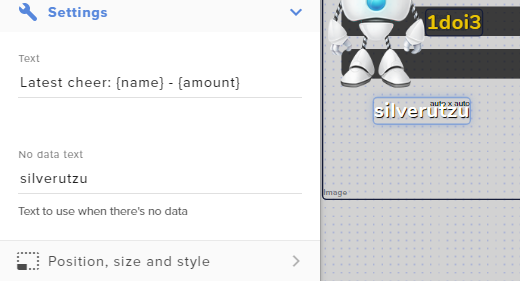
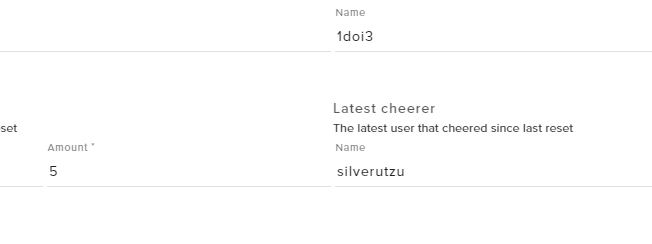
Do me a favor, cross reference your activity list for the latest cheer and add the name in that latest cheerer section.
unique dove
wait , im not following
weak delta
The OK button @warm musk
Write the name of the person who sent you the cheer where it says latest cheer @unique dove
 last herald
Hey guys, I need to close my Streamelements YT account but I am unable to as there is no email linked. How would I got about closing it?
 last herald
weak delta
last herald
weak delta
Kind of. One moment.
What's your Twitch channel @unique dove no links, only name.
I'm thinking that label just got reset some how.
 weak delta
Oh no no.
Erase the name from No Data text and put it to default.
How it was in the original screenshot.
unique dove
done
weak delta
What's your channel name? No links.
unique dove
xulescu
weak delta
Everything is default right now, yes?
weak delta
Did it update?
 weak delta
Do you see that 100 bits in your StreamElements activity feed?
weak delta
Why does it say "has used"
unique dove
if i make latest cheers i see yours only
weak delta
Is this some sort of extension you're using?
 lament blade
how can i add bot in obs?
unique dove
3 days agp
ago\

i mean there would be no issue
if frim this point on its going to be working
as i intend to use only latest cheer
2 days ago i changed my streamer name , would that be a bug somewhere on the website that needs to update ?
my new name ?
round brambleBOT
@unique dove If you changed your name on Twitch please follow these steps:
🔹 Visit https://streamelements.com/logout and then log in again with by connecting with Twitch.
🔹 On the right side of the dashboard page that opens, select "Join" under bot settings. If it says "Part" select that and then select "Join" to send the bot to the chat. Don't forget to mod the bot by typing /mod streamelements in your channel if you have not already.
🔹 Post your old and your new name here so that we can update your channel's chatstats tracking (must be done by staff).
unique dove
i did logout and relog and everything
weak delta
Give me your old and new name.
And yes you should be fine going forward, I'm thinking it was just a hiccup. If it continues, let us know.
unique dove
and also there is a problem with the amount , at the amount sections under {currency} i put manually the Euro sign as SL was showing dollars
old name TheNewOrder / new name Xulescu
i am adressing only european viewers so no dollars for me
thats not an issue for me lets say
but its only for you guys to be aware about
unique dove
ah , yes , that was it @weak delta
weak delta

 little vigil
Using an avermedia capture card to stream via pc from my PS4. Having an issue where my game sound in my ears is about 1-3 seconds off the actual visual from my gaming monitor. Is there anyway to fix this without a goXLR or mix amp?
weak delta
You should be good now, I'll ping you in a bit when I get your chat stats cleared up.
round brambleBOT
@little vigil For the best OBS support, please join their Official Discord @ discord.gg/obsproject
unique dove
thank you @weak delta
that will be it , i will manage from now
i appreciate your help 😄
lament blade
How can i add bot on OBS?
unique dove
have a great one
@lament blade theres plenty tutorials on stream elements website 🙂
just find your way 😄
round brambleBOT
@lament blade New to Stream Elements?
Check out our YouTube channel https://www.youtube.com/c/streamelements/videos
with tutorial videos from setting up the basics, to in depth details on how to use our product.
New to OBS? Here is a 4 step quickstart guide
https://obsproject.com/wiki/OBS-Studio-Quickstart
Want to learn even more? Here is an in-depth overview
https://obsproject.com/wiki/OBS-Studio-Overview
 wispy relic
Hi im currently live at twitch, my streamlabs recognize the donation but the streamelements wont recognize it, is there a way i can fix it? and also how do i reset my last donator/top donator? Ive tested it with Streamlabs and now Elements captured the donation and it is keeping the tested donation as the higher
By recognize i mean, the streamelements dashboard wont popup the donation, only follower.
ionic kelp
@wispy relic We only recognize donations made with us. It appears you use streamlabs.
wispy relic
Ive just added the streamlabs browser inside my obs studio
to see if it would pop up when someone donated
and it did
i use the streamelements browser mainly, and also the donations have the link from streamelements aswell, it just doesnt go trough the dashboard
ionic kelp
Because they're 2 different donation services.
wispy relic
no i meant i was only using elements before....
i just added labs RNOW to see if its a overlay problem or actually dashboard problem
like, i have my dashboard opent rn, on elements it wont even show that ive received a donation
manic hawk
hi im new ad moderating (and also not good at english sorry) and i want to know if i can make a retweet command, i can see a module that'ts supposed to let me do it but i can't make it work. can someone please explain me who to use that module?
ionic kelp
@wispy relic and where are you providing your streamelements link? You don't have a panel for it.
round brambleBOT
@ionic kelp mass deleted 2 messages.
ionic kelp
No.
wispy relic
sry
ionic kelp
That's streamlabs
wispy relic
wait
ionic kelp
Not streamelements
ionic kelp
Correct
wispy relic
i am really sorry
my f bad
thanks tho
Sorry again last question @ionic kelp how do i reset top donator? or last donator?
 frigid escarp
Hi guys, I'm wanting to try to set up a command that when I type it "!hype" the chatbot posts a line of my emotes that can be used for subs/raids etc. However whenever I try no matter what I type it only repeats the text and not the emote. Some friends have suggested this may be because the bot isn't considered a "subscriber" but is there any way to create what I'm looking for? Thanks! Sorry should add I am using streamelements with OBS
ionic kelp
@frigid escarp Sub emotes require sub. Either by using you account or actually gifting sub.
round brambleBOT
@pale kestrel We're not able to troubleshoot issues with using our overlays in StreamLabs OBS (SLOBS) as we don't have the tools to support their software. We recommend using OBS Studio or OBS Studio with our plugin OBS.Live.
frigid escarp
Even when I want to try to use it as a command? I have created 3 emotes that have been approved and can be used individually or hand typed but I have seen some use a command to prompt a row of them
ionic kelp
Any emotes that are sub require the bot to have it one way or another. No way around that.
frigid escarp
Do you know if it's possible for the bot to be a sub? Sorry I'm really not experienced with the commands
 distant agate
Anyone able to help Streamelements bot chat commands only work in my chat while im offline. Once I start streaming all commands dont work.
ionic kelp
@frigid escarp either by using Obs.Live and signing in with your account or actually gifting a sub.
@distant agate It seems to be working
distant agate
yeah once I start streaming it will stop working
ionic kelp
I assume you use obs.live by chance?
distant agate
yeah
ionic kelp
And perhaps custom bot name? 
distant agate
yes sir
round brambleBOT
If your commands recently stopped working and you're using OBS.Live and a custom bot name do the following:
1.) In OBS.Live, click on the hamburger menu (three stripes) at the top left of your activity feed
2.) Click on Stream Settings -> Custom bot name
3.) In the "Custom bot name" field select "Set custom bot name", not your already existing username (with capital letters)
Note: If you already connected an account that way, the third entry will show as the account name (see image https://i.imgur.com/sO7fWOX.png)
4.) Scroll a bit down and click on the purple "CONNECT CUSTOM BOT ACCOUNT" button
5.) Log in as usual and "Authorize" the custom bot name
6.) Back in the Activity feed, click on the "SEND TEST MESSAGE" button and check if your custom bot name starts working again
 fluid coral
#helpdesk-twitch I went live yesterday but the only think showing was my overlays. The game i was playing was showing at all. I was wondering if i did something wrong
manic hawk
hi im new ad moderating (and also not good at english sorry) and i want to know if i can make a retweet command, i can see a module that'ts supposed to let me do it but i can't make it work. can someone please explain me who to use that module?
 hardy trail
im old and new to this, i have my overlay ready and thr url copied but dont know how to take it to twich page and post the link so it works, any help?
round brambleBOT
@fluid coral For the best OBS support, please join their Official Discord @ discord.gg/obsproject
ionic kelp
@manic hawk what do you mean by retweet command?
manic hawk
@ionic kelp i want to know how to use this feature, as i said im new
 minor oak
i'm trying to set up a charity stram
when I go to create the tiltify alert, it does not allow to pickm the campaign from there??
ionic kelp
@minor oak your dashboard or someone else's?
minor oak
mine
 spare shell
How come when I try to start stream I get this dialogue
ionic kelp
Did you click the dropdown for the campaign?
minor oak
yea, but it's just blank unfortunately
spare shell
I've chosen Twitch as streaming service..
round brambleBOT
@spare shell Streamelements on top of OBS -> Logout -> login
spare shell
yet it wants me to stream with youtube?
ionic kelp
@minor oak you've connected tiltify in integrations?
minor oak
yea
ionic kelp
Disconnect it. Login back in via incognito and try reconnecting and choosing then.
spare shell
ahh.. thanks
minor oak
ok, sounds good! I'll do that now, one sec
spare shell
that worked..
minor oak
@ionic kelp This is all I see
minor oak
fire fox, should I try chrome?
ionic kelp
Definitely
ionic kelp
Okay. Press F12 and switch to console tab. Refresh the page and look for chunks of red text.
Screenshot that.
minor oak
ok, sounds good!
frigid escarp
I got it to work btw! I simply had to change the bot name to my own!
ionic kelp

minor oak
@ionic kelp this?
ionic kelp
And just to be sure you have it connected here? https://streamelements.com/dashboard/account/integrations
 smoky charm
I setup tipping on my old account, and created a new one... now I am unable to restart the tipping setup as the software still thinks I am on the old account, even though my Stream key (and logged in to new one) is entered.
ionic kelp
@minor oak seems to be missing something
minor oak
ohh not sure umm maybe I did something wrong on tiltify's site?
ionic kelp
Are you sure you have an active campaign?
minor oak
first time I've ever done this whole charity thing I apologive for any annoyances
um le tme see
@ionic kelp
oh!
i had to publish
I thought I would be able to do this before that
ionic kelp

minor oak
bruhhhh
@ionic kelp
well then. Atleast now I know the troubleshooting steps for this lmao
round brambleBOT
@smoky charm Streamelements on top of OBS -> Logout -> login
 sonic cave
Hey there having trouble with streamelements bot who randomly started to give the message Response Message!
Any Ideas on how to fix that?
Looked at my Timers doesn't seem to be the problem.
ionic kelp
@sonic cave It is a timer. Expand them all and you shall see.
minor oak
@ionic kelp Thank you, you were super helpful!
ionic kelp

sonic cave
@ionic kelp you mean the online interval timer?
sonic cave
that's all that is in there
ionic kelp
Click the thing under edit for all of them.
sonic cave
i see thx
 full rampart
Hey Im having an issue with people collecting massive amounts of loyalty points on my channel despite not actually being counted as viewers, is there a way to circumvent this? apologies in advance if this is the incorrect section for this question
lament blade
Had a question about the media share feature if anyone can answer it? Can you play anything on there like your favourite songs or does it have to be copyright free?
ionic kelp
@lament blade You can play whatever you want with it. Whether or not you get in trouble for doing that is another story.
 strong topaz
quick question is it possible to stream csgo after the update?
round brambleBOT
@strong topaz Valve has implemented a Trusted mode which does not allow OBS to hook CS:GO using Game Capture. Read more in their announcement post here https://blog.counter-strike.net/index.php/2020/07/30736/
Additionally, they have no plans on allowing OBS in Trusted mode
https://support.steampowered.com/kb_article.php?ref=8835-KLXV-0292#whitelist
You will need to run the game in either windowed or borderless fullscreen and use Window Capture instead.
Alternately, you can launch the game with -allow_third_party_software
strong topaz
thnx tho
hazy merlin
Hello. My SE chatsstats failed again. Can you helo me pls?
 unique lake
Hello, Does a streamer have to restart their stream to enable new timers that I set up while she is streaming?
hazy merlin
No @unique lake
 spare reef
hay everyone prety new here so i dunno if i am in the right place i am looking to add the "Hype Boss" widget on to my streamm but i cant find it can someone point me in the right direction please
unique lake
TY @hazy merlin
 uneven yew
hello im trying to figuer out cheer and bits are they the same ?
 river silo
Hey guys. So i got this loyalty points thing working. But is it possible to disable overall ranking? I just wanna work with current points since i have gambling for the point on
 dense verge
Howdy, Im having an issue that my twitch labels arent updating in streamelements. Has anyone had this issue?
 uncut oriole
hi I am having an issue when a user buys an item from the store with a text command in chat.
the tts only reads the first word but nothing after.... it works fine if-you-write-everything-with-dashes-instead-of-spaces....has anyone had this issue?
 neon wigeon
Hello, is there a list of the type of fields you can set in the overlays? Or there is a type with a clock to set hours/minutes?
 molten yarrow
Hey i have an issue, people are subscribing to the stream using twitch primes and nothing shows up! No overlays or even any record of it in any feed! only with twitch primes and only sometimes
uncut oriole
<@&382267076632379392>
round brambleBOT
@molten yarrow Twitch prime (new and resub) and paid subscriptions (resub only) must be shared in chat manually by the person subscribing in order for the subscription information to be sent to StreamElements. For twitch prime, the user needs to have sharing enabled on https://www.twitch.tv/settings/prime. For paid subs, if the share box doesn't show up immediately it will when they refresh the page. https://i.imgur.com/VNJN0Uv.gif https://i.imgur.com/2297EA7.png
wary halo
the tts only reads the first word but nothing after.... it works fine if-you-write-everything-with-dashes-instead-of-spaces....has anyone had this issue?
@uncut oriole I'll ask around internally, this is a weird issue you got there
uncut oriole
it works fine if you buy stuff from the store because there is a popup window to type text into @wary halo
chrome folio
@uncut oriole are you using this variable ${redeem item ${1:}} ?
uncut oriole
just ${redeem}item because it wouldnt work per the arguments table ${redeem item}
i will try what ever you want cause im not good with code
@chrome folio i tried it and it does the same thing in chat... if i replace all the spaces with-dash-like-this-it will read the text
chrome folio
@uncut oriole right, Ruben sent to Staff check about it. Thanks.
uncut oriole
seems like other symbols work too
ok i figured it out i think
${redeem item ${1:}}/ works fine now
thanks all
 gritty hazel
I am a very confused and lost soul on how to add/edit scenes any tips. I have on one in my overlays already
 little zodiac
any widgets that play a noti when channel points are redeemed?
uncut oriole
you have to add them to your overlay
round brambleBOT
@gritty hazel We've released our new Overlay Editor revamp. You can check out the changes and how to work with it here: https://youtu.be/X5VzXjqAsjk
Check out our blog post as well: https://blog.streamelements.com/streamelements-overlay-editor-just-got-even-better-c22cb5b4853e

We are thrilled to announce the launch of the remastered StreamElements Overlay editor!
https://p.strms.net/newoverlayyt
Why StreamElements Overlays are better?
😎 Simple: Load your entier setup using only 1 link
⚡ Fast: Cloud-powered Overlays arrive in real-time, say goodb...
@gritty hazel To add your overlays to OBS, add a new browser source in your scene. Paste your overlay URL in the browser source properties, set the dimensions to 1920x1080 (unless you changed them on the website), and ☑ “Shutdown source when not visible” https://youtu.be/KDvLynUqXI4
@gritty hazel The default resolution for StreamElements overlays (theme and custom) is 1920x1080. Please add them in OBS at their full resolution and use CTRL+F to fit to screen if necessary. You can then downscale your stream in OBS settings > Video if you'd like https://i.imgur.com/6bWXxjR.png
 fading slate
My chat stats says: 404 - Page Not Found
https://stats.streamelements.com/c/wombatmilan
any solution to fix it?
abstract hemlock
Did you change your username recently?
abstract hemlock
post here your old username, i'll check it 🙂
fading slate
the_combat_wombats
abstract hemlock
no more 404
fading slate
thanks man 😄
do you know since when this is tracking my stats? I have been streaming for more than 5 years now and this looks like kind of recent activity
abstract hemlock
Let me check
it will gather information from the moment that you added the bot, iirc
fading slate
oke thanks for the help
hazy merlin
@abstract hemlock i have the same Problem with the chatstats. Can you help me, please ?
abstract hemlock
post here old and new username
 indigo venture
@echo finch I figured it out. I had too many pipes |
Looks like SE only handles 5
 crimson drum
Hello i was wondering how to get the SE.pay tab activated because i don't see it?
round brambleBOT
@crimson drum SE.PAY is available for streamers who are atleast 18 years old, with bank account under their name in one of the following countries and have at least 101 Follower (Twitch) / 101 Subscribers (Youtube):
Austria, Belgium, Czech Republic, Denmark, Finland, France, Germany, Ireland , Italy, Netherlands, Poland, Portugal, Slovakia, Spain, Sweden, Switzerland, United Kingdom, United States.
If you meet these criteria and don’t see SE.Pay, let us know.
For information on SE.Pay payment methods, their fees, and settlement times see https://streamelements.com/dashboard/tipping/fees.
hazy merlin
old: midnitefps new mitn1te @abstract hemlock thanks
crimson drum
ok thank you!
 white lagoon
hi where do i find the stock files? accidentally deleted one
abstract hemlock
check pinned messages
white lagoon
ok thank you @abstract hemlock
 desert ibex
can someone tell me how to put a twitter command in my chat? like to invite to follow on twitter
 dense crane
how do i give everyone points in chat?
abstract hemlock
@dense crane !addpoints username value
dense crane
i meant to everyone at once
abstract hemlock
!addpoints all value
dense crane
thank youuuu
 timber marlin
can i have help setting up the donations
 viral token
can i have some help with an audio issue in stream elements
 trim brook
what should we do if the bot doesn't join chat again after leaving without any info?
round brambleBOT
@trim brook Go to the dashboard -> right side -> part channel -> join channel (https://streamelements.com/dashboard)

@viral token For the best OBS support, please join their Official Discord @ discord.gg/obsproject
trim brook
did that already
but bot doesn't join chat
it was working fine and at some point it was not responding anymore
abstract hemlock
@trim brook On your chat?
trim brook
i'm mod from a friend
abstract hemlock
username please
 quartz depot
Hey, i dont know if anyone else is having this problem today but non of my alerts/chat box seems to be coming through right now? sound plays but no actual alert? has anyone else had this issue at all? have tried re adding all alerts and chat box but nothing helps, are playing all fine through stream elements itself but when trying to test through OBS nothing helps
trim brook
macrackle
abstract hemlock
@trim brook 1 sec
round brambleBOT
@trim brook If your commands recently stopped working and you're using OBS.Live and a custom bot name do the following:
1.) In OBS.Live, click on the hamburger menu (three stripes) at the top left of your activity feed
2.) Click on Stream Settings -> Custom bot name
3.) In the "Custom bot name" field select "Set custom bot name", not your already existing username (with capital letters)
Note: If you already connected an account that way, the third entry will show as the account name (see image https://i.imgur.com/sO7fWOX.png)
4.) Scroll a bit down and click on the purple "CONNECT CUSTOM BOT ACCOUNT" button
5.) Log in as usual and "Authorize" the custom bot name
6.) Back in the Activity feed, click on the "SEND TEST MESSAGE" button and check if your custom bot name starts working again
abstract hemlock
@trim brook Ask him to change it to the default one then we can troubleshot more
trim brook
ok 
round brambleBOT
@quartz depot OBS -> Settings -> Advanced -> Scroll down -> enable or disable Hardware Acceleration, depending on its current state. (This does not apply for OBS on Mac)
https://i.imgur.com/ggMe9ZE.png

 haughty shore
I am having some issues getting media share to work. It worked for me at one point and now it does not. Any chance I can get some help?
It feels like it is working on the website but the video does not show on my OBS and the volume keeps muting itself no matter what i do manually on the website it will just mute again
round brambleBOT
@haughty shore OBS -> Settings -> Advanced -> Scroll down -> enable or disable Hardware Acceleration, depending on its current state. (This does not apply for OBS on Mac)
https://i.imgur.com/ggMe9ZE.png
 valid bluff
Hi, i have an issue. Im using obs streamelements for streaming on twitch. the first days work fine. But then it starts to dropp frames, a lot like 60%. I change to youtube and it work perfectly. The next day, same problem. Change again to youtube, and it work perfect again. I use the exact same settings, and the problem was twitch. Is there any solution or answer to this? please healp !
last herald
Hey guys, I need to close my Streamelements YT account but I am unable to as there is no email linked. How would I got about closing it?
round brambleBOT
@valid bluff Dropped Frames means that you have a bad connection between your device and the streaming platform and most likely something related to your ISP not handling the connection properly.
Speed tests usually cannot help solve this problem and its best to use this guide: https://obsproject.com/wiki/Dropped-Frames-and-General-Connection-Issues
If you stream to twitch, use the !twitchtest command and do a connection test to your regional servers.
 trail shale
Question for everyone.. I just hooked up my cams and when I transition to my talk overlays It brings my cams up immediately and takes about 2 seconds for the overlay to show up. any thoughts on how to fix this issue?
haughty shore
I dont mean to repeat myself but my issue may have been skipped. Can you tell me why after a requested song played, if its the last song on the list, it will play twice?
 vocal parcel
round brambleBOT
vocal parcel
round brambleBOT
@vocal parcel Consoles do not have native support for overlays. You would need a capture card, PS4 remote play or Xbox companion app and a PC with OBS in order to have Overlays over your console gameplay.
We have an blog post about how to setup console streaming with our essential tools: https://blog.streamelements.com/how-to-stream-on-console-7b620b1c46c3
lament blade
So I'm having a couple problems with streaming to twitch. I had connected my Youtube account for streaming and wanted to switch to Twitch for a while and whenever I try to stream it sends me in a window that doesn't load for youtube.
 severe stratus
Me again, I recently posted about having issues with TTS in streamelements but it recently came to my attention that none of my alerts were making sound (I have my laptop muted while playing so I never noticed) and now I’ve realised I have my desktop audio turned off as I play on console and only use the laptop for OBS, I’ve discovered my alerts are within desktop audio but I’m wondering if there’s a way to isolate so only the alert sounds are heard and not just a bunch of consistent background noise too?
@carmine copperMTZ#1073 I do, not sure how much help I can be as I’m pretty new to it all but it can’t hurt to try 😂
wary halo
He left the server
severe stratus
Would make sense why I couldn’t tag 😂
 devout trellis
i put my chat box into obs studio but for some reason its not appearing?
severe stratus
Have you checked the opacity to make sure it isn’t transparent? I can’t offer much more than that I’m a novice but from personal experience that was my issue with it the first time 😂
 tawny ledge
is there a way, or a link, to do a "queue" type system with a streamelements command? something like !joinqueue or something and the command will update with a list of next viewer to play or something?
 worn minnow
Question, for the chat commands related to the songs, will that work with pretzel.rocks or is there something specific related to pretzel rocks?
 warped badger
How do test my bot is working?
chrome folio
@warped badger type /mod StreamElements in your stream chat to give your chatbot permission as moderator.
 open rose
My bot hasn't responded at all in at least an hour.
Glad I'm not running giveaways today 🙂
round brambleBOT
@open rose If your commands recently stopped working and you're using OBS.Live and a custom bot name do the following:
1.) In OBS.Live, click on the hamburger menu (three stripes) at the top left of your activity feed
2.) Click on Stream Settings -> Custom bot name
3.) In the "Custom bot name" field select "Set custom bot name", not your already existing username (with capital letters)
Note: If you already connected an account that way, the third entry will show as the account name (see image https://i.imgur.com/sO7fWOX.png)
4.) Scroll a bit down and click on the purple "CONNECT CUSTOM BOT ACCOUNT" button
5.) Log in as usual and "Authorize" the custom bot name
6.) Back in the Activity feed, click on the "SEND TEST MESSAGE" button and check if your custom bot name starts working again
warped badger
how did someone find my stream just now and type !sedebug ?
open rose
same hre
warped badger
phph did
warped badger
How do i see that
also is it a custom command to name my bot?
I dont see a config field for it within streamelements
chrome folio
@warped badger if you are not using a custom bot name, then the bot have the default name StreamElements on the stream chat.
Check if you added the moderator role to the bot. Command: /mod StreamElements
warm musk
Is there a tutorial or handbook on making new overlays on the updated version of elements online
round brambleBOT
@warm musk We've released our new Overlay Editor revamp. You can check out the changes and how to work with it here: https://youtu.be/X5VzXjqAsjk
Check out our blog post as well: https://blog.streamelements.com/streamelements-overlay-editor-just-got-even-better-c22cb5b4853e
We are thrilled to announce the launch of the remastered StreamElements Overlay editor!
https://p.strms.net/newoverlayyt
Why StreamElements Overlays are better?
😎 Simple: Load your entier setup using only 1 link
⚡ Fast: Cloud-powered Overlays arrive in real-time, say goodb...
open rose
@chrome folio Heh, one of my viewers gave you a gift sub 🙂
chrome folio
😮 @open rose thank you 🙂
warped badger
Where can i read about bots, i dont want to be typing random things that i dont know what they mean? Im a software engineer, and I dont want to punch an exploit hole
warm musk
Thank you I've been struggling for so long to get an updated one
round brambleBOT
@warped badger New to Stream Elements?
Check out our YouTube channel https://www.youtube.com/c/streamelements/videos
with tutorial videos from setting up the basics, to in depth details on how to use our product.
New to OBS? Here is a 4 step quickstart guide
https://obsproject.com/wiki/OBS-Studio-Quickstart
Want to learn even more? Here is an in-depth overview
https://obsproject.com/wiki/OBS-Studio-Overview
chrome folio
@warped badger and about the custom bot name: https://discordapp.com/channels/141203863863558144/494513233416421386/561516184718278676
warped badger
Thanks ill give it a look, the video's with the lady were, not too informative to say the least!
chrome folio
you can follow these steps to know the windows about the OBS.live
just a detail, if you are going to use the custom bot name as the streamer name, instead of selecting the item "Change to ..." select the item "Set custom bot name" ... according to the procedure below.
round brambleBOT
@warped badger If your commands recently stopped working and you're using OBS.Live and a custom bot name do the following:
1.) In OBS.Live, click on the hamburger menu (three stripes) at the top left of your activity feed
2.) Click on Stream Settings -> Custom bot name
3.) In the "Custom bot name" field select "Set custom bot name", not your already existing username (with capital letters)
Note: If you already connected an account that way, the third entry will show as the account name (see image https://i.imgur.com/sO7fWOX.png)
4.) Scroll a bit down and click on the purple "CONNECT CUSTOM BOT ACCOUNT" button
5.) Log in as usual and "Authorize" the custom bot name
6.) Back in the Activity feed, click on the "SEND TEST MESSAGE" button and check if your custom bot name starts working again
 patent shuttle
my commands arent working in chat whats the problem
warped badger
Oh my gosh that red video lady doesn't tell you anything useful !!!🤦
round brambleBOT
@patent shuttle If your commands recently stopped working and you're using OBS.Live and a custom bot name do the following:
1.) In OBS.Live, click on the hamburger menu (three stripes) at the top left of your activity feed
2.) Click on Stream Settings -> Custom bot name
3.) In the "Custom bot name" field select "Set custom bot name", not your already existing username (with capital letters)
Note: If you already connected an account that way, the third entry will show as the account name (see image https://i.imgur.com/sO7fWOX.png)
4.) Scroll a bit down and click on the purple "CONNECT CUSTOM BOT ACCOUNT" button
5.) Log in as usual and "Authorize" the custom bot name
6.) Back in the Activity feed, click on the "SEND TEST MESSAGE" button and check if your custom bot name starts working again
warped badger
If i get another video just telling me a bunch of features...
chrome folio
@patent shuttle and check if you added the moderator role to the bot. Command: /mod StreamElements
 jovial ocean
Is there a way to delete message straight from OBS live
Because it only lets me time out and what not
 high escarp
@astral otter If you changed your name on Twitch please follow these steps:
🔹 Visit https://streamelements.com/logout and then log in again with by connecting with Twitch.
🔹 On the right side of the dashboard page that opens, select "Join" under bot settings. If it says "Part" select that and then select "Join" to send the bot to the chat. Don't forget to mod the bot by typing/mod streamelementsin your channel if you have not already.
🔹 Post your new name here so that we can update your channel's chatstats tracking (must be done by staff).
@round bramble
Hello, I am a SuperMod and Editor for royalbluesmile. She has completed the above list (and !subs now shows current subcount) but channel stats still do not work.
Sorry, hit enter by accident before completing request.
 steel grotto
@chrome folio didnt work sir
chrome folio
@high escarp you have to ask for Streamer to do that.
@steel grotto show me a screenshot please
steel grotto
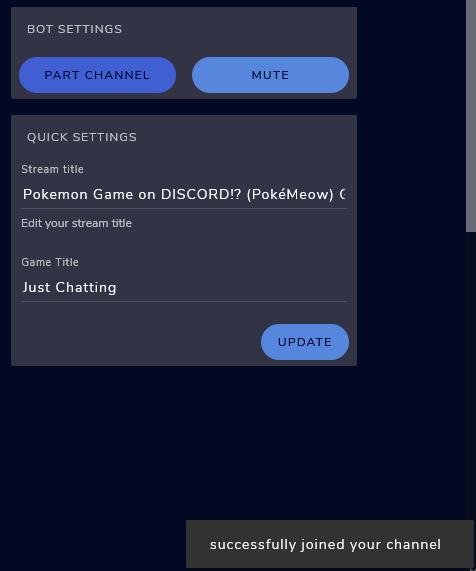 chrome folio
@steel grotto type: /unban StreamElements
high escarp
@chrome folio pls see edited post
chrome folio
@high escarp about Stats page update, do you know if she changed her profile name on Twitch? If so, what is her old and current names?
high escarp
she changed her twitch name from "notoriousroyalblue" to "royalbluesmile"
chrome folio
@steel grotto after that, press on Part Channel button and then click on Join Channel.
steel grotto
@chrome folio did it mutiple times no bueno
chrome folio
@steel grotto now your bot is running, but you need to do this procedure...
round brambleBOT
@steel grotto If your commands recently stopped working and you're using OBS.Live and a custom bot name do the following:
1.) In OBS.Live, click on the hamburger menu (three stripes) at the top left of your activity feed
2.) Click on Stream Settings -> Custom bot name
3.) In the "Custom bot name" field select "Set custom bot name", not your already existing username (with capital letters)
Note: If you already connected an account that way, the third entry will show as the account name (see image https://i.imgur.com/sO7fWOX.png)
4.) Scroll a bit down and click on the purple "CONNECT CUSTOM BOT ACCOUNT" button
5.) Log in as usual and "Authorize" the custom bot name
6.) Back in the Activity feed, click on the "SEND TEST MESSAGE" button and check if your custom bot name starts working again
chrome folio
@high escarp stats page updated.
high escarp
Thank you, when visiting the SE leaderboard page, it now shows up and works!
Weird, when looking at chat stats page it only shows me having 116 posts in channel. But if you look at my viewer card in the channel you can see I have 999+ comments in channel. Oh well, atleast it doesn't give the 404 error when visiting the chat stats page anymore.
steel grotto
@chrome folio followed the stopped and when i press "SEND TEST MESSAGE" there is no response from the bot
chrome folio
@steel grotto show me a screenshot of the Custom Bot Name window, please
@twilit arch two ways...
high escarp
@chrome folio any way to get updated stats, now that stats are showing? Or does it only have those numbers because it pulled the info from the stats when she changed from the previous twitch username over 4 months ago?
 vague pawn
the custom bot name isn't working even though it is connected?
round brambleBOT
@vague pawn If your commands recently stopped working and you're using OBS.Live and a custom bot name do the following:
1.) In OBS.Live, click on the hamburger menu (three stripes) at the top left of your activity feed
2.) Click on Stream Settings -> Custom bot name
3.) In the "Custom bot name" field select "Set custom bot name", not your already existing username (with capital letters)
Note: If you already connected an account that way, the third entry will show as the account name (see image https://i.imgur.com/sO7fWOX.png)
4.) Scroll a bit down and click on the purple "CONNECT CUSTOM BOT ACCOUNT" button
5.) Log in as usual and "Authorize" the custom bot name
6.) Back in the Activity feed, click on the "SEND TEST MESSAGE" button and check if your custom bot name starts working again
vague pawn
I did that already even though it was already connected, but it literally just keeps saying "set custom bot name". I even reconnected the account.
the account is connected already
chrome folio
@high escarp while the profile has a 404 error in the Statistics page, because there was a change in the profile name of the streaming platform (Twitch) or due to some other problem that occurred, so the system recorded only the statistical data before the error occurred, that is, everything that happened in the stream while it was in error it isn't registered and so it will not be shown on the Stats page after being updated.
lament blade
tomorrow id need you guys awesome help one last time please , i managed to put my new alert in for subscribers fine , but ive tried for ages to also put it in for raids , hosts , tips and cheers but everytime i try to its putting default alerts in with it
round brambleBOT
@vague pawn 1) Right click on your OBS desktop shortcut and open the Properties 2) In the "Target" field, add the following to the very end: --remote-debugging-port=40404 3) Open OBS (or restart if it was open) 4) Open your web browser and type in: localhost:40404 5) Click on "StreamElements - Activity feed" 6) Navigate to the Console tab 7) Type the following into the console and hit enter: store.customBot.removeCustomBotIntegration() 8) Try setting the custom bot name 9) Remove the additional flag in step 2 from your shortcut properties.
chrome folio
@vague pawn you have to select the "Set custom to name" and click on the button Connect Custom Bot Account, enter your streamer data (login and password) and Authorize the connection with your Twitch profile.
vague pawn
I did that, it literally keep saying the same thing after i do it, which is to connect it. @chrome folio
It does not connect it
chrome folio
If you already tried it, then do the procedure above sent by Support AI.
 fathom lynx
hey everyone, random question: is there any point in having both nightbot (or similar external chatbot) and streamelements chatbot?
round brambleBOT
@lament blade We've released our new Overlay Editor revamp. You can check out the changes and how to work with it here: https://youtu.be/X5VzXjqAsjk
Check out our blog post as well: https://blog.streamelements.com/streamelements-overlay-editor-just-got-even-better-c22cb5b4853e
We are thrilled to announce the launch of the remastered StreamElements Overlay editor!
https://p.strms.net/newoverlayyt
Why StreamElements Overlays are better?
😎 Simple: Load your entier setup using only 1 link
⚡ Fast: Cloud-powered Overlays arrive in real-time, say goodb...
chrome folio
And don't forget to check the Variations Settings on the alerts.
@fathom lynx you can use them at the same time, just configure them to not conflict.
high escarp
@chrome folio Ok, that is what I was figuring. Thanks for all the help. Have a good day/night.
fathom lynx
@chrome folio they seem redundant, no?
chrome folio
yes, some bots have the same or similar functionality, so you must configure the bots and see what you want to take advantage of each to have them running at the same time.
fathom lynx
@chrome folio kk, will have a better look, ty
 agile elk
Im attempting to set up a custom streamelements bot chat command that contains nested variables. Any time i nest the variables though, it prints out to chat instead of reading the ${} as a command
The command trying to add:
!pushupsadd
response:
${count pushupstodo +${1}} Added ${1} pushup(s) from the to-do counter!
the ${count pushupstodo +${1}} part though gets printed to chat, it doesnt modify the counter. whats wrong with that nested variable that streamelements thinks its text and not a variable? NOTE: the other ${1} works fine
chrome folio
@agile elk variable ${count pushupstodo '+${1}'}
agile elk
@chrome folio ah quotes, the great equalizer, thanks!
 sonic halo
how do you use the overlays im new sorry
twilit arch
@chrome folio how do I go at making it so only followers can enter giveaway
lament blade
Hey guys, I more or less need some help with a command im not even sure its possible
and that I realize id have to delete and re-install every give or take 2 days.
gritty hazel
Do I /mod streamelements to get the commands to work?
lament blade
I am looking for a command that will count the amount of times another command is used, but also lists the names of the usernames of the people using them.
For example
Steve: !raider
Frank: !raider
RFGZer0: !Raiderlist
Streamelements: (2) Steve , Frank
round brambleBOT
@sonic halo New to Stream Elements?
Check out our YouTube channel https://www.youtube.com/c/streamelements/videos
with tutorial videos from setting up the basics, to in depth details on how to use our product.
New to OBS? Here is a 4 step quickstart guide
https://obsproject.com/wiki/OBS-Studio-Quickstart
Want to learn even more? Here is an in-depth overview
https://obsproject.com/wiki/OBS-Studio-Overview
@sonic halo We've released our new Overlay Editor revamp. You can check out the changes and how to work with it here: https://youtu.be/X5VzXjqAsjk
Check out our blog post as well: https://blog.streamelements.com/streamelements-overlay-editor-just-got-even-better-c22cb5b4853e
We are thrilled to announce the launch of the remastered StreamElements Overlay editor!
https://p.strms.net/newoverlayyt
Why StreamElements Overlays are better?
😎 Simple: Load your entier setup using only 1 link
⚡ Fast: Cloud-powered Overlays arrive in real-time, say goodb...
 whole niche
lament blade
whole niche
lament blade
@lyric canyon did you come to my rescue ?
 lyric canyon
Hi there! Can anyone help me please?
I can find a way to change the reply from the bot when I use a Default Command.
For example, when some one type "!Redeem" I don't want the reply "You successfully redeemed item1 for 420 points.". I wanna change it, you know?
dense verge
Can someone help me please my labels arent updating
lyric canyon
How can I help you @lament blade?
If your question is related to commands we are in the same boat here... lol
 alpine basalt
once I've applied an image to the loyalty store rewards can I delete it from my allowed storage without it leaving my item blank?
 amber obsidian
what the heck is wrong with SE today??? Really screwed over my stream today, custom name for bot not working had to switch it to StreamElements. Got it responding now but some of my custom commands that trigger other events just straight up stopped working now
chrome folio
@lyric canyon you can not edit/disable the default message for redeemable item via chat.
round brambleBOT
@amber obsidian If your commands recently stopped working and you're using OBS.Live and a custom bot name do the following:
1.) In OBS.Live, click on the hamburger menu (three stripes) at the top left of your activity feed
2.) Click on Stream Settings -> Custom bot name
3.) In the "Custom bot name" field select "Set custom bot name", not your already existing username (with capital letters)
Note: If you already connected an account that way, the third entry will show as the account name (see image https://i.imgur.com/sO7fWOX.png)
4.) Scroll a bit down and click on the purple "CONNECT CUSTOM BOT ACCOUNT" button
5.) Log in as usual and "Authorize" the custom bot name
6.) Back in the Activity feed, click on the "SEND TEST MESSAGE" button and check if your custom bot name starts working again
lyric canyon
I can see the edit option @chrome folio! Y_Y
Take a look:
There is no option to edit the reply
round brambleBOT
@dense verge Please logout of StreamElements at https://streamelements.com/logout and then login again to your account (Twitch/Youtube/Facebook)
StreamElements
The Ultimate All in One Platform for Streamers
@dense verge Go to the dashboard -> right side -> part channel -> join channel (https://streamelements.com/dashboard)
 void tangle
Hello, the moobot import chrome extension is unavailable. I get error 404 from the link
abstract hemlock
the customization on default command is limited
amber obsidian
@chrome folio I had custom commands triggering commands from Stream Avatars example: !bossfight SE Response:${random.pick '!sabossfight easy' '!sabossfight normal' '!sabossfight hard'} -- ${user} redeemed 250 !Pixels to activate this Boss Fight! Good Luck! - 10 Minute Cooldown
chrome folio
@lyric canyon not for now. But you can see in #💭︱feedback-and-ideas , if there is some idea posted there like this or add a new one.
amber obsidian
they worked perfect up until today
abstract hemlock
@void tangle known issue, our dev team is working on that
lyric canyon
I would like to create a command to buy a sound effect, only for my moderators, to call my attention.
I create the command and it's working fine. The only thing now is that the bot reply with "You successfully redeemed item1 for 420 points." I would like to change this reply, actually I prefer to change it to a whisper or also don't reply nothing. You know?
dense verge
@round bramble That didn't work when I go into session data on The streamelements.com website none of my labels are filled in but I have information in my goals.
 willow kite


 abstract hemlock
@lyric canyon iirc if your you redeem any item on your website it won't trigger a chat message (it may need some more test) but the ${redeem} response can't be change
@willow kite yes, by default on the web editor and more on the #widget-share channel
@dense verge can you share a screenshot?
 dusky junco
(Chat)Stats not working after name change... can anyone fix it please :) - old name z0Inkst3rPlays | new name: leinad_gnal ... thanks
lyric canyon
@abstract hemlock , damn!!
So it's not possible to "ignore" and don't trigger the redeem message? :/
dense verge
@abstract hemlock The information shows up in the goals tab and not the labels which in turn does not show up on my stream.
Same
So when I create widgets its just blank
abstract hemlock
@dusky junco done
dusky junco
thanks a lot <3