#helpdesk-twitch
1 messages · Page 722 of 1
 next schooner
Hey I can't get my stream events to work or show up?
 round brambleBOT
@next schooner To add your overlays to OBS, add a new browser source in your scene. Paste your overlay URL in the browser source properties, set the dimensions to 1920x1080 (unless you changed them on the website), and ☑ “Shutdown source when not visible” https://youtu.be/KDvLynUqXI4
 dawn garnet
They are very delayed
 zenith widget
that alert was me replaying the last one
dawn garnet
I just got a notification for someone who followed me 53 mins ago
Ohhh
Okay thanks,
 steep pivot
hello in my account if pay I was wrong to put my g-mail how can I change?
zenith widget
I'm not sure I understand. What pay? Where exactly you've placed your wrong email?
round brambleBOT
@ionic kelp mass deleted 3 messages.
@low spoke Please follow our community rules:
- No advertisement or stream promotion
- Respect ALL server members
- No NSFW/NSFL
Thank you
 vale saffron
hey
so i was watching a stream for the last 2 months and i was farming points on his channel (the streamer is xposed) but then i decided to change my name on twitch and when i checked again my points I had 0
anything we can do about it?
 wary halo
Type this in the stream chat: !rename youroldname
vale saffron
tnx bro
 merry bane
i just a recent name change, and whenever i know start a stream up, the StreamElements is not saying that i am live is not responding to any commands, what could be the reason?
round brambleBOT
@merry bane Please logout of StreamElements at https://streamelements.com/logout and then login again to your account (Twitch/Youtube/Facebook)

StreamElements
The Ultimate All in One Platform for Streamers
merry bane
just logged out and logged back in and still nothing
 ionic kelp
Fixed in stream
 regal breach
Hi, I am modding for the streamer but I wish to change the Game Title and Category for him.
What does Streamer has to do so that I have such powers to do for him?
wary halo
Not much, you should be able to do it in chat even with !settitle and !setgame afaik
regal breach
@wary halo But that is not working.
ionic kelp
Whose channel? No links
regal breach
Meaning?
ionic kelp
A name
regal breach
j7ck_r6s
 verbal mulch
hi, can someone help me with my roulette command? i have it activated and everything but no is receiving points and i cant give any points out to chatters.
no one*
regal breach
@ionic kelp @wary halo ?
ionic kelp
I'm not really in a place to do beyond what I've suggested so far. Gonna see if someone else can try a bit more.
ionic kelp
No idea. Just got off work and on my way home so brain a little toasted.
regal breach
Okay. If you could tag someone who could check that for me?
ionic kelp
Have done so already.
 modern marsh
Heyo! Does viewers loses their points if a streamer changes his twitch nickname?
round brambleBOT
@slow prism Please contact us via email for support with SE.Pay. You can use our contact form here: https://streamelements.com/contact Thank you
 lament blade
hey! I need help with renaming streamelemenets bot in chat... i've done everything i've seen in a video but it still does not show up
 lofty topaz
Has the bug where you can't change your game or stream title been fixed yet?
regal breach
@lofty topaz I am facing the same issue but so far no solution.
lament blade
nope still not fixed
lofty topaz
Sad boy hours X__X
regal breach
Since how long we have this issue?
lofty topaz
Weeks for me now
regal breach
Also, Do you guys trying to change via. commands or dashboard?
lofty topaz
Dashboard, I have to use my Twitch dash now
regal breach
For me commands are also not working
lofty topaz
Not surprised since the whole function seems to be broke.
regal breach
Sad, I thought StreamElements is best. I tried SE last year and everything was lit.
Not sure, why it hasn't been fixed yet.
lofty topaz
Could be more complex than meets the eye haha
regal breach
Hmm
lofty topaz
I havent lost hope for them yet, SE even with that bug is superior to all other options imo

 nimble dune
@elfin oxide The default resolution for StreamElements overlays (theme and custom) is 1920x1080. Please add them in OBS at their full resolution and use CTRL+F to fit to screen if necessary.
You can then downscale your stream in OBS settings > Video if you'd like https://i.imgur.com/6bWXxjR.png

 elfin oxide
thank you
 slim goblet
can anyone help?
 scarlet tiger
With what?
slim goblet
can i get help with stream music i am very struggling here<
 pale lark
If anyone is curious on how to add game chat in CoD: MW while streaming I got the answer!!
regal breach
Hi, I am modding for the streamer but I wish to change the Game Title and Category for him.
What does Streamer has to do so that I have such powers to do for him?
@regal breach I am still looking for help.
verbal mulch
@regal breach if you're a mod, just type!title and then the game title in chat and it'll update
slim goblet
how do i use playlists on streamelements?
regal breach
@verbal mulch Not working.
 whole vortex
Can anyone help me please. I put the overlay and i see a black screen i can´t see the overlay
verbal mulch
@regal breach then the streamer must have it set where only he can change title. does he only use streamelements? or does he use nightbot as well?
regal breach
StreamElements only.
verbal mulch
@regal breach he needs to go to his stremelements chat commands and change the !settitle command from super moderator, to just moderator.
 swift sand
quick question, my song requests isn't pulling the urls automatically i have ot input directly. how do i fix this?
regal breach
@verbal mulch I am Super Moderator though
slim goblet
how do i use playlists on streamelements?
@slim goblet they can't even help
lament blade
Ok
 radiant birch
Anyway to have the viewer count from obs.live update more frequently?
it's usually super behind what is actually going on
 fast heron
Hello i Have ran into an issue with the custom chat commands on Streamelements and for many of my commands it no longer works instead it just gives me a bunch of "***"
round brambleBOT
@fast heron If links in chat are appearing as ***** either mod the bot or disable block hyperlinks in your twitch channel settings https://dashboard.twitch.tv/settings/moderation
 chrome folio
@radiant birch the Twitch is with issue on the channel viewer count.

 rotund latch
How do I add my overlay/widget to my stream? Where do I get the url for browser source
lament blade
stream alerts dont alert audio unless i open the website and and edit my alert box, that tab has to be open
wary halo
How do I add my overlay/widget to my stream? Where do I get the url for browser source
@rotund latch
in the top bar in the editor
wary halo
browser
round brambleBOT
@rotund latch To add your overlays to OBS, add a new browser source in your scene. Paste your overlay URL in the browser source properties, set the dimensions to 1920x1080 (unless you changed them on the website), and ☑ “Shutdown source when not visible” https://youtu.be/KDvLynUqXI4
rotund latch
Thx
 royal mauve
So for me, my Sub goal doesnt really work. It doesnt take away subs, like when someones sub runs out.
wary halo
goals only go up
round brambleBOT
@royal mauve To reset goals:
- from the overlay editor -> session data on top right (monitor symbol) -> goals tab -> reset progress of desired goal
- from the dashboard -> activity feed on the left -> widget data on the right -> goals tab -> reset progress of desired goal
Note: Goal widgets(progress) only counts up and doesn't go down automatically, if you loose followers/subs
lament blade
stream alerts dont alert audio unless i open the website and and edit my alert box, that tab has to be open?
 placid copper
How do I share my screen for stream elements
 ashen sparrow
Is it possible to show sub points instead of sub count?
round brambleBOT
@ashen sparrow Due to a recent change from Twitch API, these features are affected by the change:
- Ground Control does not have Custom Bot Name
- Subscriber count will count the Channel and any other permanent sub you may have (+1 or +2 or +3 on top).
We are working on fixing both issues, but there is no ETA.
OBS.Live still has Custom Bot name working fine in it.
ionic kelp
Do to this we can't accurately get it unfortunately.
ashen sparrow
ah thx!
 stark olive
i have an overlay thing so how do i bring it over to streamlabs obs
from stream elements
 dapper flare
okay so why are my commands not workin?
 ashen solstice
hello
i need help for the overlays
how do i remove the facecam cuz i dont have a face cam
wary halo
select the layer and hit the delete button
ashen solstice
wait i will try
round brambleBOT
@potent stag To reset goals:
- from the overlay editor -> session data on top right (monitor symbol) -> goals tab -> reset progress of desired goal
- from the dashboard -> activity feed on the left -> widget data on the right -> goals tab -> reset progress of desired goal
Note: Goal widgets(progress) only counts up and doesn't go down automatically, if you loose followers/subs
 potent stag
ty 🙂
ashen solstice
i swear i am clicking it then deleting it
pressing the delet button
in the keyboard
wary halo
 frail bolt
Hello! I wonder if someone can help. I recently changed my username on twitch, and the next time I streamed I noticed that my Kappagen overlay wasn't working (individual emotes would appear but the explosions would not). In an effort to fix it, I deleted the overlay thinking I could add it again, however KappaGen does not appear in the widget list in the themes gallery, so I cannot add it.
round brambleBOT
@frail bolt If you changed your name on Twitch please follow these steps:
🔹 Visit https://streamelements.com/logout and then log in again with by connecting with Twitch.
🔹 On the right side of the dashboard page that opens, select "Join" under bot settings. If it says "Part" select that and then select "Join" to send the bot to the chat. Don't forget to mod the bot by typing /mod streamelements in your channel if you have not already.
🔹 Post your old and your new name here so that we can update your channel's chatstats tracking (must be done by staff).
wary halo
no idea, i can't see the layers tab on the left side of the page
round brambleBOT
@ashen solstice Please provide a proper screenshot with the issue visible. If not sure how to take a screenshot, you can check here: https://www.take-a-screenshot.org/
frail bolt
@round bramble Done! Old name: dirgecastr, new name: djjasonskye
wary halo
@round bramble Done! Old name: dirgecastr, new name: djjasonskye
@frail bolt i'll pass it along 👌
frail bolt
Thanks @wary halo ! 😁
round brambleBOT
@ashen solstice We've released our new Overlay Editor revamp. You can check out the changes and how to work with it here: https://youtu.be/X5VzXjqAsjk
Check out our blog post as well: https://blog.streamelements.com/streamelements-overlay-editor-just-got-even-better-c22cb5b4853e

We are thrilled to announce the launch of the remastered StreamElements Overlay editor!
https://p.strms.net/newoverlayyt
Why StreamElements Overlays are better?
😎 Simple: Load your entier setup using only 1 link
⚡ Fast: Cloud-powered Overlays arrive in real-time, say goodb...
lament blade
Hey there! I was recently editing variations for my sub alerts and I wanted to do some custom css for it, but I'm having trouble finding containers for the amount of months resubbed for, who gifted subs etc... basically any variable that doesnt appear in the default css for the default alert
ashen solstice
the middle 1 what is it
 serene granite
@lament blade might be best to ask that in #dev-chat
@ashen solstice what do you mean by the middle one?
if you mean the middle layer '4-3 CAM FRAME' , its just an optional cam frame image with different dimensions, and its currently hidden
ashen solstice
i dont want a facecam
ashen solstice
ok
lament blade
@serene granite thanks for the tip 🙏
 neon nexus
Hello! On my channel (drWHYsql) redeeming stream perks via chat doesn't work. Redeeming via stream store page or a widget works fine. Option "redeemable via chat" is enabled for sure. Can you help me with that?
scarlet tiger
Can you give me editor access to your dashboard for check?
ashen solstice
yo @serene granite do u know the thing that is under the face cam the four thingy i want to split them into four then putting them in the top
is that possible
or any1 that know is that possible
?
chrome folio
@ashen solstice please, see this tutorial https://discordapp.com/channels/141203863863558144/199460642975907840/738097482915119214
chrome folio
@ashen solstice play with your Layers, no need to be afraid to click, move, try ...
 desert ibex
How do i change what is being auto posted to my twitter?
neon nexus
@scarlet tiger sure, I just don't know how to do it
round brambleBOT
@neon nexus Follow these steps to grant managers/moderators access to your dashboard:
- Click on your Channel Name at the top of the dashboard and select Settings
- Create a new invite at one of three access levels (Bot Supervisor, Editor, Full Control)
- Send this invite to a mod/manager to give them access to your dashboard. The link is one-time-use and expires after 72 hours if not accepted
Video tutorial: https://youtu.be/zl_h-ttZDF0
nimble dune
@desert ibex You can change here -> https://streamelements.com/dashboard/social-media
desert ibex
Thank you
 grave canyon
how do i add a discord or a spotify audio to the audio mixer?
 sullen schooner
Hola, buenas hablo español, tengo problemas al poner comandos redeem de sonido , no se escucha ni en streamelemnts ni en Obs. les agradezco desde ya!!. saludos
 strong kernel
@sullen schooner 🖱️ ➡️ #🇪🇸︱español
sullen schooner
thank
neon nexus
O my! Thank you @scarlet tiger! Such a stupid mistake 🙂
scarlet tiger
Not stupid 🙂
neon nexus
🙂
 opaque lark
is it possible to clear the hypecup on a schedule?
strong kernel
A timer cannot trigger a command, no.
opaque lark
:/
 regal pecan
i linked to youtube but i want to un-link, how do i do that?
round brambleBOT
@regal pecan There is no easy way to unlink 2 owner-type accounts from each other. The only way is to make a closure request from here: https://streamelements.com/dashboard/account/security
WARNING: In submitting a closure request, all linked channels within the account will be deleted and you will lose all associated data. This includes overlays, custom commands, timers and past data (tips, subs, etc). You can still reconnect with the deleted account, but you are essentially starting fresh.
StreamElements
The Ultimate All in One Platform for Streamers
opaque lark
is there any way AT ALL to have the cup cleared on a timer?
round brambleBOT
@regal pecan Streamelements on top of OBS -> Logout -> login
 void hound
ין
 hazy jay
hey ya'll, if I had a balance from tip revenue on my mixer account what happened to that after the ability to log in with mixer credentials were taken away?
also, now that that page is technically gone is there anyway to change my tip page from /btcdaddytv to /btcdaddy?
lament blade
how i can add on my stream goal donation
 civic junco
Hi
How to unlink Twitch? 😩
round brambleBOT
@civic junco There is no easy way to unlink 2 owner-type accounts from each other. The only way is to make a closure request from here: https://streamelements.com/dashboard/account/security
WARNING: In submitting a closure request, all linked channels within the account will be deleted and you will lose all associated data. This includes overlays, custom commands, timers and past data (tips, subs, etc). You can still reconnect with the deleted account, but you are essentially starting fresh.
StreamElements
The Ultimate All in One Platform for Streamers
 crystal creek
hello guys, my emote counter from ipiv does not work :c
does the counter only start like let's say if 2 individual user use an emote or does it trigeer aswell if only 1 user spams it?
strong kernel
From what?
crystal creek
from widget share, there is a emote counter frpm ipiv
strong kernel
Community created widgets are provided as is.
crystal creek
yeah ik but i just want to know if you guys maybe know in order to trigger it has to be atleast 2 users or 2emotes
 latent shore
Hello there,
where can i deactivate the "!donate" command? I did not entered any information at "tipping settings". In "chat commands" i cant find that command. I hope u guys can help me. 🙂
strong kernel
!donate is an alias for !tip
strong kernel
Numbers are appended to the username when the username is already in use. Only one channel can have the "original" username, while other channels with the same name will have numbers appended to the back of them.
civic junco
thanks, i will delete the account and try again
strong kernel
Deleting the account won't magically remove the numbers.
If your link has numbers, then the username is already in use.
civic junco
I created two, and linked useless channels.
I want to reset and stay with only one
I created the "original" and one with numbers
strong kernel
If you can provide the JWT tokens for both accounts, send us an email at support@streamelements.com with both of them, and we can swap the links between them.
 tame void
hey guys i have a small problem.. i used Slobs and switched today to streamelements import my profile and co but know my last Follower, last Sub and last donations are missing. just the Names they chanced when i´m live.
strong kernel
A history of activity is not imported when you connect to StreamElements. Once you receive new activities, the recents will update.
 clear maple
yesh
tame void
@strong kernel thanks for the fast answer. did the imported Source "last follower and co." works also normal or did you know any issue?
strong kernel
You can check and test all your imported overlays in your account on the site to make sure they're working.
 brave raven
Does anyone else that uses Stream Elements' SE.Pay for Twitch donations have trouble submitting the form that links bank details and information to the SE.Pay page? Every time I try to submit a form it says that my submission is failed and that if I don't connect these accounts in the next few days then all the money sitting in my account will be refunded. Any help will be greatly appreciated!
round brambleBOT
@brave raven Please contact us via email for support with SE.Pay. You can use our contact form here: https://streamelements.com/contact Thank you
 lavish cloud
Hey guys thanks for having me I have a question if you wouldn’t mind?
round brambleBOT
@lavish cloud Welcome to the helpdesk! Please let us know how we can assist you today and a support volunteer or staff member will assist you as soon as they are available. Thank you for your patience.
tame void
@strong kernel really? i searched the button like in Slobs but i dont find him. can you tell me specific where on the site?
strong kernel
StreamElements
The Ultimate All in One Platform for Streamers
 autumn cloak
Would someone be able to help? I just created a theme for a friend using my account, How would I be able to give them the theme and it be configured for their stream?
lavish cloud
Hey @strong kernel when you get a minute can you give me a tag, need some assistance thank you
strong kernel
@autumn cloak Overlays can only be duplicated between accounts you have manager access to. There is no "share" option.
@lavish cloud Again: Please let us know how we can assist you today
lavish cloud
Ohh apologies @strong kernel so I was trying to add an overlay to my twitch via the stream elements website and when I clicked create overlay I got a load of links but not sure what I need to do with them lol?
round brambleBOT
@lavish cloud To add your overlays to OBS, add a new browser source in your scene. Paste your overlay URL in the browser source properties, set the dimensions to 1920x1080 (unless you changed them on the website), and ☑ “Shutdown source when not visible” https://youtu.be/KDvLynUqXI4
tame void
@strong kernel that just show me wich Overlays are uploaded but dont fix my problem 😦 can i send u a screenshot what i mean?
strong kernel
@tame void Yes, those are all your overlays. You can click "edit" for each one and check them to make sure they imported correctly, and test alerts within the editor.
round brambleBOT
@tame void New to Stream Elements?
Check out our YouTube channel https://www.youtube.com/c/streamelements/videos
with tutorial videos from setting up the basics, to in depth details on how to use our product.
New to OBS? Here is a 4 step quickstart guide
https://obsproject.com/wiki/OBS-Studio-Quickstart
Want to learn even more? Here is an in-depth overview
https://obsproject.com/wiki/OBS-Studio-Overview
autumn cloak
Thank you @strong kernel I got it to work 😄
round brambleBOT
@tame void You can test Alerts via the Emulate bell on the lower left side of the Overlay Editor. Simply go to your Dashboard -> My Overlays -> Pencil/edit button on the overlay. Make sure the "Preview LIVE on stream" option is on to see the alert in OBS/Xsplit https://streamable.com/vtulg9

 drifting silo
I need help, I’m currently trying to activate all of these bots and i don’t know what i’m doing.
round brambleBOT
@drifting silo New to Stream Elements?
Check out our YouTube channel https://www.youtube.com/c/streamelements/videos
with tutorial videos from setting up the basics, to in depth details on how to use our product.
New to OBS? Here is a 4 step quickstart guide
https://obsproject.com/wiki/OBS-Studio-Quickstart
Want to learn even more? Here is an in-depth overview
https://obsproject.com/wiki/OBS-Studio-Overview
drifting silo
Do i need a PC to do this?
strong kernel
Not for the bot.
tame void
i import the profile but now the names in the overlays are missing and no way works to correct them. know i have the overlay without any name or something and your tips didnt work...
round brambleBOT
@tame void Please provide your account ID found at the top of this page: https://streamelements.com/dashboard/account/channels This ID is public info and safe to share here.
lavish cloud
Ahh you need a laptop or pc to add the overlays -.-
strong kernel
@tame void As mentioned already: A history of activity is not imported when you connect to StreamElements. Once you receive new activities, the recents will update.
drifting silo
i’m just trying to get my stream elements to show the commands such as !myuptime and all that stuff i just started streaming so i’m trying to be all set before i get my pc
tame void
okay is someone here and can try it with me?
civic junco
I'm having another problem, I created it with a YouTube channel, and there was no email to delete the account
strong kernel
You were already given instructions that do not require account deletion:
If you can provide the JWT tokens for both accounts, send us an email at support@streamelements.com with both of them, and we can swap the links between them.
civic junco
right, can I also add an email?
strong kernel
Email addresses are pulled from your channel accounts. There is no way to add one manually.
civic junco
Right, thanks
 ornate delta
Hey do y’all know about like channel points not the ones u have to have affiliate for but normal ones I need help
strong kernel
@ornate delta https://www.youtube.com/watch?v=mBDY4RdoZ4A

StreamElements Loyalty System helps grow your community and turn your viewers into fans. Viewers are awarded points for viewing your stream that can be redeemed in various ways.
StreamElements loyalty includes:
- Stream store
- Contest
- Giveaways
- Media Request
- Modules ...
ornate delta
How do I set someone points to a number I want
Ok
Thx
Ok so I want to know how to set a veiwers loyalty points to whatever I want how do I do that through chat
strong kernel
I highly recommend you get acquainted with the default commands: https://streamelements.com/dashboard/bot-commands/default-commands
StreamElements
The Ultimate All in One Platform for Streamers
 spice siren
You can make a separate link to alerts, but not in the "Overlay Editor"
strong kernel
Widgets don't get their own standalone URLs. Widgets are components of overlays. It's the overlays that have their own URLs.
spice siren
@strong kernel Where can I find these URLs?
strong kernel
StreamElements
The Ultimate All in One Platform for Streamers
Pinging is not necessary.
 true steeple
hey, quick question: is there any way to fix scenes having to load when transitioning over to them?
it has like almost a second of black screen
round brambleBOT
@true steeple Check out this tutorial for OBS’ studio mode which allows you to preload scenes before transitioning. https://www.youtube.com/watch?v=W8iWsD2Lq3U
true steeple
i see
 languid flax
I recently noticed my Sub Alerts lag when they play, they're MP4's. anyone know how i can fix this?
 obsidian thorn
Yo, when streaming DS3 earlier, I noticed that DS3 was running perfectly fine, but the playlist I had loaded on youtube was running really, cutting out a fair bit and sometimes it would just start to buffer, as soon as I tabbed out of DS3 it started to run fine again, even though I was still streaming, any thoughts?
strong kernel
Short of the suspicion that your connection to YouTube wasn't all that good, you'd need to ask YouTube.
Though if it was fine after tabbing out, that also sounds like a hardware limitation, with DS3 using too much and leaving nothing left for YouTube.
obsidian thorn
do you know what would be the bottleneck? I've got a 2080 and an i7 8700k so I figured it wouldn't be either of those
strong kernel
Any system can be overtaxed, no matter how "powerful."
@warped horizon 🖱️ ➡️ #🇵🇹︱português
obsidian thorn
so you think it's just being overtaxed regardless? i'm not asking with the intent of being dickish or anything I'm just making sure I understand
strong kernel
Yes.
obsidian thorn
alrighty, thanks
 chrome garden
Someone I've banned unfollows and refollows to get an alert on screen often. Is there a way to ban users from appearing in alerts on streamelements?
obsidian thorn
Update: I fixed the issue, thanks for you're help though!
 fluid ice
Hi, how do i fix the !watchtime command?
round brambleBOT
@fluid ice 10 minutes of watchtime are given to those in chat when the loyalty points are handed out (every 10 minutes). Therefore, loyalty must be enabled for watchtime to work properly.
There is no direct link between watchtime and all-time points.
It can’t be calculated from the amount of all-time points a user has because subs may earn points at a faster rate and !bonus all command increases all-time points for users in chat at that time.
Giving points to a single user does NOT affect all-time, only when giving to all in chat.
strong kernel
@chrome garden The system recognizes people who have followed after you've connected to StreamElements. Unfollowing and refollowing only works once, and only if they followed you before you connected. After that, the system recognizes them and won't play another alert.
 hearty summit
Hello folks. I'm currently editing overlays in streamelements for my twitch channel. Is there a way for me to unlock the aspect ratio in the Streamelements overlay editor?
strong kernel
@hearty summit Aspect ratio of what?
hearty summit
Over the overlay assets
strong kernel
No, assets will always keep their aspect ratio.
 rustic fog
Hello there, I am new here but I figured it might be the best way to get some help. I recently swapped to streamelements/obslive for streaming and set everything up. Got my layouts and alert box. Somehow my host alert is not working tho, so when someone hosts me in stream, it plays neither the video nor the audio. Only getting the usual twitch chat message "xx is hosting you".
The follower and sub alert was working and showing in stream, don't know about the raid alert tho...
Also, the streamelement bot didn't work for me today, wasn't able to give shoutouts and didn't got messages in chat for follows, is there a problem with the bot today?
round brambleBOT
@rustic fog Due to changes to Twitch API, we have filtered out hosts and will only show these ones on your activity feed:
- All hosts coming from an online channel with at least 1+ viewer
- Auto host events with at least 1 viewer - only from a channel that just went offline
Note: If you see "X channel has hosted you" with no viewers on the back, that is considered an offline host or a host with 0 viewers, we do not show these.
hearty summit
For example, when I try to take down the width, it also reduces the height. However, I want it to simply reduce the width and not the height. Is there a way to disable the aspect ratio lock for overlay images/videos
strong kernel
Again: No, assets will always keep their aspect ratio.
hearty summit
Thank you
rustic fog
does that mean, I only get host alerts with 1 and more viewers or 1+ viwers?
strong kernel
It means exactly what it says. If a hosting channel is not online and does not have at least one viewer, no alert will play.
rustic fog
uhh ok thanks, didn't completely understand the message
what about the streamelements bot? was it like offline today or something?
strong kernel
Working as expected.
rustic fog
wasn't working for me today tho
so like the commands I set up weren't working and the bot didn't post anything in chat for me when I got a follow for example
even though I made streamelements mod my channel
round brambleBOT
@patent current Please provide a log from your last stream. To do this, in OBS go to Help > Log Files > Upload Last Log File and paste the link to the log file here.
 cosmic wing
I need assistance changing my bot name. I'd done it successfully before using ground control, but that feature is no longer there.
round brambleBOT
@cosmic wing Currently renaming the bot fully works with OBS.Live.
You can follow this video guide to set it up: https://discordapp.com/channels/141203863863558144/494513233416421386/561516184718278676
If you don't want to use OBS.Live and want to stick with Ground Control, please let us know your Twitch username.
 patent current
strong kernel
patent current
strong kernel
22:57:40.910: WriteN, RTMP send error 10053 (79 bytes)
22:57:40.910: WriteN, RTMP send error 10038 (42 bytes)
22:57:40.910: [rtmp stream: 'adv_stream'] Disconnected from rtmp://live-lhr03.twitch.tv/app```Looks like you're losing your connection.
patent current
but im fine in everything else? discord doesnt disconnect, csgo doesnt, faceit or chrome?
so must be something todo with obs?
strong kernel
Doesn't mean anything.
Just because you don't lose connection to everything doesn't mean your connection to that one specific server in that one specific location in the world isn't being interrupted somewhere.
patent current
so what can i do to resolve it? change servers?
strong kernel
You can test your connection to Twitch's ingest servers using https://r1ch.net/projects/twitchtest
Test your upload bandwidth and connection quality to Twitch
 hazy lily
Do pre-roll ads get you money on twitch? Or only custom ad breaks?
strong kernel
You'll need to ask Twitch for the specifics.
 vocal yew
anyone know why im no longer able to change my title directly on obs?
i can change the game, but not the title anymore for some reason
round brambleBOT
@vocal yew There is a bug with setting the stream title in OBS and the Dev team is investigating.
In the meantime you can set the title using the !settitle command in chat (if enabled in your bot command settings)
Or with the Twitch dashboard: https://dashboard.twitch.tv/stream-manager
vocal yew
roger, thank you
 reef egret
Hi as a CSGO streamer I'm experience some problems on the game capturing, since the latest csgo update they have blocked third party software from interfering whit the game, patch note: Note that in normal mode, some application injections may also be blocked. To inject into CS:GO in normal mode, the software DLLs must be signed. Injections by unsigned DLLs will result in CS:GO launching in insecure mode, which prohibits playing on VAC-secure servers. is there any news on fixing that or do we need to try another software until valve fixe that?
round brambleBOT
@reef egret For the best OBS support, please join their Official Discord @ discord.gg/obsproject
strong kernel
It's claiming it's fine. So at this point you'll need to contact either Twitch or your ISP.
 clever wigeon
My bot is not working in my chat, i've parted and readded, and muted and unmuted.
round brambleBOT
@clever wigeon If your commands recently stopped working and you're using OBS.Live and a custom bot name do the following:
1.) In OBS.Live, click on the hamburger menu (three stripes) at the top left of your activity feed
2.) Click on Stream Settings -> Custom bot name
3.) In the "Custom bot name" field select "Set custom bot name", not your already existing username (with capital letters)
Note: If you already connected an account that way, the third entry will show as the account name (see image https://i.imgur.com/sO7fWOX.png)
4.) Scroll a bit down and click on the purple "CONNECT CUSTOM BOT ACCOUNT" button
5.) Log in as usual and "Authorize" the custom bot name
6.) Back in the Activity feed, click on the "SEND TEST MESSAGE" button and check if your custom bot name starts working again
 languid flax
Can anyone help me out? My stream elements alerts come out laggy on stream. My sub alerts are small videos, literally only one is more than 1mb, they’re all really short and they come up choppy and then stop halfway through even though the audio plays all the way through
 crisp minnow
My sub counter still is not working. Can I please get help?
round brambleBOT
@crisp minnow Please provide a proper screenshot with the issue visible. If not sure how to take a screenshot, you can check here: https://www.take-a-screenshot.org/
@languid flax OBS -> settings -> advanced -> scroll down -> enable/disable hardware accel. (This does not apply for OBS on Mac)
https://i.imgur.com/ggMe9ZE.png

 wheat plinth
I'm having some trouble with streaming VALORANT. The visuals are very choppy when the game runs smooth on my PC what am I able to do?https://obsproject.com/logs/e4OIesfumXW_0tn6
strong kernel
wheat plinth
Thank you!
 plush bane
Having issues getting KappaGen working in OBS. Added the custom widget on StreamElements and put as a browser source, but no emojis show when I emulate an event. I have it on the top layer and still goes not work. My notification layer works fine, I even tried added it on there and KappaGen still will not show up in OBS. Any ideas? Thanks in advance!
ionic kelp
Touch OBS?
round brambleBOT
You can test Alerts via the Emulate bell on the lower left side of the Overlay Editor. Simply go to your Dashboard -> My Overlays -> Pencil/edit button on the overlay. Make sure the "Preview LIVE on stream" option is on to see the alert in OBS/Xsplit https://streamable.com/vtulg9
 ionic kelp
You have that enabled?
plush bane
Got it working for trigger events, but still wont work for in the chat
Am I missing a setting somewhere for that?
ionic kelp
Unfortunately as I don't use it not sure what might be causing the issue.
strong kernel
What do you mean by "in the chat?"
 peak storm
Hi, Just curious... how are there more people in the stream points ranking than there are in watchtime ranking? 🤔
plush bane
when a user types an emoji in the chat, to display on the screen
strong kernel
@plush bane Please stop emulating events and instead type an emote into your chat.
plush bane
Amazing that worked, appreciate it
 primal mantle
Hello, i need some help!
Im trying to set up a !shoutout command, but i want it to randomly change some words to make it different each time... I saw that there's a Variable named ''Quotes'' but im not sure if this is going to work can someone help me, please?
strong kernel
The variable you're looking for is ${random.pick}
primal mantle
@strong kernel but can I set the sentences that I want to read on the Shoutout?
I have 3 sentences that i want to be randomly shown on the command
strong kernel
If it all fits. Please review the behavior of the ${random.pick} variable at https://streamelements.com/dashboard/bot-commands/variables
StreamElements
The Ultimate All in One Platform for Streamers
primal mantle
Thanks!
 dusk rover
does resetting points reset watchtime as well?
strong kernel
No.
dusk rover
okie!
primal mantle
so it has to be: ${random.pick 'sentence 1' 'sentence 2' 'sentence 3'} ? @strong kernel
strong kernel
Unless it works better to do individual words randomly instead of the whole sentence.
primal mantle
its a short sentence... its the enemy of Odin and stuff like that
Im working on my boyfriends bot and he likes all that stuff lol
 iron steppe
anyone know how to get bot back after username change?
round brambleBOT
@iron steppe If you changed your name on Twitch please follow these steps:
🔹 Visit https://streamelements.com/logout and then log in again with by connecting with Twitch.
🔹 On the right side of the dashboard page that opens, select "Join" under bot settings. If it says "Part" select that and then select "Join" to send the bot to the chat. Don't forget to mod the bot by typing /mod streamelements in your channel if you have not already.
🔹 Post your old and your new name here so that we can update your channel's chatstats tracking (must be done by staff).
iron steppe
username change from thekidfaxx to thekidfaxx_
trying to get it reverted by twitch tho
 silk sorrel
round brambleBOT
silk sorrel
round brambleBOT
@silk sorrel Consoles do not have native support for overlays. You would need a capture card, PS4 remote play or Xbox companion app and a PC with OBS in order to have Overlays over your console gameplay.
We have an blog post about how to setup console streaming with our essential tools: https://blog.streamelements.com/how-to-stream-on-console-7b620b1c46c3
 round brambleBOT
@prisma pier Please follow our community rules:
- No advertisement or stream promotion
- Respect ALL server members
- No NSFW/NSFL
Thank you
 prisma pier
Where can I find a channel that helps people grow then ?
strong kernel
There is no advertising space in this server.
prisma pier
Is there any other server ?
strong kernel
Any other server would have nothing to do with us.
prisma pier
Alright thanks how can I leave this sever.
 neon spade
Hey! I'm wanting to stay streaming but can't figure out widgets etc! Any help would be greatly appreciated
round brambleBOT
@neon spade New to Stream Elements?
Check out our YouTube channel https://www.youtube.com/c/streamelements/videos
with tutorial videos from setting up the basics, to in depth details on how to use our product.
New to OBS? Here is a 4 step quickstart guide
https://obsproject.com/wiki/OBS-Studio-Quickstart
Want to learn even more? Here is an in-depth overview
https://obsproject.com/wiki/OBS-Studio-Overview
 lyric tendon
hi there
 shut galleon
chat box widget is not working. it is showing on the site itself but it is not relaying to my obs
round brambleBOT
@shut galleon The default resolution for StreamElements overlays (theme and custom) is 1920x1080. Please add them in OBS at their full resolution and use CTRL+F to fit to screen if necessary. You can then downscale your stream in OBS settings > Video if you'd like https://i.imgur.com/6bWXxjR.png
 wise dagger
Curious, I have a custom bot name, and when I do things like 8ball etc, The Custom bot name answers and the "stream elements" answers as well....
How can I remedy this?
zenith widget
Are you using Ground Control or OBS.Live?
wise dagger
"StreamElements: @wise dagger, the 8-ball says... yeah Keepo
Broadcaster3-Month Subscriber (Tier 3, 3-Month Badge)Sub GifterThe_Boiler_Kitchen: @wise dagger Outlook not so good."
this is in twitch chat but I am use OBS and with OBS live installed
@zenith widget
round brambleBOT
@wise dagger Streamelements on top of OBS -> Logout -> login
@wise dagger If your commands recently stopped working and you're using OBS.Live and a custom bot name do the following:
1.) In OBS.Live, click on the hamburger menu (three stripes) at the top left of your activity feed
2.) Click on Stream Settings -> Custom bot name
3.) In the "Custom bot name" field select "Set custom bot name", not your already existing username (with capital letters)
Note: If you already connected an account that way, the third entry will show as the account name (see image https://i.imgur.com/sO7fWOX.png)
4.) Scroll a bit down and click on the purple "CONNECT CUSTOM BOT ACCOUNT" button
5.) Log in as usual and "Authorize" the custom bot name
6.) Back in the Activity feed, click on the "SEND TEST MESSAGE" button and check if your custom bot name starts working again
wise dagger
Both bots are working? They double up? im not sure how removing and reconnecting my bot and my custom bot will fix this problem?
@zenith widget
wise dagger
ok thank you
 vagrant summit
Hi everyone. I have changed my connected paypal account in tipping settings and stream elements no longer registers donations. It will correctly forward donations to my paypal account (I get the emails for that) but no alerts are triggered and when I go to the "revenue history" tab I do not see any of the donations. Anyone know what I can do?
zenith widget
Make sure your paypal account is fully verified as well and check the status of the tips in your paypal account.
If they are on-hold or pending, we won't list them as alerts
 tardy summit
Is there a go-to channel in this discord for css help with Alerts?
 candid monolith
The Streamelements bot isn't answering the commands in my lives, what do I do?
ionic kelp
@candid monolith channel name? No links.
vagrant summit
@zenith widget You are my hero thank you! I hadn't set up my paypal completely ❤️
Have a wonderful night!
 native lotus
how do i start streaming on ps4 and see chat using streamelements?
can any one help me
round brambleBOT
@native lotus Consoles do not have native support for overlays. You would need a capture card, PS4 remote play or Xbox companion app and a PC with OBS in order to have Overlays over your console gameplay.
We have an blog post about how to setup console streaming with our essential tools: https://blog.streamelements.com/how-to-stream-on-console-7b620b1c46c3
 peak cove
how do I automate the redemption of keys in the store?
zenith widget
If people who redeem codes loose them, they can always check what code they got from here: https://streamelements.com/dashboard/account/redemptions
If you are referring to something else, please elaborate
zenith widget
You place codes in it and people redeem the store item and get the code
zenith widget
As an alert or?
 lilac thorn
how do i recieve bits on twitch?
wary halo
how do i recieve bits on twitch?
@lilac thorn you have to reach affiliate first
 true haven
as an alaret
As an alert or?
@zenith widget yes its as an alert
zenith widget
@honest sapphire This is not something we can help with. This is entirely up to you how you want to brand your stream.
round brambleBOT
@true haven New to Stream Elements?
Check out our YouTube channel https://www.youtube.com/c/streamelements/videos
with tutorial videos from setting up the basics, to in depth details on how to use our product.
New to OBS? Here is a 4 step quickstart guide
https://obsproject.com/wiki/OBS-Studio-Quickstart
Want to learn even more? Here is an in-depth overview
https://obsproject.com/wiki/OBS-Studio-Overview
 honest sapphire
@honest sapphire This is not something we can help with. This is entirely up to you how you want to brand your stream.
@zenith widget could I ask my question in the general chat?
zenith widget
No - its sort of an advertisement
So its up to you and your own community to decide
mostly you
how you want to be recognized as
and brand your stream
 river berry
So, did StreamElements kill their standalone browser for Media share? I now have to use the one in the dashboard. The problem is there is NO VOLUME CONTROL anymore
All media sound is extremely low, so now I have to set up a sound channel for the browser link for Media share yada yada yada add gain etc
It was so simple before, turn on Media share, crank volume for viewers with the slider, now it's gone.
zenith widget
standalone browser?
I'm not sure what you mean and I'm just reading your ticket
Are you on Twitch or Facebook?
zenith widget
what standalone browser are you referring to then?
river berry
There was a webpage I was using for months that is the media share page but not in the dashboard itself
StreamElements branded
ionic kelp
@river berry 1 sec
zenith widget
Yea, no - that links shouldn't be used like that
river berry
And the dashboard media request has no volume slider now
zenith widget
If you want to have an outside of the dashboard usage, then its best to use OBS.Live or Ground Control for that
river berry
Nah thats not really my issue I have no problem using the one in dashboard
My problem, is there is no volume slider for Media outputting to the stream
Even on your support page it says there is a volume slider
It's gone now
zenith widget
Also there is a volume slider in the dashboard.
 dry hare
If the dock in obs.live is too small you won’t see controls
river berry
I don't use obslive
Just the widget
In regular obs
@zenith widget that does not work when you click output to stream
dry hare
Then keizar’s response is accurate. Make sure you’re using chrome
zenith widget
- Removed the progress bar
- Removed the volume bar
- Removed the play/pause button
- kept the previous/skip buttons
- "Show on Stream" will no longer hide the video from the Dashboard, but will have a message saying its playing on stream and volume will be muted.
The removed bits can still be controlled via the video it self. All these changes affect all platforms that have access to MR.
Ground Control and OBS.Live are not affected by these changes.
!play/!pause/!volume/!skip still work```@zenith widget there it is, so y'all did remove it
dry hare
Well technically all music you want to play via YouTube is most likely copyrighted, which will get you a dmca ban
river berry
Thank you for helping my dumb ass btw lol
dry hare
You’re better off using pretzel.rocks or stream beats by streamelements user Harris Heller
dry hare
Set up a queue or something
river berry
Ground control?
zenith widget
Look at the video
round brambleBOT
You can download our Desktop App Ground Control here: https://streamelements.com/groundcontrol
river berry
Where do I grab that? Seems to have the volume function
What a god
Yo fam, thank you I'll try this when. I get home
@zenith widget @dry hare if I could let you run a train on me I would, thanks dudes 💜
dry hare
Keizar is the god. I’m just a volunteer
river berry
Doing gods work
dry hare
Wouldn’t go that far....we are just good at what we do
 pallid reef
someone is trying to donate to my channel and its not working cause they cant use paypal. and they wanna donate through streamlabs but i dont know why its not working?
zenith widget
We would need a bit more information on the issue. is the payment getting rejected? Are they getting an error? If yes, a screenshot might help. Are they not able to open the tipping page?
 slim bridge
Can somebody step me through the panels in twitch?
Im currently sitting on pc desktop app and dont know what to do
round brambleBOT
@slim bridge Twitch's official help guide for Panels: https://help.twitch.tv/customer/portal/articles/2416760-how-to-edit-info-panels
slim bridge
Thanks bud
Ok I know this isnt for twitch, but does anyone know where I can find some cartoon artists that work for free?
zenith widget
slim bridge
Thanks
 still isle
I have a question regarding the contests and giveaways.
Can my moderators also activate these events?
 long rover
so I don't know y tts isn't working but I already toggled it on fixed the settings please I need help
 twin sentinel
@still isle If they got access to your dashboard with the correct settings, yes.
 weak delta
@long rover Check your variations, what's probably happening is you've got a variation where it's turned off and it's overriding your base settings. This is especially present for sub alerts and bit alerts which can have many default variations by default.
long rover
alright thanks!\
lament blade
hi i have a question. When i use a prefabricate theme is in 1080p but i need 720p.
When i change the resolution it is moved do you kow how to dont move?
twin sentinel
You can set a resolution in the overlays settings, but then need to rearrange the widgets.
 untold crest
You can also import 1080p overlay into OBS and scale it down there
lament blade
im with twitch studio
untold crest
Oh. In that case I don't know if it is possible to scale it down in that software.
lament blade
ok Thanks
 wispy kettle
Someone shared with me a widget that showed active sub counts minus myself that displayed a number; has anyone found/made that into a progress bar? I want to track current subs until reaching an emote tier with a progress bar. I am almost debating on trying to make my own, but just wondering if there's already an existing one? I'm pretty sure the existing subscriber goal bar will track any single "subscription" event and not "10/15" current subs, for example—showing that there's 5 subs needed to get to that emote slot unlocked.
lament blade
Hi there after change name my panel is frozen my Chanel name is : Saiyanmasker any tips to get it not buged ?
round brambleBOT
@lament blade If you changed your name on Twitch please follow these steps:
🔹 Visit https://streamelements.com/logout and then log in again with by connecting with Twitch.
🔹 On the right side of the dashboard page that opens, select "Join" under bot settings. If it says "Part" select that and then select "Join" to send the bot to the chat. Don't forget to mod the bot by typing /mod streamelements in your channel if you have not already.
🔹 Post your old and your new name here so that we can update your channel's chatstats tracking (must be done by staff).
lament blade
Old Name : sayanmasker
New Name : saiyanmasker
untold crest
@wispy kettle I can't find any widget that has this function, but if somebody takes https://github.com/StreamElements/widgets/tree/master/GoalsOverPeriod it is possible to change JS part:
updateBar(count);
to:
updateBar(count - 3); //or any number that widget is off because of free subs
(this is a custom widget you copy and paste code from this directory)
 cinder kettle
I'm tryin to make alerts but for some reason, there's a lot of dead space underneath my alerts?!!!!
how do I get rid of that dead space
 sleek gust
Hello !
I got acquainted with the program too much and in general this will be my first time in which I will use a cloud bot and not a specific program, but I have a problem. As far as I know ... "regulars" is a separate role in the bot and with it I give rights to a certain user. Is it possible to give rights to users who are VIP and Subscriber to be able to post links without adding them to the bot "regular"
cinder kettle
it's unnescessary
sleek gust
soo don't I have to put this role in the bot to get rights to post links? @cinder kettle
cinder kettle
I wasn't talking to you
sleek gust
oh.. sorry 😄
cinder kettle
I was continuing my own msg
no worries m8
sorry you got confused
I'm new to this as well
 keen tide
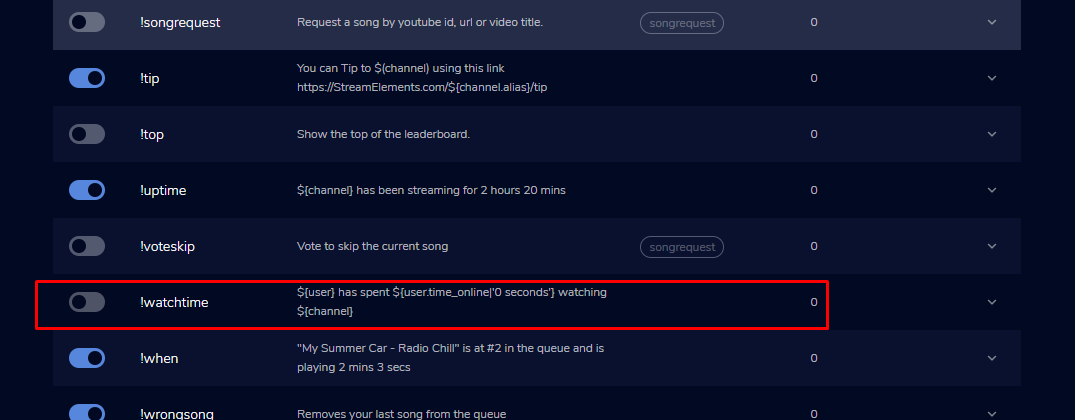
hello i need help to setup !watchtime
sleek gust
StreamElements
The Ultimate All in One Platform for Streamers
keen tide
ok
sleek gust
section with default commands
round brambleBOT
@sleek gust 10 minutes of watchtime are given to those in chat when the loyalty points are handed out (every 10 minutes). Therefore, loyalty must be enabled for watchtime to work properly.
There is no direct link between watchtime and all-time points.
It can’t be calculated from the amount of all-time points a user has because subs may earn points at a faster rate and !bonus all command increases all-time points for users in chat at that time.
Giving points to a single user does NOT affect all-time, only when giving to all in chat.
sleek gust
@keen tide https://prnt.sc/tr4dyl
 keen tide
but when it says this StreamElements: bearon12kdpi has spent 0 secs watching bearon12kdpi
sleek gust
because the statistics are reset
ionic kelp
Is loyalty enabled?
sleek gust
after when u change the bot
u can transfer the statistics
from your old bot
to new one
sleek gust
sorry than... it worked on me .. because its based on loyality points... and when i transfer from my old bot loyality data to new one.. that included and the watchtime
ionic kelp
They disnt mention that.
sleek gust
oh.. sorry again 😄 ... by the way.. can u help me with something
I got acquainted with the program too much and in general this will be my first time in which I will use a cloud bot and not a specific program, but I have a problem. As far as I know ... "regulars" is a separate role in the bot and with it I give rights to a certain user. Is it possible to give rights to users who are VIP and Subscriber to be able to post links without adding them to the bot "regular"
ionic kelp
No. You can only choose 1 option.
round brambleBOT
@sleek gust
Chat/Bot Levels
100 - Viewer
250 - Subscriber (Twitch subscribers automatically placed at this level)
300 - Regular
400 - VIP (Twitch VIP automatically placed at this level)
500 - Moderator (Twitch chat moderators automatically placed at this level)
1000 - Super Moderator
1500 - Broadcaster
Dashboard Manager Levels
Bot Supervisor
Editor
Full Access
Owner
https://i.imgur.com/s61Liry.png

 pine linden
hey guy i was just wondering if i could have a hand with my overlay transition lag, every time i change to a different scene all the media sources will load like my camera and screen but the overlay take about 2 seconds after and it looks really bad??
weak delta
@sleek gust If you want subs and VIPs to be able to post links, just set the permission to subscriber with no need to add them as regulars.
untold crest
@pine linden For that issue the best is to use OBS.Live and disable "shutdown source when not visible"
sleek gust
@weak delta thanks
pine linden
@untold crest where would i find that option in obs.live
untold crest
In browser source settings
Untick that one:
If you are using OBS.Live it takes care of muting non visible items, and this option prevents all assets from overlay from reload
ionic kelp
Be warned if multiple overlays have alerts they'll go off at the same time.
 untold crest
@ionic kelp in OBS.Live it doesn't work like that AFAIK
lament blade
I need to desactivate streamelements because my pc can not run as well as I want, someone can help me?
 worn anvil
I am having problems getting an overlay to work. Not sure if this is the right place for "Streamelements internal problems".
I have installed an premade overlay from the Themes gallery. There are several videos to show "animated" bars for subs, follows etc.
Now I can't get the accordings texts to show up above those videos, no matter how I sort them in the "layers" menu on the left.
pine linden
@untold crest that option is already checked
untold crest
Uncheck it
 blissful violet
I can only link paypal to me, paysafe etc is not displayed
ionic kelp
@blissful violet You dont meet the requirements
round brambleBOT
SE.PAY is available for streamers who are atleast 18 years old, with bank account under their name in one of the following countries and have at least 101 Follower (Twitch) / 101 Subscribers (Youtube):
Austria, Belgium, Czech Republic, Denmark, Finland, France, Germany, Ireland , Italy, Netherlands, Poland, Portugal, Slovakia, Spain, Sweden, Switzerland, United Kingdom, United States.
If you meet these criteria and don’t see SE.Pay, let us know.
For information on SE.Pay payment methods, their fees, and settlement times see https://streamelements.com/dashboard/tipping/fees.
worn anvil
Seriously guys: How can I "reset" the order of layers to actually effect the layers in the scene?
I have installed the "Dark Matter Animated" theme from the libary.
The text labels for "recent donation/follower" etc are all below the videos for the bars.
lament blade
I need to desactivate streamelements because my pc can not run as well as I want, someone can help me?
untold crest
@worn anvil are you sure you are updating the very same overlay you have in OBS?
I was editing once an overlay and I was surprised that my changes are not going live
And I realized I was editing different one
Everything should be displayed as in overlay editor upon save
blissful violet
Do i have any Chance when im Not 18 to get paid with paysafecards
ionic kelp
You have to be 18 period. Not our call.
untold crest
@blissful violet Your parent or legal guardian has to vouch for you (means that they have to register everything for them).
ionic kelp
¯\_(ツ)_/¯
worn anvil
@worn anvil are you sure you are updating the very same overlay you have in OBS?
@untold crest I have not even linked the overlay to OBS yet.
The error is showing in the Editor already. And no matter how I sort the panels on the left, I can't get the video bars to be shown underneath the text.
 unkempt basalt
Would this be the right place to ask help for some commands? I have no idea on how to build a command that whispers back to the user (if it's possible) :S
ionic kelp
@unkempt basalt only if the command is whispered unfortunately.
cinder kettle
I have an issue with my alerts. It's leaving this dead space underneath the webm file. The canvas is full hd, the file is full hd and the widget size is full hd. It's all 1920x1080. I don't get why this is happening. PLEASE HELP
ionic kelp
Screenshot the entire editor minus the link for it.
ionic kelp
Click the layer to have it selected.
unkempt basalt
Thanks @ionic kelp If I understand right the viewer would need to whisper the bot and only then the bot could whisper back?
ionic kelp
Yes
 near obsidian
I want to remove the bot in my stream but I don't know how to do it. Have any idea?
cinder kettle
Click the layer to have it selected.
@ionic kelp And?
ionic kelp
Screenshot again.
round brambleBOT
@near obsidian Go to the dashboard -> right side -> part channel -> join channel (https://streamelements.com/dashboard)
 ionic kelp
Do that but don't rejoin
cinder kettle
unkempt basalt
Is there a command I could build that would work like: The user Does !x and it would automatically whisper the bot for a response? Can I find these commands somewhere?
near obsidian
oh that was nice thanks for the help
ionic kelp
You either whisper or write in chat.
unkempt basalt
Ah dang. Thank you very much, sudo T_T
cinder kettle
Screenshot again.
@ionic kelp I screenshotted it
near obsidian
ah I have one more question
there is a bot with the manager how about undo?
oh never mind I just removed it!
thanks for the help
ionic kelp
@cinder kettle That wasn't what I was looking for but you did do what I said 
Choose the last option there and screenshot the info
worn anvil
This is what I am talking about.
"Current playing:" is above the bar, the label text to its left is not.
Same for the label text "Donations".
and "Recent Follower" and "Recent Sub", are underneath the bars right after "installing" the overlay.
 ionic kelp
Yes but looking at one of my own do that in the alertbox layer.
cinder kettle
excuse me?
"looking at one of my own do that in the alertbox layer." ??????
@ionic kelp
ionic kelp
That wasn't quite english so my bad
Click the layer for the alertbox and bring up the options for that. Click the same place for that like the last one and screenshot that.
cinder kettle
This is the position, size and style for the alert box layer
ionic kelp
That is not. That's for the overlay itself.
Because there's no TTS or Variation settings.
cinder kettle
whaaaat
I'm confused
I click the layer that says alert box 1
then I go down to position, size an style
and that's it
am i doing something wrong?
@ionic kelp
 mighty fractal
I set my goals to 300 followers and 20 subs in the data visualization settings in my overlay but this morning they say 301 followers and 22 subs (i got 1 new follower this morning and 2 subs). shouldnt it be going down and not up?
round brambleBOT
Follow these steps to grant managers/moderators access to your dashboard:
- Click on your Channel Name at the top of the dashboard and select Settings
- Create a new invite at one of three access levels (Bot Supervisor, Editor, Full Control)
- Send this invite to a mod/manager to give them access to your dashboard. The link is one-time-use and expires after 72 hours if not accepted
Video tutorial: https://youtu.be/zl_h-ttZDF0
ionic kelp
Make it an editor invite and DM me.
mighty fractal
so if i want to set my goal to reach 300 followers, what do i set this to?
cinder kettle
Make it an editor invite and DM me.
@ionic kelp I don't know what you're talking about. I am completely new to SE, otherwise I wouldn't have these problems
ionic kelp
Follow the bot instructions
round brambleBOT
@mighty fractal To reset goals:
- from the overlay editor -> session data on top right (monitor symbol) -> goals tab -> reset progress of desired goal
- from the dashboard -> activity feed on the left -> widget data on the right -> goals tab -> reset progress of desired goal
Note: Goal widgets(progress) only counts up and doesn't go down automatically, if you loose followers/subs
 limber kernel
im completely new to this programme and i don't know how i reset my capture setting to default
 wicked dagger
can you use stream elements with stream labs
round brambleBOT
@limber kernel For the best OBS support, please join their Official Discord @ discord.gg/obsproject
mighty fractal
so basically it just tracks how many i have recieved since hte reset?
ionic kelp
Or when created.
cinder kettle
@ionic kelp is that safe? LUL
worn anvil
can you use stream elements with stream labs
@wicked dagger Yes you can, but it is a pain in the a** to keep streamlabs from messing with your streamelemts overlays and alerts.
ionic kelp
Technically I'll have access to your overlays but I can figure it out quicker that way than with what we're doing.
ionic kelp
@wicked dagger If you mean within SLOBS then you have a chance that they won't work as they do block it at times for whatever reason.
cinder kettle
Technically I'll have access to your overlays but I can figure it out quicker that way than with what we're doing.
@ionic kelp Sounds a little sketch, sorry. I understand you're trying to help, but I have trust issues
ionic kelp
Would you be willing to screenshare that way you see me what happens once I get the invite?
cinder kettle
so you'd be screensharing?
cinder kettle
okay i'm okay with that
ionic kelp
1 sec though. I'm doing something else.
cinder kettle
same
 vapid flume
stream elements obs chat window is still not updating when people join the stream. I have to close the window down and opening it up again in docks . have restarted OBS mid stream a few times ,and still fails to update chat window viewers..But it will post anyone one that chats ...... any ideas
 digital plover
Hey guys. On a channel I am moderating, the bot doesn't react to modules like chat alerts, chat commands or timers. I tried parting it from the channel and rejoining it, but no difference. Can someone point me in the right direction?
weak delta
@digital plover gimme channel name, no links.
digital plover
I sent you a private message.
 slow crow
Hi
I want to gamble with loyalty points in my broadcast chat by streamelements. I don't know how to do someone can teach me please?
round brambleBOT
@digital plover Streamelements on top of OBS -> Logout -> login
@digital plover If your commands recently stopped working and you're using OBS.Live and a custom bot name do the following:
1.) In OBS.Live, click on the hamburger menu (three stripes) at the top left of your activity feed
2.) Click on Stream Settings -> Custom bot name
3.) In the "Custom bot name" field select "Set custom bot name", not your already existing username (with capital letters)
Note: If you already connected an account that way, the third entry will show as the account name (see image https://i.imgur.com/sO7fWOX.png)
4.) Scroll a bit down and click on the purple "CONNECT CUSTOM BOT ACCOUNT" button
5.) Log in as usual and "Authorize" the custom bot name
6.) Back in the Activity feed, click on the "SEND TEST MESSAGE" button and check if your custom bot name starts working again
weak delta
Make sure she's using the second option if she wants the bot to be her account.
She can do it all next time she goes offline and you all can test it offline. That should clear up all the issues but for now StreamElements will hold down the fort.
If when testing, it's still having issues then there's one more thing to try but this should clear you right up.
digital plover
Alright, I will try to follow that! Thank you for your time and effort! 🙂
candid monolith
If I moderate a live, can I make changes to the streamelements of that live?
weak delta
What?
If you means overlays then yes, any changes you make and save will be reflected while live.
candid monolith
It's not that.
For example, I'm a channel moderator... Can I change the SE settings?
Bad translator
weak delta
You need to be granted access by the streamer.
round brambleBOT
@candid monolith
Chat/Bot Levels
100 - Viewer
250 - Subscriber (Twitch subscribers automatically placed at this level)
300 - Regular
400 - VIP (Twitch VIP automatically placed at this level)
500 - Moderator (Twitch chat moderators automatically placed at this level)
1000 - Super Moderator
1500 - Broadcaster
Dashboard Manager Levels
Bot Supervisor
Editor
Full Access
Owner
https://i.imgur.com/s61Liry.png
candid monolith
ty
vapid flume
just reposting this again . i know you guys are busy .........stream elements obs chat window is still not updating when people join the stream. I have to close the window down and opening it up again in docks . have restarted OBS mid stream a few times ,and still fails to update chat window viewers..But it will post anyone one that chats ...... any ideas
weak delta
Yes, the viewer list is essentially just a link to the viewer list from the website and as far as I know it will not auto refresh. Twitch recently introduced a button on mod view to refresh the viewer list but it hasn't made it's way to the normal viewers list.
vapid flume
Ok thanks that clears it up then @weak delta cheers
lament blade
My old name was sayanmasker and my new is Saiyanmasker now i have no data is normal ?
weak delta
It is but we can fix it @lament blade I'll tag you in a momento.
round brambleBOT
@lament blade If you changed your name on Twitch please follow these steps:
🔹 Visit https://streamelements.com/logout and then log in again with by connecting with Twitch.
🔹 On the right side of the dashboard page that opens, select "Join" under bot settings. If it says "Part" select that and then select "Join" to send the bot to the chat. Don't forget to mod the bot by typing /mod streamelements in your channel if you have not already.
🔹 Post your old and your new name here so that we can update your channel's chatstats tracking (must be done by staff).
weak delta
Do all of that while I get your chatstats fixed up.
lament blade
@weak delta already did 🙂 thank just wait the chats stats back 🙂
 potent bay
Hi there, i was wondering if i could get a hand, on my stream elements home page i don't appear to have access to any of the sponsorship opportunities that some of my fellow content creators do and i was wondering if this was something i needed to sign up for? Or was allocated by a case by case basis. It would appear according to said friends that a section of the stream elements web ui is just missing from mine.
 hexed fern
im still having the issue that "parts" of overlay sometimes dont render, if i force a refresh of cache it comes back
anyone have an idea?
already checked dns issues, there were none
 prisma relic
it is random @potent bay for the sponsorships
i believe there is a MtG (Magic) the only 'default' one
@hexed fern that would be a better question for #helpdesk-selive or the OBS Discord server
prisma relic
does it work in the overlay editor on the website?
hexed fern
yes
prisma relic
then where does it not work in?
hexed fern
in obs studio , browser sources, its like SE is having cache issues or something like that
or it might be something completely unrelated on my hardware i dont know anymore
obs is being weird sometimes anyway, like just now, it wouldnt load any overlay anymore, i restarted obs and it was fine again
 onyx slate
hola putos gordos
prisma relic
this would be an OBS question; even if you aren't using the .Live extension; they might be able to help @hexed fern ... or the OBS Discord server would be best.
basically; if it works on the website then it should would in OBS
hexed fern
already doing that too , but still not sure its not on SE end, i mean it could still be a technical cache issue
prisma relic
but that is outside out this chatroom's knowledge
hexed fern
it seems it started after they duplicated my overlays to youtube
 visual totem
hi there, why my streamelements dont track a chatstats?
prisma relic
if you copy the link and open in it a new tab does it work? have OBS open and a window with that link as well @hexed fern
hola @onyx slate 🙂 English please or #🇪🇸︱español 🙂
hexed fern
hmmm @prisma relic
you might actuallu have a good point there
*actually
i ccan refresh the link in a browser tab as much as i want so it has to be a obs cache issue
thnx!
prisma relic
yup yup 🙂 not sure what it was; but glad i could give you a hint to fix it 🙂
prisma relic
do you have the loyalty enabled @visual totem ?
hahah; true. 'narrow down' the issue
prisma relic
did you used to have chat stats and they aren't working now? or you never had chat stats?
visual totem
yes, i used and it worked
 past acorn
Hey guys, sorry for asking, but is Streamelements down now?
prisma relic
yup yup; a name change will cause the issue.
past acorn
somehow I can't login
prisma relic
not sure about streamlabs 🤔
past acorn
*streamelements
prisma relic
what is your old name and new name on Twitch @visual totem ?
past acorn
pardon me
prisma relic
it's live for me; website that is.
visual totem
@prisma relic veny_brak - old | venek__ - now
past acorn
i think my provider done it again @prisma relic
prisma relic
bot is live for me as well
past acorn
okay thanks for the info
prisma relic
i'll send in the request for ya @visual totem
visual totem
thanks 
worn anvil
https://gyazo.com/2d75b53c886f10b52ec558df03f68e21
@worn anvil I "solved" my issue.
The text is just shown underneath the panel within the editor, but is displayed correctly on stream. So it is a problem with in the editor.
ionic kelp
@worn anvil Are you on a 1440p monitor by chance?
worn anvil
I am not sure. The model name is "MSI Optiux MAG241CV" Curved screen 1500R with 144Hz
ionic kelp

That isn't one.
If you click back and forth between these does it appear/disappear? https://streamlabs-is-a.totallysuspicious.website/211V5qN.jpg
 worn anvil
I will have to check that after my stream
 surreal shadow
Wondering if someone can help. I'm trying to add Lx Chat Poll to my streams widgets. The widget is all added and duplicated and set up, but it's not responding to the chat commands.
prisma relic
@visual totem 🙂 should be all set
visual totem
@prisma relic yep, its working
 viscid adder
hello my waqtchtime dosent works
round brambleBOT
@viscid adder 10 minutes of watchtime are given to those in chat when the loyalty points are handed out (every 10 minutes). Therefore, loyalty must be enabled for watchtime to work properly.
There is no direct link between watchtime and all-time points.
It can’t be calculated from the amount of all-time points a user has because subs may earn points at a faster rate and !bonus all command increases all-time points for users in chat at that time.
Giving points to a single user does NOT affect all-time, only when giving to all in chat.
 nova tartan
How to send custom commands response from me and not from Streamelements bot? (I set custom bot name on me)
round brambleBOT
@nova tartan Currently renaming the bot fully works with OBS.Live.
You can follow this video guide to set it up: https://discordapp.com/channels/141203863863558144/494513233416421386/561516184718278676
If you don't want to use OBS.Live and want to stick with Ground Control, please let us know your Twitch username.
 muted goblet
Hello, is there a way to have the Alert text placed on top of and image instead of above, below or next to the image?
ionic kelp
@muted goblet Change the layout for the alertbox to the 1st icon.
prisma relic
^^ text over image and then play with the text margin
 weary oar
I still havent heard anymore about my problem, is there going to be something soon?
prisma relic
was it a chat stat thing @weary oar ?
 worldly salmon
hello! My goals (subs or followers) don't update when I get new subs or follows. Is there a simple thing I should be doing?
muted goblet
@ionic kelp & @prisma relic thank you both...I will try that!
 torn nimbus
hi, my chatbot isnt working? ive tried having it leave and rejoin as well as have made sure to check that it is a mod. the chat commands havent been working for me.
i also made sure the bot isnt banned
ionic kelp
@torn nimbus Do you use OBS.Live by chance?
torn nimbus
yes!
ionic kelp
I assume you use the custom bot name as well?
torn nimbus
no i think ive kept it the same
weary oar
it was my subs and stuff isnt coming up on leaderboards or i cant show them on screen
lament blade
hello ! How is everyone? I'm having issue with OBS black screen with Display Capture.
round brambleBOT
@lament blade For the best OBS support, please join their Official Discord @ discord.gg/obsproject
ionic kelp
@torn nimbus Could you click the 3 lines in the top of the activity feed and then stream settings? Scroll down to the custom bot name and see what's chosen.
lament blade
thank you!
worldly salmon
Oh! So it seems goals don't auto update?
round brambleBOT
@worldly salmon Please logout of StreamElements at https://streamelements.com/logout and then login again to your account (Twitch/Youtube/Facebook)
StreamElements
The Ultimate All in One Platform for Streamers
ionic kelp
Try that.
 neat fractal
hey good morning, I am having an issue with obs live where ive connected my twitch account but when i hit the start streaming button it still defaults and puts the stream on facebook live
round brambleBOT
@neat fractal Streamelements on top of OBS -> Logout -> login
neat fractal
sorry i think wrong thread
worldly salmon
@ionic kelp Thanks for the help. I'm not sure what good that would do? I have tried that, but it's in my overlay that's not updating.
torn nimbus
ahh, i had it to my own account name! is there a way to make it so that works? i switched it back to the streamelements bot but i just wanted to know how to set it up so my twitch username can be who is posting
also thank you so much for the help!!!
ionic kelp
In the dropdown is there 2 or 3 names?
torn nimbus
theres streamelements, change to yeounis, and set custom bot name. is it possible to make it work if i select 'change to yeounis'?
 flint wasp
Good Morning. I would like to add overlay to bet on my stream, can I do this through the streamelement?
 placid raptor
@torn nimbus from my experience it works best when you choose the third option and login with your user's credentials, then choose the second option and save
worldly salmon
@ionic kelp So, is the follower goal on the overlays not supposed to auto update?
ionic kelp
It should as long as you get new followers.
round brambleBOT
Please provide your account ID found at the top of this page: https://streamelements.com/dashboard/account/channels This ID is public info and safe to share here.
worldly salmon
@ionic kelp Ah, well last night I started at 418 and I am now at 421
It's showing 419
ionic kelp
Mind giving the above info?
worldly salmon
5a172336583f9100011d54a9
muted goblet
@ionic kelp / @prisma relic One more Alerts question. Is there a way to Wrap the Alert text?
worldly salmon
What does that do, if I can ask @ionic kelp ?
ionic kelp
That's to have them "resync" your account/connection with twitch.
flint wasp
does anyone know how to add betting overlay?
 viral anvil
Ok I’m completely lost with stream elements and twitch how do I get my twitch onto my stream elements ??
 idle cypress
Good morning, I'm using the red animated theme and I am trying to edit the 2 cam theme to add a third cam window. Is it possible to separate the "left widget" so I can move the chat box down to add the 3rd cam window?
 upper rampart
is streamelements down?
wary halo
nope
lament blade
Hi, could you help me with a question of overlays, if I use a stretched resolution, because fps games and as stretched solutions give me the most advantage, I would like to put an overlay for my live life or the problem and if it to be complete in 16: 9 resolution and my eh 4: 3 when you were using a 16: 9 monitor when everything was right in a 1920x1080 resolution in the obs no monitor at all I went to do a live show and got a 360p quality and as if it were an original quality and not only with a theme, but with everyone how can I solve this?
worldly salmon
Yeah @ionic kelp it's just not syncing. It doesn't show amount of followers I have.
I edited it manually but that means if someone follows me it should go up one right?
 mental spade
can someone help plz. is there anyway for me to transfer my overlay in stream elements to a friend?
worldly salmon
You can just share the link, or do they want to adjust it for their own things?
ionic kelp
@mental spade You'd need to get an editor invite.
round brambleBOT
Follow these steps to grant managers/moderators access to your dashboard:
- Click on your Channel Name at the top of the dashboard and select Settings
- Create a new invite at one of three access levels (Bot Supervisor, Editor, Full Control)
- Send this invite to a mod/manager to give them access to your dashboard. The link is one-time-use and expires after 72 hours if not accepted
Video tutorial: https://youtu.be/zl_h-ttZDF0
worldly salmon
@ionic kelp Would you mind following me real quick? You can unfollow after.
Oh its working now.
But I had overlay up.
Is that fine?
@ionic kelp Are you tehbasshunter?
ionic kelp
Maybe 
worldly salmon
@ionic kelp I had overlay up when you followed. it did update, so now I don't know if that's why or not. Do I need to have Ground COntrol open?
ionic kelp
No idea. Not sure why it wouldn't behave.
worldly salmon
I mean it did do it right now, but not sure what's different about it lol
ty for help tho
 queen lark
Hi I have a question if stream elements works if I stream on console
round brambleBOT
@queen lark Consoles do not have native support for overlays. You would need a capture card, PS4 remote play or Xbox companion app and a PC with OBS in order to have Overlays over your console gameplay.
We have an blog post about how to setup console streaming with our essential tools: https://blog.streamelements.com/how-to-stream-on-console-7b620b1c46c3
 gloomy nest
where do i find the dimensions for the print sizes on merch.....like hoodies are different than t-shirts
 fickle vigil
My Commands only works when OBS is closed...does somebody know how I can fix that?
wary halo
check the pinned messages in #helpdesk-merch @gloomy nest
 midnight pine
how i make that the bot not response in the chat?
 severe stratus
Hi, I'm wondering if anyone can offer me some advice. I stream on console and run it through an Elgato capture card and use streamelements. I've been streaming about a week now and initially no issues at all however over the last 2 days I've been suffering with a huge frame drop problem, in streamelements it tells me I have between 60-90% dropped frames meaning my stream is lagging or freezing completely and I am unable to broadcast. I ran an internet speed test and called my providers to discuss the issue but they have said my connection is perfectly fine and I have also used their app to check the strength in the room I stream from and the strength is good too. I am not sure what else to do from here to fix the issue and I'm still not sure what caused the initial problem as I streamed for 5 days without any issue to begin with. Sorry for the long message!
ionic kelp
@midnight pine !bot mute
round brambleBOT
@severe stratus For the best OBS support, please join their Official Discord @ discord.gg/obsproject
midnight pine
It not helped the bot sent a emoji but the bot is continue responsing to commands
like if i type !followage 2 bots are responsing
round brambleBOT
Go to the dashboard -> right side -> part channel -> join channel (https://streamelements.com/dashboard)
ionic kelp
Do that but don't hit join.
midnight pine
ok
 cloud verge
hey guys! So whenever someone donates or follows I don't hear the Notification
midnight pine
@ionic kelp now if i run commands the bot does not response but if other users send commands the bot is responsing
worldly salmon
@cloud verge You'll need to run the overlay in a tab, OR use ground control
ionic kelp
@midnight pine You've got 4 bots in stream. You're gonna have conflicts like that.
midnight pine
oh nvm now the bt streamlabs is responsing and streamelements not anymore ill fix that now. anyways thanks for the help
worldly salmon
@cloud verge PM me
gloomy nest
why do I often get username does not have any points even though they have been watching forever
lament blade
how can i enable g2a pay on streamelements? 
ionic kelp
@lament blade It is no longer available due to regulation issues.
lament blade
ok so
any other ways i can get tippings if paypal is banned in my country?
thats my issue..
worldly salmon
So I have everything set-up except now I cant change bot name. Anything I should check?
ionic kelp
@worldly salmon OBS.Live or Ground control?
worldly salmon
Ground Control
ionic kelp
@lament blade Unfortunately if you don't live in one of the supported countries we can't help.
worldly salmon
@ionic kelp Yeah so I did all the steps, but can't get it to show up. I also relogged.
ionic kelp
I know you did. Gotta have someone flip a switch.
worldly salmon
Someone flip a switch?
ionic kelp
GC is special with the bot option and requires someone especially to "activate" it
worldly salmon
ah, so do I do that.. or it just takes a minute?
ionic kelp
Restart ground control.
worldly salmon
Sick thank you, sudo.
 sour lily
I am using SLOBS and the alert widget is not working for me
I switched alerts from SL to SE and when I get a follower nothign shows up
round brambleBOT
@sour lily We're not able to troubleshoot issues with using our overlays in StreamLabs OBS (SLOBS) as we don't have the tools to support their software. We recommend using OBS Studio or OBS Studio with our plugin OBS.Live.
worldly salmon
@ionic kelp i'm all fixed up, thank you.
 cinder olive
Not sure if its the right place but does anyone know how to add a text source to a widget?
 sturdy flume
Je vais devoir reprendre un nouveau twitch,,,j'ai perdu mon nom identifient
strong kernel
@sturdy flume 🖱️ ➡️ #🇫🇷︱français
round brambleBOT
@cinder olive New to Stream Elements?
Check out our YouTube channel https://www.youtube.com/c/streamelements/videos
with tutorial videos from setting up the basics, to in depth details on how to use our product.
New to OBS? Here is a 4 step quickstart guide
https://obsproject.com/wiki/OBS-Studio-Quickstart
Want to learn even more? Here is an in-depth overview
https://obsproject.com/wiki/OBS-Studio-Overview
 shell sail
Hi, Im using KappaGen for my alerts however i cant get the audio to play through the stream. I can hear it in obs however it wont go through to either the recording or stream. I have disabled desktop audio so i dont get system sounds and run everything through virtual audio cables. I also dont see My browser source in my mixer. However in advanced audio settings it is on both tracks (stream and recording) and available to make changes to it (sync offset, track select, volume etc...). Do i need to keep an instance of My overlay open in Chrome and then route the audio to a different track? Trying to avoid having to buy more virtual audio cables. as well as not need to have chrome open for this to work.
 vale trail
Hello, i have a problem with OBS.LIVE. i want to stream but i can't because my game capture is not working i have a black screen always i have tried various things to work it but it didn't, i tried troubleshooting compatibility runing as administrator going on grapics settings, updating my drivers, nothing works, help please. ( i have amd grapics card) (no game works on game capture) (dispaly capture works just fine )
 blissful kite
I am not a streamer but every time I make a donation to a streamer I seem to get signed up for streamlabs.. is there a way to stop this?
strong kernel
@blissful kite You'd have to ask Streamlabs. We're not Streamlabs.
@vale trail Laptop?
blissful kite
sorry I meant Stream Elements
vale trail
PC
strong kernel
@blissful kite What do you mean by "signed up for it?"
blissful kite
I am now getting emails from Stream Elements
I made a donation to a streamer yesterday and now I get this too ?
strong kernel
You mean post-stream reports? You can unsubscribe from those using the link at the bottom of the email.
blissful kite
It says "Welcome to StreamElements, Thanks for joining StreamElements...."
strong kernel
Many streamers require you to connect your account in order to tip them, this is normal.
It's for their protection in the case of an attempted chargeback.
blissful kite
And is this now going to cost me anything?
strong kernel
No. StreamElements is 100% free.
blissful kite
Thank you
vale trail
@strong kernel can you help me ?
round brambleBOT
@vale trail For the best OBS support, please join their Official Discord @ discord.gg/obsproject
 weak plover
Hi guys!
I was wondering if you could help me. I changed my name on Twitch and now I cannot use the bot. I already logged out and logged back in and reset everything but nothing.
Thanks! 
 low cairn
I'm not sure why but my alerts don't seem to fire consistently. I can replay the alert from the feed but when the initial action happens the alert doesn't actually fire.
lament blade
hey, is there a way for me to use .webm for alerts?
 fresh garnet
round brambleBOT
fresh garnet
round brambleBOT
@fresh garnet For the best OBS support, please join their Official Discord @ discord.gg/obsproject
 fallow wharf
Need assistance with Streamelement Overlays. When I have a user that is re-subscribing I receive no sound alerts
I am using the overlays by StreamElement
 barren nexus
Would you say it's a bad idea to use tipping from streamelements, but streaming from streamlabs?
round brambleBOT
@weak plover If you changed your name on Twitch please follow these steps:
🔹 Visit https://streamelements.com/logout and then log in again with by connecting with Twitch.
🔹 On the right side of the dashboard page that opens, select "Join" under bot settings. If it says "Part" select that and then select "Join" to send the bot to the chat. Don't forget to mod the bot by typing /mod streamelements in your channel if you have not already.
🔹 Post your old and your new name here so that we can update your channel's chatstats tracking (must be done by staff).
strong kernel
@lament blade Using webm is actually encouraged.
round brambleBOT
@fallow wharf Twitch prime (new and resub) and paid subscriptions (resub only) must be shared in chat manually by the person subscribing in order for the subscription information to be sent to StreamElements. For twitch prime, the user needs to have sharing enabled on https://www.twitch.tv/settings/prime. For paid subs, if the share box doesn't show up immediately it will when they refresh the page. https://i.imgur.com/VNJN0Uv.gif https://i.imgur.com/2297EA7.png


@barren nexus We're not able to troubleshoot issues with using our overlays in StreamLabs OBS (SLOBS) as we don't have the tools to support their software. We recommend using OBS Studio or OBS Studio with our plugin OBS.Live.
weak plover
Already did the steps mentioned above and it's not working.
Previous name: ArihPaws
New name: ArihMoon
Thanks for the assistance, especially since tomorrow I am having a giveaway and expect some people to show up
fallow wharf
Actually I have found my issue. The issue is that my Overlays doesn't have a sound when a user resubcribe. Where can I find the default.ogg sound from Streamelements
worn anvil
If you click back and forth between these does it appear/disappear? https://streamlabs-is-a.totallysuspicious.website/211V5qN.jpg
@ionic kelp Yes, that did indeed fix it.
weak plover
Issue is solved, bot is working again. You guys are the best!
 gleaming nymph
Hi, I'm a relatively new streamer in the Magic the gathering: Arena community. I applied for the Magic: the gathering content creator part of Streamelements, but due to my relatively small community I was concerned about not being accepted. I wanted to see if there was a certain threshold that needed to be met to be accepted into the program, or if there is anything else I can do to increase my chances of working with you all. Thank you!
strong kernel
@gleaming nymph That's decided by Wizards of the Coast, not us.
gleaming nymph
Ah ok, thank you
 elder cargo
I need assistance pleaseee lol
round brambleBOT
@elder cargo Welcome to the helpdesk! Please let us know how we can assist you today and a support volunteer or staff member will assist you as soon as they are available. Thank you for your patience.
elder cargo
I uploaded custom images for the alert box but on my streamlabs obs, its super stretched and the text is no where its supposed to be
round brambleBOT
@elder cargo We're not able to troubleshoot issues with using our overlays in StreamLabs OBS (SLOBS) as we don't have the tools to support their software. We recommend using OBS Studio or OBS Studio with our plugin OBS.Live.
elder cargo
bruh
lament blade
@lament blade Using webm is actually encouraged.
@strong kernel what shuold I use then?
cuz it aint working
strong kernel
Encouraged. As in, yes, please, use webm, they're great.
round brambleBOT
@lament blade OBS -> settings -> advanced -> scroll down -> enable/disable hardware accel. (This does not apply for OBS on Mac)
https://i.imgur.com/ggMe9ZE.png
lament blade
it just doesn't work at all
strong kernel
Did you disable the above?
lament blade
should I disable the browser thing?
strong kernel
Yes.
strong kernel
It is if you make it transparent.
strong kernel
Did you make the webm?
lament blade
I converted from .mov
strong kernel
Did the .mov have transparency?
lament blade
how would I know? cuz when I rendered in after effects there were no options with transparency
strong kernel
If you made it, then you should know, since you set the rendering settings.
We can't help you with rendering a video in After Effects.
 glass pewter
I have a question regarding song request while using OB (not SLOBS)
lament blade
streamlabs 😂 imagine
round brambleBOT
@glass pewter Welcome to the helpdesk! Please let us know how we can assist you today and a support volunteer or staff member will assist you as soon as they are available. Thank you for your patience.
glass pewter
OBS* I just set up song requests in my overlay and I got it playing audio and showing video however I am wondering is there any way to fine-tune the audio levels? the only option I see is choosing the audio level in the little youtube video window on the songrequest tab of streamelements website.
is there a way to control the audio level in OBS or is this the only choice for audio?
round brambleBOT
@glass pewter How to separate media request (MR) audio in OBS:
(Please follow one of the steps for your set up)
MUTE MR FOR YOURSELF, STREAM CAN HEAR
• Make a new overlay in the editor, ONLY add the media request widget,
• Add a new browser source in OBS, add the URL and set the dimensions correctly,
• Tick the box for "Control audio via OBS"
https://cdn.discordapp.com/attachments/712428275049431120/716618713998033047/unknown.png
• Go to Edit > Advanced Audio , set your MR overlay to "Monitor Off"
NOTE: This will play through the Desktop Audio, if you mute your desktop audio, it will mute the MR.
CONTROL AUDIO SEPARATELY FROM YOU AND STREAM
• For this you will need a VAC (use command !vac),
• Run your MR either in Chrome or in Ground Control (use command !gc),
DO NOT CLICK "SHOW ON STREAM"
• Set Chrome or GC in the VAC as an audio input and output,
• Add the audio output from VAC as an audio input in OBS,
NOTE: this will not be able to show the video in OBS
It is currently not possible to separate audio for yourself and stream if you ALSO want to show the video in OBS.
The only way to do this would be to follow the last set of instructions above and then use Window Capture on GC or Chrome.
Thank you 
 jade remnant
use the first option but set audio monitoring to "monitor only" if you want to hear it
glass pewter
• Go to Edit > Advanced Audio , set your MR overlay to "Monitor Off"
NOTE: This will play through the Desktop Audio, if you mute your desktop audio, it will mute the MR.
I can't seem to find the advanced audio button?
jade remnant
you dont have the edit menu?
 hidden bison
Hello
round brambleBOT
@sterile canopy Please follow our community rules:
- No advertisement or stream promotion
- Respect ALL server members
- No NSFW/NSFL
Thank you
glass pewter
@jade remnant do you mean advanced audio in OBS?
jade remnant
yes, its in the edit menu, if you dont have either, please send a screenshot
glass pewter
@jade remnant Okay I figured it out, this will definitly work thank you so much!
 burnt sinew
@strong kernel need some help pls
round brambleBOT
@burnt sinew Not all staff are able to assist with support issues. Please refrain from pinging them or sending them DMs unless asked to.
@burnt sinew Welcome to the helpdesk! Please let us know how we can assist you today and a support volunteer or staff member will assist you as soon as they are available. Thank you for your patience.
 mortal shore
I am needing assistance as well
round brambleBOT
@mortal shore Welcome to the helpdesk! Please let us know how we can assist you today and a support volunteer or staff member will assist you as soon as they are available. Thank you for your patience.
mortal shore
Yes, I selected a super theme is stream elements. Now i am looking at a pop up with links to the themes and it states 'grab you theme link to OBS'.
How do i do this?
round brambleBOT
@mortal shore To add your overlays to OBS, add a new browser source in your scene. Paste your overlay URL in the browser source properties, set the dimensions to 1920x1080 (unless you changed them on the website), and ☑ “Shutdown source when not visible” https://youtu.be/KDvLynUqXI4
strong kernel
The website is up and running as expected. What behavior are you seeing?
burnt sinew
website is not responding
round brambleBOT
@burnt sinew Please provide a proper screenshot with the issue visible. If not sure how to take a screenshot, you can check here: https://www.take-a-screenshot.org/
burnt sinew
all other sites are fine
strong kernel
Only custom commands can be enabled and disabled via chat. Default commands are enabled and disabled on the site.
burnt sinew
will try to reboot routher frist
burnt sinew
i can enter with mobilephone oO
strong kernel
!cmd options commandname -enable
 solid wing
thank you
mortal shore
thank you, i have added the scenes successfully, how can i test them in OBS to make sure they display correctly before going live, currently in OBS.LIVE
round brambleBOT
@mortal shore You can test Alerts via the Emulate bell on the lower left side of the Overlay Editor. Simply go to your Dashboard -> My Overlays -> Pencil/edit button on the overlay. Make sure the "Preview LIVE on stream" option is on to see the alert in OBS/Xsplit https://streamable.com/vtulg9

 viscid pebbleBOT
Hi @hazy hill, Please ask your question(s) or describe the problem you're looking to solve so staff or a support volunteer can assist you as soon as they are available.
 slender prism
Question about the Ground Control App. What is the purpose of the Music Note and Hamburger symbols at the top. Clicking on them doesn't appear to do anything.
https://i.imgur.com/iwFK7CB.png
 hazy hill
i need help because i copied a link of a overlay and i dont know where to put it in the streamelements app
round brambleBOT
@hazy hill To add your overlays to OBS, add a new browser source in your scene. Paste your overlay URL in the browser source properties, set the dimensions to 1920x1080 (unless you changed them on the website), and ☑ “Shutdown source when not visible” https://youtu.be/KDvLynUqXI4
 graceful pond


 scarlet tiger
In #🇩🇪︱deutsch
hazy hill
i need help lining my facecam up tho
burnt sinew
this is showing me (solved)
neon nexus
Links on my chat are not shown - there are three dots instead... I've probably changed something by accident... How to fix it?
strong kernel
That's a Twitch moderation setting, in your Twitch account.
hazy hill
@strong kernel i need help lining up my camera on my overlay can u help
 remote wing
Hi, I was wondering whether there was a way to set user-level for a command when adding it in twitch chat? (i mean, adding the command via twitch chat and while doing it setting its user-level)
strong kernel
Not when adding it. It's a separate command use, after adding it.
!cmd options commandname -level ###
remote wing
thank you!
round brambleBOT
@remote wing
Chat/Bot Levels
100 - Viewer
250 - Subscriber (Twitch subscribers automatically placed at this level)
300 - Regular
400 - VIP (Twitch VIP automatically placed at this level)
500 - Moderator (Twitch chat moderators automatically placed at this level)
1000 - Super Moderator
1500 - Broadcaster
Dashboard Manager Levels
Bot Supervisor
Editor
Full Access
Owner
https://i.imgur.com/s61Liry.png
hazy hill
the problem here is that i cant strech the camera or like control the sides every time i move one of the sides it just makes the camera bigger
i just started with this streaming stuff. just downloaded everthing today
 sudden spear
any clue how to adjust my follower goal so it doesn't include unfollowed follows in my follow goal. It shows 20 more follows in the widget than i actually have