#helpdesk-twitch
1 messages · Page 702 of 1
 tawny prism
 wary halo
yes
 narrow ibex
@tawny prism but sometime when you don't hit 100$ in a year Twitch will kick you from Affiliate.
 dim jetty
How can i get 101 followers ?
wary halo
by making high quality content, engage with the viewers and promote on social media. but that is more a conversation for #general-chat since it's not really support related
narrow ibex
@wary halo when you don't stream often you get kicked ^^
wary halo
that is something entirely different 😛
you can stream every day and still not hit that 100

dim jetty
But i wann i already have 59
wary halo
But i wann i already have 59
@dim jetty and i want to have 20.000, work for it
narrow ibex
okay but in the contract they say, don'T hit 100 - kicked. In FAQ say they: When you do nothing to hit 100 we kick you but we don't kick activ streamer 😄
dim jetty
okey
narrow ibex
@dim jetty thats the wrong channel 😄 #general-chat is the way to go
 karmic agate
my total subs arent working? how can i fix this
 sweet rune
I used to use StreamElements logging in through Mixer, but then Mixer made their announcement so I logged in to StreamElements through Twitch. Now I have two separate accounts. Is there a way to merge these? If not, how do I get a link to my Tips page because now I have two different ones.
 round brambleBOT
@sweet rune Account Merging - Please note:
- Merging accounts only allows faster ways to switch between accounts
- Merging accounts does not allow data sharing between accounts - different streaming platforms, different type of events
- Merging accounts allows duplicating/sharing overlays between the accounts
If you understand the limitations of merging and want to proceed, please find the JWT tokens (!jwt) from both accounts you want to merge and you will be directed to DM them to a staff member.
@sweet rune You can find your JWT token on your account channels page ("Show Secrets" to reveal the token): https://streamelements.com/dashboard/account/channels
READ ME:
This is a private security token. Do NOT share this token here or other public places, only with a StreamElements staff member in private.
 grand folio
I can't start a giveaway. Plz help
wary halo
I can't start a giveaway. Plz help
@grand folio there are a few issues with it, try giving it a picture (doesn't really matter what picture it is)
my total subs arent working? how can i fix this
@karmic agate i'll ask around for your issue
karmic agate
@wary halo thank you so much
 sweet socket
@karmic agate do the following steps:
- reset session here (https://streamelements.com/dashboard/activity)
- part bot from your channel (https://streamelements.com/dashboard)
- log out (https://streamelements.com/logout)
- log in with your Twitch account (https://streamelements.com/dashboard)
- join bot on your channel.
sweet rune
I don't have to merge the accounts. I am fine starting from scratch, but now the link for the Twitch tip page is taken by Mixer. How do I customize or find the link to my new tip page?
round brambleBOT
@sweet rune To change your tippinglink, please get your current name, account ID & your desired name.
You can submit a request for the change via https://streamelements.com/contact or have a Support Hero request a staff member.
Your account ID is public and safe to share.

StreamElements
StreamElements is the leading platform for live streamers on Twitch and Youtube. StreamElements includes Overlay management, ChatBot, Tipping, Alerts & Loyalty
karmic agate
@sweet socket still nothing
sweet rune
!JWT
round brambleBOT
You can find your JWT token on your account channels page ("Show Secrets" to reveal the token): https://streamelements.com/dashboard/account/channels
READ ME:
This is a private security token. Do NOT share this token here or other public places, only with a StreamElements staff member in private.
sweet socket
can you refresh your overlays for me please? @karmic agate
 lament blade
Hey, I got a question, for the Twitter Module to work, do I need to be Live?
karmic agate
@sweet socket you mean reset session?
lament blade
Because sometimes it works and sometimes it does not work
sweet socket
you dont need to be live, it worked before, so if it isnt working again, please try rejoining the bot or wait a couple of mins for it to show up
lament blade
I tweeted something mid-stream and the bot did not display the newest tweet
karmic agate
i reset the session and nothing happens @sweet socket
sweet socket
did it however display tweets from other acocunts that you know?
If you reset the session, only new subs that come in, will count again
lament blade
No, I only wanted it to display mine
sweet socket
i meant to refresh the browser source within OBS
karmic agate
so how do i refresh the overlays like you said? @sweet socket sorry never did it before
sweet socket
gimme 1 sec
browser source within obs -> right click -> properties -> button at the bottom of the options -> refresh cache of current page
karmic agate
okay i refreshed but nothing changed
sweet socket
ill ask staff about it
karmic agate
thank you
sweet socket
its stated that it can take some time before it refreshes @karmic agate
Sorry for that, be sure to come back later if this still persists
 echo scarab
My Stream Stats Site isnt working
StreamElements
Description Chat Stats tracks emote usage on Twitch in real time. See which emotes are the most popular on every Twitch channel
round brambleBOT
@echo scarab If you changed your name on Twitch please follow these steps:
🔹 Visit https://streamelements.com/logout and then log in again with by connecting with Twitch.
🔹 On the right side of the dashboard page that opens, select "Join" under bot settings. If it says "Part" select that and then select "Join" to send the bot to the chat. Don't forget to mod the bot by typing /mod streamelements in your channel if you have not already.
🔹 Post your old and your new name here so that we can update your channel's chatstats tracking (must be done by staff).
karmic agate
@sweet socket no worries, thanks so much for helping
echo scarab
Old Channel Name: xTig3rx
New: Tiqan_
wary halo
@echo scarab should work now
echo scarab
yeah thanks
 radiant ingot
Hey, I'm brand new
just wondering how I can get an interactive chat box
on my stream
err...
not interactive
just live that I can see
 elder sorrel
Are you streaming on PC?
radiant ingot
yes
I'm using the league of legends theme
and I put the chat box from the end theme onto the ingame theme
but I can't see any chat up
and can't see the chat when I'm streaming
round brambleBOT
@radiant ingot If you have 1 monitor and/or would like the chat overlay on screen, please look at the link below.
Please note this is not a plugin for OBS and not maintained by SE.
https://github.com/baffler/Transparent-Twitch-Chat-Overlay
radiant ingot
omgoose amazing 🙂
Ummm
I clicked that "o" button and now the border disappeared
any idea how to get it back? 😬
oh, just restart it
ok cool 🙂
lament blade
why my bot dont show answer to commends but i see they edited or changed
 gentle bloom
hello
sweet socket
@lament blade how are you using the bot? With your own username or as StreamElements?
lament blade
stream elements
gentle bloom
how do is hut down my account?
 patent shuttle
hey guys i have weird problem..my bot wont send messages in chat while using my name but when i change it back to streamelements its working how it should..where is the problem
round brambleBOT
@lament blade Go to the dashboard -> right side -> part channel -> join channel (https://streamelements.com/dashboard)

@patent shuttle If your commands recently stopped working and you're using OBS.Live and a custom bot name do the following:
1.) In OBS.Live, click on the hamburger menu (three stripes) at the top left of your activity feed
2.) Click on Stream Settings -> Custom bot name
3.) In the "Custom bot name" field select "Set custom bot name", not your already existing username (with capital letters)
Note: If you already connected an account that way, the third entry will show as the account name (see image https://i.imgur.com/sO7fWOX.png)
4.) Scroll a bit down and click on the purple "CONNECT CUSOTM BOT ACCOUNT" button
5.) Log in as usual and "Authorize" the custom bot name
6.) Back in the Activity feed, click on the "SEND TEST MESSAGE" button and check if your custom bot name starts working again
 sweet socket
^ follow these steps
 steep pewter
How do I start a charity stream??
patent shuttle
@sweet socket thats not my problem
gentle bloom
@sweet socket how do i shut down my account?
patent shuttle
@sweet socket im using 2nd option which is change to facecatftw
@sweet socket yesterday it worked
sweet socket
Have you already tried relogging?
round brambleBOT
@patent shuttle Streamelements on top of OBS -> Logout -> login
sweet socket
otherwise, please be sure to do the steps above, since that has been happening due to twitch
 abstract hemlock
@gentle bloom you can click the Close my account button at https://streamelements.com/dashboard/account/security.
patent shuttle
@sweet socket well i dont have 2nd acc for my bot im using option which is in picture(2nd one not 3rd one)
gentle bloom
@sweet socket what is a jwt token and how do i get one?
sweet socket
exactly, you need to log in with your own account, please follow the steps Support AI states @patent shuttle
gentle bloom
thats my problem
round brambleBOT
@gentle bloom You can find your JWT token on your account channels page ("Show Secrets" to reveal the token): https://streamelements.com/dashboard/account/channels
READ ME:
This is a private security token. Do NOT share this token here or other public places, only with a StreamElements staff member in private.
lament blade
how do I set the timer for an automatically increasing marathon? can you explain me?
help me pleas
 odd stone
Hi! I would like to have an automatic command, when someone starts to follow my channel, the bot responds in the chat like this: “Hello (user name), thanks for following, welcome!”
sweet socket
go here https://streamelements.com/dashboard/bot-modules -> enable chat alerts
@odd stone
 slender dock
Hi there! I'm having trouble having TTS when there is a 100 bits/cheers. All my settings seem to show that a TTS should activate at 100 bits/cheers. Oddly enough, TTS activates at 300 bits. Not too sure what to do or what else to check.
 cinder hawk
abstract hemlock
cinder hawk
abstract hemlock
@slender dock Hey, please try to delete your alertbox and create a new one, it looks like the one that you have on your overlay have a bug
@cinder hawk check pinned messages on #helpdesk-selive
slender dock
@abstract hemlock Thank you so much! I'll be sure to do that ^^
 gaunt spade
Hello there 🙂 my event list appears to be showing the oldest event first. The newest event is cut off if I orient the list to be Vertical, bottom
Additionally, I have max events limited to 4 but it's showing an unlimited number
abstract hemlock
@gaunt spade for the title of the overlay its fair to assume that is a event list widget made by NoD?
gaunt spade
Yes part of a package
abstract hemlock
If so, Its more likely to have some custom code on it, better as NoD for any change of the behavior of the widget
gaunt spade
Okay I'll dig into it, thank you!
 hollow spindle
Hey does anyone know if I can take graphics from the premade overlays and download to use in after effects
for example a donation Icon
wary halo
no
 topaz temple
I have yet to find a way to do that myself @hollow spindle
wary halo
downloading any assets from the StreamElements overlays is against TOS
hollow spindle
yeah i wasnt sure if if it was totally ok cause it is someone elses animation that I would be using for something other than the creators intentions
 ancient otter
Anyone could help me with goals that don't reset?
I'm trying to discover by myself but, nothing seems to work
round brambleBOT
@ancient otter To reset goals:
- from the overlay editor -> session data on top right (monitor symbol) -> goals tab -> reset progress of desired goal
- from the dashboard -> activity feed on the left -> widget data on the right -> goals tab -> reset progress of desired goal
Note: Goal widgets(progress) only counts up and doesn't go down automatically, if you loose followers/subs
ancient otter
Well i said before, that did this, i saved, i did a logout and reloged again, nothing reset the goals
I was waiting for 23:59 UTC itme to see if would work, but didn't
The goals are like this
but the widgets are like this
I can reset without any problem having full control of the channel's dashboard right? I don't need to be logged on main account?
echo scarab
How can I create my own Background for the Event List? Pls Tutorial or something like that
narrow ibex
Why ${count ${touser}1} don't work? its only show "${count ${touser}}"
abstract hemlock
@narrow ibex what are you trying to do?
 rotund bay
hi, why i cant make a give aways? "couldnt create giveaway"
 obtuse wasp
I do not know what stim please help https://prnt.sc/tby5ib
 cyan surge
Guys, your bots are working? Mine just died
 modest matrix
got my username changed by twitch about 6 months back, noticed my chat stats page goes to a 404 page, is there anyway to get this operational?
sweet socket
@cyan surge are you using your own username for the bot?
round brambleBOT
@modest matrix If you changed your name on Twitch please follow these steps:
🔹 Visit https://streamelements.com/logout and then log in again with by connecting with Twitch.
🔹 On the right side of the dashboard page that opens, select "Join" under bot settings. If it says "Part" select that and then select "Join" to send the bot to the chat. Don't forget to mod the bot by typing /mod streamelements in your channel if you have not already.
🔹 Post your old and your new name here so that we can update your channel's chatstats tracking (must be done by staff).
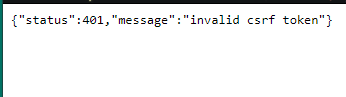
@obtuse wasp If you are having an issue with login into our Dashboard and getting "Invalid csrf token", please folow these steps: https://pastebin.com/raw/MZNayFLB
modest matrix
old username : iamtylive new username: iamty
abstract hemlock
@rotund bay add an image
sweet socket
have requested for a staff member to fix it for you Ty 😄
narrow ibex
I have in a command ${count ${touser}} - where each user have a his own Counter. Now i want a second User Counter and i user ${count ${touser}2} in the hope it is like ${count XYZ2} but the bot only write "${count ${touser}2}" not that what i want.
cyan surge
yes @sweet socket
round brambleBOT
@cyan surge If your commands recently stopped working and you're using OBS.Live and a custom bot name do the following:
1.) In OBS.Live, click on the hamburger menu (three stripes) at the top left of your activity feed
2.) Click on Stream Settings -> Custom bot name
3.) In the "Custom bot name" field select "Set custom bot name", not your already existing username (with capital letters)
Note: If you already connected an account that way, the third entry will show as the account name (see image https://i.imgur.com/sO7fWOX.png)
4.) Scroll a bit down and click on the purple "CONNECT CUSOTM BOT ACCOUNT" button
5.) Log in as usual and "Authorize" the custom bot name
6.) Back in the Activity feed, click on the "SEND TEST MESSAGE" button and check if your custom bot name starts working again
sweet socket
try the steps above ^
twitch changed something back on the 29th and there were some issues with it
cyan surge
nice, thx a live! i'll give it a try
sweet socket
no worries, let me know if that worked for you
cyan surge
lot**
Yeah, tested here and my own acc is not working
only my custom bot account
is there any way to make my own acc as the bot?
sweet socket
yes, if you follow the steps above, you can do that
firsly disconnect the custom bot
and then follow steps above
narrow ibex
I have in a command ${count ${touser}} - where each user have a his own Counter. Now i want a second User Counter and i user ${count ${touser}2} in the hope it is like ${count XYZ2} but the bot only write "${count ${touser}2}" not that what i want.
 strong dagger
Hi i could use some support haha
i want to upload my scenes from obs to stream elmeents. OBS is just not cutting it for me anymore
 fallow tree
odd stone
fallow tree
odd stone
@odd stone
@sweet socket Thank you! It worked. 👍
 icy cosmos
Anyone know how I can add Custom CSS to the Store Redemption Widget?
 long wyvern
Hi does anyone know why my chat commands are not working anymore?
round brambleBOT
@long wyvern If your commands recently stopped working and you're using OBS.Live and a custom bot name do the following:
1.) In OBS.Live, click on the hamburger menu (three stripes) at the top left of your activity feed
2.) Click on Stream Settings -> Custom bot name
3.) In the "Custom bot name" field select "Set custom bot name", not your already existing username (with capital letters)
Note: If you already connected an account that way, the third entry will show as the account name (see image https://i.imgur.com/sO7fWOX.png)
4.) Scroll a bit down and click on the purple "CONNECT CUSOTM BOT ACCOUNT" button
5.) Log in as usual and "Authorize" the custom bot name
6.) Back in the Activity feed, click on the "SEND TEST MESSAGE" button and check if your custom bot name starts working again
long wyvern
It's still not working @round bramble
round brambleBOT
@long wyvern Please connect your streaming account (Twitch, YouTube, or Facebook) with Discord by going to ⚙ Settings and then Connections here in Discord. https://streamable.com/eg92w
 long wyvern
And then? @round bramble
 long wyvern

abstract hemlock

 brisk haven
can anyone assist me with an issue I'm having with my bot? For some reason none of my chat commands are working no matter what i try
I've already logged off and back on. I've also parted the bot from the channel and rejoined it and re-modded it. I am just out of ideas at this point and I'm late for my stream 😦
round brambleBOT
@brisk haven If your commands recently stopped working and you're using OBS.Live and a custom bot name do the following:
1.) In OBS.Live, click on the hamburger menu (three stripes) at the top left of your activity feed
2.) Click on Stream Settings -> Custom bot name
3.) In the "Custom bot name" field select "Set custom bot name", not your already existing username (with capital letters)
Note: If you already connected an account that way, the third entry will show as the account name (see image https://i.imgur.com/sO7fWOX.png)
4.) Scroll a bit down and click on the purple "CONNECT CUSOTM BOT ACCOUNT" button
5.) Log in as usual and "Authorize" the custom bot name
6.) Back in the Activity feed, click on the "SEND TEST MESSAGE" button and check if your custom bot name starts working again
 idle flame
Yesterday commands started giving cooldowns to Mods when they didnt used to. Any ideas on why this is ?
 hexed fox
How can I get my chatbot to work when livestreming?
round brambleBOT
@hexed fox Go to the dashboard -> right side -> part channel -> join channel (https://streamelements.com/dashboard)
abstract hemlock
@idle flame at random?
abstract hemlock
but like, for no reason at all?
idle flame
None that I'm aware of. I created a new command with a longer cooldown. After that all commands with cooldowns started working for mods also
abstract hemlock
That's the expected behavior, mod can trigger commands @idle flame
@hallow ore add an image to the giveaway
idle flame
I'm sorry for wording. The mods are effected by the cooldowns. Instead of able to use at will
After the one command was made. All cooldowns effected mods
round brambleBOT
@idle flame Please connect your streaming account (Twitch, YouTube, or Facebook) with Discord by going to ⚙ Settings and then Connections here in Discord. https://streamable.com/eg92w

 teal frigate
Hello. Once again the issue with the Stream Elements bot happened, where, during my live the bot doesn't work (neither auto messages or answer commands). Again, when I finish my stream, it goes back online and send messages on the chat even though my stream is off. This issue is really being awful for me and my streams, so I would like some help of yours for the last time nothing was done. Thanks 🙂
 neat glade
la ip cual es
 hallow ore
@abstract hemlock It works!! Thanks man!
round brambleBOT
@teal frigate If your commands recently stopped working and you're using OBS.Live and a custom bot name do the following:
1.) In OBS.Live, click on the hamburger menu (three stripes) at the top left of your activity feed
2.) Click on Stream Settings -> Custom bot name
3.) In the "Custom bot name" field select "Set custom bot name", not your already existing username (with capital letters)
Note: If you already connected an account that way, the third entry will show as the account name (see image https://i.imgur.com/sO7fWOX.png)
4.) Scroll a bit down and click on the purple "CONNECT CUSOTM BOT ACCOUNT" button
5.) Log in as usual and "Authorize" the custom bot name
6.) Back in the Activity feed, click on the "SEND TEST MESSAGE" button and check if your custom bot name starts working again
 ionic kelp
@solar wedge You there? I see you made your way onto the server.
 solar wedge
@ionic kelp o/ I did!
ionic kelp
What exactly is the issue?
solar wedge
I'm still having trouble importing my streamlabs bot info over to streamelements.
ionic kelp
Looking back I did forget to tell you how to import that or is it before that?
solar wedge
You did tell me how but I think I must be doing something wrong cause it didn't import.
ionic kelp
Actually forgot to tell you. 
solar wedge
OH whoops xD
ionic kelp
You want to do that here. https://streamelements.com/dashboard/account/import?provider=ankhbot
1 thing though if you're importing currency you need to do a little bit of editing with the watch time as there's a difference on how it's imported.
Gimme a sec to find what the difference is.
solar wedge
Oh yeah I found that point. Currency isn't that important, it's mostly quotes and commands that I care about.
ionic kelp
And it returns an error of some kind after you tried to import?
solar wedge
It just doesn't import which is where I'm having the issue and I'm thinking it's something I'm doing. It took a while for me to get everything saved properly first.
ionic kelp
You mind DMing me the excel files?
solar wedge
I can!
 wanton ravine
When changing the name of the bot, the commands don't seem to be working then?
Example without bot name = works then I changed it to the same as my name then it doesn't work
round brambleBOT
@wanton ravine If your commands recently stopped working and you're using OBS.Live and a custom bot name do the following:
1.) In OBS.Live, click on the hamburger menu (three stripes) at the top left of your activity feed
2.) Click on Stream Settings -> Custom bot name
3.) In the "Custom bot name" field select "Set custom bot name", not your already existing username (with capital letters)
Note: If you already connected an account that way, the third entry will show as the account name (see image https://i.imgur.com/sO7fWOX.png)
4.) Scroll a bit down and click on the purple "CONNECT CUSOTM BOT ACCOUNT" button
5.) Log in as usual and "Authorize" the custom bot name
6.) Back in the Activity feed, click on the "SEND TEST MESSAGE" button and check if your custom bot name starts working again
lament blade
I made the streamelements store just right but as I do lives on the streamleabsstreamleabs Mobile I don't know how to add store alerts Can you help me?
wanton ravine
I just want my bot to have the same name as me, not setup a different account for custom name? when clicking the "chane to I_AM_DIGITAL" option the bot simply doesn't work then, no commands work until I change it back to streamelements
 chrome folio
@wanton ravine follow the instructions above... select "SET CUSTOM BOT NAME" and test it.
lament blade
I made the streamelements store just right but as I do lives on the streamleabsstreamleabs Mobile I don't know how to add store alerts Can you help me?
@lament blade help me understand.
chrome folio
@lament blade enter the link https://streamelements.com/dashboard/overlays and edit one overlay or create one blank overlay to add the Store Redemptions widget
wanton ravine
@wanton ravine follow the instructions above... select "SET CUSTOM BOT NAME" and test it.
@chrome folio my bad, it works thank you ❤️
chrome folio
lament blade
@lament blade enter the link https://streamelements.com/dashboard/overlays and edit one overlay or create one blank overlay to add the Store Redemptions widget
@chrome folio Thanks
StreamElements
The Ultimate All in One Platform for Streamers
@chrome folio But after creating a new overlay I click where?
 fallen furnace
How do you add a overlay onto obs.live ?
round brambleBOT
@fallen furnace To add your overlays to OBS, add a new browser source in your scene. Paste your overlay URL in the browser source properties, set the dimensions to 1920x1080 (unless you changed them on the website), and ☑ “Shutdown source when not visible” https://youtu.be/KDvLynUqXI4
chrome folio
@lament blade see my image or message for you, above, with the widget Store Redemptions
lament blade
@lament blade see my image or message for you, above, with the widget Store Redemptions
@chrome folio oh sorry thanks
round brambleBOT
@lament blade We've released our new Overlay Editor revamp. You can check out the changes and how to work with it here: https://youtu.be/X5VzXjqAsjk
Check out our blog post as well: https://blog.streamelements.com/streamelements-overlay-editor-just-got-even-better-c22cb5b4853e

We are thrilled to announce the launch of the remastered StreamElements Overlay editor!
https://p.strms.net/newoverlayyt
Why StreamElements Overlays are better?
😎 Simple: Load your entier setup using only 1 link
⚡ Fast: Cloud-powered Overlays arrive in real-time, say goodb...
 reef oyster
Can anyone help? my chatbot is down completely down, ive tried unmodding
lament blade
@chrome folio right I selected the Gif I want to use for the notification now everything is ready on this screen what do I do next?
is that i'm brazilian and i don't understand streamelements videos because i don't speak english use translator
round brambleBOT
@reef oyster If your commands recently stopped working and you're using OBS.Live and a custom bot name do the following:
1.) In OBS.Live, click on the hamburger menu (three stripes) at the top left of your activity feed
2.) Click on Stream Settings -> Custom bot name
3.) In the "Custom bot name" field select "Set custom bot name", not your already existing username (with capital letters)
Note: If you already connected an account that way, the third entry will show as the account name (see image https://i.imgur.com/sO7fWOX.png)
4.) Scroll a bit down and click on the purple "CONNECT CUSOTM BOT ACCOUNT" button
5.) Log in as usual and "Authorize" the custom bot name
6.) Back in the Activity feed, click on the "SEND TEST MESSAGE" button and check if your custom bot name starts working again
chrome folio
@lament blade you can use #🇵🇹︱português chat
radiant ingot
Hey I was streaming recently
and when I did Display Capture, it looked perfect
but then when I did game capture, all the 2D renders
looked blocky with black squares around it
lament blade
EU in those busy times that I was here I didn't know how I am destroyed
round brambleBOT
@radiant ingot For the best OBS support, please join their Official Discord @ discord.gg/obsproject
 unreal plank
Hey I'm using OBS Live, asking the bot to use my own name, but no matter what I set it up as it's just not talking when I input commands - checked the command is right, and it's definitely in my channel
ionic kelp
@unreal plank Bot response up a few messages.
unreal plank
@ionic kelp I'm not sure how that applies because it's not even responding if I turn it onto stream elements - it's not asking me to connect an account -
ionic kelp
Click the dropdown option.
lament blade
is the bot down?
ionic kelp
@lament blade Could you turn off follower mode?
lament blade
let me try
unreal plank
Thank you that fixed it @ionic kelp
lament blade
it was working before when i had follower mode on, not sure why it stopped?
ionic kelp
That was so I could check something and it won't work with follower mode one.
 long sluice
Is there a way to change tags in OBS.Live?
I found it, sorry for the trouble
I went to View > Docks > stream information to bring up the native dock with the ability to do so
 raven hedge
Hi everyone, was hoping to get some assistance. I noticed that whenever I use a widget that displays the total number of subs, it seems to be 1 higher than what my Twitch currently shows. I tried resetting the session in the widget data>totals tab and I also waited a few days but no luck with it resetting. Is there something I am doing wrong?
ionic kelp
@raven hedge It's not you. Unfortunately our system counts you as well in addition to everyone else due to some changes a while back.
Gimme a sec to look for an overlay with an accurate counter.
raven hedge
@ionic kelp thank you! I'm actually using a widget that was coded by someone on youtube but I'm just relieved it wasn't me missing something obvious.
lament blade
@ionic kelp so why wouldn't it be working under my name anymore? it was before for a long time?
ionic kelp
It can. I was actually asking about that but didn't get an answer from you.
round brambleBOT
If your commands recently stopped working and you're using OBS.Live and a custom bot name do the following:
1.) In OBS.Live, click on the hamburger menu (three stripes) at the top left of your activity feed
2.) Click on Stream Settings -> Custom bot name
3.) In the "Custom bot name" field select "Set custom bot name", not your already existing username (with capital letters)
Note: If you already connected an account that way, the third entry will show as the account name (see image https://i.imgur.com/sO7fWOX.png)
4.) Scroll a bit down and click on the purple "CONNECT CUSOTM BOT ACCOUNT" button
5.) Log in as usual and "Authorize" the custom bot name
6.) Back in the Activity feed, click on the "SEND TEST MESSAGE" button and check if your custom bot name starts working again
lament blade
@ionic kelp tried changing it to use my name, and it wouldn't send a message.
ionic kelp
Follow the above instructions.
lament blade
okay, i'll have to create a separate account then
ionic kelp
You can still use yours. Just follow the instructions above.
ionic kelp
@lament blade You need to select the "Set Custom Bot Name" instead of the one already in there.
@raven hedge Use this one for the overlay https://streamelements.com/dashboard/overlays/share/5e78d6c2b8229921a5bc8292
lament blade
oh i'm a derp haha
raven hedge
@ionic kelp you are amazing! thank you for the help.
lament blade
@ionic kelp worked, thank you so much!
ionic kelp

 rich forge
Hi everyone, i need help 🙂 ! for some reason my media share widget and alert box aswell as all of my scenes aren't working, does anybody know how to fix this?
 wintry gulch
Does anyone know how to change it from streaming using cpu to gpu?
round brambleBOT
@wintry gulch For the best OBS support, please join their Official Discord @ discord.gg/obsproject
 jagged cape
yes is it possible to show a death counter on my overlay? i play minecraft and would like to show how many times i have died in my playthroughs
 odd sorrel
ChannelBot isnt working all of a sudden - tried mute/unmute join/unjoin - logout of website and clear cache/history + relogin.... nothing working
 neon frost
Subscriber data is back to normal ✅ 
round brambleBOT
@odd sorrel If your commands recently stopped working and you're using OBS.Live and a custom bot name do the following:
1.) In OBS.Live, click on the hamburger menu (three stripes) at the top left of your activity feed
2.) Click on Stream Settings -> Custom bot name
3.) In the "Custom bot name" field select "Set custom bot name", not your already existing username (with capital letters)
Note: If you already connected an account that way, the third entry will show as the account name (see image https://i.imgur.com/sO7fWOX.png)
4.) Scroll a bit down and click on the purple "CONNECT CUSOTM BOT ACCOUNT" button
5.) Log in as usual and "Authorize" the custom bot name
6.) Back in the Activity feed, click on the "SEND TEST MESSAGE" button and check if your custom bot name starts working again
odd sorrel
@round bramble thankyou!
 viral bone
Hey all. Not sure if this is the right place for this but I need some help with stream settings.
I currently stream from Xbox to SLOBS using the Xbox app on my pc to capture my game play.
My pc doesn’t have a dedicated GPU and the CPU is a i5 2400.... so not the best I know.
It runs smooth on 540p 60FPS but the picture quality isn’t as good as I want it obviously.
If I run it at 720 30fps it runs alright but it’s just not as smooth as I want it. 720 60FPS would be ideal but the picture is jumpy and a tad laggy ha.
Currently 4500 bit rate.
Download speed is 40mbps
Upload 15mbps
Any tips to make it a better stream!? Haha
Thanks!
round brambleBOT
@viral bone For the best OBS support, please join their Official Discord @ discord.gg/obsproject
ionic kelp
They'd be able to answer it better.
wary halo
@sharp pagoda
viral bone
They help for Streamlabs also? Or just OBS?
ionic kelp
just obs
 sharp pagoda
ruben thanks that was the one how do i opebn it on the stream elements
ionic kelp
for streamlabs you'd have to ask them.
wary halo
ruben thanks that was the one how do i opebn it on the stream elements
@sharp pagoda https://streamelements.com/dashboard/tipping-settings
StreamElements
The Ultimate All in One Platform for Streamers
tipping settings are there
to make the panel you have to do it on twitch
but there is a video in the tipping settings
sharp pagoda
how did you get the copy this link
i dont have the preference to choose the tip somehow
the design
sharp pagoda
can u sen d me the image thanks
sharp pagoda
copy the image link
wary halo
open link
wary halo
no problem 😄
 half scarab
Hi I am trying to stream to twitch from obs live but whenever I start streaming nothing happens on my actual twitch page.
round brambleBOT
@sharp pagoda Please follow our community rules:
- No advertisement or stream promotion
- Respect ALL server members
- No NSFW/NSFL
Thank you
sharp pagoda
sorry
ok
very sorry
wont do that again
promuse
hey do u know how i can add a picture for my other socials
half scarab
Hi I am trying to stream to twitch from obs live but whenever I start streaming nothing happens on my actual twitch page
wary halo
add a picture where?
round brambleBOT
@half scarab Streamelements on top of OBS -> Logout -> login
half scarab
Hi I am trying to stream to twitch from obs live but whenever I start streaming nothing happens on my actual twitch page. I have just logged out and logged back in but it still isn't actually streaming to twitch.
half scarab
Sorry is this in the app or online,on twitch
wary halo
in OBS
half scarab
It says custom, then it says Youtube and then my stream key
wary halo
that's probably why it doesn't stream to Twitch then 😛
ionic kelp
That's simply for FrankerFaceZ or BTTV.
wary halo
FFZ and BTTV for the win! 
half scarab
Thanks so much for help
wary halo
no problem 😄 that's what we are here for
half scarab
Hi, I'm back again. I'm not sure why but my custom commands aren't working in the chat.
round brambleBOT
@half scarab Please connect your streaming account (Twitch, YouTube, or Facebook) with Discord by going to ⚙ Settings and then Connections here in Discord. https://streamable.com/eg92w

@humble tree Welcome to the helpdesk! Please let us know how we can assist you today and a support volunteer or staff member will assist you as soon as they are available. Thank you for your patience.
 humble tree
i need help as well :T
wary halo
how about posting the actual question? 😛
 jovial lion
Hey guys easy question. I have a sub goal on my overlay, and I put the end date to december as its generally there just to show subs as well as my +5 sub goal for the day. So if I have 100 sub it would be a sub goal of 105 so 100/105. Does this number reflect my total subs or just the amount of subs iv ever had?
half scarab
Hi, I'm back again. I'm not sure why but my custom commands aren't working in the chat.
humble tree
 jovial lion
Does the number on the left ever go down when people dont re sub?
humble tree
alrighty ty
wary halo
Does the number on the left ever go down when people dont re sub?
@jovial lion goals only go up, but you can adjust the number in the widget data tab
round brambleBOT
@jovial lion To reset goals:
- from the overlay editor -> session data on top right (monitor symbol) -> goals tab -> reset progress of desired goal
- from the dashboard -> activity feed on the left -> widget data on the right -> goals tab -> reset progress of desired goal
Note: Goal widgets(progress) only counts up and doesn't go down automatically, if you loose followers/subs
jovial lion
So that it reflects the true number? I don't want anyone thinking im a lying dick or anything haha
wary halo
it reflects the real number
jovial lion
oh so it has to be reset
wary halo
why would anyone think you are lying? :"P
@half scarab the bot is not in your channel at all
jovial lion
haha I mean I had a buddy say "do you really have xxx subs? I never see it go down
I said its a sub goal and people gift so i am not sure
Just making sure that's ok!
half scarab
Hi, I'm back again. I'm not sure why but my custom commands aren't working in the chat.
wary halo
did you even read my message?
half scarab
I connected my twitch account to discord,but I can't see any other messages referring to me
wary halo
half scarab
Oh sorry I am blind. I don't think t is as I just tried to test it and nothing has happened
But when I go online onto the website and check, the bot is activated
round brambleBOT
@half scarab Go to the dashboard -> right side -> part channel -> join channel (https://streamelements.com/dashboard)
half scarab
Thank you it is now working
 nocturne vine
Hi there. Im wondering is there a way to see how many times a command has been used ?
 fierce forge
It was working 10 minutes ago, maybe I set some wrong setting in twitch, but it does not work anymore
But I cannot find out where to undo the setting, do let me know if it's a general issue
Everything else works
This Also does not show any stats, do I need to be online
wary halo
did you change your name on twitch?
round brambleBOT
@fierce forge Please provide your account ID found at the top of this page: https://streamelements.com/dashboard/account/channels This ID is public info and safe to share here.
fierce forge
5c30992ba57204683bc6d816
wary halo
thanks, i'll ask around but it can take some times because it's Sunday
fierce forge
no worries, I am wondering if it was some setting I changed somewhere, as I was changing things
wary halo
chatstats are tied to your twitch name, so unless you didn't change that it's not your fault 😉
lament blade
hi
fierce forge
I haven't changed my name in the last year and it was working 10 minutes ago so I doubt it's related
wary halo
exactly
 lyric flame
is there a way to whitelist a twitch clip that's in https://www.twitch.tv/channelname/clip/BumblingTransparentCroquetteOSsloth format? like potentially a wildcard for channel name?
lyric flame
okay, ty!
 crimson smelt
Hey any reason why on Google Chrome I get {"status":401,"message":"invalid csrf token"} everytime I try to loggin through twitch?
 untold crest
Maybe some kind of blocking extensions? Try to relogin from twitch too.
round brambleBOT
@crimson smelt If you are having an issue with login into our Dashboard and getting "Invalid csrf token", please folow these steps: https://pastebin.com/raw/MZNayFLB
 zenith mesa
Hello! I just need to get my chat stats fixed due to a name change. I've gone through the steps already it just needs to be swapped over now. My old name was gigabitsgaming, and now it's gigabits_
wary halo
i'll send it over 😄
crimson smelt
Do I need to do the same for Twitch?
 prisma relic
Nope. those steps above should get it fixed.
crimson smelt
I am still getting the same error code
prisma relic
Which browser are you using? Did you clear the cache?
crimson smelt
Yes I cleared the Cache
I am using Google Chrome
This happens anytime I try to link anything to my twitch account though
 uneven lake
Hey guys, I'm trying to set up the multi-goal widget ( https://streamable.com/5q1q2 ) in a way that it's not only registering cheers, but if viewers spend their channel points on certain items (are they called items?) it would be registered as "x" amount of cheer towards a certain goal. Do you think its possible? https://strms.net/multigoal-by-lx

StreamElements
The Ultimate All in One Platform for Streamers
prisma relic
clear all time cache. then restart the browser.
prisma relic
Can you try in incognito mode?
@uneven lake ... when you say 'points' do you mean Twitch Channel points or StreamElements loyalty points?
crimson smelt
nope does the same thing there too
prisma relic
not sure this will help but try: https://streamelements.com/logout 🤔
uneven lake
@prisma relic I mean Twitch channel points
prisma relic
i'll see if anyone else has seen this before...
wary halo
@prisma relic I mean Twitch channel points
@uneven lake not possible
those are not linked to StreamElements
uneven lake
Thanks for the quick answer
sweet socket
What seems to be your issue tho?
 scarlet bough
i dont have one
 scarlet bough
i dont know
sweet socket
Please use the helpdesk for issues only, if you want to talk, move over to #general-chat
 raven jackal
if i use the rotating subgoal and use the total sub goal, will it also decrease the amount of current subs?
 cobalt oak
My cheer alert won't update with new sound or Gif. it is stuck using the default.
sweet socket
Have you done all the variations? @cobalt oak
cobalt oak
I think so?
sweet socket
all of these?
cobalt oak
yep... fixed it.
lament blade
how do you get the overlays to work on streamelements?
round brambleBOT
@lament blade To add your overlays to OBS, add a new browser source in your scene. Paste your overlay URL in the browser source properties, set the dimensions to 1920x1080 (unless you changed them on the website), and ☑ “Shutdown source when not visible” https://youtu.be/KDvLynUqXI4
sweet socket
^like that
lament blade
ok
 remote quarry
hello, does putting 0 in timeout length means they will get perm banned?
 scarlet tiger
@remote quarry no
/delete action now works by typing 0 as the punishment duration

/ban action works by typing -1 as the punishment duration
i cant set some widget data to be monthly and others to be "last 30days" correct?
 delicate apex
Someone can help me ?
round brambleBOT
@delicate apex Welcome to the helpdesk! Please let us know how we can assist you today and a support volunteer or staff member will assist you as soon as they are available. Thank you for your patience.
prisma relic
I believe that is correct @raven jackal ... it's an all or nothing setting for that
delicate apex
Im trying to create a giveaway and when i click in CREATE a msg appears with Couldn`t create giveaway
raven jackal
hm okay would have been cool, as the sub count would have been the current subs then and the rest would still be monthly
delicate apex
only it, dont specifc more nothing
wary halo
try adding a picture to the giveaway @delicate apex
delicate apex
ok
wary halo
there are a few bugs at the moment
 molten oxide
Hey guys - is the dashboard section is broken atm?
prisma relic
Live for me... which browser are you using?
molten oxide
Google?
lyric flame
I just wanted to follow up, is there a way to whitelist a twitch clip that's in https://www.twitch.tv/channelname/clip/RandomWords format? like potentially a wildcard for channel name?
round brambleBOT
@molten oxide Please logout of StreamElements at https://streamelements.com/logout and then login again to your account (Twitch/Youtube/Facebook/Mixer)
wary halo
Whitelist https://twitch.tv/channelname(edited)
It will block all other Twitch.tv links except those that are from the channel.
whitelist https://clip.twitch.tv/

@lyric flame
 keen osprey
How do you setup the overlay for most recent dono. Like I imported my previous donos from Streamlabs and now it only shows my most recent dono from streamlabs not the one from streamelements
molten oxide
@molten oxide Please logout of StreamElements at https://streamelements.com/logout and then login again to your account (Twitch/Youtube/Facebook/Mixer)
@round bramble Okay let me try
lyric flame
@wary halo I only want to whitelist is there a way to whitelist twitch clips. If someone puts just their channel I want it to still time them out.
So for example https://www.twitch.tv/channelname/clip/RandomWords is okay
but https://www.twitch.tv/channelname/ is not
wary halo
lyric flame
that only works for clips that are in that format, but clips can come in the other format that I have listed too
keen osprey
Can someone help me
prisma relic
replace your name for "channelname" ... so https://www.twitch.tv/YOURNAME/ is allowed but https://www.twitch.tv/pjonp/ is rejected
lyric flame
is there a way to do that for all channels? someone got timed out for linking a clip because they went to someone's channel and browsed for the clip.
prisma relic
...but i will warn that many clips are https://clips.twitch.tv/[clipslug]
lyric flame
yeah you get that format when you make a clip. but you get the other format if you go to someone's channel and browse for it
molten oxide
@molten oxide Please logout of StreamElements at https://streamelements.com/logout and then login again to your account (Twitch/Youtube/Facebook/Mixer)
@round bramble now it's working. thankyou ❤️
keen osprey
How do you setup the overlay for most recent dono. Like I imported my previous donos from Streamlabs and now it only shows my most recent dono from streamlabs not the one from streamelements
lyric flame
here is an example: if you go to someone's channel and try to find a clip, you get the other format of clip URL
jagged cape
Yes i would like to know if there is a way to show a death counter on my overlay? I play minecraft and would love to show how many times i have died on my overlay!
prisma relic
I personally use use a !clip [slug] ... and all links are removed in chat. so people have to post the slug part and not the full link
lyric flame
thanks, thats a cool idea, but unfortunately I'm trying to do this for a large streamer and he stated he wants all clips to be whitelisted. I think I have an idea, but it involves regex which I'm pretty bad at
ionic kelp
@jagged cape Follow the instructions on the left after creating it https://streamlabs-is-a.totallysuspicious.website/3FE7tLs.jpg
 lyric flame
you could whitelist twitch.tv/ and then use the blacklist to time out anything that doesnt match the format twitch.tv/*/clip/*
 dense oracle
HELP!
round brambleBOT
@dense oracle Please logout of StreamElements at https://streamelements.com/logout and then login again to your account (Twitch/Youtube/Facebook/Mixer)
prisma relic
that is a new one 🤔 ?
ahh ok @lyric flame so you are trying to make this this into a 'banned word' filter not in the link protection, using RegEx?
lyric flame
If there is an easy way to do it via link protection that would be ideal, but the only solution I can think of right now would be to whitelist all twitch.tv links in link protection and then ban the ones that dont match my accepted variations via banned words
I think the real win would be to allow wildcards/regex in the link protection whitelist/blacklist
prisma relic
.... i i force the clips.twitch.tv url. i thought the username in the URL was depreciated
 naive parrot
Is it allowed to chat in german?
ionic kelp
#🇩🇪︱deutsch @naive parrot
naive parrot
Kann mir einer beim alert einrichten mit obs helfen?
wary halo
he means, click on the #🇩🇪︱deutsch channel 😛
wary halo
not showing up?
naive parrot
no something else
 low niche
hey is the viewtime broken`?
round brambleBOT
@low niche 10 minutes of watchtime are given to those in chat when the loyalty points are handed out (every 10 minutes). Therefore, loyalty must be enabled for watchtime to work properly.
There is no direct link between watchtime and all-time points.
It can’t be calculated from the amount of all-time points a user has because subs may earn points at a faster rate and !bonus all command increases all-time points for users in chat at that time.
Giving points to a single user does NOT affect all-time, only when giving to all in chat.
naive parrot
I created my follower alerts, and if i want to place my dono alert on another place in obs and want to simulate my donation alert, the follower alert is shown as a donation alert and the dono alert as well, dont know why, so I have two same alerts in my stream..
not showing up?
@wary halo
wary halo
so you have 2 alertboxes as well?
naive parrot
i want to have each alert on another postion
wary halo
disable the follow alerts in the alertbox from the subs and the other way around
naive parrot
I have two layers right now, one for my donation one for my followers
wary halo
i want to have each alert on another postion
@naive parrot the alertbox is 1 widget, so it will be on 1 position, you can edit the positions in the overlay editor
I have two layers right now, one for my donation one for my followers
@naive parrot yes, but probably with the same overlay link?
wary halo
it doesn't work like that, you would have to make one overlay for the follow alerts then, and one for the subs
or else it will just play all of them
wary halo
if you want to do what you are trying to do: yes
wary halo
and don't forget to disable the follow alerts in the alertbox from the subs
dense oracle
HELP!
@dense oracle
the problem still remains
I logged in again and the error continues
 sullen cobalt
Hello hello. During my stream today none of my audio clips played For alerts or for store redemption. Not even the ones that are copyright free noises rather than music. Is this to do with the DMCA or is this something else?
wary halo
this has nothing to do with DMCA, those are issued afterwards.
if you test the alerts in the overlay editor, does it play there?
prisma relic
thanks, thats a cool idea, but unfortunately I'm trying to do this for a large streamer and he stated he wants all clips to be whitelisted. I think I have an idea, but it involves regex which I'm pretty bad at
@lyric flame
i'm also bad with RegEx ... but came up with this:
(?i)(twitch.tv\/)[^\W]+(\s|(\/[^clip\/]))*
please test this more before implementing (my RegEx is 🤷 )
sullen cobalt
No. When I test it~ it says my alert noise is muted even though I dont have anything on the computer or overlay muted
wary halo
check the alertbox settings, the volume settings in there
sullen cobalt
I have. None of the settings say they are muted
wary halo
what about the button on the right here?
sullen cobalt
Not muted
wary halo
then it must be something in OBS itself
 sacred crow
hello i got my overlay all edited but when people host me if they got 0 viewers the alert doesnt show up what can i do to fix it?
round brambleBOT
@sacred crow Due to changes to Twitch API, we have filtered out hosts and will only show these ones on your activity feed:
- All hosts coming from an online channel with at least 1+ viewer
- Auto host events with at least 1 viewer - only from a channel that just went offline
Note: If you see "X channel has hosted you" with no viewers on the back, that is considered an offline host or a host with 0 viewers, we do not show these.
Note for Mixer streamers: The above 2 filters currently apply for Mixer and we are aware its actually not how Mixer hosts work. We do plan on changing it, but no ETA on when.
sullen cobalt
Ok. Muted then unmuted and now it will play the audio. But why did it mute on its own? I havent been on this editor for a few weeks and I have had no issues until today
sullen cobalt
Alright. Hopefully it will be fine the rest of the week. Haha. Ill message you again if its a long standing issue. But for now. Thanks.
lyric flame
ty pjonp, I will play with that
round brambleBOT
@ivory egret Streamelements on top of OBS -> Logout -> login
 minor raven
does anyone know why my alerts arent showing up in the right spot or at all in general???
its really annoying
wary halo
because you added a browser window source and not a browser link source 😉
round brambleBOT
@minor raven To add your overlays to OBS, add a new browser source in your scene. Paste your overlay URL in the browser source properties, set the dimensions to 1920x1080 (unless you changed them on the website), and ☑ “Shutdown source when not visible” https://youtu.be/KDvLynUqXI4
minor raven
can u dm me
wary halo
nope
minor raven
ok
 ivory egret
I am logged in to twitch
ivory egret
thanks
 echo hollow
#helpdesk-twitch hello I’m trying to get new follower alerts and raids etc to show up in my chat only I’ve activated it made stream elements a mod and it won’t show when I type commands in my chat
round brambleBOT
@echo hollow Please connect your streaming account (Twitch, YouTube, or Facebook) with Discord by going to ⚙ Settings and then Connections here in Discord. https://streamable.com/eg92w
 wary halo
the bot is muted
echo hollow
How do unmute it?
wary halo
/unmute streamelements
minor raven
it still doesnt work
echo hollow
Thanks
minor raven
how do you add a browser link source
wary halo
did you check the video posted with the bot response?
minor raven
me?
wary halo
yes
echo hollow
I tried unmuting but won’t let me do it
 spare turtle
Hello guys i have a little problem. I've made possibility to give me a donation by streamelements but i dont receive any notification of it in streamlabs, do yoy have any idea what should i do?
minor raven
um no how do i
round brambleBOT
@echo hollow Go to the dashboard -> right side -> part channel -> join channel (https://streamelements.com/dashboard)
wary halo
Hello guys i have a little problem. I've made possibility to give me a donation by streamelements but i dont receive any notification of it in streamlabs, do yoy have any idea what should i do?
@spare turtle use the StreamElements alertbox widget
and the StreamElements activity feed
spare turtle
Ok ill try to find it
round brambleBOT
@spare turtle New to Stream Elements?
Check out our YouTube channel https://www.youtube.com/c/streamelements/videos
with tutorial videos from setting up the basics, to in depth details on how to use our product.
New to OBS? Here is a 4 step quickstart guide
https://obsproject.com/wiki/OBS-Studio-Quickstart
Want to learn even more? Here is an in-depth overview
https://obsproject.com/wiki/OBS-Studio-Overview
spare turtle
Thank you so much
minor raven
wait so where is the video in bot response @wary halo
round brambleBOT
@minor raven To add your overlays to OBS, add a new browser source in your scene. Paste your overlay URL in the browser source properties, set the dimensions to 1920x1080 (unless you changed them on the website), and ☑ “Shutdown source when not visible” https://youtu.be/KDvLynUqXI4
echo hollow
#helpdesk-twitch I got it working dude can you tell me what I need to setup in commands so I see new followers automatically when they follow me ?
wary halo
#helpdesk-twitch I got it working dude can you tell me what I need to setup in commands so I see new followers automatically when they follow me ?
@echo hollow https://streamelements.com/dashboard/bot-modules Chat Alerts
StreamElements
The Ultimate All in One Platform for Streamers
minor raven
ok thank you so much support AI im just dumb
 meager girder
I have a question how do you you use aliases?
meager girder
ty
minor raven
Where do you find the se pay tab on stream elements website
it doesnt say it where it used to
wary halo
StreamElements
The Ultimate All in One Platform for Streamers
minor raven
thanks
 untold briar
The bot isnt doing editor things on a channel of my friend
Someone know what is happening?
 brittle pine
Hey guys can u go live?
 glad locust
@untold briar I have the same problem. It says me this "StreamElements: failed to run commercial, please re-login to enable commercials"
 harsh tide
Hi, I'm trying to set up custom Bot commands that also will post automatically on a timer after a delay it has web-links to my other social pages but they keep getting ****'d out - anyone got an idea why?
untold briar
@untold briar I have the same problem. It says me this "StreamElements: failed to run commercial, please re-login to enable commercials"
@glad locust same message here
Also isnt changing title, game and not counting subs
prisma relic
@untold briar @harsh tide @glad locust ... is the bot a mod in your channel?
harsh tide
ah no
untold briar
Yea
prisma relic
also @glad locust switch over to #dreamteam
harsh tide
let me try that
untold briar
This started today
prisma relic
the *** is link protection from Twitch
harsh tide
thanks
untold briar
He's already using the bot from a long time
harsh tide
I assume the Bot is just called StreamElements ? that's what shows up as the name when I try to use the commands
round brambleBOT
@untold briar Please logout of StreamElements at https://streamelements.com/logout and then login again to your account (Twitch/Youtube/Facebook/Mixer)
prisma relic
Try that .... i'm going to look into that; but that is the best answer i have for now .... give me a few minutes
untold briar
i got a soluction
harsh tide
no problem - take your time - thank you all
round brambleBOT
@untold briar Go to the dashboard -> right side -> part channel -> join channel (https://streamelements.com/dashboard)
harsh tide
@untold briar @harsh tide @glad locust ... is the bot a mod in your channel?
@prisma relic this worked - thank you (now just need to tweak how things look in terms of links on separate lines etc) thank you
prisma relic
That worked for you?
echo hollow
#helpdesk-twitch I’ve just done a alert box on stream elements as I stream through PS4 I’ve saved it so will this automatically feed through to my twitch or do I need to load it on ??
#helpdesk-twitch I’ve just done a alert box on stream elements as I stream through PS4 I’ve saved it so will this automatically feed through to my twitch or do I need to load it on ??
 hallow granite
You can't unless something has changed on twitch
echo hollow
So I can’t use the overlays if im on PS4 no ?
ionic kelp
Streaming directly no.
echo hollow
Ah okay thanks for your help 🙂
 cinder olive
Youd need a capture card @echo hollow
echo hollow
Thanks everyone 🙂
 left wing
Hai! I believe you can set the bot to only send messages via whispers on twitch, etc. but I can't remember where I can access those settings. Anyone here who knows about this?
cinder olive
For commands @left wing ?
left wing
Yes
cinder olive
Click the command then set the response to whisper
left wing
Doing song requests pretty much spams my chat
cinder olive
Wait it was moved 🤔 one second
cinder olive
Oh, its in the same spot!
Click your command, click Advanced Settings, then edit where it says 'say' to 'whisper'
left wing
Ah, so it only works on custom commands
Hoped it would work on default's too
Welp, thanks anyway!
 old rampart
I cant find my streamelements i.d to tranfere money from it and i have tried everything. A forgottwn i.d button would be good
round brambleBOT
@old rampart Check out the StreamElements ideas board: https://strms.net/ideas. You'll be able to add ideas, upvote ideas you agree with, and track their progress with email notifications. Adding and upvoting ideas also helps the staff know which ideas should be prioritized so please take some time to upvote.
 crisp adder
where do I enter the name of da twitch for a custom name on the ground control?
cinder olive
@crisp adder you need to have a enabled StreamElements overlay, have your SE tipping page in your panels, and the SE bot has to be moderator
Once those 3 are set you can set the name after creating the account/getting the oauth
crisp adder
@cinder olive I've done it all but in the groundcontrol there is no option to put the bot account
ionic kelp
Is it for your account Wa_ll_e?
crisp adder
@ionic kelp yes
ionic kelp
1 sec
lament blade
I feel like the Ignore Users in the Loyality Settings does not stop users from earning points
I added a few users there and one of them keeps getting points even when added to the ignored list
Actually, all of them are getting points even when added to the ignore list
 dawn mango
Hey guys, I am using timers bot, today starts to appear message when auto AD on twitch like this, how can I do to remove this message?
crisp adder
@ionic kelp ok
 nimble needle
How do u get a personal win loss record on stream ? For NHL per example
wary halo
click on the icon under the chat
 opaque depot
What icon
opaque depot
K
wary halo
is different per channel of course since everyone makes a custom icon
opaque depot
Ok but when I go on stream elements where do I look
wary halo
okay, there are 2 points systems: Channel points = Twitch, Loyalty Points = StreamElements
which one do you want?
and yes you can have both
opaque depot
I want twitch loyalty points I’ve alredy got chains points
wary halo
then you don't need to be on the StreamElements page at all
opaque depot
Ok
wary halo
it's only on Twitch
opaque depot
Ok where do I go because some people have points like this
wary halo
wait
you are messing the names up
StreamElements
The Ultimate All in One Platform for Streamers
opaque depot
wary halo
this is StreamElements
opaque depot
Oh ye lol
wary halo
yes that is not Twitch points
opaque depot
How do I set em up tho
wary halo
follow the link i send
wary halo

StreamElements Loyalty System helps grow your community and turn your viewers into fans. Viewers are awarded points for viewing your stream that can be redeemed in various ways.
StreamElements loyalty includes:
- Stream store
- Contest
- Giveaways
- Media Request
- Modules ...
 dense cargo
Hello people! I hope everyone has a great sunday. I recently wrote about having issues when creating giveaways, and got an answer not to copy recent giveaways data. It worked so far but yesterday manually filling all the required fields failed too. Is there a major bug with giveaways lately? How can i start giveaways now? Thanks for the help
lament blade
hi i just got stream elements and was wondering how i move my overlays onto my screen when i stream i have it fir obs and im not sure what to do
 heavy tulip
hi guys, is the twitch allowed to draw virtual coins from games? like league of legends rp, fortinite v-bucks ...
ionic kelp
@crisp adder Sorry about the delay. If you restart Ground Control you should see the option in settings now.
dense cargo
@lament blade add a browser source on the scene you want to use. copy the layouts browser link, and paste it in the required field in browser source options. will work after. guide here: https://www.youtube.com/watch?v=LwAfMIR3Cj0
sweet socket
@heavy tulip i dont entirely understand your question
round brambleBOT
@lament blade To add your overlays to OBS, add a new browser source in your scene. Paste your overlay URL in the browser source properties, set the dimensions to 1920x1080 (unless you changed them on the website), and ☑ “Shutdown source when not visible” https://youtu.be/KDvLynUqXI4
sweet socket
^like that
heavy tulip
@sweet socket games gift card draws are allowed if the draws are made by twitch? Because it has been a problem to draw on instagram and I wanted to know if on twitch it's cool.
sweet socket
you can use them in giveaways on twitch yes @heavy tulip
we even have a Giveaway option with our bot service
 short summit
Hello! I have had no issues with SE but for the last few streams my chat bot is not working. No commands work. I have signed out and signed in to everything. Muted and unmuted bot. Disconnected and re-connected it to twitch. Nothing has worked :/
round brambleBOT
@short summit If your commands recently stopped working and you're using OBS.Live and a custom bot name do the following:
1.) In OBS.Live, click on the hamburger menu (three stripes) at the top left of your activity feed
2.) Click on Stream Settings -> Custom bot name
3.) In the "Custom bot name" field select "Set custom bot name", not your already existing username (with capital letters)
Note: If you already connected an account that way, the third entry will show as the account name (see image https://i.imgur.com/sO7fWOX.png)
4.) Scroll a bit down and click on the purple "CONNECT CUSOTM BOT ACCOUNT" button
5.) Log in as usual and "Authorize" the custom bot name
6.) Back in the Activity feed, click on the "SEND TEST MESSAGE" button and check if your custom bot name starts working again
crisp adder
@ionic kelp now the option appeared, thanks for the support
 frozen dust
I have my Stream Elements setup and have two special chat commands for a shoutout and one to send people to see my photography work but when I execute them in OBS it shows the commands working and providing the shout out to the other person or the link to my photography work but in Twitch chat it just shows the command. I do have links enabled in Twitch Dashboard
 celest bridge
how do i fix my watchtime and make it so it works
round brambleBOT
@celest bridge 10 minutes of watchtime are given to those in chat when the loyalty points are handed out (every 10 minutes). Therefore, loyalty must be enabled for watchtime to work properly.
There is no direct link between watchtime and all-time points.
It can’t be calculated from the amount of all-time points a user has because subs may earn points at a faster rate and !bonus all command increases all-time points for users in chat at that time.
Giving points to a single user does NOT affect all-time, only when giving to all in chat.
 median mirage
Hello guys, I have a problem with my chat stats showing 404 error. I didn't change username or changed any settings and it was fine yesterday. Can anyone help me? thanks
 ornate depot
Hi all, none of my chat commands or timers are working anymore, I am using custom bot name (as myself) any ideas?
round brambleBOT
@ornate depot If your commands recently stopped working and you're using OBS.Live and a custom bot name do the following:
1.) In OBS.Live, click on the hamburger menu (three stripes) at the top left of your activity feed
2.) Click on Stream Settings -> Custom bot name
3.) In the "Custom bot name" field select "Set custom bot name", not your already existing username (with capital letters)
Note: If you already connected an account that way, the third entry will show as the account name (see image https://i.imgur.com/sO7fWOX.png)
4.) Scroll a bit down and click on the purple "CONNECT CUSOTM BOT ACCOUNT" button
5.) Log in as usual and "Authorize" the custom bot name
6.) Back in the Activity feed, click on the "SEND TEST MESSAGE" button and check if your custom bot name starts working again
 analog valley
hello. i am really confused with stream elements. idk how to import an overlay i find in the streamelement site into the actual program.
i am really confused if anyone have a time to spare?
round brambleBOT
@analog valley To add your overlays to OBS, add a new browser source in your scene. Paste your overlay URL in the browser source properties, set the dimensions to 1920x1080 (unless you changed them on the website), and ☑ “Shutdown source when not visible” https://youtu.be/KDvLynUqXI4
dense cargo
Hello people! I hope everyone has a great sunday. I recently wrote about having issues when creating giveaways, and got an answer not to copy recent giveaways data. It worked so far but yesterday manually filling all the required fields failed too. Is there a major bug with giveaways lately? How can i start giveaways now? Thanks for the help
 summer apex
chargeback @wary halo he put that the "product is invalid"
wary halo
yes there is, try giving the giveaway a picture, that should help @dense cargo
wary halo
chargeback @wary halo he put that the "product is invalid"
@summer apex yeah that is very unfortunate. if it was just a dispute you could try this:

Google Docs
Instructions for responding to PayPal disputes Locate the tip in your StreamElements revenue history and screenshot the transaction details, with the message from the viewer If possible, find the tip in your VOD and screenshot the alert being shown on stream Use the following ...
dense cargo
thank you, it works that way!
wary halo
but i'm afraid no one can do anything about a chargeback
but check the link
it might help a bit
lament blade
after putting in the url for the browser none of the widgets appear during the streams
summer apex
Thank's @wary halo
 frigid pollen
My bingo cancel command isn't working and when I turn the command off and back on it wont reset @nocturne pelican
median mirage
Hello guys, I have a problem with my chat stats showing 404 error. I didn't change username or changed any settings and it was fine yesterday. Can anyone help me? thanks
lament blade
How can I do commands as someone being a moderator?
ancient otter
Well one more day, and i don't know if is my NoD widget that have problems to reset Goals, or something with SE =/
wary halo
did you contact NoD about it?
Hello guys, I have a problem with my chat stats showing 404 error. I didn't change username or changed any settings and it was fine yesterday. Can anyone help me? thanks
@median mirage i'll send it over and see if someone can take a look at it
median mirage
@wary halo Thank you
 gaunt chasm
hello i have problems with my account being ejected from streamelements on the website can you please help me
ancient otter
@wary halo one time but they told me that should reset automatically at 23:59 UTC on SE
wary halo
How can I do commands as someone being a moderator?
@lament blade https://help.twitch.tv/s/article/chat-commands?language=en_US
round brambleBOT
@gaunt chasm Please logout of StreamElements at https://streamelements.com/logout and then login again to your account (Twitch/Youtube/Facebook/Mixer)
wary halo
@wary halo one time but they told me that should reset automatically at 23:59 UTC on SE
@ancient otter and it didn't, i remember you being in here earlier. and the manual reset didn't do anything either correct?
ancient otter
Yep, they goes to 0 on Session, but the widget keeps the number
wary halo
i'll ask around once more internally to see if someone has time and ideas
ancient otter
Thank you Ruben, tell them that I have full control of the channel, it's a Brand Channel, not mine
wary halo
will do 😄
 swift heron


 round brambleBOT
@swift heron Welcome to the helpdesk! Please let us know how we can assist you today and a support volunteer or staff member will assist you as soon as they are available. Thank you for your patience.
wary halo
Thank you Ruben, tell them that I have full control of the channel, it's a Brand Channel, not mine
@ancient otter can you try the following:
- reset session here (https://streamelements.com/dashboard/activity)
- part bot from your channel (https://streamelements.com/dashboard)
- log out (https://streamelements.com/logout)
- log in with your Twitch account (https://streamelements.com/dashboard)
- join bot on your channel.
Note: The streamer (account owner) need to do the procedure.
lament blade
and if I'm a moderator, I can change the commands to StreamElements
ancient otter
@wary halo I'm gonna try this and will back with a feedback for you, thank you very much <3
idle flame
Does anyone know why mods cannot make commands in chat and they are also effected by command cooldowns ?
 hazy jay
hey guys so I have a mixer streamelements account and I'm looking to switch my tips and what not to a twitch account...am I able to just sign in with the SEpay account I've created for my mixer account? or use the same tip page but have it tracked through my twitch account?
chrome folio
@idle flame say me on DM your profile name on Twitch.
 granite wagon
Hello! 🙂 Is there a chance to hide my real name in paypal when people are donating?
wary halo
hey guys so I have a mixer streamelements account and I'm looking to switch my tips and what not to a twitch account...am I able to just sign in with the SEpay account I've created for my mixer account? or use the same tip page but have it tracked through my twitch account?
@hazy jay that is not possible unfortunately
platforms are separated
spare turtle
okay so i didnt find where can i set donation info in streamelements... i did everything like in tutorial and nothing happened
is it because i use streamlabs? not OBS?
 rugged salmon
Bot is connected and all systems appear to be good to go, but bot not working and doesnt even say I went live. common problem?
Its modded and all that too... btw..
crimson smelt
Is anyone else having trouble with the $01 authentication error with twitch?
scarlet tiger
@crimson smelt can you give us screenshot of error, please?
round brambleBOT
@rugged salmon Go to the dashboard -> right side -> part channel -> join channel (https://streamelements.com/dashboard)
chrome folio
@idle flame it's normal.
idle flame
@chrome folio but why are mods held to the cool down. Also !command add/edit/delete does not work
crimson smelt
The first one is before and the second picture is after I press the authorize button
rugged salmon
Yeah, I had to reauthorize this morning too..... now stuff is wonky....there a way to reset it? maybe disconnect and reconnect it?
effectvively turn it on and off again.. making sure it is plugged in
scarlet tiger
@crimson smelt try incognito mode
crimson smelt
I did that last night and got the same error code
scarlet tiger
@rugged salmon what is problem? Streams are not announced?
rugged salmon
@scarlet tiger and commands not working
scarlet tiger
@crimson smelt try it on another device if you can
@rugged salmon can you dm me invite link with editor access? I will check it
chrome folio
@idle flame what is set to user or global cooldown will affect who has access to the command.
idle flame
@chrome folio so I cannot have a global cooldown that prevents regular users from spamming a command but let mods use as needed ?
chrome folio
@idle flame a moment
narrow ibex
I have a problem i use a counter ${count ${touser}}. All Fine every user has is own Counter. now i want a second User Counter and i wrote ${count ${touser}1}. But ne the bot only write "${count ${touser}1}" how i can fix it?
median mirage
@wary halo Any updates?
wary halo
nope, it might take a while with the weekend and all
chrome folio
@idle flame send me on DM: a screenshot of "user management" window - https://streamelements.com/dashboard/bot-commands/user-management
narrow ibex
Anyone a idea for my problem?
idle flame
@chrome folio okay thank you
 gritty jay
my SE bot is not working in my twitch channel
round brambleBOT
@gritty jay If your commands recently stopped working and you're using OBS.Live and a custom bot name do the following:
1.) In OBS.Live, click on the hamburger menu (three stripes) at the top left of your activity feed
2.) Click on Stream Settings -> Custom bot name
3.) In the "Custom bot name" field select "Set custom bot name", not your already existing username (with capital letters)
Note: If you already connected an account that way, the third entry will show as the account name (see image https://i.imgur.com/sO7fWOX.png)
4.) Scroll a bit down and click on the purple "CONNECT CUSOTM BOT ACCOUNT" button
5.) Log in as usual and "Authorize" the custom bot name
6.) Back in the Activity feed, click on the "SEND TEST MESSAGE" button and check if your custom bot name starts working again
 wind dawn
Anyone here know if there is a way to remove the "pog champ" and other emotes from notifications in chat? For example when a giveaway starts?
gritty jay
@round bramble it looks like it is working again! thank you!
 hollow cedar
My commands aren't working, not even !uptime. Any ideas? I am mid stream atm so can't restart.
wary halo
Anyone here know if there is a way to remove the "pog champ" and other emotes from notifications in chat? For example when a giveaway starts?
@wind dawn https://streamelements.com/dashboard/bot-modules
StreamElements
The Ultimate All in One Platform for Streamers
Chat Alerts module 😉
round brambleBOT
@hollow cedar If your commands recently stopped working and you're using OBS.Live and a custom bot name do the following:
1.) In OBS.Live, click on the hamburger menu (three stripes) at the top left of your activity feed
2.) Click on Stream Settings -> Custom bot name
3.) In the "Custom bot name" field select "Set custom bot name", not your already existing username (with capital letters)
Note: If you already connected an account that way, the third entry will show as the account name (see image https://i.imgur.com/sO7fWOX.png)
4.) Scroll a bit down and click on the purple "CONNECT CUSOTM BOT ACCOUNT" button
5.) Log in as usual and "Authorize" the custom bot name
6.) Back in the Activity feed, click on the "SEND TEST MESSAGE" button and check if your custom bot name starts working again
 scenic crest
Hoi#
round brambleBOT
@scenic crest Welcome to the helpdesk! Please let us know how we can assist you today and a support volunteer or staff member will assist you as soon as they are available. Thank you for your patience.
hollow cedar
TY I will try that now
narrow ibex
@chrome folio is the moment over haha?
 wide spindle

hollow cedar
Its worked thanks so much !! @chrome folio !!!
old rampart
I have some money donated to me and its in s.e pay and i dont where i can find my i.d as it was along time ago. Anyway of finding it out?
chrome folio
I have a problem i use a counter ${count ${touser}}. All Fine every user has is own Counter. now i want a second User Counter and i wrote ${count ${touser}1}. But ne the bot only write "${count ${touser}1}" how i can fix it?
@narrow ibex you can use to count${count "${1}1"}and to display the counter${getcount "${1}1"}
... or to count ${count "${touser}1"} and to display the counter ${getcount "${touser}1"}
 wicked coral
Hello everybody, I am trying to have a command !resetdeaths where it resets my death counter. Is this possible through a command like that or do I have to use the regular !editcount death 0 in chat to do that same objective? I have the counter working already, just wanting an easy reset function in chat.
scenic crest
Van you help nu dona
 strong kernel
@wicked coral Variable ${count countname 0}
wary halo
@scenic crest are you from the Netherlands or Belgium? because i get that feeling. if so click this: >> #🇳🇱︱nederlands
scenic crest
Yves
narrow ibex
@chrome folio I have now "${sender} gab ${touser} 1 Love! Er hat nun ${getcount "${touser}1"} Loves!" its german i am sorry. But the Counter is everytime 0
wicked coral
@strong kernel that's not working for me currently. It still returns the same amount after the !resetdeaths command has been input. Using the example you gave me I edited it the following way. ${count death 0} am I doing something wrong here? This is supposed to go into the response area correct?
wicked coral
Weird, it wasn't working for me. I see that in my OBS that you just popped in and it worked. Thanks a ton. Maybe it took a second for it to update or something.
wind dawn
@wary halo Sorry I just wanted to be super clear, cus I don't see a rule set for when a giveaway starts - or a place to change the giveaway message.
wary halo
ah shit, that might be on me
 gusty hornet
Hey there! I was wondering if anyone could help me. I am trying to set up some custom alerts via the overlay editor. However, when I test using the emulate button it works perfectly but in obs it only shows the very edge of the alert, the rest is cut off?
EDIT: I have tried again and now it shows nothing at all in OBS but still works using emulate (only in editor)
wary halo
there is indeed no thing for that to be changed because they are default commands
i was just talking with someone else about chat alerts so that confused me a bit 
wind dawn
damn @wary halo just a shame cus it really clashes with the style and vibe of my content
chrome folio
@wicked coral Example:
lost counter: ${count lost}
won counter: ${count won}
game score: ${getcount lost} - ${getcount won}
reset score: ${count lost 0} ${count won 0}
@narrow ibex check if you are sending the user name with @ or without @ ... these are different words.
narrow ibex
@chrome folio with out. command is !love fritzi
chrome folio
@narrow ibex send me on DM a screenshot of your command window
 pure marten
i came in with a question but i figured it out 😅
chrome folio
@gusty hornet show us a screenshot of your OBS while emulating the alerts...
 peak sentinel
Why is the Bot not working in my chat?
round brambleBOT
@peak sentinel If your commands recently stopped working and you're using OBS.Live and a custom bot name do the following:
1.) In OBS.Live, click on the hamburger menu (three stripes) at the top left of your activity feed
2.) Click on Stream Settings -> Custom bot name
3.) In the "Custom bot name" field select "Set custom bot name", not your already existing username (with capital letters)
Note: If you already connected an account that way, the third entry will show as the account name (see image https://i.imgur.com/sO7fWOX.png)
4.) Scroll a bit down and click on the purple "CONNECT CUSOTM BOT ACCOUNT" button
5.) Log in as usual and "Authorize" the custom bot name
6.) Back in the Activity feed, click on the "SEND TEST MESSAGE" button and check if your custom bot name starts working again
 near glen
Neolite87: !channelpoint
StreamElements: thefyrewire.com/pog/triggerfyrethefyrewire.com/pog/triggerfyre/widget
The response is wrong 
 velvet jewel
Hello! My SE alert box audio is mute on stream and VODs. I can hear it when emulating the alert on SE, and I can hear it myself through OBS, it shows up visually, but the audio doesn't come through on Twitch.
I've made sure to set the audio source to Monitor/Output. Nothing is muted. Does anyone know a fix for this?
 charred quartz
Hello! My SE alert box audio is mute on stream and VODs. I can hear it when emulating the alert on SE, and I can hear it myself through OBS, it shows up visually, but the audio doesn't come through on Twitch.
I've made sure to set the audio source to Monitor/Output. Nothing is muted. Does anyone know a fix for this?
@velvet jewel have u tried using a audio source and setting it to monitor only?
 pseudo haven
Hello! My streamelements bot has not been working recently. None of the commands work, but song request still does. the bot insnt banned and is still moderator in my channel. any help???
round brambleBOT
@pseudo haven If your commands recently stopped working and you're using OBS.Live and a custom bot name do the following:
1.) In OBS.Live, click on the hamburger menu (three stripes) at the top left of your activity feed
2.) Click on Stream Settings -> Custom bot name
3.) In the "Custom bot name" field select "Set custom bot name", not your already existing username (with capital letters)
Note: If you already connected an account that way, the third entry will show as the account name (see image https://i.imgur.com/sO7fWOX.png)
4.) Scroll a bit down and click on the purple "CONNECT CUSOTM BOT ACCOUNT" button
5.) Log in as usual and "Authorize" the custom bot name
6.) Back in the Activity feed, click on the "SEND TEST MESSAGE" button and check if your custom bot name starts working again
chrome folio
@near glen https://discord.thefyrewire.com/
near glen
it works find, but the commond, doesnt do the output i tell it to
the response to !channel points is: "I found this by searching on youtube, Access the dashboard here thefyrewire.com/pog/triggerfyre & Add the widget to your SE account here thefyrewire.com/pog/triggerfyre/widget"
but the bot writes "StreamElements: thefyrewire.com/pog/triggerfyrethefyrewire.com/pog/triggerfyre/widget"
lament blade
sorry ,
I'm new to streamelements, how do I add roulette?
Hi, I was wondering if someone can help me with adding emotes to my timer massage? If I write "thank you for hanging out djnfxiXO djnfxiXO" it comes out like that, not with the image.
strong kernel
The bot needs to be a sub to use your sub emotes.
lament blade
Oh, okay! I thought it was.
round brambleBOT
@lament blade New to Stream Elements?
Check out our YouTube channel https://www.youtube.com/c/streamelements/videos
with tutorial videos from setting up the basics, to in depth details on how to use our product.
New to OBS? Here is a 4 step quickstart guide
https://obsproject.com/wiki/OBS-Studio-Quickstart
Want to learn even more? Here is an in-depth overview
https://obsproject.com/wiki/OBS-Studio-Overview
near glen
active subscriber 🙂
lament blade
Oh, okay. That makes sense. Thank you @strong kernel & @near glen .
 plush jungle
Hi! Just wanted to know why the Media request service window hasn't been working since like a month and a half already.
At least for me.
 severe iris
I'm on Twitch and my alerts aren't working. Haven't been working for awhile now
round brambleBOT
@plush jungle Streamelements on top of OBS -> Logout -> login
 soft flame
im having trouble with the !addpoints command, nomatter who i try to add points to, it wont "find" anyone, yet i have no trouble when using !givepoints
lament blade
mixer dont exist more?
 dull venture
How do we get overlays from the dashboard to OBS?
round brambleBOT
@dull venture To add your overlays to OBS, add a new browser source in your scene. Paste your overlay URL in the browser source properties, set the dimensions to 1920x1080 (unless you changed them on the website), and ☑ “Shutdown source when not visible” https://youtu.be/KDvLynUqXI4
chrome folio
@lament blade if you are using the your bot with custom name (your streamer name), then the bot will can use your subs emotes on your channel.
But, if you want to use the bot as StreamElements (default bot name) and use your subs emotes on your channel, then you need to gift a subscription (sub) to StreamElements on your channel.
soft flame
click the copy button for the overlay, then in obs, create a browser source
paste the link in the browser source
 heavy bison
I am currently unable to create a giveaway within Streamelements while streaming on Twitch. Any suggestions? I've tried logging out and back in. I tried deleting a previous giveaway in case there is some sort of storage limit. Still just get a note on the bottom right of 'couldn't create giveaway'
chrome folio
@heavy bison add an image on your giveaway.
 vague path
hai! for some reason none of my commands are working anymore, they stopped a couple days ago and thought it might just fix itself but it hasnt. i tried disconnecting and connecting my channel again but its still not working. anyone got any ideas how i could fix this?
heavy bison
recent change? never had a problem with the previous 10 giveaways in the past month..
round brambleBOT
@vague path If your commands recently stopped working and you're using OBS.Live and a custom bot name do the following:
1.) In OBS.Live, click on the hamburger menu (three stripes) at the top left of your activity feed
2.) Click on Stream Settings -> Custom bot name
3.) In the "Custom bot name" field select "Set custom bot name", not your already existing username (with capital letters)
Note: If you already connected an account that way, the third entry will show as the account name (see image https://i.imgur.com/sO7fWOX.png)
4.) Scroll a bit down and click on the purple "CONNECT CUSOTM BOT ACCOUNT" button
5.) Log in as usual and "Authorize" the custom bot name
6.) Back in the Activity feed, click on the "SEND TEST MESSAGE" button and check if your custom bot name starts working again
severe iris
I'm on Twitch and my alerts aren't working. Haven't been working for awhile now
chrome folio
@severe iris using OBS.live?
severe iris
yes
round brambleBOT
@severe iris Streamelements on top of OBS -> Logout -> login
 worn siren
why doesn't my account change
velvet jewel
@charred quartz I managed to fix it (I think!) – there was a hidden setting in the source properties saying 'control audio in OBS'. I ticked that and the audio came through when I did a test recording. Can't believe I missed that before...!
chrome folio
@worn siren i didn't understand your question, can you rewrite it?
worn siren
my English is bad sry
lament blade
@chrome folio thank you! That helps!
velvet jewel
@charred quartz So was I 😆 Feel like a right numpty. Thanks for your help 🙂
chrome folio
@worn siren where are you from?
worn siren
Germany
charred quartz
are u using groundcontrol @left jetty ?
chrome folio
@worn siren > #🇩🇪︱deutsch
worn siren
yes
charred quartz
try closing groundcontrol and troubleshoot if it still duplicate the timers @left jetty
 left jetty
i did that a few mins ago. lets see what happens. thank you!
i am, and @charred quartz suggests i close it
chrome folio
@left jetty go to Task Manager and close all GC.
left jetty
👍🏻 on it
 fallen vault
The command keyword thing (it doesn't save) it's a bug?
left jetty
i just started using OBS Studio. could that be it?
chrome folio
@left jetty you can't use OBS.live and GC at the same time.
charred quartz
groundcontrol is a minor edition of the obslive extensions thus if u keep both open then.. @left jetty
left jetty
i shut down all instances of GC in tasks and it's still running. maybe i should reboot?
charred quartz
if u want to make sure of, could be helpful
 vast depot
Hi
left jetty
its still double-posting so
charred quartz
The command keyword thing (it doesn't save) it's a bug?
@fallen vault it doesn't show the saved notification after u edit any value?
round brambleBOT
@vast depot Welcome to the helpdesk! Please let us know how we can assist you today and a support volunteer or staff member will assist you as soon as they are available. Thank you for your patience.
charred quartz
its still double-posting so
@left jetty sure, try rebooting and open only obslive, if it keep duplicating, then try unistalling groundcontrol
lament blade
Is the giveaway function currently broken? Can't seem to create any giveaways.
chrome folio
@lament blade add an image on your giveaway.
lament blade
@chrome folio ty
fallen vault
@charred quartz it shows, but when I restart the thing it disappears, it doesn't happen with the aliases
chrome folio
@fallen vault show us a screenshot of your command and the error message
strong kernel
@fallen vault What command are you trying to add a keyword for? Some will not allow it.
fallen vault
The !uptime one, I tried with a custom one but it didn't work
left jetty
okie dokie, starting up. lets see if my bot has doublespeak still
hi @strong kernel hope you are well 
strong kernel
@fallen vault !uptime cannot have a keyword.
fallen vault
I can't do a uptime command on the custom cmds right?
strong kernel
The ${uptime} variable can be used in a custom command.
 fossil trout
Hi. So I applied for the MTG Creator Program over a week ago and haven't heard anything. Do you guys have anything to do with that or is it separate thing?
strong kernel
Applications are reviewed by Wizards of the Coast, not us.
fossil trout
Thank you!
 frosty dome
Hello
Can someone please help me to find out why I cannot upload videos from my pc to my twitch channel? My only option is go live and save the videos.
Thank you
lament blade
how do i get the overlays i made on the site to work in my stream
frosty dome
@lament blade I use Snarpa to create the overlays and from your twitch account -settings you upload the overlays 🙃
lament blade
but i used the stream elements site and i cant get them into obs live
fallen vault
@strong kernel oh it works, nice, last thing, there's a list of all the variables I can use? The thing between the {}
left jetty
it worked @chrome folio and @charred quartz THANK YOU!!! ❤️ ❤️ ❤️
frosty dome
@lament blade I tried the overlays from stream elements and To me it was so confused and I could not make it work. Then I searched for another option. I found this website called Snarpa jeee it finally worked for me.
lament blade
and how did you then put in into obs live?
 vernal silo
Hey guys the website is not loading for me it is just a white page. Is there anyone who can help with this
chrome folio
@frosty dome is your question related to StreamElements?
lament blade
@frosty dome can you link it bc i cant find it
round brambleBOT
@lament blade To add your overlays to OBS, add a new browser source in your scene. Paste your overlay URL in the browser source properties, set the dimensions to 1920x1080 (unless you changed them on the website), and ☑ “Shutdown source when not visible” https://youtu.be/KDvLynUqXI4
frosty dome
@lament blade First I created my overlays and save in a folder. Then go to OBS once you created a scene you click sources - I believe you click on image source. Upload your overlays from the folder you saved.
round brambleBOT
@lament blade We've released our new Overlay Editor revamp. You can check out the changes and how to work with it here: https://youtu.be/X5VzXjqAsjk
Check out our blog post as well: https://blog.streamelements.com/streamelements-overlay-editor-just-got-even-better-c22cb5b4853e
We are thrilled to announce the launch of the remastered StreamElements Overlay editor!
https://p.strms.net/newoverlayyt
Why StreamElements Overlays are better?
😎 Simple: Load your entier setup using only 1 link
⚡ Fast: Cloud-powered Overlays arrive in real-time, say goodb...
frosty dome
@chrome folio twitch upload videos from my pc to twitch videos tab.
chrome folio
lament blade
ok
round brambleBOT
@vernal silo Please logout of StreamElements at https://streamelements.com/logout and then login again to your account (Twitch/Youtube/Facebook/Mixer)
 oak stone
Hey! Could anyone tell me how can I share an overlay?
chrome folio
@frosty dome https://help.twitch.tv/s/contactsupport
frosty dome
@chrome folio Thanks
fallen vault
@chrome folio alright, thank you so much guys 
 onyx anvil
my overlays are not appearing in my browser captures on OBS, i haven't changed any settings since I last opened it. any ideas?
chrome folio
@oak stone you will ask your friend to create an invite link for you to access their SE profile (https://streamelements.com/dashboard/account/channels), with permission Editor. Then, you will access the invitation link and enter his/her Dashboard in StreamElements. Next, you will go to the link https://streamelements.com/dashboard/overlays and click on the button Import from other channels to import the Overlay from your profile into his profile.
@onyx anvil using OBS.live?
vernal silo
I can even log out in streamelements.com/logout it wont load
onyx anvil
@chrome folio yes
round brambleBOT
@onyx anvil Streamelements on top of OBS -> Logout -> login
chrome folio
@vernal silo show us a screenshot, please.
 autumn vault
all my docks disappeared 😦 and I cant get them back
chrome folio
@autumn vault using OBS.live?
autumn vault
yes and running it as admin
round brambleBOT
@autumn vault Streamelements on top of OBS -> Logout -> login
vernal silo
chrome folio
You can open your docks on menu StreamElements (on top) and menu View > Docks ... @autumn vault
round brambleBOT
@vernal silo Our Dashboard and Overlay editor are Chromium Optimized. We strongly recommend using Chrome. Opera GX and the new Microsoft Edge Chromium might work closest to Chrome as its also Chromium built. FireFox also works, but some things might look a bit different or not work. We do not recommend using Internet Explorer with our Dashboard as it does not support functions.
If the website doesn’t work on chrome, be sure none of your plugins are blocking our website or clear your cookies. You can try if the website works in a incognito tab.
chrome folio
@vernal silo use Chrome with StreamElements ⤴️
vernal silo
thanks ill give it a go
 native bane
My PC drops frames when I start a game. When I do a test stream without any load, it's just fine. No frames dropped.
My GPU have the latest driver. I'm clueless. Anyone know what to do?
autumn vault
@chrome folio It's not there
round brambleBOT
@native bane For the best OBS support, please join their Official Discord @ discord.gg/obsproject
autumn vault
@chrome folio
round brambleBOT
@pliant hollow Please follow our community rules:
- No advertisement or stream promotion
- Respect ALL server members
- No NSFW/NSFL
Thank you
@autumn vault Streamelements on top of OBS -> Logout -> login
 dawn sinew
Hello ... I was wondering if someone can help me figure out why commands are not working in my channel? It works under StreamElements but it will not work under my name
round brambleBOT
@dawn sinew If your commands recently stopped working and you're using OBS.Live and a custom bot name do the following:
1.) In OBS.Live, click on the hamburger menu (three stripes) at the top left of your activity feed
2.) Click on Stream Settings -> Custom bot name
3.) In the "Custom bot name" field select "Set custom bot name", not your already existing username (with capital letters)
Note: If you already connected an account that way, the third entry will show as the account name (see image https://i.imgur.com/sO7fWOX.png)
4.) Scroll a bit down and click on the purple "CONNECT CUSOTM BOT ACCOUNT" button
5.) Log in as usual and "Authorize" the custom bot name
6.) Back in the Activity feed, click on the "SEND TEST MESSAGE" button and check if your custom bot name starts working again
dawn sinew
Thank you~
lament blade
Hi I went to change the bots name in OBS live and noticed my commands don't seem to work now. It works if I close OBS. Any ideas?
round brambleBOT
@lament blade If your commands recently stopped working and you're using OBS.Live and a custom bot name do the following:
1.) In OBS.Live, click on the hamburger menu (three stripes) at the top left of your activity feed
2.) Click on Stream Settings -> Custom bot name
3.) In the "Custom bot name" field select "Set custom bot name", not your already existing username (with capital letters)
Note: If you already connected an account that way, the third entry will show as the account name (see image https://i.imgur.com/sO7fWOX.png)
4.) Scroll a bit down and click on the purple "CONNECT CUSOTM BOT ACCOUNT" button
5.) Log in as usual and "Authorize" the custom bot name
6.) Back in the Activity feed, click on the "SEND TEST MESSAGE" button and check if your custom bot name starts working again
 heady swift
Good evening I have two problems: 1) incorrect watchtime for my followers; 2) in chat sometimes in chat it appears a message saying: "response message", how can solve it?
 tulip kiln
so my follower goal overlay i made isnt showing the correct number. how do i fix it? (I made the overlay using streamelements overlay maker)
round brambleBOT
@tulip kiln To reset goals:
- from the overlay editor -> session data on top right (monitor symbol) -> goals tab -> reset progress of desired goal
- from the dashboard -> activity feed on the left -> widget data on the right -> goals tab -> reset progress of desired goal
Note: Goal widgets(progress) only counts up and doesn't go down automatically, if you loose followers/subs
@heady swift 10 minutes of watchtime are given to those in chat when the loyalty points are handed out (every 10 minutes). Therefore, loyalty must be enabled for watchtime to work properly.
There is no direct link between watchtime and all-time points.
It can’t be calculated from the amount of all-time points a user has because subs may earn points at a faster rate and !bonus all command increases all-time points for users in chat at that time.
Giving points to a single user does NOT affect all-time, only when giving to all in chat.