#helpdesk-twitch
1 messages · Page 696 of 1
 hollow horizon
 strong kernel
No, you just literally can't do it.
hollow horizon
oh gotcha
strong kernel
@jade basin Looks fine.
 jade basin
@strong kernel my commands are not working then
strong kernel
Please disable followers only chat.
 prisma relic
happy birthday @hollow horizon. scroll up a little in the #dev-chat channel and see if one of my last posts there would help 🙂
 opal barn
Hi folks! I got a bizarre bug when it comes to getting hosted or raided. A fellow streamer friend raided me but it doesn't show up as a number. It shows up in the clip {count} viewers.
However when I emulate the alert in streamelements itself this is an actual number.
strong kernel
@jade basin Disable custom bot name.
Then enable it again, and make that custom bot name a moderator in your channel.
prisma relic
try {amount} instead of count @opal barn ?
opal barn
umm it already is?
 frozen cloak
Hey @strong kernel, same topic. 🙃 I cannot get the custom bot name to save. I can swap easily from SE to my username and back, but when I attempt to log into my bot account it seems like it doesn't save. It's not allowing me to "test message" or anything.
prisma relic
ah... ok. that is odd. it's set to {amount} which is correct and shows as {count} 🤔 let me see what I can find.
strong kernel
@opal barn This ignores all settings and uses the custom code. Disable it if you're not using custom coded alerts.
opal barn
Ah I Found it. It had {count} viewers instead of {amount} viewers in the Bottom Line Text Template.
Thanks
 tired tulip
I need someone that has a few minutes that can talk to me in DM - videos aren't working for me because they're not answering my very basic question so if someone can help I would appreciate it
strong kernel
@tired tulip We do not provide 1 on 1 private support. Please ask your question here.
tired tulip
Well then I guess I'll stop using it - thanks
prisma relic
Where are you attempting switch the bot name? in OBS.live? have you tried:
 round brambleBOT
@frozen cloak Go to the dashboard -> right side -> part channel -> join channel (https://streamelements.com/dashboard)
 tired tulip
I don't think I will @strong kernel because from what I read online StreamElements was supposed to be a more helpful community than StreamLabs, so I am going with StreamElements, and if I can get someone (doesn't have to be a mod) that can help me maybe I'll switch to StreamLabs, because a lot of content creators that I know us that and I'm sure they'll be willing to help me with my simple questions as well as a few "maybe advanced" although with my supidity with computers, maybe they're all advanced questions - but regardless, I think I'll hold out for a little longer from someone that isn't a mod that might be willing to help a newbie like me out.
strong kernel
Well, if you'd like to just ask your question, you can get help right here.
tired tulip
No, I will get a link to a video that won't help me
which I already tired and that's what I got
strong kernel
You won't.
frozen cloak
@prisma relic ty for that info, I tried swapping names via OBS live but it seems like it's not letting me log in. I tried the leave and rejoin channel to no avail.
prisma relic
I am willing to also help answers in here chat; but please post your questions here. This helps build more information for others in the future that come in and use the Discord search to find answers (as well helpers that can reference previous answers) 🙂
tired tulip
Alright well thanks for nothing guys. I'm off for now - I will attempt to find someone that can help me and not ask me to try to post a question that I am not even sure how - thanks
strong kernel
How can we help if you won't ask your question?
prisma relic
Are you disconnecting the main obs log in or with the .Live plug-in hamburger menu. You might need to log out, then restart OBS. i have not tried switching bot accounts personally but will give it quick test.
frozen cloak
I am using the plug-in menu yeah. I can make my bot name switch from streamelements to my own name easy and it works fine. But when I use custom bot account it does not. Worked all week fine until tonight.
prisma relic
Yup. I just tested it myself and should be able to switch on the fly. Is your custom bot a mod in chat (and not banned 🙂 ) .... need to check the basics first
frozen cloak
Yes modded, not banned. Also just logged out of OBS and back in, no change. IDK how it looked for you while logging in but for me I had a pop-up to type my bot's login and password, then a 2-step verification code (via bot email) and then hit authorize. After all that nothing happens. The bot name remains StreamElements
prisma relic
When you do the re-log 2FA are you clicking the remember for 30days?
frozen cloak
That option does not appear, looked haha
prisma relic
it will be on the 2FA screen
.... or should be 🤞
next step is to try this: ```
- Right click on your OBS desktop shortcut -> properties - in the "Target" field add this -> --remote-debugging-port=40404
- Open OBS(or restart if it was open)
- Open your browser and type in "localhost:40404"
- Click on "StreamElements - Activity feed"
- navigate to the Console tab
- type in the console this: store.customBot.removeCustomBotIntegration() and hit enter
- Try setting the custom bot name
- remove the added addition of step 1
Ok let me try your next step, because it doesn't even send 2FA via phone, it's doing it via email...
prisma relic
hmm. that is odd... must be because we are using different 2FA options. I did go ahead and check what the 30 day disabled and that should not be an issue with the 'hot-swap' of the bot names. Try the steps above
 whole nova
Is there a way to clip by just typing in chat? Like !clip
prisma relic
Using 3rd party API
frozen cloak
I'm actually confused about the target, do I leave what's in there already or delete it? I cannot apply without it saying invalid
strong kernel
@whole nova Look in #widget-share for the replay widget, which also has that option.
prisma relic
correct @frozen cloak add the --remote... at the end
frozen cloak
yeah, target box is invalid when i do that
whole nova
@strong kernel this one? https://discordapp.com/channels/141203863863558144/457957557470887947/555734806034382888
prisma relic
it should be outside of the "'s "C:\Program Files (x86)\obs-studio\bin\64bit\obs64.exe" --remote-debugging-port=40404
strong kernel
@whole nova Yes.
 dim topaz
can someone help me, my game capture is black and wont capture my game?
round brambleBOT
@dim topaz For the best OBS support, please join their Official Discord @ discord.gg/obsproject
frozen cloak
@prisma relic ty, completed the command. all back in order!
prisma relic
nice. thank you for going through all of the hoops 🙂 that last step is more 'complex' but glad it worked. have a good stream!
 sacred walrus
Hey, guys! Does making the stream quality for example, increasing quality from 720p to 1080p effect ping in game?
strong kernel
@sacred walrus I know for a fact we've told you not to ask in multiple channels before.
 snow horizon
I have Stream elements connected to my chat as I linked it to nightbot. I have decided to use another bot but don't know how to disconnect stream elements
 ionic kelp
Any particular reason you don't wanna use ours?
snow horizon
I have everything set up through another streaming app and decided to stick with it and use their bot
round brambleBOT
Go to the dashboard -> right side -> part channel -> join channel (https://streamelements.com/dashboard)
snow horizon
thank you for the assistance
 cyan falcon
Hi there! I wanted to setup a variation (exact amount) bit-alert that would cover my entire 1920x1080 screen with a video/image- but when I try to set the alertbox for 1920x1080 the alert seems to still on cover a small portion... any ideas? (The alertbox is set for 1920x1080 size and the video itself is also 1920x1080)
 wanton jetty
@sweet socket SE’s char widget the OBS docked one works fine I swapped over to that chat
prisma relic
I believe this is cause by the 'layout' setting and how the containers are built onscreen @cyan falcon. I can get a full screen image with the 'text over image' option
cyan falcon
Ah okay! @prisma relic I'll try that now
prisma relic
then you'll want to had a 'margin top' to the text .... like 540- 1/2 font size should be close
 vernal cape
Hi - Is there a in-game chat available? Meaning when I play my game I can see my chat live as well with one monitor.
round brambleBOT
@vernal cape If you have 1 monitor and/or would like the chat overlay on screen, please look at the link below.
Please note this is a plugin for OBS and not maintained by SE.
https://github.com/baffler/Transparent-Twitch-Chat-Overlay
vernal cape
Thanks! :D
cyan falcon
AHH it works, thank you @prisma relic !
prisma relic
Sure. I might be able to help 🙂
 wraith bloom
Do you know how long the custom face cam and happen after you do it
Or how long it take for it to happen
Its*
Wait a second
When you make your custom face cam and chat how long will it take for it to load on your stream
prisma relic
it should be 'live' ... or depending on the chat/stream delay that you have
when you say 'custom face cam' do you mean like an animated avatar or actual your camera?
wraith bloom
I just set up all the stuff and I started stream and it doesn’t work
The chat looks the same to
And it’s not working
I’m streaming rn
 azure plinth
Hey everyone so I made my alerts and set it all up then added it to the browser setting on obs studio but when I have someone follow me on twitch it doesnt work..
prisma relic
Can post a screenshot in #helpdesk-selive of your OBS screen @wraith bloom ? i'm not familiar with that screen
Do the alerts work when you test on the website editor (on the website) @azure plinth ?
azure plinth
@prisma relic yes and it pops up on obs when tested
prisma relic
ok. thank you. that was going to be next to make sure the layer wasn't hidden.
..but it's not happening when you are live?
azure plinth
@prisma relic right not when I'm live no noise or anything
 sacred grotto
Hello there. I am wondering how can we get the chatbot of Stream elements to use our sub tier 1 emotes when triggered to do so in the chat when streaming? Is there any way to do it besides gifting sub to Stream Elements as we will have to repeat it everytime it expires right?
Thank you for the help
 ebon oasis
how can i update the title of my twitch stream with stream elements in obs, before going live?
azure plinth
@ebon oasis obs studio?
prisma relic
look for @ebon oasis
ebon oasis
obs 25.0.8 (64 bit)
prisma relic
haha sorry @azure plinth i already had it open 🙂 easy screenshot answer
azure plinth
It's all good lol I just did a little while ago so it was fresh in my mind Haha
prisma relic
@sacred grotto unfortunately you need to be a partner to get lifetime subscriptions. i don't believe affiliates get them (but i could be wrong)
ebon oasis
dang, i go to view, open the docks tab but stream information isnt listed
azure plinth
@prisma relic any luck on my issue? Not to be pushy
 mighty lark
Sorry if in the wrong spot. im really new to this. My stream elements wont let me change from youtube to twitch. if i go to streamelements obs it lets me change it but when i hit stream it pulls up youtube .
 rain garden
Hey there! I have a question :]
I have the links for a theme on Stream elements for starting screens etc, how do I add those to my Streamlabs?
prisma relic
I'm honestly stuck. I've asked for others to help @azure plinth. But basically, alerts work on the overlay editor website and in OBS preview. But not when live?
We can't help with Streamlabs support 🙂 try their Discord for support
azure plinth
Exactly you got it right.
rain garden
ah okay Honestly sounds like the same things lol
azure plinth
I've made a test twitch for this purpose and when I follow my page the chat bot notification works but not the overlay animation alert
@prisma relic so I reached out on another page and there advice was to disconnect and reconnect my Twitch on stream elements
 autumn chasm
I am curious I am planning to have my first giveaway to try give away to try get some followers so how would I go about doing this?
My plan is to have it that for the giveaway ($65)people need to follow and I need to get 200 followers then they can enter the giveaway but I want a bit that shows them how many subscribers have subscribed like say 27 people have subscribed since I started then bam it shows 27 so how do I go about doing this?
Also what are good sites for advertising my giveaway?
 wary halo
Just to be clear: people will follow for the giveaways > it ends > people unfollow again
That's what happens usually
For the subs: you make a subcounter on your overlay
Click on the big blue + button and in the searchfield type: sub
You'll find it there
autumn chasm
Okay :)
But I was reading how twitch channels made there first big following and a lot said via giveaways
Like that guy
wary halo
Never heard of him
Don't believe everything you read on the internet
Giveaways is not a good way to get real viewers
autumn chasm
What's a good way then to get a lot fast?
wary halo
Make high quality content
Forget about fast
This is now more a conversation for #general-chat
autumn chasm
Ok
 red sleet
how can i disable this chat bot
ionic kelp
!part
round brambleBOT
Go to the dashboard -> right side -> part channel -> join channel (https://streamelements.com/dashboard)
ionic kelp
But don't rejoin
red sleet
how would i do this on a phone i dont have acess to a computer at the moment
ionic kelp
Click the link from the bot
sacred grotto
Noted thank you @prisma relic
 echo pier
Is there a way to set up emotes to be redeemed in the channel store and used in chat??
 zenith widget
redemption store? no
echo pier
I was thinking the same thing, but is there a way for it to show up for the length of the stream? Say you can redeem and emote for 100 points and use it for a specific amount of time
Maybe my lack of sleep is making it harder then it should be to figure out 😅
prisma relic
The emotes are controlled by Twitch and only Twitch. So it is not possible for Stream Elements to enable or disable them.
 lofty python
^
echo pier
Gotcha, thank you ☺️
 proper idol
I need help getting the YouTube. Link for it can I get help
prisma relic
#helpdesk-youtube ? this this the YouTube help channel you are looking for?
 tranquil hull
Anyone know how to change my alerts (like subs, follows, etc.) on all my overlays. I dont want to manually change the sound effect in all of the overlays and all of the specific notifs on each
 sweet socket
You can change them in one and then duplicate the alert box widget
wary halo

sweet socket
Sorry, what are you refering to as a 'dob'?
prisma relic
Twtich does not have DoB to my knowledge.
wary halo
So how old are you that you think you might get in trouble? 
prisma relic
Not when you sign up. maybe when you apply for affiliate/partner
sweet socket
That is something Twitch related that you can probably see in the Twitch settings
i'd advise to look around there
Best way would be to email twitch support about it
Just email them telling that you clicked the wrong year and that you want to change that
its not something we can help you with unfortunately
 lament blade
Hey, i just used the import Tool for Chrome. Tipeeestream to Streamelemnts, where can i find the alerts in Streamelements now?
 untold crest
@lament blade https://streamelements.com/dashboard/overlays You can find more informations about that here: https://www.youtube.com/watch?v=8LVRd2X4HvU
lament blade
but i dont see my alerts there 😦
ionic kelp
@lament blade It doesn't import them. Only the images/sfx used.
round brambleBOT
@lament blade Please follow our community rules:
- No advertisement or stream promotion
- Respect ALL server members
- No NSFW/NSFL
Thank you
 rigid moon
how to import correctly tips from donationalerts/donatepay?
sweet socket
@rigid moon could you describe your problem a bit better please, what are you exactly trying to do?
rigid moon
@sweet socket i want to use correct information of my last tip, top tip etc in widgets, but something went wrong, i cant even write manual nicknames
 weak delta
@sharp topaz Between your deletion request on the original account ID and the new account ID you sent me, it made things a bit funky for you. I've had things resubbed for you to hopefully be syncing properly and a test follow was sent to your account and we saw it there properly. It has been sent to the devs to be looked into a bit deeper bit this might take some time so no ETA. Continue to monitor your events if you're still using SE and let me know if you notice any things out of sync and send me screenshots.
 tame shoal
Can anyone help me with this issue, for some reason my widgets for follow notification doesnt pop up, only the noise does :[
round brambleBOT
@tame shoal OBS -> settings -> advanced -> scroll down -> enable/disable hardware accel.
https://i.imgur.com/ggMe9ZE.png
 tame shoal
im using streamlabs doe o:
sweet socket
oh
round brambleBOT
@tame shoal We're not able to troubleshoot issues with using our overlays in StreamLabs OBS (SLOBS) as we don't have the tools to support their software. We recommend using OBS Studio or OBS Studio with our plugin OBS.Live.
tame shoal
; w ;
sweet socket
Best to ask Streamlabs, they tend to block our overlays in general, since theyre our competitor
tame shoal
oki, my obs has tht option ticked
its still the same :/
it only shows the boss widget, im not sure what im doing wrong here
sweet socket
well for OBS, check if the browser source has the right dimensions set
round brambleBOT
To add your overlays to OBS, add a new browser source in your scene. Paste your overlay URL in the browser source properties, set the dimensions to 1920x1080 (unless you changed them on the website), and ☑ “Shutdown source when not visible” https://youtu.be/KDvLynUqXI4
tame shoal
uh, like the size?
sweet socket
@rigid moon go to your overlay editor -> session data and change the name within the labels
uh, like the size?
@tame shoal correct
sweet socket
type 1920 where the 800 is at
and 1080 where the 600 is at
otherwise it only shows around half the overlay since it isnt the right size 
tame shoal
ah
tame shoal
o: i emulated it and it works
sweet socket
can you tell me step for step what you did to get there?
tame shoal
thankyou !
 rigid moon
@sweet socket im trying to add new nick in "recent tips"
sweet socket
are you taking the steps ive sent you though, because you come in a screen that isnt the same as mine
Overlay Editor -> click on Session data top right -> labels
Also, I do recommend you get Windows 10, since Windows 7 doesn't have any security patches anymore
sweet socket
so you can set them in Latest tipper, however im trying to find out if you actually can manually enter recent tips
how come that those recent tips didnt come thorugh?
rigid moon
i've made a reseet
 placid spoke
hii! is there any way i can make stream elements to not get a gifted sub? im waiting for twitch to give the lifetime subscription but someone in chat could gift a sub before it gets it.
sweet socket
I don't think its able to block that, however if you ask twitch for the Lifetime subscription, I think they'll activate it after the gifted sub.
placid spoke
lets hope so D: thanks for the help!
weak delta
You'll have to submit the ticket again if you submitted it while it had a gift sub @placid spoke So if your bot has a gift sub right now, figure out the day it expires, and get that ticket submitted the second it expires and if you're like me frantically panic about whether or not the bot will get caught up in a gift sub bomb while waiting for Twitch to do their work and hope for the best.
lament blade
I was testing the !commands in my stream and I notice the hyper link wasn't working. Is there something I can change in the settings?
weak delta
Mod the bot.
Disable block hyperlinks in your twitch creator dashboard and let StreamElements take care of link filtering.
round brambleBOT
@lament blade If links in chat are appearing as ***** either mod the bot or disable block hyperlinks in your twitch channel settings https://dashboard.twitch.tv/settings/moderation
lament blade
Thank You so much @weak delta and @round bramble
placid spoke
@weak delta yea i sent it as soon as i noticed the gift was gone i sent the ticket to twtich, but i already KNOW someone is gonna be "oh no the commands dont have the emotes!!! better gift a sub!" 😂
weak delta
Yeah I am currently panicking myself. In the mean time, if you want you can enable the custom bot and set it to a third account or your personal account and hide the fact that StreamElements itself doesn't have a sub.
And then you can either just keep using the custom bot  or disable it once Twitch finishes, you'll be good.
placid spoke
ye i was actually thinking of changing the streamelements bot name to my name and be sneeky so no one notices it. twitch will still be able to give the lifetime sub to elements right?
weak delta
Yeah. Custom bot just kind of covers it.
But StreamElements always remains in your channel as it's own entity.
placid spoke
alright, i'll do that then. tysm! 
 cold eagle
So gang, not sure why when I test my Cheer Alerts the default sound still sounds instead of my custom one, any ideas? Thanks in advance
 elder sorrel
Check your variations @cold eagle
cold eagle
Legend @elder sorrel Thank you 🙂
 spice hearth
hey there when i add the stremelements alert box the raid and host alerts do not ping in the activity feed and also on my stream and also how do i tag someone thanking for a follow n host once they have done as can find the special identifiers
round brambleBOT
@spice hearth Due to changes to Twitch API, we have filtered out hosts and will only show these ones on your activity feed:
- All hosts coming from an online channel with at least 1+ viewer
- Auto host events with at least 1 viewer - only from a channel that just went offline
Note: If you see "X channel has hosted you" with no viewers on the back, that is considered an offline host or a host with 0 viewers, we do not show these.
Note for Mixer streamers: The above 2 filters currently apply for Mixer and we are aware its actually not how Mixer hosts work. We do plan on changing it, but no ETA on when.
 twin sentinel
@spice hearth You can use the chat notifications module to get a notification in chat on an event.
spice hearth
thank u i will take a look
 potent kiln
Hello!
Quick question how can i disable the command !donate
Because everytime someone is writing that in the Chat a link appears and I don't want anything to happen :/
 hallow vault
Is anyone having a problem creating a new Giveaway from the site when using the Duplicate feature? I click Duplicate (that works fine), however, when I click "Create and Start" I get a message saying "Couldn't create giveaway".
If I create a new giveaway from scratch, no problems at all.
prisma relic
Thanks for the screenshot @hallow vault ... Yes... Seen that error a couple times today.
 stiff steppe
Hello 👋 #helpdesk-selive
prisma relic
@opaque kestrel can you explain so more? Is the bot not working... Do you have a custom name for the bot?
potent kiln
Hello!
Quick question how can i disable the command !donate
Because everytime someone is writing that in the Chat a link appears and I don't want anything to happen :/
@potent kiln .
stiff steppe
Do i just state my issue or i wait to be called on :)
ionic kelp
@potent kiln Disable it in default commands.
potent kiln
can u send me a screen i can not find it
ionic kelp
Link is in channel topic.
 jade remnant
sounds more like a custom command
 opaque kestrel
@opaque kestrel can you explain so more? Is the bot not working... Do you have a custom name for the bot?
@prisma relic the bot is me, so the bot react with me commands and I automatically answer
but is didn't working
round brambleBOT
Go to the dashboard -> right side -> part channel -> join channel (https://streamelements.com/dashboard)
potent kiln
Link is in channel topic.
@ionic kelp i am freakin lost idk what u mean
prisma relic
are you logged into OBS @opaque kestrel ? ... the bot won't actually respond to you ... if the bot is also you
opaque kestrel
yes, im logged
jade remnant
prisma relic
has the bot worked for you in the past @opaque kestrel
potent kiln
@potent kiln https://streamelements.com/dashboard/bot-commands/custom-commands
@jade remnant 727155261961142282
727155261961142282
ups
jade remnant
what?
opaque kestrel
has the bot worked for you in the past @opaque kestrel
@prisma relic yes
potent kiln
no donate command
if i write !donate Stream elements sends a link
and idk why even in basic commands there isnt a !donate
round brambleBOT
@potent kiln Go to the dashboard -> right side -> part channel -> join channel (https://streamelements.com/dashboard)
prisma relic
try these steps @opaque kestrel https://discordapp.com/channels/141203863863558144/199460642975907840/726997702457688144
potent kiln
the bot is connected thats not the problem the problem is that tha bot is sending a command which does not exist
jade remnant
yes, please part the bot and rejoin it
potent kiln
it did nothing
try it yourself write !donate stream elements is going to send a link
 distant dawn
Hello everyone. Having a little confusing problem. When I'm trying to setup follower alerts, the text refuses to show over the alert image. The other two options (below and to side) work
twin sentinel
Check the margins in the advanced text settings.
distant dawn
Well slap my salami. For whatever reason it was set to -50
Thank you, works now
Godbless
round brambleBOT
@potent kiln Follow these steps to grant managers/moderators access to your dashboard:
- Click on your Channel Name at the top of the dashboard and select Settings
- Create a new invite at one of three access levels (Bot Supervisor, Editor, Full Control)
- Send this invite to a mod/manager to give them access to your dashboard. The link is one-time-use and expires after 72 hours if not accepted
Video tutorial: https://youtu.be/zl_h-ttZDF0
jade remnant
please DM me the url invite
 torpid grove
hey hey i need some help y'all
round brambleBOT
@torpid grove Welcome to the helpdesk! Please let us know how we can assist you today and a support volunteer or staff member will assist you as soon as they are available. Thank you for your patience.
opaque kestrel
try these steps @opaque kestrel https://discordapp.com/channels/141203863863558144/199460642975907840/726997702457688144
@prisma relic
next step is to try this: ```
- Right click on your OBS desktop shortcut -> properties - in the "Target" field add this -> --remote-debugging-port=40404
- Open OBS(or restart if it was open)
- Open your browser and type in "localhost:40404"
- Click on "StreamElements - Activity feed"
- navigate to the Console tab
- type in the console this: store.customBot.removeCustomBotIntegration() and hit enter
- Try setting the custom bot name
- remove the added addition of step 1
@prisma relic where is the target?
opaque kestrel
step 3: http://prntscr.com/t8iptr
 round brambleBOT
@potent kiln Please provide your account ID found at the top of this page: https://streamelements.com/dashboard/account/channels This ID is public info and safe to share here.
prisma relic
is OBS running @opaque kestrel when you open that?
opaque kestrel
yes
potent kiln
this one?
5ce1338ef3ef4bdc60ce8b2a
jade remnant
thanks, i will pass it on
potent kiln
thank you!
prisma relic
that is odd @opaque kestrel ... lets try a different port. "C:\Program Files (x86)\obs-studio\bin\64bit\obs64.exe" --remote-debugging-port=4444
 cinder prairie
prisma relic
cinder prairie
prisma relic
quit obs then restart and go to http://localhost:4444/ @opaque kestrel
opaque kestrel
quit obs then restart and go to http://localhost:4444/ @opaque kestrel
@prisma relic http://prntscr.com/t8iuva

not working :/
weak delta
@opaque kestrel
OK, so this is what I want you to do.
When you're right clicking to add that debugging information at the end, are you right clicking the OBS.Live icon or the OBS Studio icon?
prisma relic
^^
weak delta
I was actually just in the process of making a cheat sheet for this. It isn't finished but here it is:
What I want you to do is to make sure you're adding the debugging information to the OBS Studio shortcut on your Desktop
Then follow the rest of the steps.
opaque kestrel
When you're right clicking to add that debugging information at the end, are you right clicking the OBS.Live icon or the OBS Studio icon?
@weak delta OBS Studio
weak delta
And there is a space after the quotation mark and --remote-debugging-port=40404
" --remote-debugging-port=40404
Kind of hard to tell from screenshot but it looks like it.
opaque kestrel
cant find anything like that
weak delta
?
opaque kestrel
 sweet socket
you will need to right click on OBS.Studios first, then properties
weak delta
When you right click the OBS Studio icon and you add: --remote-debugging-port=40404
sweet socket
and put the debug in the target field
opaque kestrel
yes
weak delta
Is there a space after the quotation mark, " --remote-debugging-port=40404
opaque kestrel
yes
weak delta
Can you take a screenshot of your address bar with the localhost in it for me?
opaque kestrel
 weak delta
And OBS Studio is opened having been opened from the OBS Studio shortcut on your desktop?
The one on the right.
 weak delta
Right click properties and send a screenshot of the entire thing.
opaque kestrel
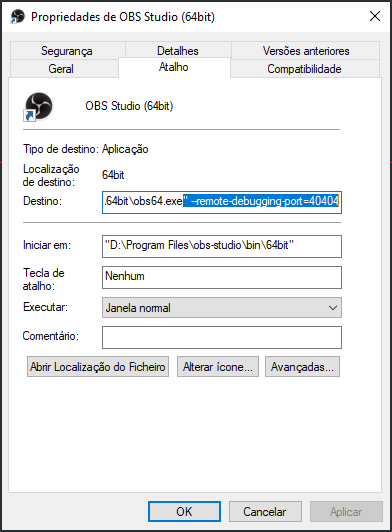 weak delta
And OBS is opened? Hmm.
opaque kestrel
yes
weak delta
I just did this 10 minutes ago myself. Let me think.
Based on everything you've sent me, you're doing everything correctly.
The only thing you're doing different is using a shortcut on your taskbar and not your desktop which should not matter at all.

opaque kestrel
I can explain what and why i've done for 15min before the bug
I was on my OBS studio, and I was preparing my stream,
and I noticed the bot was set as StreamElements, but normaly I use with my "name" (configured before on OBS Live, every month I need to relog to get that way/name)
I was not finding where I can relog again
and I clicked in every button in the tab "StreamElements" on OBS Studio
I think the bot became confused with my actions
So I tried to part channel and join channel to get the bot again with/without the name, just to start the stream...
prisma relic
prisma relic
ok. let's rewind a little. you have done that. and you have that SE tab option?
prisma relic
🤣
 wary halo
It's because i was looking at this conversation just now and the bot got scared 
 prisma relic
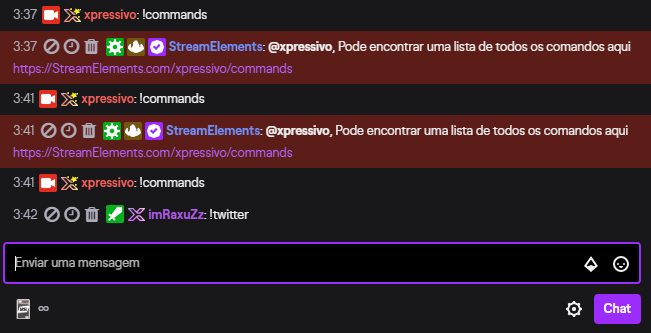
 fallen quartz
I don't remember if I activated StreamElements in my stream. Where do I look to see if I did or not?
fallen quartz
okay so it is enabled then, thanks
 ionic island
Hey, how can i delete all configurations?
fallen quartz
but now I'm wondering, is there a way to allow followers to gamble loyalty points in chat?
prisma relic
@opaque kestrel .... but you want the bot to be in your name or your bot? correct?
 prisma relic
check the default modules @fallen quartz https://streamelements.com/dashboard/bot-modules

StreamElements
The Ultimate All in One Platform for Streamers
that is the correct screen @opaque kestrel
does the test message work?
opaque kestrel
y
ionic island
Hey, how can I delete all configurations i`ve done in OBS.Live?
prisma relic
that is the best solution to the bot issue @opaque kestrel if we can get that menu to load
 wooden nebula
possible dumb question. is it not working because he's trying to get the bot to use his account while he's logged into it?
prisma relic
not a dumb question; and very fair. i does actually work when logged in as yourself 🙂
wooden nebula
ok, just thought I'd throw that in. I had to make a seperate twitch account to get mine to switch names
opaque kestrel
So, I turnned off everything (OBS) and the bot is working (without my name)
prisma relic
do you have a shortcut on your desktop to OBS.live
opaque kestrel
yeessss
prisma relic
right click ... target = C:\Program Files (x86)\obs-studio\bin\64bit\obs64.exe" --remote-debugging-port=4567
opaque kestrel
done
prisma relic
double click the obs
opaque kestrel
done
prisma relic
then ... you guessed it go to: http://localhost:4567/
 prisma relic
do you have a firewall running?
 bold frost
Hey, i need help with setting !gamble command on my channel. can someone please help me with that? Thanks 🙂
 robust herald
How to add new subscribers during session into widget?
I have added top donators etc, but can't find new subscribers from session.
opaque kestrel
do you have a firewall running?
@prisma relic yess, everythings ON
prisma relic
ok turn the firewall off.
opaque kestrel
done
prisma relic
now does the local host work?
opaque kestrel
no :/
prisma relic
where are you stuck on the gamble command @bold frost ?
bold frost
can you help me with what command like i should use to enable the command using "add command" or do i need to do something else?
round brambleBOT
@robust herald To reset goals:
- from the overlay editor -> session data on top right (monitor symbol) -> goals tab -> reset progress of desired goal
- from the dashboard -> activity feed on the left -> widget data on the right -> goals tab -> reset progress of desired goal
Note: Goal widgets(progress) only counts up and doesn't go down automatically, if you loose followers/subs
robust herald
Thanks
prisma relic
@opaque kestrel ...if we can't get into that link that is the root of our issue.
wooden nebula
Quick question. In the banned words page for the bot, there are check boxes next to the words, and above them it says "regular expression" with a help ? but the ? just redirects here. What are the checkboxes for?
 steel juniper
Hey guys I can't get the channel points leaderboard to show here? The subs show but not the channel points. Any ideas?
opaque kestrel
@opaque kestrel ...if we can't get into that link that is the root of our issue.
@prisma relic :/
prisma relic
the checkboxes are for the RegEx @wooden nebula
wooden nebula
What's RegEx?
prisma relic
can you post a screen grab of you Windows shortcut to OBS with that target @opaque kestrel ?
it is 'regular expression' ... but used for more advanced filters.
say you had a bad word with an i ... but wanted it to be i,l,I,!,|
opaque kestrel
http://prntscr.com/t8k3bp @prisma relic
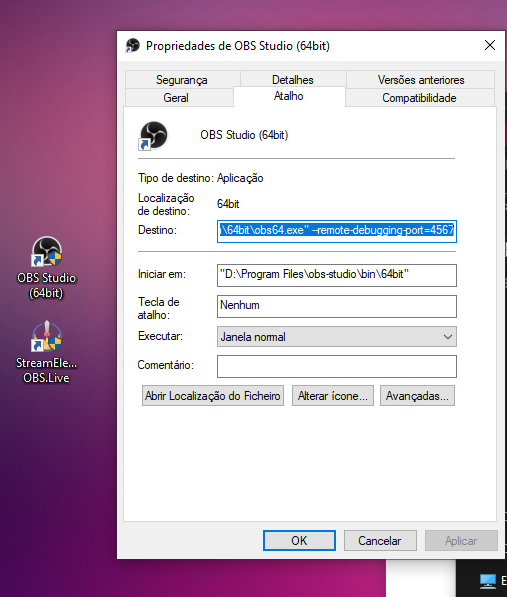 wooden nebula
gotcha. thank you
prisma relic
@opaque kestrel thank you. that looks correct.
when you open up OBS and go to http://localhost:4567/ .... it should work. i'll see if someone else can help here
wait a second.... try that on the other icon the OBS.live icon
opaque kestrel
ITS WORKING!
prisma relic
was it the wrong icon ?


 sweet socket
StreamElements - activity feed
prisma relic
1) Right click on your OBS desktop shortcut -> properties - in the "Target" field add this -> --remote-debugging-port=40404
2) Open OBS(or restart if it was open)
3) Open your browser and type in "localhost:40404"
4) Click on "StreamElements - Activity feed"
5) navigate to the Console tab
6) type in the console this: store.customBot.removeCustomBotIntegration() and hit enter
7) Try setting the custom bot name
8) remove the added addition of step 1
obs crashed
bold frost
hey sorry to bother you guys. but is there anyone who is not busy can help me getting !gamble command working i dont know how to set up the gamble command. I have the loyalty points active but can set up the gamble command
prisma relic
OBS crashed when you did that? .... try the steps again. 🤞
opaque kestrel
1) Right click on your OBS desktop shortcut -> properties - in the "Target" field add this -> --remote-debugging-port=40404
2) Open OBS(or restart if it was open)
3) Open your browser and type in "localhost:40404"
4) Click on "StreamElements - Activity feed"
5) navigate to the Console tab
6) type in the console this: store.customBot.removeCustomBotIntegration() and hit enter
7) Try setting the custom bot name
8) remove the added addition of step 1
@prisma relic done
prisma relic
now when your bot account connect to the bot; does it work?
 stray furnace
Guys my when streaming after 2-3 hours my internet on my pc stops workign web pages dont laod my games stop working but my stream dosnt end . What can i do?
opaque kestrel
now when your bot account connect to the bot; does it work?
@prisma relic http://prntscr.com/t8kfa3
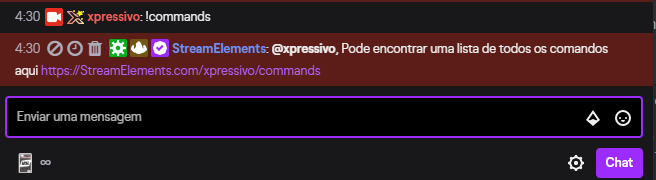
not with my name
opaque kestrel
do you have OBS on and logged in?
@prisma relic yes
once you close OBS the bot will leave
@prisma relic probably not, because its the "normal bot"
with streamelements name
prisma relic
right right. that is correct. i mean; the name will be 'StreamElements' when OBS is not active.
prisma relic
Can you open OBS back up, go to the Activity Feed menu again, set the bot up to your name and click the 'test message' ?
opaque kestrel
 stray furnace
Guys my when streaming after 2-3 hours my internet on my pc stops workign web pages dont laod my games stop working but my stream dosnt end . What can i do#
prisma relic
I need to leave soon @opaque kestrel but can you log out of OBS.live ... then out of OBS. close it then reopen a log back in.
opaque kestrel
I HAVE THE PLEASURE
TO SAY
WORKED!
Thank you a lot @prisma relic
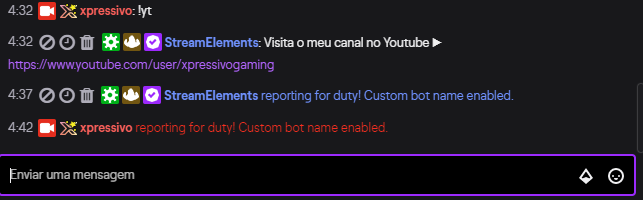
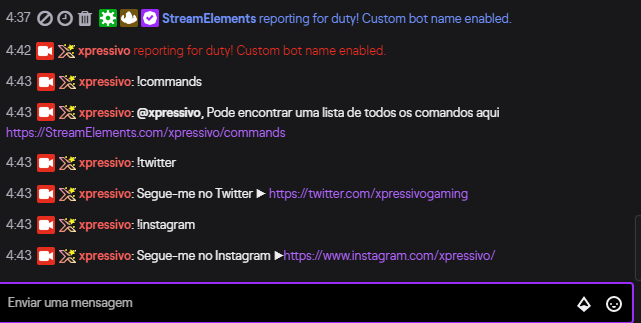
Everythings ok!
 stray furnace
Anyone got time to help out?
prisma relic
phew 😓 @opaque kestrel i was out of ideas! sorry that took so long!
opaque kestrel
phew 😓 @opaque kestrel i was out of ideas! sorry that took so long!
@prisma relic Thanks one more time!
 steady yarrow
Good afternoon, how do I put the betting system on the screen? like this in the image ..
 fresh sinew
When I emulate a tip event it shows up in latest tip but not top tip. Also Subscriber emulates show up but not in sub count. Is this because it's an emulate or is it broken?
twin sentinel
Cause these are emulated events.
 bronze bloom
alerts arent showing in obs, is this a common problem?
sweet socket
Are they playing a sound however?
bronze bloom
no sound no alerts, ive tried reconnecting them and redownloading the overlays but nothing has worked
sweet socket
can you try the following:
round brambleBOT
@bronze bloom OBS -> settings -> advanced -> scroll down -> enable/disable hardware accel.
https://i.imgur.com/ggMe9ZE.png
sweet socket
and if that doesnt work, check if you added the overlay correctly
round brambleBOT
To add your overlays to OBS, add a new browser source in your scene. Paste your overlay URL in the browser source properties, set the dimensions to 1920x1080 (unless you changed them on the website), and ☑ “Shutdown source when not visible” https://youtu.be/KDvLynUqXI4
 west plume
Can someone assist in helping me log out of Ground Control under my Mixer account and back in with Twitch?
bronze bloom
Ok thank you ill try it
ionic kelp
@west plume go to settings and start removing letters/numbers from your token up top.
That'll log you out.
west plume
lol. that simple huh.. thank you. @ionic kelp
ionic kelp
Only reason I know is I discovered it that way
 ashen storm
hey guys, new streamer here, does this work with twitch studio
ionic kelp
@ashen storm I'd like to hope it does.
ionic kelp
#🇩🇪︱deutsch @lament blade
lament blade
ok sry
 sharp egret
Hello Streamelements, is there a way to remove myself from the Top Chatters Leaderboard?
I mean I want to remove my name from the Streamelements Top Chatters Leaderboard cause I just try a lot of things like commands and emotes when stream is offline... So that's why I'm on top but I'd only like to have my viewers there :/
 scenic spoke
hey all im watching a youtube vidoe on how to add teh media request widget to an overlay but the overlay editor window has been undated since the video release and now i cant find it. any sggestion or help
round brambleBOT
@scenic spoke We've released our new Overlay Editor revamp. You can check out the changes and how to work with it here: https://youtu.be/X5VzXjqAsjk
Check out our blog post as well: https://blog.streamelements.com/streamelements-overlay-editor-just-got-even-better-c22cb5b4853e

We are thrilled to announce the launch of the remastered StreamElements Overlay editor!
https://p.strms.net/newoverlayyt
Why StreamElements Overlays are better?
😎 Simple: Load your entier setup using only 1 link
⚡ Fast: Cloud-powered Overlays arrive in real-time, say goodb...
scenic spoke
faceplants desk omg thank you ill call specsavers in a mo
sweet socket
no worries haha!
sharp egret
Is there a reason I get ignored?
sweet socket
hey @sharp egret, you're not getting ignored, this discord has community support and the person who can help you best will answer your question
for now ill ask some other support members if they know the answer for that o7
sharp egret
@sweet socket alright thank you very much 🙂
 thick cave
can I use standard OBS, or do I need to use OBS.live to take advantage of StreamElements?
sweet socket
OBS is the base part
OBS.Live is the plugin that adds a activity feed and media request to your OBS.Studios
so that choice is up to you 😄
thick cave
so it is just a plug-in, not a whole download?
 tranquil sierra
Hello, is there any way to create an "audio mixer" that controls only Chrome volume?
sweet socket
you'll have to download both indeed, but OBS.Live is not a whole download itself, its a plugin for OBS indeed
round brambleBOT
OBS.Live is a Plugin for OBS created by StreamElements. You can download OBS.Live here: https://streamelements.com/obslive
Please make sure you have the latest version of OBS installed, Current Version: 25.0.4. You can install OBS here: https://obsproject.com/
thick cave
Thank you!
 crimson lake
How do you add the Overlays from the website onto the stream?
round brambleBOT
@crimson lake To add your overlays to OBS, add a new browser source in your scene. Paste your overlay URL in the browser source properties, set the dimensions to 1920x1080 (unless you changed them on the website), and ☑ “Shutdown source when not visible” https://youtu.be/KDvLynUqXI4
crimson lake
thank you
stray furnace
Im a new twitch streamer and i use steram elements, whenever i stream for more than an hour none fo my games load pages dont load either. at first i thought this was my internet but it cant be that because my stream stays live, can soemone help me please
sweet socket
It can still be your internet, that prioritizes the stream before the rest, or your CPU or GPU, can you get me one of these please?:
round brambleBOT
@stray furnace 1) Restart OBS
2) Start your stream/recording for about 30 seconds. Make sure you replicate any issues as best you can, which means having any games/apps open and captured, etc.
3) Stop your stream/recording.
4) Select Help > Log Files > Upload Current Log File. Copy the URL and paste the link here.
(Note: If you do not see an obsproject.com URL, you will need to update OBS Studio to version 22+)
 lime harbor
Hello! I'm a new stream elements user. I tried importing my streamlabs alerts, and they worked well when I tested on obs and on preview. However when I'm live, the host and follows are not popping up. Is there something I'm missing
stray furnace
Sorry i didnt quite undestand what did you want me to get?
round brambleBOT
@lime harbor Due to changes to Twitch API, we have filtered out hosts and will only show these ones on your activity feed:
- All hosts coming from an online channel with at least 1+ viewer
- Auto host events with at least 1 viewer - only from a channel that just went offline
Note: If you see "X channel has hosted you" with no viewers on the back, that is considered an offline host or a host with 0 viewers, we do not show these.
Note for Mixer streamers: The above 2 filters currently apply for Mixer and we are aware its actually not how Mixer hosts work. We do plan on changing it, but no ETA on when.
stray furnace
So should i do stream or recording?
sweet socket
^for the hosts check above, for the follows, are some not popping up or arent all of them popping up?
So should i do stream or recording?
@stray furnace were you experiencing the problems while streaming or recording?
stray furnace
stream so ill do it now
sweet socket
alright o7
lime harbor
None of my follow alerts work either
sweet socket
are you talking about on stream alerts, or chat alerts?
lime harbor
I have not had tips or subs, but follows are not triggering the alerts too
stray furnace
lime harbor
The gif/sounds that should show up on stream. I am seeing the chat alerts
sweet socket
I see you are streaming via wifi @stray furnace, wifi is very unstable, I'd reocmmend a Ethernet connection
here you can see what the analyzed log tells us https://obsproject.com/analyzer/?url=https%3A%2F%2Fobsproject.com%2Flogs%2Fv-blzc-rg6Z4W-bA
sweet socket
The gif/sounds that should show up on stream. I am seeing the chat alerts
@lime harbor can you check the alertbox in your overlay editor and check if Followers is checked? Like this:
So i should stream with ethernet?
@stray furnace it is recommended indeed, other things to check are, your bitrate and upload speed
stray furnace
okay last thing i want to know is whether or not i can make my browser source sounds only hearable to the viewers and not me
round brambleBOT
@stray furnace How to exclude audio sources for a stream or recording: https://obsproject.com/forum/resources/8/
Voicemeeter Banana guide: https://obsproject.com/forum/resources/397/
sweet socket
^try this 😄
lament blade
Hii guys!
Any chance to integrate with Picpay?
lime harbor
Yes, it is checked. I unchecked purchase, sub, and cheer since i do not have those created or active in channel
sweet socket
Not at the moment, you can always submit a idea for it
round brambleBOT
@lament blade Check out the StreamElements ideas board: https://strms.net/ideas. You'll be able to add ideas, upvote ideas you agree with, and track their progress with email notifications. Adding and upvoting ideas also helps the staff know which ideas should be prioritized so please take some time to upvote.
stray furnace
okay
lament blade
Thank youu ^-^
stray furnace
ty
sweet socket
@lime harbor I will check for you
sweet socket
no worries o7
I will get back to you 😄
do you receive any alerts at the moment? @lime harbor
Or you haven't had one on stream yet?
otherwise we might want to check this first:
round brambleBOT
OBS -> settings -> advanced -> scroll down -> enable/disable hardware accel.
https://i.imgur.com/ggMe9ZE.png
lime harbor
I have not had one pop up since I installed. Will check this on OBS
sweet socket
yes, be sure to check that 👌
lime harbor
I do have this enabled already
sweet socket
if its enabled already, disable it
lament blade
Hi,
I have window 7 so cant download any software to be able to get overlays or alerts or at least im not sure how with this windows as all the programs seem to be for windows 10 , can someone help?
 lapis veldt
if you get an overlay the donation Alert comes with it and dont worry we support all window's
would you like overlays?
lament blade
yes but not sure how to actually get them onto my stream
lapis veldt
We've released our new Overlay Editor revamp. You can check out the changes and how to work with it here: https://youtu.be/X5VzXjqAsjk
Check out our blog post as well: https://blog.streamelements.com/streamelements-overlay-editor-just-got-even-better-c22cb5b4853e
We are thrilled to announce the launch of the remastered StreamElements Overlay editor!
https://p.strms.net/newoverlayyt
Why StreamElements Overlays are better?
😎 Simple: Load your entier setup using only 1 link
⚡ Fast: Cloud-powered Overlays arrive in real-time, say goodb...

Medium
Creating a stunning-looking stream has never been easier.
lament blade
sorry yes please*
lapis veldt
there you go overlay edotor
sweet socket
Be sure to update to Windows 10! Windows 7 is a security risk for your data @lament blade
lament blade
Thank you
lapis veldt
and you can browse overlays
lament blade
@sweet socket oh really 😮 ill have to look at that thanksk and @lapis veldt thanks for your help ill take a look
sweet socket
Yes @lament blade, Windows 7 does NOT get security update and is not supported anymore by Windows!
lament blade
@sweet socket thanks for letting me know
lapis veldt
Were allways onnline and here to help 🙂
wary halo
@lapis veldt next time you copy paste that message, leave the 'we' part out of it, as you cannot speak on behalf of StreamElements 😉
lime harbor
Thank you @sweet socket I will try that, and see how it goes on tonight on stream. It appears when I test. I'll see when I go live
lapis veldt
im deaply sorry
sweet socket
Alright, just let me know how that worked out! @lime harbor
lapis veldt
Bordeaux how do i apply for Staff
sweet socket
You don’t apply for staff
lapis veldt
Ok
wary halo
you get picked for support
lapis veldt
I dont need pay if i do become Staff
sweet socket
That’s not how it works buddy, however let’s move this to #general-chat, since this is a support channel @lapis veldt
 rough tree
i cant get the initial webpage to load
 charred quartz
@rough tree the https://streamelements.com/dashboard ?
StreamElements
The Ultimate All in One Platform for Streamers
rough tree
yea all i am getting is the help icon at the bottom
round brambleBOT
@rough tree Please logout of StreamElements at https://streamelements.com/logout and then login again to your account (Twitch/Youtube/Facebook/Mixer)
rough tree
its wont load the webpage
round brambleBOT
@rough tree Our Dashboard and Overlay editor are Chromium Optimized. We strongly recommend using Chrome. Opera GX and the new Microsoft Edge Chromium might work closest to Chrome as its also Chromium built. FireFox also works, but some things might look a bit different or not work. We do not recommend using Internet Explorer with our Dashboard as it does not support functions.
If the website doesn’t work on chrome, be sure none of your plugins are blocking our website or clear your cookies. You can try if the website works in a incognito tab.
 foggy slate
hello everyone so im a mixer streamer and i am returning to twitch. is their any site like lightstream for mixer?????
rough tree
got it to work with edge thanks
ionic kelp
@foggy slate That's something for #general-chat as this channel is more for issues related to our service.
foggy slate
understood
 alpine yarrow
so i can not figure out how to remove the background from this and i cant have a display capture and alerts if its on there
charred quartz
so i can not figure out how to remove the background from this and i cant have a display capture and alerts if its on there
@alpine yarrow where that came from?
alpine yarrow
fiverr
charred quartz
then u should ask the person o bought it from, cause that is related to it, not our platform at all 🙂 / u could try to see if it can be editted in photoshop and u would hide that background layer
 lusty dragon
Specifically ask if they can send you a transparent version of it. Looks like he just sent a straight png with every layer included @alpine yarrow
alpine yarrow
thank you
 gentle oxide
What link do I add to my merch picture on twitch to take people to my se merch store?
 ashen folio
Im getting ERR_CONNECTION_TIMED_OUT when trying to connect to streamelements. Im guessing it could be router settings but not sure.
 quasi portal
I see the same ^
 cobalt burrow
i have problem with tournament beacuse i cant bet on chat
after starting the tournament
quasi portal
looks like the api and the cdn are struggling, just an assumption
 sour tusk
hi all, new to this discord. I just started using stream elements. Does anyone know how to fix the total subcount on a label? its 1 off. guessing its including me.
rough tree
ok i got logged in but stream is super laggy any advice. I am hard lined to my internet and i had this issue but worse with streamlabs
round brambleBOT
@sour tusk Due to a recent change from Twitch API, these features are affected by the change:
- Ground Control does not have Custom Bot Name
- Subscriber count will count the Channel and any other permanent sub you may have (+1 or +2 or +3 on top).
We are working on fixing both issues, but there is no ETA.
OBS.Live still has Custom Bot name working fine in it.
@rough tree Please provide a log from your last stream. To do this, in OBS go to Help > Log Files > Upload Last Log File and paste the link to the log file here.
wary halo
what is your internet upload speed?
because the log says low bitrate but it also says you have 6000 for 720p60fps and that should be enough for that resolution
also, check the rest of the information given in the link
rough tree
how do i check the upload speed new to pc gaming
charred quartz
how do i check the upload speed new to pc gaming
@rough tree https://www.speedtest.net/
 rain frost
hello i need help
i'm online and my game capture doesnt capture my game anymore
idk why
rough tree
24.03 upload
rough tree
@wary halo thats my upload
rain frost
help pls xd
wary halo
which game?
quasi portal
can anyone log in to the twitch dashboard through https://streamelements.com/ ? i assume it's not just me that can't ?
round brambleBOT
@quasi portal Please logout of StreamElements at https://streamelements.com/logout and then login again to your account (Twitch/Youtube/Facebook/Mixer)
rain frost
😦
quasi portal
no change sadly -
just keeps pending (also in new browser/incognito) - and eventually fails
alongside that my overlays don't load through obs - like the cdn and api are just not running or reachable
charred quartz
@quasi portal if u have the new microsoft edge that is chrominium based it would be a good test too
also check out in your phone if the same does happen / if u have one
quasi portal
same issue on phone (on same wifi) - no images etc. loading from cdn
on phone without wifi it loads fine  does that indicate DNS issues ?
quasi portal
any common solution? flush dns or similar ?
charred quartz
you either blocked by streamelements system if somehow your internet made a lot of request for no reason ("blocking a DDOS for example") or your ISP is freaking out with us at all, a comon solution would be flush DNS, change DNS, restart modem restart router and last options is call them and ask for a solution, they would probably reset your modem too @quasi portal
quasi portal
cheers man, great advice @charred quartz appreciate it 💙
charred quartz
if u are going to try the change DNS option i recommend using google as i do use it for testing my latency and for troubleshoot same issue u are dealing with right now, i think i'm not allowed to send IPs or DNS here but i'm sure with just a google > google DNS u will find it 🙂. Np man we are here to help you @quasi portal ❤️
 brittle parcel
Hey so a friends stream added a few bttv emotes a while back (which show up on chatstats) then recently i added a bunch more but they never show up on chatstats? only the old ones, and no ffz emotes either?
charred quartz
Hey so a friends stream added a few bttv emotes a while back (which show up on chatstats) then recently i added a bunch more but they never show up on chatstats? only the old ones, and no ffz emotes either?
@brittle parcel it takes time to emotes propagate in the twitch / bttv cloud, have u done that recently ?
rain frost
i still need help btw
brittle parcel
i dont know what that means
charred quartz
i still need help btw
@rain frost can u please screenshot your game capture source preferences and send it here ?
rain frost
charred quartz
i dont know what that means
@brittle parcel it means u need to wait for emotes be recognized by the services
brittle parcel
right okay so it will do it? it just seemed bugged to me
charred quartz
thats why i asked if u have done it recently
rain frost
@jade remnant so whats game capture for?
 reef ermine
Hello, well I added some sound commands at https://streamelements.com/ . Today at my stream the viewers tried to test those commands I added. The problem is that they couldn't use these commands, but Mods or higher were able to use them. So I checked my commands on Streamelements.com again to see if I had the settings only on Mod or higher activated. It is saying that everyone can use them, sigh, only mods or people with a higher role can use them. Can somebody help me please?
jade remnant
@rain frost for capturing games, the client is not a game, use window capture for the client and game capture for the game
brittle parcel
ah i see, like middle of last week. thanks for your help
rain frost
@jade remnant now it worked .-. ty
charred quartz
to be more precisely game capture doesn't work with league client because it is a webpage at all, it is like trying to game capture google chrome etc @rain frost, game capture it based about using stuff from directX thats why it only works with games
 queen plaza
can someone help me out with !so command, i can't get it to work properly. Please tell were i have gone wrong in the scrypt ${game ${1}} at https://twitch.tv/${channel ${1}} Give them a follow, don't forget who sent you!
sweet socket
sure ill grab my response for you
Response:
Check out ${1}, they we're last seen playing ${game ${1}} at https://twitch.tv/${channel ${1}}
rain frost
@charred quartz but the thing is i tried to capture guild wars
and it didnt work either
somehow now it works .-.
charred quartz
hooking stuff can be buggy sometimes give time to it ;-; @rain frost
rain frost
and now it stopped working again xd
charred quartz
unless u are using capture a specific window it sohuldn't stop working
but if u are using the "capture fullscreen aplcation"
everytime u alt tab or minimizes the game
it will show a black screen @rain frost
queen plaza
awesome thanks @sweet socket i'll give it a go
sweet socket
No worries o7
round brambleBOT
@rain frost 1) Restart OBS
2) Start your stream/recording for about 30 seconds. Make sure you replicate any issues as best you can, which means having any games/apps open and captured, etc.
3) Stop your stream/recording.
4) Select Help > Log Files > Upload Current Log File. Copy the URL and paste the link here.
(Note: If you do not see an obsproject.com URL, you will need to update OBS Studio to version 22+)
queen plaza
@sweet socket legend mate 😄
rain frost
sweet socket
great to hear its working! @queen plaza 
jade remnant
@rain frost
Certain games or applications will require OBS Studio to be run with elevated privileges in order to be captured.
As of OBS 24.0.2, you can also run OBS as Admin to give it GPU priority, improving OBS performance when gaming.

To run OBS as administrator, close OBS Studio, then simply right click the shortcut and select Run as administrator.```

also your scenes need work.

```To best capture League of Legends, create two scenes.
In the first scene, add a Window Capture of the LoL launcher/lobby (Windows 7 users should make sure Aero is enabled.).
In the second scene, add a Game Capture of the game itself (you may need to be in a game to add this for the first time).
Then configure the Scene Switcher to automatically swap between them.```@jade remnant how do u add the scene switcher?
jade remnant
@rain frost you should already have it in obs
 arctic bolt
@jade remnant how do you add your stream overlays If your streaming on ps4?
charred quartz
you don't unfortunately @arctic bolt
only if u have a capture card and send the HDMI to your PC and stream using OBSlive is the only option
charred quartz
np 😉
 median mirage
Hello everyone, is there a way to disable bots showing in my chatters leaderboard? thanks
charred quartz
disable the leaderboard command @median mirage
median mirage
I did, they are still showing @charred quartz
 zenith lark
Streamelements is totally down in sweden, no donations are going through or anything
 abstract hemlock
@median mirage add them here https://streamelements.com/dashboard/loyalty (on the ignored users)
and delete the current points here: https://streamelements.com/dashboard/leaderboard/current
StreamElements
The Ultimate All in One Platform for Streamers
 fathom cargo
Hey
I got a Ryzen 3700X and an MSI 2070RTX Super (big chonker)
But the program told me to use 30fps instead of 60
Is there a limit for streams or why is it recommending that to me
charred quartz
Hey
I got a Ryzen 3700X and an MSI 2070RTX Super (big chonker)
But the program told me to use 30fps instead of 60
Is there a limit for streams or why is it recommending that to me
@fathom cargo internet speed
fathom cargo
Mhhhh, okey I will investigate
Thx mate
Response time of 5 milliseconds
Nice
5 stars on yelp
Cheers
wary halo
 tribal cedar
@zenith lark I'm also having issues in sweden, site is totally bonked
median mirage
@abstract hemlock I added them to ignored users but that stops them from getting points, I am trying to remove bots from my chat leaderboard
tribal cedar
overlays are not working
 storm marsh
hola, alguien sabe orque no me deja aplicar para magic EU en español?
wary halo
#🇪🇸︱español <<
zenith lark
@tribal cedar yeah no alerts, no donations no nothing.... I got 100 dollars in 10 minutes and then it just died
 undone anvil
Hey!! So I was a Mixer streamer and I'm trying to add my Twitch channel to my account and I get "this account is claimed". But I'm not quite sure what happened there
round brambleBOT
@undone anvil Account Merging - Please note:
- Merging accounts only allows faster ways to switch between accounts
- Merging accounts does not allow data sharing between accounts - different streaming platforms, different type of events
- Merging accounts allows duplicating/sharing overlays between the accounts
If you understand the limitations of merging and want to proceed, please find the JWT tokens (!jwt) from both accounts you want to merge and you will be directed to DM them to a staff member.
undone anvil
!jwt
round brambleBOT
You can find your JWT token on your account channels page ("Show Secrets" to reveal the token): https://streamelements.com/dashboard/account/channels
READ ME:
This is a private security token. Do NOT share this token here or other public places, only with a StreamElements staff member in private.
 orchid tangle
I want to put my youtube and twitch account on the same streamelement account and I have this error
round brambleBOT
@orchid tangle Account Merging - Please note:
- Merging accounts only allows faster ways to switch between accounts
- Merging accounts does not allow data sharing between accounts - different streaming platforms, different type of events
- Merging accounts allows duplicating/sharing overlays between the accounts
If you understand the limitations of merging and want to proceed, please find the JWT tokens (!jwt) from both accounts you want to merge and you will be directed to DM them to a staff member.
@orchid tangle You can find your JWT token on your account channels page ("Show Secrets" to reveal the token): https://streamelements.com/dashboard/account/channels
READ ME:
This is a private security token. Do NOT share this token here or other public places, only with a StreamElements staff member in private.
abstract hemlock
You can DM me your tokens
undone anvil
Ren, I dont have a token for Twitch because it wont let me add my Twitch Channel
am I missing something there?
I get the same red banner as Ayma
wary halo
yes, you already have a Twitch account, logout of the website and log back in with Twitch 😉
undone anvil
Thank you. I'm sorry I didn't think about that lol
wary halo
no problem 😄
rough tree
i think my issue is with the windows version that i am running but i cant update it......YET?!?!?!?!
 halcyon falcon
Possible to add browser source to stream elements overlay?
tribal cedar
is anyone looking into the site being down?
strong kernel
@tribal cedar Site is up and running as expected. What you're experiencing is a local issue.
charred quartz
Possible to add browser source to stream elements overlay?
@halcyon falcon streamelements overlay is a browser source
tribal cedar
@strong kernel but we're multiple people experiencing it at the same time?
halcyon falcon
Sorry.... is it possible to add a browser source to that? Or is that a stupid question and I'll need to add it separately in OBS Live?
strong kernel
@halcyon falcon You cannot add a browser source into a browser source, no.
halcyon falcon
Ok. Thank you
zenith lark
@strong kernel what do you mean local issue? down for multiple people all over scandinavia
charred quartz
@strong kernel he could use embed or iframe in html? he needs the knowledge tho
tribal cedar
@solemn arch also mentioned site issues less than an hour ago
strong kernel
@tribal cedar @zenith lark The site itself is up and running. Users from all over can access without issue. If Scandinavia specifically cannot access, then that will be an issue regarding something within Scandinavia, likely an ISP blocking access or something similar.
rigid moon
How to reset all labels data about top tip, last follower etc and enter it manually?
zenith lark
What to do about it? losing a lot of money right now
tribal cedar
@strong kernel the site loads, but can't login
 ebon crypt
A friend of mine poked a bit and found some DNS issues
not sure if related
I am from Denmark and also can't log into the Dashboard or use Ground Control
tribal cedar
and @ebon crypt having issues in Denmark confirms it's not an ISP issue since the ISP I have doesn't exist in Denmark
 crystal gyro
Every time I hit the preview button on the website after importing a premade streamelements setup it just shows up as a white screen after loading the webpage. Anybody have a fix for the issue. I am trying to get stream elements setup for my first stream tomorrow and am confused. I've tried removing the cookies and all browser data for the website and that does not seem to fix it in chrome.
 tawny pivot
@ebon crypt What ISP are you using?
charred quartz
Every time I hit the preview button on the website after importing a premade streamelements setup it just shows up as a white screen after loading the webpage. Anybody have a fix for the issue. I am trying to get stream elements setup for my first stream tomorrow and am confused. I've tried removing the cookies and all browser data for the website and that does not seem to fix it in chrome.
@crystal gyro can u please DM me your overlay link ?
 dull kiln
How can I do a poll for my chat in twitch
tawny pivot
@tribal cedar Are you still experiencing issues?
zenith lark
Still issues for me
ebon crypt
@tawny pivot Just a local ISP in Odense
tawny pivot
@zenith lark Where are you located ?
zenith lark
Sweden
tribal cedar
@tawny pivot yup still having issues here
tawny pivot
Are you aware what DNS resolver you are using?
https://1.1.1.1/ or 8.8.8.8
 earnest comet
how can i set up a link for people to donate?
strong kernel
@earnest comet https://www.youtube.com/watch?v=eLzxRkq7tJo

StreamElements tipping system is guaranteed to increase your tips! Watch our guide to learn how to setup your own.
Got any questions, or just want to say "Hey"? Join our Discord server: http://bit.ly/DiscordStreamElements
Loyalty system guide: https://youtu.be/hM7D0HJD...
zenith lark
im not sure @tawny pivot
zenith lark
^prob same
tawny pivot
Alright cool
So everything is pointing towards local DNS issues.
I would recommend going to this page and follow the windows instructions. -> https://1.1.1.1/dns/
If it works after swapping, then case closed.
tribal cedar
I tried Googles DNS now (8.8.8.8 / 8.8.4.4) and still issues
but I tried connecting to ExpressVPN's swedish server and that worked
 covert patio
Hey guys, I have a Problem to which I cant find an answer to online. I normally stream on Twitch. Recently I decided to Stream on Youtube. Now when I press START STREAMING, while im logged in with my Twitch Acc on StreamElements and have it connected to OBS, OBS only gives me the Option to start streaming on youtube, which I do not want.
round brambleBOT
@covert patio Streamelements on top of OBS -> Logout -> login
zenith lark
vpn worked
tribal cedar
I'll do this stream on VPN but hopefully we can figure out the issue later cause I don't wanna have to keep doing that
@zenith lark are you also on Bahnhof ISP?
charred quartz
I'll do this stream on VPN but hopefully we can figure out the issue later cause I don't wanna have to keep doing that
@tribal cedar if the VPN is working, then the issue is on the userside (yours), the best u can do atm is call your ISP for further detail about it
zenith lark
yes bahnhof
tribal cedar
I'll inquire with my ISP tho they don't really do the whole blocking sites thing, it's part of why I chose them
tawny pivot
https://bahnhof.se/kundservice/driftinfo Seems like there has been quite some technical issues today.
That would be my best bet.
 rapid sedge
Hello 🙂 Apologies, as I couldn't find the answer elsewhere. Is there a way to subtract 1 from the sub count in the StreamElements overlay? I'm told it includes the streamer as well.
 junior geode
Hi, when i try to use the text over image layout in the overlay editor, the text just doesn't show up, same for the column layout, but the row layout works fine, thanks in advance 🙂
strong kernel
@junior geode Text settings > Advanced, play with the margins.
junior geode
kk, ill look at it 🙂
 peak cove
someone?
strong kernel
@peak cove No, you cannot.
peak cove
thanks
bold frost
hey sorry to bother you guys. but is there anyone who is not busy can help me getting !gamble command working i dont know how to set up the gamble command. I have the loyalty points active but can set up the gamble command
 frozen dust
Trying to setup shout out command on my bot. I have the code but when I hit the command for the users URL it is entering ***. Any ideas on how to correct
frozen dust
That did it. Thanks for the assist
lament blade
Hi se.staff my broadcaster needs help asap and i am sending him here now
He needs help
round brambleBOT
@lament blade Welcome to the helpdesk! Please let us know how we can assist you today and a support volunteer or staff member will assist you as soon as they are available. Thank you for your patience.
 desert sentinel
Hello! If I want my viewers to buy a sound from the store using my channel points, should I select "stream perk" or "sound effect"? Thanks in advance!
jade remnant
twitch channel points or se loyalty?
desert sentinel
loyalty* points, sorry
jade remnant
sound effect would be your best option
desert sentinel
thank you!
 formal plaza
hey , i have a little problem
i dont know how high i have to place the bit rate
my stream lag hard
round brambleBOT
@formal plaza Please provide a log from your last stream. To do this, in OBS go to Help > Log Files > Upload Last Log File and paste the link to the log file here.
@lament blade Welcome to the helpdesk! Please let us know how we can assist you today and a support volunteer or staff member will assist you as soon as they are available. Thank you for your patience.
lament blade
My friends !request command for the media request keeps disabling meaning he cant use media request which he needs in 10 mins
formal plaza
sweet socket
have you tried !sr instead @lament blade ?
lament blade
Sorry but i need an answer quick
sweet socket
!sr <youtubelink>
lament blade
Yes but it is the command we cant enable it we can edit it tho
We are unable to enable the command
sweet socket
is your friend using Chrome?
lament blade
yes
sweet socket
does he have the module enabled?
If he presses enable !songrequest over at the default commands, he'll get a pop up saying if that also needs enabling
lament blade
how does he check
sweet socket
like stated above
let him enable default command !songrequest
if its not enabled that message will pop up
jade remnant
the best thing would be to get them in here, support by proxy isnt great
sweet socket
formal plaza
can u help me too?
sweet socket
yes, will check that straight away cursher o7
formal plaza
ok
 cold yarrow
Hey what's up. I stream from my PS4. I don't have a capture card. What should I do within Streamelements?
sweet socket
ok
@formal plaza there doesnt seem to be something wrong with your link, let me reread your issue
lament blade
How do u check if the module is enabled cuz when we click enable after trying to turn on the command it does nothing
sweet socket
@cold yarrow you cant use overlays, only our chatbot
@lament blade either send a screenshot or get your friend in here
and let him check if his viewer request is enabled here: https://streamelements.com/dashboard/mediarequest/general
round brambleBOT
@cold yarrow Consoles do not have native support for overlays. You would need a capture card and a PC with OBS in order to have Overlays over your console gameplay.
We have an blog post about how to setup console streaming with our essential tools: https://blog.streamelements.com/how-to-stream-on-console-7b620b1c46c3
cold yarrow
@sweet socket Ok, so chatbot is the only thing I can use?
sweet socket
correct
cold yarrow
That's support AI.
sweet socket
that is me
cold yarrow
@sweet socket Thank you.
sweet socket
support AI listens to commands we send 😉
cold yarrow
I've heard you can use the Playstation remote play as sort of a work around is that true?
sweet socket
hey , i have a little problem
i dont know how high i have to place the bit rate
@formal plaza this is something you'd have to test yourself honestly I'd say try 5000
formal plaza
i tried every thing
if i stay normal at 1 point every thing is good , but if i start to walk it lag hard
i used 500 too
sweet socket
I've heard you can use the Playstation remote play as sort of a work around is that true?
@cold yarrow I dont know a lot about playstation but its correct you can capture your remote play
formal plaza
i used Streamlabs before and everything works
sweet socket
@formal plaza 500 is reaaaally low, wouldn't recommend going under 2500
Can you tell me what exactly is lagging?
formal plaza
i just checked it
cold yarrow
Ok. Appreciate your help, last question is one capture card would you suggest?
What captute card rather
sweet socket
Elgato is a good brand @cold yarrow
sweet socket
can you check your task manager if OBS.Studios is using a lot of CPU or GPU?
formal plaza
u wanna see it?
cold yarrow
@sweet socket Thanks
sweet socket
if its using a lot of resources, best guess would be to:
round brambleBOT
OBS -> settings -> advanced -> scroll down -> enable/disable hardware accel.
https://i.imgur.com/ggMe9ZE.png
formal plaza
can you check your task manager if OBS.Studios is using a lot of CPU or GPU?
@sweet socket cpu
lament blade
The module is enabled it is just the command that isnt turning on
sweet socket
can the user send a screenshot like asked? @lament blade
lament blade
K
sweet socket
@formal plaza be sure to try the steps above from Support AI
 inland gorge
Yo, I'm not sure this is the right place, but, it might be cause I'm super tired and not seeing a good one, but all of the overlays seem way too over the top for me, when I'm literally hoping to have a small, simplistic basically, event history, so like 5 lines of like [name] - follow then below that [name] - Dono, or whatever, and a simple follower count. Ideally not too eye-drawing, and again simplistic, anyone got any ideas how I could achieve this?
 faint horizon
you can make a custom overlay
formal plaza
@formal plaza be sure to try the steps above from Support AI
@sweet socket i did it but its no better then before
sweet socket
You can create a blank overlay @inland gorge
sweet socket
You can create a blank overlay @inland gorge
@sweet socket and add some widgets on that, wont give you any fancy GFX
faint horizon
@inland gorge dm me if you need more help with making your overlay
im a photoshopper
inland gorge
Yeah I've tried the blank overlay, but like it just looks like ya know, some kid has gone on ms paint and typed in followers haha dono haha or w/e
And if I come up with an idea I'll hit you up @faint horizon
lament blade
There u go
when we click enable it doesnt even turn the command on and it shouldnt shoe that because the mk
Dule is on
formal plaza
what can i do else?
lament blade
Pls help he hasnt got long before he srts
sweet socket
Can the user try it from a PC and from chrome? @lament blade
what can i do else?
@formal plaza best would be to ask in the OBS.Studios discord
round brambleBOT
For the best OBS support, please join their Official Discord @ discord.gg/obsproject
 marble creek
Was wondering if there is a way for me to download the overlays I chose to my computer
Cause when I switch scenes on SLOBS, it isnt ready to be up yet
If that makes sense
strong kernel
@marble creek Downloading assets is against TOS. We are a cloud-based system.
round brambleBOT
@marble creek We're not able to troubleshoot issues with using our overlays in StreamLabs OBS (SLOBS) as we don't have the tools to support their software. We recommend using OBS Studio or OBS Studio with our plugin OBS.Live.
marble creek
Alright, thank you for informing me
Well is there a way to have the browser source appear faster?
When I switch scenes, the source isn't loaded
round brambleBOT
@marble creek Check out this tutorial for OBS’ studio mode which allows you to preload scenes before transitioning. https://www.youtube.com/watch?v=W8iWsD2Lq3U
ebon crypt
Any news on the Scandinavian downtime?
jade remnant
https://discordapp.com/channels/141203863863558144/199460642975907840/727265582658879539
if its the same as these, follow through
lament blade
Me acaban de donar y no me sale nada,que hago??
sweet socket
Please only english in this chat @lament blade
Otherwise, be sure to use one of the non-english channels
lament blade
Bordeux prime he is streaming right now and couldnt show a screen shot so i screenshoted exactly what he is seeing on my screen
sweet socket
alright, ill have to ask around for you
next time, please be sure the streamer him/herself gets in the discord, support by proxy isnt that great
lament blade
Ok ill get him in here when he ends it
sweet socket
@lament blade have your friend set the mediarequest settings on free, otherwise command cant be enabled
@tawny pivot about scandinavian downtime, i have 12 more users (From Sweden) that get blocked even after the DNS steps, they say they use the same internet provider and that the provider changed something recently:
Comhem company been bought up by a phone service company, could it be something mixed to that?
( to prevent kids buying stuff and so on)
Maybe that has something to do with not accessing the tipping links?
sweet socket
^ @split otter, for you and your friends
 split otter
@sweet socket Thanks sir !
 silent bobcat
Hi! to change the bot name how do i do it?
round brambleBOT
@silent bobcat Currently renaming the bot fully works with OBS.Live.
You can follow this video guide to set it up: https://discordapp.com/channels/141203863863558144/494513233416421386/561516184718278676
If you don't want to use OBS.Live and want to stick with Ground Control, please let us know your Twitch username.
 mossy stag
question - i have a large background video i want to use in my overlay but stream elements doesn't allow the size of the file, how would i work around this other than just adding it in OBS?
ionic kelp
@mossy stag If you mean hitting our file size limit then no there isn't any other way.
mossy stag
ok, are you guys going to support something like that in a different way like having the user host the file on google drive and then pulling it from there?
thanks for the answer
round brambleBOT
Check out the StreamElements ideas board: https://strms.net/ideas. You'll be able to add ideas, upvote ideas you agree with, and track their progress with email notifications. Adding and upvoting ideas also helps the staff know which ideas should be prioritized so please take some time to upvote.
 clever kernel
 azure yoke
Anyone know how to reset Ground Control? Mine is showing the wrong account.
strong kernel
@azure yoke Remove the JWT token from the settings.
azure yoke
@strong kernel OMG TYVM!
ebon crypt
I've changed to 1.1.1.1 and still can't connect to SE Dashboard
strong kernel
ebon crypt
So I just wait I guess 🙂 Any ideas on how long it will take to resolve ?
strong kernel
You'd have to ask them.
ebon crypt
So even if I am in Denmark, I am going through this place?
 compact nimbus
so I’m trying to have a !follow chat command it works when I type it but it doesn’t work when someone follows me??
 sweet pewter
anyone know why my obs.live wont authenticate with twitch? this happens a bunch and i cant ever figure out why. I have tried restarting pc, logging out/ logging back in and every other basic thing i cant think of
lament blade
Anyone having issues with browser sources from Stream Elements not displaying? Streamlabs browser source works fine so seems to be an issue with SLABS. Would very much appreciate help
ionic kelp
Do they work if previewed in browser?
split otter
@sweet pewter I have the same problem ,cant reach the host or log in
lament blade
@ionic kelp yes when I preview in chrome works fine
ionic kelp
What are you using to stream with?
lament blade
OBS.Live
 lunar furnace
is there a known issue with the stream store sound effects because the sound commands that i have made are not staying saved correctly
whole nova
I just got my sub button and streamelements says that I have 1 sub but I have 30+
sweet pewter
@split otter so i had to logout of OBS in the stream elements tab, AND disconnected my account under stream settings, restarted my cvomputer and THEN logged back into everything and now it works x.x only like an hour and chnage after i sat down to start stream x.x
 long frost
Seems like StreamElements might be down? Not responding to pings or any commands.
 shut stratus
seems so
 shadow tinsel
i think it's down, none of our commands are working
 short moss
Is SE down? Nothings forking for me
peak cove
server down?
long frost
She be down  we'll wait patiently 🙂
 gaunt chasm
?????????????
shadow tinsel
parting and re-joining bot didn;t work
charred quartz
looks like bot is getting through some problems atm, our team is taking over the case, we can only wait by now guys thx 🙂
 primal mantle
Only Alerts are working, Commands are down
sweet pewter
same here
 sleek meadow
hello! i have a question, when you setup your store, when a viewer reddem a item, the image and sound will play in the alert?
strong kernel
Only if set as a stream perk item, and only after you've added a store redemption widget to your overlay.
ionic kelp
It's when you create the item.
 jolly compass
Can someone from the SE staff plz ping or DM me when the Bot is back up?
Pretty please and thanks! 
lament blade
why isnt my stream elements working?
ionic kelp
Bot is having "issues".
 dark pagoda
@lament blade Temp down, hang tight duder, they'll be hard at work feeding the hamsters!
sleek meadow
i cant find it 😦 @ionic kelp
ionic kelp
Create a new store item and you've got 3 options up top.
 idle flare
streamelements commands in chat re not working for me
sleek meadow
yes
dark pagoda
@ionic kelp what was the command that returns bot info like if its modded or not etc? ❤️
idle flare
is SE down
dark pagoda
@idle flare yup
 rich prawn
commands arent working?
ionic kelp
That would be !sedebug but that is not possible to check atm as the bot is having issues.
strong kernel
We are currently restarting the bot system. Please be patient. Thank you.
dark pagoda
@strong kernel Champion 

sleek meadow
@ionic kelp in perk i need to manually accept the reddem?
 quaint tusk
Is there a wheel spin tool in stream elements?
 fast sandal
umm my bot is in chat but its not working?