#helpdesk-twitch
1 messages · Page 695 of 1
 topaz holly
 lament blade
Do you have the redeem widget?
@sweet socket Not like what it does?
 worldly herald
Hi
 round brambleBOT
@lament blade New to Stream Elements?
Check out our YouTube channel https://www.youtube.com/c/streamelements/videos
with tutorial videos from setting up the basics, to in depth details on how to use our product.
New to OBS? Here is a 4 step quickstart guide
https://obsproject.com/wiki/OBS-Studio-Quickstart
Want to learn even more? Here is an in-depth overview
https://obsproject.com/wiki/OBS-Studio-Overview
worldly herald
I switched from windows to linux and im setting up my streamelements
Is there anyway i can put one browser source and have everything run
Like all my widgets and stuff
 west totem
How do i get follower notifs in chat?
 fervent knoll
Hello! I have this issue where the text on my alert box won't work unless "Text shadow" is enabled. Is there any way around this?
Never mind, I just figured it out. Need to enable shadow, but set it to 0px. That's the solution if anyone else had this issue. Sorry, haha. Cheers.
 twilit grove
all my overlays wont show up
round brambleBOT
@twilit grove To add your overlays to OBS, add a new browser source in your scene. Paste your overlay URL in the browser source properties, set the dimensions to 1920x1080 (unless you changed them on the website), and ☑ “Shutdown source when not visible” https://youtu.be/KDvLynUqXI4
 wary halo
did you make sure the res is set to 1920x1080?
twilit grove
ya they where there yesterday but then there not there now
round brambleBOT
@twilit grove OBS -> settings -> advanced -> scroll down -> enable/disable hardware accel.
https://i.imgur.com/ggMe9ZE.png
 twilit grove
ok ya thx
 thorn tide
hi hi
ive run into some framerate issues but OBS doesnt say i dropped frames
here the links

so thats the clip of the lag, and what OBS was telling me during that time
confused on how to fix
round brambleBOT
@thorn tide Please provide a log from your last stream. To do this, in OBS go to Help > Log Files > Upload Last Log File and paste the link to the log file here.
wary halo
and remove the links pls
 cursive trench
Anyone know how to add current song playing?
cursive trench
nvm i got it
round brambleBOT
@thorn tide Please provide a log from your last stream. To do this, in OBS go to Help > Log Files > Upload Last Log File and paste the link to the log file here.
@lament blade Please ask your question in one helpdesk channel only. A support volunteer or StreamElements staff member will assist you as soon as they are available. Asking in multiple places will only result in confusion, not faster answers. Thank you for your patience.
thorn tide
but this log is from the stream after i stopped and started the stream to fix the lag
restarting the stream fixed the lag
so this isnt the correct log
wary halo
there are still 3 things you can fix according to the log
but if a restart fixed it, it was probably internet related
cursive trench
Hi guys. I used the media request widget and stuff but it sounds like its echo-ey/robotic, if you get what i mean
 pastel python
i cant connect my mixer channel to import thingd over to twitch. keeps saying the channel is claimed. It simply wont let me add the channel i dont understand
wary halo
it's because you have logged in with twitch before and that probably created a second SE account
but we can merge them for you
round brambleBOT
@pastel python Account Merging - Please note:
- Merging accounts only allows faster ways to switch between accounts
- Merging accounts does not allow data sharing between accounts - different streaming platforms, different type of events
- Merging accounts allows duplicating/sharing overlays between the accounts
If you understand the limitations of merging and want to proceed, please find the JWT tokens (!jwt) from both accounts you want to merge and you will be directed to DM them to a staff member.
@pastel python You can find your JWT token on your account channels page ("Show Secrets" to reveal the token): https://streamelements.com/dashboard/account/channels
READ ME:
This is a private security token. Do NOT share this token here or other public places, only with a StreamElements staff member in private.
wary halo
i'll try to get hold of a staffmember for you to who you can DM the tokens
@pastel python you can DM both tokens to @abstract hemlock make sure to specify which token is for which account 😄
pastel python
Well I just wanted to transfer over one thing so I guess it’s not necessary but thank you guys
wary halo

 charred quartz
Well I just wanted to transfer over one thing so I guess it’s not necessary but thank you guys
@pastel python we recommend merging as doing so u don't need to switch accounts everytime, but feel free to do what is more confortable to you :), if u reconsider this in future just contact us thx ❤️
pastel python
im from mixer but thats not going to be around anymore lol thats why i said it doesnt matter
i just wanted to transfer one thing but i dont mind doing it again
charred quartz
sure 
 shell hound
Alright Ive given up and am coming here for help. I have spent HOURS trying to figure this out. Changing random settings and everything and nothing works.
Im trying to figure out how to have Streamelements announce when someone is gifting multiple subs INSTEAD of reading of EACH individual sub! I had someone donate 100 subs and the TTS read through EACH AND EVERY GIFTED SUB instead of saying "TomBilbo has gifted 100" subs.
Can ANYONE please send me a picture of their sub settings and variation settings and everything so I can set that up properly? Thanks!
 twilit shoal
hello i have a question... is there any way of making my tipping url custom? as mine got numbers in it and also how can i unlink my youtube account as i cant do it?
 ocean anvil
I've just tried to start a twitch stream, i've turned my account online however my profile still says offline. Anyone know how to fix it?
lament blade
Setup a new alert box with new graphics, worked fine when testing them. I used the browser on obs and the alerts didn't work, do I have to leave a certain screen to have them working.
round brambleBOT
@lament blade OBS -> settings -> advanced -> scroll down -> enable/disable hardware accel.
https://i.imgur.com/ggMe9ZE.png
lament blade
Thankyou
 wind storm
So I've had the issue where I've disabled redemption alerts under chatbot modules, so I can use sound commands, but for some reason it keeps coming back with "successfully redeemed sound command for 0 points." I've tried changing the text, turning off chat alerts as well, just to see if it did anything, but it didn't.
Any idea how to stop it? It keeps popping up in twitch chat >.>
 formal river
Is there a command that allows a moderator to remove channel points from a viewer?
 tidal wyvern
Hi can i get paid on my credit card on stream elements
round brambleBOT
@tidal wyvern SE.PAY is available for streamers who are atleast 18 years old, with bank account under their name in one of the following countries and have at least 101 Follower (Twitch) / 101 Subscribers (Youtube):
Austria, Belgium, Czech Republic, Denmark, Finland, France, Germany, Ireland , Italy, Netherlands, Poland, Portugal, Slovakia, Spain, Sweden, Switzerland, United Kingdom, United States.
If you meet these criteria and don’t see SE.Pay, let us know.
For information on SE.Pay payment methods, their fees, and settlement times see https://streamelements.com/dashboard/tipping/fees.
 autumn chasm
I am curious I am planning to have my first giveaway to try give away to try get some followers so how would I go about doing this?
My plan is to have it that for the giveaway ($65)people need to follow and I need to get 200 followers then they can enter the giveaway but I want a bit that shows them how many subscribers have subscribed like say 27 people have subscribed since I started then bam it shows 27 so how do I go about doing this?
Also what are good sites for advertising my giveaway?
 cyan thorn
Hi! i have a question. how can I add greeting new followers in chat using Stream Elements?
twilit shoal
@cyan thorn if you go on to modules on your dashboard and then click on chat alerts. you can then edit the greeting for following
 ivory vigil
Hello
twilit shoal
hi 👋
ivory vigil
I have been in transition, but suddenly I have got 0kb and the direct has stopped
i have log
twilit shoal
erm... you might have to ask the staff about that one haha as im not staff haha
they will help you as soon as they can 🙂
as im waiting for my question to be answered
ivory vigil
Thanks @twilit shoal
twilit shoal
anytime.
round brambleBOT
@twilit shoal There is no easy way to unlink 2 owner type accounts from each other. The only way is to make a closure request from here: https://streamelements.com/dashboard/account/security
WARNING: In submitting a closure request you will delete both linked accounts and loose all data from both accounts. This includes overlays, custom commands, timers and past data(tips, subs, etc). You can still relogin with the deleted account, but you are essentially starting fresh.
twilit shoal
okay thank you
 abstract hemlock
The numbers on your URL are there because that's the only way that we have in order to make sure that is unique, probably somebody else take that username already
 weak delta
@ivory vigil did you do current log or last log? No good info in that one you sent: https://obsproject.com/analyzer/?url=https%3A%2F%2Fobsproject.com%2Flogs%2Fz6AWUbQzbkChjxJq
round brambleBOT
@ivory vigil 1) Restart OBS
2) Start your stream/recording for about 30 seconds. Make sure you replicate any issues as best you can, which means having any games/apps open and captured, etc.
3) Stop your stream/recording.
4) Select Help > Log Files > Upload Current Log File. Copy the URL and paste the link here.
(Note: If you do not see an obsproject.com URL, you will need to update OBS Studio to version 22+)
weak delta
^
abstract hemlock
@twilit shoal send us an email with your jwt token at support@streamelements.com
twilit shoal
sorry whats jwt?
round brambleBOT
@twilit shoal You can find your JWT token on your account channels page ("Show Secrets" to reveal the token): https://streamelements.com/dashboard/account/channels
READ ME:
This is a private security token. Do NOT share this token here or other public places, only with a StreamElements staff member in private.
ivory vigil
@ivory vigil did you do current log or last log? No good info in that one you sent: https://obsproject.com/analyzer/?url=https%3A%2F%2Fobsproject.com%2Flogs%2Fz6AWUbQzbkChjxJq
@weak delta it's last log...
weak delta
Follow the bot so we can see if can be replicated.
 jade remnant
@ivory vigil thats a crash log for obs, not a stream log, and from the looks of it, it could be motion effect/stream deck plugin or a raw media file that is trying to be played.
as for your initial question, going down to 0kbps is always connection related
ivory vigil
Follow the bot so we can see if can be replicated.
@weak delta
the problem is that it doesn't always happen to me and I can't replicate it
round brambleBOT
@ivory vigil Dropped Frames usually means that you have a bad connection with the streaming service(Twitch/Youtube/Mixer/Facebook) and most likely something related to your ISP not handling the connection properly.
Speed tests usually cannot help solve this problem and its best to use this guide: https://obsproject.com/wiki/Dropped-Frames-and-General-Connection-Issues
ivory vigil
@ivory vigil thats a crash log for obs, not a stream log, and from the looks of it, it could be motion effect/stream deck plugin or a raw media file that is trying to be played.
The problem is that when that happens to me, I still have internet on my pcas for your initial question, going down to 0kbps is always connection related
@jade remnant
jade remnant
yes, its connection, not internet
twilit shoal
i have just sent the email @abstract hemlock
jade remnant
2 examples:
-
you are overloading your bandwidth which means while streaming your internet will drop like a sack of potatoes.
once its dropped, your bandwidth is no longer under pressure and will come back up working fine. -
your connection to the platforms servers are doo doo.
meaning even though your internet is fine, your connection to their end isnt.
 prisma rain
@jade remnant any way of testing and resolving these issues? As I think I'm having the same problems
jade remnant
if its to twitch then you can use the twitch tester and see what servers/regions are trash for you
Use the Twitch Bandwidth Test to find the best Twitch server to stream to. Set Duration to Medium. You can uncheck any regions you're not near. After the test completes, click the Share Result button to upload a screenshot, which can then be copied and pasted here. Get TwitchTest from https://r1ch.net/projects/twitchtest
ivory vigil
if its to twitch then you can use the twitch tester and see what servers/regions are trash for you
Use the Twitch Bandwidth Test to find the best Twitch server to stream to. Set Duration to Medium. You can uncheck any regions you're not near. After the test completes, click the Share Result button to upload a screenshot, which can then be copied and pasted here. Get TwitchTest from https://r1ch.net/projects/twitchtest
@jade remnant
I had the server in automatic, now I have put it in MADRID (Spain)
 haughty valve
Is this the right place to ask a question regarding my SE pay?
round brambleBOT
@haughty valve Please contact us via email for support with SE.Pay. You can use our contact form here: https://streamelements.com/contact Thank you
haughty valve
okay. I was using email and was told they were looking into it which was over 2 days ago so I wasn't sure :/
 tardy smelt
Does anyone know how to add custom fonts to the overlay thing?
wary halo
okay. I was using email and was told they were looking into it which was over 2 days ago so I wasn't sure :/
@haughty valve might be because it's the weekend, if they told you they are looking in to it, it will get fixed 😄
round brambleBOT
@tardy smelt Google Fonts
More than 900 google fonts are supported at this time. You can preview them here: https://fonts.google.com/
Custom Fonts
Steps:
- Install the font on the streaming PC or choose a pre-installed windows font.
- In the overlay widget settings, select Text Settings
- Enable Custom Font
- Type the name of the font as it appears in the windows font directory (This is usually
C:\Windows\Fonts)
Note: After installing fonts, the browser and OBS must be restarted for the font to appear.
haughty valve
@haughty valve might be because it's the weekend, if they told you they are looking in to it, it will get fixed 😄
@wary halo ok thank you : ' )
jade remnant
0 isnt good
so its some where between your pc and the twitch servers.
if this keeps happening then you will need to get your ISP involved and get them to look into it.
really you want quality 80 or above,
maybe 70 if you want to push it.
there isnt really anything anyone here or in obs can do as its purely down to connection from your pc to the twitch servers @ivory vigil
twilit shoal
@abstract hemlock i know why now..its my mixer account -_-
so do i have to cancel my twitch and link it to my mixer is that correct? or can i merge them together and remove youtube account from it. i dont know what to do?
 proper patrol
any ideas as to why my tip data would be pushing this number to my widget? haha
lament blade
https://streamelements.com/dashboard/bot-modules
@wary halo this is activated so that on-screen notifications store notifications do not appear.

StreamElements
The Ultimate All in One Platform for Streamers
Any updates on my issue?
@everyone Someone know how is command to streamelements write in chat the new follower? When have a new follower!
Example:
Streamelements say: 3sTeeFX now is following the Channel.
No in alertbox but in the chat of livestream
 dusty nexus
someone know how to apply my overlay to obs studio?
i trying to but it's so confusing to me
round brambleBOT
@dusty nexus To add your overlays to OBS, add a new browser source in your scene. Paste your overlay URL in the browser source properties, set the dimensions to 1920x1080 (unless you changed them on the website), and ☑ “Shutdown source when not visible” https://youtu.be/KDvLynUqXI4
formal river
Is there a command that allows mods to remove points from a specific viewer?
 celest lark
I have an issue with getting alerts to trigger. I stream from Twitch and use streamlabs OBS. When i test an alert it works fine, but when i get a follow while streaming, nothing happens. Can anyone help please?
round brambleBOT
@celest lark We're not able to troubleshoot issues with using our overlays in StreamLabs OBS (SLOBS) as we don't have the tools to support their software. We recommend using OBS Studio or OBS Studio with our plugin OBS.Live.
 left jetty
hey there. my bot times with chat commands don't seem to be working? for example i have one that says !commands but the bot doesn
respond
 cinder olive
@left jetty try and part the bot from your channel & reconnect it
@celest lark read the bot, since you use SLOBS we cannot assist you
formal river
@cinder olive Could you help me by any chance? I'm kinda frustrated that my question hasnt been answered and ive asked it twice
 glass current
Howdy! I had a quick question on the Loyalty feature for Streamelements. Does that integrate with Chat Points on Twitch, or is it its own system? Like are Loyalty Points earned able to be used on the stream and it just modifies the Chat Point system on Twitch, or is it something entirely different? Watching a few helpful videos on YT but no one is mentioning if they’re different systems or work together. Thanks!
cinder olive
@formal river ive stepped away for a few months but give me a sec, fairly certain there is
@glass current they are different systems
Channel points and streamelements loyalty points are two entirely differeny things
formal river
Okay thank you. Sorry for sounding frustrated. I've just been looking all over for a variable for that and I cant find anything.

celest lark
@cinder olive thank you for that answer! My question was asking which one is best to use, OBS Studio or OBS Studio with our plugin OBS.Live I kinda got from the bot reply that you couldn't help with Streamlabs OBS. I haven't used streamelements much so came for help.
glass current
Okay. Thank you so much, @cinder olive!
cinder olive
OBS Stuio with OBS.Live is my recommendation @celest lark
glass current
That helps me approach this differently then
 copper stratus
Hi so I am trying to get obs working but the game caputre isnt working I tried all methods on youtube and not a single one worked
glass current
@celest lark that would be my recommendation too. OBS Studio with OBS.live. I use it and haven’t really had any issues.
round brambleBOT
@copper stratus For the best OBS support, please join their Official Discord @ discord.gg/obsproject
copper stratus
they did not answer my quetion
cinder olive
@formal river first option is !setpoints where you can simply set their points to X value, second would be to try using !addpoints but adding a negative number to remove Y value
Im unsure if that second option works and I cannot test it right now, but the first will
Also fairly certain they will need Super Mod access throught he dashboard
!obslog @copper stratus
 unique atlas
Hello, I recently changed my name on Twitch and now my stream chat isn't displaying messages
Does anyone know how to fix this?
 sharp topaz
@weak delta any news on my issues with Streamelements activity feed?
lament blade
Hello, When I put my custom alert in streamelements and click Save, the default alert keeps playing
round brambleBOT
@unique atlas Streamelements on top of OBS -> Logout -> login
weak delta
@sharp topaz not yet but I haven't forgot about you, the weekend delayed news but on hoping tonight, I get something concrete.
 fresh harbor
hi guys, I keep seeing Streamelements Response Message randomly pop up in my chat, any way to get rid of this?
abstract hemlock
@fresh harbor check your timers
fresh harbor
nothing stands out in timers @abstract hemlock
i have 5 timers setup every 30 mins
maybe i should stagger those timers?
ok i found thanks
 proud elbow
hey hey, just got some custom WEBM transitions made and I wanted to try out StreamElements for the first time for my alerts! Is there an easy way to move specifically where the text appears, as well as the video? Having some trouble with it currently, thank you! ❤️
If anyone is curious 😄
So yeah right now the text and video just appear separately 
sharp topaz
Can someone please help me get my activity feed to sync with Twitch? I have been having this issue for weeks with no fix from Stream Elements. I have a stream tomorrow night and if this isnt fixed im going to streamlabs and not coming back... shouldnt be a hard fix
abstract hemlock
@proud elbow select the first layout and then text settings > advance and play with the margins
round brambleBOT
@sharp topaz Please logout of StreamElements at https://streamelements.com/logout and then login again to your account (Twitch/Youtube/Facebook/Mixer)
@sharp topaz Go to the dashboard -> right side -> part channel -> join channel (https://streamelements.com/dashboard)
 proud elbow
I will give that a try, thank you!
sharp topaz
I have tried that multiple times
still will not work
@weak delta has been trying to fix it for over a week now
still nothing and im getting impatient at this point only about 1 in 5 follow alerts work.
 onyx wagon
Hi, i made an overlay for obs but when i try to put it on OBS it cuts off most of my design
round brambleBOT
@onyx wagon To add your overlays to OBS, add a new browser source in your scene. Paste your overlay URL in the browser source properties, set the dimensions to 1920x1080 (unless you changed them on the website), and ☑ “Shutdown source when not visible” https://youtu.be/KDvLynUqXI4
lament blade
can anyone point me in the direction of a discord/twitch question?
[11:14 PM]
i am trying to edit my Go Live notification
i want to edit my Go Live image and message...
when it announces my twitch stream in my discord automatically (that I set), I would like to change the image attached to it...
 ionic kelp
@lament blade You'd Havering speak withe tthe developer of whatever you use. We have nothing to post in discord.
lament blade
sorry I am in the wrong place, thanks
 wind citrus
When someone unfollows and re follows the alert still goes off and counts them as a new follower. can i turn this off to prevent alert trolling
 versed obsidian
Is there a way to add overlays to my stream if I am streaming directly from my Xbox? I made overlays in StreamElements and added them in OBS and would like to use them, but not sure if there is a way to connect them to my Xbox.
ionic kelp
@wind citrus It's not supposed to do that and we're trying to find out what's causing it.
@versed obsidian No. You need a PC.
wind citrus
okay
ionic kelp
@wind citrus In the meantime you can add their name to tipping moderation under tipping settings here and set for no alert to show. https://streamelements.com/dashboard/tipping-settings
Yes that makes no sense but it covers other alerts as well.
 kindred nymph
hey im having an issue when I pull up media request i cannot use media request, the widget wont load
I use streamelements on OBS
lament blade
How can I redeem the channel points?
 stray pendant
where can i go for images foir channel points
 fallow cosmos
Is there by chance a way for 1 command to trigger a 2nd command ?
I have a !discord command and a !connect command. first one links the discord and the 2nd one says how to connect twitch-discord.
ionic kelp
@fallow cosmos No to your 1st question.
 regal current
hey does anyone know if there's a way to copy a layer from one super theme to another?
ionic kelp
@stray pendant https://help.twitch.tv/s/article/channel-points-guide
@regal current Click the widget/source and then the 2 squares on top of another icon above the layers and then choose the overlay to copy to. Otherwise no.
 weak flare
Hey! I am having all kinds of issues with this custom chat bot. I changed my username and now the bot doesn't work. I've logged out and back in on OBS and StreamElements. I unlinked and relinked it in the stream settings. None of my commands are working at the moment. Please advise.
 quasi marlin
Is there a way to see the tip notification from streamelements when my donation is set up with streamlabs?
 tepid ibex
hello im trying to stream at 1080 60 fps but my stream gets blurry when moving around in game did few test on the bitrate its 6500-7500 average with 2080super gpu anyone have any idea why its blurry
proper patrol
any ideas as to why my tip data would be pushing this number to my widget? haha
 teal tiger
The website is showing up just a plain white screen. Anyone have a solution?
 austere glen
jwt token? how do I find mine?
round brambleBOT
@austere glen You can find your JWT token on your account channels page ("Show Secrets" to reveal the token): https://streamelements.com/dashboard/account/channels
READ ME:
This is a private security token. Do NOT share this token here or other public places, only with a StreamElements staff member in private.
 twin sentinel
@teal tiger Are you using chrome to view the site?
round brambleBOT
@tepid ibex Please provide a log from your last stream. To do this, in OBS go to Help > Log Files > Upload Last Log File and paste the link to the log file here.
twin sentinel
@proper patrol As this is a Customer Widget, best to contact the creator.
 rocky storm
how do i put a overlay on my stream !!!!!?????
charred quartz
how do i put a overlay on my stream !!!!!?????
@rocky storm https://youtu.be/UuweQah3v00

We have an updated initial setup guide: https://www.youtube.com/watch?list=PLCDDKlFdScbH7j6W7OXQQScfFunxed1tP&v=EpA4eDLMW_I
Setting up StreamElements is easy, learn how to in this video, hosted by Twitch Partner GIRLvsDUMB
Got any questions, or just want to say "Hey"? Joi...
rocky storm
Thx
 coral mesa
greeting can someone help me with SEPay here?
 silent surge
Support, i have a problem. Some days ago i still had my donation goal and alerts on stream. Now when i open my obs there all gone and i dont see any of the alerts/goal. The link is still added and correct.
(As this image shows there should be an donation goal in that overlay.)
charred quartz
hmmm
are u using the right resolution ?
1920 x 1080? that looks not cutted as there is no green bars @silent surge
silent surge
Yes it is 1920x1080
charred quartz
then select it and press control F
charred quartz
it happens 😉
silent surge
but still nothing showing up
charred quartz
double click it and screenshot
the source please it will open it preferences window
silent surge
Can i share that link of the goal here?
silent surge
Oh okay sure
round brambleBOT
@coral mesa Please contact us via email for support with SE.Pay. You can use our contact form here: https://streamelements.com/contact Thank you
coral mesa
thanks
 tawdry parrot
so i made a timer and was wondering why it doesnt work
 limber stump
is there a way i can make the "top tip" widget add up multiple donations so it displays total donated instead of biggest at one time?
wary halo
so i made a timer and was wondering why it doesnt work
@tawdry parrot screenshot the timer pls
is there a way i can make the "top tip" widget add up multiple donations so it displays total donated instead of biggest at one time?
@limber stump not possible afaik
limber stump
no worries. thanks
tawdry parrot
@wary halo i dmed it to you
wary halo
yeah you could have send it here 😛
tawdry parrot
oh srry
wary halo
did you have at least 5 lines in the chat?
because if not, it won't pop up
or you could set that to 0
then it will only work on the timer and not on the lines
wary halo
no problem 😄
 bright quest
im currently having issues with showing my follower count on my dashboard everything is at 0 ive tried logging out and logging back in does anyone know how to fix or have a workaround i have not tried?
 sweet socket
did you recently changed your username?
bright quest
no
sweet socket
okay, just wanted to get that out of the way
bot is joined in your channel and a moderator?
bright quest
yes
sweet socket
Alright, so when the bot is joined, the bot counts from that moment
so the reason probably that it says 0, is because you havent had any followers for example yet
what is your twitch username? (no link please)
Then I can test that with a follow
bright quest
tedisdeadforever
sweet socket
Followed, you'll probably see a 1 now at followers
also streamelements isnt modded, be sure to type /mod streamelements in your chat o7
bright quest
you're right
i was wondering what the issue was because i noticed i had follows on twitch but none on streamelements
sweet socket
its on a monthly base, so at the start of the month you'll be seeing 0
bright quest
ahh thanks for the help
sweet socket
No worries o7
lament blade
I seemingly done goofed. I want to use the alpha rotating feed, but I've managed to make none of the animations work. No matter which one I select, it will just change immediately. fixes?
sweet socket
can you get a screenshot of the widgets settings?
lament blade
I've tried 1,000 ms and same dealio
sweet socket
try 5000
and otherwise ill have to ask around for you
also be sure to just type in 5000 without a . or ,
wary halo
- stop using caps
- check this:
round brambleBOT
@acoustic holly We've released our new Overlay Editor revamp. You can check out the changes and how to work with it here: https://youtu.be/X5VzXjqAsjk
Check out our blog post as well: https://blog.streamelements.com/streamelements-overlay-editor-just-got-even-better-c22cb5b4853e

We are thrilled to announce the launch of the remastered StreamElements Overlay editor!
https://p.strms.net/newoverlayyt
Why StreamElements Overlays are better?
😎 Simple: Load your entier setup using only 1 link
⚡ Fast: Cloud-powered Overlays arrive in real-time, say goodb...
lament blade
hey mr. ruben, do you know your way around the rotating feed thing?
sweet socket
it still flashes in and out
@lament blade let me check for you
wary halo

i had that same issue when i used it
don't remember how and if i fixed it since i don't really use it
is it the normal one, or the updated one from Coocla?
sweet socket
ive asked in our support group so ill get back on that one @lament blade
lament blade
how would I check?
sweet socket
did you get it from the website
or from here
alpha rotating feed is the one named on the website @wary halo
lament blade
I got it from a video, but it does say alpha
 lament blade
hey, that's epic, thank you.
ok I have another question, sorry. what is the "stats refresh rate"
tepid ibex
anyone knows why my stream is blurry with 6k bitrate stable and rtx 2080super
this is log file with 7300 bitrate
still blurry
round brambleBOT
@tepid ibex For the best OBS support, please join their Official Discord @ discord.gg/obsproject
@acoustic holly Welcome to the helpdesk! Please let us know how we can assist you today and a support volunteer or staff member will assist you as soon as they are available. Thank you for your patience.
 lethal scroll
Heya guys, I am not sure if here or developers-api is the spot to ask, is it possible to create your own modules on streamelements? I want to do something similar to the raffle but have it worded differently and a few other things.
twin sentinel
That would require an own endpoint, to send chat messages for example and substract/add points and a script running in a custom widget in the overlay.
Your best way to get assistance with this is indeed #dev-chat
lethal scroll
Thank you very much 🙂
lament blade
my stream elements is all setup and fine but yesterday it randomly stopped typing in chat, it doesn't respond to any of the commands or say anything for that matter, any reason it has stopped working?
sweet socket
Can you try the following
round brambleBOT
@lament blade Go to the dashboard -> right side -> part channel -> join channel (https://streamelements.com/dashboard)
 tepid rune
can anyone help with obs... my prime panels page wont open on windows but will on mac
streamlabs
tepid rune
thanks how do I get to steamlabs lol
sweet socket
you take the first right, then google streamlabs discord
Problem is my dashboard looks a b it different to yours
@lament blade you can click that away somewhere
but i cant see your screen proper
round brambleBOT
@lament blade Please provide a proper screenshot with the issue visible. If not sure how to take a screenshot, you can check here: https://www.take-a-screenshot.org/
lament blade
 proven sigil
Hello everyone
I need some help, how do I add a control panel to edit my stream title, game, etc on obs live?
I had it before but it disappeared, maybe I've closed it and I don't remember, and I can't find it anymore
twin sentinel
View > Docks > Stream Information
proven sigil
I've been there, but I don't have that option
round brambleBOT
@proven sigil If you are not seeing the OBS Twitch integrations and have OBS.Live installed, please follow these steps:
- Make sure you are on the latest and greatest version of OBS.Live
- exit OBS (make sure OBS is not running)
- delete %appdata%\obs-studio\plugin_config\obs-browser\obs_profile_cookies
- start OBS.Live
- Settings -> Stream -> disconnect -> connect
lament blade
can anyone help?
 lavish compass
hi guys, how I can make a sub goal 0/5????
twin sentinel
Use the total subscribers widget in the overlay and edit the message, to look like you like.
lament blade
😔
lavish compass
ok thank you
twin sentinel
@lament blade Select the Do It Later button and then part and rejoin the bot.
 latent mural
Hi
round brambleBOT
@latent mural Welcome to the helpdesk! Please let us know how we can assist you today and a support volunteer or staff member will assist you as soon as they are available. Thank you for your patience.
lament blade
wheres that?

 digital plover
Was there a change in the way countdown texts are used in custom overlays? I have for visibility reasons (non shifting text when a timer counts down) multiple countdown texts, where some have no message but show a completion text after the countdown ends, and some only a message and an empty post-countdown text.
However, I cannot seem to have an empty message anymore. Whenever I leave it blank and save it, after reloading the edit-page, it gets default filled with '{days}:{hours}:{minutes}:{seconds}'.
Can this somehow be suppressed?
twin sentinel
Asking internally on this.
digital plover
I am suppressing it now with an empty whitespace character ' ', but it's not beautiful.
Thank you for your effort, though!
round brambleBOT
@twilit salmon Please contact us via email for support with SE.Pay. You can use our contact form here: https://streamelements.com/contact Thank you
 misty kraken
Hello,
Is there a way to make a command that shows a random twitch clip or the last twitch clip of the username? I am thinking of doing a shoutout that you type !so username and it shows on screen a clip of that username.
What do I need to add in the overlay to show the twitch clip?
 rugged girder
Hey guys, any idea why my tip page link doesn’t show up when I type (!tip) into chat?
Thanks in advance. 👍🏻
wary halo
make sure the bot is a moderator
rugged girder
Thank you. Is that setting in BOT overview?
ionic kelp
/mod streamelements
rugged girder
Ah, I put that in the twitch chat? Do I need to do this each time I go live?
ionic kelp
Nope. Just this once unless you think there's any reason to unmod it.
rugged girder
It’s still missing the link. 🤷🏼♂️
ionic kelp
Not modded.
rugged girder
Do I need to go live to to paste the link and activate it?
ionic kelp
No. Simply type /mod streamelements and done.
rugged girder
Thanks for your time btw. 👍🏻
sharp topaz
@weak delta any news? I need my activity feed working asap.
weak delta
When there is news, I will tag you, worry not. It's the weekend unfortunately.
rugged girder
Thank you for your time and patience! @ionic kelp all done!
sharp topaz
Ok, nevermind I gotta make the switch to streamlabs then. I've had multiple streams now without a fix. Over it. Thanks for trying
 royal mauve
Streamelements hasn't registered a twitch prime sub, Twitch states it has gone through though. I'm not sure what's wrong.
round brambleBOT
@royal mauve Twitch prime (new and resub) and paid subscriptions (resub only) must be shared in chat manually by the person subscribing in order for the subscription information to be sent to StreamElements. For twitch prime, the user needs to have sharing enabled on https://www.twitch.tv/settings/prime. For paid subs, if the share box doesn't show up immediately it will when they refresh the page. https://i.imgur.com/VNJN0Uv.gif https://i.imgur.com/2297EA7.png

 royal mauve
cheers
rugged girder
Anyone know where on Earth I set this message? I’m trying to change it and can not find it for the life of me.
rugged girder
Thanks, but the message isn’t in there. 🤷🏼♂️
rugged girder
I think it was a “timer” but I can’t see them on the Bot Module page anymore?
 tacit gazelle
i neeed help
lament blade
how do i export my last followers into a text file so i can show it on my stream as last follower:
twin sentinel
@rugged girder The timers are located here: https://streamelements.com/dashboard/bot-timers
ionic kelp
@lament blade Click the + to add a widget in the editor and then labels > follower
 oak remnant
Hello guys, I just started out with custom css alerts, got most of the things sorted, but i cant get text-align: center to work. Anything I tried it still aligned it on the left side. Any clue how to fix it? (Ask me if you need the CSS code)
oak remnant
thx i will
west totem
steamelements is appearing in my twitch stream
round brambleBOT
@west totem If you changed your name on Twitch please follow these steps:
🔹 Visit https://streamelements.com/logout and then log in again with by connecting with Twitch.
🔹 On the right side of the dashboard page that opens, select "Join" under bot settings. If it says "Part" select that and then select "Join" to send the bot to the chat. Don't forget to mod the bot by typing /mod streamelements in your channel if you have not already.
🔹 Post your old and your new name here so that we can update your channel's chatstats tracking (must be done by staff).
 unique spade
hey again, yesterday i got the ground control desktop application to use my bot's account name, and it works really well - but i have one question, is there any way to let the StreamElements bot use the account name, without running the ground control application in the background?  i have a limited amount of RAM and CPU when streaming, and it would be great to be able to close the desktop application.
twin sentinel
Only other option is via setting the bot name up in OBS.Live.
unique spade
is that a branch of OBS studio, or just an add-on onto OBS Studio?
round brambleBOT
OBS.Live is a Plugin for OBS created by StreamElements. You can download OBS.Live here: https://streamelements.com/obslive
Please make sure you have the latest version of OBS installed, Current Version: 25.0.4. You can install OBS here: https://obsproject.com/
 final turret
is there any way to get loop of top monthly/weekly gifters ?
twin sentinel
Only via a custom coded widget.
final turret
do we have any ? i checked widgets theres none
final turret
thank you 🙂
unique spade
is there any chance that the plugin will cause issues with regular OBS Studio updates, or so?
twin sentinel
Should not be the case, of course for a new OBS Studio version we need to adapt the plugin and it will get updated shortly after the OBS version.
unique spade
alright, i'll give it a shot
i'm a bit skeptical about SE software after previously having tried it, but i'll give it a go
thank you for the help! 
 sick oyster
Can anyone help me with this problem? If i put more webcam Sources on different scenes, they stop showing on other scenes, even if i disable them, why?
round brambleBOT
@sick oyster For the best OBS support, please join their Official Discord @ discord.gg/obsproject
 hollow glade
Is it possible to give access to someone else on my SE account?
round brambleBOT
@hollow glade Follow these steps to grant managers/moderators access to your dashboard:
- Click on your Channel Name at the top of the dashboard and select Settings
- Create a new invite at one of three access levels (Bot Supervisor, Editor, Full Control)
- Send this invite to a mod/manager to give them access to your dashboard. The link is one-time-use and expires after 72 hours if not accepted
Video tutorial: https://youtu.be/zl_h-ttZDF0
hollow glade
Thanks bot 🙂
rugged girder
Thanks @twin sentinel 👍🏻
 mint stump
Is there a way to query someone's StreamElements leaderboard points without visiting the site for each channel? I'm hoping for a simple post that I can provide channel_name\username and get their points back.
unique spade
i downloaded the OBS.Live plugin, but there's no alternative to edit the bot's name, so now it's back to looking like this  👇
👇
twin sentinel
Check pinned messages in #helpdesk-selive
@mint stump Best to ask this in #dev-chat and take a look at the channel header for the API documentation.
mint stump
Thank you, @twin sentinel .
unique spade
got it done, thanks
would strongly prefer if this was based off of your server's instead of me needing to download a plugin/desktop app, but i understand not wanting to give this sort of service for free, which is fair enough - especially when StreamLabs charges $12 a month for it lmao
 tired tulip
If anyone could help I’d appreciate it. I have overlays and alerts made but I don’t know how to put them into OBS so that they will come up. If anyone has a moment to PM me and ask that would be great - thanks.
round brambleBOT
@tired tulip To add your overlays to OBS, add a new browser source in your scene. Paste your overlay URL in the browser source properties, set the dimensions to 1920x1080 (unless you changed them on the website), and ☑ “Shutdown source when not visible” https://youtu.be/KDvLynUqXI4
 mighty tulip
hey i have a second screen to do display capturing with now how and i have an hdmi cable attatched how do i get it to work?
I wanted to make sure before i started pushing butttons :P
round brambleBOT
@mighty tulip New to Stream Elements?
Check out our YouTube channel https://www.youtube.com/c/streamelements/videos
with tutorial videos from setting up the basics, to in depth details on how to use our product.
New to OBS? Here is a 4 step quickstart guide
https://obsproject.com/wiki/OBS-Studio-Quickstart
Want to learn even more? Here is an in-depth overview
https://obsproject.com/wiki/OBS-Studio-Overview
 final nebula
im streaming from Xbox One. Is there a way for me to use streamelements to set up follower alerts to show in chat when im streaming?
sweet socket
There is @final nebula
you will have to get the bot joining your chat via the dashboard and type /mod StreamElements in chat
after that you want to go to the Bot Modules -> chat alerts
so firstly go here: https://streamelements.com/dashboard
mint stump
I figured out what I needed. Thanks for leading me to the API documentation, @twin sentinel .
final nebula
ok great thank you :0
sweet socket
No worries!
final nebula
ok im there now @sweet socket
sweet socket
yhea be sure to enable the chat module and check all the chat alerts you want
final nebula
oh ok i see it now thank you
sweet socket
no worries!
 tawdry mesa
Does anybody know why my alerts on OBS studio dont show up even when i can hear the alert but when i test it out in stream elements it still doesnt show up
round brambleBOT
@tawdry mesa OBS -> settings -> advanced -> scroll down -> enable/disable hardware accel.
https://i.imgur.com/ggMe9ZE.png
lament blade
hay i have a question
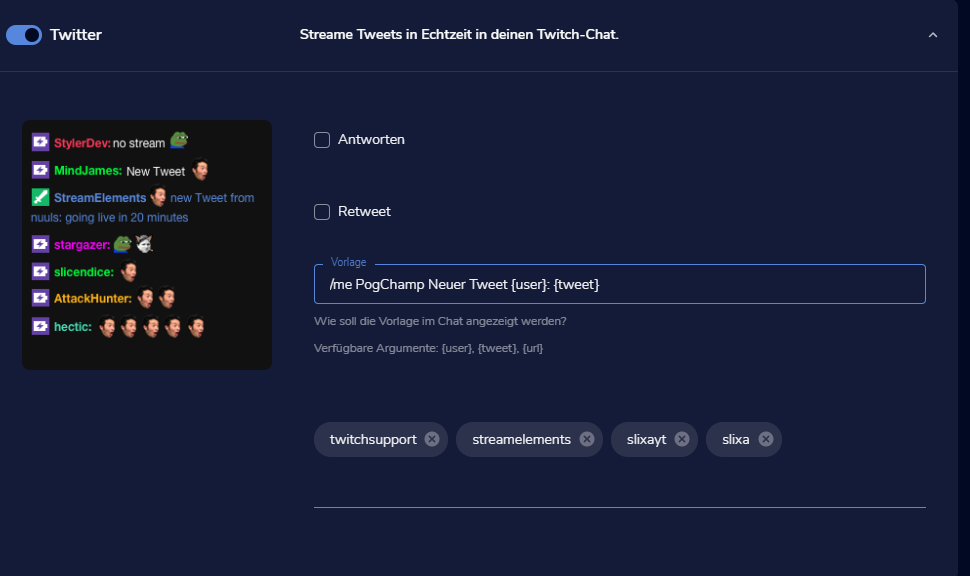
how i setup the twitter module ? to see into my twitch chat my tweet
 coarse apex
if i part the SE bot from my channel will overlays still work? or does it stop everything and not just commands?
 night valve
Hi
I want to delete a streamelements account, but at the time of entering the data, it indicates an invalid user
tired tulip
That makes no sense but okay I'll watch the video
 ember girder
hello!
I'm not really sure where to put this, so I'm hoping someone can help me.
I'm trying to create a custom command for the chatbot which will trigger a redeem command and display a message, without showing that it actually triggered the redeem command. could someone help, or point me to the right place to get help for this one? Thanks a million!
sweet socket
how i setup the twitter module ? to see into my twitch chat my tweet
@lament blade do you already have the chat module enabled?
if i part the SE bot from my channel will overlays still work? or does it stop everything and not just commands?
@coarse apex why would you want to part the bot?
 ripe jackal
Hey anyone streams on Xbox? Using streamelements?
sweet socket
What exactly are you trying to do with streamElements? @ripe jackal
Overlays? Chatbot?
sweet socket
For overlays you would need a capture card or use the xbox streaming service on your computer
ripe jackal
Do you need a webcam?
lament blade
So i put my Twitter Username inside of the Twitter Module but its still dont works , if i make a post from my PC or Phone on Twitter , the Bot dont show the Tweet into the chat
sweet socket
that is a personel preference
it might take a second @lament blade, also can you screenshot the settings you have now?
 ripe jackal
I’m gonna try do it on my laptop
lament blade
Ciao come posso mettere che appare in chat la scritta del bot che ringrazia del follow?
round brambleBOT
@ripe jackal Consoles do not have native support for overlays. You would need a capture card and a PC with OBS in order to have Overlays over your console gameplay.
We have an blog post about how to setup console streaming with our essential tools: https://blog.streamelements.com/how-to-stream-on-console-7b620b1c46c3
sweet socket
@lament blade english only please
lament blade
Ok
ripe jackal
Damn ok so what can I do on Xbox then? Excluding chat bot
lament blade
How i can make that the bot write in the chat like “Testuser is now following”?
With the activity feed’s
sweet socket
Damn ok so what can I do on Xbox then? Excluding chat bot
@ripe jackal that is it, you would need a capture card or the xbox streaming service on pc for the overlays
ripe jackal
Can I use the Xbox app on it or no
sweet socket
on PC you mean? You can capture that window yes
you would need pretty good internet however
since you are both uploading from xbox to pc and from pc to platform
@lament blade over here: https://streamelements.com/dashboard/bot-modules
lament blade
Pls can you reply me)
sweet socket
yes please be patient
lament blade
Maybe nobody can help or 😄
ripe jackal
I have 1 gigabit WiFi
sweet socket
ripe jackal
Is that good enough
sweet socket
@lament blade looking into you as well
lament blade
greate
sweet socket
@ripe jackal i would recommend using Ethernet to stream, always, wifi is a unstable connection
 crisp sun
When I delete/timeout a message in chat, it still pops in the chat widget, is there a way to fix that?
sweet socket
@crisp sun please dont ask your question multiple times, am looking into it o7
crisp sun
Oh sorry
sweet socket
thats okay 
http://prntscr.com/t800dc
@lament blade do you have the bot joined and modded in your chat?
 ripe jackal
@sweet socket I’ll message you here when I can do it because I’m busy atm

 sweet socket
Alright, ill ask around for you
lament blade
thanks alot
 hollow spruce
Hello! My mixer and twitch accounts got linked together last week.. but are now no longer linked. Can someone help me out?
sweet socket
Are you getting any errors?
thanks alot
@lament blade can you try adding your username in completly lowercased for me?
 coarse apex
@sweet socket no use for it anymore, sorry. But I still want the overlays to work.
Also is there a way to export currency?
 tacit lance
Hey, I’m trying to add the in game animated layers into my stream but I’m not to sure how. Can someone help me please?
round brambleBOT
@tacit lance To add your overlays to OBS, add a new browser source in your scene. Paste your overlay URL in the browser source properties, set the dimensions to 1920x1080 (unless you changed them on the website), and ☑ “Shutdown source when not visible” https://youtu.be/KDvLynUqXI4
 dense bloom
hey my bot is not showing up in chat and not doing the commands. plz help me
 elder sorrel
@dense bloom I see the bot in the channel & listed moderator. Have you tried in the StreamElements Dashboard to part the bot / sign out of SE, sign back in & join the bot again?
lament blade
does this mean it's rigged or not rigged?
75 what
75%?
75% chance of what?
75% chance they will win? or 75% chance they will lose?
wHaT DOEs it MeaN
hollow spruce
Are you getting any errors?
@sweet socket No.. just not linked anymore.. and all my overlays are gone..
elder sorrel
@lament blade It says "How rigged your system should be"
So yes 75% will be more rigged
 whole nova
For chat commands, are followers (regulars)? How would I make it where you have to be a follower to run the command
elder sorrel
More chances of losing.
lament blade
So yes 75% will be more rigged
@elder sorrel how much more
wary halo
1% more than 74
 lament blade
lol
elder sorrel

sweet socket
@sweet socket no use for it anymore, sorry. But I still want the overlays to work.
@coarse apex I'll see if that has any influence
sweet socket
I dont want to be dmca'd
@lament blade this only works if you have media request, do you use media request?
let me get the page where you can turn it off
https://streamelements.com/dashboard/mediarequest/general -> settings top right of the page-> media request mode -> click on free
lament blade
how do I turn it off though
sweet socket
Media requst in general?
lament blade
yes
sweet socket
If you don't have the media request widget and don't use media request, it won't pop up
before going to settings, you can also disable viewer requests here
 late lodge
hey there. I'm sure this was asked before, but there is sooo much text in here. How does the Twitter integration in the Bot Module work? How do i need to set it up to display my tweets in chat?
coarse apex
Thanks @sweet socket
sweet socket
Thanks @sweet socket
@coarse apex Overlays still work if you part the bot, it is indeed seperate from each other!
If you move to another service, do know that sometimes the other services tend to block out our overlay.
coarse apex
Do you know a way of exporting the currency? I gave a quick look when I was at my PC and could only find options to import :/
sweet socket
To what service do you want to export the points?
 neat otter
I was setting up a paypal account to use for tips and wanted a personal account as im only starting but found out that personal paypal ac shows ur name and address. I want to know if thats also the case using the streamelements tips since its not direcetly a link to paypal but im afraid to actually try it incase it does now.
round brambleBOT
@neat otter SE.PAY is available for streamers who are atleast 18 years old, with bank account under their name in one of the following countries and have at least 101 Follower (Twitch) / 101 Subscribers (Youtube):
Austria, Belgium, Czech Republic, Denmark, Finland, France, Germany, Ireland , Italy, Netherlands, Poland, Portugal, Slovakia, Spain, Sweden, Switzerland, United Kingdom, United States.
If you meet these criteria and don’t see SE.Pay, let us know.
For information on SE.Pay payment methods, their fees, and settlement times see https://streamelements.com/dashboard/tipping/fees.
weak delta
If you qualify for that, it'll solve your problem. Otherwise, you have to set up a PayPal business account.
And to clarify.
StreamElements doesn't share your personal information, it's all through PayPal regardless of how you link your viewers to your donation link.
sweet socket
hey there. I'm sure this was asked before, but there is sooo much text in here. How does the Twitter integration in the Bot Module work? How do i need to set it up to display my tweets in chat?
@late lodge hey Azido, be sure to go to the module page and enable the twitter module, then put in your username in lowercase under the other two accounts on this line
lament blade
I have the same issue as azido, except it does not work
sweet socket
@lament blade can you try the above i stated?
just put in your username in full lowercase
ripe jackal
Hey Bordeaux know how yo get music on Xbox in streams? Like can I use my phone or something
lament blade
sorry for interrupting, can anyone solve my problem in #helpdesk-youtube (again, sorry)
late lodge
yeah but how does the bot know about my twitter account, because i'm using another name for twitter than for the stream?
sweet socket
Hey Bordeaux know how yo get music on Xbox in streams? Like can I use my phone or something
@ripe jackal also with a capture card or PC, since if you stream straight from xbox it blocks apps like spotify
late lodge
on twitter i'm 4zido, on stream i'm azidozockt
sweet socket
however watch out for DMCA, you cant play copyrighted music on stream
ripe jackal
What’s dcma
lament blade
I think the Twitter Module is broken
sweet socket
on twitter i'm 4zido, on stream i'm azidozockt
@late lodge fill in your twitter username in the twitter module
I think the Twitter Module is broken
@lament blade works for me and some more people i helped today
late lodge
lemme double check again
lament blade
Well, it does not
sweet socket
have you tested with full lowercased?
wary halo
What’s dcma
@ripe jackal the end of your channel
ripe jackal
Oh oof
sweet socket
What’s dcma
@ripe jackal the DMCA is the law that you cant play copyrighted music you dont have ownership of
so you can only play no copyrighted sounds on stream, or they can strike you for that
ripe jackal
Oh ok but what can I use to get music on stream
 shell tendon
hello i really need help
late lodge
mh.. does it work only when stream is running or should it work always?
neat otter
@weak delta Sadly I dont have that many followers yet as im only starting but will do that as soon as I reach the number. Also I know that streamelements wouldnt give out information what I meant is for example when I use patreon and people pay me on their statement it just shows patreon and my patreon name rather than my paypal information
sweet socket
Oh ok but what can I use to get music on stream
@ripe jackal through xbox? nothing.
Capture card or xbox stream service on PC, whatever application you want as long as the music isnt copyrighted
ripe jackal
Would I be able to put music on my phone to Xbox tho
shell tendon
how do i add overlays to twitch using stream elements
round brambleBOT
@shell tendon To add your overlays to OBS, add a new browser source in your scene. Paste your overlay URL in the browser source properties, set the dimensions to 1920x1080 (unless you changed them on the website), and ☑ “Shutdown source when not visible” https://youtu.be/KDvLynUqXI4
 candid cave
Hi all, I want to change position of the alpha rotating feed overlay, but the work area is only on top left
how I increase the work area or change position
new to streamelements
lament blade
I can say that the Twitter Module does not work for me too
sweet socket
tried both accounts with no luck
@late lodge that is weird, trying out myself and otherwise will get someone to look at it
late lodge
@sweet socket ok so it should work with those settings, right?
weak delta
@weak delta Sadly I dont have that many followers yet as im only starting but will do that as soon as I reach the number. Also I know that streamelements wouldnt give out information what I meant is for example when I use patreon and people pay me on their statement it just shows patreon and my patreon name rather than my paypal information
@neat otter
Ah yeah this would have to be done through PayPal with a PayPal business account. If you use a PayPal personal account on any level, anybody who sends you money will be able to see the name associated with the account in their PayPal activity. Look into PayPal business, many streamers do it.
sweet socket
@sweet socket ok so it should work with those settings, right?
@late lodge if the bot is joined and a moderator in stream it should indeed work
wary halo
@candid cave just click on the widget in the layers menu, then you can drag the widget everywhere on the screen
lament blade
I have modded the bot but it wont work for me too
late lodge
@sweet socket at least he already announces when i start streaming so i guess he joined
ripe jackal
@sweet socket is there anyways for me to play music on my phone but the audio to go in the stream
sweet socket
I have modded the bot but it wont work for me too
@lament blade yhea i know you have everything already, im re-asking on this matter and testing if this might be it for azido, since it did work for someone else earlier today
lament blade
I hope someone will look into it
late lodge
@ripe jackal you need to hook up your phone to an input in your streaming pc and then you can add that line in as a source.
sweet socket
we are, we're checking the possibilities on this, since it might be getting rate limited, but since we can't say that atm for 100% sure!
sorry you guys are experiencing that it doesnt work
lament blade
No worries
late lodge
@sweet socket never mind, i just wondered if the error is on my side
lament blade
Hey, I dragged out my chat, how can i gwt it back
wary halo
in OBS?
candid cave
@wary halo it doesn't work
wary halo
click on the streamelements menu > chat
candid cave
because the work area is very small on topleft
ripe jackal
Ok so just to make sure I can’t put music with my Phone in stream without plugging in to my streaming of
Pc*
wary halo
@wary halo it doesn't work
@candid cave see if it has a lock icon behind it, click that to see if it's unlocked then
 summer python
Hi! is there a more complete documentation for commands and variables somewhere? because apparently count.edit works but it's not in the variables tab on stream elements.
late lodge
@candid cave just reset the transformation and it should come visible again
summer python
I'm also trying to get this to work: Gflo's death has been set to ${count.edit death {1}}
lament blade
@wary halo i did but idt dissapeared and now not visible
late lodge
ah ruben
 storm whale
U guys are twitch streamers?
wary halo
most of us are yes 😛
storm whale
Nice
 sweet socket
you are in the Twitch helpdesk so 
storm whale
late lodge
lol
storm whale
I will follow u guys :)
summer python
Should I be worried if my question gets pushed off screen xD
wary halo
no 😛
summer python
@storm whale I am not
storm whale
Oh
summer python
I'm just tech support for one c:
storm whale
Ohhh
summer python
/ I like programming
storm whale
Nice
jade remnant
#general-chat with this convo please
storm whale
Ok
 brazen badge
hi everyone! i was hoping to get help can i set this up streamelements with streamlabs or are they seperate programs?
late lodge
I'd call it different "services"
wary halo

lament blade
For the Twitter Module, no errors were displayed in the console in the F12 Menu
jade remnant
@summer python what are you trying to do with the counter?
increase it, decrease it, or recall the amount its on?
candid cave
no luck
summer python
set the value with an input argument
candid cave
is there any way to increase work area?
wary halo
is there any way to increase work area?
@candid cave drag it bigger
jade remnant
!editcounter death 0
summer python
see I tried that
sweet socket
I'd call it different "services"
@late lodge @brazen badge theyre actually two different things, streamlabs is a fork into OBS.Studios, where StreamElements is a plugin
summer python
but it doesn't edit the counter death
it edits death
which apparently aren't stored in the same location
candid cave
the grey area with dots, not the layer
summer python
and that doesn't accept !editcounter counter death 0
late lodge
oh.. deathcounter. Does that work with every game?
summer python
@late lodge mine at least needs to be triggered as a command
late lodge
ah ok
summer python
I'm sure you can set it up so your game sends a command to stream elements though
wary halo
the grey area with dots, not the layer
@candid cave that area is as big as you browser is 😛 it's 1920x1080 big
jade remnant
try
!editcounter <death> 0
the command might have been set up wrong
if you can get a screenshot of the actual counter that would help a lot
wary halo
should be more than enough room
summer python
nope
candid cave
not on this overlay
wary halo
not on this overlay
@candid cave what is the resolution of the overlay and where did you get it?
ripe jackal
How can I make a timeout for people if they use profanity words
wary halo
and why do you want it bigger?
candid cave
is called alpha rotating feed
because I want to drag it lower
but work are is very small and it won't show on stream
if I drag it down
and I don't know how to copy it on another work area
summer python
@ripe jackal as far as as I know, the bot doesn't have the ability to time or ban people
wary halo
@candid cave
late lodge
@sweet socket acutally i found out the twitter announcement of tweets WORK in chat, but this doesn't get displayed on the chat overlay in obs
summer python
@wary halo what is that?
candid cave
perfect man
sweet socket
ahh alright, let me check about that
wary halo
@wary halo what is that?
@summer python that is how you copy widget to another overlay
late lodge
@sweet socket if the bot is excluded from the widget it can't be displayed
 summer python
@wary halo in overlay edits?
late lodge
thx
wary halo
@wary halo in overlay edits?
@summer python yes
candid cave
after I duplicated to another overlay where I find it/ add it
lament blade
AND I PUT IT AT 100
 fervent reef
Hello friends. I'm trying to turn my SE bot into a custom bot through Ground Control. The last thing I have to do (I think) is go through the OAuth code flow, but I feel like I have no idea where to start (even though I've been deep in the Twitch Dev Auth page. Anyone out there that can help me?
wary halo
after I duplicated to another overlay where I find it/ add it
@candid cave in the overlay you duplicated it too
round brambleBOT
@fervent reef Currently renaming the bot fully works with OBS.Live.
You can follow this video guide to set it up: https://discordapp.com/channels/141203863863558144/494513233416421386/561516184718278676
If you don't want to use OBS.Live and want to stick with Ground Control, please let us know your Twitch username.
sweet socket
^see above
late lodge
another dumb question: can i rename that bot?
sweet socket
see above as well azido haha
late lodge
hehe
lament blade
So, I saw what Azido did and how can I also get it to work?
wary halo
try what he did? 😛
sweet socket
if you have lowercased the usernames, it should work, so if its still not working, might wanna try rejoining the bot
round brambleBOT
@lament blade Go to the dashboard -> right side -> part channel -> join channel (https://streamelements.com/dashboard)
lament blade
Alright
@wary halo how is he still winning
IT WORKED
I have put it at 0 and 100
and he's still winning
Nice
every single time
it doesn't make sense
 remote spire
how do get the gamble command active?
 strong kernel
@remote spire Roulette module in the modules section.
@lament blade Setting it to 0 doesn't actually work. Setting it to 1 does.
remote spire
ok, thx
lament blade
@strong kernel they told me lower was higher chances of winning
strong kernel
No, lower is lower chance.
strong kernel
It's percentage chance of winning.
candid cave
ty alot @wary halo it worked, I lost 1 day to find this answer
 zealous charm
hi im trying to copy a overlay i made on the website over to streamelements obs live and dont know how can anyone help
round brambleBOT
@zealous charm To add your overlays to OBS, add a new browser source in your scene. Paste your overlay URL in the browser source properties, set the dimensions to 1920x1080 (unless you changed them on the website), and ☑ “Shutdown source when not visible” https://youtu.be/KDvLynUqXI4
sweet socket
IT WORKED
@lament blade there we go
lament blade
😄
zealous charm
ty sm
round brambleBOT
@lament blade Please follow our community rules:
- No advertisement or stream promotion
- Respect ALL server members
- No NSFW/NSFL
Thank you
sweet socket
please dont do that!
summer python
Anyone have any idea about my problem?
sweet socket
what is the issue exactly i saw that ruben pointed you the right way @summer python
 marsh portal
Hi, Stream Elements! I was recently made aware of a problem - i cannot receive tips. Firstly i am using PayPal and have linked it (as far as I know) correctly. The problem is as follows:
- Viewer decides to tip and presses link.
- Viewer setups the tip and sends it (doesn't matter if Song Request is included or not)
- Tip awaits conformation (presumably by me). It does not go trough as Alert or register as event.
I don't get any receiving requests in PayPal to confirm the tip and i don't think it's supposed to work like that. To be frank, I am not sure if the problem is in stream elements or paypal.
summer python
basically, using editcounter doesn't edit the same counter that increments with count countername
sweet socket
Okay lets see, can you show a screenshot of your tipping settings?
Can you confirm you have a business account? @marsh portal
summer python
and I wanted to set the value with an arguement
marsh portal
Okay lets see, can you show a screenshot of your tipping settings?
Can you confirm you have a business account? @marsh portal
@sweet socket My PayPal is personal account, not bussiness. Is that the problem? shoudl i convert it? I can provide Screen Shot of the settings if still necessery
sweet socket
A business account is free and better in some ways, won't display your personal data.
For the settings, let me check mine firstly and ill let you know what ill need
lament blade
Hello, I want to change the alerts but in a few, it let me change them but in the sub one it won't let me, I change it for a custom one but this keeps on coming out
strong kernel
@summer python Screenshot your counter command, and tell me how you're typing out the !editcounter command.
@lament blade Edit the variations too, not just the main sub alert.
marsh portal
Hello, I want to change the alerts but in a few, it let me change them but in the sub one it won't let me, I change it for a custom one but this keeps on coming out
@lament blade Subscribe and several others have several variations. You may have changed the main one but not the variations.
lament blade
ok thx i will try that
summer python
that's all my tests
well
some of them
I was trying to set up something with this
but it doesn't accept the arguement
never mind I fixed it
 rain knot
Hey, anyone know if there's a way to add an auto counter to monitor how many times a command gets used?
that'll then maybe post in chat?
 cloud badge
My commands aren’t working such as !wager my stuff didn’t pop out someone help me
sweet socket
is the bot a moderator within your channel? @cloud badge
weak delta
Hey, anyone know if there's a way to add an auto counter to monitor how many times a command gets used?
that'll then maybe post in chat?
@rain knot
Add a counter variable to the end of the command, it'll increase by 1 each time the command is ran.
I can't get a screenshot right now but look in the variables section of the command page and ctrl + f count to find it.
@summer python use the regular count variable with just <name> in it
Then change <name> to death's and keep the brackets
!editcounter <deaths> 14
Logging into my PC now but you're both asking same question so let me get a screenshot and we'll knock two birds out.
 weak delta
@summer python @rain knot
Add this to your command: ${count <name>}
<name> will default to whatever the command is called but I recommend changing it to whatever you're tracking.
@summer python You would add this ${count <deaths>} to your command for tracking them. For example, !deaths then you would run !editcounter <deaths> 14 <-- exactly like that and now it is set to 14 so next time you run !deaths, it'll increase by 1 to 15.
@rain knot Just add this to the end of the commands you want to track: ${count <name>} <--- it will show a number when the command is ran each time and it will increase that number by one.
 viral bone
Hey. I have my twitch account linked with my stream elements for my chat bot, but I asl stream on YouTube. Can I like both accounts onto the same chat bot?
strong kernel
You can use StreamElements for both but they won't share data.
 sharp egret
Hello Streamelements my Streamelements Chatters Leaderboard doesn't work. What can I do to fix?
viral bone
That’s fine, I just want to make one set of commands that will work in both
round brambleBOT
@sharp egret If you changed your name on Twitch please follow these steps:
🔹 Visit https://streamelements.com/logout and then log in again with by connecting with Twitch.
🔹 On the right side of the dashboard page that opens, select "Join" under bot settings. If it says "Part" select that and then select "Join" to send the bot to the chat. Don't forget to mod the bot by typing /mod streamelements in your channel if you have not already.
🔹 Post your old and your new name here so that we can update your channel's chatstats tracking (must be done by staff).
strong kernel
@viral bone You have to set it up twice, then, once for Twitch and once for YouTube.
viral bone
Ok thank you!
summer python
one sec
sharp egret
@round bramble Old name yoshiV_R6 new name JosiaLive
coarse apex
To what service do you want to export the points?
@sweet socket to streamlabs chatbot
sweet socket
requested a staff member for the chat stat fix @sharp egret
@coarse apex ill ask around
sharp egret
@sweet socket thank you
coarse apex
@coarse apex ill ask around
@sweet socket thanks!
 wanton jetty
Anyone having issues with "cheer" symbols not loading and just displaying as text ?
http://thecynicalkitty.com/s/20202868586.png
emotes work fine
sweet socket
we dont offer a export option from our points to our competitor @coarse apex
You can try asking streamlabs if they have a import tool 👌
sharp egret
Hello, my Chatter Leaderboard is still not fixed. How long will it probably take?
sweet socket
no ETA, the request is standing out
round brambleBOT
@gentle coyote To add your overlays to OBS, add a new browser source in your scene. Paste your overlay URL in the browser source properties, set the dimensions to 1920x1080 (unless you changed them on the website), and ☑ “Shutdown source when not visible” https://youtu.be/KDvLynUqXI4
sweet socket
Like that ^
 gentle coyote
ok one sec
sharp egret
@sweet socket thanks for the answer but what does ETA mean?
sweet socket
Anyone having issues with "cheer" symbols not loading and just displaying as text ?
http://thecynicalkitty.com/s/20202868586.png
@wanton jetty is this only in OBS.Live chatfeed or also on the Twitch live chat feed?
estimated time of answer
gentle coyote
it works BordeauxPrime
sweet socket
good to know, happy streaming! 😄
gentle coyote
tysm
gentle coyote
Bordeux im having some problems can you help me?
my stream things look like this
when in editor
please heko
help*
hollow spruce
Could someone of the staff please help me? Got issues with my accounts that got linked together.
 mystic matrix
guys i have 51 followers but my achievements dashboard for the affiliate one says 48
sweet socket
@mystic matrix that is something to ask Twitch about, maybe some people unfollowed
mystic matrix
idk on my channel it says 51 but on the achievement thing it says 48
its so confusing
xd
sweet socket
Maybe it still needs to refresh, twitch also takes some time to process the data for after stream statistics!
mystic matrix
i thaught about that idk ill wait
sweet socket
Sadly we can't help you out with that
lament blade
how can i sign in with a other Twitch account im with the wrong acc signed in
round brambleBOT
@lament blade Please logout of StreamElements at https://streamelements.com/logout and then login again to your account (Twitch/Youtube/Facebook/Mixer)
sweet socket
^try this
lament blade
yeah but i cant login with my other acc because i
automatically sign in
with the wrong acc
sweet socket
Can you try logging in via a incognito tab
sweet socket
Alright 👌
 sage plover
Just wondering, are there any important commands I should have in stream?
 tall rock
question, what controls the notifications through streamelements?
like, when someone follows your stream, how does it pop up in stream video
sweet socket
@sage plover check #command-share
summer python
Can you control the periodic messages that get sent?
 valid lark
my host alerts arent going off or even showing in the feed, what should i look at? it was working fine the other day
wind storm
So this is still an issue. I have chat alerts module disabled, but when running a command using the ${redeem} argument, I still get the redemption message. It's the same when I use !redeem as well. I've tried disabling, enabling, pairing, unpairing, etc. Even changes to the redemption message don't change anything (and I have that sub-module disabled anyway).
Any way to fix this?
 slim mulch
when i change a font in the widge editor and save it, it doesnt show changed font in OBS
the font itself looks correct in widget editor but when added as browser source its different font in OBS
round brambleBOT
@slim mulch Google Fonts
More than 900 google fonts are supported at this time. You can preview them here: https://fonts.google.com/
Custom Fonts
Steps:
- Install the font on the streaming PC or choose a pre-installed windows font.
- In the overlay widget settings, select Text Settings
- Enable Custom Font
- Type the name of the font as it appears in the windows font directory (This is usually
C:\Windows\Fonts)
Note: After installing fonts, the browser and OBS must be restarted for the font to appear.
summer python
@weak delta so the problem was I had to remove ${ } and directly right the name
thanks a lot :)
uh
thanks streamelements?
weak delta

 versed tendon
SE.Pay Inquiry
I started by having my two PayPal accounts connected (2nd one for Micropayments). I set up and connected my SE.Pay once I surpassed 100 followers. I received my first two donations on Twitch several days after connecting SE.Pay. However, the donation went through PayPal.
I looked at my Tipping Settings, and both the PayPal accounts and my SE.Pay account are connected. I assumed setting up SE.Pay would make it my default. Do I need to Disconnect my two PayPal accounts? Or should I still be able to use SE.Pay with my PayPal accounts connected too.
Thanks in advance!
strong kernel
@versed tendon SE.Pay and PayPal can both be provided in the same tipping page. Having one does not disable the other.
versed tendon
Thanks for your reply @strong kernel. Is there a reason my donations would have gone through PayPal and not SE.Pay? Is there a way to have SE.Pay be my primary payment provider when I receive donations?
strong kernel
Options are provided on your tipping page. If you don't want to provide PayPal as an option, then you need to disable it in the Tipping settings section of your account.
 clever kernel
hey when someone raids me im get no alert over stream
round brambleBOT
@clever kernel Please provide your account ID found at the top of this page: https://streamelements.com/dashboard/account/channels This ID is public info and safe to share here.
versed tendon
Perfect! Thank you for your help @strong kernel. Have a great week!
clever kernel
what ddos this bot need
 solid wing
hey i have a browser source which works the way it should in SE but it doesn't in OBS itself - i've attempted refreshing the cache but it doesn't change anything
round brambleBOT
@solid wing To add your overlays to OBS, add a new browser source in your scene. Paste your overlay URL in the browser source properties, set the dimensions to 1920x1080 (unless you changed them on the website), and ☑ “Shutdown source when not visible” https://youtu.be/KDvLynUqXI4
@solid wing The default resolution for StreamElements overlays (theme and custom) is 1920x1080. Please add them in OBS at their full resolution and use CTRL+F to fit to screen if necessary. You can then downscale your stream in OBS settings > Video if you'd like https://i.imgur.com/6bWXxjR.png
 strong kernel
@solid wing Never share your overlay URL.
clever kernel
what dos the bot need me to done please
round brambleBOT
@clever kernel Please provide your account ID found at the top of this page: https://streamelements.com/dashboard/account/channels This ID is public info and safe to share here.
solid wing
apologies
strong kernel
@clever kernel Your raid alert appears to be working fine.
clever kernel
ok cool i did not here it come over stream to day i just seen it pop up in chat @strong kernel
did not here come thought my headset like i do with follows
cursive trench
Uh, i need help with the music. Everytime i click on "Show on stream", the music seems to echo?
round brambleBOT
@cursive trench Make sure to ☑️ “Shutdown source when not visible” for all browser sources (all OBS scenes). If using studio mode, uncheck “Swap Preview/Output scenes After Transitioning.” Also keep in mind that sound can play from any overlay loaded in the browser (editor or launched). https://i.imgur.com/6bWXxjR.png https://i.imgur.com/yY0wcFl.png



 civic lake
Hey, when trying to customize my cheer alert sound it plays the standard alert before playing my custom alert. this does not happen with custom sub or follow sounds
strong kernel
@civic lake Different sounds playing at the same time for the same alert is always due to having multiple active alertboxes with different settings.
crisp sun
I've already asked this before but got no answer (I know you guys are busy). When I delete/timeout a message in chat, it still pops up in the chat widget, is there a way to fix that?
civic lake
Okay, I have one variation set up but both cheer alerts in the alert box are the same audio file... Only one alert box is set up on stream elements and there are no alert boxes on stream labs
 lean viper
where can i get my JWT token? so i can close my account and use nightbot? because now the two of them are in the way and i wanne use nightbot
or is it possible to not use it in chat
round brambleBOT
@lean viper Go to the dashboard -> right side -> part channel -> join channel (https://streamelements.com/dashboard)
lean viper
thanks 🙂
 tropic venture
hello guys
strong kernel
@cursive trench You have the media request widget active in multiple places.
cursive trench
Wdym in multiple places? :o
tropic venture
I would like to know how can I avaiable to my viewers your loyalty points like channel points of twitch
Like this
https://help.twitch.tv/s/article/channel-points-guide?language=en_US
PS - I didn`t found an extension to apply it
strong kernel
@cursive trench Multiple overlays. Or overlay and in your browser. You need to go looking.
cursive trench
Ah okay, ill go looking
strong kernel
@tropic venture I don't understand the question. Please be as clear as possible.
civic lake
Okay I definitely activated a second alert box... not sure how but what do I do now
tropic venture
@strong kernel when you enter in a channel with CHANNEL POINTS you have your total points earned watching live aside of chat bar
i would like to know HOW CAN MY VIEWERS give access to your points earned.
the LOYALTY LEADERBOARD are installed in a panel on my twitch
strong kernel
I'm still not understanding what you mean by "how can my viewers give access."
@civic lake You need to find where the other alertbox is and either remove it or make it disabled while the scene it's in is not active.
civic lake
When streamlabs and stream elements are both open the alerts are messed up, either they echo or they play the wrong custom audio sound... if I just have streamlabs open will it work fine
strong kernel
They're not supposed to be used at the same time. They're entirely different systems. We're competitors.
 patent juniper
hey can someone help me
round brambleBOT
@patent juniper Welcome to the helpdesk! Please let us know how we can assist you today and a support volunteer or staff member will assist you as soon as they are available. Thank you for your patience.
 ember whale
i just signed up to streamelemends, i was using streamlabs before but there is way to many glitches lately. Im trying to set up media donations but i dont see anywhere to set it up on the website
can someone dm me and help me set up media donations for stream elements?
strong kernel
@ember whale https://www.youtube.com/watch?v=17eUkoZ6eIs

StreamElements Media request enables playing songs and videos in your stream. It's an upgrade of StreamElements Song request and Media share features.
Join our discord for live support: discord.gg/SE
Ground Control: https://strms.net/groundcontrolyt
Channel Management ...
strong kernel
What button?
 glacial pebble
Hey folks, anyone know of a way to customize the font family style within SE online editor? I'd like to use Montserrat Black 900 Italic as that is my new font style, but "Bold" and "Italic" doesn't come close to how heavy this font is
ember whale
round brambleBOT
@glacial pebble Google Fonts
More than 900 google fonts are supported at this time. You can preview them here: https://fonts.google.com/
Custom Fonts
Steps:
- Install the font on the streaming PC or choose a pre-installed windows font.
- In the overlay widget settings, select Text Settings
- Enable Custom Font
- Type the name of the font as it appears in the windows font directory (This is usually
C:\Windows\Fonts)
Note: After installing fonts, the browser and OBS must be restarted for the font to appear.
ember whale
a media share button that she clicks
strong kernel
@ember whale Look in "More"
ember whale
nothing there
patent juniper
strong kernel
@ember whale Oh. Media request is not available for YouTube. Why are you asking in the Twitch helpdesk?
patent juniper
that's where i clicked to add stremlabs is there a video
ember whale
so i cant do media reuqest on youtube??
strong kernel
@ember whale You cannot.
ember whale
wtf
my tts all of a suddon stopped working on my streamlabs mobile but was still fine on my slobs desktop
and i swtich to elements and now i cant accept media donations
strong kernel
@patent juniper https://support.streamelements.com/hc/en-us/articles/115000405371-Import-other-platforms-into-StreamElements

StreamElements
Importing other tools into your StreamElements account is really quick and simple.
Use this guide to learn how to import: Streamlabs, Nightbot, Ankhbot/Streamlabs Chatbot, CSV files, Deepbot, St...
patent juniper
what video can i watch to setup alerts
round brambleBOT
@patent juniper New to Stream Elements?
Check out our YouTube channel https://www.youtube.com/c/streamelements/videos
with tutorial videos from setting up the basics, to in depth details on how to use our product.
New to OBS? Here is a 4 step quickstart guide
https://obsproject.com/wiki/OBS-Studio-Quickstart
Want to learn even more? Here is an in-depth overview
https://obsproject.com/wiki/OBS-Studio-Overview
 wide pelican
What video can I watch to change overlays on PS4
round brambleBOT
@wide pelican Consoles do not have native support for overlays. You would need a capture card and a PC with OBS in order to have Overlays over your console gameplay.
We have an blog post about how to setup console streaming with our essential tools: https://blog.streamelements.com/how-to-stream-on-console-7b620b1c46c3
patent juniper
any staff on
strong kernel
@patent juniper Every single feature of ours has a tutorial video in our YouTube channel: https://www.youtube.com/c/streamelements/videos

YouTube
Official youtube channel for StreamElements tutorials https://StreamElements.com
patent juniper
i could not find one for alerts
 opaque arrow
Has anyone had any issues with bitrate instability causing skipping and lag while streaming? I've replaced my modem and upgraded my internet. Just making sure this isn't a common issue
round brambleBOT
@opaque arrow Please provide a log from your last stream. To do this, in OBS go to Help > Log Files > Upload Last Log File and paste the link to the log file here.
patent juniper
i will @strong kernel
opaque arrow
strong kernel
opaque arrow
https://obsproject.com/logs/eX3owDcxsEO0MbGn and this one is current
strong kernel
 grizzled tundra
I just asked this in general chat but the bot wanted me ask it here instead? What I am wanting to know if if SE has a way to trigger on screen event with a command and not just play an audio file? if not does anyone know what plugin I need to do this?
strong kernel
@grizzled tundra https://www.youtube.com/watch?v=BXGMjHqwVFE

The StreamElements Stream store lets your viewers redeem Loyalty points (collected by watching your stream) to get special perks, fun sounds, and even game keys and discount codes!
The StreamElements Stream store is part of the Loyalty system, helping you to engage with your ...
grizzled tundra
that is only for audio I thought?
strong kernel
Not just audio, no.
grizzled tundra
but is it just a gif if you wanted it to be animated or can it be a full shot video?
strong kernel
I wouldn't recommend making it be a long video.
grizzled tundra
for sure but maybe 5 seconds?
strong kernel
That'd be fine.
grizzled tundra
the other issue is you seem to only be able to use !redeem {command}?
strong kernel
You can make a custom command.
grizzled tundra
I could like to just have !command
strong kernel
Look in https://streamelements.com/dashboard/bot-commands/variables for the variables you can use in custom commands.
StreamElements
The Ultimate All in One Platform for Streamers
grizzled tundra
I don't see a variable for calling a store redemption
or not lol
it is 2nd to bottom 😦
grizzled tundra
thanks 🙂
ionic kelp
That one specifically for it.
grizzled tundra
so you are a Ubuntu user I guess @ionic kelp
ionic kelp
Not entirely to the amount as my name implies but yes.
ionic kelp
That's the variable. The itemname is the actual item name that's listed.
 fossil summit
I am unable to get ground control to show custom bot name options. This worked in the past for my ground control.
ionic kelp
Twitch account of same name as here?
fossil summit
streamer account name - mocdrizzt bot account name - mocgtv
 white gust
hi i have a custom overlay how do i add it to stream elements please
round brambleBOT
@white gust To add your overlays to OBS, add a new browser source in your scene. Paste your overlay URL in the browser source properties, set the dimensions to 1920x1080 (unless you changed them on the website), and ☑ “Shutdown source when not visible” https://youtu.be/KDvLynUqXI4
 alpine yarrow
Hey guys so I just got some overlays and and alarts made on fiver and I’m kinda lost on how to get em in streamelements
round brambleBOT
@alpine yarrow To add your overlays to OBS, add a new browser source in your scene. Paste your overlay URL in the browser source properties, set the dimensions to 1920x1080 (unless you changed them on the website), and ☑ “Shutdown source when not visible” https://youtu.be/KDvLynUqXI4
alpine yarrow
So this is a custom overlay so it doesn’t have a url?
ionic kelp
You have to add the files in our editor to have it for an overlay.
alpine yarrow
Ok awesome lol I was lost
white gust
how do i import overlay from pc folder to stream elements dashboard and it is not showing anything
i want to use my overlay like this 👍
round brambleBOT
@white gust We're not able to troubleshoot issues with using our overlays in StreamLabs OBS (SLOBS) as we don't have the tools to support their software. We recommend using OBS Studio or OBS Studio with our plugin OBS.Live.
white gust
@round bramble ok
wind storm
Trying to add sub goals overlay. I got it the way I want it, but it says I have 90 subs (which is NOT accurate), and then adding a subcount gives me "no data" messages. Any idea why?
round brambleBOT
@wind storm To reset goals:
- from the overlay editor -> session data on top right (monitor symbol) -> goals tab -> reset progress of desired goal
- from the dashboard -> activity feed on the left -> widget data on the right -> goals tab -> reset progress of desired goal
Note: Goal widgets(progress) only counts up and doesn't go down automatically, if you loose followers/subs
 hollow horizon
So a question.. i will be doing a giveaway tomorrow for a b-day stream.. and i am trying to type up the command. i space it perfectly in streamelements but when typedd in chat it is all bunched together.. is there a way to make it look neat?
 jade basin
My bot is not working at all any help?
hollow horizon
alright lol