#helpdesk-twitch
1 messages · Page 626 of 1
 glacial lion
 steady hatch
make sure its on 1920 by 1080
 ruby flare
is there a way i can initiate a twitch clip from the obs software?
 chrome folio
@ruby flare > discord.gg/obsproject
chrome folio
@ruby flare 🙂
ruby flare
is there a way to make a clip though? lol
 abstract hemlock
@ruby flare maybe try this : https://discordapp.com/channels/141203863863558144/457957557470887947/694507700977008671
glacial lion
Thank you soo much 
 merry meteor
hi, for some reason obs live won't connect to twitch, it keeps timing out, and it's making me unable to stream even with my key inputted :c I've restarted my comp, ended killer network service, added it to my firewall, and i'm really lost
I used this last week and it worked seamlessly, now it's a mess
some good news, the chat widget now loads ^^; idk about the rest though - still unable to login
chrome folio
@ruby flare There is a web api to make clip in Twitch typing a command in your chat. See: sowhoyou.com
 round brambleBOT
@merry meteor Streamelements on top of OBS -> Logout -> login
 orchid elm
abstract hemlock
orchid elm
abstract hemlock
@orchid elm Keep questions on one channel please 🙂
merry meteor
i tried logging in and out, to no avail. I keep getting this message when i try to login and authenticate with authy
 lament blade
Guys I wrote I message here 12 hours ago and they said me, that I will get answer. But I dont have it and I need it. Thanks.
 long kraken
Can someone tell me how i would download one of my overlays?
round brambleBOT
@long kraken To add your overlays to OBS, add a new browser source in your scene. Paste your overlay URL in the browser source properties, set the dimensions to 1920x1080 (unless you changed them on the website), and ☑ “Shutdown source when not visible” https://youtu.be/KDvLynUqXI4
long kraken
Thank you
round brambleBOT
@lament blade Welcome to the helpdesk! Please let us know how we can assist you today and a support volunteer or staff member will assist you as soon as they are available. Thank you for your patience.
 tall eagle
For some reason evertime i try to go live it wont go live on twitch it says im streaming but nothing happens on twitch ps thats the only reason i use streamlabs because i cant get my fav stream elemnts to work
 jade remnant
you need to ask streamlabs
 lethal widget
@viscid pebble @round bramble Why is Follower not an option under User level?
abstract hemlock
@lethal widget You can use Everyone
 sleek shoal
Hi i'm having problems with the overlay editor on the streamelements website, i don't know if i'm just being dumb or if something is wrong.
round brambleBOT
@sleek shoal We've released our new Overlay Editor revamp. You can check out the changes and how to work with it here: https://youtu.be/X5VzXjqAsjk
Check out our blog post as well: https://blog.streamelements.com/streamelements-overlay-editor-just-got-even-better-c22cb5b4853e

We are thrilled to announce the launch of the remastered StreamElements Overlay editor!
https://p.strms.net/newoverlayyt
Why StreamElements Overlays are better?
😎 Simple: Load your entier setup using only 1 link
⚡ Fast: Cloud-powered Overlays arrive in real-time, say goodb...
sleek shoal
Yea so the video and the blog do not cover my issue, It's not that im unfamiliar with how to use the editor i just believe that mine is not working properly
My issue is that when i try to change the image or sound for my subscriber event, the changes won't go through. I changed the follow and host events perfectly fine but for some reason the subscriber video wont change
round brambleBOT
@pearl sage Please follow our community rules:
- No advertisement or stream promotion
- Respect ALL server members
- No NSFW/NSFL
Thank you
chrome folio
@sleek shoal do you changed the video/image/sound on subscriber alert and clicked on save button? or did you try to emulate the alert?
 pearl sage
Huh
sleek shoal
I changed the video and sound of the alert and saved, then tried emulating it but it still shows my old alert
chrome folio
@sleek shoal hm... verify if you changed it, because it is unusual
abstract hemlock
@sleek shoal Check your variations
chrome folio
@abstract hemlock, yesterday I made a Merchandise Goals and set the Revenue Goal on Session Data (Overlays Editor) because I brought this overlay that was already active on another platform with R$ 386,62... and today I received more R$ 18 of donations and the value of Revenue Goal hasn't been updated to the new value (386.62 + 18 = 404.62). Do you how to help me with that?
sleek shoal
i disabled all the variations and it fixed the problem, thank you very much
 merry plinth
Hello, I am having an issue to where when I do a command chat in my chat, the hyperlink is stared out. It wasn't like this yesterday.
 lusty kindle
My stream keeps going black
 fading vine
anyone wanna help me ❤️
 solid sparrow
hello i have a problem with sources in my obs studio with streamelements live, i cannot move them even if unlocked, what happened?
chrome folio
@solid sparrow > #helpdesk-selive
solid sparrow
oh, ty
fading vine
i stream at 720 60 fps at 32 scaling with 3000 bit rate
and i have 54% dropped frames wtf
i ahve a i7-7700k and a 1080
chrome folio
@fading vine how much upload do you have?
and you can check your drop frame or route connection with your stream platform... if it is Twitch use Twitch Inspector site
it is recommended to have around 30% of your upload to the stream, so if you are using 3000 bitrate configured you would have to have around 10mbps or more to not compromise your game, OBS navigation (overlays), navigation of other contents (music, videos, websites, apps) and also the operating system (Windows etc).
abstract hemlock
@merry plinth try /mod StreamElementson your chat
round brambleBOT
@pearl sage Please follow our community rules:
- No advertisement or stream promotion
- Respect ALL server members
- No NSFW/NSFL
Thank you
chrome folio
¬¬ @pearl sage
 brazen meteor
hey i have a question. I'm the mod of a streamer on twitch and he's using streamelements just as me.
When the people in his stream type in !watchtime everytime the bot responses that they've watched 0 seconds no matter how long they've already watched the streamer, but in other people's streams everything works fine
what could we do ?
 strong kernel
Enable loyalty.
 north halo
hello i just got stream elements and hit start stream but it is streaming on the old account i had for twitch instead of the one i desire to stream on, I am logged in correctly to the account i want to stream on but the stream that starts is the other account.
 midnight plaza
Can someone tell me where to find the tiltify integrations? since the revamp i am completely lost
round brambleBOT
@north halo Streamelements on top of OBS -> Logout -> login
abstract hemlock
@midnight plaza
midnight plaza
how do i get to that lol
abstract hemlock
The search textbox is your friend 🙂
 balmy elbow
Hello guys, i already report this, but even with the recommendations, i'm having the same problem with the encoder overloading (my game is normal, but the stream starts lagging). Can anyone help me?
round brambleBOT
@balmy elbow Please provide a log from your last stream. To do this, in OBS go to Help > Log Files > Upload Last Log File and paste the link to the log file here.
balmy elbow
 wide ravine
Hi, is this program is still working? Magic: The Gathering Creator Program - EU.
Response time already over 3 month. Tomorrow is mtga early access, so its now or never 🙂
strong kernel
Acceptance is at the discretion of Wizards of the Coast.
wide ravine
Ok
abstract hemlock
@balmy elbow check this link : https://obsproject.com/analyzer/?url=https%3A%2F%2Fobsproject.com%2Flogs%2FKj81Wc_sU9otViAl
balmy elbow
@abstract hemlock i never had this problem before...the problem started after the last update
 timid ermine
Hello,
few questons
my followers doenst show up in streamelements side
and if i want to "delete" my account it wants a token account, where can i find it
overlay works great, besides it doesnt show my lates follower etc
but it doenst show latest followers etc
even when i was online it still said offline in stream elements
 glacial nebula
hey guys, where can I buy a streamelements tshirt?
i didnt know where to ask this 
round brambleBOT
@timid ermine Please logout of StreamElements at https://streamelements.com/logout and then login again to your account (Twitch/Youtube/Facebook/Mixer)
@timid ermine Go to the dashboard -> right side -> part channel -> join channel (https://streamelements.com/dashboard)
 chrome folio
@glacial nebula > #general-chat > https://merch.streamelements.com/
timid ermine
@timid ermine Go to the dashboard -> right side -> part channel -> join channel (https://streamelements.com/dashboard)
https://i.imgur.com/uYVb8OK.png
@round bramble still doenst show latest followers ond streamelements 😦
and on stream
or does it only show my folowers since im conntected to stremelements?
 soft bloom
Hello, I am part of the Magic Creator Program and I was wondering, once I turn in my challenges and they have been approved, how do I get the game codes to give to my community? I have received emails that say the challenges have been accepted with a link that will take me to the rewards page, but i am having trouble finding where the actual codes are. Thank you!
timid ermine
atleast it says that im live 😄
strong kernel
@timid ermine A history of event is not sent through the Twitch API. Only events after connecting are shown in your account, but totals are of course obtained.
timid ermine
@timid ermine A history of event is not sent through the Twitch API. Only events after connecting are shown in your account, but totals are of course obtained.
@strong kernel So first after i get 1 follower while im on streamelements i can see it on the streamelemts dashbord? bc atm it shows 0 even tho i already have the massive amount of 9 ^^
abstract hemlock
@timid ermine Now you have 10, at yes that one you can see it on your activity feed
timid ermine
@timid ermine Now you have 10, at yes that one you can see it on your activity feed
@abstract hemlock hmm who ever followed me thanks ^^, buut i only see 1 now on the dashboard 😆
1 follower
 civic torrent
So whos idea was it to update something not broken? Cause now the 2 biggest things i need (subs and cheers) sounds arnt working yet everything else is?! Any fix would be great.
strong kernel
The functionality hasn't been changed. Subs and cheers work the same way as they always have.
civic torrent
No they dont
i literally uploaded the sounds effects for both a while back and worked perfectly fine before the update....now 2 of the 7 dont work.
strong kernel
That's the same as it always has been.
You can do a search in this Discord to see how often I say it.
civic torrent
I have never seen ANY thing like that before....not until just recently
civic torrent
Still doesnt explain why it worked before and now not anymore?! someone HAD to change something for it to break...it doesnt just "up and stop" working.
strong kernel
No, as mentioned, the update changed the layout of the editor, not the functionality of the widgets.
@gusty geode Please keep all correspondence in the public channels. Thank you.
 manic maple
#helpdesk I dealeted a moobot in streamelement and I want to make him come back
civic torrent
Okay yeah sure..so things now just "break" because whatever reason.... without any "Reasons". Thanks for the help but still stupid imo.
strong kernel
@manic maple We don't control Moobot. That's someone else's bot.
timid ermine
The dashboard is not displaying your totals.
@strong kernel ah ok ty, i saw Youtube tutorials and they already had some followers "right after" they activated it so i was confuses 😄
manic maple
But he was in the user management
strong kernel
That means absolutely nothing.
manic maple
And ot worked when i dealeted that bot
strong kernel
We do not own or control Moobot.
 gusty geode
Would you by any chance be able to tell me why i am getting "internal server error" when it comes to store items? they work half the time and the other half just give me that reply >_<
manic maple
So how could I dealeted ?
gusty geode
uhm it's not merch but uhm alerts on stream
strong kernel
Not merch.
gusty geode
yeah, sorry
manic maple
How could I dealeted moobot from streamelements
strong kernel
@manic maple Once again: We do not own or control Moobot. There are no Moobot controls or options in StreamElements. You cannot "delete" Moobot from StreamElements.
manic maple
I swere i did
strong kernel
You did not.
You cannot.
Moobot is not our bot.
@gusty geode Can you provide a screenshot example please?
gusty geode
2 secs ❤️

half the time it works and the other half that's the response given and the sound/animation doesn't show
strong kernel
When was this?
gusty geode
it's been happening for the past 2-3 days - the screeny is from tonight about 20 mins ago
strong kernel
Is this for someone else's channel rather than yours?
gusty geode
yeah, he's uhm not tech savy lol
strong kernel
Username please.
gusty geode
papa_pixels
strong kernel
Looks like it's working fine, based on the chat.
gusty geode
atm yeah hence my confusion that it works 1 moment and then not lol
strong kernel
Probably just a hiccup, nothing to worry about.
gusty geode
oki, thank you ❤️
 cedar breach
 vivid holly
i cannot get my alert box to work for the life of me. can anyone help?
round brambleBOT
@vivid holly New to Stream Elements?
Check out our YouTube channel https://www.youtube.com/c/streamelements/videos
with tutorial videos from setting up the basics, to in depth details on how to use our product.
New to OBS? Here is a 4 step quickstart guide
https://obsproject.com/wiki/OBS-Studio-Quickstart
Want to learn even more? Here is an in-depth overview
https://obsproject.com/wiki/OBS-Studio-Overview
vivid holly
pls
lament blade
Hello, when I create Latest Follower and a Recent Follower.... The fields are empty in the Editor and show empty in OBS? Am I'm misssing something?
vivid holly
same for me^^^
strong kernel
Twitch doesn't send a history. Only events after connecting to StreamElements reflect in recents, latests, etc.
lament blade
okay
vivid holly
what
lament blade
Would have to wait for the next follower for something to show in SE.
vivid holly
oh i meant like my alerts wont show up for some reason. like when i paste the URL in the browser its just blank and the test doesnt work
round brambleBOT
@vivid holly You can test Alerts via the bell on the lower right corner of the Overlay Editor. Simply go to your Dashboard -> My Overlays -> Pencil/edit button on the overlay. Make sure the "Show Emulated events on stream" option is on to see the alert in OBS/Xsplit https://streamable.com/h6qgy
 vivid holly
^ like that doesnt work lmao
round brambleBOT
@vivid holly OBS -> settings -> advanced -> scroll down -> enable/disable hardware accel.
https://i.imgur.com/ggMe9ZE.png
 vivid holly
none of that is working
round brambleBOT
@vivid holly To add your overlays to OBS, add a new browser source in your scene. Paste your overlay URL in the browser source properties, set the dimensions to 1920x1080 (unless you changed them on the website), and ☑ “Shutdown source when not visible” https://youtu.be/KDvLynUqXI4
vivid holly
can someone who isnt a bot help me, literally dont understanfd
strong kernel
Watch the video.
round brambleBOT
@vivid holly Please ask your question in one helpdesk channel only. A support volunteer or StreamElements staff member will assist you as soon as they are available. Asking in multiple places will only result in confusion, not faster answers. Thank you for your patience.
vivid holly
I did? like im not blowing these suggestions off
strong kernel
Screenshot your browser source properties.
 dapper oxide
So I'm actually not very sure if this is a Twitch related issue but I'm not exactly 13,000,000 IQ. I was tipped 10 dollars on stream a little while ago and I have it set up so all donations go to my PayPal, why does it say it's pending?
strong kernel
Because either you or the tipper didn't finish setting up your PayPal account with everything they ask for.
dapper oxide
So will I not get it until the PayPal account is completely finished or will there be a wait time?
strong kernel
That's up to PayPal. We're just a passthrough service.
We don't touch the transaction.
vivid holly
dapper oxide
Fair enough, just curious to see if you knew.
vivid holly
LMAO my b
round brambleBOT
@vivid holly To add your overlays to OBS, add a new browser source in your scene. Paste your overlay URL in the browser source properties, set the dimensions to 1920x1080 (unless you changed them on the website), and ☑ “Shutdown source when not visible” https://youtu.be/KDvLynUqXI4
 echo sphinx
Good evening, is anybody available to help me with a Streamelements overlay issue please? Kind regards 🙂
round brambleBOT
@echo sphinx Welcome to the helpdesk! Please let us know how we can assist you today and a support volunteer or staff member will assist you as soon as they are available. Thank you for your patience.
strong kernel
You renamed the widget.
You didn't change the widget's text.
Go into the settings.
 thorny goblet
as soon as i start my stream my feed goes black help please
it works until i actually start playing
as soon as the game goes live the feed cuts
round brambleBOT
@thorny goblet Streamelements on top of OBS -> Logout -> login
 ripe scarab
Are GIF emotes in kappagen broke again?
 rapid cloud
Hi i need help with uploading my sound for alerts its seems that when i upload the sound it doesnt save plus there is 2 alerts box apearing at the same time when i need only one can sonome help ?
someone*
 ionic kelp
@rapid cloud Can you screenshot the overlay editor but without the link for it?
 lament pollen
Hello,
Emotesplosion browser source is not showing in OBS, but works in browser preview.
Please can I have some advice?
ionic kelp
And what's the filetype for the audio file?
rapid cloud
its croped mp3
round brambleBOT
@lament pollen OBS -> settings -> advanced -> scroll down -> enable/disable hardware accel.
https://i.imgur.com/ggMe9ZE.png
lament pollen
I enabled it, it did not work sadly
rapid cloud
@ionic kelp
lament blade
I am having a problem with OBS Live, I'm doing the tour for media request and it says enter Youtube URL, which I did, but it complains: Enter valid Youtube URL ?
ionic kelp
@rapid cloud Click the arrow by layers on the left and click one of the alertboxes to delete.
lament pollen
Right I've made some progress. Some emotes are showing on the emotesplosion browser source, but not better ttv emotes. They do show in browser though
rapid cloud
@ionic kelp ok but when i do the bigger box that i added from my old streaming platform is all ready to go but does not work ? or can i import them from streamlabs obs ?
 pulsar pumice
looking for help with the streamelements website, everytime i click on the dashboard it goes to go to the dashboard but ends up back at the main site
ionic kelp
@lament pollen IIRC this is a known issue I think.
lament pollen
How odd .. it works in Streamelements preview just not OBS
ionic kelp
Are you simulating them or is it actually trying it with command?
lament pollen
I am putting emotes in my chat
Sub emotes appear fine in both OBS and preview browser
Better TTV emotes only appear in preview browser
 sage ore
Im a bit confused, streamelements is showing I have 10 more followers than I actually do according to twitch
strong kernel
@sage ore Taking a guess here. Goal bar?
sage ore
yes I do have one on my overlay
strong kernel
Goal bars are counters that go up, never down. They're not tied to your totals. Edit your progress at https://streamelements.com/dashboard/session

StreamElements
The Ultimate All in One Platform for Streamers
strong kernel
It doesn't because it's not tied to your total. Not everyone uses it to base their goal on their total. Some will just want, for example, 0/10 each day.
It's by design.
lament pollen
FYI to my issue earlier. It magically started working. Huzzah?

 flat solstice
hello, how do you reset your Data for a new goal.. wiht the new update i dont see how to reset it back to 0?
abstract hemlock
@flat solstice here :
https://streamelements.com/dashboard/session
abstract hemlock
flat solstice
tyvm
 steady stratus
abstract hemlock
steady stratus
abstract hemlock
@steady stratus You need to enable Media Request
 hardy sleet
How do i upload stream overlays to OBS? i purchased a new overlay from Nerd or Die and am having trouble getting it to show up in Streamelements
abstract hemlock
@hardy sleet iirc NerdOrDie have a one click installation for StreamElements that create the overlays for you, just to pick the URL and add them on your OBS as a browser source
ionic kelp
@hardy sleet Which one was it that you purchased?
 sly frigate
Hello
I was just wondering, i setup my merch and someone bought a shirt but i dont see any money in the payment area, how long does it take to be in there
ionic kelp
@sly frigate 24 hours usually.
hardy sleet
i purchased Glitch @abstract hemlock
ionic kelp
@hardy sleet Wrong person to ping. 
But it should be like Glitch\Glitch_Overlay\~StreamElements - Quick Install from the overlay zip you downloaded.
 alpine orbit
so when i do the command !sr it says a song is added to my queue.. i have a setist added for when people dont do the !sr command to request so it will play on its own but when a sond says its added into the queue and i click skip to try and play said song the song is nowhere to be found?? can i get some help with this?
rapid cloud
so im streaming with 2 monitirs one is 144hz main screen and my streaming app is on my 60hz monitor and when i stream makes my gaming go weirdly laggy and i have a dscent rig to be able to stream... anyone knows what could be the issue
ionic kelp
@rapid cloud To quote a command from the OBS server:
This problem is fixed in the upcoming 20H1 Windows 10 release, which is currently available in beta via the Windows Insider 'Slow' ring. It's expected to roll out to users in the coming months.```@ionic kelp ahh i understand ty i guess i will use main screen to do both and having my phone for my chat haha not gonna play 60hz ty !
ionic kelp
That I unfortunately can't help with as I don't use SR.
alpine orbit
someone in here will know tho right?
ionic kelp
Of course. Just patiently wait and someone should be able to answer.
alpine orbit
thankyou 🙂
 stable moon
Anyone else have issue with this new stream elements widget called social media rotator by BENNO, the animations are not working...
 zenith widget
I would suggest to dm him as he might have a solution for it
stable moon
Ok how would I DM someone who made a widget? When i click on his name it just pulls up other widgets he has created.
zenith widget
@twin sentinel
stable moon
Oh in the discord?
zenith widget
Yes
stable moon
Ok thanks, sorry for being a noob.
It says the only way to DM someone is if they are your friend or if they are a member of the server your in...
ionic kelp
Click the dropdown for the server banner in the top left and check privacy settings.
stable moon
It’s on and I found @twin sentinel but there are 3 wishers which one is the developer?
ionic kelp
Just click the name you just pinged
stable moon
There are 3 different names when you type that name in
ionic kelp
No. Click the name in your message.
 vagrant girder
may i ask when the back of the t-shirts will be able to edit for your merch because all it says is coming soon but it has said that for at least a week now
shoot wrong channel
stable moon
@ionic kelp thank you!
 mossy tundra
is it possible to transfer overlays to streamlabs
ionic kelp
If you mean to use with their service you'd have to ask them.
If you mean use in SLOBS then be warned it's not guaranteed to work.
round brambleBOT
We're not able to troubleshoot issues with using our overlays in StreamLabs OBS (SLOBS) as we don't have the tools to support their software. We recommend using OBS Studio or OBS Studio with our plugin OBS.Live.
zenith widget
@vagrant girder No ETA - we are looking into it.
mossy tundra
on last it was possible to import streamlabs OBS OVerlays
round brambleBOT
@mossy tundra In order to import scenes/overlays from SLOBS, you need to have OBS.Live installed.
After you install OBS.Live, click on "Streamelements" on top, then on "Import from other services" and then click on "StreamLabs - Import Now"
Each scene from SLOBS will be imported as a stand alone Overlay here: https://streamelements.com/dashboard/overlays
 silent flicker
Anyone know if there is a way to change the time BETWEEN alerts? I'd like to make it shorter between gift subs if possible.
zenith widget
Time between alerts should be usually like a second or two
actually i think its instant if therea re multiple alerts queued up - it depends on your sound and image/gif/video on how they transition on their own
silent flicker
But there isnt a way to manually change the time between?
zenith widget
Hope this shows how it works
silent flicker
That Kei! I use clips for my alerts, and so theyre all specific lengths, but I was hoping I could change the length between them so they could play closer to back to back when its a gift sub bomb. Thank for you the video!
I do not! What is the stinger?
zenith widget
Stinger is a transition thing.
@mossy tundra OBS.Live is a plugin for OBS Studio, so stingers still work.
we just don't have our own stingers
silent flicker
oh yes yes, duh, a stringer. LUL. Would it do anything for me in this situation?
zenith widget
stingers are scene transition helpers
basically a video that plays between your scene transitions
or helps hide the transition
like a curtain call
mossy tundra
@zenith widget why i can reset the countdown on obs
zenith widget
restart OBS or right click the browser source -> properties -> clear cache button
silent flicker
I completely removed animation and whatever text animation is, and it did make it faster! thanks!
 zenith glen
Is there any way to make an Alert to get delayed ??
I am working on someones stream, and he asked if it was possible to have a small extra alert, before the "big" main alert... As if the 1 character is warning the other.... They are in different corners, so I thought, use 2 alert boxes, on top corner, other bottom... But to make what he wants... I would need to delay the 2nd alert box....
zenith widget
2 ways I believe:
- the animation is just longer at the start of the character/thing that should be delayed
- custom coding
zenith glen
oh yeah... first option i didn't even think about... whahahah thanks... 2nd option I was thinking about too... but it's been like 15years since I coded.. whehehe ..
 proven grove
How do I get the Chat source back into OBS Studio? It isn't there and it doesn't let me add it.
mossy tundra
https://i.imgur.com/xHu76bj.png @zenith widget why is it not creating when i press f5 then its removed
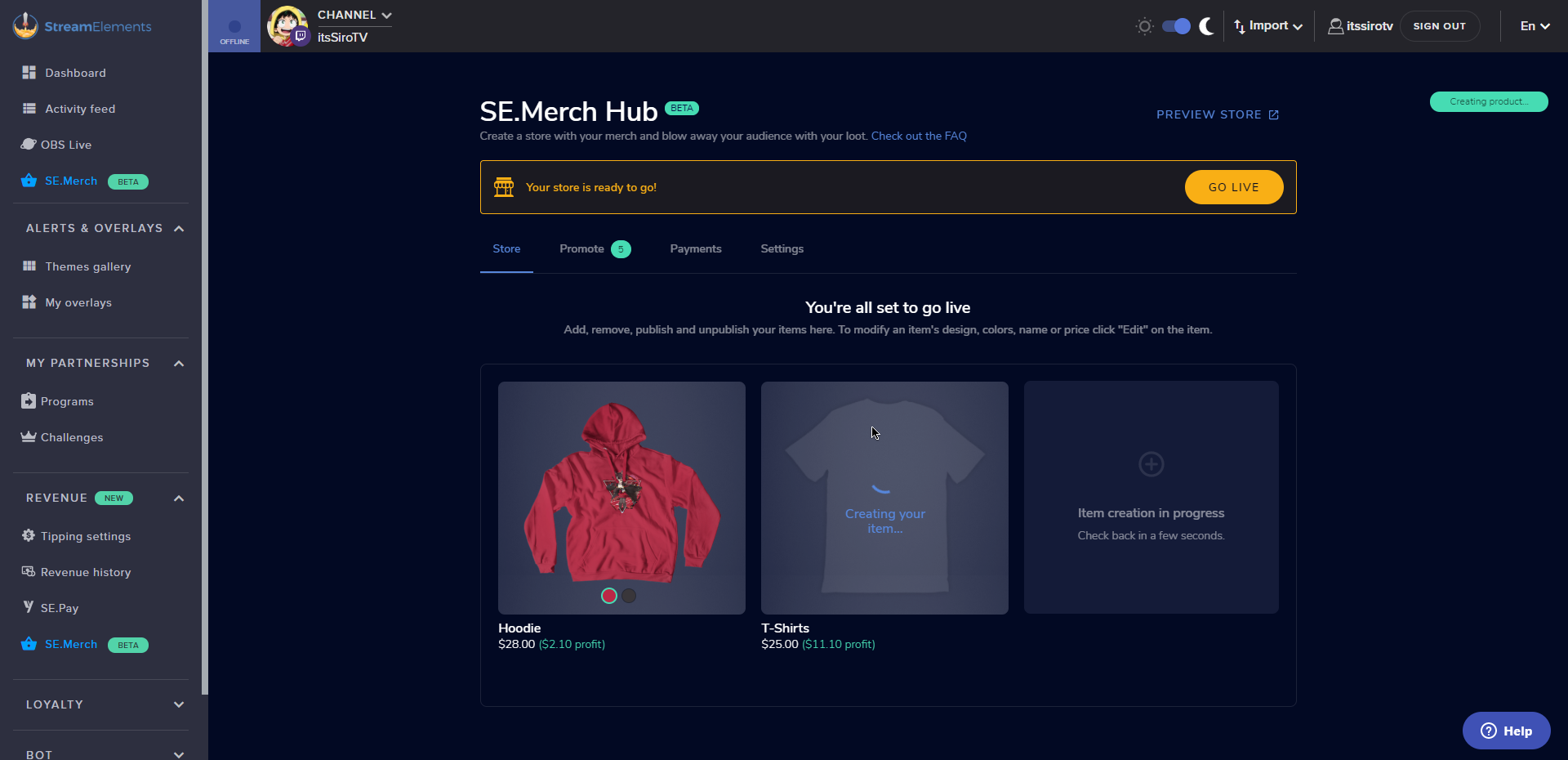 zenith widget
Give it a few minutes without touching anything else
round brambleBOT
@mossy tundra Currently renaming the bot fully works with OBS.Live.
You can follow this video guide to set it up: https://discordapp.com/channels/141203863863558144/494513233416421386/561516184718278676
If you don't want to use OBS.Live and want to stick with Ground Control, please let us know your Twitch username.
 minor karma
i have a current TEST giveaway live and the command !ticket 1 will not show the entries.
@viscid pebble ^^^
 crystal lintel
I was playing around with my Overlay and saw I can add the chat box from my twitch chat. However I only want that chat box in some Scenes and not in others. How can I make the chat box scene specific? @viscid pebble
lament blade
Hi, how can I add flying emoticons?
OBS Live, is it possible to play a sound when I get alerts?
Also, I got two follow and no alert played on the stream?
I ran Emulate, it appears to work
good support 👍
 sweet socket
i have a current TEST giveaway live and the command !ticket 1 will not show the entries.
@minor karma the command !ticket 1 buys another ticket
I was playing around with my Overlay and saw I can add the chat box from my twitch chat. However I only want that chat box in some Scenes and not in others. How can I make the chat box scene specific? @viscid pebble
@crystal lintel you would have to open the overlay per scene, if you're using our themes, they come with more scenes
Hi, how can I add flying emoticons?
@lament blade goodmorning Mikey, what do you mean with flying emotes?
lament blade
@sweet socket when emoticons fly apart and fall, this can be configured
when someone writes a smile in a chat and he appears on your stream, he jumps or bounces
kappagen
sweet socket
Ah Kappagen, you will have to add the Kappagen widget in your overlay
 dim marten
Is there a limit to the amount on a tip? A friend was seeing she couldn't do more than $50
sweet socket
There is not a limit afaik, what service are you talking about here @dim marten? SE.PAy, PayPal?
sweet socket
There is no limit in tipping with SE.Pay afaik, but I'm going to look in the settings for you
dim marten
she had numlock on and got it working maybe?
sweet socket
Ah that might be the problem then
dim marten
confirming
yea it seems it was.
easy thing to overlook haha
se.pay didn't end up working for her so went through paypal instead.
 cerulean oyster
hi i am trying to use obs to stream but everytime i hit the start stream button it is laggy on obs and friedns have told me the stream is very laggy, i am wondering if my pc specs or in game settings have anything to do with it. please help as i have not been able to stream properly
round brambleBOT
@cerulean oyster 1) Restart OBS
2) Start your stream/recording for about 30 seconds. Make sure you replicate any issues as best you can, which means having any games/apps open and captured, etc.
3) Stop your stream/recording.
4) Select Help > Log Files > Upload Current Log File. Copy the URL and paste the link here.
(Note: If you do not see an obsproject.com URL, you will need to update OBS Studio to version 22+)
sweet socket
please deliver me one of these and I can tell you what the issues are being caused by! ^
cerulean oyster
logs?
sweet socket
yes
cerulean oyster
sweet socket
you really do have to get a cleanlog as stated above, im seeing no output data for this one
cerulean oyster
i did not try to play anything
sweet socket
Only thing I see is that your framerate isn't standard
try putting your framerate to 30 or 60 fps over at Settings -> Video
cerulean oyster
framerate is currently at 59.9
sweet socket
Also be sure to check your upload speed and check the bitrate guide with that
cerulean oyster
how do i do that
sweet socket

Speedtest.net
Test your Internet connection bandwidth to locations around the world with this interactive broadband speed test from Ookla
Click on the GO button there and it will measure your internet speeds
cerulean oyster
then what to do once i have my speed
sweet socket
just tell me your upload and I can tell you what bitrate you need
cerulean oyster
upload is 12.04
sweet socket
alright you should be able to use around 4500 or 5000 as bitrate
cerulean oyster
any other settings i should change??
or would you like a logs report when i acutally try to stream a game
sweet socket
that would be the best way to see what is causing issues while streaming a game
 untold sigil
Hey. so I asked for some help way way earlier in the day, and never received a response. So I'll ask for the help again and see if it'll be smoother this time round.
I've been having issues with notifications within the AlertBox Widget, they test fine on the editor. But none of the alerts are going through when done through twitch chat.
And before that contemptable bot tells me to again, yes, the StreamElements bot is in my chat and is a moderator. I even booted him from my channel and re-placed him in it just to see if the ol "did you turn it off and on again" strategy might fix it.
No luck, as in 10 hours I received zero host alerts, or resub notifications or even a follow alert... which is frustrating. So i'm here, once again. Not being impatient, I checked to see if there was a reply with a potential fix before posting, just hoping to get a response this time.
ionic kelp
@untold sigil Are the notifications coming through the activity feed?
untold sigil
through OBS.Live yes they are. But not through the alertbox widget
So I do see them happening, just none of the custom alerts I've made come through, period.
it used to just be host commands that failed, now it's all of them when through twitch.
ionic kelp
Now as far as the testing they both work within OBS and the actual editor on the website?
 sage cipher
Hey team alerts and sounds are not working, can i have assistance please
untold sigil
@ionic kelp I've only ever tested with the actual SE editor within a proper browser (chrome for me), and that's where the testing 100% works. I'll try now with the OBS window and let you know.
Update: Testing is working within the OBS browser as well.. so I'm stumped.
ionic kelp
Got a second to do screenshare in DM?
 burnt sky
How do i update emotes on !bingo ?
untold sigil
@ionic kelp unfortunately not at the moment, just spent 10.5 hours in a stream and in desperate need of food, shower and bed. In no particular order.. I was seeing if anyone else had been having this issue or at least knew of a potential fix I could try to apply tomorrow. Since I haven't posted much, it'd be easy to find the response when I wake up.
ionic kelp
I'll pass it along to see if a staff might be able to take a looksie. Since the tests works it's possibly an issue elsewhere.
untold sigil
gotcha, ultimate worst case scenario I may just scrap the overlay and redo it, it is 3 years old at this point.
but I appreciate you putting the word out, have a good night @ionic kelp
sage cipher
Hey team alerts and sounds are not working, can i have assistance please
@sage cipher resolved with reloading but originally wasn't working that way either as I tried multiple times
zenith widget
@untold sigil seems to be working
burnt sky
hey KeiZar any news about !bingo ?
zenith widget
no
 twin sentinel
!emotes update
burnt sky
thx
 zenith dock
How do i enable betterttv emotes and frankerz emotes in my chats?
burnt sky
I have found a "bot" called Instructbot - on their website it says that it works with stream elements "Integrated with StreamElements. Can be configured to respond to bits, tips and points.**" is this true ?
 inland loom
Hey there, been having an issue with the stream elements loyalty system to redeem soundbytes for my viewers. My leaderboard shows a viewer as having 106 points however when he trys to redeem a soundbyte, stream elements tells him he has no points.
I followed up his command !redeem "item", (SEs says he has no points) with !points "viewer" and reports back that he indeed has points. After this I redeemed the item myself and it played on stream. Wondering if anyone has any idea why one of my viewers can't redeem loyalty items? His name on the loyalty leaderboard matches his twitch name, he has been accruing points but just can't use them.
Cheers for any help
untold sigil
@zenith widget Gotcha, I'll do a double check by tomorrow in the afternoon/evening to make sure it's still working. Appreciate it my dude.
twin sentinel
@burnt sky We have no connection to that bot afaik. Best to concact the creator.
@inland loom Make the user log in to StreamElements via the website.
inland loom
@twin sentinel thanks man ill give that a shot
mossy tundra
why i can give the bot a coustom name
 swift hawk
any ideas as to why the command for giving points to users does not work for me ???
sweet socket
@swift hawk is the bot modded in your channel?
round brambleBOT
@mossy tundra Currently renaming the bot fully works with OBS.Live.
You can follow this video guide to set it up: https://discordapp.com/channels/141203863863558144/494513233416421386/561516184718278676
If you don't want to use OBS.Live and want to stick with Ground Control, please let us know your Twitch username.
 dark lance
hello.. I changed my name 1 month ago on twitch and then my resolution was gone.. can you help me on how i fix that
swift hawk
@sweet socket yes
twin sentinel
@dark lance What resolution are you referring to?
swift hawk
@sweet socket its only the 2 commands at broadcaster level that dont work
dark lance
the resolution on my stream became only 720p
twin sentinel
Then change it back in your broadcasting software. This has nothing to do with StreamElements.
dark lance
oh but someone just told me that he talk to the stream elements and they solve the problem for him
sweet socket
@sweet socket its only the 2 commands at broadcaster level that dont work
@swift hawk you have your loyalty settings on?
dark lance
it's been 1 month with this problem
twin sentinel
@dark lance Again, change the settings in your broadcasting software.
dark lance
Okay i will try
swift hawk
@sweet socket yes there on people are earning the points it just wont let me set points or add points
sweet socket
are you using the command like this; !addpoints [username] [amount] ?
swift hawk
yes
sweet socket
Im in your stream right now if you want to test it
in the meantime ill ask around if anyone knows what the problem might be
swift hawk
thank you im just getting on it know
zenith widget
swift hawk
thank you all for the help it is much appreciated
sweet socket
No worries, enjoy!
 timber gust
 pulsar ivy
Hello, my streamelementsbot cant display any links, there is just this output:*** - can someone help?<3
twin sentinel
@pulsar ivy Disable the link protection on twitch side in your twitch channel moderating settings.
ionic kelp
mod the bot as well
pulsar ivy
how can I mod the bod? just in mod settings -> streamelements?
ionic kelp
no. /mod streamelements
pulsar ivy
@twin sentinel @ionic kelp Thank you so much, I git it ❤️
 manic quail
Hey, how does the ${args} variable work for commands? And if not that, then is there a way I can have a command to get/set a variable?
For example, if I had a weekly challenge, I could use !setchallenge "blah blah blah" and then a viewer could use !challenge and it would return "This week's challenge is blah blah blah"?
 half falcon
Hi! Is there a guide/howto available on how to rename the chatbot? I didn't find anything official, yet.
round brambleBOT
@half falcon Currently renaming the bot fully works with OBS.Live.
You can follow this video guide to set it up: https://discordapp.com/channels/141203863863558144/494513233416421386/561516184718278676
If you don't want to use OBS.Live and want to stick with Ground Control, please let us know your Twitch username.
half falcon
Thanks a lot, OBS.Live is my tool of choice 🙂
 strong grotto
Hi, whenever I enter OBS.live, it says that it failed to load my channel information. then when I press the start streaming button, it doesnt work. Any Idea how to fix it? P.S. It also says: "Internal server error"
 thin peak
how do i add a title to my stream? im new to twitch
zenith widget
@thin peak You can vi 3 ways:
Twitch Dashboard
Our dashboard
OBS.Live activity feed
round brambleBOT
@strong grotto Streamelements on top of OBS -> Logout -> login
zenith widget
@strong grotto also make sure you have connected your account in OBS -> Settings -> Stream
half falcon
I think I am missing something. I don't get the options shown in the video (hotkeys and custom bot name are missing, "show viewers count" is the last option in ground control -> stream settings.
strong grotto
ok thanks @zenith widget
zenith widget
@half falcon As mentioned in the command above, only OBS.Live currently has a fully functional rename for teh bot
half falcon
KeiZar: Thanks a lot, that got me on the right way - I tried to find the option in the Ground Control App, just got everything fixed in the integrated app in OBS.Live. Much appreciated!
 cyan grotto
hey hey im new here and im working on my overlay via dashboard atm and i have a question about the alerts
round brambleBOT
@cyan grotto Welcome to the helpdesk! Please let us know how we can assist you today and a support volunteer or staff member will assist you as soon as they are available. Thank you for your patience.
cyan grotto
so basicly i want my alert window to have the "'Name' has followed/cheered etc" Text Inside it. (i bought a custom overlay pack) but when i choose the option "text over image" only the animation of the alert box appears but not the follower text
twin sentinel
Have you checked the margins in the advanced text settings?
cyan grotto
...... im really dumb... thanks a lot XD!!
 buoyant junco
how can i set follow alerts from streamlabs obs here?
 sturdy lion
hi, I have put a custom animation into the overlay and when I test the alert on the website it runs fully and smoothly but when I see the alert on my obs it only shows a portion of the alert. is there a way around it?
lament blade
hey! i have a question about streamlabs obs and streamelements... how do you setup the streamelements media request bot IN streamlabs obs?
cyan grotto
@twin sentinel sorry to bother again but is there also a way to automatically change the font size if for example someone follows that has a super long name? so that it doesnt go over the alert box
 compact ridge
I was just wondering the same thing ^ Trying to figure out how to do it
zenith widget
@lament blade Can you elaborate?
@compact ridge @cyan grotto Is this about his custom widget?
cyan grotto
yea mine is a custom one
round brambleBOT
@buoyant junco New to Stream Elements?
Check out our YouTube channel https://www.youtube.com/c/streamelements/videos
with tutorial videos from setting up the basics, to in depth details on how to use our product.
New to OBS? Here is a 4 step quickstart guide
https://obsproject.com/wiki/OBS-Studio-Quickstart
Want to learn even more? Here is an in-depth overview
https://obsproject.com/wiki/OBS-Studio-Overview
compact ridge
I'm just using the AlertBox Widget
zenith widget
If its just the alert widget, there is a dynamic font option in the text settings
cyan grotto
mine looks like this (hope i can post a pic in here) and i dont want the text to go over the border if its a longer name
compact ridge
Im not seeing it specifically, which option is it?
lament blade
@lament blade Can you elaborate?
@zenith widget so, i stream with streamlabs obs, and i was wondering, how do i use the song request feature in streamelements.
i had it working but i had to reinstall slobs, and now i dont know how to set it back up again...
zenith widget
@compact ridge @cyan grotto I just checked. There isn't a dynamic font option for the alert widget. The only to adjust this is via custom coding (html + css + js a little bit)
@lament blade You can't really control MR via the SLOBS, but you can still add the overlay with the media request widget to SLOBS.
cyan grotto
ah ok thanks
lament blade
@lament blade You can't really control MR via the SLOBS, but you can still add the overlay with the media request widget to SLOBS.
@zenith widget yes! where can i get that widget?
round brambleBOT
@lament blade To add your overlays to OBS, add a new browser source in your scene. Paste your overlay URL in the browser source properties, set the dimensions to 1920x1080 (unless you changed them on the website), and ☑ “Shutdown source when not visible” https://youtu.be/KDvLynUqXI4
compact ridge
Okay, is there a way to set where the line breaks? So it can break and go to a second line without needing custom coding? It already does this some what by default but some of the text still gets cut off
lament blade
@zenith widget i make my own custom overlays. how do i get the MR widget?
lament blade
ok.
zenith widget
lament blade
i dont use streamelements for my overlay, as i have said.
zenith widget
You are not making any sense then with your previous explanation, when you said that you were using our media Request feature and have been using it with SLOBS. This implies you had an overlay with the media request widget added to SLOBS.
@compact ridge
compact ridge
oooh okay, thanks man!
lament blade
can i send clips into this channel?
ok, so. how do i use your media request feature with SLOBS as i stream with slobs, make my own overlays and have no connections with streamelements apart from the bot.
i was able to do it just fine yesterday.
ionic kelp
You'd have to use our ground control app. Otherwise you can't.
lament blade
what is the ground control app xDD
You'd have to use our ground control app. Otherwise you can't.
@ionic kelp also, i was able to do it fine yesterday.
ionic kelp
Unfortunately as you're using slobs there's not much we'd be able to help with anyways as any issues with our stuff and their program is beyond our support.
lament blade
cant i import it to SLOBS with a browser source. im 99.9% sure thats what happened yesterday..
 vale girder
Can I add a variable into an overlay? For Example: "Participants: ${getcount Participants}" ? Maybe even as a progress bar?
twin sentinel
There is a widget for count variables afaik.
To have them as a progress bar you would need to code that yourself.
Labels > other > bot counter
vale girder
Ok thx. Is there a progress bar for sth else?`Cheers, Subs etc.?
twin sentinel
Yes, this would be the goal widgets. The progress can be controlled in your session data > goals
vale girder
Thx man 🙂 Rly helpful ✌️
 pearl flint
Is there ever a chance of an iOS app or no
round brambleBOT
Check out the StreamElements ideas board: https://strms.net/ideas. You'll be able to add ideas, upvote ideas you agree with, and track their progress with email notifications. Adding and upvoting ideas also helps the staff know which ideas should be prioritized so please take some time to upvote.
 boreal canyon
Hi there, OBS Studio is not picking up my headset microphone
Any way I can fix this? I've tried everything I can think of, and it definitely works
lament blade
@lament blade Welcome to the helpdesk! Please let us know how we can assist you today and a support volunteer or staff member will assist you as soon as they are available. Thank you for your patience.
@round bramble my problem was: Hello, I have Twitch account: bur1zon.
I have a question. Donate via PayPal is working. But donate via Credit Card and Paysafecard is not working. What should I do? I am from Slovakia, so SE Pay is available in Slovakia. Where is a problem? Can you help me?
Thank you very much.
@little oak and @zenith widget were helping me, but they said I have to wait. I am asking how long? Because I need it immiedately.
ionic kelp
@lament blade I'll pass it along again and see if I can get you a clearer answer. Unfortunately as that's something beyond what I can "investigate" myself might wait a bit for a staff response.
 daring siren
So my client and my LoL game keeps lagging at times when I'm streaming.. Is there something I need to turn off or something? It looks like its just fps drops but I've even capped it at 60 fps..
 tepid wadi
Hello :) I have a question about the command !watchtime. It said 0 seconds for my viewers, anyone know why?
round brambleBOT
@tepid wadi 10 minutes of watchtime are given to those in chat when the loyalty points are handed out (every 10 minutes). Therefore, loyalty must be enabled for watchtime to work properly.
There is no direct link between watchtime and all-time points.
It can’t be calculated from the amount of all-time points a user has because subs may earn points at a faster rate and !bonus all command increases all-time points for users in chat at that time.
Giving points to a single user does NOT affect all-time, only when giving to all in chat.
tepid wadi
Loyalty points as in the store? Ah what a shame :(
 thorn quarry
Hi Guys, i want to fill a custom command with !hype with my sub emotes (i typed the code chrizahype into the text field)....but it doesnt work, either for me or my subs....what I m doin wrong or how does it work?
twin sentinel
To use your channel emotes the StreamElements bot needs to be a sub in your channel.
round brambleBOT
@daring siren Please provide a log from your last stream. To do this, in OBS go to Help > Log Files > Upload Last Log File and paste the link to the log file here.
 restive trail
Stupid Question Alert!!! Are "Cheers" = "Bits"?
twin sentinel
yes.
twin sentinel
sturdy lion
Hi, the video in my alerts don't fully run on the obs, is there a way to get it to run or?
lament blade
Can people refund donations? I’m only asking bc I don’t want people to chargeback and I have to pay a fee to PayPal
On stream elements ^
 regal steeple
hello i have a question. my twitch chat box is not showing up on obs studio. what can this be ?
 molten bear
Hey, can some one help me? Cant find a simple way to count my subs.
 wicked geode
@molten bear Are these variables helpful?
Does anyone know: if I have a timer with multiple messages, will it send all the messages at the same time or will it cycle through the messages sending one at a time?
 safe ledge
Is there streamelements discord? Like a bot that I can add to my discord that u can use commands in. Like !watchtime, ect...
sweet socket
@safe ledge there is not a StreamElements discord bot
 fallen kiln
@sweet socket can i ask u something
wicked geode
@regal steeple do you have the dock active?
sweet socket
@fallen kiln there are a lot Support Hero's checking out this channel, you can just post any question you have in here 
fallen kiln
Just need some help. My BTTV emotes are duplicating my twitch chat. So it will show like KEKW 
sweet socket
i would have to ask around about that since i dont use bttv, ill be sure to ask around for you
fallen kiln
ty
it shows the chat but then puts another chat overlaying it
so like non bttv chat and then bttv chat
on top of each other
wicked geode
@sweet socket do you happen to know if I have a timer with multiple messages, will it send all the messages at the same time or will it cycle through the messages sending one at a time?
 honest lark
Can you tell me where I can find this integrated app in OBS.LIVe @half falcon or SE team? I also tried to change the bot name....
round brambleBOT
@honest lark Currently renaming the bot fully works with OBS.Live.
You can follow this video guide to set it up: https://discordapp.com/channels/141203863863558144/494513233416421386/561516184718278676
If you don't want to use OBS.Live and want to stick with Ground Control, please let us know your Twitch username.
sweet socket
for custom bot ^
@wicked geode ill have to ask around for that since ive never used multiple messages in a timer myself!
half falcon
@honest lark you should have a docked window in OBS.Live on the left, called "Activity feed". In the upper left corner you will find a burger menu (three stacked horizontal lines). Click on it and select "Stream settings". I got this wrong a few hours ago 😉
wicked geode
thank you! I should have just tested it 🙂 silly me sorry to bother you, it cycles through the messages one at a time
sweet socket
oh alright, thanks for letting me know as well! 
round brambleBOT
@lament blade 1) Restart OBS
2) Start your stream/recording for about 30 seconds. Make sure you replicate any issues as best you can, which means having any games/apps open and captured, etc.
3) Stop your stream/recording.
4) Select Help > Log Files > Upload Current Log File. Copy the URL and paste the link here.
(Note: If you do not see an obsproject.com URL, you will need to update OBS Studio to version 22+)
sweet socket
^get me one of those and I can point out the issues you're having
 quartz girder
does someone need help
 little epoch
how can i take twitch out and just have facebook stream
lament blade
@round bramble here me URL https://obsproject.com/logs/kDkcKjqSFtmLHaYh
Can people refund donations? I’m only asking bc I don’t want people to chargeback and I have to pay a fee to PayPal
On stream elements ^
@round bramble
honest lark
Huuuge! Thanks a lot @half falcon and SE team 🤍
round brambleBOT
@willow saffron Please contact us via email for support with SE.Pay. You can use our contact form here: https://streamelements.com/contact Thank you
twin sentinel
For security reason I deleted your post. @willow saffron
 willow saffron
Alright qq
 distant crane
Hello, i've a question about loyal points, specially for the shop of these ones.
If someone redeeems an item, speaking about a sound item, when i redeem this one the sound should play or the user has to use a command to "active" the item owned?
Because i'm trying by myself to redeem an audio item and when i redeem it nothing happens, so i don't know if it's a problem with the redeem or if (i repeat) the user after redeem the item has to "active" it with a command. I hope you can help me with this, ty very much ❤️
Or maybe because i'm the streamer and when i redeem my own item in my own shop nothing happens, maybe i should ask for a viewers of mine to try?
swift hawk
is it possible to create a command to play a song you have stored on the pc ?
 iron mountain
How long is the transfer time on SePay?
round brambleBOT
@iron mountain SE.PAY is available for streamers who are atleast 18 years old and with bank account under their name in one of the following countries:
Austria, Belgium, Czech Republic, Denmark, Finland, France, Germany, Ireland , Italy, Netherlands, Poland, Portugal, Slovakia, Spain, Sweden, Switzerland, United Kingdom, United States.
If you meet these criteria and don’t see SE.Pay, let us know.
For information on SE.Pay payment methods, their fees, and settlement times see https://streamelements.com/dashboard/tipping/fees.
iron mountain
oh ok i see 1-3 days. thanks
 glad rain
how to disconnect with an account on the website ?
 inland knoll
HELP! I'm currently streaming and someone is redeeming items from my stream store without anything appearing in the chat or the activity finder - have they hacked something?
lament blade
hey, when I use "capture game" and select LoL, nothing appears on screen
its like it can't capture LoL
round brambleBOT
@lament blade For the best OBS support, please join their Official Discord @ discord.gg/obsproject
 plucky galleon
Hi, I am trying to customize my overlay with your built-in overlay editor, but I am encountering a problem
When importing an image/video that I want to use as a webcam overlay, I can't seem to make it bigger
sturdy lion
after importing the overlay with an alert box into obs the video of the animation doesn't play fully
plucky galleon
when I try to make it bigger than the "original size", the theorical box expands but not the .png image
inland knoll
HELP! I'm currently streaming and someone is redeeming items from my stream store without anything appearing in the chat or the activity finder - have they hacked something?
half falcon
Hey there! I'm not sure about this one, but this might be a bug in the new overlay editor (GREAT work btw., thank you very much!): When hopping back and forth between text layers the font information seems not to be updated. Workaround for me so far: click on something else (for example backgroun) and after that select the next text layer you want to edit. Please correct if this is the wrong channel or I missed something else 🙂
inland knoll
can any one help?
 mighty rose
i need help
 viscid pebbleBOT
Hi @mighty rose, Please ask your question(s) or describe the problem you're looking to solve so staff or a support volunteer can assist you as soon as they are available.
mighty rose
i need my name merged
 acoustic trout
Hello...
I have one question...I cant see my page "chat status"
 lilac falcon
Hi, so supposedly I'm eligible to use a custom chat bot name, I have created another account and connected it to StreamElements, I've done everything that's required to use it, yet it doesn't work at all. The normal bot with the normal name works fine though.
inland knoll
I've stopped streaming now, if anyone could help me with the issue I would appreciate it - HELP! someone is redeeming items from my stream store without anything appearing in the chat or the activity finder - have they hacked something?
 timber quail
I am trying to get into livestreaming but when I did a testrun I could only play in 360p. Does anyone know where in the settings this can be fixed
 brazen burrow
hi all - probably an easy question - but with the new Overlay editor - where did the Library go? The place where the audio and image/video files were stored?
(and to follow up - I know I can access it through a "change image" in widget - but is there a way to just open the library separately anywhere?)
 crisp stream
stream labs isnt showing the update when people sub to the channel in chat.
lament blade
Hello. I've been wondering... Is it possible to make an event trigger OBS media source instead of browser source? They are way too resource heavy unfortunately for my build. Local files play just fine so I was looking around for a ways to do this
cyan grotto
need assistance again :l when I put labels in the overlay editor, will the latest follower/sub/donator etc. automatically change? or do i have to edit it manualy every time? if its automated, can i somehow test how it looks like?
round brambleBOT
@crisp stream We're not able to troubleshoot issues with using our overlays in StreamLabs OBS (SLOBS) as we don't have the tools to support their software. We recommend using OBS Studio or OBS Studio with our plugin OBS.Live.
sweet socket
@lilac falcon please have both streamelements bot and the custom bot in your channel and modded
round brambleBOT
@timber quail There are no "best settings".
Please understand that every setup will be very different.
Any guides or videos that claim otherwise are misinforming. Your best option is to start with a base and adjust as necessary.
You can run the OBS auto-configuration tool. To use the auto-config, click on the Tools menu in OBS, select Auto-Configuration Wizard, and then just follow the on-screen directions.
You can use this tool to get baseline settings for your hardware and adjust as necessary from there.
Test, test, and test again. We are happy to offer suggestions for any issues you may be having afterwards, but not a list of settings.
Thank you
@brazen burrow We've released our new Overlay Editor revamp. You can check out the changes and how to work with it here: https://youtu.be/X5VzXjqAsjk
Check out our blog post as well: https://blog.streamelements.com/streamelements-overlay-editor-just-got-even-better-c22cb5b4853e
We are thrilled to announce the launch of the remastered StreamElements Overlay editor!
https://p.strms.net/newoverlayyt
Why StreamElements Overlays are better?
😎 Simple: Load your entier setup using only 1 link
⚡ Fast: Cloud-powered Overlays arrive in real-time, say goodb...
@acoustic trout If your chat stats aren't working it's most likely because you changed your username! If you can give us your old and new username, we will get a chat stat fix for you.
 sharp dock
Is there away for StreamElements to do a time.until and have that time be about a week later? For example: ${time.until April 22 2020 00:00:00 AM UTC}
sweet socket
check this out @sharp dock https://discordapp.com/channels/141203863863558144/199460642975907840/328081534479499266
brazen burrow
Hi all, I did read the new blog about the overlay editor and just watched the Youtube video. It doesn't answer my question about where to find the Library, unfortunately. Re-upping question. Thanks in advance.
acoustic trout
@round bramble wolffsr - old name // wolfsupp - new name
sharp dock
So the timezone issue is fixed. However, it's only counting down for the next 24 hours. I need it a few days from now. Any way to add that into the command?
lament blade
Can people refund donations? I’m only asking bc I don’t want people to chargeback and I have to pay a fee to PayPal
On stream elements ^
inland knoll
I've stopped streaming now, if anyone could help me with the issue I would appreciate it - HELP! someone is redeeming items from my stream store without anything appearing in the chat or the activity finder - have they hacked something?
 worn cradle
Hi, i'm doing a Raid shadow legends sponsored stream and it say i'm suposted to hjave a 50.00 credit but it doesnt seem that i have it ingame and none of my contacts are answering 😦
sweet socket
@round bramble wolffsr - old name // wolfsupp - new name
@acoustic trout ive told staff about the change
@worn cradle who is your contact?
lament blade
The activity feed in my Streamelements App is connected to the wrong Twitch account. Does anybody know how to fix that?
worn cradle
@sweet socket Icel
sweet socket
@worn cradle have you DMed him yet?
round brambleBOT
@lament blade Streamelements on top of OBS -> Logout -> login
cyan grotto
need assistance when I put labels in the overlay editor, will the latest follower/sub/donator etc. automatically change? or do i have to edit it manualy every time? if its automated, can i somehow test it?
worn cradle
@sweet socket No hes offline marked
lament blade
thank you very much
acoustic trout
@sweet socket Ty ❤️
 grave steppe
Hi guys, I think my all time cheer leaderboard is not reflecting the correct values
Do you know how do I fix this? I googled it and found this server
sweet socket
@sweet socket No hes offline marked
@worn cradle you can still send him a message
Do you know how do I fix this? I googled it and found this server
@grave steppe I'll be sure to ask around for you!
worn cradle
@sweet socket well my sponsored stream is going on RN so i need someone whose... online lol but i'll message him
lament blade
Can people refund donations? I’m only asking bc I don’t want people to chargeback and I have to pay a fee to PayPal
On stream elements ^
twin sentinel
@lament blade Yes, people can chargeback donations via PayPal, as we can only offer a limited protection there.
For more information, take a look here: https://streamelements.com/dashboard/tipping/fees
lament blade
Bruh
 nimble owl
Hello 🙂 I have a question 
Is there a way to maximize the window of the store redemptions?
i mean outside of OBS
or is the only way to get it maximized to maximize the scene in obs?
is my question stupid? 
actually it is. nvm me il just maximize the stupid scene xD
 weary mason
Question- not sure if it was posted before- but going to work on my templates in little bit- how do I change the name of the social media- it does not allow me to do so? I should be able to click it and then it should be highlighted on the left but it is not, when I CHANGE on the left it does not do anything to the template itself- this is not the fancy animated one just the static one
 royal forge
hello, I noticed that the report i receive by email at the end of the stream is wayy off for the number of unique chatters, I had 4 chetters and it says 7 for my last stream, and the previous one it said 11 and I only had like 2 or 3 actually, how is that possible ?
mighty rose
i need help
viscid pebbleBOT
Hi @mighty rose, Please ask your question(s) or describe the problem you're looking to solve so staff or a support volunteer can assist you as soon as they are available.
vale girder
Why does my hypecup contain my twitch pfp, but noone cheered?
nimble owl
is there a way to set the allert duration from the redeemptions longer then 20 seconds?
or is it 100% the max?
by redemption i mean the store (allert)
where is LateMote when you need him PepeHands
@misty wagon brother 
@mighty rose have you tried logging out and logging back in again?
 smoky tide
looks like 20s is as long as it can go @nimble owl
nimble owl
PepeHands
round brambleBOT
@mighty rose If you changed your name on Twitch please follow these steps:
🔹 Visit https://streamelements.com/logout and then log in again with by connecting with Twitch.
🔹 On the right side of the dashboard page that opens, select "Join" under bot settings. If it says "Part" select that and then select "Join" to send the bot to the chat. Don't forget to mod the bot by typing /mod streamelements in your channel if you have not already.
🔹 Post your new name here so that we can update your channel's chatstats tracking (must be done by staff).
 mighty hazel
Hi everyone, my friend made an overlay for me and set it up in stream elements but we're having trouble getting it sent to me. I'd greatly appreciate any help I could get!
 scarlet tiger
Sure
mighty rose
My new name is Rileyyylol
scarlet tiger
@mighty hazel Overlays can only be copied to accounts you have manager access to.
mighty rose
@round bramble
scarlet tiger
And old?
mighty rose
ice_riley
mighty hazel
@scarlet tiger wdym
scarlet tiger
⤴️ forwarded to staffs
@mighty hazel get invite link by your friend with editor access for it
round brambleBOT
@mighty hazel Follow these steps to grant managers/moderators access to your dashboard:
- Click on your Channel Name at the top of the dashboard and select Settings
- Create a new invite at one of three access levels (Bot Supervisor, Editor, Full Control)
- Send this invite to a mod/manager to give them access to your dashboard. The link is one-time-use and expires after 72 hours if not accepted
Video tutorial: https://youtu.be/zl_h-ttZDF0
mighty hazel
@scarlet tiger Gave him the link, how does he copy overlays onto my account?
mighty rose
@scarlet tiger is my channel name moved
mighty hazel
Awesome! Thank you so much @scarlet tiger 👍
mighty rose
ok
weary mason
no one can answer my question about templates?
weary mason
my template shows a place where i can place text for my social media channels but I cant seem to change it?
scarlet tiger
What do you mean, please?
weary mason
I just logged in will watch this short video- then i have to get back to work- will try later- right now it says streaming elements on the social media text-
 wary halo
you need to click on the text widgets in the layers tab on the left side
weary mason
I did that, changed it but it does not change in the template?
 round jungle
Good afternoon! There are people who changed their nickname in the stream here and lost their points consequently. However, many of them will use the command, "!Rename" the command says that their user ID does not match. And I checked and they were using the right name, the old name, it wasn't someone else's name. However, for many it gives this error. Can anyone tell me what to do to solve this?
 frozen cipher
hey i´m new at streaming on twitch and don´t really know how to set up everything.
round brambleBOT
@frozen cipher New to Stream Elements?
Check out our YouTube channel https://www.youtube.com/c/streamelements/videos
with tutorial videos from setting up the basics, to in depth details on how to use our product.
New to OBS? Here is a 4 step quickstart guide
https://obsproject.com/wiki/OBS-Studio-Quickstart
Want to learn even more? Here is an in-depth overview
https://obsproject.com/wiki/OBS-Studio-Overview
scarlet tiger
Please be patient
round brambleBOT
@frozen cipher We're not able to troubleshoot issues with using our overlays in StreamLabs OBS (SLOBS) as we don't have the tools to support their software. We recommend using OBS Studio or OBS Studio with our plugin OBS.Live.
 primal fox
hi, hope my question fits here. going to my chat stats page i get a "404 - page not found". what do i need to do, to fix this?
 pale pecan
Hello useful people! I'm useless, I don't know what I'm doing but I'm trying to learn.. Cannot find the answer to this Q anywhere.. the items for the stream shop.. I notice some users have "highlight my message" for example. How do I offer these? Is there a catalogue of them I'm missing?
round brambleBOT
@primal fox If your chat stats aren't working it's most likely because you changed your username! If you can give us your old and new username, we will get a chat stat fix for you.
primal fox
old: chillidrilli
new: mafraqs
scarlet tiger
@pale pecan its not StreamElements feature, but twitch, you must be twitch affiliate or partner
 wise halo
Hi.
pale pecan
Thank you SO much! That makes better sense now.
scarlet tiger
wise halo
Just sort of lurking right now... I've done a lot of moving around streaming platforms, originally on OBS (pre-Studio), then OBS Studio, then (failed import) into SLOBS (where I rebuilt everything), but I feel like the performance is pretty meh, honestly. Reddit recommended StreamElements, which uses OBS Studio (again) but with the OBS.Live plugin, right?
But then I need to (re?)import all of my new (adjusted) scenes and such from SLOBS back into OBS Studio... and all of that stuff.
Or... does all of this go in the OBSLive channel..? Yike, probably.
round brambleBOT
@frozen cipher There are no "best settings".
Please understand that every setup will be very different.
Any guides or videos that claim otherwise are misinforming. Your best option is to start with a base and adjust as necessary.
You can run the OBS auto-configuration tool. To use the auto-config, click on the Tools menu in OBS, select Auto-Configuration Wizard, and then just follow the on-screen directions.
You can use this tool to get baseline settings for your hardware and adjust as necessary from there.
Test, test, and test again. We are happy to offer suggestions for any issues you may be having afterwards, but not a list of settings.
Thank you
 novel haven
So my commands are not working after i changed my twitch name anyone else run into this problem
round brambleBOT
@novel haven If you changed your name on Twitch please follow these steps:
🔹 Visit https://streamelements.com/logout and then log in again with by connecting with Twitch.
🔹 On the right side of the dashboard page that opens, select "Join" under bot settings. If it says "Part" select that and then select "Join" to send the bot to the chat. Don't forget to mod the bot by typing /mod streamelements in your channel if you have not already.
🔹 Post your new name here so that we can update your channel's chatstats tracking (must be done by staff).
weary mason
I will check in later- I think I figured it out- strange way of changing text- why do it this way? You should be able to click the text, change it and save it instead of going into settings on each one you select-
 safe flax
Hey I've got an issue where adding a visible video to one of my overlay layers results in stuttering/lag on the video. Hiding the video removes the issue but naturally the goal is to be able to hear and see the video. Is there a workaround for this?
 teal anchor
Hello is there a way i can deactivate my stream labs account so i can use it on another account?
strong kernel
You'd have to ask Streamlabs.
round brambleBOT
@safe flax OBS -> settings -> advanced -> scroll down -> enable/disable hardware accel.
https://i.imgur.com/ggMe9ZE.png
teal anchor
i meant stream elements
round brambleBOT
@teal anchor Account Merging - Please note:
- Merging accounts only allows faster ways to switch between accounts
- Merging accounts does not allow data sharing between accounts - different streaming platforms, different type of events
- Merging accounts allows duplicating/sharing overlays between the accounts
If you understand the limitations of merging and want to proceed, please find the JWT tokens (!jwt) from both accounts you want to merge and you will be directed to DM them to a staff member.
quartz girder
i need help
viscid pebbleBOT
Hi @quartz girder, Please ask your question(s) or describe the problem you're looking to solve so staff or a support volunteer can assist you as soon as they are available.
 untold crest
Fun bot stuff can be found here: https://streamelements.com/dashboard/bot-modules
StreamElements
The Ultimate All in One Platform for Streamers
 placid turtle
Good Evening Peeps,
i have linked my twitch acc to OBS live on the stream tab in setting
but when i click start stream
it brings up a connect to youtube page
round brambleBOT
@placid turtle Streamelements on top of OBS -> Logout -> login
 cold cove
hello any mod with whom I can communicate to speak Spanish
placid turtle
Any ideas on how to change this?
round brambleBOT
@placid turtle Streamelements on top of OBS -> Logout -> login
placid turtle
ok Thanks ill try that
 digital elm
Uh so im getting a weird error with the site, when I click "dashboard" at the splash page it immediately just kicks me right back to the splash page, and I can't go to the streamer I moderate with, it just keeps kicking me to the splash page
wary halo
#🇪🇸︱español < @cold cove
 hybrid lichen
Watchtime 0 seconds even tho loyalty is enabled? Any suggestions. Thanks
placid turtle
How do i add Sound to my stream, if i add Mic and audio output, then it jsut repeats all the time
lament blade
@hybrid lichen The watchtime starts counting from 10 minutes
 weak delta
For an in theory perfect sync of audio/video, I'd want to use "set video" right? And it's webm that is the best format?
strong kernel
Yes, you can use a video's audio when you set the video. Webm is preferred.
 minor talon
Hi! I am getting a 404 - Page Not Found on the Chat Stats, I have to changed my user name on Twitch
round brambleBOT
@minor talon If your chat stats aren't working it's most likely because you changed your username! If you can give us your old and new username, we will get a chat stat fix for you.
 thin coyote
Whenever I tab out of obs when streaming, my stream freezes and wont unfreeze. why?
Its like if I tab out of obs to go get a timer, it freezes
minor talon
I have not changed my user name on Twitch
 eager slate
Hey guys, quick question. With the new Overlay Editor, is there a way to show emotes in the Chat Overlay? I've just out the Chat Overlay on my stream but emotes are showing as the text command rather than the emote icon.
grave steppe
How do I fix the Cheer in the Twitch panel not reflecting the correct values in all time? In weekly and monthly they are showing the right values but in all time it is not
digital elm
In addition to me not being able to access the dashboard, I can't view the activity feed at all or I get a 403 error
I've already cleared browser cache as well
 molten crown
Good evening, can someone tell me how to create automated bot messages?
round brambleBOT
@thin coyote For the best OBS support, please join their Official Discord @ discord.gg/obsproject
strong kernel
@eager slate It should already. Type !emotes update in your Twitch chat, assuming the !emotes command is enabled in your account.
@grave steppe If they changed the capitalization of their username then it effectively creates a second entry for them in all time.
eager slate
Ok i'll try, thanks
strong kernel
@digital elm What happens when you try to view the dashboard?
eager slate
@strong kernel That worked, thankyouy
digital elm
When I'm at the splash page and I hit "dashboard" it shows the url changes to streamelements.com/dashboard/welcome-back and then it goes back to the splash page. I can only make it to the dashboard if I view profile first, then click dashboard, but I can't use any of the features of streamelements without getting hit with a "403" error @strong kernel
strong kernel
@digital elm Log out in the top right and log back in.
digital elm
I did, as well as I cleared browsing cache and cookies, still occurring
strong kernel
Try incognito.
digital elm
still is happening on incognito
molten crown
Good evening, can someone tell me how to create automated bot messages?
strong kernel
@digital elm Are you allowing any extensions in incognito?
@molten crown They're called timers.
 gilded pine
Good afternoon. I am trying to start my stream and I am constantly getting a "cannot connect to server" error. There's been nothing changed since my last stream, I've restared OBS.live, reconnected my Twitch account so the key is fresh, but still cannot connect to be able to stream.
Can anyone help with this?
digital elm
I disallowed all extensions and the issue still occurs
grave steppe
thank you for your response @strong kernel the person has never cheer for any bits before and the bits she donated is on the the Month and Week just not all the all time
strong kernel
@digital elm Sounds like something else is blocking it, then, likely a firewall or antivirus or something similar on your computer. Go whitelist-crazy.
digital elm
Alright, I'll do some exploring to find out
strong kernel
@grave steppe Please keep all communication in the public channels. Thank you.
 white gazelle
Does StreamElements take money from your donations like Tipeeestream?
strong kernel
@white gazelle The payment processor takes their usual fee. We do not take a cut.
grave steppe
ok
two people prettyinpunk and davidkimsbookie donated bits yesterday
only davidkimsbookie is shown in the all time leaderboard
while prettyinpunk is not shown on the all time
lament blade
the tiltify alerts are only happening on refresh of obs - way after the fact fyi (been happening about a week)
grave steppe
so the user has not changed their name or anything
it just doesn't show there @strong kernel
strong kernel
@grave steppe Interestingly enough, Twich isn't showing it, either:
grave steppe
this is so strange that it got recorded for month and week
strong kernel
Looks like a Twitch issue.
grave steppe
so your advise would be me contacting twitch to see why it is not showing right?
strong kernel
Yes, but reference the above leaderboard, not ours.
grave steppe
ok. thank you for the help
 tacit trout
Hello, is streamelements down?? My overlays are not working and I'm live so it's really annoying
strong kernel
@tacit trout Everything is up and running.
tacit trout
Ok.. Well my obs doesn't show any overlays even with correct link
Was working earlier today tho, and I didn't change anything
strong kernel
Loading fine here.
strong kernel
In the future perhaps just clear your browser source cache.
 toxic comet
Hey, are there any Staff around to help? I'm trying to find Text Scrolling in the Overlay Editor and I can't

 feral iris
Okay, so my issue is that I set up "sound redemptions" as an item in the stream store. I customized the command so it's $(redeem sound) and have the sound alert playing. I inserted the browser source into my streamlabs obs. The test works fine, but as soon as I exit streamelements widget preview and test the command in twitch chat it doesn't play anymore. That's an issue, but what I really want to know is how do I get rid of the "so and so redeemed for 0 (insert currency)? I don't like it. I want the viewers to have custom sound commands when they come in without there being a "redeem auto generated text*
strong kernel
@feral iris There is no option to remove the confirmation message.
round brambleBOT
@feral iris We're not able to troubleshoot issues with using our overlays in StreamLabs OBS (SLOBS) as we don't have the tools to support their software. We recommend using OBS Studio or OBS Studio with our plugin OBS.Live.
feral iris
is there a way to add sound commands for viewers without using the stream elements item store
strong kernel
Not by default. Check in #widget-share for community created widgets.
feral iris
I have everything set up with SLOBs so I won't be moving over. Browser sources from multiple places integrate just fine with SLOBs except the streamelements command. As I said, it works fine with the widget open in SLOBS, but once I close the preview in streamelements it's dead silent.
Okay, I'll check with widget-share
future request, please allow us a choice to remove auto generated messages from streamelements bot. I don't know why this isn't a thing yet. Thanks again for your help though.
round brambleBOT
@feral iris Check out the StreamElements ideas board: https://strms.net/ideas. You'll be able to add ideas, upvote ideas you agree with, and track their progress with email notifications. Adding and upvoting ideas also helps the staff know which ideas should be prioritized so please take some time to upvote.
feral iris
lol
toxic comet
Hello?
strong kernel
@toxic comet Text settings, per widget
toxic comet
Did it get moved?
strong kernel
No, it's always been in text settings.
 lunar grail
For the loyalty points. Where would I see the commands for them if there are any?
strong kernel
@lunar grail All default commands are at https://streamelements.com/dashboard/bot-commands/default-commands
StreamElements
The Ultimate All in One Platform for Streamers
lunar grail
Ok thanks

 calm berry
The Host Alert dont work!!!!? ideas?
round brambleBOT
@calm berry Due to changes to Twitch API, we have filtered out hosts and will only show these ones on your activity feed:
- All hosts coming from an online channel with at least 1+ viewer
- Auto host events with at least 1 viewer - only from a channel that just went offline
Note: If you see "X channel has hosted you" with no viewers on the back, that is considered an offline host or a host with 0 viewers, we do not show these.
Note for Mixer streamers: The above 2 filters currently apply for Mixer and we are aware its actually not how Mixer hosts work. We do plan on changing it, but no ETA on when.
digital elm
So I've turned off all antivirus/firewalls, cleared all my browser caches, and I still cannot access streamelements. I know its not a site issue at this point because it was after a windows update. Does anyone know a fix?
it doesnt even load the site if im using any other browser other than chrome
quartz girder
does someone need help
strong kernel
@digital elm In Chrome, open F12 developer tools and make sure the console tab is open. Then, log out and log in from the home page and attempt to access the dashboard, and screenshot any errors in red that appear in the console.
digital elm
and Im getting these when trying to access anything else now
abstract hemlock
@digital elm please try incognito mode
digital elm
Same things are happening on incognito
hybrid lichen
Any idea why watchtime is 0 seconds? I already enabled loyalty but still reads 0 seconds. Been refreshing the stream for over an hour. Can anyone help? Thank you
strong kernel
What do you mean by "refreshing the stream?"
digital elm
The streamer I am editor on the dash for is having the same issue as me
quartz girder
i need help
viscid pebbleBOT
Hi @quartz girder, Please ask your question(s) or describe the problem you're looking to solve so staff or a support volunteer can assist you as soon as they are available.
mighty rose
need my name changed
strong kernel
@quartz girder
 clever kernel
is there any where that i can change bot name at for my channel please
strong kernel
@clever kernel See pinned message in #helpdesk-selive
clever kernel
ok sorry @strong kernel
strong kernel
@sage apex #helpdesk-merch
 winter sparrow
Is there a check list of things to modify when you change your username on Twitch? Or how does that go?
round brambleBOT
@winter sparrow If you changed your name on Twitch please follow these steps:
🔹 Visit https://streamelements.com/logout and then log in again with by connecting with Twitch.
🔹 On the right side of the dashboard page that opens, select "Join" under bot settings. If it says "Part" select that and then select "Join" to send the bot to the chat. Don't forget to mod the bot by typing /mod streamelements in your channel if you have not already.
🔹 Post your new name here so that we can update your channel's chatstats tracking (must be done by staff).
winter sparrow
Cheers
 jolly valve
as a moderator can you activate a bot for another channel
strong kernel
@jolly valve You must have access to the StreamElements dashboard to join the bot to the channel.
jolly valve
how do i access the dashboard as a moderator
 hexed plover
Not sure if this is the place to write this, but im wanting to record my stream while streaming but without overlays and i cant find anything on this without just opening another obs seperate? anyone know how to?
 wheat lantern
Is it possible to implement SE music into Streamlabs OBS?
round brambleBOT
@wheat lantern We're not able to troubleshoot issues with using our overlays in StreamLabs OBS (SLOBS) as we don't have the tools to support their software. We recommend using OBS Studio or OBS Studio with our plugin OBS.Live.
 radiant stratus
So I didn't exactly know where to put this, but is it possible to change the term "tip" to "donation" for yourself?
round brambleBOT
@jolly valve Follow these steps to grant managers/moderators access to your dashboard:
- Click on your Channel Name at the top of the dashboard and select Settings
- Create a new invite at one of three access levels (Bot Supervisor, Editor, Full Control)
- Send this invite to a mod/manager to give them access to your dashboard. The link is one-time-use and expires after 72 hours if not accepted
Video tutorial: https://youtu.be/zl_h-ttZDF0
@jolly valve
Chat/Bot Levels
100 - Viewer
250 - Subscriber (Twitch subscribers automatically placed at this level)
300 - Regular
400 - VIP (Twitch VIP automatically placed at this level)
500 - Moderator (Twitch chat moderators automatically placed at this level)
1000 - Super Moderator
1500 - Broadcaster
Dashboard Manager Levels
Bot Supervisor
Editor
Full Access
Owner
https://i.imgur.com/s61Liry.png
 winter sparrow
@abstract hemlock Old: DecibelHotS ... New: RIPDecibel
radiant stratus
So you know how streamelements refers to it as tipping a streamer by default? Is there a setting that changes it to donating?
strong kernel
@winter sparrow Did you have any other previous names? We'd check ourselves, but Twitch took down that tool.
@radiant stratus No.
radiant stratus
Alright thanks
winter sparrow
@strong kernel Ugh, yeah. It's been a rough ride. My first one was Muskoka83, then Decibel_was_Muskoka, then Decibelhots
 flint pond
How does the media request feature work? how do viewers actually request media?
 open sentinel
Hey all I'm not super familiar with the SE store and I'm moderating for a friend who is using it so that chat can redeem jumpscares but the sound effects won't play on stream. You can preview the sound effect from the store and redeem the item no problem but it won't play after being redeemed. Is there something he's done wrong in setting it up that causes the effects to not play? I'm at a loss
strong kernel
@open sentinel Has he added a store redemption widget to his overlay?
@flint pond https://www.youtube.com/watch?v=17eUkoZ6eIs

StreamElements Media request enables playing songs and videos in your stream. It's an upgrade of StreamElements Song request and Media share features.
Join our discord for live support: discord.gg/SE
Ground Control: https://strms.net/groundcontrolyt
Channel Management ...
hexed plover
so my question didnt really get answered? is there a way to stream with overlays and record without overlays without having to open another obs live client?
open sentinel
Just got confirmation he didn't, thank you Nethyr  I didn't even think of that could be the problem
strong kernel
@hexed plover No, there is no way to hide certain sources from a recording. It's a feature OBS Studio will be adding in the future.
OBS.Live is just a plugin for controlling StreamElements tools, we leave the other stuff to those fine folks.
hexed plover
okay algood, thank you for replying 🙂 now i can stop looking haha, ive figured it out with two obs live open so may aswell keep doing that till its implemented.
winter sparrow
So the only problem with updating my username so far is that the Chat window won't connect in OBS.Live .. is there is troubleshoot for that?
round brambleBOT
@winter sparrow Streamelements on top of OBS -> Logout -> login
 midnight pecan
on stream elememts why isnt it letting me out change the text on my oveerlays?
winter sparrow
Legendary!
midnight pecan
ohh
 dreamy rune
hello. I am having a issue with ground control now even showing on my monitor anymore, and in minimized its shown as blank
I open and it just sits there blank.
fixed by removing my Ground Control folder outside of appdata and making a new one
 feral pagoda
For the life of me i cannot get those alerts to work, what am I doing wrong? it just will not show up on the stream. I am using wirecast
 wintry vale
Is there a way for me to order more than one item? I go to the order list but it just allows me to do one of each.
Sorry wrong channel
round brambleBOT
@feral pagoda The default resolution for StreamElements overlays (theme and custom) is 1920x1080. Please add them in OBS at their full resolution and use CTRL+F to fit to screen if necessary. You can then downscale your stream in OBS settings > Video if you'd like https://i.imgur.com/6bWXxjR.png

 daring egret
My Streamelements Alerts don't work on OBS. I tried asking the reddit and it directed me to here.
My Alerts work when I test them, but do not work when I am live and someone follows.
Any way to help?
Also, I try to open Overlay editor in OBS, but it says invalid authorization token.
Is there a fix to any of this?
zenith widget
For the invalid auth token
round brambleBOT
@daring egret Streamelements on top of OBS -> Logout -> login
zenith widget
try this
daring egret
That worked! Now for the alerts.
zenith widget
I see that the follower alert triggered in the editor when i just followed
daring egret
Yes I did
But I didn't hear a sound come back
I have custom sounds for when people follow
zenith widget
I noticed the sound being really low, so that might be in
But just to clarify
when you test an alert, it shows up in OBS, but not live events?
daring egret
yes
round brambleBOT
@daring egret Right click on the BrowserSource > Properties > Scroll down a bit > Refresh Cache of current page
daring egret
thank you
now can we pop a notification to see if it works? idk how lol
i know how test wise
There we go
it works
zenith widget
cool
daring egret
Thank you
 edgy parcel
a question how to enable the bot?
zenith widget
https://streamelements.com/dashboard -> right side -> join channel
StreamElements
The Ultimate All in One Platform for Streamers
edgy parcel
¿?
zenith widget
Go to the link I provided, look to the right side of the dashboard and click "Join Channel".
lament blade
Hoi
worn cradle
@shut sonnet hey are you free!
zenith widget
She is most likely sleeping. Anything I can help?
 keen mason
anybody awake?
 versed jolt
i changed my twitch name and i cant get streamelements in my chat now is there a fix for it
round brambleBOT
@versed jolt If you changed your name on Twitch please follow these steps:
🔹 Visit https://streamelements.com/logout and then log in again with by connecting with Twitch.
🔹 On the right side of the dashboard page that opens, select "Join" under bot settings. If it says "Part" select that and then select "Join" to send the bot to the chat. Don't forget to mod the bot by typing /mod streamelements in your channel if you have not already.
🔹 Post your new name here so that we can update your channel's chatstats tracking (must be done by staff).
@keen mason If you are not hearing your Alerts and/or Media request, you are most likely using the "Control Audio via OBS" option in your browser source properties.
To make sure you hear the alerts and the stream also hears them, follow along the screenshot bellow.
https://cdn.discordapp.com/attachments/199460642975907840/685371800456134686/unknown.png
 round brambleBOT
@compact spear If your chat stats aren't working it's most likely because you changed your username! If you can give us your old and new username, we will get a chat stat fix for you.
 compact spear
I did not change my username but my user name is easybreezylive @round bramble
round brambleBOT
@compact spear Please connect your streaming account (Twitch, YouTube, or Facebook) with Discord by going to ⚙ Settings and then Connections here in Discord. https://streamable.com/eg92w
 keen mason
I don't have an option on neither my Audio mixer or the advance settings to even see where my sounds are coming in at
round brambleBOT
@keen mason For the best OBS support, please join their Official Discord @ discord.gg/obsproject
compact spear
@round bramble I connected my streaming account
zenith widget
@compact spear fixed
compact spear
thank you @zenith widget
 marsh geode
Where can you add widgets, in obs live, in 2019 all you had to do was add source, then go to widgets and add sat chat box or webcam, it was so simple.
round brambleBOT
@marsh geode To add your overlays to OBS, add a new browser source in your scene. Paste your overlay URL in the browser source properties, set the dimensions to 1920x1080 (unless you changed them on the website), and ☑ “Shutdown source when not visible” https://youtu.be/KDvLynUqXI4
 heady thorn
Hello. I'm a mod for a streamer and awhile ago we were using Stream Elements on Twitch in conjunction with Teradek's Live: Air Pro via a ViDu Ecoder. During the stream we experienced noticeable lag when it came to Alerts and Event tracking. People would sub and the GIF Alert would not appear for several seconds and when it did it would not move, move badly or just flicker on then off. Are there compatibility issues between Stream Elements and Live Air?
zenith widget
Personally, first time hearing about that software.
Does it have a way to clear the browser source's cache?
heady thorn
@zenith widget Its an iPad specific software that is mandatorily bundled with this model of encoder. https://teradek.com/collections/vidiu-family
As to your question, I would imagine so. Full disclosure, I do not have direct access to it, I am just a volunteer mode doing so investigating on behalf of our streamer fried.

Teradek
VidiU brings your camera, video switcher, or media player live online for everyone to see. Compatible with all online video platforms and HDMI cameras.
zenith widget
I looked it up before answering and saw the same thing. 🙂
But as its an iPad software, it might be possible that the iPad or iOS is having trouble loading the overlay in general and there is nothing we can do then just hope next time the software is used, it won't lag
heady thorn
I see, so aside from clearing the browser cache and re-copying the overlay's address, we should also look to optimize the iPad itself.
zenith widget
That might not be hardware related
but more like general software related to iOS
We've gotten a bunch of reports recently where people streaming from a Mac and using OBS Studio for Mac, are having issues with loading our overlays or in general lag of the overlays.
Unfortunately, there isn't much we can do, because the overlays seem to load normally in the browser and play alerts normally
but in OBS they lag
heady thorn
Well we did use StreamElements last week with no lag. Its when I started putting in variations on alerts and alerts for multiple topics into the overlay that it started happening. But to be fair she has encountered this problem before while using StreamLabs.
zenith widget
So it might just be Mac/iOS related in general :/
heady thorn
With your comment I am starting to conclude that it could be an iOS issue. Yes I concur
lol we tried to get her to use a proper desktop but she's an Apple devotee.
zenith widget

heady thorn
My sentiments exactly. I fully subscribe to that old saying "the reason the MAC has a handle at the back is so that you can use it as a boat anchor."
zenith widget

first time hearing that, but my opinion on the matter is, if you don't know how to do advanced stuff on a Mac or iOS, why even use it? whats so good for you? It stores your data so that you can transfer it to a new phone? Android phones do that as well nowadays 
But back to the topic at hand - the only thing i can suggest really is trying to either clear the cache of the browser source
or deleting the overlay and additing it again
thats the extend I can only assume to maybe help on the issue
heady thorn
Okay, thank you. At least I have a direct opinion from someone here on Stream Elements.
Oh and the saying comes from an youtube vid. Why I hate Apple, its hilarious.
 unborn forge
who do i contack for se pay?? my credentials came up valid
round brambleBOT
@unborn forge Please contact us via email for support with SE.Pay. You can use our contact form here: https://streamelements.com/contact Thank you
unborn forge
ty
 sacred slate
Anyone having the issue of the bot not showing up in Twitch chat right now?
 late urchin
Me
zenith widget
Whats your account name?
sacred slate
Is it Streamelements wide? Do we know?
late urchin
I just changed My name and it wont work anymore
round brambleBOT
Go to the dashboard -> right side -> part channel -> join channel (https://streamelements.com/dashboard)
zenith widget
@sacred slate I have the bot in my channel, hence why i'm asking about your twitch name
sacred slate
I mod for @mamawyeti on twitch
late urchin
Thanks it worked
zenith widget
Maybe if the bot gets modded in the channel and sub only mode is removed? 🙃
sacred slate
Mod-chat was accidentally on. Fixed it. Thank you guys
zenith widget
There is no mod-only chat :)
It was sub only
heady thorn
Also I just wanna report a minor layout issue on the Overlay. The Widget Top Gifters List has an issue with its Settings Tab, the Offset Slider cuts off the one beneath it so its nearly inaccessible.
zenith widget
Its a known issue
 keen pollen
Hey there, I recently started streaming with Streamlabs, but today I wasn't able to. So I decided to switch over to OBS/Streamelements.
I'm getting the "Failed to connect to server. the connection timed out." issue. I was streaming just fine in my college dorm, but now I'm unable to with Streamlabs/elements/obs. I was able to stream to mixer, but not twitch.
Any clues to lead me in some direction?
heady thorn
@zenith widget Okay, good to know. 🙂
round brambleBOT
@keen pollen For the best OBS support, please join their Official Discord @ discord.gg/obsproject
 scenic veldt
Hello I have a question regarding the withrawal of SE.Pay
I have withdrawn my money but no information wich bankaccount/paypal it is send to. I havent received anything from streamelements on either of them and no information regarding the state of the transaction.
zenith widget
Withdraws from SE.pay are only possible towards a bank account
The last bank details you've placed when signing up for SE.Pay is the bank being used.
cyan grotto
Can someone tell me how exactly the "latest follower etc" labels work? are they automated? like will they automatically change the name of the recent follower? or do I have to code that in myself? (very new to this)
zenith widget
Yes, they are automated, yes they will change to the name of the recent follower
lament blade
How i can change my img position and size in alert widget?
cyan grotto
ok cool thanks 🙂
 left hare
hi all friends, how to fix a problem like this, i allow my viewers (followers) to redeem sound effect on my stream, but my vewers change his username and now they can't redeem sound effect anymore. The bot always said they dont have point (acctually they have enough point to redeem sfx)
can someone help me? Thanks
round brambleBOT
@lament blade New to Stream Elements?
Check out our YouTube channel https://www.youtube.com/c/streamelements/videos
with tutorial videos from setting up the basics, to in depth details on how to use our product.
New to OBS? Here is a 4 step quickstart guide
https://obsproject.com/wiki/OBS-Studio-Quickstart
Want to learn even more? Here is an in-depth overview
https://obsproject.com/wiki/OBS-Studio-Overview
zenith widget
@left hare tell them to use the command !rename oldnamehere - this will allow the bot to transfer points from his old name
lament blade
How i can change my img size in alert widget? I try to use custom CSS but didnt work the height auto-ajust at text height
 little oak
@lament blade what are you trying to change a default alert system or a custom one or you trying to change the text?
lament blade
Im trying to make an image placement and resize for alert widget
Hey I’m seeing just a white page when I click on the stream elements url
round brambleBOT
@lament blade Please logout of StreamElements at https://streamelements.com/logout and then login again to your account (Twitch/Youtube/Facebook/Mixer)
little oak
@lament blade on the left side within your overlay clicc on the layer widget name then as it is higlighted you should see a wrench then under it there is Position,size,style underneath it
 tired gust
Hi, I was inquiring on when i was trying to change the image/video in my Alert box, From What i previously had, It isnt changign at all? I'm using gifs from giphy which are supported and they arent changing over.
little oak
what browser are you using
little oak
try incognito
lament blade
@little oak I dont want to change widget <- Size || I want to change placement and size of the ->Img<- triggered by the event
tired gust
thx
 proper marlin
morning, any idea why I get this answer everytime I want to use !setgame command:
StreamElements: @proper marlin, usage: !setgame Creative
little oak
you dont have the bot modded
lament blade
Microsoft edge
little oak
@lament blade then you will have to adjust the size before you upload it into the editor
 final sail
hay, guys, i need a little help. bot doesnt see anu commands in chat, what should i do to make it work?
little oak
Please use chrome. It does not go well when you use Microsoft edge
round brambleBOT
@final sail Please connect your streaming account (Twitch, YouTube, or Facebook) with Discord by going to ⚙ Settings and then Connections here in Discord. https://streamable.com/eg92w


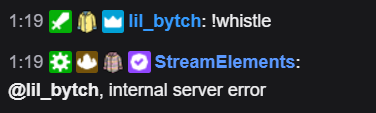


 final sail
@round bramble done
twin sentinel
@final sail The bot does not seem to be in your channel, make it join via the StreamElemetns dashboard and make it a moderator in your channel.
proper marlin
how do I do that @little oak ¿?
final sail
@twin sentinel how can i make it join?
twin sentinel
@final sail On your StreamElemetns dashboard (https://streamelements.com/dashboard) on the right the JOIN CHANNEL button.