#helpdesk-twitch
1 messages · Page 613 of 1
 lament tree
 zenith widget
@lament tree what is this about?
@worn anvil If the gif is set to loop, once its cached by the browser/obs its going to play indefinitely in the background.
I'm not sure if its set to not loop, if it will have the same effect
 dawn lily
Hello , my desktop audio is not being captured could i please have some help
 round brambleBOT
@dawn lily For the best OBS support, please join their Official Discord @ discord.gg/obsproject
 worn anvil
@worn anvil If the gif is set to loop, once its cached by the browser/obs its going to play indefinitely in the background.
I'm not sure if its set to not loop, if it will have the same effect
@zenith widget As mentioned before, I have uploaded both versions.
None Loop plays in the background as well, resulting in SE jsut showing the last frame.
worn anvil
That is the looped one.
zenith widget
Then if you can, convert it to a .webm file
that will ensure its going to start from the beggining
worn anvil
Thanks alot. That did the trick. 🙂
worn anvil
Testing my donation alerts keeps messing with my donation goal... is there a way to prevent the test donations from effecting the real thing?
 lethal fox
Hello, I have custom designed animated alerts. Only my text layer needs on top of my video layer, but I can't seem to find an option for that. Now you only see my alert and not the text that needs to be shown.
zenith widget
there is a layouts option on the left
if you choose text over image then click on "text settings" -> "advanced" -> adjust top margin
lethal fox
Ok il try
 sleek lynx
How do I reset the Bot Counter widget?
 lament blade
!editcounter variable-name 0
 acoustic onyx
Hello. My donation alert did not fire! All the others donations are popping great!
round brambleBOT
@acoustic onyx OBS -> settings -> advanced -> scroll down -> enable/disable hardware accel.
https://i.imgur.com/ggMe9ZE.png

 brisk moss
how can i increase the overall size of a predefined theme from StreamElements / for example it is at 1080 but i want it at 1440
 scarlet tiger
the resolution needs to be set in the overlay editor and in the obs browser source
brisk moss
the theme is at 1080 even if i increase it in OBS browser source to 1440, the lements are still small like in 1080 and not centered that's the issue
 ionic kelp
@brisk moss click the small ✏️ on the overlay dashboard for it.
 naive pilot
Can I do song requests without a pc on twitch stream?
 twin sentinel
You can access the website also via mobile.
naive pilot
But will it play during stream without pc
naive pilot
Thank you
acoustic onyx
@round bramble So, Enable browser Source Hardware Acc, must be disable?
twin sentinel
If you have it enabled, disable it.
acoustic onyx
@twin sentinel Okay thank you
 shell tundra
hi everyone, i connected my twitch account to OBS, and my follow alert box works, but the cheer doesnt work, what can i do?
but the chat alert works, so when someone send me a bit, on the chat this appear, but in the screen it doesnt
twin sentinel
Have you checked the alert box settings for the cheer event and also checked the variation settings?
round brambleBOT
@lament blade You can test Alerts via the bell on the lower right corner of the Overlay Editor. Simply go to your Dashboard -> My Overlays -> Pencil/edit button on the overlay. Make sure the "Show Emulated events on stream" option is on to see the alert in OBS/Xsplit https://streamable.com/h6qgy

 dense sundial
Any idea why the icons don't show up in OBS, but both in the editor, and when opening in a browser it works? https://i.imgur.com/ENL2F2h.png
Code example:
    background-image: url('https://i.imgur.com/CDZTUnX.png');
}```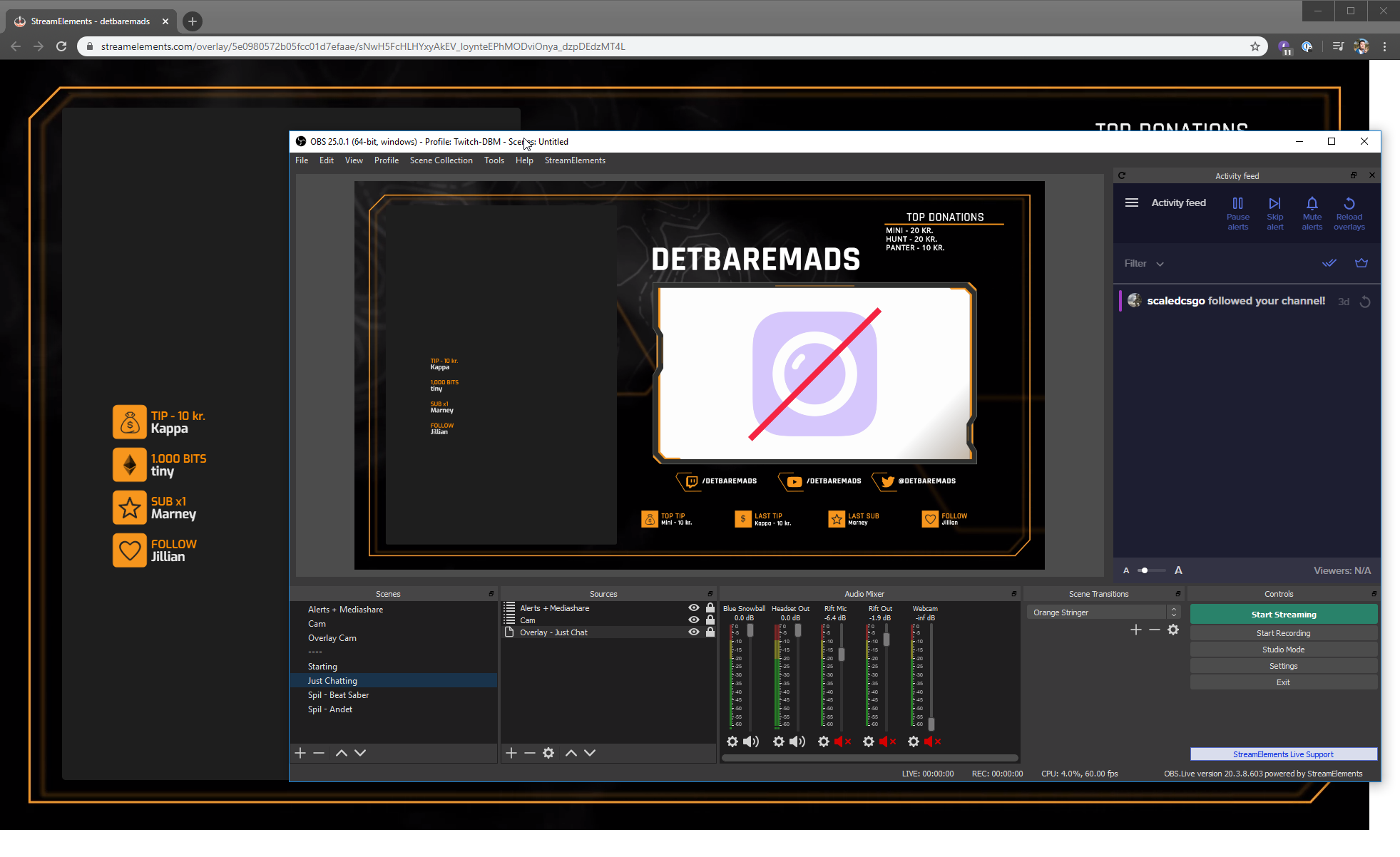 lament blade
How do add a bot to my channel?
 exotic yarrow
Im not sure where to go for help this but i need help detaching my streamlabs from my streamelements. ever since i imported streamlabs to streamelements i havent been able to use my streamlabs at all #helpdesk-twitch
ionic kelp
@exotic yarrow not sure what you mean by that. All we do is import the information/alertbox and nothing beyond that.
exotic yarrow
@ionic kelp im not sure but ever since i imported streamlabs to streamelements, i cant use !heist in y chat anymore, which is from streamlabs. i was woundering if there is a way to restart everything from my streamelements are start over
ionic kelp
Go here and hit part on the right side. Beyond that you'd have to contact streamlabs about the command not working. https://streamelements.com/dashboard

StreamElements
The Ultimate All in One Platform for Streamers
 sleek bay
any idea why all of a sudden my stream lost all sound ?
 lilac glen
I only want the alert I do not want the overlay can you help
round brambleBOT
@sleek bay For the best OBS support, please join their Official Discord @ discord.gg/obsproject
twin sentinel
@lilac glen Then delete all other elements in the overlay except the alert box widget.
 dense rock
Does anyone know why my animated overlays (added as a browser source) won’t animate on OBS for Mac? They animate in a regular browser just fine.
twin sentinel
@lament blade On the left side of your dashboard, there is a JOIN CHANNEL button.
 wary halo
to read it for yourself or to see it on the stream?
last option is not possible
for an ipad
 silent cradle
Just logged into stream elements and I don't see any of my activity. No followers or Subscribers. Any idea of how to import?
wary halo
are you coming from another service?
lament blade
hi guys , how do i change what i stream to through Obs? i changed my stream service in settings but whenever i press ' start streaming' it goes to youtube... does anybody know how to change this?
 abstract hemlock
@lament blade if your using obs.live go to StreamElements menu and then log out and log back in
lament blade
alright thanks
lament blade
how did you set them up?
 copper forge
what did you mean ?
lament blade
did you set them up in obs?
copper forge
yep
they are not visible on my stream
can see on overlay set upğ but not on my obs and live feed
lament blade
@abstract hemlock it is obs studio im using not live
you have to add them in via youur sources
copper forge
ı added them on browser source
copper forge
yes yes
abstract hemlock
@copper forge you can share a screenshot of your OBS please
copper forge
but they are not workin
lament blade
Click and press add window capture
copper forge
ok
lament blade
You need to copy and paste the overlay url into the ‘window’ bar
round brambleBOT
@copper forge To add your overlays to OBS, add a new browser source in your scene. Paste your overlay URL in the browser source properties, set the dimensions to 1920x1080 (unless you changed them on the website), and ☑ “Shutdown source when not visible” https://youtu.be/KDvLynUqXI4
lament blade
This is how i did mine...
wary halo
yeah, to be honest, your setup looks like it could use some work
you have a BRB and another source in 1 scene
copper forge
mate ı did all you say
ı am streaming for a long time
you didnt understand me
today
lament blade
Just follow these guys instead they can tell you better than me
copper forge
my caht suddenly stop workin
round brambleBOT
@copper forge OBS -> settings -> advanced -> scroll down -> enable/disable hardware accel.
https://i.imgur.com/ggMe9ZE.png
wary halo
disable that ^
@lament blade this is how people usually set up their scenes and sources
 little dune
hey all! i was wondering about a minor thing, i seen on Streamelements there is the ! quote but i can't find ! quoteadd, is that a default command i missed by chance? ( i put the spaces in btw so i didn't accidently trigger any commands in here haha)
copper forge
@round bramble thanks for your help
abstract hemlock
@little dune
!quote add XYZ to add a quote
!quote to retrieve a random quote
!quote X with X being the number -> retrieve the quote
!quote remove X with X being the number -> delete the quote
 rapid elbow
@wary halo what can i do about my streaming issues! after what u try to help me with is still the same again!
round brambleBOT
@lament blade Streamelements on top of OBS -> Logout -> login
wary halo
@rapid elbow you need to refresh my memory 😛
round brambleBOT
@rapid elbow Please provide a log from your last stream. To do this, in OBS go to Help > Log Files > Upload Last Log File and paste the link to the log file here.
little dune
ayyyy thank you Ren!!
rapid elbow
wary halo
Run OBS in admin mode, and not just now but always
that will allow windows to allocate more resources to OBS so it will run smoother
rapid elbow
@wary halo okay always in admin mode"!
wary halo
also take a look at those 2 other issues mentioned
rapid elbow
okay
silent cradle
@wary halo Yes im coming in from Streamlabs
but shouldn't it all populate from Twitch directly?
wary halo
@silent cradle there is an import tool on the dashboard, you can import data from SL there
it's in the top bar
rapid elbow
rapid elbow
@wary halo i trying eveytime and is just do what its do! maybe is me but yeah i try again
wary halo
do you know how to run in admin mode?
rapid elbow
@wary halo right klick and then drive in admin mode!
rapid elbow
okay
i got it @wary halo by default
@wary halo let´s see what happens when i go live again! ❤️ 🙂 😉 many thanks for u to help me!
wary halo
no problem 😄
rapid elbow
if its not work, can i still ms u ? @wary halo
wary halo
you can always throw a message in here, i'm going to eat my dinner but there are more support people around 😉
rapid elbow
@wary halo thanks enjoy your dinner
sleek lynx
!editcounter variable-name 0
@lament blade thank you, that worked 🙂
 queen edge
Hey guys! Why I have on my twitch 7 subs but on overlay I have 8
scarlet tiger
how many subs does your overlay editor show under DATA > TOTALS
round brambleBOT
Due to a recent change from Twitch API, these features are affected by the change:
- Ground Control does not have Custom Bot Name
- Subscriber count will count the Channel and any other permanent sub you may have (+1 or +2 or +3 on top).
We are working on fixing both issues, but there is no ETA.
OBS.Live still has Custom Bot name working fine in it.
 tawdry plover
Is there a way to just pull the HYPE BOSS name, and nothing else?
queen edge
okay thanks
 patent panther
to read it for yourself or to see it on the stream?
@wary halo
To see it on the stream
tawdry plover
On stream
I want to create a scene where it announces the new hype boss, so I need to just pull the name
 haughty shoal
Ok random question I want to make my chat scroll along the bottom of the screen any ideas
rapid elbow
@wary halo there is still problems if u can help with a talk it will be nice some times ❤️
haughty shoal
iv tried messing with css and java but every where i look chat will ither go up or down no limit.
stuck behind the constuct of it all
want it to kinda look like this
Chat - Msg one emotes and badges - Msg 2 same
if anyone knows how to do this id love ya for ever
queen edge
Hey! When I have se.pay on my revenue panel, but my country ( Slovakia ) is not on the list, can I use it?
scarlet tiger
Unfortunately no
If you have a bank account and a 100+ followers, then you can use SE.Pay.
SE.Pay is available for streamers with more than 100 followers, with a bank account in one of the following countries: Austria, Belgium, Czech Republic, Finland, France, Germany, Ireland , Italy, Netherlands, Poland, Portugal, Spain, Switzerland, United Kingdom, United States If you meet these criteria and don’t see SE.Pay, please contact support.
 tidal arch
hey there guys ❤️ hope you doing well these days! is anyone free for a question? ty in advance
 tight harness
Hey @tidal arch, lets take your question to the #dreamteam channel 😃
tidal arch
ty 🙂
 viscid tapir
Hey guys I cant find my media request widget anywhere on my obs. How can i get it?
 copper venture
Hey guys anyone having an issue with twitch right now? The twitch site isn't loading properly and when I start OBS I get an error message:
lament blade
Twitch is down
scarlet tiger
Yes, Twitch problem
copper venture
ok thanks
lament blade
please be patient 
 kind jacinth
yeah, twitch down D:
viscid tapir
sorry does anyone know where the media request dock went
rapid elbow
@wary halo i am beginn to be crazy!
wary halo
don't do that

maybe it's your internet connection or bitrate
there was nothing else on the logs
rapid elbow
@wary halo i want to look at my internet
 radiant venture
Say question, about a week and a half ago... my stream elements widgets stopped loading in OBS. They will load up sometimes, but rarely now. I didn't change anything on my end but I think some updates happened. Anyone else having this issue or can help?
rapid elbow
its not my internet @wary halo
round brambleBOT
@rapid elbow For the best OBS support, please join their Official Discord @ discord.gg/obsproject
dense rock
Does anyone know why my animated overlays (added as a browser source) won’t animate on OBS for Mac? They show up but are static. They animate in a regular browser just fine.
rapid elbow
@wary halo hahah LUL then can not help
wary halo
i'll ask around, but i don't have a lot of options left
 slender anvil
hey i dont know who i would contact in regards with a chargeback through streamelements
rapid elbow
@slender anvil streamelements had problems right now with overload after the new update m8
slender anvil
ah ok
rapid elbow
i had the same problem!
 jade remnant
@slender anvil are you using se.pay or paypal?
 lost ridge
dense rock
lost ridge
dense rock
Bumping my question above 😢 someone help this poor mac user
 strong kernel
If it's fine in the browser but not in your OBS, then that'll be an issue with your OBS.
round brambleBOT
@dense rock For the best OBS support, please join their Official Discord @ discord.gg/obsproject
 obtuse bloom
does anyone know how to merge accounts ?
round brambleBOT
@obtuse bloom Account Merging - Please note:
- Merging accounts only allows faster ways to switch between accounts
- Merging accounts does not allow data sharing between accounts - different streaming platforms, different type of events
- Merging accounts allows duplicating/sharing overlays between the accounts
If you understand the limitations of merging and want to proceed, please find the JWT tokens (!jwt) from both accounts you want to merge and you will be directed to DM them to a staff member.
 ok
strong kernel
ok
strong kernel
Please DM me the JWT tokens, clearly labeling which is which.
@obtuse bloom Please ask questions in the public channels so others can benefit. DMs are only for sharing sensitive information.
obtuse bloom
ah
o3o
oki
well i'll ask it here then
does merging accounts have any major limitations ?
cause the bot's saying that and idk what he means besides the things he said
silent cradle
hey i dropped the link for my alerts into a browser on OBS. Its not showing the preview in OBS
 lapis scroll
tips not sending alerts to my overlay. Does anyone know how to fix this? I had a $3 donation and i felt like a jerk when i missed it because there was no alert. Thanks
strong kernel
@obtuse bloom Merging is solely for copying overlay designs between channels and swapping between channels quickly. Nothing is shared or combined or anything like that.
 dim hatch
My friend i'm mod for music has just cut out and won't play the next song in the queue, any ideas on how to get it playing again? 🙂
dim hatch
It was the media request queue 🙂
 civic pewter
Is there a number limit on the raffles? I can't seem to put the amounts higher than 1000 in the single raffles and 5000 on the multi raffles.
 keen elm
my game capture is not picking up my game please help
strong kernel
@silent cradle If your overlay only has an alertbox and nothing else, then nothing will be visible until an alert is actually playing.
round brambleBOT
@keen elm For the best OBS support, please join their Official Discord @ discord.gg/obsproject
strong kernel
@lapis scroll How were you notified of the tip?
lapis scroll
i was sent a whisper asking if i got it because it never showed up on stream
strong kernel
@obtuse bloom Your channels have been merged.
@lapis scroll What payment method was used for the tip?
lapis scroll
paypal
strong kernel
@lapis scroll If a viewer tipped through PayPal but no information appears in your StreamElements account, this generally means PayPal has held the tip for verification. Until PayPal clears the tip and sends back a confirmation to your StreamElements account, no information will appear there and no alert will play, as that confirmation is the only way for us to be aware of a successful transaction. If you believe there may be an issue with the transaction, you'll need to contact PayPal support as StreamElements is only a passthrough service and never actually gets involved with the transaction or touches the money.
lapis scroll
oh okay that makes sense thanks so much
silent cradle
@strong kernel thanks for answering! I clicked on preview and nothing showed up in OBS. Im worried when I go live I wont get alerts for followers and Subs as they come in.
round brambleBOT
@silent cradle You can test Alerts via the bell on the lower right corner of the Overlay Editor. Simply go to your Dashboard -> My Overlays -> Pencil/edit button on the overlay. Make sure the "Show Emulated events on stream" option is on to see the alert in OBS/Xsplit https://streamable.com/h6qgy
 silent cradle
yeah they arent showing up
strong kernel
Read the bold text.
civic pewter
Is there a number limit on the raffles? I can't seem to put the amounts higher than 1000 in the single raffles and 5000 on the multi raffles
strong kernel
@civic pewter Max: 100000
silent cradle
box is checked. Just unchecked it and rechecked it. Nothing else I can test for?
civic pewter
Where do I change the numbers? I tried in the modules section under max amount and the amount displayed is always 1000 in single and 5000 in multi
silent cradle
the box shows up in OBS, but the animation doesen't play
strong kernel
@civic pewter That's the right place and the only place. What browser are you using?
civic pewter
Chrome
strong kernel
@silent cradle Disable browser source hardware acceleration in Settings>Advanced.
@civic pewter Press F12, open the Console tab, try again, and look for errors.
obtuse bloom
@strong kernel ty
 red sapphire
Hello, I can't redeem an reward in my partnership program. Let's me enter a tweet but never tweets and never sends codes. Has always worked so far before...
civic pewter
@strong kernel When I go for a lower amount, it works. But when I try to go higher than the amounts specified it won't work
strong kernel
@red sapphire Currently out of codes and waiting for Wizards to send more.
red sapphire
@strong kernel Cheers, thanks for the quick reply!
 covert blade
Please, when is watchtime working?
strong kernel
@covert blade What do you mean? Nothing wrong with the system.
slender anvil
@jade remnant im using se.pay as far as i know but i get it seems its paying me directly?
covert blade
Watchtime writting me "0 hours" :/ @strong kernel
strong kernel
@covert blade Did you enable the loyalty system?
@slender anvil SE.Pay withdrawals are bank transfers to your bank account, if that's what you're asking.
covert blade
@strong kernel no :/
strong kernel
@covert blade The loyalty system must be enabled for watchtime to start counting up from 0. Please remember that: it is not retroactive. Once loyalty is enabled, everyone is starting from 0.
slender anvil
well someone charged me back @strong kernel when it was a stream donation
strong kernel
@slender anvil Where were you informed of a chargeback?
slender anvil
1 hour ago via paypal
covert blade
@strong kernel hm, but my friend has enabled loyalty and watchtime writting 0 hours, so what´s wrong?
strong kernel
To reiterate: It only counts up when loyalty is enabled, and it is not retroactive. Enabling it won't suddenly make it not be 0.
slender anvil
then how would i go about dealing with something like that, i see the transaction from him under the tip list in streamelements
strong kernel

Google Docs
Instructions for responding to PayPal disputes Locate the tip in your StreamElements revenue history and screenshot the transaction details, with the message from the viewer If possible, find the tip in your VOD and screenshot the alert being shown on stream Use the following ...
lilac glen
I need assistance
round brambleBOT
@lilac glen Welcome to the helpdesk! Please let us know how we can assist you today and a support volunteer or staff member will assist you as soon as they are available. Thank you for your patience.
strong kernel
@slender anvil Note that is only for disputes. If it's a chargeback and not a dispute, there's not much to be done with PayPal.
round brambleBOT
@lilac glen You can test Alerts via the bell on the lower right corner of the Overlay Editor. Simply go to your Dashboard -> My Overlays -> Pencil/edit button on the overlay. Make sure the "Show Emulated events on stream" option is on to see the alert in OBS/Xsplit https://streamable.com/h6qgy
 woeful cave
Hi is this the right place to ask questions about chat commands?
lilac glen
It’s not showing up properly part of the alert got cut off on the side
round brambleBOT
@lilac glen To add your overlays to OBS, add a new browser source in your scene. Paste your overlay URL in the browser source properties, set the dimensions to 1920x1080 (unless you changed them on the website), and ☑ “Shutdown source when not visible” https://youtu.be/KDvLynUqXI4
@woeful cave Welcome to the helpdesk! Please let us know how we can assist you today and a support volunteer or staff member will assist you as soon as they are available. Thank you for your patience.
woeful cave
Cool so yeah I have a command for a counter command which represents the number of times I reset (!resets) the game ${getcount resets} and I'm wondering if there's a way to show this number +1, to represent attempts. Since the number of attempts will always be one more than than the resets, Im wondering if theres a way to make an !attempts command as something like ${getcount resets +1} without actually changing the counter.
strong kernel
@woeful cave ${getcount} shows the count. ${count} increments the count before showing it.
There is no way to add to a count without, you know, actually adding to the count.
You can't show count+1 without adding that +1 to the actual count.
woeful cave
Okay got it I guess I was wondering if theres a way to add the count temporarily or seperately, but I guess youre saying I would have to just make a separate counter for attempts?
woeful cave
@strong kernel Okay cool got, not biggie haha just wondering. Thanks for helping
 wanton mango
You could use a customapi to manually add the 1 to the getcount, if that's what you're after.
${customapi.https://api.mathjs.org/v4/?expr=${getcount mycountername}%2B1}
@wanton mango oh cool, that sounds like it could be, Im not sure I fully understand though, any good resource I learn more about this?
Oh wait I think I understand, by using that command it will literally use a custom api...to do the thing? Im really bad at this lol but I think im getting it.
wanton mango
https://api.mathjs.org/ - basically just add your mathematical express to the end of the link (?expr=), and URL-encode characters like parens and + (the %2B). so since getcount fetches the counter value and doesn't increment it, I used this to manually add the 1 onto the current value, and it'll never go up, because it's always the same count
woeful cave
Ah yeah okay I see, thats awesome! ill give it a go
 broken parrot
need help with media request, just don't work
i put a music and the music dont put in queue
 dry hare
Make sure the bot is a moderator in your channel
 azure kite
i had an idea about a command. is there any way you can do math inside a command? more specifically get the year and do (year - year of birth) and get the age without having to change it every year  maybe using the twitch customapi math?
 shadow glacier
just started this, how to i make it where i can show my game?
oh theres a button up there
sorry
 molten crown
hi, can we create a giveaway with live obs?
 torpid umbra
Anyone good with CSS? I'm having issues
 lofty zodiac
Is anyone experiencing problems trying to stream on twitch?
strong kernel
@azure kite Math like that will require a custom API, it's not possible in the default system.
@molten crown Giveaways are created and managed on the site, not in OBS.Live.
@torpid umbra #dev-chat
@lofty zodiac A great many people throughout today.
lofty zodiac
Do you know why this is happening?
strong kernel
@lofty zodiac Coronavirus?
molten crown
@strong kernel can you tell me where can we find it?
lofty zodiac
Not corona😂
strong kernel
@molten crown Log into your account on the site.
@lofty zodiac Actually in many ways it is. Facebook has had even worse issues. Ingest servers are having trouble keeping up.
People are staying home and streaming.
lofty zodiac
Probably because the amount of people streaming so the servers trying to contain the stream are full, i see what you’re saying
Is there anyway to set up obs live other than a laptop/computer?
molten crown
@strong kernel and once connected, what to do?
 frozen maple
Hi there. Just getting started with stream elements... cant figure out how to link the social media buttons to my instagram/facebook/twitter etc.. Thanks for any clues!
strong kernel
@molten crown There's a Giveaways section.
@lofty zodiac No. OBS Studio is a computer application.
@frozen maple What social media buttons?
frozen maple
In the layout I am using, (the grey one) there are prefab buttons on the screen that show generic instagram and facebook links (I have figured out how to change the text) ... are they supposed to be clickable?
strong kernel
In the editor, you can edit them, yes.
They're not clickable on Twitch if that's what you're asking.
frozen maple
I guess that is what I am asking.... now that you say that, it makes sense that they wouldnt be able t link to anything.... thank you very much
 haughty wave
You can add them on the panels under the player.
Or make the bot release a line with a link to them. Every n minutes.
frozen maple
Awesome... I appreciate it!
lilac glen
Can you help me
haughty wave
Not sure if this is the right place to ask, and forgive me if it's not, but is there a chat overlay to put in-game (single monitor here) aside from restream?
lilac glen
I need help
 viscid pebbleBOT
Hi @lilac glen, Please ask your question(s) or describe the problem you're looking to solve so staff or a support volunteer can assist you as soon as they are available.
lilac glen
My alerts won’t work for Streamlabs bc I can’t have decimal size
round brambleBOT
@lilac glen We're not able to troubleshoot issues with using our overlays in StreamLabs OBS (SLOBS) as we don't have the tools to support their software. We recommend using OBS Studio or OBS Studio with our plugin OBS.Live.
lilac glen
It’s not an issue on there and it’s an issue on your end
Because I don’t know how to size it properly
haughty wave
Are you using Streamlabs? If so, this is the wrong place, here is StreamElements.
lilac glen
I’m using stream elements for alerts
haughty wave
Ah
lilac glen
I can’t size the alert properly because I can’t use decimals
haughty wave
What I do on that case is:
I create and resize the alert, and set it's positions to 0x0
After that I get the size in the widget editor and past on OBS along with the URL for the widget.
Your issue seems to be the position. I think.
I was having the same issue 2 weeks ago when I remembered that lol.
haughty wave
Have you already set your notifications size?
After that, set the position to 0 (top and left).
Then get the size you set and put in the OBS Browser Source you are using for the notifications.
Put wrong wording there sorry.
 topaz epoch
lilac glen
topaz epoch
lilac glen
I got an error 522 in Streamlabs obs
round brambleBOT
@lilac glen We're not able to troubleshoot issues with using our overlays in StreamLabs OBS (SLOBS) as we don't have the tools to support their software. We recommend using OBS Studio or OBS Studio with our plugin OBS.Live.
lament blade
When i put my overlays into a brower in OBS its too quiet but when i choose change audio via OBS the bars look good but i cant hear any of the alerts?
 cursive scarab
i cant open the overlay editor on the premade ones it tells me something went wrong
strong kernel
@cursive scarab You're opening on the site, correct? Not in OBS.Live?
cursive scarab
yeah
strong kernel
What browser are you using?
cursive scarab
chrome
strong kernel
Press F12, open the Console tab, and refresh the page, and then take a screenshot of your entire browser window, please.
 tiny wharf
I have changed my twitch name. OBS live is not loading the StreamElements Docks.
round brambleBOT
@tiny wharf Streamelements on top of OBS -> Logout -> login
@tiny wharf If you changed your name on Twitch please follow these steps:
🔹 Visit https://streamelements.com/logout and then log in again with by connecting with Twitch.
🔹 On the right side of the dashboard page that opens, select "Join" under bot settings. If it says "Part" select that and then select "Join" to send the bot to the chat. Don't forget to mod the bot by typing /mod streamelements in your channel if you have not already.
🔹 Post your new name here so that we can update your channel's chatstats tracking (must be done by staff).
strong kernel
@cursive scarab That is not the Console tab.
cursive scarab
my b
strong kernel
@cursive scarab Start over. Refresh the page.
cursive scarab
 velvet rampart
strong kernel
velvet rampart
strong kernel
@velvet rampart See pinned messages in #helpdesk-selive
 tribal violet
i removed a dock. what should i do to get it back?
strong kernel
@tribal violet If it's a regular OBS dock, View>Docks. If it's a StreamElements dock, StreamElements menu instead.
tribal violet
thanks 😄
 covert agate
Every time I try to add an overlay from stream elements as a browser source it only shows the top left corner of the overlay... why is this?
round brambleBOT
@covert agate To add your overlays to OBS, add a new browser source in your scene. Paste your overlay URL in the browser source properties, set the dimensions to 1920x1080 (unless you changed them on the website), and ☑ “Shutdown source when not visible” https://youtu.be/KDvLynUqXI4
 warped hull
Hey is they're any way that i can get notifications on my stream when i receive tips. I receive them, but i do not get a notification!
strong kernel
@warped hull https://www.youtube.com/watch?v=eLzxRkq7tJo

StreamElements tipping system is guaranteed to increase your tips! Watch our guide to learn how to setup your own.
Got any questions, or just want to say "Hey"? Join our Discord server: http://bit.ly/DiscordStreamElements
Loyalty system guide: https://youtu.be/hM7D0HJD...
 hearty flume
Is there a way to add a "recent follower" from a different channel? I often have guest streamers on my channel and I would like to incentivize people to follow them. A little "last follower" thing might help
abstract hemlock
@hearty flume there is no command/variabe to do it but you can create a custom command, something like this !lastFollower => The last follower of ${1} was : ${urlfetch https://decapi.me/twitch/followers/${channel ${1}}}
Usage : !lastFollower @channel
hearty flume
Hmm might set that up to a timer
Thanks! Too bad I can't add it on the actual stream. Maybe an idea for later
 peak folio
how do i add a delay in streaming from obs
strong kernel
@peak folio
 pseudo timber
any widgets don't seem to pull through my data from twitch, e.g. subscriber count says "No data". Have I missed a step during setup?
strong kernel
Check what period you set it to.
Also, you only just signed up to StreamElements. Twitch doesn't send a full history of your activity to us.
So anything that happened prior to your signing up isn't in our system.
pseudo timber
if get a follow after having signed up, will you then receive an updated total or just the 1 additional follow
?
strong kernel
Totals are received.
Those always can be obtained.
But something like a "last 30 days" won't show anything.
pseudo timber
got it, thanks for the help
round brambleBOT
@dense rock For the best OBS support, please join their Official Discord @ discord.gg/obsproject
dense rock
Hi all, I've been trying to figure out why my animated StreamElements overlay won't actually animate when I add it in as a browser source for OBS on Mac.
I was initially pointed from here to the OBS discord. so I went and they told me to look at the logs, which yielded this:
obs-browser: Uncaught (in promise) NotSupportedError: Failed to load because no supported source was found. (source: urlurlurl:0)
17:17:17.676: obs-browser: Uncaught (in promise) NotSupportedError: The element has no supported sources. (source: https://streamelements.com/overlay/scripts/app-e732d213e6.js:33)
So they sent me back here thinking that its probably a codec issue of some kind that StreamElements needs to support? I'm not sure but it looks like that StreamElements script (line 33) is the issue and was wondering if someone could help me figure it out
(sorry for the delete and edit, I pressed enter before I put in the second part of my message)
from the OBS discord:
at least that's an error message you can go to streamlabs to, because it's something in their tech that doesn't work. it might be an incompatibility with CEF on macOS but that's on them to find out/fix
@strong kernel sorry for bypassing the bot! does this change anything with that recommendation?
cursive scarab
sorry to bug but did there end up being a fix for not being able to access the overlay editor?
 crimson vector
dont know where to post this but how can i change my paypal name when donation comes trugh?
strong kernel
Make your PayPal account a business account.
@cursive scarab I don't see that your "neutraichaos" channel is connected with us.
cursive scarab
i just recently changed my username on twitch to wasdfear could that be it?
round brambleBOT
@cursive scarab If you changed your name on Twitch please follow these steps:
🔹 Visit https://streamelements.com/logout and then log in again with by connecting with Twitch.
🔹 On the right side of the dashboard page that opens, select "Join" under bot settings. If it says "Part" select that and then select "Join" to send the bot to the chat. Don't forget to mod the bot by typing /mod streamelements in your channel if you have not already.
🔹 Post your new name here so that we can update your channel's chatstats tracking (must be done by staff).
ionic kelp
Screenshot your overlay list.
cursive scarab
ionic kelp
Click edit.
That goes to the editor for it.
You're on the new editor so it'll take a slight getting used to if you only know the original one.
cursive scarab
ive never used the old one. this pops up every time i try to edit
ionic kelp
Um.... that would be an issue.
 steep cape
I added a sub goal onto my overlay a while ago it seems to not be updating correctly as some of my subs run out. I've had 17 in my history, but only 15 currently subbed, my total still says 17 on the overlay, how do I refresh it? Or get it to only count current subs?
ionic kelp
@cursive scarab can you try in incognito and see if the issue persists?
cursive scarab
ya still cant get into it
ionic kelp
same error in console?
cursive scarab
ya
 safe pier
can any1 help me?
ionic kelp
I'll pass it along to staff and see if someone can poke the server with a stick.
cursive scarab
lol okay thanks
ionic kelp
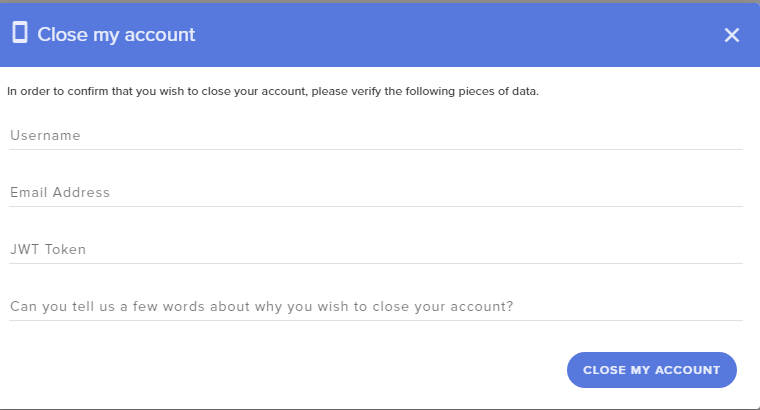
@safe pier click your profile picture in the top left of the dashboard and then settings. Click the last tab and there should be an option to delete your account.
 ionic kelp
I've never done it so not sure but I'm 99% sure it is.
safe pier
i fucked up, so im trying to add my FB channel to my Twitch one and it wont allow me because i added it own
round brambleBOT
@safe pier Account Merging - Please note:
- Merging accounts only allows faster ways to switch between accounts
- Merging accounts does not allow data sharing between accounts - different streaming platforms, different type of events
- Merging accounts allows duplicating/sharing overlays between the accounts
If you understand the limitations of merging and want to proceed, please find the JWT tokens (!jwt) from both accounts you want to merge and you will be directed to DM them to a staff member.
safe pier
so i cant mulistream?
strong kernel
StreamElements does not support multistreaming, no.
safe pier
how do i import my stuff from obslabs?
so when i use a game capture, it doesnt work why is that?
 slate sentinel
Hey. I wanna create a Chat Command and include in the Answer a Link zu a Screenshot. How can i write it, that User can click the Link in the Chat, when Streamlabs write it in my Chat?
Ah fix it, thx
 azure shale
 zenith pumice
dry hare
zenith pumice
dry hare
@steep cape you added a sub goal. Not a sub total
round brambleBOT
@azure shale Please contact us via email for support with SE.Pay. You can use our contact form here: https://streamelements.com/contact Thank you
 floral badge
good afternoon
Am i able to modify the stream alert sounds with custom sounds in my alert notifications
zenith widget
Yes
round brambleBOT
@floral badge New to Stream Elements?
Check out our YouTube channel https://www.youtube.com/c/streamelements/videos
with tutorial videos from setting up the basics, to in depth details on how to use our product.
New to OBS? Here is a 4 step quickstart guide
https://obsproject.com/wiki/OBS-Studio-Quickstart
Want to learn even more? Here is an in-depth overview
https://obsproject.com/wiki/OBS-Studio-Overview
lament blade
alguien sabe como capturar chat de twitch
floral badge
Thank you very much @zenith widget we hit 12 000 followers last week and are now trying to take our stream to the next level
zenith widget
#🇪🇸︱español @lament blade
lament blade
oks oks srry
 pearl osprey
Is there a way in streamelements obs that channel point requests show up? Or is it an error as it is not showing up when viewers request it
zenith widget
the twitch channel points? we don't have an integration for those
pearl osprey
kk, thank you 🙂
 zinc wadi
Hello StreamElements - How long does it take for challenges that are tracked automatically to get registered for completion? Does it get updated live during the stream or is it processed during some sort of analytics processing after stopping the stream?
zenith widget
Its after the stream ends
as data needs to be analyzed by the system
it usually is super fast
zinc wadi
Makes sense. I was wondering what the timeline was because I didn't see it updating during my stream. Looking at it now, however, and its already updated. Thanks again!
 harsh sedge
Hi im trying to go to my dashboard but when I click my dashboard it just immediately sends me back to the home page
harsh sedge
Thanks a bunch it works
 fickle night
It says failed to authenticate with twitch
failed to get token from remote when i try streaming
zenith widget
Reset your stream key and place the one in OBS
fickle night
I forgot where i plug it in at
zenith widget
Settings -> Stream
fickle night
do i disconnect account?
zenith widget
Disconnect and reconnect then
 sacred slate
I am trying to connect my paypal email on my tips page and it isn't working. I press connect and it says saved but it doesn't update.
zenith widget
what browser are you using?
 narrow terrace
so, I'm deciding to make the switch over from slobs. I thought I'd set up SE Obs on Mixer, test it, then launch on Twitch. Then I thought, I'll just do it on Twitch and let's see. But now, every time I try to start the stream, it launches Mixer...even though I've removed it. Little help please 🙂
round brambleBOT
@narrow terrace Streamelements on top of OBS -> Logout -> login
narrow terrace
awesome!
dawn lily
Hi is there are way to add a sub count on stream elements ?
 ivory shadow
Hi im trying to figure out how to make streamelements show the gifters name on screen when someone gifts subs. Currently when someone gifts say, 5 subs, the notification plays 5 times and thanks 5 different people vs just thanking the 1 person who gifted. Is it possible to make it show a notification that says (username) has gifted 5 subs! on screen for example?
zenith widget
There is a "Community gift" condition for the sub variations
zenith widget
What exactly is the problem?
dawn lily
When i clicked this button on my stream deck a sound is meant to play however it does not no whereas it used to
round brambleBOT
@dawn lily If you are having issues with Streamdeck or Elgato capture cards, its best to ask in their Discord here: https://discord.gg/elgato
 sinful ermine
Hola, necesito ayuda para cerrar mi cuenta
zenith widget
#🇪🇸︱español @sinful ermine
sinful ermine
I need speak english?
zenith widget
Yes, this is an english only support channel.
sinful ermine
Okey, I need help to close my StreamElements account
zenith widget
StreamElements
The Ultimate All in One Platform for Streamers
use the closure form from there
zenith widget
Send the same things the closure form requests to our CTO Reem here: reem@streamelements.com - he will close your account
sinful ermine
ok, thanks
 magic magnet
any idea why i cant load this page been trying for a week now only page i cant open
zenith widget
I would recommend to get Chrome
lofty zodiac
Why won’t my ps4 start my stream on twitch
magic magnet
it worked thank you so much
zenith widget
Unfortunately, we can't help you with the issue. But I can only assume it might be due to network issue.
lofty zodiac
How do i fix that?
zenith widget
Unfortunately, I can't help you troubleshoot the issue.
Its best if you could look it up on Google.
scarlet tiger
Events list? You mean widget in the overlay?
 silver mica
Yes.
On stream it shows the example
But on the browser it is showing my actual recent events.
How do I fix it?
 mortal cradle
in obs live there should be a "reset overlays" button above your alerts
azure kite
isnt there a way to disable a bot command with a bot command? not delete like !cmd del !random, i mean !cmd disable !random
round brambleBOT
@azure kite You can make changes to custom commands in chat with!command add/remove/edit/options/show Valid flags for !cmd options are: -cd (number) -usercd (number) -cost (number) -level (number) -type (say, whisper or reply) -count (number). --- Example: !cmd options twitter -usercd 60 -type reply -level 250

 olive holly
hey @zenith widget any news on my part?
 lilac swan
Cheers everyone! I added the social media rotator from the Theme Gallery and it worked great for like 5 minutes in the overlay editor, but suddenly, after finishing setting it up, it only pops up when I change a setting in it, like modify the time between social media etc.. Even refreshing the page doesn't help, everything else works perfectly. If I'm in the wrong channel, please correct me.
zenith widget
@olive holly no news
@lilac swan if you add the widget again, does it work normally? If yes, then its something you changed in the widget options that made it behave like that
lilac swan
@zenith widget not gonna lie, kinda didn't want to do that, but I'll try
Okay, added another one, but it behaves the same right of the bat, without modifying anything. When I change even a single letter, it starts working until I save and refresh the page. I'll try removing all of them and start of clean.
Deleted both of them, imported from the theme gallery, same thing. The popup doesn't appear until I modify a setting from the list (applies before clicking save).
zenith widget
In which overlay is the widget?
lilac swan
it's in an overlay called "HS_Start", but on an account that I have the "Full Control" access to, not my personal one
Okay, I might be onto something. I logged into the dashboard and editor on my laptop and it works fine. Can it be something with cookies or something like that? Same browser (firefox)
lilac swan
esportsa
lilac swan
Okay, thank you, I'll clear the cache or something. Never happened to me 😄
 severe magnet
Hello. I need help with my channel, need some guidance of how to work the overlay's. Changed my name of my channel and overlay's have the old name etc.
 prisma relic
https://streamelements.com/dashboard/overlays ? edit them there
 sweet socket
yhea you would have to edit them @severe magnet
double click on the text and you can fill in your new channel name
 pulsar herald
help im new to streamelements, and the link fortipping isnt working. can someone help me
round brambleBOT
@pulsar herald New to Stream Elements?
Check out our YouTube channel https://www.youtube.com/c/streamelements/videos
with tutorial videos from setting up the basics, to in depth details on how to use our product.
New to OBS? Here is a 4 step quickstart guide
https://obsproject.com/wiki/OBS-Studio-Quickstart
Want to learn even more? Here is an in-depth overview
https://obsproject.com/wiki/OBS-Studio-Overview
 feral badge
Hi, I'm trying to figure out how to get the media request set up so that people can actually use it? Like how do I put it as a panel on Twitch
zenith widget
You can't put it as panel on twitch
its a widget and a command usage
https://www.youtube.com/watch?v=17eUkoZ6eIs&list=PLCDDKlFdScbEwdx5AntcQIS1InkFJwHtv&index=9&t=1s - a little outdated video but still holds true
feral badge
Okay, thank you
lament blade
im havin an issue with my viewers on mobile not being able to see my stream
they just see black
i got my res options to auto and 1080p60
zenith widget
That is a regional issue
some regions are not able to see all streams via the twitch app.
Nothing related to us.
One work around is to lower or increase your bitrate
lament blade
oh so nothing with my res set wrong or somethin
prisma relic
^ that is a Twitch thing
zenith widget
usually 1080p60fps should be used when streaming with 2PC setup
lament blade
oh no i got 1 pc setup
zenith widget
and most mobile users will have issues watching 1080p60fps streams if you don't have encoding(quality) option on your stream
prisma relic
i see you live on my mobile USA (sprint)
lament blade
so how do i set the res to 1600x900
wary halo
you do that in OBS
lament blade
hm
zenith widget
I would still not recommend streaming over 720p as an affiliate
not worth the extra power usage from your PC
prisma relic
💯 ^^^ not sure if its still a thing with Twitch; but it used to be a big issue with non-Partners not being able to "down-stream"
 cobalt sparrow
So how do I add an alert widget?
prisma relic
https://youtu.be/HbG01hU6quU maybe? it's a more recent link than the one in the channel header here
cobalt sparrow
I understand HOW to do it, but for whatever reason I am not getting any images when I click set image
twin sentinel
@cobalt sparrow You would need to upload the images to the gallery first.
prisma relic
are you importing from a link or uploading from....... ^
cobalt sparrow
Where can I find images?
twin sentinel
@cobalt sparrow Search them yourself on the internet. The default alertbox has one gif already set in the image spot.
cobalt sparrow
Gotcha
cobalt sparrow
I cannot seem to get them to pop up on my stream...
twin sentinel
Have you uploaded the images and added them to an event?
cobalt sparrow
yeah I'm just sticking withdefault for now
wary halo
did you add the saved overlay to OBS as a browser source?
cobalt sparrow
yes
wary halo
is the resolution of that overlay 1920x1080 in the browser source properties when you right click on it?
in OBS
like this?
round brambleBOT
@cobalt sparrow OBS -> settings -> advanced -> scroll down -> enable/disable hardware accel.
https://i.imgur.com/ggMe9ZE.png
wary halo
disable that
round brambleBOT
@cobalt sparrow You can test Alerts via the bell on the lower right corner of the Overlay Editor. Simply go to your Dashboard -> My Overlays -> Pencil/edit button on the overlay. Make sure the "Show Emulated events on stream" option is on to see the alert in OBS/Xsplit https://streamable.com/h6qgy
 wary halo
and make sure the box on the bottom is ticked on this thing^^
cobalt sparrow
It is
When I try to "Open in Stream Elements Overlay Editor" I get an error
Got it
Guess something was broken for some reason
 honest shadow
I made streamelements bot to reply when somebody types "sa". If somebody types "sa" in chat it responds with "as". It works perfectly but when somebody types any word starting with sa (sadece,sakın), the bot also replies them. I only want the bot to reply to messages only includes "sa". Is there a way to do it?
cobalt sparrow
@wary halo How come when I put in something into the top right corner for the overlays, its not all the way there on my stream?
 late willow
Am I the only one whos alerts are not working?
wary halo
what is the resolution of the overlay and of your base canvas @cobalt sparrow ?
cobalt sparrow
Should both be 1080?
wary halo
@late willow do they show in the activity feed?
Should both be 1080?
@cobalt sparrow can you check it?
late willow
@wary halo Yes, they do. They do show while I test them too, but once i open the URL which leads to the OBS itself it doesn't work
cobalt sparrow
Where can I check the base canvas res?
wary halo
OBS > Settings > Video
cobalt sparrow
Where can I check the reso of the overlay?
round brambleBOT
@late willow OBS -> settings -> advanced -> scroll down -> enable/disable hardware accel.
https://i.imgur.com/ggMe9ZE.png
late willow
Alright, I'll give it a try
wary halo
Where can I check the reso of the overlay?
@cobalt sparrow
properties from the browser source
cobalt sparrow
Yes they are both 1080
cobalt sparrow
I dont have one
prisma relic
I made streamelements bot to reply when somebody types "sa". If somebody types "sa" in chat it responds with "as". It works perfectly but when somebody types any word starting with sa (sadece,sakın), the bot also replies them. I only want the bot to reply to messages only includes "sa". Is there a way to do it?
@honest shadow ^ bump
wary halo
if you test your alerts, you can see them in the browser in the overlay editor right?
late willow
On the overlay editor, alerts are working normally. Once I open the overlay url thats put into OBS it's not
Yes
 narrow mesa
I need to download Microsoftot obs?
 rare cairn
?
wary halo
?
late willow
?
cobalt sparrow
Should I have my "goals" on a seperate overlay from my alerts?
wary halo
@late willow are you looking in OBS, or in the browser?
 toxic heart
Hello!Any ideas why the stream info panel( change stream title, game etc ) disappeared from OBS ?
rare cairn
@cobalt sparrow Either works
wary halo
doesn't work in the browser for me too, but in OBS it does
do you have a green or grey background in the overlay editor @late willow ?
late willow
Green one
late willow
It is
wary halo
@toxic heart StreamElements menu > Activity feed
then click on the hamburger menu in the top left corner > stream settings
round brambleBOT
@late willow Right click on the BrowserSource > Properties > Scroll down a bit > Refresh Cache of current page
toxic heart
@wary halo THANK YOU for some reason the stream info panel is not there anymore, that's a another way to go about it never realized it ,appreciate the quick reply!
toxic heart
Yea it was always there but for some reason its not there anymore I dont know why :/
wary halo
shit happens, but you got it back now 😄
@narrow mesa OBS.Live
it's not from Microsoft 😉

OBS.Live | Open Broadcaster Software Streaming Knowledge Base
OBS (open broadcaster software) knowledge base for live streaming. Find articles and videos about streaming with OBS.
wary halo
no, you need a pc for that
round brambleBOT
@narrow mesa Here is a guide on how to setup the most essential tools for streaming from your console, while using StreamElements tools without involving a Capture Card! It's easy to do, take 4 minutes to read and 10 to 15 minutes to setup!
Read all about it here: https://blog.streamelements.com/how-to-stream-on-console-7b620b1c46c3
narrow mesa
Thx bro
steep cape
Is there way to add a sub goal that tracks your current amount of subs and not the total subs?
wary halo
a sub goal should always track the current number
 velvet spoke
unless you track the USSR's Subs
they are disappearing 
But yeah, Sub = cur sub.
Also, current amount = total, unless your tracking peak amount
steep cape
Mine for example says 17,the total number of subs I've had, I lost a few due to them running out, I only have 15 current subs, but my goal still reads 17
velvet spoke
so you're tracking the wrong stat
toxic heart
@wary halo Just letting you knowthat I logged out of obs ( not stream elements, obs settings stream log out, ) and apparently I got the stream info back!
prisma relic
^ there is also a "grace period" for resub
round brambleBOT
@steep cape Due to a recent change from Twitch API, these features are affected by the change:
- Ground Control does not have Custom Bot Name
- Subscriber count will count the Channel and any other permanent sub you may have (+1 or +2 or +3 on top).
We are working on fixing both issues, but there is no ETA.
OBS.Live still has Custom Bot name working fine in it.
wary halo
that's why it's still on 17 probably
steep cape
Gotcha, thank you. I did find where I could manually change the sub total, so I could just do that for now, thanks!
prisma relic
~~ uggh... i tried a double bump ~~
honest shadow
i think there is no one who knows whether i can do that or not
prisma relic
I made streamelements bot to reply when somebody types "sa". If somebody types "sa" in chat it responds with "as". It works perfectly but when somebody types any word starting with sa (sadece,sakın), the bot also replies them. I only want the bot to reply to messages only includes "sa". Is there a way to do it?
@honest shadow
wary halo

@prisma relic stop bumping
If someone is around that knows the correct answer, they will say it
narrow mesa
What do i need to write to overlay name?
wary halo
whatever you want to call it
narrow mesa
But i am from hungary pls help i need to write the follower name yeah?
wary halo
i don't understand what you are trying to do, you can give every overlay a name. just call it: Gaming for example
then in that overlay you add widgets with the followers goals and all that stuff
round brambleBOT
@narrow mesa New to Stream Elements?
Check out our YouTube channel https://www.youtube.com/c/streamelements/videos
with tutorial videos from setting up the basics, to in depth details on how to use our product.
New to OBS? Here is a 4 step quickstart guide
https://obsproject.com/wiki/OBS-Studio-Quickstart
Want to learn even more? Here is an in-depth overview
https://obsproject.com/wiki/OBS-Studio-Overview
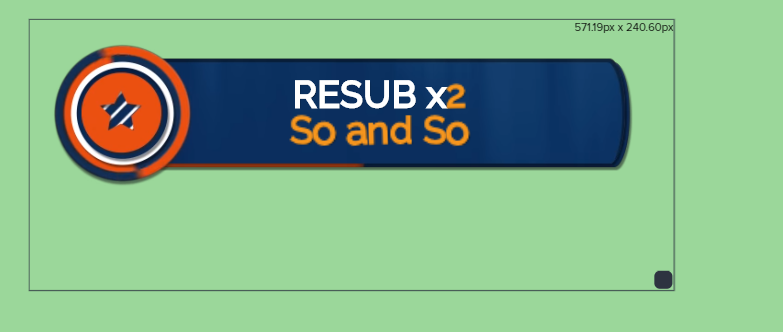
dense sundial
Is there a way to choose what to highlight? I want the name to be highlighted, but not the months https://i.imgur.com/POsixwP.png
 velvet spoke
custom alert? If you don't have control over it; CSS, maybe
narrow mesa
I want sub alerts or like that but for ps4
I have not OBS
Can i do it or only with OBS?
wary halo
at this moment, yes
you need a place to put your browser sources with your overlays in, and that is OBS
narrow mesa
Can you send a vid pls
 unkempt vale
hi my bot isnt doing my tweets
lament blade
does the command for !emotes ffz not work anymore? it seems only do bttv emotes now.
wary halo
@narrow mesa a vid from what?
narrow mesa
From how to do it
wary halo

StreamElements Overlays are loaded from a single browser source in your streaming software, making streaming easy. https://streamelements.com/
StreamElements overlay editor enables full customization of your overlay, improving stream visibility and an increase of audience int...

Learn how to customize your alerts and setup different alerts variations with StreamElements Alertbox
Overlay Manager guide: https://youtu.be/X7XrDdRE7Fk
Add HypeCup to your Stream: https://www.youtube.com/watch?v=8LVRd2X4HvU
Got any questions, or just want to say "Hey"...
narrow mesa
Thx
unkempt vale
can someone help?
it was working earlier but then i changed the account and now its not
unkempt vale
it was jkust the bot account not the main acc but ok
wary halo
oh your bot posts your tweets, not: the automated go live tweet thing? 😛
wary halo
let me ask around
unkempt vale
ok dm me cos im starving ha
 velvet raven
hello! i saw on someones stream that he could trigger sound alerts with a certain amount of bits , how to set this up? 🙂
unkempt vale
@tardy moth anything?
 half wind
Hello, i already have obs installed, Do i need to reinstall it with streamelements to use streamelements ?
 sacred narwhal
hi where i can find this timers ? StreamElements: Thanks to all the users currently hosting: and StreamElements: Thank you for your support ❤️ ❤️ ❤️ 19 Viewers, 405 Follower und 10 Subs
unkempt vale
can any1 help me?
prisma relic
@half wind SE uses OBS.live ... so it will update, like all the time
half wind
ok tx
prisma relic
just download it from the SE site 🙂
wary halo
@velvet raven your name sounds a bit Dutch 😛 but the bits for sounds is not from StreamElements, it's a Twitch extention so you need to look for it there
@tardy moth anything?
@unkempt vale i think you tried to tag me here 😛
did not get a response to your question yet
unkempt vale
😦
sacred narwhal
@wary halo thx
wary halo
hi where i can find this timers ? StreamElements: Thanks to all the users currently hosting: and StreamElements: Thank you for your support ❤️ ❤️ ❤️ 19 Viewers, 405 Follower und 10 Subs
@sacred narwhal https://streamelements.com/dashboard/bot-timers
StreamElements
The Ultimate All in One Platform for Streamers
velvet raven
@wary halo yes belgian 😄 thx for the info!!!!!!
wary halo
@wary halo yes belgian 😄 thx for the info!!!!!!
@velvet raven we also have #🇳🇱︱nederlands
round brambleBOT
@fresh beacon Please follow our community rules:
- No advertisement or stream promotion
- Respect ALL server members
- No NSFW/NSFL
Thank you
prisma relic
no bad jack
unkempt vale
@tardy moth do you think its cos i chsnged the account for the bot?
wary halo
wrong tag again 😛
sacred narwhal
@wary halo strange it says streamelements why uis that than a twitch extention ? its showing up in the chat always
wary halo
that guy is going to have a blast looking for his tags
wary halo
@wary halo strange it says streamelements why uis that than a twitch extention ? its showing up in the chat always
@sacred narwhal because you are responding to something i said to someone else 😛
@tardy moth do you think its cos i chsnged the account for the bot?
@unkempt vale probably yeah
sacred narwhal
o ha ha @wary halo
velvet raven
@wary halo gonna check it out 😄
unkempt vale
@wary halo the commands are still working though.....
wary halo
maybe want to disconnect and reconnect your twitter account to that bot
prisma relic
If the bot responded there is no way to speed it up. other than your connection to to Twitch
prisma relic
oh...pffttt... you at the Mercy of Twitter then...
unkempt vale
well earlier when i first did it it was instant @wary halo so there must be some issues
also you know the timed commands. you know it waits until a certain amount of lines have gone. do broadcaster lines not count?
 patent horizon
hi! i can not changin my cheer's alert image. can someone help me about that
prisma relic
@unkempt vale for the Twitter question. I can tell you for fact to expect about a 5 minute delay. If Ruben can solve that they'd be a God. It's a Twitter thing..... Can't fix that.
twin sentinel
@patent horizon Check your variation settings in the alertbox.
unkempt vale
@prisma relic ok ha and the timed commands question? i was trying to test it by spamming my chat but no commands come up unless i do it manually
patent horizon
got it ty @twin sentinel
prisma relic
i don't know the bot logic, settings, or application to even try to give an answer GTD.


 summer hound
I am having issues getting OBS to run with Twitch, for some reason it continues as if I am trying to stream through Youtube.
round brambleBOT
@summer hound Streamelements on top of OBS -> Logout -> login
summer hound
wow just like that, well thank you so much
lament blade
hi guys im struggiling to get !sr to pick up anything how do i connect it please? thanks
 wind tundra
good afternoon everyone. I'm currently working on my overlay and when I'm trying to use my game capture laptop to xbox one (via mixer) it keeps giving me a black screen. Any help would be greatly appreciated. Been working on this for about an hour now and becoming frustrated with it.
round brambleBOT
@wind tundra For the best OBS support, please join their Official Discord @ discord.gg/obsproject
wind tundra
thank you. i joined the obs server for additional help
 sharp portal
Hey all. Is it possible to customise the message that people receive after purchasing tickets for a giveaway:
you successfully bought 130 tickets!
Please @ me and thanks
dense rock
Hi all, I've been trying to figure out why my animated StreamElements overlay won't actually animate when I add it in as a browser source for OBS on Mac.
I was initially pointed from here to the OBS discord. so I went and they told me to look at the logs, which yielded this:
obs-browser: Uncaught (in promise) NotSupportedError: Failed to load because no supported source was found. (source: urlurlurl:0)
17:17:17.676: obs-browser: Uncaught (in promise) NotSupportedError: The element has no supported sources. (source: https://streamelements.com/overlay/scripts/app-e732d213e6.js:33)
So they sent me back here thinking that its probably a codec issue of some kind that StreamElements needs to support? I'm not sure but it looks like that StreamElements script (line 33) is the issue and was wondering if someone could help me figure it out.
From the OBS discord:
at least that's an error message you can go to streamlabs to, because it's something in their tech that doesn't work. it might be an incompatibility with CEF on macOS but that's on them to find out/fix
twin sentinel
@sharp portal Afaik, no.
sleek bay
guys any idea why only i can as the streamer request songs, but my viewers cant ?
dense rock
@dry hare you're right - the same person in the OBS discord dug into it more and eventually opened this bug https://github.com/obsproject/obs-browser/issues/213

GitHub
Platform Operating system and version: macOS 10.15.4 OBS Studio version: 24.0.6 Expected Behavior Video files contained in HTML pages inside browser sources should play back visibly. Current Behavi...
@dry hare but in the mean time, what are my alternatives? is there a way to separate the panels from the background video so i could perhaps play the background video locally and use the panels as a browser source?
 dark pagoda
Is chatbot down atm ? i tried getting it to part and rejoin channel, as well as mute un mute 😦
dense rock
or am i stuck with static overlays
dark pagoda
it isn't responding to commands
lament blade
try to type "!ping" in the chat @dark pagoda
dark pagoda
@lament blade
lament blade
A Champion is already trying to fix it @dark pagoda
dark pagoda
Sorted!
ok bigger problem now, bot is spamming sub message over and over @lament blade
even when parted from channel
lament blade
If the bot continues to spam this, you can turn off the Subscriber Notification module @dark pagoda
 astral jolt
i need to speak to a rep
wary halo
what is it you want to discuss?
astral jolt
keep getting this weird error ive never seen before
it says "starting the output failed. please check the log for details. Note: if you are using the NVENC or AMD encoders, make sure they are up to date.
wary halo
and? are your drivers up to date?
 still skiff
question, is there a way to delay the value change when a new subscriber/tip happens?
Currently making a new sub alert, was hoping to be able to use the animation to cover the current value, have the sub alert go off, and then reveal the new value
 brazen iris
I can’t find the !quote add command on the streamelements command page. Is it part of !quote?
tight harness
@brazen iris Yes it is part of !quote
@still skiff There is Text Appearance delay and Text Disappearance delay, do you feel that would do the trick?
still skiff
Hey Sean, this would be for the text that isnt part of the alert it self, like the latest sub data
is there a way to offset that value change?
tight harness
@still skiff Ah right, in that case you may be looking at something that would need to be custom made. Typically you're best asking in #dev-chat about that to see if a code guru has an ideas that could make it happen with custom code
still skiff
awesome I'll check there, would the custom code/api be put in the alert layer or the data layer?
 mystic jacinth
i am trying to use a video alert for when people sub to me, but when the alert pops up the bottom half of the video is not in frame, any help?
brazen iris
Would I have to type !quote add to add a quote?
 jaunty gate
I'm trying to figure out how to get the overlay I like that I have saved in my overlays on the website imported over to my StreamLabs OBS program.
 high stone
Hey! So I added the StreamElements Leaderboards extension panel, but it is showing that I have no items in my store even though I already went live with my store. Any reason for this to be happening?
strong kernel
@high stone The panel refers to stream store, not merch store.
round brambleBOT
@jaunty gate To add your overlays to OBS, add a new browser source in your scene. Paste your overlay URL in the browser source properties, set the dimensions to 1920x1080 (unless you changed them on the website), and ☑ “Shutdown source when not visible” https://youtu.be/KDvLynUqXI4
@jaunty gate We're not able to troubleshoot issues with using our overlays in StreamLabs OBS (SLOBS) as we don't have the tools to support their software. We recommend using OBS Studio or OBS Studio with our plugin OBS.Live.
strong kernel
@brazen iris Yes, that is how the !quote command works.
round brambleBOT
@mystic jacinth To add your overlays to OBS, add a new browser source in your scene. Paste your overlay URL in the browser source properties, set the dimensions to 1920x1080 (unless you changed them on the website), and ☑ “Shutdown source when not visible” https://youtu.be/KDvLynUqXI4
mystic jacinth
Now my alert is broke, even though i have a video selected and saved, it is only showing me a shark?
strong kernel
@mystic jacinth Edit your variations, not just the main alert.
mystic jacinth
so the size of the video?
strong kernel
The browser source needs to be added at 1920x1080, that is the default for all of our overlays.
mystic jacinth
yeah that is the size of my overlay
its my alert that is broken, it is just showing a shakr
shark
strong kernel
Again: Edit your variations, not just the main alert.
mystic jacinth
i really dont know what that means?
strong kernel
Go back in to the editor. Edit your alertbox. Edit an alert. There is a variations menu.
mystic jacinth
now what?
strong kernel
Edit your variations.
mystic jacinth
what do i change?
strong kernel
Just edit one of the variations and it'll all be clear.
brazen iris
Cheers @strong kernel and @tight harness for the help of my question.
mystic jacinth
in each of them i have set the video but it is still showing a shark. @strong kernel
strong kernel
Then clearly you haven't edited every variation for every kind of alert.
mystic jacinth
you arent being specific i dont understand
strong kernel
I don't know how to be more specific than that.
Edit every variation for every type of alert.
mystic jacinth
but i only want a video for my subs, not the others
round brambleBOT
@mystic jacinth Please provide your account ID found at the top of this page: https://streamelements.com/dashboard/account/channels This ID is public info and safe to share here.
mystic jacinth
5d235d4010cb017b1dfcae0c this is my accound id
strong kernel
@mystic jacinth Why did you enable custom CSS for your variations?
mystic jacinth
@strong kernel i must have clicked it by accident before when i was trying to fix it, i unchecked it now the video is back but it is still cropped out
strong kernel
What do you mean by cropped out?
mystic jacinth
the whole video isnt in frame, the bottom bit of the video you cannot see in the alert
strong kernel
Go back into your variations. Edit them. And make sure you are choosing the correct layout.
Play with the settings until it's how you like them.
 ancient otter
Guys the extension to import things from SL to SE can import loyalty points?
mystic jacinth
on this screen it says the video is in full frame tho @strong kernel
strong kernel
@mystic jacinth Play with the settings until it's how you like them.
You were already told the layout selection you've made is the cause of your confusion.
Now play with the settings. Learn the system.
mystic jacinth
yes i see that you are saying that @strong kernel but i dont know what you mean! what am i supposed to be changing and how?
strong kernel
Look at your screenshot.
Do you see something that says Layout?
That's what you play with.
mystic jacinth
okay
 pearl flint
he is there anyone here that can help me with a few things?
- How come the autoplay media doesn't autoplay when i turn it on?
- How do i set up the Media request so subscribers can skip the song? I have the exempt user level to Subscriber but that doesn't seem to work
Thanks in advance
or i mean how come autoplay doesn't auto play when a song is requested
strong kernel
@pearl flint Exempt doesn't mean they can skip songs, it means they're not beholden to costs, limits, or filters. The !skip command is moderator restricted by default, whereas the !voteskip is how you typically let your viewers choose to skip a song.
And autoplay won't start media request, it'll only automatically continue through the queue.
pearl flint
oh i see, so the only way someone can skip is to enter !voteskip?
What if i disable voteskip?
strong kernel
Then people can't use voteskip.
pearl flint
only way for someone to skip a song is to set it to 1 vote required?
strong kernel
Again: the !skip command is, by default, restricted to moderators or higher.
You can change that.
In the commands section of your account.
pearl flint
ok i see
and umm
so there's no way to !sr a song and have it auto play ?
i always have to go to the ground control panel to press play for it to start
sorry if im confusing anyone
strong kernel
Autoplay will not start media request if it is not already running, it'll only automatically continue through the queue.
 split mirage
hello everyone, I'm having troubles with the twitch stream settings. When I push the start streaming button appears a Facebook live windows and the twitch configuration turns back on Facebooh one.
Do you guys know hof Can I fix it?
round brambleBOT
@split mirage Streamelements on top of OBS -> Logout -> login
 royal ibex
I can't load up the stream elements website and it's just a white screen. How do i fix this?
wary halo
which browser?
royal ibex
google and bing on my windows 10 pc
pearl flint
sites working for me rn @royal ibex
wary halo
Should be fine on Chrome
you can always try incognito mode to make sure
probably a browser extention blocking it
severe magnet
I need assistance on my overlays, been trying to do some stuff on my own. Need someone to help me a little bit, 5-10minutes. Got overlay done by Darth and got some stuff I wanna fix on my own. /w
strong kernel
@severe magnet No links. Username only.
severe magnet
ait, hilmar1994
strong kernel
What do you need help with precisely?
strong kernel
We do not provide one on one voice support.
 twin echo
Hey im havin the same prob as last time but on twitch
severe magnet
Who does? I had my channel designed by a guy and we talked via
round brambleBOT
Please ask your question in one helpdesk channel only. A support volunteer or StreamElements staff member will assist you as soon as they are available. Asking in multiple places will only result in confusion, not faster answers. Thank you for your patience.
@twin echo Welcome to the helpdesk! Please let us know how we can assist you today and a support volunteer or staff member will assist you as soon as they are available. Thank you for your patience.
twin echo
So im having troble with liw lancy issues on twitch now and theres no ftl
round brambleBOT
@twin echo For the best OBS support, please join their Official Discord @ discord.gg/obsproject
strong kernel
OBS.Live is a plugin for OBS Studios and does not change the streaming or encoding behavior when streaming to Twitch.
If you're having latency issues streaming to Twitch, it's either how you set up your OBS Studio settings, or an issue on Twitch's side.
twin echo
Ehat seetings should i have
round brambleBOT
@twin echo There are no "best settings".
Please understand that every setup will be very different.
Any guides or videos that claim otherwise are misinforming. Your best option is to start with a base and adjust as necessary.
You can run the OBS auto-configuration tool. To use the auto-config, click on the Tools menu in OBS, select Auto-Configuration Wizard, and then just follow the on-screen directions.
You can use this tool to get baseline settings for your hardware and adjust as necessary from there.
Test, test, and test again. We are happy to offer suggestions for any issues you may be having afterwards, but not a list of settings.
Thank you 
strong kernel
We cannot assist you further. Either contact OBS Project's support or Twitch support.
 tropic plinth
and you still won't get the results you would with FTL. FTL uses seriously different tech from what RTMP/HLS does. twitch, I believe, has managed to bring the delay to be really low, but it won't reach levels of FTL, it's just technologically impossible. so if you want that under a second delay, you have to stick with mixer, or well, caffeine or discord, who use tech that is similar to FTL. @twin echo
lament blade
Hi There my most recent subsciibers are not showing using stream elements the recent cheers recent follows seem to be fine however the recent sub doesnt seem to be refreshing - on this occasion it was a gift sub being continued, would this make a difference? --i got the sub alert when he subscribed ..can you help please ?
 smoky tide
i dont think continuing a sub is technically a recent sub.
lament blade
thanks for the speedy reply i appcrciate that - if this is the case then it explains why it didnt refresh recent sub thanks @smoky tide can anybody confirm this?
 languid sedge
Hello i had a quick question. I recently purchased a logitech cam how do i scale the size of the camera to fit the overlay i am using?
smoky tide
the cam source has anchors on the edges that you can drag to resize @languid sedge
lament blade
yes @languid sedge just reszie it in obs
languid sedge
okay ill try that right now @smoky tide @lament blade is there a way to lock the format so when i would need to move the camera they move together?
smoky tide
you can group sources together. its almost as if they are in a folder. Select multiple and then right click to group them.
lament blade
just select them use ctrl then select both layers
smoky tide
or you can make a separate scene, place the border and the cam in it then import that scene into the scenes you want to use the cam in
languid sedge
okay thank you guys. ill try that out right now
lament blade
thanks @smoky tide ill seewhat happens when i get another subscriber
 glad maple
Anyone know how to fix the game capture? Mines not working and I'm trying to stream.
round brambleBOT
@glad maple For the best OBS support, please join their Official Discord @ discord.gg/obsproject
lament blade
hello
anyone know why my streamelements isn't giving me follower notifications?
it used to work
but since i changed my name it doesn't
round brambleBOT
@lament blade If you changed your name on Twitch please follow these steps:
🔹 Visit https://streamelements.com/logout and then log in again with by connecting with Twitch.
🔹 On the right side of the dashboard page that opens, select "Join" under bot settings. If it says "Part" select that and then select "Join" to send the bot to the chat. Don't forget to mod the bot by typing /mod streamelements in your channel if you have not already.
🔹 Post your new name here so that we can update your channel's chatstats tracking (must be done by staff).
lament blade
i've already done all of the above
ancient otter
Guys it's the idea do change the bot name is possible?
strong kernel
@lament blade Your follower alerts work fine.
lament blade
@strong kernel no, my chat follower notifications
@strong kernel like in my chat where it says "whoever is now following"
like chat alerts
strong kernel
@lament blade Follow the second step in the bot's response above.
lament blade
i have done that already
strong kernel
Do it again anyway.
lament blade
i have done it
strong kernel
Good. Then you should be set.
lament blade
i did all the steps above earlier and it still doesn't work
strong kernel
What are you expecting to happen in this very moment?
lament blade
@strong kernel is there a way to test it pleasde?
strong kernel
Someone needs to follow you in order to trigger it.
lament blade
is there a way to test it
strong kernel
See previous message.
strong kernel
Right this very second?
lament blade
yes sir
strong kernel
Were they a follower before? Unfollowing and following again does absolutely nothing.
lament blade
no they were not, brand new account
strong kernel
I don't see a new follower in your follower list.
strong kernel
10 minutes ago isn't right now.
Someone needs to follow you in order to trigger it.
Right now.
Not 10 minutes ago.
lament blade
but i had already done the steps when he followed?
so what makes you think it will work the next time, out of curiousity
i've done all the steps again
this is my twitch name
if you need it
strong kernel
Nothing is going to happen until someone follows you.
lament blade
is there a way to test it
strong kernel
How many times do I need to repeat myself?
Someone needs to follow you in order to trigger it.
Take a hint.
lament blade
because i promise you i done it all before and it hasn't worked for 2 days
i've streamed 2 days and missed various follows because of it
after i carried out the steps
like what can i do?
strong kernel
Get someone to follow you.