#helpdesk-twitch
1 messages · Page 597 of 1
 dark patio
 abstract hemlock
@fickle lava have you try to change the order of the sources (move your cam source below the overlay)
 marble hawk
I have gone from strean labs to Obs
But now i have a really big stream delay
Witch i dndnt have before
how do i fix?
 fickle lava
@abstract hemlock I'll try moving it around
 sterile kayak
hello, I set up a chat command to post emotes to uses could just type in the command and not have to click on the emote a handful of times... however... when streamelements replies to the command it only has the typed name of the emote, not the emote itself... how can i fix this? Everything I've tried hasnt work so far... thanks for the help
 lament blade
hey
How can I get back the points I earned from the publishers I watched
I will apply to the court regarding this issue
 round brambleBOT
@marble hawk For the best OBS support, please join their Official Discord @ discord.gg/obsproject
abstract hemlock
@sterile kayak which emotes are you trying to use?, because if is your own (affiliate/partner ones) , the bot have to be subscribe to your channel
 twin sentinel
lament blade
twin sentinel
lament blade
I do not have points with broadcasters I watched for 24 hours on December, January and February.
twin sentinel
Please read the link I provided.
lament blade
rytur: @stwolkan they gone
williamst90: Best I’ve seen wild water pay
Metamorfolog: PepeHands
Twitch Primefozbert: wombleShoots womblePew womblePew womblePew womblePew
n1k0c: @stwolkan cant
TheOfficialUnicorn: @stwolkan u wont get ur points back, streamelements fked up.
Dreamuurrr: adadPog
i asked them
twin sentinel
Again, please read the link I provided.
lament blade
can i get my points back? my English not very good. can you just say yes or no
sterile kayak
@abstract hemlock ok that’s god to know. Is there a way to import the emote file into stream elements so it can post emotes without being a subscriber?
 wary halo
@lament blade no
lament blade
I will sue on this matter. You are usurping my right. This is not my problem. I watched the broadcasts, watched the ads and you made money from it. you couldn't keep my points. this is your problem
I no longer enjoy it because of your mistake
you have to protect my rights because you are a corporate company.
abstract hemlock
@sterile kayak unfortunately nop, but you can use your own acc as a custom bot so it will be a suscriber (tier 3) 😛
lament blade
I watched broadcasts every day for 3 months and now I don't have any points
I will open this case and win!
 slow cedar
My avatar image is not saving after I change it? I change it in streamelements, but when I visit my tipping page via twitch its gone. Any help would be appreciated
lament blade
you sit on your computers and you can't do anything you just sit!!
 crisp tapir
Hey, how can I have a event list, but not as a list, more of a rolling animation?
abstract hemlock
@crisp tapir maybe this :
https://discordapp.com/channels/141203863863558144/457957557470887947/561214310123044865
or this :
https://discordapp.com/channels/141203863863558144/457957557470887947/618446259828686858
or this :
https://discordapp.com/channels/141203863863558144/457957557470887947/463070426885652490
lament blade
@slow cedar Which browser do you use?
slow cedar
@lament blade I use chrome
 hallow granite
Is there any way I can share a super theme that I've modified with my team? The Extra Life one is great but I wanted to share some customizations with my Toronto people for Sick Kids
abstract hemlock
@hallow granite there is 2 options afaik, first one share with them your Overlay URL (i dont recommend they wont be able to edit anything)
2nd> Make their acc editor on your acc and duplicate the overlay over their panel, then you can revoke the permission
lament blade
logout and login into the dashboard @slow cedar
slow cedar
@lament blade looks like all is fixed, thank you for your time and help!
lament blade
@slow cedar you're welcome! 
 rose osprey
hi. i was uploading new alerts and the {name} is missing when i emulate it? i got a feeling i pressed somthing. lol any ideas?
anyway of resetting to default?
abstract hemlock
anyway of resetting to default?
@rose osprey Deleting the AlextBox and adding a new one, but check again underAlert Message{name} Message 😛
 stone shell
today my streamelements is not working , what i can do ?
lament blade
what do you mean "not working?" @stone shell 
stone shell
@lament blade im using overlays and they are not appearing on obs
rose osprey
i will re add a new alert widget. although it would be good if we had a (reset to defult) because adding a new alert widget means i have to re-edit all the different styles of alerts 🤔
just a pain in the backside 
ty anyway @abstract hemlock
lament blade
@stone shell tell the Problem here #helpdesk-selive
Hey, can someone tell me how to unban people from songrequesting
 scarlet tiger
Sure, one moment
lament blade
In a tutorial it says there's a banned users list in settings, but it's not there anymore
round brambleBOT
@lament blade Please provide your account ID found at the top of this page: https://streamelements.com/dashboard/account/channels This ID is public info and safe to share here.
scarlet tiger
This must be requested by streamer, sorry.
scarlet tiger
No
round brambleBOT
@lament blade Check out the StreamElements ideas board: https://strms.net/ideas. You'll be able to add ideas, upvote ideas you agree with, and track their progress with email notifications. Adding and upvoting ideas also helps the staff know which ideas should be prioritized so please take some time to upvote.
 formal plaza
hi guys, ive just got some resubs and it hasn't came through on stream. Does anyone know why. They was working fine yesterday
wary halo
did it show up in the activity feed?
formal plaza
no but a follow from 10 mins ago did
round brambleBOT
@formal plaza Twitch prime (new and resub) and paid subscriptions (resub only) must be shared in chat manually by the person subscribing in order for the subscription information to be sent to StreamElements. For twitch prime, the user needs to have sharing enabled on https://www.twitch.tv/settings/prime. For paid subs, if the share box doesn't show up immediately it will when they refresh the page. https://i.imgur.com/VNJN0Uv.gif https://i.imgur.com/2297EA7.png


 calm cosmos
Can a channel play !sr music while offline?
wary halo
no
formal plaza
and now it says 10, it said 101 a minute ago
wary halo
what is saying 10?
 twilit wasp
What do I need to do to get a custom chatbot name?
formal plaza
i think its fixed now, that was a really weird moment
it randomly shown 10 instead of 101 lol
round brambleBOT
@twilit wasp Custom bot name requirements
- StreamElements bot modded and in chat
- Active overlay with alerts
- StreamElements tipping page in the panels below the stream (!panels)
- OBS.Live or Ground Control open
- Create a twitch account for the name you want to use or run the bot under your own name
- Custom bot name doesn't work on Mac
twilit wasp
Is OBS.Live or Ground Control open actually accurate? Do I need to configure the custom bot in Ground Control and then I can have only OBS.Live open?
twilit wasp
Nice
twilit wasp
Will it show up in OBS.Live after I meet those requirements? Otherwise where should I be looking? Under "Stream Elements > Bot and Tipping Setup" it only goes through the initial setup of each, I don't see anything else
calm cosmos
so will chat requested music in the !sr que automatically begin playing as soon as the channel goes live?
wary halo
in OBS.Live > Activity feed > Hamburger menu in top left corner
twilit wasp
Okay, thank you for the help. Appreciate it
 spice kite
I was wondering why the Enable Custom Font isn't working on one of my installed fonts?
round brambleBOT
@spice kite Google Fonts
More than 900 google fonts are supported at this time. You can preview them here: https://fonts.google.com/
Custom Fonts
Steps:
- Install the font on the streaming PC or choose a pre-installed windows font.
- In the overlay widget settings, select Text Settings
- Enable Custom Font
- Type the name of the font as it appears in the windows font directory (This is usually
C:\Windows\Fonts)
Note: After installing fonts, the browser and OBS must be restarted for the font to appear.
 wary beacon
One of my viewers can't redeem commands for loyalty points even though he's got loyalty points (SE bot tells him he cant afford it) - any fixes here?
redeem store items via commands*
abstract hemlock
@wary beacon you can see his points on SE website and he can do it in chat via commands !points
check if he have enought points 🙂
wary beacon
Yes, as I said, he has enough loyalty points, but when he tries to use the command to purchase something, it says he can't afford it
"StreamElements: @guitarplayerusa, Clap costs 2 drum keys, you only have 0."
But when he does !points, it tells him he's got 600+ points, for instance
abstract hemlock
im on your chat right now 🙂
wary beacon
thank you 🙌
abstract hemlock
everything seems to be working just fine
wary beacon
he's the only user with the issue, too
and the database says he's got points, as well
abstract hemlock
maybe he change his twitch username?
wary beacon
he changed his twitch username about a month ago, but I believe he's been able to use the command after that happened and that this issue started around the time of the database backup
people give him points, he does !points and it tells him he has points, he does a !clap command which purchases clap from the stream store, and it tells him he's got 0. So people can give him points, he can see that he has points.. The leaderboard says he has points, but the store doesn't work haha.
wary halo
it's because of his namechange probably yes
abstract hemlock
yeah i just check he was edderagon, maybe that has something to do with it, let me check.
wary beacon
It must be - it's just strange that people can give points to his new username and that it shows up - yet can't redeem items
abstract hemlock
@wary beacon ok, next time you see that user please tell him to use this command !rename <oldname> on your chat this may do the trick 🙂
wary beacon
Gotcha! Thank you very much! I'll probably make that a reminder-command for the future, if anyone else gets in the situation, too. Thanks! 🙂
 frail ocean
So, I recently switched to Stream Elements for my Mixer & Twitch channels. Unfortunately I've created two accounts rather than linking them. I was wondering if there's anyway I can delete one of the accounts and link it to an existing account?
My accounts: https://streamelements.com/hashontop & https://streamelements.com/hashontop-1226
 torn pebble
How come the !watchtime command isn’t working even with loyalty points on?
abstract hemlock
@frail ocean yes the Staff can merge your accounts you'll need to have both of the jwt tokens and wait to the staff to contact you ok?
 hollow talon
Hi everyone! I have a question, can someone help me to link my donations from the streamelements page to my alerts on streamlabs...? I can't find the way to link and the donation alert to appear in my stream...
wary halo
you can't, you would have to make an overlay in StreamElements with the alert box widget and get that added to SLOBS as a browser source
frail ocean
SLOBs is kind of unnecessary with stream elements & OBS studio. ✌
Personally was so glad to cut ties with StreamLabs. The sneaky way they try to get both viewers & creators to sign up for unwanted subscriptions is unethical.
hollow talon
I use OBS for streaming but scenes are in SL...
I'll try that, thank you very much!! @wary halo
abstract hemlock
@torn pebble its seems eveything is working now 🙂
 quasi kiln
Hi, is it possible to move quotes from Streamlabs Cloudbot to Streamelements without having to recreate them in Streamelements?
i would like to keep timestamps and the game that were played when the quote were created the first time
abstract hemlock
afaik isn't posible from the cloudbot
quasi kiln
ah, but if it were their local bot it would have been possible?
abstract hemlock
@quasi kiln yeah , you can use the import options on SE website : https://streamelements.com/dashboard/account/import
lament blade
if you have quotes CSV files, you can import this
quasi kiln
Ah, thanks for the info, iam gonna have a look and see if i can figure something out 🙂
ah @lament blade but this is about quotes in the Streamlabs Cloudbot
quasi kiln
ah so if i manged to get the current quotes from streamlabs in to an csv file i can import that one to Streamelements?
lament blade
Oh my mistake, you cannot import quotes when importing 
quasi kiln
ah,  so that means i have to manualy add them one by one
frail ocean
can you pre-date new quotes perhaps?
so at least the timestamp will be right?
jw ✌
 ashen fox
hey guys, any way we can send POST/PUT requests with the customapi function in SE bot? trying to create a command which adds spotify songs to the queue using the REST API
ashen fox
I thought #dev-chat was for interaction with streamelements, not already existing functions for custom commands
 oblique steeple
I'm pretty sure that this channel is for all kinds of development related things. The helpdesks are mainly for casual support like bot problems, commands not working etc.
lament blade
@quasi kiln Huhu! Wait wait 
https://streamelements.com/dashboard/account/import - click on ankhbot/Streamlabs bot -> Commands/Quotes (Data.xlsx) select files

StreamElements
The Ultimate All in One Platform for Streamers
quasi kiln
ah, yes, that's for the localbot, i have al the Quotes in the cloudbot,
lament blade
can you not download this?
quasi kiln
Nope, i have'nt any export button in the cloudbot as it seems
at least i have not found one
lament blade
ah
ashen fox
thx @oblique steeple , will try it there 🙂
 restive flint
Hi, my chatstats page gives me error 404, and my streamelements shows an offline status. Alerts etc are coming through, and commands and such are working.
round brambleBOT
@restive flint Custom bot name requirements
- StreamElements bot modded and in chat
- Active overlay with alerts
- StreamElements tipping page in the panels below the stream (!panels)
- OBS.Live or Ground Control open
- Create a twitch account for the name you want to use or run the bot under your own name
- Custom bot name doesn't work on Mac
lament blade
@restive flint
oh wait 
What is your old and new name?
restive flint
spaniardg was the old, CaptainPeelcard is current
and yes, I believe the name change is the problem.
I've reauthenticated twitch but it's still stuck
lament blade
perfect!  will be fixed
 appreciate it!
lament blade
appreciate it!
lament blade
you're welcome
frail ocean
@frail ocean yes the Staff can merge your accounts you'll need to have both of the jwt tokens and wait to the staff to contact you ok?
@abstract hemlock should I have filed a support ticket somewhere, or am I good? Sorry, i don't mean to bother, but I also don't want to be forgotten about, lol. 😁
wary halo
@frail ocean @restive flint it can take a while since the staff member that's usually here at this time is currently sick 😦
frail ocean
gotcha. no worries! im also sick 🤧
get well soon! 💜
 strange lion
Having issues with the alerts.. Everything else on my overlay is working but the alerts aren't.. they work in the webpage but not on xsplit when i use the webpage source
wary beacon
@wary beacon ok, next time you see that user please tell him to use this command
!rename <oldname>on your chat this may do the trick 🙂
@abstract hemlock
 wide bone
Hello i am not seeing Help desk for StreamElements. How do i get help for StreamElements to Twitch?
abstract hemlock
@wary beacon ok, if you check that he is using the command correctly, i will report this, but it may take a little while, please we patiente 🙂
round brambleBOT
@wide bone Welcome to the helpdesk! Please let us know how we can assist you today and a support volunteer or staff member will assist you as soon as they are available. Thank you for your patience.
wide bone
My streamElements pop ups work on the stream elements. But now wont work. It did work going to twitch. but sudden stopped. and i have no idea of why
wide bone
When i did !kitty. the meme and song did come up. Not nothing. And i also wanted to add more custom ! commands with more memes. But i can't get it to work at all.
now nothing* sorry
wary beacon
Thank you! 🙌
abstract hemlock
@wide bone i see, the alert dont show up when you redeem an item of your store
wide bone
i guess not. It use to pop up. with the song. Now just get the text in chat of this. And no sound nor pop up
abstract hemlock
have you check if the overlay where you have the alert box is on your obs as a browser sourxe?
abstract hemlock
you can see the alert on the web editor?
wide bone
When i do !kitty in my streamlabs. The text works. Then in streamelements it pops up as it should. But wont show in my streamlabs.
hmm. Any way we can do video chat?
I can show everything i have easily.
i wanted to do the video pop up instead. I have a testing overlay video of it. But can't seem to get that working either.
 terse kindle
Question, how do I stop my alerts from saying (count) when it comes to hosts/raids etc? I don't really know what's causing it instead of it just saying what the number is
 dry hare
@wide bone does it work in obs studio? Unfortunately we can’t troubleshoot issues with streamlabs obs and streamelements overlays due to their fork of OBS not being standardized
Test it in obs studio and see if it works there
wide bone
talking about reg. OBS?
abstract hemlock
@terse kindle i think the variable its {amount}
terse kindle
{name} is now hosting my stream with {amount} viewers!
@abstract hemlock and it still gives (count) for some reason
That's why I'm confused xD
Wait...hold up
For some reason there is a Bottom Text Area for dynamic text
abstract hemlock
mind to share a SS?
dry hare
@wide bone yes
terse kindle
I think it's fixed now, so there are two fields within the editor. The Alert message field and the Top/Bottom Text Area fields. The Alert message field had {amount} while the Top/Bottom Text Area fields had {count}
wide bone
k so in OBS it works. How do i get this video thing to work instead of popups?
i think its called video on command
by Benno
abstract hemlock
wide bone
on nice. thanks didnt know there was a video for it.
 grand turret
Anyone have issues with streamelements chat bot only working some times? Life for the first hour of a stream it's fine. But then it stops reacting to commands and such
abstract hemlock
@grand turret no one report anything like that, it just started to happen?
remember to make the bot mod /mod StreamElements 😁
 reef forum
Has anyone had a problem with your tips not appearing in your activity feed from streamelements? All the rest of my alerts like follows, bits and subs show up but for some reason tips dont.
Im also getting a submission failed when Im entering my credentials to withdraw money
 tender thicket
Hi, could anyone help me? I have a question:
I setup the chat alerts for my twitch channel, and tried to use some custom messages, but looking into the actual stream chat, whenever an action happen i see the {name} variable instead of the name of the guy who followed (or donated\sub). Might that be caused by using symbols like , or ! right after the variable? (Example: {name}, or {name}!
abstract hemlock
@reef forum you are using SE.pay?
reef forum
I just got it to work. Not sure what the issue was
went into an incognito tab
But, the alert for my tips still isnt appearing
abstract hemlock
@reef forumfor the alert, check if in the web editor you can see it.. if not check the variarion of is it enabled correctly
reef forum
Im confused as to what you are saying, sorry..
abstract hemlock
@tender thicket have you try just using {name} without any other symbol?
tender thicket
@abstract hemlock Also tried like that and randomly the actual name doesnt show
reef forum
could it be because my alert box is part of streamlabs and not streamelement?
abstract hemlock
@reef forum hehe, please check your alertbox widget if the tip option is enabled, and if the tips that you are receiving its via streamelements .
reef forum
The alert box is intitially from streamlabs but I just copied the link and pasted it into obs
abstract hemlock
well if you receive your tips via streamelements you should use the alertbox of streamelemts 😅
@tender thicket this is happening for all the texts of the module "chat alerts" or just for some of them?
 static night
so im trying to set up my channels with SE, im logged in on firefox and i can see the attached utube acct. i tried to also add my twitch but kept getting an error, i assumed this is due to adblockers. so i logged in to SE on chrome, and was able to attach twitch there. but now it seems like i can only do anything related to utube on firefox and can only access twitch on chrome....
tender thicket
@abstract hemlock Just some of them
if i keep just the default message it works
as soon as i put some custom messages then randomly shows nickname or the variable
in the chat
abstract hemlock
@static night we heavily recommend the use of chrome 👍
static night
ok but if i use chrome then i can only access twitch........i have to boot firefox to do anything related to utube.....this doesnt seem like proper behavior, is it?
 merry vigil
hi I wanted to align my recent subs from right to left since I have it on the bottom right of my overlay. by align I mean that when a name is long it goes to the left instead of right
abstract hemlock
@tender thicket try changing just some of the content to see when stop working
@static night you cant use youtube on Chrome?
static night
i mean when im on the SE site and logged in, it looks like i only have access to twitch when im on chrome.
the CHANNEL dropdown menu on chrome shows twitch, but the up/down arrows do not navigate to anything
then if u look to the right, it says "my channels" and only shows twitch...and vice versa if im on firefox
abstract hemlock
i see, its because you open 2 accounts of SE you'll need an account merge
static night
both browsers show the same email address
abstract hemlock
yeah, but probably your links for the store an such are different
static night
i thought i used the same log in method for both browsers , maybe i didnt idk
abstract hemlock
that only can be done by the staff, i will report it and they will contact you as soon as possible, ok?
please keep both of the jwt tokens.
static night
idk what a jtw token is but i havent deleted anything
tender thicket
I'll try and will update! Thanks. @abstract hemlock
round brambleBOT
@static night You can find your JWT token on your account channels page ("Show Secrets" to reveal the token): https://streamelements.com/dashboard/account/channels
READ ME:
This is a private security token. Do NOT share this token here or other public places, only with a StreamElements staff member in private.
 full ridge
Is nvenc or x264 better?
round brambleBOT
@full ridge There are no "best settings".
Please understand that every setup will be very different.
Any guides or videos that claim otherwise are misinforming. Your best option is to start with a base and adjust as necessary.
You can run the OBS auto-configuration tool. To use the auto-config, click on the Tools menu in OBS, select Auto-Configuration Wizard, and then just follow the on-screen directions.
You can use this tool to get baseline settings for your hardware and adjust as necessary from there.
Test, test, and test again. We are happy to offer suggestions for any issues you may be having afterwards, but not a list of settings.
Thank you
 candid bolt
my chat stopped showing up?
full ridge
Lol it said Arizona was a better server than Denver and i live like an hour from denver
abstract hemlock
@candid bolt how so? where?
full ridge
How do i make it so the chat text color widget is white and not black
The text blends with the background
Nvm found it
 empty totem
hi
Im currently having an issue with my activity feed not working mid stream, anyway to fix?
its all out of sync,
full ridge
Is there a way to make a different color background than the chat color?
empty totem
not refreshing either
abstract hemlock
@empty totem try close it and open again
on OBS > StreamElements > Activity feed
dry hare
Have you tried clicking streamelements menu in OBS >> log out >> log in
dry hare
Woot!
 green finch
Any way to fix chat stats on the website? 🤔
abstract hemlock
@green finch have you changed your twitch username?
green finch
not recently but in the past yes
abstract hemlock
please tell me your old username and your new one, the staff will fix your chatstats
 tough burrow
Hi team! Not sure how I feel about Media Request being put all the way at the bottom of the page under "More". Took me like 5 mins to find it 😭 other than that. Keep up the solid work! sorry. Didn't have permission to post in ideas have a great day!
round brambleBOT
@tough burrow Check out the StreamElements ideas board: https://strms.net/ideas. You'll be able to add ideas, upvote ideas you agree with, and track their progress with email notifications. Adding and upvoting ideas also helps the staff know which ideas should be prioritized so please take some time to upvote.
green finch
Old: Cyberlol New: CyberErikku
 tropic wasp
hii was wondering how come my command on doesnt work 😦
im playing mhw and i update the command/session id but its not updating when people type in the command
abstract hemlock
@green finch ok now we wait, little patience please
green finch
thank you!
twin sentinel
@tropic wasp Try to make the bot part your channel via the StreamElements dashboard and invite it back to your channel.
lament blade
Hello! Quick question, can managers make users super moderators?
twin sentinel
Yes, bot supervisor and above can access the user management categorie.
lament blade
Awesome. Thank you!
So I just received a message stating "{user} was not found!" when attempting to !addpoints
twin sentinel
Do you happen to have a screenshot of the error message and the execution message in your chat?
lament blade
twin sentinel
Tryied without the @ already?
lament blade
I have not. I will give that a shot.
The command: !addpoints mickey772 1
The result:
twin sentinel
So it is working?
lament blade
I don't think so... I told it to add one point and it looks like it added much more than that?
OR
I think I'm reading it wrong.
twin sentinel
How many points did the user have before you added that one point?
lament blade
Yes, it's working as intended. Thank you for your help.
 neat sun
round brambleBOT
neat sun
round brambleBOT
@neat sun Checkout StreamElements Youtube channel, several guides for you!! https://www.youtube.com/channel/UCjerlCIbLPQwSnYlClkjDXg or a list with all the guides https://www.youtube.com/playlist?list=PLCDDKlFdScbEwdx5AntcQIS1InkFJwHtv
 gilded matrix
i setup the new alertbox for my channel but it is not showing on ttthe editor.
abstract hemlock
@gilded matrix any sound?
dry hare
In obs or the web editor?
gilded matrix
web editor
dry hare
Have you emulated an alert?
round brambleBOT
@lament blade Streamelements on top of OBS -> Logout -> login
gilded matrix
yes
abstract hemlock
@lament blade first i recommend using chrome directly
https://streamelements.com/dashboard/overlays
StreamElements
The Ultimate All in One Platform for Streamers
probably, some unexpected behavior may happen.. please use Chrome 😅
@gilded matrix you added the AlertBox widget to an overlay?
well.. im not quite sure, but we will know once you try it
@lament blade yeah the custom bot name only works if you have GC open o OBs.live with the activity feed setup.
gilded matrix
ok here is the result
round brambleBOT
@gilded matrix You can test Alerts via the bell on the lower right corner of the Overlay Editor. Simply go to your Dashboard -> My Overlays -> Pencil/edit button on the overlay. Make sure the "Show Emulated events on stream" option is on to see the alert in OBS/Xsplit https://streamable.com/h6qgy
 full ridge
How can i enable song request?
abstract hemlock
@full ridge on the website > https://streamelements.com/dashboard/mediarequest/general
on OBS.live > Menu Streamelents> Media request
StreamElements
The Ultimate All in One Platform for Streamers
full ridge
Thanks
 autumn maple
Hello:) dumb question, The Gathering Creator Program - does it extend to aisa? right now its states as NA and EU. Or can we pick either?
abstract hemlock
@autumn maple im pretty sure you have to pick EU 😁
autumn maple
@abstract hemlock thank you, im just worried on the terms and conditions
abstract hemlock
if you stream in english you will be fine picking EU, but you can contact directly to wizard
Application related questions can go to creators@wizards.com.
Everything else through their support page https://company.wizards.com/content/contact-us
thank you sir, will drop them an email 🙂
 vital wren
I want to adjust the (!quote add) command so that I can have VIPs add commands aswell, is there somewhere I can adjust that?
 dawn fern
is there a way i can check what bank i've set up for SEPay ? i just withdrew money but i forgot what bank i set it up with
round brambleBOT
@dawn fern Please contact us via email for support with SE.Pay. You can use our contact form here: https://streamelements.com/contact Thank you
 zenith widget
Since its personal info its best via the contact form
 boreal garnet
Any idea how to get my streamdeck to actually install the SE Plug in it stopped working and it will install and then just say it needs to still be installed
 pine depot
Need help with se pay
 ionic kelp
@pine depot Fill out the contact form from the bot above.
pine depot
Thanks send out message
round brambleBOT
@boreal garnet - Open %appdata%\Elgato\StreamDeck\Plugins
- Delete the
com.streamelements.obslive.sdplugin folder
boreal garnet
Thanks
ai bot
Anybody know how to change the bot name??? i have the custom bot enabled in obs.live but dont know how to actually change the name
abstract hemlock
 wintry knoll
Hi
round brambleBOT
@wintry knoll Welcome to the helpdesk! Please let us know how we can assist you today and a support volunteer or staff member will assist you as soon as they are available. Thank you for your patience.
zenith widget
@wraith spade Please don't post in multiple channels
What is the issue you are facing?
 wraith spade
I realised i posted in twitch when i wanted obs live
zenith widget
Ok, so lets move there
 iron socket
is there a timer message chat coding ?
 kindred wharf
Hey, so my streamelements overlay has been delayed by 10-30 minutes the last couple of days
"refresh cache of current page" in OBS source fixed it temporarily for a small period of time
but alerts, chat messages, and the media request song titles were all delayed
has anybody experienced this before? I think it might be related to the media requests widget, since I don't think the issue existed until I added that, but I'm not sure
zenith widget
@iron socket can you elaborate?
round brambleBOT
@kindred wharf OBS -> settings -> advanced -> scroll down -> enable/disable hardware accel.
https://i.imgur.com/ggMe9ZE.png
 zenith widget
try this
kindred wharf
@zenith widget I don't have a sources section in advanced settings
 kindred wharf
zenith widget
kindred wharf
zenith widget
What OBS Studio version are you on?(Top left corner)
kindred wharf
OBS 24.0.6
macOS
it's an imac so maybe there's not enough hardware to offer acceleration 😂
ionic kelp
I'm thinking it's not available on Mac builds but not sure about that.
zenith widget
I can only assume why hardware acceleration is not there for Mac
Im trying to think of what can cause this delay you mention
kindred wharf
i'm streaming from a nintendo switch and external video capture device, and only using 720p from the capture device so not like there's a lot that needs to be done
zenith widget
Just to clear something up. a new event shows up in the activity feed and 10-15 minutes later the alert shows via the overlay?
kindred wharf
yeah
and the chat
you can see the twitch chat in the chat tab but it shows up sometimes up to like 30 minutes later in the overlay
zenith widget
one thing that comes to mind at the moment if cache worked for a little bit
is OBS is hard caching the browser source
so remove it and add it again and see if that helps
kindred wharf
remove the browser source and re-add it?
zenith widget
yes
remove the browser source
restart OBS
and add it again
just to be sure a restart happened
kindred wharf
okay i'll try that when I stream tonight
it's been the last two streams, since I've had the media requests widget, so I don't know if that is adding to it
iron socket
@zenith widget like getting streamelements to remind you to drink water in twitch chat
zenith widget
StreamElements
The Ultimate All in One Platform for Streamers
kindred wharf
just timed it for a raid from last night. 2:43:48 streamelements bot announces it in chat, 3:13:05 alert showed on overlay . 🤣
 stoic bane
I recently changed my name, and have since not had streamelements in my chat, or posting anything within my chat. Looking for help fixing the issue, thanks.
round brambleBOT
@stoic bane Go to the dashboard -> right side -> part channel -> join channel (https://streamelements.com/dashboard)

 brave patrol
Can anyone tell me when I click on start streaming in OBS, it launches a blank popup screen written Start streaming to Youtube, although my Twitch account is connected and I've Streamed from there only. So here's a screenshot of that error:
round brambleBOT
@brave patrol Streamelements on top of OBS -> Logout -> login
zenith widget
yes
brave patrol
and it worked thanks
 rare forum
How does loyalty work on twitch?
twin sentinel
Every 10 minutes the set amout of points is given out. The bonus is given out on the events, like follows.
You can set that up here: https://streamelements.com/dashboard/loyalty
Here is an explanation https://support.streamelements.com/hc/en-us/articles/115000370912-Loyalty-System
rare forum
Thanks
 modest merlin
I am a moderator on a stream and I would like to know how to make a shoutout command that can only be done by moderators or the streamer
 chrome birch
How do u change the !watchtime command ? keeps saying 0 secs
zenith widget
@modest merlin There is a custom command template that does that for you
round brambleBOT
@chrome birch 10 minutes of watchtime are given to those in chat when the loyalty points are handed out (every 10 minutes). Therefore, loyalty must be enabled for watchtime to work properly.
There is no direct link between watchtime and all-time points.
It can’t be calculated from the amount of all-time points a user has because subs may earn points at a faster rate and !bonus all command increases all-time points for users in chat at that time.
Giving points to a single user does NOT affect all-time, only when giving to all in chat.
zenith widget
@modest merlin You only need to change the userlevel of the command to moderators
modest merlin
and how do I do that?
zenith widget
If you don't have access to the dashboard of the streamer, ask them to do this:
chrome birch
@zenith widget what catergory is it under for the loyalty points thing for watchtime
zenith widget
Just turn the loyalty points on
chrome birch
where do u turn them on at
nvm
theres litteraly a catergory
@zenith widget why does it still say 0 secs
zenith widget
Because you need to wait 10 minutes in order to see 10 minutes of watchtime after you turn it on
chrome birch
oh so people who have been viewing me for a long time dont get all there view time ?
zenith widget
no, but you can edit it if you want to
chrome birch
wym by edit it
lament blade
Hello <@&382267076632379392> ! I was wondering, is it possible to link a Twitch Channel Points reward to TTS through StreamElements? Thank you :)
 sweet socket
@lament blade currently Twitch Channel points have a closed API
lament blade
I've seen some people make it work, any idea how they do it if not through streamelements?
twin sentinel
You can use a store item for the StreamElements own loyalty points.
chrome birch
@zenith widget how is tho in most peoples stream it counts by min not 10 mins
round brambleBOT
@chrome birch 10 minutes of watchtime are given to those in chat when the loyalty points are handed out (every 10 minutes). Therefore, loyalty must be enabled for watchtime to work properly.
There is no direct link between watchtime and all-time points.
It can’t be calculated from the amount of all-time points a user has because subs may earn points at a faster rate and !bonus all command increases all-time points for users in chat at that time.
Giving points to a single user does NOT affect all-time, only when giving to all in chat.
 limpid kiln
Hey guys , how y'all doing?
maybe any1 can help me and knows if that is possible to upload files to streamelements which r more than 30mb? thank you SO MUCH for any help
zenith widget
Unfortunately, there is no way to go around the 30mb upload limit.
limpid kiln
ugh, feelsbadman :< thanks for an answer
 west pasture
Hello there! I have an issue regarding browser sources. I am struggling between two options: Have Browser sources unloaded when not showing in order to avoid alerts playing multiple times at the same time BUT have sources take a second or two to show up after a sceneswitch, making them look very clunky because of a temporary blackscreen or sacrifice the ears of my followers for said smoothness... Is there a way to make the browser sources load more smoothly?
twin sentinel
You can use studiomode to preload your scenes.
round brambleBOT
Check out this tutorial for OBS’ studio mode which allows you to preload scenes before transitioning. https://www.youtube.com/watch?v=W8iWsD2Lq3U
ionic kelp
And maybe a stinger as well.
west pasture
I do use studiomode in order to edit things mid stream and am aware of how it works, however it seems very tedious to always have to click that first before transitioning, especially with me using different scenes for comedic effect. Is there a way to somehow "quickbind" studio mode? (Edit I'm a dumbass it's said in the video I just skipped over it, sorry!)
Also I am unaware of what a stinger is @ionic kelp , could you elaborate?
ionic kelp
Imagine a full screen gif to cover your stream and replace the black sscreen.
west pasture
Okay!
I was considering getting a transition as this made anyway so this makes a lot of sense, I was just unaware they're called Stingers! Thanks for the help, as always! You guys do a great job :)
rose osprey
hey 🙂 anyone know how to reset the Twitch bit/cheers alerts back to the default. as in the purple diamond for 100. light blue hexagon for 1K bits ect ect
twin sentinel
lament blade
just started using stream elements wondering if im missing something, when i use !request in chat or any of my viewers do the song requested does not enter the queue
twin sentinel
use !sr or add request as alias to the songrequest command in the default commands list (https://streamelements.com/dashboard/bot-commands/default-commands).
lament blade
hiya im struggling adding a tips bar on twitch, im doing what the video says to do but its not working
 mellow rover
Anyone know how I duplicate an overlay for twitch? Anytime I try to, it only allows me to duplicate to another one of my channels (YT, FB, Mixer)
 dawn geyser
there's a way to reset points for watch time, is there a way in which you can reset # of chat messages?
ionic kelp
@dawn geyser for chat stats?
twin sentinel
@mellow rover Asked internally on this.
@lament blade Have you added the tip goal widget to your overlay via the overlay editor and saved that overlay?
dawn geyser
@ionic kelp thx for getting back to me so quickly!
The chat messages stat yes, I'd like to get myself off the leaderboard and have viewers on them instead
 spark gull
Hello 🙂 I have a little problem: In my activity feed are not shown support hosts. Or in other words. Hosts with just 1 viewer. Therefore the alert doesnt go off aswell. How can I fix that? Because I want them to get shown of course. 🙂
round brambleBOT
@spark gull Due to changes to Twitch API, we have filtered out hosts and will only show these ones on your activity feed:
- All hosts coming from an online channel with at least 1+ viewer
- Auto host events with at least 1 viewer - only from a channel that just went offline
Note: If you see "X channel has hosted you" with no viewers on the back, that is considered an offline host or a host with 0 viewers, we do not show these.
Note for Mixer streamers: The above 2 filters currently apply for Mixer and we are aware its actually not how Mixer hosts work. We do plan on changing it, but no ETA on when.
 halcyon falcon
This is a strange thought but follow me and let me know if you thinks it’s possible. I want to reward those that are active in my server with my stream currency. Maybe on like a daily basis if they have this role, they get a set amount. I use statbot to give out a role if a user meets the set requirement to be considered “active.” What are the possibilities of something like this being achievable?
sweet socket
@halcyon falcon we currently don't have a Discord Bot and I don't think it's planned, but be sure to post your ideas over here:
round brambleBOT
Check out the StreamElements ideas board: https://strms.net/ideas. You'll be able to add ideas, upvote ideas you agree with, and track their progress with email notifications. Adding and upvoting ideas also helps the staff know which ideas should be prioritized so please take some time to upvote.
halcyon falcon
@sweet socket Thank you!
sweet socket
No worries, the discord bot idea should be there as well, be sure to upvote it 👌🏻
 carmine brook
Is there going to be an easier, more updated version of StreamElements?
twin sentinel
Can you elaborate?
carmine brook
The current is easy enough to deal with yes, but, is there one where if you have to wipe your PC, due to new hardware, that you can easily get your layouts from? I hate having to go and search for them.
twin sentinel
All your overlays are stored in the cloud and you can get the links back in your overlay section on the website and add these to your OBS.
 granite gyro
i need help with makeing stream elements mod on my youtube chat..
twin sentinel
granite gyro
nvm i got it.. i just had to part channel and the link poped up thank you everyone
 serene granite
@mellow rover can you check the duplicate issue again?
mellow rover
@serene granite just cleared my cache and looked. No luck. Whenever I hit the three bubbles then duplicate, there's only Mixer, YT, and FB there. No twitch
Yesterday when I only had my Twitch account synced, it worked no issue. I wish I could just delete Mixer, YT and FB for the time being and go back to just solely Twitch while I'm working on the overlays. But there appears no option to do this.
 astral crow
hello, i'm new here, i do have some problems with the streamelements bot, the banned words fuction is not working for me anyone could help me pls?
 rustic quiver
I'm having the same problem but with the timed commands....
Well.... 'timed message'
twin sentinel
@astral crow When you test the filters with the test function in the filter itself, is it giving you the correct result, that the word is timed out?
rustic quiver
(Don't know if I'm in the right channel for this.....)
I want to change the icons for the HypeCup, specifically bits/ tips to a static PNG pic.
Also, is there any way to use someone's profile picture as the 'token' to drop into the cup if they host/ raid??
twin sentinel
@astral crow Also make the StreamElements bot a mod in your channel.
twin sentinel
@rustic quiver Can you elaborate on the issue you are having with the timers?
You should be able to exchange the icons in the hypecup settings for the bits/tips in the hypecup widget in your overlay editor.
rustic quiver
When they are meant to send the 'message' in chat after 20mins/ min 25 lines of chat.
Nothing is sent; I have had it turned on and on 0 lines of chat just to make sure that it sends after the 20min mark, nothing is sent to chat.
twin sentinel
Afaik the bot needs to have been activated one time before the timer is activated for the next times.
So try to make the bot speak one time in your channel for example via command and see if that helps with the timer.
rustic quiver
My !commands all work; just not my timed messages/
twin sentinel
@astral crow In your linked channel in your discord profile, the bot is not a mod.
@rustic quiver Yes, to activate the timer (timed messages as you call them), the bot needs to speak one time in chat, so the 0 chat lines are activated as next step.
astral crow
i'm moderating and setting up the bot for a friend channel on twitch, i think i can't link it here, but i can ensure that is a mod
do i need to give supermod to the bot?
rustic quiver
I'm saying; I already did that and it's still not working.....
twin sentinel
@rustic quiver Part the bot from your channel, log out of the StreamElements website, log back in and invite the bot back to your channel.
@astral crow No, the bot only needs to be a moderator.
Is the person who is writing in chat, who should be timed out a normal user or a mod/broadcaster?
astral crow
a normal user
twin sentinel
Do you have a channel name of the streamer please.
And what word are you trying to be timed out?
rustic quiver
Sweet; I got it working, thanks.
(So far, only for offline)
Will it definitely work when I'm online now??
astral crow
the channel name of the streamer is vanillegal
twin sentinel
If it is working offline, it should work online too, if you have similar settings.
@astral crow The bot is still not a mod.
Let the owner post /mod streamelements in twitch chat please.
astral crow
oh ok, sorry for the wasted time then, thanks for the help
rustic quiver
Anyways; for my other problem......
(Don't know if I'm in the right channel for this.....)
I want to change the icons for the HypeCup, specifically bits/ tips to a static PNG pic.
Also, is there any way to use someone's profile picture as the 'token' to drop into the cup if they host/ raid??
rustic quiver
Damn 😭
It'd be really cool though
round brambleBOT
@rustic quiver Check out the StreamElements ideas board: https://strms.net/ideas. You'll be able to add ideas, upvote ideas you agree with, and track their progress with email notifications. Adding and upvoting ideas also helps the staff know which ideas should be prioritized so please take some time to upvote.
rustic quiver
I've seen someone with something similar but it was for people following.
Someone followed and it came up with their profile pic.
(I don't remember who the streamer was though)
 limber vale
does anyone have a video on how to make a custom !hype command that will respond with my twitch emotes
twin sentinel
You would need to gift the bot a sub to your channel or change the bot name to your channels name.
rustic quiver
Custom command
!hype
Response
AlariennHey (eg. emote command)
What I'm 'explaining'?
Is a manual way of doing it....
limber vale
ok ty
rustic quiver
Okay soooo......
I want to change the icons for the HypeCup, specifically bits/ tips to a static PNG pic.
(I've changed the picture for it BUT, when I send through the test; only the text shows up but, no tokens show up)
twin sentinel
Can you share a screenshot of the variation with advacned section you added.
rustic quiver
Also; what size should these token be??
serene granite
@mellow rover the duplicate issue should be fixed now
twin sentinel
@rustic quiver If you are emulating the correct amout, the picture should be dropped in the hype cup.
twin sentinel
I am sorry, I do not have that deep inisght in the hypecup design. Maybe another support has any ideas.
mellow rover
@serene granite thank you so much!!
rustic quiver
I have another issue ENTIRELY with the HypeCup.......
mellow rover
Is there a widget to display the current number of viewers?
twin sentinel
You can take a look at this custom widget: https://github.com/StreamElements/widgets/tree/master/ViewerCount
 loud mural
I have an issue in OBS where i want to stream to twitch but everytime i press start stream it says (Start streaming to youtube) While i am deff connected to twitch and also took the youtube stream key away service is also twitch and it still doesnt want to switch to twitch live keeps saying start streaming to youtube any help?
round brambleBOT
@loud mural Streamelements on top of OBS -> Logout -> login
formal plaza
hi guys, does anyone know where the sub train widget is
twin sentinel
 fast sandal
I uploaded a sound for my new subscriber but the sound isnt playing. its playing the default sound
thoughts?
twin sentinel
Check your variations of that one you changed the sound from is met when you want the sound to be played.
fast sandal
thats it! but why is it playing the sound like 3 times?
round brambleBOT
@fast sandal Make sure to ☑ “Shutdown source when not visible” for all browser sources (all OBS scenes). If using studio mode, uncheck “Swap Preview/Output scenes After Transitioning.” Also keep in mind that sound can play from any overlay loaded in the browser (editor or launched). https://i.imgur.com/FegZJQS.png https://i.imgur.com/yY0wcFl.png

 formal plaza
https://gyazo.com/07bb2b0884588f119231ea53ab843bf5
Does anyone know how i edit the logo on the far left ? or is it not possible to edit it?

 bright orchid
media request has 2 sounds when im streaming someone please help
round brambleBOT
@bright orchid Make sure to ☑ “Shutdown source when not visible” for all browser sources (all OBS scenes). If using studio mode, uncheck “Swap Preview/Output scenes After Transitioning.” Also keep in mind that sound can play from any overlay loaded in the browser (editor or launched). https://i.imgur.com/FegZJQS.png https://i.imgur.com/yY0wcFl.png
twin sentinel
@formal plaza Afaik they cannot be edited easily.
formal plaza
darn, i need to put a new image there and move position of the name that comes up 😦
bright orchid
studio mode in what? twitch? SLOBS or streamelement
twin sentinel
Studio mode in OBS Studio
bright orchid
i have all those done and it still does it]
it every once in a while wont do doubled sounds but it does most the time
twin sentinel
@bright orchid Check the settins again.
@lament blade Afaik there is no import tool for player.me to StreamElements.
twin sentinel
Then maybe the editor or a launched overlay is giving the sound.
bright orchid
nvm it worked itself out
i had to turn off the overlay refresh media request and turn overlay back on
 empty dove
hi. my moderators cant change the game or tittle, only says
There was an error trying to update the game.
What can i do? 😦
abstract hemlock
Hola Juan
empty dove
Hola!
abstract hemlock
@empty dove you have to /mod StreamElements on your chat
empty dove
streamelements is already a moderator of this channel. say
twin sentinel
Part the bot via the dasboard, log out, log back in and invite it back to the channel.
bright orchid
what is the command for someone to reqeust a song with media request?
empty dove
!sr
twin sentinel
!sr YOUTUBELINK
 plain remnant
I'm having trouble redeeming a reward for a completed partnership challenge. I am clicking a button that says "post [to twitter] and redeem" but nothing gets posted, and no codes are emailed to me
also I'm not sure which of the helpdesk channels is most appropriate for this kind of problem
ionic kelp
Try in incognito?
plain remnant
no difference
ionic kelp
You got a second to hop in ChitChat?
 sacred mesa
what is the "code" to show the points leader board in chat? if I were to want to say like !topsteaks to show the same thing as !top points
 elder sorrel
sacred mesa
elder sorrel
sacred mesa
Thank you but that gives the website and not the readout of the top 5
if you do !top points it shows top 5 in chat
 stark current
anyone know how to do a daily sub goal that auto resets every 24 hours, as well as has multiple goals.
lament blade
I have added it now thankyou! @twin sentinel
 broken folio
Hey all -- I stopped streaming for about 8 months and have just come back but my Stream Elements commands aren't working. Any advice?
round brambleBOT
@broken folio Please connect your streaming account (Twitch, YouTube, or Facebook) with Discord by going to ⚙ Settings and then Connections here in Discord. https://streamable.com/eg92w
 broken folio
Done.
abstract hemlock
@broken folio Part and join the bot again
round brambleBOT
@broken folio Go to the dashboard -> right side -> part channel -> join channel (https://streamelements.com/dashboard)
hollow talon
Hiiii, I have a problem, my donation goal is buged and only shows a donation made back in January, I setted it up two days ago and I had two donations that doesn't show... It's a gadget from Streamlabs, any idea how to reset it or that it shows the real money donated??
broken folio
@abstract hemlock You rock! That worked. Thanks!
round brambleBOT
@broken folio If your chat stats aren't working it's most likely because you changed your username! If you can give us your old and new username, we will get a chat stat fix for you.
abstract hemlock
@hollow talon Hi, we can't help you with gadget from Streamlabs
broken folio
I did also change my name, yea . Old name was Card_Board , new name is Cardboard_Tier
hollow talon
Sorry, not Streamlabs, Streamelements ^^'
round brambleBOT
@hollow talon To reset goals:
- from the overlay editor -> data on top -> goal tab -> reset progress of desired goal
- from the dashboard -> activity feed on the left -> widget data on the right -> goals tab -> reset progress of desired goal
Note: Goal widgets(progress) only counts up and doesn't go down automatically, if you loose followers/subs
broken folio
How would you fix the !stats command after a name change?
twin sentinel
@hollow talon Are the two donations that do not show in the goal widget, visible in your activity feed?
hollow talon
Yes, I did all of that and it still shows the wrong donations amount...
@twin sentinel
abstract hemlock
@broken folio i'll pass it to the staff, and then we wait 🙂
twin sentinel
@hollow talon The goal progress can be controlled here: - from the overlay editor -> data on top -> goal tab -> reset progress of desired goal
hollow talon
I already did that...
twin sentinel
So your goal is now showing the number you entered there?
hollow talon
Nope, it still shows the wrong donations done, they donated 10 euros and it shows like they donated me 178 euros
twin sentinel
Via the page provided you should be able to control the goal progress. Hit save after you entered the correct amount.
hollow talon
I did... And it still shows, I don't know if I'm explaining my problem properly, I'm spanish and my English kinda bad, all the goal set are at 0 and in the widget in my overlay still shows like they donated me 178 euros, but since I setted the donation goal they donated me 10 euros
twin sentinel
Do you have a screenshot of your overlay please.
twin sentinel
The overlay in the ovlerlay editor does look the same as the overlay in your OBS?
hollow talon
I don't know what you mean, sorry...!
twin sentinel
The goal bar in the editor, do you have a screenshot of that, too please.
hollow talon
You mean this...?
twin sentinel
Delete the browser source in your OBS and readd it please.
hollow talon
It worked!! Omg, thank you very much!!
There's a way I can add back the donations done for 10 euros....?
twin sentinel
You can try to add the 10 in the goal progress section, save and see if in the overlay editor the amount changed.
hollow talon
I will try it, thank you so so so so much!!!
twin sentinel
maybe you need to reload the overlay editor after you edited the goal amount.
 stoic grail
question so i was using SEpay and i was trying to withdraw and it keeps saying transaction Failed ?
round brambleBOT
@stoic grail Please contact us via email for support with SE.Pay. You can use our contact form here: https://streamelements.com/contact Thank you
 frozen jackal
hi. I've an issue with song request. Trying to use loyality points for request but it doesn't affect points. Is there any solution for this ?
 olive mango
Do any of you have frame drops since last week? I use OBS and stream elements and I got crazy frame drops since last friday. Anither streamer friend got crazy frames drops on stardew valley which is not demanding in terms of fps. And now another streamer says he has a problem.
Here is a discussion with a streamer about that
round brambleBOT
@olive mango Please provide a log from your last stream. To do this, in OBS go to Help > Log Files > Upload Last Log File and paste the link to the log file here.
olive mango
I'm on my phone right now and going to sleep, is tbat ok if I just post it here tomorrow?
twin sentinel
yeah sure.
@frozen jackal Check the exempted user level at the bottom of the media request settings.
frozen jackal
Does the system work? no bug?
twin sentinel
Yes, afaik there is no known issue at this time.
frozen jackal
Yes, afaik there is no known issue at this time.
@twin sentinel i solved the problem thanks to you
❤️
 livid dew
would anyone know why my party on ps4 stops hearing me when i use remote play and obs at the same time?
round brambleBOT
@livid dew For the best OBS support, please join their Official Discord @ discord.gg/obsproject
lament blade
I recently banned 2 people from song requesting, with the intention of unbanning them the next day. As I was unable to find out how to unban them I asked, and was told the only way to get them unbanned is ask in here. So would it be possible to get the twitch users: b0t_s34l & m4zerpatch, unbanned from songrequesting on my twitch channel: Toby2B
also if there is an easier way to unban people please, let me know 
round brambleBOT
@lament blade Please provide your account ID found at the top of this page: https://streamelements.com/dashboard/account/channels This ID is public info and safe to share here.
twin sentinel
Please name your accountId and the twitch usernames you want to have unbanned.
lament blade
account ID:
59c4fd745a607f3aa99799ae
twitch usernames:
m4zerpatch
b0t_s34l
twin sentinel
Requested to unban them. No ETA on when this will be handled by staff.
lament blade
@twin sentinel thank u very much 
 lofty leaf
Hey SE! My stream alerts/overlays are all showing up, working perfectly with the test alerts and functioning normally through the website but when I get a host or someone follows it is not reflecting or catching the action, but shows up in chat, yet everything is set up correctly
lament blade
excuse me, but how can i select a group of things and moveem all together in the editor?
twin sentinel
@lofty leaf Are the events in the activity feed? Do they come up in OBS, when you replay them?
lofty leaf
They aren't showing in the activity feed either
only in chat
but when I run tests through the overlay it pops
round brambleBOT
@lofty leaf Due to changes to Twitch API, we have filtered out hosts and will only show these ones on your activity feed:
- All hosts coming from an online channel with at least 1+ viewer
- Auto host events with at least 1 viewer - only from a channel that just went offline
Note: If you see "X channel has hosted you" with no viewers on the back, that is considered an offline host or a host with 0 viewers, we do not show these.
Note for Mixer streamers: The above 2 filters currently apply for Mixer and we are aware its actually not how Mixer hosts work. We do plan on changing it, but no ETA on when.
twin sentinel
lament blade
ty sir
 shell coyote
Hello, Im trying to install some overlays on my stream but not sure how. Ive downloaded some and put them in a gallery on streamelements website
round brambleBOT
@shell coyote To add your overlays to OBS, add a new browser source in your scene. Paste your overlay URL in the browser source properties, set the dimensions to 1920x1080 (unless you changed them on the website), and ☑ “Shutdown source when not visible” https://youtu.be/KDvLynUqXI4
 crisp quiver
hi i'm currently streaming on twitch and am noticing on my obs that my bitrate keeps spiking up and down. my internet works fine
any setting changes that might help this? thanks
round brambleBOT
@crisp quiver Please provide a log from your last stream. To do this, in OBS go to Help > Log Files > Upload Last Log File and paste the link to the log file here.
 coral gale
Hello. I added some items to my stream store but when I type in !store or !items in chat it doesn't show what is available in chat.
I also type in open store and that says it's a 'success' so im not sure what the issue is.
twin sentinel
Are they redeemable via chat?
crisp quiver
coral gale
@twin sentinel No not on my channel.
twin sentinel
coral gale
@twin sentinel I tried logging in and out of streamelements website too.
twin sentinel
Try to part the bot, log out, log back in and invite the bot back to your channel.
coral gale
@twin sentinel Wait, if I make the items not redeemable in chat will that make a different?
@twin sentinel Okay
twin sentinel
@coral gale That could make a difference yes.
 undone plume
Hello, i am trying to add a video to streamelements to act as a moving background, how do i upload that into the streamelements overlay editor?
Also sorry if this is wrong chat, i'm new.
twin sentinel
Add it to your overlay as video source as a webm file.
undone plume
webm file? ok
twin sentinel
that is the file format of the video.
undone plume
ok so i should convert the video from mp4 to webm first?
twin sentinel
I recommend to do that.
undone plume
ok and then once i have the file how do i add it as a video source in the overlay editor?
round brambleBOT
@stable hornet If you changed your name on Twitch please follow these steps:
🔹 Visit https://streamelements.com/logout and then log in again with by connecting with Twitch.
🔹 On the right side of the dashboard page that opens, select "Join" under bot settings. If it says "Part" select that and then select "Join" to send the bot to the chat. Don't forget to mod the bot by typing /mod streamelements in your channel if you have not already.
🔹 Post your new name here so that we can update your channel's chatstats tracking (must be done by staff).
coral gale
@twin sentinel Okay! It works now. Perfect. Not sure if it was resetting the Bot or changing my store items to redeem them in chat. Could be both but either way it works.
@twin sentinel Is there a way to change settings across all the store items or is it only change one at a time?
twin sentinel
You can only enable and disable them via the commands afaik.
coral gale
@twin sentinel Okay!
 stable hornet
Twitch ID = thedrrichard
Hello ... I am having issues with most of my chat commands not working even the default ones let alone the few I created. Also my timers don't seem to be setting off. The timers might be user error but the chat commands are baffling me. Can anyone help me troubleshoot this? Thanks.
twin sentinel
Follow what the bot posted above.
stable hornet
I did
twin sentinel
The bot is not in your channel. Lot out of the dashboard, log back in and invite the bot to your channel please.
tropic wasp
hi i was wondering why my streamelements bot is always reading my command from the day before?
stable hornet
How do I invite the bot to my channel?
twin sentinel
On the right side on the dashboard, there is a JOIN CHANNEL button.
@tropic wasp Part the bot from your channel via your dashboard and invite it back to your channel.
tropic wasp
do i have remove the custom bot first?
twin sentinel
Should not be necessary.
tropic wasp
hmm im not seeing wehere to invite the bot?
twin sentinel
On the right side on the dashboard (https://streamelements.com/dashboard), there is a JOIN CHANNEL button.
tropic wasp
oh wait
i think i see it says bot settings "part channel"
should i part then join then?
twin sentinel
Yes.
stable hornet
Ok Note to self... do not use Vivaldi browser when editing StreamElements dashboard
stable hornet
Fixed also... Thanks... Next time use Chrome or FireFox
twin sentinel
We recommend to use chrome.
lament blade
Benno, "another one". -DJ Khaled
hahaha, so.. i edited everything of my overlay perfectly with no problems except that im trying to change the cheering text settings
but is not saving i guess, not making changes
twin sentinel
Have you checked the variations of the cheer alert event?
twin sentinel
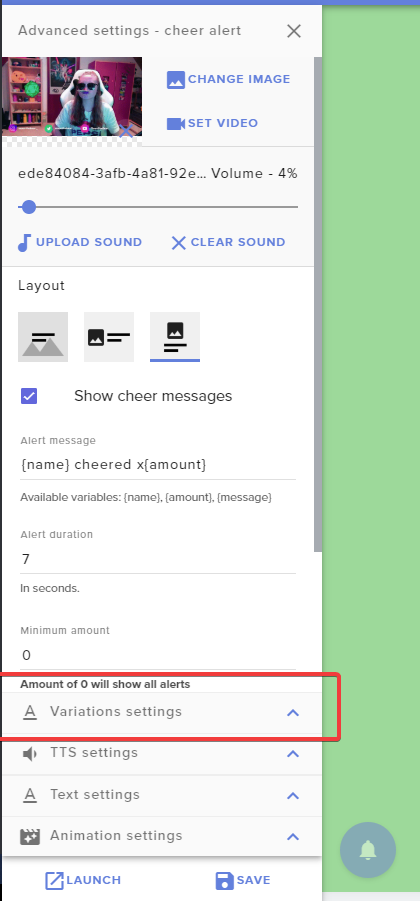 lament blade
oh, ok
its like that
i dont know exactly what i need to change so my text settings take format
twin sentinel
Change the default alert and the variation settings to your liking.
 wispy rune
Just wondering if you can set media request to subs and donors only!
twin sentinel
You can set a minimum user level for the mediarequest and activate so that tis level and donators can request media.
 civic agate
I have two questions:
- Is there anywhere to set the duration of store items? I put videos in there and want them longer than 5 seconds
- Did bot renaming get removed from Ground Control? it's not appearing anymore
Thanks!
twin sentinel
@civic agate There is no way to make store items loop.
The custom bot name is only available via OBS.Live at this time.
civic agate
where in obs.live is it?
twin sentinel
wispy rune
Thanks!
civic agate
Thanks!
i actually just want to set a custom length for a store item. is that not possible?
twin sentinel
If I remember correctly the length is determined by the video length.
wispy rune
One more question, how do I start the media request queue as an editor?
twin sentinel
You should be able to hit play in the mediarequest section.
wispy rune
I don’t see that?
Hang on
Ye I don’t see it
I’m in the dashboard for the media request
is it that the owner of the channel has to activate the playlist?
wispy rune
That’s where I am
I’m an editor on someone else’s channel and trying to start the playlist. Can I do it or no?
For the media request.
Nvm I don’t think I can
 harsh sluice
Hey so, saw that SE.pay was showing for me so tried to get it hooked up. It asked me to deactivate G2A Pay so i did. Turns out its still not available for me in Canada! and now
I can't even reactivate G2Pay..Please hide SE.pay for me until its actually available for my country. I can't use PayPal and don't see the option for G2A Pay anymore?
 fierce bear
Hey, my event list seems to be stuck on hosts/raids from months ago - is there a way to fix this? i'd prefer if it always just showed the 3 latest events
round brambleBOT
@fierce bear Right click on the BrowserSource > Properties > Scroll down a bit > Refresh Cache of current page
 stray matrix
So I have .81 upload speed. Cant get internet to upgrade til april. Trying out different settings to not drop frames and have no lag. Can anyone help?
fierce bear
doesn't work
looking at nerdordie it seems they've actually updated the overlays to have streamelements specific versions, maybe those work fine. edit: actually idk, redownloaded everything but there's nothing new. i'll try contacting them
round brambleBOT
@stray matrix Please provide a log from your last stream. To do this, in OBS go to Help > Log Files > Upload Last Log File and paste the link to the log file here.
stray matrix
 glacial widget
I'm testing out alerts and trying to make sure they display all (reasonable) text and names properly, but for longer messages it just overlaps the text instead of starting a new line - how do i go about fixing this?
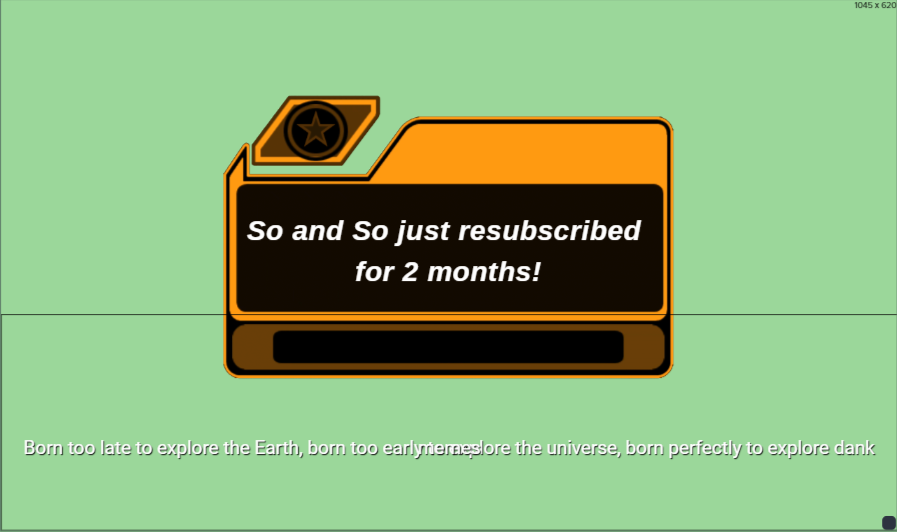
this is one of the premade test messages SE uses btw
 topaz pollen
hi im new to this app and im trying to set up so i can stream with it. it says i dont have any video output so it would be a blank screen how do i change it to make it to where it shows my game ?
round brambleBOT
@topaz pollen New to Stream Elements?
Check out our YouTube channel https://www.youtube.com/c/streamelements/videos
with tutorial videos from setting up the basics, to in depth details on how to use our product.
New to OBS? Here is a 4 step quickstart guide
https://obsproject.com/wiki/OBS-Studio-Quickstart
Want to learn even more? Here is an in-depth overview
https://obsproject.com/wiki/OBS-Studio-Overview
 hallow gorge
hello guys, i am using stream elements from some time now but until today i never needed this option, I am trying to merge all the labels for recent subscriber/follower/donation etc in just one place on the screen and have the text rotate, anyone can guide me how to do that ? hope i explained it correctly English is not my first language
abstract hemlock
@hallow gorge something like this :
https://discordapp.com/channels/141203863863558144/457957557470887947/618446259828686858
hallow gorge
yes yes @abstract hemlock Thank you !
 young solar
My alerts box isn't working, is this true for anyone else?
abstract hemlock
have you check the browser source? do you hear the alerts? if so please check the size of the browser source, should be 1920*1080
young solar
b rowser souirce noit working as well
dry hare
Can you verify if browser hardware acceleration is enabled or disabled?
round brambleBOT
@young solar Right click on the BrowserSource > Properties > Scroll down a bit > Refresh Cache of current page
glacial widget
when i set up alerts for tier 2 and 3 subs it says "_____ subscribed for 2000 months" for tier 2 and 3000 months for tier 3?
 hybrid fern
I'm trying to use my media request overlay in my broadcasting software as a browser source but I keep getting the message "no active media share widget detected" even though I'm not trying to use it as a widget but as an overlay and browser source
glacial widget
you have to have the widget in the overlay you are using
 errant island
So I know the last time this was answered was in March/2018 about renaming the StreamElements bot - has that idea been scrapped?
glacial widget
you can't NOT use it as an overlay
hybrid fern
@glacial widget it is in the overlay
hybrid fern
I haven't edited the overlay in 10 months and it used to work last time I streamed a month or so ago
glacial widget
@errant island that is in OBS.Live
 full elk
@young solar Did you find a fix? I'm having the same issue with alerts not working.
abstract hemlock
Which version of OBS have you install?
 rocky quest
I’m having the same issue right now with alerts not working
errant island
Thank you @glacial widget . Guess I"m out of luck since I strictly use XSplit 😦
full elk
Must be an issue on their end.
abstract hemlock
@young solar try to log out and log in again
 onyx basin
My alerts also stopped work randomly about half way through the stream, even emulated alerts dont work if I have them set to show emulated alerts on stream, if I emulate in browser they work. but actual alerts also dont work in browser (they show up in ground control though)
glacial widget
@errant island you might be able to set it up with OBS.Live offline and then just switch back to XSplit? I don't know if you have to have OBS.Live running for it to stay changed
errant island
Not a bad idea. I'll test it out @glacial widget - I appreciate the tip!
glacial widget
@errant island no problem! let me know if it works 🙂
errant island
Will do!
full ridge
Im getting a lot of dropped frames how do i fix that
rocky quest
Does anybody know why alerts are down right now on the website
onyx basin
@full ridge open obs as admin usually does a lot to help that
glacial widget
@full ridge are you using obs? try running it as admin if you aren't already
 quaint rivet
Decided to try out Streamelements tonight because they allow custom fonts in the alert widget. Was wondering why I couldn't test successfully, seems a bunch of people are having trouble here. Hope I didn't break it 😢
abstract hemlock
@hybrid fern its becausae you dont have the widget "Media Request" on that overlay
Maybe try with OBSStudio
full ridge
Im still getting a lot of dropped frames even after i opened obs.live as admin
 stray estuary
can anyone tell me how to rename the chat bot?
round brambleBOT
@stray estuary Custom bot name requirements
- StreamElements bot modded and in chat
- Active overlay with alerts
- StreamElements tipping page in the panels below the stream (!panels)
- OBS.Live or Ground Control open
- Create a twitch account for the name you want to use or run the bot under your own name
- Custom bot name doesn't work on Mac
 lavish sail
Hello! When I emulate, or receive a follower, or any sort of event. It does not show up on stream or in the editor. Help!
glacial widget
@hybrid fern have you tried relaunching the widget, and making sure "show on stream" is selected?
 rose edge
Wait, so is media request not working for everyone too?
full elk
@lavish sail Seems to be happening to a lot of us tonight. No solution so far.
hybrid fern
@abstract hemlock
abstract hemlock
All of you guys are using SLOBS?
glacial widget
i streamed yesterday and it was working
abstract hemlock
anyone with the problem with OBS? or OBS.live?
hybrid fern
yes @glacial widget several times and I have refreshed my browser
I havent tried closing and reopening SLOBS
glacial widget
do you have OBS.Live and Ground Control?
full elk
Yes, SLOBS.
hybrid fern
@abstract hemlock isnt that the media request widget?
rose edge
I was streaming last night too and it was working just fine but now it doesn’t work for some odd reason
onyx basin
I use OBS, doesnt work either
quaint rivet
I'm using OBS with the Streamelements plugin
hybrid fern
@glacial widget is that the widget in my overlay that I circled?
onyx basin
it worked about 2 hours ago, I got an alert, then it didnt work about an hour ago
abstract hemlock
For the guys with SLOBS please try with OBS Studio
glacial widget
@hybrid fern yeah you should be good
stray estuary
SLOBS was too glitchy for me
hybrid fern
ok thanks for help
abstract hemlock
and the guuys with OBS.live getting any error please give me the version of the OBS
hybrid fern
I had this problem last week too
 lean quiver
Any ideas as to why the Media Request player now plays only the Streamelements - It's Better promo instead of my backup playlist??
lament blade
Is anyone having issues with the alert widget not working?
glacial widget
Is there a reason you all want to use SLOBS over OBS.Live, or have you been using it since before you used StreamElements and just not bothered with it?
young solar
everyone 😄
quaint rivet
@lament blade yes
lament blade
okay so its not just me
lean quiver
@lament blade Yes
stray estuary
@lament blade yup
glacial widget
I'm not sure if SLOBS could be the problem, but switching to OBS.Live and Ground Control might somehowe solve possbile problems, who knows
lean quiver
@lament blade Also Media Request is jacked up too
lament blade
mine works but it takes a few restarts of obs
abstract hemlock
please check the version that you have installed, so i can check
hybrid fern
@glacial widget I prefer some of the streamlabs widgets to their streamelements analogs
abstract hemlock
maybe some of you have the OBS 25 already installed?
glacial widget
I've been working on alerts the past few hours just on the website and have had no problems, was it acting up on OBS's end of in the website as well?
lofty leaf
this is happening, I know these people, and for some reason my alerts won't trigger for anything right now, unless I uncheck "Emulate on Stream" These folks followed me ages ago and some just 10 minutes ago, yet it states 5 hours lol
glacial widget
@hybrid fern ahh i gotcha
abstract hemlock
@lofty leaf the refollow is a known issue
errant island
So for the custom bot name you must be using OBS.Live. It doesn't work with Ground Control which is a bummer since I strictly use XSplit.
abstract hemlock
@errant island yes for custom bot name is only obs.live atm
lament blade
do we have an eta on how long those alerts will be down?
glacial widget
checked my obs.live and ground control and don't have the follow/alert issues, but it haven't had an alert in a week or so
lofty leaf
alerts are down right now?
errant island
The Support AI bot message has an "-or-" separator - it should probably be changed.
- OBS.Live or Ground Control open
lean quiver
Alerts dont work on the website or in OBS.Live for me
abstract hemlock
yes, but atm new users have to do it on Obs.live
 night pulsar
Hello there,my alerts arent showing on my stream nor my streamelements overlay editor
abstract hemlock
@lean quiver which version on OBS do you have installed?
lean quiver
@abstract hemlock 24.0.3
abstract hemlock
@lament blade and which version of Obs.live?
lament blade
see im lauching via obs not obs.live
woudl that make a difference?
im not with obs live
 ruby topaz
My alerts aren't showing up when someone follows or I rerun them
lament blade
but ill try with him
lofty leaf
20.2.17.565 is my version, alerts are down
ruby topaz
Oh alerts are down?
lofty leaf
is there something I can do to fix it?
lament blade
i don't think so...i think its down for everyone
abstract hemlock
The devs are checking it right now
lament blade
k
abstract hemlock
is working on the web editor?
lofty leaf
gg
lament blade
cool
nope not in the web editor
yeaa, with the function of showing on obs deactivated it shows
so I would guess its server side issue
glacial widget
mine work when emulating/testing them
lean quiver
@abstract hemlock Not working on web editor for me
rocky quest
💩
glacial widget
okay nevermind, with showing emulated alerts on stream it doesn't work - had it deselected
night pulsar
same
glacial widget
it's probably a server issue
lament blade
exac
glacial widget
somewhere between the connection between SE and OBS.Live
lofty leaf
emulated unchecked seems to work in the editor only
abstract hemlock
Please @lament blade can you test that? emulated unchecked seems to work in the editor only ?
night pulsar
same
abstract hemlock
ok, our devs are checking this rn
lament blade
does anyone know how can i remove this movement to the side in my top donation... its going like it will show more but theres only one reference
i wanted the label to stay still
glacial widget
thank you @abstract hemlock 🙂
 odd escarp
Hi, Song Request widget is not showing on stream. When I click "show on stream" it says there are no available widgets... although I have placed a Song Request widget. Is there an issue with this?
dry hare
@lament blade disable scrolling in the widget settings.
@odd escarp refresh the browser source
 hexed violet
my alerts aren't working and i'm live right now pls help
hybrid fern
Is media request functionality with SLOBS going to be looked into as well?
hexed violet
yeah i scrolled up and realized it wasn't just me D:
abstract hemlock
Our devs are looking into this.
lament blade
@dry hare thank you sir
 late pagoda
is media request having issue atm?
odd escarp
I'm having an issue with media request as well
lament blade
@dry hare one more thing, how can i change my recent donation for like a top donation, just by changing this widget without having to create a new one, positioning etc..?
cause in my top donation i have a setting that is: no data text, i wanted that on my recent donation
i tried to do on data panel but i think the server is not syncing
abstract hemlock
Hi everyone, there's an issue with twitch websocket at the moment. Our engineers are working on it with twitch. Hang tight
All alerts should appear once the connection is reestablished and you should be able to replay any alerts that occurred during the downtime.
lament blade
and what change i have to do on the data panel specifically, if u could guide me
 crimson breach
Hello im having a issue will media request. it wont play any of the back up music
abstract hemlock
 mystic crater
anyone know if SE is screwing up? My Media request and my alerts are not working
crimson breach
@abstract hemlock i understand that. but does this include my music situation? my !sr works.
abstract hemlock
our dev team are looking into that
mystic crater
so i take it streamelements is screwed up?
dry hare
@lament blade I think once the websocket connection comes back up on Twitch’s end it should populate
lament blade
oh ok. tyy
 balmy pilot
hey im unable to change the font family for text in the overlay editor on streamelements.com editor
dry hare
Are you using chrome?
balmy pilot
im using brave and the font family selection is greyed out
dry hare
Try using chrome
balmy pilot
thanks it wasent the browser its just i had my view zoomed in on it
dry hare
👍
 river wren
Hey! I am having trouble with a command , it says it already exists?? but i cannot find an existing one in my list of commands.
any help would be appreciated
zenith widget
Name of command?
river wren
!merch
zenith widget
river wren
oh my goodness lol , thank you so much! facepalm
zenith widget
sure 👍
 distant swan
Hello. Where can I modify the Chatbot name?
round brambleBOT
@distant swan Custom bot name requirements
- StreamElements bot modded and in chat
- Active overlay with alerts
- StreamElements tipping page in the panels below the stream (!panels)
- OBS.Live or Ground Control open
- Create a twitch account for the name you want to use or run the bot under your own name
- Custom bot name doesn't work on Mac
zenith widget
Just note that currently only OBS.Live has the rename function working fully
zenith widget
distant swan
I feel dumb... Thank you. The one spot I did not scrol down too. @zenith widget
lament blade
keizar how can i make my widget of recent donation have a text if theres no reference?
i mean, i wanted this on my recent donation
but theres no option for it..
just in my top donation widget
zenith widget
Im not sure I fully understand the issue here
lament blade
i just wanted some name even if i dont have a recent donation
got it?
on the top donation i have the option to put a text
but in the new/recent donation, dont
i typed mukarillo*
i wanted this on the < widget
this option of no data text
recent donos is like that
zenith widget
"Latest Tipper"
lament blade
but theres a way to do without having to create another, positioning etc?
just changing the type of the widget?
do u have access to my overlays?
zenith widget
 sonic juniper
Hey everyone. I'm wondering that as soon as i activate the Countdown in the Streamelements Extension it will always be the default panel for me, even if loyalty points or chat stats are selected instead. Am i doing something wrong?
zenith widget
It defaults to the countdown until you go live
sonic juniper
Ah okay, i can live with that. 🙂 Thank you @zenith widget. And i am very happy right now, that i can finally use Chat Stats with my account after years. Not sure if you or Twitch changed something that fixed my account as well, but thanks. 🙂
Is there a way to reset Chat Stats like there is with the Current Leadboard? Now that Chat Stats are working for me i was thinking if i would reset both of them to start that "new era".
zenith widget
we can reset it for you
sonic juniper
I think i would like to do that then. 🙂 Can you help me with this?
zenith widget
done
 wispy epoch
sonic juniper
wispy epoch
sonic juniper
Thank you very much. One last thing, since i am a bit paranoid now that it may broke again. 😄 The chat stats only work when the stream is live or do they get data while offline?
wispy epoch
2 days a go @zenith widget
round brambleBOT
@wispy epoch 10 minutes of watchtime are given to those in chat when the loyalty points are handed out (every 10 minutes). Therefore, loyalty must be enabled for watchtime to work properly.
There is no direct link between watchtime and all-time points.
It can’t be calculated from the amount of all-time points a user has because subs may earn points at a faster rate and !bonus all command increases all-time points for users in chat at that time.
Giving points to a single user does NOT affect all-time, only when giving to all in chat.
zenith widget
@sonic juniper They gather data when live and not live
sonic juniper
Ok, then i can test it. Thank you! ❤️
wispy epoch
loyalty points are active for 2 days @zenith widget
zenith widget
part the bot from your channel and join it again
wispy epoch
still writes zero
zenith widget
your points leaderboard is empty
wispy epoch
How should I do ?
round brambleBOT
@wispy epoch Go to the dashboard -> right side -> part channel -> join channel (https://streamelements.com/dashboard)
 livid stirrup
Hi I got a donation which shows in my activity feed but nothing has come through to PayPal. This was about a week and a bit ago please help?
zenith widget
Check your revenue page - you will see where you've received the tip
livid stirrup
Thank you @zenith widget
 dusky lantern
I need help. My alerts are not being shown in OBS Live anymore
round brambleBOT
@dusky lantern The default resolution for StreamElements overlays (theme and custom) is 1920x1080. Please add them in OBS at their full resolution and use CTRL+F to fit to screen if necessary. You can then downscale your stream in OBS settings > Video if you'd like https://i.imgur.com/6bWXxjR.png



 dusky lantern
i have it set this way but it still doesnt get shown
round brambleBOT
@dusky lantern Right click on the BrowserSource > Properties > Scroll down a bit > Refresh Cache of current page
dusky lantern
still doesnt work.. :/
it does show on streamelements website in the overlay editor though but not in OBS live
zenith widget
Did you see that test alert?
dusky lantern
yeah. i think now it started working again haha. now im getting many alerts at the same time